國立臺北護理健康大學 NTUNHS
資料視覺化
Orozco Hsu
2022-04-11 ~ 2022-05-09
1
About me
• Education
• NCU (MIS)、NCCU (CS)
• Work Experience
• Telecom big data Innovation
• AI projects
• Retail marketing technology
• User Group
• TW Spark User Group
• TW Hadoop User Group
• Taiwan Data Engineer Association Director
• Research
• Big Data/ ML/ AIOT/ AI Columnist
2
Tutorial
Content
3
EDA process in ML
資料視覺化分析
作業
環境安裝
Code
• Download code
• https://github.com/orozcohsu/ntunhs_2022_01.git
• Folder
• 20220411_0509_mis_master
4
作業回顧
• 作業解答
5
hw01.ipynb
Environment readiness
• Anaconda on Windows
• pip install openpyxl
• pip install seaborn
• pip install numpy
• pip install scipy
• pip install matplotlib
• pip install missingno
6
7
參考: https://commons.wikimedia.org/wiki/File:Data_visualization_process_v1.png
EDA process
• 當我們拿到資料集,如何進行下一步? EDA 就是第一步
• EDA 有助於我們了解資料樣貌
• 為建模制定假設
• 檢查數據品質,必要時進行處理與清洗
• EDA 有助於事後模型預測
8
EDA is an approach to analyzing datasets to summarize their main characteristics,
often with visual methods (wikipedia)
EDA process
• EDA 進行的步驟
• 檢視資料集
• 檢查資料筆數與欄位型態
• 檢查是否有不合理的空值
• 檢查是否有不合理的重複值
• 針對數值型欄位繪圖 (以單變量、多變量方式進行)
• 針對類別型欄位繪圖
• 若存在時間關係,針對日、月、年維度與頻次繪圖
9
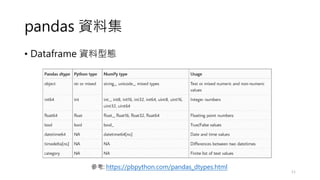
pandas 資料集
10
資料集欄位型態
資料集樣貌 (top5)
pandas 資料集
• Dataframe 資料型態
11
參考: https://pbpython.com/pandas_dtypes.html
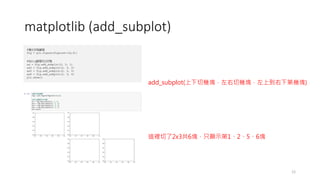
matplotlib (add_subplot)
12
add_subplot(上下切幾塊,左右切幾塊,左上到右下第幾塊)
這裡切了2x3共6塊,只顯示第1、2、5、6塊
練習
13
• 請執行下列程式碼
• 學習 pandas、numpy 基本操作 (資料型態、資料存取)
• 請執行下列程式碼
• 於 train.csv 特別做一些遺缺值資料、重複資料
eda.ipynb
pandas_dtype.ipynb
作業
• 練習 pandas 資料操作
• https://pandas.pydata.org/docs/user_guide/10min.html
14
作業回顧
• 何謂 DataFrame ?
• 何謂 Series ?
• 何謂 Index ? 何謂 Column ?
• 如何將資料引入 DataFrame ?
• 如何過濾條件查詢資料集?
• 如何 join 其他的 DataFrame ?
• 如何進行匯總查詢 ?
• 如何將 DataFrame 儲存 ?
15
hw03.ipynb
Data visualization
• Seaborn 是基於 Python 且非常受歡迎的圖形視覺化分析套件
• 作圖更加方便快捷,即便是初學者,也能通過極簡的代碼,做出
具有分析價值而又十分美觀的圖形
16
Data visualization (relplot)
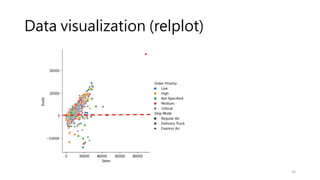
• Visualizing statistical relationships
• Statistical analysis is a process of understanding how variables in a dataset
relate to each other and how those relationships depend on other variables.
• Visualization can be a core component of this process because, when data are
visualized properly, the human visual system can see trends and patterns that
indicate a relationship.
17
參考: https://www.cntofu.com/book/172/docs/10.md
Data visualization (relplot)
18
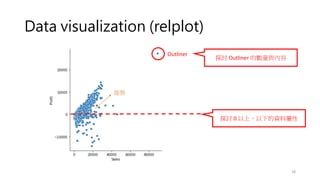
Outliner
探討 0 以上、以下的資料屬性
探討 Outliner 的數量與內容
趨勢
Data visualization (relplot)
19
Data visualization (relplot)
20
Data visualization (relplot)
21
Data visualization (relplot)
22
95% 信賴區間 (正負一個標準差之內)
kind=line
年度銷售平均值
年度銷售中位值
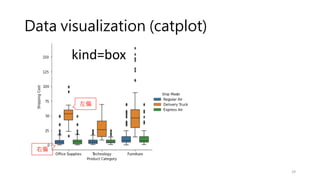
平均數會比中位數大,稱之為「右偏」型態、反之「左偏」
而平均數與中位數越接近時,代表分布越平均
Data visualization (relplot)
23
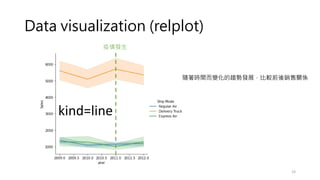
kind=line
疫情發生
隨著時間而變化的趨勢發展,比較前後銷售關係
Data visualization (relplot)
24
kind=line
Data visualization (relplot)
25
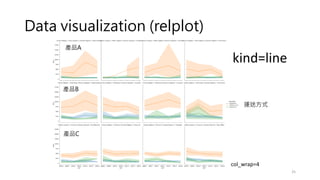
kind=line
col_wrap=4
產品A
產品B
產品C
運送方式
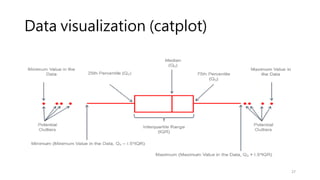
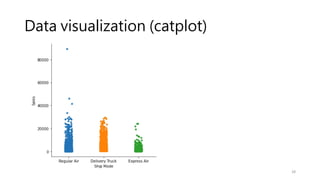
Data visualization (catplot)
• How to use different visual representations to show the relationship
between multiple variables in a dataset.
• We focused on cases where the main relationship was between two
numerical variables. If one of the main variables is categorical
(divided into discrete groups) it may be helpful to use a more
specialized approach to visualization
26
參考: https://www.cntofu.com/book/172/docs/13.md
Data visualization (catplot)
27
Data visualization (catplot)
28
Data visualization (catplot)
29
kind=box
左偏
右偏
Data visualization (catplot)
30
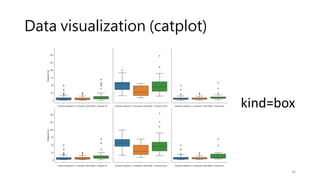
kind=box
Data visualization (catplot)
31
參考: Python 箱型圖/小提琴圖(Box/Violin Plot) - Wayne's Talk (waynestalk.com)
顯示出機率密度
(資料出現的機率)
Data visualization (catplot)
32
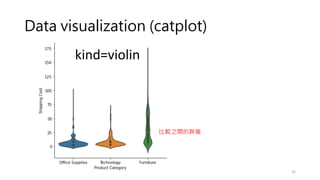
kind=violin
比較之間的胖瘦
Data visualization (catplot)
33
滑鼠指標處,按下Shift+Tab
Data visualization (catplot)
34
kind=bar
Data visualization (catplot)
35
kind=bar
Data visualization (catplot)
36
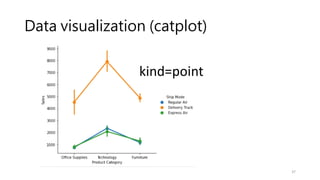
kind=point
Data visualization (catplot)
37
kind=point
Data visualization (displot)
• What range do the observations cover?
• What is their central tendency?
• Are they heavily skewed in one direction?
• Is there evidence for bimodality (雙峰)?
• Are there significant outliers?
38
參考: https://www.cntofu.com/book/172/docs/24.md
Data visualization (distplot)
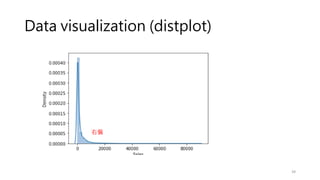
39
右偏
Data visualization (jointplot)
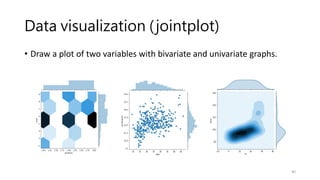
• Draw a plot of two variables with bivariate and univariate graphs.
40
Data visualization (jointplot)
41
數量分布
Data visualization (jointplot)
42
數量分布
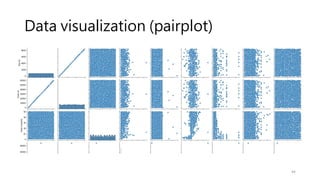
Data visualization (pairplot)
• Plot pairwise relationships in a dataset.
43
參考: https://www.cntofu.com/book/172/docs/23.md
Data visualization (pairplot)
44
Data visualization (pairplot)
45
練習
• 請執行下列程式碼
46
visualization.ipynb
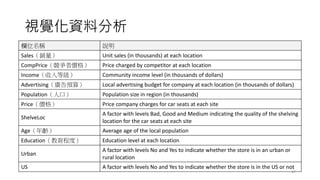
視覺化資料分析
欄位名稱 說明
Sales(銷量) Unit sales (in thousands) at each location
CompPrice(競爭者價格) Price charged by competitor at each location
Income(收入等級) Community income level (in thousands of dollars)
Advertising(廣告預算) Local advertising budget for company at each location (in thousands of dollars)
Population(人口) Population size in region (in thousands)
Price(價格) Price company charges for car seats at each site
ShelveLoc
A factor with levels Bad, Good and Medium indicating the quality of the shelving
location for the car seats at each site
Age(年齡) Average age of the local population
Education(教育程度) Education level at each location
Urban
A factor with levels No and Yes to indicate whether the store is in an urban or
rural location
US A factor with levels No and Yes to indicate whether the store is in the US or not
47
視覺化資料分析
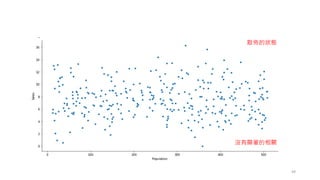
• 通常行銷的最終目標就是促進銷量,所以我們會想知道究竟是什
麼因素可能影響銷量(Sales),藉此達到提升銷量的目的
• 先從基本的人口因素開始比較,市場的大小與人口(Population)
有絕對的相關,以下我們先以視覺化的方式來呈現
48
49
散佈的狀態
沒有顯著的相關
視覺化資料分析
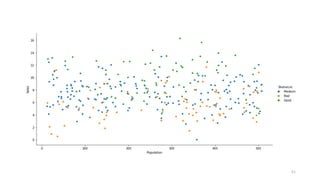
• 加入一個公司可控且有機會影響銷量的因素貨架陳列位置
(ShelveLoc),貨架陳列位置是指公司商品放在通路的擺放位
置的優劣
• 放入貨架陳列位置因素可以清楚地發現,貨架陳列位置的確會影
響銷量, 成功驗證我們的假設
• 這時就可以明確的向老闆建議,銷量不好、但是人口數大的分店,
將行銷預算投資到提升商品於貨架陳列位置
50
51
視覺化資料分析
• 放入變數廣告預算後,可以更精確地看有許多分店, 即便投入大
量行銷預算, 效果也不大
• 找到可以改進銷量不好的分店,而我們可以設定一個條件
• 例如: 選出人口數大於300且銷售量在7.5(千單位)以下,並且有廣告
預算的分店,建議將廣告預算可以 勻撥一些至提升貨架陳列位置,就可
預期會有提升銷售的效益
52
53
練習
• 請執行下列程式碼
54
demo.ipynb
Story telling
• Berkley Advanced media institute workshop
• https://multimedia.journalism.berkeley.edu/workshops/online-data-
visualization-course/?gclid=Cj0KCQjwgYSTBhDKARIsAB8Kuks_9PQM0cWr-
XnWkcUHht7PGMRLLLkS4iNkBvwfoqa_maZ8ZXXJXdMaAg1mEALw_wcB
• A good example for data storytelling
• https://blog.presentation-company.com/data-visualization-vs.-data-
storytelling-whats-the-difference
55

Dashboard or interactive dashboard
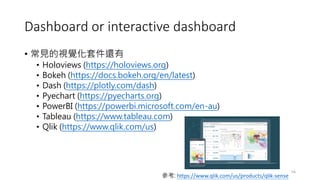
• 常見的視覺化套件還有
• Holoviews (https://holoviews.org)
• Bokeh (https://docs.bokeh.org/en/latest)
• Dash (https://plotly.com/dash)
• Pyechart (https://pyecharts.org)
• PowerBI (https://powerbi.microsoft.com/en-au)
• Tableau (https://www.tableau.com)
• Qlik (https://www.qlik.com/us)
56
參考: https://www.qlik.com/us/products/qlik-sense
作業
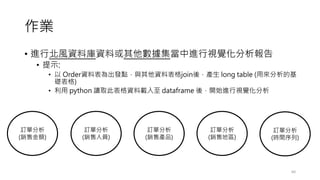
• 進行北風資料庫資料或其他數據集當中進行視覺化分析報告
• 提示:
• 以 Order資料表為出發點,與其他資料表格join後,產生 long table (用來分析的基
礎表格)
• 利用 python 讀取此表格資料載入至 dataframe 後,開始進行視覺化分析
60
訂單分析
(銷售金額)
訂單分析
(銷售人員)
訂單分析
(銷售產品)
訂單分析
(銷售地區)
訂單分析
(時間序列)
作業
• 善用在某一段時間內的平均值、最小值、最大值、標準差進行資
料分析
• 人、貨、場
• https://zi.media/@twpetsearcharlinksnet/post/amyAw7
61

2_學院碩士班_資料視覺化_20220411_0509.pdf