


Supercharging
SQL Users
with Jupyter notebooks
noteable
@noteable_io
@michelleufford
Michelle Ufford
2
Unbreakable Kimmy Schmidt
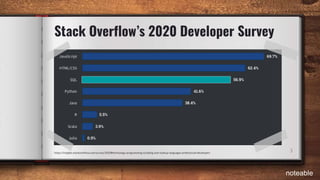
3https://insights.stackoverflow.com/survey/2020#technology-programming-scripting-and-markup-languages-professional-developers
Stack Overflow’s 2020 Developer Survey
noteable
Challenges SQL users face
4
● Connecting
● Security
● Scheduling
Here be dragons
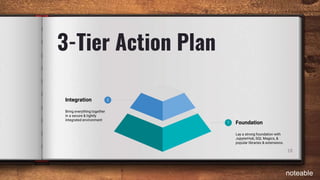
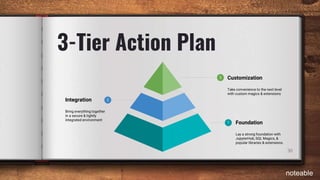
3-Tier Action Plan
5
1 Foundation
Lay a strong foundation with
JupyterHub, SQL Magics, &
popular libraries & extensions.
noteable
6
1.1
JupyterHub
(or integrate with your own hosted computing environment)
noteable
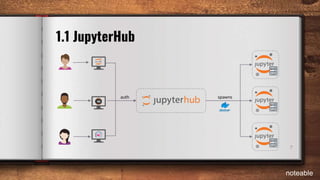
spawns
7
1.1 JupyterHub
auth
noteable
8
1.2
SQL Magics
(it’s quite magical!)
noteable
9
1.2 Connecting without SQL Magics
import prestodb.dbapi as presto
import prestodb
conn = presto.Connection(
host='host.us-east-1',
port=1433,
user='mufford',
http_scheme='https',
auth=prestodb.auth.BasicAuthentication(username, password))
cur = conn.cursor()
cur.execute('SELECT * FROM orders LIMIT 10;')
result = cur.fetchall()
df = pd.DataFrame(sorted(result, key=lambda x: x[2], reverse=True))
display(df)
noteable
10
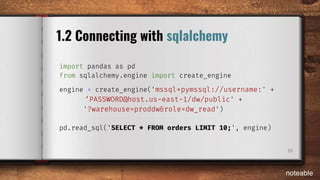
1.2 Connecting with sqlalchemy
import pandas as pd
from sqlalchemy.engine import create_engine
engine = create_engine('mssql+pymssql://username:' +
‘PASSWORD@host.us-east-1/dw/public' +
'?warehouse=proddw&role=dw_read')
pd.read_sql('SELECT * FROM orders LIMIT 10;', engine)
noteable
11
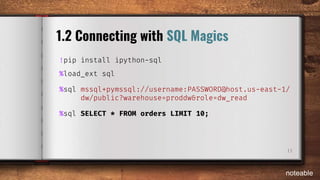
1.2 Connecting with SQL Magics
!pip install ipython-sql
%load_ext sql
%sql mssql+pymssql://username:PASSWORD@host.us-east-1/
dw/public?warehouse=proddw&role=dw_read
%sql SELECT * FROM orders LIMIT 10;
noteable
1.3
Libraries
(the easiest way to become a hero)
12
noteable
13
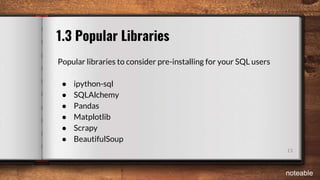
1.3 Popular Libraries
Popular libraries to consider pre-installing for your SQL users
● ipython-sql
● SQLAlchemy
● Pandas
● Matplotlib
● Scrapy
● BeautifulSoup
noteable
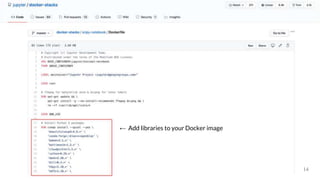
← Add libraries to your Docker image
14
15
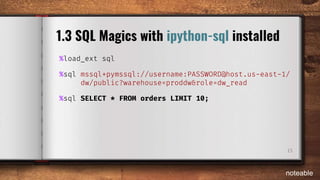
1.3 SQL Magics with ipython-sql installed
%load_ext sql
%sql mssql+pymssql://username:PASSWORD@host.us-east-1/
dw/public?warehouse=proddw&role=dw_read
%sql SELECT * FROM orders LIMIT 10;
noteable
16
1.4
Extensions
(Excite your users with expedient extensions)
noteable
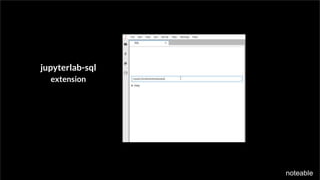
1.4 Useful Extensions
jupyterlab-sql
extension
noteable
3-Tier Action Plan
18
1
2
Foundation
Lay a strong foundation with
JupyterHub, SQL Magics, &
popular libraries & extensions.
Integration
Bring everything together
in a secure & tightly
integrated environment
noteable
19
2.1
JupyterHub
+ Secure Connections
(because no one wants to end up a cautionary tale)
noteable
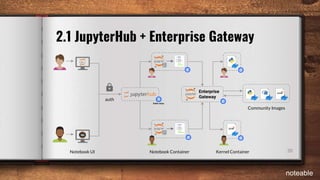
Enterprise
Gateway
20
2.1 JupyterHub + Enterprise Gateway
auth
Community Images
Notebook Container Kernel ContainerNotebook UI
noteable
21
2.2
Environment Variables
(a few simple settings can have a huge impact!)
noteable
22
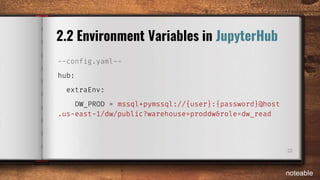
2.2 Environment Variables in JupyterHub
--config.yaml--
hub:
extraEnv:
DW_PROD = mssql+pymssql://{user}:{password}@host
.us-east-1/dw/public?warehouse=proddw&role=dw_read
noteable
23
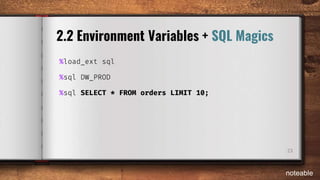
2.2 Environment Variables + SQL Magics
%load_ext sql
%sql DW_PROD
%sql SELECT * FROM orders LIMIT 10;
noteable
24
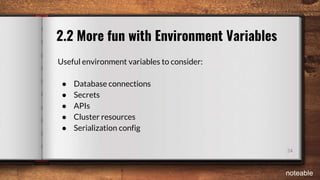
2.2 More fun with Environment Variables
Useful environment variables to consider:
● Database connections
● Secrets
● APIs
● Cluster resources
● Serialization config
noteable
25
2.3
Templates
(simple yet surprisingly powerful)
noteable
26
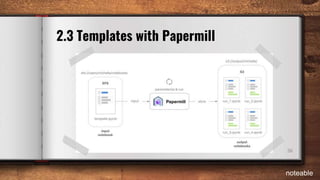
2.3 Templates with Papermill
noteable
27
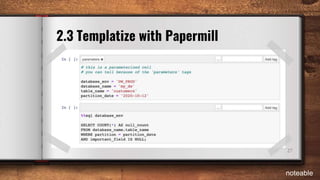
2.3 Templatize with Papermill
noteable
28
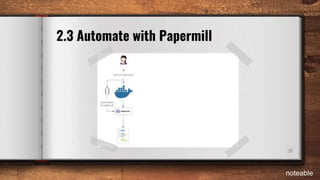
2.3 Automate with Papermill
noteable
29
2.3 More ideas for templatized notebooks
Some of the ways companies are leveraging Jupyter templates:
● Workflow orchestration
● Post-deployment validation
● Integration layer
● Environment configuration
● Training materials
noteable
3
1
2
3-Tier Action Plan
30
Foundation
Lay a strong foundation with
JupyterHub, SQL Magics, &
popular libraries & extensions.
Customization
Take convenience to the next level
with custom magics & extensions
Integration
Bring everything together
in a secure & tightly
integrated environment
noteable
31
3.1
Custom SQL Magics
(make your own magic!)
noteable
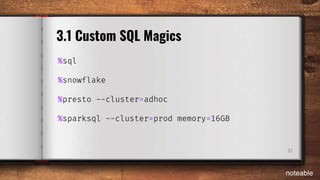
%sql
%snowflake
%presto --cluster=adhoc
%sparksql --cluster=prod memory=16GB
32
3.1 Custom SQL Magics
noteable
33
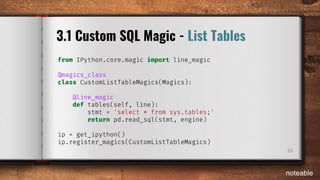
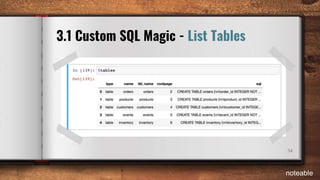
3.1 Custom SQL Magic - List Tables
from IPython.core.magic import line_magic
@magics_class
class CustomListTableMagics(Magics):
@line_magic
def tables(self, line):
stmt = 'select * from sys.tables;'
return pd.read_sql(stmt, engine)
ip = get_ipython()
ip.register_magics(CustomListTableMagics)
noteable
34
3.1 Custom SQL Magic - List Tables
noteable
35
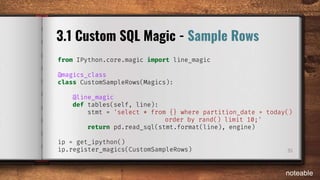
3.1 Custom SQL Magic - Sample Rows
from IPython.core.magic import line_magic
@magics_class
class CustomSampleRows(Magics):
@line_magic
def tables(self, line):
stmt = 'select * from {} where partition_date = today()
order by rand() limit 10;'
return pd.read_sql(stmt.format(line), engine)
ip = get_ipython()
ip.register_magics(CustomSampleRows)
noteable
36
3.2
Custom UI
(99 UI problems but customizing makes it 100)
noteable
37
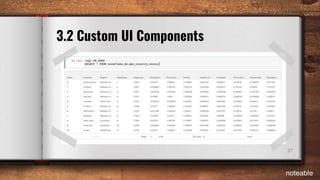
3.2 Custom UI Components
noteable
38
3.2 Custom UI Components
Useful component libraries to get you started:
● nteract
● BlueprintJS
● … or write your own :)
noteable
39
3.3 Other ideas for customization
Depending on your environment & users, you might consider:
● custom kernels
● advanced magics
● complex extensions
● deep integrations
● autocomplete & linting
noteable
Join the Noteable Insiders
Become a Noteable Insider at noteable.io/insider-program
Michelle Ufford
CEO
Elijah Meeks
Chief Visualization Officer
Matthew Seal
Chief Technology Officer
Carol Willing
Lead Technical Evangelist
Help us create a better SQL experience! 🙂
Meet the Noteable team
noteableSlides available at noteable.io/jupytercon
1.1 Resources
41
1.1 Set up JupyterHub (or a similar multi-user hosted environment)
● JupyterHub
● JupyterHub docs
● The Littlest JupyterHub
● Zero to JupyterHub with Kubernetes
● JupyterLab and JupyterHub - Perfect Together | Carol Willing @ PyBay2018
● Configuring user environments — JupyterHub 1.1.0 documentation
noteable
1.2 Resources
42
1.2 Add support for SQL Magics to your base Docker image
● ipython-sql
● SQL Magic with ipython-sql
● Jupyter Magics with SQL
● Make Jupyter/IPython Notebook even more magical with cell magic extensions!
● SQL Interface within JupyterLab
noteable
1.3 Resources
43
1.3 - Pre-install popular libraries in your Jupyter environment
● Jupyter Docker Stacks
● JupyterHub - Configuring user environments
● ipython-sql
● SQLAlchemy
● Awesome Python’s Curated List of Awesome Frameworks
● Python Library: The 21 Best Libraries for Python Programmers
noteable
1.4 Resources
44
1.4 - Install useful extensions for your users
● JupyterLab-SQL
● The Littlest JupyterHub - Enabling Jupyter Notebook extensions
● Adding Jupyter Notebook Extensions to a Docker Image
● Distributing Jupyter Extensions as Python Packages
● Unofficial Jupyter Notebook Extensions
● jupyterlab-extension public repos on GitHub
● The Top 47 Jupyterlab Extension Open Source Projects
● PyData Austin 2019: Customizing JupyterLab using extensions
noteable
2.1 Resources
45
2.1 Secure connections in your JupyterHub with Enterprise Gateway
● Jupyter Enterprise Gateway on GitHub
● Jupyter Enterprise Gateway
● Jupyter Enterprise Gateway - Security Features
● Strata - Scaling Jupyter with Jupyter Enterprise Gateway
● Building analytical microservices powered by Jupyter Kernels - Luciano Resende & Kevin Bates
noteable
2.2 Resources
46
2.2 Simplify life with simple environment variables
● Zero to JupyterHub - Set Environment Variables
● How to Use Jupyter Notebooks with Apache Spark - Setting Jupyter env variables
● Example - jupyter / docker-stacks / pyspark-notebook on GitHub
● Configuring user environments — JupyterHub 1.1.0 documentation
noteable
2.3 Resources
47
2.3 Automate workflows & integrate systems using Papermill templates
● Papermill on GitHub
● Papermill docs
● Beyond Interactive: Notebook Innovation at Netflix
● Beyond Interactive, Part 2: Scheduling Notebooks at Netflix
● Introduction to Papermill
● Data Council - Notebooks as Functions with Papermill | Netflix
● Reusable Execution in Production Using Papermill (Google Cloud AI Huddle)
noteable
3.1 Resources
48
3.1 Create a magical experience for SQL users with custom SQL Magics
● Creating Custom Magic Commands in Jupyter
● Creating an IPython extension with custom magic commands
● SparkMagic
● Presto Magic
noteable
3.2 Resources
49
3.2 Take convenience to the next level with custom UI components
● nteract
● nteract on GitHub
● nteract component docs
● BlueprintJS
● Using JupyterLab components
● A very simple demo of interactive controls on Jupyter notebook
noteable
3.3 Resources
50
3.3 Create a custom Jupyter experience tailored to your company/organization
● JupyterLab - Common Extension Points
● JupyterLab Extension Developer Guide
● How to Write a Jupyter Notebook Extension
● Example IPython magic functions for Pyspark
● Making kernels for Jupyter
noteable

JupyterCon 2020 - Supercharging SQL Users with Jupyter Notebooks

  • 1.
    Supercharging SQL Users with Jupyternotebooks noteable @noteable_io @michelleufford Michelle Ufford
  • 2.
  • 3.
  • 4.
    Challenges SQL usersface 4 ● Connecting ● Security ● Scheduling Here be dragons
  • 5.
    3-Tier Action Plan 5 1Foundation Lay a strong foundation with JupyterHub, SQL Magics, & popular libraries & extensions. noteable
  • 6.
    6 1.1 JupyterHub (or integrate withyour own hosted computing environment) noteable
  • 7.
  • 8.
  • 9.
    9 1.2 Connecting withoutSQL Magics import prestodb.dbapi as presto import prestodb conn = presto.Connection( host='host.us-east-1', port=1433, user='mufford', http_scheme='https', auth=prestodb.auth.BasicAuthentication(username, password)) cur = conn.cursor() cur.execute('SELECT * FROM orders LIMIT 10;') result = cur.fetchall() df = pd.DataFrame(sorted(result, key=lambda x: x[2], reverse=True)) display(df) noteable
  • 10.
    10 1.2 Connecting withsqlalchemy import pandas as pd from sqlalchemy.engine import create_engine engine = create_engine('mssql+pymssql://username:' + ‘PASSWORD@host.us-east-1/dw/public' + '?warehouse=proddw&role=dw_read') pd.read_sql('SELECT * FROM orders LIMIT 10;', engine) noteable
  • 11.
    11 1.2 Connecting withSQL Magics !pip install ipython-sql %load_ext sql %sql mssql+pymssql://username:PASSWORD@host.us-east-1/ dw/public?warehouse=proddw&role=dw_read %sql SELECT * FROM orders LIMIT 10; noteable
  • 12.
    1.3 Libraries (the easiest wayto become a hero) 12 noteable
  • 13.
    13 1.3 Popular Libraries Popularlibraries to consider pre-installing for your SQL users ● ipython-sql ● SQLAlchemy ● Pandas ● Matplotlib ● Scrapy ● BeautifulSoup noteable
  • 14.
    ← Add librariesto your Docker image 14
  • 15.
    15 1.3 SQL Magicswith ipython-sql installed %load_ext sql %sql mssql+pymssql://username:PASSWORD@host.us-east-1/ dw/public?warehouse=proddw&role=dw_read %sql SELECT * FROM orders LIMIT 10; noteable
  • 16.
    16 1.4 Extensions (Excite your userswith expedient extensions) noteable
  • 17.
  • 18.
    3-Tier Action Plan 18 1 2 Foundation Laya strong foundation with JupyterHub, SQL Magics, & popular libraries & extensions. Integration Bring everything together in a secure & tightly integrated environment noteable
  • 19.
    19 2.1 JupyterHub + Secure Connections (becauseno one wants to end up a cautionary tale) noteable
  • 20.
    Enterprise Gateway 20 2.1 JupyterHub +Enterprise Gateway auth Community Images Notebook Container Kernel ContainerNotebook UI noteable
  • 21.
    21 2.2 Environment Variables (a fewsimple settings can have a huge impact!) noteable
  • 22.
    22 2.2 Environment Variablesin JupyterHub --config.yaml-- hub: extraEnv: DW_PROD = mssql+pymssql://{user}:{password}@host .us-east-1/dw/public?warehouse=proddw&role=dw_read noteable
  • 23.
    23 2.2 Environment Variables+ SQL Magics %load_ext sql %sql DW_PROD %sql SELECT * FROM orders LIMIT 10; noteable
  • 24.
    24 2.2 More funwith Environment Variables Useful environment variables to consider: ● Database connections ● Secrets ● APIs ● Cluster resources ● Serialization config noteable
  • 25.
  • 26.
    26 2.3 Templates withPapermill noteable
  • 27.
    27 2.3 Templatize withPapermill noteable
  • 28.
    28 2.3 Automate withPapermill noteable
  • 29.
    29 2.3 More ideasfor templatized notebooks Some of the ways companies are leveraging Jupyter templates: ● Workflow orchestration ● Post-deployment validation ● Integration layer ● Environment configuration ● Training materials noteable
  • 30.
    3 1 2 3-Tier Action Plan 30 Foundation Laya strong foundation with JupyterHub, SQL Magics, & popular libraries & extensions. Customization Take convenience to the next level with custom magics & extensions Integration Bring everything together in a secure & tightly integrated environment noteable
  • 31.
    31 3.1 Custom SQL Magics (makeyour own magic!) noteable
  • 32.
    %sql %snowflake %presto --cluster=adhoc %sparksql --cluster=prodmemory=16GB 32 3.1 Custom SQL Magics noteable
  • 33.
    33 3.1 Custom SQLMagic - List Tables from IPython.core.magic import line_magic @magics_class class CustomListTableMagics(Magics): @line_magic def tables(self, line): stmt = 'select * from sys.tables;' return pd.read_sql(stmt, engine) ip = get_ipython() ip.register_magics(CustomListTableMagics) noteable
  • 34.
    34 3.1 Custom SQLMagic - List Tables noteable
  • 35.
    35 3.1 Custom SQLMagic - Sample Rows from IPython.core.magic import line_magic @magics_class class CustomSampleRows(Magics): @line_magic def tables(self, line): stmt = 'select * from {} where partition_date = today() order by rand() limit 10;' return pd.read_sql(stmt.format(line), engine) ip = get_ipython() ip.register_magics(CustomSampleRows) noteable
  • 36.
    36 3.2 Custom UI (99 UIproblems but customizing makes it 100) noteable
  • 37.
    37 3.2 Custom UIComponents noteable
  • 38.
    38 3.2 Custom UIComponents Useful component libraries to get you started: ● nteract ● BlueprintJS ● … or write your own :) noteable
  • 39.
    39 3.3 Other ideasfor customization Depending on your environment & users, you might consider: ● custom kernels ● advanced magics ● complex extensions ● deep integrations ● autocomplete & linting noteable
  • 40.
    Join the NoteableInsiders Become a Noteable Insider at noteable.io/insider-program Michelle Ufford CEO Elijah Meeks Chief Visualization Officer Matthew Seal Chief Technology Officer Carol Willing Lead Technical Evangelist Help us create a better SQL experience! 🙂 Meet the Noteable team noteableSlides available at noteable.io/jupytercon
  • 41.
    1.1 Resources 41 1.1 Setup JupyterHub (or a similar multi-user hosted environment) ● JupyterHub ● JupyterHub docs ● The Littlest JupyterHub ● Zero to JupyterHub with Kubernetes ● JupyterLab and JupyterHub - Perfect Together | Carol Willing @ PyBay2018 ● Configuring user environments — JupyterHub 1.1.0 documentation noteable
  • 42.
    1.2 Resources 42 1.2 Addsupport for SQL Magics to your base Docker image ● ipython-sql ● SQL Magic with ipython-sql ● Jupyter Magics with SQL ● Make Jupyter/IPython Notebook even more magical with cell magic extensions! ● SQL Interface within JupyterLab noteable
  • 43.
    1.3 Resources 43 1.3 -Pre-install popular libraries in your Jupyter environment ● Jupyter Docker Stacks ● JupyterHub - Configuring user environments ● ipython-sql ● SQLAlchemy ● Awesome Python’s Curated List of Awesome Frameworks ● Python Library: The 21 Best Libraries for Python Programmers noteable
  • 44.
    1.4 Resources 44 1.4 -Install useful extensions for your users ● JupyterLab-SQL ● The Littlest JupyterHub - Enabling Jupyter Notebook extensions ● Adding Jupyter Notebook Extensions to a Docker Image ● Distributing Jupyter Extensions as Python Packages ● Unofficial Jupyter Notebook Extensions ● jupyterlab-extension public repos on GitHub ● The Top 47 Jupyterlab Extension Open Source Projects ● PyData Austin 2019: Customizing JupyterLab using extensions noteable
  • 45.
    2.1 Resources 45 2.1 Secureconnections in your JupyterHub with Enterprise Gateway ● Jupyter Enterprise Gateway on GitHub ● Jupyter Enterprise Gateway ● Jupyter Enterprise Gateway - Security Features ● Strata - Scaling Jupyter with Jupyter Enterprise Gateway ● Building analytical microservices powered by Jupyter Kernels - Luciano Resende & Kevin Bates noteable
  • 46.
    2.2 Resources 46 2.2 Simplifylife with simple environment variables ● Zero to JupyterHub - Set Environment Variables ● How to Use Jupyter Notebooks with Apache Spark - Setting Jupyter env variables ● Example - jupyter / docker-stacks / pyspark-notebook on GitHub ● Configuring user environments — JupyterHub 1.1.0 documentation noteable
  • 47.
    2.3 Resources 47 2.3 Automateworkflows & integrate systems using Papermill templates ● Papermill on GitHub ● Papermill docs ● Beyond Interactive: Notebook Innovation at Netflix ● Beyond Interactive, Part 2: Scheduling Notebooks at Netflix ● Introduction to Papermill ● Data Council - Notebooks as Functions with Papermill | Netflix ● Reusable Execution in Production Using Papermill (Google Cloud AI Huddle) noteable
  • 48.
    3.1 Resources 48 3.1 Createa magical experience for SQL users with custom SQL Magics ● Creating Custom Magic Commands in Jupyter ● Creating an IPython extension with custom magic commands ● SparkMagic ● Presto Magic noteable
  • 49.
    3.2 Resources 49 3.2 Takeconvenience to the next level with custom UI components ● nteract ● nteract on GitHub ● nteract component docs ● BlueprintJS ● Using JupyterLab components ● A very simple demo of interactive controls on Jupyter notebook noteable
  • 50.
    3.3 Resources 50 3.3 Createa custom Jupyter experience tailored to your company/organization ● JupyterLab - Common Extension Points ● JupyterLab Extension Developer Guide ● How to Write a Jupyter Notebook Extension ● Example IPython magic functions for Pyspark ● Making kernels for Jupyter noteable

Editor's Notes

  • #22 Since the jupyterhub-singleuser server extends the standard Jupyter notebook server, most configuration and documentation that applies to Jupyter Notebook applies to the single-user environments. Configuration of user environments typically does not occur through JupyterHub itself, but rather through system- wide configuration of Jupyter, which is inherited by jupyterhub-singleuser. Tip: When searching for configuration tips for JupyterHub user environments, try removing JupyterHub from your search because there are a lot more people out there configuring Jupyter than JupyterHub and the configuration is the same.