


Helping Great Organizations Thrive
www.raffa.com P: 202.822.5000 F: 202.822.0669
ERP & ACCOUNTING
SYSTEMS COMPARISON
SEMINAR
September 20, 2018
Page 1
 Mutual Introductions
 Key Considerations for Implementing New Software
 Best Practices for Systems Evaluation
 Software Overviews
• Microsoft Dynamics 365 Business Central
• Sage Intacct
• JAMIS
 Questions
Page 2
 Learning Objectives – Attendees will learn
 Best practices for ERP evaluation and implementation
 Understand the mid-market ERP landscape
 Capabilities of leading ERP software
 NASBA Essentials
 Course Update Date: 8/14/18
 Course Review By: Glenn Anstead
 Course Reviewed Date: 9/12/18
 NASBA Field of Study: Information Technology
Page 3
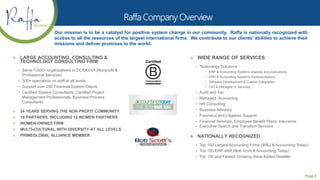
Our mission is to be a catalyst for positive system change in our community. Raffa is nationally recognized with
access to all the resources of the largest international firms. We contribute to our clients’ abilities to achieve their
missions and deliver promises to the world.
 LARGE ACCOUNTING, CONSULTING &
TECHNOLOGY CONSULTING FIRM
• Serve 1,500+ organizations in DC/MD/VA (Nonprofit &
Professional Services)
• 300+ specialists on staff at all levels
• Support over 250 Financial System Clients
• Certified System Consultants, Certified Project
Management Professionals, Business Process
Consultants
 34 YEARS SERVING THE NON PROFIT COMMUNITY
 19 PARTNERS, INCLUDING 12 WOMEN PARTNERS
 WOMEN-OWNED FIRM
 MULTI-CULTURAL WITH DIVERSITY AT ALL LEVELS
 PRIMEGLOBAL ALLIANCE MEMBER
 WIDE RANGE OF SERVICES
• Technology Solutions
• ERP & Accounting Systems analysis and evaluations
• ERP & Accounting Systems implementations
• Software Development & Custom Integration
• CIO & Managed IT Services
• Audit and Tax
• Managed Accounting
• HR Consulting
• Business Advisory
• Forensics and Litigation Support
• Financial Services, Employee Benefit Plans, Insurance
• Executive Search and Transition Services
 NATIONALLY RECOGNIZED
• Top 100 Largest Accounting Firms (WBJ & Accounting Today)
• Top 100 ERP VAR (Bob Scott & Accounting Today)
• Top 100 and Fastest Growing Value Added Reseller
Page 4
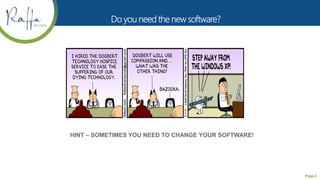
HINT – SOMETIMES YOU NEED TO CHANGE YOUR SOFTWARE!
Page 5
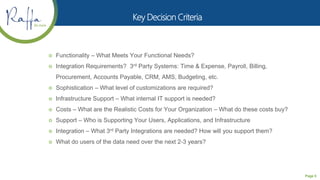
 Functionality – What Meets Your Functional Needs?
 Integration Requirements? 3rd Party Systems: Time & Expense, Payroll, Billing,
Procurement, Accounts Payable, CRM, AMS, Budgeting, etc.
 Sophistication – What level of customizations are required?
 Infrastructure Support – What internal IT support is needed?
 Costs – What are the Realistic Costs for Your Organization – What do these costs buy?
 Support – Who is Supporting Your Users, Applications, and Infrastructure
 Integration – What 3rd Party Integrations are needed? How will you support them?
 What do users of the data need over the next 2-3 years?
Page 6
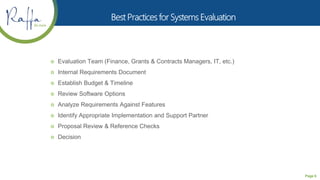
 Evaluation Team (Finance, Grants & Contracts Managers, IT, etc.)
 Internal Requirements Document
 Establish Budget & Timeline
 Review Software Options
 Analyze Requirements Against Features
 Identify Appropriate Implementation and Support Partner
 Proposal Review & Reference Checks
 Decision
Page 7
 Powerful, popular financial system that targets
horizontal & vertical markets
 Web based features
 Strong user productivity features
 Flexible reporting
 Powerful business intelligence
 Industry leader
 Maturity
 Integration with external systems
 Key Features Include
• Personalized Role Pages
• Integrated with Microsoft Office
• Web Solution
• Business Intelligence – Power BI
• Business Process Automation – Enhanced Workflow
• Increased Internal Controls
Page 8
 Powerful, popular financial system that targets
horizontal & vertical markets – SMB
 Mature product with high Microsoft investment
 Powerful user interface with user roles
 Easily integrate with external systems
 Powerful chart of account segmentation
 Industry leader in project accounting
 Professional Services Organizations, Gov’t
Contracting, Grants & Program Management
 Web based capabilities
 Key Features Include
• Integrated with Microsoft Office
• Web access for remote users
• Business Intelligence – Power BI
• Web Requisitions - Front-end to Purchasing Module
• Automates the Procurement Process
• Powerful Project Costing
• Improved Efficiency
• Increased Internal Controls
Page 9
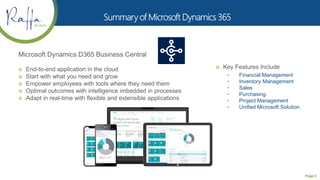
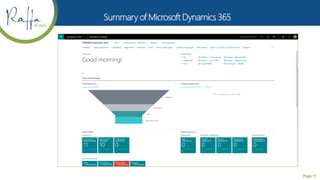
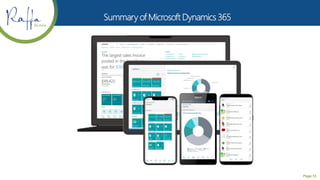
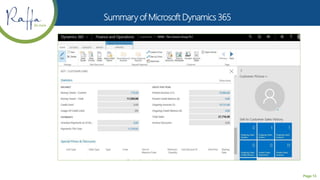
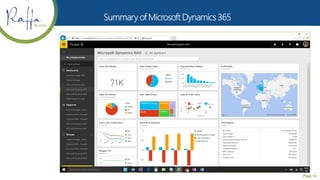
Microsoft Dynamics D365 Business Central
 End-to-end application in the cloud
 Start with what you need and grow
 Empower employees with tools where they need them
 Optimal outcomes with intelligence imbedded in processes
 Adapt in real-time with flexible and extensible applications
 Key Features Include
• Financial Management
• Inventory Management
• Sales
• Purchasing
• Project Management
• Unified Microsoft Solution
Page 10
Page 11
Page 12
Page 13
Page 14
THE BOOKKEEPER
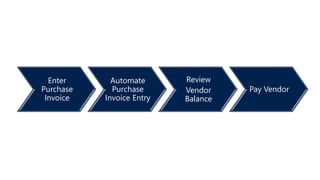
Enter
Purchase
Invoice
Automate
Purchase
Invoice Entry
Review
Vendor
Balance
Pay Vendor
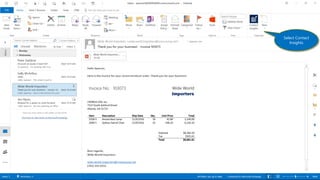
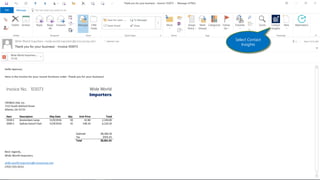
Select Contact
Insights
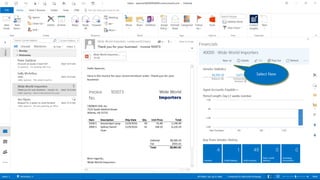
Select New
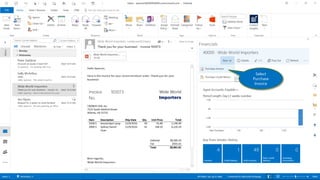
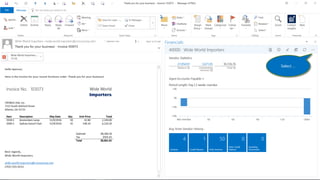
Select
Purchase
Invoice
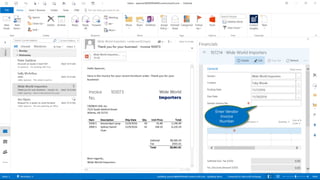
Enter Vendor
Invoice
Number
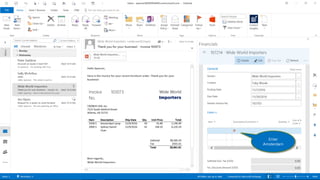
Enter
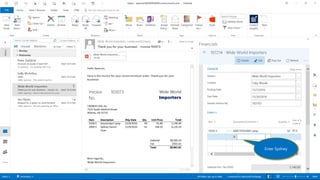
Amsterdam
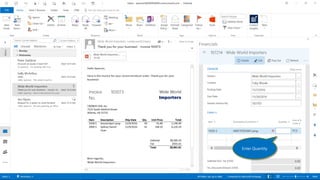
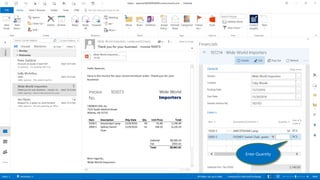
Enter Quantity
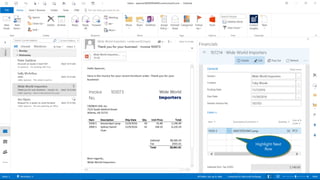
Highlight Next
Row
Enter Sydney
Enter Quantity
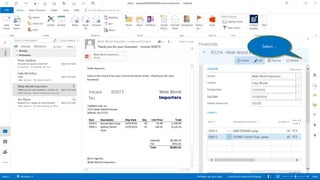
Select …
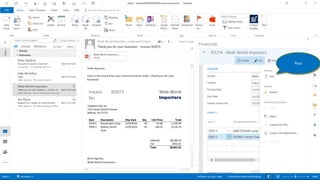
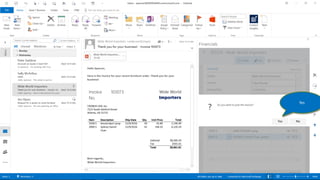
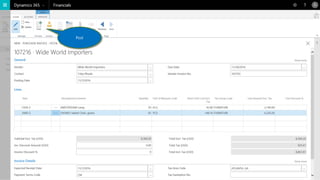
Post
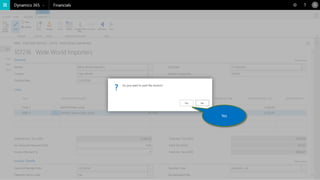
Yes
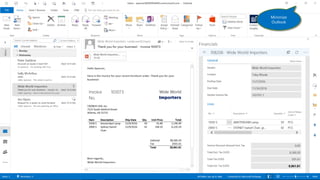
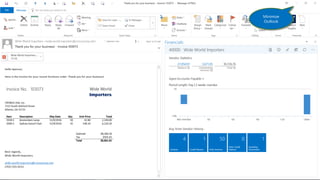
Minimize
Outlook
AUTOMATE THE
PURCHASE INVOICE
ENTRY
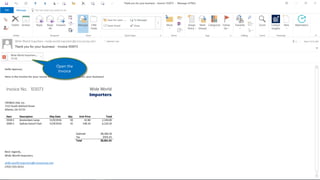
Open the
Invoice
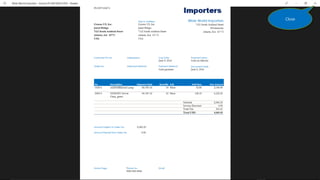
Close
Select Contact
Insights
Select …
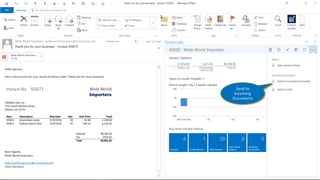
Send to
Incoming
Documents
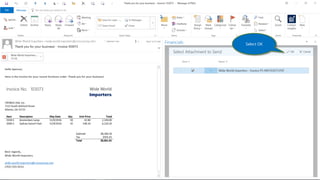
Select OK
Minimize
Outlook
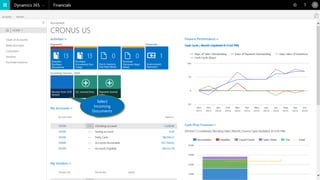
Select
Incoming
Documents
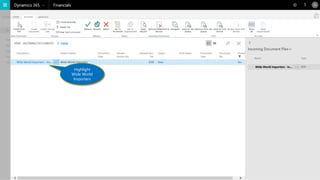
Highlight
Wide World
Importers
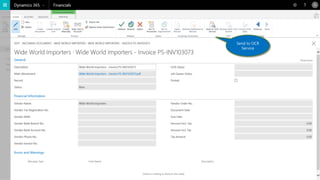
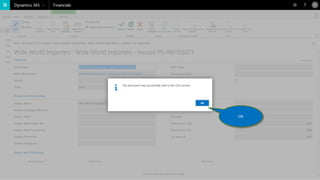
Send to OCR
Service
OK
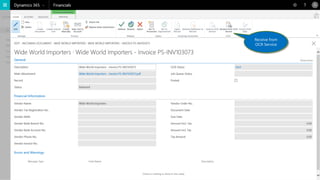
Receive from
OCR Service
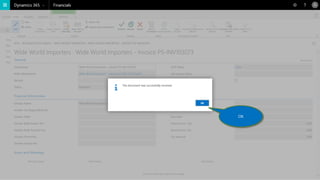
OK
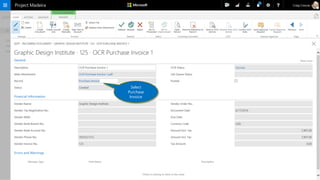
Select
Purchase
Invoice
Page 45
Post
Page 46
Yes
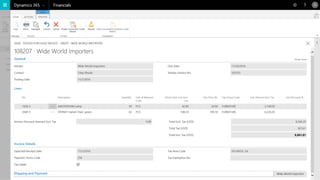
Page 47
REVIEW THE VENDOR
BALANCE
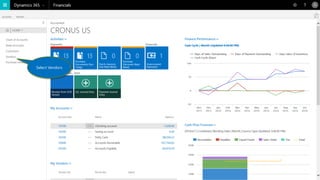
Select Vendors
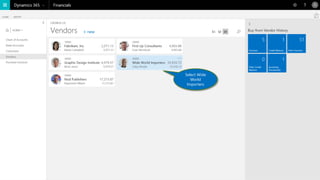
Select Wide
World
Importers
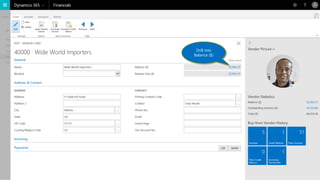
Drill into
Balance ($)
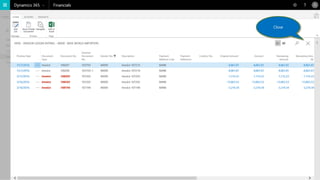
Close
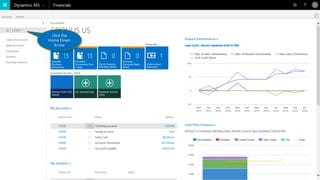
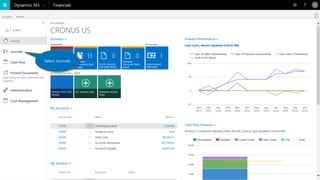
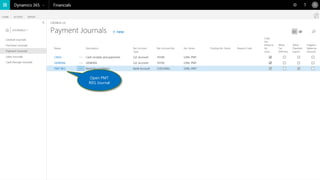
PAY THE VENDOR
Click the
Home Down
Arrow
Select Journals
Open PMT
REG Journal
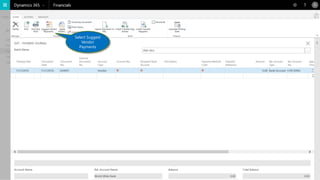
Select Suggest
Vendor
Payments
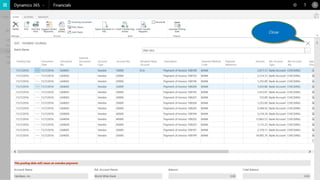
Close
Enter
Purchase
Invoice
Automate
Purchase
Invoice Entry
Review
Vendor
Balance
Pay Vendor
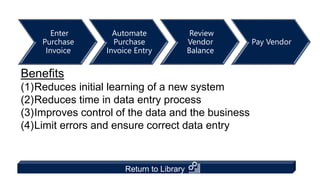
Benefits
(1)Reduces initial learning of a new system
(2)Reduces time in data entry process
(3)Improves control of the data and the business
(4)Limit errors and ensure correct data entry
Return to Library
Page 61
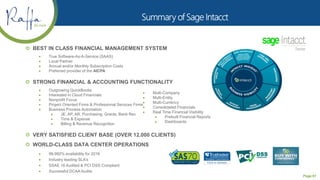
 BEST IN CLASS FINANCIAL MANAGEMENT SYSTEM
 True Software-As-A-Service (SAAS)
 Local Partner
 Annual and/or Monthly Subscription Costs
 Preferred provider of the AICPA
 STRONG FINANCIAL & ACCOUNTING FUNCTIONALITY
 Outgrowing QuickBooks
 Interested in Cloud Financials
 Nonprofit Focus
 Project Oriented Firms & Professional Services Firms
 Business Process Automation
 JE, AP, AR, Purchasing, Grants, Bank Rec
 Time & Expense
 Billing & Revenue Recognition
 VERY SATISFIED CLIENT BASE (OVER 12,000 CLIENTS)
 WORLD-CLASS DATA CENTER OPERATIONS
 99.992% availability for 2016
 Industry leading SLA’s
 SSAE 16 Audited & PCI DSS Compliant
 Successful DCAA Audits
 Multi-Company
 Multi-Entity
 Multi-Currency
 Consolidated Financials
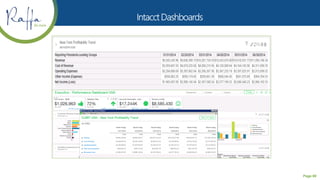
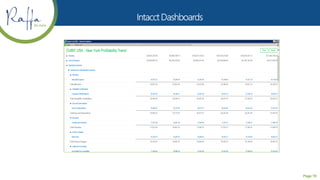
 Real Time Financial Visibility
 Prebuilt Financial Reports
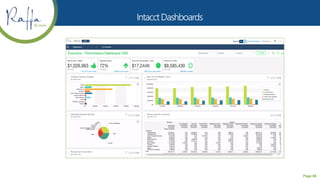
 Dashboards
Page 62
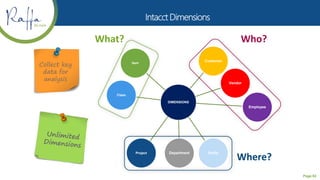
Collect key
data for
analysis
DIMENSIONS
Customer
Vendor
Employee
EntityDepartmentProject
Class
Item
Who?
Where?
What?
Page 63
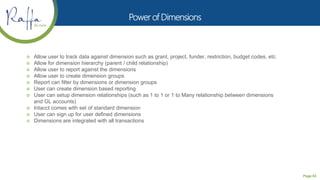
 Allow user to track data against dimension such as grant, project, funder, restriction, budget codes, etc.
 Allow for dimension hierarchy (parent / child relationship)
 Allow user to report against the dimensions
 Allow user to create dimension groups
 Report can filter by dimensions or dimension groups
 User can create dimension based reporting
 User can setup dimension relationships (such as 1 to 1 or 1 to Many relationship between dimensions
and GL accounts)
 Intacct comes with set of standard dimension
 User can sign up for user defined dimensions
 Dimensions are integrated with all transactions
Page 64
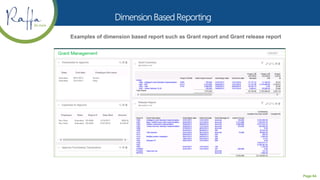
Examples of dimension based report such as Grant report and Grant release report
Page 65
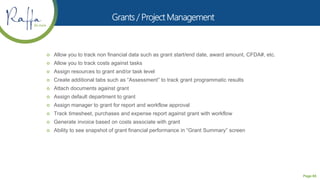
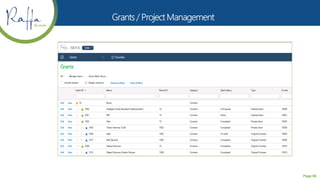
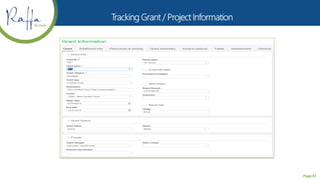
 Allow you to track non financial data such as grant start/end date, award amount, CFDA#, etc.
 Allow you to track costs against tasks
 Assign resources to grant and/or task level
 Create additional tabs such as “Assessment” to track grant programmatic results
 Attach documents against grant
 Assign default department to grant
 Assign manager to grant for report and workflow approval
 Track timesheet, purchases and expense report against grant with workflow
 Generate invoice based on costs associate with grant
 Ability to see snapshot of grant financial performance in “Grant Summary” screen
Page 66
Page 67
Page 68
Page 69
Page 70
Page 71
Page 72
Page 73
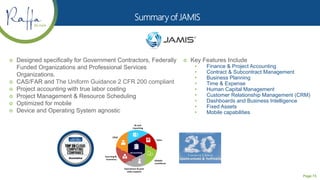
 Designed specifically for Government Contractors, Federally
Funded Organizations and Professional Services
Organizations.
 CAS/FAR and The Uniform Guidance 2 CFR 200 compliant
 Project accounting with true labor costing
 Project Management & Resource Scheduling
 Optimized for mobile
 Device and Operating System agnostic
 Key Features Include
• Finance & Project Accounting
• Contract & Subcontract Management
• Business Planning
• Time & Expense
• Human Capital Management
• Customer Relationship Management (CRM)
• Dashboards and Business Intelligence
• Fixed Assets
• Mobile capabilities
Page 74
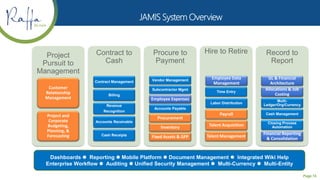
Project
Pursuit to
Management
Customer
Relationship
Management
Project and
Corporate
Budgeting,
Planning, &
Forecasting
Contract to
Cash
Contract Management
Billing
Revenue
Recognition
Accounts Receivable
Cash Receipts
Procure to
Payment
Vendor Management
Inventory
Procurement
Subcontractor Mgmt
Employee Expenses
Fixed Assets & GFP
Accounts Payable
Hire to Retire
Talent Acquisition
Employee Data
Management
Time Entry
Labor Distribution
Payroll
Talent Management
Record to
Report
GL & Financial
Architecture
Allocations & Job
Costing
Multi-
Ledger/Org/Currency
Cash Management
Closing Process
Automation
Financial Reporting
& Consolidation
Dashboards l Reporting l Mobile Platform l Document Management l Integrated Wiki Help
Enterprise Workflow l Auditing l Unified Security Management l Multi-Currency l Multi-Entity
Page 75
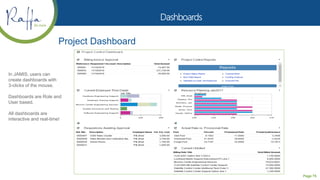
Project Dashboard
In JAMIS, users can
create dashboards with
3-clicks of the mouse.
Dashboards are Role and
User based.
All dashboards are
interactive and real-time!
Page 76
Page 77
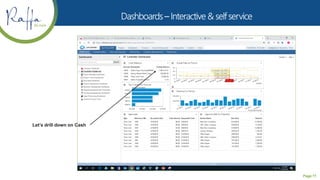
Let’s drill down on Cash
Page 78
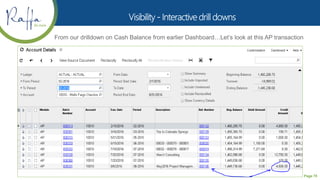
From our drilldown on Cash Balance from earlier Dashboard…Let’s look at this AP transaction
Page 79
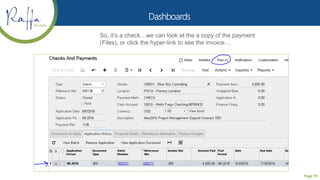
So, it’s a check…we can look at the a copy of the payment
(Files), or click the hyper-link to see the invoice…
Page 80
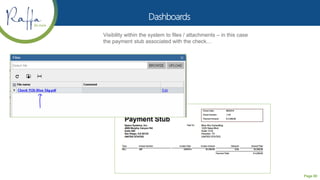
Visibility within the system to files / attachments – in this case
the payment stub associated with the check…
Page 81
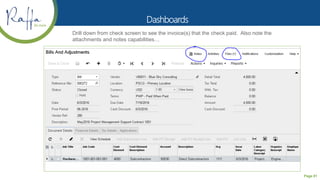
Drill down from check screen to see the invoice(s) that the check paid. Also note the
attachments and notes capabilities…
Page 82
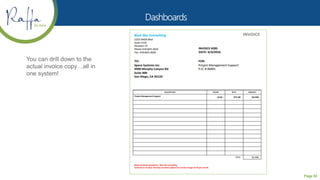
You can drill down to the
actual invoice copy…all in
one system!
Page 83
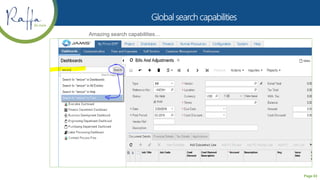
Amazing search capabilities…
Page 84
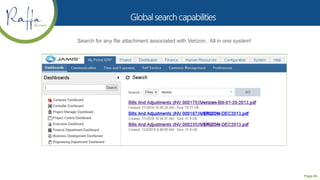
Search for any file attachment associated with Verizon. All in one system!
Page 85
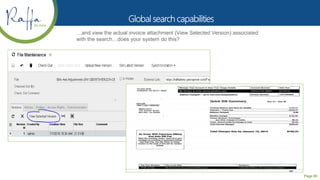
…and view the actual invoice attachment (View Selected Version) associated
with the search…does your system do this?
Page 86
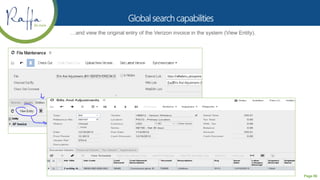
…and view the original entry of the Verizon invoice in the system (View Entity).
Helping Great Organizations Thrive
www.raffa.com P: 202.822.5000 F: 202.822.0669
Seth Zarny, Partner
szarny@raffa.com
301.279.6500
Jeremy Taro, Account Executive
jtaro@raffa.com
301.279.6504

2018-09-20 Accounting Systems Comparison Seminar

  • 1.
    Helping Great OrganizationsThrive www.raffa.com P: 202.822.5000 F: 202.822.0669 ERP & ACCOUNTING SYSTEMS COMPARISON SEMINAR September 20, 2018
  • 2.
    Page 1  MutualIntroductions  Key Considerations for Implementing New Software  Best Practices for Systems Evaluation  Software Overviews • Microsoft Dynamics 365 Business Central • Sage Intacct • JAMIS  Questions
  • 3.
    Page 2  LearningObjectives – Attendees will learn  Best practices for ERP evaluation and implementation  Understand the mid-market ERP landscape  Capabilities of leading ERP software  NASBA Essentials  Course Update Date: 8/14/18  Course Review By: Glenn Anstead  Course Reviewed Date: 9/12/18  NASBA Field of Study: Information Technology
  • 4.
    Page 3 Our missionis to be a catalyst for positive system change in our community. Raffa is nationally recognized with access to all the resources of the largest international firms. We contribute to our clients’ abilities to achieve their missions and deliver promises to the world.  LARGE ACCOUNTING, CONSULTING & TECHNOLOGY CONSULTING FIRM • Serve 1,500+ organizations in DC/MD/VA (Nonprofit & Professional Services) • 300+ specialists on staff at all levels • Support over 250 Financial System Clients • Certified System Consultants, Certified Project Management Professionals, Business Process Consultants  34 YEARS SERVING THE NON PROFIT COMMUNITY  19 PARTNERS, INCLUDING 12 WOMEN PARTNERS  WOMEN-OWNED FIRM  MULTI-CULTURAL WITH DIVERSITY AT ALL LEVELS  PRIMEGLOBAL ALLIANCE MEMBER  WIDE RANGE OF SERVICES • Technology Solutions • ERP & Accounting Systems analysis and evaluations • ERP & Accounting Systems implementations • Software Development & Custom Integration • CIO & Managed IT Services • Audit and Tax • Managed Accounting • HR Consulting • Business Advisory • Forensics and Litigation Support • Financial Services, Employee Benefit Plans, Insurance • Executive Search and Transition Services  NATIONALLY RECOGNIZED • Top 100 Largest Accounting Firms (WBJ & Accounting Today) • Top 100 ERP VAR (Bob Scott & Accounting Today) • Top 100 and Fastest Growing Value Added Reseller
  • 5.
    Page 4 HINT –SOMETIMES YOU NEED TO CHANGE YOUR SOFTWARE!
  • 6.
    Page 5  Functionality– What Meets Your Functional Needs?  Integration Requirements? 3rd Party Systems: Time & Expense, Payroll, Billing, Procurement, Accounts Payable, CRM, AMS, Budgeting, etc.  Sophistication – What level of customizations are required?  Infrastructure Support – What internal IT support is needed?  Costs – What are the Realistic Costs for Your Organization – What do these costs buy?  Support – Who is Supporting Your Users, Applications, and Infrastructure  Integration – What 3rd Party Integrations are needed? How will you support them?  What do users of the data need over the next 2-3 years?
  • 7.
    Page 6  EvaluationTeam (Finance, Grants & Contracts Managers, IT, etc.)  Internal Requirements Document  Establish Budget & Timeline  Review Software Options  Analyze Requirements Against Features  Identify Appropriate Implementation and Support Partner  Proposal Review & Reference Checks  Decision
  • 8.
    Page 7  Powerful,popular financial system that targets horizontal & vertical markets  Web based features  Strong user productivity features  Flexible reporting  Powerful business intelligence  Industry leader  Maturity  Integration with external systems  Key Features Include • Personalized Role Pages • Integrated with Microsoft Office • Web Solution • Business Intelligence – Power BI • Business Process Automation – Enhanced Workflow • Increased Internal Controls
  • 9.
    Page 8  Powerful,popular financial system that targets horizontal & vertical markets – SMB  Mature product with high Microsoft investment  Powerful user interface with user roles  Easily integrate with external systems  Powerful chart of account segmentation  Industry leader in project accounting  Professional Services Organizations, Gov’t Contracting, Grants & Program Management  Web based capabilities  Key Features Include • Integrated with Microsoft Office • Web access for remote users • Business Intelligence – Power BI • Web Requisitions - Front-end to Purchasing Module • Automates the Procurement Process • Powerful Project Costing • Improved Efficiency • Increased Internal Controls
  • 10.
    Page 9 Microsoft DynamicsD365 Business Central  End-to-end application in the cloud  Start with what you need and grow  Empower employees with tools where they need them  Optimal outcomes with intelligence imbedded in processes  Adapt in real-time with flexible and extensible applications  Key Features Include • Financial Management • Inventory Management • Sales • Purchasing • Project Management • Unified Microsoft Solution
  • 11.
  • 12.
  • 13.
  • 14.
  • 15.
  • 16.
  • 17.
  • 18.
  • 19.
  • 20.
  • 21.
  • 22.
  • 23.
  • 24.
  • 25.
  • 26.
  • 27.
  • 28.
  • 29.
  • 30.
  • 31.
  • 32.
  • 33.
  • 34.
  • 35.
  • 36.
  • 37.
  • 38.
  • 39.
  • 40.
  • 41.
  • 42.
  • 43.
  • 44.
  • 45.
  • 46.
  • 47.
  • 48.
  • 49.
  • 50.
  • 51.
  • 52.
  • 53.
  • 54.
  • 55.
  • 56.
  • 57.
  • 58.
  • 59.
  • 61.
    Enter Purchase Invoice Automate Purchase Invoice Entry Review Vendor Balance Pay Vendor Benefits (1)Reducesinitial learning of a new system (2)Reduces time in data entry process (3)Improves control of the data and the business (4)Limit errors and ensure correct data entry Return to Library
  • 62.
    Page 61  BESTIN CLASS FINANCIAL MANAGEMENT SYSTEM  True Software-As-A-Service (SAAS)  Local Partner  Annual and/or Monthly Subscription Costs  Preferred provider of the AICPA  STRONG FINANCIAL & ACCOUNTING FUNCTIONALITY  Outgrowing QuickBooks  Interested in Cloud Financials  Nonprofit Focus  Project Oriented Firms & Professional Services Firms  Business Process Automation  JE, AP, AR, Purchasing, Grants, Bank Rec  Time & Expense  Billing & Revenue Recognition  VERY SATISFIED CLIENT BASE (OVER 12,000 CLIENTS)  WORLD-CLASS DATA CENTER OPERATIONS  99.992% availability for 2016  Industry leading SLA’s  SSAE 16 Audited & PCI DSS Compliant  Successful DCAA Audits  Multi-Company  Multi-Entity  Multi-Currency  Consolidated Financials  Real Time Financial Visibility  Prebuilt Financial Reports  Dashboards
  • 63.
    Page 62 Collect key datafor analysis DIMENSIONS Customer Vendor Employee EntityDepartmentProject Class Item Who? Where? What?
  • 64.
    Page 63  Allowuser to track data against dimension such as grant, project, funder, restriction, budget codes, etc.  Allow for dimension hierarchy (parent / child relationship)  Allow user to report against the dimensions  Allow user to create dimension groups  Report can filter by dimensions or dimension groups  User can create dimension based reporting  User can setup dimension relationships (such as 1 to 1 or 1 to Many relationship between dimensions and GL accounts)  Intacct comes with set of standard dimension  User can sign up for user defined dimensions  Dimensions are integrated with all transactions
  • 65.
    Page 64 Examples ofdimension based report such as Grant report and Grant release report
  • 66.
    Page 65  Allowyou to track non financial data such as grant start/end date, award amount, CFDA#, etc.  Allow you to track costs against tasks  Assign resources to grant and/or task level  Create additional tabs such as “Assessment” to track grant programmatic results  Attach documents against grant  Assign default department to grant  Assign manager to grant for report and workflow approval  Track timesheet, purchases and expense report against grant with workflow  Generate invoice based on costs associate with grant  Ability to see snapshot of grant financial performance in “Grant Summary” screen
  • 67.
  • 68.
  • 69.
  • 70.
  • 71.
  • 72.
  • 73.
  • 74.
    Page 73  Designedspecifically for Government Contractors, Federally Funded Organizations and Professional Services Organizations.  CAS/FAR and The Uniform Guidance 2 CFR 200 compliant  Project accounting with true labor costing  Project Management & Resource Scheduling  Optimized for mobile  Device and Operating System agnostic  Key Features Include • Finance & Project Accounting • Contract & Subcontract Management • Business Planning • Time & Expense • Human Capital Management • Customer Relationship Management (CRM) • Dashboards and Business Intelligence • Fixed Assets • Mobile capabilities
  • 75.
    Page 74 Project Pursuit to Management Customer Relationship Management Projectand Corporate Budgeting, Planning, & Forecasting Contract to Cash Contract Management Billing Revenue Recognition Accounts Receivable Cash Receipts Procure to Payment Vendor Management Inventory Procurement Subcontractor Mgmt Employee Expenses Fixed Assets & GFP Accounts Payable Hire to Retire Talent Acquisition Employee Data Management Time Entry Labor Distribution Payroll Talent Management Record to Report GL & Financial Architecture Allocations & Job Costing Multi- Ledger/Org/Currency Cash Management Closing Process Automation Financial Reporting & Consolidation Dashboards l Reporting l Mobile Platform l Document Management l Integrated Wiki Help Enterprise Workflow l Auditing l Unified Security Management l Multi-Currency l Multi-Entity
  • 76.
    Page 75 Project Dashboard InJAMIS, users can create dashboards with 3-clicks of the mouse. Dashboards are Role and User based. All dashboards are interactive and real-time!
  • 77.
  • 78.
  • 79.
    Page 78 From ourdrilldown on Cash Balance from earlier Dashboard…Let’s look at this AP transaction
  • 80.
    Page 79 So, it’sa check…we can look at the a copy of the payment (Files), or click the hyper-link to see the invoice…
  • 81.
    Page 80 Visibility withinthe system to files / attachments – in this case the payment stub associated with the check…
  • 82.
    Page 81 Drill downfrom check screen to see the invoice(s) that the check paid. Also note the attachments and notes capabilities…
  • 83.
    Page 82 You candrill down to the actual invoice copy…all in one system!
  • 84.
    Page 83 Amazing searchcapabilities…
  • 85.
    Page 84 Search forany file attachment associated with Verizon. All in one system!
  • 86.
    Page 85 …and viewthe actual invoice attachment (View Selected Version) associated with the search…does your system do this?
  • 87.
    Page 86 …and viewthe original entry of the Verizon invoice in the system (View Entity).
  • 91.
    Helping Great OrganizationsThrive www.raffa.com P: 202.822.5000 F: 202.822.0669 Seth Zarny, Partner szarny@raffa.com 301.279.6500 Jeremy Taro, Account Executive jtaro@raffa.com 301.279.6504