Hadoop: Introduction
Wojciech Langiewicz
Wrocław Java User Group 2014
2/39
About me
● Working with Hadoop and Hadoop related technologies for
last 4 years
● Deployed 2 large clusters, bigger one was almost 0.5 PB in
total storage
● Currently working as consultant / freelancer in Java and
Hadoop
● On site Hadoop trainings from time to time
● In meantime working on Android apps
3/39
Agenda
● Big Data
● Hadoop
● MapReduce basics
● Hadoop processing framework – Map Reduce on YARN
● Hadoop Storage system – HDFS
● Using SQL on Hadoop with Hive
● Connecting Hadoop with RDBMS using Sqoop
● Example of real Hadoop architecture – examples
4/39
Big Data from technological perspective
● Huge amount of data
● Data collection
● Data processing
● Hardware limitations
● System reliability:
– Partial failures
– Data recoverability
– Consistency
– Scalability
5/39
Approaches to Big Data problem
● Vertical scaling
● Horizontal scaling
● Moving data to processing
● Moving processing close to data
6/39
Hadoop - motivations
● Data won't fit on
one machine
● More machines →
higher chance of
failure
● Disk scan faster
than seek
● Batch vs real
time processing
● Data processing
won't fit on one
machine
● Move
computation
close to data
7/39
Hadoop properties
● Linear scalability
● Distributed
● Shared (almost)
nothing
architecture
● Whole ecosystem
of tools and
techniques
● Unstructured
data
● Raw data
analysis
● Transparent data
compression
● Replication at it's
core
● Self-managing
(replication,
master election,
etc)
● Easy to use
● Massive parallel
processing
8/39
Hadoop Architecture
● “Lower” layer: HDFS – data storage and retrieval system
● “Higher” layer: MapReduce – execution engine that relies on
HDFS
● Please note that there are other systems that rely on HDFS
for data storage, but won't be covered in this presentation
9/39
Map Reduce basics
● Batch processing system
● Handles many distributed systems problems
● Automatic parallelization and distribution
● Fault tolerance
● Job status and monitoring
● Borrows from functional programming
● Based on Google's work: MapReduce: Simplified Data
Processing on Large Clusters
10/39
Word Count pseudo code
1: def map(String key, String value)
2: foreach word in value:
3: emit(word, 1);
4:
5: def reduce(String key, int[] values)
6: int result = 0;
7: foreach val in values:
8: result += val;
9: emit(key, result);
10:
11/39
Word Count Example
Source: http://xiaochongzhang.me/blog/?p=338
12/39
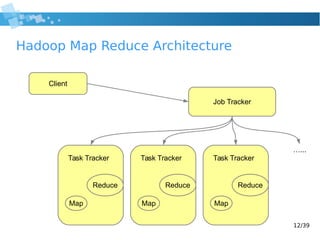
Hadoop Map Reduce Architecture
Client
Job Tracker
Task Tracker
Map
Reduce
Task Tracker
Map
Reduce
Task Tracker
Map
Reduce
…...
13/39
What can be expressed as MapReduce?
● grep
● sort
● SQL operators, for example:
– GROUP BY
– DISTINCT
– JOIN
● Recommending friends
● Reverting web indexes
● And many more
14/39
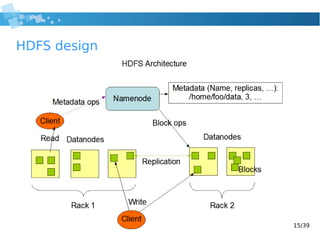
HDFS – Hadoop Distributed File System
● Optimized for streaming access (prefers throughput over
latency, no caching)
● Built-in replication
● One master server storing all metadata (Name Node)
● Multiple slaves that store data and report to master (Data
Nodes)
● JBOD optimized
● Works better on moderate number of large files vs small files
● Based on Google's work: The Google File System
15/39
HDFS design
16/39
HDFS limitations
● No file updates
● Name Node as SPOF in basic configurations
● Limited security
● Inefficient at handling lots of small files
● No way to provide global synchronization or shared mutable
state (this can be an advantage)
17/39
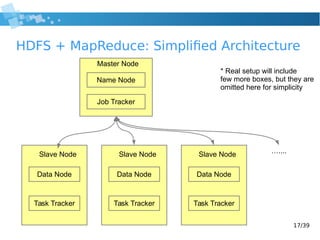
HDFS + MapReduce: Simplified Architecture
Name Node
Job Tracker
Master Node
Slave Node
Data Node
Task Tracker
Slave Node
Data Node
Task Tracker
Slave Node
Data Node
Task Tracker
…....
* Real setup will include
few more boxes, but they are
omitted here for simplicity
18/39
Hive
● “Data warehousing for Hadoop”
● SQL interface to HDFS files (language is called HiveQL)
● SQL is translated into multiple MR jobs that are executed in
order
● Doesn't support UPDATE
● Powerful and easy to use UDF mechanism:
add jar /home/hive/my-udfs.jar
create temporary function lower as 'com.example.Lower';
select my_lower(username) from users;
19/39
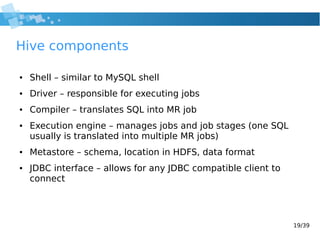
Hive components
● Shell – similar to MySQL shell
● Driver – responsible for executing jobs
● Compiler – translates SQL into MR job
● Execution engine – manages jobs and job stages (one SQL
usually is translated into multiple MR jobs)
● Metastore – schema, location in HDFS, data format
● JDBC interface – allows for any JDBC compatible client to
connect
20/39
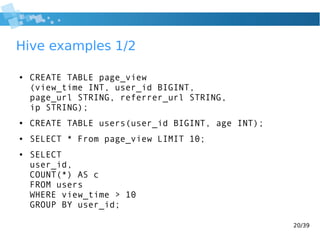
Hive examples 1/2
● CREATE TABLE page_view
(view_time INT, user_id BIGINT,
page_url STRING, referrer_url STRING,
ip STRING);
● CREATE TABLE users(user_id BIGINT, age INT);
● SELECT * From page_view LIMIT 10;
● SELECT
user_id,
COUNT(*) AS c
FROM users
WHERE view_time > 10
GROUP BY user_id;
21/39
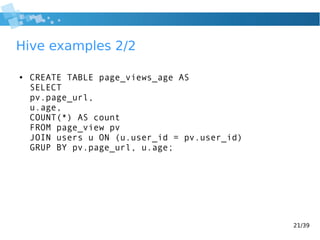
Hive examples 2/2
● CREATE TABLE page_views_age AS
SELECT
pv.page_url,
u.age,
COUNT(*) AS count
FROM page_view pv
JOIN users u ON (u.user_id = pv.user_id)
GRUP BY pv.page_url, u.age;
22/39
Hive best practices 1/2
● Use partitions, especially on date columns
● Compress where possible
● JOIN optimization hive.auto.convert.join=true
● Improve parallelism: hive.exec.parallel=true
23/39
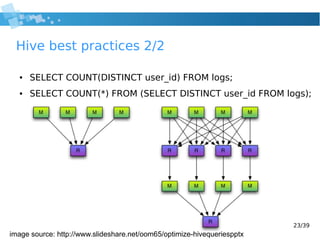
Hive best practices 2/2
● SELECT COUNT(DISTINCT user_id) FROM logs;
● SELECT COUNT(*) FROM (SELECT DISTINCT user_id FROM logs);
image source: http://www.slideshare.net/oom65/optimize-hivequeriespptx
24/39
Sqoop
● SQL to Hadoop import/export tool
● Performs a MapReduce query that interacts with target
database via JDBC
● Can work with almost all JDBC databases
● Can “natively” import and export Hive tables
● Import supports:
– Full databases
– Full tables
– Query results
● Export can update/append data to SQL tables
25/39
Sqoop examples
● sqoop import --connect jdbc:mysql://db.foo.com/corp
--table EMPLOYEES
● sqoop import --connect jdbc:mysql://db.foo.com/corp
--table --hive-import
● sqoop export --connect
jdbc:mysql://db.example.com/foo --table bar
--export-dir /user/hive/warehouse/exportingtable
26/39
Hadoop problems
● Relatively hard to setup – Linux knowledge required
● Hard to find logs – multiple directories on each server
● Name Node can be a SPOF if configured incorrectly
● Not real time – jobs take some setup/warm up time (other
projects try to address that
● Performance not visible until you exceed 3-5 servers
● Hard to convince people to use it from the start in some
projects (Hive via JDBC can help here)
● Relatively complicated configuration management
27/39
Hadoop ecosystem
● HBase – Big Table database
● Spark – Real time query engine
● Flume – log collection
● Impala – similar to Spark
● HUE – Hive console (MySQL workbench / phpMyAdmin) +
user permission
● Oozie – Job scheduling, orchestration, dependency, etc
28/39
Use case examples
● Generic production snapshot updates
– Using asynchronous mechanisms
– Using more synchronous approach
● Friends/product recommendations
29/39
Hadoop use case example: snapshots
● Log collection, aggregation
● Periodic batch jobs (hourly, daily)
● Jobs integrate collected logs and production data
● Results from batch jobs feed production system
● Hadoop jobs generate reports for business users
30/39
Hadoop pipeline – feedback loop
Production system X
generates logs
RabbitMQ
integration step
logs
Production system Y
generates logs
logs
Hadoop
HDFS + MR
Multiple rabbit
consumers write to HDFSlogs
logs – HDFS writes
RDBMS:
stores models
feeds production system
Daily jobs
Daily processing
Results of daily processing
Updated “snapshots”
Current “snapshots”
Updates “snapshots”
stored on production servers
31/39
Feedback loop using sqoop
Hadoop
HDFS + MR
RDBMS:
stores data
for production system
Daily jobs
sqoop export
Hadoop MR jobsqoop import
32/39
Agenda
● Big Data
● Hadoop
● MapReduce basics
● Hadoop processing framework – Map Reduce on YARN
● Hadoop Storage system – HDFS
● Using SQL on Hadoop with Hive
● Connecting Hadoop with RDBMS using Sqoop
● Example of real Hadoop architecture – examples
33/39
How to recommend friends – PYMK 1/4
● Database of users
– CREATE TABLE users (id INT);
● Each user has a list of friends (assume integers)
– CREATE TABLE friends (user1 INT, user2 INT);
● For simplicity: relationship is always bidirectional
● Possible to do in SQL (run on RDBMS or on Hive):
● SELECT users.id, new_friend, COUNT(*) AS
common_friends
FROM users JOIN friends f1 JOIN f2 ….
….
….
34/39
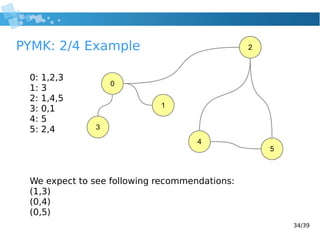
PYMK: 2/4 Example
0: 1,2,3
1: 3
2: 1,4,5
3: 0,1
4: 5
5: 2,4
We expect to see following recommendations:
(1,3)
(0,4)
(0,5)
0
1
2
3
4
5
35/39
PYMK 3/4
● For each user emit pairs for all his friends
– Example: user X has friends: 1,5,6, we emit: (1,5), (1,6), (5,6)
● Sort all pairs by first user
● Eliminate direct friendships, if 5&6 are friends, remove them
● Sort all pairs by frequency
● Group by each user in pair
36/39
PYMK 4/5 mapper
//user: integer, friends: integer list
function map(user, friends)
for i = 0 to friends.length-1:
emit(user, (1, friends[i])) //direct friends
for j = i+1 to friends.length-1:
//indirect friends
emit(friends[i], (2, friends[j]))
emit(friends[j], (2, friends[i]))
37/39
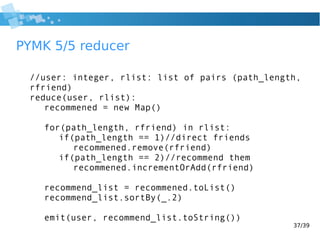
PYMK 5/5 reducer
//user: integer, rlist: list of pairs (path_length,
rfriend)
reduce(user, rlist):
recommened = new Map()
for(path_length, rfriend) in rlist:
if(path_length == 1)//direct friends
recommened.remove(rfriend)
if(path_length == 2)//recommend them
recommened.incrementOrAdd(rfriend)
recommend_list = recommened.toList()
recommend_list.sortBy(_.2)
emit(user, recommend_list.toString())
38/39
Additional sources
● Data-Intensive Text Processing with MapReduce:
http://lintool.github.io/MapReduceAlgorithms/MapReduce-book
-final.pdf
● Programming Hive:
http://shop.oreilly.com/product/0636920023555.do
● Cloudera Quick Start VM:
http://www.cloudera.com/content/support/en/downloads/quic
kstart_vms/cdh-5-1-x1.html
● Hadoop: The Definitive Guide:
http://shop.oreilly.com/product/0636920021773.do
39/39
Thanks!
Time for questions

2014 hadoop wrocław jug

  • 1.
  • 2.
    2/39 About me ● Workingwith Hadoop and Hadoop related technologies for last 4 years ● Deployed 2 large clusters, bigger one was almost 0.5 PB in total storage ● Currently working as consultant / freelancer in Java and Hadoop ● On site Hadoop trainings from time to time ● In meantime working on Android apps
  • 3.
    3/39 Agenda ● Big Data ●Hadoop ● MapReduce basics ● Hadoop processing framework – Map Reduce on YARN ● Hadoop Storage system – HDFS ● Using SQL on Hadoop with Hive ● Connecting Hadoop with RDBMS using Sqoop ● Example of real Hadoop architecture – examples
  • 4.
    4/39 Big Data fromtechnological perspective ● Huge amount of data ● Data collection ● Data processing ● Hardware limitations ● System reliability: – Partial failures – Data recoverability – Consistency – Scalability
  • 5.
    5/39 Approaches to BigData problem ● Vertical scaling ● Horizontal scaling ● Moving data to processing ● Moving processing close to data
  • 6.
    6/39 Hadoop - motivations ●Data won't fit on one machine ● More machines → higher chance of failure ● Disk scan faster than seek ● Batch vs real time processing ● Data processing won't fit on one machine ● Move computation close to data
  • 7.
    7/39 Hadoop properties ● Linearscalability ● Distributed ● Shared (almost) nothing architecture ● Whole ecosystem of tools and techniques ● Unstructured data ● Raw data analysis ● Transparent data compression ● Replication at it's core ● Self-managing (replication, master election, etc) ● Easy to use ● Massive parallel processing
  • 8.
    8/39 Hadoop Architecture ● “Lower”layer: HDFS – data storage and retrieval system ● “Higher” layer: MapReduce – execution engine that relies on HDFS ● Please note that there are other systems that rely on HDFS for data storage, but won't be covered in this presentation
  • 9.
    9/39 Map Reduce basics ●Batch processing system ● Handles many distributed systems problems ● Automatic parallelization and distribution ● Fault tolerance ● Job status and monitoring ● Borrows from functional programming ● Based on Google's work: MapReduce: Simplified Data Processing on Large Clusters
  • 10.
    10/39 Word Count pseudocode 1: def map(String key, String value) 2: foreach word in value: 3: emit(word, 1); 4: 5: def reduce(String key, int[] values) 6: int result = 0; 7: foreach val in values: 8: result += val; 9: emit(key, result); 10:
  • 11.
    11/39 Word Count Example Source:http://xiaochongzhang.me/blog/?p=338
  • 12.
    12/39 Hadoop Map ReduceArchitecture Client Job Tracker Task Tracker Map Reduce Task Tracker Map Reduce Task Tracker Map Reduce …...
  • 13.
    13/39 What can beexpressed as MapReduce? ● grep ● sort ● SQL operators, for example: – GROUP BY – DISTINCT – JOIN ● Recommending friends ● Reverting web indexes ● And many more
  • 14.
    14/39 HDFS – HadoopDistributed File System ● Optimized for streaming access (prefers throughput over latency, no caching) ● Built-in replication ● One master server storing all metadata (Name Node) ● Multiple slaves that store data and report to master (Data Nodes) ● JBOD optimized ● Works better on moderate number of large files vs small files ● Based on Google's work: The Google File System
  • 15.
  • 16.
    16/39 HDFS limitations ● Nofile updates ● Name Node as SPOF in basic configurations ● Limited security ● Inefficient at handling lots of small files ● No way to provide global synchronization or shared mutable state (this can be an advantage)
  • 17.
    17/39 HDFS + MapReduce:Simplified Architecture Name Node Job Tracker Master Node Slave Node Data Node Task Tracker Slave Node Data Node Task Tracker Slave Node Data Node Task Tracker ….... * Real setup will include few more boxes, but they are omitted here for simplicity
  • 18.
    18/39 Hive ● “Data warehousingfor Hadoop” ● SQL interface to HDFS files (language is called HiveQL) ● SQL is translated into multiple MR jobs that are executed in order ● Doesn't support UPDATE ● Powerful and easy to use UDF mechanism: add jar /home/hive/my-udfs.jar create temporary function lower as 'com.example.Lower'; select my_lower(username) from users;
  • 19.
    19/39 Hive components ● Shell– similar to MySQL shell ● Driver – responsible for executing jobs ● Compiler – translates SQL into MR job ● Execution engine – manages jobs and job stages (one SQL usually is translated into multiple MR jobs) ● Metastore – schema, location in HDFS, data format ● JDBC interface – allows for any JDBC compatible client to connect
  • 20.
    20/39 Hive examples 1/2 ●CREATE TABLE page_view (view_time INT, user_id BIGINT, page_url STRING, referrer_url STRING, ip STRING); ● CREATE TABLE users(user_id BIGINT, age INT); ● SELECT * From page_view LIMIT 10; ● SELECT user_id, COUNT(*) AS c FROM users WHERE view_time > 10 GROUP BY user_id;
  • 21.
    21/39 Hive examples 2/2 ●CREATE TABLE page_views_age AS SELECT pv.page_url, u.age, COUNT(*) AS count FROM page_view pv JOIN users u ON (u.user_id = pv.user_id) GRUP BY pv.page_url, u.age;
  • 22.
    22/39 Hive best practices1/2 ● Use partitions, especially on date columns ● Compress where possible ● JOIN optimization hive.auto.convert.join=true ● Improve parallelism: hive.exec.parallel=true
  • 23.
    23/39 Hive best practices2/2 ● SELECT COUNT(DISTINCT user_id) FROM logs; ● SELECT COUNT(*) FROM (SELECT DISTINCT user_id FROM logs); image source: http://www.slideshare.net/oom65/optimize-hivequeriespptx
  • 24.
    24/39 Sqoop ● SQL toHadoop import/export tool ● Performs a MapReduce query that interacts with target database via JDBC ● Can work with almost all JDBC databases ● Can “natively” import and export Hive tables ● Import supports: – Full databases – Full tables – Query results ● Export can update/append data to SQL tables
  • 25.
    25/39 Sqoop examples ● sqoopimport --connect jdbc:mysql://db.foo.com/corp --table EMPLOYEES ● sqoop import --connect jdbc:mysql://db.foo.com/corp --table --hive-import ● sqoop export --connect jdbc:mysql://db.example.com/foo --table bar --export-dir /user/hive/warehouse/exportingtable
  • 26.
    26/39 Hadoop problems ● Relativelyhard to setup – Linux knowledge required ● Hard to find logs – multiple directories on each server ● Name Node can be a SPOF if configured incorrectly ● Not real time – jobs take some setup/warm up time (other projects try to address that ● Performance not visible until you exceed 3-5 servers ● Hard to convince people to use it from the start in some projects (Hive via JDBC can help here) ● Relatively complicated configuration management
  • 27.
    27/39 Hadoop ecosystem ● HBase– Big Table database ● Spark – Real time query engine ● Flume – log collection ● Impala – similar to Spark ● HUE – Hive console (MySQL workbench / phpMyAdmin) + user permission ● Oozie – Job scheduling, orchestration, dependency, etc
  • 28.
    28/39 Use case examples ●Generic production snapshot updates – Using asynchronous mechanisms – Using more synchronous approach ● Friends/product recommendations
  • 29.
    29/39 Hadoop use caseexample: snapshots ● Log collection, aggregation ● Periodic batch jobs (hourly, daily) ● Jobs integrate collected logs and production data ● Results from batch jobs feed production system ● Hadoop jobs generate reports for business users
  • 30.
    30/39 Hadoop pipeline –feedback loop Production system X generates logs RabbitMQ integration step logs Production system Y generates logs logs Hadoop HDFS + MR Multiple rabbit consumers write to HDFSlogs logs – HDFS writes RDBMS: stores models feeds production system Daily jobs Daily processing Results of daily processing Updated “snapshots” Current “snapshots” Updates “snapshots” stored on production servers
  • 31.
    31/39 Feedback loop usingsqoop Hadoop HDFS + MR RDBMS: stores data for production system Daily jobs sqoop export Hadoop MR jobsqoop import
  • 32.
    32/39 Agenda ● Big Data ●Hadoop ● MapReduce basics ● Hadoop processing framework – Map Reduce on YARN ● Hadoop Storage system – HDFS ● Using SQL on Hadoop with Hive ● Connecting Hadoop with RDBMS using Sqoop ● Example of real Hadoop architecture – examples
  • 33.
    33/39 How to recommendfriends – PYMK 1/4 ● Database of users – CREATE TABLE users (id INT); ● Each user has a list of friends (assume integers) – CREATE TABLE friends (user1 INT, user2 INT); ● For simplicity: relationship is always bidirectional ● Possible to do in SQL (run on RDBMS or on Hive): ● SELECT users.id, new_friend, COUNT(*) AS common_friends FROM users JOIN friends f1 JOIN f2 …. …. ….
  • 34.
    34/39 PYMK: 2/4 Example 0:1,2,3 1: 3 2: 1,4,5 3: 0,1 4: 5 5: 2,4 We expect to see following recommendations: (1,3) (0,4) (0,5) 0 1 2 3 4 5
  • 35.
    35/39 PYMK 3/4 ● Foreach user emit pairs for all his friends – Example: user X has friends: 1,5,6, we emit: (1,5), (1,6), (5,6) ● Sort all pairs by first user ● Eliminate direct friendships, if 5&6 are friends, remove them ● Sort all pairs by frequency ● Group by each user in pair
  • 36.
    36/39 PYMK 4/5 mapper //user:integer, friends: integer list function map(user, friends) for i = 0 to friends.length-1: emit(user, (1, friends[i])) //direct friends for j = i+1 to friends.length-1: //indirect friends emit(friends[i], (2, friends[j])) emit(friends[j], (2, friends[i]))
  • 37.
    37/39 PYMK 5/5 reducer //user:integer, rlist: list of pairs (path_length, rfriend) reduce(user, rlist): recommened = new Map() for(path_length, rfriend) in rlist: if(path_length == 1)//direct friends recommened.remove(rfriend) if(path_length == 2)//recommend them recommened.incrementOrAdd(rfriend) recommend_list = recommened.toList() recommend_list.sortBy(_.2) emit(user, recommend_list.toString())
  • 38.
    38/39 Additional sources ● Data-IntensiveText Processing with MapReduce: http://lintool.github.io/MapReduceAlgorithms/MapReduce-book -final.pdf ● Programming Hive: http://shop.oreilly.com/product/0636920023555.do ● Cloudera Quick Start VM: http://www.cloudera.com/content/support/en/downloads/quic kstart_vms/cdh-5-1-x1.html ● Hadoop: The Definitive Guide: http://shop.oreilly.com/product/0636920021773.do
  • 39.