LTM Main Slide
Huawei Confidential
2
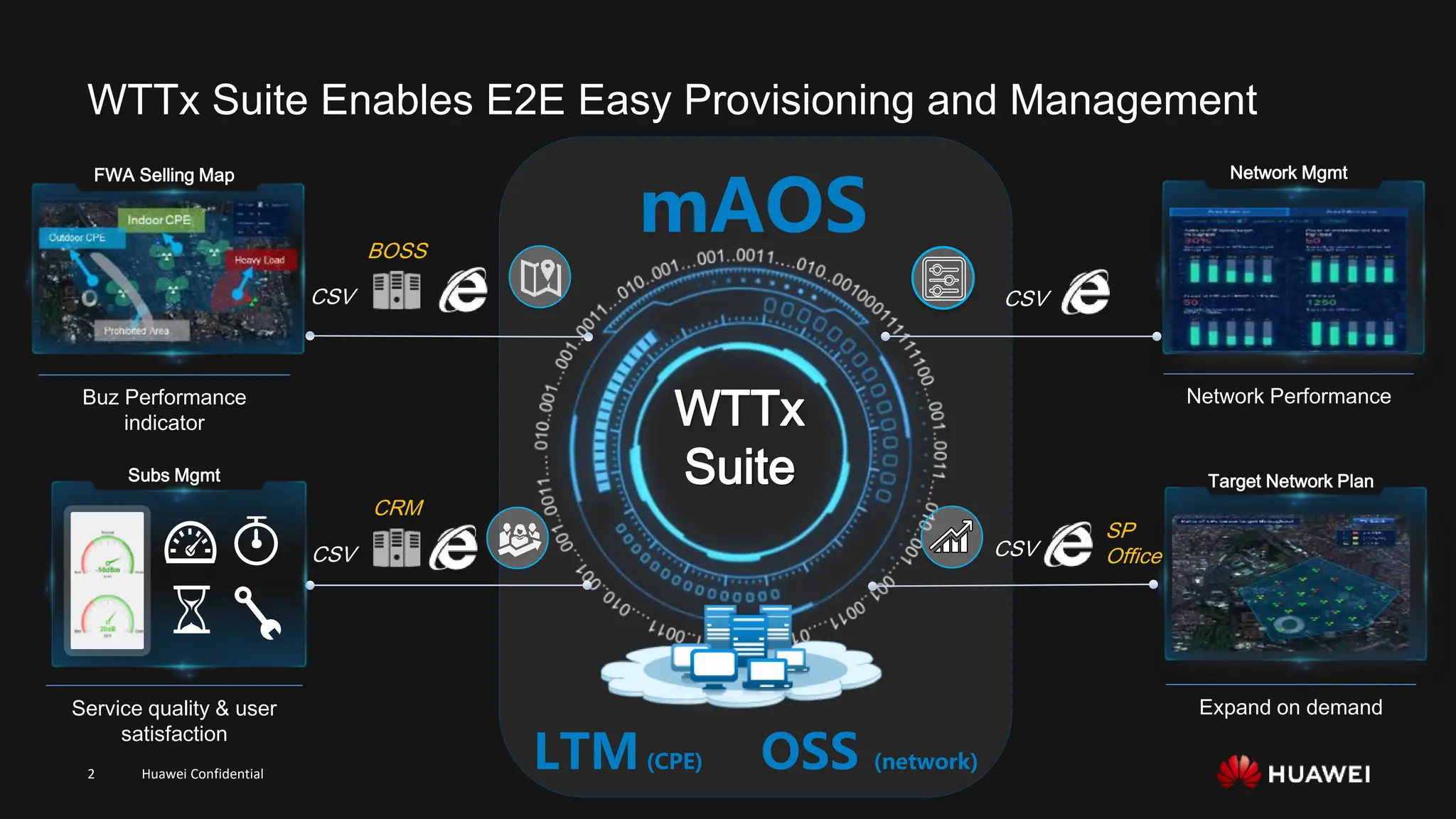
mAOS
LTM(CPE) OSS (network)
WTTx Suite Enables E2E Easy Provisioning and Management
BOSS
CSV
CRM
CSV
CSV
CSV
Network Mgmt
Network Performance
Subs Mgmt
Service quality & user
satisfaction
SP
Office
Expand on demand
Target Network Plan
Buz Performance
indicator
FWA Selling Map
WTTx
Suite
Huawei Confidential
3
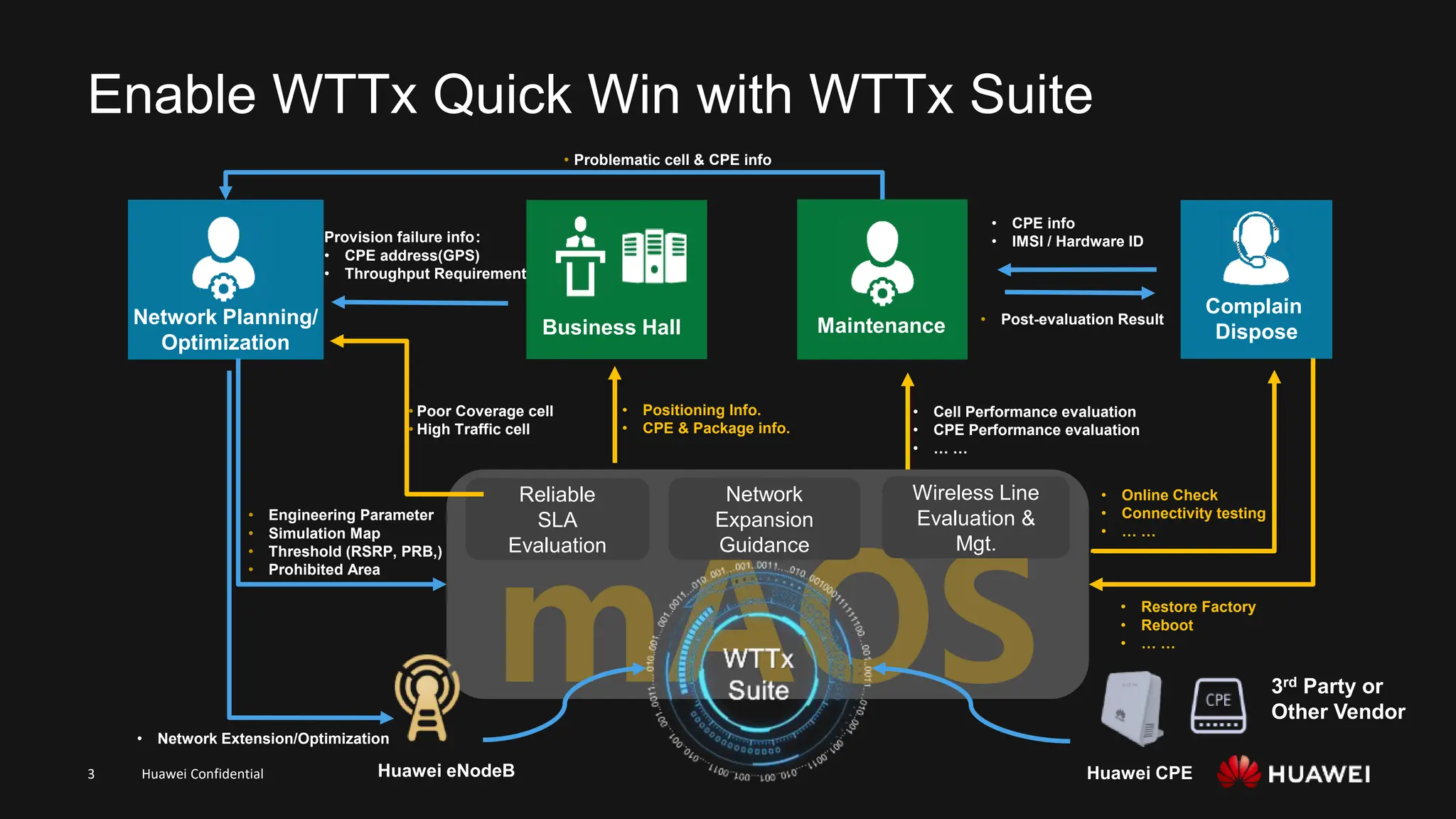
Enable WTTx Quick Win with WTTx Suite
Network Planning/
Optimization
Reliable
SLA
Evaluation
Wireless Line
Evaluation &
Mgt.
• Positioning Info.
• CPE & Package info.
• Cell Performance evaluation
• CPE Performance evaluation
• … …
Provision failure info:
• CPE address(GPS)
• Throughput Requirement
• Network Extension/Optimization
• Problematic cell & CPE info
• Poor Coverage cell
• High Traffic cell
• Engineering Parameter
• Simulation Map
• Threshold (RSRP, PRB,)
• Prohibited Area
• CPE info
• IMSI / Hardware ID
Huawei CPE
Huawei eNodeB
• Post-evaluation Result
Network
Expansion
Guidance
Maintenance
Business Hall
3rd Party or
Other Vendor
• Online Check
• Connectivity testing
• … …
• Restore Factory
• Reboot
• … …
Complain
Dispose
Huawei Confidential
4
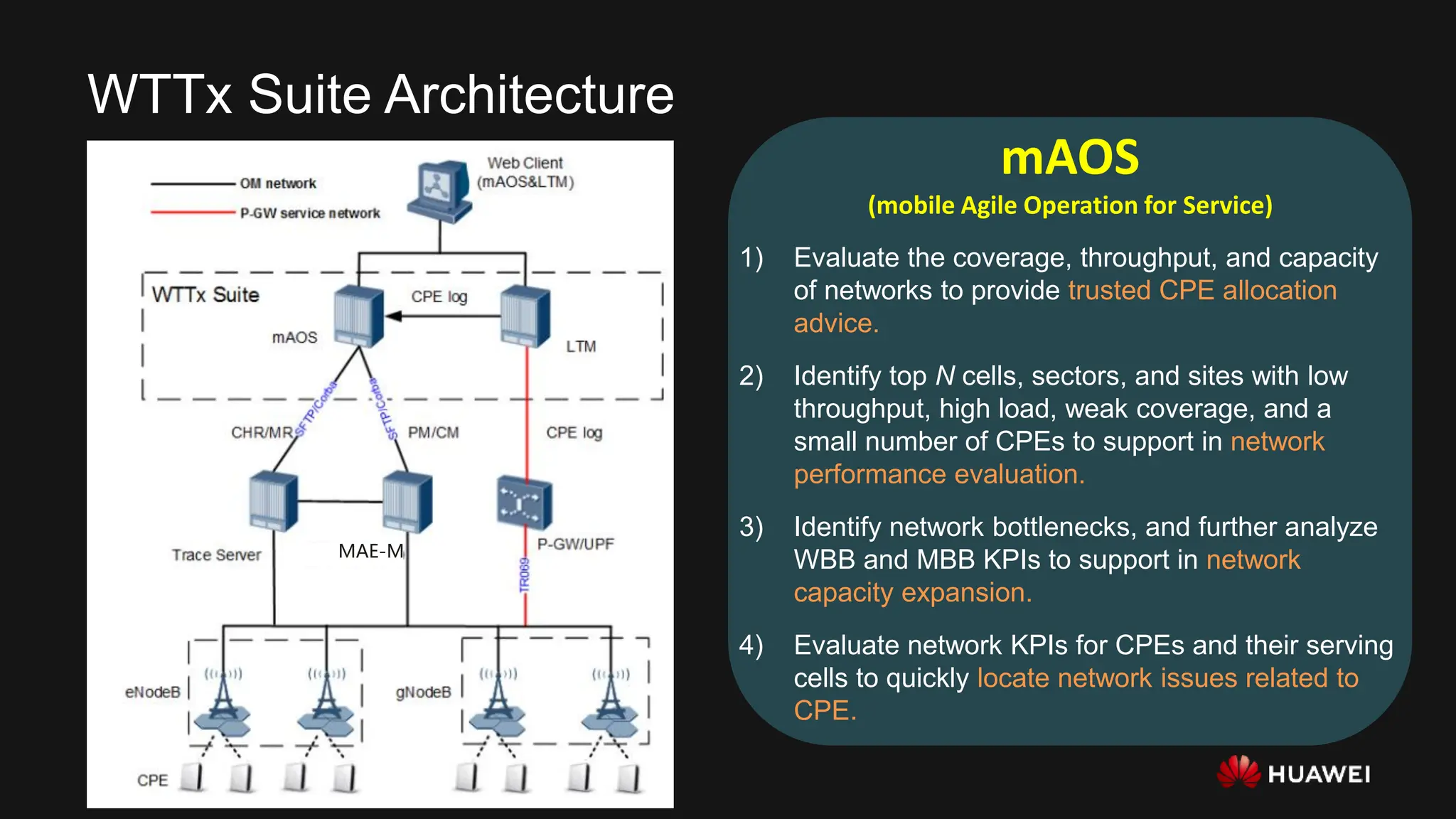
WTTx Suite Architecture
mAOS
(mobile Agile Operation for Service)
1) Evaluate the coverage, throughput, and capacity
of networks to provide trusted CPE allocation
advice.
2) Identify top N cells, sectors, and sites with low
throughput, high load, weak coverage, and a
small number of CPEs to support in network
performance evaluation.
3) Identify network bottlenecks, and further analyze
WBB and MBB KPIs to support in network
capacity expansion.
4) Evaluate network KPIs for CPEs and their serving
cells to quickly locate network issues related to
CPE.
MAE-M
Huawei Confidential
5
Contents
⚫ Product Description
⚫ Function Description
⚫ Maintenance Scenarios
⚫ Deployment
⚫ FAQ
Huawei Confidential
6
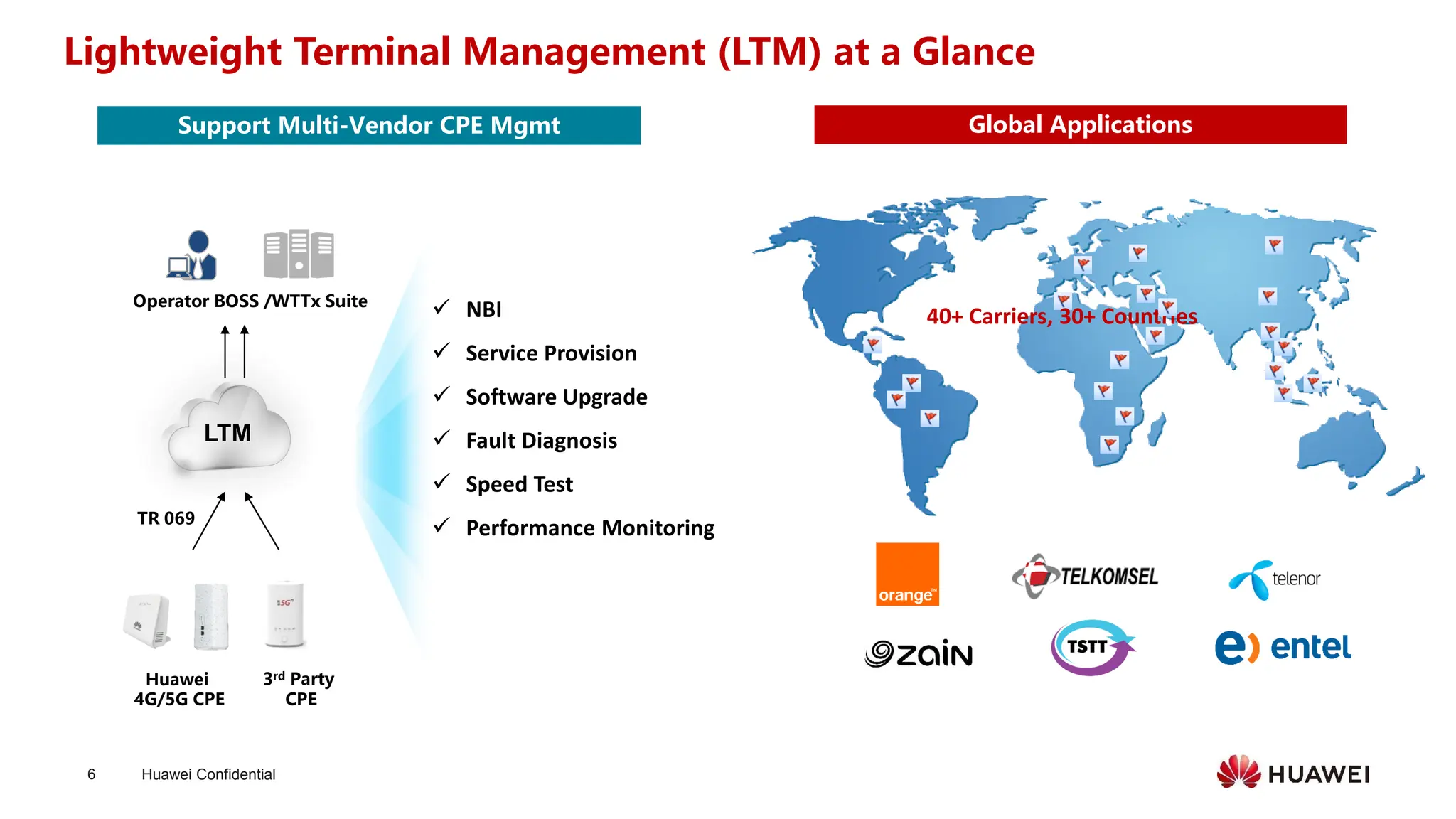
Lightweight Terminal Management (LTM) at a Glance
40+ Carriers, 30+ Countries
LTM
Operator BOSS /WTTx Suite
Huawei
4G/5G CPE
✓ NBI
✓ Service Provision
✓ Software Upgrade
✓ Fault Diagnosis
✓ Speed Test
✓ Performance Monitoring
TR 069
3rd Party
CPE
Global Applications
Support Multi-Vendor CPE Mgmt
Huawei Confidential
7
Contents
⚫ Product Description
⚫ Function Description
⚫ Maintenance Scenarios
⚫ Deployment
⚫ FAQ
Huawei Confidential
8
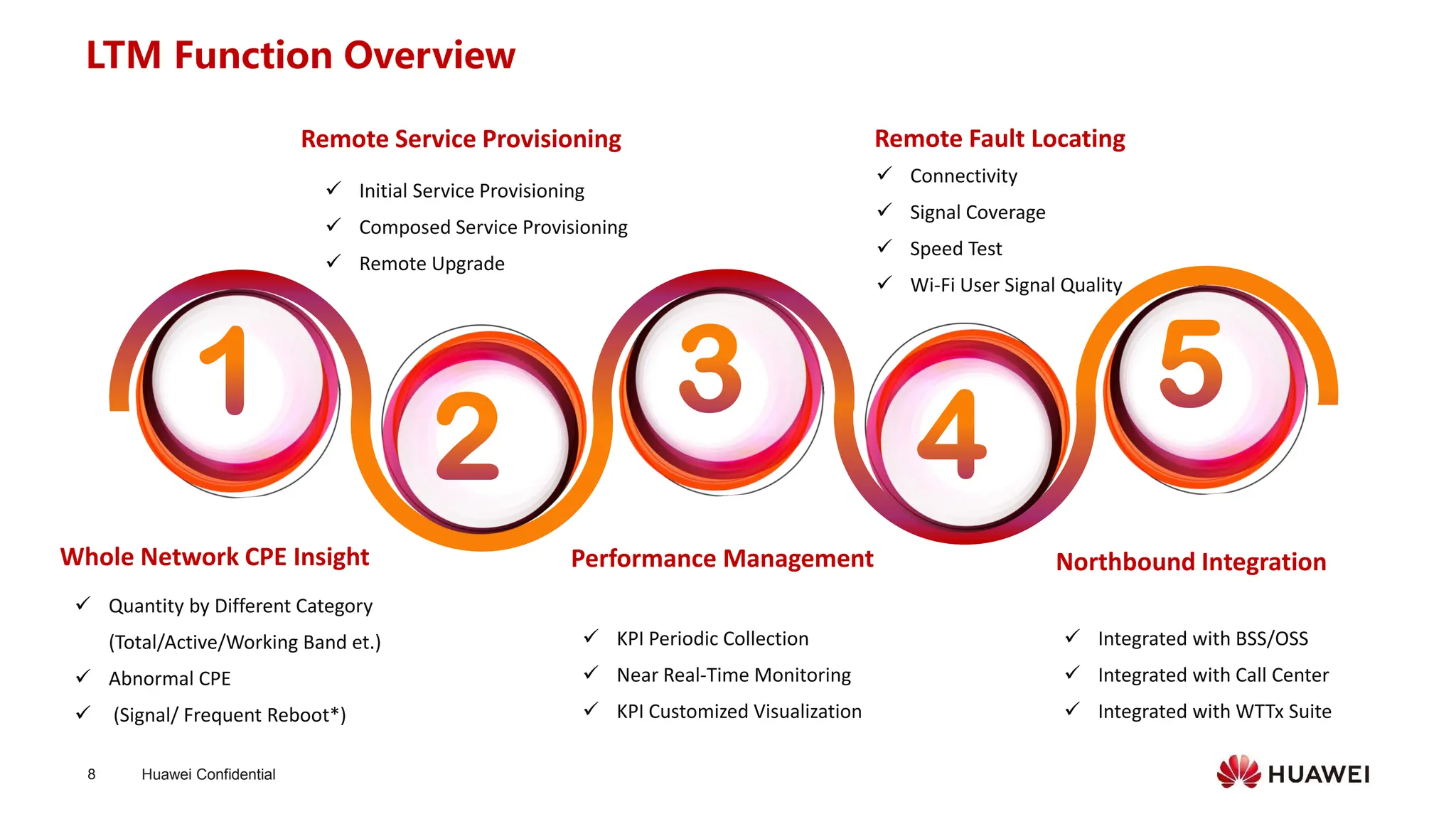
Whole Network CPE Insight
✓ Quantity by Different Category
(Total/Active/Working Band et.)
✓ Abnormal CPE
✓ (Signal/ Frequent Reboot*)
Remote Service Provisioning Remote Fault Locating
✓ Initial Service Provisioning
✓ Composed Service Provisioning
✓ Remote Upgrade
Performance Management
✓ KPI Periodic Collection
✓ Near Real-Time Monitoring
✓ KPI Customized Visualization
✓ Connectivity
✓ Signal Coverage
✓ Speed Test
✓ Wi-Fi User Signal Quality
Northbound Integration
✓ Integrated with BSS/OSS
✓ Integrated with Call Center
✓ Integrated with WTTx Suite
LTM Function Overview
Huawei Confidential
9
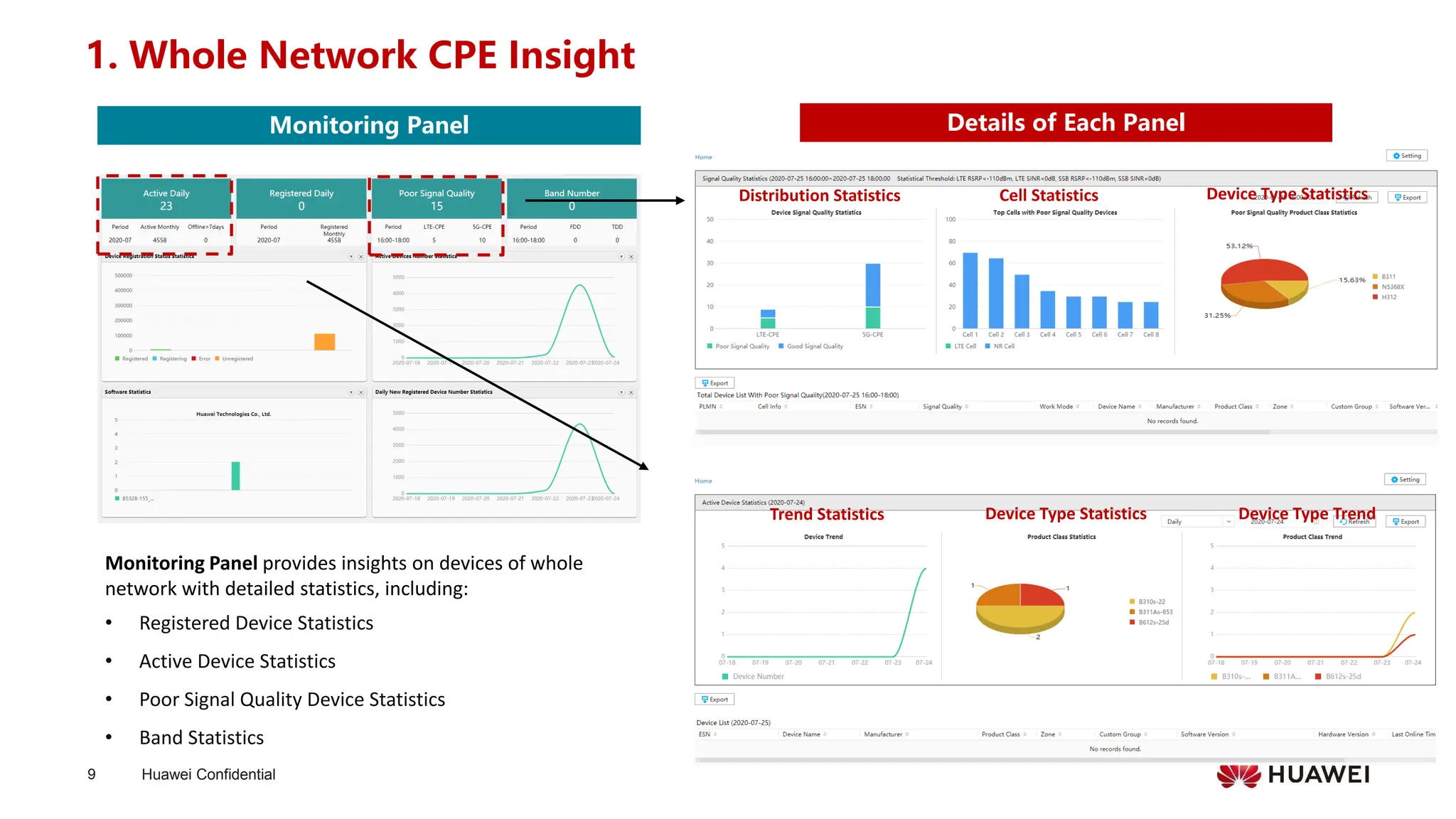
1. Whole Network CPE Insight
Monitoring Panel provides insights on devices of whole
network with detailed statistics, including:
• Registered Device Statistics
• Active Device Statistics
• Poor Signal Quality Device Statistics
• Band Statistics
Cell Statistics
Details of Each Panel
Monitoring Panel
Distribution Statistics Device Type Statistics
Trend Statistics Device Type Trend
Device Type Statistics
Huawei Confidential
10
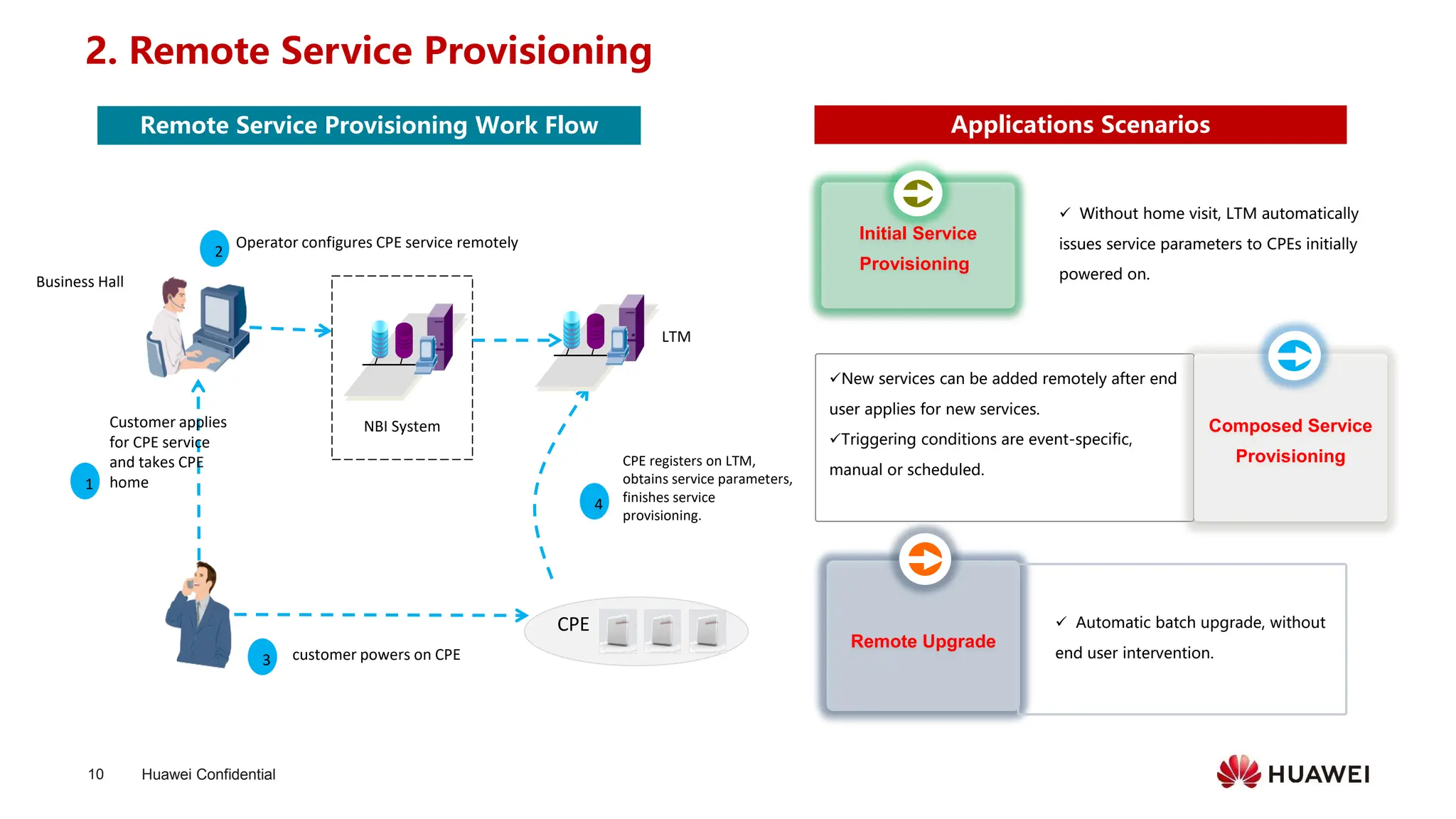
2. Remote Service Provisioning
1
LTM
Business Hall
3 customer powers on CPE
4
CPE registers on LTM,
obtains service parameters,
finishes service
provisioning.
Customer applies
for CPE service
and takes CPE
home
NBI System
2
Operator configures CPE service remotely
CPE
✓ Without home visit, LTM automatically
issues service parameters to CPEs initially
powered on.
Initial Service
Provisioning
Remote Upgrade
✓ Automatic batch upgrade, without
end user intervention.
✓New services can be added remotely after end
user applies for new services.
✓Triggering conditions are event-specific,
manual or scheduled.
Composed Service
Provisioning
Applications Scenarios
Remote Service Provisioning Work Flow
Huawei Confidential
11
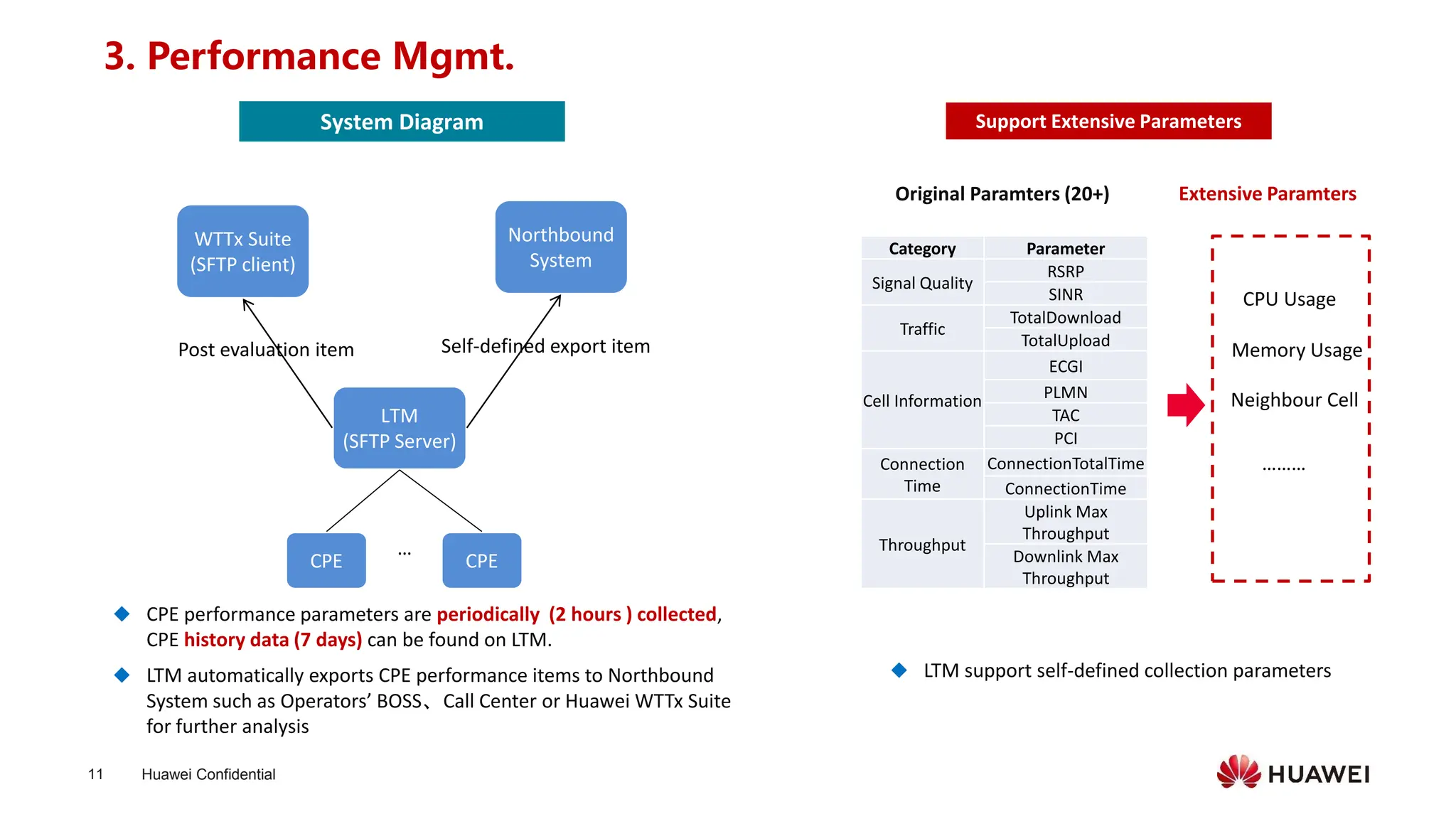
3. Performance Mgmt.
◆ CPE performance parameters are periodically (2 hours ) collected,
CPE history data (7 days) can be found on LTM.
◆ LTM automatically exports CPE performance items to Northbound
System such as Operators’ BOSS、Call Center or Huawei WTTx Suite
for further analysis
WTTx Suite
(SFTP client)
LTM
(SFTP Server)
CPE CPE
…
Northbound
System
Self-defined export item
Post evaluation item
Support Extensive Parameters
Category Parameter
Signal Quality
RSRP
SINR
Traffic
TotalDownload
TotalUpload
Cell Information
ECGI
PLMN
TAC
PCI
Connection
Time
ConnectionTotalTime
ConnectionTime
Throughput
Uplink Max
Throughput
Downlink Max
Throughput
System Diagram
◆ LTM support self-defined collection parameters
Original Paramters (20+) Extensive Paramters
CPU Usage
Memory Usage
………
Neighbour Cell
Huawei Confidential
12
Self Defined Parameter
Setting/Monitoring/Exporting
Visualized Parameters Trend
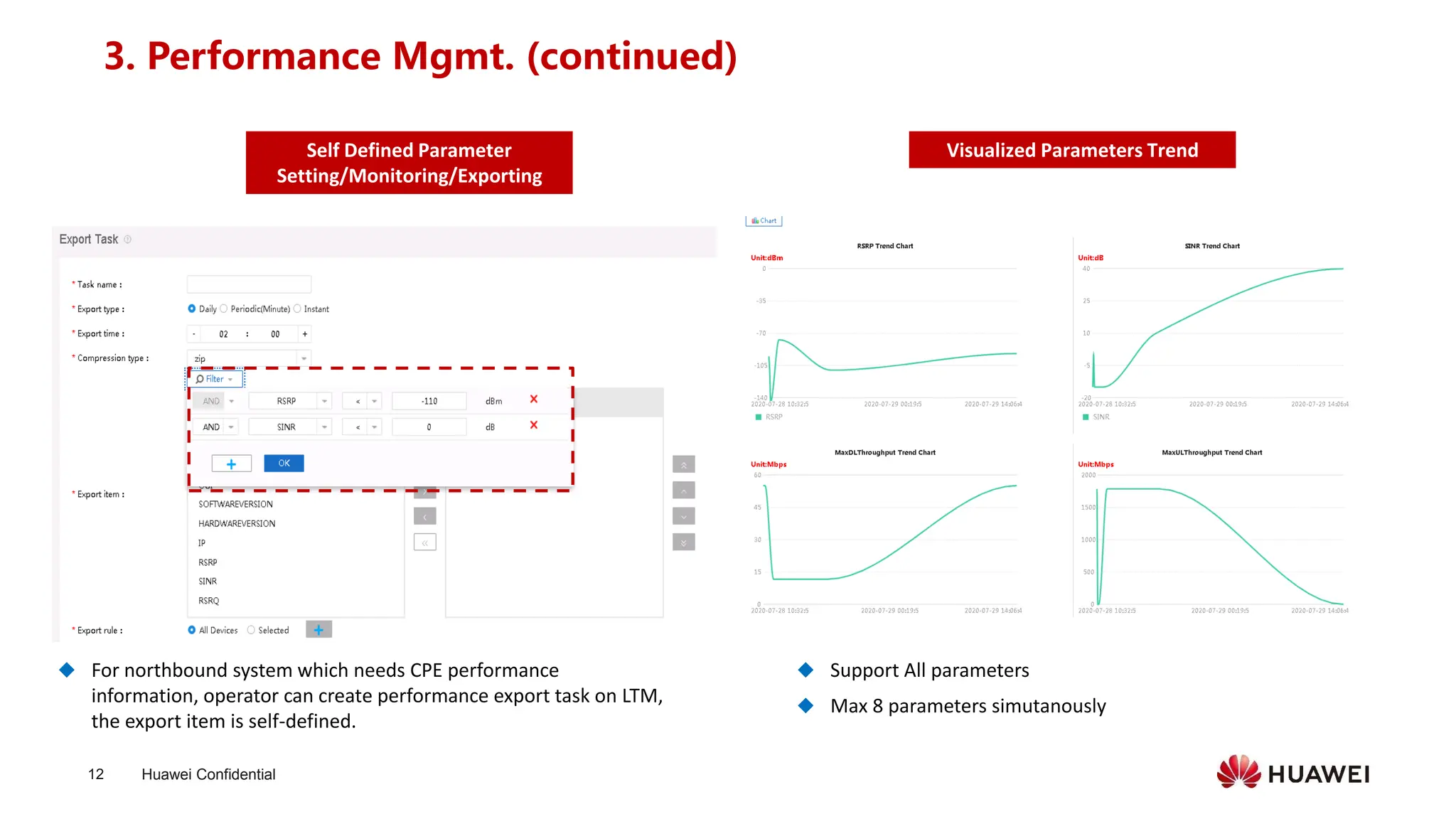
◆ For northbound system which needs CPE performance
information, operator can create performance export task on LTM,
the export item is self-defined.
◆ Support All parameters
◆ Max 8 parameters simutanously
3. Performance Mgmt. (continued)
Huawei Confidential
13
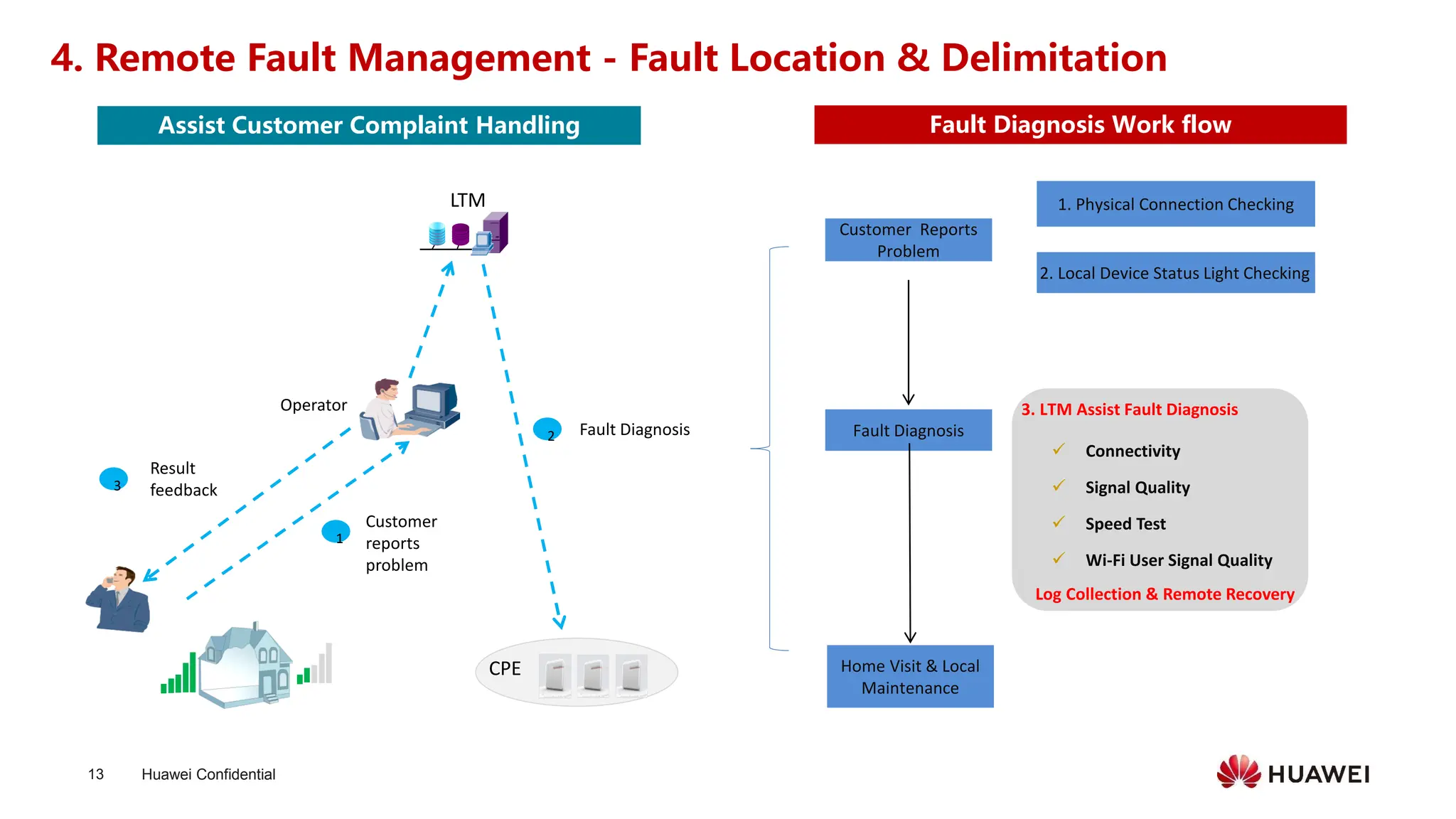
3. LTM Assist Fault Diagnosis
4. Remote Fault Management - Fault Location & Delimitation
Operator
LTM
1
2
3
Fault Diagnosis
Customer
reports
problem
Result
feedback
2. Local Device Status Light Checking
Customer Reports
Problem
1. Physical Connection Checking
Fault Diagnosis
Home Visit & Local
Maintenance
CPE
Log Collection & Remote Recovery
✓ Connectivity
✓ Signal Quality
✓ Speed Test
✓ Wi-Fi User Signal Quality
Fault Diagnosis Work flow
Assist Customer Complaint Handling
Huawei Confidential
14
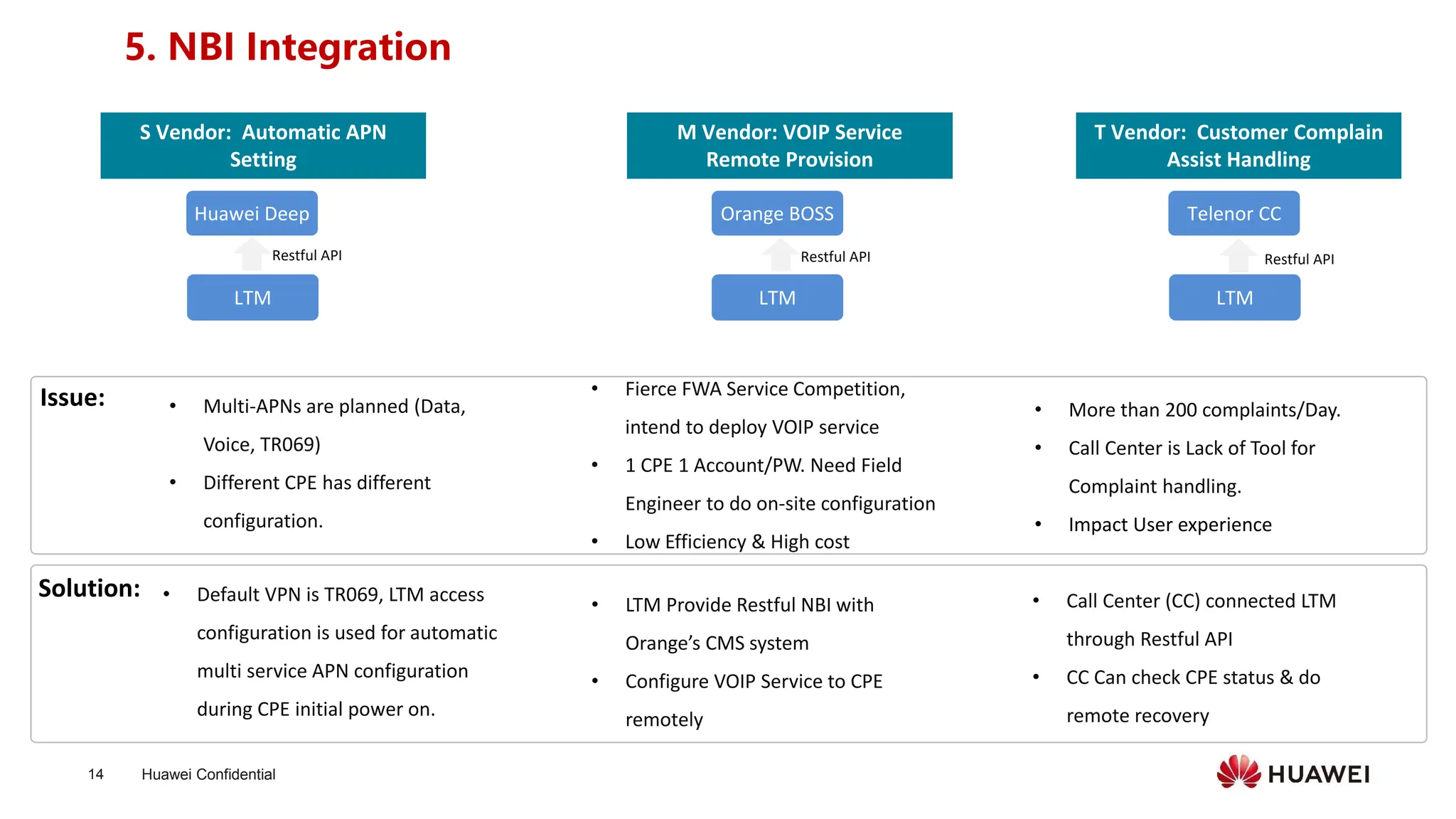
5. NBI Integration
• Multi-APNs are planned (Data,
Voice, TR069)
• Different CPE has different
configuration.
LTM
Huawei Deep
M Vendor: VOIP Service
Remote Provision
S Vendor: Automatic APN
Setting
T Vendor: Customer Complain
Assist Handling
LTM
Orange BOSS
LTM
Telenor CC
Restful API
Solution: • Call Center (CC) connected LTM
through Restful API
• CC Can check CPE status & do
remote recovery
• More than 200 complaints/Day.
• Call Center is Lack of Tool for
Complaint handling.
• Impact User experience
Issue:
• LTM Provide Restful NBI with
Orange’s CMS system
• Configure VOIP Service to CPE
remotely
• Fierce FWA Service Competition,
intend to deploy VOIP service
• 1 CPE 1 Account/PW. Need Field
Engineer to do on-site configuration
• Low Efficiency & High cost
Restful API
Restful API
• Default VPN is TR069, LTM access
configuration is used for automatic
multi service APN configuration
during CPE initial power on.
Huawei Confidential
15
Contents
⚫ Product Description
⚫ Function Description
⚫ Maintenance Scenarios
⚫ Deployment
⚫ FAQ
Huawei Confidential
16
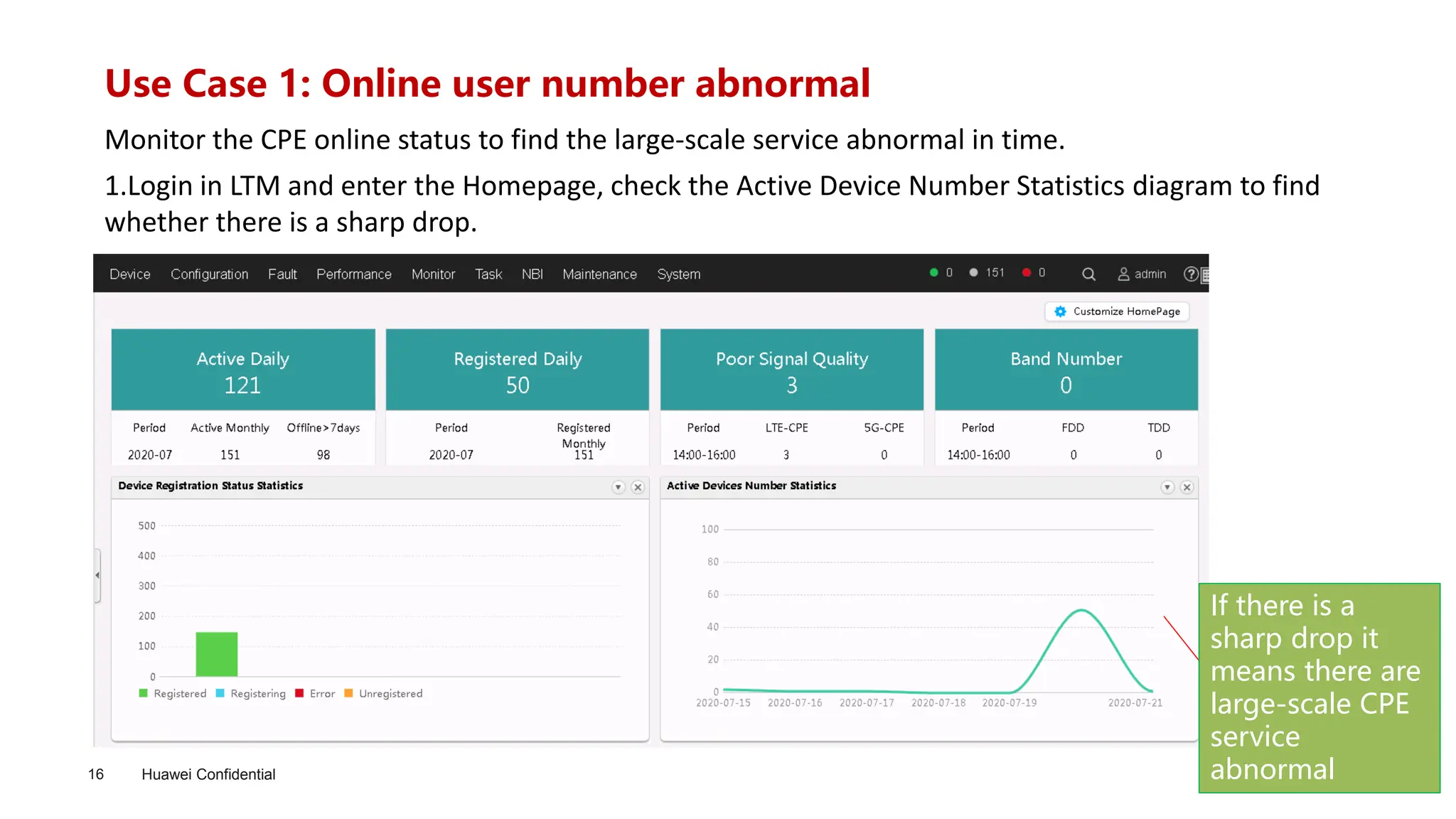
Use Case 1: Online user number abnormal
1.Login in LTM and enter the Homepage, check the Active Device Number Statistics diagram to find
whether there is a sharp drop.
Monitor the CPE online status to find the large-scale service abnormal in time.
If there is a
sharp drop it
means there are
large-scale CPE
service
abnormal
Huawei Confidential
17
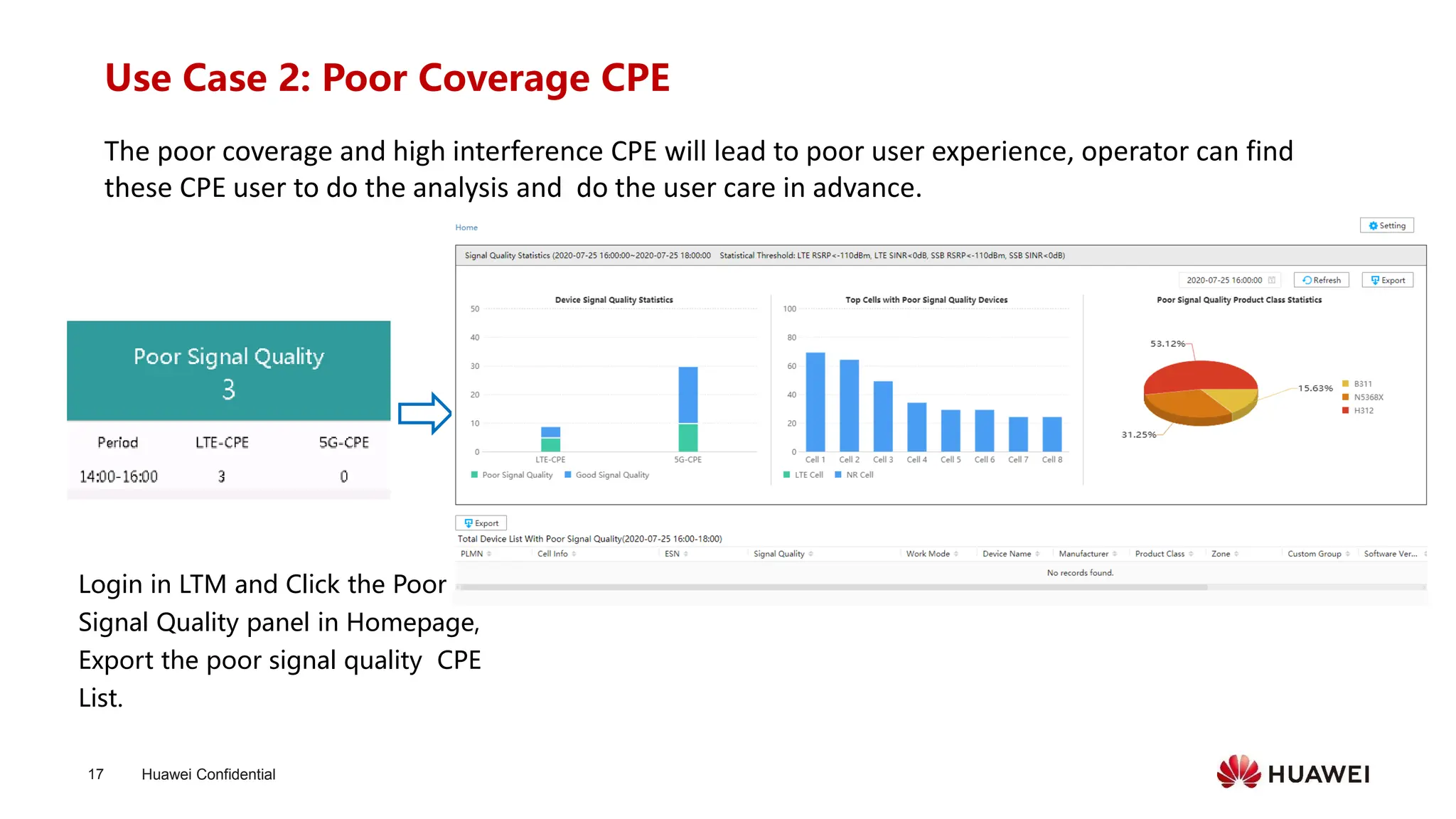
Use Case 2: Poor Coverage CPE
The poor coverage and high interference CPE will lead to poor user experience, operator can find
these CPE user to do the analysis and do the user care in advance.
Login in LTM and Click the Poor
Signal Quality panel in Homepage,
Export the poor signal quality CPE
List.
Huawei Confidential
18
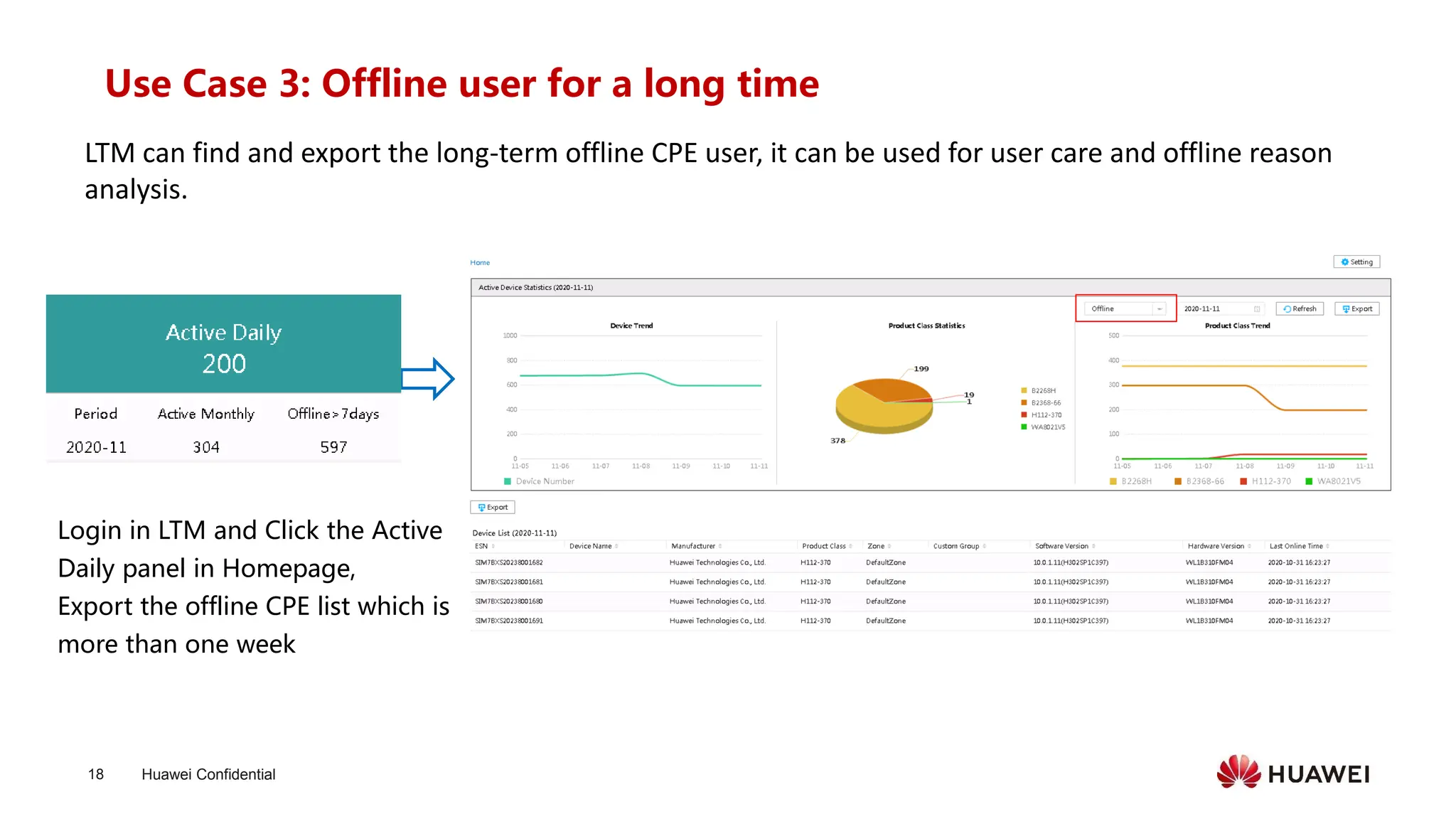
Use Case 3: Offline user for a long time
LTM can find and export the long-term offline CPE user, it can be used for user care and offline reason
analysis.
Login in LTM and Click the Active
Daily panel in Homepage,
Export the offline CPE list which is
more than one week
Huawei Confidential
19
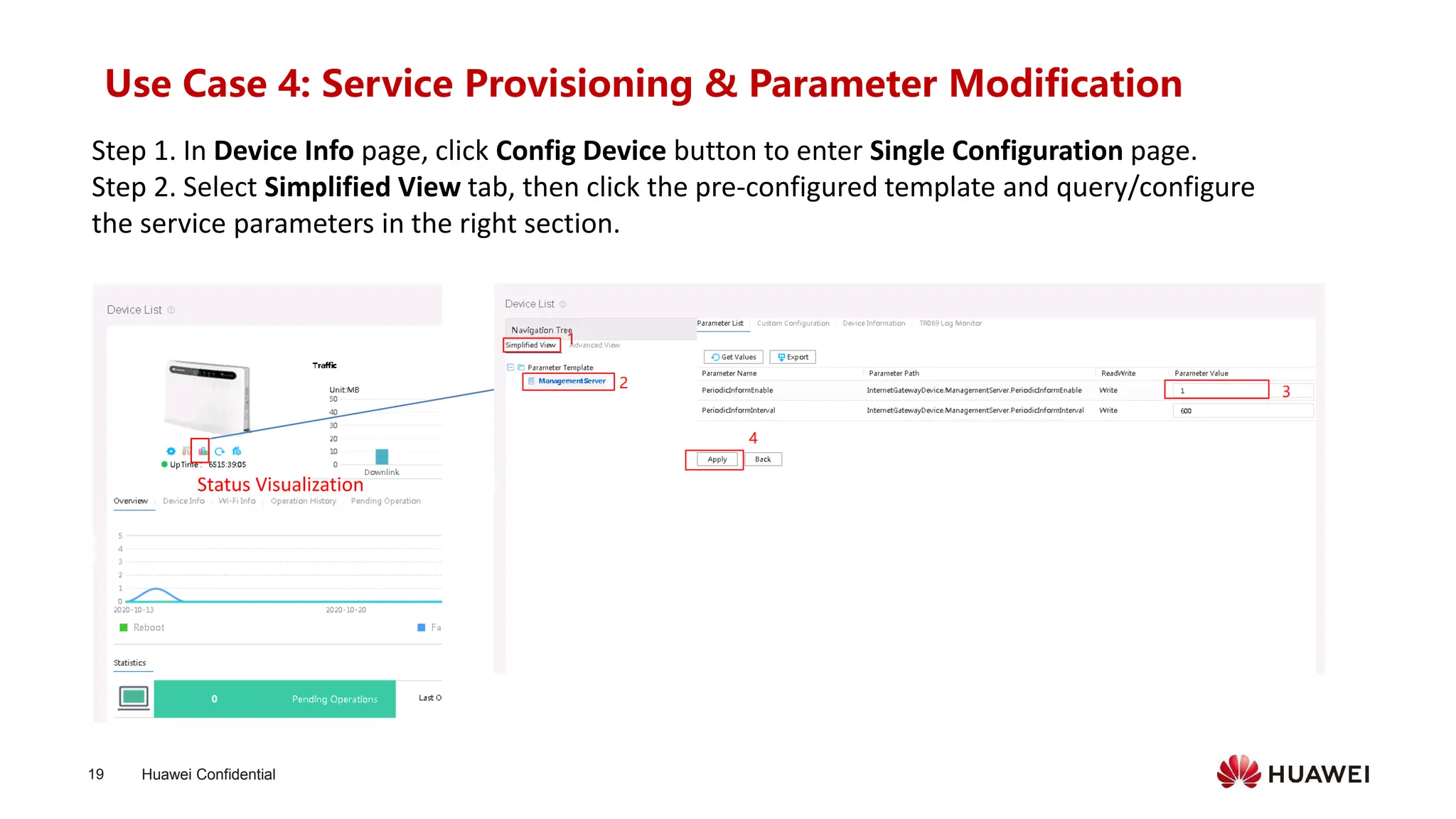
Use Case 4: Service Provisioning & Parameter Modification
Step 1. In Device Info page, click Config Device button to enter Single Configuration page.
Step 2. Select Simplified View tab, then click the pre-configured template and query/configure
the service parameters in the right section.
Status Visualization
Huawei Confidential
20
Use Case 5: Connectivity Troubleshooting: Traceroute
Step 1. In Device Info page, click Diagnosis button to enter Diagnosis page.
Step 2. Select Traceroute Diagnosis page, input the target web address in host column, then
click Start Diagnosis. The Hop detail, including each route connectivity, delay will be displayed
in the result.
Diagnosis
Huawei Confidential
21
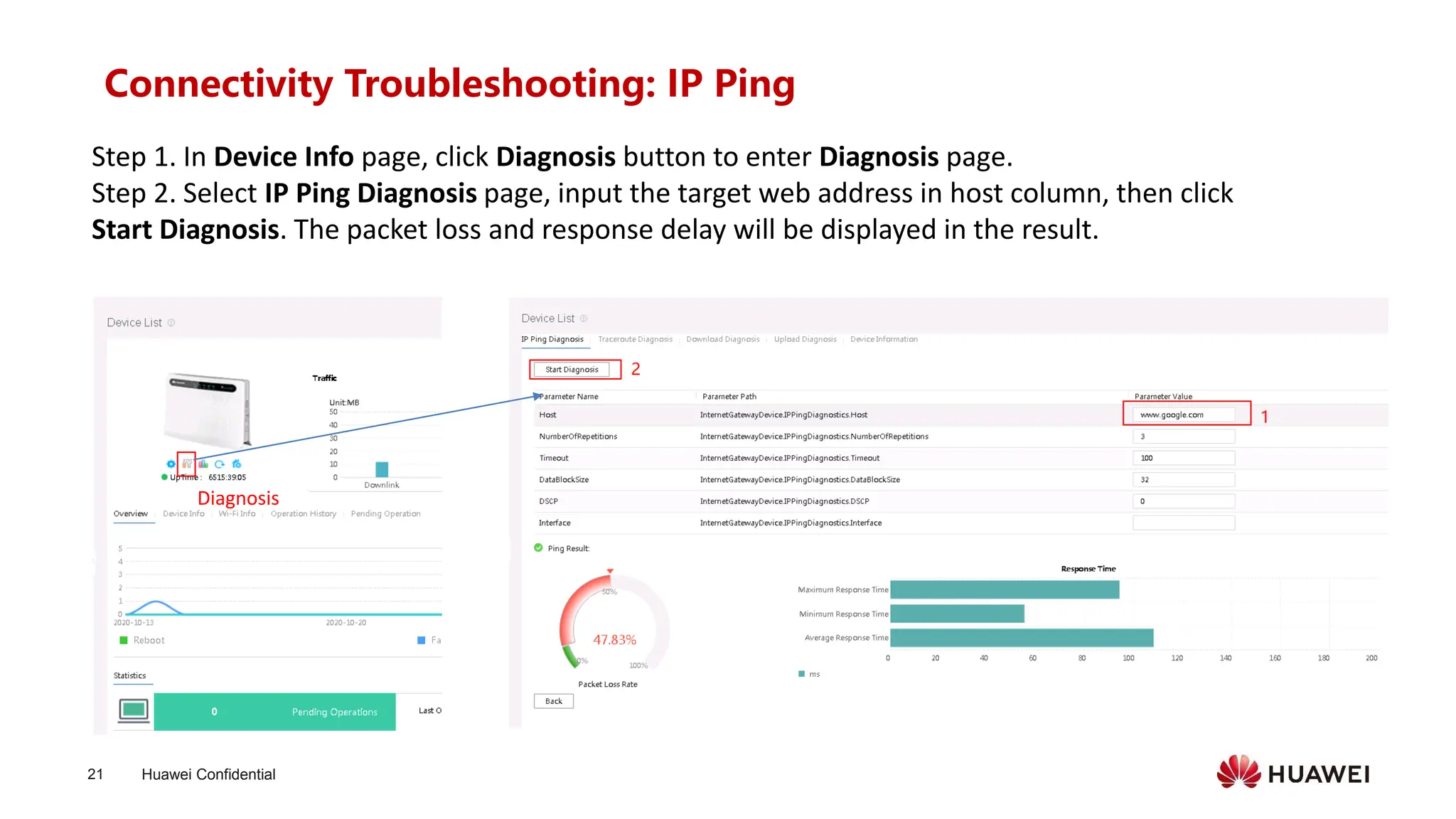
Connectivity Troubleshooting: IP Ping
Step 1. In Device Info page, click Diagnosis button to enter Diagnosis page.
Step 2. Select IP Ping Diagnosis page, input the target web address in host column, then click
Start Diagnosis. The packet loss and response delay will be displayed in the result.
Diagnosis
Huawei Confidential
22
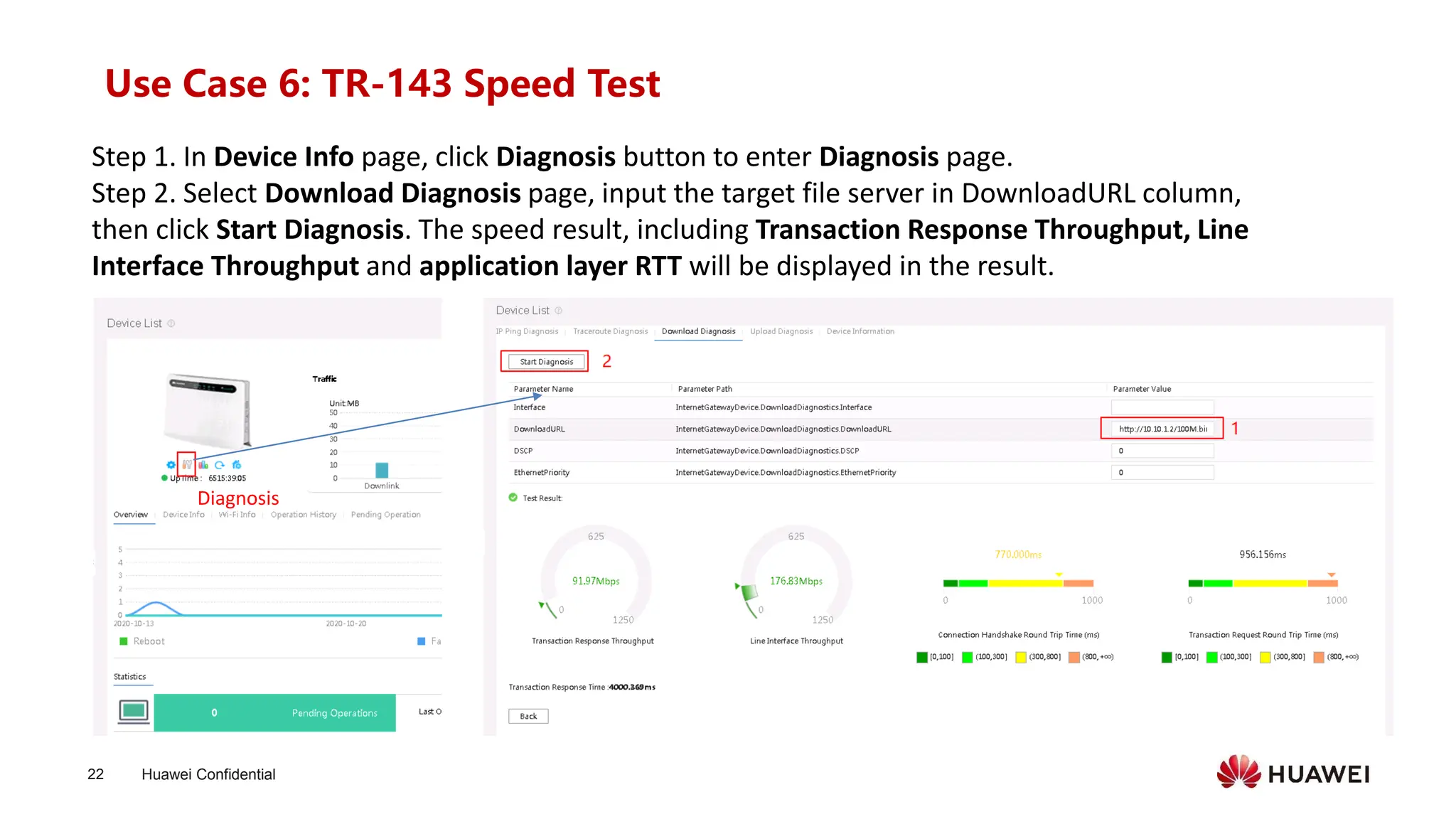
Use Case 6: TR-143 Speed Test
Step 1. In Device Info page, click Diagnosis button to enter Diagnosis page.
Step 2. Select Download Diagnosis page, input the target file server in DownloadURL column,
then click Start Diagnosis. The speed result, including Transaction Response Throughput, Line
Interface Throughput and application layer RTT will be displayed in the result.
Diagnosis
Huawei Confidential
23
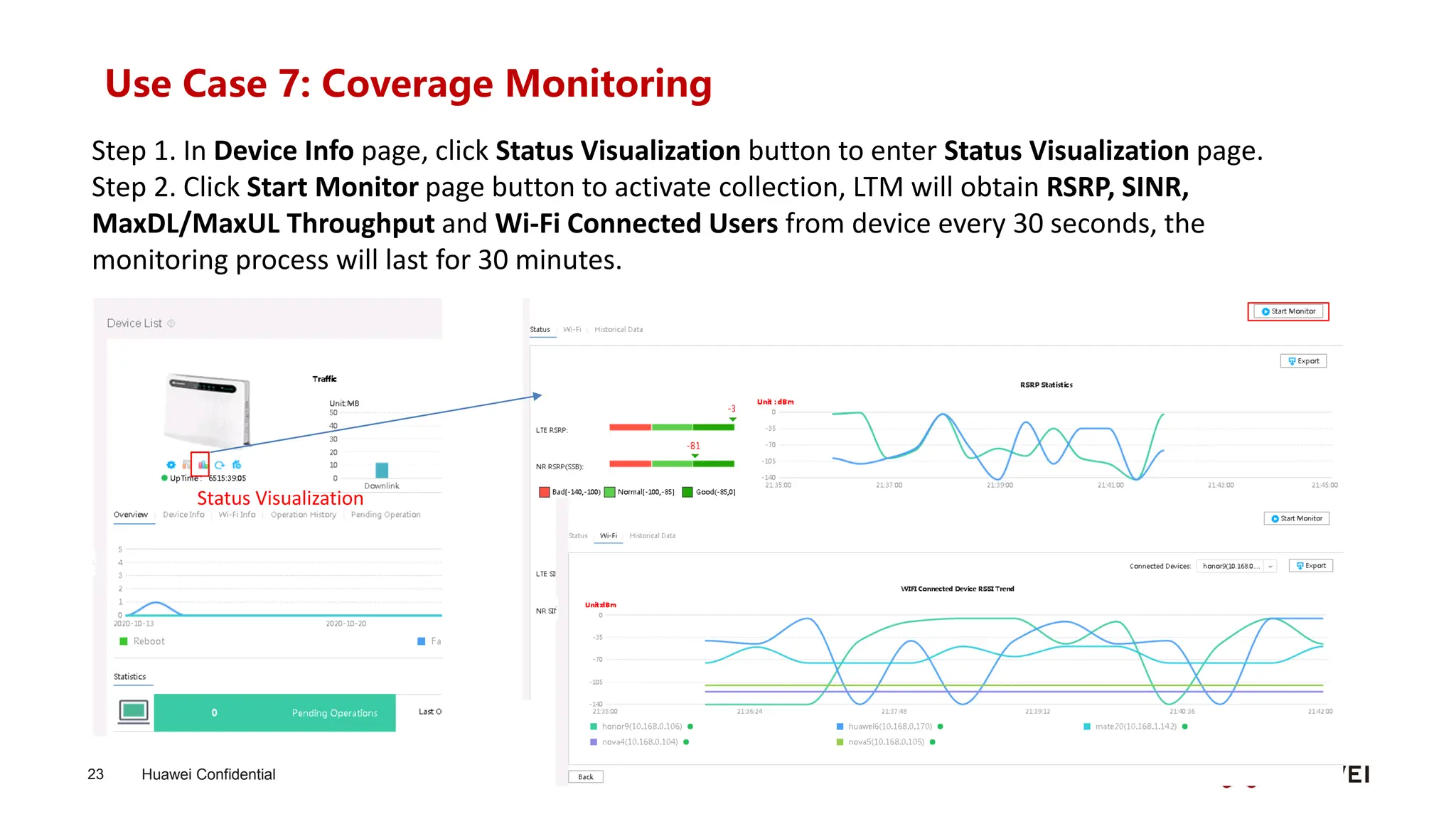
Use Case 7: Coverage Monitoring
Step 1. In Device Info page, click Status Visualization button to enter Status Visualization page.
Step 2. Click Start Monitor page button to activate collection, LTM will obtain RSRP, SINR,
MaxDL/MaxUL Throughput and Wi-Fi Connected Users from device every 30 seconds, the
monitoring process will last for 30 minutes.
Status Visualization
Huawei Confidential
24
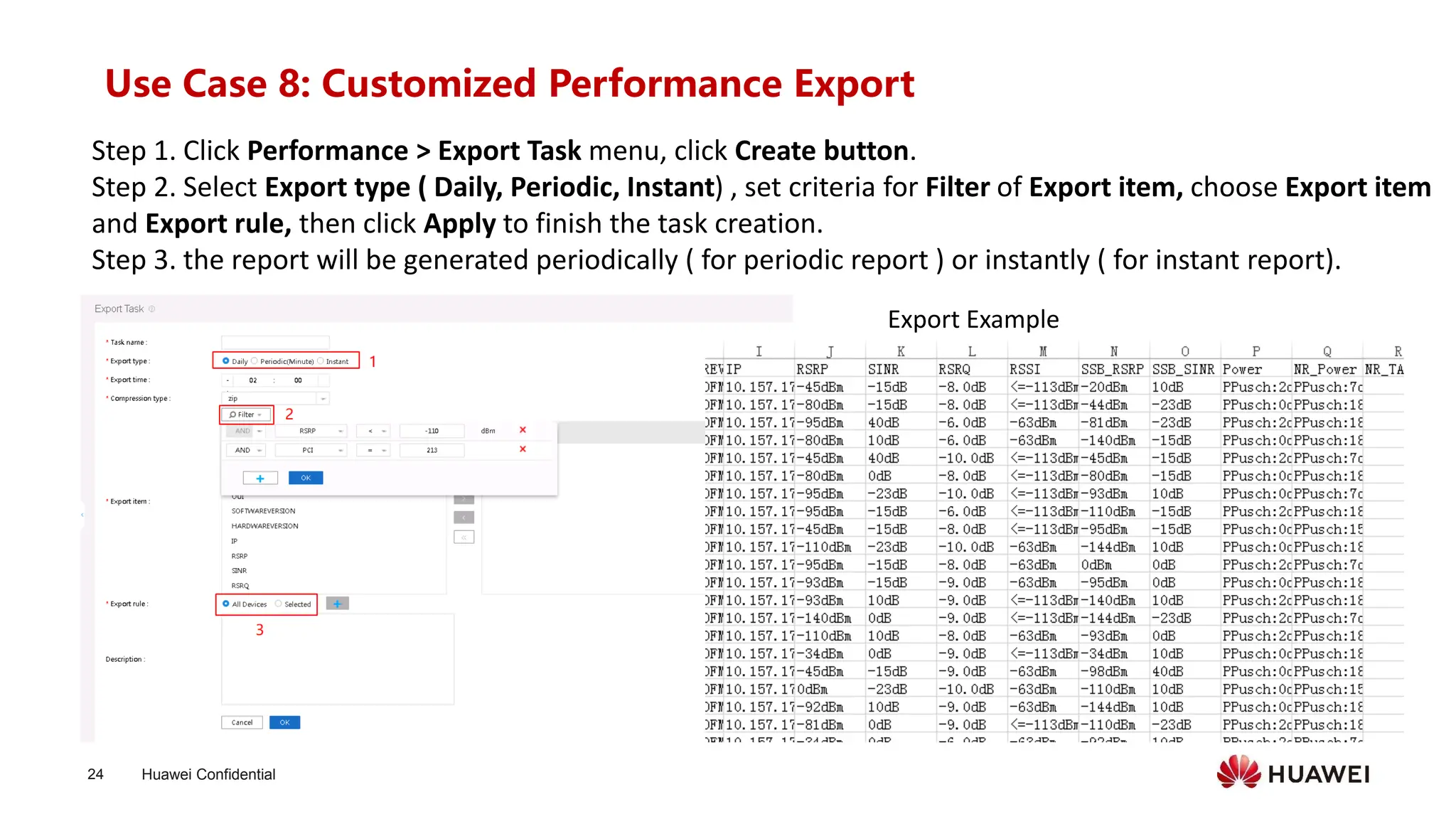
Use Case 8: Customized Performance Export
Step 1. Click Performance > Export Task menu, click Create button.
Step 2. Select Export type ( Daily, Periodic, Instant) , set criteria for Filter of Export item, choose Export item
and Export rule, then click Apply to finish the task creation.
Step 3. the report will be generated periodically ( for periodic report ) or instantly ( for instant report).
Export Example
Huawei Confidential
25
Contents
⚫ Product Description
⚫ Function Description
⚫ Maintenance Scenarios
⚫ Deployment
⚫ FAQ
Huawei Confidential
26
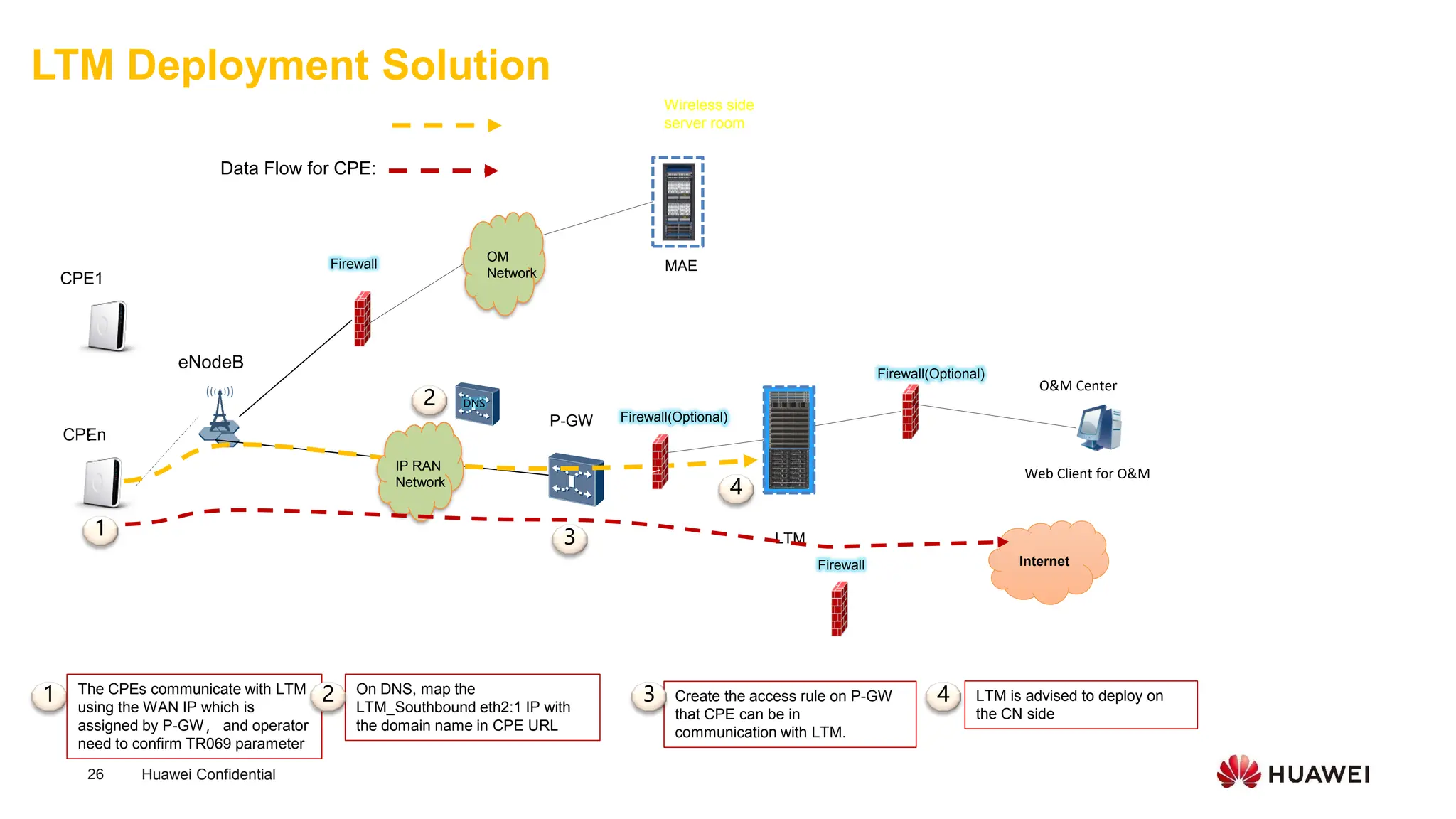
LTM Deployment Solution
Web Client for O&M
P-GW
eNodeB
CPEn
CPE1
Firewall(Optional)
...
Firewall
OM
Network
MAE
LTM
LTM is advised to deploy on
the CN side
Create the access rule on P-GW
that CPE can be in
communication with LTM.
TR069 Flow for CPE Management :
4
3
1
On DNS, map the
LTM_Southbound eth2:1 IP with
the domain name in CPE URL
2
1 The CPEs communicate with LTM
using the WAN IP which is
assigned by P-GW, and operator
need to confirm TR069 parameter
2 3 4
Wireless side
server room
O&M Center
DNS
IP RAN
Network
Firewall(Optional)
Internet
Firewall
Data Flow for CPE:
Huawei Confidential
27
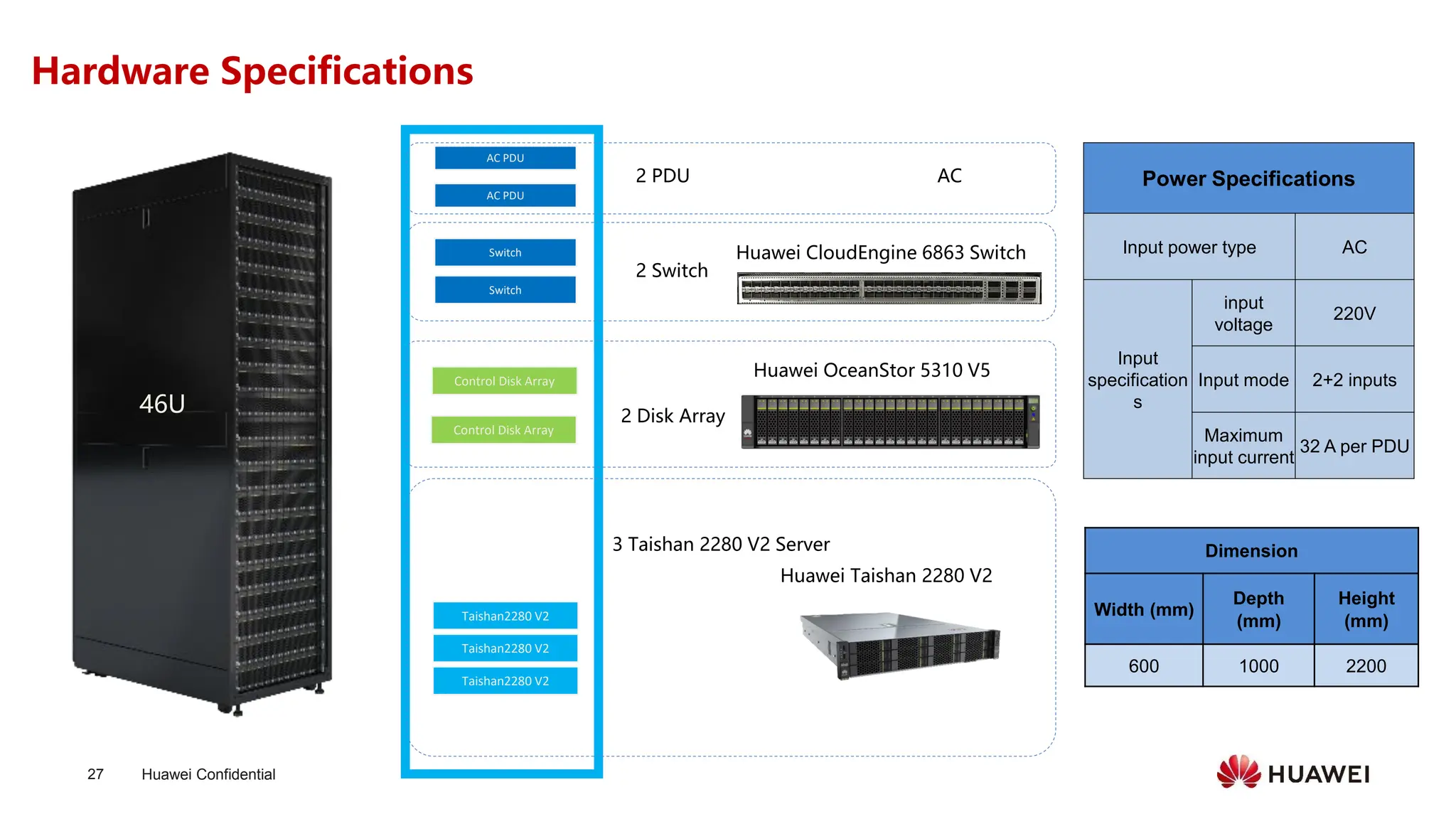
Hardware Specifications
Switch
Control Disk Array
Switch
46U
Taishan2280 V2
Taishan2280 V2
Taishan2280 V2
3 Taishan 2280 V2 Server
Control Disk Array
AC PDU
AC PDU
2 Disk Array
2 Switch
2 PDU
Huawei Taishan 2280 V2
Huawei OceanStor 5310 V5
Huawei CloudEngine 6863 Switch
AC Power Specifications
Input power type AC
Input
specification
s
input
voltage
220V
Input mode 2+2 inputs
Maximum
input current
32 A per PDU
Dimension
Width (mm)
Depth
(mm)
Height
(mm)
600 1000 2200
Huawei Confidential
28
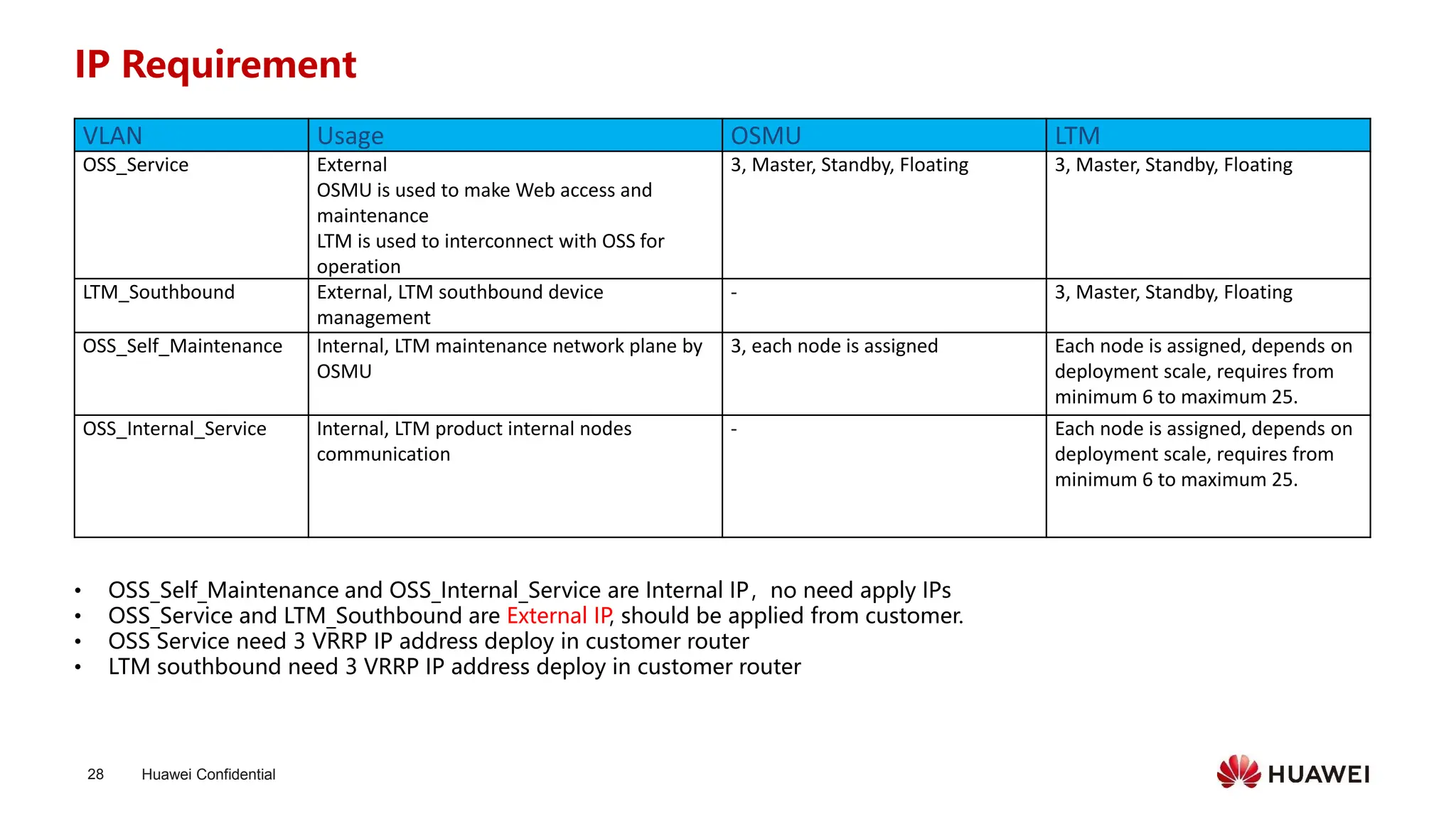
IP Requirement
• OSS_Self_Maintenance and OSS_Internal_Service are Internal IP,no need apply IPs
• OSS_Service and LTM_Southbound are External IP, should be applied from customer.
• OSS Service need 3 VRRP IP address deploy in customer router
• LTM southbound need 3 VRRP IP address deploy in customer router
VLAN Usage OSMU LTM
OSS_Service External
OSMU is used to make Web access and
maintenance
LTM is used to interconnect with OSS for
operation
3, Master, Standby, Floating 3, Master, Standby, Floating
LTM_Southbound External, LTM southbound device
management
- 3, Master, Standby, Floating
OSS_Self_Maintenance Internal, LTM maintenance network plane by
OSMU
3, each node is assigned Each node is assigned, depends on
deployment scale, requires from
minimum 6 to maximum 25.
OSS_Internal_Service Internal, LTM product internal nodes
communication
- Each node is assigned, depends on
deployment scale, requires from
minimum 6 to maximum 25.
Huawei Confidential
29
Contents
⚫ Product Description
⚫ Function Description
⚫ Maintenance Scenarios
⚫ Deployment
⚫ FAQ
Copyright©2018 Huawei Technologies Co., Ltd.
All Rights Reserved.
The information in this document may contain predictive
statements including, without limitation, statements regarding
the future financial and operating results, future product
portfolio, new technology, etc. There are a number of factors that
could cause actual results and developments to differ materially
from those expressed or implied in the predictive statements.
Therefore, such information is provided for reference purpose
only and constitutes neither an offer nor an acceptance. Huawei
may change the information at any time without notice.
把数字世界带入每个人、每个家庭、
每个组织,构建万物互联的智能世界。
Bring digital to every person, home, and
organization for a fully connected,
intelligent world.
Thank you.

1_WTTx LTM Main Slide_Huawei_Presentation.pdf

  • 1.
  • 2.
    Huawei Confidential 2 mAOS LTM(CPE) OSS(network) WTTx Suite Enables E2E Easy Provisioning and Management BOSS CSV CRM CSV CSV CSV Network Mgmt Network Performance Subs Mgmt Service quality & user satisfaction SP Office Expand on demand Target Network Plan Buz Performance indicator FWA Selling Map WTTx Suite
  • 3.
    Huawei Confidential 3 Enable WTTxQuick Win with WTTx Suite Network Planning/ Optimization Reliable SLA Evaluation Wireless Line Evaluation & Mgt. • Positioning Info. • CPE & Package info. • Cell Performance evaluation • CPE Performance evaluation • … … Provision failure info: • CPE address(GPS) • Throughput Requirement • Network Extension/Optimization • Problematic cell & CPE info • Poor Coverage cell • High Traffic cell • Engineering Parameter • Simulation Map • Threshold (RSRP, PRB,) • Prohibited Area • CPE info • IMSI / Hardware ID Huawei CPE Huawei eNodeB • Post-evaluation Result Network Expansion Guidance Maintenance Business Hall 3rd Party or Other Vendor • Online Check • Connectivity testing • … … • Restore Factory • Reboot • … … Complain Dispose
  • 4.
    Huawei Confidential 4 WTTx SuiteArchitecture mAOS (mobile Agile Operation for Service) 1) Evaluate the coverage, throughput, and capacity of networks to provide trusted CPE allocation advice. 2) Identify top N cells, sectors, and sites with low throughput, high load, weak coverage, and a small number of CPEs to support in network performance evaluation. 3) Identify network bottlenecks, and further analyze WBB and MBB KPIs to support in network capacity expansion. 4) Evaluate network KPIs for CPEs and their serving cells to quickly locate network issues related to CPE. MAE-M
  • 5.
    Huawei Confidential 5 Contents ⚫ ProductDescription ⚫ Function Description ⚫ Maintenance Scenarios ⚫ Deployment ⚫ FAQ
  • 6.
    Huawei Confidential 6 Lightweight TerminalManagement (LTM) at a Glance 40+ Carriers, 30+ Countries LTM Operator BOSS /WTTx Suite Huawei 4G/5G CPE ✓ NBI ✓ Service Provision ✓ Software Upgrade ✓ Fault Diagnosis ✓ Speed Test ✓ Performance Monitoring TR 069 3rd Party CPE Global Applications Support Multi-Vendor CPE Mgmt
  • 7.
    Huawei Confidential 7 Contents ⚫ ProductDescription ⚫ Function Description ⚫ Maintenance Scenarios ⚫ Deployment ⚫ FAQ
  • 8.
    Huawei Confidential 8 Whole NetworkCPE Insight ✓ Quantity by Different Category (Total/Active/Working Band et.) ✓ Abnormal CPE ✓ (Signal/ Frequent Reboot*) Remote Service Provisioning Remote Fault Locating ✓ Initial Service Provisioning ✓ Composed Service Provisioning ✓ Remote Upgrade Performance Management ✓ KPI Periodic Collection ✓ Near Real-Time Monitoring ✓ KPI Customized Visualization ✓ Connectivity ✓ Signal Coverage ✓ Speed Test ✓ Wi-Fi User Signal Quality Northbound Integration ✓ Integrated with BSS/OSS ✓ Integrated with Call Center ✓ Integrated with WTTx Suite LTM Function Overview
  • 9.
    Huawei Confidential 9 1. WholeNetwork CPE Insight Monitoring Panel provides insights on devices of whole network with detailed statistics, including: • Registered Device Statistics • Active Device Statistics • Poor Signal Quality Device Statistics • Band Statistics Cell Statistics Details of Each Panel Monitoring Panel Distribution Statistics Device Type Statistics Trend Statistics Device Type Trend Device Type Statistics
  • 10.
    Huawei Confidential 10 2. RemoteService Provisioning 1 LTM Business Hall 3 customer powers on CPE 4 CPE registers on LTM, obtains service parameters, finishes service provisioning. Customer applies for CPE service and takes CPE home NBI System 2 Operator configures CPE service remotely CPE ✓ Without home visit, LTM automatically issues service parameters to CPEs initially powered on. Initial Service Provisioning Remote Upgrade ✓ Automatic batch upgrade, without end user intervention. ✓New services can be added remotely after end user applies for new services. ✓Triggering conditions are event-specific, manual or scheduled. Composed Service Provisioning Applications Scenarios Remote Service Provisioning Work Flow
  • 11.
    Huawei Confidential 11 3. PerformanceMgmt. ◆ CPE performance parameters are periodically (2 hours ) collected, CPE history data (7 days) can be found on LTM. ◆ LTM automatically exports CPE performance items to Northbound System such as Operators’ BOSS、Call Center or Huawei WTTx Suite for further analysis WTTx Suite (SFTP client) LTM (SFTP Server) CPE CPE … Northbound System Self-defined export item Post evaluation item Support Extensive Parameters Category Parameter Signal Quality RSRP SINR Traffic TotalDownload TotalUpload Cell Information ECGI PLMN TAC PCI Connection Time ConnectionTotalTime ConnectionTime Throughput Uplink Max Throughput Downlink Max Throughput System Diagram ◆ LTM support self-defined collection parameters Original Paramters (20+) Extensive Paramters CPU Usage Memory Usage ……… Neighbour Cell
  • 12.
    Huawei Confidential 12 Self DefinedParameter Setting/Monitoring/Exporting Visualized Parameters Trend ◆ For northbound system which needs CPE performance information, operator can create performance export task on LTM, the export item is self-defined. ◆ Support All parameters ◆ Max 8 parameters simutanously 3. Performance Mgmt. (continued)
  • 13.
    Huawei Confidential 13 3. LTMAssist Fault Diagnosis 4. Remote Fault Management - Fault Location & Delimitation Operator LTM 1 2 3 Fault Diagnosis Customer reports problem Result feedback 2. Local Device Status Light Checking Customer Reports Problem 1. Physical Connection Checking Fault Diagnosis Home Visit & Local Maintenance CPE Log Collection & Remote Recovery ✓ Connectivity ✓ Signal Quality ✓ Speed Test ✓ Wi-Fi User Signal Quality Fault Diagnosis Work flow Assist Customer Complaint Handling
  • 14.
    Huawei Confidential 14 5. NBIIntegration • Multi-APNs are planned (Data, Voice, TR069) • Different CPE has different configuration. LTM Huawei Deep M Vendor: VOIP Service Remote Provision S Vendor: Automatic APN Setting T Vendor: Customer Complain Assist Handling LTM Orange BOSS LTM Telenor CC Restful API Solution: • Call Center (CC) connected LTM through Restful API • CC Can check CPE status & do remote recovery • More than 200 complaints/Day. • Call Center is Lack of Tool for Complaint handling. • Impact User experience Issue: • LTM Provide Restful NBI with Orange’s CMS system • Configure VOIP Service to CPE remotely • Fierce FWA Service Competition, intend to deploy VOIP service • 1 CPE 1 Account/PW. Need Field Engineer to do on-site configuration • Low Efficiency & High cost Restful API Restful API • Default VPN is TR069, LTM access configuration is used for automatic multi service APN configuration during CPE initial power on.
  • 15.
    Huawei Confidential 15 Contents ⚫ ProductDescription ⚫ Function Description ⚫ Maintenance Scenarios ⚫ Deployment ⚫ FAQ
  • 16.
    Huawei Confidential 16 Use Case1: Online user number abnormal 1.Login in LTM and enter the Homepage, check the Active Device Number Statistics diagram to find whether there is a sharp drop. Monitor the CPE online status to find the large-scale service abnormal in time. If there is a sharp drop it means there are large-scale CPE service abnormal
  • 17.
    Huawei Confidential 17 Use Case2: Poor Coverage CPE The poor coverage and high interference CPE will lead to poor user experience, operator can find these CPE user to do the analysis and do the user care in advance. Login in LTM and Click the Poor Signal Quality panel in Homepage, Export the poor signal quality CPE List.
  • 18.
    Huawei Confidential 18 Use Case3: Offline user for a long time LTM can find and export the long-term offline CPE user, it can be used for user care and offline reason analysis. Login in LTM and Click the Active Daily panel in Homepage, Export the offline CPE list which is more than one week
  • 19.
    Huawei Confidential 19 Use Case4: Service Provisioning & Parameter Modification Step 1. In Device Info page, click Config Device button to enter Single Configuration page. Step 2. Select Simplified View tab, then click the pre-configured template and query/configure the service parameters in the right section. Status Visualization
  • 20.
    Huawei Confidential 20 Use Case5: Connectivity Troubleshooting: Traceroute Step 1. In Device Info page, click Diagnosis button to enter Diagnosis page. Step 2. Select Traceroute Diagnosis page, input the target web address in host column, then click Start Diagnosis. The Hop detail, including each route connectivity, delay will be displayed in the result. Diagnosis
  • 21.
    Huawei Confidential 21 Connectivity Troubleshooting:IP Ping Step 1. In Device Info page, click Diagnosis button to enter Diagnosis page. Step 2. Select IP Ping Diagnosis page, input the target web address in host column, then click Start Diagnosis. The packet loss and response delay will be displayed in the result. Diagnosis
  • 22.
    Huawei Confidential 22 Use Case6: TR-143 Speed Test Step 1. In Device Info page, click Diagnosis button to enter Diagnosis page. Step 2. Select Download Diagnosis page, input the target file server in DownloadURL column, then click Start Diagnosis. The speed result, including Transaction Response Throughput, Line Interface Throughput and application layer RTT will be displayed in the result. Diagnosis
  • 23.
    Huawei Confidential 23 Use Case7: Coverage Monitoring Step 1. In Device Info page, click Status Visualization button to enter Status Visualization page. Step 2. Click Start Monitor page button to activate collection, LTM will obtain RSRP, SINR, MaxDL/MaxUL Throughput and Wi-Fi Connected Users from device every 30 seconds, the monitoring process will last for 30 minutes. Status Visualization
  • 24.
    Huawei Confidential 24 Use Case8: Customized Performance Export Step 1. Click Performance > Export Task menu, click Create button. Step 2. Select Export type ( Daily, Periodic, Instant) , set criteria for Filter of Export item, choose Export item and Export rule, then click Apply to finish the task creation. Step 3. the report will be generated periodically ( for periodic report ) or instantly ( for instant report). Export Example
  • 25.
    Huawei Confidential 25 Contents ⚫ ProductDescription ⚫ Function Description ⚫ Maintenance Scenarios ⚫ Deployment ⚫ FAQ
  • 26.
    Huawei Confidential 26 LTM DeploymentSolution Web Client for O&M P-GW eNodeB CPEn CPE1 Firewall(Optional) ... Firewall OM Network MAE LTM LTM is advised to deploy on the CN side Create the access rule on P-GW that CPE can be in communication with LTM. TR069 Flow for CPE Management : 4 3 1 On DNS, map the LTM_Southbound eth2:1 IP with the domain name in CPE URL 2 1 The CPEs communicate with LTM using the WAN IP which is assigned by P-GW, and operator need to confirm TR069 parameter 2 3 4 Wireless side server room O&M Center DNS IP RAN Network Firewall(Optional) Internet Firewall Data Flow for CPE:
  • 27.
    Huawei Confidential 27 Hardware Specifications Switch ControlDisk Array Switch 46U Taishan2280 V2 Taishan2280 V2 Taishan2280 V2 3 Taishan 2280 V2 Server Control Disk Array AC PDU AC PDU 2 Disk Array 2 Switch 2 PDU Huawei Taishan 2280 V2 Huawei OceanStor 5310 V5 Huawei CloudEngine 6863 Switch AC Power Specifications Input power type AC Input specification s input voltage 220V Input mode 2+2 inputs Maximum input current 32 A per PDU Dimension Width (mm) Depth (mm) Height (mm) 600 1000 2200
  • 28.
    Huawei Confidential 28 IP Requirement •OSS_Self_Maintenance and OSS_Internal_Service are Internal IP,no need apply IPs • OSS_Service and LTM_Southbound are External IP, should be applied from customer. • OSS Service need 3 VRRP IP address deploy in customer router • LTM southbound need 3 VRRP IP address deploy in customer router VLAN Usage OSMU LTM OSS_Service External OSMU is used to make Web access and maintenance LTM is used to interconnect with OSS for operation 3, Master, Standby, Floating 3, Master, Standby, Floating LTM_Southbound External, LTM southbound device management - 3, Master, Standby, Floating OSS_Self_Maintenance Internal, LTM maintenance network plane by OSMU 3, each node is assigned Each node is assigned, depends on deployment scale, requires from minimum 6 to maximum 25. OSS_Internal_Service Internal, LTM product internal nodes communication - Each node is assigned, depends on deployment scale, requires from minimum 6 to maximum 25.
  • 29.
    Huawei Confidential 29 Contents ⚫ ProductDescription ⚫ Function Description ⚫ Maintenance Scenarios ⚫ Deployment ⚫ FAQ
  • 30.
    Copyright©2018 Huawei TechnologiesCo., Ltd. All Rights Reserved. The information in this document may contain predictive statements including, without limitation, statements regarding the future financial and operating results, future product portfolio, new technology, etc. There are a number of factors that could cause actual results and developments to differ materially from those expressed or implied in the predictive statements. Therefore, such information is provided for reference purpose only and constitutes neither an offer nor an acceptance. Huawei may change the information at any time without notice. 把数字世界带入每个人、每个家庭、 每个组织,构建万物互联的智能世界。 Bring digital to every person, home, and organization for a fully connected, intelligent world. Thank you.