AC (120/220V) 16A Power Supply
(Cat. No. 1771-P7 Series B)

Installation Instructions
To the Installer

This document provides information on:
preparing to install the power supply
installing the power supply
connecting ac power to the power supply
troubleshooting
specifications

Prepare for Installation

The 1771-P7 power supply can power one 1771-A1B, -A2B, -A3B,
-A3B1, or -A4B I/O chassis when used with any adapter module or
programmable controller (Mini-PLC-2/02®, Mini-PLC-2/05®,
Mini-PLC-2/16®, Mini-PLC-2/17®, or PLC-5™ family processor) that
does not have an internal power supply.
Important: The power supply is not compatible with the 1771-A1, -A2,
or -A4 I/O chassis.
ATTENTION: The 1771-P7 is a stand-alone power supply.
Do not connect it in parallel with any other power supply.
Connecting it in parallel could result in processor memory loss
or injury due to unexpected machine operation.

ATTENTION: Under some conditions, electrostatic discharge
can degrade performance or damage system components.
Observe the following precautions to guard against
electrostatic damage:
Touch a grounded object to rid yourself of charge before
handling a module.
Do not touch the backplane connector or connector pins.
When not in use, keep modules in their static-shield bags.
Installation Data
Installation Data
AC (120/220V) 16A Power Supply
AC (120/220 V) 16A Power Supply
1771ĆP7 Series B
1771ĆP7 Series B

Before installing the power supply, you should:
mount the I/O chassis that the power supply will be connected to.
See the Universal I/O Chassis Installation Data (1771-2.210) for
information on mounting the I/O chassis.
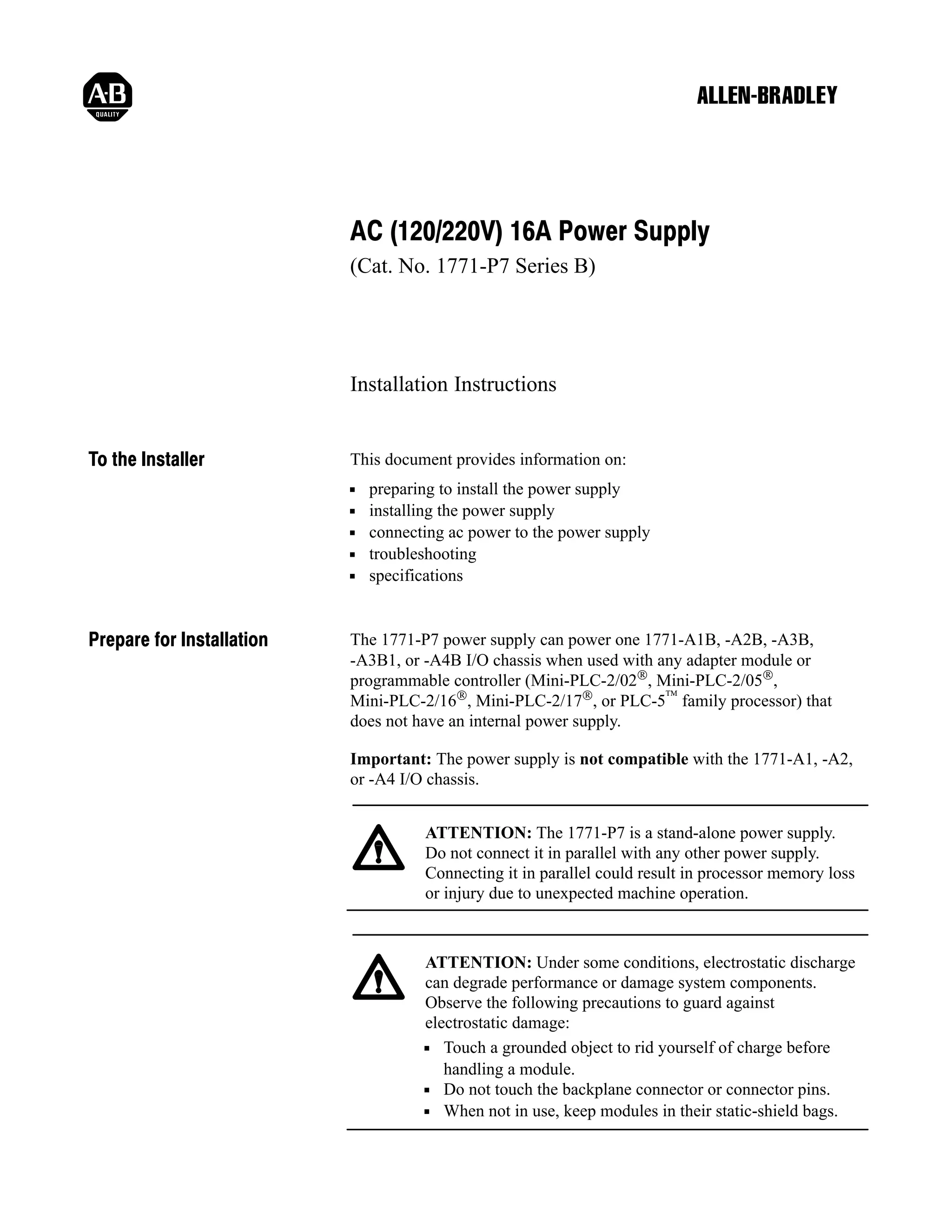
set the power supply configuration jumper on the I/O chassis.
The 1771-P7 is an external power supply. Set the configuration jumper
to the N position.
Y

N

Using
Power Supply
Module in
the Chassis?

12620ĆI

Install the 1771ĆP7 and
Connect Backplane Power
A1
A2
1
2
3
4
5

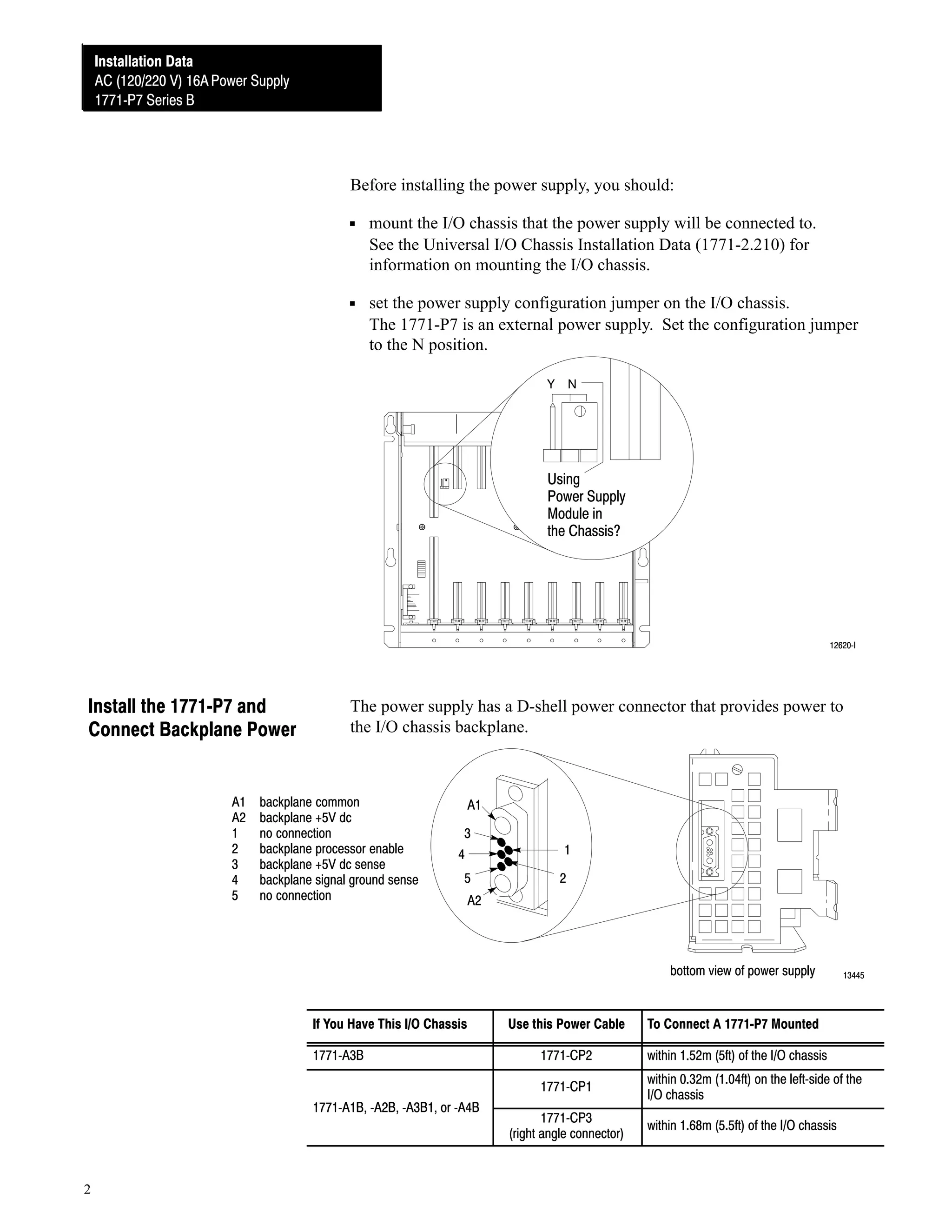
The power supply has a D-shell power connector that provides power to
the I/O chassis backplane.

backplane common
backplane +5V dc
no connection
backplane processor enable
backplane +5V dc sense
backplane signal ground sense
no connection

A1
3
4
5

1
2

A2

bottom view of power supply

If You Have This I/O Chassis

13445

1771ĆA1B, ĆA2B, ĆA3B1,
1771ĆA1B ĆA2B ĆA3B1 or ĆA4B

2

To Connect A 1771ĆP7 Mounted

1771ĆCP2

within 1.52m (5ft) of the I/O chassis

1771ĆCP1

1771ĆA3B

Use this Power Cable

within 0.32m (1.04ft) on the leftĆside of the
I/O chassis

1771ĆCP3
(right angle connector)

within 1.68m (5.5ft) of the I/O chassis
Installation Data
AC (120/220 V) 16A Power Supply
1771ĆP7 Series B

If You Are Mounting the Power Supply
on the left side of a panelĆmounted I/O chassis

Go To
next section

separately from an I/O chassis

page 5

Attaching to a PanelĆmounted I/O Chassis
1.

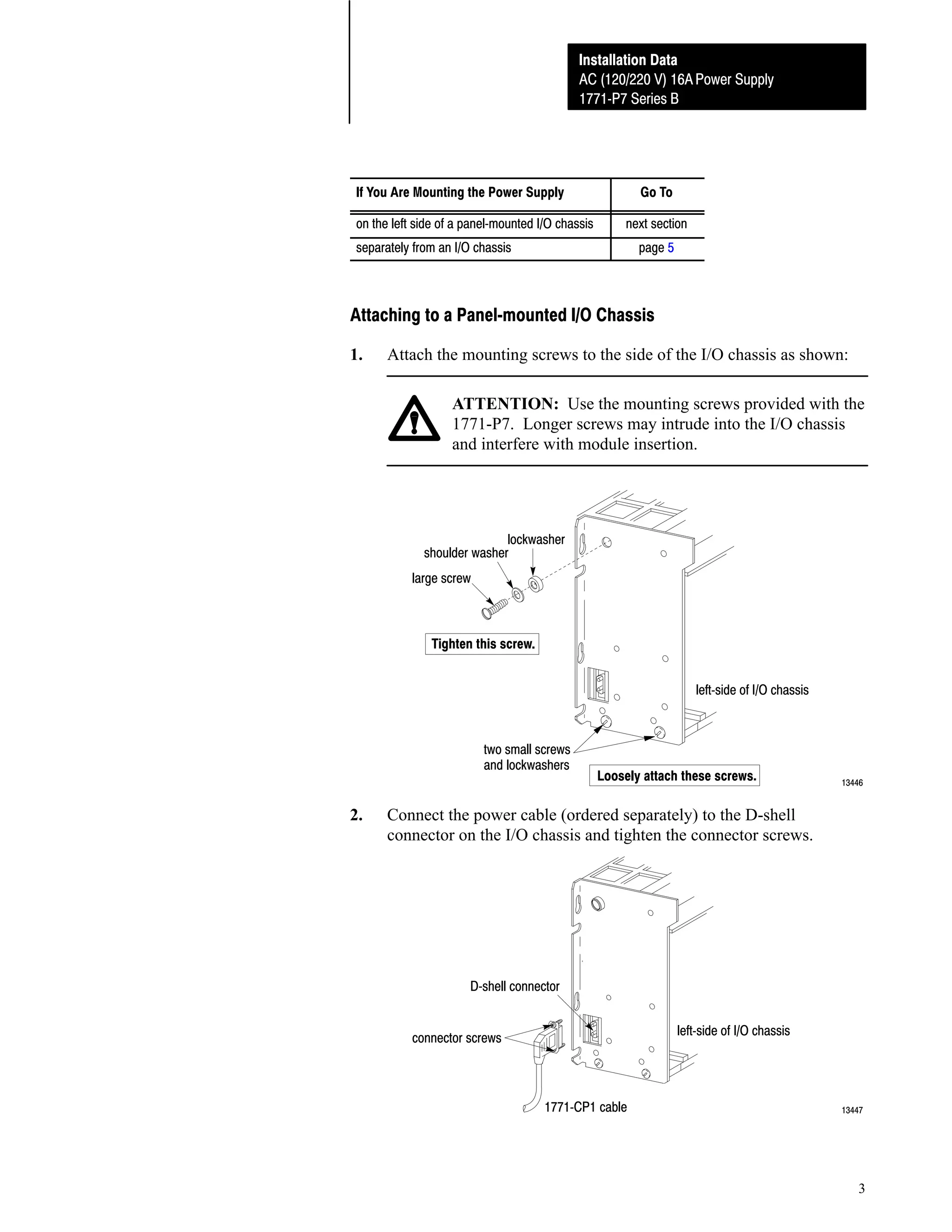
Attach the mounting screws to the side of the I/O chassis as shown:
ATTENTION: Use the mounting screws provided with the
1771-P7. Longer screws may intrude into the I/O chassis
and interfere with module insertion.

lockwasher
shoulder washer
large screw

Tighten this screw.
leftĆside of I/O chassis

two small screws
and lockwashers

2.

Loosely attach these screws.

13446

Connect the power cable (ordered separately) to the D-shell
connector on the I/O chassis and tighten the connector screws.

DĆshell connector
leftĆside of I/O chassis

connector screws

1771ĆCP1 cable

13447

3
Installation Data
Installation Data
AC (120/220V) 16A Power Supply
AC (120/220 V) 16A Power Supply
1771ĆP7 Series B
1771ĆP7 Series B

3.

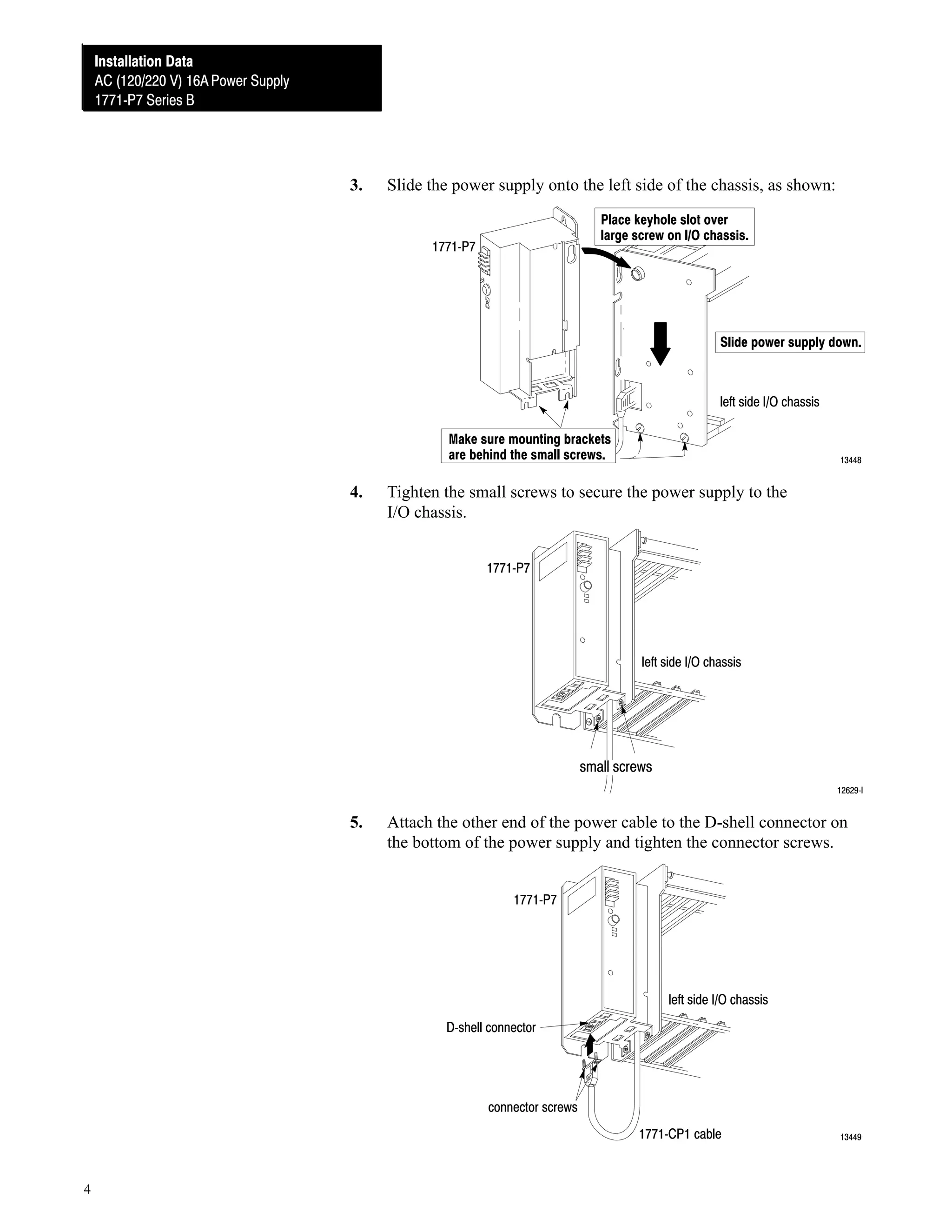
Slide the power supply onto the left side of the chassis, as shown:
Place keyhole slot over
large screw on I/O chassis.

1771ĆP7

Slide power supply down.

left side I/O chassis
Make sure mounting brackets
are behind the small screws.

4.

13448

Tighten the small screws to secure the power supply to the
I/O chassis.
1771ĆP7

left side I/O chassis

small screws
12629ĆI

5.

Attach the other end of the power cable to the D-shell connector on
the bottom of the power supply and tighten the connector screws.
1771ĆP7

left side I/O chassis
DĆshell connector

connector screws
1771ĆCP1 cable

4

13449
Installation Data
AC (120/220 V) 16A Power Supply
1771ĆP7 Series B

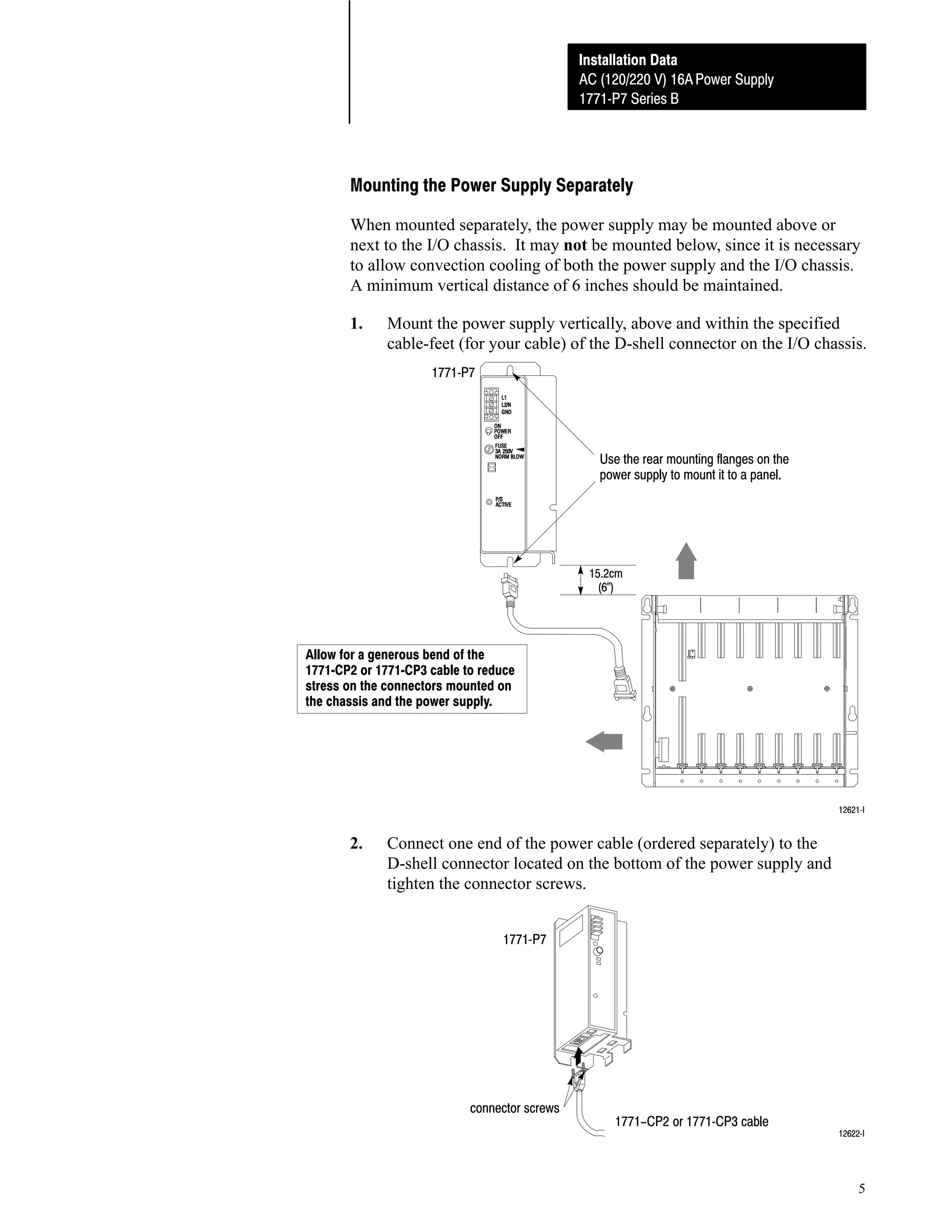
Mounting the Power Supply Separately
When mounted separately, the power supply may be mounted above or
next to the I/O chassis. It may not be mounted below, since it is necessary
to allow convection cooling of both the power supply and the I/O chassis.
A minimum vertical distance of 6 inches should be maintained.
1.

Mount the power supply vertically, above and within the specified
cable-feet (for your cable) of the D-shell connector on the I/O chassis.
1771ĆP7

Use the rear mounting flanges on the
power supply to mount it to a panel.

15.2cm
(6")

Allow for a generous bend of the
1771ĆCP2 or 1771ĆCP3 cable to reduce
stress on the connectors mounted on
the chassis and the power supply.

12621ĆI

2.

Connect one end of the power cable (ordered separately) to the
D-shell connector located on the bottom of the power supply and
tighten the connector screws.
1771ĆP7

connector screws

1771-CP2 or 1771ĆCP3 cable

12622ĆI

5
Installation Data
Installation Data
AC (120/220V) 16A Power Supply
AC (120/220 V) 16A Power Supply
1771ĆP7 Series B
1771ĆP7 Series B

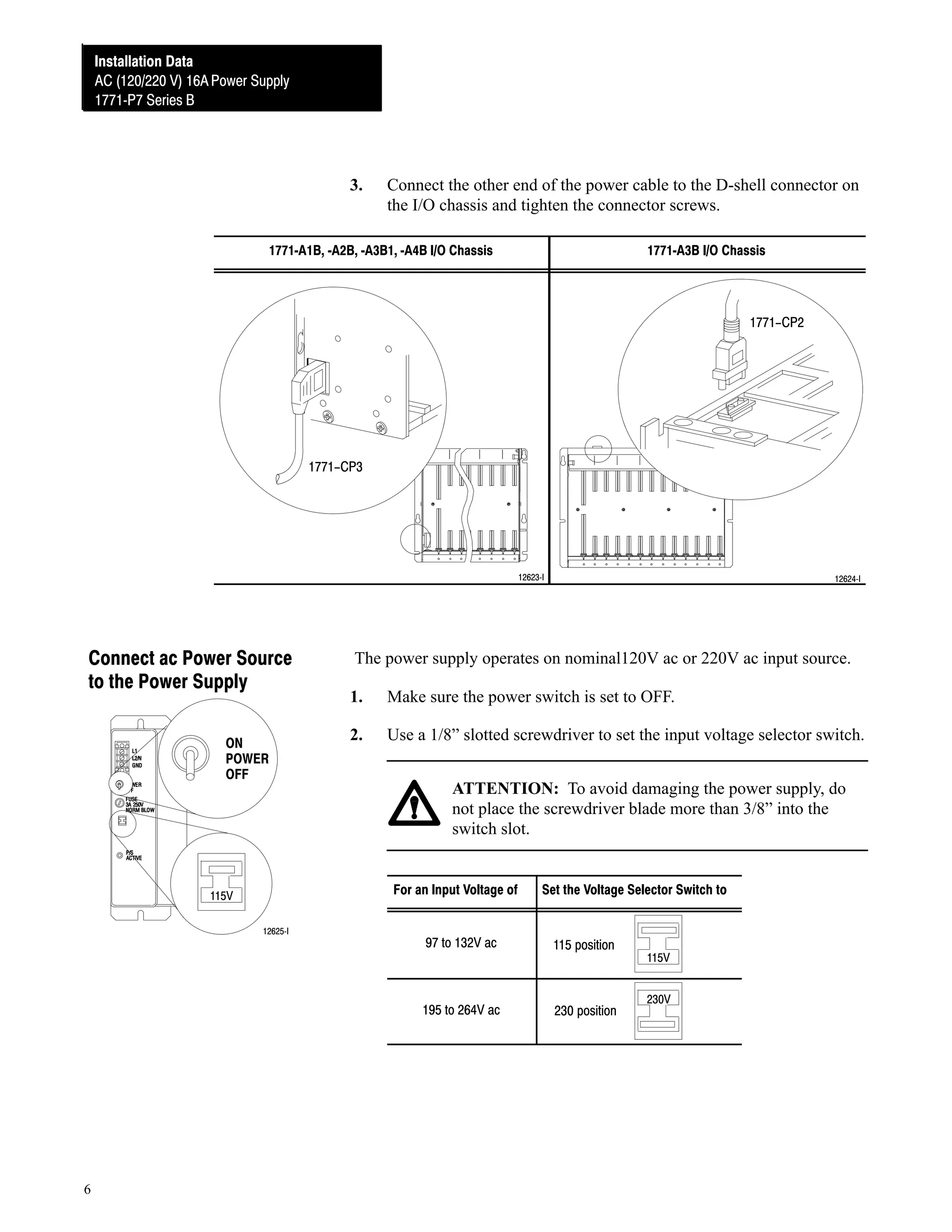
3.

Connect the other end of the power cable to the D-shell connector on
the I/O chassis and tighten the connector screws.

1771ĆA1B, ĆA2B, ĆA3B1, ĆA4B I/O Chassis

1771ĆA3B I/O Chassis

1771-CP2

1771-CP3

12623ĆI

Connect ac Power Source
to the Power Supply
ON
POWER
OFF

The power supply operates on nominal120V ac or 220V ac input source.
1.

Make sure the power switch is set to OFF.

2.

Use a 1/8” slotted screwdriver to set the input voltage selector switch.
ATTENTION: To avoid damaging the power supply, do
not place the screwdriver blade more than 3/8” into the
switch slot.

For an Input Voltage of

115V
12625ĆI

12624ĆI

Set the Voltage Selector Switch to

115 position

195 to 264V ac

6

97 to 132V ac

230 position

115V
230V
Installation Data
AC (120/220 V) 16A Power Supply
1771ĆP7 Series B

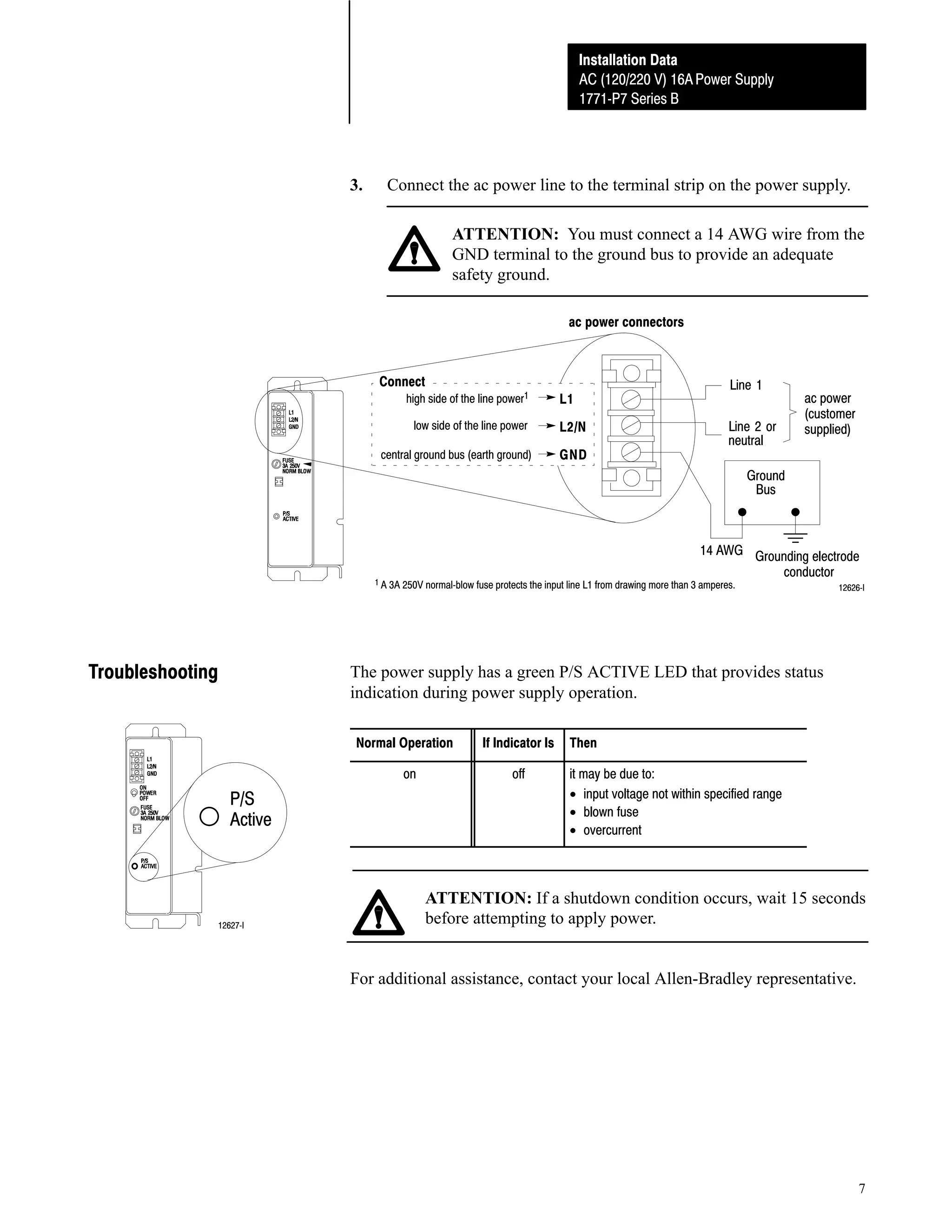
3.

Connect the ac power line to the terminal strip on the power supply.
ATTENTION: You must connect a 14 AWG wire from the
GND terminal to the ground bus to provide an adequate
safety ground.
ac power connectors

Connect

high side of the line power1
low side of the line power

central ground bus (earth ground)

L1
L2/N
GND

Line 1
Line 2 or
neutral

ac power
(customer
supplied)

Ground
Bus

14 AWG Grounding electrode
conductor

1 A 3A 250V normalĆblow fuse protects the input line L1 from drawing more than 3 amperes.

Troubleshooting

12626ĆI

The power supply has a green P/S ACTIVE LED that provides status
indication during power supply operation.
Normal Operation
on

P/S
Active

12627ĆI

If Indicator Is
off

Then
it may be due to:
• input voltage not within specified range
• blown fuse
• overcurrent

ATTENTION: If a shutdown condition occurs, wait 15 seconds
before attempting to apply power.

For additional assistance, contact your local Allen-Bradley representative.

7
Installation Data
Installation Data
AC (120/220V) 16A Power Supply
AC (120/220 V) 16A Power Supply
1771ĆP7 Series B
1771ĆP7 Series B

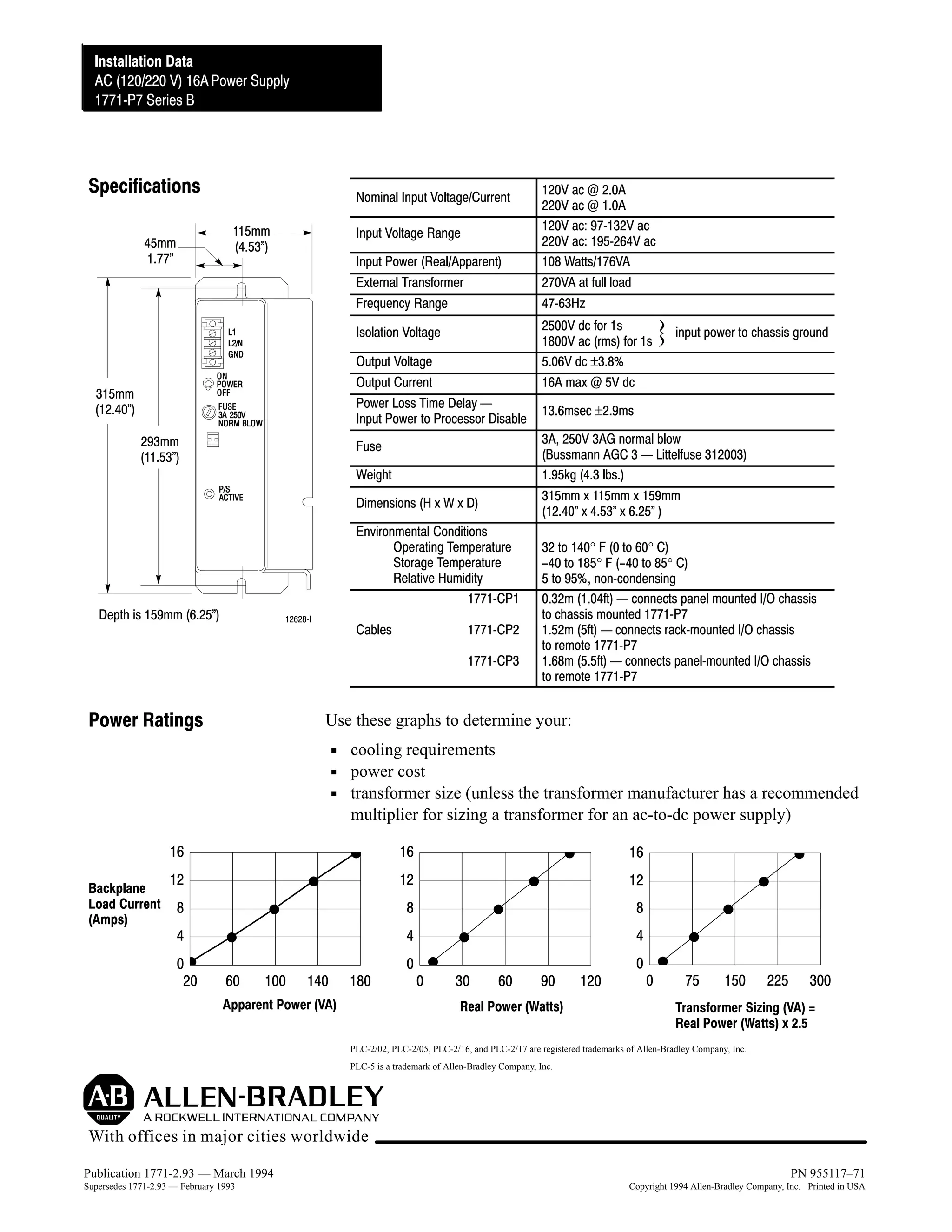
Specifications

Nominal Input Voltage/Current
115mm
(4.53")

45mm
1.77"

Input Voltage Range
Input Power (Real/Apparent)
External Transformer
Frequency Range
Isolation Voltage
Output Voltage
Output Current
Power Loss Time Delay Ċ
Input Power to Processor Disable

315mm
(12.40")
293mm
(11.53")

Weight
Dimensions (H x W x D)
Environmental Conditions
Operating Temperature
Storage Temperature
Relative Humidity
1771ĆCP1
12628ĆI

Cables

1771ĆCP2
1771ĆCP3

Power Ratings

2500V dc for 1s
1800V ac (rms) for 1s
5.06V dc ±3.8%
16A max @ 5V dc

input power to chassis ground

13.6msec ±2.9ms
3A, 250V 3AG normal blow
(Bussmann AGC 3 Ċ Littelfuse 312003)
1.95kg (4.3 lbs.)
315mm x 115mm x 159mm
(12.40" x 4.53" x 6.25" )

Fuse

Depth is 159mm (6.25")

120V ac @ 2.0A
220V ac @ 1.0A
120V ac: 97Ć132V ac
220V ac: 195Ć264V ac
108 Watts/176VA
270VA at full load
47Ć63Hz

32 to 140° F (0 to 60° C)
-40 to 185° F (-40 to 85° C)
5 to 95%, nonĆcondensing
0.32m (1.04ft) Ċ connects panel mounted I/O chassis
to chassis mounted 1771ĆP7
1.52m (5ft) Ċ connects rackĆmounted I/O chassis
to remote 1771ĆP7
1.68m (5.5ft) Ċ connects panelĆmounted I/O chassis
to remote 1771ĆP7

Use these graphs to determine your:
cooling requirements
power cost
transformer size (unless the transformer manufacturer has a recommended
multiplier for sizing a transformer for an ac-to-dc power supply)

16
Backplane
Load Current
(Amps)

16

16

12

12

12

8

8

8

4

4

4

0
20

60

100

140

180

Apparent Power (VA)

0

0

30

60

90

Real Power (Watts)

120

0

0

75

150

225

300

Transformer Sizing (VA) =
Real Power (Watts) x 2.5

PLC-2/02, PLC-2/05, PLC-2/16, and PLC-2/17 are registered trademarks of Allen-Bradley Company, Inc.
PLC-5 is a trademark of Allen-Bradley Company, Inc.

With offices in major cities worldwide
Publication 1771-2.93 — March 1994
Supersedes 1771-2.93 — February 1993
8

PN 955117–71
Copyright 1994 Allen-Bradley Company, Inc. Printed in USA

1771 a1 b

  • 1.
    AC (120/220V) 16APower Supply (Cat. No. 1771-P7 Series B) Installation Instructions To the Installer This document provides information on: preparing to install the power supply installing the power supply connecting ac power to the power supply troubleshooting specifications Prepare for Installation The 1771-P7 power supply can power one 1771-A1B, -A2B, -A3B, -A3B1, or -A4B I/O chassis when used with any adapter module or programmable controller (Mini-PLC-2/02®, Mini-PLC-2/05®, Mini-PLC-2/16®, Mini-PLC-2/17®, or PLC-5™ family processor) that does not have an internal power supply. Important: The power supply is not compatible with the 1771-A1, -A2, or -A4 I/O chassis. ATTENTION: The 1771-P7 is a stand-alone power supply. Do not connect it in parallel with any other power supply. Connecting it in parallel could result in processor memory loss or injury due to unexpected machine operation. ATTENTION: Under some conditions, electrostatic discharge can degrade performance or damage system components. Observe the following precautions to guard against electrostatic damage: Touch a grounded object to rid yourself of charge before handling a module. Do not touch the backplane connector or connector pins. When not in use, keep modules in their static-shield bags.
  • 2.
    Installation Data Installation Data AC(120/220V) 16A Power Supply AC (120/220 V) 16A Power Supply 1771ĆP7 Series B 1771ĆP7 Series B Before installing the power supply, you should: mount the I/O chassis that the power supply will be connected to. See the Universal I/O Chassis Installation Data (1771-2.210) for information on mounting the I/O chassis. set the power supply configuration jumper on the I/O chassis. The 1771-P7 is an external power supply. Set the configuration jumper to the N position. Y N Using Power Supply Module in the Chassis? 12620ĆI Install the 1771ĆP7 and Connect Backplane Power A1 A2 1 2 3 4 5 The power supply has a D-shell power connector that provides power to the I/O chassis backplane. backplane common backplane +5V dc no connection backplane processor enable backplane +5V dc sense backplane signal ground sense no connection A1 3 4 5 1 2 A2 bottom view of power supply If You Have This I/O Chassis 13445 1771ĆA1B, ĆA2B, ĆA3B1, 1771ĆA1B ĆA2B ĆA3B1 or ĆA4B 2 To Connect A 1771ĆP7 Mounted 1771ĆCP2 within 1.52m (5ft) of the I/O chassis 1771ĆCP1 1771ĆA3B Use this Power Cable within 0.32m (1.04ft) on the leftĆside of the I/O chassis 1771ĆCP3 (right angle connector) within 1.68m (5.5ft) of the I/O chassis
  • 3.
    Installation Data AC (120/220V) 16A Power Supply 1771ĆP7 Series B If You Are Mounting the Power Supply on the left side of a panelĆmounted I/O chassis Go To next section separately from an I/O chassis page 5 Attaching to a PanelĆmounted I/O Chassis 1. Attach the mounting screws to the side of the I/O chassis as shown: ATTENTION: Use the mounting screws provided with the 1771-P7. Longer screws may intrude into the I/O chassis and interfere with module insertion. lockwasher shoulder washer large screw Tighten this screw. leftĆside of I/O chassis two small screws and lockwashers 2. Loosely attach these screws. 13446 Connect the power cable (ordered separately) to the D-shell connector on the I/O chassis and tighten the connector screws. DĆshell connector leftĆside of I/O chassis connector screws 1771ĆCP1 cable 13447 3
  • 4.
    Installation Data Installation Data AC(120/220V) 16A Power Supply AC (120/220 V) 16A Power Supply 1771ĆP7 Series B 1771ĆP7 Series B 3. Slide the power supply onto the left side of the chassis, as shown: Place keyhole slot over large screw on I/O chassis. 1771ĆP7 Slide power supply down. left side I/O chassis Make sure mounting brackets are behind the small screws. 4. 13448 Tighten the small screws to secure the power supply to the I/O chassis. 1771ĆP7 left side I/O chassis small screws 12629ĆI 5. Attach the other end of the power cable to the D-shell connector on the bottom of the power supply and tighten the connector screws. 1771ĆP7 left side I/O chassis DĆshell connector connector screws 1771ĆCP1 cable 4 13449
  • 5.
    Installation Data AC (120/220V) 16A Power Supply 1771ĆP7 Series B Mounting the Power Supply Separately When mounted separately, the power supply may be mounted above or next to the I/O chassis. It may not be mounted below, since it is necessary to allow convection cooling of both the power supply and the I/O chassis. A minimum vertical distance of 6 inches should be maintained. 1. Mount the power supply vertically, above and within the specified cable-feet (for your cable) of the D-shell connector on the I/O chassis. 1771ĆP7 Use the rear mounting flanges on the power supply to mount it to a panel. 15.2cm (6") Allow for a generous bend of the 1771ĆCP2 or 1771ĆCP3 cable to reduce stress on the connectors mounted on the chassis and the power supply. 12621ĆI 2. Connect one end of the power cable (ordered separately) to the D-shell connector located on the bottom of the power supply and tighten the connector screws. 1771ĆP7 connector screws 1771-CP2 or 1771ĆCP3 cable 12622ĆI 5
  • 6.
    Installation Data Installation Data AC(120/220V) 16A Power Supply AC (120/220 V) 16A Power Supply 1771ĆP7 Series B 1771ĆP7 Series B 3. Connect the other end of the power cable to the D-shell connector on the I/O chassis and tighten the connector screws. 1771ĆA1B, ĆA2B, ĆA3B1, ĆA4B I/O Chassis 1771ĆA3B I/O Chassis 1771-CP2 1771-CP3 12623ĆI Connect ac Power Source to the Power Supply ON POWER OFF The power supply operates on nominal120V ac or 220V ac input source. 1. Make sure the power switch is set to OFF. 2. Use a 1/8” slotted screwdriver to set the input voltage selector switch. ATTENTION: To avoid damaging the power supply, do not place the screwdriver blade more than 3/8” into the switch slot. For an Input Voltage of 115V 12625ĆI 12624ĆI Set the Voltage Selector Switch to 115 position 195 to 264V ac 6 97 to 132V ac 230 position 115V 230V
  • 7.
    Installation Data AC (120/220V) 16A Power Supply 1771ĆP7 Series B 3. Connect the ac power line to the terminal strip on the power supply. ATTENTION: You must connect a 14 AWG wire from the GND terminal to the ground bus to provide an adequate safety ground. ac power connectors Connect high side of the line power1 low side of the line power central ground bus (earth ground) L1 L2/N GND Line 1 Line 2 or neutral ac power (customer supplied) Ground Bus 14 AWG Grounding electrode conductor 1 A 3A 250V normalĆblow fuse protects the input line L1 from drawing more than 3 amperes. Troubleshooting 12626ĆI The power supply has a green P/S ACTIVE LED that provides status indication during power supply operation. Normal Operation on P/S Active 12627ĆI If Indicator Is off Then it may be due to: • input voltage not within specified range • blown fuse • overcurrent ATTENTION: If a shutdown condition occurs, wait 15 seconds before attempting to apply power. For additional assistance, contact your local Allen-Bradley representative. 7
  • 8.
    Installation Data Installation Data AC(120/220V) 16A Power Supply AC (120/220 V) 16A Power Supply 1771ĆP7 Series B 1771ĆP7 Series B Specifications Nominal Input Voltage/Current 115mm (4.53") 45mm 1.77" Input Voltage Range Input Power (Real/Apparent) External Transformer Frequency Range Isolation Voltage Output Voltage Output Current Power Loss Time Delay Ċ Input Power to Processor Disable 315mm (12.40") 293mm (11.53") Weight Dimensions (H x W x D) Environmental Conditions Operating Temperature Storage Temperature Relative Humidity 1771ĆCP1 12628ĆI Cables 1771ĆCP2 1771ĆCP3 Power Ratings 2500V dc for 1s 1800V ac (rms) for 1s 5.06V dc ±3.8% 16A max @ 5V dc input power to chassis ground 13.6msec ±2.9ms 3A, 250V 3AG normal blow (Bussmann AGC 3 Ċ Littelfuse 312003) 1.95kg (4.3 lbs.) 315mm x 115mm x 159mm (12.40" x 4.53" x 6.25" ) Fuse Depth is 159mm (6.25") 120V ac @ 2.0A 220V ac @ 1.0A 120V ac: 97Ć132V ac 220V ac: 195Ć264V ac 108 Watts/176VA 270VA at full load 47Ć63Hz 32 to 140° F (0 to 60° C) -40 to 185° F (-40 to 85° C) 5 to 95%, nonĆcondensing 0.32m (1.04ft) Ċ connects panel mounted I/O chassis to chassis mounted 1771ĆP7 1.52m (5ft) Ċ connects rackĆmounted I/O chassis to remote 1771ĆP7 1.68m (5.5ft) Ċ connects panelĆmounted I/O chassis to remote 1771ĆP7 Use these graphs to determine your: cooling requirements power cost transformer size (unless the transformer manufacturer has a recommended multiplier for sizing a transformer for an ac-to-dc power supply) 16 Backplane Load Current (Amps) 16 16 12 12 12 8 8 8 4 4 4 0 20 60 100 140 180 Apparent Power (VA) 0 0 30 60 90 Real Power (Watts) 120 0 0 75 150 225 300 Transformer Sizing (VA) = Real Power (Watts) x 2.5 PLC-2/02, PLC-2/05, PLC-2/16, and PLC-2/17 are registered trademarks of Allen-Bradley Company, Inc. PLC-5 is a trademark of Allen-Bradley Company, Inc. With offices in major cities worldwide Publication 1771-2.93 — March 1994 Supersedes 1771-2.93 — February 1993 8 PN 955117–71 Copyright 1994 Allen-Bradley Company, Inc. Printed in USA