OPERATOR’S HANDBOOK


                Alcatel
METRO OMSN Rel. 4.4B/5.2B


         1640FOX Rel. 4.4B
   STM–1/4 Multiservice Node for Customer Premises


         1650SMC Rel. 4.4B
          STM–1/4 Multiservice metro Node


          1660SM Rel. 4.4B
           STM–16 Multiservice metro Node


          1660SM Rel. 5.2B
           STM–64 Multiservice metro Node


                3AL 91670 AAAA Ed.02
3AL 91670 AAAA Ed.02
METRO OMSN REL. 4.4/5.2A OPERATOR’S HDBK
not permitted without written authorization from Alcatel.
  All rights reserved. Passing on and copying of this
  document, use and communication of its contents


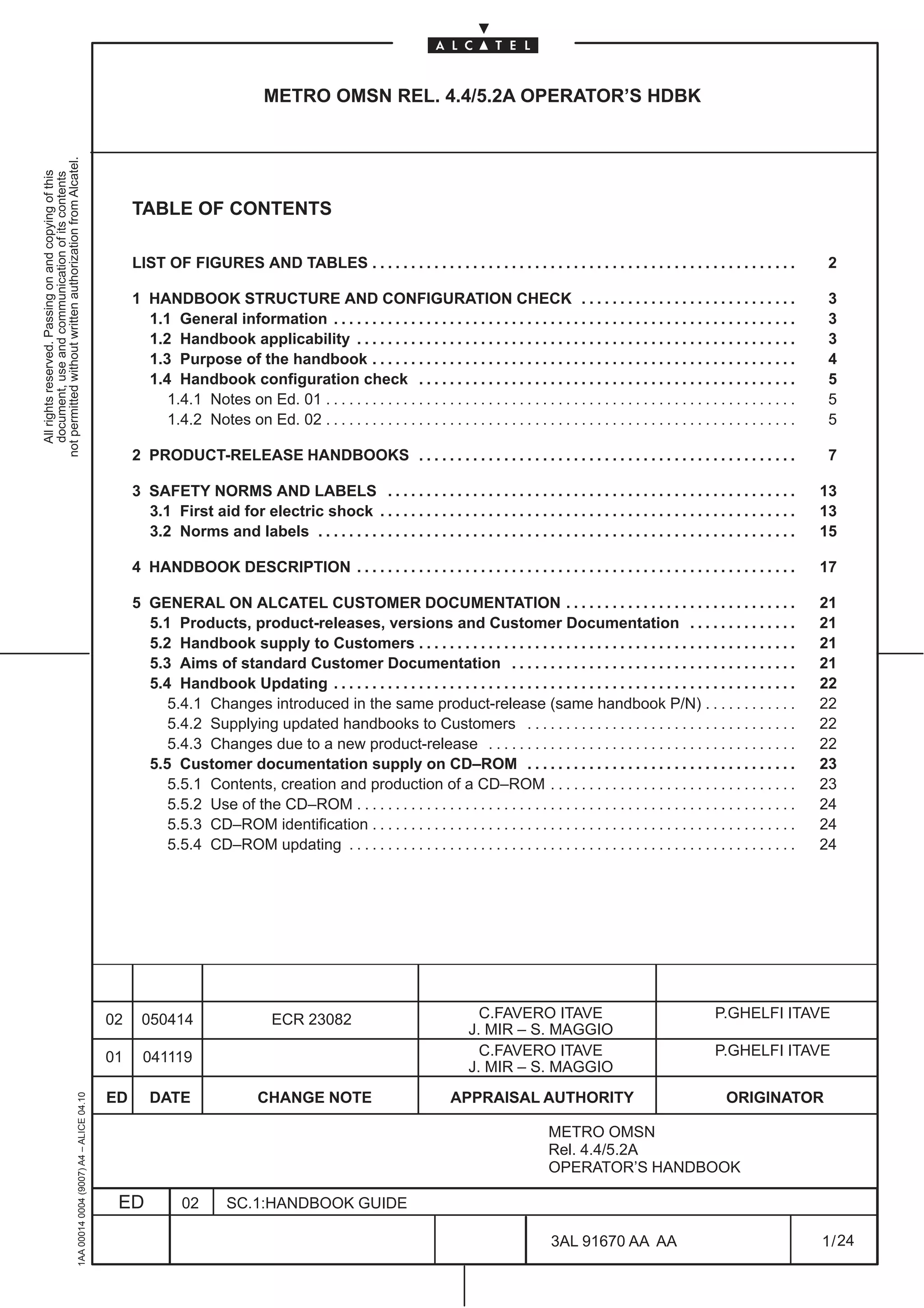
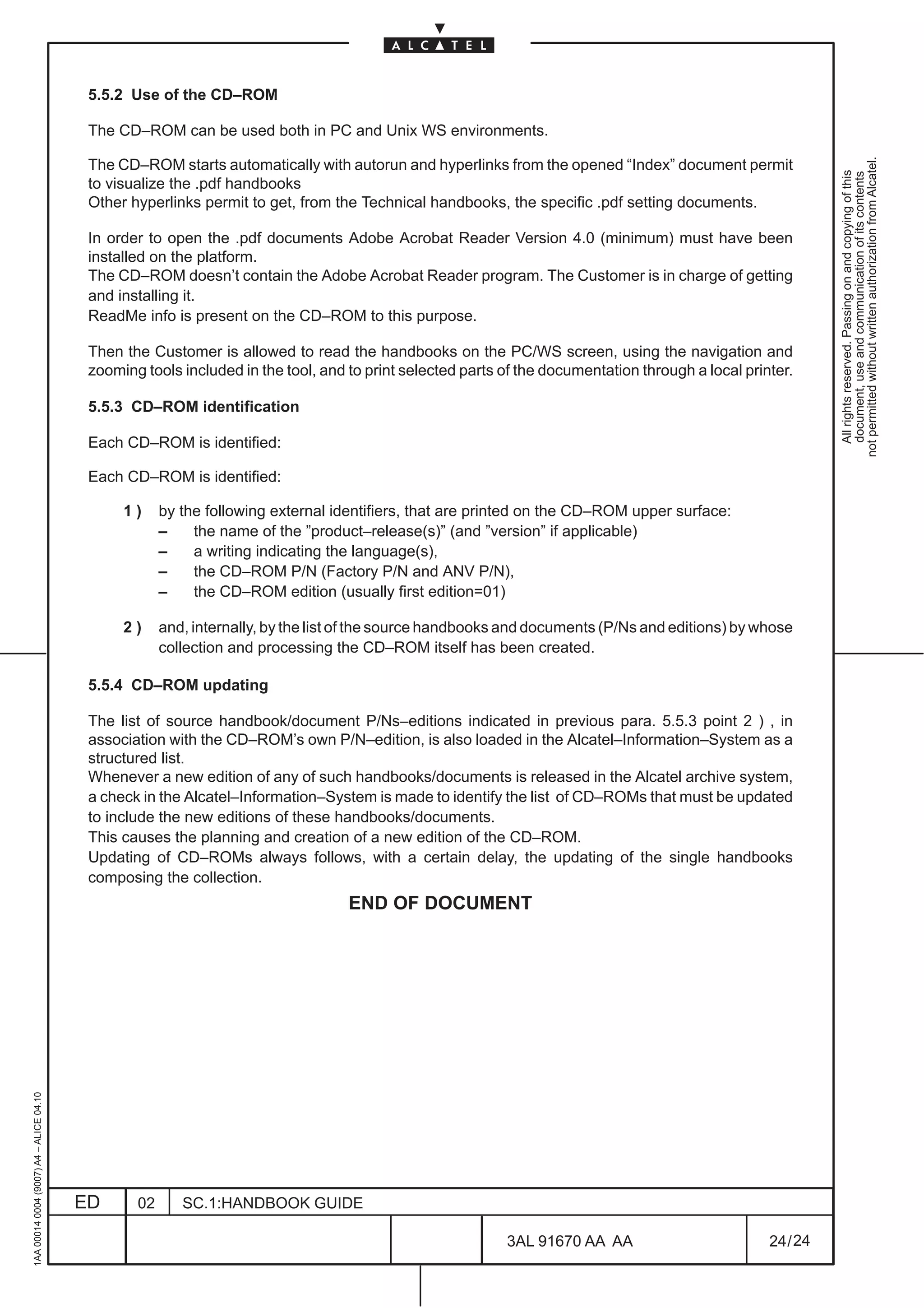
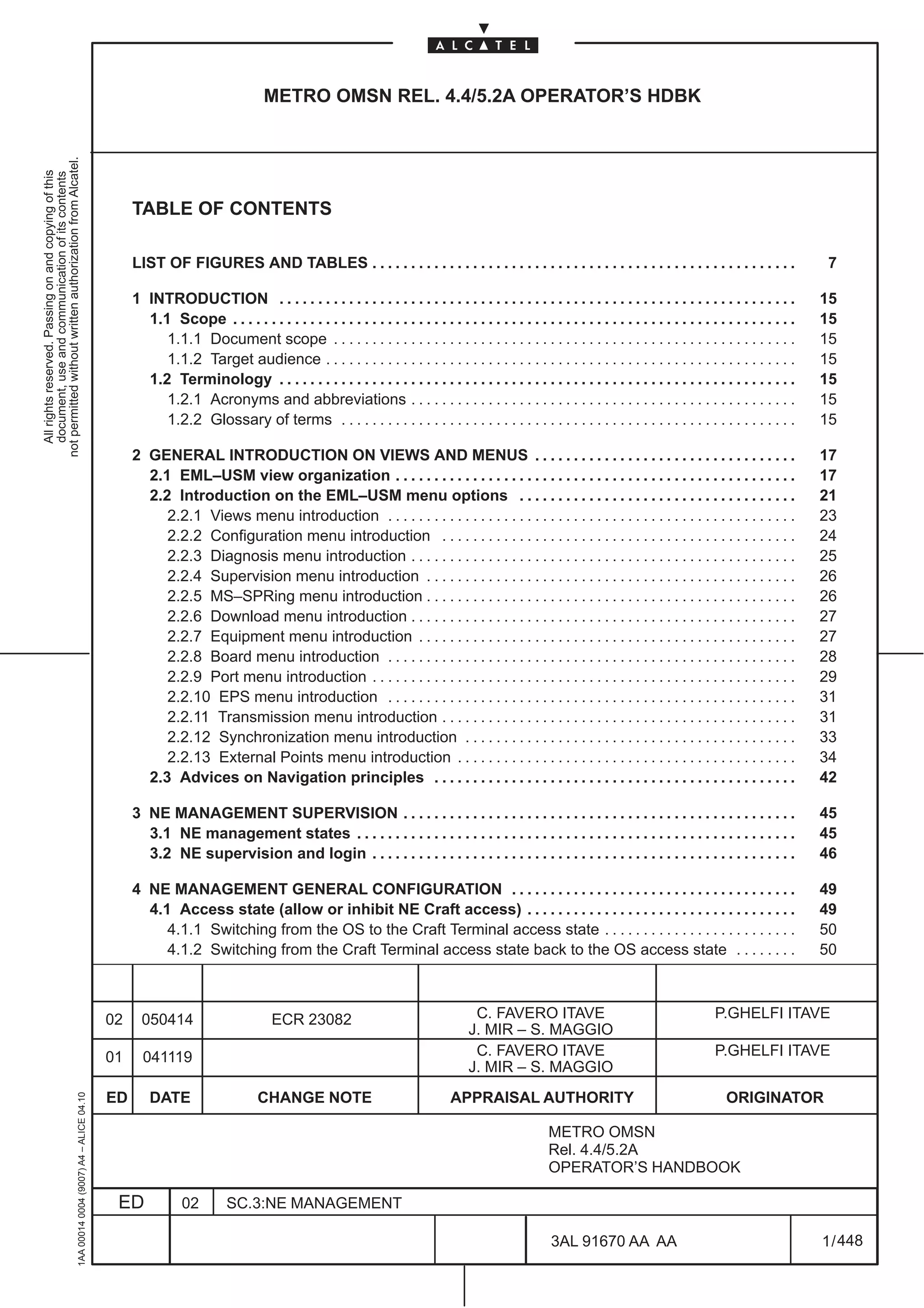
                                                                                                   TABLE OF CONTENTS

                                                                                                   LIST OF FIGURES AND TABLES . . . . . . . . . . . . . . . . . . . . . . . . . . . . . . . . . . . . . . . . . . . . . . . . . . . . . . .                2

                                                                                                   1 HANDBOOK STRUCTURE AND CONFIGURATION CHECK . . . . . . . . . . . . . . . . . . . . . . . . . . . .                                                    3
                                                                                                     1.1 General information . . . . . . . . . . . . . . . . . . . . . . . . . . . . . . . . . . . . . . . . . . . . . . . . . . . . . . . . . . . .       3
                                                                                                     1.2 Handbook applicability . . . . . . . . . . . . . . . . . . . . . . . . . . . . . . . . . . . . . . . . . . . . . . . . . . . . . . . . .          3
                                                                                                     1.3 Purpose of the handbook . . . . . . . . . . . . . . . . . . . . . . . . . . . . . . . . . . . . . . . . . . . . . . . . . . . . . . .             4
                                                                                                     1.4 Handbook configuration check . . . . . . . . . . . . . . . . . . . . . . . . . . . . . . . . . . . . . . . . . . . . . . . . .                    5
                                                                                                        1.4.1 Notes on Ed. 01 . . . . . . . . . . . . . . . . . . . . . . . . . . . . . . . . . . . . . . . . . . . . . . . . . . . . . . . . . . . . .    5
                                                                                                        1.4.2 Notes on Ed. 02 . . . . . . . . . . . . . . . . . . . . . . . . . . . . . . . . . . . . . . . . . . . . . . . . . . . . . . . . . . . . .    5

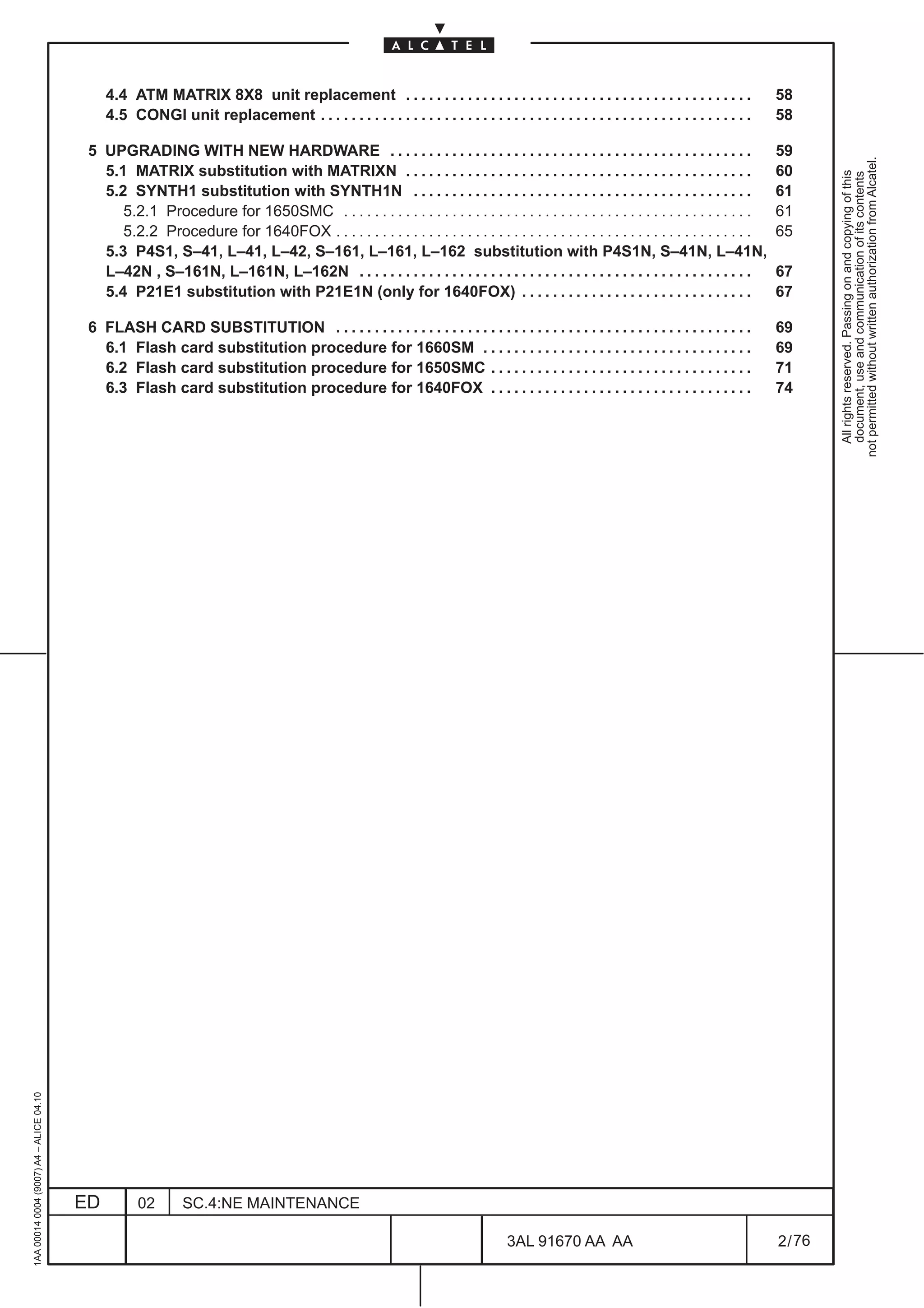
                                                                                                   2 PRODUCT-RELEASE HANDBOOKS . . . . . . . . . . . . . . . . . . . . . . . . . . . . . . . . . . . . . . . . . . . . . . . . .                           7

                                                                                                   3 SAFETY NORMS AND LABELS . . . . . . . . . . . . . . . . . . . . . . . . . . . . . . . . . . . . . . . . . . . . . . . . . . . . .                    13
                                                                                                     3.1 First aid for electric shock . . . . . . . . . . . . . . . . . . . . . . . . . . . . . . . . . . . . . . . . . . . . . . . . . . . . . .         13
                                                                                                     3.2 Norms and labels . . . . . . . . . . . . . . . . . . . . . . . . . . . . . . . . . . . . . . . . . . . . . . . . . . . . . . . . . . . . . .     15

                                                                                                   4 HANDBOOK DESCRIPTION . . . . . . . . . . . . . . . . . . . . . . . . . . . . . . . . . . . . . . . . . . . . . . . . . . . . . . . . .               17

                                                                                                   5 GENERAL ON ALCATEL CUSTOMER DOCUMENTATION . . . . . . . . . . . . . . . . . . . . . . . . . . . . . .                                                21
                                                                                                     5.1 Products, product-releases, versions and Customer Documentation . . . . . . . . . . . . . .                                                      21
                                                                                                     5.2 Handbook supply to Customers . . . . . . . . . . . . . . . . . . . . . . . . . . . . . . . . . . . . . . . . . . . . . . . . .                   21
                                                                                                     5.3 Aims of standard Customer Documentation . . . . . . . . . . . . . . . . . . . . . . . . . . . . . . . . . . . . .                                21
                                                                                                     5.4 Handbook Updating . . . . . . . . . . . . . . . . . . . . . . . . . . . . . . . . . . . . . . . . . . . . . . . . . . . . . . . . . . . .        22
                                                                                                        5.4.1 Changes introduced in the same product-release (same handbook P/N) . . . . . . . . . . . .                                                  22
                                                                                                        5.4.2 Supplying updated handbooks to Customers . . . . . . . . . . . . . . . . . . . . . . . . . . . . . . . . . . .                              22
                                                                                                        5.4.3 Changes due to a new product-release . . . . . . . . . . . . . . . . . . . . . . . . . . . . . . . . . . . . . . . .                        22
                                                                                                     5.5 Customer documentation supply on CD–ROM . . . . . . . . . . . . . . . . . . . . . . . . . . . . . . . . . . .                                    23
                                                                                                        5.5.1 Contents, creation and production of a CD–ROM . . . . . . . . . . . . . . . . . . . . . . . . . . . . . . . .                               23
                                                                                                        5.5.2 Use of the CD–ROM . . . . . . . . . . . . . . . . . . . . . . . . . . . . . . . . . . . . . . . . . . . . . . . . . . . . . . . . .         24
                                                                                                        5.5.3 CD–ROM identification . . . . . . . . . . . . . . . . . . . . . . . . . . . . . . . . . . . . . . . . . . . . . . . . . . . . . . .         24
                                                                                                        5.5.4 CD–ROM updating . . . . . . . . . . . . . . . . . . . . . . . . . . . . . . . . . . . . . . . . . . . . . . . . . . . . . . . . . .         24


                                                                                              02     050414                       ECR 23082                                     C.FAVERO ITAVE                                       P.GHELFI ITAVE
                                                                                                                                                                              J. MIR – S. MAGGIO
                                                                                              01     041119                                                                     C.FAVERO ITAVE                                       P.GHELFI ITAVE
                                                                                                                                                                              J. MIR – S. MAGGIO
                                                                                              ED      DATE                    CHANGE NOTE                                 APPRAISAL AUTHORITY                                          ORIGINATOR
                                                     1AA 00014 0004 (9007) A4 – ALICE 04.10


                                                                                                                                                                                               METRO OMSN
                                                                                                                                                                                               Rel. 4.4/5.2A
                                                                                                                                                                                               OPERATOR’S HANDBOOK

                                                                                               ED             02        SC.1:HANDBOOK GUIDE

                                                                                                                                                                                                3AL 91670 AA AA                                           1 / 24


                                                                                                                                                                                                                    24
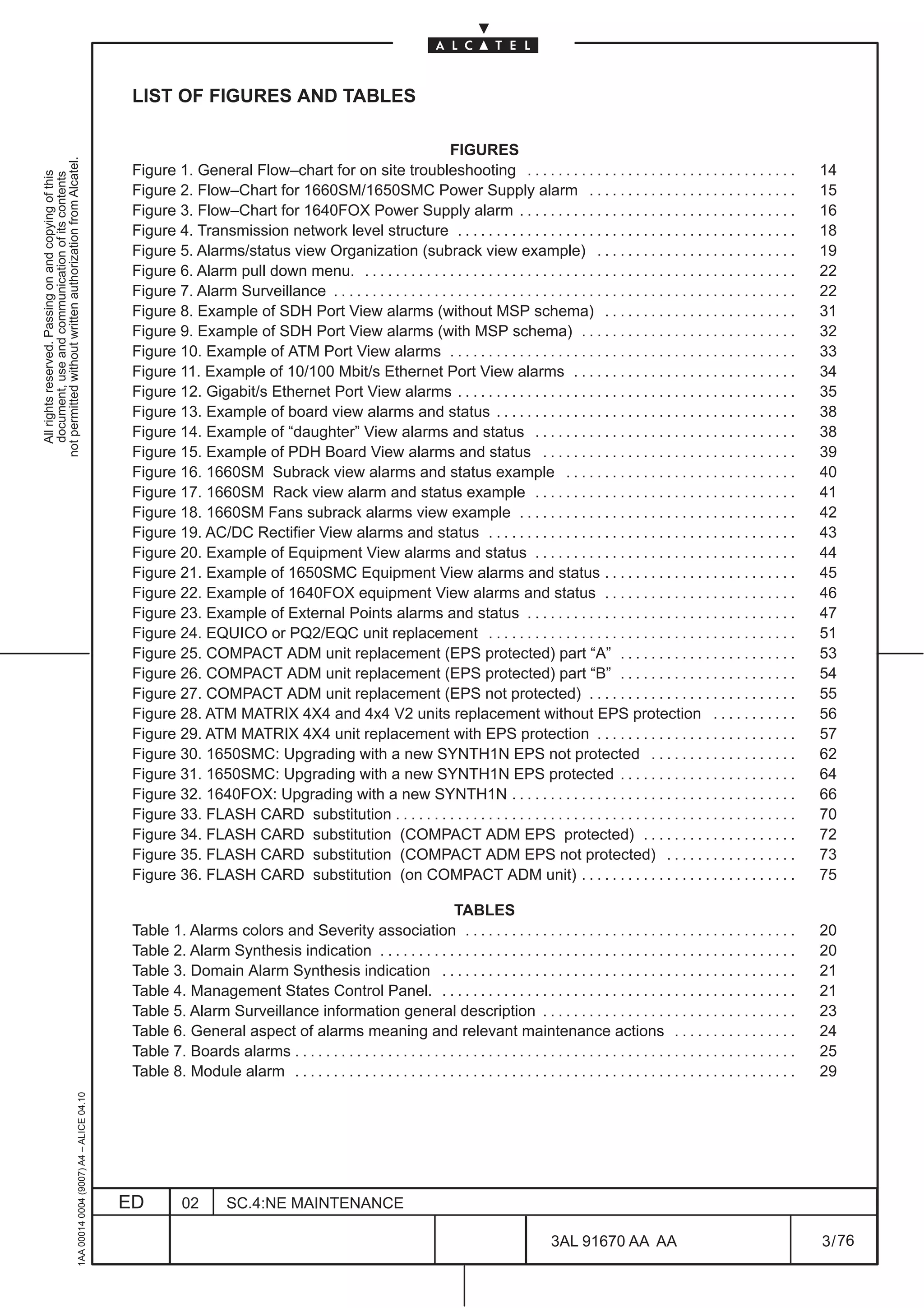
LIST OF FIGURES AND TABLES

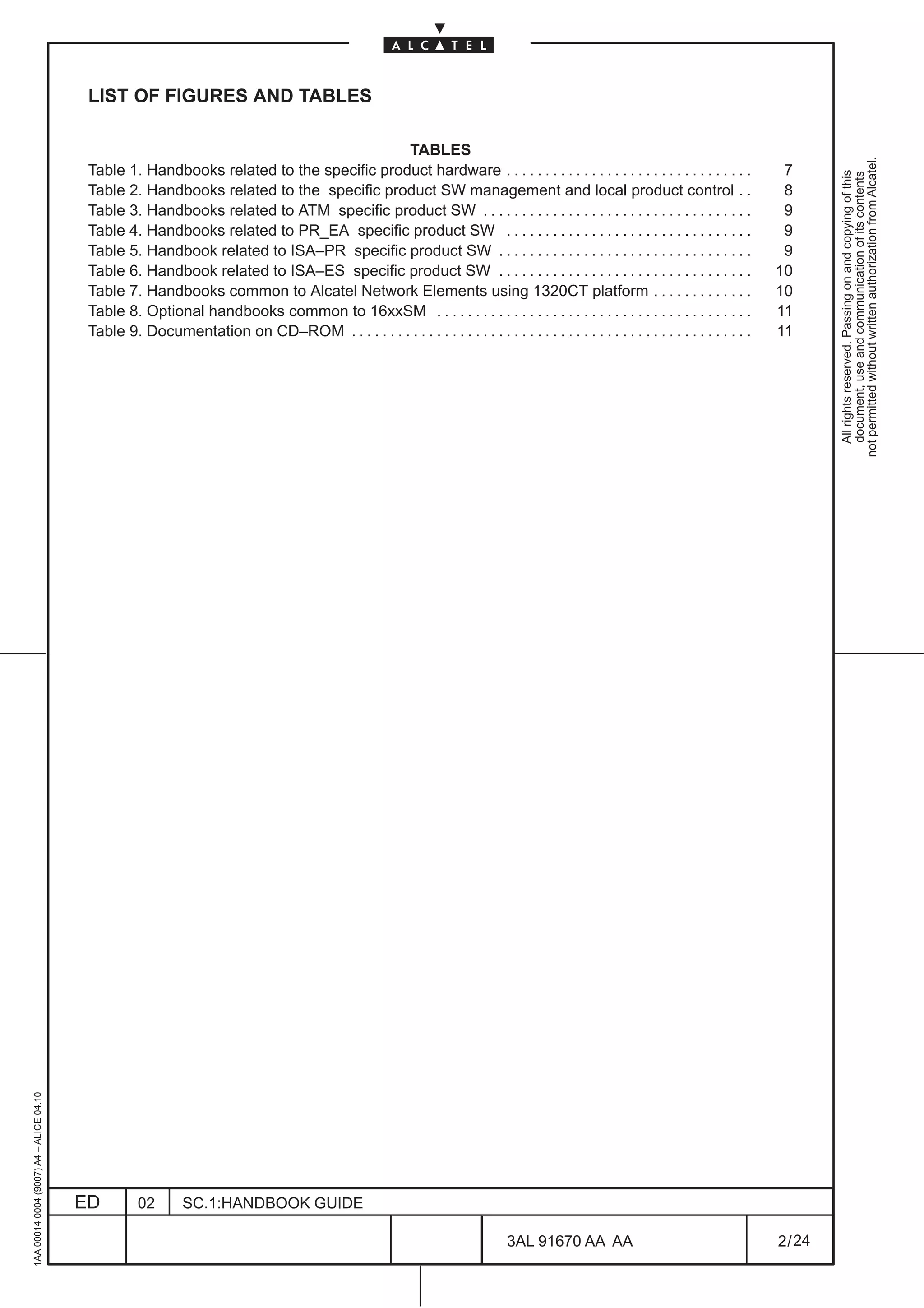
                                                                                          TABLES


                                                                                                                                                                                              not permitted without written authorization from Alcatel.
                                          Table 1. Handbooks related to the specific product hardware . . . . . . . . . . . . . . . . . . . . . . . . . . . . . . . .                 7


                                                                                                                                                                                                All rights reserved. Passing on and copying of this
                                                                                                                                                                                                document, use and communication of its contents
                                          Table 2. Handbooks related to the specific product SW management and local product control . .                                              8
                                          Table 3. Handbooks related to ATM specific product SW . . . . . . . . . . . . . . . . . . . . . . . . . . . . . . . . . . .                 9
                                          Table 4. Handbooks related to PR_EA specific product SW . . . . . . . . . . . . . . . . . . . . . . . . . . . . . . . .                     9
                                          Table 5. Handbook related to ISA–PR specific product SW . . . . . . . . . . . . . . . . . . . . . . . . . . . . . . . . .                   9
                                          Table 6. Handbook related to ISA–ES specific product SW . . . . . . . . . . . . . . . . . . . . . . . . . . . . . . . . .                  10
                                          Table 7. Handbooks common to Alcatel Network Elements using 1320CT platform . . . . . . . . . . . . .                                      10
                                          Table 8. Optional handbooks common to 16xxSM . . . . . . . . . . . . . . . . . . . . . . . . . . . . . . . . . . . . . . . . .             11
                                          Table 9. Documentation on CD–ROM . . . . . . . . . . . . . . . . . . . . . . . . . . . . . . . . . . . . . . . . . . . . . . . . . . . .   11
1AA 00014 0004 (9007) A4 – ALICE 04.10


                                         ED         02       SC.1:HANDBOOK GUIDE

                                                                                                                               3AL 91670 AA AA                                       2 / 24


                                                                                                                                                  24
1 HANDBOOK STRUCTURE AND CONFIGURATION CHECK

                                                                                               1.1 General information
not permitted without written authorization from Alcatel.
  All rights reserved. Passing on and copying of this
  document, use and communication of its contents


                                                                                                                                              WARNING

                                                                                                    ALCATEL makes no warranty of any kind with regards to this manual, and specifically disclaims the
                                                                                                    implied warranties of merchantability and fitness for a particular purpose. ALCATEL will not be liable
                                                                                                    for errors contained herein or for damages, whether direct, indirect, consequential, incidental, or
                                                                                                    special, in connection with the furnishing, performance, or use of this material.

                                                                                                                                               NOTICE

                                                                                                    The product specification and/or performance levels contained in this document are for information
                                                                                                    purposes only and are subject to change without notice. They do not represent any obligation on the
                                                                                                    part of ALCATEL.

                                                                                                                                    COPYRIGHT NOTIFICATION

                                                                                                    The technical information of this manual is the property of ALCATEL and must not be copied,
                                                                                                    reproduced or disclosed to a third party without written consent.


                                                                                               1.2 Handbook applicability

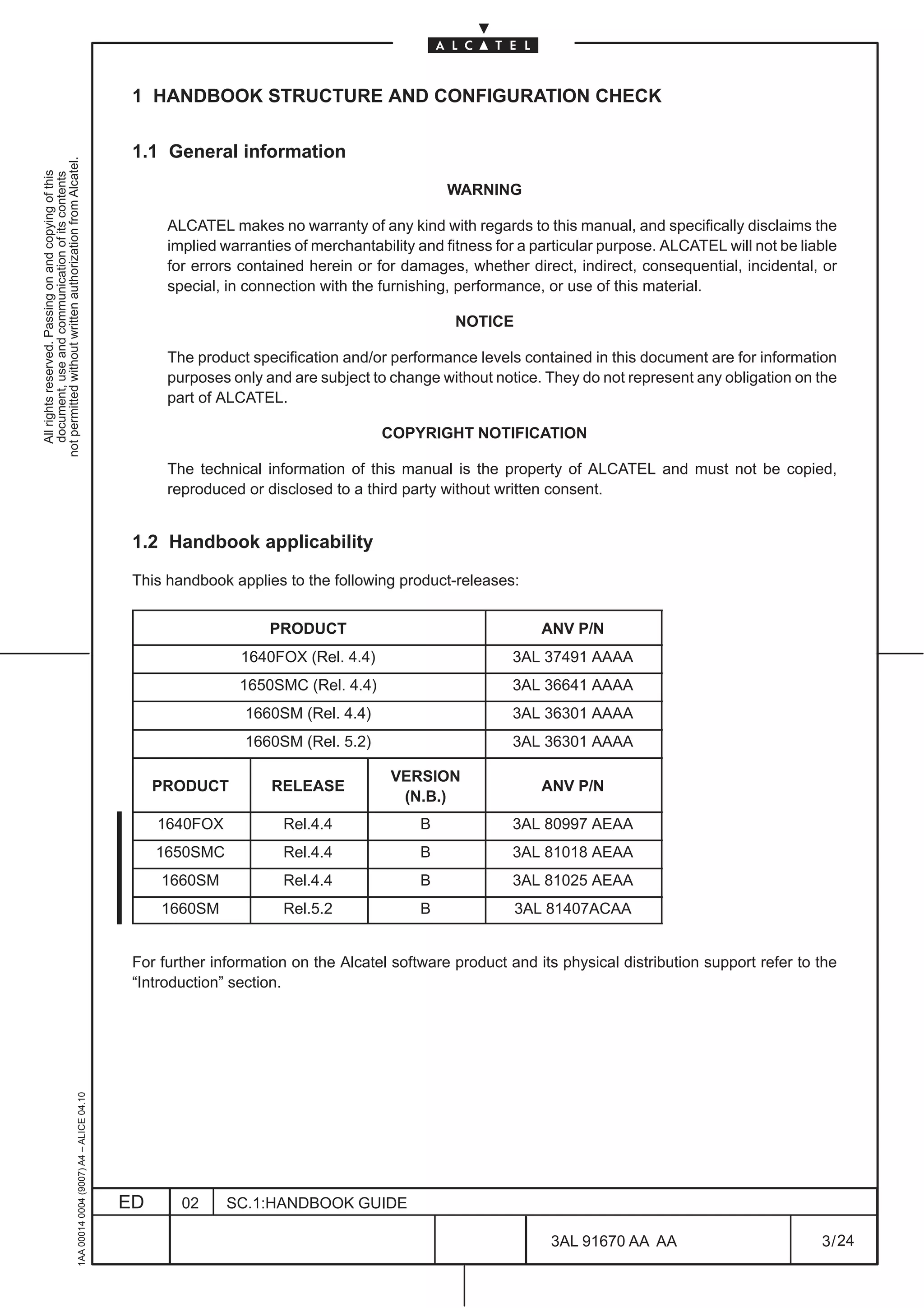
                                                                                               This handbook applies to the following product-releases:


                                                                                                                   PRODUCT                                  ANV P/N
                                                                                                               1640FOX (Rel. 4.4)                       3AL 37491 AAAA
                                                                                                               1650SMC (Rel. 4.4)                       3AL 36641 AAAA
                                                                                                                1660SM (Rel. 4.4)                       3AL 36301 AAAA
                                                                                                                1660SM (Rel. 5.2)                       3AL 36301 AAAA

                                                                                                                                      VERSION
                                                                                                   PRODUCT         RELEASE                                  ANV P/N
                                                                                                                                       (N.B.)
                                                                                                   1640FOX           Rel.4.4              B             3AL 80997 AEAA
                                                                                                   1650SMC           Rel.4.4              B             3AL 81018 AEAA
                                                                                                   1660SM            Rel.4.4              B             3AL 81025 AEAA
                                                                                                   1660SM            Rel.5.2              B             3AL 81407ACAA


                                                                                               For further information on the Alcatel software product and its physical distribution support refer to the
                                                                                               “Introduction” section.
                                                     1AA 00014 0004 (9007) A4 – ALICE 04.10


                                                                                              ED      02     SC.1:HANDBOOK GUIDE

                                                                                                                                                              3AL 91670 AA AA                          3 / 24


                                                                                                                                                                            24
N.B.            NOTES FOR HANDBOOKS RELEVANT TO SOFTWARE APPLICATIONS


                                                          Handbooks relevant to software applications (typically the Operator’s Handbooks) are not


                                                                                                                                                             not permitted without written authorization from Alcatel.
                                                          modified unless the new software ”version” distributed to Customers implies man–machine


                                                                                                                                                               All rights reserved. Passing on and copying of this
                                                                                                                                                               document, use and communication of its contents
                                                          interface changes or in case of slight modifications not affecting the understanding of the
                                                          explained procedures.
                                                          Moreover, should the screen prints included in the handbook contain the product-release’s
                                                          ”version” marking, they are not replaced in the handbooks related to a subsequent version, if
                                                          the screen contents are unchanged.


                                          1.3 Purpose of the handbook

                                          This Handbook contains detailed information for the METRO OMSN 1640FOX, 1650SMC, 1660SM
                                          equipment management. Unless otherwise specified, the menus have to be used for all the equipments.

                                          This handbook describes the operations concerning commissioning, operation and maintenance that the
                                          operators must carry out as indicated by the specific software application(s) referred to in this handbook
                                          (see para. 1.2 on page 3).

                                          This handbook must be used together with the associated Technical Handbook ( see Table 1. on page
                                          7) and the 1320CT associated documentation ( see Table 7. on page 10) does not replicate information
                                          contained into it.
                                          In particular, all cautions relevant to safety, rules for EMC and ESD, as well as warnings regarding
                                          operations that may cause damages to the equipment, are not duplicated here, but must be retrieved from
                                          the Technical Handbook.

                                          When using this handbook it is assumed that the Operators know:

                                                 •        the structure (hardware composition) and all the possible operating modes of the equipment
                                                          (product-release) this handbook refers to.

                                                 •        how to use a PC and the Windows ambient applications
1AA 00014 0004 (9007) A4 – ALICE 04.10


                                         ED          02      SC.1:HANDBOOK GUIDE

                                                                                                             3AL 91670 AA AA                        4 / 24


                                                                                                                          24
1.4 Handbook configuration check

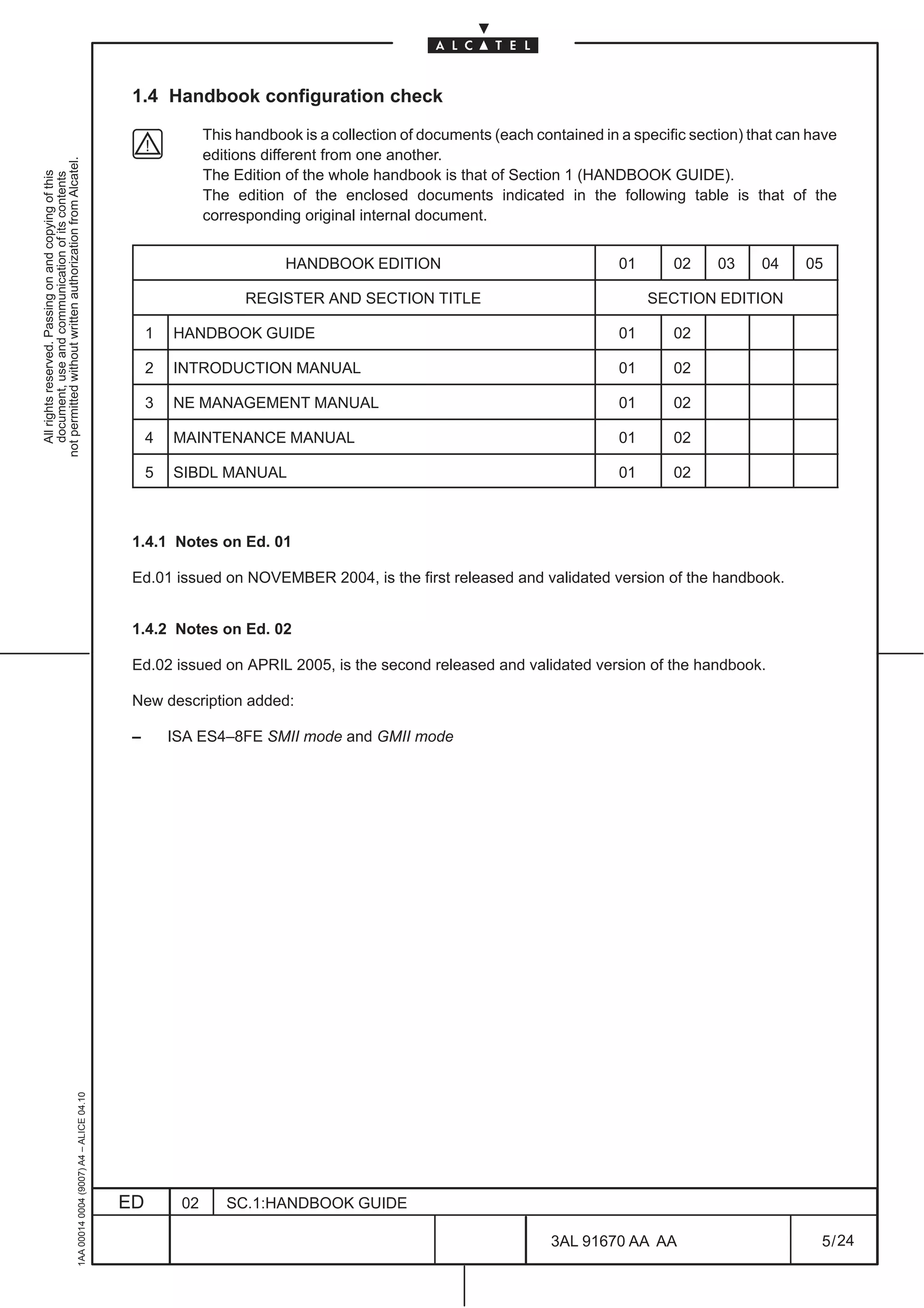
                                                                                                             This handbook is a collection of documents (each contained in a specific section) that can have
                                                                                                             editions different from one another.
not permitted without written authorization from Alcatel.


                                                                                                             The Edition of the whole handbook is that of Section 1 (HANDBOOK GUIDE).
  All rights reserved. Passing on and copying of this
  document, use and communication of its contents


                                                                                                             The edition of the enclosed documents indicated in the following table is that of the
                                                                                                             corresponding original internal document.


                                                                                                                         HANDBOOK EDITION                                  01        02   03    04     05

                                                                                                                   REGISTER AND SECTION TITLE                                   SECTION EDITION

                                                                                                   1   HANDBOOK GUIDE                                                      01        02

                                                                                                   2   INTRODUCTION MANUAL                                                 01        02

                                                                                                   3   NE MANAGEMENT MANUAL                                                01        02

                                                                                                   4   MAINTENANCE MANUAL                                                  01        02

                                                                                                   5   SIBDL MANUAL                                                        01        02


                                                                                               1.4.1 Notes on Ed. 01

                                                                                               Ed.01 issued on NOVEMBER 2004, is the first released and validated version of the handbook.


                                                                                               1.4.2 Notes on Ed. 02

                                                                                               Ed.02 issued on APRIL 2005, is the second released and validated version of the handbook.

                                                                                               New description added:

                                                                                               –       ISA ES4–8FE SMII mode and GMII mode
                                                     1AA 00014 0004 (9007) A4 – ALICE 04.10


                                                                                              ED        02      SC.1:HANDBOOK GUIDE

                                                                                                                                                                 3AL 91670 AA AA                         5 / 24


                                                                                                                                                                                24
1AA 00014 0004 (9007) A4 – ALICE 04.10


                          ED
                          02
                          SC.1:HANDBOOK GUIDE


24
        3AL 91670 AA AA
        6 / 24
                                                  All rights reserved. Passing on and copying of this
                                                  document, use and communication of its contents
                                                not permitted without written authorization from Alcatel.
2 PRODUCT-RELEASE HANDBOOKS

                                                                                                             The list of handbooks given here below is valid on the issue date of this Handbook and
                                                                                                             can be changed without any obligation for ALCATEL to update it in this Handbook.
not permitted without written authorization from Alcatel.
  All rights reserved. Passing on and copying of this
  document, use and communication of its contents


                                                                                                             Some of the handbooks listed here below may not be available on the issue date of this
                                                                                                             Handbook.

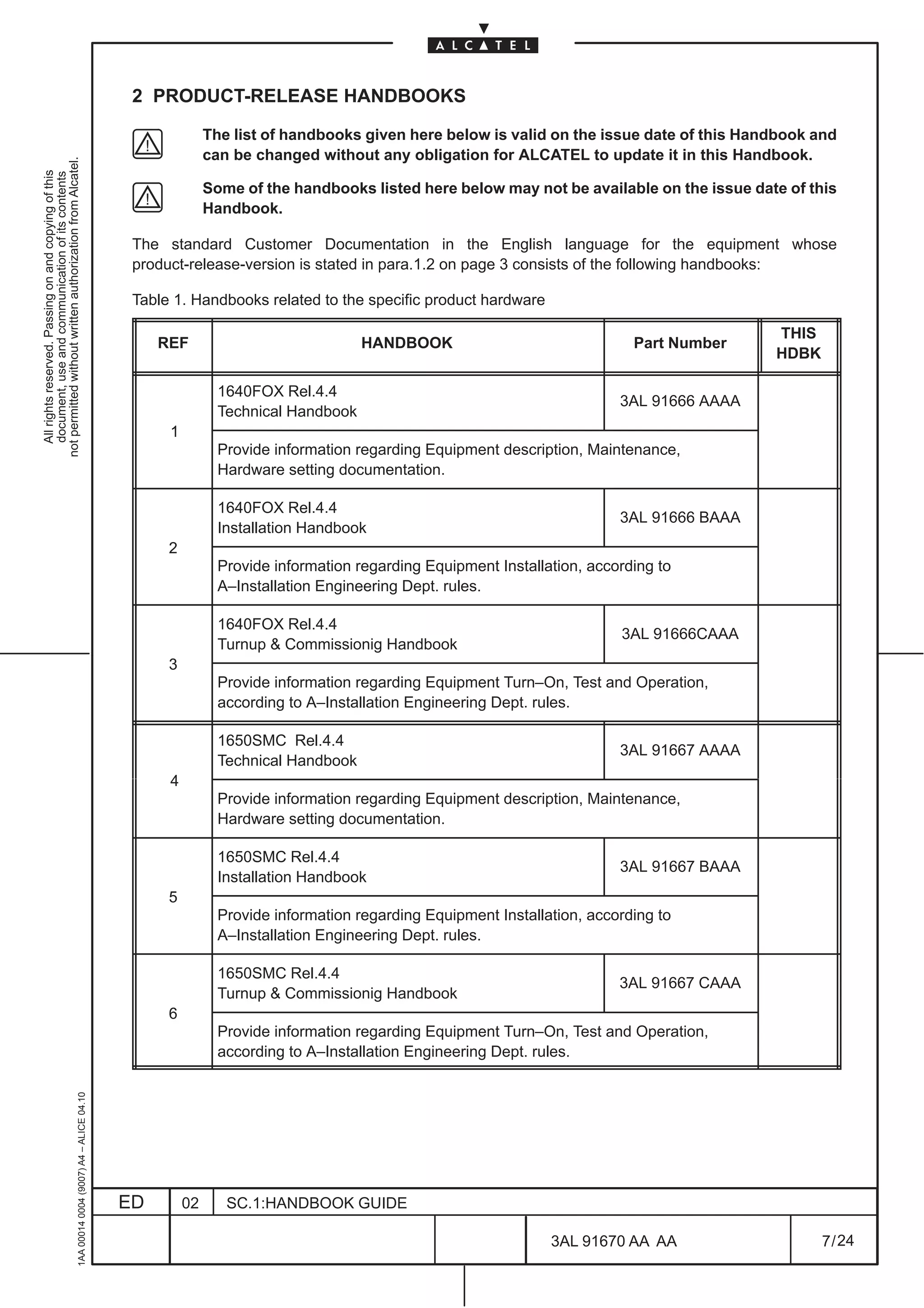
                                                                                               The standard Customer Documentation in the English language for the equipment whose
                                                                                               product-release-version is stated in para.1.2 on page 3 consists of the following handbooks:

                                                                                               Table 1. Handbooks related to the specific product hardware

                                                                                                                                                                                          THIS
                                                                                                   REF                              HANDBOOK                               Part Number
                                                                                                                                                                                          HDBK

                                                                                                               1640FOX Rel.4.4
                                                                                                                                                                         3AL 91666 AAAA
                                                                                                               Technical Handbook
                                                                                                    1
                                                                                                               Provide information regarding Equipment description, Maintenance,
                                                                                                               Hardware setting documentation.

                                                                                                               1640FOX Rel.4.4
                                                                                                                                                                         3AL 91666 BAAA
                                                                                                               Installation Handbook
                                                                                                    2
                                                                                                               Provide information regarding Equipment Installation, according to
                                                                                                               A–Installation Engineering Dept. rules.

                                                                                                               1640FOX Rel.4.4
                                                                                                                                                                         3AL 91666CAAA
                                                                                                               Turnup & Commissionig Handbook
                                                                                                    3
                                                                                                               Provide information regarding Equipment Turn–On, Test and Operation,
                                                                                                               according to A–Installation Engineering Dept. rules.

                                                                                                               1650SMC Rel.4.4
                                                                                                                                                                         3AL 91667 AAAA
                                                                                                               Technical Handbook
                                                                                                    4
                                                                                                               Provide information regarding Equipment description, Maintenance,
                                                                                                               Hardware setting documentation.

                                                                                                               1650SMC Rel.4.4
                                                                                                                                                                         3AL 91667 BAAA
                                                                                                               Installation Handbook
                                                                                                    5
                                                                                                               Provide information regarding Equipment Installation, according to
                                                                                                               A–Installation Engineering Dept. rules.

                                                                                                               1650SMC Rel.4.4
                                                                                                                                                                         3AL 91667 CAAA
                                                                                                               Turnup & Commissionig Handbook
                                                                                                    6
                                                                                                               Provide information regarding Equipment Turn–On, Test and Operation,
                                                                                                               according to A–Installation Engineering Dept. rules.
                                                     1AA 00014 0004 (9007) A4 – ALICE 04.10


                                                                                              ED        02      SC.1:HANDBOOK GUIDE

                                                                                                                                                               3AL 91670 AA AA                   7 / 24


                                                                                                                                                                            24
THIS
                                              REF                              HANDBOOK                               Part Number
                                                                                                                                     HDBK

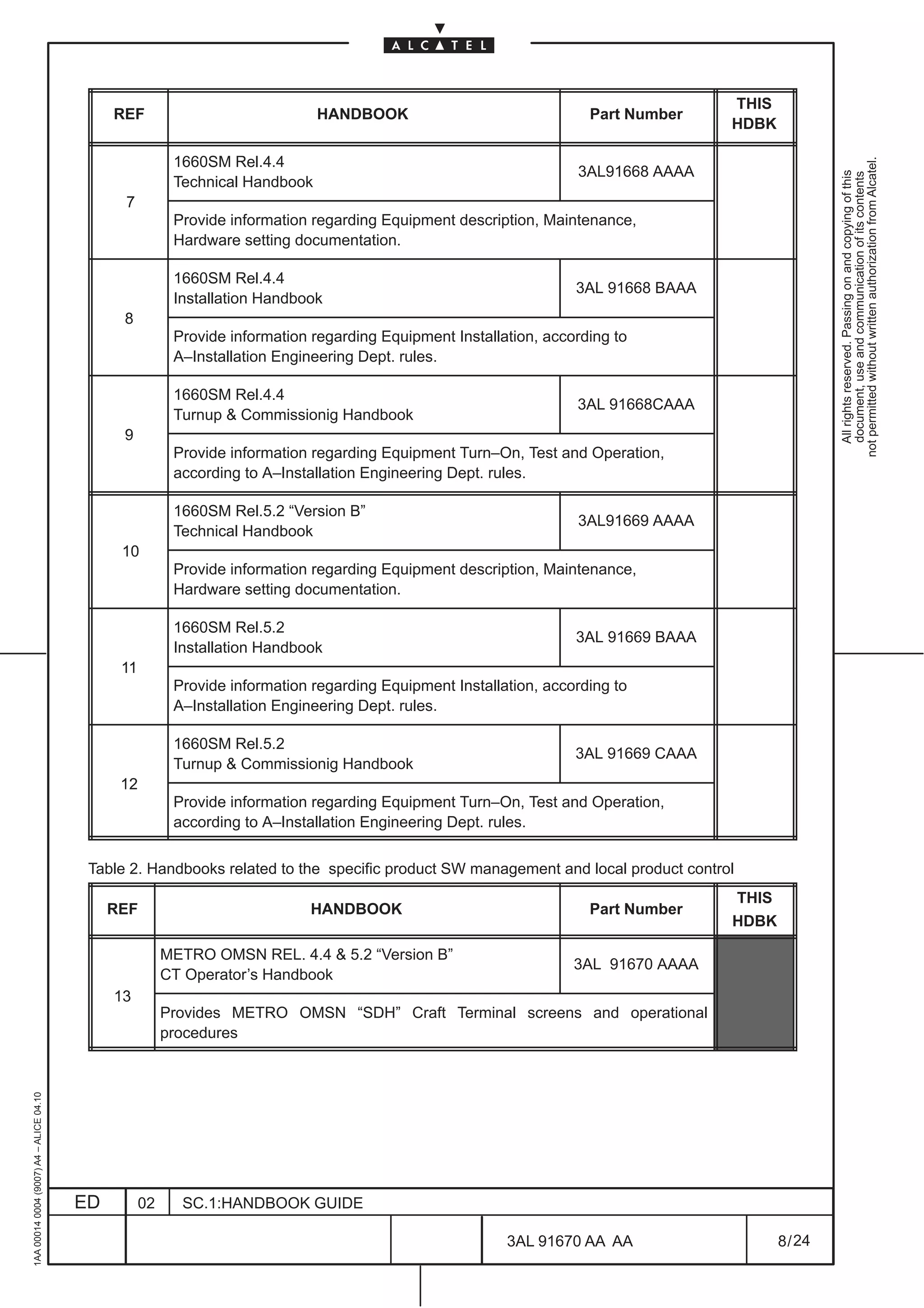
                                                          1660SM Rel.4.4


                                                                                                                                                     not permitted without written authorization from Alcatel.
                                                                                                                    3AL91668 AAAA


                                                                                                                                                       All rights reserved. Passing on and copying of this
                                                                                                                                                       document, use and communication of its contents
                                                          Technical Handbook
                                               7
                                                          Provide information regarding Equipment description, Maintenance,
                                                          Hardware setting documentation.

                                                          1660SM Rel.4.4
                                                                                                                    3AL 91668 BAAA
                                                          Installation Handbook
                                               8
                                                          Provide information regarding Equipment Installation, according to
                                                          A–Installation Engineering Dept. rules.

                                                          1660SM Rel.4.4
                                                                                                                    3AL 91668CAAA
                                                          Turnup & Commissionig Handbook
                                               9
                                                          Provide information regarding Equipment Turn–On, Test and Operation,
                                                          according to A–Installation Engineering Dept. rules.

                                                          1660SM Rel.5.2 “Version B”
                                                                                                                    3AL91669 AAAA
                                                          Technical Handbook
                                               10
                                                          Provide information regarding Equipment description, Maintenance,
                                                          Hardware setting documentation.

                                                          1660SM Rel.5.2
                                                                                                                    3AL 91669 BAAA
                                                          Installation Handbook
                                               11
                                                          Provide information regarding Equipment Installation, according to
                                                          A–Installation Engineering Dept. rules.

                                                          1660SM Rel.5.2
                                                                                                                    3AL 91669 CAAA
                                                          Turnup & Commissionig Handbook
                                               12
                                                          Provide information regarding Equipment Turn–On, Test and Operation,
                                                          according to A–Installation Engineering Dept. rules.


                                          Table 2. Handbooks related to the specific product SW management and local product control
                                                                                                                                     THIS
                                              REF                            HANDBOOK                                 Part Number
                                                                                                                                     HDBK

                                                         METRO OMSN REL. 4.4 & 5.2 “Version B”
                                                                                                                    3AL 91670 AAAA
                                                         CT Operator’s Handbook
                                              13
                                                         Provides METRO OMSN “SDH” Craft Terminal screens and operational
                                                         procedures
1AA 00014 0004 (9007) A4 – ALICE 04.10


                                         ED         02     SC.1:HANDBOOK GUIDE

                                                                                                          3AL 91670 AA AA                   8 / 24


                                                                                                                       24
Table 3. Handbooks related to ATM specific product SW
                                                                                                                                                                                         THIS
                                                                                                   REF                             HANDBOOK                             Part Number     HDBK
not permitted without written authorization from Alcatel.


                                                                                                                                                                                        or note
  All rights reserved. Passing on and copying of this
  document, use and communication of its contents


                                                                                                             ATM Rel.1.2                                               3AL 80814 AAAA
                                                                                                   14
                                                                                                             Operator’s Handbook

                                                                                                             ATM Rel.2.0
                                                                                                   15                                                                  3AL 81826 AAAA
                                                                                                             Operator’s Handbook

                                                                                                             ATM Rel.2.1
                                                                                                   16                                                                  3AL 89777 AAAA
                                                                                                             Operator’s Handbook

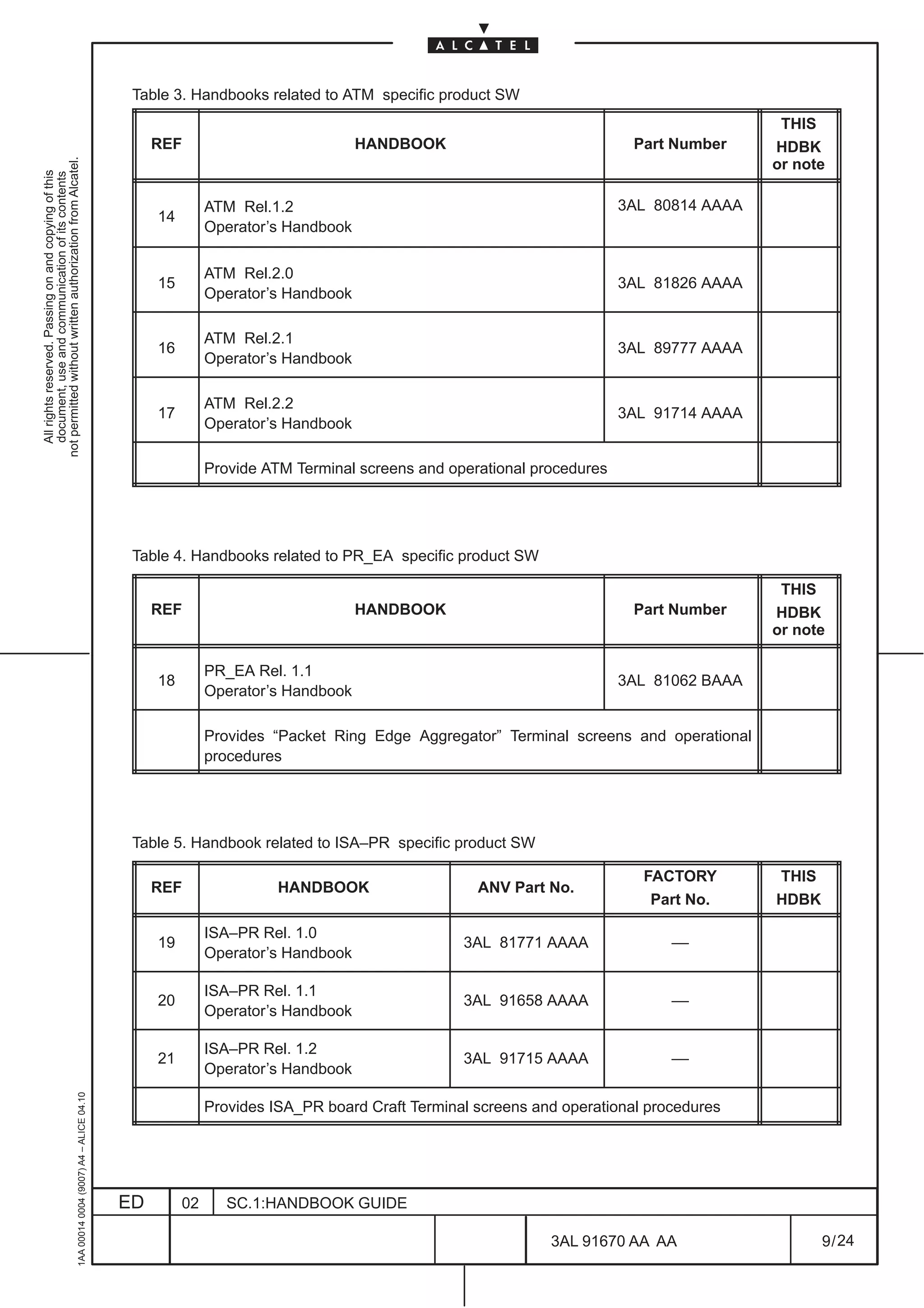
                                                                                                             ATM Rel.2.2
                                                                                                   17                                                                  3AL 91714 AAAA
                                                                                                             Operator’s Handbook

                                                                                                             Provide ATM Terminal screens and operational procedures


                                                                                               Table 4. Handbooks related to PR_EA specific product SW

                                                                                                                                                                                         THIS
                                                                                                   REF                             HANDBOOK                             Part Number     HDBK
                                                                                                                                                                                        or note

                                                                                                             PR_EA Rel. 1.1
                                                                                                   18                                                                  3AL 81062 BAAA
                                                                                                             Operator’s Handbook

                                                                                                             Provides “Packet Ring Edge Aggregator” Terminal screens and operational
                                                                                                             procedures


                                                                                               Table 5. Handbook related to ISA–PR specific product SW

                                                                                                                                                                         FACTORY        THIS
                                                                                                   REF                 HANDBOOK                   ANV Part No.
                                                                                                                                                                          Part No.      HDBK

                                                                                                             ISA–PR Rel. 1.0
                                                                                                   19                                           3AL 81771 AAAA                ––
                                                                                                             Operator’s Handbook

                                                                                                             ISA–PR Rel. 1.1
                                                                                                   20                                           3AL 91658 AAAA                ––
                                                                                                             Operator’s Handbook

                                                                                                             ISA–PR Rel. 1.2
                                                                                                   21                                           3AL 91715 AAAA                ––
                                                                                                             Operator’s Handbook
                                                     1AA 00014 0004 (9007) A4 – ALICE 04.10


                                                                                                             Provides ISA_PR board Craft Terminal screens and operational procedures


                                                                                              ED        02      SC.1:HANDBOOK GUIDE

                                                                                                                                                            3AL 91670 AA AA                    9 / 24


                                                                                                                                                                         24
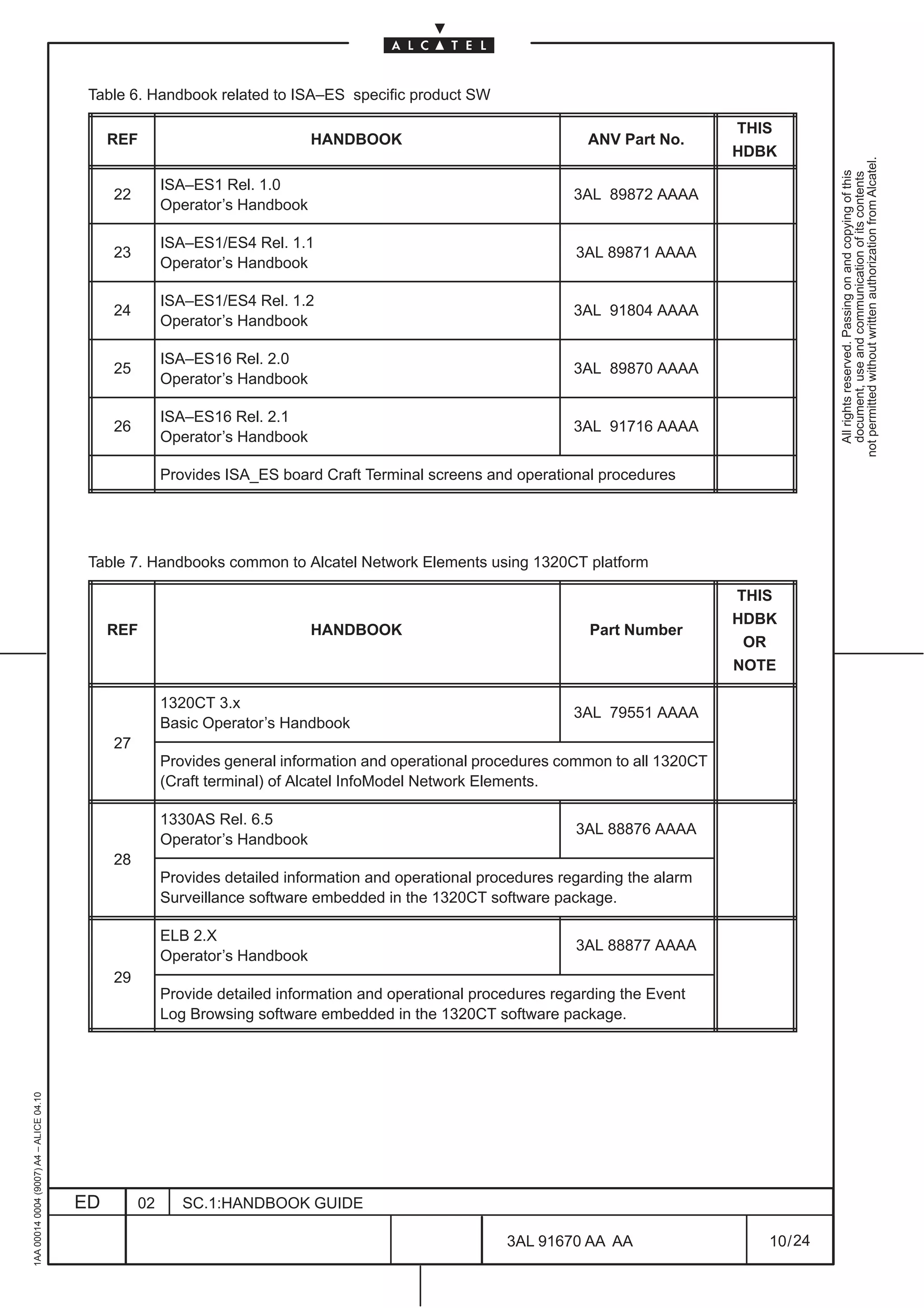
Table 6. Handbook related to ISA–ES specific product SW

                                                                                                                                       THIS
                                              REF                             HANDBOOK                               ANV Part No.
                                                                                                                                       HDBK


                                                                                                                                                    not permitted without written authorization from Alcatel.
                                                                                                                                                      All rights reserved. Passing on and copying of this
                                                                                                                                                      document, use and communication of its contents
                                                        ISA–ES1 Rel. 1.0
                                              22                                                                   3AL 89872 AAAA
                                                        Operator’s Handbook

                                                        ISA–ES1/ES4 Rel. 1.1
                                              23                                                                   3AL 89871 AAAA
                                                        Operator’s Handbook

                                                        ISA–ES1/ES4 Rel. 1.2
                                              24                                                                   3AL 91804 AAAA
                                                        Operator’s Handbook

                                                        ISA–ES16 Rel. 2.0
                                              25                                                                   3AL 89870 AAAA
                                                        Operator’s Handbook

                                                        ISA–ES16 Rel. 2.1
                                              26                                                                   3AL 91716 AAAA
                                                        Operator’s Handbook

                                                        Provides ISA_ES board Craft Terminal screens and operational procedures


                                          Table 7. Handbooks common to Alcatel Network Elements using 1320CT platform

                                                                                                                                       THIS
                                                                                                                                       HDBK
                                              REF                             HANDBOOK                               Part Number
                                                                                                                                        OR
                                                                                                                                       NOTE

                                                        1320CT 3.x
                                                                                                                   3AL 79551 AAAA
                                                        Basic Operator’s Handbook
                                              27
                                                        Provides general information and operational procedures common to all 1320CT
                                                        (Craft terminal) of Alcatel InfoModel Network Elements.

                                                        1330AS Rel. 6.5
                                                                                                                   3AL 88876 AAAA
                                                        Operator’s Handbook
                                              28
                                                        Provides detailed information and operational procedures regarding the alarm
                                                        Surveillance software embedded in the 1320CT software package.

                                                        ELB 2.X
                                                                                                                   3AL 88877 AAAA
                                                        Operator’s Handbook
                                              29
                                                        Provide detailed information and operational procedures regarding the Event
                                                        Log Browsing software embedded in the 1320CT software package.
1AA 00014 0004 (9007) A4 – ALICE 04.10


                                         ED        02      SC.1:HANDBOOK GUIDE

                                                                                                         3AL 91670 AA AA                  10 / 24


                                                                                                                      24
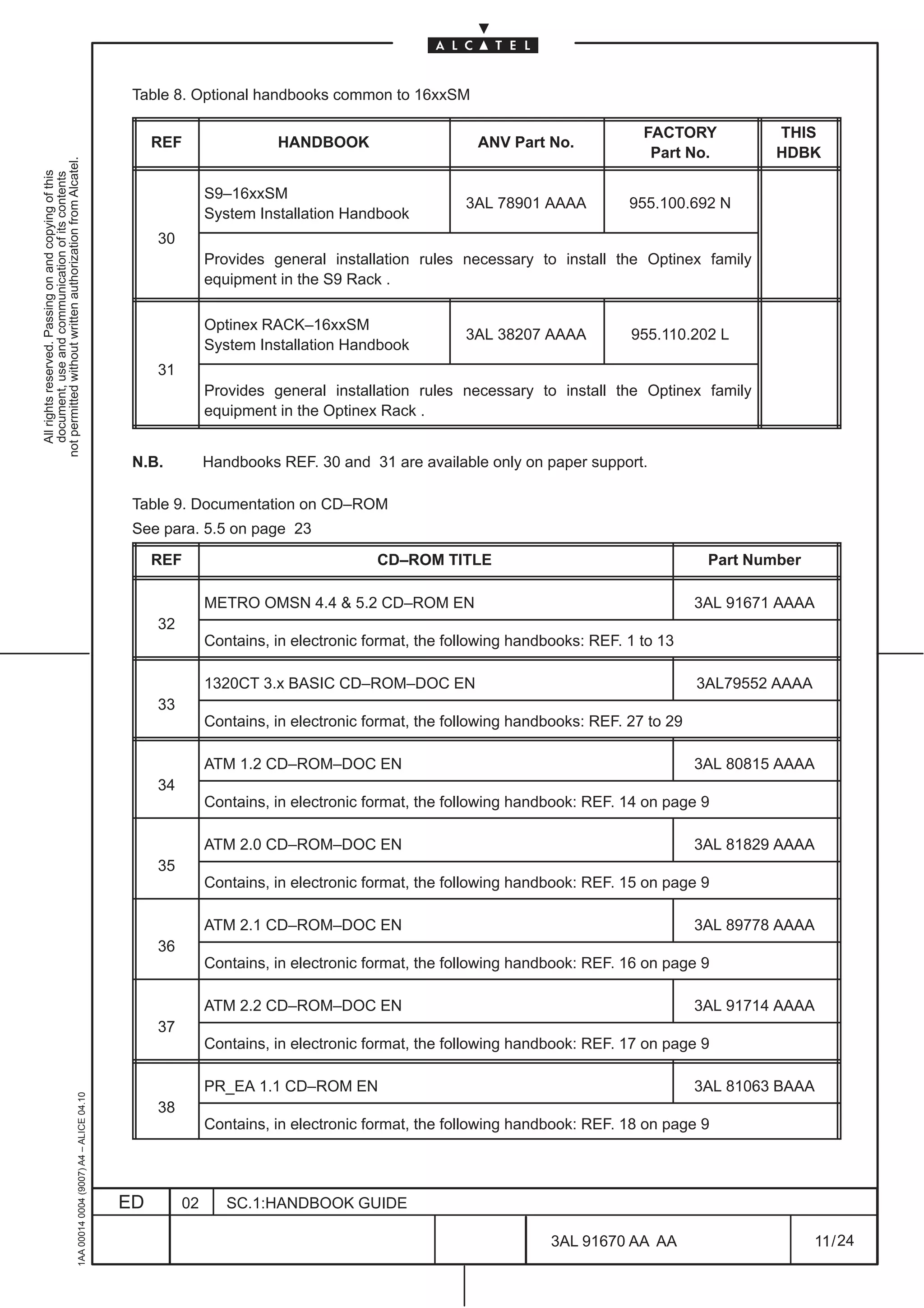
Table 8. Optional handbooks common to 16xxSM

                                                                                                                                                                             FACTORY           THIS
                                                                                                   REF                 HANDBOOK                      ANV Part No.
                                                                                                                                                                              Part No.         HDBK
not permitted without written authorization from Alcatel.
  All rights reserved. Passing on and copying of this
  document, use and communication of its contents


                                                                                                             S9–16xxSM
                                                                                                                                                   3AL 78901 AAAA          955.100.692 N
                                                                                                             System Installation Handbook
                                                                                                   30
                                                                                                             Provides general installation rules necessary to install the Optinex family
                                                                                                             equipment in the S9 Rack .

                                                                                                             Optinex RACK–16xxSM
                                                                                                                                                   3AL 38207 AAAA          955.110.202 L
                                                                                                             System Installation Handbook
                                                                                                   31
                                                                                                             Provides general installation rules necessary to install the Optinex family
                                                                                                             equipment in the Optinex Rack .


                                                                                               N.B.          Handbooks REF. 30 and 31 are available only on paper support.

                                                                                               Table 9. Documentation on CD–ROM
                                                                                               See para. 5.5 on page 23

                                                                                                   REF                                CD–ROM TITLE                                     Part Number

                                                                                                             METRO OMSN 4.4 & 5.2 CD–ROM EN                                           3AL 91671 AAAA
                                                                                                   32
                                                                                                             Contains, in electronic format, the following handbooks: REF. 1 to 13

                                                                                                             1320CT 3.x BASIC CD–ROM–DOC EN                                           3AL79552 AAAA
                                                                                                   33
                                                                                                             Contains, in electronic format, the following handbooks: REF. 27 to 29

                                                                                                             ATM 1.2 CD–ROM–DOC EN                                                    3AL 80815 AAAA
                                                                                                   34
                                                                                                             Contains, in electronic format, the following handbook: REF. 14 on page 9

                                                                                                             ATM 2.0 CD–ROM–DOC EN                                                    3AL 81829 AAAA
                                                                                                   35
                                                                                                             Contains, in electronic format, the following handbook: REF. 15 on page 9

                                                                                                             ATM 2.1 CD–ROM–DOC EN                                                    3AL 89778 AAAA
                                                                                                   36
                                                                                                             Contains, in electronic format, the following handbook: REF. 16 on page 9

                                                                                                             ATM 2.2 CD–ROM–DOC EN                                                    3AL 91714 AAAA
                                                                                                   37
                                                                                                             Contains, in electronic format, the following handbook: REF. 17 on page 9

                                                                                                             PR_EA 1.1 CD–ROM EN                                                      3AL 81063 BAAA
                                                     1AA 00014 0004 (9007) A4 – ALICE 04.10


                                                                                                   38
                                                                                                             Contains, in electronic format, the following handbook: REF. 18 on page 9


                                                                                              ED        02      SC.1:HANDBOOK GUIDE

                                                                                                                                                               3AL 91670 AA AA                        11 / 24


                                                                                                                                                                             24
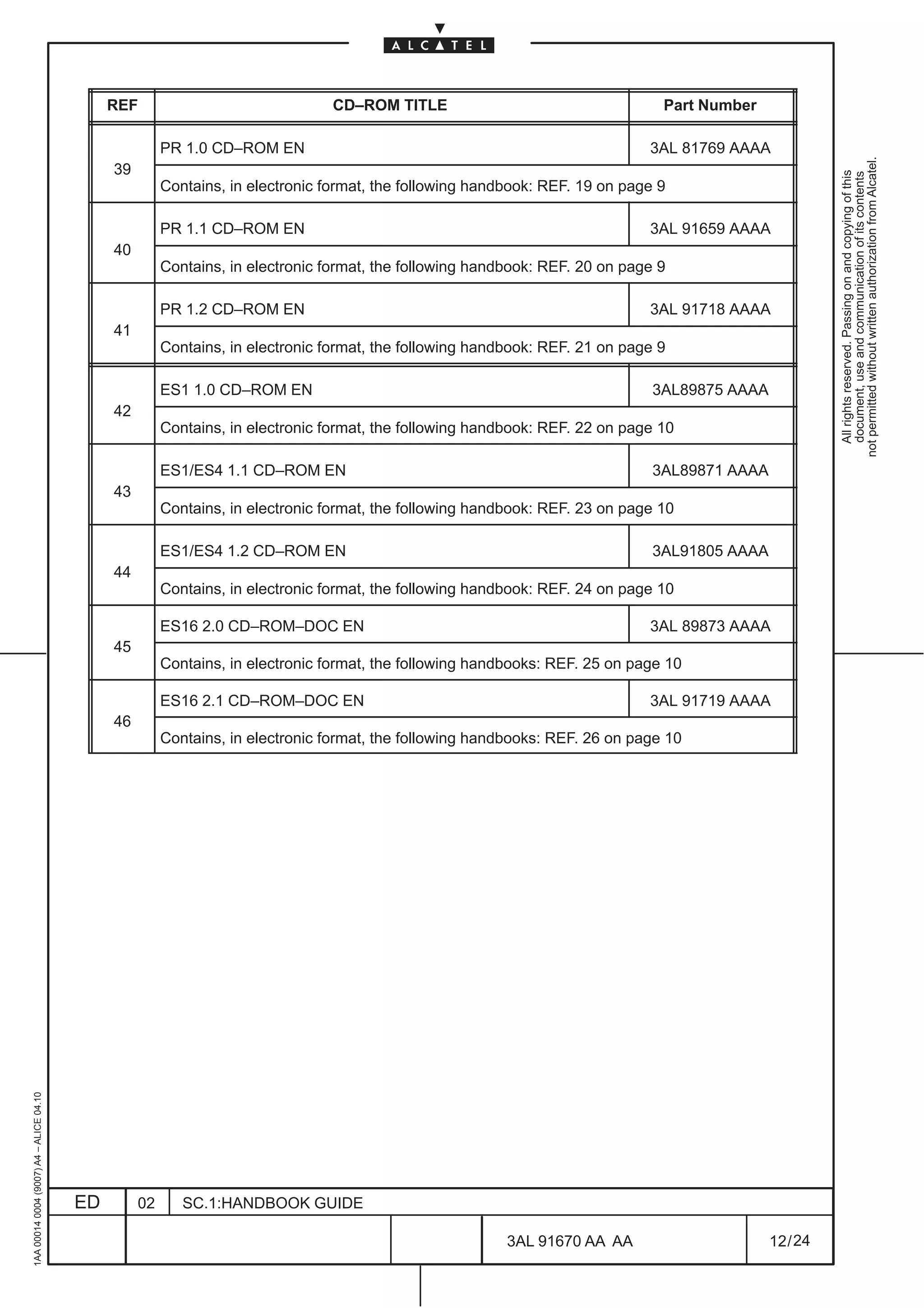
REF                               CD–ROM TITLE                                    Part Number

                                                        PR 1.0 CD–ROM EN                                                      3AL 81769 AAAA


                                                                                                                                                         not permitted without written authorization from Alcatel.
                                              39


                                                                                                                                                           All rights reserved. Passing on and copying of this
                                                                                                                                                           document, use and communication of its contents
                                                        Contains, in electronic format, the following handbook: REF. 19 on page 9

                                                        PR 1.1 CD–ROM EN                                                      3AL 91659 AAAA
                                              40
                                                        Contains, in electronic format, the following handbook: REF. 20 on page 9

                                                        PR 1.2 CD–ROM EN                                                      3AL 91718 AAAA
                                              41
                                                        Contains, in electronic format, the following handbook: REF. 21 on page 9

                                                        ES1 1.0 CD–ROM EN                                                      3AL89875 AAAA
                                              42
                                                        Contains, in electronic format, the following handbook: REF. 22 on page 10

                                                        ES1/ES4 1.1 CD–ROM EN                                                  3AL89871 AAAA
                                              43
                                                        Contains, in electronic format, the following handbook: REF. 23 on page 10

                                                        ES1/ES4 1.2 CD–ROM EN                                                  3AL91805 AAAA
                                              44
                                                        Contains, in electronic format, the following handbook: REF. 24 on page 10

                                                        ES16 2.0 CD–ROM–DOC EN                                                3AL 89873 AAAA
                                              45
                                                        Contains, in electronic format, the following handbooks: REF. 25 on page 10

                                                        ES16 2.1 CD–ROM–DOC EN                                                3AL 91719 AAAA
                                              46
                                                        Contains, in electronic format, the following handbooks: REF. 26 on page 10
1AA 00014 0004 (9007) A4 – ALICE 04.10


                                         ED        02      SC.1:HANDBOOK GUIDE

                                                                                                          3AL 91670 AA AA                      12 / 24


                                                                                                                       24
3 SAFETY NORMS AND LABELS

                                                                                               3.1 First aid for electric shock
not permitted without written authorization from Alcatel.
  All rights reserved. Passing on and copying of this
  document, use and communication of its contents


                                                                                               Do not touch the patient with bare hands until the circuit has been opened.

                                                                                               Open the circuit by switching off the line switches. If that is not possible, protect yourself with dry
                                                                                               material and free the patient from the conductor.

                                                                                               ARTIFICIAL RESPIRATION

                                                                                               It is important to start mouth to mouth resuscitation at once and seek doctor help immediately.

                                                                                               TREATMENT OF BURNS

                                                                                               This treatment should be used after the patient has regained consciousness. It can also be employed while
                                                                                               the artificial respiration is being applied (in this case there should be at least two persons present).

                                                                                               WARNING:

                                                                                                    •        Do not attempt to remove his clothing from the burnt parts;

                                                                                                    •        Apply dry gauze on the burns;

                                                                                                    •        Do not apply ointments or other oily substances.
                                                     1AA 00014 0004 (9007) A4 – ALICE 04.10


                                                                                              ED        02      SC.1:HANDBOOK GUIDE

                                                                                                                                                             3AL 91670 AA AA                        13 / 24


                                                                                                                                                                           24
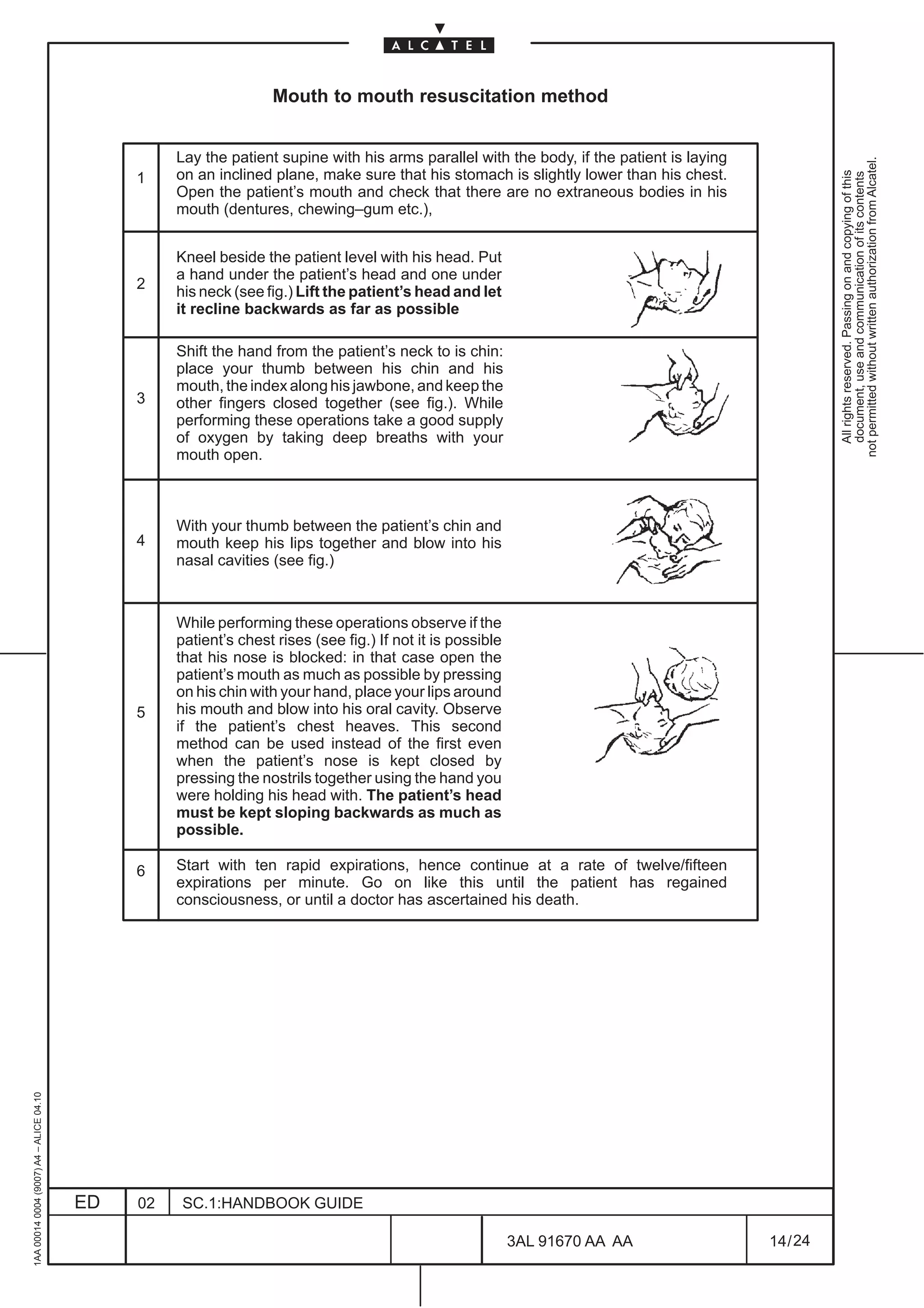
Mouth to mouth resuscitation method


                                                   Lay the patient supine with his arms parallel with the body, if the patient is laying


                                                                                                                                                     not permitted without written authorization from Alcatel.
                                                   on an inclined plane, make sure that his stomach is slightly lower than his chest.


                                                                                                                                                       All rights reserved. Passing on and copying of this
                                                                                                                                                       document, use and communication of its contents
                                              1
                                                   Open the patient’s mouth and check that there are no extraneous bodies in his
                                                   mouth (dentures, chewing–gum etc.),


                                                   Kneel beside the patient level with his head. Put
                                                   a hand under the patient’s head and one under
                                              2
                                                   his neck (see fig.) Lift the patient’s head and let
                                                   it recline backwards as far as possible

                                                   Shift the hand from the patient’s neck to is chin:
                                                   place your thumb between his chin and his
                                                   mouth, the index along his jawbone, and keep the
                                              3    other fingers closed together (see fig.). While
                                                   performing these operations take a good supply
                                                   of oxygen by taking deep breaths with your
                                                   mouth open.


                                                   With your thumb between the patient’s chin and
                                              4    mouth keep his lips together and blow into his
                                                   nasal cavities (see fig.)


                                                   While performing these operations observe if the
                                                   patient’s chest rises (see fig.) If not it is possible
                                                   that his nose is blocked: in that case open the
                                                   patient’s mouth as much as possible by pressing
                                                   on his chin with your hand, place your lips around
                                              5    his mouth and blow into his oral cavity. Observe
                                                   if the patient’s chest heaves. This second
                                                   method can be used instead of the first even
                                                   when the patient’s nose is kept closed by
                                                   pressing the nostrils together using the hand you
                                                   were holding his head with. The patient’s head
                                                   must be kept sloping backwards as much as
                                                   possible.

                                              6    Start with ten rapid expirations, hence continue at a rate of twelve/fifteen
                                                   expirations per minute. Go on like this until the patient has regained
                                                   consciousness, or until a doctor has ascertained his death.
1AA 00014 0004 (9007) A4 – ALICE 04.10


                                         ED   02    SC.1:HANDBOOK GUIDE

                                                                                                            3AL 91670 AA AA                14 / 24


                                                                                                                      24
3.2 Norms and labels

                                                                                               Refer to the Technical Handbook associated to ALCATEL’s designed and manufactured equipment
                                                                                               to obtain the following information:
not permitted without written authorization from Alcatel.
  All rights reserved. Passing on and copying of this
  document, use and communication of its contents


                                                                                               –    COMPLIANCE WITH EUROPEAN NORMS.

                                                                                               –    SAFETY RULES

                                                                                                    •        General rules

                                                                                                    •        Harmful optical signals

                                                                                                    •        Risk of explosion

                                                                                                    •        Moving mechanical parts

                                                                                                    •        Heat–radiating Mechanical Parts

                                                                                               –    ELECTROMAGNETIC COMPATIBILITY

                                                                                               –    ELECTROSTATIC DISCHARGERS (ESD)

                                                                                               –    EQUIPMENT LABELS

                                                                                               Identical or similar information on Personal Computer, Work–Station etc., other than ALCATEL’s, loaded
                                                                                               with software applicative described in this Handbook, is supplied in the Constructor’s technical
                                                                                               documentation.
                                                     1AA 00014 0004 (9007) A4 – ALICE 04.10


                                                                                              ED        02      SC.1:HANDBOOK GUIDE

                                                                                                                                                           3AL 91670 AA AA                       15 / 24


                                                                                                                                                                        24
1AA 00014 0004 (9007) A4 – ALICE 04.10


                          ED
                          02
                          SC.1:HANDBOOK GUIDE


24
        3AL 91670 AA AA
        16 / 24
                                                  All rights reserved. Passing on and copying of this
                                                  document, use and communication of its contents
                                                not permitted without written authorization from Alcatel.
4 HANDBOOK DESCRIPTION

                                                                                               This handbook is composed of the following Manuals:
not permitted without written authorization from Alcatel.


                                                                                               SECTION 1: HANDBOOK GUIDE (This document)
  All rights reserved. Passing on and copying of this
  document, use and communication of its contents


                                                                                               The Handbook Guide gives general information on the application and use of the Handbook. The
                                                                                               Handbook Guide includes the following chapters:

                                                                                               –    Chapter 1: Handbook structure and configuration check. This chapter gives information on the whole
                                                                                                    handbook application, composition and evolution.

                                                                                               –    Chapter 2: Product-release handbooks. This chapter lists the handbooks the Operator should have
                                                                                                    in order to carry out the tasks allowed by the specific product–release this handbook refers to.

                                                                                               –    Chapter 3: Safety norms and labels

                                                                                               –    Chapter 4: Handbook description

                                                                                               –    Chapter 5: General on Alcatel Customer Documentation

                                                                                               SECTION 2: INTRODUCTION Manual

                                                                                               The Introduction Manual describes the main features of the graphical interface and provides a general
                                                                                               overview of the system architecture and the different functionalities provided by the Craft Terminal. The
                                                                                               Introduction Manual includes the following chapters:

                                                                                               –    Chapter 1: Introduction. This chapter gives the structure of this manual.

                                                                                               –    Chapter 2: General description of the Craft Terminal. The Craft Terminal is introduced and the
                                                                                                    software product listed. The Craft Terminal main functionality in the NE management (EML–USM)
                                                                                                    are listed and briefly described.

                                                                                               –    Chapter 3: Acronyms and abbreviations. The acronyms used in all the operator manuals are listed.

                                                                                               –    Chapter 4: Glossary of terms. Definitions concerning the acronyms.

                                                                                               SECTION 3: NETWORK ELEMENT MANAGEMENT Manual

                                                                                               The aim of this document is to describe the Craft Terminal view, inserting operative information.
                                                                                               The Network Element Manual includes the following chapters:

                                                                                               –    Chapter 1: Introduction. This chapter gives the structure of this manual.

                                                                                               –    Chapter 2: General introduction on views and menus. The view organization is presented and the
                                                                                                    menus available listed and briefly described.

                                                                                               –    Chapter 3: NE management supervision. This chapter is dedicated to the NE states and NE access.

                                                                                               –    Chapter 4: NE management general configuration. In this chapter general configuration referred to
                                                                                                    the equipment management are described (CT access, NE Time, Alarm Configuration etc).

                                                                                               –    Chapter 5: Security Management. In this chapter configuration referred to the Security management
                                                                                                    are described (ACD level and Manager list).
                                                     1AA 00014 0004 (9007) A4 – ALICE 04.10


                                                                                               –    Chapter 6: External input and output points management. This chapter describes how to display and
                                                                                                    set the input/output environmental alarm (housekeeping alarm).


                                                                                              ED      02     SC.1:HANDBOOK GUIDE

                                                                                                                                                             3AL 91670 AA AA                        17 / 24


                                                                                                                                                                           24
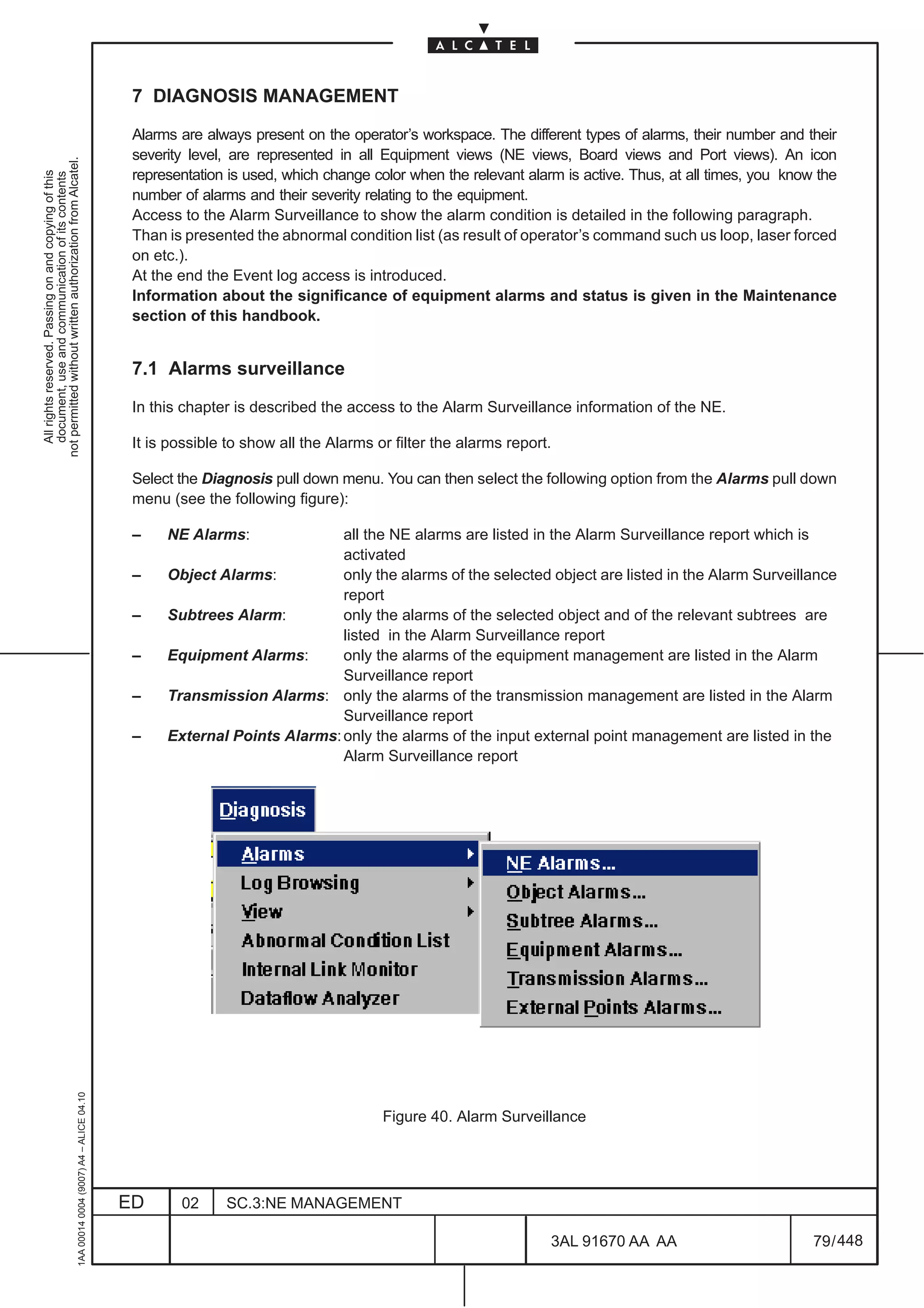
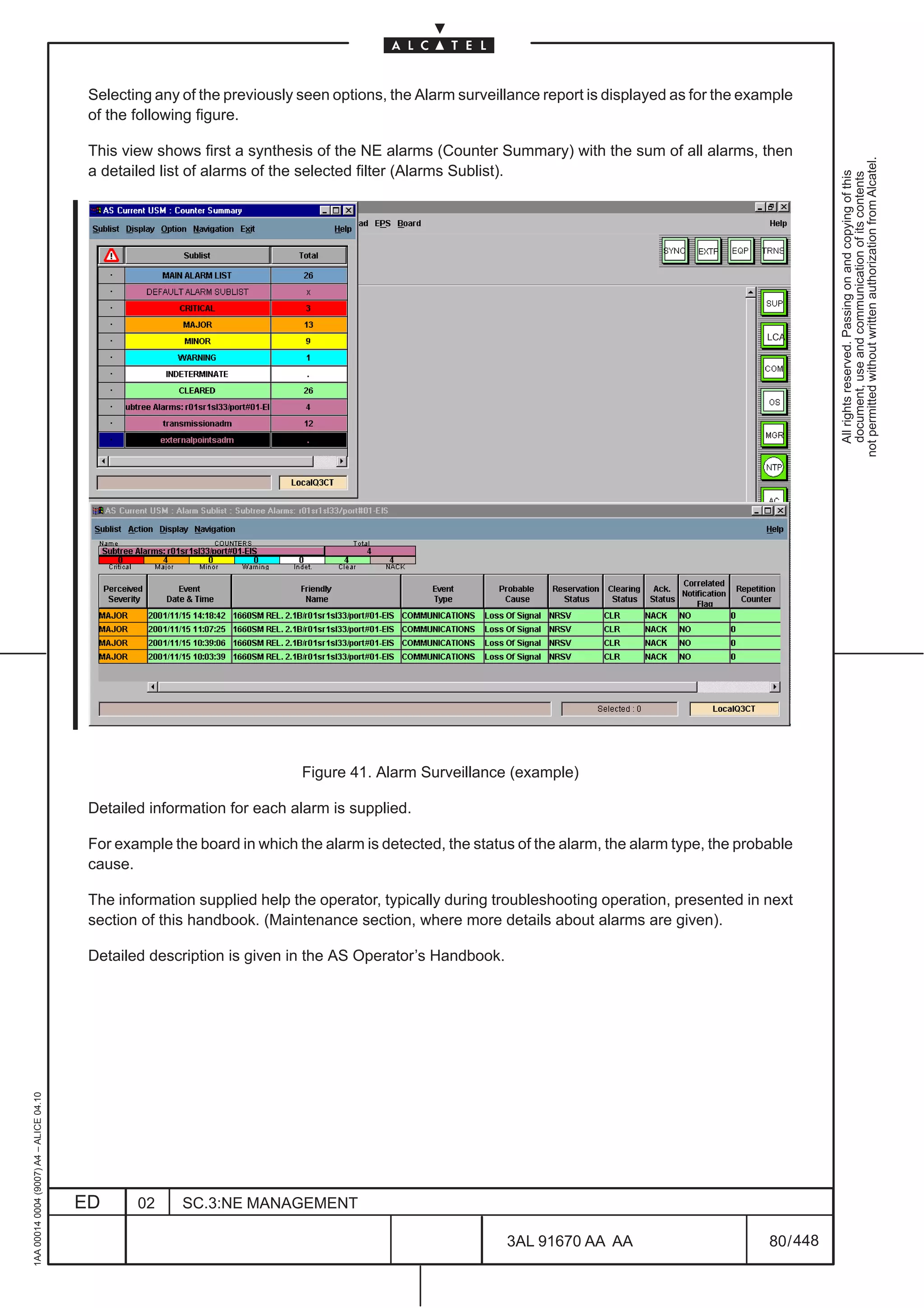
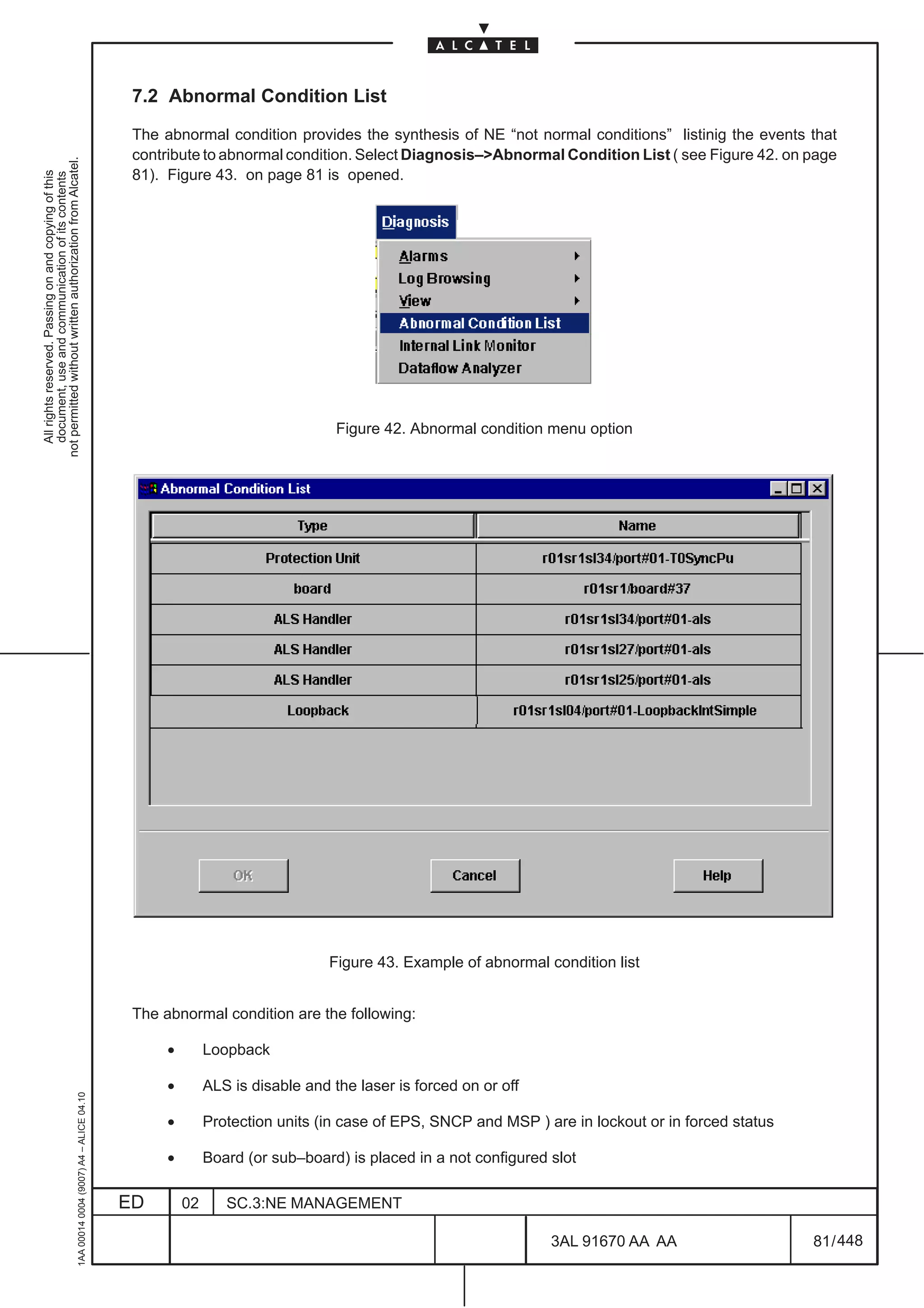
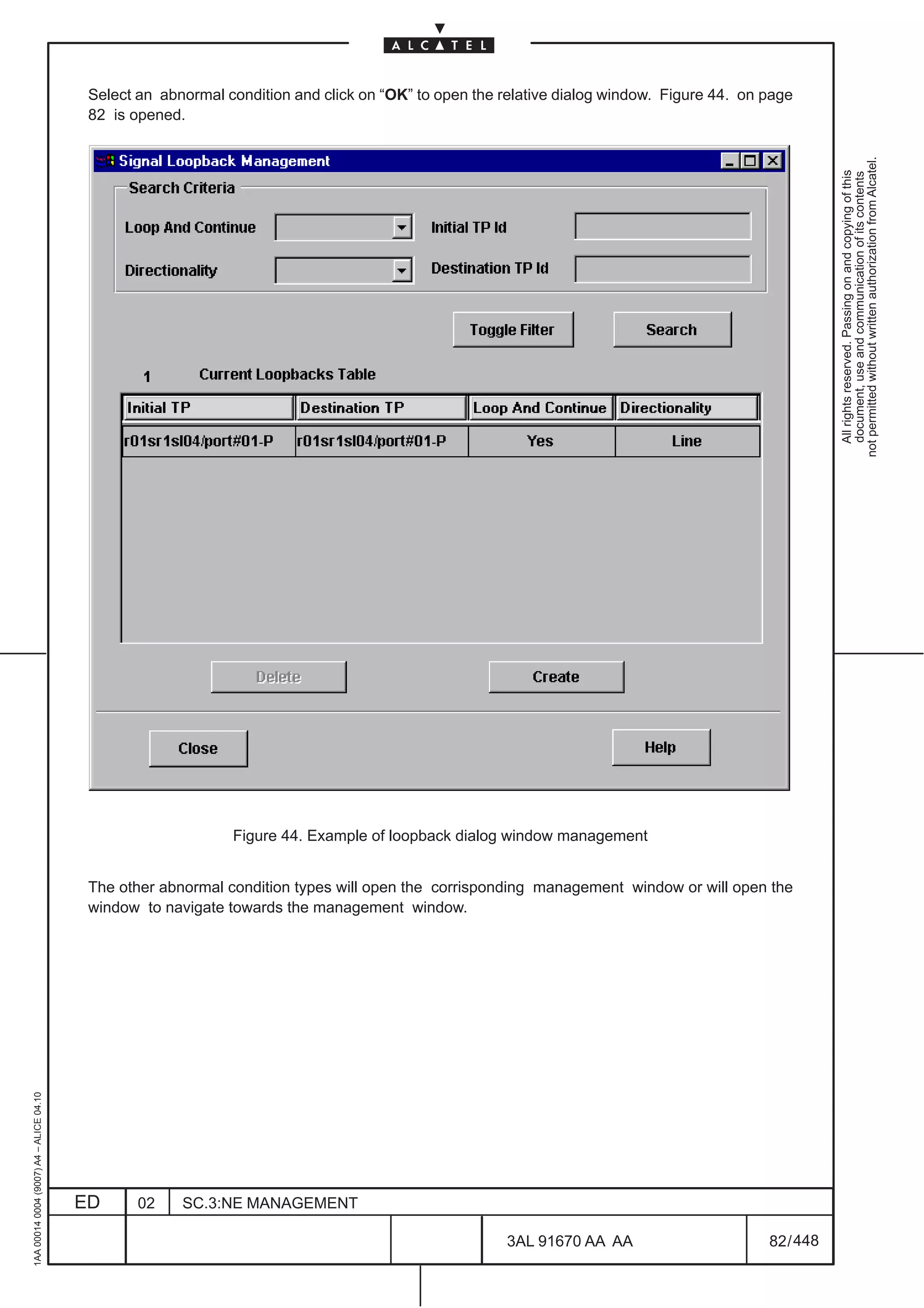
–   Chapter 7: Diagnosis management. In this chapter are specified: access to the Alarm Surveillance
                                              to show the alarm condition, abnormal condition list (as result of operator’s command), access to the
                                              Event and Alarm Log file and Internal Link Monitor.


                                                                                                                                                         not permitted without written authorization from Alcatel.
                                          –   Chapter 8: Communication and Routing management. In this chapter are presented the


                                                                                                                                                           All rights reserved. Passing on and copying of this
                                                                                                                                                           document, use and communication of its contents
                                              communication and routing parameters, concerning the OSI and IP communication protocols for
                                              the local NE, the OS and each other related NE in order to provide a global communication
                                              capabilities inside the network

                                          –   Chapter 9: Equipment management. This chapter deals mainly with the setting and changing of the
                                              boards present on the Equipment and undertaking board protection operations.

                                          –   Chapter 10: Board view. This chapter permits to show the physical port available in a specific board
                                              (alarm synthesis and port symbol), to access the port view and to change the physical interface.

                                          –   Chapter 11: Port view. This chapter permits to set and show the transmission resources referred to
                                              the Port.

                                          –   Chapter 12: Equipment Protection management (EPS). This chapter permits to manage the EPS
                                              protection, setting the relevant configuration.
                                              N.B.       EPS is not applicable in 1640FOX

                                          –   Chapter 13: Multiplex Section protection management. This chapter permits to manage the MSP
                                              protection.

                                          –   Chapter 14: Transmission view. This chapter permits to show and set the Termination Point of the
                                              equipment, thus having an overview of the complete signal flow of the various port.

                                          –   Chapter 15: Cross connection management. This chapter permits to manage the connection of the
                                              paths.

                                          –   Chapter 16: Overhead management. This chapter permits to manage the Overhead, setting the
                                              relevant configuration.

                                          –   Chapter 17: Performance Monitoring management. This chapter permits to set and show
                                              Performance Monitoring parameters and data.

                                          –   Chapter 18: Synchronization management. This chapter permits to set and show Synchronization
                                              parameters and status.

                                          –   Chapter 19: MS–SPRing Management. This chapter permits to set the MS–SPRing protection of the
                                              NE
                                              N.B.     MS–SPRing Management menu is available only for 1660SM

                                          –   Chapter 20: ISA port Configuration. This chapter describes the operations necessary for the
                                              ATM/PR_EA/Ethernet boards creation and the ATM/PR_EA/Ethernet TTPs creation.

                                          –   Chapter 21: Software management. This chapter permits to update the NE by means download
                                              procedure and to manage NE software.
1AA 00014 0004 (9007) A4 – ALICE 04.10


                                         ED     02    SC.1:HANDBOOK GUIDE

                                                                                                       3AL 91670 AA AA                         18 / 24


                                                                                                                     24
SECTION 4: NETWORK ELEMENT MAINTENANCE Manual

                                                                                               This document aims at introducing the Maintenance procedure, inserting information useful to identify
                                                                                               alarms and troubleshoot the NE.
not permitted without written authorization from Alcatel.


                                                                                               The Maintenance Manual includes the following chapters:
  All rights reserved. Passing on and copying of this
  document, use and communication of its contents


                                                                                               –    Chapter 1: Introduction. This chapter gives the structure of this manual.

                                                                                               –    Chapter 2: Craft Terminal Maintenance Introduction.
                                                                                                              This chapter:

                                                                                                              •    list the maintenance steps;
                                                                                                              •    for the “Maintenance of the Personal Computer”, refers to the personal Computer
                                                                                                                   manual;
                                                                                                              •    describes the problem with Craft terminal (shut–down and restart of the PCis
                                                                                                                   indicated).

                                                                                               –    Chapter 5: Troubleshooting (Corrective Maintenance). Detection location and correction of failure
                                                                                                    are presented.

                                                                                               –    Chapter 6: Unit replacement with spare. The replacement procedure is detailed.

                                                                                               –    Chapter 7: Upgrading with New Hardware. The Hardware upgrading procedure is detailed.

                                                                                               –    Chapter 8: FLASH card substitution. The FLASH card substitution procedure is detailed.

                                                                                               SECTION 5: SIBDL Manual

                                                                                               This document describes the download procedure with SIBDL.
                                                                                               The SIBDL Manual includes the following chapters:

                                                                                               –    Chapter 1: Introduction

                                                                                               –    Chapter 2: Download with SIBDL configuration

                                                                                               –    Chapter 3: Configuration for SIBDL
                                                     1AA 00014 0004 (9007) A4 – ALICE 04.10


                                                                                              ED      02    SC.1:HANDBOOK GUIDE

                                                                                                                                                             3AL 91670 AA AA                     19 / 24


                                                                                                                                                                           24
1AA 00014 0004 (9007) A4 – ALICE 04.10


                          ED
                          02
                          SC.1:HANDBOOK GUIDE


24
        3AL 91670 AA AA
        20 / 24
                                                  All rights reserved. Passing on and copying of this
                                                  document, use and communication of its contents
                                                not permitted without written authorization from Alcatel.
5 GENERAL ON ALCATEL CUSTOMER DOCUMENTATION

                                                                                               5.1 Products, product-releases, versions and Customer Documentation
not permitted without written authorization from Alcatel.
  All rights reserved. Passing on and copying of this
  document, use and communication of its contents


                                                                                               A ”product” is defined by the network hierarchical level where it can be inserted and by the whole of
                                                                                               performance and services for which it is meant.
                                                                                               A ”product” evolves through successive ”product-releases” which are the real products marketed for
                                                                                               their delivery at a certain ”product-release” availability date.

                                                                                               So, a ”product–release” defines a set of hardware components and a software package which, as a whole,
                                                                                               identify the possible network applications and the equipment performance which the specific
                                                                                               ”product-release” has been designed, engineered and marketed for.

                                                                                               In some cases a ”product-release” has further development steps, named ”versions”, that are born to
                                                                                               improve or add some performance (mainly software) with respect to the previous version, or for bug fixing
                                                                                               purposes.

                                                                                               A ”product-release” has its own standard Customer Documentation, composed by one or more
                                                                                               handbooks.

                                                                                               A new ”version” of a ”product-release” may or may not produce a change in the status of the Customer
                                                                                               Documentation set, as described in para.5.4 on page 22.


                                                                                               5.2 Handbook supply to Customers

                                                                                               Handbooks are not automatically delivered together with the equipment they refer to.
                                                                                               The number of handbooks per type to be supplied must be decided at contract level.


                                                                                               5.3 Aims of standard Customer Documentation

                                                                                               Standard Customer Documentation, referred to hereafter, must be always meant as plant-independent.
                                                                                               Plant-dependent documentation, if envisaged by the contract, is subjected to commercial criteria as far
                                                                                               as contents, formats and supply conditions are concerned (plant-dependent documentation is not
                                                                                               described here).

                                                                                               Standard hardware and software documentation is meant to give the Customer personnel the possibility
                                                                                               and the information necessary for installing, commissioning, operating and maintaining the equipment
                                                                                               according to Alcatel–Telecom Laboratory design choices.
                                                                                               In particular the contents of the handbooks associated to the software applications focus on the
                                                                                               explanation of the man-machine interface and of the operating procedures allowed by it.

                                                                                               Consequently, no supply to the Customers of design documentation (like software source programs,
                                                                                               programming tools, etc.) is envisaged.
                                                     1AA 00014 0004 (9007) A4 – ALICE 04.10


                                                                                              ED      02     SC.1:HANDBOOK GUIDE

                                                                                                                                                             3AL 91670 AA AA                        21 / 24


                                                                                                                                                                           24
5.4 Handbook Updating

                                          The handbooks associated to the ”product–release” are listed in para.2 on page 7.
                                          Each handbook is identified by:


                                                                                                                                                             not permitted without written authorization from Alcatel.
                                          –   the name of the ”product-release” (and ”version” when the handbook is applicable to the versions


                                                                                                                                                               All rights reserved. Passing on and copying of this
                                                                                                                                                               document, use and communication of its contents
                                              starting from it, but not to the previous ones),
                                          –   the handbook name,
                                          –   the handbook P/N,
                                          –   the handbook edition (usually first edition=01),
                                          –   the handbook issue date. The date on the handbook does not refer to the date of print but to the date
                                              on which the handbook source file has been completed and released for the production.


                                          5.4.1 Changes introduced in the same product-release (same handbook P/N)

                                          The edition and date of issue might change on future handbook versions for the following reasons:

                                          –    only the date changes (pointed out in the Table of Contents) when modifications are made to the
                                               editorial system not changing the technical contents of the handbook.

                                          –    the edition, hence the date, is changed because modifications made concern technical contents. In
                                               this case:
                                               •     the table in para.1.4 on page 5 indicates the section(s) edition change;
                                               •     in each section, the main changes with respect to the previous edition are listed;
                                               •     in affected chapters of each section, revision bars on the left of the page indicate modifications
                                                     in text and drawings (this is done after the first officially released and validated version).

                                          Changes concerning the technical contents of the handbook cause the edition number increase (e.g. from
                                          Ed.01 to Ed.02). Slight changes (e.g. for corrections) maintain the same edition but with the addition of
                                          a version character (e.g. from Ed.02 to Ed.02A).

                                                      NOTES FOR HANDBOOKS RELEVANT TO SOFTWARE APPLICATIONS


                                                      Handbooks relevant to software applications (typically the Operator’s Handbooks) are not
                                                      modified unless the new software ”version” distributed to Customers implies man–machine
                                                      interface changes or in case of slight modifications not affecting the understanding of the
                                                      explained procedures.
                                                      Moreover, should the screen prints included in the handbook contain the product-release’s
                                                      ”version” marking, they are not replaced in the handbooks related to a subsequent version, if
                                                      the screen contents are unchanged.


                                          5.4.2 Supplying updated handbooks to Customers

                                          Supplying updated handbooks to Customers who have already received previous issues is submitted to
                                          commercial criteria.
                                          By updated handbook delivery it is meant the supply of a complete copy of the handbook new issue
                                          (supplying errata–corrige sheets is not envisaged).


                                          5.4.3 Changes due to a new product-release
                                          A new product-release changes the handbook P/N and the edition starts from 01. In this case the modified
1AA 00014 0004 (9007) A4 – ALICE 04.10


                                          parts of the handbook are not listed.


                                         ED      02      SC.1:HANDBOOK GUIDE

                                                                                                          3AL 91670 AA AA                          22 / 24


                                                                                                                        24
5.5 Customer documentation supply on CD–ROM

                                                                                               In the following by ’CD–ROM’ it is meant ’Customer Documentation on CD–ROM’
not permitted without written authorization from Alcatel.


                                                                                               5.5.1 Contents, creation and production of a CD–ROM
  All rights reserved. Passing on and copying of this
  document, use and communication of its contents


                                                                                               In most cases, a CD–ROM contains in read–only eletronic format the documentation of one
                                                                                               product–release(–version) and for a certain language.
                                                                                               In some other cases, the same CD–ROM can contain the documentation of different
                                                                                               product–release(–version)s for a certain language.

                                                                                               As a general rule:

                                                                                               –    CD–ROMs for Network Management products do not contain:

                                                                                                    •        the Installation Guides

                                                                                                    •        the documentation of system optional features that Customers could not buy from Alcatel
                                                                                                             together with the main applicative SW.

                                                                                               –    CD–ROMs for Network Elements products do not contain:

                                                                                                    •        the documentation of system optional features (e.g. System Installation Handbooks related to
                                                                                                             racks that Customers could not buy from Alcatel together with the main equipment).

                                                                                               A CD–ROM is obtained collecting various handbooks and documents in .pdf format. Bookmarks and
                                                                                               hyperlinks make the navigation easier. No additional information is added to each handbook, so that the
                                                                                               documentation present in the CD–ROMs is exactly the same the Customer would receive on paper.

                                                                                               The files processed in this way are added to files/images for managing purpose and a master CD–ROM
                                                                                               is recorded.

                                                                                               Suitable checks are made in order to have a virus–free product.

                                                                                               After a complete functional check, the CD–ROM image is electronically transferred to the archive of the
                                                                                               Production Department, so that the CD–ROM can be produced and delivered to Customers.
                                                     1AA 00014 0004 (9007) A4 – ALICE 04.10


                                                                                              ED        02      SC.1:HANDBOOK GUIDE

                                                                                                                                                               3AL 91670 AA AA                       23 / 24


                                                                                                                                                                            24
5.5.2 Use of the CD–ROM

                                          The CD–ROM can be used both in PC and Unix WS environments.


                                                                                                                                                             not permitted without written authorization from Alcatel.
                                          The CD–ROM starts automatically with autorun and hyperlinks from the opened “Index” document permit


                                                                                                                                                               All rights reserved. Passing on and copying of this
                                                                                                                                                               document, use and communication of its contents
                                          to visualize the .pdf handbooks
                                          Other hyperlinks permit to get, from the Technical handbooks, the specific .pdf setting documents.

                                          In order to open the .pdf documents Adobe Acrobat Reader Version 4.0 (minimum) must have been
                                          installed on the platform.
                                          The CD–ROM doesn’t contain the Adobe Acrobat Reader program. The Customer is in charge of getting
                                          and installing it.
                                          ReadMe info is present on the CD–ROM to this purpose.

                                          Then the Customer is allowed to read the handbooks on the PC/WS screen, using the navigation and
                                          zooming tools included in the tool, and to print selected parts of the documentation through a local printer.

                                          5.5.3 CD–ROM identification

                                          Each CD–ROM is identified:

                                          Each CD–ROM is identified:

                                               1)     by the following external identifiers, that are printed on the CD–ROM upper surface:
                                                      –    the name of the ”product–release(s)” (and ”version” if applicable)
                                                      –    a writing indicating the language(s),
                                                      –    the CD–ROM P/N (Factory P/N and ANV P/N),
                                                      –    the CD–ROM edition (usually first edition=01)

                                               2)     and, internally, by the list of the source handbooks and documents (P/Ns and editions) by whose
                                                      collection and processing the CD–ROM itself has been created.

                                          5.5.4 CD–ROM updating

                                          The list of source handbook/document P/Ns–editions indicated in previous para. 5.5.3 point 2 ) , in
                                          association with the CD–ROM’s own P/N–edition, is also loaded in the Alcatel–Information–System as a
                                          structured list.
                                          Whenever a new edition of any of such handbooks/documents is released in the Alcatel archive system,
                                          a check in the Alcatel–Information–System is made to identify the list of CD–ROMs that must be updated
                                          to include the new editions of these handbooks/documents.
                                          This causes the planning and creation of a new edition of the CD–ROM.
                                          Updating of CD–ROMs always follows, with a certain delay, the updating of the single handbooks
                                          composing the collection.
                                                                                  END OF DOCUMENT
1AA 00014 0004 (9007) A4 – ALICE 04.10


                                         ED      02      SC.1:HANDBOOK GUIDE

                                                                                                          3AL 91670 AA AA                          24 / 24


                                                                                                                        24
METRO OMSN REL. 4.4/5.2A OPERATOR’S HDBK
not permitted without written authorization from Alcatel.
  All rights reserved. Passing on and copying of this
  document, use and communication of its contents


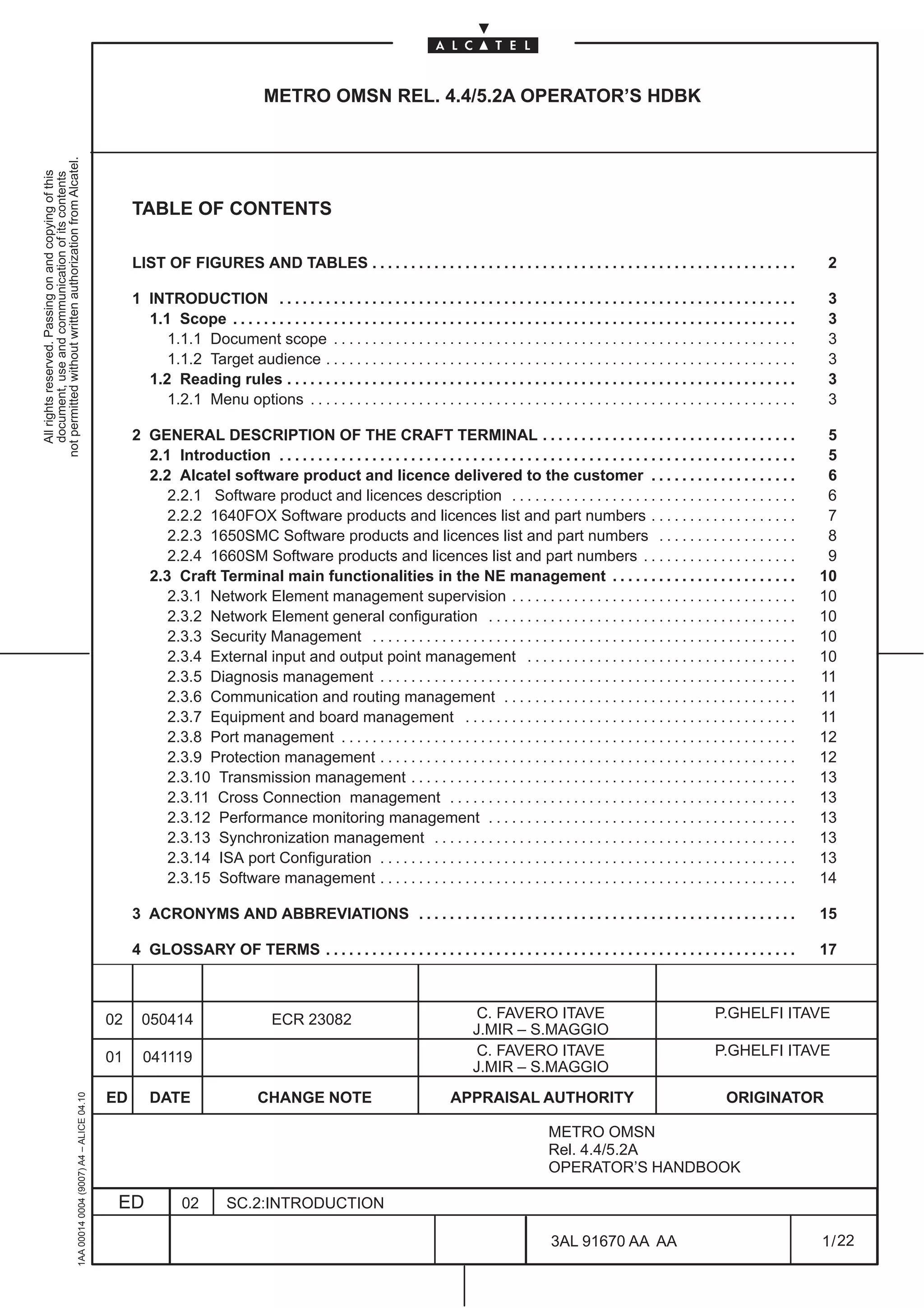
                                                                                                   TABLE OF CONTENTS

                                                                                                   LIST OF FIGURES AND TABLES . . . . . . . . . . . . . . . . . . . . . . . . . . . . . . . . . . . . . . . . . . . . . . . . . . . . . . .                         2

                                                                                                   1 INTRODUCTION . . . . . . . . . . . . . . . . . . . . . . . . . . . . . . . . . . . . . . . . . . . . . . . . . . . . . . . . . . . . . . . . . . .             3
                                                                                                     1.1 Scope . . . . . . . . . . . . . . . . . . . . . . . . . . . . . . . . . . . . . . . . . . . . . . . . . . . . . . . . . . . . . . . . . . . . . . . . .    3
                                                                                                        1.1.1 Document scope . . . . . . . . . . . . . . . . . . . . . . . . . . . . . . . . . . . . . . . . . . . . . . . . . . . . . . . . . . . .                3
                                                                                                        1.1.2 Target audience . . . . . . . . . . . . . . . . . . . . . . . . . . . . . . . . . . . . . . . . . . . . . . . . . . . . . . . . . . . . .             3
                                                                                                     1.2 Reading rules . . . . . . . . . . . . . . . . . . . . . . . . . . . . . . . . . . . . . . . . . . . . . . . . . . . . . . . . . . . . . . . . . .          3
                                                                                                        1.2.1 Menu options . . . . . . . . . . . . . . . . . . . . . . . . . . . . . . . . . . . . . . . . . . . . . . . . . . . . . . . . . . . . . . .            3

                                                                                                   2 GENERAL DESCRIPTION OF THE CRAFT TERMINAL . . . . . . . . . . . . . . . . . . . . . . . . . . . . . . . . .                                                    5
                                                                                                     2.1 Introduction . . . . . . . . . . . . . . . . . . . . . . . . . . . . . . . . . . . . . . . . . . . . . . . . . . . . . . . . . . . . . . . . . . .         5
                                                                                                     2.2 Alcatel software product and licence delivered to the customer . . . . . . . . . . . . . . . . . . .                                                       6
                                                                                                        2.2.1 Software product and licences description . . . . . . . . . . . . . . . . . . . . . . . . . . . . . . . . . . . . .                                   6
                                                                                                        2.2.2 1640FOX Software products and licences list and part numbers . . . . . . . . . . . . . . . . . . .                                                    7
                                                                                                        2.2.3 1650SMC Software products and licences list and part numbers . . . . . . . . . . . . . . . . . .                                                      8
                                                                                                        2.2.4 1660SM Software products and licences list and part numbers . . . . . . . . . . . . . . . . . . . .                                                   9
                                                                                                     2.3 Craft Terminal main functionalities in the NE management . . . . . . . . . . . . . . . . . . . . . . . .                                                  10
                                                                                                        2.3.1 Network Element management supervision . . . . . . . . . . . . . . . . . . . . . . . . . . . . . . . . . . . . .                                     10
                                                                                                        2.3.2 Network Element general configuration . . . . . . . . . . . . . . . . . . . . . . . . . . . . . . . . . . . . . . . .                                10
                                                                                                        2.3.3 Security Management . . . . . . . . . . . . . . . . . . . . . . . . . . . . . . . . . . . . . . . . . . . . . . . . . . . . . . .                    10
                                                                                                        2.3.4 External input and output point management . . . . . . . . . . . . . . . . . . . . . . . . . . . . . . . . . . .                                     10
                                                                                                        2.3.5 Diagnosis management . . . . . . . . . . . . . . . . . . . . . . . . . . . . . . . . . . . . . . . . . . . . . . . . . . . . . .                     11
                                                                                                        2.3.6 Communication and routing management . . . . . . . . . . . . . . . . . . . . . . . . . . . . . . . . . . . . . .                                     11
                                                                                                        2.3.7 Equipment and board management . . . . . . . . . . . . . . . . . . . . . . . . . . . . . . . . . . . . . . . . . . .                                 11
                                                                                                        2.3.8 Port management . . . . . . . . . . . . . . . . . . . . . . . . . . . . . . . . . . . . . . . . . . . . . . . . . . . . . . . . . . .                12
                                                                                                        2.3.9 Protection management . . . . . . . . . . . . . . . . . . . . . . . . . . . . . . . . . . . . . . . . . . . . . . . . . . . . . .                    12
                                                                                                        2.3.10 Transmission management . . . . . . . . . . . . . . . . . . . . . . . . . . . . . . . . . . . . . . . . . . . . . . . . . .                         13
                                                                                                        2.3.11 Cross Connection management . . . . . . . . . . . . . . . . . . . . . . . . . . . . . . . . . . . . . . . . . . . . .                               13
                                                                                                        2.3.12 Performance monitoring management . . . . . . . . . . . . . . . . . . . . . . . . . . . . . . . . . . . . . . . .                                   13
                                                                                                        2.3.13 Synchronization management . . . . . . . . . . . . . . . . . . . . . . . . . . . . . . . . . . . . . . . . . . . . . . .                            13
                                                                                                        2.3.14 ISA port Configuration . . . . . . . . . . . . . . . . . . . . . . . . . . . . . . . . . . . . . . . . . . . . . . . . . . . . . .                  13
                                                                                                        2.3.15 Software management . . . . . . . . . . . . . . . . . . . . . . . . . . . . . . . . . . . . . . . . . . . . . . . . . . . . . .                     14

                                                                                                   3 ACRONYMS AND ABBREVIATIONS . . . . . . . . . . . . . . . . . . . . . . . . . . . . . . . . . . . . . . . . . . . . . . . . .                                  15

                                                                                                   4 GLOSSARY OF TERMS . . . . . . . . . . . . . . . . . . . . . . . . . . . . . . . . . . . . . . . . . . . . . . . . . . . . . . . . . . . . .                   17


                                                                                              02     050414                         ECR 23082                                      C. FAVERO ITAVE                                           P.GHELFI ITAVE
                                                                                                                                                                                   J.MIR – S.MAGGIO
                                                                                              01     041119                                                                        C. FAVERO ITAVE                                           P.GHELFI ITAVE
                                                                                                                                                                                   J.MIR – S.MAGGIO
                                                                                              ED       DATE                     CHANGE NOTE                                   APPRAISAL AUTHORITY                                              ORIGINATOR
                                                     1AA 00014 0004 (9007) A4 – ALICE 04.10


                                                                                                                                                                                                     METRO OMSN
                                                                                                                                                                                                     Rel. 4.4/5.2A
                                                                                                                                                                                                     OPERATOR’S HANDBOOK

                                                                                               ED             02         SC.2:INTRODUCTION

                                                                                                                                                                                                      3AL 91670 AA AA                                              1 / 22


                                                                                                                                                                                                                           22
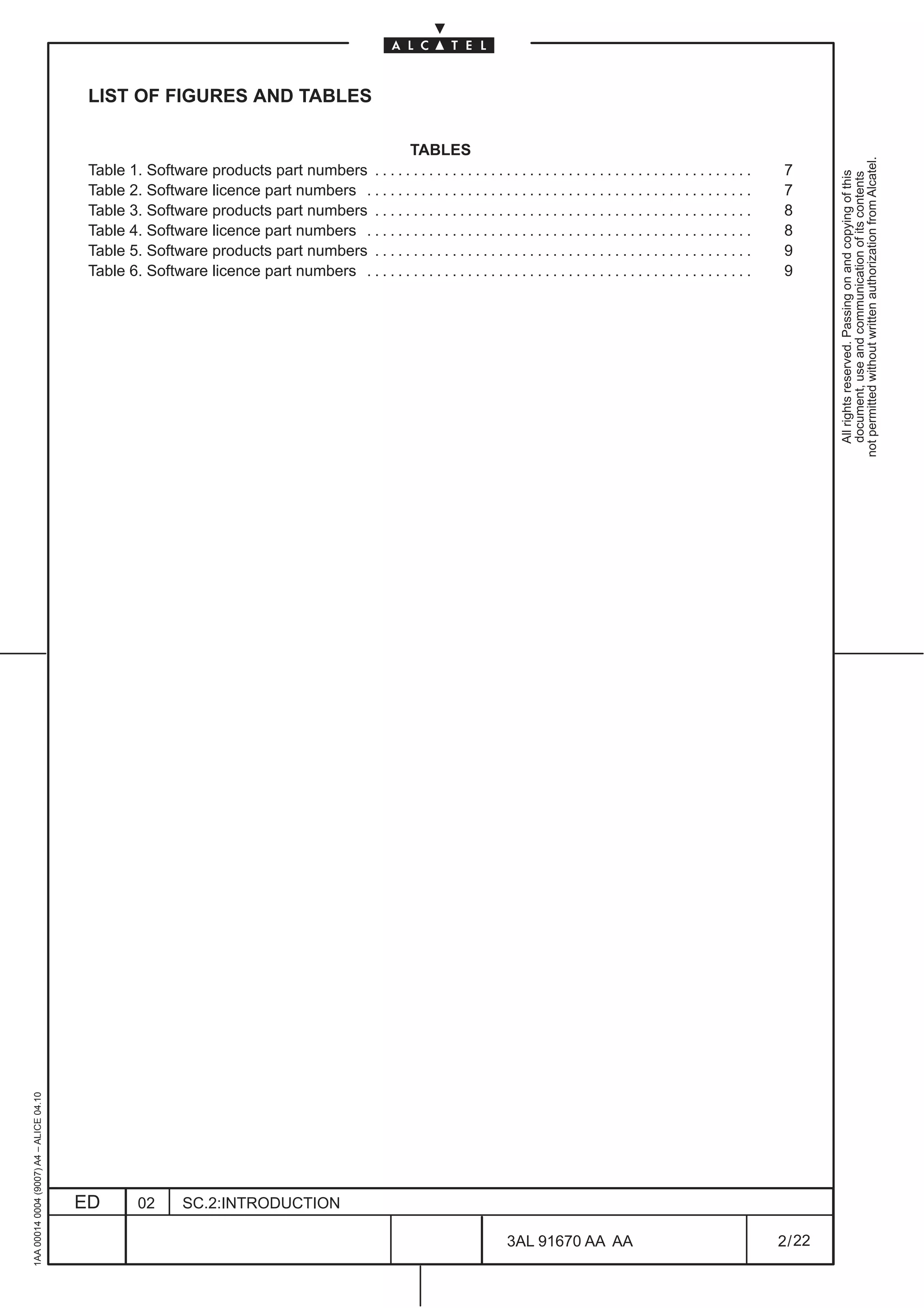
LIST OF FIGURES AND TABLES

                                                                                            TABLES


                                                                                                                                                                                                not permitted without written authorization from Alcatel.
                                          Table 1. Software products part numbers . . . . . . . . . . . . . . . . . . . . . . . . . . . . . . . . . . . . . . . . . . . . . . . . .     7


                                                                                                                                                                                                  All rights reserved. Passing on and copying of this
                                                                                                                                                                                                  document, use and communication of its contents
                                          Table 2. Software licence part numbers . . . . . . . . . . . . . . . . . . . . . . . . . . . . . . . . . . . . . . . . . . . . . . . . . .    7
                                          Table 3. Software products part numbers . . . . . . . . . . . . . . . . . . . . . . . . . . . . . . . . . . . . . . . . . . . . . . . . .     8
                                          Table 4. Software licence part numbers . . . . . . . . . . . . . . . . . . . . . . . . . . . . . . . . . . . . . . . . . . . . . . . . . .    8
                                          Table 5. Software products part numbers . . . . . . . . . . . . . . . . . . . . . . . . . . . . . . . . . . . . . . . . . . . . . . . . .     9
                                          Table 6. Software licence part numbers . . . . . . . . . . . . . . . . . . . . . . . . . . . . . . . . . . . . . . . . . . . . . . . . . .    9
1AA 00014 0004 (9007) A4 – ALICE 04.10


                                         ED         02       SC.2:INTRODUCTION

                                                                                                                                 3AL 91670 AA AA                                       2 / 22


                                                                                                                                                    22
1 INTRODUCTION

                                                                                               1.1 Scope
not permitted without written authorization from Alcatel.
  All rights reserved. Passing on and copying of this
  document, use and communication of its contents


                                                                                               1.1.1 Document scope

                                                                                               The Introduction Manual present the Craft Terminal main functions and provides a general overview of the
                                                                                               different functionalities provided by the ELM–USM of the Craft Terminal for Info Model NE.


                                                                                               1.1.2 Target audience

                                                                                               The Introduction Manual is intended for all users.

                                                                                               The documents that should be read before starting this document are:

                                                                                               –    1320CT Basic Operator’s Handbook


                                                                                               1.2 Reading rules

                                                                                               1.2.1 Menu options

                                                                                               All the manuals describe menus, but not necessarily all the options of these menus. When a menu option
                                                                                               is not detailed in a manual, the information are surely given in another manual.
                                                     1AA 00014 0004 (9007) A4 – ALICE 04.10


                                                                                              ED      02     SC.2:INTRODUCTION

                                                                                                                                                            3AL 91670 AA AA                         3 / 22


                                                                                                                                                                          22
1AA 00014 0004 (9007) A4 – ALICE 04.10


                          ED
                          02
                          SC.2:INTRODUCTION


22
        3AL 91670 AA AA
        4 / 22
                                                All rights reserved. Passing on and copying of this
                                                document, use and communication of its contents
                                              not permitted without written authorization from Alcatel.
2 GENERAL DESCRIPTION OF THE CRAFT TERMINAL

                                                                                               2.1 Introduction
not permitted without written authorization from Alcatel.
  All rights reserved. Passing on and copying of this
  document, use and communication of its contents


                                                                                               The Craft Terminal is a project in charge of the local management of single network elements, providing
                                                                                               ITU– compliant Information Model Interface to the Network Element.
                                                                                               Multiple NE management up to 32 Network element is possible obtaining a remote Craft Terminal
                                                                                               application.

                                                                                               The general information of the Craft Terminal are presented in the Basic Craft Terminal Operator’s
                                                                                               Handbook, that the operator have to read before this Handbook.

                                                                                               In the Basic Craft Terminal Operator’s Handbook are described all the general description of use, login,
                                                                                               navigation, rules, etc, common to all the NE using the same Craft Terminal.

                                                                                               Further, the same handbook contains the detailed description of common operations as “Installation” and
                                                                                               common screens as “Network Element Synthesis view”.

                                                                                               The Network Element Synthesis view is the first view presented to the operator entering the application.

                                                                                               Starting from this view it is possible login the NE and than enter the EML–USM views.

                                                                                               This Operator’s Handbook deals with the EML–USM views of the Craft Terminal, which directly
                                                                                               permit to manage the Network Element.

                                                                                               The management main functions of the EML–USM are inserted at para. 2.3 on page 10.

                                                                                               A detailed description of the EML–USM screens is given in Section Ne Management of this handbook.

                                                                                               From the Craft Terminal is possible to run other Specific Software applications.
                                                                                               These applications are in charge of the ISA–ATM, ISA–PR and ISA–PR_EA (Packet Ring Edge
                                                                                               Aggregator) management inside the NE such as cross–connection, Backup and Restore configuration
                                                                                               files etc.
                                                                                               Details information about Specific Application are described in the relevant Operator’s Handbook (see
                                                                                               Section 1 HANDBOOK GUIDE for the code).

                                                                                               The list and part numbers of the SDH software products distributed by Alcatel is inserted in para.2.2 on
                                                                                               page 6.

                                                                                               The Craft Terminal characteristic (computer configuration) are listed in the Basic Craft Terminal Operator’s
                                                                                               Handbook.
                                                     1AA 00014 0004 (9007) A4 – ALICE 04.10


                                                                                              ED      02     SC.2:INTRODUCTION

                                                                                                                                                               3AL 91670 AA AA                          5 / 22


                                                                                                                                                                             22
2.2 Alcatel software product and licence delivered to the customer

                                          2.2.1 Software product and licences description


                                                                                                                                                          not permitted without written authorization from Alcatel.
                                                                                                                                                            All rights reserved. Passing on and copying of this
                                                                                                                                                            document, use and communication of its contents
                                          The software products are distributed by Alcatel in a CD–ROM.

                                          In this CD–ROM are contained:

                                               •        Software packages for NE management by means of the craft terminal

                                               •        Software package of the NE, to be installed in the NE or update the NE (by means of download
                                                        function)

                                          The software package used for management permits the dialogue between craft terminal and NE, to
                                          realize all the functions of the NES and EML–USM ).

                                          The software package used for updating the NE must be installed on the PC and then downloaded on
                                          the NE, thus following product evolution.

                                          Alcatel typically offers several software licences on the software product.

                                          They are referred both to the Network Element software features and to the Craft Terminal software
                                          features.
1AA 00014 0004 (9007) A4 – ALICE 04.10


                                         ED        02      SC.2:INTRODUCTION

                                                                                                          3AL 91670 AA AA                        6 / 22


                                                                                                                        22
2.2.2 1640FOX Software products and licences list and part numbers

                                                                                               Every Software Product is identified by a denomination and a part number, listed on the following table.
not permitted without written authorization from Alcatel.


                                                                                               Table 1. Software products part numbers
  All rights reserved. Passing on and copying of this
  document, use and communication of its contents


                                                                                                                     Name                         ANV Part Number           N.B.

                                                                                               SWP 1640FOX SDH R.4.4 CD–ROM                        3AL 89846 AA––


                                                                                               Every Software licence is identified by a denomination and a part number, listed on the following table.

                                                                                               Table 2. Software licence part numbers


                                                                                                                     Name                         ANV Part Number           N.B.

                                                                                               SWL–A POINT 40FOX Rel. 4.4
                                                                                                                                                     3AL89684 AJ             1
                                                                                               LICENCE FEE / STM–1

                                                                                               SWL–B POINT 40FOX Rel. 4.4
                                                                                                                                                    3AL 89684 AK             1
                                                                                               LICENCE FEE / STM–1

                                                                                               SWL–C POINT 40FOX Rel. 4.4
                                                                                                                                                     3AL 89684 AL            1
                                                                                               LICENCE FEE / STM–1

                                                                                               SWL–A POINT 40FOX Rel. 4.4
                                                                                                                                                    3AL 89684 AM             1
                                                                                               LICENCE FEE / STM–4

                                                                                               SWL–B POINT 40FOX Rel. 4.4
                                                                                                                                                    3AL 89684 AN             1
                                                                                               LICENCE FEE / STM–4

                                                                                               SWL–C POINT 40FOX Rel. 4.4
                                                                                                                                                    3AL 89684 AP             1
                                                                                               LICENCE FEE / STM–4

                                                                                               SWL–LCT 40FOX Rel. 4.4 LICENCE FEE                   3AL 89684 AQ             2

                                                                                               SWL–RCT 40FOX Rel 4.4 LICENCE FEE                    3AL 89684 AR             2


                                                                                               N.B.        1    Licence alternative for Network Element software features:
                                                                                                                •    SWL–A: full functionality set
                                                                                                                •    SWL–B: improved functionality set
                                                                                                                •    SWL–C: basic functionality set

                                                                                               N.B.        2    Licence alternative for Craft Terminal software features:
                                                                                                                •    SWL–LCT: local Craft Terminal functionality
                                                                                                                •    SWL–RCT: remote Craft Terminal functionality
                                                     1AA 00014 0004 (9007) A4 – ALICE 04.10


                                                                                              ED      02       SC.2:INTRODUCTION

                                                                                                                                                              3AL 91670 AA AA                        7 / 22


                                                                                                                                                                             22
2.2.3 1650SMC Software products and licences list and part numbers

                                          Every Software Product is identified by a denomination and a part number, listed on the following table.


                                                                                                                                                         not permitted without written authorization from Alcatel.
                                          Table 3. Software products part numbers


                                                                                                                                                           All rights reserved. Passing on and copying of this
                                                                                                                                                           document, use and communication of its contents
                                                                Name                         ANV Part Number           N.B.

                                          SWP 1650SMC SDH R.4.4 CD–ROM                        3AL 89849 AA––


                                          Every Software licence is identified by a denomination and a part number, listed on the following table.

                                          Table 4. Software licence part numbers


                                                                Name                         ANV Part Number           N.B.

                                          SWL–A POINT 50SMC Rel. 4.4
                                                                                                3AL 89685 AF            1
                                          LICENCE FEE / STM–1

                                          SWL–B POINT 50SMC Rel. 4.4
                                                                                               3AL 89685 AG             1
                                          LICENCE FEE / STM–1

                                          SWL–C POINT 50SMC Rel. 4.4
                                                                                               3AL 89685 AH             1
                                          LICENCE FEE / STM–1

                                          SWL–LCT 50SMC Rel. 4.4 LICENCE FEE                    3AL 89685 AJ            2

                                          SWL–RCT 50SMC Rel 4.4 LICENCE FEE                    3AL 89685 AK             2


                                          N.B.        1    Licence alternative for Network Element software features:
                                                           •    SWL–A: full functionality set
                                                           •    SWL–B: improved functionality set
                                                           •    SWL–C: basic functionality set

                                          N.B.        2    Licence alternative for Craft Terminal software features:
                                                           •    SWL–LCT: local Craft Terminal functionality
                                                           •    SWL–RCT: remote Craft Terminal functionality
1AA 00014 0004 (9007) A4 – ALICE 04.10


                                         ED      02       SC.2:INTRODUCTION

                                                                                                         3AL 91670 AA AA                        8 / 22


                                                                                                                        22
2.2.4 1660SM Software products and licences list and part numbers

                                                                                               Every Software Product is identified by a denomination and a part number, listed on the following table.
not permitted without written authorization from Alcatel.


                                                                                               Table 5. Software products part numbers
  All rights reserved. Passing on and copying of this
  document, use and communication of its contents


                                                                                                                     Name                         ANV Part Number           N.B.

                                                                                               SWP 1660SM SDH R.4.4 CD–ROM                          3AL 89852AA––

                                                                                               SWP 1660SM SDH R.5.2A CD–ROM                        3AL 89854 AA––

                                                                                               SWP 1660SM SDH R.5.2B CD–ROM                        3AL 89855 AA––


                                                                                               Every Software licence is identified by a denomination and a part number, listed on the following table.

                                                                                               Table 6. Software licence part numbers


                                                                                                                     Name                         ANV Part Number           N.B.

                                                                                               SWL–A POINT 60SM Rel. 4.4
                                                                                                                                                   3AL 89686 AF––            1
                                                                                               LICENCE FEE / STM–1

                                                                                               SWL–B POINT 60SM Rel. 4.4
                                                                                                                                                   3AL 89686 AG––            1
                                                                                               LICENCE FEE / STM–1

                                                                                               SWL–C POINT 60SM Rel. 4.4
                                                                                                                                                   3AL 89686 AH––            1
                                                                                               LICENCE FEE / STM–1

                                                                                               SWL–LCT 60SM Rel. 4.4 LICENCE FEE                   3AL 89686 AJ––            2

                                                                                               SWL–RCT 60SM Rel. 4.4 LICENCE FEE                   3AL 89686 AK––            2

                                                                                               SWL–A POINT 60SM Rel. 5.2
                                                                                                                                                   3AL 89686 AR––            1
                                                                                               LICENCE FEE / STM–1

                                                                                               SWL–B POINT 60SM Rel. 5.2
                                                                                                                                                   3AL 89686 AS––            1
                                                                                               LICENCE FEE / STM–1

                                                                                               SWL–C POINT 60SM Rel. 5.2
                                                                                                                                                   3AL 89686 AT––            1
                                                                                               LICENCE FEE / STM–1

                                                                                               SWL–LCT 60SM Rel. 5.2 LICENCE FEE                   3AL 89686 AU––            2

                                                                                               SWL–RCT 60SM Rel. 5.2 LICENCE FEE                   3AL 89686 AV––            2


                                                                                               N.B.        1    Licence alternative for Network Element software features:
                                                                                                                •    SWL–A: full functionality set
                                                                                                                •    SWL–B: improved functionality set
                                                                                                                •    SWL–C: basic functionality set

                                                                                               N.B.        2    Licence alternative for Craft Terminal software features:
                                                     1AA 00014 0004 (9007) A4 – ALICE 04.10


                                                                                                                •    SWL–LCT: local Craft Terminal functionality
                                                                                                                •    SWL–RCT: remote Craft Terminal functionality


                                                                                              ED      02       SC.2:INTRODUCTION

                                                                                                                                                              3AL 91670 AA AA                        9 / 22


                                                                                                                                                                             22
2.3 Craft Terminal main functionalities in the NE management

                                          In this chapter, are described the main functionalities of the Craft Terminal, referred to the Network Element
                                          management views, obtained by means EML–USM. The functionalities constitute the heading of each of


                                                                                                                                                              not permitted without written authorization from Alcatel.
                                          the paragraphs below.


                                                                                                                                                                All rights reserved. Passing on and copying of this
                                                                                                                                                                document, use and communication of its contents
                                          2.3.1 Network Element management supervision

                                          Deals with the NE state and access.


                                          2.3.2 Network Element general configuration

                                          Deals with the general configuration of the equipment.

                                          –    Craft Terminal access state (allow or inhibit)

                                          –    NE Time management

                                          –    Alarms Configuration
                                               •    Alarm Severity Assignment Profile management,
                                               •    Allow/Inhibit alarm notification,
                                               •    Alarm re–synchronization.
                                               •    Alarm Persistency configuration.

                                          –    Restart NE


                                          2.3.3 Security Management

                                          Deals with the security configuration of the equipment.

                                          –    Set Manager list

                                          –    Set ACD level


                                          2.3.4 External input and output point management

                                          Deals with housekeeping signals input from the external (station alarms) or forwarded (output) towards
                                          the external.

                                          –    Display External points

                                          –    Configure External points
1AA 00014 0004 (9007) A4 – ALICE 04.10


                                         ED      02     SC.2:INTRODUCTION

                                                                                                           3AL 91670 AA AA                          10 / 22


                                                                                                                         22
2.3.5 Diagnosis management

                                                                                               For real time alarm reporting and subsequent fault localization and correction.
not permitted without written authorization from Alcatel.


                                                                                               –    Alarm Surveillance
  All rights reserved. Passing on and copying of this
  document, use and communication of its contents


                                                                                                    The alarms concerning a particular managed entity will be represented in a synthetic way in all the
                                                                                                    views concerning the entity.
                                                                                                    Alarms information are detailed in the Alarms Surveillance Manual

                                                                                               –    Abnormal Condition list ( as result of operator’s commands)

                                                                                               –    Event log Manager
                                                                                                    Permits to have access to the Event Log file.

                                                                                               –    Remote Inventory (”upload” and “view” remote inventory)

                                                                                               –    Internal Link Monitor

                                                                                               –    Data Flow Analizer


                                                                                               2.3.6 Communication and routing management

                                                                                               This deals with the configuration parameters concerning the communication protocols for the local NE,
                                                                                               the OS and each other related NE. Different types of protection can be managed:

                                                                                               –    Local NE and OS addresses

                                                                                               –    NTP configurations

                                                                                               –    LAPD, Ethernet, MESA, RAP configurations

                                                                                               –    IP Configuration

                                                                                               –    Tunneling Configuration

                                                                                               2.3.7 Equipment and board management

                                                                                               Deals with the presentation of the equipment and the hierarchical tree structure, permitting to define the
                                                                                               types of boards present. The Board view permits to access the Port view.

                                                                                               –    Set / modify / remove boards or subracks

                                                                                               –    Software information of the selected board.

                                                                                               –    Remote Inventory
                                                     1AA 00014 0004 (9007) A4 – ALICE 04.10


                                                                                              ED      02     SC.2:INTRODUCTION

                                                                                                                                                             3AL 91670 AA AA                         11 / 22


                                                                                                                                                                           22
2.3.8 Port management

                                          This permits to set and show the transmission resources (TP) referred only to the port (SDH PDH, HOA,
                                          ISA).


                                                                                                                                                           not permitted without written authorization from Alcatel.
                                          It is used to check the detailed alarm of each TP and to configure them (many options are the same of


                                                                                                                                                             All rights reserved. Passing on and copying of this
                                                                                                                                                             document, use and communication of its contents
                                          the Transmission view).

                                          For each port a specific menu is available where various configuration of the specific port can be set, for
                                          example:

                                          –    Automatic Laser Shutdown

                                          –    MSP protection

                                          –    Loopback management and configuration

                                          –    Single fiber configuration

                                          –    TP Frame Mode Configuration

                                          –    Retiming

                                          –    Ethernet port configuration

                                          Port view is also the entry point of other “management functions” :

                                          –    Performance Monitoring management

                                          –    Cross Connection management

                                          For each port are presented:

                                          –    the various ITU–T functional blocks (i.e. PPI, RST, VC4).

                                          –    details of alarm and state condition

                                          –    TP role, connection, etc. information

                                          2.3.9 Protection management

                                          This deals with the protection mechanism that is possible to configure in the NE. Different types of
                                          protection can be managed:

                                          –    Equipment Protection Switching (EPS)
                                               N.B.       Not supported by 1640FOX

                                          –    Multiple Section Protection (MSP)

                                          –    MS–SPRing Protection 2 fibers ( 4 fibers is not operative in current release);
                                               N.B.       MS–SPRing Protection is available only for 1660SM
1AA 00014 0004 (9007) A4 – ALICE 04.10


                                         ED      02     SC.2:INTRODUCTION

                                                                                                         3AL 91670 AA AA                         12 / 22


                                                                                                                       22
2.3.10 Transmission management

                                                                                               This permits to cover the management of the transmission resources, opening the views of all the specific
                                                                                               ports of the NE (SDH and PDH).
not permitted without written authorization from Alcatel.


                                                                                               It supply an overview of the complete signal flow.
  All rights reserved. Passing on and copying of this
  document, use and communication of its contents


                                                                                               For all the ports are presented:

                                                                                               –    the various ITU–T functional blocks (i.e. PPI, RST, VC4).

                                                                                               –    synthesis of alarm and state condition

                                                                                               –    TP role, connection, etc. information

                                                                                               For each port a specific menu is available similar to the Port view where various configuration of the
                                                                                               specific port can be set.

                                                                                               Also Transmission view is than the entry point of other “management functions” .


                                                                                               2.3.11 Cross Connection management

                                                                                               This deals with the connection of all the Termination Point (TP), which are the starting and terminating
                                                                                               points of a transmission segment. In this way the multiplex structures are created, managing the traffic
                                                                                               flow. Similar operation are made on the OverHead cross connections.

                                                                                               –    Create / modify cross connections

                                                                                               –    Activate / deactivate / switch cross connections


                                                                                               2.3.12 Performance monitoring management

                                                                                               This function deals with the set up, collect, log and display performance data associated with the managed
                                                                                               NE according ITU–T G.826.It consists of a set of functions that evaluate and report on the behavior of the
                                                                                               NEs and their effectiveness relating to the communications taking place on the Network.

                                                                                               –    Set up the Performance Monitoring thresholds

                                                                                               –    Collect and display Performance Monitoring data

                                                                                               –    Performance Monitoring history

                                                                                               –    Display Maintenance Counter


                                                                                               2.3.13 Synchronization management

                                                                                               Deals with the management of the timing.

                                                                                               –    Timing source, SSU, T0, T4,T5 and T6 configuration

                                                                                               –    Protection commands


                                                                                               2.3.14 ISA port Configuration
                                                     1AA 00014 0004 (9007) A4 – ALICE 04.10


                                                                                               Describes the operations necessary for the ATM/PR_EA/ETH boards and the ATM/PR_EA/ETH TPs
                                                                                               creation.


                                                                                              ED      02     SC.2:INTRODUCTION

                                                                                                                                                             3AL 91670 AA AA                         13 / 22


                                                                                                                                                                           22
2.3.15 Software management

                                          Deals with the manipulation of the software package within NE.


                                                                                                                                                      not permitted without written authorization from Alcatel.
                                          –    Software download refers to the NE software, permitting to charge the software in the relevant NE


                                                                                                                                                        All rights reserved. Passing on and copying of this
                                                                                                                                                        document, use and communication of its contents
                                               to upgrade the NE software, thus following product evolution, or as a consequence of substitution
                                               with a spare.
                                          –    Back–up and restore on the MIB of the NE.
1AA 00014 0004 (9007) A4 – ALICE 04.10


                                         ED      02    SC.2:INTRODUCTION

                                                                                                      3AL 91670 AA AA                       14 / 22


                                                                                                                   22
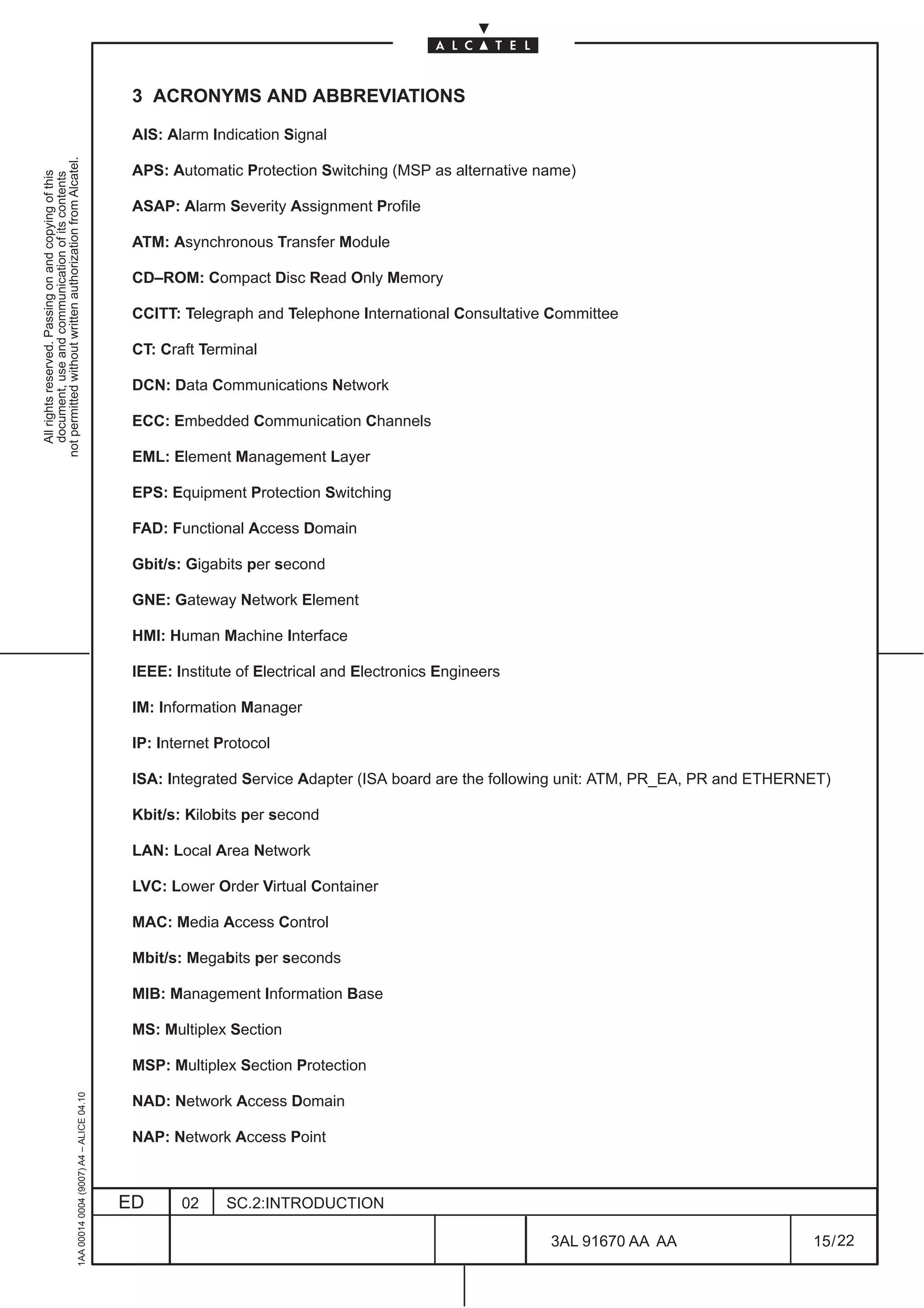
3 ACRONYMS AND ABBREVIATIONS

                                                                                               AIS: Alarm Indication Signal
not permitted without written authorization from Alcatel.


                                                                                               APS: Automatic Protection Switching (MSP as alternative name)
  All rights reserved. Passing on and copying of this
  document, use and communication of its contents


                                                                                               ASAP: Alarm Severity Assignment Profile

                                                                                               ATM: Asynchronous Transfer Module

                                                                                               CD–ROM: Compact Disc Read Only Memory

                                                                                               CCITT: Telegraph and Telephone International Consultative Committee

                                                                                               CT: Craft Terminal

                                                                                               DCN: Data Communications Network

                                                                                               ECC: Embedded Communication Channels

                                                                                               EML: Element Management Layer

                                                                                               EPS: Equipment Protection Switching

                                                                                               FAD: Functional Access Domain

                                                                                               Gbit/s: Gigabits per second

                                                                                               GNE: Gateway Network Element

                                                                                               HMI: Human Machine Interface

                                                                                               IEEE: Institute of Electrical and Electronics Engineers

                                                                                               IM: Information Manager

                                                                                               IP: Internet Protocol

                                                                                               ISA: Integrated Service Adapter (ISA board are the following unit: ATM, PR_EA, PR and ETHERNET)

                                                                                               Kbit/s: Kilobits per second

                                                                                               LAN: Local Area Network

                                                                                               LVC: Lower Order Virtual Container

                                                                                               MAC: Media Access Control

                                                                                               Mbit/s: Megabits per seconds

                                                                                               MIB: Management Information Base

                                                                                               MS: Multiplex Section

                                                                                               MSP: Multiplex Section Protection
                                                     1AA 00014 0004 (9007) A4 – ALICE 04.10


                                                                                               NAD: Network Access Domain

                                                                                               NAP: Network Access Point


                                                                                              ED      02     SC.2:INTRODUCTION

                                                                                                                                                         3AL 91670 AA AA                   15 / 22


                                                                                                                                                                     22
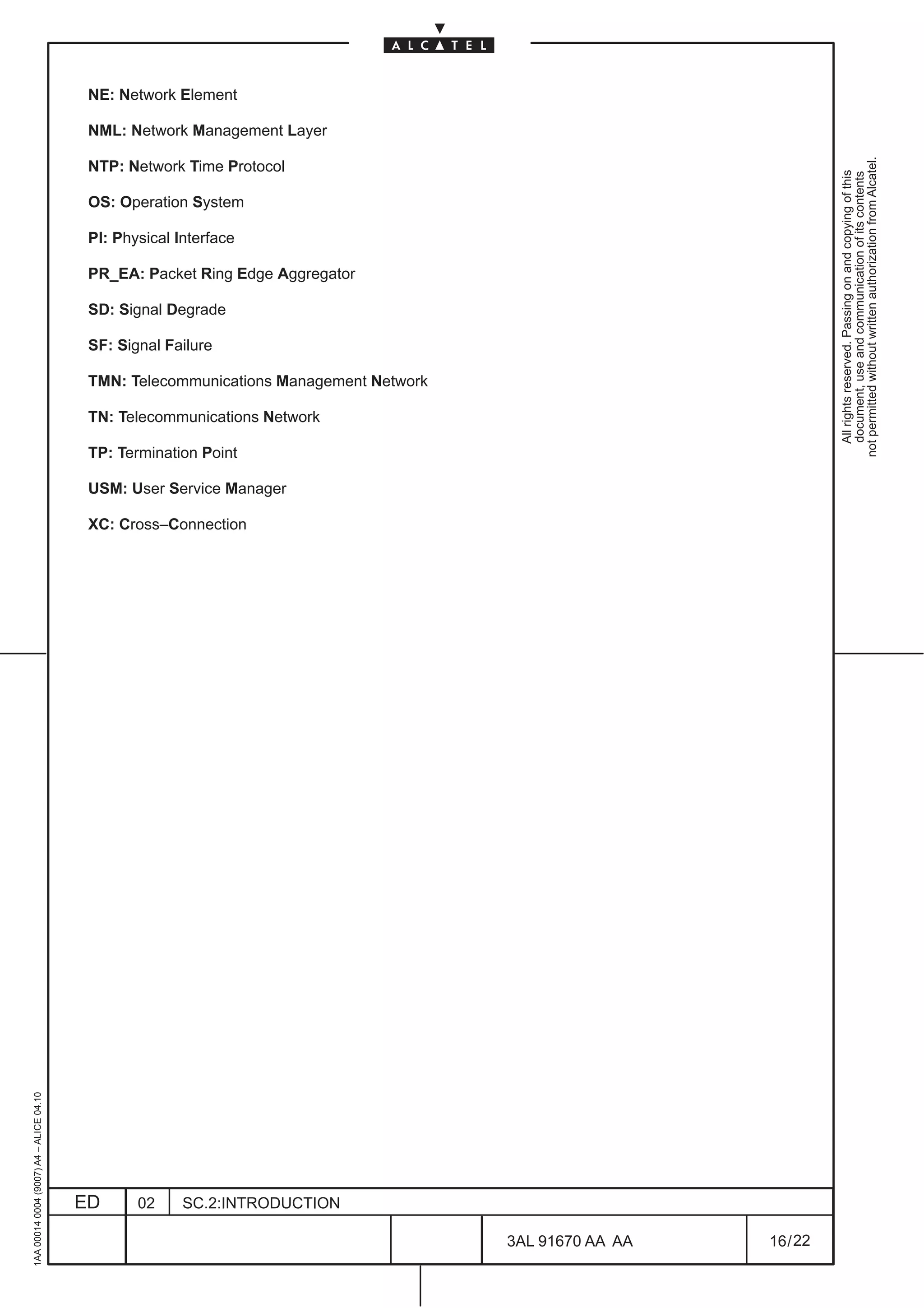
NE: Network Element

                                          NML: Network Management Layer


                                                                                                                   not permitted without written authorization from Alcatel.
                                          NTP: Network Time Protocol


                                                                                                                     All rights reserved. Passing on and copying of this
                                                                                                                     document, use and communication of its contents
                                          OS: Operation System

                                          PI: Physical Interface

                                          PR_EA: Packet Ring Edge Aggregator

                                          SD: Signal Degrade

                                          SF: Signal Failure

                                          TMN: Telecommunications Management Network

                                          TN: Telecommunications Network

                                          TP: Termination Point

                                          USM: User Service Manager

                                          XC: Cross–Connection
1AA 00014 0004 (9007) A4 – ALICE 04.10


                                         ED      02     SC.2:INTRODUCTION

                                                                                       3AL 91670 AA AA   16 / 22


                                                                                                 22
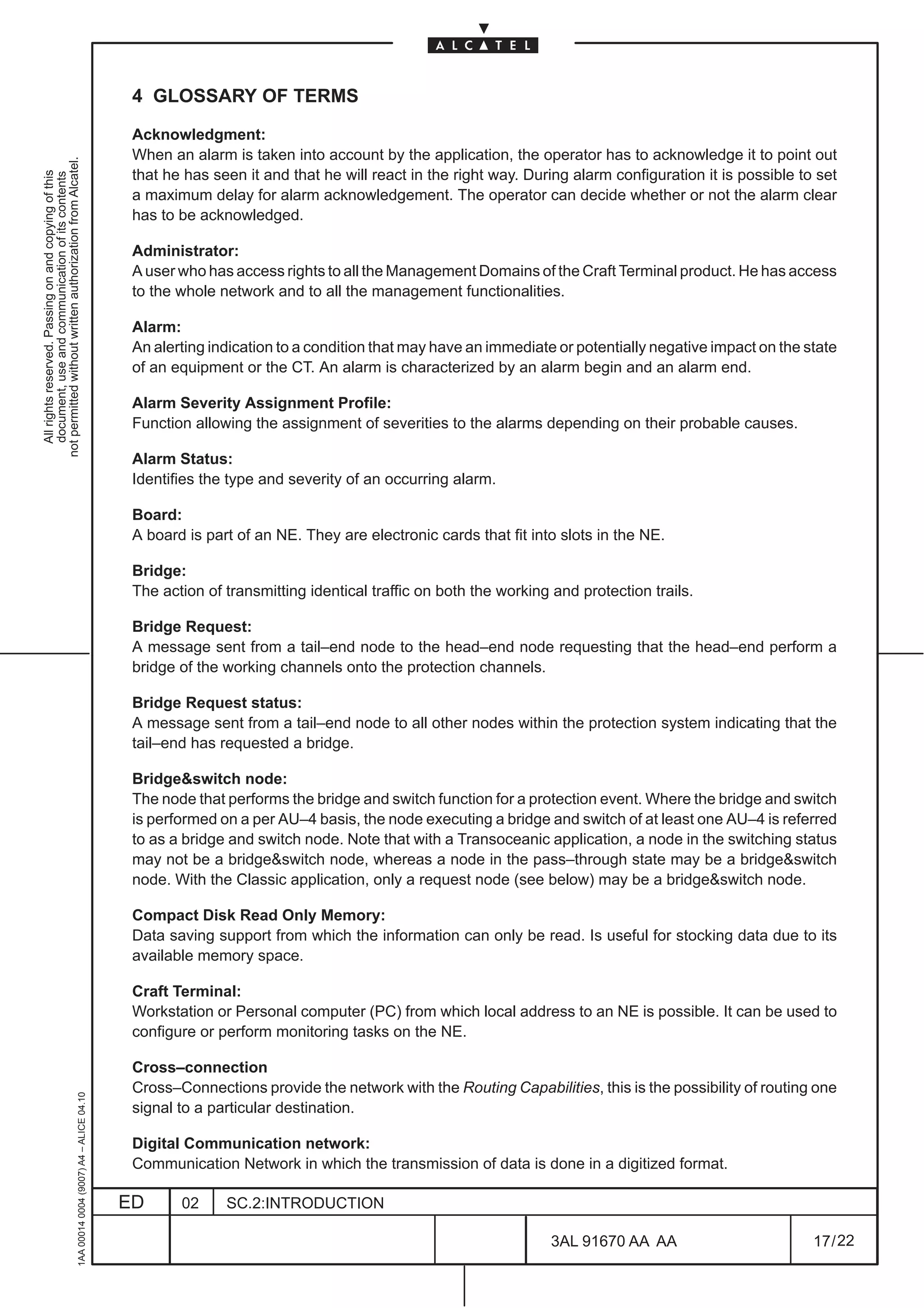
4 GLOSSARY OF TERMS

                                                                                               Acknowledgment:
                                                                                               When an alarm is taken into account by the application, the operator has to acknowledge it to point out
not permitted without written authorization from Alcatel.


                                                                                               that he has seen it and that he will react in the right way. During alarm configuration it is possible to set
  All rights reserved. Passing on and copying of this
  document, use and communication of its contents


                                                                                               a maximum delay for alarm acknowledgement. The operator can decide whether or not the alarm clear
                                                                                               has to be acknowledged.

                                                                                               Administrator:
                                                                                               A user who has access rights to all the Management Domains of the Craft Terminal product. He has access
                                                                                               to the whole network and to all the management functionalities.

                                                                                               Alarm:
                                                                                               An alerting indication to a condition that may have an immediate or potentially negative impact on the state
                                                                                               of an equipment or the CT. An alarm is characterized by an alarm begin and an alarm end.

                                                                                               Alarm Severity Assignment Profile:
                                                                                               Function allowing the assignment of severities to the alarms depending on their probable causes.

                                                                                               Alarm Status:
                                                                                               Identifies the type and severity of an occurring alarm.

                                                                                               Board:
                                                                                               A board is part of an NE. They are electronic cards that fit into slots in the NE.

                                                                                               Bridge:
                                                                                               The action of transmitting identical traffic on both the working and protection trails.

                                                                                               Bridge Request:
                                                                                               A message sent from a tail–end node to the head–end node requesting that the head–end perform a
                                                                                               bridge of the working channels onto the protection channels.

                                                                                               Bridge Request status:
                                                                                               A message sent from a tail–end node to all other nodes within the protection system indicating that the
                                                                                               tail–end has requested a bridge.

                                                                                               Bridge&switch node:
                                                                                               The node that performs the bridge and switch function for a protection event. Where the bridge and switch
                                                                                               is performed on a per AU–4 basis, the node executing a bridge and switch of at least one AU–4 is referred
                                                                                               to as a bridge and switch node. Note that with a Transoceanic application, a node in the switching status
                                                                                               may not be a bridge&switch node, whereas a node in the pass–through state may be a bridge&switch
                                                                                               node. With the Classic application, only a request node (see below) may be a bridge&switch node.

                                                                                               Compact Disk Read Only Memory:
                                                                                               Data saving support from which the information can only be read. Is useful for stocking data due to its
                                                                                               available memory space.

                                                                                               Craft Terminal:
                                                                                               Workstation or Personal computer (PC) from which local address to an NE is possible. It can be used to
                                                                                               configure or perform monitoring tasks on the NE.

                                                                                               Cross–connection
                                                                                               Cross–Connections provide the network with the Routing Capabilities, this is the possibility of routing one
                                                     1AA 00014 0004 (9007) A4 – ALICE 04.10


                                                                                               signal to a particular destination.

                                                                                               Digital Communication network:
                                                                                               Communication Network in which the transmission of data is done in a digitized format.

                                                                                              ED      02     SC.2:INTRODUCTION

                                                                                                                                                               3AL 91670 AA AA                          17 / 22


                                                                                                                                                                              22
Embedded Communication Channel:
                                          Communication channel used in conjunction with packet commuting networks (X25) to manage distant
                                          SDH networks. These communication channels are related to the QECC* protocols.


                                                                                                                                                                  not permitted without written authorization from Alcatel.
                                          Element Management Layer:


                                                                                                                                                                    All rights reserved. Passing on and copying of this
                                                                                                                                                                    document, use and communication of its contents
                                          This application is responsible for the configuration and management of Network Elements.

                                          Equipment Protection Switching:
                                          Used to provide protection for cards within an equipment to protect traffic in the event of card failure.

                                          Extra traffic:
                                          Traffic that is carried over the protection trail when it is not used for the protection of working traffic. Extra
                                          traffic is not protected and is preempted when the protection trail is required to protect the working traffic.

                                          Filter:
                                          They are related to the alarms or events generated on an NE or internally within the OS itself. They can
                                          be configured by an operator to reject specified types of notifications and limit the processing that is applied
                                          to them.

                                          Flushing:
                                          This deals with logs. When a log is flushed, all its records are deleted.

                                          Functional Access Domain:
                                          It defines the range of functions which are available to a specified user.

                                          Gigabits per second:
                                          Unit that corresponds to the transmission of 109 bits every second.

                                          Gateway Network Element:
                                          It is a Network Element devoted to the control, from the OS, of those NEs providing a QECC* interface.
                                          To do this it uses a QB3* interface and performs the conversion QB3* ↔ QECC*.

                                          Head End:
                                          Node executing the bridge (adjacent along the direction where a failure is present)

                                          Human Machine Interface:
                                          It is the graphical user interface application through which the operators interact with the system.

                                          History Report:
                                          This function enables operators to get information concerning performances, security or alarms on entities
                                          composing the network, or on the network itself. The operator specifies the time period for which he
                                          requires the report.

                                          Idle:
                                          A node that is not generating, detecting or passing–through bridge requests or bridge request status
                                          information.

                                          Intermediate node:
                                          The node that is not a request node. It is always in the pass–through state. If such a node executes bridge
                                          and switch of at least one AU–4 it is also a bridge&switch node.

                                          International Telegraph and Telephone Consultative Committee:
                                          Standard organization for telecommunications. Now called the ITU–T (International Telecommunication
1AA 00014 0004 (9007) A4 – ALICE 04.10


                                          Union).


                                         ED       02     SC.2:INTRODUCTION

                                                                                                             3AL 91670 AA AA                            18 / 22


                                                                                                                            22
Isolated Node:
                                                                                               A single node that is isolated from a traffic perspective by ring switches on each of its two spans by its
                                                                                               adjacent nodes.
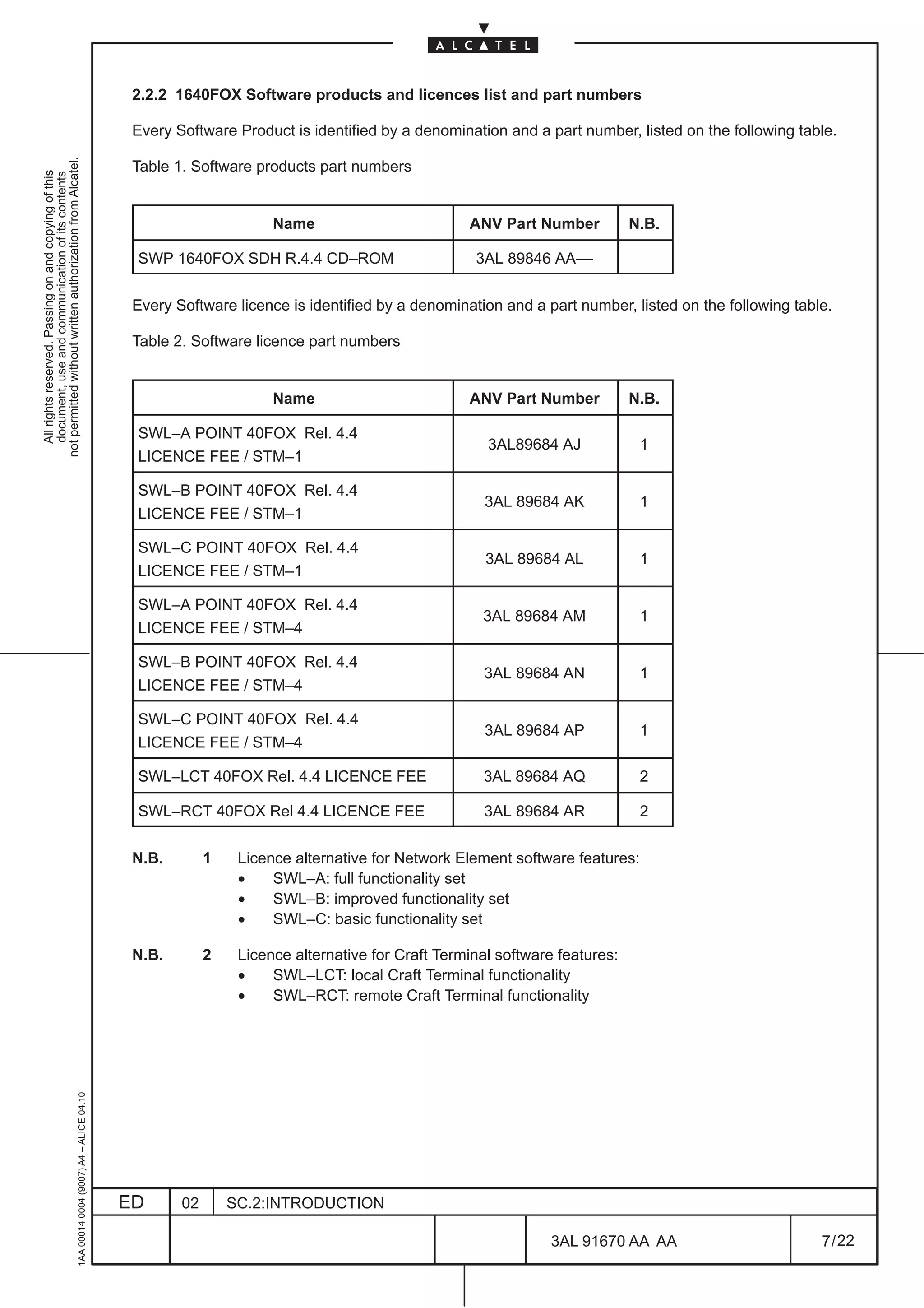
not permitted without written authorization from Alcatel.


                                                                                               Kilobits per second:
  All rights reserved. Passing on and copying of this
  document, use and communication of its contents


                                                                                               Unit that correspond to the transmission of 103 bits every second.

                                                                                               Line Terminal:
                                                                                               A line terminal is the end point of a communication link. it is used to transmit or receive signals. They can
                                                                                               undertake signal conversion functions (adapting a signal to two different transmission media) or
                                                                                               multiplexing/demultiplexing functions.

                                                                                               Logs:
                                                                                               Logs are files used to store history data concerning the incoming notifications, operator commands and
                                                                                               system alarms. The size of the log can be configured.

                                                                                               Management Domain:
                                                                                               The Craft Terminal product is partitioned into management domains for functional proposes. Each
                                                                                               management domain is associated with functionalities that enable the operators to manage the NEs.

                                                                                               Media Access Control Address:
                                                                                               Represents the Level 2 address for Local Area Networks.

                                                                                               Megabits per second:
                                                                                               Unit that corresponds to the transmission of 106 bits every second.

                                                                                               Mis–connection:
                                                                                               A condition in which traffic destined for a given node is incorrectly routed to another node and no corrective
                                                                                               action has been taken.

                                                                                               MSSPRing channels:
                                                                                               The range of channels that are part of the MSSPRing operation (i.e. the whole of the working and
                                                                                               protection channels).

                                                                                               Multiplexer:
                                                                                               Equipment used to combine several signals to produce a single signal at a higher transmission rate and
                                                                                               to decompose it back to the smaller rate signals.

                                                                                               Multiplex Section:
                                                                                               In general, represents the section containing the multiplexed signals.

                                                                                               Network Access Domain:
                                                                                               Defined as a set of Network Elements. NADs are used to define the set of Network Elements that a user
                                                                                               can manage.

                                                                                               Network Element:
                                                                                               Either a telecommunication equipment or groups parts of a Telecommunication Network. Have
                                                                                               characteristics compliant with CCITT recommendations.

                                                                                               Network Management Level:
                                                                                               Designates the management functions performed on networks elements assembled in a network.

                                                                                               Notification:
                                                     1AA 00014 0004 (9007) A4 – ALICE 04.10


                                                                                               Spontaneous data received by the system concerning an NE.


                                                                                              ED      02     SC.2:INTRODUCTION

                                                                                                                                                                3AL 91670 AA AA                          19 / 22


                                                                                                                                                                              22
Operation System:
                                          A system dedicated to the supervision of NEs in a standard way, using protocols and interfaces. it offers to
                                          the operator a set of functions necessary to supervise the NEs. The 1353SH is an Operation System.


                                                                                                                                                                 not permitted without written authorization from Alcatel.
                                          Operator:


                                                                                                                                                                   All rights reserved. Passing on and copying of this
                                                                                                                                                                   document, use and communication of its contents
                                          The end–user of the Craft Terminal. He supervises a part of the network that is dependant on his user profile.

                                          Path:
                                          According to ITU–T Recommendation G.803, a path is a transport entity (i.e., architectural component)
                                          used to transfer information. Nevertheless, this name will be used throughout this document to indicate
                                          the information carried either unidirectionally or bidirectionally between two access points of a ring on
                                          either a path link connection (if the two points are both PDH) or trail segment.

                                          Physical Interface:
                                          Electrical or Electrical/Optical transformers that decouples the line signals and adapt the form of signal
                                          for further transmission. This functional block also manages clock extraction, signal loss monitoring and
                                          loopback functions.

                                          Port:
                                          A physical point at which the Network Element can be attached to a transmission medium. A port is either
                                          a termination point or an origination point.

                                          Protocol request:
                                          A message sent by a node to another node via K1/K2 bytes with the purpose of settling a certain behavior.
                                          All the K1 request codes represent protocol requests, but not all of them are bridge requests. For example,
                                          a SF–R is a bridge request (see ITU–T G841), but LP–S is not: both of them are protocol requests. Even
                                          NR is a protocol request.

                                          Protocol reply:
                                          A message sent by a node to another node via K1/K2 bytes with the purpose of acknowledging a received
                                          protocol request.

                                          Protection trail:
                                          The trail allocated to transport the working traffic during a switch event. When there is a switch event, traffic
                                          on the affected working trail is bridged onto the protection trail.

                                          Protection section:
                                          The full set of both protection and (lower) unprotected channels in a multiplex section.

                                          Protection semi–section:
                                          The part of multiplex section (i.e. the N/2+1..N channels in a 2–fiber STM–N NE) consisting of protection
                                          channels.

                                          Repeater:
                                          Equipment used to regenerate a signal when it has travelled a long distance.

                                          Request node:
                                          A node that generates either a protocol request or protocol reply (other than NR!). The pair of nodes
                                          sending each other protocol request/reply are peer request nodes.
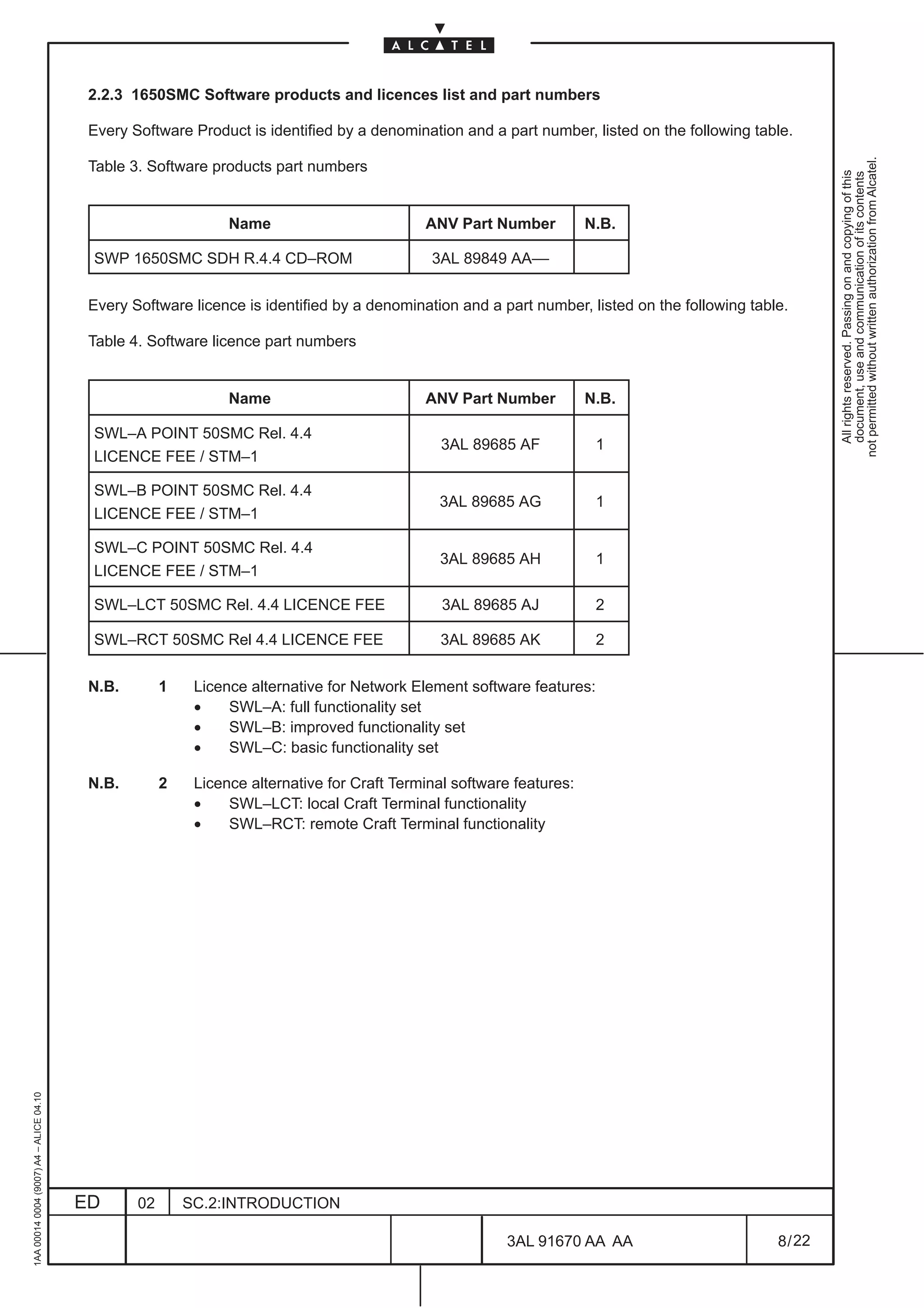
                                          Severity:
                                          Linked to alarms, severities indicate the magnitude related to the failure.
1AA 00014 0004 (9007) A4 – ALICE 04.10


                                          Shared protection:
                                          A protection architecture using m protection entities shared among n working entities (m:n). The protection
                                          entities may also be used to carry extra traffic when not used for protection.


                                         ED      02      SC.2:INTRODUCTION

                                                                                                             3AL 91670 AA AA                           20 / 22


                                                                                                                           22
Span:
                                                                                               The set of multiplex sections between two adjacent nodes on a ring.

                                                                                               Span Switching:
not permitted without written authorization from Alcatel.


                                                                                               Protection mechanism similar to the MSP that applies only to four–fibre rings where working and protection
  All rights reserved. Passing on and copying of this
  document, use and communication of its contents


                                                                                               channels are contained in separate fibres and the failure only affects the working channels. During a span
                                                                                               switch, the working traffic is carried over the protection channel on the same span as failure.

                                                                                               Squelched traffic:
                                                                                               An all “1”s signal resulting from the squelching process (insertion of AU–AIS in order to guarantee the
                                                                                               connections)

                                                                                               Switch:
                                                                                               The action of selecting traffic from the protection trail rather than the working trail.

                                                                                               Switching Node:
                                                                                               The node that performs the bridge or switch function for a protection event. In the case of a multiplex
                                                                                               section switched ring network architecture, this node also performs any necessary squelching of
                                                                                               misconnected traffic.

                                                                                               Tail End:
                                                                                               Node which detects the failure.

                                                                                               Telecommunication Management Network:
                                                                                               Defines the concept of interoperable management of TNs. They provide an organized network structure
                                                                                               to achieve the interconnection of the different components of the TN and the services to process the
                                                                                               information.

                                                                                               Telecommunication Network:
                                                                                               Describes the network to be managed. Provides the transmission, the transport and the switching
                                                                                               supports to the interconnected Network Elements.

                                                                                               Terminal Point:
                                                                                               Describes either the origin or the termination of a signal in an equipment. Is related to a port.

                                                                                               Thresholding:
                                                                                               This is the assignment of a specified value to monitored parameters ( for example BIt Error Rates) that,
                                                                                               when exceeded, generate trouble indications.

                                                                                               Unprotected channels:
                                                                                               See unprotected channel in ITU–T G841. Each pair of unprotected channels is made up on one in the
                                                                                               working (semi)section plus one in the protection (semi)section.

                                                                                               Unprotected traffic:
                                                                                               See unprotected traffic in ITU–T G841.

                                                                                               User Profile:
                                                                                               Identifies the functionalities of the Craft Terminal to which a user has access. A finite number of predefined
                                                                                               user profiles is determined by a fixed set of FADs. To give user access to Craft Terminal functionality, the
                                                                                               administrator must assign a profile to a UNIX user account by choosing one among the predefined profiles
                                                                                               installed with Craft Terminal.

                                                                                               User Service Manager:
                                                     1AA 00014 0004 (9007) A4 – ALICE 04.10


                                                                                               These are presentation processes used by the Craft Terminal to manage the Human Machine Interface
                                                                                               and facilitate the interaction with the product.


                                                                                              ED      02     SC.2:INTRODUCTION

                                                                                                                                                                 3AL 91670 AA AA                         21 / 22


                                                                                                                                                                               22
Working channels:
                                          The channels over which working traffic is transported when there are no switch events. An APS system
                                          performs restoration for the working channels only.


                                                                                                                                                          not permitted without written authorization from Alcatel.
                                          Working traffic:


                                                                                                                                                            All rights reserved. Passing on and copying of this
                                                                                                                                                            document, use and communication of its contents
                                          Traffic that is normally carried in a working trail, except in the event of a protection switch.

                                          Working trail:
                                          The trail over which working traffic is transported when there is no switch events.

                                          Working section:
                                          The full set of both working and (upper) unprotected channels in a multiplex section.

                                          Working semi–section:
                                          The part of multiplex section (i.e. the 1..N/2 channels in a 2–fiber STM–N NE) consisting of working
                                          channels.

                                          Wrapping:
                                          Wrapping is the technique that enables the most recent entries in a file to replace the oldest when a file
                                          is full.
                                                                                  END OF DOCUMENT
1AA 00014 0004 (9007) A4 – ALICE 04.10


                                         ED      02     SC.2:INTRODUCTION

                                                                                                           3AL 91670 AA AA                      22 / 22


                                                                                                                          22
METRO OMSN REL. 4.4/5.2A OPERATOR’S HDBK
not permitted without written authorization from Alcatel.
  All rights reserved. Passing on and copying of this
  document, use and communication of its contents


                                                                                                   TABLE OF CONTENTS

                                                                                                   LIST OF FIGURES AND TABLES . . . . . . . . . . . . . . . . . . . . . . . . . . . . . . . . . . . . . . . . . . . . . . . . . . . . . . .                         7

                                                                                                   1 INTRODUCTION . . . . . . . . . . . . . . . . . . . . . . . . . . . . . . . . . . . . . . . . . . . . . . . . . . . . . . . . . . . . . . . . . . .            15
                                                                                                     1.1 Scope . . . . . . . . . . . . . . . . . . . . . . . . . . . . . . . . . . . . . . . . . . . . . . . . . . . . . . . . . . . . . . . . . . . . . . . . .   15
                                                                                                        1.1.1 Document scope . . . . . . . . . . . . . . . . . . . . . . . . . . . . . . . . . . . . . . . . . . . . . . . . . . . . . . . . . . . .               15
                                                                                                        1.1.2 Target audience . . . . . . . . . . . . . . . . . . . . . . . . . . . . . . . . . . . . . . . . . . . . . . . . . . . . . . . . . . . . .            15
                                                                                                     1.2 Terminology . . . . . . . . . . . . . . . . . . . . . . . . . . . . . . . . . . . . . . . . . . . . . . . . . . . . . . . . . . . . . . . . . . .         15
                                                                                                        1.2.1 Acronyms and abbreviations . . . . . . . . . . . . . . . . . . . . . . . . . . . . . . . . . . . . . . . . . . . . . . . . . .                       15
                                                                                                        1.2.2 Glossary of terms . . . . . . . . . . . . . . . . . . . . . . . . . . . . . . . . . . . . . . . . . . . . . . . . . . . . . . . . . . .              15

                                                                                                   2 GENERAL INTRODUCTION ON VIEWS AND MENUS . . . . . . . . . . . . . . . . . . . . . . . . . . . . . . . . . .                                                   17
                                                                                                     2.1 EML–USM view organization . . . . . . . . . . . . . . . . . . . . . . . . . . . . . . . . . . . . . . . . . . . . . . . . . . . .                         17
                                                                                                     2.2 Introduction on the EML–USM menu options . . . . . . . . . . . . . . . . . . . . . . . . . . . . . . . . . . . .                                          21
                                                                                                        2.2.1 Views menu introduction . . . . . . . . . . . . . . . . . . . . . . . . . . . . . . . . . . . . . . . . . . . . . . . . . . . . .                    23
                                                                                                        2.2.2 Configuration menu introduction . . . . . . . . . . . . . . . . . . . . . . . . . . . . . . . . . . . . . . . . . . . . . .                          24
                                                                                                        2.2.3 Diagnosis menu introduction . . . . . . . . . . . . . . . . . . . . . . . . . . . . . . . . . . . . . . . . . . . . . . . . . .                      25
                                                                                                        2.2.4 Supervision menu introduction . . . . . . . . . . . . . . . . . . . . . . . . . . . . . . . . . . . . . . . . . . . . . . . .                        26
                                                                                                        2.2.5 MS–SPRing menu introduction . . . . . . . . . . . . . . . . . . . . . . . . . . . . . . . . . . . . . . . . . . . . . . . .                          26
                                                                                                        2.2.6 Download menu introduction . . . . . . . . . . . . . . . . . . . . . . . . . . . . . . . . . . . . . . . . . . . . . . . . . .                       27
                                                                                                        2.2.7 Equipment menu introduction . . . . . . . . . . . . . . . . . . . . . . . . . . . . . . . . . . . . . . . . . . . . . . . . .                        27
                                                                                                        2.2.8 Board menu introduction . . . . . . . . . . . . . . . . . . . . . . . . . . . . . . . . . . . . . . . . . . . . . . . . . . . . .                    28
                                                                                                        2.2.9 Port menu introduction . . . . . . . . . . . . . . . . . . . . . . . . . . . . . . . . . . . . . . . . . . . . . . . . . . . . . . .                 29
                                                                                                        2.2.10 EPS menu introduction . . . . . . . . . . . . . . . . . . . . . . . . . . . . . . . . . . . . . . . . . . . . . . . . . . . . .                     31
                                                                                                        2.2.11 Transmission menu introduction . . . . . . . . . . . . . . . . . . . . . . . . . . . . . . . . . . . . . . . . . . . . . .                          31
                                                                                                        2.2.12 Synchronization menu introduction . . . . . . . . . . . . . . . . . . . . . . . . . . . . . . . . . . . . . . . . . . .                             33
                                                                                                        2.2.13 External Points menu introduction . . . . . . . . . . . . . . . . . . . . . . . . . . . . . . . . . . . . . . . . . . . .                           34
                                                                                                     2.3 Advices on Navigation principles . . . . . . . . . . . . . . . . . . . . . . . . . . . . . . . . . . . . . . . . . . . . . . .                            42

                                                                                                   3 NE MANAGEMENT SUPERVISION . . . . . . . . . . . . . . . . . . . . . . . . . . . . . . . . . . . . . . . . . . . . . . . . . . .                               45
                                                                                                     3.1 NE management states . . . . . . . . . . . . . . . . . . . . . . . . . . . . . . . . . . . . . . . . . . . . . . . . . . . . . . . . .                    45
                                                                                                     3.2 NE supervision and login . . . . . . . . . . . . . . . . . . . . . . . . . . . . . . . . . . . . . . . . . . . . . . . . . . . . . . .                    46

                                                                                                   4 NE MANAGEMENT GENERAL CONFIGURATION . . . . . . . . . . . . . . . . . . . . . . . . . . . . . . . . . . . . .                                                 49
                                                                                                     4.1 Access state (allow or inhibit NE Craft access) . . . . . . . . . . . . . . . . . . . . . . . . . . . . . . . . . . .                                     49
                                                                                                        4.1.1 Switching from the OS to the Craft Terminal access state . . . . . . . . . . . . . . . . . . . . . . . . .                                           50
                                                                                                        4.1.2 Switching from the Craft Terminal access state back to the OS access state . . . . . . . .                                                           50


                                                                                              02     050414                         ECR 23082                                      C. FAVERO ITAVE                                           P.GHELFI ITAVE
                                                                                                                                                                                  J. MIR – S. MAGGIO
                                                                                              01     041119                                                                        C. FAVERO ITAVE                                           P.GHELFI ITAVE
                                                                                                                                                                                  J. MIR – S. MAGGIO
                                                                                              ED       DATE                     CHANGE NOTE                                   APPRAISAL AUTHORITY                                              ORIGINATOR
                                                     1AA 00014 0004 (9007) A4 – ALICE 04.10


                                                                                                                                                                                                     METRO OMSN
                                                                                                                                                                                                     Rel. 4.4/5.2A
                                                                                                                                                                                                     OPERATOR’S HANDBOOK

                                                                                               ED             02         SC.3:NE MANAGEMENT

                                                                                                                                                                                                      3AL 91670 AA AA                                              1 / 448


                                                                                                                                                                                                                           448
4.2 NE Time management . . . . . . . . . . . . . . . . . . . . . . . . . . . . . . . . . . . . . . . . . . . . . . . . . . . . . . . . . .                 51
                                              4.3 Alarm Configuration . . . . . . . . . . . . . . . . . . . . . . . . . . . . . . . . . . . . . . . . . . . . . . . . . . . . . . . . . . .              53
                                                 4.3.1 Procedure to modify an ASAP . . . . . . . . . . . . . . . . . . . . . . . . . . . . . . . . . . . . . . . . . . . . . . . .                       53
                                                 4.3.2 Alarm Severity Assignment Profile Management (ASAP) . . . . . . . . . . . . . . . . . . . . . . . . .                                             53


                                                                                                                                                                                                                    not permitted without written authorization from Alcatel.
                                                 4.3.3 Set SdhNE Alarms Severities . . . . . . . . . . . . . . . . . . . . . . . . . . . . . . . . . . . . . . . . . . . . . . . .                       63


                                                                                                                                                                                                                      All rights reserved. Passing on and copying of this
                                                                                                                                                                                                                      document, use and communication of its contents
                                                 4.3.4 Allow/Inhibit Alarms Notifications . . . . . . . . . . . . . . . . . . . . . . . . . . . . . . . . . . . . . . . . . . . . . .                    64
                                                 4.3.5 Alarms re–synchronization . . . . . . . . . . . . . . . . . . . . . . . . . . . . . . . . . . . . . . . . . . . . . . . . . . .                   65
                                                 4.3.6 Alarms Persistency Configuration . . . . . . . . . . . . . . . . . . . . . . . . . . . . . . . . . . . . . . . . . . . . .                        66
                                              4.4 Restart NE . . . . . . . . . . . . . . . . . . . . . . . . . . . . . . . . . . . . . . . . . . . . . . . . . . . . . . . . . . . . . . . . . . . . .   67

                                          5 SECURITY MANAGEMENT . . . . . . . . . . . . . . . . . . . . . . . . . . . . . . . . . . . . . . . . . . . . . . . . . . . . . . . . . .                       69
                                            5.1 Set Manager list . . . . . . . . . . . . . . . . . . . . . . . . . . . . . . . . . . . . . . . . . . . . . . . . . . . . . . . . . . . . . . .            69
                                            5.2 Set ACD level . . . . . . . . . . . . . . . . . . . . . . . . . . . . . . . . . . . . . . . . . . . . . . . . . . . . . . . . . . . . . . . . . .         70

                                          6 EXTERNAL INPUT AND OUTPUT POINTS MANAGEMENT . . . . . . . . . . . . . . . . . . . . . . . . . . . . .                                                         71
                                            6.1 Displaying external points . . . . . . . . . . . . . . . . . . . . . . . . . . . . . . . . . . . . . . . . . . . . . . . . . . . . . .                    72
                                               6.1.1 Expanding or reducing external points list. . . . . . . . . . . . . . . . . . . . . . . . . . . . . . . . . . . . . . .                              74
                                            6.2 External points configuration . . . . . . . . . . . . . . . . . . . . . . . . . . . . . . . . . . . . . . . . . . . . . . . . . . .                       75

                                          7 DIAGNOSIS MANAGEMENT . . . . . . . . . . . . . . . . . . . . . . . . . . . . . . . . . . . . . . . . . . . . . . . . . . . . . . . .                          79
                                            7.1 Alarms surveillance . . . . . . . . . . . . . . . . . . . . . . . . . . . . . . . . . . . . . . . . . . . . . . . . . . . . . . . . . . . .               79
                                            7.2 Abnormal Condition List . . . . . . . . . . . . . . . . . . . . . . . . . . . . . . . . . . . . . . . . . . . . . . . . . . . . . . .                     81
                                            7.3 Internal Link Monitor . . . . . . . . . . . . . . . . . . . . . . . . . . . . . . . . . . . . . . . . . . . . . . . . . . . . . . . . . . .               83
                                            7.4 Log Browsing . . . . . . . . . . . . . . . . . . . . . . . . . . . . . . . . . . . . . . . . . . . . . . . . . . . . . . . . . . . . . . . . .            85
                                            7.5 Remote Inventory . . . . . . . . . . . . . . . . . . . . . . . . . . . . . . . . . . . . . . . . . . . . . . . . . . . . . . . . . . . . . .              86
                                               7.5.1 Upload remote Inventory . . . . . . . . . . . . . . . . . . . . . . . . . . . . . . . . . . . . . . . . . . . . . . . . . . . . .                    86
                                               7.5.2 View Remote Inventory . . . . . . . . . . . . . . . . . . . . . . . . . . . . . . . . . . . . . . . . . . . . . . . . . . . . . .                    87

                                          8 COMMUNICATION AND ROUTING MANAGEMENT . . . . . . . . . . . . . . . . . . . . . . . . . . . . . . . . . . . .                                                  89
                                            8.1 Overview on Communication and Routing Domain . . . . . . . . . . . . . . . . . . . . . . . . . . . . . . .                                                89
                                               8.1.1 OSI Protocol on QB3/Qecc . . . . . . . . . . . . . . . . . . . . . . . . . . . . . . . . . . . . . . . . . . . . . . . . . . .                       89
                                               8.1.2 OSI Partitioning into separate Routing Domains . . . . . . . . . . . . . . . . . . . . . . . . . . . . . . . . .                                     90
                                               8.1.3 IP over OSI tunneling for ISA board . . . . . . . . . . . . . . . . . . . . . . . . . . . . . . . . . . . . . . . . . . . .                          91
                                               8.1.4 OSI over IP tunneling on QB3 . . . . . . . . . . . . . . . . . . . . . . . . . . . . . . . . . . . . . . . . . . . . . . . . .                       91
                                            8.2 Communication and routing views . . . . . . . . . . . . . . . . . . . . . . . . . . . . . . . . . . . . . . . . . . . . . .                               93
                                            8.3 Local Configuration . . . . . . . . . . . . . . . . . . . . . . . . . . . . . . . . . . . . . . . . . . . . . . . . . . . . . . . . . . . .               95
                                            8.4 OS Configuration . . . . . . . . . . . . . . . . . . . . . . . . . . . . . . . . . . . . . . . . . . . . . . . . . . . . . . . . . . . . . .              97
                                            8.5 NTP Server Configuration . . . . . . . . . . . . . . . . . . . . . . . . . . . . . . . . . . . . . . . . . . . . . . . . . . . . . .                      98
                                            8.6 LAPD Configuration . . . . . . . . . . . . . . . . . . . . . . . . . . . . . . . . . . . . . . . . . . . . . . . . . . . . . . . . . . . .                99
                                            8.7 Ethernet Configuration . . . . . . . . . . . . . . . . . . . . . . . . . . . . . . . . . . . . . . . . . . . . . . . . . . . . . . . . .                 102
                                            8.8 Reachable Address Prefixes Configuration . . . . . . . . . . . . . . . . . . . . . . . . . . . . . . . . . . . . . .                                     104
                                            8.9 Manual ES Adjacencies table Configuration . . . . . . . . . . . . . . . . . . . . . . . . . . . . . . . . . . . . .                                      105
                                            8.10 IP Configuration . . . . . . . . . . . . . . . . . . . . . . . . . . . . . . . . . . . . . . . . . . . . . . . . . . . . . . . . . . . . . .            106
                                               8.10.1 IP routing configuration for ISA boards management . . . . . . . . . . . . . . . . . . . . . . . . . . . .                                         106
                                            8.11 IP Static Routing Configuration . . . . . . . . . . . . . . . . . . . . . . . . . . . . . . . . . . . . . . . . . . . . . . . .                         107
                                            8.12 OSPF Area Table Configuration . . . . . . . . . . . . . . . . . . . . . . . . . . . . . . . . . . . . . . . . . . . . . . . .                           108
                                            8.13 IP Address Configuration of Point–to–Point Interfaces . . . . . . . . . . . . . . . . . . . . . . . . . .                                               109
                                            8.14 ISA board IP Address . . . . . . . . . . . . . . . . . . . . . . . . . . . . . . . . . . . . . . . . . . . . . . . . . . . . . . . . .                  110
                                            8.15 OSI over IP . . . . . . . . . . . . . . . . . . . . . . . . . . . . . . . . . . . . . . . . . . . . . . . . . . . . . . . . . . . . . . . . . . .       111
                                            8.16 IP over OSI . . . . . . . . . . . . . . . . . . . . . . . . . . . . . . . . . . . . . . . . . . . . . . . . . . . . . . . . . . . . . . . . . . .       112
1AA 00014 0004 (9007) A4 – ALICE 04.10


                                          9 EQUIPMENT MANAGEMENT . . . . . . . . . . . . . . . . . . . . . . . . . . . . . . . . . . . . . . . . . . . . . . . . . . . . . . . .                         115
                                            9.1 Introduction and navigation . . . . . . . . . . . . . . . . . . . . . . . . . . . . . . . . . . . . . . . . . . . . . . . . . . . .                      115
                                            9.2 Set and change or remove board/subrack . . . . . . . . . . . . . . . . . . . . . . . . . . . . . . . . . . . . . . .                                     122
                                            9.3 Connect Fan to CONGI board . . . . . . . . . . . . . . . . . . . . . . . . . . . . . . . . . . . . . . . . . . . . . . . . . . .                         126

                                         ED          02         SC.3:NE MANAGEMENT

                                                                                                                                            3AL 91670 AA AA                                               2 / 448


                                                                                                                                                                  448
9.4 Board administrative state . . . . . . . . . . . . . . . . . . . . . . . . . . . . . . . . . . . . . . . . . . . . . . . . . . . . . .               128
                                                                                                      9.4.1 Setting a board in service . . . . . . . . . . . . . . . . . . . . . . . . . . . . . . . . . . . . . . . . . . . . . . . . . . . .              128
                                                                                                      9.4.2 Setting a board out of service . . . . . . . . . . . . . . . . . . . . . . . . . . . . . . . . . . . . . . . . . . . . . . . . .                128
                                                                                                      9.4.3 Consulting a Board’s Administrative state . . . . . . . . . . . . . . . . . . . . . . . . . . . . . . . . . . . . . .                           128
not permitted without written authorization from Alcatel.


                                                                                                   9.5 Software description . . . . . . . . . . . . . . . . . . . . . . . . . . . . . . . . . . . . . . . . . . . . . . . . . . . . . . . . . . .           129
  All rights reserved. Passing on and copying of this
  document, use and communication of its contents


                                                                                                   9.6 Remote Inventory . . . . . . . . . . . . . . . . . . . . . . . . . . . . . . . . . . . . . . . . . . . . . . . . . . . . . . . . . . . . . .         130
                                                                                                   9.7 Show supporting equipment . . . . . . . . . . . . . . . . . . . . . . . . . . . . . . . . . . . . . . . . . . . . . . . . . . . .                    132

                                                                                               10 BOARD VIEW . . . . . . . . . . . . . . . . . . . . . . . . . . . . . . . . . . . . . . . . . . . . . . . . . . . . . . . . . . . . . . . . . . . . .      133
                                                                                                 10.1 Introduction . . . . . . . . . . . . . . . . . . . . . . . . . . . . . . . . . . . . . . . . . . . . . . . . . . . . . . . . . . . . . . . . . .      133
                                                                                                 10.2 Board View Menu . . . . . . . . . . . . . . . . . . . . . . . . . . . . . . . . . . . . . . . . . . . . . . . . . . . . . . . . . . . . .             135
                                                                                                   10.2.1 Port Access . . . . . . . . . . . . . . . . . . . . . . . . . . . . . . . . . . . . . . . . . . . . . . . . . . . . . . . . . . . . . . .         136
                                                                                                   10.2.2 Change Physical Interface . . . . . . . . . . . . . . . . . . . . . . . . . . . . . . . . . . . . . . . . . . . . . . . . . .                     137
                                                                                                   10.2.3 Show Supporting equipment . . . . . . . . . . . . . . . . . . . . . . . . . . . . . . . . . . . . . . . . . . . . . . . . .                       138

                                                                                               11 PORT VIEW . . . . . . . . . . . . . . . . . . . . . . . . . . . . . . . . . . . . . . . . . . . . . . . . . . . . . . . . . . . . . . . . . . . . . . .   139
                                                                                                 11.1 Introduction . . . . . . . . . . . . . . . . . . . . . . . . . . . . . . . . . . . . . . . . . . . . . . . . . . . . . . . . . . . . . . . . . .      139
                                                                                                 11.2 Port View: elements on the TP . . . . . . . . . . . . . . . . . . . . . . . . . . . . . . . . . . . . . . . . . . . . . . . . .                       141
                                                                                                 11.3 Port View Menu . . . . . . . . . . . . . . . . . . . . . . . . . . . . . . . . . . . . . . . . . . . . . . . . . . . . . . . . . . . . . . .          142
                                                                                                 11.4 Port Mode Configuration . . . . . . . . . . . . . . . . . . . . . . . . . . . . . . . . . . . . . . . . . . . . . . . . . . . . . .                   144
                                                                                                 11.5 Set Retiming . . . . . . . . . . . . . . . . . . . . . . . . . . . . . . . . . . . . . . . . . . . . . . . . . . . . . . . . . . . . . . . . . .      146
                                                                                                 11.6 AU4 Concatenation . . . . . . . . . . . . . . . . . . . . . . . . . . . . . . . . . . . . . . . . . . . . . . . . . . . . . . . . . . .               148
                                                                                                 11.7 Physical Media option menu . . . . . . . . . . . . . . . . . . . . . . . . . . . . . . . . . . . . . . . . . . . . . . . . . . .                      151
                                                                                                   11.7.1 Automatic Laser Shutdown Configuration . . . . . . . . . . . . . . . . . . . . . . . . . . . . . . . . . . . . . .                                152
                                                                                                   11.7.2 Show Optical Configuration . . . . . . . . . . . . . . . . . . . . . . . . . . . . . . . . . . . . . . . . . . . . . . . . . .                    156
                                                                                                   11.7.3 Single Fiber Configuration . . . . . . . . . . . . . . . . . . . . . . . . . . . . . . . . . . . . . . . . . . . . . . . . . . .                  157
                                                                                                   11.7.4 Ms Configuration . . . . . . . . . . . . . . . . . . . . . . . . . . . . . . . . . . . . . . . . . . . . . . . . . . . . . . . . . . .            159
                                                                                                   11.7.5 Line Length Configuration . . . . . . . . . . . . . . . . . . . . . . . . . . . . . . . . . . . . . . . . . . . . . . . . . . .                   160
                                                                                                   11.7.6 Ethernet Port Configuration . . . . . . . . . . . . . . . . . . . . . . . . . . . . . . . . . . . . . . . . . . . . . . . . . .                   161
                                                                                                   11.7.7 Ethernet Mapping Protocol . . . . . . . . . . . . . . . . . . . . . . . . . . . . . . . . . . . . . . . . . . . . . . . . . .                     164
                                                                                                   11.7.8 Control Path Activation . . . . . . . . . . . . . . . . . . . . . . . . . . . . . . . . . . . . . . . . . . . . . . . . . . . . . .               165
                                                                                                   11.7.9 LCAS Configuration . . . . . . . . . . . . . . . . . . . . . . . . . . . . . . . . . . . . . . . . . . . . . . . . . . . . . . . .                167
                                                                                                 11.8 TP Frame Mode Configuration . . . . . . . . . . . . . . . . . . . . . . . . . . . . . . . . . . . . . . . . . . . . . . . . .                         170
                                                                                                 11.9 Show Supporting Board . . . . . . . . . . . . . . . . . . . . . . . . . . . . . . . . . . . . . . . . . . . . . . . . . . . . . . .                   173
                                                                                                 11.10 Navigate to Transmission View . . . . . . . . . . . . . . . . . . . . . . . . . . . . . . . . . . . . . . . . . . . . . . .                          174
                                                                                                 11.11 Navigate to Monitoring View . . . . . . . . . . . . . . . . . . . . . . . . . . . . . . . . . . . . . . . . . . . . . . . . . .                      175
                                                                                                   11.11.1 Navigate to HOA Port View . . . . . . . . . . . . . . . . . . . . . . . . . . . . . . . . . . . . . . . . . . . . . . . . .                      176

                                                                                               12 EQUIPMENT PROTECTION MANAGEMENT (EPS) . . . . . . . . . . . . . . . . . . . . . . . . . . . . . . . . . . .                                               177
                                                                                                 12.1 Introduction . . . . . . . . . . . . . . . . . . . . . . . . . . . . . . . . . . . . . . . . . . . . . . . . . . . . . . . . . . . . . . . . . .      177
                                                                                                 12.2 Management: consulting and modifying EPS . . . . . . . . . . . . . . . . . . . . . . . . . . . . . . . . . . .                                        178
                                                                                                 12.3 Configuration: revertive and WTR for EPS . . . . . . . . . . . . . . . . . . . . . . . . . . . . . . . . . . . . . .                                  185
                                                                                                 12.4 Switching EPS . . . . . . . . . . . . . . . . . . . . . . . . . . . . . . . . . . . . . . . . . . . . . . . . . . . . . . . . . . . . . . . .         187
                                                                                                 12.5 EPS Overview . . . . . . . . . . . . . . . . . . . . . . . . . . . . . . . . . . . . . . . . . . . . . . . . . . . . . . . . . . . . . . . .          188

                                                                                               13 MULTIPLEX SECTION PROTECTION MANAGEMENT (MSP) . . . . . . . . . . . . . . . . . . . . . . . . . .                                                         193
                                                                                                 13.1 Architecture types . . . . . . . . . . . . . . . . . . . . . . . . . . . . . . . . . . . . . . . . . . . . . . . . . . . . . . . . . . . .            193
                                                                                                 13.2 MSP Options Introduction . . . . . . . . . . . . . . . . . . . . . . . . . . . . . . . . . . . . . . . . . . . . . . . . . . . . .                    194
                                                                                                 13.3 MSP Create . . . . . . . . . . . . . . . . . . . . . . . . . . . . . . . . . . . . . . . . . . . . . . . . . . . . . . . . . . . . . . . . . .        195
                                                                                                 13.4 MSP Management . . . . . . . . . . . . . . . . . . . . . . . . . . . . . . . . . . . . . . . . . . . . . . . . . . . . . . . . . . . . .              199
                                                                                                   13.4.1 MSP modification . . . . . . . . . . . . . . . . . . . . . . . . . . . . . . . . . . . . . . . . . . . . . . . . . . . . . . . . . .              200
                                                     1AA 00014 0004 (9007) A4 – ALICE 04.10


                                                                                                 13.5 MSP Delete . . . . . . . . . . . . . . . . . . . . . . . . . . . . . . . . . . . . . . . . . . . . . . . . . . . . . . . . . . . . . . . . . . .      201
                                                                                                 13.6 Display of Protection State . . . . . . . . . . . . . . . . . . . . . . . . . . . . . . . . . . . . . . . . . . . . . . . . . . . .                   202
                                                                                                 13.7 MSP Commands . . . . . . . . . . . . . . . . . . . . . . . . . . . . . . . . . . . . . . . . . . . . . . . . . . . . . . . . . . . . . .              204
                                                                                                 13.8 MSP overview . . . . . . . . . . . . . . . . . . . . . . . . . . . . . . . . . . . . . . . . . . . . . . . . . . . . . . . . . . . . . . . .          206

                                                                                              ED          02        SC.3:NE MANAGEMENT

                                                                                                                                                                                                3AL 91670 AA AA                                              3 / 448


                                                                                                                                                                                                                     448
14 TRANSMISSION VIEW . . . . . . . . . . . . . . . . . . . . . . . . . . . . . . . . . . . . . . . . . . . . . . . . . . . . . . . . . . . . .                211
                                            14.1 Overview . . . . . . . . . . . . . . . . . . . . . . . . . . . . . . . . . . . . . . . . . . . . . . . . . . . . . . . . . . . . . . . . . . . . .     211
                                            14.2 View elements . . . . . . . . . . . . . . . . . . . . . . . . . . . . . . . . . . . . . . . . . . . . . . . . . . . . . . . . . . . . . . . .          212
                                            14.3 View Layout . . . . . . . . . . . . . . . . . . . . . . . . . . . . . . . . . . . . . . . . . . . . . . . . . . . . . . . . . . . . . . . . . .        213


                                                                                                                                                                                                                   not permitted without written authorization from Alcatel.
                                              14.3.1 View Description . . . . . . . . . . . . . . . . . . . . . . . . . . . . . . . . . . . . . . . . . . . . . . . . . . . . . . . . . . .             213


                                                                                                                                                                                                                     All rights reserved. Passing on and copying of this
                                                                                                                                                                                                                     document, use and communication of its contents
                                              14.3.2 Number of TPs Displayed in Transmission View . . . . . . . . . . . . . . . . . . . . . . . . . . . . . . . .                                       214
                                              14.3.3 Naming TPs . . . . . . . . . . . . . . . . . . . . . . . . . . . . . . . . . . . . . . . . . . . . . . . . . . . . . . . . . . . . . . .           214
                                              14.3.4 Dynamic View Behavior . . . . . . . . . . . . . . . . . . . . . . . . . . . . . . . . . . . . . . . . . . . . . . . . . . . . .                    214
                                            14.4 Transmission view access and menu . . . . . . . . . . . . . . . . . . . . . . . . . . . . . . . . . . . . . . . . . . .                                215
                                            14.5 Add TP . . . . . . . . . . . . . . . . . . . . . . . . . . . . . . . . . . . . . . . . . . . . . . . . . . . . . . . . . . . . . . . . . . . . . . .   217
                                              14.5.1 TP Search . . . . . . . . . . . . . . . . . . . . . . . . . . . . . . . . . . . . . . . . . . . . . . . . . . . . . . . . . . . . . . . .          217
                                            14.6 TP Configuration . . . . . . . . . . . . . . . . . . . . . . . . . . . . . . . . . . . . . . . . . . . . . . . . . . . . . . . . . . . . .             227
                                              14.6.1 High Order TP Configuration . . . . . . . . . . . . . . . . . . . . . . . . . . . . . . . . . . . . . . . . . . . . . . . .                        227
                                              14.6.2 J0 Section Trace management . . . . . . . . . . . . . . . . . . . . . . . . . . . . . . . . . . . . . . . . . . . . . . .                          230
                                              14.6.3 Low Order TP Configuration . . . . . . . . . . . . . . . . . . . . . . . . . . . . . . . . . . . . . . . . . . . . . . . . .                       231
                                            14.7 TP Threshold Configuration . . . . . . . . . . . . . . . . . . . . . . . . . . . . . . . . . . . . . . . . . . . . . . . . . . .                       234
                                            14.8 Terminate/Disterminate TP . . . . . . . . . . . . . . . . . . . . . . . . . . . . . . . . . . . . . . . . . . . . . . . . . . . .                      235
                                              14.8.1 Terminate TP . . . . . . . . . . . . . . . . . . . . . . . . . . . . . . . . . . . . . . . . . . . . . . . . . . . . . . . . . . . . . .           235
                                              14.8.2 Disterminate TP . . . . . . . . . . . . . . . . . . . . . . . . . . . . . . . . . . . . . . . . . . . . . . . . . . . . . . . . . . .              235
                                            14.9 Monitoring Operations . . . . . . . . . . . . . . . . . . . . . . . . . . . . . . . . . . . . . . . . . . . . . . . . . . . . . . . .                  236
                                              14.9.1 Creation/Deletion . . . . . . . . . . . . . . . . . . . . . . . . . . . . . . . . . . . . . . . . . . . . . . . . . . . . . . . . . .              237
                                              14.9.2 Configuration . . . . . . . . . . . . . . . . . . . . . . . . . . . . . . . . . . . . . . . . . . . . . . . . . . . . . . . . . . . . . .          239
                                            14.10 Structure TPs . . . . . . . . . . . . . . . . . . . . . . . . . . . . . . . . . . . . . . . . . . . . . . . . . . . . . . . . . . . . . . .           241
                                            14.11 Loopback . . . . . . . . . . . . . . . . . . . . . . . . . . . . . . . . . . . . . . . . . . . . . . . . . . . . . . . . . . . . . . . . . . .        242
                                              14.11.1 Loopback Configuration . . . . . . . . . . . . . . . . . . . . . . . . . . . . . . . . . . . . . . . . . . . . . . . . . . . .                    242
                                              14.11.2 Loopback Management . . . . . . . . . . . . . . . . . . . . . . . . . . . . . . . . . . . . . . . . . . . . . . . . . . . .                       245
                                            14.12 Physical Media . . . . . . . . . . . . . . . . . . . . . . . . . . . . . . . . . . . . . . . . . . . . . . . . . . . . . . . . . . . . . .            247
                                              14.12.1 Set Domain . . . . . . . . . . . . . . . . . . . . . . . . . . . . . . . . . . . . . . . . . . . . . . . . . . . . . . . . . . . . . .            248
                                            14.13 Navigation Commands . . . . . . . . . . . . . . . . . . . . . . . . . . . . . . . . . . . . . . . . . . . . . . . . . . . . . . .                     249
                                              14.13.1 Expand . . . . . . . . . . . . . . . . . . . . . . . . . . . . . . . . . . . . . . . . . . . . . . . . . . . . . . . . . . . . . . . . . .        249
                                              14.13.2 Hide . . . . . . . . . . . . . . . . . . . . . . . . . . . . . . . . . . . . . . . . . . . . . . . . . . . . . . . . . . . . . . . . . . . . .    250
                                              14.13.3 Show Supported Board . . . . . . . . . . . . . . . . . . . . . . . . . . . . . . . . . . . . . . . . . . . . . . . . . . . .                      251
                                              14.13.4 Navigate to Port View . . . . . . . . . . . . . . . . . . . . . . . . . . . . . . . . . . . . . . . . . . . . . . . . . . . . .                   252

                                          15 CROSS-CONNECTION MANAGEMENT . . . . . . . . . . . . . . . . . . . . . . . . . . . . . . . . . . . . . . . . . . . . .                                      253
                                            15.1 Introduction . . . . . . . . . . . . . . . . . . . . . . . . . . . . . . . . . . . . . . . . . . . . . . . . . . . . . . . . . . . . . . . . . .       253
                                              15.1.1 Overview . . . . . . . . . . . . . . . . . . . . . . . . . . . . . . . . . . . . . . . . . . . . . . . . . . . . . . . . . . . . . . . . .         253
                                              15.1.2 Multiplex Structures for SDH . . . . . . . . . . . . . . . . . . . . . . . . . . . . . . . . . . . . . . . . . . . . . . . . .                     254
                                              15.1.3 Definition of Termination Points (TP) . . . . . . . . . . . . . . . . . . . . . . . . . . . . . . . . . . . . . . . . . .                          257
                                              15.1.4 Mapping Tables: TP Names . . . . . . . . . . . . . . . . . . . . . . . . . . . . . . . . . . . . . . . . . . . . . . . . .                         261
                                              15.1.5 Cross-Connection Types . . . . . . . . . . . . . . . . . . . . . . . . . . . . . . . . . . . . . . . . . . . . . . . . . . . .                     262
                                              15.1.6 Cross-Connection Protection . . . . . . . . . . . . . . . . . . . . . . . . . . . . . . . . . . . . . . . . . . . . . . . .                        264
                                            15.2 Operative Sequence to execute Cross-Connections . . . . . . . . . . . . . . . . . . . . . . . . . . . . .                                              266
                                            15.3 Cross-Connections management . . . . . . . . . . . . . . . . . . . . . . . . . . . . . . . . . . . . . . . . . . . . . .                               270
                                              15.3.1 Search Criteria . . . . . . . . . . . . . . . . . . . . . . . . . . . . . . . . . . . . . . . . . . . . . . . . . . . . . . . . . . . .            272
                                              15.3.2 Cross-Connection List . . . . . . . . . . . . . . . . . . . . . . . . . . . . . . . . . . . . . . . . . . . . . . . . . . . . . .                  274
                                              15.3.3 Actions available . . . . . . . . . . . . . . . . . . . . . . . . . . . . . . . . . . . . . . . . . . . . . . . . . . . . . . . . . . .            276
                                            15.4 Create/Modify Cross-Connections . . . . . . . . . . . . . . . . . . . . . . . . . . . . . . . . . . . . . . . . . . . . .                              277
                                              15.4.1 Cross-Connection Parameters . . . . . . . . . . . . . . . . . . . . . . . . . . . . . . . . . . . . . . . . . . . . . . .                          278
                                              15.4.2 Create a Cross-Connection . . . . . . . . . . . . . . . . . . . . . . . . . . . . . . . . . . . . . . . . . . . . . . . . . .                      283
                                              15.4.3 Modify a Cross-Connection . . . . . . . . . . . . . . . . . . . . . . . . . . . . . . . . . . . . . . . . . . . . . . . . . .                      289
1AA 00014 0004 (9007) A4 – ALICE 04.10


                                            15.5 Activate/Deactivate/Delete Cross-Connections . . . . . . . . . . . . . . . . . . . . . . . . . . . . . . . . . .                                       292
                                              15.5.1 Activate a Cross-Connection . . . . . . . . . . . . . . . . . . . . . . . . . . . . . . . . . . . . . . . . . . . . . . . .                        292
                                              15.5.2 Deactivate a Cross-Connection . . . . . . . . . . . . . . . . . . . . . . . . . . . . . . . . . . . . . . . . . . . . . .                          292

                                         ED          02         SC.3:NE MANAGEMENT

                                                                                                                                           3AL 91670 AA AA                                               4 / 448


                                                                                                                                                                 448
15.5.3 Delete a Cross-Connection . . . . . . . . . . . . . . . . . . . . . . . . . . . . . . . . . . . . . . . . . . . . . . . . . .                         292
                                                                                                   15.6 Split and Join Cross-Connections . . . . . . . . . . . . . . . . . . . . . . . . . . . . . . . . . . . . . . . . . . . . . .                              293
                                                                                                     15.6.1 Split a Cross-Connection . . . . . . . . . . . . . . . . . . . . . . . . . . . . . . . . . . . . . . . . . . . . . . . . . . . .                      293
                                                                                                     15.6.2 Join Two Cross-Connections . . . . . . . . . . . . . . . . . . . . . . . . . . . . . . . . . . . . . . . . . . . . . . . .                            295
not permitted without written authorization from Alcatel.


                                                                                                   15.7 Protection Switching . . . . . . . . . . . . . . . . . . . . . . . . . . . . . . . . . . . . . . . . . . . . . . . . . . . . . . . . . .                  296
  All rights reserved. Passing on and copying of this
  document, use and communication of its contents


                                                                                                   15.8 Print . . . . . . . . . . . . . . . . . . . . . . . . . . . . . . . . . . . . . . . . . . . . . . . . . . . . . . . . . . . . . . . . . . . . . . . . .   298
                                                                                                   15.9 Show Cross-Connected TPs . . . . . . . . . . . . . . . . . . . . . . . . . . . . . . . . . . . . . . . . . . . . . . . . . . .                            299

                                                                                               16 OVERHEAD MANAGEMENT . . . . . . . . . . . . . . . . . . . . . . . . . . . . . . . . . . . . . . . . . . . . . . . . . . . . . . .                               301
                                                                                                 16.1 Introduction . . . . . . . . . . . . . . . . . . . . . . . . . . . . . . . . . . . . . . . . . . . . . . . . . . . . . . . . . . . . . . . . . .            301
                                                                                                 16.2 OH Connection overview . . . . . . . . . . . . . . . . . . . . . . . . . . . . . . . . . . . . . . . . . . . . . . . . . . . . . .                          302
                                                                                                 16.3 Overhead views . . . . . . . . . . . . . . . . . . . . . . . . . . . . . . . . . . . . . . . . . . . . . . . . . . . . . . . . . . . . . .                  303
                                                                                                 16.4 OH Cross Connection . . . . . . . . . . . . . . . . . . . . . . . . . . . . . . . . . . . . . . . . . . . . . . . . . . . . . . . . .                       304
                                                                                                 16.5 OH TP creation . . . . . . . . . . . . . . . . . . . . . . . . . . . . . . . . . . . . . . . . . . . . . . . . . . . . . . . . . . . . . . .                309
                                                                                                 16.6 OH TP deleting . . . . . . . . . . . . . . . . . . . . . . . . . . . . . . . . . . . . . . . . . . . . . . . . . . . . . . . . . . . . . . .                310
                                                                                                 16.7 OH Phone Parameters . . . . . . . . . . . . . . . . . . . . . . . . . . . . . . . . . . . . . . . . . . . . . . . . . . . . . . . . .                       311

                                                                                               17 PERFORMANCE MONITORING . . . . . . . . . . . . . . . . . . . . . . . . . . . . . . . . . . . . . . . . . . . . . . . . . . . .                                  313
                                                                                                 17.1 Introduction . . . . . . . . . . . . . . . . . . . . . . . . . . . . . . . . . . . . . . . . . . . . . . . . . . . . . . . . . . . . . . . . . .            313
                                                                                                 17.2 Performance Monitoring on SDH port . . . . . . . . . . . . . . . . . . . . . . . . . . . . . . . . . . . . . . . . . .                                      314
                                                                                                   17.2.1 Overview . . . . . . . . . . . . . . . . . . . . . . . . . . . . . . . . . . . . . . . . . . . . . . . . . . . . . . . . . . . . . . . . .              314
                                                                                                   17.2.2 Supported Performance Counters . . . . . . . . . . . . . . . . . . . . . . . . . . . . . . . . . . . . . . . . . . . .                                  314
                                                                                                   17.2.3 Far End (FE) and Near End (NE) Performance Counting . . . . . . . . . . . . . . . . . . . . . . . .                                                     316
                                                                                                   17.2.4 Bidirectional counting (24 h Bi) for QoS . . . . . . . . . . . . . . . . . . . . . . . . . . . . . . . . . . . . . . .                                  316
                                                                                                   17.2.5 End to End (e–e 24h) Performance Counting . . . . . . . . . . . . . . . . . . . . . . . . . . . . . . . . . .                                           317
                                                                                                   17.2.6 Performance Monitoring on AU–PJE . . . . . . . . . . . . . . . . . . . . . . . . . . . . . . . . . . . . . . . . .                                      317
                                                                                                   17.2.7 Tandem Connection Termination (TCT) and Monitoring (TCM) . . . . . . . . . . . . . . . . . . .                                                          318
                                                                                                   17.2.8 Performance Monitoring on 2 Mbit/s ISDN–PRA . . . . . . . . . . . . . . . . . . . . . . . . . . . . . . .                                               318
                                                                                                   17.2.9 Performance Data Collection . . . . . . . . . . . . . . . . . . . . . . . . . . . . . . . . . . . . . . . . . . . . . . . .                             318
                                                                                                   17.2.10 Data Collection . . . . . . . . . . . . . . . . . . . . . . . . . . . . . . . . . . . . . . . . . . . . . . . . . . . . . . . . . . .                  319
                                                                                                   17.2.11 Performance Monitoring History . . . . . . . . . . . . . . . . . . . . . . . . . . . . . . . . . . . . . . . . . . . . .                               319
                                                                                                   17.2.12 Thresholds . . . . . . . . . . . . . . . . . . . . . . . . . . . . . . . . . . . . . . . . . . . . . . . . . . . . . . . . . . . . . . .               320
                                                                                                 17.3 Performance Monitoring on ETHRNET port . . . . . . . . . . . . . . . . . . . . . . . . . . . . . . . . . . . . .                                            321
                                                                                                   17.3.1 Overview . . . . . . . . . . . . . . . . . . . . . . . . . . . . . . . . . . . . . . . . . . . . . . . . . . . . . . . . . . . . . . . . .              322
                                                                                                   17.3.2 Ethernet physical interface counters . . . . . . . . . . . . . . . . . . . . . . . . . . . . . . . . . . . . . . . . . .                                322
                                                                                                   17.3.3 Aggregate counter . . . . . . . . . . . . . . . . . . . . . . . . . . . . . . . . . . . . . . . . . . . . . . . . . . . . . . . . .                     323
                                                                                                   17.3.4 Flow counter . . . . . . . . . . . . . . . . . . . . . . . . . . . . . . . . . . . . . . . . . . . . . . . . . . . . . . . . . . . . . .                324
                                                                                                 17.4 Configuration (SDH port) . . . . . . . . . . . . . . . . . . . . . . . . . . . . . . . . . . . . . . . . . . . . . . . . . . . . . .                        325
                                                                                                 17.5 Display Current Data (SDH port) . . . . . . . . . . . . . . . . . . . . . . . . . . . . . . . . . . . . . . . . . . . . . . .                               330
                                                                                                 17.6 Display History Data (SDH port) . . . . . . . . . . . . . . . . . . . . . . . . . . . . . . . . . . . . . . . . . . . . . . . .                             333
                                                                                                 17.7 PM Threshold Table Selection (SDH port) . . . . . . . . . . . . . . . . . . . . . . . . . . . . . . . . . . . . . . .                                       335
                                                                                                 17.8 PM Threshold Table Create / Modification / Display (SDH port) . . . . . . . . . . . . . . . . . . .                                                         339
                                                                                                   17.8.1 Creation . . . . . . . . . . . . . . . . . . . . . . . . . . . . . . . . . . . . . . . . . . . . . . . . . . . . . . . . . . . . . . . . . .            339
                                                                                                   17.8.2 Modification . . . . . . . . . . . . . . . . . . . . . . . . . . . . . . . . . . . . . . . . . . . . . . . . . . . . . . . . . . . . . . .              341
                                                                                                   17.8.3 Display . . . . . . . . . . . . . . . . . . . . . . . . . . . . . . . . . . . . . . . . . . . . . . . . . . . . . . . . . . . . . . . . . . .           341
                                                                                                 17.9 Configuration (Ethernet port) . . . . . . . . . . . . . . . . . . . . . . . . . . . . . . . . . . . . . . . . . . . . . . . . . .                           343
                                                                                                 17.10 Display current Data (Ethernet port) . . . . . . . . . . . . . . . . . . . . . . . . . . . . . . . . . . . . . . . . . . .                                 344
                                                                                                 17.11 Display history Data (Ethernet port) . . . . . . . . . . . . . . . . . . . . . . . . . . . . . . . . . . . . . . . . . . .                                 348
                                                                                                 17.12 PM overview . . . . . . . . . . . . . . . . . . . . . . . . . . . . . . . . . . . . . . . . . . . . . . . . . . . . . . . . . . . . . . . .                350

                                                                                               18 SYNCHRONIZATION MANAGEMENT . . . . . . . . . . . . . . . . . . . . . . . . . . . . . . . . . . . . . . . . . . . . . . .                                        355
                                                     1AA 00014 0004 (9007) A4 – ALICE 04.10


                                                                                                 18.1 Introduction . . . . . . . . . . . . . . . . . . . . . . . . . . . . . . . . . . . . . . . . . . . . . . . . . . . . . . . . . . . . . . . . . .            355
                                                                                                 18.2 Synchronization Management . . . . . . . . . . . . . . . . . . . . . . . . . . . . . . . . . . . . . . . . . . . . . . . . .                                357
                                                                                                   18.2.1 Displaying the Synchronization View . . . . . . . . . . . . . . . . . . . . . . . . . . . . . . . . . . . . . . . . . .                                 357


                                                                                              ED          02         SC.3:NE MANAGEMENT

                                                                                                                                                                                                   3AL 91670 AA AA                                                 5 / 448


                                                                                                                                                                                                                          448
18.2.2 Synchronization View . . . . . . . . . . . . . . . . . . . . . . . . . . . . . . . . . . . . . . . . . . . . . . . . . . . . . . .         358
                                                  18.2.3 Timing Source Configuration . . . . . . . . . . . . . . . . . . . . . . . . . . . . . . . . . . . . . . . . . . . . . . . .                361
                                                  18.2.4 Synchronization Protection Commands . . . . . . . . . . . . . . . . . . . . . . . . . . . . . . . . . . . . . . .                          364
                                                  18.2.5 Synchronization Configuration for T0/T4/T5 and T4 squelch criteria . . . . . . . . . . . . . . .                                           365


                                                                                                                                                                                                               not permitted without written authorization from Alcatel.
                                                  18.2.6 SSU Configuration . . . . . . . . . . . . . . . . . . . . . . . . . . . . . . . . . . . . . . . . . . . . . . . . . . . . . . . . .        368


                                                                                                                                                                                                                 All rights reserved. Passing on and copying of this
                                                                                                                                                                                                                 document, use and communication of its contents
                                                  18.2.7 Remove Timing Reference . . . . . . . . . . . . . . . . . . . . . . . . . . . . . . . . . . . . . . . . . . . . . . . . . .                369
                                                  18.2.8 Change T4 <–> T5 . . . . . . . . . . . . . . . . . . . . . . . . . . . . . . . . . . . . . . . . . . . . . . . . . . . . . . . . .         370
                                                  18.2.9 Change 2MHz –>2Mbit . . . . . . . . . . . . . . . . . . . . . . . . . . . . . . . . . . . . . . . . . . . . . . . . . . . . .              372
                                                  18.2.10 Set and Remove T0 Equal T4 . . . . . . . . . . . . . . . . . . . . . . . . . . . . . . . . . . . . . . . . . . . . . .                    374
                                                  18.2.11 Transmission of SSM Quality Configuration . . . . . . . . . . . . . . . . . . . . . . . . . . . . . . . . . .                             375
                                                  18.2.12 Show Timing Source . . . . . . . . . . . . . . . . . . . . . . . . . . . . . . . . . . . . . . . . . . . . . . . . . . . . . .            376

                                          19 MS–SPRING MANAGEMENT . . . . . . . . . . . . . . . . . . . . . . . . . . . . . . . . . . . . . . . . . . . . . . . . . . . . . . .                     377
                                            19.1 MS–SPRING introduction . . . . . . . . . . . . . . . . . . . . . . . . . . . . . . . . . . . . . . . . . . . . . . . . . . . . . .                 377
                                            19.2 MS–SPRING connection configuration advices . . . . . . . . . . . . . . . . . . . . . . . . . . . . . . . . .                                       378
                                              19.2.1 2–Fiber MS–SPRING connection configuration advices . . . . . . . . . . . . . . . . . . . . . . . . .                                           378
                                            19.3 Operative sequence to configure MS–SPRING . . . . . . . . . . . . . . . . . . . . . . . . . . . . . . . . . .                                      379
                                              19.3.1 Operative sequence to configure 2–Fiber MS–SPRING . . . . . . . . . . . . . . . . . . . . . . . . .                                            379
                                            19.4 MS–SPRING Management . . . . . . . . . . . . . . . . . . . . . . . . . . . . . . . . . . . . . . . . . . . . . . . . . . . . .                     380
                                              19.4.1 MS–SPRing Main Configuration . . . . . . . . . . . . . . . . . . . . . . . . . . . . . . . . . . . . . . . . . . . . . .                       381
                                              19.4.2 Squelching Table with 2 fiber Terrestrial applications . . . . . . . . . . . . . . . . . . . . . . . . . . . .                                 387
                                              19.4.3 Activate, Deactivate and Delete commands . . . . . . . . . . . . . . . . . . . . . . . . . . . . . . . . . . .                                 393
                                            19.5 MS–SPRING Protection Status and Commands for 2 fiber terrestrial application . .                                                                   394
                                              19.5.1 2F MS–SPRing protection commands . . . . . . . . . . . . . . . . . . . . . . . . . . . . . . . . . . . . . . . .                               394
                                              19.5.2 External commands (2F) . . . . . . . . . . . . . . . . . . . . . . . . . . . . . . . . . . . . . . . . . . . . . . . . . . . .                 396
                                              19.5.3 2F MS–SPRing dual protection commands . . . . . . . . . . . . . . . . . . . . . . . . . . . . . . . . . . .                                    404
                                              19.5.4 2F Protection Status Visualization . . . . . . . . . . . . . . . . . . . . . . . . . . . . . . . . . . . . . . . . . . . .                     409

                                          20 ISA PORT CONFIGURATION . . . . . . . . . . . . . . . . . . . . . . . . . . . . . . . . . . . . . . . . . . . . . . . . . . . . . . .                   427
                                            20.1 Introduction . . . . . . . . . . . . . . . . . . . . . . . . . . . . . . . . . . . . . . . . . . . . . . . . . . . . . . . . . . . . . . . . . .   427
                                            20.2 ISA board TTPs creation . . . . . . . . . . . . . . . . . . . . . . . . . . . . . . . . . . . . . . . . . . . . . . . . . . . . . .                428
                                               20.2.1 ISA–ATM boards . . . . . . . . . . . . . . . . . . . . . . . . . . . . . . . . . . . . . . . . . . . . . . . . . . . . . . . . . . .          428
                                               20.2.2 ISA– PR_EA board . . . . . . . . . . . . . . . . . . . . . . . . . . . . . . . . . . . . . . . . . . . . . . . . . . . . . . . .              430
                                               20.2.3 10/100 Mbit/s fast ETHERNET board . . . . . . . . . . . . . . . . . . . . . . . . . . . . . . . . . . . . . . . . .                           432
                                               20.2.4 Gigabit/s ETHERNET board . . . . . . . . . . . . . . . . . . . . . . . . . . . . . . . . . . . . . . . . . . . . . . . . .                    434
                                               20.2.5 ISA –ES boards . . . . . . . . . . . . . . . . . . . . . . . . . . . . . . . . . . . . . . . . . . . . . . . . . . . . . . . . . . . .        435

                                          21 SOFTWARE MANAGEMENT . . . . . . . . . . . . . . . . . . . . . . . . . . . . . . . . . . . . . . . . . . . . . . . . . . . . . . .                      439
                                            21.1 Generalities and descriptions . . . . . . . . . . . . . . . . . . . . . . . . . . . . . . . . . . . . . . . . . . . . . . . . . .                  439
                                              21.1.1 Naming Conventions . . . . . . . . . . . . . . . . . . . . . . . . . . . . . . . . . . . . . . . . . . . . . . . . . . . . . . .               440
                                            21.2 Software download operative sequence . . . . . . . . . . . . . . . . . . . . . . . . . . . . . . . . . . . . . . . .                               441
                                              21.2.1 Software Download upgrade . . . . . . . . . . . . . . . . . . . . . . . . . . . . . . . . . . . . . . . . . . . . . . . . .                    441
                                            21.3 Software Download Manager menu . . . . . . . . . . . . . . . . . . . . . . . . . . . . . . . . . . . . . . . . . . . .                             442
                                            21.4 Init download . . . . . . . . . . . . . . . . . . . . . . . . . . . . . . . . . . . . . . . . . . . . . . . . . . . . . . . . . . . . . . . . .    443
                                            21.5 SW package Activation and Units information . . . . . . . . . . . . . . . . . . . . . . . . . . . . . . . . . .                                    445
                                            21.6 Mib management . . . . . . . . . . . . . . . . . . . . . . . . . . . . . . . . . . . . . . . . . . . . . . . . . . . . . . . . . . . . .           447
1AA 00014 0004 (9007) A4 – ALICE 04.10


                                         ED          02        SC.3:NE MANAGEMENT

                                                                                                                                         3AL 91670 AA AA                                             6 / 448


                                                                                                                                                              448
LIST OF FIGURES AND TABLES

                                                                                                                                                            FIGURES
not permitted without written authorization from Alcatel.


                                                                                               Figure 1. 1640FOX EML–USM main view organization. . . . . . . . . . . . . . . . . . . . . . . . . . . . . . . . . . . . .                                18
  All rights reserved. Passing on and copying of this
  document, use and communication of its contents


                                                                                               Figure 2. 1650SMC EML–USM main view organization. . . . . . . . . . . . . . . . . . . . . . . . . . . . . . . . . . . . .                                19
                                                                                               Figure 3. 1660SM EML–USM main view organization. . . . . . . . . . . . . . . . . . . . . . . . . . . . . . . . . . . . . .                               20
                                                                                               Figure 4. Menu options flow chart – 1 . . . . . . . . . . . . . . . . . . . . . . . . . . . . . . . . . . . . . . . . . . . . . . . . . . . .            35
                                                                                               Figure 5. Menu options flow chart – 2 . . . . . . . . . . . . . . . . . . . . . . . . . . . . . . . . . . . . . . . . . . . . . . . . . . . .            36
                                                                                               Figure 6. Menu options flow chart – 3 . . . . . . . . . . . . . . . . . . . . . . . . . . . . . . . . . . . . . . . . . . . . . . . . . . . .            37
                                                                                               Figure 7. Menu options flow chart – 4 . . . . . . . . . . . . . . . . . . . . . . . . . . . . . . . . . . . . . . . . . . . . . . . . . . . .            38
                                                                                               Figure 8. Menu options flow chart – 5 . . . . . . . . . . . . . . . . . . . . . . . . . . . . . . . . . . . . . . . . . . . . . . . . . . . .            39
                                                                                               Figure 9. Menu options flow chart – 6 . . . . . . . . . . . . . . . . . . . . . . . . . . . . . . . . . . . . . . . . . . . . . . . . . . . .            40
                                                                                               Figure 10. Menu options flow chart – 7 . . . . . . . . . . . . . . . . . . . . . . . . . . . . . . . . . . . . . . . . . . . . . . . . . . .             41
                                                                                               Figure 11. 1640FOX: EML–USM Main view. . . . . . . . . . . . . . . . . . . . . . . . . . . . . . . . . . . . . . . . . . . . . . .                       46
                                                                                               Figure 12. 1650SMC: EML–USM Main view. . . . . . . . . . . . . . . . . . . . . . . . . . . . . . . . . . . . . . . . . . . . . . .                       47
                                                                                               Figure 13. 1660SM: EML–USM Main view. . . . . . . . . . . . . . . . . . . . . . . . . . . . . . . . . . . . . . . . . . . . . . . .                      47
                                                                                               Figure 14. NE management: setting the access state. . . . . . . . . . . . . . . . . . . . . . . . . . . . . . . . . . . . . . .                          50
                                                                                               Figure 15. Consulting and/or setting the local NE time. . . . . . . . . . . . . . . . . . . . . . . . . . . . . . . . . . . . . .                        51
                                                                                               Figure 16. NE Time dialogue box. . . . . . . . . . . . . . . . . . . . . . . . . . . . . . . . . . . . . . . . . . . . . . . . . . . . . . . .           51
                                                                                               Figure 17. Configuring Alarm Severity Assignment Profile. . . . . . . . . . . . . . . . . . . . . . . . . . . . . . . . . . .                            54
                                                                                               Figure 18. ASAPs Management dialogue box. . . . . . . . . . . . . . . . . . . . . . . . . . . . . . . . . . . . . . . . . . . . .                        54
                                                                                               Figure 19. ASAP Edition dialogue box. . . . . . . . . . . . . . . . . . . . . . . . . . . . . . . . . . . . . . . . . . . . . . . . . . . .              56
                                                                                               Figure 20. Set ASAP dialogue box (example) . . . . . . . . . . . . . . . . . . . . . . . . . . . . . . . . . . . . . . . . . . . . .                     57
                                                                                               Figure 21. Clipboard dialog layout . . . . . . . . . . . . . . . . . . . . . . . . . . . . . . . . . . . . . . . . . . . . . . . . . . . . . . .         59
                                                                                               Figure 22. Tp search dialog with support for ASAP filtering . . . . . . . . . . . . . . . . . . . . . . . . . . . . . . . . .                            60
                                                                                               Figure 23. Equipment search dialog with ASAP filtering support . . . . . . . . . . . . . . . . . . . . . . . . . . . . .                                 61
                                                                                               Figure 24. Search for resources assigned to ASAP . . . . . . . . . . . . . . . . . . . . . . . . . . . . . . . . . . . . . . . .                         62
                                                                                               Figure 25. Set SdhNE Alarms Severities . . . . . . . . . . . . . . . . . . . . . . . . . . . . . . . . . . . . . . . . . . . . . . . . .                 63
                                                                                               Figure 26. Inhibit alarm notification . . . . . . . . . . . . . . . . . . . . . . . . . . . . . . . . . . . . . . . . . . . . . . . . . . . . . .        64
                                                                                               Figure 27. Allow alarm notifications . . . . . . . . . . . . . . . . . . . . . . . . . . . . . . . . . . . . . . . . . . . . . . . . . . . . . .         64
                                                                                               Figure 28. Alarm re–synchronization . . . . . . . . . . . . . . . . . . . . . . . . . . . . . . . . . . . . . . . . . . . . . . . . . . . . .            65
                                                                                               Figure 29. Alarm Persistency Time configuration window . . . . . . . . . . . . . . . . . . . . . . . . . . . . . . . . . . .                             66
                                                                                               Figure 30. Restart NE confirmation . . . . . . . . . . . . . . . . . . . . . . . . . . . . . . . . . . . . . . . . . . . . . . . . . . . . . .           67
                                                                                               Figure 31. Set Manager list . . . . . . . . . . . . . . . . . . . . . . . . . . . . . . . . . . . . . . . . . . . . . . . . . . . . . . . . . . . . .    69
                                                                                               Figure 32. Set ACD level . . . . . . . . . . . . . . . . . . . . . . . . . . . . . . . . . . . . . . . . . . . . . . . . . . . . . . . . . . . . . . .   70
                                                                                               Figure 33. Opening the external points view. . . . . . . . . . . . . . . . . . . . . . . . . . . . . . . . . . . . . . . . . . . . . . .                 72
                                                                                               Figure 34. External points view (example) . . . . . . . . . . . . . . . . . . . . . . . . . . . . . . . . . . . . . . . . . . . . . . . .                73
                                                                                               Figure 35. Expanding or reducing the external points list. . . . . . . . . . . . . . . . . . . . . . . . . . . . . . . . . . . .                         74
                                                                                               Figure 36. Configuring external points. . . . . . . . . . . . . . . . . . . . . . . . . . . . . . . . . . . . . . . . . . . . . . . . . . . .            75
                                                                                               Figure 37. External input point configuration dialogue box (example) . . . . . . . . . . . . . . . . . . . . . . . . .                                   75
                                                                                               Figure 38. External output point configuration dialogue box (MANUAL). . . . . . . . . . . . . . . . . . . . . . .                                        76
                                                                                               Figure 39. External output point configuration dialogue box (FLEXIBLE) . . . . . . . . . . . . . . . . . . . . . .                                       76
                                                                                               Figure 40. Alarm Surveillance . . . . . . . . . . . . . . . . . . . . . . . . . . . . . . . . . . . . . . . . . . . . . . . . . . . . . . . . . . .      79
                                                                                               Figure 41. Alarm Surveillance (example) . . . . . . . . . . . . . . . . . . . . . . . . . . . . . . . . . . . . . . . . . . . . . . . . .                80
                                                                                               Figure 42. Abnormal condition menu option . . . . . . . . . . . . . . . . . . . . . . . . . . . . . . . . . . . . . . . . . . . . . . .                  81
                                                                                               Figure 43. Example of abnormal condition list . . . . . . . . . . . . . . . . . . . . . . . . . . . . . . . . . . . . . . . . . . . . .                  81
                                                                                               Figure 44. Example of loopback dialog window management . . . . . . . . . . . . . . . . . . . . . . . . . . . . . . .                                    82
                                                                                               Figure 45. Internal Link Monitor (1660SM example) . . . . . . . . . . . . . . . . . . . . . . . . . . . . . . . . . . . . . . . .                        84
                                                                                               Figure 46. Log Browsing option in Network Element context view . . . . . . . . . . . . . . . . . . . . . . . . . . .                                     85
                                                                                               Figure 47. Remote Inventory confirmation request . . . . . . . . . . . . . . . . . . . . . . . . . . . . . . . . . . . . . . . . .                       86
                                                     1AA 00014 0004 (9007) A4 – ALICE 04.10


                                                                                               Figure 48. Remote Inventory completed . . . . . . . . . . . . . . . . . . . . . . . . . . . . . . . . . . . . . . . . . . . . . . . . . .                86
                                                                                               Figure 49. View Remote Inventory (example) . . . . . . . . . . . . . . . . . . . . . . . . . . . . . . . . . . . . . . . . . . . . .                     87
                                                                                               Figure 50. Routing subdomain organization example . . . . . . . . . . . . . . . . . . . . . . . . . . . . . . . . . . . . . . .                          90


                                                                                              ED          02        SC.3:NE MANAGEMENT

                                                                                                                                                                                             3AL 91670 AA AA                                            7 / 448


                                                                                                                                                                                                                  448
Figure 51. OSI over IP tunneling on QB3 . . . . . . . . . . . . . . . . . . . . . . . . . . . . . . . . . . . . . . . . . . . . . . . . .                  92
                                          Figure 52. Comm/Routing options . . . . . . . . . . . . . . . . . . . . . . . . . . . . . . . . . . . . . . . . . . . . . . . . . . . . . . .              94
                                          Figure 53. Local Configuration . . . . . . . . . . . . . . . . . . . . . . . . . . . . . . . . . . . . . . . . . . . . . . . . . . . . . . . . . .         96
                                          Figure 54. OS Configuration . . . . . . . . . . . . . . . . . . . . . . . . . . . . . . . . . . . . . . . . . . . . . . . . . . . . . . . . . . . .        97


                                                                                                                                                                                                               not permitted without written authorization from Alcatel.
                                          Figure 55. NTP Server Configuration . . . . . . . . . . . . . . . . . . . . . . . . . . . . . . . . . . . . . . . . . . . . . . . . . . . .                98


                                                                                                                                                                                                                 All rights reserved. Passing on and copying of this
                                                                                                                                                                                                                 document, use and communication of its contents
                                          Figure 56. LAPD Configuration dialog (example) . . . . . . . . . . . . . . . . . . . . . . . . . . . . . . . . . . . . . . . . . .                        100
                                          Figure 57. Creation LAPD Interface . . . . . . . . . . . . . . . . . . . . . . . . . . . . . . . . . . . . . . . . . . . . . . . . . . . . . .            101
                                          Figure 58. Confirmation to change LAPD Role . . . . . . . . . . . . . . . . . . . . . . . . . . . . . . . . . . . . . . . . . . . .                       101
                                          Figure 59. Ethernet Configuration . . . . . . . . . . . . . . . . . . . . . . . . . . . . . . . . . . . . . . . . . . . . . . . . . . . . . . .           103
                                          Figure 60. Ethernet Configuration – L2 only parameter . . . . . . . . . . . . . . . . . . . . . . . . . . . . . . . . . . . . .                           103
                                          Figure 61. RAP Configuration . . . . . . . . . . . . . . . . . . . . . . . . . . . . . . . . . . . . . . . . . . . . . . . . . . . . . . . . . . .        104
                                          Figure 62. MESA Configuration . . . . . . . . . . . . . . . . . . . . . . . . . . . . . . . . . . . . . . . . . . . . . . . . . . . . . . . . .           105
                                          Figure 63. IP Static Routing Configuration (example) . . . . . . . . . . . . . . . . . . . . . . . . . . . . . . . . . . . . . .                          107
                                          Figure 64. OSPF Area Table Configuration (example) . . . . . . . . . . . . . . . . . . . . . . . . . . . . . . . . . . . . . .                            108
                                          Figure 65. IP Address Configuration of Point–to–Point Interfaces (example) . . . . . . . . . . . . . . . . . . .                                          109
                                          Figure 66. ISA Board IP Address (example) . . . . . . . . . . . . . . . . . . . . . . . . . . . . . . . . . . . . . . . . . . . . . .                     110
                                          Figure 67. OSI over IP Tunneling configuration (example) . . . . . . . . . . . . . . . . . . . . . . . . . . . . . . . . .                                111
                                          Figure 68. IP over OSI Tunneling configuration (example) . . . . . . . . . . . . . . . . . . . . . . . . . . . . . . . . . .                              113
                                          Figure 69. Equipment Overview – 1650SMC and 1660SM “Subrack“ level . . . . . . . . . . . . . . . . . . . .                                                117
                                          Figure 70. Equipment Overview – 1650SMC and 1660SM “Rack” level . . . . . . . . . . . . . . . . . . . . . . .                                             118
                                          Figure 71. Equipment Overview – 1650SMC and 1660SM “Equipment level” . . . . . . . . . . . . . . . . . .                                                  119
                                          Figure 72. Equipment Overview – 1640FOX“Rack” level . . . . . . . . . . . . . . . . . . . . . . . . . . . . . . . . . . . .                               119
                                          Figure 73. Equipment Overview – 1640FOX “Subrack“ level . . . . . . . . . . . . . . . . . . . . . . . . . . . . . . . .                                   120
                                          Figure 74. Equipment Overview – 1640FOX “Equipment level” . . . . . . . . . . . . . . . . . . . . . . . . . . . . . .                                     120
                                          Figure 75. Equipment menu (example) . . . . . . . . . . . . . . . . . . . . . . . . . . . . . . . . . . . . . . . . . . . . . . . . . . .                 121
                                          Figure 76. The list of different boards/subrack relative to an NE slot (examples) . . . . . . . . . . . . . . .                                           123
                                          Figure 77. Connect FAN to CONGI . . . . . . . . . . . . . . . . . . . . . . . . . . . . . . . . . . . . . . . . . . . . . . . . . . . . . .               126
                                          Figure 78. Remove FAN connection from CONGI . . . . . . . . . . . . . . . . . . . . . . . . . . . . . . . . . . . . . . . . . .                           127
                                          Figure 79. Consulting a board’s administrative state (example) . . . . . . . . . . . . . . . . . . . . . . . . . . . . . .                                128
                                          Figure 80. Software Description dialogue box (example) . . . . . . . . . . . . . . . . . . . . . . . . . . . . . . . . . . . .                            129
                                          Figure 81. Remote Inventory (example) . . . . . . . . . . . . . . . . . . . . . . . . . . . . . . . . . . . . . . . . . . . . . . . . . .                 130
                                          Figure 82. Select Printer . . . . . . . . . . . . . . . . . . . . . . . . . . . . . . . . . . . . . . . . . . . . . . . . . . . . . . . . . . . . . . .   131
                                          Figure 83. Select Output Format for file . . . . . . . . . . . . . . . . . . . . . . . . . . . . . . . . . . . . . . . . . . . . . . . . . .              131
                                          Figure 84. Equipment Overview – Subrack level (example) . . . . . . . . . . . . . . . . . . . . . . . . . . . . . . . . .                                 132
                                          Figure 85. Equipment view: select the SDH port on a board (example) . . . . . . . . . . . . . . . . . . . . . . .                                         133
                                          Figure 86. Example of a Board View . . . . . . . . . . . . . . . . . . . . . . . . . . . . . . . . . . . . . . . . . . . . . . . . . . . . .              134
                                          Figure 87. Examples of a Ports identification and relevant alarm synthesis . . . . . . . . . . . . . . . . . . .                                          134
                                          Figure 88. Board menu options . . . . . . . . . . . . . . . . . . . . . . . . . . . . . . . . . . . . . . . . . . . . . . . . . . . . . . . . .           135
                                          Figure 89. After “Port Access” selection (example) . . . . . . . . . . . . . . . . . . . . . . . . . . . . . . . . . . . . . . . . .                      136
                                          Figure 90. Change Physical Interface (example) . . . . . . . . . . . . . . . . . . . . . . . . . . . . . . . . . . . . . . . . . . .                      137
                                          Figure 91. Subrack level (example) . . . . . . . . . . . . . . . . . . . . . . . . . . . . . . . . . . . . . . . . . . . . . . . . . . . . . .            138
                                          Figure 92. Example of a Port View (example) . . . . . . . . . . . . . . . . . . . . . . . . . . . . . . . . . . . . . . . . . . . . .                     140
                                          Figure 93. Termination TP box (example) . . . . . . . . . . . . . . . . . . . . . . . . . . . . . . . . . . . . . . . . . . . . . . . . .                 141
                                          Figure 94. G.783 Adaptation TP box. . . . . . . . . . . . . . . . . . . . . . . . . . . . . . . . . . . . . . . . . . . . . . . . . . . . .               141
                                          Figure 95. Examples of port menu options (SDH, PDH and ATM/GBIT ETHERNET port) . . . . . . .                                                              143
                                          Figure 96. Port mode configuration pull–down menu . . . . . . . . . . . . . . . . . . . . . . . . . . . . . . . . . . . . . . .                           144
                                          Figure 97. Port Mode overview . . . . . . . . . . . . . . . . . . . . . . . . . . . . . . . . . . . . . . . . . . . . . . . . . . . . . . . . . .         145
                                          Figure 98. Set Retiming enable (before) . . . . . . . . . . . . . . . . . . . . . . . . . . . . . . . . . . . . . . . . . . . . . . . . . .               146
                                          Figure 99. Set Retiming enable (after) . . . . . . . . . . . . . . . . . . . . . . . . . . . . . . . . . . . . . . . . . . . . . . . . . . .              147
                                          Figure 100. AU4 concatenate/deconcatenate commands . . . . . . . . . . . . . . . . . . . . . . . . . . . . . . . . . . .                                  149
1AA 00014 0004 (9007) A4 – ALICE 04.10


                                          Figure 101. Example of a concatenated AU4 transmission view . . . . . . . . . . . . . . . . . . . . . . . . . . . . .                                     150
                                          Figure 102. Example of a concatenated AU4c . . . . . . . . . . . . . . . . . . . . . . . . . . . . . . . . . . . . . . . . . . . . .                      150
                                          Figure 103. Physical media menu (SDH port example) . . . . . . . . . . . . . . . . . . . . . . . . . . . . . . . . . . . . .                              151
                                          Figure 104. Automatic Laser Shutdown Management . . . . . . . . . . . . . . . . . . . . . . . . . . . . . . . . . . . . . .                               152

                                         ED          02        SC.3:NE MANAGEMENT

                                                                                                                                         3AL 91670 AA AA                                             8 / 448


                                                                                                                                                              448
Figure 105. Automatic Laser Shutdown Management (after ALS Function delete) . . . . . . . . . . . . . .                                                153
                                                                                               Figure 106. ALS and Laser current state (example) . . . . . . . . . . . . . . . . . . . . . . . . . . . . . . . . . . . . . . . .                      154
                                                                                               Figure 107. Visualizing a port optical parameters (example) . . . . . . . . . . . . . . . . . . . . . . . . . . . . . . . . .                          156
                                                                                               Figure 108. Bidirectional Transmission on a single fiber . . . . . . . . . . . . . . . . . . . . . . . . . . . . . . . . . . . .                       157
not permitted without written authorization from Alcatel.


                                                                                               Figure 109. Single Fiber Configuration View . . . . . . . . . . . . . . . . . . . . . . . . . . . . . . . . . . . . . . . . . . . . . .                158
  All rights reserved. Passing on and copying of this
  document, use and communication of its contents


                                                                                               Figure 110. Ms Configuration . . . . . . . . . . . . . . . . . . . . . . . . . . . . . . . . . . . . . . . . . . . . . . . . . . . . . . . . . . .     159
                                                                                               Figure 111. PDH Line Length Configuration View . . . . . . . . . . . . . . . . . . . . . . . . . . . . . . . . . . . . . . . . . .                     160
                                                                                               Figure 112. Ethernet Port Configuration options (fast ethernet example) . . . . . . . . . . . . . . . . . . . . .                                      161
                                                                                               Figure 113. Ethernet Port Configuration menu . . . . . . . . . . . . . . . . . . . . . . . . . . . . . . . . . . . . . . . . . . . . .                 161
                                                                                               Figure 114. Information dialog . . . . . . . . . . . . . . . . . . . . . . . . . . . . . . . . . . . . . . . . . . . . . . . . . . . . . . . . . . .   162
                                                                                               Figure 115. Gigabit Ethernet port view (example) . . . . . . . . . . . . . . . . . . . . . . . . . . . . . . . . . . . . . . . . . .                   163
                                                                                               Figure 116. Ethernet Mapping Protocol (EXAMPLE) . . . . . . . . . . . . . . . . . . . . . . . . . . . . . . . . . . . . . . .                          164
                                                                                               Figure 117. Control Path Activation:Individual Path mode . . . . . . . . . . . . . . . . . . . . . . . . . . . . . . . . . . .                         165
                                                                                               Figure 118. Control Path Activation:Range Path mode . . . . . . . . . . . . . . . . . . . . . . . . . . . . . . . . . . . . .                          166
                                                                                               Figure 119. LCAS configuation pull–down menu . . . . . . . . . . . . . . . . . . . . . . . . . . . . . . . . . . . . . . . . . . .                     167
                                                                                               Figure 120. LCAS Configuration . . . . . . . . . . . . . . . . . . . . . . . . . . . . . . . . . . . . . . . . . . . . . . . . . . . . . . . . .       167
                                                                                               Figure 121. LCAS Monitoring . . . . . . . . . . . . . . . . . . . . . . . . . . . . . . . . . . . . . . . . . . . . . . . . . . . . . . . . . . .      168
                                                                                               Figure 122. TP Frame Mode Configuration . . . . . . . . . . . . . . . . . . . . . . . . . . . . . . . . . . . . . . . . . . . . . . .                  170
                                                                                               Figure 123. Board View Example. . . . . . . . . . . . . . . . . . . . . . . . . . . . . . . . . . . . . . . . . . . . . . . . . . . . . . . .          173
                                                                                               Figure 124. After “Navigate to Transmission view” selection (example) . . . . . . . . . . . . . . . . . . . . . . .                                    174
                                                                                               Figure 125. View of Monitoring Operations (example) . . . . . . . . . . . . . . . . . . . . . . . . . . . . . . . . . . . . . .                        175
                                                                                               Figure 126. Navigate to HOA Port . . . . . . . . . . . . . . . . . . . . . . . . . . . . . . . . . . . . . . . . . . . . . . . . . . . . . . .         176
                                                                                               Figure 127. Consulting EPS . . . . . . . . . . . . . . . . . . . . . . . . . . . . . . . . . . . . . . . . . . . . . . . . . . . . . . . . . . . .     178
                                                                                               Figure 128. EPS Management dialogue box (example) . . . . . . . . . . . . . . . . . . . . . . . . . . . . . . . . . . . . .                            178
                                                                                               Figure 129. EPS: board selection (example) . . . . . . . . . . . . . . . . . . . . . . . . . . . . . . . . . . . . . . . . . . . . . .                 183
                                                                                               Figure 130. EPS: choose protected (example) . . . . . . . . . . . . . . . . . . . . . . . . . . . . . . . . . . . . . . . . . . . .                    183
                                                                                               Figure 131. EPS functional state from protected active board view . . . . . . . . . . . . . . . . . . . . . . . . . . .                                184
                                                                                               Figure 132. EPS functional state from protecting active board view . . . . . . . . . . . . . . . . . . . . . . . . . .                                 184
                                                                                               Figure 133. Configure EPS . . . . . . . . . . . . . . . . . . . . . . . . . . . . . . . . . . . . . . . . . . . . . . . . . . . . . . . . . . . . .    185
                                                                                               Figure 134. EPS Management dialogue box (example) . . . . . . . . . . . . . . . . . . . . . . . . . . . . . . . . . . . . .                            185
                                                                                               Figure 135. Switching EPS . . . . . . . . . . . . . . . . . . . . . . . . . . . . . . . . . . . . . . . . . . . . . . . . . . . . . . . . . . . . .    187
                                                                                               Figure 136. EPS Switch dialogue box (example) . . . . . . . . . . . . . . . . . . . . . . . . . . . . . . . . . . . . . . . . . .                      187
                                                                                               Figure 137. EPS overview . . . . . . . . . . . . . . . . . . . . . . . . . . . . . . . . . . . . . . . . . . . . . . . . . . . . . . . . . . . . . .   188
                                                                                               Figure 138. EPS overview after Search (Example) . . . . . . . . . . . . . . . . . . . . . . . . . . . . . . . . . . . . . . . . .                      189
                                                                                               Figure 139. Subrack view after “Open Subrack View” command (example) . . . . . . . . . . . . . . . . . . .                                             192
                                                                                               Figure 140. Board view after “Open Board View” command (example) . . . . . . . . . . . . . . . . . . . . . . .                                         192
                                                                                               Figure 141. MSP Create Option . . . . . . . . . . . . . . . . . . . . . . . . . . . . . . . . . . . . . . . . . . . . . . . . . . . . . . . . .        195
                                                                                               Figure 142. MSP Schema Creation . . . . . . . . . . . . . . . . . . . . . . . . . . . . . . . . . . . . . . . . . . . . . . . . . . . . . .            195
                                                                                               Figure 143. MSP schema creation Port dialog . . . . . . . . . . . . . . . . . . . . . . . . . . . . . . . . . . . . . . . . . . .                      196
                                                                                               Figure 144. TP Search (example) . . . . . . . . . . . . . . . . . . . . . . . . . . . . . . . . . . . . . . . . . . . . . . . . . . . . . . .          197
                                                                                               Figure 145. MSP 1+1 standard protection schema (example) . . . . . . . . . . . . . . . . . . . . . . . . . . . . . . .                                 198
                                                                                               Figure 146. MSP N:1 standard protection schema (example) . . . . . . . . . . . . . . . . . . . . . . . . . . . . . . . .                               198
                                                                                               Figure 147. MSP Management Option . . . . . . . . . . . . . . . . . . . . . . . . . . . . . . . . . . . . . . . . . . . . . . . . . . .                199
                                                                                               Figure 148. MSP Management View (example) . . . . . . . . . . . . . . . . . . . . . . . . . . . . . . . . . . . . . . . . . . .                        200
                                                                                               Figure 149. MSP Delete option . . . . . . . . . . . . . . . . . . . . . . . . . . . . . . . . . . . . . . . . . . . . . . . . . . . . . . . . . .      201
                                                                                               Figure 150. MSP Schema Deletion (example) . . . . . . . . . . . . . . . . . . . . . . . . . . . . . . . . . . . . . . . . . . . . .                    201
                                                                                               Figure 151. MSP Protection Status Examples . . . . . . . . . . . . . . . . . . . . . . . . . . . . . . . . . . . . . . . . . . . . .                   203
                                                                                               Figure 152. MSP Commands option . . . . . . . . . . . . . . . . . . . . . . . . . . . . . . . . . . . . . . . . . . . . . . . . . . . . .              204
                                                                                               Figure 153. MSP Commands (example) . . . . . . . . . . . . . . . . . . . . . . . . . . . . . . . . . . . . . . . . . . . . . . . . . .                 205
                                                                                               Figure 154. MSP overview . . . . . . . . . . . . . . . . . . . . . . . . . . . . . . . . . . . . . . . . . . . . . . . . . . . . . . . . . . . . . .   206
                                                     1AA 00014 0004 (9007) A4 – ALICE 04.10


                                                                                               Figure 155. MSP overview after Search (Example) . . . . . . . . . . . . . . . . . . . . . . . . . . . . . . . . . . . . . . . .                        207
                                                                                               Figure 156. Port view after “Open Port View” command (example) . . . . . . . . . . . . . . . . . . . . . . . . . . .                                   209
                                                                                               Figure 157. Symbols Used in Transmission View . . . . . . . . . . . . . . . . . . . . . . . . . . . . . . . . . . . . . . . . . .                      212
                                                                                               Figure 158. Transmission View Area (example) . . . . . . . . . . . . . . . . . . . . . . . . . . . . . . . . . . . . . . . . . . .                     213

                                                                                              ED          02        SC.3:NE MANAGEMENT

                                                                                                                                                                                            3AL 91670 AA AA                                            9 / 448


                                                                                                                                                                                                                448
Figure 159. Transmission menu options . . . . . . . . . . . . . . . . . . . . . . . . . . . . . . . . . . . . . . . . . . . . . . . . . .                   216
                                          Figure 160. TP Search Dialog, Initial State . . . . . . . . . . . . . . . . . . . . . . . . . . . . . . . . . . . . . . . . . . . . . . . .                 217
                                          Figure 161. Information Window (example) . . . . . . . . . . . . . . . . . . . . . . . . . . . . . . . . . . . . . . . . . . . . . . .                      218
                                          Figure 162. TP Search Dialog with Various TP Selections . . . . . . . . . . . . . . . . . . . . . . . . . . . . . . . . . .                                 218


                                                                                                                                                                                                                 not permitted without written authorization from Alcatel.
                                          Figure 163. TP Search Dialog with Status Information Displayed . . . . . . . . . . . . . . . . . . . . . . . . . . . .                                      219


                                                                                                                                                                                                                   All rights reserved. Passing on and copying of this
                                                                                                                                                                                                                   document, use and communication of its contents
                                          Figure 164. Symbols in TP Search . . . . . . . . . . . . . . . . . . . . . . . . . . . . . . . . . . . . . . . . . . . . . . . . . . . . . .                219
                                          Figure 165. TP search window: Show Monitoring details (example) . . . . . . . . . . . . . . . . . . . . . . . . . .                                         220
                                          Figure 166. TP search window: Show Performance Monitoring details (example) . . . . . . . . . . . . . .                                                     220
                                          Figure 167. Board History Check List . . . . . . . . . . . . . . . . . . . . . . . . . . . . . . . . . . . . . . . . . . . . . . . . . . . .                221
                                          Figure 168. TP Search: ASAP search filtering . . . . . . . . . . . . . . . . . . . . . . . . . . . . . . . . . . . . . . . . . . . . .                      222
                                          Figure 169. TP Search Dialog with Different Filtering Options . . . . . . . . . . . . . . . . . . . . . . . . . . . . . . .                                 224
                                          Figure 170. “Information...” Dialog for Search Process . . . . . . . . . . . . . . . . . . . . . . . . . . . . . . . . . . . . .                            224
                                          Figure 171. Print to Printer . . . . . . . . . . . . . . . . . . . . . . . . . . . . . . . . . . . . . . . . . . . . . . . . . . . . . . . . . . . . . .    225
                                          Figure 172. Print to File . . . . . . . . . . . . . . . . . . . . . . . . . . . . . . . . . . . . . . . . . . . . . . . . . . . . . . . . . . . . . . . .   225
                                          Figure 173. Example Printout . . . . . . . . . . . . . . . . . . . . . . . . . . . . . . . . . . . . . . . . . . . . . . . . . . . . . . . . . . .          226
                                          Figure 174. High Order TP Configuration . . . . . . . . . . . . . . . . . . . . . . . . . . . . . . . . . . . . . . . . . . . . . . . . .                   227
                                          Figure 175. J1 hexadecimal editor (example) . . . . . . . . . . . . . . . . . . . . . . . . . . . . . . . . . . . . . . . . . . . . .                       228
                                          Figure 176. J0 Configuration . . . . . . . . . . . . . . . . . . . . . . . . . . . . . . . . . . . . . . . . . . . . . . . . . . . . . . . . . . . .        230
                                          Figure 177. J0 hexadecimal editor . . . . . . . . . . . . . . . . . . . . . . . . . . . . . . . . . . . . . . . . . . . . . . . . . . . . . . .             230
                                          Figure 178. Low Order TP Configuration . . . . . . . . . . . . . . . . . . . . . . . . . . . . . . . . . . . . . . . . . . . . . . . . .                    231
                                          Figure 179. J2 hexadecimal editor . . . . . . . . . . . . . . . . . . . . . . . . . . . . . . . . . . . . . . . . . . . . . . . . . . . . . . .             232
                                          Figure 180. Degraded Signal Threshold selection (example) . . . . . . . . . . . . . . . . . . . . . . . . . . . . . . . .                                   234
                                          Figure 181. Monitoring Operations Creation/Deletion . . . . . . . . . . . . . . . . . . . . . . . . . . . . . . . . . . . . . . .                           237
                                          Figure 182. Display of POM and TCM in Port View (example) . . . . . . . . . . . . . . . . . . . . . . . . . . . . . . .                                     238
                                          Figure 183. Display of POM and TCM/TCT in Port View (example) . . . . . . . . . . . . . . . . . . . . . . . . . .                                           238
                                          Figure 184. Monitor Configuration . . . . . . . . . . . . . . . . . . . . . . . . . . . . . . . . . . . . . . . . . . . . . . . . . . . . . . .             239
                                          Figure 185. Loopback configurations . . . . . . . . . . . . . . . . . . . . . . . . . . . . . . . . . . . . . . . . . . . . . . . . . . . . .               242
                                          Figure 186. Port Loopbacks View . . . . . . . . . . . . . . . . . . . . . . . . . . . . . . . . . . . . . . . . . . . . . . . . . . . . . . . .             244
                                          Figure 187. Loopback Management . . . . . . . . . . . . . . . . . . . . . . . . . . . . . . . . . . . . . . . . . . . . . . . . . . . . .                   245
                                          Figure 188. Set Domain . . . . . . . . . . . . . . . . . . . . . . . . . . . . . . . . . . . . . . . . . . . . . . . . . . . . . . . . . . . . . . . .      248
                                          Figure 189. Board View (example) . . . . . . . . . . . . . . . . . . . . . . . . . . . . . . . . . . . . . . . . . . . . . . . . . . . . . . .              251
                                          Figure 190. Port View . . . . . . . . . . . . . . . . . . . . . . . . . . . . . . . . . . . . . . . . . . . . . . . . . . . . . . . . . . . . . . . . . .   252
                                          Figure 191. SDH Multiplex Structure according to ITU-T G.707 . . . . . . . . . . . . . . . . . . . . . . . . . . . . . .                                    255
                                          Figure 192. Frame Construction within the Synchronous Digital Hierarchy . . . . . . . . . . . . . . . . . . . .                                             256
                                          Figure 193. SDH Transport Level Diagram . . . . . . . . . . . . . . . . . . . . . . . . . . . . . . . . . . . . . . . . . . . . . . . .                     259
                                          Figure 194. PDH Transport Level Diagram . . . . . . . . . . . . . . . . . . . . . . . . . . . . . . . . . . . . . . . . . . . . . . . .                     260
                                          Figure 195. Unidirectional Connection . . . . . . . . . . . . . . . . . . . . . . . . . . . . . . . . . . . . . . . . . . . . . . . . . . .                 262
                                          Figure 196. Bidirectional Connection . . . . . . . . . . . . . . . . . . . . . . . . . . . . . . . . . . . . . . . . . . . . . . . . . . . . .              262
                                          Figure 197. Example of Broadcast Connection with Three Legs . . . . . . . . . . . . . . . . . . . . . . . . . . . . .                                       263
                                          Figure 198. Protected Unidirectional Connection . . . . . . . . . . . . . . . . . . . . . . . . . . . . . . . . . . . . . . . . . .                         264
                                          Figure 199. Bidirectional Connection – Input Protected . . . . . . . . . . . . . . . . . . . . . . . . . . . . . . . . . . . . .                            264
                                          Figure 200. Protected Broadcast . . . . . . . . . . . . . . . . . . . . . . . . . . . . . . . . . . . . . . . . . . . . . . . . . . . . . . . .             265
                                          Figure 201. Drop and Continue – Normal . . . . . . . . . . . . . . . . . . . . . . . . . . . . . . . . . . . . . . . . . . . . . . . . .                    265
                                          Figure 202. Cross connection management cascade menu . . . . . . . . . . . . . . . . . . . . . . . . . . . . . . . . .                                      270
                                          Figure 203. Cross-Connection Management Dialog (Initial State) . . . . . . . . . . . . . . . . . . . . . . . . . . . .                                      273
                                          Figure 204. Cross-Connection Management Dialog (After Search) . . . . . . . . . . . . . . . . . . . . . . . . . . .                                         275
                                          Figure 205. Protection Criteria . . . . . . . . . . . . . . . . . . . . . . . . . . . . . . . . . . . . . . . . . . . . . . . . . . . . . . . . . .         279
                                          Figure 206. Cross-Connection Icons . . . . . . . . . . . . . . . . . . . . . . . . . . . . . . . . . . . . . . . . . . . . . . . . . . . . .                282
                                          Figure 207. Creation of a Unidirectional, Non-Protected Cross-Connection . . . . . . . . . . . . . . . . . . . .                                            282
                                          Figure 208. Create a Bidirectional Protected Cross-Connection (example) . . . . . . . . . . . . . . . . . . . .                                             284
1AA 00014 0004 (9007) A4 – ALICE 04.10


                                          Figure 209. Search for Cross-Connection Output (example) . . . . . . . . . . . . . . . . . . . . . . . . . . . . . . . .                                    286
                                          Figure 210. Create an Unprotected Broadcast Cross-Connection (example) . . . . . . . . . . . . . . . . . .                                                  287
                                          Figure 211. Create a Protected Broadcast Cross-Connection (example) . . . . . . . . . . . . . . . . . . . . . .                                             288
                                          Figure 212. Unprotect a Bidirectional Cross-Connection (example) . . . . . . . . . . . . . . . . . . . . . . . . . .                                        290

                                         ED          02        SC.3:NE MANAGEMENT

                                                                                                                                          3AL 91670 AA AA                                             10 / 448


                                                                                                                                                               448
Figure 213. Protect one Leg of a Broadcast Connection (example) . . . . . . . . . . . . . . . . . . . . . . . . . . .                                    291
                                                                                               Figure 214. Split/Join Unprotected Bidirectional Cross-Connection . . . . . . . . . . . . . . . . . . . . . . . . . . .                                  293
                                                                                               Figure 215. Split/Join to Protected Bidirectional Cross-Connection . . . . . . . . . . . . . . . . . . . . . . . . . . .                                 294
                                                                                               Figure 216. Protection Actions Dialog . . . . . . . . . . . . . . . . . . . . . . . . . . . . . . . . . . . . . . . . . . . . . . . . . . . .            296
not permitted without written authorization from Alcatel.


                                                                                               Figure 217. Select Printer . . . . . . . . . . . . . . . . . . . . . . . . . . . . . . . . . . . . . . . . . . . . . . . . . . . . . . . . . . . . . .   298
  All rights reserved. Passing on and copying of this
  document, use and communication of its contents


                                                                                               Figure 218. Select Output Format . . . . . . . . . . . . . . . . . . . . . . . . . . . . . . . . . . . . . . . . . . . . . . . . . . . . . . .           298
                                                                                               Figure 219. Show Cross Connected VC4 of an AU4 . . . . . . . . . . . . . . . . . . . . . . . . . . . . . . . . . . . . . . .                             300
                                                                                               Figure 220. Overhead options . . . . . . . . . . . . . . . . . . . . . . . . . . . . . . . . . . . . . . . . . . . . . . . . . . . . . . . . . .         303
                                                                                               Figure 221. Cross Connection Management for OverHead dialog (example) . . . . . . . . . . . . . . . . . .                                                304
                                                                                               Figure 222. Main Cross-Connection for OverHead dialog . . . . . . . . . . . . . . . . . . . . . . . . . . . . . . . . . .                                304
                                                                                               Figure 223. OH TP creation . . . . . . . . . . . . . . . . . . . . . . . . . . . . . . . . . . . . . . . . . . . . . . . . . . . . . . . . . . . . .     309
                                                                                               Figure 224. OH Search TP for creation (example) . . . . . . . . . . . . . . . . . . . . . . . . . . . . . . . . . . . . . . . . .                        309
                                                                                               Figure 225. OH TP deleting . . . . . . . . . . . . . . . . . . . . . . . . . . . . . . . . . . . . . . . . . . . . . . . . . . . . . . . . . . . . .     310
                                                                                               Figure 226. Phone Parameters dialog window (example) . . . . . . . . . . . . . . . . . . . . . . . . . . . . . . . . . . .                               311
                                                                                               Figure 227. Far End Performance Monitoring Principles . . . . . . . . . . . . . . . . . . . . . . . . . . . . . . . . . . . .                            316
                                                                                               Figure 228. Counter directionality: network centric view . . . . . . . . . . . . . . . . . . . . . . . . . . . . . . . . . . . .                         321
                                                                                               Figure 229. Counter subdivision . . . . . . . . . . . . . . . . . . . . . . . . . . . . . . . . . . . . . . . . . . . . . . . . . . . . . . . . .        322
                                                                                               Figure 230. Ethernet Aggregate counter . . . . . . . . . . . . . . . . . . . . . . . . . . . . . . . . . . . . . . . . . . . . . . . . . .               324
                                                                                               Figure 231. Ethernet Flow counter . . . . . . . . . . . . . . . . . . . . . . . . . . . . . . . . . . . . . . . . . . . . . . . . . . . . . . .          324
                                                                                               Figure 232. PM Configuration Dialog (example) . . . . . . . . . . . . . . . . . . . . . . . . . . . . . . . . . . . . . . . . . . .                      327
                                                                                               Figure 233. PM question dialog box (example) . . . . . . . . . . . . . . . . . . . . . . . . . . . . . . . . . . . . . . . . . . . .                     327
                                                                                               Figure 234. Current PM Data Dialog (example) . . . . . . . . . . . . . . . . . . . . . . . . . . . . . . . . . . . . . . . . . . . .                     332
                                                                                               Figure 235. PM History Data Dialog (example) . . . . . . . . . . . . . . . . . . . . . . . . . . . . . . . . . . . . . . . . . . . .                     334
                                                                                               Figure 236. PM Threshold Table Select . . . . . . . . . . . . . . . . . . . . . . . . . . . . . . . . . . . . . . . . . . . . . . . . . .                336
                                                                                               Figure 237. Create PM Threshold Table . . . . . . . . . . . . . . . . . . . . . . . . . . . . . . . . . . . . . . . . . . . . . . . . . .                340
                                                                                               Figure 238. Modify PM Threshold Table . . . . . . . . . . . . . . . . . . . . . . . . . . . . . . . . . . . . . . . . . . . . . . . . . .                342
                                                                                               Figure 239. Create Ethernet counter . . . . . . . . . . . . . . . . . . . . . . . . . . . . . . . . . . . . . . . . . . . . . . . . . . . . .            343
                                                                                               Figure 240. Display Current Data . . . . . . . . . . . . . . . . . . . . . . . . . . . . . . . . . . . . . . . . . . . . . . . . . . . . . . . .         344
                                                                                               Figure 241. Display Current Data example (Interface counters) . . . . . . . . . . . . . . . . . . . . . . . . . . . . . .                                345
                                                                                               Figure 242. Display Current Data example (Flow counters) . . . . . . . . . . . . . . . . . . . . . . . . . . . . . . . . .                               346
                                                                                               Figure 243. Display Current Data (Aggregate counters) . . . . . . . . . . . . . . . . . . . . . . . . . . . . . . . . . . . .                            347
                                                                                               Figure 244. Display History Data . . . . . . . . . . . . . . . . . . . . . . . . . . . . . . . . . . . . . . . . . . . . . . . . . . . . . . . .         349
                                                                                               Figure 245. PM Overview menu . . . . . . . . . . . . . . . . . . . . . . . . . . . . . . . . . . . . . . . . . . . . . . . . . . . . . . . . .           350
                                                                                               Figure 246. PM overview window . . . . . . . . . . . . . . . . . . . . . . . . . . . . . . . . . . . . . . . . . . . . . . . . . . . . . . . .           351
                                                                                               Figure 247. PM overview–Tp search windows interworking . . . . . . . . . . . . . . . . . . . . . . . . . . . . . . . . .                                 353
                                                                                               Figure 248. Internal organization of the SETS. . . . . . . . . . . . . . . . . . . . . . . . . . . . . . . . . . . . . . . . . . . . .                   355
                                                                                               Figure 249. Obtaining the synchronization view. . . . . . . . . . . . . . . . . . . . . . . . . . . . . . . . . . . . . . . . . . . .                    357
                                                                                               Figure 250. Synchronization View Example . . . . . . . . . . . . . . . . . . . . . . . . . . . . . . . . . . . . . . . . . . . . . . .                   358
                                                                                               Figure 251. Synchronization Menu . . . . . . . . . . . . . . . . . . . . . . . . . . . . . . . . . . . . . . . . . . . . . . . . . . . . . .             361
                                                                                               Figure 252. Timing source configuration for cross–connect equipments . . . . . . . . . . . . . . . . . . . . . .                                         362
                                                                                               Figure 253. TP Synch. source search (example) . . . . . . . . . . . . . . . . . . . . . . . . . . . . . . . . . . . . . . . . . .                        363
                                                                                               Figure 254. Lockout, Force and Manual commands . . . . . . . . . . . . . . . . . . . . . . . . . . . . . . . . . . . . . . . .                           364
                                                                                               Figure 255. Configuring the T0 or T4 SSM algorithm and the squelch criteria . . . . . . . . . . . . . . . . . .                                          366
                                                                                               Figure 256. T5 output SSN bits configuration . . . . . . . . . . . . . . . . . . . . . . . . . . . . . . . . . . . . . . . . . . . . . .                 367
                                                                                               Figure 257. SSU Configuration . . . . . . . . . . . . . . . . . . . . . . . . . . . . . . . . . . . . . . . . . . . . . . . . . . . . . . . . . .        368
                                                                                               Figure 258. Synchronization source removing (example) . . . . . . . . . . . . . . . . . . . . . . . . . . . . . . . . . . .                              369
                                                                                               Figure 259. Synchronization source removing confirmation . . . . . . . . . . . . . . . . . . . . . . . . . . . . . . . . .                               369
                                                                                               Figure 260. Change T4 <–> T5 menu (example) . . . . . . . . . . . . . . . . . . . . . . . . . . . . . . . . . . . . . . . . . .                          370
                                                                                               Figure 261. Change T4 <–> T5 confirmation message . . . . . . . . . . . . . . . . . . . . . . . . . . . . . . . . . . . . .                              370
                                                                                               Figure 262. Change T4 <–> T5: command execution (example) . . . . . . . . . . . . . . . . . . . . . . . . . . . . .                                      371
                                                     1AA 00014 0004 (9007) A4 – ALICE 04.10


                                                                                               Figure 263. Change 2MHz –>2Mbit menu (example) . . . . . . . . . . . . . . . . . . . . . . . . . . . . . . . . . . . . . . .                             372
                                                                                               Figure 264. Change 2MHz –>2Mbit confirmation message . . . . . . . . . . . . . . . . . . . . . . . . . . . . . . . . .                                   372
                                                                                               Figure 265. Change 2MHz –>2Mbit: command execution (example) . . . . . . . . . . . . . . . . . . . . . . . . .                                           373
                                                                                               Figure 266. T4 equal T0 setting (example) . . . . . . . . . . . . . . . . . . . . . . . . . . . . . . . . . . . . . . . . . . . . . . . .                374

                                                                                              ED          02        SC.3:NE MANAGEMENT

                                                                                                                                                                                             3AL 91670 AA AA                                            11 / 448


                                                                                                                                                                                                                  448
Figure 267. Transmission SSM Quality (example) . . . . . . . . . . . . . . . . . . . . . . . . . . . . . . . . . . . . . . . . . 375
                                          Figure 268. Show Timing Source (example with T2 reference source) . . . . . . . . . . . . . . . . . . . . . . . . 376
                                          Figure 269. Display MS–SPRing pull down menu . . . . . . . . . . . . . . . . . . . . . . . . . . . . . . . . . . . . . . . . . 380
                                          Figure 270. MS–SPRing Management dialogue box. . . . . . . . . . . . . . . . . . . . . . . . . . . . . . . . . . . . . . . . 381


                                                                                                                                                                                                       not permitted without written authorization from Alcatel.
                                          Figure 271. Creation Schema dialog box. . . . . . . . . . . . . . . . . . . . . . . . . . . . . . . . . . . . . . . . . . . . . . . . . . 382


                                                                                                                                                                                                         All rights reserved. Passing on and copying of this
                                                                                                                                                                                                         document, use and communication of its contents
                                          Figure 272. Activated MS–SPRing Management . . . . . . . . . . . . . . . . . . . . . . . . . . . . . . . . . . . . . . . . . . 383
                                          Figure 273. Set scheme name . . . . . . . . . . . . . . . . . . . . . . . . . . . . . . . . . . . . . . . . . . . . . . . . . . . . . . . . . . 383
                                          Figure 274. Node Id and associated ring node position. . . . . . . . . . . . . . . . . . . . . . . . . . . . . . . . . . . . . 384
                                          Figure 275. Ring map configuration . . . . . . . . . . . . . . . . . . . . . . . . . . . . . . . . . . . . . . . . . . . . . . . . . . . . . . 385
                                          Figure 276. WTR dialog box. . . . . . . . . . . . . . . . . . . . . . . . . . . . . . . . . . . . . . . . . . . . . . . . . . . . . . . . . . . . . 386
                                          Figure 277. Example of error message . . . . . . . . . . . . . . . . . . . . . . . . . . . . . . . . . . . . . . . . . . . . . . . . . . 387
                                          Figure 278. Squelching table . . . . . . . . . . . . . . . . . . . . . . . . . . . . . . . . . . . . . . . . . . . . . . . . . . . . . . . . . . . . 387
                                          Figure 279. Example of a ring traffic . . . . . . . . . . . . . . . . . . . . . . . . . . . . . . . . . . . . . . . . . . . . . . . . . . . . . 388
                                          Figure 280. Connections of the ring of Figure 279. . . . . . . . . . . . . . . . . . . . . . . . . . . . . . . . . . . . . . . . . 388
                                          Figure 281. Squelching table of Node A, West side. . . . . . . . . . . . . . . . . . . . . . . . . . . . . . . . . . . . . . . . . 389
                                          Figure 282. Squelching table of Node A, East side. . . . . . . . . . . . . . . . . . . . . . . . . . . . . . . . . . . . . . . . . 389
                                          Figure 283. Squelching table of Node B, West side. . . . . . . . . . . . . . . . . . . . . . . . . . . . . . . . . . . . . . . . . 390
                                          Figure 284. Squelching table of Node B, East side. . . . . . . . . . . . . . . . . . . . . . . . . . . . . . . . . . . . . . . . . 390
                                          Figure 285. Squelching table of Node C, West side. . . . . . . . . . . . . . . . . . . . . . . . . . . . . . . . . . . . . . . . . 391
                                          Figure 286. Squelching table of Node C, East side. . . . . . . . . . . . . . . . . . . . . . . . . . . . . . . . . . . . . . . . . 391
                                          Figure 287. Squelching table of Node D, West side. . . . . . . . . . . . . . . . . . . . . . . . . . . . . . . . . . . . . . . . . 392
                                          Figure 288. Squelching table of Node D, East side. . . . . . . . . . . . . . . . . . . . . . . . . . . . . . . . . . . . . . . . . 392
                                          Figure 289. Confirmation message . . . . . . . . . . . . . . . . . . . . . . . . . . . . . . . . . . . . . . . . . . . . . . . . . . . . . . 393
                                          Figure 290. Protection states and commands ”Idle” status (2F) . . . . . . . . . . . . . . . . . . . . . . . . . . . . . . 394
                                          Figure 291. Ring Protection (2F) . . . . . . . . . . . . . . . . . . . . . . . . . . . . . . . . . . . . . . . . . . . . . . . . . . . . . . . . 395
                                          Figure 292. Lockout commands (2F) . . . . . . . . . . . . . . . . . . . . . . . . . . . . . . . . . . . . . . . . . . . . . . . . . . . . . 396
                                          Figure 293. Protection and working channels where the lockout command can be activated (2F) 396
                                          Figure 294. Tail–end / Head–end association . . . . . . . . . . . . . . . . . . . . . . . . . . . . . . . . . . . . . . . . . . . . . 397
                                          Figure 295. Tail–end / head–end protection with a lockout working and a one direction ring failure (2F)
                                          398
                                          Figure 296. Ring protection with a lockout and a ring failure (2F) . . . . . . . . . . . . . . . . . . . . . . . . . . . . 399
                                          Figure 297. Lockout command and non–served failures (2F) . . . . . . . . . . . . . . . . . . . . . . . . . . . . . . . . 400
                                          Figure 298. Forced and Manual commands (2F) . . . . . . . . . . . . . . . . . . . . . . . . . . . . . . . . . . . . . . . . . . 401
                                          Figure 299. Manual and Force Ring command (2F) . . . . . . . . . . . . . . . . . . . . . . . . . . . . . . . . . . . . . . . . 401
                                          Figure 300. Ring Protection with Force and Manual commands (2F) . . . . . . . . . . . . . . . . . . . . . . . . . 402
                                          Figure 301. Automatic protection Bridge/Switch (2F) . . . . . . . . . . . . . . . . . . . . . . . . . . . . . . . . . . . . . . . 403
                                          Figure 302. Example of confirmation dialog box . . . . . . . . . . . . . . . . . . . . . . . . . . . . . . . . . . . . . . . . . . . 403
                                          Figure 303. Clear WTR command (2F) . . . . . . . . . . . . . . . . . . . . . . . . . . . . . . . . . . . . . . . . . . . . . . . . . . . 403
                                          Figure 304. Ring network reference scheme (2F) . . . . . . . . . . . . . . . . . . . . . . . . . . . . . . . . . . . . . . . . . . 405
                                          Figure 305. Examples of Double ring failure . . . . . . . . . . . . . . . . . . . . . . . . . . . . . . . . . . . . . . . . . . . . . . 406
                                          Figure 306. 2F Automatic protection (tail/head) for double ring failure visualization . . . . . . . . . . . . . 407
                                          Figure 307. Tail / head dual “Events” Protection table (2F) . . . . . . . . . . . . . . . . . . . . . . . . . . . . . . . . . . 408
                                          Figure 308. Manual command applied at the “Reference Point” ring network Figure 305. . . . . . . 410
                                          Figure 309. Visualization of the Forced / Manual protection Statuses (2F) . . . . . . . . . . . . . . . . . . . . . 411
                                          Figure 310. Visualization of the Lockout command Statuses (2F) . . . . . . . . . . . . . . . . . . . . . . . . . . . 412
                                          Figure 311. Visualization of Automatic Protection Statuses (2F) . . . . . . . . . . . . . . . . . . . . . . . . . . . . . 413
                                          Figure 312. Protection status with double ring failure (reference point––SS–AN) . . . . . . . . . . . . . . . 414
                                          Figure 313. Protection status with double ring failure (reference point––SS–RN) . . . . . . . . . . . . . . . 415
                                          Figure 314. Protection status with double ring failure (reference point––OS–AN) . . . . . . . . . . . . . . . 416
                                          Figure 315. Protection status with double ring failure (reference point––OS–AN) recovering to “idle” . .
1AA 00014 0004 (9007) A4 – ALICE 04.10


                                          417
                                          Figure 316. Double manual ring command (reference point––SS–AN) . . . . . . . . . . . . . . . . . . . . . . . . 418
                                          Figure 317. Double manual ring command (reference point––OS–AN) . . . . . . . . . . . . . . . . . . . . . . . 419
                                          Figure 318. Manual ring and Lockout Protection (reference point––SS–SN) . . . . . . . . . . . . . . . . . . 420

                                         ED         02        SC.3:NE MANAGEMENT

                                                                                                                                    3AL 91670 AA AA                                         12 / 448


                                                                                                                                                        448
Figure 319. Manual ring and Lockout Protection (reference point––SS–RN) . . . . . . . . . . . . . . . . . .                                                  421
                                                                                               Figure 320. Automatic working ring and Manual Ring (reference point––OS–AN) . . . . . . . . . . . . .                                                        422
                                                                                               Figure 321. Automatic working ring and Force Ring (reference point––SS–AN) . . . . . . . . . . . . . . .                                                     423
                                                                                               Figure 322. Automatic working ring and Lockout working Ring (reference point––SS–SN) . . . . .                                                               424
not permitted without written authorization from Alcatel.


                                                                                               Figure 323. Automatic working ring and Lockout Protection (reference point––OS–RN) . . . . . . . .                                                           425
  All rights reserved. Passing on and copying of this
  document, use and communication of its contents


                                                                                               Figure 324. ATM TPs creation . . . . . . . . . . . . . . . . . . . . . . . . . . . . . . . . . . . . . . . . . . . . . . . . . . . . . . . . . . .           428
                                                                                               Figure 325. Navigate to ATM port view (example) . . . . . . . . . . . . . . . . . . . . . . . . . . . . . . . . . . . . . . . . .                            429
                                                                                               Figure 326. PREA4ETH: example of TPs creation . . . . . . . . . . . . . . . . . . . . . . . . . . . . . . . . . . . . . . . . .                              430
                                                                                               Figure 327. MPLS port view exaple . . . . . . . . . . . . . . . . . . . . . . . . . . . . . . . . . . . . . . . . . . . . . . . . . . . . .                  431
                                                                                               Figure 328. Example of Fast Ethernet (ETH–MB) TPs creation . . . . . . . . . . . . . . . . . . . . . . . . . . . . .                                         432
                                                                                               Figure 329. Control Path activation window (example) . . . . . . . . . . . . . . . . . . . . . . . . . . . . . . . . . . . . .                               433
                                                                                               Figure 330. ETHERNET port view example . . . . . . . . . . . . . . . . . . . . . . . . . . . . . . . . . . . . . . . . . . . . . . .                         433
                                                                                               Figure 331. Example of Ethernet Switch (ES1–8FE) TPs creation (EMPTY FIELDS) . . . . . . . . . .                                                             435
                                                                                               Figure 332. Example of Ethernet Switch (ES1–8FE) TPs creation (WITH DEFEINED TPS) . . . .                                                                    436
                                                                                               Figure 333. Control Path activation window (example) . . . . . . . . . . . . . . . . . . . . . . . . . . . . . . . . . . . . .                               437
                                                                                               Figure 334. ETHERNET SWITCH port view example . . . . . . . . . . . . . . . . . . . . . . . . . . . . . . . . . . . . . .                                    438
                                                                                               Figure 335. Software Download general principle . . . . . . . . . . . . . . . . . . . . . . . . . . . . . . . . . . . . . . . . . .                          439
                                                                                               Figure 336. Equipment view (example) . . . . . . . . . . . . . . . . . . . . . . . . . . . . . . . . . . . . . . . . . . . . . . . . . . .                   442
                                                                                               Figure 337. Download menu . . . . . . . . . . . . . . . . . . . . . . . . . . . . . . . . . . . . . . . . . . . . . . . . . . . . . . . . . . . .            442
                                                                                               Figure 338. SW Downloading dialogue box example . . . . . . . . . . . . . . . . . . . . . . . . . . . . . . . . . . . . . . .                                443
                                                                                               Figure 339. Software download in progress (example) . . . . . . . . . . . . . . . . . . . . . . . . . . . . . . . . . . . . .                                444
                                                                                               Figure 340. Software Package Information dialogue box (example) . . . . . . . . . . . . . . . . . . . . . . . . . .                                          445
                                                                                               Figure 341. Detail software package (example) . . . . . . . . . . . . . . . . . . . . . . . . . . . . . . . . . . . . . . . . . . .                          446
                                                                                               Figure 342. NE MIB management (example) . . . . . . . . . . . . . . . . . . . . . . . . . . . . . . . . . . . . . . . . . . . . . .                          447

                                                                                                                                                                 TABLES
                                                                                               Table 1. SDH NE alarms . . . . . . . . . . . . . . . . . . . . . . . . . . . . . . . . . . . . . . . . . . . . . . . . . . . . . . . . . . . . . . .          63
                                                                                               Table 2. STM–N port and AU4 concatenation supported by each equipment . . . . . . . . . . . . . . . . . .                                                    148
                                                                                               Table 3. MSP commands and Auto–switch protection priority . . . . . . . . . . . . . . . . . . . . . . . . . . . . . . . .                                    205
                                                                                               Table 4. Default value for C2/V5 Signal Label . . . . . . . . . . . . . . . . . . . . . . . . . . . . . . . . . . . . . . . . . . . . .                      228
                                                                                               Table 5. Supported loopback . . . . . . . . . . . . . . . . . . . . . . . . . . . . . . . . . . . . . . . . . . . . . . . . . . . . . . . . . . . .          243
                                                                                               Table 6. PDH TPs . . . . . . . . . . . . . . . . . . . . . . . . . . . . . . . . . . . . . . . . . . . . . . . . . . . . . . . . . . . . . . . . . . . . .   261
                                                                                               Table 7. SDH TPs . . . . . . . . . . . . . . . . . . . . . . . . . . . . . . . . . . . . . . . . . . . . . . . . . . . . . . . . . . . . . . . . . . . . .   261
                                                                                               Table 8. Optional and Mandatory Configurable Parameters for Cross-Connection Creation . . . . . .                                                            280
                                                                                               Table 9. Modifiable Parameters . . . . . . . . . . . . . . . . . . . . . . . . . . . . . . . . . . . . . . . . . . . . . . . . . . . . . . . . .             289
                                                                                               Table 10. 1660SM Threshold table entities association . . . . . . . . . . . . . . . . . . . . . . . . . . . . . . . . . . . . .                              337
                                                                                               Table 11. 1640FOX and 1650SMC Threshold table entities association . . . . . . . . . . . . . . . . . . . . . . .                                             337
                                                                                               Table 12. Maximum Performance Parameter Values . . . . . . . . . . . . . . . . . . . . . . . . . . . . . . . . . . . . . . .                                 341
                                                     1AA 00014 0004 (9007) A4 – ALICE 04.10


                                                                                              ED          02        SC.3:NE MANAGEMENT

                                                                                                                                                                                                3AL 91670 AA AA                                             13 / 448


                                                                                                                                                                                                                     448
1AA 00014 0004 (9007) A4 – ALICE 04.10


                           ED
                           02
                           SC.3:NE MANAGEMENT


448
         3AL 91670 AA AA
         14 / 448
                                                  All rights reserved. Passing on and copying of this
                                                  document, use and communication of its contents
                                                not permitted without written authorization from Alcatel.
1 INTRODUCTION

                                                                                               1.1 Scope
not permitted without written authorization from Alcatel.
  All rights reserved. Passing on and copying of this
  document, use and communication of its contents


                                                                                               1.1.1 Document scope

                                                                                               The aim of this document is to help the operator understand, configure and manipulate Network Elements
                                                                                               (NEs) easily, using the Craft Terminal (CT). The different functionalities related to the equipment views,
                                                                                               the menu items and the different actions that can be undertaken from these views are described in detail.

                                                                                                           Unless otherwise specified, the menu and the relevant description in the following
                                                                                                           chapters are intended as applicable to all the three Network Elements (1640FOX,
                                                                                                           1650SMC, 1660SM).

                                                                                                           In many screen of this handbook the release number is not indicated, while it is instead
                                                                                                           present in the real screen displayed to the operator.
                                                                                                           This is due to the fact that the same screen is associated to the different releases.
                                                                                                           Sometimes the release number reported is only for example.

                                                                                                           The most part of the screen of this handbook are referred to 1660SM menu because it is
                                                                                                           the equipment with the complete set of features, so it has been choosed like reference
                                                                                                           example.
                                                                                                           Anyway similar screen are presented for 1650SMC and 1640FOX so can be apply to
                                                                                                           them, the same description of 1660SM .


                                                                                               1.1.2 Target audience

                                                                                               This document is intended for the operators whose role is to manage the Network Elements.

                                                                                               The documents that should be read before starting this document are:

                                                                                               –    1320CT Basic Operator’s Handbook

                                                                                               The documents of this Handbook that should be read before starting this document are:

                                                                                               –    Introduction manual


                                                                                               1.2 Terminology

                                                                                               1.2.1 Acronyms and abbreviations

                                                                                               Refer to the Section Introduction manual.


                                                                                               1.2.2 Glossary of terms

                                                                                               Refer to the Section Introduction manual.
                                                     1AA 00014 0004 (9007) A4 – ALICE 04.10


                                                                                              ED      02      SC.3:NE MANAGEMENT

                                                                                                                                                             3AL 91670 AA AA                         15 / 448


                                                                                                                                                                           448
1AA 00014 0004 (9007) A4 – ALICE 04.10


                           ED
                           02
                           SC.3:NE MANAGEMENT


448
         3AL 91670 AA AA
         16 / 448
                                                  All rights reserved. Passing on and copying of this
                                                  document, use and communication of its contents
                                                not permitted without written authorization from Alcatel.
2 GENERAL INTRODUCTION ON VIEWS AND MENUS

                                                                                               In this chapter the organization of the EML–USM screen, presented after the NE login, is described.
not permitted without written authorization from Alcatel.


                                                                                               First is introduced the view organization, than the accessible menu options are listed.
  All rights reserved. Passing on and copying of this
  document, use and communication of its contents


                                                                                               At the end some further advice are given for Navigation principles.


                                                                                               2.1 EML–USM view organization

                                                                                               The EML–USM view is the first window presented to the operator after the login.

                                                                                               The first view is different according to the Equipment type but the navigation principles are the same for
                                                                                               all; Figure 1. , Figure 2. , and Figure 3. show some examples.

                                                                                               EML–USM view contains the following fields, that provide you with information needed to manage the NE:

                                                                                                    •        Severity alarm synthesis,
                                                                                                    •        Domain alarm synthesis,
                                                                                                    •        Management status control panel
                                                                                                    •        View title,
                                                                                                    •        View area
                                                                                                    •        Message/state area

                                                                                               The Menu bar and the View area contained in the same NE view permits to performs all the configuration
                                                                                               and supervision and display the specific selected item.

                                                                                               The view organization is detailed in the Basic Craft Terminal Operator Handbook to which refer for the
                                                                                               description, except for the following information, that differs according the NE type:

                                                                                               –    Domain alarm synthesis
                                                                                                    The different alarm domain type in which can be subdivided the NE are: Synchronization, External
                                                                                                    Point, Equipment, Transmission.

                                                                                               Information about the alarms and status is given in the Maintenance section of this handbook.
                                                     1AA 00014 0004 (9007) A4 – ALICE 04.10


                                                                                              ED        02      SC.3:NE MANAGEMENT

                                                                                                                                                             3AL 91670 AA AA                         17 / 448


                                                                                                                                                                           448
Severity alarms
                                                                                                              Domain alarms synthesis
                                                                                    synthesis


                                                                                                                                                      not permitted without written authorization from Alcatel.
                                                                                                                                                        All rights reserved. Passing on and copying of this
                                                                                                                                                        document, use and communication of its contents
                                              Menu bar


                                          View title


                                                                                                                                    LCA


                                          View area


                                                         Message/state                                                  Management
                                                         area                                                           states control panel


                                                                  Figure 1. 1640FOX EML–USM main view organization.
1AA 00014 0004 (9007) A4 – ALICE 04.10


                                         ED       02     SC.3:NE MANAGEMENT

                                                                                                      3AL 91670 AA AA                      18 / 448


                                                                                                                448
Severity alarms
                                                                                                                                                                   Domain alarm synthesis
                                                                                                                                         synthesis
not permitted without written authorization from Alcatel.
  All rights reserved. Passing on and copying of this
  document, use and communication of its contents


                                                                                                   Menu bar


                                                                                               View title


                                                                                                                                                                                     LCA


                                                                                               View area


                                                                                                              Message/state                                                  Management
                                                                                                              area                                                           states control panel


                                                                                                                       Figure 2. 1650SMC EML–USM main view organization.
                                                     1AA 00014 0004 (9007) A4 – ALICE 04.10


                                                                                              ED       02     SC.3:NE MANAGEMENT

                                                                                                                                                           3AL 91670 AA AA                      19 / 448


                                                                                                                                                                     448
Severity alarms
                                                                                    synthesis                 Domain alarm synthesis


                                                                                                                                                      not permitted without written authorization from Alcatel.
                                                                                                                                                        All rights reserved. Passing on and copying of this
                                                                                                                                                        document, use and communication of its contents
                                              Menu bar


                                          View title


                                                                                                                                   LCA


                                          View area


                                                         Message/state
                                                         area
                                                                                                                        Management
                                                                                                                        states control panel
1AA 00014 0004 (9007) A4 – ALICE 04.10


                                                                  Figure 3. 1660SM EML–USM main view organization.


                                         ED       02     SC.3:NE MANAGEMENT

                                                                                                      3AL 91670 AA AA                      20 / 448


                                                                                                                448
2.2 Introduction on the EML–USM menu options

                                                                                               The menu bar allows to perform configuration and supervision functions on the Network Element.
not permitted without written authorization from Alcatel.


                                                                                               This paragraph list all the menu options and then more details on the relevant contained entries.
  All rights reserved. Passing on and copying of this
  document, use and communication of its contents


                                                                                               For each of them the relevant operative function are briefly introduced and it is referred the paragraphs
                                                                                               where it is detailed or the introduction to the options of each menu inserted in next paragraphs of this
                                                                                               chapter.

                                                                                               The flow charts from Figure 4. summarize the menu options.

                                                                                               From chapter 3 on details and operative information on the all the views are given. They are not presented
                                                                                               according the menu option sequence but according a functional subdivision.

                                                                                               In the menu bar there are permanent menu items always displayed. Staring from the left , the menus are:


                                                                                               –    Permanent Menus

                                                                                                    •        Views                   (first column).    See para.2.2.1 on page 23.

                                                                                                             To navigate among the NE views (Equipment, External Point, Transmission etc. ) .

                                                                                                    •        Configuration           (second column).   See para.2.2.2 on page 24.

                                                                                                             To set general configuration of the NE, set TMN and OverHead parameters and to show or
                                                                                                             modify some parameters (performance monitoring, ISA Port Configuration, MSP, EPS and
                                                                                                             cross–connection).

                                                                                                    •        Diagnosis               (third column).    See para.2.2.3 on page 25.

                                                                                                             To get information about the NE (alarms, performance monitoring, remote inventory, internal
                                                                                                             link monitor).

                                                                                                    •        Supervision             (fourth column).   See para.2.2.4 on page 26.

                                                                                                             To set the supervision states (i.e. Craft Terminal enabling).

                                                                                                    •        MS_SPRing               (fifth column).    See chapter 19 on page 377.

                                                                                                             To manage the 2 fiber MS_SPRing protection, setting the relevant configuration.

                                                                                                                       MS–SPRing menu is available only for 1660SM


                                                                                                    •        Download                (sixth column).    See chapter 21 on page 439.

                                                                                                             To manage the NE software (download, MIB management).

                                                                                                    •        Help                    (last column).

                                                                                                             To activate the help.
                                                     1AA 00014 0004 (9007) A4 – ALICE 04.10


                                                                                              ED        02      SC.3:NE MANAGEMENT

                                                                                                                                                                  3AL 91670 AA AA                    21 / 448


                                                                                                                                                                             448
Further, in the menu bar there are other menus, presented as an alternative, only when a particular object
                                          or option is selected.

                                          –    Other Menus


                                                                                                                                                                 not permitted without written authorization from Alcatel.
                                                                                                                                                                   All rights reserved. Passing on and copying of this
                                                                                                                                                                   document, use and communication of its contents
                                               •        Equipment            (eighth column).            See chapter 9 on page 115

                                                        To manage the NE as a whole, setting subracks and boards which compose it. From the
                                                        Equipment view the Board view can be accessed.
                                                        From the Equipment menu is also possible to start the Specific Terminal application for ISA port
                                                        traffic configuration.

                                               •        Board                (eighth column).            See chapter 10 on page 133.

                                                        To show the physical port available in a specific board. It is the entry point for the Port view.

                                               •        Transmission         (seventh column).           See chapter 14 on page 211.

                                                        It permits to show and set the Termination Point of the equipment, thus having an overview of
                                                        the complete signal flow of the various port.
                                                        The menu permits to define all the Cross Connections and manages the transmission
                                                        resources, setting the relevant configuration.
                                                        Further access the Performance Monitoring and permits navigation to the Board view.
                                                        It also permits to manage the MSP protection setting the relevant configuration.

                                               •        Port                 (seventh column).           See chapter 11 on page 139.

                                                        To set and show (detailed alarm view) the transmission resources referred to the Port.
                                                        It also permits to manage the MSP protection setting the relevant configuration.

                                               •        EPS       (seventh column).           See chapter 12 on page 177.

                                                        To manage the EPS protection, setting the relevant configuration.

                                                                  EPS menu is not applicable to 1640FOX


                                               •        Synchronization      (seventh column).           See chapter 18 on page 355.

                                                        To show and modify synchronization parameters.

                                               •        External Points      (seventh column).           See chapter 6 on page 71.

                                                        To show and modify housekeeping (environmental) alarms.
1AA 00014 0004 (9007) A4 – ALICE 04.10


                                         ED        02      SC.3:NE MANAGEMENT

                                                                                                              3AL 91670 AA AA                         22 / 448


                                                                                                                            448
2.2.1 Views menu introduction

                                                                                               This menu permits to navigate among the views and set some parameters, by means of the following
                                                                                               entries:
not permitted without written authorization from Alcatel.
  All rights reserved. Passing on and copying of this
  document, use and communication of its contents


                                                                                               –   Backward:          Go back to the previous view.

                                                                                               –   Forward:           Go to the next view.

                                                                                               –   Equipment:         Open the Equipment view. See chapter 9 on page 115.
                                                                                                                      The “Equipment” menu and the”EPS” menu are then available on the menu bar.

                                                                                               –   External Points:   Open the External Point view. See chapter 6 on page 71.
                                                                                                                      The “External Point” menu is then available on the menu bar.

                                                                                               –   Transmission:      Open the Transmission view. See chapter 14 on page 211.
                                                                                                                      The “Transmission” menu is then available on the menu bar.

                                                                                               –   Synchronization:   Open the Synchronization view. See chapter 18 on page 355.
                                                                                                                      The “Synchronization” menu is then available on the menu bar.

                                                                                               –   Refresh:           The aim of the refresh feature is to avoid a misalignment between the CT and
                                                                                                                      the managed NE.
                                                                                                                      This misalignment is due to a loss of notifications coming from the NE.

                                                                                               –   Open Object:       Navigate and show the contents of the selected object: the current view change.
                                                                                                                      It is equivalent to a double click on the selected object in the view area.

                                                                                               –   Open in Window:    Navigate and show the contents of the selected object.
                                                                                                                      The current view doesn’t change but a new window with a new view is opened.

                                                                                               –   Close:             Close the EML–USM view, without stopping the supervision of the NE
                                                     1AA 00014 0004 (9007) A4 – ALICE 04.10


                                                                                              ED     02       SC.3:NE MANAGEMENT

                                                                                                                                                          3AL 91670 AA AA                        23 / 448


                                                                                                                                                                       448
2.2.2 Configuration menu introduction

                                          This menu permits to set general configuration of the NE and to show or modify some parameters, by
                                          means of the following entries:


                                                                                                                                                      not permitted without written authorization from Alcatel.
                                                                                                                                                        All rights reserved. Passing on and copying of this
                                                                                                                                                        document, use and communication of its contents
                                          –   Alarm Severities:        Manage the Alarm Severity Assignment Profile.
                                                                       See para. 4.3.2.1 on page 53.

                                          –   Set Alarm severities:    Send the Alarm Severity Assignment Profile to the selected object
                                                                       See para. 4.3.2.2 on page 57.

                                          –   Set SdhNe Alarm severities:   Send the Alarm Severity Assignment Profile referred to the
                                                                            equipment level.
                                                                            See para. 4.3.2.2 on page 57.

                                          –   NE Time:                 Display and set the NE local time. See para. 4.2 on page 51.

                                          –   Performance:             Manage the the Performance Monitoring domain.
                                                                       Used to define the PM parameters, opening the following menu options:
                                                                       •   Threshold table: See para.17.7 on page. 335.

                                          –   EPS overview :           Allows to display as well as search for EPS states.
                                                                       See paragraph 12.5 on page 188.

                                                                                 EPS overview is not applicable to 1640FOX


                                          –   Set ACD level:           See para.5.2 on page 70.

                                          –   Cross Connection Management:       Manage the connection of the paths.
                                                                                 See para.15.3 on page 270

                                          –   Loopback Management: Enter the loopback management. See para. 14.11 on page 242.
                                                                   Used to configure the loopback command for commissioning or
                                                                   maintenance purposes.

                                          –   Comm/Routing:            Enter the Communication and Routing management.
                                                                       See paragraph 8 on page 89.
                                                                       Used to define the parameters for NE and OS in the TMN, opening the
                                                                       following menu options:
                                                                        •   Local configuration
                                                                        •   OS Configuration
                                                                        •   NTP Server Configuration
                                                                        •    Interfaces Configuration
                                                                            –     LAPD Configuration
                                                                            –     Ethernet Configuration (not applicable to 1640FOX)
                                                                        •    OSI Routing Configuration
                                                                            –    RAP Configuration
                                                                            –    MESA Configuration
                                                                        •    IP Configuration
                                                                            –    IP Static Routing Configuration
                                                                            –    OSPC Area Configuration
1AA 00014 0004 (9007) A4 – ALICE 04.10


                                                                            –    IP Address Configuration of point–to–point interfaces
                                                                            –    ISA board IP address


                                         ED     02     SC.3:NE MANAGEMENT

                                                                                                     3AL 91670 AA AA                       24 / 448


                                                                                                                   448
•     Tunnelling Configuration
                                                                                                                                   –   OSI Over IP (not applicable to 1640FOX)
                                                                                                                                   –   IP Over OSI
not permitted without written authorization from Alcatel.


                                                                                               –    Overhead:                Handle the operation on the Overhead bytes (not applicable to 1640FOX).
  All rights reserved. Passing on and copying of this
  document, use and communication of its contents


                                                                                                                             See para.16 on page 301.
                                                                                                                             Used to define the parameters in the following menu options:
                                                                                                                             •   OH Cross Connection (not applicable to 1640FOX)
                                                                                                                             •   OH Phone Parameter (not applicable to 1640FOX)
                                                                                                                             •   OH TP creation (not applicable to 1640FOX)
                                                                                                                             •   OH TP deleting (not applicable to 1640FOX)

                                                                                               –    MSP overview :           Allows to display as well as search for MSP states.
                                                                                                                             See paragraph 13.8 on page 206.

                                                                                               –    PM overview     :        It shows both both PM and Monitoring Objects. Serch operation are
                                                                                                                              allowed for PM objects, Monitoring object or both.

                                                                                               –    Port Mode       :        It allows a centralized mechanism for:
                                                                                                                             •      System wide search for Port Mode setting
                                                                                                                             •      Change Port Mode setting
                                                                                                                             •      Change of Port Mode default
                                                                                                                             Similar view can also be reach from Port view. Refer to paragraph 11.4 on
                                                                                                                             page 144.

                                                                                               –    ISA port Configuration : It allows to create the TPs for the ISA connections.
                                                                                                                             See paragraph 20.2 on page 428.

                                                                                               –    Alarm Persistency Configuration: This feature has the aim to avoid transient alarm conditions.
                                                                                                                            See paragraph 4.3.6 on page 66


                                                                                               2.2.3 Diagnosis menu introduction

                                                                                               This menu permits to get information about the NE, by means of the following entries:

                                                                                               –    Alarms:                  Display the Alarms Surveillance information of the NE.
                                                                                                                             See para. 7.1 on page 79.
                                                                                                                             It opens the following menu options:
                                                                                                                             •     NE alarms
                                                                                                                             •     Object alarms
                                                                                                                             •     Subtree alarms
                                                                                                                             •     Equipment alarms
                                                                                                                             •     Transmission alarms
                                                                                                                             •     External Points alarms

                                                                                               –    Log Browsing:            Manage the events stored in the NE. See para. 7.4 on page 85
                                                                                                                             It opens the following menu options:
                                                                                                                             •     Alarm Log
                                                                                                                             •     Event Log
                                                                                                                             •     Software Trace Log

                                                                                               –    View Remote Inventory: Display the remote inventory data, previously stored in the Craft Terminal
                                                     1AA 00014 0004 (9007) A4 – ALICE 04.10


                                                                                                                           by means the “upload remote inventory” performed in the “Supervisory”
                                                                                                                           menu. See para 7.5.2 on page 87.


                                                                                              ED      02      SC.3:NE MANAGEMENT

                                                                                                                                                            3AL 91670 AA AA                       25 / 448


                                                                                                                                                                         448
–    Abnormal Condition list: Display the list of the object class (Loopback, ALS Handler, protection
                                                                        board) and the name of the boards that are in abnormal condition.
                                                                        See para 7.2 on page 81.


                                                                                                                                                         not permitted without written authorization from Alcatel.
                                          –    Internal Link Monitor:    Indicates the presence of failure on Rx or Tx side for the signal


                                                                                                                                                           All rights reserved. Passing on and copying of this
                                                                                                                                                           document, use and communication of its contents
                                                                         incoming/outgoing    from/to      the   active/standby      MATRIX       or
                                                                         COMPACT–ADM board.
                                                                         Refer to paragraph 7.3 on page 83.

                                          –    Data Flow Analyzer:       Not operative


                                          2.2.4 Supervision menu introduction

                                          This menu permits to set the supervision states of the NE, by means of the following entries:

                                          –    Access State:             Manage the supervision access to the NE, with CT or OS.
                                                                         See para.4.1 on page 49.
                                                                         It opens the following menu options:
                                                                         •     OS
                                                                         •     Requested

                                          –    Alarms:                   Manage the alarms supervision of the NE.
                                                                         It opens the following menu options:
                                                                         •     Resynchronize. See para. 4.3.5 on page 65.
                                                                         •     Allow / Inhibits Notifs. See para. 4.3.4 on page 64.

                                          –    Upload Remote Inventory:Store the Remote Inventory data in the Craft Terminal.
                                                                      See para. 7.5.1 on page 86.

                                          –    Set Manager list:         See para.5.1 on page 69.

                                          –    Restart NE:               Reset the NE software.
                                                                         See para.4.4 on page 67.


                                          2.2.5 MS–SPRing menu introduction

                                                      MS–SPRing menu is only available for 1660SM


                                          This menu permits to manage the 2 fiber and 4 fiber MS–SPRing protection (the last is not operative in
                                          current release) , setting the relevant configuration, by means of the following entries:

                                          –    Main dialog for MS–SPRing management:          Contains all the command to set and manage the
                                                                                              MS–SPRing
                                                                                              See para. 19.4.1 on page 381.
1AA 00014 0004 (9007) A4 – ALICE 04.10


                                         ED      02      SC.3:NE MANAGEMENT

                                                                                                        3AL 91670 AA AA                       26 / 448


                                                                                                                      448
2.2.6 Download menu introduction

                                                                                               This menu permits to manage the NE software, by means of the following entries:
not permitted without written authorization from Alcatel.


                                                                                               –   Init download:       Manage the software download, upgrading the NE.
  All rights reserved. Passing on and copying of this
  document, use and communication of its contents


                                                                                                                        See para.21.4 on page 443.

                                                                                               –   Units info:          Show the status of the software package installed in the NE memory banks.
                                                                                                                        See para.21.5 on page 445.

                                                                                               –   Mib management: Permits backup of NE software configuration and restore of backupped file.
                                                                                                                   See para. 21.6 on page 447.


                                                                                               2.2.7 Equipment menu introduction

                                                                                               This menu permits to manage the NE as a whole, setting the boards which compose it, by means of the
                                                                                               following entries:

                                                                                               –   Set:                     Add or change the board type (a list is proposed).
                                                                                                                            See para. 9.2 on page 122.

                                                                                               –   Modify:                  Change the board type without previously remove it. It is only possible
                                                                                                                            between compatible board or modules (ex. it is possible to change from
                                                                                                                            an Long and Short 1.1 optical module)
                                                                                                                            See para. 9.2 on page 122.

                                                                                               –   Remove:                  Remove the board.
                                                                                                                            See para. 9.2 on page 122.

                                                                                               –   Set in service:          Insert a lock symbol in the board. See para. 9.4.1 on page 128.

                                                                                               –   Set out of service       Delete the lock symbol in the board, enabling changes.
                                                                                                                            See para. 9.4.2 on page 128.

                                                                                               –   Reset:                    Not operative.

                                                                                               –   Software description:    Show information on the software of the board. See para. 9.5 on page 129.

                                                                                               –   Remote Inventory:        Show the Remote Inventory data inserted in the equipment.
                                                                                                                            See para. 9.6 on page 130.
                                                                                                                            It opens the following menu options:
                                                                                                                            •     Subrack level
                                                                                                                            •     Board level

                                                                                               –   ISA Board IP Address:    Used to define the ISA board IP address. See paragraph 8.14 on page 110.
                                                                                                                            N.B.      This option is available only at Subrack view level.

                                                                                               –   Show supporting equipment: Navigate to the upper equipment level. See para. 9.7 on page 132.

                                                                                               –   ISA navigate:            Start the Specific Craft Terminal application for the ISA traffic
                                                                                                                            management configuration.
                                                                                                                            For details refer to the specific ISA board Operator’s Handbook.
                                                                                                                            N.B.       This option is available only after having selected an ISA board
                                                                                                                                       at subrack level view.
                                                     1AA 00014 0004 (9007) A4 – ALICE 04.10


                                                                                              ED      02     SC.3:NE MANAGEMENT

                                                                                                                                                           3AL 91670 AA AA                         27 / 448


                                                                                                                                                                         448
–    Connect FAN to CONGI#4:
                                                                                      This option is available only on 1650SMC.


                                                                                                                                                            not permitted without written authorization from Alcatel.
                                                                          Enable the management of the Fan subrack alarms on CONGI inserted


                                                                                                                                                              All rights reserved. Passing on and copying of this
                                                                                                                                                              document, use and communication of its contents
                                                                          in slot4.

                                                                          N.B.        This option is available only after having selected a CONGI
                                                                                      board at Subrack level view.

                                          –    Connect FAN to CONGI#10:
                                                                                      This option is available only on 1660SM.


                                                                          Enable the management of the Fan subrack alarms on CONGI inserted
                                                                          in slot10.

                                                                          N.B.        This option is available only after having selected a CONGI
                                                                                      board at Subrack level view.

                                          –    Connect FAN to CONGI#12:
                                                                                      This option is available only on 1660SM.

                                                                          Do not use this option to manage the FAN subrack alarms!; Fan
                                                                          subrack alarms can be managed only by CONGI#10.


                                          2.2.8 Board menu introduction

                                          This menu permits to show the physical port available in a specific board (alarm synthesis and port symbol)
                                          and to access the port view, by means of the following entries:

                                          –    Port Access:                      Access the “Port view”. See para. 10.2.1 on page 136.

                                          –    Change Physical Interface         Change the SPI or PPI object into PPI or SPI (and viceversa) on the
                                                                                 bi–mode port( 140Mbi/s/ STM–1 switchable). See para. 10.2.2 on
                                                                                 page 137.
                                                                                         This option is not supported by 1640FOX.


                                          –    Show supporting equipment: Navigate to the upper subrack level. See para. 10.2.3 on page 138.

                                          –    ISA port Configuration: It allows to create the TPs for the ATM/PR_EA/ETH connections.
                                                                              See paragraph 20.2 on page 428.
                                                                              N.B.      This menu is available only if an ATM/PR–EA/ETH board
                                                                                        has been equipped in the subrack.
1AA 00014 0004 (9007) A4 – ALICE 04.10


                                         ED      02     SC.3:NE MANAGEMENT

                                                                                                          3AL 91670 AA AA                        28 / 448


                                                                                                                       448
2.2.9 Port menu introduction

                                                                                               This menu permits to set and show the transmission resources (TP) referred to the Port, by means of the
                                                                                               entries indicated in the following list.
not permitted without written authorization from Alcatel.
  All rights reserved. Passing on and copying of this
  document, use and communication of its contents


                                                                                               The menu differs according the port type (SDH, PDH, HOA and ISA).

                                                                                               The “Port view” is reached by means the Equipment menu and Board view to check the detailed alarms
                                                                                               presented, but the available menu permits to configure the port (many setting options listed in the port
                                                                                               menu are common with the “Transmission” view).
                                                                                               In these views are presented only the TP specific of the port.

                                                                                               It permits navigation to the Transmission view.

                                                                                               –    TP configuration:              Set parameters for the Overhead (Signal Label and Path Trace) on
                                                                                                                                   Synchronous TP’s. See para 14.6 on page 227.

                                                                                               –    Port Mode Configuration:       This functionality allows to manage the alarms behaviour on LOS
                                                                                                                                   according to the setup done at port level.
                                                                                                                                   Refer to paragraph 11.4 on page 144.
                                                                                               –    TP Threshold Configuration:    Set B2 excessive BER and Signal Degraded parameter.
                                                                                                                                   See para 14.7 on page 234.

                                                                                               –    TP Frame Mode Configuration:        Set parameters for 2Mbit/s G.703/704 or ISDN–PRA
                                                                                                                                        management.
                                                                                                                                        Only for PDH ports views. See para 11.8 on page 170

                                                                                               –    Set Retiming:                  Set the retiming feature applies to the outgoing 2Mbit/s. See
                                                                                                                                   paragraph 11.5 on page 146.
                                                                                                                                   It opens the following options:
                                                                                                                                   •     Enable
                                                                                                                                   •     Disable
                                                                                               –    AU4 Concatenation:             Only for SDH ports views. See para. 11.6 on page 148.
                                                                                               –    Cross Connection:              Manage the connection of the paths. See para.15 on page 253.
                                                                                                                                   It opens the following menu options:
                                                                                                                                   •     Cross Connection Management
                                                                                                                                   •     Create Cross Connection
                                                                                                                                   •     Modify Cross Connection
                                                                                               –    Monitoring Operation:          Set parameters for POM/SUT/TCM/TCT TP’s.
                                                                                                                                   See para. 14.9 on page 236.
                                                                                                                                   It opens the following menu options:
                                                                                                                                   INot available for PDH ports.
                                                                                                                                   •     Creation / Deletion
                                                                                                                                   •     Configuration
                                                                                               –    Performance:                   Set and show Performance Monitoring parameters and data.
                                                                                                                                   See chapter 17 on page 313.

                                                                                                                                   IDifferent menu are available:
                                                                                                                                   •     Configure Performance Monitoring
                                                                                                                                   •     Display Current Data
                                                     1AA 00014 0004 (9007) A4 – ALICE 04.10


                                                                                                                                   •     Display History Data


                                                                                              ED      02    SC.3:NE MANAGEMENT

                                                                                                                                                            3AL 91670 AA AA                        29 / 448


                                                                                                                                                                          448
–   Loopback:                     Enter the loopback management. See para. 14.11 on page 242.
                                                                            Used to configure the loopback command for commissioning or
                                                                            maintenance purposes:


                                                                                                                                                       not permitted without written authorization from Alcatel.
                                                                            •    Port Loopback Configuration


                                                                                                                                                         All rights reserved. Passing on and copying of this
                                                                                                                                                         document, use and communication of its contents
                                                                            •    Loopback management
                                          –   MSP                           Manage the Multiplex Section Protection of the NE.
                                                                            See Chapter 13 on page 193.
                                                                            Only for SDH ports view.
                                                                            It opens the following menu options:

                                                                            •    MSP Create
                                                                            •    MSP Management
                                                                            •    MSP Commands
                                                                            •    MSP Delete
                                          –   Physical Media:          Manage the physical setting of the TP of the ports. Not applicable to HOA
                                                                       port. See para.11.7 on page 151.
                                                                       It opens a menu which differs according the port type:

                                                                       –    SDH port:
                                                                            •   ALS Management
                                                                            •   Show Optical Configuration
                                                                            •   TX Quality Configuration
                                                                            •   Single Fiber Configuration
                                                                            •   LAPD Configuration
                                                                            •   Ms Configuration

                                                                       –    PDH port:
                                                                            •   Line Length Configuration
                                                                            •   HDSL Configuration (not operative)
                                                                            •   NT G703/704 Configuration (not operative)
                                                                            •   NT X21 Configuration (not operative)

                                                                       –    ETHERNET port:
                                                                            •  Remote Laser Management (not operative)
                                                                            •  ALS Management (not operative)
                                                                            •  Ethernet Port Configuration
                                                                            •  Ethernet Mapping Protocol
                                                                            •  ISA Port Configuration
                                                                            •  Control Path Activation
                                                                            •  LCAS Configuration

                                          –   Show supporting board:        Navigate to the upper board level.
                                                                            See para.11.9 on page 173.

                                          –   Navigate to Transmission view: permit to show a complete overview about the signal flow, opening
                                                                            all TP’s
                                                                            See para.11.10 on page 174

                                          –   Navigate to Monitoring view: permit to show for a selected TP the related POM/SUT/TCM and TCT
                                                                           object if present.
1AA 00014 0004 (9007) A4 – ALICE 04.10


                                          –   Navigate to HOA port view:    permit to show the HOA port associated to a selected TP (for
                                                                            example, the HOA port associated to an AU4 ia a VC4).
                                                                            It is available only on SDH ports.

                                         ED     02    SC.3:NE MANAGEMENT

                                                                                                     3AL 91670 AA AA                        30 / 448


                                                                                                                   448
2.2.10 EPS menu introduction

                                                                                                            This menu is not supported by 1640FOX.
not permitted without written authorization from Alcatel.
  All rights reserved. Passing on and copying of this
  document, use and communication of its contents


                                                                                               This menu permits to manage the EPS protection, setting the relevant configuration, by means of the
                                                                                               following entries :

                                                                                               –    Management:                Set EPS protections. See para.12.2 on page 178.

                                                                                               –    Configure:                 Set revertive / not revertive and WTR parameters.
                                                                                                                               See para. 12.3 on page 185.

                                                                                               –    Switch:                    Manage the EPS operator commands (Force, Manual, Lockout)
                                                                                                                               See para.12.4 on page 187.


                                                                                               2.2.11 Transmission menu introduction

                                                                                               This menu permits to show and set the Termination Point of the equipment, thus having an overview of
                                                                                               the complete signal flow of the various port.

                                                                                               The menu permits to define all the Cross Connections and manages the transmission resources, setting
                                                                                               the relevant configuration.

                                                                                               Further access the Performance Monitoring and manage Multiplex Section Protections and Loopbacks
                                                                                               functions.

                                                                                               It permits navigation to the Port view.

                                                                                               The menu lists the following entries:

                                                                                               –    Add TP:                    Search and add TP to the transmission view, than presented in the screen.
                                                                                                                               See para.14.5 on page 217.

                                                                                               –    Expand:                    Display the TP’s related to a selected TP. See para.14.13.1 on page 249.
                                                                                                                               It opens the following menu options:
                                                                                                                               •     Next level of lower TP
                                                                                                                               •     All lower TP
                                                                                                                               •     Next level of upper TP
                                                                                                                               •     All upper TP

                                                                                               –    Hide:                      Remove the TP from the screen of the Transmission view.
                                                                                                                               See para.14.13.2 on page 250.
                                                                                                                               It opens the following menu options:
                                                                                                                               •     Lower TP
                                                                                                                               •     Upper TP
                                                                                                                               •     Selected TP

                                                                                               –    Port Mode Configuration:           This functionality allows to manage the alarms behaviour on LOS
                                                                                                                                       according to the setup done at port level.
                                                                                                                                       Refer to paragraph 11.4 on page 144.

                                                                                               –    TP configuration:          Set parameters for the Signal Label and Path trace.
                                                     1AA 00014 0004 (9007) A4 – ALICE 04.10


                                                                                                                               See para.14.6 on page 227.


                                                                                              ED      02      SC.3:NE MANAGEMENT

                                                                                                                                                               3AL 91670 AA AA                      31 / 448


                                                                                                                                                                            448
–   TP Frame Mode Configuration:     Set parameters for 2Mbit/s G.703/704 or ISDN–PRA
                                                                               management.
                                                                               Only for PDH ports views. See para 11.8 on page 170


                                                                                                                                                  not permitted without written authorization from Alcatel.
                                          –   TP Threshold Configuration:      Set B2 Ex BER and Signal Degrade threshold.


                                                                                                                                                    All rights reserved. Passing on and copying of this
                                                                                                                                                    document, use and communication of its contents
                                                                               See para. 14.7 on page 234.

                                          –   Terminate TP:           Terminate the AU4–CTP paths. See para.14.8 on page 235.

                                          –   Disterminate TP:        Disterminate the AU4–CTP paths. See para.14.8 on page 235

                                          –   AU4 Concatenation       Only for SDH ports views. See para. 11.6 on page 148.

                                          –   Cross Connection:       Manage the connection of the paths. See para.15 on page 253.
                                                                      It opens the following menu options:
                                                                      •     Cross Connection Management
                                                                      •     Create Cross Connection
                                                                      •     Modify Cross Connection
                                                                      •     Port Switch Over
                                                                      •     Show Cross Connected TP’s
                                          –   Monitoring Operation:   Set parameters for POM/ SUT/TCT/TCM TP’s.
                                                                      See para.14.9 on page 236
                                                                      It opens the following menu options:
                                                                      •     Creation / deletion
                                                                      •     Configuration

                                          –   Performance:            Set and show Performance Monitoring parameters and data.
                                                                      See chapter 17 on page 313.

                                                                      Different menu are available:
                                                                            •    Configure Performance Monitoring
                                                                            •    Display Current Data
                                                                            •    Display History Data

                                          –   Structure TP’s:         Define the structure of a selected TP (TU2, TU3, TU12, VC3/VC4, VC12)
                                                                      See para.14.10 on page 241.

                                          –   Loopback            :   Enter the loopback management. See para. 14.11 on page 242.
                                                                      Used to configure the loopback command for commissioning or
                                                                      maintenance purposes:
                                                                      It opens the following menu options:
                                                                      •     Port Loopback Configuration
                                                                      •     Loopback management
1AA 00014 0004 (9007) A4 – ALICE 04.10


                                         ED     02    SC.3:NE MANAGEMENT

                                                                                                   3AL 91670 AA AA                     32 / 448


                                                                                                               448
–   Physical Media:           Manage the TP physical setting. See para.14.12 on page 247.
                                                                                                                             It opens the following menu options:
                                                                                                                             •     ALS Management
                                                                                                                             •     Show Optical Configuration
not permitted without written authorization from Alcatel.


                                                                                                                             •
  All rights reserved. Passing on and copying of this


                                                                                                                                   TX Quality Configuration
  document, use and communication of its contents


                                                                                                                             •     Single Fiber Configuration
                                                                                                                             •     Extra traffic
                                                                                                                             •     Regeneration Section management
                                                                                                                             •     Line Length Configuration
                                                                                                                             •     Set Domain
                                                                                                                             •     HDSL Configuration (not operative)
                                                                                                                             •     NT Configuration (not operative)
                                                                                                                             •     X21 Configuration (not operative)

                                                                                               –   MSP                       Manage the Multiplex Section Protection of the NE.
                                                                                                                             It opens the following menu options:
                                                                                                                             •     MSP Create
                                                                                                                             •     MSP Management
                                                                                                                             •     MSP Commands
                                                                                                                             •     MSP Delete
                                                                                                                             •     NE MSP synthesis

                                                                                               –   Show supported board:     Navigate to the board supporting the selected TP
                                                                                                                             See para.14.13.3 on page 251.

                                                                                               –   Navigate to Port view:    Navigate to the port supporting the selected TP
                                                                                                                             See para.14.13.4 on page 252.


                                                                                               2.2.12 Synchronization menu introduction

                                                                                               This menu permits to set and show the Synchronization parameters and status, setting the relevant
                                                                                               configuration, by means of the following entries :
                                                                                               –   Timing Source Configuration: Set timing source priority and quality for the selected input reference.
                                                                                                                                See para.18.2.3 on page 361.
                                                                                               –   Protection Command:            Manage commands (force, manual, lockout) for the selected timing
                                                                                                                                  reference. See para.18.2.4 on page 364.
                                                                                               –   T0 Configuration:              Enable/disable SSM and WTR on the T0 synchronization source.
                                                                                                                                  See para.18.2.5 on page 365.
                                                                                               –   T4 Configuration:              Enable/disable SSM, WTR and Squelch Criteria on the T4
                                                                                                                                  synchronization source. See para.18.2.5 on page 365.
                                                                                               –   SSU Configuration:             Set NE single or with SSU. See para.18.2.6 on page 368.
                                                                                               –   Transmitted SSM Quality Configuration: Set SSM quality transmitted on the selected T1 SDH
                                                                                                                                          timing reference. See para.18.2.11 on page 375.
                                                                                               –   Frame Mode Configuration:      Set parameters for 2Mbit/s G.703/704 or ISDN–PRA
                                                                                                                                  management.
                                                                                                                                  Only for PDH ports views. See para 11.8 on page 170
                                                                                               –   Remove Timing Reference        See para.18.2.7 on page 369.
                                                     1AA 00014 0004 (9007) A4 – ALICE 04.10


                                                                                              ED     02    SC.3:NE MANAGEMENT

                                                                                                                                                            3AL 91670 AA AA                         33 / 448


                                                                                                                                                                          448
–   Change T4<–>T5:
                                                                                     This option is not supported by 1640FOX.

                                                                            Change the synchronization physical interface from 2MHz (T4)


                                                                                                                                                        not permitted without written authorization from Alcatel.
                                                                            to2Mbit/s (T5) without traffic” and vice–versa (see para18.2.8 on


                                                                                                                                                          All rights reserved. Passing on and copying of this
                                                                                                                                                          document, use and communication of its contents
                                                                            page 370.
                                          –   Change 2MHz–>2Mbit
                                                                                     This option is not supported by 1640FOX.

                                                                            Change the source of a protection unit from 2Mhz (T3) to 2Mbit(T6)
                                                                            and viceversa (see para. 18.2.9 on page 372).
                                          –   Set T0 Equal T4               See para.18.2.10 on page 374.
                                          –   Remove T0 Equal T4            See para.18.2.10 on page 374.
                                          –   Show Timing Source:           Show the “port view” related to the selected timing reference.
                                                                            See para.18.2.12 on page 376.


                                          2.2.13 External Points menu introduction

                                          This menu permits to display and set the input/output environmental alarm (housekeeping alarm), by
                                          means of the following entries:

                                          –   Configuration:           Set the input/output environmental alarm.
                                                                       See para. 6.2 on page 75.

                                          –   Display:                 Show the list of the input/output environmental alarm.
                                                                       See para. 6.1 on page 72.
                                                                       It opens the following menu options:
                                                                  •    Show external Input Points
                                                                  •    Show external Output Points
                                                                  •    Show all external Points
1AA 00014 0004 (9007) A4 – ALICE 04.10


                                         ED     02       SC.3:NE MANAGEMENT

                                                                                                     3AL 91670 AA AA                         34 / 448


                                                                                                                   448
not permitted without written authorization from Alcatel.
  All rights reserved. Passing on and copying of this
  document, use and communication of its contents


                                                                                                              ËËËËË
                                                                                                                 Views
                                                                                                              ËËËËË
                                                                                                                         Backward


                                                                                                                         Forward

                                                                                                                                           A   Refer to Figure 7.
                                                                                                                         Equipment
                                                                                                                                           F   Refer to Figure 10.

                                                                                                                         External Points   B   Refer to Figure 10.


                                                                                                                         Transmission      C   Refer to Figure 9.

                                                                                                                         Synchronization   D   Refer to Figure 10.

                                                                                                                         Refresh


                                                                                                                         Open Object


                                                                                                                         Open in Window


                                                                                                                         Close
                                                     1AA 00014 0004 (9007) A4 – ALICE 04.10


                                                                                                                     Figure 4. Menu options flow chart – 1


                                                                                              ED   02   SC.3:NE MANAGEMENT

                                                                                                                                                  3AL 91670 AA AA    35 / 448


                                                                                                                                                               448
not permitted without written authorization from Alcatel.
                                                                                                                                                   All rights reserved. Passing on and copying of this
                                                                                                                                                   document, use and communication of its contents
                                                   ËËËËËË
                                                   Configuration
                                                   ËËËËËË
                                                             Alarm Severities          ÇÇÇÇÇÇ
                                                                                          Threshold table

                                                            Set Alarm Severities
                                                                                       ÇÇÇÇÇÇ
                                                             Set SdhNe Alarm
                                                                                       ÇÇÇÇÇÇ
                                                                                          Local Configuration

                                                             Severities                ÇÇÇÇÇÇ
                                                                                       ÇÇÇÇÇÇ
                                                                                          OS Configuration
                                                                                       ÇÇÇÇÇÇ
                                                             NE Time
                                                                                       ÇÇÇÇÇÇ
                                                                                          NTP Server
                                                                                          Configuration         ÁÁÁÁÁÁ
                                                                                                                 LAPD Configuration
                                                             Performance
                                                                                       ÇÇÇÇÇÇ                   ÁÁÁÁÁÁ
                                                                                       ÇÇÇÇÇÇ
                                                                                          Interfaces
                                                                                          Configuration
                                                                                                                ÁÁÁÁÁÁ
                                                                                                                 Ethernet
                                                                                                                 Configuration
                                                                                       ÇÇÇÇÇÇ                   ÁÁÁÁÁÁ
                                                             EPS overview                                       ÁÁÁÁÁÁ
                                                                                                                 RAP Configuration
                                                             Set ACD level
                                                                                       ÇÇÇÇÇÇ
                                                                                          OSI Routing
                                                                                          Configuration
                                                                                       ÇÇÇÇÇÇ
                                                                                                                ÁÁÁÁÁÁ
                                                             Cross Connection
                                                             Management
                                                                                                                ÁÁÁÁÁÁ
                                                                                                                 MESA Configuration
                                                                                                                ÁÁÁÁÁÁ
                                                             Loopback
                                                             Management
                                                                                                                ÁÁÁÁÁÁ
                                                                                                                 IP Static Routing
                                                                                                                 Configuration
                                                                                                                ÁÁÁÁÁÁ
                                                                                                                 OSPF Area
                                                                                       ÇÇÇÇÇÇ
                                                                                          IP Configuration
                                                                                                                ÁÁÁÁÁÁ
                                                                                                                 Configuration


                                                             Comm/Routing
                                                                                       ÇÇÇÇÇÇ                   ÁÁÁÁÁÁ
                                                                                                                ÁÁÁÁÁÁ
                                                                                                                 IP Address Config.
                                                                                                                 of Point–toPoint
                                                                                                                ÁÁÁÁÁÁ
                                                                                                                 interfaces
                                                                                                                ÁÁÁÁÁÁ
                                                                                                                ÁÁÁÁÁÁ
                                                                                                                 ISA board IP
                                                                                                                ÁÁÁÁÁÁ
                                                                                                                 address

                                                                                                                ÁÁÁÁÁÁ
                                                             Overhead
                                                                                       ÇÇÇÇÇÇ
                                                                                          Tunneling
                                                                                          Configuration
                                                                                       ÇÇÇÇÇÇ                   ÁÁÁÁÁÁ
                                                                                                                 OSI over IP
                                                                                                                ÁÁÁÁÁÁ
                                                             MSP overview                                       ÁÁÁÁÁÁ
                                                                                                                 IP over OSI
                                                                                       ÇÇÇÇÇÇ
                                                                                           OH Cross
                                                                                       ÇÇÇÇÇÇ
                                                                                           Connection
                                                                                                                ÁÁÁÁÁÁ
                                                             PM Overview
                                                                                       ÇÇÇÇÇÇ
                                                                                           Oh Phone
                                                                                           Parameters
                                                             Port Mode                 ÇÇÇÇÇÇ
                                                             ISA port
                                                                                       ÇÇÇÇÇÇ
                                                                                           OH TP Creation

                                                             Configuration
                                                                                       ÇÇÇÇÇÇ
                                                                                       ÇÇÇÇÇÇ
                                                                                           OH TP Deleting
                                                                                       ÇÇÇÇÇÇ
                                                             Alarm Persistency
                                                             Configuration
1AA 00014 0004 (9007) A4 – ALICE 04.10


                                                                       Figure 5. Menu options flow chart – 2


                                         ED   02   SC.3:NE MANAGEMENT

                                                                                                    3AL 91670 AA AA                   36 / 448


                                                                                                                448
not permitted without written authorization from Alcatel.
  All rights reserved. Passing on and copying of this
  document, use and communication of its contents


                                                                                              ËËËËËË
                                                                                                   Diagnosis
                                                                                              ËËËËËË                                                  ËËËËË
                                                                                                                                                      Supervision
                                                                                                                                                      ËËËËË
                                                                                                                               ÇÇÇÇÇÇÇ
                                                                                                                               ÇÇÇÇÇÇÇ
                                                                                                                                NE alarms
                                                                                                                                                                                    ÇÇÇÇÇ
                                                                                                                               ÇÇÇÇÇÇÇ
                                                                                                                               ÇÇÇÇÇÇÇ
                                                                                                                                Object alarms
                                                                                                                               ÇÇÇÇÇÇÇ                           Access State
                                                                                                                                                                                    ÇÇÇÇÇ
                                                                                                                                                                                    OS

                                                                                                                                                                                    ÇÇÇÇÇ
                                                                                                                                                                                    ÇÇÇÇÇ
                                                                                                                                                                                    Requested

                                                                                                          Alarms
                                                                                                                               ÇÇÇÇÇÇÇ
                                                                                                                                Subtree alarms                                      ÇÇÇÇÇ
                                                                                                                               ÇÇÇÇÇÇÇ
                                                                                                                               ÇÇÇÇÇÇÇ
                                                                                                                                Equipment alarms
                                                                                                                               ÇÇÇÇÇÇÇ                                              ÇÇÇÇÇ
                                                                                                                               ÇÇÇÇÇÇÇ
                                                                                                                                Transmission alarms                                 ÇÇÇÇÇ
                                                                                                                                                                                    Resynchronize

                                                                                                                               ÇÇÇÇÇÇÇ
                                                                                                                               ÇÇÇÇÇÇÇ
                                                                                                                                External Points
                                                                                                                               ÇÇÇÇÇÇÇ
                                                                                                                                alarms
                                                                                                                                                                 Alarms
                                                                                                                                                                                    ÇÇÇÇÇ
                                                                                                                                                                                    ÇÇÇÇÇ
                                                                                                                                                                                    Allow Notifs
                                                                                                                                                                                    ÇÇÇÇÇ
                                                                                                                               ÇÇÇÇÇÇÇ                                              ÇÇÇÇÇ
                                                                                                                                                                                    Inhibit Notifs
                                                                                                                                                                                    ÇÇÇÇÇ
                                                                                                                                                                 Upload Remote
                                                                                                                                                                 Inventory

                                                                                                                               ÇÇÇÇÇÇÇ
                                                                                                                                Alarm Log
                                                                                                                                                                 Set Manager list
                                                                                                          Log Browsing         ÇÇÇÇÇÇÇ
                                                                                                                               ÇÇÇÇÇÇÇ
                                                                                                                                Event Log
                                                                                                                               ÇÇÇÇÇÇÇ                           Restart NE
                                                                                                                               ÇÇÇÇÇÇ
                                                                                                                                Software Trace Log

                                                                                                                               ÇÇÇÇÇÇ
                                                                                                           View
                                                                                                                               ÇÇÇÇÇÇÇ
                                                                                                                                Remote Inventory
                                                                                                                               ÇÇÇÇÇÇÇ
                                                                                                          Abnormal
                                                                                                          Condition List
                                                                                                          Internal Link
                                                                                                          Monitor

                                                                                                          Data flow analyzer
                                                     1AA 00014 0004 (9007) A4 – ALICE 04.10


                                                                                                                               Figure 6. Menu options flow chart – 3


                                                                                              ED     02   SC.3:NE MANAGEMENT

                                                                                                                                                           3AL 91670 AA AA                           37 / 448


                                                                                                                                                                          448
not permitted without written authorization from Alcatel.
                                                                                                                                                                          All rights reserved. Passing on and copying of this
                                                                                                                                                                          document, use and communication of its contents
                                                                                                       Refer to Figure 4.
                                                                                                              A


                                          ËËËËË
                                              MS_SPRing
                                          ËËËËË                            ËËËËË
                                                                             Download
                                                                           ËËËËË                       ËËËËË
                                                                                                        Equipment
                                                                                                       ËËËËË
                                                                                                                                G    Refer to Figure 8.


                                                         Main Dialog for               Init download              Set
                                                         MS_SPRing
                                                         management
                                                                                        Units info                Modify

                                                                                        Mib
                                                                                        Management                Remove


                                                                                                                  Set in service


                                                                                                                  Set out of service


                                                                                                                  Reset


                                                                                                                  Software
                                                                                                                  description             ÇÇÇÇÇÇ
                                                                                                                  Remote Inventory
                                                                                                                                          ÇÇÇÇÇÇ
                                                                                                                                             Subrack level

                                                                                                                                          ÇÇÇÇÇÇ
                                                                                                                                          ÇÇÇÇÇÇ
                                                                                                                                             Board level
                                                                                                                  ISA Board IP
                                                                                                                                          ÇÇÇÇÇÇ
                                                                                                                                          ÇÇÇÇÇÇ
                                                                                                                  Address

                                                                                                                  Show supporting
                                                                                                                  equipment


                                                                                                                  ISA Navigate NB.3


                                                                                                                  Connect FAN to
                                                                                                                  CONGI#04 NB.1

                                                                                                                  Connect FAN to
                                                                                                                  CONGI#10 NB.2

                                                                                                                  Connect FAN to
                                                                                                                  CONGI#12 NB.2
                                               Notes:
                                               NB.1– avaialble only if CONGI board has been selected
                                                      in the 1650SMC Subrack level view
                                               NB.2– available only if CONGI board has been selected
                                                      in the 1660SM Subrack levle view
                                                NB.3– available only if an ISA ATM / ISA PREA / ISA ES board has been selected.
1AA 00014 0004 (9007) A4 – ALICE 04.10


                                                                              Figure 7. Menu options flow chart – 4


                                         ED      02      SC.3:NE MANAGEMENT

                                                                                                              3AL 91670 AA AA                                38 / 448


                                                                                                                                    448
Refer to Figure 7.
                                                                                                             G               F
                                                                                               ËËËËËË ËËËËË
                                                                                                       Board
                                                                                               ËËËËËË ËËËËË                  Port
not permitted without written authorization from Alcatel.
  All rights reserved. Passing on and copying of this
  document, use and communication of its contents


                                                                                                      ËËËËË
                                                                                                   Port Access          F        TP configuration
                                                                                                   Change Physical
                                                                                                   Interface                     Port Mode
                                                                                                                                 Configuration
                                                                                                                                                          ÇÇÇÇÇÇ
                                                                                                                                                           Enable

                                                                                                   Show supporting
                                                                                                                                                          ÇÇÇÇÇÇ
                                                                                                                                                          ÇÇÇÇÇÇ
                                                                                                                                                           Disable
                                                                                                   equipment                     TP Thresholds
                                                                                                                                 configuration
                                                                                                                                                          ÇÇÇÇÇÇ
                                                                                                   ISA port
                                                                                                   Configuration
                                                                                                                                                          ÇÇÇÇÇÇ
                                                                                                                                                           Cross Connection
                                                                                                                                                           Management
                                                                                                                                 TP Frame mode
                                                                                                                                 configuration nb1        ÇÇÇÇÇÇ
                                                                                                                                                          ÇÇÇÇÇÇ
                                                                                                                                                           Create Cross
                                                                                                                                                          ÇÇÇÇÇÇ
                                                                                                                                                           Connection
                                                                                                                                 AU4                       Modify Cross
                                                                                                                                 Concatenation nb2        ÇÇÇÇÇÇ
                                                                                                                                                           Connection
                                                                                                                                                                                       with ETHERNET port
                                                                                                                                 Set Retiming
                                                                                                                                                          ÇÇÇÇÇÇ
                                                                                                                                                          ÇÇÇÇÇÇ
                                                                                                                                                           Creation / deletion
                                                                                                                                                                                       ÇÇÇÇÇ
                                                                                                                                                                                        Remote laser
                                                                                                                                                 nb1      ÇÇÇÇÇÇ                       ÇÇÇÇÇ
                                                                                                                                                                                        Management

                                                                                                                                 Cross
                                                                                                                                                          ÇÇÇÇÇÇ
                                                                                                                                                           Configuration               ÇÇÇÇÇ
                                                                                                                                                                                       ÇÇÇÇÇ
                                                                                                                                                                                         ALS
                                                                                                                                                                                         Management
                                                                                                                                 Connection               ÇÇÇÇÇÇ
                                                                                                                                                          ÇÇÇÇÇÇ
                                                                                                                                                           Configure
                                                                                                                                                          ÇÇÇÇÇÇ
                                                                                                                                                                                       ÇÇÇÇÇ
                                                                                                                                                                                       ÇÇÇÇÇ
                                                                                                                                                                                         Ethernet port
                                                                                                                                                                                         Configuration
                                                                                                                                 Monitoring
                                                                                                                                 Operations      nb2
                                                                                                                                                           Performance
                                                                                                                                                           Monitoring
                                                                                                                                                                                       ÇÇÇÇÇ
                                                                                                                                                                                       ÇÇÇÇÇ
                                                                                                                                                                                         Ethernet mapping
                                                                                                                                                          ÇÇÇÇÇÇ
                                                                                                                                                          ÇÇÇÇÇÇ
                                                                                                                                                           Display Current
                                                                                                                                                          ÇÇÇÇÇÇ
                                                                                                                                                                                       ÇÇÇÇÇ
                                                                                                                                                                                         Protocol
                                                                                                                                                           Data
                                                                                                                                                                                       ÇÇÇÇÇ
                                                                                                                                                                                       ÇÇÇÇÇ
                                                                                                                                                                                         ISA port
                                                                                                                                                                                         Configuration
                                                                                                                                 Performance              ÇÇÇÇÇÇ
                                                                                                                                                           Display History
                                                                                                                                                           Data
                                                                                                                                                          ÇÇÇÇÇÇ
                                                                                                                                                                                       ÇÇÇÇÇ
                                                                                                                                                                                       ÇÇÇÇÇ
                                                                                                                                                                                         Control Path
                                                                                                                                                                                       ÇÇÇÇÇ
                                                                                                                                                                                         Activation


                                                                                                                                                           Port Loopback
                                                                                                                                                                                       ÇÇÇÇÇ
                                                                                                                                                                                         LCAS
                                                                                                                                                                                         Configuration

                                                                                                                                  Loopback
                                                                                                                                                          ÇÇÇÇÇÇ
                                                                                                                                                           Configuration               ÇÇÇÇÇ
                                                                                                                                                          ÇÇÇÇÇÇ
                                                                                                                                                          ÇÇÇÇÇÇ
                                                                                                                                                           Loopback
                                                                                                                                                           management
                                                                                                                                                          ÇÇÇÇÇÇ
                                                                                                                                  MSP
                                                                                                                                                          ÇÇÇÇÇÇ
                                                                                                                                                           MSP Create                      with SDH port
                                                                                                                                                                                         ALS
                                                                                                                                                          ÇÇÇÇÇÇ
                                                                                                                                                          ÇÇÇÇÇÇ
                                                                                                                                                           MSP Management              ÇÇÇÇÇ
                                                                                                                                                                                         Management
                                                                                                                                                          ÇÇÇÇÇÇ
                                                                                                                                                          ÇÇÇÇÇÇ
                                                                                                                                                           MSP Commands
                                                                                                                                                          ÇÇÇÇÇÇ
                                                                                                                                                                                       ÇÇÇÇÇ
                                                                                                                                                                                       ÇÇÇÇÇ
                                                                                                                                                                                         Show Optical
                                                                                                                                                                                         Configuration
                                                                                                                                                                                       ÇÇÇÇÇ
                                                                                                                                                                                       ÇÇÇÇÇ
                                                                                                                                                                                         Tx Quality
                                                                                                                                                          ÇÇÇÇÇÇ
                                                                                                                                                           MSP Delete

                                                                                                                                                          ÇÇÇÇÇÇ
                                                                                                                                                                                       ÇÇÇÇÇ
                                                                                                                                                                                         Configuration
                                                                                                                                                                                         Single Fiber
                                                                                                                                                                                       ÇÇÇÇÇ
                                                                                                                                                                                         Configuration
                                                                                                                                  Physical Media:
                                                                                                                                                                                       ÇÇÇÇÇ
                                                                                                                                                                                       ÇÇÇÇÇ
                                                                                                                                                                                         LAPD config.
                                                                                                                                                                                       ÇÇÇÇÇ
                                                                                                                                                                                       ÇÇÇÇÇ
                                                                                                                                                                                         Ms Configuration
                                                                                                                                 Show supporting
                                                                                                                                 board
                                                                                                                                                                                       ÇÇÇÇÇ
                                                                                                                                                                                           with PDH port
                                                                                                                                  Navigate to
                                                                                                                                  Transmission view
                                                                                                                                                       C Refer to Figure 9.            ÇÇÇÇÇ
                                                                                                                                                                                         Line Lenght
                                                                                                                                                                                         Configuration

                                                                                                                                  Navigate to
                                                                                                                                                                                       ÇÇÇÇÇ
                                                                                                                                                                                       ÇÇÇÇÇ
                                                                                                                                                                                         HDSL
                                                                                                                                                                                       ÇÇÇÇÇ
                                                                                                                                                                                         Configuration
                                                                                                                                  Monitoring view
                                                                                                                                                                                         NT G703/G704
                                                                                                                                  Navigate to                                          ÇÇÇÇÇ
                                                                                                                                                                                         Configuration
                                                                                               Notes:
                                                                                                    nb1: only for PDH port
                                                                                                                                  HOA port
                                                                                                                                                                                       ÇÇÇÇÇ
                                                                                                                                                                                       ÇÇÇÇÇ
                                                                                                                                                                                         NT X21
                                                                                                                                                                                         Configuration
                                                                                                                                                                                       ÇÇÇÇÇ
                                                                                                    nb2: only for SDH port
                                                     1AA 00014 0004 (9007) A4 – ALICE 04.10


                                                                                                                                 Figure 8. Menu options flow chart – 5


                                                                                              ED       02        SC.3:NE MANAGEMENT

                                                                                                                                                               3AL 91670 AA AA                           39 / 448


                                                                                                                                                                                 448
Refer to Figure 4.   C
                                                                                                ÇÇÇÇÇÇ
                                                                                                  Next Level of
                                                                                                ÇÇÇÇÇÇ
                                                                                                  Lower TPs

                                                ËËËËËË
                                                    Transmission
                                                ËËËËËË
                                                                                                ÇÇÇÇÇÇ
                                                                                                ÇÇÇÇÇÇ
                                                                                                ÇÇÇÇÇÇ
                                                                                                  All Lower TPs
                                                                                                  Next Level of
                                                                                                ÇÇÇÇÇÇ


                                                                                                                                                               not permitted without written authorization from Alcatel.
                                                                                                  Upper TPs


                                                                                                                                                                 All rights reserved. Passing on and copying of this
                                                                                                                                                                 document, use and communication of its contents
                                                                   Add TP                       ÇÇÇÇÇÇ
                                                                                                ÇÇÇÇÇÇ
                                                                                                  All Upper TPs

                                                                   Expand                       ÇÇÇÇÇÇ
                                                                                                   Lower TPs
                                                                                                ÇÇÇÇÇÇ
                                                                                                ÇÇÇÇÇÇ
                                                                                                   Upper TPs
                                                                   Hide                         ÇÇÇÇÇÇ
                                                                                                ÇÇÇÇÇÇ
                                                                                                   Selected TPs


                                                               Port Mode
                                                               Configuration
                                                                                                ÇÇÇÇÇÇ
                                                                   TP configuration             ÇÇÇÇÇÇ
                                                                                                  Cross Connection
                                                                                                  Management
                                                                   TP Frame mode
                                                                                                ÇÇÇÇÇÇ
                                                                                                ÇÇÇÇÇÇ
                                                                                                  Create Cross
                                                                                                  Connections
                                                                   configuration
                                                                   TP Threshold
                                                                                                ÇÇÇÇÇÇ
                                                                                                ÇÇÇÇÇÇ
                                                                                                  Modify Cross
                                                                                                ÇÇÇÇÇÇ
                                                                   Configuration                  Connections

                                                                   Terminate TP
                                                                                                ÇÇÇÇÇÇ
                                                                                                ÇÇÇÇÇÇ
                                                                                                  Port Switch Over


                                                                   Disterninate TP
                                                                                                ÇÇÇÇÇÇ
                                                                                                ÇÇÇÇÇÇ
                                                                                                   Show Cross
                                                                                                   Connected TPs
                                                                                                ÇÇÇÇÇÇ
                                                                                                  Creation / Deletion
                                                                   AU4 Concatenation            ÇÇÇÇÇÇ
                                                                                                ÇÇÇÇÇÇ
                                                                                                  Configuration
                                                                                                ÇÇÇÇÇÇ
                                                                   Cross Connection
                                                                                                ÇÇÇÇÇÇ
                                                                                                  Configure
                                                                                                ÇÇÇÇÇÇ
                                                                                                  Performance
                                                                   Monitoring
                                                                   Operations                     Monitoring
                                                                                                ÇÇÇÇÇÇ
                                                                                                ÇÇÇÇÇÇ
                                                                                                  Display Current
                                                                                                ÇÇÇÇÇÇ
                                                                                                  Data

                                                                   Performance                  ÇÇÇÇÇÇ
                                                                                                ÇÇÇÇÇÇ
                                                                                                  Display History
                                                                                                  Data
                                                                                                ÇÇÇÇÇÇ
                                                                                                ÇÇÇÇÇÇ
                                                                                                  TU2
                                                                                                ÇÇÇÇÇÇ
                                                                                                ÇÇÇÇÇÇ
                                                                                                  TU3

                                                                   Structure TPs
                                                                                                ÇÇÇÇÇÇ
                                                                                                ÇÇÇÇÇÇ
                                                                                                  TU12
                                                                                                  AU3
                                                                                                ÇÇÇÇÇÇ
                                                                                                ÇÇÇÇÇÇ
                                                                                                ÇÇÇÇÇÇ
                                                                                                  AU4
                                                                                                                               ÇÇÇÇÇÇ
                                                                                                                                  ALS Management
                                                                                                ÇÇÇÇÇÇ
                                                                                                ÇÇÇÇÇÇ
                                                                                                  VC3/VC4                      ÇÇÇÇÇÇ
                                                                                                                               ÇÇÇÇÇÇ
                                                                                                                                  Show Optical
                                                                                                                                  Configuration
                                                                                                ÇÇÇÇÇÇ
                                                                                                ÇÇÇÇÇÇ
                                                                                                  VC12                         ÇÇÇÇÇÇ
                                                                                                                               ÇÇÇÇÇÇ
                                                                                                                                  TX Quality
                                                                                                ÇÇÇÇÇÇ
                                                                                                  Port Loopback
                                                                                                  Configuration
                                                                                                ÇÇÇÇÇÇ
                                                                                                                               ÇÇÇÇÇÇ
                                                                                                                                  Configuration

                                                                   Loopback
                                                                                                  Loopback
                                                                                                                               ÇÇÇÇÇÇ
                                                                                                                                  Single Fiber
                                                                                                                                  Configuration
                                                                                                ÇÇÇÇÇÇ
                                                                                                  management                   ÇÇÇÇÇÇ
                                                                                                                               ÇÇÇÇÇÇ
                                                                                                                                  Extra traffic
                                                                                                ÇÇÇÇÇÇ                         ÇÇÇÇÇÇ
                                                                                                                               ÇÇÇÇÇÇ
                                                                                                                               Regeneration
                                                                                                                               Section management
                                                                   Physical Media:                                             ÇÇÇÇÇÇ
                                                                                                                               ÇÇÇÇÇÇ
                                                                                                                                  Line Lenght
                                                                                                                               ÇÇÇÇÇÇ
                                                                                                                                  Configuration

                                                                                                ÇÇÇÇÇÇ
                                                                                                ÇÇÇÇÇÇ
                                                                                                  MSP Create
                                                                                                  MSP Management
                                                                                                                               ÇÇÇÇÇÇ
                                                                                                                               ÇÇÇÇÇÇ
                                                                                                                                  Set Domain
                                                                                                                                  HDSL
                                                                   MSP                          ÇÇÇÇÇÇ
                                                                                                ÇÇÇÇÇÇ
                                                                                                  MSP Commands                 ÇÇÇÇÇÇ
                                                                                                                                  Configuration
                                                                   Show Supported
                                                                   Boards
                                                                                                ÇÇÇÇÇÇ
                                                                                                ÇÇÇÇÇÇ
                                                                                                  MSP Delete
                                                                                                  NE MSP synthesis
                                                                                                                               ÇÇÇÇÇÇ
                                                                                                                               ÇÇÇÇÇÇ
                                                                                                                                  NT
                                                                                                                                  Configuration

                                                                   Navigate to
                                                                                            F
                                                                                                ÇÇÇÇÇÇ
                                                                                                ÇÇÇÇÇÇ
                                                                                                Refer to Figure 8.
                                                                                                                               ÇÇÇÇÇÇ
                                                                                                                               ÇÇÇÇÇÇ
                                                                                                                                  X21
                                                                                                                               ÇÇÇÇÇÇ
                                                                                                                                  Configuration
                                                                   Port View
                                                                                                                               ÇÇÇÇÇÇ
1AA 00014 0004 (9007) A4 – ALICE 04.10


                                                                                 Figure 9. Menu options flow chart – 6


                                         ED    02     SC.3:NE MANAGEMENT

                                                                                                                  3AL 91670 AA AA                   40 / 448


                                                                                                                            448
not permitted without written authorization from Alcatel.
  All rights reserved. Passing on and copying of this
  document, use and communication of its contents


                                                                                               Refer to Figure 4.         Refer to Figure 4.           Refer to Figure 4.
                                                                                                      E                      D                             B


                                                                                              ËËËËË
                                                                                              ËËËËË Eps
                                                                                                                       Ë Ë Ë Ë Ë Ë ËËËËËË
                                                                                                                       Synchronization
                                                                                                                       Ë Ë Ë Ë Ë Ë ËËËËËË           External Points

                                                                                                                                                               Configuration
                                                                                                          Management             Timing Source                 Display
                                                                                                                                 Configuration
                                                                                                          Configure
                                                                                                                                 Protection
                                                                                                                                                                                     ÇÇÇÇÇÇ
                                                                                                                                                                                     Show External
                                                                                                                                                                                     Input Points
                                                                                                          Switch                 Command                                             ÇÇÇÇÇÇ
                                                                                                                                                                                     Show External
                                                                                                                                 T0 Configuration                                    ÇÇÇÇÇÇ
                                                                                                                                                                                     Output Points
                                                                                                                                 T4 Configuration                                    ÇÇÇÇÇÇ
                                                                                                                                                                                     ÇÇÇÇÇÇ
                                                                                                                                                                                     Show All
                                                                                                                                                                                     External Points
                                                                                                                                                                                     ÇÇÇÇÇÇ
                                                                                                                                 SSU Configuration
                                                                                                                                 Transmitted
                                                                                                                                 SSM Quality
                                                                                                                                 Configuration

                                                                                                                                 Frame Mode
                                                                                                                                 Configuration
                                                                                                                                 Remove Timing
                                                                                                                                 Reference
                                                                                                                                 Change
                                                                                                                                 T4 <–> T5
                                                                                                                                 Change
                                                                                                                                 2MHz –> 2Mbit
                                                                                                                                 Set T0 Equal T4
                                                                                                                                 Remove
                                                                                                                                 T0 Equal T4

                                                                                                                                 Show Timing
                                                                                                                                 Source
                                                     1AA 00014 0004 (9007) A4 – ALICE 04.10


                                                                                                                          Figure 10. Menu options flow chart – 7


                                                                                              ED     02     SC.3:NE MANAGEMENT

                                                                                                                                                            3AL 91670 AA AA                            41 / 448


                                                                                                                                                                               448
2.3 Advices on Navigation principles

                                          Navigation rules are the same for all the NE using the same Craft Terminal Info Model.


                                                                                                                                                              not permitted without written authorization from Alcatel.
                                          This general rules are described in the “Basic Craft Terminal Operator Handbook”.


                                                                                                                                                                All rights reserved. Passing on and copying of this
                                                                                                                                                                document, use and communication of its contents
                                          In this paragraphs are instead inserted menu options typical for every NEs involved in Navigation and
                                          example of Navigation.

                                          To reach a particular view of the NE there are several ways (navigation is also possible mixing the different
                                          ways):

                                               •        double click on the selected object

                                               •        select the object and use the Open object or Open in Window option of the View pull down
                                                        menu

                                               •        use the Menu option tree structure. The View pull down menu permits to show the following
                                                        menus:

                                                        –    Equipment
                                                        –    Transmission
                                                        –    Synchronization
                                                        –    External Points

                                          The menu structure permits to open the same window following several menu paths.

                                          EXAMPLE: to obtain the “Create Cross Connection” window:

                                                        –    First navigation path:
                                                             Open View – Transmission pull down menu
                                                             Open Transmission – Cross Connection – Cross Connection Management pull down
                                                             menu
                                                             Select Create option in the presented window

                                                        –    Second navigation path:
                                                             Open View – Equipment pull down menu
                                                             Double click on Board body
                                                             Select the Board to access the Board view
                                                             Open Board – Port Access pull down menu
                                                             Open Port – Cross Connection – Create Cross Connection pull down menu

                                                        –    Third navigation path:
                                                             Open Configuration – Cross Connection Management pull down menu
                                                             Select Create option in the presented window

                                          The menu structure also permits to pass from a view menu to another (i.e. from “port view” to”board view”
                                          or to “transmission view”) thus facilitating the operators activity.

                                          Depending on which object the mouse arrow is located, a related pop–up menu can be activated by means
                                          of the right button of the mouse; this menu is correspondent to the possible actions that can be done on
                                          the specific object of the view.
1AA 00014 0004 (9007) A4 – ALICE 04.10


                                         ED        02       SC.3:NE MANAGEMENT

                                                                                                          3AL 91670 AA AA                          42 / 448


                                                                                                                        448
Views Navigation

                                                                                               The first level of the “Equipment view” representation will be displayed directly into the current window,
                                                                                               immediately after the NE login. (See Figure 1. on page 18, Figure 2. on page 19 and Figure 3. on page
not permitted without written authorization from Alcatel.


                                                                                               20).
  All rights reserved. Passing on and copying of this
  document, use and communication of its contents


                                                                                               The Equipment view enables a fast navigation through all levels of the equipment hierarchy.
                                                                                               Navigation is done from higher to lower levels.

                                                                                               The NEs hierarchy is different organized according to the equipment type, as follow:

                                                                                               –    1660SM & 1650SMC:

                                                                                                    Subrack > board > port > TP

                                                                                                    The navigation through different levels of the NE hierarchy is performed by double clicking on the
                                                                                                    objects (see also para 9.1, pg. 115):

                                                                                                    •        the first level shows the subrack level of the Equipment view (see Figure 2. on page 19 and
                                                                                                             Figure 3. on page 20);
                                                                                                    •        by double clicking on a board body , the board level of the Equipment view can be reached.
                                                                                                    •        further, by double clicking on a port body contained in the board, the port level of the Equipment
                                                                                                             view can be reached. The port view displays the inner TPs.
                                                                                                    •        it is possible to go back to the upper level of representation by pressing the <ESC> key on the
                                                                                                             keyboard;
                                                                                                             It is also possible to:
                                                                                                             –      go back to the previous view, by selecting the Backward option from the views menu
                                                                                                             –      go to the next view, by selecting the Forward option from the view menu.

                                                                                                    N.B.          Selecting in the first level of the Equipment view ( subrack level, see Figure 2. on page
                                                                                                                  19 and Figure 3. on page 20 ) the Show supporting equipment option from the
                                                                                                                  Equipment menu, the Rack level view is presented.

                                                                                                             In the Rack Level view two subracks are presented:

                                                                                                             –    at the top the Equipment Subrack (example “SR60M” for 1660SM or “SR50C” for
                                                                                                                  1650SMC)
                                                                                                             –    at the bottom the Fans Subrack, named SRFAN.
                                                                                                                  The Fans Subrack presence is managed with the Set option as for the boards of the
                                                                                                                  Equipment Subrack (refer to paragraph 9.2 on page 122 for details)

                                                                                                             Further, selecting in the Rack level view the Show supporting equipment option from the
                                                                                                             Equipment menu, the Equipment level view is presented.
                                                     1AA 00014 0004 (9007) A4 – ALICE 04.10


                                                                                              ED        02       SC.3:NE MANAGEMENT

                                                                                                                                                                  3AL 91670 AA AA                          43 / 448


                                                                                                                                                                                448
–      1640FOX:

                                                 Rack > Subrack > board > port > TP.


                                                                                                                                                                   not permitted without written authorization from Alcatel.
                                                 The navigation through different levels of the NE hierarchy is performed by double clicking on the


                                                                                                                                                                     All rights reserved. Passing on and copying of this
                                                                                                                                                                     document, use and communication of its contents
                                                 objects (see also para 9.1, on page 115):

                                                 •        the first level shows the Rack level of the Equipment view (see Figure 1. on page 18); two
                                                          subracks are presented:

                                                          –    at the top the Equipment Subrack “SR40M”
                                                          –    at the bottom the AC/DC Rectifier Subrack, named “SR40R”

                                                          by double clicking on a Subrack body, the relevant subrack level of the Equipment view can be
                                                          reached.
                                                 •        by double clicking on a board body, the board level of the Equipment view can be reached.
                                                 •        further, by double clicking on a port body contained in the board, the port level of the Equipment
                                                          view can be reached. The port view displays the inner TPs.
                                                 •        it is possible to go back to the previous level of representation by pressing the <ESC> key on
                                                          the keyboard; or:
                                                          –      go back to the previous view, by selecting the Backward option from the Views menu
                                                          –      go to the next view, by selecting the Forward option from the Views menu.

                                          N.B.            Selecting, in the first level of the Rack view (rack level, see Figure 1. on page 18 ), the Show
                                                          supporting equipment option from the Equipment menu, the Equipment level overview is
                                                          presented.
1AA 00014 0004 (9007) A4 – ALICE 04.10


                                         ED          02       SC.3:NE MANAGEMENT

                                                                                                               3AL 91670 AA AA                          44 / 448


                                                                                                                             448
3 NE MANAGEMENT SUPERVISION

                                                                                               This chapter is dedicated to the NE states and NE access.
not permitted without written authorization from Alcatel.
  All rights reserved. Passing on and copying of this
  document, use and communication of its contents


                                                                                               3.1 NE management states

                                                                                               The elementary building blocks of any telecommunication network are the Network Elements (NEs).

                                                                                               Operating with the Craft Terminal the NE can present different management states according to the
                                                                                               condition of the connection (supervision, local access, connection state, etc). Also general Alarm status
                                                                                               are presented.
                                                                                               Management states are present at Network Element Synthesis view level and at USM–EML view level.
                                                                                               All the information referred to the management states are inserted in the Basic Craft Terminal Operator’s
                                                                                               Handbook.
                                                                                               Any disruption in the communication link between the CT and the NE results in an update of the
                                                                                               management states when the CT has detected the communication failure.
                                                     1AA 00014 0004 (9007) A4 – ALICE 04.10


                                                                                              ED      02     SC.3:NE MANAGEMENT

                                                                                                                                                             3AL 91670 AA AA                        45 / 448


                                                                                                                                                                           448
3.2 NE supervision and login

                                          The Network Element Synthesis views enable you to get access to the current NE EML–USM view
                                          described in this handbook.


                                                                                                                                                   not permitted without written authorization from Alcatel.
                                                                                                                                                     All rights reserved. Passing on and copying of this
                                                                                                                                                     document, use and communication of its contents
                                          The Network Element Synthesis views enable you to work on “local” or “remote” NE, selecting it and
                                          activating “Supervision” and “Show Equipment”, as described in the Basic Craft Terminal Operator’s
                                          Handbook.

                                          The EML–USM Main view is presented as for the following figures.


                                                                                                                               LCA


                                                                      Figure 11. 1640FOX: EML–USM Main view.
1AA 00014 0004 (9007) A4 – ALICE 04.10


                                         ED     02     SC.3:NE MANAGEMENT

                                                                                                    3AL 91670 AA AA                     46 / 448


                                                                                                                448
All rights reserved. Passing on and copying of this
                                                                                                                                         document, use and communication of its contents
                                                                                                                                       not permitted without written authorization from Alcatel.
      1AA 00014 0004 (9007) A4 – ALICE 04.10


                           ED
                           02
                           SC.3:NE MANAGEMENT
                                                Figure 13. 1660SM: EML–USM Main view.
                                                                                              Figure 12. 1650SMC: EML–USM Main view.


448
         3AL 91670 AA AA
                                                                                        LCA
                                                                                                                                                                             LCA


         47 / 448
1AA 00014 0004 (9007) A4 – ALICE 04.10


                           ED
                           02
                           SC.3:NE MANAGEMENT


448
         3AL 91670 AA AA
         48 / 448
                                                  All rights reserved. Passing on and copying of this
                                                  document, use and communication of its contents
                                                not permitted without written authorization from Alcatel.
4 NE MANAGEMENT GENERAL CONFIGURATION

                                                                                               In this chapter general configuration referred to the equipment management are described (Craft Terminal
                                                                                               access, NE Time, Alarms configuration, etc).
not permitted without written authorization from Alcatel.
  All rights reserved. Passing on and copying of this
  document, use and communication of its contents


                                                                                               4.1 Access state (allow or inhibit NE Craft access)

                                                                                               The NE can be managed by the OS or by the Craft Terminal. To control the competition of the OS and the
                                                                                               CT, a Local Access Control (LAC) is available.

                                                                                               If the LAC is “Granted!” that means the CT is allowed to manage the NE, the icon “LCA” has a green
                                                                                               rectangular shape.


                                                                                               If the LAC is ”Denied” that means the OS manages the NE and the CT is not allowed to modify NE
                                                                                               configuration (it can only “read”), the icon “LCA” has a cyan circular shape.


                                                                                               If the LAC is ”Requested!” that means the CT has requested permission to the OS and is waiting for a
                                                                                               replay, the icon “LCA” has a blue circular shape.


                                                                                               However the OS does continue to provide a certain number of services. These services includes:

                                                                                               –    Reception and processing of alarms,
                                                                                               –    Performance processing on TPs,
                                                                                               –    Switching back to the OS access state.

                                                                                               The access state of an NE can be modified from two types of views:
                                                     1AA 00014 0004 (9007) A4 – ALICE 04.10


                                                                                              ED      02    SC.3:NE MANAGEMENT

                                                                                                                                                            3AL 91670 AA AA                        49 / 448


                                                                                                                                                                          448
4.1.1 Switching from the OS to the Craft Terminal access state

                                                 Select the Supervision pull down menu. Then select the Requested option from the Access State
                                                 cascading menu as shown in the following figure.


                                                                                                                                                            not permitted without written authorization from Alcatel.
                                                                                                                                                              All rights reserved. Passing on and copying of this
                                                                                                                                                              document, use and communication of its contents
                                                                      Figure 14. NE management: setting the access state.


                                                 From the confirmation dialogue box that opens you can confirm or cancel the ”Craft access” operation
                                                 using the Yes or No push buttons. the request is up to the OS which accept or refuse it.
                                                 If the OS doesn’t answer in a predefined time it is assumed that the NE is in the Craft access state
                                                 and can be managed from a Craft Terminal.


                                          4.1.2 Switching from the Craft Terminal access state back to the OS access state

                                                 Select the Supervision pull down menu. Then select the OS... option from the Access State
                                                 cascading menu in Figure 14.
                                                 From the confirmation dialogue box that opens you can confirm or cancel the ”OS access” operation.
                                                 The NE is now managed by the OS.

                                          N.B.          The key symbol icon on the management states of the NE view, indicates whether the NE is
                                                        managed by a Craft Terminal or by the OS.

                                          N.B.          Local Craft Terminal access is denied on recovery phase after a loss of communication of the
                                                        NE. When communication is lost with the NE, the OS automatically recovers the communication
                                                        and put the state that was set before the loss of communication (therefore the Craft Terminal
                                                        access can be denied or granted).
1AA 00014 0004 (9007) A4 – ALICE 04.10


                                         ED        02      SC.3:NE MANAGEMENT

                                                                                                           3AL 91670 AA AA                       50 / 448


                                                                                                                        448
4.2 NE Time management

                                                                                               The NE local time of a selected NE can be visualized and/or re–aligned on the OS time basis.
                                                                                               In this view the OS indication identifies the Craft Terminal.
not permitted without written authorization from Alcatel.


                                                                                               The status of the Network Time Protocol can be checked
  All rights reserved. Passing on and copying of this
  document, use and communication of its contents


                                                                                               Select the NE Time... option from the Configuration pull down menu.


                                                                                                                       Figure 15. Consulting and/or setting the local NE time.


                                                                                               The following dialogue box is opened from which you can get and/or set the local NE time and check the
                                                                                               NTP Status.
                                                     1AA 00014 0004 (9007) A4 – ALICE 04.10


                                                                                                                                 Figure 16. NE Time dialogue box.


                                                                                              ED      02    SC.3:NE MANAGEMENT

                                                                                                                                                            3AL 91670 AA AA                      51 / 448


                                                                                                                                                                         448
The following fields are available:

                                          –      NTP Status section (read only) with the following parameters:


                                                                                                                                                                 not permitted without written authorization from Alcatel.
                                                 •        NTP protocol


                                                                                                                                                                   All rights reserved. Passing on and copying of this
                                                                                                                                                                   document, use and communication of its contents
                                                          It can be enabled (in the NTP Server Configuration option at para 8.5 on page 98) or disabled
                                                          or empty (greyed).

                                                 •        NTP Main and NTP Spare
                                                          It displays the status of the Main and Spare NTP: reachable or unreachable.

                                          –      Time section with the following data:

                                                 •        NE Time and OS Time
                                                          It displays (read only) the time of the Network Element and of the OS (Craft Terminal).

                                                 •        Set NE Time With OS Time
                                                          It permits to align the NE time with the time of the Craft Terminal.

                                          Two different operative conditions can be defined:
                                          –      NTP protocol enabled
                                                 In this case, NTP Main and NTP Spare will be reachable or unreachable. When both are reachable
                                                 the NE uses the Main.
                                                 The Set NE Time With OS Time message is not operative and the user cannot set manually the NE
                                                 Time.

                                          –      NTP protocol disabled
                                                 In this case, the NTP Main and NTP Spare are empty (greyed); the Set NE Time With OS Time
                                                 message is operative and the user can set manually the NE Time (i.e. change the NE time with the
                                                 Time of the Craft Terminal).

                                          If you do not want to set the NE local time, click on the Close push button to close the dialogue box.

                                          To re–align the NE time on the OS time basis click in the Set NE Time With OS Time radio button and either
                                          click on the Apply push button to validate or on the Close push button to cancel and close the dialogue
                                          box. The OS time comes from the PC date configuration which corresponds to the legal GMT time.

                                          N.B.            When the NTP is not present, the OS system re–aligns the time of all supervised NEs
                                                          periodically and automatically with a configured periodicity. This periodicity is common for all
                                                          the NEs.
                                                          If you set the NE time, you will force the change, with an immediate effect on the NE. However
                                                          it will not have any effect on the periodic and automatic mechanism.
1AA 00014 0004 (9007) A4 – ALICE 04.10


                                         ED          02      SC.3:NE MANAGEMENT

                                                                                                               3AL 91670 AA AA                        52 / 448


                                                                                                                             448
4.3 Alarm Configuration

                                                                                               The operations described in this chapter, mainly related to alarm setting, are:
not permitted without written authorization from Alcatel.


                                                                                               –    Alarm Severity Assignment Profile management,
  All rights reserved. Passing on and copying of this
  document, use and communication of its contents


                                                                                               –    Allow/Inhibit alarm notification,
                                                                                               –    Alarm re–synchronization.


                                                                                               4.3.1 Procedure to modify an ASAP

                                                                                               a)   Select the TP (or the board/port/etc...) whose ASAP is to be changed
                                                                                               b)   from the menu click on “Configuration” –> “Alarms Severities...”
                                                                                               c)   (see Figure 18. on page 54 ) select one of the “user” profiles (#10001 or #10002) and click on
                                                                                                    “Modify”
                                                                                               d)   (see Figure 19. on page 56) click on the “Probable Cause Families” associated to the alarm
                                                                                               e)   select the relevant alarm in the list of “Probable Cause Name”
                                                                                               f)   in the “Service affecting/non–affecting” fields select the needed severity (critical/major/minor...)
                                                                                               g)   click on “OK”
                                                                                               h)   (see Figure 18. ) click on “Close”
                                                                                               i)   select the relevant TP and then “Configuration” –> “Set Alarms Severities...”
                                                                                               j)   in the box that appears select the just modified ASAP (eventually check it by means of “Detail”)
                                                                                               k)   click on “OK”

                                                                                               For further details see paragraphs 4.3.2, 4.3.2.1, 4.3.2.2.


                                                                                               4.3.2 Alarm Severity Assignment Profile Management (ASAP)

                                                                                               Managed entities yield alarms when they malfunction. This section deals with the configuration of ASAPs.
                                                                                               An ASAP is a list of Alarm probable causes to which Severities Profiles are assigned, predefined or
                                                                                               settable by the operator.

                                                                                               Three important notions are:

                                                                                               –    The Probable Cause of the alarm,
                                                                                               –    The Severity of the alarm.
                                                                                               –    The Alarm Type (communication alarm, equipment alarm).

                                                                                               4.3.2.1 Alarm Severities

                                                                                               This option permits to configure and display the ASAP.

                                                                                               Select the Alarm Severities... option from the Configuration pull down menu.
                                                     1AA 00014 0004 (9007) A4 – ALICE 04.10


                                                                                              ED      02     SC.3:NE MANAGEMENT

                                                                                                                                                             3AL 91670 AA AA                        53 / 448


                                                                                                                                                                           448
1AA 00014 0004 (9007) A4 – ALICE 04.10


                           ED
                           02
                           SC.3:NE MANAGEMENT
                                                                                            The ASAP Management dialogue box is displayed.


                                                Figure 18. ASAPs Management dialogue box.


448
         3AL 91670 AA AA
                                                                                                                                             Figure 17. Configuring Alarm Severity Assignment Profile.


         54 / 448
                                                                                                                                                                                                           All rights reserved. Passing on and copying of this
                                                                                                                                                                                                           document, use and communication of its contents
                                                                                                                                                                                                         not permitted without written authorization from Alcatel.
The default presented profiles are:

                                                                                                    •        Profile ”All Alarms”. With this profile all the alarms are enabled (only Sfwr Download Failure
                                                                                                             is not alarmed).
not permitted without written authorization from Alcatel.


                                                                                                             This ASAP enables the emission of all alarms.
  All rights reserved. Passing on and copying of this
  document, use and communication of its contents


                                                                                                    •        Profile “No Remote Alarms”shows the alarm criterion configuration defined for ”path alarms”
                                                                                                             (only AIS and RDI and Sfwr Download Failure are not alarmed)
                                                                                                             This ASAP enables the emission of all:

                                                                                                             –    Communication Alarms (i.e. the AIS & RDI alarms are not alarmed)
                                                                                                             –    Equipment alarms
                                                                                                             –    Environmental
                                                                                                             –    Error Processing (i.e. Sfwr Download Failure is not alarmed)

                                                                                                    •        Profile ”Primary alarms”. With this profile the AIS, Battery Degraded, Sfwr Download Failure,
                                                                                                             SSF and RDI alarms are not alarmed.
                                                                                                             This ASAP enables the emission of all:

                                                                                                             –    Communication Alarms (i.e. the AIS, SSF & RDI alarms are not alarmed)
                                                                                                             –    Equipment alarms
                                                                                                             –    Environmental
                                                                                                             –    Error Processing (i.e. Sfwr Download Failure is not alarmed)

                                                                                                    •        Profile “No Alarms” : (i.e. all alarms disabled).
                                                                                                             This ASAP inhibits the emission of any potential alarm.

                                                                                                    •        Profile “10001” can be set by the user.
                                                                                                             Each single alarm can be classified with a criterion selected by the operator.
                                                                                                             A default standard configuration is set (Battery Degraded, Battery Failure, Communication
                                                                                                             Subsystem Failure, Path Trace Mismatch are not alarmed).
                                                                                                             NOTE: if this profile is not already present in the list, it is necessary to create it, by using the
                                                                                                             dialog of Figure 18. , selecting one existing profile and then clicking on the Clone button.

                                                                                                    •        Another Profile #10002 can be created by the user, as explained for the #10001; the profile
                                                                                                             identifier is incremented automatically.

                                                                                               For ASAP “10001” and “10002” is then possible to choose Detail, Modify, Clone or Delete buttons.
                                                                                               For ASAP “No Alarms” , ”Primary alarms”, “No Remote Alarms” and ”All Alarms” it is only possible to
                                                                                               choose Detail, or Clone buttons.
                                                                                               Clone selection can be used to create new ASAP.

                                                                                               By selecting an ASAP and clicking on Detail, Modify, or Clone button, the following ASAP edition dialogue
                                                                                               box is displayed.
                                                     1AA 00014 0004 (9007) A4 – ALICE 04.10


                                                                                              ED        02       SC.3:NE MANAGEMENT

                                                                                                                                                                   3AL 91670 AA AA                           55 / 448


                                                                                                                                                                                  448
not permitted without written authorization from Alcatel.
                                                                                                                                                                All rights reserved. Passing on and copying of this
                                                                                                                                                                document, use and communication of its contents
                                                                            Figure 19. ASAP Edition dialogue box.


                                          The alarm severity assignment profile dialogue box displays a list of probable causes and a list of alarm
                                          severity.
                                          The Probable Cause Families check buttons allows to filter the probable causes that will appear in the
                                          Probable Cause Name list. NOTE: it is necessary to choose one or more of these filters to have the list.
                                          To find a particular probable cause, enter its name in the Search entry box at the bottom.

                                          ASAPs are already defined in the system with default values for the assigned severities.
                                          You can modify the severity associated with each probable cause. To do this, select the probable cause
                                          whose severity level you wish to modify.
                                          Then click on the option button: Service Affecting (not protected probable cause), and then Non Service
                                          Affecting (protected probable cause) and then Service Independent (don’t used, it is not operative). For
                                          each the severity can be chosen from ”Critical”, ”Major”, ”Minor”, ”Warning”, ”Non–alarmed” or “Not used”.
                                          A ”Non–alarmed” probable cause corresponds to no alarm emitted for this probable cause.
                                          When selecting Details the assigned severity are only shown and it isn’t possible to modify.
                                          When you have finished configuring ASAP, press the OK button to confirm the settings and close the
                                          dialogue box or the Cancel push button to cancel the new settings and close the dialogue box.

                                          When Clone an ASAP the created one is identified with next number (10002, ....).
                                          The max number of ASAP is six.

                                          N.B.        The number of severities and the number of probable causes is fixed. The ASAP function only
                                                      enables the modification of the severities assigned to the probable causes, it does not allow the
                                                      addition, removal or modification of these severities and causes.

                                          N.B.        To take into account a profile modification, it is mandatory to perform a re–synchronization of
                                                      the alarms (see para. 4.3.5 on page. 65). During this re–synchronization, the severity of each
1AA 00014 0004 (9007) A4 – ALICE 04.10


                                                      alarm is updated. Otherwise, the severities are updated only when the modified or new alarms
                                                      are emitted by the NE.


                                         ED      02      SC.3:NE MANAGEMENT

                                                                                                           3AL 91670 AA AA                         56 / 448


                                                                                                                         448
4.3.2.2 Set Alarm Severities

                                                                                               This option permits to send (i.e. to provision) the chosen ASAP to the previously selected object (rack,
                                                                                               subrack, board, port, TP).
not permitted without written authorization from Alcatel.


                                                                                               If the severity profile is to be changed, it must be done by means of the Modify option, as described in
  All rights reserved. Passing on and copying of this
  document, use and communication of its contents


                                                                                               the previous paragraph (see procedure in paragraph 4.3.1, page 53).

                                                                                               It permits also to check the currently operative ASAP used by the object.

                                                                                               Select the Set Alarm Severities... option from the Configuration pull down menu as for Figure 17. on
                                                                                               page 54. Note: the Set Alarm Severities option is accessible only if an object has been selected.

                                                                                               The Set ASAP dialogue box is displayed (Figure 20. ). The List of ASAPs on the left side lists all available
                                                                                               ASAPs (Alarm Severity Assignment Profiles). The ASAP currently operative on the object is highlighted.
                                                                                               To choose an ASAP select a new one of the presented list.
                                                                                               Clicking on Detail button, or double–clicking on an ASAP, a dialogue box is displayed, as that in
                                                                                               Figure 19. , page 56, which displays detailed information about this ASAP.


                                                                                                                             Figure 20. Set ASAP dialogue box (example)
                                                     1AA 00014 0004 (9007) A4 – ALICE 04.10


                                                                                              ED      02     SC.3:NE MANAGEMENT

                                                                                                                                                               3AL 91670 AA AA                         57 / 448


                                                                                                                                                                             448
Within the “Apply to” section on the right side, the user specifies the objects (TP or equipment) the ASAP
                                          selected in the List of ASAPs (new ASAP) should be applied to:

                                          Choose Scope


                                                                                                                                                           not permitted without written authorization from Alcatel.
                                                                                                                                                             All rights reserved. Passing on and copying of this
                                                                                                                                                             document, use and communication of its contents
                                          –    Selected object only
                                               The new ASAP is only applied to the object currently selected in the view.
                                               This is the default if an object is selected in the view.

                                          –    Network element
                                               The new ASAP is applied to all objects of the NE matching the criteria specified in “Choose Classes”
                                               and “Choose current ASAP”.
                                               Since this application process takes some time, its progress is shown in the Section “Execution
                                               Monitoring”.
                                               This is the default if no object is selected in the view.

                                          –    Selected object and subordinates
                                               The new ASAP is applied to the selected object and those of its subordinates matching the criteria
                                               specified in “Choose Classes” and “Choose current ASAP”.
                                               Since this application process takes some time, its progress is shown in the Section “Execution
                                               Monitoring”.

                                               N.B.      Due to system architecture, AU–4 CTPs are no subordinates of MSTTPs. Therefore, if the
                                                         AU–4 CTP should be included as subordinate, select the related OSTTP (OpS) or ESTTP
                                                         (ElS) as main object.

                                          Choose Class(es)

                                          Enabled if one of the scopes “Network element” or “Selected object and subordinates” is selected.

                                          –    All classes

                                          –    Specific class(es)
                                               Select one or more object classes the new ASAP shall be applied to.

                                          Choose current ASAP

                                          The new ASAP is only applied to objects which are currently assigned to this ASAP.

                                          Execution Monitoring

                                          Continuously shows the number of modified objects during the ASAP application process if one of the
                                          scopes “Network element“ or “Selected object and subordinates“ is chosen.


                                          Press Ok to confirm the ASAP assignment and close the dialog. Press Cancel to close the dialog and
                                          discard any changes.
                                          The TP list.... button let the operator to search for resources assigned to a specific ASAP and to change
                                          ASAP on multiple object istances; for detail concerning the clipboard refer to paragraph 4.3.2.3 on page
                                          59.
1AA 00014 0004 (9007) A4 – ALICE 04.10


                                         ED      02     SC.3:NE MANAGEMENT

                                                                                                        3AL 91670 AA AA                         58 / 448


                                                                                                                      448
4.3.2.3 Clipboard Dialog

                                                                                               Note:        Clipboard dialog is not called directly from a view menu entry . It is started as sub–dialog from
                                                                                                             another dialog using the TP List button.
not permitted without written authorization from Alcatel.


                                                                                                            In principle, every dialog supporting clipboard can be the starting point to obtain a list of
  All rights reserved. Passing on and copying of this
  document, use and communication of its contents


                                                                                                            resources assigned to an ASAP .

                                                                                               Use the Clipboard dialog to perform the same action, e.g. PM configuration, on a number of objects (TPs
                                                                                               or equipment) in one step.

                                                                                               Clipboard layout is depicted in Figure 21. on page 59.


                                                                                                                                     Figure 21. Clipboard dialog layout


                                                                                               The list box on the left side of the dialog displays all the Objects (TPs or equipment) the user has selected
                                                                                               (refer to Figure 21. ) for the current action.

                                                                                               The buttons on the right side of the dialog are used to create a list of objects:

                                                                                               –    Add Tp Opens the TP Search dialog in which the user selects the TPs to be configured. The selected
                                                                                                    TPs are added to the clipboard list.
                                                     1AA 00014 0004 (9007) A4 – ALICE 04.10


                                                                                               –    Add EQP Opens the Equipment Filter dialog in which the user selects the equipment to be
                                                                                                    configured. The selected equipment is added to the clipboard list.


                                                                                              ED       02      SC.3:NE MANAGEMENT

                                                                                                                                                                 3AL 91670 AA AA                         59 / 448


                                                                                                                                                                               448
–    Delete Deletes the selected objects from the clipboard list.

                                          –    Delete All Deletes all objects from the clipboard list.


                                                                                                                                                             not permitted without written authorization from Alcatel.
                                          –    Load/Save Opens the User Preference dialog where a preference set can be loaded or saved. If a


                                                                                                                                                               All rights reserved. Passing on and copying of this
                                                                                                                                                               document, use and communication of its contents
                                               preference set has been loaded, the name of this set is displayed on the lower left side of the dialog.

                                          –    Print The Print dialog opens and the user selects the print destination and print format.

                                          –    Start Starts the action process on the listed objects. The semantics of the action is defined in the
                                               calling dialog. After starting, an information window opens to cancel the action during its progress.
                                               Click on Ok to cancel the process.

                                          –    Continue Continues an action performed on the clipboard which was previously cancelled.

                                          –    Close Closes the Clipboard dialog

                                          Clipboard dialog starts an improved version of TP search dialog (Figure 22. on page 60 ) (with support
                                          for ASAP management and Performance Monitoring/Monitoring operations as well) using the AddTP...
                                          button.
1AA 00014 0004 (9007) A4 – ALICE 04.10


                                                                 Figure 22. Tp search dialog with support for ASAP filtering


                                         ED      02     SC.3:NE MANAGEMENT

                                                                                                          3AL 91670 AA AA                         60 / 448


                                                                                                                        448
Add Eqp... button in clipboard starts the EqpSearch dialog with support for ASAP filtering Figure 23.
not permitted without written authorization from Alcatel.
  All rights reserved. Passing on and copying of this
  document, use and communication of its contents


                                                                                                                   Figure 23. Equipment search dialog with ASAP filtering support


                                                                                               The use case to search for ASAP assigned resources (both TPs and Eqp resources) could be summarized
                                                                                               in the following steps:

                                                                                               –    Open the ASAP Enhanced dialog

                                                                                               –    Push the TP list ... button to build up the clipboard dialog

                                                                                               –    From the clipboard dialog ask for TP by Add TP... button
                                                     1AA 00014 0004 (9007) A4 – ALICE 04.10


                                                                                               –    In TP search use the ASAP filter to search for TPs using the selected ASAP.

                                                                                               –    Move the result of search operations into the clipboard.


                                                                                              ED      02     SC.3:NE MANAGEMENT

                                                                                                                                                               3AL 91670 AA AA                     61 / 448


                                                                                                                                                                          448
–    From the clipboard dialog ask for Equipment objects using the Add Eqp... button

                                          –    In Eqp Search dialog use the ASAP filter to search for equipment objects using the selected ASAP.


                                                                                                                                                             not permitted without written authorization from Alcatel.
                                          –    The content of clipboard is the list of resources assigned to a specific ASAP. It is possible to change


                                                                                                                                                               All rights reserved. Passing on and copying of this
                                                                                                                                                               document, use and communication of its contents
                                               the ASAP for this list of objects (since the first operation was the invoke of ASAP Enhanced dialog),
                                               to select the object instance to move toward a view (according to the object instance type), to
                                               load/save this object instance list and to Print it.

                                          In Figure 24. on page 62 a representation of this use case is presented.


                                                                                            LCA


                                                                     Figure 24. Search for resources assigned to ASAP
1AA 00014 0004 (9007) A4 – ALICE 04.10


                                         ED      02     SC.3:NE MANAGEMENT

                                                                                                          3AL 91670 AA AA                         62 / 448


                                                                                                                        448
4.3.3 Set SdhNE Alarms Severities

                                                                                               Selecting the Set SdhNE Alarms Severities option from the Configuration pull down menu only the
                                                                                               alarms at Equipment level are managed as reported in the table below.
not permitted without written authorization from Alcatel.
  All rights reserved. Passing on and copying of this
  document, use and communication of its contents


                                                                                               Table 1. SDH NE alarms


                                                                                                                                     1640FOX                 1650SMC                 1660SM

                                                                                                                                     FF (not used)           FF                      FF

                                                                                                                                     ABF (not used)          ABF                     ABF
                                                                                               SDH NEs managed alarms
                                                                                                                                     CFF                     –                       –

                                                                                                                                     BKF (not used)          –                       BKF

                                                                                                                                     SHD                     SHD                     SHD

                                                                                               Note: for details information on SDH NE alarms refer to Section 4 “NE MAINTENANCE”.


                                                                                                                                Figure 25. Set SdhNE Alarms Severities


                                                                                               If an object was selected in a view before opening this dialog, its ASAP is highlighted in the list. Using the
                                                                                               Detail button or double–clicking on a list item opens the ASAP Edition dialog which displays detailed
                                                                                               information on this ASAP.
                                                     1AA 00014 0004 (9007) A4 – ALICE 04.10


                                                                                               Press Ok to confirm the ASAP assignment and close the dialog. Press Close to close the dialog and
                                                                                               discard any changes.


                                                                                              ED      02     SC.3:NE MANAGEMENT

                                                                                                                                                                 3AL 91670 AA AA                         63 / 448


                                                                                                                                                                              448
4.3.4 Allow/Inhibit Alarms Notifications

                                          The system provides the possibility to allow/inhibit the spontaneous incoming alarm notifications.


                                                                                                                                                           not permitted without written authorization from Alcatel.
                                          l)   To inhibit alarm notification,


                                                                                                                                                             All rights reserved. Passing on and copying of this
                                                                                                                                                             document, use and communication of its contents
                                               Select the Supervision pull down menu. You can then select the Inhibit Notifs option from the Alarms
                                               pull down menu as shown in the following figure.


                                                                            Figure 26. Inhibit alarm notification

                                               From the confirmation dialogue box that opens you can confirm or cancel the operation using the Ok
                                               or Cancel push buttons respectively.
                                               To inform the operator that alarms have been inhibited, the labels of the alarm panel are greyed out.


                                               N.B.      Inhibiting the alarms notification means that they are not forwarded to the CT but alarms
                                                         are still generated by the NE.

                                          m ) To allow alarm notification
                                              Select the Supervision pull down menu. You can then select the Allow Notifs option from the Alarms
                                              pull down menu as shown in the following figure.


                                                                            Figure 27. Allow alarm notifications

                                               From the confirmation dialogue box that opens you can confirm or cancel the operation using the Ok
                                               or Cancel push buttons respectively.
1AA 00014 0004 (9007) A4 – ALICE 04.10


                                         ED      02    SC.3:NE MANAGEMENT

                                                                                                        3AL 91670 AA AA                         64 / 448


                                                                                                                      448
4.3.5 Alarms re–synchronization

                                                                                               The system provides the possibility to recover alarms present on the NE and to update the current problem
                                                                                               list of the NE. After this operation CT and NE current alarms are consistent.
not permitted without written authorization from Alcatel.
  All rights reserved. Passing on and copying of this
  document, use and communication of its contents


                                                                                               To re–synchronize the alarms, select the Supervision pull down menu. You can then select the
                                                                                               Resynchronize option from the Alarms pull down menu as shown in the following figure.


                                                                                                                                   Figure 28. Alarm re–synchronization


                                                                                               From the confirmation dialogue box that opens you can confirm or cancel the operation using the Ok or
                                                                                               Cancel push buttons respectively.

                                                                                               N.B.        This functionality has to be used only if there is any perturbation. Never use this operation during
                                                                                                           a correct behavior.
                                                     1AA 00014 0004 (9007) A4 – ALICE 04.10


                                                                                              ED      02      SC.3:NE MANAGEMENT

                                                                                                                                                                 3AL 91670 AA AA                           65 / 448


                                                                                                                                                                                448
4.3.6 Alarms Persistency Configuration

                                          This feature has the aim to avoid transient alarm conditions on 2Mbit/s signals. To get this goal the network
                                          element perform a persistency check on the fault causes, before declaring a failure. Once the failure is


                                                                                                                                                              not permitted without written authorization from Alcatel.
                                          declared, it shall be cleared if the fault cause is absent continiously for a persistency time.


                                                                                                                                                                All rights reserved. Passing on and copying of this
                                                                                                                                                                document, use and communication of its contents
                                          Select the Alarm Persistency Configuration option from the Configuration pull down menu.


                                          The Alarm Persistency Configuration dialog box is displayed:


                                                                  Figure 29. Alarm Persistency Time configuration window


                                          It is possible to choose between two options:

                                          –    Default value : raising time O.25 sec; clearing time 5 sec
                                          –    UMTS Network: raising time 30 sec; clearing time 30 sec
1AA 00014 0004 (9007) A4 – ALICE 04.10


                                          Customize is not operative in current release

                                          Click on Ok button to confirm the selected value.

                                         ED      02     SC.3:NE MANAGEMENT

                                                                                                          3AL 91670 AA AA                          66 / 448


                                                                                                                        448
4.4 Restart NE

                                                                                               The restart operation is a software reset and can be executed in normal traffic conditions.
not permitted without written authorization from Alcatel.


                                                                                               The restart operation in any case activates the Commit (active) version.
  All rights reserved. Passing on and copying of this
  document, use and communication of its contents


                                                                                               Select the Restart NE option from the Supervision cascading menu.

                                                                                               The following dialogue box is opened.


                                                                                                                                 Figure 30. Restart NE confirmation


                                                                                               Click on the OK push button to perform the restart NE.

                                                                                               Click on the Cancel push button to abort the restart NE.
                                                     1AA 00014 0004 (9007) A4 – ALICE 04.10


                                                                                              ED      02     SC.3:NE MANAGEMENT

                                                                                                                                                             3AL 91670 AA AA                 67 / 448


                                                                                                                                                                           448
1AA 00014 0004 (9007) A4 – ALICE 04.10


                           ED
                           02
                           SC.3:NE MANAGEMENT


448
         3AL 91670 AA AA
         68 / 448
                                                  All rights reserved. Passing on and copying of this
                                                  document, use and communication of its contents
                                                not permitted without written authorization from Alcatel.
5 SECURITY MANAGEMENT

                                                                                               In this chapter are inserted setting options referred to the SECurity management:
not permitted without written authorization from Alcatel.
  All rights reserved. Passing on and copying of this
  document, use and communication of its contents


                                                                                               5.1 Set Manager list

                                                                                               This option is referred to the SECurity management and allows the user to set the Manager list and the
                                                                                               Access Control Domain of the NE.

                                                                                               Select the Set Manager list option from the Supervision pull down menu.

                                                                                               The dialog–box contains the following fields:

                                                                                               –    Manager list: each connected manager to the NE is highlighted in the list. The user can set a
                                                                                                    manager clicking on the denomination.
                                                                                                    Several manager can be enabled contemporaneously, having in charge the NE.
                                                                                                    The Manager List contains the list of managers ( i.e. RM, SY, NPOS , EML) that work on the NE.
                                                                                                    The EML–USM administrator (SH or Craft Terminal) should set the Manager List only to remove a
                                                                                                    manager in case of emergency (i.e. the Manager misses the NE connection).

                                                                                               –    NE Domain field allow to select the domain among that displayed in the list, assigning it to the NE.
                                                                                                    The different domains could be assigned to different operators.

                                                                                               OK button is used to validate the selection.

                                                                                               Cancel button close the dialog without changes of the data.

                                                                                               Help button provides some useful information about the dialog.


                                                                                                                                     Figure 31. Set Manager list
                                                     1AA 00014 0004 (9007) A4 – ALICE 04.10


                                                                                              ED      02     SC.3:NE MANAGEMENT

                                                                                                                                                             3AL 91670 AA AA                        69 / 448


                                                                                                                                                                          448
5.2 Set ACD level

                                          This option allows the user to select the level of the Access Control Domain.


                                                                                                                                                             not permitted without written authorization from Alcatel.
                                          The ACD manage the concurrence of access among several different managers (i,e. RM and EML).


                                                                                                                                                               All rights reserved. Passing on and copying of this
                                                                                                                                                               document, use and communication of its contents
                                          This only acts on the functions that can be used by different manager.

                                          Select the Set ACD level option from the Configuration pull down menu.

                                          The dialog–box contains the following fields:

                                          –    “Current ACD level “
                                               Show the Access Control Domain level currently set.

                                          –    The “Select new ACD Level”
                                               Permit to set one of three level checks. By the way, this is an operation that should be performed only
                                               during the EML–USM installation phase:
                                               •    Port Level
                                               •    NE level, the ACD is performed on all the NEs
                                               •    No Check, the ACD is not managed
                                               The default value is NE level. If it is changed, it is necessary to restart the EML–USM.

                                          OK button is used to validate the selection.

                                          Close button close the dialog without changes of the data.


                                                                                  Figure 32. Set ACD level
1AA 00014 0004 (9007) A4 – ALICE 04.10


                                         ED      02     SC.3:NE MANAGEMENT

                                                                                                          3AL 91670 AA AA                         70 / 448


                                                                                                                        448
6 EXTERNAL INPUT AND OUTPUT POINTS MANAGEMENT

                                                                                               This chapter describes how to display and set the input/output environmental alarm (housekeeping alarm),
not permitted without written authorization from Alcatel.


                                                                                               An external input point is an environmental alarm (also called housekeeping alarm). It corresponds to an
  All rights reserved. Passing on and copying of this
  document, use and communication of its contents


                                                                                               external event which is monitored by the NE. Number of relays on the NE are dedicated to check
                                                                                               modification of the environment as for example a fire, a flood ...

                                                                                               An external output point is used to manage a NE contact (i.e relay) connected to detector. An external
                                                                                               output point is independent from external input point.

                                                                                               The operations that can be undertaken in this section are:

                                                                                               –    Displaying external points,

                                                                                               –    Expanding or reducing external points list,

                                                                                               –    Configuring input and output external points.

                                                                                               Note: the max. number of External Points depends by the equipment type (1640FOX, 1650SMC,
                                                                                               1660SM) and board type were applicable ( example CONGI 3 Wire or CONGI 2 Wire boards equipped
                                                                                               in 1650SMC and 1660SM); for details refer to the relevant Technical Handbook.
                                                     1AA 00014 0004 (9007) A4 – ALICE 04.10


                                                                                              ED      02    SC.3:NE MANAGEMENT

                                                                                                                                                            3AL 91670 AA AA                        71 / 448


                                                                                                                                                                          448
6.1 Displaying external points

                                          Select the External Points option from the Views pull down menu as shown in the following figure.


                                                                                                                                                          not permitted without written authorization from Alcatel.
                                                                                                                                                            All rights reserved. Passing on and copying of this
                                                                                                                                                            document, use and communication of its contents
                                                                       Figure 33. Opening the external points view.


                                          After selecting this menu option the external points view is displayed into the current window instead of
                                          the current view.
1AA 00014 0004 (9007) A4 – ALICE 04.10


                                         ED      02     SC.3:NE MANAGEMENT

                                                                                                        3AL 91670 AA AA                        72 / 448


                                                                                                                      448
not permitted without written authorization from Alcatel.
  All rights reserved. Passing on and copying of this
  document, use and communication of its contents


                                                                                                                                                                                              LCA


                                                                                                                               Figure 34. External points view (example)


                                                                                               The external points view displays a list of all input and output points.

                                                                                               The following information is given for each external point:

                                                                                               –    the external point Type: Input or Output.
                                                                                               –    the User Label: a user–friendly label associated to the configurable external point (see further the
                                                                                                    paragraph External points configuration).
                                                                                               –    the External State: represents the alarm state. ”On” when the alarm is raised, else ”Off”. If the external
                                                                                                    point is active (On), a little red flag is represented near the status of the concerned point.

                                                                                               Only for the “Output” external point there is the following information:

                                                                                               –    the Output criteria: if configurated, display the alarm event and the board affected associated to the
                                                                                                    Output point (see further the paragraph External points configuration).
                                                     1AA 00014 0004 (9007) A4 – ALICE 04.10


                                                                                              ED      02     SC.3:NE MANAGEMENT

                                                                                                                                                                3AL 91670 AA AA                           73 / 448


                                                                                                                                                                               448
6.1.1 Expanding or reducing external points list.

                                          The external points view displays a complete list of the external points but it can also be restricted to the
                                          input or to the output points.


                                                                                                                                                                 not permitted without written authorization from Alcatel.
                                                                                                                                                                   All rights reserved. Passing on and copying of this
                                                                                                                                                                   document, use and communication of its contents
                                          To see either the input points, the output points or all the external points, select the appropriate option from
                                          the External Points pull down menu as shown in the following figure.


                                                                   Figure 35. Expanding or reducing the external points list.
1AA 00014 0004 (9007) A4 – ALICE 04.10


                                         ED      02     SC.3:NE MANAGEMENT

                                                                                                            3AL 91670 AA AA                           74 / 448


                                                                                                                           448
6.2 External points configuration

                                                                                               The configuration operations available on external points are:
not permitted without written authorization from Alcatel.


                                                                                                    •        “user labels” configuration
  All rights reserved. Passing on and copying of this
  document, use and communication of its contents


                                                                                                    •        “external state”. Can be set for output points (ON or OFF)
                                                                                                    •        “Output criteria” associated to the External output point

                                                                                               To configure an external point, click on the concerned row of Figure 34. on page 73 and then select the
                                                                                               Configuration option from the External Points pull down menu as shown in the following figure.


                                                                                                                                   Figure 36. Configuring external points.


                                                                                               The following dialogue boxes are then opened, displaying information about the selected external point
                                                                                               (Input or Output).
                                                     1AA 00014 0004 (9007) A4 – ALICE 04.10


                                                                                                                    Figure 37. External input point configuration dialogue box (example)


                                                                                              ED        02      SC.3:NE MANAGEMENT

                                                                                                                                                                3AL 91670 AA AA                   75 / 448


                                                                                                                                                                             448
1AA 00014 0004 (9007) A4 – ALICE 04.10


                           ED
                           02
                           SC.3:NE MANAGEMENT


448
         3AL 91670 AA AA
                                                                                                                         Figure 38. External output point configuration dialogue box (MANUAL).


                                                Figure 39. External output point configuration dialogue box (FLEXIBLE)


         76 / 448
                                                                                                                                                                                                   All rights reserved. Passing on and copying of this
                                                                                                                                                                                                   document, use and communication of its contents
                                                                                                                                                                                                 not permitted without written authorization from Alcatel.
Opening the dialog the current state of the selected External Point is shown.

                                                                                               [1]   External Input Point Configuration
not permitted without written authorization from Alcatel.


                                                                                                     •        Type: In the field the name of the involved Input point is displayed (e.g. ExtP#8 in Figure 37. )
  All rights reserved. Passing on and copying of this
  document, use and communication of its contents


                                                                                                     •        User Label: this field can be filled by the user with a Label that indicate the associated event
                                                                                                              that must be taken under check (for example presences of water or fire in the room where the
                                                                                                              Equipment is placed)

                                                                                                     •        External State: this field is set to off and can’t be changed by the operator

                                                                                                     •        Probable Cause: this field is set to housekeeping and can’t be changed by the operator

                                                                                               [2]   External Output Point Configuration

                                                                                                     •        Type: In the field the name of the involved Output point is displayed (e.g. ExtP#8 in Figure 38. )

                                                                                                     •        User Label: this field can be filled by the user with a Label that indicate the alarm detected or
                                                                                                              the action that must be executed if a specific event occur (for example a “Pump” activation when
                                                                                                              water is present in the room where the equipment is placed)

                                                                                                     •        External State: can be set to “on” (alarm) or “off” (non alarm) only if “Manual” option has been
                                                                                                              selected in the “Output Criteria” field.

                                                                                                     •        Output Criteria can be configured as :

                                                                                                              –    Manual (forced). The output contact is set in a fixed way , not depending on a particular
                                                                                                                   event.
                                                                                                                   For example the output contact could be used to “Manually” activate a pump to drain water
                                                                                                                   from the room where the equipment is placed ; in this case is also necessary to set the
                                                                                                                   option “On” in the field “External State”.

                                                                                                              –    Flexible. It is possible to define from CT the couple event/CPO#, where the event is
                                                                                                                   chosen between a set of Output Criteria (LOS, RDI and LOF) and specifies the STM–N
                                                                                                                   interface which the Output Criteria refers to by clicking on Choose button; subsequently
                                                                                                                   the TP search dialog box will be opened.

                                                                                               When the configuration of the external point is completed, click on the OK push button to validate the
                                                                                               choice and close the dialogue box. The Cancel push button cancels the configuration and closes the
                                                                                               dialogue box.
                                                     1AA 00014 0004 (9007) A4 – ALICE 04.10


                                                                                              ED         02       SC.3:NE MANAGEMENT

                                                                                                                                                                   3AL 91670 AA AA                          77 / 448


                                                                                                                                                                                 448
1AA 00014 0004 (9007) A4 – ALICE 04.10


                           ED
                           02
                           SC.3:NE MANAGEMENT


448
         3AL 91670 AA AA
         78 / 448
                                                  All rights reserved. Passing on and copying of this
                                                  document, use and communication of its contents
                                                not permitted without written authorization from Alcatel.
7 DIAGNOSIS MANAGEMENT

                                                                                               Alarms are always present on the operator’s workspace. The different types of alarms, their number and their
                                                                                               severity level, are represented in all Equipment views (NE views, Board views and Port views). An icon
not permitted without written authorization from Alcatel.


                                                                                               representation is used, which change color when the relevant alarm is active. Thus, at all times, you know the
  All rights reserved. Passing on and copying of this
  document, use and communication of its contents


                                                                                               number of alarms and their severity relating to the equipment.
                                                                                               Access to the Alarm Surveillance to show the alarm condition is detailed in the following paragraph.
                                                                                               Than is presented the abnormal condition list (as result of operator’s command such us loop, laser forced
                                                                                               on etc.).
                                                                                               At the end the Event log access is introduced.
                                                                                               Information about the significance of equipment alarms and status is given in the Maintenance
                                                                                               section of this handbook.


                                                                                               7.1 Alarms surveillance

                                                                                               In this chapter is described the access to the Alarm Surveillance information of the NE.

                                                                                               It is possible to show all the Alarms or filter the alarms report.

                                                                                               Select the Diagnosis pull down menu. You can then select the following option from the Alarms pull down
                                                                                               menu (see the following figure):

                                                                                               –    NE Alarms:              all the NE alarms are listed in the Alarm Surveillance report which is
                                                                                                                            activated
                                                                                               –    Object Alarms:          only the alarms of the selected object are listed in the Alarm Surveillance
                                                                                                                            report
                                                                                               –    Subtrees Alarm:         only the alarms of the selected object and of the relevant subtrees are
                                                                                                                            listed in the Alarm Surveillance report
                                                                                               –    Equipment Alarms:       only the alarms of the equipment management are listed in the Alarm
                                                                                                                            Surveillance report
                                                                                               –    Transmission Alarms: only the alarms of the transmission management are listed in the Alarm
                                                                                                                            Surveillance report
                                                                                               –    External Points Alarms: only the alarms of the input external point management are listed in the
                                                                                                                            Alarm Surveillance report
                                                     1AA 00014 0004 (9007) A4 – ALICE 04.10


                                                                                                                                      Figure 40. Alarm Surveillance


                                                                                              ED      02     SC.3:NE MANAGEMENT

                                                                                                                                                                3AL 91670 AA AA                          79 / 448


                                                                                                                                                                              448
Selecting any of the previously seen options, the Alarm surveillance report is displayed as for the example
                                          of the following figure.

                                          This view shows first a synthesis of the NE alarms (Counter Summary) with the sum of all alarms, then


                                                                                                                                                            not permitted without written authorization from Alcatel.
                                          a detailed list of alarms of the selected filter (Alarms Sublist).


                                                                                                                                                              All rights reserved. Passing on and copying of this
                                                                                                                                                              document, use and communication of its contents
                                                                                                                                                 LCA


                                                                          Figure 41. Alarm Surveillance (example)

                                          Detailed information for each alarm is supplied.

                                          For example the board in which the alarm is detected, the status of the alarm, the alarm type, the probable
                                          cause.

                                          The information supplied help the operator, typically during troubleshooting operation, presented in next
                                          section of this handbook. (Maintenance section, where more details about alarms are given).

                                          Detailed description is given in the AS Operator’s Handbook.
1AA 00014 0004 (9007) A4 – ALICE 04.10


                                         ED      02     SC.3:NE MANAGEMENT

                                                                                                         3AL 91670 AA AA                         80 / 448


                                                                                                                       448
7.2 Abnormal Condition List

                                                                                               The abnormal condition provides the synthesis of NE “not normal conditions” listinig the events that
                                                                                               contribute to abnormal condition. Select Diagnosis–>Abnormal Condition List ( see Figure 42. on page
not permitted without written authorization from Alcatel.


                                                                                               81). Figure 43. on page 81 is opened.
  All rights reserved. Passing on and copying of this
  document, use and communication of its contents


                                                                                                                                 Figure 42. Abnormal condition menu option


                                                                                                                                Figure 43. Example of abnormal condition list


                                                                                               The abnormal condition are the following:

                                                                                                    •        Loopback

                                                                                                    •        ALS is disable and the laser is forced on or off
                                                     1AA 00014 0004 (9007) A4 – ALICE 04.10


                                                                                                    •        Protection units (in case of EPS, SNCP and MSP ) are in lockout or in forced status

                                                                                                    •        Board (or sub–board) is placed in a not configured slot

                                                                                              ED        02      SC.3:NE MANAGEMENT

                                                                                                                                                                3AL 91670 AA AA                    81 / 448


                                                                                                                                                                                448
Select an abnormal condition and click on “OK” to open the relative dialog window. Figure 44. on page
                                          82 is opened.


                                                                                                                                                      not permitted without written authorization from Alcatel.
                                                                                                                                                        All rights reserved. Passing on and copying of this
                                                                                                                                                        document, use and communication of its contents
                                                              Figure 44. Example of loopback dialog window management


                                          The other abnormal condition types will open the corrisponding management window or will open the
                                          window to navigate towards the management window.
1AA 00014 0004 (9007) A4 – ALICE 04.10


                                         ED      02    SC.3:NE MANAGEMENT

                                                                                                      3AL 91670 AA AA                      82 / 448


                                                                                                                   448
7.3 Internal Link Monitor

                                                                                                             The following description refers to the 1660SM equipment. The same description can be
                                                                                                             applied to 1640FOX and 1650SMC taking into account the following rules:
not permitted without written authorization from Alcatel.
  All rights reserved. Passing on and copying of this
  document, use and communication of its contents


                                                                                                             –    MATRIX (present in 1660SM) equivalent board in 1640FOX and 1650SMC is called
                                                                                                                  COMPACT–ADM.
                                                                                                             –    1640FOX can be equipped with only one COMPACT ADM board (main)


                                                                                               This function improves, at the user interface level, the diagnostic associated to the hardware failure.
                                                                                               The presence of a failure on RX or TX side for the signal incoming/outgoing from/to the active MATRIX
                                                                                               is detected.
                                                                                               Internal Link Monitor displays a detailed localization of the link failure: a graphical representation of the
                                                                                               status of the link among the active and stand–by MATRIX is shown.

                                                                                               Select the Internal Link Monitor option of the Diagnosis menu.

                                                                                               As shown in Figure 45. on page 84 the first page displays the link status for the main MATRIX, the second
                                                                                               one concern the spare MATRIX.

                                                                                               In detail, each page contains the following functional blocks and graphical objects:

                                                                                                    •        the tab of the page displays the user label of the MATRIX board;
                                                                                                    •        the left side of the page displays the block representing the MATRIX board;
                                                                                                    •        the right side of the page displays the list of blocks representing the equipped boards; each
                                                                                                             block displays a string contained the user label of the associated board;
                                                                                                    •        two arrows are displayed between the MATRIX block and each board block; the two arrows
                                                                                                             represent the link status in Rx and Tx side:

                                                                                                             –    a red arrow indicates a ”link failure”
                                                                                                             –    a green arrow indicates a ”working link”

                                                                                                    •        the Refresh button allows to perform an explicit refresh of all the displayed information.

                                                                                               In order to indicate all the possible roots of the ”link failure”, all boards that detect the link failure are
                                                                                               represented by a red block in the page of the MATRIX main:

                                                                                                    •        a ”port” board is represented by a red block if a link problem is detected in the NGI Rx from the
                                                                                                             active MATRIX;
                                                                                                    •        the MATRIX is represented by a red block if a link problem is detected in one of the NGI Tx from
                                                                                                             one of the possible ”port” board.
                                                     1AA 00014 0004 (9007) A4 – ALICE 04.10


                                                                                              ED        02       SC.3:NE MANAGEMENT

                                                                                                                                                                  3AL 91670 AA AA                         83 / 448


                                                                                                                                                                                448
1AA 00014 0004 (9007) A4 – ALICE 04.10


                           ED
                           02
                           SC.3:NE MANAGEMENT
                                                Figure 45. Internal Link Monitor (1660SM example)


448
         3AL 91670 AA AA
         84 / 448
                                                                                                      All rights reserved. Passing on and copying of this
                                                                                                      document, use and communication of its contents
                                                                                                    not permitted without written authorization from Alcatel.
7.4 Log Browsing

                                                                                               From the Network Element context views, perform the following operations to have access to the Event
                                                                                               Log file:
not permitted without written authorization from Alcatel.
  All rights reserved. Passing on and copying of this
  document, use and communication of its contents


                                                                                               –   In the Diagnosis pull–down menu, select the Log Browsing option. The following options are
                                                                                                   proposed:


                                                                                                                    Figure 46. Log Browsing option in Network Element context view


                                                                                                   The proposed option:

                                                                                                    •        Select the Alarm Log option (Log Id # 1 ) to access the Event Log file.

                                                                                                             The Configuration and Log Browsing ELB Windows open, permitting to analyze all alarms
                                                                                                             stored in the NE.
                                                                                                             Refer to the “ELB Operator’s Handbook”

                                                                                                    •        Select the Event Log option (Log Id # 2 ) to access the Event Log file.

                                                                                                             The Configuration and Log Browsing ELB Windows open, permitting to analyze all events
                                                                                                             stored in the NE.
                                                                                                             Refer to the “ELB Operator’s Handbook”

                                                                                                    •        Software Trace Log option is reserved to Alcatel personnel only.
                                                     1AA 00014 0004 (9007) A4 – ALICE 04.10


                                                                                              ED        02      SC.3:NE MANAGEMENT

                                                                                                                                                               3AL 91670 AA AA                 85 / 448


                                                                                                                                                                            448
7.5 Remote Inventory

                                          This paragraph describes the access to the remote inventory of this NE.
                                          In the Remote Inventory are stored information of identification, construction data ect.


                                                                                                                                                       not permitted without written authorization from Alcatel.
                                                                                                                                                         All rights reserved. Passing on and copying of this
                                                                                                                                                         document, use and communication of its contents
                                          The options used are:

                                          –    Upload Remote Inventory: store the Remote Inventory data in the Craft Terminal.

                                          –    View Remote Inventory: display the remote inventory data, previously stored in the Craft Terminal
                                               by means the “upload remote inventory” performed in the “Supervision” menu.

                                          Remote Inventory option of the Equipment menu is instead presented in para. 9.6 on page 130.


                                          7.5.1 Upload remote Inventory

                                          This command stores the Remote Inventory data in the Craft Terminal.
                                          Select the Upload Remote Inventory option of the Supervision pull down menu.

                                          The following confirmation dialog box is opened.


                                                                     Figure 47. Remote Inventory confirmation request

                                          Clicking on OK after a while an information dialog box is presented.


                                                                          Figure 48. Remote Inventory completed
1AA 00014 0004 (9007) A4 – ALICE 04.10


                                         ED      02     SC.3:NE MANAGEMENT

                                                                                                         3AL 91670 AA AA                    86 / 448


                                                                                                                      448
7.5.2 View Remote Inventory

                                                                                               This command displays the remote inventory previously stored in the Craft Terminal by means the Upload
                                                                                               remote inventory.
not permitted without written authorization from Alcatel.


                                                                                               Select the View Remote Inventory option of the Diagnosis pull down menu.
  All rights reserved. Passing on and copying of this
  document, use and communication of its contents


                                                                                               The Remote inventory data appears as for the following figure.


                                                                                                                                 Figure 49. View Remote Inventory (example)


                                                                                               Data is displayed in specific fields:

                                                                                                    •        Company
                                                                                                             It indicates the Company’s (Alcatel’s branch) which designs the unit.
                                                                                                             Refer to Alcatel for the abbreviation’s meaning (four characters).

                                                                                                    •        Unit Type
                                                                                                             It indicates the units’ acronym

                                                                                                    •        Unit Part Number
                                                                                                             It indicates Alcatel or Factory product’s Part No.. The number indicated is that printed on the
                                                                                                             labels or on the units’ front coverplate.
                                                     1AA 00014 0004 (9007) A4 – ALICE 04.10


                                                                                                    •        Software Part Number
                                                                                                             It indicates the id. of the unit’s resident software


                                                                                              ED        02      SC.3:NE MANAGEMENT

                                                                                                                                                                    3AL 91670 AA AA                     87 / 448


                                                                                                                                                                              448
•        CLEI Code
                                                       It indicates the CLEI code according to Bellecore specs. TR–ISD–325

                                              •        Manufacturing plant


                                                                                                                                                               not permitted without written authorization from Alcatel.
                                                       It indicates the Company’s manufacturing plant id. within the company, producing the unit.


                                                                                                                                                                 All rights reserved. Passing on and copying of this
                                                                                                                                                                 document, use and communication of its contents
                                                       Refer to Alcatel for the abbreviation’s meaning (four characters).

                                              •        Serial Number
                                                       It indicates the product’s serial number as specified by the NR 130 Norm.

                                              •        Date identifier
                                                       It indicates the meaning of the date that follow.
                                                       It is a two–digit code supplying the following information:

                                                       00    date of construction at the time of final testing
                                                       01    production order data
                                                       02    construction date of the unit lot
                                                       03    date product has been forwarded to customer
                                                       04    customer order date

                                              •        Date (YYMMDD)
                                                       The identification of the date depends on the indications stated in the previous field. When only
                                                       the year is displayed, the format must be ”YY– – – – ”
1AA 00014 0004 (9007) A4 – ALICE 04.10


                                         ED       02        SC.3:NE MANAGEMENT

                                                                                                             3AL 91670 AA AA                        88 / 448


                                                                                                                          448
8 COMMUNICATION AND ROUTING MANAGEMENT

                                                                                               8.1 Overview on Communication and Routing Domain
not permitted without written authorization from Alcatel.
  All rights reserved. Passing on and copying of this
  document, use and communication of its contents


                                                                                               The purpose of the communication and routing domain is to define configuration parameters concerning
                                                                                               the communication protocols for the local NE, the OS and each other related NE in order to provide a
                                                                                               global communication capabilities inside the network.


                                                                                               8.1.1 OSI Protocol on QB3/Qecc

                                                                                               A brief description of basic concepts and terms involved in the communication and routing domain follows.

                                                                                               During the TMN design process, a network is partitioned into domains; each domain can consist of a
                                                                                               collection of two types of nodes:

                                                                                                    •        nodes supporting a link state routing protocol IS–IS; these nodes will be called adaptive
                                                                                                             routers; IS–IS protocol floods the network with link state information in order to build a complete
                                                                                                             consistent picture of the network topology. Use of IS–IS routing protocol in a TMN facilitates
                                                                                                             installation and operation due to the ”self learning” capabilities of these protocols and automatic
                                                                                                             network reconfiguration in case of failure; moreover the use of these standardized routing
                                                                                                             protocols guarantees interoperability in a multivendor environment.
                                                                                                    •        nodes not supporting these protocols; these nodes will be called static routers;

                                                                                               Networks partitions consisting of the former type of node will be called adaptive routing domains;
                                                                                               networks partitions consisting of the later type of node will be called static routing domains.

                                                                                               Moreover, a node which have to take routing decisions must became Intermediate Systems, all others
                                                                                               can be made End Systems

                                                                                               For the description of the following paragraphs use is made of Figure 50. on page 90. It is not a network
                                                                                               planning example, it is only used to describe L1 ,L2, RAP and MESA.

                                                                                               8.1.1.1 OSI Partitioning into Routing Subdomains

                                                                                               In order to reduce the overhead associated with distributed adaptive routing, it may be useful to divide
                                                                                               a adaptive routing domain into smaller routing subdomains, called areas or level 1 subdomain. A level
                                                                                               1 subdomain should fulfill the following requirements:

                                                                                                    •        a level 1 subdomain should form a connected subnetwork; this subnetwork should have only
                                                                                                             a few links to the outside world, compared with the number of internal links;
                                                                                                    •        each node must belong to exactly one level 1 subdomain;
                                                                                                    •        each node which is connected to a foreign level 1 subdomain must become a level 2
                                                                                                             intermediate system; level 1 intermediate systems know how to communicate only with IS
                                                                                                             in the same area; obviously, there must be at least one level 2 intermediate system per level
                                                                                                             1 subdomain;
                                                                                                    •        Level 2 intermediate systems must form a connected network, because level 1 paths cannot
                                                                                                             be utilized for level 2 communication. This network will be called level 2 backbone.

                                                                                               In the most simple case, all nodes within a level 1 subdomain share the same area address.
                                                                                               In general it is allowed to have multiple synonymous area addresses within a level 1 subdomain even if
                                                                                               the usage of this features should be checked with Alcatel engineers.
                                                     1AA 00014 0004 (9007) A4 – ALICE 04.10


                                                                                               The synonymous list is used to ease partitioning in the future. There is a basic rule, which must be followed
                                                                                               by two neighboring level 1 intermediate systems within a subdomain: there must be at least one area
                                                                                               address in common between their two synonymous list, otherwise they are not able to communicate with
                                                                                               each other.

                                                                                              ED        02      SC.3:NE MANAGEMENT

                                                                                                                                                                   3AL 91670 AA AA                          89 / 448


                                                                                                                                                                                 448
8.1.2 OSI Partitioning into separate Routing Domains

                                          In certain situations it may be necessary to partition a given network into separate routing domains, where
                                          no routing information is exchanged between these domains. The major benefits of this partitioning are


                                                                                                                                                                 not permitted without written authorization from Alcatel.
                                          reduction of memory, processing and traffic overhead, because there is no exchange of routing


                                                                                                                                                                   All rights reserved. Passing on and copying of this
                                                                                                                                                                   document, use and communication of its contents
                                          information between the domains. Communication between separate routing domains must be achieved
                                          through the use of Reachable Address Prefixes (RAP).
                                          A Reachable Address Prefixes represents static routing information. It can only be associated with a link
                                          of a level 2 intermediate system, whereby this link crosses routing domain boundaries. A Reachable
                                          Address Prefixes is handled in the same way as information about a foreign level 1 subdomain within the
                                          own domain. The Reachable Address Prefixes indicates that any packet whose destination network
                                          address NSAP matches the prefix may be forwarded via the link with witch the prefix is associated.

                                          For example, consider network which is split into two separate routing domains:
                                               •   routing domain A resides in a level 1 subdomain with area address ”a”
                                               •   routing domain B resides in a level 1 subdomain with area address ”b”

                                          In order to enable the communication, the Reachable Address Prefixes in routing domain A must contain
                                          the area address ”b” and the Reachable Address Prefixes in routing domain B must contain the area
                                          address ”a”.
                                          On the other hand, within a given level 1 subdomain, there can be some NEs not supporting IS–IS nor
                                          ES–IS protocol (static routing). In such condition, the communication can be achieved through the use
                                          of Manual End System Adjacencies (MESA).
                                          A prerequisite for the use of manual end system adjacencies is that the area addresses of the connected
                                          nodes must be the same; as a consequence the nodes must belong to the same level 1 subdomain.
                                          Within a pure Alcatel network there is no need to use any kind of static routing. Therefore normally RAP
                                          and MESA shall never be used.

                                                                                   AREA (subdomain) 1

                                                                                                                            L1


                                                                                                                            L1
                                                                              L1                                                   L1
                                                         L1
                                                                                                                   L1
                                                  L1                                 L1                                            L1    L1    L1
                                                                L1      L1

                                                                                                                     L2           L2
                                                          L1                  L1 with MESA


                                                                             ÉÉ
                                                                              L2

                                                                             ÉÉ                                                  AREA (subdomain) 2


                                                                                                        L2
                                                                                                             L2
                                                                                          L2      L1
                                                                                       with RAP               L1
                                                        = NE
                                                                                                   L1
                                                                                                             L1 with MESA
                                              ÉÉ
                                              ÉÉ       = NE not supporting IS–IS
                                                                                                             ÉÉ
                                                                                                             L1                  AREA (subdomain) 3
1AA 00014 0004 (9007) A4 – ALICE 04.10


                                                                                                             ÉÉ
                                                                     Figure 50. Routing subdomain organization example


                                         ED      02      SC.3:NE MANAGEMENT

                                                                                                             3AL 91670 AA AA                          90 / 448


                                                                                                                             448
8.1.3 IP over OSI tunneling for ISA board

                                                                                               This feature is applicable to NEs equipped with ISA boards (excepted ETHERNET and PR board)
                                                                                               It permits to create a tunnel over OSI systems, to communicate IP management messages through an
not permitted without written authorization from Alcatel.


                                                                                               OSI network; it encapsulates the SNMP messages of the TCP/IP protocol stack over the OSI stack, using
  All rights reserved. Passing on and copying of this
  document, use and communication of its contents


                                                                                               CLNP,LAPD,ECC protocols, and an OSI address. In this way the message reaches its final destination
                                                                                               without repeated IP decapsulation/encapsulation in the intermediate nodes.
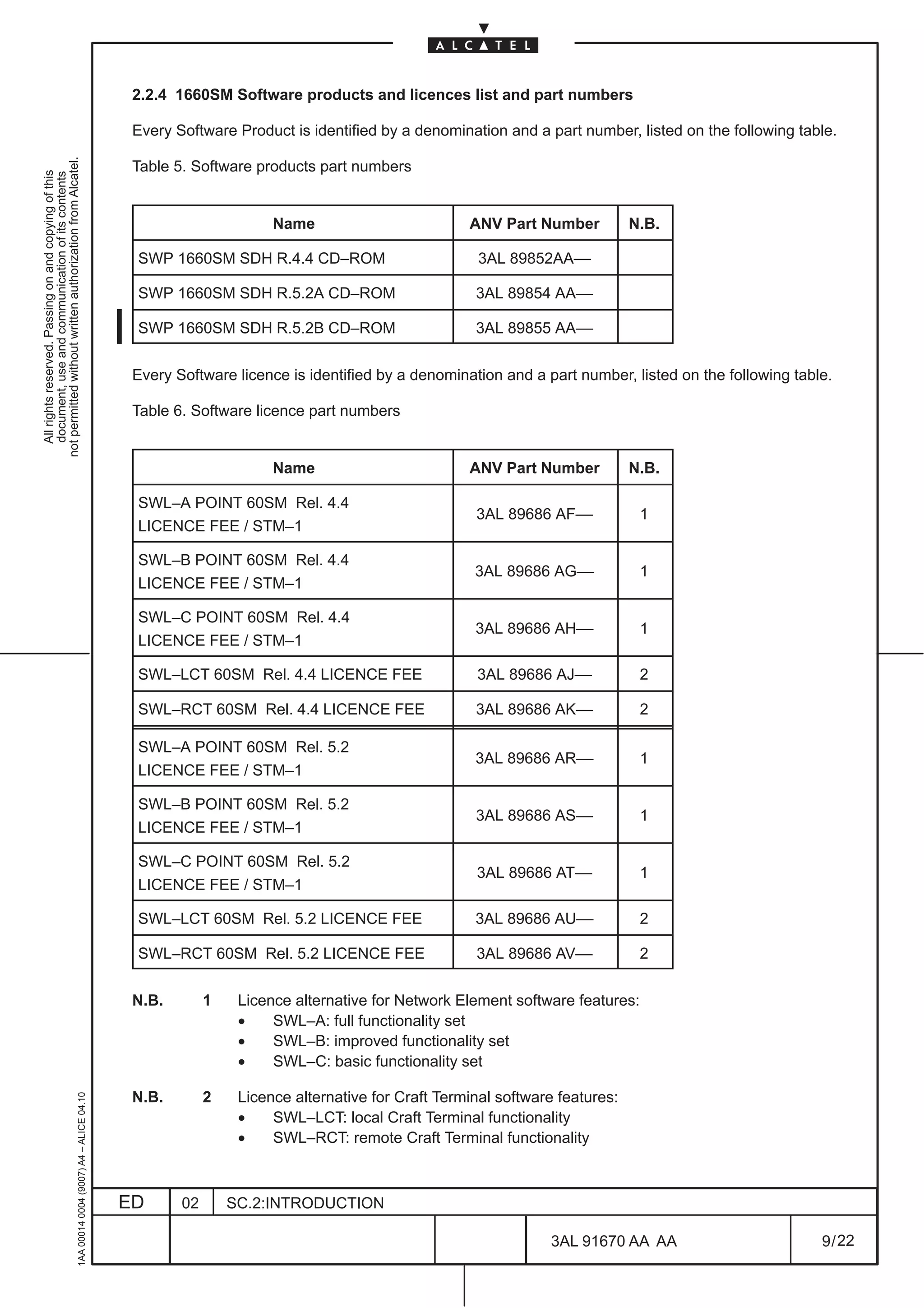

                                                                                               8.1.4 OSI over IP tunneling on QB3

                                                                                                           This feature is not applicable to 1640FOX


                                                                                               This feature allows the Element Manager to reach the GNEs (and all the relevant NEs behind them) by
                                                                                               using IP networking.
                                                                                               This would permit to use an external DCN based on IP only. Hence, no OSI networking would be required
                                                                                               on the external DCN.
                                                                                               OSI over IP technique is used to meet the target. OSI packets leaving the SH are encapsulated into IP
                                                                                               packets within the SH system itself. Hence, packets leaving the SH are IP packets, containing the original
                                                                                               OSI packet.
                                                                                               Once the packet get the NE through a pure IP network, the GNE has to strip off the IP encapsulation,
                                                                                               extracting the OSI packet, and to route the OSI packet as it does today using a pure OSI networking.
                                                                                               Hence, the internal networking of the SDH network (DCCs) is still based on OSI. No IP packets shall flow
                                                                                               inside DCCs, because the GNE receives the IP packet containing the OSI packet, deletes the IP header,
                                                                                               and forwards only the OSI packet on DCCs.
                                                                                               The default OSI lower layers networking can be replaced by IP routing capability at the bottom of the
                                                                                               QB3/QECC communication protocol suite; the choice is software switchable at NE level. The
                                                                                               implementation adopts the RFC1006 standard to put the OSI upper layers on top of IP networking.
                                                                                               The application goal is to offer the TCP/IP transport (i.e. Internet compatibility) in alternative to the full
                                                                                               ISO/OSI communication protocols, in the complete DCN network or at least in a consistent portion of it.
                                                                                               Figure 51. depicts the protocol architecture.
                                                     1AA 00014 0004 (9007) A4 – ALICE 04.10


                                                                                              ED      02      SC.3:NE MANAGEMENT

                                                                                                                                                                3AL 91670 AA AA                          91 / 448


                                                                                                                                                                              448
1AA 00014 0004 (9007) A4 – ALICE 04.10


                           ED
                           02
                           SC.3:NE MANAGEMENT
                                                Figure 51. OSI over IP tunneling on QB3


448
         3AL 91670 AA AA
         92 / 448
                                                                                            All rights reserved. Passing on and copying of this
                                                                                            document, use and communication of its contents
                                                                                          not permitted without written authorization from Alcatel.
8.2 Communication and routing views

                                                                                               To access select Comm/Routing option from the Configuration pull down menu as shown in the
                                                                                               following figure.
not permitted without written authorization from Alcatel.
  All rights reserved. Passing on and copying of this
  document, use and communication of its contents


                                                                                               The Communication and Routing Views allows to perform the following operations:

                                                                                               •    Local Configuration:       definition of the local NE addresses

                                                                                               •    OS Configuration:          addressing of the main and spare OSs connected to the local NE

                                                                                               •    NTP Server Configuration:addressing of the main and spare NTP servers connected to the local NE

                                                                                               •    Interfaces Configuration subdivided in:
                                                                                                           –    LAPD Configuration:       definition of the LAPD port parameters for each LAPD channel
                                                                                                                                          on the local NE

                                                                                                           –    Ethernet Configuration:   definition of configuration parameters needed to manage a
                                                                                                                                          local NE which provides a LAN ethernet interface

                                                                                               •    OSI Routing Configuration subdivided in:
                                                                                                           –    RAP Configuration:        configuration of parameters necessary to the addressing of NE
                                                                                                                                          connected by Reachable Address Prefixes in a domain different
                                                                                                                                          from the one of the local NE. These information are stored in
                                                                                                                                          RAP table.

                                                                                                           –    MESA Configuration:       configuration of parameters necessary to the addressing of non
                                                                                                                                          IS–IS NE in the same domain as the one of local NE.
                                                                                                                                          These information are stored in MESA table.

                                                                                               •    IP Configuration subdivided in:
                                                                                                           –    IP Static Routing Configuration:     definition of Host/Network destination address for IP
                                                                                                                                                     static routing

                                                                                                           –    OSPF area Configuration:             definition of Open Shortest Path First address

                                                                                                           –    IP Address Config. of Point–to–Point interfaces: definition of the Equipment Controller IP
                                                                                                                                                   address

                                                                                                           –    ISA board IP address:                definition of the ISA board IP address

                                                                                               •    Tunneling Configuration subdivided in:
                                                                                                           –    OSI over IP:              definition of destination IP address for OSI over IP tunneling.
                                                                                                                                                     This feature is not applicable to 1640FOX

                                                                                                           –    IP over OSI:              definition of destination NSAP address and type of IP routing for
                                                                                                                                          IP over OSI tunneling

                                                                                               All the previously cited operation can be entered choosing the relevant option of the menu, as shown in
                                                                                               the Figure 52.

                                                                                               The options are described in next paragraphs.
                                                     1AA 00014 0004 (9007) A4 – ALICE 04.10


                                                                                              ED      02       SC.3:NE MANAGEMENT

                                                                                                                                                               3AL 91670 AA AA                         93 / 448


                                                                                                                                                                             448
1AA 00014 0004 (9007) A4 – ALICE 04.10


                           ED
                           02
                           SC.3:NE MANAGEMENT
                                                Figure 52. Comm/Routing options


448
         3AL 91670 AA AA
         94 / 448
                                                                                    All rights reserved. Passing on and copying of this
                                                                                    document, use and communication of its contents
                                                                                  not permitted without written authorization from Alcatel.
8.3 Local Configuration

                                                                                               Select the Configuration pull down menu. Select the Comm/Routing option and then from the cascading
                                                                                               menu the Local Configuration option.
not permitted without written authorization from Alcatel.
  All rights reserved. Passing on and copying of this
  document, use and communication of its contents


                                                                                               The dialog–box opens (Figure 53. ) and allows to configure the local address of the NE.

                                                                                               The following fields are present:

                                                                                               –    a Local Address section contains the following graphical object:

                                                                                                    •        a Presentation Selector (P.Sel) identifies a presentation entity at the location identified by the
                                                                                                             NSAP Address. The presented value must not be modified.

                                                                                                    •        a Section Selector (S. Selector) identifies a section entity at the location identified by the NSAP
                                                                                                             Address. The presented value must not be modified.

                                                                                                    •        a Transport Selector (T. Sel) identifies a transport entity at the location identified by the NSAP
                                                                                                             Address. The presented value must not be modified.

                                                                                                    •        a Network Service Access Point (NSAP) Address identifies a location in the network. The first
                                                                                                             field of the NSAP address, AFI, determines the NSAP format.
                                                                                                             The AFI filed is 2 characters long (2 exadecimal digits) and, depending on the its value, the
                                                                                                             length of NSAP address is variable from 16 characters to 40 characters:
                                                                                                             –     the value of AFI 49 identifies the local format of variable length (from 16 characters to 40
                                                                                                                   characters).
                                                                                                             –     the value of AFI 39 identifies the ISO–DCC format of 40 characters long.
                                                                                                             –     the value of AFI 47 identifies the GOSIP–V2 format of 40 characters long.
                                                                                                                   Field after AFI: (optional: if not used must be all–zero), area address and organization
                                                                                                                   identifier.

                                                                                                             In all cases the last two fields of the NSAP address are:
                                                                                                             –      System Id: uniquely identifies a NE in an area and is 12 characters long
                                                                                                                    It might be the equipment MAC Ethernet address, level 2, inserted in the NE (check the
                                                                                                                    value in the para. 8.7 on page 102 ) or it might be selected by the operator.
                                                                                                             –      Network Selector: provides the distinction among users of the network service and is 2
                                                                                                                    characters long (value is “1d”).

                                                                                                             In the view, the NSAP is managed as simple strings of characters without any pre–formatting
                                                                                                             because of the variable format:
                                                                                                             –     a first string of two characters that identifies the AFI field
                                                                                                             –     a second string of variable length that identifies the remaining NSAP address

                                                                                               –    Synonymous Area Addresses section allows to have multiple synonymous area addresses within a
                                                                                                    level 1 subdomain. The compilation of the two network addresses is optional and if they are inserted,
                                                                                                    the last two fields, System Id and Network Selector, of the mandatory address and of the synonymous
                                                                                                    addresses must be the same.

                                                                                               –    System Type section determines whether the local NE acts as a “intermediate system level 1” or as
                                                                                                    a “intermediate system level 2” or as a “End System”. Note that a level 2 intermediate system
                                                                                                    performs functions of a level 1 too. End System is not operative.

                                                                                               Ok button is used to perform a configuration change of the data contained in the dialog–box and closes
                                                     1AA 00014 0004 (9007) A4 – ALICE 04.10


                                                                                               it; the dialog is visible until the end of the operations and a wait cursor is displayed.

                                                                                               Cancel button close the dialog without changes of the data.

                                                                                               Help button provides some useful information about the dialog.

                                                                                              ED        02      SC.3:NE MANAGEMENT

                                                                                                                                                                   3AL 91670 AA AA                          95 / 448


                                                                                                                                                                                 448
1AA 00014 0004 (9007) A4 – ALICE 04.10


                           ED
                           02
                           SC.3:NE MANAGEMENT
                                                Figure 53. Local Configuration


448
         3AL 91670 AA AA
         96 / 448
                                                                                   All rights reserved. Passing on and copying of this
                                                                                   document, use and communication of its contents
                                                                                 not permitted without written authorization from Alcatel.
8.4 OS Configuration

                                                                                               Select the Configuration pull down menu. Select the Comm/Routing option and then from the cascading
                                                                                               menu the OS Configuration option.
not permitted without written authorization from Alcatel.
  All rights reserved. Passing on and copying of this
  document, use and communication of its contents


                                                                                               The dialog–box opens (Figure 54. ) and allows to configure the addresses of the Main and Spare OSs
                                                                                               connected to the local NE.

                                                                                               The following fields are present:

                                                                                               –    Main OS Address section contains the same graphical object of the Local Address Section in the
                                                                                                    Local Configuration dialog–box.

                                                                                               –    Spare OS Address section contains the same graphical object of the Local Address Section in the
                                                                                                    Local Configuration dialog–box.


                                                                                               Ok button is used to perform a configuration change of the data contained in the dialog–box and closes
                                                                                               it; the dialog is visible until the end of the operations and a wait cursor is displayed.
                                                                                               Cancel button close the dialog without changes of the data.
                                                                                               Help button provides some useful information about the dialog.


                                                                                                                                    Figure 54. OS Configuration
                                                     1AA 00014 0004 (9007) A4 – ALICE 04.10


                                                                                              ED      02     SC.3:NE MANAGEMENT

                                                                                                                                                           3AL 91670 AA AA                       97 / 448


                                                                                                                                                                        448
8.5 NTP Server Configuration

                                          Select the Configuration pull down menu. Select the Comm/Routing option and then from the cascading
                                          menu the NTP Server Configuration option.


                                                                                                                                                         not permitted without written authorization from Alcatel.
                                                                                                                                                           All rights reserved. Passing on and copying of this
                                                                                                                                                           document, use and communication of its contents
                                          The dialog–box opens (Figure 55. ) and allows to configure the addresses of the Main and Spare NTP
                                          (Network Protocol synchronization Time) Servers connected to the local NE, used for time distribution in
                                          the network.

                                          The following fields are present:

                                          –    Enabling NTP Protocol section allows to enable or disable the NTP Protocol.

                                          –    Main NTP Server Address section contains the same graphical object of the Local Address Section
                                               in the Local Configuration dialog–box.

                                          –    Spare NTP Server Address section contains the same graphical object of the Local Address Section
                                               in the Local Configuration dialog–box.

                                          If the NTP server is coincident with the OS (same hardware), the same NSAP address of the OS must be
                                          assigned.

                                          Ok button is used to perform a configuration change of the data contained in the dialog–box and closes
                                          it; the dialog is visible until the end of the operations and a wait cursor is displayed.
                                          Cancel button close the dialog without changes of the data.
                                          Help button provides some useful information about the dialog.


                                                                              Figure 55. NTP Server Configuration
1AA 00014 0004 (9007) A4 – ALICE 04.10


                                         ED      02     SC.3:NE MANAGEMENT

                                                                                                        3AL 91670 AA AA                       98 / 448


                                                                                                                     448
8.6 LAPD Configuration

                                                                                               Select the Configuration pull down menu. Select the Comm/Routing–>Interfaces Configuration
                                                                                               option and then from the cascading menu the LAPD Configuration option.
not permitted without written authorization from Alcatel.
  All rights reserved. Passing on and copying of this
  document, use and communication of its contents


                                                                                               The ”LAPD Configuration” dialog opens (see Figure 56. on page 100, this example has one LAPD
                                                                                               Interface configured).
                                                                                               It contains the following functional block and graphical objects:

                                                                                               –   a section named LAPD Interfaces List that allows the user:

                                                                                                   •        to display the list of configured LAPD Interfaces using a graphical table;
                                                                                                   •        to change the role of the LAPD Interface selected in the LAPD Interface List;
                                                                                                   •        to delete the LAPD Interface selected in the LAPD Interface List;
                                                                                                   •        to create a new LAPD Interface.

                                                                                                   This section contains the following graphical objects:

                                                                                                   •        the number of LAPD interface displayed in the LAPD Interface List;
                                                                                                   •        the LAPD Interface List that lists all the configured LAPD Interfaces; for each LAPD Interfaces,
                                                                                                            the table displays:
                                                                                                            –     the user label of the TTP containing the configured LAPD Interface (MS/RS TTP);
                                                                                                            –     the LAPD role that contains one of the following value:
                                                                                                                  •    User             (one end of the link)
                                                                                                                  •    Network          (the other end of the link)
                                                                                                   •        Delete button that allows to delete the LAPD Interface selected in the LAPD table;
                                                                                                   •        Change Role button that allows to change the role (User or Network) of the LAPD Interface
                                                                                                            selected in the table (after selection the Figure 58. on page 101 is shown to confirm action
                                                                                                            required);
                                                                                                   •        Create button that allows to create a new LAPD Interface; this button starts a new dialog (see
                                                                                                            Figure 57. on page 101) named Create LAPD Interface; it is disabled when the maximum
                                                                                                            number of LAPD Interface has been configured.
                                                                                                            This Create LAPD Interface dialog contains the following functional blocks and graphical
                                                                                                            objects:

                                                                                                            –    a Choose button that allows the operator to select the superior TTP of the LAPD Interface
                                                                                                                 to be created; this button starts the TP Search dialog; the TP Search dialog will be
                                                                                                                 configured in order to display in the right tree only the allowed TTP of the LAPD Interface
                                                                                                                 i.e. RS–TTP or MS–TTP;
                                                                                                            –    a section LAPD Role that allows to configure the role (User or Network) of the LAPD
                                                                                                                 Interface to be created.
                                                                                                                 This connection is a must to establish end–to–end connection between two NE’s: if one
                                                                                                                 end is configured with User role, the other end connected must be configured with Network
                                                                                                                 role.

                                                                                               –   a section named Search Criteria that allows the user to display only the LAPD’s of the selected type
                                                                                                   in the LAPD Table; the section contains the following graphical objects:

                                                                                                   •        the field Interface Type that allows to select the type of the LAPD’s to be displayed in the LAPD
                                                                                                            Table; the field will manage both ADM and WDM DCC type; the value ”Ignore” will allow to
                                                                                                            display all the LAPD types;
                                                                                                   •        the Search button starts the search of the selected LAPD type; this buttons can be used to
                                                     1AA 00014 0004 (9007) A4 – ALICE 04.10


                                                                                                            refresh the LAPD table too.


                                                                                              ED       02       SC.3:NE MANAGEMENT

                                                                                                                                                                 3AL 91670 AA AA                         99 / 448


                                                                                                                                                                               448
The LAPD Interface List will be updated on reception of the Delete/Create/Change DCC CTP
                                               notification. If no LAPD Interface are configured in the equipment, the message ”No LAPD Interface”
                                               will be displayed near LAPD Interface counter (that it is at zero).


                                                                                                                                                         not permitted without written authorization from Alcatel.
                                                                                                                                                           All rights reserved. Passing on and copying of this
                                                                                                                                                           document, use and communication of its contents
                                                                     Figure 56. LAPD Configuration dialog (example)


                                          Close button close the dialog without changes of the data.
1AA 00014 0004 (9007) A4 – ALICE 04.10


                                         ED      02    SC.3:NE MANAGEMENT

                                                                                                       3AL 91670 AA AA                       100 / 448


                                                                                                                     448
All rights reserved. Passing on and copying of this
                                                                                                document, use and communication of its contents
                                                                                              not permitted without written authorization from Alcatel.
      1AA 00014 0004 (9007) A4 – ALICE 04.10


                           ED
                           02
                           SC.3:NE MANAGEMENT
                                                                                                  Figure 57. Creation LAPD Interface


                                                Figure 58. Confirmation to change LAPD Role


448
         3AL 91670 AA AA
         101 / 448
8.7 Ethernet Configuration

                                                        This feature is not applicable to 1640FOX


                                                                                                                                                                  not permitted without written authorization from Alcatel.
                                                                                                                                                                    All rights reserved. Passing on and copying of this
                                                                                                                                                                    document, use and communication of its contents
                                          Select the Configuration pull down menu. Select the Comm/Routing –> Interfaces Configuration
                                          option and then from the cascading menu the Ethernet Configuration option.

                                          The dialog–box opens (Figure 59. ) and allows to define the parameters needed to manage a NE which
                                          provides a LAN ethernet interface .

                                          The following fields and data are present:

                                          –    Ethernet Interface field allows to define or remove a Local Area Network Port for the access to the
                                               Data Communication Network.

                                          –    MAC Address section allows to display the address of the Network Element in the Ethernet LAN;
                                               it is a read–only field.

                                          –    OSI Section:

                                               •        L2 only Parameter field indicates if the port shall be used for level 2 traffic only, thus avoiding
                                                        transmitting L1 packets. Note that the flag shall be set to No if some other nodes (NEs or OSs)
                                                        of the same area of the relevant NE are connected to the Ethernet.
                                                        One example is indicated in Figure 60. on page 103.

                                               •        L1 Default Metric is a not modifiable field , Priority field can be set ( default value for ethernet
                                                        is 64)

                                               •        L2 Default Metric is a not modifiable field , Priority field can be set ( default value for ethernet
                                                        is 64)

                                          –    IP Section section allows to define the “node” IP Address, IP Mask and the Routing IP Protocol used;
                                               If “OSPF” or “Both” options of Routing IP Protocol field are selected, also the “Associated OSPF
                                               Area” must be set.

                                          Apply button performs a configuration change of the data.

                                          Close button close the dialog without changes of the data.
1AA 00014 0004 (9007) A4 – ALICE 04.10


                                         ED        02      SC.3:NE MANAGEMENT

                                                                                                              3AL 91670 AA AA                         102 / 448


                                                                                                                             448
All rights reserved. Passing on and copying of this
                                                                                                                                                                                           document, use and communication of its contents
                                                                                                                                                                                         not permitted without written authorization from Alcatel.
      1AA 00014 0004 (9007) A4 – ALICE 04.10


                           ED
                                                                                                                        LAN


                           02
                                                                                                        No
                                                                                                        NE
                                                                                                          L2


                           SC.3:NE MANAGEMENT
                                                                                                        No
                                                                                                        NE
                                                                                                              L2
                                                                                                                                   AREA 2
                                                                                                                              OS
                                                                                                                                                     Figure 59. Ethernet Configuration


                                                                                                        NE
                                                                                                        Yes
                                                                                                              L2
                                                                                                                                            AREA 1


448
                                                Figure 60. Ethernet Configuration – L2 only parameter


         3AL 91670 AA AA
                                                                                                               AREA 3


         103 / 448
8.8 Reachable Address Prefixes Configuration

                                          Select the Configuration pull down menu. Select the Comm/Routing –> OSI Routing Configuration
                                          option and then from the cascading menu the RAP Configuration option.


                                                                                                                                                              not permitted without written authorization from Alcatel.
                                          The dialog–box opens (Figure 61. ) and allows to configure the Reachable Address Prefix table.


                                                                                                                                                                All rights reserved. Passing on and copying of this
                                                                                                                                                                document, use and communication of its contents
                                          Each element of the RAP table allows to link a LAPD port or a LAN port of the local NE to a separate
                                          domain; the separate domain is selected by the address Prefixes. If the addressed element is the OS, the
                                          LAN port will be used.
                                          The view simulates a real notebook; it allows the user to select the pages of the notebook using the pointing
                                          device (upper part of the figure); each page represents a particular element of the RAP table and the
                                          respective pointing device displays the element counter.

                                          In detail, each page contains the following data:
                                          –    Physical Interface button
                                               •      if the element is empty, displays the ”none” value and allows to select a LAPD ports or a LAN
                                                      port which will be used to reach the addressed area.
                                               •      if the element isn’t empty, displays the selected port and allows to change it.
                                          –    Area Address Prefix section allows the user to address the separate domain. The Area Address
                                               Prefix represents a NSAP address without the fields System Id and Network Selector.
                                          –    MAC Address section allows to address the element of a domain to be reached the Ethernet LAN;
                                               the field is managed as a simple strings of 12 digit.

                                          Apply button is used to perform a configuration change of the data contained in the complete RAP table
                                          and close the view; the view is visible until the end of the operations and a wait cursor is displayed.
                                          New button is used to insert a new page.
                                          Delete button is used to delete the selected page.
                                          Close button close the dialog without changes of the data.
1AA 00014 0004 (9007) A4 – ALICE 04.10


                                                                                Figure 61. RAP Configuration


                                         ED      02     SC.3:NE MANAGEMENT

                                                                                                          3AL 91670 AA AA                         104 / 448


                                                                                                                        448
8.9 Manual ES Adjacencies table Configuration

                                                                                               Select the Configuration pull down menu. Select the Comm/Routing –> OSI Routing Configuration
                                                                                               option and then from the cascading menu the MESA Configuration option.
not permitted without written authorization from Alcatel.


                                                                                               The dialog–box opens (Figure 62. ) and allows to configure the Manual ES Adjacencies table.
  All rights reserved. Passing on and copying of this
  document, use and communication of its contents


                                                                                               Each element of the MESA table allows to link a LAPD port or a LAN port of the local NE to a End System
                                                                                               element; the ES element must be in the same area as the one of the local NE. If the addressed element
                                                                                               is the OS, the LAN port will be used.
                                                                                               The view simulates a real notebook; it allows the user to select the pages of the notebook using the pointing
                                                                                               device (upper part of the figure); each page represents a particular element of the MESA table and the
                                                                                               respective pointing device displays the element counter.

                                                                                               In detail, each page contains the following data:
                                                                                               –    Physical Interface button
                                                                                                    •      if the element is empty, displays the ”none” value and allows to select a LAPD ports or a LAN
                                                                                                           port which will be used to reach the End System element.
                                                                                                    •      if the element isn’t empty, displays the selected port and allows to change it.
                                                                                               –    System Id section represents the System Id of the ES element.
                                                                                               –    MAC Address section allows to address the element in the Ethernet LAN; the field is managed as
                                                                                                    a simple strings of 12 digit.

                                                                                               Apply button is used to perform a configuration change of the data contained in the complete MESA table
                                                                                               and close the view; the view is visible until the end of the operations and a wait cursor is displayed.
                                                                                               New button is used to insert a new page.
                                                                                               Delete button is used to delete the selected page.
                                                                                               Close button close the dialog without changes of the data.


                                                                                                                                    Figure 62. MESA Configuration
                                                     1AA 00014 0004 (9007) A4 – ALICE 04.10


                                                                                              ED      02     SC.3:NE MANAGEMENT

                                                                                                                                                               3AL 91670 AA AA                         105 / 448


                                                                                                                                                                             448
8.10 IP Configuration

                                          The options listed in the menu Configuration –> Comm/Routing –> IP Configuration and also in
                                          Configuration –> Comm/Routing –> Tunneling Configuration are relevant to the configuration of


                                                                                                                                                             not permitted without written authorization from Alcatel.
                                          messages communications for the management of ATM or PR_EA boards (ISA) inside the equipment and


                                                                                                                                                               All rights reserved. Passing on and copying of this
                                                                                                                                                               document, use and communication of its contents
                                          in the network.


                                          8.10.1 IP routing configuration for ISA boards management

                                          In order to manage the ISA boards (excepted ETHERNET and PR boards) inserted into the equipment,
                                          the following operations are to be done:

                                              •        “IP Address Configuration of Point–to–Point Interface” (see para 8.13 page 109), defines
                                                       the IP address for the Equipment–Controller (EC). This should be the first addressing operation

                                              •        routing configuration, by means of the options:
                                                       –     “IP Static Routing Configuration” (see para 8.11 page 107), if using static routing
                                                       –     “OSPF Area Configuration” (see para 8.12 page 108), if using the automatic OSPF
                                                             routing

                                              •        “ISA Board IP Address” (see para. 8.14 page 110), it defines the IP address for the ISA boards;
                                                       it is to be defined for every ISA board hosted by the equipment.
                                                       NOTE: if the ISA boards are in EPS 1+1 configuration (not applicable to 1640FOX), they must
                                                       have the same address)

                                              •        “IP over OSI Tunneling” (see para. 8.16 page 112), it defines the OSI address (NSAP) of the
                                                       destination node to be reached (for instance the GNE connected to the TMN), when the ATM/IP
                                                       management message passes through an SDH/OSI network; i.e. it is to be done for every
                                                       SDH–NE of the network, if equipped with ISA boards.
                                                       NOTE: this addressing must be carried out at both end nodes of the tunnel, so that they can
                                                       see each other.

                                              •        “OSI over IP Tunneling” (not applicable to 1640FOX), it defines the IP address of the
                                                       destination node to be reached (for instance the IP router where the TMN is connected), when
                                                       an OSI management message passes through an IP network. It is to be defined on a a Gateway
                                                       Network Element (GNE) equipped with the QB3 interface, where the QB3 is connected to a
                                                       LAN/IP network.
                                                       NOTE: this addressing must be carried out at both end nodes of the tunnel, so that they can
                                                       see each other.
1AA 00014 0004 (9007) A4 – ALICE 04.10


                                         ED       02      SC.3:NE MANAGEMENT

                                                                                                           3AL 91670 AA AA                       106 / 448


                                                                                                                        448
8.11 IP Static Routing Configuration

                                                                                               Select the Configuration pull down menu. Select the Comm/Routing–>IP Configuration and then from
                                                                                               the cascading menu, the IP Static Routing Configuration option.
not permitted without written authorization from Alcatel.


                                                                                               The dialog–box opens (Figure 63. ) and allows to configure the parameters for IP Static Routing
  All rights reserved. Passing on and copying of this
  document, use and communication of its contents


                                                                                               Configuration.

                                                                                               The following fields and data are present:

                                                                                               [1]    Destination Host IP Address: allows to define the IP address necessary to reach a specific Host

                                                                                               [2]    Destination Network:              it is alternative to Destination Host IP Address; allows to define the
                                                                                                                                        IP Address and IP Mask to reach a network.

                                                                                               [3]    Default Gateway IP Address: allows to define the address of the next hop gateway

                                                                                               [4]    CLNP (Connection Less Network Protocol): allows to use a pre–define IP over OSI tunnel towards
                                                                                                                                           a gateway. The information in the field is automatically
                                                                                                                                           assigned after the execution of the option “IP over OSI
                                                                                                                                           Tunneling” (see para. 8.16 page 112).

                                                                                               [5]    IP Point–to–Point Interface Id: allows to use point to point interfaces made available by EC

                                                                                               N.B.          Points from [3] to [5] are alternative

                                                                                               Apply button is used to perform a configuration change of the data contained in the complete table and
                                                                                               close the view; the view is visible until the end of the operations and a wait cursor is displayed.
                                                                                               New button is used to insert a new page.
                                                                                               Delete button is used to delete the selected page.
                                                                                               Close button close the dialog without changes of the data.
                                                     1AA 00014 0004 (9007) A4 – ALICE 04.10


                                                                                                                            Figure 63. IP Static Routing Configuration (example)

                                                                                              ED        02      SC.3:NE MANAGEMENT

                                                                                                                                                                  3AL 91670 AA AA                        107 / 448


                                                                                                                                                                                448
8.12 OSPF Area Table Configuration

                                          Select the Configuration pull down menu. Select the Comm/Routing–>IP Configuration and then from
                                          the cascading menu, the OSPF Area Table Configuration option.


                                                                                                                                                        not permitted without written authorization from Alcatel.
                                          The dialog–box opens (Figure 64. ) and allows to configure the parameters for OSPF (Open Shortest Path


                                                                                                                                                          All rights reserved. Passing on and copying of this
                                                                                                                                                          document, use and communication of its contents
                                          First) Area Table Configuration , i.e. it is used in an IP network in automatic, dynamic OSPF routing
                                          configuration. More area addresses may be set; in this case new pages are created by the system.

                                          The following fields and data are present:

                                          –    OSPF Area IP Address: it is the address of the area containing the equipment

                                          –    OSPF Area Range Mask

                                          Both fields gives a synthetical information that includes all the addresses (specific to a NE and to a
                                          Network) in an Area.

                                          Apply button is used to perform a configuration change of the data contained in the complete RAP table
                                          and close the view; the view is visible until the end of the operations and a wait cursor is displayed.
                                          New button is used to insert a new page.
                                          Delete button is used to delete the selected page.
                                          Close button close the dialog without changes of the data.


                                                                   Figure 64. OSPF Area Table Configuration (example)
1AA 00014 0004 (9007) A4 – ALICE 04.10


                                         ED      02    SC.3:NE MANAGEMENT

                                                                                                       3AL 91670 AA AA                      108 / 448


                                                                                                                    448
8.13 IP Address Configuration of Point–to–Point Interfaces

                                                                                               Select the Configuration pull down menu. Select the Comm/Routing–>IP Configuration and then from
                                                                                               the cascading menu, the IP Address Configuration of Point–to–Point Interfaces option.
not permitted without written authorization from Alcatel.


                                                                                               The dialog–box opens (Figure 65. ) and allows to set the Equipment Controller IP Address used to
  All rights reserved. Passing on and copying of this
  document, use and communication of its contents


                                                                                               communicate with the ISA boards inserted into the equipment, and with the rest of the network.

                                                                                               Ok button is used to perform a configuration change of the data contained in the dialog–box and closes
                                                                                               it; the dialog is visible until the end of the operations and a wait cursor is displayed.

                                                                                               Cancel button close the dialog without changes of the data.


                                                                                                            Figure 65. IP Address Configuration of Point–to–Point Interfaces (example)
                                                     1AA 00014 0004 (9007) A4 – ALICE 04.10


                                                                                              ED      02    SC.3:NE MANAGEMENT

                                                                                                                                                             3AL 91670 AA AA                    109 / 448


                                                                                                                                                                        448
8.14 ISA board IP Address

                                          Select an ISA board of the equipment and then the Configuration pull down menu. Select the
                                          Comm/Routing–>IP Configuration and then from the cascading menu, the ISA Board IP Address


                                                                                                                                                       not permitted without written authorization from Alcatel.
                                          option.


                                                                                                                                                         All rights reserved. Passing on and copying of this
                                                                                                                                                         document, use and communication of its contents
                                          The dialog–box opens (Figure 66. ) and allows to set the IP Address of the ISA Board that communicate
                                          with the Equipment Controller (EC).

                                          Ok button is used to perform a configuration change of the data contained in the dialog–box and closes
                                          it; the dialog is visible until the end of the operations and a wait cursor is displayed.

                                          Cancel button close the dialog without changes of the data.


                                                                       Figure 66. ISA Board IP Address (example)
1AA 00014 0004 (9007) A4 – ALICE 04.10


                                         ED      02    SC.3:NE MANAGEMENT

                                                                                                        3AL 91670 AA AA                    110 / 448


                                                                                                                   448
8.15 OSI over IP

                                                                                                           This feature is not applicable to 1640FOX
not permitted without written authorization from Alcatel.
  All rights reserved. Passing on and copying of this
  document, use and communication of its contents


                                                                                               Select the Configuration pull down menu. Select the Comm/Routing–>Tunneling Configuration and
                                                                                               then from the cascading menu, the OSI over IP option.
                                                                                               The dialog–box opens (Figure 67. ) and allows to configure the Remote Destination IP Address of the
                                                                                               Equipment Controller.


                                                                                                                      Figure 67. OSI over IP Tunneling configuration (example)


                                                                                               Apply button is used to perform a configuration change of the data contained in the complete table and
                                                                                               close the view; the view is visible until the end of the operations and a wait cursor is displayed.
                                                                                               New button is used to insert a new page.
                                                                                               Delete button is used to delete the selected page.
                                                                                               Close button close the dialog without changes of the data.
                                                     1AA 00014 0004 (9007) A4 – ALICE 04.10


                                                                                              ED      02      SC.3:NE MANAGEMENT

                                                                                                                                                           3AL 91670 AA AA                      111 / 448


                                                                                                                                                                        448
8.16 IP over OSI

                                          Select the Configuration pull down menu. Select the Comm/Routing–>Tunneling Configuration and
                                          then from the cascading menu, the IP over OSI option.


                                                                                                                                                               not permitted without written authorization from Alcatel.
                                          The dialog–box opens (Figure 68. ) and allows to configure the Destination NSAP Address and the IP


                                                                                                                                                                 All rights reserved. Passing on and copying of this
                                                                                                                                                                 document, use and communication of its contents
                                          Routing Type; i.e. it permits the TMN to reach the ATM/IP boards inserted into the SDH/OSI network . More
                                          tunneling channels may be created, in these cases new pages are created by the system.

                                          The following fields are present:

                                          –    Destination NSAP Address:(OSI address of the NE ending the tunnel)

                                                      a Network Service Access Point (NSAP) Address identifies a location in the network. The first
                                                      field of the NSAP address, AFI, determines the NSAP format.
                                                      The AFI filed is 2 characters long (2 exadecimal digits) and, depending on the its value, the
                                                      length of NSAP address is variable from 16 characters to 40 characters:
                                                      –     the value of AFI 49 identifies the local format of variable length (from 16 characters to 40
                                                            characters).
                                                      –     the value of AFI 39 identifies the ISO–DCC format of 40 characters long.
                                                      –     the value of AFI 47 identifies the GOSIP–V2 format of 40 characters long.

                                                      In all cases the last two fields of the NSAP address are:
                                                      –      System Id: uniquely identifies a NE in an area and is 12 characters long
                                                             It might be the equipment MAC Ethernet address, level 2, inserted in the NE (check the
                                                             value in the para. 8.7 on page 102 ) or it might be selected by the operator.
                                                      –      Network Selector: provides the distinction among users of the network service and is 2
                                                             characters long (value is “1d”).

                                                      In the view, the NSAP is managed as simple strings of characters without any pre–formatting
                                                      because of the variable format:
                                                      –     a first string of two characters that identifies the AFI field
                                                      –     a second string of variable length that identifies the remaining NSAP address

                                          –    IP Routing:allows to choose the type of IP routing supported as follows;
                                                    –    OSPF (Open Shortest Path First) , if the “OSPF Area Configuration” option has been used
                                                         (see para 8.12 page 108)
                                                    –    RIP (Routing Information Protocol)
                                                    –    Both
                                                    –    None, if the option “IP Static Routing Configuration” (see para 8.11 page 107) has been
                                                         used

                                                      If “OSPF” or “Both” options are selected, also the “Associated OSPF Area” must be set (it is to
                                                      be chosen among the presented options); in this case the information field is automatically filled
                                                      with the addresses set in the “OSPF Area Configuration” application.

                                          Apply button is used to perform a configuration change of the data contained in the complete table and
                                          close the view; the view is visible until the end of the operations and a wait cursor is displayed.
                                          New button is used to insert a new page.
                                          Delete button is used to delete the selected page.
                                          Close button close the dialog without changes of the data.
1AA 00014 0004 (9007) A4 – ALICE 04.10


                                         ED      02      SC.3:NE MANAGEMENT

                                                                                                           3AL 91670 AA AA                         112 / 448


                                                                                                                         448
All rights reserved. Passing on and copying of this
                                                                                                             document, use and communication of its contents
                                                                                                           not permitted without written authorization from Alcatel.
      1AA 00014 0004 (9007) A4 – ALICE 04.10


                           ED
                           02
                           SC.3:NE MANAGEMENT


448
         3AL 91670 AA AA
                                                Figure 68. IP over OSI Tunneling configuration (example)


         113 / 448
1AA 00014 0004 (9007) A4 – ALICE 04.10


                           ED
                           02
                           SC.3:NE MANAGEMENT


448
         3AL 91670 AA AA
         114 / 448
                                                  All rights reserved. Passing on and copying of this
                                                  document, use and communication of its contents
                                                not permitted without written authorization from Alcatel.
9 EQUIPMENT MANAGEMENT

                                                                                               9.1 Introduction and navigation
not permitted without written authorization from Alcatel.
  All rights reserved. Passing on and copying of this
  document, use and communication of its contents


                                                                                               This section deals mainly with the setting and changing of the boards present on the Equipment and
                                                                                               undertaking board protection operations.

                                                                                               Using the menu options, select the Equipment option from the View pull down menu

                                                                                               The first level of the “Equipment Overview” representation will be displayed directly into the current window
                                                                                               (see the following figures).The Equipment Overview enables a fast navigation through all levels of the
                                                                                               equipment hierarchy. Navigation is done from higher to lower levels.

                                                                                               The NEs hierarchy is different organized according to the equipment type, as follow:

                                                                                               –    1660SM & 1650SMC:

                                                                                                     Subrack > board > port > TP

                                                                                                    The navigation through different levels of the NE hierarchy is performed by double clicking on the
                                                                                                    objects (see also para 9.1, pg. 115):

                                                                                                    •        the first level shows the subrack level of the Equipment view (see Figure 69. on page 117);
                                                                                                    •        by double clicking on a board body , the board level of the Equipment view can be reached (as
                                                                                                             described in chapter 10 on page 133).
                                                                                                    •        further, by double clicking on a port body contained in the board, the port level of the Equipment
                                                                                                             view can be reached (as described in chapter 11 on page 139). The port view displays the inner
                                                                                                             TPs.
                                                                                                    •        it is possible to go back to the upper level of representation by pressing the <ESC> key on the
                                                                                                             keyboard;
                                                                                                             It is also possible to:
                                                                                                             –      go back to the previous view, by selecting the Backward option from the views menu
                                                                                                             –      go to the next view, by selecting the Forward option from the view menu.

                                                                                                    N.B.          Selecting in the first level of the Equipment view ( subrack level, see Figure 69. on page
                                                                                                                  117 ) the Show supporting equipment option from the Equipment menu, the Rack level
                                                                                                                  view of Figure 70. is presented.

                                                                                                             In the Rack Level view two subracks are presented:

                                                                                                             –    at the top the Equipment Subrack (example “SR60M” for 1660SM or “SR50C” for
                                                                                                                  1650SMC)
                                                                                                             –    at the bottom the Fans Subrack, named SRFAN.
                                                                                                                  The Fans Subrack presence is managed with the Set option as for the boards of the
                                                                                                                  Equipment Subrack (refer to paragraph 9.2 on page 122 for details)

                                                                                                             Further, selecting in the Rack level view the Show supporting equipment option from the
                                                                                                             Equipment menu, the Equipment level view of Figure 71. is presented.
                                                     1AA 00014 0004 (9007) A4 – ALICE 04.10


                                                                                              ED        02       SC.3:NE MANAGEMENT

                                                                                                                                                                  3AL 91670 AA AA                         115 / 448


                                                                                                                                                                                448
–      1640FOX:

                                                 Rack > Subrack > board > port > TP.


                                                                                                                                                                   not permitted without written authorization from Alcatel.
                                                 The navigation through different levels of the NE hierarchy is performed by double clicking on the


                                                                                                                                                                     All rights reserved. Passing on and copying of this
                                                                                                                                                                     document, use and communication of its contents
                                                 objects (see also para 9.1, on page 115):

                                                 •        the first level shows the Rack level of the Equipment view (see Figure 72. on page 119); two
                                                          subracks are presented:

                                                          –    at the top the Equipment Subrack “SR40M”
                                                          –    at the bottom the AC/DC Rectifier Subrack, named “SR40R”

                                                          by double clicking on a Subrack body, the relevant subrack level of the Equipment view can be
                                                          reached (see Figure 73. on page 120).
                                                 •        by double clicking on a board body, the board level of the Equipment view can be reached (as
                                                          described in chapter 10 on page 133).
                                                 •        further, by double clicking on a port body contained in the board, the port level of the Equipment
                                                          view can be reached (as described in chapter 11 on page 139). The port view displays the inner
                                                          TPs.
                                                 •        it is possible to go back to the previous level of representation by pressing the <ESC> key on
                                                          the keyboard; or:
                                                          –      go back to the previous view, by selecting the Backward option from the Views menu
                                                          –      go to the next view, by selecting the Forward option from the Views menu.

                                          N.B.            Selecting, in the first level of the Rack view (rack level ), the Show supporting equipment
                                                          option from the Equipment menu, the Equipment level overview is presented (see Figure 74.
                                                          on page 120).
1AA 00014 0004 (9007) A4 – ALICE 04.10


                                         ED          02       SC.3:NE MANAGEMENT

                                                                                                               3AL 91670 AA AA                         116 / 448


                                                                                                                             448
All rights reserved. Passing on and copying of this
                                                                                                                                      document, use and communication of its contents
                                                                                                                                    not permitted without written authorization from Alcatel.
      1AA 00014 0004 (9007) A4 – ALICE 04.10


                           ED
                           02
                           SC.3:NE MANAGEMENT
                                                                                                                              LCA
                                                                                                                                                                             LCA


448
         3AL 91670 AA AA
                                                                                                                     1660SM
                                                                                                                                                         1650SMC


                                                Figure 69. Equipment Overview – 1650SMC and 1660SM “Subrack“ level


         117 / 448
SR50C


                                                                                                                                   not permitted without written authorization from Alcatel.
                                                                                                                                     All rights reserved. Passing on and copying of this
                                                                                                                                     document, use and communication of its contents
                                                                              LCA                                         LCA


                                                                                                              SRFAN


                                         1650SMC without Fans Subrack               1650SMC with Fans Subrack


                                                                                                              SR60M


                                                                              LCA                                          LCA


                                                                                                               SRFAN


                                         1660SM without Fans Subrack                 1660SM with Fans Subrack
1AA 00014 0004 (9007) A4 – ALICE 04.10


                                                    Figure 70. Equipment Overview – 1650SMC and 1660SM “Rack” level


                                         ED   02   SC.3:NE MANAGEMENT

                                                                                            3AL 91670 AA AA            118 / 448


                                                                                                        448
not permitted without written authorization from Alcatel.
  All rights reserved. Passing on and copying of this
  document, use and communication of its contents


                                                                                                                                                                                  LCA
                                                                                                                                     LCA


                                                                                                        1650SMC                                                       1660SM

                                                                                                        Figure 71. Equipment Overview – 1650SMC and 1660SM “Equipment level”


                                                                                                                                                          LCA


                                                                                                                                                                       1640FOX
                                                     1AA 00014 0004 (9007) A4 – ALICE 04.10


                                                                                                                 Figure 72. Equipment Overview – 1640FOX“Rack” level

                                                                                              ED   02   SC.3:NE MANAGEMENT

                                                                                                                                                   3AL 91670 AA AA               119 / 448


                                                                                                                                                                448
1AA 00014 0004 (9007) A4 – ALICE 04.10


                           ED
                           02
                           SC.3:NE MANAGEMENT
                                                                                                                      LCA
                                                                                                                                                                                                                           LCA


448
         3AL 91670 AA AA
                                                                                                                            Figure 73. Equipment Overview – 1640FOX “Subrack“ level


                                                Figure 74. Equipment Overview – 1640FOX “Equipment level”
                                                                                                            1640FOX
                                                                                                                                                                                                             1640FOX


         120 / 448
                                                                                                                                                                                        All rights reserved. Passing on and copying of this
                                                                                                                                                                                        document, use and communication of its contents
                                                                                                                                                                                      not permitted without written authorization from Alcatel.
The “equipment management” is achieved by using the options offered by the Equipment menu (see
                                                                                               Figure 75. page 121).

                                                                                               Alarms indications are present at every NE level.
not permitted without written authorization from Alcatel.


                                                                                               Details about these alarms indications are given in the Maintenance section.
  All rights reserved. Passing on and copying of this
  document, use and communication of its contents


                                                                                               All the options offered by equipment menu are described in the next paragraphs.

                                                                                               The main functions are the setting and changing of the boards on the Equipment.
                                                                                               Boards administrative state settings, that decide about the “in/out of service” of the boards is also
                                                                                               described.


                                                                                                                               Figure 75. Equipment menu (example)


                                                                                               Equipment setting operation are defined according the following sequences:

                                                                                               –    configuration of a new board
                                                                                                    •    Configure the board using the option “Set”

                                                                                               –    change of board type
                                                                                                    •   “Set out of service” the board
                                                                                                    •   Configure the board using the option “Set”

                                                                                               –    remove a board
                                                                                                    •   “Set out of service” the board
                                                                                                    •   Delete all the underlying traffic, connections, services, etc. concerning the board
                                                                                                    •   “Remove” the board.
                                                     1AA 00014 0004 (9007) A4 – ALICE 04.10


                                                                                              ED      02    SC.3:NE MANAGEMENT

                                                                                                                                                             3AL 91670 AA AA                   121 / 448


                                                                                                                                                                          448
9.2 Set and change or remove board/subrack

                                          The boards can be set, changed or removed using the menu options of the Equipment view.


                                                                                                                                                                 not permitted without written authorization from Alcatel.
                                          a)   Setting or changing a board/subrack


                                                                                                                                                                   All rights reserved. Passing on and copying of this
                                                                                                                                                                   document, use and communication of its contents
                                               A new board/subrack may be created in either an empty slot or it may replace an existing Out of
                                               Service board/subrack (without the lock symbol). In fact, the Set option is available only after
                                               selecting an empty slot or an Out–of–service board.

                                               •        Click on the empty slot in which a board/subrack has to be added, or on an existing Out of
                                                        Service board in order to change it (see next para. 9.4 on page 128 for “in /out of service” info).
                                                        The contour becomes highlighted to show that operations can be done on it.

                                               •        Select the the Set option of the Equipment pull down menu of Figure 75. on page 121.

                                               •        The following example of dialogue box containing a list of the different types of boards/subrack/
                                                        access card and modules is displayed.
1AA 00014 0004 (9007) A4 – ALICE 04.10


                                         ED        02      SC.3:NE MANAGEMENT

                                                                                                              3AL 91670 AA AA                        122 / 448


                                                                                                                            448
All rights reserved. Passing on and copying of this
                                                                                                                                                                                  document, use and communication of its contents
                                                                                                                                                                                not permitted without written authorization from Alcatel.
      1AA 00014 0004 (9007) A4 – ALICE 04.10


                           ED
                           02
                                                                                                                                                                  BOARDS LIST


                                                                                                                                                   SUBRACK LIST


                           SC.3:NE MANAGEMENT
                                                                                                                                    MODULES LIST


448
         3AL 91670 AA AA
                                                Figure 76. The list of different boards/subrack relative to an NE slot (examples)
                                                                                                                                                                                       ACCESS CARD LIST


         123 / 448
NOTE: The list of boards/subrack displayed during a ”Set” operation is restricted to those which the
                                               equipment may accept in the selected slot. Therefore the list will vary depending on which slot has
                                               been selected.
                                               For details on the board/subrack identified by acronyms and NE physical composition please refers


                                                                                                                                                                 not permitted without written authorization from Alcatel.
                                               to the Technical Handbook.


                                                                                                                                                                   All rights reserved. Passing on and copying of this
                                                                                                                                                                   document, use and communication of its contents
                                               •        Choose the board/subrack/access card type required, by clicking on the corresponding item in
                                                        the list. The name of the board is highlighted. Click on the OK push button to validate the choice.
                                                        Note: In case of 4xANY Modules it is also necessary to choose the type of user supported as
                                                        shown in Figure 76.

                                               •        The board/subrack representation appears on the NE view in the slot when the board change
                                                        is effective.
                                                        A lock representation appears over the boards (”in–service”, see next para. 9.4 on page 128)

                                               •        In the Create/Modify dialogue box, the Cancel push button cancels the operation and closes
                                                        the dialogue box. The Help push button opens a Help view giving information about the context.

                                          b)   Removing a board/subrack/modules

                                               NOTE: the “Remove” action is not possible in the case that, on the considered board, is still existing any
                                               operation/connection/termination on the underlying supported signals, such as:
                                               •     Performance Monitoring on underlying TPs
                                               •     POM / TCT /TCM /SUT monitoring operations
                                               •     Lower order Connections
                                               •     Higher order Connections
                                               •     Lower/Higher order Path Terminations
                                               •     Loop–backs
                                               •     LAN/LAPD (and any comm/routing service)
                                               •     Auxiliary channels
                                               •     Timing Sources References
                                               •     Daughter boards, Submodules, etc.
                                               Thus the deletion of every operation/connection/termination is necessary, in the same order as above
                                               listed, before removing a board.


                                               •        Click on the board/subrack to remove (Out of Service board/subrack, as for next para. 9.4 on
                                                        page 128).
                                               •        The outline of the slot becomes highlighted. This indicates that the board is selected and that
                                                        operations can be done on the slot.

                                               •        If the slot you are working on is already empty no name appears under the slot.

                                               •        Select the Remove option the Equipment pull down menu of Figure 75. on page 121.

                                               •        From the confirmation dialogue box that opens you can confirm or cancel the ”Remove” operation.
1AA 00014 0004 (9007) A4 – ALICE 04.10


                                         ED        02      SC.3:NE MANAGEMENT

                                                                                                              3AL 91670 AA AA                        124 / 448


                                                                                                                            448
c)   Modify a board

                                                                                                    NOTE: this procedure can be done to replace an existing unit with a similar one of different version,
                                                                                                    without previously remove it. In other words: it is possible when changing only the version of the
not permitted without written authorization from Alcatel.


                                                                                                    board, not the type.
  All rights reserved. Passing on and copying of this
  document, use and communication of its contents


                                                                                               –    Click on the optical module to replace. The outline of the slot becomes highlighted to show that
                                                                                                    operation can be done on it.

                                                                                               –    Select the Modify option of the Equipment pull down menu of Figure 75. on page 121 .

                                                                                               –    A dialog box containing a list of different types of optical module is displayed.

                                                                                               –    Chose the optical module type required by clicking on the corresponding item in the list; the name
                                                                                                    of the module is highlighted.

                                                                                               –    Click on OK push button to validate the choice.

                                                                                               –    The board representation appears on the N.E. view in the slot when the board change is effective.
                                                                                                    A padlock representation appears over the board.
                                                     1AA 00014 0004 (9007) A4 – ALICE 04.10


                                                                                              ED      02     SC.3:NE MANAGEMENT

                                                                                                                                                               3AL 91670 AA AA                      125 / 448


                                                                                                                                                                             448
9.3 Connect Fan to CONGI board

                                                      This feature is not applicable to 1640FOX


                                                                                                                                                     not permitted without written authorization from Alcatel.
                                                                                                                                                       All rights reserved. Passing on and copying of this
                                                                                                                                                       document, use and communication of its contents
                                          This command enable the Fan Subrack alarms management by means of a connection to a CONGI board.

                                          The option menu is different according to the equipment type (1650SMC or 1660SM) as explained in the
                                          following table:

                                              Equipment Type                                      Options available

                                                 1650SMC              Connect Fan to CONGI#5

                                                  1660SM              Connect Fan to CONGI#10

                                                                      Connect Fan to CONGI#12

                                                                      NOTE: even if available, this option must not be used!


                                          Figure 77. shows an example of connection for 1660SM equipment; the description that follows can be
                                          apply also to 1650SMC taking into account that the option to be chosen is “Connect Fan to CONGI#5”.

                                          Select the CONGI board

                                          To enable this function select the option (Connect Fan to CONGI#10 ) of the Equipment menu


                                                                                                                            LCA


                                                                             Figure 77. Connect FAN to CONGI
1AA 00014 0004 (9007) A4 – ALICE 04.10


                                          It is possible to disable this function by selecting the relevant CONGI board and than choosing the
                                          Remove Fan connection from CONGI#10 option of the Equipment menu (refer to Figure 78. ).


                                         ED      02      SC.3:NE MANAGEMENT

                                                                                                       3AL 91670 AA AA                   126 / 448


                                                                                                                      448
All rights reserved. Passing on and copying of this
                                                                                                document, use and communication of its contents
                                                                                              not permitted without written authorization from Alcatel.
      1AA 00014 0004 (9007) A4 – ALICE 04.10


                           ED
                           02
                           SC.3:NE MANAGEMENT
                                                Figure 78. Remove FAN connection from CONGI


448
         3AL 91670 AA AA
                                                                                              LCA


         127 / 448
9.4 Board administrative state

                                          The operator decides to set a board in service or out of service, if it is allowed by the NE.


                                                                                                                                                             not permitted without written authorization from Alcatel.
                                          N.B.          In the equipment view, a lock representation appears over the boards which are in ”in service”


                                                                                                                                                               All rights reserved. Passing on and copying of this
                                                                                                                                                               document, use and communication of its contents
                                                        state.


                                          9.4.1 Setting a board in service

                                          –      In the Subrack NE view, click on the board in order to select it.
                                          –      Select the Set in service option of the Equipment pull down menu of Figure 75. on page 121.
                                                 A lock representation appears over the boards.


                                          9.4.2 Setting a board out of service

                                          –      In the Subrack NE view, click on the board in order to select it.
                                          –      Select the Set out of service option of the Equipment pull down menu of Figure 75. on page 121.
                                                 Select the Ok push button in the confirmation window which appears.
                                                 A lock representation disappears, substituted by the symbol         over the boards..


                                          9.4.3 Consulting a Board’s Administrative state

                                          The board’s administrative (”in service” or “out of service”) state is indicated on the board view as shown
                                          in the following figure.


                                                                                                                                         LCA


                                                   Administrative
                                                   State Information
1AA 00014 0004 (9007) A4 – ALICE 04.10


                                                                  Figure 79. Consulting a board’s administrative state (example)


                                         ED        02      SC.3:NE MANAGEMENT

                                                                                                           3AL 91670 AA AA                       128 / 448


                                                                                                                         448
9.5 Software description

                                                                                               This function allows the operator to visualize information about the software(s) which is (are) present in the
                                                                                               selected board.
not permitted without written authorization from Alcatel.
  All rights reserved. Passing on and copying of this
  document, use and communication of its contents


                                                                                               –    Click on a board in which the software is wanted to know (EQUICO or MATRIX unit for “1660SM”,
                                                                                                    SYNTH unit “for 1650SMC and 1640FOX”). The outline of the slot becomes highlighted. This
                                                                                                    indicates that the board is selected and that operations can be done on the slot.
                                                                                               –    Select the Software description option of the Equipment pull down menu of Figure 75. on page
                                                                                                    121.


                                                                                               The following window opens.


                                                                                                                        Figure 80. Software Description dialogue box (example)


                                                                                               The dialogue box contains as many folder sheets as there are softwares in the selected board.

                                                                                               If the selected board does not contain any software, the following information will be displayed:


                                                                                               Click on the Close push button to close the dialogue box.
                                                     1AA 00014 0004 (9007) A4 – ALICE 04.10


                                                                                              ED      02     SC.3:NE MANAGEMENT

                                                                                                                                                                3AL 91670 AA AA                        129 / 448


                                                                                                                                                                              448
9.6 REMOTE INVENTORY

                                          This command displays the remote inventory data present in the Subrack and Boards.
                                          –    Select the Remote Inventory option of the Equipment pull down menu.


                                                                                                                                                     not permitted without written authorization from Alcatel.
                                               Two options are available (see the following figure):


                                                                                                                                                       All rights reserved. Passing on and copying of this
                                                                                                                                                       document, use and communication of its contents
                                               •    Subrack level: prints or write on a file the remote inventory data of the subrack.
                                               •    Board level: show the remote inventory data of the selected board


                                          For the Board level a dialog similar to Figure 81. appear.
1AA 00014 0004 (9007) A4 – ALICE 04.10


                                                                          Figure 81. Remote Inventory (example)


                                         ED      02     SC.3:NE MANAGEMENT

                                                                                                        3AL 91670 AA AA                  130 / 448


                                                                                                                      448
The remote inventory data of the Subrack level can be printed on the default printer ( Figure 82. ) or to a
                                                                                               file in postscript or ASCII format ( Figure 83. ).
not permitted without written authorization from Alcatel.
  All rights reserved. Passing on and copying of this
  document, use and communication of its contents


                                                                                                                                         Figure 82. Select Printer


                                                                                               N.B.        If no printer is installed, there is no error message displayed to indicate this.


                                                                                                                                  Figure 83. Select Output Format for file
                                                     1AA 00014 0004 (9007) A4 – ALICE 04.10


                                                                                              ED      02      SC.3:NE MANAGEMENT

                                                                                                                                                                 3AL 91670 AA AA                     131 / 448


                                                                                                                                                                               448
9.7 Show supporting equipment

                                          Click on Show Supporting Equipment menu option of the Equipment menu to navigate to the
                                          equipment that supports the selected board.


                                                                                                                                          not permitted without written authorization from Alcatel.
                                                                                                                                            All rights reserved. Passing on and copying of this
                                                                                                                                            document, use and communication of its contents
                                          Figure 84. (example) opens.


                                                                                                                        LCA


                                                              Figure 84. Equipment Overview – Subrack level (example)
1AA 00014 0004 (9007) A4 – ALICE 04.10


                                         ED     02    SC.3:NE MANAGEMENT

                                                                                                  3AL 91670 AA AA             132 / 448


                                                                                                               448
10 BOARD VIEW

                                                                                               10.1 Introduction
not permitted without written authorization from Alcatel.
  All rights reserved. Passing on and copying of this
  document, use and communication of its contents


                                                                                               The Board View permits to show the physical port available in a specific board and to access the Port
                                                                                               view.

                                                                                               The “Board view” is reached selecting the Equipment option in the View pull down menu, then double
                                                                                               clicking on the selected board to show the relevant Board view, presenting the ports.

                                                                                               In case of board containing “sub–boards”, another view permits to see the contained item, named
                                                                                               “daughter” or “sub–board” (see example of Figure 85. )

                                                                                               An example of “daughter” with the presented port is in Figure 86. It is displayed after clicking on it.

                                                                                               Alarms and Status indications referred to the board level are present at the bottom of the view, as indicated
                                                                                               in the example (Administrative State and Board Alarms/Status).

                                                                                               This information are “In/Out of service” of the board (Administrative State) and board alarms and status
                                                                                               like “missing” (RUM) or “mismatch” (RUTM), EPS condition if supported and other indications typical of
                                                                                               each unit .

                                                                                               In the Maintenance section details on this indication are given.


                                                                                                                                                                                        LCA


                                                                                                                                                                    ”daughters”


                                                                                                               Administrative state
                                                                                                                                                            Board Alarms/Status


                                                                                                                Figure 85. Equipment view: select the SDH port on a board (example)
                                                     1AA 00014 0004 (9007) A4 – ALICE 04.10


                                                                                              ED      02     SC.3:NE MANAGEMENT

                                                                                                                                                               3AL 91670 AA AA                         133 / 448


                                                                                                                                                                             448
not permitted without written authorization from Alcatel.
                                                                                                                                                             All rights reserved. Passing on and copying of this
                                                                                                                                                             document, use and communication of its contents
                                                                                                                                   LCA


                                                                            Figure 86. Example of a Board View

                                          A port type is described with a board rectangular view and a port identification.
                                          The port identification is usually internal to the rectangular board (see Figure 87. some ports examples).


                                              (SDH)                 (ISA)                    (PDH)            (GBit ETHERNET)            (ISA–ES)

                                                        Figure 87. Examples of a Ports identification and relevant alarm synthesis

                                          The following information is available:
                                          –    type of port (name)
                                          –    state of port (alarm status synthesis)
                                          –    symbol of the port

                                          The operator is provided with a representation of the port alarm synthesis on each port.
                                          The messages displayed at the top view provide port denomination.
                                          The messages displayed at the bottom provide information about Board alarms.
                                          A message under the mouse facility provides the name and the port type or the alarms name. A message
1AA 00014 0004 (9007) A4 – ALICE 04.10


                                          appears in the message area in the bottom left corner of the view.
                                          By double clicking on a board view, it is also possible open the corresponding port view (see chapter 11
                                          on page 139).


                                         ED      02     SC.3:NE MANAGEMENT

                                                                                                        3AL 91670 AA AA                        134 / 448


                                                                                                                      448
10.2 Board View Menu

                                                                                               Selecting the “Board” option in the menu bar of Figure 86. on page 134 the complete pull down Board
                                                                                               menu is presented (Figure 88. ):
not permitted without written authorization from Alcatel.
  All rights reserved. Passing on and copying of this
  document, use and communication of its contents


                                                                                               –   Port Access:                  Access the “Port” view. See para.10.2.1 on page 136 .
                                                                                                                                 Note: this option is accessible after the selection of a port contained
                                                                                                                                 in the view.

                                                                                               –   Change Physical Interface:    Change the SPI or PPI object into PPI or SPI (and viceversa) on the
                                                                                                                                 bi–mode port( 140Mbit/s / STM–1 switchable).
                                                                                                                                 See para. 10.2.2 on page 137.
                                                                                                                                            This feature is not applicable to 1640FOX


                                                                                               –   Show supporting equipment: Navigate to the upper subrack level.
                                                                                                                              See para.10.2.3 on page 138.

                                                                                               –   ISA Port Configuration: It allows to configure the TPs for the ISA port connections.
                                                                                                                                  Note: this is available only if an ISA board has been
                                                                                                                                  equipped in the Subrack.


                                                                                                                                 Figure 88. Board menu options


                                                                                               These options are described in next paragraphs.
                                                     1AA 00014 0004 (9007) A4 – ALICE 04.10


                                                                                              ED     02     SC.3:NE MANAGEMENT

                                                                                                                                                           3AL 91670 AA AA                         135 / 448


                                                                                                                                                                         448
10.2.1 Port Access

                                          Click on Port Access option of the Board menu to access the “Port View” ( see chapter 11 on page 139).


                                                                                                                                                              not permitted without written authorization from Alcatel.
                                          Navigation to the Port view permits to show a detailed alarm presentation of the port and to set the relevant


                                                                                                                                                                All rights reserved. Passing on and copying of this
                                                                                                                                                                document, use and communication of its contents
                                          configurations as for the example of the following figure.

                                          Note: on the ISA port the TPs are not automatically created (except for MAU TP) when the board is
                                          equipped in the subrack but they must be created with the aid of the Configuration –>ISA port
                                          Configuration (refer to Chapter 20 on page 427).


                                                                                                                                            LCA


                                                                     Figure 89. After “Port Access” selection (example)
1AA 00014 0004 (9007) A4 – ALICE 04.10


                                         ED      02     SC.3:NE MANAGEMENT

                                                                                                          3AL 91670 AA AA                         136 / 448


                                                                                                                        448
10.2.2 Change Physical Interface
                                                                                                           This feature is not applicable to 1640FOX
not permitted without written authorization from Alcatel.


                                                                                               This command allows to change the type of physical interface in a bi–mode port (140 Mbit/s / 155 Mbit/s
  All rights reserved. Passing on and copying of this
  document, use and communication of its contents


                                                                                               switchable port) i.e it changes the SPI or PPI object into PPI or SPI.

                                                                                               Select the Symbol of the port in the “Board view”.

                                                                                               Click on Change Physical Interface menu option of the Board menu (see Figure 90. on page 137)


                                                                                                                                                                                       LCA


                                                                                                                           Figure 90. Change Physical Interface (example)


                                                                                               The following dialog box is opened:
                                                     1AA 00014 0004 (9007) A4 – ALICE 04.10


                                                                                               Click on the OK push button to change the physical interface.

                                                                                               Click on the Cancel push button to abort the change of the physical interface.


                                                                                              ED      02      SC.3:NE MANAGEMENT

                                                                                                                                                            3AL 91670 AA AA                      137 / 448


                                                                                                                                                                         448
10.2.3 Show Supporting equipment

                                          Click on Show Supporting Equipment menu option of the Board menu to navigate to the subrack that
                                          supports the selected port view.


                                                                                                                                                 not permitted without written authorization from Alcatel.
                                          Figure 91. (example) opens.


                                                                                                                                                   All rights reserved. Passing on and copying of this
                                                                                                                                                   document, use and communication of its contents
                                                                                                                               LCA


                                                                         Figure 91. Subrack level (example)
1AA 00014 0004 (9007) A4 – ALICE 04.10


                                         ED     02    SC.3:NE MANAGEMENT

                                                                                                   3AL 91670 AA AA                   138 / 448


                                                                                                               448
11 PORT VIEW

                                                                                               11.1 Introduction
not permitted without written authorization from Alcatel.
  All rights reserved. Passing on and copying of this
  document, use and communication of its contents


                                                                                               This section describes the operations necessary for the consultation, modification and configuration of
                                                                                               each port.

                                                                                               The Port View permits to set and show the transmission resources (i.e. the Termination Point, TP) referred
                                                                                               to the specific Port; it permits to check the detailed alarms presented by each TP of the Port, and the
                                                                                               available menu permits to configure the port, (many setting options listed in the port menu are common
                                                                                               with the “Transmission” view).
                                                                                               In these views are presented only the TP specific of the port.

                                                                                               The menu differs according the port type (SDH, PDH, HOA, ISA port).

                                                                                               The Port View can be accessed from the Equipment or Transmission Views.

                                                                                               The “Port view” is reached selecting the Equipment option in the View pull down menu then double
                                                                                               clicking on the presented rack/subrack to present the subrack view, as described in chapter 9 on page 115.
                                                                                               Double clicking on the selected board the relevant Board view is available presenting the ports (see
                                                                                               chapter 10 on page 133).
                                                                                               By double clicking on a board view, the corresponding port view is opened (see Figure 92. ).

                                                                                               The “Port view” is also reached selecting the Transmission option in the View pull down menu.
                                                                                               Then the Add TP option of the Transmission menu permits to select and confirm a TP (see the description
                                                                                               at para. 14.5 on page 217).

                                                                                               On the transmission view which appears select the TP and on the Transmission menu select the
                                                                                               Navigate to a port view option.
                                                                                               The HOA port view can be reached from the Port view, selecting a Tp and then Port –> Navigate to HOA
                                                                                               port view.
                                                                                               The ISA port (ATM, ETH, PR_EA) are not automatically created when the board is inserted in the subrack
                                                                                               but must be created as explained in Chapter 20 on page 427.

                                                                                               From the Port view It is possible to Navigate to Transmission view.

                                                                                               The port types contain the following TP:

                                                                                                    •        SDH port: Electrical or Optical SPI TTP, RS TTP, MST TTP, prot TTP (MSP TTP), AU4 CTP,
                                                                                                             Trail Monitor (only with enabled POM)

                                                                                                             SONE Tport: Eelctrical or Optical SPI TTP, RST TTP, prot TTP (MSP), AU3 P.

                                                                                                             PDH port: PPI TTP, En CTP, VCn TTP

                                                                                                             HOA port: VC4 TTP, TUG3, TUG2, TU3, TU12, Trail Monitoring (only with enabled POM)

                                                                                                             ISA–ATM port: VC4C TTP, VC4 TTP, VC3 TTP, VC12 TTP, s31 TTP and E1 TTP

                                                                                                             ISA–PR_EA port: VC4 TTP, VC3 TTP and VC12 TTP

                                                                                                             ISA–Fast ETHERNET port: MAU, PTC, VC3XV, VC12XV, VC4 TTP, VC3 TTP and VC12 TTP

                                                                                                             ISA–Gigabit ETHERNET port: MAU, PTC, VC4XV, VC4 TTP, VC3 TTP and VC12 TTP
                                                     1AA 00014 0004 (9007) A4 – ALICE 04.10


                                                                                                             ISA–ES port: MAU, PTC, VC4XV, VC3XV, VC12XV, VC4 TTP, VC3 TTP and VC12 TTP

                                                                                               NOTE: ISA–PR board does not have any kind of port type.

                                                                                              ED        02      SC.3:NE MANAGEMENT

                                                                                                                                                             3AL 91670 AA AA                        139 / 448


                                                                                                                                                                           448
not permitted without written authorization from Alcatel.
                                                                                                                                                      All rights reserved. Passing on and copying of this
                                                                                                                                                      document, use and communication of its contents
                                                                                                                                      LCA


                                                                     Figure 92. Example of a Port View (example)


                                          On the port view, the messages displayed at the top view in the form of message boxes provide more
                                          information concerning the type and the alarms of the port.

                                          On the other hand the messages displayed at the bottom provide information about MSP protection and
                                          ALS state ( if they are supported ).

                                          A message under the mouse facility provides the name and the port type. A message appears in the
                                          message area in the bottom left corner of the view.
1AA 00014 0004 (9007) A4 – ALICE 04.10


                                         ED     02     SC.3:NE MANAGEMENT

                                                                                                    3AL 91670 AA AA                     140 / 448


                                                                                                                   448
11.2 Port View: elements on the TP

                                                                                               The symbols of the TPs (see Figure 93. ) have the following meaning:
not permitted without written authorization from Alcatel.


                                                                                               –    Alarm Icon Area
  All rights reserved. Passing on and copying of this
  document, use and communication of its contents


                                                                                                    The icon boxes represent alarms. The color of the boxes changes according to the alarm severity.

                                                                                               –    TP Role
                                                                                                    The icon boxes represent the function: Adaptation, Termination or Compound Adaptation and
                                                                                                    Termination.

                                                                                               –    Cross-connected state
                                                                                                    If the condition of the resource is cross-connected, an icon with a x appears beneath the box.
                                                                                               –    Performance state
                                                                                                    If the condition of the resource is under performance monitoring, an icon with a P appears beneath
                                                                                                    the box.
                                                                                               –    Loop state
                                                                                                    If the condition of the resource is under loop, an icon with a L appears beneath the box.

                                                                                               –    Selected state
                                                                                                    An orange frame around the box identifies the TP selection, so port menu refers to the selected TP.

                                                                                                                                                                 Alarm icon area


                                                                                                                                                                 G.783 TP Role
                                                                                                                                                                (Termination)

                                                                                                                                                                  TP identifier


                                                                                                                                                               Selection indication
                                                                                                                       Crossconnected state
                                                                                                                                               TP under Performance monitoring


                                                                                                                              Figure 93. Termination TP box (example)


                                                                                               Figure 94. is another example of TP with different G.783 function role.

                                                                                                                                                      Alarm icon area


                                                                                                                                                    G.783 TP Role (Adaptation)


                                                                                                                                                     G.783 Functional block acronym
                                                     1AA 00014 0004 (9007) A4 – ALICE 04.10


                                                                                                                                Figure 94. G.783 Adaptation TP box.


                                                                                              ED      02    SC.3:NE MANAGEMENT

                                                                                                                                                             3AL 91670 AA AA                      141 / 448


                                                                                                                                                                           448
11.3 Port View Menu

                                          Selecting the “Port” option in the menu bar of Figure 89. on page 136 the complete pull down Port menu
                                          is presented (Figure 95. )


                                                                                                                                                         not permitted without written authorization from Alcatel.
                                                                                                                                                           All rights reserved. Passing on and copying of this
                                                                                                                                                           document, use and communication of its contents
                                          The menu differs according the port type (SDH, PDH, HOA and ATM), and is introduced in the following:

                                          –    TP configuration:          Set parameters for the Signal Label and Path Trace overhead on
                                                                          Synchronous TP’s.
                                                                          See para 14.6 on page 227.

                                          –    Port Mode Configuration:        This functionality allows to manage the alarms behaviour on LOS
                                                                               according to the setup done at port level.
                                                                               Refer to paragraph 11.4 on page 144.
                                                                               The same functionality can be reached from Configuration –> Port
                                                                                Mode menu.
                                          –    TP Threshold Configuration:     Set B2 excessive BER and Signal Degraded parameter
                                                                               See para. 14.7 on page 234.
                                          –    TP Frame Mode Configuration:        Set parameters for 2Mbit/s G.703/G.704 or ISDN–PRA
                                                                                   management
                                                                          See para 11.8 on page 170.
                                          –    Set Retiming:              Enable/disable the retiming feature on the outgoing 2 Mbit/s signal. See
                                                                          paragraph 11.5 on page 11.5.
                                          –    AU4 Concatenation:         Only for SDH ports views. See para 11.6 on page 148
                                          –    Cross Connection:          Manage the connection of the paths. See para.15 on page 253
                                          –    Monitoring Operations:     Set parameters for POM/SUT/TCTTCM TP’s.
                                                                          See para.14.9 on page 236
                                          –    Performance:               See and Show Performance Monitoring parameters and data.
                                                                          See Chapter 17 on page 313.
                                          –    Loopback:                  Manage the loopback commands, for commissioning or maintenance
                                                                          purposes. See para. 14.11 on page 242.
                                          –    MSP                    Manage the Multiplex Section Protection of the NE.
                                                                      See Chapter 13 on page 193.
                                          –    Physical Media:        Manage the physical TP port setting. Not applicable to HOA port.
                                                                       It is described in the following paragraph.
                                          –    Show supporting board: Navigate to the upper board level
                                                                      It is described in this chapter, see para.11.9 on page 173
                                          –    Navigate to Transmission view: permit to show a complete overview about the signal flow, opening
                                                                        all TP’s.
                                                                        It is described in this chapter, see para.11.10 on page 174
                                          –    Navigate to Monitor view: permit to show an overview about the monitoring operation (POM, SUT,
                                                                        TCT/TCM) TP’s. It is described on paragraph 11.11 on page 175.
                                          –    Navigate to HOA port view: this option is available only on SDH ports;
                                                                       The HOA pot view display the internal structureof the payload.
1AA 00014 0004 (9007) A4 – ALICE 04.10


                                         ED      02    SC.3:NE MANAGEMENT

                                                                                                        3AL 91670 AA AA                      142 / 448


                                                                                                                     448
All rights reserved. Passing on and copying of this
                                                                                                                                                         document, use and communication of its contents
                                                                                                                                                       not permitted without written authorization from Alcatel.
      1AA 00014 0004 (9007) A4 – ALICE 04.10


                           ED
                           02
                           SC.3:NE MANAGEMENT
                                                                                                                                 ISA port
                                                                                                                                            PDH port
                                                                                                                                                                                                  SDH Port


448
         3AL 91670 AA AA
                                                Figure 95. Examples of port menu options (SDH, PDH and ATM/GBIT ETHERNET port)


         143 / 448
11.4 Port Mode Configuration

                                          ”To prevent alarms from being raised and failures being reported during trail provisioning actions, trail
                                          termination functions have the ability to enable and disable fault cause declaration.


                                                                                                                                                          not permitted without written authorization from Alcatel.
                                                                                                                                                            All rights reserved. Passing on and copying of this
                                                                                                                                                            document, use and communication of its contents
                                          This is controlled via their termination point mode or port mode parameter.

                                          The termination point mode can be either ”monitored” (MON) or ”not monitored” (NMON). The state can
                                          be MON if the termination function is part of a trail and provides service and NMON if the termination
                                          function is not part of a trail or is part of a trail which is in the process of set–up, breakdown or
                                          re–arrangement.

                                          In physical section layers, the termination point mode is called the port mode. It has three modes : MON,
                                          AUTO, and NMON (the last is not supported on OMSN).

                                          The AUTO mode is like the NMON mode with one exception: if the LOS defect clears, the port mode is
                                          automatically changed to MON. This allows for alarm–free installation without the burden of using a
                                          management system to change the monitor mode.

                                          Selecting the “Port Mode Configuration” option in the menu bar of Figure 96. on page 144 the complete
                                          Port Mode Configuration window is presented (Figure 97. )


                                                                   Figure 96. Port mode configuration pull–down menu
1AA 00014 0004 (9007) A4 – ALICE 04.10


                                         ED      02     SC.3:NE MANAGEMENT

                                                                                                        3AL 91670 AA AA                       144 / 448


                                                                                                                        448
not permitted without written authorization from Alcatel.
  All rights reserved. Passing on and copying of this
  document, use and communication of its contents


                                                                                                                                    Figure 97. Port Mode overview


                                                                                               Port Mode Overview Dialog allows a centralized mechanism for:

                                                                                               –    System wide search for Port Mode settings

                                                                                               –    Change of Port Mode setting

                                                                                               –    Change of Port Mode default.

                                                                                               System wide search capability is offered in order to show port mode value representation for all ports in
                                                                                               a NE or in a port subset.

                                                                                               The subset is defined according to the filtering capabilities on Port Type (all ports, SDH port Only, PDH
                                                                                               port Only, Ethernet port only, CWDM port only) and to the Port Mode set (Ignore, Mon, Auto).

                                                                                               Change of Port Mode setting can be done on the selected ports in the matrix gadget. Multiple selection
                                                                                               is allowed. The user can choose the new Port Mode ( in the Define Port Mode Values field) and can start
                                                                                               the change on the selected ports (Set Mode).

                                                                                               Change of Port Mode System Default can be done in the related frame. Current system default is
                                                                                               visualized in the combo box current value.

                                                                                               Port Mode Overview dialog is available both at Configuration menu and Port View menu and Transmission
                                                                                               View as well.
                                                     1AA 00014 0004 (9007) A4 – ALICE 04.10


                                                                                               Using it at Configuration menu the “multi port” working mode is enabled with full support for search and
                                                                                               filtering.
                                                                                               Using it in Port View or Transmission View enable the “single port” functionality and the search capability
                                                                                               is greyed out.

                                                                                              ED      02     SC.3:NE MANAGEMENT

                                                                                                                                                              3AL 91670 AA AA                        145 / 448


                                                                                                                                                                            448
11.5 Set Retiming

                                          The Retiming feature applies to the outgoing 2 Mbit/s and its purpose is to absorb the jitter /wander that
                                          is transferred to the PDH signal when SDH pointer justification occur. The feature is set individually per


                                                                                                                                                              not permitted without written authorization from Alcatel.
                                          port.


                                                                                                                                                                All rights reserved. Passing on and copying of this
                                                                                                                                                                document, use and communication of its contents
                                          Select a 2Mbit/s port and zoom in to open the port view.

                                          When the Retiming feature is disable, the color of the state information at the bottom of the window is brown
                                          and the label “Retiming State Disable” is written.

                                          Select the Set Retiming–>Enable option from the Port menu (see Figure 98. example)


                                                                                                                                                 LCA


                                                                           Figure 98. Set Retiming enable (before)


                                          As result of this operation the state information color become green and the label “Retiming State Enable”
                                          is written (see Figure 99. example)
1AA 00014 0004 (9007) A4 – ALICE 04.10


                                         ED      02     SC.3:NE MANAGEMENT

                                                                                                          3AL 91670 AA AA                         146 / 448


                                                                                                                        448
All rights reserved. Passing on and copying of this
                                                                                           document, use and communication of its contents
                                                                                         not permitted without written authorization from Alcatel.
      1AA 00014 0004 (9007) A4 – ALICE 04.10


                           ED
                           02
                           SC.3:NE MANAGEMENT
                                                Figure 99. Set Retiming enable (after)


448
         3AL 91670 AA AA
                                                                                                                        LCA


         147 / 448
11.6 AU4 Concatenation

                                          Select a STM–N optical interface to configure as AU4 concatenation structure; refer to Table 2.


                                                                                                                                                         not permitted without written authorization from Alcatel.
                                          Table 2. STM–N port and AU4 concatenation supported by each equipment


                                                                                                                                                           All rights reserved. Passing on and copying of this
                                                                                                                                                           document, use and communication of its contents
                                                EQUIPMENT TYPE             STM–N interface supported         AU–4 concatenation supported

                                          1640FOX                          STM–4                           AU4–4c

                                          1650SMC                          STM–4                           AU4–4c

                                                                           STM–4                           AU4–4c

                                          1660SM                           STM–16                          AU4–16c

                                                                           Note: AU4–64c is not supported in current release.


                                          Zoom in to open the board and then the port view menu.

                                                      In the following a 1660SM has been choosed like example.


                                          Select the AU4 Concatenation option from the Port menu to open Figure 100. on page 149 (in this
                                          example a STM–16 view is shown)

                                          The STM16 stream appears divided into different groups: not all AU4s can be chosen as first AU4 but only
                                          AU4#1, AU4#5, AU4#9, AU4#13 for AU4c. Therefore for concatenated action of four AU4s in one AU4c
                                          these AU4 streams are deleted and substituted by the new AU4c component.

                                          Select the supported concatenation Number =4 to visualize the available group/groups then select the
                                          group to concatenate and click on the Concatenate push button.

                                          Click on the Cancel key to exit and come back to the previous window.
1AA 00014 0004 (9007) A4 – ALICE 04.10


                                         ED      02      SC.3:NE MANAGEMENT

                                                                                                       3AL 91670 AA AA                       148 / 448


                                                                                                                     448
not permitted without written authorization from Alcatel.
  All rights reserved. Passing on and copying of this
  document, use and communication of its contents


                                                                                                                     Figure 100. AU4 concatenate/deconcatenate commands


                                                                                               The Concatenate button will be enabled and the Deconcatenate button will be disabled when is selected
                                                                                               a non concatenated AU4, viceversa when is selected a concatenated AU4.
                                                     1AA 00014 0004 (9007) A4 – ALICE 04.10


                                                                                              ED      02    SC.3:NE MANAGEMENT

                                                                                                                                                           3AL 91670 AA AA                     149 / 448


                                                                                                                                                                        448
not permitted without written authorization from Alcatel.
                                                                                                                                                       All rights reserved. Passing on and copying of this
                                                                                                                                                       document, use and communication of its contents
                                                             Figure 101. Example of a concatenated AU4 transmission view


                                          The port view represented in Figure 101. shows an STM16 interface with four AU4 concatenated in one
                                          AU4c. The AU4c appears as a single icon that has the same size of the actual AU4 blocks. The AU4c
                                          streams support the Alarm synthesis, Cross–Connection states and Performance Monitoring information
                                          as standard AU4 streams.

                                          To deconcatenate an AU4c select again the “AU4 Concatenation” option in the Port View menu and then
                                          select the AU4c to deconcatenate (see Figure 102. ). Click on the Deconcatenate push button to apply
                                          the command or on Cancel to exit.
1AA 00014 0004 (9007) A4 – ALICE 04.10


                                                                     Figure 102. Example of a concatenated AU4c


                                         ED      02    SC.3:NE MANAGEMENT

                                                                                                     3AL 91670 AA AA                     150 / 448


                                                                                                                  448
11.7 Physical Media option menu

                                                                                               The Port –> Physical Media options permit to set physical configuration of each TP of the port.
not permitted without written authorization from Alcatel.


                                                                                               The Physical Media options are also accessible from the Transmission menu.
  All rights reserved. Passing on and copying of this
  document, use and communication of its contents


                                                                                               It opens a menu which differs according to the port type:

                                                                                                    •        SDH port:

                                                                                                             –    ALS Management
                                                                                                             –    Show Optical Configuration
                                                                                                             –    Tx Quality Configuration:see para. 18.2.11 on page 375
                                                                                                             –    Single Fiber Configuration
                                                                                                             –    LAPD Configuration:      see para.8.6 on page 99.
                                                                                                             –    Ms Configuration

                                                                                                    •        PDH port:

                                                                                                             –    Line Length Configuration.
                                                                                                             –    HDSL Configuration. Not operative
                                                                                                             –    NT G703/704 Configuration. Not operative
                                                                                                             –    NT X21 Configuration. Not operative

                                                                                                    •        ETHERNET port:

                                                                                                             –    Remote Laser Management. Not operative
                                                                                                             –    ALS Management. Not operative
                                                                                                             –    Ethernet Port Configuration.
                                                                                                             –    Ethernet Mapping Protocol.
                                                                                                             –    ISA port Configuration. Refer to Chapter 20 on page 427.
                                                                                                             –    Control Path Activation.
                                                                                                             –    LCAS Configuration

                                                                                               These options are described in next paragraphs except the previously referenced.
                                                     1AA 00014 0004 (9007) A4 – ALICE 04.10


                                                                                                                          Figure 103. Physical media menu (SDH port example)

                                                                                              ED        02       SC.3:NE MANAGEMENT

                                                                                                                                                              3AL 91670 AA AA                    151 / 448


                                                                                                                                                                             448
11.7.1 Automatic Laser Shutdown Configuration

                                          The aim of this paragraph is to describe the optical port hence the laser sources.


                                                                                                                                                           not permitted without written authorization from Alcatel.
                                          Automatic laser shutdown (ALS) is useful in case of a loss of communication between two NEs due to


                                                                                                                                                             All rights reserved. Passing on and copying of this
                                                                                                                                                             document, use and communication of its contents
                                          optical fiber breakdown. For safety reasons it may be necessary to shutdown the laser to enable the fixing
                                          of the communication link.

                                          The automatic laser shutdown function can only be configured from the optical ports of the equipment.

                                          Select the SPI block in the port view and then select the Port pull down menu.

                                          Select the Physical media option and then from the cascading menu the ALS Management option .

                                          The Automatic Laser Shutdown State dialogue box opens ( Figure 104. ).
1AA 00014 0004 (9007) A4 – ALICE 04.10


                                                                   Figure 104. Automatic Laser Shutdown Management


                                         ED      02     SC.3:NE MANAGEMENT

                                                                                                        3AL 91670 AA AA                        152 / 448


                                                                                                                      448
The dialogue box enables the ALS Management and the Restart parameters. The following actions are
                                                                                               available:

                                                                                               a)   Allow Automatic Laser Shutdown.
not permitted without written authorization from Alcatel.
  All rights reserved. Passing on and copying of this
  document, use and communication of its contents


                                                                                                    To allow the automatic laser shutdown functionality, select the ALS Enabled option of the ALS
                                                                                                    Function: option button.

                                                                                               b)   Forcing the Laser to start or stop.

                                                                                                    When the laser is forced to ON or OFF, it is restarted or stopped and the Automatic Laser Shutdown
                                                                                                    is disabled, if it was not already so.

                                                                                                    1)     Force laser ON.
                                                                                                           To carry out a laser forced ON, select the Laser Forced ON option of the ALS Function then
                                                                                                           click on Apply and then or Close push button to close the dialogue.

                                                                                                    2)     Force laser OFF.
                                                                                                           To carry out a laser forced OFF, select the Laser Forced OFF option of the ALS Function then
                                                                                                           click on Apply and then or Close push button to close the dialogue

                                                                                               c)   Delete : this option deactivates the ALS function, returning to the state shown in Figure 105. on page
                                                                                                    153.
                                                                                                    From this window it is only possible to create the ALS function (all the ALS commands are greyed).


                                                                                                           Figure 105. Automatic Laser Shutdown Management (after ALS Function delete)


                                                                                               d)   Enabling or Disabling Automatic / Manual Laser Restart.

                                                                                                    To enable (disable) an automatic laser restart following an automatic laser shutdown (periodic
                                                                                                    restart), select the Enabled (Disabled) option of the ALS Auto Restart. The laser will be ON for
                                                                                                    2 secs and OFF for 70 secs, in periodic mode. The same procedure is applicable for the ALS Manual
                                                     1AA 00014 0004 (9007) A4 – ALICE 04.10


                                                                                                    restart : while the ALS auto Restart is disabled,the manual restart permits to perform a laser restart
                                                                                                    for a single time period.


                                                                                              ED      02      SC.3:NE MANAGEMENT

                                                                                                                                                              3AL 91670 AA AA                        153 / 448


                                                                                                                                                                            448
e)   Wait to restart time

                                               The Wait To Restart Time: field indicating the delay period in seconds, occurring before an
                                               automatic laser restart is launched (following an automatic shutdown). The restart time period for


                                                                                                                                                         not permitted without written authorization from Alcatel.
                                               this equipment is fixed to 70 secs.


                                                                                                                                                           All rights reserved. Passing on and copying of this
                                                                                                                                                           document, use and communication of its contents
                                          f)   ALS Manual restart (not operative in current release)

                                               When the ALS Manual Restart is Enable it is possible to enter two different commands: Manual or
                                               Test Restart. The Manual command immediately activates a single laser restart: this command
                                               overrides the wait to restart time. The Test restart is similar to the manual restart but the laser
                                               remains “ON” for a longer time in order to make a measurement of the received optical power.

                                          When all the different parameters have been configured, select the Apply button to confirm the setting
                                          and close the dialogue box.
                                          Selecting only the Close button allows you to cancel the choices made.
                                          The TP list... button opens the clipboard dialog; refer to paragraph 4.3.2.3 on page 59 for details.


                                          Note that the ALS procedure is activated ( if enable ) only when the fiber has been interrupted and the
                                          ALS state has not to be confused with the laser state.

                                          ALS states (see example of Figure 106. ), displayed by the functional state message area of the optical
                                          port, are:

                                          ALS states:

                                               Inactive = No ALS has been activated (Off) or the laser has been Forced ON/OFF.

                                               In test = The laser restart has been automatically activated .

                                               Active = The ALS has been activated (On).

                                               Undefined = The ALS is not present (not created).

                                          Laser state:

                                               On = all OK or ALS not present (not created).

                                               Off = Laser off (when ALS is created).

                                               Forced on = ALS forced on by operator command.

                                               Forced off = ALS forced off by operator command.
1AA 00014 0004 (9007) A4 – ALICE 04.10


                                                                      Figure 106. ALS and Laser current state (example)


                                         ED      02      SC.3:NE MANAGEMENT

                                                                                                        3AL 91670 AA AA                      154 / 448


                                                                                                                     448
All rights reserved. Passing on and copying of this
                                                  document, use and communication of its contents
                                                not permitted without written authorization from Alcatel.
      1AA 00014 0004 (9007) A4 – ALICE 04.10


                           ED
                           02
                           SC.3:NE MANAGEMENT


448
         3AL 91670 AA AA
         155 / 448
11.7.2 Show Optical Configuration

                                          This command permits to get detailed information on the optical characteristics of the port that is
                                          visualized.


                                                                                                                                                           not permitted without written authorization from Alcatel.
                                                                                                                                                             All rights reserved. Passing on and copying of this
                                                                                                                                                             document, use and communication of its contents
                                          Firstly select an optical board and the SPI block, then click on Show Optical Configuration option from
                                          the Physical media pull down menu to visualize the parameters of the selected optical port.

                                          Figure 107. shows an example of the parameters of the selected interface.

                                          N.B.            This dialogue box can only be read. You cannot write in the entry boxes.


                                                                     Figure 107. Visualizing a port optical parameters (example)

                                          The laser ports are identified by three major characteristics:

                                          –      STM Level: describes the input/output optical interface types:

                                                 •        STM–1 (1640FOX, 1650SMC, 1660SM)
                                                 •        STM–4 (1640FOX, 1650SMC, 1660SM)
                                                 •        STM–16 ( only on1660SM)
                                                 •        STM–64 ( only on1660SM Rel. 5.1 )

                                          –      The wavelength of the laser source: the units are nanometers (nm = 10–9 m).

                                          –      The use of the port: describes whether the laser port is used for intraoffice transmissions on long
                                                 distances (Long Haul ] 40 km) or for infraoffice transmissions on short distances (Short Haul ]
                                                 15 km).
1AA 00014 0004 (9007) A4 – ALICE 04.10


                                          The Colored Interface Parameters display the Channel used and the Grid spacing.
                                          To close the dialogue box click on the Cancel push button.


                                         ED          02      SC.3:NE MANAGEMENT

                                                                                                            3AL 91670 AA AA                    156 / 448


                                                                                                                          448
11.7.3 Single Fiber Configuration

                                                                                               The single fiber configuration can be realized with passive optical couplers (see Figure 108. )
                                                                                               The optical coupler must not loop the Tx signal onto the local Rx .
not permitted without written authorization from Alcatel.


                                                                                               For this purpose and in general to avoid a low Tx/Rx decoupling also when the optical line is interrupted,
  All rights reserved. Passing on and copying of this
  document, use and communication of its contents


                                                                                               an identification label has been assigned to the local Tx side ; the Rx part in the remote receive side checks
                                                                                               the congruency between the received and the expected labels. If a signal label mismatch is recognized
                                                                                               on the received section, an alarm (AIS and RDI) will be generated. Example of Figure 108. shows that
                                                                                               is accepted the label “1” from Tx1 to Rx2 while is accepted label “2” from Tx2 to Rx1.


                                                                                                              Tx1 Label : 1                                         Tx2 Label : 2

                                                                                                                  Tx1                                                      Tx2


                                                                                                                                           Single bidir


                                                                                                                           OPTICAL                         OPTICAL
                                                                                                                           PASSIVE                         PASSIVE
                                                                                                                           COUPLER                         COUPLER
                                                                                                                  Rx1                                                     Rx2

                                                                                                           Rx1: accepted label=2                             Rx2: accepted label=1


                                                                                                                        Figure 108. Bidirectional Transmission on a single fiber
                                                     1AA 00014 0004 (9007) A4 – ALICE 04.10


                                                                                              ED      02     SC.3:NE MANAGEMENT

                                                                                                                                                                3AL 91670 AA AA                        157 / 448


                                                                                                                                                                              448
Select the Physical media          option and then from the cascading menu the SDH Single Fiber
                                          Configuration option .

                                          Figure 109. opens. The following fields have to be considered:


                                                                                                                                                   not permitted without written authorization from Alcatel.
                                                                                                                                                     All rights reserved. Passing on and copying of this
                                                                                                                                                     document, use and communication of its contents
                                          –    Allow Single Fiber: select the transmit mode on the single fiber (enable or disable).

                                          –    Transmitted Section:

                                               •        Transmitted Media Byte – assigned label to Tx (0–14).

                                               •        Transmitted Media Type – overhead byte used for the communication:

                                                        –    Media Dependent byte of Regeneration Section
                                                             or
                                                        –    S1 byte of Multiplex Section (the part not used for the SSM)

                                          –    Received Section:

                                               •        Received label

                                               •        Expected label (0–14).


                                                                           Figure 109. Single Fiber Configuration View
1AA 00014 0004 (9007) A4 – ALICE 04.10


                                         ED        02       SC.3:NE MANAGEMENT

                                                                                                          3AL 91670 AA AA              158 / 448


                                                                                                                         448
11.7.4 Ms Configuration

                                                                                               The Ms Configuration menu allows the SS bit provisioning for Multiplex Section Object (MSTTP) in
                                                                                               SONET/SDH network interworking.
not permitted without written authorization from Alcatel.
  All rights reserved. Passing on and copying of this
  document, use and communication of its contents


                                                                                               Select the MSP TP.

                                                                                               Click on Ms Configuration menu option of the Port–> Physical Media menu. Figure 110. opens.

                                                                                               This dialog allows to select between SDH or SONET networks. After the selection click on Apply and then
                                                                                               on Close to close the dialog.

                                                                                               Ms Forced AIS is not supported in the current release.


                                                                                                                                   Figure 110. Ms Configuration
                                                     1AA 00014 0004 (9007) A4 – ALICE 04.10


                                                                                              ED      02    SC.3:NE MANAGEMENT

                                                                                                                                                            3AL 91670 AA AA                      159 / 448


                                                                                                                                                                         448
11.7.5 Line Length Configuration

                                                      This option is not effective on 1640FOX because this function is implemented by a
                                                      manual switch located on the “1x45Mb/s” module; refer to the 1640FOX technical


                                                                                                                                              not permitted without written authorization from Alcatel.
                                                      handbook to set it.


                                                                                                                                                All rights reserved. Passing on and copying of this
                                                                                                                                                document, use and communication of its contents
                                          To manage the Line Length configuration click on Line Length Configuration menu option of the
                                          Physical Media menu. Figure 111. opens.

                                          This dialog allows to configure the line length for a PDH PPI TP of a 45 Mbit/s port.

                                          The OK button validate the configuration and close the dialog box.

                                          The Cancel button removes the dialog


                                                                     Figure 111. PDH Line Length Configuration View
1AA 00014 0004 (9007) A4 – ALICE 04.10


                                         ED      02      SC.3:NE MANAGEMENT

                                                                                                        3AL 91670 AA AA           160 / 448


                                                                                                                      448
11.7.6 Ethernet Port Configuration

                                                                                               To set the Fast Ethernet (10/100 Mbit/s) port parameters, select the Ethernet Port Configuration option
                                                                                               of the Port –> Physical Media menu as shown in Figure 112.
not permitted without written authorization from Alcatel.
  All rights reserved. Passing on and copying of this
  document, use and communication of its contents


                                                                                                                                                                                                 LCA


                                                                                                              Figure 112. Ethernet Port Configuration options (fast ethernet example)

                                                                                               Subsequently Figure 113. on page 161 will be opened.
                                                     1AA 00014 0004 (9007) A4 – ALICE 04.10


                                                                                                                           Figure 113. Ethernet Port Configuration menu

                                                                                              ED      02    SC.3:NE MANAGEMENT

                                                                                                                                                            3AL 91670 AA AA                      161 / 448


                                                                                                                                                                          448
For the Fast Ethernet (10/100 Mbit/s) port it is possible to choose between two “Configuration Type”:

                                          [1]   “Auto Negotiation” : allows to configure the “Rate” to be negotiated (10 or 100 Mb/s).
                                                The “Directionality” (Full Duplex) and the “Flow Control” (Activated) are always enable and can’t


                                                                                                                                                           not permitted without written authorization from Alcatel.
                                                be changed.


                                                                                                                                                             All rights reserved. Passing on and copying of this
                                                                                                                                                             document, use and communication of its contents
                                          [2]   “Manual”: allows to force the “Rate “ at 10 or 100 Mb/s .
                                                The “Directionality” is always Full Duplex.

                                          Moreover It is possible to Restart the “Auto Negotiation” by depressing the relevant button; if parameters
                                          has been changed before pressing the Restart button , a question dialog is displayed (see Figure 114.
                                          on page 162) to advice that the user has changed data but not applied them.


                                                                                  Figure 114. Information dialog


                                          In read only mode there are indication if the Auto negotiation on remote side is activated (Remote Auto
                                          Negotiation) and what parameters are allowed on remote (Remote Allowed Parameters).

                                          In both cases is possible to check the the “Auto negotiation Current State” with the possible massage:

                                          –     completed OK
                                          –     completed KO
                                          –     configuring
                                          –     deactivated
                                          –     parallel Defect Fail
                                          –     other

                                          At the bottom of the port view are displayed the following indications (refer to Figure 112. on page 161
                                          and Figure 115. on page 163):

                                          –     the “Interface Type”:

                                                •        S1000 Base SX (only for Gigabit Ethernet board)
                                                •        S1000 Base LX (only for Gigabit Ethernet board)
                                                •        S1000CX (only for Gigabit Ethernet board)
                                                •        S100BaseTX
                                                •        S100BaseFX
                                                •        Unknown
                                                •        S10BaseT

                                          –     the “Bit Rate” (only for fast ethernet board):

                                                •        10 Mb/s
                                                •        100 Mb/s
1AA 00014 0004 (9007) A4 – ALICE 04.10


                                         ED         02      SC.3:NE MANAGEMENT

                                                                                                           3AL 91670 AA AA                     162 / 448


                                                                                                                      448
All rights reserved. Passing on and copying of this
                                                                                                     document, use and communication of its contents
                                                                                                   not permitted without written authorization from Alcatel.
      1AA 00014 0004 (9007) A4 – ALICE 04.10


                           ED
                           02
                           SC.3:NE MANAGEMENT
                                                Figure 115. Gigabit Ethernet port view (example)


448
         3AL 91670 AA AA
                                                                                                                             LCA


         163 / 448
11.7.7 Ethernet Mapping Protocol

                                          Select a VC TP.


                                                                                                                                                       not permitted without written authorization from Alcatel.
                                          Click on PortEthernet Mapping Protocol option of the Port–> Physical Media menu. Figure 116.


                                                                                                                                                         All rights reserved. Passing on and copying of this
                                                                                                                                                         document, use and communication of its contents
                                          opens.


                                                                     Figure 116. Ethernet Mapping Protocol (EXAMPLE)


                                          This dialog aims to show the actual Ethernet mapping protocol used and allowing the user to change it.
                                          In Figure 14 is depicted an example of this new view.

                                          The options available are the following:

                                          –    ISA–FAST ETHERNET boards:

                                               •        GFP null extension Header with FCS

                                               •        GFP null extension Header without FCS

                                               •        GFP for Packed concatenation extended

                                          –    ISA–GIGABIT ETHERNET boards:

                                               •        GFP null extension Header with FCS

                                               •        GFP null extension Header without FCS

                                          –    ISA–ES and ISA–PR–EA boards:

                                               •        GFP null extension Header without FCS

                                               •        HDLC
1AA 00014 0004 (9007) A4 – ALICE 04.10


                                         ED        02      SC.3:NE MANAGEMENT

                                                                                                      3AL 91670 AA AA                      164 / 448


                                                                                                                   448
11.7.8 Control Path Activation

                                                                                               This dialog allows to modify the state of the Ethernet port virtualTPs, created as explained in Chapter
                                                                                               20 on page 427.
not permitted without written authorization from Alcatel.
  All rights reserved. Passing on and copying of this
  document, use and communication of its contents


                                                                                               Select a TP in the Ethernet port view window.

                                                                                               Click on Control Path Activation option of the Port–> Physical Media menu.
                                                                                               A new window will be opened (Figure 117. and Figure 118. are examples); a similar window is display
                                                                                               when a new concatenated VCX is created in the “ISA port configuration” window (refer to paragraph 20.2.3
                                                                                               on page 432).

                                                                                               This dialog aims to show the activation state of the virtualTPs present in the Ethernet Port View and to
                                                                                               change the number of virtual TPs active.

                                                                                               Two modality are foreseen to activateTPs:

                                                                                               [1]   Individual path (refer to Figure 117. ): the Active state is reached by selecting the individual row with
                                                                                                     the mouse and click on the Change Status button.

                                                                                               [2]   Path Range (refer to Figure 118. ):the Active state is reached by choosing the number of “TPs to be
                                                                                                     active” and click on the Apply button.
                                                                                                     On the contrary to change in Idle the Active state of a TP decrease the “TPs to be active” field and
                                                                                                     then and click on the Apply button.

                                                                                               To switch bwtween the two modality click on the relevant button in the Activation Mode field. In this field
                                                                                               it is also displayed the Actual Selected Mode.
                                                     1AA 00014 0004 (9007) A4 – ALICE 04.10


                                                                                                                        Figure 117. Control Path Activation:Individual Path mode


                                                                                              ED       02     SC.3:NE MANAGEMENT

                                                                                                                                                                 3AL 91670 AA AA                        165 / 448


                                                                                                                                                                               448
not permitted without written authorization from Alcatel.
                                                                                                                                      All rights reserved. Passing on and copying of this
                                                                                                                                      document, use and communication of its contents
                                                                  Figure 118. Control Path Activation:Range Path mode


                                          Click on the Refresh button to uptade the changes.

                                          Click on Close button to close the Control Path Activation window.
1AA 00014 0004 (9007) A4 – ALICE 04.10


                                         ED      02    SC.3:NE MANAGEMENT

                                                                                                      3AL 91670 AA AA   166 / 448


                                                                                                                 448
11.7.9 LCAS Configuration

                                                                                               Link Capacity Adjustment Scheme (LCAS) is used to increase or decrease the capacity of a container that
                                                                                               is transported in a SDH network using Virtual Concatenation. In addition, the scheme automatically
not permitted without written authorization from Alcatel.


                                                                                               decrease the capacity if a member experinces a failure in the network, and increase the capacity when
  All rights reserved. Passing on and copying of this
  document, use and communication of its contents


                                                                                               the network fault is repaired. The scheme is applicable to every member of the Virtual Concatenation
                                                                                               Group (VCG).

                                                                                               Select a VCnXv TP an than the LCAS Configuration option from the Port –> Physical Media menu (refer
                                                                                               to Figure 119. I); Figure 120. will be opened.


                                                                                                                          Figure 119. LCAS configuation pull–down menu


                                                                                               Figure 120. can be reached also from ISA board Configuration window (refer to paragraph 20.2 on page
                                                                                               428).
                                                     1AA 00014 0004 (9007) A4 – ALICE 04.10


                                                                                                                                  Figure 120. LCAS Configuration


                                                                                              ED      02    SC.3:NE MANAGEMENT

                                                                                                                                                            3AL 91670 AA AA                      167 / 448


                                                                                                                                                                         448
In the LCAS Configuration window it is possible to Enable / Disable the LCAS scheme protocol selecting
                                          the relevant button.

                                          The Monitoring... button opens the LCAS monitoring window dysplayed in Figure 121.


                                                                                                                                                           not permitted without written authorization from Alcatel.
                                                                                                                                                             All rights reserved. Passing on and copying of this
                                                                                                                                                             document, use and communication of its contents
                                          Other parameters can be set:

                                          –    RS acknowledge timeout; it is the timeout value (in milliseconds) LCAS protocol waits for the
                                               re–sequence acknowledge message

                                          The button Apply will se the attribute Max differential delay and RS acknowledge timeout if the LCAS
                                          protocol is enable.


                                                                               Figure 121. LCAS Monitoring


                                          The LCAS Monitoring window is divided in two section, the first reports information concerning the Virtual
                                          Concatenation Group Monitoring Parameters, the second reports the Channels Monitoring Parameters.

                                          Virtual Concatenation Group Monitoring Parameters fields description:

                                          –    Active Channel Number: display the number of Vcs active on Source and Sink read on Node A.

                                          –    Acknowledge Bit (Re–Sequence Acknowledge) Source and Sink: when a renumbering of the
                                               sequence numbers of the members sending in CTRL field NORM, DNU, EOS, or when a change of
                                               the number of these members is detected at the Sk, a notification to the So per VCG has to be
                                               performed by toggling (i.e. change from ’0’ to ’1’ or from ’1’ to ’0’ ) the RS–Ack bit.

                                          –    MST Channel Ref.: indicates wich channel of the VCG is the reference one for MST information;
                                               MST information report the member status from Sk to So with two states: OK or FAIL (1 status bit
                                               per member).OK = 0, FAIL = 1.

                                          –    VCG Master: indicates wich channel is the reference channel for the Differential Delay calculation.
1AA 00014 0004 (9007) A4 – ALICE 04.10


                                         ED      02     SC.3:NE MANAGEMENT

                                                                                                        3AL 91670 AA AA                        168 / 448


                                                                                                                      448
Channels Monitoring Parameters fields description:

                                                                                               –    The first column contains the channel identifier inside the VCG (called Sequence Number) .
not permitted without written authorization from Alcatel.


                                                                                               –    Tx CTRL Packet: Message sent (ADD, DNU, IDLE, NORM, EOS, FIXED), relative to a traffic flow
  All rights reserved. Passing on and copying of this
  document, use and communication of its contents


                                                                                                    from Node A to Node B; it provides the status of the individual member of the group as reported in
                                                                                                    the following:

                                                                                                    •        Fixed: this is an indication that this end uses Fixed bandwidth (non–LCAS mode)
                                                                                                    •        Add: this member is about to be Added to the group
                                                                                                    •        Norm: Normal transmission
                                                                                                    •        Eos: End of Sequence indication and Normal transmission
                                                                                                    •        Idle: this member is not part of the group or about to be removed
                                                                                                    •        Dnu: Do Not Use (the payload) the Sk side reported FAIL status
                                                                                                    •        Unknow

                                                                                               –    Rx Channel State: MST indication (OK/FAIL) relative to a traffic flow Node B to Node A;

                                                                                               –    Rx CTRL Packet: Message received (ADD, DNU, IDLE, NORM, EOS, FIXED), relative to a traffic
                                                                                                    flow from Node B to Node A; it provides the status of the individual member of the group as reported
                                                                                                    in the following:

                                                                                                    •        Fixed: this is an indication that this end uses Fixed bandwidth (non–LCAS mode)
                                                                                                    •        Add: this member is about to be Added to the group
                                                                                                    •        Norm: Normal transmission
                                                                                                    •        Eos: End of Sequence indication and Normal transmission
                                                                                                    •        Idle: this member is not part of the group or about to be removed
                                                                                                    •        Dnu: Do Not Use (the payload) the Sk side reported FAIL status
                                                                                                    •        Unknow

                                                                                               –    Tx Channel State: MST indication (OK/FAIL) relative to a traffic flow Node A to Node B;

                                                                                               –    Differential Delay: it is calculated respect to the Virtual Concatenation group Master channel,
                                                                                                    relative to a traffic from Node B to Node A .

                                                                                               –    TxVC: contains the sequence number assigned to a specific member from Node A to Node B. Each
                                                                                                    member of the same VCG is assigned a unique sequence number, starting at 0.

                                                                                               –    RxVC:contains the sequence number assigned to a specific member from Node B to Node A. Each
                                                                                                    member of the same VCG is assigned a unique sequence number, starting at 0.

                                                                                               The Refresh button refreshes the values displayed.
                                                     1AA 00014 0004 (9007) A4 – ALICE 04.10


                                                                                              ED        02      SC.3:NE MANAGEMENT

                                                                                                                                                              3AL 91670 AA AA                      169 / 448


                                                                                                                                                                           448
11.8 TP Frame Mode Configuration

                                          This menu item enables the configuration of the most important transmission parameters concerning the
                                          Primary Rate Access (PRA) and G.703/G.704 frame management.


                                                                                                                                                              not permitted without written authorization from Alcatel.
                                                                                                                                                                All rights reserved. Passing on and copying of this
                                                                                                                                                                document, use and communication of its contents
                                          PRA management

                                          The PRA functionality performs termination bi–directional function for Time Slot 0 on framed with CRC–4
                                          2 Mbit/s signal.
                                          In detail, it extracts in sink direction and writes in source direction particular bits (E, Sa5, Sa6 and A) of
                                          the Time Slot 0.
                                          Moreover, it generates substitution frames in case of detection of LOS on the signal coming from a
                                          Terminal Equipment.
                                          The PRA functionality has been extended in order to manage proprietary handling of the bits of Time Slot
                                          0 (Framed with leased line PRA option) in terms of state, defect detection and consequent actions.

                                          G.703/G.704 management

                                          This functionality allows to activate the adaptation function to process a framed (G.704 interface) or not
                                          framed (G.703 interface) 2Mbit/s signal.


                                          This TP Frame Mode Configuration option is available for:

                                          –    P12–CTP

                                          Select the desired P12–CTP and then the Port –>TP Frame Mode Configuration option.

                                          TP Frame Mode Configuration can also be accessed from the “Transmission” and “Synchronization”
                                          view menu.

                                          The following dialog appears:
1AA 00014 0004 (9007) A4 – ALICE 04.10


                                                                          Figure 122. TP Frame Mode Configuration


                                         ED      02     SC.3:NE MANAGEMENT

                                                                                                           3AL 91670 AA AA                        170 / 448


                                                                                                                         448
The windows contains the following graphical objects:

                                                                                               –    ”Framed Signal Mode” that allows to configure the attribute framed Signal Mode; the user can
                                                                                                    choose one of the following value:
not permitted without written authorization from Alcatel.
  All rights reserved. Passing on and copying of this
  document, use and communication of its contents


                                                                                                    •        ”Not Framed” (G.703 interface): the PRA function cannot be activated ;

                                                                                                    •        “Framed without PRA” (G.704): the behavior according to ETS 300–233 is applied in the
                                                                                                             handling of bits of Time Slot 0 in terms of state, defect detection and consequent action;

                                                                                                    •        ”Framed with PRA” : PRA function are activated

                                                                                                    •        ”Framed with leased line PRA” : a proprietary leased line behavior is applied.

                                                                                                    In PRA applications, the following features are managed:

                                                                                                    •        a configurable parameter in order to define the operation modes of the CRC procedure;

                                                                                                    •        the configuration of the “consequent action” on the transmitted 2M/s signal in case of configured
                                                                                                             retiming functionality and loss of synchronization (when the CRU is in HoldOver or
                                                                                                             FreeRunning mode).

                                                                                                    •        the configuration of the “consequent action” concerning the AIS insertion for board
                                                                                                             P63E1N–M4 in leased Line mode.

                                                                                               –    “CRC4 Status“ that defines the monitoring capabilities applied to the signal with a CRC multiframe:

                                                                                                    •        “Operation”: allows to configure the CRC–4 processing modalities; the possible value are:

                                                                                                                             •    “Disabled” that disables the CRC–4
                                                                                                                             •    “Forced” that configures CRC–4 with consequent actions
                                                                                                                             •    “Automatic” that triggers the CRC–4 algorithm in order to allow
                                                                                                                                  interworking of pieces of equipment with and without a CRC4 capability.

                                                                                                    •        “Monitoring Enabling”: enable or disable the CRC–4 error counting

                                                                                                    •        ”Remote Indication”: read–only field that indicates if status of CRC–4 error counting
                                                                                                             functionality of far–end NE is enabled or disabled.

                                                                                               –    Two “Consequent Action” are forseen:

                                                                                                    •        “Loss of Synch Consequent Action” allows to perform the consequent action on the
                                                                                                             transmitted 2M/s signal with retiming when the CRU is in Holdover or Freerunning mode; the
                                                                                                             consequent action is performed only if PRA or leased line application ha been configured on
                                                                                                             the associated P12–CTP.
                                                                                                             The possible values of the Loss of Sync Consequent Action are:

                                                                                                             –    ”Timing Plesiochronous” that causes a timing as 2 Mb/s incomin signal

                                                                                                             –    ”Insert AIS” that causes AIS insertion
                                                     1AA 00014 0004 (9007) A4 – ALICE 04.10


                                                                                              ED        02       SC.3:NE MANAGEMENT

                                                                                                                                                                  3AL 91670 AA AA                        171 / 448


                                                                                                                                                                                448
•        “Far–End defect Consequent Action” allows the AIS insertion towards 2Mb/s PDH as
                                                        consequent action upon the detection of the far–end defect on the SDH side (by a special
                                                        pattern carried in Sa4–bits); it works only in leased line application;


                                                                                                                                                       not permitted without written authorization from Alcatel.
                                                        The values attribute are:


                                                                                                                                                         All rights reserved. Passing on and copying of this
                                                                                                                                                         document, use and communication of its contents
                                                        –    ”SubstitutionFrame” that means ”no action”

                                                        –    ”AIS” that causes AIS insertion

                                          –    “Frame Status” is a read–only field that reports an indication of the received signal:

                                               •        ”no indication”

                                               •        “the 2Mb/s signal is multi–frame”

                                          Press Ok to apply the parameters or Cancel to close the dialog.
1AA 00014 0004 (9007) A4 – ALICE 04.10


                                         ED        02       SC.3:NE MANAGEMENT

                                                                                                          3AL 91670 AA AA                  172 / 448


                                                                                                                     448
11.9 Show Supporting Board

                                                                                               Select a TP.
not permitted without written authorization from Alcatel.


                                                                                               Click on Show Supporting Board menu option of the Port menu to navigate to the board that supports
  All rights reserved. Passing on and copying of this
  document, use and communication of its contents


                                                                                               the selected port view.

                                                                                               Figure 123. (example) opens.


                                                                                                                                                                                     LCA


                                                                                                                               Figure 123. Board View Example.
                                                     1AA 00014 0004 (9007) A4 – ALICE 04.10


                                                                                              ED      02      SC.3:NE MANAGEMENT

                                                                                                                                                         3AL 91670 AA AA                    173 / 448


                                                                                                                                                                     448
11.10 Navigate to Transmission View

                                          Select a TP.


                                                                                                                                                         not permitted without written authorization from Alcatel.
                                          Click on Navigate to Transmission View menu option of the Port menu to navigate to the corresponding


                                                                                                                                                           All rights reserved. Passing on and copying of this
                                                                                                                                                           document, use and communication of its contents
                                          Transmission View that is related to the selected TP.

                                          Navigation to the Transmission view permits to show a complete overview about the signal flow as for the
                                          example of the following figure..


                                                                                                                                     LCA


                                                          Figure 124. After “Navigate to Transmission view” selection (example)
1AA 00014 0004 (9007) A4 – ALICE 04.10


                                         ED      02      SC.3:NE MANAGEMENT

                                                                                                       3AL 91670 AA AA                       174 / 448


                                                                                                                     448
11.11 Navigate to Monitoring View

                                                                                               Select a TP where are configurated some Monitoring Operations (POM, SUT, TC).
not permitted without written authorization from Alcatel.


                                                                                               Click on Navigate to Monitoring View menu option of the Port menu to navigate to the corresponding
  All rights reserved. Passing on and copying of this
  document, use and communication of its contents


                                                                                               Monitoring View that is related to the selected TP.

                                                                                               Navigation to the Monitoring view permits to show a complete overview about the Monitoring Operations
                                                                                               (POM, SUT, TC) as for the example of the following figure.

                                                                                               In Figure 125. on page 175 is shown an example of Monitoring View of a TP with POM and TCM both
                                                                                               before and after matrix.


                                                                                                                       Figure 125. View of Monitoring Operations (example)
                                                     1AA 00014 0004 (9007) A4 – ALICE 04.10


                                                                                              ED      02    SC.3:NE MANAGEMENT

                                                                                                                                                           3AL 91670 AA AA                     175 / 448


                                                                                                                                                                        448
11.11.1 Navigate to HOA Port View

                                          After having selected a Tp (for example AU–4), click on Port –> Navigate to HOA Port View option.


                                                                                                                                                    not permitted without written authorization from Alcatel.
                                          The HOA port displays the internal structure of the payload, as for the following figure:


                                                                                                                                                      All rights reserved. Passing on and copying of this
                                                                                                                                                      document, use and communication of its contents

                                                                             Figure 126. Navigate to HOA Port
1AA 00014 0004 (9007) A4 – ALICE 04.10


                                         ED      02     SC.3:NE MANAGEMENT

                                                                                                         3AL 91670 AA AA                176 / 448


                                                                                                                       448
12 EQUIPMENT PROTECTION MANAGEMENT (EPS)

                                                                                                             This function is not applicable to 1640FOX ; the descriptions reported in this chapter is
                                                                                                             intended only for 1650SMC and 1660SM.
not permitted without written authorization from Alcatel.
  All rights reserved. Passing on and copying of this
  document, use and communication of its contents


                                                                                               12.1 Introduction

                                                                                               It is unthinkable to launch a telecommunications system, handling millions of communications, without the
                                                                                               possibility of replacing equipment in a real time way, consequent to equipment failure. Everything must
                                                                                               be done so that the communications can continue smoothly and so that the equipment failure remains
                                                                                               transparent to the users. Protection management deals with this aspect of the EML–USM.

                                                                                               The protection is performed by switching the board supporting the protected service when this board fails
                                                                                               to a protecting board capable of supporting the same service. This protection is realized according to a
                                                                                               protection scheme.

                                                                                               An equipment protection scheme is composed of the following parameters which can be configured:

                                                                                                    •        Group type: 1+1 or 1+n
                                                                                                             the group type specifies if one or more unreliable resources for protection can be assigned to
                                                                                                             one or more reliables resources. 1+1 group type means that a working element is protected by
                                                                                                             one protecting unit. 1+n group type means that n working elements are protected by only one
                                                                                                             protecting unit.

                                                                                                    •        Protection priority:
                                                                                                             A priority can be assigned to protected units in 1+n protection schemes. This priority can be be
                                                                                                             1, 2, ... or n, 1 being the highest priority.

                                                                                                    •        Configuration type: revertive or non revertive
                                                                                                             In revertive mode, a protected service will be switched back to its protected element when it has
                                                                                                             recovered from its failure.
                                                                                                             In non revertive mode, the switch to the protecting element is maintained even after a recovery
                                                                                                             from failure.

                                                                                                    •        Protection wait to restore time:
                                                                                                             Used when revertive mode is active, the protection wait to restore time prevents several
                                                                                                             protection switches due to an intermittent failure. A protected element must be fault free during
                                                                                                             this fixed period of time before a protected service is switched back to it.

                                                                                               Board duplication remains the easiest way to ensure equipment protection in a system.
                                                                                               The actions that can be undertaken are of the following type:

                                                                                               –    Consult and modify an Equipment Protection Scheme (EPS),
                                                                                               –    Force Switch EPS,

                                                                                               In Board view, the board whose contents is represented is considered as implicitly selected.

                                                                                               EPS protection states are displayed by the functional state message area of the boards involved in an
                                                                                               equipment protection scheme.
                                                     1AA 00014 0004 (9007) A4 – ALICE 04.10


                                                                                              ED        02      SC.3:NE MANAGEMENT

                                                                                                                                                                  3AL 91670 AA AA                        177 / 448


                                                                                                                                                                                448
12.2 Management: consulting and modifying EPS

                                          In order to consult EPS, perform the following operations:


                                                                                                                                                    not permitted without written authorization from Alcatel.
                                          The “Port view” is reached selecting the Equipment option in the View pull down menu to present the


                                                                                                                                                      All rights reserved. Passing on and copying of this
                                                                                                                                                      document, use and communication of its contents
                                          subrack view, as described at chapter 9.1 on page 115.

                                          –    Select the Equipment option in the View pull down menu.
                                          –    Select the EPS pull down menu. Then select the Management... option as show in the following
                                               figure.


                                                                                  Figure 127. Consulting EPS


                                          The following dialogue box is opened.


                                                             r01sr1/board#40
                                                                r01sr1/board#23
                                                             r01sr1/board#32
                                                                r01sr1/board#27


                                                                  Figure 128. EPS Management dialogue box (example)


                                          The EPS Management dialogue box shows the current NE protection schemes in the left side. The
                                          list gives for each protecting board the protected board(s).

                                          The available protection schemes are coherent with the NE type and release.

                                          The right side of the dialogue box allows to modify the EPS configuration.
1AA 00014 0004 (9007) A4 – ALICE 04.10


                                         ED      02    SC.3:NE MANAGEMENT

                                                                                                        3AL 91670 AA AA                 178 / 448


                                                                                                                  448
The current release of this NEs fix the following protection:

                                                                                               –   1660SM EQUIPMENT:
not permitted without written authorization from Alcatel.


                                                                                                   •        N+1 (with N ≤ 6)“P63E1 or P63E1N–M4” protection:
  All rights reserved. Passing on and copying of this
  document, use and communication of its contents


                                                                                                            –      board of slot MAIN (protected): P63E1 or P63E1N–M4, slots 24–27–30–33–36–39
                                                                                                            –      board of slot SPARE (protecting): P63E1 or P63E1N–M4, slot 32

                                                                                                   •        N+1 (with N ≤ 15) “P3E3/T3” protection:

                                                                                                            –      board of slot MAIN (protected): P3E3/T3, from slot 25 to 39
                                                                                                            –      board of slot SPARE (protecting): P3E3/T3, from slot 24 to 38

                                                                                                   •        N+1 (with N ≤ 15) “P4ES1N” protection:

                                                                                                            –      board of slot MAIN (protected): P4ES1N, from slot 25 to 39
                                                                                                            –      board of slot SPARE (protecting): P4ES1N, from slot 24 to 38

                                                                                                   •        N+1 (with N ≤ 15) “P16S1–4E” (ELECTRICAL ONLY) protection:

                                                                                                            –      board of slot MAIN (protected): P16S1–4E, from slot 25 to 39
                                                                                                            –      board of slot SPARE (protecting): P16S1–4E, from slot 24 to 38

                                                                                                            N.B.        For P3E3/T3 P4ES1N and P16S1–4E more than one protection group N+1 revertive
                                                                                                                        can be created, depending on the equipment configuration.
                                                                                                                        The spare board position can be assigned in a flexible way .The only constraint are
                                                                                                                        the following:

                                                                                                                   •    the access card corresponding to the protecting board must be an HPROT card
                                                                                                                   •    the HPROT card has to be plugged at the left side of the access card group
                                                                                                                   •    the main/spare boards have to be adjacent.
                                                                                                                   •    the protecting board has to be plugged at the left side of the protected group of boards
                                                                                                                   •    the protecting/protected group of ports have to be of the same type

                                                                                                   •        1+1 “ATM MATRIX 4x4” protection:
                                                                                                            The ATM MATRIX board can be protected in 1+1 equipment protection scheme.
                                                                                                            In this configuration the ATM MATRIX and all indirect interfaces connected to it are protected
                                                                                                            against ATM module failure. This does not apply to the local STM–1 interface so the traffic on
                                                                                                            it is lost.
                                                                                                            A maximum of two protection group 1+1 not revertive can be created.
                                                                                                            The spare card position can be assigned in a flexible way; no restriction for position of main and
                                                                                                            spare ATM MATRIX are present.

                                                                                                   •        1+1 “ATM MATRIX 8x8” protection:
                                                                                                            The ATM MATRIX board can be protected in 1+1 equipment protection scheme.
                                                                                                            In this configuration the ATM MATRIX and all indirect interfaces connected to it are protected
                                                                                                            against ATM module failure.
                                                                                                            A maximum of two protection group 1+1 not revertive can be created.
                                                                                                            The spare card position can be assigned in a flexible way; no restriction for position of main and
                                                                                                            spare ATM MATRIX are present.

                                                                                                   •        1+1 ISA PR_EA (PREA4ETH, PREA1GBE)” protection:
                                                                                                            The ISA PR_EA boards can be protected in 1+1 equipment protection scheme.
                                                     1AA 00014 0004 (9007) A4 – ALICE 04.10


                                                                                                            In this configuration the ISA PR_EA and all indirect interfaces connected to it are protected
                                                                                                            against module failure. This does not apply to the local interface so the traffic on it is lost.
                                                                                                            A maximum of two protection group 1+1 not revertive can be created.


                                                                                              ED       02       SC.3:NE MANAGEMENT

                                                                                                                                                                   3AL 91670 AA AA                        179 / 448


                                                                                                                                                                                 448
The spare card position can be assigned in a flexible way; no restriction for position of main and
                                                       spare ISA PR_EA are present.

                                              •        1+1 ISA ES–16” protection


                                                                                                                                                                not permitted without written authorization from Alcatel.
                                                       The ISA ES–16 boards can be protected in 1+1 equipment protection scheme.


                                                                                                                                                                  All rights reserved. Passing on and copying of this
                                                                                                                                                                  document, use and communication of its contents
                                                       In this configuration the ISA ES–16 and all indirect interfaces connected to it are protected
                                                       against module failure. This does not apply to the local interface so the traffic on it is lost.
                                                       A maximum of two protection group 1+1 not revertive can be created.
                                                       The spare card position can be assigned in a flexible way; no restriction for position of main and
                                                       spare ISA ES–16 are present.

                                              •        1+1 “MATRIX” protection

                                                       –    board of slot 23, MATRIX main (protected)
                                                       –    board of slot 40, MATRIX spare (protecting)

                                              N.B.          for each type of failure on the MATRIX main board ( CRU, Shelf Controller) a switch is
                                                            performed to the spare boards.
                                                       The MATRIX protection is automatically presented in the left side of the dialog box when
                                                       the SPARE MATRIX is created in the Set option of the Equipment menu. It is not created
                                                       with the EPS menu described in this chapter.


                                          –   1650SMC EQUIPMENT:

                                              •        N+1 (with N=1) P63E1 or P63E1N–M4 protection

                                                       –    board of slot 6, 63 x 2 Mbit/s (P63E1 or P63E1N–M4) main (protected)
                                                       –    board of slot 7, 63 x 2 Mbit/s (P63E1 or P63E1N–M4) spare (protecting)

                                              •        N+1 (with N ≤ 2) “P3E3/T3” protection

                                                       –    board of slot MAIN (protected): P3E3/T3, from slot 7 to 8
                                                       –    board of slot SPARE (protecting): P3E3/T3, from slot 6 to 7

                                              •        N+1 (with N ≤ 2) “P4ES1N” protection

                                                       –    board of slot MAIN (protected): P4ES1N, from slot 7 to 8
                                                       –    board of slot SPARE (protecting): P4ES1N, from slot 6 to 7

                                              N.B.          For P3E3/T3 and P4ES1N only one protection group N+1 revertive can be created,
                                                            depending on the equipment configuration.
                                                            The spare board position can be assigned in a flexible way .The only constraint are the
                                                            following:

                                                            •    the access card corresponding to the protecting board must be an HPROT card
                                                            •    the HPROT card has to be plugged at the left side of the access card group
                                                            •    the main/spare boards have to be adjacent.
                                                            •    the protecting board has to be plugged at the left side of the protected group of boards
                                                            •    the protecting/protected group of ports have to be of the same type

                                              •        1+1 “ATM MATRIX 4x4” protection
                                                       The ATM MATRIX board can be protected in 1+1 equipment protection scheme.
1AA 00014 0004 (9007) A4 – ALICE 04.10


                                                       In this configuration the ATM MATRIX and all indirect interfaces connected to it are protected
                                                       against ATM module failure. This does not apply to the local STM–1 interface so the traffic on
                                                       it is lost.
                                                       A maximum of one protection group 1+1 not revertive can be created.

                                         ED       02       SC.3:NE MANAGEMENT

                                                                                                            3AL 91670 AA AA                         180 / 448


                                                                                                                          448
The spare card position can be assigned in a flexible way; no restriction for position of main and
                                                                                                             spare ATM MATRIX are present.

                                                                                                    •        1+1 ISA PR_EA (PREA4ETH, PREA1GBE)” protection
not permitted without written authorization from Alcatel.


                                                                                                             The ISA PR_EA boards can be protected in 1+1 equipment protection scheme.
  All rights reserved. Passing on and copying of this
  document, use and communication of its contents


                                                                                                             In this configuration the ISA PR_EA and all indirect interfaces connected to it are protected
                                                                                                             against module failure. This does not apply to the local interface so the traffic on it is lost.
                                                                                                             A maximum of one protection group 1+1 not revertive can be created.
                                                                                                             The spare card position can be assigned in a flexible way; no restriction for position of main and
                                                                                                             spare ISA PR_EA are present.

                                                                                                    •        1+1 ISA ES–16” protection
                                                                                                             The ISA ES–16 boards can be protected in 1+1 equipment protection scheme.
                                                                                                             In this configuration the ISA ES–16 and all indirect interfaces connected to it are protected
                                                                                                             against module failure. This does not apply to the local interface so the traffic on it is lost.
                                                                                                             A maximum of one
                                                                                                             One protection group 1+1 not revertive can be created.
                                                                                                             The spare card position can be assigned in a flexible way; no restriction for position of main and
                                                                                                             spare ISA ES–16 are present.

                                                                                                    •        1+1 COMPACT ADM (SYNTH1N or/and SYNTH4) protection

                                                                                                             N.B.       In the following will be explained some rules for EPS schema configuration using
                                                                                                                        SYNTH1N board; the same rules can be applied to SYNTH4 board.
                                                                                                                        Mixed configuration are also allowed (i.e. EPS schema composed by SYNTH1N and
                                                                                                                        SYNTH4).

                                                                                                             –      board of slot 9, COMPACT ADM–1 (SYNTH1N) main (protected)
                                                                                                             –      board of slot 10, COMPACT ADM–1 (SYNTH1N) spare (protecting)

                                                                                                             N.B.       for each type of failure on the COMPACT ADM main board (matrix, CRU, Shelf
                                                                                                                        Controller) a switch is performed to the spare boards. The optical/electrical port and
                                                                                                                        the Equipment Controller function on the COMPACT ADM board are not EPS
                                                                                                                        protected.

                                                                                                                        The SYNTH1N/SYNTH4 protection is automatically presented in the left side of
                                                                                                                        the dialog box when the SPARE SYNTH1N/SYNTH4 is created in the Set option
                                                                                                                        of the Equipment menu. It is not created with the EPS menu described in this
                                                                                                                        chapter.


                                                                                               This right side of Figure 128. is divided into two parts.
                                                                                               The upper part provides a message field with the name of the Protecting board and a choose button to
                                                                                               display the list of boards available.
                                                                                               The lower part provides a list to display the Protected boards currently in the displayed scheme.
                                                                                               A choose button is provided to display the list of boards which could be added as protected.
                                                                                               A delete button enables user to remove a protected board from a scheme.

                                                                                               a)   Scheme displaying

                                                                                               To display a specific scheme, user selects an item on the left list.
                                                                                               This operation fills the protecting element text field and the protected list with the board user name. If user
                                                                                               clicks where there is no item displayed, the right part is displayed empty.
                                                     1AA 00014 0004 (9007) A4 – ALICE 04.10


                                                                                               The Cancel push button closes the dialog box.

                                                                                               b)   Scheme creation


                                                                                              ED        02       SC.3:NE MANAGEMENT

                                                                                                                                                                  3AL 91670 AA AA                         181 / 448


                                                                                                                                                                                448
To create a new protection scheme,don’t click on item in the left list.
                                          In this way the right part is displayed empty and the Choose Protecting button is sensitive.
                                          Press this button to displays a window to choose a board in the “Board Selection” list (see Figure 129. on
                                          page 183). The board are listed opening the NE>rack>subrack levels.


                                                                                                                                                              not permitted without written authorization from Alcatel.
                                                                                                                                                                All rights reserved. Passing on and copying of this
                                                                                                                                                                document, use and communication of its contents
                                          After that operation, Choose Protecting button becomes insensitive and Choose Protected becomes
                                          sensitive (see Figure 130. on page 183)
                                          The user can add, always using the same “Board Selection” list dialogue box presented, as many
                                          protected boards as wanted (max.15 in 1660SM, max. 2 in 1650SMC).

                                          When the right part of window is correctly filled, the OK button close the dialog box and create the scheme
                                          (the new list is update re–opening the EPS Management dialogue box).
                                          The Cancel push button cancels the creation and closes the dialog box.

                                          c)   Scheme deletion

                                          To delete an existing protection scheme, the user selects a scheme in the left list. Using the Delete button,
                                          user could delete the scheme.
1AA 00014 0004 (9007) A4 – ALICE 04.10


                                         ED      02     SC.3:NE MANAGEMENT

                                                                                                          3AL 91670 AA AA                         182 / 448


                                                                                                                        448
d)   Scheme modification

                                                                                               To modify an existing protection scheme by adding or removing protection units, the user selects a scheme
                                                                                               in the left list. Using Choose button for protected elements, user could add protected boards.
not permitted without written authorization from Alcatel.


                                                                                               By selecting a protected board and using the Delete Protected button, user could remove protected
  All rights reserved. Passing on and copying of this
  document, use and communication of its contents


                                                                                               elements from scheme. When the right part of window is correctly filled, the OK button close the dialog
                                                                                               box and modify the scheme.
                                                                                               The Cancel push button cancels the creation and closes the dialog box.


                                                                                                                             Figure 129. EPS: board selection (example)
                                                     1AA 00014 0004 (9007) A4 – ALICE 04.10


                                                                                                                            Figure 130. EPS: choose protected (example)


                                                                                              ED      02     SC.3:NE MANAGEMENT

                                                                                                                                                             3AL 91670 AA AA                       183 / 448


                                                                                                                                                                           448
The EPS functional state of a board selected in the board view is displayed at the bottom of the view as
                                          shown in the following figures.


                                                                                                                                                         not permitted without written authorization from Alcatel.
                                                                                                                                                           All rights reserved. Passing on and copying of this
                                                                                                                                                           document, use and communication of its contents
                                                                Protection role        Protection status        Switch Type


                                                            Figure 131. EPS functional state from protected active board view


                                                            Figure 132. EPS functional state from protecting active board view
1AA 00014 0004 (9007) A4 – ALICE 04.10


                                         ED      02    SC.3:NE MANAGEMENT

                                                                                                       3AL 91670 AA AA                       184 / 448


                                                                                                                     448
12.3 Configuration: revertive and WTR for EPS

                                                                                               This functionality configure Revertive and Wait Time to Restore in a protection scheme.
not permitted without written authorization from Alcatel.


                                                                                               In order to configure, perform the following operations:
  All rights reserved. Passing on and copying of this
  document, use and communication of its contents


                                                                                               –    Select a transmission board in the Equipment view.

                                                                                               –    Select the EPS pull down menu. Then select the Configure option as show in the following figure.


                                                                                                                                      Figure 133. Configure EPS


                                                                                               The following dialogue box is opened.


                                                                                                                       Figure 134. EPS Management dialogue box (example)
                                                     1AA 00014 0004 (9007) A4 – ALICE 04.10


                                                                                              ED      02     SC.3:NE MANAGEMENT

                                                                                                                                                            3AL 91670 AA AA                    185 / 448


                                                                                                                                                                         448
The dialog box provides configuration for elements such as :

                                          –    the name of the protecting element as a label
                                          –    the Equipment Type (board) of the protecting element as a label


                                                                                                                                                          not permitted without written authorization from Alcatel.
                                          –     a list displaying the protected elements owned by the scheme


                                                                                                                                                            All rights reserved. Passing on and copying of this
                                                                                                                                                            document, use and communication of its contents
                                          –    the Revertive Mode flag as an option menu. The available values are revertive and non revertive
                                          –    the wait time to restore time value (steps of 30 seconds, from 60 to 600). Only for N+1 EPS.
                                               Notes: in the current release the Wait Time to Restore is fixed to 5 minutes.

                                          The following protection mode are supported :

                                          –    1660SM EQUIPMENT:

                                               •        1+1 ATM MATRIX 4x4 is Not Revertive only

                                               •        1+1 ATM MATRIX 8x8 is Not Revertive only

                                               •        1+1 PR_EA is Not Revertive only

                                               •        1+1 ES–16 is Not Revertive only

                                               •        1+1 MATRIX is Not Revertive only

                                               •        N+1 63 x 2 Mbit/s (P63E1 or P63E1N–M4) protection is Revertive

                                               •        N+1 3x34/45 Mbit/s (P3E3/T3) protection is Revertive

                                               •        N+1 4x STM–1 ELECTRICAL port (P4ES1N) protection is Revertive

                                               •        N+1 16x STM–1 ELECTRICAL port (P16S1–4E) protection is Revertive

                                          –    1650SMC EQUIPMENT:

                                               •        1+1 ATM MATRIX 4x4 is Not Revertive only

                                               •        1+1 PR_EA is Not Revertive only

                                               •        1+1 ES–16 is Not Revertive only

                                               •        1+1 COMPACT ADM (SYNTH1,SYNTH1N or SYNTH4) is Not Revertive only

                                               •        N+1 63 x 2 Mbit/s ( P63E1 or P63E1N–M4) protection is Revertive

                                               •        N+1 3 x 34/45 Mbit/s (P3E3/T3) protection is Revertive

                                               •        N+1 4 x STM–1 Electrical (P4ES1N) protection is Revertive

                                          When the configuration of the equipment protection scheme is completed confirm closing the dialog box
                                          by clicking on the OK push button. The Cancel push button cancels the configuration and closes the dialog
                                          box.
1AA 00014 0004 (9007) A4 – ALICE 04.10


                                         ED        02      SC.3:NE MANAGEMENT

                                                                                                         3AL 91670 AA AA                      186 / 448


                                                                                                                      448
12.4 Switching EPS

                                                                                               This functionality enables to force a protecting board to work even if there is not failure.
not permitted without written authorization from Alcatel.


                                                                                               The forced switch will fail if the other board is already forced switched or if the protecting board has a failure
  All rights reserved. Passing on and copying of this
  document, use and communication of its contents


                                                                                               condition.

                                                                                               In order to switch an EPS, perform the following operations:

                                                                                               –    Select a transmission board in the Equipment view.

                                                                                               –    Select the EPS pull down menu. Then select the Switch option as show in the following figure.


                                                                                                                                         Figure 135. Switching EPS


                                                                                               The following dialogue box is opened.


                                                                                                                             Figure 136. EPS Switch dialogue box (example)


                                                                                               This dialogue box displays in its left part the EPS of the selected board.

                                                                                               From this dialogue box the operator can configure, in the current release, only the Lockout options, by
                                                                                               clicking on the relevant radio button.

                                                                                               The Manual to command perform the “manual” switch, active only if the other board is not alarmed.

                                                                                               Clicking on the OK push button will initiate the switch and close the dialogue box. The Cancel push button
                                                     1AA 00014 0004 (9007) A4 – ALICE 04.10


                                                                                               cancels the operation and closes the dialogue box.


                                                                                              ED       02     SC.3:NE MANAGEMENT

                                                                                                                                                                  3AL 91670 AA AA                          187 / 448


                                                                                                                                                                                 448
12.5 EPS Overview

                                          EPS Overview allows to display as well as search for EPS states.


                                                                                                                                                              not permitted without written authorization from Alcatel.
                                          Selecting the EPS Overview option from the Configuration pull down menu Figure 137. opens


                                                                                                                                                                All rights reserved. Passing on and copying of this
                                                                                                                                                                document, use and communication of its contents
                                                                                  Figure 137. EPS overview


                                          To Search the EPS groups two different ways of filtering are supported; a filtering for all protection units
                                          located on a dedicated Board Type as well as a filtering for protection units carrying a specific Status.

                                          The search criteria can be chosen with the help of a combo box:

                                          –    Board Type: allows to filter for the EPS protected boards (example Ignore, SYNTH1N, MATRIXN,
                                               P3E3/T3, etc. )

                                          –    Status: allows to filter for all possible EPS protection states;the following filters values should be
                                               offered (examples):

                                               •        Ignore
                                               •        Normal
                                               •        DNR
                                               •        Auto–Fail
                                               •        Auto–WTR
                                               •        Manual
                                               •        Force
1AA 00014 0004 (9007) A4 – ALICE 04.10


                                               •        Lockout

                                          After the filter selection click on Search button to start; the field below the Search button will be updated
                                          (see Figure 138. )

                                         ED        02     SC.3:NE MANAGEMENT

                                                                                                          3AL 91670 AA AA                         188 / 448


                                                                                                                        448
All rights reserved. Passing on and copying of this
                                                                                                    document, use and communication of its contents
                                                                                                  not permitted without written authorization from Alcatel.
      1AA 00014 0004 (9007) A4 – ALICE 04.10


                           ED
                           02
                           SC.3:NE MANAGEMENT
                                                Figure 138. EPS overview after Search (Example)


448
         3AL 91670 AA AA
         189 / 448
Each protection unit is presented with the following information:

                                          –      Protection Group (example protection GroupId, 40)


                                                                                                                                                                     not permitted without written authorization from Alcatel.
                                          –      Board Id (example r01sr1/board#40 )


                                                                                                                                                                       All rights reserved. Passing on and copying of this
                                                                                                                                                                       document, use and communication of its contents
                                          –      Board Role:

                                                 •        Ped            (Protected)
                                                 •        Ping           (Protecting)

                                          –      B Status (board status):

                                                 •        A              (Active)
                                                 •        S              (StandBy)
                                                 •        F              (Faulty)

                                          –      Protection Status: defines the current state of the protection unit as follow

                                                 •        Normal
                                                 •        DNR            (Do Not Revert)
                                                 •        Auto–Fail      (Autoswitch Equipment Fail)
                                                 •        Auto–WTR       (Autoswitch Wait Time to Restore)
                                                 •        Manual         (Manual switch)
                                                 •        Force          (Force switch)
                                                 •        Lockout

                                          The colors used for each row have the following meaning:

                                          –      Green (OK):             for protected protection units active

                                          –      Red (Critical):         for protected protection units in fail condition, protection unit in lockout or active
                                                                         on autoswitch or commands

                                          –      Orange (Major):         for protected units in standby after a command and protecting protection unit
                                                                         in standby for autoswitch or commands

                                          –      Cyan (Indicative):      for protecting protection unit active and no fail condition present in the schema
                                                                         (Do Not Revert State)


                                          At the bottom of the EPS Overview windows are available five button that allows to navigate through the
                                          EPS management views and subrack view, board view.
                                          In this way the operator has a quick link towards the views showing the correlation between the alarms
                                          and the protection states.

                                          N.B.            Before to click on one of the five buttons select a row
1AA 00014 0004 (9007) A4 – ALICE 04.10


                                         ED          02       SC.3:NE MANAGEMENT

                                                                                                                 3AL 91670 AA AA                         190 / 448


                                                                                                                               448
The buttons available are:

                                                                                               –    Open Subrack View:      opens the Subrack view showing the protection states with icons on the
                                                                                                                            boards (see example of Figure 139. )
not permitted without written authorization from Alcatel.
  All rights reserved. Passing on and copying of this
  document, use and communication of its contents


                                                                                                                            The possible protection states and the relevant symbols are explained in
                                                                                                                            the following:


                                                                                                                                    Symbol                      EPS protection status

                                                                                                                                                      No Request
                                                                                                                                                      Do not Revert

                                                                                                                                                      Lockout


                                                                                                                                                      Auto Switch (WTR, Fail)
                                                                                                                                                      Manual
                                                                                                                                                      Forced


                                                                                               –    Open Board View:        opens the board view showing the alarm and the board administrative
                                                                                                                            states (see example of Figure 140. )

                                                                                               –    Open Commands:          opens the EPS Switch dialog box. See 12.4 on page 187 and the
                                                                                                                            relevant description.

                                                                                               –    EPS Management:         opens the EPS Management dialog box. See Figure 128. on page 178
                                                                                                    and                     the relevant description.

                                                                                               –    EPS Parameters:         opens the EPS Configuration dialog box. See 12.3 on page 185
                                                                                                                            and the relevant description.


                                                                                               Click on Close button to exit from the EPS Overview window
                                                     1AA 00014 0004 (9007) A4 – ALICE 04.10


                                                                                              ED      02    SC.3:NE MANAGEMENT

                                                                                                                                                            3AL 91670 AA AA                    191 / 448


                                                                                                                                                                       448
1AA 00014 0004 (9007) A4 – ALICE 04.10


                           ED
                           02
                           SC.3:NE MANAGEMENT


448
         3AL 91670 AA AA
                                                Figure 140. Board view after “Open Board View” command (example)
                                                                                                                         Figure 139. Subrack view after “Open Subrack View” command (example)


                                                                                                                   LCA
                                                                                                                                                                                                                                  LCA


         192 / 448
                                                                                                                                                                                                  All rights reserved. Passing on and copying of this
                                                                                                                                                                                                  document, use and communication of its contents
                                                                                                                                                                                                not permitted without written authorization from Alcatel.
13 MULTIPLEX SECTION PROTECTION MANAGEMENT (MSP)

                                          13.1 Architecture types

                                          The Multiplex Section Protection (MSP, formerly called APS: Automatic Switching Protection) is the
                                          connection between two NEs protected by a cable and port duplication. At the source the signal is
                                          duplicated and sent to the sink via two independent cables. When occurs a multiplex section failure, the
                                          system switches to the other cable and port.

                                          The MS Linear Trail Protection can be applied to any NE where it is possible to configure a linear APS
                                          (single ended/dual ended) line protection. For this NE is applicable the APS 1+1 Proprietary, the APS
                                          1+1 Standard and the APS 1 :1 Standard dual ended.

                                          The APS 1 +1 (not revertive) feature permits a 1+1 protection in a linear link, where a path signal is
                                          protected by another dedicated path carrying the same signal. The protection can be set both in single
                                          (unidirectional) and in dual (bidirectional) ended mode.
                                          In single ended mode (unidirectional) the protection is accomplished by switching only the signal affected
                                          by the failure.
                                          In dual ended mode (bidirectional) the protection is accomplished by switching both the affected and the
                                          unaffected signals .
                                                      “Dual ended mode” (bidirectIonal) protection is not supported by 1640FOX and 1650SMC


                                          Architecture 1+1 or N+1 Standard (the last is only available for 1660SM)
                                               Described in ITU–T Rec. G783/G841. The refence switching criteria are SF and SD. It provides a
                                               k1/k2 communication protocol thus this protection can be single or dual ended.

                                          Architecture 1+1 Proprietary (not used )
                                               The refence switching criteria are SF and SD. No k1/k2 communication protocol is provided thus
                                               this protection can be only single ended.

                                          Architecture 1+1 Optimized (not used )

                                          Architecture 1 : 1 Standard (not used )
                                               Described in ITU–T Rec. G783/G841 as architecture 1 : n ( with n=1 ). The refence switching criteria
                                               are SF and SD. It provides revertive mode managed by k1/k2 protocol and thus this protection can
                                               be single or dual ended. The spare interface can be used to transport “low priority traffic” .

                                          The WTR time is used with revertive mode.

                                          Signal Degrade (SD) software setting enables the MSP protection mechanisms when a SD is recognized
                                          on the working port. The SD threshold reference value depend on the NE selected threshold on the MS
                                          termination point. This threshold value is configured as explained in the para.14.7 on page 234.
1AA 00014 0004 (9007) A4 – ALICE 04.10


                                         ED      02      SC.3:NE MANAGEMENT

                                                                                                        3AL 91670 AA AA                        193 / 448


                                                                                                                      448
13.2 MSP Options Introduction

                                          All the MSP options are available starting from the Port View following the step explained below:

                                          –    Select Equipment from the Views menu

                                          –    Double click on the SDH optical board to configure to open the port icon

                                          –    Double click on the port icon to open the port view

                                          –    Select the MSP block in the port view and then choose the MSP options by clicking on Port –> MSP
                                               menu; the possible choice are:

                                               •        MSP Create see para 13.3 on page 195.

                                               •        MSP Management see para 13.4 on page 199.

                                               •        MSP Commands see para 13.7 on page 204.

                                               •        MSP Delete see para 13.5 on page 201.


                                          MSP Create, MSP Management, MSP Commands and MSP Delete can also be accessed from the
                                          Transmission –> MSP menu.
1AA 00014 0004 (9007) A4 – ALICE 04.10


                                         ED        02      SC.3:NE MANAGEMENT

                                                                                                       3AL 91670 AA AA                    194 / 448


                                                                                                                    448
13.3 MSP Create

                                          Select the MSP Create option from the Port –> MSP menu ( see Figure 141. on page 195) to open
                                          the MSP Schema Creation (see Figure 142. on page 195).


                                                                          Figure 141. MSP Create Option


                                                                        Figure 142. MSP Schema Creation
1AA 00014 0004 (9007) A4 – ALICE 04.10


                                         ED     02    SC.3:NE MANAGEMENT

                                                                                                 3AL 91670 AA AA                  195 / 448


                                                                                                             448
In this release two MSP Protection Schemas are supported:

                                          –    MSP 1+1 standard

                                          –    MSP N:1 standard (only for 1660SM)

                                          Select one and then click on Add Port button in the Ports field to create a MSP schema.
                                          Figure 143. on page 196 is opened.
                                          Following steps are necessary:

                                          –    choose Port

                                          –    select a Port Role (protected or protecting)

                                          –    define Channel Id (mandatory for MSP N:1)

                                          –    define SDH Priority (type of traffic, High or Low)


                                                                      Figure 143. MSP schema creation Port dialog


                                          Select the Choose Port button to define the “Protected Port” and “Protecting Port” units.
                                          Figure 144. on page 197 is opened.
1AA 00014 0004 (9007) A4 – ALICE 04.10


                                         ED      02     SC.3:NE MANAGEMENT

                                                                                                      3AL 91670 AA AA                 196 / 448


                                                                                                                  448
Figure 144. TP Search (example)


                                          Click on Rack–Subrack and select the Board ( Protected / Protecting ) on the “Equipment” window (left
                                          side).
                                          The “termination Points” list (right side) is available.

                                          On this right side select the OpS TP of the chosen board and then click on the OK button. It is possible
                                          to select the board through the “Board History” button selecting the board list menu.

                                          The “Filter Section” is divided into different fields. It permits to visualize a reduced TP Class. If used, OpS
                                          class must be selected. The complete TP research description is reported in the “Transmission View”
                                          chapter 14.5.1.2 on page 223.
                                          Click on the OK button and repeat the operation for both “Protected Port” and “Protecting Port”. If it has
                                          been selected a Protected/Protecting port configured in a previously MSP schema protection an error
                                          message of access denied will be appear on the screen.

                                          In the dialogue of Figure 142. on page 195 also configure the MSP protection schema with the chosen
                                          Protection Schema and enter the related Schema Parameters according the following rules:

                                          –    1+1 Standard can be:

                                               •        single–ended, Not Revertive for 1640FOX, 1650SMC, 1660SM
                                               •        dual–ended , Not Revertive for 1660SM
1AA 00014 0004 (9007) A4 – ALICE 04.10


                                          –    N :1 Standard can be only dual–ended Revertive (not supported by 1640FOX, 1650SMC)

                                          At the end click on the OK button to confirm the MSP protection schema configuration. An error message
                                          will be appear if the selected schema is not supported by the NE.

                                         ED        02      SC.3:NE MANAGEMENT

                                                                                                           3AL 91670 AA AA                         197 / 448


                                                                                                                          448
Figure 145. MSP 1+1 standard protection schema (example)


                                                        Figure 146. MSP N:1 standard protection schema (example)
1AA 00014 0004 (9007) A4 – ALICE 04.10


                                         ED   02   SC.3:NE MANAGEMENT

                                                                                             3AL 91670 AA AA       198 / 448


                                                                                                         448
13.4 MSP Management

                                          Select the MSP Management option from the Port –> MSP menu ( see Figure 147. on page 199 ) to
                                          open the MSP Schema Configuration (see Figure 148. on page 200).


                                                                               Figure 147. MSP Management Option


                                          The MSP Schema Configuration dialog shows the current state of the MSP schema, settings and state
                                          (protected or protecting) of the current SDH-n port.

                                          This dialog allows to set the configuration parameters for the designated multiplex section:

                                          –    Protection Schema reported in the previous paragraph 13.1 on page 193.

                                          –    Schema Parameters:

                                               •        Dual Ended / Single Ended protection switch and directionality.

                                               •        Revertive/Non Revertive mode.

                                               •        The WTR Time (Wait To Restore) is the delay time for switching protection and protecting port
                                                        after recovery from failure / defect.

                                               •        Enable Switch on SD is not operative in current release.

                                          –    Ports area display the current MSP schema:

                                               •        Port Id: identify the location of the board

                                               •        Role: identify the role of the board (“Protecting” or ”Protected”)

                                               •        Channel Id: mandatory for MSP N:1 (max. value is 14)

                                               •        Priority: type of traffic, High or Low
1AA 00014 0004 (9007) A4 – ALICE 04.10


                                          Configure the MSP protection Schema with the chosen protection schema and enter the related schema
                                          parameters. At the end click on the OK button to configure the MSP protection schema. An error message
                                          will be appear if the selected schema is not supported by the NE.


                                         ED        02      SC.3:NE MANAGEMENT

                                                                                                             3AL 91670 AA AA                    199 / 448


                                                                                                                             448
Figure 148. MSP Management View (example)


                                          13.4.1 MSP modification

                                          The same MSP Management option can be used to modify the schema parameters of an active MSP
                                          configuration.

                                          Before changing a single ended (unidirectional) schema into a dual ended (bidirectional), all active
                                          switches must be cleared (manual switch, lockout,... ). If the operator wants to change the protection
                                          schema architecture or the ports involved in the MSP schema, the current schema must be removed and
                                          re–created.
1AA 00014 0004 (9007) A4 – ALICE 04.10


                                         ED      02    SC.3:NE MANAGEMENT

                                                                                                      3AL 91670 AA AA                      200 / 448


                                                                                                                   448
13.5 MSP Delete

                                          Select the MSP Delete option from the Port –> MSP menu (see Figure 149. on page 201) to open the
                                          “MSP Schema Deletion” (see Figure 150. on page 201).


                                                                            Figure 149. MSP Delete option


                                                                     Figure 150. MSP Schema Deletion (example)

                                          Click on “OK” button to delete the selected MSP Schema Configuration
1AA 00014 0004 (9007) A4 – ALICE 04.10


                                         ED     02     SC.3:NE MANAGEMENT

                                                                                                    3AL 91670 AA AA                  201 / 448


                                                                                                                 448
13.6 Display of Protection State

                                          The MSP protection state of a port is displayed at the bottom of the Port view. Some examples are reported
                                          in Figure 151.

                                          The following states are always displayed:

                                               Port Status – Active (red color) or Standby (orange color). The active protection status is referred
                                               to a protected/protecting port ( where the traffic is transported): when a failure is detected, the
                                               protecting port is ready to save the traffic (and becomes active). The standby protection status is
                                               referred to a protecting/protected port that is ready to save the traffic.

                                               MSP Protection Role – Protected (green color) or Protecting (ochre color). The protection role
                                               depends on the selected port type (Protected / Protecting).

                                          MSP Group Status, MSP Own Unit and MSP Related Unit – (green color) Displayed if an automatic
                                          switch is requested. “Own Unit” stands for the currently displayed unit in the port view, “Related Unit”
                                          stands for the related unit of the same protection group . The status indications are:

                                                      NR: (abbreviation of No Request); normal, idle condition, the traffic is on the main port
                                                      DNR:(abbreviation of Do Not Revert); the SF or SD have been recovered but the traffic is
                                                      switched on the spare port
                                                      PF: a protection failure has been detected on the port
                                                      RF: a release command has been failed
                                                      FOP: a failure of protocol has been detected
                                                           complete: = the bridge/switch actions are completed
                                                           pending: = the bridge/switch actions are pending

                                                          The “complete” and “pending” indications precede the following statuses:
                                                               AS: automatic protection switching enabled
                                                               MS: a manual local protection command has been activated
                                                               FS: a forced local protection command has been activated
                                                               LO: a lockout local protection command has been activated
                                                      SF/SD: Signal Failure or Signal Degraded has been detected
                                                      WTR: wait time to restore status

                                          MSP Request Source – (green color) indicates where the operator commands (force/manual/lockout)
                                          have been performed. Only present when a command is operative.
                                          –   Local: switch due to near end SD/SF or local user switch command
                                          –   Remote: switch due to received K1/K2 bytes.
                                              A remote switch cannot be released locally, but can be overwritten by a switch with higher priority.

                                          MSP Protocol Status

                                          This parameter indicates the current APS Protocol status.
                                          The following values are possible:
                                          –    OK
                                          –    Failure (in case of FOP)
1AA 00014 0004 (9007) A4 – ALICE 04.10


                                         ED      02      SC.3:NE MANAGEMENT

                                                                                                        3AL 91670 AA AA                        202 / 448


                                                                                                                      448
MSP statuses displayed in a normal conditions


                                                              MSP statuses displayed after an automatic protection switching


                                                                    MSP statuses displayed after a forced command


                                                                      Figure 151. MSP Protection Status Examples


                                          Figure 151. represents a MSP configuration with a normal condition, with an automatic protection
                                          switching and with a forced command. In any situation are represented the statuses displayed on both
                                          protected/protecting Port views. The Active status indication, with a forced command on the protecting
                                          group, shows where the forced command is applied.
1AA 00014 0004 (9007) A4 – ALICE 04.10


                                         ED      02    SC.3:NE MANAGEMENT

                                                                                                      3AL 91670 AA AA                      203 / 448


                                                                                                                   448
13.7 MSP Commands

                                          Select the MSP Commands option from the Port –> MSP menu ( see Figure 152. on page 204 ) to
                                          open the “MSP Commands window” (see Figure 153. on page 205).


                                                                             Figure 152. MSP Commands option


                                          Protecting Port : the location of the board hosting the protecting port is displayed.

                                          Protected Port : the location of the board hosting the protected port is displayed.

                                          The Lockout of protection command denies working channel access to the protection section by issuing
                                          a “Lockout” of protection request (on the “Protection Status” of MSP Management).
                                          It is possible to “Lockout the Protecting Port” or “Lockout the Protected Port”; to remove the lockout
                                          commands select Release Ping (for the protecting) and Release Ped (for the protected).

                                          The Force to command switches the working channel (Protected port) to the protection section
                                          (Protecting port), unless an equal or higher priority switch command is in effect or SF condition exits on
                                          the protection section, by issuing a “Forced” switch request for that port (on the “Protection Status” of
                                          MSP Management). It is also possible to switch back to the working channel using again the “Force to”
                                          Protected port command.
                                          For 1+1 non–revertive system, forced switch no working channel transfers the working channel back from
                                          protection to working section, unless an equal or higher priority request is in effect. Since forced switch
                                          has higher priority than SF or SD on working section, this command will be carried out regardless of the
                                          working section condition.

                                          The Manual to command switches the working channel (Protected port) to the protection section
                                          (Protecting port), unless a failure condition exits on the protection section or an equal or higher priority
                                          switch command is in effect, by issuing a “Manual” switch request for that port (on the “Protection Status”
                                          of MSP Management). It is also possible to switch back to the working channel using again the “Manual
                                          to” Protected port command.
                                          For 1+1 non–revertive system, manual switch no working channel transfers the working channel back from
                                          protection to working section, unless an equal or higher priority request is in effect. Since manual switch
1AA 00014 0004 (9007) A4 – ALICE 04.10


                                          has lower priority than SF or SD on working section, this command will be carried out only if the working
                                          section is not in SF or SD condition


                                         ED      02     SC.3:NE MANAGEMENT

                                                                                                          3AL 91670 AA AA                        204 / 448


                                                                                                                        448
The Clear WTR command cancel the delay time for switching protection and protecting port after
                                          recovery from failure/defect.

                                          The Exercise command issues an exercise request for protection channel and checks responses on MSP
                                          bytes, unless the protection channel is in use. This check controls the k1/k2 communication protocol
                                          functionality to be sure that the protocol is right also on the protection section.
                                          Not Operative in current release.

                                          The Release command clears all previously switching commands.


                                                                         Figure 153. MSP Commands (example)


                                          The priority levels for the MSP commands are (from the higher to the lower one): Lockout, Force to,
                                          Auto–switch (SF&SD), Manual to.

                                          Table 3. on page 205 gives the priority rules when are occurred two different commands. The first column
                                          on the left and the first row at the top report the switch protection and the external MSP commands. The
                                          row/column crossing gives the command or protection result (i.e.: if an “Auto–switch” and a “Manual to”
                                          command are present, “Auto–switch” is operative.

                                          Table 3. MSP commands and Auto–switch protection priority


                                                                   Lockout of            Forced to          Auto–switch           Manual to
                                                                   protection

                                               Lockout of         ––––––––––             Lockout              Lockout              Lockout
                                               protection

                                               Forced to             Lockout           ––––––––––              Forced              Forced


                                              Auto–switch            Lockout              Forced           –––––––––––           Auto–switch
1AA 00014 0004 (9007) A4 – ALICE 04.10


                                               Manual to             Lockout              Forced            Auto–switch         –––––––––––


                                         ED      02    SC.3:NE MANAGEMENT

                                                                                                       3AL 91670 AA AA                        205 / 448


                                                                                                                     448
13.8 MSP overview

                                          MSP Overview allows to display as well as search for MSP states.

                                          Selecting the MSP Overview option from the Configuration pull down menu Figure 154. opens


                                                                                  Figure 154. MSP overview


                                          To Search the MSP groups two different ways of filtering are supported; a filtering for all protection units
                                          located on a dedicated Board Type as well as a filtering for protection units carrying a specific Status.

                                          The search criteria can be chosen with the help of a combo box:

                                          –    Board Type: allows to filter for the MSP protected boards (example P4ES1N, P4E4N, L–41N,
                                               Ignore, etc.)
1AA 00014 0004 (9007) A4 – ALICE 04.10


                                         ED      02     SC.3:NE MANAGEMENT

                                                                                                          3AL 91670 AA AA                        206 / 448


                                                                                                                        448
–    Status: allows to filter for all possible MSP protection states;the following filters values should be
                                               offered (examples):

                                               •        Ignore
                                               •        NR (Normal)
                                               •        DNR
                                               •        Auto–SF
                                               •        Auto–SD
                                               •        Auto–WTR
                                               •        Manual
                                               •        Force
                                               •        Lockout
                                               •        APS Invalid (Fail)
                                               •        Bad channel (Fail)

                                          After the filter selection click on Search button to start; the field below the Search button will be updated
                                          (see Figure 138. )


                                                                       Figure 155. MSP overview after Search (Example)
1AA 00014 0004 (9007) A4 – ALICE 04.10


                                         ED        02      SC.3:NE MANAGEMENT

                                                                                                          3AL 91670 AA AA                         207 / 448


                                                                                                                        448
Each protection unit is presented with the following information:

                                          –      Protection Group (example protection GroupId, 137)

                                          –      Port Id (example r01sr1sl33/port#02–OpS )

                                          –      Role:

                                                 •        Ped            Protected
                                                 •        Ping           Protecting

                                          –      Status (board status):

                                                 •        A              (Active)
                                                 •        S              (StandBy)
                                                 •        F              (Faulty)
                                                 •        ET             Extra Traffic (Not operative)

                                          –      Protection Status: defines the current state of the protection unit as follow

                                                 •        NR             (Normal)
                                                 •        DNR            (Do Not Revert)
                                                 •        Auto–SF        (AutoSwitch Signal Fail)
                                                 •        Auto–SD        (AutoSwitch Signal Degrade)
                                                 •        Auto–WTR       (AutoSwitch Wait Time To Restore)
                                                 •        Manual         (Manual Switch)
                                                 •        Force
                                                 •        Lockout
                                                 •        APS Invalid    (Protection fail condition APS invalid)
                                                 •        Bad channel     (Protection fail condition Channel Mismatch)

                                          The colors used for each row have the following meaning:

                                          –      Green (OK):             for protected protection units active

                                          –      Red (Critical):         for protected protection units in fail condition, protection unit in lockout or active
                                                                         on autoswitch or commands

                                          –      Orange (Major):         for protected units in standby after a command and protecting protection unit
                                                                         in standby for autoswitch or commands

                                          –      Cyan (Indicative:       for protecting protection unit active and no fail condition present in the schema
                                                                         (Do Not Revert State)

                                          At the bottom of the MSP Overview windows are available five button that allows to navigate through the
                                          MSP management views and to open the Port View.
                                          By clicking on Open Port View the operator has a quick link towards the view showing the correlation
                                          between the alarms and the protection states.

                                          N.B.            Before to click on one of the five buttons select a row
1AA 00014 0004 (9007) A4 – ALICE 04.10


                                         ED          02        SC.3:NE MANAGEMENT

                                                                                                                 3AL 91670 AA AA                         208 / 448


                                                                                                                               448
The buttons available are:

                                          –    Open Port view:     opens the port view showing the correlation between the alarm and the MSP
                                                                   protection states. See Figure 156. on page 209.

                                          –    MSP Create:         opens the MSP Create dialog box. See Figure 142. on page 195 and the
                                                                   relevant description.

                                          –    MSP Delete:         opens the MSP Delete dialog box. See Figure 150. on page 201 and the
                                                                   relevant description.

                                          –    MSP Management: opens the MSP Management dialog box. See Figure 148. on page 200 and
                                                               the relevant description.

                                          –    MSP Commands: opens the MSP Commands dialog box. See Figure 153. on page 205 and the
                                                             relevant description.


                                          Click on Close button to exit from the MSP Overview window


                                                            Figure 156. Port view after “Open Port View” command (example)
1AA 00014 0004 (9007) A4 – ALICE 04.10


                                         ED      02    SC.3:NE MANAGEMENT

                                                                                                    3AL 91670 AA AA                    209 / 448


                                                                                                                 448
1AA 00014 0004 (9007) A4 – ALICE 04.10


                                         ED   02   SC.3:NE MANAGEMENT

                                                                        3AL 91670 AA AA   210 / 448


                                                                                  448
14 TRANSMISSION VIEW

                                                                                               14.1 Overview
not permitted without written authorization from Alcatel.
  All rights reserved. Passing on and copying of this
  document, use and communication of its contents


                                                                                               This section describes the operations necessary for the consultation, modification and configuration of
                                                                                               TPs, providing a representation of the entire signal flow.

                                                                                               The generic Transmission View, described in this chapter, offers the possibility of displaying a single TP
                                                                                               or a set of all kinds of TPs (or collected functionality which is represented by one/several TPs).

                                                                                               To display the termination points in the Transmission View, either select specific TPs from a TP search
                                                                                               dialog or access the view directly from another view, e.g. by navigating from the Port View.

                                                                                               The Transmission View provides the following features:

                                                                                               –    Brief overview regarding transmission resources.

                                                                                                    •        An overview concerning all TPs belonging to a port can be called in by activating the function
                                                                                                             to expand the selected TP. TP names are listed in an additional information area if the mouse
                                                                                                             pointer is positioned over it. The following states are indicated (see Figure 157. on page 212):

                                                                                                             –    the alarm state is indicated by the alarm synthesis icon
                                                                                                             –    the cross-connection state is indicated by a cross
                                                                                                             –    whether a TP can be structured is indicated by a circle
                                                                                                             –    whether a TP is under Performance Monitoring indicated by a blue “P” letter
                                                                                                             –    whether a TP is involved in a loop action, it is indicated by a back–folded arrow

                                                                                                    •        An overview concerning signal flow can be requested by a user action. The user can select
                                                                                                             a TP and apply the action Transmission –> Show Cross-connected TPs. The result is that
                                                                                                             the objects related to the TP are displayed and lines indicate the connections. Expanding and
                                                                                                             hiding TPs that are related to the currently selected TP (e.g. show all TPs that are above the
                                                                                                             TU-12 CTP) enables all related TPs to be added to the view, thus providing a representation
                                                                                                             of the entire signal flow.

                                                                                               –    Display of single or multiple termination points.

                                                                                                    •        Search for and select a termination point in a TP search dialog and display it in the Transmission
                                                                                                             View.

                                                                                                    •        Pop-up the Transmission View from the board view. All TPs/compound TPs associated with the
                                                                                                             physical port are displayed (i.e. TPs down to AU-4).

                                                                                               –    Provide the functionality to create/show cross-connections.

                                                                                               –    Provide the functionality to create/show Multiplex Section Protection

                                                                                               –    Provide the functionality to create/show Loopback commands.

                                                                                               –    Provide the possibility of configuring a selected TP. This functionality is accessed by calling the
                                                                                                    configuration dialogs of the common Transmission/Port Views category.

                                                                                               –    Provide the possibility of showing a detailed view of a TP with alarms, navigating to the Port view.
                                                     1AA 00014 0004 (9007) A4 – ALICE 04.10


                                                                                               –    Provide the possibility of showing and setting Performance Monitoring parameters and data.


                                                                                              ED        02       SC.3:NE MANAGEMENT

                                                                                                                                                                  3AL 91670 AA AA                         211 / 448


                                                                                                                                                                                448
14.2 View elements

                                          The Transmission View uses the symbols illustrated in Figure 157.


                                                                                                                                       not permitted without written authorization from Alcatel.
                                                                                                                                         All rights reserved. Passing on and copying of this
                                                                                                                                         document, use and communication of its contents
                                              AU4                  Label indicates the type of TP

                                                                   Adaption function


                                                                   Termination function


                                                                   Compound Termination and Adaption function


                                                                   Structurable point

                                                                   Cross connectable point with cross connected TP

                                                      or           Alarm synthesis icon

                                                P                  Tp under performance monitoring


                                                                    Figure 157. Symbols Used in Transmission View
1AA 00014 0004 (9007) A4 – ALICE 04.10


                                         ED      02        SC.3:NE MANAGEMENT

                                                                                                     3AL 91670 AA AA       212 / 448


                                                                                                                     448
14.3 View Layout

                                                                                               The Transmission View is a main view. It provides views of specific areas, which display the transmission
                                                                                               resources, and the specific Transmission View pulldown menu which provides the Transmission View
not permitted without written authorization from Alcatel.


                                                                                               operations.
  All rights reserved. Passing on and copying of this
  document, use and communication of its contents


                                                                                               14.3.1 View Description

                                                                                               Figure 158. illustrates the Transmission View area. TPs that are received from the network element are
                                                                                               displayed in the Transmission View with the respective TP and connection symbols described in
                                                                                               Figure 157. The number of TPs presented initially depends on whether the Transmission View is popped
                                                                                               up from a board view, whether a TP has been selected in another view or whether it is called without a
                                                                                               selected TP.

                                                                                               When the “Transmission view” is reached selecting the Transmission option in the View pull down menu
                                                                                               in its initial state contains no objects.


                                                                                                                           Figure 158. Transmission View Area (example)
                                                     1AA 00014 0004 (9007) A4 – ALICE 04.10


                                                                                              ED      02     SC.3:NE MANAGEMENT

                                                                                                                                                             3AL 91670 AA AA                       213 / 448


                                                                                                                                                                           448
14.3.2 Number of TPs Displayed in Transmission View

                                          It is possible both to expand a VC-4, thus displaying all underlying TPs, and to hide TPs which are of no
                                          interest. The objects initially displayed depend on the situation/definition.


                                                                                                                                                            not permitted without written authorization from Alcatel.
                                                                                                                                                              All rights reserved. Passing on and copying of this
                                                                                                                                                              document, use and communication of its contents
                                          14.3.3 Naming TPs

                                          The following rules are applied in order to identify the TPs displayed:

                                          –    the root node contains the full user label,

                                          –    all child nodes contain a short label indicating the position inside the tree.


                                          14.3.4 Dynamic View Behavior

                                          The following section describes the view states and provides a short description of events that affect the
                                          view.

                                          14.3.4.1 Initial state of the view

                                          In its initial state, the Transmission View contains no objects when it is reached selecting the
                                          Transmission option in the View pull down). Objects can be searched for and displayed using the Add
                                          TP dialog.

                                          14.3.4.2 Working state of the view

                                          In its working state, the Transmission View already contains objects. If the operator searches for and
                                          displays a TP using the TP Search dialog, the view is first initialized again and then the TP is displayed.
                                          The same applies in the case of navigation from another view to the Transmission View – the Transmission
                                          View is always initialized and the corresponding objects are then displayed in it.

                                          14.3.4.3 Navigation to Transmission View from other views

                                          If the Transmission View is popped up from the Port View, only the selected TP is displayed.

                                          14.3.4.4 Alarm notification

                                          Alarms concerning the TPs displayed are indicated graphically by the alarm synthesis icons of the TP
                                          objects. The TP objects are updated accordingly.

                                          14.3.4.5 Object deletion

                                          All kinds of object deletion events related to TPs displayed are indicated by the TP objects. The graphical
                                          objects are removed accordingly from the Transmission View. Example: modification of the payload
                                          structure from 63 TU-12 to 3 TU-3.
1AA 00014 0004 (9007) A4 – ALICE 04.10


                                         ED      02     SC.3:NE MANAGEMENT

                                                                                                          3AL 91670 AA AA                       214 / 448


                                                                                                                         448
14.4 Transmission view access and menu

                                                                                               The “Transmission view” can be reached selecting the Transmission option in the View pull down menu.
                                                                                               In this case, in its initial state, the Transmission View contains no objects.
not permitted without written authorization from Alcatel.
  All rights reserved. Passing on and copying of this
  document, use and communication of its contents


                                                                                               In the case of navigation from another view (example the “Port view”) to the Transmission View, the
                                                                                               Transmission View is always initialized and the corresponding objects are then displayed in it (see for
                                                                                               example Figure 158. on page 213.)

                                                                                               Selecting the “Transmission” option in the menu bar of Figure 158. on page 213. the complete pull down
                                                                                               Transmission menu is presented (Figure 159. )

                                                                                               The following menu items are available:

                                                                                               –    Add TP                         Select the TP to show on the Transmission view.
                                                                                                                                   It is described in the following paragraph.

                                                                                               –    Expand                         Display TPs that are related to the selected TP.
                                                                                                                                   It is described in this chapter, see para 14.13.1 on page 249.

                                                                                               –    Hide                           Hide TPs that are related to the selected TP or the selected TP.
                                                                                                                                   It is described in this chapter, see para 14.13.2 on page 250

                                                                                               –    Port Mode Configuration:       This functionality allows to manage the alarms behaviour on LOS
                                                                                                                                   according to the setup done at port level.
                                                                                                                                   Refer to paragraph 11.4 on page 144.

                                                                                               –    TP Configuration               Set parameters for the Overhead on Synchronous TP’s.
                                                                                                                                   It is described in this chapter, see para 14.6 on page 227
                                                                                               –    TP Frame Mode Configuration:         Set parameters for 2Mbit/s G.703/G.704 or ISDN–PRA
                                                                                                                                         management
                                                                                                                                         See para. 11.8 on page 170

                                                                                               –    TP Threshold Configuration Set B2 ExBER and Degraded Signal parameters.
                                                                                                                               It is described in this paragraph, see para.14.7 on page 234.

                                                                                               –    Terminate TP                   Terminate a path on a AU-4 CTP
                                                                                                                                   It is described in this chapter, see para 14.8 on page 235

                                                                                               –    Disterminate TP                Disterminate a path on a AU-4 CTP
                                                                                                                                   It is described in this chapter, see para 14.8 on page 235
                                                                                               –    AU4 Concatenation:             See paragraph 11.6 on page 148

                                                                                               –    Cross-Connection               Manage the connection of the paths. See para. 15 on page 253

                                                                                               –    Monitoring Operations          Create, configure and delete POM, SUT,TCT,TCM TP’s.
                                                                                                                                   It is described in this chapter, see para 14.9 on page 236

                                                                                               –    Performance                    Set and show Performance Monitoring parameters and data.
                                                                                                                                   See chapter 17 on page 313.

                                                                                               –    Structure TPs                  Provides the possibility of structuring and destructuring selected TP
                                                                                                                                   It is described in this chapter, see para 14.10 on page 241
                                                     1AA 00014 0004 (9007) A4 – ALICE 04.10


                                                                                               –    Loopback                       Manage the loopback commands, for commissioning or
                                                                                                                                   maintenance purposes. See paragraph 14.11 on page 242.


                                                                                              ED      02     SC.3:NE MANAGEMENT

                                                                                                                                                            3AL 91670 AA AA                         215 / 448


                                                                                                                                                                          448
–    Physical Media                Manage the physical TP setting. See para 14.12 on page 247.

                                          –    MSP                           Manage the Multiplex Section Protection of the NE.
                                                                             Not available for PDH port


                                                                                                                                                         not permitted without written authorization from Alcatel.
                                                                             See paragraph 13.4 on page 199. In this paragraph is not described


                                                                                                                                                           All rights reserved. Passing on and copying of this
                                                                                                                                                           document, use and communication of its contents
                                                                             the MSP>NE MSP synthesis option of the Transmission menu
                                                                             because not used in this NE.

                                          –    Show Supported Board          Navigate to the upper board level.
                                                                             It is described in this chapter, see para 14.13.3 on page 251

                                          –    Navigate to Port View         Permit to show the detailed alarm of the TP.
                                                                             It is described in this chapter, see 14.13.4 on page 252


                                          These options are described in next paragraphs except the previously referenced.


                                                                        Figure 159. Transmission menu options
1AA 00014 0004 (9007) A4 – ALICE 04.10


                                         ED      02    SC.3:NE MANAGEMENT

                                                                                                      3AL 91670 AA AA                        216 / 448


                                                                                                                    448
14.5 ADD TP

                                                                                               Select the Transmission –> Add TP option.
not permitted without written authorization from Alcatel.


                                                                                               This menu item opens the TP Search dialog (see Figure 160. ). The TP Search dialog enables the user
  All rights reserved. Passing on and copying of this
  document, use and communication of its contents


                                                                                               to search for and add a TP to the Transmission View (e.g. search for all TPs on a board with PM enabled).


                                                                                               14.5.1 TP Search

                                                                                               14.5.1.1 Default Mode

                                                                                               In this mode, the dialog displays the structure of the equipment tree. After double-clicking, e.g. on a port,
                                                                                               the contents of the port appear on the right-hand side of the dialog (TP list). To keep the number of items
                                                                                               displayed small, they are displayed in a hierarchical order. Double-click again to recall the next level (see
                                                                                               Figure 162. ).


                                                                                                                               Figure 160. TP Search Dialog, Initial State
                                                     1AA 00014 0004 (9007) A4 – ALICE 04.10


                                                                                               After double-clicking on an object, an Information window appears (see Figure 161. ). The message text
                                                                                               corresponds to the object selected.


                                                                                              ED      02     SC.3:NE MANAGEMENT

                                                                                                                                                               3AL 91670 AA AA                         217 / 448


                                                                                                                                                                             448
not permitted without written authorization from Alcatel.
                                                                                                                                                                All rights reserved. Passing on and copying of this
                                                                                                                                                                document, use and communication of its contents
                                                                          Figure 161. Information Window (example)

                                          The search can be stopped with Cancel.

                                          It is possible to select several individual TPs from the TP list by clicking on them while holding down the
                                          Ctrl key on the keyboard. To select a block of TPs, click on the first TP and then click on the last TP in the
                                          block while holding down the Shift key on the keyboard. But only the first TP selected in the list will be
                                          shown in the Transmission View.
1AA 00014 0004 (9007) A4 – ALICE 04.10


                                                                  Figure 162. TP Search Dialog with Various TP Selections


                                         ED      02     SC.3:NE MANAGEMENT

                                                                                                           3AL 91670 AA AA                        218 / 448


                                                                                                                         448
After clicking on Show CC State, a more detailed TP list is displayed (see Figure 163. ) containing TP
                                                                                               cross connection status information.
not permitted without written authorization from Alcatel.
  All rights reserved. Passing on and copying of this
  document, use and communication of its contents


                                                                                                                  Figure 163. TP Search Dialog with Status Information Displayed


                                                                                               The symbols in the TP list have the following significance:

                                                                                                                                         Not connected

                                                                                                                                         Unidirectonal connected from and to

                                                                                                                                         Bidirectional connected


                                                                                                                                          Not allowed


                                                                                                                                 Figure 164. Symbols in TP Search
                                                     1AA 00014 0004 (9007) A4 – ALICE 04.10


                                                                                              ED      02     SC.3:NE MANAGEMENT

                                                                                                                                                             3AL 91670 AA AA                    219 / 448


                                                                                                                                                                        448
After clicking on Show Mon, a more detailed TP list is displayed (see Figure 165. ) containing TP under
                                          monitoring with relevant type information (example TCT, POM, SUT, etc.)


                                                                                                                                                            not permitted without written authorization from Alcatel.
                                                                                                                                                              All rights reserved. Passing on and copying of this
                                                                                                                                                              document, use and communication of its contents
                                                            Figure 165. TP search window: Show Monitoring details (example)


                                          After clicking on Show PM, a more detailed TP list is displayed (see Figure 166. ) containing the TPs under
                                          Perfomance monitoring with relevant performance type information ( example near end 15 min, Far–end
                                          15 min., 1 day Near–end etc.)
1AA 00014 0004 (9007) A4 – ALICE 04.10


                                                      Figure 166. TP search window: Show Performance Monitoring details (example)


                                         ED      02     SC.3:NE MANAGEMENT

                                                                                                         3AL 91670 AA AA                        220 / 448


                                                                                                                       448
An easy way to recall to previously displayed boards is to use Board History ( refer to Figure 167. on page
                                                                                               221 ).

                                                                                               Select the relevant board from the list.
not permitted without written authorization from Alcatel.
  All rights reserved. Passing on and copying of this
  document, use and communication of its contents


                                                                                                                                 Figure 167. Board History Check List


                                                                                               Filter criteria for ASAP feature, allow to search objects that has a specified ASAP value (example
                                                                                               Figure 168. ). The object classes we are interested in are the ones choosed by the ”Class” option menu
                                                                                               and Monitoring objects, PM objects and Equipment if the check boxes in the ”ASAP search” frame are
                                                                                               checked.

                                                                                               The option menu ”ASAP value” is made by the following items :

                                                                                               –    Ignore (the search aimed to ASAP value is disabled)

                                                                                               –    (No Alarms)

                                                                                               –     Primary Alarms)

                                                                                               –    (No Remote Alarms)

                                                                                               –     All Alarms)

                                                                                               –    #10001 (if exists)

                                                                                               When a selection different by ”Ignore” is done, all criteria, except ”Class” option menu and the check boxes
                                                                                               related to Equipment/PM/Monitoring objects, are grayed.
                                                     1AA 00014 0004 (9007) A4 – ALICE 04.10


                                                                                              ED      02     SC.3:NE MANAGEMENT

                                                                                                                                                               3AL 91670 AA AA                        221 / 448


                                                                                                                                                                             448
1AA 00014 0004 (9007) A4 – ALICE 04.10


                           ED
                           02
                           SC.3:NE MANAGEMENT
                                                Figure 168. TP Search: ASAP search filtering


448
         3AL 91670 AA AA
         222 / 448
                                                                                                 All rights reserved. Passing on and copying of this
                                                                                                 document, use and communication of its contents
                                                                                               not permitted without written authorization from Alcatel.
14.5.1.2 Search Mode

                                                                                               Use Search Mode together with the filtering options provided below the TP list (see Figure 169. ). The
                                                                                               following options are available:
not permitted without written authorization from Alcatel.
  All rights reserved. Passing on and copying of this
  document, use and communication of its contents


                                                                                               –    Class:

                                                                                                    Ignore, E1S, OpS, PPI, AU-4, VC-4, AU-4+VC-4, TU-3, VC3, AU3 & TU3 & VC3, TU-3+VC-3, TU2,
                                                                                                    TU-12, VC-12, TU-12+VC12, AUX, MS, RS, OGPI, GMAU.

                                                                                               –    Connection State (Current connectivity status):

                                                                                                    Ignore, not connected, connected

                                                                                               –    Alarm State (Path Trace):

                                                                                                    Ignore, critical, major, minor, warning, not alarmed

                                                                                               –    Assign State:

                                                                                                    Ignore, NML, EML; not used

                                                                                               –    Perf. Monitoring (Performance Monitoring condition):

                                                                                                    Ignore, Any, None

                                                                                               –    Monitoring Object:

                                                                                                    Ignore, POM, SUT, TCT, TCM, Any; None.

                                                                                               –    Location:
                                                                                                    Permits to insert the location of the TP in the following format:
                                                                                                    r<rack#>sr<subrack#>sl<slot#><port#>

                                                                                               –    Name: not supported
                                                     1AA 00014 0004 (9007) A4 – ALICE 04.10


                                                                                              ED      02     SC.3:NE MANAGEMENT

                                                                                                                                                           3AL 91670 AA AA                      223 / 448


                                                                                                                                                                        448
not permitted without written authorization from Alcatel.
                                                                                                                                                        All rights reserved. Passing on and copying of this
                                                                                                                                                        document, use and communication of its contents
                                                                Figure 169. TP Search Dialog with Different Filtering Options

                                          After activating the search process with the Search TP button, the following dialog box appears. The
                                          search can be interrupted by clicking on Cancel.


                                                                   Figure 170. “Information...” Dialog for Search Process


                                          N.B.        When searching for PM-enabled TPs on NE, Rack or Subrack, the time for the request can be
                                                      very high. It is recommended to search for PM-enabled TPs at the board level (a board is
1AA 00014 0004 (9007) A4 – ALICE 04.10


                                                      selected for the search).


                                         ED      02      SC.3:NE MANAGEMENT

                                                                                                        3AL 91670 AA AA                   224 / 448


                                                                                                                     448
14.5.1.3 Common Buttons

                                                                                               The following buttons are available in all modes:
not permitted without written authorization from Alcatel.


                                                                                               14.5.1.3.1 Ok
  All rights reserved. Passing on and copying of this
  document, use and communication of its contents


                                                                                               Closes the dialog and opens the Transmission View containing the selected TP, as for the example of
                                                                                               Figure 158. on page 213.

                                                                                               14.5.1.3.2 Close

                                                                                               Closes the dialog without updating the Transmission View.

                                                                                               14.5.1.3.3 Print

                                                                                               This command is used to generate and print a list of TPs according to the current filter selection (refer to
                                                                                               Figure 173. for an example of a printout).

                                                                                               The command opens the following dialog:


                                                                                                                                         Figure 171. Print to Printer


                                                                                               Select the desired printer from the list box and click on Ok to start the print job or abort with Cancel.

                                                                                               The dialog changes after clicking on File:


                                                                                                                                          Figure 172. Print to File
                                                     1AA 00014 0004 (9007) A4 – ALICE 04.10


                                                                                               Enter the name of the output file in the input field or select a file name from the File Select dialog by clicking
                                                                                               on Select file. Select if the output format should be Postscript or ASCII.


                                                                                              ED       02     SC.3:NE MANAGEMENT

                                                                                                                                                                  3AL 91670 AA AA                          225 / 448


                                                                                                                                                                                 448
The output file is generated after clicking on Ok. Use Cancel to stop the process.


                                                                                                                                           not permitted without written authorization from Alcatel.
                                                                                                                                             All rights reserved. Passing on and copying of this
                                                                                                                                             document, use and communication of its contents
                                                                               Figure 173. Example Printout


                                          14.5.1.3.4 Help

                                          This command opens the online help for the TP-Search dialog.
1AA 00014 0004 (9007) A4 – ALICE 04.10


                                         ED      02    SC.3:NE MANAGEMENT

                                                                                                       3AL 91670 AA AA         226 / 448


                                                                                                                     448
14.6 TP Configuration

                                                                                               Select the desired TP and then the Transmission –> TP Configuration option.
not permitted without written authorization from Alcatel.


                                                                                               TP Configuration can also be accessed from the “Port” view menu.
  All rights reserved. Passing on and copying of this
  document, use and communication of its contents


                                                                                               14.6.1 High Order TP Configuration

                                                                                               Depending on the TP selected, a dialog appears for the configuration of the main parameters of the
                                                                                               following objects:

                                                                                               –    VC-4 TTP (Matrix resource)

                                                                                               –    VC-4 TTP (140 Mbit/s PDH) (not available on 1640FOX)

                                                                                               –    VC-3 TTP (34 and 45 Mbit/s PDH)

                                                                                               The main parameters are:

                                                                                               –    C2 Signal Label: “Automatic” (decided by the NE) or “Equipped not specific”.

                                                                                               –    J1 Path Trace.

                                                                                               The dialogs of the following figure appears:


                                                                                                                              Figure 174. High Order TP Configuration
                                                     1AA 00014 0004 (9007) A4 – ALICE 04.10


                                                                                              ED      02     SC.3:NE MANAGEMENT

                                                                                                                                                           3AL 91670 AA AA                  227 / 448


                                                                                                                                                                         448
14.6.1.1 J1 Path Trace


                                                                                                                                                            not permitted without written authorization from Alcatel.
                                          If the Path Trace is 16 bytes long, the first byte is a CRC7 checksum calculated by NE.


                                                                                                                                                              All rights reserved. Passing on and copying of this
                                                                                                                                                              document, use and communication of its contents
                                          If the Path Trace is shorter than 16 bytes, it is filled with zero bytes (”0” hexadecimal).

                                          Received fields is read only.

                                          With the relevant button the operator can set the Expected field as:

                                          –      TTI Enable
                                          –      TTI Disable
                                          –      TTI Repeated

                                          The Transmitted field can be set with TTI Enable or TTI Repeated byte

                                          Empty TTI button permits to send an all zeroes path trace.

                                          To replace modified with the default, enter the default manually according to the following table.

                                          Table 4. Default value for C2/V5 Signal Label

                                                    TP           VC–4 TTP / AU4 CTP         VC–4 TTP             VC3–TTP                VC–12 TTP
                                                                       (SDH)                 (PDH)

                                              Significant Byte            C2                    C2                   C2                    V5


                                               Default value               2                     18                   4                     2


                                          Click on Hex button Figure 175. will be opened displaying in hexadecimal code the same value repored
                                          in Trasmitted and Received field.
1AA 00014 0004 (9007) A4 – ALICE 04.10


                                                                          Figure 175. J1 hexadecimal editor (example)


                                         ED        02     SC.3:NE MANAGEMENT

                                                                                                          3AL 91670 AA AA                       228 / 448


                                                                                                                          448
14.6.1.2 C2 Signal Label

                                                                                               Received and Expected fields are read only.
                                                                                               They can display the following number, according the G.707 recommendations for the C2 Signal Label:
not permitted without written authorization from Alcatel.


                                                                                               –   0: Unequipped
  All rights reserved. Passing on and copying of this
  document, use and communication of its contents


                                                                                               –   1: Equipped non-specific
                                                                                               –   2: TUG structure
                                                                                               –   3: Locked TU-n
                                                                                               –   4: Asynchronous 34/45Mbyte
                                                                                               –   18: Asynchronous 140Mbyte
                                                                                               –   19: ATM
                                                                                               –   20: MAN, DQDB
                                                                                               –   21: FDDI.

                                                                                               In the Transmitted field it is possible to select the values:
                                                                                                     •    Automatic: the C2 Signal Label value is automatically selected by the NE according the VC
                                                                                                          structure.
                                                                                                     •    Equipment not specific (it corresponds to number 1)
                                                     1AA 00014 0004 (9007) A4 – ALICE 04.10


                                                                                              ED      02    SC.3:NE MANAGEMENT

                                                                                                                                                          3AL 91670 AA AA                     229 / 448


                                                                                                                                                                       448
14.6.2 J0 Section Trace management

                                          Select RST block and then select Port–> TP Configuration.


                                                                                                                                                          not permitted without written authorization from Alcatel.
                                          The fields of the following figure appears:


                                                                                                                                                            All rights reserved. Passing on and copying of this
                                                                                                                                                            document, use and communication of its contents
                                                                                Figure 176. J0 Configuration


                                          This function is implemented in order to manage the J0 Trace configuration.
                                          This dialog shows the current values for received, expected and transmitted trail trace and it allows the
                                          operator to change only the values of expected and transmitted trail trace.
                                          The received trail trace is read–only.
                                          Expected and Transmitted fields are editable by the operator.
                                          With the relevant button it is possible to enable or disable TTI Monitoring.

                                          Click on Hex button Figure 177. will be opened displaying in hexadecimal code the same value repored
                                          in Trasmitted and Received field.
1AA 00014 0004 (9007) A4 – ALICE 04.10


                                                                             Figure 177. J0 hexadecimal editor

                                         ED      02     SC.3:NE MANAGEMENT

                                                                                                        3AL 91670 AA AA                       230 / 448


                                                                                                                      448
14.6.3 Low Order TP Configuration

                                                                                               Depending on the TP selected, a dialog to configure the main parameters of the following objects:
not permitted without written authorization from Alcatel.


                                                                                               –    VC-12 TTP.
  All rights reserved. Passing on and copying of this
  document, use and communication of its contents


                                                                                               Select the desired VC12 and then the Transmission –> TP Configuration option.

                                                                                               The main parameters are:

                                                                                               –    V5 Signal Label. “Automatic” (decided by the NE) or “Equipped not specific”.
                                                                                               –    J2 Path Trace.

                                                                                               The following dialogs appears:


                                                                                                                                Figure 178. Low Order TP Configuration


                                                                                               Click on Hex button Figure 179. will be opened displaying in hexadecimal code the same value repored
                                                                                               in Trasmitted and Received field.
                                                     1AA 00014 0004 (9007) A4 – ALICE 04.10


                                                                                              ED      02    SC.3:NE MANAGEMENT

                                                                                                                                                            3AL 91670 AA AA                        231 / 448


                                                                                                                                                                         448
1AA 00014 0004 (9007) A4 – ALICE 04.10


                           ED
                           02
                           SC.3:NE MANAGEMENT
                                                Figure 179. J2 hexadecimal editor


448
         3AL 91670 AA AA
         232 / 448
                                                  All rights reserved. Passing on and copying of this
                                                  document, use and communication of its contents
                                                not permitted without written authorization from Alcatel.
14.6.3.1 J2 Path Trace
not permitted without written authorization from Alcatel.


                                                                                               If the Path Trace is 16 bytes long, the first byte is a CRC7 checksum calculated by the NE.
  All rights reserved. Passing on and copying of this
  document, use and communication of its contents


                                                                                               If the Path Trace is shorter than 16 bytes, it is filled with zero bytes (“0” hexadecimal).

                                                                                               Expected and Transmitted fields are editable by the operator.
                                                                                               Mode1 enable the 16 bytes long sequence for Path trace
                                                                                               One repeated byte allows to set one byte that will be repeated.

                                                                                               Received fields is read only.

                                                                                               With the relevant button it is possible to enable or Disable TTI Monitoring.

                                                                                               Empty TTI send an all zeroes path trace.


                                                                                               14.6.3.2 V5 Signal Label

                                                                                               Received, Expected and Transmitted fields are read only.

                                                                                               They can display the following number, according the G.707 recommendations for the V5 Signal Label:

                                                                                               –    0:        Unequipped
                                                                                               –    1:        Equipped non-specific
                                                                                               –    2:        Asynchronous
                                                                                               –    3:        Bit Synchronous
                                                                                               –    4:        Byte Synchronous

                                                                                               In the Transmitted field it is possible to select the values:

                                                                                                    •         Automatic: the C2 Signal Label value is automatically selected by the NE according the VC
                                                                                                              structure.
                                                                                                    •         Equipped not specific (it corresponds to number 1)

                                                                                               To replace modified with the default, enter the default manually according to the value reported in
                                                                                               Table 4. on page 228.
                                                     1AA 00014 0004 (9007) A4 – ALICE 04.10


                                                                                              ED         02      SC.3:NE MANAGEMENT

                                                                                                                                                               3AL 91670 AA AA                    233 / 448


                                                                                                                                                                           448
14.7 TP Threshold Configuration

                                          This menu allows the operator to set the alarm thresholds for MST and VCi layer.


                                                                                                                                                     not permitted without written authorization from Alcatel.
                                          Select an MST block, or VC12, or VC3, or VC4.


                                                                                                                                                       All rights reserved. Passing on and copying of this
                                                                                                                                                       document, use and communication of its contents
                                          Select the Transmission –> TP Threshold Configuration option.

                                          Figure 180. will be opened.

                                          The user can select one of the two different Defect distribution:

                                          –    Poisson distribution enable configuration of the Excessive Bit Error Ratio (ExBER on MST, VCi)
                                               threshold and Signal Degrade (SD on MST, VCi) threshold of the TP’s related counted primitives.

                                          –    Bursty distribution enable configuration of the maximum number of errored frames and the total
                                               amount of bad block per frame.

                                          –    (*) ExBER – Threshold : 10–3 to 10–5

                                          –    Enable Consequent Actions : fixed to enabled

                                          –    (*) Signal Degrade – Threshold : 10–5 to 10–9

                                          –    Bursty Parameters – Threshold : 1 or 10 or 100 or 1000

                                          –    Bursty Parameters – Consecutive Bad Seconds : 2 to 10

                                          Note (*): the ExBER and Signal Degrade may be: “B2” for MST, “B3” for VC4 and VC3, “BIP12” for VC12.


                                                                Figure 180. Degraded Signal Threshold selection (example)
1AA 00014 0004 (9007) A4 – ALICE 04.10


                                          Click on Ok to confirm the chosen parameters.


                                         ED      02     SC.3:NE MANAGEMENT

                                                                                                         3AL 91670 AA AA                 234 / 448


                                                                                                                   448
14.8 Terminate/Disterminate TP

                                                                                               Select the Transmission –> Terminate TP or Disterminate TP option.
                                                                                               Only one command in the menu is available, depending on whether a TP is terminated or not.
not permitted without written authorization from Alcatel.
  All rights reserved. Passing on and copying of this
  document, use and communication of its contents


                                                                                               14.8.1 Terminate TP

                                                                                               Use this action to terminate a path. It can be performed on a AU-4 CTP.
                                                                                               A cross-connection between the selected AU-4 CTP (= aTP) and a modifiable VC-4 TTP (= bTP) is
                                                                                               created. Three TUG-3 and TU-3 are created if the modifiable VC-4 TTP was not already structured.
                                                                                               A cross appears in the icon of the terminated TP:


                                                                                               If the TP is already cross-connected a error message appears.


                                                                                               14.8.2 Disterminate TP

                                                                                               Use this action to disterminate a path. It can be performed on a AU-4 CTP. The related cross-connection
                                                                                               is deleted.

                                                                                               NOTE: the “Disterminate” action is not possible in the case that is still existing any
                                                                                                  operation/connection/termination on the underlying signals, such as:
                                                                                                  •     Performance Monitoring on lower or higher TPs
                                                                                                  •     POM / HPOM operations
                                                                                                  •     Lower order Connections
                                                                                                  •     Higher order Connections
                                                                                                  •     Lower/Higher order Path Terminations
                                                                                                  •     Loop–backs on lower TPs
                                                                                                  Thus the deletion of every operation/connection/termination is necessary, in the same order as above
                                                                                                  listed, before disterminating a TP.

                                                                                               A box message will be presented, in order to confirm the TP distermination .
                                                     1AA 00014 0004 (9007) A4 – ALICE 04.10


                                                                                              ED      02    SC.3:NE MANAGEMENT

                                                                                                                                                            3AL 91670 AA AA                      235 / 448


                                                                                                                                                                         448
14.9 Monitoring Operations

                                          Select the Transmission –> Monitoring Operations option as for the following figure.


                                                                                                                                                  not permitted without written authorization from Alcatel.
                                          Creation/Deletion and Configuration options are presented.


                                                                                                                                                    All rights reserved. Passing on and copying of this
                                                                                                                                                    document, use and communication of its contents
                                          Monitoring Operations can also be accessed from the “Port” view menu.

                                          The commands of this menu item are for the management of the POM, SUT, TCT, TCM functions (Path
                                          Overhead Monitoring, Supervised Unequipped Termination, Tandem Connection Termination/Monitoring;
                                          SUT function is not operative).

                                          This command is available for:

                                          –    AU4 CTP (High order POM before and after matrix; TCM before and after matrix)

                                          –    AU4–4c CTP (High order POM before and after matrix; TCM before and after matrix)

                                          –    AU4–16c CTP (High order POM before and after matrix; TCM before and after matrix) only for
                                               1660SM

                                          –    TU-3 CTP (Low order POM before and after matrix;TCM before and after matrix)

                                          –    TU-12 CTP (Low order POM before and after matrix; TCM before and after matrix)

                                          –    VC–4 (TCT after matrix)
1AA 00014 0004 (9007) A4 – ALICE 04.10


                                          –    VC–3 (TCT after matrix)

                                          –    VC–12 (TCT after matrix)


                                         ED      02    SC.3:NE MANAGEMENT

                                                                                                     3AL 91670 AA AA                  236 / 448


                                                                                                                  448
14.9.1 Creation/Deletion

                                                                                               This dialog allows multiple object creation/deletion.
                                                                                               The dialog shown in the following Figure 181. opens:
not permitted without written authorization from Alcatel.
  All rights reserved. Passing on and copying of this
  document, use and communication of its contents


                                                                                                                           Figure 181. Monitoring Operations Creation/Deletion


                                                                                               The Path Overhead Monitoring has the following parameters:

                                                                                               –    Before Matrix
                                                                                               –    After Matrix

                                                                                               The Supervisory Unequipped Termination, not operative in current release, has the following parameters:

                                                                                               –    Sink (before matrix)
                                                                                               –    Sink (after matrix)
                                                                                               –    Source
                                                                                               –    Bidirectional

                                                                                               The Tandem Connection has the following configurable parameters:

                                                                                                    •        Tandem Connections Monitoring (TCM):
                                                                                                             –   TCM Before Matrix
                                                                                                             –   TCM After Matrix
                                                                                                    •        Tandem Connection Termination (TCT):
                                                                                                             –   TCT Bidirectional Before Matrix
                                                     1AA 00014 0004 (9007) A4 – ALICE 04.10


                                                                                                             –   TCT Bidirectional After Matrix

                                                                                               Press Ok to apply the parameters or Close to close the dialog and discard the not with Ok applied
                                                                                               changes.

                                                                                              ED        02     SC.3:NE MANAGEMENT

                                                                                                                                                             3AL 91670 AA AA                     237 / 448


                                                                                                                                                                          448
The TP list... button opens the Clipboard window; refer to paragraph 4.3.2.3 on page 59 about the use
                                          of the Clipboard.

                                          When select and apply the Path Overhead Monitoring, the changes will be displayed in the Port View in


                                                                                                                                                      not permitted without written authorization from Alcatel.
                                          the following manner:


                                                                                                                                                        All rights reserved. Passing on and copying of this
                                                                                                                                                        document, use and communication of its contents
                                                              Figure 182. Display of POM and TCM in Port View (example)


                                          When select and apply the Tandem Connection Monitoring / Tandem Connection Termination, the
                                          changes will be displayed in the Port View in the following manner:


                                                            Figure 183. Display of POM and TCM/TCT in Port View (example)


                                          Also refer to para. 11.11 on page 175, about navigation to Monitoring View.
1AA 00014 0004 (9007) A4 – ALICE 04.10


                                         ED      02    SC.3:NE MANAGEMENT

                                                                                                       3AL 91670 AA AA                    238 / 448


                                                                                                                    448
14.9.2 Configuration

                                                                                               Depending on the parameters selected in the Monitoring Operations Creation/Deletion dialog, not all
                                                                                               sections of the dialog are available.
not permitted without written authorization from Alcatel.
  All rights reserved. Passing on and copying of this
  document, use and communication of its contents


                                                                                                   NOTE: It is possible to open the POM and TCT/TCM Configuration dialog for a CTP even if neither
                                                                                                   PathOverheadMonitor nor Tandem Connection was created before (SUT isn’t available in this
                                                                                                   release). No changes can be made in this case and the values displayed can be ignored.


                                                                                                                                Figure 184. Monitor Configuration
                                                     1AA 00014 0004 (9007) A4 – ALICE 04.10


                                                                                              ED     02     SC.3:NE MANAGEMENT

                                                                                                                                                         3AL 91670 AA AA                     239 / 448


                                                                                                                                                                      448
–   TTI Definition

                                              The TTI (Trail Trace Identifier) has a maximum length of 16 characters.


                                                                                                                                                    not permitted without written authorization from Alcatel.
                                              The following TTI Definitions are available:


                                                                                                                                                      All rights reserved. Passing on and copying of this
                                                                                                                                                      document, use and communication of its contents
                                              •        TTI Expected
                                              •        TTI Received without the display
                                              •        TTI Sent

                                              The following TTI Types are available:

                                              •        TTI Enabled
                                              •        TTI Disabled
                                              •        TTI Repeated Byte


                                          –   Error Distribution

                                              Poisson and Bursty error distribution are supported.


                                          –   TCM/TCT ConsActions

                                              It is needed to support explicit consequent action activation (AIS insertion) for TCT sink and
                                              bidirectional.


                                          –   Thresholds

                                              Set the thresholds of the following parameters:

                                              •        Signal Degrade
                                                       Poisson mode only: from 10–5 to 10–9.

                                              •        Excessive Error
                                                       Poisson mode only: from 10–3 also if presented a selection from 10–3 to 10–5

                                              •        Bursty Degrade
                                                       Select a value between 1 and 1000 errors/sec for the Bursty Degrade threshold.

                                              •        Bursty Consecutive
                                                       Select a value between 2 and 10 sec for the Bursty Degrade Consecutive.


                                          –   Alarm Timing

                                              Raising and Clearing Timing are not supported by OMSN.


                                          –   Unequipped Trail

                                              Not available.
1AA 00014 0004 (9007) A4 – ALICE 04.10


                                         ED       02      SC.3:NE MANAGEMENT

                                                                                                         3AL 91670 AA AA                240 / 448


                                                                                                                      448
14.10 Structure TPs

                                                                                               Select the Transmission –> Structure TPs option as for the following figure.
not permitted without written authorization from Alcatel.
  All rights reserved. Passing on and copying of this
  document, use and communication of its contents


                                                                                               This menu item provides the possibility of structuring and destructuring a selected TP. The level that is
                                                                                               selected defines how the signal is to be structured, e.g. if a VC-4 TTP is selected and the menu item TU-12
                                                                                               is chosen, the signal is structured down to 63 TU-12 CTPs. The following menu items represent all those
                                                                                               possible:

                                                                                               –    TU-2. Not supported.
                                                                                               –    TU-3.
                                                                                               –    TU-12.
                                                                                               –    AU3. Not supported.
                                                                                               –    AU4. Not supported.
                                                                                               –    VC-3/VC-4. Not supported.
                                                                                               –    VC-12. Not supported.
                                                     1AA 00014 0004 (9007) A4 – ALICE 04.10


                                                                                              ED      02     SC.3:NE MANAGEMENT

                                                                                                                                                              3AL 91670 AA AA                        241 / 448


                                                                                                                                                                            448
14.11 Loopback

                                          The commands of this menu item are for the management of the loopback commands, for commissioning
                                          or maintenance purposes.


                                                                                                                                                         not permitted without written authorization from Alcatel.
                                                                                                                                                           All rights reserved. Passing on and copying of this
                                                                                                                                                           document, use and communication of its contents
                                          14.11.1 Loopback Configuration

                                          The loopbacks can be applied at line (external to equipment) level or at internal equipment level. The
                                          loopback commands are used to separate the communication network into independent part checking the
                                          line/equipment functionality during the network installation or maintenance operation.

                                          The loopback architecture provides four configurations ( see Figure 185. ).
                                                   Line Loopback And Continue
                                                   Line Loopback And AIS
                                                   Internal Loopback And Continue
                                                   Internal Loopback and AIS


                                              Initial                                                                             Destination


                                               Line                                       Internal                                        Line


                                              Destination                                               AIS                             Initial


                                                         Line Loop And Continue                               Line Loop And AIS


                                                                              Destination         Initial                         AIS


                                                Line                                      Internal                                        Line


                                                                               Initial          Destination


                                                        Internal loop And Continue                            Internal loop And AIS


                                                                           Figure 185. Loopback configurations
1AA 00014 0004 (9007) A4 – ALICE 04.10


                                         ED        02     SC.3:NE MANAGEMENT

                                                                                                        3AL 91670 AA AA                      242 / 448


                                                                                                                        448
Table 5. Supported loopback

                                                                                                               Port type              Line Loop &      Line Loop &     Internal Loop      Internal Loop
                                                                                                                                       Continue            AIS          & Continue            & AIS
not permitted without written authorization from Alcatel.
  All rights reserved. Passing on and copying of this
  document, use and communication of its contents


                                                                                                            STM–64                         OK         Access Denied         OK            Access Denied
                                                                                                   (only on 1660SM Rel. 5.x)

                                                                                                              STM–16                       OK         Access Denied         OK            Access Denied
                                                                                                         (only on 1660SM)

                                                                                                                  STM–4              Access Denied          OK         Access Denied           OK

                                                                                                                  STM–1              Access Denied          OK         Access Denied           OK

                                                                                                             140Mbit/s               Access Denied          OK         Access Denied           OK
                                                                                                   (not available on 1640FOX)

                                                                                                              34/45 Mbit/s                 OK         Access Denied         OK            Access Denied

                                                                                                                  2 Mbit/s           Access Denied          OK         Access Denied           OK


                                                                                               Select a TP that supports the Loopback Configuration

                                                                                               Loopbacks act on the following TPs:

                                                                                                     •        PDH board (only from the Port View):
                                                                                                              –   Line loopback performed on:
                                                                                                                  •    P for 2/34/45/140 Mbit/s PPI (140 Mbit/s is not available on 1640FOX)

                                                                                                              –      Internal loopback performed on:
                                                                                                                     •    p12 for 2 Mbit/s CTP
                                                                                                                     •    p31 for 34/45 Mbit/s CTP
                                                                                                                     •    p4 for 140Mbit/s CTP (140 Mbit/s is not available on 1640FOX)

                                                                                                     •        SDH board:

                                                                                                              The loopback configuration can be done only on SDH ports with the acronym ending
                                                                                                              with a “ N” letter (i.e. P4S1N, S–4.1N, L–4.1N, L–4.2N, etc.)

                                                                                                              –      Line loopback performed on:
                                                                                                                     •    EIS for electrical STM–1 SPI
                                                                                                                     •    OpS for optical STM–1, STM–4, STM–16 SPI (only available on 1660SM), STM–64
                                                                                                                          SPI (only available on 1660SM Rel.5.x)

                                                                                                              –      Internal loopback performed on:
                                                                                                                     •    MsT TTP for STM–1, STM–4, STM–16 (only available on 1660SM), STM–64 (only
                                                                                                                          available on 1660SM Rel. 5.x)

                                                                                               Select the Transmission –> Loopback –> Port Loopback Configuration option as for the following
                                                                                               figure.

                                                                                               Port Loopback Configuration can also be accessed from the “Port” view menu.
                                                     1AA 00014 0004 (9007) A4 – ALICE 04.10


                                                                                              ED         02        SC.3:NE MANAGEMENT

                                                                                                                                                                 3AL 91670 AA AA                    243 / 448


                                                                                                                                                                            448
not permitted without written authorization from Alcatel.
                                                                                                                                                        All rights reserved. Passing on and copying of this
                                                                                                                                                        document, use and communication of its contents
                                          Figure 186. opens.


                                                                            Figure 186. Port Loopbacks View


                                          Choose the TP clicking on the “Choose TP” button (the second “Choose TP” button is not available).
1AA 00014 0004 (9007) A4 – ALICE 04.10


                                          Select the TP where to apply the loopback command. For the TP selection procedure, follow the TP
                                          research description reported in para. 14.5.1 on page 217. For this NE the “Timed Loopbacks” field is
                                          not managed and thus Start/Stop loopbacks time is not editable.


                                         ED      02    SC.3:NE MANAGEMENT

                                                                                                      3AL 91670 AA AA                     244 / 448


                                                                                                                   448
14.11.2 Loopback Management

                                                                                               To manage the loopback configuration select the Transmission –> Loopback –> Loopback
                                                                                               Management option as for the following figure.
not permitted without written authorization from Alcatel.
  All rights reserved. Passing on and copying of this
  document, use and communication of its contents


                                                                                               Loopback Management can also be accessed from the “Port” view menu and from the “Configuration”
                                                                                               menu.

                                                                                               Figure 187. opens.
                                                     1AA 00014 0004 (9007) A4 – ALICE 04.10


                                                                                                                             Figure 187. Loopback Management


                                                                                              ED     02     SC.3:NE MANAGEMENT

                                                                                                                                                       3AL 91670 AA AA                   245 / 448


                                                                                                                                                                   448
The configured loopback are listed into the current loopbacks table. This table can be managed by the
                                          “Search” criteria, “Delete” and “Create” commands.

                                          –    Search Criteria (not operative): to configure the filter select the “Loop and Continue” type (Yes= Loop


                                                                                                                                                             not permitted without written authorization from Alcatel.
                                               And Continue, No= Loop And AIS) then select the “Directionality” Internal or Line and edit the Initial


                                                                                                                                                               All rights reserved. Passing on and copying of this
                                                                                                                                                               document, use and communication of its contents
                                               TP Id (write: rack, subrack, board, port# and the TP type: EIS (SPI/PPI Electrical), OpS (SPI/PPI
                                               Optical), MST and so on. For “Initial TP” has to be intended the outgoing signal while for
                                               “Destination TP” the incoming signal. Enable the filter through the “Toggle Filter” Enable/Disable
                                               button. Click on the “Search” button to start the configured loopback research into the current
                                               loopback table.

                                          –    The “Delete” command permits to delete a loopback listed in the Current loopbacks Table: select a
                                               loopback in the list and click on the “Delete” button.

                                          –    The “Create” command permits to create a new loopback configuration: clicking on “Create” the
                                               previous figure ( Figure 186. ) opens. Follow the previously paragraph indications to create a new
                                               loopback configuration.

                                          The activated loopbacks are signalled in the Port view and in the Transmission view as for the following
                                          figures:


                                                             PORT VIEW


                                                                                                                   Active Loopback


                                              TRANSMISSION VIEW


                                                Active Loopback
1AA 00014 0004 (9007) A4 – ALICE 04.10


                                         ED      02     SC.3:NE MANAGEMENT

                                                                                                         3AL 91670 AA AA                         246 / 448


                                                                                                                        448
14.12 Physical Media

                                                                                               Select the Transmission –> Physical Media option as for the following figure.
not permitted without written authorization from Alcatel.
  All rights reserved. Passing on and copying of this
  document, use and communication of its contents


                                                                                               The Physical Media options permit to set physical configuration of each TP.

                                                                                               It opens a menu in which the various options will be available according the TP’s type (for the option
                                                                                               common with the “Port view” reference is made to the relevant paragraph):

                                                                                                           –    ALS Management.                        See para. 11.7.1 on page 152.

                                                                                                           –    Show Optical Configuration             See para.11.7.2 on page 156.

                                                                                                           –    TX Quality Configuration               See para.18.2.11 on page 375.

                                                                                                           –    Single Fiber Configuration.            See para.11.7.3 on page 157.

                                                                                                           –    Extra traffic                          Not operative

                                                                                                           –    Regeneration Section management        Not operative

                                                                                                           –    Line Length Configuration              See para.11.7.5 on page 160.

                                                                                                           –    Set Domain                             See para. 14.12.1 on page 248.

                                                                                                           –    HDSL Configuration                     Not operative
                                                     1AA 00014 0004 (9007) A4 – ALICE 04.10


                                                                                                           –    NT Configuration                       Not operative

                                                                                                           –    X21 Configuration                      Not operative


                                                                                              ED      02       SC.3:NE MANAGEMENT

                                                                                                                                                           3AL 91670 AA AA                      247 / 448


                                                                                                                                                                        448
14.12.1 Set Domain

                                          This option is referred to the SECurity management and allows the user to set the Manager list and the
                                          Access Control Domain of the selected TP.


                                                                                                                                                        not permitted without written authorization from Alcatel.
                                                                                                                                                          All rights reserved. Passing on and copying of this
                                                                                                                                                          document, use and communication of its contents
                                          Select the block: EIS for Electrical SDH port, OpS for Optical SDH port, P (PPI) for PDH port.

                                          Select the Set Domain option from the Physical Media cascade menu to present the following view:

                                          The dialog–box contains the following fields:

                                          –    NML Assignment: each connected manager to the TP is highlighted in the list. The user can set a
                                               manager clicking on the denomination.
                                               Several manager can be enabled contemporaneously, having in charge the TP.
                                               The Manager List contains the list of managers ( i.e. RM, SY, NPOS , EML) that work on the NE. The
                                               EML–USM administrator (SH or Craft Terminal) should set the Manager List only to remove a
                                               manager in case of emergency (i.e. the Manager misses the NE connection).

                                          –    Resource domain field allow to select the domain among that displayed in the list, assigning it to
                                               the TP.
                                               The different domains could be assigned to different operators.

                                          OK button is used to validate the selection.

                                          Cancel button close the dialog without changes of the data.

                                          Help button provides some useful information about the dialog.


                                                                                  Figure 188. Set Domain
1AA 00014 0004 (9007) A4 – ALICE 04.10


                                         ED      02     SC.3:NE MANAGEMENT

                                                                                                        3AL 91670 AA AA                     248 / 448


                                                                                                                     448
14.13 Navigation Commands

                                                                                               14.13.1 Expand
not permitted without written authorization from Alcatel.
  All rights reserved. Passing on and copying of this
  document, use and communication of its contents


                                                                                               Select the Transmission –> Expand option as for the following figure.


                                                                                               This menu item provides the possibility of displaying TPs that are related to the selected TP. These may
                                                                                               be TPs that are contained by the TP or TPs which belong to the physical port that is actually connected
                                                                                               to the TP.

                                                                                               –    Show next level of lower TPs,

                                                                                               –    Show all lower TPs,

                                                                                               –    Show next level of upper TPs,

                                                                                               –    Show all upper TPs.
                                                     1AA 00014 0004 (9007) A4 – ALICE 04.10


                                                                                              ED      02    SC.3:NE MANAGEMENT

                                                                                                                                                            3AL 91670 AA AA                       249 / 448


                                                                                                                                                                          448
14.13.2 Hide

                                          Select the Transmission –> Hide option as for the following figure.


                                                                                                                                                           not permitted without written authorization from Alcatel.
                                                                                                                                                             All rights reserved. Passing on and copying of this
                                                                                                                                                             document, use and communication of its contents
                                          This menu item provides the possibility of hiding all upper/lower TPs of a selected TP and the deletion of
                                          a selected TP.

                                          –    Lower TPs,

                                          –    Upper TPs,

                                          –    Selected TPs.
1AA 00014 0004 (9007) A4 – ALICE 04.10


                                         ED      02      SC.3:NE MANAGEMENT

                                                                                                        3AL 91670 AA AA                        250 / 448


                                                                                                                      448
14.13.3 Show Supported Board

                                                                                               Select the Transmission –> Show Supported Board option.
                                                                                               This menu provides the possibility of navigating directly to the board that supports the TP.
not permitted without written authorization from Alcatel.
  All rights reserved. Passing on and copying of this
  document, use and communication of its contents


                                                                                               The Board View appears:


                                                                                                                                  Figure 189. Board View (example)
                                                     1AA 00014 0004 (9007) A4 – ALICE 04.10


                                                                                              ED      02     SC.3:NE MANAGEMENT

                                                                                                                                                             3AL 91670 AA AA                  251 / 448


                                                                                                                                                                           448
14.13.4 Navigate to Port View

                                          Select the Transmission –> Navigate to Port View option.


                                                                                                                                                        not permitted without written authorization from Alcatel.
                                          This menu provides the possibility of navigating to the corresponding Port View related to the selected


                                                                                                                                                          All rights reserved. Passing on and copying of this
                                                                                                                                                          document, use and communication of its contents
                                          TP in order to access a detailed overview of alarms quickly.

                                          The Port View appears:


                                                                                  Figure 190. Port View
1AA 00014 0004 (9007) A4 – ALICE 04.10


                                         ED      02    SC.3:NE MANAGEMENT

                                                                                                       3AL 91670 AA AA                      252 / 448


                                                                                                                    448
15 CROSS-CONNECTION MANAGEMENT

                                                                                               15.1 Introduction
not permitted without written authorization from Alcatel.
  All rights reserved. Passing on and copying of this
  document, use and communication of its contents


                                                                                               15.1.1 Overview

                                                                                               The purpose of this domain is to manage the connection of the high and low level path.

                                                                                               The following chapters provide the user with information concerning operations on cross-connections:

                                                                                               –    Para. 15.1.2 on page 254 “Multiplex Structures for SDH”
                                                                                                    gives an overview on the SDH technology

                                                                                               –    Para. 15.1.3 on page 257 “Definition of Termination Points”
                                                                                                    gives an overview about the termination points implemented on the NE

                                                                                               –    Para. 15.1.5 on page 262 “Cross-Connection Types”
                                                                                                    provides information concerning cross-connection types supported by the NE

                                                                                               –    Para. 15.1.6 on page 264 “Cross-Connection Protection”
                                                                                                    provides information concerning cross-connection protection supported by the NE

                                                                                               –    Para. 15.2 on page 266 “Operative sequence to execute Cross-Connections”
                                                                                                    details the complete procedure to realize cross-connection

                                                                                               –    Para. 15.3 on page 270 “Cross-Connections Management”
                                                                                                    details the contents of the main cross-connections view

                                                                                               –    Para. 15.4 on page 277 “Create/Modify Cross-Connections”
                                                                                                    describes the creation and modification of cross-connections

                                                                                               –    Para. 15.5 on page 292 “Activate/Deactivate/Delete Cross-Connections”
                                                                                                    describes the activation, deactivation and deletion of cross-connections.
                                                                                                    Activation and deactivation not supported in current release.

                                                                                               –    Para. 15.6 on page 293 “Split and Join Cross-Connections”
                                                                                                    describes how to split or join bidirectional cross-connections.

                                                                                               –    Para. 15.7 on page 296 “Protection Switching”
                                                                                                    deals with switching actions (force, manual, lockout protection) on cross-connections

                                                                                               –    Para. 15.8 on page 298 “Print”
                                                                                                    deals with printing out list entries on printers or into files

                                                                                               –    Para. 15.9 on page 299 “Show Cross-Connected TPs”
                                                                                                    describes the possibility of showing connections between two or more TPs of different different
                                                                                                    hierarchies, e.g. connection between au4 and vc4.
                                                     1AA 00014 0004 (9007) A4 – ALICE 04.10


                                                                                              ED      02     SC.3:NE MANAGEMENT

                                                                                                                                                                     3AL 91670 AA AA           253 / 448


                                                                                                                                                                               448
15.1.2 Multiplex Structures for SDH

                                          By introducing the Synchronous Digital Hierarchy (SDH), a standardized transmission has been created,
                                          matching the European with the American standard. The SDH signal structure contains an extended


                                                                                                                                                          not permitted without written authorization from Alcatel.
                                          overhead as well as a fixed pointer controlled assignment of the user signal elements, thus improving the


                                                                                                                                                            All rights reserved. Passing on and copying of this
                                                                                                                                                            document, use and communication of its contents
                                          possibilities of the network management.

                                          Signals of the Synchronous and Plesiochronous Digital Hierarchy (PDH) are packed by synchronous
                                          multiplexers into Virtual Containers (VC). The STM-1 signal structure is achieved by using the multiplex
                                          structure complying with ITU-T and ETSI, (see Figure 191. ). Each of the user channels (2 Mbit/s, 34
                                          Mbit/s, 45 Mbit/s and 140 Mbit/s) is packed into a container synchronous to the STM-1 frame according
                                          to a predefined structure.

                                          To adjust the plesiochronous signals to the synchronous network clock, certain filling algorithms are
                                          available. Fix fill bits are inserted into synchronous signals. A byte column (9 Byte) as Path Overhead
                                          (POH) is added to the Container (C) generated. Path Overhead and Container together form the Virtual
                                          Container (VC). With the pointer pointing to the start of the VC, in respect of the STM-1 frame, an
                                          Administrative Unit (AU) or – if several Containers of a group are to be combined – a Tributary Unit (TU)
                                          is generated. Several TUs form a Tributary Unit Group (TUG) and TUGs again can be combined into a
                                          VC. The AU of the signal, together with the Section Overhead (SOH), finally make up the STM-1 frame.
1AA 00014 0004 (9007) A4 – ALICE 04.10


                                         ED      02     SC.3:NE MANAGEMENT

                                                                                                        3AL 91670 AA AA                       254 / 448


                                                                                                                      448
All rights reserved. Passing on and copying of this
                                                                                                                                                                           document, use and communication of its contents
                                                                                                                                                                         not permitted without written authorization from Alcatel.
      1AA 00014 0004 (9007) A4 – ALICE 04.10


                           ED
                           02
                                                                                                                                                                                                          x1                xN
                                                                                                                140 Mbit/s    C–4                                             VC–4            AU–4              STM–1                STM–N


                                                                                                                                                      x1                       x3
                                                                                                                                     VC–3    TU–3                TUG–3                                          x3


                           SC.3:NE MANAGEMENT
                                                                                                               (45 Mbit/s)
                                                                                                                34 Mbit/s     C–3                                             VC–3            AU–3
                                                                                                                                                                x7

                                                                                                                                                     x1                  x7
                                                                                                                 6 Mbit/s     C–2    VC–2    TU–2           TUG–2
                                                                                                                                                                                           Legend:
                                                                                                                                                     x3
                                                                                                                                                                                           C        : Container
                                                                                                                 2 Mbit/s     C–12   VC–12   TU–12
                                                                                                                                                           x4                              VC       : Virtual Container
                                                                                                                                                                                           TU       : Tributary Unit
                                                                                                               (1,5 Mbit/s)   C–11   VC–11   TU–11                                         TUG      : Tributary Unit Group
                                                                                                                                                                                           AU       : Administrative Unit

                                                                                                                                                                                                     Pointer -Processing


448
         3AL 91670 AA AA
                                                                                                                                                                                                     not implemented


                                                Figure 191. SDH Multiplex Structure according to ITU-T G.707


         255 / 448
The STM-1 frame consists of:

                                          –    a Section Overhead (SOH)
                                          –    an AU Pointer area


                                                                                                                                                       not permitted without written authorization from Alcatel.
                                          –    a payload area


                                                                                                                                                         All rights reserved. Passing on and copying of this
                                                                                                                                                         document, use and communication of its contents
                                                                                           270 Columns (Bytes)

                                                                  1                        9                                         270
                                                              1


                                                                      Section Overhead
                                                                           SOH

                                                              3
                                                              4         AU – Pointer
                                               9 rows         5                                                  Payload


                                                                      Section Overhead
                                                                           SOH

                                                              9

                                                         Figure 192. Frame Construction within the Synchronous Digital Hierarchy

                                          The STM-1 frame has a basic bit rate of 155.520 Mbit/s. A single user channel is packed into a Virtual
                                          Container. These Virtual Containers are of different size and may be nested or packed differently.
                                          Virtual Containers for the European bit rates:

                                          –    the STM-1 frame contains a VC-4,
                                          –    a VC-4 may contain one C-4 or three TUG-3,
                                          –    each TUG-3 may contain one VC-3 or seven TUG-2,
                                          –    each TUG-2 contains three VC-12 or one VC-2.
                                          An STM-1 user signal can be constructed of:

                                          –    either 1 x VC-4
                                          –    or 3 x VC-3
                                          –    or 2 x VC-3 + 7 x VC-2
                                          –    or 2 x VC-3 + 21 x VC-12
                                          –    or 1 x VC-3 + 14 x VC-2
                                          –    or 1 x VC-3 + 7 x VC-2 + 21 x VC-12
                                          –    or 21 x VC-2
                                          –    or 14 x VC-2 + 21 x VC-12
                                          –    or 7 x VC-2 + 42 x VC-12
                                          –    or 63 x VC-12.

                                          STM-N signals are constructed by integer multiples of the basic signal STM-1 of 155.520 Mbit/s. For
1AA 00014 0004 (9007) A4 – ALICE 04.10


                                          example an STM-16 signal of 2.488.320 Mbit/s is generated by combining sixteen STM-1 signals byte
                                          interleaved.


                                         ED      02     SC.3:NE MANAGEMENT

                                                                                                        3AL 91670 AA AA                    256 / 448


                                                                                                                      448
15.1.3 Definition of Termination Points (TP)

                                                                                               When ports are depicted on the user interface, the following abbreviations are used.
not permitted without written authorization from Alcatel.


                                                                                               This section concerns the multiplex structure (see Figure 191. ) as well as on the information model of
  All rights reserved. Passing on and copying of this
  document, use and communication of its contents


                                                                                               object-oriented programming which was used when forming the user interface. As a rule, a Termination
                                                                                               Point (TP) is the starting and terminating point of a transmission segment. A distinction is made between
                                                                                               the following types of TPs:

                                                                                               –    CTP (Connection Termination Point)
                                                                                                    The CTP represents the termination of a connection. The transmission signal is ”terminated”, i.e.,
                                                                                                    the received signal is monitored and the error signaling evaluated, while own-code signaling is
                                                                                                    inserted in the transmitted signal.

                                                                                               –    TTP (Trail Termination Point)
                                                                                                    The TTP represents the termination of a transmission segment. The signal is monitored and passed
                                                                                                    on after modification in one form or another.

                                                                                               Both TP types exist on the SDH level and the PDH level.

                                                                                               –    CTPs on SDH level
                                                                                                    On SDH level (see Figure 193. ) a distinction is made between the following CTPs:

                                                                                                    •        AU-4 (Connection Termination Point)
                                                                                                             The AU-4 CTP represents both the creation and termination of an STM-1 connection. The
                                                                                                             High-order Connection Supervision (HCS) function is included.

                                                                                                    •        TU-x (Connection Termination Point), i.e. TU-12 CTP, TU-2 CTP, TU-3 CTP.
                                                                                                             The TU-x CTP represents both the creation and termination of a VC-x connection. The
                                                                                                             Low-order Connection Supervision (LCS) function is included.

                                                                                               –    CTPs on PDH level
                                                                                                    On PDH level (see Figure 194. ), a distinction is made between the following CTPs:

                                                                                                    •        E4 (Connection Termination Point)
                                                                                                             The E4-CTP represents the non–intrusive monitoring of incoming 140 Mbit/s PPI.

                                                                                                    •        S4 (Connection Termination Point)
                                                                                                             The S4-CTP represents the non–intrusive monitoring of outgoing 140 Mbit/s PPI .

                                                                                                    •        E32 (Connection Termination Point)
                                                                                                             The E32-CTP represents the non–intrusive monitoring of incoming 45 Mbit/s PPI.

                                                                                                    •        S32 (Connection Termination Point)
                                                                                                             The S3-CTP represents the non–intrusive monitoring of outgoing 45 Mbit/s PPI .

                                                                                                    •        E31 (Connection Termination Point)
                                                                                                             The E31-CTP represents the non–intrusive monitoring of incoming 34 Mbit/s PPI.

                                                                                                    •        S31 (Connection Termination Point)
                                                                                                             The S31-CTP represents the non–intrusive monitoring of outgoing 34 Mbit/s PPI .

                                                                                                    •        E1 (Connection Termination Point)
                                                                                                             The E1-CTP represents the non–intrusive monitoring of incoming 2 Mbit/s PPI. The
                                                                                                             Mon.(Monitoring) label indicates that is possible to enable the CRC4 control signal.
                                                     1AA 00014 0004 (9007) A4 – ALICE 04.10


                                                                                                    •        S1 (Connection Termination Point)
                                                                                                             The S1-CTP represents the non–intrusive monitoring of outgoing 2 Mbit/s PPI . The
                                                                                                             Mon.(Monitoring) label indicates that is possible to enable the CRC4 control signal.


                                                                                              ED        02      SC.3:NE MANAGEMENT

                                                                                                                                                              3AL 91670 AA AA                      257 / 448


                                                                                                                                                                           448
–   TTPs on SDH level

                                              On SDH level (see Figure 193. ) a distinction is made between the following TTPs:

                                              •


                                                                                                                                                                not permitted without written authorization from Alcatel.
                                                       ES (Electrical Section TTP)


                                                                                                                                                                  All rights reserved. Passing on and copying of this
                                                                                                                                                                  document, use and communication of its contents
                                                       An ESTTP displays the physical characteristics of a port with electrical access (level and code
                                                       monitoring and conversion).

                                              •        OS (Optical Section TTP)
                                                       An OSTTP displays the physical characteristics of a port with optical access (level and code
                                                       monitoring and conversion).

                                              •        RST (Regenerator Section TTP)
                                                       An RSTTP displays the creation and/or termination of an RSOH (Regenerator Section
                                                       Overhead), i.e., rows 1 to 3 of the first 9xN columns of an STM-N frame.

                                              •        MST (Multiplexer Section TTP)
                                                       An MSTTP displays the creation and/or termination of an MSOH (Multiplexer Section
                                                       Overhead), i.e., rows 5 to 9 of the first 9xN columns of an STM-N frame.

                                              •        VC-4 (Trail Termination Point)
                                                       A VC-4 TTP represents both the creation and termination of a VC-4 path.

                                          –   TTPs on PDH level
                                              On PDH level (see Figure 194. ) a distinction is made between the following TTPs:

                                              •        PPI (Trail Termination Point)
                                                       On the PDH side, an PPITTP corresponds to the ESTTP of the synchronous side. Depending
                                                       on the type, it can either display the characteristics of a 140 Mbit/s, a 45MBit/s, a 34 Mbit/s or
                                                       a 2 Mbit/s port.

                                              •        E4 (Trail Termination Point)
                                                       The E4-TTP represents the creation and/or termination of a 140 Mbit/s connection.

                                              •        E3 (Trail Termination Point)
                                                       The E3-TTP represents the creation and/or termination of a 34 Mbit/s connection.

                                              •        E2 (Trail Termination Point)
                                                       The E2-TTP represents the creation and/or termination of an 8 Mbit/s connection.

                                              •        VC-4 (Trail Termination Point)
                                                       A VC-4 TTP represents both the creation and termination of a VC-4 path.

                                              •        VC-3 (Trail Termination Point)
                                                       A VC-3 TTP represents both the creation and termination of a VC-3 path.

                                              •        VC-12 (Trail Termination Point)
                                                       A VC-12 TTP represents both the creation and termination of a VC-12 path.

                                          –   MSP definition
                                              Transmit side, the MSNP (AU4–CTP) input enters two different MSNP/MSN (unProtected CTP)
                                              sources and then the MSN–TTP working and protection sources (to insert the K1–K2 bytes) are sent
                                              to the own SPI interfaces. Receive side, the working and protection MSN/MSNP outputs (AU4–CTP)
                                              enter in the switching selector. The MSNP–TTP terminates the selected signal and checks the SSF
1AA 00014 0004 (9007) A4 – ALICE 04.10


                                              and the MSP protocol failure.


                                         ED       02      SC.3:NE MANAGEMENT

                                                                                                            3AL 91670 AA AA                         258 / 448


                                                                                                                          448
not permitted without written authorization from Alcatel.
  All rights reserved. Passing on and copying of this
  document, use and communication of its contents


                                                                                                                  ESTTP/OSTTP


                                                                                                                     RSTTP


                                                                                                                    MSTTP


                                                                                                   AU 4 CTP                             VC-4 TTP


                                                                                                                   TUG3                   TUG3                     TUG3


                                                                                                                  TU 3 CTP


                                                                                                                                         TUG2               TUG2          TUG2          TUG2


                                                                                                                                                  TUG2             TUG2          TUG2


                                                                                                                                                 TU 2 CTP


                                                                                                                                                            TU 12 CTP     TU 12 CTP   TU 12 CTP
                                                     1AA 00014 0004 (9007) A4 – ALICE 04.10


                                                                                                                             Figure 193. SDH Transport Level Diagram


                                                                                              ED       02     SC.3:NE MANAGEMENT

                                                                                                                                                            3AL 91670 AA AA                 259 / 448


                                                                                                                                                                        448
not permitted without written authorization from Alcatel.
                                                                                                                                                    All rights reserved. Passing on and copying of this
                                                                                                                                                    document, use and communication of its contents
                                                                                      PPITTP


                                                           140 Mbit/s        45 MBit/s           34 Mbit/s            2 Mbit/s


                                              E4 CTP      E4 TTP           E32-CTP             E31-CTP          E3 TTP            E1 CTP


                                                               4                                                      4

                                          VC 4 TTP        E3 TTP           VC 3 TTP            VC 3 TTP         E2 TTP           VC 12 TTP


                                                               4                                                      4

                                                          E2 TTP                                                E1 CTP


                                                               4

                                                          E1 CTP                                               VC 12 TTP


                                                         VC 12 TTP                             Number of branches
1AA 00014 0004 (9007) A4 – ALICE 04.10


                                                                     Figure 194. PDH Transport Level Diagram


                                         ED       02   SC.3:NE MANAGEMENT

                                                                                                   3AL 91670 AA AA                    260 / 448


                                                                                                                448
15.1.4 Mapping Tables: TP Names

                                                                                               The TP names on the 1660SM reflect the software model the user interface is based on. Therefore they
                                                                                               differ from the TP names given in the ITU-T recommendations. The following tables list the TP names
not permitted without written authorization from Alcatel.


                                                                                               mapping conventions in the “Transmission” View.
  All rights reserved. Passing on and copying of this
  document, use and communication of its contents


                                                                                               Table 6. PDH TPs


                                                                                               ITU T                           TP names on OMSN
                                                                                               PPITTP                          P
                                                                                               E4 CTP                          eCTP
                                                                                               S4 CTP                          p4
                                                                                               E31 CTP                         eCTP
                                                                                               S31 CTP                         p31
                                                                                               E32 CTP                         eCTP
                                                                                               S32 CTP                         p32
                                                                                               E1 CTP                          eCTP
                                                                                               S1 CTP                          p12Mon
                                                                                               E4 TTP                          not supported
                                                                                               E3 TTP                          not supported
                                                                                               E2 TTP                          not supported
                                                                                               VC 4 TTP                        Vc4
                                                                                               VC 3 TTP                        Vc3
                                                                                               VC 12 TTP                       Vc12

                                                                                               Table 7. SDH TPs


                                                                                               ITU T                           TP names on OMSN
                                                                                               ESTTP                           ElS
                                                                                               OSTTP                           OpS
                                                                                               RSTTP                           RST
                                                                                               MSTTP                           MST
                                                                                               MSP                             MSP
                                                                                               AU 4 CTP                        Au4/Au4P
                                                                                               AU 4 4c CTP                     Au4P-4c
                                                                                               VC 4 TTP                        Vc4
                                                                                               TUG 3                           Tug3
                                                                                               TUG 2                           Tug2
                                                                                               TU 3 CTP                        Tu3
                                                     1AA 00014 0004 (9007) A4 – ALICE 04.10


                                                                                               TU 2 CTP                        Tu2
                                                                                               TU 12 CTP                       Tu12

                                                                                              ED      02    SC.3:NE MANAGEMENT

                                                                                                                                                          3AL 91670 AA AA                     261 / 448


                                                                                                                                                                       448
15.1.5 Cross-Connection Types

                                          A cross-connection represents the logical connection between the input and output of the matrix, called
                                          the matrix port.


                                                                                                                                                             not permitted without written authorization from Alcatel.
                                                                                                                                                               All rights reserved. Passing on and copying of this
                                                                                                                                                               document, use and communication of its contents
                                          The matrix only receives and transmits signals in GTI format. The Generic Transport Interface GTI,
                                          Alcatel’s standardized signal format for internal interfaces, is similar to the STM-1 format. The incoming
                                          signals are mapped or converted to GTI format on the plesiochronous and synchronous I/O boards. This
                                          frame is based on the STM-1 frame specified by ITU-T Recommendation G.707. It enables the transport
                                          of all signals in the US hierarchy and ETSI hierarchy levels 1 to 4 (1.5 Mbit/s to 140 Mbit/s) mapped to
                                          Virtual Containers (VCs) (see Figure 191. ).

                                          The VCs are sent from the I/O boards to both copies of the Matrix (A and B) via the GTI. The matrix
                                          performs the cross-connection on the VC-4, VC-3, VC-2 or VC-12 level and transfers the VCs to the
                                          relevant I/O boards via GTI. The configuration of both matrix copies is always identical. On the I/O boards,
                                          one GTI signal is selected from Copy A or Copy B, based on quality.

                                          The NE supports unidirectional, bidirectional and broadcast connections unprotected as well as protected.

                                          15.1.5.1 Unidirectional Connection

                                          Information is transmitted exclusively from the input port to the output port (point-to-point); there is no
                                          routing in reverse direction.

                                                         ÀÀÀÀ
                                                            input TP
                                                                                                                       ÈÈÈÈoutput TP
                                                         ÀÀÀÀ
                                                         ÀÀÀÀ                                                          ÈÈÈÈ
                                                                                                                       ÈÈÈÈ
                                                                            Figure 195. Unidirectional Connection


                                          15.1.5.2 Bidirectional Connection

                                          Information is transmitted between input port and output port in both directions (point-to-point).

                                                         ÀÀÀÀ
                                                           input TP
                                                         ÀÀÀÀ                                                          ÈÈÈÈ
                                                                                                                         output TP
                                                                                                                       ÈÈÈÈ
                                                                            Figure 196. Bidirectional Connection
1AA 00014 0004 (9007) A4 – ALICE 04.10


                                         ED      02     SC.3:NE MANAGEMENT

                                                                                                          3AL 91670 AA AA                        262 / 448


                                                                                                                        448
15.1.5.3 Broadcast Connection (Multi-leg / Multipoint)

                                                                                               In contrast to a cross-connection between just two points (point-to-point), one source and one sink, a
                                                                                               broadcast connection consist of one source and several sinks, different ‘legs’ that share the same source
not permitted without written authorization from Alcatel.


                                                                                               TP.
  All rights reserved. Passing on and copying of this
  document, use and communication of its contents


                                                                                               In the example below, information is broadcast from one input to outputs A, B and C on three legs.
                                                                                                                                                                         ÈÈÈÈÈ
                                                                                                                                                                         ÈÈÈÈÈ
                                                                                                                                                                            output A

                                                                                                                                                                 leg 1
                                                                                                                                                                         ÈÈÈÈÈ
                                                                                                                ÀÀÀÀ
                                                                                                                   input TP
                                                                                                                ÀÀÀÀ                                             leg 2
                                                                                                                                                                         ÈÈÈÈÈ
                                                                                                                                                                            output B
                                                                                                                                                                         ÈÈÈÈÈ
                                                                                                                ÀÀÀÀ                                             leg 3
                                                                                                                                                                         ÈÈÈÈÈ
                                                                                                                                                                         ÈÈÈÈÈ
                                                                                                                                                                         ÈÈÈÈÈ
                                                                                                                                                                            output C
                                                                                                                                                                         ÈÈÈÈÈ
                                                                                                                    Figure 197. Example of Broadcast Connection with Three Legs


                                                                                               A warning box indicates when the resources available for broadcast connections are exhausted.

                                                                                               N.B.        Non-intrusive Monitoring
                                                                                                           Adding a protection leg to a unidirectional cross-connection offers the ability to perform
                                                                                                           non-intrusive monitoring on this cross-connection. No errors are introduced to the original
                                                                                                           cross-connection with applying or removing the protection leg.
                                                     1AA 00014 0004 (9007) A4 – ALICE 04.10


                                                                                              ED      02      SC.3:NE MANAGEMENT

                                                                                                                                                             3AL 91670 AA AA                       263 / 448


                                                                                                                                                                           448
15.1.6 Cross-Connection Protection

                                          15.1.6.1 Protected Unidirectional Connection


                                                                                                                                                            not permitted without written authorization from Alcatel.
                                          A unidirectional connection is routed from Input A to the Output (primary route). In the case of a failure,


                                                                                                                                                              All rights reserved. Passing on and copying of this
                                                                                                                                                              document, use and communication of its contents
                                          the system automatically switches to the protection path from protection Input B to the Output. This second
                                          connection is permanently kept in hot standby operation (see Figure 198. ).
                                                          ÈÈÈÈ
                                                          ÈÈÈÈ input A
                                                          ÈÈÈÈ                                                         ÈÈÈÈ
                                                                                                                        output TP
                                                          ÈÈÈÈ
                                                          ÈÈÈÈ prot.                          in case of
                                                                                                                       ÈÈÈÈ
                                                                                                                       ÈÈÈÈ
                                                               input B                        failure
                                                          ÈÈÈÈ
                                                                         Figure 198. Protected Unidirectional Connection


                                          15.1.6.2 Protected Bidirectional Connection

                                          A bidirectional connection is routed from Input A to the Output C (primary route). Input A (input protected
                                          – see Figure 199. ) can be protected:

                                                          ÈÈÈÈ   A
                                                          ÈÈÈÈ
                                                          ÈÈÈÈ                                                      ÈÈÈÈÈ
                                                                                                                    ÈÈÈÈÈ      C
                                                          ÈÈÈÈ    B                            in case of
                                                                                                                    ÈÈÈÈÈ
                                                          ÈÈÈÈ
                                                          ÈÈÈÈ                                 failure


                                                                      Figure 199. Bidirectional Connection – Input Protected


                                          N.B.        By means of this connection are created links with SNCP protection.
1AA 00014 0004 (9007) A4 – ALICE 04.10


                                         ED      02      SC.3:NE MANAGEMENT

                                                                                                            3AL 91670 AA AA                     264 / 448


                                                                                                                       448
15.1.6.3 Protected Broadcast Connection

                                                                                               The protected broadcast is realized as a set of independent, protected, unidirectional connections using
                                                                                               the same pair of input termination points, as illustrated in Figure 200. Each protection can be forced,
not permitted without written authorization from Alcatel.


                                                                                               locked out or switched independently. Therefore, if a failure occurs at a certain input, it is possible that only
  All rights reserved. Passing on and copying of this
  document, use and communication of its contents


                                                                                               some of the protections of the protected broadcast actually switch to the protection input.

                                                                                                                  ÈÈÈÈ                                               leg 1   ÈÈÈÈoutput A
                                                                                                                  ÈÈÈÈ
                                                                                                                  ÈÈÈÈinput A                                                ÈÈÈÈ
                                                                                                                                                                     leg 2   ÈÈÈÈ
                                                                                                                                                                             ÈÈÈÈoutput B
                                                                                                                  ÈÈÈÈ
                                                                                                                  ÈÈÈÈprot.
                                                                                                                                                                             ÈÈÈÈ
                                                                                                                  ÈÈÈÈinput B                                        leg 3
                                                                                                                                                                             ÈÈÈÈ
                                                                                                                                                                             ÈÈÈÈ
                                                                                                                                                                             ÈÈÈÈ
                                                                                                                                              in case of                         output C
                                                                                                                                              failure                        ÈÈÈÈ
                                                                                                                                      Figure 200. Protected Broadcast


                                                                                               Figure 200. shows a broadcast connection from input A to outputs A, B and C. Leg 2 and 3 are protected
                                                                                               via input B, whereas leg 1 is not protected.

                                                                                               In current release only one out of N legs can be protected.

                                                                                               15.1.6.4 Drop and Continue Connection

                                                                                               A Drop and Continue connection is a composed by: (see Figure 201. )

                                                                                                    •        a unidirectional connection routed from Input A to the Output C and also to Input protecting B.

                                                                                                    •        a unidirectional connection from Input protecting B to Output C.

                                                                                                    •        a unidirectional connection from Output C to Input A.

                                                                                                    Output C is protected; when receive from Input main the connection is defined normal, when receive
                                                                                                    from Input Protecting main the connection is defined inverse.

                                                                                               All the connections are created in a single step of configuration.

                                                                                                                  ÈÈÈÈ                                                       ÈÈÈÈ   B
                                                                                                                  ÈÈÈÈ   A                                                   ÈÈÈÈ
                                                                                                                  ÈÈÈÈ Input
                                                                                                                                                                             ÈÈÈÈ
                                                                                                                                                                              Prot. input
                                                                                                                                           ÈÈÈÈ
                                                                                                                                           ÈÈÈÈ    C
                                                                                                                                           ÈÈÈÈOutput
                                                     1AA 00014 0004 (9007) A4 – ALICE 04.10


                                                                                                                                  Figure 201. Drop and Continue – Normal


                                                                                              ED        02      SC.3:NE MANAGEMENT

                                                                                                                                                                  3AL 91670 AA AA                         265 / 448


                                                                                                                                                                                448
15.2 Operative Sequence to execute Cross-Connections

                                          This paragraphs list the complete procedure to realize some examples of cross-connection moving among
                                          the various menus.


                                                                                                                                                                not permitted without written authorization from Alcatel.
                                                                                                                                                                  All rights reserved. Passing on and copying of this
                                                                                                                                                                  document, use and communication of its contents
                                          The following main cases have been considered:

                                          [1]   High order signal cross connection (AU4s between SDH ports);

                                          [2]   High order concatenated signal cross connection (AU4–xc between SDH ports)

                                          [3]   Low order signal cross connection (TU12 cross connected with VC–12; ports involved: SDH and
                                                PDH )

                                          [4]   4XANY TPs cross connection (ports involved: 4XANY and SDH)

                                          [5]   ISA board TPs cross connection (ports involved:ISA, SDH or PDH)

                                          [1] Procedure for high order signal (AU4)

                                          In the following example an AU4 will be cross connected with another AU4; the P4S1N board has been
                                          taken like reference board.

                                          –     In the subrack view click twice on the SDH port; the” board view” will be opened

                                          –     Click twice on the daughter board icon; the daughter view will be opened.

                                          –     Click twice on the SDH port icon present in the daughter view. the port view will be opened with all
                                                the relevant TPs (SPI, RST, MST, MSP and AU4).

                                          –     Select the AU4 TP and then choose the Port –>Cross Connection –> Create Cross Connection option
                                                of the menu bar; a new window called ”Main Cross Connection” is opened.

                                                •        Select the correct value in the fields ”Type” and ”Protection”

                                                •        The “Input field” is automatically filled in

                                                •        Click on ”Choose” relevant to the ”Output” field; a new window called ”Search for Cross
                                                         Connection Output” is opened.

                                                •        On the ”Equipment” field select the Board (in our example is P4S1N), in the ”Termination Points”
                                                         field select the AU4

                                          –     Click on ”OK”; the ”Search for Cross Connection Output” window is closed.

                                          –     Repeat the same procedure as obove described for the ”Prot. Input” field for protected connections

                                          –     Click on ”OK” in the ”Main Cross Connection” window to terminate the creation.

                                          –     To check the presence of the new cross– connection select the Port –>Cross Connection –> Cross
                                                Connection Management option of the menu bar; a new window called ”Coss connection
                                                Management” will be opened

                                                •        Click on the “Search” button; all the cross connected Tp’s will be displayed in the “Cros
1AA 00014 0004 (9007) A4 – ALICE 04.10


                                                         Connection in list” field.


                                         ED         02      SC.3:NE MANAGEMENT

                                                                                                             3AL 91670 AA AA                        266 / 448


                                                                                                                           448
[2] Procedure for AU4 concatenated (AU4–xC)

                                                                                               N.B.            Before to create an AU4 concatenated cross–connection is necessary to define that the AU4s
                                                                                                               on a STM–4 or STM–16 (the last only for 1660SM) board are concatenated as explained in para
not permitted without written authorization from Alcatel.


                                                                                                               11.6 on page 148.
  All rights reserved. Passing on and copying of this
  document, use and communication of its contents


                                                                                               –      In the subrack view click twice on the STM_N SDH port; the” board view” will be opened

                                                                                               –      Click twice on the SDH port icon present in the board view. the port view will be opened with all the
                                                                                                      relevant TPs (SPI, RST, MST, MSP and AU4–xC).

                                                                                               –      Select the AU4–xC (with 4 X 16) TP and then choose the Port –Cross Connection – Create
                                                                                                      Cross Connection option of the menu bar; a new window called ”Main Cross Connection” is opened.

                                                                                                      •        Select the correct value in the fields ”Type” and ”Protection”

                                                                                                      •        The “Input field” is automatically filled in

                                                                                                      •        Click on ”Choose” relevant to the ”Output” field; a new window called ”Search for Cross
                                                                                                               Connection Output” is opened.

                                                                                                      •        On the ”Equipment” field select the STM–N Board , in the ”Termination Points” field select the
                                                                                                               AU4–xC (with 4 X 16) (syntax example: r01sr1sl24/port#01–#01AU4P–4c ).

                                                                                               –      Click on ”OK”; the ”Search for Cross Connection Output” window is closed.

                                                                                               –      Repeat the same procedure as obove described for the ”Prot. Input” field for protected connections

                                                                                               –      Click on ”OK” in the ”Main Cross Connection” window to terminate the creation.

                                                                                               –      To check the presence of the new cross– connection select the Port –Cross Connection – Cross
                                                                                                      Connection Management option of the menu bar; a new window called ”Coss connection
                                                                                                      Management” will be opened

                                                                                                      •        Click on the “Search” button; all the cross connected Tp will be displayed in the “Cros
                                                                                                               Connection in list” field.

                                                                                               [3] Procedure for low order signal (example TU12)

                                                                                               In the following example a VC–12 will be cross connected with a TU–12; the boards P4S1N and A21E1
                                                                                               has been taken like reference board for this example.

                                                                                               Note: the P4S1N STM–1 port payload must be structure as TU–12

                                                                                               –      In the subrack view select Configuration – Cross Connection Management the” Cross Connection
                                                                                                      Management” window will be opened.

                                                                                               –      Click on the Create button; a new window called ”Main Cross Connection” is opened.

                                                                                                      •        Select the correct value in the fields ”Type” and ”Protection”

                                                                                                      •        Click on ”Choose” relevant to the ”Input” field; a new window called ”Search for Cross
                                                                                                               Connection Input” is opened.

                                                                                                      •        On the ”Equipment” field select the Equipment Subrack (SR60M for 1660SM), in the “TP Seach
                                                     1AA 00014 0004 (9007) A4 – ALICE 04.10


                                                                                                               Criteria” field select the TU12VC12, then click on search.

                                                                                                      •        In the Termination Point Field select the TU12 to be connected and subsequently click on OK
                                                                                                               button; the ”Search for Cross Connection Input” window will be closed.

                                                                                              ED          02      SC.3:NE MANAGEMENT

                                                                                                                                                                   3AL 91670 AA AA                      267 / 448


                                                                                                                                                                                448
•        Click on ”Choose” relevant to the ”Output” field and repeat the same sequence as above
                                                        described for the input point but instead of TU12 select now the VC12 to be connected in the
                                                        Termination Point Field; click on OK button AND the ”Search for Cross Connection Output”
                                                        window will be closed.


                                                                                                                                                              not permitted without written authorization from Alcatel.
                                                                                                                                                                All rights reserved. Passing on and copying of this
                                                                                                                                                                document, use and communication of its contents
                                          –    Select the VC–12 TP and then select the Port –Cross Connection – Create Cross Connection
                                               option of the menu bar; a new window called ”Main Cross Connection” is opened.

                                               •        Select the correct value in the fields ”Type” and ”Protection”

                                               •        The “Input field” is automatically filled in

                                               •        Click on ”Choose” relevant to the ”Output” field; a new window called ”Search for Cross
                                                        Connection Output” is opened.

                                          –    Repeat the same on the ”Prot. Input” field for protected connections by selecting the TU12 involved
                                               in the protection.

                                          –    Click on ”OK” in the ”Main Cross Connection” window to terminate the creation.

                                          –    To check the presence of the new cross– connection select the Port –Cross Connection – Cross
                                               Connection Management option of the menu bar; a new window called ”Coss connection
                                               Management” will be opened

                                               •        Click on the “Search” button; all the cross connected Tp will be displayed in the “Cros
                                                        Connection in list” field.

                                          [4] 4XANY TPs cross connection

                                          Note: before to create a cross connection the following step must be executed:

                                               •        configure the 4xANY board with the Equipment – Set menu
                                               •        configure the 4xANY MODULES with the Equipment – Set menu and choose the traffic type
                                                        that must be supported by the module (e.g. FICON, FDDI etc.); after having selected the traffic
                                                        type, automatically a number of TPs (VC–4) are generated for this port and can be viewed in
                                                        the port view. All the TPs must be used when the cross– connection will be created.
                                                        For details on 4xANY board refer to the Technical Handbook.

                                          –    In the subrack view click twice on the 4xANY board; the” board view” will be opened .

                                          –    Click twice on the module to be used; the daughter view will be opened

                                          –    Click twice on the daughter board icon; the port view will be opened with all the relevant TPs.

                                          In the following will be explained how to connect one TpP of the 4XANY; repeat the same sequence for
                                          all the TPs that has been generated when the traffic type has been defined.

                                          –    Select the VC–4 TP and then choose the Port –Cross Connection – Create Cross Connection
                                               option of the menu bar; a new window called ”Main Cross Connection” is opened.

                                               •        Select the correct value in the fields ”Type” and ”Protection”

                                               •        The “Input field” is automatically filled in

                                               •
1AA 00014 0004 (9007) A4 – ALICE 04.10


                                                        Click on ”Choose” relevant to the ”Output” field; a new window called ”Search for Cross
                                                        Connection Output” is opened.


                                         ED        02      SC.3:NE MANAGEMENT

                                                                                                            3AL 91670 AA AA                       268 / 448


                                                                                                                         448
•        On the ”Equipment” field select the Board to be used for the connection with the 4XANY board
                                                                                                             (for example S4.1N), in the ”Termination Points” field select the AU4

                                                                                               –    Click on ”OK”; the ”Search for Cross Connection Output” window is closed.
not permitted without written authorization from Alcatel.
  All rights reserved. Passing on and copying of this
  document, use and communication of its contents


                                                                                               –    Click on ”OK” in the ”Main Cross Connection” window to terminate the creation.

                                                                                               –    repeat the same procedure for all the VC–4 generated for the specific traffic type associated to the
                                                                                                    4xANY module.

                                                                                               –    To check the presence of the new cross–connection select the Port –Cross Connection – Cross
                                                                                                    Connection Management option of the menu bar; a new window called ”Coss connection
                                                                                                    Management” will be opened

                                                                                                    •        Click on the “Search” button; all the cross connected Tp will be displayed in the “Cros
                                                                                                             Connection in list” field.

                                                                                               [5] ISA board TPs cross connection

                                                                                               Note: before to create a cross connection the following step must be executed:

                                                                                                    •        configure the ISA board with the Equipment – Set menu
                                                                                                    •        define the TP that must be created on the ISA board by selecting the Configuration – ISA Port
                                                                                                             Configuration menu (refer to Chapter 20 for details)

                                                                                               –    The ISA board TP cross– connection is similar to that described for the 4xANY board so refer to point
                                                                                                    [4] .
                                                     1AA 00014 0004 (9007) A4 – ALICE 04.10


                                                                                              ED        02      SC.3:NE MANAGEMENT

                                                                                                                                                                3AL 91670 AA AA                       269 / 448


                                                                                                                                                                              448
15.3 Cross-Connections management

                                          A list of cross-connections can be displayed in the Cross-Connection Management dialog (see
                                          Figure 204. on page 275). The dialog can be accessed via the Transmission or Port view or via


                                                                                                                                                not permitted without written authorization from Alcatel.
                                          Configuration menu as indicated in Figure 202.


                                                                                                                                                  All rights reserved. Passing on and copying of this
                                                                                                                                                  document, use and communication of its contents
                                          Transmission view is presented with the View → Transmission pull down menu.

                                          Port view is presented with the View → Equipment pull down menu, then clicking on the presented
                                          objects with the sequence boardport.
1AA 00014 0004 (9007) A4 – ALICE 04.10


                                                              Figure 202. Cross connection management cascade menu


                                         ED     02    SC.3:NE MANAGEMENT

                                                                                                  3AL 91670 AA AA                   270 / 448


                                                                                                              448
The Cross-Connection Management dialog is initially empty (see Figure 203. on page 273).

                                                                                               A list of cross-connections is displayed in the Cross-Connection Management dialog after selecting the
                                                                                               Search command.
not permitted without written authorization from Alcatel.
  All rights reserved. Passing on and copying of this
  document, use and communication of its contents


                                                                                               There are two possibilities of displaying a list of cross-connections:

                                                                                               –    do not enter any search criteria and press the Search button to display a list of all existing
                                                                                                    cross-connections,

                                                                                               –    enter Search Criteria (one or more) and then press the Search button to display a selection of
                                                                                                    cross-connections. Set Ignore for attributes not to be used as filtering criteria.

                                                                                               Use button Cancel Search to cancel an active search request or close the dialog.
                                                     1AA 00014 0004 (9007) A4 – ALICE 04.10


                                                                                              ED      02     SC.3:NE MANAGEMENT

                                                                                                                                                               3AL 91670 AA AA                  271 / 448


                                                                                                                                                                         448
15.3.1 Search Criteria

                                          –   Name (not supported in current release)


                                                                                                                                                             not permitted without written authorization from Alcatel.
                                              Number of the cross–connection (automatically assigned)


                                                                                                                                                               All rights reserved. Passing on and copying of this
                                                                                                                                                               document, use and communication of its contents
                                          –   ACD (not supported in current release)

                                              Enter the Access Control Domain of the relevant cross-connections: E= connection made with
                                              1353SH, M= connection made with 1354RM, empty= connection made with CT.
                                              This filter option can only be used, if at least one ACD is defined on the NE and one or more
                                              cross-connections are assigned to this ACD(s).

                                          –   Type
                                              Select the connection type:

                                              •        Unidirectional
                                              •        Bidirectional
                                              •        Multipoint
                                              •        DropContinue

                                          –   Protection
                                              Select protection functionality:

                                              •        Protected
                                              •        Not protected

                                          –   TP Class
                                              Select one of the TP types involved in the requested cross-connection.

                                          –   State
                                              Select the connection state:
                                              •    Activated
                                              •    Deactivated (not operative in current release, the connection state is always Activated)

                                          –   Prot. State
                                              Select the protection state (for more detailed information, refer to Chapter 9.5):
                                              •    Forced to Input
                                              •    Forced to Protecting
                                              •    Manual Switch to Input
                                              •    Manual Switch to Protecting
                                              •    Auto. Switch to Input
                                              •    Auto. Switch to Protecting
                                              •    Lockout
                                              •    Normal I
                                              •    Normal P

                                          –   TP ID Prefix
                                              Enter the TP type and physical location of the port, or only the physical location at least down to board
                                              level, according to the following format:
                                              rrack#ssubr.#bboard#/port#port#-TP (see Figure 204. on page 275)
                                              The # within brackets identifies a number.
1AA 00014 0004 (9007) A4 – ALICE 04.10


                                         ED       02      SC.3:NE MANAGEMENT

                                                                                                          3AL 91670 AA AA                        272 / 448


                                                                                                                        448
All rights reserved. Passing on and copying of this
                                                                                                                   document, use and communication of its contents
                                                                                                                 not permitted without written authorization from Alcatel.
      1AA 00014 0004 (9007) A4 – ALICE 04.10


                           ED
                           02
                           SC.3:NE MANAGEMENT


448
         3AL 91670 AA AA
                                                Figure 203. Cross-Connection Management Dialog (Initial State)


         273 / 448
15.3.2 Cross-Connection List

                                          After a successful search, a read only list of cross-connections matching the search criteria appears
                                          (see Figure 204. ). The number of matching cross-connections is displayed in the upper left corner of the


                                                                                                                                                           not permitted without written authorization from Alcatel.
                                          list. The list contains information concerning the following parameters for each cross-connection:


                                                                                                                                                             All rights reserved. Passing on and copying of this
                                                                                                                                                             document, use and communication of its contents
                                          –    Prot. State
                                               detailed switching information in the format:
                                               protection state traffic ind (location:signal state–switch status,
                                               [location:signal state–switch status])

                                               •        protection state
                                                        Normal, Auto, Lockout, Forced or Manual.

                                               •        traffic ind
                                                        indicates the location of current traffic:
                                                        P (Protecting input) or I (Input).

                                               •        location
                                                        indicates the location of the errored signal:
                                                        P (Protecting input) or I (Input)

                                               •        signal state
                                                        indicates the signal state: SD (Signal Degrade) or SF (Signal Failure)

                                               •        switch status
                                                        status of the switch:
                                                        c (completed) or p (pending)

                                               Example:
                                               Auto I (P:SD-c)
                                               There has been an Automatic switch from the protecting input to the Input where the traffic is
                                               currently located. The reason for the automatic switch was Signal Degrade in the Protecting input.
                                               The switch was completed.

                                          –    SNCP

                                               Protection type indication I ( Inherently monitored Sub–Netwok Protection) or N (Non–intrusively
                                               Sub_Network Connection Protection)

                                          –    State
                                               connection state indicating whether cross-connection is A(ctivated) or D(eactivated)

                                          –    Dir.
                                               Direction-related connection type:
                                               uni(directional), bi(directional), mp (multipoint), DC_N (Drop  Continue Normal) or DC_I (Drop 
                                               Continue Inverse)

                                          –    Input
                                               signal source; contains the TP type and physical location of the port according to the format
                                               rack#–subr.#–board#–port#,port##TP (see Figure 204. on page 275)
1AA 00014 0004 (9007) A4 – ALICE 04.10


                                               The # within brackets identifies a number.

                                          –    Protecting Input


                                         ED        02      SC.3:NE MANAGEMENT

                                                                                                           3AL 91670 AA AA                     274 / 448


                                                                                                                         448
protecting source (for protected cross-connections only); contains the TP type and physical location
                                                                                                    of the port according to the format
                                                                                                    rrack#ssubr.#bboard#/port#port#-TP (see Figure 204. on page 275)
                                                                                                    The # within brackets identifies a number.
not permitted without written authorization from Alcatel.
  All rights reserved. Passing on and copying of this
  document, use and communication of its contents


                                                                                               –    Output
                                                                                                    signal destination
                                                                                                    for point-to-point cross-connections, the TP ID of the destination is specified according to the format
                                                                                                    rrack#ssubr.#bboard#/port#port#-TP ; for multi-leg cross-connections, the string
                                                                                                    “multiple Legs” appears instead.


                                                                                               At the bottom of the dialog is a range of buttons to start actions on the listed cross-connections. Before
                                                                                               starting any action apart from creation or printing, mark at least one cross-connection.

                                                                                               To mark several cross-connections (multi-select) that are listed in succession, select the first
                                                                                               cross-connection of a block with a mouse click and the last one with a mouse click while pressing the
                                                                                               Shift key.

                                                                                               Or, mark a number of individual cross-connections by clicking the mouse button while pressing the
                                                                                               Control key.

                                                                                               Deselect cross-connections by clicking on the respective row while simultaneously pressing the Control
                                                                                               key. To deselect a number of cross-connections at a time, press the Shift key and hold it down while
                                                                                               moving the mouse pointer to the last entry.

                                                                                               All actions that may affect traffic must be confirmed. A confirmation dialog pops up in this case and the
                                                                                               user has to confirm the requested action.
                                                     1AA 00014 0004 (9007) A4 – ALICE 04.10


                                                                                                                  Figure 204. Cross-Connection Management Dialog (After Search)


                                                                                              ED      02     SC.3:NE MANAGEMENT

                                                                                                                                                               3AL 91670 AA AA                        275 / 448


                                                                                                                                                                             448
15.3.3 Actions available

                                          The following actions are available:


                                                                                                                                                             not permitted without written authorization from Alcatel.
                                          –    Create a cross–connection (see chapter 15.4 on page 277)


                                                                                                                                                               All rights reserved. Passing on and copying of this
                                                                                                                                                               document, use and communication of its contents
                                               The Main Cross-Connection dialog (see Figure 208. on page 284) is opened.

                                          –    Modify a Cross-Connection (see chapter 15.4 on page 277)
                                               Available if just one cross-connection is selected from the list. The Main Cross-Connection dialog
                                               (see Figure 208. on page 284) is opened.

                                          –    Activate a Cross-Connection (see chapter 15.5 on page 292)
                                               Available if at least one cross-connection is selected from the list. Not operative in current release.

                                          –    Deactivate a Cross-Connection (see chapter 15.5 on page 292)
                                               Available if at least one cross-connection is selected from the list. Not operative in current release.

                                          –    Delete a Cross-Connection (see chapter 15.5 on page 292)
                                               Available if at least one cross-connection is selected from the list.

                                          –    Split a Cross-Connection (see paragraph 15.6.1 on page 295)
                                               Available if at least one bidirectional cross connection is selected from the list.

                                          –    Join Cross-Connections (see paragraph 15.6.2 on page 295)
                                               Available if two cross connections are selected.

                                          –    Protection Switching (see chapter 15.7 on page 296)
                                               Available if exactly one protected cross-connection is selected from the list. The Protection Actions
                                               dialog is opened.

                                          –    Print (see chapter 15.8 on page 298)
                                               Prints the filtered list of cross-connections.

                                          The dialog has to be closed explicitly.
1AA 00014 0004 (9007) A4 – ALICE 04.10


                                         ED      02     SC.3:NE MANAGEMENT

                                                                                                          3AL 91670 AA AA                        276 / 448


                                                                                                                        448
15.4 Create/Modify Cross-Connections

                                                                                               Creation and modification of cross-connections are performed in the Main Cross-Connection dialog. The
                                                                                               dialog can be accessed via the Transmission or Port view as for the following menus example or by using
not permitted without written authorization from Alcatel.


                                                                                               the Create or Modify buttons (chapter 15.3.3 on page 276) in the Cross-Connection Management
  All rights reserved. Passing on and copying of this
  document, use and communication of its contents


                                                                                               dialog (see Figure 203. on page 273).

                                                                                               The dialog box of Figure 208. on page 284 is presented ( “Main Cross Connection” view).
                                                     1AA 00014 0004 (9007) A4 – ALICE 04.10


                                                                                              ED      02    SC.3:NE MANAGEMENT

                                                                                                                                                            3AL 91670 AA AA                      277 / 448


                                                                                                                                                                         448
To prevent operation faults, the system is designed according to the following guidelines:

                                          –    All operations that may affect traffic must be confirmed. The subsystem provides a confirmation
                                               dialog box before the operation can be executed.


                                                                                                                                                            not permitted without written authorization from Alcatel.
                                                                                                                                                              All rights reserved. Passing on and copying of this
                                                                                                                                                              document, use and communication of its contents
                                          –    If the window displays an existing cross-connection, the OK button is insensitive when this
                                               cross-connection is assigned to NML or it is not assigned to the user profile.

                                          –    If the window is used to create a new cross-connection, the system verifies that the relevant TPs can
                                               be used (not assigned to NML and assigned to the user profile) after the OK button is pressed. If a
                                               specified TP is not permitted, the corresponding message box appears.


                                          15.4.1 Cross-Connection Parameters

                                          The “Main Cross Connection” view of Figure 208. on page 284 permits to create the cross connections.

                                          A cross-connection is defined through a set of parameters which depend on the connection and protection
                                          type. Only those parameters which are permitted within the current context can be accessed. All others
                                          are disabled (faded gray).

                                          To create a cross-connection, one or more of those parameters must be defined according to the
                                          cross-connection type. Table 8. gives an overview about the optional and mandatory input parameters for
                                          the various cross-connection types. Activate the relevant entry boxes first of all by clicking on them with
                                          the mouse.

                                          Configurable Parameters

                                          –    Type
                                               Select the connection type:
                                               •    Unidirectional
                                               •    Bidirectional
                                               •    DropContinue

                                          –    DC Topology
                                               Select the direction for DropContinue:
                                               •    Normal
                                               •    Inverse

                                          –    Protection
                                               Define protection state:
                                               •    Protected
                                               •    Not Protected

                                          –    Prot. Criteria (only available for protected connections)

                                               Clicking on the Prot. Criteria button, Figure 205. for the Protection Criteria dialog is opened, where
                                               the user can display and configure the SNCP Type Protection. No protection criteria for automatic
                                               protection switching can be configured.

                                               The following SNCP Type are available:

                                               •        SNCP–I (Inherently monitored Sub–Network Connection Protection)
1AA 00014 0004 (9007) A4 – ALICE 04.10


                                               •        SNCP–N (Non–intrusively monitored Sub–Network Connection Protection)

                                               •        SNCP–S (Sub–layer Sub–Network Connection Protection) (Not operative in current release)


                                         ED        02      SC.3:NE MANAGEMENT

                                                                                                           3AL 91670 AA AA                      278 / 448


                                                                                                                       448
not permitted without written authorization from Alcatel.
  All rights reserved. Passing on and copying of this
  document, use and communication of its contents


                                                                                                                                    Figure 205. Protection Criteria


                                                                                               –   Revertive (available only for protected connections)
                                                                                                   Select whether protection is to be revertive or not.
                                                                                                   In Revertive mode, a protected service is switched back to its initial, protected element when the fault
                                                                                                   has been eliminated.
                                                                                                   When Revertive mode is active, the Wait To Restore protection period prevents several protection
                                                                                                   switches being initiated as a result of an intermittent failure. The protected element must be error-free
                                                                                                   during this defined period of time before a protected service is switched back to it.
                                                                                                   In the current release the Wait To Restore time period is fixed to 5 minutes.
                                                                                                   In Non-revertive mode, switchover to the protecting element is maintained even after the fault has
                                                                                                   been eliminated.

                                                                                               –   HOT (available only for protected connections)
                                                                                                   To enter the Hold Off Time expressed in msec. with a range from 0 to 10.000.
                                                                                                   HOT is the time between declaration of Signal Degrade or Signal Fail, and the initialization of the
                                                                                                   protection switching algorithm.

                                                                                               –   Input
                                                                                                   To enter the input TP, click the relevant Choose button and select the TP in the TP Search dialog
                                                                                                   (see Figure 162. on page 218). Otherwise, select the input field and enter the name of the TP directly.

                                                                                               –   Prot. Input
                                                                                                   To enter the protecting TP, click the relevant Choose button and select the TP in the TP Search
                                                                                                   dialog. Otherwise, select the input field and enter the name of the TP directly.

                                                                                               –   Output
                                                                                                   It is possible to enter one or more output TPs.
                                                                                                   To enter one output TP, click the relevant Choose button and select the TP in the TP Search dialog.
                                                                                                   Otherwise, select the input field and enter the name of the TP directly.
                                                                                                   To enter more than one output TP and create a broadcast connection, proceed as described
                                                                                                   previously and press button Add afterwards. The previously chosen TP is then moved to the list box
                                                     1AA 00014 0004 (9007) A4 – ALICE 04.10


                                                                                                   located below. Click the Choose button and select the next TP in the TP Search dialog. Otherwise,
                                                                                                   select the input field and enter the name of the TP directly. Repeat this procedure for each destination
                                                                                                   TP. A list of all the selected output TPs is displayed in the list box located below it.
                                                                                                   To delete a leg from the list, select the TP in the list box and click on the Delete Leg button.

                                                                                              ED     02     SC.3:NE MANAGEMENT

                                                                                                                                                               3AL 91670 AA AA                        279 / 448


                                                                                                                                                                             448
N.B.        Non-intrusive Monitoring
                                                            Adding a protection leg to a unidirectional cross-connection offers the ability to perform
                                                            non-intrusive monitoring on this cross-connection. No errors are introduced to the original
                                                            cross-connection with applying or removing the protection leg.


                                                                                                                                                               not permitted without written authorization from Alcatel.
                                                                                                                                                                 All rights reserved. Passing on and copying of this
                                                                                                                                                                 document, use and communication of its contents
                                          Table 8. Optional and Mandatory Configurable Parameters for Cross-Connection Creation


                                              Input                    Unidirectional/Bidirectional              Broadcast Cross Connection
                                              Parameters                    Cross Connection
                                                                            Not              Protected               Not              Protected
                                                                         Protected                                Protected
                                              Type                        unidirectional/bidirectional                    unidirectional
                                              DC Topology                       normal/inverse                       -                    -
                                              Protection               not protected          protected          not protected         protected
                                              Protection                     -                SNCP-I                  -                SNCP-I
                                              Criteria
                                                                                              SNCP-N                                   SNCP-N
                                              HOT                            -                    x                   -                     x
                                              Protected                      -                    -                   -                    -
                                              Revertive                      -                    x                   -                    -
                                              Input                        one TP              one TP               one TP              one TP
                                              Protecting Input               -                 one TP                 -                 one TP
                                              Output                       one TP              one TP            one or more         one or more
                                                                                                                     TPs                 TPs

                                                                                  -     not available
                                                                                  x     configuration optional
1AA 00014 0004 (9007) A4 – ALICE 04.10


                                         ED       02       SC.3:NE MANAGEMENT

                                                                                                           3AL 91670 AA AA                         280 / 448


                                                                                                                          448
Non-configurable Parameters

                                                                                               –   CC Topology
not permitted without written authorization from Alcatel.


                                                                                                   The topology of the cross-connection is indicated via two icons. The left-hand icon displays the
  All rights reserved. Passing on and copying of this
  document, use and communication of its contents


                                                                                                   current topology and the right one displays a view of the topology following confirmation of the current
                                                                                                   modifications.

                                                                                                   In addition, the color of an icon indicates the connection state of the cross-connection:

                                                                                                          green – active

                                                                                                          brown – inactive

                                                                                                   The icon is set according to the entries made in Type and Protection:


                                                                                                                    TPs not cross-connected


                                                                                                                    Unidirectional, not protected


                                                                                                                    Bidirectional, not protected


                                                                                                                    Unidirectional, protected


                                                                                                                    Bidirectional, protected


                                                                                                                    Broadcast, not protected


                                                                                                                    Broadcast with one protected leg
                                                     1AA 00014 0004 (9007) A4 – ALICE 04.10


                                                                                                                    Drop  Continue normal


                                                                                              ED     02      SC.3:NE MANAGEMENT

                                                                                                                                                              3AL 91670 AA AA                        281 / 448


                                                                                                                                                                            448
Drop  Continue inverse


                                                                                                                                              not permitted without written authorization from Alcatel.
                                                                                                                                                All rights reserved. Passing on and copying of this
                                                                                                                                                document, use and communication of its contents
                                                           Loopback connection:
                                                           unidirectional, same input and output TP

                                                                        Figure 206. Cross-Connection Icons


                                                   Example:


                                                   current state:                state after creation:
                                                   TPs are not connected         unidirectional, non-protected cross-connection


                                                      Figure 207. Creation of a Unidirectional, Non-Protected Cross-Connection
1AA 00014 0004 (9007) A4 – ALICE 04.10


                                         ED   02     SC.3:NE MANAGEMENT

                                                                                                      3AL 91670 AA AA             282 / 448


                                                                                                                448
15.4.2 Create a Cross-Connection

                                                                                               This chapter lists the steps the user has to take to create a cross-connection using The “Main Cross
                                                                                               Connection” view of Figure 208. on page 284.
not permitted without written authorization from Alcatel.
  All rights reserved. Passing on and copying of this
  document, use and communication of its contents


                                                                                               For a detailed description of the single parameters, refer to the previous para. 15.4.1 on page 278.

                                                                                               For information on cross-connection types, refer to para. 15.1.5 on page 262.

                                                                                               N.B.          After creation of a cross-connection, the cross-connection list in the Cross Connection
                                                                                                             Management dialog is not automatically updated. Use button Search in this dialog to update
                                                                                                             the list.

                                                                                               Create a Point-to-Point Cross-Connection (uni- or bidirectional)

                                                                                                      1)     Select the cross-connection Type.

                                                                                                      2)     Select the Protection state.

                                                                                                      3)     Select or type in the Input TP.

                                                                                                      To enter the TP, click the Choose button and select the TP in the Search for Cross Connection
                                                                                                      Input dialog (see Figure 209. ), or select the input field and enter the name of the TP directly.

                                                                                                             The Search for Cross Connection Input dialog offers the possibility to list TPs according to
                                                                                                             different filter criteria. E.g. to obtain a list of all not connected AU-4 TPs of a rack, first select the
                                                                                                             rack in the left list box, then select the filter criteria ConnectionState “not connected” and Class
                                                                                                             “AU-4” and click on button Search. The matching TPs are listed in the right listbox. Select the
                                                                                                             input TPs in the list and confirm with Ok.

                                                                                                             For a more detailed description on the Search for Cross Connection dialog see para. 14.5.1
                                                                                                             on page 217.

                                                                                                      4)     Select or type in the Output TP as described in Step 3 ).

                                                                                               The following steps only apply to protected cross-connections:

                                                                                                      5)     Select or type in the Protecting Input (Prot. Input) TP as described in Step 3 ).

                                                                                                      6)     Configure the Revertive mode.

                                                                                                      7)     Configure the Protection Criteria (Prot. Criteria)

                                                                                                      8)     Configure the HOT (Hold Off TIme)

                                                                                               Press the button Ok to confirm the creation.
                                                     1AA 00014 0004 (9007) A4 – ALICE 04.10


                                                                                              ED        02      SC.3:NE MANAGEMENT

                                                                                                                                                                       3AL 91670 AA AA                           283 / 448


                                                                                                                                                                                      448
1AA 00014 0004 (9007) A4 – ALICE 04.10


                           ED
                           02
                           SC.3:NE MANAGEMENT


448
         3AL 91670 AA AA
                                                Figure 208. Create a Bidirectional Protected Cross-Connection (example)


         284 / 448
                                                                                                                            All rights reserved. Passing on and copying of this
                                                                                                                            document, use and communication of its contents
                                                                                                                          not permitted without written authorization from Alcatel.
Create a Broadcast Connection

                                                                                                    1)     Select the cross-connection Type “unidirectional”
not permitted without written authorization from Alcatel.


                                                                                                    2)     Select the Protection state.
  All rights reserved. Passing on and copying of this
  document, use and communication of its contents


                                                                                                    3)     Select or type in the Input TP.

                                                                                                           To enter the TP, click the Choose button and select the TP in the Search for Cross Connection
                                                                                                           Input dialog (see Figure 209. ) or select the input field and enter the name of the TP directly.

                                                                                                           This dialog offers the possibility to list TPs according to different filter criteria. E.g. to obtain a
                                                                                                           list of all TU12 TPs of a board, first select the board in the left list box, then select the filter criteria
                                                                                                           Connection State “Ignore” and Class “TU12” and click on button Search TPs. The matching
                                                                                                           TPs are listed in the right listbox (see Figure 209. ). Select the input TPs in the list and confirm
                                                                                                           with Ok.

                                                                                                           For a more detailed description on the Search for Cross Connection dialog see para. 14.5.1
                                                                                                           on page 217.

                                                                                                    4)     Select or type in the Output TPs as described in Step 3 )

                                                                                                    Press the button Add Leg in the Main Cross Connection dialog and all output TPs are displayed
                                                                                                    in the list box under the Output field (Figure 210. on page 287).

                                                                                                    To delete a leg from the list, select the TP in the list box and click on the Delete Leg button.

                                                                                               The following steps only apply to protected broadcast connections:

                                                                                                    5)     Select or type in the Protecting input TP. Note that each single protected leg of the broadcast
                                                                                                           has to be assigned to the same protecting input.

                                                                                                    Proceed as described in Step 3 ). Afterwards, select the protected output TP in the output list box
                                                                                                    and click button Protect Leg. The leg is then marked as “protected” in the list box. Repeat this
                                                                                                    procedure for each protected output TP (only one protected leg is supported in current release).

                                                                                                    To unprotect a leg from the list, select the protected TP in the list box and click on the Unprotect Leg
                                                                                                    button.

                                                                                                    Examples are in Figure 210. and Figure 211.

                                                                                                    6)     Configure the Revertive mode.

                                                                                                    7)     Configure the Protection Criteria (Prot. Criteria)

                                                                                                    8)     Configure the HOT (Hold Off TIme)

                                                                                               Press the button Ok to confirm creation.
                                                     1AA 00014 0004 (9007) A4 – ALICE 04.10


                                                                                              ED      02       SC.3:NE MANAGEMENT

                                                                                                                                                                      3AL 91670 AA AA                             285 / 448


                                                                                                                                                                                      448
1AA 00014 0004 (9007) A4 – ALICE 04.10


                           ED
                           02
                           SC.3:NE MANAGEMENT


448
         3AL 91670 AA AA
                                                Figure 209. Search for Cross-Connection Output (example)


         286 / 448
                                                                                                             All rights reserved. Passing on and copying of this
                                                                                                             document, use and communication of its contents
                                                                                                           not permitted without written authorization from Alcatel.
All rights reserved. Passing on and copying of this
                                                                                                                           document, use and communication of its contents
                                                                                                                         not permitted without written authorization from Alcatel.
      1AA 00014 0004 (9007) A4 – ALICE 04.10


                           ED
                           02
                           SC.3:NE MANAGEMENT


448
         3AL 91670 AA AA
                                                Figure 210. Create an Unprotected Broadcast Cross-Connection (example)


         287 / 448
1AA 00014 0004 (9007) A4 – ALICE 04.10


                           ED
                           02
                           SC.3:NE MANAGEMENT


448
         3AL 91670 AA AA
                                                Figure 211. Create a Protected Broadcast Cross-Connection (example)


         288 / 448
                                                                                                                        All rights reserved. Passing on and copying of this
                                                                                                                        document, use and communication of its contents
                                                                                                                      not permitted without written authorization from Alcatel.
15.4.3 Modify a Cross-Connection

                                                                                               When modifying a cross-connection, note that some of the transformations involved may affect traffic
                                                                                               (because the system may have to destroy and re-create the cross-connection to perform the necessary
not permitted without written authorization from Alcatel.


                                                                                               transformation). As mentioned at the beginning of this chapter, the user is required to confirm operations
  All rights reserved. Passing on and copying of this
  document, use and communication of its contents


                                                                                               affecting traffic, i.e. a confirmation window warns the user.

                                                                                               Within the Main Cross Connection dialog, modification of a cross-connection is restricted to the
                                                                                               protection state and the parameters required by the protection. Refer to Table 9. for an overview of the
                                                                                               accessible parameter when the protection state has been changed from “not protected” to “protected” and
                                                                                               vice versa. For a description of the parameters, please refer to the previous para. 15.4.1 on page 278.

                                                                                               To modify a cross connection select one from the connection list of Figure 204. on page 275. and then click
                                                                                               on the Modify button.

                                                                                               N.B.         After modification of a cross-connection, the cross-connection list in the Cross Connection
                                                                                                            Management dialog is not automatically updated. Use button Search in this dialog to update
                                                                                                            the list.


                                                                                               Table 9. Modifiable Parameters


                                                                                                   Input Parameters                                           Modification
                                                                                                                                           not protected to                   protected to not
                                                                                                                                              protected                          protected
                                                                                                   Type                                            -                                   -
                                                                                                   DC Topology                                 normal/                             normal/
                                                                                                                                                inverse                             inverse
                                                                                                   Protection                                  protected                          not protected
                                                                                                   Protection Criteria                              x                                  -
                                                                                                   Unprotected                                     -                                    x
                                                                                                   Protected                                        x                                  -
                                                                                                   HOT                                              x                                  -
                                                                                                   Revertive                                        x                                  -
                                                                                                   Input                                            x                                   x
                                                                                                   Protecting Input                                 x                                  -
                                                                                                   Output                                           x                                   x

                                                                                                                                      -    not accessible
                                                                                                                                      x    accessible
                                                     1AA 00014 0004 (9007) A4 – ALICE 04.10


                                                                                              ED       02       SC.3:NE MANAGEMENT

                                                                                                                                                              3AL 91670 AA AA                        289 / 448


                                                                                                                                                                            448
The following few facts should be taken into consideration when modifying connections.

                                          –    Unprotect a protected cross-connection (see Figure 212. ):


                                                                                                                                                              not permitted without written authorization from Alcatel.
                                               When a protected cross-connection is being unprotected (protection changed to “not protected”), the


                                                                                                                                                                All rights reserved. Passing on and copying of this
                                                                                                                                                                document, use and communication of its contents
                                               dialog displays the additional option button Unprotected.

                                                It offers the choice of whether to keep the protected input TP (Input) or the protecting input TP (Prot.
                                               Input) as the only signal source of the new unprotected cross-connection. Ensure that the active TP
                                               is selected (i.e. check the protection state in the Cross-Connection Management dialog).

                                               An example is in the following Figure 212.

                                               In addition, a question box appears, asking the user to confirm the unprotect action.


                                                             Figure 212. Unprotect a Bidirectional Cross-Connection (example)
1AA 00014 0004 (9007) A4 – ALICE 04.10


                                         ED      02     SC.3:NE MANAGEMENT

                                                                                                           3AL 91670 AA AA                        290 / 448


                                                                                                                         448
–   Protect an unprotected cross-connection:

                                                                                                   When an unprotected cross-connection is being protected, the Prot. Input button is available to
                                                                                                   select the protection input connection to insert.
not permitted without written authorization from Alcatel.
  All rights reserved. Passing on and copying of this
  document, use and communication of its contents


                                                                                                   An example is in the following Figure 213.

                                                                                                   Protection principle are given in para. 15.1.6 on page 264.


                                                                                                                Figure 213. Protect one Leg of a Broadcast Connection (example)
                                                     1AA 00014 0004 (9007) A4 – ALICE 04.10


                                                                                              ED     02    SC.3:NE MANAGEMENT

                                                                                                                                                           3AL 91670 AA AA                   291 / 448


                                                                                                                                                                      448
15.5 Activate/Deactivate/Delete Cross-Connections

                                          15.5.1 Activate a Cross-Connection


                                                                                                                                                             not permitted without written authorization from Alcatel.
                                                                                                                                                               All rights reserved. Passing on and copying of this
                                                                                                                                                               document, use and communication of its contents
                                          Not supported in current release.

                                          The Cross Connection Management dialog provides the possibility of displaying a selection of existing
                                          cross-connections (see Chapter 15.3 on page 270). The connection state (Act = A or D) is indicated in this
                                          connection list.

                                          To activate a cross-connection, select one from the connection list (see Figure 204. ) and then click on the
                                          Activate button to initiate the process. A confirmation box appears in which to confirm the state change
                                          request. The connection in the list is automatically updated to indicate the new connection state (Act = A).

                                          If the set of cross-connections selected from the list includes both activated and deactivated
                                          cross-connections, clicking the Activate button only initiates actions on the deactivated
                                          cross-connections which were selected.


                                          15.5.2 Deactivate a Cross-Connection

                                          Not supported in current release.

                                          After creation, a cross-connection is automatically in an active state. To deactivate a cross-connection,
                                          select one from the connection list (see Figure 204. ) and then click on the Deactivate button to initiate
                                          the process. A confirmation box appears in which to confirm the state change request. The connection
                                          in the list is automatically updated to indicate the new connection state (Act = D).

                                          If the set of cross-connections selected from the list includes both activated and deactivated
                                          cross-connections, clicking the Deactivate button only initiates actions on the activated
                                          cross-connections which were selected.


                                          15.5.3 Delete a Cross-Connection

                                          Only deactivated cross-connections should be deleted. However, deletion of active cross-connections is
                                          possible.

                                          NOTE: the “Delete cross–connection” action is not possible in the case that is still
                                             existing any operation/connection/termination on the underlying supported signals, such as:
                                             •     Performance Monitoring on lower or higher TPs
                                             •     POM / HPOM operations
                                             •     Lower order Connections
                                             •     Higher order Connections
                                             •     Lower/Higher order Path Terminations
                                             •     Loop–backs
                                             •     LAN/LAPD (and any comm/routing channel)
                                             •     Auxiliary channels
                                             Thus the deletion of every active operation/connection/termination is necessary, in the same order as
                                             above listed, before the deletion of a cross–connection.

                                          To delete a cross-connection, select the corresponding connection from the list and click on the Delete
                                          button. To prevent operation errors, the user must confirm the deletion request.
1AA 00014 0004 (9007) A4 – ALICE 04.10


                                          The deleted cross-connection automatically disappears from the connection list when the operation is
                                          successful.


                                         ED      02     SC.3:NE MANAGEMENT

                                                                                                          3AL 91670 AA AA                        292 / 448


                                                                                                                        448
15.6 Split and Join Cross-Connections

                                                                                               15.6.1 Split a Cross-Connection
not permitted without written authorization from Alcatel.
  All rights reserved. Passing on and copying of this
  document, use and communication of its contents


                                                                                               Precondition

                                                                                               Only bidirectional cross-connections can be split.

                                                                                               Split

                                                                                               Select one or more bidirectional cross connections from the list in the Cross Connection Management
                                                                                               dialog and press Split. The cross-connections are split without further confirmation from the user.

                                                                                               The original cross connection(s) disappear from the list in the Cross Connection Management dialog
                                                                                               after a successful action. The user has to press Search to see the new cross connections.

                                                                                               Depending on the protection state of the original cross-connection, the split action has the following effect:

                                                                                               a)       Unprotected Cross-Connection

                                                                                                        An unprotected bidirectional cross-connection is split into two unidirectional cross-connections with
                                                                                                        the input TP in one of them being the output in the other and vice versa (see Figure 214. ).

                                                                                                        The new cross connection has the same name and activation status as the old bidirectional one.


                                                                                                                                 ÀÀÀ A
                                                                                                                                                                            ÀÀÀ B
                                                                                                                                 ÀÀÀ
                                                                                                                                 ÀÀÀ                                        ÀÀÀ
                                                                                                                                                                            ÀÀÀ
                                                                                                                                                                    Join
                                                                                                                                              Split
                                                                                                                                                                    (case 1)


                                                                                              ÀÀÀ
                                                                                              ÀÀÀ   A                                      ÀÀÀÀ À À À
                                                                                                                                                B
                                                                                                                                           ÀÀÀÀ À À À        B                                   ÀÀÀ
                                                                                                                                                                                                 ÀÀÀ    A

                                                                                              ÀÀÀ                                          ÀÀÀÀ À À À                                            ÀÀÀ


                                                                                                                     Figure 214. Split/Join Unprotected Bidirectional Cross-Connection
                                                     1AA 00014 0004 (9007) A4 – ALICE 04.10


                                                                                              ED          02    SC.3:NE MANAGEMENT

                                                                                                                                                                 3AL 91670 AA AA                        293 / 448


                                                                                                                                                                               448
b)       Protected Cross-Connection

                                                   Splitting a protected connection results in one protected unidirectional cross-connection and one
                                                   broadcast with two legs. The input of the original cross-connection is one of the legs in the broadcast.


                                                                                                                                                                 not permitted without written authorization from Alcatel.
                                                   The other leg in the broadcast is the protecting input. The input of the broadcast is the output of the


                                                                                                                                                                   All rights reserved. Passing on and copying of this
                                                                                                                                                                   document, use and communication of its contents
                                                   original protected cross-connection.


                                                                        ÈÈÈÈ   A
                                                                        ÈÈÈÈ
                                                                        ÈÈÈÈ                                              ÈÈÈC
                                                                                                                          ÈÈÈ
                                                                        ÈÈÈÈ   B                                          ÈÈÈ
                                                                        ÈÈÈÈ
                                                                                          Split                Join
                                                                                                               (case 2)

                                         ÈÈÈÈ  A                                                                                               ÈÈÈÈ  A
                                         ÈÈÈÈ                                              ÈÈÈ ÈÈÈC       C
                                                                                                                                               ÈÈÈÈ
                                         ÈÈÈÈ
                                         ÈÈÈÈ
                                         ÈÈÈÈ  B
                                                                                           ÈÈÈ ÈÈÈ
                                                                                           ÈÈÈ ÈÈÈ
                                                                                                                                               ÈÈÈÈ
                                                                                                                                               ÈÈÈÈ
                                                                                                                                               ÈÈÈÈ  B
                                         ÈÈÈÈ                                                                                                  ÈÈÈÈ
                                                   protected unidirectional cross connection                          broadcast connection


                                                                 Figure 215. Split/Join to Protected Bidirectional Cross-Connection
1AA 00014 0004 (9007) A4 – ALICE 04.10


                                         ED          02     SC.3:NE MANAGEMENT

                                                                                                              3AL 91670 AA AA                        294 / 448


                                                                                                                            448
15.6.2 Join Two Cross-Connections

                                                                                               Precondition
not permitted without written authorization from Alcatel.


                                                                                               Two cross-connections can be joined if they match the following characteristics:
  All rights reserved. Passing on and copying of this
  document, use and communication of its contents


                                                                                               –      The connections are either

                                                                                                      1)     both unprotected, unidirectional and the input is the output of the other one, or

                                                                                                      2)     one of them is protected and unidirectional, and the other one a broadcast with two legs.
                                                                                                             Restriction: the input of the broadcast connection has to be the output of the protected
                                                                                                             connection and the legs of the broadcast match the input and the protection input of the
                                                                                                             unidirectional connection, also refer to Chapter Split a Cross-Connection, effect b).

                                                                                               –      Both cross-connections have the same connection state (activated or deactivated).

                                                                                               –      Both cross-connections have the operational state “enabled”, i.e. they are listed in black color in the
                                                                                                      Cross Connection Management dialog.

                                                                                               Join

                                                                                               Select exactly two cross connections in the Cross Connection Management dialog and press the Join
                                                                                               button. The cross-connections are joined without further confirmation from the user.

                                                                                               The original cross connection(s) disappear from the list in the Cross Connection Management dialog
                                                                                               after a successful action. Press Search to see the new cross-connections in the list.

                                                                                               The result is either a bidirectional (case 1, see Figure 214. ) or a protected bidirectional (case 2, see
                                                                                               Figure 215. ) cross-connection.

                                                                                               If the original cross-connections have different names, the new name is a concatenation of the names of
                                                                                               both of them.
                                                     1AA 00014 0004 (9007) A4 – ALICE 04.10


                                                                                              ED        02      SC.3:NE MANAGEMENT

                                                                                                                                                                 3AL 91670 AA AA                        295 / 448


                                                                                                                                                                               448
15.7 Protection Switching

                                          The Protection Actions dialog is displayed after clicking on the Protection button in the Cross
                                          Connection Management dialog (see Figure 204. ).


                                                                                                                                                             not permitted without written authorization from Alcatel.
                                                                                                                                                               All rights reserved. Passing on and copying of this
                                                                                                                                                               document, use and communication of its contents
                                          Users can only switch protection on cross-connections belonging to them and not assigned to the NML.
                                          A second condition is that protection is enabled for the cross-connection concerned (protection parameter
                                          is set to “protected”).

                                          The three protection actions Force, Lock Out and Manual Switch belong to different levels, whereby
                                          Lock has the highest priority and Manual Switch the lowest.

                                          Note that a protection state can only be changed within the same or from a higher priority level, e.g. Force
                                          To Protecting can be reverted with Release but not with Manual Switch To Input.


                                                                            Figure 216. Protection Actions Dialog


                                          The dialog window enables the user to perform protection- related operations on protected
                                          cross-connections. These are:

                                          –    Force to Input

                                               The cross-connection is switched to the protected input regardless of signal quality. Automatic
                                               protection is disabled.

                                          –    Force to Protecting (Input)

                                               The cross-connection is switched to the protecting input regardless of signal quality. Automatic
                                               protection is disabled.

                                          –    Release Force
1AA 00014 0004 (9007) A4 – ALICE 04.10


                                               Forced switching is disabled and automatic protection switching re-enabled.


                                         ED      02     SC.3:NE MANAGEMENT

                                                                                                          3AL 91670 AA AA                        296 / 448


                                                                                                                        448
–      Manual Switch to Input (not operative in current release)

                                                                                                      The user can switch over to the protected input manually. Switching over is not executed if the signal
                                                                                                      quality on the protected path is worse than on the protecting path.
not permitted without written authorization from Alcatel.
  All rights reserved. Passing on and copying of this
  document, use and communication of its contents


                                                                                               –      Manual Switch to Protecting Input (not operative in current release)

                                                                                                      The user can switch over to the protecting input manually. Switching over is not executed if the signal
                                                                                                      quality on the protecting path is worse than on the protected path.

                                                                                               –      Release Manual Switch (not operative in current release)

                                                                                                      A manual switch is disabled and automatic protection switching re-enabled.

                                                                                               –      Lock Out to Invoke

                                                                                                      The connection path is locked for protection switching, i.e. neither forced nor manual switching can
                                                                                                      be performed.

                                                                                               –      Release Lock

                                                                                                      The protection lock is disabled.

                                                                                               N.B.          All the operations listed are context-dependent and are enabled or disabled (“grayed”)
                                                                                                             accordingly.

                                                                                               After completion of protection switching, the list entry in the Cross Connection Management dialog is
                                                                                               updated automatically.

                                                                                               After clicking on an action button and completing the action initiated, the dialog disappears automatically.
                                                     1AA 00014 0004 (9007) A4 – ALICE 04.10


                                                                                              ED        02      SC.3:NE MANAGEMENT

                                                                                                                                                                 3AL 91670 AA AA                        297 / 448


                                                                                                                                                                               448
15.8 Print

                                          This option is used to print the currently filtered cross-connection list and the related filter settings on the
                                          default printer or to a file in postscript or ASCII format (see Figure 217. and Figure 218. )


                                                                                                                                                                not permitted without written authorization from Alcatel.
                                                                                                                                                                  All rights reserved. Passing on and copying of this
                                                                                                                                                                  document, use and communication of its contents
                                                                                    Figure 217. Select Printer


                                          N.B.        If no printer is installed, there is no error message displayed to indicate this.


                                                                                Figure 218. Select Output Format
1AA 00014 0004 (9007) A4 – ALICE 04.10


                                         ED      02      SC.3:NE MANAGEMENT

                                                                                                            3AL 91670 AA AA                         298 / 448


                                                                                                                           448
15.9 Show Cross-Connected TPs

                                                                                               An overview of signal flow can be requested by means of a user action. The user can select a TP and
                                                                                               initiate the action Show Cross Connected TPs from the Transmission view.
not permitted without written authorization from Alcatel.
  All rights reserved. Passing on and copying of this
  document, use and communication of its contents


                                                                                               The result is that all other TPs connected to the currently selected TP are displayed (see the example of
                                                                                               Figure 219. on page 300). A line indicates the connection .

                                                                                               This functionality should only be applied selectively (either for a single TP or selected group of TPs).
                                                                                               Expanding and hiding TPs that are associated with the currently selected TP (e.g. show all TPs that are
                                                                                               above the TU12CTP) enables all the related TPs to be added to the view so that the complete signal flow
                                                                                               can be illustrated.
                                                     1AA 00014 0004 (9007) A4 – ALICE 04.10


                                                                                              ED      02     SC.3:NE MANAGEMENT

                                                                                                                                                             3AL 91670 AA AA                       299 / 448


                                                                                                                                                                           448
1AA 00014 0004 (9007) A4 – ALICE 04.10


                           ED
                           02
                           SC.3:NE MANAGEMENT
                                                Figure 219. Show Cross Connected VC4 of an AU4


448
         3AL 91670 AA AA
         300 / 448
                                                                                                   All rights reserved. Passing on and copying of this
                                                                                                   document, use and communication of its contents
                                                                                                 not permitted without written authorization from Alcatel.
16 OVERHEAD MANAGEMENT

                                                                                               16.1 Introduction
not permitted without written authorization from Alcatel.
  All rights reserved. Passing on and copying of this
  document, use and communication of its contents


                                                                                                             All the descriptions in the following paragraphs are applicable only to 1650SMC and 1660SM.


                                                                                               The purpose of this set of dialogs is to handle the operations on the Overhead (OH) bytes of the NE.

                                                                                               The possible operations are:

                                                                                                    •        Overhead cross–connection

                                                                                                             –    Cross–connection between 2 or more OH bytes
                                                                                                             –    Termination of an OH byte onto an auxiliary port or vocal channel
                                                                                                             –    Total Pass–through of the MSOH bytes for some cards
                                                                                                             –    Definition of the Phone Parameters

                                                                                               There is a TP associated to every OH byte and to every auxiliary port, so TP could be used instead of
                                                                                               OH bytes or auxiliary port, depending on the context.


                                                                                               Note for 1640FOX:

                                                                                               Two bytes of the SDH Overhead frame are accessible for auxiliary purposes, in V11 and RS232 format;
                                                                                               the dedicated bytes are fixed and belong to the STM1#1 or STM4#1 (the module inserted in the highest
                                                                                               position of the CompactADM unit). The auxiliary services on STM1#2 or STM–4#2 are not available in
                                                                                               current release, except just in case of 1+1 MSP STM–N line protection.

                                                                                               These bytes are E1 (for V11 signal) and F1 (for RS232). The auxiliary signals are available, at the
                                                                                               back–side connector, as soon as the CompactADM unit is inserted, without any software presetting.
                                                     1AA 00014 0004 (9007) A4 – ALICE 04.10


                                                                                              ED        02       SC.3:NE MANAGEMENT

                                                                                                                                                               3AL 91670 AA AA                     301 / 448


                                                                                                                                                                            448
16.2 OH Connection overview

                                          Here are described the possible OH connections


                                                                                                                                                        not permitted without written authorization from Alcatel.
                                          For OH Phone Parameters directly refer to the para 16.7 on page 311.


                                                                                                                                                          All rights reserved. Passing on and copying of this
                                                                                                                                                          document, use and communication of its contents
                                          –    OH Cross–connection

                                          The operator has to be able to cross–connect 2 or more OH bytes on 2 different boards.

                                          The possible cross–connection types are:
                                              •    unprotected bidirectional point to point

                                          The steps an operator has to do in order to perform the cross–connection are the following:

                                               •        create the OH TPs involved in the operation
                                               •        create the OH cross–connection:
                                                        –    select type of cross–connection
                                                        –    select the input OH TP involved in the operation
                                                        –    select the output OH TP involved in the operation

                                          After having deleted an OH cross–connection, the involved TPs have to be deleted.

                                          –    OH Termination

                                          The operator has to be able to terminate one OH byte onto an auxiliary port or vocal channel.

                                          The steps an operator has to do in order to perform the OH bytes termination are the following:
                                               •    create the OH TP involved in the operation
                                               •    create the OH byte termination:
                                                    –    select the created OH TP
                                                    –    select the auxiliary port/vocal channel TP involved in the operation

                                          After having deleted an OH byte termination, the involved TP have to be deleted.

                                          –    Total MSOH Pass–through

                                          For STM ports it make sense to allow the operator to perform a total pass–through of the MSOH bytes.
                                          A total msoh pass–through connection (connection between msPassThroughCTP points) is set–up only
                                          if no single msoh pass–through connection are set and if no single msoh cross–connection are set. If a
                                          total msoh pass–through connection is set, a single msoh pass–through connection or a single msoh
                                          cross–connection cannot be set.

                                          The steps an operator has to do in order to perform the total MSOH pass–through are the following:
                                               •    create the msPassThroughCTP points involved in the operation
                                               •    create the total MSOH pass–through:
                                                    –    select the input msPassThroughCTP point involved in the operation
                                                    –    select the output msPassThroughCTP point involved in the operation

                                          After having deleted a total MSOH pass–through, the involved msPassThroughCTP points have to be
                                          deleted.
1AA 00014 0004 (9007) A4 – ALICE 04.10


                                         ED        02      SC.3:NE MANAGEMENT

                                                                                                          3AL 91670 AA AA                   302 / 448


                                                                                                                    448
16.3 Overhead views

                                                                                               The Overhead Views allows to perform the previously presented operations.
not permitted without written authorization from Alcatel.


                                                                                               To access select Overhead option from the Configuration pull down menu; the following options are
  All rights reserved. Passing on and copying of this
  document, use and communication of its contents


                                                                                               presented in the cascading menu, as shown in the following figure:

                                                                                                    •        OH Cross Connection See next para.

                                                                                                    •        OH Phone Parameters See para.16.7 on page 311.

                                                                                                    •        OH TP creation   See para.16.5 on page 309.

                                                                                                    •        OH TP deleting   See para.16.6 on page 310.


                                                                                                                                   Figure 220. Overhead options


                                                                                               The options are described in next paragraphs.
                                                     1AA 00014 0004 (9007) A4 – ALICE 04.10


                                                                                              ED        02     SC.3:NE MANAGEMENT

                                                                                                                                                           3AL 91670 AA AA                 303 / 448


                                                                                                                                                                      448
16.4 OH Cross Connection

                                          Select the Configuration pull down menu. Select the Overhead option and then from the cascading menu
                                          the OH Cross Connection option.


                                                                                                                                                       not permitted without written authorization from Alcatel.
                                          The Cross-Connection Management for OverHead dialog opens (see Figure 221. on page 304 ) and


                                                                                                                                                         All rights reserved. Passing on and copying of this
                                                                                                                                                         document, use and communication of its contents
                                          allows to start the configuration.


                                                       Figure 221. Cross Connection Management for OverHead dialog (example)

                                          It is similar to the dialog used for the cross–connection of the TP for paths, then the same
                                          description and functions are valid.
                                          Next configuration steps use the Main Cross-Connection for OverHead (see Figure 222. on page 304)
                                          dialog and the TP Search dialog (see Figure 162. on page 218), also in this case already described for
                                          path management.
1AA 00014 0004 (9007) A4 – ALICE 04.10


                                                                Figure 222. Main Cross-Connection for OverHead dialog

                                         ED      02    SC.3:NE MANAGEMENT

                                                                                                      3AL 91670 AA AA                      304 / 448


                                                                                                                   448
For all details, navigation and sequences on these views refer to chapter 15 on page 253.

                                                                                               There is one big difference between the OH TPs and the other kinds of TPs: the OH TPs have to be:
                                                                                                     •     created ONLY BEFORE a cross–connection/termination operation involving them has been
not permitted without written authorization from Alcatel.


                                                                                                           performed.
  All rights reserved. Passing on and copying of this
  document, use and communication of its contents


                                                                                                     •     deleted AFTER a cross–connection/termination deleting involving them has been confirmed.
                                                                                               The current implementation of the TP Search Dialog (TPSD) works only with created TPs.
                                                                                               In the following a description of the main functions and commands is given, also to list the Supported and
                                                                                               Not Supported operation.

                                                                                               16.4.1 Cross-Connection Management for OverHead dialog

                                                                                               See Figure 221. on page 304

                                                                                               –    Supported operations

                                                                                                    •        Search cross connections/terminations according to one or more of the following filtering
                                                                                                             attributes: type, TPs . The operator can set the filtering criteria, can start the search and select
                                                                                                             one or more cross connections/terminations among those presented in a read–only list as a
                                                                                                             result of the search operation. For each crossconnection/termination matching the filtering
                                                                                                             criteria, the following information is shown: direction (bidirectional) and the input, output TPs
                                                                                                             involved;

                                                                                                    After choosing one or more cross connections/terminations, this dialog allows to:

                                                                                                    •        Delete the selected xconnection/termination

                                                                                               Note: this dialog disappears only when the user explicitly clicks on the close button.

                                                                                               Delete operations can be performed on several cross connections/termination at the same time.
                                                                                               Modify operations can be performed only on single cross connections/terminations.
                                                                                               The OH xconnections are automatically active at the moment of their creation.

                                                                                               The operation buttons availability follows some rules:

                                                                                                    •        The Delete and Print buttons are enabled only if at least one item is selected from the list.
                                                                                                             A special dialog will ask the user for a confirmation.
                                                                                                    •        the create button is always enabled. It brings up the Main crossconnection Dialog.

                                                                                               When some operation may affect the existing traffic, the operator is warned about that, and a confirmation
                                                                                               dialog must be answered to carry on/cancel the operation. The choices for this dialog are: yes/no for
                                                                                               single items, yes to all/cancel for multiple items

                                                                                               –    Not Supported operation

                                                                                               When used for OH purposes, the Cross-Connection Management dialog doesn’t support the following
                                                                                               functionalities:

                                                                                                    •        Protect cross connections/terminations: all the OH cross connections/terminations are
                                                                                                             unprotected

                                                                                                    •        Activate/Deactivate     cross     connections/terminations:       all        the     OH       cross
                                                                                                             connections/terminations are automatically active since their creation
                                                     1AA 00014 0004 (9007) A4 – ALICE 04.10


                                                                                                    •        Split cross connection/termination

                                                                                                    •        Modify Cross Connection Termination


                                                                                              ED        02      SC.3:NE MANAGEMENT

                                                                                                                                                                   3AL 91670 AA AA                         305 / 448


                                                                                                                                                                                  448
16.4.1.1 Main Cross-Connection for OverHead dialog

                                          See Figure 222. on page 304.


                                                                                                                                                               not permitted without written authorization from Alcatel.
                                          According to the philosophy of offering only meaningful operations to the user, and being the OH


                                                                                                                                                                 All rights reserved. Passing on and copying of this
                                                                                                                                                                 document, use and communication of its contents
                                          crossconnection operations a subset of those applying to the general cross connections (e.g:protections
                                          are not allowed), some fields of this dialog are disabled.

                                          By clicking on the proper portions of the dialog and on the proper buttons, the operator can perform the
                                          operations hereafter listed:

                                               •        selection of the cross–connection type

                                               •        selection of the input TP involved in the cross–connection

                                               •        selection of the output TP involved in the cross–connection

                                          In order to do that the operator can either type in the involved TPs ID or use the TP Search dialog.

                                          –    Supported operations

                                               •        When creating a new cross connection, some or all of the following operations are available,
                                                        depending on the NE type characteristics:

                                                        –    Choose one input TP

                                                        –    Choose one output TP

                                                             It is possible to directly type in the TP name or to click on the Choose button to select a
                                                             TP from the TP Search dialog box


                                          16.4.1.2 TP Search dialog

                                          The TP Search dialog (see Figure 162. on page 218) currently offers:

                                               •        navigation rack/subrack/board/port

                                               •        a list of TPs to choose from

                                          When used in the OH domain, this dialog is a subcase of the most generic TP Search.

                                          The operator can choose among a list of:

                                               •        all the possible OH TPs belonging to a specified class: no board selected and MS, RS or VC
                                                        class selected

                                               •        all the possible OH TPs belonging to a specified board/port: board/port selected and no TP
                                                        class selected

                                               •        all the possible OH TPs belonging to a specified board/port and class: board/port selected and
                                                        MS, RS or VC class selected

                                               •        all the OH TPs already connected (also accordingly to the connection type)
1AA 00014 0004 (9007) A4 – ALICE 04.10


                                               •        all the OH TPs not yet connected

                                               •        a combination of the above options


                                         ED        02       SC.3:NE MANAGEMENT

                                                                                                            3AL 91670 AA AA                        306 / 448


                                                                                                                          448
In 1660SM and 1650SMC to connect the auxiliary / vocal channels and the Overhead bytes the following
                                                                                               operative indication must be observed:

                                                                                               1660SM:
not permitted without written authorization from Alcatel.
  All rights reserved. Passing on and copying of this
  document, use and communication of its contents


                                                                                               –   the auxiliary and vocal channels TPs are in the SERVICE board of slot 11

                                                                                                   The auxiliary channels are:

                                                                                                    •        2 x G.703 2 Mbit/s; in the screen are indicated as:

                                                                                                             –    r01sr1sl11/port#05–P
                                                                                                                  Expanding this TP, 31 referred TPs are presented

                                                                                                             –    r01sr1sl11/port#06–P
                                                                                                                  Expanding this TP, 31 referred TPs are presented

                                                                                                    •        4 x G.703 64Kbit/s; in the screen are indicated as:

                                                                                                             –    r01sr1sl11/port#07–P
                                                                                                             –    r01sr1sl11/port#08–P
                                                                                                             –    r01sr1sl11/port#09–P
                                                                                                             –    r01sr1sl11/port#10–P

                                                                                                    •        4 x V11; in the screen are indicated as:

                                                                                                             –    r01sr1sl11/port#01–#01–v11TTP
                                                                                                             –    r01sr1sl11/port#02–#01–v11TTP
                                                                                                             –    r01sr1sl11/port#03–#01–v11TTP
                                                                                                             –     r01sr1sl11/port#04–#01–v11TTP

                                                                                                    •        4 x V24; in the screen are indicated as:

                                                                                                             –    r01sr1sl11/port#01–#01–v24TTP
                                                                                                             –    r01sr1sl11/port#02–#01–v24TTP
                                                                                                             –    r01sr1sl11/port#03–#01–v24TTP
                                                                                                             –     r01sr1sl11/port#04–#01–v24TTP

                                                                                                    •        1 x phonic interface (voice channel); in the screen are indicated as:

                                                                                                             –    r01sr1sl11/port#01–#01–q23TTP
                                                                                                                  Expanding this TP, four referred TPs are presented:
                                                                                                                  •    r01sr1sl11/port#01–#001–q23TTP
                                                                                                                  •    r01sr1sl11/port#01–#002–q23TTP
                                                                                                                  •    r01sr1sl11/port#01–#003–q23TTP
                                                                                                                  •    r01sr1sl11/port#01–#004–q23TTP
                                                                                                                       These TPs permit to connect the voice channel toward four directions.
                                                     1AA 00014 0004 (9007) A4 – ALICE 04.10


                                                                                              ED        02       SC.3:NE MANAGEMENT

                                                                                                                                                                   3AL 91670 AA AA             307 / 448


                                                                                                                                                                               448
1650SMC:
                                          –    the auxiliary and vocal channels TPs are in the SERGI board of slot 05


                                                                                                                                                            not permitted without written authorization from Alcatel.
                                                                                                                                                              All rights reserved. Passing on and copying of this
                                                                                                                                                              document, use and communication of its contents
                                               The auxiliary channels are:

                                               •        1 x G.703 2 Mbit/s (not operative in current release); in the screen is indicated as:

                                                        –    r01sr1sl05/port#03–P
                                                             Expanding this TP, 31 referred TP are presented from

                                               •        2 x G.703 64Kbit/s; in the screen are indicated as:

                                                        –    r01sr1sl05/port#04–P
                                                        –    r01sr1sl05/port#05–P

                                               •        2 x V11; in the screen are indicated as:

                                                        –    r01sr1sl05/port#01–#01–v11TTP
                                                        –    r01sr1sl05/port#02–#01–v11TTP

                                               •        2 x V24; in the screen are indicated as:

                                                        –    r01sr1sl05/port#01–#01–v24TTP
                                                        –    r01sr1sl05/port#02–#01–v24TTP

                                               •        1 x phonic interface (voice channel): in the screen are indicated as:

                                                        –    r01sr1sl05/port#01–#01–q23TTP
                                                             Expanding this TP two referred TP are presented:
                                                             •    r01sr1sl05/port#01–#001–q23TTP
                                                             •    r01sr1sl05/port#01–#002–q23TTP
                                                                  These TPs permit to connect the voice channel toward two directions.

                                          1650SMC and 1660SM:
                                          –    The other boards used to terminate or cross–connect the OH bytes are the STM–n boards.
                                               The OH TP are present in MS, RS and VC4 TP Class.
                                               In these TPs the indication “......#0011 to 0099 (MS or RS) are referred to the coordinates of the
                                               Section OverHead bytes on the SDH frame (1,1 to 9,9).
                                               The voice channel are identified by the “ow” indication, the “FU” is for Future Use, the “NU” is for
                                               National Use, “UC” is for User Channel and “Pass” is for Passthrough channel.

                                          The examples of the figure in this OH connection chapter can be helpful to the operator.
1AA 00014 0004 (9007) A4 – ALICE 04.10


                                         ED        02       SC.3:NE MANAGEMENT

                                                                                                              3AL 91670 AA AA                   308 / 448


                                                                                                                          448
16.5 OH TP creation

                                                                                               Select the Configuration pull down menu. Select the Overhead option and then from the cascading menu
                                                                                               the OH TP creation option.
not permitted without written authorization from Alcatel.


                                                                                               The OH TP creation dialog opens (see Figure 223. ) and allows to create the OH TP to cross connect.
  All rights reserved. Passing on and copying of this
  document, use and communication of its contents


                                                                                               In detail, the dialog–box contains the following graphical object:

                                                                                                    –        a Choose button is used to display a list of OH Tps to be created. The Choose button starts
                                                                                                             the TP Search (see Figure 224. ) with predefined filtering; the TP Search dialog allows the
                                                                                                             operator to visualize only not created OH Tps.
                                                                                                             To visualize the OH TP in the TP Search view double click on the MS, RS or VC4 Tp.

                                                                                                    –        OH Tp field displays the label of the selected OH Tp to be created.

                                                                                               Apply button is used to perform a create request of the tp displayed in the OH Tp field. After having
                                                                                               performed the create request, the OH Tp field is set to empty.
                                                                                               Close button close the dialog without changes of the data.
                                                                                               Help button provides some useful information about the dialog.


                                                                                                                                        Figure 223. OH TP creation
                                                     1AA 00014 0004 (9007) A4 – ALICE 04.10


                                                                                                                             Figure 224. OH Search TP for creation (example)


                                                                                              ED        02      SC.3:NE MANAGEMENT

                                                                                                                                                                3AL 91670 AA AA                    309 / 448


                                                                                                                                                                             448
16.6 OH TP deleting

                                          Select the Configuration pull down menu. Select the Overhead option and then from the cascading menu
                                          the OH TP deleting option.


                                                                                                                                                             not permitted without written authorization from Alcatel.
                                          The OH TP deleting dialog opens (see Figure 225. ) and allows to delete the OH TP no more involved


                                                                                                                                                               All rights reserved. Passing on and copying of this
                                                                                                                                                               document, use and communication of its contents
                                          in an OH cross–connection.

                                          In detail, the dialog–box contains the following graphical object:

                                               –        a Choose button is used to display a list of OH Tps to be deleted. The Choose button starts
                                                        the TP Search with predefined filtering; the TP Search dialog allows the operator to visualize
                                                        only created and not cross–connected OH Tps.

                                               –        OH Tp field displays the label of the selected OH Tp to be deleted.

                                          Apply button is used to perform a delete request of the tp displayed in the OH Tp field. After having
                                          performed the delete request, the OH Tp field is set to empty.

                                          Close button close the dialog without changes of the data.

                                          Help button provides some useful information about the dialog.


                                                                                   Figure 225. OH TP deleting
1AA 00014 0004 (9007) A4 – ALICE 04.10


                                         ED        02      SC.3:NE MANAGEMENT

                                                                                                           3AL 91670 AA AA                       310 / 448


                                                                                                                         448
16.7 OH Phone Parameters

                                                                                               The OH phone parameters option permits to configure the telephone number and to manage the
                                                                                               parameter “phonic extension”.
not permitted without written authorization from Alcatel.
  All rights reserved. Passing on and copying of this
  document, use and communication of its contents


                                                                                               Select the Configuration pull down menu. Select the Overhead option and then from the cascading menu
                                                                                               the OH Phone Parameters option. Figure 226. opens.


                                                                                                                        r01sr1sl11/port#01–#01–q23TTP


                                                                                                                      Figure 226. Phone Parameters dialog window (example)


                                                                                               In the window are presented:

                                                                                               –    the interface field (at the top) where can be selected the phonic interfaces to be configured.
                                                                                                    It identifies a TP indicated as “q23TTP”, referred to the physical voice connection on the SERVICE
                                                                                                    unit in slot11.

                                                                                               –    the phone number field, to set the telephone number for operator call on the phonic interface.

                                                                                               –    The phonic extension field, where enable or disable the extension of the selected phonic interface.
                                                                                                    If enabled the phonic signal is extended towards the external on the access panel of the NE.


                                                                                               Apply button performs the configuration change of the modified phone parameters of the selected phonic
                                                                                               interface without close the dialog

                                                                                               Close button close the dialog without changes of the data.
                                                     1AA 00014 0004 (9007) A4 – ALICE 04.10


                                                                                              ED      02    SC.3:NE MANAGEMENT

                                                                                                                                                            3AL 91670 AA AA                       311 / 448


                                                                                                                                                                          448
1AA 00014 0004 (9007) A4 – ALICE 04.10


                           ED
                           02
                           SC.3:NE MANAGEMENT


448
         3AL 91670 AA AA
         312 / 448
                                                  All rights reserved. Passing on and copying of this
                                                  document, use and communication of its contents
                                                not permitted without written authorization from Alcatel.
17 PERFORMANCE MONITORING

                                                                                               17.1 Introduction
not permitted without written authorization from Alcatel.
  All rights reserved. Passing on and copying of this
  document, use and communication of its contents


                                                                                               The Performance Monitoring domain on the NE covers the monitoring of counter values for trail
                                                                                               termination points and connection termination points.

                                                                                                Examples of these counters on the SDH PORT are Errored Seconds (ES) and Severely Errored Seconds
                                                                                               (SES).

                                                                                               The Performance Monitoring domain counts these errors during specified granularity periods (15 min,
                                                                                               24h) and stores the values in history data logs.

                                                                                               For the purpose of quality supervision, the values of the error counters can be compared to user-defined
                                                                                               threshold levels. If a counter value has crossed a threshold level, a notification (threshold crossing alarm)
                                                                                               is issued.

                                                                                               The principle performance management functions are:

                                                                                               –    Configuration of the counting interval for each performance measurement point.

                                                                                               –    Collection of the performance data.

                                                                                               –    Configuration of the quality thresholds that generate alarms and log records when predefined values
                                                                                                    are exceeded.

                                                                                               On the ETHERNET PORT a set of performance counters are foreseen, for QoS and maintenance
                                                                                               purpose. By selecting the GMAU TP and subsequently the Transmission–Performance menu, the
                                                                                               following options are available:

                                                                                               –    Configure Performance Monitoring.

                                                                                               –    Display Current Data.

                                                                                               –    Display History Data.
                                                     1AA 00014 0004 (9007) A4 – ALICE 04.10


                                                                                              ED      02     SC.3:NE MANAGEMENT

                                                                                                                                                               3AL 91670 AA AA                         313 / 448


                                                                                                                                                                             448
17.2 Performance Monitoring on SDH port

                                          17.2.1 Overview


                                                                                                                                                        not permitted without written authorization from Alcatel.
                                                                                                                                                          All rights reserved. Passing on and copying of this
                                                                                                                                                          document, use and communication of its contents
                                          Performance Monitoring functionalities, are described in the following paragraph in addition to general
                                          information concerning performance monitoring on the NE.

                                          –    Paragraph 17.4 on page 325 Configuration ( SDH port) deals with the configuration of performance
                                               monitoring

                                          –    Paragraph 17.5 on page 330 Display Current Data ( SDH port) deals with displaying current
                                               performance data

                                          –    Paragraph 17.6 on page 333 Display History Data ( SDH port) deals with displaying history
                                               performance data

                                          –    Paragraph 17.7 on page 335 PM Threshold Table Selection ( SDH port) deals with the selection
                                               of threshold tables

                                          –    Paragraph 17.8 on page 339 PM Threshold Table Modification/Display ( SDH port) deals with
                                               the modification of threshold tables and permits to display the same


                                          17.2.2 Supported Performance Counters

                                          The NE uses performance counters to count transmission errors.

                                          A set of performance counters is provided according to the Termination Point (TP), where performance
                                          measurement occurs.

                                          The user can start performance monitoring on one or more subsets of counters for each TP; it is not
                                          possible to start individual performance counters.

                                          Near end performance monitoring events are:

                                          –    Background Block Error (BBE): A BBE counter measures the number of errored blocks which do
                                               not occur as part of an SES.

                                          –    Errored Second (ES): A one second period with one or more errored blocks or with a defect.

                                          –    Severely Errored Second (SES): A one second period which contains  30% of errored blocks, or
                                               at least one Severely Disturbed Period (SDP). An SES is also counted as an ES.

                                          –    Near End Unavailable Second (NEUAS): An Unavailable Second is a second which is part of the
                                               Unavailable Time.

                                          The corresponding Far End (FE) performance monitoring events are:

                                          –    Far End Background Block Error (FEBBE): A far end errored block which does not occur as part
                                               of an FESES.

                                          –    Far End Errored Second (FEES): Identifies, at a terminal, a one second period with one or more
                                               errored blocks or with a defect which were received by the Far End Terminal.
1AA 00014 0004 (9007) A4 – ALICE 04.10


                                          –    Far End Severely Errored Second (FESES): Identifies, at a terminal, a one second period which
                                               contains  30% of errored blocks, or at least one Severely Disturbed Period (SDP) which was
                                               received/detected by the Far End Terminal. An FESES is counted as an FEES.


                                         ED      02    SC.3:NE MANAGEMENT

                                                                                                       3AL 91670 AA AA                      314 / 448


                                                                                                                    448
–    Far End Unavailable Second (FEUAS): An Unavailable Second is a second which is part of the
                                                                                                    Unavailable Time at the far end.

                                                                                               The Termination Point (TP) type determines which performance monitoring events can be counted:
not permitted without written authorization from Alcatel.
  All rights reserved. Passing on and copying of this
  document, use and communication of its contents


                                                                                               –    SDH TPs

                                                                                                    Both near end and far end counters are supported in receive direction of the signal for all SDH path
                                                                                                    layers and for the multiplex section layer. For the regenerator section, no far end information is
                                                                                                    transmitted and, therefore, only near end counting is supported.

                                                                                               –    PDH TPs

                                                                                                    Only near end counters are supported in receive direction for all PDH path layers.

                                                                                               Further definitions:

                                                                                               –    Errored Block (EB): A block in which one or more bits associated with the block are erroneous.

                                                                                               –    Remote Error Indicator (REI) [formerly Far End Block Error (FEBE)] : Identifies, at a terminal,
                                                                                                    the count of errored blocks that were received by the far end terminal.

                                                                                               –    Remote Defect Indicator (RDI) [formerly Far End Receive Failure (FERF)]: indicates to a terminal
                                                                                                    that the far end terminal has detected an incoming failure.

                                                                                               –    Unavailable Time (UAT): A period of unavailable time begins at the onset of 10 consecutive SES
                                                                                                    events. These 10 seconds are considered to be part of unavailable time. A new period of available
                                                                                                    time begins at the onset of 10 consecutive non-SES events.

                                                                                               –    Pointer Justification Event (PJE): A PJE is an inversion of I– or D– bits of the pointer , together
                                                                                                    with an increment or decrement of the pointer value to signify a frequency justification.

                                                                                               –    Out of Frame Second (OFS) ): An OFS is defined as a second in which one or more out of frame
                                                                                                    events have occurred. This event is identified by the A1/A2 byte of the SDH Frame.

                                                                                                    The counting of OFS is only supported for the regenerator section termination. Please note that this
                                                                                                    counter is deprecated by ETSI and will be removed from international standards.
                                                     1AA 00014 0004 (9007) A4 – ALICE 04.10


                                                                                              ED      02     SC.3:NE MANAGEMENT

                                                                                                                                                             3AL 91670 AA AA                       315 / 448


                                                                                                                                                                          448
17.2.3 Far End (FE) and Near End (NE) Performance Counting

                                          Far end performance monitoring parameters are derived from Remote Defect Indicators (RDI) and
                                          Remote Error Indicators (REI) (refer to Figure 227. ).


                                                                                                                                                                not permitted without written authorization from Alcatel.
                                                                                                                                                                  All rights reserved. Passing on and copying of this
                                                                                                                                                                  document, use and communication of its contents
                                                                     Node A                                                 Node B

                                                            Source                                                                      Sink
                                              trans-                       signifi-                                         signifi-
                                              mission                                                                       cant bits
                                                                           cant bits
                                              signal


                                                                RDI insertion                                                far end            far end
                                                                                                                             defect             counter
                                                            Sink                                               near end
                                                                            near end                                                            near end
                                              near end                      defect                             defect                           counter
                                              counter

                                                                far end
                                              far end           defect                                                RDI inser-
                                              counter                                                                 tion       Source

                                                               signifi-                                         signifi-
                                                                                                                                                trans-
                                                               cant bits                                        cant bits
                                                                                                                                                mission
                                                                                                                                                signal


                                                                   Figure 227. Far End Performance Monitoring Principles


                                          –    At Node A, the near end information represents the performance of the unidirectional section/path
                                               from B to A, while the far end information represents the performance of the unidirectional
                                               section/path from A to B.

                                          –    At Node B, the near end information represents the performance of the unidirectional section/path
                                               from A to B, while the far end information represents the performance of the unidirectional
                                               section/path from B to A.
                                          Near end performance data at Node A and far end performance data at Node B correspond as long as
                                          neither direction is disturbed, and vice versa.
                                          In compliance with ETSI and ITU-T standards, far end errors cannot be counted in the case of near end
                                          failures.


                                          17.2.4 Bidirectional counting (24 h Bi) for QoS

                                          As specified in G.826, G.784 and ETSI 300417, the bidirectional PM collection for Quality of Service has
                                          been supported by combining the information on each direction of transport to assess a single
                                          unavailability state: the bidirectional path is in the unavailable state if either one or both directions are in
                                          the unavailable state.
                                          PM data are collected by a single UAS plus two sets of three event counters (BBE,ES,SES) for NE–PM
                                          and FE–PM respectively. When the path transports unidirectional payload just the four counters for the
1AA 00014 0004 (9007) A4 – ALICE 04.10


                                          NE–PM are activated (BBE, ES, SES and UAS).
                                          Data collection is performed only on 24 hours registers and the NE maintains a buffer of two registers: the
                                          24hours current registers and the historical one.


                                         ED      02      SC.3:NE MANAGEMENT

                                                                                                            3AL 91670 AA AA                         316 / 448


                                                                                                                            448
17.2.5 End to End (e–e 24h) Performance Counting

                                                                                               VCn trails can be monitored in intermediate node through the activation of performance monitoring
                                                                                               process on Monitoring function.
not permitted without written authorization from Alcatel.
  All rights reserved. Passing on and copying of this
  document, use and communication of its contents


                                                                                               As the trails are often responsible of the end–to–end customer service, the end to–end monitoring can be
                                                                                               requested to provide monitoring for Quality of Service purposes and , in addition, for network Maintenance
                                                                                               applications.

                                                                                               If SNCP is configured the Quality of Service collection have to be enable in the monitoring functions after
                                                                                               the matrix .

                                                                                               End to end monitoring is achieved by activation of Performance monitoring on the two direction of path
                                                                                               and using far–end primitives. This process can be unidirectional (for Monitoring) or bidirectional process
                                                                                               (for QoS).

                                                                                               In case of unidirectional process one direction can be monitored end to end and both 15minute and 24
                                                                                               h collection can be activated 15min./ 24H FE_BBE, FE–ES, FE–SES, FE–UAS on incoming or egress
                                                                                               signal depending of the POM is enable. The TCA are also evaluated in both 15 minute and 24 H counters.

                                                                                               The bidirectional process needs the presence on the two Monitoring functions in the two directions in one
                                                                                               NE and among the two monitoring function a 24 hour collection can be activated with the collection of
                                                                                               incFE_BBE, incFE–ES, IncFE–SES, UAS, eFE–BBE, eFE–es, eFE–SES.


                                                                                               17.2.6 Performance Monitoring on AU–PJE

                                                                                               AU PJE (Administrative unit point justification event) is an optional parameters request in G.784.

                                                                                               For AU PJE counters , the positive and negative PJE shall be counted separately on one selectable AU
                                                                                               within an STM–N signal, after the AU has been resynchronized to the local clock. Refer to G.783.

                                                                                               The number of positive and negative outgoing PJE per second are collected in 15 minutes and 24 H
                                                                                               counters. A history of 16 x 15minutes counters and 2x 24H are stored in the NE for each AU selected.

                                                                                               No Threshold crossing mechanism is supported on AU–PJE counters.
                                                     1AA 00014 0004 (9007) A4 – ALICE 04.10


                                                                                              ED      02     SC.3:NE MANAGEMENT

                                                                                                                                                              3AL 91670 AA AA                        317 / 448


                                                                                                                                                                            448
17.2.7 Tandem Connection Termination (TCT) and Monitoring (TCM)

                                          TCM allows monitoring within the operator domain. The quality within the operator’s own domain can be
                                          proven regardless of the received quality of the signal at the entry point of the network. At the input point


                                                                                                                                                                 not permitted without written authorization from Alcatel.
                                          the reference value is set to zero by using the TCM feature.


                                                                                                                                                                   All rights reserved. Passing on and copying of this
                                                                                                                                                                   document, use and communication of its contents
                                          Tandem Connection Monitoring is applicable to VC–4–nc (n=1, 4, 16, ...), VC–4, VC–3 and VC–12 layers.

                                          TCM provides:

                                          –    Incoming error count (IEC);
                                          –    TC_REI to indicate errored blocks within the TC to the far end;
                                          –    OEI to indicate errored blocks of the egressing VC–n;
                                          –    TC_API as access point identifier complying with generic 16–byte string format;
                                          –    TC_RDI indicating to the far end that defects have been detected within the TC at the near end TC
                                               sink;


                                          17.2.8 Performance Monitoring on 2 Mbit/s ISDN–PRA

                                          The feature provides PM data collection at the 2 Mbit/s ISDN–PRA terminations.
                                          The performance monitoring capabilities (applied on p12Mon TP) support both the standard data
                                          collection modes:

                                          –    G. 826 bidirectional for QoS

                                          –    M2120 unidirectional near–end / far–end for maintenance


                                          17.2.9 Performance Data Collection

                                          Near end and far end performance monitoring events are counted over fixed monitoring periods of 15
                                          minutes and 24 hours.

                                          The 24-hour monitoring periods start at 00 : 00 (UTC) and the 15-minute monitoring periods start at
                                          xx : 00, xx : 15, xx : 30 and xx : 45.

                                          Performance monitoring can be enabled and disabled at any time during a monitoring period. An entity
                                          of all near end or far end performance monitoring events is always counted, it is not possible to start
                                          individual performance counters (e.g. SES only). BBE, ES and SES counting is stopped during
                                          Unavailable Time.

                                          Event Counting

                                          The performance events (e.g. SES) are counted in a counter per event. These counters are called the
                                          current registers. At the end of the monitoring period, the contents of the current registers are transferred
                                          to the first of the recent registers, together with a time stamp to identify the period (including the day). Time
                                          stamping is performed using UTC (as for all alarms). After that, the current register is reset. It is also
                                          possible to reset an individual current register manually.

                                          Suspect Flag

                                          A suspect interval flag is set as an indication that the data of the corresponding register may be either
                                          incomplete or invalid.
1AA 00014 0004 (9007) A4 – ALICE 04.10


                                         ED      02      SC.3:NE MANAGEMENT

                                                                                                             3AL 91670 AA AA                         318 / 448


                                                                                                                           448
Zero Suppression

                                                                                               Zero suppression is a basic mechanism to remove irrelevant PM information and to reduce the amount
                                                                                               of PM reports in the system. A PM report is suppressed and hence no history record is created by the entity
not permitted without written authorization from Alcatel.


                                                                                               which is responsible for PM reporting when all of the following conditions are true for the monitoring period:
  All rights reserved. Passing on and copying of this
  document, use and communication of its contents


                                                                                               –      an interval is error-free (all PM counter values are zero)
                                                                                               –      PM was enabled during the entire monitoring interval (the elapsed time equals its nominal value, i.e.
                                                                                                      900 for 15 min. and 86400 for 24 h)
                                                                                               –      PM was running properly (the suspect interval flag is not set)

                                                                                               By default, zero suppression is active for all PM enabled TPs. The number of suppressed intervals is
                                                                                               indicated.


                                                                                               17.2.10 Data Collection

                                                                                               N.B.          PM data is not counted on boards that were plugged out at the moment of enabling data
                                                                                                             collection (see PM Configuration dialog). Nevertheless, PM data is counted on boards that
                                                                                                             were plugged in at the moment of enabling data collection, but were plugged out and back in
                                                                                                             some time during data collection.

                                                                                               Performance Monitoring can be started at any time.

                                                                                               As soon as Performance Monitoring is started on the Craft Terminal, current PM data is collected on the
                                                                                               I/O boards, incrementing the performance counters each time an error is detected.
                                                                                               The performance data counted is evaluated every quarter of an hour or every 24 hours and stored there
                                                                                               in a history record.

                                                                                               When the user disables the monitoring of a TP within the first 10 minutes of a 15-minute period, it is
                                                                                               possible that have still not been received the PM data of the previous monitoring interval.
                                                                                               Since PM data is not stored after monitoring is disabled, the PM data of the previous interval is lost in this
                                                                                               case.

                                                                                               If equipment or line protection switching occurs during a counting interval, the NE does not provide
                                                                                               complete performance measurement for the protected TPs.
                                                                                               Only the period between the last switch and the end of the counting window is counted.
                                                                                               The interval is marked for suspect data and the elapsed time indicates the length of the measured period.


                                                                                               17.2.11 Performance Monitoring History

                                                                                               Performance Monitoring history data is necessary to assess the recent performance of transmission
                                                                                               systems. Such information can be used to sectionalize faults and to locate the source of intermittent errors.
                                                                                               History data, in the form of performance monitoring event counts, is stored in registers in the NE. All the
                                                                                               history registers are time stamped.

                                                                                               In compliance with ETSI and ITU-T standards, the history registers operate as follows:

                                                                                               The history data is contained in a stack of registers. There are sixteen 15-minute period registers and one
                                                                                               24-hour period registers per monitored event. These registers are called the recent registers. At the end
                                                                                               of each monitoring period, the contents of the current registers are moved to the first of the recent registers.
                                                                                               When all recent registers are full, the oldest information is discarded.
                                                     1AA 00014 0004 (9007) A4 – ALICE 04.10


                                                                                              ED        02      SC.3:NE MANAGEMENT

                                                                                                                                                                 3AL 91670 AA AA                         319 / 448


                                                                                                                                                                                448
17.2.12 Thresholds

                                          For quality supervision purposes, the recorded errors through the performance counters can be compared
                                          to threshold levels. If a counter value has crossed a threshold level, a Threshold Crossing Alarm (TCA)


                                                                                                                                                               not permitted without written authorization from Alcatel.
                                          is transmitted to the alarm manager.


                                                                                                                                                                 All rights reserved. Passing on and copying of this
                                                                                                                                                                 document, use and communication of its contents
                                          The threshold values are defined in threshold tables together with a severity and a flag indicating whether
                                          crossing this value should be notified by an alarm and logged or only stored in the current problem list.
                                          The user can modify and delete such tables.

                                          Different thresholds can be assigned for near end and far end and for granularity of 15 minutes and 24
                                          hours.

                                          The TCA only reports the value of the counter which has crossed the threshold, it does not provide a
                                          complete set of all counters. Therefore, the user has to explicitly retrieve all current performance data after
                                          receiving the alarm. The user can retrieve this information from the Current Performance Management
                                          Data Dialog.

                                          Two thresholds mechanism are supported:

                                          –    For 24–hour (implicit clearance) monitoring periods, one threshold value is defined: if the event count
                                               reaches or exceeds the threshold value during the monitoring period, a TCA is generated. To clear
                                               a TCA, the alarm must be manually acknowledged by the user.

                                          –    For 15–minute (explicit clearance) monitoring periods, two threshold values (set, reset) are defined:
                                               a TCA is generated during the monitoring period when the event count reaches or exceeds the set
                                               threshold value the first time. This TCA is automatically cleared by the system at the end of the
                                               following monitoring period in which the event count is less than or equal to the reset threshold value
                                               and there was neither an unavailable nor a suspect period during this monitoring period

                                          The following limitations apply for explicit clearance:

                                          –    The value of the low threshold is fixed to “0” (only a single threshold is provided by a threshold table).

                                          –    An SES threshold crossing is cleared at the end of the interval if no unavailability was detected and
                                               SES had not reached the low threshold (low threshold equal to 0).

                                          –    Even in case of a suspect interval the TCA is cleared if no unavailability was detected and the low
                                               threshold had not been reached.

                                          Additionally an explicit clearance of TCAs for all granularity periods is executed if one of the following
                                          events occurs during the current interval:

                                          –    deletion of the current data instance (TP),

                                          –    resetting of counters (only for 24 h),

                                          –    increased thresholds (higher than current value of counters) (only for 24 h).
1AA 00014 0004 (9007) A4 – ALICE 04.10


                                         ED      02     SC.3:NE MANAGEMENT

                                                                                                           3AL 91670 AA AA                         320 / 448


                                                                                                                          448
17.3 Performance Monitoring on ETHRNET port

                                                                                               Performance Monitoring on Ethernet port, can be applied to ETH–ATX, GETH–AG, ETH–MB, GETH–MB
                                                                                               cads and are described in the following paragraphs:
not permitted without written authorization from Alcatel.
  All rights reserved. Passing on and copying of this
  document, use and communication of its contents


                                                                                               –     Paragraph 17.9 on page 343 Configuration (Ethernet port) deals with the configuration of
                                                                                                     performance monitoring

                                                                                               –     Paragraph 17.10 on page 344 Display Current Data (Ethernet port) deals with displaying current
                                                                                                     performance data

                                                                                               –     Paragraph 17.11 on page 348 Display History Data (Ethernet port) deals with displaying history
                                                                                                     performance data

                                                                                               An Ethernet link can be defined between two 10/100 Ethernet interfaces, or between two Gb Ethernet
                                                                                               interfaces, or also between a Fast Ethernet and a Gb Ethernet interface.

                                                                                               At the terminations of Ethernet link, it s possible to monitor the Ethernet frames and to collect information
                                                                                               about the Ethernet traffic by means of some counters.

                                                                                               Definitions of incoming and outgoing counter direction

                                                                                               [1]   Incoming (network centric view): it refers to the direction starting from Ethernet domain toward SDH
                                                                                                     domain (see Figure 228. ). The traffic arrives to the board from an Ethernet link and goes out from
                                                                                                     an SDH link.

                                                                                               [2]   Outgoing (network centric view): it refers to the direction starting from SDH domain toward Ethernet
                                                                                                     domain (see Figure 228. ). The traffic arrives to the board from an SDH link and goes out from an
                                                                                                     Ethernet link.


                                                                                                                        Figure 228. Counter directionality: network centric view
                                                     1AA 00014 0004 (9007) A4 – ALICE 04.10


                                                                                              ED       02    SC.3:NE MANAGEMENT

                                                                                                                                                               3AL 91670 AA AA                         321 / 448


                                                                                                                                                                             448
17.3.1 Overview

                                          Ethernet counters can be distinguished from different points of view as depicted in Figure 229.


                                                                                                                                                                       not permitted without written authorization from Alcatel.
                                          They are:


                                                                                                                                                                         All rights reserved. Passing on and copying of this
                                                                                                                                                                         document, use and communication of its contents
                                          –              Physical interface counters

                                          –              Aggregate counters

                                          –              Flow counters

                                          Besides this classification, some counters can be of Quality of Service, others only of maintenance.

                                                                                                   Port interface#1


                                                             Symbol Error                      TRSEFin              TRCOin                    TTOin
                                                             Media Available Exits                                  TRCFin                    TTFin
                                                             Jabber State                                           TDFin
                                              Ethernet


                                                             False Carrier


                                                                                                                                                           SDH
                                                                                                                                           TRCOout
                                                                                                                    TTOout                 TRCFout
                                                                                              TRSEFout              TTFout                 TDFout

                                                                    Interface               Aggregate                          Flow
                                                                    Counters                 Counters                         Counters


                                                                                        Figure 229. Counter subdivision


                                          17.3.2 Ethernet physical interface counters

                                          Ethernet physical interface counters are used to test Ethernet interface working state.

                                          They are:

                                          –              Symbol Error : for an interface operating at 100Mb/s, the number of times there was as invalid data
                                                         symbol when a valid carrier was present. For an interface operating in full–duplex mode at 1000 Mb/s,
                                                         the number of times the receiving media is non–idle carrier event for a period of time equal or greater
                                                         than minFrameSize, and during which there was at least one occurrence of an event that causes the
                                                         PHY to indicate Data reception error on the GMII. The count represented by an instance of this object
                                                         is incremented at most once per carrier event, even if multiple symbol errors occur during the carrier
                                                         event. This count does not increment if a collision is present.

                                          –              Media Available Exits : number of times that ifMauMediaAvailable for this MAU instance leaves
                                                         the state available. Discontinuities in the value of this counter can occur at re–initialization of the
1AA 00014 0004 (9007) A4 – ALICE 04.10


                                                         management system, and at other times as indicated by the value of ifCounterDiscontinuityTime


                                         ED                02     SC.3:NE MANAGEMENT

                                                                                                                    3AL 91670 AA AA                        322 / 448


                                                                                                                                  448
–    Jabber State : number of times that mauJabberState for this MAU instance enters the state
                                                                                                    jabbering. This counter will always indicate zero for MAUs of type dot1MauTypeAUI and those of
                                                                                                    speeds above 10Mbps. Discontinuities in the value of this counter can occur at re–initialization of the
                                                                                                    management system, and at other times as indicated by the value ifCounterDiscontinuityTime.
not permitted without written authorization from Alcatel.
  All rights reserved. Passing on and copying of this
  document, use and communication of its contents


                                                                                               –    False Carrier: number of false carrier events during IDLE in 100BASE–X and 1000BASE–X links.
                                                                                                    For all other MAU types, this counter will always indicate zero. This counter does not increment at
                                                                                                    the symbol rate. It can increment after a valid carrier completion at a maximum rate of once per 100
                                                                                                    ms for 100BASE–X and once per 10µs for 1000BASE–X until the next CarrierEvent. Discontinuities
                                                                                                    in the value of this counter can occur at re–initialization of the management system, and at other times
                                                                                                    as indicated by the value of ifCounterDiscontinuityTime.

                                                                                               They are only maintenance counters.


                                                                                               17.3.3 Aggregate counter

                                                                                               Aggregate counters count frames that pass through the same port.

                                                                                               Aggregate counters are:

                                                                                               –    TRSEF (Total Received Service Errored frames): it is the sum of three contributions.

                                                                                                    •        Alignment Errors:
                                                                                                             A count of frames received on a particular interface that are not an integral number of octets
                                                                                                             in length and do not pass the FCS check.
                                                                                                             The count represented by an instance of this object is incremented when the alignment Error
                                                                                                             status is returned by the MAC service to the LLC (or other MAC user).
                                                                                                             Received frames for which multiple error conditions obtain are, according to the conventions
                                                                                                             of IEEE 802.3 Layer Management, counted exclusively according to the error status presented
                                                                                                             to the LLC.

                                                                                                    •        FCSErrors :
                                                                                                             A count of frames received on a particular interface that are an integral number of octets in
                                                                                                             length but do not pass the FCS check. This count does not include frames received with
                                                                                                             frame–too–long or frame–too–short error.
                                                                                                             The count represented by an instance of this object is incremented when the frameCheckError
                                                                                                             status is returned by the MAC service to the LLC (or other MAC user).
                                                                                                             Received frames for which multiple error conditions obtain are, according to the conventions
                                                                                                             of IEEE 802.3 Layer Management, counted exclusively according to the error status presented
                                                                                                             to the LLC.
                                                                                                             Note: Coding errors detected by the physical layer for speeds above 10 Mb/s will cause the
                                                                                                             frame to fail the FCS check.

                                                                                                    •        Frame Too Longs :
                                                                                                             Number of received Ethernet frames that exceed the MTU.
                                                                                                             The count represented by an instance of this object is incremented when the frameTooLong
                                                                                                             status is returned by the MAC service to the LLC (or other MAC user).
                                                                                                             Received frames for which multiple error conditions obtain are, according to the conventions
                                                                                                             of IEEE 802.3 Layer Management, counted exclusively according to the error status presented
                                                                                                             to the LLC.

                                                                                               They are Quality of Service counters.
                                                     1AA 00014 0004 (9007) A4 – ALICE 04.10


                                                                                              ED        02      SC.3:NE MANAGEMENT

                                                                                                                                                                3AL 91670 AA AA                       323 / 448


                                                                                                                                                                              448
TRSEF outgoing
                                              TRSEF incoming                                SDH VC–n
                                                                                              pipe
                                                                          Node A                                Node B


                                                                                                                                                              not permitted without written authorization from Alcatel.
                                                                                                                                                                All rights reserved. Passing on and copying of this
                                                                                                                                                                document, use and communication of its contents
                                              Transmitted                                                                                 Received
                                                frames                                                                                    frames
                                                    ISA Eth/GbE port                                                          ISA Eth/GbE port


                                                                          OMSN                                   OMSN

                                                                   Incoming direction                      Outgoing direction
                                                                       Eth – SDH                             SDH –Eth


                                                                             Figure 230. Ethernet Aggregate counter


                                          17.3.4 Flow counter

                                          Counters definitions are: .

                                          –     TRCO (Total Received Correct Octets): total number of octets of Ethernet frames received correctly,
                                                including Ethernet header characters.

                                          –     TRCF (Total Received Correct Frames): total number of Ethernet frames received correctly

                                          –     TDF (Total Discarded Frames): total number of Ethernet frames which were chosen to be discarded
                                                due to buffer congestion.

                                          –     TTO (Total Transmitted Octets): total number of octets of Ethernet frames transmitted out, including
                                                Ethernet header characters.

                                          –     TTF (Total Transmitted Frames): total number of Ethernet frames transmitted out.


                                              TRCO incoming             TTO incoming              TRCO outgoing                    TTO outgoing
                                              TRCF incoming             TTF incoming              TRCF outgoing                    TTF outgoing

                                                                                            SDH VC–n
                                                                                              pipe
                                                                          Node A                                Node B

                                              Transmitted                                                                                 Received
                                                frames                                                                                    frames
                                                    ISA Eth/GbE port                                                          ISA Eth/GbE port
                                                                       TDF incoming                          TDF outgoing

                                                                          OMSN                                   OMSN

                                                                   Incoming direction                      Outgoing direction
                                                                       Eth – SDH                             SDH –Eth
1AA 00014 0004 (9007) A4 – ALICE 04.10


                                                                                 Figure 231. Ethernet Flow counter

                                         ED       02      SC.3:NE MANAGEMENT

                                                                                                          3AL 91670 AA AA                         324 / 448


                                                                                                                        448
17.4 Configuration (SDH port)

                                                                                               Use menu item Add TP to display a special TP in the Transmission menu (see para.14.5 on page 217).
not permitted without written authorization from Alcatel.


                                                                                               Select the TP and open the PM Configuration dialog (see Figure 232. ) by clicking on the menu item
  All rights reserved. Passing on and copying of this
  document, use and communication of its contents


                                                                                               Transmission –Performance –Configure Performance Monitoring.


                                                                                               This “PM Configuration” dialog serves as the main interface to all PM services. Every
                                                                                               configuration of all monitoring intervals is defined using this dialog.

                                                                                               It is possible to access the same “PM Configuration” dialog selecting a TP in the “Port view” and opening
                                                                                               the same Performance  Configure Performance Monitoring option in the Port pull down menu (see
                                                                                               para.11 on page 139).

                                                                                               N.B.        To configure PM for au4CTPs and tuxCTPs, Path Overhead Monitoring (POM) ,Supervised
                                                                                                           Unequipped Termination (SUT, not supported) or Tandem Connection (TCT, TCM) must be
                                                                                                           created first (see description in para. 14.9 on page 236 ).

                                                                                               The PM Configuration dialog is designed as a notebook consisting of a text field, to identify the selected
                                                                                               TP, and page labels.

                                                                                               The selected TP is indicated in the first box at the top of the screen: TP Identifier.
                                                     1AA 00014 0004 (9007) A4 – ALICE 04.10


                                                                                              ED      02      SC.3:NE MANAGEMENT

                                                                                                                                                               3AL 91670 AA AA                      325 / 448


                                                                                                                                                                             448
In case of au4CTP tuxCTPs and VcxCTP, the PM Configuration dialog also contains a cascading menu
                                          that allows to configured the POM/SUT/TC options as follow:

                                          –      PathOverhMon After Matrix


                                                                                                                                                              not permitted without written authorization from Alcatel.
                                                                                                                                                                All rights reserved. Passing on and copying of this
                                                                                                                                                                document, use and communication of its contents
                                          –      PathOverhMon Before Matrix

                                          –      TP (Performance is made on AU–PJE )

                                          –      TCM After Matrix

                                          –      TCM Before Matrix

                                          –      TCT Bidirectional After Matrix

                                          –      TCT Bidirectional Before Matrix

                                          When more than one of the above options is chosen, a Question dialog box is displayed (see Figure 233. );
                                          click on Cancel to continue or OK to interrupt any action.

                                          N.B.            As long as the PM Configuration dialog is open, a modified POM/SUT/TC configuration is not
                                                          automatically recognized and displayed. This may lead to rejections or confirmations of
                                                          forbidden PM configuration. Therefore make sure to reopen the PM Configuration dialog each
                                                          time the POM/SUT/TC configuration is changed.

                                          Each page label presents a range of parameters for one near end or far end granularity period (15 min.
                                          or 24 h) which together form a dataset. To select a special page label, click on the top part of the label:

                                                 •        NE15, near end 15 minutes page

                                                 •        NE24, near end 24 hours page

                                                 •        FE15, far end 15 minutes page

                                                 •        FE24, far end 24 hours page

                                                 •        24hBi , near and far end 24 hours page bidirectional (UAS is the sum of far end and near end)

                                                 •        e–e 24h , end to end 24 hours page (enable only on HPOM)

                                          Each dataset has to be configured independently. For AU–4 CTP and TU–x CTP the highest criteria is
                                          POM and SUT. I.e. select the POM or SUT option first and then configure the different associated datasets.
                                          Confirm the configuration with Apply before you continue with a different POM or SUT option.
1AA 00014 0004 (9007) A4 – ALICE 04.10


                                         ED          02      SC.3:NE MANAGEMENT

                                                                                                             3AL 91670 AA AA                      326 / 448


                                                                                                                          448
All rights reserved. Passing on and copying of this
                                                                                                                                                 document, use and communication of its contents
                                                                                                                                               not permitted without written authorization from Alcatel.
      1AA 00014 0004 (9007) A4 – ALICE 04.10


                           ED
                           02
                           SC.3:NE MANAGEMENT
                                                Figure 233. PM question dialog box (example)
                                                                                               Figure 232. PM Configuration Dialog (example)


448
         3AL 91670 AA AA
         327 / 448
Activate any item within the page label by selecting the respective radio button.

                                          –    Mode

                                               •


                                                                                                                                                               not permitted without written authorization from Alcatel.
                                                        Data Collection


                                                                                                                                                                 All rights reserved. Passing on and copying of this
                                                                                                                                                                 document, use and communication of its contents
                                                        Select this button to activate performance monitoring. Disabling Data Collection leads to
                                                        clearance of the current and all history data of this entity.

                                               •        Create History Data

                                                        If this item is selected, history data collection is performed in the selected entity for the
                                                        corresponding TP.

                                                        Note that on disabling this mode item, no history data is available. Nevertheless, datasets
                                                        collected prior to deactivation are not cleared and are displayed after re-enabling the item, as
                                                        long as the number of displayed datasets does not exceed 16 for 15 min. granularity and one
                                                        for 24 hours granularity.

                                               •        Lock Data Collection. Not supported

                                                        If Lock is selected, PM remains enabled but data collection is stopped. All history performance
                                                        data remain available. All current values are set to zero.

                                          –    EML OS Monitoring (only accessible from SH)

                                               Not available for Craft Terminal.

                                          –    Notifications

                                               •        UAT (only available for 24 h granularity)

                                                        For 24 h granularity, UAT (UnAvailable Time) notifications are created if enabled. This
                                                        notification results in an UAT alarm in the Alarm Surveillance.

                                                    N.B.         This parameter can only be selected during creation and cannot be subsequently
                                                                 modified.

                                               •        Suppress Additional Threshold

                                                        Disabled: the alarm is generated every time the value exceed the upper threshold (value up).

                                                        Enabled: after a first alarm generation, the alarm is generated again when the value exceed the
                                                        upper threshold (value up) after the lower threshold (value down) has been exceeded.

                                          –    Threshold Table

                                               Attach a threshold table to the selected TP. Only assign threshold tables that match the granularity
                                               period of the datasets (i.e. a 15 min. threshold table must not be assigned to a 24 h dataset).
                                               Otherwise the Transmission view is blocked and only released by closing and reopening the PM
                                               Configuration window and the Transmission view.
                                               Click on button Attach... to open the PM Threshold Table Select dialog (see Figure 236. ) and
                                               configure the threshold table (see Chapter 17.7 on page 335).
                                               Select button Remove to disassociate the threshold table from the entity.
1AA 00014 0004 (9007) A4 – ALICE 04.10


                                               N.B.          A threshold table can only be attached if Data Collection is enabled.


                                         ED        02      SC.3:NE MANAGEMENT

                                                                                                            3AL 91670 AA AA                        328 / 448


                                                                                                                          448
–    Set Alarm Severity UAT

                                                                                                    •        ASAP Id
not permitted without written authorization from Alcatel.


                                                                                                             This field shows the label of the ASAP pointer assigned to the UAT alarm
  All rights reserved. Passing on and copying of this
  document, use and communication of its contents


                                                                                                    •        Set ASAP

                                                                                                             Allows to set a new ASAP pointer for the UAT alarm. The Set ASAP button opens the window
                                                                                                             displayed in Figure 20. on page 57.


                                                                                               The Tp List... button opens the Clipboard windows; for details refer to paragraph 4.3.2.3 on page 59.

                                                                                               Confirm the configuration with the button Apply before closing the dialog. Otherwise the configuration is
                                                                                               lost.
                                                     1AA 00014 0004 (9007) A4 – ALICE 04.10


                                                                                              ED        02      SC.3:NE MANAGEMENT

                                                                                                                                                               3AL 91670 AA AA                     329 / 448


                                                                                                                                                                            448
17.5 Display Current Data (SDH port)

                                          Use menu item Add TP to display a special TP in the Transmission view (see para.14.5 on page 217).


                                                                                                                                                          not permitted without written authorization from Alcatel.
                                          Select the TP and open the Current PM Data dialog (see Figure 234. ) by clicking on the menu item


                                                                                                                                                            All rights reserved. Passing on and copying of this
                                                                                                                                                            document, use and communication of its contents
                                          Display Current Data.


                                          This “Current PM Data” dialog serves to show the results and status of the Performance
                                          Monitoring counters.
                                          It is possible to access the same “Current PM Data” dialog selecting a TP in the “Port view” and opening
                                          the same Performance  Display Current Data option in the Port pull down menu (see para.11 on page
                                          139).
                                          The Current PM Data dialog is designed as a notebook consisting of a text field, to identify the selected
                                          TP, and page labels.
                                          The selected TP is indicated in the first box at the top of the screen: TP Identifier.

                                          In case of au4CTP tuxCTPs, VCxCTP the Current PM Data dialog also contains a cascading menu that
                                          allows to choose the POM/SUT/TC options to display as follow:

                                          –    PathOverhMon After Matrix

                                          –    PathOverhMon Before Matrix

                                          –    TP (Performance is made on AU–PJE )

                                          –    TCM After Matrix

                                          –    TCM Before Matrix

                                          –    TCT Bidirectional After Matrix
1AA 00014 0004 (9007) A4 – ALICE 04.10


                                          –    TCT Bidirectional Before Matrix


                                         ED      02     SC.3:NE MANAGEMENT

                                                                                                        3AL 91670 AA AA                       330 / 448


                                                                                                                      448
Each page label presents a range of parameters for one “near end and far end” granularity period (15min.
                                                                                               or 24h) which together form a dataset. To select a special page label, click on the top part of the label:

                                                                                                      •        15 min, near end and far end 15 minutes page
not permitted without written authorization from Alcatel.


                                                                                                      •        24 h, near end and far end 24 hours page
  All rights reserved. Passing on and copying of this
  document, use and communication of its contents


                                                                                                      •        24hBi, far end 24 hours page bidirectional (UAS is the sum of far end and near end)
                                                                                                      •        e–e 24h, end to end 24 hours page (enable only on HPOM)

                                                                                               All datasets available which are related to the selected TP and recorded in the current monitoring interval
                                                                                               are displayed in this dialog.

                                                                                               The following items are indicated for each entity:
                                                                                               –    Administrative State
                                                                                                    Indicates whether the PM collection is locked for the local user or not.
                                                                                               –    Operational State
                                                                                                    Indicates whether PM is enabled or disabled.
                                                                                               –    Suspect Data
                                                                                                    Indicates if collection errors occurred during the collection period.
                                                                                               –    Threshold Table
                                                                                               –    Indicates which threshold table is assigned to the entity.
                                                                                               –    Current Problem List
                                                                                                    Indicates current UAT (“Unavailable”) and TCA (“ThresholdCrossed”) alarms.

                                                                                                      N.B.          The entry “Unavailable ThresholdCrossed” indicates, that both alarms are active. Since
                                                                                                                    the text field is too small to display the full text at a time, use the cursor to scroll the text
                                                                                                                    field in this case.

                                                                                               –      Elapsed Time
                                                                                                      Indicates the time which has elapsed since the monitoring interval was started. This information tells
                                                                                                      the user whether the data collection covers the whole period.

                                                                                               At the bottom the PM results are listed.

                                                                                               Reset button is used to restart the counting period. Two buttons are present for near–end and far–end
                                                                                               periods.
                                                                                               Press the Refresh button to update the window contents and display the latest data.
                                                                                               Using the Print button, PM data can be saved to a file or printed on paper.

                                                                                               N.B.            If no printer is installed, there is no error message displayed to indicate this.
                                                     1AA 00014 0004 (9007) A4 – ALICE 04.10


                                                                                              ED          02      SC.3:NE MANAGEMENT

                                                                                                                                                                      3AL 91670 AA AA                          331 / 448


                                                                                                                                                                                     448
1AA 00014 0004 (9007) A4 – ALICE 04.10


                           ED
                           02
                           SC.3:NE MANAGEMENT
                                                Figure 234. Current PM Data Dialog (example)


448
         3AL 91670 AA AA
         332 / 448
                                                                                                 All rights reserved. Passing on and copying of this
                                                                                                 document, use and communication of its contents
                                                                                               not permitted without written authorization from Alcatel.
17.6 Display History Data (SDH port)

                                                                                               Use menu item Add TP to display a special TP in the Transmission view (see para.14.5 on page 217).
not permitted without written authorization from Alcatel.


                                                                                               Select the TP and open the PM History Data dialog (see Figure 235. ) by clicking on the menu item
  All rights reserved. Passing on and copying of this
  document, use and communication of its contents


                                                                                               Display History Data.


                                                                                               This “PM History Data” dialog serves to show stored Performance Monitoring counting.
                                                                                               It is possible to access the same “PM History Data” dialog selecting a TP in the “Port view” and opening
                                                                                               the same Performance  Display History Data option in the Port pull down menu (see para.11 on page
                                                                                               139).

                                                                                               The PM History Data dialog is designed as a notebook consisting of a text field, to identify the selected
                                                                                               TP, and page labels.

                                                                                               The selected TP is indicated in the first box at the top of the screen: TP Identifier.

                                                                                               In case of au4CTP , tuxCTPs VCxCTPs, the PM History Data dialog also contains a cascading menu that
                                                                                               allows to choose the POM/SUT/TC options to display as follow:

                                                                                               –    PathOverhMon After Matrix

                                                                                               –    PathOverhMon Before Matrix

                                                                                               –    TP (Performance is made on AU–PJE )

                                                                                               –    TCM After Matrix

                                                                                               –    TCM Before Matrix

                                                                                               –    TCT Bidirectional After Matrix

                                                                                               –    TCT Bidirectional Before Matrix
                                                     1AA 00014 0004 (9007) A4 – ALICE 04.10


                                                                                               Each page label presents a range of parameters for one “near end and far end” granularity period. To select
                                                                                               a special page label, click on the top part of the label.


                                                                                              ED      02     SC.3:NE MANAGEMENT

                                                                                                                                                               3AL 91670 AA AA                       333 / 448


                                                                                                                                                                             448
All available datasets (entities), which are related to the selected TP, are displayed in the table:

                                                 •        15 min, near end and far end 15 minutes page
                                                 •        24 h, near end and far end 24 hours page


                                                                                                                                                                not permitted without written authorization from Alcatel.
                                                 •        24hBi, far end 24 hours page bidirectional (UAS is the sum of far end and near end)


                                                                                                                                                                  All rights reserved. Passing on and copying of this
                                                                                                                                                                  document, use and communication of its contents
                                                 •        e–e 24h, end to end 24 hours page (enable only on HPOM)

                                          The PM data is displayed containing information concerning:

                                          –      Interval End Time
                                                 in the format dd.mm.yyyy hh:mm:ss.

                                          –      The number of recorded events concerning an entity is divided into near end and far end data

                                          –      Elapsed Time
                                                 indicating whether the data collection was complete (see para. 17.2.10 on page 319)

                                          –      susp
                                                 indicating suspect data where collection errors occurred during the collection period.

                                          In case of 15 min. entities, a maximum of 16 datasets can be displayed simultaneously for each counter,
                                          the 24h entities display a maximum of one dataset. These figures cannot be changed by the user.

                                          If the limit of 16 datasets for 15 min. granularity and one datasets for 24 h granularity is reached, the oldest
                                          set in the list is cleared when the next data set arrives.

                                          Using the Print button, PM data can be saved to a file or printed on paper.

                                          N.B.            If no printer is installed, there is no error message displayed to indicate this.


                                                                            Monitor
1AA 00014 0004 (9007) A4 – ALICE 04.10


                                                                             Figure 235. PM History Data Dialog (example)


                                         ED          02      SC.3:NE MANAGEMENT

                                                                                                                3AL 91670 AA AA                     334 / 448


                                                                                                                              448
17.7 PM THRESHOLD TABLE SELECTION (SDH port)

                                                                                               The PM Threshold Table Select dialog (see Figure 236. ) pops up if the Attach button is clicked in the
                                                                                               PM Configuration dialog (see Figure 232. ).
not permitted without written authorization from Alcatel.
  All rights reserved. Passing on and copying of this
  document, use and communication of its contents


                                                                                               In addition, this dialog can be accessed using the Configuration menu:


                                                                                               N.B.          Do not open several dialogs at the same time using both possibilities. Since those dialogs are
                                                                                                             not synchronized, they could display different contents.

                                                                                               The dialog presents a list of existing threshold tables.

                                                                                               The tables are individually indicated with a number.

                                                                                               Each table is dedicated to a specific entities, as reported in Table 10. Each table can be modified according
                                                                                               the operator selections.

                                                                                               The filtering criteria are not operative.

                                                                                               The user can perform the following actions:

                                                                                               –      Create / Modify / Display a threshold table.

                                                                                               –      Delete an existing threshold table

                                                                                                      Mark the table in the list and click on the Delete button.

                                                                                                      Note that a threshold table cannot be deleted if it is attached to a PM entity. An error message informs
                                                                                                      the user of this situation.

                                                                                               –      Attach the selected threshold table to a TP entity. It is only available entering from the PM
                                                                                                      Configuration dialog (see Figure 232. )
                                                     1AA 00014 0004 (9007) A4 – ALICE 04.10


                                                                                               The user has to close the dialog explicitly by clicking on the button Close.


                                                                                              ED        02      SC.3:NE MANAGEMENT

                                                                                                                                                                   3AL 91670 AA AA                      335 / 448


                                                                                                                                                                               448
1AA 00014 0004 (9007) A4 – ALICE 04.10


                           ED
                           02
                                                                                        1660SM example


                           SC.3:NE MANAGEMENT
                                                Figure 236. PM Threshold Table Select


448
         3AL 91670 AA AA
                                                                                        1640FOX and 1650SMC


         336 / 448
                                                                                                                All rights reserved. Passing on and copying of this
                                                                                                                document, use and communication of its contents
                                                                                                              not permitted without written authorization from Alcatel.
Table 10. 1660SM Threshold table entities association

                                                                                                   N           layer                    TP’s ASSOCIATED                          granularity
                                                                                                   1    STM16                  RS                                    15 minutes
not permitted without written authorization from Alcatel.
  All rights reserved. Passing on and copying of this
  document, use and communication of its contents


                                                                                                   2    STM16                  RS                                    24 hours
                                                                                                   3    STM4                   RS                                    15 minutes
                                                                                                   4    STM4                   RS                                    24 hours
                                                                                                   5    STM1                   RS                                    15 minutes
                                                                                                   6    STM1                   RS                                    24 hours
                                                                                                   7    STM16                  MS Near End / Far End                 15 minutes
                                                                                                   8    STM16                  MS Near End / Far End                 24 minutes
                                                                                                   9    STM4                   MS Near End / Far End                 15 hours
                                                                                                   10   STM4                   MS Near End / Far End                 24 hours
                                                                                                   11   STM1                   MS Near End / Far End                 15 minutes
                                                                                                   12   STM1                   MS Near End / Far End                 24 hours
                                                                                                   13   VC4                    Path Termination Near End / Far End   15 minutes
                                                                                                   14   VC4                    Path Termination Near End / Far End   24 hours
                                                                                                   15   VC3                    Path Termination Near End / Far End   15 minutes
                                                                                                   16   VC3                    Path Termination Near End / Far End   24 hours
                                                                                                   17   VC12                   Path Termination Near End / Far End   15 minutes
                                                                                                   18   VC12                   Path Termination Near End / Far End   24 hours


                                                                                               Table 11. 1640FOX and 1650SMC Threshold table entities association

                                                                                                   N                   layer                  TP’s ASSOCIATED                    granularity
                                                                                                   1    STM4                             RS                          15 minutes
                                                                                                   2    STM4                             RS                          24 hours
                                                                                                   3    STM1                             RS                          15 minutes
                                                                                                   4    STM1                             RS                          24 hours
                                                                                                   5    STM4                             MS NE / FE                  15 minutes
                                                                                                   6    STM4                             MS NE / FE                  24 hours
                                                                                                   7    STM1                             MS NE / FE                  15 minutes
                                                                                                   8    STM1                             MS NE / FE                  24 hours
                                                                                                   9    VC4                              Path Termination NE / FE    15 minutes
                                                                                                   10   VC4                              Path Termination NE / FE    24 hours
                                                                                                   11   VC3                              Path Termination NE / FE    15 minutes
                                                                                                   12   VC3                              Path Termination NE / FE    24 hours
                                                                                                   13   VC12                             Path Termination NE / FE    15 minutes
                                                                                                   14   VC12                             Path Termination NE / FE    24 hours
                                                     1AA 00014 0004 (9007) A4 – ALICE 04.10


                                                                                              ED        02     SC.3:NE MANAGEMENT

                                                                                                                                                               3AL 91670 AA AA                 337 / 448


                                                                                                                                                                         448
After the activation of a PM on a TP, it will be signalled in the Port view and in the Transmission view as
                                          for the following figures:


                                                                                                                                                            not permitted without written authorization from Alcatel.
                                                                                                                                                              All rights reserved. Passing on and copying of this
                                                                                                                                                              document, use and communication of its contents
                                                      PORT VIEW


                                                                                                                  Active PM


                                              TRANSMISSION VIEW


                                                      Active PM
1AA 00014 0004 (9007) A4 – ALICE 04.10


                                         ED      02     SC.3:NE MANAGEMENT

                                                                                                         3AL 91670 AA AA                        338 / 448


                                                                                                                       448
17.8 PM Threshold Table Create / Modification / Display (SDH port)

                                                                                               17.8.1 Creation
not permitted without written authorization from Alcatel.
  All rights reserved. Passing on and copying of this
  document, use and communication of its contents


                                                                                               The PM Threshold Table Create dialog (see Figure 237. on page 340) pops up when the Create button
                                                                                               is clicked in the PM Threshold Table Selection dialog (see Figure 236. on page 336).

                                                                                               Carry out the following steps to create a threshold table:

                                                                                                    1)     Enter the table name in input field Name.
                                                                                                           Leaving the input field blank or entering only blanks is not allowed and rejected.

                                                                                                    2)     Select a Granularity of 15 min. or 24 h for the entity.

                                                                                                    3)     Enter the set (Value Up) and the reset (Value Down) threshold values. Note that the reset value
                                                                                                           if supported, will be available with 15 min. monitoring periods.
                                                                                                           Table 12. on page 341 shows the maximum performance monitoring event values.
                                                                                                           The respective value is automatically reset to the maximum if a larger figure is entered.

                                                                                                    4)     Select the alarm Severity for each PM attribute in case a threshold is crossed.

                                                                                                    5)     Disable Send notification if no notification message should be sent in the case of a crossed
                                                                                                           threshold.

                                                                                                    6)     Confirm the entries with Apply to create the threshold table. A number of threshold tables can
                                                                                                           be created from the same window.

                                                                                               Explicitly close the window with button Close.
                                                     1AA 00014 0004 (9007) A4 – ALICE 04.10


                                                                                              ED      02      SC.3:NE MANAGEMENT

                                                                                                                                                                3AL 91670 AA AA                      339 / 448


                                                                                                                                                                             448
1AA 00014 0004 (9007) A4 – ALICE 04.10


                           ED
                           02
                           SC.3:NE MANAGEMENT
                                                Figure 237. Create PM Threshold Table


448
         3AL 91670 AA AA
         340 / 448
                                                                                          All rights reserved. Passing on and copying of this
                                                                                          document, use and communication of its contents
                                                                                        not permitted without written authorization from Alcatel.
17.8.2 Modification

                                                                                               The PM Threshold Table Modify dialog (see Figure 238. ) pops up if a threshold table is selected in the
                                                                                               PM Threshold Table Selection dialog (see Figure 236. ) and the Modify button is clicked.
not permitted without written authorization from Alcatel.
  All rights reserved. Passing on and copying of this
  document, use and communication of its contents


                                                                                               Carry out the following steps to modify a threshold table:

                                                                                                    1)     Modify the upper threshold value (Value Up) and the lower value (Value down)

                                                                                                           Table 12. shows the allowed maximum performance parameter values.

                                                                                                    2)     Modify the alarm Severity for each PM attribute in case a threshold is crossed.

                                                                                                    3)     Disable Send notification if no notification message should be sent in the case of a crossed
                                                                                                           threshold.

                                                                                                    Note that the Name (really “number”) cannot be changed.

                                                                                                    4)     Confirm the modifications with Apply.

                                                                                                    5)     To modify more than one threshold table, do not close the dialog, but select the next threshold
                                                                                                           table in the PM Threshold Table Selection dialog and press the Modify button
                                                                                                           (see Figure 236. ).

                                                                                               Explicitly close the dialog with button Close.


                                                                                               17.8.3 Display

                                                                                               The PM Threshold Table Display dialog (similar to Figure 238. ) pops up if a threshold table is selected
                                                                                               in the PM Threshold Table Selection dialog (see Figure 236. ) and the Display button is clicked.

                                                                                               Refer to the previous chapter for a description of the attribute values and types.

                                                                                               Table 12. Maximum Performance Parameter Values


                                                                                                                                      Max. Value for 15-min.
                                                                                                   Performance Parameter                                                Max. Value for 24-h period
                                                                                                                                             period
                                                                                               BBE, FEBBE on STM-16                                       34,559,100                       3,317,673,600
                                                                                               BBE, FEBBE on STM-4                                          8,639,100                        829,353,600
                                                                                               BBE, FEBBE on STM-1                                          2,159,100                        207,273,600
                                                                                               BBE, FEBBE                                                    539,100                          51,753,600
                                                                                               OFS, ES, UAS, FEES,                                               900                              86,400
                                                                                               SES, FESES                                                        810                              78,760
                                                                                               PJC high, PJC low                                            1,800,000                        172,800,000
                                                     1AA 00014 0004 (9007) A4 – ALICE 04.10


                                                                                              ED      02      SC.3:NE MANAGEMENT

                                                                                                                                                               3AL 91670 AA AA                       341 / 448


                                                                                                                                                                            448
1AA 00014 0004 (9007) A4 – ALICE 04.10


                           ED
                           02
                           SC.3:NE MANAGEMENT
                                                Figure 238. Modify PM Threshold Table


448
         3AL 91670 AA AA
         342 / 448
                                                                                          All rights reserved. Passing on and copying of this
                                                                                          document, use and communication of its contents
                                                                                        not permitted without written authorization from Alcatel.
17.9 Configuration (Ethernet port)

                                                                                               Use menu item Add TP to display a special TP in the Transmission menu (see para.14.5 on page 217).
not permitted without written authorization from Alcatel.


                                                                                               Select the TP (Gmau) and open the PM Configuration dialog (see Figure 232. ) by clicking on the menu
  All rights reserved. Passing on and copying of this
  document, use and communication of its contents


                                                                                               item Transmission –Performance –Configure Performance Monitoring.


                                                                                               The Create Ethernet Counter window is opened (refer to Figure 239. on page 343)


                                                                                                                                Figure 239. Create Ethernet counter
                                                     1AA 00014 0004 (9007) A4 – ALICE 04.10


                                                                                               In that dialog the operator will be allowed to create/delete the currentData by checking/un–checking the
                                                                                               corresponding checkbox for the incoming and outgoing direction.


                                                                                              ED      02    SC.3:NE MANAGEMENT

                                                                                                                                                            3AL 91670 AA AA                       343 / 448


                                                                                                                                                                          448
17.10 Display current Data (Ethernet port)

                                          Use menu item Add TP to display a special TP in the Transmission view (see para.14.5 on page 217).


                                                                                                                                                              not permitted without written authorization from Alcatel.
                                          Select the TP and open the Current PM Data dialog (see from Figure 241. to Figure 242. ) by clicking


                                                                                                                                                                All rights reserved. Passing on and copying of this
                                                                                                                                                                document, use and communication of its contents
                                          on the menu item Display Current Data.


                                                                               Figure 240. Display Current Data


                                          This “Current PM Data” allows the operator to send a request in order to retrieve the maintenance
                                          counters.

                                          The layout of the dialog ”maintenance counters” is depicted in Figure 242.

                                          At startup the dialog displays an empty table; the dialog allows to choose the polling time and how many
                                          times the action will be done; the default values for those entries are 0 for polling time and 1 for number
                                          of retries, with that default configuration if the the ”Start polling” button allows to perform the configured
                                          request.
                                          If the number of retries is bigger than 1, several actions are performed on the NE.
                                          During the polling interval the label of the button ”Start polling” will be changed to ”Stop polling”, and for
                                          every response arrived a row is added to the table.
                                          Every time the operator push the ”Start polling” button new lines will be added to the lines already present
                                          in the table.

                                          The button ”Display Graph.” allow to visualize the counter values in a graphical view but is not operative
                                          in current release.
1AA 00014 0004 (9007) A4 – ALICE 04.10


                                         ED      02     SC.3:NE MANAGEMENT

                                                                                                           3AL 91670 AA AA                        344 / 448


                                                                                                                         448
All rights reserved. Passing on and copying of this
                                                                                                                  document, use and communication of its contents
                                                                                                                not permitted without written authorization from Alcatel.
      1AA 00014 0004 (9007) A4 – ALICE 04.10


                           ED
                           02
                           SC.3:NE MANAGEMENT


448
         3AL 91670 AA AA
                                                Figure 241. Display Current Data example (Interface counters)


         345 / 448
1AA 00014 0004 (9007) A4 – ALICE 04.10


                           ED
                           02
                           SC.3:NE MANAGEMENT


448
         3AL 91670 AA AA
                                                Figure 242. Display Current Data example (Flow counters)


         346 / 448
                                                                                                             All rights reserved. Passing on and copying of this
                                                                                                             document, use and communication of its contents
                                                                                                           not permitted without written authorization from Alcatel.
All rights reserved. Passing on and copying of this
                                                                                                          document, use and communication of its contents
                                                                                                        not permitted without written authorization from Alcatel.
      1AA 00014 0004 (9007) A4 – ALICE 04.10


                           ED
                           02
                           SC.3:NE MANAGEMENT


448
                                                Figure 243. Display Current Data (Aggregate counters)


         3AL 91670 AA AA
         347 / 448
17.11 Display history Data (Ethernet port)

                                          Use menu item Add TP to display a special TP in the Transmission view (see para.14.5 on page 217).


                                                                                                                                                                 not permitted without written authorization from Alcatel.
                                          Select the TP (Gmau) and open the PM History Data dialog (see Figure 235. ) by clicking on the menu


                                                                                                                                                                   All rights reserved. Passing on and copying of this
                                                                                                                                                                   document, use and communication of its contents
                                          item Display History Data.


                                          The menu item ”Display History Data” will be opened (refer to Figure 244. ):

                                          –    In case of one hour history data, the showed values are the hourly historic data collected by NE.
                                               If the NE has collected only one history data, the dialog shows directly counter values.
                                               If the NE has collected more than one history data, the displayed counter values are calculated as
                                               a difference from the older available history data value.
                                               The older one will be added in the first line with the label ”– –” and for each cell a tooltip will show the
                                               history value received.

                                          In the bottom of the dialog, the description of the showed counters value is dispalyed.

                                          The layout of the dialog ”Display History Data” is depicted in Figure 244. ; this dialog shows the numeric
                                          value for each counter calculated as described before.

                                          The button ”Display Graph.” allow to visualize the counter values in a graphical view but is not operative
                                          in current release.
1AA 00014 0004 (9007) A4 – ALICE 04.10


                                         ED      02     SC.3:NE MANAGEMENT

                                                                                                            3AL 91670 AA AA                          348 / 448


                                                                                                                           448
All rights reserved. Passing on and copying of this
                                                                                                           document, use and communication of its contents
                                                                                                         not permitted without written authorization from Alcatel.
      1AA 00014 0004 (9007) A4 – ALICE 04.10


                           ED
                           02
                           SC.3:NE MANAGEMENT
                                                                                   INCOMING
                                                                                              OUTGOING


                                                Figure 244. Display History Data


448
         3AL 91670 AA AA
         349 / 448
17.12 PM overview

                                          This menu provide a NE global view for PM and Monitoring operations helps the operator to list these
                                          resources.


                                                                                                                                                     not permitted without written authorization from Alcatel.
                                                                                                                                                       All rights reserved. Passing on and copying of this
                                                                                                                                                       document, use and communication of its contents
                                          Select the PM overview option from the Configuration menu (refer to Figure 245. ); the PM Overview
                                          dialog will be opened (refer to Figure 246. )


                                                                            Figure 245. PM Overview menu


                                          PM/Monitoring Overview (PMO) dialog is able to show both PM and Monitoring objects.
1AA 00014 0004 (9007) A4 – ALICE 04.10


                                         ED      02    SC.3:NE MANAGEMENT

                                                                                                     3AL 91670 AA AA                     350 / 448


                                                                                                                  448
not permitted without written authorization from Alcatel.
  All rights reserved. Passing on and copying of this
  document, use and communication of its contents


                                                                                                                                      Figure 246. PM overview window


                                                                                               Search operation are allowed for PM objects, monitoring object or both. Search operations are divided
                                                                                               in two phases:

                                                                                               [1]   the operator chooses a list of interesting TP using TP search; at the end fo this search operation then
                                                                                                     operator moves such a list of TPs into PMO dialog.These TPs define a list of search roots for
                                                                                                     Monitoring and PM.

                                                                                               [2]   the operator configure the filtering criteria in PMO and starts PM/Monitoring search oeprations using
                                                                                                     the Show button in PMO.

                                                                                               Figure 247. represents the interworking between these two dialogs.

                                                                                               The button area contains the following button (refer to Figure 246. ):

                                                                                               [1]   ADD TP: it starts the search operations using the TP Search dialog. Only TP references are moved
                                                                                                     by TP search into PMO dialog. This is a precondition to start PM/Monitoring search operations, using
                                                                                                     TP selected by TP search as search roots.
                                                     1AA 00014 0004 (9007) A4 – ALICE 04.10


                                                                                               [2]   Show: it starts the search for PM/Monitoring objects in the MIB. according to the filtering criteria.

                                                                                               [3]   Reset Filter : it reset all filtering settings to default conditions.


                                                                                              ED       02     SC.3:NE MANAGEMENT

                                                                                                                                                                   3AL 91670 AA AA                     351 / 448


                                                                                                                                                                              448
[4]   Preferences : it start the user preferences dialog. It is greyed out in USM not supporting this feature.

                                          [5]   Config PM : it starts the dialog for Current Data create/delete.


                                                                                                                                                              not permitted without written authorization from Alcatel.
                                          [6]   Config Mon : it starts the dialog for monitoring object create/delete.


                                                                                                                                                                All rights reserved. Passing on and copying of this
                                                                                                                                                                document, use and communication of its contents
                                          [7]   Current Data: it starts the dialog for PM counter visualization

                                          [8]   History Data: it starts the dialog for PM counter visualization

                                          [9]   Print: it starts a request to print the tree content

                                          [10] Delete: it starts a request to remove the selected objects (monitoring and/or).

                                          [11] Delete All: it destroys the TP list and make empty the TreeGadget

                                          [12] Port View: it starts the Port View . PMO dialog is not closed after Port View or Port details dialog
                                               opening.
1AA 00014 0004 (9007) A4 – ALICE 04.10


                                         ED       02     SC.3:NE MANAGEMENT

                                                                                                           3AL 91670 AA AA                        352 / 448


                                                                                                                         448
All rights reserved. Passing on and copying of this
                                                                                                           document, use and communication of its contents
                                                                                                         not permitted without written authorization from Alcatel.
      1AA 00014 0004 (9007) A4 – ALICE 04.10


                           ED
                           02
                           SC.3:NE MANAGEMENT


448
         3AL 91670 AA AA
                                                Figure 247. PM overview–Tp search windows interworking


         353 / 448
1AA 00014 0004 (9007) A4 – ALICE 04.10


                           ED
                           02
                           SC.3:NE MANAGEMENT


448
         3AL 91670 AA AA
         354 / 448
                                                  All rights reserved. Passing on and copying of this
                                                  document, use and communication of its contents
                                                not permitted without written authorization from Alcatel.
18 SYNCHRONIZATION MANAGEMENT

                                                                                               18.1 Introduction
not permitted without written authorization from Alcatel.
  All rights reserved. Passing on and copying of this
  document, use and communication of its contents


                                                                                               All SDH NEs require timing in order to generate the necessary synchronization and frame phase reference
                                                                                               information. The timing can be provided by a source external to the NE or an internal timing generator.
                                                                                               The derived timing shall be used for all signals and interfaces in the NE that are related to the SDH frame
                                                                                               structure.

                                                                                               Follows a brief description of the heart of the NE clock known as the Synchronization Equipment Timing
                                                                                               Source (SETS).

                                                                                               It can be divided into 2 parts:

                                                                                               –    OSC: the internal oscillator.
                                                                                               –    SETG: the Synchronization Equipment Timing Generator.

                                                                                               The SETG is responsible for the generation of the external timing source for the Frame structure and the
                                                                                               clock, whilst the internal oscillator (OSC) is useful only in the abnormal functioning ”Free–running” mode
                                                                                               that will be explained later.
                                                                                               The simplified figure that follows represents the internal organization of the SETS.


                                                                                                                                             Squelch                   Selector
                                                                                                                           Selector            A                                       T4/T5 (**)
                                                                                                                                                                          C
                                                                                                                              A

                                                                                                                                                         Squelch
                                                                                                                                                           B

                                                                                                             T1
                                                                                                             T2            Selector
                                                                                                                                                SETG                                    T0
                                                                                                       T3/T6 (*)              B


                                                                                                                                       OSC
                                                                                                                                                                             SETS

                                                                                                                                             S15                   Y

                                                                                                      NOTES:
                                                                                                      (*) T3/T6 are not available on 1640FOX
                                                                                                      (**) T5 is not available on 1640FOX


                                                                                                                             Figure 248. Internal organization of the SETS.

                                                                                               The internal sources (inputs) are:

                                                                                               –    T1: Reference obtained from incoming STM–N signals,
                                                                                               –    T2: Reference obtained from incoming 2 Mbits signals,
                                                                                               –    T3/T6: Reference obtained from an external incoming 2.048 MHz (T3) or 2.048 Mbit/s (T6) signal.
                                                                                                                   T3/T6 reference clocks are not available on 1640FOX
                                                     1AA 00014 0004 (9007) A4 – ALICE 04.10


                                                                                               –    OSC: the internal oscillator.

                                                                                               The number of timing reference inputs depends on the configuration of the NE.

                                                                                              ED      02     SC.3:NE MANAGEMENT

                                                                                                                                                              3AL 91670 AA AA                        355 / 448


                                                                                                                                                                              448
The external sources (outputs) are:

                                          –      T0: is the reference output signal for the clock and signal frames,
                                          –      T4: is the 2 MHz reference output for the external equipment synchronization.


                                                                                                                                                              not permitted without written authorization from Alcatel.
                                          –      T5: is the 2 Mbit/s reference output for the external equipment synchronization.


                                                                                                                                                                All rights reserved. Passing on and copying of this
                                                                                                                                                                document, use and communication of its contents
                                                                   T5 reference clock is not available on 1640FOX


                                          Other reference points:

                                          –      Y: is used for communication of Synchronization Status Message (SSM) between SETS and MST
                                                 functional blocks.
                                          –      S15: is used to provide notifications and loss of incoming timing reference reporting to the
                                                 Synchronous Equipment Management Function (SEMF).

                                          Selector A provides the capability to select timing reference from available T1 inputs, either automatically
                                          based on the priority and quality level of the candidate sources (SSM algorithm), or manual as a result of
                                          commands issued from the managing system.

                                          Selector B is capable of selecting timing reference from T1, T2, or T3/T6 inputs, according to the SSM
                                          algorithm. The capability for manual selection of the timing source is also provided.

                                          Selector C is only operated in manual mode, to switch between SETG output signal (T0) and a T1 timing
                                          reference.

                                          The squelch functions A and B mute the relevant timing references in the presence of failure condition,
                                          or SSM threshold violation.

                                          The choice of the timing reference is done in two ways:
                                          –    Automatically:
                                               Following a particular algorithm based on the quality and the priority of the incoming timing signals.
                                               The automatic selection is based either on the priority of the incoming timing source (Priority
                                               algorithm) or on the priority and the quality level of the incoming sources (SSM algorithm).
                                          –    Manually:
                                               Following an order from the Operator.

                                          N.B.          The priority level is determined by the Operator for each candidate timing source. It is static
                                                        information. On the other hand, the quality of the source is dynamic information, dependant
                                                        of the quality of the reference clock generating the timing.
                                                        In an SDH signal frame, the quality of the timing source is located in the Section Overhead.

                                          The SETG has 3 modes of operation:
                                          –   Locked mode:
                                              The SETG output is fully controlled by the external timing references (T1, T2 and T3/T6).
                                          –   Hold–Over mode:
                                              The external timing reference is malfunctioning. The SETG during normal functioning stores
                                              regularly the value of the external timing reference. In this case the SETG output is controlled by this
                                              memorized value.
                                          –   Free running mode:
                                              This is not a normal operating mode. The external timing reference and the memorized timing
                                              reference are malfunctioning. In this case the SETG output is controlled by the internal clock source.
1AA 00014 0004 (9007) A4 – ALICE 04.10


                                         ED        02      SC.3:NE MANAGEMENT

                                                                                                            3AL 91670 AA AA                       356 / 448


                                                                                                                         448
18.2 Synchronization Management

                                                                                               The operations that can be done on the synchronization sources are the following:
not permitted without written authorization from Alcatel.


                                                                                               –    Timing Source Configuration,
  All rights reserved. Passing on and copying of this
  document, use and communication of its contents


                                                                                               –    Protection Commands,
                                                                                               –    T0 Configuration,
                                                                                               –    T4 Configuration,
                                                                                               –    SSU Configuration,
                                                                                               –    Transmitted SSM Quality Configuration,
                                                                                               –    Frame Mode Configuration (see para. 11.8 on page 170)
                                                                                               –    Remove Timing Reference,
                                                                                               –    Change T4– T5 (not applicable to 1640FOX)
                                                                                               –    Set T0 Equal T4,
                                                                                               –    Change 2 MHz – 2 Mbit (available only if T3 has been configured as timing source) (not applicable
                                                                                                    to 1640FOX)
                                                                                               –    Remove T0 Equal T4,
                                                                                               –    Show Timing Source.

                                                                                               Before any other operation the synchronization view has to be displayed.


                                                                                               18.2.1 Displaying the Synchronization View

                                                                                               The synchronization view can be normally opened using the menu Views options (see Figure 249. ).

                                                                                               Using menu options, select the Synchronization option from the Views pull down menu as shown in the
                                                                                               following figure.


                                                                                                                           Figure 249. Obtaining the synchronization view.


                                                                                               Selecting this menu option the synchronization representation will be displayed directly into the current
                                                                                               window instead of the current view. All the operations that can be done on the synchronization sources
                                                                                               are performed from this synchronization view.
                                                     1AA 00014 0004 (9007) A4 – ALICE 04.10


                                                                                              ED      02     SC.3:NE MANAGEMENT

                                                                                                                                                             3AL 91670 AA AA                       357 / 448


                                                                                                                                                                           448
18.2.2 Synchronization View

                                          The Synchronization view shows the external timing reference sources and the T0, T4 or T5, generation.
                                          The selection is based on the SSM algorithm or on the priority of the incoming timing sources. Activating


                                                                                                                                                           not permitted without written authorization from Alcatel.
                                          the SSM algorithm implies that the selection of the source is before done on the quality criteria and then


                                                                                                                                                             All rights reserved. Passing on and copying of this
                                                                                                                                                             document, use and communication of its contents
                                          on the priority criteria for sources at the same quality level.

                                          After selecting the Synchronization option from the Views menu the Synchronization View is visualized
                                          in Figure 250.


                                                                        Figure 250. Synchronization View Example
1AA 00014 0004 (9007) A4 – ALICE 04.10


                                         ED      02     SC.3:NE MANAGEMENT

                                                                                                        3AL 91670 AA AA                        358 / 448


                                                                                                                      448
Synchronization View Description

                                                                                               The synchronization view provides two list of allowable timing references:
not permitted without written authorization from Alcatel.


                                                                                                    •        one for T0 timing output; T0 list is always present;
  All rights reserved. Passing on and copying of this
  document, use and communication of its contents


                                                                                                    •        one for T4 or T5 timing output; the presence of the T4/T5 list is configurable using resource files.

                                                                                                             T0 list contains :

                                                                                                             –    a timing reference associated to the Internal Oscillator timing source; it is always present
                                                                                                                  and it cannot be removed or redefined.

                                                                                                             –    6 max timing reference for candidate inputs belonging to the allowable timing reference
                                                                                                                  T1, T2 or T3/T6 configurable by the operator.

                                                                                                             T4 list contains :

                                                                                                             –    6 timing reference for candidate inputs belonging to the allowable timing reference T1
                                                                                                                  configurable by the operator.

                                                                                               The T0 and T4/T5 lists are used for the management of reference timing source protection; a 1:n protection
                                                                                               like mechanism is used for the selection of the timing source from T0 (T4/T5) list of the allowable timing
                                                                                               references, . The protection system chooses the timing reference to generate the output T0 (T4/T5) either
                                                                                               automatically, basing on the priority and quality level of the candidate sources according a selection
                                                                                               algorithm or manually under control of the managing system.

                                                                                               View elements description

                                                                                               Here after, the basic component contained in the synchronization view are described:

                                                                                                    •        Timing reference
                                                                                                             Each allowable timing reference, , is represented by the graphical object displayed in the view;
                                                                                                             the timing reference graphical object displays (with the exception of Internal Oscillator timing
                                                                                                             reference) the following information (if the timing source has been declared by the user):

                                                                                                             –    the name of the selected timing source
                                                                                                             –    the status of the synchronization source: (lockout, manual switch, force switch, automatic
                                                                                                                  switch, no request, failure)
                                                                                                             –    the label of the quality level of the timing input source
                                                                                                             –    the priority of the timing input source
                                                                                                             –    2 small boxes representing the SSF (Los) and DRIFT alarms detected on the timing
                                                                                                                  source;
                                                                                                                  DRIFT means that the Frequency Offset between the external signal source and the
                                                                                                                  internal clock is high then the maximum tolerance value.
                                                                                                                  SSF means that the Server Signal Failure is sending a wrong reference signal to the NE.
                                                                                                                  In case of alarm indication the operator can select Show Timing Source ( Figure 268. )
                                                                                                                  to visualize the alarm detail.
                                                     1AA 00014 0004 (9007) A4 – ALICE 04.10


                                                                                              ED        02       SC.3:NE MANAGEMENT

                                                                                                                                                                   3AL 91670 AA AA                         359 / 448


                                                                                                                                                                                  448
In the timing reference graphical object associated to the Internal Oscillator the following
                                                       information are displayed :

                                                       –    the name of the timing source: Internal Oscillator


                                                                                                                                                                 not permitted without written authorization from Alcatel.
                                                       –    a small box representing the LOS alarm; the small box will be lighted up when all the


                                                                                                                                                                   All rights reserved. Passing on and copying of this
                                                                                                                                                                   document, use and communication of its contents
                                                            selected timing source are lost, indicating the Holdover or Free Running operation mode;
                                                       –    a label field representing the abnormal clock operation modes; one of the following strings
                                                            can be displayed in the label field:
                                                            •    Holdover, displayed when the clock operates in Holdover mode;
                                                            •    Free Running, displayed when the clock operates in Free Running mode
                                                            •    empty string is displayed when the clock operates in Lock
                                                       –    a label ”0” representing the priority of the Internal Oscillator

                                              •        Selectors
                                                       small ellipse are used to represent respectively:
                                                       –    the selector A;
                                                       –    the selector B;
                                                       –    the selector C;

                                              •        Squelch Status
                                                       boxes contained a label field are used to represent the squelch statuses T0/T4 and T4. The box
                                                       dis plays the configured quality level threshold and it is lighted up when the output timing signal
                                                       is inhibited.

                                              •        Output Signal
                                                       an arrow and a label field are used to represent respectively:
                                                       –    the output signal T0;
                                                       –    the output signal T4/T5;

                                              •        line Type
                                                       the following different line type are used to link the output signals and the respective allowable
                                                       timing reference:
                                                       –     A solid line between an output signal and an allowable timing reference means that timing
                                                             reference is currently used to generate that signal;
                                                       –     A dashed line between an output signal and an allowable timing reference means that
                                                             timing reference is not currently in use as timing source but will act in the protecting role.
                                                       In the same way, a solid line between T0 signal and T4/T5 signal (or T0_Test signal) box is
                                                       drawn when T0 signal is used to generate T4/T5.

                                              •        SSU
                                                       box indicating a possible external SSU (Synchronization Source Unit).

                                              •        Timing Generator
                                                       box indicating the status of the timing generator .
1AA 00014 0004 (9007) A4 – ALICE 04.10


                                         ED       02       SC.3:NE MANAGEMENT

                                                                                                             3AL 91670 AA AA                         360 / 448


                                                                                                                            448
18.2.3 Timing Source Configuration

                                                                                               This functionality allows to configure the input synchronization sources and configure or modify the timing
                                                                                               source priority and quality.
not permitted without written authorization from Alcatel.
  All rights reserved. Passing on and copying of this
  document, use and communication of its contents


                                                                                                                                  Figure 251. Synchronization Menu


                                                                                               The menu options are greyed according to the current state of the dialogue box that the user can open.

                                                                                               Firstly select an empty synchronization source reference and after the Synchronization menu to open the
                                                                                               Synchronization Option List (as shown in Figure 251. ). Then select the Timing Source Configuration
                                                                                               option from the cascading menu, as shown in the above figure.

                                                                                               The following dialogue box is opened.
                                                     1AA 00014 0004 (9007) A4 – ALICE 04.10


                                                                                              ED      02     SC.3:NE MANAGEMENT

                                                                                                                                                              3AL 91670 AA AA                        361 / 448


                                                                                                                                                                            448
not permitted without written authorization from Alcatel.
                                                                                                                                                             All rights reserved. Passing on and copying of this
                                                                                                                                                             document, use and communication of its contents
                                                          Figure 252. Timing source configuration for cross–connect equipments


                                          The Timing source configuration dialogue box displays the extracted quality of the selected timing source.
                                          It permits to configure the following timing source information:

                                          –    Input source
                                          –    Quality level
                                          –    Priority level

                                          Click on the Input Source Choice field and then on its related button “Choose“; Figure 253. shows the
                                          opened window, to search a TP as a source.

                                          Following the TP Search procedure described in para.14.5.1 on page 217 ( rack, subrack, board, port )
                                          enter the termination point (TP) value.
                                          The valid TPs for timing reference are : EIS for electrical SDH ports, OpS for optical SDH ports, PPI for
                                          2Mb/s ports.

                                          This operation can be repeated for all the available empty synch. sources both for T0 clock and for T4
                                          clock.
1AA 00014 0004 (9007) A4 – ALICE 04.10


                                         ED      02     SC.3:NE MANAGEMENT

                                                                                                        3AL 91670 AA AA                        362 / 448


                                                                                                                      448
not permitted without written authorization from Alcatel.
  All rights reserved. Passing on and copying of this
  document, use and communication of its contents


                                                                                                                             Figure 253. TP Synch. source search (example)


                                                                                               Click on the Input Quality Configuration: the option button opens the option menu to select the desired
                                                                                               quality level.

                                                                                               “Input Quality Configuration” can be fixed by the user, in increasing order, with five quality levels: G.811,
                                                                                               G.812T, G.812L, G.813, Q. Don’t use (where the highest quality level is G.811 ); or it can be taken as the
                                                                                               actual Rx quality, retrieved from the signal received from the line (”Extracted” option).
                                                                                               If Input Quality Configuration is set to a value other than ”Extracted”, Rx quality is forced to this value.

                                                                                               Click on the Priority: the option button opens the option menu to select the desired priority level.
                                                                                               The internal oscillator timing source will have the lowest priority (priority=0) and its priority can not be
                                                                                               changed. The other timing sources will have a priority of 1 to n.

                                                                                               Priority of 1 is the highest priority. Levels 6,...2 are intermediate levels between level 0 and 1, in increasing
                                                                                               order of priority (i.e. 0 6 5 4 3 2 1).

                                                                                               When the configuration of the timing source is completed, click on the OK push button to validate the
                                                                                               choice and close the dialogue box. The Cancel push button cancels the configuration and closes the
                                                                                               dialogue box.

                                                                                               Positioning the mouse on the synch. source box “Port#” test, the corresponding physical interface
                                                                                               denomination (rack–subrack–board–port) is written on the window bottom left.
                                                     1AA 00014 0004 (9007) A4 – ALICE 04.10


                                                                                              ED      02      SC.3:NE MANAGEMENT

                                                                                                                                                                  3AL 91670 AA AA                         363 / 448


                                                                                                                                                                                448
18.2.4 Synchronization Protection Commands

                                          Select the timing reference from the synchronization view. As in Figure 251. , select the Synchronization
                                          pull down menu. You can then select the Protection Commands to open the Figure 254. Menu options


                                                                                                                                                                not permitted without written authorization from Alcatel.
                                          are greyed according to the current state of the selected timing source.


                                                                                                                                                                  All rights reserved. Passing on and copying of this
                                                                                                                                                                  document, use and communication of its contents
                                                                      Figure 254. Lockout, Force and Manual commands


                                          a)   Invoke/Release Lockout: Locking or unlocking a timing source enables or disables the timing
                                               source from being considered as a possible timing source for T0 or T4/T5.

                                          b)   Invoke/Release Force and Manual Selection of Timing Source

                                          General selection

                                          A timing source can be selected manually or automatically. Furthermore, the selection of a particular
                                          incoming timing source (except the internal oscillator) may be forced.
                                          This selection is independent of the priority or quality of the timing source. If the timing source is lockout
                                          or unavailable, this operation is impossible. A timing source is considered to be available if it is not lockout
                                          and has not a failure condition or Priority level of 0.
                                          The forced switch mode is terminated by releasing or inhibiting the force selected timing source.
                                          The manual selection option is only possible if the quality and priority of the selected timing source are
                                          sufficient. Otherwise the automatic selection algorithm overrules the manual selection.
                                          If the previously manual selected timing source becomes unavailable the automatic selection is activated.
                                          The “Status” indication describes the current synch. status (No Request, Automatic Switch, Failure, ...)

                                          N.B.      The internal oscillator cannot be forced or manually selected.
                                          From the dialogue box that opens, you can confirm or cancel the operation.

                                          To perform or release a T0 or T4/T5 lockout, forced or manual selection, the following operations have to
                                          be done:
                                          –    Select the T0 or T4/T5 source.
                                          –    Click on the Synchronization menu.
                                          –    Select the Protection Commands option then invoke/Release the Lockout, Forced or manual
1AA 00014 0004 (9007) A4 – ALICE 04.10


                                               Selection option.
                                          –    Click on Apply in the displayed confirmation box.


                                         ED      02     SC.3:NE MANAGEMENT

                                                                                                            3AL 91670 AA AA                         364 / 448


                                                                                                                           448
18.2.5 Synchronization Configuration for T0/T4/T5 and T4 squelch criteria

                                                                                               Select the available T0 or T4 synchronization sources and then the T0 or T4 Configuration... command.
                                                                                               This command permits to select/deselect the SSM algorithm, to set the wait time to restore and to enable
not permitted without written authorization from Alcatel.


                                                                                               the revertive procedure if all these features are available.
  All rights reserved. Passing on and copying of this
  document, use and communication of its contents


                                                                                               In this NE revertive mode is hardware set, with fixed WTR.

                                                                                               In Revertive mode the internal selector A/B (Figure 248. ) changes every time to the best reference clock
                                                                                               with the highest quality; on the same quality level basis the reference clock Source with the best priority
                                                                                               will be selected. The changing mechanism of the reference inputs is controlled by the wait time to restore:
                                                                                               this time sets a delay before to change the input source.

                                                                                               Selecting the T0 or T4 Configuration set the SSM algorithm and the Wait To Restore Time in the dialog
                                                                                               box upper part of Figure 255.

                                                                                               Click on the SSM Algorithm to select/deselect it.

                                                                                               Wait To Restore Time button and Revertive option button are disabled

                                                                                               Selecting Synchronization – T4 Configuration it is possible to set the T4 “squelch criteria” in the bottom
                                                                                               dialog box of Figure 255.

                                                                                               This functionality allows to configure the external timing reference (T4) squelch criteria. The squelch
                                                                                               function mutes the relevant timing references in the presence of a failure condition.
                                                                                               Squelch may be forced by the Operator or according to squelch criteria which consists in a choice of quality
                                                                                               level.
                                                                                               Different squelch criteria may be applied:

                                                                                                    •    when T0 is selected to generate T4 (squelch B Figure 248. ): T0 may be squelched if all the
                                                                                                         allowable timing references of Selector B have Quality Level lower than the programmable
                                                                                                         threshold.
                                                                                                    •    when T1 is selected to generate T4 (squelch A Figure 248. ) :T1 may be squelched if T1 Quality
                                                                                                         Level is lower than the programmable threshold or if it becomes unavailable.
                                                                                               The T0/T4 and T1/T4 squelch fields enables the operator to configure the quality level of the T0 or T4
                                                                                               timing source, opening the relevant option menu.

                                                                                               When the configuration of T0/T4 Configuration is completed, click on the OK button to validate the choice
                                                                                               and close the dialogue box.

                                                                                               The T5 output field allows to select the bit used (from #4 to #8) for SSM (refer to Figure 256. )

                                                                                               The Cancel button cancels the configuration and closes the dialogue box.
                                                     1AA 00014 0004 (9007) A4 – ALICE 04.10


                                                                                              ED        02   SC.3:NE MANAGEMENT

                                                                                                                                                               3AL 91670 AA AA                        365 / 448


                                                                                                                                                                             448
1AA 00014 0004 (9007) A4 – ALICE 04.10


                           ED
                           02
                           SC.3:NE MANAGEMENT


448
         3AL 91670 AA AA
                                                Figure 255. Configuring the T0 or T4 SSM algorithm and the squelch criteria


         366 / 448
                                                                                                                                All rights reserved. Passing on and copying of this
                                                                                                                                document, use and communication of its contents
                                                                                                                              not permitted without written authorization from Alcatel.
not permitted without written authorization from Alcatel.
  All rights reserved. Passing on and copying of this
  document, use and communication of its contents


                                                                                                                            Figure 256. T5 output SSN bits configuration

                                                                                               The T4 squelch configuration dialogue box enables you to configure the quality level of the T4 timing
                                                                                               source.

                                                                                               Click on the T0: option button to open the option menu and select the desired quality level.
                                                                                               Click on the T4: option button to open the option menu and select the desired quality level.

                                                                                               The T4 Force Squelch enables you to activate the T4 forced squelch.

                                                                                               When the configuration of T0/T4 Configuration is completed, click on the OK push button to validate the
                                                                                               choice and close the dialogue box.

                                                                                               The Cancel push button cancels the configuration and closes the dialogue box.
                                                     1AA 00014 0004 (9007) A4 – ALICE 04.10


                                                                                              ED      02     SC.3:NE MANAGEMENT

                                                                                                                                                             3AL 91670 AA AA                     367 / 448


                                                                                                                                                                           448
18.2.6 SSU Configuration

                                          The SSU configuration command allows either to configure the single NE or the NE with SSU. In the last
                                          case the SSU quality has to be defined.


                                                                                                                                                       not permitted without written authorization from Alcatel.
                                          SSU: Synchronization Source Unit, it is an external equipment that serves the NE for timing reference.


                                                                                                                                                         All rights reserved. Passing on and copying of this
                                                                                                                                                         document, use and communication of its contents
                                          Selecting SSU Configuration from the Synchronization menu is Figure 257. is presented


                                                                             Figure 257. SSU Configuration
1AA 00014 0004 (9007) A4 – ALICE 04.10


                                         ED      02    SC.3:NE MANAGEMENT

                                                                                                      3AL 91670 AA AA                      368 / 448


                                                                                                                   448
18.2.7 Remove Timing Reference

                                                                                               Select the synch. source to remove and click on the Synchronization – Remove Timing Reference
                                                                                                option (Figure 258. ). To remove the selected source click on “OK” button of the confirmation message
not permitted without written authorization from Alcatel.


                                                                                               (Figure 259. ).
  All rights reserved. Passing on and copying of this
  document, use and communication of its contents


                                                                                                                      Figure 258. Synchronization source removing (example)


                                                                                               To remove the selected source click on “OK” button of the confirmation message (Figure 259. ).


                                                                                                                    Figure 259. Synchronization source removing confirmation
                                                     1AA 00014 0004 (9007) A4 – ALICE 04.10


                                                                                              ED      02    SC.3:NE MANAGEMENT

                                                                                                                                                           3AL 91670 AA AA                      369 / 448


                                                                                                                                                                        448
18.2.8 Change T4 – T5

                                                      This option is not applicable to 1640FOX.


                                                                                                                                                       not permitted without written authorization from Alcatel.
                                                                                                                                                         All rights reserved. Passing on and copying of this
                                                                                                                                                         document, use and communication of its contents
                                          This menu allows the change of the synchronization physical interface from 2Mhz (T4 ) to 2 Mbit/s (T5)
                                          and viceversa.

                                          NOTE: this menu is enable only if the SERGI board ( on 1650SMC) or SERVICE board (on 1660SM) is
                                          present in the subrack.

                                          Select Change T4 – T5 from the Synchronization menu as shown in Figure 257.


                                                                      Figure 260. Change T4 – T5 menu (example)


                                          A confirmation message appears (see Figure 261. on page 370)
1AA 00014 0004 (9007) A4 – ALICE 04.10


                                                                   Figure 261. Change T4 – T5 confirmation message

                                         ED      02      SC.3:NE MANAGEMENT

                                                                                                      3AL 91670 AA AA                      370 / 448


                                                                                                                   448
Click on ok to confirm; the new window display T5 instead of T4 (see Figure 262. on page 371)
not permitted without written authorization from Alcatel.
  All rights reserved. Passing on and copying of this
  document, use and communication of its contents


                                                                                                                  Figure 262. Change T4 – T5: command execution (example)
                                                     1AA 00014 0004 (9007) A4 – ALICE 04.10


                                                                                              ED     02     SC.3:NE MANAGEMENT

                                                                                                                                                          3AL 91670 AA AA                      371 / 448


                                                                                                                                                                      448
18.2.9 Change 2MHz –2Mbit

                                                      This option is not applicable to 1640FOX.


                                                                                                                                                      not permitted without written authorization from Alcatel.
                                                                                                                                                        All rights reserved. Passing on and copying of this
                                                                                                                                                        document, use and communication of its contents
                                          This menu is enabled only if the operator selects a protection unit which have as source a 2 MHz (T3)
                                          or a 2 Mbit/s (T6) without traffic.

                                          Select Change 2MHz –2Mbit from the Synchronization menu as shown in Figure 263.


                                                                    Figure 263. Change 2MHz –2Mbit menu (example)


                                          A confirmation message appears (see Figure 264. on page 372)


                                                                 Figure 264. Change 2MHz –2Mbit confirmation message
1AA 00014 0004 (9007) A4 – ALICE 04.10


                                          Click on ok to confirm;


                                         ED      02      SC.3:NE MANAGEMENT

                                                                                                      3AL 91670 AA AA                     372 / 448


                                                                                                                   448
The label of the protection unit will be changed depending on the kind of source selected (see Figure 265.
                                                                                               on page 373):

                                                                                                    •        If the selected protection unit is a 2 MHz, then the label will be changed into 2Mbit/s (2 Mbps
not permitted without written authorization from Alcatel.


                                                                                                             T6#A in the example of Figure 265. )
  All rights reserved. Passing on and copying of this
  document, use and communication of its contents


                                                                                                    •        If the selected protection unit is a 2 Mbit/s, then the label will be changed into 2MHz (2MHz T3#A
                                                                                                             for example)


                                                                                                                    Figure 265. Change 2MHz –2Mbit: command execution (example)
                                                     1AA 00014 0004 (9007) A4 – ALICE 04.10


                                                                                              ED        02      SC.3:NE MANAGEMENT

                                                                                                                                                                  3AL 91670 AA AA                         373 / 448


                                                                                                                                                                                448
18.2.10 Set and Remove T0 Equal T4

                                          To connect T0 internal synch. select a synch. source and click on Synchronization – Set T0 Equal
                                          T4 menu option. The connection between T0/T4 will pass from a shaped to a continue line as in the


                                                                                                                                                   not permitted without written authorization from Alcatel.
                                          example of Figure 266.


                                                                                                                                                     All rights reserved. Passing on and copying of this
                                                                                                                                                     document, use and communication of its contents
                                                                      Figure 266. T4 equal T0 setting (example)


                                          To separate T4 from T0 click on the “Synchronization – Remove T0 Equal T4” menu option. The T0/T4
                                          connection will become shaped while the connection between T1/T4 will pass from a shaped to a
                                          continue line.
1AA 00014 0004 (9007) A4 – ALICE 04.10


                                         ED     02     SC.3:NE MANAGEMENT

                                                                                                    3AL 91670 AA AA                    374 / 448


                                                                                                                  448
18.2.11 Transmission of SSM Quality Configuration

                                                                                               Select the T1 SDH Reference Source in the Synchronization View (Figure 250. ) hence the Transmission
                                                                                               SSM Quality Configuration is enabled. This selection allows, with the Inserted option, to transmit the
not permitted without written authorization from Alcatel.


                                                                                               system internal T0 clock quality towards the external SDH interface. It is also possible to transmit different
  All rights reserved. Passing on and copying of this
  document, use and communication of its contents


                                                                                               quality level selecting a different value.

                                                                                               Click on Transmitted SSM Quality Configuration of the                    Synchronization menu option.
                                                                                               Figure 267. opens.


                                                                                                                           Figure 267. Transmission SSM Quality (example)


                                                                                               This Transmission SSM Quality window can be also opened from any SDH boards. Select the Equipment
                                                                                               option of the View menu, then access the Board view Port view Physical Media SDH Tx Quality
                                                                                               Configuration; it is also possible to open the window selecting the Transmission option of the View
                                                                                               menu, then access the Physical Media SDH Tx Quality Configuration option.

                                                                                               In both cases select the MST block
                                                     1AA 00014 0004 (9007) A4 – ALICE 04.10


                                                                                              ED      02     SC.3:NE MANAGEMENT

                                                                                                                                                                3AL 91670 AA AA                        375 / 448


                                                                                                                                                                              448
18.2.12 Show Timing Source

                                          Selecting any T1 or T2 Reference Source in the Synchronization View (Figure 250. ) hence the Show
                                          Timing Source is enabled. This selection allows to analyze the input source considering its payload


                                                                                                                                                    not permitted without written authorization from Alcatel.
                                          structure and the related alarms (Port view is presented) .


                                                                                                                                                      All rights reserved. Passing on and copying of this
                                                                                                                                                      document, use and communication of its contents
                                          Click on Show Timing Source of the Synchronization menu option. Figure 268. opens.


                                                          Figure 268. Show Timing Source (example with T2 reference source)
1AA 00014 0004 (9007) A4 – ALICE 04.10


                                         ED     02     SC.3:NE MANAGEMENT

                                                                                                    3AL 91670 AA AA                     376 / 448


                                                                                                                 448
19 MS–SPRING MANAGEMENT

                                                                                                           MS–SPRING is a feature applicable only to 1660SM Equipment; it cannot be applicable
                                                                                                           to 1640FOX and 1650SMC.
not permitted without written authorization from Alcatel.
  All rights reserved. Passing on and copying of this
  document, use and communication of its contents


                                                                                               19.1 MS–SPRING introduction

                                                                                               Different MS–SPRING protections architectures are provide: 2–Fiber (Terrestrial), and 4–Fiber NPE
                                                                                               (Transoceanic). See ITU–T Rec. G.841.

                                                                                               The description of the MS–SPRING protections is inserted in the Technical Handbook.

                                                                                               4 Fiber MS–SPRING is not operative in this release.

                                                                                               Note for 1660SM Rel. 5.1 only: in the following paragraphs the 2F MS SPRING at STM 16 will be
                                                                                               explained; the same description can be apllied to 2F MS SPRING at STM 64 taking into account that 64
                                                                                               AU 4 are available and that the bandwidth is divided into two halves of equal capacity called respectively
                                                                                               working (AU4# 1 to AU4# 32) and protection capacity (AU4#33 to AU4# 64).
                                                     1AA 00014 0004 (9007) A4 – ALICE 04.10


                                                                                              ED      02      SC.3:NE MANAGEMENT

                                                                                                                                                             3AL 91670 AA AA                        377 / 448


                                                                                                                                                                           448
19.2 MS–SPRING connection configuration advices

                                          In the following paragraphs 2–Fiber advices are reported, to follow before to implement the MS–SPRing
                                          protection: there are some limitations concerning the aggregate types or the AU4s cross–connections to


                                                                                                                                                            not permitted without written authorization from Alcatel.
                                          be considered.


                                                                                                                                                              All rights reserved. Passing on and copying of this
                                                                                                                                                              document, use and communication of its contents
                                          19.2.1 2–Fiber MS–SPRING connection configuration advices

                                          The following suggestions must be considered in the MS SPRING connection configuration:

                                               •        SNCP, 4 Fiber MS SPRING and MSP protection connections cannot be installed in a 2 Fiber
                                                        MS–SPRING network. This leads to an unprotected connections installation.

                                               •        AU4s from #9 to #16 don’t have to be used for connections nor considered in any parameter
                                                        of ”Squelching table” provisioning. Only AU4s from #1 to #8 must be used and configured for
                                                        path installation.

                                               •        AU4 permutation (change of AU4 allocation) is not allowed. The AU4 allocated to pass–through
                                                        in HVC connections must be the same through the node.

                                               •        AU4 cross–connection line side, i.e. paths received from the line and looped–back to the same
                                                        line are not allowed.

                                               •        Follow the “Squelching Table Configuration” in order to define the ”Squelching Table HO” for
                                                        East and for West Side describing, for each connection installed, as Source Node, the Node
                                                        Identifier of the node generating the considered AU4 and as Destination Node, the Node
                                                        Identifier of the node terminating the AU4.
1AA 00014 0004 (9007) A4 – ALICE 04.10


                                         ED        02      SC.3:NE MANAGEMENT

                                                                                                           3AL 91670 AA AA                      378 / 448


                                                                                                                        448
19.3 Operative sequence to configure MS–SPRING

                                                                                               19.3.1 Operative sequence to configure 2–Fiber MS–SPRING
not permitted without written authorization from Alcatel.
  All rights reserved. Passing on and copying of this
  document, use and communication of its contents


                                                                                               Next paragraphs list the operative sequence according the type of procedure to obtain.

                                                                                               –    Activation procedure

                                                                                               a)   Create an MS–SPRING schema with WTR, Node Identifier, Ring map and the related Squelching
                                                                                                    Table for each node of the ring, in the desired order. WTR Ring must be the same in all the nodes.
                                                                                               b)   In the Main dialog for MS–SPRing management select “ACTIVATE” in each node of the ring, in the
                                                                                                    desired order.
                                                                                                    Consider that, in this step, “Default K byte West or East” detection by View Protection Status
                                                                                                    Parameter (under MS–SPRing label – “Protocol exception”), will occur on those Ports connected
                                                                                                    to the nodes not provisioned yet with the MS–SPRing protection “created” (active).

                                                                                               c)   Verify in the View Protection Status Parameter screen, at the end of the provisioning update, that all
                                                                                                    the nodes of the ring are in “MS–SPRing active” and “No request” state.

                                                                                               –    Deactivation procedure

                                                                                               a)   In the Main dialog for MS–SPRing management select “DEACTIVATE” in each node of the ring.
                                                                                                    Consider that, in this step, “Default K byte West or East” detection by View Protection Status
                                                                                                    Parameter (under MS–SPRing label – “Protocol exception”), will occur on those Ports of the
                                                                                                    activated nodes connected to the nodes just deactivated.

                                                                                               b)   In the Main dialog for MS–SPRing management select “DELETE” in each node of the ring.

                                                                                               –    Removing a node

                                                                                               a)   In the Manage ring Map view select the node and click on the”Remove Node” button.

                                                                                               b)   Modify the table in the Configure Squelch Table view according the new Ring Map.

                                                                                               c)   Opening the View Protection Status Parameter screen, send “Force Ring” command to both NE’s
                                                                                                    adjacent to the node to be removed.

                                                                                               d)   Physically remove the node.

                                                                                               e)   Connect the fibers and send the “Release” command of the relevant “Force Ring” to both NE’s
                                                                                                    adjacent to the removed node.

                                                                                               –    Adding a node

                                                                                               a)   In the Manage ring Map view insert the node in the selected position. Next nodes are automatically
                                                                                                    shifted.
                                                                                               b)   Modify the table in the Configure Squelch Table view according the new Ring Map.
                                                                                               c)   Opening the View Protection Status Parameter screen, send “Force Ring” command to both NE’s
                                                                                                    adjacent to the node to be added.
                                                                                               d)   Physically add the node and configure with 2–Fiber MS–SPRING activated with the right
                                                                                                    configuration (Ring Map, Squelching table, WTR, Node Identifier).
                                                                                               e)   Connect the fibers and send the “Release” command of the relevant “Force Ring”to both NE’s
                                                     1AA 00014 0004 (9007) A4 – ALICE 04.10


                                                                                                    adjacent to the added node.


                                                                                              ED      02    SC.3:NE MANAGEMENT

                                                                                                                                                              3AL 91670 AA AA                        379 / 448


                                                                                                                                                                            448
19.4 MS–SPRING Management

                                          In the current release the NE supports the MS–SPRING protection as “Terrestrial architecture“.
                                          The Transoceanic application with 4–Fiber is not supported in current release.


                                                                                                                                                           not permitted without written authorization from Alcatel.
                                                                                                                                                             All rights reserved. Passing on and copying of this
                                                                                                                                                             document, use and communication of its contents
                                          For the 2–Fiber Terrestrial application a max. of 16 nodes are available.

                                          The available tables permit to visualize for the same NE the architecture 2 x 2–Fiber.

                                          Figure 269. shows the MS–SPRing pull down menu.


                                                                     Figure 269. Display MS–SPRing pull down menu


                                          The first Main Dialog for MS–SPRing management option contains all the commands to configure and
                                          manage the MS–SPRing.

                                          In any dialog box is present the Cancel or Close buttons. When the user clicks on these buttons the dialog
                                          box will close without starting any operation.
1AA 00014 0004 (9007) A4 – ALICE 04.10


                                         ED      02     SC.3:NE MANAGEMENT

                                                                                                        3AL 91670 AA AA                        380 / 448


                                                                                                                      448
19.4.1 MS–SPRing Main Configuration

                                                                                               Select the MS–SPRing pull down menu. Then select the Main Dialog for MS–SPRing management
                                                                                               option from the pull down menu.
not permitted without written authorization from Alcatel.
  All rights reserved. Passing on and copying of this
  document, use and communication of its contents


                                                                                               The following dialogue box is displayed (Figure 270. ) when no protection have been previously
                                                                                               configured.


                                                                                                                        Figure 270. MS–SPRing Management dialogue box.


                                                                                               The only command available is Create. The name of Schema Selection is not editable but is fixed to “No
                                                                                               Schema”.

                                                                                               Click on Create to start the MS–SPRing configuration. Figure 271. opens.
                                                     1AA 00014 0004 (9007) A4 – ALICE 04.10


                                                                                              ED      02    SC.3:NE MANAGEMENT

                                                                                                                                                           3AL 91670 AA AA                      381 / 448


                                                                                                                                                                        448
not permitted without written authorization from Alcatel.
                                                                                                                                                                All rights reserved. Passing on and copying of this
                                                                                                                                                                document, use and communication of its contents
                                                                          Figure 271. Creation Schema dialog box.


                                          The user can select the “MS–SPRing Application” and the “Architecture types” supported by the Network
                                          Element.

                                          Terrestrial MS–SPRing Application is a 2 Fiber architecture.

                                          Transoceanic MS_SPRING is a 4 Fiber architecture (not supported in current release)

                                          The “Port Selection” depends on the Architecture type: if the architecture is a 2F MS–SPRing, the working
                                          and protection port on each side is the same and the “Protecting West and East” fields are disabled
                                          (greyed).

                                          If the architecture is a 4F MS–SPRing, the working and protection ports on each side are different.

                                          The label r(xx)sr(y)sl(zz)port#(hh) where r=rack, sr=subrack, sl=slot give the position of the physical port.
                                          In the same board it is generally possible to have different port numbers.

                                          The OK button will start the selected operation. The cursor is displayed busy up to receiving a reply. Then
                                          the dialog window will be closed. Figure 272. opens and all commands are now available.
1AA 00014 0004 (9007) A4 – ALICE 04.10


                                         ED      02     SC.3:NE MANAGEMENT

                                                                                                          3AL 91670 AA AA                         382 / 448


                                                                                                                        448
not permitted without written authorization from Alcatel.
  All rights reserved. Passing on and copying of this
  document, use and communication of its contents


                                                                                                                          Figure 272. Activated MS–SPRing Management


                                                                                               The Holdoff Time command is not operative in current release.

                                                                                               It is possible to give an identification name to the schema by means of the Set Name command (refer to
                                                                                               Figure 273. on page 383).
                                                     1AA 00014 0004 (9007) A4 – ALICE 04.10


                                                                                                                                  Figure 273. Set scheme name


                                                                                              ED      02    SC.3:NE MANAGEMENT

                                                                                                                                                           3AL 91670 AA AA                      383 / 448


                                                                                                                                                                        448
Click on Ring Map to configure the network node connection. Figure 274. opens.


                                                                                                                                                              not permitted without written authorization from Alcatel.
                                                                                                                                                                All rights reserved. Passing on and copying of this
                                                                                                                                                                document, use and communication of its contents
                                                                   Figure 274. Node Id and associated ring node position.


                                          The Ring Map sets the connection sequence of the nodes within the ring. The matrix represents up to 64
                                          nodes for transoceanic application and up to 16 nodes for terrestrial application.

                                          Select Current NodeId (it means the NE where the operator is acting) in the box and enable ( n ) Change
                                          NodeId button (Id means Node Identifier).

                                          Select Available NodeId in the pull down list (0 to 63 for transoceanic application, 0 to 15 for terrestrial
                                          application) releasing the left mouse button or pushing the stepper arrows and enter keys to select the
                                          NodeId value.

                                          This will be displayed in the Available NodeId box then click on Add Node button.

                                          Clicking on the Add Node button the selected “Ring position” will shift one step on the right starting from
                                          “1” position and in the “NodeId” field the Available NodeId value is inserted. In the same time the Available
                                          NodeId will be updated to a new value.

                                          The default association for a four node ring related to the fourth node (NodeId=3; Ring Position=4) is
                                          depicted in Figure 275.
1AA 00014 0004 (9007) A4 – ALICE 04.10


                                         ED      02     SC.3:NE MANAGEMENT

                                                                                                          3AL 91670 AA AA                         384 / 448


                                                                                                                        448
not permitted without written authorization from Alcatel.
  All rights reserved. Passing on and copying of this
  document, use and communication of its contents


                                                                                                                                  Figure 275. Ring map configuration


                                                                                               Repeat the procedure for all nodes of the ring selecting the different NEs and edit the different Current
                                                                                               NodeId value.

                                                                                               To remove a node, select the node and click on Remove Node button. The following Ring Position of
                                                                                               the nodes on the right decreases by one and the erased NodeId is inserted into Available NodeId , so
                                                                                               it can be assigned to other nodes.
                                                                                               The OK button will start the selected operation, displaying the busy cursor up to receiving the reply to the
                                                                                               actions. Then the dialog window will be closed.
                                                                                               Click on the WTR button. Figure 276. opens.
                                                     1AA 00014 0004 (9007) A4 – ALICE 04.10


                                                                                              ED      02     SC.3:NE MANAGEMENT

                                                                                                                                                               3AL 91670 AA AA                        385 / 448


                                                                                                                                                                             448
not permitted without written authorization from Alcatel.
                                                                                                                                                    All rights reserved. Passing on and copying of this
                                                                                                                                                    document, use and communication of its contents
                                                                            Figure 276. WTR dialog box.


                                          Click on the push mouse button on the up/down Seconds arrows to select the required delay for the
                                          relevant WTR. The step value is 60 sec.
                                          The range value accepted is from 60 sec. to 900 sec. (in current release is fixed to 300 sec.)

                                          Click on OK to apply the WTR Configuration.

                                          The same WTR Time Ring must be set on each Node of the ring.
1AA 00014 0004 (9007) A4 – ALICE 04.10


                                         ED     02    SC.3:NE MANAGEMENT

                                                                                                   3AL 91670 AA AA                    386 / 448


                                                                                                                448
19.4.2 Squelching Table with 2 fiber Terrestrial applications

                                                                                               With a 2 fiber Terrestrial application can be selected the Squelching Table while with a 4 fiber
                                                                                               Transoceanic application (not supported in current release) can be selected the Ring Traffic (see
not permitted without written authorization from Alcatel.


                                                                                               Figure 272. on page 383).
  All rights reserved. Passing on and copying of this
  document, use and communication of its contents


                                                                                               If the operator tries to select a different table a error message is visualized. Figure 277. shows the error
                                                                                               message visualized when is selected the Ring Traffic with a Terrestrial application.


                                                                                                                                Figure 277. Example of error message

                                                                                               Click on Squelching Table of see Figure 272. on page 383 to configure the AU4 (AU4#1 to AU4#8 for
                                                                                               2F Architecture,) connection between the different nodes. Figure 278. opens. The same opens clicking
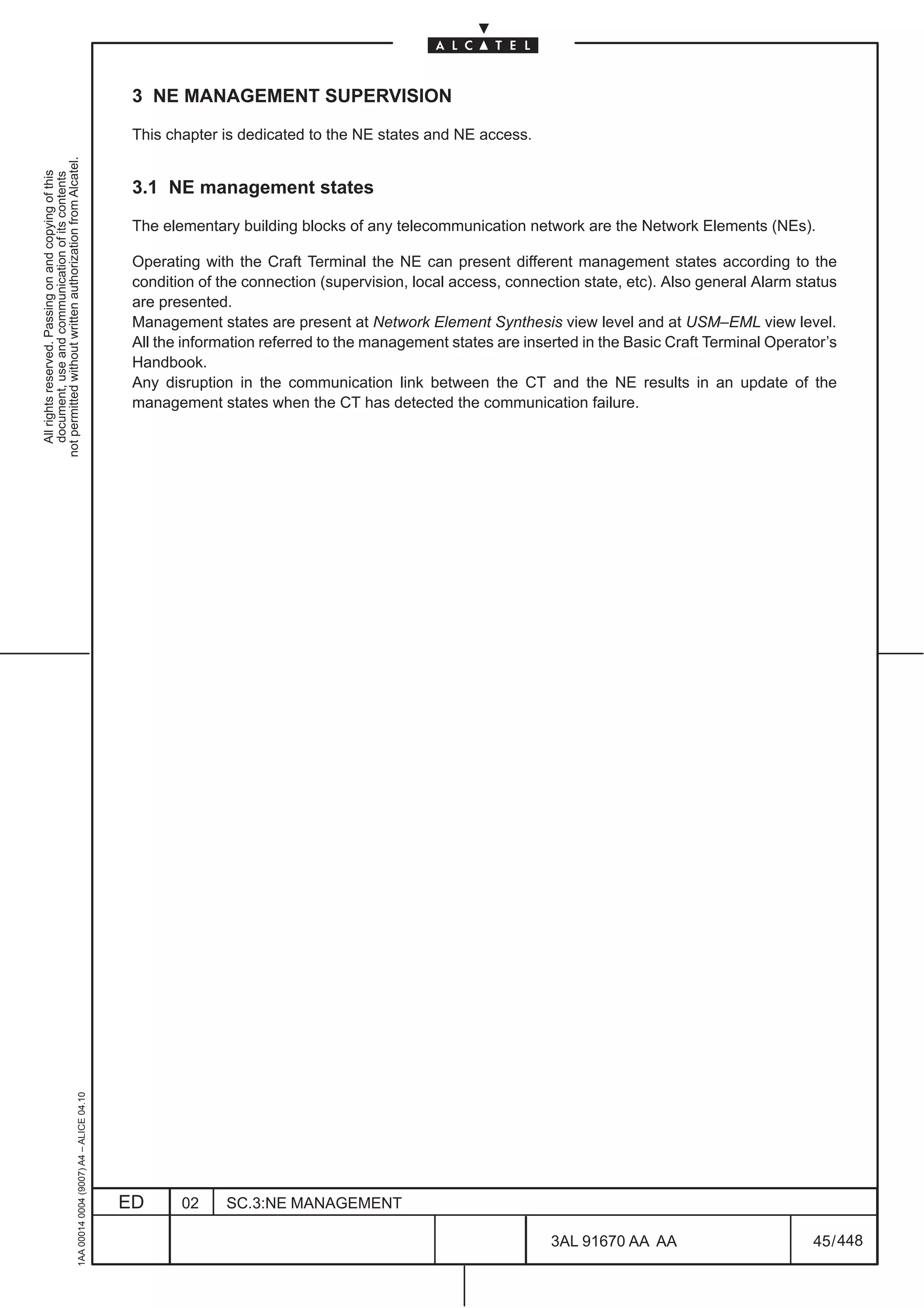
                                                                                               on Configure Squelch Table of the MS–SPRing pull down menu of Figure 269. on page 380.


                                                                                                                                     Figure 278. Squelching table
                                                     1AA 00014 0004 (9007) A4 – ALICE 04.10


                                                                                               When the window is opened for the first time the squelching table is N/A ( not available ) because the NE
                                                                                               has never been configured. Point the mouse on the matrix position and click on the right mouse button
                                                                                               to open the node list menu. Select the node identification number (0 to 15) from the available list using
                                                                                               the slider or the stepper arrows on the right scroll region.

                                                                                              ED      02     SC.3:NE MANAGEMENT

                                                                                                                                                               3AL 91670 AA AA                        387 / 448


                                                                                                                                                                             448
19.4.2.1 Squelching table example

                                          Figure 279. is an example of ring traffic.


                                                                                                                                                                not permitted without written authorization from Alcatel.
                                          Figure 280. represent in a table the connections of the ring example.


                                                                                                                                                                  All rights reserved. Passing on and copying of this
                                                                                                                                                                  document, use and communication of its contents
                                          Figure 281. to Figure 288. show how to configure the relative squelching table.


                                                                                          AU4#3          AU4#1
                                                                                                   AU4#2
                                                                 West                  East                   West                 East

                                                                 A                                                                      B


                                                                                                                                            AU4#1
                                                                                                                                            AU4#2
                                                      AU4#3                               AU4#2      AU4#3                                  AU4#3


                                                                 D                                                                     C

                                                                 East              West                       East               West
                                                                                              AU4#1


                                                                             Figure 279. Example of a ring traffic


                                          The squelching table is applicable only for HO–VC signals.

                                                                        AU             west          Node      east
                                                                        Number            A          B         C      D            A

                                                                        1                     VC

                                                                        2                                VC

                                                                        3                                             VC

                                                                        4

                                                                        5

                                                                        6
1AA 00014 0004 (9007) A4 – ALICE 04.10


                                                                     Figure 280. Connections of the ring of Figure 279.


                                         ED      02     SC.3:NE MANAGEMENT

                                                                                                              3AL 91670 AA AA                       388 / 448


                                                                                                                           448
Node A: 1660SM – MS–SPRING–Squelch Table Configu...
not permitted without written authorization from Alcatel.
  All rights reserved. Passing on and copying of this
  document, use and communication of its contents


                                                                                                                Figure 281. Squelching table of Node A, West side.


                                                                                                            Node A: 1660SM – MS–SPRING–Squelch Table Configu...
                                                     1AA 00014 0004 (9007) A4 – ALICE 04.10


                                                                                                                Figure 282. Squelching table of Node A, East side.


                                                                                              ED   02   SC.3:NE MANAGEMENT

                                                                                                                                                  3AL 91670 AA AA    389 / 448


                                                                                                                                                               448
Node B:1660SM–MS–SPRING–Squelch Table Configu...


                                                                                                                             not permitted without written authorization from Alcatel.
                                                                                                                               All rights reserved. Passing on and copying of this
                                                                                                                               document, use and communication of its contents
                                                           Figure 283. Squelching table of Node B, West side.


                                                        Node B:1660SM–MS–SPRING–Squelch Table Configu...
1AA 00014 0004 (9007) A4 – ALICE 04.10


                                                            Figure 284. Squelching table of Node B, East side.


                                         ED   02   SC.3:NE MANAGEMENT

                                                                                              3AL 91670 AA AA    390 / 448


                                                                                                           448
Node C:1660SM–MS–SPRING–Squelch Table Configu...
not permitted without written authorization from Alcatel.
  All rights reserved. Passing on and copying of this
  document, use and communication of its contents


                                                                                                                 Figure 285. Squelching table of Node C, West side.


                                                                                                             Node C:1660SM–MS–SPRING–Squelch Table Configu...
                                                     1AA 00014 0004 (9007) A4 – ALICE 04.10


                                                                                                                 Figure 286. Squelching table of Node C, East side.


                                                                                              ED   02   SC.3:NE MANAGEMENT

                                                                                                                                                   3AL 91670 AA AA    391 / 448


                                                                                                                                                                448
Node D:1660SM–MS–SPRING–Squelch Table Configu...


                                                                                                                             not permitted without written authorization from Alcatel.
                                                                                                                               All rights reserved. Passing on and copying of this
                                                                                                                               document, use and communication of its contents
                                                            Figure 287. Squelching table of Node D, West side.


                                                       Node D:1660SM–MS–SPRING–Squelch Table Configu...
1AA 00014 0004 (9007) A4 – ALICE 04.10


                                                            Figure 288. Squelching table of Node D, East side.


                                         ED   02   SC.3:NE MANAGEMENT

                                                                                              3AL 91670 AA AA    392 / 448


                                                                                                           448
19.4.3 Activate, Deactivate and Delete commands

                                                                                               The Main Activities commands ( Figure 272. on page 383) manage the MS–SPRing configuration. The
                                                                                               MS–SPRing status can be Enable, Active, Disable and Inactive.
not permitted without written authorization from Alcatel.
  All rights reserved. Passing on and copying of this
  document, use and communication of its contents


                                                                                               After having configured the protection schema by means of the Create button, the status becomes
                                                                                               Enable .

                                                                                               The Activate button selection enables the MS–SPRing protection mechanism on the selected schema
                                                                                               configuration.

                                                                                               To change from Active to Enable click on the Deactivate button. This command starts the request to
                                                                                               deactivate the MS–SPRing protection mechanism.

                                                                                               When the selected protection schema is Enable the Delete button starts the request to remove it. The
                                                                                               delete action is started after confirming the window message Figure 289. .


                                                                                                                                  Figure 289. Confirmation message


                                                                                               During the activation procedure on different ADMs some of these can be in Active status , others in Inactive
                                                                                               status. The statuses, the protocol request and the protocol protection errors are described in the chapters
                                                                                               describing the“MS–SPRing Protection Status and Commands” .
                                                     1AA 00014 0004 (9007) A4 – ALICE 04.10


                                                                                              ED      02     SC.3:NE MANAGEMENT

                                                                                                                                                               3AL 91670 AA AA                        393 / 448


                                                                                                                                                                             448
19.5 MS–SPRING Protection Status and Commands for 2 fiber terrestrial
                                          application


                                                                                                                                               not permitted without written authorization from Alcatel.
                                          19.5.1 2F MS–SPRing protection commands


                                                                                                                                                 All rights reserved. Passing on and copying of this
                                                                                                                                                 document, use and communication of its contents
                                          If a protection schema is Active it is possible to select one of the above commands.

                                          Clicking on the Prot. Commands button in the MS–SPRing –Main Dialog for MS–SPRing management
                                          ( see Figure 272. on page 383), Figure 290. is opened.
                                                      8


                                                              Figure 290. Protection states and commands ”Idle” status (2F)


                                          The working/protection    span state boxes are not available (greyed) for the 2Fiber MS–SPRing
1AA 00014 0004 (9007) A4 – ALICE 04.10


                                          architecture.


                                         ED      02       SC.3:NE MANAGEMENT

                                                                                                       3AL 91670 AA AA             394 / 448


                                                                                                                     448
In the MSPRing 2 Fiber configuration, the 1–8 working channels are inserted into the 9–16 protection
                                                                                               channels in the opposite side of the failure event as shown in Figure 291.
not permitted without written authorization from Alcatel.
  All rights reserved. Passing on and copying of this
  document, use and communication of its contents


                                                                                                            w/p     W          E                                  W            E
                                                                                                                                                           w/p

                                                                                                                          A
                                                                                                                                     w/p
                                                                                                                                             X                          B
                                                                                                                                                                                   w/p


                                                                                                                                      Ring Protection:
                                                                                                                                      the working channels (AU4 1 to 8) are substituted
                                                                                                                                      by the ring protection channels ”p” (AU4 9 to 16)
                                                                                                                                      ( B on East side )
                                                                                                                                      ( A on West side )


                                                                                                                                   Figure 291. Ring Protection (2F)
                                                     1AA 00014 0004 (9007) A4 – ALICE 04.10


                                                                                              ED      02    SC.3:NE MANAGEMENT

                                                                                                                                                            3AL 91670 AA AA                   395 / 448


                                                                                                                                                                         448
19.5.2 External commands (2F)

                                          The external protection commands are : Lockout, Force, Exercise (not operative in current
                                          release),Manual, WTR.


                                                                                                                                                        not permitted without written authorization from Alcatel.
                                                                                                                                                          All rights reserved. Passing on and copying of this
                                                                                                                                                          document, use and communication of its contents
                                          The lockout commands disable the MS–SPRing management.

                                          The lockout section presents six lockout commands, four operative ( Figure 292. ). Each lockout
                                          command is applicable on different points where the lockout actions has to be performed ( Figure 293. )
                                          and any “Lockout” command is associated to a “Release “ command to come back to the previous status.

                                          Term “Span” identifies the section interested by the command, it doesn’t assume the Span meaning of the
                                          four fiber protection.


                                                                           Figure 292. Lockout commands (2F)


                                                                                    West               East
                                                                           w                                     w
                                                                           p                                     p
                                                                                               A
                                                                           p                                     p
                                                                           w                                     w

                                                                                  w= working (AU4 1 to 8)
                                                                                  p=protection (AU4 9 to 16)


                                              Figure 293. Protection and working channels where the lockout command can be activated (2F)
1AA 00014 0004 (9007) A4 – ALICE 04.10


                                         ED      02    SC.3:NE MANAGEMENT

                                                                                                          3AL 91670 AA AA                   396 / 448


                                                                                                                     448
The protection events can be equipment/signal failure, signal degrade or external command or a
                                                                                               combination of them.

                                                                                               The “Events” will be served if some actions (B/S=bridges and switches) are executed and the network
not permitted without written authorization from Alcatel.


                                                                                               has been updated.
  All rights reserved. Passing on and copying of this
  document, use and communication of its contents


                                                                                               The “Events” will be signalled if the K1/K2 protocol communicates to the network nodes what has
                                                                                               happened, without execute actions.

                                                                                               A single ring failure is completely restored but not two ring failures. When are present multiple ring failures
                                                                                               the automatic B/S protection will try to maintain on all the possible connections.

                                                                                               The K1/K2 communication protocol MS–SPRing is generated from the two nodes adjacent to “Event” via
                                                                                               the protection communication channels. A node is defined tail –end when it firstly receives the “Event”,
                                                                                               the second node is defined head–end when it receives back the protocol answer. Figure 294. shows the
                                                                                               association of tail–end / tail–end or head–end / tail–end.

                                                                                               Some network protection mechanisms are accepted or rejected depending on the end type (tail/head)
                                                                                               (lockout command,...)


                                                                                                                    W           E               W            E              W             E
                                                                                                                                      w/p                           w/p
                                                                                                                           B
                                                                                                                                     X
                                                                                                                                     w/p
                                                                                                                                                       A
                                                                                                                                                                   X
                                                                                                                                                                   w/p
                                                                                                                                                                                      C


                                                                                                                        Tail–end             Tail–end/Head–end                   Tail–end


                                                                                                                               Figure 294. Tail–end / Head–end association


                                                                                               If the node is tail–end, the lockout working ring command disable the protection MS–SPRing
                                                                                               mechanisms, while if the node is head–end, it serves the request node protection (protection not
                                                                                               disable). See Figure 295. on page 398.

                                                                                               With the lockout protecting span command and a ring failure, the ring protection is served if this ring failure
                                                                                               occurred along the same section; the ring protection is disabled if the ring failure has occurred in
                                                                                               another ring section.
                                                                                               On the contrary, with the lockout working ring command failure and a ring failure along a different section,
                                                                                               the ring protection is served ((protection not disable). See Figure 296.
                                                     1AA 00014 0004 (9007) A4 – ALICE 04.10


                                                                                              ED      02     SC.3:NE MANAGEMENT

                                                                                                                                                                 3AL 91670 AA AA                        397 / 448


                                                                                                                                                                                448
Lockout working
                                                                                                w/p
                                                                                     A


                                                                                                                                                        not permitted without written authorization from Alcatel.
                                                                                  head   w/p


                                                                                                                                                          All rights reserved. Passing on and copying of this
                                                                                                                                                          document, use and communication of its contents
                                                                                 W     E  failure
                                                                                                      W
                                                                                                            B
                                                                                                           tail
                                                                                                      E

                                                                            ring protection

                                                                    Lockout working                   failure
                                                                                                w/p
                                                                                     A
                                                                                     tail       w/p
                                                                                 W          E
                                                                                                      W
                                                                                                            B
                                                                                                           head
                                                                                                      E

                                                                           no ring protection


                                          Figure 295. Tail–end / head–end protection with a lockout working and a one direction ring failure (2F)
1AA 00014 0004 (9007) A4 – ALICE 04.10


                                         ED     02     SC.3:NE MANAGEMENT

                                                                                                          3AL 91670 AA AA                   398 / 448


                                                                                                                    448
Lockout protecting Span                                    Lockout protecting Span
not permitted without written authorization from Alcatel.
  All rights reserved. Passing on and copying of this
  document, use and communication of its contents


                                                                                                                                                           failure
                                                                                                                               w/p        failure                    w/p
                                                                                                                      A        w/p                                   w/p     A
                                                                                                               W           E                                           W             E
                                                                                                                                     W                 E
                                                                                                                                           B               C
                                                                                                                                     E                W

                                                                                                                ring protection                                        no ring protection


                                                                                                              Lockout working                       Lockout working                   Lockout working


                                                                                                                               w/p       failure                          w/p       failure
                                                                                                                     A         w/p                              A         w/p
                                                                                                                W         E                                W          E
                                                                                                                                     W                                       W
                                                                                                                                          B                                           B
                                                                                                                                     E                                          E

                                                                                                               ring protection                              no ring protection


                                                                                                              Lockout working


                                                                                                   failure
                                                                                                              w/p
                                                                                                              w/p    A
                                                                                                               W          E
                                                                                               E
                                                                                                   C
                                                                                               W
                                                                                                               ring protection
                                                     1AA 00014 0004 (9007) A4 – ALICE 04.10


                                                                                                                    Figure 296. Ring protection with a lockout and a ring failure (2F)


                                                                                              ED    02       SC.3:NE MANAGEMENT

                                                                                                                                                               3AL 91670 AA AA                          399 / 448


                                                                                                                                                                                    448
1AA 00014 0004 (9007) A4 – ALICE 04.10


                           ED
                                                                                                                               Lockout Working       Lockout Working           Lockout Protection               Lockout Protection


                           02
                                                                                                                                   Ring W               Ring E                      Ring W                              Ring E

                                                                                                                                   A Node                A Node                      A Node                            A Node


                                                                                                           Combinations
                                                                                                           of non–served            ”1”                      ”2”
                                                                                                                                                                                ring protection on                ring protection on
                                                                                                           failures and                                                         the opposite side
                                                                                                           external commands                                                                                      the opposite side
                                                                                                                                                                                if the ring failure                if the ring failure
                                                                                                                                                                                occurs between                    occurs between
                                                                                                                                                                               A–C or C–B nodes                  A–B or B–C nodes


                           SC.3:NE MANAGEMENT
                                                                                                                                      W          E             W           E                W               E
                                                                                                                                                 3     w/p                 2       w/p

                                                                                                                                            B                          A                             C
                                                                                                                                                       w/p         1               w/p        4


448
         3AL 91670 AA AA
                                                Figure 297. Lockout command and non–served failures (2F)
                                                                                                                                                                                                                                              command disables the acknowledgment of the signal failure/degrade on the receiving ports.
                                                                                                                                                                                                                                              Figure 297. shows a ring with three nodes and the actions performed by the lockout commands. This


         400 / 448
                                                                                                                                                                                    All rights reserved. Passing on and copying of this
                                                                                                                                                                                    document, use and communication of its contents
                                                                                                                                                                                  not permitted without written authorization from Alcatel.
The Force command ( Figure 298. ) executes a forced protection. The Force Ring command substitutes
                                                                                               the working channels (AU4 1 to 8) with the opposite direction protection channels (AU4 9 to 16) between
                                                                                               two adjacent nodes (Figure 299. ).
                                                                                               The Force Span command is not operative in 2 fiber MS–SPring.
not permitted without written authorization from Alcatel.
  All rights reserved. Passing on and copying of this
  document, use and communication of its contents


                                                                                                                           Figure 298. Forced and Manual commands (2F)


                                                                                                    Manual/force Ring East                                              Manual/force Ring West


                                                                                                            A                    A1                                B1                       B
                                                                                                        W       E                                                                       W       E
                                                                                                w1–8                   W/P                w1–8        w1–8                                          w1–8
                                                                                                                                                                                  W/P
                                                                                                p9–16                                     p9–16       p9–16                                         p9–16


                                                                                                w1–8                                      w1–8                                                      w1–8
                                                                                                                       W/P                            w1–8

                                                                                                p9–16                                     p9–16       p9–16                                         p9–16


                                                                                                                         W. 1–8 channels are substituted by P. 9–16 channels
                                                                                                                             on the opposite side for both adjacent nodes


                                                                                                                         Figure 299. Manual and Force Ring command (2F)


                                                                                               The Manual command is similar to Force command but it is at a lower priority level with respect to
                                                                                               automatic MS–SPRing. The general priority scale that can be applied to solve antithetical situations
                                                                                               starting from the lowest priority level is: manual ring – automatic working ring – force ring – lockout
                                                                                               Working Ring – lockout Protecting Span.

                                                                                               When a force ring command is applied a next working failure is not able to modify the forced configuration
                                                                                               applied. That is because force ring command has a higher priority respect to the “Automatic” working
                                                     1AA 00014 0004 (9007) A4 – ALICE 04.10


                                                                                               protection. In this condition the ring can be split according the location of command and event. Vice versa
                                                                                               the “Manual” protection is exceeded by the “Automatic” protection. Figure 300. visualizes the ring
                                                                                               protection with a Force/Manual command and a signal failure. FS–R is for “Force Switching Request”,
                                                                                               SF–R is for “Signal Failure Request”.

                                                                                              ED       02       SC.3:NE MANAGEMENT

                                                                                                                                                              3AL 91670 AA AA                        401 / 448


                                                                                                                                                                            448
Force Ring East
                                                                                           failure
                                                                                 w/p


                                                                                                                                                                    not permitted without written authorization from Alcatel.
                                                                         A


                                                                                                                                                                      All rights reserved. Passing on and copying of this
                                                                                                                                                                      document, use and communication of its contents
                                                                                 w/p
                                                                   W         E

                                                      E                                W

                                               C                                               B
                                                     W                                 E

                                                             ring protection for FS–R


                                                                        Force Ring East
                                                   failure
                                                             w/p                 ”A” node is isolated

                                                             w/p         A
                                                                W            E
                                                     E                                 W
                                               C                                               B
                                                                                       E
                                                      W
                                                                                                                       Manual Ring East
                                                    ring protection for SF–R and FS–R
                                                                                                                                          failure
                                                                                                                                    w/p
                                                                                                                         A          w/p
                                                                                                                   W           E
                                                                                                         E                                 W
                                                                                                   C                                                B
                                                                                                        W                                  E

                                                                                                                  ring protection for SF–R


                                                                                                                       Manual Ring East
                                                                                                     failure
                                                                                                                 w/p

                                                                                                                 w/p      A

                                                                                                                   W           E
                                                                                           E
                                                                                                   C
                                                                                           W

                                                                                                                  ring protection for SF–R
1AA 00014 0004 (9007) A4 – ALICE 04.10


                                                          Figure 300. Ring Protection with Force and Manual commands (2F)


                                         ED   02     SC.3:NE MANAGEMENT

                                                                                                               3AL 91670 AA AA                          402 / 448


                                                                                                                              448
Signal fail/degrade Signal fail/degrade
                                                                                                                                       Ring W                Ring E
                                                                                                                                            A node                       A node
not permitted without written authorization from Alcatel.
  All rights reserved. Passing on and copying of this
  document, use and communication of its contents


                                                                                                                                         1–2 w. channels are          3–4 w. channels are
                                                                                                                 B/S actions             sobstituted by 3–4 p.        sobstituted by 1–2 p.
                                                                                                                                         channels                     channels


                                                                                                                W              E               W                 E            W               E
                                                                                                                                      w/p                             w/p
                                                                                                                                                1            4
                                                                                                                       B                               A                              C
                                                                                                                                      w/p                            w/p
                                                                                                                                                2            3


                                                                                                                          Figure 301. Automatic protection Bridge/Switch (2F)

                                                                                               Each command starts when the proper button is selected. A dialog box ( Figure 302. ) has to be confirmed
                                                                                               before the command is performed.

                                                                                               From each command exists its own Release button to cancel the previously selected command and come
                                                                                               back to normal MS–SPRing protection.


                                                                                                                               Figure 302. Example of confirmation dialog box

                                                                                               Clicking on the WTR command (of Figure 272. on page 383) next figure opens. If the WTR box, in the
                                                                                               Local Condition field of Figure 290. on page 394, becomes red a waiting time has been activated after
                                                                                               repairing the ring failure. The waiting time, set in the configuration menu, can be cleared selecting the
                                                                                               Clear WTR Ring command. A confirmation dialog box opens and, if the operator clicks OK, the WTR
                                                                                               box turns off and the protection status window is updated.
                                                     1AA 00014 0004 (9007) A4 – ALICE 04.10


                                                                                                                                   Figure 303. Clear WTR command (2F)


                                                                                              ED      02     SC.3:NE MANAGEMENT

                                                                                                                                                                     3AL 91670 AA AA               403 / 448


                                                                                                                                                                                    448
19.5.3 2F MS–SPRing dual protection commands

                                          In general dual contemporary “Events” can be:


                                                                                                                                                                 not permitted without written authorization from Alcatel.
                                               two external commands


                                                                                                                                                                   All rights reserved. Passing on and copying of this
                                                                                                                                                                   document, use and communication of its contents
                                               an external command and a ring failure

                                               two contemporary ring failures

                                          Dual “Events” can appear on the same side W/W (West/West) or E/E (East/East) (SS= same side) or on
                                          the opposite side W/E or E/W (OS= opposite site) of the ring network. In the SS or OS the “Events” can
                                          appear on the same node (SN) or on the different nodes (DN), the different node can be an adjacent node
                                          (AN) or a remote node (RN). Figure 304. depicts a clockwise ring network . The network propagation
                                          K1–K2 protocol signals are according to the following legend :

                                               C             = served the column element

                                               R             = served the row element

                                               B             = served both row and column elements

                                               Cs            = signalled (not served) the column element

                                               Rs            = signalled (not served) the row element

                                               Bs            = signalled (not served) both row and column element

                                                        when a command (Manual switch, Force switch) is neither served nor signalled, it is erased ( it is
                                                        not pending at the node)
1AA 00014 0004 (9007) A4 – ALICE 04.10


                                         ED        02      SC.3:NE MANAGEMENT

                                                                                                             3AL 91670 AA AA                         404 / 448


                                                                                                                           448
Reference point
not permitted without written authorization from Alcatel.
  All rights reserved. Passing on and copying of this
  document, use and communication of its contents


                                                                                                                                                                                  clockwise
                                                                                                                                    OS SN                SS SN

                                                                                                                                                  1


                                                                                                                                            W             E

                                                                                                   SS RN               E                                                   W              OS AN

                                                                                                               4                                                                   2

                                                                                                                                                                           E
                                                                                                                       W                    E            W
                                                                                                   OS RN                              w/p                      w/p                        SS AN
                                                                                                                                                   3
                                                                                                                                      w/p                      w/p

                                                                                                                                     SS RN                OS RN


                                                                                                                           Figure 304. Ring network reference scheme (2F)


                                                                                               Figure 304. visualizes the ring reference scheme: the adjacent node (AN) is the node connected to the
                                                                                               reference point.

                                                                                               The automatic protection for dual ring failures is represented in Figure 306. Consider the network
                                                                                               reference scheme of Figure 305. with a tail–end / head–end alarm propagation. In this figure are depicted
                                                                                               the node switches for any reported double events.
                                                     1AA 00014 0004 (9007) A4 – ALICE 04.10


                                                                                              ED      02     SC.3:NE MANAGEMENT

                                                                                                                                                              3AL 91670 AA AA                      405 / 448


                                                                                                                                                                           448
failure
                                                                                       w/p
                                                                          1            w/p


                                                                                                                                                                             not permitted without written authorization from Alcatel.
                                                                                                                                                                               All rights reserved. Passing on and copying of this
                                                                                                                                                                               document, use and communication of its contents
                                                                  W                E
                                                             E                               W
                                                        4                                            2       SS–AN
                                                             W    E                W         E
                                                                          3                              failure
                                                                                                                                 failure
                                                                                                                                         w/p
                                                                                                                                 1       w/p
                                                                                                                          W          E
                                                                                                                   E                           W
                                                                                                              4                                    2      SS–RN
                                                                                                                   W       E         W         E
                                                                                                                                 3
                                                                                                                       failure
                                                                              failure
                                                                                          w/p
                                                                              1           w/p
                                              failure             W                   E
                                                              E                                 W
                                                        4                                            2        OS–SN
                                                              W       E            W             E
                                                                          3
                                                                                                                                 failure
                                                                                                                                         w/p
                                                                                                                                 1       w/p
                                                                                                                           W         E                 failure
                                                                                                                   E                           W
                                                                                                              4                                    2      OS–AN
                                                                                                                   W       E         W         E
                                                                                                                                 3
                                                                          failure
                                                                                       w/p
                                                                          1            w/p

                                                                  W                E
                                                             E                               W
                                                        4                                            2      OS–RN
                                                             W    E               W          E
                                                                          3
                                                                                   failure
1AA 00014 0004 (9007) A4 – ALICE 04.10


                                                                                  Figure 305. Examples of Double ring failure


                                         ED       02        SC.3:NE MANAGEMENT

                                                                                                                         3AL 91670 AA AA                         406 / 448


                                                                                                                                          448
Reference
                                                                                                                                point
                                                                                                                                                                            Automatic Protection Ring
                                                                                                                                Other
not permitted without written authorization from Alcatel.


                                                                                                                                points
  All rights reserved. Passing on and copying of this
  document, use and communication of its contents


                                                                                                                                       SN

                                                                                                                                              Node 2 : isolated = Bs
                                                                                                                                 SS    AN     Node 1–3 in switching for SF alarm =B
                                                                                                   Automatic Protection Ring


                                                                                                                                              Node 4=intermediate
                                                                                                                                         RN   Nodes 1,2,3,4 in switching for SF alarm =B
                                                                                                                                              Node 1: isolated=Bs
                                                                                                                                       SN     Nodes 2,4 in switching for SF alarm=B
                                                                                                                                              Node 3= intermediate
                                                                                                                                OS            Node 1,2 in switching for alarm=B
                                                                                                                                       AN
                                                                                                                                              Nodes 3,4 = intermediate
                                                                                                                                              Node 2: isolated=Bs
                                                                                                                                         RN   Node 1,3 in switching for SF alarm=B
                                                                                                                                              Node 4 = intermediate


                                                                                                                                     Figure 306. 2F Automatic protection (tail/head) for double ring failure visualization


                                                                                               The same reference Figure 304. and Figure 305. schemas are applied to describe dual generic “Events”
                                                                                               where both ring failures and external commands are considered.

                                                                                               The first row at the top of the protection table (Figure 307. ) shows the “Events” at the reference point. For
                                                                                               each of them the associated “Event” is listed on the first column at the left of the table.

                                                                                               Two manual ring commands can be only signalled: Bs (Manual SS–SN and OS–AN commands give the
                                                                                               same ring protection switching and then both can be served).

                                                                                               Two Lockout commands are both always served: B

                                                                                               Force command has priority with respect to the Manual one.

                                                                                               Automatic protection has priority with respect to the Manual command.

                                                                                               Force Ring and Automatic Protection (or two Force ring commands) are always served if they are not
                                                                                               applied on the SS–SN. In this last case has to be considered the priority level. The behavior is that seen
                                                                                               for two automatic protection switching ( Figure 305. )

                                                                                               Lockout working SS–SN has priority with respect to Manual, Automatic protection and Force commands.
                                                                                               In the other cases, both commands are served (B).

                                                                                               Lockout protection SS–SN / OS–AN and Manual or Automatic or Force command are both served
                                                                                               because the switching SS–SN / OS–AN channels are not managed by the lockout protection: B.

                                                                                               Lockout protection SS–AN / OS–SN overrides the Manual or Automatic or Force command because the
                                                                                               lockout protection controls the switching channels of the same Node.

                                                                                               Lockout protection SS–RN / OS–RN and manual or automatic or force command: the lockout protection
                                                     1AA 00014 0004 (9007) A4 – ALICE 04.10


                                                                                               prevents the working 1–8 channels from being inserted into the protecting 9–16 ones. The lockout
                                                                                               protection is served, because it has a higher priority, the ring protection will be only signalled (pending).


                                                                                              ED                                02       SC.3:NE MANAGEMENT

                                                                                                                                                                                           3AL 91670 AA AA                   407 / 448


                                                                                                                                                                                                        448
Reference                         Automatic
                                                                point                                              Force                       Lockout
                                                                                  Manual           Working
                                                                   Other          Ring              Ring           Ring           Protection             Working
                                                                   points


                                                                                                                                                                               not permitted without written authorization from Alcatel.
                                                                                                                                                                                 All rights reserved. Passing on and copying of this
                                                                                                                                                                                 document, use and communication of its contents
                                                                         SN                        R                 R                B                    R
                                                                    SS AN
                                                                                 Bs                R                 R                R                    B
                                              Ring


                                                                       RN        Bs                R                 R                RCs                  B
                                                                         SN      Bs                R                 R                R                    B
                                              Manual


                                                                    OS AN        B                 R                 R                B                    B
                                                                         RN      Bs                R                 R                RCs                  B
                                                                         SN      C                 C                                  B                    R
                                                                   SS    AN      C                 B                 B                R                    B
                                              Ring


                                                                         RN      C                 B                 B                RCs                  B
                                                                         SN      C                 B                 B                R                    B
                                              Force


                                                                   OS    AN      C                 B                 B                B                    B
                                                                         RN      C                 B                 B                RCs                  B
                                                                         SN      C                 C                 C
                                              Lockout Working


                                                                    SS   AN      B                 B                 B
                                                                         RN      B                 B                 B                            B
                                                                         SN      B                 B                 B
                                                                    OS
                                                                         AN      B                 B                 B
                                                                         RN      B                 B                 B
                                                                         SN      B                 B                 B
                                              Lockout Protecting


                                                                   SS    AN      C                 C                 C
                                                                         RN      CRs               CRs               CRs                          B
                                                                         SN      C                 C                 C
                                                                   OS    AN      B                 B                 B
                                                                         RN      CRs               CRs               CRs


                                                                                      Figure 307. Tail / head dual “Events” Protection table (2F)
1AA 00014 0004 (9007) A4 – ALICE 04.10


                                         ED                         02        SC.3:NE MANAGEMENT

                                                                                                                             3AL 91670 AA AA                       408 / 448


                                                                                                                                            448
19.5.4 2F Protection Status Visualization

                                                                                               The protection statuses ring network are:
not permitted without written authorization from Alcatel.


                                                                                               –    1 – Lockout Switching
  All rights reserved. Passing on and copying of this
  document, use and communication of its contents


                                                                                               –    2 – Forced Switching

                                                                                               –    3 – Automatic Switching ( MS–MSPRing protection for equipment/signal failure ).

                                                                                               –    4 – Manual Switching

                                                                                               –    5 – Idle ( regular operation without MS–SPRing protection )

                                                                                               These protection states are represented with the following color state boxes:

                                                                                               –    Green: Active State, No Request condition.

                                                                                               –    Red: Inactive State and any external or protection executed command ( that has been served ).

                                                                                               –    Yellow: ordered but not executed command ( that has only been signalled= pending status ).

                                                                                               –    Greyed: not available state box.

                                                                                               Automatic switching and external commands are revertive: then when the “Events” have been cleared,
                                                                                               the MS–SPRing configuration comes back to its idle status.

                                                                                               The state boxes visualize the “Node Condition Request” as a consequence of the equipment/signal failure
                                                                                               or the external commands detected on the corresponding side (”Event”). The state boxes don’t describe
                                                                                               the protection actions provided on the NEs.

                                                                                               The served “Events” ( B/S=bridges and switches are executed and the network has been updated ) are
                                                                                               completed B/S actions visualized as red box indications

                                                                                               The signalled “Events” ( the K1/K2 protocol communicates to the network nodes what has happened )
                                                                                               are pending B/S visualized as yellow box indications.

                                                                                               Figure 308. shows the protection status with a served East manual ring command. Any protection status
                                                                                               window is divided in different status fields: Schema description and status, Local Conditions, Node
                                                                                               Conditions and Protocol Exceptions. The first one describes the network configuration and application
                                                                                               type and its status, the second gives the local external commands indications, the third the “Events” results
                                                                                               on the nodes and the fourth one checks the k1/k2 ring protocol. The window is divided into three parts:
                                                                                               West, Middle and East. On the West there are all the box indications corresponding to the West protections
                                                                                               and commands. In the middle “WTR–Ring” refers to West and East sides, “No Request” corresponding
                                                                                               to “Idle Status”, and “Intermediate Node” denotes that the protections and commands don’t concern the
                                                                                               node involved. The Manual Ring command visualizes “Manual Ring” on the local node and “Request
                                                                                               Node Ring” in the both “Local Conditions adjacent East ADM1–West ADM2 nodes, while the 3 and 4
                                                                                               nodes are “Intermediate Node”. The red color means that the command has been served. A regular
                                                                                               protocol “Exceptions” is represented with white boxes, a protocol alarm is signalled with red boxes. The
                                                                                               “Prot. Unavailable” indications are activated when a lockout protection command is applied in a network
                                                                                               node.
                                                     1AA 00014 0004 (9007) A4 – ALICE 04.10


                                                                                              ED      02     SC.3:NE MANAGEMENT

                                                                                                                                                               3AL 91670 AA AA                         409 / 448


                                                                                                                                                                             448
ADM4: 1660SM –– MS–SPRING–Protection States and Commands   ADM1: 1660SM –– MS–SPRING–Protection States and Commands


                                                                                                                                                                                not permitted without written authorization from Alcatel.
                                                                                                                                                                                  All rights reserved. Passing on and copying of this
                                                                                                                                                                                  document, use and communication of its contents
                                              ADM3: 1660SM –– MS–SPRING–Protection States and Commands   ADM2: 1660SM –– MS–SPRING–Protection States and Commands


                                                  Figure 308. Manual command applied at the “Reference Point” ring network Figure 305.


                                          Figure 309. reports the “Protection Status” for external “Force and “Manual” commands in a 3 –node ring
                                          (A, B, C). Figure 310. shows the lockout statuses and Figure 311. the automatic protection statuses.
1AA 00014 0004 (9007) A4 – ALICE 04.10


                                         ED       02       SC.3:NE MANAGEMENT

                                                                                                                 3AL 91670 AA AA                                    410 / 448


                                                                                                                                   448
not permitted without written authorization from Alcatel.
  All rights reserved. Passing on and copying of this
  document, use and communication of its contents


                                                                                                        Reference                   Force/Manual                              Force/Manual
                                                                                                         node: A                       Ring W                                    Ring E
                                                                                                                                A          B           C                  A                  B                  C


                                                                                                        Local Conditions       Force/                                    Force/
                                                                                                                               Manual                                   Manual
                                                                                                                               Ring                                      Ring
                                                                                                                                W                                         E


                                                                                                                                                  Intermediate


                                                                                                                                                                                      Intermediate
                                                                                                                           Request      Request                         Request                             Request
                                                                                                                                                                 Node


                                                                                                                                                                                                     Node
                                                                                                                            Node         Node                           Node                                 Node
                                                                                                        Node Conditions      Ring         Ring                           Ring                                 Ring
                                                                                                                              W            E                              E                                    W


                                                                                                               W           E               W                     E                W                         E
                                                                                                                                     w/p                                w/p

                                                                                                                      B                           A                                                  C
                                                                                                                                     w/p                                w/p
                                                     1AA 00014 0004 (9007) A4 – ALICE 04.10


                                                                                                        Figure 309. Visualization of the Forced / Manual protection Statuses (2F)


                                                                                              ED   02   SC.3:NE MANAGEMENT

                                                                                                                                                                         3AL 91670 AA AA                              411 / 448


                                                                                                                                                                                                      448
not permitted without written authorization from Alcatel.
                                                                                                                                                                                                                                     All rights reserved. Passing on and copying of this
                                                                                                                                                                                                                                     document, use and communication of its contents
                                              Reference       Lockout Working       Lockout Working Lockout Protecting Lockout Protecting
                                               node: A            Ring W                 Ring E         Span W              Span E
                                                              A       B       C      A       B   C     A                         B                     C                   A                B             C


                                               Local        Lockout                Lockout           Lockout                                                          Lockout
                                               Conditions    Ring W                Ring E             Prot W                                                           Prot E


                                                                                                                                                                                                          Prot. Unavailable
                                                                                                       Prot. Unavailable


                                                                                                                               Prot. Unavailable


                                                                                                                                                                       Prot. Unavailable
                                                                                                                                                       Intermediate


                                                                                                                                                                                           Intermediate
                                                                                                                                                          Node


                                                                                                                                                                                              Node
                                               Node
                                               Conditions


                                                               W          E              W       E                         W                               E
                                                                                  w/p                w/p

                                                                      B                      A                                                     C
                                                                                  w/p                w/p
1AA 00014 0004 (9007) A4 – ALICE 04.10


                                                                Figure 310. Visualization of the Lockout command Statuses (2F)


                                         ED       02        SC.3:NE MANAGEMENT

                                                                                                          3AL 91670 AA AA                                                                                              412 / 448


                                                                                                                                                       448
not permitted without written authorization from Alcatel.
  All rights reserved. Passing on and copying of this
  document, use and communication of its contents


                                                                                                            Reference                Signal fail/degrade                            Signal fail/degrade
                                                                                                            node: A                      Ring W                                          Ring E
                                                                                                                                      A           B               C                   A               B                   C


                                                                                                           Node Conditions       Request        Request                              Request                             Request


                                                                                                                                                                                               Intermediate
                                                                                                                                                              Intermediate
                                                                                                                                  Ring           Ring                                 Ring                                Ring


                                                                                                                                                                                                              Node
                                                                                                                                   W              E                                    E                                   W


                                                                                                                                                                             Node


                                                                                                                   W             E                W                          E            W                          E
                                                                                                                                          w/p                                       w/p

                                                                                                                             B                            A                                      C
                                                                                                                                          w/p                                       w/p


                                                                                                                    Figure 311. Visualization of Automatic Protection Statuses (2F)


                                                                                               The WTR status is visualized on the side where the link has been repaired. The considered network
                                                                                               failures are related to a tail–end/head–end node connection. The “WTR Clear” command can be executed
                                                                                               by the user without waiting the WTR setting time.
                                                     1AA 00014 0004 (9007) A4 – ALICE 04.10


                                                                                              ED      02     SC.3:NE MANAGEMENT

                                                                                                                                                                                     3AL 91670 AA AA                               413 / 448


                                                                                                                                                                                                              448
19.5.4.1 Double ring failure
                                          The double ring failure visualization of Figure 305. are here following reported.
                                              ADM4: 1660SM –– MS–SPRING–Protection States and Commands   ADM1: 1660SM –– MS–SPRING–Protection States and Commands


                                                                                                                                                                                not permitted without written authorization from Alcatel.
                                                                                                                                                                                  All rights reserved. Passing on and copying of this
                                                                                                                                                                                  document, use and communication of its contents
                                              ADM3: 1660SM –– MS–SPRING–Protection States and Commands   ADM2: 1660SM –– MS–SPRING–Protection States and Commands


                                                        Figure 312. Protection status with double ring failure (reference point––SS–AN)

                                          Figure 312. reports the protection status with double ring failure (reference point––SS–AN. The node 2
                                          isolated, the nodes 2–3 in switching and the node 4 Intermediate. The box color is white unless otherwise
                                          specified:
1AA 00014 0004 (9007) A4 – ALICE 04.10


                                          “Active”: green
                                          “Request Node Ring” West ADM3–East ADM1: red (served)
                                          “Request Node Ring” West ADM2–East ADM2: yellow (pending)
                                          “Intermediate Node” ADM4: red


                                         ED       02       SC.3:NE MANAGEMENT

                                                                                                                 3AL 91670 AA AA                                    414 / 448


                                                                                                                                   448
ADM4: 1660SM –– MS–SPRING–Protection States and Commands   ADM1: 1660SM –– MS–SPRING–Protection States and Commands
not permitted without written authorization from Alcatel.
  All rights reserved. Passing on and copying of this
  document, use and communication of its contents


                                                                                                   ADM3: 1660SM –– MS–SPRING–Protection States and Commands   ADM2: 1660SM –– MS–SPRING–Protection States and Commands


                                                                                                             Figure 313. Protection status with double ring failure (reference point––SS–RN)


                                                                                               Figure 313. reports the protection status with double ring failure (reference point––SS–RN). The nodes
                                                                                               1,2,3,4 are being switched for signal failure alarm and both the two signal failures are served. The box
                                                                                               color is white unless otherwise specified:

                                                                                               “Active”: green
                                                     1AA 00014 0004 (9007) A4 – ALICE 04.10


                                                                                               “Request Node Ring” East ADM3–East ADM1: red (switching for SF)
                                                                                               “Request Node Ring” East ADM4–East ADM2: red (switching of the opposite nodes)


                                                                                              ED       02       SC.3:NE MANAGEMENT

                                                                                                                                                                      3AL 91670 AA AA                                    415 / 448


                                                                                                                                                                                        448
ADM4: 1660SM –– MS–SPRING–Protection States and Commands   ADM1: 1660SM –– MS–SPRING–Protection States and Commands


                                                                                                                                                                                not permitted without written authorization from Alcatel.
                                                                                                                                                                                  All rights reserved. Passing on and copying of this
                                                                                                                                                                                  document, use and communication of its contents
                                              ADM3: 1660SM –– MS–SPRING–Protection States and Commands   ADM2: 1660SM –– MS–SPRING–Protection States and Commands


                                                        Figure 314. Protection status with double ring failure (reference point––OS–AN)


                                          Figure 314. reports the protection status with double ring failure (reference point––OS–AN). The nodes
                                          1,2 are being switched for signal failure alarm and both signal failures are served: B. The box color is white
                                          unless otherwise specified:

                                          “Active”: green
1AA 00014 0004 (9007) A4 – ALICE 04.10


                                          “Request Node Ring” West ADM2–East ADM1: red (switching for SF)
                                          “Intermediate Node ” ADM3–ADM4: red


                                         ED       02       SC.3:NE MANAGEMENT

                                                                                                                 3AL 91670 AA AA                                    416 / 448


                                                                                                                                   448
ADM4: 1660SM –– MS–SPRING–Protection States and Commands   ADM1: 1660SM –– MS–SPRING–Protection States and Commands
not permitted without written authorization from Alcatel.
  All rights reserved. Passing on and copying of this
  document, use and communication of its contents


                                                                                                    ADM3: 1660SM –– MS–SPRING–Protection States and Commands   ADM2: 1660SM –– MS–SPRING–Protection States and Commands


                                                                                                   Figure 315. Protection status with double ring failure (reference point––OS–AN) recovering to “idle”


                                                                                               Figure 315. reports the previous protection status with double ring failure (reference point––OS–AN)
                                                                                               while the ring protection comes back to its “idle” status. The “WTR (Wait To Restore) Ring” on ADM1 node
                                                                                               becomes red to signal that the SF disappears at the “reference point” . The box color is white unless
                                                                                               otherwise specified:

                                                                                               “Active”: green
                                                     1AA 00014 0004 (9007) A4 – ALICE 04.10


                                                                                               “WTR Ring” : red (to signal the SF recovering)
                                                                                               “Request Node Ring” West ADM2–East ADM1: red
                                                                                               “Intermediate Node ” ADM3–ADM4: red


                                                                                              ED        02       SC.3:NE MANAGEMENT

                                                                                                                                                                       3AL 91670 AA AA                                    417 / 448


                                                                                                                                                                                         448
19.5.4.2 Double external command or an external command and a ring failure
                                          Some more significative double events of Figure 307. are here following reported.
                                              ADM4: 1660SM –– MS–SPRING–Protection States and Commands   ADM1: 1660SM –– MS–SPRING–Protection States and Commands


                                                                                                                                                                                not permitted without written authorization from Alcatel.
                                                                                                                                                                                  All rights reserved. Passing on and copying of this
                                                                                                                                                                                  document, use and communication of its contents
                                              ADM3: 1660SM –– MS–SPRING–Protection States and Commands   ADM2: 1660SM –– MS–SPRING–Protection States and Commands


                                                               Figure 316. Double manual ring command (reference point––SS–AN)

                                          Figure 316. reports the protection status with double manual command (reference point––SS–AN). Both
                                          the commands can be only pending. The “Request ring” to 1,2,3 nodes becomes pending while the 4 node
                                          is “Intermediate node”. The box color is white unless otherwise specified:
                                          “Active”: green
1AA 00014 0004 (9007) A4 – ALICE 04.10


                                          “Request Node Ring”          East ADM1– West ADM2: yellow ( pending ) for Manual Ring East ADM1
                                          “Request Node Ring”          East ADM2– West ADM3: yellow ( pending ) for Manual Ring East ADM2
                                          “Request Node Ring”          West ADM1– East ADM3: yellow ( pending ) for switching of the opposite nodes
                                          “Intermediate Node ”        ADM4: red

                                         ED       02       SC.3:NE MANAGEMENT

                                                                                                                 3AL 91670 AA AA                                    418 / 448


                                                                                                                                   448
ADM4: 1660SM –– MS–SPRING–Protection States and Commands   ADM1: 1660SM –– MS–SPRING–Protection States and Commands
not permitted without written authorization from Alcatel.
  All rights reserved. Passing on and copying of this
  document, use and communication of its contents


                                                                                                   ADM3: 1660SM –– MS–SPRING–Protection States and Commands   ADM2: 1660SM –– MS–SPRING–Protection States and Commands


                                                                                                                    Figure 317. Double manual ring command (reference point––OS–AN)


                                                                                               Figure 317. reports the protection status with double manual command (reference point––OS–AN). Both
                                                                                               the commands can be served. The “Request Manual ring” to ADM1 (East) and to ADM2 opposite side
                                                                                               (West) collapses in the same manual command. Both the manual commands are served. The box color
                                                                                               is white unless otherwise specified:

                                                                                               “Active”: green
                                                     1AA 00014 0004 (9007) A4 – ALICE 04.10


                                                                                               “Request Node Ring” East ADM1– West ADM2: red ( served )
                                                                                               “Intermediate Node ” ADM3, ADM4: red


                                                                                              ED       02       SC.3:NE MANAGEMENT

                                                                                                                                                                      3AL 91670 AA AA                                    419 / 448


                                                                                                                                                                                        448
ADM4: 1660SM –– MS–SPRING–Protection States and Commands   ADM1: 1660SM –– MS–SPRING–Protection States and Commands


                                                                                                                                                                                not permitted without written authorization from Alcatel.
                                                                                                                                                                                  All rights reserved. Passing on and copying of this
                                                                                                                                                                                  document, use and communication of its contents
                                              ADM3: 1660SM –– MS–SPRING–Protection States and Commands   ADM2: 1660SM –– MS–SPRING–Protection States and Commands


                                                           Figure 318. Manual ring and Lockout Protection (reference point––SS–SN)

                                          Figure 318. reports the protection status with a manual command and a lockout protection (reference
                                          point––SS–SN). Both the manual and the lockout commands are visualized to the same ADM1 node
                                          (East). Both the commands are served because the bridge/switch points are different. The box color is
                                          white unless otherwise specified:
                                          “Active”: green
                                          “Request Node Ring” East ADM1 – West ADM2: red ( served )
                                          “Intermediate Node ” ADM3, ADM4: red
1AA 00014 0004 (9007) A4 – ALICE 04.10


                                          “Manual Ring and Lockout Prot.” commands East ADM1: red
                                          “Prot. Unavailable” East ADM1 : red .
                                          N.B.       The “Prot. Unavailable” is not propagated on West ADM2 node because on West ADM2 the
                                                     protection switching has been executed.

                                         ED       02       SC.3:NE MANAGEMENT

                                                                                                                 3AL 91670 AA AA                                    420 / 448


                                                                                                                                   448
ADM4: 1660SM –– MS–SPRING–Protection States and Commands   ADM1: 1660SM –– MS–SPRING–Protection States and Commands
not permitted without written authorization from Alcatel.
  All rights reserved. Passing on and copying of this
  document, use and communication of its contents


                                                                                                   ADM3: 1660SM –– MS–SPRING–Protection States and Commands   ADM2: 1660SM –– MS–SPRING–Protection States and Commands


                                                                                                                Figure 319. Manual ring and Lockout Protection (reference point––SS–RN)

                                                                                               Figure 319. reports the protection status with a manual command and a lockout protection (reference
                                                                                               point––SS–RN). The manual command is pending while the lockout command is served. The box color
                                                                                               is white unless otherwise specified:
                                                                                               “Active”: green
                                                                                               “Manual Ring” command East ADM1: yellow
                                                     1AA 00014 0004 (9007) A4 – ALICE 04.10


                                                                                               “Request Node Ring” East ADM1 – West ADM2 : yellow ( pending )
                                                                                               “Request Node Ring” West ADM1 – East ADM2 : yellow ( pending ) for switching of the opposite nodes
                                                                                               “Lockout Prot.” command: East ADM3 : red
                                                                                               “Prot. Unavailable” East ADM3 and West ADM4: red (served)

                                                                                              ED       02       SC.3:NE MANAGEMENT

                                                                                                                                                                      3AL 91670 AA AA                                    421 / 448


                                                                                                                                                                                        448
ADM4: 1660SM –– MS–SPRING–Protection States and Commands   ADM1: 1660SM –– MS–SPRING–Protection States and Commands


                                                                                                                                                                                not permitted without written authorization from Alcatel.
                                                                                                                                                                                  All rights reserved. Passing on and copying of this
                                                                                                                                                                                  document, use and communication of its contents
                                              ADM3: 1660SM –– MS–SPRING–Protection States and Commands   ADM2: 1660SM –– MS–SPRING–Protection States and Commands


                                                       Figure 320. Automatic working ring and Manual Ring (reference point––OS–AN)

                                          Figure 320. reports the protection status with a ring failure and a manual ring command (reference
                                          point––OS–AN). The automatic protection has a higher priority with respect to the manual command and
                                          then it has been served. The box color is white unless otherwise specified:

                                          “Active”: green
1AA 00014 0004 (9007) A4 – ALICE 04.10


                                          “Request Node Ring” East ADM1 – West ADM2 : red (served)
                                          “Intermediate Node” ADM3 – ADM4 : red


                                         ED       02       SC.3:NE MANAGEMENT

                                                                                                                 3AL 91670 AA AA                                    422 / 448


                                                                                                                                   448
ADM4: 1660SM –– MS–SPRING–Protection States and Commands   ADM1: 1660SM –– MS–SPRING–Protection States and Commands
not permitted without written authorization from Alcatel.
  All rights reserved. Passing on and copying of this
  document, use and communication of its contents


                                                                                                   ADM3: 1660SM –– MS–SPRING–Protection States and Commands   ADM2: 1660SM –– MS–SPRING–Protection States and Commands


                                                                                                             Figure 321. Automatic working ring and Force Ring (reference point––SS–AN)

                                                                                               Figure 321. reports the protection status with a ring failure and a force ring command (reference
                                                                                               point––SS–AN). The ADM2 is isolated and the force command is pending. The box color is white unless
                                                                                               otherwise specified:

                                                                                               “Active”: green
                                                                                               “Request Node Ring” East ADM1: red (served) the West ADM1 switching is applied for SF
                                                     1AA 00014 0004 (9007) A4 – ALICE 04.10


                                                                                               “Request Node Ring” West ADM3: red (served) the East ADM3 switching is applied for the force command
                                                                                               “Request Node Ring” West ADM2, East ADM2: yellow (pending) the ADM2 is isolated
                                                                                               “Intermediate Node” ADM4 : red


                                                                                              ED       02       SC.3:NE MANAGEMENT

                                                                                                                                                                      3AL 91670 AA AA                                    423 / 448


                                                                                                                                                                                        448
ADM4: 1660SM –– MS–SPRING–Protection States and Commands   ADM1: 1660SM –– MS–SPRING–Protection States and Commands


                                                                                                                                                                                not permitted without written authorization from Alcatel.
                                                                                                                                                                                  All rights reserved. Passing on and copying of this
                                                                                                                                                                                  document, use and communication of its contents
                                              ADM3: 1660SM –– MS–SPRING–Protection States and Commands   ADM2: 1660SM –– MS–SPRING–Protection States and Commands


                                                 Figure 322. Automatic working ring and Lockout working Ring (reference point––SS–SN)

                                          Figure 322. reports the protection status with a ring failure and a lockout working command (reference
                                          point––SS–SN). The Lockout command has a higher priority with respect to the automatic protection
                                          switching and then only the lockout command has been served. The box color is white unless otherwise
                                          specified:

                                          “Active”: green
1AA 00014 0004 (9007) A4 – ALICE 04.10


                                          “Lockout Ring” command East ADM1: red
                                          “Request Node Ring” East ADM1 – West ADM2 : red (served)
                                          “Intermediate Node” ADM3 – ADM4 : red


                                         ED       02       SC.3:NE MANAGEMENT

                                                                                                                 3AL 91670 AA AA                                    424 / 448


                                                                                                                                   448
ADM4: 1660SM –– MS–SPRING–Protection States and Commands   ADM1: 1660SM –– MS–SPRING–Protection States and Commands
not permitted without written authorization from Alcatel.
  All rights reserved. Passing on and copying of this
  document, use and communication of its contents


                                                                                                   ADM3: 1660SM –– MS–SPRING–Protection States and Commands   ADM2: 1660SM –– MS–SPRING–Protection States and Commands


                                                                                                        Figure 323. Automatic working ring and Lockout Protection (reference point––OS–RN)


                                                                                               The lockout protection has a higher priority with respect to the automatic ring protection. The box color
                                                                                               is white unless otherwise specified:

                                                                                               “Active”: green
                                                                                               “Lockout Prot.” command West ADM3: red
                                                     1AA 00014 0004 (9007) A4 – ALICE 04.10


                                                                                               “Prot. Unavailable” West ADM3 – East ADM2 : red (lockout protection is served)
                                                                                               “Request Node Ring” East ADM1 – West ADM2 : yellow (automatic protection is pending)
                                                                                               “Intermediate Node” ADM4 : red


                                                                                              ED       02       SC.3:NE MANAGEMENT

                                                                                                                                                                      3AL 91670 AA AA                                    425 / 448


                                                                                                                                                                                        448
1AA 00014 0004 (9007) A4 – ALICE 04.10


                           ED
                           02
                           SC.3:NE MANAGEMENT


448
         3AL 91670 AA AA
         426 / 448
                                                  All rights reserved. Passing on and copying of this
                                                  document, use and communication of its contents
                                                not permitted without written authorization from Alcatel.
20 ISA PORT CONFIGURATION

                                                                                               20.1 Introduction
not permitted without written authorization from Alcatel.
  All rights reserved. Passing on and copying of this
  document, use and communication of its contents


                                                                                               This Chapter describes the operations necessary for the ISA boards creation (ATM, PR_EA, PR,
                                                                                               ETHERNET, ES) in the Equipment view and the ISA TTPs creation; as a matter of fact ISA boards does
                                                                                               not crate TTPs when they are configurated.

                                                                                               The ISA board creation is performed (following the same rules of all the other SDH/PDH ports as
                                                                                               explained in paragraph 9.2 on page 122) when a CT user sets an ISA board and then configure the IP
                                                                                               Address (as described in paragraph 8.14 on page 110).

                                                                                               For the TTPs creation refer to paragraph 20.2 where all the operation are explained.

                                                                                               For the ISA traffic configuration (for example creation of Hard/Soft cross connection, PNNI configuration
                                                                                               etc.) refer to the relevant OPERATOR’S HANDBOOK (ATM, PR, PR_EA or ES) where “Specific Terminal”
                                                                                               application is explained in details.

                                                                                               The operational sequence to follow to manage ISA cross–connection is:

                                                                                               a)   ISA board declaration (Equipment Set)

                                                                                               b)   ISA IP Address Configuration ( Called ISA board IP Address) (not needed for ISA–PR and
                                                                                                    ETHERNET boards)

                                                                                               c)   ISA board TTPs creation (VC4XV , VC12XV, VC3XV, VC4–4c TTP, VC4 TTP, VC3 TTP, VC12 TTP,
                                                                                                    s31 TTP, E1 TTP) (not needed for ISA–PR board)

                                                                                               d)   TTPs cross–connection ( refer to paragraph 15.3 on page 270) (not for ISA–PR board)

                                                                                               e)   ISA traffic configuration with “Specific Terminal” application
                                                     1AA 00014 0004 (9007) A4 – ALICE 04.10


                                                                                              ED      02     SC.3:NE MANAGEMENT

                                                                                                                                                              3AL 91670 AA AA                      427 / 448


                                                                                                                                                                           448
20.2 ISA board TTPs creation

                                          In the following paragraphs will be explained how to create, delete and modify ISA board TTPs.


                                                                                                                                                            not permitted without written authorization from Alcatel.
                                                                                                                                                              All rights reserved. Passing on and copying of this
                                                                                                                                                              document, use and communication of its contents
                                          20.2.1 ISA–ATM boards

                                          On the ATM 4X4 board can be configurated up to 16 TPs (VC4 TTP, VC3 TTP, VC12 TTP, s31 TTP, E1
                                          TTP) with a maximum throughput of 622 Mbit/s.

                                          On the ATM 4X4 V2 board can be configurated up to 252 TPs (E1 TTP, E3 TTP, VC12 TTP, VC3 TTP, VC4
                                          TTP, T3 TTP) with a maximum throughput of 622 Mbit/s.

                                          On the ATM 8X8 board (present only on 1660SM) can be configurated up to 32 TPs (VC4–4c TTP, VC4
                                          TTP, VC3 TTP, VC12 TTP, s31 TTP, E1 TTP) with a maximum throughput of 1.2 Gbit/s.

                                          Select ISA Port Configuration option from the Configuration menu to open the ISA ports Configuration
                                          (see Figure 324. on page 428).


                                              ATM 4X4 MATRIX (initial empty fields)                       ATM 4X4 MATRIX (with defined TPs)


                                                                               Figure 324. ATM TPs creation


                                          The ISA ports Configuration window is filled with notebook pages (initially blank), each page is an ATM,
                                          Ethernet or PR_EA board with relevant ports;

                                          The user can “create” a new port, “delete” an existing one and “change” port associations (that means
                                          modify the STM1 number and STM–1 Time Slot on ISA ports already created) via the three buttons
                                          contained in the notebook page.

                                          When the user want to create a new ATM port he can select an empty row, then in the “Selected Item”
                                          sections , he can fill the field ”Signal” choosing among the available options and push the”Create” button.

                                          The STM1 Number and the STM1 Time Slot are automatically assigned.
1AA 00014 0004 (9007) A4 – ALICE 04.10


                                          If the user want to change the port attribute association he can select a filled row, then in the “Selected
                                          Item” section he can change the fields ”STM1 number” and ”STM1 Time Slot” and than push the ”Time
                                          Slot Sw.” button.

                                         ED      02     SC.3:NE MANAGEMENT

                                                                                                         3AL 91670 AA AA                        428 / 448


                                                                                                                       448
To delete a port the user can select a row and push ”Delete” button.

                                                                                               To close the dialog box click on the “Close” push button.
not permitted without written authorization from Alcatel.


                                                                                               It is possible to see the ATM Ports created as above explained by selecting the relevant row in the ISA
  All rights reserved. Passing on and copying of this
  document, use and communication of its contents


                                                                                               configuration window and then click on the “Navigate” button; Figure 325. on page Figure 325. shows
                                                                                               an example.


                                                                                                                                                                                        LCA


                                                                                                                         Figure 325. Navigate to ATM port view (example)
                                                     1AA 00014 0004 (9007) A4 – ALICE 04.10


                                                                                              ED      02    SC.3:NE MANAGEMENT

                                                                                                                                                            3AL 91670 AA AA                      429 / 448


                                                                                                                                                                         448
20.2.2 ISA– PR_EA board

                                          On the PR_EA boards can be configurated the following TPs:


                                                                                                                                                            not permitted without written authorization from Alcatel.
                                          –    PREA4ETH: up to 59 TPs (SDH VC4, SDH VC3, SDH VC12 ) with a maximum throughput of 622


                                                                                                                                                              All rights reserved. Passing on and copying of this
                                                                                                                                                              document, use and communication of its contents
                                               Mbit/s.

                                          –    PREA1GBE: up to 62 TPs (SDH VC4, SDH VC3, SDH VC12 ) with a maximum throughput of 622
                                               Mbit/s.

                                          Select ISA Port Configuration option from the Configuration menu to open the ISA ports Configuration
                                          (see Figure 326. on page 430).


                                              PR_EA MATRIX (initial empty fields)                         PR_EA MATRIX (with defined TPs)


                                                                     Figure 326. PREA4ETH: example of TPs creation


                                          The ISA ports Configuration window is filled with notebook pages (initially blank), each page is an ATM,
                                          Ethernet or PR_EA board with relevant ports;

                                          The user can “create” a new port, “delete” an existing one and “change” port associations (that means
                                          modify the STM1 number and STM–1 Time Slot on ISA ports already created) via the three buttons
                                          contained in the notebook page.

                                          When the user want to create a new PR_EA port he can select an empty row, then in the “Selected Item”
                                          sections , he can fill the field ”Signal” choosing among the available options and push the”Create” button.

                                          The STM1 Number and the STM1 Time Slot are automatically assigned.

                                          If the user want to change the port attribute association he can select a filled row, then in the “Selected
                                          Item” section he can change the fields ”STM1 number” and ”STM1 Time Slot” and than push the ”Time
                                          Slot Sw.” button.

                                          To delete a port the user can select a row and push ”Delete” button.
1AA 00014 0004 (9007) A4 – ALICE 04.10


                                          To close the dialog box click on the “Close” push button.


                                         ED      02     SC.3:NE MANAGEMENT

                                                                                                         3AL 91670 AA AA                        430 / 448


                                                                                                                       448
It is possible to see the PR_EA Ports created as above explained by selecting the relevant row in the ISA
                                                                                               configuration window and then click on the “Navigate” button; Figure 327. on page 431 shows an
                                                                                               example.
not permitted without written authorization from Alcatel.
  All rights reserved. Passing on and copying of this
  document, use and communication of its contents


                                                                                                                                                                                              LCA


                                                                                                                                 Figure 327. MPLS port view exaple
                                                     1AA 00014 0004 (9007) A4 – ALICE 04.10


                                                                                              ED      02     SC.3:NE MANAGEMENT

                                                                                                                                                             3AL 91670 AA AA                        431 / 448


                                                                                                                                                                           448
20.2.3 10/100 Mbit/s fast ETHERNET board

                                          On the FAST ETHERNET boards can be configurated up to 11 TPs (VC4 TTP, VC3 TTP, VC12 TTP,
                                          VC12XV and VC3XV) on the port card (ETH–MB) and up 14 TPs (VC4 TTP, VC3 TTP, VC12 TTP, VC12XV


                                                                                                                                                            not permitted without written authorization from Alcatel.
                                          and VC3XV) on the relevant access card (ETH–ATX).


                                                                                                                                                              All rights reserved. Passing on and copying of this
                                                                                                                                                              document, use and communication of its contents
                                          Select ISA Port Configuration option from the Configuration menu to open the ISA ports Configuration
                                          (see Figure 328. on page 432).


                                              ETH–MB (initial empty fieds)                                ETH–MB (with defined TPs)


                                                              Figure 328. Example of Fast Ethernet (ETH–MB) TPs creation


                                          The ISA ports Configuration window is filled with notebook pages (initially blank), each page is an ATM,
                                          Ethernet or PR_EA board with relevant ports;

                                          The user can “create” a new port, “delete” an existing one and “change” port associations (that means
                                          modify the STM1 number and STM–1 Time Slot on ISA ports already created) via the three buttons
                                          contained in the notebook page.

                                          When the user want to create a new TPs he can select an empty row, then in the “Selected Item” sections,
                                          he can fill the field ”Signal” choosing among the available options and push the”Create” button.
                                          Note: in case of concatenated VC TP creation (example VC12XV or VC3XV), before to push on ”Create”
                                          button it is also necessary to choose the Concatenation Level value; after creation command new fields
                                          and a new button appear.

                                          The STM1 Number and the STM1 Time Slot are automatically assigned.

                                          If the user want to change the port attribute association he can select a filled row, then in the “Selected
                                          Item” section he can change the fields ”STM1 number” and ”STM1 Time Slot” and than push the ”Time
                                          Slot Sw.” button.

                                          The Ctrl Path Act. button allows to change the state of the concatenated virtual VCs (example VC12XV
                                          or VC3XV) that could be “Idle” or “active”.;
1AA 00014 0004 (9007) A4 – ALICE 04.10


                                          Click on Ctrl Path Act. button a new window will be opened (Figure 329. ); for details about the mening
                                          of the field refer to paragraph 11.7.8 on page 165.


                                         ED      02     SC.3:NE MANAGEMENT

                                                                                                         3AL 91670 AA AA                        432 / 448


                                                                                                                       448
To delete a port the user can select a row and push ”Delete” button.

                                                                                               To close the dialog box click on the “Close” push button.
not permitted without written authorization from Alcatel.
  All rights reserved. Passing on and copying of this
  document, use and communication of its contents


                                                                                                                       Figure 329. Control Path activation window (example)


                                                                                               It is possible to see the VCs created on the ETHERNET board as above explained by selecting the
                                                                                               relevant row in the ISA configuration window and then click on the “Navigate” button; Figure 330. on
                                                                                               page 433 shows an example.


                                                                                                                                                                         LCA
                                                     1AA 00014 0004 (9007) A4 – ALICE 04.10


                                                                                                                            Figure 330. ETHERNET port view example

                                                                                              ED      02    SC.3:NE MANAGEMENT

                                                                                                                                                           3AL 91670 AA AA                    433 / 448


                                                                                                                                                                       448
20.2.4 Gigabit/s ETHERNET board

                                          Two architectures are possible to provide Gigabit Ethernet ports:


                                                                                                                                                           not permitted without written authorization from Alcatel.
                                          [1]   10/100Mbit/s Ethernet board (ETH–MB)+GBIT Access (GETH–AG); this feature is supported only


                                                                                                                                                             All rights reserved. Passing on and copying of this
                                                                                                                                                             document, use and communication of its contents
                                                on 1650SMC and 1660SM.

                                                With this architecture can be configurated up to 2 TPs (VC4XV TTP Type concatenation level=1) on
                                                the GETH–AG access card and up to 11 TPs (VC4 TTP, VC3 TTP, VC12 TTP, s31 TTP, E1 TTP Type)
                                                on the ETH–MB main board taking into account that the maximum throughput must not exceed 622
                                                Mbit/s.

                                          [2]   GIGABIT board (GETHMB) stand–alone; this feature is supported on all OMSN (1640FOX,
                                                1650SMC and 1660SM).

                                                With this architecture can be configurated up to 4 TPs (VC4XV Type) on each board taking into
                                                account that the maximum throughput must not exceed 622 Mbit/s in 1640FOX and 1650SMC (for
                                                example it is possible to configure 1 port VC4XV with a max. concatenation level equal to 4 or as
                                                alternative 4 ports VC4XV with concatenation level equal to 1).

                                                The same rule above described are applicable to 1660SM when the GIGABIT board (GETHMB)
                                                is equipped in normal slot (i.e. slot with a throughput of 622 Mbit/s).
                                                In 1660SM are also available slot called “enhanced” (25, 26,28,29,34,35,37,38) where the
                                                throughput per board is 1.2 Gbit/s.
                                                If the GIGABIT board (GETHMB) is equipped in one of these slot it is possible to reach a max.
                                                concatenation level equal to 7 per port ; of course this means that there is only one VC4XV with
                                                concatenation level =1 available for another port and no resources for the last two ports present on
                                                the board.
                                                For more details read the Gigabit Ethernet description reported in the Technical Handbook.

                                          The Gigabit Ethernet TPs creation follows the same rules described for the 10/100Mbit/s Ethernet Board;
                                          refer to paragraph 20.2.3.
1AA 00014 0004 (9007) A4 – ALICE 04.10


                                         ED       02    SC.3:NE MANAGEMENT

                                                                                                         3AL 91670 AA AA                       434 / 448


                                                                                                                      448
20.2.5 ISA –ES boards

                                                                                               On the ETHERNET SWITCH boards can be configurated the following Tps:
not permitted without written authorization from Alcatel.


                                                                                               –   On the ISA ES1–8FE up to 8 among VC4 TTP, VC3 TTP, VC12 TTP, VC12XV (XMAX= 21), VC3XV
  All rights reserved. Passing on and copying of this
  document, use and communication of its contents


                                                                                                   (XMAX= 2)

                                                                                               –   On the ISA ES1–8FX up to 8 among VC4 TTP, VC3 TTP, VC12 TTP, VC12XV (XMAX= 21), VC3XV
                                                                                                   (XMAX= 2)

                                                                                               –   According to the settings made in the Equipment Set procedure (SMII or GMII), the board ISA
                                                                                                   ES4–8FE can be configured with the following TPs:

                                                                                                    •        ISA ES4–8FE SMII mode: up to 16 TPs among VC4 TTP, VC3 TTP, VC12 TTP, VC12XV
                                                                                                             (XMAX= 50), VC3XV (XMAX= 2), VC4XV (Xmax=1).

                                                                                                    •        SA ES4–8FE GMII mode: up to 2 TPs among VC4 TTP, VC3 TTP, VC12 TTP, VC12XV (XMAX=
                                                                                                             63), VC3XV (XMAX= 12), VC4XV (Xmax=4).

                                                                                               –   On the ISA ES16 (not available on 1640FOX) up to 16 among VC4 TTP, VC3 TTP, VC12 TTP,
                                                                                                   VC12XV (XMAX= 63), VC3XV (XMAX= 12) , VC4XV (XMAX= 8)

                                                                                               Select ISA Port Configuration option from the Configuration menu to open the ISA ports Configuration
                                                                                               (see Figure 332. on page 436).


                                                                                                         Figure 331. Example of Ethernet Switch (ES1–8FE) TPs creation (EMPTY FIELDS)
                                                     1AA 00014 0004 (9007) A4 – ALICE 04.10


                                                                                              ED        02      SC.3:NE MANAGEMENT

                                                                                                                                                          3AL 91670 AA AA                     435 / 448


                                                                                                                                                                       448
not permitted without written authorization from Alcatel.
                                                                                                                                                              All rights reserved. Passing on and copying of this
                                                                                                                                                              document, use and communication of its contents
                                               Figure 332. Example of Ethernet Switch (ES1–8FE) TPs creation (WITH DEFEINED TPS)


                                          The ISA ports Configuration window is filled with notebook pages (initially blank), each page is an ES, ATM
                                          or PR_EA board with relevant ports;

                                          The user can “create” a new port, “delete” an existing one and “change” port associations (that means
                                          modify the STM1 number and STM–1 Time Slot on ISA ports already created) via the buttons contained
                                          in the notebook page.

                                          When the user want to create a new TPs he can select an empty row, then in the “Selected Item” sections,
                                          he can fill the field ”Signal” choosing among the available options and push the”Create” button.
                                          Note: in case of concatenated VC TP creation (example VC12XV or VC3XV), before to push on ”Create”
                                          button it is also necessary to choose the Concatenation Level value; after creation command new fields
                                          and a new button appear.

                                          The STM1 Number and the STM1 Time Slot are automatically assigned.
1AA 00014 0004 (9007) A4 – ALICE 04.10


                                          If the user want to change the port attribute association he can select a filled row, then in the “Selected
                                          Item” section he can change the fields ”STM1 number” and ”STM1 Time Slot” and than push the ”Time
                                          Slot Sw.” button.

                                         ED      02     SC.3:NE MANAGEMENT

                                                                                                         3AL 91670 AA AA                        436 / 448


                                                                                                                       448
The LCAS Cfg.. button allows to Enable / Disable the LCAS scheme protocol selecting the relevant button
                                                                                               (refer to paragraph 11.7.9 on page 167).

                                                                                               The Ctrl Path Act. button allows to change the state of the concatenated virtual VCs (example VC12XV
not permitted without written authorization from Alcatel.


                                                                                               or VC3XV) that could be “Idle” or “active”.;
  All rights reserved. Passing on and copying of this
  document, use and communication of its contents


                                                                                               Click on Ctrl Path Act. button a new window will be opened (Figure 329. ); for details about the mening
                                                                                               of the field refer to paragraph 11.7.8 on page 165.

                                                                                               To delete a port the user can select a row and push ”Delete” button.

                                                                                               To close the dialog box click on the “Close” push button.


                                                                                                                       Figure 333. Control Path activation window (example)


                                                                                               It is possible to see the VCs created on the ETHERNET SWITCH board as above explained by selecting
                                                                                               the relevant row in the ISA configuration window and then click on the “Navigate” button; Figure 330.
                                                                                               on page 433 shows an example.
                                                     1AA 00014 0004 (9007) A4 – ALICE 04.10


                                                                                              ED      02    SC.3:NE MANAGEMENT

                                                                                                                                                            3AL 91670 AA AA                      437 / 448


                                                                                                                                                                         448
1AA 00014 0004 (9007) A4 – ALICE 04.10


                           ED
                           02
                           SC.3:NE MANAGEMENT
                                                Figure 334. ETHERNET SWITCH port view example


448
         3AL 91670 AA AA
                                                                                                                             LCA


         438 / 448
                                                                                                  All rights reserved. Passing on and copying of this
                                                                                                  document, use and communication of its contents
                                                                                                not permitted without written authorization from Alcatel.
21 SOFTWARE MANAGEMENT

                                                                                               21.1 Generalities and descriptions
not permitted without written authorization from Alcatel.
  All rights reserved. Passing on and copying of this
  document, use and communication of its contents


                                                                                               The Craft Terminal provides a set of functions which allow software packages manipulation within NEs.
                                                                                               The downloading operation consists in the establishment of session between the NE and a software
                                                                                               server for the purpose of file transfer.

                                                                                               Actions can then be performed on the NE software version as update and activation operation, or roll back
                                                                                               to the previous software version operation. In this way the NE can follow the product evolution with “in
                                                                                               service” equipment.
                                                                                               The same function is used during maintenance phase, to update spare boards for substitution after
                                                                                               troubleshooting.

                                                                                               The operations that can be undertaken in this section are:

                                                                                               –    display Software Download Information,
                                                                                               –    initiate / Abort Software Package Download,
                                                                                               –    manage Software Packages within NEs, activating the downloaded Software Package or coming
                                                                                                    back to the previous condition.

                                                                                               A backup/restore can be also done on the MIB of the NE. Indeed the MIB can be saved to or restored
                                                                                               from the mass storage of the Craft Terminal.

                                                                                               The software download general principle is represented in the following figure.


                                                                                                                    Software Management

                                                                                                                  OPERATOR                 MANAGER           Download
                                                                                                                                                                Control

                                                                                                                                                      Event
                                                                                                                                                         Report       AGENT
                                                                                                                                                                          NE
                                                                                                                                                      Transfer
                                                                                                                                                                      CLIENT
                                                                                                                                                    Request
                                                                                                                    Software Downloading

                                                                                                                                                                 Binary  Data
                                                                                                                  OPERATOR                  SERVER            Files


                                                                                                                          Figure 335. Software Download general principle
                                                     1AA 00014 0004 (9007) A4 – ALICE 04.10


                                                                                              ED      02     SC.3:NE MANAGEMENT

                                                                                                                                                             3AL 91670 AA AA                       439 / 448


                                                                                                                                                                           448
21.1.1 Naming Conventions

                                          The naming conventions used for Download Management are the following:


                                                                                                                                                           not permitted without written authorization from Alcatel.
                                          –    Software Package: Software Package stands for a piece of software which can be executed by an


                                                                                                                                                             All rights reserved. Passing on and copying of this
                                                                                                                                                             document, use and communication of its contents
                                               NE of a particular type. It consists in one or more Software Units and a Descriptor File. A software
                                               package is identified by its name, release, version and edition.
                                               On the NE (i.e. once downloaded) a software package can be:
                                                    –    the active version: the software package currently running on the NE
                                                    –    a standby version: a software package which is neither the active version nor the boot
                                                         version

                                          –    Software Unit: A Software Unit is a part of a software package which can be either executable code
                                               or a data segment of a particular board within an NE. A software unit is also identified by its name,
                                               release, version and edition.

                                          –    Descriptor File: A Descriptor File contains information about the software package it belongs to and
                                               lists the composing software units. Each software package must have a descriptor file otherwise it
                                               would not be possible to interpret the content of the package.

                                          –    Software Management Function: The Software management function offers information about all
                                               current software packages present in an NE. Indicators enable software management (running
                                               package, activated package, etc...).

                                          The following software version states are available:
                                               •    Commit (active) version: the software version currently running on the NE.
                                               •    Standby version: is a software version which has been downloaded on the NE but which is
                                                    not in the active state.

                                          Two main functions are involved in the software downloading:
                                                   –    Software Download Manager function
                                                   –    Software Download Server function

                                          The Software Download Manager function takes the downloading and management requests of the
                                          operator and sends them to the NE. Thus, this function enables a download process to be initiated and
                                          monitored by the operator. It manages the NE software releases and initiates software download
                                          operations.

                                          The Software Download Server is only responsible for fulfilling the requests received from NEs and
                                          performing software package file transfer operations to the NE.
1AA 00014 0004 (9007) A4 – ALICE 04.10


                                         ED      02    SC.3:NE MANAGEMENT

                                                                                                        3AL 91670 AA AA                        440 / 448


                                                                                                                      448
21.2 Software download operative sequence

                                                                                               Two main different operative condition are defined for this Equipment:
not permitted without written authorization from Alcatel.


                                                                                                      •        First installation of an OMSN
  All rights reserved. Passing on and copying of this
  document, use and communication of its contents


                                                                                                               The NE is received without the relevant software install. The software download must be done
                                                                                                               as described in the SIBDL section of this Handbook.

                                                                                                      •        Updating an OMSN with an already installed software.
                                                                                                               Follow the operative indications of para. 21.2.1 on page 441 .


                                                                                               21.2.1 Software Download upgrade

                                                                                               N.B.            In order to migrate from Release 1.1A to a Higher Release, the download procedure requires
                                                                                                               two steps. The first is from 1.1A to 1.1X (intermediate package) and the second is from 1.1X
                                                                                                               to the Higher Release (e.g. 1.1B1).

                                                                                               In order to update the following procedure is to be done as explained in the next steps:

                                                                                               a)     Install on the PC the NE Software Package present in the CD–ROM (refer to 1320CT Basic
                                                                                                      Operator’s Handbook for details).

                                                                                               b)     open a session on Craft Terminal application (start–up of the application, start supervision and NE
                                                                                                      login)

                                                                                               c)     Check the present status of the software on a selected NE.

                                                                                                               Download should not be performed in presence of unstable alarms


                                                                                               d)     Open the Download menu as for para. 21.3 on page 442.

                                                                                               e)     Select the new software package in the server and triggers the download process, as presented at
                                                                                                      para.21.4 on page 443.
                                                                                                      A message will indicate the completed download.

                                                                                               f)     Activate the package as presented at para.21.5 on page 445.

                                                                                               g)     Check that the activated package is in the “Commit” status.

                                                                                               h)     If problems are found with the new activated package, activate the previous software package
                                                                                                      (revert–back operation) to come back to the previous condition and then try to repeat the procedure.
                                                     1AA 00014 0004 (9007) A4 – ALICE 04.10


                                                                                              ED          02      SC.3:NE MANAGEMENT

                                                                                                                                                                 3AL 91670 AA AA                      441 / 448


                                                                                                                                                                                448
21.3 Software Download Manager menu

                                          All the software download operations are carried out from the software download manager.


                                                                                                                                                       not permitted without written authorization from Alcatel.
                                                                                                                                                         All rights reserved. Passing on and copying of this
                                                                                                                                                         document, use and communication of its contents
                                                                         Figure 336. Equipment view (example)


                                          To display the software download manager menu from the main view, select the NE on which you want to
                                          perform download operations, then select the Download pull down menu. The following menu is displayed:
1AA 00014 0004 (9007) A4 – ALICE 04.10


                                                                              Figure 337. Download menu


                                         ED      02    SC.3:NE MANAGEMENT

                                                                                                      3AL 91670 AA AA                      442 / 448


                                                                                                                   448
21.4 Init download

                                                                                               You can request the NE to start / abort a software download operation. After selecting the desired NE you
                                                                                               must choose an available software package and then start the download process. All these operations
not permitted without written authorization from Alcatel.


                                                                                               can be performed from the SW downloading dialogue box.
  All rights reserved. Passing on and copying of this
  document, use and communication of its contents


                                                                                               Select the Init download option from the Download cascading menu.

                                                                                               The Software download initiate dialogue box is opened.


                                                                                                                          Figure 338. SW Downloading dialogue box example


                                                                                               The following fields are available to search a specific package:

                                                                                               –    Server filter: to enter the server name selected,
                                                                                               –    Package filter: to enter the package name selected.

                                                                                               To use the filter and display the selection, push on Apply filter(s) button. The SW packages existing on
                                                                                               the Craft Terminal are displayed.

                                                                                               In the next field the list of the packages is displayed:

                                                                                               –    Server: name of the server,
                                                                                               –    Package: name of the package,
                                                                                               –    Version: version number of package.

                                                                                               Click on Forced push button to set the forced download attribute: then all software units of the Descriptor
                                                                                               file have to be downloaded. Otherwise only the units with different software version will be loaded.
                                                     1AA 00014 0004 (9007) A4 – ALICE 04.10


                                                                                               If you want stop the download, click on the Cancel push button of the Software download initiate dialogue
                                                                                               box to close it.


                                                                                              ED      02     SC.3:NE MANAGEMENT

                                                                                                                                                              3AL 91670 AA AA                        443 / 448


                                                                                                                                                                            448
Click on the OK push button to start the download. From the confirmation dialogue box that opens, you
                                          can confirm or cancel the download. If you confirm the operation, the SW Downloading dialogue box then
                                          disappears and the Software download in Progress dialogue box is displayed (see Figure 339. ) from
                                          which you can if necessary abort the software download.


                                                                                                                                                          not permitted without written authorization from Alcatel.
                                          You can monitor the download progress by means of the Software in Progress dialogue box which also


                                                                                                                                                            All rights reserved. Passing on and copying of this
                                                                                                                                                            document, use and communication of its contents
                                          enables you to possibly abort the current download.


                                                                  Figure 339. Software download in progress (example)


                                          The Software download in Progress dialogue box displays the name and type of the NE and the SW
                                          package name, the total of bytes, the current percentage and the current file which is being downloaded.
                                          Click on the Abort push button to abort the complete download transaction. From the confirmation
                                          dialogue box that opens you can confirm or cancel the abort.
                                          Click on the Close push button to close the SWDL Work in Progress dialogue box at the end of the software
                                          download.
1AA 00014 0004 (9007) A4 – ALICE 04.10


                                         ED      02     SC.3:NE MANAGEMENT

                                                                                                        3AL 91670 AA AA                       444 / 448


                                                                                                                      448
21.5 SW package Activation and Units information

                                                                                               This item permits to activate the downloaded software package and to get information about the software
                                                                                               of the various units of the equipment.
not permitted without written authorization from Alcatel.
  All rights reserved. Passing on and copying of this
  document, use and communication of its contents


                                                                                               The operator is able to get information about the software package of the NE at any moment, even if no
                                                                                               download operations have been performed previously.

                                                                                               For this, select the Units info option from the Download pull down menu.

                                                                                               The following dialogue box is opened.


                                                                                                                 Figure 340. Software Package Information dialogue box (example)


                                                                                               The SW Information dialogue box displays the name and type of the NE, and the respective package name
                                                                                               and status of the committed and (if existing) the uncommitted software.

                                                                                               You can select one software package by clicking on the name.
                                                     1AA 00014 0004 (9007) A4 – ALICE 04.10


                                                                                              ED      02    SC.3:NE MANAGEMENT

                                                                                                                                                            3AL 91670 AA AA                      445 / 448


                                                                                                                                                                          448
The following fields are displayed:

                                          –    Software package: name, release, version, edition of the package,
                                          –    Service Specific Components: name, release, version, edition of the Service Specific Components


                                                                                                                                                        not permitted without written authorization from Alcatel.
                                               (example ATM, IP etc.)


                                                                                                                                                          All rights reserved. Passing on and copying of this
                                                                                                                                                          document, use and communication of its contents
                                          –    Operational state: enabled or disabled,
                                          –    Activation date: date and hour of the last activation
                                          –    Vendor: the supplier of the product,
                                          –    Current stateAction: commit or stand–by and with the option button; none/Force/Activate/Delete
                                               current state = standby means the package is not active on the NE
                                               current state = commit means the package is active on the NE
                                               action = (none) means no action to do
                                               action = activate serves to activate the selected SW package
                                               action = force

                                          Select the Activate option of the “CurrentStateAction” field, to activate the Software package

                                          The Sw units Det. button allows to give more information about a selected software package.

                                          Clicking on it, the following window is displayed:


                                                                       Figure 341. Detail software package (example)


                                          Clicking on [–] symbol behind each software package all details disappear.

                                          When you click on Close the previous view is displayed (Figure 340. ).

                                          In Figure 340. when you click on the:

                                          –    OK push button you close dialogue box,
                                          –    Cancel push button you close the SW Information dialogue box,
1AA 00014 0004 (9007) A4 – ALICE 04.10


                                          –    Help push button you access to help on context.


                                         ED      02     SC.3:NE MANAGEMENT

                                                                                                        3AL 91670 AA AA                     446 / 448


                                                                                                                     448
21.6 Mib management

                                                                                               This function allows to make a backup and/or a restore of the Mib.. (MIB is a data base pertaining the
                                                                                               configuration of the equipment).
not permitted without written authorization from Alcatel.
  All rights reserved. Passing on and copying of this
  document, use and communication of its contents


                                                                                               Select the Mib management option from the Download pull down menu. The following window is displayed:


                                                                                                                             Figure 342. NE MIB management (example)


                                                                                               The following fields are displayed:

                                                                                               –    Available backups on local server: gives the list of the backups available on the Craft Terminal,
                                                                                               –    Backup name: to enter the new backup name.

                                                                                               Three push buttons allow to choose the action with click on:

                                                                                               –    Backup: performs the backup on the CT of the Mib present on the NE,
                                                                                               –    Restore: this function allows the managing system to restore the NE configuration database of the
                                                                                                    managed system. Only one restore operation can be performed at the same time on a given NE.
                                                                                               –    Delete: this action allows to delete a backup of the NE database. The NE is not involved in this action.
                                                                                                    The only effect is to delete the selected backup version stored in a specific directory of the FT server.

                                                                                               To activate an already restored MIB you click on Activate push button. Only at this point it becomes
                                                                                               operative on the NE.

                                                                                               To exit of the NE MIB management window, you click on Close push button.
                                                     1AA 00014 0004 (9007) A4 – ALICE 04.10


                                                                                               To save or load the Mib to/from an external disk follow the indication of the “Basic 1320CT Operator’s
                                                                                               Handbook” using the menu options of the Network Element Synthesis.


                                                                                              ED      02     SC.3:NE MANAGEMENT

                                                                                                                                                                3AL 91670 AA AA                        447 / 448


                                                                                                                                                                              448
1AA 00014 0004 (9007) A4 – ALICE 04.10


                           ED
                           02
                           SC.3:NE MANAGEMENT
                                                                                                            END OF DOCUMENT


448
         3AL 91670 AA AA
         448 / 448
                                                  All rights reserved. Passing on and copying of this
                                                  document, use and communication of its contents
                                                not permitted without written authorization from Alcatel.
METRO OMSN REL. 4.4/5.2A OPERATOR’S HDBK
not permitted without written authorization from Alcatel.
  All rights reserved. Passing on and copying of this
  document, use and communication of its contents


                                                                                                   TABLE OF CONTENTS

                                                                                                   LIST OF FIGURES AND TABLES . . . . . . . . . . . . . . . . . . . . . . . . . . . . . . . . . . . . . . . . . . . . . . . . . . . . . . .                         3

                                                                                                   1 INTRODUCTION . . . . . . . . . . . . . . . . . . . . . . . . . . . . . . . . . . . . . . . . . . . . . . . . . . . . . . . . . . . . . . . . . . .             5
                                                                                                     1.1 Scope . . . . . . . . . . . . . . . . . . . . . . . . . . . . . . . . . . . . . . . . . . . . . . . . . . . . . . . . . . . . . . . . . . . . . . . . .    5
                                                                                                        1.1.1 Document scope . . . . . . . . . . . . . . . . . . . . . . . . . . . . . . . . . . . . . . . . . . . . . . . . . . . . . . . . . . . .                5
                                                                                                        1.1.2 Target audience . . . . . . . . . . . . . . . . . . . . . . . . . . . . . . . . . . . . . . . . . . . . . . . . . . . . . . . . . . . . .             5
                                                                                                     1.2 Terminology . . . . . . . . . . . . . . . . . . . . . . . . . . . . . . . . . . . . . . . . . . . . . . . . . . . . . . . . . . . . . . . . . . .          5
                                                                                                        1.2.1 Acronyms and abbreviations . . . . . . . . . . . . . . . . . . . . . . . . . . . . . . . . . . . . . . . . . . . . . . . . . .                        5
                                                                                                        1.2.2 Glossary of terms . . . . . . . . . . . . . . . . . . . . . . . . . . . . . . . . . . . . . . . . . . . . . . . . . . . . . . . . . . .               5

                                                                                                   2 MAINTENANCE INTRODUCTION . . . . . . . . . . . . . . . . . . . . . . . . . . . . . . . . . . . . . . . . . . . . . . . . . . . .                               7
                                                                                                     2.1 Maintenance of the PC . . . . . . . . . . . . . . . . . . . . . . . . . . . . . . . . . . . . . . . . . . . . . . . . . . . . . . . . .                    8
                                                                                                     2.2 Problems with Craft Terminal . . . . . . . . . . . . . . . . . . . . . . . . . . . . . . . . . . . . . . . . . . . . . . . . . . .                         8
                                                                                                        2.2.1 Purpose of the procedure . . . . . . . . . . . . . . . . . . . . . . . . . . . . . . . . . . . . . . . . . . . . . . . . . . . .                      8
                                                                                                        2.2.2 Procedure . . . . . . . . . . . . . . . . . . . . . . . . . . . . . . . . . . . . . . . . . . . . . . . . . . . . . . . . . . . . . . . . . .         8

                                                                                                   3 CORRECTIVE MAINTENANCE (TROUBLESHOOTING) . . . . . . . . . . . . . . . . . . . . . . . . . . . . . . . .                                                       9
                                                                                                     3.1 Purpose of the procedure . . . . . . . . . . . . . . . . . . . . . . . . . . . . . . . . . . . . . . . . . . . . . . . . . . . . . .                       9
                                                                                                     3.2 Troubleshooting organization . . . . . . . . . . . . . . . . . . . . . . . . . . . . . . . . . . . . . . . . . . . . . . . . . . .                         9
                                                                                                     3.3 On site Troubleshooting . . . . . . . . . . . . . . . . . . . . . . . . . . . . . . . . . . . . . . . . . . . . . . . . . . . . . . . .                   13
                                                                                                     3.4 Troubleshooting by means of the Craft Terminal. . . . . . . . . . . . . . . . . . . . . . . . . . . . . . . . . .                                         17
                                                                                                        3.4.1 Preliminary Concepts and Definitions . . . . . . . . . . . . . . . . . . . . . . . . . . . . . . . . . . . . . . . . . .                             18
                                                                                                        3.4.2 Alarms/states view Organization (subrack view) . . . . . . . . . . . . . . . . . . . . . . . . . . . . . . . . .                                     19
                                                                                                        3.4.3 Alarm synthesis indication . . . . . . . . . . . . . . . . . . . . . . . . . . . . . . . . . . . . . . . . . . . . . . . . . . . .                   20
                                                                                                        3.4.4 Alarm Surveillance (AS) . . . . . . . . . . . . . . . . . . . . . . . . . . . . . . . . . . . . . . . . . . . . . . . . . . . . . .                  22
                                                                                                        3.4.5 Port View alarms . . . . . . . . . . . . . . . . . . . . . . . . . . . . . . . . . . . . . . . . . . . . . . . . . . . . . . . . . . . .             30
                                                                                                        3.4.6 Board view alarms and states . . . . . . . . . . . . . . . . . . . . . . . . . . . . . . . . . . . . . . . . . . . . . . . . .                       37
                                                                                                        3.4.7 Subrack and Rack view alarms . . . . . . . . . . . . . . . . . . . . . . . . . . . . . . . . . . . . . . . . . . . . . . .                           40
                                                                                                        3.4.8 AC/DC Rectifier alarms view . . . . . . . . . . . . . . . . . . . . . . . . . . . . . . . . . . . . . . . . . . . . . . . . . .                      43
                                                                                                        3.4.9 Equipment View alarms . . . . . . . . . . . . . . . . . . . . . . . . . . . . . . . . . . . . . . . . . . . . . . . . . . . . . .                    44
                                                                                                        3.4.10 External Points alarms (HouseKeepings) . . . . . . . . . . . . . . . . . . . . . . . . . . . . . . . . . . . . . .                                  47

                                                                                                   4 UNIT REPLACEMENT WITH A SPARE . . . . . . . . . . . . . . . . . . . . . . . . . . . . . . . . . . . . . . . . . . . . . . .                                   49
                                                                                                     4.1 EQUICO or PQ2/EQC unit replacement . . . . . . . . . . . . . . . . . . . . . . . . . . . . . . . . . . . . . . . . . .                                    50
                                                                                                     4.2 COMPACT ADM unit replacement . . . . . . . . . . . . . . . . . . . . . . . . . . . . . . . . . . . . . . . . . . . . . . .                                52
                                                                                                     4.3 ATM MATRIX 4X4, 4x4 V2, 4X4 D3 units replacement . . . . . . . . . . . . . . . . . . . . . . . . . . . . .                                                56


                                                                                              02     050414                         ECR 23082                                      C. FAVERO ITAVE                                           P.GHELFI ITAVE
                                                                                                                                                                                   J.MIR – S.MAGGIO
                                                                                              01     041119                                                                        C. FAVERO ITAVE                                           P.GHELFI ITAVE
                                                                                                                                                                                   J.MIR – S.MAGGIO
                                                                                              ED       DATE                     CHANGE NOTE                                   APPRAISAL AUTHORITY                                              ORIGINATOR
                                                     1AA 00014 0004 (9007) A4 – ALICE 04.10


                                                                                                                                                                                                     METRO OMSN
                                                                                                                                                                                                     Rel. 4.4/5.2A
                                                                                                                                                                                                     OPERATOR’S HANDBOOK

                                                                                               ED             02         SC.4:NE MAINTENANCE

                                                                                                                                                                                                      3AL 91670 AA AA                                              1 / 76


                                                                                                                                                                                                                           76
4.4 ATM MATRIX 8X8 unit replacement . . . . . . . . . . . . . . . . . . . . . . . . . . . . . . . . . . . . . . . . . . . . .                58
                                              4.5 CONGI unit replacement . . . . . . . . . . . . . . . . . . . . . . . . . . . . . . . . . . . . . . . . . . . . . . . . . . . . . . . .   58

                                          5 UPGRADING WITH NEW HARDWARE . . . . . . . . . . . . . . . . . . . . . . . . . . . . . . . . . . . . . . . . . . . . . . .                      59


                                                                                                                                                                                                    not permitted without written authorization from Alcatel.
                                            5.1 MATRIX substitution with MATRIXN . . . . . . . . . . . . . . . . . . . . . . . . . . . . . . . . . . . . . . . . . . . . .                 60


                                                                                                                                                                                                      All rights reserved. Passing on and copying of this
                                                                                                                                                                                                      document, use and communication of its contents
                                            5.2 SYNTH1 substitution with SYNTH1N . . . . . . . . . . . . . . . . . . . . . . . . . . . . . . . . . . . . . . . . . . . .                   61
                                               5.2.1 Procedure for 1650SMC . . . . . . . . . . . . . . . . . . . . . . . . . . . . . . . . . . . . . . . . . . . . . . . . . . . . .       61
                                               5.2.2 Procedure for 1640FOX . . . . . . . . . . . . . . . . . . . . . . . . . . . . . . . . . . . . . . . . . . . . . . . . . . . . . .     65
                                            5.3 P4S1, S–41, L–41, L–42, S–161, L–161, L–162 substitution with P4S1N, S–41N, L–41N,
                                            L–42N , S–161N, L–161N, L–162N . . . . . . . . . . . . . . . . . . . . . . . . . . . . . . . . . . . . . . . . . . . . . . . . . . .           67
                                            5.4 P21E1 substitution with P21E1N (only for 1640FOX) . . . . . . . . . . . . . . . . . . . . . . . . . . . . . .                              67

                                          6 FLASH CARD SUBSTITUTION . . . . . . . . . . . . . . . . . . . . . . . . . . . . . . . . . . . . . . . . . . . . . . . . . . . . . .            69
                                            6.1 Flash card substitution procedure for 1660SM . . . . . . . . . . . . . . . . . . . . . . . . . . . . . . . . . . .                         69
                                            6.2 Flash card substitution procedure for 1650SMC . . . . . . . . . . . . . . . . . . . . . . . . . . . . . . . . . .                          71
                                            6.3 Flash card substitution procedure for 1640FOX . . . . . . . . . . . . . . . . . . . . . . . . . . . . . . . . . .                          74
1AA 00014 0004 (9007) A4 – ALICE 04.10


                                         ED         02        SC.4:NE MAINTENANCE

                                                                                                                                   3AL 91670 AA AA                                         2 / 76


                                                                                                                                                       76
LIST OF FIGURES AND TABLES

                                                                                                                                                          FIGURES
not permitted without written authorization from Alcatel.


                                                                                               Figure 1. General Flow–chart for on site troubleshooting . . . . . . . . . . . . . . . . . . . . . . . . . . . . . . . . . . .                             14
  All rights reserved. Passing on and copying of this
  document, use and communication of its contents


                                                                                               Figure 2. Flow–Chart for 1660SM/1650SMC Power Supply alarm . . . . . . . . . . . . . . . . . . . . . . . . . . .                                           15
                                                                                               Figure 3. Flow–Chart for 1640FOX Power Supply alarm . . . . . . . . . . . . . . . . . . . . . . . . . . . . . . . . . . . .                                16
                                                                                               Figure 4. Transmission network level structure . . . . . . . . . . . . . . . . . . . . . . . . . . . . . . . . . . . . . . . . . . . .                     18
                                                                                               Figure 5. Alarms/status view Organization (subrack view example) . . . . . . . . . . . . . . . . . . . . . . . . . .                                       19
                                                                                               Figure 6. Alarm pull down menu. . . . . . . . . . . . . . . . . . . . . . . . . . . . . . . . . . . . . . . . . . . . . . . . . . . . . . . . .            22
                                                                                               Figure 7. Alarm Surveillance . . . . . . . . . . . . . . . . . . . . . . . . . . . . . . . . . . . . . . . . . . . . . . . . . . . . . . . . . . . .       22
                                                                                               Figure 8. Example of SDH Port View alarms (without MSP schema) . . . . . . . . . . . . . . . . . . . . . . . . .                                           31
                                                                                               Figure 9. Example of SDH Port View alarms (with MSP schema) . . . . . . . . . . . . . . . . . . . . . . . . . . . .                                        32
                                                                                               Figure 10. Example of ATM Port View alarms . . . . . . . . . . . . . . . . . . . . . . . . . . . . . . . . . . . . . . . . . . . . .                       33
                                                                                               Figure 11. Example of 10/100 Mbit/s Ethernet Port View alarms . . . . . . . . . . . . . . . . . . . . . . . . . . . . .                                    34
                                                                                               Figure 12. Gigabit/s Ethernet Port View alarms . . . . . . . . . . . . . . . . . . . . . . . . . . . . . . . . . . . . . . . . . . . .                     35
                                                                                               Figure 13. Example of board view alarms and status . . . . . . . . . . . . . . . . . . . . . . . . . . . . . . . . . . . . . . .                           38
                                                                                               Figure 14. Example of “daughter” View alarms and status . . . . . . . . . . . . . . . . . . . . . . . . . . . . . . . . . .                                38
                                                                                               Figure 15. Example of PDH Board View alarms and status . . . . . . . . . . . . . . . . . . . . . . . . . . . . . . . . .                                   39
                                                                                               Figure 16. 1660SM Subrack view alarms and status example . . . . . . . . . . . . . . . . . . . . . . . . . . . . . .                                       40
                                                                                               Figure 17. 1660SM Rack view alarm and status example . . . . . . . . . . . . . . . . . . . . . . . . . . . . . . . . . .                                   41
                                                                                               Figure 18. 1660SM Fans subrack alarms view example . . . . . . . . . . . . . . . . . . . . . . . . . . . . . . . . . . . .                                 42
                                                                                               Figure 19. AC/DC Rectifier View alarms and status . . . . . . . . . . . . . . . . . . . . . . . . . . . . . . . . . . . . . . . .                          43
                                                                                               Figure 20. Example of Equipment View alarms and status . . . . . . . . . . . . . . . . . . . . . . . . . . . . . . . . . .                                 44
                                                                                               Figure 21. Example of 1650SMC Equipment View alarms and status . . . . . . . . . . . . . . . . . . . . . . . . .                                           45
                                                                                               Figure 22. Example of 1640FOX equipment View alarms and status . . . . . . . . . . . . . . . . . . . . . . . . .                                           46
                                                                                               Figure 23. Example of External Points alarms and status . . . . . . . . . . . . . . . . . . . . . . . . . . . . . . . . . . .                              47
                                                                                               Figure 24. EQUICO or PQ2/EQC unit replacement . . . . . . . . . . . . . . . . . . . . . . . . . . . . . . . . . . . . . . . .                              51
                                                                                               Figure 25. COMPACT ADM unit replacement (EPS protected) part “A” . . . . . . . . . . . . . . . . . . . . . . .                                             53
                                                                                               Figure 26. COMPACT ADM unit replacement (EPS protected) part “B” . . . . . . . . . . . . . . . . . . . . . . .                                             54
                                                                                               Figure 27. COMPACT ADM unit replacement (EPS not protected) . . . . . . . . . . . . . . . . . . . . . . . . . . .                                          55
                                                                                               Figure 28. ATM MATRIX 4X4 and 4x4 V2 units replacement without EPS protection . . . . . . . . . . .                                                        56
                                                                                               Figure 29. ATM MATRIX 4X4 unit replacement with EPS protection . . . . . . . . . . . . . . . . . . . . . . . . . .                                         57
                                                                                               Figure 30. 1650SMC: Upgrading with a new SYNTH1N EPS not protected . . . . . . . . . . . . . . . . . . .                                                   62
                                                                                               Figure 31. 1650SMC: Upgrading with a new SYNTH1N EPS protected . . . . . . . . . . . . . . . . . . . . . . .                                               64
                                                                                               Figure 32. 1640FOX: Upgrading with a new SYNTH1N . . . . . . . . . . . . . . . . . . . . . . . . . . . . . . . . . . . . .                                 66
                                                                                               Figure 33. FLASH CARD substitution . . . . . . . . . . . . . . . . . . . . . . . . . . . . . . . . . . . . . . . . . . . . . . . . . . . .                 70
                                                                                               Figure 34. FLASH CARD substitution (COMPACT ADM EPS protected) . . . . . . . . . . . . . . . . . . . .                                                     72
                                                                                               Figure 35. FLASH CARD substitution (COMPACT ADM EPS not protected) . . . . . . . . . . . . . . . . .                                                       73
                                                                                               Figure 36. FLASH CARD substitution (on COMPACT ADM unit) . . . . . . . . . . . . . . . . . . . . . . . . . . . .                                           75

                                                                                                                                                               TABLES
                                                                                               Table 1. Alarms colors and Severity association . . . . . . . . . . . . . . . . . . . . . . . . . . . . . . . . . . . . . . . . . . .                      20
                                                                                               Table 2. Alarm Synthesis indication . . . . . . . . . . . . . . . . . . . . . . . . . . . . . . . . . . . . . . . . . . . . . . . . . . . . . .            20
                                                                                               Table 3. Domain Alarm Synthesis indication . . . . . . . . . . . . . . . . . . . . . . . . . . . . . . . . . . . . . . . . . . . . . .                     21
                                                                                               Table 4. Management States Control Panel. . . . . . . . . . . . . . . . . . . . . . . . . . . . . . . . . . . . . . . . . . . . . . .                      21
                                                                                               Table 5. Alarm Surveillance information general description . . . . . . . . . . . . . . . . . . . . . . . . . . . . . . . . .                              23
                                                                                               Table 6. General aspect of alarms meaning and relevant maintenance actions . . . . . . . . . . . . . . . .                                                 24
                                                                                               Table 7. Boards alarms . . . . . . . . . . . . . . . . . . . . . . . . . . . . . . . . . . . . . . . . . . . . . . . . . . . . . . . . . . . . . . . . .   25
                                                                                               Table 8. Module alarm . . . . . . . . . . . . . . . . . . . . . . . . . . . . . . . . . . . . . . . . . . . . . . . . . . . . . . . . . . . . . . . . .    29
                                                     1AA 00014 0004 (9007) A4 – ALICE 04.10


                                                                                              ED          02        SC.4:NE MAINTENANCE

                                                                                                                                                                                               3AL 91670 AA AA                                            3 / 76


                                                                                                                                                                                                                    76
1AA 00014 0004 (9007) A4 – ALICE 04.10


                          ED
                          02
                          SC.4:NE MAINTENANCE


76
        3AL 91670 AA AA
        4 / 76
                                                  All rights reserved. Passing on and copying of this
                                                  document, use and communication of its contents
                                                not permitted without written authorization from Alcatel.
1 INTRODUCTION

                                                                                               1.1 Scope
not permitted without written authorization from Alcatel.
  All rights reserved. Passing on and copying of this
  document, use and communication of its contents


                                                                                               1.1.1 Document scope

                                                                                               The Maintenance Manual mainly describes the NE troubleshooting with Craft Terminal.


                                                                                               1.1.2 Target audience

                                                                                               The Maintenance Manual is intended for all users.

                                                                                               The documents that should be read before starting this document are:

                                                                                               –    1320CT Basic Operator’s Handbook

                                                                                               The documents of this Handbook that should be read before starting this document are:

                                                                                               –    Introduction manual

                                                                                               –    NE Management manual


                                                                                               1.2 Terminology

                                                                                               1.2.1 Acronyms and abbreviations

                                                                                               Refer to the Section Introduction manual.


                                                                                               1.2.2 Glossary of terms

                                                                                               Refer to the Section Introduction manual.
                                                     1AA 00014 0004 (9007) A4 – ALICE 04.10


                                                                                              ED      02    SC.4:NE MAINTENANCE

                                                                                                                                                          3AL 91670 AA AA              5 / 76


                                                                                                                                                                       76
1AA 00014 0004 (9007) A4 – ALICE 04.10


                          ED
                          02
                          SC.4:NE MAINTENANCE


76
        3AL 91670 AA AA
        6 / 76
                                                  All rights reserved. Passing on and copying of this
                                                  document, use and communication of its contents
                                                not permitted without written authorization from Alcatel.
2 MAINTENANCE INTRODUCTION

                                                                                               The maintenance procedures consist of the following steps:
not permitted without written authorization from Alcatel.


                                                                                               –    Maintenance of the PC.
  All rights reserved. Passing on and copying of this
  document, use and communication of its contents


                                                                                                    See Chapter 2.1 on page 8

                                                                                               –    Problems with Craft terminal (shut–down and restart of the PC).
                                                                                                    See Chapter 2.2 on page 8.

                                                                                               –    Corrective Maintenance (Troubleshooting).
                                                                                                    See Chapter 3 on page 9.

                                                                                               –    Unit replacement with a spare.
                                                                                                    See Chapter 4 on page 49.

                                                                                               –    Upgrading with new Hardware.
                                                                                                    See Chapter 5 on page 59 .

                                                                                               –    Flash Card substitution.
                                                                                                    See Chapter 6 on page 69 .
                                                     1AA 00014 0004 (9007) A4 – ALICE 04.10


                                                                                              ED      02    SC.4:NE MAINTENANCE

                                                                                                                                                            3AL 91670 AA AA   7 / 76


                                                                                                                                                                      76
2.1 Maintenance of the PC

                                          With regard to maintenance PC, refer to the constructor’s documentation.


                                                                                                                                                        not permitted without written authorization from Alcatel.
                                                                                                                                                          All rights reserved. Passing on and copying of this
                                                                                                                                                          document, use and communication of its contents
                                          2.2 Problems with Craft Terminal

                                          2.2.1 Purpose of the procedure

                                          This procedure describes the Shut–down and restart the PC should the Craft Terminal SoftWare Product
                                          not be working properly or not responding to the operator’s commands.


                                          2.2.2 Procedure

                                          In order to shut down the PC execute the command :

                                                                                    Start  Shut down

                                          A window (Windows NT Security user dialog) is displayed. It permits to shut down the computer or restart
                                          it.

                                          The same window is displayed pressing he keys Ctrl + Alt + Del simultaneously.
1AA 00014 0004 (9007) A4 – ALICE 04.10


                                         ED      02    SC.4:NE MAINTENANCE

                                                                                                        3AL 91670 AA AA                        8 / 76


                                                                                                                     76
3 CORRECTIVE MAINTENANCE (TROUBLESHOOTING)

                                                                                               3.1 Purpose of the procedure
not permitted without written authorization from Alcatel.
  All rights reserved. Passing on and copying of this
  document, use and communication of its contents


                                                                                               Troubleshooting involves the detection, location and correction of failures in the equipment and the
                                                                                               replacement of the defective parts.


                                                                                               3.2 Troubleshooting organization

                                                                                               The troubleshooting procedure is carried out with the help of some flow–charts and tables, reported
                                                                                               hereinafter. Anyway this method does not deal with the following aspects (which are to be deduced in other
                                                                                               ways):

                                                                                               –     faulty electronic alarm indication, processing and detection circuits
                                                                                               –     faulty wiring (back–panel, connectors, etc.)

                                                                                               The following interfaces are present to troubleshoot the equipment :

                                                                                                     •        Q3 interface for Telecommunication Management Network

                                                                                                     •        Q–ECC interface for Telecommunication Management Network (via DCC channels, linked to
                                                                                                              the relevant OS)

                                                                                                     •        F interface for Craft Terminal (Local or Remote)

                                                                                                     •        Remote Alarm for Supervisory Center

                                                                                                     •        LEDs on the units of the NE

                                                                                               Usually maintenance is firstly done via software (TMN or Remote Craft Terminal) to locate the faulty
                                                                                               equipment and the faulty unit or the faulty path and then on site to physically solve the trouble.

                                                                                               The Maintenance can be done :

                                                                                               [1]   from a TMN network management center

                                                                                               [2]   from a Remote Craft Terminal (RCT) management center

                                                                                               [3]   from a station supervisory center

                                                                                               [4]   on site


                                                                                               [1] TMN network management center: by means of the TMN the maintenance technician can see the
                                                                                               alarms sent by each equipment of the managed network (see the relevant TMN handbooks).

                                                                                               [2] Remote craft terminal: the operator, connected to a local NE , can remotely manage and
                                                                                               troubleshooting a network composed of max 32 NEs included itself. This handbook is used.
                                                     1AA 00014 0004 (9007) A4 – ALICE 04.10


                                                                                              ED         02      SC.4:NE MAINTENANCE

                                                                                                                                                                 3AL 91670 AA AA                      9 / 76


                                                                                                                                                                             76
[3] Station supervisory center: the maintenance technician refers to the Remote Alarms received from
                                          the equipment in a centralized office of the station i.e. :

                                          •    1660SM and 1650SMC


                                                                                                                                                         not permitted without written authorization from Alcatel.
                                                                                                                                                           All rights reserved. Passing on and copying of this
                                                                                                                                                           document, use and communication of its contents
                                               –        T URGENT (MAJOR and CRITICAL), T NOT URGENT (MINOR): remote alarms pertaining to
                                                        the urgent, not urgent alarm type.
                                               –        TOR, TAND: remote alarms respectively due to the decrease or loss of one or both station
                                                        power supply DC voltages.
                                               –        INT: Remote alarm pertaining to the local (internal) alarm type

                                               When a second CONGI unit is used the following remote alarms are added:

                                               –        TORC, TANC: remote alarms respectively due to the loss of +3,3V generated by the on board
                                                        converter in of one or both the CONGI units.
                                               –        IND: Indeterminate alarm synthesis. Indicates synthesis of alarms not associated to others
                                                        severities. Not operative.
                                               –        TUP: remote alarm due to microprocessor fault in the EQUICO unit (for 1660SM), PQ2/EQC
                                                        unit (for 1660SM Rel. 5.1) or SYNTH1N/SYNTH4 unit (for 1640FOX,1650SMC)
                                               –        LOSQ2: remote alarm due to loss of communication with Mediation Device. Not operative.

                                          •    1640FOX

                                               –        T URGENT (MAJOR and CRITICAL), T NOT URGENT (MINOR): remote alarms pertaining to
                                                        the urgent, not urgent alarm type.
                                               –        INT (MAJOR or CRITICAL): Remote alarm pertaining to the local (internal) alarm type
                                               –        INTALM (WARNING): Remote alarm due to alarm detection from the external Converter
                                                        SR40R.
                                               –        TAND (MAJOR or CRITICAL): remote alarm due to the loss of power supply (battery–fail or
                                                        –3.3VService fail).
                                               –        FANSOFF1 (WARNING): remote alarm due to failure of FOX fans.
                                               –        FANSOFF2 (WARNING): remote alarm due to failure of external Converter (SR40R) fans.

                                          Depending on the supervisory center organization, it is possible to locate the equipment in troubles and
                                          to detect the failure type and source.


                                          [4] On site : the operator is on site in case :

                                               1)       the equipment is not managed by a TMN or by a Remote Craft terminal (RCT)

                                               2)       the equipment is not reachable by the remote manager (TMN or RCT) and is therefore isolated

                                               3)       link problems are present

                                               4)       the trouble has been located and a substitution is necessary

                                          In case 1 ) , 2 ), 3 ), the alarmed equipment is checked by means of the local Craft Terminal and of rack
                                          LED indications and station buzzers.

                                          The NE is provided with LEDs which indicate:
1AA 00014 0004 (9007) A4 – ALICE 04.10


                                         ED        02      SC.4:NE MAINTENANCE

                                                                                                          3AL 91670 AA AA                      10 / 76


                                                                                                                       76
Units Alarms:

                                                                                               Each port card or access card of the equipment is provided with a bicolor LED (green/red) or multicolor
                                                                                               LED (green/red/yellow) at the bottom of the front coverplate.
not permitted without written authorization from Alcatel.
  All rights reserved. Passing on and copying of this
  document, use and communication of its contents


                                                                                               Bicolor LED indicates:
                                                                                               –    when red, internal failure (indicates that the unit concerned must be replaced)
                                                                                               –    when green, in service unit

                                                                                               Multicolor LED indicates:
                                                                                               –    when red, internal failure (indicates that the unit concerned must be replaced)
                                                                                               –    when green, in service unit
                                                                                               –    when yellow, means that the unit is part of an EPS schema and its status is “standby” (only available
                                                                                                    on 1650SMC and 1660SM)


                                                                                               AC/DC Rectifier Alarms: (only for 1640FOX)

                                                                                               The AC/DC is provided with four LEDs on the front coverplate, which indicate (from top to bottom):

                                                                                                    •        Red LED: detection of an INTERNAL alarm (rectifier failure or rectifier fans failure)
                                                                                                    •        Yellow LED: battery charging
                                                                                                    •        Red LED: AC mains off (missing of AC power)
                                                                                                    •        Green LED: rectifier is operating

                                                                                               ATM unit Alarms:

                                                                                               All the alarm detected on the unit are related to the ATM traffic management; on the front coverplate are
                                                                                               present optical indication (LEDs) with the following meaning (from the top to the bottom):

                                                                                                    •        Red LED : detection of an MAJOR or CRITICAL (URGENT) alarm

                                                                                                    •        Red LED : detection of a MINOR (NOT URGENT) alarm

                                                                                                    •        Yellow LED : alarm condition ATTENDED

                                                                                                    •        Yellow LED : detection of an ABNORMAL operative condition.

                                                                                                    •        Yellow LED : detection of an WARNING (INDICATIVE) alarm
                                                     1AA 00014 0004 (9007) A4 – ALICE 04.10


                                                                                              ED        02      SC.4:NE MAINTENANCE

                                                                                                                                                                 3AL 91670 AA AA                     11 / 76


                                                                                                                                                                               76
Centralized Equipment Alarms:

                                          All the alarms detected on the units are collected by the “Controller” unit (called EQUICO in 1660SM,
                                          SYNHT1N or SYNTH4 in 1640FOX/1650SMC) unit which will deliver centralized optical indications (by


                                                                                                                                                       not permitted without written authorization from Alcatel.
                                          means of LEDs on its front coverplate). Specifically, from the top to the bottom :


                                                                                                                                                         All rights reserved. Passing on and copying of this
                                                                                                                                                         document, use and communication of its contents
                                               •        Red LED: detection of an URGENT (MAJOR and CRITICAL) alarm

                                               •        Red LED: detection of a NOT URGENT (MINOR) alarm

                                               •        Yellow LED: alarm condition ATTENDED

                                               •        Yellow LED: detection of an ABNORMAL operative condition. Type: active loopbacks, forcing
                                                        the unit into service, laser forced ON or OFF, try to restore after ALS

                                               •        Yellow LED: detection of an INDICATION (WARNING) alarm

                                          The analysis of these LEDs permits to detect the alarm type (Urgent – Not Urgent – Indication) and
                                          relevant condition (Abnormal condition, Attended).
                                          In case of URGENT or NOT URGENT alarm, after having located the alarmed equipment, the alarm
                                          condition can be ”attended” by pressing the relevant alarm storing push button on the EQUICO, PQ2/EQC,
                                          SYNTH1N, SYNTH4 unit.

                                          This condition causes:

                                          –    On the rack

                                               •        the YELLOW LED to light up
                                               •        the RED LED to go off

                                          –    On the front coverplate:

                                               •        yellow LED (ATTENDED) to light up
                                               •        red LEDs NOT URGENT (MINOR) and URGENT (MAJOR and CRITICAL) to turn off (free to
                                                        accept other alarms)
                                                        If both LEDs are on, the Attend command should be given twice : one for attending the NOT
                                                        URGENT (MINOR) alarm and one for attending the URGENT (MAJOR) alarm.
1AA 00014 0004 (9007) A4 – ALICE 04.10


                                         ED        02      SC.4:NE MAINTENANCE

                                                                                                        3AL 91670 AA AA                      12 / 76


                                                                                                                     76
3.3 On site Troubleshooting

                                                                                               The trouble–shooting operation proceeds according to the information indicated in the flow–charts:
not permitted without written authorization from Alcatel.


                                                                                               –    Figure 1. on page 14: General flow–chart
  All rights reserved. Passing on and copying of this
  document, use and communication of its contents


                                                                                               –    Figure 2. on page 15: Flow–Chart for 1660SM/1650SMC Power Supply alarm

                                                                                               –    Figure 3. on page 16: Flow–Chart for 1640FOX Power Supply alarm

                                                                                               and according to para.3.4 on page 17.

                                                                                               As indicated in the flow–charts the troubleshooting operation is done by means of the Craft Terminal, and
                                                                                               of the optical indicators (LEDs) present on the NE.

                                                                                               The Craft Terminal is cord–connected to the relative connector on the “Controller” unit
                                                                                               (EQUICO,PQ2/EQC,SYNTH1N,SYNTH4) front coverplate (F interface).

                                                                                               The Craft Terminal applications provide detailed information on the alarm state thus facilitating fault
                                                                                               location and subsequent removal as indicated in para. 3.4 on page 17.

                                                                                                           To correctly execute the troubleshooting operations the technician must know the exact
                                                                                                           equipment configuration (see Equipment Configuration applications on the Craft Terminal).


                                                                                               The aim of the flow–charts which follow and of the maintenance tables is to locate the faulty unit and to
                                                                                               replace it with a spare as well as to locate a failure along the link.

                                                                                               The flow–charts/tables should be also consulted when the unit LEDs flash, because the flashing condition
                                                                                               might be due to external alarm causes usually related to line problems.
                                                     1AA 00014 0004 (9007) A4 – ALICE 04.10


                                                                                              ED      02      SC.4:NE MAINTENANCE

                                                                                                                                                             3AL 91670 AA AA                        13 / 76


                                                                                                                                                                           76
START


                                                                                                                                                                                       not permitted without written authorization from Alcatel.
                                                                                                                                                                                         All rights reserved. Passing on and copying of this
                                                                                                                                                                                         document, use and communication of its contents
                                                                                           AN ALARM
                                                                                          IS PRESENT


                                                                           IN CASE OF URGENT OR NOT URGENT ALARM
                                                                                   ATTEND IT WITH THE BUTTON
                                                                                   ON THE CONTROLLER UNIT(*)


                                                                                             IS THE
                                                                                                                          NO
                                                                                         CONTROLLER (*)
                                                                                       BICOLOR LED RED?
                                                                                                                                                     IS THE
                                                                                                                                                CONTROLLER(*) UNIT          NO
                                                                                                                                             RED LED URGENT (MAJOR)
                                                                                                                                                      ON ?

                                                                   YES                                                                                      YES


                                                             THROUGH PUSH–BUTTON                                                                       IS
                                                                  RESET THE UNIT                                                  NO           ONE OF THE BICOLOR
                                                                                                                                              LEDS INDICATING UNIT
                                                                                                                                                  FAILURE RED?


                                                                       DOES                                                                                 YES
                                                                     THE ALARM               NO        TRANSITORY
                                                                    CONDITION                             FAILURE                          REPLACE THE UNIT IN ALARM.
                                                                     PERSIST ?                                                             BY CONNECTING THE PC AND
                                                                                                                                         ACCORDING THE TYPE OF FAILURE
                                                                                                                                            AND THE TRAFFIC DAMAGE
                                                                   YES                                                                       THE FAULTY UNIT CAN BE
                                                                                                                                           REPLACED (OR NOT) IN CASE
                                                                                                                                                OF LOW TRAFFIC .
                                                      THE UNIT IS FAULTY. REPLACE IT ACCORDING
                                                                                                             CONNECT THE PC TO THE
                                                           TO THE DESCRIBED PROCEDURE                     EQUIPMENT AND, ACCORDING TO                         YES
                                                                    (see chapter 4 on page 49)            THE TYPE OF DETECTED ALARM,
                                                                                                             PROCEED AS STATED IN
                                                                                                              PARA 3.4 ON PA GE 17                     END
                                                                     YES
                                                                                             END


                                                                                                                                                     IS THE
                                                                                                                     NO                       CONTROLLER (*) UNIT
                                                                                                                                           NOT URGENT (MINOR) YELLOW
                                                                                                                                                    LED ON ?

                                                                                                                                                            YES
                                                                                           IN CONTROLLER (*) UNIT
                                                                                          THE INDICATION (WARNING)
                                                                                             YELLOW ALARM IS ON.                         CONNECT THE PC TO THE EQUIPMENT,
                                                                                          MAINTENANCE OPERATION                           AFTER HAVING DETECTED THE TYPE
                                                                                                                                              OF FAILURE, ESTABLISH IF
                                                                                              MUST BE PERFORMED                         INTERVENTION MUST BE IMMEDIATE OR
                                                                                         ON THE EQUIPMENT CONNECTED                        NOT AS STATED IN THE RELATIVE
                                                                                          TO THE LOCAL ONE. CONNECT                         PARA 3.4 ON PA GE 17
                                                                                           THE PC AND ACCORDING TO
                                                                                          THE TYPE OF ALARM PROCEED
                                                                                                AS INDICATED IN
                                                                                             PARA 3.4 ON PAGE 17                                      END

                                              NOTE:
                                              (*) CONTROLLER UNIT IS:
                                              –
                                               – SYNTH1N or SYNTH4 for 1640FOX,1650SMC
                                               _
                                                 EQUICO PQ2/EQC for 1660SM
1AA 00014 0004 (9007) A4 – ALICE 04.10


                                                                           Figure 1. General Flow–chart for on site troubleshooting


                                         ED           02     SC.4:NE MAINTENANCE

                                                                                                                            3AL 91670 AA AA                                  14 / 76


                                                                                                                                              76
WARNING!
                                                                                                   Before removing CONGI unit from subrack, switch–off the relevant Station Battery Fuse Breaker
not permitted without written authorization from Alcatel.


                                                                                                   present at the top of the Rack or in the Station Distribution Frame; subsequently remove the
  All rights reserved. Passing on and copying of this
  document, use and communication of its contents


                                                                                                   station battery cable if necessary and then extract the CONGI unit.


                                                                                                                                                                                                  ALL LED’S OFF


                                                                                                                                 START


                                                                                                                                  IS                             OVERLOAD LIKELY TO HAVE
                                                                                                                             REMOTE ALARM              NO       BEEN CAUSED BY ONE OF THE
                                                                                                                                                                     ASSEMBLY UNITS.
                                                                                                                           TAND PRESENT ?
                                                                                                                                 (N.B.)                            SUBSTITUTE THE FUSE
                                                                                                                                                                    ON THE CONGI UNIT

                                                                                                                                        YES

                                                                                                                            STATION POWER
                                                                                                                            SUPPLY FAILURE
                                                                                                                                                                                                YES
                                                                                                                                                                                                       TRANSITORY
                                                                                                                                                                     ARE LEDS ACTIVE?                   OVERLOAD
                                                                                                                                     YES

                                                                                                                                  END
                                                                                                                                                                                NO

                                                                                                                                                                   REMOVE ALL THE UNITS
                                                                                                                                                                     FROM THE SUBRACK
                                                                                                                                                                AND SUBSTITUTE THE FUSE
                                                                                                                                                                         IF NECESSARY.
                                                                                                                                                                 INSERT THEM BACK ONE
                                                                                                                                                                   AT A TIME TILL THE ONE
                                                                                                                                                             CAUSING THE FAILURE IS DETECTED.
                                                                                                                                                                    HENCE REPLACE IT.
                                                                                                                                                                  SUBSTITUTE THE FUSE
                                                                                                                                                                       IF NECESSARY.


                                                                                                                                                                          END


                                                                                                    N.B.    IF THE REMOTE ALARMS ARE NOT UTILIZED CHECK FOR PRESENCE OF STATION POWER SUPPLY.
                                                                                                            SHOULD IT HAVE FAILED THEN ALL THE UNIT’S LEDS WILL BE OFF (FOLLOW OUTPUT “YES” OF THE
                                                                                                            FLOW–CHART).
                                                                                                            IF POWER SUPPLY IS PRESENT PROCEDE WITH OUTPUT “NO”.
                                                     1AA 00014 0004 (9007) A4 – ALICE 04.10


                                                                                                                      Figure 2. Flow–Chart for 1660SM/1650SMC Power Supply alarm


                                                                                              ED       02       SC.4:NE MAINTENANCE

                                                                                                                                                                             3AL 91670 AA AA                        15 / 76


                                                                                                                                                                                                76
not permitted without written authorization from Alcatel.
                                                                                                                                                                  All rights reserved. Passing on and copying of this
                                                                                                                                                                  document, use and communication of its contents
                                                                                                      ALL LEDS ARE OFF


                                                                                START


                                                                                 IS
                                                                            REMOTE ALARM              NO        OVERLOAD LIKELY TO HAVE
                                                                                                               BEEN CAUSED BY ONE OF THE
                                                                          TAND PRESENT ?                            ASSEMBLY UNITS.
                                                                                (N.B.)


                                                                                       YES

                                                                            STATION POWER
                                                                           SUPPLY FAILURE.                        REMOVE ALL THE UNITS
                                                                         OR AC/DC RECTIFIER                         FROM THE SUBRACK,
                                                                                                                 INSERT THEM BACK ONE
                                                                              FAILURE
                                                                                                                   AT A TIME TILL THE ONE
                                                                                                             CAUSING THE FAILURE IS DETECTED,
                                                                                                                    HENCE REPLACE IT.
                                                                                                                SUBSTITUTE THE SHELF,
                                                                                 END                            IF THE ALARM PERSISTS.


                                                                                                                           END


                                                   N.B.    IF THE REMOTE ALARMS ARE NOT UTILIZED, CHECK FOR PROBLEMS ON STATION POWER SUPPLY (OR ON
                                                           AC/DC RECTIFIER)
                                                           SHOULD IT HAVE FAILED, THEN ALL THE UNITS LEDS WILL BE OFF (FOLLOW OUTPUT “YES” OF THE
                                                           FLOW–CHART).
                                                           IF POWER SUPPLY IS PRESENT PROCEDE WITH OUTPUT “NO”.
1AA 00014 0004 (9007) A4 – ALICE 04.10


                                                                     Figure 3. Flow–Chart for 1640FOX Power Supply alarm


                                         ED   02          SC.4:NE MAINTENANCE

                                                                                                                     3AL 91670 AA AA                  16 / 76


                                                                                                                                       76
3.4 Troubleshooting by means of the Craft Terminal.

                                                                                               The troubleshoot proceeds checking the detailed information on the NE alarm by means of the craft
                                                                                               terminal.
not permitted without written authorization from Alcatel.
  All rights reserved. Passing on and copying of this
  document, use and communication of its contents


                                                                                               The information on the NE alarm will be mainly obtained by means of the craft terminal through the Alarm
                                                                                               Surveillance data and the alarms/status indications presented in the various views, depending on the
                                                                                               level of the structure under observation.
                                                                                               Navigation across the various level views is done from higher to lower levels, by double clicking on the
                                                                                               objects (see instructions on “NE management” section).
                                                                                               The NE hierarchy is organized in the following order: NE  rack  subrack  board  port  TP.

                                                                                               The troubleshoot procedure with the the Craft Terminal consists of the following steps:

                                                                                               a)   An example of alarms/status view organization is shown in Figure 5. pg. 19. Observe the active
                                                                                                    alarms on the Severity Alarm Synthesis, Domain Alarm Synthesis and Management States
                                                                                                    Control Panel always present on the window (it resumes all the NE alarms).
                                                                                                    Table 2. on page 20 describes the meaning of these alarms/statuses and the relevant maintenance
                                                                                                    actions.

                                                                                               b)   in case of alarm presence, access the Alarm Surveillance to troubleshoot. This application gives
                                                                                                    the details of the detected alarms and helps for their localization.
                                                                                                    Para 3.4.4 on page 22 describes this view.

                                                                                               c)   It is possible to analyze the detailed alarm presence on the TPs of each ports of the NE, following
                                                                                                    the indication of para 3.4.5 on page 30.

                                                                                               d)   It is also possible to check alarm and status at Board view, Subrack view and Equipment view
                                                                                                    are also supplied following the indication of para 3.4.6 on page 37 and para 3.4.9 on page 44.

                                                                                               e)   Eventual housekeeping alarms can be localized following the indications given in para. 3.4.10 on
                                                                                                    page 47.

                                                                                               f)   These above said paragraphs describe general aspect of alarms meaning and relevant maintenance
                                                                                                    actions that can be done with the information given in the applications.

                                                                                               g)   The history of past events can be obtained by means of the Event log option of the Diagnosis pull
                                                                                                    down menu (see “NE management” section).

                                                                                               In case of unit replacement, follow the indications reported in Chapter. 4 on page 49.

                                                                                               Troubleshooting with Automatic Laser Shutdown

                                                                                               The Automatic Laser Shutdown (ALS) is used to protect the operator who is working with the optical fiber.
                                                                                               When the ALS is active, it may be difficult to detect the link failed.
                                                                                               To locate it, it is necessary to ”force on” the ALS, thus enabling the optical power transmission on the
                                                                                               opposite direction of the failed link.
                                                                                               WARNING: During this phase the operator has to pay attention when working with fibers and connectors.
                                                                                               The ABNORMAL indication inform the operator of the ALS forced condition.
                                                                                               After having completed the maintenance, enable the ALS.
                                                                                               The ALS states are indicated in the port view, as described in para. 3.4.5 on pg. 30.
                                                     1AA 00014 0004 (9007) A4 – ALICE 04.10


                                                                                              ED      02     SC.4:NE MAINTENANCE

                                                                                                                                                             3AL 91670 AA AA                        17 / 76


                                                                                                                                                                           76
3.4.1 Preliminary Concepts and Definitions

                                          The following concepts and definitions are considered useful to facilitate maintenance operations with the
                                          aid of the previously indicated tables.


                                                                                                                                                              not permitted without written authorization from Alcatel.
                                                                                                                                                                All rights reserved. Passing on and copying of this
                                                                                                                                                                document, use and communication of its contents
                                          The various units specified in the synchronous multiplexing hierarchy imply structuring the Transmission
                                          network into three levels (sublevels of the physical OSI level):

                                          –     Transmission bearer level. It is the support for the path level and can be further split into physical
                                                level (Transmission media) and Transmission section level. The sections can be either regenerator
                                                or multiplexer and utilized for specific functions associated to the EOW channels of the SDH frame.
                                                The interface alarms (or section alarms, indicated in the tables) belong to this level (example: Line
                                                LOS, LOS, B2etc.).

                                          –     Path level It concerns the data transfer between the access points and the path. It does not depend
                                                on the service nor on the type of Transmission media. It constitutes the circuit level support. The path
                                                can be either lower order (LO) or higher order (HO) depending on the capacity of data transferring.
                                                Like the regenerator and multiplexer sections, the paths too have specific functions associated to the
                                                EOW channels of the SDH frame. The alarms listed in the cited tables, where path level
                                                troubleshooting is required, belong to this level (example:TUAIS, TU LOP).

                                          –     Circuit level. This level concerns the transfer of information between the access points and the
                                                circuit proper. It is a direct support for the telecommunication services. It superimposes the SDH
                                                 function and is considered as the transport agent hence no SDH order–wire channel associated
                                                functions are required. An example of this level alarm is Tributary LOS.

                                          The above level structuring in the Transmission network is depicted in Figure 4.


                                                                                                                                       G.703
                                                                                          STM–N
                                                       G.703                                              SDH     STM–N
                                                                                                          MUX             SDH MUX       TRIBUTARIES
                                                                         STM–N
                                              TRIBUTARIES      SDH MUX           REGENERATOR


                                                                         RSOH                 RSOH                 MSOH
                                                                      REGENERATOR          REGENERATOR          MULTIPLEXER
                                                                        SECTION              SECTION              SECTION


                                                                                    MSOH                           MSOH
                                                                                 MULTIPLEXER                    MULTIPLEXER
                                                                                   SECTION                        SECTION


                                                                                             POH PATH
1AA 00014 0004 (9007) A4 – ALICE 04.10


                                                                         Figure 4. Transmission network level structure


                                         ED       02      SC.4:NE MAINTENANCE

                                                                                                           3AL 91670 AA AA                          18 / 76


                                                                                                                          76
3.4.2 Alarms/states view Organization (subrack view)

                                                                                                                                              Severity alarms
                                                                                                                                                                         Domain alarms synthesis
                                                                                                                                              synthesis
not permitted without written authorization from Alcatel.
  All rights reserved. Passing on and copying of this
  document, use and communication of its contents


                                                                                                   Menu bar


                                                                                                   View title


                                                                                                                                                                                             LCA


                                                                                                                Boards
                                                                                                                Alarms
                                                                                               View area


                                                                                                                                                                        Administrative
                                                                                                                                     Message/status area                state indications
                                                                                                                                                                                 Management
                                                                                                                                                                                 status control panel


                                                                                                                    Figure 5. Alarms/status view Organization (subrack view example)


                                                                                                            the critical (CRI) or major (MAJ) alarms indicate severe alarms that could have impact on the
                                                                                                            current traffic (interruption or degrade). Thus requiring a rapid intervention to restore the
                                                                                                            regular working condition of the equipment.

                                                                                               A message under the mouse facility provides the alarm or status complete denomination. A message
                                                     1AA 00014 0004 (9007) A4 – ALICE 04.10


                                                                                               appears in the message area in the bottom left corner of the view.


                                                                                              ED       02       SC.4:NE MAINTENANCE

                                                                                                                                                                3AL 91670 AA AA                         19 / 76


                                                                                                                                                                            76
3.4.3 Alarm synthesis indication

                                          Alarms and Statuses synthesis are given in all the screens.


                                                                                                                                                           not permitted without written authorization from Alcatel.
                                          The alarms CRI, MAJ, MIN, WNG, IND are part of the Severity Alarms Synthesis area, presented in


                                                                                                                                                             All rights reserved. Passing on and copying of this
                                                                                                                                                             document, use and communication of its contents
                                          Table 2. on page 20.

                                          The alarms EXTP, EQP, TRNS are part of the Domain Alarms Synthesis area, presented inTable 3. on
                                          page 21.

                                          The alarms SUP, ALI, LAC, COM, OS, MGR, NTP and AC are part of the Management States Control
                                          Panel, presented in Table 4. on page 21.

                                          All these indications (except for SUP, ALI, LAC, COM, OS, MGR and NTP) are the summaries of particular
                                          types of alarms detected by the equipment, hence the specific cause of alarm is to be found as indicated
                                          in the following paragraphs: 3.4.4, 3.4.5, 3.4.6, 3.4.7, 3.4.10.

                                          Table 1. reports the association between the colors of the Alarms and their Severity.

                                          For the Domain Alarms Synthesis the color corresponds to the highest severity among the set of the
                                          active alarms for the relevant domain, according to the same rules of previous Table 1.

                                          Table 1. Alarms colors and Severity association

                                           Alarm Color              Severity

                                               RED              CRITICAL

                                              ORANGE              MAJOR

                                              YELLOW              MINOR

                                              CYAN              WARNING

                                              WHITE           INDETERMINATE

                                              GREEN               NO ALARM

                                          Table 2. Alarm Synthesis indication
                                           Mnemonic       Alarm/Status Description                                     Maintenance
                                                                                            Synthesis of alarms that needs immediate trouble-
                                              CRI       Critical alarm                      shooting (typical: NE isolation). NB1.
                                                                                            See detailed indication in the following para.
                                                                                            Synthesis of alarms that needs immediate trouble-
                                              MAJ       Major (Urgent) alarm                shooting. NB1. See detailed indication in the follow-
                                                                                            ing para.
                                                                                            Synthesis of alarms for which a delayed troubleshoot-
                                              MIN       Minor (Not urgent) alarm            ing can be defined. NB1.
                                                                                            See detailed indication in the following para.
                                                                                            Synthesis of alarms due to failure of other NE in the
                                              WNG       Warning alarm                       network. NB1.
                                                                                            See detailed indication in the following para.
                                                                                            Synthesis of alarms not associated to the previous
1AA 00014 0004 (9007) A4 – ALICE 04.10


                                              IND       Indeterminate alarm                 severities. Not operative.
                                                                                            See detailed indication in the following para.


                                         ED      02    SC.4:NE MAINTENANCE

                                                                                                        3AL 91670 AA AA                          20 / 76


                                                                                                                      76
Table 3. Domain Alarm Synthesis indication
                                                                                                Mnemonic      Alarm/Status Description                                  Maintenance
                                                                                                            External Point                  Check the relevant station alarm associated to the
not permitted without written authorization from Alcatel.


                                                                                                   EXTP                                     input housekeeping indication. See detailed indication
  All rights reserved. Passing on and copying of this


                                                                                                            (Housekeeping alarm)
  document, use and communication of its contents


                                                                                                                                            in the following para.
                                                                                                                                            Synthesis of alarms of the Synchronization domain.
                                                                                                   SYNC     Synchronization alarm
                                                                                                                                            See unit detailed indication in the following para.
                                                                                                                                            Synthesis of alarms of the Equipment domain.
                                                                                                   EQP      Equipment alarm
                                                                                                                                            See unit detailed indication in the following para.
                                                                                                                                            Synthesis of alarms of the Transmission domain.
                                                                                                   TRNS     Transmission alarm
                                                                                                                                            See unit detailed indication in the following para.


                                                                                               Table 4. Management States Control Panel.
                                                                                                Mnemonic             Description                                        Maintenance
                                                                                                                                            GREEN: NE is under supervision.
                                                                                                   SUP      Supervision state               BROWN: NE is not under supervision.
                                                                                                                                            Used in the OS.
                                                                                                            Alignment state                 GREEN: configuration is aligned (is equal between
                                                                                                                                            EML manager and NE MIB).
                                                                                                   ALI      (not operative on Craft
                                                                                                                                            ORANGE: configuration is not aligned (is not equal
                                                                                                            Terminal)                       between EML manager and NE MIB).
                                                                                                                                            GREEN: Indicates that the Craft Terminal has the OS
                                                                                                                                            permission to manage the NE (Granted).
                                                                                                                                            CYAN: Indicates that the Craft Terminal has not the
                                                                                                   LCA      Local Control Access            OS permission to manage the NE (Denied).
                                                                                                                                            BLUE: Indicates that the Craft Terminal has re-
                                                                                                                                            quested OS permission to manage the NE (Re-
                                                                                                                                            quested).
                                                                                                                                            GREEN: Identifies the “Enable” operational state of
                                                                                                                                            the connection between NE and Craft Terminal (SDH
                                                                                                                                            service link up)
                                                                                                   COM      NE unreachable/unreachable
                                                                                                                                            RED: Identifies the “Disable” operational state of the
                                                                                                                                            connection between NE and Craft Terminal (SDH
                                                                                                                                            service link down)
                                                                                                                                            GREEN: Indicates that the N.E. is not managed by the
                                                                                                                                            1353SH
                                                                                                   OS       Operational System Isolation
                                                                                                                                            CYAN: Indicates that the N.E. is managed by the
                                                                                                                                            1353SH.
                                                                                                                                            GREEN: Indicates that the N.E. is not managed by
                                                                                                                                            the 1354RM
                                                                                                   MGR      Manager level
                                                                                                                                            CYAN: Indicates that the N.E. is not managed by the
                                                                                                                                            1354RM
                                                                                                                                            GREEN: NTP protocol enabled and both NTP servers
                                                                                                                                            (main and spare) are unreachable.
                                                                                                   NTP      Network Time Protocol           BROWN: NTP protocol disabled.
                                                                                                                                            CYAN: NTP protocol enabled and at least one NTP
                                                                                                                                            servers (main or spare) are reachable.
                                                     1AA 00014 0004 (9007) A4 – ALICE 04.10


                                                                                                                                            GREEN: normal operating condition.
                                                                                                   AC       Abnormal Condition              CYAN: detection of an ABNORMAL operative condi-
                                                                                                                                            tion. Type: active loopbacks, forcing the unit into ser-
                                                                                                                                            vice, laser forced ON or OFF, try to restore after ALS

                                                                                              ED     02     SC.4:NE MAINTENANCE

                                                                                                                                                           3AL 91670 AA AA                             21 / 76


                                                                                                                                                                         76
NB1:          Alarm Severity Assignment Profile can modify the assignment of each alarm root to the various
                                                        synthesis.


                                                                                                                                                              not permitted without written authorization from Alcatel.
                                          3.4.4 Alarm Surveillance (AS)


                                                                                                                                                                All rights reserved. Passing on and copying of this
                                                                                                                                                                document, use and communication of its contents
                                          –      In case of alarm presence, access the Alarm Surveillance (AS) to troubleshoot. For this purpose
                                                 select the Diagnosis pull down menu. With the Alarm pull down menu (see Figure 6. ). It is possible
                                                 to show all the NE Alarms or filter the alarms report, for example displaying only the alarms of a
                                                 specific domain (i.e. only alarms of the Equipment domain).


                                                                                Figure 6. Alarm pull down menu.

                                          After the selection a list with a synthesis of the Alarm Surveillance is presented and immediately after also
                                          the detailed list of the Alarm Surveillance (see Figure 7. ).
                                          In the synthesis list it is possible to filter the data to show with the detailed view, double clicking on the
                                          selected row of the sublist of Figure 7.


                                                                                                                                                   LCA
1AA 00014 0004 (9007) A4 – ALICE 04.10


                                                                                   Figure 7. Alarm Surveillance

                                         ED        02      SC.4:NE MAINTENANCE

                                                                                                           3AL 91670 AA AA                          22 / 76


                                                                                                                         76
Detailed information of each alarm are supplied.
                                                                                               The alarms scenario is indicated by the colors of the alarms and by the information displayed in the table.
                                                                                               For instance, if an alarm is still active, the whole row has the same color of its relevant “Perceived Severity”;
                                                                                               else if it has been cleared, the color of the row is green (except the “Perceived Severity”). The same
not permitted without written authorization from Alcatel.


                                                                                               information is reported in the “Clearing Status” column.
  All rights reserved. Passing on and copying of this
  document, use and communication of its contents


                                                                                               In the following are shortly described the main information obtained in the AS view, starting from the left
                                                                                               column:

                                                                                               Table 5. Alarm Surveillance information general description


                                                                                                         TITLE                                               DESCRIPTION

                                                                                                                            The severity assigned to the alarm is indicated, with the relevant color,
                                                                                               – Perceived Severity
                                                                                                                            i.e.: MAJOR, MINOR, WARNING....

                                                                                               – Event date and time        Indicates year, month, day and hour of the alarm.

                                                                                                                            Identify the rack, subrack, board, port, and TP in which the alarm is detected,
                                                                                               – Friendly Name
                                                                                                                            i.e.: / r01sr1sl09/#port01–E1S

                                                                                                                            Indicates the family type of the alarm as subdivided in the ASAP list, i.e.:
                                                                                               – Event Type
                                                                                                                            EQUIPMENT, COMMUNICATION,

                                                                                                                            The fault/problem is indicated, i.e.: loss of signal, transmitter degraded, re-
                                                                                               – Probable Cause
                                                                                                                            placeable unit missing,resource isolation, ...

                                                                                                                            Indicates if the alarm is reserved (RSV) or not (NRSV) according security
                                                                                               – Reservation Status
                                                                                                                            management.

                                                                                                                            Indicates if the alarm condition is terminated (CLR) or is still active (NCLR).
                                                                                               – Clearing status
                                                                                                                            If cleared it has a green background,

                                                                                                                            Indicates if the alarm has been acknowledge (ACK) with the button on the
                                                                                               – Acknowledge status
                                                                                                                            Controller unit ( EQUICO/ PQ2/EQC / SYNTH1N / SYNTH4) or not ( NACK).

                                                                                               – Correlated notification
                                                                                                                         Not used
                                                                                                 flag

                                                                                               – Repetition counter         Not used


                                                                                               The information supplied help the operator during the troubleshooting operation.

                                                                                               Table 6. on page 24 supply general indications of alarms meaning and relevant maintenance actions that
                                                                                               can be done with the information given in the applications.
                                                                                               The maintenance action must take into account the board where the alarm is detected.

                                                                                               External Points alarms are referred to the input external point relevant to the Housekeeping signals. They
                                                                                               are available for the customer by connecting them to a dedicated subrack connector.

                                                                                               Detailed description of this application is given in the AS Operator’s Handbook.
                                                     1AA 00014 0004 (9007) A4 – ALICE 04.10


                                                                                              ED      02      SC.4:NE MAINTENANCE

                                                                                                                                                                  3AL 91670 AA AA                           23 / 76


                                                                                                                                                                                76
Table 6. General aspect of alarms meaning and relevant maintenance actions


                                             PROBABLE CAUSE


                                                                                                                                                   not permitted without written authorization from Alcatel.
                                           NAME AND/OR ACRONYM                                     MAINTENANCE


                                                                                                                                                     All rights reserved. Passing on and copying of this
                                                                                                                                                     document, use and communication of its contents
                                            OF DISPLAYED ALARM

                                          Loss of signal (LOS)           Check line

                                          Transmitter Signal (TF)        Replace unit

                                          Transmitter degraded (TD)      Replace unit when possible (laser degrade)

                                          Loss of frame (LOF)            Check line (alignment problems due to line error)

                                          AIS                            Check connected equipment

                                          Excessive BER (EBER)           Check line (excessive line BER)

                                          Degraded Signal (DS)           Check line (line signal degrade)

                                          Loss of Pointer (LOP)          Check line

                                          Payload Mismatch (PLM)         Configuration error

                                          Far End Received Failure
                                                                         Check far–end equipment
                                          (FERF)

                                                                         Check all the TU path. Alarm indicates AIS signal received on
                                          Server Signal Failure (SSF)
                                                                         the TU

                                          Frequency offset (DRIFT)       Check reference and connection between it and the equipment

                                          Loss of timing source (LOSS)   Check reference and connection between it and the equipment

                                          Resource Isolation             Check connection between NE and Craft Terminal

                                          Communication Subsystem
                                                                         Check Communication configuration (LAPD)
                                          Isolation (CSF)

                                          Unequipped (U)
                                                                         Configuration error
                                          Referred to Signal Label

                                          Unconfigured Equipment
                                                                         Unit inserted but not declared
                                          Present (UEP)

                                          Internal Communication Prob- Reset NE. If persists substitute EQUICO / PQ2/EQC SYNTH1N /
                                          lem                          SYNTH4 unit according to the NE type.

                                          URU – Underlying Resource
                                                                    Insert the board
                                          Unavailable

                                          PM_AS– Performance
                                                                         Check path / line section interested to the indication.
                                          Monitoring Alarm Synthesis

                                          CPE–Communication protocol Check MSP protocol (architecture type, switch fail)
                                          error
1AA 00014 0004 (9007) A4 – ALICE 04.10


                                          LOMF – Loss Of MultiFrame      Check payload structure


                                         ED     02     SC.4:NE MAINTENANCE

                                                                                                      3AL 91670 AA AA                    24 / 76


                                                                                                                    76
PROBABLE CAUSE
                                                                                                NAME AND/OR ACRONYM                                   MAINTENANCE
                                                                                                 OF DISPLAYED ALARM
not permitted without written authorization from Alcatel.
  All rights reserved. Passing on and copying of this
  document, use and communication of its contents


                                                                                               AUXP                         Check far–end equipment

                                                                                               Remote Node Transmission
                                                                                                                        Check far–end equipment
                                                                                               error (RNTE)

                                                                                               Table 7. Boards alarms

                                                                                                    NAME AND
                                                                                                    ACRONYM              BOARD
                                                                                                                                                              MAINTENANCE
                                                                                                   OF DISPLAYED         ACRONYM
                                                                                                      ALARM

                                                                                                                            A2S1
                                                                                                                           A21E1
                                                                                                                            A3E3
                                                                                                                            A3T3
                                                                                                                           A4ES1
                                                                                               Unit missing
                                                                                                                           AFOX     Insert missing unit
                                                                                               (RUM)                     ETH–ATX
                                                                                                                         ETH–MB
                                                                                                                         GETH–AG
                                                                                                                          HPROT
                                                                                                                            L–41
                                                                                                                           L–41N
                                                                                                                            L–42
                                                                                                                           L–42N
                                                                                                                           M4E1
                                                                                                                           M1E3
                                                                                                                           M1T3
                                                                                               Unit Problem               P3E3/T3
                                                                                                                                    Replace unit
                                                                                               (RUP)                      P4ES1N
                                                                                                                            P4S1
                                                                                                                           P4S1N
                                                                                                                           P21E1
                                                                                                                          P21E1N
                                                                                                                        P21E1N–M4
                                                                                                                           P63E1
                                                                                                                          P63E1N
                                                                                                                        P63E1N–M4
                                                                                                                            S–41
                                                                                                                           S–41N
                                                                                               Unit type mismatch        ES1–8FE    Insert right unit (unit inserted into a slot set with another type of
                                                                                               (RUTM)                    ES4–8FE    unit)
                                                                                                                         SERVICE
                                                                                                                         COADM1
                                                                                                                         COADM2
                                                     1AA 00014 0004 (9007) A4 – ALICE 04.10


                                                                                                                         COWLA2
                                                                                                                         COMDX8


                                                                                              ED      02      SC.4:NE MAINTENANCE

                                                                                                                                                          3AL 91670 AA AA                          25 / 76


                                                                                                                                                                        76
NAME AND
                                               ACRONYM             BOARD
                                                                                                         MAINTENANCE
                                              OF DISPLAYED        ACRONYM


                                                                                                                                                        not permitted without written authorization from Alcatel.
                                                 ALARM


                                                                                                                                                          All rights reserved. Passing on and copying of this
                                                                                                                                                          document, use and communication of its contents
                                          Unit Problem            EQUICO
                                                                               Replace unit
                                          (RUP)                   PQ2/EQC

                                          Unit missing
                                          (RUM)                                Insert missing unit


                                          Unit Problem
                                                                               Replace unit
                                          (RUP)

                                          Unit type mismatch                   Insert right unit (unit inserted into a slot set with another type of
                                          (RUTM)                    PR16       unit)

                                          Power Problem
                                                                               Replace unit
                                          (POP)

                                          Pump failure
                                                                               Replace unit
                                          (PF)

                                          Enclosure Door Open                  Check that the protection cover in front of the unit has been cor-
                                          (EDO)                                rectly placed.

                                          Unit missing
                                          (RUM)                                Insert missing unit


                                          Unit Problem
                                                                               Replace unit
                                          (RUP)
                                                                    BST10
                                          Unit type mismatch        BST15      Insert right unit (unit inserted into a slot set with another type of
                                          (RUTM)                    BST17      unit)

                                          Pump failure
                                                                               Replace unit
                                          (PF)

                                          Enclosure Door Open                  Check that the protection cover in front of the unit has been cor-
                                          (EDO)                                rectly placed.
1AA 00014 0004 (9007) A4 – ALICE 04.10


                                         ED     02       SC.4:NE MAINTENANCE

                                                                                                     3AL 91670 AA AA                          26 / 76


                                                                                                                   76
NAME AND
                                                                                                    ACRONYM             BOARD
                                                                                                                                                              MAINTENANCE
                                                                                                   OF DISPLAYED        ACRONYM
not permitted without written authorization from Alcatel.


                                                                                                      ALARM
  All rights reserved. Passing on and copying of this
  document, use and communication of its contents


                                                                                               Unit missing
                                                                                               (RUM)                                Insert missing unit


                                                                                               Unit Problem
                                                                                                                       GETH–MB      Replace unit
                                                                                               (RUP)
                                                                                                                       ES1–8FE
                                                                                               Unit type mismatch      ES1–8FX      Insert right unit (unit inserted into a slot set with another type of
                                                                                               (RUTM)                  ES4–8FE      unit)
                                                                                                                         ES16
                                                                                               Internal
                                                                                                                                    Internal dialogue problem in the unit. It indicates a temporary con-
                                                                                               communication
                                                                                                                                    dition which will be restored. If the condition persists it is due to a
                                                                                               problem
                                                                                                                                    unit hardware failure: in this case it will activate the RUP alarm
                                                                                               (ICP)

                                                                                               Unit missing
                                                                                                                                    Insert missing unit
                                                                                               (RUM)
                                                                                                                         MATRIX
                                                                                               Unit Problem
                                                                                                                        MATRIXN     Replace unit
                                                                                               (RUP)
                                                                                                                        MATRIXE
                                                                                                                       PREA1GBE
                                                                                               Unit type mismatch                   Insert right unit (unit inserted into a slot set with another type of
                                                                                                                       PREA4ETH
                                                                                               (RUTM)                               unit)
                                                                                                                         ATM8X8
                                                                                               Version Mismatch          ATM4X4     Update software version by means of SW download
                                                                                                                         SYNTH1
                                                                                               Internal                 SYNTH1N
                                                                                                                                    Internal dialogue problem in the unit. It indicates a temporary con-
                                                                                               communication             SYNTH4
                                                                                                                                    dition which will be restored. If the condition persists it is due to a
                                                                                               problem
                                                                                                                                    unit hardware failure: in this case it will activate the RUP alarm
                                                                                               (ICP)

                                                                                               Unit missing               S–161     Insert missing unit
                                                                                               (RUM)                     S–161N
                                                                                               Unit Problem             S–161ND
                                                                                                                          L–161     Replace unit
                                                                                               (RUP)
                                                                                                                         L–161N
                                                                                               Unit type mismatch       L–161ND     Insert right unit (unit inserted into a slot set with another type of
                                                                                               (RUTM)                               unit)
                                                                                                                          L–162
                                                                                               High Laser                L–162N
                                                                                               Temperature              L–162ND     Replace unit
                                                                                               (HLT)                    I–161ND

                                                                                               Cooling Fans Failure
                                                                                                                                    Check the fan units and substitute the faulty one
                                                                                               (CFF)
                                                                                                                          FAN
                                                     1AA 00014 0004 (9007) A4 – ALICE 04.10


                                                                                               Unit missing
                                                                                                                                    Insert missing unit
                                                                                               (RUM)


                                                                                              ED     02       SC.4:NE MAINTENANCE

                                                                                                                                                          3AL 91670 AA AA                           27 / 76


                                                                                                                                                                        76
NAME AND
                                               ACRONYM             BOARD
                                                                                                         MAINTENANCE
                                              OF DISPLAYED        ACRONYM


                                                                                                                                                       not permitted without written authorization from Alcatel.
                                                 ALARM


                                                                                                                                                         All rights reserved. Passing on and copying of this
                                                                                                                                                         document, use and communication of its contents
                                          Unit missing
                                                                               Insert missing unit
                                          (RUM)

                                          Unit Problem
                                                                               Replace unit
                                          (RUP)

                                          Unit type mismatch                   Insert right unit (unit inserted into a slot set with another type of
                                          (RUTM)                               unit)
                                                                   CONGI
                                          LAN problem                          This alarm type is present only on 1650SMC or 1660sm.
                                          (LAN)                                Check LAN interconnection or substitute CONGI unit

                                          Battery Failure                      According to the CONGI slot check the station battery.
                                          (BF)                                 (Battery A or Battery B)

                                          Fuse Failure
                                                                               Substitute the fuse on the CONGI unit.
                                          (FF)

                                          Unit missing
                                                                               Insert missing unit
                                          (RUM)

                                          Unit Problem
                                                                               Replace unit
                                          (RUP)

                                          Unit type mismatch                   Insert right unit (unit inserted into a slot set with another type of
                                                                    SERGI
                                          (RUTM)                               unit)

                                          Battery Failure
                                                                               Check the Station Battery connected to the unit
                                          (BF)

                                          Fuse Failure
                                                                               Substitute the fuse on the CONGI unit.
                                          (FF)
1AA 00014 0004 (9007) A4 – ALICE 04.10


                                         ED     02       SC.4:NE MAINTENANCE

                                                                                                     3AL 91670 AA AA                         28 / 76


                                                                                                                  76
Table 8. Module alarm


                                                                                                    NAME AND
not permitted without written authorization from Alcatel.


                                                                                                    ACRONYM             MODULE
  All rights reserved. Passing on and copying of this
  document, use and communication of its contents


                                                                                                                                                          MAINTENANCE
                                                                                                   OF DISPLAYED        ACRONYM
                                                                                                      ALARM

                                                                                                                          ICMI
                                                                                                                         IS–1.1
                                                                                                                         IL–1.1
                                                                                                                         IL–1.2
                                                                                                                          MM1
                                                                                                                         IS–4.1
                                                                                                                         IL–4.1
                                                                                                                         IL–4.2
                                                                                                                         1000B
                                                                                                                         1000B
                                                                                               Unconfigured               100B
                                                                                               Equipment Present          OH–I    Unit inserted but not configured; Configure the board.
                                                                                               (UEP)                     OL–IN
                                                                                                                       OH–MM
                                                                                                                        OL–MM
                                                                                                                       SS–162E
                                                                                                                       SL–162E
                                                                                                                       SS–162C
                                                                                                                       SL–162C
                                                                                                                        SL–162
                                                                                                                        SL–161
                                                                                                                        SI–161
                                                                                                                        SS–161
                                                     1AA 00014 0004 (9007) A4 – ALICE 04.10


                                                                                              ED     02    SC.4:NE MAINTENANCE

                                                                                                                                                     3AL 91670 AA AA                       29 / 76


                                                                                                                                                                   76
3.4.5 Port View alarms

                                          It is also possible to analyze the detailed alarm presence on the TPs of each ports of the NE, following
                                          the indication of the Port View chapter on the previous Section of this Handbook.


                                                                                                                                                            not permitted without written authorization from Alcatel.
                                                                                                                                                              All rights reserved. Passing on and copying of this
                                                                                                                                                              document, use and communication of its contents
                                          Figure 8. to Figure 12. are examples of Port view.
                                          For each TP of the Port a detail of the relevant alarms is presented.

                                          On the port view the messages displayed at the bottom provide information about:

                                          –    MSP protection (if enable); refer to Figure 9.

                                          –    Automatic Laser Shutdown state; refer to Figure 8.

                                          –    State of the connection for Ethernet port (available only if an ethernet port has been selected); refer
                                               to Figure 11. and Figure 12.

                                          A message under the mouse indicator provides the name of the alarm or object on which it is located, in
                                          this way facilitating the identification of the alarm or status or object.

                                          The non–alarmed condition of an alarm icon is represented by a green color and a “–” sign in the box.
                                          The alarmed condition is represented by the color of its severity (as assigned by the ASAP) and an “X”
                                          sign in the box.

                                          The alarms which can be found in the Port view are listed in Table 7. on page 25, where the relevant
                                          maintenance actions are reported too.

                                          The information regarding ALS states and Laser state useful for operators safety purpose are
                                          reported in the following:

                                          ALS states:

                                               Inactive = No ALS has been activated (Off) or the laser has been Forced ON/OFF.

                                               In test = The laser restart has been automatically activated .

                                               Active = The ALS has been activated (On).

                                               Undefined = The ALS is not present (not created).

                                          Laser state:

                                               On = all OK or ALS not present (not created).

                                               Off = Laser off (when ALS is created).

                                               Forced on = ALS forced on by operator command.

                                               Forced off = ALS forced off by operator command.
1AA 00014 0004 (9007) A4 – ALICE 04.10


                                         ED      02      SC.4:NE MAINTENANCE

                                                                                                          3AL 91670 AA AA                         30 / 76


                                                                                                                        76
All rights reserved. Passing on and copying of this
                                                                                                                                                                                 document, use and communication of its contents
                                                                                                                                                                               not permitted without written authorization from Alcatel.
     1AA 00014 0004 (9007) A4 – ALICE 04.10


                          ED
                          02
                                                                                                                                      Mouse message
                                                                                                                                                      Alarms


                          SC.4:NE MAINTENANCE
                                                                                                                                                                      Alarms


76
                                                                                                                 Protection message


        3AL 91670 AA AA
                                                                                                                                                               TP’s


                                                Figure 8. Example of SDH Port View alarms (without MSP schema)


        31 / 76
1AA 00014 0004 (9007) A4 – ALICE 04.10


                          ED
                          02
                                                                                                                                                 Alarms


                                                                                                              Mouse message


                          SC.4:NE MAINTENANCE
                                                                                                                                                                 Alarms


                                                                                                                                                          TP’s


76
        3AL 91670 AA AA
                                                                                                                      MSP Iinformation message


                                                Figure 9. Example of SDH Port View alarms (with MSP schema)


        32 / 76
                                                                                                                                                                            All rights reserved. Passing on and copying of this
                                                                                                                                                                            document, use and communication of its contents
                                                                                                                                                                          not permitted without written authorization from Alcatel.
All rights reserved. Passing on and copying of this
                                                                                                                        document, use and communication of its contents
                                                                                                                      not permitted without written authorization from Alcatel.
     1AA 00014 0004 (9007) A4 – ALICE 04.10


                          ED
                          02
                                                                                             Mouse message
                                                                                                                    Alarms


                          SC.4:NE MAINTENANCE
                                                Figure 10. Example of ATM Port View alarms


76
        3AL 91670 AA AA
                                                                                                             TP’s


        33 / 76
1AA 00014 0004 (9007) A4 – ALICE 04.10


                          ED
                          02
                                                                                                                                                        Mouse message
                                                                                                                                                                               Alarms


                                                                                                                                                                        TP’s


                          SC.4:NE MAINTENANCE


76
        3AL 91670 AA AA
                                                Figure 11. Example of 10/100 Mbit/s Ethernet Port View alarms
                                                                                                                State of connection for Ethernet port
                                                                                                                                                                                        LCA


        34 / 76
                                                                                                                                                                                                All rights reserved. Passing on and copying of this
                                                                                                                                                                                                document, use and communication of its contents
                                                                                                                                                                                              not permitted without written authorization from Alcatel.
All rights reserved. Passing on and copying of this
                                                                                                                                                                                  document, use and communication of its contents
                                                                                                                                                                                not permitted without written authorization from Alcatel.
     1AA 00014 0004 (9007) A4 – ALICE 04.10


                          ED
                                                                                                                                                                         TP’s


                          02
                                                                                                                                                                Alarms


                                                                                                                                         Mouse message


                          SC.4:NE MAINTENANCE
                                                                                                                                                         TP’s


                                                Figure 12. Gigabit/s Ethernet Port View alarms


76
        3AL 91670 AA AA
                                                                                                                                                                                       Alarms


                                                                                                 State of connection for Ethernet port
                                                                                                                                                                                 LCA


        35 / 76
1AA 00014 0004 (9007) A4 – ALICE 04.10


                          ED
                          02
                          SC.4:NE MAINTENANCE


76
        3AL 91670 AA AA
        36 / 76
                                                  All rights reserved. Passing on and copying of this
                                                  document, use and communication of its contents
                                                not permitted without written authorization from Alcatel.
3.4.6 Board view alarms and states

                                                                                               The alarm and status indications at Board level can be obtained, following the indication of the Board View
                                                                                               chapter on the previous Section of this Handbook.
not permitted without written authorization from Alcatel.
  All rights reserved. Passing on and copying of this
  document, use and communication of its contents


                                                                                               Figure 14. and Figure 15. are examples of Board view.

                                                                                               The alarm and status indications depend on the unit type; for example SDH units is organized on two levels
                                                                                               of presentation (in the first is selected one of the available ports) and each view contains dedicated indica-
                                                                                               tions.
                                                                                               An alarm box is displayed on each port, to indicate whether the port is alarmed.

                                                                                               An indication in the ”message/status area” provides information about the board Administrative State: “in–
                                                                                               service” or “out–of–service”.

                                                                                               The alarms of the board are reported at the bottom of the ”message/status area”, by means of various
                                                                                               boxes containing relevant acronyms.
                                                                                               The non–alarmed condition of an alarm icon is represented by a green color.
                                                                                               The alarmed condition is represented by the color of its severity (as assigned by the ASAP).

                                                                                               A message under the mouse indicator provides the name of the alarm or object on which it is located, in
                                                                                               this way facilitating the identification of the alarm or status or object.

                                                                                               In the view is present the Administrative State information: “in service” or “out of service”.

                                                                                               The alarms which can be found in the Board view are listed in Table 6. page 24, where the relevant mainte-
                                                                                               nance actions are reported too.

                                                                                               In the view can also be present EPS indications (if supported by the equipment)

                                                                                                    Sub–board alarms

                                                                                               In case of board with multi access points (i.e. containing “sub–boards”) another view permits to select the
                                                                                               contained port, named “daughter” or “sub–board” (see example of Figure 14. page 38).

                                                                                               An example of “daughter” (sub–board) view with the presented ports is in Figure 13. on page 38. It is dis-
                                                                                               played after clicking on it.

                                                                                               The alarms which can be found in the sub–board view are listed in Table 6. page 24, where the relevant
                                                                                               maintenance actions are reported too.
                                                     1AA 00014 0004 (9007) A4 – ALICE 04.10


                                                                                              ED      02     SC.4:NE MAINTENANCE

                                                                                                                                                                3AL 91670 AA AA                          37 / 76


                                                                                                                                                                              76
not permitted without written authorization from Alcatel.
                                                                                                                                All rights reserved. Passing on and copying of this
                                                                                                                                document, use and communication of its contents
                                                       port alarm synthesis


                                                                                              ”daughters”
                                                       Administrative State


                                                           Board alarms


                                                            Figure 13. Example of board view alarms and status


                                                                       port alarm synthesis


                                                                 Administrative State


                                                           Board alarms
1AA 00014 0004 (9007) A4 – ALICE 04.10


                                                          Figure 14. Example of “daughter” View alarms and status

                                         ED   02   SC.4:NE MAINTENANCE

                                                                                                3AL 91670 AA AA     38 / 76


                                                                                                            76
All rights reserved. Passing on and copying of this
                                                                                                            document, use and communication of its contents
                                                                                                          not permitted without written authorization from Alcatel.
     1AA 00014 0004 (9007) A4 – ALICE 04.10


                          ED
                          02
                                                                                                         Board alarms


                          SC.4:NE MAINTENANCE
                                                                                                                                Administrative State
                                                                                                                        EPS State


76
        3AL 91670 AA AA
                                                Figure 15. Example of PDH Board View alarms and status


        39 / 76
3.4.7 Subrack and Rack view alarms

                                          The alarms and status indications at subrack and rack level can be obtained, following the indications
                                          given on the previous Section of this Handbook (”NE management”).


                                                                                                                                                                  not permitted without written authorization from Alcatel.
                                                                                                                                                                    All rights reserved. Passing on and copying of this
                                                                                                                                                                    document, use and communication of its contents
                                          Figure 16. and Figure 17. are examples of Subrack and Rack view.

                                          An alarm box is displayed on each board, to indicate whether the board is alarmed. This board alarm sum-
                                          marization is activated when one of the board alarms (those reported at the bottom of the Board view) is
                                          active.

                                          A “lock” symbol on a board indicates that it is “in–service”. Else, the lack of this symbol indicates its “out–of–
                                          service” state . (Administrative State information).

                                          A message under the mouse indicator provides the name of the alarm or object on which it is located, in
                                          this way facilitating the identification of the alarm or status or object.


                                                                                          Severity alarms
                                                                                                                       Domain alarms synthesis
                                                                                          synthesis


                                          Menu bar


                                           View title


                                                                                                                                     LCA


                                                        Boards
                                                        Alarms
                                         View area


                                                                                 Message/status area         Administrative        Management
1AA 00014 0004 (9007) A4 – ALICE 04.10


                                                                                                             state indications     status control panel


                                                                 Figure 16. 1660SM Subrack view alarms and status example

                                         ED       02     SC.4:NE MAINTENANCE

                                                                                                             3AL 91670 AA AA                            40 / 76


                                                                                                                            76
not permitted without written authorization from Alcatel.
  All rights reserved. Passing on and copying of this
  document, use and communication of its contents


                                                                                                                                           Severity alarms
                                                                                                                                                                      Domain alarms synthesis
                                                                                                                                           synthesis


                                                                                                     Menu bar


                                                                                                      View title


                                                                                                                                                                                       LCA


                                                                                                    View area


                                                                                               Fans subrack
                                                                                                   Alarms


                                                                                                                                                                            Management
                                                                                                                                                                            status control panel
                                                                                                                                                       Administrative
                                                                                                                                                       state indications

                                                                                                                                 Message/status area
                                                     1AA 00014 0004 (9007) A4 – ALICE 04.10


                                                                                                                    Figure 17. 1660SM Rack view alarm and status example


                                                                                              ED      02      SC.4:NE MAINTENANCE

                                                                                                                                                       3AL 91670 AA AA                       41 / 76


                                                                                                                                                                     76
3.4.7.1 Fans Subrack alarms view

                                                     This option is only available on 1650SMC and 1660SM.


                                                                                                                                                       not permitted without written authorization from Alcatel.
                                                                                                                                                         All rights reserved. Passing on and copying of this
                                                                                                                                                         document, use and communication of its contents
                                          To obtain Fan Subrack alarms indications click twice with the mouse on the relevant subrack drawing
                                          in the rack level view.

                                          Figure 18. on page 42 is presented:

                                          –   Battery Failure (BF):     check that the station battery cables are right connected

                                          –   Cabling Problem (CAP): check that the alarms cable between the Fans Subrack and the CONGI
                                                                     unit is right connected; check also the configuration in the Equipment
                                                                     menu (Connected FAN to CONGI#10 for 1660SM or Connected FAN to
                                                                     CONGI#5 for 1650SMC)

                                                                                  Fans subrack can only be connected to CONGI#10 in 1660SM
                                                                                  and CONGI#5 in 1650SMC.


                                          –   Temperature Out of Range (TOOR): verify the Fan unit alarm and in presence of faulty substitute the
                                                                      relevant unit; clean also the Dust filter if necessary.
1AA 00014 0004 (9007) A4 – ALICE 04.10


                                                                 Figure 18. 1660SM Fans subrack alarms view example

                                         ED     02      SC.4:NE MAINTENANCE

                                                                                                      3AL 91670 AA AA                        42 / 76


                                                                                                                    76
3.4.8 AC/DC Rectifier alarms view

                                                                                                           This option is available only for 1640FOX
not permitted without written authorization from Alcatel.
  All rights reserved. Passing on and copying of this
  document, use and communication of its contents


                                                                                               The alarms indications of the AC/DC Rectifier (SR40R) can be obtained selecting, on the menu bar, the
                                                                                               items:     Views  Equipment and then by double clicking on the body of the SR40R, displayed beneath
                                                                                               the SR40M .
                                                                                               Figure 19. shows the SR40R alarms view, where the following alarms indications are displayed:

                                                                                               –    RLV (Rectifier Low Voltage): it indicates loss of AC power ––– Check AC connection.
                                                                                               –    BC (Battery Charging).
                                                                                               –    RCF (Rectifier Failure): it indicates internal fault, or fans failure –––
                                                                                                                         if the remote alarm “FANSOFF2” is active, then replace the rectifier fans, as
                                                                                                                         stated in Technical Handbook.
                                                                                                                         otherwise, if the remote alarm “FANSOFF2” is not active, then replace the AC/
                                                                                                                         DC Rectifier (in this case all the traffic will be lost).
                                                                                               –    BD (Battery Degraded) ––– replace the batteries, as stated in Technical Handbook.
                                                                                               –    RUM (Replaceable Unit Missing) ––– check the Rectifier alarms connection.


                                                                                                                                                                                     LCA


                                                                                                                  Rectifier alarms
                                                     1AA 00014 0004 (9007) A4 – ALICE 04.10


                                                                                                                          Figure 19. AC/DC Rectifier View alarms and status


                                                                                              ED      02      SC.4:NE MAINTENANCE

                                                                                                                                                            3AL 91670 AA AA                       43 / 76


                                                                                                                                                                         76
3.4.9 Equipment View alarms

                                          3.4.9.1 1660SM equipment view alarms


                                                                                                                                                         not permitted without written authorization from Alcatel.
                                          The alarm indications at Equipment level can be obtained, following the indication of the Equipment View


                                                                                                                                                           All rights reserved. Passing on and copying of this
                                                                                                                                                           document, use and communication of its contents
                                          chapter on the previous Section of this Handbook.

                                          Figure 20. shows the Equipment view, with the alarm indications presented:

                                          –    Fuse Failure (FF):             Substitute the fuse in the CONGI unit and search for a cause.

                                          –    AND Battery Failure (ABF):     Failure of the Service Power Supply connected to the CONGI Rack
                                                                              connector.

                                          –    Backplane Failure (BKF):       Substitute the Termination BUS

                                          –    Specific Hardware Diagnostic (SHD): Indicate the presence of link failure between the MATRIX and
                                                                       one of the units; for details choose the Internal Link Monitor option of the
                                                                       Diagnosis menu.

                                          These alarms can be observed at OS level.


                                                       Equipment alarms
1AA 00014 0004 (9007) A4 – ALICE 04.10


                                                                Figure 20. Example of Equipment View alarms and status

                                         ED      02    SC.4:NE MAINTENANCE

                                                                                                        3AL 91670 AA AA                        44 / 76


                                                                                                                     76
3.4.9.2 1650SMC equipment view alarms

                                                                                               The alarm indications at Equipment level can be obtained, following the indication of the Equipment View
                                                                                               chapter on the previous Section of this Handbook.
not permitted without written authorization from Alcatel.
  All rights reserved. Passing on and copying of this
  document, use and communication of its contents


                                                                                               Figure 20. shows the Equipment view, with the alarm indications presented:

                                                                                               –    Fuse Failure          Substitute the fuse in the CONGI or SERGI unit and search for a cause.

                                                                                               –    AND Battery Failure        Failure of the Service Power Supply connected to the CONGI Rack
                                                                                                                               connector.

                                                                                               –    Specific Hardware Diagnostic (SHD): Indicate the presence of link failure between the SYNTH1N /
                                                                                                                            SYNTH4.
                                                                                                                            ADM and one of the units; for details choose the Internal Link Monitor
                                                                                                                            option of the Diagnosis menu.

                                                                                               These alarms can be observed at OS level.


                                                                                                            Equipment alarms
                                                     1AA 00014 0004 (9007) A4 – ALICE 04.10


                                                                                                                Figure 21. Example of 1650SMC Equipment View alarms and status


                                                                                              ED      02    SC.4:NE MAINTENANCE

                                                                                                                                                            3AL 91670 AA AA                        45 / 76


                                                                                                                                                                          76
3.4.9.3 1640FOX equipment view alarms

                                          The alarms indications at Equipment level can be obtained selecting, on the menu bar, the items:
                                          Views  Equipment and then Equipment  Show Supporting Equipment.


                                                                                                                                                       not permitted without written authorization from Alcatel.
                                                                                                                                                         All rights reserved. Passing on and copying of this
                                                                                                                                                         document, use and communication of its contents
                                          Figure 22. shows the Equipment view, where the following alarms indications are displayed
                                          (FF, ABF, BKF alarms are not used):

                                          –    Cooling Fans Failure (CFF)    Substitute the fans of the 1640FOX, as explained in the “1640FOX
                                                                             Technical Handbook”.

                                          –    Specific Hardware Diagnostic (SHD): it indicates the presence of link failure between
                                                                       the SYNTH1N /SYNTH4 unit and one of the other units; for details check
                                                                       the fault by means of the Internal Link Monitor option of the Diagnosis
                                                                       menu.


                                                           Equipment alarms


                                                           Figure 22. Example of 1640FOX equipment View alarms and status
1AA 00014 0004 (9007) A4 – ALICE 04.10


                                         ED      02    SC.4:NE MAINTENANCE

                                                                                                      3AL 91670 AA AA                        46 / 76


                                                                                                                   76
3.4.10 External Points alarms (HouseKeepings)

                                                                                               The alarms and status indications relevant to External Points (housekeepings) can be obtained, following
                                                                                               the indication of the External Points chapter on the previous Section of this Handbook.
not permitted without written authorization from Alcatel.
  All rights reserved. Passing on and copying of this
  document, use and communication of its contents


                                                                                               The external state represents the alarm state. ”On” when the alarm is raised, else ”Off”.
                                                                                               If the external point is active (On), a red flag is represented near the state of the concerned point.

                                                                                               In case of input point the alarm state is reported also in the user label column, by the box near its name:
                                                                                               green color and sign “–” ––– means non–alarmed condition.
                                                                                               the change of color, as assigned by the severity (ASAP) ––– means alarmed condition.


                                                                                                                       Figure 23. Example of External Points alarms and status
                                                     1AA 00014 0004 (9007) A4 – ALICE 04.10


                                                                                              ED      02     SC.4:NE MAINTENANCE

                                                                                                                                                               3AL 91670 AA AA                          47 / 76


                                                                                                                                                                             76
1AA 00014 0004 (9007) A4 – ALICE 04.10


                          ED
                          02
                          SC.4:NE MAINTENANCE


76
        3AL 91670 AA AA
        48 / 76
                                                  All rights reserved. Passing on and copying of this
                                                  document, use and communication of its contents
                                                not permitted without written authorization from Alcatel.
4 UNIT REPLACEMENT WITH A SPARE

                                                                                               No particular indication is given as to spare handling which is left to the Maintenance Administration.
not permitted without written authorization from Alcatel.


                                                                                               The replacement procedures are executed as follows:
  All rights reserved. Passing on and copying of this
  document, use and communication of its contents


                                                                                               –    Hardware set the spare unit exactly as the unit to replace. Settings are specified in the MS docu-
                                                                                                    ments. Here a layout figure indicates the exact location of all the setting arrangements and a table
                                                                                                    relate the operations to achieve with the settings.
                                                                                                    The cited documents are enclosed in the Technical Handbook.

                                                                                               –    Simply replace those units not provided with any software settings

                                                                                               –    With regard to the EQUICO / PQ2/EQC unit refer to paragraph 4.1 on page 50.(Only for 1660SM)

                                                                                               –    With regard to the COMPACT ADM (also called SYNTH1, SYNTH1N, SYNTH4) unit refer to para-
                                                                                                    graph 4.2 on page 52.(Only for 1650SMC and 1640FOX)

                                                                                               –    With regard to the ATM MATRIX 4X4 and 4x4 V2 units refer to paragraph 4.3 on page 56.

                                                                                               –    With regard to the ATM MATRIX 8X8 unit refer to paragraph 4.4 on page 58.(Only for 1660SM)

                                                                                               –    With regard to the ISA–PR MATRIX and ISA–PR_EA MATRIX unit refer to the specific Operator’s
                                                                                                    Handbook.

                                                                                               –    With regard to the ISA–ES unit refer to the specific Operator’s Handbook.

                                                                                               –    When upgrading an equipment with “New Hardware” (for example MATRIXN unit) that substitute the
                                                                                                    old units (for example MATRIX unit), follow the indication given in paragraph 5 on page 59.

                                                                                               –    With regard to the CONGI unit refer to paragraph 4.5 on page 58.(Only for 1660SM and 1650SMC)

                                                                                                              WARNING!:
                                                                                                              When substituting the CONGI unit strictly observe the following procedure:

                                                                                                              •     In order to avoid short–circuit, before substituting the CONGI unit, switch–off the rele-
                                                                                                                    vant Station battery fuse breaker . Subsequently remove the Station Battery cable
                                                                                                                    and extract the CONGI unit.

                                                                                                              •     Before inserting the new spare unit carefully check the settings and the integrity of
                                                                                                                    the relative connectors.
                                                                                                                    Don’t insert the units that have been damaged during the transport/storing or in a
                                                                                                                    phase before their replacing.

                                                                                                              •     Insert the new CONGI unit in the subrack without the Station Battery cable conneted
                                                                                                                    to it.

                                                                                                              •     Connect the Station Battery cable to the power connector present in front of the
                                                                                                                    CONGI board.

                                                                                                              •     Switch–on the relevant Station battery fuse breaker .
                                                     1AA 00014 0004 (9007) A4 – ALICE 04.10


                                                                                              ED      02     SC.4:NE MAINTENANCE

                                                                                                                                                               3AL 91670 AA AA                           49 / 76


                                                                                                                                                                              76
4.1 EQUICO or PQ2/EQC unit replacement

                                                        EQUICO unit can be equipped only in 1660SM Rel.4.3


                                                                                                                                                            not permitted without written authorization from Alcatel.
                                                        PQ2/EQC unit can be equipped only in 1660SM Rel 5.1


                                                                                                                                                              All rights reserved. Passing on and copying of this
                                                                                                                                                              document, use and communication of its contents
                                          Various procedures are utilized to replace a EQUICO or PQ2/EQC faulty unit. They depend on the type
                                          of spares available:

                                               •        Spare without software installed. This is the normal condition.

                                               •        Spares with installed software, belonging to the same type of equipment and with SW release
                                                        identical to the unit to replace

                                               •        Spares with installed software, belonging to the same type of equipment but with SW release
                                                        differing from the one of the unit to replace, or belonging to other types of equipment or un-
                                                        known.

                                               •        Spares with installed software, belonging to the another type of equipment (example 1670SM)
                                                        or unknown SW.

                                          –    CONGI unit version (read NOTE in Figure 24. on page 51)

                                          –    MIB store in the Craft Terminal or O.S.

                                          The flow–chart of Figure 24. on page 51 illustrates the procedures to follow for the EQUICO or PQ2/EQC
                                          substitution.

                                          The procedure aim is to replace the faulty unit without causing configuration changes and/or unwanted
                                          faults; when not possible this is indicated in the flow chart.
1AA 00014 0004 (9007) A4 – ALICE 04.10


                                         ED        02      SC.4:NE MAINTENANCE

                                                                                                            3AL 91670 AA AA                       50 / 76


                                                                                                                          76
Substitute EQUICO or
                                                                                                                                                    PQ2/EQC unit
not permitted without written authorization from Alcatel.


                                                                                                                                       HW–PRESET THE NEW UNIT WITH:
  All rights reserved. Passing on and copying of this
  document, use and communication of its contents


                                                                                                                                                                                                     THIS PROCEDURE IS
                                                                                                                                        I1–1 OFF       I1–2 ON (Reset Data Base)                     APPLICABLE ONLY ON
                                                                                                                                                INSERT THE NEW UNIT                                        1660SM


                                                                                               ÉÉÉÉÉÉÉÉÉÉÉÉÉÉÉÉÉÉÉÉÉÉÉÉÉÉ
                                                                                                     NEW UNIT HW
                                                                                                      CONDITION:
                                                                                                                   É
                                                                                               ÉÉÉÉÉÉÉÉÉÉÉÉÉÉÉÉÉÉÉÉÉÉÉÉÉÉ
                                                                                                                   ÉÉÉÉÉÉÉÉÉÉÉÉÉ
                                                                                                                                 NEW UNIT HW
                                                                                                                                  CONDITION:
                                                                                                                                                               NEW UNIT HW
                                                                                                                                                                CONDITION:
                                                                                                                                                                                             NEW UNIT HW
                                                                                                                                                                                              CONDITION:
                                                                                                   software of the same          unit with different             unit without               unit with wrong or
                                                                                                      release and NE                  software                    software                  unknown software
                                                                                                                   É
                                                                                               ÉÉÉÉÉÉÉ É É É É É É É
                                                                                                                                                                           REMOVE AND HW PRESET THE NEW UNIT WITH:
                                                                                                                                                                                     I1–1 ON I1–2 ON
                                                                                                                                                                                 INSERT THE NEW UNIT AGAIN


                                                                                                                 Download the NE relevant software release            Download the NE relevant software release
                                                                                                                   with normal dowload procedure.                              with SIBDL procedure
                                                                                                                     (see NE management section)                                 (see SIBDL section)


                                                                                                                                 REMOVE AND HW PRESET THE NEW UNIT WITH:
                                                                                                                          I1–1 ON I1–2 OFF (Reset Data Base and upload Comm/Routing Tables)
                                                                                                                                        INSERT THE NEW UNIT AGAIN


                                                                                                                                         NO          Is the MIB stored   YES
                                                                                                                                                  in the Craft Terminal?


                                                                                                                                                                     From C.T. send the saved
                                                                                                                                                                     MIB containing the correct
                                                                                                                                                                        configuration (NB1)
                                                                                                                                                                   (see NE management section)

                                                                                                                            From O.S. send the saved
                                                                                                                            MIB containing the correct            From C.T.”Activate” the sent MIB
                                                                                                                               configuration (NB1)


                                                                                                                          From O.S.
                                                                                                                                  ”Activate” the sent MIB


                                                                                                                                    REMOVE AND HW PRESET THE NEW UNIT WITH:
                                                                                                                                  I1–1 OFF  I1–2 OFF (Normal operating condition)


                                                                                                                                               INSERT AGAIN THE NEW
                                                                                                                                                 EQUICO or PQ2/EQC


                                                                                                                                                            END
                                                                                               NOTES:

                                                                                               NB1 The ”Comm/Routing” tables are automatically retrieved
                                                                                               NB2:
                                                                                                    only with CONGI starting from version 3AL 78830AAAC
                                                                                                    Otherwise the ”Comm/Routing” tables must be
                                                                                                    configurated manually using the Craft Terminal
                                                     1AA 00014 0004 (9007) A4 – ALICE 04.10


                                                                                                                                Figure 24. EQUICO or PQ2/EQC unit replacement

                                                                                              ED       02     SC.4:NE MAINTENANCE

                                                                                                                                                                              3AL 91670 AA AA                       51 / 76


                                                                                                                                                                                              76
4.2 COMPACT ADM unit replacement

                                                          COMPACT ADM unit can be equipped only in 1640FOX and 1650SMC.


                                                                                                                                                              not permitted without written authorization from Alcatel.
                                                                                                                                                                All rights reserved. Passing on and copying of this
                                                                                                                                                                document, use and communication of its contents
                                          N.B.            In this paragraph for COMPACT ADM is generically intended one of the following unit:

                                                          –    SYNTH1

                                                          –    SYNTH1N

                                                          –    SYNTH4

                                          Various procedures are utilized to replace a COMPACT ADM faulty unit. They depend on the following
                                          maintenance conditions:

                                          –      EPS protection of the COMPACT ADM unit (only for 1650SMC)

                                                 •        EPS present or not (typically present)
                                                 •        failure on the Main board
                                                 •        failure on the Spare board

                                          –      type of spares available:

                                                 •        Spare without software installed. This is the normal condition.
                                                 •        Spares with installed software, belonging to the same type of equipment and with SW release
                                                          identical to the unit to replace.
                                                 •        Spares with installed software, belonging to the same type of equipment but with SW release
                                                          differing from the one of the unit to replace, or belonging to other types of equipment or un-
                                                          known.
                                                 •        Spares with installed software, belonging to the another type of equipment or unknown SW.

                                          –      CONGI unit version (read NOTES in Figure 26. on page 54 and Figure 27. on page 55)

                                          –      MIB store in the Craft Terminal or O.S.

                                          The flow–charts of Figure 25. on page 53, Figure 26. on page 54, Figure 27. on page 55 illustrates the
                                          procedures to follow for the COMPACT ADM substitution.

                                          The procedure aim is to replace the faulty unit without causing configuration changes and/or unwanted
                                          faults; when not possible this is indicated in the flow chart.

                                                          Replacement problems:

                                                          When replacing the COMPACT ADM unit the traffic of the two SDH ports is lost when not SNCP
                                                          protected.
                                                          Then it is suggested to replace in low traffic condition.
1AA 00014 0004 (9007) A4 – ALICE 04.10


                                         ED          02       SC.4:NE MAINTENANCE

                                                                                                             3AL 91670 AA AA                        52 / 76


                                                                                                                           76
not permitted without written authorization from Alcatel.
  All rights reserved. Passing on and copying of this
  document, use and communication of its contents


                                                                                                                                                                                           THIS PROCEDURE IS
                                                                                                                                                                                           APLLICABLE ONLY TO
                                                                                                                                                                                                 1650SMC
                                                                                                                             PROTECTED
                                                                                                                          COMPACT ADM unit


                                                                                                               FAILURE                              FAILURE
                                                                                                              ON SPARE                              ON MAIN


                                                                                                              Substitute               NO                            YES
                                                                                                                                                 Craft Terminal
                                                                                                            COMPACT ADM                         manages the NE?
                                                                                                                                                                            Force EPS on spare
                                                                                                                                                                              COMPACT ADM
                                                                                                                END


                                                                                                                                                Substitute main
                                                                                                                                                COMPACT ADM


                                                                                                                                  HW–PRESET THE NEW UNIT WITH:
                                                                                                                               I1–1 OFF    I1–2 ON    (Reset Data Base)
                                                                                                                                        INSERT THE NEW UNIT


                                                                                                                                          WAIT UNTIL THE ACCESS
                                                                                                                                       WILL BE RETURNED TO THE C.T.


                                                                                               ÉÉÉÉÉÉÉÉÉÉÉÉÉÉÉÉÉÉÉÉÉÉÉÉÉÉ
                                                                                                     NEW UNIT HW
                                                                                                                   É          NEW UNIT HW                  NEW UNIT HW                  NEW UNIT HW
                                                                                               ÉÉÉÉÉÉÉÉÉÉÉÉÉÉÉÉÉÉÉÉÉÉÉÉÉÉ
                                                                                                      CONDITION:   ÉÉÉÉÉÉÉÉÉÉÉÉÉ
                                                                                                   software of the same
                                                                                                                   É
                                                                                               ÉÉÉÉÉÉÉ É É É É É É É
                                                                                                                               CONDITION:
                                                                                                                              unit with different
                                                                                                                                                            CONDITION:
                                                                                                                                                             unit without
                                                                                                                                                                                         CONDITION:
                                                                                                                                                                                       unit with wrong or
                                                                                                      release and NE               software                   software                 unknown software
                                                                                               ÉÉÉÉÉÉÉÉÉÉÉÉÉÉÉÉÉÉÉÉÉÉÉÉÉÉ
                                                                                                                   É
                                                                                                                                                                       REMOVE AND HW PRESET THE NEW UNIT WITH:
                                                                                                                                                                                 I1–1 ON I1–2 ON
                                                                                                                                                                             INSERT THE NEW UNIT AGAIN


                                                                                                                 Download the NE relevant software release        Download the NE relevant software release
                                                                                                                   with normal dowload procedure.                          with SIBDL procedure
                                                                                                                     (see NE management section)                             (see SIBDL section)


                                                                                                                                              CONTINUE
                                                                                                                                              REFER TO
                                                                                                                                        Figure 26. on page 54


                                                                                                                  Figure 25. COMPACT ADM unit replacement (EPS protected) part “A”
                                                     1AA 00014 0004 (9007) A4 – ALICE 04.10


                                                                                              ED       02      SC.4:NE MAINTENANCE

                                                                                                                                                                           3AL 91670 AA AA                    53 / 76


                                                                                                                                                                                          76
not permitted without written authorization from Alcatel.
                                                                                                                                                                       All rights reserved. Passing on and copying of this
                                                                                                                                                                       document, use and communication of its contents
                                                                                                                                           THIS PROCEDURE IS
                                                                                                                                           APLLICABLE ONLY TO
                                                                                           CONTINUE                                              1650SMC
                                                                                             FROM
                                                                                    Figure 25. on page 53


                                                                            REMOVE AND HW–PRESET THE NEW UNIT WITH:
                                                                  I1–1 ON     I1–2 OFF (Reset Data Base and upload Comm/Routing Tables)
                                                                                    INSERT THE NEW UNIT AGAIN


                                                                               NO         Is the MIB stored     YES
                                                                                       in the Craft Terminal?


                                                                                                           From C.T. send the saved
                                                       From O.S. send the saved                           MIB containing the correct
                                                       MIB containing the correct                             configuration (NB1)
                                                          configuration (NB1)                            (see NE management section)


                                                   From O.S. ”Activate” the sent MIB                   From C.T. ”Activate” the sent MIB


                                                                        REMOVE AND HW–PRESET THE NEW UNIT WITH:
                                                                     I1–1 OFF   I1–2 OFF  (Normal operating condition)


                                                                                       INSERT THE NEW
                                                                                        COMPACT ADM


                                                                            IN CASE OF EPS THE DECISION
                                                                            TO FORCE OR NOT TO THE main
                                                                         COMPACT ADM IS LEFT TO THE OPERATOR


                                                                                               END


                                          NOTE:

                                          NB1: The ”Comm/Routing” tables are automatically retrieved
                                              only with CONGI starting from version 3AL 78830AAAC
                                              Otherwise the ”Comm/Routing” tables must be
                                              configurated manually using the Craft Terminal
1AA 00014 0004 (9007) A4 – ALICE 04.10


                                                             Figure 26. COMPACT ADM unit replacement (EPS protected) part “B”


                                         ED       02     SC.4:NE MAINTENANCE

                                                                                                                      3AL 91670 AA AA                      54 / 76


                                                                                                                                     76
NOT PROTECTED
                                                                                                                                                   COMPACT ADM unit


                                                                                                                                                      Substitute main
not permitted without written authorization from Alcatel.
  All rights reserved. Passing on and copying of this
  document, use and communication of its contents


                                                                                                                                                    COMPACT ADM (NB1)                                  THIS PROCEDURE IS
                                                                                                                                                                                                       APLLICABLE ONLY TO
                                                                                                                                                                                                      1650SMC AND 1640FOX
                                                                                                                                           HW–PRESET THE NEW UNIT WITH:
                                                                                                                                           I1–1 OFF I1–2 ON (Reset Data Base)
                                                                                                                                                 INSERT THE NEW UNIT


                                                                                                                                               WAIT UNTIL THE ACCESS
                                                                                                                                            WILL BE RETURNED TO THE C.T.


                                                                                               ÉÉÉÉÉÉÉÉÉÉÉÉÉÉÉÉÉÉÉ
                                                                                                        NEW UNIT HW
                                                                                               ÉÉÉÉÉÉÉÉÉÉÉÉÉÉÉÉÉÉÉ                  NEW UNIT HW                   NEW UNIT HW
                                                                                                                                                                                          ÉÉÉÉÉÉ
                                                                                                                                                                                          ÉÉÉÉÉÉ NEW UNIT HW
                                                                                                         CONDITION:                  CONDITION:                    CONDITION:                     CONDITION:
                                                                                               ÉÉÉÉÉÉÉÉÉÉÉÉÉÉÉÉÉÉÉ
                                                                                                      software of the same
                                                                                                         release and NE
                                                                                               ÉÉÉÉÉÉÉÉÉÉÉÉÉÉÉÉÉÉÉ
                                                                                                                                    unit with different
                                                                                                                                         software
                                                                                                                                                                    unit without
                                                                                                                                                                     software             ÉÉÉÉÉÉ
                                                                                                                                                                                          ÉÉÉÉÉÉ
                                                                                                                                                                                                unit with wrong or
                                                                                                                                                                                                unknown software


                                                                                                                                                                             REMOVE AND HW PRESET THE NEW UNIT WITH:
                                                                                                                                                                                       I1–1 ON I1–2 ON
                                                                                                                                                                                   INSERT THE NEW UNIT AGAIN


                                                                                                                      Download the NE relevant software release        Download the NE relevant software release
                                                                                                                        with normal dowload procedure.                          with SIBDL procedure
                                                                                                                          (see NE management section)                             (see SIBDL section)


                                                                                                                                             REMOVE AND HW–PRESET THE NEW UNIT WITH:
                                                                                                                                 I1–1 ON      I1–2 OFF   (Reset Data Base and upload Comm/Routing Tables)
                                                                                                                                                      INSERT THE NEW UNIT AGAIN


                                                                                                                                                                       NO          Is the MIB stored     YES
                                                                                                                                                                                in the Craft Terminal?


                                                                                                                                                                                                    From C.T. send the saved
                                                                                                                                                                                                   MIB containing the correct
                                                                                                                                                                                                       configuration (NB2)
                                                                                                                                                                                                  (see NE management section)

                                                                                                                                                          From O.S. send the saved              From C.T. ”Activate” the sent MIB
                                                                                                                                                          MIB containing the correct
                                                                                                                                                             configuration (NB2)


                                                                                                                                                      From O.S. ”Activate” the sent MIB


                                                                                                                                                                REMOVE AND HW–PRESET THE NEW UNIT WITH:

                                                                                                   NOTES:                                                       I1–1 OFF      I1–2 OFF     (Normal operating condition)

                                                                                                   NB1: with not protected Compact ADM all traffic is lost
                                                                                                                                                                                 INSERT THE NEW
                                                                                                   NB2: The ”Comm/Routing” tables are automatically retrieved                     COMPACT ADM
                                                                                                        only with CONGI starting from version 3AL 78830AAAC
                                                                                                        Otherwise the ”Comm/Routing” tables must be
                                                     1AA 00014 0004 (9007) A4 – ALICE 04.10


                                                                                                        configurated manually using the Craft Terminal                                    END

                                                                                                                       Figure 27. COMPACT ADM unit replacement (EPS not protected)


                                                                                              ED        02      SC.4:NE MAINTENANCE

                                                                                                                                                                             3AL 91670 AA AA                                  55 / 76


                                                                                                                                                                                                76
4.3 ATM MATRIX 4X4, 4x4 V2, 4X4 D3 units replacement

                                          Two different procedure are available for ATM MATRIX 4X4 substitution according to the EPS schema.


                                                                                                                                                      not permitted without written authorization from Alcatel.
                                                      ATM MATRIX 4X4 EPS schema is not supported by 1640FOX so, the flow chart of Figure 29.


                                                                                                                                                        All rights reserved. Passing on and copying of this
                                                                                                                                                        document, use and communication of its contents
                                                      cannot be applied to this equipment.


                                          The flow–charts of Figure 28. on page 56 illustrates the procedures to follow for the ATM MATRIX 4X4
                                          when it is not EPS protected.

                                          The flow–charts of Figure 29. on page 57 illustrates the procedures to follow for the ATM MATRIX 4X4
                                          when it is EPS protected.

                                          The procedures aim is to replace the faulty unit without causing configuration changes and/or unwanted
                                          faults.

                                                                                       NOT EPS PROTECTED
                                                                                         ATM MATRIX unit


                                                                                        Substitute the faulty unit
                                                                                       with a spare ATM MATRIX


                                                                                TO RESET THE DATA BASE
                                                                             HW–PRESET THE NEW UNIT WITH:
                                                                                              I1–4 ON


                                                                                   INSERT THE NEW UNIT AND
                                                                                     WAIT UNTIL THE ACCESS
                                                                                  WILL BE RETURNED TO THE C.T.


                                                                        REMOVE AND HW–PRESET THE NEW UNIT WITH:
                                                                                             I1–4 OFF


                                                                                   INSERT THE NEW UNIT AND
                                                                                     WAIT UNTIL THE ACCESS
                                                                                  WILL BE RETURNED TO THE C.T.


                                                                         From ATM Craft application ”Restore” the data dase
                                                                      previously saved (see ” ATM OPERATOR’S HANDBOOK)
                                                                          or otherwise re–configure all the ATM connections


                                                                                                 END
1AA 00014 0004 (9007) A4 – ALICE 04.10


                                                      Figure 28. ATM MATRIX 4X4 and 4x4 V2 units replacement without EPS protection


                                         ED      02      SC.4:NE MAINTENANCE

                                                                                                              3AL 91670 AA AA               56 / 76


                                                                                                                              76
not permitted without written authorization from Alcatel.
  All rights reserved. Passing on and copying of this
  document, use and communication of its contents


                                                                                                                                                                   THIS PROCEDURE IS
                                                                                                                                                                   APLLICABLE ONLY TO
                                                                                                                                                                  1650SMC AND 1660SM


                                                                                                                           ATM MATRIX unit
                                                                                                                            EPS PROTECTED


                                                                                                                 FAILURE                                 FAILURE
                                                                                                                ON SPARE                                 ON MAIN


                                                                                                                Substitute                      The ”Spare ” unit become active
                                                                                                             ATM MATRIX unit


                                                                                                                                                    Substitute the faulty uni
                                                                                                                   END


                                                                                                                                                             END
                                                     1AA 00014 0004 (9007) A4 – ALICE 04.10


                                                                                                           Figure 29. ATM MATRIX 4X4 unit replacement with EPS protection


                                                                                              ED   02   SC.4:NE MAINTENANCE

                                                                                                                                                   3AL 91670 AA AA                      57 / 76


                                                                                                                                                                    76
4.4 ATM MATRIX 8X8 unit replacement

                                                       ATM MATRIX 8X8 unit can be equipped only in 1660SM.


                                                                                                                                                             not permitted without written authorization from Alcatel.
                                                                                                                                                               All rights reserved. Passing on and copying of this
                                                                                                                                                               document, use and communication of its contents
                                          Two different procedure are available for ATM MATRIX 8X8 substitution according to the EPS schema.

                                          For ATM MATRIX 8X8 substitution can be applied the same rules used for ATM MATRIX 4X4 , so refer
                                          to flow chart of Figure 28. on page 56 and Figure 29. on page 57.


                                          4.5 CONGI unit replacement

                                                       CONGI unit can be equipped only on 1660SM and 1650SMC.


                                          When substituting an “old” CONGI unit (from code 3AL 78830 AAAA to code 3AL 78830 AAAE) with a
                                          “new” CONGI unit (starting from code 3AL 78830 AAAF) must be taken into account the rules reported
                                          in the following; this is necessary for the right management of the “Fuse Broken” alarm on the CONGI
                                          (1650SMC and 1660SM) and SERGI (1650SMC) units.

                                          [1]   The alarm “Fuse Broken” is meaningful (hence it is active) only if two batteries connections (this
                                                means that two CONGI in1660SM or one CONGI and one SERGI in 1650SMC has been equipped)
                                                are present.

                                          [2]   If “old” CONGI units are present in main slot (slot 10 for 1660SM and slot 4 for 1650SMC) it is manda-
                                                tory to connect the service battery to the front connector (refer to Installation Handbook for details)
                                                to correctly activate the alarms.

                                          [3]   In presence of configurations having 2 CONGI units composed of an “old” and “new” type it is manda-
                                                tory to open TC5 setting (refer to Technical Handbook for details on Hardware settings) on the solder-
                                                ing side of the “old” type CONGI if the latter is placed in the spare position (slot 12 in 1660SM and
                                                slot 5 in 1650SMC).
                                                If the “old” CONGI is maintained in a main slot (slot 10 in 1660SM and slot 4 in 1650SMC), TC5 can
                                                be nevertheless closed or open.
1AA 00014 0004 (9007) A4 – ALICE 04.10


                                         ED       02      SC.4:NE MAINTENANCE

                                                                                                           3AL 91670 AA AA                         58 / 76


                                                                                                                         76
5 UPGRADING WITH NEW HARDWARE

                                                                                               In the next paragraphs is indicated the procedure to follow when upgrading an equipment with “New Hard-
                                                                                               ware” .
not permitted without written authorization from Alcatel.
  All rights reserved. Passing on and copying of this
  document, use and communication of its contents


                                                                                               The new Hardware is identify by the “N” letter at the end of the acronym unit (for example MATRIXN is
                                                                                               the new version, MATRIX without “N” is the old version).

                                                                                               This procedure permits, if the equipment is EPS protected and inserted in a protected network (linear or
                                                                                               ring protection), to maintain the system “in service”
                                                     1AA 00014 0004 (9007) A4 – ALICE 04.10


                                                                                              ED      02    SC.4:NE MAINTENANCE

                                                                                                                                                            3AL 91670 AA AA                        59 / 76


                                                                                                                                                                          76
5.1 MATRIX substitution with MATRIXN

                                                         MATRIX unit can be equipped only in 1660SM Rel. 4.3.


                                                                                                                                                               not permitted without written authorization from Alcatel.
                                                                                                                                                                 All rights reserved. Passing on and copying of this
                                                                                                                                                                 document, use and communication of its contents
                                          According to the MATRIX EPS protection scheme different procedure are available:

                                          [1]   Upgrading with a new MATRIXN EPS not protected

                                                         Substituting the old MATRIX all the traffic is lost!


                                                •        Remove the old MATRIX in slot 23 from the subrack

                                                •        Insert the new MATRIX into the subrack slot 23; on Craft Terminal a RUTM (unit type mismatch)
                                                         alarm will be present.

                                                •        On Craft Terminal in the Subrack level view select the slot where the new unit has been inserted

                                                •        Select the Modify option from the Equipment menu and select the acronym of the new unit
                                                         ( MATRIXN) from the list, then click on ok.

                                                •        Verify that the RUTM alarm disappear

                                          [2]   Upgrading with a new MATRIXN EPS protected

                                                •        Remove first the Stand–by MATRIX from the subrack

                                                •        Insert the new MATRIXN into the subrack slot previously occupied by the old MATRIX; a RUTM
                                                         (unit type mismatch) alarm will be present.

                                                •        On Craft Terminal in the Subrack level view select the slot where the new unit has been inserted

                                                •        Select the Modify option from the Equipment menu and select the MATRIXN acronym from
                                                         the list then click on ok.

                                                •        Verify that the RUTM alarm disappear

                                                •        Force the EPS Switching to the Stand–by MATRIXN by selecting the Switch option from the
                                                         EPS menu. For details see the paragraph “Switching EPS” in the “NE MANAGEMENT” section
                                                         of this Handbook.

                                                •        After having verify that the MATRIXN (previously in Stand–by) is now working, remove the MA-
                                                         TRIX unit (previously working) from the subrack.

                                                •        Insert the new MATRIXN into the subrack slot previously occupied by the old MATRIX; a RUTM
                                                         (unit type mismatch) alarm will be present.

                                                •        On Craft Terminal in the Subrack level view select the slot where the new unit has been inserted

                                                •        Select the Modify option from the Equipment menu and select the MATRIXN acronym from
                                                         the list then click on ok.

                                                •        Verify that the RUTM alarm disappear
1AA 00014 0004 (9007) A4 – ALICE 04.10


                                                •        The decision to force again the EPS MATRIXN switching to restore the original working condi-
                                                         tion is left to the operator.


                                         ED         02      SC.4:NE MAINTENANCE

                                                                                                                3AL 91670 AA AA                      60 / 76


                                                                                                                           76
5.2 SYNTH1 substitution with SYNTH1N

                                                                                               5.2.1 Procedure for 1650SMC
not permitted without written authorization from Alcatel.
  All rights reserved. Passing on and copying of this
  document, use and communication of its contents


                                                                                               According to the EPS and SNCP SYNTH1 protection scheme different procedure are available:

                                                                                               [1]   Upgrading with a new SYNTH1N EPS not protected

                                                                                                              Substituting the old SYNTH1 all the traffic is lost!


                                                                                                     •        Remove the old SYNTH1 in slot 9 from the subrack

                                                                                                     •        Before inserting the new SYNTH1N in subrack slot 9, follow the instruction described in
                                                                                                              Figure 30. on page 62. At the end of the procedure a RUTM (unit type mismatch) alarm will be
                                                                                                              present.

                                                                                                     •        On Craft Terminal in the Subrack level view select the SYNTHN unit in slot 9

                                                                                                     •        Select the Modify option from the Equipment menu and select the SYNTH1N acronym from
                                                                                                              the list then click on ok.

                                                                                                     •        Verify that the RUTM alarm disappear
                                                     1AA 00014 0004 (9007) A4 – ALICE 04.10


                                                                                              ED         02      SC.4:NE MAINTENANCE

                                                                                                                                                                     3AL 91670 AA AA                  61 / 76


                                                                                                                                                                               76
not permitted without written authorization from Alcatel.
                                                                                                                                                                                  All rights reserved. Passing on and copying of this
                                                                                                                                                                                  document, use and communication of its contents
                                                                                   HW–PRESET THE NEW UNIT WITH:
                                                                                   I1–1 OFF I1–2 ON (Reset Data Base)
                                                                                         INSERT THE NEW UNIT


                                                                                       WAIT UNTIL THE ACCESS
                                                                                    WILL BE RETURNED TO THE C.T.


                                          ÉÉÉÉÉÉÉÉÉÉÉÉÉÉÉÉÉÉÉÉÉÉÉÉÉÉ
                                                  NEW UNIT HW
                                          ÉÉÉÉÉÉÉÉÉÉÉÉÉÉÉÉÉÉÉÉÉÉÉÉÉÉ        NEW UNIT HW                   NEW UNIT HW                    NEW UNIT HW
                                                   CONDITION:                CONDITION:                    CONDITION:                     CONDITION:
                                          ÉÉÉÉÉÉÉÉÉÉÉÉÉÉÉÉÉÉÉÉÉÉÉÉÉÉ
                                                software of the same
                                                   release and NE
                                          ÉÉÉÉÉÉÉÉÉÉÉÉÉÉÉÉÉÉÉÉÉÉÉÉÉÉ
                                                                            unit with different
                                                                                 software
                                                                                                            unit without
                                                                                                             software
                                                                                                                                        unit with wrong or
                                                                                                                                        unknown software


                                                                                                                     REMOVE AND HW PRESET THE NEW UNIT WITH:
                                                                                                                               I1–1 ON I1–2 ON
                                                                                                                           INSERT THE NEW UNIT AGAIN


                                                               Download the NE relevant software release       Download the NE relevant software release
                                                                 with normal dowload procedure.                         with SIBDL procedure
                                                                   (see NE management section)                            (see SIBDL section)


                                                                                     REMOVE AND HW–PRESET THE NEW UNIT WITH:
                                                                         I1–1 ON      I1–2 OFF   (Reset Data Base and upload Comm/Routing Tables)
                                                                                              INSERT THE NEW UNIT AGAIN


                                                                                                               NO          Is the MIB stored     YES
                                                                                                                        in the Craft Terminal?


                                                                                                                                            From C.T. send the saved
                                                                                                                                           MIB containing the correct
                                                                                                                                               configuration (NB1)
                                                                                                                                          (see NE management section)

                                                                                                  From O.S. send the saved              From C.T. ”Activate” the sent MIB
                                                                                                  MIB containing the correct
                                                                                                     configuration (NB1)


                                                                                              From O.S. ”Activate” the sent MIB


                                                                                                        REMOVE AND HW–PRESET THE NEW UNIT WITH:
                                                                                                        I1–1 OFF      I1–2 OFF     (Normal operating condition)


                                              NOTES:
                                                                                                                         INSERT THE NEW
                                              NB1: The ”Comm/Routing” tables are automatically retrieved                  COMPACT ADM
                                                   only with CONGI starting from version 3AL 78830AAAC
                                                   Otherwise the ”Comm/Routing” tables must be
1AA 00014 0004 (9007) A4 – ALICE 04.10


                                                   configurated manually using the Craft Terminal                                 END


                                                           Figure 30. 1650SMC: Upgrading with a new SYNTH1N EPS not protected


                                         ED       02      SC.4:NE MAINTENANCE

                                                                                                                     3AL 91670 AA AA                                  62 / 76


                                                                                                                                        76
[2]   Upgrading with a new SYNTH1N EPS protected

                                                                                                              Supposing that the two STM–1 ports are not network protected, their traffic will be lost during the
                                                                                                              substitution; the traffic of all the other board will not be lost.
not permitted without written authorization from Alcatel.
  All rights reserved. Passing on and copying of this
  document, use and communication of its contents


                                                                                                     •        Remove first the old SYNTH1 in slot 10 from the subrack

                                                                                                     •        Insert the new SYNTH1N into the subrack slot 10; a RUTM (unit type mismatch) alarm will be
                                                                                                              present.

                                                                                                     •        On Craft Terminal in the Subrack level view select the SYNTH1N unit in slot 10

                                                                                                     •        Select the Modify option from the Equipment menu and select the SYNTH acronym from the
                                                                                                              list then click on ok.

                                                                                                     •        Verify that the RUTM alarm disappear

                                                                                                     •        Force the EPS Switching on SYNTH1N in slot 10 by selecting the Switch option from the EPS
                                                                                                              menu. For details see the paragraph “Switching EPS” in the “NE MANAGEMENT” section of
                                                                                                              this Handbook.

                                                                                                     •        Remove the old SYNT1H in slot 9 from the subrack

                                                                                                     •        Before inserting the new SYNTH1N in subrack slot 9, follow the instruction described in
                                                                                                              Figure 31. on page 64. At the end of the procedure a RUTM (unit type mismatch) alarm will be
                                                                                                              present.

                                                                                                     •        On Craft Terminal in the Subrack level view select the SYNTH1N unit in slot 9

                                                                                                     •        Select the Modify option from the Equipment menu and select the SYNTH1N acronym from
                                                                                                              the list then click on ok.

                                                                                                     •        Verify that the RUTM alarm disappear
                                                     1AA 00014 0004 (9007) A4 – ALICE 04.10


                                                                                              ED         02      SC.4:NE MAINTENANCE

                                                                                                                                                                    3AL 91670 AA AA                          63 / 76


                                                                                                                                                                                  76
HW–PRESET THE NEW UNIT WITH:
                                                                            I1–1 OFF    I1–2 ON    (Reset Data Base)
                                                                                     INSERT THE NEW UNIT


                                                                                                                                                                                  not permitted without written authorization from Alcatel.
                                                                                                                                                                                    All rights reserved. Passing on and copying of this
                                                                                      WAIT UNTIL THE ACCESS


                                                                                                                                                                                    document, use and communication of its contents
                                                                                   WILL BE RETURNED TO THE C.T.


                                          É É É É É É É É É É É É É É ÉÉÉÉÉÉ ÉÉÉÉÉÉ
                                                 NEW UNIT HW
                                                  CONDITION:
                                                                    É     NEW UNIT HW
                                                                           CONDITION:
                                                                                                        NEW UNIT HW
                                                                                                         CONDITION:
                                                                                                                                     NEW UNIT HW
                                                                                                                                      CONDITION:
                                          É É É É É É É É É É É É É É ÉÉÉÉÉÉ ÉÉÉÉÉÉ
                                               software of the same
                                                  release and NE
                                                                    É     unit with different
                                                                               software
                                          É É É É É É É É É É É É É É ÉÉÉÉÉÉ ÉÉÉÉÉÉ
                                                                    É                                     unit without
                                                                                                           software
                                                                                                                                    unit with wrong or
                                                                                                                                    unknown software


                                                                                                                    REMOVE AND HW PRESET THE NEW UNIT WITH:
                                                                                                                              I1–1 ON I1–2 ON
                                                                                                                          INSERT THE NEW UNIT AGAIN


                                                             Download the NE relevant software release       Download the NE relevant software release
                                                               with normal dowload procedure.                         with SIBDL procedure
                                                                 (see NE management section)                            (see SIBDL section)


                                                                                                REMOVE AND HW–PRESET THE NEW UNIT WITH:
                                                                                     I1–1 ON      I1–2 OFF (Reset Data Base and upload Comm/Routing Tables)
                                                                                                        INSERT THE NEW UNIT AGAIN


                                                                                                            NO           Is the MIB stored     YES
                                                                                                                      in the Craft Terminal?


                                                                                                                                         From C.T. send the saved
                                                                                    From O.S. send the saved                            MIB containing the correct
                                                                                    MIB containing the correct                              configuration (NB1)
                                                                                       configuration (NB1)                             (see NE management section)


                                                                                From O.S. ”Activate” the sent MIB                   From C.T. ”Activate” the sent MIB


                                                                                                       REMOVE AND HW–PRESET THE NEW UNIT WITH:
                                                                                                    I1–1 OFF   I1–2 OFF  (Normal operating condition)


                                                                                                                      INSERT THE NEW
                                                                                                                       COMPACT ADM


                                                                                                          IN CASE OF EPS THE DECISION
                                                                                                          TO FORCE OR NOT TO THE main
                                                                                                       COMPACT ADM IS LEFT TO THE OPERATOR
                                              NOTES:
                                                                                                                              END
                                              NB1: The ”Comm/Routing” tables are automatically retrieved
                                                  only with CONGI starting from version 3AL 78830AAAC
                                                  Otherwise the ”Comm/Routing” tables must be
                                                  configurated manually using the Craft Terminal


                                                              Figure 31. 1650SMC: Upgrading with a new SYNTH1N EPS protected
1AA 00014 0004 (9007) A4 – ALICE 04.10


                                         ED        02      SC.4:NE MAINTENANCE

                                                                                                                      3AL 91670 AA AA                                   64 / 76


                                                                                                                                       76
5.2.2 Procedure for 1640FOX

                                                                                                            Substituting the old SYNTH all the traffic is lost!
not permitted without written authorization from Alcatel.
  All rights reserved. Passing on and copying of this
  document, use and communication of its contents


                                                                                                   •        Remove the old SYNTH in slot 2 from the subrack

                                                                                                   •        Before inserting the new SYNTHN in subrack slot 2, follow the instructions described in
                                                                                                            Figure 32. on page 66 (Compact ADM replacement). At the end of the procedure a RUTM (unit
                                                                                                            type mismatch) alarm, relevant to the replaced unit, will be present on the C.T.

                                                                                                   •        On Craft Terminal, in the Subrack level view, select the Compact ADM unit (slot 2).

                                                                                                   •        Select the Modify option from the Equipment menu and select the SYNTHN acronym from
                                                                                                            the list then click on ok.

                                                                                                   •        Verify that the RUTM alarm disappears.
                                                     1AA 00014 0004 (9007) A4 – ALICE 04.10


                                                                                              ED       02      SC.4:NE MAINTENANCE

                                                                                                                                                                  3AL 91670 AA AA                 65 / 76


                                                                                                                                                                            76
not permitted without written authorization from Alcatel.
                                                                                                                                                                                 All rights reserved. Passing on and copying of this
                                                                                                                                                                                 document, use and communication of its contents
                                                                                  HW–PRESET THE NEW UNIT WITH:
                                                                                  I1–1 OFF I1–2 ON (Reset Data Base)
                                                                                        INSERT THE NEW UNIT


                                                                                      WAIT UNTIL THE ACCESS
                                                                                   WILL BE RETURNED TO THE C.T.


                                          ÉÉÉÉÉÉÉÉÉÉÉÉÉÉÉÉÉÉÉÉÉÉÉÉÉÉ
                                                 NEW UNIT HW
                                          ÉÉÉÉÉÉÉÉÉÉÉÉÉÉÉÉÉÉÉÉÉÉÉÉÉÉ       NEW UNIT HW                   NEW UNIT HW                    NEW UNIT HW
                                                  CONDITION:                CONDITION:                    CONDITION:                     CONDITION:
                                          ÉÉÉÉÉÉÉÉÉÉÉÉÉÉÉÉÉÉÉÉÉÉÉÉÉÉ
                                               software of the same
                                                  release and NE
                                          ÉÉÉÉÉÉÉÉÉÉÉÉÉÉÉÉÉÉÉÉÉÉÉÉÉÉ
                                                                           unit with different
                                                                                software
                                                                                                           unit without
                                                                                                            software
                                                                                                                                       unit with wrong or
                                                                                                                                       unknown software


                                                                                                                    REMOVE AND HW PRESET THE NEW UNIT WITH:
                                                                                                                              I1–1 ON I1–2 ON
                                                                                                                          INSERT THE NEW UNIT AGAIN


                                                              Download the NE relevant software release       Download the NE relevant software release
                                                                with normal dowload procedure.                         with SIBDL procedure
                                                                  (see NE management section)                            (see SIBDL section)


                                                                                    REMOVE AND HW–PRESET THE NEW UNIT WITH:
                                                                        I1–1 ON      I1–2 OFF   (Reset Data Base and upload Comm/Routing Tables)
                                                                                             INSERT THE NEW UNIT AGAIN


                                                                                                              NO          Is the MIB stored     YES
                                                                                                                       in the Craft Terminal?


                                                                                                                                           From C.T. send the saved
                                                                                                                                          MIB containing the correct
                                                                                                                                              configuration (NB1)
                                                                                                                                         (see NE management section)

                                                                                                 From O.S. send the saved              From C.T. ”Activate” the sent MIB
                                                                                                 MIB containing the correct
                                                                                                    configuration (NB1)


                                                                                             From O.S. ”Activate” the sent MIB


                                                                                                       REMOVE AND HW–PRESET THE NEW UNIT WITH:
                                                                                                       I1–1 OFF      I1–2 OFF     (Normal operating condition)


                                          NOTE:
                                                                                                                        INSERT THE NEW
                                          NB1: The ”Comm/Routing” tables are automatically retrieved                     COMPACT ADM
                                               (from the shelf of the equipment)
1AA 00014 0004 (9007) A4 – ALICE 04.10


                                                                                                                                 END


                                                                      Figure 32. 1640FOX: Upgrading with a new SYNTH1N


                                         ED       02     SC.4:NE MAINTENANCE

                                                                                                                    3AL 91670 AA AA                                  66 / 76


                                                                                                                                       76
5.3 P4S1, S–41, L–41, L–42, S–161, L–161, L–162 substitution with P4S1N,
                                                                                               S–41N, L–41N, L–42N , S–161N, L–161N, L–162N

                                                                                                            During the substitution the traffic carried by the units will be lost if not SNCP or MSP protected
not permitted without written authorization from Alcatel.
  All rights reserved. Passing on and copying of this
  document, use and communication of its contents


                                                                                                   In the following an example will be given substituting a P4S1 with a P4S1N; the same procedure can
                                                                                                   be applied to substitute the S–41, L–41, L–42, S–161, L–161, L–162 units respectively with S–41N,
                                                                                                   L–41N, L–42N , S–161N, L–161N, L–162N units; the same procedure can be applied to substitute
                                                                                                   a generic “xyz” unit with its upgraded “xyzN” version.

                                                                                                   •        Remove the old unit( example P4S1 ) from the subrack

                                                                                                   •        Insert the new unit (example P4S1N) into the subrack slot previously occupied by the old unit;
                                                                                                            on Craft Terminal a RUTM (unit type mismatch) alarm will be present.

                                                                                                   •        On Craft Terminal in the Subrack level view select the slot where the new unit has been inserted

                                                                                                   •        Select the Modify option from the Equipment menu and select the acronym of the new unit
                                                                                                            ( in our example P4S1N) from the list, then click on ok.

                                                                                                   •        Verify that the RUTM alarm disappear


                                                                                               5.4 P21E1 substitution with P21E1N (only for 1640FOX)

                                                                                                            During the substitution, the traffic carried by the involved units will be lost.


                                                                                                   In the following an example will be given, substituting a P21E1 with a P21E1N; the same procedure
                                                                                                   can be applied to substitute a generic “xyz” unit with its upgraded “xyzN” version.

                                                                                                   •        Remove the old unit (example P21E1) from the subrack.

                                                                                                   •        Insert the new unit (example P21E1N) into the subrack slot previously occupied by the old unit;
                                                                                                            on Craft Terminal a RUTM (unit type mismatch) alarm, relevant to the replaced unit, will be pres-
                                                                                                            ent.

                                                                                                   •        On Craft Terminal, in the Subrack level view, select the slot where the new unit has been in-
                                                                                                            serted.

                                                                                                   •        Select the Modify option from the Equipment menu and select the acronym of the new unit
                                                                                                            (in our example P21E1N) from the list, then click on ok.

                                                                                                   •        Verify that the RUTM alarm disappears.
                                                     1AA 00014 0004 (9007) A4 – ALICE 04.10


                                                                                              ED       02      SC.4:NE MAINTENANCE

                                                                                                                                                                   3AL 91670 AA AA                        67 / 76


                                                                                                                                                                                 76
1AA 00014 0004 (9007) A4 – ALICE 04.10


                          ED
                          02
                          SC.4:NE MAINTENANCE


76
        3AL 91670 AA AA
        68 / 76
                                                  All rights reserved. Passing on and copying of this
                                                  document, use and communication of its contents
                                                not permitted without written authorization from Alcatel.
6 FLASH CARD SUBSTITUTION

                                                                                               6.1 Flash card substitution procedure for 1660SM
not permitted without written authorization from Alcatel.
  All rights reserved. Passing on and copying of this
  document, use and communication of its contents


                                                                                               The FLASH card used up to rel. 2.0A (80 Mbytes) requires to be replaced with one having a higher size
                                                                                               (256 Mbyte) in order to manage the new SDH+ISA (Integrated Service Adapter) services.

                                                                                               N.B.        Before to start with the FLASH card substitution ( flow–chart of Figure 33. on page 70) execute
                                                                                                           the following instruction:

                                                                                                           a)    Save the MIB as explained in Section 3 (NE MANAGEMENT), Paragraph “Mib manage-
                                                                                                                 ment” of this Manual.

                                                                                                           b)    Create and install the enhanced software package (SDH+ISA) as explained in “1320 CT
                                                                                                                 Basic Operator’s Handbook”.

                                                                                               The flow–chart of Figure 33. on page 70 illustrates the procedures to follow for the FLASH card substitu-
                                                                                               tion without causing loss of traffic.
                                                     1AA 00014 0004 (9007) A4 – ALICE 04.10


                                                                                              ED      02        SC.4:NE MAINTENANCE

                                                                                                                                                               3AL 91670 AA AA                        69 / 76


                                                                                                                                                                            76
Extract the EQUICO
                                                                                             or PQ2/EQC unit


                                                                                                                                                       not permitted without written authorization from Alcatel.
                                                                                                                                                         All rights reserved. Passing on and copying of this
                                                                                                                                                         document, use and communication of its contents
                                                                                  SUBSTITUTE THE OLD FLASH CARD
                                                                                         WITH A NEW ONE


                                                                        HW–PRESET THE EQUICO OR PQ2/EQC UNIT WITH:
                                                                                I1–1 OFF     I1–2 ON   (Reset Data Base)


                                                                      INSERT THE EQUICO OR PQ2/EQC UNIT IN THE SUBRACK


                                                                                Download the NE relevant software package
                                                                                       with SIBDL procedure
                                                                                          (see SIBDL section)


                                                                         HW–PRESET THE EQUICO OR PQ2/EQC UNIT WITH:
                                                                   I1–1 ON   I1–2 OFF (Reset Data Base and upload Comm/Routing Tables)


                                                                     INSERT THE EQUICO OR PQ2/EQC UNIT IN THE SUBRACK


                                                                                  NO          Is the MIB stored   YES
                                                                                           in the Craft Terminal?


                                                                                                             From C.T. send the saved
                                                                                                             MIB containing the correct
                                                                                                                configuration (NB1)
                                                                                                           (see NE management section)


                                                                     From O.S. send the saved
                                                                     MIB containing the correct           From C.T.”Activate” the sent MIB
                                                                        configuration (NB1)


                                                                  From O.S.
                                                                          ”Activate” the sent MIB


                                                                       HW–PRESET THE EQUICO OR PQ2/EQC UNIT WITH:
                                                                        I1–1 OFF  I1–2 OFF  (Normal operating condition)


                                                                                    INSERT AGAIN THE EQUICO
                                                                                   OR PQ2/EQC IN THE SUBRACK


                                                                                                    END
                                          NOTES:
                                          NB1 The ”Comm/Routing” tables are automatically retrieved
                                          NB2:
                                               only with CONGI starting from version 3AL 78830AAAC
                                               Otherwise the ”Comm/Routing” tables must be
                                               configurated manually using the Craft Terminal
1AA 00014 0004 (9007) A4 – ALICE 04.10


                                                                              Figure 33. FLASH CARD substitution


                                         ED      02     SC.4:NE MAINTENANCE

                                                                                                                    3AL 91670 AA AA          70 / 76


                                                                                                                                    76
6.2 Flash card substitution procedure for 1650SMC

                                                                                               N.B.        In this paragraph for COMPACT ADM is generically intended one of the following unit:
not permitted without written authorization from Alcatel.


                                                                                                           –     SYNTH1
  All rights reserved. Passing on and copying of this
  document, use and communication of its contents


                                                                                                           –     SYNTH1N

                                                                                                           –     SYNTH4

                                                                                               The 80 Mbytes FLASH card (housed on COMPACT ADM unit in slot 9) used up to rel. 2.0A requires to
                                                                                               be replaced with one having a higher size (256 Mbyte) in order to manage the new SDH+ATM/IP services.


                                                                                               N.B.        Before to start with the FLASH card substitution ( flow–chart of Figure 34. on page 72 or flow–
                                                                                                           chart of Figure 35. on page 73 ) execute the following instruction:

                                                                                                           a)    Save the MIB as explained in Section 3 (NE MANAGEMENT), Paragraph “Mib manage-
                                                                                                                 ment” of this Manual.

                                                                                                           b)    Create and install the enhanced software package (SDH+ATM/IP) as explained in “1320
                                                                                                                 CT Basic Operator’s Handbook”.


                                                                                               The flow–charts of Figure 34. on page 72 illustrate the procedures to follow for the FLASH card substitu-
                                                                                               tion with COMPACT ADM board EPS protected.

                                                                                                           Warning: Substituting the FLASH CARD on COMPACT ADM unit (placed
                                                                                                           in slot 9) the traffic of the two SDH ports will be lost if not SNCP pro-
                                                                                                           tected.
                                                                                                           Then it is suggested to replace in low traffic condition.


                                                                                               The flow–charts of Figure 35. on page 73 illustrate the procedures to follow for the FLASH card substitu-
                                                                                               tion with COMPACT ADM board not EPS protected.

                                                                                                           Warning: Substituting the FLASH CARD on COMPACT ADM (placed in
                                                                                                           slot 9) unit not EPS protected will cause traffic loss!
                                                                                                           Then it is suggested to replace in low traffic condition.
                                                     1AA 00014 0004 (9007) A4 – ALICE 04.10


                                                                                              ED      02        SC.4:NE MAINTENANCE

                                                                                                                                                                3AL 91670 AA AA                       71 / 76


                                                                                                                                                                            76
BY CRAFT TERMINAL FORCE THE COMPACT ADM IN SLOT 10 TO BECAME ”ACTIVE”
                                                                                     USING THE EPS RELEVANT EPS COMMAND


                                                                                                                                                                      not permitted without written authorization from Alcatel.
                                                                                                                                                                        All rights reserved. Passing on and copying of this
                                                                                                                                                                        document, use and communication of its contents
                                                                                               Extract the COMPACT ADM unit in slot 9


                                                                                                 SUBSTITUTE THE OLD FLASH CARD
                                                                                                        WITH A NEW ONE


                                                                                          HW–PRESET THE COMPACT ADM UNIT WITH:
                                                                                              I1–1 OFF     I1–2 ON   (Reset Data Base)


                                                                                        INSERT THE COMPACT ADM UNIT IN THE SUBRACK


                                                                                              Download the NE relevant software package
                                                                                                     with SIBDL procedure
                                                                                                        (see SIBDL section)


                                                                                    EXTRACT AND HW PRESET THE COMPACT ADM UNIT WITH:
                                                                                  I1–1 ON   I1–2 OFF (Reset Data Base and upload Comm/Routing Tables)


                                                                                         INSERT THE COMPACT ADM UNIT IN THE SUBRACK


                                                                                                NO          Is the MIB stored   YES
                                                                                                         in the Craft Terminal?


                                                                                   From O.S. send the saved                 From C.T. send the saved
                                                                                   MIB containing the correct               MIB containing the correct
                                                                                      configuration (NB1)                      configuration (NB1)
                                                                                                                          (see NE management section)

                                                                                 From O.S.
                                                                                         ”Activate” the sent MIB         From C.T.”Activate” the sent MIB


                                                                                    EXTRACT AND HW PRESET THE COMPACT ADM UNIT WITH:
                                                                                       I1–1 OFF  I1–2 OFF   (Normal operating condition)


                                                                                                     INSERT AGAIN THE
                                                                                              COMPACT ADM UNIT IN THE SUBRACK


                                                                                     THE DECISION TO FORCE ”ACTIVE” THE COMPACT ADM
                                                                                          UNIT IN SLOT 9 IS LEFT TO THE OPERATOR


                                          NOTES:                                                                   END

                                          NB1 The ”Comm/Routing” tables are automatically retrieved
                                          NB2:
                                               only with CONGI starting from version 3AL 78830AAAC
1AA 00014 0004 (9007) A4 – ALICE 04.10


                                               Otherwise the ”Comm/Routing” tables must be
                                               configurated manually using the Craft Terminal


                                                         Figure 34. FLASH CARD substitution (COMPACT ADM EPS protected)


                                         ED      02     SC.4:NE MAINTENANCE

                                                                                                                3AL 91670 AA AA                             72 / 76


                                                                                                                                   76
WARNING: Substituting the FLASH CARD on the SYNTHN board not EPS protected will cause traffic loss!
not permitted without written authorization from Alcatel.
  All rights reserved. Passing on and copying of this
  document, use and communication of its contents


                                                                                                                                                   Extract the COMPACT ADM unit in slot 9


                                                                                                                                                    SUBSTITUTE THE OLD FLASH CARD
                                                                                                                                                           WITH A NEW ONE


                                                                                                                                              HW–PRESET THE COMPACT ADM UNIT WITH:
                                                                                                                                                  I1–1 OFF     I1–2 ON   (Reset Data Base)


                                                                                                                                           INSERT THE COMPACT ADM UNIT IN THE SUBRACK


                                                                                                                                                  Download the NE relevant software package
                                                                                                                                                         with SIBDL procedure
                                                                                                                                                            (see SIBDL section)


                                                                                                                                        EXTRACT AND HW PRESET THE COMPACT ADM UNIT WITH:
                                                                                                                                      I1–1 ON   I1–2 OFF (Reset Data Base and upload Comm/Routing Tables)


                                                                                                                                            INSERT THE COMPACT ADM UNIT IN THE SUBRACK


                                                                                                                                                    NO          Is the MIB stored   YES
                                                                                                                                                             in the Craft Terminal?


                                                                                                                                       From O.S. send the saved               From C.T. send the saved
                                                                                                                                       MIB containing the correct             MIB containing the correct
                                                                                                                                          configuration (NB1)                    configuration (NB1)
                                                                                                                                                                            (see NE management section)

                                                                                                                                    From O.S.
                                                                                                                                            ”Activate” the sent MIB      From C.T.”Activate” the sent MIB


                                                                                                                                        EXTRACT AND HW PRESET THE COMPACT ADM UNIT WITH:
                                                                                                                                           I1–1 OFF  I1–2 OFF   (Normal operating condition)


                                                                                                                                                         INSERT AGAIN THE
                                                                                                                                                  COMPACT ADM UNIT IN THE SUBRACK


                                                                                                                                                                      END

                                                                                               NOTES:
                                                                                               NB1 The ”Comm/Routing” tables are automatically retrieved
                                                                                               NB2:
                                                                                                    only with CONGI starting from version 3AL 78830AAAC
                                                     1AA 00014 0004 (9007) A4 – ALICE 04.10


                                                                                                    Otherwise the ”Comm/Routing” tables must be
                                                                                                    configurated manually using the Craft Terminal

                                                                                                            Figure 35. FLASH CARD substitution (COMPACT ADM EPS not protected)


                                                                                              ED      02     SC.4:NE MAINTENANCE

                                                                                                                                                                      3AL 91670 AA AA                       73 / 76


                                                                                                                                                                                     76
6.3 Flash card substitution procedure for 1640FOX

                                          The 80 Mbytes FLASH card (housed on COMPACT ADM unit in slot 2) used up to rel. 2.0A requires to
                                          be replaced with one having a bigger size (256 Mbyte), in order to manage the new SDH+ATM/IP services.


                                                                                                                                                           not permitted without written authorization from Alcatel.
                                                                                                                                                             All rights reserved. Passing on and copying of this
                                                                                                                                                             document, use and communication of its contents
                                          N.B.        Before starting with the FLASH card substitution (flow–chart of Figure 36. on page 75 ) execute
                                                      the following instruction:

                                                      a)    Save the MIB as explained in Section 3 (NE MANAGEMENT), Paragraph “Mib manage-
                                                            ment” of this Manual.

                                                      b)    Create and install the enhanced software package (SDH+ATM/IP) as explained in “1320
                                                            CT Basic Operator’s Handbook”.


                                          The flow–chart of Figure 36. on page 75 illustrates the procedures to follow for the FLASH card substitu-
                                          tion.

                                                      Warning: Substituting the FLASH CARD on COMPACT ADM unit will
                                                      cause traffic loss!
                                                      Then it is suggested to replace it in low traffic condition.
1AA 00014 0004 (9007) A4 – ALICE 04.10


                                         ED      02        SC.4:NE MAINTENANCE

                                                                                                            3AL 91670 AA AA                      74 / 76


                                                                                                                       76
WARNING: Substituting the FLASH CARD on the COMPACTADM will cause traffic loss
not permitted without written authorization from Alcatel.
  All rights reserved. Passing on and copying of this
  document, use and communication of its contents


                                                                                                                                                           Extract the COMPACT ADM unit


                                                                                                                                                      SUBSTITUTE THE OLD FLASH CARD
                                                                                                                                                             WITH A NEW ONE


                                                                                                                                                HW–PRESET THE COMPACT ADM UNIT WITH:
                                                                                                                                                    I1–1 OFF     I1–2 ON   (Reset Data Base)


                                                                                                                                             INSERT THE COMPACT ADM UNIT IN THE SUBRACK


                                                                                                                                                    Download the NE relevant software package
                                                                                                                                                           with SIBDL procedure
                                                                                                                                                              (see SIBDL section)


                                                                                                                                          EXTRACT AND HW PRESET THE COMPACT ADM UNIT WITH:
                                                                                                                                        I1–1 ON   I1–2 OFF (Reset Data Base and upload Comm/Routing Tables)


                                                                                                                                              INSERT THE COMPACT ADM UNIT IN THE SUBRACK


                                                                                                                                                      NO          Is the MIB stored   YES
                                                                                                                                                               in the Craft Terminal?


                                                                                                                                         From O.S. send the saved               From C.T. send the saved
                                                                                                                                         MIB containing the correct             MIB containing the correct
                                                                                                                                            configuration (NB1)                    configuration (NB1)
                                                                                                                                                                              (see NE management section)

                                                                                                                                      From O.S.
                                                                                                                                              ”Activate” the sent MIB      From C.T.”Activate” the sent MIB


                                                                                                                                          EXTRACT AND HW PRESET THE COMPACT ADM UNIT WITH:
                                                                                                                                             I1–1 OFF  I1–2 OFF   (Normal operating condition)


                                                                                                                                                           INSERT AGAIN THE
                                                                                                                                                    COMPACT ADM UNIT IN THE SUBRACK


                                                                                                                                                                        END

                                                                                               NOTES:
                                                                                                  NB1: the ”Comm/Routing” tables are automatically retrieved from the shelf of the equipment
                                                     1AA 00014 0004 (9007) A4 – ALICE 04.10


                                                                                                                    Figure 36. FLASH CARD substitution (on COMPACT ADM unit)


                                                                                              ED      02      SC.4:NE MAINTENANCE

                                                                                                                                                                        3AL 91670 AA AA                       75 / 76


                                                                                                                                                                                       76
1AA 00014 0004 (9007) A4 – ALICE 04.10


                          ED
                          02
                          SC.4:NE MAINTENANCE
                                                                                                       END OF DOCUMENT


76
        3AL 91670 AA AA
        76 / 76
                                                  All rights reserved. Passing on and copying of this
                                                  document, use and communication of its contents
                                                not permitted without written authorization from Alcatel.
METRO OMSN REL. 4.4/5.2A OPERATOR’S HDBK
not permitted without written authorization from Alcatel.
  All rights reserved. Passing on and copying of this
  document, use and communication of its contents


                                                                                                   TABLE OF CONTENTS

                                                                                                   LIST OF FIGURES AND TABLES . . . . . . . . . . . . . . . . . . . . . . . . . . . . . . . . . . . . . . . . . . . . . . . . . . . . . . .                         2

                                                                                                   1 INTRODUCTION . . . . . . . . . . . . . . . . . . . . . . . . . . . . . . . . . . . . . . . . . . . . . . . . . . . . . . . . . . . . . . . . . . .             3
                                                                                                     1.1 Scope . . . . . . . . . . . . . . . . . . . . . . . . . . . . . . . . . . . . . . . . . . . . . . . . . . . . . . . . . . . . . . . . . . . . . . . . .    3
                                                                                                        1.1.1 Document scope . . . . . . . . . . . . . . . . . . . . . . . . . . . . . . . . . . . . . . . . . . . . . . . . . . . . . . . . . . . .                3
                                                                                                        1.1.2 Target audience . . . . . . . . . . . . . . . . . . . . . . . . . . . . . . . . . . . . . . . . . . . . . . . . . . . . . . . . . . . . .             3
                                                                                                     1.2 Terminology . . . . . . . . . . . . . . . . . . . . . . . . . . . . . . . . . . . . . . . . . . . . . . . . . . . . . . . . . . . . . . . . . . .          3
                                                                                                        1.2.1 Acronyms and abbreviations . . . . . . . . . . . . . . . . . . . . . . . . . . . . . . . . . . . . . . . . . . . . . . . . . .                        3
                                                                                                        1.2.2 Glossary of terms . . . . . . . . . . . . . . . . . . . . . . . . . . . . . . . . . . . . . . . . . . . . . . . . . . . . . . . . . . .               3

                                                                                                   2 DOWNLOAD WITH SIBDL . . . . . . . . . . . . . . . . . . . . . . . . . . . . . . . . . . . . . . . . . . . . . . . . . . . . . . . . . . .                      5
                                                                                                     2.1 Purpose of the procedure . . . . . . . . . . . . . . . . . . . . . . . . . . . . . . . . . . . . . . . . . . . . . . . . . . . . . .                       5
                                                                                                        2.1.1 SIBDL download procedure . . . . . . . . . . . . . . . . . . . . . . . . . . . . . . . . . . . . . . . . . . . . . . . . . .                          5

                                                                                                   3 CONFIGURATION FOR SIBDL . . . . . . . . . . . . . . . . . . . . . . . . . . . . . . . . . . . . . . . . . . . . . . . . . . . . . . .                         11
                                                                                                     3.1 Purpose of the procedure . . . . . . . . . . . . . . . . . . . . . . . . . . . . . . . . . . . . . . . . . . . . . . . . . . . . . .                      11
                                                                                                        3.1.1 Remote Access Service configuration (only needed for Windows NT environment) . .                                                                     11
                                                                                                        3.1.2 Serial Cable Modem configuration for Windows NT environment . . . . . . . . . . . . . . . . . .                                                      11
                                                                                                        3.1.3 Serial Cable Modem configuration for Windows 2000 environment . . . . . . . . . . . . . . . . .                                                      12


                                                                                              02     050414                         ECR 23082                                       C. FAVERO ITAVE                                          P.GHELFI ITAVE
                                                                                                                                                                                   J.MIR – S. MAGGIO
                                                                                              01     041119                                                                         C. FAVERO ITAVE                                          P.GHELFI ITAVE
                                                                                                                                                                                   J.MIR – S. MAGGIO
                                                                                              ED       DATE                     CHANGE NOTE                                   APPRAISAL AUTHORITY                                              ORIGINATOR
                                                     1AA 00014 0004 (9007) A4 – ALICE 04.10


                                                                                                                                                                                                     METRO OMSN
                                                                                                                                                                                                     Rel. 4.4/5.2A
                                                                                                                                                                                                     OPERATOR’S HANDBOOK

                                                                                               ED             02         SC.5: SIBDL

                                                                                                                                                                                                      3AL 91670 AA AA                                              1 / 16


                                                                                                                                                                                                                           16
LIST OF FIGURES AND TABLES

                                                                                       FIGURES


                                                                                                                                                                                         not permitted without written authorization from Alcatel.
                                          Figure 1. SIBDL download procedure – step 1 . . . . . . . . . . . . . . . . . . . . . . . . . . . . . . . . . . . . . . . . . . . .    6


                                                                                                                                                                                           All rights reserved. Passing on and copying of this
                                                                                                                                                                                           document, use and communication of its contents
                                          Figure 2. SIBDL download procedure – step 2 . . . . . . . . . . . . . . . . . . . . . . . . . . . . . . . . . . . . . . . . . . . .    7
                                          Figure 3. SIBDL download procedure – step 3 . . . . . . . . . . . . . . . . . . . . . . . . . . . . . . . . . . . . . . . . . . . .    7
                                          Figure 4. SIBDL download procedure – step 4 . . . . . . . . . . . . . . . . . . . . . . . . . . . . . . . . . . . . . . . . . . . .    8
                                          Figure 5. SIBDL download procedure – step 5 . . . . . . . . . . . . . . . . . . . . . . . . . . . . . . . . . . . . . . . . . . . .    8
                                          Figure 6. SIBDL download procedure – step 6 . . . . . . . . . . . . . . . . . . . . . . . . . . . . . . . . . . . . . . . . . . . .    9
                                          Figure 7. SIBDL download procedure – step 7 . . . . . . . . . . . . . . . . . . . . . . . . . . . . . . . . . . . . . . . . . . . .    9
                                          Figure 8. Serial Cable Modem configuration – step 1 . . . . . . . . . . . . . . . . . . . . . . . . . . . . . . . . . . . . . . .     12
                                          Figure 9. Serial Cable Modem configuration – step 2 . . . . . . . . . . . . . . . . . . . . . . . . . . . . . . . . . . . . . . .     13
                                          Figure 10. Serial Cable Modem configuration – step 3 . . . . . . . . . . . . . . . . . . . . . . . . . . . . . . . . . . . . . .      14
                                          Figure 11. Serial Cable Modem configuration – step 4 . . . . . . . . . . . . . . . . . . . . . . . . . . . . . . . . . . . . . .      14
                                          Figure 12. Serial Cable Modem configuration – step 5 . . . . . . . . . . . . . . . . . . . . . . . . . . . . . . . . . . . . . .      15
1AA 00014 0004 (9007) A4 – ALICE 04.10


                                         ED        02       SC.5: SIBDL

                                                                                                                            3AL 91670 AA AA                                     2 / 16


                                                                                                                                              16
1 INTRODUCTION

                                                                                               1.1 Scope
not permitted without written authorization from Alcatel.
  All rights reserved. Passing on and copying of this
  document, use and communication of its contents


                                                                                               1.1.1 Document scope

                                                                                               The SIBDL Manual describes the SIBDL application, used to download the NE software via Q or F
                                                                                               interface.

                                                                                               The SIBDL (Standard Image Binary DownLoad) procedure contains the following operative descriptions:

                                                                                               –    Download with SIBDL. The complete procedure is indicated. See Chapter 2 on page 5

                                                                                               –    Configuration for SIBDL. Configurations to be performed for SIBDL operation are described. See
                                                                                                    Chapter 3 on page 11.


                                                                                               1.1.2 Target audience

                                                                                               The SIBDL Manual is intended for all users.

                                                                                               The documents that should be read before starting this document are:

                                                                                               –    1320CT Basic Operator’s Handbook


                                                                                               1.2 Terminology

                                                                                               1.2.1 Acronyms and abbreviations

                                                                                               Refer to the Section Introduction manual.


                                                                                               1.2.2 Glossary of terms

                                                                                               Refer to the Section Introduction manual.
                                                     1AA 00014 0004 (9007) A4 – ALICE 04.10


                                                                                              ED      02    SC.5: SIBDL

                                                                                                                                                          3AL 91670 AA AA                      3 / 16


                                                                                                                                                                      16
1AA 00014 0004 (9007) A4 – ALICE 04.10


                          ED
                          02
                          SC.5: SIBDL


16
        3AL 91670 AA AA
        4 / 16
                                                All rights reserved. Passing on and copying of this
                                                document, use and communication of its contents
                                              not permitted without written authorization from Alcatel.
2 DOWNLOAD WITH SIBDL

                                                                                               2.1 Purpose of the procedure
not permitted without written authorization from Alcatel.
  All rights reserved. Passing on and copying of this
  document, use and communication of its contents


                                                                                               This procedure describes how to download a NE software with the SIBDL (Standard Image Binary
                                                                                               DownLoad) program.


                                                                                               2.1.1 SIBDL download procedure

                                                                                               Download with SIBDL program is performed in the following phases:

                                                                                                    •        Turn on phase, when activating the NE.

                                                                                                    •        Maintenance phase, when substituting the EQUICO (1660SM rel. 4.x), PQ2EQC (1660SM
                                                                                                             Rel.5.x) or SYNTH1N/SYNTH4 (1650SMC and 1640FOX) unit with a spare, and the spare one
                                                                                                             doesn’t contain software.

                                                                                                             ATTENTION:

                                                                                                             Download with SIBDL program put the EQUICO, PQ2EQC or SYNTH1N/SYNTH4 unit out of
                                                                                                             service regarding to the supervision and control function, while the traffic is not lost.
                                                                                                             It must not be executed to download a spare unit that contains software; in this case use the
                                                                                                             Download option of the EML–USM, presented in the previous section.

                                                                                               SIBDL tool permits to download the software towards the NE using the Q interface (Ethernet connection)
                                                                                               or the F interface RS232 (serial line) of the NE .

                                                                                               When using the Q interface the time necessary to the operation is reduced to some minute (Q interface
                                                                                               is available only on 1650SMC and 1660SM)

                                                                                               WARNING:

                                                                                                             in Windows NT environment, it should have configured, before to use SIBDL:

                                                                                                                  •      TCP/IP protocol, Protocol Service, TEL NET Accessory, defined by the NT
                                                                                                                         Administrator.

                                                                                                                  •      RAS (Remote Access Service) and Serial Cable Modem presented at chapter 3 on
                                                                                                                         page 11.

                                                                                                             in Windows 2000 environment, it should have configured, before to use SIBDL:

                                                                                                                  •      TCP/IP protocol, Protocol Service, TEL NET Accessory, defined by the
                                                                                                                         Administrator.

                                                                                                                  •      Serial Cable Modem refer to paragraph 3.1.3 on page 12.

                                                                                                                  N.B.       RAS (Remote Access Service) is not necessary in Windows 2000 environment
                                                     1AA 00014 0004 (9007) A4 – ALICE 04.10


                                                                                              ED        02      SC.5: SIBDL

                                                                                                                                                                3AL 91670 AA AA                        5 / 16


                                                                                                                                                                             16
To download with SIBDL execute the following steps:

                                                     Note: the example in the following is referred to a 1660SM; the same rules can be applied to
                                                     1640FOX and 1650SMC.


                                                                                                                                                             not permitted without written authorization from Alcatel.
                                                                                                                                                               All rights reserved. Passing on and copying of this
                                                                                                                                                               document, use and communication of its contents
                                              1)     Connect the Craft Terminal with the NE:

                                                          •    when download by means of Q interface, always connect both the F and Q interface
                                                               (1650SMC and 1660SM).

                                                          •    when download by means of F interface, connect only the F interface (1640FOX,
                                                               1650SMC and 1660SM).

                                              2)     Start SIBDL, selecting Start  ProgramAlcatelSIBDL”version”SIBDL

                                              3)     In the screen which appears (see Figure 1. ) with the command menu, select “automatic mode”
                                                     command typing 8 and then ENTER.


                                                                       Figure 1. SIBDL download procedure – step 1

                                              4)     In the field “source file” at the bottom write the path name of the NE descriptor file (see
                                                     Figure 2. ).
                                                     The path name has typically the following format (see the example in the figure):
                                                     directory/NE name and release number/file descriptor
                                                     Note:In current release it is possible to download two types of file descriptor according to
                                                          the following rules:
                                                          1) Create the NE software package as explained in the paragraph “NE Software
                                                          package installation procedure” SC.3: NE MANAGEMENT of this Manual.
                                                          2) If the software to download manage only the SDH functionality, select the file descriptor
                                                          in the directory 1660SM.
                                                          (example: /ALCATEL/Q3CT_Pv1.3.05/FTservices/data/1660SM/2.1b.09/1660.dsc)
                                                          3) If the software to download manage the SDH + ATM/IP functionality, select the file
                                                          descriptor in the directory 1660SME
                                                          (example: /ALCATEL/Q3CT_Pv1.3.05/FTservices/data/1660SME/2.1b.09/1660.dsc)
1AA 00014 0004 (9007) A4 – ALICE 04.10


                                         ED     02      SC.5: SIBDL

                                                                                                          3AL 91670 AA AA                           6 / 16


                                                                                                                        16
not permitted without written authorization from Alcatel.
  All rights reserved. Passing on and copying of this
  document, use and communication of its contents


                                                                                                             C:ALCATELQ3CT_Pv1.3.05/FTservices/data/1660SME/2.1b.09/1660.dsc


                                                                                                                                 Figure 2. SIBDL download procedure – step 2


                                                                                                   5)    Press ENTER

                                                                                                   6)    This step (see Figure 3. ) ask for the “IP Address” insertion.

                                                                                                         In the field “NE_IP_address[ PPP TEL NET]” at the bottom:

                                                                                                         –       with F interface: write PPP and press ENTER

                                                                                                         –       with Q interface (only1650SMC and 1660SM):

                                                                                                                 •     first possibility: write TELNET and press ENTER

                                                                                                                       In next step which appears write the IP Address of the Craft Terminal

                                                                                                                 •     second possibility: write the IP Address of the NE and press ENTER


                                                                                                                                                           ervices/data/1660SME/2.1b.09/1660.dsc


                                                                                                                                 Figure 3. SIBDL download procedure – step 3


                                                                                                   7)    This step ( see Figure 4. ) ask if the flash card must be formatted.
                                                     1AA 00014 0004 (9007) A4 – ALICE 04.10


                                                                                                         Type “y” to format the flash card; as result of this action the program ask for a confirmation (see
                                                                                                         Figure 5. )


                                                                                              ED    02         SC.5: SIBDL

                                                                                                                                                                        3AL 91670 AA AA                  7 / 16


                                                                                                                                                                                        16
not permitted without written authorization from Alcatel.
                                                                                                                                                        All rights reserved. Passing on and copying of this
                                                                                                                                                        document, use and communication of its contents
                                                                                            ervices/data/1660SME/2.1b.09/1660.dsc


                                                                      Figure 4. SIBDL download procedure – step 4


                                                                                            ervices/data/1660SME/2.1b.09/1660.dsc


                                                                      Figure 5. SIBDL download procedure – step 5


                                              8)    Type “y” . The screen shows the automatic download evolution with a final message indicating
                                                    the completed download (see Figure 6. ).
                                                    On the contrary repeat the procedure.
1AA 00014 0004 (9007) A4 – ALICE 04.10


                                         ED    02      SC.5: SIBDL

                                                                                                        3AL 91670 AA AA                      8 / 16


                                                                                                                         16
not permitted without written authorization from Alcatel.
  All rights reserved. Passing on and copying of this
  document, use and communication of its contents


                                                                                                                          Figure 6. SIBDL download procedure – step 6


                                                                                                   9)     Press ENTER.

                                                                                                   10 ) In the presented screen type 4 (see Figure 7. ) and ENTER.


                                                                                                                          Figure 7. SIBDL download procedure – step 7


                                                                                                   11 ) Extract and re–insert the EQUICO (for 1660SM Rel. 4.3), PQ2EQC (fro 1660SM Rel. 5.1) or
                                                                                                        SYNTH1N/SYNTH4 (1650SMC or 1640FOX) unit to complete the operation.

                                                                                                   12 ) Extract and re–insert again the EQUICO (for 1660SM Rel. 4.3), PQ2EQC (fro 1660SM Rel. 5.1)
                                                                                                        or SYNTH1N/SYNTH4 (1650SMC or 1640FOX) unit to complete the operation.

                                                                                                   13 ) Run the 1320CT application, execute Start supervision and NE login
                                                     1AA 00014 0004 (9007) A4 – ALICE 04.10


                                                                                              ED     02     SC.5: SIBDL

                                                                                                                                                         3AL 91670 AA AA                       9 / 16


                                                                                                                                                                        16
14 ) From Craft Terminal ( EML–USM view) execute the normal download procedure:

                                                    N.B.       Check that no RUTM alarm is present in the slot reserved to the main MATRIXN for
                                                               1660SM Rel. 4.3 or SYNTH1N for 1650SMC.


                                                                                                                                                          not permitted without written authorization from Alcatel.
                                                               If RUTM alarm is present means that the board type inserted in the subrack (typically


                                                                                                                                                            All rights reserved. Passing on and copying of this
                                                                                                                                                            document, use and communication of its contents
                                                               MATRIXN or SYNTH1N in this release) and the board type software configurated
                                                               (typically MATRIX or SYNTH1) is not the same; under this condition the user must
                                                               change the board type with the Equipment–Set menu.

                                                    –      Select Init download from Download menu
                                                    –      Select the SW package to Download and click on OK button
                                                           In this condition the download is executed immediately.
                                                    –      Select Unit info from Download menu
                                                    –      Select the Software Package loaded as explained above and activate it
                                                    –      Press OK to complete the operation

                                                    In this condition the download is executed immediately.
1AA 00014 0004 (9007) A4 – ALICE 04.10


                                         ED    02       SC.5: SIBDL

                                                                                                        3AL 91670 AA AA                         10 / 16


                                                                                                                      16
3 CONFIGURATION FOR SIBDL

                                                                                               3.1 Purpose of the procedure
not permitted without written authorization from Alcatel.
  All rights reserved. Passing on and copying of this
  document, use and communication of its contents


                                                                                               This chapter describes the configurations to be performed for SIBDL operation.


                                                                                               3.1.1 Remote Access Service configuration (only needed for Windows NT environment)

                                                                                               To install a new modem, the user should have administrator privileges and need the installation CD–ROM
                                                                                               of Windows NT, then execute:

                                                                                               –    Double click on ”My computer” icon on the PC desktop and double click on ”Control panel” icon;
                                                                                               –    double click on ”Network” icon;
                                                                                               –    select the folder ”Services” in the ”Network” window and push the button ”Add”: start the ”Select
                                                                                                    Network Service” window;
                                                                                               –    select Remote Access Service (RAS) in the dialog box;
                                                                                               –    follow the instructions.


                                                                                               3.1.2 Serial Cable Modem configuration for Windows NT environment

                                                                                               To install a new modem, the user should have administrator privileges, then execute:

                                                                                               –    Double click on ”My computer” icon on the PC desktop and double click on ”Control panel” icon;

                                                                                               –    double click on ”Network” icon;
                                                                                                    select the folder ”Services” in the ”Network” window;

                                                                                               –    select ”Remote Access Service” and push button ”Properties...”;

                                                                                               –    push the button ”add” in ”Remote Access Setup” window;

                                                                                               –    push the button ”Install Modem” in ”Add RAS Device” window: start the ”Install New Modem” window;

                                                                                               –    put a tick against ”Don’t detect my modem; I will select him from a list” and push the ”Next  ” button;

                                                                                               –    push the button ”Have disk...”: start the window Install from disk;

                                                                                               –    push the button ”Browse...;
                                                                                                    search the folder where SIBDL is installed (Alcatel / SIBDL “version” / SIBDL /)and select the file
                                                                                                    ”mdmalca.inf”, after push the button ”Open”;

                                                                                               –    push the button ”OK” in window ”Install from disk”;
                                                                                                    select the modem named ”Serial cable” in the dialog box of window ”Install New Modem” and push
                                                                                                    the button ”Next ”;
                                                                                                    put a tick against ”Selected ports” and select only one port (the port must be available, i.e. not used
                                                                                                    by another RAS modem) and push the button ”Next ”;

                                                                                               –    follow the instructions;

                                                                                               –    push the button ”OK” in ”Add RAS Device” window;

                                                                                               –    push the button ”Continue” in ”Remote Access Setup” window;
                                                     1AA 00014 0004 (9007) A4 – ALICE 04.10


                                                                                               –    push the button ”OK” in ”Network” window;


                                                                                              ED      02     SC.5: SIBDL

                                                                                                                                                               3AL 91670 AA AA                          11 / 16


                                                                                                                                                                             16
3.1.3 Serial Cable Modem configuration for Windows 2000 environment

                                          To install a new modem, you should have administrator privileges;


                                                                                                                                                            not permitted without written authorization from Alcatel.
                                          –    Double click on ”My computer” icon on your PC desktop and double click on ”Control panel” icon;


                                                                                                                                                              All rights reserved. Passing on and copying of this
                                                                                                                                                              document, use and communication of its contents
                                          –    Double click on ”Phone and Modem Options” icon and select the ”Modems” folder;

                                          –    Push the button ”Add”: ”Add/Remove Hardware Wizard: Install New Modem” window will appear;

                                          –    Put a tick against ”Don’t detect my modem; I will select it from a list” and push the button ”Next  ”;


                                                                    Figure 8. Serial Cable Modem configuration – step 1


                                          –    Push the button ”Have disk...”: the window ”Install from disk” will appear;

                                          –    Push the button ”Browse...;

                                          –    Search the folder where SIBDL is installed and select the file ”mdmalca.inf”, after push the button
                                               ”Open”;
1AA 00014 0004 (9007) A4 – ALICE 04.10


                                          –    Push the button ”OK” on the ”Install from disk” window;

                                          –    Select the modem named ”Serial cable” into dialog box from ”Install New Modem” window and push
                                               the button ”Next ”;

                                         ED      02     SC.5: SIBDL

                                                                                                          3AL 91670 AA AA                         12 / 16


                                                                                                                        16
All rights reserved. Passing on and copying of this
                                                                                                document, use and communication of its contents
                                                                                              not permitted without written authorization from Alcatel.
     1AA 00014 0004 (9007) A4 – ALICE 04.10


                          ED
                          02
                          SC.5: SIBDL


16
                                        Figure 9. Serial Cable Modem configuration – step 2


        3AL 91670 AA AA
        13 / 16
–   Put a tick against ”Selected ports” and select only one port (the serial port must be available, i.e. not
                                              used by another RAS modem) and push the button ”Next ”;


                                                                                                                                                             not permitted without written authorization from Alcatel.
                                                                                                                                                               All rights reserved. Passing on and copying of this
                                                                                                                                                               document, use and communication of its contents
                                                                  Figure 10. Serial Cable Modem configuration – step 3

                                          –   The window ”Digital Signature Not found” will appear: push the button ”Yes”, and after the button
                                              ”Finish” to end modem installation;
1AA 00014 0004 (9007) A4 – ALICE 04.10


                                                                  Figure 11. Serial Cable Modem configuration – step 4

                                         ED     02     SC.5: SIBDL

                                                                                                          3AL 91670 AA AA                          14 / 16


                                                                                                                        16
All rights reserved. Passing on and copying of this
                                                                                                       document, use and communication of its contents
                                                                                                     not permitted without written authorization from Alcatel.
     1AA 00014 0004 (9007) A4 – ALICE 04.10
                                                                                                                                                                 –


                          ED
                          02
                          SC.5: SIBDL


16
                                              Figure 12. Serial Cable Modem configuration – step 5


        3AL 91670 AA AA
                                                                                                                                                                 At the end, the ”Phone and Modem Options” window will display the installed modem


        15 / 16
1AA 00014 0004 (9007) A4 – ALICE 04.10


                          ED
                          02
                          SC.5: SIBDL
                                        END OF DOCUMENT


16
        3AL 91670 AA AA
        16 / 16
                                                            All rights reserved. Passing on and copying of this
                                                            document, use and communication of its contents
                                                          not permitted without written authorization from Alcatel.

1660 S M Oper R4

  • 1.
    OPERATOR’S HANDBOOK Alcatel METRO OMSN Rel. 4.4B/5.2B 1640FOX Rel. 4.4B STM–1/4 Multiservice Node for Customer Premises 1650SMC Rel. 4.4B STM–1/4 Multiservice metro Node 1660SM Rel. 4.4B STM–16 Multiservice metro Node 1660SM Rel. 5.2B STM–64 Multiservice metro Node 3AL 91670 AAAA Ed.02
  • 2.
  • 3.
    METRO OMSN REL.4.4/5.2A OPERATOR’S HDBK not permitted without written authorization from Alcatel. All rights reserved. Passing on and copying of this document, use and communication of its contents TABLE OF CONTENTS LIST OF FIGURES AND TABLES . . . . . . . . . . . . . . . . . . . . . . . . . . . . . . . . . . . . . . . . . . . . . . . . . . . . . . . 2 1 HANDBOOK STRUCTURE AND CONFIGURATION CHECK . . . . . . . . . . . . . . . . . . . . . . . . . . . . 3 1.1 General information . . . . . . . . . . . . . . . . . . . . . . . . . . . . . . . . . . . . . . . . . . . . . . . . . . . . . . . . . . . . 3 1.2 Handbook applicability . . . . . . . . . . . . . . . . . . . . . . . . . . . . . . . . . . . . . . . . . . . . . . . . . . . . . . . . . 3 1.3 Purpose of the handbook . . . . . . . . . . . . . . . . . . . . . . . . . . . . . . . . . . . . . . . . . . . . . . . . . . . . . . . 4 1.4 Handbook configuration check . . . . . . . . . . . . . . . . . . . . . . . . . . . . . . . . . . . . . . . . . . . . . . . . . 5 1.4.1 Notes on Ed. 01 . . . . . . . . . . . . . . . . . . . . . . . . . . . . . . . . . . . . . . . . . . . . . . . . . . . . . . . . . . . . . 5 1.4.2 Notes on Ed. 02 . . . . . . . . . . . . . . . . . . . . . . . . . . . . . . . . . . . . . . . . . . . . . . . . . . . . . . . . . . . . . 5 2 PRODUCT-RELEASE HANDBOOKS . . . . . . . . . . . . . . . . . . . . . . . . . . . . . . . . . . . . . . . . . . . . . . . . . 7 3 SAFETY NORMS AND LABELS . . . . . . . . . . . . . . . . . . . . . . . . . . . . . . . . . . . . . . . . . . . . . . . . . . . . . 13 3.1 First aid for electric shock . . . . . . . . . . . . . . . . . . . . . . . . . . . . . . . . . . . . . . . . . . . . . . . . . . . . . . 13 3.2 Norms and labels . . . . . . . . . . . . . . . . . . . . . . . . . . . . . . . . . . . . . . . . . . . . . . . . . . . . . . . . . . . . . . 15 4 HANDBOOK DESCRIPTION . . . . . . . . . . . . . . . . . . . . . . . . . . . . . . . . . . . . . . . . . . . . . . . . . . . . . . . . . 17 5 GENERAL ON ALCATEL CUSTOMER DOCUMENTATION . . . . . . . . . . . . . . . . . . . . . . . . . . . . . . 21 5.1 Products, product-releases, versions and Customer Documentation . . . . . . . . . . . . . . 21 5.2 Handbook supply to Customers . . . . . . . . . . . . . . . . . . . . . . . . . . . . . . . . . . . . . . . . . . . . . . . . . 21 5.3 Aims of standard Customer Documentation . . . . . . . . . . . . . . . . . . . . . . . . . . . . . . . . . . . . . 21 5.4 Handbook Updating . . . . . . . . . . . . . . . . . . . . . . . . . . . . . . . . . . . . . . . . . . . . . . . . . . . . . . . . . . . . 22 5.4.1 Changes introduced in the same product-release (same handbook P/N) . . . . . . . . . . . . 22 5.4.2 Supplying updated handbooks to Customers . . . . . . . . . . . . . . . . . . . . . . . . . . . . . . . . . . . 22 5.4.3 Changes due to a new product-release . . . . . . . . . . . . . . . . . . . . . . . . . . . . . . . . . . . . . . . . 22 5.5 Customer documentation supply on CD–ROM . . . . . . . . . . . . . . . . . . . . . . . . . . . . . . . . . . . 23 5.5.1 Contents, creation and production of a CD–ROM . . . . . . . . . . . . . . . . . . . . . . . . . . . . . . . . 23 5.5.2 Use of the CD–ROM . . . . . . . . . . . . . . . . . . . . . . . . . . . . . . . . . . . . . . . . . . . . . . . . . . . . . . . . . 24 5.5.3 CD–ROM identification . . . . . . . . . . . . . . . . . . . . . . . . . . . . . . . . . . . . . . . . . . . . . . . . . . . . . . . 24 5.5.4 CD–ROM updating . . . . . . . . . . . . . . . . . . . . . . . . . . . . . . . . . . . . . . . . . . . . . . . . . . . . . . . . . . 24 02 050414 ECR 23082 C.FAVERO ITAVE P.GHELFI ITAVE J. MIR – S. MAGGIO 01 041119 C.FAVERO ITAVE P.GHELFI ITAVE J. MIR – S. MAGGIO ED DATE CHANGE NOTE APPRAISAL AUTHORITY ORIGINATOR 1AA 00014 0004 (9007) A4 – ALICE 04.10 METRO OMSN Rel. 4.4/5.2A OPERATOR’S HANDBOOK ED 02 SC.1:HANDBOOK GUIDE 3AL 91670 AA AA 1 / 24 24
  • 4.
    LIST OF FIGURESAND TABLES TABLES not permitted without written authorization from Alcatel. Table 1. Handbooks related to the specific product hardware . . . . . . . . . . . . . . . . . . . . . . . . . . . . . . . . 7 All rights reserved. Passing on and copying of this document, use and communication of its contents Table 2. Handbooks related to the specific product SW management and local product control . . 8 Table 3. Handbooks related to ATM specific product SW . . . . . . . . . . . . . . . . . . . . . . . . . . . . . . . . . . . 9 Table 4. Handbooks related to PR_EA specific product SW . . . . . . . . . . . . . . . . . . . . . . . . . . . . . . . . 9 Table 5. Handbook related to ISA–PR specific product SW . . . . . . . . . . . . . . . . . . . . . . . . . . . . . . . . . 9 Table 6. Handbook related to ISA–ES specific product SW . . . . . . . . . . . . . . . . . . . . . . . . . . . . . . . . . 10 Table 7. Handbooks common to Alcatel Network Elements using 1320CT platform . . . . . . . . . . . . . 10 Table 8. Optional handbooks common to 16xxSM . . . . . . . . . . . . . . . . . . . . . . . . . . . . . . . . . . . . . . . . . 11 Table 9. Documentation on CD–ROM . . . . . . . . . . . . . . . . . . . . . . . . . . . . . . . . . . . . . . . . . . . . . . . . . . . . 11 1AA 00014 0004 (9007) A4 – ALICE 04.10 ED 02 SC.1:HANDBOOK GUIDE 3AL 91670 AA AA 2 / 24 24
  • 5.
    1 HANDBOOK STRUCTUREAND CONFIGURATION CHECK 1.1 General information not permitted without written authorization from Alcatel. All rights reserved. Passing on and copying of this document, use and communication of its contents WARNING ALCATEL makes no warranty of any kind with regards to this manual, and specifically disclaims the implied warranties of merchantability and fitness for a particular purpose. ALCATEL will not be liable for errors contained herein or for damages, whether direct, indirect, consequential, incidental, or special, in connection with the furnishing, performance, or use of this material. NOTICE The product specification and/or performance levels contained in this document are for information purposes only and are subject to change without notice. They do not represent any obligation on the part of ALCATEL. COPYRIGHT NOTIFICATION The technical information of this manual is the property of ALCATEL and must not be copied, reproduced or disclosed to a third party without written consent. 1.2 Handbook applicability This handbook applies to the following product-releases: PRODUCT ANV P/N 1640FOX (Rel. 4.4) 3AL 37491 AAAA 1650SMC (Rel. 4.4) 3AL 36641 AAAA 1660SM (Rel. 4.4) 3AL 36301 AAAA 1660SM (Rel. 5.2) 3AL 36301 AAAA VERSION PRODUCT RELEASE ANV P/N (N.B.) 1640FOX Rel.4.4 B 3AL 80997 AEAA 1650SMC Rel.4.4 B 3AL 81018 AEAA 1660SM Rel.4.4 B 3AL 81025 AEAA 1660SM Rel.5.2 B 3AL 81407ACAA For further information on the Alcatel software product and its physical distribution support refer to the “Introduction” section. 1AA 00014 0004 (9007) A4 – ALICE 04.10 ED 02 SC.1:HANDBOOK GUIDE 3AL 91670 AA AA 3 / 24 24
  • 6.
    N.B. NOTES FOR HANDBOOKS RELEVANT TO SOFTWARE APPLICATIONS Handbooks relevant to software applications (typically the Operator’s Handbooks) are not not permitted without written authorization from Alcatel. modified unless the new software ”version” distributed to Customers implies man–machine All rights reserved. Passing on and copying of this document, use and communication of its contents interface changes or in case of slight modifications not affecting the understanding of the explained procedures. Moreover, should the screen prints included in the handbook contain the product-release’s ”version” marking, they are not replaced in the handbooks related to a subsequent version, if the screen contents are unchanged. 1.3 Purpose of the handbook This Handbook contains detailed information for the METRO OMSN 1640FOX, 1650SMC, 1660SM equipment management. Unless otherwise specified, the menus have to be used for all the equipments. This handbook describes the operations concerning commissioning, operation and maintenance that the operators must carry out as indicated by the specific software application(s) referred to in this handbook (see para. 1.2 on page 3). This handbook must be used together with the associated Technical Handbook ( see Table 1. on page 7) and the 1320CT associated documentation ( see Table 7. on page 10) does not replicate information contained into it. In particular, all cautions relevant to safety, rules for EMC and ESD, as well as warnings regarding operations that may cause damages to the equipment, are not duplicated here, but must be retrieved from the Technical Handbook. When using this handbook it is assumed that the Operators know: • the structure (hardware composition) and all the possible operating modes of the equipment (product-release) this handbook refers to. • how to use a PC and the Windows ambient applications 1AA 00014 0004 (9007) A4 – ALICE 04.10 ED 02 SC.1:HANDBOOK GUIDE 3AL 91670 AA AA 4 / 24 24
  • 7.
    1.4 Handbook configurationcheck This handbook is a collection of documents (each contained in a specific section) that can have editions different from one another. not permitted without written authorization from Alcatel. The Edition of the whole handbook is that of Section 1 (HANDBOOK GUIDE). All rights reserved. Passing on and copying of this document, use and communication of its contents The edition of the enclosed documents indicated in the following table is that of the corresponding original internal document. HANDBOOK EDITION 01 02 03 04 05 REGISTER AND SECTION TITLE SECTION EDITION 1 HANDBOOK GUIDE 01 02 2 INTRODUCTION MANUAL 01 02 3 NE MANAGEMENT MANUAL 01 02 4 MAINTENANCE MANUAL 01 02 5 SIBDL MANUAL 01 02 1.4.1 Notes on Ed. 01 Ed.01 issued on NOVEMBER 2004, is the first released and validated version of the handbook. 1.4.2 Notes on Ed. 02 Ed.02 issued on APRIL 2005, is the second released and validated version of the handbook. New description added: – ISA ES4–8FE SMII mode and GMII mode 1AA 00014 0004 (9007) A4 – ALICE 04.10 ED 02 SC.1:HANDBOOK GUIDE 3AL 91670 AA AA 5 / 24 24
  • 8.
    1AA 00014 0004(9007) A4 – ALICE 04.10 ED 02 SC.1:HANDBOOK GUIDE 24 3AL 91670 AA AA 6 / 24 All rights reserved. Passing on and copying of this document, use and communication of its contents not permitted without written authorization from Alcatel.
  • 9.
    2 PRODUCT-RELEASE HANDBOOKS The list of handbooks given here below is valid on the issue date of this Handbook and can be changed without any obligation for ALCATEL to update it in this Handbook. not permitted without written authorization from Alcatel. All rights reserved. Passing on and copying of this document, use and communication of its contents Some of the handbooks listed here below may not be available on the issue date of this Handbook. The standard Customer Documentation in the English language for the equipment whose product-release-version is stated in para.1.2 on page 3 consists of the following handbooks: Table 1. Handbooks related to the specific product hardware THIS REF HANDBOOK Part Number HDBK 1640FOX Rel.4.4 3AL 91666 AAAA Technical Handbook 1 Provide information regarding Equipment description, Maintenance, Hardware setting documentation. 1640FOX Rel.4.4 3AL 91666 BAAA Installation Handbook 2 Provide information regarding Equipment Installation, according to A–Installation Engineering Dept. rules. 1640FOX Rel.4.4 3AL 91666CAAA Turnup & Commissionig Handbook 3 Provide information regarding Equipment Turn–On, Test and Operation, according to A–Installation Engineering Dept. rules. 1650SMC Rel.4.4 3AL 91667 AAAA Technical Handbook 4 Provide information regarding Equipment description, Maintenance, Hardware setting documentation. 1650SMC Rel.4.4 3AL 91667 BAAA Installation Handbook 5 Provide information regarding Equipment Installation, according to A–Installation Engineering Dept. rules. 1650SMC Rel.4.4 3AL 91667 CAAA Turnup & Commissionig Handbook 6 Provide information regarding Equipment Turn–On, Test and Operation, according to A–Installation Engineering Dept. rules. 1AA 00014 0004 (9007) A4 – ALICE 04.10 ED 02 SC.1:HANDBOOK GUIDE 3AL 91670 AA AA 7 / 24 24
  • 10.
    THIS REF HANDBOOK Part Number HDBK 1660SM Rel.4.4 not permitted without written authorization from Alcatel. 3AL91668 AAAA All rights reserved. Passing on and copying of this document, use and communication of its contents Technical Handbook 7 Provide information regarding Equipment description, Maintenance, Hardware setting documentation. 1660SM Rel.4.4 3AL 91668 BAAA Installation Handbook 8 Provide information regarding Equipment Installation, according to A–Installation Engineering Dept. rules. 1660SM Rel.4.4 3AL 91668CAAA Turnup & Commissionig Handbook 9 Provide information regarding Equipment Turn–On, Test and Operation, according to A–Installation Engineering Dept. rules. 1660SM Rel.5.2 “Version B” 3AL91669 AAAA Technical Handbook 10 Provide information regarding Equipment description, Maintenance, Hardware setting documentation. 1660SM Rel.5.2 3AL 91669 BAAA Installation Handbook 11 Provide information regarding Equipment Installation, according to A–Installation Engineering Dept. rules. 1660SM Rel.5.2 3AL 91669 CAAA Turnup & Commissionig Handbook 12 Provide information regarding Equipment Turn–On, Test and Operation, according to A–Installation Engineering Dept. rules. Table 2. Handbooks related to the specific product SW management and local product control THIS REF HANDBOOK Part Number HDBK METRO OMSN REL. 4.4 & 5.2 “Version B” 3AL 91670 AAAA CT Operator’s Handbook 13 Provides METRO OMSN “SDH” Craft Terminal screens and operational procedures 1AA 00014 0004 (9007) A4 – ALICE 04.10 ED 02 SC.1:HANDBOOK GUIDE 3AL 91670 AA AA 8 / 24 24
  • 11.
    Table 3. Handbooksrelated to ATM specific product SW THIS REF HANDBOOK Part Number HDBK not permitted without written authorization from Alcatel. or note All rights reserved. Passing on and copying of this document, use and communication of its contents ATM Rel.1.2 3AL 80814 AAAA 14 Operator’s Handbook ATM Rel.2.0 15 3AL 81826 AAAA Operator’s Handbook ATM Rel.2.1 16 3AL 89777 AAAA Operator’s Handbook ATM Rel.2.2 17 3AL 91714 AAAA Operator’s Handbook Provide ATM Terminal screens and operational procedures Table 4. Handbooks related to PR_EA specific product SW THIS REF HANDBOOK Part Number HDBK or note PR_EA Rel. 1.1 18 3AL 81062 BAAA Operator’s Handbook Provides “Packet Ring Edge Aggregator” Terminal screens and operational procedures Table 5. Handbook related to ISA–PR specific product SW FACTORY THIS REF HANDBOOK ANV Part No. Part No. HDBK ISA–PR Rel. 1.0 19 3AL 81771 AAAA –– Operator’s Handbook ISA–PR Rel. 1.1 20 3AL 91658 AAAA –– Operator’s Handbook ISA–PR Rel. 1.2 21 3AL 91715 AAAA –– Operator’s Handbook 1AA 00014 0004 (9007) A4 – ALICE 04.10 Provides ISA_PR board Craft Terminal screens and operational procedures ED 02 SC.1:HANDBOOK GUIDE 3AL 91670 AA AA 9 / 24 24
  • 12.
    Table 6. Handbookrelated to ISA–ES specific product SW THIS REF HANDBOOK ANV Part No. HDBK not permitted without written authorization from Alcatel. All rights reserved. Passing on and copying of this document, use and communication of its contents ISA–ES1 Rel. 1.0 22 3AL 89872 AAAA Operator’s Handbook ISA–ES1/ES4 Rel. 1.1 23 3AL 89871 AAAA Operator’s Handbook ISA–ES1/ES4 Rel. 1.2 24 3AL 91804 AAAA Operator’s Handbook ISA–ES16 Rel. 2.0 25 3AL 89870 AAAA Operator’s Handbook ISA–ES16 Rel. 2.1 26 3AL 91716 AAAA Operator’s Handbook Provides ISA_ES board Craft Terminal screens and operational procedures Table 7. Handbooks common to Alcatel Network Elements using 1320CT platform THIS HDBK REF HANDBOOK Part Number OR NOTE 1320CT 3.x 3AL 79551 AAAA Basic Operator’s Handbook 27 Provides general information and operational procedures common to all 1320CT (Craft terminal) of Alcatel InfoModel Network Elements. 1330AS Rel. 6.5 3AL 88876 AAAA Operator’s Handbook 28 Provides detailed information and operational procedures regarding the alarm Surveillance software embedded in the 1320CT software package. ELB 2.X 3AL 88877 AAAA Operator’s Handbook 29 Provide detailed information and operational procedures regarding the Event Log Browsing software embedded in the 1320CT software package. 1AA 00014 0004 (9007) A4 – ALICE 04.10 ED 02 SC.1:HANDBOOK GUIDE 3AL 91670 AA AA 10 / 24 24
  • 13.
    Table 8. Optionalhandbooks common to 16xxSM FACTORY THIS REF HANDBOOK ANV Part No. Part No. HDBK not permitted without written authorization from Alcatel. All rights reserved. Passing on and copying of this document, use and communication of its contents S9–16xxSM 3AL 78901 AAAA 955.100.692 N System Installation Handbook 30 Provides general installation rules necessary to install the Optinex family equipment in the S9 Rack . Optinex RACK–16xxSM 3AL 38207 AAAA 955.110.202 L System Installation Handbook 31 Provides general installation rules necessary to install the Optinex family equipment in the Optinex Rack . N.B. Handbooks REF. 30 and 31 are available only on paper support. Table 9. Documentation on CD–ROM See para. 5.5 on page 23 REF CD–ROM TITLE Part Number METRO OMSN 4.4 & 5.2 CD–ROM EN 3AL 91671 AAAA 32 Contains, in electronic format, the following handbooks: REF. 1 to 13 1320CT 3.x BASIC CD–ROM–DOC EN 3AL79552 AAAA 33 Contains, in electronic format, the following handbooks: REF. 27 to 29 ATM 1.2 CD–ROM–DOC EN 3AL 80815 AAAA 34 Contains, in electronic format, the following handbook: REF. 14 on page 9 ATM 2.0 CD–ROM–DOC EN 3AL 81829 AAAA 35 Contains, in electronic format, the following handbook: REF. 15 on page 9 ATM 2.1 CD–ROM–DOC EN 3AL 89778 AAAA 36 Contains, in electronic format, the following handbook: REF. 16 on page 9 ATM 2.2 CD–ROM–DOC EN 3AL 91714 AAAA 37 Contains, in electronic format, the following handbook: REF. 17 on page 9 PR_EA 1.1 CD–ROM EN 3AL 81063 BAAA 1AA 00014 0004 (9007) A4 – ALICE 04.10 38 Contains, in electronic format, the following handbook: REF. 18 on page 9 ED 02 SC.1:HANDBOOK GUIDE 3AL 91670 AA AA 11 / 24 24
  • 14.
    REF CD–ROM TITLE Part Number PR 1.0 CD–ROM EN 3AL 81769 AAAA not permitted without written authorization from Alcatel. 39 All rights reserved. Passing on and copying of this document, use and communication of its contents Contains, in electronic format, the following handbook: REF. 19 on page 9 PR 1.1 CD–ROM EN 3AL 91659 AAAA 40 Contains, in electronic format, the following handbook: REF. 20 on page 9 PR 1.2 CD–ROM EN 3AL 91718 AAAA 41 Contains, in electronic format, the following handbook: REF. 21 on page 9 ES1 1.0 CD–ROM EN 3AL89875 AAAA 42 Contains, in electronic format, the following handbook: REF. 22 on page 10 ES1/ES4 1.1 CD–ROM EN 3AL89871 AAAA 43 Contains, in electronic format, the following handbook: REF. 23 on page 10 ES1/ES4 1.2 CD–ROM EN 3AL91805 AAAA 44 Contains, in electronic format, the following handbook: REF. 24 on page 10 ES16 2.0 CD–ROM–DOC EN 3AL 89873 AAAA 45 Contains, in electronic format, the following handbooks: REF. 25 on page 10 ES16 2.1 CD–ROM–DOC EN 3AL 91719 AAAA 46 Contains, in electronic format, the following handbooks: REF. 26 on page 10 1AA 00014 0004 (9007) A4 – ALICE 04.10 ED 02 SC.1:HANDBOOK GUIDE 3AL 91670 AA AA 12 / 24 24
  • 15.
    3 SAFETY NORMSAND LABELS 3.1 First aid for electric shock not permitted without written authorization from Alcatel. All rights reserved. Passing on and copying of this document, use and communication of its contents Do not touch the patient with bare hands until the circuit has been opened. Open the circuit by switching off the line switches. If that is not possible, protect yourself with dry material and free the patient from the conductor. ARTIFICIAL RESPIRATION It is important to start mouth to mouth resuscitation at once and seek doctor help immediately. TREATMENT OF BURNS This treatment should be used after the patient has regained consciousness. It can also be employed while the artificial respiration is being applied (in this case there should be at least two persons present). WARNING: • Do not attempt to remove his clothing from the burnt parts; • Apply dry gauze on the burns; • Do not apply ointments or other oily substances. 1AA 00014 0004 (9007) A4 – ALICE 04.10 ED 02 SC.1:HANDBOOK GUIDE 3AL 91670 AA AA 13 / 24 24
  • 16.
    Mouth to mouthresuscitation method Lay the patient supine with his arms parallel with the body, if the patient is laying not permitted without written authorization from Alcatel. on an inclined plane, make sure that his stomach is slightly lower than his chest. All rights reserved. Passing on and copying of this document, use and communication of its contents 1 Open the patient’s mouth and check that there are no extraneous bodies in his mouth (dentures, chewing–gum etc.), Kneel beside the patient level with his head. Put a hand under the patient’s head and one under 2 his neck (see fig.) Lift the patient’s head and let it recline backwards as far as possible Shift the hand from the patient’s neck to is chin: place your thumb between his chin and his mouth, the index along his jawbone, and keep the 3 other fingers closed together (see fig.). While performing these operations take a good supply of oxygen by taking deep breaths with your mouth open. With your thumb between the patient’s chin and 4 mouth keep his lips together and blow into his nasal cavities (see fig.) While performing these operations observe if the patient’s chest rises (see fig.) If not it is possible that his nose is blocked: in that case open the patient’s mouth as much as possible by pressing on his chin with your hand, place your lips around 5 his mouth and blow into his oral cavity. Observe if the patient’s chest heaves. This second method can be used instead of the first even when the patient’s nose is kept closed by pressing the nostrils together using the hand you were holding his head with. The patient’s head must be kept sloping backwards as much as possible. 6 Start with ten rapid expirations, hence continue at a rate of twelve/fifteen expirations per minute. Go on like this until the patient has regained consciousness, or until a doctor has ascertained his death. 1AA 00014 0004 (9007) A4 – ALICE 04.10 ED 02 SC.1:HANDBOOK GUIDE 3AL 91670 AA AA 14 / 24 24
  • 17.
    3.2 Norms andlabels Refer to the Technical Handbook associated to ALCATEL’s designed and manufactured equipment to obtain the following information: not permitted without written authorization from Alcatel. All rights reserved. Passing on and copying of this document, use and communication of its contents – COMPLIANCE WITH EUROPEAN NORMS. – SAFETY RULES • General rules • Harmful optical signals • Risk of explosion • Moving mechanical parts • Heat–radiating Mechanical Parts – ELECTROMAGNETIC COMPATIBILITY – ELECTROSTATIC DISCHARGERS (ESD) – EQUIPMENT LABELS Identical or similar information on Personal Computer, Work–Station etc., other than ALCATEL’s, loaded with software applicative described in this Handbook, is supplied in the Constructor’s technical documentation. 1AA 00014 0004 (9007) A4 – ALICE 04.10 ED 02 SC.1:HANDBOOK GUIDE 3AL 91670 AA AA 15 / 24 24
  • 18.
    1AA 00014 0004(9007) A4 – ALICE 04.10 ED 02 SC.1:HANDBOOK GUIDE 24 3AL 91670 AA AA 16 / 24 All rights reserved. Passing on and copying of this document, use and communication of its contents not permitted without written authorization from Alcatel.
  • 19.
    4 HANDBOOK DESCRIPTION This handbook is composed of the following Manuals: not permitted without written authorization from Alcatel. SECTION 1: HANDBOOK GUIDE (This document) All rights reserved. Passing on and copying of this document, use and communication of its contents The Handbook Guide gives general information on the application and use of the Handbook. The Handbook Guide includes the following chapters: – Chapter 1: Handbook structure and configuration check. This chapter gives information on the whole handbook application, composition and evolution. – Chapter 2: Product-release handbooks. This chapter lists the handbooks the Operator should have in order to carry out the tasks allowed by the specific product–release this handbook refers to. – Chapter 3: Safety norms and labels – Chapter 4: Handbook description – Chapter 5: General on Alcatel Customer Documentation SECTION 2: INTRODUCTION Manual The Introduction Manual describes the main features of the graphical interface and provides a general overview of the system architecture and the different functionalities provided by the Craft Terminal. The Introduction Manual includes the following chapters: – Chapter 1: Introduction. This chapter gives the structure of this manual. – Chapter 2: General description of the Craft Terminal. The Craft Terminal is introduced and the software product listed. The Craft Terminal main functionality in the NE management (EML–USM) are listed and briefly described. – Chapter 3: Acronyms and abbreviations. The acronyms used in all the operator manuals are listed. – Chapter 4: Glossary of terms. Definitions concerning the acronyms. SECTION 3: NETWORK ELEMENT MANAGEMENT Manual The aim of this document is to describe the Craft Terminal view, inserting operative information. The Network Element Manual includes the following chapters: – Chapter 1: Introduction. This chapter gives the structure of this manual. – Chapter 2: General introduction on views and menus. The view organization is presented and the menus available listed and briefly described. – Chapter 3: NE management supervision. This chapter is dedicated to the NE states and NE access. – Chapter 4: NE management general configuration. In this chapter general configuration referred to the equipment management are described (CT access, NE Time, Alarm Configuration etc). – Chapter 5: Security Management. In this chapter configuration referred to the Security management are described (ACD level and Manager list). 1AA 00014 0004 (9007) A4 – ALICE 04.10 – Chapter 6: External input and output points management. This chapter describes how to display and set the input/output environmental alarm (housekeeping alarm). ED 02 SC.1:HANDBOOK GUIDE 3AL 91670 AA AA 17 / 24 24
  • 20.
    Chapter 7: Diagnosis management. In this chapter are specified: access to the Alarm Surveillance to show the alarm condition, abnormal condition list (as result of operator’s command), access to the Event and Alarm Log file and Internal Link Monitor. not permitted without written authorization from Alcatel. – Chapter 8: Communication and Routing management. In this chapter are presented the All rights reserved. Passing on and copying of this document, use and communication of its contents communication and routing parameters, concerning the OSI and IP communication protocols for the local NE, the OS and each other related NE in order to provide a global communication capabilities inside the network – Chapter 9: Equipment management. This chapter deals mainly with the setting and changing of the boards present on the Equipment and undertaking board protection operations. – Chapter 10: Board view. This chapter permits to show the physical port available in a specific board (alarm synthesis and port symbol), to access the port view and to change the physical interface. – Chapter 11: Port view. This chapter permits to set and show the transmission resources referred to the Port. – Chapter 12: Equipment Protection management (EPS). This chapter permits to manage the EPS protection, setting the relevant configuration. N.B. EPS is not applicable in 1640FOX – Chapter 13: Multiplex Section protection management. This chapter permits to manage the MSP protection. – Chapter 14: Transmission view. This chapter permits to show and set the Termination Point of the equipment, thus having an overview of the complete signal flow of the various port. – Chapter 15: Cross connection management. This chapter permits to manage the connection of the paths. – Chapter 16: Overhead management. This chapter permits to manage the Overhead, setting the relevant configuration. – Chapter 17: Performance Monitoring management. This chapter permits to set and show Performance Monitoring parameters and data. – Chapter 18: Synchronization management. This chapter permits to set and show Synchronization parameters and status. – Chapter 19: MS–SPRing Management. This chapter permits to set the MS–SPRing protection of the NE N.B. MS–SPRing Management menu is available only for 1660SM – Chapter 20: ISA port Configuration. This chapter describes the operations necessary for the ATM/PR_EA/Ethernet boards creation and the ATM/PR_EA/Ethernet TTPs creation. – Chapter 21: Software management. This chapter permits to update the NE by means download procedure and to manage NE software. 1AA 00014 0004 (9007) A4 – ALICE 04.10 ED 02 SC.1:HANDBOOK GUIDE 3AL 91670 AA AA 18 / 24 24
  • 21.
    SECTION 4: NETWORKELEMENT MAINTENANCE Manual This document aims at introducing the Maintenance procedure, inserting information useful to identify alarms and troubleshoot the NE. not permitted without written authorization from Alcatel. The Maintenance Manual includes the following chapters: All rights reserved. Passing on and copying of this document, use and communication of its contents – Chapter 1: Introduction. This chapter gives the structure of this manual. – Chapter 2: Craft Terminal Maintenance Introduction. This chapter: • list the maintenance steps; • for the “Maintenance of the Personal Computer”, refers to the personal Computer manual; • describes the problem with Craft terminal (shut–down and restart of the PCis indicated). – Chapter 5: Troubleshooting (Corrective Maintenance). Detection location and correction of failure are presented. – Chapter 6: Unit replacement with spare. The replacement procedure is detailed. – Chapter 7: Upgrading with New Hardware. The Hardware upgrading procedure is detailed. – Chapter 8: FLASH card substitution. The FLASH card substitution procedure is detailed. SECTION 5: SIBDL Manual This document describes the download procedure with SIBDL. The SIBDL Manual includes the following chapters: – Chapter 1: Introduction – Chapter 2: Download with SIBDL configuration – Chapter 3: Configuration for SIBDL 1AA 00014 0004 (9007) A4 – ALICE 04.10 ED 02 SC.1:HANDBOOK GUIDE 3AL 91670 AA AA 19 / 24 24
  • 22.
    1AA 00014 0004(9007) A4 – ALICE 04.10 ED 02 SC.1:HANDBOOK GUIDE 24 3AL 91670 AA AA 20 / 24 All rights reserved. Passing on and copying of this document, use and communication of its contents not permitted without written authorization from Alcatel.
  • 23.
    5 GENERAL ONALCATEL CUSTOMER DOCUMENTATION 5.1 Products, product-releases, versions and Customer Documentation not permitted without written authorization from Alcatel. All rights reserved. Passing on and copying of this document, use and communication of its contents A ”product” is defined by the network hierarchical level where it can be inserted and by the whole of performance and services for which it is meant. A ”product” evolves through successive ”product-releases” which are the real products marketed for their delivery at a certain ”product-release” availability date. So, a ”product–release” defines a set of hardware components and a software package which, as a whole, identify the possible network applications and the equipment performance which the specific ”product-release” has been designed, engineered and marketed for. In some cases a ”product-release” has further development steps, named ”versions”, that are born to improve or add some performance (mainly software) with respect to the previous version, or for bug fixing purposes. A ”product-release” has its own standard Customer Documentation, composed by one or more handbooks. A new ”version” of a ”product-release” may or may not produce a change in the status of the Customer Documentation set, as described in para.5.4 on page 22. 5.2 Handbook supply to Customers Handbooks are not automatically delivered together with the equipment they refer to. The number of handbooks per type to be supplied must be decided at contract level. 5.3 Aims of standard Customer Documentation Standard Customer Documentation, referred to hereafter, must be always meant as plant-independent. Plant-dependent documentation, if envisaged by the contract, is subjected to commercial criteria as far as contents, formats and supply conditions are concerned (plant-dependent documentation is not described here). Standard hardware and software documentation is meant to give the Customer personnel the possibility and the information necessary for installing, commissioning, operating and maintaining the equipment according to Alcatel–Telecom Laboratory design choices. In particular the contents of the handbooks associated to the software applications focus on the explanation of the man-machine interface and of the operating procedures allowed by it. Consequently, no supply to the Customers of design documentation (like software source programs, programming tools, etc.) is envisaged. 1AA 00014 0004 (9007) A4 – ALICE 04.10 ED 02 SC.1:HANDBOOK GUIDE 3AL 91670 AA AA 21 / 24 24
  • 24.
    5.4 Handbook Updating The handbooks associated to the ”product–release” are listed in para.2 on page 7. Each handbook is identified by: not permitted without written authorization from Alcatel. – the name of the ”product-release” (and ”version” when the handbook is applicable to the versions All rights reserved. Passing on and copying of this document, use and communication of its contents starting from it, but not to the previous ones), – the handbook name, – the handbook P/N, – the handbook edition (usually first edition=01), – the handbook issue date. The date on the handbook does not refer to the date of print but to the date on which the handbook source file has been completed and released for the production. 5.4.1 Changes introduced in the same product-release (same handbook P/N) The edition and date of issue might change on future handbook versions for the following reasons: – only the date changes (pointed out in the Table of Contents) when modifications are made to the editorial system not changing the technical contents of the handbook. – the edition, hence the date, is changed because modifications made concern technical contents. In this case: • the table in para.1.4 on page 5 indicates the section(s) edition change; • in each section, the main changes with respect to the previous edition are listed; • in affected chapters of each section, revision bars on the left of the page indicate modifications in text and drawings (this is done after the first officially released and validated version). Changes concerning the technical contents of the handbook cause the edition number increase (e.g. from Ed.01 to Ed.02). Slight changes (e.g. for corrections) maintain the same edition but with the addition of a version character (e.g. from Ed.02 to Ed.02A). NOTES FOR HANDBOOKS RELEVANT TO SOFTWARE APPLICATIONS Handbooks relevant to software applications (typically the Operator’s Handbooks) are not modified unless the new software ”version” distributed to Customers implies man–machine interface changes or in case of slight modifications not affecting the understanding of the explained procedures. Moreover, should the screen prints included in the handbook contain the product-release’s ”version” marking, they are not replaced in the handbooks related to a subsequent version, if the screen contents are unchanged. 5.4.2 Supplying updated handbooks to Customers Supplying updated handbooks to Customers who have already received previous issues is submitted to commercial criteria. By updated handbook delivery it is meant the supply of a complete copy of the handbook new issue (supplying errata–corrige sheets is not envisaged). 5.4.3 Changes due to a new product-release A new product-release changes the handbook P/N and the edition starts from 01. In this case the modified 1AA 00014 0004 (9007) A4 – ALICE 04.10 parts of the handbook are not listed. ED 02 SC.1:HANDBOOK GUIDE 3AL 91670 AA AA 22 / 24 24
  • 25.
    5.5 Customer documentationsupply on CD–ROM In the following by ’CD–ROM’ it is meant ’Customer Documentation on CD–ROM’ not permitted without written authorization from Alcatel. 5.5.1 Contents, creation and production of a CD–ROM All rights reserved. Passing on and copying of this document, use and communication of its contents In most cases, a CD–ROM contains in read–only eletronic format the documentation of one product–release(–version) and for a certain language. In some other cases, the same CD–ROM can contain the documentation of different product–release(–version)s for a certain language. As a general rule: – CD–ROMs for Network Management products do not contain: • the Installation Guides • the documentation of system optional features that Customers could not buy from Alcatel together with the main applicative SW. – CD–ROMs for Network Elements products do not contain: • the documentation of system optional features (e.g. System Installation Handbooks related to racks that Customers could not buy from Alcatel together with the main equipment). A CD–ROM is obtained collecting various handbooks and documents in .pdf format. Bookmarks and hyperlinks make the navigation easier. No additional information is added to each handbook, so that the documentation present in the CD–ROMs is exactly the same the Customer would receive on paper. The files processed in this way are added to files/images for managing purpose and a master CD–ROM is recorded. Suitable checks are made in order to have a virus–free product. After a complete functional check, the CD–ROM image is electronically transferred to the archive of the Production Department, so that the CD–ROM can be produced and delivered to Customers. 1AA 00014 0004 (9007) A4 – ALICE 04.10 ED 02 SC.1:HANDBOOK GUIDE 3AL 91670 AA AA 23 / 24 24
  • 26.
    5.5.2 Use ofthe CD–ROM The CD–ROM can be used both in PC and Unix WS environments. not permitted without written authorization from Alcatel. The CD–ROM starts automatically with autorun and hyperlinks from the opened “Index” document permit All rights reserved. Passing on and copying of this document, use and communication of its contents to visualize the .pdf handbooks Other hyperlinks permit to get, from the Technical handbooks, the specific .pdf setting documents. In order to open the .pdf documents Adobe Acrobat Reader Version 4.0 (minimum) must have been installed on the platform. The CD–ROM doesn’t contain the Adobe Acrobat Reader program. The Customer is in charge of getting and installing it. ReadMe info is present on the CD–ROM to this purpose. Then the Customer is allowed to read the handbooks on the PC/WS screen, using the navigation and zooming tools included in the tool, and to print selected parts of the documentation through a local printer. 5.5.3 CD–ROM identification Each CD–ROM is identified: Each CD–ROM is identified: 1) by the following external identifiers, that are printed on the CD–ROM upper surface: – the name of the ”product–release(s)” (and ”version” if applicable) – a writing indicating the language(s), – the CD–ROM P/N (Factory P/N and ANV P/N), – the CD–ROM edition (usually first edition=01) 2) and, internally, by the list of the source handbooks and documents (P/Ns and editions) by whose collection and processing the CD–ROM itself has been created. 5.5.4 CD–ROM updating The list of source handbook/document P/Ns–editions indicated in previous para. 5.5.3 point 2 ) , in association with the CD–ROM’s own P/N–edition, is also loaded in the Alcatel–Information–System as a structured list. Whenever a new edition of any of such handbooks/documents is released in the Alcatel archive system, a check in the Alcatel–Information–System is made to identify the list of CD–ROMs that must be updated to include the new editions of these handbooks/documents. This causes the planning and creation of a new edition of the CD–ROM. Updating of CD–ROMs always follows, with a certain delay, the updating of the single handbooks composing the collection. END OF DOCUMENT 1AA 00014 0004 (9007) A4 – ALICE 04.10 ED 02 SC.1:HANDBOOK GUIDE 3AL 91670 AA AA 24 / 24 24
  • 27.
    METRO OMSN REL.4.4/5.2A OPERATOR’S HDBK not permitted without written authorization from Alcatel. All rights reserved. Passing on and copying of this document, use and communication of its contents TABLE OF CONTENTS LIST OF FIGURES AND TABLES . . . . . . . . . . . . . . . . . . . . . . . . . . . . . . . . . . . . . . . . . . . . . . . . . . . . . . . 2 1 INTRODUCTION . . . . . . . . . . . . . . . . . . . . . . . . . . . . . . . . . . . . . . . . . . . . . . . . . . . . . . . . . . . . . . . . . . . 3 1.1 Scope . . . . . . . . . . . . . . . . . . . . . . . . . . . . . . . . . . . . . . . . . . . . . . . . . . . . . . . . . . . . . . . . . . . . . . . . . 3 1.1.1 Document scope . . . . . . . . . . . . . . . . . . . . . . . . . . . . . . . . . . . . . . . . . . . . . . . . . . . . . . . . . . . . 3 1.1.2 Target audience . . . . . . . . . . . . . . . . . . . . . . . . . . . . . . . . . . . . . . . . . . . . . . . . . . . . . . . . . . . . . 3 1.2 Reading rules . . . . . . . . . . . . . . . . . . . . . . . . . . . . . . . . . . . . . . . . . . . . . . . . . . . . . . . . . . . . . . . . . . 3 1.2.1 Menu options . . . . . . . . . . . . . . . . . . . . . . . . . . . . . . . . . . . . . . . . . . . . . . . . . . . . . . . . . . . . . . . 3 2 GENERAL DESCRIPTION OF THE CRAFT TERMINAL . . . . . . . . . . . . . . . . . . . . . . . . . . . . . . . . . 5 2.1 Introduction . . . . . . . . . . . . . . . . . . . . . . . . . . . . . . . . . . . . . . . . . . . . . . . . . . . . . . . . . . . . . . . . . . . 5 2.2 Alcatel software product and licence delivered to the customer . . . . . . . . . . . . . . . . . . . 6 2.2.1 Software product and licences description . . . . . . . . . . . . . . . . . . . . . . . . . . . . . . . . . . . . . 6 2.2.2 1640FOX Software products and licences list and part numbers . . . . . . . . . . . . . . . . . . . 7 2.2.3 1650SMC Software products and licences list and part numbers . . . . . . . . . . . . . . . . . . 8 2.2.4 1660SM Software products and licences list and part numbers . . . . . . . . . . . . . . . . . . . . 9 2.3 Craft Terminal main functionalities in the NE management . . . . . . . . . . . . . . . . . . . . . . . . 10 2.3.1 Network Element management supervision . . . . . . . . . . . . . . . . . . . . . . . . . . . . . . . . . . . . . 10 2.3.2 Network Element general configuration . . . . . . . . . . . . . . . . . . . . . . . . . . . . . . . . . . . . . . . . 10 2.3.3 Security Management . . . . . . . . . . . . . . . . . . . . . . . . . . . . . . . . . . . . . . . . . . . . . . . . . . . . . . . 10 2.3.4 External input and output point management . . . . . . . . . . . . . . . . . . . . . . . . . . . . . . . . . . . 10 2.3.5 Diagnosis management . . . . . . . . . . . . . . . . . . . . . . . . . . . . . . . . . . . . . . . . . . . . . . . . . . . . . . 11 2.3.6 Communication and routing management . . . . . . . . . . . . . . . . . . . . . . . . . . . . . . . . . . . . . . 11 2.3.7 Equipment and board management . . . . . . . . . . . . . . . . . . . . . . . . . . . . . . . . . . . . . . . . . . . 11 2.3.8 Port management . . . . . . . . . . . . . . . . . . . . . . . . . . . . . . . . . . . . . . . . . . . . . . . . . . . . . . . . . . . 12 2.3.9 Protection management . . . . . . . . . . . . . . . . . . . . . . . . . . . . . . . . . . . . . . . . . . . . . . . . . . . . . . 12 2.3.10 Transmission management . . . . . . . . . . . . . . . . . . . . . . . . . . . . . . . . . . . . . . . . . . . . . . . . . . 13 2.3.11 Cross Connection management . . . . . . . . . . . . . . . . . . . . . . . . . . . . . . . . . . . . . . . . . . . . . 13 2.3.12 Performance monitoring management . . . . . . . . . . . . . . . . . . . . . . . . . . . . . . . . . . . . . . . . 13 2.3.13 Synchronization management . . . . . . . . . . . . . . . . . . . . . . . . . . . . . . . . . . . . . . . . . . . . . . . 13 2.3.14 ISA port Configuration . . . . . . . . . . . . . . . . . . . . . . . . . . . . . . . . . . . . . . . . . . . . . . . . . . . . . . 13 2.3.15 Software management . . . . . . . . . . . . . . . . . . . . . . . . . . . . . . . . . . . . . . . . . . . . . . . . . . . . . . 14 3 ACRONYMS AND ABBREVIATIONS . . . . . . . . . . . . . . . . . . . . . . . . . . . . . . . . . . . . . . . . . . . . . . . . . 15 4 GLOSSARY OF TERMS . . . . . . . . . . . . . . . . . . . . . . . . . . . . . . . . . . . . . . . . . . . . . . . . . . . . . . . . . . . . . 17 02 050414 ECR 23082 C. FAVERO ITAVE P.GHELFI ITAVE J.MIR – S.MAGGIO 01 041119 C. FAVERO ITAVE P.GHELFI ITAVE J.MIR – S.MAGGIO ED DATE CHANGE NOTE APPRAISAL AUTHORITY ORIGINATOR 1AA 00014 0004 (9007) A4 – ALICE 04.10 METRO OMSN Rel. 4.4/5.2A OPERATOR’S HANDBOOK ED 02 SC.2:INTRODUCTION 3AL 91670 AA AA 1 / 22 22
  • 28.
    LIST OF FIGURESAND TABLES TABLES not permitted without written authorization from Alcatel. Table 1. Software products part numbers . . . . . . . . . . . . . . . . . . . . . . . . . . . . . . . . . . . . . . . . . . . . . . . . . 7 All rights reserved. Passing on and copying of this document, use and communication of its contents Table 2. Software licence part numbers . . . . . . . . . . . . . . . . . . . . . . . . . . . . . . . . . . . . . . . . . . . . . . . . . . 7 Table 3. Software products part numbers . . . . . . . . . . . . . . . . . . . . . . . . . . . . . . . . . . . . . . . . . . . . . . . . . 8 Table 4. Software licence part numbers . . . . . . . . . . . . . . . . . . . . . . . . . . . . . . . . . . . . . . . . . . . . . . . . . . 8 Table 5. Software products part numbers . . . . . . . . . . . . . . . . . . . . . . . . . . . . . . . . . . . . . . . . . . . . . . . . . 9 Table 6. Software licence part numbers . . . . . . . . . . . . . . . . . . . . . . . . . . . . . . . . . . . . . . . . . . . . . . . . . . 9 1AA 00014 0004 (9007) A4 – ALICE 04.10 ED 02 SC.2:INTRODUCTION 3AL 91670 AA AA 2 / 22 22
  • 29.
    1 INTRODUCTION 1.1 Scope not permitted without written authorization from Alcatel. All rights reserved. Passing on and copying of this document, use and communication of its contents 1.1.1 Document scope The Introduction Manual present the Craft Terminal main functions and provides a general overview of the different functionalities provided by the ELM–USM of the Craft Terminal for Info Model NE. 1.1.2 Target audience The Introduction Manual is intended for all users. The documents that should be read before starting this document are: – 1320CT Basic Operator’s Handbook 1.2 Reading rules 1.2.1 Menu options All the manuals describe menus, but not necessarily all the options of these menus. When a menu option is not detailed in a manual, the information are surely given in another manual. 1AA 00014 0004 (9007) A4 – ALICE 04.10 ED 02 SC.2:INTRODUCTION 3AL 91670 AA AA 3 / 22 22
  • 30.
    1AA 00014 0004(9007) A4 – ALICE 04.10 ED 02 SC.2:INTRODUCTION 22 3AL 91670 AA AA 4 / 22 All rights reserved. Passing on and copying of this document, use and communication of its contents not permitted without written authorization from Alcatel.
  • 31.
    2 GENERAL DESCRIPTIONOF THE CRAFT TERMINAL 2.1 Introduction not permitted without written authorization from Alcatel. All rights reserved. Passing on and copying of this document, use and communication of its contents The Craft Terminal is a project in charge of the local management of single network elements, providing ITU– compliant Information Model Interface to the Network Element. Multiple NE management up to 32 Network element is possible obtaining a remote Craft Terminal application. The general information of the Craft Terminal are presented in the Basic Craft Terminal Operator’s Handbook, that the operator have to read before this Handbook. In the Basic Craft Terminal Operator’s Handbook are described all the general description of use, login, navigation, rules, etc, common to all the NE using the same Craft Terminal. Further, the same handbook contains the detailed description of common operations as “Installation” and common screens as “Network Element Synthesis view”. The Network Element Synthesis view is the first view presented to the operator entering the application. Starting from this view it is possible login the NE and than enter the EML–USM views. This Operator’s Handbook deals with the EML–USM views of the Craft Terminal, which directly permit to manage the Network Element. The management main functions of the EML–USM are inserted at para. 2.3 on page 10. A detailed description of the EML–USM screens is given in Section Ne Management of this handbook. From the Craft Terminal is possible to run other Specific Software applications. These applications are in charge of the ISA–ATM, ISA–PR and ISA–PR_EA (Packet Ring Edge Aggregator) management inside the NE such as cross–connection, Backup and Restore configuration files etc. Details information about Specific Application are described in the relevant Operator’s Handbook (see Section 1 HANDBOOK GUIDE for the code). The list and part numbers of the SDH software products distributed by Alcatel is inserted in para.2.2 on page 6. The Craft Terminal characteristic (computer configuration) are listed in the Basic Craft Terminal Operator’s Handbook. 1AA 00014 0004 (9007) A4 – ALICE 04.10 ED 02 SC.2:INTRODUCTION 3AL 91670 AA AA 5 / 22 22
  • 32.
    2.2 Alcatel softwareproduct and licence delivered to the customer 2.2.1 Software product and licences description not permitted without written authorization from Alcatel. All rights reserved. Passing on and copying of this document, use and communication of its contents The software products are distributed by Alcatel in a CD–ROM. In this CD–ROM are contained: • Software packages for NE management by means of the craft terminal • Software package of the NE, to be installed in the NE or update the NE (by means of download function) The software package used for management permits the dialogue between craft terminal and NE, to realize all the functions of the NES and EML–USM ). The software package used for updating the NE must be installed on the PC and then downloaded on the NE, thus following product evolution. Alcatel typically offers several software licences on the software product. They are referred both to the Network Element software features and to the Craft Terminal software features. 1AA 00014 0004 (9007) A4 – ALICE 04.10 ED 02 SC.2:INTRODUCTION 3AL 91670 AA AA 6 / 22 22
  • 33.
    2.2.2 1640FOX Softwareproducts and licences list and part numbers Every Software Product is identified by a denomination and a part number, listed on the following table. not permitted without written authorization from Alcatel. Table 1. Software products part numbers All rights reserved. Passing on and copying of this document, use and communication of its contents Name ANV Part Number N.B. SWP 1640FOX SDH R.4.4 CD–ROM 3AL 89846 AA–– Every Software licence is identified by a denomination and a part number, listed on the following table. Table 2. Software licence part numbers Name ANV Part Number N.B. SWL–A POINT 40FOX Rel. 4.4 3AL89684 AJ 1 LICENCE FEE / STM–1 SWL–B POINT 40FOX Rel. 4.4 3AL 89684 AK 1 LICENCE FEE / STM–1 SWL–C POINT 40FOX Rel. 4.4 3AL 89684 AL 1 LICENCE FEE / STM–1 SWL–A POINT 40FOX Rel. 4.4 3AL 89684 AM 1 LICENCE FEE / STM–4 SWL–B POINT 40FOX Rel. 4.4 3AL 89684 AN 1 LICENCE FEE / STM–4 SWL–C POINT 40FOX Rel. 4.4 3AL 89684 AP 1 LICENCE FEE / STM–4 SWL–LCT 40FOX Rel. 4.4 LICENCE FEE 3AL 89684 AQ 2 SWL–RCT 40FOX Rel 4.4 LICENCE FEE 3AL 89684 AR 2 N.B. 1 Licence alternative for Network Element software features: • SWL–A: full functionality set • SWL–B: improved functionality set • SWL–C: basic functionality set N.B. 2 Licence alternative for Craft Terminal software features: • SWL–LCT: local Craft Terminal functionality • SWL–RCT: remote Craft Terminal functionality 1AA 00014 0004 (9007) A4 – ALICE 04.10 ED 02 SC.2:INTRODUCTION 3AL 91670 AA AA 7 / 22 22
  • 34.
    2.2.3 1650SMC Softwareproducts and licences list and part numbers Every Software Product is identified by a denomination and a part number, listed on the following table. not permitted without written authorization from Alcatel. Table 3. Software products part numbers All rights reserved. Passing on and copying of this document, use and communication of its contents Name ANV Part Number N.B. SWP 1650SMC SDH R.4.4 CD–ROM 3AL 89849 AA–– Every Software licence is identified by a denomination and a part number, listed on the following table. Table 4. Software licence part numbers Name ANV Part Number N.B. SWL–A POINT 50SMC Rel. 4.4 3AL 89685 AF 1 LICENCE FEE / STM–1 SWL–B POINT 50SMC Rel. 4.4 3AL 89685 AG 1 LICENCE FEE / STM–1 SWL–C POINT 50SMC Rel. 4.4 3AL 89685 AH 1 LICENCE FEE / STM–1 SWL–LCT 50SMC Rel. 4.4 LICENCE FEE 3AL 89685 AJ 2 SWL–RCT 50SMC Rel 4.4 LICENCE FEE 3AL 89685 AK 2 N.B. 1 Licence alternative for Network Element software features: • SWL–A: full functionality set • SWL–B: improved functionality set • SWL–C: basic functionality set N.B. 2 Licence alternative for Craft Terminal software features: • SWL–LCT: local Craft Terminal functionality • SWL–RCT: remote Craft Terminal functionality 1AA 00014 0004 (9007) A4 – ALICE 04.10 ED 02 SC.2:INTRODUCTION 3AL 91670 AA AA 8 / 22 22
  • 35.
    2.2.4 1660SM Softwareproducts and licences list and part numbers Every Software Product is identified by a denomination and a part number, listed on the following table. not permitted without written authorization from Alcatel. Table 5. Software products part numbers All rights reserved. Passing on and copying of this document, use and communication of its contents Name ANV Part Number N.B. SWP 1660SM SDH R.4.4 CD–ROM 3AL 89852AA–– SWP 1660SM SDH R.5.2A CD–ROM 3AL 89854 AA–– SWP 1660SM SDH R.5.2B CD–ROM 3AL 89855 AA–– Every Software licence is identified by a denomination and a part number, listed on the following table. Table 6. Software licence part numbers Name ANV Part Number N.B. SWL–A POINT 60SM Rel. 4.4 3AL 89686 AF–– 1 LICENCE FEE / STM–1 SWL–B POINT 60SM Rel. 4.4 3AL 89686 AG–– 1 LICENCE FEE / STM–1 SWL–C POINT 60SM Rel. 4.4 3AL 89686 AH–– 1 LICENCE FEE / STM–1 SWL–LCT 60SM Rel. 4.4 LICENCE FEE 3AL 89686 AJ–– 2 SWL–RCT 60SM Rel. 4.4 LICENCE FEE 3AL 89686 AK–– 2 SWL–A POINT 60SM Rel. 5.2 3AL 89686 AR–– 1 LICENCE FEE / STM–1 SWL–B POINT 60SM Rel. 5.2 3AL 89686 AS–– 1 LICENCE FEE / STM–1 SWL–C POINT 60SM Rel. 5.2 3AL 89686 AT–– 1 LICENCE FEE / STM–1 SWL–LCT 60SM Rel. 5.2 LICENCE FEE 3AL 89686 AU–– 2 SWL–RCT 60SM Rel. 5.2 LICENCE FEE 3AL 89686 AV–– 2 N.B. 1 Licence alternative for Network Element software features: • SWL–A: full functionality set • SWL–B: improved functionality set • SWL–C: basic functionality set N.B. 2 Licence alternative for Craft Terminal software features: 1AA 00014 0004 (9007) A4 – ALICE 04.10 • SWL–LCT: local Craft Terminal functionality • SWL–RCT: remote Craft Terminal functionality ED 02 SC.2:INTRODUCTION 3AL 91670 AA AA 9 / 22 22
  • 36.
    2.3 Craft Terminalmain functionalities in the NE management In this chapter, are described the main functionalities of the Craft Terminal, referred to the Network Element management views, obtained by means EML–USM. The functionalities constitute the heading of each of not permitted without written authorization from Alcatel. the paragraphs below. All rights reserved. Passing on and copying of this document, use and communication of its contents 2.3.1 Network Element management supervision Deals with the NE state and access. 2.3.2 Network Element general configuration Deals with the general configuration of the equipment. – Craft Terminal access state (allow or inhibit) – NE Time management – Alarms Configuration • Alarm Severity Assignment Profile management, • Allow/Inhibit alarm notification, • Alarm re–synchronization. • Alarm Persistency configuration. – Restart NE 2.3.3 Security Management Deals with the security configuration of the equipment. – Set Manager list – Set ACD level 2.3.4 External input and output point management Deals with housekeeping signals input from the external (station alarms) or forwarded (output) towards the external. – Display External points – Configure External points 1AA 00014 0004 (9007) A4 – ALICE 04.10 ED 02 SC.2:INTRODUCTION 3AL 91670 AA AA 10 / 22 22
  • 37.
    2.3.5 Diagnosis management For real time alarm reporting and subsequent fault localization and correction. not permitted without written authorization from Alcatel. – Alarm Surveillance All rights reserved. Passing on and copying of this document, use and communication of its contents The alarms concerning a particular managed entity will be represented in a synthetic way in all the views concerning the entity. Alarms information are detailed in the Alarms Surveillance Manual – Abnormal Condition list ( as result of operator’s commands) – Event log Manager Permits to have access to the Event Log file. – Remote Inventory (”upload” and “view” remote inventory) – Internal Link Monitor – Data Flow Analizer 2.3.6 Communication and routing management This deals with the configuration parameters concerning the communication protocols for the local NE, the OS and each other related NE. Different types of protection can be managed: – Local NE and OS addresses – NTP configurations – LAPD, Ethernet, MESA, RAP configurations – IP Configuration – Tunneling Configuration 2.3.7 Equipment and board management Deals with the presentation of the equipment and the hierarchical tree structure, permitting to define the types of boards present. The Board view permits to access the Port view. – Set / modify / remove boards or subracks – Software information of the selected board. – Remote Inventory 1AA 00014 0004 (9007) A4 – ALICE 04.10 ED 02 SC.2:INTRODUCTION 3AL 91670 AA AA 11 / 22 22
  • 38.
    2.3.8 Port management This permits to set and show the transmission resources (TP) referred only to the port (SDH PDH, HOA, ISA). not permitted without written authorization from Alcatel. It is used to check the detailed alarm of each TP and to configure them (many options are the same of All rights reserved. Passing on and copying of this document, use and communication of its contents the Transmission view). For each port a specific menu is available where various configuration of the specific port can be set, for example: – Automatic Laser Shutdown – MSP protection – Loopback management and configuration – Single fiber configuration – TP Frame Mode Configuration – Retiming – Ethernet port configuration Port view is also the entry point of other “management functions” : – Performance Monitoring management – Cross Connection management For each port are presented: – the various ITU–T functional blocks (i.e. PPI, RST, VC4). – details of alarm and state condition – TP role, connection, etc. information 2.3.9 Protection management This deals with the protection mechanism that is possible to configure in the NE. Different types of protection can be managed: – Equipment Protection Switching (EPS) N.B. Not supported by 1640FOX – Multiple Section Protection (MSP) – MS–SPRing Protection 2 fibers ( 4 fibers is not operative in current release); N.B. MS–SPRing Protection is available only for 1660SM 1AA 00014 0004 (9007) A4 – ALICE 04.10 ED 02 SC.2:INTRODUCTION 3AL 91670 AA AA 12 / 22 22
  • 39.
    2.3.10 Transmission management This permits to cover the management of the transmission resources, opening the views of all the specific ports of the NE (SDH and PDH). not permitted without written authorization from Alcatel. It supply an overview of the complete signal flow. All rights reserved. Passing on and copying of this document, use and communication of its contents For all the ports are presented: – the various ITU–T functional blocks (i.e. PPI, RST, VC4). – synthesis of alarm and state condition – TP role, connection, etc. information For each port a specific menu is available similar to the Port view where various configuration of the specific port can be set. Also Transmission view is than the entry point of other “management functions” . 2.3.11 Cross Connection management This deals with the connection of all the Termination Point (TP), which are the starting and terminating points of a transmission segment. In this way the multiplex structures are created, managing the traffic flow. Similar operation are made on the OverHead cross connections. – Create / modify cross connections – Activate / deactivate / switch cross connections 2.3.12 Performance monitoring management This function deals with the set up, collect, log and display performance data associated with the managed NE according ITU–T G.826.It consists of a set of functions that evaluate and report on the behavior of the NEs and their effectiveness relating to the communications taking place on the Network. – Set up the Performance Monitoring thresholds – Collect and display Performance Monitoring data – Performance Monitoring history – Display Maintenance Counter 2.3.13 Synchronization management Deals with the management of the timing. – Timing source, SSU, T0, T4,T5 and T6 configuration – Protection commands 2.3.14 ISA port Configuration 1AA 00014 0004 (9007) A4 – ALICE 04.10 Describes the operations necessary for the ATM/PR_EA/ETH boards and the ATM/PR_EA/ETH TPs creation. ED 02 SC.2:INTRODUCTION 3AL 91670 AA AA 13 / 22 22
  • 40.
    2.3.15 Software management Deals with the manipulation of the software package within NE. not permitted without written authorization from Alcatel. – Software download refers to the NE software, permitting to charge the software in the relevant NE All rights reserved. Passing on and copying of this document, use and communication of its contents to upgrade the NE software, thus following product evolution, or as a consequence of substitution with a spare. – Back–up and restore on the MIB of the NE. 1AA 00014 0004 (9007) A4 – ALICE 04.10 ED 02 SC.2:INTRODUCTION 3AL 91670 AA AA 14 / 22 22
  • 41.
    3 ACRONYMS ANDABBREVIATIONS AIS: Alarm Indication Signal not permitted without written authorization from Alcatel. APS: Automatic Protection Switching (MSP as alternative name) All rights reserved. Passing on and copying of this document, use and communication of its contents ASAP: Alarm Severity Assignment Profile ATM: Asynchronous Transfer Module CD–ROM: Compact Disc Read Only Memory CCITT: Telegraph and Telephone International Consultative Committee CT: Craft Terminal DCN: Data Communications Network ECC: Embedded Communication Channels EML: Element Management Layer EPS: Equipment Protection Switching FAD: Functional Access Domain Gbit/s: Gigabits per second GNE: Gateway Network Element HMI: Human Machine Interface IEEE: Institute of Electrical and Electronics Engineers IM: Information Manager IP: Internet Protocol ISA: Integrated Service Adapter (ISA board are the following unit: ATM, PR_EA, PR and ETHERNET) Kbit/s: Kilobits per second LAN: Local Area Network LVC: Lower Order Virtual Container MAC: Media Access Control Mbit/s: Megabits per seconds MIB: Management Information Base MS: Multiplex Section MSP: Multiplex Section Protection 1AA 00014 0004 (9007) A4 – ALICE 04.10 NAD: Network Access Domain NAP: Network Access Point ED 02 SC.2:INTRODUCTION 3AL 91670 AA AA 15 / 22 22
  • 42.
    NE: Network Element NML: Network Management Layer not permitted without written authorization from Alcatel. NTP: Network Time Protocol All rights reserved. Passing on and copying of this document, use and communication of its contents OS: Operation System PI: Physical Interface PR_EA: Packet Ring Edge Aggregator SD: Signal Degrade SF: Signal Failure TMN: Telecommunications Management Network TN: Telecommunications Network TP: Termination Point USM: User Service Manager XC: Cross–Connection 1AA 00014 0004 (9007) A4 – ALICE 04.10 ED 02 SC.2:INTRODUCTION 3AL 91670 AA AA 16 / 22 22
  • 43.
    4 GLOSSARY OFTERMS Acknowledgment: When an alarm is taken into account by the application, the operator has to acknowledge it to point out not permitted without written authorization from Alcatel. that he has seen it and that he will react in the right way. During alarm configuration it is possible to set All rights reserved. Passing on and copying of this document, use and communication of its contents a maximum delay for alarm acknowledgement. The operator can decide whether or not the alarm clear has to be acknowledged. Administrator: A user who has access rights to all the Management Domains of the Craft Terminal product. He has access to the whole network and to all the management functionalities. Alarm: An alerting indication to a condition that may have an immediate or potentially negative impact on the state of an equipment or the CT. An alarm is characterized by an alarm begin and an alarm end. Alarm Severity Assignment Profile: Function allowing the assignment of severities to the alarms depending on their probable causes. Alarm Status: Identifies the type and severity of an occurring alarm. Board: A board is part of an NE. They are electronic cards that fit into slots in the NE. Bridge: The action of transmitting identical traffic on both the working and protection trails. Bridge Request: A message sent from a tail–end node to the head–end node requesting that the head–end perform a bridge of the working channels onto the protection channels. Bridge Request status: A message sent from a tail–end node to all other nodes within the protection system indicating that the tail–end has requested a bridge. Bridge&switch node: The node that performs the bridge and switch function for a protection event. Where the bridge and switch is performed on a per AU–4 basis, the node executing a bridge and switch of at least one AU–4 is referred to as a bridge and switch node. Note that with a Transoceanic application, a node in the switching status may not be a bridge&switch node, whereas a node in the pass–through state may be a bridge&switch node. With the Classic application, only a request node (see below) may be a bridge&switch node. Compact Disk Read Only Memory: Data saving support from which the information can only be read. Is useful for stocking data due to its available memory space. Craft Terminal: Workstation or Personal computer (PC) from which local address to an NE is possible. It can be used to configure or perform monitoring tasks on the NE. Cross–connection Cross–Connections provide the network with the Routing Capabilities, this is the possibility of routing one 1AA 00014 0004 (9007) A4 – ALICE 04.10 signal to a particular destination. Digital Communication network: Communication Network in which the transmission of data is done in a digitized format. ED 02 SC.2:INTRODUCTION 3AL 91670 AA AA 17 / 22 22
  • 44.
    Embedded Communication Channel: Communication channel used in conjunction with packet commuting networks (X25) to manage distant SDH networks. These communication channels are related to the QECC* protocols. not permitted without written authorization from Alcatel. Element Management Layer: All rights reserved. Passing on and copying of this document, use and communication of its contents This application is responsible for the configuration and management of Network Elements. Equipment Protection Switching: Used to provide protection for cards within an equipment to protect traffic in the event of card failure. Extra traffic: Traffic that is carried over the protection trail when it is not used for the protection of working traffic. Extra traffic is not protected and is preempted when the protection trail is required to protect the working traffic. Filter: They are related to the alarms or events generated on an NE or internally within the OS itself. They can be configured by an operator to reject specified types of notifications and limit the processing that is applied to them. Flushing: This deals with logs. When a log is flushed, all its records are deleted. Functional Access Domain: It defines the range of functions which are available to a specified user. Gigabits per second: Unit that corresponds to the transmission of 109 bits every second. Gateway Network Element: It is a Network Element devoted to the control, from the OS, of those NEs providing a QECC* interface. To do this it uses a QB3* interface and performs the conversion QB3* ↔ QECC*. Head End: Node executing the bridge (adjacent along the direction where a failure is present) Human Machine Interface: It is the graphical user interface application through which the operators interact with the system. History Report: This function enables operators to get information concerning performances, security or alarms on entities composing the network, or on the network itself. The operator specifies the time period for which he requires the report. Idle: A node that is not generating, detecting or passing–through bridge requests or bridge request status information. Intermediate node: The node that is not a request node. It is always in the pass–through state. If such a node executes bridge and switch of at least one AU–4 it is also a bridge&switch node. International Telegraph and Telephone Consultative Committee: Standard organization for telecommunications. Now called the ITU–T (International Telecommunication 1AA 00014 0004 (9007) A4 – ALICE 04.10 Union). ED 02 SC.2:INTRODUCTION 3AL 91670 AA AA 18 / 22 22
  • 45.
    Isolated Node: A single node that is isolated from a traffic perspective by ring switches on each of its two spans by its adjacent nodes. not permitted without written authorization from Alcatel. Kilobits per second: All rights reserved. Passing on and copying of this document, use and communication of its contents Unit that correspond to the transmission of 103 bits every second. Line Terminal: A line terminal is the end point of a communication link. it is used to transmit or receive signals. They can undertake signal conversion functions (adapting a signal to two different transmission media) or multiplexing/demultiplexing functions. Logs: Logs are files used to store history data concerning the incoming notifications, operator commands and system alarms. The size of the log can be configured. Management Domain: The Craft Terminal product is partitioned into management domains for functional proposes. Each management domain is associated with functionalities that enable the operators to manage the NEs. Media Access Control Address: Represents the Level 2 address for Local Area Networks. Megabits per second: Unit that corresponds to the transmission of 106 bits every second. Mis–connection: A condition in which traffic destined for a given node is incorrectly routed to another node and no corrective action has been taken. MSSPRing channels: The range of channels that are part of the MSSPRing operation (i.e. the whole of the working and protection channels). Multiplexer: Equipment used to combine several signals to produce a single signal at a higher transmission rate and to decompose it back to the smaller rate signals. Multiplex Section: In general, represents the section containing the multiplexed signals. Network Access Domain: Defined as a set of Network Elements. NADs are used to define the set of Network Elements that a user can manage. Network Element: Either a telecommunication equipment or groups parts of a Telecommunication Network. Have characteristics compliant with CCITT recommendations. Network Management Level: Designates the management functions performed on networks elements assembled in a network. Notification: 1AA 00014 0004 (9007) A4 – ALICE 04.10 Spontaneous data received by the system concerning an NE. ED 02 SC.2:INTRODUCTION 3AL 91670 AA AA 19 / 22 22
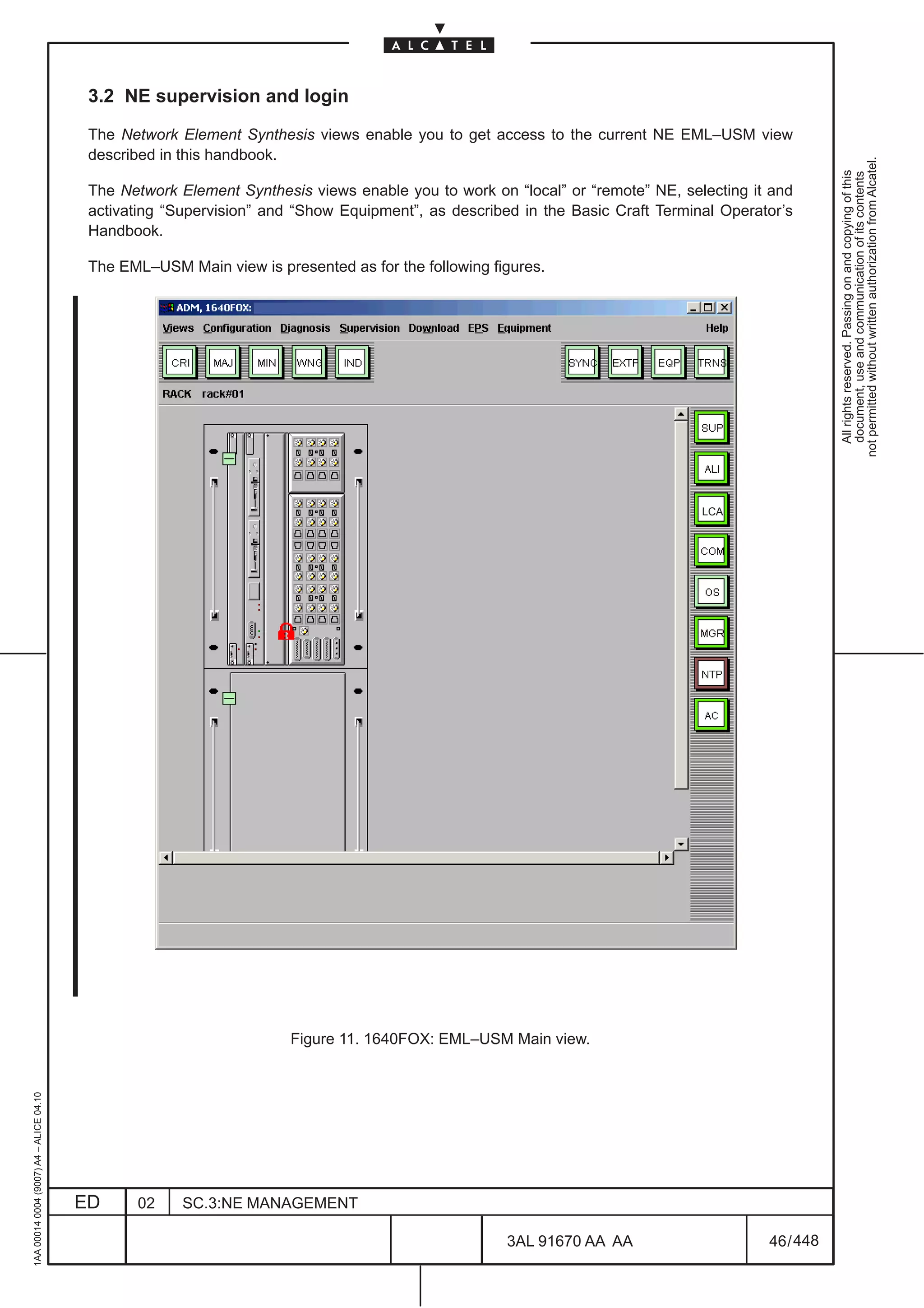
  • 46.
    Operation System: A system dedicated to the supervision of NEs in a standard way, using protocols and interfaces. it offers to the operator a set of functions necessary to supervise the NEs. The 1353SH is an Operation System. not permitted without written authorization from Alcatel. Operator: All rights reserved. Passing on and copying of this document, use and communication of its contents The end–user of the Craft Terminal. He supervises a part of the network that is dependant on his user profile. Path: According to ITU–T Recommendation G.803, a path is a transport entity (i.e., architectural component) used to transfer information. Nevertheless, this name will be used throughout this document to indicate the information carried either unidirectionally or bidirectionally between two access points of a ring on either a path link connection (if the two points are both PDH) or trail segment. Physical Interface: Electrical or Electrical/Optical transformers that decouples the line signals and adapt the form of signal for further transmission. This functional block also manages clock extraction, signal loss monitoring and loopback functions. Port: A physical point at which the Network Element can be attached to a transmission medium. A port is either a termination point or an origination point. Protocol request: A message sent by a node to another node via K1/K2 bytes with the purpose of settling a certain behavior. All the K1 request codes represent protocol requests, but not all of them are bridge requests. For example, a SF–R is a bridge request (see ITU–T G841), but LP–S is not: both of them are protocol requests. Even NR is a protocol request. Protocol reply: A message sent by a node to another node via K1/K2 bytes with the purpose of acknowledging a received protocol request. Protection trail: The trail allocated to transport the working traffic during a switch event. When there is a switch event, traffic on the affected working trail is bridged onto the protection trail. Protection section: The full set of both protection and (lower) unprotected channels in a multiplex section. Protection semi–section: The part of multiplex section (i.e. the N/2+1..N channels in a 2–fiber STM–N NE) consisting of protection channels. Repeater: Equipment used to regenerate a signal when it has travelled a long distance. Request node: A node that generates either a protocol request or protocol reply (other than NR!). The pair of nodes sending each other protocol request/reply are peer request nodes. Severity: Linked to alarms, severities indicate the magnitude related to the failure. 1AA 00014 0004 (9007) A4 – ALICE 04.10 Shared protection: A protection architecture using m protection entities shared among n working entities (m:n). The protection entities may also be used to carry extra traffic when not used for protection. ED 02 SC.2:INTRODUCTION 3AL 91670 AA AA 20 / 22 22
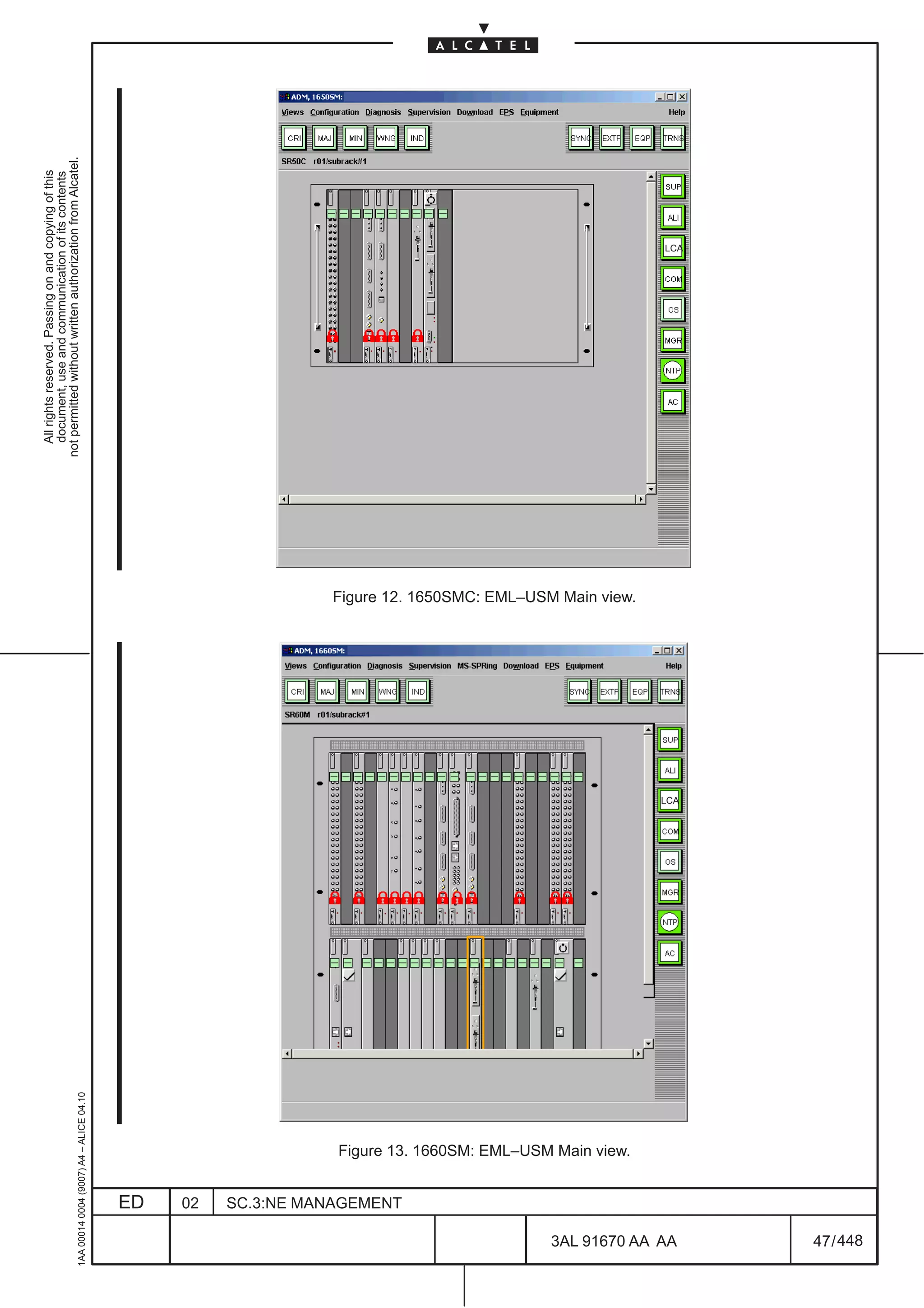
  • 47.
    Span: The set of multiplex sections between two adjacent nodes on a ring. Span Switching: not permitted without written authorization from Alcatel. Protection mechanism similar to the MSP that applies only to four–fibre rings where working and protection All rights reserved. Passing on and copying of this document, use and communication of its contents channels are contained in separate fibres and the failure only affects the working channels. During a span switch, the working traffic is carried over the protection channel on the same span as failure. Squelched traffic: An all “1”s signal resulting from the squelching process (insertion of AU–AIS in order to guarantee the connections) Switch: The action of selecting traffic from the protection trail rather than the working trail. Switching Node: The node that performs the bridge or switch function for a protection event. In the case of a multiplex section switched ring network architecture, this node also performs any necessary squelching of misconnected traffic. Tail End: Node which detects the failure. Telecommunication Management Network: Defines the concept of interoperable management of TNs. They provide an organized network structure to achieve the interconnection of the different components of the TN and the services to process the information. Telecommunication Network: Describes the network to be managed. Provides the transmission, the transport and the switching supports to the interconnected Network Elements. Terminal Point: Describes either the origin or the termination of a signal in an equipment. Is related to a port. Thresholding: This is the assignment of a specified value to monitored parameters ( for example BIt Error Rates) that, when exceeded, generate trouble indications. Unprotected channels: See unprotected channel in ITU–T G841. Each pair of unprotected channels is made up on one in the working (semi)section plus one in the protection (semi)section. Unprotected traffic: See unprotected traffic in ITU–T G841. User Profile: Identifies the functionalities of the Craft Terminal to which a user has access. A finite number of predefined user profiles is determined by a fixed set of FADs. To give user access to Craft Terminal functionality, the administrator must assign a profile to a UNIX user account by choosing one among the predefined profiles installed with Craft Terminal. User Service Manager: 1AA 00014 0004 (9007) A4 – ALICE 04.10 These are presentation processes used by the Craft Terminal to manage the Human Machine Interface and facilitate the interaction with the product. ED 02 SC.2:INTRODUCTION 3AL 91670 AA AA 21 / 22 22
  • 48.
    Working channels: The channels over which working traffic is transported when there are no switch events. An APS system performs restoration for the working channels only. not permitted without written authorization from Alcatel. Working traffic: All rights reserved. Passing on and copying of this document, use and communication of its contents Traffic that is normally carried in a working trail, except in the event of a protection switch. Working trail: The trail over which working traffic is transported when there is no switch events. Working section: The full set of both working and (upper) unprotected channels in a multiplex section. Working semi–section: The part of multiplex section (i.e. the 1..N/2 channels in a 2–fiber STM–N NE) consisting of working channels. Wrapping: Wrapping is the technique that enables the most recent entries in a file to replace the oldest when a file is full. END OF DOCUMENT 1AA 00014 0004 (9007) A4 – ALICE 04.10 ED 02 SC.2:INTRODUCTION 3AL 91670 AA AA 22 / 22 22
  • 49.
    METRO OMSN REL.4.4/5.2A OPERATOR’S HDBK not permitted without written authorization from Alcatel. All rights reserved. Passing on and copying of this document, use and communication of its contents TABLE OF CONTENTS LIST OF FIGURES AND TABLES . . . . . . . . . . . . . . . . . . . . . . . . . . . . . . . . . . . . . . . . . . . . . . . . . . . . . . . 7 1 INTRODUCTION . . . . . . . . . . . . . . . . . . . . . . . . . . . . . . . . . . . . . . . . . . . . . . . . . . . . . . . . . . . . . . . . . . . 15 1.1 Scope . . . . . . . . . . . . . . . . . . . . . . . . . . . . . . . . . . . . . . . . . . . . . . . . . . . . . . . . . . . . . . . . . . . . . . . . . 15 1.1.1 Document scope . . . . . . . . . . . . . . . . . . . . . . . . . . . . . . . . . . . . . . . . . . . . . . . . . . . . . . . . . . . . 15 1.1.2 Target audience . . . . . . . . . . . . . . . . . . . . . . . . . . . . . . . . . . . . . . . . . . . . . . . . . . . . . . . . . . . . . 15 1.2 Terminology . . . . . . . . . . . . . . . . . . . . . . . . . . . . . . . . . . . . . . . . . . . . . . . . . . . . . . . . . . . . . . . . . . . 15 1.2.1 Acronyms and abbreviations . . . . . . . . . . . . . . . . . . . . . . . . . . . . . . . . . . . . . . . . . . . . . . . . . . 15 1.2.2 Glossary of terms . . . . . . . . . . . . . . . . . . . . . . . . . . . . . . . . . . . . . . . . . . . . . . . . . . . . . . . . . . . 15 2 GENERAL INTRODUCTION ON VIEWS AND MENUS . . . . . . . . . . . . . . . . . . . . . . . . . . . . . . . . . . 17 2.1 EML–USM view organization . . . . . . . . . . . . . . . . . . . . . . . . . . . . . . . . . . . . . . . . . . . . . . . . . . . . 17 2.2 Introduction on the EML–USM menu options . . . . . . . . . . . . . . . . . . . . . . . . . . . . . . . . . . . . 21 2.2.1 Views menu introduction . . . . . . . . . . . . . . . . . . . . . . . . . . . . . . . . . . . . . . . . . . . . . . . . . . . . . 23 2.2.2 Configuration menu introduction . . . . . . . . . . . . . . . . . . . . . . . . . . . . . . . . . . . . . . . . . . . . . . 24 2.2.3 Diagnosis menu introduction . . . . . . . . . . . . . . . . . . . . . . . . . . . . . . . . . . . . . . . . . . . . . . . . . . 25 2.2.4 Supervision menu introduction . . . . . . . . . . . . . . . . . . . . . . . . . . . . . . . . . . . . . . . . . . . . . . . . 26 2.2.5 MS–SPRing menu introduction . . . . . . . . . . . . . . . . . . . . . . . . . . . . . . . . . . . . . . . . . . . . . . . . 26 2.2.6 Download menu introduction . . . . . . . . . . . . . . . . . . . . . . . . . . . . . . . . . . . . . . . . . . . . . . . . . . 27 2.2.7 Equipment menu introduction . . . . . . . . . . . . . . . . . . . . . . . . . . . . . . . . . . . . . . . . . . . . . . . . . 27 2.2.8 Board menu introduction . . . . . . . . . . . . . . . . . . . . . . . . . . . . . . . . . . . . . . . . . . . . . . . . . . . . . 28 2.2.9 Port menu introduction . . . . . . . . . . . . . . . . . . . . . . . . . . . . . . . . . . . . . . . . . . . . . . . . . . . . . . . 29 2.2.10 EPS menu introduction . . . . . . . . . . . . . . . . . . . . . . . . . . . . . . . . . . . . . . . . . . . . . . . . . . . . . 31 2.2.11 Transmission menu introduction . . . . . . . . . . . . . . . . . . . . . . . . . . . . . . . . . . . . . . . . . . . . . . 31 2.2.12 Synchronization menu introduction . . . . . . . . . . . . . . . . . . . . . . . . . . . . . . . . . . . . . . . . . . . 33 2.2.13 External Points menu introduction . . . . . . . . . . . . . . . . . . . . . . . . . . . . . . . . . . . . . . . . . . . . 34 2.3 Advices on Navigation principles . . . . . . . . . . . . . . . . . . . . . . . . . . . . . . . . . . . . . . . . . . . . . . . 42 3 NE MANAGEMENT SUPERVISION . . . . . . . . . . . . . . . . . . . . . . . . . . . . . . . . . . . . . . . . . . . . . . . . . . . 45 3.1 NE management states . . . . . . . . . . . . . . . . . . . . . . . . . . . . . . . . . . . . . . . . . . . . . . . . . . . . . . . . . 45 3.2 NE supervision and login . . . . . . . . . . . . . . . . . . . . . . . . . . . . . . . . . . . . . . . . . . . . . . . . . . . . . . . 46 4 NE MANAGEMENT GENERAL CONFIGURATION . . . . . . . . . . . . . . . . . . . . . . . . . . . . . . . . . . . . . 49 4.1 Access state (allow or inhibit NE Craft access) . . . . . . . . . . . . . . . . . . . . . . . . . . . . . . . . . . . 49 4.1.1 Switching from the OS to the Craft Terminal access state . . . . . . . . . . . . . . . . . . . . . . . . . 50 4.1.2 Switching from the Craft Terminal access state back to the OS access state . . . . . . . . 50 02 050414 ECR 23082 C. FAVERO ITAVE P.GHELFI ITAVE J. MIR – S. MAGGIO 01 041119 C. FAVERO ITAVE P.GHELFI ITAVE J. MIR – S. MAGGIO ED DATE CHANGE NOTE APPRAISAL AUTHORITY ORIGINATOR 1AA 00014 0004 (9007) A4 – ALICE 04.10 METRO OMSN Rel. 4.4/5.2A OPERATOR’S HANDBOOK ED 02 SC.3:NE MANAGEMENT 3AL 91670 AA AA 1 / 448 448
  • 50.
    4.2 NE Timemanagement . . . . . . . . . . . . . . . . . . . . . . . . . . . . . . . . . . . . . . . . . . . . . . . . . . . . . . . . . . 51 4.3 Alarm Configuration . . . . . . . . . . . . . . . . . . . . . . . . . . . . . . . . . . . . . . . . . . . . . . . . . . . . . . . . . . . 53 4.3.1 Procedure to modify an ASAP . . . . . . . . . . . . . . . . . . . . . . . . . . . . . . . . . . . . . . . . . . . . . . . . 53 4.3.2 Alarm Severity Assignment Profile Management (ASAP) . . . . . . . . . . . . . . . . . . . . . . . . . 53 not permitted without written authorization from Alcatel. 4.3.3 Set SdhNE Alarms Severities . . . . . . . . . . . . . . . . . . . . . . . . . . . . . . . . . . . . . . . . . . . . . . . . 63 All rights reserved. Passing on and copying of this document, use and communication of its contents 4.3.4 Allow/Inhibit Alarms Notifications . . . . . . . . . . . . . . . . . . . . . . . . . . . . . . . . . . . . . . . . . . . . . . 64 4.3.5 Alarms re–synchronization . . . . . . . . . . . . . . . . . . . . . . . . . . . . . . . . . . . . . . . . . . . . . . . . . . . 65 4.3.6 Alarms Persistency Configuration . . . . . . . . . . . . . . . . . . . . . . . . . . . . . . . . . . . . . . . . . . . . . 66 4.4 Restart NE . . . . . . . . . . . . . . . . . . . . . . . . . . . . . . . . . . . . . . . . . . . . . . . . . . . . . . . . . . . . . . . . . . . . . 67 5 SECURITY MANAGEMENT . . . . . . . . . . . . . . . . . . . . . . . . . . . . . . . . . . . . . . . . . . . . . . . . . . . . . . . . . . 69 5.1 Set Manager list . . . . . . . . . . . . . . . . . . . . . . . . . . . . . . . . . . . . . . . . . . . . . . . . . . . . . . . . . . . . . . . 69 5.2 Set ACD level . . . . . . . . . . . . . . . . . . . . . . . . . . . . . . . . . . . . . . . . . . . . . . . . . . . . . . . . . . . . . . . . . . 70 6 EXTERNAL INPUT AND OUTPUT POINTS MANAGEMENT . . . . . . . . . . . . . . . . . . . . . . . . . . . . . 71 6.1 Displaying external points . . . . . . . . . . . . . . . . . . . . . . . . . . . . . . . . . . . . . . . . . . . . . . . . . . . . . . 72 6.1.1 Expanding or reducing external points list. . . . . . . . . . . . . . . . . . . . . . . . . . . . . . . . . . . . . . . 74 6.2 External points configuration . . . . . . . . . . . . . . . . . . . . . . . . . . . . . . . . . . . . . . . . . . . . . . . . . . . 75 7 DIAGNOSIS MANAGEMENT . . . . . . . . . . . . . . . . . . . . . . . . . . . . . . . . . . . . . . . . . . . . . . . . . . . . . . . . 79 7.1 Alarms surveillance . . . . . . . . . . . . . . . . . . . . . . . . . . . . . . . . . . . . . . . . . . . . . . . . . . . . . . . . . . . . 79 7.2 Abnormal Condition List . . . . . . . . . . . . . . . . . . . . . . . . . . . . . . . . . . . . . . . . . . . . . . . . . . . . . . . 81 7.3 Internal Link Monitor . . . . . . . . . . . . . . . . . . . . . . . . . . . . . . . . . . . . . . . . . . . . . . . . . . . . . . . . . . . 83 7.4 Log Browsing . . . . . . . . . . . . . . . . . . . . . . . . . . . . . . . . . . . . . . . . . . . . . . . . . . . . . . . . . . . . . . . . . 85 7.5 Remote Inventory . . . . . . . . . . . . . . . . . . . . . . . . . . . . . . . . . . . . . . . . . . . . . . . . . . . . . . . . . . . . . . 86 7.5.1 Upload remote Inventory . . . . . . . . . . . . . . . . . . . . . . . . . . . . . . . . . . . . . . . . . . . . . . . . . . . . . 86 7.5.2 View Remote Inventory . . . . . . . . . . . . . . . . . . . . . . . . . . . . . . . . . . . . . . . . . . . . . . . . . . . . . . 87 8 COMMUNICATION AND ROUTING MANAGEMENT . . . . . . . . . . . . . . . . . . . . . . . . . . . . . . . . . . . . 89 8.1 Overview on Communication and Routing Domain . . . . . . . . . . . . . . . . . . . . . . . . . . . . . . . 89 8.1.1 OSI Protocol on QB3/Qecc . . . . . . . . . . . . . . . . . . . . . . . . . . . . . . . . . . . . . . . . . . . . . . . . . . . 89 8.1.2 OSI Partitioning into separate Routing Domains . . . . . . . . . . . . . . . . . . . . . . . . . . . . . . . . . 90 8.1.3 IP over OSI tunneling for ISA board . . . . . . . . . . . . . . . . . . . . . . . . . . . . . . . . . . . . . . . . . . . . 91 8.1.4 OSI over IP tunneling on QB3 . . . . . . . . . . . . . . . . . . . . . . . . . . . . . . . . . . . . . . . . . . . . . . . . . 91 8.2 Communication and routing views . . . . . . . . . . . . . . . . . . . . . . . . . . . . . . . . . . . . . . . . . . . . . . 93 8.3 Local Configuration . . . . . . . . . . . . . . . . . . . . . . . . . . . . . . . . . . . . . . . . . . . . . . . . . . . . . . . . . . . . 95 8.4 OS Configuration . . . . . . . . . . . . . . . . . . . . . . . . . . . . . . . . . . . . . . . . . . . . . . . . . . . . . . . . . . . . . . 97 8.5 NTP Server Configuration . . . . . . . . . . . . . . . . . . . . . . . . . . . . . . . . . . . . . . . . . . . . . . . . . . . . . . 98 8.6 LAPD Configuration . . . . . . . . . . . . . . . . . . . . . . . . . . . . . . . . . . . . . . . . . . . . . . . . . . . . . . . . . . . . 99 8.7 Ethernet Configuration . . . . . . . . . . . . . . . . . . . . . . . . . . . . . . . . . . . . . . . . . . . . . . . . . . . . . . . . . 102 8.8 Reachable Address Prefixes Configuration . . . . . . . . . . . . . . . . . . . . . . . . . . . . . . . . . . . . . . 104 8.9 Manual ES Adjacencies table Configuration . . . . . . . . . . . . . . . . . . . . . . . . . . . . . . . . . . . . . 105 8.10 IP Configuration . . . . . . . . . . . . . . . . . . . . . . . . . . . . . . . . . . . . . . . . . . . . . . . . . . . . . . . . . . . . . . 106 8.10.1 IP routing configuration for ISA boards management . . . . . . . . . . . . . . . . . . . . . . . . . . . . 106 8.11 IP Static Routing Configuration . . . . . . . . . . . . . . . . . . . . . . . . . . . . . . . . . . . . . . . . . . . . . . . . 107 8.12 OSPF Area Table Configuration . . . . . . . . . . . . . . . . . . . . . . . . . . . . . . . . . . . . . . . . . . . . . . . . 108 8.13 IP Address Configuration of Point–to–Point Interfaces . . . . . . . . . . . . . . . . . . . . . . . . . . 109 8.14 ISA board IP Address . . . . . . . . . . . . . . . . . . . . . . . . . . . . . . . . . . . . . . . . . . . . . . . . . . . . . . . . . 110 8.15 OSI over IP . . . . . . . . . . . . . . . . . . . . . . . . . . . . . . . . . . . . . . . . . . . . . . . . . . . . . . . . . . . . . . . . . . . 111 8.16 IP over OSI . . . . . . . . . . . . . . . . . . . . . . . . . . . . . . . . . . . . . . . . . . . . . . . . . . . . . . . . . . . . . . . . . . . 112 1AA 00014 0004 (9007) A4 – ALICE 04.10 9 EQUIPMENT MANAGEMENT . . . . . . . . . . . . . . . . . . . . . . . . . . . . . . . . . . . . . . . . . . . . . . . . . . . . . . . . 115 9.1 Introduction and navigation . . . . . . . . . . . . . . . . . . . . . . . . . . . . . . . . . . . . . . . . . . . . . . . . . . . . 115 9.2 Set and change or remove board/subrack . . . . . . . . . . . . . . . . . . . . . . . . . . . . . . . . . . . . . . . 122 9.3 Connect Fan to CONGI board . . . . . . . . . . . . . . . . . . . . . . . . . . . . . . . . . . . . . . . . . . . . . . . . . . . 126 ED 02 SC.3:NE MANAGEMENT 3AL 91670 AA AA 2 / 448 448
  • 51.
    9.4 Board administrativestate . . . . . . . . . . . . . . . . . . . . . . . . . . . . . . . . . . . . . . . . . . . . . . . . . . . . . . 128 9.4.1 Setting a board in service . . . . . . . . . . . . . . . . . . . . . . . . . . . . . . . . . . . . . . . . . . . . . . . . . . . . 128 9.4.2 Setting a board out of service . . . . . . . . . . . . . . . . . . . . . . . . . . . . . . . . . . . . . . . . . . . . . . . . . 128 9.4.3 Consulting a Board’s Administrative state . . . . . . . . . . . . . . . . . . . . . . . . . . . . . . . . . . . . . . 128 not permitted without written authorization from Alcatel. 9.5 Software description . . . . . . . . . . . . . . . . . . . . . . . . . . . . . . . . . . . . . . . . . . . . . . . . . . . . . . . . . . . 129 All rights reserved. Passing on and copying of this document, use and communication of its contents 9.6 Remote Inventory . . . . . . . . . . . . . . . . . . . . . . . . . . . . . . . . . . . . . . . . . . . . . . . . . . . . . . . . . . . . . . 130 9.7 Show supporting equipment . . . . . . . . . . . . . . . . . . . . . . . . . . . . . . . . . . . . . . . . . . . . . . . . . . . . 132 10 BOARD VIEW . . . . . . . . . . . . . . . . . . . . . . . . . . . . . . . . . . . . . . . . . . . . . . . . . . . . . . . . . . . . . . . . . . . . . 133 10.1 Introduction . . . . . . . . . . . . . . . . . . . . . . . . . . . . . . . . . . . . . . . . . . . . . . . . . . . . . . . . . . . . . . . . . . 133 10.2 Board View Menu . . . . . . . . . . . . . . . . . . . . . . . . . . . . . . . . . . . . . . . . . . . . . . . . . . . . . . . . . . . . . 135 10.2.1 Port Access . . . . . . . . . . . . . . . . . . . . . . . . . . . . . . . . . . . . . . . . . . . . . . . . . . . . . . . . . . . . . . . 136 10.2.2 Change Physical Interface . . . . . . . . . . . . . . . . . . . . . . . . . . . . . . . . . . . . . . . . . . . . . . . . . . 137 10.2.3 Show Supporting equipment . . . . . . . . . . . . . . . . . . . . . . . . . . . . . . . . . . . . . . . . . . . . . . . . . 138 11 PORT VIEW . . . . . . . . . . . . . . . . . . . . . . . . . . . . . . . . . . . . . . . . . . . . . . . . . . . . . . . . . . . . . . . . . . . . . . . 139 11.1 Introduction . . . . . . . . . . . . . . . . . . . . . . . . . . . . . . . . . . . . . . . . . . . . . . . . . . . . . . . . . . . . . . . . . . 139 11.2 Port View: elements on the TP . . . . . . . . . . . . . . . . . . . . . . . . . . . . . . . . . . . . . . . . . . . . . . . . . 141 11.3 Port View Menu . . . . . . . . . . . . . . . . . . . . . . . . . . . . . . . . . . . . . . . . . . . . . . . . . . . . . . . . . . . . . . . 142 11.4 Port Mode Configuration . . . . . . . . . . . . . . . . . . . . . . . . . . . . . . . . . . . . . . . . . . . . . . . . . . . . . . 144 11.5 Set Retiming . . . . . . . . . . . . . . . . . . . . . . . . . . . . . . . . . . . . . . . . . . . . . . . . . . . . . . . . . . . . . . . . . . 146 11.6 AU4 Concatenation . . . . . . . . . . . . . . . . . . . . . . . . . . . . . . . . . . . . . . . . . . . . . . . . . . . . . . . . . . . 148 11.7 Physical Media option menu . . . . . . . . . . . . . . . . . . . . . . . . . . . . . . . . . . . . . . . . . . . . . . . . . . . 151 11.7.1 Automatic Laser Shutdown Configuration . . . . . . . . . . . . . . . . . . . . . . . . . . . . . . . . . . . . . . 152 11.7.2 Show Optical Configuration . . . . . . . . . . . . . . . . . . . . . . . . . . . . . . . . . . . . . . . . . . . . . . . . . . 156 11.7.3 Single Fiber Configuration . . . . . . . . . . . . . . . . . . . . . . . . . . . . . . . . . . . . . . . . . . . . . . . . . . . 157 11.7.4 Ms Configuration . . . . . . . . . . . . . . . . . . . . . . . . . . . . . . . . . . . . . . . . . . . . . . . . . . . . . . . . . . . 159 11.7.5 Line Length Configuration . . . . . . . . . . . . . . . . . . . . . . . . . . . . . . . . . . . . . . . . . . . . . . . . . . . 160 11.7.6 Ethernet Port Configuration . . . . . . . . . . . . . . . . . . . . . . . . . . . . . . . . . . . . . . . . . . . . . . . . . . 161 11.7.7 Ethernet Mapping Protocol . . . . . . . . . . . . . . . . . . . . . . . . . . . . . . . . . . . . . . . . . . . . . . . . . . 164 11.7.8 Control Path Activation . . . . . . . . . . . . . . . . . . . . . . . . . . . . . . . . . . . . . . . . . . . . . . . . . . . . . . 165 11.7.9 LCAS Configuration . . . . . . . . . . . . . . . . . . . . . . . . . . . . . . . . . . . . . . . . . . . . . . . . . . . . . . . . 167 11.8 TP Frame Mode Configuration . . . . . . . . . . . . . . . . . . . . . . . . . . . . . . . . . . . . . . . . . . . . . . . . . 170 11.9 Show Supporting Board . . . . . . . . . . . . . . . . . . . . . . . . . . . . . . . . . . . . . . . . . . . . . . . . . . . . . . . 173 11.10 Navigate to Transmission View . . . . . . . . . . . . . . . . . . . . . . . . . . . . . . . . . . . . . . . . . . . . . . . 174 11.11 Navigate to Monitoring View . . . . . . . . . . . . . . . . . . . . . . . . . . . . . . . . . . . . . . . . . . . . . . . . . . 175 11.11.1 Navigate to HOA Port View . . . . . . . . . . . . . . . . . . . . . . . . . . . . . . . . . . . . . . . . . . . . . . . . . 176 12 EQUIPMENT PROTECTION MANAGEMENT (EPS) . . . . . . . . . . . . . . . . . . . . . . . . . . . . . . . . . . . 177 12.1 Introduction . . . . . . . . . . . . . . . . . . . . . . . . . . . . . . . . . . . . . . . . . . . . . . . . . . . . . . . . . . . . . . . . . . 177 12.2 Management: consulting and modifying EPS . . . . . . . . . . . . . . . . . . . . . . . . . . . . . . . . . . . 178 12.3 Configuration: revertive and WTR for EPS . . . . . . . . . . . . . . . . . . . . . . . . . . . . . . . . . . . . . . 185 12.4 Switching EPS . . . . . . . . . . . . . . . . . . . . . . . . . . . . . . . . . . . . . . . . . . . . . . . . . . . . . . . . . . . . . . . . 187 12.5 EPS Overview . . . . . . . . . . . . . . . . . . . . . . . . . . . . . . . . . . . . . . . . . . . . . . . . . . . . . . . . . . . . . . . . 188 13 MULTIPLEX SECTION PROTECTION MANAGEMENT (MSP) . . . . . . . . . . . . . . . . . . . . . . . . . . 193 13.1 Architecture types . . . . . . . . . . . . . . . . . . . . . . . . . . . . . . . . . . . . . . . . . . . . . . . . . . . . . . . . . . . . 193 13.2 MSP Options Introduction . . . . . . . . . . . . . . . . . . . . . . . . . . . . . . . . . . . . . . . . . . . . . . . . . . . . . 194 13.3 MSP Create . . . . . . . . . . . . . . . . . . . . . . . . . . . . . . . . . . . . . . . . . . . . . . . . . . . . . . . . . . . . . . . . . . 195 13.4 MSP Management . . . . . . . . . . . . . . . . . . . . . . . . . . . . . . . . . . . . . . . . . . . . . . . . . . . . . . . . . . . . . 199 13.4.1 MSP modification . . . . . . . . . . . . . . . . . . . . . . . . . . . . . . . . . . . . . . . . . . . . . . . . . . . . . . . . . . 200 1AA 00014 0004 (9007) A4 – ALICE 04.10 13.5 MSP Delete . . . . . . . . . . . . . . . . . . . . . . . . . . . . . . . . . . . . . . . . . . . . . . . . . . . . . . . . . . . . . . . . . . . 201 13.6 Display of Protection State . . . . . . . . . . . . . . . . . . . . . . . . . . . . . . . . . . . . . . . . . . . . . . . . . . . . 202 13.7 MSP Commands . . . . . . . . . . . . . . . . . . . . . . . . . . . . . . . . . . . . . . . . . . . . . . . . . . . . . . . . . . . . . . 204 13.8 MSP overview . . . . . . . . . . . . . . . . . . . . . . . . . . . . . . . . . . . . . . . . . . . . . . . . . . . . . . . . . . . . . . . . 206 ED 02 SC.3:NE MANAGEMENT 3AL 91670 AA AA 3 / 448 448
  • 52.
    14 TRANSMISSION VIEW. . . . . . . . . . . . . . . . . . . . . . . . . . . . . . . . . . . . . . . . . . . . . . . . . . . . . . . . . . . . . 211 14.1 Overview . . . . . . . . . . . . . . . . . . . . . . . . . . . . . . . . . . . . . . . . . . . . . . . . . . . . . . . . . . . . . . . . . . . . . 211 14.2 View elements . . . . . . . . . . . . . . . . . . . . . . . . . . . . . . . . . . . . . . . . . . . . . . . . . . . . . . . . . . . . . . . . 212 14.3 View Layout . . . . . . . . . . . . . . . . . . . . . . . . . . . . . . . . . . . . . . . . . . . . . . . . . . . . . . . . . . . . . . . . . . 213 not permitted without written authorization from Alcatel. 14.3.1 View Description . . . . . . . . . . . . . . . . . . . . . . . . . . . . . . . . . . . . . . . . . . . . . . . . . . . . . . . . . . . 213 All rights reserved. Passing on and copying of this document, use and communication of its contents 14.3.2 Number of TPs Displayed in Transmission View . . . . . . . . . . . . . . . . . . . . . . . . . . . . . . . . 214 14.3.3 Naming TPs . . . . . . . . . . . . . . . . . . . . . . . . . . . . . . . . . . . . . . . . . . . . . . . . . . . . . . . . . . . . . . . 214 14.3.4 Dynamic View Behavior . . . . . . . . . . . . . . . . . . . . . . . . . . . . . . . . . . . . . . . . . . . . . . . . . . . . . 214 14.4 Transmission view access and menu . . . . . . . . . . . . . . . . . . . . . . . . . . . . . . . . . . . . . . . . . . . 215 14.5 Add TP . . . . . . . . . . . . . . . . . . . . . . . . . . . . . . . . . . . . . . . . . . . . . . . . . . . . . . . . . . . . . . . . . . . . . . . 217 14.5.1 TP Search . . . . . . . . . . . . . . . . . . . . . . . . . . . . . . . . . . . . . . . . . . . . . . . . . . . . . . . . . . . . . . . . 217 14.6 TP Configuration . . . . . . . . . . . . . . . . . . . . . . . . . . . . . . . . . . . . . . . . . . . . . . . . . . . . . . . . . . . . . 227 14.6.1 High Order TP Configuration . . . . . . . . . . . . . . . . . . . . . . . . . . . . . . . . . . . . . . . . . . . . . . . . 227 14.6.2 J0 Section Trace management . . . . . . . . . . . . . . . . . . . . . . . . . . . . . . . . . . . . . . . . . . . . . . . 230 14.6.3 Low Order TP Configuration . . . . . . . . . . . . . . . . . . . . . . . . . . . . . . . . . . . . . . . . . . . . . . . . . 231 14.7 TP Threshold Configuration . . . . . . . . . . . . . . . . . . . . . . . . . . . . . . . . . . . . . . . . . . . . . . . . . . . 234 14.8 Terminate/Disterminate TP . . . . . . . . . . . . . . . . . . . . . . . . . . . . . . . . . . . . . . . . . . . . . . . . . . . . 235 14.8.1 Terminate TP . . . . . . . . . . . . . . . . . . . . . . . . . . . . . . . . . . . . . . . . . . . . . . . . . . . . . . . . . . . . . . 235 14.8.2 Disterminate TP . . . . . . . . . . . . . . . . . . . . . . . . . . . . . . . . . . . . . . . . . . . . . . . . . . . . . . . . . . . 235 14.9 Monitoring Operations . . . . . . . . . . . . . . . . . . . . . . . . . . . . . . . . . . . . . . . . . . . . . . . . . . . . . . . . 236 14.9.1 Creation/Deletion . . . . . . . . . . . . . . . . . . . . . . . . . . . . . . . . . . . . . . . . . . . . . . . . . . . . . . . . . . 237 14.9.2 Configuration . . . . . . . . . . . . . . . . . . . . . . . . . . . . . . . . . . . . . . . . . . . . . . . . . . . . . . . . . . . . . . 239 14.10 Structure TPs . . . . . . . . . . . . . . . . . . . . . . . . . . . . . . . . . . . . . . . . . . . . . . . . . . . . . . . . . . . . . . . 241 14.11 Loopback . . . . . . . . . . . . . . . . . . . . . . . . . . . . . . . . . . . . . . . . . . . . . . . . . . . . . . . . . . . . . . . . . . . 242 14.11.1 Loopback Configuration . . . . . . . . . . . . . . . . . . . . . . . . . . . . . . . . . . . . . . . . . . . . . . . . . . . . 242 14.11.2 Loopback Management . . . . . . . . . . . . . . . . . . . . . . . . . . . . . . . . . . . . . . . . . . . . . . . . . . . . 245 14.12 Physical Media . . . . . . . . . . . . . . . . . . . . . . . . . . . . . . . . . . . . . . . . . . . . . . . . . . . . . . . . . . . . . . 247 14.12.1 Set Domain . . . . . . . . . . . . . . . . . . . . . . . . . . . . . . . . . . . . . . . . . . . . . . . . . . . . . . . . . . . . . . 248 14.13 Navigation Commands . . . . . . . . . . . . . . . . . . . . . . . . . . . . . . . . . . . . . . . . . . . . . . . . . . . . . . . 249 14.13.1 Expand . . . . . . . . . . . . . . . . . . . . . . . . . . . . . . . . . . . . . . . . . . . . . . . . . . . . . . . . . . . . . . . . . . 249 14.13.2 Hide . . . . . . . . . . . . . . . . . . . . . . . . . . . . . . . . . . . . . . . . . . . . . . . . . . . . . . . . . . . . . . . . . . . . . 250 14.13.3 Show Supported Board . . . . . . . . . . . . . . . . . . . . . . . . . . . . . . . . . . . . . . . . . . . . . . . . . . . . 251 14.13.4 Navigate to Port View . . . . . . . . . . . . . . . . . . . . . . . . . . . . . . . . . . . . . . . . . . . . . . . . . . . . . 252 15 CROSS-CONNECTION MANAGEMENT . . . . . . . . . . . . . . . . . . . . . . . . . . . . . . . . . . . . . . . . . . . . . 253 15.1 Introduction . . . . . . . . . . . . . . . . . . . . . . . . . . . . . . . . . . . . . . . . . . . . . . . . . . . . . . . . . . . . . . . . . . 253 15.1.1 Overview . . . . . . . . . . . . . . . . . . . . . . . . . . . . . . . . . . . . . . . . . . . . . . . . . . . . . . . . . . . . . . . . . 253 15.1.2 Multiplex Structures for SDH . . . . . . . . . . . . . . . . . . . . . . . . . . . . . . . . . . . . . . . . . . . . . . . . . 254 15.1.3 Definition of Termination Points (TP) . . . . . . . . . . . . . . . . . . . . . . . . . . . . . . . . . . . . . . . . . . 257 15.1.4 Mapping Tables: TP Names . . . . . . . . . . . . . . . . . . . . . . . . . . . . . . . . . . . . . . . . . . . . . . . . . 261 15.1.5 Cross-Connection Types . . . . . . . . . . . . . . . . . . . . . . . . . . . . . . . . . . . . . . . . . . . . . . . . . . . . 262 15.1.6 Cross-Connection Protection . . . . . . . . . . . . . . . . . . . . . . . . . . . . . . . . . . . . . . . . . . . . . . . . 264 15.2 Operative Sequence to execute Cross-Connections . . . . . . . . . . . . . . . . . . . . . . . . . . . . . 266 15.3 Cross-Connections management . . . . . . . . . . . . . . . . . . . . . . . . . . . . . . . . . . . . . . . . . . . . . . 270 15.3.1 Search Criteria . . . . . . . . . . . . . . . . . . . . . . . . . . . . . . . . . . . . . . . . . . . . . . . . . . . . . . . . . . . . 272 15.3.2 Cross-Connection List . . . . . . . . . . . . . . . . . . . . . . . . . . . . . . . . . . . . . . . . . . . . . . . . . . . . . . 274 15.3.3 Actions available . . . . . . . . . . . . . . . . . . . . . . . . . . . . . . . . . . . . . . . . . . . . . . . . . . . . . . . . . . . 276 15.4 Create/Modify Cross-Connections . . . . . . . . . . . . . . . . . . . . . . . . . . . . . . . . . . . . . . . . . . . . . 277 15.4.1 Cross-Connection Parameters . . . . . . . . . . . . . . . . . . . . . . . . . . . . . . . . . . . . . . . . . . . . . . . 278 15.4.2 Create a Cross-Connection . . . . . . . . . . . . . . . . . . . . . . . . . . . . . . . . . . . . . . . . . . . . . . . . . . 283 15.4.3 Modify a Cross-Connection . . . . . . . . . . . . . . . . . . . . . . . . . . . . . . . . . . . . . . . . . . . . . . . . . . 289 1AA 00014 0004 (9007) A4 – ALICE 04.10 15.5 Activate/Deactivate/Delete Cross-Connections . . . . . . . . . . . . . . . . . . . . . . . . . . . . . . . . . . 292 15.5.1 Activate a Cross-Connection . . . . . . . . . . . . . . . . . . . . . . . . . . . . . . . . . . . . . . . . . . . . . . . . 292 15.5.2 Deactivate a Cross-Connection . . . . . . . . . . . . . . . . . . . . . . . . . . . . . . . . . . . . . . . . . . . . . . 292 ED 02 SC.3:NE MANAGEMENT 3AL 91670 AA AA 4 / 448 448
  • 53.
    15.5.3 Delete aCross-Connection . . . . . . . . . . . . . . . . . . . . . . . . . . . . . . . . . . . . . . . . . . . . . . . . . . 292 15.6 Split and Join Cross-Connections . . . . . . . . . . . . . . . . . . . . . . . . . . . . . . . . . . . . . . . . . . . . . . 293 15.6.1 Split a Cross-Connection . . . . . . . . . . . . . . . . . . . . . . . . . . . . . . . . . . . . . . . . . . . . . . . . . . . . 293 15.6.2 Join Two Cross-Connections . . . . . . . . . . . . . . . . . . . . . . . . . . . . . . . . . . . . . . . . . . . . . . . . 295 not permitted without written authorization from Alcatel. 15.7 Protection Switching . . . . . . . . . . . . . . . . . . . . . . . . . . . . . . . . . . . . . . . . . . . . . . . . . . . . . . . . . . 296 All rights reserved. Passing on and copying of this document, use and communication of its contents 15.8 Print . . . . . . . . . . . . . . . . . . . . . . . . . . . . . . . . . . . . . . . . . . . . . . . . . . . . . . . . . . . . . . . . . . . . . . . . . 298 15.9 Show Cross-Connected TPs . . . . . . . . . . . . . . . . . . . . . . . . . . . . . . . . . . . . . . . . . . . . . . . . . . . 299 16 OVERHEAD MANAGEMENT . . . . . . . . . . . . . . . . . . . . . . . . . . . . . . . . . . . . . . . . . . . . . . . . . . . . . . . 301 16.1 Introduction . . . . . . . . . . . . . . . . . . . . . . . . . . . . . . . . . . . . . . . . . . . . . . . . . . . . . . . . . . . . . . . . . . 301 16.2 OH Connection overview . . . . . . . . . . . . . . . . . . . . . . . . . . . . . . . . . . . . . . . . . . . . . . . . . . . . . . 302 16.3 Overhead views . . . . . . . . . . . . . . . . . . . . . . . . . . . . . . . . . . . . . . . . . . . . . . . . . . . . . . . . . . . . . . 303 16.4 OH Cross Connection . . . . . . . . . . . . . . . . . . . . . . . . . . . . . . . . . . . . . . . . . . . . . . . . . . . . . . . . . 304 16.5 OH TP creation . . . . . . . . . . . . . . . . . . . . . . . . . . . . . . . . . . . . . . . . . . . . . . . . . . . . . . . . . . . . . . . 309 16.6 OH TP deleting . . . . . . . . . . . . . . . . . . . . . . . . . . . . . . . . . . . . . . . . . . . . . . . . . . . . . . . . . . . . . . . 310 16.7 OH Phone Parameters . . . . . . . . . . . . . . . . . . . . . . . . . . . . . . . . . . . . . . . . . . . . . . . . . . . . . . . . . 311 17 PERFORMANCE MONITORING . . . . . . . . . . . . . . . . . . . . . . . . . . . . . . . . . . . . . . . . . . . . . . . . . . . . 313 17.1 Introduction . . . . . . . . . . . . . . . . . . . . . . . . . . . . . . . . . . . . . . . . . . . . . . . . . . . . . . . . . . . . . . . . . . 313 17.2 Performance Monitoring on SDH port . . . . . . . . . . . . . . . . . . . . . . . . . . . . . . . . . . . . . . . . . . 314 17.2.1 Overview . . . . . . . . . . . . . . . . . . . . . . . . . . . . . . . . . . . . . . . . . . . . . . . . . . . . . . . . . . . . . . . . . 314 17.2.2 Supported Performance Counters . . . . . . . . . . . . . . . . . . . . . . . . . . . . . . . . . . . . . . . . . . . . 314 17.2.3 Far End (FE) and Near End (NE) Performance Counting . . . . . . . . . . . . . . . . . . . . . . . . 316 17.2.4 Bidirectional counting (24 h Bi) for QoS . . . . . . . . . . . . . . . . . . . . . . . . . . . . . . . . . . . . . . . 316 17.2.5 End to End (e–e 24h) Performance Counting . . . . . . . . . . . . . . . . . . . . . . . . . . . . . . . . . . 317 17.2.6 Performance Monitoring on AU–PJE . . . . . . . . . . . . . . . . . . . . . . . . . . . . . . . . . . . . . . . . . 317 17.2.7 Tandem Connection Termination (TCT) and Monitoring (TCM) . . . . . . . . . . . . . . . . . . . 318 17.2.8 Performance Monitoring on 2 Mbit/s ISDN–PRA . . . . . . . . . . . . . . . . . . . . . . . . . . . . . . . 318 17.2.9 Performance Data Collection . . . . . . . . . . . . . . . . . . . . . . . . . . . . . . . . . . . . . . . . . . . . . . . . 318 17.2.10 Data Collection . . . . . . . . . . . . . . . . . . . . . . . . . . . . . . . . . . . . . . . . . . . . . . . . . . . . . . . . . . . 319 17.2.11 Performance Monitoring History . . . . . . . . . . . . . . . . . . . . . . . . . . . . . . . . . . . . . . . . . . . . . 319 17.2.12 Thresholds . . . . . . . . . . . . . . . . . . . . . . . . . . . . . . . . . . . . . . . . . . . . . . . . . . . . . . . . . . . . . . . 320 17.3 Performance Monitoring on ETHRNET port . . . . . . . . . . . . . . . . . . . . . . . . . . . . . . . . . . . . . 321 17.3.1 Overview . . . . . . . . . . . . . . . . . . . . . . . . . . . . . . . . . . . . . . . . . . . . . . . . . . . . . . . . . . . . . . . . . 322 17.3.2 Ethernet physical interface counters . . . . . . . . . . . . . . . . . . . . . . . . . . . . . . . . . . . . . . . . . . 322 17.3.3 Aggregate counter . . . . . . . . . . . . . . . . . . . . . . . . . . . . . . . . . . . . . . . . . . . . . . . . . . . . . . . . . 323 17.3.4 Flow counter . . . . . . . . . . . . . . . . . . . . . . . . . . . . . . . . . . . . . . . . . . . . . . . . . . . . . . . . . . . . . . 324 17.4 Configuration (SDH port) . . . . . . . . . . . . . . . . . . . . . . . . . . . . . . . . . . . . . . . . . . . . . . . . . . . . . . 325 17.5 Display Current Data (SDH port) . . . . . . . . . . . . . . . . . . . . . . . . . . . . . . . . . . . . . . . . . . . . . . . 330 17.6 Display History Data (SDH port) . . . . . . . . . . . . . . . . . . . . . . . . . . . . . . . . . . . . . . . . . . . . . . . . 333 17.7 PM Threshold Table Selection (SDH port) . . . . . . . . . . . . . . . . . . . . . . . . . . . . . . . . . . . . . . . 335 17.8 PM Threshold Table Create / Modification / Display (SDH port) . . . . . . . . . . . . . . . . . . . 339 17.8.1 Creation . . . . . . . . . . . . . . . . . . . . . . . . . . . . . . . . . . . . . . . . . . . . . . . . . . . . . . . . . . . . . . . . . . 339 17.8.2 Modification . . . . . . . . . . . . . . . . . . . . . . . . . . . . . . . . . . . . . . . . . . . . . . . . . . . . . . . . . . . . . . . 341 17.8.3 Display . . . . . . . . . . . . . . . . . . . . . . . . . . . . . . . . . . . . . . . . . . . . . . . . . . . . . . . . . . . . . . . . . . . 341 17.9 Configuration (Ethernet port) . . . . . . . . . . . . . . . . . . . . . . . . . . . . . . . . . . . . . . . . . . . . . . . . . . 343 17.10 Display current Data (Ethernet port) . . . . . . . . . . . . . . . . . . . . . . . . . . . . . . . . . . . . . . . . . . . 344 17.11 Display history Data (Ethernet port) . . . . . . . . . . . . . . . . . . . . . . . . . . . . . . . . . . . . . . . . . . . 348 17.12 PM overview . . . . . . . . . . . . . . . . . . . . . . . . . . . . . . . . . . . . . . . . . . . . . . . . . . . . . . . . . . . . . . . . 350 18 SYNCHRONIZATION MANAGEMENT . . . . . . . . . . . . . . . . . . . . . . . . . . . . . . . . . . . . . . . . . . . . . . . 355 1AA 00014 0004 (9007) A4 – ALICE 04.10 18.1 Introduction . . . . . . . . . . . . . . . . . . . . . . . . . . . . . . . . . . . . . . . . . . . . . . . . . . . . . . . . . . . . . . . . . . 355 18.2 Synchronization Management . . . . . . . . . . . . . . . . . . . . . . . . . . . . . . . . . . . . . . . . . . . . . . . . . 357 18.2.1 Displaying the Synchronization View . . . . . . . . . . . . . . . . . . . . . . . . . . . . . . . . . . . . . . . . . . 357 ED 02 SC.3:NE MANAGEMENT 3AL 91670 AA AA 5 / 448 448
  • 54.
    18.2.2 Synchronization View. . . . . . . . . . . . . . . . . . . . . . . . . . . . . . . . . . . . . . . . . . . . . . . . . . . . . . . 358 18.2.3 Timing Source Configuration . . . . . . . . . . . . . . . . . . . . . . . . . . . . . . . . . . . . . . . . . . . . . . . . 361 18.2.4 Synchronization Protection Commands . . . . . . . . . . . . . . . . . . . . . . . . . . . . . . . . . . . . . . . 364 18.2.5 Synchronization Configuration for T0/T4/T5 and T4 squelch criteria . . . . . . . . . . . . . . . 365 not permitted without written authorization from Alcatel. 18.2.6 SSU Configuration . . . . . . . . . . . . . . . . . . . . . . . . . . . . . . . . . . . . . . . . . . . . . . . . . . . . . . . . . 368 All rights reserved. Passing on and copying of this document, use and communication of its contents 18.2.7 Remove Timing Reference . . . . . . . . . . . . . . . . . . . . . . . . . . . . . . . . . . . . . . . . . . . . . . . . . . 369 18.2.8 Change T4 <–> T5 . . . . . . . . . . . . . . . . . . . . . . . . . . . . . . . . . . . . . . . . . . . . . . . . . . . . . . . . . 370 18.2.9 Change 2MHz –>2Mbit . . . . . . . . . . . . . . . . . . . . . . . . . . . . . . . . . . . . . . . . . . . . . . . . . . . . . 372 18.2.10 Set and Remove T0 Equal T4 . . . . . . . . . . . . . . . . . . . . . . . . . . . . . . . . . . . . . . . . . . . . . . 374 18.2.11 Transmission of SSM Quality Configuration . . . . . . . . . . . . . . . . . . . . . . . . . . . . . . . . . . 375 18.2.12 Show Timing Source . . . . . . . . . . . . . . . . . . . . . . . . . . . . . . . . . . . . . . . . . . . . . . . . . . . . . . 376 19 MS–SPRING MANAGEMENT . . . . . . . . . . . . . . . . . . . . . . . . . . . . . . . . . . . . . . . . . . . . . . . . . . . . . . . 377 19.1 MS–SPRING introduction . . . . . . . . . . . . . . . . . . . . . . . . . . . . . . . . . . . . . . . . . . . . . . . . . . . . . . 377 19.2 MS–SPRING connection configuration advices . . . . . . . . . . . . . . . . . . . . . . . . . . . . . . . . . 378 19.2.1 2–Fiber MS–SPRING connection configuration advices . . . . . . . . . . . . . . . . . . . . . . . . . 378 19.3 Operative sequence to configure MS–SPRING . . . . . . . . . . . . . . . . . . . . . . . . . . . . . . . . . . 379 19.3.1 Operative sequence to configure 2–Fiber MS–SPRING . . . . . . . . . . . . . . . . . . . . . . . . . 379 19.4 MS–SPRING Management . . . . . . . . . . . . . . . . . . . . . . . . . . . . . . . . . . . . . . . . . . . . . . . . . . . . . 380 19.4.1 MS–SPRing Main Configuration . . . . . . . . . . . . . . . . . . . . . . . . . . . . . . . . . . . . . . . . . . . . . . 381 19.4.2 Squelching Table with 2 fiber Terrestrial applications . . . . . . . . . . . . . . . . . . . . . . . . . . . . 387 19.4.3 Activate, Deactivate and Delete commands . . . . . . . . . . . . . . . . . . . . . . . . . . . . . . . . . . . 393 19.5 MS–SPRING Protection Status and Commands for 2 fiber terrestrial application . . 394 19.5.1 2F MS–SPRing protection commands . . . . . . . . . . . . . . . . . . . . . . . . . . . . . . . . . . . . . . . . 394 19.5.2 External commands (2F) . . . . . . . . . . . . . . . . . . . . . . . . . . . . . . . . . . . . . . . . . . . . . . . . . . . . 396 19.5.3 2F MS–SPRing dual protection commands . . . . . . . . . . . . . . . . . . . . . . . . . . . . . . . . . . . 404 19.5.4 2F Protection Status Visualization . . . . . . . . . . . . . . . . . . . . . . . . . . . . . . . . . . . . . . . . . . . . 409 20 ISA PORT CONFIGURATION . . . . . . . . . . . . . . . . . . . . . . . . . . . . . . . . . . . . . . . . . . . . . . . . . . . . . . . 427 20.1 Introduction . . . . . . . . . . . . . . . . . . . . . . . . . . . . . . . . . . . . . . . . . . . . . . . . . . . . . . . . . . . . . . . . . . 427 20.2 ISA board TTPs creation . . . . . . . . . . . . . . . . . . . . . . . . . . . . . . . . . . . . . . . . . . . . . . . . . . . . . . 428 20.2.1 ISA–ATM boards . . . . . . . . . . . . . . . . . . . . . . . . . . . . . . . . . . . . . . . . . . . . . . . . . . . . . . . . . . . 428 20.2.2 ISA– PR_EA board . . . . . . . . . . . . . . . . . . . . . . . . . . . . . . . . . . . . . . . . . . . . . . . . . . . . . . . . 430 20.2.3 10/100 Mbit/s fast ETHERNET board . . . . . . . . . . . . . . . . . . . . . . . . . . . . . . . . . . . . . . . . . 432 20.2.4 Gigabit/s ETHERNET board . . . . . . . . . . . . . . . . . . . . . . . . . . . . . . . . . . . . . . . . . . . . . . . . . 434 20.2.5 ISA –ES boards . . . . . . . . . . . . . . . . . . . . . . . . . . . . . . . . . . . . . . . . . . . . . . . . . . . . . . . . . . . . 435 21 SOFTWARE MANAGEMENT . . . . . . . . . . . . . . . . . . . . . . . . . . . . . . . . . . . . . . . . . . . . . . . . . . . . . . . 439 21.1 Generalities and descriptions . . . . . . . . . . . . . . . . . . . . . . . . . . . . . . . . . . . . . . . . . . . . . . . . . . 439 21.1.1 Naming Conventions . . . . . . . . . . . . . . . . . . . . . . . . . . . . . . . . . . . . . . . . . . . . . . . . . . . . . . . 440 21.2 Software download operative sequence . . . . . . . . . . . . . . . . . . . . . . . . . . . . . . . . . . . . . . . . 441 21.2.1 Software Download upgrade . . . . . . . . . . . . . . . . . . . . . . . . . . . . . . . . . . . . . . . . . . . . . . . . . 441 21.3 Software Download Manager menu . . . . . . . . . . . . . . . . . . . . . . . . . . . . . . . . . . . . . . . . . . . . 442 21.4 Init download . . . . . . . . . . . . . . . . . . . . . . . . . . . . . . . . . . . . . . . . . . . . . . . . . . . . . . . . . . . . . . . . . 443 21.5 SW package Activation and Units information . . . . . . . . . . . . . . . . . . . . . . . . . . . . . . . . . . 445 21.6 Mib management . . . . . . . . . . . . . . . . . . . . . . . . . . . . . . . . . . . . . . . . . . . . . . . . . . . . . . . . . . . . . 447 1AA 00014 0004 (9007) A4 – ALICE 04.10 ED 02 SC.3:NE MANAGEMENT 3AL 91670 AA AA 6 / 448 448
  • 55.
    LIST OF FIGURESAND TABLES FIGURES not permitted without written authorization from Alcatel. Figure 1. 1640FOX EML–USM main view organization. . . . . . . . . . . . . . . . . . . . . . . . . . . . . . . . . . . . . 18 All rights reserved. Passing on and copying of this document, use and communication of its contents Figure 2. 1650SMC EML–USM main view organization. . . . . . . . . . . . . . . . . . . . . . . . . . . . . . . . . . . . . 19 Figure 3. 1660SM EML–USM main view organization. . . . . . . . . . . . . . . . . . . . . . . . . . . . . . . . . . . . . . 20 Figure 4. Menu options flow chart – 1 . . . . . . . . . . . . . . . . . . . . . . . . . . . . . . . . . . . . . . . . . . . . . . . . . . . . 35 Figure 5. Menu options flow chart – 2 . . . . . . . . . . . . . . . . . . . . . . . . . . . . . . . . . . . . . . . . . . . . . . . . . . . . 36 Figure 6. Menu options flow chart – 3 . . . . . . . . . . . . . . . . . . . . . . . . . . . . . . . . . . . . . . . . . . . . . . . . . . . . 37 Figure 7. Menu options flow chart – 4 . . . . . . . . . . . . . . . . . . . . . . . . . . . . . . . . . . . . . . . . . . . . . . . . . . . . 38 Figure 8. Menu options flow chart – 5 . . . . . . . . . . . . . . . . . . . . . . . . . . . . . . . . . . . . . . . . . . . . . . . . . . . . 39 Figure 9. Menu options flow chart – 6 . . . . . . . . . . . . . . . . . . . . . . . . . . . . . . . . . . . . . . . . . . . . . . . . . . . . 40 Figure 10. Menu options flow chart – 7 . . . . . . . . . . . . . . . . . . . . . . . . . . . . . . . . . . . . . . . . . . . . . . . . . . . 41 Figure 11. 1640FOX: EML–USM Main view. . . . . . . . . . . . . . . . . . . . . . . . . . . . . . . . . . . . . . . . . . . . . . . 46 Figure 12. 1650SMC: EML–USM Main view. . . . . . . . . . . . . . . . . . . . . . . . . . . . . . . . . . . . . . . . . . . . . . . 47 Figure 13. 1660SM: EML–USM Main view. . . . . . . . . . . . . . . . . . . . . . . . . . . . . . . . . . . . . . . . . . . . . . . . 47 Figure 14. NE management: setting the access state. . . . . . . . . . . . . . . . . . . . . . . . . . . . . . . . . . . . . . . 50 Figure 15. Consulting and/or setting the local NE time. . . . . . . . . . . . . . . . . . . . . . . . . . . . . . . . . . . . . . 51 Figure 16. NE Time dialogue box. . . . . . . . . . . . . . . . . . . . . . . . . . . . . . . . . . . . . . . . . . . . . . . . . . . . . . . . 51 Figure 17. Configuring Alarm Severity Assignment Profile. . . . . . . . . . . . . . . . . . . . . . . . . . . . . . . . . . . 54 Figure 18. ASAPs Management dialogue box. . . . . . . . . . . . . . . . . . . . . . . . . . . . . . . . . . . . . . . . . . . . . 54 Figure 19. ASAP Edition dialogue box. . . . . . . . . . . . . . . . . . . . . . . . . . . . . . . . . . . . . . . . . . . . . . . . . . . . 56 Figure 20. Set ASAP dialogue box (example) . . . . . . . . . . . . . . . . . . . . . . . . . . . . . . . . . . . . . . . . . . . . . 57 Figure 21. Clipboard dialog layout . . . . . . . . . . . . . . . . . . . . . . . . . . . . . . . . . . . . . . . . . . . . . . . . . . . . . . . 59 Figure 22. Tp search dialog with support for ASAP filtering . . . . . . . . . . . . . . . . . . . . . . . . . . . . . . . . . 60 Figure 23. Equipment search dialog with ASAP filtering support . . . . . . . . . . . . . . . . . . . . . . . . . . . . . 61 Figure 24. Search for resources assigned to ASAP . . . . . . . . . . . . . . . . . . . . . . . . . . . . . . . . . . . . . . . . 62 Figure 25. Set SdhNE Alarms Severities . . . . . . . . . . . . . . . . . . . . . . . . . . . . . . . . . . . . . . . . . . . . . . . . . 63 Figure 26. Inhibit alarm notification . . . . . . . . . . . . . . . . . . . . . . . . . . . . . . . . . . . . . . . . . . . . . . . . . . . . . . 64 Figure 27. Allow alarm notifications . . . . . . . . . . . . . . . . . . . . . . . . . . . . . . . . . . . . . . . . . . . . . . . . . . . . . . 64 Figure 28. Alarm re–synchronization . . . . . . . . . . . . . . . . . . . . . . . . . . . . . . . . . . . . . . . . . . . . . . . . . . . . . 65 Figure 29. Alarm Persistency Time configuration window . . . . . . . . . . . . . . . . . . . . . . . . . . . . . . . . . . . 66 Figure 30. Restart NE confirmation . . . . . . . . . . . . . . . . . . . . . . . . . . . . . . . . . . . . . . . . . . . . . . . . . . . . . . 67 Figure 31. Set Manager list . . . . . . . . . . . . . . . . . . . . . . . . . . . . . . . . . . . . . . . . . . . . . . . . . . . . . . . . . . . . . 69 Figure 32. Set ACD level . . . . . . . . . . . . . . . . . . . . . . . . . . . . . . . . . . . . . . . . . . . . . . . . . . . . . . . . . . . . . . . 70 Figure 33. Opening the external points view. . . . . . . . . . . . . . . . . . . . . . . . . . . . . . . . . . . . . . . . . . . . . . . 72 Figure 34. External points view (example) . . . . . . . . . . . . . . . . . . . . . . . . . . . . . . . . . . . . . . . . . . . . . . . . 73 Figure 35. Expanding or reducing the external points list. . . . . . . . . . . . . . . . . . . . . . . . . . . . . . . . . . . . 74 Figure 36. Configuring external points. . . . . . . . . . . . . . . . . . . . . . . . . . . . . . . . . . . . . . . . . . . . . . . . . . . . 75 Figure 37. External input point configuration dialogue box (example) . . . . . . . . . . . . . . . . . . . . . . . . . 75 Figure 38. External output point configuration dialogue box (MANUAL). . . . . . . . . . . . . . . . . . . . . . . 76 Figure 39. External output point configuration dialogue box (FLEXIBLE) . . . . . . . . . . . . . . . . . . . . . . 76 Figure 40. Alarm Surveillance . . . . . . . . . . . . . . . . . . . . . . . . . . . . . . . . . . . . . . . . . . . . . . . . . . . . . . . . . . . 79 Figure 41. Alarm Surveillance (example) . . . . . . . . . . . . . . . . . . . . . . . . . . . . . . . . . . . . . . . . . . . . . . . . . 80 Figure 42. Abnormal condition menu option . . . . . . . . . . . . . . . . . . . . . . . . . . . . . . . . . . . . . . . . . . . . . . . 81 Figure 43. Example of abnormal condition list . . . . . . . . . . . . . . . . . . . . . . . . . . . . . . . . . . . . . . . . . . . . . 81 Figure 44. Example of loopback dialog window management . . . . . . . . . . . . . . . . . . . . . . . . . . . . . . . 82 Figure 45. Internal Link Monitor (1660SM example) . . . . . . . . . . . . . . . . . . . . . . . . . . . . . . . . . . . . . . . . 84 Figure 46. Log Browsing option in Network Element context view . . . . . . . . . . . . . . . . . . . . . . . . . . . 85 Figure 47. Remote Inventory confirmation request . . . . . . . . . . . . . . . . . . . . . . . . . . . . . . . . . . . . . . . . . 86 1AA 00014 0004 (9007) A4 – ALICE 04.10 Figure 48. Remote Inventory completed . . . . . . . . . . . . . . . . . . . . . . . . . . . . . . . . . . . . . . . . . . . . . . . . . . 86 Figure 49. View Remote Inventory (example) . . . . . . . . . . . . . . . . . . . . . . . . . . . . . . . . . . . . . . . . . . . . . 87 Figure 50. Routing subdomain organization example . . . . . . . . . . . . . . . . . . . . . . . . . . . . . . . . . . . . . . . 90 ED 02 SC.3:NE MANAGEMENT 3AL 91670 AA AA 7 / 448 448
  • 56.
    Figure 51. OSIover IP tunneling on QB3 . . . . . . . . . . . . . . . . . . . . . . . . . . . . . . . . . . . . . . . . . . . . . . . . . 92 Figure 52. Comm/Routing options . . . . . . . . . . . . . . . . . . . . . . . . . . . . . . . . . . . . . . . . . . . . . . . . . . . . . . . 94 Figure 53. Local Configuration . . . . . . . . . . . . . . . . . . . . . . . . . . . . . . . . . . . . . . . . . . . . . . . . . . . . . . . . . . 96 Figure 54. OS Configuration . . . . . . . . . . . . . . . . . . . . . . . . . . . . . . . . . . . . . . . . . . . . . . . . . . . . . . . . . . . . 97 not permitted without written authorization from Alcatel. Figure 55. NTP Server Configuration . . . . . . . . . . . . . . . . . . . . . . . . . . . . . . . . . . . . . . . . . . . . . . . . . . . . 98 All rights reserved. Passing on and copying of this document, use and communication of its contents Figure 56. LAPD Configuration dialog (example) . . . . . . . . . . . . . . . . . . . . . . . . . . . . . . . . . . . . . . . . . . 100 Figure 57. Creation LAPD Interface . . . . . . . . . . . . . . . . . . . . . . . . . . . . . . . . . . . . . . . . . . . . . . . . . . . . . . 101 Figure 58. Confirmation to change LAPD Role . . . . . . . . . . . . . . . . . . . . . . . . . . . . . . . . . . . . . . . . . . . . 101 Figure 59. Ethernet Configuration . . . . . . . . . . . . . . . . . . . . . . . . . . . . . . . . . . . . . . . . . . . . . . . . . . . . . . . 103 Figure 60. Ethernet Configuration – L2 only parameter . . . . . . . . . . . . . . . . . . . . . . . . . . . . . . . . . . . . . 103 Figure 61. RAP Configuration . . . . . . . . . . . . . . . . . . . . . . . . . . . . . . . . . . . . . . . . . . . . . . . . . . . . . . . . . . . 104 Figure 62. MESA Configuration . . . . . . . . . . . . . . . . . . . . . . . . . . . . . . . . . . . . . . . . . . . . . . . . . . . . . . . . . 105 Figure 63. IP Static Routing Configuration (example) . . . . . . . . . . . . . . . . . . . . . . . . . . . . . . . . . . . . . . 107 Figure 64. OSPF Area Table Configuration (example) . . . . . . . . . . . . . . . . . . . . . . . . . . . . . . . . . . . . . . 108 Figure 65. IP Address Configuration of Point–to–Point Interfaces (example) . . . . . . . . . . . . . . . . . . . 109 Figure 66. ISA Board IP Address (example) . . . . . . . . . . . . . . . . . . . . . . . . . . . . . . . . . . . . . . . . . . . . . . 110 Figure 67. OSI over IP Tunneling configuration (example) . . . . . . . . . . . . . . . . . . . . . . . . . . . . . . . . . 111 Figure 68. IP over OSI Tunneling configuration (example) . . . . . . . . . . . . . . . . . . . . . . . . . . . . . . . . . . 113 Figure 69. Equipment Overview – 1650SMC and 1660SM “Subrack“ level . . . . . . . . . . . . . . . . . . . . 117 Figure 70. Equipment Overview – 1650SMC and 1660SM “Rack” level . . . . . . . . . . . . . . . . . . . . . . . 118 Figure 71. Equipment Overview – 1650SMC and 1660SM “Equipment level” . . . . . . . . . . . . . . . . . . 119 Figure 72. Equipment Overview – 1640FOX“Rack” level . . . . . . . . . . . . . . . . . . . . . . . . . . . . . . . . . . . . 119 Figure 73. Equipment Overview – 1640FOX “Subrack“ level . . . . . . . . . . . . . . . . . . . . . . . . . . . . . . . . 120 Figure 74. Equipment Overview – 1640FOX “Equipment level” . . . . . . . . . . . . . . . . . . . . . . . . . . . . . . 120 Figure 75. Equipment menu (example) . . . . . . . . . . . . . . . . . . . . . . . . . . . . . . . . . . . . . . . . . . . . . . . . . . . 121 Figure 76. The list of different boards/subrack relative to an NE slot (examples) . . . . . . . . . . . . . . . 123 Figure 77. Connect FAN to CONGI . . . . . . . . . . . . . . . . . . . . . . . . . . . . . . . . . . . . . . . . . . . . . . . . . . . . . . 126 Figure 78. Remove FAN connection from CONGI . . . . . . . . . . . . . . . . . . . . . . . . . . . . . . . . . . . . . . . . . . 127 Figure 79. Consulting a board’s administrative state (example) . . . . . . . . . . . . . . . . . . . . . . . . . . . . . . 128 Figure 80. Software Description dialogue box (example) . . . . . . . . . . . . . . . . . . . . . . . . . . . . . . . . . . . . 129 Figure 81. Remote Inventory (example) . . . . . . . . . . . . . . . . . . . . . . . . . . . . . . . . . . . . . . . . . . . . . . . . . . 130 Figure 82. Select Printer . . . . . . . . . . . . . . . . . . . . . . . . . . . . . . . . . . . . . . . . . . . . . . . . . . . . . . . . . . . . . . . 131 Figure 83. Select Output Format for file . . . . . . . . . . . . . . . . . . . . . . . . . . . . . . . . . . . . . . . . . . . . . . . . . . 131 Figure 84. Equipment Overview – Subrack level (example) . . . . . . . . . . . . . . . . . . . . . . . . . . . . . . . . . 132 Figure 85. Equipment view: select the SDH port on a board (example) . . . . . . . . . . . . . . . . . . . . . . . 133 Figure 86. Example of a Board View . . . . . . . . . . . . . . . . . . . . . . . . . . . . . . . . . . . . . . . . . . . . . . . . . . . . . 134 Figure 87. Examples of a Ports identification and relevant alarm synthesis . . . . . . . . . . . . . . . . . . . 134 Figure 88. Board menu options . . . . . . . . . . . . . . . . . . . . . . . . . . . . . . . . . . . . . . . . . . . . . . . . . . . . . . . . . 135 Figure 89. After “Port Access” selection (example) . . . . . . . . . . . . . . . . . . . . . . . . . . . . . . . . . . . . . . . . . 136 Figure 90. Change Physical Interface (example) . . . . . . . . . . . . . . . . . . . . . . . . . . . . . . . . . . . . . . . . . . . 137 Figure 91. Subrack level (example) . . . . . . . . . . . . . . . . . . . . . . . . . . . . . . . . . . . . . . . . . . . . . . . . . . . . . . 138 Figure 92. Example of a Port View (example) . . . . . . . . . . . . . . . . . . . . . . . . . . . . . . . . . . . . . . . . . . . . . 140 Figure 93. Termination TP box (example) . . . . . . . . . . . . . . . . . . . . . . . . . . . . . . . . . . . . . . . . . . . . . . . . . 141 Figure 94. G.783 Adaptation TP box. . . . . . . . . . . . . . . . . . . . . . . . . . . . . . . . . . . . . . . . . . . . . . . . . . . . . 141 Figure 95. Examples of port menu options (SDH, PDH and ATM/GBIT ETHERNET port) . . . . . . . 143 Figure 96. Port mode configuration pull–down menu . . . . . . . . . . . . . . . . . . . . . . . . . . . . . . . . . . . . . . . 144 Figure 97. Port Mode overview . . . . . . . . . . . . . . . . . . . . . . . . . . . . . . . . . . . . . . . . . . . . . . . . . . . . . . . . . . 145 Figure 98. Set Retiming enable (before) . . . . . . . . . . . . . . . . . . . . . . . . . . . . . . . . . . . . . . . . . . . . . . . . . . 146 Figure 99. Set Retiming enable (after) . . . . . . . . . . . . . . . . . . . . . . . . . . . . . . . . . . . . . . . . . . . . . . . . . . . 147 Figure 100. AU4 concatenate/deconcatenate commands . . . . . . . . . . . . . . . . . . . . . . . . . . . . . . . . . . . 149 1AA 00014 0004 (9007) A4 – ALICE 04.10 Figure 101. Example of a concatenated AU4 transmission view . . . . . . . . . . . . . . . . . . . . . . . . . . . . . 150 Figure 102. Example of a concatenated AU4c . . . . . . . . . . . . . . . . . . . . . . . . . . . . . . . . . . . . . . . . . . . . . 150 Figure 103. Physical media menu (SDH port example) . . . . . . . . . . . . . . . . . . . . . . . . . . . . . . . . . . . . . 151 Figure 104. Automatic Laser Shutdown Management . . . . . . . . . . . . . . . . . . . . . . . . . . . . . . . . . . . . . . 152 ED 02 SC.3:NE MANAGEMENT 3AL 91670 AA AA 8 / 448 448
  • 57.
    Figure 105. AutomaticLaser Shutdown Management (after ALS Function delete) . . . . . . . . . . . . . . 153 Figure 106. ALS and Laser current state (example) . . . . . . . . . . . . . . . . . . . . . . . . . . . . . . . . . . . . . . . . 154 Figure 107. Visualizing a port optical parameters (example) . . . . . . . . . . . . . . . . . . . . . . . . . . . . . . . . . 156 Figure 108. Bidirectional Transmission on a single fiber . . . . . . . . . . . . . . . . . . . . . . . . . . . . . . . . . . . . 157 not permitted without written authorization from Alcatel. Figure 109. Single Fiber Configuration View . . . . . . . . . . . . . . . . . . . . . . . . . . . . . . . . . . . . . . . . . . . . . . 158 All rights reserved. Passing on and copying of this document, use and communication of its contents Figure 110. Ms Configuration . . . . . . . . . . . . . . . . . . . . . . . . . . . . . . . . . . . . . . . . . . . . . . . . . . . . . . . . . . . 159 Figure 111. PDH Line Length Configuration View . . . . . . . . . . . . . . . . . . . . . . . . . . . . . . . . . . . . . . . . . . 160 Figure 112. Ethernet Port Configuration options (fast ethernet example) . . . . . . . . . . . . . . . . . . . . . 161 Figure 113. Ethernet Port Configuration menu . . . . . . . . . . . . . . . . . . . . . . . . . . . . . . . . . . . . . . . . . . . . . 161 Figure 114. Information dialog . . . . . . . . . . . . . . . . . . . . . . . . . . . . . . . . . . . . . . . . . . . . . . . . . . . . . . . . . . . 162 Figure 115. Gigabit Ethernet port view (example) . . . . . . . . . . . . . . . . . . . . . . . . . . . . . . . . . . . . . . . . . . 163 Figure 116. Ethernet Mapping Protocol (EXAMPLE) . . . . . . . . . . . . . . . . . . . . . . . . . . . . . . . . . . . . . . . 164 Figure 117. Control Path Activation:Individual Path mode . . . . . . . . . . . . . . . . . . . . . . . . . . . . . . . . . . . 165 Figure 118. Control Path Activation:Range Path mode . . . . . . . . . . . . . . . . . . . . . . . . . . . . . . . . . . . . . 166 Figure 119. LCAS configuation pull–down menu . . . . . . . . . . . . . . . . . . . . . . . . . . . . . . . . . . . . . . . . . . . 167 Figure 120. LCAS Configuration . . . . . . . . . . . . . . . . . . . . . . . . . . . . . . . . . . . . . . . . . . . . . . . . . . . . . . . . . 167 Figure 121. LCAS Monitoring . . . . . . . . . . . . . . . . . . . . . . . . . . . . . . . . . . . . . . . . . . . . . . . . . . . . . . . . . . . 168 Figure 122. TP Frame Mode Configuration . . . . . . . . . . . . . . . . . . . . . . . . . . . . . . . . . . . . . . . . . . . . . . . 170 Figure 123. Board View Example. . . . . . . . . . . . . . . . . . . . . . . . . . . . . . . . . . . . . . . . . . . . . . . . . . . . . . . . 173 Figure 124. After “Navigate to Transmission view” selection (example) . . . . . . . . . . . . . . . . . . . . . . . 174 Figure 125. View of Monitoring Operations (example) . . . . . . . . . . . . . . . . . . . . . . . . . . . . . . . . . . . . . . 175 Figure 126. Navigate to HOA Port . . . . . . . . . . . . . . . . . . . . . . . . . . . . . . . . . . . . . . . . . . . . . . . . . . . . . . . 176 Figure 127. Consulting EPS . . . . . . . . . . . . . . . . . . . . . . . . . . . . . . . . . . . . . . . . . . . . . . . . . . . . . . . . . . . . 178 Figure 128. EPS Management dialogue box (example) . . . . . . . . . . . . . . . . . . . . . . . . . . . . . . . . . . . . . 178 Figure 129. EPS: board selection (example) . . . . . . . . . . . . . . . . . . . . . . . . . . . . . . . . . . . . . . . . . . . . . . 183 Figure 130. EPS: choose protected (example) . . . . . . . . . . . . . . . . . . . . . . . . . . . . . . . . . . . . . . . . . . . . 183 Figure 131. EPS functional state from protected active board view . . . . . . . . . . . . . . . . . . . . . . . . . . . 184 Figure 132. EPS functional state from protecting active board view . . . . . . . . . . . . . . . . . . . . . . . . . . 184 Figure 133. Configure EPS . . . . . . . . . . . . . . . . . . . . . . . . . . . . . . . . . . . . . . . . . . . . . . . . . . . . . . . . . . . . . 185 Figure 134. EPS Management dialogue box (example) . . . . . . . . . . . . . . . . . . . . . . . . . . . . . . . . . . . . . 185 Figure 135. Switching EPS . . . . . . . . . . . . . . . . . . . . . . . . . . . . . . . . . . . . . . . . . . . . . . . . . . . . . . . . . . . . . 187 Figure 136. EPS Switch dialogue box (example) . . . . . . . . . . . . . . . . . . . . . . . . . . . . . . . . . . . . . . . . . . 187 Figure 137. EPS overview . . . . . . . . . . . . . . . . . . . . . . . . . . . . . . . . . . . . . . . . . . . . . . . . . . . . . . . . . . . . . . 188 Figure 138. EPS overview after Search (Example) . . . . . . . . . . . . . . . . . . . . . . . . . . . . . . . . . . . . . . . . . 189 Figure 139. Subrack view after “Open Subrack View” command (example) . . . . . . . . . . . . . . . . . . . 192 Figure 140. Board view after “Open Board View” command (example) . . . . . . . . . . . . . . . . . . . . . . . 192 Figure 141. MSP Create Option . . . . . . . . . . . . . . . . . . . . . . . . . . . . . . . . . . . . . . . . . . . . . . . . . . . . . . . . . 195 Figure 142. MSP Schema Creation . . . . . . . . . . . . . . . . . . . . . . . . . . . . . . . . . . . . . . . . . . . . . . . . . . . . . . 195 Figure 143. MSP schema creation Port dialog . . . . . . . . . . . . . . . . . . . . . . . . . . . . . . . . . . . . . . . . . . . 196 Figure 144. TP Search (example) . . . . . . . . . . . . . . . . . . . . . . . . . . . . . . . . . . . . . . . . . . . . . . . . . . . . . . . 197 Figure 145. MSP 1+1 standard protection schema (example) . . . . . . . . . . . . . . . . . . . . . . . . . . . . . . . 198 Figure 146. MSP N:1 standard protection schema (example) . . . . . . . . . . . . . . . . . . . . . . . . . . . . . . . . 198 Figure 147. MSP Management Option . . . . . . . . . . . . . . . . . . . . . . . . . . . . . . . . . . . . . . . . . . . . . . . . . . . 199 Figure 148. MSP Management View (example) . . . . . . . . . . . . . . . . . . . . . . . . . . . . . . . . . . . . . . . . . . . 200 Figure 149. MSP Delete option . . . . . . . . . . . . . . . . . . . . . . . . . . . . . . . . . . . . . . . . . . . . . . . . . . . . . . . . . . 201 Figure 150. MSP Schema Deletion (example) . . . . . . . . . . . . . . . . . . . . . . . . . . . . . . . . . . . . . . . . . . . . . 201 Figure 151. MSP Protection Status Examples . . . . . . . . . . . . . . . . . . . . . . . . . . . . . . . . . . . . . . . . . . . . . 203 Figure 152. MSP Commands option . . . . . . . . . . . . . . . . . . . . . . . . . . . . . . . . . . . . . . . . . . . . . . . . . . . . . 204 Figure 153. MSP Commands (example) . . . . . . . . . . . . . . . . . . . . . . . . . . . . . . . . . . . . . . . . . . . . . . . . . . 205 Figure 154. MSP overview . . . . . . . . . . . . . . . . . . . . . . . . . . . . . . . . . . . . . . . . . . . . . . . . . . . . . . . . . . . . . . 206 1AA 00014 0004 (9007) A4 – ALICE 04.10 Figure 155. MSP overview after Search (Example) . . . . . . . . . . . . . . . . . . . . . . . . . . . . . . . . . . . . . . . . 207 Figure 156. Port view after “Open Port View” command (example) . . . . . . . . . . . . . . . . . . . . . . . . . . . 209 Figure 157. Symbols Used in Transmission View . . . . . . . . . . . . . . . . . . . . . . . . . . . . . . . . . . . . . . . . . . 212 Figure 158. Transmission View Area (example) . . . . . . . . . . . . . . . . . . . . . . . . . . . . . . . . . . . . . . . . . . . 213 ED 02 SC.3:NE MANAGEMENT 3AL 91670 AA AA 9 / 448 448
  • 58.
    Figure 159. Transmissionmenu options . . . . . . . . . . . . . . . . . . . . . . . . . . . . . . . . . . . . . . . . . . . . . . . . . . 216 Figure 160. TP Search Dialog, Initial State . . . . . . . . . . . . . . . . . . . . . . . . . . . . . . . . . . . . . . . . . . . . . . . . 217 Figure 161. Information Window (example) . . . . . . . . . . . . . . . . . . . . . . . . . . . . . . . . . . . . . . . . . . . . . . . 218 Figure 162. TP Search Dialog with Various TP Selections . . . . . . . . . . . . . . . . . . . . . . . . . . . . . . . . . . 218 not permitted without written authorization from Alcatel. Figure 163. TP Search Dialog with Status Information Displayed . . . . . . . . . . . . . . . . . . . . . . . . . . . . 219 All rights reserved. Passing on and copying of this document, use and communication of its contents Figure 164. Symbols in TP Search . . . . . . . . . . . . . . . . . . . . . . . . . . . . . . . . . . . . . . . . . . . . . . . . . . . . . . 219 Figure 165. TP search window: Show Monitoring details (example) . . . . . . . . . . . . . . . . . . . . . . . . . . 220 Figure 166. TP search window: Show Performance Monitoring details (example) . . . . . . . . . . . . . . 220 Figure 167. Board History Check List . . . . . . . . . . . . . . . . . . . . . . . . . . . . . . . . . . . . . . . . . . . . . . . . . . . . 221 Figure 168. TP Search: ASAP search filtering . . . . . . . . . . . . . . . . . . . . . . . . . . . . . . . . . . . . . . . . . . . . . 222 Figure 169. TP Search Dialog with Different Filtering Options . . . . . . . . . . . . . . . . . . . . . . . . . . . . . . . 224 Figure 170. “Information...” Dialog for Search Process . . . . . . . . . . . . . . . . . . . . . . . . . . . . . . . . . . . . . 224 Figure 171. Print to Printer . . . . . . . . . . . . . . . . . . . . . . . . . . . . . . . . . . . . . . . . . . . . . . . . . . . . . . . . . . . . . . 225 Figure 172. Print to File . . . . . . . . . . . . . . . . . . . . . . . . . . . . . . . . . . . . . . . . . . . . . . . . . . . . . . . . . . . . . . . . 225 Figure 173. Example Printout . . . . . . . . . . . . . . . . . . . . . . . . . . . . . . . . . . . . . . . . . . . . . . . . . . . . . . . . . . . 226 Figure 174. High Order TP Configuration . . . . . . . . . . . . . . . . . . . . . . . . . . . . . . . . . . . . . . . . . . . . . . . . . 227 Figure 175. J1 hexadecimal editor (example) . . . . . . . . . . . . . . . . . . . . . . . . . . . . . . . . . . . . . . . . . . . . . 228 Figure 176. J0 Configuration . . . . . . . . . . . . . . . . . . . . . . . . . . . . . . . . . . . . . . . . . . . . . . . . . . . . . . . . . . . . 230 Figure 177. J0 hexadecimal editor . . . . . . . . . . . . . . . . . . . . . . . . . . . . . . . . . . . . . . . . . . . . . . . . . . . . . . . 230 Figure 178. Low Order TP Configuration . . . . . . . . . . . . . . . . . . . . . . . . . . . . . . . . . . . . . . . . . . . . . . . . . 231 Figure 179. J2 hexadecimal editor . . . . . . . . . . . . . . . . . . . . . . . . . . . . . . . . . . . . . . . . . . . . . . . . . . . . . . . 232 Figure 180. Degraded Signal Threshold selection (example) . . . . . . . . . . . . . . . . . . . . . . . . . . . . . . . . 234 Figure 181. Monitoring Operations Creation/Deletion . . . . . . . . . . . . . . . . . . . . . . . . . . . . . . . . . . . . . . . 237 Figure 182. Display of POM and TCM in Port View (example) . . . . . . . . . . . . . . . . . . . . . . . . . . . . . . . 238 Figure 183. Display of POM and TCM/TCT in Port View (example) . . . . . . . . . . . . . . . . . . . . . . . . . . 238 Figure 184. Monitor Configuration . . . . . . . . . . . . . . . . . . . . . . . . . . . . . . . . . . . . . . . . . . . . . . . . . . . . . . . 239 Figure 185. Loopback configurations . . . . . . . . . . . . . . . . . . . . . . . . . . . . . . . . . . . . . . . . . . . . . . . . . . . . . 242 Figure 186. Port Loopbacks View . . . . . . . . . . . . . . . . . . . . . . . . . . . . . . . . . . . . . . . . . . . . . . . . . . . . . . . . 244 Figure 187. Loopback Management . . . . . . . . . . . . . . . . . . . . . . . . . . . . . . . . . . . . . . . . . . . . . . . . . . . . . 245 Figure 188. Set Domain . . . . . . . . . . . . . . . . . . . . . . . . . . . . . . . . . . . . . . . . . . . . . . . . . . . . . . . . . . . . . . . . 248 Figure 189. Board View (example) . . . . . . . . . . . . . . . . . . . . . . . . . . . . . . . . . . . . . . . . . . . . . . . . . . . . . . . 251 Figure 190. Port View . . . . . . . . . . . . . . . . . . . . . . . . . . . . . . . . . . . . . . . . . . . . . . . . . . . . . . . . . . . . . . . . . . 252 Figure 191. SDH Multiplex Structure according to ITU-T G.707 . . . . . . . . . . . . . . . . . . . . . . . . . . . . . . 255 Figure 192. Frame Construction within the Synchronous Digital Hierarchy . . . . . . . . . . . . . . . . . . . . 256 Figure 193. SDH Transport Level Diagram . . . . . . . . . . . . . . . . . . . . . . . . . . . . . . . . . . . . . . . . . . . . . . . . 259 Figure 194. PDH Transport Level Diagram . . . . . . . . . . . . . . . . . . . . . . . . . . . . . . . . . . . . . . . . . . . . . . . . 260 Figure 195. Unidirectional Connection . . . . . . . . . . . . . . . . . . . . . . . . . . . . . . . . . . . . . . . . . . . . . . . . . . . 262 Figure 196. Bidirectional Connection . . . . . . . . . . . . . . . . . . . . . . . . . . . . . . . . . . . . . . . . . . . . . . . . . . . . . 262 Figure 197. Example of Broadcast Connection with Three Legs . . . . . . . . . . . . . . . . . . . . . . . . . . . . . 263 Figure 198. Protected Unidirectional Connection . . . . . . . . . . . . . . . . . . . . . . . . . . . . . . . . . . . . . . . . . . 264 Figure 199. Bidirectional Connection – Input Protected . . . . . . . . . . . . . . . . . . . . . . . . . . . . . . . . . . . . . 264 Figure 200. Protected Broadcast . . . . . . . . . . . . . . . . . . . . . . . . . . . . . . . . . . . . . . . . . . . . . . . . . . . . . . . . 265 Figure 201. Drop and Continue – Normal . . . . . . . . . . . . . . . . . . . . . . . . . . . . . . . . . . . . . . . . . . . . . . . . . 265 Figure 202. Cross connection management cascade menu . . . . . . . . . . . . . . . . . . . . . . . . . . . . . . . . . 270 Figure 203. Cross-Connection Management Dialog (Initial State) . . . . . . . . . . . . . . . . . . . . . . . . . . . . 273 Figure 204. Cross-Connection Management Dialog (After Search) . . . . . . . . . . . . . . . . . . . . . . . . . . . 275 Figure 205. Protection Criteria . . . . . . . . . . . . . . . . . . . . . . . . . . . . . . . . . . . . . . . . . . . . . . . . . . . . . . . . . . 279 Figure 206. Cross-Connection Icons . . . . . . . . . . . . . . . . . . . . . . . . . . . . . . . . . . . . . . . . . . . . . . . . . . . . . 282 Figure 207. Creation of a Unidirectional, Non-Protected Cross-Connection . . . . . . . . . . . . . . . . . . . . 282 Figure 208. Create a Bidirectional Protected Cross-Connection (example) . . . . . . . . . . . . . . . . . . . . 284 1AA 00014 0004 (9007) A4 – ALICE 04.10 Figure 209. Search for Cross-Connection Output (example) . . . . . . . . . . . . . . . . . . . . . . . . . . . . . . . . 286 Figure 210. Create an Unprotected Broadcast Cross-Connection (example) . . . . . . . . . . . . . . . . . . 287 Figure 211. Create a Protected Broadcast Cross-Connection (example) . . . . . . . . . . . . . . . . . . . . . . 288 Figure 212. Unprotect a Bidirectional Cross-Connection (example) . . . . . . . . . . . . . . . . . . . . . . . . . . 290 ED 02 SC.3:NE MANAGEMENT 3AL 91670 AA AA 10 / 448 448
  • 59.
    Figure 213. Protectone Leg of a Broadcast Connection (example) . . . . . . . . . . . . . . . . . . . . . . . . . . . 291 Figure 214. Split/Join Unprotected Bidirectional Cross-Connection . . . . . . . . . . . . . . . . . . . . . . . . . . . 293 Figure 215. Split/Join to Protected Bidirectional Cross-Connection . . . . . . . . . . . . . . . . . . . . . . . . . . . 294 Figure 216. Protection Actions Dialog . . . . . . . . . . . . . . . . . . . . . . . . . . . . . . . . . . . . . . . . . . . . . . . . . . . . 296 not permitted without written authorization from Alcatel. Figure 217. Select Printer . . . . . . . . . . . . . . . . . . . . . . . . . . . . . . . . . . . . . . . . . . . . . . . . . . . . . . . . . . . . . . 298 All rights reserved. Passing on and copying of this document, use and communication of its contents Figure 218. Select Output Format . . . . . . . . . . . . . . . . . . . . . . . . . . . . . . . . . . . . . . . . . . . . . . . . . . . . . . . 298 Figure 219. Show Cross Connected VC4 of an AU4 . . . . . . . . . . . . . . . . . . . . . . . . . . . . . . . . . . . . . . . 300 Figure 220. Overhead options . . . . . . . . . . . . . . . . . . . . . . . . . . . . . . . . . . . . . . . . . . . . . . . . . . . . . . . . . . 303 Figure 221. Cross Connection Management for OverHead dialog (example) . . . . . . . . . . . . . . . . . . 304 Figure 222. Main Cross-Connection for OverHead dialog . . . . . . . . . . . . . . . . . . . . . . . . . . . . . . . . . . 304 Figure 223. OH TP creation . . . . . . . . . . . . . . . . . . . . . . . . . . . . . . . . . . . . . . . . . . . . . . . . . . . . . . . . . . . . . 309 Figure 224. OH Search TP for creation (example) . . . . . . . . . . . . . . . . . . . . . . . . . . . . . . . . . . . . . . . . . 309 Figure 225. OH TP deleting . . . . . . . . . . . . . . . . . . . . . . . . . . . . . . . . . . . . . . . . . . . . . . . . . . . . . . . . . . . . . 310 Figure 226. Phone Parameters dialog window (example) . . . . . . . . . . . . . . . . . . . . . . . . . . . . . . . . . . . 311 Figure 227. Far End Performance Monitoring Principles . . . . . . . . . . . . . . . . . . . . . . . . . . . . . . . . . . . . 316 Figure 228. Counter directionality: network centric view . . . . . . . . . . . . . . . . . . . . . . . . . . . . . . . . . . . . 321 Figure 229. Counter subdivision . . . . . . . . . . . . . . . . . . . . . . . . . . . . . . . . . . . . . . . . . . . . . . . . . . . . . . . . . 322 Figure 230. Ethernet Aggregate counter . . . . . . . . . . . . . . . . . . . . . . . . . . . . . . . . . . . . . . . . . . . . . . . . . . 324 Figure 231. Ethernet Flow counter . . . . . . . . . . . . . . . . . . . . . . . . . . . . . . . . . . . . . . . . . . . . . . . . . . . . . . . 324 Figure 232. PM Configuration Dialog (example) . . . . . . . . . . . . . . . . . . . . . . . . . . . . . . . . . . . . . . . . . . . 327 Figure 233. PM question dialog box (example) . . . . . . . . . . . . . . . . . . . . . . . . . . . . . . . . . . . . . . . . . . . . 327 Figure 234. Current PM Data Dialog (example) . . . . . . . . . . . . . . . . . . . . . . . . . . . . . . . . . . . . . . . . . . . . 332 Figure 235. PM History Data Dialog (example) . . . . . . . . . . . . . . . . . . . . . . . . . . . . . . . . . . . . . . . . . . . . 334 Figure 236. PM Threshold Table Select . . . . . . . . . . . . . . . . . . . . . . . . . . . . . . . . . . . . . . . . . . . . . . . . . . 336 Figure 237. Create PM Threshold Table . . . . . . . . . . . . . . . . . . . . . . . . . . . . . . . . . . . . . . . . . . . . . . . . . . 340 Figure 238. Modify PM Threshold Table . . . . . . . . . . . . . . . . . . . . . . . . . . . . . . . . . . . . . . . . . . . . . . . . . . 342 Figure 239. Create Ethernet counter . . . . . . . . . . . . . . . . . . . . . . . . . . . . . . . . . . . . . . . . . . . . . . . . . . . . . 343 Figure 240. Display Current Data . . . . . . . . . . . . . . . . . . . . . . . . . . . . . . . . . . . . . . . . . . . . . . . . . . . . . . . . 344 Figure 241. Display Current Data example (Interface counters) . . . . . . . . . . . . . . . . . . . . . . . . . . . . . . 345 Figure 242. Display Current Data example (Flow counters) . . . . . . . . . . . . . . . . . . . . . . . . . . . . . . . . . 346 Figure 243. Display Current Data (Aggregate counters) . . . . . . . . . . . . . . . . . . . . . . . . . . . . . . . . . . . . 347 Figure 244. Display History Data . . . . . . . . . . . . . . . . . . . . . . . . . . . . . . . . . . . . . . . . . . . . . . . . . . . . . . . . 349 Figure 245. PM Overview menu . . . . . . . . . . . . . . . . . . . . . . . . . . . . . . . . . . . . . . . . . . . . . . . . . . . . . . . . . 350 Figure 246. PM overview window . . . . . . . . . . . . . . . . . . . . . . . . . . . . . . . . . . . . . . . . . . . . . . . . . . . . . . . . 351 Figure 247. PM overview–Tp search windows interworking . . . . . . . . . . . . . . . . . . . . . . . . . . . . . . . . . 353 Figure 248. Internal organization of the SETS. . . . . . . . . . . . . . . . . . . . . . . . . . . . . . . . . . . . . . . . . . . . . 355 Figure 249. Obtaining the synchronization view. . . . . . . . . . . . . . . . . . . . . . . . . . . . . . . . . . . . . . . . . . . . 357 Figure 250. Synchronization View Example . . . . . . . . . . . . . . . . . . . . . . . . . . . . . . . . . . . . . . . . . . . . . . . 358 Figure 251. Synchronization Menu . . . . . . . . . . . . . . . . . . . . . . . . . . . . . . . . . . . . . . . . . . . . . . . . . . . . . . 361 Figure 252. Timing source configuration for cross–connect equipments . . . . . . . . . . . . . . . . . . . . . . 362 Figure 253. TP Synch. source search (example) . . . . . . . . . . . . . . . . . . . . . . . . . . . . . . . . . . . . . . . . . . 363 Figure 254. Lockout, Force and Manual commands . . . . . . . . . . . . . . . . . . . . . . . . . . . . . . . . . . . . . . . . 364 Figure 255. Configuring the T0 or T4 SSM algorithm and the squelch criteria . . . . . . . . . . . . . . . . . . 366 Figure 256. T5 output SSN bits configuration . . . . . . . . . . . . . . . . . . . . . . . . . . . . . . . . . . . . . . . . . . . . . . 367 Figure 257. SSU Configuration . . . . . . . . . . . . . . . . . . . . . . . . . . . . . . . . . . . . . . . . . . . . . . . . . . . . . . . . . . 368 Figure 258. Synchronization source removing (example) . . . . . . . . . . . . . . . . . . . . . . . . . . . . . . . . . . . 369 Figure 259. Synchronization source removing confirmation . . . . . . . . . . . . . . . . . . . . . . . . . . . . . . . . . 369 Figure 260. Change T4 <–> T5 menu (example) . . . . . . . . . . . . . . . . . . . . . . . . . . . . . . . . . . . . . . . . . . 370 Figure 261. Change T4 <–> T5 confirmation message . . . . . . . . . . . . . . . . . . . . . . . . . . . . . . . . . . . . . 370 Figure 262. Change T4 <–> T5: command execution (example) . . . . . . . . . . . . . . . . . . . . . . . . . . . . . 371 1AA 00014 0004 (9007) A4 – ALICE 04.10 Figure 263. Change 2MHz –>2Mbit menu (example) . . . . . . . . . . . . . . . . . . . . . . . . . . . . . . . . . . . . . . . 372 Figure 264. Change 2MHz –>2Mbit confirmation message . . . . . . . . . . . . . . . . . . . . . . . . . . . . . . . . . 372 Figure 265. Change 2MHz –>2Mbit: command execution (example) . . . . . . . . . . . . . . . . . . . . . . . . . 373 Figure 266. T4 equal T0 setting (example) . . . . . . . . . . . . . . . . . . . . . . . . . . . . . . . . . . . . . . . . . . . . . . . . 374 ED 02 SC.3:NE MANAGEMENT 3AL 91670 AA AA 11 / 448 448
  • 60.
    Figure 267. TransmissionSSM Quality (example) . . . . . . . . . . . . . . . . . . . . . . . . . . . . . . . . . . . . . . . . . 375 Figure 268. Show Timing Source (example with T2 reference source) . . . . . . . . . . . . . . . . . . . . . . . . 376 Figure 269. Display MS–SPRing pull down menu . . . . . . . . . . . . . . . . . . . . . . . . . . . . . . . . . . . . . . . . . 380 Figure 270. MS–SPRing Management dialogue box. . . . . . . . . . . . . . . . . . . . . . . . . . . . . . . . . . . . . . . . 381 not permitted without written authorization from Alcatel. Figure 271. Creation Schema dialog box. . . . . . . . . . . . . . . . . . . . . . . . . . . . . . . . . . . . . . . . . . . . . . . . . . 382 All rights reserved. Passing on and copying of this document, use and communication of its contents Figure 272. Activated MS–SPRing Management . . . . . . . . . . . . . . . . . . . . . . . . . . . . . . . . . . . . . . . . . . 383 Figure 273. Set scheme name . . . . . . . . . . . . . . . . . . . . . . . . . . . . . . . . . . . . . . . . . . . . . . . . . . . . . . . . . . 383 Figure 274. Node Id and associated ring node position. . . . . . . . . . . . . . . . . . . . . . . . . . . . . . . . . . . . . 384 Figure 275. Ring map configuration . . . . . . . . . . . . . . . . . . . . . . . . . . . . . . . . . . . . . . . . . . . . . . . . . . . . . . 385 Figure 276. WTR dialog box. . . . . . . . . . . . . . . . . . . . . . . . . . . . . . . . . . . . . . . . . . . . . . . . . . . . . . . . . . . . . 386 Figure 277. Example of error message . . . . . . . . . . . . . . . . . . . . . . . . . . . . . . . . . . . . . . . . . . . . . . . . . . 387 Figure 278. Squelching table . . . . . . . . . . . . . . . . . . . . . . . . . . . . . . . . . . . . . . . . . . . . . . . . . . . . . . . . . . . . 387 Figure 279. Example of a ring traffic . . . . . . . . . . . . . . . . . . . . . . . . . . . . . . . . . . . . . . . . . . . . . . . . . . . . . 388 Figure 280. Connections of the ring of Figure 279. . . . . . . . . . . . . . . . . . . . . . . . . . . . . . . . . . . . . . . . . 388 Figure 281. Squelching table of Node A, West side. . . . . . . . . . . . . . . . . . . . . . . . . . . . . . . . . . . . . . . . . 389 Figure 282. Squelching table of Node A, East side. . . . . . . . . . . . . . . . . . . . . . . . . . . . . . . . . . . . . . . . . 389 Figure 283. Squelching table of Node B, West side. . . . . . . . . . . . . . . . . . . . . . . . . . . . . . . . . . . . . . . . . 390 Figure 284. Squelching table of Node B, East side. . . . . . . . . . . . . . . . . . . . . . . . . . . . . . . . . . . . . . . . . 390 Figure 285. Squelching table of Node C, West side. . . . . . . . . . . . . . . . . . . . . . . . . . . . . . . . . . . . . . . . . 391 Figure 286. Squelching table of Node C, East side. . . . . . . . . . . . . . . . . . . . . . . . . . . . . . . . . . . . . . . . . 391 Figure 287. Squelching table of Node D, West side. . . . . . . . . . . . . . . . . . . . . . . . . . . . . . . . . . . . . . . . . 392 Figure 288. Squelching table of Node D, East side. . . . . . . . . . . . . . . . . . . . . . . . . . . . . . . . . . . . . . . . . 392 Figure 289. Confirmation message . . . . . . . . . . . . . . . . . . . . . . . . . . . . . . . . . . . . . . . . . . . . . . . . . . . . . . 393 Figure 290. Protection states and commands ”Idle” status (2F) . . . . . . . . . . . . . . . . . . . . . . . . . . . . . . 394 Figure 291. Ring Protection (2F) . . . . . . . . . . . . . . . . . . . . . . . . . . . . . . . . . . . . . . . . . . . . . . . . . . . . . . . . 395 Figure 292. Lockout commands (2F) . . . . . . . . . . . . . . . . . . . . . . . . . . . . . . . . . . . . . . . . . . . . . . . . . . . . . 396 Figure 293. Protection and working channels where the lockout command can be activated (2F) 396 Figure 294. Tail–end / Head–end association . . . . . . . . . . . . . . . . . . . . . . . . . . . . . . . . . . . . . . . . . . . . . 397 Figure 295. Tail–end / head–end protection with a lockout working and a one direction ring failure (2F) 398 Figure 296. Ring protection with a lockout and a ring failure (2F) . . . . . . . . . . . . . . . . . . . . . . . . . . . . 399 Figure 297. Lockout command and non–served failures (2F) . . . . . . . . . . . . . . . . . . . . . . . . . . . . . . . . 400 Figure 298. Forced and Manual commands (2F) . . . . . . . . . . . . . . . . . . . . . . . . . . . . . . . . . . . . . . . . . . 401 Figure 299. Manual and Force Ring command (2F) . . . . . . . . . . . . . . . . . . . . . . . . . . . . . . . . . . . . . . . . 401 Figure 300. Ring Protection with Force and Manual commands (2F) . . . . . . . . . . . . . . . . . . . . . . . . . 402 Figure 301. Automatic protection Bridge/Switch (2F) . . . . . . . . . . . . . . . . . . . . . . . . . . . . . . . . . . . . . . . 403 Figure 302. Example of confirmation dialog box . . . . . . . . . . . . . . . . . . . . . . . . . . . . . . . . . . . . . . . . . . . 403 Figure 303. Clear WTR command (2F) . . . . . . . . . . . . . . . . . . . . . . . . . . . . . . . . . . . . . . . . . . . . . . . . . . . 403 Figure 304. Ring network reference scheme (2F) . . . . . . . . . . . . . . . . . . . . . . . . . . . . . . . . . . . . . . . . . . 405 Figure 305. Examples of Double ring failure . . . . . . . . . . . . . . . . . . . . . . . . . . . . . . . . . . . . . . . . . . . . . . 406 Figure 306. 2F Automatic protection (tail/head) for double ring failure visualization . . . . . . . . . . . . . 407 Figure 307. Tail / head dual “Events” Protection table (2F) . . . . . . . . . . . . . . . . . . . . . . . . . . . . . . . . . . 408 Figure 308. Manual command applied at the “Reference Point” ring network Figure 305. . . . . . . 410 Figure 309. Visualization of the Forced / Manual protection Statuses (2F) . . . . . . . . . . . . . . . . . . . . . 411 Figure 310. Visualization of the Lockout command Statuses (2F) . . . . . . . . . . . . . . . . . . . . . . . . . . . 412 Figure 311. Visualization of Automatic Protection Statuses (2F) . . . . . . . . . . . . . . . . . . . . . . . . . . . . . 413 Figure 312. Protection status with double ring failure (reference point––SS–AN) . . . . . . . . . . . . . . . 414 Figure 313. Protection status with double ring failure (reference point––SS–RN) . . . . . . . . . . . . . . . 415 Figure 314. Protection status with double ring failure (reference point––OS–AN) . . . . . . . . . . . . . . . 416 Figure 315. Protection status with double ring failure (reference point––OS–AN) recovering to “idle” . . 1AA 00014 0004 (9007) A4 – ALICE 04.10 417 Figure 316. Double manual ring command (reference point––SS–AN) . . . . . . . . . . . . . . . . . . . . . . . . 418 Figure 317. Double manual ring command (reference point––OS–AN) . . . . . . . . . . . . . . . . . . . . . . . 419 Figure 318. Manual ring and Lockout Protection (reference point––SS–SN) . . . . . . . . . . . . . . . . . . 420 ED 02 SC.3:NE MANAGEMENT 3AL 91670 AA AA 12 / 448 448
  • 61.
    Figure 319. Manualring and Lockout Protection (reference point––SS–RN) . . . . . . . . . . . . . . . . . . 421 Figure 320. Automatic working ring and Manual Ring (reference point––OS–AN) . . . . . . . . . . . . . 422 Figure 321. Automatic working ring and Force Ring (reference point––SS–AN) . . . . . . . . . . . . . . . 423 Figure 322. Automatic working ring and Lockout working Ring (reference point––SS–SN) . . . . . 424 not permitted without written authorization from Alcatel. Figure 323. Automatic working ring and Lockout Protection (reference point––OS–RN) . . . . . . . . 425 All rights reserved. Passing on and copying of this document, use and communication of its contents Figure 324. ATM TPs creation . . . . . . . . . . . . . . . . . . . . . . . . . . . . . . . . . . . . . . . . . . . . . . . . . . . . . . . . . . . 428 Figure 325. Navigate to ATM port view (example) . . . . . . . . . . . . . . . . . . . . . . . . . . . . . . . . . . . . . . . . . 429 Figure 326. PREA4ETH: example of TPs creation . . . . . . . . . . . . . . . . . . . . . . . . . . . . . . . . . . . . . . . . . 430 Figure 327. MPLS port view exaple . . . . . . . . . . . . . . . . . . . . . . . . . . . . . . . . . . . . . . . . . . . . . . . . . . . . . 431 Figure 328. Example of Fast Ethernet (ETH–MB) TPs creation . . . . . . . . . . . . . . . . . . . . . . . . . . . . . 432 Figure 329. Control Path activation window (example) . . . . . . . . . . . . . . . . . . . . . . . . . . . . . . . . . . . . . 433 Figure 330. ETHERNET port view example . . . . . . . . . . . . . . . . . . . . . . . . . . . . . . . . . . . . . . . . . . . . . . . 433 Figure 331. Example of Ethernet Switch (ES1–8FE) TPs creation (EMPTY FIELDS) . . . . . . . . . . 435 Figure 332. Example of Ethernet Switch (ES1–8FE) TPs creation (WITH DEFEINED TPS) . . . . 436 Figure 333. Control Path activation window (example) . . . . . . . . . . . . . . . . . . . . . . . . . . . . . . . . . . . . . 437 Figure 334. ETHERNET SWITCH port view example . . . . . . . . . . . . . . . . . . . . . . . . . . . . . . . . . . . . . . 438 Figure 335. Software Download general principle . . . . . . . . . . . . . . . . . . . . . . . . . . . . . . . . . . . . . . . . . . 439 Figure 336. Equipment view (example) . . . . . . . . . . . . . . . . . . . . . . . . . . . . . . . . . . . . . . . . . . . . . . . . . . . 442 Figure 337. Download menu . . . . . . . . . . . . . . . . . . . . . . . . . . . . . . . . . . . . . . . . . . . . . . . . . . . . . . . . . . . . 442 Figure 338. SW Downloading dialogue box example . . . . . . . . . . . . . . . . . . . . . . . . . . . . . . . . . . . . . . . 443 Figure 339. Software download in progress (example) . . . . . . . . . . . . . . . . . . . . . . . . . . . . . . . . . . . . . 444 Figure 340. Software Package Information dialogue box (example) . . . . . . . . . . . . . . . . . . . . . . . . . . 445 Figure 341. Detail software package (example) . . . . . . . . . . . . . . . . . . . . . . . . . . . . . . . . . . . . . . . . . . . 446 Figure 342. NE MIB management (example) . . . . . . . . . . . . . . . . . . . . . . . . . . . . . . . . . . . . . . . . . . . . . . 447 TABLES Table 1. SDH NE alarms . . . . . . . . . . . . . . . . . . . . . . . . . . . . . . . . . . . . . . . . . . . . . . . . . . . . . . . . . . . . . . . 63 Table 2. STM–N port and AU4 concatenation supported by each equipment . . . . . . . . . . . . . . . . . . 148 Table 3. MSP commands and Auto–switch protection priority . . . . . . . . . . . . . . . . . . . . . . . . . . . . . . . . 205 Table 4. Default value for C2/V5 Signal Label . . . . . . . . . . . . . . . . . . . . . . . . . . . . . . . . . . . . . . . . . . . . . 228 Table 5. Supported loopback . . . . . . . . . . . . . . . . . . . . . . . . . . . . . . . . . . . . . . . . . . . . . . . . . . . . . . . . . . . . 243 Table 6. PDH TPs . . . . . . . . . . . . . . . . . . . . . . . . . . . . . . . . . . . . . . . . . . . . . . . . . . . . . . . . . . . . . . . . . . . . . 261 Table 7. SDH TPs . . . . . . . . . . . . . . . . . . . . . . . . . . . . . . . . . . . . . . . . . . . . . . . . . . . . . . . . . . . . . . . . . . . . . 261 Table 8. Optional and Mandatory Configurable Parameters for Cross-Connection Creation . . . . . . 280 Table 9. Modifiable Parameters . . . . . . . . . . . . . . . . . . . . . . . . . . . . . . . . . . . . . . . . . . . . . . . . . . . . . . . . . 289 Table 10. 1660SM Threshold table entities association . . . . . . . . . . . . . . . . . . . . . . . . . . . . . . . . . . . . . 337 Table 11. 1640FOX and 1650SMC Threshold table entities association . . . . . . . . . . . . . . . . . . . . . . . 337 Table 12. Maximum Performance Parameter Values . . . . . . . . . . . . . . . . . . . . . . . . . . . . . . . . . . . . . . . 341 1AA 00014 0004 (9007) A4 – ALICE 04.10 ED 02 SC.3:NE MANAGEMENT 3AL 91670 AA AA 13 / 448 448
  • 62.
    1AA 00014 0004(9007) A4 – ALICE 04.10 ED 02 SC.3:NE MANAGEMENT 448 3AL 91670 AA AA 14 / 448 All rights reserved. Passing on and copying of this document, use and communication of its contents not permitted without written authorization from Alcatel.
  • 63.
    1 INTRODUCTION 1.1 Scope not permitted without written authorization from Alcatel. All rights reserved. Passing on and copying of this document, use and communication of its contents 1.1.1 Document scope The aim of this document is to help the operator understand, configure and manipulate Network Elements (NEs) easily, using the Craft Terminal (CT). The different functionalities related to the equipment views, the menu items and the different actions that can be undertaken from these views are described in detail. Unless otherwise specified, the menu and the relevant description in the following chapters are intended as applicable to all the three Network Elements (1640FOX, 1650SMC, 1660SM). In many screen of this handbook the release number is not indicated, while it is instead present in the real screen displayed to the operator. This is due to the fact that the same screen is associated to the different releases. Sometimes the release number reported is only for example. The most part of the screen of this handbook are referred to 1660SM menu because it is the equipment with the complete set of features, so it has been choosed like reference example. Anyway similar screen are presented for 1650SMC and 1640FOX so can be apply to them, the same description of 1660SM . 1.1.2 Target audience This document is intended for the operators whose role is to manage the Network Elements. The documents that should be read before starting this document are: – 1320CT Basic Operator’s Handbook The documents of this Handbook that should be read before starting this document are: – Introduction manual 1.2 Terminology 1.2.1 Acronyms and abbreviations Refer to the Section Introduction manual. 1.2.2 Glossary of terms Refer to the Section Introduction manual. 1AA 00014 0004 (9007) A4 – ALICE 04.10 ED 02 SC.3:NE MANAGEMENT 3AL 91670 AA AA 15 / 448 448
  • 64.
    1AA 00014 0004(9007) A4 – ALICE 04.10 ED 02 SC.3:NE MANAGEMENT 448 3AL 91670 AA AA 16 / 448 All rights reserved. Passing on and copying of this document, use and communication of its contents not permitted without written authorization from Alcatel.
  • 65.
    2 GENERAL INTRODUCTIONON VIEWS AND MENUS In this chapter the organization of the EML–USM screen, presented after the NE login, is described. not permitted without written authorization from Alcatel. First is introduced the view organization, than the accessible menu options are listed. All rights reserved. Passing on and copying of this document, use and communication of its contents At the end some further advice are given for Navigation principles. 2.1 EML–USM view organization The EML–USM view is the first window presented to the operator after the login. The first view is different according to the Equipment type but the navigation principles are the same for all; Figure 1. , Figure 2. , and Figure 3. show some examples. EML–USM view contains the following fields, that provide you with information needed to manage the NE: • Severity alarm synthesis, • Domain alarm synthesis, • Management status control panel • View title, • View area • Message/state area The Menu bar and the View area contained in the same NE view permits to performs all the configuration and supervision and display the specific selected item. The view organization is detailed in the Basic Craft Terminal Operator Handbook to which refer for the description, except for the following information, that differs according the NE type: – Domain alarm synthesis The different alarm domain type in which can be subdivided the NE are: Synchronization, External Point, Equipment, Transmission. Information about the alarms and status is given in the Maintenance section of this handbook. 1AA 00014 0004 (9007) A4 – ALICE 04.10 ED 02 SC.3:NE MANAGEMENT 3AL 91670 AA AA 17 / 448 448
  • 66.
    Severity alarms Domain alarms synthesis synthesis not permitted without written authorization from Alcatel. All rights reserved. Passing on and copying of this document, use and communication of its contents Menu bar View title LCA View area Message/state Management area states control panel Figure 1. 1640FOX EML–USM main view organization. 1AA 00014 0004 (9007) A4 – ALICE 04.10 ED 02 SC.3:NE MANAGEMENT 3AL 91670 AA AA 18 / 448 448
  • 67.
    Severity alarms Domain alarm synthesis synthesis not permitted without written authorization from Alcatel. All rights reserved. Passing on and copying of this document, use and communication of its contents Menu bar View title LCA View area Message/state Management area states control panel Figure 2. 1650SMC EML–USM main view organization. 1AA 00014 0004 (9007) A4 – ALICE 04.10 ED 02 SC.3:NE MANAGEMENT 3AL 91670 AA AA 19 / 448 448
  • 68.
    Severity alarms synthesis Domain alarm synthesis not permitted without written authorization from Alcatel. All rights reserved. Passing on and copying of this document, use and communication of its contents Menu bar View title LCA View area Message/state area Management states control panel 1AA 00014 0004 (9007) A4 – ALICE 04.10 Figure 3. 1660SM EML–USM main view organization. ED 02 SC.3:NE MANAGEMENT 3AL 91670 AA AA 20 / 448 448
  • 69.
    2.2 Introduction onthe EML–USM menu options The menu bar allows to perform configuration and supervision functions on the Network Element. not permitted without written authorization from Alcatel. This paragraph list all the menu options and then more details on the relevant contained entries. All rights reserved. Passing on and copying of this document, use and communication of its contents For each of them the relevant operative function are briefly introduced and it is referred the paragraphs where it is detailed or the introduction to the options of each menu inserted in next paragraphs of this chapter. The flow charts from Figure 4. summarize the menu options. From chapter 3 on details and operative information on the all the views are given. They are not presented according the menu option sequence but according a functional subdivision. In the menu bar there are permanent menu items always displayed. Staring from the left , the menus are: – Permanent Menus • Views (first column). See para.2.2.1 on page 23. To navigate among the NE views (Equipment, External Point, Transmission etc. ) . • Configuration (second column). See para.2.2.2 on page 24. To set general configuration of the NE, set TMN and OverHead parameters and to show or modify some parameters (performance monitoring, ISA Port Configuration, MSP, EPS and cross–connection). • Diagnosis (third column). See para.2.2.3 on page 25. To get information about the NE (alarms, performance monitoring, remote inventory, internal link monitor). • Supervision (fourth column). See para.2.2.4 on page 26. To set the supervision states (i.e. Craft Terminal enabling). • MS_SPRing (fifth column). See chapter 19 on page 377. To manage the 2 fiber MS_SPRing protection, setting the relevant configuration. MS–SPRing menu is available only for 1660SM • Download (sixth column). See chapter 21 on page 439. To manage the NE software (download, MIB management). • Help (last column). To activate the help. 1AA 00014 0004 (9007) A4 – ALICE 04.10 ED 02 SC.3:NE MANAGEMENT 3AL 91670 AA AA 21 / 448 448
  • 70.
    Further, in themenu bar there are other menus, presented as an alternative, only when a particular object or option is selected. – Other Menus not permitted without written authorization from Alcatel. All rights reserved. Passing on and copying of this document, use and communication of its contents • Equipment (eighth column). See chapter 9 on page 115 To manage the NE as a whole, setting subracks and boards which compose it. From the Equipment view the Board view can be accessed. From the Equipment menu is also possible to start the Specific Terminal application for ISA port traffic configuration. • Board (eighth column). See chapter 10 on page 133. To show the physical port available in a specific board. It is the entry point for the Port view. • Transmission (seventh column). See chapter 14 on page 211. It permits to show and set the Termination Point of the equipment, thus having an overview of the complete signal flow of the various port. The menu permits to define all the Cross Connections and manages the transmission resources, setting the relevant configuration. Further access the Performance Monitoring and permits navigation to the Board view. It also permits to manage the MSP protection setting the relevant configuration. • Port (seventh column). See chapter 11 on page 139. To set and show (detailed alarm view) the transmission resources referred to the Port. It also permits to manage the MSP protection setting the relevant configuration. • EPS (seventh column). See chapter 12 on page 177. To manage the EPS protection, setting the relevant configuration. EPS menu is not applicable to 1640FOX • Synchronization (seventh column). See chapter 18 on page 355. To show and modify synchronization parameters. • External Points (seventh column). See chapter 6 on page 71. To show and modify housekeeping (environmental) alarms. 1AA 00014 0004 (9007) A4 – ALICE 04.10 ED 02 SC.3:NE MANAGEMENT 3AL 91670 AA AA 22 / 448 448
  • 71.
    2.2.1 Views menuintroduction This menu permits to navigate among the views and set some parameters, by means of the following entries: not permitted without written authorization from Alcatel. All rights reserved. Passing on and copying of this document, use and communication of its contents – Backward: Go back to the previous view. – Forward: Go to the next view. – Equipment: Open the Equipment view. See chapter 9 on page 115. The “Equipment” menu and the”EPS” menu are then available on the menu bar. – External Points: Open the External Point view. See chapter 6 on page 71. The “External Point” menu is then available on the menu bar. – Transmission: Open the Transmission view. See chapter 14 on page 211. The “Transmission” menu is then available on the menu bar. – Synchronization: Open the Synchronization view. See chapter 18 on page 355. The “Synchronization” menu is then available on the menu bar. – Refresh: The aim of the refresh feature is to avoid a misalignment between the CT and the managed NE. This misalignment is due to a loss of notifications coming from the NE. – Open Object: Navigate and show the contents of the selected object: the current view change. It is equivalent to a double click on the selected object in the view area. – Open in Window: Navigate and show the contents of the selected object. The current view doesn’t change but a new window with a new view is opened. – Close: Close the EML–USM view, without stopping the supervision of the NE 1AA 00014 0004 (9007) A4 – ALICE 04.10 ED 02 SC.3:NE MANAGEMENT 3AL 91670 AA AA 23 / 448 448
  • 72.
    2.2.2 Configuration menuintroduction This menu permits to set general configuration of the NE and to show or modify some parameters, by means of the following entries: not permitted without written authorization from Alcatel. All rights reserved. Passing on and copying of this document, use and communication of its contents – Alarm Severities: Manage the Alarm Severity Assignment Profile. See para. 4.3.2.1 on page 53. – Set Alarm severities: Send the Alarm Severity Assignment Profile to the selected object See para. 4.3.2.2 on page 57. – Set SdhNe Alarm severities: Send the Alarm Severity Assignment Profile referred to the equipment level. See para. 4.3.2.2 on page 57. – NE Time: Display and set the NE local time. See para. 4.2 on page 51. – Performance: Manage the the Performance Monitoring domain. Used to define the PM parameters, opening the following menu options: • Threshold table: See para.17.7 on page. 335. – EPS overview : Allows to display as well as search for EPS states. See paragraph 12.5 on page 188. EPS overview is not applicable to 1640FOX – Set ACD level: See para.5.2 on page 70. – Cross Connection Management: Manage the connection of the paths. See para.15.3 on page 270 – Loopback Management: Enter the loopback management. See para. 14.11 on page 242. Used to configure the loopback command for commissioning or maintenance purposes. – Comm/Routing: Enter the Communication and Routing management. See paragraph 8 on page 89. Used to define the parameters for NE and OS in the TMN, opening the following menu options: • Local configuration • OS Configuration • NTP Server Configuration • Interfaces Configuration – LAPD Configuration – Ethernet Configuration (not applicable to 1640FOX) • OSI Routing Configuration – RAP Configuration – MESA Configuration • IP Configuration – IP Static Routing Configuration – OSPC Area Configuration 1AA 00014 0004 (9007) A4 – ALICE 04.10 – IP Address Configuration of point–to–point interfaces – ISA board IP address ED 02 SC.3:NE MANAGEMENT 3AL 91670 AA AA 24 / 448 448
  • 73.
    Tunnelling Configuration – OSI Over IP (not applicable to 1640FOX) – IP Over OSI not permitted without written authorization from Alcatel. – Overhead: Handle the operation on the Overhead bytes (not applicable to 1640FOX). All rights reserved. Passing on and copying of this document, use and communication of its contents See para.16 on page 301. Used to define the parameters in the following menu options: • OH Cross Connection (not applicable to 1640FOX) • OH Phone Parameter (not applicable to 1640FOX) • OH TP creation (not applicable to 1640FOX) • OH TP deleting (not applicable to 1640FOX) – MSP overview : Allows to display as well as search for MSP states. See paragraph 13.8 on page 206. – PM overview : It shows both both PM and Monitoring Objects. Serch operation are allowed for PM objects, Monitoring object or both. – Port Mode : It allows a centralized mechanism for: • System wide search for Port Mode setting • Change Port Mode setting • Change of Port Mode default Similar view can also be reach from Port view. Refer to paragraph 11.4 on page 144. – ISA port Configuration : It allows to create the TPs for the ISA connections. See paragraph 20.2 on page 428. – Alarm Persistency Configuration: This feature has the aim to avoid transient alarm conditions. See paragraph 4.3.6 on page 66 2.2.3 Diagnosis menu introduction This menu permits to get information about the NE, by means of the following entries: – Alarms: Display the Alarms Surveillance information of the NE. See para. 7.1 on page 79. It opens the following menu options: • NE alarms • Object alarms • Subtree alarms • Equipment alarms • Transmission alarms • External Points alarms – Log Browsing: Manage the events stored in the NE. See para. 7.4 on page 85 It opens the following menu options: • Alarm Log • Event Log • Software Trace Log – View Remote Inventory: Display the remote inventory data, previously stored in the Craft Terminal 1AA 00014 0004 (9007) A4 – ALICE 04.10 by means the “upload remote inventory” performed in the “Supervisory” menu. See para 7.5.2 on page 87. ED 02 SC.3:NE MANAGEMENT 3AL 91670 AA AA 25 / 448 448
  • 74.
    Abnormal Condition list: Display the list of the object class (Loopback, ALS Handler, protection board) and the name of the boards that are in abnormal condition. See para 7.2 on page 81. not permitted without written authorization from Alcatel. – Internal Link Monitor: Indicates the presence of failure on Rx or Tx side for the signal All rights reserved. Passing on and copying of this document, use and communication of its contents incoming/outgoing from/to the active/standby MATRIX or COMPACT–ADM board. Refer to paragraph 7.3 on page 83. – Data Flow Analyzer: Not operative 2.2.4 Supervision menu introduction This menu permits to set the supervision states of the NE, by means of the following entries: – Access State: Manage the supervision access to the NE, with CT or OS. See para.4.1 on page 49. It opens the following menu options: • OS • Requested – Alarms: Manage the alarms supervision of the NE. It opens the following menu options: • Resynchronize. See para. 4.3.5 on page 65. • Allow / Inhibits Notifs. See para. 4.3.4 on page 64. – Upload Remote Inventory:Store the Remote Inventory data in the Craft Terminal. See para. 7.5.1 on page 86. – Set Manager list: See para.5.1 on page 69. – Restart NE: Reset the NE software. See para.4.4 on page 67. 2.2.5 MS–SPRing menu introduction MS–SPRing menu is only available for 1660SM This menu permits to manage the 2 fiber and 4 fiber MS–SPRing protection (the last is not operative in current release) , setting the relevant configuration, by means of the following entries: – Main dialog for MS–SPRing management: Contains all the command to set and manage the MS–SPRing See para. 19.4.1 on page 381. 1AA 00014 0004 (9007) A4 – ALICE 04.10 ED 02 SC.3:NE MANAGEMENT 3AL 91670 AA AA 26 / 448 448
  • 75.
    2.2.6 Download menuintroduction This menu permits to manage the NE software, by means of the following entries: not permitted without written authorization from Alcatel. – Init download: Manage the software download, upgrading the NE. All rights reserved. Passing on and copying of this document, use and communication of its contents See para.21.4 on page 443. – Units info: Show the status of the software package installed in the NE memory banks. See para.21.5 on page 445. – Mib management: Permits backup of NE software configuration and restore of backupped file. See para. 21.6 on page 447. 2.2.7 Equipment menu introduction This menu permits to manage the NE as a whole, setting the boards which compose it, by means of the following entries: – Set: Add or change the board type (a list is proposed). See para. 9.2 on page 122. – Modify: Change the board type without previously remove it. It is only possible between compatible board or modules (ex. it is possible to change from an Long and Short 1.1 optical module) See para. 9.2 on page 122. – Remove: Remove the board. See para. 9.2 on page 122. – Set in service: Insert a lock symbol in the board. See para. 9.4.1 on page 128. – Set out of service Delete the lock symbol in the board, enabling changes. See para. 9.4.2 on page 128. – Reset: Not operative. – Software description: Show information on the software of the board. See para. 9.5 on page 129. – Remote Inventory: Show the Remote Inventory data inserted in the equipment. See para. 9.6 on page 130. It opens the following menu options: • Subrack level • Board level – ISA Board IP Address: Used to define the ISA board IP address. See paragraph 8.14 on page 110. N.B. This option is available only at Subrack view level. – Show supporting equipment: Navigate to the upper equipment level. See para. 9.7 on page 132. – ISA navigate: Start the Specific Craft Terminal application for the ISA traffic management configuration. For details refer to the specific ISA board Operator’s Handbook. N.B. This option is available only after having selected an ISA board at subrack level view. 1AA 00014 0004 (9007) A4 – ALICE 04.10 ED 02 SC.3:NE MANAGEMENT 3AL 91670 AA AA 27 / 448 448
  • 76.
    Connect FAN to CONGI#4: This option is available only on 1650SMC. not permitted without written authorization from Alcatel. Enable the management of the Fan subrack alarms on CONGI inserted All rights reserved. Passing on and copying of this document, use and communication of its contents in slot4. N.B. This option is available only after having selected a CONGI board at Subrack level view. – Connect FAN to CONGI#10: This option is available only on 1660SM. Enable the management of the Fan subrack alarms on CONGI inserted in slot10. N.B. This option is available only after having selected a CONGI board at Subrack level view. – Connect FAN to CONGI#12: This option is available only on 1660SM. Do not use this option to manage the FAN subrack alarms!; Fan subrack alarms can be managed only by CONGI#10. 2.2.8 Board menu introduction This menu permits to show the physical port available in a specific board (alarm synthesis and port symbol) and to access the port view, by means of the following entries: – Port Access: Access the “Port view”. See para. 10.2.1 on page 136. – Change Physical Interface Change the SPI or PPI object into PPI or SPI (and viceversa) on the bi–mode port( 140Mbi/s/ STM–1 switchable). See para. 10.2.2 on page 137. This option is not supported by 1640FOX. – Show supporting equipment: Navigate to the upper subrack level. See para. 10.2.3 on page 138. – ISA port Configuration: It allows to create the TPs for the ATM/PR_EA/ETH connections. See paragraph 20.2 on page 428. N.B. This menu is available only if an ATM/PR–EA/ETH board has been equipped in the subrack. 1AA 00014 0004 (9007) A4 – ALICE 04.10 ED 02 SC.3:NE MANAGEMENT 3AL 91670 AA AA 28 / 448 448
  • 77.
    2.2.9 Port menuintroduction This menu permits to set and show the transmission resources (TP) referred to the Port, by means of the entries indicated in the following list. not permitted without written authorization from Alcatel. All rights reserved. Passing on and copying of this document, use and communication of its contents The menu differs according the port type (SDH, PDH, HOA and ISA). The “Port view” is reached by means the Equipment menu and Board view to check the detailed alarms presented, but the available menu permits to configure the port (many setting options listed in the port menu are common with the “Transmission” view). In these views are presented only the TP specific of the port. It permits navigation to the Transmission view. – TP configuration: Set parameters for the Overhead (Signal Label and Path Trace) on Synchronous TP’s. See para 14.6 on page 227. – Port Mode Configuration: This functionality allows to manage the alarms behaviour on LOS according to the setup done at port level. Refer to paragraph 11.4 on page 144. – TP Threshold Configuration: Set B2 excessive BER and Signal Degraded parameter. See para 14.7 on page 234. – TP Frame Mode Configuration: Set parameters for 2Mbit/s G.703/704 or ISDN–PRA management. Only for PDH ports views. See para 11.8 on page 170 – Set Retiming: Set the retiming feature applies to the outgoing 2Mbit/s. See paragraph 11.5 on page 146. It opens the following options: • Enable • Disable – AU4 Concatenation: Only for SDH ports views. See para. 11.6 on page 148. – Cross Connection: Manage the connection of the paths. See para.15 on page 253. It opens the following menu options: • Cross Connection Management • Create Cross Connection • Modify Cross Connection – Monitoring Operation: Set parameters for POM/SUT/TCM/TCT TP’s. See para. 14.9 on page 236. It opens the following menu options: INot available for PDH ports. • Creation / Deletion • Configuration – Performance: Set and show Performance Monitoring parameters and data. See chapter 17 on page 313. IDifferent menu are available: • Configure Performance Monitoring • Display Current Data 1AA 00014 0004 (9007) A4 – ALICE 04.10 • Display History Data ED 02 SC.3:NE MANAGEMENT 3AL 91670 AA AA 29 / 448 448
  • 78.
    Loopback: Enter the loopback management. See para. 14.11 on page 242. Used to configure the loopback command for commissioning or maintenance purposes: not permitted without written authorization from Alcatel. • Port Loopback Configuration All rights reserved. Passing on and copying of this document, use and communication of its contents • Loopback management – MSP Manage the Multiplex Section Protection of the NE. See Chapter 13 on page 193. Only for SDH ports view. It opens the following menu options: • MSP Create • MSP Management • MSP Commands • MSP Delete – Physical Media: Manage the physical setting of the TP of the ports. Not applicable to HOA port. See para.11.7 on page 151. It opens a menu which differs according the port type: – SDH port: • ALS Management • Show Optical Configuration • TX Quality Configuration • Single Fiber Configuration • LAPD Configuration • Ms Configuration – PDH port: • Line Length Configuration • HDSL Configuration (not operative) • NT G703/704 Configuration (not operative) • NT X21 Configuration (not operative) – ETHERNET port: • Remote Laser Management (not operative) • ALS Management (not operative) • Ethernet Port Configuration • Ethernet Mapping Protocol • ISA Port Configuration • Control Path Activation • LCAS Configuration – Show supporting board: Navigate to the upper board level. See para.11.9 on page 173. – Navigate to Transmission view: permit to show a complete overview about the signal flow, opening all TP’s See para.11.10 on page 174 – Navigate to Monitoring view: permit to show for a selected TP the related POM/SUT/TCM and TCT object if present. 1AA 00014 0004 (9007) A4 – ALICE 04.10 – Navigate to HOA port view: permit to show the HOA port associated to a selected TP (for example, the HOA port associated to an AU4 ia a VC4). It is available only on SDH ports. ED 02 SC.3:NE MANAGEMENT 3AL 91670 AA AA 30 / 448 448
  • 79.
    2.2.10 EPS menuintroduction This menu is not supported by 1640FOX. not permitted without written authorization from Alcatel. All rights reserved. Passing on and copying of this document, use and communication of its contents This menu permits to manage the EPS protection, setting the relevant configuration, by means of the following entries : – Management: Set EPS protections. See para.12.2 on page 178. – Configure: Set revertive / not revertive and WTR parameters. See para. 12.3 on page 185. – Switch: Manage the EPS operator commands (Force, Manual, Lockout) See para.12.4 on page 187. 2.2.11 Transmission menu introduction This menu permits to show and set the Termination Point of the equipment, thus having an overview of the complete signal flow of the various port. The menu permits to define all the Cross Connections and manages the transmission resources, setting the relevant configuration. Further access the Performance Monitoring and manage Multiplex Section Protections and Loopbacks functions. It permits navigation to the Port view. The menu lists the following entries: – Add TP: Search and add TP to the transmission view, than presented in the screen. See para.14.5 on page 217. – Expand: Display the TP’s related to a selected TP. See para.14.13.1 on page 249. It opens the following menu options: • Next level of lower TP • All lower TP • Next level of upper TP • All upper TP – Hide: Remove the TP from the screen of the Transmission view. See para.14.13.2 on page 250. It opens the following menu options: • Lower TP • Upper TP • Selected TP – Port Mode Configuration: This functionality allows to manage the alarms behaviour on LOS according to the setup done at port level. Refer to paragraph 11.4 on page 144. – TP configuration: Set parameters for the Signal Label and Path trace. 1AA 00014 0004 (9007) A4 – ALICE 04.10 See para.14.6 on page 227. ED 02 SC.3:NE MANAGEMENT 3AL 91670 AA AA 31 / 448 448
  • 80.
    TP Frame Mode Configuration: Set parameters for 2Mbit/s G.703/704 or ISDN–PRA management. Only for PDH ports views. See para 11.8 on page 170 not permitted without written authorization from Alcatel. – TP Threshold Configuration: Set B2 Ex BER and Signal Degrade threshold. All rights reserved. Passing on and copying of this document, use and communication of its contents See para. 14.7 on page 234. – Terminate TP: Terminate the AU4–CTP paths. See para.14.8 on page 235. – Disterminate TP: Disterminate the AU4–CTP paths. See para.14.8 on page 235 – AU4 Concatenation Only for SDH ports views. See para. 11.6 on page 148. – Cross Connection: Manage the connection of the paths. See para.15 on page 253. It opens the following menu options: • Cross Connection Management • Create Cross Connection • Modify Cross Connection • Port Switch Over • Show Cross Connected TP’s – Monitoring Operation: Set parameters for POM/ SUT/TCT/TCM TP’s. See para.14.9 on page 236 It opens the following menu options: • Creation / deletion • Configuration – Performance: Set and show Performance Monitoring parameters and data. See chapter 17 on page 313. Different menu are available: • Configure Performance Monitoring • Display Current Data • Display History Data – Structure TP’s: Define the structure of a selected TP (TU2, TU3, TU12, VC3/VC4, VC12) See para.14.10 on page 241. – Loopback : Enter the loopback management. See para. 14.11 on page 242. Used to configure the loopback command for commissioning or maintenance purposes: It opens the following menu options: • Port Loopback Configuration • Loopback management 1AA 00014 0004 (9007) A4 – ALICE 04.10 ED 02 SC.3:NE MANAGEMENT 3AL 91670 AA AA 32 / 448 448
  • 81.
    Physical Media: Manage the TP physical setting. See para.14.12 on page 247. It opens the following menu options: • ALS Management • Show Optical Configuration not permitted without written authorization from Alcatel. • All rights reserved. Passing on and copying of this TX Quality Configuration document, use and communication of its contents • Single Fiber Configuration • Extra traffic • Regeneration Section management • Line Length Configuration • Set Domain • HDSL Configuration (not operative) • NT Configuration (not operative) • X21 Configuration (not operative) – MSP Manage the Multiplex Section Protection of the NE. It opens the following menu options: • MSP Create • MSP Management • MSP Commands • MSP Delete • NE MSP synthesis – Show supported board: Navigate to the board supporting the selected TP See para.14.13.3 on page 251. – Navigate to Port view: Navigate to the port supporting the selected TP See para.14.13.4 on page 252. 2.2.12 Synchronization menu introduction This menu permits to set and show the Synchronization parameters and status, setting the relevant configuration, by means of the following entries : – Timing Source Configuration: Set timing source priority and quality for the selected input reference. See para.18.2.3 on page 361. – Protection Command: Manage commands (force, manual, lockout) for the selected timing reference. See para.18.2.4 on page 364. – T0 Configuration: Enable/disable SSM and WTR on the T0 synchronization source. See para.18.2.5 on page 365. – T4 Configuration: Enable/disable SSM, WTR and Squelch Criteria on the T4 synchronization source. See para.18.2.5 on page 365. – SSU Configuration: Set NE single or with SSU. See para.18.2.6 on page 368. – Transmitted SSM Quality Configuration: Set SSM quality transmitted on the selected T1 SDH timing reference. See para.18.2.11 on page 375. – Frame Mode Configuration: Set parameters for 2Mbit/s G.703/704 or ISDN–PRA management. Only for PDH ports views. See para 11.8 on page 170 – Remove Timing Reference See para.18.2.7 on page 369. 1AA 00014 0004 (9007) A4 – ALICE 04.10 ED 02 SC.3:NE MANAGEMENT 3AL 91670 AA AA 33 / 448 448
  • 82.
    Change T4<–>T5: This option is not supported by 1640FOX. Change the synchronization physical interface from 2MHz (T4) not permitted without written authorization from Alcatel. to2Mbit/s (T5) without traffic” and vice–versa (see para18.2.8 on All rights reserved. Passing on and copying of this document, use and communication of its contents page 370. – Change 2MHz–>2Mbit This option is not supported by 1640FOX. Change the source of a protection unit from 2Mhz (T3) to 2Mbit(T6) and viceversa (see para. 18.2.9 on page 372). – Set T0 Equal T4 See para.18.2.10 on page 374. – Remove T0 Equal T4 See para.18.2.10 on page 374. – Show Timing Source: Show the “port view” related to the selected timing reference. See para.18.2.12 on page 376. 2.2.13 External Points menu introduction This menu permits to display and set the input/output environmental alarm (housekeeping alarm), by means of the following entries: – Configuration: Set the input/output environmental alarm. See para. 6.2 on page 75. – Display: Show the list of the input/output environmental alarm. See para. 6.1 on page 72. It opens the following menu options: • Show external Input Points • Show external Output Points • Show all external Points 1AA 00014 0004 (9007) A4 – ALICE 04.10 ED 02 SC.3:NE MANAGEMENT 3AL 91670 AA AA 34 / 448 448
  • 83.
    not permitted withoutwritten authorization from Alcatel. All rights reserved. Passing on and copying of this document, use and communication of its contents ËËËËË Views ËËËËË Backward Forward A Refer to Figure 7. Equipment F Refer to Figure 10. External Points B Refer to Figure 10. Transmission C Refer to Figure 9. Synchronization D Refer to Figure 10. Refresh Open Object Open in Window Close 1AA 00014 0004 (9007) A4 – ALICE 04.10 Figure 4. Menu options flow chart – 1 ED 02 SC.3:NE MANAGEMENT 3AL 91670 AA AA 35 / 448 448
  • 84.
    not permitted withoutwritten authorization from Alcatel. All rights reserved. Passing on and copying of this document, use and communication of its contents ËËËËËË Configuration ËËËËËË Alarm Severities ÇÇÇÇÇÇ Threshold table Set Alarm Severities ÇÇÇÇÇÇ Set SdhNe Alarm ÇÇÇÇÇÇ Local Configuration Severities ÇÇÇÇÇÇ ÇÇÇÇÇÇ OS Configuration ÇÇÇÇÇÇ NE Time ÇÇÇÇÇÇ NTP Server Configuration ÁÁÁÁÁÁ LAPD Configuration Performance ÇÇÇÇÇÇ ÁÁÁÁÁÁ ÇÇÇÇÇÇ Interfaces Configuration ÁÁÁÁÁÁ Ethernet Configuration ÇÇÇÇÇÇ ÁÁÁÁÁÁ EPS overview ÁÁÁÁÁÁ RAP Configuration Set ACD level ÇÇÇÇÇÇ OSI Routing Configuration ÇÇÇÇÇÇ ÁÁÁÁÁÁ Cross Connection Management ÁÁÁÁÁÁ MESA Configuration ÁÁÁÁÁÁ Loopback Management ÁÁÁÁÁÁ IP Static Routing Configuration ÁÁÁÁÁÁ OSPF Area ÇÇÇÇÇÇ IP Configuration ÁÁÁÁÁÁ Configuration Comm/Routing ÇÇÇÇÇÇ ÁÁÁÁÁÁ ÁÁÁÁÁÁ IP Address Config. of Point–toPoint ÁÁÁÁÁÁ interfaces ÁÁÁÁÁÁ ÁÁÁÁÁÁ ISA board IP ÁÁÁÁÁÁ address ÁÁÁÁÁÁ Overhead ÇÇÇÇÇÇ Tunneling Configuration ÇÇÇÇÇÇ ÁÁÁÁÁÁ OSI over IP ÁÁÁÁÁÁ MSP overview ÁÁÁÁÁÁ IP over OSI ÇÇÇÇÇÇ OH Cross ÇÇÇÇÇÇ Connection ÁÁÁÁÁÁ PM Overview ÇÇÇÇÇÇ Oh Phone Parameters Port Mode ÇÇÇÇÇÇ ISA port ÇÇÇÇÇÇ OH TP Creation Configuration ÇÇÇÇÇÇ ÇÇÇÇÇÇ OH TP Deleting ÇÇÇÇÇÇ Alarm Persistency Configuration 1AA 00014 0004 (9007) A4 – ALICE 04.10 Figure 5. Menu options flow chart – 2 ED 02 SC.3:NE MANAGEMENT 3AL 91670 AA AA 36 / 448 448
  • 85.
    not permitted withoutwritten authorization from Alcatel. All rights reserved. Passing on and copying of this document, use and communication of its contents ËËËËËË Diagnosis ËËËËËË ËËËËË Supervision ËËËËË ÇÇÇÇÇÇÇ ÇÇÇÇÇÇÇ NE alarms ÇÇÇÇÇ ÇÇÇÇÇÇÇ ÇÇÇÇÇÇÇ Object alarms ÇÇÇÇÇÇÇ Access State ÇÇÇÇÇ OS ÇÇÇÇÇ ÇÇÇÇÇ Requested Alarms ÇÇÇÇÇÇÇ Subtree alarms ÇÇÇÇÇ ÇÇÇÇÇÇÇ ÇÇÇÇÇÇÇ Equipment alarms ÇÇÇÇÇÇÇ ÇÇÇÇÇ ÇÇÇÇÇÇÇ Transmission alarms ÇÇÇÇÇ Resynchronize ÇÇÇÇÇÇÇ ÇÇÇÇÇÇÇ External Points ÇÇÇÇÇÇÇ alarms Alarms ÇÇÇÇÇ ÇÇÇÇÇ Allow Notifs ÇÇÇÇÇ ÇÇÇÇÇÇÇ ÇÇÇÇÇ Inhibit Notifs ÇÇÇÇÇ Upload Remote Inventory ÇÇÇÇÇÇÇ Alarm Log Set Manager list Log Browsing ÇÇÇÇÇÇÇ ÇÇÇÇÇÇÇ Event Log ÇÇÇÇÇÇÇ Restart NE ÇÇÇÇÇÇ Software Trace Log ÇÇÇÇÇÇ View ÇÇÇÇÇÇÇ Remote Inventory ÇÇÇÇÇÇÇ Abnormal Condition List Internal Link Monitor Data flow analyzer 1AA 00014 0004 (9007) A4 – ALICE 04.10 Figure 6. Menu options flow chart – 3 ED 02 SC.3:NE MANAGEMENT 3AL 91670 AA AA 37 / 448 448
  • 86.
    not permitted withoutwritten authorization from Alcatel. All rights reserved. Passing on and copying of this document, use and communication of its contents Refer to Figure 4. A ËËËËË MS_SPRing ËËËËË ËËËËË Download ËËËËË ËËËËË Equipment ËËËËË G Refer to Figure 8. Main Dialog for Init download Set MS_SPRing management Units info Modify Mib Management Remove Set in service Set out of service Reset Software description ÇÇÇÇÇÇ Remote Inventory ÇÇÇÇÇÇ Subrack level ÇÇÇÇÇÇ ÇÇÇÇÇÇ Board level ISA Board IP ÇÇÇÇÇÇ ÇÇÇÇÇÇ Address Show supporting equipment ISA Navigate NB.3 Connect FAN to CONGI#04 NB.1 Connect FAN to CONGI#10 NB.2 Connect FAN to CONGI#12 NB.2 Notes: NB.1– avaialble only if CONGI board has been selected in the 1650SMC Subrack level view NB.2– available only if CONGI board has been selected in the 1660SM Subrack levle view NB.3– available only if an ISA ATM / ISA PREA / ISA ES board has been selected. 1AA 00014 0004 (9007) A4 – ALICE 04.10 Figure 7. Menu options flow chart – 4 ED 02 SC.3:NE MANAGEMENT 3AL 91670 AA AA 38 / 448 448
  • 87.
    Refer to Figure7. G F ËËËËËË ËËËËË Board ËËËËËË ËËËËË Port not permitted without written authorization from Alcatel. All rights reserved. Passing on and copying of this document, use and communication of its contents ËËËËË Port Access F TP configuration Change Physical Interface Port Mode Configuration ÇÇÇÇÇÇ Enable Show supporting ÇÇÇÇÇÇ ÇÇÇÇÇÇ Disable equipment TP Thresholds configuration ÇÇÇÇÇÇ ISA port Configuration ÇÇÇÇÇÇ Cross Connection Management TP Frame mode configuration nb1 ÇÇÇÇÇÇ ÇÇÇÇÇÇ Create Cross ÇÇÇÇÇÇ Connection AU4 Modify Cross Concatenation nb2 ÇÇÇÇÇÇ Connection with ETHERNET port Set Retiming ÇÇÇÇÇÇ ÇÇÇÇÇÇ Creation / deletion ÇÇÇÇÇ Remote laser nb1 ÇÇÇÇÇÇ ÇÇÇÇÇ Management Cross ÇÇÇÇÇÇ Configuration ÇÇÇÇÇ ÇÇÇÇÇ ALS Management Connection ÇÇÇÇÇÇ ÇÇÇÇÇÇ Configure ÇÇÇÇÇÇ ÇÇÇÇÇ ÇÇÇÇÇ Ethernet port Configuration Monitoring Operations nb2 Performance Monitoring ÇÇÇÇÇ ÇÇÇÇÇ Ethernet mapping ÇÇÇÇÇÇ ÇÇÇÇÇÇ Display Current ÇÇÇÇÇÇ ÇÇÇÇÇ Protocol Data ÇÇÇÇÇ ÇÇÇÇÇ ISA port Configuration Performance ÇÇÇÇÇÇ Display History Data ÇÇÇÇÇÇ ÇÇÇÇÇ ÇÇÇÇÇ Control Path ÇÇÇÇÇ Activation Port Loopback ÇÇÇÇÇ LCAS Configuration Loopback ÇÇÇÇÇÇ Configuration ÇÇÇÇÇ ÇÇÇÇÇÇ ÇÇÇÇÇÇ Loopback management ÇÇÇÇÇÇ MSP ÇÇÇÇÇÇ MSP Create with SDH port ALS ÇÇÇÇÇÇ ÇÇÇÇÇÇ MSP Management ÇÇÇÇÇ Management ÇÇÇÇÇÇ ÇÇÇÇÇÇ MSP Commands ÇÇÇÇÇÇ ÇÇÇÇÇ ÇÇÇÇÇ Show Optical Configuration ÇÇÇÇÇ ÇÇÇÇÇ Tx Quality ÇÇÇÇÇÇ MSP Delete ÇÇÇÇÇÇ ÇÇÇÇÇ Configuration Single Fiber ÇÇÇÇÇ Configuration Physical Media: ÇÇÇÇÇ ÇÇÇÇÇ LAPD config. ÇÇÇÇÇ ÇÇÇÇÇ Ms Configuration Show supporting board ÇÇÇÇÇ with PDH port Navigate to Transmission view C Refer to Figure 9. ÇÇÇÇÇ Line Lenght Configuration Navigate to ÇÇÇÇÇ ÇÇÇÇÇ HDSL ÇÇÇÇÇ Configuration Monitoring view NT G703/G704 Navigate to ÇÇÇÇÇ Configuration Notes: nb1: only for PDH port HOA port ÇÇÇÇÇ ÇÇÇÇÇ NT X21 Configuration ÇÇÇÇÇ nb2: only for SDH port 1AA 00014 0004 (9007) A4 – ALICE 04.10 Figure 8. Menu options flow chart – 5 ED 02 SC.3:NE MANAGEMENT 3AL 91670 AA AA 39 / 448 448
  • 88.
    Refer to Figure4. C ÇÇÇÇÇÇ Next Level of ÇÇÇÇÇÇ Lower TPs ËËËËËË Transmission ËËËËËË ÇÇÇÇÇÇ ÇÇÇÇÇÇ ÇÇÇÇÇÇ All Lower TPs Next Level of ÇÇÇÇÇÇ not permitted without written authorization from Alcatel. Upper TPs All rights reserved. Passing on and copying of this document, use and communication of its contents Add TP ÇÇÇÇÇÇ ÇÇÇÇÇÇ All Upper TPs Expand ÇÇÇÇÇÇ Lower TPs ÇÇÇÇÇÇ ÇÇÇÇÇÇ Upper TPs Hide ÇÇÇÇÇÇ ÇÇÇÇÇÇ Selected TPs Port Mode Configuration ÇÇÇÇÇÇ TP configuration ÇÇÇÇÇÇ Cross Connection Management TP Frame mode ÇÇÇÇÇÇ ÇÇÇÇÇÇ Create Cross Connections configuration TP Threshold ÇÇÇÇÇÇ ÇÇÇÇÇÇ Modify Cross ÇÇÇÇÇÇ Configuration Connections Terminate TP ÇÇÇÇÇÇ ÇÇÇÇÇÇ Port Switch Over Disterninate TP ÇÇÇÇÇÇ ÇÇÇÇÇÇ Show Cross Connected TPs ÇÇÇÇÇÇ Creation / Deletion AU4 Concatenation ÇÇÇÇÇÇ ÇÇÇÇÇÇ Configuration ÇÇÇÇÇÇ Cross Connection ÇÇÇÇÇÇ Configure ÇÇÇÇÇÇ Performance Monitoring Operations Monitoring ÇÇÇÇÇÇ ÇÇÇÇÇÇ Display Current ÇÇÇÇÇÇ Data Performance ÇÇÇÇÇÇ ÇÇÇÇÇÇ Display History Data ÇÇÇÇÇÇ ÇÇÇÇÇÇ TU2 ÇÇÇÇÇÇ ÇÇÇÇÇÇ TU3 Structure TPs ÇÇÇÇÇÇ ÇÇÇÇÇÇ TU12 AU3 ÇÇÇÇÇÇ ÇÇÇÇÇÇ ÇÇÇÇÇÇ AU4 ÇÇÇÇÇÇ ALS Management ÇÇÇÇÇÇ ÇÇÇÇÇÇ VC3/VC4 ÇÇÇÇÇÇ ÇÇÇÇÇÇ Show Optical Configuration ÇÇÇÇÇÇ ÇÇÇÇÇÇ VC12 ÇÇÇÇÇÇ ÇÇÇÇÇÇ TX Quality ÇÇÇÇÇÇ Port Loopback Configuration ÇÇÇÇÇÇ ÇÇÇÇÇÇ Configuration Loopback Loopback ÇÇÇÇÇÇ Single Fiber Configuration ÇÇÇÇÇÇ management ÇÇÇÇÇÇ ÇÇÇÇÇÇ Extra traffic ÇÇÇÇÇÇ ÇÇÇÇÇÇ ÇÇÇÇÇÇ Regeneration Section management Physical Media: ÇÇÇÇÇÇ ÇÇÇÇÇÇ Line Lenght ÇÇÇÇÇÇ Configuration ÇÇÇÇÇÇ ÇÇÇÇÇÇ MSP Create MSP Management ÇÇÇÇÇÇ ÇÇÇÇÇÇ Set Domain HDSL MSP ÇÇÇÇÇÇ ÇÇÇÇÇÇ MSP Commands ÇÇÇÇÇÇ Configuration Show Supported Boards ÇÇÇÇÇÇ ÇÇÇÇÇÇ MSP Delete NE MSP synthesis ÇÇÇÇÇÇ ÇÇÇÇÇÇ NT Configuration Navigate to F ÇÇÇÇÇÇ ÇÇÇÇÇÇ Refer to Figure 8. ÇÇÇÇÇÇ ÇÇÇÇÇÇ X21 ÇÇÇÇÇÇ Configuration Port View ÇÇÇÇÇÇ 1AA 00014 0004 (9007) A4 – ALICE 04.10 Figure 9. Menu options flow chart – 6 ED 02 SC.3:NE MANAGEMENT 3AL 91670 AA AA 40 / 448 448
  • 89.
    not permitted withoutwritten authorization from Alcatel. All rights reserved. Passing on and copying of this document, use and communication of its contents Refer to Figure 4. Refer to Figure 4. Refer to Figure 4. E D B ËËËËË ËËËËË Eps Ë Ë Ë Ë Ë Ë ËËËËËË Synchronization Ë Ë Ë Ë Ë Ë ËËËËËË External Points Configuration Management Timing Source Display Configuration Configure Protection ÇÇÇÇÇÇ Show External Input Points Switch Command ÇÇÇÇÇÇ Show External T0 Configuration ÇÇÇÇÇÇ Output Points T4 Configuration ÇÇÇÇÇÇ ÇÇÇÇÇÇ Show All External Points ÇÇÇÇÇÇ SSU Configuration Transmitted SSM Quality Configuration Frame Mode Configuration Remove Timing Reference Change T4 <–> T5 Change 2MHz –> 2Mbit Set T0 Equal T4 Remove T0 Equal T4 Show Timing Source 1AA 00014 0004 (9007) A4 – ALICE 04.10 Figure 10. Menu options flow chart – 7 ED 02 SC.3:NE MANAGEMENT 3AL 91670 AA AA 41 / 448 448
  • 90.
    2.3 Advices onNavigation principles Navigation rules are the same for all the NE using the same Craft Terminal Info Model. not permitted without written authorization from Alcatel. This general rules are described in the “Basic Craft Terminal Operator Handbook”. All rights reserved. Passing on and copying of this document, use and communication of its contents In this paragraphs are instead inserted menu options typical for every NEs involved in Navigation and example of Navigation. To reach a particular view of the NE there are several ways (navigation is also possible mixing the different ways): • double click on the selected object • select the object and use the Open object or Open in Window option of the View pull down menu • use the Menu option tree structure. The View pull down menu permits to show the following menus: – Equipment – Transmission – Synchronization – External Points The menu structure permits to open the same window following several menu paths. EXAMPLE: to obtain the “Create Cross Connection” window: – First navigation path: Open View – Transmission pull down menu Open Transmission – Cross Connection – Cross Connection Management pull down menu Select Create option in the presented window – Second navigation path: Open View – Equipment pull down menu Double click on Board body Select the Board to access the Board view Open Board – Port Access pull down menu Open Port – Cross Connection – Create Cross Connection pull down menu – Third navigation path: Open Configuration – Cross Connection Management pull down menu Select Create option in the presented window The menu structure also permits to pass from a view menu to another (i.e. from “port view” to”board view” or to “transmission view”) thus facilitating the operators activity. Depending on which object the mouse arrow is located, a related pop–up menu can be activated by means of the right button of the mouse; this menu is correspondent to the possible actions that can be done on the specific object of the view. 1AA 00014 0004 (9007) A4 – ALICE 04.10 ED 02 SC.3:NE MANAGEMENT 3AL 91670 AA AA 42 / 448 448
  • 91.
    Views Navigation The first level of the “Equipment view” representation will be displayed directly into the current window, immediately after the NE login. (See Figure 1. on page 18, Figure 2. on page 19 and Figure 3. on page not permitted without written authorization from Alcatel. 20). All rights reserved. Passing on and copying of this document, use and communication of its contents The Equipment view enables a fast navigation through all levels of the equipment hierarchy. Navigation is done from higher to lower levels. The NEs hierarchy is different organized according to the equipment type, as follow: – 1660SM & 1650SMC: Subrack > board > port > TP The navigation through different levels of the NE hierarchy is performed by double clicking on the objects (see also para 9.1, pg. 115): • the first level shows the subrack level of the Equipment view (see Figure 2. on page 19 and Figure 3. on page 20); • by double clicking on a board body , the board level of the Equipment view can be reached. • further, by double clicking on a port body contained in the board, the port level of the Equipment view can be reached. The port view displays the inner TPs. • it is possible to go back to the upper level of representation by pressing the <ESC> key on the keyboard; It is also possible to: – go back to the previous view, by selecting the Backward option from the views menu – go to the next view, by selecting the Forward option from the view menu. N.B. Selecting in the first level of the Equipment view ( subrack level, see Figure 2. on page 19 and Figure 3. on page 20 ) the Show supporting equipment option from the Equipment menu, the Rack level view is presented. In the Rack Level view two subracks are presented: – at the top the Equipment Subrack (example “SR60M” for 1660SM or “SR50C” for 1650SMC) – at the bottom the Fans Subrack, named SRFAN. The Fans Subrack presence is managed with the Set option as for the boards of the Equipment Subrack (refer to paragraph 9.2 on page 122 for details) Further, selecting in the Rack level view the Show supporting equipment option from the Equipment menu, the Equipment level view is presented. 1AA 00014 0004 (9007) A4 – ALICE 04.10 ED 02 SC.3:NE MANAGEMENT 3AL 91670 AA AA 43 / 448 448
  • 92.
    1640FOX: Rack > Subrack > board > port > TP. not permitted without written authorization from Alcatel. The navigation through different levels of the NE hierarchy is performed by double clicking on the All rights reserved. Passing on and copying of this document, use and communication of its contents objects (see also para 9.1, on page 115): • the first level shows the Rack level of the Equipment view (see Figure 1. on page 18); two subracks are presented: – at the top the Equipment Subrack “SR40M” – at the bottom the AC/DC Rectifier Subrack, named “SR40R” by double clicking on a Subrack body, the relevant subrack level of the Equipment view can be reached. • by double clicking on a board body, the board level of the Equipment view can be reached. • further, by double clicking on a port body contained in the board, the port level of the Equipment view can be reached. The port view displays the inner TPs. • it is possible to go back to the previous level of representation by pressing the <ESC> key on the keyboard; or: – go back to the previous view, by selecting the Backward option from the Views menu – go to the next view, by selecting the Forward option from the Views menu. N.B. Selecting, in the first level of the Rack view (rack level, see Figure 1. on page 18 ), the Show supporting equipment option from the Equipment menu, the Equipment level overview is presented. 1AA 00014 0004 (9007) A4 – ALICE 04.10 ED 02 SC.3:NE MANAGEMENT 3AL 91670 AA AA 44 / 448 448
  • 93.
    3 NE MANAGEMENTSUPERVISION This chapter is dedicated to the NE states and NE access. not permitted without written authorization from Alcatel. All rights reserved. Passing on and copying of this document, use and communication of its contents 3.1 NE management states The elementary building blocks of any telecommunication network are the Network Elements (NEs). Operating with the Craft Terminal the NE can present different management states according to the condition of the connection (supervision, local access, connection state, etc). Also general Alarm status are presented. Management states are present at Network Element Synthesis view level and at USM–EML view level. All the information referred to the management states are inserted in the Basic Craft Terminal Operator’s Handbook. Any disruption in the communication link between the CT and the NE results in an update of the management states when the CT has detected the communication failure. 1AA 00014 0004 (9007) A4 – ALICE 04.10 ED 02 SC.3:NE MANAGEMENT 3AL 91670 AA AA 45 / 448 448
  • 94.
    3.2 NE supervisionand login The Network Element Synthesis views enable you to get access to the current NE EML–USM view described in this handbook. not permitted without written authorization from Alcatel. All rights reserved. Passing on and copying of this document, use and communication of its contents The Network Element Synthesis views enable you to work on “local” or “remote” NE, selecting it and activating “Supervision” and “Show Equipment”, as described in the Basic Craft Terminal Operator’s Handbook. The EML–USM Main view is presented as for the following figures. LCA Figure 11. 1640FOX: EML–USM Main view. 1AA 00014 0004 (9007) A4 – ALICE 04.10 ED 02 SC.3:NE MANAGEMENT 3AL 91670 AA AA 46 / 448 448
  • 95.
    All rights reserved.Passing on and copying of this document, use and communication of its contents not permitted without written authorization from Alcatel. 1AA 00014 0004 (9007) A4 – ALICE 04.10 ED 02 SC.3:NE MANAGEMENT Figure 13. 1660SM: EML–USM Main view. Figure 12. 1650SMC: EML–USM Main view. 448 3AL 91670 AA AA LCA LCA 47 / 448
  • 96.
    1AA 00014 0004(9007) A4 – ALICE 04.10 ED 02 SC.3:NE MANAGEMENT 448 3AL 91670 AA AA 48 / 448 All rights reserved. Passing on and copying of this document, use and communication of its contents not permitted without written authorization from Alcatel.
  • 97.
    4 NE MANAGEMENTGENERAL CONFIGURATION In this chapter general configuration referred to the equipment management are described (Craft Terminal access, NE Time, Alarms configuration, etc). not permitted without written authorization from Alcatel. All rights reserved. Passing on and copying of this document, use and communication of its contents 4.1 Access state (allow or inhibit NE Craft access) The NE can be managed by the OS or by the Craft Terminal. To control the competition of the OS and the CT, a Local Access Control (LAC) is available. If the LAC is “Granted!” that means the CT is allowed to manage the NE, the icon “LCA” has a green rectangular shape. If the LAC is ”Denied” that means the OS manages the NE and the CT is not allowed to modify NE configuration (it can only “read”), the icon “LCA” has a cyan circular shape. If the LAC is ”Requested!” that means the CT has requested permission to the OS and is waiting for a replay, the icon “LCA” has a blue circular shape. However the OS does continue to provide a certain number of services. These services includes: – Reception and processing of alarms, – Performance processing on TPs, – Switching back to the OS access state. The access state of an NE can be modified from two types of views: 1AA 00014 0004 (9007) A4 – ALICE 04.10 ED 02 SC.3:NE MANAGEMENT 3AL 91670 AA AA 49 / 448 448
  • 98.
    4.1.1 Switching fromthe OS to the Craft Terminal access state Select the Supervision pull down menu. Then select the Requested option from the Access State cascading menu as shown in the following figure. not permitted without written authorization from Alcatel. All rights reserved. Passing on and copying of this document, use and communication of its contents Figure 14. NE management: setting the access state. From the confirmation dialogue box that opens you can confirm or cancel the ”Craft access” operation using the Yes or No push buttons. the request is up to the OS which accept or refuse it. If the OS doesn’t answer in a predefined time it is assumed that the NE is in the Craft access state and can be managed from a Craft Terminal. 4.1.2 Switching from the Craft Terminal access state back to the OS access state Select the Supervision pull down menu. Then select the OS... option from the Access State cascading menu in Figure 14. From the confirmation dialogue box that opens you can confirm or cancel the ”OS access” operation. The NE is now managed by the OS. N.B. The key symbol icon on the management states of the NE view, indicates whether the NE is managed by a Craft Terminal or by the OS. N.B. Local Craft Terminal access is denied on recovery phase after a loss of communication of the NE. When communication is lost with the NE, the OS automatically recovers the communication and put the state that was set before the loss of communication (therefore the Craft Terminal access can be denied or granted). 1AA 00014 0004 (9007) A4 – ALICE 04.10 ED 02 SC.3:NE MANAGEMENT 3AL 91670 AA AA 50 / 448 448
  • 99.
    4.2 NE Timemanagement The NE local time of a selected NE can be visualized and/or re–aligned on the OS time basis. In this view the OS indication identifies the Craft Terminal. not permitted without written authorization from Alcatel. The status of the Network Time Protocol can be checked All rights reserved. Passing on and copying of this document, use and communication of its contents Select the NE Time... option from the Configuration pull down menu. Figure 15. Consulting and/or setting the local NE time. The following dialogue box is opened from which you can get and/or set the local NE time and check the NTP Status. 1AA 00014 0004 (9007) A4 – ALICE 04.10 Figure 16. NE Time dialogue box. ED 02 SC.3:NE MANAGEMENT 3AL 91670 AA AA 51 / 448 448
  • 100.
    The following fieldsare available: – NTP Status section (read only) with the following parameters: not permitted without written authorization from Alcatel. • NTP protocol All rights reserved. Passing on and copying of this document, use and communication of its contents It can be enabled (in the NTP Server Configuration option at para 8.5 on page 98) or disabled or empty (greyed). • NTP Main and NTP Spare It displays the status of the Main and Spare NTP: reachable or unreachable. – Time section with the following data: • NE Time and OS Time It displays (read only) the time of the Network Element and of the OS (Craft Terminal). • Set NE Time With OS Time It permits to align the NE time with the time of the Craft Terminal. Two different operative conditions can be defined: – NTP protocol enabled In this case, NTP Main and NTP Spare will be reachable or unreachable. When both are reachable the NE uses the Main. The Set NE Time With OS Time message is not operative and the user cannot set manually the NE Time. – NTP protocol disabled In this case, the NTP Main and NTP Spare are empty (greyed); the Set NE Time With OS Time message is operative and the user can set manually the NE Time (i.e. change the NE time with the Time of the Craft Terminal). If you do not want to set the NE local time, click on the Close push button to close the dialogue box. To re–align the NE time on the OS time basis click in the Set NE Time With OS Time radio button and either click on the Apply push button to validate or on the Close push button to cancel and close the dialogue box. The OS time comes from the PC date configuration which corresponds to the legal GMT time. N.B. When the NTP is not present, the OS system re–aligns the time of all supervised NEs periodically and automatically with a configured periodicity. This periodicity is common for all the NEs. If you set the NE time, you will force the change, with an immediate effect on the NE. However it will not have any effect on the periodic and automatic mechanism. 1AA 00014 0004 (9007) A4 – ALICE 04.10 ED 02 SC.3:NE MANAGEMENT 3AL 91670 AA AA 52 / 448 448
  • 101.
    4.3 Alarm Configuration The operations described in this chapter, mainly related to alarm setting, are: not permitted without written authorization from Alcatel. – Alarm Severity Assignment Profile management, All rights reserved. Passing on and copying of this document, use and communication of its contents – Allow/Inhibit alarm notification, – Alarm re–synchronization. 4.3.1 Procedure to modify an ASAP a) Select the TP (or the board/port/etc...) whose ASAP is to be changed b) from the menu click on “Configuration” –> “Alarms Severities...” c) (see Figure 18. on page 54 ) select one of the “user” profiles (#10001 or #10002) and click on “Modify” d) (see Figure 19. on page 56) click on the “Probable Cause Families” associated to the alarm e) select the relevant alarm in the list of “Probable Cause Name” f) in the “Service affecting/non–affecting” fields select the needed severity (critical/major/minor...) g) click on “OK” h) (see Figure 18. ) click on “Close” i) select the relevant TP and then “Configuration” –> “Set Alarms Severities...” j) in the box that appears select the just modified ASAP (eventually check it by means of “Detail”) k) click on “OK” For further details see paragraphs 4.3.2, 4.3.2.1, 4.3.2.2. 4.3.2 Alarm Severity Assignment Profile Management (ASAP) Managed entities yield alarms when they malfunction. This section deals with the configuration of ASAPs. An ASAP is a list of Alarm probable causes to which Severities Profiles are assigned, predefined or settable by the operator. Three important notions are: – The Probable Cause of the alarm, – The Severity of the alarm. – The Alarm Type (communication alarm, equipment alarm). 4.3.2.1 Alarm Severities This option permits to configure and display the ASAP. Select the Alarm Severities... option from the Configuration pull down menu. 1AA 00014 0004 (9007) A4 – ALICE 04.10 ED 02 SC.3:NE MANAGEMENT 3AL 91670 AA AA 53 / 448 448
  • 102.
    1AA 00014 0004(9007) A4 – ALICE 04.10 ED 02 SC.3:NE MANAGEMENT The ASAP Management dialogue box is displayed. Figure 18. ASAPs Management dialogue box. 448 3AL 91670 AA AA Figure 17. Configuring Alarm Severity Assignment Profile. 54 / 448 All rights reserved. Passing on and copying of this document, use and communication of its contents not permitted without written authorization from Alcatel.
  • 103.
    The default presentedprofiles are: • Profile ”All Alarms”. With this profile all the alarms are enabled (only Sfwr Download Failure is not alarmed). not permitted without written authorization from Alcatel. This ASAP enables the emission of all alarms. All rights reserved. Passing on and copying of this document, use and communication of its contents • Profile “No Remote Alarms”shows the alarm criterion configuration defined for ”path alarms” (only AIS and RDI and Sfwr Download Failure are not alarmed) This ASAP enables the emission of all: – Communication Alarms (i.e. the AIS & RDI alarms are not alarmed) – Equipment alarms – Environmental – Error Processing (i.e. Sfwr Download Failure is not alarmed) • Profile ”Primary alarms”. With this profile the AIS, Battery Degraded, Sfwr Download Failure, SSF and RDI alarms are not alarmed. This ASAP enables the emission of all: – Communication Alarms (i.e. the AIS, SSF & RDI alarms are not alarmed) – Equipment alarms – Environmental – Error Processing (i.e. Sfwr Download Failure is not alarmed) • Profile “No Alarms” : (i.e. all alarms disabled). This ASAP inhibits the emission of any potential alarm. • Profile “10001” can be set by the user. Each single alarm can be classified with a criterion selected by the operator. A default standard configuration is set (Battery Degraded, Battery Failure, Communication Subsystem Failure, Path Trace Mismatch are not alarmed). NOTE: if this profile is not already present in the list, it is necessary to create it, by using the dialog of Figure 18. , selecting one existing profile and then clicking on the Clone button. • Another Profile #10002 can be created by the user, as explained for the #10001; the profile identifier is incremented automatically. For ASAP “10001” and “10002” is then possible to choose Detail, Modify, Clone or Delete buttons. For ASAP “No Alarms” , ”Primary alarms”, “No Remote Alarms” and ”All Alarms” it is only possible to choose Detail, or Clone buttons. Clone selection can be used to create new ASAP. By selecting an ASAP and clicking on Detail, Modify, or Clone button, the following ASAP edition dialogue box is displayed. 1AA 00014 0004 (9007) A4 – ALICE 04.10 ED 02 SC.3:NE MANAGEMENT 3AL 91670 AA AA 55 / 448 448
  • 104.
    not permitted withoutwritten authorization from Alcatel. All rights reserved. Passing on and copying of this document, use and communication of its contents Figure 19. ASAP Edition dialogue box. The alarm severity assignment profile dialogue box displays a list of probable causes and a list of alarm severity. The Probable Cause Families check buttons allows to filter the probable causes that will appear in the Probable Cause Name list. NOTE: it is necessary to choose one or more of these filters to have the list. To find a particular probable cause, enter its name in the Search entry box at the bottom. ASAPs are already defined in the system with default values for the assigned severities. You can modify the severity associated with each probable cause. To do this, select the probable cause whose severity level you wish to modify. Then click on the option button: Service Affecting (not protected probable cause), and then Non Service Affecting (protected probable cause) and then Service Independent (don’t used, it is not operative). For each the severity can be chosen from ”Critical”, ”Major”, ”Minor”, ”Warning”, ”Non–alarmed” or “Not used”. A ”Non–alarmed” probable cause corresponds to no alarm emitted for this probable cause. When selecting Details the assigned severity are only shown and it isn’t possible to modify. When you have finished configuring ASAP, press the OK button to confirm the settings and close the dialogue box or the Cancel push button to cancel the new settings and close the dialogue box. When Clone an ASAP the created one is identified with next number (10002, ....). The max number of ASAP is six. N.B. The number of severities and the number of probable causes is fixed. The ASAP function only enables the modification of the severities assigned to the probable causes, it does not allow the addition, removal or modification of these severities and causes. N.B. To take into account a profile modification, it is mandatory to perform a re–synchronization of the alarms (see para. 4.3.5 on page. 65). During this re–synchronization, the severity of each 1AA 00014 0004 (9007) A4 – ALICE 04.10 alarm is updated. Otherwise, the severities are updated only when the modified or new alarms are emitted by the NE. ED 02 SC.3:NE MANAGEMENT 3AL 91670 AA AA 56 / 448 448
  • 105.
    4.3.2.2 Set AlarmSeverities This option permits to send (i.e. to provision) the chosen ASAP to the previously selected object (rack, subrack, board, port, TP). not permitted without written authorization from Alcatel. If the severity profile is to be changed, it must be done by means of the Modify option, as described in All rights reserved. Passing on and copying of this document, use and communication of its contents the previous paragraph (see procedure in paragraph 4.3.1, page 53). It permits also to check the currently operative ASAP used by the object. Select the Set Alarm Severities... option from the Configuration pull down menu as for Figure 17. on page 54. Note: the Set Alarm Severities option is accessible only if an object has been selected. The Set ASAP dialogue box is displayed (Figure 20. ). The List of ASAPs on the left side lists all available ASAPs (Alarm Severity Assignment Profiles). The ASAP currently operative on the object is highlighted. To choose an ASAP select a new one of the presented list. Clicking on Detail button, or double–clicking on an ASAP, a dialogue box is displayed, as that in Figure 19. , page 56, which displays detailed information about this ASAP. Figure 20. Set ASAP dialogue box (example) 1AA 00014 0004 (9007) A4 – ALICE 04.10 ED 02 SC.3:NE MANAGEMENT 3AL 91670 AA AA 57 / 448 448
  • 106.
    Within the “Applyto” section on the right side, the user specifies the objects (TP or equipment) the ASAP selected in the List of ASAPs (new ASAP) should be applied to: Choose Scope not permitted without written authorization from Alcatel. All rights reserved. Passing on and copying of this document, use and communication of its contents – Selected object only The new ASAP is only applied to the object currently selected in the view. This is the default if an object is selected in the view. – Network element The new ASAP is applied to all objects of the NE matching the criteria specified in “Choose Classes” and “Choose current ASAP”. Since this application process takes some time, its progress is shown in the Section “Execution Monitoring”. This is the default if no object is selected in the view. – Selected object and subordinates The new ASAP is applied to the selected object and those of its subordinates matching the criteria specified in “Choose Classes” and “Choose current ASAP”. Since this application process takes some time, its progress is shown in the Section “Execution Monitoring”. N.B. Due to system architecture, AU–4 CTPs are no subordinates of MSTTPs. Therefore, if the AU–4 CTP should be included as subordinate, select the related OSTTP (OpS) or ESTTP (ElS) as main object. Choose Class(es) Enabled if one of the scopes “Network element” or “Selected object and subordinates” is selected. – All classes – Specific class(es) Select one or more object classes the new ASAP shall be applied to. Choose current ASAP The new ASAP is only applied to objects which are currently assigned to this ASAP. Execution Monitoring Continuously shows the number of modified objects during the ASAP application process if one of the scopes “Network element“ or “Selected object and subordinates“ is chosen. Press Ok to confirm the ASAP assignment and close the dialog. Press Cancel to close the dialog and discard any changes. The TP list.... button let the operator to search for resources assigned to a specific ASAP and to change ASAP on multiple object istances; for detail concerning the clipboard refer to paragraph 4.3.2.3 on page 59. 1AA 00014 0004 (9007) A4 – ALICE 04.10 ED 02 SC.3:NE MANAGEMENT 3AL 91670 AA AA 58 / 448 448
  • 107.
    4.3.2.3 Clipboard Dialog Note: Clipboard dialog is not called directly from a view menu entry . It is started as sub–dialog from another dialog using the TP List button. not permitted without written authorization from Alcatel. In principle, every dialog supporting clipboard can be the starting point to obtain a list of All rights reserved. Passing on and copying of this document, use and communication of its contents resources assigned to an ASAP . Use the Clipboard dialog to perform the same action, e.g. PM configuration, on a number of objects (TPs or equipment) in one step. Clipboard layout is depicted in Figure 21. on page 59. Figure 21. Clipboard dialog layout The list box on the left side of the dialog displays all the Objects (TPs or equipment) the user has selected (refer to Figure 21. ) for the current action. The buttons on the right side of the dialog are used to create a list of objects: – Add Tp Opens the TP Search dialog in which the user selects the TPs to be configured. The selected TPs are added to the clipboard list. 1AA 00014 0004 (9007) A4 – ALICE 04.10 – Add EQP Opens the Equipment Filter dialog in which the user selects the equipment to be configured. The selected equipment is added to the clipboard list. ED 02 SC.3:NE MANAGEMENT 3AL 91670 AA AA 59 / 448 448
  • 108.
    Delete Deletes the selected objects from the clipboard list. – Delete All Deletes all objects from the clipboard list. not permitted without written authorization from Alcatel. – Load/Save Opens the User Preference dialog where a preference set can be loaded or saved. If a All rights reserved. Passing on and copying of this document, use and communication of its contents preference set has been loaded, the name of this set is displayed on the lower left side of the dialog. – Print The Print dialog opens and the user selects the print destination and print format. – Start Starts the action process on the listed objects. The semantics of the action is defined in the calling dialog. After starting, an information window opens to cancel the action during its progress. Click on Ok to cancel the process. – Continue Continues an action performed on the clipboard which was previously cancelled. – Close Closes the Clipboard dialog Clipboard dialog starts an improved version of TP search dialog (Figure 22. on page 60 ) (with support for ASAP management and Performance Monitoring/Monitoring operations as well) using the AddTP... button. 1AA 00014 0004 (9007) A4 – ALICE 04.10 Figure 22. Tp search dialog with support for ASAP filtering ED 02 SC.3:NE MANAGEMENT 3AL 91670 AA AA 60 / 448 448
  • 109.
    Add Eqp... buttonin clipboard starts the EqpSearch dialog with support for ASAP filtering Figure 23. not permitted without written authorization from Alcatel. All rights reserved. Passing on and copying of this document, use and communication of its contents Figure 23. Equipment search dialog with ASAP filtering support The use case to search for ASAP assigned resources (both TPs and Eqp resources) could be summarized in the following steps: – Open the ASAP Enhanced dialog – Push the TP list ... button to build up the clipboard dialog – From the clipboard dialog ask for TP by Add TP... button 1AA 00014 0004 (9007) A4 – ALICE 04.10 – In TP search use the ASAP filter to search for TPs using the selected ASAP. – Move the result of search operations into the clipboard. ED 02 SC.3:NE MANAGEMENT 3AL 91670 AA AA 61 / 448 448
  • 110.
    From the clipboard dialog ask for Equipment objects using the Add Eqp... button – In Eqp Search dialog use the ASAP filter to search for equipment objects using the selected ASAP. not permitted without written authorization from Alcatel. – The content of clipboard is the list of resources assigned to a specific ASAP. It is possible to change All rights reserved. Passing on and copying of this document, use and communication of its contents the ASAP for this list of objects (since the first operation was the invoke of ASAP Enhanced dialog), to select the object instance to move toward a view (according to the object instance type), to load/save this object instance list and to Print it. In Figure 24. on page 62 a representation of this use case is presented. LCA Figure 24. Search for resources assigned to ASAP 1AA 00014 0004 (9007) A4 – ALICE 04.10 ED 02 SC.3:NE MANAGEMENT 3AL 91670 AA AA 62 / 448 448
  • 111.
    4.3.3 Set SdhNEAlarms Severities Selecting the Set SdhNE Alarms Severities option from the Configuration pull down menu only the alarms at Equipment level are managed as reported in the table below. not permitted without written authorization from Alcatel. All rights reserved. Passing on and copying of this document, use and communication of its contents Table 1. SDH NE alarms 1640FOX 1650SMC 1660SM FF (not used) FF FF ABF (not used) ABF ABF SDH NEs managed alarms CFF – – BKF (not used) – BKF SHD SHD SHD Note: for details information on SDH NE alarms refer to Section 4 “NE MAINTENANCE”. Figure 25. Set SdhNE Alarms Severities If an object was selected in a view before opening this dialog, its ASAP is highlighted in the list. Using the Detail button or double–clicking on a list item opens the ASAP Edition dialog which displays detailed information on this ASAP. 1AA 00014 0004 (9007) A4 – ALICE 04.10 Press Ok to confirm the ASAP assignment and close the dialog. Press Close to close the dialog and discard any changes. ED 02 SC.3:NE MANAGEMENT 3AL 91670 AA AA 63 / 448 448
  • 112.
    4.3.4 Allow/Inhibit AlarmsNotifications The system provides the possibility to allow/inhibit the spontaneous incoming alarm notifications. not permitted without written authorization from Alcatel. l) To inhibit alarm notification, All rights reserved. Passing on and copying of this document, use and communication of its contents Select the Supervision pull down menu. You can then select the Inhibit Notifs option from the Alarms pull down menu as shown in the following figure. Figure 26. Inhibit alarm notification From the confirmation dialogue box that opens you can confirm or cancel the operation using the Ok or Cancel push buttons respectively. To inform the operator that alarms have been inhibited, the labels of the alarm panel are greyed out. N.B. Inhibiting the alarms notification means that they are not forwarded to the CT but alarms are still generated by the NE. m ) To allow alarm notification Select the Supervision pull down menu. You can then select the Allow Notifs option from the Alarms pull down menu as shown in the following figure. Figure 27. Allow alarm notifications From the confirmation dialogue box that opens you can confirm or cancel the operation using the Ok or Cancel push buttons respectively. 1AA 00014 0004 (9007) A4 – ALICE 04.10 ED 02 SC.3:NE MANAGEMENT 3AL 91670 AA AA 64 / 448 448
  • 113.
    4.3.5 Alarms re–synchronization The system provides the possibility to recover alarms present on the NE and to update the current problem list of the NE. After this operation CT and NE current alarms are consistent. not permitted without written authorization from Alcatel. All rights reserved. Passing on and copying of this document, use and communication of its contents To re–synchronize the alarms, select the Supervision pull down menu. You can then select the Resynchronize option from the Alarms pull down menu as shown in the following figure. Figure 28. Alarm re–synchronization From the confirmation dialogue box that opens you can confirm or cancel the operation using the Ok or Cancel push buttons respectively. N.B. This functionality has to be used only if there is any perturbation. Never use this operation during a correct behavior. 1AA 00014 0004 (9007) A4 – ALICE 04.10 ED 02 SC.3:NE MANAGEMENT 3AL 91670 AA AA 65 / 448 448
  • 114.
    4.3.6 Alarms PersistencyConfiguration This feature has the aim to avoid transient alarm conditions on 2Mbit/s signals. To get this goal the network element perform a persistency check on the fault causes, before declaring a failure. Once the failure is not permitted without written authorization from Alcatel. declared, it shall be cleared if the fault cause is absent continiously for a persistency time. All rights reserved. Passing on and copying of this document, use and communication of its contents Select the Alarm Persistency Configuration option from the Configuration pull down menu. The Alarm Persistency Configuration dialog box is displayed: Figure 29. Alarm Persistency Time configuration window It is possible to choose between two options: – Default value : raising time O.25 sec; clearing time 5 sec – UMTS Network: raising time 30 sec; clearing time 30 sec 1AA 00014 0004 (9007) A4 – ALICE 04.10 Customize is not operative in current release Click on Ok button to confirm the selected value. ED 02 SC.3:NE MANAGEMENT 3AL 91670 AA AA 66 / 448 448
  • 115.
    4.4 Restart NE The restart operation is a software reset and can be executed in normal traffic conditions. not permitted without written authorization from Alcatel. The restart operation in any case activates the Commit (active) version. All rights reserved. Passing on and copying of this document, use and communication of its contents Select the Restart NE option from the Supervision cascading menu. The following dialogue box is opened. Figure 30. Restart NE confirmation Click on the OK push button to perform the restart NE. Click on the Cancel push button to abort the restart NE. 1AA 00014 0004 (9007) A4 – ALICE 04.10 ED 02 SC.3:NE MANAGEMENT 3AL 91670 AA AA 67 / 448 448
  • 116.
    1AA 00014 0004(9007) A4 – ALICE 04.10 ED 02 SC.3:NE MANAGEMENT 448 3AL 91670 AA AA 68 / 448 All rights reserved. Passing on and copying of this document, use and communication of its contents not permitted without written authorization from Alcatel.
  • 117.
    5 SECURITY MANAGEMENT In this chapter are inserted setting options referred to the SECurity management: not permitted without written authorization from Alcatel. All rights reserved. Passing on and copying of this document, use and communication of its contents 5.1 Set Manager list This option is referred to the SECurity management and allows the user to set the Manager list and the Access Control Domain of the NE. Select the Set Manager list option from the Supervision pull down menu. The dialog–box contains the following fields: – Manager list: each connected manager to the NE is highlighted in the list. The user can set a manager clicking on the denomination. Several manager can be enabled contemporaneously, having in charge the NE. The Manager List contains the list of managers ( i.e. RM, SY, NPOS , EML) that work on the NE. The EML–USM administrator (SH or Craft Terminal) should set the Manager List only to remove a manager in case of emergency (i.e. the Manager misses the NE connection). – NE Domain field allow to select the domain among that displayed in the list, assigning it to the NE. The different domains could be assigned to different operators. OK button is used to validate the selection. Cancel button close the dialog without changes of the data. Help button provides some useful information about the dialog. Figure 31. Set Manager list 1AA 00014 0004 (9007) A4 – ALICE 04.10 ED 02 SC.3:NE MANAGEMENT 3AL 91670 AA AA 69 / 448 448
  • 118.
    5.2 Set ACDlevel This option allows the user to select the level of the Access Control Domain. not permitted without written authorization from Alcatel. The ACD manage the concurrence of access among several different managers (i,e. RM and EML). All rights reserved. Passing on and copying of this document, use and communication of its contents This only acts on the functions that can be used by different manager. Select the Set ACD level option from the Configuration pull down menu. The dialog–box contains the following fields: – “Current ACD level “ Show the Access Control Domain level currently set. – The “Select new ACD Level” Permit to set one of three level checks. By the way, this is an operation that should be performed only during the EML–USM installation phase: • Port Level • NE level, the ACD is performed on all the NEs • No Check, the ACD is not managed The default value is NE level. If it is changed, it is necessary to restart the EML–USM. OK button is used to validate the selection. Close button close the dialog without changes of the data. Figure 32. Set ACD level 1AA 00014 0004 (9007) A4 – ALICE 04.10 ED 02 SC.3:NE MANAGEMENT 3AL 91670 AA AA 70 / 448 448
  • 119.
    6 EXTERNAL INPUTAND OUTPUT POINTS MANAGEMENT This chapter describes how to display and set the input/output environmental alarm (housekeeping alarm), not permitted without written authorization from Alcatel. An external input point is an environmental alarm (also called housekeeping alarm). It corresponds to an All rights reserved. Passing on and copying of this document, use and communication of its contents external event which is monitored by the NE. Number of relays on the NE are dedicated to check modification of the environment as for example a fire, a flood ... An external output point is used to manage a NE contact (i.e relay) connected to detector. An external output point is independent from external input point. The operations that can be undertaken in this section are: – Displaying external points, – Expanding or reducing external points list, – Configuring input and output external points. Note: the max. number of External Points depends by the equipment type (1640FOX, 1650SMC, 1660SM) and board type were applicable ( example CONGI 3 Wire or CONGI 2 Wire boards equipped in 1650SMC and 1660SM); for details refer to the relevant Technical Handbook. 1AA 00014 0004 (9007) A4 – ALICE 04.10 ED 02 SC.3:NE MANAGEMENT 3AL 91670 AA AA 71 / 448 448
  • 120.
    6.1 Displaying externalpoints Select the External Points option from the Views pull down menu as shown in the following figure. not permitted without written authorization from Alcatel. All rights reserved. Passing on and copying of this document, use and communication of its contents Figure 33. Opening the external points view. After selecting this menu option the external points view is displayed into the current window instead of the current view. 1AA 00014 0004 (9007) A4 – ALICE 04.10 ED 02 SC.3:NE MANAGEMENT 3AL 91670 AA AA 72 / 448 448
  • 121.
    not permitted withoutwritten authorization from Alcatel. All rights reserved. Passing on and copying of this document, use and communication of its contents LCA Figure 34. External points view (example) The external points view displays a list of all input and output points. The following information is given for each external point: – the external point Type: Input or Output. – the User Label: a user–friendly label associated to the configurable external point (see further the paragraph External points configuration). – the External State: represents the alarm state. ”On” when the alarm is raised, else ”Off”. If the external point is active (On), a little red flag is represented near the status of the concerned point. Only for the “Output” external point there is the following information: – the Output criteria: if configurated, display the alarm event and the board affected associated to the Output point (see further the paragraph External points configuration). 1AA 00014 0004 (9007) A4 – ALICE 04.10 ED 02 SC.3:NE MANAGEMENT 3AL 91670 AA AA 73 / 448 448
  • 122.
    6.1.1 Expanding orreducing external points list. The external points view displays a complete list of the external points but it can also be restricted to the input or to the output points. not permitted without written authorization from Alcatel. All rights reserved. Passing on and copying of this document, use and communication of its contents To see either the input points, the output points or all the external points, select the appropriate option from the External Points pull down menu as shown in the following figure. Figure 35. Expanding or reducing the external points list. 1AA 00014 0004 (9007) A4 – ALICE 04.10 ED 02 SC.3:NE MANAGEMENT 3AL 91670 AA AA 74 / 448 448
  • 123.
    6.2 External pointsconfiguration The configuration operations available on external points are: not permitted without written authorization from Alcatel. • “user labels” configuration All rights reserved. Passing on and copying of this document, use and communication of its contents • “external state”. Can be set for output points (ON or OFF) • “Output criteria” associated to the External output point To configure an external point, click on the concerned row of Figure 34. on page 73 and then select the Configuration option from the External Points pull down menu as shown in the following figure. Figure 36. Configuring external points. The following dialogue boxes are then opened, displaying information about the selected external point (Input or Output). 1AA 00014 0004 (9007) A4 – ALICE 04.10 Figure 37. External input point configuration dialogue box (example) ED 02 SC.3:NE MANAGEMENT 3AL 91670 AA AA 75 / 448 448
  • 124.
    1AA 00014 0004(9007) A4 – ALICE 04.10 ED 02 SC.3:NE MANAGEMENT 448 3AL 91670 AA AA Figure 38. External output point configuration dialogue box (MANUAL). Figure 39. External output point configuration dialogue box (FLEXIBLE) 76 / 448 All rights reserved. Passing on and copying of this document, use and communication of its contents not permitted without written authorization from Alcatel.
  • 125.
    Opening the dialogthe current state of the selected External Point is shown. [1] External Input Point Configuration not permitted without written authorization from Alcatel. • Type: In the field the name of the involved Input point is displayed (e.g. ExtP#8 in Figure 37. ) All rights reserved. Passing on and copying of this document, use and communication of its contents • User Label: this field can be filled by the user with a Label that indicate the associated event that must be taken under check (for example presences of water or fire in the room where the Equipment is placed) • External State: this field is set to off and can’t be changed by the operator • Probable Cause: this field is set to housekeeping and can’t be changed by the operator [2] External Output Point Configuration • Type: In the field the name of the involved Output point is displayed (e.g. ExtP#8 in Figure 38. ) • User Label: this field can be filled by the user with a Label that indicate the alarm detected or the action that must be executed if a specific event occur (for example a “Pump” activation when water is present in the room where the equipment is placed) • External State: can be set to “on” (alarm) or “off” (non alarm) only if “Manual” option has been selected in the “Output Criteria” field. • Output Criteria can be configured as : – Manual (forced). The output contact is set in a fixed way , not depending on a particular event. For example the output contact could be used to “Manually” activate a pump to drain water from the room where the equipment is placed ; in this case is also necessary to set the option “On” in the field “External State”. – Flexible. It is possible to define from CT the couple event/CPO#, where the event is chosen between a set of Output Criteria (LOS, RDI and LOF) and specifies the STM–N interface which the Output Criteria refers to by clicking on Choose button; subsequently the TP search dialog box will be opened. When the configuration of the external point is completed, click on the OK push button to validate the choice and close the dialogue box. The Cancel push button cancels the configuration and closes the dialogue box. 1AA 00014 0004 (9007) A4 – ALICE 04.10 ED 02 SC.3:NE MANAGEMENT 3AL 91670 AA AA 77 / 448 448
  • 126.
    1AA 00014 0004(9007) A4 – ALICE 04.10 ED 02 SC.3:NE MANAGEMENT 448 3AL 91670 AA AA 78 / 448 All rights reserved. Passing on and copying of this document, use and communication of its contents not permitted without written authorization from Alcatel.
  • 127.
    7 DIAGNOSIS MANAGEMENT Alarms are always present on the operator’s workspace. The different types of alarms, their number and their severity level, are represented in all Equipment views (NE views, Board views and Port views). An icon not permitted without written authorization from Alcatel. representation is used, which change color when the relevant alarm is active. Thus, at all times, you know the All rights reserved. Passing on and copying of this document, use and communication of its contents number of alarms and their severity relating to the equipment. Access to the Alarm Surveillance to show the alarm condition is detailed in the following paragraph. Than is presented the abnormal condition list (as result of operator’s command such us loop, laser forced on etc.). At the end the Event log access is introduced. Information about the significance of equipment alarms and status is given in the Maintenance section of this handbook. 7.1 Alarms surveillance In this chapter is described the access to the Alarm Surveillance information of the NE. It is possible to show all the Alarms or filter the alarms report. Select the Diagnosis pull down menu. You can then select the following option from the Alarms pull down menu (see the following figure): – NE Alarms: all the NE alarms are listed in the Alarm Surveillance report which is activated – Object Alarms: only the alarms of the selected object are listed in the Alarm Surveillance report – Subtrees Alarm: only the alarms of the selected object and of the relevant subtrees are listed in the Alarm Surveillance report – Equipment Alarms: only the alarms of the equipment management are listed in the Alarm Surveillance report – Transmission Alarms: only the alarms of the transmission management are listed in the Alarm Surveillance report – External Points Alarms: only the alarms of the input external point management are listed in the Alarm Surveillance report 1AA 00014 0004 (9007) A4 – ALICE 04.10 Figure 40. Alarm Surveillance ED 02 SC.3:NE MANAGEMENT 3AL 91670 AA AA 79 / 448 448
  • 128.
    Selecting any ofthe previously seen options, the Alarm surveillance report is displayed as for the example of the following figure. This view shows first a synthesis of the NE alarms (Counter Summary) with the sum of all alarms, then not permitted without written authorization from Alcatel. a detailed list of alarms of the selected filter (Alarms Sublist). All rights reserved. Passing on and copying of this document, use and communication of its contents LCA Figure 41. Alarm Surveillance (example) Detailed information for each alarm is supplied. For example the board in which the alarm is detected, the status of the alarm, the alarm type, the probable cause. The information supplied help the operator, typically during troubleshooting operation, presented in next section of this handbook. (Maintenance section, where more details about alarms are given). Detailed description is given in the AS Operator’s Handbook. 1AA 00014 0004 (9007) A4 – ALICE 04.10 ED 02 SC.3:NE MANAGEMENT 3AL 91670 AA AA 80 / 448 448
  • 129.
    7.2 Abnormal ConditionList The abnormal condition provides the synthesis of NE “not normal conditions” listinig the events that contribute to abnormal condition. Select Diagnosis–>Abnormal Condition List ( see Figure 42. on page not permitted without written authorization from Alcatel. 81). Figure 43. on page 81 is opened. All rights reserved. Passing on and copying of this document, use and communication of its contents Figure 42. Abnormal condition menu option Figure 43. Example of abnormal condition list The abnormal condition are the following: • Loopback • ALS is disable and the laser is forced on or off 1AA 00014 0004 (9007) A4 – ALICE 04.10 • Protection units (in case of EPS, SNCP and MSP ) are in lockout or in forced status • Board (or sub–board) is placed in a not configured slot ED 02 SC.3:NE MANAGEMENT 3AL 91670 AA AA 81 / 448 448
  • 130.
    Select an abnormalcondition and click on “OK” to open the relative dialog window. Figure 44. on page 82 is opened. not permitted without written authorization from Alcatel. All rights reserved. Passing on and copying of this document, use and communication of its contents Figure 44. Example of loopback dialog window management The other abnormal condition types will open the corrisponding management window or will open the window to navigate towards the management window. 1AA 00014 0004 (9007) A4 – ALICE 04.10 ED 02 SC.3:NE MANAGEMENT 3AL 91670 AA AA 82 / 448 448
  • 131.
    7.3 Internal LinkMonitor The following description refers to the 1660SM equipment. The same description can be applied to 1640FOX and 1650SMC taking into account the following rules: not permitted without written authorization from Alcatel. All rights reserved. Passing on and copying of this document, use and communication of its contents – MATRIX (present in 1660SM) equivalent board in 1640FOX and 1650SMC is called COMPACT–ADM. – 1640FOX can be equipped with only one COMPACT ADM board (main) This function improves, at the user interface level, the diagnostic associated to the hardware failure. The presence of a failure on RX or TX side for the signal incoming/outgoing from/to the active MATRIX is detected. Internal Link Monitor displays a detailed localization of the link failure: a graphical representation of the status of the link among the active and stand–by MATRIX is shown. Select the Internal Link Monitor option of the Diagnosis menu. As shown in Figure 45. on page 84 the first page displays the link status for the main MATRIX, the second one concern the spare MATRIX. In detail, each page contains the following functional blocks and graphical objects: • the tab of the page displays the user label of the MATRIX board; • the left side of the page displays the block representing the MATRIX board; • the right side of the page displays the list of blocks representing the equipped boards; each block displays a string contained the user label of the associated board; • two arrows are displayed between the MATRIX block and each board block; the two arrows represent the link status in Rx and Tx side: – a red arrow indicates a ”link failure” – a green arrow indicates a ”working link” • the Refresh button allows to perform an explicit refresh of all the displayed information. In order to indicate all the possible roots of the ”link failure”, all boards that detect the link failure are represented by a red block in the page of the MATRIX main: • a ”port” board is represented by a red block if a link problem is detected in the NGI Rx from the active MATRIX; • the MATRIX is represented by a red block if a link problem is detected in one of the NGI Tx from one of the possible ”port” board. 1AA 00014 0004 (9007) A4 – ALICE 04.10 ED 02 SC.3:NE MANAGEMENT 3AL 91670 AA AA 83 / 448 448
  • 132.
    1AA 00014 0004(9007) A4 – ALICE 04.10 ED 02 SC.3:NE MANAGEMENT Figure 45. Internal Link Monitor (1660SM example) 448 3AL 91670 AA AA 84 / 448 All rights reserved. Passing on and copying of this document, use and communication of its contents not permitted without written authorization from Alcatel.
  • 133.
    7.4 Log Browsing From the Network Element context views, perform the following operations to have access to the Event Log file: not permitted without written authorization from Alcatel. All rights reserved. Passing on and copying of this document, use and communication of its contents – In the Diagnosis pull–down menu, select the Log Browsing option. The following options are proposed: Figure 46. Log Browsing option in Network Element context view The proposed option: • Select the Alarm Log option (Log Id # 1 ) to access the Event Log file. The Configuration and Log Browsing ELB Windows open, permitting to analyze all alarms stored in the NE. Refer to the “ELB Operator’s Handbook” • Select the Event Log option (Log Id # 2 ) to access the Event Log file. The Configuration and Log Browsing ELB Windows open, permitting to analyze all events stored in the NE. Refer to the “ELB Operator’s Handbook” • Software Trace Log option is reserved to Alcatel personnel only. 1AA 00014 0004 (9007) A4 – ALICE 04.10 ED 02 SC.3:NE MANAGEMENT 3AL 91670 AA AA 85 / 448 448
  • 134.
    7.5 Remote Inventory This paragraph describes the access to the remote inventory of this NE. In the Remote Inventory are stored information of identification, construction data ect. not permitted without written authorization from Alcatel. All rights reserved. Passing on and copying of this document, use and communication of its contents The options used are: – Upload Remote Inventory: store the Remote Inventory data in the Craft Terminal. – View Remote Inventory: display the remote inventory data, previously stored in the Craft Terminal by means the “upload remote inventory” performed in the “Supervision” menu. Remote Inventory option of the Equipment menu is instead presented in para. 9.6 on page 130. 7.5.1 Upload remote Inventory This command stores the Remote Inventory data in the Craft Terminal. Select the Upload Remote Inventory option of the Supervision pull down menu. The following confirmation dialog box is opened. Figure 47. Remote Inventory confirmation request Clicking on OK after a while an information dialog box is presented. Figure 48. Remote Inventory completed 1AA 00014 0004 (9007) A4 – ALICE 04.10 ED 02 SC.3:NE MANAGEMENT 3AL 91670 AA AA 86 / 448 448
  • 135.
    7.5.2 View RemoteInventory This command displays the remote inventory previously stored in the Craft Terminal by means the Upload remote inventory. not permitted without written authorization from Alcatel. Select the View Remote Inventory option of the Diagnosis pull down menu. All rights reserved. Passing on and copying of this document, use and communication of its contents The Remote inventory data appears as for the following figure. Figure 49. View Remote Inventory (example) Data is displayed in specific fields: • Company It indicates the Company’s (Alcatel’s branch) which designs the unit. Refer to Alcatel for the abbreviation’s meaning (four characters). • Unit Type It indicates the units’ acronym • Unit Part Number It indicates Alcatel or Factory product’s Part No.. The number indicated is that printed on the labels or on the units’ front coverplate. 1AA 00014 0004 (9007) A4 – ALICE 04.10 • Software Part Number It indicates the id. of the unit’s resident software ED 02 SC.3:NE MANAGEMENT 3AL 91670 AA AA 87 / 448 448
  • 136.
    CLEI Code It indicates the CLEI code according to Bellecore specs. TR–ISD–325 • Manufacturing plant not permitted without written authorization from Alcatel. It indicates the Company’s manufacturing plant id. within the company, producing the unit. All rights reserved. Passing on and copying of this document, use and communication of its contents Refer to Alcatel for the abbreviation’s meaning (four characters). • Serial Number It indicates the product’s serial number as specified by the NR 130 Norm. • Date identifier It indicates the meaning of the date that follow. It is a two–digit code supplying the following information: 00 date of construction at the time of final testing 01 production order data 02 construction date of the unit lot 03 date product has been forwarded to customer 04 customer order date • Date (YYMMDD) The identification of the date depends on the indications stated in the previous field. When only the year is displayed, the format must be ”YY– – – – ” 1AA 00014 0004 (9007) A4 – ALICE 04.10 ED 02 SC.3:NE MANAGEMENT 3AL 91670 AA AA 88 / 448 448
  • 137.
    8 COMMUNICATION ANDROUTING MANAGEMENT 8.1 Overview on Communication and Routing Domain not permitted without written authorization from Alcatel. All rights reserved. Passing on and copying of this document, use and communication of its contents The purpose of the communication and routing domain is to define configuration parameters concerning the communication protocols for the local NE, the OS and each other related NE in order to provide a global communication capabilities inside the network. 8.1.1 OSI Protocol on QB3/Qecc A brief description of basic concepts and terms involved in the communication and routing domain follows. During the TMN design process, a network is partitioned into domains; each domain can consist of a collection of two types of nodes: • nodes supporting a link state routing protocol IS–IS; these nodes will be called adaptive routers; IS–IS protocol floods the network with link state information in order to build a complete consistent picture of the network topology. Use of IS–IS routing protocol in a TMN facilitates installation and operation due to the ”self learning” capabilities of these protocols and automatic network reconfiguration in case of failure; moreover the use of these standardized routing protocols guarantees interoperability in a multivendor environment. • nodes not supporting these protocols; these nodes will be called static routers; Networks partitions consisting of the former type of node will be called adaptive routing domains; networks partitions consisting of the later type of node will be called static routing domains. Moreover, a node which have to take routing decisions must became Intermediate Systems, all others can be made End Systems For the description of the following paragraphs use is made of Figure 50. on page 90. It is not a network planning example, it is only used to describe L1 ,L2, RAP and MESA. 8.1.1.1 OSI Partitioning into Routing Subdomains In order to reduce the overhead associated with distributed adaptive routing, it may be useful to divide a adaptive routing domain into smaller routing subdomains, called areas or level 1 subdomain. A level 1 subdomain should fulfill the following requirements: • a level 1 subdomain should form a connected subnetwork; this subnetwork should have only a few links to the outside world, compared with the number of internal links; • each node must belong to exactly one level 1 subdomain; • each node which is connected to a foreign level 1 subdomain must become a level 2 intermediate system; level 1 intermediate systems know how to communicate only with IS in the same area; obviously, there must be at least one level 2 intermediate system per level 1 subdomain; • Level 2 intermediate systems must form a connected network, because level 1 paths cannot be utilized for level 2 communication. This network will be called level 2 backbone. In the most simple case, all nodes within a level 1 subdomain share the same area address. In general it is allowed to have multiple synonymous area addresses within a level 1 subdomain even if the usage of this features should be checked with Alcatel engineers. 1AA 00014 0004 (9007) A4 – ALICE 04.10 The synonymous list is used to ease partitioning in the future. There is a basic rule, which must be followed by two neighboring level 1 intermediate systems within a subdomain: there must be at least one area address in common between their two synonymous list, otherwise they are not able to communicate with each other. ED 02 SC.3:NE MANAGEMENT 3AL 91670 AA AA 89 / 448 448
  • 138.
    8.1.2 OSI Partitioninginto separate Routing Domains In certain situations it may be necessary to partition a given network into separate routing domains, where no routing information is exchanged between these domains. The major benefits of this partitioning are not permitted without written authorization from Alcatel. reduction of memory, processing and traffic overhead, because there is no exchange of routing All rights reserved. Passing on and copying of this document, use and communication of its contents information between the domains. Communication between separate routing domains must be achieved through the use of Reachable Address Prefixes (RAP). A Reachable Address Prefixes represents static routing information. It can only be associated with a link of a level 2 intermediate system, whereby this link crosses routing domain boundaries. A Reachable Address Prefixes is handled in the same way as information about a foreign level 1 subdomain within the own domain. The Reachable Address Prefixes indicates that any packet whose destination network address NSAP matches the prefix may be forwarded via the link with witch the prefix is associated. For example, consider network which is split into two separate routing domains: • routing domain A resides in a level 1 subdomain with area address ”a” • routing domain B resides in a level 1 subdomain with area address ”b” In order to enable the communication, the Reachable Address Prefixes in routing domain A must contain the area address ”b” and the Reachable Address Prefixes in routing domain B must contain the area address ”a”. On the other hand, within a given level 1 subdomain, there can be some NEs not supporting IS–IS nor ES–IS protocol (static routing). In such condition, the communication can be achieved through the use of Manual End System Adjacencies (MESA). A prerequisite for the use of manual end system adjacencies is that the area addresses of the connected nodes must be the same; as a consequence the nodes must belong to the same level 1 subdomain. Within a pure Alcatel network there is no need to use any kind of static routing. Therefore normally RAP and MESA shall never be used. AREA (subdomain) 1 L1 L1 L1 L1 L1 L1 L1 L1 L1 L1 L1 L1 L1 L2 L2 L1 L1 with MESA ÉÉ L2 ÉÉ AREA (subdomain) 2 L2 L2 L2 L1 with RAP L1 = NE L1 L1 with MESA ÉÉ ÉÉ = NE not supporting IS–IS ÉÉ L1 AREA (subdomain) 3 1AA 00014 0004 (9007) A4 – ALICE 04.10 ÉÉ Figure 50. Routing subdomain organization example ED 02 SC.3:NE MANAGEMENT 3AL 91670 AA AA 90 / 448 448
  • 139.
    8.1.3 IP overOSI tunneling for ISA board This feature is applicable to NEs equipped with ISA boards (excepted ETHERNET and PR board) It permits to create a tunnel over OSI systems, to communicate IP management messages through an not permitted without written authorization from Alcatel. OSI network; it encapsulates the SNMP messages of the TCP/IP protocol stack over the OSI stack, using All rights reserved. Passing on and copying of this document, use and communication of its contents CLNP,LAPD,ECC protocols, and an OSI address. In this way the message reaches its final destination without repeated IP decapsulation/encapsulation in the intermediate nodes. 8.1.4 OSI over IP tunneling on QB3 This feature is not applicable to 1640FOX This feature allows the Element Manager to reach the GNEs (and all the relevant NEs behind them) by using IP networking. This would permit to use an external DCN based on IP only. Hence, no OSI networking would be required on the external DCN. OSI over IP technique is used to meet the target. OSI packets leaving the SH are encapsulated into IP packets within the SH system itself. Hence, packets leaving the SH are IP packets, containing the original OSI packet. Once the packet get the NE through a pure IP network, the GNE has to strip off the IP encapsulation, extracting the OSI packet, and to route the OSI packet as it does today using a pure OSI networking. Hence, the internal networking of the SDH network (DCCs) is still based on OSI. No IP packets shall flow inside DCCs, because the GNE receives the IP packet containing the OSI packet, deletes the IP header, and forwards only the OSI packet on DCCs. The default OSI lower layers networking can be replaced by IP routing capability at the bottom of the QB3/QECC communication protocol suite; the choice is software switchable at NE level. The implementation adopts the RFC1006 standard to put the OSI upper layers on top of IP networking. The application goal is to offer the TCP/IP transport (i.e. Internet compatibility) in alternative to the full ISO/OSI communication protocols, in the complete DCN network or at least in a consistent portion of it. Figure 51. depicts the protocol architecture. 1AA 00014 0004 (9007) A4 – ALICE 04.10 ED 02 SC.3:NE MANAGEMENT 3AL 91670 AA AA 91 / 448 448

  • 140.
    1AA 00014 0004(9007) A4 – ALICE 04.10 ED 02 SC.3:NE MANAGEMENT Figure 51. OSI over IP tunneling on QB3 448 3AL 91670 AA AA 92 / 448 All rights reserved. Passing on and copying of this document, use and communication of its contents not permitted without written authorization from Alcatel.
  • 141.
    8.2 Communication androuting views To access select Comm/Routing option from the Configuration pull down menu as shown in the following figure. not permitted without written authorization from Alcatel. All rights reserved. Passing on and copying of this document, use and communication of its contents The Communication and Routing Views allows to perform the following operations: • Local Configuration: definition of the local NE addresses • OS Configuration: addressing of the main and spare OSs connected to the local NE • NTP Server Configuration:addressing of the main and spare NTP servers connected to the local NE • Interfaces Configuration subdivided in: – LAPD Configuration: definition of the LAPD port parameters for each LAPD channel on the local NE – Ethernet Configuration: definition of configuration parameters needed to manage a local NE which provides a LAN ethernet interface • OSI Routing Configuration subdivided in: – RAP Configuration: configuration of parameters necessary to the addressing of NE connected by Reachable Address Prefixes in a domain different from the one of the local NE. These information are stored in RAP table. – MESA Configuration: configuration of parameters necessary to the addressing of non IS–IS NE in the same domain as the one of local NE. These information are stored in MESA table. • IP Configuration subdivided in: – IP Static Routing Configuration: definition of Host/Network destination address for IP static routing – OSPF area Configuration: definition of Open Shortest Path First address – IP Address Config. of Point–to–Point interfaces: definition of the Equipment Controller IP address – ISA board IP address: definition of the ISA board IP address • Tunneling Configuration subdivided in: – OSI over IP: definition of destination IP address for OSI over IP tunneling. This feature is not applicable to 1640FOX – IP over OSI: definition of destination NSAP address and type of IP routing for IP over OSI tunneling All the previously cited operation can be entered choosing the relevant option of the menu, as shown in the Figure 52. The options are described in next paragraphs. 1AA 00014 0004 (9007) A4 – ALICE 04.10 ED 02 SC.3:NE MANAGEMENT 3AL 91670 AA AA 93 / 448 448
  • 142.
    1AA 00014 0004(9007) A4 – ALICE 04.10 ED 02 SC.3:NE MANAGEMENT Figure 52. Comm/Routing options 448 3AL 91670 AA AA 94 / 448 All rights reserved. Passing on and copying of this document, use and communication of its contents not permitted without written authorization from Alcatel.
  • 143.
    8.3 Local Configuration Select the Configuration pull down menu. Select the Comm/Routing option and then from the cascading menu the Local Configuration option. not permitted without written authorization from Alcatel. All rights reserved. Passing on and copying of this document, use and communication of its contents The dialog–box opens (Figure 53. ) and allows to configure the local address of the NE. The following fields are present: – a Local Address section contains the following graphical object: • a Presentation Selector (P.Sel) identifies a presentation entity at the location identified by the NSAP Address. The presented value must not be modified. • a Section Selector (S. Selector) identifies a section entity at the location identified by the NSAP Address. The presented value must not be modified. • a Transport Selector (T. Sel) identifies a transport entity at the location identified by the NSAP Address. The presented value must not be modified. • a Network Service Access Point (NSAP) Address identifies a location in the network. The first field of the NSAP address, AFI, determines the NSAP format. The AFI filed is 2 characters long (2 exadecimal digits) and, depending on the its value, the length of NSAP address is variable from 16 characters to 40 characters: – the value of AFI 49 identifies the local format of variable length (from 16 characters to 40 characters). – the value of AFI 39 identifies the ISO–DCC format of 40 characters long. – the value of AFI 47 identifies the GOSIP–V2 format of 40 characters long. Field after AFI: (optional: if not used must be all–zero), area address and organization identifier. In all cases the last two fields of the NSAP address are: – System Id: uniquely identifies a NE in an area and is 12 characters long It might be the equipment MAC Ethernet address, level 2, inserted in the NE (check the value in the para. 8.7 on page 102 ) or it might be selected by the operator. – Network Selector: provides the distinction among users of the network service and is 2 characters long (value is “1d”). In the view, the NSAP is managed as simple strings of characters without any pre–formatting because of the variable format: – a first string of two characters that identifies the AFI field – a second string of variable length that identifies the remaining NSAP address – Synonymous Area Addresses section allows to have multiple synonymous area addresses within a level 1 subdomain. The compilation of the two network addresses is optional and if they are inserted, the last two fields, System Id and Network Selector, of the mandatory address and of the synonymous addresses must be the same. – System Type section determines whether the local NE acts as a “intermediate system level 1” or as a “intermediate system level 2” or as a “End System”. Note that a level 2 intermediate system performs functions of a level 1 too. End System is not operative. Ok button is used to perform a configuration change of the data contained in the dialog–box and closes 1AA 00014 0004 (9007) A4 – ALICE 04.10 it; the dialog is visible until the end of the operations and a wait cursor is displayed. Cancel button close the dialog without changes of the data. Help button provides some useful information about the dialog. ED 02 SC.3:NE MANAGEMENT 3AL 91670 AA AA 95 / 448 448
  • 144.
    1AA 00014 0004(9007) A4 – ALICE 04.10 ED 02 SC.3:NE MANAGEMENT Figure 53. Local Configuration 448 3AL 91670 AA AA 96 / 448 All rights reserved. Passing on and copying of this document, use and communication of its contents not permitted without written authorization from Alcatel.
  • 145.
    8.4 OS Configuration Select the Configuration pull down menu. Select the Comm/Routing option and then from the cascading menu the OS Configuration option. not permitted without written authorization from Alcatel. All rights reserved. Passing on and copying of this document, use and communication of its contents The dialog–box opens (Figure 54. ) and allows to configure the addresses of the Main and Spare OSs connected to the local NE. The following fields are present: – Main OS Address section contains the same graphical object of the Local Address Section in the Local Configuration dialog–box. – Spare OS Address section contains the same graphical object of the Local Address Section in the Local Configuration dialog–box. Ok button is used to perform a configuration change of the data contained in the dialog–box and closes it; the dialog is visible until the end of the operations and a wait cursor is displayed. Cancel button close the dialog without changes of the data. Help button provides some useful information about the dialog. Figure 54. OS Configuration 1AA 00014 0004 (9007) A4 – ALICE 04.10 ED 02 SC.3:NE MANAGEMENT 3AL 91670 AA AA 97 / 448 448
  • 146.
    8.5 NTP ServerConfiguration Select the Configuration pull down menu. Select the Comm/Routing option and then from the cascading menu the NTP Server Configuration option. not permitted without written authorization from Alcatel. All rights reserved. Passing on and copying of this document, use and communication of its contents The dialog–box opens (Figure 55. ) and allows to configure the addresses of the Main and Spare NTP (Network Protocol synchronization Time) Servers connected to the local NE, used for time distribution in the network. The following fields are present: – Enabling NTP Protocol section allows to enable or disable the NTP Protocol. – Main NTP Server Address section contains the same graphical object of the Local Address Section in the Local Configuration dialog–box. – Spare NTP Server Address section contains the same graphical object of the Local Address Section in the Local Configuration dialog–box. If the NTP server is coincident with the OS (same hardware), the same NSAP address of the OS must be assigned. Ok button is used to perform a configuration change of the data contained in the dialog–box and closes it; the dialog is visible until the end of the operations and a wait cursor is displayed. Cancel button close the dialog without changes of the data. Help button provides some useful information about the dialog. Figure 55. NTP Server Configuration 1AA 00014 0004 (9007) A4 – ALICE 04.10 ED 02 SC.3:NE MANAGEMENT 3AL 91670 AA AA 98 / 448 448
  • 147.
    8.6 LAPD Configuration Select the Configuration pull down menu. Select the Comm/Routing–>Interfaces Configuration option and then from the cascading menu the LAPD Configuration option. not permitted without written authorization from Alcatel. All rights reserved. Passing on and copying of this document, use and communication of its contents The ”LAPD Configuration” dialog opens (see Figure 56. on page 100, this example has one LAPD Interface configured). It contains the following functional block and graphical objects: – a section named LAPD Interfaces List that allows the user: • to display the list of configured LAPD Interfaces using a graphical table; • to change the role of the LAPD Interface selected in the LAPD Interface List; • to delete the LAPD Interface selected in the LAPD Interface List; • to create a new LAPD Interface. This section contains the following graphical objects: • the number of LAPD interface displayed in the LAPD Interface List; • the LAPD Interface List that lists all the configured LAPD Interfaces; for each LAPD Interfaces, the table displays: – the user label of the TTP containing the configured LAPD Interface (MS/RS TTP); – the LAPD role that contains one of the following value: • User (one end of the link) • Network (the other end of the link) • Delete button that allows to delete the LAPD Interface selected in the LAPD table; • Change Role button that allows to change the role (User or Network) of the LAPD Interface selected in the table (after selection the Figure 58. on page 101 is shown to confirm action required); • Create button that allows to create a new LAPD Interface; this button starts a new dialog (see Figure 57. on page 101) named Create LAPD Interface; it is disabled when the maximum number of LAPD Interface has been configured. This Create LAPD Interface dialog contains the following functional blocks and graphical objects: – a Choose button that allows the operator to select the superior TTP of the LAPD Interface to be created; this button starts the TP Search dialog; the TP Search dialog will be configured in order to display in the right tree only the allowed TTP of the LAPD Interface i.e. RS–TTP or MS–TTP; – a section LAPD Role that allows to configure the role (User or Network) of the LAPD Interface to be created. This connection is a must to establish end–to–end connection between two NE’s: if one end is configured with User role, the other end connected must be configured with Network role. – a section named Search Criteria that allows the user to display only the LAPD’s of the selected type in the LAPD Table; the section contains the following graphical objects: • the field Interface Type that allows to select the type of the LAPD’s to be displayed in the LAPD Table; the field will manage both ADM and WDM DCC type; the value ”Ignore” will allow to display all the LAPD types; • the Search button starts the search of the selected LAPD type; this buttons can be used to 1AA 00014 0004 (9007) A4 – ALICE 04.10 refresh the LAPD table too. ED 02 SC.3:NE MANAGEMENT 3AL 91670 AA AA 99 / 448 448
  • 148.
    The LAPD InterfaceList will be updated on reception of the Delete/Create/Change DCC CTP notification. If no LAPD Interface are configured in the equipment, the message ”No LAPD Interface” will be displayed near LAPD Interface counter (that it is at zero). not permitted without written authorization from Alcatel. All rights reserved. Passing on and copying of this document, use and communication of its contents Figure 56. LAPD Configuration dialog (example) Close button close the dialog without changes of the data. 1AA 00014 0004 (9007) A4 – ALICE 04.10 ED 02 SC.3:NE MANAGEMENT 3AL 91670 AA AA 100 / 448 448
  • 149.
    All rights reserved.Passing on and copying of this document, use and communication of its contents not permitted without written authorization from Alcatel. 1AA 00014 0004 (9007) A4 – ALICE 04.10 ED 02 SC.3:NE MANAGEMENT Figure 57. Creation LAPD Interface Figure 58. Confirmation to change LAPD Role 448 3AL 91670 AA AA 101 / 448
  • 150.
    8.7 Ethernet Configuration This feature is not applicable to 1640FOX not permitted without written authorization from Alcatel. All rights reserved. Passing on and copying of this document, use and communication of its contents Select the Configuration pull down menu. Select the Comm/Routing –> Interfaces Configuration option and then from the cascading menu the Ethernet Configuration option. The dialog–box opens (Figure 59. ) and allows to define the parameters needed to manage a NE which provides a LAN ethernet interface . The following fields and data are present: – Ethernet Interface field allows to define or remove a Local Area Network Port for the access to the Data Communication Network. – MAC Address section allows to display the address of the Network Element in the Ethernet LAN; it is a read–only field. – OSI Section: • L2 only Parameter field indicates if the port shall be used for level 2 traffic only, thus avoiding transmitting L1 packets. Note that the flag shall be set to No if some other nodes (NEs or OSs) of the same area of the relevant NE are connected to the Ethernet. One example is indicated in Figure 60. on page 103. • L1 Default Metric is a not modifiable field , Priority field can be set ( default value for ethernet is 64) • L2 Default Metric is a not modifiable field , Priority field can be set ( default value for ethernet is 64) – IP Section section allows to define the “node” IP Address, IP Mask and the Routing IP Protocol used; If “OSPF” or “Both” options of Routing IP Protocol field are selected, also the “Associated OSPF Area” must be set. Apply button performs a configuration change of the data. Close button close the dialog without changes of the data. 1AA 00014 0004 (9007) A4 – ALICE 04.10 ED 02 SC.3:NE MANAGEMENT 3AL 91670 AA AA 102 / 448 448
  • 151.
    All rights reserved.Passing on and copying of this document, use and communication of its contents not permitted without written authorization from Alcatel. 1AA 00014 0004 (9007) A4 – ALICE 04.10 ED LAN 02 No NE L2 SC.3:NE MANAGEMENT No NE L2 AREA 2 OS Figure 59. Ethernet Configuration NE Yes L2 AREA 1 448 Figure 60. Ethernet Configuration – L2 only parameter 3AL 91670 AA AA AREA 3 103 / 448
  • 152.
    8.8 Reachable AddressPrefixes Configuration Select the Configuration pull down menu. Select the Comm/Routing –> OSI Routing Configuration option and then from the cascading menu the RAP Configuration option. not permitted without written authorization from Alcatel. The dialog–box opens (Figure 61. ) and allows to configure the Reachable Address Prefix table. All rights reserved. Passing on and copying of this document, use and communication of its contents Each element of the RAP table allows to link a LAPD port or a LAN port of the local NE to a separate domain; the separate domain is selected by the address Prefixes. If the addressed element is the OS, the LAN port will be used. The view simulates a real notebook; it allows the user to select the pages of the notebook using the pointing device (upper part of the figure); each page represents a particular element of the RAP table and the respective pointing device displays the element counter. In detail, each page contains the following data: – Physical Interface button • if the element is empty, displays the ”none” value and allows to select a LAPD ports or a LAN port which will be used to reach the addressed area. • if the element isn’t empty, displays the selected port and allows to change it. – Area Address Prefix section allows the user to address the separate domain. The Area Address Prefix represents a NSAP address without the fields System Id and Network Selector. – MAC Address section allows to address the element of a domain to be reached the Ethernet LAN; the field is managed as a simple strings of 12 digit. Apply button is used to perform a configuration change of the data contained in the complete RAP table and close the view; the view is visible until the end of the operations and a wait cursor is displayed. New button is used to insert a new page. Delete button is used to delete the selected page. Close button close the dialog without changes of the data. 1AA 00014 0004 (9007) A4 – ALICE 04.10 Figure 61. RAP Configuration ED 02 SC.3:NE MANAGEMENT 3AL 91670 AA AA 104 / 448 448
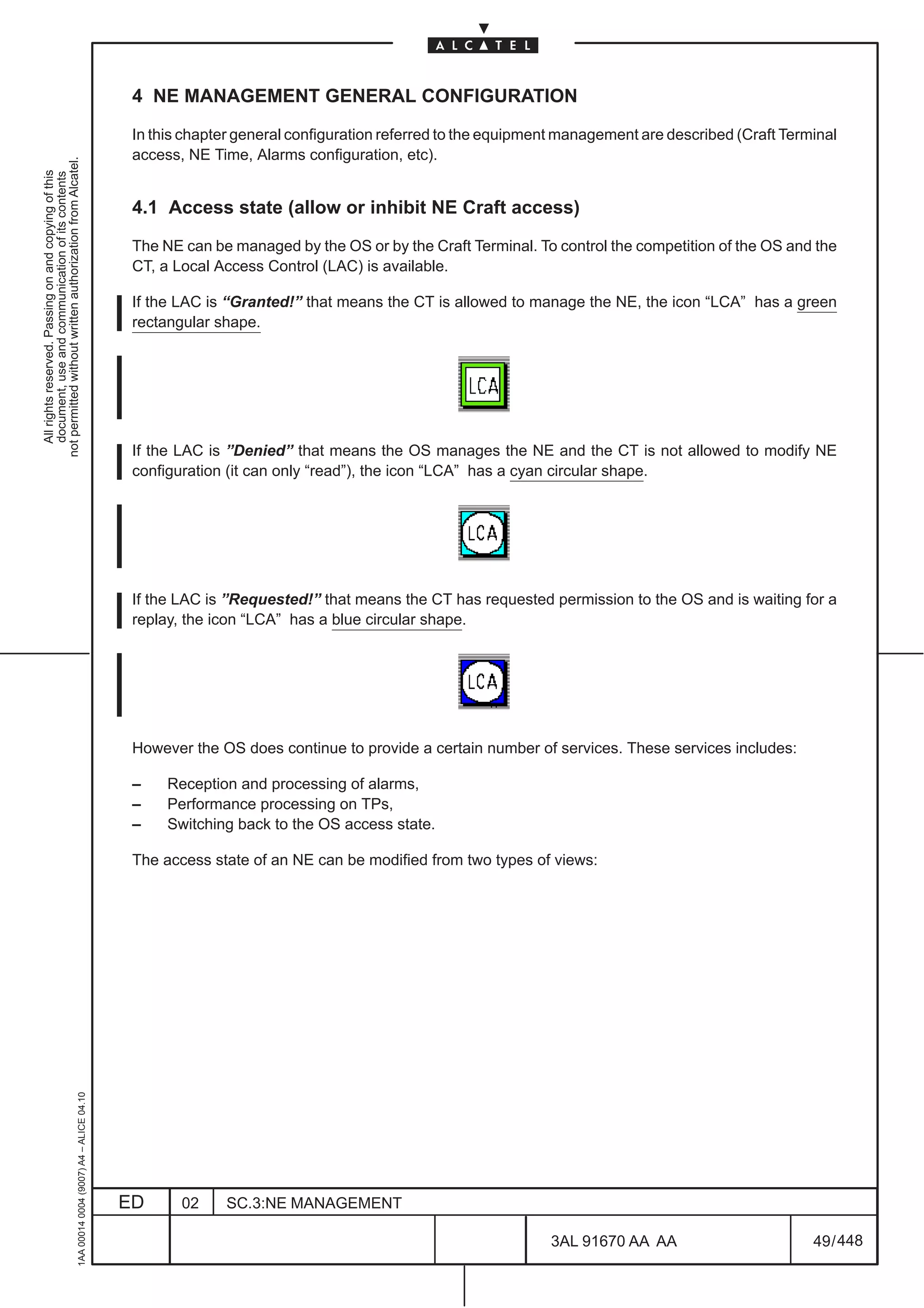
  • 153.
    8.9 Manual ESAdjacencies table Configuration Select the Configuration pull down menu. Select the Comm/Routing –> OSI Routing Configuration option and then from the cascading menu the MESA Configuration option. not permitted without written authorization from Alcatel. The dialog–box opens (Figure 62. ) and allows to configure the Manual ES Adjacencies table. All rights reserved. Passing on and copying of this document, use and communication of its contents Each element of the MESA table allows to link a LAPD port or a LAN port of the local NE to a End System element; the ES element must be in the same area as the one of the local NE. If the addressed element is the OS, the LAN port will be used. The view simulates a real notebook; it allows the user to select the pages of the notebook using the pointing device (upper part of the figure); each page represents a particular element of the MESA table and the respective pointing device displays the element counter. In detail, each page contains the following data: – Physical Interface button • if the element is empty, displays the ”none” value and allows to select a LAPD ports or a LAN port which will be used to reach the End System element. • if the element isn’t empty, displays the selected port and allows to change it. – System Id section represents the System Id of the ES element. – MAC Address section allows to address the element in the Ethernet LAN; the field is managed as a simple strings of 12 digit. Apply button is used to perform a configuration change of the data contained in the complete MESA table and close the view; the view is visible until the end of the operations and a wait cursor is displayed. New button is used to insert a new page. Delete button is used to delete the selected page. Close button close the dialog without changes of the data. Figure 62. MESA Configuration 1AA 00014 0004 (9007) A4 – ALICE 04.10 ED 02 SC.3:NE MANAGEMENT 3AL 91670 AA AA 105 / 448 448
  • 154.
    8.10 IP Configuration The options listed in the menu Configuration –> Comm/Routing –> IP Configuration and also in Configuration –> Comm/Routing –> Tunneling Configuration are relevant to the configuration of not permitted without written authorization from Alcatel. messages communications for the management of ATM or PR_EA boards (ISA) inside the equipment and All rights reserved. Passing on and copying of this document, use and communication of its contents in the network. 8.10.1 IP routing configuration for ISA boards management In order to manage the ISA boards (excepted ETHERNET and PR boards) inserted into the equipment, the following operations are to be done: • “IP Address Configuration of Point–to–Point Interface” (see para 8.13 page 109), defines the IP address for the Equipment–Controller (EC). This should be the first addressing operation • routing configuration, by means of the options: – “IP Static Routing Configuration” (see para 8.11 page 107), if using static routing – “OSPF Area Configuration” (see para 8.12 page 108), if using the automatic OSPF routing • “ISA Board IP Address” (see para. 8.14 page 110), it defines the IP address for the ISA boards; it is to be defined for every ISA board hosted by the equipment. NOTE: if the ISA boards are in EPS 1+1 configuration (not applicable to 1640FOX), they must have the same address) • “IP over OSI Tunneling” (see para. 8.16 page 112), it defines the OSI address (NSAP) of the destination node to be reached (for instance the GNE connected to the TMN), when the ATM/IP management message passes through an SDH/OSI network; i.e. it is to be done for every SDH–NE of the network, if equipped with ISA boards. NOTE: this addressing must be carried out at both end nodes of the tunnel, so that they can see each other. • “OSI over IP Tunneling” (not applicable to 1640FOX), it defines the IP address of the destination node to be reached (for instance the IP router where the TMN is connected), when an OSI management message passes through an IP network. It is to be defined on a a Gateway Network Element (GNE) equipped with the QB3 interface, where the QB3 is connected to a LAN/IP network. NOTE: this addressing must be carried out at both end nodes of the tunnel, so that they can see each other. 1AA 00014 0004 (9007) A4 – ALICE 04.10 ED 02 SC.3:NE MANAGEMENT 3AL 91670 AA AA 106 / 448 448
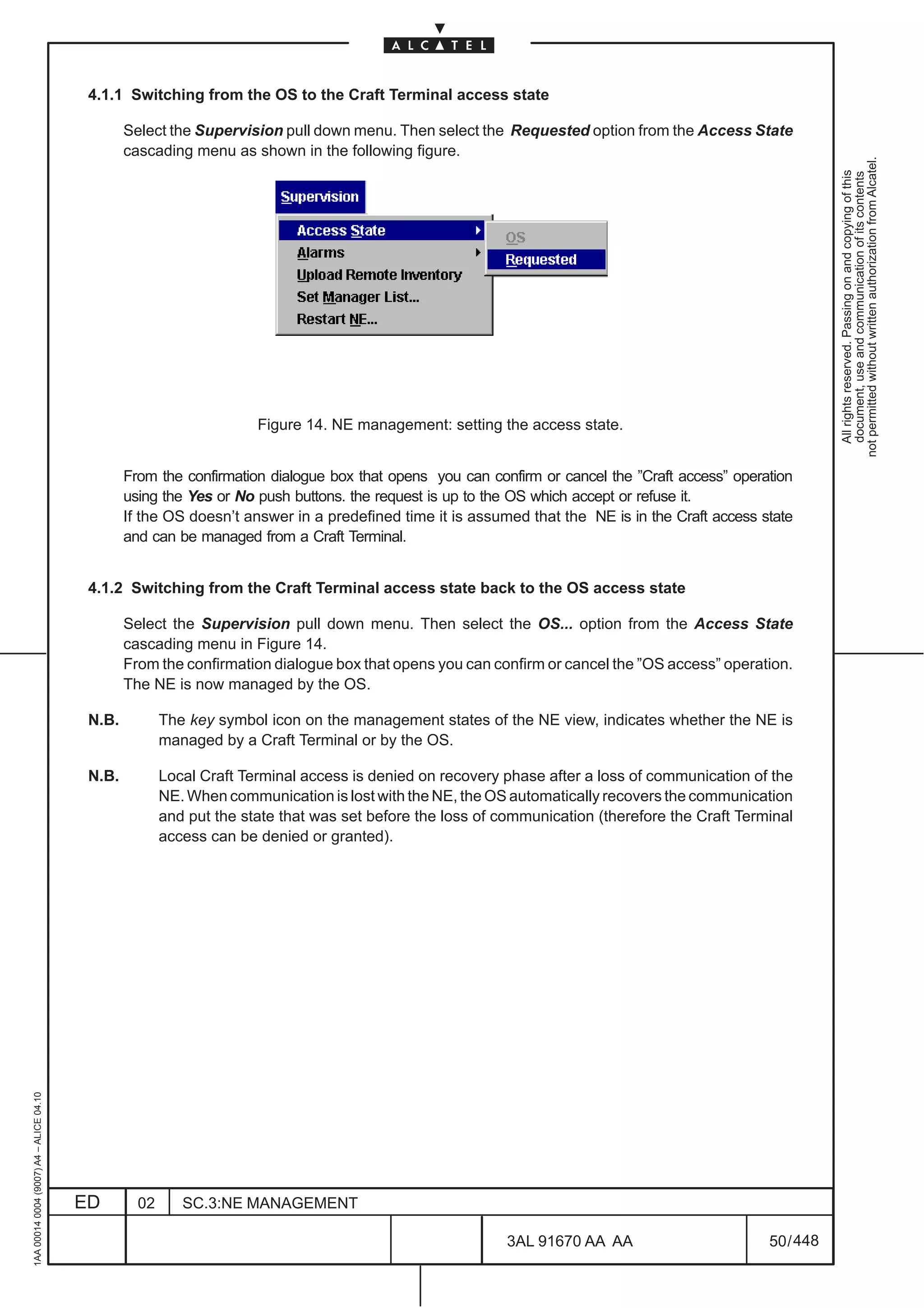
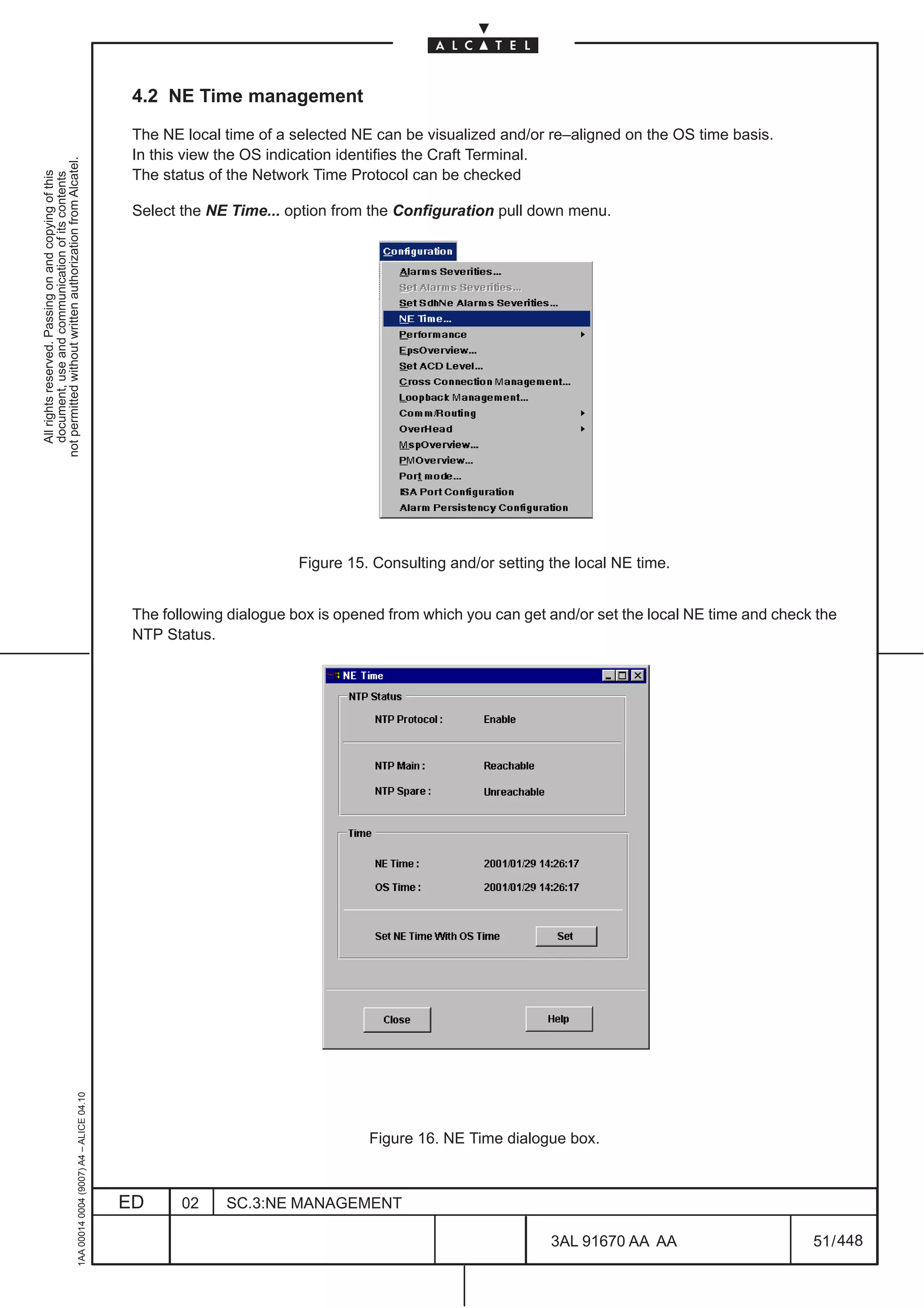
  • 155.
    8.11 IP StaticRouting Configuration Select the Configuration pull down menu. Select the Comm/Routing–>IP Configuration and then from the cascading menu, the IP Static Routing Configuration option. not permitted without written authorization from Alcatel. The dialog–box opens (Figure 63. ) and allows to configure the parameters for IP Static Routing All rights reserved. Passing on and copying of this document, use and communication of its contents Configuration. The following fields and data are present: [1] Destination Host IP Address: allows to define the IP address necessary to reach a specific Host [2] Destination Network: it is alternative to Destination Host IP Address; allows to define the IP Address and IP Mask to reach a network. [3] Default Gateway IP Address: allows to define the address of the next hop gateway [4] CLNP (Connection Less Network Protocol): allows to use a pre–define IP over OSI tunnel towards a gateway. The information in the field is automatically assigned after the execution of the option “IP over OSI Tunneling” (see para. 8.16 page 112). [5] IP Point–to–Point Interface Id: allows to use point to point interfaces made available by EC N.B. Points from [3] to [5] are alternative Apply button is used to perform a configuration change of the data contained in the complete table and close the view; the view is visible until the end of the operations and a wait cursor is displayed. New button is used to insert a new page. Delete button is used to delete the selected page. Close button close the dialog without changes of the data. 1AA 00014 0004 (9007) A4 – ALICE 04.10 Figure 63. IP Static Routing Configuration (example) ED 02 SC.3:NE MANAGEMENT 3AL 91670 AA AA 107 / 448 448
  • 156.
    8.12 OSPF AreaTable Configuration Select the Configuration pull down menu. Select the Comm/Routing–>IP Configuration and then from the cascading menu, the OSPF Area Table Configuration option. not permitted without written authorization from Alcatel. The dialog–box opens (Figure 64. ) and allows to configure the parameters for OSPF (Open Shortest Path All rights reserved. Passing on and copying of this document, use and communication of its contents First) Area Table Configuration , i.e. it is used in an IP network in automatic, dynamic OSPF routing configuration. More area addresses may be set; in this case new pages are created by the system. The following fields and data are present: – OSPF Area IP Address: it is the address of the area containing the equipment – OSPF Area Range Mask Both fields gives a synthetical information that includes all the addresses (specific to a NE and to a Network) in an Area. Apply button is used to perform a configuration change of the data contained in the complete RAP table and close the view; the view is visible until the end of the operations and a wait cursor is displayed. New button is used to insert a new page. Delete button is used to delete the selected page. Close button close the dialog without changes of the data. Figure 64. OSPF Area Table Configuration (example) 1AA 00014 0004 (9007) A4 – ALICE 04.10 ED 02 SC.3:NE MANAGEMENT 3AL 91670 AA AA 108 / 448 448
  • 157.
    8.13 IP AddressConfiguration of Point–to–Point Interfaces Select the Configuration pull down menu. Select the Comm/Routing–>IP Configuration and then from the cascading menu, the IP Address Configuration of Point–to–Point Interfaces option. not permitted without written authorization from Alcatel. The dialog–box opens (Figure 65. ) and allows to set the Equipment Controller IP Address used to All rights reserved. Passing on and copying of this document, use and communication of its contents communicate with the ISA boards inserted into the equipment, and with the rest of the network. Ok button is used to perform a configuration change of the data contained in the dialog–box and closes it; the dialog is visible until the end of the operations and a wait cursor is displayed. Cancel button close the dialog without changes of the data. Figure 65. IP Address Configuration of Point–to–Point Interfaces (example) 1AA 00014 0004 (9007) A4 – ALICE 04.10 ED 02 SC.3:NE MANAGEMENT 3AL 91670 AA AA 109 / 448 448
  • 158.
    8.14 ISA boardIP Address Select an ISA board of the equipment and then the Configuration pull down menu. Select the Comm/Routing–>IP Configuration and then from the cascading menu, the ISA Board IP Address not permitted without written authorization from Alcatel. option. All rights reserved. Passing on and copying of this document, use and communication of its contents The dialog–box opens (Figure 66. ) and allows to set the IP Address of the ISA Board that communicate with the Equipment Controller (EC). Ok button is used to perform a configuration change of the data contained in the dialog–box and closes it; the dialog is visible until the end of the operations and a wait cursor is displayed. Cancel button close the dialog without changes of the data. Figure 66. ISA Board IP Address (example) 1AA 00014 0004 (9007) A4 – ALICE 04.10 ED 02 SC.3:NE MANAGEMENT 3AL 91670 AA AA 110 / 448 448
  • 159.
    8.15 OSI overIP This feature is not applicable to 1640FOX not permitted without written authorization from Alcatel. All rights reserved. Passing on and copying of this document, use and communication of its contents Select the Configuration pull down menu. Select the Comm/Routing–>Tunneling Configuration and then from the cascading menu, the OSI over IP option. The dialog–box opens (Figure 67. ) and allows to configure the Remote Destination IP Address of the Equipment Controller. Figure 67. OSI over IP Tunneling configuration (example) Apply button is used to perform a configuration change of the data contained in the complete table and close the view; the view is visible until the end of the operations and a wait cursor is displayed. New button is used to insert a new page. Delete button is used to delete the selected page. Close button close the dialog without changes of the data. 1AA 00014 0004 (9007) A4 – ALICE 04.10 ED 02 SC.3:NE MANAGEMENT 3AL 91670 AA AA 111 / 448 448
  • 160.
    8.16 IP overOSI Select the Configuration pull down menu. Select the Comm/Routing–>Tunneling Configuration and then from the cascading menu, the IP over OSI option. not permitted without written authorization from Alcatel. The dialog–box opens (Figure 68. ) and allows to configure the Destination NSAP Address and the IP All rights reserved. Passing on and copying of this document, use and communication of its contents Routing Type; i.e. it permits the TMN to reach the ATM/IP boards inserted into the SDH/OSI network . More tunneling channels may be created, in these cases new pages are created by the system. The following fields are present: – Destination NSAP Address:(OSI address of the NE ending the tunnel) a Network Service Access Point (NSAP) Address identifies a location in the network. The first field of the NSAP address, AFI, determines the NSAP format. The AFI filed is 2 characters long (2 exadecimal digits) and, depending on the its value, the length of NSAP address is variable from 16 characters to 40 characters: – the value of AFI 49 identifies the local format of variable length (from 16 characters to 40 characters). – the value of AFI 39 identifies the ISO–DCC format of 40 characters long. – the value of AFI 47 identifies the GOSIP–V2 format of 40 characters long. In all cases the last two fields of the NSAP address are: – System Id: uniquely identifies a NE in an area and is 12 characters long It might be the equipment MAC Ethernet address, level 2, inserted in the NE (check the value in the para. 8.7 on page 102 ) or it might be selected by the operator. – Network Selector: provides the distinction among users of the network service and is 2 characters long (value is “1d”). In the view, the NSAP is managed as simple strings of characters without any pre–formatting because of the variable format: – a first string of two characters that identifies the AFI field – a second string of variable length that identifies the remaining NSAP address – IP Routing:allows to choose the type of IP routing supported as follows; – OSPF (Open Shortest Path First) , if the “OSPF Area Configuration” option has been used (see para 8.12 page 108) – RIP (Routing Information Protocol) – Both – None, if the option “IP Static Routing Configuration” (see para 8.11 page 107) has been used If “OSPF” or “Both” options are selected, also the “Associated OSPF Area” must be set (it is to be chosen among the presented options); in this case the information field is automatically filled with the addresses set in the “OSPF Area Configuration” application. Apply button is used to perform a configuration change of the data contained in the complete table and close the view; the view is visible until the end of the operations and a wait cursor is displayed. New button is used to insert a new page. Delete button is used to delete the selected page. Close button close the dialog without changes of the data. 1AA 00014 0004 (9007) A4 – ALICE 04.10 ED 02 SC.3:NE MANAGEMENT 3AL 91670 AA AA 112 / 448 448
  • 161.
    All rights reserved.Passing on and copying of this document, use and communication of its contents not permitted without written authorization from Alcatel. 1AA 00014 0004 (9007) A4 – ALICE 04.10 ED 02 SC.3:NE MANAGEMENT 448 3AL 91670 AA AA Figure 68. IP over OSI Tunneling configuration (example) 113 / 448
  • 162.
    1AA 00014 0004(9007) A4 – ALICE 04.10 ED 02 SC.3:NE MANAGEMENT 448 3AL 91670 AA AA 114 / 448 All rights reserved. Passing on and copying of this document, use and communication of its contents not permitted without written authorization from Alcatel.
  • 163.
    9 EQUIPMENT MANAGEMENT 9.1 Introduction and navigation not permitted without written authorization from Alcatel. All rights reserved. Passing on and copying of this document, use and communication of its contents This section deals mainly with the setting and changing of the boards present on the Equipment and undertaking board protection operations. Using the menu options, select the Equipment option from the View pull down menu The first level of the “Equipment Overview” representation will be displayed directly into the current window (see the following figures).The Equipment Overview enables a fast navigation through all levels of the equipment hierarchy. Navigation is done from higher to lower levels. The NEs hierarchy is different organized according to the equipment type, as follow: – 1660SM & 1650SMC: Subrack > board > port > TP The navigation through different levels of the NE hierarchy is performed by double clicking on the objects (see also para 9.1, pg. 115): • the first level shows the subrack level of the Equipment view (see Figure 69. on page 117); • by double clicking on a board body , the board level of the Equipment view can be reached (as described in chapter 10 on page 133). • further, by double clicking on a port body contained in the board, the port level of the Equipment view can be reached (as described in chapter 11 on page 139). The port view displays the inner TPs. • it is possible to go back to the upper level of representation by pressing the <ESC> key on the keyboard; It is also possible to: – go back to the previous view, by selecting the Backward option from the views menu – go to the next view, by selecting the Forward option from the view menu. N.B. Selecting in the first level of the Equipment view ( subrack level, see Figure 69. on page 117 ) the Show supporting equipment option from the Equipment menu, the Rack level view of Figure 70. is presented. In the Rack Level view two subracks are presented: – at the top the Equipment Subrack (example “SR60M” for 1660SM or “SR50C” for 1650SMC) – at the bottom the Fans Subrack, named SRFAN. The Fans Subrack presence is managed with the Set option as for the boards of the Equipment Subrack (refer to paragraph 9.2 on page 122 for details) Further, selecting in the Rack level view the Show supporting equipment option from the Equipment menu, the Equipment level view of Figure 71. is presented. 1AA 00014 0004 (9007) A4 – ALICE 04.10 ED 02 SC.3:NE MANAGEMENT 3AL 91670 AA AA 115 / 448 448
  • 164.
    1640FOX: Rack > Subrack > board > port > TP. not permitted without written authorization from Alcatel. The navigation through different levels of the NE hierarchy is performed by double clicking on the All rights reserved. Passing on and copying of this document, use and communication of its contents objects (see also para 9.1, on page 115): • the first level shows the Rack level of the Equipment view (see Figure 72. on page 119); two subracks are presented: – at the top the Equipment Subrack “SR40M” – at the bottom the AC/DC Rectifier Subrack, named “SR40R” by double clicking on a Subrack body, the relevant subrack level of the Equipment view can be reached (see Figure 73. on page 120). • by double clicking on a board body, the board level of the Equipment view can be reached (as described in chapter 10 on page 133). • further, by double clicking on a port body contained in the board, the port level of the Equipment view can be reached (as described in chapter 11 on page 139). The port view displays the inner TPs. • it is possible to go back to the previous level of representation by pressing the <ESC> key on the keyboard; or: – go back to the previous view, by selecting the Backward option from the Views menu – go to the next view, by selecting the Forward option from the Views menu. N.B. Selecting, in the first level of the Rack view (rack level ), the Show supporting equipment option from the Equipment menu, the Equipment level overview is presented (see Figure 74. on page 120). 1AA 00014 0004 (9007) A4 – ALICE 04.10 ED 02 SC.3:NE MANAGEMENT 3AL 91670 AA AA 116 / 448 448
  • 165.
    All rights reserved.Passing on and copying of this document, use and communication of its contents not permitted without written authorization from Alcatel. 1AA 00014 0004 (9007) A4 – ALICE 04.10 ED 02 SC.3:NE MANAGEMENT LCA LCA 448 3AL 91670 AA AA 1660SM 1650SMC Figure 69. Equipment Overview – 1650SMC and 1660SM “Subrack“ level 117 / 448
  • 166.
    SR50C not permitted without written authorization from Alcatel. All rights reserved. Passing on and copying of this document, use and communication of its contents LCA LCA SRFAN 1650SMC without Fans Subrack 1650SMC with Fans Subrack SR60M LCA LCA SRFAN 1660SM without Fans Subrack 1660SM with Fans Subrack 1AA 00014 0004 (9007) A4 – ALICE 04.10 Figure 70. Equipment Overview – 1650SMC and 1660SM “Rack” level ED 02 SC.3:NE MANAGEMENT 3AL 91670 AA AA 118 / 448 448
  • 167.
    not permitted withoutwritten authorization from Alcatel. All rights reserved. Passing on and copying of this document, use and communication of its contents LCA LCA 1650SMC 1660SM Figure 71. Equipment Overview – 1650SMC and 1660SM “Equipment level” LCA 1640FOX 1AA 00014 0004 (9007) A4 – ALICE 04.10 Figure 72. Equipment Overview – 1640FOX“Rack” level ED 02 SC.3:NE MANAGEMENT 3AL 91670 AA AA 119 / 448 448
  • 168.
    1AA 00014 0004(9007) A4 – ALICE 04.10 ED 02 SC.3:NE MANAGEMENT LCA LCA 448 3AL 91670 AA AA Figure 73. Equipment Overview – 1640FOX “Subrack“ level Figure 74. Equipment Overview – 1640FOX “Equipment level” 1640FOX 1640FOX 120 / 448 All rights reserved. Passing on and copying of this document, use and communication of its contents not permitted without written authorization from Alcatel.
  • 169.
    The “equipment management”is achieved by using the options offered by the Equipment menu (see Figure 75. page 121). Alarms indications are present at every NE level. not permitted without written authorization from Alcatel. Details about these alarms indications are given in the Maintenance section. All rights reserved. Passing on and copying of this document, use and communication of its contents All the options offered by equipment menu are described in the next paragraphs. The main functions are the setting and changing of the boards on the Equipment. Boards administrative state settings, that decide about the “in/out of service” of the boards is also described. Figure 75. Equipment menu (example) Equipment setting operation are defined according the following sequences: – configuration of a new board • Configure the board using the option “Set” – change of board type • “Set out of service” the board • Configure the board using the option “Set” – remove a board • “Set out of service” the board • Delete all the underlying traffic, connections, services, etc. concerning the board • “Remove” the board. 1AA 00014 0004 (9007) A4 – ALICE 04.10 ED 02 SC.3:NE MANAGEMENT 3AL 91670 AA AA 121 / 448 448
  • 170.
    9.2 Set andchange or remove board/subrack The boards can be set, changed or removed using the menu options of the Equipment view. not permitted without written authorization from Alcatel. a) Setting or changing a board/subrack All rights reserved. Passing on and copying of this document, use and communication of its contents A new board/subrack may be created in either an empty slot or it may replace an existing Out of Service board/subrack (without the lock symbol). In fact, the Set option is available only after selecting an empty slot or an Out–of–service board. • Click on the empty slot in which a board/subrack has to be added, or on an existing Out of Service board in order to change it (see next para. 9.4 on page 128 for “in /out of service” info). The contour becomes highlighted to show that operations can be done on it. • Select the the Set option of the Equipment pull down menu of Figure 75. on page 121. • The following example of dialogue box containing a list of the different types of boards/subrack/ access card and modules is displayed. 1AA 00014 0004 (9007) A4 – ALICE 04.10 ED 02 SC.3:NE MANAGEMENT 3AL 91670 AA AA 122 / 448 448
  • 171.
    All rights reserved.Passing on and copying of this document, use and communication of its contents not permitted without written authorization from Alcatel. 1AA 00014 0004 (9007) A4 – ALICE 04.10 ED 02 BOARDS LIST SUBRACK LIST SC.3:NE MANAGEMENT MODULES LIST 448 3AL 91670 AA AA Figure 76. The list of different boards/subrack relative to an NE slot (examples) ACCESS CARD LIST 123 / 448
  • 172.
    NOTE: The listof boards/subrack displayed during a ”Set” operation is restricted to those which the equipment may accept in the selected slot. Therefore the list will vary depending on which slot has been selected. For details on the board/subrack identified by acronyms and NE physical composition please refers not permitted without written authorization from Alcatel. to the Technical Handbook. All rights reserved. Passing on and copying of this document, use and communication of its contents • Choose the board/subrack/access card type required, by clicking on the corresponding item in the list. The name of the board is highlighted. Click on the OK push button to validate the choice. Note: In case of 4xANY Modules it is also necessary to choose the type of user supported as shown in Figure 76. • The board/subrack representation appears on the NE view in the slot when the board change is effective. A lock representation appears over the boards (”in–service”, see next para. 9.4 on page 128) • In the Create/Modify dialogue box, the Cancel push button cancels the operation and closes the dialogue box. The Help push button opens a Help view giving information about the context. b) Removing a board/subrack/modules NOTE: the “Remove” action is not possible in the case that, on the considered board, is still existing any operation/connection/termination on the underlying supported signals, such as: • Performance Monitoring on underlying TPs • POM / TCT /TCM /SUT monitoring operations • Lower order Connections • Higher order Connections • Lower/Higher order Path Terminations • Loop–backs • LAN/LAPD (and any comm/routing service) • Auxiliary channels • Timing Sources References • Daughter boards, Submodules, etc. Thus the deletion of every operation/connection/termination is necessary, in the same order as above listed, before removing a board. • Click on the board/subrack to remove (Out of Service board/subrack, as for next para. 9.4 on page 128). • The outline of the slot becomes highlighted. This indicates that the board is selected and that operations can be done on the slot. • If the slot you are working on is already empty no name appears under the slot. • Select the Remove option the Equipment pull down menu of Figure 75. on page 121. • From the confirmation dialogue box that opens you can confirm or cancel the ”Remove” operation. 1AA 00014 0004 (9007) A4 – ALICE 04.10 ED 02 SC.3:NE MANAGEMENT 3AL 91670 AA AA 124 / 448 448
  • 173.
    c) Modify a board NOTE: this procedure can be done to replace an existing unit with a similar one of different version, without previously remove it. In other words: it is possible when changing only the version of the not permitted without written authorization from Alcatel. board, not the type. All rights reserved. Passing on and copying of this document, use and communication of its contents – Click on the optical module to replace. The outline of the slot becomes highlighted to show that operation can be done on it. – Select the Modify option of the Equipment pull down menu of Figure 75. on page 121 . – A dialog box containing a list of different types of optical module is displayed. – Chose the optical module type required by clicking on the corresponding item in the list; the name of the module is highlighted. – Click on OK push button to validate the choice. – The board representation appears on the N.E. view in the slot when the board change is effective. A padlock representation appears over the board. 1AA 00014 0004 (9007) A4 – ALICE 04.10 ED 02 SC.3:NE MANAGEMENT 3AL 91670 AA AA 125 / 448 448
  • 174.
    9.3 Connect Fanto CONGI board This feature is not applicable to 1640FOX not permitted without written authorization from Alcatel. All rights reserved. Passing on and copying of this document, use and communication of its contents This command enable the Fan Subrack alarms management by means of a connection to a CONGI board. The option menu is different according to the equipment type (1650SMC or 1660SM) as explained in the following table: Equipment Type Options available 1650SMC Connect Fan to CONGI#5 1660SM Connect Fan to CONGI#10 Connect Fan to CONGI#12 NOTE: even if available, this option must not be used! Figure 77. shows an example of connection for 1660SM equipment; the description that follows can be apply also to 1650SMC taking into account that the option to be chosen is “Connect Fan to CONGI#5”. Select the CONGI board To enable this function select the option (Connect Fan to CONGI#10 ) of the Equipment menu LCA Figure 77. Connect FAN to CONGI 1AA 00014 0004 (9007) A4 – ALICE 04.10 It is possible to disable this function by selecting the relevant CONGI board and than choosing the Remove Fan connection from CONGI#10 option of the Equipment menu (refer to Figure 78. ). ED 02 SC.3:NE MANAGEMENT 3AL 91670 AA AA 126 / 448 448
  • 175.
    All rights reserved.Passing on and copying of this document, use and communication of its contents not permitted without written authorization from Alcatel. 1AA 00014 0004 (9007) A4 – ALICE 04.10 ED 02 SC.3:NE MANAGEMENT Figure 78. Remove FAN connection from CONGI 448 3AL 91670 AA AA LCA 127 / 448
  • 176.
    9.4 Board administrativestate The operator decides to set a board in service or out of service, if it is allowed by the NE. not permitted without written authorization from Alcatel. N.B. In the equipment view, a lock representation appears over the boards which are in ”in service” All rights reserved. Passing on and copying of this document, use and communication of its contents state. 9.4.1 Setting a board in service – In the Subrack NE view, click on the board in order to select it. – Select the Set in service option of the Equipment pull down menu of Figure 75. on page 121. A lock representation appears over the boards. 9.4.2 Setting a board out of service – In the Subrack NE view, click on the board in order to select it. – Select the Set out of service option of the Equipment pull down menu of Figure 75. on page 121. Select the Ok push button in the confirmation window which appears. A lock representation disappears, substituted by the symbol over the boards.. 9.4.3 Consulting a Board’s Administrative state The board’s administrative (”in service” or “out of service”) state is indicated on the board view as shown in the following figure. LCA Administrative State Information 1AA 00014 0004 (9007) A4 – ALICE 04.10 Figure 79. Consulting a board’s administrative state (example) ED 02 SC.3:NE MANAGEMENT 3AL 91670 AA AA 128 / 448 448
  • 177.
    9.5 Software description This function allows the operator to visualize information about the software(s) which is (are) present in the selected board. not permitted without written authorization from Alcatel. All rights reserved. Passing on and copying of this document, use and communication of its contents – Click on a board in which the software is wanted to know (EQUICO or MATRIX unit for “1660SM”, SYNTH unit “for 1650SMC and 1640FOX”). The outline of the slot becomes highlighted. This indicates that the board is selected and that operations can be done on the slot. – Select the Software description option of the Equipment pull down menu of Figure 75. on page 121. The following window opens. Figure 80. Software Description dialogue box (example) The dialogue box contains as many folder sheets as there are softwares in the selected board. If the selected board does not contain any software, the following information will be displayed: Click on the Close push button to close the dialogue box. 1AA 00014 0004 (9007) A4 – ALICE 04.10 ED 02 SC.3:NE MANAGEMENT 3AL 91670 AA AA 129 / 448 448
  • 178.
    9.6 REMOTE INVENTORY This command displays the remote inventory data present in the Subrack and Boards. – Select the Remote Inventory option of the Equipment pull down menu. not permitted without written authorization from Alcatel. Two options are available (see the following figure): All rights reserved. Passing on and copying of this document, use and communication of its contents • Subrack level: prints or write on a file the remote inventory data of the subrack. • Board level: show the remote inventory data of the selected board For the Board level a dialog similar to Figure 81. appear. 1AA 00014 0004 (9007) A4 – ALICE 04.10 Figure 81. Remote Inventory (example) ED 02 SC.3:NE MANAGEMENT 3AL 91670 AA AA 130 / 448 448
  • 179.
    The remote inventorydata of the Subrack level can be printed on the default printer ( Figure 82. ) or to a file in postscript or ASCII format ( Figure 83. ). not permitted without written authorization from Alcatel. All rights reserved. Passing on and copying of this document, use and communication of its contents Figure 82. Select Printer N.B. If no printer is installed, there is no error message displayed to indicate this. Figure 83. Select Output Format for file 1AA 00014 0004 (9007) A4 – ALICE 04.10 ED 02 SC.3:NE MANAGEMENT 3AL 91670 AA AA 131 / 448 448
  • 180.
    9.7 Show supportingequipment Click on Show Supporting Equipment menu option of the Equipment menu to navigate to the equipment that supports the selected board. not permitted without written authorization from Alcatel. All rights reserved. Passing on and copying of this document, use and communication of its contents Figure 84. (example) opens. LCA Figure 84. Equipment Overview – Subrack level (example) 1AA 00014 0004 (9007) A4 – ALICE 04.10 ED 02 SC.3:NE MANAGEMENT 3AL 91670 AA AA 132 / 448 448
  • 181.
    10 BOARD VIEW 10.1 Introduction not permitted without written authorization from Alcatel. All rights reserved. Passing on and copying of this document, use and communication of its contents The Board View permits to show the physical port available in a specific board and to access the Port view. The “Board view” is reached selecting the Equipment option in the View pull down menu, then double clicking on the selected board to show the relevant Board view, presenting the ports. In case of board containing “sub–boards”, another view permits to see the contained item, named “daughter” or “sub–board” (see example of Figure 85. ) An example of “daughter” with the presented port is in Figure 86. It is displayed after clicking on it. Alarms and Status indications referred to the board level are present at the bottom of the view, as indicated in the example (Administrative State and Board Alarms/Status). This information are “In/Out of service” of the board (Administrative State) and board alarms and status like “missing” (RUM) or “mismatch” (RUTM), EPS condition if supported and other indications typical of each unit . In the Maintenance section details on this indication are given. LCA ”daughters” Administrative state Board Alarms/Status Figure 85. Equipment view: select the SDH port on a board (example) 1AA 00014 0004 (9007) A4 – ALICE 04.10 ED 02 SC.3:NE MANAGEMENT 3AL 91670 AA AA 133 / 448 448
  • 182.
    not permitted withoutwritten authorization from Alcatel. All rights reserved. Passing on and copying of this document, use and communication of its contents LCA Figure 86. Example of a Board View A port type is described with a board rectangular view and a port identification. The port identification is usually internal to the rectangular board (see Figure 87. some ports examples). (SDH) (ISA) (PDH) (GBit ETHERNET) (ISA–ES) Figure 87. Examples of a Ports identification and relevant alarm synthesis The following information is available: – type of port (name) – state of port (alarm status synthesis) – symbol of the port The operator is provided with a representation of the port alarm synthesis on each port. The messages displayed at the top view provide port denomination. The messages displayed at the bottom provide information about Board alarms. A message under the mouse facility provides the name and the port type or the alarms name. A message 1AA 00014 0004 (9007) A4 – ALICE 04.10 appears in the message area in the bottom left corner of the view. By double clicking on a board view, it is also possible open the corresponding port view (see chapter 11 on page 139). ED 02 SC.3:NE MANAGEMENT 3AL 91670 AA AA 134 / 448 448
  • 183.
    10.2 Board ViewMenu Selecting the “Board” option in the menu bar of Figure 86. on page 134 the complete pull down Board menu is presented (Figure 88. ): not permitted without written authorization from Alcatel. All rights reserved. Passing on and copying of this document, use and communication of its contents – Port Access: Access the “Port” view. See para.10.2.1 on page 136 . Note: this option is accessible after the selection of a port contained in the view. – Change Physical Interface: Change the SPI or PPI object into PPI or SPI (and viceversa) on the bi–mode port( 140Mbit/s / STM–1 switchable). See para. 10.2.2 on page 137. This feature is not applicable to 1640FOX – Show supporting equipment: Navigate to the upper subrack level. See para.10.2.3 on page 138. – ISA Port Configuration: It allows to configure the TPs for the ISA port connections. Note: this is available only if an ISA board has been equipped in the Subrack. Figure 88. Board menu options These options are described in next paragraphs. 1AA 00014 0004 (9007) A4 – ALICE 04.10 ED 02 SC.3:NE MANAGEMENT 3AL 91670 AA AA 135 / 448 448
  • 184.
    10.2.1 Port Access Click on Port Access option of the Board menu to access the “Port View” ( see chapter 11 on page 139). not permitted without written authorization from Alcatel. Navigation to the Port view permits to show a detailed alarm presentation of the port and to set the relevant All rights reserved. Passing on and copying of this document, use and communication of its contents configurations as for the example of the following figure. Note: on the ISA port the TPs are not automatically created (except for MAU TP) when the board is equipped in the subrack but they must be created with the aid of the Configuration –>ISA port Configuration (refer to Chapter 20 on page 427). LCA Figure 89. After “Port Access” selection (example) 1AA 00014 0004 (9007) A4 – ALICE 04.10 ED 02 SC.3:NE MANAGEMENT 3AL 91670 AA AA 136 / 448 448
  • 185.
    10.2.2 Change PhysicalInterface This feature is not applicable to 1640FOX not permitted without written authorization from Alcatel. This command allows to change the type of physical interface in a bi–mode port (140 Mbit/s / 155 Mbit/s All rights reserved. Passing on and copying of this document, use and communication of its contents switchable port) i.e it changes the SPI or PPI object into PPI or SPI. Select the Symbol of the port in the “Board view”. Click on Change Physical Interface menu option of the Board menu (see Figure 90. on page 137) LCA Figure 90. Change Physical Interface (example) The following dialog box is opened: 1AA 00014 0004 (9007) A4 – ALICE 04.10 Click on the OK push button to change the physical interface. Click on the Cancel push button to abort the change of the physical interface. ED 02 SC.3:NE MANAGEMENT 3AL 91670 AA AA 137 / 448 448
  • 186.
    10.2.3 Show Supportingequipment Click on Show Supporting Equipment menu option of the Board menu to navigate to the subrack that supports the selected port view. not permitted without written authorization from Alcatel. Figure 91. (example) opens. All rights reserved. Passing on and copying of this document, use and communication of its contents LCA Figure 91. Subrack level (example) 1AA 00014 0004 (9007) A4 – ALICE 04.10 ED 02 SC.3:NE MANAGEMENT 3AL 91670 AA AA 138 / 448 448
  • 187.
    11 PORT VIEW 11.1 Introduction not permitted without written authorization from Alcatel. All rights reserved. Passing on and copying of this document, use and communication of its contents This section describes the operations necessary for the consultation, modification and configuration of each port. The Port View permits to set and show the transmission resources (i.e. the Termination Point, TP) referred to the specific Port; it permits to check the detailed alarms presented by each TP of the Port, and the available menu permits to configure the port, (many setting options listed in the port menu are common with the “Transmission” view). In these views are presented only the TP specific of the port. The menu differs according the port type (SDH, PDH, HOA, ISA port). The Port View can be accessed from the Equipment or Transmission Views. The “Port view” is reached selecting the Equipment option in the View pull down menu then double clicking on the presented rack/subrack to present the subrack view, as described in chapter 9 on page 115. Double clicking on the selected board the relevant Board view is available presenting the ports (see chapter 10 on page 133). By double clicking on a board view, the corresponding port view is opened (see Figure 92. ). The “Port view” is also reached selecting the Transmission option in the View pull down menu. Then the Add TP option of the Transmission menu permits to select and confirm a TP (see the description at para. 14.5 on page 217). On the transmission view which appears select the TP and on the Transmission menu select the Navigate to a port view option. The HOA port view can be reached from the Port view, selecting a Tp and then Port –> Navigate to HOA port view. The ISA port (ATM, ETH, PR_EA) are not automatically created when the board is inserted in the subrack but must be created as explained in Chapter 20 on page 427. From the Port view It is possible to Navigate to Transmission view. The port types contain the following TP: • SDH port: Electrical or Optical SPI TTP, RS TTP, MST TTP, prot TTP (MSP TTP), AU4 CTP, Trail Monitor (only with enabled POM) SONE Tport: Eelctrical or Optical SPI TTP, RST TTP, prot TTP (MSP), AU3 P. PDH port: PPI TTP, En CTP, VCn TTP HOA port: VC4 TTP, TUG3, TUG2, TU3, TU12, Trail Monitoring (only with enabled POM) ISA–ATM port: VC4C TTP, VC4 TTP, VC3 TTP, VC12 TTP, s31 TTP and E1 TTP ISA–PR_EA port: VC4 TTP, VC3 TTP and VC12 TTP ISA–Fast ETHERNET port: MAU, PTC, VC3XV, VC12XV, VC4 TTP, VC3 TTP and VC12 TTP ISA–Gigabit ETHERNET port: MAU, PTC, VC4XV, VC4 TTP, VC3 TTP and VC12 TTP 1AA 00014 0004 (9007) A4 – ALICE 04.10 ISA–ES port: MAU, PTC, VC4XV, VC3XV, VC12XV, VC4 TTP, VC3 TTP and VC12 TTP NOTE: ISA–PR board does not have any kind of port type. ED 02 SC.3:NE MANAGEMENT 3AL 91670 AA AA 139 / 448 448
  • 188.
    not permitted withoutwritten authorization from Alcatel. All rights reserved. Passing on and copying of this document, use and communication of its contents LCA Figure 92. Example of a Port View (example) On the port view, the messages displayed at the top view in the form of message boxes provide more information concerning the type and the alarms of the port. On the other hand the messages displayed at the bottom provide information about MSP protection and ALS state ( if they are supported ). A message under the mouse facility provides the name and the port type. A message appears in the message area in the bottom left corner of the view. 1AA 00014 0004 (9007) A4 – ALICE 04.10 ED 02 SC.3:NE MANAGEMENT 3AL 91670 AA AA 140 / 448 448
  • 189.
    11.2 Port View:elements on the TP The symbols of the TPs (see Figure 93. ) have the following meaning: not permitted without written authorization from Alcatel. – Alarm Icon Area All rights reserved. Passing on and copying of this document, use and communication of its contents The icon boxes represent alarms. The color of the boxes changes according to the alarm severity. – TP Role The icon boxes represent the function: Adaptation, Termination or Compound Adaptation and Termination. – Cross-connected state If the condition of the resource is cross-connected, an icon with a x appears beneath the box. – Performance state If the condition of the resource is under performance monitoring, an icon with a P appears beneath the box. – Loop state If the condition of the resource is under loop, an icon with a L appears beneath the box. – Selected state An orange frame around the box identifies the TP selection, so port menu refers to the selected TP. Alarm icon area G.783 TP Role (Termination) TP identifier Selection indication Crossconnected state TP under Performance monitoring Figure 93. Termination TP box (example) Figure 94. is another example of TP with different G.783 function role. Alarm icon area G.783 TP Role (Adaptation) G.783 Functional block acronym 1AA 00014 0004 (9007) A4 – ALICE 04.10 Figure 94. G.783 Adaptation TP box. ED 02 SC.3:NE MANAGEMENT 3AL 91670 AA AA 141 / 448 448
  • 190.
    11.3 Port ViewMenu Selecting the “Port” option in the menu bar of Figure 89. on page 136 the complete pull down Port menu is presented (Figure 95. ) not permitted without written authorization from Alcatel. All rights reserved. Passing on and copying of this document, use and communication of its contents The menu differs according the port type (SDH, PDH, HOA and ATM), and is introduced in the following: – TP configuration: Set parameters for the Signal Label and Path Trace overhead on Synchronous TP’s. See para 14.6 on page 227. – Port Mode Configuration: This functionality allows to manage the alarms behaviour on LOS according to the setup done at port level. Refer to paragraph 11.4 on page 144. The same functionality can be reached from Configuration –> Port Mode menu. – TP Threshold Configuration: Set B2 excessive BER and Signal Degraded parameter See para. 14.7 on page 234. – TP Frame Mode Configuration: Set parameters for 2Mbit/s G.703/G.704 or ISDN–PRA management See para 11.8 on page 170. – Set Retiming: Enable/disable the retiming feature on the outgoing 2 Mbit/s signal. See paragraph 11.5 on page 11.5. – AU4 Concatenation: Only for SDH ports views. See para 11.6 on page 148 – Cross Connection: Manage the connection of the paths. See para.15 on page 253 – Monitoring Operations: Set parameters for POM/SUT/TCTTCM TP’s. See para.14.9 on page 236 – Performance: See and Show Performance Monitoring parameters and data. See Chapter 17 on page 313. – Loopback: Manage the loopback commands, for commissioning or maintenance purposes. See para. 14.11 on page 242. – MSP Manage the Multiplex Section Protection of the NE. See Chapter 13 on page 193. – Physical Media: Manage the physical TP port setting. Not applicable to HOA port. It is described in the following paragraph. – Show supporting board: Navigate to the upper board level It is described in this chapter, see para.11.9 on page 173 – Navigate to Transmission view: permit to show a complete overview about the signal flow, opening all TP’s. It is described in this chapter, see para.11.10 on page 174 – Navigate to Monitor view: permit to show an overview about the monitoring operation (POM, SUT, TCT/TCM) TP’s. It is described on paragraph 11.11 on page 175. – Navigate to HOA port view: this option is available only on SDH ports; The HOA pot view display the internal structureof the payload. 1AA 00014 0004 (9007) A4 – ALICE 04.10 ED 02 SC.3:NE MANAGEMENT 3AL 91670 AA AA 142 / 448 448
  • 191.
    All rights reserved.Passing on and copying of this document, use and communication of its contents not permitted without written authorization from Alcatel. 1AA 00014 0004 (9007) A4 – ALICE 04.10 ED 02 SC.3:NE MANAGEMENT ISA port PDH port SDH Port 448 3AL 91670 AA AA Figure 95. Examples of port menu options (SDH, PDH and ATM/GBIT ETHERNET port) 143 / 448
  • 192.
    11.4 Port ModeConfiguration ”To prevent alarms from being raised and failures being reported during trail provisioning actions, trail termination functions have the ability to enable and disable fault cause declaration. not permitted without written authorization from Alcatel. All rights reserved. Passing on and copying of this document, use and communication of its contents This is controlled via their termination point mode or port mode parameter. The termination point mode can be either ”monitored” (MON) or ”not monitored” (NMON). The state can be MON if the termination function is part of a trail and provides service and NMON if the termination function is not part of a trail or is part of a trail which is in the process of set–up, breakdown or re–arrangement. In physical section layers, the termination point mode is called the port mode. It has three modes : MON, AUTO, and NMON (the last is not supported on OMSN). The AUTO mode is like the NMON mode with one exception: if the LOS defect clears, the port mode is automatically changed to MON. This allows for alarm–free installation without the burden of using a management system to change the monitor mode. Selecting the “Port Mode Configuration” option in the menu bar of Figure 96. on page 144 the complete Port Mode Configuration window is presented (Figure 97. ) Figure 96. Port mode configuration pull–down menu 1AA 00014 0004 (9007) A4 – ALICE 04.10 ED 02 SC.3:NE MANAGEMENT 3AL 91670 AA AA 144 / 448 448
  • 193.
    not permitted withoutwritten authorization from Alcatel. All rights reserved. Passing on and copying of this document, use and communication of its contents Figure 97. Port Mode overview Port Mode Overview Dialog allows a centralized mechanism for: – System wide search for Port Mode settings – Change of Port Mode setting – Change of Port Mode default. System wide search capability is offered in order to show port mode value representation for all ports in a NE or in a port subset. The subset is defined according to the filtering capabilities on Port Type (all ports, SDH port Only, PDH port Only, Ethernet port only, CWDM port only) and to the Port Mode set (Ignore, Mon, Auto). Change of Port Mode setting can be done on the selected ports in the matrix gadget. Multiple selection is allowed. The user can choose the new Port Mode ( in the Define Port Mode Values field) and can start the change on the selected ports (Set Mode). Change of Port Mode System Default can be done in the related frame. Current system default is visualized in the combo box current value. Port Mode Overview dialog is available both at Configuration menu and Port View menu and Transmission View as well. 1AA 00014 0004 (9007) A4 – ALICE 04.10 Using it at Configuration menu the “multi port” working mode is enabled with full support for search and filtering. Using it in Port View or Transmission View enable the “single port” functionality and the search capability is greyed out. ED 02 SC.3:NE MANAGEMENT 3AL 91670 AA AA 145 / 448 448
  • 194.
    11.5 Set Retiming The Retiming feature applies to the outgoing 2 Mbit/s and its purpose is to absorb the jitter /wander that is transferred to the PDH signal when SDH pointer justification occur. The feature is set individually per not permitted without written authorization from Alcatel. port. All rights reserved. Passing on and copying of this document, use and communication of its contents Select a 2Mbit/s port and zoom in to open the port view. When the Retiming feature is disable, the color of the state information at the bottom of the window is brown and the label “Retiming State Disable” is written. Select the Set Retiming–>Enable option from the Port menu (see Figure 98. example) LCA Figure 98. Set Retiming enable (before) As result of this operation the state information color become green and the label “Retiming State Enable” is written (see Figure 99. example) 1AA 00014 0004 (9007) A4 – ALICE 04.10 ED 02 SC.3:NE MANAGEMENT 3AL 91670 AA AA 146 / 448 448
  • 195.
    All rights reserved.Passing on and copying of this document, use and communication of its contents not permitted without written authorization from Alcatel. 1AA 00014 0004 (9007) A4 – ALICE 04.10 ED 02 SC.3:NE MANAGEMENT Figure 99. Set Retiming enable (after) 448 3AL 91670 AA AA LCA 147 / 448
  • 196.
    11.6 AU4 Concatenation Select a STM–N optical interface to configure as AU4 concatenation structure; refer to Table 2. not permitted without written authorization from Alcatel. Table 2. STM–N port and AU4 concatenation supported by each equipment All rights reserved. Passing on and copying of this document, use and communication of its contents EQUIPMENT TYPE STM–N interface supported AU–4 concatenation supported 1640FOX STM–4 AU4–4c 1650SMC STM–4 AU4–4c STM–4 AU4–4c 1660SM STM–16 AU4–16c Note: AU4–64c is not supported in current release. Zoom in to open the board and then the port view menu. In the following a 1660SM has been choosed like example. Select the AU4 Concatenation option from the Port menu to open Figure 100. on page 149 (in this example a STM–16 view is shown) The STM16 stream appears divided into different groups: not all AU4s can be chosen as first AU4 but only AU4#1, AU4#5, AU4#9, AU4#13 for AU4c. Therefore for concatenated action of four AU4s in one AU4c these AU4 streams are deleted and substituted by the new AU4c component. Select the supported concatenation Number =4 to visualize the available group/groups then select the group to concatenate and click on the Concatenate push button. Click on the Cancel key to exit and come back to the previous window. 1AA 00014 0004 (9007) A4 – ALICE 04.10 ED 02 SC.3:NE MANAGEMENT 3AL 91670 AA AA 148 / 448 448
  • 197.
    not permitted withoutwritten authorization from Alcatel. All rights reserved. Passing on and copying of this document, use and communication of its contents Figure 100. AU4 concatenate/deconcatenate commands The Concatenate button will be enabled and the Deconcatenate button will be disabled when is selected a non concatenated AU4, viceversa when is selected a concatenated AU4. 1AA 00014 0004 (9007) A4 – ALICE 04.10 ED 02 SC.3:NE MANAGEMENT 3AL 91670 AA AA 149 / 448 448
  • 198.
    not permitted withoutwritten authorization from Alcatel. All rights reserved. Passing on and copying of this document, use and communication of its contents Figure 101. Example of a concatenated AU4 transmission view The port view represented in Figure 101. shows an STM16 interface with four AU4 concatenated in one AU4c. The AU4c appears as a single icon that has the same size of the actual AU4 blocks. The AU4c streams support the Alarm synthesis, Cross–Connection states and Performance Monitoring information as standard AU4 streams. To deconcatenate an AU4c select again the “AU4 Concatenation” option in the Port View menu and then select the AU4c to deconcatenate (see Figure 102. ). Click on the Deconcatenate push button to apply the command or on Cancel to exit. 1AA 00014 0004 (9007) A4 – ALICE 04.10 Figure 102. Example of a concatenated AU4c ED 02 SC.3:NE MANAGEMENT 3AL 91670 AA AA 150 / 448 448
  • 199.
    11.7 Physical Mediaoption menu The Port –> Physical Media options permit to set physical configuration of each TP of the port. not permitted without written authorization from Alcatel. The Physical Media options are also accessible from the Transmission menu. All rights reserved. Passing on and copying of this document, use and communication of its contents It opens a menu which differs according to the port type: • SDH port: – ALS Management – Show Optical Configuration – Tx Quality Configuration:see para. 18.2.11 on page 375 – Single Fiber Configuration – LAPD Configuration: see para.8.6 on page 99. – Ms Configuration • PDH port: – Line Length Configuration. – HDSL Configuration. Not operative – NT G703/704 Configuration. Not operative – NT X21 Configuration. Not operative • ETHERNET port: – Remote Laser Management. Not operative – ALS Management. Not operative – Ethernet Port Configuration. – Ethernet Mapping Protocol. – ISA port Configuration. Refer to Chapter 20 on page 427. – Control Path Activation. – LCAS Configuration These options are described in next paragraphs except the previously referenced. 1AA 00014 0004 (9007) A4 – ALICE 04.10 Figure 103. Physical media menu (SDH port example) ED 02 SC.3:NE MANAGEMENT 3AL 91670 AA AA 151 / 448 448
  • 200.
    11.7.1 Automatic LaserShutdown Configuration The aim of this paragraph is to describe the optical port hence the laser sources. not permitted without written authorization from Alcatel. Automatic laser shutdown (ALS) is useful in case of a loss of communication between two NEs due to All rights reserved. Passing on and copying of this document, use and communication of its contents optical fiber breakdown. For safety reasons it may be necessary to shutdown the laser to enable the fixing of the communication link. The automatic laser shutdown function can only be configured from the optical ports of the equipment. Select the SPI block in the port view and then select the Port pull down menu. Select the Physical media option and then from the cascading menu the ALS Management option . The Automatic Laser Shutdown State dialogue box opens ( Figure 104. ). 1AA 00014 0004 (9007) A4 – ALICE 04.10 Figure 104. Automatic Laser Shutdown Management ED 02 SC.3:NE MANAGEMENT 3AL 91670 AA AA 152 / 448 448
  • 201.
    The dialogue boxenables the ALS Management and the Restart parameters. The following actions are available: a) Allow Automatic Laser Shutdown. not permitted without written authorization from Alcatel. All rights reserved. Passing on and copying of this document, use and communication of its contents To allow the automatic laser shutdown functionality, select the ALS Enabled option of the ALS Function: option button. b) Forcing the Laser to start or stop. When the laser is forced to ON or OFF, it is restarted or stopped and the Automatic Laser Shutdown is disabled, if it was not already so. 1) Force laser ON. To carry out a laser forced ON, select the Laser Forced ON option of the ALS Function then click on Apply and then or Close push button to close the dialogue. 2) Force laser OFF. To carry out a laser forced OFF, select the Laser Forced OFF option of the ALS Function then click on Apply and then or Close push button to close the dialogue c) Delete : this option deactivates the ALS function, returning to the state shown in Figure 105. on page 153. From this window it is only possible to create the ALS function (all the ALS commands are greyed). Figure 105. Automatic Laser Shutdown Management (after ALS Function delete) d) Enabling or Disabling Automatic / Manual Laser Restart. To enable (disable) an automatic laser restart following an automatic laser shutdown (periodic restart), select the Enabled (Disabled) option of the ALS Auto Restart. The laser will be ON for 2 secs and OFF for 70 secs, in periodic mode. The same procedure is applicable for the ALS Manual 1AA 00014 0004 (9007) A4 – ALICE 04.10 restart : while the ALS auto Restart is disabled,the manual restart permits to perform a laser restart for a single time period. ED 02 SC.3:NE MANAGEMENT 3AL 91670 AA AA 153 / 448 448
  • 202.
    e) Wait to restart time The Wait To Restart Time: field indicating the delay period in seconds, occurring before an automatic laser restart is launched (following an automatic shutdown). The restart time period for not permitted without written authorization from Alcatel. this equipment is fixed to 70 secs. All rights reserved. Passing on and copying of this document, use and communication of its contents f) ALS Manual restart (not operative in current release) When the ALS Manual Restart is Enable it is possible to enter two different commands: Manual or Test Restart. The Manual command immediately activates a single laser restart: this command overrides the wait to restart time. The Test restart is similar to the manual restart but the laser remains “ON” for a longer time in order to make a measurement of the received optical power. When all the different parameters have been configured, select the Apply button to confirm the setting and close the dialogue box. Selecting only the Close button allows you to cancel the choices made. The TP list... button opens the clipboard dialog; refer to paragraph 4.3.2.3 on page 59 for details. Note that the ALS procedure is activated ( if enable ) only when the fiber has been interrupted and the ALS state has not to be confused with the laser state. ALS states (see example of Figure 106. ), displayed by the functional state message area of the optical port, are: ALS states: Inactive = No ALS has been activated (Off) or the laser has been Forced ON/OFF. In test = The laser restart has been automatically activated . Active = The ALS has been activated (On). Undefined = The ALS is not present (not created). Laser state: On = all OK or ALS not present (not created). Off = Laser off (when ALS is created). Forced on = ALS forced on by operator command. Forced off = ALS forced off by operator command. 1AA 00014 0004 (9007) A4 – ALICE 04.10 Figure 106. ALS and Laser current state (example) ED 02 SC.3:NE MANAGEMENT 3AL 91670 AA AA 154 / 448 448
  • 203.
    All rights reserved.Passing on and copying of this document, use and communication of its contents not permitted without written authorization from Alcatel. 1AA 00014 0004 (9007) A4 – ALICE 04.10 ED 02 SC.3:NE MANAGEMENT 448 3AL 91670 AA AA 155 / 448
  • 204.
    11.7.2 Show OpticalConfiguration This command permits to get detailed information on the optical characteristics of the port that is visualized. not permitted without written authorization from Alcatel. All rights reserved. Passing on and copying of this document, use and communication of its contents Firstly select an optical board and the SPI block, then click on Show Optical Configuration option from the Physical media pull down menu to visualize the parameters of the selected optical port. Figure 107. shows an example of the parameters of the selected interface. N.B. This dialogue box can only be read. You cannot write in the entry boxes. Figure 107. Visualizing a port optical parameters (example) The laser ports are identified by three major characteristics: – STM Level: describes the input/output optical interface types: • STM–1 (1640FOX, 1650SMC, 1660SM) • STM–4 (1640FOX, 1650SMC, 1660SM) • STM–16 ( only on1660SM) • STM–64 ( only on1660SM Rel. 5.1 ) – The wavelength of the laser source: the units are nanometers (nm = 10–9 m). – The use of the port: describes whether the laser port is used for intraoffice transmissions on long distances (Long Haul ] 40 km) or for infraoffice transmissions on short distances (Short Haul ] 15 km). 1AA 00014 0004 (9007) A4 – ALICE 04.10 The Colored Interface Parameters display the Channel used and the Grid spacing. To close the dialogue box click on the Cancel push button. ED 02 SC.3:NE MANAGEMENT 3AL 91670 AA AA 156 / 448 448
  • 205.
    11.7.3 Single FiberConfiguration The single fiber configuration can be realized with passive optical couplers (see Figure 108. ) The optical coupler must not loop the Tx signal onto the local Rx . not permitted without written authorization from Alcatel. For this purpose and in general to avoid a low Tx/Rx decoupling also when the optical line is interrupted, All rights reserved. Passing on and copying of this document, use and communication of its contents an identification label has been assigned to the local Tx side ; the Rx part in the remote receive side checks the congruency between the received and the expected labels. If a signal label mismatch is recognized on the received section, an alarm (AIS and RDI) will be generated. Example of Figure 108. shows that is accepted the label “1” from Tx1 to Rx2 while is accepted label “2” from Tx2 to Rx1. Tx1 Label : 1 Tx2 Label : 2 Tx1 Tx2 Single bidir OPTICAL OPTICAL PASSIVE PASSIVE COUPLER COUPLER Rx1 Rx2 Rx1: accepted label=2 Rx2: accepted label=1 Figure 108. Bidirectional Transmission on a single fiber 1AA 00014 0004 (9007) A4 – ALICE 04.10 ED 02 SC.3:NE MANAGEMENT 3AL 91670 AA AA 157 / 448 448
  • 206.
    Select the Physicalmedia option and then from the cascading menu the SDH Single Fiber Configuration option . Figure 109. opens. The following fields have to be considered: not permitted without written authorization from Alcatel. All rights reserved. Passing on and copying of this document, use and communication of its contents – Allow Single Fiber: select the transmit mode on the single fiber (enable or disable). – Transmitted Section: • Transmitted Media Byte – assigned label to Tx (0–14). • Transmitted Media Type – overhead byte used for the communication: – Media Dependent byte of Regeneration Section or – S1 byte of Multiplex Section (the part not used for the SSM) – Received Section: • Received label • Expected label (0–14). Figure 109. Single Fiber Configuration View 1AA 00014 0004 (9007) A4 – ALICE 04.10 ED 02 SC.3:NE MANAGEMENT 3AL 91670 AA AA 158 / 448 448
  • 207.
    11.7.4 Ms Configuration The Ms Configuration menu allows the SS bit provisioning for Multiplex Section Object (MSTTP) in SONET/SDH network interworking. not permitted without written authorization from Alcatel. All rights reserved. Passing on and copying of this document, use and communication of its contents Select the MSP TP. Click on Ms Configuration menu option of the Port–> Physical Media menu. Figure 110. opens. This dialog allows to select between SDH or SONET networks. After the selection click on Apply and then on Close to close the dialog. Ms Forced AIS is not supported in the current release. Figure 110. Ms Configuration 1AA 00014 0004 (9007) A4 – ALICE 04.10 ED 02 SC.3:NE MANAGEMENT 3AL 91670 AA AA 159 / 448 448
  • 208.
    11.7.5 Line LengthConfiguration This option is not effective on 1640FOX because this function is implemented by a manual switch located on the “1x45Mb/s” module; refer to the 1640FOX technical not permitted without written authorization from Alcatel. handbook to set it. All rights reserved. Passing on and copying of this document, use and communication of its contents To manage the Line Length configuration click on Line Length Configuration menu option of the Physical Media menu. Figure 111. opens. This dialog allows to configure the line length for a PDH PPI TP of a 45 Mbit/s port. The OK button validate the configuration and close the dialog box. The Cancel button removes the dialog Figure 111. PDH Line Length Configuration View 1AA 00014 0004 (9007) A4 – ALICE 04.10 ED 02 SC.3:NE MANAGEMENT 3AL 91670 AA AA 160 / 448 448
  • 209.
    11.7.6 Ethernet PortConfiguration To set the Fast Ethernet (10/100 Mbit/s) port parameters, select the Ethernet Port Configuration option of the Port –> Physical Media menu as shown in Figure 112. not permitted without written authorization from Alcatel. All rights reserved. Passing on and copying of this document, use and communication of its contents LCA Figure 112. Ethernet Port Configuration options (fast ethernet example) Subsequently Figure 113. on page 161 will be opened. 1AA 00014 0004 (9007) A4 – ALICE 04.10 Figure 113. Ethernet Port Configuration menu ED 02 SC.3:NE MANAGEMENT 3AL 91670 AA AA 161 / 448 448
  • 210.
    For the FastEthernet (10/100 Mbit/s) port it is possible to choose between two “Configuration Type”: [1] “Auto Negotiation” : allows to configure the “Rate” to be negotiated (10 or 100 Mb/s). The “Directionality” (Full Duplex) and the “Flow Control” (Activated) are always enable and can’t not permitted without written authorization from Alcatel. be changed. All rights reserved. Passing on and copying of this document, use and communication of its contents [2] “Manual”: allows to force the “Rate “ at 10 or 100 Mb/s . The “Directionality” is always Full Duplex. Moreover It is possible to Restart the “Auto Negotiation” by depressing the relevant button; if parameters has been changed before pressing the Restart button , a question dialog is displayed (see Figure 114. on page 162) to advice that the user has changed data but not applied them. Figure 114. Information dialog In read only mode there are indication if the Auto negotiation on remote side is activated (Remote Auto Negotiation) and what parameters are allowed on remote (Remote Allowed Parameters). In both cases is possible to check the the “Auto negotiation Current State” with the possible massage: – completed OK – completed KO – configuring – deactivated – parallel Defect Fail – other At the bottom of the port view are displayed the following indications (refer to Figure 112. on page 161 and Figure 115. on page 163): – the “Interface Type”: • S1000 Base SX (only for Gigabit Ethernet board) • S1000 Base LX (only for Gigabit Ethernet board) • S1000CX (only for Gigabit Ethernet board) • S100BaseTX • S100BaseFX • Unknown • S10BaseT – the “Bit Rate” (only for fast ethernet board): • 10 Mb/s • 100 Mb/s 1AA 00014 0004 (9007) A4 – ALICE 04.10 ED 02 SC.3:NE MANAGEMENT 3AL 91670 AA AA 162 / 448 448
  • 211.
    All rights reserved.Passing on and copying of this document, use and communication of its contents not permitted without written authorization from Alcatel. 1AA 00014 0004 (9007) A4 – ALICE 04.10 ED 02 SC.3:NE MANAGEMENT Figure 115. Gigabit Ethernet port view (example) 448 3AL 91670 AA AA LCA 163 / 448
  • 212.
    11.7.7 Ethernet MappingProtocol Select a VC TP. not permitted without written authorization from Alcatel. Click on PortEthernet Mapping Protocol option of the Port–> Physical Media menu. Figure 116. All rights reserved. Passing on and copying of this document, use and communication of its contents opens. Figure 116. Ethernet Mapping Protocol (EXAMPLE) This dialog aims to show the actual Ethernet mapping protocol used and allowing the user to change it. In Figure 14 is depicted an example of this new view. The options available are the following: – ISA–FAST ETHERNET boards: • GFP null extension Header with FCS • GFP null extension Header without FCS • GFP for Packed concatenation extended – ISA–GIGABIT ETHERNET boards: • GFP null extension Header with FCS • GFP null extension Header without FCS – ISA–ES and ISA–PR–EA boards: • GFP null extension Header without FCS • HDLC 1AA 00014 0004 (9007) A4 – ALICE 04.10 ED 02 SC.3:NE MANAGEMENT 3AL 91670 AA AA 164 / 448 448
  • 213.
    11.7.8 Control PathActivation This dialog allows to modify the state of the Ethernet port virtualTPs, created as explained in Chapter 20 on page 427. not permitted without written authorization from Alcatel. All rights reserved. Passing on and copying of this document, use and communication of its contents Select a TP in the Ethernet port view window. Click on Control Path Activation option of the Port–> Physical Media menu. A new window will be opened (Figure 117. and Figure 118. are examples); a similar window is display when a new concatenated VCX is created in the “ISA port configuration” window (refer to paragraph 20.2.3 on page 432). This dialog aims to show the activation state of the virtualTPs present in the Ethernet Port View and to change the number of virtual TPs active. Two modality are foreseen to activateTPs: [1] Individual path (refer to Figure 117. ): the Active state is reached by selecting the individual row with the mouse and click on the Change Status button. [2] Path Range (refer to Figure 118. ):the Active state is reached by choosing the number of “TPs to be active” and click on the Apply button. On the contrary to change in Idle the Active state of a TP decrease the “TPs to be active” field and then and click on the Apply button. To switch bwtween the two modality click on the relevant button in the Activation Mode field. In this field it is also displayed the Actual Selected Mode. 1AA 00014 0004 (9007) A4 – ALICE 04.10 Figure 117. Control Path Activation:Individual Path mode ED 02 SC.3:NE MANAGEMENT 3AL 91670 AA AA 165 / 448 448
  • 214.
    not permitted withoutwritten authorization from Alcatel. All rights reserved. Passing on and copying of this document, use and communication of its contents Figure 118. Control Path Activation:Range Path mode Click on the Refresh button to uptade the changes. Click on Close button to close the Control Path Activation window. 1AA 00014 0004 (9007) A4 – ALICE 04.10 ED 02 SC.3:NE MANAGEMENT 3AL 91670 AA AA 166 / 448 448
  • 215.
    11.7.9 LCAS Configuration Link Capacity Adjustment Scheme (LCAS) is used to increase or decrease the capacity of a container that is transported in a SDH network using Virtual Concatenation. In addition, the scheme automatically not permitted without written authorization from Alcatel. decrease the capacity if a member experinces a failure in the network, and increase the capacity when All rights reserved. Passing on and copying of this document, use and communication of its contents the network fault is repaired. The scheme is applicable to every member of the Virtual Concatenation Group (VCG). Select a VCnXv TP an than the LCAS Configuration option from the Port –> Physical Media menu (refer to Figure 119. I); Figure 120. will be opened. Figure 119. LCAS configuation pull–down menu Figure 120. can be reached also from ISA board Configuration window (refer to paragraph 20.2 on page 428). 1AA 00014 0004 (9007) A4 – ALICE 04.10 Figure 120. LCAS Configuration ED 02 SC.3:NE MANAGEMENT 3AL 91670 AA AA 167 / 448 448
  • 216.
    In the LCASConfiguration window it is possible to Enable / Disable the LCAS scheme protocol selecting the relevant button. The Monitoring... button opens the LCAS monitoring window dysplayed in Figure 121. not permitted without written authorization from Alcatel. All rights reserved. Passing on and copying of this document, use and communication of its contents Other parameters can be set: – RS acknowledge timeout; it is the timeout value (in milliseconds) LCAS protocol waits for the re–sequence acknowledge message The button Apply will se the attribute Max differential delay and RS acknowledge timeout if the LCAS protocol is enable. Figure 121. LCAS Monitoring The LCAS Monitoring window is divided in two section, the first reports information concerning the Virtual Concatenation Group Monitoring Parameters, the second reports the Channels Monitoring Parameters. Virtual Concatenation Group Monitoring Parameters fields description: – Active Channel Number: display the number of Vcs active on Source and Sink read on Node A. – Acknowledge Bit (Re–Sequence Acknowledge) Source and Sink: when a renumbering of the sequence numbers of the members sending in CTRL field NORM, DNU, EOS, or when a change of the number of these members is detected at the Sk, a notification to the So per VCG has to be performed by toggling (i.e. change from ’0’ to ’1’ or from ’1’ to ’0’ ) the RS–Ack bit. – MST Channel Ref.: indicates wich channel of the VCG is the reference one for MST information; MST information report the member status from Sk to So with two states: OK or FAIL (1 status bit per member).OK = 0, FAIL = 1. – VCG Master: indicates wich channel is the reference channel for the Differential Delay calculation. 1AA 00014 0004 (9007) A4 – ALICE 04.10 ED 02 SC.3:NE MANAGEMENT 3AL 91670 AA AA 168 / 448 448
  • 217.
    Channels Monitoring Parametersfields description: – The first column contains the channel identifier inside the VCG (called Sequence Number) . not permitted without written authorization from Alcatel. – Tx CTRL Packet: Message sent (ADD, DNU, IDLE, NORM, EOS, FIXED), relative to a traffic flow All rights reserved. Passing on and copying of this document, use and communication of its contents from Node A to Node B; it provides the status of the individual member of the group as reported in the following: • Fixed: this is an indication that this end uses Fixed bandwidth (non–LCAS mode) • Add: this member is about to be Added to the group • Norm: Normal transmission • Eos: End of Sequence indication and Normal transmission • Idle: this member is not part of the group or about to be removed • Dnu: Do Not Use (the payload) the Sk side reported FAIL status • Unknow – Rx Channel State: MST indication (OK/FAIL) relative to a traffic flow Node B to Node A; – Rx CTRL Packet: Message received (ADD, DNU, IDLE, NORM, EOS, FIXED), relative to a traffic flow from Node B to Node A; it provides the status of the individual member of the group as reported in the following: • Fixed: this is an indication that this end uses Fixed bandwidth (non–LCAS mode) • Add: this member is about to be Added to the group • Norm: Normal transmission • Eos: End of Sequence indication and Normal transmission • Idle: this member is not part of the group or about to be removed • Dnu: Do Not Use (the payload) the Sk side reported FAIL status • Unknow – Tx Channel State: MST indication (OK/FAIL) relative to a traffic flow Node A to Node B; – Differential Delay: it is calculated respect to the Virtual Concatenation group Master channel, relative to a traffic from Node B to Node A . – TxVC: contains the sequence number assigned to a specific member from Node A to Node B. Each member of the same VCG is assigned a unique sequence number, starting at 0. – RxVC:contains the sequence number assigned to a specific member from Node B to Node A. Each member of the same VCG is assigned a unique sequence number, starting at 0. The Refresh button refreshes the values displayed. 1AA 00014 0004 (9007) A4 – ALICE 04.10 ED 02 SC.3:NE MANAGEMENT 3AL 91670 AA AA 169 / 448 448
  • 218.
    11.8 TP FrameMode Configuration This menu item enables the configuration of the most important transmission parameters concerning the Primary Rate Access (PRA) and G.703/G.704 frame management. not permitted without written authorization from Alcatel. All rights reserved. Passing on and copying of this document, use and communication of its contents PRA management The PRA functionality performs termination bi–directional function for Time Slot 0 on framed with CRC–4 2 Mbit/s signal. In detail, it extracts in sink direction and writes in source direction particular bits (E, Sa5, Sa6 and A) of the Time Slot 0. Moreover, it generates substitution frames in case of detection of LOS on the signal coming from a Terminal Equipment. The PRA functionality has been extended in order to manage proprietary handling of the bits of Time Slot 0 (Framed with leased line PRA option) in terms of state, defect detection and consequent actions. G.703/G.704 management This functionality allows to activate the adaptation function to process a framed (G.704 interface) or not framed (G.703 interface) 2Mbit/s signal. This TP Frame Mode Configuration option is available for: – P12–CTP Select the desired P12–CTP and then the Port –>TP Frame Mode Configuration option. TP Frame Mode Configuration can also be accessed from the “Transmission” and “Synchronization” view menu. The following dialog appears: 1AA 00014 0004 (9007) A4 – ALICE 04.10 Figure 122. TP Frame Mode Configuration ED 02 SC.3:NE MANAGEMENT 3AL 91670 AA AA 170 / 448 448
  • 219.
    The windows containsthe following graphical objects: – ”Framed Signal Mode” that allows to configure the attribute framed Signal Mode; the user can choose one of the following value: not permitted without written authorization from Alcatel. All rights reserved. Passing on and copying of this document, use and communication of its contents • ”Not Framed” (G.703 interface): the PRA function cannot be activated ; • “Framed without PRA” (G.704): the behavior according to ETS 300–233 is applied in the handling of bits of Time Slot 0 in terms of state, defect detection and consequent action; • ”Framed with PRA” : PRA function are activated • ”Framed with leased line PRA” : a proprietary leased line behavior is applied. In PRA applications, the following features are managed: • a configurable parameter in order to define the operation modes of the CRC procedure; • the configuration of the “consequent action” on the transmitted 2M/s signal in case of configured retiming functionality and loss of synchronization (when the CRU is in HoldOver or FreeRunning mode). • the configuration of the “consequent action” concerning the AIS insertion for board P63E1N–M4 in leased Line mode. – “CRC4 Status“ that defines the monitoring capabilities applied to the signal with a CRC multiframe: • “Operation”: allows to configure the CRC–4 processing modalities; the possible value are: • “Disabled” that disables the CRC–4 • “Forced” that configures CRC–4 with consequent actions • “Automatic” that triggers the CRC–4 algorithm in order to allow interworking of pieces of equipment with and without a CRC4 capability. • “Monitoring Enabling”: enable or disable the CRC–4 error counting • ”Remote Indication”: read–only field that indicates if status of CRC–4 error counting functionality of far–end NE is enabled or disabled. – Two “Consequent Action” are forseen: • “Loss of Synch Consequent Action” allows to perform the consequent action on the transmitted 2M/s signal with retiming when the CRU is in Holdover or Freerunning mode; the consequent action is performed only if PRA or leased line application ha been configured on the associated P12–CTP. The possible values of the Loss of Sync Consequent Action are: – ”Timing Plesiochronous” that causes a timing as 2 Mb/s incomin signal – ”Insert AIS” that causes AIS insertion 1AA 00014 0004 (9007) A4 – ALICE 04.10 ED 02 SC.3:NE MANAGEMENT 3AL 91670 AA AA 171 / 448 448
  • 220.
    “Far–End defect Consequent Action” allows the AIS insertion towards 2Mb/s PDH as consequent action upon the detection of the far–end defect on the SDH side (by a special pattern carried in Sa4–bits); it works only in leased line application; not permitted without written authorization from Alcatel. The values attribute are: All rights reserved. Passing on and copying of this document, use and communication of its contents – ”SubstitutionFrame” that means ”no action” – ”AIS” that causes AIS insertion – “Frame Status” is a read–only field that reports an indication of the received signal: • ”no indication” • “the 2Mb/s signal is multi–frame” Press Ok to apply the parameters or Cancel to close the dialog. 1AA 00014 0004 (9007) A4 – ALICE 04.10 ED 02 SC.3:NE MANAGEMENT 3AL 91670 AA AA 172 / 448 448
  • 221.
    11.9 Show SupportingBoard Select a TP. not permitted without written authorization from Alcatel. Click on Show Supporting Board menu option of the Port menu to navigate to the board that supports All rights reserved. Passing on and copying of this document, use and communication of its contents the selected port view. Figure 123. (example) opens. LCA Figure 123. Board View Example. 1AA 00014 0004 (9007) A4 – ALICE 04.10 ED 02 SC.3:NE MANAGEMENT 3AL 91670 AA AA 173 / 448 448
  • 222.
    11.10 Navigate toTransmission View Select a TP. not permitted without written authorization from Alcatel. Click on Navigate to Transmission View menu option of the Port menu to navigate to the corresponding All rights reserved. Passing on and copying of this document, use and communication of its contents Transmission View that is related to the selected TP. Navigation to the Transmission view permits to show a complete overview about the signal flow as for the example of the following figure.. LCA Figure 124. After “Navigate to Transmission view” selection (example) 1AA 00014 0004 (9007) A4 – ALICE 04.10 ED 02 SC.3:NE MANAGEMENT 3AL 91670 AA AA 174 / 448 448
  • 223.
    11.11 Navigate toMonitoring View Select a TP where are configurated some Monitoring Operations (POM, SUT, TC). not permitted without written authorization from Alcatel. Click on Navigate to Monitoring View menu option of the Port menu to navigate to the corresponding All rights reserved. Passing on and copying of this document, use and communication of its contents Monitoring View that is related to the selected TP. Navigation to the Monitoring view permits to show a complete overview about the Monitoring Operations (POM, SUT, TC) as for the example of the following figure. In Figure 125. on page 175 is shown an example of Monitoring View of a TP with POM and TCM both before and after matrix. Figure 125. View of Monitoring Operations (example) 1AA 00014 0004 (9007) A4 – ALICE 04.10 ED 02 SC.3:NE MANAGEMENT 3AL 91670 AA AA 175 / 448 448
  • 224.
    11.11.1 Navigate toHOA Port View After having selected a Tp (for example AU–4), click on Port –> Navigate to HOA Port View option. not permitted without written authorization from Alcatel. The HOA port displays the internal structure of the payload, as for the following figure: All rights reserved. Passing on and copying of this document, use and communication of its contents Figure 126. Navigate to HOA Port 1AA 00014 0004 (9007) A4 – ALICE 04.10 ED 02 SC.3:NE MANAGEMENT 3AL 91670 AA AA 176 / 448 448
  • 225.
    12 EQUIPMENT PROTECTIONMANAGEMENT (EPS) This function is not applicable to 1640FOX ; the descriptions reported in this chapter is intended only for 1650SMC and 1660SM. not permitted without written authorization from Alcatel. All rights reserved. Passing on and copying of this document, use and communication of its contents 12.1 Introduction It is unthinkable to launch a telecommunications system, handling millions of communications, without the possibility of replacing equipment in a real time way, consequent to equipment failure. Everything must be done so that the communications can continue smoothly and so that the equipment failure remains transparent to the users. Protection management deals with this aspect of the EML–USM. The protection is performed by switching the board supporting the protected service when this board fails to a protecting board capable of supporting the same service. This protection is realized according to a protection scheme. An equipment protection scheme is composed of the following parameters which can be configured: • Group type: 1+1 or 1+n the group type specifies if one or more unreliable resources for protection can be assigned to one or more reliables resources. 1+1 group type means that a working element is protected by one protecting unit. 1+n group type means that n working elements are protected by only one protecting unit. • Protection priority: A priority can be assigned to protected units in 1+n protection schemes. This priority can be be 1, 2, ... or n, 1 being the highest priority. • Configuration type: revertive or non revertive In revertive mode, a protected service will be switched back to its protected element when it has recovered from its failure. In non revertive mode, the switch to the protecting element is maintained even after a recovery from failure. • Protection wait to restore time: Used when revertive mode is active, the protection wait to restore time prevents several protection switches due to an intermittent failure. A protected element must be fault free during this fixed period of time before a protected service is switched back to it. Board duplication remains the easiest way to ensure equipment protection in a system. The actions that can be undertaken are of the following type: – Consult and modify an Equipment Protection Scheme (EPS), – Force Switch EPS, In Board view, the board whose contents is represented is considered as implicitly selected. EPS protection states are displayed by the functional state message area of the boards involved in an equipment protection scheme. 1AA 00014 0004 (9007) A4 – ALICE 04.10 ED 02 SC.3:NE MANAGEMENT 3AL 91670 AA AA 177 / 448 448
  • 226.
    12.2 Management: consultingand modifying EPS In order to consult EPS, perform the following operations: not permitted without written authorization from Alcatel. The “Port view” is reached selecting the Equipment option in the View pull down menu to present the All rights reserved. Passing on and copying of this document, use and communication of its contents subrack view, as described at chapter 9.1 on page 115. – Select the Equipment option in the View pull down menu. – Select the EPS pull down menu. Then select the Management... option as show in the following figure. Figure 127. Consulting EPS The following dialogue box is opened. r01sr1/board#40 r01sr1/board#23 r01sr1/board#32 r01sr1/board#27 Figure 128. EPS Management dialogue box (example) The EPS Management dialogue box shows the current NE protection schemes in the left side. The list gives for each protecting board the protected board(s). The available protection schemes are coherent with the NE type and release. The right side of the dialogue box allows to modify the EPS configuration. 1AA 00014 0004 (9007) A4 – ALICE 04.10 ED 02 SC.3:NE MANAGEMENT 3AL 91670 AA AA 178 / 448 448
  • 227.
    The current releaseof this NEs fix the following protection: – 1660SM EQUIPMENT: not permitted without written authorization from Alcatel. • N+1 (with N ≤ 6)“P63E1 or P63E1N–M4” protection: All rights reserved. Passing on and copying of this document, use and communication of its contents – board of slot MAIN (protected): P63E1 or P63E1N–M4, slots 24–27–30–33–36–39 – board of slot SPARE (protecting): P63E1 or P63E1N–M4, slot 32 • N+1 (with N ≤ 15) “P3E3/T3” protection: – board of slot MAIN (protected): P3E3/T3, from slot 25 to 39 – board of slot SPARE (protecting): P3E3/T3, from slot 24 to 38 • N+1 (with N ≤ 15) “P4ES1N” protection: – board of slot MAIN (protected): P4ES1N, from slot 25 to 39 – board of slot SPARE (protecting): P4ES1N, from slot 24 to 38 • N+1 (with N ≤ 15) “P16S1–4E” (ELECTRICAL ONLY) protection: – board of slot MAIN (protected): P16S1–4E, from slot 25 to 39 – board of slot SPARE (protecting): P16S1–4E, from slot 24 to 38 N.B. For P3E3/T3 P4ES1N and P16S1–4E more than one protection group N+1 revertive can be created, depending on the equipment configuration. The spare board position can be assigned in a flexible way .The only constraint are the following: • the access card corresponding to the protecting board must be an HPROT card • the HPROT card has to be plugged at the left side of the access card group • the main/spare boards have to be adjacent. • the protecting board has to be plugged at the left side of the protected group of boards • the protecting/protected group of ports have to be of the same type • 1+1 “ATM MATRIX 4x4” protection: The ATM MATRIX board can be protected in 1+1 equipment protection scheme. In this configuration the ATM MATRIX and all indirect interfaces connected to it are protected against ATM module failure. This does not apply to the local STM–1 interface so the traffic on it is lost. A maximum of two protection group 1+1 not revertive can be created. The spare card position can be assigned in a flexible way; no restriction for position of main and spare ATM MATRIX are present. • 1+1 “ATM MATRIX 8x8” protection: The ATM MATRIX board can be protected in 1+1 equipment protection scheme. In this configuration the ATM MATRIX and all indirect interfaces connected to it are protected against ATM module failure. A maximum of two protection group 1+1 not revertive can be created. The spare card position can be assigned in a flexible way; no restriction for position of main and spare ATM MATRIX are present. • 1+1 ISA PR_EA (PREA4ETH, PREA1GBE)” protection: The ISA PR_EA boards can be protected in 1+1 equipment protection scheme. 1AA 00014 0004 (9007) A4 – ALICE 04.10 In this configuration the ISA PR_EA and all indirect interfaces connected to it are protected against module failure. This does not apply to the local interface so the traffic on it is lost. A maximum of two protection group 1+1 not revertive can be created. ED 02 SC.3:NE MANAGEMENT 3AL 91670 AA AA 179 / 448 448
  • 228.
    The spare cardposition can be assigned in a flexible way; no restriction for position of main and spare ISA PR_EA are present. • 1+1 ISA ES–16” protection not permitted without written authorization from Alcatel. The ISA ES–16 boards can be protected in 1+1 equipment protection scheme. All rights reserved. Passing on and copying of this document, use and communication of its contents In this configuration the ISA ES–16 and all indirect interfaces connected to it are protected against module failure. This does not apply to the local interface so the traffic on it is lost. A maximum of two protection group 1+1 not revertive can be created. The spare card position can be assigned in a flexible way; no restriction for position of main and spare ISA ES–16 are present. • 1+1 “MATRIX” protection – board of slot 23, MATRIX main (protected) – board of slot 40, MATRIX spare (protecting) N.B. for each type of failure on the MATRIX main board ( CRU, Shelf Controller) a switch is performed to the spare boards. The MATRIX protection is automatically presented in the left side of the dialog box when the SPARE MATRIX is created in the Set option of the Equipment menu. It is not created with the EPS menu described in this chapter. – 1650SMC EQUIPMENT: • N+1 (with N=1) P63E1 or P63E1N–M4 protection – board of slot 6, 63 x 2 Mbit/s (P63E1 or P63E1N–M4) main (protected) – board of slot 7, 63 x 2 Mbit/s (P63E1 or P63E1N–M4) spare (protecting) • N+1 (with N ≤ 2) “P3E3/T3” protection – board of slot MAIN (protected): P3E3/T3, from slot 7 to 8 – board of slot SPARE (protecting): P3E3/T3, from slot 6 to 7 • N+1 (with N ≤ 2) “P4ES1N” protection – board of slot MAIN (protected): P4ES1N, from slot 7 to 8 – board of slot SPARE (protecting): P4ES1N, from slot 6 to 7 N.B. For P3E3/T3 and P4ES1N only one protection group N+1 revertive can be created, depending on the equipment configuration. The spare board position can be assigned in a flexible way .The only constraint are the following: • the access card corresponding to the protecting board must be an HPROT card • the HPROT card has to be plugged at the left side of the access card group • the main/spare boards have to be adjacent. • the protecting board has to be plugged at the left side of the protected group of boards • the protecting/protected group of ports have to be of the same type • 1+1 “ATM MATRIX 4x4” protection The ATM MATRIX board can be protected in 1+1 equipment protection scheme. 1AA 00014 0004 (9007) A4 – ALICE 04.10 In this configuration the ATM MATRIX and all indirect interfaces connected to it are protected against ATM module failure. This does not apply to the local STM–1 interface so the traffic on it is lost. A maximum of one protection group 1+1 not revertive can be created. ED 02 SC.3:NE MANAGEMENT 3AL 91670 AA AA 180 / 448 448
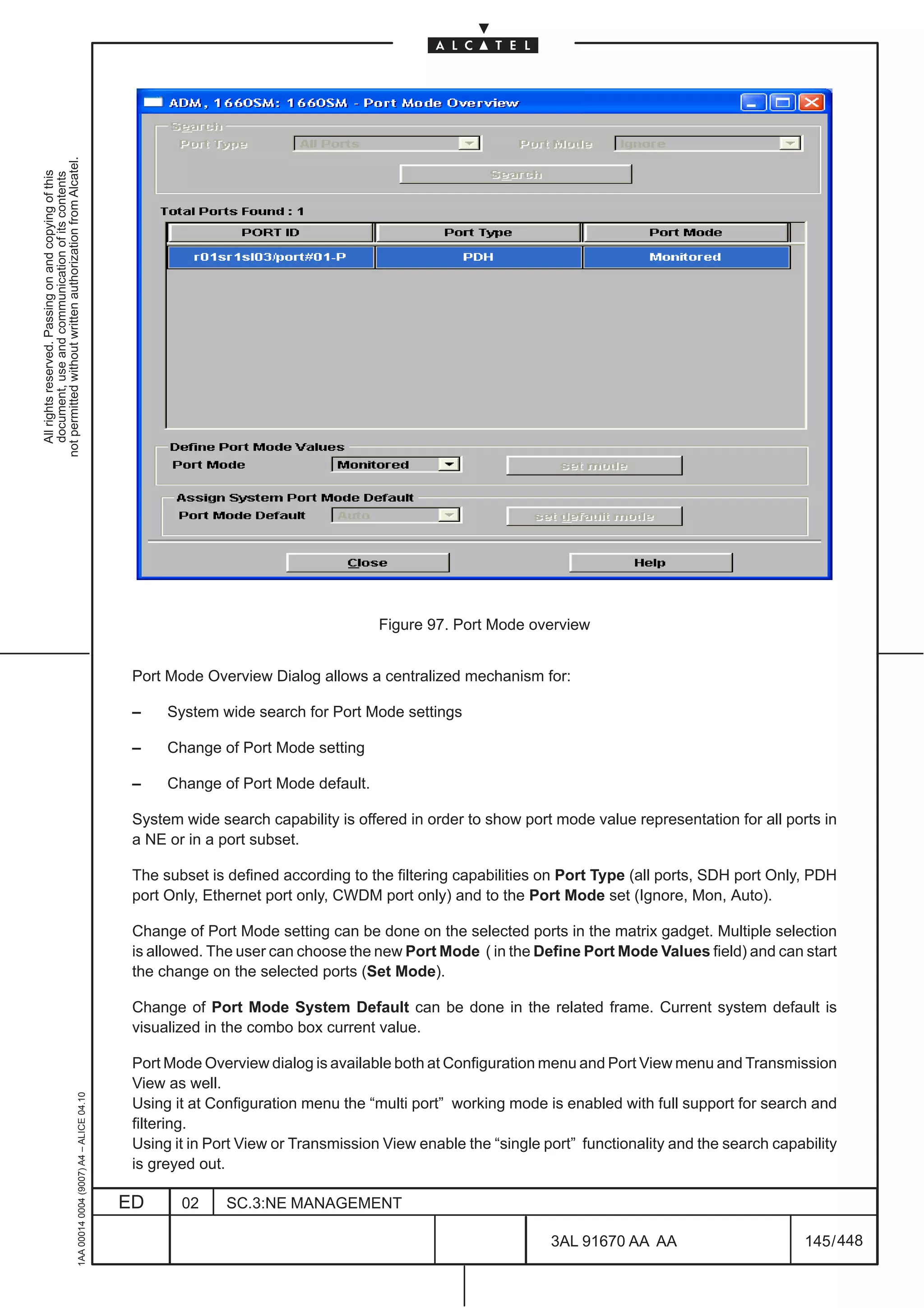
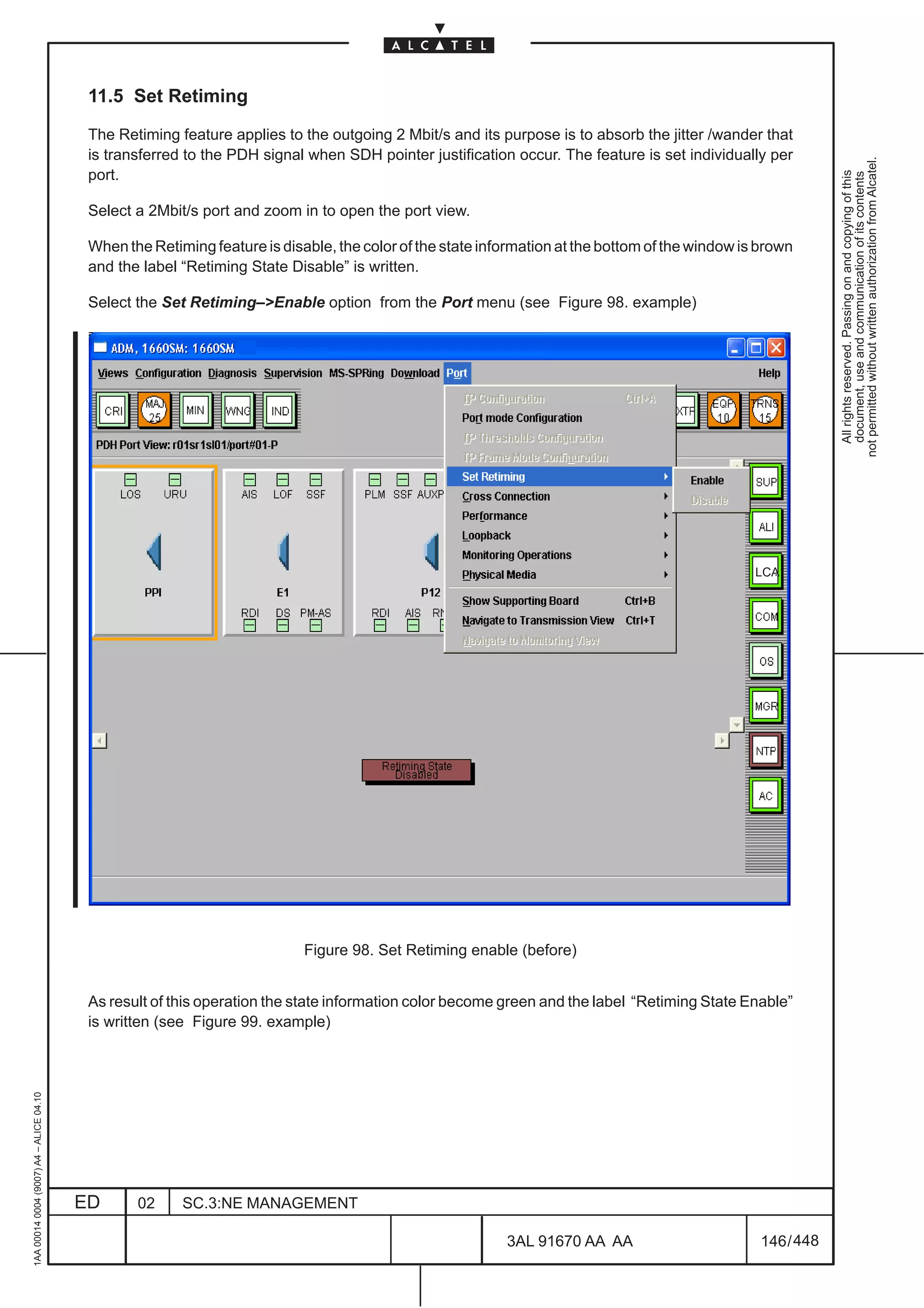
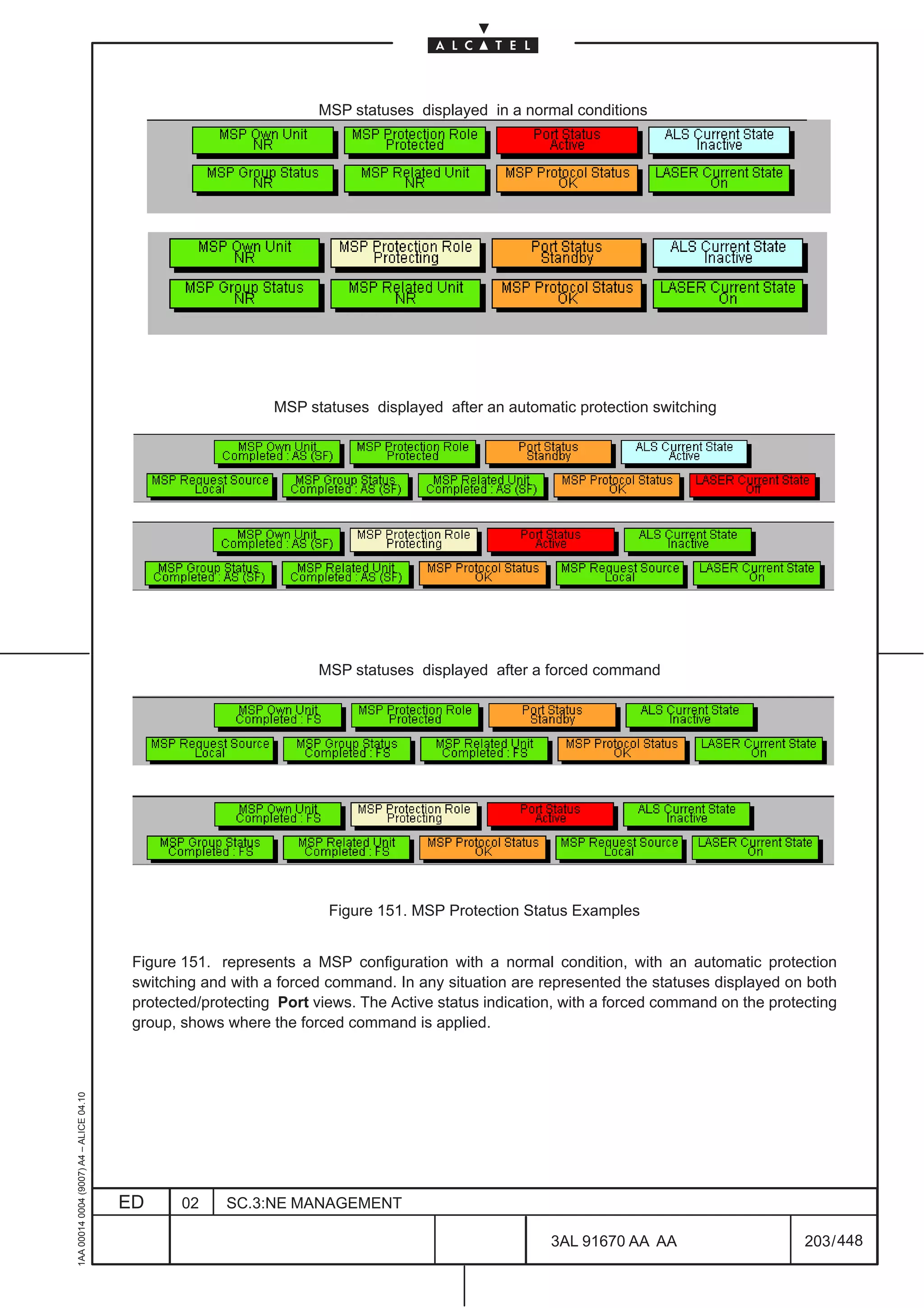
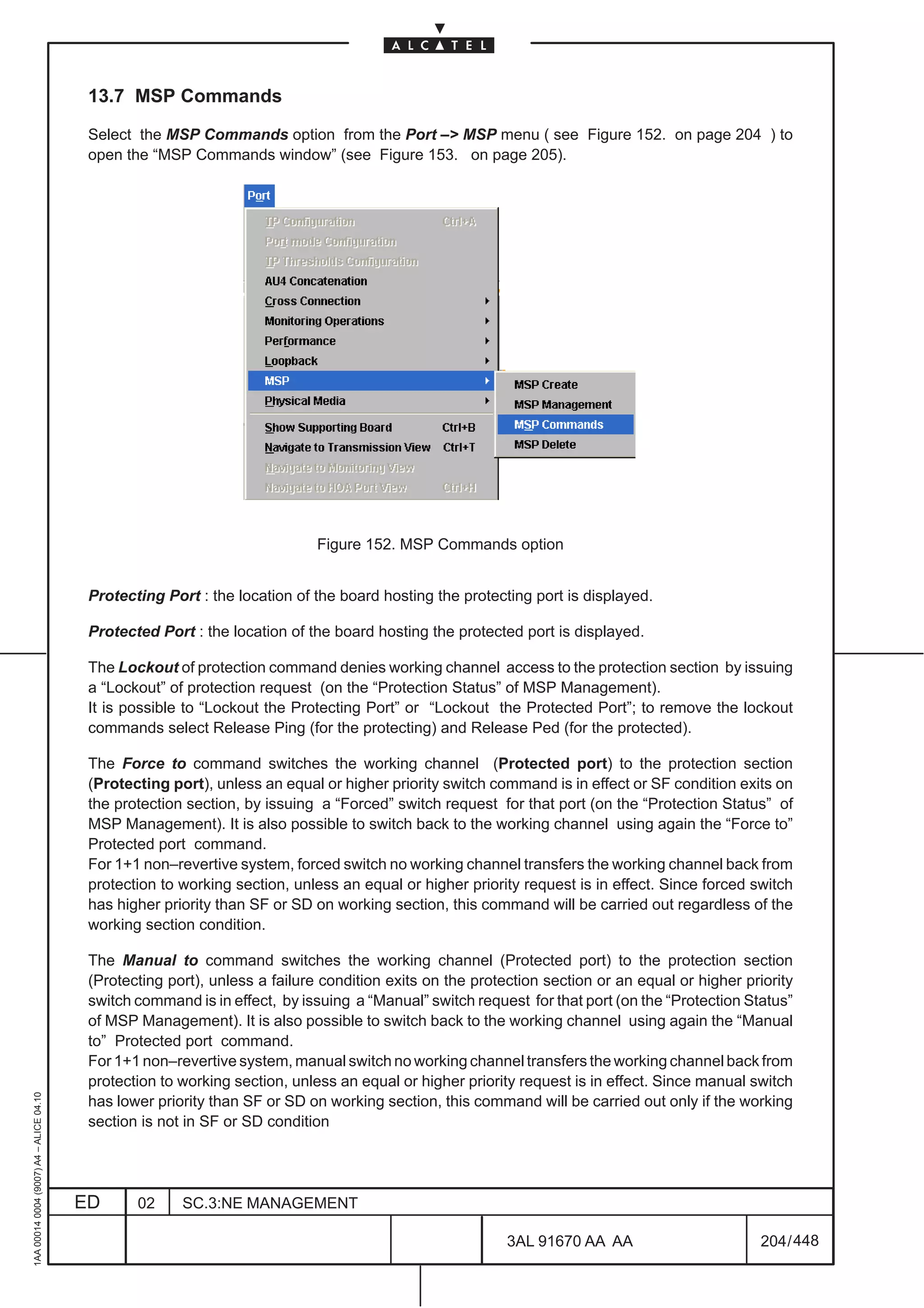
  • 229.
    The spare cardposition can be assigned in a flexible way; no restriction for position of main and spare ATM MATRIX are present. • 1+1 ISA PR_EA (PREA4ETH, PREA1GBE)” protection not permitted without written authorization from Alcatel. The ISA PR_EA boards can be protected in 1+1 equipment protection scheme. All rights reserved. Passing on and copying of this document, use and communication of its contents In this configuration the ISA PR_EA and all indirect interfaces connected to it are protected against module failure. This does not apply to the local interface so the traffic on it is lost. A maximum of one protection group 1+1 not revertive can be created. The spare card position can be assigned in a flexible way; no restriction for position of main and spare ISA PR_EA are present. • 1+1 ISA ES–16” protection The ISA ES–16 boards can be protected in 1+1 equipment protection scheme. In this configuration the ISA ES–16 and all indirect interfaces connected to it are protected against module failure. This does not apply to the local interface so the traffic on it is lost. A maximum of one One protection group 1+1 not revertive can be created. The spare card position can be assigned in a flexible way; no restriction for position of main and spare ISA ES–16 are present. • 1+1 COMPACT ADM (SYNTH1N or/and SYNTH4) protection N.B. In the following will be explained some rules for EPS schema configuration using SYNTH1N board; the same rules can be applied to SYNTH4 board. Mixed configuration are also allowed (i.e. EPS schema composed by SYNTH1N and SYNTH4). – board of slot 9, COMPACT ADM–1 (SYNTH1N) main (protected) – board of slot 10, COMPACT ADM–1 (SYNTH1N) spare (protecting) N.B. for each type of failure on the COMPACT ADM main board (matrix, CRU, Shelf Controller) a switch is performed to the spare boards. The optical/electrical port and the Equipment Controller function on the COMPACT ADM board are not EPS protected. The SYNTH1N/SYNTH4 protection is automatically presented in the left side of the dialog box when the SPARE SYNTH1N/SYNTH4 is created in the Set option of the Equipment menu. It is not created with the EPS menu described in this chapter. This right side of Figure 128. is divided into two parts. The upper part provides a message field with the name of the Protecting board and a choose button to display the list of boards available. The lower part provides a list to display the Protected boards currently in the displayed scheme. A choose button is provided to display the list of boards which could be added as protected. A delete button enables user to remove a protected board from a scheme. a) Scheme displaying To display a specific scheme, user selects an item on the left list. This operation fills the protecting element text field and the protected list with the board user name. If user clicks where there is no item displayed, the right part is displayed empty. 1AA 00014 0004 (9007) A4 – ALICE 04.10 The Cancel push button closes the dialog box. b) Scheme creation ED 02 SC.3:NE MANAGEMENT 3AL 91670 AA AA 181 / 448 448
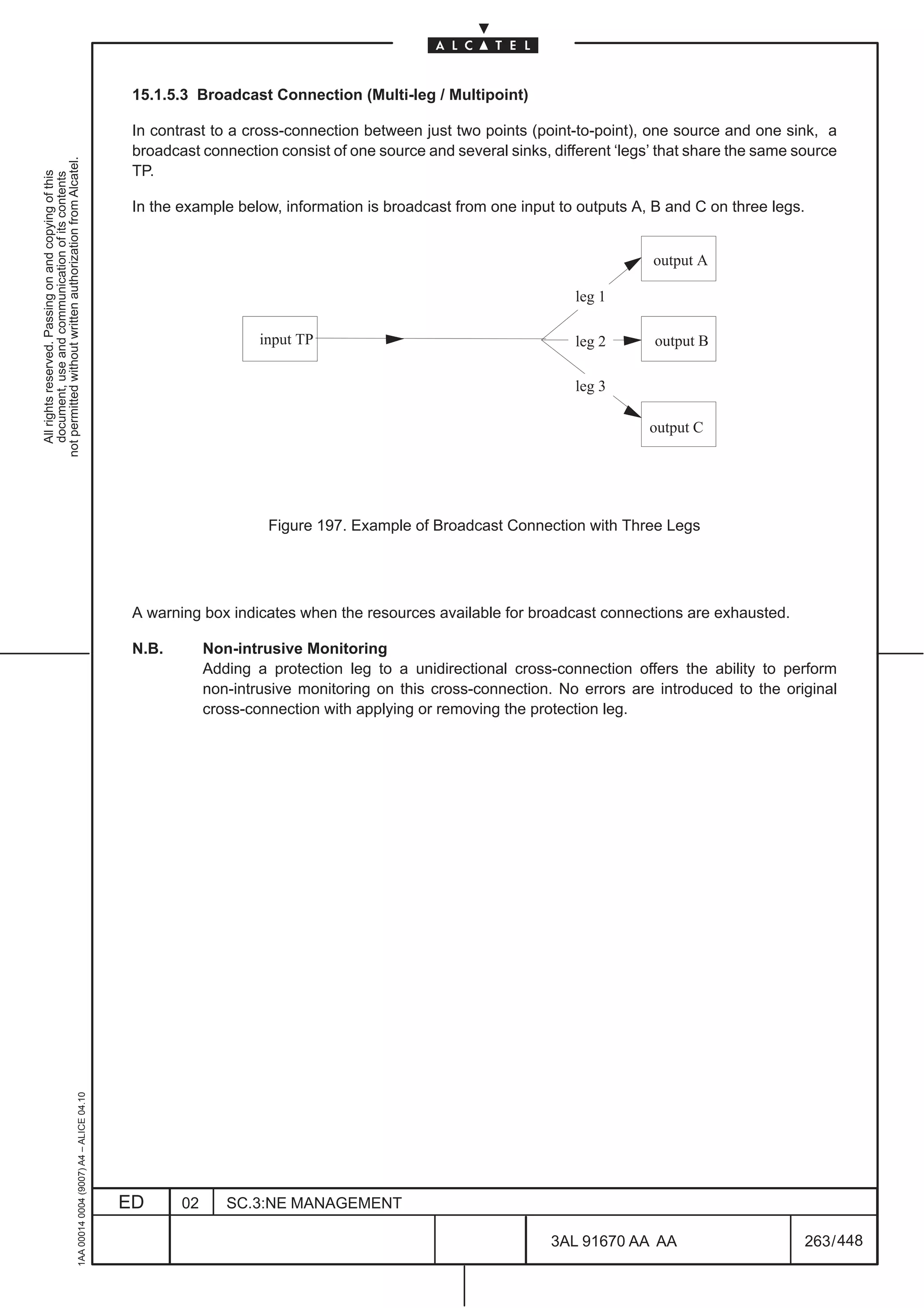
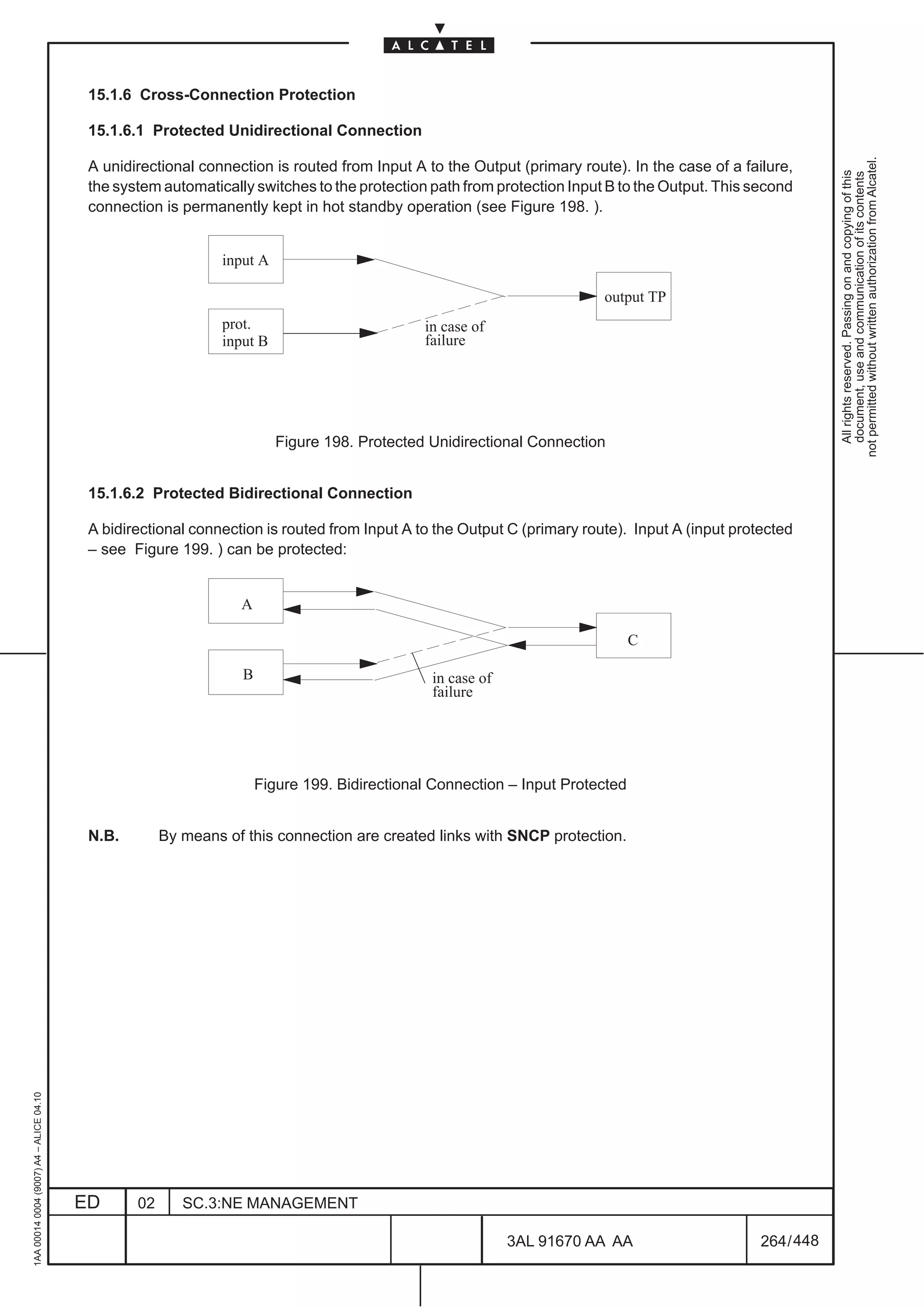
  • 230.
    To create anew protection scheme,don’t click on item in the left list. In this way the right part is displayed empty and the Choose Protecting button is sensitive. Press this button to displays a window to choose a board in the “Board Selection” list (see Figure 129. on page 183). The board are listed opening the NE>rack>subrack levels. not permitted without written authorization from Alcatel. All rights reserved. Passing on and copying of this document, use and communication of its contents After that operation, Choose Protecting button becomes insensitive and Choose Protected becomes sensitive (see Figure 130. on page 183) The user can add, always using the same “Board Selection” list dialogue box presented, as many protected boards as wanted (max.15 in 1660SM, max. 2 in 1650SMC). When the right part of window is correctly filled, the OK button close the dialog box and create the scheme (the new list is update re–opening the EPS Management dialogue box). The Cancel push button cancels the creation and closes the dialog box. c) Scheme deletion To delete an existing protection scheme, the user selects a scheme in the left list. Using the Delete button, user could delete the scheme. 1AA 00014 0004 (9007) A4 – ALICE 04.10 ED 02 SC.3:NE MANAGEMENT 3AL 91670 AA AA 182 / 448 448
  • 231.
    d) Scheme modification To modify an existing protection scheme by adding or removing protection units, the user selects a scheme in the left list. Using Choose button for protected elements, user could add protected boards. not permitted without written authorization from Alcatel. By selecting a protected board and using the Delete Protected button, user could remove protected All rights reserved. Passing on and copying of this document, use and communication of its contents elements from scheme. When the right part of window is correctly filled, the OK button close the dialog box and modify the scheme. The Cancel push button cancels the creation and closes the dialog box. Figure 129. EPS: board selection (example) 1AA 00014 0004 (9007) A4 – ALICE 04.10 Figure 130. EPS: choose protected (example) ED 02 SC.3:NE MANAGEMENT 3AL 91670 AA AA 183 / 448 448
  • 232.
    The EPS functionalstate of a board selected in the board view is displayed at the bottom of the view as shown in the following figures. not permitted without written authorization from Alcatel. All rights reserved. Passing on and copying of this document, use and communication of its contents Protection role Protection status Switch Type Figure 131. EPS functional state from protected active board view Figure 132. EPS functional state from protecting active board view 1AA 00014 0004 (9007) A4 – ALICE 04.10 ED 02 SC.3:NE MANAGEMENT 3AL 91670 AA AA 184 / 448 448
  • 233.
    12.3 Configuration: revertiveand WTR for EPS This functionality configure Revertive and Wait Time to Restore in a protection scheme. not permitted without written authorization from Alcatel. In order to configure, perform the following operations: All rights reserved. Passing on and copying of this document, use and communication of its contents – Select a transmission board in the Equipment view. – Select the EPS pull down menu. Then select the Configure option as show in the following figure. Figure 133. Configure EPS The following dialogue box is opened. Figure 134. EPS Management dialogue box (example) 1AA 00014 0004 (9007) A4 – ALICE 04.10 ED 02 SC.3:NE MANAGEMENT 3AL 91670 AA AA 185 / 448 448
  • 234.
    The dialog boxprovides configuration for elements such as : – the name of the protecting element as a label – the Equipment Type (board) of the protecting element as a label not permitted without written authorization from Alcatel. – a list displaying the protected elements owned by the scheme All rights reserved. Passing on and copying of this document, use and communication of its contents – the Revertive Mode flag as an option menu. The available values are revertive and non revertive – the wait time to restore time value (steps of 30 seconds, from 60 to 600). Only for N+1 EPS. Notes: in the current release the Wait Time to Restore is fixed to 5 minutes. The following protection mode are supported : – 1660SM EQUIPMENT: • 1+1 ATM MATRIX 4x4 is Not Revertive only • 1+1 ATM MATRIX 8x8 is Not Revertive only • 1+1 PR_EA is Not Revertive only • 1+1 ES–16 is Not Revertive only • 1+1 MATRIX is Not Revertive only • N+1 63 x 2 Mbit/s (P63E1 or P63E1N–M4) protection is Revertive • N+1 3x34/45 Mbit/s (P3E3/T3) protection is Revertive • N+1 4x STM–1 ELECTRICAL port (P4ES1N) protection is Revertive • N+1 16x STM–1 ELECTRICAL port (P16S1–4E) protection is Revertive – 1650SMC EQUIPMENT: • 1+1 ATM MATRIX 4x4 is Not Revertive only • 1+1 PR_EA is Not Revertive only • 1+1 ES–16 is Not Revertive only • 1+1 COMPACT ADM (SYNTH1,SYNTH1N or SYNTH4) is Not Revertive only • N+1 63 x 2 Mbit/s ( P63E1 or P63E1N–M4) protection is Revertive • N+1 3 x 34/45 Mbit/s (P3E3/T3) protection is Revertive • N+1 4 x STM–1 Electrical (P4ES1N) protection is Revertive When the configuration of the equipment protection scheme is completed confirm closing the dialog box by clicking on the OK push button. The Cancel push button cancels the configuration and closes the dialog box. 1AA 00014 0004 (9007) A4 – ALICE 04.10 ED 02 SC.3:NE MANAGEMENT 3AL 91670 AA AA 186 / 448 448
  • 235.
    12.4 Switching EPS This functionality enables to force a protecting board to work even if there is not failure. not permitted without written authorization from Alcatel. The forced switch will fail if the other board is already forced switched or if the protecting board has a failure All rights reserved. Passing on and copying of this document, use and communication of its contents condition. In order to switch an EPS, perform the following operations: – Select a transmission board in the Equipment view. – Select the EPS pull down menu. Then select the Switch option as show in the following figure. Figure 135. Switching EPS The following dialogue box is opened. Figure 136. EPS Switch dialogue box (example) This dialogue box displays in its left part the EPS of the selected board. From this dialogue box the operator can configure, in the current release, only the Lockout options, by clicking on the relevant radio button. The Manual to command perform the “manual” switch, active only if the other board is not alarmed. Clicking on the OK push button will initiate the switch and close the dialogue box. The Cancel push button 1AA 00014 0004 (9007) A4 – ALICE 04.10 cancels the operation and closes the dialogue box. ED 02 SC.3:NE MANAGEMENT 3AL 91670 AA AA 187 / 448 448
  • 236.
    12.5 EPS Overview EPS Overview allows to display as well as search for EPS states. not permitted without written authorization from Alcatel. Selecting the EPS Overview option from the Configuration pull down menu Figure 137. opens All rights reserved. Passing on and copying of this document, use and communication of its contents Figure 137. EPS overview To Search the EPS groups two different ways of filtering are supported; a filtering for all protection units located on a dedicated Board Type as well as a filtering for protection units carrying a specific Status. The search criteria can be chosen with the help of a combo box: – Board Type: allows to filter for the EPS protected boards (example Ignore, SYNTH1N, MATRIXN, P3E3/T3, etc. ) – Status: allows to filter for all possible EPS protection states;the following filters values should be offered (examples): • Ignore • Normal • DNR • Auto–Fail • Auto–WTR • Manual • Force 1AA 00014 0004 (9007) A4 – ALICE 04.10 • Lockout After the filter selection click on Search button to start; the field below the Search button will be updated (see Figure 138. ) ED 02 SC.3:NE MANAGEMENT 3AL 91670 AA AA 188 / 448 448
  • 237.
    All rights reserved.Passing on and copying of this document, use and communication of its contents not permitted without written authorization from Alcatel. 1AA 00014 0004 (9007) A4 – ALICE 04.10 ED 02 SC.3:NE MANAGEMENT Figure 138. EPS overview after Search (Example) 448 3AL 91670 AA AA 189 / 448
  • 238.
    Each protection unitis presented with the following information: – Protection Group (example protection GroupId, 40) not permitted without written authorization from Alcatel. – Board Id (example r01sr1/board#40 ) All rights reserved. Passing on and copying of this document, use and communication of its contents – Board Role: • Ped (Protected) • Ping (Protecting) – B Status (board status): • A (Active) • S (StandBy) • F (Faulty) – Protection Status: defines the current state of the protection unit as follow • Normal • DNR (Do Not Revert) • Auto–Fail (Autoswitch Equipment Fail) • Auto–WTR (Autoswitch Wait Time to Restore) • Manual (Manual switch) • Force (Force switch) • Lockout The colors used for each row have the following meaning: – Green (OK): for protected protection units active – Red (Critical): for protected protection units in fail condition, protection unit in lockout or active on autoswitch or commands – Orange (Major): for protected units in standby after a command and protecting protection unit in standby for autoswitch or commands – Cyan (Indicative): for protecting protection unit active and no fail condition present in the schema (Do Not Revert State) At the bottom of the EPS Overview windows are available five button that allows to navigate through the EPS management views and subrack view, board view. In this way the operator has a quick link towards the views showing the correlation between the alarms and the protection states. N.B. Before to click on one of the five buttons select a row 1AA 00014 0004 (9007) A4 – ALICE 04.10 ED 02 SC.3:NE MANAGEMENT 3AL 91670 AA AA 190 / 448 448

  • 239.
    The buttons availableare: – Open Subrack View: opens the Subrack view showing the protection states with icons on the boards (see example of Figure 139. ) not permitted without written authorization from Alcatel. All rights reserved. Passing on and copying of this document, use and communication of its contents The possible protection states and the relevant symbols are explained in the following: Symbol EPS protection status No Request Do not Revert Lockout Auto Switch (WTR, Fail) Manual Forced – Open Board View: opens the board view showing the alarm and the board administrative states (see example of Figure 140. ) – Open Commands: opens the EPS Switch dialog box. See 12.4 on page 187 and the relevant description. – EPS Management: opens the EPS Management dialog box. See Figure 128. on page 178 and the relevant description. – EPS Parameters: opens the EPS Configuration dialog box. See 12.3 on page 185 and the relevant description. Click on Close button to exit from the EPS Overview window 1AA 00014 0004 (9007) A4 – ALICE 04.10 ED 02 SC.3:NE MANAGEMENT 3AL 91670 AA AA 191 / 448 448
  • 240.
    1AA 00014 0004(9007) A4 – ALICE 04.10 ED 02 SC.3:NE MANAGEMENT 448 3AL 91670 AA AA Figure 140. Board view after “Open Board View” command (example) Figure 139. Subrack view after “Open Subrack View” command (example) LCA LCA 192 / 448 All rights reserved. Passing on and copying of this document, use and communication of its contents not permitted without written authorization from Alcatel.
  • 241.
    13 MULTIPLEX SECTIONPROTECTION MANAGEMENT (MSP) 13.1 Architecture types The Multiplex Section Protection (MSP, formerly called APS: Automatic Switching Protection) is the connection between two NEs protected by a cable and port duplication. At the source the signal is duplicated and sent to the sink via two independent cables. When occurs a multiplex section failure, the system switches to the other cable and port. The MS Linear Trail Protection can be applied to any NE where it is possible to configure a linear APS (single ended/dual ended) line protection. For this NE is applicable the APS 1+1 Proprietary, the APS 1+1 Standard and the APS 1 :1 Standard dual ended. The APS 1 +1 (not revertive) feature permits a 1+1 protection in a linear link, where a path signal is protected by another dedicated path carrying the same signal. The protection can be set both in single (unidirectional) and in dual (bidirectional) ended mode. In single ended mode (unidirectional) the protection is accomplished by switching only the signal affected by the failure. In dual ended mode (bidirectional) the protection is accomplished by switching both the affected and the unaffected signals . “Dual ended mode” (bidirectIonal) protection is not supported by 1640FOX and 1650SMC Architecture 1+1 or N+1 Standard (the last is only available for 1660SM) Described in ITU–T Rec. G783/G841. The refence switching criteria are SF and SD. It provides a k1/k2 communication protocol thus this protection can be single or dual ended. Architecture 1+1 Proprietary (not used ) The refence switching criteria are SF and SD. No k1/k2 communication protocol is provided thus this protection can be only single ended. Architecture 1+1 Optimized (not used ) Architecture 1 : 1 Standard (not used ) Described in ITU–T Rec. G783/G841 as architecture 1 : n ( with n=1 ). The refence switching criteria are SF and SD. It provides revertive mode managed by k1/k2 protocol and thus this protection can be single or dual ended. The spare interface can be used to transport “low priority traffic” . The WTR time is used with revertive mode. Signal Degrade (SD) software setting enables the MSP protection mechanisms when a SD is recognized on the working port. The SD threshold reference value depend on the NE selected threshold on the MS termination point. This threshold value is configured as explained in the para.14.7 on page 234. 1AA 00014 0004 (9007) A4 – ALICE 04.10 ED 02 SC.3:NE MANAGEMENT 3AL 91670 AA AA 193 / 448 448
  • 242.
    13.2 MSP OptionsIntroduction All the MSP options are available starting from the Port View following the step explained below: – Select Equipment from the Views menu – Double click on the SDH optical board to configure to open the port icon – Double click on the port icon to open the port view – Select the MSP block in the port view and then choose the MSP options by clicking on Port –> MSP menu; the possible choice are: • MSP Create see para 13.3 on page 195. • MSP Management see para 13.4 on page 199. • MSP Commands see para 13.7 on page 204. • MSP Delete see para 13.5 on page 201. MSP Create, MSP Management, MSP Commands and MSP Delete can also be accessed from the Transmission –> MSP menu. 1AA 00014 0004 (9007) A4 – ALICE 04.10 ED 02 SC.3:NE MANAGEMENT 3AL 91670 AA AA 194 / 448 448
  • 243.
    13.3 MSP Create Select the MSP Create option from the Port –> MSP menu ( see Figure 141. on page 195) to open the MSP Schema Creation (see Figure 142. on page 195). Figure 141. MSP Create Option Figure 142. MSP Schema Creation 1AA 00014 0004 (9007) A4 – ALICE 04.10 ED 02 SC.3:NE MANAGEMENT 3AL 91670 AA AA 195 / 448 448
  • 244.
    In this releasetwo MSP Protection Schemas are supported: – MSP 1+1 standard – MSP N:1 standard (only for 1660SM) Select one and then click on Add Port button in the Ports field to create a MSP schema. Figure 143. on page 196 is opened. Following steps are necessary: – choose Port – select a Port Role (protected or protecting) – define Channel Id (mandatory for MSP N:1) – define SDH Priority (type of traffic, High or Low) Figure 143. MSP schema creation Port dialog Select the Choose Port button to define the “Protected Port” and “Protecting Port” units. Figure 144. on page 197 is opened. 1AA 00014 0004 (9007) A4 – ALICE 04.10 ED 02 SC.3:NE MANAGEMENT 3AL 91670 AA AA 196 / 448 448
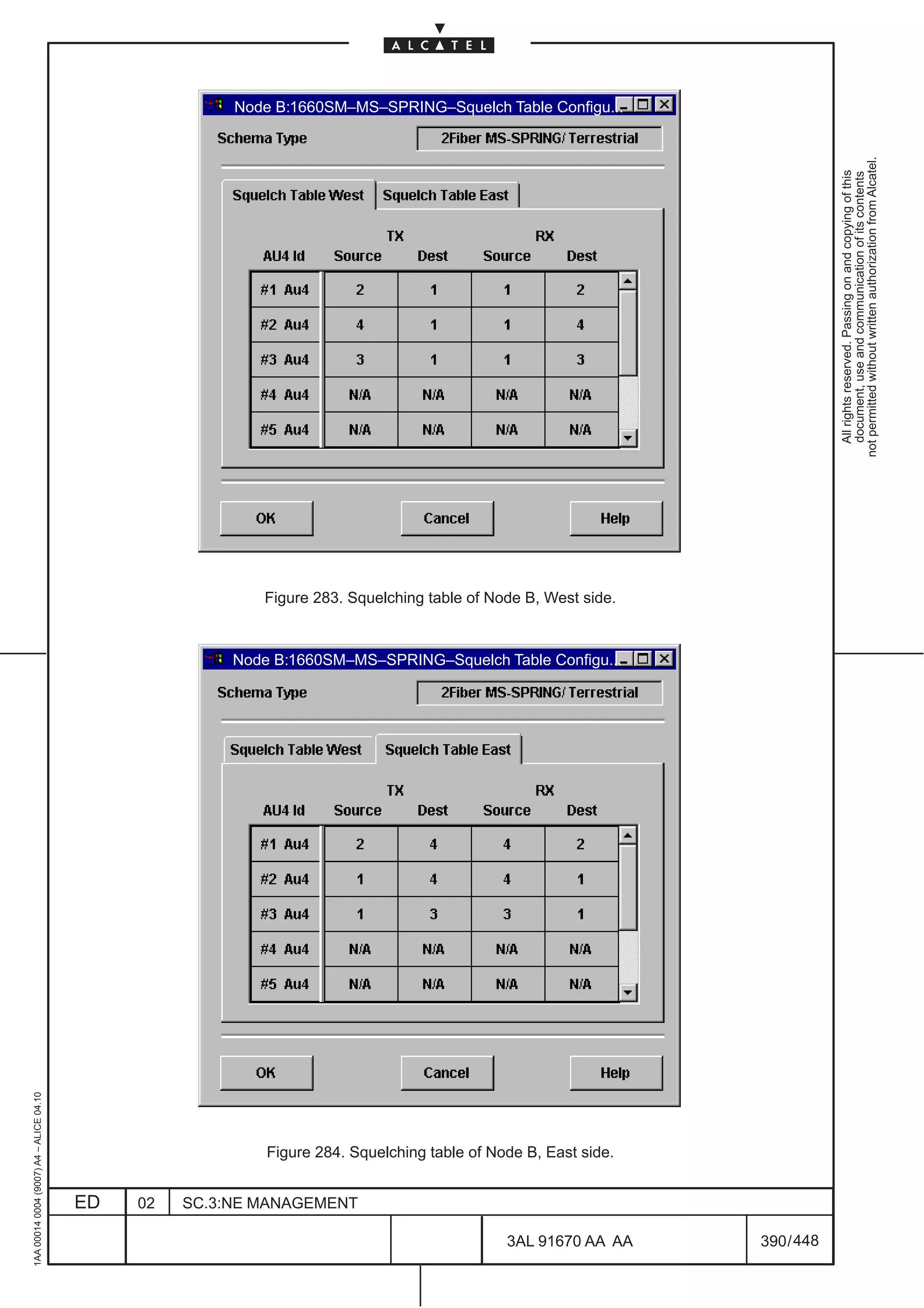
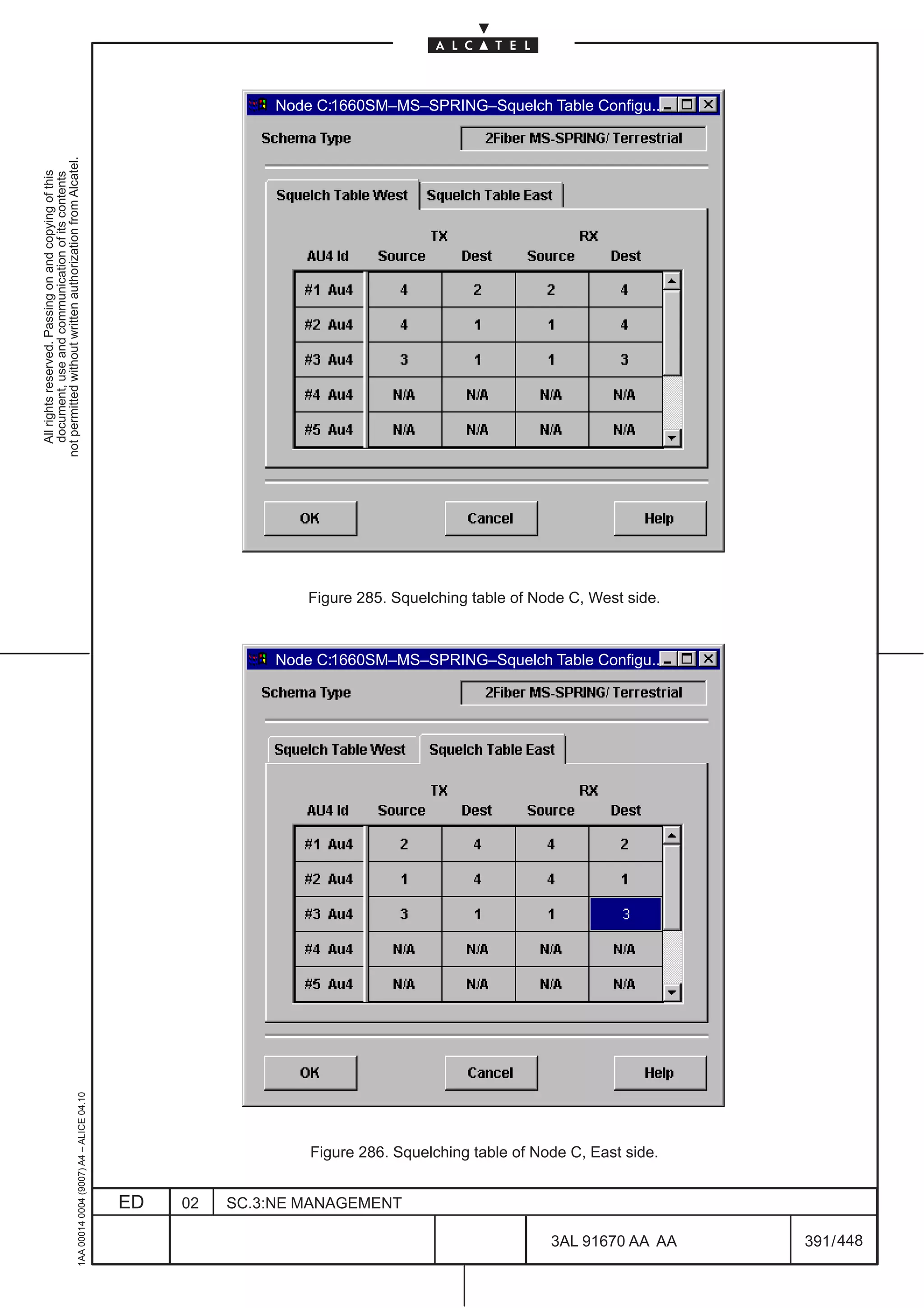
  • 245.
    Figure 144. TPSearch (example) Click on Rack–Subrack and select the Board ( Protected / Protecting ) on the “Equipment” window (left side). The “termination Points” list (right side) is available. On this right side select the OpS TP of the chosen board and then click on the OK button. It is possible to select the board through the “Board History” button selecting the board list menu. The “Filter Section” is divided into different fields. It permits to visualize a reduced TP Class. If used, OpS class must be selected. The complete TP research description is reported in the “Transmission View” chapter 14.5.1.2 on page 223. Click on the OK button and repeat the operation for both “Protected Port” and “Protecting Port”. If it has been selected a Protected/Protecting port configured in a previously MSP schema protection an error message of access denied will be appear on the screen. In the dialogue of Figure 142. on page 195 also configure the MSP protection schema with the chosen Protection Schema and enter the related Schema Parameters according the following rules: – 1+1 Standard can be: • single–ended, Not Revertive for 1640FOX, 1650SMC, 1660SM • dual–ended , Not Revertive for 1660SM 1AA 00014 0004 (9007) A4 – ALICE 04.10 – N :1 Standard can be only dual–ended Revertive (not supported by 1640FOX, 1650SMC) At the end click on the OK button to confirm the MSP protection schema configuration. An error message will be appear if the selected schema is not supported by the NE. ED 02 SC.3:NE MANAGEMENT 3AL 91670 AA AA 197 / 448 448
  • 246.
    Figure 145. MSP1+1 standard protection schema (example) Figure 146. MSP N:1 standard protection schema (example) 1AA 00014 0004 (9007) A4 – ALICE 04.10 ED 02 SC.3:NE MANAGEMENT 3AL 91670 AA AA 198 / 448 448
  • 247.
    13.4 MSP Management Select the MSP Management option from the Port –> MSP menu ( see Figure 147. on page 199 ) to open the MSP Schema Configuration (see Figure 148. on page 200). Figure 147. MSP Management Option The MSP Schema Configuration dialog shows the current state of the MSP schema, settings and state (protected or protecting) of the current SDH-n port. This dialog allows to set the configuration parameters for the designated multiplex section: – Protection Schema reported in the previous paragraph 13.1 on page 193. – Schema Parameters: • Dual Ended / Single Ended protection switch and directionality. • Revertive/Non Revertive mode. • The WTR Time (Wait To Restore) is the delay time for switching protection and protecting port after recovery from failure / defect. • Enable Switch on SD is not operative in current release. – Ports area display the current MSP schema: • Port Id: identify the location of the board • Role: identify the role of the board (“Protecting” or ”Protected”) • Channel Id: mandatory for MSP N:1 (max. value is 14) • Priority: type of traffic, High or Low 1AA 00014 0004 (9007) A4 – ALICE 04.10 Configure the MSP protection Schema with the chosen protection schema and enter the related schema parameters. At the end click on the OK button to configure the MSP protection schema. An error message will be appear if the selected schema is not supported by the NE. ED 02 SC.3:NE MANAGEMENT 3AL 91670 AA AA 199 / 448 448

  • 248.
    Figure 148. MSPManagement View (example) 13.4.1 MSP modification The same MSP Management option can be used to modify the schema parameters of an active MSP configuration. Before changing a single ended (unidirectional) schema into a dual ended (bidirectional), all active switches must be cleared (manual switch, lockout,... ). If the operator wants to change the protection schema architecture or the ports involved in the MSP schema, the current schema must be removed and re–created. 1AA 00014 0004 (9007) A4 – ALICE 04.10 ED 02 SC.3:NE MANAGEMENT 3AL 91670 AA AA 200 / 448 448
  • 249.
    13.5 MSP Delete Select the MSP Delete option from the Port –> MSP menu (see Figure 149. on page 201) to open the “MSP Schema Deletion” (see Figure 150. on page 201). Figure 149. MSP Delete option Figure 150. MSP Schema Deletion (example) Click on “OK” button to delete the selected MSP Schema Configuration 1AA 00014 0004 (9007) A4 – ALICE 04.10 ED 02 SC.3:NE MANAGEMENT 3AL 91670 AA AA 201 / 448 448
  • 250.
    13.6 Display ofProtection State The MSP protection state of a port is displayed at the bottom of the Port view. Some examples are reported in Figure 151. The following states are always displayed: Port Status – Active (red color) or Standby (orange color). The active protection status is referred to a protected/protecting port ( where the traffic is transported): when a failure is detected, the protecting port is ready to save the traffic (and becomes active). The standby protection status is referred to a protecting/protected port that is ready to save the traffic. MSP Protection Role – Protected (green color) or Protecting (ochre color). The protection role depends on the selected port type (Protected / Protecting). MSP Group Status, MSP Own Unit and MSP Related Unit – (green color) Displayed if an automatic switch is requested. “Own Unit” stands for the currently displayed unit in the port view, “Related Unit” stands for the related unit of the same protection group . The status indications are: NR: (abbreviation of No Request); normal, idle condition, the traffic is on the main port DNR:(abbreviation of Do Not Revert); the SF or SD have been recovered but the traffic is switched on the spare port PF: a protection failure has been detected on the port RF: a release command has been failed FOP: a failure of protocol has been detected complete: = the bridge/switch actions are completed pending: = the bridge/switch actions are pending The “complete” and “pending” indications precede the following statuses: AS: automatic protection switching enabled MS: a manual local protection command has been activated FS: a forced local protection command has been activated LO: a lockout local protection command has been activated SF/SD: Signal Failure or Signal Degraded has been detected WTR: wait time to restore status MSP Request Source – (green color) indicates where the operator commands (force/manual/lockout) have been performed. Only present when a command is operative. – Local: switch due to near end SD/SF or local user switch command – Remote: switch due to received K1/K2 bytes. A remote switch cannot be released locally, but can be overwritten by a switch with higher priority. MSP Protocol Status This parameter indicates the current APS Protocol status. The following values are possible: – OK – Failure (in case of FOP) 1AA 00014 0004 (9007) A4 – ALICE 04.10 ED 02 SC.3:NE MANAGEMENT 3AL 91670 AA AA 202 / 448 448
  • 251.
    MSP statuses displayedin a normal conditions MSP statuses displayed after an automatic protection switching MSP statuses displayed after a forced command Figure 151. MSP Protection Status Examples Figure 151. represents a MSP configuration with a normal condition, with an automatic protection switching and with a forced command. In any situation are represented the statuses displayed on both protected/protecting Port views. The Active status indication, with a forced command on the protecting group, shows where the forced command is applied. 1AA 00014 0004 (9007) A4 – ALICE 04.10 ED 02 SC.3:NE MANAGEMENT 3AL 91670 AA AA 203 / 448 448
  • 252.
    13.7 MSP Commands Select the MSP Commands option from the Port –> MSP menu ( see Figure 152. on page 204 ) to open the “MSP Commands window” (see Figure 153. on page 205). Figure 152. MSP Commands option Protecting Port : the location of the board hosting the protecting port is displayed. Protected Port : the location of the board hosting the protected port is displayed. The Lockout of protection command denies working channel access to the protection section by issuing a “Lockout” of protection request (on the “Protection Status” of MSP Management). It is possible to “Lockout the Protecting Port” or “Lockout the Protected Port”; to remove the lockout commands select Release Ping (for the protecting) and Release Ped (for the protected). The Force to command switches the working channel (Protected port) to the protection section (Protecting port), unless an equal or higher priority switch command is in effect or SF condition exits on the protection section, by issuing a “Forced” switch request for that port (on the “Protection Status” of MSP Management). It is also possible to switch back to the working channel using again the “Force to” Protected port command. For 1+1 non–revertive system, forced switch no working channel transfers the working channel back from protection to working section, unless an equal or higher priority request is in effect. Since forced switch has higher priority than SF or SD on working section, this command will be carried out regardless of the working section condition. The Manual to command switches the working channel (Protected port) to the protection section (Protecting port), unless a failure condition exits on the protection section or an equal or higher priority switch command is in effect, by issuing a “Manual” switch request for that port (on the “Protection Status” of MSP Management). It is also possible to switch back to the working channel using again the “Manual to” Protected port command. For 1+1 non–revertive system, manual switch no working channel transfers the working channel back from protection to working section, unless an equal or higher priority request is in effect. Since manual switch 1AA 00014 0004 (9007) A4 – ALICE 04.10 has lower priority than SF or SD on working section, this command will be carried out only if the working section is not in SF or SD condition ED 02 SC.3:NE MANAGEMENT 3AL 91670 AA AA 204 / 448 448
  • 253.
    The Clear WTRcommand cancel the delay time for switching protection and protecting port after recovery from failure/defect. The Exercise command issues an exercise request for protection channel and checks responses on MSP bytes, unless the protection channel is in use. This check controls the k1/k2 communication protocol functionality to be sure that the protocol is right also on the protection section. Not Operative in current release. The Release command clears all previously switching commands. Figure 153. MSP Commands (example) The priority levels for the MSP commands are (from the higher to the lower one): Lockout, Force to, Auto–switch (SF&SD), Manual to. Table 3. on page 205 gives the priority rules when are occurred two different commands. The first column on the left and the first row at the top report the switch protection and the external MSP commands. The row/column crossing gives the command or protection result (i.e.: if an “Auto–switch” and a “Manual to” command are present, “Auto–switch” is operative. Table 3. MSP commands and Auto–switch protection priority Lockout of Forced to Auto–switch Manual to protection Lockout of –––––––––– Lockout Lockout Lockout protection Forced to Lockout –––––––––– Forced Forced Auto–switch Lockout Forced ––––––––––– Auto–switch 1AA 00014 0004 (9007) A4 – ALICE 04.10 Manual to Lockout Forced Auto–switch ––––––––––– ED 02 SC.3:NE MANAGEMENT 3AL 91670 AA AA 205 / 448 448
  • 254.
    13.8 MSP overview MSP Overview allows to display as well as search for MSP states. Selecting the MSP Overview option from the Configuration pull down menu Figure 154. opens Figure 154. MSP overview To Search the MSP groups two different ways of filtering are supported; a filtering for all protection units located on a dedicated Board Type as well as a filtering for protection units carrying a specific Status. The search criteria can be chosen with the help of a combo box: – Board Type: allows to filter for the MSP protected boards (example P4ES1N, P4E4N, L–41N, Ignore, etc.) 1AA 00014 0004 (9007) A4 – ALICE 04.10 ED 02 SC.3:NE MANAGEMENT 3AL 91670 AA AA 206 / 448 448
  • 255.
    Status: allows to filter for all possible MSP protection states;the following filters values should be offered (examples): • Ignore • NR (Normal) • DNR • Auto–SF • Auto–SD • Auto–WTR • Manual • Force • Lockout • APS Invalid (Fail) • Bad channel (Fail) After the filter selection click on Search button to start; the field below the Search button will be updated (see Figure 138. ) Figure 155. MSP overview after Search (Example) 1AA 00014 0004 (9007) A4 – ALICE 04.10 ED 02 SC.3:NE MANAGEMENT 3AL 91670 AA AA 207 / 448 448
  • 256.
    Each protection unitis presented with the following information: – Protection Group (example protection GroupId, 137) – Port Id (example r01sr1sl33/port#02–OpS ) – Role: • Ped Protected • Ping Protecting – Status (board status): • A (Active) • S (StandBy) • F (Faulty) • ET Extra Traffic (Not operative) – Protection Status: defines the current state of the protection unit as follow • NR (Normal) • DNR (Do Not Revert) • Auto–SF (AutoSwitch Signal Fail) • Auto–SD (AutoSwitch Signal Degrade) • Auto–WTR (AutoSwitch Wait Time To Restore) • Manual (Manual Switch) • Force • Lockout • APS Invalid (Protection fail condition APS invalid) • Bad channel (Protection fail condition Channel Mismatch) The colors used for each row have the following meaning: – Green (OK): for protected protection units active – Red (Critical): for protected protection units in fail condition, protection unit in lockout or active on autoswitch or commands – Orange (Major): for protected units in standby after a command and protecting protection unit in standby for autoswitch or commands – Cyan (Indicative: for protecting protection unit active and no fail condition present in the schema (Do Not Revert State) At the bottom of the MSP Overview windows are available five button that allows to navigate through the MSP management views and to open the Port View. By clicking on Open Port View the operator has a quick link towards the view showing the correlation between the alarms and the protection states. N.B. Before to click on one of the five buttons select a row 1AA 00014 0004 (9007) A4 – ALICE 04.10 ED 02 SC.3:NE MANAGEMENT 3AL 91670 AA AA 208 / 448 448
  • 257.
    The buttons availableare: – Open Port view: opens the port view showing the correlation between the alarm and the MSP protection states. See Figure 156. on page 209. – MSP Create: opens the MSP Create dialog box. See Figure 142. on page 195 and the relevant description. – MSP Delete: opens the MSP Delete dialog box. See Figure 150. on page 201 and the relevant description. – MSP Management: opens the MSP Management dialog box. See Figure 148. on page 200 and the relevant description. – MSP Commands: opens the MSP Commands dialog box. See Figure 153. on page 205 and the relevant description. Click on Close button to exit from the MSP Overview window Figure 156. Port view after “Open Port View” command (example) 1AA 00014 0004 (9007) A4 – ALICE 04.10 ED 02 SC.3:NE MANAGEMENT 3AL 91670 AA AA 209 / 448 448
  • 258.
    1AA 00014 0004(9007) A4 – ALICE 04.10 ED 02 SC.3:NE MANAGEMENT 3AL 91670 AA AA 210 / 448 448
  • 259.
    14 TRANSMISSION VIEW 14.1 Overview not permitted without written authorization from Alcatel. All rights reserved. Passing on and copying of this document, use and communication of its contents This section describes the operations necessary for the consultation, modification and configuration of TPs, providing a representation of the entire signal flow. The generic Transmission View, described in this chapter, offers the possibility of displaying a single TP or a set of all kinds of TPs (or collected functionality which is represented by one/several TPs). To display the termination points in the Transmission View, either select specific TPs from a TP search dialog or access the view directly from another view, e.g. by navigating from the Port View. The Transmission View provides the following features: – Brief overview regarding transmission resources. • An overview concerning all TPs belonging to a port can be called in by activating the function to expand the selected TP. TP names are listed in an additional information area if the mouse pointer is positioned over it. The following states are indicated (see Figure 157. on page 212): – the alarm state is indicated by the alarm synthesis icon – the cross-connection state is indicated by a cross – whether a TP can be structured is indicated by a circle – whether a TP is under Performance Monitoring indicated by a blue “P” letter – whether a TP is involved in a loop action, it is indicated by a back–folded arrow • An overview concerning signal flow can be requested by a user action. The user can select a TP and apply the action Transmission –> Show Cross-connected TPs. The result is that the objects related to the TP are displayed and lines indicate the connections. Expanding and hiding TPs that are related to the currently selected TP (e.g. show all TPs that are above the TU-12 CTP) enables all related TPs to be added to the view, thus providing a representation of the entire signal flow. – Display of single or multiple termination points. • Search for and select a termination point in a TP search dialog and display it in the Transmission View. • Pop-up the Transmission View from the board view. All TPs/compound TPs associated with the physical port are displayed (i.e. TPs down to AU-4). – Provide the functionality to create/show cross-connections. – Provide the functionality to create/show Multiplex Section Protection – Provide the functionality to create/show Loopback commands. – Provide the possibility of configuring a selected TP. This functionality is accessed by calling the configuration dialogs of the common Transmission/Port Views category. – Provide the possibility of showing a detailed view of a TP with alarms, navigating to the Port view. 1AA 00014 0004 (9007) A4 – ALICE 04.10 – Provide the possibility of showing and setting Performance Monitoring parameters and data. ED 02 SC.3:NE MANAGEMENT 3AL 91670 AA AA 211 / 448 448
  • 260.
    14.2 View elements The Transmission View uses the symbols illustrated in Figure 157. not permitted without written authorization from Alcatel. All rights reserved. Passing on and copying of this document, use and communication of its contents AU4 Label indicates the type of TP Adaption function Termination function Compound Termination and Adaption function Structurable point Cross connectable point with cross connected TP or Alarm synthesis icon P Tp under performance monitoring Figure 157. Symbols Used in Transmission View 1AA 00014 0004 (9007) A4 – ALICE 04.10 ED 02 SC.3:NE MANAGEMENT 3AL 91670 AA AA 212 / 448 448
  • 261.
    14.3 View Layout The Transmission View is a main view. It provides views of specific areas, which display the transmission resources, and the specific Transmission View pulldown menu which provides the Transmission View not permitted without written authorization from Alcatel. operations. All rights reserved. Passing on and copying of this document, use and communication of its contents 14.3.1 View Description Figure 158. illustrates the Transmission View area. TPs that are received from the network element are displayed in the Transmission View with the respective TP and connection symbols described in Figure 157. The number of TPs presented initially depends on whether the Transmission View is popped up from a board view, whether a TP has been selected in another view or whether it is called without a selected TP. When the “Transmission view” is reached selecting the Transmission option in the View pull down menu in its initial state contains no objects. Figure 158. Transmission View Area (example) 1AA 00014 0004 (9007) A4 – ALICE 04.10 ED 02 SC.3:NE MANAGEMENT 3AL 91670 AA AA 213 / 448 448
  • 262.
    14.3.2 Number ofTPs Displayed in Transmission View It is possible both to expand a VC-4, thus displaying all underlying TPs, and to hide TPs which are of no interest. The objects initially displayed depend on the situation/definition. not permitted without written authorization from Alcatel. All rights reserved. Passing on and copying of this document, use and communication of its contents 14.3.3 Naming TPs The following rules are applied in order to identify the TPs displayed: – the root node contains the full user label, – all child nodes contain a short label indicating the position inside the tree. 14.3.4 Dynamic View Behavior The following section describes the view states and provides a short description of events that affect the view. 14.3.4.1 Initial state of the view In its initial state, the Transmission View contains no objects when it is reached selecting the Transmission option in the View pull down). Objects can be searched for and displayed using the Add TP dialog. 14.3.4.2 Working state of the view In its working state, the Transmission View already contains objects. If the operator searches for and displays a TP using the TP Search dialog, the view is first initialized again and then the TP is displayed. The same applies in the case of navigation from another view to the Transmission View – the Transmission View is always initialized and the corresponding objects are then displayed in it. 14.3.4.3 Navigation to Transmission View from other views If the Transmission View is popped up from the Port View, only the selected TP is displayed. 14.3.4.4 Alarm notification Alarms concerning the TPs displayed are indicated graphically by the alarm synthesis icons of the TP objects. The TP objects are updated accordingly. 14.3.4.5 Object deletion All kinds of object deletion events related to TPs displayed are indicated by the TP objects. The graphical objects are removed accordingly from the Transmission View. Example: modification of the payload structure from 63 TU-12 to 3 TU-3. 1AA 00014 0004 (9007) A4 – ALICE 04.10 ED 02 SC.3:NE MANAGEMENT 3AL 91670 AA AA 214 / 448 448
  • 263.
    14.4 Transmission viewaccess and menu The “Transmission view” can be reached selecting the Transmission option in the View pull down menu. In this case, in its initial state, the Transmission View contains no objects. not permitted without written authorization from Alcatel. All rights reserved. Passing on and copying of this document, use and communication of its contents In the case of navigation from another view (example the “Port view”) to the Transmission View, the Transmission View is always initialized and the corresponding objects are then displayed in it (see for example Figure 158. on page 213.) Selecting the “Transmission” option in the menu bar of Figure 158. on page 213. the complete pull down Transmission menu is presented (Figure 159. ) The following menu items are available: – Add TP Select the TP to show on the Transmission view. It is described in the following paragraph. – Expand Display TPs that are related to the selected TP. It is described in this chapter, see para 14.13.1 on page 249. – Hide Hide TPs that are related to the selected TP or the selected TP. It is described in this chapter, see para 14.13.2 on page 250 – Port Mode Configuration: This functionality allows to manage the alarms behaviour on LOS according to the setup done at port level. Refer to paragraph 11.4 on page 144. – TP Configuration Set parameters for the Overhead on Synchronous TP’s. It is described in this chapter, see para 14.6 on page 227 – TP Frame Mode Configuration: Set parameters for 2Mbit/s G.703/G.704 or ISDN–PRA management See para. 11.8 on page 170 – TP Threshold Configuration Set B2 ExBER and Degraded Signal parameters. It is described in this paragraph, see para.14.7 on page 234. – Terminate TP Terminate a path on a AU-4 CTP It is described in this chapter, see para 14.8 on page 235 – Disterminate TP Disterminate a path on a AU-4 CTP It is described in this chapter, see para 14.8 on page 235 – AU4 Concatenation: See paragraph 11.6 on page 148 – Cross-Connection Manage the connection of the paths. See para. 15 on page 253 – Monitoring Operations Create, configure and delete POM, SUT,TCT,TCM TP’s. It is described in this chapter, see para 14.9 on page 236 – Performance Set and show Performance Monitoring parameters and data. See chapter 17 on page 313. – Structure TPs Provides the possibility of structuring and destructuring selected TP It is described in this chapter, see para 14.10 on page 241 1AA 00014 0004 (9007) A4 – ALICE 04.10 – Loopback Manage the loopback commands, for commissioning or maintenance purposes. See paragraph 14.11 on page 242. ED 02 SC.3:NE MANAGEMENT 3AL 91670 AA AA 215 / 448 448
  • 264.
    Physical Media Manage the physical TP setting. See para 14.12 on page 247. – MSP Manage the Multiplex Section Protection of the NE. Not available for PDH port not permitted without written authorization from Alcatel. See paragraph 13.4 on page 199. In this paragraph is not described All rights reserved. Passing on and copying of this document, use and communication of its contents the MSP>NE MSP synthesis option of the Transmission menu because not used in this NE. – Show Supported Board Navigate to the upper board level. It is described in this chapter, see para 14.13.3 on page 251 – Navigate to Port View Permit to show the detailed alarm of the TP. It is described in this chapter, see 14.13.4 on page 252 These options are described in next paragraphs except the previously referenced. Figure 159. Transmission menu options 1AA 00014 0004 (9007) A4 – ALICE 04.10 ED 02 SC.3:NE MANAGEMENT 3AL 91670 AA AA 216 / 448 448
  • 265.
    14.5 ADD TP Select the Transmission –> Add TP option. not permitted without written authorization from Alcatel. This menu item opens the TP Search dialog (see Figure 160. ). The TP Search dialog enables the user All rights reserved. Passing on and copying of this document, use and communication of its contents to search for and add a TP to the Transmission View (e.g. search for all TPs on a board with PM enabled). 14.5.1 TP Search 14.5.1.1 Default Mode In this mode, the dialog displays the structure of the equipment tree. After double-clicking, e.g. on a port, the contents of the port appear on the right-hand side of the dialog (TP list). To keep the number of items displayed small, they are displayed in a hierarchical order. Double-click again to recall the next level (see Figure 162. ). Figure 160. TP Search Dialog, Initial State 1AA 00014 0004 (9007) A4 – ALICE 04.10 After double-clicking on an object, an Information window appears (see Figure 161. ). The message text corresponds to the object selected. ED 02 SC.3:NE MANAGEMENT 3AL 91670 AA AA 217 / 448 448
  • 266.
    not permitted withoutwritten authorization from Alcatel. All rights reserved. Passing on and copying of this document, use and communication of its contents Figure 161. Information Window (example) The search can be stopped with Cancel. It is possible to select several individual TPs from the TP list by clicking on them while holding down the Ctrl key on the keyboard. To select a block of TPs, click on the first TP and then click on the last TP in the block while holding down the Shift key on the keyboard. But only the first TP selected in the list will be shown in the Transmission View. 1AA 00014 0004 (9007) A4 – ALICE 04.10 Figure 162. TP Search Dialog with Various TP Selections ED 02 SC.3:NE MANAGEMENT 3AL 91670 AA AA 218 / 448 448
  • 267.
    After clicking onShow CC State, a more detailed TP list is displayed (see Figure 163. ) containing TP cross connection status information. not permitted without written authorization from Alcatel. All rights reserved. Passing on and copying of this document, use and communication of its contents Figure 163. TP Search Dialog with Status Information Displayed The symbols in the TP list have the following significance: Not connected Unidirectonal connected from and to Bidirectional connected Not allowed Figure 164. Symbols in TP Search 1AA 00014 0004 (9007) A4 – ALICE 04.10 ED 02 SC.3:NE MANAGEMENT 3AL 91670 AA AA 219 / 448 448
  • 268.
    After clicking onShow Mon, a more detailed TP list is displayed (see Figure 165. ) containing TP under monitoring with relevant type information (example TCT, POM, SUT, etc.) not permitted without written authorization from Alcatel. All rights reserved. Passing on and copying of this document, use and communication of its contents Figure 165. TP search window: Show Monitoring details (example) After clicking on Show PM, a more detailed TP list is displayed (see Figure 166. ) containing the TPs under Perfomance monitoring with relevant performance type information ( example near end 15 min, Far–end 15 min., 1 day Near–end etc.) 1AA 00014 0004 (9007) A4 – ALICE 04.10 Figure 166. TP search window: Show Performance Monitoring details (example) ED 02 SC.3:NE MANAGEMENT 3AL 91670 AA AA 220 / 448 448
  • 269.
    An easy wayto recall to previously displayed boards is to use Board History ( refer to Figure 167. on page 221 ). Select the relevant board from the list. not permitted without written authorization from Alcatel. All rights reserved. Passing on and copying of this document, use and communication of its contents Figure 167. Board History Check List Filter criteria for ASAP feature, allow to search objects that has a specified ASAP value (example Figure 168. ). The object classes we are interested in are the ones choosed by the ”Class” option menu and Monitoring objects, PM objects and Equipment if the check boxes in the ”ASAP search” frame are checked. The option menu ”ASAP value” is made by the following items : – Ignore (the search aimed to ASAP value is disabled) – (No Alarms) – Primary Alarms) – (No Remote Alarms) – All Alarms) – #10001 (if exists) When a selection different by ”Ignore” is done, all criteria, except ”Class” option menu and the check boxes related to Equipment/PM/Monitoring objects, are grayed. 1AA 00014 0004 (9007) A4 – ALICE 04.10 ED 02 SC.3:NE MANAGEMENT 3AL 91670 AA AA 221 / 448 448
  • 270.
    1AA 00014 0004(9007) A4 – ALICE 04.10 ED 02 SC.3:NE MANAGEMENT Figure 168. TP Search: ASAP search filtering 448 3AL 91670 AA AA 222 / 448 All rights reserved. Passing on and copying of this document, use and communication of its contents not permitted without written authorization from Alcatel.
  • 271.
    14.5.1.2 Search Mode Use Search Mode together with the filtering options provided below the TP list (see Figure 169. ). The following options are available: not permitted without written authorization from Alcatel. All rights reserved. Passing on and copying of this document, use and communication of its contents – Class: Ignore, E1S, OpS, PPI, AU-4, VC-4, AU-4+VC-4, TU-3, VC3, AU3 & TU3 & VC3, TU-3+VC-3, TU2, TU-12, VC-12, TU-12+VC12, AUX, MS, RS, OGPI, GMAU. – Connection State (Current connectivity status): Ignore, not connected, connected – Alarm State (Path Trace): Ignore, critical, major, minor, warning, not alarmed – Assign State: Ignore, NML, EML; not used – Perf. Monitoring (Performance Monitoring condition): Ignore, Any, None – Monitoring Object: Ignore, POM, SUT, TCT, TCM, Any; None. – Location: Permits to insert the location of the TP in the following format: r<rack#>sr<subrack#>sl<slot#><port#> – Name: not supported 1AA 00014 0004 (9007) A4 – ALICE 04.10 ED 02 SC.3:NE MANAGEMENT 3AL 91670 AA AA 223 / 448 448
  • 272.
    not permitted withoutwritten authorization from Alcatel. All rights reserved. Passing on and copying of this document, use and communication of its contents Figure 169. TP Search Dialog with Different Filtering Options After activating the search process with the Search TP button, the following dialog box appears. The search can be interrupted by clicking on Cancel. Figure 170. “Information...” Dialog for Search Process N.B. When searching for PM-enabled TPs on NE, Rack or Subrack, the time for the request can be very high. It is recommended to search for PM-enabled TPs at the board level (a board is 1AA 00014 0004 (9007) A4 – ALICE 04.10 selected for the search). ED 02 SC.3:NE MANAGEMENT 3AL 91670 AA AA 224 / 448 448
  • 273.
    14.5.1.3 Common Buttons The following buttons are available in all modes: not permitted without written authorization from Alcatel. 14.5.1.3.1 Ok All rights reserved. Passing on and copying of this document, use and communication of its contents Closes the dialog and opens the Transmission View containing the selected TP, as for the example of Figure 158. on page 213. 14.5.1.3.2 Close Closes the dialog without updating the Transmission View. 14.5.1.3.3 Print This command is used to generate and print a list of TPs according to the current filter selection (refer to Figure 173. for an example of a printout). The command opens the following dialog: Figure 171. Print to Printer Select the desired printer from the list box and click on Ok to start the print job or abort with Cancel. The dialog changes after clicking on File: Figure 172. Print to File 1AA 00014 0004 (9007) A4 – ALICE 04.10 Enter the name of the output file in the input field or select a file name from the File Select dialog by clicking on Select file. Select if the output format should be Postscript or ASCII. ED 02 SC.3:NE MANAGEMENT 3AL 91670 AA AA 225 / 448 448
  • 274.
    The output fileis generated after clicking on Ok. Use Cancel to stop the process. not permitted without written authorization from Alcatel. All rights reserved. Passing on and copying of this document, use and communication of its contents Figure 173. Example Printout 14.5.1.3.4 Help This command opens the online help for the TP-Search dialog. 1AA 00014 0004 (9007) A4 – ALICE 04.10 ED 02 SC.3:NE MANAGEMENT 3AL 91670 AA AA 226 / 448 448
  • 275.
    14.6 TP Configuration Select the desired TP and then the Transmission –> TP Configuration option. not permitted without written authorization from Alcatel. TP Configuration can also be accessed from the “Port” view menu. All rights reserved. Passing on and copying of this document, use and communication of its contents 14.6.1 High Order TP Configuration Depending on the TP selected, a dialog appears for the configuration of the main parameters of the following objects: – VC-4 TTP (Matrix resource) – VC-4 TTP (140 Mbit/s PDH) (not available on 1640FOX) – VC-3 TTP (34 and 45 Mbit/s PDH) The main parameters are: – C2 Signal Label: “Automatic” (decided by the NE) or “Equipped not specific”. – J1 Path Trace. The dialogs of the following figure appears: Figure 174. High Order TP Configuration 1AA 00014 0004 (9007) A4 – ALICE 04.10 ED 02 SC.3:NE MANAGEMENT 3AL 91670 AA AA 227 / 448 448
  • 276.
    14.6.1.1 J1 PathTrace not permitted without written authorization from Alcatel. If the Path Trace is 16 bytes long, the first byte is a CRC7 checksum calculated by NE. All rights reserved. Passing on and copying of this document, use and communication of its contents If the Path Trace is shorter than 16 bytes, it is filled with zero bytes (”0” hexadecimal). Received fields is read only. With the relevant button the operator can set the Expected field as: – TTI Enable – TTI Disable – TTI Repeated The Transmitted field can be set with TTI Enable or TTI Repeated byte Empty TTI button permits to send an all zeroes path trace. To replace modified with the default, enter the default manually according to the following table. Table 4. Default value for C2/V5 Signal Label TP VC–4 TTP / AU4 CTP VC–4 TTP VC3–TTP VC–12 TTP (SDH) (PDH) Significant Byte C2 C2 C2 V5 Default value 2 18 4 2 Click on Hex button Figure 175. will be opened displaying in hexadecimal code the same value repored in Trasmitted and Received field. 1AA 00014 0004 (9007) A4 – ALICE 04.10 Figure 175. J1 hexadecimal editor (example) ED 02 SC.3:NE MANAGEMENT 3AL 91670 AA AA 228 / 448 448
  • 277.
    14.6.1.2 C2 SignalLabel Received and Expected fields are read only. They can display the following number, according the G.707 recommendations for the C2 Signal Label: not permitted without written authorization from Alcatel. – 0: Unequipped All rights reserved. Passing on and copying of this document, use and communication of its contents – 1: Equipped non-specific – 2: TUG structure – 3: Locked TU-n – 4: Asynchronous 34/45Mbyte – 18: Asynchronous 140Mbyte – 19: ATM – 20: MAN, DQDB – 21: FDDI. In the Transmitted field it is possible to select the values: • Automatic: the C2 Signal Label value is automatically selected by the NE according the VC structure. • Equipment not specific (it corresponds to number 1) 1AA 00014 0004 (9007) A4 – ALICE 04.10 ED 02 SC.3:NE MANAGEMENT 3AL 91670 AA AA 229 / 448 448
  • 278.
    14.6.2 J0 SectionTrace management Select RST block and then select Port–> TP Configuration. not permitted without written authorization from Alcatel. The fields of the following figure appears: All rights reserved. Passing on and copying of this document, use and communication of its contents Figure 176. J0 Configuration This function is implemented in order to manage the J0 Trace configuration. This dialog shows the current values for received, expected and transmitted trail trace and it allows the operator to change only the values of expected and transmitted trail trace. The received trail trace is read–only. Expected and Transmitted fields are editable by the operator. With the relevant button it is possible to enable or disable TTI Monitoring. Click on Hex button Figure 177. will be opened displaying in hexadecimal code the same value repored in Trasmitted and Received field. 1AA 00014 0004 (9007) A4 – ALICE 04.10 Figure 177. J0 hexadecimal editor ED 02 SC.3:NE MANAGEMENT 3AL 91670 AA AA 230 / 448 448
  • 279.
    14.6.3 Low OrderTP Configuration Depending on the TP selected, a dialog to configure the main parameters of the following objects: not permitted without written authorization from Alcatel. – VC-12 TTP. All rights reserved. Passing on and copying of this document, use and communication of its contents Select the desired VC12 and then the Transmission –> TP Configuration option. The main parameters are: – V5 Signal Label. “Automatic” (decided by the NE) or “Equipped not specific”. – J2 Path Trace. The following dialogs appears: Figure 178. Low Order TP Configuration Click on Hex button Figure 179. will be opened displaying in hexadecimal code the same value repored in Trasmitted and Received field. 1AA 00014 0004 (9007) A4 – ALICE 04.10 ED 02 SC.3:NE MANAGEMENT 3AL 91670 AA AA 231 / 448 448
  • 280.
    1AA 00014 0004(9007) A4 – ALICE 04.10 ED 02 SC.3:NE MANAGEMENT Figure 179. J2 hexadecimal editor 448 3AL 91670 AA AA 232 / 448 All rights reserved. Passing on and copying of this document, use and communication of its contents not permitted without written authorization from Alcatel.
  • 281.
    14.6.3.1 J2 PathTrace not permitted without written authorization from Alcatel. If the Path Trace is 16 bytes long, the first byte is a CRC7 checksum calculated by the NE. All rights reserved. Passing on and copying of this document, use and communication of its contents If the Path Trace is shorter than 16 bytes, it is filled with zero bytes (“0” hexadecimal). Expected and Transmitted fields are editable by the operator. Mode1 enable the 16 bytes long sequence for Path trace One repeated byte allows to set one byte that will be repeated. Received fields is read only. With the relevant button it is possible to enable or Disable TTI Monitoring. Empty TTI send an all zeroes path trace. 14.6.3.2 V5 Signal Label Received, Expected and Transmitted fields are read only. They can display the following number, according the G.707 recommendations for the V5 Signal Label: – 0: Unequipped – 1: Equipped non-specific – 2: Asynchronous – 3: Bit Synchronous – 4: Byte Synchronous In the Transmitted field it is possible to select the values: • Automatic: the C2 Signal Label value is automatically selected by the NE according the VC structure. • Equipped not specific (it corresponds to number 1) To replace modified with the default, enter the default manually according to the value reported in Table 4. on page 228. 1AA 00014 0004 (9007) A4 – ALICE 04.10 ED 02 SC.3:NE MANAGEMENT 3AL 91670 AA AA 233 / 448 448
  • 282.
    14.7 TP ThresholdConfiguration This menu allows the operator to set the alarm thresholds for MST and VCi layer. not permitted without written authorization from Alcatel. Select an MST block, or VC12, or VC3, or VC4. All rights reserved. Passing on and copying of this document, use and communication of its contents Select the Transmission –> TP Threshold Configuration option. Figure 180. will be opened. The user can select one of the two different Defect distribution: – Poisson distribution enable configuration of the Excessive Bit Error Ratio (ExBER on MST, VCi) threshold and Signal Degrade (SD on MST, VCi) threshold of the TP’s related counted primitives. – Bursty distribution enable configuration of the maximum number of errored frames and the total amount of bad block per frame. – (*) ExBER – Threshold : 10–3 to 10–5 – Enable Consequent Actions : fixed to enabled – (*) Signal Degrade – Threshold : 10–5 to 10–9 – Bursty Parameters – Threshold : 1 or 10 or 100 or 1000 – Bursty Parameters – Consecutive Bad Seconds : 2 to 10 Note (*): the ExBER and Signal Degrade may be: “B2” for MST, “B3” for VC4 and VC3, “BIP12” for VC12. Figure 180. Degraded Signal Threshold selection (example) 1AA 00014 0004 (9007) A4 – ALICE 04.10 Click on Ok to confirm the chosen parameters. ED 02 SC.3:NE MANAGEMENT 3AL 91670 AA AA 234 / 448 448
  • 283.
    14.8 Terminate/Disterminate TP Select the Transmission –> Terminate TP or Disterminate TP option. Only one command in the menu is available, depending on whether a TP is terminated or not. not permitted without written authorization from Alcatel. All rights reserved. Passing on and copying of this document, use and communication of its contents 14.8.1 Terminate TP Use this action to terminate a path. It can be performed on a AU-4 CTP. A cross-connection between the selected AU-4 CTP (= aTP) and a modifiable VC-4 TTP (= bTP) is created. Three TUG-3 and TU-3 are created if the modifiable VC-4 TTP was not already structured. A cross appears in the icon of the terminated TP: If the TP is already cross-connected a error message appears. 14.8.2 Disterminate TP Use this action to disterminate a path. It can be performed on a AU-4 CTP. The related cross-connection is deleted. NOTE: the “Disterminate” action is not possible in the case that is still existing any operation/connection/termination on the underlying signals, such as: • Performance Monitoring on lower or higher TPs • POM / HPOM operations • Lower order Connections • Higher order Connections • Lower/Higher order Path Terminations • Loop–backs on lower TPs Thus the deletion of every operation/connection/termination is necessary, in the same order as above listed, before disterminating a TP. A box message will be presented, in order to confirm the TP distermination . 1AA 00014 0004 (9007) A4 – ALICE 04.10 ED 02 SC.3:NE MANAGEMENT 3AL 91670 AA AA 235 / 448 448
  • 284.
    14.9 Monitoring Operations Select the Transmission –> Monitoring Operations option as for the following figure. not permitted without written authorization from Alcatel. Creation/Deletion and Configuration options are presented. All rights reserved. Passing on and copying of this document, use and communication of its contents Monitoring Operations can also be accessed from the “Port” view menu. The commands of this menu item are for the management of the POM, SUT, TCT, TCM functions (Path Overhead Monitoring, Supervised Unequipped Termination, Tandem Connection Termination/Monitoring; SUT function is not operative). This command is available for: – AU4 CTP (High order POM before and after matrix; TCM before and after matrix) – AU4–4c CTP (High order POM before and after matrix; TCM before and after matrix) – AU4–16c CTP (High order POM before and after matrix; TCM before and after matrix) only for 1660SM – TU-3 CTP (Low order POM before and after matrix;TCM before and after matrix) – TU-12 CTP (Low order POM before and after matrix; TCM before and after matrix) – VC–4 (TCT after matrix) 1AA 00014 0004 (9007) A4 – ALICE 04.10 – VC–3 (TCT after matrix) – VC–12 (TCT after matrix) ED 02 SC.3:NE MANAGEMENT 3AL 91670 AA AA 236 / 448 448
  • 285.
    14.9.1 Creation/Deletion This dialog allows multiple object creation/deletion. The dialog shown in the following Figure 181. opens: not permitted without written authorization from Alcatel. All rights reserved. Passing on and copying of this document, use and communication of its contents Figure 181. Monitoring Operations Creation/Deletion The Path Overhead Monitoring has the following parameters: – Before Matrix – After Matrix The Supervisory Unequipped Termination, not operative in current release, has the following parameters: – Sink (before matrix) – Sink (after matrix) – Source – Bidirectional The Tandem Connection has the following configurable parameters: • Tandem Connections Monitoring (TCM): – TCM Before Matrix – TCM After Matrix • Tandem Connection Termination (TCT): – TCT Bidirectional Before Matrix 1AA 00014 0004 (9007) A4 – ALICE 04.10 – TCT Bidirectional After Matrix Press Ok to apply the parameters or Close to close the dialog and discard the not with Ok applied changes. ED 02 SC.3:NE MANAGEMENT 3AL 91670 AA AA 237 / 448 448
  • 286.
    The TP list...button opens the Clipboard window; refer to paragraph 4.3.2.3 on page 59 about the use of the Clipboard. When select and apply the Path Overhead Monitoring, the changes will be displayed in the Port View in not permitted without written authorization from Alcatel. the following manner: All rights reserved. Passing on and copying of this document, use and communication of its contents Figure 182. Display of POM and TCM in Port View (example) When select and apply the Tandem Connection Monitoring / Tandem Connection Termination, the changes will be displayed in the Port View in the following manner: Figure 183. Display of POM and TCM/TCT in Port View (example) Also refer to para. 11.11 on page 175, about navigation to Monitoring View. 1AA 00014 0004 (9007) A4 – ALICE 04.10 ED 02 SC.3:NE MANAGEMENT 3AL 91670 AA AA 238 / 448 448
  • 287.
    14.9.2 Configuration Depending on the parameters selected in the Monitoring Operations Creation/Deletion dialog, not all sections of the dialog are available. not permitted without written authorization from Alcatel. All rights reserved. Passing on and copying of this document, use and communication of its contents NOTE: It is possible to open the POM and TCT/TCM Configuration dialog for a CTP even if neither PathOverheadMonitor nor Tandem Connection was created before (SUT isn’t available in this release). No changes can be made in this case and the values displayed can be ignored. Figure 184. Monitor Configuration 1AA 00014 0004 (9007) A4 – ALICE 04.10 ED 02 SC.3:NE MANAGEMENT 3AL 91670 AA AA 239 / 448 448
  • 288.
    TTI Definition The TTI (Trail Trace Identifier) has a maximum length of 16 characters. not permitted without written authorization from Alcatel. The following TTI Definitions are available: All rights reserved. Passing on and copying of this document, use and communication of its contents • TTI Expected • TTI Received without the display • TTI Sent The following TTI Types are available: • TTI Enabled • TTI Disabled • TTI Repeated Byte – Error Distribution Poisson and Bursty error distribution are supported. – TCM/TCT ConsActions It is needed to support explicit consequent action activation (AIS insertion) for TCT sink and bidirectional. – Thresholds Set the thresholds of the following parameters: • Signal Degrade Poisson mode only: from 10–5 to 10–9. • Excessive Error Poisson mode only: from 10–3 also if presented a selection from 10–3 to 10–5 • Bursty Degrade Select a value between 1 and 1000 errors/sec for the Bursty Degrade threshold. • Bursty Consecutive Select a value between 2 and 10 sec for the Bursty Degrade Consecutive. – Alarm Timing Raising and Clearing Timing are not supported by OMSN. – Unequipped Trail Not available. 1AA 00014 0004 (9007) A4 – ALICE 04.10 ED 02 SC.3:NE MANAGEMENT 3AL 91670 AA AA 240 / 448 448
  • 289.
    14.10 Structure TPs Select the Transmission –> Structure TPs option as for the following figure. not permitted without written authorization from Alcatel. All rights reserved. Passing on and copying of this document, use and communication of its contents This menu item provides the possibility of structuring and destructuring a selected TP. The level that is selected defines how the signal is to be structured, e.g. if a VC-4 TTP is selected and the menu item TU-12 is chosen, the signal is structured down to 63 TU-12 CTPs. The following menu items represent all those possible: – TU-2. Not supported. – TU-3. – TU-12. – AU3. Not supported. – AU4. Not supported. – VC-3/VC-4. Not supported. – VC-12. Not supported. 1AA 00014 0004 (9007) A4 – ALICE 04.10 ED 02 SC.3:NE MANAGEMENT 3AL 91670 AA AA 241 / 448 448
  • 290.
    14.11 Loopback The commands of this menu item are for the management of the loopback commands, for commissioning or maintenance purposes. not permitted without written authorization from Alcatel. All rights reserved. Passing on and copying of this document, use and communication of its contents 14.11.1 Loopback Configuration The loopbacks can be applied at line (external to equipment) level or at internal equipment level. The loopback commands are used to separate the communication network into independent part checking the line/equipment functionality during the network installation or maintenance operation. The loopback architecture provides four configurations ( see Figure 185. ). Line Loopback And Continue Line Loopback And AIS Internal Loopback And Continue Internal Loopback and AIS Initial Destination Line Internal Line Destination AIS Initial Line Loop And Continue Line Loop And AIS Destination Initial AIS Line Internal Line Initial Destination Internal loop And Continue Internal loop And AIS Figure 185. Loopback configurations 1AA 00014 0004 (9007) A4 – ALICE 04.10 ED 02 SC.3:NE MANAGEMENT 3AL 91670 AA AA 242 / 448 448
  • 291.
    Table 5. Supportedloopback Port type Line Loop & Line Loop & Internal Loop Internal Loop Continue AIS & Continue & AIS not permitted without written authorization from Alcatel. All rights reserved. Passing on and copying of this document, use and communication of its contents STM–64 OK Access Denied OK Access Denied (only on 1660SM Rel. 5.x) STM–16 OK Access Denied OK Access Denied (only on 1660SM) STM–4 Access Denied OK Access Denied OK STM–1 Access Denied OK Access Denied OK 140Mbit/s Access Denied OK Access Denied OK (not available on 1640FOX) 34/45 Mbit/s OK Access Denied OK Access Denied 2 Mbit/s Access Denied OK Access Denied OK Select a TP that supports the Loopback Configuration Loopbacks act on the following TPs: • PDH board (only from the Port View): – Line loopback performed on: • P for 2/34/45/140 Mbit/s PPI (140 Mbit/s is not available on 1640FOX) – Internal loopback performed on: • p12 for 2 Mbit/s CTP • p31 for 34/45 Mbit/s CTP • p4 for 140Mbit/s CTP (140 Mbit/s is not available on 1640FOX) • SDH board: The loopback configuration can be done only on SDH ports with the acronym ending with a “ N” letter (i.e. P4S1N, S–4.1N, L–4.1N, L–4.2N, etc.) – Line loopback performed on: • EIS for electrical STM–1 SPI • OpS for optical STM–1, STM–4, STM–16 SPI (only available on 1660SM), STM–64 SPI (only available on 1660SM Rel.5.x) – Internal loopback performed on: • MsT TTP for STM–1, STM–4, STM–16 (only available on 1660SM), STM–64 (only available on 1660SM Rel. 5.x) Select the Transmission –> Loopback –> Port Loopback Configuration option as for the following figure. Port Loopback Configuration can also be accessed from the “Port” view menu. 1AA 00014 0004 (9007) A4 – ALICE 04.10 ED 02 SC.3:NE MANAGEMENT 3AL 91670 AA AA 243 / 448 448
  • 292.
    not permitted withoutwritten authorization from Alcatel. All rights reserved. Passing on and copying of this document, use and communication of its contents Figure 186. opens. Figure 186. Port Loopbacks View Choose the TP clicking on the “Choose TP” button (the second “Choose TP” button is not available). 1AA 00014 0004 (9007) A4 – ALICE 04.10 Select the TP where to apply the loopback command. For the TP selection procedure, follow the TP research description reported in para. 14.5.1 on page 217. For this NE the “Timed Loopbacks” field is not managed and thus Start/Stop loopbacks time is not editable. ED 02 SC.3:NE MANAGEMENT 3AL 91670 AA AA 244 / 448 448
  • 293.
    14.11.2 Loopback Management To manage the loopback configuration select the Transmission –> Loopback –> Loopback Management option as for the following figure. not permitted without written authorization from Alcatel. All rights reserved. Passing on and copying of this document, use and communication of its contents Loopback Management can also be accessed from the “Port” view menu and from the “Configuration” menu. Figure 187. opens. 1AA 00014 0004 (9007) A4 – ALICE 04.10 Figure 187. Loopback Management ED 02 SC.3:NE MANAGEMENT 3AL 91670 AA AA 245 / 448 448
  • 294.
    The configured loopbackare listed into the current loopbacks table. This table can be managed by the “Search” criteria, “Delete” and “Create” commands. – Search Criteria (not operative): to configure the filter select the “Loop and Continue” type (Yes= Loop not permitted without written authorization from Alcatel. And Continue, No= Loop And AIS) then select the “Directionality” Internal or Line and edit the Initial All rights reserved. Passing on and copying of this document, use and communication of its contents TP Id (write: rack, subrack, board, port# and the TP type: EIS (SPI/PPI Electrical), OpS (SPI/PPI Optical), MST and so on. For “Initial TP” has to be intended the outgoing signal while for “Destination TP” the incoming signal. Enable the filter through the “Toggle Filter” Enable/Disable button. Click on the “Search” button to start the configured loopback research into the current loopback table. – The “Delete” command permits to delete a loopback listed in the Current loopbacks Table: select a loopback in the list and click on the “Delete” button. – The “Create” command permits to create a new loopback configuration: clicking on “Create” the previous figure ( Figure 186. ) opens. Follow the previously paragraph indications to create a new loopback configuration. The activated loopbacks are signalled in the Port view and in the Transmission view as for the following figures: PORT VIEW Active Loopback TRANSMISSION VIEW Active Loopback 1AA 00014 0004 (9007) A4 – ALICE 04.10 ED 02 SC.3:NE MANAGEMENT 3AL 91670 AA AA 246 / 448 448
  • 295.
    14.12 Physical Media Select the Transmission –> Physical Media option as for the following figure. not permitted without written authorization from Alcatel. All rights reserved. Passing on and copying of this document, use and communication of its contents The Physical Media options permit to set physical configuration of each TP. It opens a menu in which the various options will be available according the TP’s type (for the option common with the “Port view” reference is made to the relevant paragraph): – ALS Management. See para. 11.7.1 on page 152. – Show Optical Configuration See para.11.7.2 on page 156. – TX Quality Configuration See para.18.2.11 on page 375. – Single Fiber Configuration. See para.11.7.3 on page 157. – Extra traffic Not operative – Regeneration Section management Not operative – Line Length Configuration See para.11.7.5 on page 160. – Set Domain See para. 14.12.1 on page 248. – HDSL Configuration Not operative 1AA 00014 0004 (9007) A4 – ALICE 04.10 – NT Configuration Not operative – X21 Configuration Not operative ED 02 SC.3:NE MANAGEMENT 3AL 91670 AA AA 247 / 448 448
  • 296.
    14.12.1 Set Domain This option is referred to the SECurity management and allows the user to set the Manager list and the Access Control Domain of the selected TP. not permitted without written authorization from Alcatel. All rights reserved. Passing on and copying of this document, use and communication of its contents Select the block: EIS for Electrical SDH port, OpS for Optical SDH port, P (PPI) for PDH port. Select the Set Domain option from the Physical Media cascade menu to present the following view: The dialog–box contains the following fields: – NML Assignment: each connected manager to the TP is highlighted in the list. The user can set a manager clicking on the denomination. Several manager can be enabled contemporaneously, having in charge the TP. The Manager List contains the list of managers ( i.e. RM, SY, NPOS , EML) that work on the NE. The EML–USM administrator (SH or Craft Terminal) should set the Manager List only to remove a manager in case of emergency (i.e. the Manager misses the NE connection). – Resource domain field allow to select the domain among that displayed in the list, assigning it to the TP. The different domains could be assigned to different operators. OK button is used to validate the selection. Cancel button close the dialog without changes of the data. Help button provides some useful information about the dialog. Figure 188. Set Domain 1AA 00014 0004 (9007) A4 – ALICE 04.10 ED 02 SC.3:NE MANAGEMENT 3AL 91670 AA AA 248 / 448 448
  • 297.
    14.13 Navigation Commands 14.13.1 Expand not permitted without written authorization from Alcatel. All rights reserved. Passing on and copying of this document, use and communication of its contents Select the Transmission –> Expand option as for the following figure. This menu item provides the possibility of displaying TPs that are related to the selected TP. These may be TPs that are contained by the TP or TPs which belong to the physical port that is actually connected to the TP. – Show next level of lower TPs, – Show all lower TPs, – Show next level of upper TPs, – Show all upper TPs. 1AA 00014 0004 (9007) A4 – ALICE 04.10 ED 02 SC.3:NE MANAGEMENT 3AL 91670 AA AA 249 / 448 448
  • 298.
    14.13.2 Hide Select the Transmission –> Hide option as for the following figure. not permitted without written authorization from Alcatel. All rights reserved. Passing on and copying of this document, use and communication of its contents This menu item provides the possibility of hiding all upper/lower TPs of a selected TP and the deletion of a selected TP. – Lower TPs, – Upper TPs, – Selected TPs. 1AA 00014 0004 (9007) A4 – ALICE 04.10 ED 02 SC.3:NE MANAGEMENT 3AL 91670 AA AA 250 / 448 448
  • 299.
    14.13.3 Show SupportedBoard Select the Transmission –> Show Supported Board option. This menu provides the possibility of navigating directly to the board that supports the TP. not permitted without written authorization from Alcatel. All rights reserved. Passing on and copying of this document, use and communication of its contents The Board View appears: Figure 189. Board View (example) 1AA 00014 0004 (9007) A4 – ALICE 04.10 ED 02 SC.3:NE MANAGEMENT 3AL 91670 AA AA 251 / 448 448
  • 300.
    14.13.4 Navigate toPort View Select the Transmission –> Navigate to Port View option. not permitted without written authorization from Alcatel. This menu provides the possibility of navigating to the corresponding Port View related to the selected All rights reserved. Passing on and copying of this document, use and communication of its contents TP in order to access a detailed overview of alarms quickly. The Port View appears: Figure 190. Port View 1AA 00014 0004 (9007) A4 – ALICE 04.10 ED 02 SC.3:NE MANAGEMENT 3AL 91670 AA AA 252 / 448 448
  • 301.
    15 CROSS-CONNECTION MANAGEMENT 15.1 Introduction not permitted without written authorization from Alcatel. All rights reserved. Passing on and copying of this document, use and communication of its contents 15.1.1 Overview The purpose of this domain is to manage the connection of the high and low level path. The following chapters provide the user with information concerning operations on cross-connections: – Para. 15.1.2 on page 254 “Multiplex Structures for SDH” gives an overview on the SDH technology – Para. 15.1.3 on page 257 “Definition of Termination Points” gives an overview about the termination points implemented on the NE – Para. 15.1.5 on page 262 “Cross-Connection Types” provides information concerning cross-connection types supported by the NE – Para. 15.1.6 on page 264 “Cross-Connection Protection” provides information concerning cross-connection protection supported by the NE – Para. 15.2 on page 266 “Operative sequence to execute Cross-Connections” details the complete procedure to realize cross-connection – Para. 15.3 on page 270 “Cross-Connections Management” details the contents of the main cross-connections view – Para. 15.4 on page 277 “Create/Modify Cross-Connections” describes the creation and modification of cross-connections – Para. 15.5 on page 292 “Activate/Deactivate/Delete Cross-Connections” describes the activation, deactivation and deletion of cross-connections. Activation and deactivation not supported in current release. – Para. 15.6 on page 293 “Split and Join Cross-Connections” describes how to split or join bidirectional cross-connections. – Para. 15.7 on page 296 “Protection Switching” deals with switching actions (force, manual, lockout protection) on cross-connections – Para. 15.8 on page 298 “Print” deals with printing out list entries on printers or into files – Para. 15.9 on page 299 “Show Cross-Connected TPs” describes the possibility of showing connections between two or more TPs of different different hierarchies, e.g. connection between au4 and vc4. 1AA 00014 0004 (9007) A4 – ALICE 04.10 ED 02 SC.3:NE MANAGEMENT 3AL 91670 AA AA 253 / 448 448
  • 302.
    15.1.2 Multiplex Structuresfor SDH By introducing the Synchronous Digital Hierarchy (SDH), a standardized transmission has been created, matching the European with the American standard. The SDH signal structure contains an extended not permitted without written authorization from Alcatel. overhead as well as a fixed pointer controlled assignment of the user signal elements, thus improving the All rights reserved. Passing on and copying of this document, use and communication of its contents possibilities of the network management. Signals of the Synchronous and Plesiochronous Digital Hierarchy (PDH) are packed by synchronous multiplexers into Virtual Containers (VC). The STM-1 signal structure is achieved by using the multiplex structure complying with ITU-T and ETSI, (see Figure 191. ). Each of the user channels (2 Mbit/s, 34 Mbit/s, 45 Mbit/s and 140 Mbit/s) is packed into a container synchronous to the STM-1 frame according to a predefined structure. To adjust the plesiochronous signals to the synchronous network clock, certain filling algorithms are available. Fix fill bits are inserted into synchronous signals. A byte column (9 Byte) as Path Overhead (POH) is added to the Container (C) generated. Path Overhead and Container together form the Virtual Container (VC). With the pointer pointing to the start of the VC, in respect of the STM-1 frame, an Administrative Unit (AU) or – if several Containers of a group are to be combined – a Tributary Unit (TU) is generated. Several TUs form a Tributary Unit Group (TUG) and TUGs again can be combined into a VC. The AU of the signal, together with the Section Overhead (SOH), finally make up the STM-1 frame. 1AA 00014 0004 (9007) A4 – ALICE 04.10 ED 02 SC.3:NE MANAGEMENT 3AL 91670 AA AA 254 / 448 448
  • 303.
    All rights reserved.Passing on and copying of this document, use and communication of its contents not permitted without written authorization from Alcatel. 1AA 00014 0004 (9007) A4 – ALICE 04.10 ED 02 x1 xN 140 Mbit/s C–4 VC–4 AU–4 STM–1 STM–N x1 x3 VC–3 TU–3 TUG–3 x3 SC.3:NE MANAGEMENT (45 Mbit/s) 34 Mbit/s C–3 VC–3 AU–3 x7 x1 x7 6 Mbit/s C–2 VC–2 TU–2 TUG–2 Legend: x3 C : Container 2 Mbit/s C–12 VC–12 TU–12 x4 VC : Virtual Container TU : Tributary Unit (1,5 Mbit/s) C–11 VC–11 TU–11 TUG : Tributary Unit Group AU : Administrative Unit Pointer -Processing 448 3AL 91670 AA AA not implemented Figure 191. SDH Multiplex Structure according to ITU-T G.707 255 / 448
  • 304.
    The STM-1 frameconsists of: – a Section Overhead (SOH) – an AU Pointer area not permitted without written authorization from Alcatel. – a payload area All rights reserved. Passing on and copying of this document, use and communication of its contents 270 Columns (Bytes) 1 9 270 1 Section Overhead SOH 3 4 AU – Pointer 9 rows 5 Payload Section Overhead SOH 9 Figure 192. Frame Construction within the Synchronous Digital Hierarchy The STM-1 frame has a basic bit rate of 155.520 Mbit/s. A single user channel is packed into a Virtual Container. These Virtual Containers are of different size and may be nested or packed differently. Virtual Containers for the European bit rates: – the STM-1 frame contains a VC-4, – a VC-4 may contain one C-4 or three TUG-3, – each TUG-3 may contain one VC-3 or seven TUG-2, – each TUG-2 contains three VC-12 or one VC-2. An STM-1 user signal can be constructed of: – either 1 x VC-4 – or 3 x VC-3 – or 2 x VC-3 + 7 x VC-2 – or 2 x VC-3 + 21 x VC-12 – or 1 x VC-3 + 14 x VC-2 – or 1 x VC-3 + 7 x VC-2 + 21 x VC-12 – or 21 x VC-2 – or 14 x VC-2 + 21 x VC-12 – or 7 x VC-2 + 42 x VC-12 – or 63 x VC-12. STM-N signals are constructed by integer multiples of the basic signal STM-1 of 155.520 Mbit/s. For 1AA 00014 0004 (9007) A4 – ALICE 04.10 example an STM-16 signal of 2.488.320 Mbit/s is generated by combining sixteen STM-1 signals byte interleaved. ED 02 SC.3:NE MANAGEMENT 3AL 91670 AA AA 256 / 448 448
  • 305.
    15.1.3 Definition ofTermination Points (TP) When ports are depicted on the user interface, the following abbreviations are used. not permitted without written authorization from Alcatel. This section concerns the multiplex structure (see Figure 191. ) as well as on the information model of All rights reserved. Passing on and copying of this document, use and communication of its contents object-oriented programming which was used when forming the user interface. As a rule, a Termination Point (TP) is the starting and terminating point of a transmission segment. A distinction is made between the following types of TPs: – CTP (Connection Termination Point) The CTP represents the termination of a connection. The transmission signal is ”terminated”, i.e., the received signal is monitored and the error signaling evaluated, while own-code signaling is inserted in the transmitted signal. – TTP (Trail Termination Point) The TTP represents the termination of a transmission segment. The signal is monitored and passed on after modification in one form or another. Both TP types exist on the SDH level and the PDH level. – CTPs on SDH level On SDH level (see Figure 193. ) a distinction is made between the following CTPs: • AU-4 (Connection Termination Point) The AU-4 CTP represents both the creation and termination of an STM-1 connection. The High-order Connection Supervision (HCS) function is included. • TU-x (Connection Termination Point), i.e. TU-12 CTP, TU-2 CTP, TU-3 CTP. The TU-x CTP represents both the creation and termination of a VC-x connection. The Low-order Connection Supervision (LCS) function is included. – CTPs on PDH level On PDH level (see Figure 194. ), a distinction is made between the following CTPs: • E4 (Connection Termination Point) The E4-CTP represents the non–intrusive monitoring of incoming 140 Mbit/s PPI. • S4 (Connection Termination Point) The S4-CTP represents the non–intrusive monitoring of outgoing 140 Mbit/s PPI . • E32 (Connection Termination Point) The E32-CTP represents the non–intrusive monitoring of incoming 45 Mbit/s PPI. • S32 (Connection Termination Point) The S3-CTP represents the non–intrusive monitoring of outgoing 45 Mbit/s PPI . • E31 (Connection Termination Point) The E31-CTP represents the non–intrusive monitoring of incoming 34 Mbit/s PPI. • S31 (Connection Termination Point) The S31-CTP represents the non–intrusive monitoring of outgoing 34 Mbit/s PPI . • E1 (Connection Termination Point) The E1-CTP represents the non–intrusive monitoring of incoming 2 Mbit/s PPI. The Mon.(Monitoring) label indicates that is possible to enable the CRC4 control signal. 1AA 00014 0004 (9007) A4 – ALICE 04.10 • S1 (Connection Termination Point) The S1-CTP represents the non–intrusive monitoring of outgoing 2 Mbit/s PPI . The Mon.(Monitoring) label indicates that is possible to enable the CRC4 control signal. ED 02 SC.3:NE MANAGEMENT 3AL 91670 AA AA 257 / 448 448
  • 306.
    TTPs on SDH level On SDH level (see Figure 193. ) a distinction is made between the following TTPs: • not permitted without written authorization from Alcatel. ES (Electrical Section TTP) All rights reserved. Passing on and copying of this document, use and communication of its contents An ESTTP displays the physical characteristics of a port with electrical access (level and code monitoring and conversion). • OS (Optical Section TTP) An OSTTP displays the physical characteristics of a port with optical access (level and code monitoring and conversion). • RST (Regenerator Section TTP) An RSTTP displays the creation and/or termination of an RSOH (Regenerator Section Overhead), i.e., rows 1 to 3 of the first 9xN columns of an STM-N frame. • MST (Multiplexer Section TTP) An MSTTP displays the creation and/or termination of an MSOH (Multiplexer Section Overhead), i.e., rows 5 to 9 of the first 9xN columns of an STM-N frame. • VC-4 (Trail Termination Point) A VC-4 TTP represents both the creation and termination of a VC-4 path. – TTPs on PDH level On PDH level (see Figure 194. ) a distinction is made between the following TTPs: • PPI (Trail Termination Point) On the PDH side, an PPITTP corresponds to the ESTTP of the synchronous side. Depending on the type, it can either display the characteristics of a 140 Mbit/s, a 45MBit/s, a 34 Mbit/s or a 2 Mbit/s port. • E4 (Trail Termination Point) The E4-TTP represents the creation and/or termination of a 140 Mbit/s connection. • E3 (Trail Termination Point) The E3-TTP represents the creation and/or termination of a 34 Mbit/s connection. • E2 (Trail Termination Point) The E2-TTP represents the creation and/or termination of an 8 Mbit/s connection. • VC-4 (Trail Termination Point) A VC-4 TTP represents both the creation and termination of a VC-4 path. • VC-3 (Trail Termination Point) A VC-3 TTP represents both the creation and termination of a VC-3 path. • VC-12 (Trail Termination Point) A VC-12 TTP represents both the creation and termination of a VC-12 path. – MSP definition Transmit side, the MSNP (AU4–CTP) input enters two different MSNP/MSN (unProtected CTP) sources and then the MSN–TTP working and protection sources (to insert the K1–K2 bytes) are sent to the own SPI interfaces. Receive side, the working and protection MSN/MSNP outputs (AU4–CTP) enter in the switching selector. The MSNP–TTP terminates the selected signal and checks the SSF 1AA 00014 0004 (9007) A4 – ALICE 04.10 and the MSP protocol failure. ED 02 SC.3:NE MANAGEMENT 3AL 91670 AA AA 258 / 448 448
  • 307.
    not permitted withoutwritten authorization from Alcatel. All rights reserved. Passing on and copying of this document, use and communication of its contents ESTTP/OSTTP RSTTP MSTTP AU 4 CTP VC-4 TTP TUG3 TUG3 TUG3 TU 3 CTP TUG2 TUG2 TUG2 TUG2 TUG2 TUG2 TUG2 TU 2 CTP TU 12 CTP TU 12 CTP TU 12 CTP 1AA 00014 0004 (9007) A4 – ALICE 04.10 Figure 193. SDH Transport Level Diagram ED 02 SC.3:NE MANAGEMENT 3AL 91670 AA AA 259 / 448 448
  • 308.
    not permitted withoutwritten authorization from Alcatel. All rights reserved. Passing on and copying of this document, use and communication of its contents PPITTP 140 Mbit/s 45 MBit/s 34 Mbit/s 2 Mbit/s E4 CTP E4 TTP E32-CTP E31-CTP E3 TTP E1 CTP 4 4 VC 4 TTP E3 TTP VC 3 TTP VC 3 TTP E2 TTP VC 12 TTP 4 4 E2 TTP E1 CTP 4 E1 CTP VC 12 TTP VC 12 TTP Number of branches 1AA 00014 0004 (9007) A4 – ALICE 04.10 Figure 194. PDH Transport Level Diagram ED 02 SC.3:NE MANAGEMENT 3AL 91670 AA AA 260 / 448 448
  • 309.
    15.1.4 Mapping Tables:TP Names The TP names on the 1660SM reflect the software model the user interface is based on. Therefore they differ from the TP names given in the ITU-T recommendations. The following tables list the TP names not permitted without written authorization from Alcatel. mapping conventions in the “Transmission” View. All rights reserved. Passing on and copying of this document, use and communication of its contents Table 6. PDH TPs ITU T TP names on OMSN PPITTP P E4 CTP eCTP S4 CTP p4 E31 CTP eCTP S31 CTP p31 E32 CTP eCTP S32 CTP p32 E1 CTP eCTP S1 CTP p12Mon E4 TTP not supported E3 TTP not supported E2 TTP not supported VC 4 TTP Vc4 VC 3 TTP Vc3 VC 12 TTP Vc12 Table 7. SDH TPs ITU T TP names on OMSN ESTTP ElS OSTTP OpS RSTTP RST MSTTP MST MSP MSP AU 4 CTP Au4/Au4P AU 4 4c CTP Au4P-4c VC 4 TTP Vc4 TUG 3 Tug3 TUG 2 Tug2 TU 3 CTP Tu3 1AA 00014 0004 (9007) A4 – ALICE 04.10 TU 2 CTP Tu2 TU 12 CTP Tu12 ED 02 SC.3:NE MANAGEMENT 3AL 91670 AA AA 261 / 448 448
  • 310.
    15.1.5 Cross-Connection Types A cross-connection represents the logical connection between the input and output of the matrix, called the matrix port. not permitted without written authorization from Alcatel. All rights reserved. Passing on and copying of this document, use and communication of its contents The matrix only receives and transmits signals in GTI format. The Generic Transport Interface GTI, Alcatel’s standardized signal format for internal interfaces, is similar to the STM-1 format. The incoming signals are mapped or converted to GTI format on the plesiochronous and synchronous I/O boards. This frame is based on the STM-1 frame specified by ITU-T Recommendation G.707. It enables the transport of all signals in the US hierarchy and ETSI hierarchy levels 1 to 4 (1.5 Mbit/s to 140 Mbit/s) mapped to Virtual Containers (VCs) (see Figure 191. ). The VCs are sent from the I/O boards to both copies of the Matrix (A and B) via the GTI. The matrix performs the cross-connection on the VC-4, VC-3, VC-2 or VC-12 level and transfers the VCs to the relevant I/O boards via GTI. The configuration of both matrix copies is always identical. On the I/O boards, one GTI signal is selected from Copy A or Copy B, based on quality. The NE supports unidirectional, bidirectional and broadcast connections unprotected as well as protected. 15.1.5.1 Unidirectional Connection Information is transmitted exclusively from the input port to the output port (point-to-point); there is no routing in reverse direction. ÀÀÀÀ input TP ÈÈÈÈoutput TP ÀÀÀÀ ÀÀÀÀ ÈÈÈÈ ÈÈÈÈ Figure 195. Unidirectional Connection 15.1.5.2 Bidirectional Connection Information is transmitted between input port and output port in both directions (point-to-point). ÀÀÀÀ input TP ÀÀÀÀ ÈÈÈÈ output TP ÈÈÈÈ Figure 196. Bidirectional Connection 1AA 00014 0004 (9007) A4 – ALICE 04.10 ED 02 SC.3:NE MANAGEMENT 3AL 91670 AA AA 262 / 448 448
  • 311.
    15.1.5.3 Broadcast Connection(Multi-leg / Multipoint) In contrast to a cross-connection between just two points (point-to-point), one source and one sink, a broadcast connection consist of one source and several sinks, different ‘legs’ that share the same source not permitted without written authorization from Alcatel. TP. All rights reserved. Passing on and copying of this document, use and communication of its contents In the example below, information is broadcast from one input to outputs A, B and C on three legs. ÈÈÈÈÈ ÈÈÈÈÈ output A leg 1 ÈÈÈÈÈ ÀÀÀÀ input TP ÀÀÀÀ leg 2 ÈÈÈÈÈ output B ÈÈÈÈÈ ÀÀÀÀ leg 3 ÈÈÈÈÈ ÈÈÈÈÈ ÈÈÈÈÈ output C ÈÈÈÈÈ Figure 197. Example of Broadcast Connection with Three Legs A warning box indicates when the resources available for broadcast connections are exhausted. N.B. Non-intrusive Monitoring Adding a protection leg to a unidirectional cross-connection offers the ability to perform non-intrusive monitoring on this cross-connection. No errors are introduced to the original cross-connection with applying or removing the protection leg. 1AA 00014 0004 (9007) A4 – ALICE 04.10 ED 02 SC.3:NE MANAGEMENT 3AL 91670 AA AA 263 / 448 448
  • 312.
    15.1.6 Cross-Connection Protection 15.1.6.1 Protected Unidirectional Connection not permitted without written authorization from Alcatel. A unidirectional connection is routed from Input A to the Output (primary route). In the case of a failure, All rights reserved. Passing on and copying of this document, use and communication of its contents the system automatically switches to the protection path from protection Input B to the Output. This second connection is permanently kept in hot standby operation (see Figure 198. ). ÈÈÈÈ ÈÈÈÈ input A ÈÈÈÈ ÈÈÈÈ output TP ÈÈÈÈ ÈÈÈÈ prot. in case of ÈÈÈÈ ÈÈÈÈ input B failure ÈÈÈÈ Figure 198. Protected Unidirectional Connection 15.1.6.2 Protected Bidirectional Connection A bidirectional connection is routed from Input A to the Output C (primary route). Input A (input protected – see Figure 199. ) can be protected: ÈÈÈÈ A ÈÈÈÈ ÈÈÈÈ ÈÈÈÈÈ ÈÈÈÈÈ C ÈÈÈÈ B in case of ÈÈÈÈÈ ÈÈÈÈ ÈÈÈÈ failure Figure 199. Bidirectional Connection – Input Protected N.B. By means of this connection are created links with SNCP protection. 1AA 00014 0004 (9007) A4 – ALICE 04.10 ED 02 SC.3:NE MANAGEMENT 3AL 91670 AA AA 264 / 448 448
  • 313.
    15.1.6.3 Protected BroadcastConnection The protected broadcast is realized as a set of independent, protected, unidirectional connections using the same pair of input termination points, as illustrated in Figure 200. Each protection can be forced, not permitted without written authorization from Alcatel. locked out or switched independently. Therefore, if a failure occurs at a certain input, it is possible that only All rights reserved. Passing on and copying of this document, use and communication of its contents some of the protections of the protected broadcast actually switch to the protection input. ÈÈÈÈ leg 1 ÈÈÈÈoutput A ÈÈÈÈ ÈÈÈÈinput A ÈÈÈÈ leg 2 ÈÈÈÈ ÈÈÈÈoutput B ÈÈÈÈ ÈÈÈÈprot. ÈÈÈÈ ÈÈÈÈinput B leg 3 ÈÈÈÈ ÈÈÈÈ ÈÈÈÈ in case of output C failure ÈÈÈÈ Figure 200. Protected Broadcast Figure 200. shows a broadcast connection from input A to outputs A, B and C. Leg 2 and 3 are protected via input B, whereas leg 1 is not protected. In current release only one out of N legs can be protected. 15.1.6.4 Drop and Continue Connection A Drop and Continue connection is a composed by: (see Figure 201. ) • a unidirectional connection routed from Input A to the Output C and also to Input protecting B. • a unidirectional connection from Input protecting B to Output C. • a unidirectional connection from Output C to Input A. Output C is protected; when receive from Input main the connection is defined normal, when receive from Input Protecting main the connection is defined inverse. All the connections are created in a single step of configuration. ÈÈÈÈ ÈÈÈÈ B ÈÈÈÈ A ÈÈÈÈ ÈÈÈÈ Input ÈÈÈÈ Prot. input ÈÈÈÈ ÈÈÈÈ C ÈÈÈÈOutput 1AA 00014 0004 (9007) A4 – ALICE 04.10 Figure 201. Drop and Continue – Normal ED 02 SC.3:NE MANAGEMENT 3AL 91670 AA AA 265 / 448 448
  • 314.
    15.2 Operative Sequenceto execute Cross-Connections This paragraphs list the complete procedure to realize some examples of cross-connection moving among the various menus. not permitted without written authorization from Alcatel. All rights reserved. Passing on and copying of this document, use and communication of its contents The following main cases have been considered: [1] High order signal cross connection (AU4s between SDH ports); [2] High order concatenated signal cross connection (AU4–xc between SDH ports) [3] Low order signal cross connection (TU12 cross connected with VC–12; ports involved: SDH and PDH ) [4] 4XANY TPs cross connection (ports involved: 4XANY and SDH) [5] ISA board TPs cross connection (ports involved:ISA, SDH or PDH) [1] Procedure for high order signal (AU4) In the following example an AU4 will be cross connected with another AU4; the P4S1N board has been taken like reference board. – In the subrack view click twice on the SDH port; the” board view” will be opened – Click twice on the daughter board icon; the daughter view will be opened. – Click twice on the SDH port icon present in the daughter view. the port view will be opened with all the relevant TPs (SPI, RST, MST, MSP and AU4). – Select the AU4 TP and then choose the Port –>Cross Connection –> Create Cross Connection option of the menu bar; a new window called ”Main Cross Connection” is opened. • Select the correct value in the fields ”Type” and ”Protection” • The “Input field” is automatically filled in • Click on ”Choose” relevant to the ”Output” field; a new window called ”Search for Cross Connection Output” is opened. • On the ”Equipment” field select the Board (in our example is P4S1N), in the ”Termination Points” field select the AU4 – Click on ”OK”; the ”Search for Cross Connection Output” window is closed. – Repeat the same procedure as obove described for the ”Prot. Input” field for protected connections – Click on ”OK” in the ”Main Cross Connection” window to terminate the creation. – To check the presence of the new cross– connection select the Port –>Cross Connection –> Cross Connection Management option of the menu bar; a new window called ”Coss connection Management” will be opened • Click on the “Search” button; all the cross connected Tp’s will be displayed in the “Cros 1AA 00014 0004 (9007) A4 – ALICE 04.10 Connection in list” field. ED 02 SC.3:NE MANAGEMENT 3AL 91670 AA AA 266 / 448 448
  • 315.
    [2] Procedure forAU4 concatenated (AU4–xC) N.B. Before to create an AU4 concatenated cross–connection is necessary to define that the AU4s on a STM–4 or STM–16 (the last only for 1660SM) board are concatenated as explained in para not permitted without written authorization from Alcatel. 11.6 on page 148. All rights reserved. Passing on and copying of this document, use and communication of its contents – In the subrack view click twice on the STM_N SDH port; the” board view” will be opened – Click twice on the SDH port icon present in the board view. the port view will be opened with all the relevant TPs (SPI, RST, MST, MSP and AU4–xC). – Select the AU4–xC (with 4 X 16) TP and then choose the Port –Cross Connection – Create Cross Connection option of the menu bar; a new window called ”Main Cross Connection” is opened. • Select the correct value in the fields ”Type” and ”Protection” • The “Input field” is automatically filled in • Click on ”Choose” relevant to the ”Output” field; a new window called ”Search for Cross Connection Output” is opened. • On the ”Equipment” field select the STM–N Board , in the ”Termination Points” field select the AU4–xC (with 4 X 16) (syntax example: r01sr1sl24/port#01–#01AU4P–4c ). – Click on ”OK”; the ”Search for Cross Connection Output” window is closed. – Repeat the same procedure as obove described for the ”Prot. Input” field for protected connections – Click on ”OK” in the ”Main Cross Connection” window to terminate the creation. – To check the presence of the new cross– connection select the Port –Cross Connection – Cross Connection Management option of the menu bar; a new window called ”Coss connection Management” will be opened • Click on the “Search” button; all the cross connected Tp will be displayed in the “Cros Connection in list” field. [3] Procedure for low order signal (example TU12) In the following example a VC–12 will be cross connected with a TU–12; the boards P4S1N and A21E1 has been taken like reference board for this example. Note: the P4S1N STM–1 port payload must be structure as TU–12 – In the subrack view select Configuration – Cross Connection Management the” Cross Connection Management” window will be opened. – Click on the Create button; a new window called ”Main Cross Connection” is opened. • Select the correct value in the fields ”Type” and ”Protection” • Click on ”Choose” relevant to the ”Input” field; a new window called ”Search for Cross Connection Input” is opened. • On the ”Equipment” field select the Equipment Subrack (SR60M for 1660SM), in the “TP Seach 1AA 00014 0004 (9007) A4 – ALICE 04.10 Criteria” field select the TU12VC12, then click on search. • In the Termination Point Field select the TU12 to be connected and subsequently click on OK button; the ”Search for Cross Connection Input” window will be closed. ED 02 SC.3:NE MANAGEMENT 3AL 91670 AA AA 267 / 448 448
  • 316.
    Click on ”Choose” relevant to the ”Output” field and repeat the same sequence as above described for the input point but instead of TU12 select now the VC12 to be connected in the Termination Point Field; click on OK button AND the ”Search for Cross Connection Output” window will be closed. not permitted without written authorization from Alcatel. All rights reserved. Passing on and copying of this document, use and communication of its contents – Select the VC–12 TP and then select the Port –Cross Connection – Create Cross Connection option of the menu bar; a new window called ”Main Cross Connection” is opened. • Select the correct value in the fields ”Type” and ”Protection” • The “Input field” is automatically filled in • Click on ”Choose” relevant to the ”Output” field; a new window called ”Search for Cross Connection Output” is opened. – Repeat the same on the ”Prot. Input” field for protected connections by selecting the TU12 involved in the protection. – Click on ”OK” in the ”Main Cross Connection” window to terminate the creation. – To check the presence of the new cross– connection select the Port –Cross Connection – Cross Connection Management option of the menu bar; a new window called ”Coss connection Management” will be opened • Click on the “Search” button; all the cross connected Tp will be displayed in the “Cros Connection in list” field. [4] 4XANY TPs cross connection Note: before to create a cross connection the following step must be executed: • configure the 4xANY board with the Equipment – Set menu • configure the 4xANY MODULES with the Equipment – Set menu and choose the traffic type that must be supported by the module (e.g. FICON, FDDI etc.); after having selected the traffic type, automatically a number of TPs (VC–4) are generated for this port and can be viewed in the port view. All the TPs must be used when the cross– connection will be created. For details on 4xANY board refer to the Technical Handbook. – In the subrack view click twice on the 4xANY board; the” board view” will be opened . – Click twice on the module to be used; the daughter view will be opened – Click twice on the daughter board icon; the port view will be opened with all the relevant TPs. In the following will be explained how to connect one TpP of the 4XANY; repeat the same sequence for all the TPs that has been generated when the traffic type has been defined. – Select the VC–4 TP and then choose the Port –Cross Connection – Create Cross Connection option of the menu bar; a new window called ”Main Cross Connection” is opened. • Select the correct value in the fields ”Type” and ”Protection” • The “Input field” is automatically filled in • 1AA 00014 0004 (9007) A4 – ALICE 04.10 Click on ”Choose” relevant to the ”Output” field; a new window called ”Search for Cross Connection Output” is opened. ED 02 SC.3:NE MANAGEMENT 3AL 91670 AA AA 268 / 448 448
  • 317.
    On the ”Equipment” field select the Board to be used for the connection with the 4XANY board (for example S4.1N), in the ”Termination Points” field select the AU4 – Click on ”OK”; the ”Search for Cross Connection Output” window is closed. not permitted without written authorization from Alcatel. All rights reserved. Passing on and copying of this document, use and communication of its contents – Click on ”OK” in the ”Main Cross Connection” window to terminate the creation. – repeat the same procedure for all the VC–4 generated for the specific traffic type associated to the 4xANY module. – To check the presence of the new cross–connection select the Port –Cross Connection – Cross Connection Management option of the menu bar; a new window called ”Coss connection Management” will be opened • Click on the “Search” button; all the cross connected Tp will be displayed in the “Cros Connection in list” field. [5] ISA board TPs cross connection Note: before to create a cross connection the following step must be executed: • configure the ISA board with the Equipment – Set menu • define the TP that must be created on the ISA board by selecting the Configuration – ISA Port Configuration menu (refer to Chapter 20 for details) – The ISA board TP cross– connection is similar to that described for the 4xANY board so refer to point [4] . 1AA 00014 0004 (9007) A4 – ALICE 04.10 ED 02 SC.3:NE MANAGEMENT 3AL 91670 AA AA 269 / 448 448
  • 318.
    15.3 Cross-Connections management A list of cross-connections can be displayed in the Cross-Connection Management dialog (see Figure 204. on page 275). The dialog can be accessed via the Transmission or Port view or via not permitted without written authorization from Alcatel. Configuration menu as indicated in Figure 202. All rights reserved. Passing on and copying of this document, use and communication of its contents Transmission view is presented with the View → Transmission pull down menu. Port view is presented with the View → Equipment pull down menu, then clicking on the presented objects with the sequence boardport. 1AA 00014 0004 (9007) A4 – ALICE 04.10 Figure 202. Cross connection management cascade menu ED 02 SC.3:NE MANAGEMENT 3AL 91670 AA AA 270 / 448 448
  • 319.
    The Cross-Connection Managementdialog is initially empty (see Figure 203. on page 273). A list of cross-connections is displayed in the Cross-Connection Management dialog after selecting the Search command. not permitted without written authorization from Alcatel. All rights reserved. Passing on and copying of this document, use and communication of its contents There are two possibilities of displaying a list of cross-connections: – do not enter any search criteria and press the Search button to display a list of all existing cross-connections, – enter Search Criteria (one or more) and then press the Search button to display a selection of cross-connections. Set Ignore for attributes not to be used as filtering criteria. Use button Cancel Search to cancel an active search request or close the dialog. 1AA 00014 0004 (9007) A4 – ALICE 04.10 ED 02 SC.3:NE MANAGEMENT 3AL 91670 AA AA 271 / 448 448
  • 320.
    15.3.1 Search Criteria – Name (not supported in current release) not permitted without written authorization from Alcatel. Number of the cross–connection (automatically assigned) All rights reserved. Passing on and copying of this document, use and communication of its contents – ACD (not supported in current release) Enter the Access Control Domain of the relevant cross-connections: E= connection made with 1353SH, M= connection made with 1354RM, empty= connection made with CT. This filter option can only be used, if at least one ACD is defined on the NE and one or more cross-connections are assigned to this ACD(s). – Type Select the connection type: • Unidirectional • Bidirectional • Multipoint • DropContinue – Protection Select protection functionality: • Protected • Not protected – TP Class Select one of the TP types involved in the requested cross-connection. – State Select the connection state: • Activated • Deactivated (not operative in current release, the connection state is always Activated) – Prot. State Select the protection state (for more detailed information, refer to Chapter 9.5): • Forced to Input • Forced to Protecting • Manual Switch to Input • Manual Switch to Protecting • Auto. Switch to Input • Auto. Switch to Protecting • Lockout • Normal I • Normal P – TP ID Prefix Enter the TP type and physical location of the port, or only the physical location at least down to board level, according to the following format: rrack#ssubr.#bboard#/port#port#-TP (see Figure 204. on page 275) The # within brackets identifies a number. 1AA 00014 0004 (9007) A4 – ALICE 04.10 ED 02 SC.3:NE MANAGEMENT 3AL 91670 AA AA 272 / 448 448
  • 321.
    All rights reserved.Passing on and copying of this document, use and communication of its contents not permitted without written authorization from Alcatel. 1AA 00014 0004 (9007) A4 – ALICE 04.10 ED 02 SC.3:NE MANAGEMENT 448 3AL 91670 AA AA Figure 203. Cross-Connection Management Dialog (Initial State) 273 / 448
  • 322.
    15.3.2 Cross-Connection List After a successful search, a read only list of cross-connections matching the search criteria appears (see Figure 204. ). The number of matching cross-connections is displayed in the upper left corner of the not permitted without written authorization from Alcatel. list. The list contains information concerning the following parameters for each cross-connection: All rights reserved. Passing on and copying of this document, use and communication of its contents – Prot. State detailed switching information in the format: protection state traffic ind (location:signal state–switch status, [location:signal state–switch status]) • protection state Normal, Auto, Lockout, Forced or Manual. • traffic ind indicates the location of current traffic: P (Protecting input) or I (Input). • location indicates the location of the errored signal: P (Protecting input) or I (Input) • signal state indicates the signal state: SD (Signal Degrade) or SF (Signal Failure) • switch status status of the switch: c (completed) or p (pending) Example: Auto I (P:SD-c) There has been an Automatic switch from the protecting input to the Input where the traffic is currently located. The reason for the automatic switch was Signal Degrade in the Protecting input. The switch was completed. – SNCP Protection type indication I ( Inherently monitored Sub–Netwok Protection) or N (Non–intrusively Sub_Network Connection Protection) – State connection state indicating whether cross-connection is A(ctivated) or D(eactivated) – Dir. Direction-related connection type: uni(directional), bi(directional), mp (multipoint), DC_N (Drop Continue Normal) or DC_I (Drop Continue Inverse) – Input signal source; contains the TP type and physical location of the port according to the format rack#–subr.#–board#–port#,port##TP (see Figure 204. on page 275) 1AA 00014 0004 (9007) A4 – ALICE 04.10 The # within brackets identifies a number. – Protecting Input ED 02 SC.3:NE MANAGEMENT 3AL 91670 AA AA 274 / 448 448
  • 323.
    protecting source (forprotected cross-connections only); contains the TP type and physical location of the port according to the format rrack#ssubr.#bboard#/port#port#-TP (see Figure 204. on page 275) The # within brackets identifies a number. not permitted without written authorization from Alcatel. All rights reserved. Passing on and copying of this document, use and communication of its contents – Output signal destination for point-to-point cross-connections, the TP ID of the destination is specified according to the format rrack#ssubr.#bboard#/port#port#-TP ; for multi-leg cross-connections, the string “multiple Legs” appears instead. At the bottom of the dialog is a range of buttons to start actions on the listed cross-connections. Before starting any action apart from creation or printing, mark at least one cross-connection. To mark several cross-connections (multi-select) that are listed in succession, select the first cross-connection of a block with a mouse click and the last one with a mouse click while pressing the Shift key. Or, mark a number of individual cross-connections by clicking the mouse button while pressing the Control key. Deselect cross-connections by clicking on the respective row while simultaneously pressing the Control key. To deselect a number of cross-connections at a time, press the Shift key and hold it down while moving the mouse pointer to the last entry. All actions that may affect traffic must be confirmed. A confirmation dialog pops up in this case and the user has to confirm the requested action. 1AA 00014 0004 (9007) A4 – ALICE 04.10 Figure 204. Cross-Connection Management Dialog (After Search) ED 02 SC.3:NE MANAGEMENT 3AL 91670 AA AA 275 / 448 448
  • 324.
    15.3.3 Actions available The following actions are available: not permitted without written authorization from Alcatel. – Create a cross–connection (see chapter 15.4 on page 277) All rights reserved. Passing on and copying of this document, use and communication of its contents The Main Cross-Connection dialog (see Figure 208. on page 284) is opened. – Modify a Cross-Connection (see chapter 15.4 on page 277) Available if just one cross-connection is selected from the list. The Main Cross-Connection dialog (see Figure 208. on page 284) is opened. – Activate a Cross-Connection (see chapter 15.5 on page 292) Available if at least one cross-connection is selected from the list. Not operative in current release. – Deactivate a Cross-Connection (see chapter 15.5 on page 292) Available if at least one cross-connection is selected from the list. Not operative in current release. – Delete a Cross-Connection (see chapter 15.5 on page 292) Available if at least one cross-connection is selected from the list. – Split a Cross-Connection (see paragraph 15.6.1 on page 295) Available if at least one bidirectional cross connection is selected from the list. – Join Cross-Connections (see paragraph 15.6.2 on page 295) Available if two cross connections are selected. – Protection Switching (see chapter 15.7 on page 296) Available if exactly one protected cross-connection is selected from the list. The Protection Actions dialog is opened. – Print (see chapter 15.8 on page 298) Prints the filtered list of cross-connections. The dialog has to be closed explicitly. 1AA 00014 0004 (9007) A4 – ALICE 04.10 ED 02 SC.3:NE MANAGEMENT 3AL 91670 AA AA 276 / 448 448
  • 325.
    15.4 Create/Modify Cross-Connections Creation and modification of cross-connections are performed in the Main Cross-Connection dialog. The dialog can be accessed via the Transmission or Port view as for the following menus example or by using not permitted without written authorization from Alcatel. the Create or Modify buttons (chapter 15.3.3 on page 276) in the Cross-Connection Management All rights reserved. Passing on and copying of this document, use and communication of its contents dialog (see Figure 203. on page 273). The dialog box of Figure 208. on page 284 is presented ( “Main Cross Connection” view). 1AA 00014 0004 (9007) A4 – ALICE 04.10 ED 02 SC.3:NE MANAGEMENT 3AL 91670 AA AA 277 / 448 448
  • 326.
    To prevent operationfaults, the system is designed according to the following guidelines: – All operations that may affect traffic must be confirmed. The subsystem provides a confirmation dialog box before the operation can be executed. not permitted without written authorization from Alcatel. All rights reserved. Passing on and copying of this document, use and communication of its contents – If the window displays an existing cross-connection, the OK button is insensitive when this cross-connection is assigned to NML or it is not assigned to the user profile. – If the window is used to create a new cross-connection, the system verifies that the relevant TPs can be used (not assigned to NML and assigned to the user profile) after the OK button is pressed. If a specified TP is not permitted, the corresponding message box appears. 15.4.1 Cross-Connection Parameters The “Main Cross Connection” view of Figure 208. on page 284 permits to create the cross connections. A cross-connection is defined through a set of parameters which depend on the connection and protection type. Only those parameters which are permitted within the current context can be accessed. All others are disabled (faded gray). To create a cross-connection, one or more of those parameters must be defined according to the cross-connection type. Table 8. gives an overview about the optional and mandatory input parameters for the various cross-connection types. Activate the relevant entry boxes first of all by clicking on them with the mouse. Configurable Parameters – Type Select the connection type: • Unidirectional • Bidirectional • DropContinue – DC Topology Select the direction for DropContinue: • Normal • Inverse – Protection Define protection state: • Protected • Not Protected – Prot. Criteria (only available for protected connections) Clicking on the Prot. Criteria button, Figure 205. for the Protection Criteria dialog is opened, where the user can display and configure the SNCP Type Protection. No protection criteria for automatic protection switching can be configured. The following SNCP Type are available: • SNCP–I (Inherently monitored Sub–Network Connection Protection) 1AA 00014 0004 (9007) A4 – ALICE 04.10 • SNCP–N (Non–intrusively monitored Sub–Network Connection Protection) • SNCP–S (Sub–layer Sub–Network Connection Protection) (Not operative in current release) ED 02 SC.3:NE MANAGEMENT 3AL 91670 AA AA 278 / 448 448
  • 327.
    not permitted withoutwritten authorization from Alcatel. All rights reserved. Passing on and copying of this document, use and communication of its contents Figure 205. Protection Criteria – Revertive (available only for protected connections) Select whether protection is to be revertive or not. In Revertive mode, a protected service is switched back to its initial, protected element when the fault has been eliminated. When Revertive mode is active, the Wait To Restore protection period prevents several protection switches being initiated as a result of an intermittent failure. The protected element must be error-free during this defined period of time before a protected service is switched back to it. In the current release the Wait To Restore time period is fixed to 5 minutes. In Non-revertive mode, switchover to the protecting element is maintained even after the fault has been eliminated. – HOT (available only for protected connections) To enter the Hold Off Time expressed in msec. with a range from 0 to 10.000. HOT is the time between declaration of Signal Degrade or Signal Fail, and the initialization of the protection switching algorithm. – Input To enter the input TP, click the relevant Choose button and select the TP in the TP Search dialog (see Figure 162. on page 218). Otherwise, select the input field and enter the name of the TP directly. – Prot. Input To enter the protecting TP, click the relevant Choose button and select the TP in the TP Search dialog. Otherwise, select the input field and enter the name of the TP directly. – Output It is possible to enter one or more output TPs. To enter one output TP, click the relevant Choose button and select the TP in the TP Search dialog. Otherwise, select the input field and enter the name of the TP directly. To enter more than one output TP and create a broadcast connection, proceed as described previously and press button Add afterwards. The previously chosen TP is then moved to the list box 1AA 00014 0004 (9007) A4 – ALICE 04.10 located below. Click the Choose button and select the next TP in the TP Search dialog. Otherwise, select the input field and enter the name of the TP directly. Repeat this procedure for each destination TP. A list of all the selected output TPs is displayed in the list box located below it. To delete a leg from the list, select the TP in the list box and click on the Delete Leg button. ED 02 SC.3:NE MANAGEMENT 3AL 91670 AA AA 279 / 448 448
  • 328.
    N.B. Non-intrusive Monitoring Adding a protection leg to a unidirectional cross-connection offers the ability to perform non-intrusive monitoring on this cross-connection. No errors are introduced to the original cross-connection with applying or removing the protection leg. not permitted without written authorization from Alcatel. All rights reserved. Passing on and copying of this document, use and communication of its contents Table 8. Optional and Mandatory Configurable Parameters for Cross-Connection Creation Input Unidirectional/Bidirectional Broadcast Cross Connection Parameters Cross Connection Not Protected Not Protected Protected Protected Type unidirectional/bidirectional unidirectional DC Topology normal/inverse - - Protection not protected protected not protected protected Protection - SNCP-I - SNCP-I Criteria SNCP-N SNCP-N HOT - x - x Protected - - - - Revertive - x - - Input one TP one TP one TP one TP Protecting Input - one TP - one TP Output one TP one TP one or more one or more TPs TPs - not available x configuration optional 1AA 00014 0004 (9007) A4 – ALICE 04.10 ED 02 SC.3:NE MANAGEMENT 3AL 91670 AA AA 280 / 448 448
  • 329.
    Non-configurable Parameters – CC Topology not permitted without written authorization from Alcatel. The topology of the cross-connection is indicated via two icons. The left-hand icon displays the All rights reserved. Passing on and copying of this document, use and communication of its contents current topology and the right one displays a view of the topology following confirmation of the current modifications. In addition, the color of an icon indicates the connection state of the cross-connection: green – active brown – inactive The icon is set according to the entries made in Type and Protection: TPs not cross-connected Unidirectional, not protected Bidirectional, not protected Unidirectional, protected Bidirectional, protected Broadcast, not protected Broadcast with one protected leg 1AA 00014 0004 (9007) A4 – ALICE 04.10 Drop Continue normal ED 02 SC.3:NE MANAGEMENT 3AL 91670 AA AA 281 / 448 448
  • 330.
    Drop Continueinverse not permitted without written authorization from Alcatel. All rights reserved. Passing on and copying of this document, use and communication of its contents Loopback connection: unidirectional, same input and output TP Figure 206. Cross-Connection Icons Example: current state: state after creation: TPs are not connected unidirectional, non-protected cross-connection Figure 207. Creation of a Unidirectional, Non-Protected Cross-Connection 1AA 00014 0004 (9007) A4 – ALICE 04.10 ED 02 SC.3:NE MANAGEMENT 3AL 91670 AA AA 282 / 448 448
  • 331.
    15.4.2 Create aCross-Connection This chapter lists the steps the user has to take to create a cross-connection using The “Main Cross Connection” view of Figure 208. on page 284. not permitted without written authorization from Alcatel. All rights reserved. Passing on and copying of this document, use and communication of its contents For a detailed description of the single parameters, refer to the previous para. 15.4.1 on page 278. For information on cross-connection types, refer to para. 15.1.5 on page 262. N.B. After creation of a cross-connection, the cross-connection list in the Cross Connection Management dialog is not automatically updated. Use button Search in this dialog to update the list. Create a Point-to-Point Cross-Connection (uni- or bidirectional) 1) Select the cross-connection Type. 2) Select the Protection state. 3) Select or type in the Input TP. To enter the TP, click the Choose button and select the TP in the Search for Cross Connection Input dialog (see Figure 209. ), or select the input field and enter the name of the TP directly. The Search for Cross Connection Input dialog offers the possibility to list TPs according to different filter criteria. E.g. to obtain a list of all not connected AU-4 TPs of a rack, first select the rack in the left list box, then select the filter criteria ConnectionState “not connected” and Class “AU-4” and click on button Search. The matching TPs are listed in the right listbox. Select the input TPs in the list and confirm with Ok. For a more detailed description on the Search for Cross Connection dialog see para. 14.5.1 on page 217. 4) Select or type in the Output TP as described in Step 3 ). The following steps only apply to protected cross-connections: 5) Select or type in the Protecting Input (Prot. Input) TP as described in Step 3 ). 6) Configure the Revertive mode. 7) Configure the Protection Criteria (Prot. Criteria) 8) Configure the HOT (Hold Off TIme) Press the button Ok to confirm the creation. 1AA 00014 0004 (9007) A4 – ALICE 04.10 ED 02 SC.3:NE MANAGEMENT 3AL 91670 AA AA 283 / 448 448
  • 332.
    1AA 00014 0004(9007) A4 – ALICE 04.10 ED 02 SC.3:NE MANAGEMENT 448 3AL 91670 AA AA Figure 208. Create a Bidirectional Protected Cross-Connection (example) 284 / 448 All rights reserved. Passing on and copying of this document, use and communication of its contents not permitted without written authorization from Alcatel.
  • 333.
    Create a BroadcastConnection 1) Select the cross-connection Type “unidirectional” not permitted without written authorization from Alcatel. 2) Select the Protection state. All rights reserved. Passing on and copying of this document, use and communication of its contents 3) Select or type in the Input TP. To enter the TP, click the Choose button and select the TP in the Search for Cross Connection Input dialog (see Figure 209. ) or select the input field and enter the name of the TP directly. This dialog offers the possibility to list TPs according to different filter criteria. E.g. to obtain a list of all TU12 TPs of a board, first select the board in the left list box, then select the filter criteria Connection State “Ignore” and Class “TU12” and click on button Search TPs. The matching TPs are listed in the right listbox (see Figure 209. ). Select the input TPs in the list and confirm with Ok. For a more detailed description on the Search for Cross Connection dialog see para. 14.5.1 on page 217. 4) Select or type in the Output TPs as described in Step 3 ) Press the button Add Leg in the Main Cross Connection dialog and all output TPs are displayed in the list box under the Output field (Figure 210. on page 287). To delete a leg from the list, select the TP in the list box and click on the Delete Leg button. The following steps only apply to protected broadcast connections: 5) Select or type in the Protecting input TP. Note that each single protected leg of the broadcast has to be assigned to the same protecting input. Proceed as described in Step 3 ). Afterwards, select the protected output TP in the output list box and click button Protect Leg. The leg is then marked as “protected” in the list box. Repeat this procedure for each protected output TP (only one protected leg is supported in current release). To unprotect a leg from the list, select the protected TP in the list box and click on the Unprotect Leg button. Examples are in Figure 210. and Figure 211. 6) Configure the Revertive mode. 7) Configure the Protection Criteria (Prot. Criteria) 8) Configure the HOT (Hold Off TIme) Press the button Ok to confirm creation. 1AA 00014 0004 (9007) A4 – ALICE 04.10 ED 02 SC.3:NE MANAGEMENT 3AL 91670 AA AA 285 / 448 448
  • 334.
    1AA 00014 0004(9007) A4 – ALICE 04.10 ED 02 SC.3:NE MANAGEMENT 448 3AL 91670 AA AA Figure 209. Search for Cross-Connection Output (example) 286 / 448 All rights reserved. Passing on and copying of this document, use and communication of its contents not permitted without written authorization from Alcatel.
  • 335.
    All rights reserved.Passing on and copying of this document, use and communication of its contents not permitted without written authorization from Alcatel. 1AA 00014 0004 (9007) A4 – ALICE 04.10 ED 02 SC.3:NE MANAGEMENT 448 3AL 91670 AA AA Figure 210. Create an Unprotected Broadcast Cross-Connection (example) 287 / 448
  • 336.
    1AA 00014 0004(9007) A4 – ALICE 04.10 ED 02 SC.3:NE MANAGEMENT 448 3AL 91670 AA AA Figure 211. Create a Protected Broadcast Cross-Connection (example) 288 / 448 All rights reserved. Passing on and copying of this document, use and communication of its contents not permitted without written authorization from Alcatel.
  • 337.
    15.4.3 Modify aCross-Connection When modifying a cross-connection, note that some of the transformations involved may affect traffic (because the system may have to destroy and re-create the cross-connection to perform the necessary not permitted without written authorization from Alcatel. transformation). As mentioned at the beginning of this chapter, the user is required to confirm operations All rights reserved. Passing on and copying of this document, use and communication of its contents affecting traffic, i.e. a confirmation window warns the user. Within the Main Cross Connection dialog, modification of a cross-connection is restricted to the protection state and the parameters required by the protection. Refer to Table 9. for an overview of the accessible parameter when the protection state has been changed from “not protected” to “protected” and vice versa. For a description of the parameters, please refer to the previous para. 15.4.1 on page 278. To modify a cross connection select one from the connection list of Figure 204. on page 275. and then click on the Modify button. N.B. After modification of a cross-connection, the cross-connection list in the Cross Connection Management dialog is not automatically updated. Use button Search in this dialog to update the list. Table 9. Modifiable Parameters Input Parameters Modification not protected to protected to not protected protected Type - - DC Topology normal/ normal/ inverse inverse Protection protected not protected Protection Criteria x - Unprotected - x Protected x - HOT x - Revertive x - Input x x Protecting Input x - Output x x - not accessible x accessible 1AA 00014 0004 (9007) A4 – ALICE 04.10 ED 02 SC.3:NE MANAGEMENT 3AL 91670 AA AA 289 / 448 448
  • 338.
    The following fewfacts should be taken into consideration when modifying connections. – Unprotect a protected cross-connection (see Figure 212. ): not permitted without written authorization from Alcatel. When a protected cross-connection is being unprotected (protection changed to “not protected”), the All rights reserved. Passing on and copying of this document, use and communication of its contents dialog displays the additional option button Unprotected. It offers the choice of whether to keep the protected input TP (Input) or the protecting input TP (Prot. Input) as the only signal source of the new unprotected cross-connection. Ensure that the active TP is selected (i.e. check the protection state in the Cross-Connection Management dialog). An example is in the following Figure 212. In addition, a question box appears, asking the user to confirm the unprotect action. Figure 212. Unprotect a Bidirectional Cross-Connection (example) 1AA 00014 0004 (9007) A4 – ALICE 04.10 ED 02 SC.3:NE MANAGEMENT 3AL 91670 AA AA 290 / 448 448
  • 339.
    Protect an unprotected cross-connection: When an unprotected cross-connection is being protected, the Prot. Input button is available to select the protection input connection to insert. not permitted without written authorization from Alcatel. All rights reserved. Passing on and copying of this document, use and communication of its contents An example is in the following Figure 213. Protection principle are given in para. 15.1.6 on page 264. Figure 213. Protect one Leg of a Broadcast Connection (example) 1AA 00014 0004 (9007) A4 – ALICE 04.10 ED 02 SC.3:NE MANAGEMENT 3AL 91670 AA AA 291 / 448 448
  • 340.
    15.5 Activate/Deactivate/Delete Cross-Connections 15.5.1 Activate a Cross-Connection not permitted without written authorization from Alcatel. All rights reserved. Passing on and copying of this document, use and communication of its contents Not supported in current release. The Cross Connection Management dialog provides the possibility of displaying a selection of existing cross-connections (see Chapter 15.3 on page 270). The connection state (Act = A or D) is indicated in this connection list. To activate a cross-connection, select one from the connection list (see Figure 204. ) and then click on the Activate button to initiate the process. A confirmation box appears in which to confirm the state change request. The connection in the list is automatically updated to indicate the new connection state (Act = A). If the set of cross-connections selected from the list includes both activated and deactivated cross-connections, clicking the Activate button only initiates actions on the deactivated cross-connections which were selected. 15.5.2 Deactivate a Cross-Connection Not supported in current release. After creation, a cross-connection is automatically in an active state. To deactivate a cross-connection, select one from the connection list (see Figure 204. ) and then click on the Deactivate button to initiate the process. A confirmation box appears in which to confirm the state change request. The connection in the list is automatically updated to indicate the new connection state (Act = D). If the set of cross-connections selected from the list includes both activated and deactivated cross-connections, clicking the Deactivate button only initiates actions on the activated cross-connections which were selected. 15.5.3 Delete a Cross-Connection Only deactivated cross-connections should be deleted. However, deletion of active cross-connections is possible. NOTE: the “Delete cross–connection” action is not possible in the case that is still existing any operation/connection/termination on the underlying supported signals, such as: • Performance Monitoring on lower or higher TPs • POM / HPOM operations • Lower order Connections • Higher order Connections • Lower/Higher order Path Terminations • Loop–backs • LAN/LAPD (and any comm/routing channel) • Auxiliary channels Thus the deletion of every active operation/connection/termination is necessary, in the same order as above listed, before the deletion of a cross–connection. To delete a cross-connection, select the corresponding connection from the list and click on the Delete button. To prevent operation errors, the user must confirm the deletion request. 1AA 00014 0004 (9007) A4 – ALICE 04.10 The deleted cross-connection automatically disappears from the connection list when the operation is successful. ED 02 SC.3:NE MANAGEMENT 3AL 91670 AA AA 292 / 448 448
  • 341.
    15.6 Split andJoin Cross-Connections 15.6.1 Split a Cross-Connection not permitted without written authorization from Alcatel. All rights reserved. Passing on and copying of this document, use and communication of its contents Precondition Only bidirectional cross-connections can be split. Split Select one or more bidirectional cross connections from the list in the Cross Connection Management dialog and press Split. The cross-connections are split without further confirmation from the user. The original cross connection(s) disappear from the list in the Cross Connection Management dialog after a successful action. The user has to press Search to see the new cross connections. Depending on the protection state of the original cross-connection, the split action has the following effect: a) Unprotected Cross-Connection An unprotected bidirectional cross-connection is split into two unidirectional cross-connections with the input TP in one of them being the output in the other and vice versa (see Figure 214. ). The new cross connection has the same name and activation status as the old bidirectional one. ÀÀÀ A ÀÀÀ B ÀÀÀ ÀÀÀ ÀÀÀ ÀÀÀ Join Split (case 1) ÀÀÀ ÀÀÀ A ÀÀÀÀ À À À B ÀÀÀÀ À À À B ÀÀÀ ÀÀÀ A ÀÀÀ ÀÀÀÀ À À À ÀÀÀ Figure 214. Split/Join Unprotected Bidirectional Cross-Connection 1AA 00014 0004 (9007) A4 – ALICE 04.10 ED 02 SC.3:NE MANAGEMENT 3AL 91670 AA AA 293 / 448 448
  • 342.
    b) Protected Cross-Connection Splitting a protected connection results in one protected unidirectional cross-connection and one broadcast with two legs. The input of the original cross-connection is one of the legs in the broadcast. not permitted without written authorization from Alcatel. The other leg in the broadcast is the protecting input. The input of the broadcast is the output of the All rights reserved. Passing on and copying of this document, use and communication of its contents original protected cross-connection. ÈÈÈÈ A ÈÈÈÈ ÈÈÈÈ ÈÈÈC ÈÈÈ ÈÈÈÈ B ÈÈÈ ÈÈÈÈ Split Join (case 2) ÈÈÈÈ A ÈÈÈÈ A ÈÈÈÈ ÈÈÈ ÈÈÈC C ÈÈÈÈ ÈÈÈÈ ÈÈÈÈ ÈÈÈÈ B ÈÈÈ ÈÈÈ ÈÈÈ ÈÈÈ ÈÈÈÈ ÈÈÈÈ ÈÈÈÈ B ÈÈÈÈ ÈÈÈÈ protected unidirectional cross connection broadcast connection Figure 215. Split/Join to Protected Bidirectional Cross-Connection 1AA 00014 0004 (9007) A4 – ALICE 04.10 ED 02 SC.3:NE MANAGEMENT 3AL 91670 AA AA 294 / 448 448
  • 343.
    15.6.2 Join TwoCross-Connections Precondition not permitted without written authorization from Alcatel. Two cross-connections can be joined if they match the following characteristics: All rights reserved. Passing on and copying of this document, use and communication of its contents – The connections are either 1) both unprotected, unidirectional and the input is the output of the other one, or 2) one of them is protected and unidirectional, and the other one a broadcast with two legs. Restriction: the input of the broadcast connection has to be the output of the protected connection and the legs of the broadcast match the input and the protection input of the unidirectional connection, also refer to Chapter Split a Cross-Connection, effect b). – Both cross-connections have the same connection state (activated or deactivated). – Both cross-connections have the operational state “enabled”, i.e. they are listed in black color in the Cross Connection Management dialog. Join Select exactly two cross connections in the Cross Connection Management dialog and press the Join button. The cross-connections are joined without further confirmation from the user. The original cross connection(s) disappear from the list in the Cross Connection Management dialog after a successful action. Press Search to see the new cross-connections in the list. The result is either a bidirectional (case 1, see Figure 214. ) or a protected bidirectional (case 2, see Figure 215. ) cross-connection. If the original cross-connections have different names, the new name is a concatenation of the names of both of them. 1AA 00014 0004 (9007) A4 – ALICE 04.10 ED 02 SC.3:NE MANAGEMENT 3AL 91670 AA AA 295 / 448 448
  • 344.
    15.7 Protection Switching The Protection Actions dialog is displayed after clicking on the Protection button in the Cross Connection Management dialog (see Figure 204. ). not permitted without written authorization from Alcatel. All rights reserved. Passing on and copying of this document, use and communication of its contents Users can only switch protection on cross-connections belonging to them and not assigned to the NML. A second condition is that protection is enabled for the cross-connection concerned (protection parameter is set to “protected”). The three protection actions Force, Lock Out and Manual Switch belong to different levels, whereby Lock has the highest priority and Manual Switch the lowest. Note that a protection state can only be changed within the same or from a higher priority level, e.g. Force To Protecting can be reverted with Release but not with Manual Switch To Input. Figure 216. Protection Actions Dialog The dialog window enables the user to perform protection- related operations on protected cross-connections. These are: – Force to Input The cross-connection is switched to the protected input regardless of signal quality. Automatic protection is disabled. – Force to Protecting (Input) The cross-connection is switched to the protecting input regardless of signal quality. Automatic protection is disabled. – Release Force 1AA 00014 0004 (9007) A4 – ALICE 04.10 Forced switching is disabled and automatic protection switching re-enabled. ED 02 SC.3:NE MANAGEMENT 3AL 91670 AA AA 296 / 448 448
  • 345.
    Manual Switch to Input (not operative in current release) The user can switch over to the protected input manually. Switching over is not executed if the signal quality on the protected path is worse than on the protecting path. not permitted without written authorization from Alcatel. All rights reserved. Passing on and copying of this document, use and communication of its contents – Manual Switch to Protecting Input (not operative in current release) The user can switch over to the protecting input manually. Switching over is not executed if the signal quality on the protecting path is worse than on the protected path. – Release Manual Switch (not operative in current release) A manual switch is disabled and automatic protection switching re-enabled. – Lock Out to Invoke The connection path is locked for protection switching, i.e. neither forced nor manual switching can be performed. – Release Lock The protection lock is disabled. N.B. All the operations listed are context-dependent and are enabled or disabled (“grayed”) accordingly. After completion of protection switching, the list entry in the Cross Connection Management dialog is updated automatically. After clicking on an action button and completing the action initiated, the dialog disappears automatically. 1AA 00014 0004 (9007) A4 – ALICE 04.10 ED 02 SC.3:NE MANAGEMENT 3AL 91670 AA AA 297 / 448 448
  • 346.
    15.8 Print This option is used to print the currently filtered cross-connection list and the related filter settings on the default printer or to a file in postscript or ASCII format (see Figure 217. and Figure 218. ) not permitted without written authorization from Alcatel. All rights reserved. Passing on and copying of this document, use and communication of its contents Figure 217. Select Printer N.B. If no printer is installed, there is no error message displayed to indicate this. Figure 218. Select Output Format 1AA 00014 0004 (9007) A4 – ALICE 04.10 ED 02 SC.3:NE MANAGEMENT 3AL 91670 AA AA 298 / 448 448
  • 347.
    15.9 Show Cross-ConnectedTPs An overview of signal flow can be requested by means of a user action. The user can select a TP and initiate the action Show Cross Connected TPs from the Transmission view. not permitted without written authorization from Alcatel. All rights reserved. Passing on and copying of this document, use and communication of its contents The result is that all other TPs connected to the currently selected TP are displayed (see the example of Figure 219. on page 300). A line indicates the connection . This functionality should only be applied selectively (either for a single TP or selected group of TPs). Expanding and hiding TPs that are associated with the currently selected TP (e.g. show all TPs that are above the TU12CTP) enables all the related TPs to be added to the view so that the complete signal flow can be illustrated. 1AA 00014 0004 (9007) A4 – ALICE 04.10 ED 02 SC.3:NE MANAGEMENT 3AL 91670 AA AA 299 / 448 448
  • 348.
    1AA 00014 0004(9007) A4 – ALICE 04.10 ED 02 SC.3:NE MANAGEMENT Figure 219. Show Cross Connected VC4 of an AU4 448 3AL 91670 AA AA 300 / 448 All rights reserved. Passing on and copying of this document, use and communication of its contents not permitted without written authorization from Alcatel.
  • 349.
    16 OVERHEAD MANAGEMENT 16.1 Introduction not permitted without written authorization from Alcatel. All rights reserved. Passing on and copying of this document, use and communication of its contents All the descriptions in the following paragraphs are applicable only to 1650SMC and 1660SM. The purpose of this set of dialogs is to handle the operations on the Overhead (OH) bytes of the NE. The possible operations are: • Overhead cross–connection – Cross–connection between 2 or more OH bytes – Termination of an OH byte onto an auxiliary port or vocal channel – Total Pass–through of the MSOH bytes for some cards – Definition of the Phone Parameters There is a TP associated to every OH byte and to every auxiliary port, so TP could be used instead of OH bytes or auxiliary port, depending on the context. Note for 1640FOX: Two bytes of the SDH Overhead frame are accessible for auxiliary purposes, in V11 and RS232 format; the dedicated bytes are fixed and belong to the STM1#1 or STM4#1 (the module inserted in the highest position of the CompactADM unit). The auxiliary services on STM1#2 or STM–4#2 are not available in current release, except just in case of 1+1 MSP STM–N line protection. These bytes are E1 (for V11 signal) and F1 (for RS232). The auxiliary signals are available, at the back–side connector, as soon as the CompactADM unit is inserted, without any software presetting. 1AA 00014 0004 (9007) A4 – ALICE 04.10 ED 02 SC.3:NE MANAGEMENT 3AL 91670 AA AA 301 / 448 448
  • 350.
    16.2 OH Connectionoverview Here are described the possible OH connections not permitted without written authorization from Alcatel. For OH Phone Parameters directly refer to the para 16.7 on page 311. All rights reserved. Passing on and copying of this document, use and communication of its contents – OH Cross–connection The operator has to be able to cross–connect 2 or more OH bytes on 2 different boards. The possible cross–connection types are: • unprotected bidirectional point to point The steps an operator has to do in order to perform the cross–connection are the following: • create the OH TPs involved in the operation • create the OH cross–connection: – select type of cross–connection – select the input OH TP involved in the operation – select the output OH TP involved in the operation After having deleted an OH cross–connection, the involved TPs have to be deleted. – OH Termination The operator has to be able to terminate one OH byte onto an auxiliary port or vocal channel. The steps an operator has to do in order to perform the OH bytes termination are the following: • create the OH TP involved in the operation • create the OH byte termination: – select the created OH TP – select the auxiliary port/vocal channel TP involved in the operation After having deleted an OH byte termination, the involved TP have to be deleted. – Total MSOH Pass–through For STM ports it make sense to allow the operator to perform a total pass–through of the MSOH bytes. A total msoh pass–through connection (connection between msPassThroughCTP points) is set–up only if no single msoh pass–through connection are set and if no single msoh cross–connection are set. If a total msoh pass–through connection is set, a single msoh pass–through connection or a single msoh cross–connection cannot be set. The steps an operator has to do in order to perform the total MSOH pass–through are the following: • create the msPassThroughCTP points involved in the operation • create the total MSOH pass–through: – select the input msPassThroughCTP point involved in the operation – select the output msPassThroughCTP point involved in the operation After having deleted a total MSOH pass–through, the involved msPassThroughCTP points have to be deleted. 1AA 00014 0004 (9007) A4 – ALICE 04.10 ED 02 SC.3:NE MANAGEMENT 3AL 91670 AA AA 302 / 448 448
  • 351.
    16.3 Overhead views The Overhead Views allows to perform the previously presented operations. not permitted without written authorization from Alcatel. To access select Overhead option from the Configuration pull down menu; the following options are All rights reserved. Passing on and copying of this document, use and communication of its contents presented in the cascading menu, as shown in the following figure: • OH Cross Connection See next para. • OH Phone Parameters See para.16.7 on page 311. • OH TP creation See para.16.5 on page 309. • OH TP deleting See para.16.6 on page 310. Figure 220. Overhead options The options are described in next paragraphs. 1AA 00014 0004 (9007) A4 – ALICE 04.10 ED 02 SC.3:NE MANAGEMENT 3AL 91670 AA AA 303 / 448 448
  • 352.
    16.4 OH CrossConnection Select the Configuration pull down menu. Select the Overhead option and then from the cascading menu the OH Cross Connection option. not permitted without written authorization from Alcatel. The Cross-Connection Management for OverHead dialog opens (see Figure 221. on page 304 ) and All rights reserved. Passing on and copying of this document, use and communication of its contents allows to start the configuration. Figure 221. Cross Connection Management for OverHead dialog (example) It is similar to the dialog used for the cross–connection of the TP for paths, then the same description and functions are valid. Next configuration steps use the Main Cross-Connection for OverHead (see Figure 222. on page 304) dialog and the TP Search dialog (see Figure 162. on page 218), also in this case already described for path management. 1AA 00014 0004 (9007) A4 – ALICE 04.10 Figure 222. Main Cross-Connection for OverHead dialog ED 02 SC.3:NE MANAGEMENT 3AL 91670 AA AA 304 / 448 448
  • 353.
    For all details,navigation and sequences on these views refer to chapter 15 on page 253. There is one big difference between the OH TPs and the other kinds of TPs: the OH TPs have to be: • created ONLY BEFORE a cross–connection/termination operation involving them has been not permitted without written authorization from Alcatel. performed. All rights reserved. Passing on and copying of this document, use and communication of its contents • deleted AFTER a cross–connection/termination deleting involving them has been confirmed. The current implementation of the TP Search Dialog (TPSD) works only with created TPs. In the following a description of the main functions and commands is given, also to list the Supported and Not Supported operation. 16.4.1 Cross-Connection Management for OverHead dialog See Figure 221. on page 304 – Supported operations • Search cross connections/terminations according to one or more of the following filtering attributes: type, TPs . The operator can set the filtering criteria, can start the search and select one or more cross connections/terminations among those presented in a read–only list as a result of the search operation. For each crossconnection/termination matching the filtering criteria, the following information is shown: direction (bidirectional) and the input, output TPs involved; After choosing one or more cross connections/terminations, this dialog allows to: • Delete the selected xconnection/termination Note: this dialog disappears only when the user explicitly clicks on the close button. Delete operations can be performed on several cross connections/termination at the same time. Modify operations can be performed only on single cross connections/terminations. The OH xconnections are automatically active at the moment of their creation. The operation buttons availability follows some rules: • The Delete and Print buttons are enabled only if at least one item is selected from the list. A special dialog will ask the user for a confirmation. • the create button is always enabled. It brings up the Main crossconnection Dialog. When some operation may affect the existing traffic, the operator is warned about that, and a confirmation dialog must be answered to carry on/cancel the operation. The choices for this dialog are: yes/no for single items, yes to all/cancel for multiple items – Not Supported operation When used for OH purposes, the Cross-Connection Management dialog doesn’t support the following functionalities: • Protect cross connections/terminations: all the OH cross connections/terminations are unprotected • Activate/Deactivate cross connections/terminations: all the OH cross connections/terminations are automatically active since their creation 1AA 00014 0004 (9007) A4 – ALICE 04.10 • Split cross connection/termination • Modify Cross Connection Termination ED 02 SC.3:NE MANAGEMENT 3AL 91670 AA AA 305 / 448 448
  • 354.
    16.4.1.1 Main Cross-Connectionfor OverHead dialog See Figure 222. on page 304. not permitted without written authorization from Alcatel. According to the philosophy of offering only meaningful operations to the user, and being the OH All rights reserved. Passing on and copying of this document, use and communication of its contents crossconnection operations a subset of those applying to the general cross connections (e.g:protections are not allowed), some fields of this dialog are disabled. By clicking on the proper portions of the dialog and on the proper buttons, the operator can perform the operations hereafter listed: • selection of the cross–connection type • selection of the input TP involved in the cross–connection • selection of the output TP involved in the cross–connection In order to do that the operator can either type in the involved TPs ID or use the TP Search dialog. – Supported operations • When creating a new cross connection, some or all of the following operations are available, depending on the NE type characteristics: – Choose one input TP – Choose one output TP It is possible to directly type in the TP name or to click on the Choose button to select a TP from the TP Search dialog box 16.4.1.2 TP Search dialog The TP Search dialog (see Figure 162. on page 218) currently offers: • navigation rack/subrack/board/port • a list of TPs to choose from When used in the OH domain, this dialog is a subcase of the most generic TP Search. The operator can choose among a list of: • all the possible OH TPs belonging to a specified class: no board selected and MS, RS or VC class selected • all the possible OH TPs belonging to a specified board/port: board/port selected and no TP class selected • all the possible OH TPs belonging to a specified board/port and class: board/port selected and MS, RS or VC class selected • all the OH TPs already connected (also accordingly to the connection type) 1AA 00014 0004 (9007) A4 – ALICE 04.10 • all the OH TPs not yet connected • a combination of the above options ED 02 SC.3:NE MANAGEMENT 3AL 91670 AA AA 306 / 448 448
  • 355.
    In 1660SM and1650SMC to connect the auxiliary / vocal channels and the Overhead bytes the following operative indication must be observed: 1660SM: not permitted without written authorization from Alcatel. All rights reserved. Passing on and copying of this document, use and communication of its contents – the auxiliary and vocal channels TPs are in the SERVICE board of slot 11 The auxiliary channels are: • 2 x G.703 2 Mbit/s; in the screen are indicated as: – r01sr1sl11/port#05–P Expanding this TP, 31 referred TPs are presented – r01sr1sl11/port#06–P Expanding this TP, 31 referred TPs are presented • 4 x G.703 64Kbit/s; in the screen are indicated as: – r01sr1sl11/port#07–P – r01sr1sl11/port#08–P – r01sr1sl11/port#09–P – r01sr1sl11/port#10–P • 4 x V11; in the screen are indicated as: – r01sr1sl11/port#01–#01–v11TTP – r01sr1sl11/port#02–#01–v11TTP – r01sr1sl11/port#03–#01–v11TTP – r01sr1sl11/port#04–#01–v11TTP • 4 x V24; in the screen are indicated as: – r01sr1sl11/port#01–#01–v24TTP – r01sr1sl11/port#02–#01–v24TTP – r01sr1sl11/port#03–#01–v24TTP – r01sr1sl11/port#04–#01–v24TTP • 1 x phonic interface (voice channel); in the screen are indicated as: – r01sr1sl11/port#01–#01–q23TTP Expanding this TP, four referred TPs are presented: • r01sr1sl11/port#01–#001–q23TTP • r01sr1sl11/port#01–#002–q23TTP • r01sr1sl11/port#01–#003–q23TTP • r01sr1sl11/port#01–#004–q23TTP These TPs permit to connect the voice channel toward four directions. 1AA 00014 0004 (9007) A4 – ALICE 04.10 ED 02 SC.3:NE MANAGEMENT 3AL 91670 AA AA 307 / 448 448
  • 356.
    1650SMC: – the auxiliary and vocal channels TPs are in the SERGI board of slot 05 not permitted without written authorization from Alcatel. All rights reserved. Passing on and copying of this document, use and communication of its contents The auxiliary channels are: • 1 x G.703 2 Mbit/s (not operative in current release); in the screen is indicated as: – r01sr1sl05/port#03–P Expanding this TP, 31 referred TP are presented from • 2 x G.703 64Kbit/s; in the screen are indicated as: – r01sr1sl05/port#04–P – r01sr1sl05/port#05–P • 2 x V11; in the screen are indicated as: – r01sr1sl05/port#01–#01–v11TTP – r01sr1sl05/port#02–#01–v11TTP • 2 x V24; in the screen are indicated as: – r01sr1sl05/port#01–#01–v24TTP – r01sr1sl05/port#02–#01–v24TTP • 1 x phonic interface (voice channel): in the screen are indicated as: – r01sr1sl05/port#01–#01–q23TTP Expanding this TP two referred TP are presented: • r01sr1sl05/port#01–#001–q23TTP • r01sr1sl05/port#01–#002–q23TTP These TPs permit to connect the voice channel toward two directions. 1650SMC and 1660SM: – The other boards used to terminate or cross–connect the OH bytes are the STM–n boards. The OH TP are present in MS, RS and VC4 TP Class. In these TPs the indication “......#0011 to 0099 (MS or RS) are referred to the coordinates of the Section OverHead bytes on the SDH frame (1,1 to 9,9). The voice channel are identified by the “ow” indication, the “FU” is for Future Use, the “NU” is for National Use, “UC” is for User Channel and “Pass” is for Passthrough channel. The examples of the figure in this OH connection chapter can be helpful to the operator. 1AA 00014 0004 (9007) A4 – ALICE 04.10 ED 02 SC.3:NE MANAGEMENT 3AL 91670 AA AA 308 / 448 448
  • 357.
    16.5 OH TPcreation Select the Configuration pull down menu. Select the Overhead option and then from the cascading menu the OH TP creation option. not permitted without written authorization from Alcatel. The OH TP creation dialog opens (see Figure 223. ) and allows to create the OH TP to cross connect. All rights reserved. Passing on and copying of this document, use and communication of its contents In detail, the dialog–box contains the following graphical object: – a Choose button is used to display a list of OH Tps to be created. The Choose button starts the TP Search (see Figure 224. ) with predefined filtering; the TP Search dialog allows the operator to visualize only not created OH Tps. To visualize the OH TP in the TP Search view double click on the MS, RS or VC4 Tp. – OH Tp field displays the label of the selected OH Tp to be created. Apply button is used to perform a create request of the tp displayed in the OH Tp field. After having performed the create request, the OH Tp field is set to empty. Close button close the dialog without changes of the data. Help button provides some useful information about the dialog. Figure 223. OH TP creation 1AA 00014 0004 (9007) A4 – ALICE 04.10 Figure 224. OH Search TP for creation (example) ED 02 SC.3:NE MANAGEMENT 3AL 91670 AA AA 309 / 448 448
  • 358.
    16.6 OH TPdeleting Select the Configuration pull down menu. Select the Overhead option and then from the cascading menu the OH TP deleting option. not permitted without written authorization from Alcatel. The OH TP deleting dialog opens (see Figure 225. ) and allows to delete the OH TP no more involved All rights reserved. Passing on and copying of this document, use and communication of its contents in an OH cross–connection. In detail, the dialog–box contains the following graphical object: – a Choose button is used to display a list of OH Tps to be deleted. The Choose button starts the TP Search with predefined filtering; the TP Search dialog allows the operator to visualize only created and not cross–connected OH Tps. – OH Tp field displays the label of the selected OH Tp to be deleted. Apply button is used to perform a delete request of the tp displayed in the OH Tp field. After having performed the delete request, the OH Tp field is set to empty. Close button close the dialog without changes of the data. Help button provides some useful information about the dialog. Figure 225. OH TP deleting 1AA 00014 0004 (9007) A4 – ALICE 04.10 ED 02 SC.3:NE MANAGEMENT 3AL 91670 AA AA 310 / 448 448
  • 359.
    16.7 OH PhoneParameters The OH phone parameters option permits to configure the telephone number and to manage the parameter “phonic extension”. not permitted without written authorization from Alcatel. All rights reserved. Passing on and copying of this document, use and communication of its contents Select the Configuration pull down menu. Select the Overhead option and then from the cascading menu the OH Phone Parameters option. Figure 226. opens. r01sr1sl11/port#01–#01–q23TTP Figure 226. Phone Parameters dialog window (example) In the window are presented: – the interface field (at the top) where can be selected the phonic interfaces to be configured. It identifies a TP indicated as “q23TTP”, referred to the physical voice connection on the SERVICE unit in slot11. – the phone number field, to set the telephone number for operator call on the phonic interface. – The phonic extension field, where enable or disable the extension of the selected phonic interface. If enabled the phonic signal is extended towards the external on the access panel of the NE. Apply button performs the configuration change of the modified phone parameters of the selected phonic interface without close the dialog Close button close the dialog without changes of the data. 1AA 00014 0004 (9007) A4 – ALICE 04.10 ED 02 SC.3:NE MANAGEMENT 3AL 91670 AA AA 311 / 448 448
  • 360.
    1AA 00014 0004(9007) A4 – ALICE 04.10 ED 02 SC.3:NE MANAGEMENT 448 3AL 91670 AA AA 312 / 448 All rights reserved. Passing on and copying of this document, use and communication of its contents not permitted without written authorization from Alcatel.
  • 361.
    17 PERFORMANCE MONITORING 17.1 Introduction not permitted without written authorization from Alcatel. All rights reserved. Passing on and copying of this document, use and communication of its contents The Performance Monitoring domain on the NE covers the monitoring of counter values for trail termination points and connection termination points. Examples of these counters on the SDH PORT are Errored Seconds (ES) and Severely Errored Seconds (SES). The Performance Monitoring domain counts these errors during specified granularity periods (15 min, 24h) and stores the values in history data logs. For the purpose of quality supervision, the values of the error counters can be compared to user-defined threshold levels. If a counter value has crossed a threshold level, a notification (threshold crossing alarm) is issued. The principle performance management functions are: – Configuration of the counting interval for each performance measurement point. – Collection of the performance data. – Configuration of the quality thresholds that generate alarms and log records when predefined values are exceeded. On the ETHERNET PORT a set of performance counters are foreseen, for QoS and maintenance purpose. By selecting the GMAU TP and subsequently the Transmission–Performance menu, the following options are available: – Configure Performance Monitoring. – Display Current Data. – Display History Data. 1AA 00014 0004 (9007) A4 – ALICE 04.10 ED 02 SC.3:NE MANAGEMENT 3AL 91670 AA AA 313 / 448 448
  • 362.
    17.2 Performance Monitoringon SDH port 17.2.1 Overview not permitted without written authorization from Alcatel. All rights reserved. Passing on and copying of this document, use and communication of its contents Performance Monitoring functionalities, are described in the following paragraph in addition to general information concerning performance monitoring on the NE. – Paragraph 17.4 on page 325 Configuration ( SDH port) deals with the configuration of performance monitoring – Paragraph 17.5 on page 330 Display Current Data ( SDH port) deals with displaying current performance data – Paragraph 17.6 on page 333 Display History Data ( SDH port) deals with displaying history performance data – Paragraph 17.7 on page 335 PM Threshold Table Selection ( SDH port) deals with the selection of threshold tables – Paragraph 17.8 on page 339 PM Threshold Table Modification/Display ( SDH port) deals with the modification of threshold tables and permits to display the same 17.2.2 Supported Performance Counters The NE uses performance counters to count transmission errors. A set of performance counters is provided according to the Termination Point (TP), where performance measurement occurs. The user can start performance monitoring on one or more subsets of counters for each TP; it is not possible to start individual performance counters. Near end performance monitoring events are: – Background Block Error (BBE): A BBE counter measures the number of errored blocks which do not occur as part of an SES. – Errored Second (ES): A one second period with one or more errored blocks or with a defect. – Severely Errored Second (SES): A one second period which contains 30% of errored blocks, or at least one Severely Disturbed Period (SDP). An SES is also counted as an ES. – Near End Unavailable Second (NEUAS): An Unavailable Second is a second which is part of the Unavailable Time. The corresponding Far End (FE) performance monitoring events are: – Far End Background Block Error (FEBBE): A far end errored block which does not occur as part of an FESES. – Far End Errored Second (FEES): Identifies, at a terminal, a one second period with one or more errored blocks or with a defect which were received by the Far End Terminal. 1AA 00014 0004 (9007) A4 – ALICE 04.10 – Far End Severely Errored Second (FESES): Identifies, at a terminal, a one second period which contains 30% of errored blocks, or at least one Severely Disturbed Period (SDP) which was received/detected by the Far End Terminal. An FESES is counted as an FEES. ED 02 SC.3:NE MANAGEMENT 3AL 91670 AA AA 314 / 448 448
  • 363.
    Far End Unavailable Second (FEUAS): An Unavailable Second is a second which is part of the Unavailable Time at the far end. The Termination Point (TP) type determines which performance monitoring events can be counted: not permitted without written authorization from Alcatel. All rights reserved. Passing on and copying of this document, use and communication of its contents – SDH TPs Both near end and far end counters are supported in receive direction of the signal for all SDH path layers and for the multiplex section layer. For the regenerator section, no far end information is transmitted and, therefore, only near end counting is supported. – PDH TPs Only near end counters are supported in receive direction for all PDH path layers. Further definitions: – Errored Block (EB): A block in which one or more bits associated with the block are erroneous. – Remote Error Indicator (REI) [formerly Far End Block Error (FEBE)] : Identifies, at a terminal, the count of errored blocks that were received by the far end terminal. – Remote Defect Indicator (RDI) [formerly Far End Receive Failure (FERF)]: indicates to a terminal that the far end terminal has detected an incoming failure. – Unavailable Time (UAT): A period of unavailable time begins at the onset of 10 consecutive SES events. These 10 seconds are considered to be part of unavailable time. A new period of available time begins at the onset of 10 consecutive non-SES events. – Pointer Justification Event (PJE): A PJE is an inversion of I– or D– bits of the pointer , together with an increment or decrement of the pointer value to signify a frequency justification. – Out of Frame Second (OFS) ): An OFS is defined as a second in which one or more out of frame events have occurred. This event is identified by the A1/A2 byte of the SDH Frame. The counting of OFS is only supported for the regenerator section termination. Please note that this counter is deprecated by ETSI and will be removed from international standards. 1AA 00014 0004 (9007) A4 – ALICE 04.10 ED 02 SC.3:NE MANAGEMENT 3AL 91670 AA AA 315 / 448 448
  • 364.
    17.2.3 Far End(FE) and Near End (NE) Performance Counting Far end performance monitoring parameters are derived from Remote Defect Indicators (RDI) and Remote Error Indicators (REI) (refer to Figure 227. ). not permitted without written authorization from Alcatel. All rights reserved. Passing on and copying of this document, use and communication of its contents Node A Node B Source Sink trans- signifi- signifi- mission cant bits cant bits signal RDI insertion far end far end defect counter Sink near end near end near end near end defect defect counter counter far end far end defect RDI inser- counter tion Source signifi- signifi- trans- cant bits cant bits mission signal Figure 227. Far End Performance Monitoring Principles – At Node A, the near end information represents the performance of the unidirectional section/path from B to A, while the far end information represents the performance of the unidirectional section/path from A to B. – At Node B, the near end information represents the performance of the unidirectional section/path from A to B, while the far end information represents the performance of the unidirectional section/path from B to A. Near end performance data at Node A and far end performance data at Node B correspond as long as neither direction is disturbed, and vice versa. In compliance with ETSI and ITU-T standards, far end errors cannot be counted in the case of near end failures. 17.2.4 Bidirectional counting (24 h Bi) for QoS As specified in G.826, G.784 and ETSI 300417, the bidirectional PM collection for Quality of Service has been supported by combining the information on each direction of transport to assess a single unavailability state: the bidirectional path is in the unavailable state if either one or both directions are in the unavailable state. PM data are collected by a single UAS plus two sets of three event counters (BBE,ES,SES) for NE–PM and FE–PM respectively. When the path transports unidirectional payload just the four counters for the 1AA 00014 0004 (9007) A4 – ALICE 04.10 NE–PM are activated (BBE, ES, SES and UAS). Data collection is performed only on 24 hours registers and the NE maintains a buffer of two registers: the 24hours current registers and the historical one. ED 02 SC.3:NE MANAGEMENT 3AL 91670 AA AA 316 / 448 448
  • 365.
    17.2.5 End toEnd (e–e 24h) Performance Counting VCn trails can be monitored in intermediate node through the activation of performance monitoring process on Monitoring function. not permitted without written authorization from Alcatel. All rights reserved. Passing on and copying of this document, use and communication of its contents As the trails are often responsible of the end–to–end customer service, the end to–end monitoring can be requested to provide monitoring for Quality of Service purposes and , in addition, for network Maintenance applications. If SNCP is configured the Quality of Service collection have to be enable in the monitoring functions after the matrix . End to end monitoring is achieved by activation of Performance monitoring on the two direction of path and using far–end primitives. This process can be unidirectional (for Monitoring) or bidirectional process (for QoS). In case of unidirectional process one direction can be monitored end to end and both 15minute and 24 h collection can be activated 15min./ 24H FE_BBE, FE–ES, FE–SES, FE–UAS on incoming or egress signal depending of the POM is enable. The TCA are also evaluated in both 15 minute and 24 H counters. The bidirectional process needs the presence on the two Monitoring functions in the two directions in one NE and among the two monitoring function a 24 hour collection can be activated with the collection of incFE_BBE, incFE–ES, IncFE–SES, UAS, eFE–BBE, eFE–es, eFE–SES. 17.2.6 Performance Monitoring on AU–PJE AU PJE (Administrative unit point justification event) is an optional parameters request in G.784. For AU PJE counters , the positive and negative PJE shall be counted separately on one selectable AU within an STM–N signal, after the AU has been resynchronized to the local clock. Refer to G.783. The number of positive and negative outgoing PJE per second are collected in 15 minutes and 24 H counters. A history of 16 x 15minutes counters and 2x 24H are stored in the NE for each AU selected. No Threshold crossing mechanism is supported on AU–PJE counters. 1AA 00014 0004 (9007) A4 – ALICE 04.10 ED 02 SC.3:NE MANAGEMENT 3AL 91670 AA AA 317 / 448 448
  • 366.
    17.2.7 Tandem ConnectionTermination (TCT) and Monitoring (TCM) TCM allows monitoring within the operator domain. The quality within the operator’s own domain can be proven regardless of the received quality of the signal at the entry point of the network. At the input point not permitted without written authorization from Alcatel. the reference value is set to zero by using the TCM feature. All rights reserved. Passing on and copying of this document, use and communication of its contents Tandem Connection Monitoring is applicable to VC–4–nc (n=1, 4, 16, ...), VC–4, VC–3 and VC–12 layers. TCM provides: – Incoming error count (IEC); – TC_REI to indicate errored blocks within the TC to the far end; – OEI to indicate errored blocks of the egressing VC–n; – TC_API as access point identifier complying with generic 16–byte string format; – TC_RDI indicating to the far end that defects have been detected within the TC at the near end TC sink; 17.2.8 Performance Monitoring on 2 Mbit/s ISDN–PRA The feature provides PM data collection at the 2 Mbit/s ISDN–PRA terminations. The performance monitoring capabilities (applied on p12Mon TP) support both the standard data collection modes: – G. 826 bidirectional for QoS – M2120 unidirectional near–end / far–end for maintenance 17.2.9 Performance Data Collection Near end and far end performance monitoring events are counted over fixed monitoring periods of 15 minutes and 24 hours. The 24-hour monitoring periods start at 00 : 00 (UTC) and the 15-minute monitoring periods start at xx : 00, xx : 15, xx : 30 and xx : 45. Performance monitoring can be enabled and disabled at any time during a monitoring period. An entity of all near end or far end performance monitoring events is always counted, it is not possible to start individual performance counters (e.g. SES only). BBE, ES and SES counting is stopped during Unavailable Time. Event Counting The performance events (e.g. SES) are counted in a counter per event. These counters are called the current registers. At the end of the monitoring period, the contents of the current registers are transferred to the first of the recent registers, together with a time stamp to identify the period (including the day). Time stamping is performed using UTC (as for all alarms). After that, the current register is reset. It is also possible to reset an individual current register manually. Suspect Flag A suspect interval flag is set as an indication that the data of the corresponding register may be either incomplete or invalid. 1AA 00014 0004 (9007) A4 – ALICE 04.10 ED 02 SC.3:NE MANAGEMENT 3AL 91670 AA AA 318 / 448 448
  • 367.
    Zero Suppression Zero suppression is a basic mechanism to remove irrelevant PM information and to reduce the amount of PM reports in the system. A PM report is suppressed and hence no history record is created by the entity not permitted without written authorization from Alcatel. which is responsible for PM reporting when all of the following conditions are true for the monitoring period: All rights reserved. Passing on and copying of this document, use and communication of its contents – an interval is error-free (all PM counter values are zero) – PM was enabled during the entire monitoring interval (the elapsed time equals its nominal value, i.e. 900 for 15 min. and 86400 for 24 h) – PM was running properly (the suspect interval flag is not set) By default, zero suppression is active for all PM enabled TPs. The number of suppressed intervals is indicated. 17.2.10 Data Collection N.B. PM data is not counted on boards that were plugged out at the moment of enabling data collection (see PM Configuration dialog). Nevertheless, PM data is counted on boards that were plugged in at the moment of enabling data collection, but were plugged out and back in some time during data collection. Performance Monitoring can be started at any time. As soon as Performance Monitoring is started on the Craft Terminal, current PM data is collected on the I/O boards, incrementing the performance counters each time an error is detected. The performance data counted is evaluated every quarter of an hour or every 24 hours and stored there in a history record. When the user disables the monitoring of a TP within the first 10 minutes of a 15-minute period, it is possible that have still not been received the PM data of the previous monitoring interval. Since PM data is not stored after monitoring is disabled, the PM data of the previous interval is lost in this case. If equipment or line protection switching occurs during a counting interval, the NE does not provide complete performance measurement for the protected TPs. Only the period between the last switch and the end of the counting window is counted. The interval is marked for suspect data and the elapsed time indicates the length of the measured period. 17.2.11 Performance Monitoring History Performance Monitoring history data is necessary to assess the recent performance of transmission systems. Such information can be used to sectionalize faults and to locate the source of intermittent errors. History data, in the form of performance monitoring event counts, is stored in registers in the NE. All the history registers are time stamped. In compliance with ETSI and ITU-T standards, the history registers operate as follows: The history data is contained in a stack of registers. There are sixteen 15-minute period registers and one 24-hour period registers per monitored event. These registers are called the recent registers. At the end of each monitoring period, the contents of the current registers are moved to the first of the recent registers. When all recent registers are full, the oldest information is discarded. 1AA 00014 0004 (9007) A4 – ALICE 04.10 ED 02 SC.3:NE MANAGEMENT 3AL 91670 AA AA 319 / 448 448
  • 368.
    17.2.12 Thresholds For quality supervision purposes, the recorded errors through the performance counters can be compared to threshold levels. If a counter value has crossed a threshold level, a Threshold Crossing Alarm (TCA) not permitted without written authorization from Alcatel. is transmitted to the alarm manager. All rights reserved. Passing on and copying of this document, use and communication of its contents The threshold values are defined in threshold tables together with a severity and a flag indicating whether crossing this value should be notified by an alarm and logged or only stored in the current problem list. The user can modify and delete such tables. Different thresholds can be assigned for near end and far end and for granularity of 15 minutes and 24 hours. The TCA only reports the value of the counter which has crossed the threshold, it does not provide a complete set of all counters. Therefore, the user has to explicitly retrieve all current performance data after receiving the alarm. The user can retrieve this information from the Current Performance Management Data Dialog. Two thresholds mechanism are supported: – For 24–hour (implicit clearance) monitoring periods, one threshold value is defined: if the event count reaches or exceeds the threshold value during the monitoring period, a TCA is generated. To clear a TCA, the alarm must be manually acknowledged by the user. – For 15–minute (explicit clearance) monitoring periods, two threshold values (set, reset) are defined: a TCA is generated during the monitoring period when the event count reaches or exceeds the set threshold value the first time. This TCA is automatically cleared by the system at the end of the following monitoring period in which the event count is less than or equal to the reset threshold value and there was neither an unavailable nor a suspect period during this monitoring period The following limitations apply for explicit clearance: – The value of the low threshold is fixed to “0” (only a single threshold is provided by a threshold table). – An SES threshold crossing is cleared at the end of the interval if no unavailability was detected and SES had not reached the low threshold (low threshold equal to 0). – Even in case of a suspect interval the TCA is cleared if no unavailability was detected and the low threshold had not been reached. Additionally an explicit clearance of TCAs for all granularity periods is executed if one of the following events occurs during the current interval: – deletion of the current data instance (TP), – resetting of counters (only for 24 h), – increased thresholds (higher than current value of counters) (only for 24 h). 1AA 00014 0004 (9007) A4 – ALICE 04.10 ED 02 SC.3:NE MANAGEMENT 3AL 91670 AA AA 320 / 448 448
  • 369.
    17.3 Performance Monitoringon ETHRNET port Performance Monitoring on Ethernet port, can be applied to ETH–ATX, GETH–AG, ETH–MB, GETH–MB cads and are described in the following paragraphs: not permitted without written authorization from Alcatel. All rights reserved. Passing on and copying of this document, use and communication of its contents – Paragraph 17.9 on page 343 Configuration (Ethernet port) deals with the configuration of performance monitoring – Paragraph 17.10 on page 344 Display Current Data (Ethernet port) deals with displaying current performance data – Paragraph 17.11 on page 348 Display History Data (Ethernet port) deals with displaying history performance data An Ethernet link can be defined between two 10/100 Ethernet interfaces, or between two Gb Ethernet interfaces, or also between a Fast Ethernet and a Gb Ethernet interface. At the terminations of Ethernet link, it s possible to monitor the Ethernet frames and to collect information about the Ethernet traffic by means of some counters. Definitions of incoming and outgoing counter direction [1] Incoming (network centric view): it refers to the direction starting from Ethernet domain toward SDH domain (see Figure 228. ). The traffic arrives to the board from an Ethernet link and goes out from an SDH link. [2] Outgoing (network centric view): it refers to the direction starting from SDH domain toward Ethernet domain (see Figure 228. ). The traffic arrives to the board from an SDH link and goes out from an Ethernet link. Figure 228. Counter directionality: network centric view 1AA 00014 0004 (9007) A4 – ALICE 04.10 ED 02 SC.3:NE MANAGEMENT 3AL 91670 AA AA 321 / 448 448
  • 370.
    17.3.1 Overview Ethernet counters can be distinguished from different points of view as depicted in Figure 229. not permitted without written authorization from Alcatel. They are: All rights reserved. Passing on and copying of this document, use and communication of its contents – Physical interface counters – Aggregate counters – Flow counters Besides this classification, some counters can be of Quality of Service, others only of maintenance. Port interface#1 Symbol Error TRSEFin TRCOin TTOin Media Available Exits TRCFin TTFin Jabber State TDFin Ethernet False Carrier SDH TRCOout TTOout TRCFout TRSEFout TTFout TDFout Interface Aggregate Flow Counters Counters Counters Figure 229. Counter subdivision 17.3.2 Ethernet physical interface counters Ethernet physical interface counters are used to test Ethernet interface working state. They are: – Symbol Error : for an interface operating at 100Mb/s, the number of times there was as invalid data symbol when a valid carrier was present. For an interface operating in full–duplex mode at 1000 Mb/s, the number of times the receiving media is non–idle carrier event for a period of time equal or greater than minFrameSize, and during which there was at least one occurrence of an event that causes the PHY to indicate Data reception error on the GMII. The count represented by an instance of this object is incremented at most once per carrier event, even if multiple symbol errors occur during the carrier event. This count does not increment if a collision is present. – Media Available Exits : number of times that ifMauMediaAvailable for this MAU instance leaves the state available. Discontinuities in the value of this counter can occur at re–initialization of the 1AA 00014 0004 (9007) A4 – ALICE 04.10 management system, and at other times as indicated by the value of ifCounterDiscontinuityTime ED 02 SC.3:NE MANAGEMENT 3AL 91670 AA AA 322 / 448 448
  • 371.
    Jabber State : number of times that mauJabberState for this MAU instance enters the state jabbering. This counter will always indicate zero for MAUs of type dot1MauTypeAUI and those of speeds above 10Mbps. Discontinuities in the value of this counter can occur at re–initialization of the management system, and at other times as indicated by the value ifCounterDiscontinuityTime. not permitted without written authorization from Alcatel. All rights reserved. Passing on and copying of this document, use and communication of its contents – False Carrier: number of false carrier events during IDLE in 100BASE–X and 1000BASE–X links. For all other MAU types, this counter will always indicate zero. This counter does not increment at the symbol rate. It can increment after a valid carrier completion at a maximum rate of once per 100 ms for 100BASE–X and once per 10µs for 1000BASE–X until the next CarrierEvent. Discontinuities in the value of this counter can occur at re–initialization of the management system, and at other times as indicated by the value of ifCounterDiscontinuityTime. They are only maintenance counters. 17.3.3 Aggregate counter Aggregate counters count frames that pass through the same port. Aggregate counters are: – TRSEF (Total Received Service Errored frames): it is the sum of three contributions. • Alignment Errors: A count of frames received on a particular interface that are not an integral number of octets in length and do not pass the FCS check. The count represented by an instance of this object is incremented when the alignment Error status is returned by the MAC service to the LLC (or other MAC user). Received frames for which multiple error conditions obtain are, according to the conventions of IEEE 802.3 Layer Management, counted exclusively according to the error status presented to the LLC. • FCSErrors : A count of frames received on a particular interface that are an integral number of octets in length but do not pass the FCS check. This count does not include frames received with frame–too–long or frame–too–short error. The count represented by an instance of this object is incremented when the frameCheckError status is returned by the MAC service to the LLC (or other MAC user). Received frames for which multiple error conditions obtain are, according to the conventions of IEEE 802.3 Layer Management, counted exclusively according to the error status presented to the LLC. Note: Coding errors detected by the physical layer for speeds above 10 Mb/s will cause the frame to fail the FCS check. • Frame Too Longs : Number of received Ethernet frames that exceed the MTU. The count represented by an instance of this object is incremented when the frameTooLong status is returned by the MAC service to the LLC (or other MAC user). Received frames for which multiple error conditions obtain are, according to the conventions of IEEE 802.3 Layer Management, counted exclusively according to the error status presented to the LLC. They are Quality of Service counters. 1AA 00014 0004 (9007) A4 – ALICE 04.10 ED 02 SC.3:NE MANAGEMENT 3AL 91670 AA AA 323 / 448 448
  • 372.
    TRSEF outgoing TRSEF incoming SDH VC–n pipe Node A Node B not permitted without written authorization from Alcatel. All rights reserved. Passing on and copying of this document, use and communication of its contents Transmitted Received frames frames ISA Eth/GbE port ISA Eth/GbE port OMSN OMSN Incoming direction Outgoing direction Eth – SDH SDH –Eth Figure 230. Ethernet Aggregate counter 17.3.4 Flow counter Counters definitions are: . – TRCO (Total Received Correct Octets): total number of octets of Ethernet frames received correctly, including Ethernet header characters. – TRCF (Total Received Correct Frames): total number of Ethernet frames received correctly – TDF (Total Discarded Frames): total number of Ethernet frames which were chosen to be discarded due to buffer congestion. – TTO (Total Transmitted Octets): total number of octets of Ethernet frames transmitted out, including Ethernet header characters. – TTF (Total Transmitted Frames): total number of Ethernet frames transmitted out. TRCO incoming TTO incoming TRCO outgoing TTO outgoing TRCF incoming TTF incoming TRCF outgoing TTF outgoing SDH VC–n pipe Node A Node B Transmitted Received frames frames ISA Eth/GbE port ISA Eth/GbE port TDF incoming TDF outgoing OMSN OMSN Incoming direction Outgoing direction Eth – SDH SDH –Eth 1AA 00014 0004 (9007) A4 – ALICE 04.10 Figure 231. Ethernet Flow counter ED 02 SC.3:NE MANAGEMENT 3AL 91670 AA AA 324 / 448 448
  • 373.
    17.4 Configuration (SDHport) Use menu item Add TP to display a special TP in the Transmission menu (see para.14.5 on page 217). not permitted without written authorization from Alcatel. Select the TP and open the PM Configuration dialog (see Figure 232. ) by clicking on the menu item All rights reserved. Passing on and copying of this document, use and communication of its contents Transmission –Performance –Configure Performance Monitoring. This “PM Configuration” dialog serves as the main interface to all PM services. Every configuration of all monitoring intervals is defined using this dialog. It is possible to access the same “PM Configuration” dialog selecting a TP in the “Port view” and opening the same Performance Configure Performance Monitoring option in the Port pull down menu (see para.11 on page 139). N.B. To configure PM for au4CTPs and tuxCTPs, Path Overhead Monitoring (POM) ,Supervised Unequipped Termination (SUT, not supported) or Tandem Connection (TCT, TCM) must be created first (see description in para. 14.9 on page 236 ). The PM Configuration dialog is designed as a notebook consisting of a text field, to identify the selected TP, and page labels. The selected TP is indicated in the first box at the top of the screen: TP Identifier. 1AA 00014 0004 (9007) A4 – ALICE 04.10 ED 02 SC.3:NE MANAGEMENT 3AL 91670 AA AA 325 / 448 448
  • 374.
    In case ofau4CTP tuxCTPs and VcxCTP, the PM Configuration dialog also contains a cascading menu that allows to configured the POM/SUT/TC options as follow: – PathOverhMon After Matrix not permitted without written authorization from Alcatel. All rights reserved. Passing on and copying of this document, use and communication of its contents – PathOverhMon Before Matrix – TP (Performance is made on AU–PJE ) – TCM After Matrix – TCM Before Matrix – TCT Bidirectional After Matrix – TCT Bidirectional Before Matrix When more than one of the above options is chosen, a Question dialog box is displayed (see Figure 233. ); click on Cancel to continue or OK to interrupt any action. N.B. As long as the PM Configuration dialog is open, a modified POM/SUT/TC configuration is not automatically recognized and displayed. This may lead to rejections or confirmations of forbidden PM configuration. Therefore make sure to reopen the PM Configuration dialog each time the POM/SUT/TC configuration is changed. Each page label presents a range of parameters for one near end or far end granularity period (15 min. or 24 h) which together form a dataset. To select a special page label, click on the top part of the label: • NE15, near end 15 minutes page • NE24, near end 24 hours page • FE15, far end 15 minutes page • FE24, far end 24 hours page • 24hBi , near and far end 24 hours page bidirectional (UAS is the sum of far end and near end) • e–e 24h , end to end 24 hours page (enable only on HPOM) Each dataset has to be configured independently. For AU–4 CTP and TU–x CTP the highest criteria is POM and SUT. I.e. select the POM or SUT option first and then configure the different associated datasets. Confirm the configuration with Apply before you continue with a different POM or SUT option. 1AA 00014 0004 (9007) A4 – ALICE 04.10 ED 02 SC.3:NE MANAGEMENT 3AL 91670 AA AA 326 / 448 448
  • 375.
    All rights reserved.Passing on and copying of this document, use and communication of its contents not permitted without written authorization from Alcatel. 1AA 00014 0004 (9007) A4 – ALICE 04.10 ED 02 SC.3:NE MANAGEMENT Figure 233. PM question dialog box (example) Figure 232. PM Configuration Dialog (example) 448 3AL 91670 AA AA 327 / 448
  • 376.
    Activate any itemwithin the page label by selecting the respective radio button. – Mode • not permitted without written authorization from Alcatel. Data Collection All rights reserved. Passing on and copying of this document, use and communication of its contents Select this button to activate performance monitoring. Disabling Data Collection leads to clearance of the current and all history data of this entity. • Create History Data If this item is selected, history data collection is performed in the selected entity for the corresponding TP. Note that on disabling this mode item, no history data is available. Nevertheless, datasets collected prior to deactivation are not cleared and are displayed after re-enabling the item, as long as the number of displayed datasets does not exceed 16 for 15 min. granularity and one for 24 hours granularity. • Lock Data Collection. Not supported If Lock is selected, PM remains enabled but data collection is stopped. All history performance data remain available. All current values are set to zero. – EML OS Monitoring (only accessible from SH) Not available for Craft Terminal. – Notifications • UAT (only available for 24 h granularity) For 24 h granularity, UAT (UnAvailable Time) notifications are created if enabled. This notification results in an UAT alarm in the Alarm Surveillance. N.B. This parameter can only be selected during creation and cannot be subsequently modified. • Suppress Additional Threshold Disabled: the alarm is generated every time the value exceed the upper threshold (value up). Enabled: after a first alarm generation, the alarm is generated again when the value exceed the upper threshold (value up) after the lower threshold (value down) has been exceeded. – Threshold Table Attach a threshold table to the selected TP. Only assign threshold tables that match the granularity period of the datasets (i.e. a 15 min. threshold table must not be assigned to a 24 h dataset). Otherwise the Transmission view is blocked and only released by closing and reopening the PM Configuration window and the Transmission view. Click on button Attach... to open the PM Threshold Table Select dialog (see Figure 236. ) and configure the threshold table (see Chapter 17.7 on page 335). Select button Remove to disassociate the threshold table from the entity. 1AA 00014 0004 (9007) A4 – ALICE 04.10 N.B. A threshold table can only be attached if Data Collection is enabled. ED 02 SC.3:NE MANAGEMENT 3AL 91670 AA AA 328 / 448 448
  • 377.
    Set Alarm Severity UAT • ASAP Id not permitted without written authorization from Alcatel. This field shows the label of the ASAP pointer assigned to the UAT alarm All rights reserved. Passing on and copying of this document, use and communication of its contents • Set ASAP Allows to set a new ASAP pointer for the UAT alarm. The Set ASAP button opens the window displayed in Figure 20. on page 57. The Tp List... button opens the Clipboard windows; for details refer to paragraph 4.3.2.3 on page 59. Confirm the configuration with the button Apply before closing the dialog. Otherwise the configuration is lost. 1AA 00014 0004 (9007) A4 – ALICE 04.10 ED 02 SC.3:NE MANAGEMENT 3AL 91670 AA AA 329 / 448 448
  • 378.
    17.5 Display CurrentData (SDH port) Use menu item Add TP to display a special TP in the Transmission view (see para.14.5 on page 217). not permitted without written authorization from Alcatel. Select the TP and open the Current PM Data dialog (see Figure 234. ) by clicking on the menu item All rights reserved. Passing on and copying of this document, use and communication of its contents Display Current Data. This “Current PM Data” dialog serves to show the results and status of the Performance Monitoring counters. It is possible to access the same “Current PM Data” dialog selecting a TP in the “Port view” and opening the same Performance Display Current Data option in the Port pull down menu (see para.11 on page 139). The Current PM Data dialog is designed as a notebook consisting of a text field, to identify the selected TP, and page labels. The selected TP is indicated in the first box at the top of the screen: TP Identifier. In case of au4CTP tuxCTPs, VCxCTP the Current PM Data dialog also contains a cascading menu that allows to choose the POM/SUT/TC options to display as follow: – PathOverhMon After Matrix – PathOverhMon Before Matrix – TP (Performance is made on AU–PJE ) – TCM After Matrix – TCM Before Matrix – TCT Bidirectional After Matrix 1AA 00014 0004 (9007) A4 – ALICE 04.10 – TCT Bidirectional Before Matrix ED 02 SC.3:NE MANAGEMENT 3AL 91670 AA AA 330 / 448 448
  • 379.
    Each page labelpresents a range of parameters for one “near end and far end” granularity period (15min. or 24h) which together form a dataset. To select a special page label, click on the top part of the label: • 15 min, near end and far end 15 minutes page not permitted without written authorization from Alcatel. • 24 h, near end and far end 24 hours page All rights reserved. Passing on and copying of this document, use and communication of its contents • 24hBi, far end 24 hours page bidirectional (UAS is the sum of far end and near end) • e–e 24h, end to end 24 hours page (enable only on HPOM) All datasets available which are related to the selected TP and recorded in the current monitoring interval are displayed in this dialog. The following items are indicated for each entity: – Administrative State Indicates whether the PM collection is locked for the local user or not. – Operational State Indicates whether PM is enabled or disabled. – Suspect Data Indicates if collection errors occurred during the collection period. – Threshold Table – Indicates which threshold table is assigned to the entity. – Current Problem List Indicates current UAT (“Unavailable”) and TCA (“ThresholdCrossed”) alarms. N.B. The entry “Unavailable ThresholdCrossed” indicates, that both alarms are active. Since the text field is too small to display the full text at a time, use the cursor to scroll the text field in this case. – Elapsed Time Indicates the time which has elapsed since the monitoring interval was started. This information tells the user whether the data collection covers the whole period. At the bottom the PM results are listed. Reset button is used to restart the counting period. Two buttons are present for near–end and far–end periods. Press the Refresh button to update the window contents and display the latest data. Using the Print button, PM data can be saved to a file or printed on paper. N.B. If no printer is installed, there is no error message displayed to indicate this. 1AA 00014 0004 (9007) A4 – ALICE 04.10 ED 02 SC.3:NE MANAGEMENT 3AL 91670 AA AA 331 / 448 448
  • 380.
    1AA 00014 0004(9007) A4 – ALICE 04.10 ED 02 SC.3:NE MANAGEMENT Figure 234. Current PM Data Dialog (example) 448 3AL 91670 AA AA 332 / 448 All rights reserved. Passing on and copying of this document, use and communication of its contents not permitted without written authorization from Alcatel.
  • 381.
    17.6 Display HistoryData (SDH port) Use menu item Add TP to display a special TP in the Transmission view (see para.14.5 on page 217). not permitted without written authorization from Alcatel. Select the TP and open the PM History Data dialog (see Figure 235. ) by clicking on the menu item All rights reserved. Passing on and copying of this document, use and communication of its contents Display History Data. This “PM History Data” dialog serves to show stored Performance Monitoring counting. It is possible to access the same “PM History Data” dialog selecting a TP in the “Port view” and opening the same Performance Display History Data option in the Port pull down menu (see para.11 on page 139). The PM History Data dialog is designed as a notebook consisting of a text field, to identify the selected TP, and page labels. The selected TP is indicated in the first box at the top of the screen: TP Identifier. In case of au4CTP , tuxCTPs VCxCTPs, the PM History Data dialog also contains a cascading menu that allows to choose the POM/SUT/TC options to display as follow: – PathOverhMon After Matrix – PathOverhMon Before Matrix – TP (Performance is made on AU–PJE ) – TCM After Matrix – TCM Before Matrix – TCT Bidirectional After Matrix – TCT Bidirectional Before Matrix 1AA 00014 0004 (9007) A4 – ALICE 04.10 Each page label presents a range of parameters for one “near end and far end” granularity period. To select a special page label, click on the top part of the label. ED 02 SC.3:NE MANAGEMENT 3AL 91670 AA AA 333 / 448 448
  • 382.
    All available datasets(entities), which are related to the selected TP, are displayed in the table: • 15 min, near end and far end 15 minutes page • 24 h, near end and far end 24 hours page not permitted without written authorization from Alcatel. • 24hBi, far end 24 hours page bidirectional (UAS is the sum of far end and near end) All rights reserved. Passing on and copying of this document, use and communication of its contents • e–e 24h, end to end 24 hours page (enable only on HPOM) The PM data is displayed containing information concerning: – Interval End Time in the format dd.mm.yyyy hh:mm:ss. – The number of recorded events concerning an entity is divided into near end and far end data – Elapsed Time indicating whether the data collection was complete (see para. 17.2.10 on page 319) – susp indicating suspect data where collection errors occurred during the collection period. In case of 15 min. entities, a maximum of 16 datasets can be displayed simultaneously for each counter, the 24h entities display a maximum of one dataset. These figures cannot be changed by the user. If the limit of 16 datasets for 15 min. granularity and one datasets for 24 h granularity is reached, the oldest set in the list is cleared when the next data set arrives. Using the Print button, PM data can be saved to a file or printed on paper. N.B. If no printer is installed, there is no error message displayed to indicate this. Monitor 1AA 00014 0004 (9007) A4 – ALICE 04.10 Figure 235. PM History Data Dialog (example) ED 02 SC.3:NE MANAGEMENT 3AL 91670 AA AA 334 / 448 448
  • 383.
    17.7 PM THRESHOLDTABLE SELECTION (SDH port) The PM Threshold Table Select dialog (see Figure 236. ) pops up if the Attach button is clicked in the PM Configuration dialog (see Figure 232. ). not permitted without written authorization from Alcatel. All rights reserved. Passing on and copying of this document, use and communication of its contents In addition, this dialog can be accessed using the Configuration menu: N.B. Do not open several dialogs at the same time using both possibilities. Since those dialogs are not synchronized, they could display different contents. The dialog presents a list of existing threshold tables. The tables are individually indicated with a number. Each table is dedicated to a specific entities, as reported in Table 10. Each table can be modified according the operator selections. The filtering criteria are not operative. The user can perform the following actions: – Create / Modify / Display a threshold table. – Delete an existing threshold table Mark the table in the list and click on the Delete button. Note that a threshold table cannot be deleted if it is attached to a PM entity. An error message informs the user of this situation. – Attach the selected threshold table to a TP entity. It is only available entering from the PM Configuration dialog (see Figure 232. ) 1AA 00014 0004 (9007) A4 – ALICE 04.10 The user has to close the dialog explicitly by clicking on the button Close. ED 02 SC.3:NE MANAGEMENT 3AL 91670 AA AA 335 / 448 448
  • 384.
    1AA 00014 0004(9007) A4 – ALICE 04.10 ED 02 1660SM example SC.3:NE MANAGEMENT Figure 236. PM Threshold Table Select 448 3AL 91670 AA AA 1640FOX and 1650SMC 336 / 448 All rights reserved. Passing on and copying of this document, use and communication of its contents not permitted without written authorization from Alcatel.
  • 385.
    Table 10. 1660SMThreshold table entities association N layer TP’s ASSOCIATED granularity 1 STM16 RS 15 minutes not permitted without written authorization from Alcatel. All rights reserved. Passing on and copying of this document, use and communication of its contents 2 STM16 RS 24 hours 3 STM4 RS 15 minutes 4 STM4 RS 24 hours 5 STM1 RS 15 minutes 6 STM1 RS 24 hours 7 STM16 MS Near End / Far End 15 minutes 8 STM16 MS Near End / Far End 24 minutes 9 STM4 MS Near End / Far End 15 hours 10 STM4 MS Near End / Far End 24 hours 11 STM1 MS Near End / Far End 15 minutes 12 STM1 MS Near End / Far End 24 hours 13 VC4 Path Termination Near End / Far End 15 minutes 14 VC4 Path Termination Near End / Far End 24 hours 15 VC3 Path Termination Near End / Far End 15 minutes 16 VC3 Path Termination Near End / Far End 24 hours 17 VC12 Path Termination Near End / Far End 15 minutes 18 VC12 Path Termination Near End / Far End 24 hours Table 11. 1640FOX and 1650SMC Threshold table entities association N layer TP’s ASSOCIATED granularity 1 STM4 RS 15 minutes 2 STM4 RS 24 hours 3 STM1 RS 15 minutes 4 STM1 RS 24 hours 5 STM4 MS NE / FE 15 minutes 6 STM4 MS NE / FE 24 hours 7 STM1 MS NE / FE 15 minutes 8 STM1 MS NE / FE 24 hours 9 VC4 Path Termination NE / FE 15 minutes 10 VC4 Path Termination NE / FE 24 hours 11 VC3 Path Termination NE / FE 15 minutes 12 VC3 Path Termination NE / FE 24 hours 13 VC12 Path Termination NE / FE 15 minutes 14 VC12 Path Termination NE / FE 24 hours 1AA 00014 0004 (9007) A4 – ALICE 04.10 ED 02 SC.3:NE MANAGEMENT 3AL 91670 AA AA 337 / 448 448
  • 386.
    After the activationof a PM on a TP, it will be signalled in the Port view and in the Transmission view as for the following figures: not permitted without written authorization from Alcatel. All rights reserved. Passing on and copying of this document, use and communication of its contents PORT VIEW Active PM TRANSMISSION VIEW Active PM 1AA 00014 0004 (9007) A4 – ALICE 04.10 ED 02 SC.3:NE MANAGEMENT 3AL 91670 AA AA 338 / 448 448
  • 387.
    17.8 PM ThresholdTable Create / Modification / Display (SDH port) 17.8.1 Creation not permitted without written authorization from Alcatel. All rights reserved. Passing on and copying of this document, use and communication of its contents The PM Threshold Table Create dialog (see Figure 237. on page 340) pops up when the Create button is clicked in the PM Threshold Table Selection dialog (see Figure 236. on page 336). Carry out the following steps to create a threshold table: 1) Enter the table name in input field Name. Leaving the input field blank or entering only blanks is not allowed and rejected. 2) Select a Granularity of 15 min. or 24 h for the entity. 3) Enter the set (Value Up) and the reset (Value Down) threshold values. Note that the reset value if supported, will be available with 15 min. monitoring periods. Table 12. on page 341 shows the maximum performance monitoring event values. The respective value is automatically reset to the maximum if a larger figure is entered. 4) Select the alarm Severity for each PM attribute in case a threshold is crossed. 5) Disable Send notification if no notification message should be sent in the case of a crossed threshold. 6) Confirm the entries with Apply to create the threshold table. A number of threshold tables can be created from the same window. Explicitly close the window with button Close. 1AA 00014 0004 (9007) A4 – ALICE 04.10 ED 02 SC.3:NE MANAGEMENT 3AL 91670 AA AA 339 / 448 448
  • 388.
    1AA 00014 0004(9007) A4 – ALICE 04.10 ED 02 SC.3:NE MANAGEMENT Figure 237. Create PM Threshold Table 448 3AL 91670 AA AA 340 / 448 All rights reserved. Passing on and copying of this document, use and communication of its contents not permitted without written authorization from Alcatel.
  • 389.
    17.8.2 Modification The PM Threshold Table Modify dialog (see Figure 238. ) pops up if a threshold table is selected in the PM Threshold Table Selection dialog (see Figure 236. ) and the Modify button is clicked. not permitted without written authorization from Alcatel. All rights reserved. Passing on and copying of this document, use and communication of its contents Carry out the following steps to modify a threshold table: 1) Modify the upper threshold value (Value Up) and the lower value (Value down) Table 12. shows the allowed maximum performance parameter values. 2) Modify the alarm Severity for each PM attribute in case a threshold is crossed. 3) Disable Send notification if no notification message should be sent in the case of a crossed threshold. Note that the Name (really “number”) cannot be changed. 4) Confirm the modifications with Apply. 5) To modify more than one threshold table, do not close the dialog, but select the next threshold table in the PM Threshold Table Selection dialog and press the Modify button (see Figure 236. ). Explicitly close the dialog with button Close. 17.8.3 Display The PM Threshold Table Display dialog (similar to Figure 238. ) pops up if a threshold table is selected in the PM Threshold Table Selection dialog (see Figure 236. ) and the Display button is clicked. Refer to the previous chapter for a description of the attribute values and types. Table 12. Maximum Performance Parameter Values Max. Value for 15-min. Performance Parameter Max. Value for 24-h period period BBE, FEBBE on STM-16 34,559,100 3,317,673,600 BBE, FEBBE on STM-4 8,639,100 829,353,600 BBE, FEBBE on STM-1 2,159,100 207,273,600 BBE, FEBBE 539,100 51,753,600 OFS, ES, UAS, FEES, 900 86,400 SES, FESES 810 78,760 PJC high, PJC low 1,800,000 172,800,000 1AA 00014 0004 (9007) A4 – ALICE 04.10 ED 02 SC.3:NE MANAGEMENT 3AL 91670 AA AA 341 / 448 448
  • 390.
    1AA 00014 0004(9007) A4 – ALICE 04.10 ED 02 SC.3:NE MANAGEMENT Figure 238. Modify PM Threshold Table 448 3AL 91670 AA AA 342 / 448 All rights reserved. Passing on and copying of this document, use and communication of its contents not permitted without written authorization from Alcatel.
  • 391.
    17.9 Configuration (Ethernetport) Use menu item Add TP to display a special TP in the Transmission menu (see para.14.5 on page 217). not permitted without written authorization from Alcatel. Select the TP (Gmau) and open the PM Configuration dialog (see Figure 232. ) by clicking on the menu All rights reserved. Passing on and copying of this document, use and communication of its contents item Transmission –Performance –Configure Performance Monitoring. The Create Ethernet Counter window is opened (refer to Figure 239. on page 343) Figure 239. Create Ethernet counter 1AA 00014 0004 (9007) A4 – ALICE 04.10 In that dialog the operator will be allowed to create/delete the currentData by checking/un–checking the corresponding checkbox for the incoming and outgoing direction. ED 02 SC.3:NE MANAGEMENT 3AL 91670 AA AA 343 / 448 448
  • 392.
    17.10 Display currentData (Ethernet port) Use menu item Add TP to display a special TP in the Transmission view (see para.14.5 on page 217). not permitted without written authorization from Alcatel. Select the TP and open the Current PM Data dialog (see from Figure 241. to Figure 242. ) by clicking All rights reserved. Passing on and copying of this document, use and communication of its contents on the menu item Display Current Data. Figure 240. Display Current Data This “Current PM Data” allows the operator to send a request in order to retrieve the maintenance counters. The layout of the dialog ”maintenance counters” is depicted in Figure 242. At startup the dialog displays an empty table; the dialog allows to choose the polling time and how many times the action will be done; the default values for those entries are 0 for polling time and 1 for number of retries, with that default configuration if the the ”Start polling” button allows to perform the configured request. If the number of retries is bigger than 1, several actions are performed on the NE. During the polling interval the label of the button ”Start polling” will be changed to ”Stop polling”, and for every response arrived a row is added to the table. Every time the operator push the ”Start polling” button new lines will be added to the lines already present in the table. The button ”Display Graph.” allow to visualize the counter values in a graphical view but is not operative in current release. 1AA 00014 0004 (9007) A4 – ALICE 04.10 ED 02 SC.3:NE MANAGEMENT 3AL 91670 AA AA 344 / 448 448
  • 393.
    All rights reserved.Passing on and copying of this document, use and communication of its contents not permitted without written authorization from Alcatel. 1AA 00014 0004 (9007) A4 – ALICE 04.10 ED 02 SC.3:NE MANAGEMENT 448 3AL 91670 AA AA Figure 241. Display Current Data example (Interface counters) 345 / 448
  • 394.
    1AA 00014 0004(9007) A4 – ALICE 04.10 ED 02 SC.3:NE MANAGEMENT 448 3AL 91670 AA AA Figure 242. Display Current Data example (Flow counters) 346 / 448 All rights reserved. Passing on and copying of this document, use and communication of its contents not permitted without written authorization from Alcatel.
  • 395.
    All rights reserved.Passing on and copying of this document, use and communication of its contents not permitted without written authorization from Alcatel. 1AA 00014 0004 (9007) A4 – ALICE 04.10 ED 02 SC.3:NE MANAGEMENT 448 Figure 243. Display Current Data (Aggregate counters) 3AL 91670 AA AA 347 / 448
  • 396.
    17.11 Display historyData (Ethernet port) Use menu item Add TP to display a special TP in the Transmission view (see para.14.5 on page 217). not permitted without written authorization from Alcatel. Select the TP (Gmau) and open the PM History Data dialog (see Figure 235. ) by clicking on the menu All rights reserved. Passing on and copying of this document, use and communication of its contents item Display History Data. The menu item ”Display History Data” will be opened (refer to Figure 244. ): – In case of one hour history data, the showed values are the hourly historic data collected by NE. If the NE has collected only one history data, the dialog shows directly counter values. If the NE has collected more than one history data, the displayed counter values are calculated as a difference from the older available history data value. The older one will be added in the first line with the label ”– –” and for each cell a tooltip will show the history value received. In the bottom of the dialog, the description of the showed counters value is dispalyed. The layout of the dialog ”Display History Data” is depicted in Figure 244. ; this dialog shows the numeric value for each counter calculated as described before. The button ”Display Graph.” allow to visualize the counter values in a graphical view but is not operative in current release. 1AA 00014 0004 (9007) A4 – ALICE 04.10 ED 02 SC.3:NE MANAGEMENT 3AL 91670 AA AA 348 / 448 448
  • 397.
    All rights reserved.Passing on and copying of this document, use and communication of its contents not permitted without written authorization from Alcatel. 1AA 00014 0004 (9007) A4 – ALICE 04.10 ED 02 SC.3:NE MANAGEMENT INCOMING OUTGOING Figure 244. Display History Data 448 3AL 91670 AA AA 349 / 448
  • 398.
    17.12 PM overview This menu provide a NE global view for PM and Monitoring operations helps the operator to list these resources. not permitted without written authorization from Alcatel. All rights reserved. Passing on and copying of this document, use and communication of its contents Select the PM overview option from the Configuration menu (refer to Figure 245. ); the PM Overview dialog will be opened (refer to Figure 246. ) Figure 245. PM Overview menu PM/Monitoring Overview (PMO) dialog is able to show both PM and Monitoring objects. 1AA 00014 0004 (9007) A4 – ALICE 04.10 ED 02 SC.3:NE MANAGEMENT 3AL 91670 AA AA 350 / 448 448
  • 399.
    not permitted withoutwritten authorization from Alcatel. All rights reserved. Passing on and copying of this document, use and communication of its contents Figure 246. PM overview window Search operation are allowed for PM objects, monitoring object or both. Search operations are divided in two phases: [1] the operator chooses a list of interesting TP using TP search; at the end fo this search operation then operator moves such a list of TPs into PMO dialog.These TPs define a list of search roots for Monitoring and PM. [2] the operator configure the filtering criteria in PMO and starts PM/Monitoring search oeprations using the Show button in PMO. Figure 247. represents the interworking between these two dialogs. The button area contains the following button (refer to Figure 246. ): [1] ADD TP: it starts the search operations using the TP Search dialog. Only TP references are moved by TP search into PMO dialog. This is a precondition to start PM/Monitoring search operations, using TP selected by TP search as search roots. 1AA 00014 0004 (9007) A4 – ALICE 04.10 [2] Show: it starts the search for PM/Monitoring objects in the MIB. according to the filtering criteria. [3] Reset Filter : it reset all filtering settings to default conditions. ED 02 SC.3:NE MANAGEMENT 3AL 91670 AA AA 351 / 448 448
  • 400.
    [4] Preferences : it start the user preferences dialog. It is greyed out in USM not supporting this feature. [5] Config PM : it starts the dialog for Current Data create/delete. not permitted without written authorization from Alcatel. [6] Config Mon : it starts the dialog for monitoring object create/delete. All rights reserved. Passing on and copying of this document, use and communication of its contents [7] Current Data: it starts the dialog for PM counter visualization [8] History Data: it starts the dialog for PM counter visualization [9] Print: it starts a request to print the tree content [10] Delete: it starts a request to remove the selected objects (monitoring and/or). [11] Delete All: it destroys the TP list and make empty the TreeGadget [12] Port View: it starts the Port View . PMO dialog is not closed after Port View or Port details dialog opening. 1AA 00014 0004 (9007) A4 – ALICE 04.10 ED 02 SC.3:NE MANAGEMENT 3AL 91670 AA AA 352 / 448 448
  • 401.
    All rights reserved.Passing on and copying of this document, use and communication of its contents not permitted without written authorization from Alcatel. 1AA 00014 0004 (9007) A4 – ALICE 04.10 ED 02 SC.3:NE MANAGEMENT 448 3AL 91670 AA AA Figure 247. PM overview–Tp search windows interworking 353 / 448
  • 402.
    1AA 00014 0004(9007) A4 – ALICE 04.10 ED 02 SC.3:NE MANAGEMENT 448 3AL 91670 AA AA 354 / 448 All rights reserved. Passing on and copying of this document, use and communication of its contents not permitted without written authorization from Alcatel.
  • 403.
    18 SYNCHRONIZATION MANAGEMENT 18.1 Introduction not permitted without written authorization from Alcatel. All rights reserved. Passing on and copying of this document, use and communication of its contents All SDH NEs require timing in order to generate the necessary synchronization and frame phase reference information. The timing can be provided by a source external to the NE or an internal timing generator. The derived timing shall be used for all signals and interfaces in the NE that are related to the SDH frame structure. Follows a brief description of the heart of the NE clock known as the Synchronization Equipment Timing Source (SETS). It can be divided into 2 parts: – OSC: the internal oscillator. – SETG: the Synchronization Equipment Timing Generator. The SETG is responsible for the generation of the external timing source for the Frame structure and the clock, whilst the internal oscillator (OSC) is useful only in the abnormal functioning ”Free–running” mode that will be explained later. The simplified figure that follows represents the internal organization of the SETS. Squelch Selector Selector A T4/T5 (**) C A Squelch B T1 T2 Selector SETG T0 T3/T6 (*) B OSC SETS S15 Y NOTES: (*) T3/T6 are not available on 1640FOX (**) T5 is not available on 1640FOX Figure 248. Internal organization of the SETS. The internal sources (inputs) are: – T1: Reference obtained from incoming STM–N signals, – T2: Reference obtained from incoming 2 Mbits signals, – T3/T6: Reference obtained from an external incoming 2.048 MHz (T3) or 2.048 Mbit/s (T6) signal. T3/T6 reference clocks are not available on 1640FOX 1AA 00014 0004 (9007) A4 – ALICE 04.10 – OSC: the internal oscillator. The number of timing reference inputs depends on the configuration of the NE. ED 02 SC.3:NE MANAGEMENT 3AL 91670 AA AA 355 / 448 448
  • 404.
    The external sources(outputs) are: – T0: is the reference output signal for the clock and signal frames, – T4: is the 2 MHz reference output for the external equipment synchronization. not permitted without written authorization from Alcatel. – T5: is the 2 Mbit/s reference output for the external equipment synchronization. All rights reserved. Passing on and copying of this document, use and communication of its contents T5 reference clock is not available on 1640FOX Other reference points: – Y: is used for communication of Synchronization Status Message (SSM) between SETS and MST functional blocks. – S15: is used to provide notifications and loss of incoming timing reference reporting to the Synchronous Equipment Management Function (SEMF). Selector A provides the capability to select timing reference from available T1 inputs, either automatically based on the priority and quality level of the candidate sources (SSM algorithm), or manual as a result of commands issued from the managing system. Selector B is capable of selecting timing reference from T1, T2, or T3/T6 inputs, according to the SSM algorithm. The capability for manual selection of the timing source is also provided. Selector C is only operated in manual mode, to switch between SETG output signal (T0) and a T1 timing reference. The squelch functions A and B mute the relevant timing references in the presence of failure condition, or SSM threshold violation. The choice of the timing reference is done in two ways: – Automatically: Following a particular algorithm based on the quality and the priority of the incoming timing signals. The automatic selection is based either on the priority of the incoming timing source (Priority algorithm) or on the priority and the quality level of the incoming sources (SSM algorithm). – Manually: Following an order from the Operator. N.B. The priority level is determined by the Operator for each candidate timing source. It is static information. On the other hand, the quality of the source is dynamic information, dependant of the quality of the reference clock generating the timing. In an SDH signal frame, the quality of the timing source is located in the Section Overhead. The SETG has 3 modes of operation: – Locked mode: The SETG output is fully controlled by the external timing references (T1, T2 and T3/T6). – Hold–Over mode: The external timing reference is malfunctioning. The SETG during normal functioning stores regularly the value of the external timing reference. In this case the SETG output is controlled by this memorized value. – Free running mode: This is not a normal operating mode. The external timing reference and the memorized timing reference are malfunctioning. In this case the SETG output is controlled by the internal clock source. 1AA 00014 0004 (9007) A4 – ALICE 04.10 ED 02 SC.3:NE MANAGEMENT 3AL 91670 AA AA 356 / 448 448
  • 405.
    18.2 Synchronization Management The operations that can be done on the synchronization sources are the following: not permitted without written authorization from Alcatel. – Timing Source Configuration, All rights reserved. Passing on and copying of this document, use and communication of its contents – Protection Commands, – T0 Configuration, – T4 Configuration, – SSU Configuration, – Transmitted SSM Quality Configuration, – Frame Mode Configuration (see para. 11.8 on page 170) – Remove Timing Reference, – Change T4– T5 (not applicable to 1640FOX) – Set T0 Equal T4, – Change 2 MHz – 2 Mbit (available only if T3 has been configured as timing source) (not applicable to 1640FOX) – Remove T0 Equal T4, – Show Timing Source. Before any other operation the synchronization view has to be displayed. 18.2.1 Displaying the Synchronization View The synchronization view can be normally opened using the menu Views options (see Figure 249. ). Using menu options, select the Synchronization option from the Views pull down menu as shown in the following figure. Figure 249. Obtaining the synchronization view. Selecting this menu option the synchronization representation will be displayed directly into the current window instead of the current view. All the operations that can be done on the synchronization sources are performed from this synchronization view. 1AA 00014 0004 (9007) A4 – ALICE 04.10 ED 02 SC.3:NE MANAGEMENT 3AL 91670 AA AA 357 / 448 448
  • 406.
    18.2.2 Synchronization View The Synchronization view shows the external timing reference sources and the T0, T4 or T5, generation. The selection is based on the SSM algorithm or on the priority of the incoming timing sources. Activating not permitted without written authorization from Alcatel. the SSM algorithm implies that the selection of the source is before done on the quality criteria and then All rights reserved. Passing on and copying of this document, use and communication of its contents on the priority criteria for sources at the same quality level. After selecting the Synchronization option from the Views menu the Synchronization View is visualized in Figure 250. Figure 250. Synchronization View Example 1AA 00014 0004 (9007) A4 – ALICE 04.10 ED 02 SC.3:NE MANAGEMENT 3AL 91670 AA AA 358 / 448 448
  • 407.
    Synchronization View Description The synchronization view provides two list of allowable timing references: not permitted without written authorization from Alcatel. • one for T0 timing output; T0 list is always present; All rights reserved. Passing on and copying of this document, use and communication of its contents • one for T4 or T5 timing output; the presence of the T4/T5 list is configurable using resource files. T0 list contains : – a timing reference associated to the Internal Oscillator timing source; it is always present and it cannot be removed or redefined. – 6 max timing reference for candidate inputs belonging to the allowable timing reference T1, T2 or T3/T6 configurable by the operator. T4 list contains : – 6 timing reference for candidate inputs belonging to the allowable timing reference T1 configurable by the operator. The T0 and T4/T5 lists are used for the management of reference timing source protection; a 1:n protection like mechanism is used for the selection of the timing source from T0 (T4/T5) list of the allowable timing references, . The protection system chooses the timing reference to generate the output T0 (T4/T5) either automatically, basing on the priority and quality level of the candidate sources according a selection algorithm or manually under control of the managing system. View elements description Here after, the basic component contained in the synchronization view are described: • Timing reference Each allowable timing reference, , is represented by the graphical object displayed in the view; the timing reference graphical object displays (with the exception of Internal Oscillator timing reference) the following information (if the timing source has been declared by the user): – the name of the selected timing source – the status of the synchronization source: (lockout, manual switch, force switch, automatic switch, no request, failure) – the label of the quality level of the timing input source – the priority of the timing input source – 2 small boxes representing the SSF (Los) and DRIFT alarms detected on the timing source; DRIFT means that the Frequency Offset between the external signal source and the internal clock is high then the maximum tolerance value. SSF means that the Server Signal Failure is sending a wrong reference signal to the NE. In case of alarm indication the operator can select Show Timing Source ( Figure 268. ) to visualize the alarm detail. 1AA 00014 0004 (9007) A4 – ALICE 04.10 ED 02 SC.3:NE MANAGEMENT 3AL 91670 AA AA 359 / 448 448
  • 408.
    In the timingreference graphical object associated to the Internal Oscillator the following information are displayed : – the name of the timing source: Internal Oscillator not permitted without written authorization from Alcatel. – a small box representing the LOS alarm; the small box will be lighted up when all the All rights reserved. Passing on and copying of this document, use and communication of its contents selected timing source are lost, indicating the Holdover or Free Running operation mode; – a label field representing the abnormal clock operation modes; one of the following strings can be displayed in the label field: • Holdover, displayed when the clock operates in Holdover mode; • Free Running, displayed when the clock operates in Free Running mode • empty string is displayed when the clock operates in Lock – a label ”0” representing the priority of the Internal Oscillator • Selectors small ellipse are used to represent respectively: – the selector A; – the selector B; – the selector C; • Squelch Status boxes contained a label field are used to represent the squelch statuses T0/T4 and T4. The box dis plays the configured quality level threshold and it is lighted up when the output timing signal is inhibited. • Output Signal an arrow and a label field are used to represent respectively: – the output signal T0; – the output signal T4/T5; • line Type the following different line type are used to link the output signals and the respective allowable timing reference: – A solid line between an output signal and an allowable timing reference means that timing reference is currently used to generate that signal; – A dashed line between an output signal and an allowable timing reference means that timing reference is not currently in use as timing source but will act in the protecting role. In the same way, a solid line between T0 signal and T4/T5 signal (or T0_Test signal) box is drawn when T0 signal is used to generate T4/T5. • SSU box indicating a possible external SSU (Synchronization Source Unit). • Timing Generator box indicating the status of the timing generator . 1AA 00014 0004 (9007) A4 – ALICE 04.10 ED 02 SC.3:NE MANAGEMENT 3AL 91670 AA AA 360 / 448 448
  • 409.
    18.2.3 Timing SourceConfiguration This functionality allows to configure the input synchronization sources and configure or modify the timing source priority and quality. not permitted without written authorization from Alcatel. All rights reserved. Passing on and copying of this document, use and communication of its contents Figure 251. Synchronization Menu The menu options are greyed according to the current state of the dialogue box that the user can open. Firstly select an empty synchronization source reference and after the Synchronization menu to open the Synchronization Option List (as shown in Figure 251. ). Then select the Timing Source Configuration option from the cascading menu, as shown in the above figure. The following dialogue box is opened. 1AA 00014 0004 (9007) A4 – ALICE 04.10 ED 02 SC.3:NE MANAGEMENT 3AL 91670 AA AA 361 / 448 448
  • 410.
    not permitted withoutwritten authorization from Alcatel. All rights reserved. Passing on and copying of this document, use and communication of its contents Figure 252. Timing source configuration for cross–connect equipments The Timing source configuration dialogue box displays the extracted quality of the selected timing source. It permits to configure the following timing source information: – Input source – Quality level – Priority level Click on the Input Source Choice field and then on its related button “Choose“; Figure 253. shows the opened window, to search a TP as a source. Following the TP Search procedure described in para.14.5.1 on page 217 ( rack, subrack, board, port ) enter the termination point (TP) value. The valid TPs for timing reference are : EIS for electrical SDH ports, OpS for optical SDH ports, PPI for 2Mb/s ports. This operation can be repeated for all the available empty synch. sources both for T0 clock and for T4 clock. 1AA 00014 0004 (9007) A4 – ALICE 04.10 ED 02 SC.3:NE MANAGEMENT 3AL 91670 AA AA 362 / 448 448
  • 411.
    not permitted withoutwritten authorization from Alcatel. All rights reserved. Passing on and copying of this document, use and communication of its contents Figure 253. TP Synch. source search (example) Click on the Input Quality Configuration: the option button opens the option menu to select the desired quality level. “Input Quality Configuration” can be fixed by the user, in increasing order, with five quality levels: G.811, G.812T, G.812L, G.813, Q. Don’t use (where the highest quality level is G.811 ); or it can be taken as the actual Rx quality, retrieved from the signal received from the line (”Extracted” option). If Input Quality Configuration is set to a value other than ”Extracted”, Rx quality is forced to this value. Click on the Priority: the option button opens the option menu to select the desired priority level. The internal oscillator timing source will have the lowest priority (priority=0) and its priority can not be changed. The other timing sources will have a priority of 1 to n. Priority of 1 is the highest priority. Levels 6,...2 are intermediate levels between level 0 and 1, in increasing order of priority (i.e. 0 6 5 4 3 2 1). When the configuration of the timing source is completed, click on the OK push button to validate the choice and close the dialogue box. The Cancel push button cancels the configuration and closes the dialogue box. Positioning the mouse on the synch. source box “Port#” test, the corresponding physical interface denomination (rack–subrack–board–port) is written on the window bottom left. 1AA 00014 0004 (9007) A4 – ALICE 04.10 ED 02 SC.3:NE MANAGEMENT 3AL 91670 AA AA 363 / 448 448
  • 412.
    18.2.4 Synchronization ProtectionCommands Select the timing reference from the synchronization view. As in Figure 251. , select the Synchronization pull down menu. You can then select the Protection Commands to open the Figure 254. Menu options not permitted without written authorization from Alcatel. are greyed according to the current state of the selected timing source. All rights reserved. Passing on and copying of this document, use and communication of its contents Figure 254. Lockout, Force and Manual commands a) Invoke/Release Lockout: Locking or unlocking a timing source enables or disables the timing source from being considered as a possible timing source for T0 or T4/T5. b) Invoke/Release Force and Manual Selection of Timing Source General selection A timing source can be selected manually or automatically. Furthermore, the selection of a particular incoming timing source (except the internal oscillator) may be forced. This selection is independent of the priority or quality of the timing source. If the timing source is lockout or unavailable, this operation is impossible. A timing source is considered to be available if it is not lockout and has not a failure condition or Priority level of 0. The forced switch mode is terminated by releasing or inhibiting the force selected timing source. The manual selection option is only possible if the quality and priority of the selected timing source are sufficient. Otherwise the automatic selection algorithm overrules the manual selection. If the previously manual selected timing source becomes unavailable the automatic selection is activated. The “Status” indication describes the current synch. status (No Request, Automatic Switch, Failure, ...) N.B. The internal oscillator cannot be forced or manually selected. From the dialogue box that opens, you can confirm or cancel the operation. To perform or release a T0 or T4/T5 lockout, forced or manual selection, the following operations have to be done: – Select the T0 or T4/T5 source. – Click on the Synchronization menu. – Select the Protection Commands option then invoke/Release the Lockout, Forced or manual 1AA 00014 0004 (9007) A4 – ALICE 04.10 Selection option. – Click on Apply in the displayed confirmation box. ED 02 SC.3:NE MANAGEMENT 3AL 91670 AA AA 364 / 448 448
  • 413.
    18.2.5 Synchronization Configurationfor T0/T4/T5 and T4 squelch criteria Select the available T0 or T4 synchronization sources and then the T0 or T4 Configuration... command. This command permits to select/deselect the SSM algorithm, to set the wait time to restore and to enable not permitted without written authorization from Alcatel. the revertive procedure if all these features are available. All rights reserved. Passing on and copying of this document, use and communication of its contents In this NE revertive mode is hardware set, with fixed WTR. In Revertive mode the internal selector A/B (Figure 248. ) changes every time to the best reference clock with the highest quality; on the same quality level basis the reference clock Source with the best priority will be selected. The changing mechanism of the reference inputs is controlled by the wait time to restore: this time sets a delay before to change the input source. Selecting the T0 or T4 Configuration set the SSM algorithm and the Wait To Restore Time in the dialog box upper part of Figure 255. Click on the SSM Algorithm to select/deselect it. Wait To Restore Time button and Revertive option button are disabled Selecting Synchronization – T4 Configuration it is possible to set the T4 “squelch criteria” in the bottom dialog box of Figure 255. This functionality allows to configure the external timing reference (T4) squelch criteria. The squelch function mutes the relevant timing references in the presence of a failure condition. Squelch may be forced by the Operator or according to squelch criteria which consists in a choice of quality level. Different squelch criteria may be applied: • when T0 is selected to generate T4 (squelch B Figure 248. ): T0 may be squelched if all the allowable timing references of Selector B have Quality Level lower than the programmable threshold. • when T1 is selected to generate T4 (squelch A Figure 248. ) :T1 may be squelched if T1 Quality Level is lower than the programmable threshold or if it becomes unavailable. The T0/T4 and T1/T4 squelch fields enables the operator to configure the quality level of the T0 or T4 timing source, opening the relevant option menu. When the configuration of T0/T4 Configuration is completed, click on the OK button to validate the choice and close the dialogue box. The T5 output field allows to select the bit used (from #4 to #8) for SSM (refer to Figure 256. ) The Cancel button cancels the configuration and closes the dialogue box. 1AA 00014 0004 (9007) A4 – ALICE 04.10 ED 02 SC.3:NE MANAGEMENT 3AL 91670 AA AA 365 / 448 448
  • 414.
    1AA 00014 0004(9007) A4 – ALICE 04.10 ED 02 SC.3:NE MANAGEMENT 448 3AL 91670 AA AA Figure 255. Configuring the T0 or T4 SSM algorithm and the squelch criteria 366 / 448 All rights reserved. Passing on and copying of this document, use and communication of its contents not permitted without written authorization from Alcatel.
  • 415.
    not permitted withoutwritten authorization from Alcatel. All rights reserved. Passing on and copying of this document, use and communication of its contents Figure 256. T5 output SSN bits configuration The T4 squelch configuration dialogue box enables you to configure the quality level of the T4 timing source. Click on the T0: option button to open the option menu and select the desired quality level. Click on the T4: option button to open the option menu and select the desired quality level. The T4 Force Squelch enables you to activate the T4 forced squelch. When the configuration of T0/T4 Configuration is completed, click on the OK push button to validate the choice and close the dialogue box. The Cancel push button cancels the configuration and closes the dialogue box. 1AA 00014 0004 (9007) A4 – ALICE 04.10 ED 02 SC.3:NE MANAGEMENT 3AL 91670 AA AA 367 / 448 448
  • 416.
    18.2.6 SSU Configuration The SSU configuration command allows either to configure the single NE or the NE with SSU. In the last case the SSU quality has to be defined. not permitted without written authorization from Alcatel. SSU: Synchronization Source Unit, it is an external equipment that serves the NE for timing reference. All rights reserved. Passing on and copying of this document, use and communication of its contents Selecting SSU Configuration from the Synchronization menu is Figure 257. is presented Figure 257. SSU Configuration 1AA 00014 0004 (9007) A4 – ALICE 04.10 ED 02 SC.3:NE MANAGEMENT 3AL 91670 AA AA 368 / 448 448
  • 417.
    18.2.7 Remove TimingReference Select the synch. source to remove and click on the Synchronization – Remove Timing Reference option (Figure 258. ). To remove the selected source click on “OK” button of the confirmation message not permitted without written authorization from Alcatel. (Figure 259. ). All rights reserved. Passing on and copying of this document, use and communication of its contents Figure 258. Synchronization source removing (example) To remove the selected source click on “OK” button of the confirmation message (Figure 259. ). Figure 259. Synchronization source removing confirmation 1AA 00014 0004 (9007) A4 – ALICE 04.10 ED 02 SC.3:NE MANAGEMENT 3AL 91670 AA AA 369 / 448 448
  • 418.
    18.2.8 Change T4– T5 This option is not applicable to 1640FOX. not permitted without written authorization from Alcatel. All rights reserved. Passing on and copying of this document, use and communication of its contents This menu allows the change of the synchronization physical interface from 2Mhz (T4 ) to 2 Mbit/s (T5) and viceversa. NOTE: this menu is enable only if the SERGI board ( on 1650SMC) or SERVICE board (on 1660SM) is present in the subrack. Select Change T4 – T5 from the Synchronization menu as shown in Figure 257. Figure 260. Change T4 – T5 menu (example) A confirmation message appears (see Figure 261. on page 370) 1AA 00014 0004 (9007) A4 – ALICE 04.10 Figure 261. Change T4 – T5 confirmation message ED 02 SC.3:NE MANAGEMENT 3AL 91670 AA AA 370 / 448 448
  • 419.
    Click on okto confirm; the new window display T5 instead of T4 (see Figure 262. on page 371) not permitted without written authorization from Alcatel. All rights reserved. Passing on and copying of this document, use and communication of its contents Figure 262. Change T4 – T5: command execution (example) 1AA 00014 0004 (9007) A4 – ALICE 04.10 ED 02 SC.3:NE MANAGEMENT 3AL 91670 AA AA 371 / 448 448
  • 420.
    18.2.9 Change 2MHz–2Mbit This option is not applicable to 1640FOX. not permitted without written authorization from Alcatel. All rights reserved. Passing on and copying of this document, use and communication of its contents This menu is enabled only if the operator selects a protection unit which have as source a 2 MHz (T3) or a 2 Mbit/s (T6) without traffic. Select Change 2MHz –2Mbit from the Synchronization menu as shown in Figure 263. Figure 263. Change 2MHz –2Mbit menu (example) A confirmation message appears (see Figure 264. on page 372) Figure 264. Change 2MHz –2Mbit confirmation message 1AA 00014 0004 (9007) A4 – ALICE 04.10 Click on ok to confirm; ED 02 SC.3:NE MANAGEMENT 3AL 91670 AA AA 372 / 448 448
  • 421.
    The label ofthe protection unit will be changed depending on the kind of source selected (see Figure 265. on page 373): • If the selected protection unit is a 2 MHz, then the label will be changed into 2Mbit/s (2 Mbps not permitted without written authorization from Alcatel. T6#A in the example of Figure 265. ) All rights reserved. Passing on and copying of this document, use and communication of its contents • If the selected protection unit is a 2 Mbit/s, then the label will be changed into 2MHz (2MHz T3#A for example) Figure 265. Change 2MHz –2Mbit: command execution (example) 1AA 00014 0004 (9007) A4 – ALICE 04.10 ED 02 SC.3:NE MANAGEMENT 3AL 91670 AA AA 373 / 448 448
  • 422.
    18.2.10 Set andRemove T0 Equal T4 To connect T0 internal synch. select a synch. source and click on Synchronization – Set T0 Equal T4 menu option. The connection between T0/T4 will pass from a shaped to a continue line as in the not permitted without written authorization from Alcatel. example of Figure 266. All rights reserved. Passing on and copying of this document, use and communication of its contents Figure 266. T4 equal T0 setting (example) To separate T4 from T0 click on the “Synchronization – Remove T0 Equal T4” menu option. The T0/T4 connection will become shaped while the connection between T1/T4 will pass from a shaped to a continue line. 1AA 00014 0004 (9007) A4 – ALICE 04.10 ED 02 SC.3:NE MANAGEMENT 3AL 91670 AA AA 374 / 448 448
  • 423.
    18.2.11 Transmission ofSSM Quality Configuration Select the T1 SDH Reference Source in the Synchronization View (Figure 250. ) hence the Transmission SSM Quality Configuration is enabled. This selection allows, with the Inserted option, to transmit the not permitted without written authorization from Alcatel. system internal T0 clock quality towards the external SDH interface. It is also possible to transmit different All rights reserved. Passing on and copying of this document, use and communication of its contents quality level selecting a different value. Click on Transmitted SSM Quality Configuration of the Synchronization menu option. Figure 267. opens. Figure 267. Transmission SSM Quality (example) This Transmission SSM Quality window can be also opened from any SDH boards. Select the Equipment option of the View menu, then access the Board view Port view Physical Media SDH Tx Quality Configuration; it is also possible to open the window selecting the Transmission option of the View menu, then access the Physical Media SDH Tx Quality Configuration option. In both cases select the MST block 1AA 00014 0004 (9007) A4 – ALICE 04.10 ED 02 SC.3:NE MANAGEMENT 3AL 91670 AA AA 375 / 448 448
  • 424.
    18.2.12 Show TimingSource Selecting any T1 or T2 Reference Source in the Synchronization View (Figure 250. ) hence the Show Timing Source is enabled. This selection allows to analyze the input source considering its payload not permitted without written authorization from Alcatel. structure and the related alarms (Port view is presented) . All rights reserved. Passing on and copying of this document, use and communication of its contents Click on Show Timing Source of the Synchronization menu option. Figure 268. opens. Figure 268. Show Timing Source (example with T2 reference source) 1AA 00014 0004 (9007) A4 – ALICE 04.10 ED 02 SC.3:NE MANAGEMENT 3AL 91670 AA AA 376 / 448 448
  • 425.
    19 MS–SPRING MANAGEMENT MS–SPRING is a feature applicable only to 1660SM Equipment; it cannot be applicable to 1640FOX and 1650SMC. not permitted without written authorization from Alcatel. All rights reserved. Passing on and copying of this document, use and communication of its contents 19.1 MS–SPRING introduction Different MS–SPRING protections architectures are provide: 2–Fiber (Terrestrial), and 4–Fiber NPE (Transoceanic). See ITU–T Rec. G.841. The description of the MS–SPRING protections is inserted in the Technical Handbook. 4 Fiber MS–SPRING is not operative in this release. Note for 1660SM Rel. 5.1 only: in the following paragraphs the 2F MS SPRING at STM 16 will be explained; the same description can be apllied to 2F MS SPRING at STM 64 taking into account that 64 AU 4 are available and that the bandwidth is divided into two halves of equal capacity called respectively working (AU4# 1 to AU4# 32) and protection capacity (AU4#33 to AU4# 64). 1AA 00014 0004 (9007) A4 – ALICE 04.10 ED 02 SC.3:NE MANAGEMENT 3AL 91670 AA AA 377 / 448 448
  • 426.
    19.2 MS–SPRING connectionconfiguration advices In the following paragraphs 2–Fiber advices are reported, to follow before to implement the MS–SPRing protection: there are some limitations concerning the aggregate types or the AU4s cross–connections to not permitted without written authorization from Alcatel. be considered. All rights reserved. Passing on and copying of this document, use and communication of its contents 19.2.1 2–Fiber MS–SPRING connection configuration advices The following suggestions must be considered in the MS SPRING connection configuration: • SNCP, 4 Fiber MS SPRING and MSP protection connections cannot be installed in a 2 Fiber MS–SPRING network. This leads to an unprotected connections installation. • AU4s from #9 to #16 don’t have to be used for connections nor considered in any parameter of ”Squelching table” provisioning. Only AU4s from #1 to #8 must be used and configured for path installation. • AU4 permutation (change of AU4 allocation) is not allowed. The AU4 allocated to pass–through in HVC connections must be the same through the node. • AU4 cross–connection line side, i.e. paths received from the line and looped–back to the same line are not allowed. • Follow the “Squelching Table Configuration” in order to define the ”Squelching Table HO” for East and for West Side describing, for each connection installed, as Source Node, the Node Identifier of the node generating the considered AU4 and as Destination Node, the Node Identifier of the node terminating the AU4. 1AA 00014 0004 (9007) A4 – ALICE 04.10 ED 02 SC.3:NE MANAGEMENT 3AL 91670 AA AA 378 / 448 448
  • 427.
    19.3 Operative sequenceto configure MS–SPRING 19.3.1 Operative sequence to configure 2–Fiber MS–SPRING not permitted without written authorization from Alcatel. All rights reserved. Passing on and copying of this document, use and communication of its contents Next paragraphs list the operative sequence according the type of procedure to obtain. – Activation procedure a) Create an MS–SPRING schema with WTR, Node Identifier, Ring map and the related Squelching Table for each node of the ring, in the desired order. WTR Ring must be the same in all the nodes. b) In the Main dialog for MS–SPRing management select “ACTIVATE” in each node of the ring, in the desired order. Consider that, in this step, “Default K byte West or East” detection by View Protection Status Parameter (under MS–SPRing label – “Protocol exception”), will occur on those Ports connected to the nodes not provisioned yet with the MS–SPRing protection “created” (active). c) Verify in the View Protection Status Parameter screen, at the end of the provisioning update, that all the nodes of the ring are in “MS–SPRing active” and “No request” state. – Deactivation procedure a) In the Main dialog for MS–SPRing management select “DEACTIVATE” in each node of the ring. Consider that, in this step, “Default K byte West or East” detection by View Protection Status Parameter (under MS–SPRing label – “Protocol exception”), will occur on those Ports of the activated nodes connected to the nodes just deactivated. b) In the Main dialog for MS–SPRing management select “DELETE” in each node of the ring. – Removing a node a) In the Manage ring Map view select the node and click on the”Remove Node” button. b) Modify the table in the Configure Squelch Table view according the new Ring Map. c) Opening the View Protection Status Parameter screen, send “Force Ring” command to both NE’s adjacent to the node to be removed. d) Physically remove the node. e) Connect the fibers and send the “Release” command of the relevant “Force Ring” to both NE’s adjacent to the removed node. – Adding a node a) In the Manage ring Map view insert the node in the selected position. Next nodes are automatically shifted. b) Modify the table in the Configure Squelch Table view according the new Ring Map. c) Opening the View Protection Status Parameter screen, send “Force Ring” command to both NE’s adjacent to the node to be added. d) Physically add the node and configure with 2–Fiber MS–SPRING activated with the right configuration (Ring Map, Squelching table, WTR, Node Identifier). e) Connect the fibers and send the “Release” command of the relevant “Force Ring”to both NE’s 1AA 00014 0004 (9007) A4 – ALICE 04.10 adjacent to the added node. ED 02 SC.3:NE MANAGEMENT 3AL 91670 AA AA 379 / 448 448
  • 428.
    19.4 MS–SPRING Management In the current release the NE supports the MS–SPRING protection as “Terrestrial architecture“. The Transoceanic application with 4–Fiber is not supported in current release. not permitted without written authorization from Alcatel. All rights reserved. Passing on and copying of this document, use and communication of its contents For the 2–Fiber Terrestrial application a max. of 16 nodes are available. The available tables permit to visualize for the same NE the architecture 2 x 2–Fiber. Figure 269. shows the MS–SPRing pull down menu. Figure 269. Display MS–SPRing pull down menu The first Main Dialog for MS–SPRing management option contains all the commands to configure and manage the MS–SPRing. In any dialog box is present the Cancel or Close buttons. When the user clicks on these buttons the dialog box will close without starting any operation. 1AA 00014 0004 (9007) A4 – ALICE 04.10 ED 02 SC.3:NE MANAGEMENT 3AL 91670 AA AA 380 / 448 448
  • 429.
    19.4.1 MS–SPRing MainConfiguration Select the MS–SPRing pull down menu. Then select the Main Dialog for MS–SPRing management option from the pull down menu. not permitted without written authorization from Alcatel. All rights reserved. Passing on and copying of this document, use and communication of its contents The following dialogue box is displayed (Figure 270. ) when no protection have been previously configured. Figure 270. MS–SPRing Management dialogue box. The only command available is Create. The name of Schema Selection is not editable but is fixed to “No Schema”. Click on Create to start the MS–SPRing configuration. Figure 271. opens. 1AA 00014 0004 (9007) A4 – ALICE 04.10 ED 02 SC.3:NE MANAGEMENT 3AL 91670 AA AA 381 / 448 448
  • 430.
    not permitted withoutwritten authorization from Alcatel. All rights reserved. Passing on and copying of this document, use and communication of its contents Figure 271. Creation Schema dialog box. The user can select the “MS–SPRing Application” and the “Architecture types” supported by the Network Element. Terrestrial MS–SPRing Application is a 2 Fiber architecture. Transoceanic MS_SPRING is a 4 Fiber architecture (not supported in current release) The “Port Selection” depends on the Architecture type: if the architecture is a 2F MS–SPRing, the working and protection port on each side is the same and the “Protecting West and East” fields are disabled (greyed). If the architecture is a 4F MS–SPRing, the working and protection ports on each side are different. The label r(xx)sr(y)sl(zz)port#(hh) where r=rack, sr=subrack, sl=slot give the position of the physical port. In the same board it is generally possible to have different port numbers. The OK button will start the selected operation. The cursor is displayed busy up to receiving a reply. Then the dialog window will be closed. Figure 272. opens and all commands are now available. 1AA 00014 0004 (9007) A4 – ALICE 04.10 ED 02 SC.3:NE MANAGEMENT 3AL 91670 AA AA 382 / 448 448
  • 431.
    not permitted withoutwritten authorization from Alcatel. All rights reserved. Passing on and copying of this document, use and communication of its contents Figure 272. Activated MS–SPRing Management The Holdoff Time command is not operative in current release. It is possible to give an identification name to the schema by means of the Set Name command (refer to Figure 273. on page 383). 1AA 00014 0004 (9007) A4 – ALICE 04.10 Figure 273. Set scheme name ED 02 SC.3:NE MANAGEMENT 3AL 91670 AA AA 383 / 448 448
  • 432.
    Click on RingMap to configure the network node connection. Figure 274. opens. not permitted without written authorization from Alcatel. All rights reserved. Passing on and copying of this document, use and communication of its contents Figure 274. Node Id and associated ring node position. The Ring Map sets the connection sequence of the nodes within the ring. The matrix represents up to 64 nodes for transoceanic application and up to 16 nodes for terrestrial application. Select Current NodeId (it means the NE where the operator is acting) in the box and enable ( n ) Change NodeId button (Id means Node Identifier). Select Available NodeId in the pull down list (0 to 63 for transoceanic application, 0 to 15 for terrestrial application) releasing the left mouse button or pushing the stepper arrows and enter keys to select the NodeId value. This will be displayed in the Available NodeId box then click on Add Node button. Clicking on the Add Node button the selected “Ring position” will shift one step on the right starting from “1” position and in the “NodeId” field the Available NodeId value is inserted. In the same time the Available NodeId will be updated to a new value. The default association for a four node ring related to the fourth node (NodeId=3; Ring Position=4) is depicted in Figure 275. 1AA 00014 0004 (9007) A4 – ALICE 04.10 ED 02 SC.3:NE MANAGEMENT 3AL 91670 AA AA 384 / 448 448
  • 433.
    not permitted withoutwritten authorization from Alcatel. All rights reserved. Passing on and copying of this document, use and communication of its contents Figure 275. Ring map configuration Repeat the procedure for all nodes of the ring selecting the different NEs and edit the different Current NodeId value. To remove a node, select the node and click on Remove Node button. The following Ring Position of the nodes on the right decreases by one and the erased NodeId is inserted into Available NodeId , so it can be assigned to other nodes. The OK button will start the selected operation, displaying the busy cursor up to receiving the reply to the actions. Then the dialog window will be closed. Click on the WTR button. Figure 276. opens. 1AA 00014 0004 (9007) A4 – ALICE 04.10 ED 02 SC.3:NE MANAGEMENT 3AL 91670 AA AA 385 / 448 448
  • 434.
    not permitted withoutwritten authorization from Alcatel. All rights reserved. Passing on and copying of this document, use and communication of its contents Figure 276. WTR dialog box. Click on the push mouse button on the up/down Seconds arrows to select the required delay for the relevant WTR. The step value is 60 sec. The range value accepted is from 60 sec. to 900 sec. (in current release is fixed to 300 sec.) Click on OK to apply the WTR Configuration. The same WTR Time Ring must be set on each Node of the ring. 1AA 00014 0004 (9007) A4 – ALICE 04.10 ED 02 SC.3:NE MANAGEMENT 3AL 91670 AA AA 386 / 448 448
  • 435.
    19.4.2 Squelching Tablewith 2 fiber Terrestrial applications With a 2 fiber Terrestrial application can be selected the Squelching Table while with a 4 fiber Transoceanic application (not supported in current release) can be selected the Ring Traffic (see not permitted without written authorization from Alcatel. Figure 272. on page 383). All rights reserved. Passing on and copying of this document, use and communication of its contents If the operator tries to select a different table a error message is visualized. Figure 277. shows the error message visualized when is selected the Ring Traffic with a Terrestrial application. Figure 277. Example of error message Click on Squelching Table of see Figure 272. on page 383 to configure the AU4 (AU4#1 to AU4#8 for 2F Architecture,) connection between the different nodes. Figure 278. opens. The same opens clicking on Configure Squelch Table of the MS–SPRing pull down menu of Figure 269. on page 380. Figure 278. Squelching table 1AA 00014 0004 (9007) A4 – ALICE 04.10 When the window is opened for the first time the squelching table is N/A ( not available ) because the NE has never been configured. Point the mouse on the matrix position and click on the right mouse button to open the node list menu. Select the node identification number (0 to 15) from the available list using the slider or the stepper arrows on the right scroll region. ED 02 SC.3:NE MANAGEMENT 3AL 91670 AA AA 387 / 448 448
  • 436.
    19.4.2.1 Squelching tableexample Figure 279. is an example of ring traffic. not permitted without written authorization from Alcatel. Figure 280. represent in a table the connections of the ring example. All rights reserved. Passing on and copying of this document, use and communication of its contents Figure 281. to Figure 288. show how to configure the relative squelching table. AU4#3 AU4#1 AU4#2 West East West East A B AU4#1 AU4#2 AU4#3 AU4#2 AU4#3 AU4#3 D C East West East West AU4#1 Figure 279. Example of a ring traffic The squelching table is applicable only for HO–VC signals. AU west Node east Number A B C D A 1 VC 2 VC 3 VC 4 5 6 1AA 00014 0004 (9007) A4 – ALICE 04.10 Figure 280. Connections of the ring of Figure 279. ED 02 SC.3:NE MANAGEMENT 3AL 91670 AA AA 388 / 448 448
  • 437.
    Node A: 1660SM– MS–SPRING–Squelch Table Configu... not permitted without written authorization from Alcatel. All rights reserved. Passing on and copying of this document, use and communication of its contents Figure 281. Squelching table of Node A, West side. Node A: 1660SM – MS–SPRING–Squelch Table Configu... 1AA 00014 0004 (9007) A4 – ALICE 04.10 Figure 282. Squelching table of Node A, East side. ED 02 SC.3:NE MANAGEMENT 3AL 91670 AA AA 389 / 448 448
  • 438.
    Node B:1660SM–MS–SPRING–Squelch TableConfigu... not permitted without written authorization from Alcatel. All rights reserved. Passing on and copying of this document, use and communication of its contents Figure 283. Squelching table of Node B, West side. Node B:1660SM–MS–SPRING–Squelch Table Configu... 1AA 00014 0004 (9007) A4 – ALICE 04.10 Figure 284. Squelching table of Node B, East side. ED 02 SC.3:NE MANAGEMENT 3AL 91670 AA AA 390 / 448 448
  • 439.
    Node C:1660SM–MS–SPRING–Squelch TableConfigu... not permitted without written authorization from Alcatel. All rights reserved. Passing on and copying of this document, use and communication of its contents Figure 285. Squelching table of Node C, West side. Node C:1660SM–MS–SPRING–Squelch Table Configu... 1AA 00014 0004 (9007) A4 – ALICE 04.10 Figure 286. Squelching table of Node C, East side. ED 02 SC.3:NE MANAGEMENT 3AL 91670 AA AA 391 / 448 448
  • 440.
    Node D:1660SM–MS–SPRING–Squelch TableConfigu... not permitted without written authorization from Alcatel. All rights reserved. Passing on and copying of this document, use and communication of its contents Figure 287. Squelching table of Node D, West side. Node D:1660SM–MS–SPRING–Squelch Table Configu... 1AA 00014 0004 (9007) A4 – ALICE 04.10 Figure 288. Squelching table of Node D, East side. ED 02 SC.3:NE MANAGEMENT 3AL 91670 AA AA 392 / 448 448
  • 441.
    19.4.3 Activate, Deactivateand Delete commands The Main Activities commands ( Figure 272. on page 383) manage the MS–SPRing configuration. The MS–SPRing status can be Enable, Active, Disable and Inactive. not permitted without written authorization from Alcatel. All rights reserved. Passing on and copying of this document, use and communication of its contents After having configured the protection schema by means of the Create button, the status becomes Enable . The Activate button selection enables the MS–SPRing protection mechanism on the selected schema configuration. To change from Active to Enable click on the Deactivate button. This command starts the request to deactivate the MS–SPRing protection mechanism. When the selected protection schema is Enable the Delete button starts the request to remove it. The delete action is started after confirming the window message Figure 289. . Figure 289. Confirmation message During the activation procedure on different ADMs some of these can be in Active status , others in Inactive status. The statuses, the protocol request and the protocol protection errors are described in the chapters describing the“MS–SPRing Protection Status and Commands” . 1AA 00014 0004 (9007) A4 – ALICE 04.10 ED 02 SC.3:NE MANAGEMENT 3AL 91670 AA AA 393 / 448 448
  • 442.
    19.5 MS–SPRING ProtectionStatus and Commands for 2 fiber terrestrial application not permitted without written authorization from Alcatel. 19.5.1 2F MS–SPRing protection commands All rights reserved. Passing on and copying of this document, use and communication of its contents If a protection schema is Active it is possible to select one of the above commands. Clicking on the Prot. Commands button in the MS–SPRing –Main Dialog for MS–SPRing management ( see Figure 272. on page 383), Figure 290. is opened. 8 Figure 290. Protection states and commands ”Idle” status (2F) The working/protection span state boxes are not available (greyed) for the 2Fiber MS–SPRing 1AA 00014 0004 (9007) A4 – ALICE 04.10 architecture. ED 02 SC.3:NE MANAGEMENT 3AL 91670 AA AA 394 / 448 448
  • 443.
    In the MSPRing2 Fiber configuration, the 1–8 working channels are inserted into the 9–16 protection channels in the opposite side of the failure event as shown in Figure 291. not permitted without written authorization from Alcatel. All rights reserved. Passing on and copying of this document, use and communication of its contents w/p W E W E w/p A w/p X B w/p Ring Protection: the working channels (AU4 1 to 8) are substituted by the ring protection channels ”p” (AU4 9 to 16) ( B on East side ) ( A on West side ) Figure 291. Ring Protection (2F) 1AA 00014 0004 (9007) A4 – ALICE 04.10 ED 02 SC.3:NE MANAGEMENT 3AL 91670 AA AA 395 / 448 448
  • 444.
    19.5.2 External commands(2F) The external protection commands are : Lockout, Force, Exercise (not operative in current release),Manual, WTR. not permitted without written authorization from Alcatel. All rights reserved. Passing on and copying of this document, use and communication of its contents The lockout commands disable the MS–SPRing management. The lockout section presents six lockout commands, four operative ( Figure 292. ). Each lockout command is applicable on different points where the lockout actions has to be performed ( Figure 293. ) and any “Lockout” command is associated to a “Release “ command to come back to the previous status. Term “Span” identifies the section interested by the command, it doesn’t assume the Span meaning of the four fiber protection. Figure 292. Lockout commands (2F) West East w w p p A p p w w w= working (AU4 1 to 8) p=protection (AU4 9 to 16) Figure 293. Protection and working channels where the lockout command can be activated (2F) 1AA 00014 0004 (9007) A4 – ALICE 04.10 ED 02 SC.3:NE MANAGEMENT 3AL 91670 AA AA 396 / 448 448
  • 445.
    The protection eventscan be equipment/signal failure, signal degrade or external command or a combination of them. The “Events” will be served if some actions (B/S=bridges and switches) are executed and the network not permitted without written authorization from Alcatel. has been updated. All rights reserved. Passing on and copying of this document, use and communication of its contents The “Events” will be signalled if the K1/K2 protocol communicates to the network nodes what has happened, without execute actions. A single ring failure is completely restored but not two ring failures. When are present multiple ring failures the automatic B/S protection will try to maintain on all the possible connections. The K1/K2 communication protocol MS–SPRing is generated from the two nodes adjacent to “Event” via the protection communication channels. A node is defined tail –end when it firstly receives the “Event”, the second node is defined head–end when it receives back the protocol answer. Figure 294. shows the association of tail–end / tail–end or head–end / tail–end. Some network protection mechanisms are accepted or rejected depending on the end type (tail/head) (lockout command,...) W E W E W E w/p w/p B X w/p A X w/p C Tail–end Tail–end/Head–end Tail–end Figure 294. Tail–end / Head–end association If the node is tail–end, the lockout working ring command disable the protection MS–SPRing mechanisms, while if the node is head–end, it serves the request node protection (protection not disable). See Figure 295. on page 398. With the lockout protecting span command and a ring failure, the ring protection is served if this ring failure occurred along the same section; the ring protection is disabled if the ring failure has occurred in another ring section. On the contrary, with the lockout working ring command failure and a ring failure along a different section, the ring protection is served ((protection not disable). See Figure 296. 1AA 00014 0004 (9007) A4 – ALICE 04.10 ED 02 SC.3:NE MANAGEMENT 3AL 91670 AA AA 397 / 448 448
  • 446.
    Lockout working w/p A not permitted without written authorization from Alcatel. head w/p All rights reserved. Passing on and copying of this document, use and communication of its contents W E failure W B tail E ring protection Lockout working failure w/p A tail w/p W E W B head E no ring protection Figure 295. Tail–end / head–end protection with a lockout working and a one direction ring failure (2F) 1AA 00014 0004 (9007) A4 – ALICE 04.10 ED 02 SC.3:NE MANAGEMENT 3AL 91670 AA AA 398 / 448 448
  • 447.
    Lockout protecting Span Lockout protecting Span not permitted without written authorization from Alcatel. All rights reserved. Passing on and copying of this document, use and communication of its contents failure w/p failure w/p A w/p w/p A W E W E W E B C E W ring protection no ring protection Lockout working Lockout working Lockout working w/p failure w/p failure A w/p A w/p W E W E W W B B E E ring protection no ring protection Lockout working failure w/p w/p A W E E C W ring protection 1AA 00014 0004 (9007) A4 – ALICE 04.10 Figure 296. Ring protection with a lockout and a ring failure (2F) ED 02 SC.3:NE MANAGEMENT 3AL 91670 AA AA 399 / 448 448
  • 448.
    1AA 00014 0004(9007) A4 – ALICE 04.10 ED Lockout Working Lockout Working Lockout Protection Lockout Protection 02 Ring W Ring E Ring W Ring E A Node A Node A Node A Node Combinations of non–served ”1” ”2” ring protection on ring protection on failures and the opposite side external commands the opposite side if the ring failure if the ring failure occurs between occurs between A–C or C–B nodes A–B or B–C nodes SC.3:NE MANAGEMENT W E W E W E 3 w/p 2 w/p B A C w/p 1 w/p 4 448 3AL 91670 AA AA Figure 297. Lockout command and non–served failures (2F) command disables the acknowledgment of the signal failure/degrade on the receiving ports. Figure 297. shows a ring with three nodes and the actions performed by the lockout commands. This 400 / 448 All rights reserved. Passing on and copying of this document, use and communication of its contents not permitted without written authorization from Alcatel.
  • 449.
    The Force command( Figure 298. ) executes a forced protection. The Force Ring command substitutes the working channels (AU4 1 to 8) with the opposite direction protection channels (AU4 9 to 16) between two adjacent nodes (Figure 299. ). The Force Span command is not operative in 2 fiber MS–SPring. not permitted without written authorization from Alcatel. All rights reserved. Passing on and copying of this document, use and communication of its contents Figure 298. Forced and Manual commands (2F) Manual/force Ring East Manual/force Ring West A A1 B1 B W E W E w1–8 W/P w1–8 w1–8 w1–8 W/P p9–16 p9–16 p9–16 p9–16 w1–8 w1–8 w1–8 W/P w1–8 p9–16 p9–16 p9–16 p9–16 W. 1–8 channels are substituted by P. 9–16 channels on the opposite side for both adjacent nodes Figure 299. Manual and Force Ring command (2F) The Manual command is similar to Force command but it is at a lower priority level with respect to automatic MS–SPRing. The general priority scale that can be applied to solve antithetical situations starting from the lowest priority level is: manual ring – automatic working ring – force ring – lockout Working Ring – lockout Protecting Span. When a force ring command is applied a next working failure is not able to modify the forced configuration applied. That is because force ring command has a higher priority respect to the “Automatic” working 1AA 00014 0004 (9007) A4 – ALICE 04.10 protection. In this condition the ring can be split according the location of command and event. Vice versa the “Manual” protection is exceeded by the “Automatic” protection. Figure 300. visualizes the ring protection with a Force/Manual command and a signal failure. FS–R is for “Force Switching Request”, SF–R is for “Signal Failure Request”. ED 02 SC.3:NE MANAGEMENT 3AL 91670 AA AA 401 / 448 448
  • 450.
    Force Ring East failure w/p not permitted without written authorization from Alcatel. A All rights reserved. Passing on and copying of this document, use and communication of its contents w/p W E E W C B W E ring protection for FS–R Force Ring East failure w/p ”A” node is isolated w/p A W E E W C B E W Manual Ring East ring protection for SF–R and FS–R failure w/p A w/p W E E W C B W E ring protection for SF–R Manual Ring East failure w/p w/p A W E E C W ring protection for SF–R 1AA 00014 0004 (9007) A4 – ALICE 04.10 Figure 300. Ring Protection with Force and Manual commands (2F) ED 02 SC.3:NE MANAGEMENT 3AL 91670 AA AA 402 / 448 448
  • 451.
    Signal fail/degrade Signalfail/degrade Ring W Ring E A node A node not permitted without written authorization from Alcatel. All rights reserved. Passing on and copying of this document, use and communication of its contents 1–2 w. channels are 3–4 w. channels are B/S actions sobstituted by 3–4 p. sobstituted by 1–2 p. channels channels W E W E W E w/p w/p 1 4 B A C w/p w/p 2 3 Figure 301. Automatic protection Bridge/Switch (2F) Each command starts when the proper button is selected. A dialog box ( Figure 302. ) has to be confirmed before the command is performed. From each command exists its own Release button to cancel the previously selected command and come back to normal MS–SPRing protection. Figure 302. Example of confirmation dialog box Clicking on the WTR command (of Figure 272. on page 383) next figure opens. If the WTR box, in the Local Condition field of Figure 290. on page 394, becomes red a waiting time has been activated after repairing the ring failure. The waiting time, set in the configuration menu, can be cleared selecting the Clear WTR Ring command. A confirmation dialog box opens and, if the operator clicks OK, the WTR box turns off and the protection status window is updated. 1AA 00014 0004 (9007) A4 – ALICE 04.10 Figure 303. Clear WTR command (2F) ED 02 SC.3:NE MANAGEMENT 3AL 91670 AA AA 403 / 448 448
  • 452.
    19.5.3 2F MS–SPRingdual protection commands In general dual contemporary “Events” can be: not permitted without written authorization from Alcatel. two external commands All rights reserved. Passing on and copying of this document, use and communication of its contents an external command and a ring failure two contemporary ring failures Dual “Events” can appear on the same side W/W (West/West) or E/E (East/East) (SS= same side) or on the opposite side W/E or E/W (OS= opposite site) of the ring network. In the SS or OS the “Events” can appear on the same node (SN) or on the different nodes (DN), the different node can be an adjacent node (AN) or a remote node (RN). Figure 304. depicts a clockwise ring network . The network propagation K1–K2 protocol signals are according to the following legend : C = served the column element R = served the row element B = served both row and column elements Cs = signalled (not served) the column element Rs = signalled (not served) the row element Bs = signalled (not served) both row and column element when a command (Manual switch, Force switch) is neither served nor signalled, it is erased ( it is not pending at the node) 1AA 00014 0004 (9007) A4 – ALICE 04.10 ED 02 SC.3:NE MANAGEMENT 3AL 91670 AA AA 404 / 448 448
  • 453.
    Reference point not permittedwithout written authorization from Alcatel. All rights reserved. Passing on and copying of this document, use and communication of its contents clockwise OS SN SS SN 1 W E SS RN E W OS AN 4 2 E W E W OS RN w/p w/p SS AN 3 w/p w/p SS RN OS RN Figure 304. Ring network reference scheme (2F) Figure 304. visualizes the ring reference scheme: the adjacent node (AN) is the node connected to the reference point. The automatic protection for dual ring failures is represented in Figure 306. Consider the network reference scheme of Figure 305. with a tail–end / head–end alarm propagation. In this figure are depicted the node switches for any reported double events. 1AA 00014 0004 (9007) A4 – ALICE 04.10 ED 02 SC.3:NE MANAGEMENT 3AL 91670 AA AA 405 / 448 448
  • 454.
    failure w/p 1 w/p not permitted without written authorization from Alcatel. All rights reserved. Passing on and copying of this document, use and communication of its contents W E E W 4 2 SS–AN W E W E 3 failure failure w/p 1 w/p W E E W 4 2 SS–RN W E W E 3 failure failure w/p 1 w/p failure W E E W 4 2 OS–SN W E W E 3 failure w/p 1 w/p W E failure E W 4 2 OS–AN W E W E 3 failure w/p 1 w/p W E E W 4 2 OS–RN W E W E 3 failure 1AA 00014 0004 (9007) A4 – ALICE 04.10 Figure 305. Examples of Double ring failure ED 02 SC.3:NE MANAGEMENT 3AL 91670 AA AA 406 / 448 448
  • 455.
    Reference point Automatic Protection Ring Other not permitted without written authorization from Alcatel. points All rights reserved. Passing on and copying of this document, use and communication of its contents SN Node 2 : isolated = Bs SS AN Node 1–3 in switching for SF alarm =B Automatic Protection Ring Node 4=intermediate RN Nodes 1,2,3,4 in switching for SF alarm =B Node 1: isolated=Bs SN Nodes 2,4 in switching for SF alarm=B Node 3= intermediate OS Node 1,2 in switching for alarm=B AN Nodes 3,4 = intermediate Node 2: isolated=Bs RN Node 1,3 in switching for SF alarm=B Node 4 = intermediate Figure 306. 2F Automatic protection (tail/head) for double ring failure visualization The same reference Figure 304. and Figure 305. schemas are applied to describe dual generic “Events” where both ring failures and external commands are considered. The first row at the top of the protection table (Figure 307. ) shows the “Events” at the reference point. For each of them the associated “Event” is listed on the first column at the left of the table. Two manual ring commands can be only signalled: Bs (Manual SS–SN and OS–AN commands give the same ring protection switching and then both can be served). Two Lockout commands are both always served: B Force command has priority with respect to the Manual one. Automatic protection has priority with respect to the Manual command. Force Ring and Automatic Protection (or two Force ring commands) are always served if they are not applied on the SS–SN. In this last case has to be considered the priority level. The behavior is that seen for two automatic protection switching ( Figure 305. ) Lockout working SS–SN has priority with respect to Manual, Automatic protection and Force commands. In the other cases, both commands are served (B). Lockout protection SS–SN / OS–AN and Manual or Automatic or Force command are both served because the switching SS–SN / OS–AN channels are not managed by the lockout protection: B. Lockout protection SS–AN / OS–SN overrides the Manual or Automatic or Force command because the lockout protection controls the switching channels of the same Node. Lockout protection SS–RN / OS–RN and manual or automatic or force command: the lockout protection 1AA 00014 0004 (9007) A4 – ALICE 04.10 prevents the working 1–8 channels from being inserted into the protecting 9–16 ones. The lockout protection is served, because it has a higher priority, the ring protection will be only signalled (pending). ED 02 SC.3:NE MANAGEMENT 3AL 91670 AA AA 407 / 448 448
  • 456.
    Reference Automatic point Force Lockout Manual Working Other Ring Ring Ring Protection Working points not permitted without written authorization from Alcatel. All rights reserved. Passing on and copying of this document, use and communication of its contents SN R R B R SS AN Bs R R R B Ring RN Bs R R RCs B SN Bs R R R B Manual OS AN B R R B B RN Bs R R RCs B SN C C B R SS AN C B B R B Ring RN C B B RCs B SN C B B R B Force OS AN C B B B B RN C B B RCs B SN C C C Lockout Working SS AN B B B RN B B B B SN B B B OS AN B B B RN B B B SN B B B Lockout Protecting SS AN C C C RN CRs CRs CRs B SN C C C OS AN B B B RN CRs CRs CRs Figure 307. Tail / head dual “Events” Protection table (2F) 1AA 00014 0004 (9007) A4 – ALICE 04.10 ED 02 SC.3:NE MANAGEMENT 3AL 91670 AA AA 408 / 448 448
  • 457.
    19.5.4 2F ProtectionStatus Visualization The protection statuses ring network are: not permitted without written authorization from Alcatel. – 1 – Lockout Switching All rights reserved. Passing on and copying of this document, use and communication of its contents – 2 – Forced Switching – 3 – Automatic Switching ( MS–MSPRing protection for equipment/signal failure ). – 4 – Manual Switching – 5 – Idle ( regular operation without MS–SPRing protection ) These protection states are represented with the following color state boxes: – Green: Active State, No Request condition. – Red: Inactive State and any external or protection executed command ( that has been served ). – Yellow: ordered but not executed command ( that has only been signalled= pending status ). – Greyed: not available state box. Automatic switching and external commands are revertive: then when the “Events” have been cleared, the MS–SPRing configuration comes back to its idle status. The state boxes visualize the “Node Condition Request” as a consequence of the equipment/signal failure or the external commands detected on the corresponding side (”Event”). The state boxes don’t describe the protection actions provided on the NEs. The served “Events” ( B/S=bridges and switches are executed and the network has been updated ) are completed B/S actions visualized as red box indications The signalled “Events” ( the K1/K2 protocol communicates to the network nodes what has happened ) are pending B/S visualized as yellow box indications. Figure 308. shows the protection status with a served East manual ring command. Any protection status window is divided in different status fields: Schema description and status, Local Conditions, Node Conditions and Protocol Exceptions. The first one describes the network configuration and application type and its status, the second gives the local external commands indications, the third the “Events” results on the nodes and the fourth one checks the k1/k2 ring protocol. The window is divided into three parts: West, Middle and East. On the West there are all the box indications corresponding to the West protections and commands. In the middle “WTR–Ring” refers to West and East sides, “No Request” corresponding to “Idle Status”, and “Intermediate Node” denotes that the protections and commands don’t concern the node involved. The Manual Ring command visualizes “Manual Ring” on the local node and “Request Node Ring” in the both “Local Conditions adjacent East ADM1–West ADM2 nodes, while the 3 and 4 nodes are “Intermediate Node”. The red color means that the command has been served. A regular protocol “Exceptions” is represented with white boxes, a protocol alarm is signalled with red boxes. The “Prot. Unavailable” indications are activated when a lockout protection command is applied in a network node. 1AA 00014 0004 (9007) A4 – ALICE 04.10 ED 02 SC.3:NE MANAGEMENT 3AL 91670 AA AA 409 / 448 448
  • 458.
    ADM4: 1660SM ––MS–SPRING–Protection States and Commands ADM1: 1660SM –– MS–SPRING–Protection States and Commands not permitted without written authorization from Alcatel. All rights reserved. Passing on and copying of this document, use and communication of its contents ADM3: 1660SM –– MS–SPRING–Protection States and Commands ADM2: 1660SM –– MS–SPRING–Protection States and Commands Figure 308. Manual command applied at the “Reference Point” ring network Figure 305. Figure 309. reports the “Protection Status” for external “Force and “Manual” commands in a 3 –node ring (A, B, C). Figure 310. shows the lockout statuses and Figure 311. the automatic protection statuses. 1AA 00014 0004 (9007) A4 – ALICE 04.10 ED 02 SC.3:NE MANAGEMENT 3AL 91670 AA AA 410 / 448 448
  • 459.
    not permitted withoutwritten authorization from Alcatel. All rights reserved. Passing on and copying of this document, use and communication of its contents Reference Force/Manual Force/Manual node: A Ring W Ring E A B C A B C Local Conditions Force/ Force/ Manual Manual Ring Ring W E Intermediate Intermediate Request Request Request Request Node Node Node Node Node Node Node Conditions Ring Ring Ring Ring W E E W W E W E W E w/p w/p B A C w/p w/p 1AA 00014 0004 (9007) A4 – ALICE 04.10 Figure 309. Visualization of the Forced / Manual protection Statuses (2F) ED 02 SC.3:NE MANAGEMENT 3AL 91670 AA AA 411 / 448 448
  • 460.
    not permitted withoutwritten authorization from Alcatel. All rights reserved. Passing on and copying of this document, use and communication of its contents Reference Lockout Working Lockout Working Lockout Protecting Lockout Protecting node: A Ring W Ring E Span W Span E A B C A B C A B C A B C Local Lockout Lockout Lockout Lockout Conditions Ring W Ring E Prot W Prot E Prot. Unavailable Prot. Unavailable Prot. Unavailable Prot. Unavailable Intermediate Intermediate Node Node Node Conditions W E W E W E w/p w/p B A C w/p w/p 1AA 00014 0004 (9007) A4 – ALICE 04.10 Figure 310. Visualization of the Lockout command Statuses (2F) ED 02 SC.3:NE MANAGEMENT 3AL 91670 AA AA 412 / 448 448
  • 461.
    not permitted withoutwritten authorization from Alcatel. All rights reserved. Passing on and copying of this document, use and communication of its contents Reference Signal fail/degrade Signal fail/degrade node: A Ring W Ring E A B C A B C Node Conditions Request Request Request Request Intermediate Intermediate Ring Ring Ring Ring Node W E E W Node W E W E W E w/p w/p B A C w/p w/p Figure 311. Visualization of Automatic Protection Statuses (2F) The WTR status is visualized on the side where the link has been repaired. The considered network failures are related to a tail–end/head–end node connection. The “WTR Clear” command can be executed by the user without waiting the WTR setting time. 1AA 00014 0004 (9007) A4 – ALICE 04.10 ED 02 SC.3:NE MANAGEMENT 3AL 91670 AA AA 413 / 448 448
  • 462.
    19.5.4.1 Double ringfailure The double ring failure visualization of Figure 305. are here following reported. ADM4: 1660SM –– MS–SPRING–Protection States and Commands ADM1: 1660SM –– MS–SPRING–Protection States and Commands not permitted without written authorization from Alcatel. All rights reserved. Passing on and copying of this document, use and communication of its contents ADM3: 1660SM –– MS–SPRING–Protection States and Commands ADM2: 1660SM –– MS–SPRING–Protection States and Commands Figure 312. Protection status with double ring failure (reference point––SS–AN) Figure 312. reports the protection status with double ring failure (reference point––SS–AN. The node 2 isolated, the nodes 2–3 in switching and the node 4 Intermediate. The box color is white unless otherwise specified: 1AA 00014 0004 (9007) A4 – ALICE 04.10 “Active”: green “Request Node Ring” West ADM3–East ADM1: red (served) “Request Node Ring” West ADM2–East ADM2: yellow (pending) “Intermediate Node” ADM4: red ED 02 SC.3:NE MANAGEMENT 3AL 91670 AA AA 414 / 448 448
  • 463.
    ADM4: 1660SM ––MS–SPRING–Protection States and Commands ADM1: 1660SM –– MS–SPRING–Protection States and Commands not permitted without written authorization from Alcatel. All rights reserved. Passing on and copying of this document, use and communication of its contents ADM3: 1660SM –– MS–SPRING–Protection States and Commands ADM2: 1660SM –– MS–SPRING–Protection States and Commands Figure 313. Protection status with double ring failure (reference point––SS–RN) Figure 313. reports the protection status with double ring failure (reference point––SS–RN). The nodes 1,2,3,4 are being switched for signal failure alarm and both the two signal failures are served. The box color is white unless otherwise specified: “Active”: green 1AA 00014 0004 (9007) A4 – ALICE 04.10 “Request Node Ring” East ADM3–East ADM1: red (switching for SF) “Request Node Ring” East ADM4–East ADM2: red (switching of the opposite nodes) ED 02 SC.3:NE MANAGEMENT 3AL 91670 AA AA 415 / 448 448
  • 464.
    ADM4: 1660SM ––MS–SPRING–Protection States and Commands ADM1: 1660SM –– MS–SPRING–Protection States and Commands not permitted without written authorization from Alcatel. All rights reserved. Passing on and copying of this document, use and communication of its contents ADM3: 1660SM –– MS–SPRING–Protection States and Commands ADM2: 1660SM –– MS–SPRING–Protection States and Commands Figure 314. Protection status with double ring failure (reference point––OS–AN) Figure 314. reports the protection status with double ring failure (reference point––OS–AN). The nodes 1,2 are being switched for signal failure alarm and both signal failures are served: B. The box color is white unless otherwise specified: “Active”: green 1AA 00014 0004 (9007) A4 – ALICE 04.10 “Request Node Ring” West ADM2–East ADM1: red (switching for SF) “Intermediate Node ” ADM3–ADM4: red ED 02 SC.3:NE MANAGEMENT 3AL 91670 AA AA 416 / 448 448
  • 465.
    ADM4: 1660SM ––MS–SPRING–Protection States and Commands ADM1: 1660SM –– MS–SPRING–Protection States and Commands not permitted without written authorization from Alcatel. All rights reserved. Passing on and copying of this document, use and communication of its contents ADM3: 1660SM –– MS–SPRING–Protection States and Commands ADM2: 1660SM –– MS–SPRING–Protection States and Commands Figure 315. Protection status with double ring failure (reference point––OS–AN) recovering to “idle” Figure 315. reports the previous protection status with double ring failure (reference point––OS–AN) while the ring protection comes back to its “idle” status. The “WTR (Wait To Restore) Ring” on ADM1 node becomes red to signal that the SF disappears at the “reference point” . The box color is white unless otherwise specified: “Active”: green 1AA 00014 0004 (9007) A4 – ALICE 04.10 “WTR Ring” : red (to signal the SF recovering) “Request Node Ring” West ADM2–East ADM1: red “Intermediate Node ” ADM3–ADM4: red ED 02 SC.3:NE MANAGEMENT 3AL 91670 AA AA 417 / 448 448
  • 466.
    19.5.4.2 Double externalcommand or an external command and a ring failure Some more significative double events of Figure 307. are here following reported. ADM4: 1660SM –– MS–SPRING–Protection States and Commands ADM1: 1660SM –– MS–SPRING–Protection States and Commands not permitted without written authorization from Alcatel. All rights reserved. Passing on and copying of this document, use and communication of its contents ADM3: 1660SM –– MS–SPRING–Protection States and Commands ADM2: 1660SM –– MS–SPRING–Protection States and Commands Figure 316. Double manual ring command (reference point––SS–AN) Figure 316. reports the protection status with double manual command (reference point––SS–AN). Both the commands can be only pending. The “Request ring” to 1,2,3 nodes becomes pending while the 4 node is “Intermediate node”. The box color is white unless otherwise specified: “Active”: green 1AA 00014 0004 (9007) A4 – ALICE 04.10 “Request Node Ring” East ADM1– West ADM2: yellow ( pending ) for Manual Ring East ADM1 “Request Node Ring” East ADM2– West ADM3: yellow ( pending ) for Manual Ring East ADM2 “Request Node Ring” West ADM1– East ADM3: yellow ( pending ) for switching of the opposite nodes “Intermediate Node ” ADM4: red ED 02 SC.3:NE MANAGEMENT 3AL 91670 AA AA 418 / 448 448
  • 467.
    ADM4: 1660SM ––MS–SPRING–Protection States and Commands ADM1: 1660SM –– MS–SPRING–Protection States and Commands not permitted without written authorization from Alcatel. All rights reserved. Passing on and copying of this document, use and communication of its contents ADM3: 1660SM –– MS–SPRING–Protection States and Commands ADM2: 1660SM –– MS–SPRING–Protection States and Commands Figure 317. Double manual ring command (reference point––OS–AN) Figure 317. reports the protection status with double manual command (reference point––OS–AN). Both the commands can be served. The “Request Manual ring” to ADM1 (East) and to ADM2 opposite side (West) collapses in the same manual command. Both the manual commands are served. The box color is white unless otherwise specified: “Active”: green 1AA 00014 0004 (9007) A4 – ALICE 04.10 “Request Node Ring” East ADM1– West ADM2: red ( served ) “Intermediate Node ” ADM3, ADM4: red ED 02 SC.3:NE MANAGEMENT 3AL 91670 AA AA 419 / 448 448
  • 468.
    ADM4: 1660SM ––MS–SPRING–Protection States and Commands ADM1: 1660SM –– MS–SPRING–Protection States and Commands not permitted without written authorization from Alcatel. All rights reserved. Passing on and copying of this document, use and communication of its contents ADM3: 1660SM –– MS–SPRING–Protection States and Commands ADM2: 1660SM –– MS–SPRING–Protection States and Commands Figure 318. Manual ring and Lockout Protection (reference point––SS–SN) Figure 318. reports the protection status with a manual command and a lockout protection (reference point––SS–SN). Both the manual and the lockout commands are visualized to the same ADM1 node (East). Both the commands are served because the bridge/switch points are different. The box color is white unless otherwise specified: “Active”: green “Request Node Ring” East ADM1 – West ADM2: red ( served ) “Intermediate Node ” ADM3, ADM4: red 1AA 00014 0004 (9007) A4 – ALICE 04.10 “Manual Ring and Lockout Prot.” commands East ADM1: red “Prot. Unavailable” East ADM1 : red . N.B. The “Prot. Unavailable” is not propagated on West ADM2 node because on West ADM2 the protection switching has been executed. ED 02 SC.3:NE MANAGEMENT 3AL 91670 AA AA 420 / 448 448
  • 469.
    ADM4: 1660SM ––MS–SPRING–Protection States and Commands ADM1: 1660SM –– MS–SPRING–Protection States and Commands not permitted without written authorization from Alcatel. All rights reserved. Passing on and copying of this document, use and communication of its contents ADM3: 1660SM –– MS–SPRING–Protection States and Commands ADM2: 1660SM –– MS–SPRING–Protection States and Commands Figure 319. Manual ring and Lockout Protection (reference point––SS–RN) Figure 319. reports the protection status with a manual command and a lockout protection (reference point––SS–RN). The manual command is pending while the lockout command is served. The box color is white unless otherwise specified: “Active”: green “Manual Ring” command East ADM1: yellow 1AA 00014 0004 (9007) A4 – ALICE 04.10 “Request Node Ring” East ADM1 – West ADM2 : yellow ( pending ) “Request Node Ring” West ADM1 – East ADM2 : yellow ( pending ) for switching of the opposite nodes “Lockout Prot.” command: East ADM3 : red “Prot. Unavailable” East ADM3 and West ADM4: red (served) ED 02 SC.3:NE MANAGEMENT 3AL 91670 AA AA 421 / 448 448
  • 470.
    ADM4: 1660SM ––MS–SPRING–Protection States and Commands ADM1: 1660SM –– MS–SPRING–Protection States and Commands not permitted without written authorization from Alcatel. All rights reserved. Passing on and copying of this document, use and communication of its contents ADM3: 1660SM –– MS–SPRING–Protection States and Commands ADM2: 1660SM –– MS–SPRING–Protection States and Commands Figure 320. Automatic working ring and Manual Ring (reference point––OS–AN) Figure 320. reports the protection status with a ring failure and a manual ring command (reference point––OS–AN). The automatic protection has a higher priority with respect to the manual command and then it has been served. The box color is white unless otherwise specified: “Active”: green 1AA 00014 0004 (9007) A4 – ALICE 04.10 “Request Node Ring” East ADM1 – West ADM2 : red (served) “Intermediate Node” ADM3 – ADM4 : red ED 02 SC.3:NE MANAGEMENT 3AL 91670 AA AA 422 / 448 448
  • 471.
    ADM4: 1660SM ––MS–SPRING–Protection States and Commands ADM1: 1660SM –– MS–SPRING–Protection States and Commands not permitted without written authorization from Alcatel. All rights reserved. Passing on and copying of this document, use and communication of its contents ADM3: 1660SM –– MS–SPRING–Protection States and Commands ADM2: 1660SM –– MS–SPRING–Protection States and Commands Figure 321. Automatic working ring and Force Ring (reference point––SS–AN) Figure 321. reports the protection status with a ring failure and a force ring command (reference point––SS–AN). The ADM2 is isolated and the force command is pending. The box color is white unless otherwise specified: “Active”: green “Request Node Ring” East ADM1: red (served) the West ADM1 switching is applied for SF 1AA 00014 0004 (9007) A4 – ALICE 04.10 “Request Node Ring” West ADM3: red (served) the East ADM3 switching is applied for the force command “Request Node Ring” West ADM2, East ADM2: yellow (pending) the ADM2 is isolated “Intermediate Node” ADM4 : red ED 02 SC.3:NE MANAGEMENT 3AL 91670 AA AA 423 / 448 448
  • 472.
    ADM4: 1660SM ––MS–SPRING–Protection States and Commands ADM1: 1660SM –– MS–SPRING–Protection States and Commands not permitted without written authorization from Alcatel. All rights reserved. Passing on and copying of this document, use and communication of its contents ADM3: 1660SM –– MS–SPRING–Protection States and Commands ADM2: 1660SM –– MS–SPRING–Protection States and Commands Figure 322. Automatic working ring and Lockout working Ring (reference point––SS–SN) Figure 322. reports the protection status with a ring failure and a lockout working command (reference point––SS–SN). The Lockout command has a higher priority with respect to the automatic protection switching and then only the lockout command has been served. The box color is white unless otherwise specified: “Active”: green 1AA 00014 0004 (9007) A4 – ALICE 04.10 “Lockout Ring” command East ADM1: red “Request Node Ring” East ADM1 – West ADM2 : red (served) “Intermediate Node” ADM3 – ADM4 : red ED 02 SC.3:NE MANAGEMENT 3AL 91670 AA AA 424 / 448 448
  • 473.
    ADM4: 1660SM ––MS–SPRING–Protection States and Commands ADM1: 1660SM –– MS–SPRING–Protection States and Commands not permitted without written authorization from Alcatel. All rights reserved. Passing on and copying of this document, use and communication of its contents ADM3: 1660SM –– MS–SPRING–Protection States and Commands ADM2: 1660SM –– MS–SPRING–Protection States and Commands Figure 323. Automatic working ring and Lockout Protection (reference point––OS–RN) The lockout protection has a higher priority with respect to the automatic ring protection. The box color is white unless otherwise specified: “Active”: green “Lockout Prot.” command West ADM3: red 1AA 00014 0004 (9007) A4 – ALICE 04.10 “Prot. Unavailable” West ADM3 – East ADM2 : red (lockout protection is served) “Request Node Ring” East ADM1 – West ADM2 : yellow (automatic protection is pending) “Intermediate Node” ADM4 : red ED 02 SC.3:NE MANAGEMENT 3AL 91670 AA AA 425 / 448 448
  • 474.
    1AA 00014 0004(9007) A4 – ALICE 04.10 ED 02 SC.3:NE MANAGEMENT 448 3AL 91670 AA AA 426 / 448 All rights reserved. Passing on and copying of this document, use and communication of its contents not permitted without written authorization from Alcatel.
  • 475.
    20 ISA PORTCONFIGURATION 20.1 Introduction not permitted without written authorization from Alcatel. All rights reserved. Passing on and copying of this document, use and communication of its contents This Chapter describes the operations necessary for the ISA boards creation (ATM, PR_EA, PR, ETHERNET, ES) in the Equipment view and the ISA TTPs creation; as a matter of fact ISA boards does not crate TTPs when they are configurated. The ISA board creation is performed (following the same rules of all the other SDH/PDH ports as explained in paragraph 9.2 on page 122) when a CT user sets an ISA board and then configure the IP Address (as described in paragraph 8.14 on page 110). For the TTPs creation refer to paragraph 20.2 where all the operation are explained. For the ISA traffic configuration (for example creation of Hard/Soft cross connection, PNNI configuration etc.) refer to the relevant OPERATOR’S HANDBOOK (ATM, PR, PR_EA or ES) where “Specific Terminal” application is explained in details. The operational sequence to follow to manage ISA cross–connection is: a) ISA board declaration (Equipment Set) b) ISA IP Address Configuration ( Called ISA board IP Address) (not needed for ISA–PR and ETHERNET boards) c) ISA board TTPs creation (VC4XV , VC12XV, VC3XV, VC4–4c TTP, VC4 TTP, VC3 TTP, VC12 TTP, s31 TTP, E1 TTP) (not needed for ISA–PR board) d) TTPs cross–connection ( refer to paragraph 15.3 on page 270) (not for ISA–PR board) e) ISA traffic configuration with “Specific Terminal” application 1AA 00014 0004 (9007) A4 – ALICE 04.10 ED 02 SC.3:NE MANAGEMENT 3AL 91670 AA AA 427 / 448 448
  • 476.
    20.2 ISA boardTTPs creation In the following paragraphs will be explained how to create, delete and modify ISA board TTPs. not permitted without written authorization from Alcatel. All rights reserved. Passing on and copying of this document, use and communication of its contents 20.2.1 ISA–ATM boards On the ATM 4X4 board can be configurated up to 16 TPs (VC4 TTP, VC3 TTP, VC12 TTP, s31 TTP, E1 TTP) with a maximum throughput of 622 Mbit/s. On the ATM 4X4 V2 board can be configurated up to 252 TPs (E1 TTP, E3 TTP, VC12 TTP, VC3 TTP, VC4 TTP, T3 TTP) with a maximum throughput of 622 Mbit/s. On the ATM 8X8 board (present only on 1660SM) can be configurated up to 32 TPs (VC4–4c TTP, VC4 TTP, VC3 TTP, VC12 TTP, s31 TTP, E1 TTP) with a maximum throughput of 1.2 Gbit/s. Select ISA Port Configuration option from the Configuration menu to open the ISA ports Configuration (see Figure 324. on page 428). ATM 4X4 MATRIX (initial empty fields) ATM 4X4 MATRIX (with defined TPs) Figure 324. ATM TPs creation The ISA ports Configuration window is filled with notebook pages (initially blank), each page is an ATM, Ethernet or PR_EA board with relevant ports; The user can “create” a new port, “delete” an existing one and “change” port associations (that means modify the STM1 number and STM–1 Time Slot on ISA ports already created) via the three buttons contained in the notebook page. When the user want to create a new ATM port he can select an empty row, then in the “Selected Item” sections , he can fill the field ”Signal” choosing among the available options and push the”Create” button. The STM1 Number and the STM1 Time Slot are automatically assigned. 1AA 00014 0004 (9007) A4 – ALICE 04.10 If the user want to change the port attribute association he can select a filled row, then in the “Selected Item” section he can change the fields ”STM1 number” and ”STM1 Time Slot” and than push the ”Time Slot Sw.” button. ED 02 SC.3:NE MANAGEMENT 3AL 91670 AA AA 428 / 448 448
  • 477.
    To delete aport the user can select a row and push ”Delete” button. To close the dialog box click on the “Close” push button. not permitted without written authorization from Alcatel. It is possible to see the ATM Ports created as above explained by selecting the relevant row in the ISA All rights reserved. Passing on and copying of this document, use and communication of its contents configuration window and then click on the “Navigate” button; Figure 325. on page Figure 325. shows an example. LCA Figure 325. Navigate to ATM port view (example) 1AA 00014 0004 (9007) A4 – ALICE 04.10 ED 02 SC.3:NE MANAGEMENT 3AL 91670 AA AA 429 / 448 448
  • 478.
    20.2.2 ISA– PR_EAboard On the PR_EA boards can be configurated the following TPs: not permitted without written authorization from Alcatel. – PREA4ETH: up to 59 TPs (SDH VC4, SDH VC3, SDH VC12 ) with a maximum throughput of 622 All rights reserved. Passing on and copying of this document, use and communication of its contents Mbit/s. – PREA1GBE: up to 62 TPs (SDH VC4, SDH VC3, SDH VC12 ) with a maximum throughput of 622 Mbit/s. Select ISA Port Configuration option from the Configuration menu to open the ISA ports Configuration (see Figure 326. on page 430). PR_EA MATRIX (initial empty fields) PR_EA MATRIX (with defined TPs) Figure 326. PREA4ETH: example of TPs creation The ISA ports Configuration window is filled with notebook pages (initially blank), each page is an ATM, Ethernet or PR_EA board with relevant ports; The user can “create” a new port, “delete” an existing one and “change” port associations (that means modify the STM1 number and STM–1 Time Slot on ISA ports already created) via the three buttons contained in the notebook page. When the user want to create a new PR_EA port he can select an empty row, then in the “Selected Item” sections , he can fill the field ”Signal” choosing among the available options and push the”Create” button. The STM1 Number and the STM1 Time Slot are automatically assigned. If the user want to change the port attribute association he can select a filled row, then in the “Selected Item” section he can change the fields ”STM1 number” and ”STM1 Time Slot” and than push the ”Time Slot Sw.” button. To delete a port the user can select a row and push ”Delete” button. 1AA 00014 0004 (9007) A4 – ALICE 04.10 To close the dialog box click on the “Close” push button. ED 02 SC.3:NE MANAGEMENT 3AL 91670 AA AA 430 / 448 448
  • 479.
    It is possibleto see the PR_EA Ports created as above explained by selecting the relevant row in the ISA configuration window and then click on the “Navigate” button; Figure 327. on page 431 shows an example. not permitted without written authorization from Alcatel. All rights reserved. Passing on and copying of this document, use and communication of its contents LCA Figure 327. MPLS port view exaple 1AA 00014 0004 (9007) A4 – ALICE 04.10 ED 02 SC.3:NE MANAGEMENT 3AL 91670 AA AA 431 / 448 448
  • 480.
    20.2.3 10/100 Mbit/sfast ETHERNET board On the FAST ETHERNET boards can be configurated up to 11 TPs (VC4 TTP, VC3 TTP, VC12 TTP, VC12XV and VC3XV) on the port card (ETH–MB) and up 14 TPs (VC4 TTP, VC3 TTP, VC12 TTP, VC12XV not permitted without written authorization from Alcatel. and VC3XV) on the relevant access card (ETH–ATX). All rights reserved. Passing on and copying of this document, use and communication of its contents Select ISA Port Configuration option from the Configuration menu to open the ISA ports Configuration (see Figure 328. on page 432). ETH–MB (initial empty fieds) ETH–MB (with defined TPs) Figure 328. Example of Fast Ethernet (ETH–MB) TPs creation The ISA ports Configuration window is filled with notebook pages (initially blank), each page is an ATM, Ethernet or PR_EA board with relevant ports; The user can “create” a new port, “delete” an existing one and “change” port associations (that means modify the STM1 number and STM–1 Time Slot on ISA ports already created) via the three buttons contained in the notebook page. When the user want to create a new TPs he can select an empty row, then in the “Selected Item” sections, he can fill the field ”Signal” choosing among the available options and push the”Create” button. Note: in case of concatenated VC TP creation (example VC12XV or VC3XV), before to push on ”Create” button it is also necessary to choose the Concatenation Level value; after creation command new fields and a new button appear. The STM1 Number and the STM1 Time Slot are automatically assigned. If the user want to change the port attribute association he can select a filled row, then in the “Selected Item” section he can change the fields ”STM1 number” and ”STM1 Time Slot” and than push the ”Time Slot Sw.” button. The Ctrl Path Act. button allows to change the state of the concatenated virtual VCs (example VC12XV or VC3XV) that could be “Idle” or “active”.; 1AA 00014 0004 (9007) A4 – ALICE 04.10 Click on Ctrl Path Act. button a new window will be opened (Figure 329. ); for details about the mening of the field refer to paragraph 11.7.8 on page 165. ED 02 SC.3:NE MANAGEMENT 3AL 91670 AA AA 432 / 448 448
  • 481.
    To delete aport the user can select a row and push ”Delete” button. To close the dialog box click on the “Close” push button. not permitted without written authorization from Alcatel. All rights reserved. Passing on and copying of this document, use and communication of its contents Figure 329. Control Path activation window (example) It is possible to see the VCs created on the ETHERNET board as above explained by selecting the relevant row in the ISA configuration window and then click on the “Navigate” button; Figure 330. on page 433 shows an example. LCA 1AA 00014 0004 (9007) A4 – ALICE 04.10 Figure 330. ETHERNET port view example ED 02 SC.3:NE MANAGEMENT 3AL 91670 AA AA 433 / 448 448
  • 482.
    20.2.4 Gigabit/s ETHERNETboard Two architectures are possible to provide Gigabit Ethernet ports: not permitted without written authorization from Alcatel. [1] 10/100Mbit/s Ethernet board (ETH–MB)+GBIT Access (GETH–AG); this feature is supported only All rights reserved. Passing on and copying of this document, use and communication of its contents on 1650SMC and 1660SM. With this architecture can be configurated up to 2 TPs (VC4XV TTP Type concatenation level=1) on the GETH–AG access card and up to 11 TPs (VC4 TTP, VC3 TTP, VC12 TTP, s31 TTP, E1 TTP Type) on the ETH–MB main board taking into account that the maximum throughput must not exceed 622 Mbit/s. [2] GIGABIT board (GETHMB) stand–alone; this feature is supported on all OMSN (1640FOX, 1650SMC and 1660SM). With this architecture can be configurated up to 4 TPs (VC4XV Type) on each board taking into account that the maximum throughput must not exceed 622 Mbit/s in 1640FOX and 1650SMC (for example it is possible to configure 1 port VC4XV with a max. concatenation level equal to 4 or as alternative 4 ports VC4XV with concatenation level equal to 1). The same rule above described are applicable to 1660SM when the GIGABIT board (GETHMB) is equipped in normal slot (i.e. slot with a throughput of 622 Mbit/s). In 1660SM are also available slot called “enhanced” (25, 26,28,29,34,35,37,38) where the throughput per board is 1.2 Gbit/s. If the GIGABIT board (GETHMB) is equipped in one of these slot it is possible to reach a max. concatenation level equal to 7 per port ; of course this means that there is only one VC4XV with concatenation level =1 available for another port and no resources for the last two ports present on the board. For more details read the Gigabit Ethernet description reported in the Technical Handbook. The Gigabit Ethernet TPs creation follows the same rules described for the 10/100Mbit/s Ethernet Board; refer to paragraph 20.2.3. 1AA 00014 0004 (9007) A4 – ALICE 04.10 ED 02 SC.3:NE MANAGEMENT 3AL 91670 AA AA 434 / 448 448
  • 483.
    20.2.5 ISA –ESboards On the ETHERNET SWITCH boards can be configurated the following Tps: not permitted without written authorization from Alcatel. – On the ISA ES1–8FE up to 8 among VC4 TTP, VC3 TTP, VC12 TTP, VC12XV (XMAX= 21), VC3XV All rights reserved. Passing on and copying of this document, use and communication of its contents (XMAX= 2) – On the ISA ES1–8FX up to 8 among VC4 TTP, VC3 TTP, VC12 TTP, VC12XV (XMAX= 21), VC3XV (XMAX= 2) – According to the settings made in the Equipment Set procedure (SMII or GMII), the board ISA ES4–8FE can be configured with the following TPs: • ISA ES4–8FE SMII mode: up to 16 TPs among VC4 TTP, VC3 TTP, VC12 TTP, VC12XV (XMAX= 50), VC3XV (XMAX= 2), VC4XV (Xmax=1). • SA ES4–8FE GMII mode: up to 2 TPs among VC4 TTP, VC3 TTP, VC12 TTP, VC12XV (XMAX= 63), VC3XV (XMAX= 12), VC4XV (Xmax=4). – On the ISA ES16 (not available on 1640FOX) up to 16 among VC4 TTP, VC3 TTP, VC12 TTP, VC12XV (XMAX= 63), VC3XV (XMAX= 12) , VC4XV (XMAX= 8) Select ISA Port Configuration option from the Configuration menu to open the ISA ports Configuration (see Figure 332. on page 436). Figure 331. Example of Ethernet Switch (ES1–8FE) TPs creation (EMPTY FIELDS) 1AA 00014 0004 (9007) A4 – ALICE 04.10 ED 02 SC.3:NE MANAGEMENT 3AL 91670 AA AA 435 / 448 448
  • 484.
    not permitted withoutwritten authorization from Alcatel. All rights reserved. Passing on and copying of this document, use and communication of its contents Figure 332. Example of Ethernet Switch (ES1–8FE) TPs creation (WITH DEFEINED TPS) The ISA ports Configuration window is filled with notebook pages (initially blank), each page is an ES, ATM or PR_EA board with relevant ports; The user can “create” a new port, “delete” an existing one and “change” port associations (that means modify the STM1 number and STM–1 Time Slot on ISA ports already created) via the buttons contained in the notebook page. When the user want to create a new TPs he can select an empty row, then in the “Selected Item” sections, he can fill the field ”Signal” choosing among the available options and push the”Create” button. Note: in case of concatenated VC TP creation (example VC12XV or VC3XV), before to push on ”Create” button it is also necessary to choose the Concatenation Level value; after creation command new fields and a new button appear. The STM1 Number and the STM1 Time Slot are automatically assigned. 1AA 00014 0004 (9007) A4 – ALICE 04.10 If the user want to change the port attribute association he can select a filled row, then in the “Selected Item” section he can change the fields ”STM1 number” and ”STM1 Time Slot” and than push the ”Time Slot Sw.” button. ED 02 SC.3:NE MANAGEMENT 3AL 91670 AA AA 436 / 448 448
  • 485.
    The LCAS Cfg..button allows to Enable / Disable the LCAS scheme protocol selecting the relevant button (refer to paragraph 11.7.9 on page 167). The Ctrl Path Act. button allows to change the state of the concatenated virtual VCs (example VC12XV not permitted without written authorization from Alcatel. or VC3XV) that could be “Idle” or “active”.; All rights reserved. Passing on and copying of this document, use and communication of its contents Click on Ctrl Path Act. button a new window will be opened (Figure 329. ); for details about the mening of the field refer to paragraph 11.7.8 on page 165. To delete a port the user can select a row and push ”Delete” button. To close the dialog box click on the “Close” push button. Figure 333. Control Path activation window (example) It is possible to see the VCs created on the ETHERNET SWITCH board as above explained by selecting the relevant row in the ISA configuration window and then click on the “Navigate” button; Figure 330. on page 433 shows an example. 1AA 00014 0004 (9007) A4 – ALICE 04.10 ED 02 SC.3:NE MANAGEMENT 3AL 91670 AA AA 437 / 448 448
  • 486.
    1AA 00014 0004(9007) A4 – ALICE 04.10 ED 02 SC.3:NE MANAGEMENT Figure 334. ETHERNET SWITCH port view example 448 3AL 91670 AA AA LCA 438 / 448 All rights reserved. Passing on and copying of this document, use and communication of its contents not permitted without written authorization from Alcatel.
  • 487.
    21 SOFTWARE MANAGEMENT 21.1 Generalities and descriptions not permitted without written authorization from Alcatel. All rights reserved. Passing on and copying of this document, use and communication of its contents The Craft Terminal provides a set of functions which allow software packages manipulation within NEs. The downloading operation consists in the establishment of session between the NE and a software server for the purpose of file transfer. Actions can then be performed on the NE software version as update and activation operation, or roll back to the previous software version operation. In this way the NE can follow the product evolution with “in service” equipment. The same function is used during maintenance phase, to update spare boards for substitution after troubleshooting. The operations that can be undertaken in this section are: – display Software Download Information, – initiate / Abort Software Package Download, – manage Software Packages within NEs, activating the downloaded Software Package or coming back to the previous condition. A backup/restore can be also done on the MIB of the NE. Indeed the MIB can be saved to or restored from the mass storage of the Craft Terminal. The software download general principle is represented in the following figure. Software Management OPERATOR MANAGER Download Control Event Report AGENT NE Transfer CLIENT Request Software Downloading Binary Data OPERATOR SERVER Files Figure 335. Software Download general principle 1AA 00014 0004 (9007) A4 – ALICE 04.10 ED 02 SC.3:NE MANAGEMENT 3AL 91670 AA AA 439 / 448 448
  • 488.
    21.1.1 Naming Conventions The naming conventions used for Download Management are the following: not permitted without written authorization from Alcatel. – Software Package: Software Package stands for a piece of software which can be executed by an All rights reserved. Passing on and copying of this document, use and communication of its contents NE of a particular type. It consists in one or more Software Units and a Descriptor File. A software package is identified by its name, release, version and edition. On the NE (i.e. once downloaded) a software package can be: – the active version: the software package currently running on the NE – a standby version: a software package which is neither the active version nor the boot version – Software Unit: A Software Unit is a part of a software package which can be either executable code or a data segment of a particular board within an NE. A software unit is also identified by its name, release, version and edition. – Descriptor File: A Descriptor File contains information about the software package it belongs to and lists the composing software units. Each software package must have a descriptor file otherwise it would not be possible to interpret the content of the package. – Software Management Function: The Software management function offers information about all current software packages present in an NE. Indicators enable software management (running package, activated package, etc...). The following software version states are available: • Commit (active) version: the software version currently running on the NE. • Standby version: is a software version which has been downloaded on the NE but which is not in the active state. Two main functions are involved in the software downloading: – Software Download Manager function – Software Download Server function The Software Download Manager function takes the downloading and management requests of the operator and sends them to the NE. Thus, this function enables a download process to be initiated and monitored by the operator. It manages the NE software releases and initiates software download operations. The Software Download Server is only responsible for fulfilling the requests received from NEs and performing software package file transfer operations to the NE. 1AA 00014 0004 (9007) A4 – ALICE 04.10 ED 02 SC.3:NE MANAGEMENT 3AL 91670 AA AA 440 / 448 448
  • 489.
    21.2 Software downloadoperative sequence Two main different operative condition are defined for this Equipment: not permitted without written authorization from Alcatel. • First installation of an OMSN All rights reserved. Passing on and copying of this document, use and communication of its contents The NE is received without the relevant software install. The software download must be done as described in the SIBDL section of this Handbook. • Updating an OMSN with an already installed software. Follow the operative indications of para. 21.2.1 on page 441 . 21.2.1 Software Download upgrade N.B. In order to migrate from Release 1.1A to a Higher Release, the download procedure requires two steps. The first is from 1.1A to 1.1X (intermediate package) and the second is from 1.1X to the Higher Release (e.g. 1.1B1). In order to update the following procedure is to be done as explained in the next steps: a) Install on the PC the NE Software Package present in the CD–ROM (refer to 1320CT Basic Operator’s Handbook for details). b) open a session on Craft Terminal application (start–up of the application, start supervision and NE login) c) Check the present status of the software on a selected NE. Download should not be performed in presence of unstable alarms d) Open the Download menu as for para. 21.3 on page 442. e) Select the new software package in the server and triggers the download process, as presented at para.21.4 on page 443. A message will indicate the completed download. f) Activate the package as presented at para.21.5 on page 445. g) Check that the activated package is in the “Commit” status. h) If problems are found with the new activated package, activate the previous software package (revert–back operation) to come back to the previous condition and then try to repeat the procedure. 1AA 00014 0004 (9007) A4 – ALICE 04.10 ED 02 SC.3:NE MANAGEMENT 3AL 91670 AA AA 441 / 448 448
  • 490.
    21.3 Software DownloadManager menu All the software download operations are carried out from the software download manager. not permitted without written authorization from Alcatel. All rights reserved. Passing on and copying of this document, use and communication of its contents Figure 336. Equipment view (example) To display the software download manager menu from the main view, select the NE on which you want to perform download operations, then select the Download pull down menu. The following menu is displayed: 1AA 00014 0004 (9007) A4 – ALICE 04.10 Figure 337. Download menu ED 02 SC.3:NE MANAGEMENT 3AL 91670 AA AA 442 / 448 448
  • 491.
    21.4 Init download You can request the NE to start / abort a software download operation. After selecting the desired NE you must choose an available software package and then start the download process. All these operations not permitted without written authorization from Alcatel. can be performed from the SW downloading dialogue box. All rights reserved. Passing on and copying of this document, use and communication of its contents Select the Init download option from the Download cascading menu. The Software download initiate dialogue box is opened. Figure 338. SW Downloading dialogue box example The following fields are available to search a specific package: – Server filter: to enter the server name selected, – Package filter: to enter the package name selected. To use the filter and display the selection, push on Apply filter(s) button. The SW packages existing on the Craft Terminal are displayed. In the next field the list of the packages is displayed: – Server: name of the server, – Package: name of the package, – Version: version number of package. Click on Forced push button to set the forced download attribute: then all software units of the Descriptor file have to be downloaded. Otherwise only the units with different software version will be loaded. 1AA 00014 0004 (9007) A4 – ALICE 04.10 If you want stop the download, click on the Cancel push button of the Software download initiate dialogue box to close it. ED 02 SC.3:NE MANAGEMENT 3AL 91670 AA AA 443 / 448 448
  • 492.
    Click on theOK push button to start the download. From the confirmation dialogue box that opens, you can confirm or cancel the download. If you confirm the operation, the SW Downloading dialogue box then disappears and the Software download in Progress dialogue box is displayed (see Figure 339. ) from which you can if necessary abort the software download. not permitted without written authorization from Alcatel. You can monitor the download progress by means of the Software in Progress dialogue box which also All rights reserved. Passing on and copying of this document, use and communication of its contents enables you to possibly abort the current download. Figure 339. Software download in progress (example) The Software download in Progress dialogue box displays the name and type of the NE and the SW package name, the total of bytes, the current percentage and the current file which is being downloaded. Click on the Abort push button to abort the complete download transaction. From the confirmation dialogue box that opens you can confirm or cancel the abort. Click on the Close push button to close the SWDL Work in Progress dialogue box at the end of the software download. 1AA 00014 0004 (9007) A4 – ALICE 04.10 ED 02 SC.3:NE MANAGEMENT 3AL 91670 AA AA 444 / 448 448
  • 493.
    21.5 SW packageActivation and Units information This item permits to activate the downloaded software package and to get information about the software of the various units of the equipment. not permitted without written authorization from Alcatel. All rights reserved. Passing on and copying of this document, use and communication of its contents The operator is able to get information about the software package of the NE at any moment, even if no download operations have been performed previously. For this, select the Units info option from the Download pull down menu. The following dialogue box is opened. Figure 340. Software Package Information dialogue box (example) The SW Information dialogue box displays the name and type of the NE, and the respective package name and status of the committed and (if existing) the uncommitted software. You can select one software package by clicking on the name. 1AA 00014 0004 (9007) A4 – ALICE 04.10 ED 02 SC.3:NE MANAGEMENT 3AL 91670 AA AA 445 / 448 448
  • 494.
    The following fieldsare displayed: – Software package: name, release, version, edition of the package, – Service Specific Components: name, release, version, edition of the Service Specific Components not permitted without written authorization from Alcatel. (example ATM, IP etc.) All rights reserved. Passing on and copying of this document, use and communication of its contents – Operational state: enabled or disabled, – Activation date: date and hour of the last activation – Vendor: the supplier of the product, – Current stateAction: commit or stand–by and with the option button; none/Force/Activate/Delete current state = standby means the package is not active on the NE current state = commit means the package is active on the NE action = (none) means no action to do action = activate serves to activate the selected SW package action = force Select the Activate option of the “CurrentStateAction” field, to activate the Software package The Sw units Det. button allows to give more information about a selected software package. Clicking on it, the following window is displayed: Figure 341. Detail software package (example) Clicking on [–] symbol behind each software package all details disappear. When you click on Close the previous view is displayed (Figure 340. ). In Figure 340. when you click on the: – OK push button you close dialogue box, – Cancel push button you close the SW Information dialogue box, 1AA 00014 0004 (9007) A4 – ALICE 04.10 – Help push button you access to help on context. ED 02 SC.3:NE MANAGEMENT 3AL 91670 AA AA 446 / 448 448
  • 495.
    21.6 Mib management This function allows to make a backup and/or a restore of the Mib.. (MIB is a data base pertaining the configuration of the equipment). not permitted without written authorization from Alcatel. All rights reserved. Passing on and copying of this document, use and communication of its contents Select the Mib management option from the Download pull down menu. The following window is displayed: Figure 342. NE MIB management (example) The following fields are displayed: – Available backups on local server: gives the list of the backups available on the Craft Terminal, – Backup name: to enter the new backup name. Three push buttons allow to choose the action with click on: – Backup: performs the backup on the CT of the Mib present on the NE, – Restore: this function allows the managing system to restore the NE configuration database of the managed system. Only one restore operation can be performed at the same time on a given NE. – Delete: this action allows to delete a backup of the NE database. The NE is not involved in this action. The only effect is to delete the selected backup version stored in a specific directory of the FT server. To activate an already restored MIB you click on Activate push button. Only at this point it becomes operative on the NE. To exit of the NE MIB management window, you click on Close push button. 1AA 00014 0004 (9007) A4 – ALICE 04.10 To save or load the Mib to/from an external disk follow the indication of the “Basic 1320CT Operator’s Handbook” using the menu options of the Network Element Synthesis. ED 02 SC.3:NE MANAGEMENT 3AL 91670 AA AA 447 / 448 448
  • 496.
    1AA 00014 0004(9007) A4 – ALICE 04.10 ED 02 SC.3:NE MANAGEMENT END OF DOCUMENT 448 3AL 91670 AA AA 448 / 448 All rights reserved. Passing on and copying of this document, use and communication of its contents not permitted without written authorization from Alcatel.
  • 497.
    METRO OMSN REL.4.4/5.2A OPERATOR’S HDBK not permitted without written authorization from Alcatel. All rights reserved. Passing on and copying of this document, use and communication of its contents TABLE OF CONTENTS LIST OF FIGURES AND TABLES . . . . . . . . . . . . . . . . . . . . . . . . . . . . . . . . . . . . . . . . . . . . . . . . . . . . . . . 3 1 INTRODUCTION . . . . . . . . . . . . . . . . . . . . . . . . . . . . . . . . . . . . . . . . . . . . . . . . . . . . . . . . . . . . . . . . . . . 5 1.1 Scope . . . . . . . . . . . . . . . . . . . . . . . . . . . . . . . . . . . . . . . . . . . . . . . . . . . . . . . . . . . . . . . . . . . . . . . . . 5 1.1.1 Document scope . . . . . . . . . . . . . . . . . . . . . . . . . . . . . . . . . . . . . . . . . . . . . . . . . . . . . . . . . . . . 5 1.1.2 Target audience . . . . . . . . . . . . . . . . . . . . . . . . . . . . . . . . . . . . . . . . . . . . . . . . . . . . . . . . . . . . . 5 1.2 Terminology . . . . . . . . . . . . . . . . . . . . . . . . . . . . . . . . . . . . . . . . . . . . . . . . . . . . . . . . . . . . . . . . . . . 5 1.2.1 Acronyms and abbreviations . . . . . . . . . . . . . . . . . . . . . . . . . . . . . . . . . . . . . . . . . . . . . . . . . . 5 1.2.2 Glossary of terms . . . . . . . . . . . . . . . . . . . . . . . . . . . . . . . . . . . . . . . . . . . . . . . . . . . . . . . . . . . 5 2 MAINTENANCE INTRODUCTION . . . . . . . . . . . . . . . . . . . . . . . . . . . . . . . . . . . . . . . . . . . . . . . . . . . . 7 2.1 Maintenance of the PC . . . . . . . . . . . . . . . . . . . . . . . . . . . . . . . . . . . . . . . . . . . . . . . . . . . . . . . . . 8 2.2 Problems with Craft Terminal . . . . . . . . . . . . . . . . . . . . . . . . . . . . . . . . . . . . . . . . . . . . . . . . . . . 8 2.2.1 Purpose of the procedure . . . . . . . . . . . . . . . . . . . . . . . . . . . . . . . . . . . . . . . . . . . . . . . . . . . . 8 2.2.2 Procedure . . . . . . . . . . . . . . . . . . . . . . . . . . . . . . . . . . . . . . . . . . . . . . . . . . . . . . . . . . . . . . . . . . 8 3 CORRECTIVE MAINTENANCE (TROUBLESHOOTING) . . . . . . . . . . . . . . . . . . . . . . . . . . . . . . . . 9 3.1 Purpose of the procedure . . . . . . . . . . . . . . . . . . . . . . . . . . . . . . . . . . . . . . . . . . . . . . . . . . . . . . 9 3.2 Troubleshooting organization . . . . . . . . . . . . . . . . . . . . . . . . . . . . . . . . . . . . . . . . . . . . . . . . . . . 9 3.3 On site Troubleshooting . . . . . . . . . . . . . . . . . . . . . . . . . . . . . . . . . . . . . . . . . . . . . . . . . . . . . . . . 13 3.4 Troubleshooting by means of the Craft Terminal. . . . . . . . . . . . . . . . . . . . . . . . . . . . . . . . . . 17 3.4.1 Preliminary Concepts and Definitions . . . . . . . . . . . . . . . . . . . . . . . . . . . . . . . . . . . . . . . . . . 18 3.4.2 Alarms/states view Organization (subrack view) . . . . . . . . . . . . . . . . . . . . . . . . . . . . . . . . . 19 3.4.3 Alarm synthesis indication . . . . . . . . . . . . . . . . . . . . . . . . . . . . . . . . . . . . . . . . . . . . . . . . . . . . 20 3.4.4 Alarm Surveillance (AS) . . . . . . . . . . . . . . . . . . . . . . . . . . . . . . . . . . . . . . . . . . . . . . . . . . . . . . 22 3.4.5 Port View alarms . . . . . . . . . . . . . . . . . . . . . . . . . . . . . . . . . . . . . . . . . . . . . . . . . . . . . . . . . . . . 30 3.4.6 Board view alarms and states . . . . . . . . . . . . . . . . . . . . . . . . . . . . . . . . . . . . . . . . . . . . . . . . . 37 3.4.7 Subrack and Rack view alarms . . . . . . . . . . . . . . . . . . . . . . . . . . . . . . . . . . . . . . . . . . . . . . . 40 3.4.8 AC/DC Rectifier alarms view . . . . . . . . . . . . . . . . . . . . . . . . . . . . . . . . . . . . . . . . . . . . . . . . . . 43 3.4.9 Equipment View alarms . . . . . . . . . . . . . . . . . . . . . . . . . . . . . . . . . . . . . . . . . . . . . . . . . . . . . . 44 3.4.10 External Points alarms (HouseKeepings) . . . . . . . . . . . . . . . . . . . . . . . . . . . . . . . . . . . . . . 47 4 UNIT REPLACEMENT WITH A SPARE . . . . . . . . . . . . . . . . . . . . . . . . . . . . . . . . . . . . . . . . . . . . . . . 49 4.1 EQUICO or PQ2/EQC unit replacement . . . . . . . . . . . . . . . . . . . . . . . . . . . . . . . . . . . . . . . . . . 50 4.2 COMPACT ADM unit replacement . . . . . . . . . . . . . . . . . . . . . . . . . . . . . . . . . . . . . . . . . . . . . . . 52 4.3 ATM MATRIX 4X4, 4x4 V2, 4X4 D3 units replacement . . . . . . . . . . . . . . . . . . . . . . . . . . . . . 56 02 050414 ECR 23082 C. FAVERO ITAVE P.GHELFI ITAVE J.MIR – S.MAGGIO 01 041119 C. FAVERO ITAVE P.GHELFI ITAVE J.MIR – S.MAGGIO ED DATE CHANGE NOTE APPRAISAL AUTHORITY ORIGINATOR 1AA 00014 0004 (9007) A4 – ALICE 04.10 METRO OMSN Rel. 4.4/5.2A OPERATOR’S HANDBOOK ED 02 SC.4:NE MAINTENANCE 3AL 91670 AA AA 1 / 76 76
  • 498.
    4.4 ATM MATRIX8X8 unit replacement . . . . . . . . . . . . . . . . . . . . . . . . . . . . . . . . . . . . . . . . . . . . . 58 4.5 CONGI unit replacement . . . . . . . . . . . . . . . . . . . . . . . . . . . . . . . . . . . . . . . . . . . . . . . . . . . . . . . . 58 5 UPGRADING WITH NEW HARDWARE . . . . . . . . . . . . . . . . . . . . . . . . . . . . . . . . . . . . . . . . . . . . . . . 59 not permitted without written authorization from Alcatel. 5.1 MATRIX substitution with MATRIXN . . . . . . . . . . . . . . . . . . . . . . . . . . . . . . . . . . . . . . . . . . . . . 60 All rights reserved. Passing on and copying of this document, use and communication of its contents 5.2 SYNTH1 substitution with SYNTH1N . . . . . . . . . . . . . . . . . . . . . . . . . . . . . . . . . . . . . . . . . . . . 61 5.2.1 Procedure for 1650SMC . . . . . . . . . . . . . . . . . . . . . . . . . . . . . . . . . . . . . . . . . . . . . . . . . . . . . 61 5.2.2 Procedure for 1640FOX . . . . . . . . . . . . . . . . . . . . . . . . . . . . . . . . . . . . . . . . . . . . . . . . . . . . . . 65 5.3 P4S1, S–41, L–41, L–42, S–161, L–161, L–162 substitution with P4S1N, S–41N, L–41N, L–42N , S–161N, L–161N, L–162N . . . . . . . . . . . . . . . . . . . . . . . . . . . . . . . . . . . . . . . . . . . . . . . . . . . 67 5.4 P21E1 substitution with P21E1N (only for 1640FOX) . . . . . . . . . . . . . . . . . . . . . . . . . . . . . . 67 6 FLASH CARD SUBSTITUTION . . . . . . . . . . . . . . . . . . . . . . . . . . . . . . . . . . . . . . . . . . . . . . . . . . . . . . 69 6.1 Flash card substitution procedure for 1660SM . . . . . . . . . . . . . . . . . . . . . . . . . . . . . . . . . . . 69 6.2 Flash card substitution procedure for 1650SMC . . . . . . . . . . . . . . . . . . . . . . . . . . . . . . . . . . 71 6.3 Flash card substitution procedure for 1640FOX . . . . . . . . . . . . . . . . . . . . . . . . . . . . . . . . . . 74 1AA 00014 0004 (9007) A4 – ALICE 04.10 ED 02 SC.4:NE MAINTENANCE 3AL 91670 AA AA 2 / 76 76
  • 499.
    LIST OF FIGURESAND TABLES FIGURES not permitted without written authorization from Alcatel. Figure 1. General Flow–chart for on site troubleshooting . . . . . . . . . . . . . . . . . . . . . . . . . . . . . . . . . . . 14 All rights reserved. Passing on and copying of this document, use and communication of its contents Figure 2. Flow–Chart for 1660SM/1650SMC Power Supply alarm . . . . . . . . . . . . . . . . . . . . . . . . . . . 15 Figure 3. Flow–Chart for 1640FOX Power Supply alarm . . . . . . . . . . . . . . . . . . . . . . . . . . . . . . . . . . . . 16 Figure 4. Transmission network level structure . . . . . . . . . . . . . . . . . . . . . . . . . . . . . . . . . . . . . . . . . . . . 18 Figure 5. Alarms/status view Organization (subrack view example) . . . . . . . . . . . . . . . . . . . . . . . . . . 19 Figure 6. Alarm pull down menu. . . . . . . . . . . . . . . . . . . . . . . . . . . . . . . . . . . . . . . . . . . . . . . . . . . . . . . . . 22 Figure 7. Alarm Surveillance . . . . . . . . . . . . . . . . . . . . . . . . . . . . . . . . . . . . . . . . . . . . . . . . . . . . . . . . . . . . 22 Figure 8. Example of SDH Port View alarms (without MSP schema) . . . . . . . . . . . . . . . . . . . . . . . . . 31 Figure 9. Example of SDH Port View alarms (with MSP schema) . . . . . . . . . . . . . . . . . . . . . . . . . . . . 32 Figure 10. Example of ATM Port View alarms . . . . . . . . . . . . . . . . . . . . . . . . . . . . . . . . . . . . . . . . . . . . . 33 Figure 11. Example of 10/100 Mbit/s Ethernet Port View alarms . . . . . . . . . . . . . . . . . . . . . . . . . . . . . 34 Figure 12. Gigabit/s Ethernet Port View alarms . . . . . . . . . . . . . . . . . . . . . . . . . . . . . . . . . . . . . . . . . . . . 35 Figure 13. Example of board view alarms and status . . . . . . . . . . . . . . . . . . . . . . . . . . . . . . . . . . . . . . . 38 Figure 14. Example of “daughter” View alarms and status . . . . . . . . . . . . . . . . . . . . . . . . . . . . . . . . . . 38 Figure 15. Example of PDH Board View alarms and status . . . . . . . . . . . . . . . . . . . . . . . . . . . . . . . . . 39 Figure 16. 1660SM Subrack view alarms and status example . . . . . . . . . . . . . . . . . . . . . . . . . . . . . . 40 Figure 17. 1660SM Rack view alarm and status example . . . . . . . . . . . . . . . . . . . . . . . . . . . . . . . . . . 41 Figure 18. 1660SM Fans subrack alarms view example . . . . . . . . . . . . . . . . . . . . . . . . . . . . . . . . . . . . 42 Figure 19. AC/DC Rectifier View alarms and status . . . . . . . . . . . . . . . . . . . . . . . . . . . . . . . . . . . . . . . . 43 Figure 20. Example of Equipment View alarms and status . . . . . . . . . . . . . . . . . . . . . . . . . . . . . . . . . . 44 Figure 21. Example of 1650SMC Equipment View alarms and status . . . . . . . . . . . . . . . . . . . . . . . . . 45 Figure 22. Example of 1640FOX equipment View alarms and status . . . . . . . . . . . . . . . . . . . . . . . . . 46 Figure 23. Example of External Points alarms and status . . . . . . . . . . . . . . . . . . . . . . . . . . . . . . . . . . . 47 Figure 24. EQUICO or PQ2/EQC unit replacement . . . . . . . . . . . . . . . . . . . . . . . . . . . . . . . . . . . . . . . . 51 Figure 25. COMPACT ADM unit replacement (EPS protected) part “A” . . . . . . . . . . . . . . . . . . . . . . . 53 Figure 26. COMPACT ADM unit replacement (EPS protected) part “B” . . . . . . . . . . . . . . . . . . . . . . . 54 Figure 27. COMPACT ADM unit replacement (EPS not protected) . . . . . . . . . . . . . . . . . . . . . . . . . . . 55 Figure 28. ATM MATRIX 4X4 and 4x4 V2 units replacement without EPS protection . . . . . . . . . . . 56 Figure 29. ATM MATRIX 4X4 unit replacement with EPS protection . . . . . . . . . . . . . . . . . . . . . . . . . . 57 Figure 30. 1650SMC: Upgrading with a new SYNTH1N EPS not protected . . . . . . . . . . . . . . . . . . . 62 Figure 31. 1650SMC: Upgrading with a new SYNTH1N EPS protected . . . . . . . . . . . . . . . . . . . . . . . 64 Figure 32. 1640FOX: Upgrading with a new SYNTH1N . . . . . . . . . . . . . . . . . . . . . . . . . . . . . . . . . . . . . 66 Figure 33. FLASH CARD substitution . . . . . . . . . . . . . . . . . . . . . . . . . . . . . . . . . . . . . . . . . . . . . . . . . . . . 70 Figure 34. FLASH CARD substitution (COMPACT ADM EPS protected) . . . . . . . . . . . . . . . . . . . . 72 Figure 35. FLASH CARD substitution (COMPACT ADM EPS not protected) . . . . . . . . . . . . . . . . . 73 Figure 36. FLASH CARD substitution (on COMPACT ADM unit) . . . . . . . . . . . . . . . . . . . . . . . . . . . . 75 TABLES Table 1. Alarms colors and Severity association . . . . . . . . . . . . . . . . . . . . . . . . . . . . . . . . . . . . . . . . . . . 20 Table 2. Alarm Synthesis indication . . . . . . . . . . . . . . . . . . . . . . . . . . . . . . . . . . . . . . . . . . . . . . . . . . . . . . 20 Table 3. Domain Alarm Synthesis indication . . . . . . . . . . . . . . . . . . . . . . . . . . . . . . . . . . . . . . . . . . . . . . 21 Table 4. Management States Control Panel. . . . . . . . . . . . . . . . . . . . . . . . . . . . . . . . . . . . . . . . . . . . . . . 21 Table 5. Alarm Surveillance information general description . . . . . . . . . . . . . . . . . . . . . . . . . . . . . . . . . 23 Table 6. General aspect of alarms meaning and relevant maintenance actions . . . . . . . . . . . . . . . . 24 Table 7. Boards alarms . . . . . . . . . . . . . . . . . . . . . . . . . . . . . . . . . . . . . . . . . . . . . . . . . . . . . . . . . . . . . . . . . 25 Table 8. Module alarm . . . . . . . . . . . . . . . . . . . . . . . . . . . . . . . . . . . . . . . . . . . . . . . . . . . . . . . . . . . . . . . . . 29 1AA 00014 0004 (9007) A4 – ALICE 04.10 ED 02 SC.4:NE MAINTENANCE 3AL 91670 AA AA 3 / 76 76
  • 500.
    1AA 00014 0004(9007) A4 – ALICE 04.10 ED 02 SC.4:NE MAINTENANCE 76 3AL 91670 AA AA 4 / 76 All rights reserved. Passing on and copying of this document, use and communication of its contents not permitted without written authorization from Alcatel.
  • 501.
    1 INTRODUCTION 1.1 Scope not permitted without written authorization from Alcatel. All rights reserved. Passing on and copying of this document, use and communication of its contents 1.1.1 Document scope The Maintenance Manual mainly describes the NE troubleshooting with Craft Terminal. 1.1.2 Target audience The Maintenance Manual is intended for all users. The documents that should be read before starting this document are: – 1320CT Basic Operator’s Handbook The documents of this Handbook that should be read before starting this document are: – Introduction manual – NE Management manual 1.2 Terminology 1.2.1 Acronyms and abbreviations Refer to the Section Introduction manual. 1.2.2 Glossary of terms Refer to the Section Introduction manual. 1AA 00014 0004 (9007) A4 – ALICE 04.10 ED 02 SC.4:NE MAINTENANCE 3AL 91670 AA AA 5 / 76 76
  • 502.
    1AA 00014 0004(9007) A4 – ALICE 04.10 ED 02 SC.4:NE MAINTENANCE 76 3AL 91670 AA AA 6 / 76 All rights reserved. Passing on and copying of this document, use and communication of its contents not permitted without written authorization from Alcatel.
  • 503.
    2 MAINTENANCE INTRODUCTION The maintenance procedures consist of the following steps: not permitted without written authorization from Alcatel. – Maintenance of the PC. All rights reserved. Passing on and copying of this document, use and communication of its contents See Chapter 2.1 on page 8 – Problems with Craft terminal (shut–down and restart of the PC). See Chapter 2.2 on page 8. – Corrective Maintenance (Troubleshooting). See Chapter 3 on page 9. – Unit replacement with a spare. See Chapter 4 on page 49. – Upgrading with new Hardware. See Chapter 5 on page 59 . – Flash Card substitution. See Chapter 6 on page 69 . 1AA 00014 0004 (9007) A4 – ALICE 04.10 ED 02 SC.4:NE MAINTENANCE 3AL 91670 AA AA 7 / 76 76
  • 504.
    2.1 Maintenance ofthe PC With regard to maintenance PC, refer to the constructor’s documentation. not permitted without written authorization from Alcatel. All rights reserved. Passing on and copying of this document, use and communication of its contents 2.2 Problems with Craft Terminal 2.2.1 Purpose of the procedure This procedure describes the Shut–down and restart the PC should the Craft Terminal SoftWare Product not be working properly or not responding to the operator’s commands. 2.2.2 Procedure In order to shut down the PC execute the command : Start Shut down A window (Windows NT Security user dialog) is displayed. It permits to shut down the computer or restart it. The same window is displayed pressing he keys Ctrl + Alt + Del simultaneously. 1AA 00014 0004 (9007) A4 – ALICE 04.10 ED 02 SC.4:NE MAINTENANCE 3AL 91670 AA AA 8 / 76 76
  • 505.
    3 CORRECTIVE MAINTENANCE(TROUBLESHOOTING) 3.1 Purpose of the procedure not permitted without written authorization from Alcatel. All rights reserved. Passing on and copying of this document, use and communication of its contents Troubleshooting involves the detection, location and correction of failures in the equipment and the replacement of the defective parts. 3.2 Troubleshooting organization The troubleshooting procedure is carried out with the help of some flow–charts and tables, reported hereinafter. Anyway this method does not deal with the following aspects (which are to be deduced in other ways): – faulty electronic alarm indication, processing and detection circuits – faulty wiring (back–panel, connectors, etc.) The following interfaces are present to troubleshoot the equipment : • Q3 interface for Telecommunication Management Network • Q–ECC interface for Telecommunication Management Network (via DCC channels, linked to the relevant OS) • F interface for Craft Terminal (Local or Remote) • Remote Alarm for Supervisory Center • LEDs on the units of the NE Usually maintenance is firstly done via software (TMN or Remote Craft Terminal) to locate the faulty equipment and the faulty unit or the faulty path and then on site to physically solve the trouble. The Maintenance can be done : [1] from a TMN network management center [2] from a Remote Craft Terminal (RCT) management center [3] from a station supervisory center [4] on site [1] TMN network management center: by means of the TMN the maintenance technician can see the alarms sent by each equipment of the managed network (see the relevant TMN handbooks). [2] Remote craft terminal: the operator, connected to a local NE , can remotely manage and troubleshooting a network composed of max 32 NEs included itself. This handbook is used. 1AA 00014 0004 (9007) A4 – ALICE 04.10 ED 02 SC.4:NE MAINTENANCE 3AL 91670 AA AA 9 / 76 76
  • 506.
    [3] Station supervisorycenter: the maintenance technician refers to the Remote Alarms received from the equipment in a centralized office of the station i.e. : • 1660SM and 1650SMC not permitted without written authorization from Alcatel. All rights reserved. Passing on and copying of this document, use and communication of its contents – T URGENT (MAJOR and CRITICAL), T NOT URGENT (MINOR): remote alarms pertaining to the urgent, not urgent alarm type. – TOR, TAND: remote alarms respectively due to the decrease or loss of one or both station power supply DC voltages. – INT: Remote alarm pertaining to the local (internal) alarm type When a second CONGI unit is used the following remote alarms are added: – TORC, TANC: remote alarms respectively due to the loss of +3,3V generated by the on board converter in of one or both the CONGI units. – IND: Indeterminate alarm synthesis. Indicates synthesis of alarms not associated to others severities. Not operative. – TUP: remote alarm due to microprocessor fault in the EQUICO unit (for 1660SM), PQ2/EQC unit (for 1660SM Rel. 5.1) or SYNTH1N/SYNTH4 unit (for 1640FOX,1650SMC) – LOSQ2: remote alarm due to loss of communication with Mediation Device. Not operative. • 1640FOX – T URGENT (MAJOR and CRITICAL), T NOT URGENT (MINOR): remote alarms pertaining to the urgent, not urgent alarm type. – INT (MAJOR or CRITICAL): Remote alarm pertaining to the local (internal) alarm type – INTALM (WARNING): Remote alarm due to alarm detection from the external Converter SR40R. – TAND (MAJOR or CRITICAL): remote alarm due to the loss of power supply (battery–fail or –3.3VService fail). – FANSOFF1 (WARNING): remote alarm due to failure of FOX fans. – FANSOFF2 (WARNING): remote alarm due to failure of external Converter (SR40R) fans. Depending on the supervisory center organization, it is possible to locate the equipment in troubles and to detect the failure type and source. [4] On site : the operator is on site in case : 1) the equipment is not managed by a TMN or by a Remote Craft terminal (RCT) 2) the equipment is not reachable by the remote manager (TMN or RCT) and is therefore isolated 3) link problems are present 4) the trouble has been located and a substitution is necessary In case 1 ) , 2 ), 3 ), the alarmed equipment is checked by means of the local Craft Terminal and of rack LED indications and station buzzers. The NE is provided with LEDs which indicate: 1AA 00014 0004 (9007) A4 – ALICE 04.10 ED 02 SC.4:NE MAINTENANCE 3AL 91670 AA AA 10 / 76 76
  • 507.
    Units Alarms: Each port card or access card of the equipment is provided with a bicolor LED (green/red) or multicolor LED (green/red/yellow) at the bottom of the front coverplate. not permitted without written authorization from Alcatel. All rights reserved. Passing on and copying of this document, use and communication of its contents Bicolor LED indicates: – when red, internal failure (indicates that the unit concerned must be replaced) – when green, in service unit Multicolor LED indicates: – when red, internal failure (indicates that the unit concerned must be replaced) – when green, in service unit – when yellow, means that the unit is part of an EPS schema and its status is “standby” (only available on 1650SMC and 1660SM) AC/DC Rectifier Alarms: (only for 1640FOX) The AC/DC is provided with four LEDs on the front coverplate, which indicate (from top to bottom): • Red LED: detection of an INTERNAL alarm (rectifier failure or rectifier fans failure) • Yellow LED: battery charging • Red LED: AC mains off (missing of AC power) • Green LED: rectifier is operating ATM unit Alarms: All the alarm detected on the unit are related to the ATM traffic management; on the front coverplate are present optical indication (LEDs) with the following meaning (from the top to the bottom): • Red LED : detection of an MAJOR or CRITICAL (URGENT) alarm • Red LED : detection of a MINOR (NOT URGENT) alarm • Yellow LED : alarm condition ATTENDED • Yellow LED : detection of an ABNORMAL operative condition. • Yellow LED : detection of an WARNING (INDICATIVE) alarm 1AA 00014 0004 (9007) A4 – ALICE 04.10 ED 02 SC.4:NE MAINTENANCE 3AL 91670 AA AA 11 / 76 76
  • 508.
    Centralized Equipment Alarms: All the alarms detected on the units are collected by the “Controller” unit (called EQUICO in 1660SM, SYNHT1N or SYNTH4 in 1640FOX/1650SMC) unit which will deliver centralized optical indications (by not permitted without written authorization from Alcatel. means of LEDs on its front coverplate). Specifically, from the top to the bottom : All rights reserved. Passing on and copying of this document, use and communication of its contents • Red LED: detection of an URGENT (MAJOR and CRITICAL) alarm • Red LED: detection of a NOT URGENT (MINOR) alarm • Yellow LED: alarm condition ATTENDED • Yellow LED: detection of an ABNORMAL operative condition. Type: active loopbacks, forcing the unit into service, laser forced ON or OFF, try to restore after ALS • Yellow LED: detection of an INDICATION (WARNING) alarm The analysis of these LEDs permits to detect the alarm type (Urgent – Not Urgent – Indication) and relevant condition (Abnormal condition, Attended). In case of URGENT or NOT URGENT alarm, after having located the alarmed equipment, the alarm condition can be ”attended” by pressing the relevant alarm storing push button on the EQUICO, PQ2/EQC, SYNTH1N, SYNTH4 unit. This condition causes: – On the rack • the YELLOW LED to light up • the RED LED to go off – On the front coverplate: • yellow LED (ATTENDED) to light up • red LEDs NOT URGENT (MINOR) and URGENT (MAJOR and CRITICAL) to turn off (free to accept other alarms) If both LEDs are on, the Attend command should be given twice : one for attending the NOT URGENT (MINOR) alarm and one for attending the URGENT (MAJOR) alarm. 1AA 00014 0004 (9007) A4 – ALICE 04.10 ED 02 SC.4:NE MAINTENANCE 3AL 91670 AA AA 12 / 76 76
  • 509.
    3.3 On siteTroubleshooting The trouble–shooting operation proceeds according to the information indicated in the flow–charts: not permitted without written authorization from Alcatel. – Figure 1. on page 14: General flow–chart All rights reserved. Passing on and copying of this document, use and communication of its contents – Figure 2. on page 15: Flow–Chart for 1660SM/1650SMC Power Supply alarm – Figure 3. on page 16: Flow–Chart for 1640FOX Power Supply alarm and according to para.3.4 on page 17. As indicated in the flow–charts the troubleshooting operation is done by means of the Craft Terminal, and of the optical indicators (LEDs) present on the NE. The Craft Terminal is cord–connected to the relative connector on the “Controller” unit (EQUICO,PQ2/EQC,SYNTH1N,SYNTH4) front coverplate (F interface). The Craft Terminal applications provide detailed information on the alarm state thus facilitating fault location and subsequent removal as indicated in para. 3.4 on page 17. To correctly execute the troubleshooting operations the technician must know the exact equipment configuration (see Equipment Configuration applications on the Craft Terminal). The aim of the flow–charts which follow and of the maintenance tables is to locate the faulty unit and to replace it with a spare as well as to locate a failure along the link. The flow–charts/tables should be also consulted when the unit LEDs flash, because the flashing condition might be due to external alarm causes usually related to line problems. 1AA 00014 0004 (9007) A4 – ALICE 04.10 ED 02 SC.4:NE MAINTENANCE 3AL 91670 AA AA 13 / 76 76
  • 510.
    START not permitted without written authorization from Alcatel. All rights reserved. Passing on and copying of this document, use and communication of its contents AN ALARM IS PRESENT IN CASE OF URGENT OR NOT URGENT ALARM ATTEND IT WITH THE BUTTON ON THE CONTROLLER UNIT(*) IS THE NO CONTROLLER (*) BICOLOR LED RED? IS THE CONTROLLER(*) UNIT NO RED LED URGENT (MAJOR) ON ? YES YES THROUGH PUSH–BUTTON IS RESET THE UNIT NO ONE OF THE BICOLOR LEDS INDICATING UNIT FAILURE RED? DOES YES THE ALARM NO TRANSITORY CONDITION FAILURE REPLACE THE UNIT IN ALARM. PERSIST ? BY CONNECTING THE PC AND ACCORDING THE TYPE OF FAILURE AND THE TRAFFIC DAMAGE YES THE FAULTY UNIT CAN BE REPLACED (OR NOT) IN CASE OF LOW TRAFFIC . THE UNIT IS FAULTY. REPLACE IT ACCORDING CONNECT THE PC TO THE TO THE DESCRIBED PROCEDURE EQUIPMENT AND, ACCORDING TO YES (see chapter 4 on page 49) THE TYPE OF DETECTED ALARM, PROCEED AS STATED IN PARA 3.4 ON PA GE 17 END YES END IS THE NO CONTROLLER (*) UNIT NOT URGENT (MINOR) YELLOW LED ON ? YES IN CONTROLLER (*) UNIT THE INDICATION (WARNING) YELLOW ALARM IS ON. CONNECT THE PC TO THE EQUIPMENT, MAINTENANCE OPERATION AFTER HAVING DETECTED THE TYPE OF FAILURE, ESTABLISH IF MUST BE PERFORMED INTERVENTION MUST BE IMMEDIATE OR ON THE EQUIPMENT CONNECTED NOT AS STATED IN THE RELATIVE TO THE LOCAL ONE. CONNECT PARA 3.4 ON PA GE 17 THE PC AND ACCORDING TO THE TYPE OF ALARM PROCEED AS INDICATED IN PARA 3.4 ON PAGE 17 END NOTE: (*) CONTROLLER UNIT IS: – – SYNTH1N or SYNTH4 for 1640FOX,1650SMC _ EQUICO PQ2/EQC for 1660SM 1AA 00014 0004 (9007) A4 – ALICE 04.10 Figure 1. General Flow–chart for on site troubleshooting ED 02 SC.4:NE MAINTENANCE 3AL 91670 AA AA 14 / 76 76
  • 511.
    WARNING! Before removing CONGI unit from subrack, switch–off the relevant Station Battery Fuse Breaker not permitted without written authorization from Alcatel. present at the top of the Rack or in the Station Distribution Frame; subsequently remove the All rights reserved. Passing on and copying of this document, use and communication of its contents station battery cable if necessary and then extract the CONGI unit. ALL LED’S OFF START IS OVERLOAD LIKELY TO HAVE REMOTE ALARM NO BEEN CAUSED BY ONE OF THE ASSEMBLY UNITS. TAND PRESENT ? (N.B.) SUBSTITUTE THE FUSE ON THE CONGI UNIT YES STATION POWER SUPPLY FAILURE YES TRANSITORY ARE LEDS ACTIVE? OVERLOAD YES END NO REMOVE ALL THE UNITS FROM THE SUBRACK AND SUBSTITUTE THE FUSE IF NECESSARY. INSERT THEM BACK ONE AT A TIME TILL THE ONE CAUSING THE FAILURE IS DETECTED. HENCE REPLACE IT. SUBSTITUTE THE FUSE IF NECESSARY. END N.B. IF THE REMOTE ALARMS ARE NOT UTILIZED CHECK FOR PRESENCE OF STATION POWER SUPPLY. SHOULD IT HAVE FAILED THEN ALL THE UNIT’S LEDS WILL BE OFF (FOLLOW OUTPUT “YES” OF THE FLOW–CHART). IF POWER SUPPLY IS PRESENT PROCEDE WITH OUTPUT “NO”. 1AA 00014 0004 (9007) A4 – ALICE 04.10 Figure 2. Flow–Chart for 1660SM/1650SMC Power Supply alarm ED 02 SC.4:NE MAINTENANCE 3AL 91670 AA AA 15 / 76 76
  • 512.
    not permitted withoutwritten authorization from Alcatel. All rights reserved. Passing on and copying of this document, use and communication of its contents ALL LEDS ARE OFF START IS REMOTE ALARM NO OVERLOAD LIKELY TO HAVE BEEN CAUSED BY ONE OF THE TAND PRESENT ? ASSEMBLY UNITS. (N.B.) YES STATION POWER SUPPLY FAILURE. REMOVE ALL THE UNITS OR AC/DC RECTIFIER FROM THE SUBRACK, INSERT THEM BACK ONE FAILURE AT A TIME TILL THE ONE CAUSING THE FAILURE IS DETECTED, HENCE REPLACE IT. SUBSTITUTE THE SHELF, END IF THE ALARM PERSISTS. END N.B. IF THE REMOTE ALARMS ARE NOT UTILIZED, CHECK FOR PROBLEMS ON STATION POWER SUPPLY (OR ON AC/DC RECTIFIER) SHOULD IT HAVE FAILED, THEN ALL THE UNITS LEDS WILL BE OFF (FOLLOW OUTPUT “YES” OF THE FLOW–CHART). IF POWER SUPPLY IS PRESENT PROCEDE WITH OUTPUT “NO”. 1AA 00014 0004 (9007) A4 – ALICE 04.10 Figure 3. Flow–Chart for 1640FOX Power Supply alarm ED 02 SC.4:NE MAINTENANCE 3AL 91670 AA AA 16 / 76 76
  • 513.
    3.4 Troubleshooting bymeans of the Craft Terminal. The troubleshoot proceeds checking the detailed information on the NE alarm by means of the craft terminal. not permitted without written authorization from Alcatel. All rights reserved. Passing on and copying of this document, use and communication of its contents The information on the NE alarm will be mainly obtained by means of the craft terminal through the Alarm Surveillance data and the alarms/status indications presented in the various views, depending on the level of the structure under observation. Navigation across the various level views is done from higher to lower levels, by double clicking on the objects (see instructions on “NE management” section). The NE hierarchy is organized in the following order: NE rack subrack board port TP. The troubleshoot procedure with the the Craft Terminal consists of the following steps: a) An example of alarms/status view organization is shown in Figure 5. pg. 19. Observe the active alarms on the Severity Alarm Synthesis, Domain Alarm Synthesis and Management States Control Panel always present on the window (it resumes all the NE alarms). Table 2. on page 20 describes the meaning of these alarms/statuses and the relevant maintenance actions. b) in case of alarm presence, access the Alarm Surveillance to troubleshoot. This application gives the details of the detected alarms and helps for their localization. Para 3.4.4 on page 22 describes this view. c) It is possible to analyze the detailed alarm presence on the TPs of each ports of the NE, following the indication of para 3.4.5 on page 30. d) It is also possible to check alarm and status at Board view, Subrack view and Equipment view are also supplied following the indication of para 3.4.6 on page 37 and para 3.4.9 on page 44. e) Eventual housekeeping alarms can be localized following the indications given in para. 3.4.10 on page 47. f) These above said paragraphs describe general aspect of alarms meaning and relevant maintenance actions that can be done with the information given in the applications. g) The history of past events can be obtained by means of the Event log option of the Diagnosis pull down menu (see “NE management” section). In case of unit replacement, follow the indications reported in Chapter. 4 on page 49. Troubleshooting with Automatic Laser Shutdown The Automatic Laser Shutdown (ALS) is used to protect the operator who is working with the optical fiber. When the ALS is active, it may be difficult to detect the link failed. To locate it, it is necessary to ”force on” the ALS, thus enabling the optical power transmission on the opposite direction of the failed link. WARNING: During this phase the operator has to pay attention when working with fibers and connectors. The ABNORMAL indication inform the operator of the ALS forced condition. After having completed the maintenance, enable the ALS. The ALS states are indicated in the port view, as described in para. 3.4.5 on pg. 30. 1AA 00014 0004 (9007) A4 – ALICE 04.10 ED 02 SC.4:NE MAINTENANCE 3AL 91670 AA AA 17 / 76 76
  • 514.
    3.4.1 Preliminary Conceptsand Definitions The following concepts and definitions are considered useful to facilitate maintenance operations with the aid of the previously indicated tables. not permitted without written authorization from Alcatel. All rights reserved. Passing on and copying of this document, use and communication of its contents The various units specified in the synchronous multiplexing hierarchy imply structuring the Transmission network into three levels (sublevels of the physical OSI level): – Transmission bearer level. It is the support for the path level and can be further split into physical level (Transmission media) and Transmission section level. The sections can be either regenerator or multiplexer and utilized for specific functions associated to the EOW channels of the SDH frame. The interface alarms (or section alarms, indicated in the tables) belong to this level (example: Line LOS, LOS, B2etc.). – Path level It concerns the data transfer between the access points and the path. It does not depend on the service nor on the type of Transmission media. It constitutes the circuit level support. The path can be either lower order (LO) or higher order (HO) depending on the capacity of data transferring. Like the regenerator and multiplexer sections, the paths too have specific functions associated to the EOW channels of the SDH frame. The alarms listed in the cited tables, where path level troubleshooting is required, belong to this level (example:TUAIS, TU LOP). – Circuit level. This level concerns the transfer of information between the access points and the circuit proper. It is a direct support for the telecommunication services. It superimposes the SDH function and is considered as the transport agent hence no SDH order–wire channel associated functions are required. An example of this level alarm is Tributary LOS. The above level structuring in the Transmission network is depicted in Figure 4. G.703 STM–N G.703 SDH STM–N MUX SDH MUX TRIBUTARIES STM–N TRIBUTARIES SDH MUX REGENERATOR RSOH RSOH MSOH REGENERATOR REGENERATOR MULTIPLEXER SECTION SECTION SECTION MSOH MSOH MULTIPLEXER MULTIPLEXER SECTION SECTION POH PATH 1AA 00014 0004 (9007) A4 – ALICE 04.10 Figure 4. Transmission network level structure ED 02 SC.4:NE MAINTENANCE 3AL 91670 AA AA 18 / 76 76
  • 515.
    3.4.2 Alarms/states viewOrganization (subrack view) Severity alarms Domain alarms synthesis synthesis not permitted without written authorization from Alcatel. All rights reserved. Passing on and copying of this document, use and communication of its contents Menu bar View title LCA Boards Alarms View area Administrative Message/status area state indications Management status control panel Figure 5. Alarms/status view Organization (subrack view example) the critical (CRI) or major (MAJ) alarms indicate severe alarms that could have impact on the current traffic (interruption or degrade). Thus requiring a rapid intervention to restore the regular working condition of the equipment. A message under the mouse facility provides the alarm or status complete denomination. A message 1AA 00014 0004 (9007) A4 – ALICE 04.10 appears in the message area in the bottom left corner of the view. ED 02 SC.4:NE MAINTENANCE 3AL 91670 AA AA 19 / 76 76
  • 516.
    3.4.3 Alarm synthesisindication Alarms and Statuses synthesis are given in all the screens. not permitted without written authorization from Alcatel. The alarms CRI, MAJ, MIN, WNG, IND are part of the Severity Alarms Synthesis area, presented in All rights reserved. Passing on and copying of this document, use and communication of its contents Table 2. on page 20. The alarms EXTP, EQP, TRNS are part of the Domain Alarms Synthesis area, presented inTable 3. on page 21. The alarms SUP, ALI, LAC, COM, OS, MGR, NTP and AC are part of the Management States Control Panel, presented in Table 4. on page 21. All these indications (except for SUP, ALI, LAC, COM, OS, MGR and NTP) are the summaries of particular types of alarms detected by the equipment, hence the specific cause of alarm is to be found as indicated in the following paragraphs: 3.4.4, 3.4.5, 3.4.6, 3.4.7, 3.4.10. Table 1. reports the association between the colors of the Alarms and their Severity. For the Domain Alarms Synthesis the color corresponds to the highest severity among the set of the active alarms for the relevant domain, according to the same rules of previous Table 1. Table 1. Alarms colors and Severity association Alarm Color Severity RED CRITICAL ORANGE MAJOR YELLOW MINOR CYAN WARNING WHITE INDETERMINATE GREEN NO ALARM Table 2. Alarm Synthesis indication Mnemonic Alarm/Status Description Maintenance Synthesis of alarms that needs immediate trouble- CRI Critical alarm shooting (typical: NE isolation). NB1. See detailed indication in the following para. Synthesis of alarms that needs immediate trouble- MAJ Major (Urgent) alarm shooting. NB1. See detailed indication in the follow- ing para. Synthesis of alarms for which a delayed troubleshoot- MIN Minor (Not urgent) alarm ing can be defined. NB1. See detailed indication in the following para. Synthesis of alarms due to failure of other NE in the WNG Warning alarm network. NB1. See detailed indication in the following para. Synthesis of alarms not associated to the previous 1AA 00014 0004 (9007) A4 – ALICE 04.10 IND Indeterminate alarm severities. Not operative. See detailed indication in the following para. ED 02 SC.4:NE MAINTENANCE 3AL 91670 AA AA 20 / 76 76
  • 517.
    Table 3. DomainAlarm Synthesis indication Mnemonic Alarm/Status Description Maintenance External Point Check the relevant station alarm associated to the not permitted without written authorization from Alcatel. EXTP input housekeeping indication. See detailed indication All rights reserved. Passing on and copying of this (Housekeeping alarm) document, use and communication of its contents in the following para. Synthesis of alarms of the Synchronization domain. SYNC Synchronization alarm See unit detailed indication in the following para. Synthesis of alarms of the Equipment domain. EQP Equipment alarm See unit detailed indication in the following para. Synthesis of alarms of the Transmission domain. TRNS Transmission alarm See unit detailed indication in the following para. Table 4. Management States Control Panel. Mnemonic Description Maintenance GREEN: NE is under supervision. SUP Supervision state BROWN: NE is not under supervision. Used in the OS. Alignment state GREEN: configuration is aligned (is equal between EML manager and NE MIB). ALI (not operative on Craft ORANGE: configuration is not aligned (is not equal Terminal) between EML manager and NE MIB). GREEN: Indicates that the Craft Terminal has the OS permission to manage the NE (Granted). CYAN: Indicates that the Craft Terminal has not the LCA Local Control Access OS permission to manage the NE (Denied). BLUE: Indicates that the Craft Terminal has re- quested OS permission to manage the NE (Re- quested). GREEN: Identifies the “Enable” operational state of the connection between NE and Craft Terminal (SDH service link up) COM NE unreachable/unreachable RED: Identifies the “Disable” operational state of the connection between NE and Craft Terminal (SDH service link down) GREEN: Indicates that the N.E. is not managed by the 1353SH OS Operational System Isolation CYAN: Indicates that the N.E. is managed by the 1353SH. GREEN: Indicates that the N.E. is not managed by the 1354RM MGR Manager level CYAN: Indicates that the N.E. is not managed by the 1354RM GREEN: NTP protocol enabled and both NTP servers (main and spare) are unreachable. NTP Network Time Protocol BROWN: NTP protocol disabled. CYAN: NTP protocol enabled and at least one NTP servers (main or spare) are reachable. 1AA 00014 0004 (9007) A4 – ALICE 04.10 GREEN: normal operating condition. AC Abnormal Condition CYAN: detection of an ABNORMAL operative condi- tion. Type: active loopbacks, forcing the unit into ser- vice, laser forced ON or OFF, try to restore after ALS ED 02 SC.4:NE MAINTENANCE 3AL 91670 AA AA 21 / 76 76
  • 518.
    NB1: Alarm Severity Assignment Profile can modify the assignment of each alarm root to the various synthesis. not permitted without written authorization from Alcatel. 3.4.4 Alarm Surveillance (AS) All rights reserved. Passing on and copying of this document, use and communication of its contents – In case of alarm presence, access the Alarm Surveillance (AS) to troubleshoot. For this purpose select the Diagnosis pull down menu. With the Alarm pull down menu (see Figure 6. ). It is possible to show all the NE Alarms or filter the alarms report, for example displaying only the alarms of a specific domain (i.e. only alarms of the Equipment domain). Figure 6. Alarm pull down menu. After the selection a list with a synthesis of the Alarm Surveillance is presented and immediately after also the detailed list of the Alarm Surveillance (see Figure 7. ). In the synthesis list it is possible to filter the data to show with the detailed view, double clicking on the selected row of the sublist of Figure 7. LCA 1AA 00014 0004 (9007) A4 – ALICE 04.10 Figure 7. Alarm Surveillance ED 02 SC.4:NE MAINTENANCE 3AL 91670 AA AA 22 / 76 76
  • 519.
    Detailed information ofeach alarm are supplied. The alarms scenario is indicated by the colors of the alarms and by the information displayed in the table. For instance, if an alarm is still active, the whole row has the same color of its relevant “Perceived Severity”; else if it has been cleared, the color of the row is green (except the “Perceived Severity”). The same not permitted without written authorization from Alcatel. information is reported in the “Clearing Status” column. All rights reserved. Passing on and copying of this document, use and communication of its contents In the following are shortly described the main information obtained in the AS view, starting from the left column: Table 5. Alarm Surveillance information general description TITLE DESCRIPTION The severity assigned to the alarm is indicated, with the relevant color, – Perceived Severity i.e.: MAJOR, MINOR, WARNING.... – Event date and time Indicates year, month, day and hour of the alarm. Identify the rack, subrack, board, port, and TP in which the alarm is detected, – Friendly Name i.e.: / r01sr1sl09/#port01–E1S Indicates the family type of the alarm as subdivided in the ASAP list, i.e.: – Event Type EQUIPMENT, COMMUNICATION, The fault/problem is indicated, i.e.: loss of signal, transmitter degraded, re- – Probable Cause placeable unit missing,resource isolation, ... Indicates if the alarm is reserved (RSV) or not (NRSV) according security – Reservation Status management. Indicates if the alarm condition is terminated (CLR) or is still active (NCLR). – Clearing status If cleared it has a green background, Indicates if the alarm has been acknowledge (ACK) with the button on the – Acknowledge status Controller unit ( EQUICO/ PQ2/EQC / SYNTH1N / SYNTH4) or not ( NACK). – Correlated notification Not used flag – Repetition counter Not used The information supplied help the operator during the troubleshooting operation. Table 6. on page 24 supply general indications of alarms meaning and relevant maintenance actions that can be done with the information given in the applications. The maintenance action must take into account the board where the alarm is detected. External Points alarms are referred to the input external point relevant to the Housekeeping signals. They are available for the customer by connecting them to a dedicated subrack connector. Detailed description of this application is given in the AS Operator’s Handbook. 1AA 00014 0004 (9007) A4 – ALICE 04.10 ED 02 SC.4:NE MAINTENANCE 3AL 91670 AA AA 23 / 76 76
  • 520.
    Table 6. Generalaspect of alarms meaning and relevant maintenance actions PROBABLE CAUSE not permitted without written authorization from Alcatel. NAME AND/OR ACRONYM MAINTENANCE All rights reserved. Passing on and copying of this document, use and communication of its contents OF DISPLAYED ALARM Loss of signal (LOS) Check line Transmitter Signal (TF) Replace unit Transmitter degraded (TD) Replace unit when possible (laser degrade) Loss of frame (LOF) Check line (alignment problems due to line error) AIS Check connected equipment Excessive BER (EBER) Check line (excessive line BER) Degraded Signal (DS) Check line (line signal degrade) Loss of Pointer (LOP) Check line Payload Mismatch (PLM) Configuration error Far End Received Failure Check far–end equipment (FERF) Check all the TU path. Alarm indicates AIS signal received on Server Signal Failure (SSF) the TU Frequency offset (DRIFT) Check reference and connection between it and the equipment Loss of timing source (LOSS) Check reference and connection between it and the equipment Resource Isolation Check connection between NE and Craft Terminal Communication Subsystem Check Communication configuration (LAPD) Isolation (CSF) Unequipped (U) Configuration error Referred to Signal Label Unconfigured Equipment Unit inserted but not declared Present (UEP) Internal Communication Prob- Reset NE. If persists substitute EQUICO / PQ2/EQC SYNTH1N / lem SYNTH4 unit according to the NE type. URU – Underlying Resource Insert the board Unavailable PM_AS– Performance Check path / line section interested to the indication. Monitoring Alarm Synthesis CPE–Communication protocol Check MSP protocol (architecture type, switch fail) error 1AA 00014 0004 (9007) A4 – ALICE 04.10 LOMF – Loss Of MultiFrame Check payload structure ED 02 SC.4:NE MAINTENANCE 3AL 91670 AA AA 24 / 76 76
  • 521.
    PROBABLE CAUSE NAME AND/OR ACRONYM MAINTENANCE OF DISPLAYED ALARM not permitted without written authorization from Alcatel. All rights reserved. Passing on and copying of this document, use and communication of its contents AUXP Check far–end equipment Remote Node Transmission Check far–end equipment error (RNTE) Table 7. Boards alarms NAME AND ACRONYM BOARD MAINTENANCE OF DISPLAYED ACRONYM ALARM A2S1 A21E1 A3E3 A3T3 A4ES1 Unit missing AFOX Insert missing unit (RUM) ETH–ATX ETH–MB GETH–AG HPROT L–41 L–41N L–42 L–42N M4E1 M1E3 M1T3 Unit Problem P3E3/T3 Replace unit (RUP) P4ES1N P4S1 P4S1N P21E1 P21E1N P21E1N–M4 P63E1 P63E1N P63E1N–M4 S–41 S–41N Unit type mismatch ES1–8FE Insert right unit (unit inserted into a slot set with another type of (RUTM) ES4–8FE unit) SERVICE COADM1 COADM2 1AA 00014 0004 (9007) A4 – ALICE 04.10 COWLA2 COMDX8 ED 02 SC.4:NE MAINTENANCE 3AL 91670 AA AA 25 / 76 76
  • 522.
    NAME AND ACRONYM BOARD MAINTENANCE OF DISPLAYED ACRONYM not permitted without written authorization from Alcatel. ALARM All rights reserved. Passing on and copying of this document, use and communication of its contents Unit Problem EQUICO Replace unit (RUP) PQ2/EQC Unit missing (RUM) Insert missing unit Unit Problem Replace unit (RUP) Unit type mismatch Insert right unit (unit inserted into a slot set with another type of (RUTM) PR16 unit) Power Problem Replace unit (POP) Pump failure Replace unit (PF) Enclosure Door Open Check that the protection cover in front of the unit has been cor- (EDO) rectly placed. Unit missing (RUM) Insert missing unit Unit Problem Replace unit (RUP) BST10 Unit type mismatch BST15 Insert right unit (unit inserted into a slot set with another type of (RUTM) BST17 unit) Pump failure Replace unit (PF) Enclosure Door Open Check that the protection cover in front of the unit has been cor- (EDO) rectly placed. 1AA 00014 0004 (9007) A4 – ALICE 04.10 ED 02 SC.4:NE MAINTENANCE 3AL 91670 AA AA 26 / 76 76
  • 523.
    NAME AND ACRONYM BOARD MAINTENANCE OF DISPLAYED ACRONYM not permitted without written authorization from Alcatel. ALARM All rights reserved. Passing on and copying of this document, use and communication of its contents Unit missing (RUM) Insert missing unit Unit Problem GETH–MB Replace unit (RUP) ES1–8FE Unit type mismatch ES1–8FX Insert right unit (unit inserted into a slot set with another type of (RUTM) ES4–8FE unit) ES16 Internal Internal dialogue problem in the unit. It indicates a temporary con- communication dition which will be restored. If the condition persists it is due to a problem unit hardware failure: in this case it will activate the RUP alarm (ICP) Unit missing Insert missing unit (RUM) MATRIX Unit Problem MATRIXN Replace unit (RUP) MATRIXE PREA1GBE Unit type mismatch Insert right unit (unit inserted into a slot set with another type of PREA4ETH (RUTM) unit) ATM8X8 Version Mismatch ATM4X4 Update software version by means of SW download SYNTH1 Internal SYNTH1N Internal dialogue problem in the unit. It indicates a temporary con- communication SYNTH4 dition which will be restored. If the condition persists it is due to a problem unit hardware failure: in this case it will activate the RUP alarm (ICP) Unit missing S–161 Insert missing unit (RUM) S–161N Unit Problem S–161ND L–161 Replace unit (RUP) L–161N Unit type mismatch L–161ND Insert right unit (unit inserted into a slot set with another type of (RUTM) unit) L–162 High Laser L–162N Temperature L–162ND Replace unit (HLT) I–161ND Cooling Fans Failure Check the fan units and substitute the faulty one (CFF) FAN 1AA 00014 0004 (9007) A4 – ALICE 04.10 Unit missing Insert missing unit (RUM) ED 02 SC.4:NE MAINTENANCE 3AL 91670 AA AA 27 / 76 76
  • 524.
    NAME AND ACRONYM BOARD MAINTENANCE OF DISPLAYED ACRONYM not permitted without written authorization from Alcatel. ALARM All rights reserved. Passing on and copying of this document, use and communication of its contents Unit missing Insert missing unit (RUM) Unit Problem Replace unit (RUP) Unit type mismatch Insert right unit (unit inserted into a slot set with another type of (RUTM) unit) CONGI LAN problem This alarm type is present only on 1650SMC or 1660sm. (LAN) Check LAN interconnection or substitute CONGI unit Battery Failure According to the CONGI slot check the station battery. (BF) (Battery A or Battery B) Fuse Failure Substitute the fuse on the CONGI unit. (FF) Unit missing Insert missing unit (RUM) Unit Problem Replace unit (RUP) Unit type mismatch Insert right unit (unit inserted into a slot set with another type of SERGI (RUTM) unit) Battery Failure Check the Station Battery connected to the unit (BF) Fuse Failure Substitute the fuse on the CONGI unit. (FF) 1AA 00014 0004 (9007) A4 – ALICE 04.10 ED 02 SC.4:NE MAINTENANCE 3AL 91670 AA AA 28 / 76 76
  • 525.
    Table 8. Modulealarm NAME AND not permitted without written authorization from Alcatel. ACRONYM MODULE All rights reserved. Passing on and copying of this document, use and communication of its contents MAINTENANCE OF DISPLAYED ACRONYM ALARM ICMI IS–1.1 IL–1.1 IL–1.2 MM1 IS–4.1 IL–4.1 IL–4.2 1000B 1000B Unconfigured 100B Equipment Present OH–I Unit inserted but not configured; Configure the board. (UEP) OL–IN OH–MM OL–MM SS–162E SL–162E SS–162C SL–162C SL–162 SL–161 SI–161 SS–161 1AA 00014 0004 (9007) A4 – ALICE 04.10 ED 02 SC.4:NE MAINTENANCE 3AL 91670 AA AA 29 / 76 76
  • 526.
    3.4.5 Port Viewalarms It is also possible to analyze the detailed alarm presence on the TPs of each ports of the NE, following the indication of the Port View chapter on the previous Section of this Handbook. not permitted without written authorization from Alcatel. All rights reserved. Passing on and copying of this document, use and communication of its contents Figure 8. to Figure 12. are examples of Port view. For each TP of the Port a detail of the relevant alarms is presented. On the port view the messages displayed at the bottom provide information about: – MSP protection (if enable); refer to Figure 9. – Automatic Laser Shutdown state; refer to Figure 8. – State of the connection for Ethernet port (available only if an ethernet port has been selected); refer to Figure 11. and Figure 12. A message under the mouse indicator provides the name of the alarm or object on which it is located, in this way facilitating the identification of the alarm or status or object. The non–alarmed condition of an alarm icon is represented by a green color and a “–” sign in the box. The alarmed condition is represented by the color of its severity (as assigned by the ASAP) and an “X” sign in the box. The alarms which can be found in the Port view are listed in Table 7. on page 25, where the relevant maintenance actions are reported too. The information regarding ALS states and Laser state useful for operators safety purpose are reported in the following: ALS states: Inactive = No ALS has been activated (Off) or the laser has been Forced ON/OFF. In test = The laser restart has been automatically activated . Active = The ALS has been activated (On). Undefined = The ALS is not present (not created). Laser state: On = all OK or ALS not present (not created). Off = Laser off (when ALS is created). Forced on = ALS forced on by operator command. Forced off = ALS forced off by operator command. 1AA 00014 0004 (9007) A4 – ALICE 04.10 ED 02 SC.4:NE MAINTENANCE 3AL 91670 AA AA 30 / 76 76
  • 527.
    All rights reserved.Passing on and copying of this document, use and communication of its contents not permitted without written authorization from Alcatel. 1AA 00014 0004 (9007) A4 – ALICE 04.10 ED 02 Mouse message Alarms SC.4:NE MAINTENANCE Alarms 76 Protection message 3AL 91670 AA AA TP’s Figure 8. Example of SDH Port View alarms (without MSP schema) 31 / 76
  • 528.
    1AA 00014 0004(9007) A4 – ALICE 04.10 ED 02 Alarms Mouse message SC.4:NE MAINTENANCE Alarms TP’s 76 3AL 91670 AA AA MSP Iinformation message Figure 9. Example of SDH Port View alarms (with MSP schema) 32 / 76 All rights reserved. Passing on and copying of this document, use and communication of its contents not permitted without written authorization from Alcatel.
  • 529.
    All rights reserved.Passing on and copying of this document, use and communication of its contents not permitted without written authorization from Alcatel. 1AA 00014 0004 (9007) A4 – ALICE 04.10 ED 02 Mouse message Alarms SC.4:NE MAINTENANCE Figure 10. Example of ATM Port View alarms 76 3AL 91670 AA AA TP’s 33 / 76
  • 530.
    1AA 00014 0004(9007) A4 – ALICE 04.10 ED 02 Mouse message Alarms TP’s SC.4:NE MAINTENANCE 76 3AL 91670 AA AA Figure 11. Example of 10/100 Mbit/s Ethernet Port View alarms State of connection for Ethernet port LCA 34 / 76 All rights reserved. Passing on and copying of this document, use and communication of its contents not permitted without written authorization from Alcatel.
  • 531.
    All rights reserved.Passing on and copying of this document, use and communication of its contents not permitted without written authorization from Alcatel. 1AA 00014 0004 (9007) A4 – ALICE 04.10 ED TP’s 02 Alarms Mouse message SC.4:NE MAINTENANCE TP’s Figure 12. Gigabit/s Ethernet Port View alarms 76 3AL 91670 AA AA Alarms State of connection for Ethernet port LCA 35 / 76
  • 532.
    1AA 00014 0004(9007) A4 – ALICE 04.10 ED 02 SC.4:NE MAINTENANCE 76 3AL 91670 AA AA 36 / 76 All rights reserved. Passing on and copying of this document, use and communication of its contents not permitted without written authorization from Alcatel.
  • 533.
    3.4.6 Board viewalarms and states The alarm and status indications at Board level can be obtained, following the indication of the Board View chapter on the previous Section of this Handbook. not permitted without written authorization from Alcatel. All rights reserved. Passing on and copying of this document, use and communication of its contents Figure 14. and Figure 15. are examples of Board view. The alarm and status indications depend on the unit type; for example SDH units is organized on two levels of presentation (in the first is selected one of the available ports) and each view contains dedicated indica- tions. An alarm box is displayed on each port, to indicate whether the port is alarmed. An indication in the ”message/status area” provides information about the board Administrative State: “in– service” or “out–of–service”. The alarms of the board are reported at the bottom of the ”message/status area”, by means of various boxes containing relevant acronyms. The non–alarmed condition of an alarm icon is represented by a green color. The alarmed condition is represented by the color of its severity (as assigned by the ASAP). A message under the mouse indicator provides the name of the alarm or object on which it is located, in this way facilitating the identification of the alarm or status or object. In the view is present the Administrative State information: “in service” or “out of service”. The alarms which can be found in the Board view are listed in Table 6. page 24, where the relevant mainte- nance actions are reported too. In the view can also be present EPS indications (if supported by the equipment) Sub–board alarms In case of board with multi access points (i.e. containing “sub–boards”) another view permits to select the contained port, named “daughter” or “sub–board” (see example of Figure 14. page 38). An example of “daughter” (sub–board) view with the presented ports is in Figure 13. on page 38. It is dis- played after clicking on it. The alarms which can be found in the sub–board view are listed in Table 6. page 24, where the relevant maintenance actions are reported too. 1AA 00014 0004 (9007) A4 – ALICE 04.10 ED 02 SC.4:NE MAINTENANCE 3AL 91670 AA AA 37 / 76 76
  • 534.
    not permitted withoutwritten authorization from Alcatel. All rights reserved. Passing on and copying of this document, use and communication of its contents port alarm synthesis ”daughters” Administrative State Board alarms Figure 13. Example of board view alarms and status port alarm synthesis Administrative State Board alarms 1AA 00014 0004 (9007) A4 – ALICE 04.10 Figure 14. Example of “daughter” View alarms and status ED 02 SC.4:NE MAINTENANCE 3AL 91670 AA AA 38 / 76 76
  • 535.
    All rights reserved.Passing on and copying of this document, use and communication of its contents not permitted without written authorization from Alcatel. 1AA 00014 0004 (9007) A4 – ALICE 04.10 ED 02 Board alarms SC.4:NE MAINTENANCE Administrative State EPS State 76 3AL 91670 AA AA Figure 15. Example of PDH Board View alarms and status 39 / 76
  • 536.
    3.4.7 Subrack andRack view alarms The alarms and status indications at subrack and rack level can be obtained, following the indications given on the previous Section of this Handbook (”NE management”). not permitted without written authorization from Alcatel. All rights reserved. Passing on and copying of this document, use and communication of its contents Figure 16. and Figure 17. are examples of Subrack and Rack view. An alarm box is displayed on each board, to indicate whether the board is alarmed. This board alarm sum- marization is activated when one of the board alarms (those reported at the bottom of the Board view) is active. A “lock” symbol on a board indicates that it is “in–service”. Else, the lack of this symbol indicates its “out–of– service” state . (Administrative State information). A message under the mouse indicator provides the name of the alarm or object on which it is located, in this way facilitating the identification of the alarm or status or object. Severity alarms Domain alarms synthesis synthesis Menu bar View title LCA Boards Alarms View area Message/status area Administrative Management 1AA 00014 0004 (9007) A4 – ALICE 04.10 state indications status control panel Figure 16. 1660SM Subrack view alarms and status example ED 02 SC.4:NE MAINTENANCE 3AL 91670 AA AA 40 / 76 76
  • 537.
    not permitted withoutwritten authorization from Alcatel. All rights reserved. Passing on and copying of this document, use and communication of its contents Severity alarms Domain alarms synthesis synthesis Menu bar View title LCA View area Fans subrack Alarms Management status control panel Administrative state indications Message/status area 1AA 00014 0004 (9007) A4 – ALICE 04.10 Figure 17. 1660SM Rack view alarm and status example ED 02 SC.4:NE MAINTENANCE 3AL 91670 AA AA 41 / 76 76
  • 538.
    3.4.7.1 Fans Subrackalarms view This option is only available on 1650SMC and 1660SM. not permitted without written authorization from Alcatel. All rights reserved. Passing on and copying of this document, use and communication of its contents To obtain Fan Subrack alarms indications click twice with the mouse on the relevant subrack drawing in the rack level view. Figure 18. on page 42 is presented: – Battery Failure (BF): check that the station battery cables are right connected – Cabling Problem (CAP): check that the alarms cable between the Fans Subrack and the CONGI unit is right connected; check also the configuration in the Equipment menu (Connected FAN to CONGI#10 for 1660SM or Connected FAN to CONGI#5 for 1650SMC) Fans subrack can only be connected to CONGI#10 in 1660SM and CONGI#5 in 1650SMC. – Temperature Out of Range (TOOR): verify the Fan unit alarm and in presence of faulty substitute the relevant unit; clean also the Dust filter if necessary. 1AA 00014 0004 (9007) A4 – ALICE 04.10 Figure 18. 1660SM Fans subrack alarms view example ED 02 SC.4:NE MAINTENANCE 3AL 91670 AA AA 42 / 76 76
  • 539.
    3.4.8 AC/DC Rectifieralarms view This option is available only for 1640FOX not permitted without written authorization from Alcatel. All rights reserved. Passing on and copying of this document, use and communication of its contents The alarms indications of the AC/DC Rectifier (SR40R) can be obtained selecting, on the menu bar, the items: Views Equipment and then by double clicking on the body of the SR40R, displayed beneath the SR40M . Figure 19. shows the SR40R alarms view, where the following alarms indications are displayed: – RLV (Rectifier Low Voltage): it indicates loss of AC power ––– Check AC connection. – BC (Battery Charging). – RCF (Rectifier Failure): it indicates internal fault, or fans failure ––– if the remote alarm “FANSOFF2” is active, then replace the rectifier fans, as stated in Technical Handbook. otherwise, if the remote alarm “FANSOFF2” is not active, then replace the AC/ DC Rectifier (in this case all the traffic will be lost). – BD (Battery Degraded) ––– replace the batteries, as stated in Technical Handbook. – RUM (Replaceable Unit Missing) ––– check the Rectifier alarms connection. LCA Rectifier alarms 1AA 00014 0004 (9007) A4 – ALICE 04.10 Figure 19. AC/DC Rectifier View alarms and status ED 02 SC.4:NE MAINTENANCE 3AL 91670 AA AA 43 / 76 76
  • 540.
    3.4.9 Equipment Viewalarms 3.4.9.1 1660SM equipment view alarms not permitted without written authorization from Alcatel. The alarm indications at Equipment level can be obtained, following the indication of the Equipment View All rights reserved. Passing on and copying of this document, use and communication of its contents chapter on the previous Section of this Handbook. Figure 20. shows the Equipment view, with the alarm indications presented: – Fuse Failure (FF): Substitute the fuse in the CONGI unit and search for a cause. – AND Battery Failure (ABF): Failure of the Service Power Supply connected to the CONGI Rack connector. – Backplane Failure (BKF): Substitute the Termination BUS – Specific Hardware Diagnostic (SHD): Indicate the presence of link failure between the MATRIX and one of the units; for details choose the Internal Link Monitor option of the Diagnosis menu. These alarms can be observed at OS level. Equipment alarms 1AA 00014 0004 (9007) A4 – ALICE 04.10 Figure 20. Example of Equipment View alarms and status ED 02 SC.4:NE MAINTENANCE 3AL 91670 AA AA 44 / 76 76
  • 541.
    3.4.9.2 1650SMC equipmentview alarms The alarm indications at Equipment level can be obtained, following the indication of the Equipment View chapter on the previous Section of this Handbook. not permitted without written authorization from Alcatel. All rights reserved. Passing on and copying of this document, use and communication of its contents Figure 20. shows the Equipment view, with the alarm indications presented: – Fuse Failure Substitute the fuse in the CONGI or SERGI unit and search for a cause. – AND Battery Failure Failure of the Service Power Supply connected to the CONGI Rack connector. – Specific Hardware Diagnostic (SHD): Indicate the presence of link failure between the SYNTH1N / SYNTH4. ADM and one of the units; for details choose the Internal Link Monitor option of the Diagnosis menu. These alarms can be observed at OS level. Equipment alarms 1AA 00014 0004 (9007) A4 – ALICE 04.10 Figure 21. Example of 1650SMC Equipment View alarms and status ED 02 SC.4:NE MAINTENANCE 3AL 91670 AA AA 45 / 76 76
  • 542.
    3.4.9.3 1640FOX equipmentview alarms The alarms indications at Equipment level can be obtained selecting, on the menu bar, the items: Views Equipment and then Equipment Show Supporting Equipment. not permitted without written authorization from Alcatel. All rights reserved. Passing on and copying of this document, use and communication of its contents Figure 22. shows the Equipment view, where the following alarms indications are displayed (FF, ABF, BKF alarms are not used): – Cooling Fans Failure (CFF) Substitute the fans of the 1640FOX, as explained in the “1640FOX Technical Handbook”. – Specific Hardware Diagnostic (SHD): it indicates the presence of link failure between the SYNTH1N /SYNTH4 unit and one of the other units; for details check the fault by means of the Internal Link Monitor option of the Diagnosis menu. Equipment alarms Figure 22. Example of 1640FOX equipment View alarms and status 1AA 00014 0004 (9007) A4 – ALICE 04.10 ED 02 SC.4:NE MAINTENANCE 3AL 91670 AA AA 46 / 76 76
  • 543.
    3.4.10 External Pointsalarms (HouseKeepings) The alarms and status indications relevant to External Points (housekeepings) can be obtained, following the indication of the External Points chapter on the previous Section of this Handbook. not permitted without written authorization from Alcatel. All rights reserved. Passing on and copying of this document, use and communication of its contents The external state represents the alarm state. ”On” when the alarm is raised, else ”Off”. If the external point is active (On), a red flag is represented near the state of the concerned point. In case of input point the alarm state is reported also in the user label column, by the box near its name: green color and sign “–” ––– means non–alarmed condition. the change of color, as assigned by the severity (ASAP) ––– means alarmed condition. Figure 23. Example of External Points alarms and status 1AA 00014 0004 (9007) A4 – ALICE 04.10 ED 02 SC.4:NE MAINTENANCE 3AL 91670 AA AA 47 / 76 76
  • 544.
    1AA 00014 0004(9007) A4 – ALICE 04.10 ED 02 SC.4:NE MAINTENANCE 76 3AL 91670 AA AA 48 / 76 All rights reserved. Passing on and copying of this document, use and communication of its contents not permitted without written authorization from Alcatel.
  • 545.
    4 UNIT REPLACEMENTWITH A SPARE No particular indication is given as to spare handling which is left to the Maintenance Administration. not permitted without written authorization from Alcatel. The replacement procedures are executed as follows: All rights reserved. Passing on and copying of this document, use and communication of its contents – Hardware set the spare unit exactly as the unit to replace. Settings are specified in the MS docu- ments. Here a layout figure indicates the exact location of all the setting arrangements and a table relate the operations to achieve with the settings. The cited documents are enclosed in the Technical Handbook. – Simply replace those units not provided with any software settings – With regard to the EQUICO / PQ2/EQC unit refer to paragraph 4.1 on page 50.(Only for 1660SM) – With regard to the COMPACT ADM (also called SYNTH1, SYNTH1N, SYNTH4) unit refer to para- graph 4.2 on page 52.(Only for 1650SMC and 1640FOX) – With regard to the ATM MATRIX 4X4 and 4x4 V2 units refer to paragraph 4.3 on page 56. – With regard to the ATM MATRIX 8X8 unit refer to paragraph 4.4 on page 58.(Only for 1660SM) – With regard to the ISA–PR MATRIX and ISA–PR_EA MATRIX unit refer to the specific Operator’s Handbook. – With regard to the ISA–ES unit refer to the specific Operator’s Handbook. – When upgrading an equipment with “New Hardware” (for example MATRIXN unit) that substitute the old units (for example MATRIX unit), follow the indication given in paragraph 5 on page 59. – With regard to the CONGI unit refer to paragraph 4.5 on page 58.(Only for 1660SM and 1650SMC) WARNING!: When substituting the CONGI unit strictly observe the following procedure: • In order to avoid short–circuit, before substituting the CONGI unit, switch–off the rele- vant Station battery fuse breaker . Subsequently remove the Station Battery cable and extract the CONGI unit. • Before inserting the new spare unit carefully check the settings and the integrity of the relative connectors. Don’t insert the units that have been damaged during the transport/storing or in a phase before their replacing. • Insert the new CONGI unit in the subrack without the Station Battery cable conneted to it. • Connect the Station Battery cable to the power connector present in front of the CONGI board. • Switch–on the relevant Station battery fuse breaker . 1AA 00014 0004 (9007) A4 – ALICE 04.10 ED 02 SC.4:NE MAINTENANCE 3AL 91670 AA AA 49 / 76 76
  • 546.
    4.1 EQUICO orPQ2/EQC unit replacement EQUICO unit can be equipped only in 1660SM Rel.4.3 not permitted without written authorization from Alcatel. PQ2/EQC unit can be equipped only in 1660SM Rel 5.1 All rights reserved. Passing on and copying of this document, use and communication of its contents Various procedures are utilized to replace a EQUICO or PQ2/EQC faulty unit. They depend on the type of spares available: • Spare without software installed. This is the normal condition. • Spares with installed software, belonging to the same type of equipment and with SW release identical to the unit to replace • Spares with installed software, belonging to the same type of equipment but with SW release differing from the one of the unit to replace, or belonging to other types of equipment or un- known. • Spares with installed software, belonging to the another type of equipment (example 1670SM) or unknown SW. – CONGI unit version (read NOTE in Figure 24. on page 51) – MIB store in the Craft Terminal or O.S. The flow–chart of Figure 24. on page 51 illustrates the procedures to follow for the EQUICO or PQ2/EQC substitution. The procedure aim is to replace the faulty unit without causing configuration changes and/or unwanted faults; when not possible this is indicated in the flow chart. 1AA 00014 0004 (9007) A4 – ALICE 04.10 ED 02 SC.4:NE MAINTENANCE 3AL 91670 AA AA 50 / 76 76
  • 547.
    Substitute EQUICO or PQ2/EQC unit not permitted without written authorization from Alcatel. HW–PRESET THE NEW UNIT WITH: All rights reserved. Passing on and copying of this document, use and communication of its contents THIS PROCEDURE IS I1–1 OFF I1–2 ON (Reset Data Base) APPLICABLE ONLY ON INSERT THE NEW UNIT 1660SM ÉÉÉÉÉÉÉÉÉÉÉÉÉÉÉÉÉÉÉÉÉÉÉÉÉÉ NEW UNIT HW CONDITION: É ÉÉÉÉÉÉÉÉÉÉÉÉÉÉÉÉÉÉÉÉÉÉÉÉÉÉ ÉÉÉÉÉÉÉÉÉÉÉÉÉ NEW UNIT HW CONDITION: NEW UNIT HW CONDITION: NEW UNIT HW CONDITION: software of the same unit with different unit without unit with wrong or release and NE software software unknown software É ÉÉÉÉÉÉÉ É É É É É É É REMOVE AND HW PRESET THE NEW UNIT WITH: I1–1 ON I1–2 ON INSERT THE NEW UNIT AGAIN Download the NE relevant software release Download the NE relevant software release with normal dowload procedure. with SIBDL procedure (see NE management section) (see SIBDL section) REMOVE AND HW PRESET THE NEW UNIT WITH: I1–1 ON I1–2 OFF (Reset Data Base and upload Comm/Routing Tables) INSERT THE NEW UNIT AGAIN NO Is the MIB stored YES in the Craft Terminal? From C.T. send the saved MIB containing the correct configuration (NB1) (see NE management section) From O.S. send the saved MIB containing the correct From C.T.”Activate” the sent MIB configuration (NB1) From O.S. ”Activate” the sent MIB REMOVE AND HW PRESET THE NEW UNIT WITH: I1–1 OFF I1–2 OFF (Normal operating condition) INSERT AGAIN THE NEW EQUICO or PQ2/EQC END NOTES: NB1 The ”Comm/Routing” tables are automatically retrieved NB2: only with CONGI starting from version 3AL 78830AAAC Otherwise the ”Comm/Routing” tables must be configurated manually using the Craft Terminal 1AA 00014 0004 (9007) A4 – ALICE 04.10 Figure 24. EQUICO or PQ2/EQC unit replacement ED 02 SC.4:NE MAINTENANCE 3AL 91670 AA AA 51 / 76 76
  • 548.
    4.2 COMPACT ADMunit replacement COMPACT ADM unit can be equipped only in 1640FOX and 1650SMC. not permitted without written authorization from Alcatel. All rights reserved. Passing on and copying of this document, use and communication of its contents N.B. In this paragraph for COMPACT ADM is generically intended one of the following unit: – SYNTH1 – SYNTH1N – SYNTH4 Various procedures are utilized to replace a COMPACT ADM faulty unit. They depend on the following maintenance conditions: – EPS protection of the COMPACT ADM unit (only for 1650SMC) • EPS present or not (typically present) • failure on the Main board • failure on the Spare board – type of spares available: • Spare without software installed. This is the normal condition. • Spares with installed software, belonging to the same type of equipment and with SW release identical to the unit to replace. • Spares with installed software, belonging to the same type of equipment but with SW release differing from the one of the unit to replace, or belonging to other types of equipment or un- known. • Spares with installed software, belonging to the another type of equipment or unknown SW. – CONGI unit version (read NOTES in Figure 26. on page 54 and Figure 27. on page 55) – MIB store in the Craft Terminal or O.S. The flow–charts of Figure 25. on page 53, Figure 26. on page 54, Figure 27. on page 55 illustrates the procedures to follow for the COMPACT ADM substitution. The procedure aim is to replace the faulty unit without causing configuration changes and/or unwanted faults; when not possible this is indicated in the flow chart. Replacement problems: When replacing the COMPACT ADM unit the traffic of the two SDH ports is lost when not SNCP protected. Then it is suggested to replace in low traffic condition. 1AA 00014 0004 (9007) A4 – ALICE 04.10 ED 02 SC.4:NE MAINTENANCE 3AL 91670 AA AA 52 / 76 76
  • 549.
    not permitted withoutwritten authorization from Alcatel. All rights reserved. Passing on and copying of this document, use and communication of its contents THIS PROCEDURE IS APLLICABLE ONLY TO 1650SMC PROTECTED COMPACT ADM unit FAILURE FAILURE ON SPARE ON MAIN Substitute NO YES Craft Terminal COMPACT ADM manages the NE? Force EPS on spare COMPACT ADM END Substitute main COMPACT ADM HW–PRESET THE NEW UNIT WITH: I1–1 OFF I1–2 ON (Reset Data Base) INSERT THE NEW UNIT WAIT UNTIL THE ACCESS WILL BE RETURNED TO THE C.T. ÉÉÉÉÉÉÉÉÉÉÉÉÉÉÉÉÉÉÉÉÉÉÉÉÉÉ NEW UNIT HW É NEW UNIT HW NEW UNIT HW NEW UNIT HW ÉÉÉÉÉÉÉÉÉÉÉÉÉÉÉÉÉÉÉÉÉÉÉÉÉÉ CONDITION: ÉÉÉÉÉÉÉÉÉÉÉÉÉ software of the same É ÉÉÉÉÉÉÉ É É É É É É É CONDITION: unit with different CONDITION: unit without CONDITION: unit with wrong or release and NE software software unknown software ÉÉÉÉÉÉÉÉÉÉÉÉÉÉÉÉÉÉÉÉÉÉÉÉÉÉ É REMOVE AND HW PRESET THE NEW UNIT WITH: I1–1 ON I1–2 ON INSERT THE NEW UNIT AGAIN Download the NE relevant software release Download the NE relevant software release with normal dowload procedure. with SIBDL procedure (see NE management section) (see SIBDL section) CONTINUE REFER TO Figure 26. on page 54 Figure 25. COMPACT ADM unit replacement (EPS protected) part “A” 1AA 00014 0004 (9007) A4 – ALICE 04.10 ED 02 SC.4:NE MAINTENANCE 3AL 91670 AA AA 53 / 76 76
  • 550.
    not permitted withoutwritten authorization from Alcatel. All rights reserved. Passing on and copying of this document, use and communication of its contents THIS PROCEDURE IS APLLICABLE ONLY TO CONTINUE 1650SMC FROM Figure 25. on page 53 REMOVE AND HW–PRESET THE NEW UNIT WITH: I1–1 ON I1–2 OFF (Reset Data Base and upload Comm/Routing Tables) INSERT THE NEW UNIT AGAIN NO Is the MIB stored YES in the Craft Terminal? From C.T. send the saved From O.S. send the saved MIB containing the correct MIB containing the correct configuration (NB1) configuration (NB1) (see NE management section) From O.S. ”Activate” the sent MIB From C.T. ”Activate” the sent MIB REMOVE AND HW–PRESET THE NEW UNIT WITH: I1–1 OFF I1–2 OFF (Normal operating condition) INSERT THE NEW COMPACT ADM IN CASE OF EPS THE DECISION TO FORCE OR NOT TO THE main COMPACT ADM IS LEFT TO THE OPERATOR END NOTE: NB1: The ”Comm/Routing” tables are automatically retrieved only with CONGI starting from version 3AL 78830AAAC Otherwise the ”Comm/Routing” tables must be configurated manually using the Craft Terminal 1AA 00014 0004 (9007) A4 – ALICE 04.10 Figure 26. COMPACT ADM unit replacement (EPS protected) part “B” ED 02 SC.4:NE MAINTENANCE 3AL 91670 AA AA 54 / 76 76
  • 551.
    NOT PROTECTED COMPACT ADM unit Substitute main not permitted without written authorization from Alcatel. All rights reserved. Passing on and copying of this document, use and communication of its contents COMPACT ADM (NB1) THIS PROCEDURE IS APLLICABLE ONLY TO 1650SMC AND 1640FOX HW–PRESET THE NEW UNIT WITH: I1–1 OFF I1–2 ON (Reset Data Base) INSERT THE NEW UNIT WAIT UNTIL THE ACCESS WILL BE RETURNED TO THE C.T. ÉÉÉÉÉÉÉÉÉÉÉÉÉÉÉÉÉÉÉ NEW UNIT HW ÉÉÉÉÉÉÉÉÉÉÉÉÉÉÉÉÉÉÉ NEW UNIT HW NEW UNIT HW ÉÉÉÉÉÉ ÉÉÉÉÉÉ NEW UNIT HW CONDITION: CONDITION: CONDITION: CONDITION: ÉÉÉÉÉÉÉÉÉÉÉÉÉÉÉÉÉÉÉ software of the same release and NE ÉÉÉÉÉÉÉÉÉÉÉÉÉÉÉÉÉÉÉ unit with different software unit without software ÉÉÉÉÉÉ ÉÉÉÉÉÉ unit with wrong or unknown software REMOVE AND HW PRESET THE NEW UNIT WITH: I1–1 ON I1–2 ON INSERT THE NEW UNIT AGAIN Download the NE relevant software release Download the NE relevant software release with normal dowload procedure. with SIBDL procedure (see NE management section) (see SIBDL section) REMOVE AND HW–PRESET THE NEW UNIT WITH: I1–1 ON I1–2 OFF (Reset Data Base and upload Comm/Routing Tables) INSERT THE NEW UNIT AGAIN NO Is the MIB stored YES in the Craft Terminal? From C.T. send the saved MIB containing the correct configuration (NB2) (see NE management section) From O.S. send the saved From C.T. ”Activate” the sent MIB MIB containing the correct configuration (NB2) From O.S. ”Activate” the sent MIB REMOVE AND HW–PRESET THE NEW UNIT WITH: NOTES: I1–1 OFF I1–2 OFF (Normal operating condition) NB1: with not protected Compact ADM all traffic is lost INSERT THE NEW NB2: The ”Comm/Routing” tables are automatically retrieved COMPACT ADM only with CONGI starting from version 3AL 78830AAAC Otherwise the ”Comm/Routing” tables must be 1AA 00014 0004 (9007) A4 – ALICE 04.10 configurated manually using the Craft Terminal END Figure 27. COMPACT ADM unit replacement (EPS not protected) ED 02 SC.4:NE MAINTENANCE 3AL 91670 AA AA 55 / 76 76
  • 552.
    4.3 ATM MATRIX4X4, 4x4 V2, 4X4 D3 units replacement Two different procedure are available for ATM MATRIX 4X4 substitution according to the EPS schema. not permitted without written authorization from Alcatel. ATM MATRIX 4X4 EPS schema is not supported by 1640FOX so, the flow chart of Figure 29. All rights reserved. Passing on and copying of this document, use and communication of its contents cannot be applied to this equipment. The flow–charts of Figure 28. on page 56 illustrates the procedures to follow for the ATM MATRIX 4X4 when it is not EPS protected. The flow–charts of Figure 29. on page 57 illustrates the procedures to follow for the ATM MATRIX 4X4 when it is EPS protected. The procedures aim is to replace the faulty unit without causing configuration changes and/or unwanted faults. NOT EPS PROTECTED ATM MATRIX unit Substitute the faulty unit with a spare ATM MATRIX TO RESET THE DATA BASE HW–PRESET THE NEW UNIT WITH: I1–4 ON INSERT THE NEW UNIT AND WAIT UNTIL THE ACCESS WILL BE RETURNED TO THE C.T. REMOVE AND HW–PRESET THE NEW UNIT WITH: I1–4 OFF INSERT THE NEW UNIT AND WAIT UNTIL THE ACCESS WILL BE RETURNED TO THE C.T. From ATM Craft application ”Restore” the data dase previously saved (see ” ATM OPERATOR’S HANDBOOK) or otherwise re–configure all the ATM connections END 1AA 00014 0004 (9007) A4 – ALICE 04.10 Figure 28. ATM MATRIX 4X4 and 4x4 V2 units replacement without EPS protection ED 02 SC.4:NE MAINTENANCE 3AL 91670 AA AA 56 / 76 76
  • 553.
    not permitted withoutwritten authorization from Alcatel. All rights reserved. Passing on and copying of this document, use and communication of its contents THIS PROCEDURE IS APLLICABLE ONLY TO 1650SMC AND 1660SM ATM MATRIX unit EPS PROTECTED FAILURE FAILURE ON SPARE ON MAIN Substitute The ”Spare ” unit become active ATM MATRIX unit Substitute the faulty uni END END 1AA 00014 0004 (9007) A4 – ALICE 04.10 Figure 29. ATM MATRIX 4X4 unit replacement with EPS protection ED 02 SC.4:NE MAINTENANCE 3AL 91670 AA AA 57 / 76 76
  • 554.
    4.4 ATM MATRIX8X8 unit replacement ATM MATRIX 8X8 unit can be equipped only in 1660SM. not permitted without written authorization from Alcatel. All rights reserved. Passing on and copying of this document, use and communication of its contents Two different procedure are available for ATM MATRIX 8X8 substitution according to the EPS schema. For ATM MATRIX 8X8 substitution can be applied the same rules used for ATM MATRIX 4X4 , so refer to flow chart of Figure 28. on page 56 and Figure 29. on page 57. 4.5 CONGI unit replacement CONGI unit can be equipped only on 1660SM and 1650SMC. When substituting an “old” CONGI unit (from code 3AL 78830 AAAA to code 3AL 78830 AAAE) with a “new” CONGI unit (starting from code 3AL 78830 AAAF) must be taken into account the rules reported in the following; this is necessary for the right management of the “Fuse Broken” alarm on the CONGI (1650SMC and 1660SM) and SERGI (1650SMC) units. [1] The alarm “Fuse Broken” is meaningful (hence it is active) only if two batteries connections (this means that two CONGI in1660SM or one CONGI and one SERGI in 1650SMC has been equipped) are present. [2] If “old” CONGI units are present in main slot (slot 10 for 1660SM and slot 4 for 1650SMC) it is manda- tory to connect the service battery to the front connector (refer to Installation Handbook for details) to correctly activate the alarms. [3] In presence of configurations having 2 CONGI units composed of an “old” and “new” type it is manda- tory to open TC5 setting (refer to Technical Handbook for details on Hardware settings) on the solder- ing side of the “old” type CONGI if the latter is placed in the spare position (slot 12 in 1660SM and slot 5 in 1650SMC). If the “old” CONGI is maintained in a main slot (slot 10 in 1660SM and slot 4 in 1650SMC), TC5 can be nevertheless closed or open. 1AA 00014 0004 (9007) A4 – ALICE 04.10 ED 02 SC.4:NE MAINTENANCE 3AL 91670 AA AA 58 / 76 76
  • 555.
    5 UPGRADING WITHNEW HARDWARE In the next paragraphs is indicated the procedure to follow when upgrading an equipment with “New Hard- ware” . not permitted without written authorization from Alcatel. All rights reserved. Passing on and copying of this document, use and communication of its contents The new Hardware is identify by the “N” letter at the end of the acronym unit (for example MATRIXN is the new version, MATRIX without “N” is the old version). This procedure permits, if the equipment is EPS protected and inserted in a protected network (linear or ring protection), to maintain the system “in service” 1AA 00014 0004 (9007) A4 – ALICE 04.10 ED 02 SC.4:NE MAINTENANCE 3AL 91670 AA AA 59 / 76 76
  • 556.
    5.1 MATRIX substitutionwith MATRIXN MATRIX unit can be equipped only in 1660SM Rel. 4.3. not permitted without written authorization from Alcatel. All rights reserved. Passing on and copying of this document, use and communication of its contents According to the MATRIX EPS protection scheme different procedure are available: [1] Upgrading with a new MATRIXN EPS not protected Substituting the old MATRIX all the traffic is lost! • Remove the old MATRIX in slot 23 from the subrack • Insert the new MATRIX into the subrack slot 23; on Craft Terminal a RUTM (unit type mismatch) alarm will be present. • On Craft Terminal in the Subrack level view select the slot where the new unit has been inserted • Select the Modify option from the Equipment menu and select the acronym of the new unit ( MATRIXN) from the list, then click on ok. • Verify that the RUTM alarm disappear [2] Upgrading with a new MATRIXN EPS protected • Remove first the Stand–by MATRIX from the subrack • Insert the new MATRIXN into the subrack slot previously occupied by the old MATRIX; a RUTM (unit type mismatch) alarm will be present. • On Craft Terminal in the Subrack level view select the slot where the new unit has been inserted • Select the Modify option from the Equipment menu and select the MATRIXN acronym from the list then click on ok. • Verify that the RUTM alarm disappear • Force the EPS Switching to the Stand–by MATRIXN by selecting the Switch option from the EPS menu. For details see the paragraph “Switching EPS” in the “NE MANAGEMENT” section of this Handbook. • After having verify that the MATRIXN (previously in Stand–by) is now working, remove the MA- TRIX unit (previously working) from the subrack. • Insert the new MATRIXN into the subrack slot previously occupied by the old MATRIX; a RUTM (unit type mismatch) alarm will be present. • On Craft Terminal in the Subrack level view select the slot where the new unit has been inserted • Select the Modify option from the Equipment menu and select the MATRIXN acronym from the list then click on ok. • Verify that the RUTM alarm disappear 1AA 00014 0004 (9007) A4 – ALICE 04.10 • The decision to force again the EPS MATRIXN switching to restore the original working condi- tion is left to the operator. ED 02 SC.4:NE MAINTENANCE 3AL 91670 AA AA 60 / 76 76
  • 557.
    5.2 SYNTH1 substitutionwith SYNTH1N 5.2.1 Procedure for 1650SMC not permitted without written authorization from Alcatel. All rights reserved. Passing on and copying of this document, use and communication of its contents According to the EPS and SNCP SYNTH1 protection scheme different procedure are available: [1] Upgrading with a new SYNTH1N EPS not protected Substituting the old SYNTH1 all the traffic is lost! • Remove the old SYNTH1 in slot 9 from the subrack • Before inserting the new SYNTH1N in subrack slot 9, follow the instruction described in Figure 30. on page 62. At the end of the procedure a RUTM (unit type mismatch) alarm will be present. • On Craft Terminal in the Subrack level view select the SYNTHN unit in slot 9 • Select the Modify option from the Equipment menu and select the SYNTH1N acronym from the list then click on ok. • Verify that the RUTM alarm disappear 1AA 00014 0004 (9007) A4 – ALICE 04.10 ED 02 SC.4:NE MAINTENANCE 3AL 91670 AA AA 61 / 76 76
  • 558.
    not permitted withoutwritten authorization from Alcatel. All rights reserved. Passing on and copying of this document, use and communication of its contents HW–PRESET THE NEW UNIT WITH: I1–1 OFF I1–2 ON (Reset Data Base) INSERT THE NEW UNIT WAIT UNTIL THE ACCESS WILL BE RETURNED TO THE C.T. ÉÉÉÉÉÉÉÉÉÉÉÉÉÉÉÉÉÉÉÉÉÉÉÉÉÉ NEW UNIT HW ÉÉÉÉÉÉÉÉÉÉÉÉÉÉÉÉÉÉÉÉÉÉÉÉÉÉ NEW UNIT HW NEW UNIT HW NEW UNIT HW CONDITION: CONDITION: CONDITION: CONDITION: ÉÉÉÉÉÉÉÉÉÉÉÉÉÉÉÉÉÉÉÉÉÉÉÉÉÉ software of the same release and NE ÉÉÉÉÉÉÉÉÉÉÉÉÉÉÉÉÉÉÉÉÉÉÉÉÉÉ unit with different software unit without software unit with wrong or unknown software REMOVE AND HW PRESET THE NEW UNIT WITH: I1–1 ON I1–2 ON INSERT THE NEW UNIT AGAIN Download the NE relevant software release Download the NE relevant software release with normal dowload procedure. with SIBDL procedure (see NE management section) (see SIBDL section) REMOVE AND HW–PRESET THE NEW UNIT WITH: I1–1 ON I1–2 OFF (Reset Data Base and upload Comm/Routing Tables) INSERT THE NEW UNIT AGAIN NO Is the MIB stored YES in the Craft Terminal? From C.T. send the saved MIB containing the correct configuration (NB1) (see NE management section) From O.S. send the saved From C.T. ”Activate” the sent MIB MIB containing the correct configuration (NB1) From O.S. ”Activate” the sent MIB REMOVE AND HW–PRESET THE NEW UNIT WITH: I1–1 OFF I1–2 OFF (Normal operating condition) NOTES: INSERT THE NEW NB1: The ”Comm/Routing” tables are automatically retrieved COMPACT ADM only with CONGI starting from version 3AL 78830AAAC Otherwise the ”Comm/Routing” tables must be 1AA 00014 0004 (9007) A4 – ALICE 04.10 configurated manually using the Craft Terminal END Figure 30. 1650SMC: Upgrading with a new SYNTH1N EPS not protected ED 02 SC.4:NE MAINTENANCE 3AL 91670 AA AA 62 / 76 76
  • 559.
    [2] Upgrading with a new SYNTH1N EPS protected Supposing that the two STM–1 ports are not network protected, their traffic will be lost during the substitution; the traffic of all the other board will not be lost. not permitted without written authorization from Alcatel. All rights reserved. Passing on and copying of this document, use and communication of its contents • Remove first the old SYNTH1 in slot 10 from the subrack • Insert the new SYNTH1N into the subrack slot 10; a RUTM (unit type mismatch) alarm will be present. • On Craft Terminal in the Subrack level view select the SYNTH1N unit in slot 10 • Select the Modify option from the Equipment menu and select the SYNTH acronym from the list then click on ok. • Verify that the RUTM alarm disappear • Force the EPS Switching on SYNTH1N in slot 10 by selecting the Switch option from the EPS menu. For details see the paragraph “Switching EPS” in the “NE MANAGEMENT” section of this Handbook. • Remove the old SYNT1H in slot 9 from the subrack • Before inserting the new SYNTH1N in subrack slot 9, follow the instruction described in Figure 31. on page 64. At the end of the procedure a RUTM (unit type mismatch) alarm will be present. • On Craft Terminal in the Subrack level view select the SYNTH1N unit in slot 9 • Select the Modify option from the Equipment menu and select the SYNTH1N acronym from the list then click on ok. • Verify that the RUTM alarm disappear 1AA 00014 0004 (9007) A4 – ALICE 04.10 ED 02 SC.4:NE MAINTENANCE 3AL 91670 AA AA 63 / 76 76
  • 560.
    HW–PRESET THE NEWUNIT WITH: I1–1 OFF I1–2 ON (Reset Data Base) INSERT THE NEW UNIT not permitted without written authorization from Alcatel. All rights reserved. Passing on and copying of this WAIT UNTIL THE ACCESS document, use and communication of its contents WILL BE RETURNED TO THE C.T. É É É É É É É É É É É É É É ÉÉÉÉÉÉ ÉÉÉÉÉÉ NEW UNIT HW CONDITION: É NEW UNIT HW CONDITION: NEW UNIT HW CONDITION: NEW UNIT HW CONDITION: É É É É É É É É É É É É É É ÉÉÉÉÉÉ ÉÉÉÉÉÉ software of the same release and NE É unit with different software É É É É É É É É É É É É É É ÉÉÉÉÉÉ ÉÉÉÉÉÉ É unit without software unit with wrong or unknown software REMOVE AND HW PRESET THE NEW UNIT WITH: I1–1 ON I1–2 ON INSERT THE NEW UNIT AGAIN Download the NE relevant software release Download the NE relevant software release with normal dowload procedure. with SIBDL procedure (see NE management section) (see SIBDL section) REMOVE AND HW–PRESET THE NEW UNIT WITH: I1–1 ON I1–2 OFF (Reset Data Base and upload Comm/Routing Tables) INSERT THE NEW UNIT AGAIN NO Is the MIB stored YES in the Craft Terminal? From C.T. send the saved From O.S. send the saved MIB containing the correct MIB containing the correct configuration (NB1) configuration (NB1) (see NE management section) From O.S. ”Activate” the sent MIB From C.T. ”Activate” the sent MIB REMOVE AND HW–PRESET THE NEW UNIT WITH: I1–1 OFF I1–2 OFF (Normal operating condition) INSERT THE NEW COMPACT ADM IN CASE OF EPS THE DECISION TO FORCE OR NOT TO THE main COMPACT ADM IS LEFT TO THE OPERATOR NOTES: END NB1: The ”Comm/Routing” tables are automatically retrieved only with CONGI starting from version 3AL 78830AAAC Otherwise the ”Comm/Routing” tables must be configurated manually using the Craft Terminal Figure 31. 1650SMC: Upgrading with a new SYNTH1N EPS protected 1AA 00014 0004 (9007) A4 – ALICE 04.10 ED 02 SC.4:NE MAINTENANCE 3AL 91670 AA AA 64 / 76 76
  • 561.
    5.2.2 Procedure for1640FOX Substituting the old SYNTH all the traffic is lost! not permitted without written authorization from Alcatel. All rights reserved. Passing on and copying of this document, use and communication of its contents • Remove the old SYNTH in slot 2 from the subrack • Before inserting the new SYNTHN in subrack slot 2, follow the instructions described in Figure 32. on page 66 (Compact ADM replacement). At the end of the procedure a RUTM (unit type mismatch) alarm, relevant to the replaced unit, will be present on the C.T. • On Craft Terminal, in the Subrack level view, select the Compact ADM unit (slot 2). • Select the Modify option from the Equipment menu and select the SYNTHN acronym from the list then click on ok. • Verify that the RUTM alarm disappears. 1AA 00014 0004 (9007) A4 – ALICE 04.10 ED 02 SC.4:NE MAINTENANCE 3AL 91670 AA AA 65 / 76 76
  • 562.
    not permitted withoutwritten authorization from Alcatel. All rights reserved. Passing on and copying of this document, use and communication of its contents HW–PRESET THE NEW UNIT WITH: I1–1 OFF I1–2 ON (Reset Data Base) INSERT THE NEW UNIT WAIT UNTIL THE ACCESS WILL BE RETURNED TO THE C.T. ÉÉÉÉÉÉÉÉÉÉÉÉÉÉÉÉÉÉÉÉÉÉÉÉÉÉ NEW UNIT HW ÉÉÉÉÉÉÉÉÉÉÉÉÉÉÉÉÉÉÉÉÉÉÉÉÉÉ NEW UNIT HW NEW UNIT HW NEW UNIT HW CONDITION: CONDITION: CONDITION: CONDITION: ÉÉÉÉÉÉÉÉÉÉÉÉÉÉÉÉÉÉÉÉÉÉÉÉÉÉ software of the same release and NE ÉÉÉÉÉÉÉÉÉÉÉÉÉÉÉÉÉÉÉÉÉÉÉÉÉÉ unit with different software unit without software unit with wrong or unknown software REMOVE AND HW PRESET THE NEW UNIT WITH: I1–1 ON I1–2 ON INSERT THE NEW UNIT AGAIN Download the NE relevant software release Download the NE relevant software release with normal dowload procedure. with SIBDL procedure (see NE management section) (see SIBDL section) REMOVE AND HW–PRESET THE NEW UNIT WITH: I1–1 ON I1–2 OFF (Reset Data Base and upload Comm/Routing Tables) INSERT THE NEW UNIT AGAIN NO Is the MIB stored YES in the Craft Terminal? From C.T. send the saved MIB containing the correct configuration (NB1) (see NE management section) From O.S. send the saved From C.T. ”Activate” the sent MIB MIB containing the correct configuration (NB1) From O.S. ”Activate” the sent MIB REMOVE AND HW–PRESET THE NEW UNIT WITH: I1–1 OFF I1–2 OFF (Normal operating condition) NOTE: INSERT THE NEW NB1: The ”Comm/Routing” tables are automatically retrieved COMPACT ADM (from the shelf of the equipment) 1AA 00014 0004 (9007) A4 – ALICE 04.10 END Figure 32. 1640FOX: Upgrading with a new SYNTH1N ED 02 SC.4:NE MAINTENANCE 3AL 91670 AA AA 66 / 76 76
  • 563.
    5.3 P4S1, S–41,L–41, L–42, S–161, L–161, L–162 substitution with P4S1N, S–41N, L–41N, L–42N , S–161N, L–161N, L–162N During the substitution the traffic carried by the units will be lost if not SNCP or MSP protected not permitted without written authorization from Alcatel. All rights reserved. Passing on and copying of this document, use and communication of its contents In the following an example will be given substituting a P4S1 with a P4S1N; the same procedure can be applied to substitute the S–41, L–41, L–42, S–161, L–161, L–162 units respectively with S–41N, L–41N, L–42N , S–161N, L–161N, L–162N units; the same procedure can be applied to substitute a generic “xyz” unit with its upgraded “xyzN” version. • Remove the old unit( example P4S1 ) from the subrack • Insert the new unit (example P4S1N) into the subrack slot previously occupied by the old unit; on Craft Terminal a RUTM (unit type mismatch) alarm will be present. • On Craft Terminal in the Subrack level view select the slot where the new unit has been inserted • Select the Modify option from the Equipment menu and select the acronym of the new unit ( in our example P4S1N) from the list, then click on ok. • Verify that the RUTM alarm disappear 5.4 P21E1 substitution with P21E1N (only for 1640FOX) During the substitution, the traffic carried by the involved units will be lost. In the following an example will be given, substituting a P21E1 with a P21E1N; the same procedure can be applied to substitute a generic “xyz” unit with its upgraded “xyzN” version. • Remove the old unit (example P21E1) from the subrack. • Insert the new unit (example P21E1N) into the subrack slot previously occupied by the old unit; on Craft Terminal a RUTM (unit type mismatch) alarm, relevant to the replaced unit, will be pres- ent. • On Craft Terminal, in the Subrack level view, select the slot where the new unit has been in- serted. • Select the Modify option from the Equipment menu and select the acronym of the new unit (in our example P21E1N) from the list, then click on ok. • Verify that the RUTM alarm disappears. 1AA 00014 0004 (9007) A4 – ALICE 04.10 ED 02 SC.4:NE MAINTENANCE 3AL 91670 AA AA 67 / 76 76
  • 564.
    1AA 00014 0004(9007) A4 – ALICE 04.10 ED 02 SC.4:NE MAINTENANCE 76 3AL 91670 AA AA 68 / 76 All rights reserved. Passing on and copying of this document, use and communication of its contents not permitted without written authorization from Alcatel.
  • 565.
    6 FLASH CARDSUBSTITUTION 6.1 Flash card substitution procedure for 1660SM not permitted without written authorization from Alcatel. All rights reserved. Passing on and copying of this document, use and communication of its contents The FLASH card used up to rel. 2.0A (80 Mbytes) requires to be replaced with one having a higher size (256 Mbyte) in order to manage the new SDH+ISA (Integrated Service Adapter) services. N.B. Before to start with the FLASH card substitution ( flow–chart of Figure 33. on page 70) execute the following instruction: a) Save the MIB as explained in Section 3 (NE MANAGEMENT), Paragraph “Mib manage- ment” of this Manual. b) Create and install the enhanced software package (SDH+ISA) as explained in “1320 CT Basic Operator’s Handbook”. The flow–chart of Figure 33. on page 70 illustrates the procedures to follow for the FLASH card substitu- tion without causing loss of traffic. 1AA 00014 0004 (9007) A4 – ALICE 04.10 ED 02 SC.4:NE MAINTENANCE 3AL 91670 AA AA 69 / 76 76
  • 566.
    Extract the EQUICO or PQ2/EQC unit not permitted without written authorization from Alcatel. All rights reserved. Passing on and copying of this document, use and communication of its contents SUBSTITUTE THE OLD FLASH CARD WITH A NEW ONE HW–PRESET THE EQUICO OR PQ2/EQC UNIT WITH: I1–1 OFF I1–2 ON (Reset Data Base) INSERT THE EQUICO OR PQ2/EQC UNIT IN THE SUBRACK Download the NE relevant software package with SIBDL procedure (see SIBDL section) HW–PRESET THE EQUICO OR PQ2/EQC UNIT WITH: I1–1 ON I1–2 OFF (Reset Data Base and upload Comm/Routing Tables) INSERT THE EQUICO OR PQ2/EQC UNIT IN THE SUBRACK NO Is the MIB stored YES in the Craft Terminal? From C.T. send the saved MIB containing the correct configuration (NB1) (see NE management section) From O.S. send the saved MIB containing the correct From C.T.”Activate” the sent MIB configuration (NB1) From O.S. ”Activate” the sent MIB HW–PRESET THE EQUICO OR PQ2/EQC UNIT WITH: I1–1 OFF I1–2 OFF (Normal operating condition) INSERT AGAIN THE EQUICO OR PQ2/EQC IN THE SUBRACK END NOTES: NB1 The ”Comm/Routing” tables are automatically retrieved NB2: only with CONGI starting from version 3AL 78830AAAC Otherwise the ”Comm/Routing” tables must be configurated manually using the Craft Terminal 1AA 00014 0004 (9007) A4 – ALICE 04.10 Figure 33. FLASH CARD substitution ED 02 SC.4:NE MAINTENANCE 3AL 91670 AA AA 70 / 76 76
  • 567.
    6.2 Flash cardsubstitution procedure for 1650SMC N.B. In this paragraph for COMPACT ADM is generically intended one of the following unit: not permitted without written authorization from Alcatel. – SYNTH1 All rights reserved. Passing on and copying of this document, use and communication of its contents – SYNTH1N – SYNTH4 The 80 Mbytes FLASH card (housed on COMPACT ADM unit in slot 9) used up to rel. 2.0A requires to be replaced with one having a higher size (256 Mbyte) in order to manage the new SDH+ATM/IP services. N.B. Before to start with the FLASH card substitution ( flow–chart of Figure 34. on page 72 or flow– chart of Figure 35. on page 73 ) execute the following instruction: a) Save the MIB as explained in Section 3 (NE MANAGEMENT), Paragraph “Mib manage- ment” of this Manual. b) Create and install the enhanced software package (SDH+ATM/IP) as explained in “1320 CT Basic Operator’s Handbook”. The flow–charts of Figure 34. on page 72 illustrate the procedures to follow for the FLASH card substitu- tion with COMPACT ADM board EPS protected. Warning: Substituting the FLASH CARD on COMPACT ADM unit (placed in slot 9) the traffic of the two SDH ports will be lost if not SNCP pro- tected. Then it is suggested to replace in low traffic condition. The flow–charts of Figure 35. on page 73 illustrate the procedures to follow for the FLASH card substitu- tion with COMPACT ADM board not EPS protected. Warning: Substituting the FLASH CARD on COMPACT ADM (placed in slot 9) unit not EPS protected will cause traffic loss! Then it is suggested to replace in low traffic condition. 1AA 00014 0004 (9007) A4 – ALICE 04.10 ED 02 SC.4:NE MAINTENANCE 3AL 91670 AA AA 71 / 76 76
  • 568.
    BY CRAFT TERMINALFORCE THE COMPACT ADM IN SLOT 10 TO BECAME ”ACTIVE” USING THE EPS RELEVANT EPS COMMAND not permitted without written authorization from Alcatel. All rights reserved. Passing on and copying of this document, use and communication of its contents Extract the COMPACT ADM unit in slot 9 SUBSTITUTE THE OLD FLASH CARD WITH A NEW ONE HW–PRESET THE COMPACT ADM UNIT WITH: I1–1 OFF I1–2 ON (Reset Data Base) INSERT THE COMPACT ADM UNIT IN THE SUBRACK Download the NE relevant software package with SIBDL procedure (see SIBDL section) EXTRACT AND HW PRESET THE COMPACT ADM UNIT WITH: I1–1 ON I1–2 OFF (Reset Data Base and upload Comm/Routing Tables) INSERT THE COMPACT ADM UNIT IN THE SUBRACK NO Is the MIB stored YES in the Craft Terminal? From O.S. send the saved From C.T. send the saved MIB containing the correct MIB containing the correct configuration (NB1) configuration (NB1) (see NE management section) From O.S. ”Activate” the sent MIB From C.T.”Activate” the sent MIB EXTRACT AND HW PRESET THE COMPACT ADM UNIT WITH: I1–1 OFF I1–2 OFF (Normal operating condition) INSERT AGAIN THE COMPACT ADM UNIT IN THE SUBRACK THE DECISION TO FORCE ”ACTIVE” THE COMPACT ADM UNIT IN SLOT 9 IS LEFT TO THE OPERATOR NOTES: END NB1 The ”Comm/Routing” tables are automatically retrieved NB2: only with CONGI starting from version 3AL 78830AAAC 1AA 00014 0004 (9007) A4 – ALICE 04.10 Otherwise the ”Comm/Routing” tables must be configurated manually using the Craft Terminal Figure 34. FLASH CARD substitution (COMPACT ADM EPS protected) ED 02 SC.4:NE MAINTENANCE 3AL 91670 AA AA 72 / 76 76
  • 569.
    WARNING: Substituting theFLASH CARD on the SYNTHN board not EPS protected will cause traffic loss! not permitted without written authorization from Alcatel. All rights reserved. Passing on and copying of this document, use and communication of its contents Extract the COMPACT ADM unit in slot 9 SUBSTITUTE THE OLD FLASH CARD WITH A NEW ONE HW–PRESET THE COMPACT ADM UNIT WITH: I1–1 OFF I1–2 ON (Reset Data Base) INSERT THE COMPACT ADM UNIT IN THE SUBRACK Download the NE relevant software package with SIBDL procedure (see SIBDL section) EXTRACT AND HW PRESET THE COMPACT ADM UNIT WITH: I1–1 ON I1–2 OFF (Reset Data Base and upload Comm/Routing Tables) INSERT THE COMPACT ADM UNIT IN THE SUBRACK NO Is the MIB stored YES in the Craft Terminal? From O.S. send the saved From C.T. send the saved MIB containing the correct MIB containing the correct configuration (NB1) configuration (NB1) (see NE management section) From O.S. ”Activate” the sent MIB From C.T.”Activate” the sent MIB EXTRACT AND HW PRESET THE COMPACT ADM UNIT WITH: I1–1 OFF I1–2 OFF (Normal operating condition) INSERT AGAIN THE COMPACT ADM UNIT IN THE SUBRACK END NOTES: NB1 The ”Comm/Routing” tables are automatically retrieved NB2: only with CONGI starting from version 3AL 78830AAAC 1AA 00014 0004 (9007) A4 – ALICE 04.10 Otherwise the ”Comm/Routing” tables must be configurated manually using the Craft Terminal Figure 35. FLASH CARD substitution (COMPACT ADM EPS not protected) ED 02 SC.4:NE MAINTENANCE 3AL 91670 AA AA 73 / 76 76
  • 570.
    6.3 Flash cardsubstitution procedure for 1640FOX The 80 Mbytes FLASH card (housed on COMPACT ADM unit in slot 2) used up to rel. 2.0A requires to be replaced with one having a bigger size (256 Mbyte), in order to manage the new SDH+ATM/IP services. not permitted without written authorization from Alcatel. All rights reserved. Passing on and copying of this document, use and communication of its contents N.B. Before starting with the FLASH card substitution (flow–chart of Figure 36. on page 75 ) execute the following instruction: a) Save the MIB as explained in Section 3 (NE MANAGEMENT), Paragraph “Mib manage- ment” of this Manual. b) Create and install the enhanced software package (SDH+ATM/IP) as explained in “1320 CT Basic Operator’s Handbook”. The flow–chart of Figure 36. on page 75 illustrates the procedures to follow for the FLASH card substitu- tion. Warning: Substituting the FLASH CARD on COMPACT ADM unit will cause traffic loss! Then it is suggested to replace it in low traffic condition. 1AA 00014 0004 (9007) A4 – ALICE 04.10 ED 02 SC.4:NE MAINTENANCE 3AL 91670 AA AA 74 / 76 76
  • 571.
    WARNING: Substituting theFLASH CARD on the COMPACTADM will cause traffic loss not permitted without written authorization from Alcatel. All rights reserved. Passing on and copying of this document, use and communication of its contents Extract the COMPACT ADM unit SUBSTITUTE THE OLD FLASH CARD WITH A NEW ONE HW–PRESET THE COMPACT ADM UNIT WITH: I1–1 OFF I1–2 ON (Reset Data Base) INSERT THE COMPACT ADM UNIT IN THE SUBRACK Download the NE relevant software package with SIBDL procedure (see SIBDL section) EXTRACT AND HW PRESET THE COMPACT ADM UNIT WITH: I1–1 ON I1–2 OFF (Reset Data Base and upload Comm/Routing Tables) INSERT THE COMPACT ADM UNIT IN THE SUBRACK NO Is the MIB stored YES in the Craft Terminal? From O.S. send the saved From C.T. send the saved MIB containing the correct MIB containing the correct configuration (NB1) configuration (NB1) (see NE management section) From O.S. ”Activate” the sent MIB From C.T.”Activate” the sent MIB EXTRACT AND HW PRESET THE COMPACT ADM UNIT WITH: I1–1 OFF I1–2 OFF (Normal operating condition) INSERT AGAIN THE COMPACT ADM UNIT IN THE SUBRACK END NOTES: NB1: the ”Comm/Routing” tables are automatically retrieved from the shelf of the equipment 1AA 00014 0004 (9007) A4 – ALICE 04.10 Figure 36. FLASH CARD substitution (on COMPACT ADM unit) ED 02 SC.4:NE MAINTENANCE 3AL 91670 AA AA 75 / 76 76
  • 572.
    1AA 00014 0004(9007) A4 – ALICE 04.10 ED 02 SC.4:NE MAINTENANCE END OF DOCUMENT 76 3AL 91670 AA AA 76 / 76 All rights reserved. Passing on and copying of this document, use and communication of its contents not permitted without written authorization from Alcatel.
  • 573.
    METRO OMSN REL.4.4/5.2A OPERATOR’S HDBK not permitted without written authorization from Alcatel. All rights reserved. Passing on and copying of this document, use and communication of its contents TABLE OF CONTENTS LIST OF FIGURES AND TABLES . . . . . . . . . . . . . . . . . . . . . . . . . . . . . . . . . . . . . . . . . . . . . . . . . . . . . . . 2 1 INTRODUCTION . . . . . . . . . . . . . . . . . . . . . . . . . . . . . . . . . . . . . . . . . . . . . . . . . . . . . . . . . . . . . . . . . . . 3 1.1 Scope . . . . . . . . . . . . . . . . . . . . . . . . . . . . . . . . . . . . . . . . . . . . . . . . . . . . . . . . . . . . . . . . . . . . . . . . . 3 1.1.1 Document scope . . . . . . . . . . . . . . . . . . . . . . . . . . . . . . . . . . . . . . . . . . . . . . . . . . . . . . . . . . . . 3 1.1.2 Target audience . . . . . . . . . . . . . . . . . . . . . . . . . . . . . . . . . . . . . . . . . . . . . . . . . . . . . . . . . . . . . 3 1.2 Terminology . . . . . . . . . . . . . . . . . . . . . . . . . . . . . . . . . . . . . . . . . . . . . . . . . . . . . . . . . . . . . . . . . . . 3 1.2.1 Acronyms and abbreviations . . . . . . . . . . . . . . . . . . . . . . . . . . . . . . . . . . . . . . . . . . . . . . . . . . 3 1.2.2 Glossary of terms . . . . . . . . . . . . . . . . . . . . . . . . . . . . . . . . . . . . . . . . . . . . . . . . . . . . . . . . . . . 3 2 DOWNLOAD WITH SIBDL . . . . . . . . . . . . . . . . . . . . . . . . . . . . . . . . . . . . . . . . . . . . . . . . . . . . . . . . . . . 5 2.1 Purpose of the procedure . . . . . . . . . . . . . . . . . . . . . . . . . . . . . . . . . . . . . . . . . . . . . . . . . . . . . . 5 2.1.1 SIBDL download procedure . . . . . . . . . . . . . . . . . . . . . . . . . . . . . . . . . . . . . . . . . . . . . . . . . . 5 3 CONFIGURATION FOR SIBDL . . . . . . . . . . . . . . . . . . . . . . . . . . . . . . . . . . . . . . . . . . . . . . . . . . . . . . . 11 3.1 Purpose of the procedure . . . . . . . . . . . . . . . . . . . . . . . . . . . . . . . . . . . . . . . . . . . . . . . . . . . . . . 11 3.1.1 Remote Access Service configuration (only needed for Windows NT environment) . . 11 3.1.2 Serial Cable Modem configuration for Windows NT environment . . . . . . . . . . . . . . . . . . 11 3.1.3 Serial Cable Modem configuration for Windows 2000 environment . . . . . . . . . . . . . . . . . 12 02 050414 ECR 23082 C. FAVERO ITAVE P.GHELFI ITAVE J.MIR – S. MAGGIO 01 041119 C. FAVERO ITAVE P.GHELFI ITAVE J.MIR – S. MAGGIO ED DATE CHANGE NOTE APPRAISAL AUTHORITY ORIGINATOR 1AA 00014 0004 (9007) A4 – ALICE 04.10 METRO OMSN Rel. 4.4/5.2A OPERATOR’S HANDBOOK ED 02 SC.5: SIBDL 3AL 91670 AA AA 1 / 16 16
  • 574.
    LIST OF FIGURESAND TABLES FIGURES not permitted without written authorization from Alcatel. Figure 1. SIBDL download procedure – step 1 . . . . . . . . . . . . . . . . . . . . . . . . . . . . . . . . . . . . . . . . . . . . 6 All rights reserved. Passing on and copying of this document, use and communication of its contents Figure 2. SIBDL download procedure – step 2 . . . . . . . . . . . . . . . . . . . . . . . . . . . . . . . . . . . . . . . . . . . . 7 Figure 3. SIBDL download procedure – step 3 . . . . . . . . . . . . . . . . . . . . . . . . . . . . . . . . . . . . . . . . . . . . 7 Figure 4. SIBDL download procedure – step 4 . . . . . . . . . . . . . . . . . . . . . . . . . . . . . . . . . . . . . . . . . . . . 8 Figure 5. SIBDL download procedure – step 5 . . . . . . . . . . . . . . . . . . . . . . . . . . . . . . . . . . . . . . . . . . . . 8 Figure 6. SIBDL download procedure – step 6 . . . . . . . . . . . . . . . . . . . . . . . . . . . . . . . . . . . . . . . . . . . . 9 Figure 7. SIBDL download procedure – step 7 . . . . . . . . . . . . . . . . . . . . . . . . . . . . . . . . . . . . . . . . . . . . 9 Figure 8. Serial Cable Modem configuration – step 1 . . . . . . . . . . . . . . . . . . . . . . . . . . . . . . . . . . . . . . . 12 Figure 9. Serial Cable Modem configuration – step 2 . . . . . . . . . . . . . . . . . . . . . . . . . . . . . . . . . . . . . . . 13 Figure 10. Serial Cable Modem configuration – step 3 . . . . . . . . . . . . . . . . . . . . . . . . . . . . . . . . . . . . . . 14 Figure 11. Serial Cable Modem configuration – step 4 . . . . . . . . . . . . . . . . . . . . . . . . . . . . . . . . . . . . . . 14 Figure 12. Serial Cable Modem configuration – step 5 . . . . . . . . . . . . . . . . . . . . . . . . . . . . . . . . . . . . . . 15 1AA 00014 0004 (9007) A4 – ALICE 04.10 ED 02 SC.5: SIBDL 3AL 91670 AA AA 2 / 16 16
  • 575.
    1 INTRODUCTION 1.1 Scope not permitted without written authorization from Alcatel. All rights reserved. Passing on and copying of this document, use and communication of its contents 1.1.1 Document scope The SIBDL Manual describes the SIBDL application, used to download the NE software via Q or F interface. The SIBDL (Standard Image Binary DownLoad) procedure contains the following operative descriptions: – Download with SIBDL. The complete procedure is indicated. See Chapter 2 on page 5 – Configuration for SIBDL. Configurations to be performed for SIBDL operation are described. See Chapter 3 on page 11. 1.1.2 Target audience The SIBDL Manual is intended for all users. The documents that should be read before starting this document are: – 1320CT Basic Operator’s Handbook 1.2 Terminology 1.2.1 Acronyms and abbreviations Refer to the Section Introduction manual. 1.2.2 Glossary of terms Refer to the Section Introduction manual. 1AA 00014 0004 (9007) A4 – ALICE 04.10 ED 02 SC.5: SIBDL 3AL 91670 AA AA 3 / 16 16
  • 576.
    1AA 00014 0004(9007) A4 – ALICE 04.10 ED 02 SC.5: SIBDL 16 3AL 91670 AA AA 4 / 16 All rights reserved. Passing on and copying of this document, use and communication of its contents not permitted without written authorization from Alcatel.
  • 577.
    2 DOWNLOAD WITHSIBDL 2.1 Purpose of the procedure not permitted without written authorization from Alcatel. All rights reserved. Passing on and copying of this document, use and communication of its contents This procedure describes how to download a NE software with the SIBDL (Standard Image Binary DownLoad) program. 2.1.1 SIBDL download procedure Download with SIBDL program is performed in the following phases: • Turn on phase, when activating the NE. • Maintenance phase, when substituting the EQUICO (1660SM rel. 4.x), PQ2EQC (1660SM Rel.5.x) or SYNTH1N/SYNTH4 (1650SMC and 1640FOX) unit with a spare, and the spare one doesn’t contain software. ATTENTION: Download with SIBDL program put the EQUICO, PQ2EQC or SYNTH1N/SYNTH4 unit out of service regarding to the supervision and control function, while the traffic is not lost. It must not be executed to download a spare unit that contains software; in this case use the Download option of the EML–USM, presented in the previous section. SIBDL tool permits to download the software towards the NE using the Q interface (Ethernet connection) or the F interface RS232 (serial line) of the NE . When using the Q interface the time necessary to the operation is reduced to some minute (Q interface is available only on 1650SMC and 1660SM) WARNING: in Windows NT environment, it should have configured, before to use SIBDL: • TCP/IP protocol, Protocol Service, TEL NET Accessory, defined by the NT Administrator. • RAS (Remote Access Service) and Serial Cable Modem presented at chapter 3 on page 11. in Windows 2000 environment, it should have configured, before to use SIBDL: • TCP/IP protocol, Protocol Service, TEL NET Accessory, defined by the Administrator. • Serial Cable Modem refer to paragraph 3.1.3 on page 12. N.B. RAS (Remote Access Service) is not necessary in Windows 2000 environment 1AA 00014 0004 (9007) A4 – ALICE 04.10 ED 02 SC.5: SIBDL 3AL 91670 AA AA 5 / 16 16
  • 578.
    To download withSIBDL execute the following steps: Note: the example in the following is referred to a 1660SM; the same rules can be applied to 1640FOX and 1650SMC. not permitted without written authorization from Alcatel. All rights reserved. Passing on and copying of this document, use and communication of its contents 1) Connect the Craft Terminal with the NE: • when download by means of Q interface, always connect both the F and Q interface (1650SMC and 1660SM). • when download by means of F interface, connect only the F interface (1640FOX, 1650SMC and 1660SM). 2) Start SIBDL, selecting Start ProgramAlcatelSIBDL”version”SIBDL 3) In the screen which appears (see Figure 1. ) with the command menu, select “automatic mode” command typing 8 and then ENTER. Figure 1. SIBDL download procedure – step 1 4) In the field “source file” at the bottom write the path name of the NE descriptor file (see Figure 2. ). The path name has typically the following format (see the example in the figure): directory/NE name and release number/file descriptor Note:In current release it is possible to download two types of file descriptor according to the following rules: 1) Create the NE software package as explained in the paragraph “NE Software package installation procedure” SC.3: NE MANAGEMENT of this Manual. 2) If the software to download manage only the SDH functionality, select the file descriptor in the directory 1660SM. (example: /ALCATEL/Q3CT_Pv1.3.05/FTservices/data/1660SM/2.1b.09/1660.dsc) 3) If the software to download manage the SDH + ATM/IP functionality, select the file descriptor in the directory 1660SME (example: /ALCATEL/Q3CT_Pv1.3.05/FTservices/data/1660SME/2.1b.09/1660.dsc) 1AA 00014 0004 (9007) A4 – ALICE 04.10 ED 02 SC.5: SIBDL 3AL 91670 AA AA 6 / 16 16
  • 579.
    not permitted withoutwritten authorization from Alcatel. All rights reserved. Passing on and copying of this document, use and communication of its contents C:ALCATELQ3CT_Pv1.3.05/FTservices/data/1660SME/2.1b.09/1660.dsc Figure 2. SIBDL download procedure – step 2 5) Press ENTER 6) This step (see Figure 3. ) ask for the “IP Address” insertion. In the field “NE_IP_address[ PPP TEL NET]” at the bottom: – with F interface: write PPP and press ENTER – with Q interface (only1650SMC and 1660SM): • first possibility: write TELNET and press ENTER In next step which appears write the IP Address of the Craft Terminal • second possibility: write the IP Address of the NE and press ENTER ervices/data/1660SME/2.1b.09/1660.dsc Figure 3. SIBDL download procedure – step 3 7) This step ( see Figure 4. ) ask if the flash card must be formatted. 1AA 00014 0004 (9007) A4 – ALICE 04.10 Type “y” to format the flash card; as result of this action the program ask for a confirmation (see Figure 5. ) ED 02 SC.5: SIBDL 3AL 91670 AA AA 7 / 16 16
  • 580.
    not permitted withoutwritten authorization from Alcatel. All rights reserved. Passing on and copying of this document, use and communication of its contents ervices/data/1660SME/2.1b.09/1660.dsc Figure 4. SIBDL download procedure – step 4 ervices/data/1660SME/2.1b.09/1660.dsc Figure 5. SIBDL download procedure – step 5 8) Type “y” . The screen shows the automatic download evolution with a final message indicating the completed download (see Figure 6. ). On the contrary repeat the procedure. 1AA 00014 0004 (9007) A4 – ALICE 04.10 ED 02 SC.5: SIBDL 3AL 91670 AA AA 8 / 16 16
  • 581.
    not permitted withoutwritten authorization from Alcatel. All rights reserved. Passing on and copying of this document, use and communication of its contents Figure 6. SIBDL download procedure – step 6 9) Press ENTER. 10 ) In the presented screen type 4 (see Figure 7. ) and ENTER. Figure 7. SIBDL download procedure – step 7 11 ) Extract and re–insert the EQUICO (for 1660SM Rel. 4.3), PQ2EQC (fro 1660SM Rel. 5.1) or SYNTH1N/SYNTH4 (1650SMC or 1640FOX) unit to complete the operation. 12 ) Extract and re–insert again the EQUICO (for 1660SM Rel. 4.3), PQ2EQC (fro 1660SM Rel. 5.1) or SYNTH1N/SYNTH4 (1650SMC or 1640FOX) unit to complete the operation. 13 ) Run the 1320CT application, execute Start supervision and NE login 1AA 00014 0004 (9007) A4 – ALICE 04.10 ED 02 SC.5: SIBDL 3AL 91670 AA AA 9 / 16 16
  • 582.
    14 ) FromCraft Terminal ( EML–USM view) execute the normal download procedure: N.B. Check that no RUTM alarm is present in the slot reserved to the main MATRIXN for 1660SM Rel. 4.3 or SYNTH1N for 1650SMC. not permitted without written authorization from Alcatel. If RUTM alarm is present means that the board type inserted in the subrack (typically All rights reserved. Passing on and copying of this document, use and communication of its contents MATRIXN or SYNTH1N in this release) and the board type software configurated (typically MATRIX or SYNTH1) is not the same; under this condition the user must change the board type with the Equipment–Set menu. – Select Init download from Download menu – Select the SW package to Download and click on OK button In this condition the download is executed immediately. – Select Unit info from Download menu – Select the Software Package loaded as explained above and activate it – Press OK to complete the operation In this condition the download is executed immediately. 1AA 00014 0004 (9007) A4 – ALICE 04.10 ED 02 SC.5: SIBDL 3AL 91670 AA AA 10 / 16 16
  • 583.
    3 CONFIGURATION FORSIBDL 3.1 Purpose of the procedure not permitted without written authorization from Alcatel. All rights reserved. Passing on and copying of this document, use and communication of its contents This chapter describes the configurations to be performed for SIBDL operation. 3.1.1 Remote Access Service configuration (only needed for Windows NT environment) To install a new modem, the user should have administrator privileges and need the installation CD–ROM of Windows NT, then execute: – Double click on ”My computer” icon on the PC desktop and double click on ”Control panel” icon; – double click on ”Network” icon; – select the folder ”Services” in the ”Network” window and push the button ”Add”: start the ”Select Network Service” window; – select Remote Access Service (RAS) in the dialog box; – follow the instructions. 3.1.2 Serial Cable Modem configuration for Windows NT environment To install a new modem, the user should have administrator privileges, then execute: – Double click on ”My computer” icon on the PC desktop and double click on ”Control panel” icon; – double click on ”Network” icon; select the folder ”Services” in the ”Network” window; – select ”Remote Access Service” and push button ”Properties...”; – push the button ”add” in ”Remote Access Setup” window; – push the button ”Install Modem” in ”Add RAS Device” window: start the ”Install New Modem” window; – put a tick against ”Don’t detect my modem; I will select him from a list” and push the ”Next ” button; – push the button ”Have disk...”: start the window Install from disk; – push the button ”Browse...; search the folder where SIBDL is installed (Alcatel / SIBDL “version” / SIBDL /)and select the file ”mdmalca.inf”, after push the button ”Open”; – push the button ”OK” in window ”Install from disk”; select the modem named ”Serial cable” in the dialog box of window ”Install New Modem” and push the button ”Next ”; put a tick against ”Selected ports” and select only one port (the port must be available, i.e. not used by another RAS modem) and push the button ”Next ”; – follow the instructions; – push the button ”OK” in ”Add RAS Device” window; – push the button ”Continue” in ”Remote Access Setup” window; 1AA 00014 0004 (9007) A4 – ALICE 04.10 – push the button ”OK” in ”Network” window; ED 02 SC.5: SIBDL 3AL 91670 AA AA 11 / 16 16
  • 584.
    3.1.3 Serial CableModem configuration for Windows 2000 environment To install a new modem, you should have administrator privileges; not permitted without written authorization from Alcatel. – Double click on ”My computer” icon on your PC desktop and double click on ”Control panel” icon; All rights reserved. Passing on and copying of this document, use and communication of its contents – Double click on ”Phone and Modem Options” icon and select the ”Modems” folder; – Push the button ”Add”: ”Add/Remove Hardware Wizard: Install New Modem” window will appear; – Put a tick against ”Don’t detect my modem; I will select it from a list” and push the button ”Next ”; Figure 8. Serial Cable Modem configuration – step 1 – Push the button ”Have disk...”: the window ”Install from disk” will appear; – Push the button ”Browse...; – Search the folder where SIBDL is installed and select the file ”mdmalca.inf”, after push the button ”Open”; 1AA 00014 0004 (9007) A4 – ALICE 04.10 – Push the button ”OK” on the ”Install from disk” window; – Select the modem named ”Serial cable” into dialog box from ”Install New Modem” window and push the button ”Next ”; ED 02 SC.5: SIBDL 3AL 91670 AA AA 12 / 16 16
  • 585.
    All rights reserved.Passing on and copying of this document, use and communication of its contents not permitted without written authorization from Alcatel. 1AA 00014 0004 (9007) A4 – ALICE 04.10 ED 02 SC.5: SIBDL 16 Figure 9. Serial Cable Modem configuration – step 2 3AL 91670 AA AA 13 / 16
  • 586.
    Put a tick against ”Selected ports” and select only one port (the serial port must be available, i.e. not used by another RAS modem) and push the button ”Next ”; not permitted without written authorization from Alcatel. All rights reserved. Passing on and copying of this document, use and communication of its contents Figure 10. Serial Cable Modem configuration – step 3 – The window ”Digital Signature Not found” will appear: push the button ”Yes”, and after the button ”Finish” to end modem installation; 1AA 00014 0004 (9007) A4 – ALICE 04.10 Figure 11. Serial Cable Modem configuration – step 4 ED 02 SC.5: SIBDL 3AL 91670 AA AA 14 / 16 16
  • 587.
    All rights reserved.Passing on and copying of this document, use and communication of its contents not permitted without written authorization from Alcatel. 1AA 00014 0004 (9007) A4 – ALICE 04.10 – ED 02 SC.5: SIBDL 16 Figure 12. Serial Cable Modem configuration – step 5 3AL 91670 AA AA At the end, the ”Phone and Modem Options” window will display the installed modem 15 / 16
  • 588.
    1AA 00014 0004(9007) A4 – ALICE 04.10 ED 02 SC.5: SIBDL END OF DOCUMENT 16 3AL 91670 AA AA 16 / 16 All rights reserved. Passing on and copying of this document, use and communication of its contents not permitted without written authorization from Alcatel.