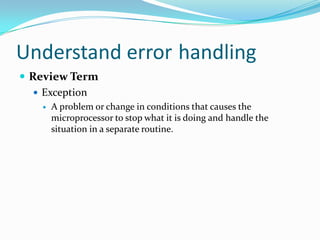
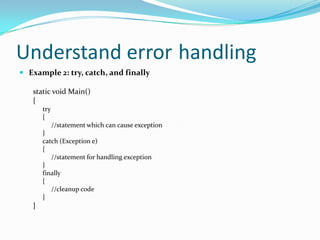
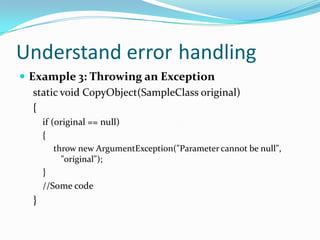
The document discusses exception handling in C# programming. It explains that a try block is used to partition code that may cause exceptions, a catch block handles any exceptions, and a finally block executes regardless of whether an exception occurs. It provides examples of using try, catch, and finally blocks to handle different types of exceptions, including dividing by zero, indexing out of range, null reference, and stack overflow exceptions. The document also includes an assignment for the reader to provide code that would trigger specific exceptions within try blocks.






![Answer#1) DivideByZeroExceptionint x = 100/0;#2) IndexOutOfRangeExceptionint[] array = new int[3]; array[4] = 31;#3) NullReferenceException Object x;x.toString();#4) StackOverflowException method4();](https://image.slidesharecdn.com/1-4coreprogrammingunderstanderrorhandling-110330031948-phpapp01/85/1-4-core-programming-understand-error-handling-10-320.jpg)


![Handling Exceptions In C & C++[Part A]](https://cdn.slidesharecdn.com/ss_thumbnails/handlingexceptionsinccparta-1265996349797-phpapp01-thumbnail.jpg?width=640&height=640&fit=bounds)


![1.1 core programming [understand computer storage and data types]](https://cdn.slidesharecdn.com/ss_thumbnails/1-1coreprogrammingunderstandcomputerstorageanddatatypes-110330031933-phpapp02-thumbnail.jpg?width=640&height=640&fit=bounds)


![1.3 core programming [identify the appropriate method for handling repetition]](https://cdn.slidesharecdn.com/ss_thumbnails/1-3coreprogrammingidentifytheappropriatemethodforhandlingrepetition-110330031944-phpapp02-thumbnail.jpg?width=640&height=640&fit=bounds)

![1.2 core programming [understand computer decision structures]](https://cdn.slidesharecdn.com/ss_thumbnails/1-2coreprogrammingunderstandcomputerdecisionstructures-110330031933-phpapp02-thumbnail.jpg?width=640&height=640&fit=bounds)


