Subject : Object Oriented Programming with C++
Topic : Exception Handling
Contents
 Introduction to Exception
 Try – Catch – Throw
 Multiple Catch
 Catch All
 Rethrowing Exception
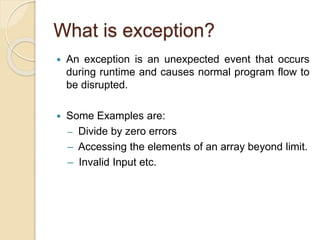
What is exception?
 An exception is an unexpected event that occurs
during runtime and causes normal program flow to
be disrupted.
 Some Examples are:
– Divide by zero errors
– Accessing the elements of an array beyond limit.
– Invalid Input etc.
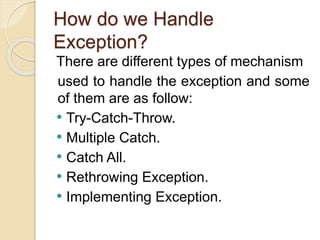
How do we Handle
Exception?
There are different types of mechanism
used to handle the exception and some
of them are as follow:
• Try-Catch-Throw.
• Multiple Catch.
• Catch All.
• Rethrowing Exception.
• Implementing Exception.
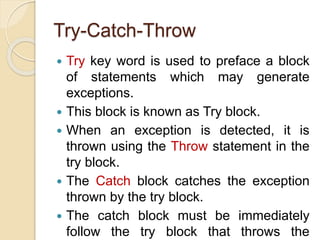
Try-Catch-Throw
 Try key word is used to preface a block
of statements which may generate
exceptions.
 This block is known as Try block.
 When an exception is detected, it is
thrown using the Throw statement in the
try block.
 The Catch block catches the exception
thrown by the try block.
 The catch block must be immediately
follow the try block that throws the
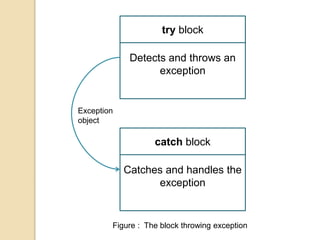
Detects and throws an
exception
try block
Catches and handles the
exception
catch block
Exception
object
Figure : The block throwing exception
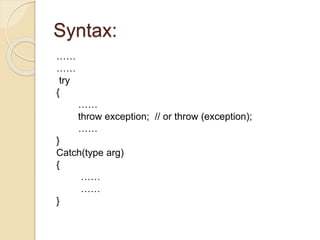
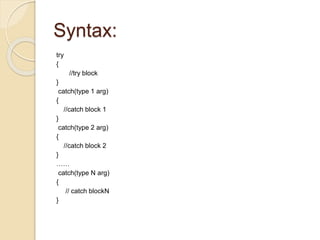
Syntax:
……
……
try
{
……
throw exception; // or throw (exception);
……
}
Catch(type arg)
{
……
……
}
Example:
Try Block Throwing an Exception
#include<iostream.h>
#include<conio.h>
int main()
{
int a,b;
cout<<“enter values of a and b:”;
cin>>a>>b;
int x = a-b;
try
{
if(x != 0) { cout<<“n result(a/x)=“<<a/x<<“n”; }
else { throw(x); // throws integer object }
}catch(int i){ cout<<“exception caught”; }
return 0;
}
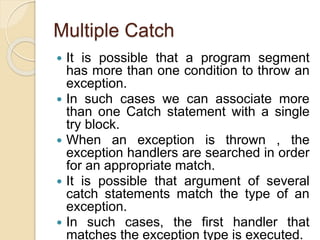
Multiple Catch
 It is possible that a program segment
has more than one condition to throw an
exception.
 In such cases we can associate more
than one Catch statement with a single
try block.
 When an exception is thrown , the
exception handlers are searched in order
for an appropriate match.
 It is possible that argument of several
catch statements match the type of an
exception.
 In such cases, the first handler that
matches the exception type is executed.
Syntax:
try
{
//try block
}
catch(type 1 arg)
{
//catch block 1
}
catch(type 2 arg)
{
//catch block 2
}
……
catch(type N arg)
{
// catch blockN
}
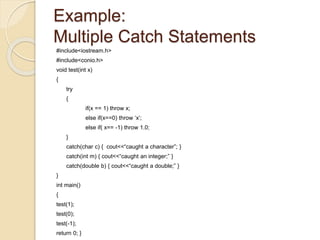
Example:
Multiple Catch Statements
#include<iostream.h>
#include<conio.h>
void test(int x)
{
try
{
if(x == 1) throw x;
else if(x==0) throw ‘x’;
else if( x== -1) throw 1.0;
}
catch(char c) { cout<<“caught a character”; }
catch(int m) { cout<<“caught an integer;” }
catch(double b) { cout<<“caught a double;” }
}
int main()
{
test(1);
test(0);
test(-1);
return 0; }
Catch All
 In some situations, we may not be able to
anticipate all possible types of exceptions and
therefore may not be able to design independent
catch handler to catch them.
 In such circumstances, we can force a catch
statement to catch all the exceptions instead of
certain type alone.
 Syntax:
catch(…)
{
//statements for processing
//all exceptions
}
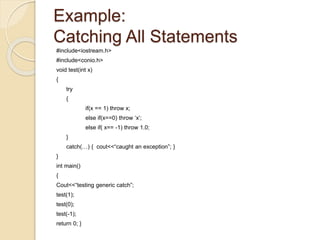
Example:
Catching All Statements
#include<iostream.h>
#include<conio.h>
void test(int x)
{
try
{
if(x == 1) throw x;
else if(x==0) throw ‘x’;
else if( x== -1) throw 1.0;
}
catch(…) { cout<<“caught an exception”; }
}
int main()
{
Cout<<“testing generic catch”;
test(1);
test(0);
test(-1);
return 0; }
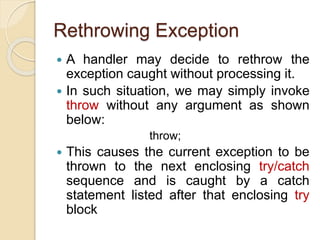
Rethrowing Exception
 A handler may decide to rethrow the
exception caught without processing it.
 In such situation, we may simply invoke
throw without any argument as shown
below:
throw;
 This causes the current exception to be
thrown to the next enclosing try/catch
sequence and is caught by a catch
statement listed after that enclosing try
block
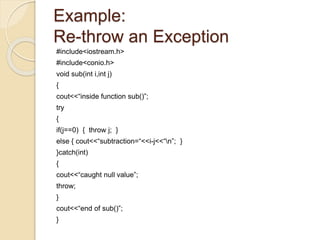
Example:
Re-throw an Exception
#include<iostream.h>
#include<conio.h>
void sub(int i,int j)
{
cout<<“inside function sub()”;
try
{
if(j==0) { throw j; }
else { cout<<“subtraction=“<<i-j<<“n”; }
}catch(int)
{
cout<<“caught null value”;
throw;
}
cout<<“end of sub()”;
}
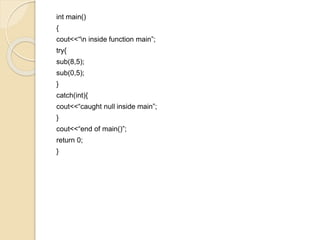
int main()
{
cout<<“n inside function main”;
try{
sub(8,5);
sub(0,5);
}
catch(int){
cout<<“caught null inside main”;
}
cout<<“end of main()”;
return 0;
}
THANK YOU

Exception Handling in object oriented programming using C++

  • 1.
    Subject : ObjectOriented Programming with C++ Topic : Exception Handling
  • 2.
    Contents  Introduction toException  Try – Catch – Throw  Multiple Catch  Catch All  Rethrowing Exception
  • 3.
    What is exception? An exception is an unexpected event that occurs during runtime and causes normal program flow to be disrupted.  Some Examples are: – Divide by zero errors – Accessing the elements of an array beyond limit. – Invalid Input etc.
  • 4.
    How do weHandle Exception? There are different types of mechanism used to handle the exception and some of them are as follow: • Try-Catch-Throw. • Multiple Catch. • Catch All. • Rethrowing Exception. • Implementing Exception.
  • 5.
    Try-Catch-Throw  Try keyword is used to preface a block of statements which may generate exceptions.  This block is known as Try block.  When an exception is detected, it is thrown using the Throw statement in the try block.  The Catch block catches the exception thrown by the try block.  The catch block must be immediately follow the try block that throws the
  • 6.
    Detects and throwsan exception try block Catches and handles the exception catch block Exception object Figure : The block throwing exception
  • 7.
    Syntax: …… …… try { …… throw exception; //or throw (exception); …… } Catch(type arg) { …… …… }
  • 8.
    Example: Try Block Throwingan Exception #include<iostream.h> #include<conio.h> int main() { int a,b; cout<<“enter values of a and b:”; cin>>a>>b; int x = a-b; try { if(x != 0) { cout<<“n result(a/x)=“<<a/x<<“n”; } else { throw(x); // throws integer object } }catch(int i){ cout<<“exception caught”; } return 0; }
  • 9.
    Multiple Catch  Itis possible that a program segment has more than one condition to throw an exception.  In such cases we can associate more than one Catch statement with a single try block.  When an exception is thrown , the exception handlers are searched in order for an appropriate match.  It is possible that argument of several catch statements match the type of an exception.  In such cases, the first handler that matches the exception type is executed.
  • 10.
    Syntax: try { //try block } catch(type 1arg) { //catch block 1 } catch(type 2 arg) { //catch block 2 } …… catch(type N arg) { // catch blockN }
  • 11.
    Example: Multiple Catch Statements #include<iostream.h> #include<conio.h> voidtest(int x) { try { if(x == 1) throw x; else if(x==0) throw ‘x’; else if( x== -1) throw 1.0; } catch(char c) { cout<<“caught a character”; } catch(int m) { cout<<“caught an integer;” } catch(double b) { cout<<“caught a double;” } } int main() { test(1); test(0); test(-1); return 0; }
  • 12.
    Catch All  Insome situations, we may not be able to anticipate all possible types of exceptions and therefore may not be able to design independent catch handler to catch them.  In such circumstances, we can force a catch statement to catch all the exceptions instead of certain type alone.  Syntax: catch(…) { //statements for processing //all exceptions }
  • 13.
    Example: Catching All Statements #include<iostream.h> #include<conio.h> voidtest(int x) { try { if(x == 1) throw x; else if(x==0) throw ‘x’; else if( x== -1) throw 1.0; } catch(…) { cout<<“caught an exception”; } } int main() { Cout<<“testing generic catch”; test(1); test(0); test(-1); return 0; }
  • 14.
    Rethrowing Exception  Ahandler may decide to rethrow the exception caught without processing it.  In such situation, we may simply invoke throw without any argument as shown below: throw;  This causes the current exception to be thrown to the next enclosing try/catch sequence and is caught by a catch statement listed after that enclosing try block
  • 15.
    Example: Re-throw an Exception #include<iostream.h> #include<conio.h> voidsub(int i,int j) { cout<<“inside function sub()”; try { if(j==0) { throw j; } else { cout<<“subtraction=“<<i-j<<“n”; } }catch(int) { cout<<“caught null value”; throw; } cout<<“end of sub()”; }
  • 16.
    int main() { cout<<“n insidefunction main”; try{ sub(8,5); sub(0,5); } catch(int){ cout<<“caught null inside main”; } cout<<“end of main()”; return 0; }
  • 17.