Basel Bern Lausanne Zurich Düsseldorf Frankfurt/M. Freiburg i. Br. Hamburg Munich Stuttgart Vienna
12c Pluggable databases
© 2013TechEvent 27 April 2013 2
Agenda
 Introduction
 Features
 What isolation level
 Upgrade capabilities
 Q/A
Trivadis
Tech-Event
27 April 2013
Basel Bern Lausanne Zurich Düsseldorf Frankfurt/M. Freiburg i. Br. Hamburg Munich Stuttgart Vienna
Introduction
© 2013TechEvent 27 April 2013 4
Introduction
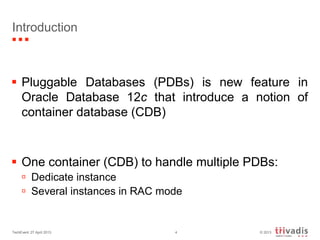
 Pluggable Databases (PDBs) is new feature in
Oracle Database 12c that introduce a notion of
container database (CDB)
 One container (CDB) to handle multiple PDBs:
 Dedicate instance
 Several instances in RAC mode
© 2013TechEvent 27 April 2013 5
Introduction
 More efficient in resource consumption, scalability and
manageability by consolidating many PDBs onto a single
platform
 Single CDB will support 250 pluggable databases (more is
licensed)
© 2013TechEvent 27 April 2013 6
Introduction
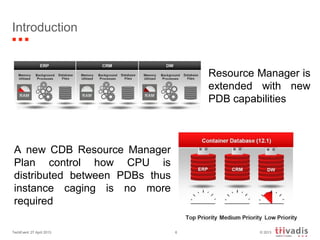
Resource Manager is
extended with new
PDB capabilities
A new CDB Resource Manager
Plan control how CPU is
distributed between PDBs thus
instance caging is no more
required
© 2013
Introduction
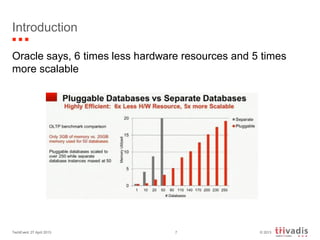
Oracle says, 6 times less hardware resources and 5 times
more scalable
TechEvent 27 April 2013 7
Basel Bern Lausanne Zurich Düsseldorf Frankfurt/M. Freiburg i. Br. Hamburg Munich Stuttgart Vienna
Features
© 2013TechEvent 27 April 2013 9
Features
 Split Data Dictionary
 CDB “root” dictionary
 Each PDB have its own private dictionary
 Fully backwards compatible with an ordinary pre-
12.1 database
 Compatible RAC, each instance will opens CDB as
a whole
 PDBs are fully compatible with all database options
 Resource manager is extended for PDBs
© 2013TechEvent 27 April 2013 10
Features
 Unplug and Plug to move databases:
 to new platform or release
 to exchange databases between environments
 to enhance high availability
 Management thought a new Administrator role:
CDB Administrator
 Unique service name for PDBs
 A default service that cannot be dropped is created
 “lsnrctl status” gives the name off all opened PDBs 
 Additional services can be created
© 2013TechEvent 27 April 2013 11
Features
 Fast provisioning, patching and upgrade
 PDB cloning or provisioning from “PDB Seed” template
 Upgrade by unplugging and plugging to a higher oracle
version allow quick PDB upgrades
 Upgrading the CDB will upgrade all PDBs
 Better database administration
 RMAN Backup apply to the CDB as a whole or to
individual PDBs
 Protect the full CDB including all PDBs with data guard
Basel Bern Lausanne Zurich Düsseldorf Frankfurt/M. Freiburg i. Br. Hamburg Munich Stuttgart Vienna
What isolation level
© 2013TechEvent 27 April 2013 13
What isolation level: list PDBs
 Any users in one PDB will not see anything about the other PDB
databases on the same instance
 Select from x$con as sysdba will give the same result
From sales PDB
oracle@srv12c:~/ [CDBPRD]sqlplus system@sales
Enter password:
SQL>select name,con_id from v$pdbs;
NAME CON_ID
------------------------------ ------
SALES 3
© 2013TechEvent 27 April 2013 14
What isolation level: list PDBs
 Same filter will apply on con_id for gv$pdbs view in RAC mode.
From CDB
oracle@srv12c:~/ [CDBPRD]sqlplus system
Enter password:
SQL>select name,con_id from v$pdbs;
NAME CON_ID
------------------------------ ------
PDB$SEED 2
SALES 3
ALLRACES 4
© 2013TechEvent 27 April 2013 15
What isolation level: change PDB
Service is not changed if you change the container within your session.
oracle@srv12c:~/ [CDBPRD]sqlplus system@sales
Enter password:
SQL>select SYS_CONTEXT('userenv','service_name') from dual;
SYS_CONTEXT('USERENV','SERVICE_NAME')
---------------------------------------------------------
Sales
SQL>alter session set container=allraces;
Session altered.
SQL> select SYS_CONTEXT('userenv','service_name') from dual;
SYS_CONTEXT('USERENV','SERVICE_NAME')
---------------------------------------------------------
sales
© 2013TechEvent 27 April 2013 16
What isolation level: list sessions
From sales PDB
oracle@srv12c:~/ [CDBPRD]sqlplus system@sales
Enter password:
SQL>select username,SERVICE_NAME from v$session where username is not null;
USERNAME SERVICE_NAME
------------------------------ ----------------
SYSTEM sales
Filter on con_id apply
© 2013TechEvent 27 April 2013 17
What isolation level: list sessions
From CDB
oracle@srv12c:~/ [CDBPRD]sqlplus system
Enter password:
SQL>select username,SERVICE_NAME from v$session where username is not null;
USERNAME SERVICE_NAME
------------------------------ -----------------
SYSTEM CDBPRD
SYSTEM sales
No filter on con_id apply
© 2013TechEvent 27 April 2013 18
What isolation level: list users
 Connected to CDB, you cannot see users defined
into any PDB
 Connected to a PDB, you can see global CDB
users and local PDB users
 COMMON=NO: for local PDB users
 COMMON=YES: for global users
 Other PDB users are not displayed
 Apply even connected as sysdba
© 2013TechEvent 27 April 2013 19
What isolation level: alter user
 It’s impossible to change global CDB user password from
one PDB even connect as sysdba
From sales PDB
oracle@srv12c:~/ [CDBPRD]sqlplus sys@sales as sysdba
Enter password:
SQL> password
Changing password for SYS
Old password:
New password:
Retype new password:
ERROR:
ORA-65040: operation not allowed from within a pluggable database
Password unchanged
SQL> alter user sys identified by "xxxxxxx";
alter user sys identified by "xxxxxxx"
*
ERROR at line 1:
ORA-65066: The specified changes must apply to all containers
© 2013TechEvent 27 April 2013 20
What isolation level: alter user
 Any setting changes to a global user from a PDB is
done locally to that PDB and does not affect the
CDB and other PDBs
alter user system default tablespace users;
 Apply only to the PDB if connected to a PDB.
© 2013TechEvent 27 April 2013 21
What isolation level: list objects
 Any objects created from any users within a PDB
remains local to that PDB and is not visible and
accessible from outside that PDB
 Content of CDB tables that can be accessed from
PDB is filtered by internal mechanism using:
INTERNAL_FUNCTION("CON_ID")
© 2013TechEvent 27 April 2013 22
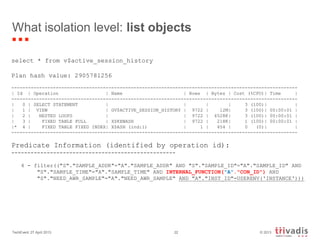
What isolation level: list objects
select * from v$active_session_history
Plan hash value: 2905781256
-------------------------------------------------------------------------------------------------------
| Id | Operation | Name | Rows | Bytes | Cost (%CPU)| Time |
-------------------------------------------------------------------------------------------------------
| 0 | SELECT STATEMENT | | | | 3 (100)| |
| 1 | VIEW | GV$ACTIVE_SESSION_HISTORY | 9722 | 12M| 3 (100)| 00:00:01 |
| 2 | NESTED LOOPS | | 9722 | 4528K| 3 (100)| 00:00:01 |
| 3 | FIXED TABLE FULL | X$KEWASH | 9722 | 218K| 1 (100)| 00:00:01 |
|* 4 | FIXED TABLE FIXED INDEX| X$ASH (ind:1) | 1 | 454 | 0 (0)| |
-------------------------------------------------------------------------------------------------------
Predicate Information (identified by operation id):
---------------------------------------------------
4 - filter(("S"."SAMPLE_ADDR"="A"."SAMPLE_ADDR" AND "S"."SAMPLE_ID"="A"."SAMPLE_ID" AND
"S"."SAMPLE_TIME"="A"."SAMPLE_TIME" AND INTERNAL_FUNCTION("A"."CON_ID") AND
"S"."NEED_AWR_SAMPLE"="A"."NEED_AWR_SAMPLE" AND "A"."INST_ID"=USERENV('INSTANCE')))
© 2013TechEvent 27 April 2013 23
What isolation level: list objects
 Number of tables in the dictionary with the CON_ID column
 2415 internal tables where filter condition on CON_ID apply!
oracle@srv12c:~/ [CDBPRD]sqlplus / as sysdba
SQL>select count (distinct table_name) from dba_tab_columns;
COUNT(DISTINCTTABLE_NAME)
-------------------------
8487
oracle@srv12c:~/ [CDBPRD]sqlplus / as sysdba
SQL>select count (distinct table_name) from dba_tab_columns where
column_name= 'CON_ID‘;
COUNT(DISTINCTTABLE_NAME)
-------------------------
2415
© 2013TechEvent 27 April 2013 24
What isolation level: parameter settings
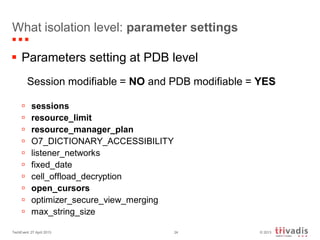
 Parameters setting at PDB level
Session modifiable = NO and PDB modifiable = YES
 sessions
 resource_limit
 resource_manager_plan
 O7_DICTIONARY_ACCESSIBILITY
 listener_networks
 fixed_date
 cell_offload_decryption
 open_cursors
 optimizer_secure_view_merging
 max_string_size
© 2013TechEvent 27 April 2013 25
What isolation level: cursor management
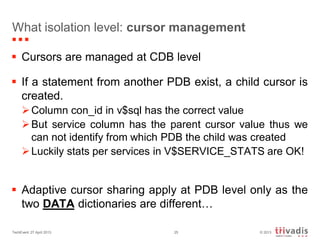
 Cursors are managed at CDB level
 If a statement from another PDB exist, a child cursor is
created.
Column con_id in v$sql has the correct value
But service column has the parent cursor value thus we
can not identify from which PDB the child was created
Luckily stats per services in V$SERVICE_STATS are OK!
 Adaptive cursor sharing apply at PDB level only as the
two DATA dictionaries are different…
© 2013TechEvent 27 April 2013 26
What isolation level: RMAN recovery
 Recovery at PDB level using RMAN is possible
 Can we do it without impacting other PDB?
 Unable to recover complete lost of PDB without impacting
the whole CDB  
 You cannot close a PDB if one datafile is missing 
 You can not restore system tablespace as it cannot be put
offline as we cannot close the PDB 
Do not lose the PDB system tablespace
© 2013TechEvent 27 April 2013 27
What isolation level: RMAN recovery
After losing system tablespace:
 I was not able to close the PDB: error!
 I was not able to do the restore online
 I had to shutdown the CDB!
 Mount the CDB
 Do the RMAN restore and recovery
 Open the CDB
 Open the PDBs
© 2013TechEvent 27 April 2013 28
What isolation level: resource management
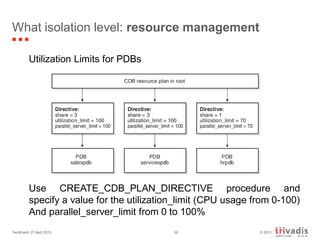
 A CDB resource plan allocates resources to its PDBs
according to its set of resource plan directives.
 There is a parent-child relationship between a CDB resource
plan and its directives.
 Each directive references one PDB, and two directives for the
currently active plan cannot reference the same PDB.
 The directives control allocation of the following resources to
the PDBs:
 CPU
 Parallel execution servers
© 2013TechEvent 27 April 2013 29
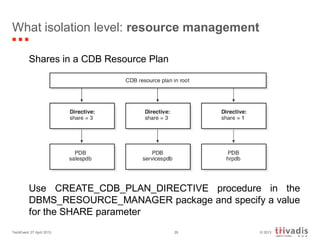
What isolation level: resource management
Shares in a CDB Resource Plan
Use CREATE_CDB_PLAN_DIRECTIVE procedure in the
DBMS_RESOURCE_MANAGER package and specify a value
for the SHARE parameter
© 2013TechEvent 27 April 2013 30
What isolation level: resource management
Utilization Limits for PDBs
Use CREATE_CDB_PLAN_DIRECTIVE procedure and
specify a value for the utilization_limit (CPU usage from 0-100)
And parallel_server_limit from 0 to 100%
© 2013TechEvent 27 April 2013 31
What isolation level: resource management
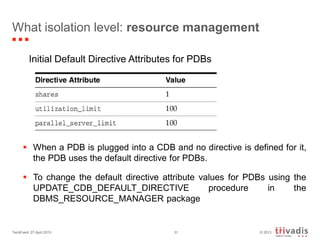
Initial Default Directive Attributes for PDBs
 When a PDB is plugged into a CDB and no directive is defined for it,
the PDB uses the default directive for PDBs.
 To change the default directive attribute values for PDBs using the
UPDATE_CDB_DEFAULT_DIRECTIVE procedure in the
DBMS_RESOURCE_MANAGER package
© 2013TechEvent 27 April 2013 32
What isolation level: resource management
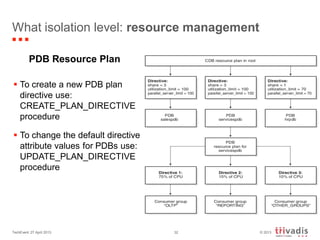
PDB Resource Plan
 To create a new PDB plan
directive use:
CREATE_PLAN_DIRECTIVE
procedure
 To change the default directive
attribute values for PDBs use:
UPDATE_PLAN_DIRECTIVE
procedure
© 2013TechEvent 27 April 2013 33
What isolation level: migrating schema to PDB
1. Create a new 12c instance as container
2. Create a new pluggable database
3. Define tnsname entry for the PDB
4. Define tnsname entry for the source DB
5. Create public database link into the PDB to source DB
6. Invoke impdp to import the schema into the PDB using
network_link option
impdp system@sales schemas=SH network_link=sales_link directory=LOG_FILE_DIR
7. Change application tnsname entry
Basel Bern Lausanne Zurich Düsseldorf Frankfurt/M. Freiburg i. Br. Hamburg Munich Stuttgart Vienna
Upgrade capabilities
© 2013TechEvent 27 April 2013 35
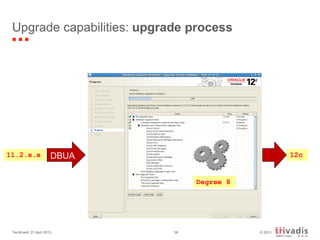
Upgrade capabilities: 12c upgrade new features
 Interactive upgrade capabilities
 Interactively run fixup scripts during the pre-upgrade
phase to resolve found issues
 Post-upgrade fixup scripts are generated depending on
the results of the upgrade process.
 DBUA prompts to fix critical issues that are found
 Parallel processing of the upgrade process
 Upgrade scripts and processes can run in parallel, taking
full advantage of CPU capacity and shortening the
upgrade time
© 2013TechEvent 27 April 2013 36
Upgrade capabilities: 12c upgrade new features
 DBUA can be restarted in case of upgrade fail
 Much more options for recovering from failures during
upgrade and for restarting the upgrade from the point
where the failure occurred
 Enhanced summary reports Pre & Post upgrade
 HTML reports before and after the upgrade.
 These reports include component status, and allow drill
down at component level
© 2013TechEvent 27 April 2013 37
Upgrade capabilities: pluggable databases
 Key benefits
 upgrade or apply a patch to a CDB and the operation is
implemented on all the pluggable databases within that
CDB
 Simply upgrade a PDB by moving it (unplugg/plugg)
to a higher CDB release
 You cannot upgrade a pre 12c database to become
a container
© 2013TechEvent 27 April 2013 38
Upgrade capabilities: upgrade process
DBUA11.2.x.x 12c
Degree 8
Basel Bern Lausanne Zurich Düsseldorf Frankfurt/M. Freiburg i. Br. Hamburg Munich Stuttgart Vienna
Conclusions
© 2013TechEvent 27 April 2013 40
Conclusion
 Cool features with some limitations that will be addressed in
next releases
 Good isolation level that can be enhanced with Resource
Manager new features
 DEV consolidation oriented
 New Upgrades capabilities
 Parallel processing
 Restart in case on upgrade fail
 One shot upgrade all PDBs by upgrading CDB
 Automatic upgrade of lower version plugged PDBs
Basel Bern Lausanne Zurich Düsseldorf Frankfurt/M. Freiburg i. Br. Hamburg Munich Stuttgart Vienna
Thank you very much for your attention
?

Presentation 12c pdb

  • 1.
    Basel Bern LausanneZurich Düsseldorf Frankfurt/M. Freiburg i. Br. Hamburg Munich Stuttgart Vienna 12c Pluggable databases
  • 2.
    © 2013TechEvent 27April 2013 2 Agenda  Introduction  Features  What isolation level  Upgrade capabilities  Q/A Trivadis Tech-Event 27 April 2013
  • 3.
    Basel Bern LausanneZurich Düsseldorf Frankfurt/M. Freiburg i. Br. Hamburg Munich Stuttgart Vienna Introduction
  • 4.
    © 2013TechEvent 27April 2013 4 Introduction  Pluggable Databases (PDBs) is new feature in Oracle Database 12c that introduce a notion of container database (CDB)  One container (CDB) to handle multiple PDBs:  Dedicate instance  Several instances in RAC mode
  • 5.
    © 2013TechEvent 27April 2013 5 Introduction  More efficient in resource consumption, scalability and manageability by consolidating many PDBs onto a single platform  Single CDB will support 250 pluggable databases (more is licensed)
  • 6.
    © 2013TechEvent 27April 2013 6 Introduction Resource Manager is extended with new PDB capabilities A new CDB Resource Manager Plan control how CPU is distributed between PDBs thus instance caging is no more required
  • 7.
    © 2013 Introduction Oracle says,6 times less hardware resources and 5 times more scalable TechEvent 27 April 2013 7
  • 8.
    Basel Bern LausanneZurich Düsseldorf Frankfurt/M. Freiburg i. Br. Hamburg Munich Stuttgart Vienna Features
  • 9.
    © 2013TechEvent 27April 2013 9 Features  Split Data Dictionary  CDB “root” dictionary  Each PDB have its own private dictionary  Fully backwards compatible with an ordinary pre- 12.1 database  Compatible RAC, each instance will opens CDB as a whole  PDBs are fully compatible with all database options  Resource manager is extended for PDBs
  • 10.
    © 2013TechEvent 27April 2013 10 Features  Unplug and Plug to move databases:  to new platform or release  to exchange databases between environments  to enhance high availability  Management thought a new Administrator role: CDB Administrator  Unique service name for PDBs  A default service that cannot be dropped is created  “lsnrctl status” gives the name off all opened PDBs   Additional services can be created
  • 11.
    © 2013TechEvent 27April 2013 11 Features  Fast provisioning, patching and upgrade  PDB cloning or provisioning from “PDB Seed” template  Upgrade by unplugging and plugging to a higher oracle version allow quick PDB upgrades  Upgrading the CDB will upgrade all PDBs  Better database administration  RMAN Backup apply to the CDB as a whole or to individual PDBs  Protect the full CDB including all PDBs with data guard
  • 12.
    Basel Bern LausanneZurich Düsseldorf Frankfurt/M. Freiburg i. Br. Hamburg Munich Stuttgart Vienna What isolation level
  • 13.
    © 2013TechEvent 27April 2013 13 What isolation level: list PDBs  Any users in one PDB will not see anything about the other PDB databases on the same instance  Select from x$con as sysdba will give the same result From sales PDB oracle@srv12c:~/ [CDBPRD]sqlplus system@sales Enter password: SQL>select name,con_id from v$pdbs; NAME CON_ID ------------------------------ ------ SALES 3
  • 14.
    © 2013TechEvent 27April 2013 14 What isolation level: list PDBs  Same filter will apply on con_id for gv$pdbs view in RAC mode. From CDB oracle@srv12c:~/ [CDBPRD]sqlplus system Enter password: SQL>select name,con_id from v$pdbs; NAME CON_ID ------------------------------ ------ PDB$SEED 2 SALES 3 ALLRACES 4
  • 15.
    © 2013TechEvent 27April 2013 15 What isolation level: change PDB Service is not changed if you change the container within your session. oracle@srv12c:~/ [CDBPRD]sqlplus system@sales Enter password: SQL>select SYS_CONTEXT('userenv','service_name') from dual; SYS_CONTEXT('USERENV','SERVICE_NAME') --------------------------------------------------------- Sales SQL>alter session set container=allraces; Session altered. SQL> select SYS_CONTEXT('userenv','service_name') from dual; SYS_CONTEXT('USERENV','SERVICE_NAME') --------------------------------------------------------- sales
  • 16.
    © 2013TechEvent 27April 2013 16 What isolation level: list sessions From sales PDB oracle@srv12c:~/ [CDBPRD]sqlplus system@sales Enter password: SQL>select username,SERVICE_NAME from v$session where username is not null; USERNAME SERVICE_NAME ------------------------------ ---------------- SYSTEM sales Filter on con_id apply
  • 17.
    © 2013TechEvent 27April 2013 17 What isolation level: list sessions From CDB oracle@srv12c:~/ [CDBPRD]sqlplus system Enter password: SQL>select username,SERVICE_NAME from v$session where username is not null; USERNAME SERVICE_NAME ------------------------------ ----------------- SYSTEM CDBPRD SYSTEM sales No filter on con_id apply
  • 18.
    © 2013TechEvent 27April 2013 18 What isolation level: list users  Connected to CDB, you cannot see users defined into any PDB  Connected to a PDB, you can see global CDB users and local PDB users  COMMON=NO: for local PDB users  COMMON=YES: for global users  Other PDB users are not displayed  Apply even connected as sysdba
  • 19.
    © 2013TechEvent 27April 2013 19 What isolation level: alter user  It’s impossible to change global CDB user password from one PDB even connect as sysdba From sales PDB oracle@srv12c:~/ [CDBPRD]sqlplus sys@sales as sysdba Enter password: SQL> password Changing password for SYS Old password: New password: Retype new password: ERROR: ORA-65040: operation not allowed from within a pluggable database Password unchanged SQL> alter user sys identified by "xxxxxxx"; alter user sys identified by "xxxxxxx" * ERROR at line 1: ORA-65066: The specified changes must apply to all containers
  • 20.
    © 2013TechEvent 27April 2013 20 What isolation level: alter user  Any setting changes to a global user from a PDB is done locally to that PDB and does not affect the CDB and other PDBs alter user system default tablespace users;  Apply only to the PDB if connected to a PDB.
  • 21.
    © 2013TechEvent 27April 2013 21 What isolation level: list objects  Any objects created from any users within a PDB remains local to that PDB and is not visible and accessible from outside that PDB  Content of CDB tables that can be accessed from PDB is filtered by internal mechanism using: INTERNAL_FUNCTION("CON_ID")
  • 22.
    © 2013TechEvent 27April 2013 22 What isolation level: list objects select * from v$active_session_history Plan hash value: 2905781256 ------------------------------------------------------------------------------------------------------- | Id | Operation | Name | Rows | Bytes | Cost (%CPU)| Time | ------------------------------------------------------------------------------------------------------- | 0 | SELECT STATEMENT | | | | 3 (100)| | | 1 | VIEW | GV$ACTIVE_SESSION_HISTORY | 9722 | 12M| 3 (100)| 00:00:01 | | 2 | NESTED LOOPS | | 9722 | 4528K| 3 (100)| 00:00:01 | | 3 | FIXED TABLE FULL | X$KEWASH | 9722 | 218K| 1 (100)| 00:00:01 | |* 4 | FIXED TABLE FIXED INDEX| X$ASH (ind:1) | 1 | 454 | 0 (0)| | ------------------------------------------------------------------------------------------------------- Predicate Information (identified by operation id): --------------------------------------------------- 4 - filter(("S"."SAMPLE_ADDR"="A"."SAMPLE_ADDR" AND "S"."SAMPLE_ID"="A"."SAMPLE_ID" AND "S"."SAMPLE_TIME"="A"."SAMPLE_TIME" AND INTERNAL_FUNCTION("A"."CON_ID") AND "S"."NEED_AWR_SAMPLE"="A"."NEED_AWR_SAMPLE" AND "A"."INST_ID"=USERENV('INSTANCE')))
  • 23.
    © 2013TechEvent 27April 2013 23 What isolation level: list objects  Number of tables in the dictionary with the CON_ID column  2415 internal tables where filter condition on CON_ID apply! oracle@srv12c:~/ [CDBPRD]sqlplus / as sysdba SQL>select count (distinct table_name) from dba_tab_columns; COUNT(DISTINCTTABLE_NAME) ------------------------- 8487 oracle@srv12c:~/ [CDBPRD]sqlplus / as sysdba SQL>select count (distinct table_name) from dba_tab_columns where column_name= 'CON_ID‘; COUNT(DISTINCTTABLE_NAME) ------------------------- 2415
  • 24.
    © 2013TechEvent 27April 2013 24 What isolation level: parameter settings  Parameters setting at PDB level Session modifiable = NO and PDB modifiable = YES  sessions  resource_limit  resource_manager_plan  O7_DICTIONARY_ACCESSIBILITY  listener_networks  fixed_date  cell_offload_decryption  open_cursors  optimizer_secure_view_merging  max_string_size
  • 25.
    © 2013TechEvent 27April 2013 25 What isolation level: cursor management  Cursors are managed at CDB level  If a statement from another PDB exist, a child cursor is created. Column con_id in v$sql has the correct value But service column has the parent cursor value thus we can not identify from which PDB the child was created Luckily stats per services in V$SERVICE_STATS are OK!  Adaptive cursor sharing apply at PDB level only as the two DATA dictionaries are different…
  • 26.
    © 2013TechEvent 27April 2013 26 What isolation level: RMAN recovery  Recovery at PDB level using RMAN is possible  Can we do it without impacting other PDB?  Unable to recover complete lost of PDB without impacting the whole CDB    You cannot close a PDB if one datafile is missing   You can not restore system tablespace as it cannot be put offline as we cannot close the PDB  Do not lose the PDB system tablespace
  • 27.
    © 2013TechEvent 27April 2013 27 What isolation level: RMAN recovery After losing system tablespace:  I was not able to close the PDB: error!  I was not able to do the restore online  I had to shutdown the CDB!  Mount the CDB  Do the RMAN restore and recovery  Open the CDB  Open the PDBs
  • 28.
    © 2013TechEvent 27April 2013 28 What isolation level: resource management  A CDB resource plan allocates resources to its PDBs according to its set of resource plan directives.  There is a parent-child relationship between a CDB resource plan and its directives.  Each directive references one PDB, and two directives for the currently active plan cannot reference the same PDB.  The directives control allocation of the following resources to the PDBs:  CPU  Parallel execution servers
  • 29.
    © 2013TechEvent 27April 2013 29 What isolation level: resource management Shares in a CDB Resource Plan Use CREATE_CDB_PLAN_DIRECTIVE procedure in the DBMS_RESOURCE_MANAGER package and specify a value for the SHARE parameter
  • 30.
    © 2013TechEvent 27April 2013 30 What isolation level: resource management Utilization Limits for PDBs Use CREATE_CDB_PLAN_DIRECTIVE procedure and specify a value for the utilization_limit (CPU usage from 0-100) And parallel_server_limit from 0 to 100%
  • 31.
    © 2013TechEvent 27April 2013 31 What isolation level: resource management Initial Default Directive Attributes for PDBs  When a PDB is plugged into a CDB and no directive is defined for it, the PDB uses the default directive for PDBs.  To change the default directive attribute values for PDBs using the UPDATE_CDB_DEFAULT_DIRECTIVE procedure in the DBMS_RESOURCE_MANAGER package
  • 32.
    © 2013TechEvent 27April 2013 32 What isolation level: resource management PDB Resource Plan  To create a new PDB plan directive use: CREATE_PLAN_DIRECTIVE procedure  To change the default directive attribute values for PDBs use: UPDATE_PLAN_DIRECTIVE procedure
  • 33.
    © 2013TechEvent 27April 2013 33 What isolation level: migrating schema to PDB 1. Create a new 12c instance as container 2. Create a new pluggable database 3. Define tnsname entry for the PDB 4. Define tnsname entry for the source DB 5. Create public database link into the PDB to source DB 6. Invoke impdp to import the schema into the PDB using network_link option impdp system@sales schemas=SH network_link=sales_link directory=LOG_FILE_DIR 7. Change application tnsname entry
  • 34.
    Basel Bern LausanneZurich Düsseldorf Frankfurt/M. Freiburg i. Br. Hamburg Munich Stuttgart Vienna Upgrade capabilities
  • 35.
    © 2013TechEvent 27April 2013 35 Upgrade capabilities: 12c upgrade new features  Interactive upgrade capabilities  Interactively run fixup scripts during the pre-upgrade phase to resolve found issues  Post-upgrade fixup scripts are generated depending on the results of the upgrade process.  DBUA prompts to fix critical issues that are found  Parallel processing of the upgrade process  Upgrade scripts and processes can run in parallel, taking full advantage of CPU capacity and shortening the upgrade time
  • 36.
    © 2013TechEvent 27April 2013 36 Upgrade capabilities: 12c upgrade new features  DBUA can be restarted in case of upgrade fail  Much more options for recovering from failures during upgrade and for restarting the upgrade from the point where the failure occurred  Enhanced summary reports Pre & Post upgrade  HTML reports before and after the upgrade.  These reports include component status, and allow drill down at component level
  • 37.
    © 2013TechEvent 27April 2013 37 Upgrade capabilities: pluggable databases  Key benefits  upgrade or apply a patch to a CDB and the operation is implemented on all the pluggable databases within that CDB  Simply upgrade a PDB by moving it (unplugg/plugg) to a higher CDB release  You cannot upgrade a pre 12c database to become a container
  • 38.
    © 2013TechEvent 27April 2013 38 Upgrade capabilities: upgrade process DBUA11.2.x.x 12c Degree 8
  • 39.
    Basel Bern LausanneZurich Düsseldorf Frankfurt/M. Freiburg i. Br. Hamburg Munich Stuttgart Vienna Conclusions
  • 40.
    © 2013TechEvent 27April 2013 40 Conclusion  Cool features with some limitations that will be addressed in next releases  Good isolation level that can be enhanced with Resource Manager new features  DEV consolidation oriented  New Upgrades capabilities  Parallel processing  Restart in case on upgrade fail  One shot upgrade all PDBs by upgrading CDB  Automatic upgrade of lower version plugged PDBs
  • 41.
    Basel Bern LausanneZurich Düsseldorf Frankfurt/M. Freiburg i. Br. Hamburg Munich Stuttgart Vienna Thank you very much for your attention ?