10 WaysAutotask Automates Your IT Business
Reduce Costs, Win More Business And
Manage Growth More Effectively
®
2
10 Ways Autotask Automates Your IT Business
INTRODUCTION..............................................................................................................................3
5#2 Managing Customer Information........................................................................................
6#3 Capturing and Converting Managed Services...................................................................
7#4 Implementing Automated Workflow, Escalation and SLAs...............................................
8#5 Processing Customer Service Requests...........................................................................
9#6 Implementing IT Consulting Engagements.........................................................................
10#7 Monitoring And Billing Field Service Time........................................................................
11#8 Billing and Invoicing Cycles...............................................................................................
12#9 Measurement And Analysis...................................................................................................
4#1 Centralizing Data.................................................................................................................
13#10 Leverage Existing Tools.....................................................................................................
14Conclusion.................................................................................................................................
3
10 Ways Autotask Automates Your IT Business
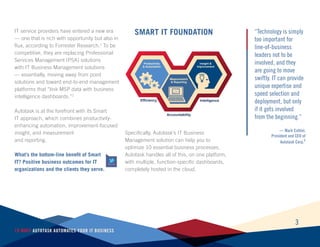
Smart IT FoundationIT service providers have entered a new era
— one that is rich with opportunity but also in
flux, according to Forrester Research.1
To be
competitive, they are replacing Professional
Services Management (PSA) solutions
with IT Business Management solutions
— essentially, moving away from point
solutions and toward end-to-end management
platforms that “link MSP data with business
intelligence dashboards.”2
Autotask is at the forefront with its Smart
IT approach, which combines productivity-
enhancing automation, improvement-focused
insight, and measurement
and reporting.
What’s the bottom-line benefit of Smart
IT? Positive business outcomes for IT
organizations and the clients they serve.
Specifically, Autotask’s IT Business
Management solution can help you to
optimize 10 essential business processes.
Autotask handles all of this, on one platform,
with multiple, function-specific dashboards,
completely hosted in the cloud.
“Technology is simply
too important for
line-of-business
leaders not to be
involved, and they
are going to move
swiftly. IT can provide
unique expertise and
speed selection and
deployment, but only
if it gets involved
from the beginning.”
— Mark Cattini,
President and CEO of
Autotask Corp.3
TWEET THIS
Productivity
& Automation
Measurement
& Reporting
Insight &
Improvement
Efficiency
Accountability
Intelligence
Business Process #1:
Centralizing Data
All businesses have access to more data on
operations and customer behavior than ever
before. As an IT services provider, you should
be at the forefront of turning this data into
actionable information. The first barrier is
centralizing the data. Autotask automates this
process by replacing multiple point solutions
with a singular management platform. This
model provides:
Enhanced efficiency
Data is automatically processed into
knowledge and presented in dashboards
without manual manipulation.
Quality
The potential for human error declines while
the accuracy of insight improves.
Speed and flexibility
Data processing is faster — so you gain
knowledge sooner — and it’s easier to
change rules when operational or market
needs change.
Openness and accountability
Performance and market insight is most
meaningful when it is normalized, i.e.,
collected at-large and defined according
to rules that reflect top-level goals and
strategy — instead of according to functional/
departmental parameters of what’s acceptable
and/or possible.
4
10 Ways Autotask Automates Your IT Business
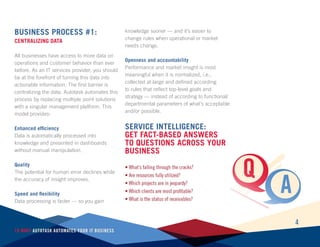
Service Intelligence:
Get Fact-Based Answers
to questions across your
business
5
10 Ways Autotask Automates Your IT Business
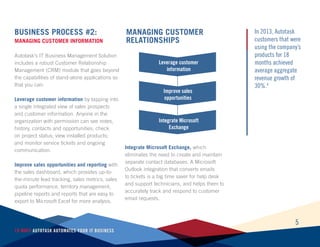
Business Process #2:
Managing Customer Information
Autotask’s IT Business Management Solution
includes a robust Customer Relationship
Management (CRM) module that goes beyond
the capabilities of stand-alone applications so
that you can:
Leverage customer information by tapping into
a single integrated view of sales prospects
and customer information. Anyone in the
organization with permission can see notes,
history, contacts and opportunities; check
on project status; view installed products;
and monitor service tickets and ongoing
communication.
Improve sales opportunities and reporting with
the sales dashboard, which provides up-to-
the-minute lead tracking, sales metrics, sales
quota performance, territory management,
pipeline reports and reports that are easy to
export to Microsoft Excel for more analysis.
Integrate Microsoft Exchange, which
eliminates the need to create and maintain
separate contact databases. A Microsoft
Outlook integration that converts emails
to tickets is a big time saver for help desk
and support technicians, and helps them to
accurately track and respond to customer
email requests.
In 2013, Autotask
customers that were
using the company’s
products for 18
months achieved
average aggregate
revenue growth of
30%.4
Leverage customer
information
Improve sales
opportunities
Integrate Microsoft
Exchange
Managing Customer
Relationships
6
10 Ways Autotask Automates Your IT Business
Integration with
automated workflow
rules and escalation
further increase
productivity.
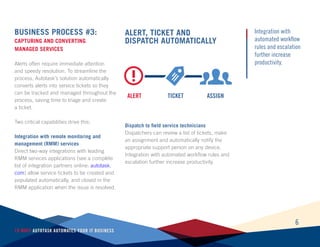
Business Process #3:
Capturing and Converting
Managed Services
Alerts often require immediate attention
and speedy resolution. To streamline the
process, Autotask’s solution automatically
converts alerts into service tickets so they
can be tracked and managed throughout the
process, saving time to triage and create
a ticket.
Two critical capabilities drive this:
Integration with remote monitoring and
management (RMM) services
Direct two-way integrations with leading
RMM services applications (see a complete
list of integration partners online: autotask.
com) allow service tickets to be created and
populated automatically, and closed in the
RMM application when the issue is resolved.
Dispatch to field service technicians
Dispatchers can review a list of tickets, make
an assignment and automatically notify the
appropriate support person on any device.
Integration with automated workflow rules and
escalation further increase productivity.
Alert, Ticket And
Dispatch Automatically
ALERT TICKET ASSIGN
7
10 Ways Autotask Automates Your IT Business
Business Process #4:
Implementing Automated Workflow,
Escalation and SLAs
Whether based on contractual obligations,
service level agreements (SLAs) or internal
best practices, you need a way to measure
KPIs and manage the service and support
that you provide. You can achieve this by
using Autotask’s solution to:
Create workflow and escalation rules for
service tickets
Workflow rules indicate when and how a
service ticket is to be escalated and what
actions should be performed. Also important
is the ability to copy existing workflow rules to
use as guides when building new ones.
Define automatic actions
Notifications, escalation in priority, change
in status and reassignments are initiated
when service standards and time-based
commitments are at risk.
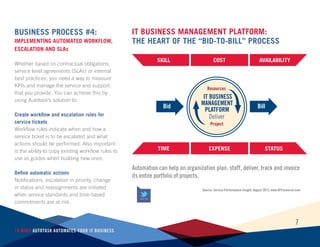
IT Business
Management
Platform
Resources
Project
Deliver
Bid Bill
SKILL
TIME
COST
EXPENSE
Availability
STATUS
IT Business Management Platform:
tHE HEART OF THE “BID-TO-BILL” PROCESS
Automation can help an organization plan, staff, deliver, track and invoice
its entire portfolio of projects.
TWEET THIS
Source: Service Performance Insight, August 2012, www.SPIresearch.com
Source: Decision Tree Labs/Autotask, 2013
8
10 Ways Autotask Automates Your IT Business
15 432
LEAST
IMPORTANT
MOST
IMPORTANT
0%
10%
20%
30%
40%
50%
60%
70%
80%
90%
100%
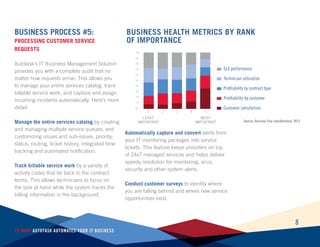
Business Health Metrics by Rank
of Importance
Business Process #5:
Processing Customer Service
Requests
Autotask’s IT Business Management Solution
provides you with a complete audit trail no
matter how requests arrive. This allows you
to manage your entire services catalog, track
billable service work, and capture and assign
incoming incidents automatically. Here’s more
detail:
Manage the entire services catalog by creating
and managing multiple service queues; and
customizing issues and sub-issues, priority,
status, routing, ticket history, integrated time
tracking and automated notification.
Track billable service work by a variety of
activity codes that tie back to the contract
terms. This allows technicians to focus on
the task at hand while the system tracks the
billing information in the background.
Automatically capture and convert alerts from
your IT monitoring packages into service
tickets. This feature keeps providers on top
of 24x7 managed services and helps deliver
speedy resolution for monitoring, virus,
security and other system alerts.
Conduct customer surveys to identify where
you are falling behind and where new service
opportunities exist.
1 2 3 4 5
SLA performance
Technician utilization
Profitability by contract type
Profitability by customer
Customer satisfaction
9
10 Ways Autotask Automates Your IT Business
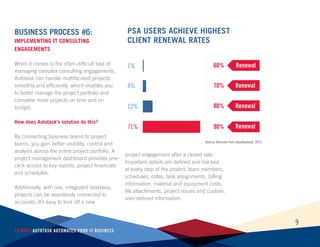
Business Process #6:
Implementing IT Consulting
Engagements
When it comes to the often-difficult task of
managing complex consulting engagements,
Autotask can handle multifaceted projects
smoothly and efficiently, which enables you
to better manage the project portfolio and
complete more projects on time and on
budget.
How does Autotask’s solution do this?
By connecting business teams to project
teams, you gain better visibility, control and
analysis across the entire project portfolio. A
project management dashboard provides one-
click access to key reports, project financials
and schedules.
Additionally, with one, integrated database,
projects can be seamlessly connected to
accounts. It’s easy to kick off a new
project engagement after a closed sale.
Important details are defined and tracked
at every step of the project: team members,
schedules, notes, task assignments, billing
information, material and equipment costs,
file attachments, project issues and custom,
user-defined information.
PSA USERS ACHIEVE HIGHEST
CLIENT RENEWAL RATES
1% 60%
4% 70%
12% 80%
71% 90%
Renewal
Renewal
Renewal
Renewal
Source: Decision Tree Labs/Autotask, 2013
10
10 Ways Autotask Automates Your IT Business
Business Process #7:
Monitoring And Billing Field
Service Time
With Autotask, team members can review
their service and project work along with
estimates, due dates and priorities — all
at the beginning of each day. Technicians,
engineers and consultants can easily capture
and record time, status and work detail, i.e.,
when and where the work is completed. This
is facilitated through:
Built-in dashboards and timesheets
Time entry and assignments are completely
integrated. Task assignments appear on a
personal dashboard and allow easy entry
of time, status and work details. Completed
assignments can be signed off from the field,
and everything is captured for billing.
Integrated expense reports
Create detailed reports, track receipts and
capture company-paid items. All items
are tracked along with their corresponding
expense policies and approvals, preventing
double-pay expense items and inaccurate or
incomplete expense reports.
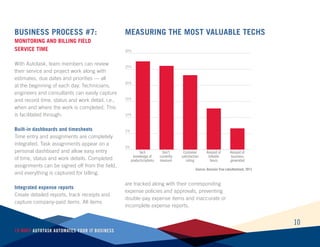
0%
5%
10%
15%
20%
25%
30%
Measuring the Most Valuable Techs
Tech
knowledge of
products/sytems
Don’t
currently
measure
Customer
satisfaction
rating
Amount of
billable
hours
Amount of
business
generated
Source: Decision Tree Labs/Autotask, 2013
Business Process #8:
Billing and Invoicing Cycles
Autotask lets you automatically check
timesheets, work entries and expenses.
It automatically applies the appropriate
contract terms and billing methods for each
to generate a detailed invoice that accurately
reflects the services provided over that billing
cycle. This feature alone can save countless
hours each month reconciling accounts and
generating invoices manually.
Flexible contract and billing automation is
configured to reflect the way you currently
bill customers for both project and service
work. Autotask can handle time-and-materials
billing based on multiple roles and rates per
customer contract.
At the same time, direct integration with
leading accounting packages removes the
need for manual updating and eliminates
potential errors in the transfer process, greatly
simplifying billing and reconciliation processes
each month.
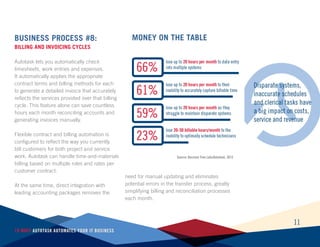
Money On The Table
Source: Decision Tree Labs/Autotask, 2013
11
10 Ways Autotask Automates Your IT Business
12
10 Ways Autotask Automates Your IT Business
Best-in-class service
providers apply
business data and
analytics to increase
efficiency and
predictability in their
business operations.
Business Process #9:
Measurement And Analysis
Best-in-class service providers apply business
data and analytics to increase efficiency and
predictability in their business operations,
ensure higher customer satisfaction, optimize
utilization rates and make other improvements
to drive profitability and growth. Autotask’s IT
Business Management Solution with built-in
dashboards and reporting tools makes the
process easier, enabling you to:
Aggregate into a single system
Automatically aggregate all of your data into
a single system, making it much easier to
compile, visualize and use.
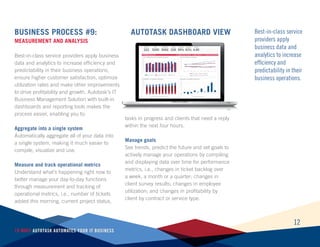
Measure and track operational metrics
Understand what’s happening right now to
better manage your day-to-day functions
through measurement and tracking of
operational metrics, i.e., number of tickets
added this morning, current project status,
tasks in progress and clients that need a reply
within the next four hours.
Manage goals
See trends, predict the future and set goals to
actively manage your operations by compiling
and displaying data over time for performance
metrics, i.e., changes in ticket backlog over
a week, a month or a quarter; changes in
client survey results; changes in employee
utilization; and changes in profitability by
client by contract or service type.
AUTOTASK DASHBOARD VIEW
13
10 Ways Autotask Automates Your IT Business
Business Process No. 10:
Leverage existing tools
IT Business Management solutions not only
can help you to turn insight into action, but
they can also document what’s working well
so that you don’t waste resources fixing what’s
not broken and reinventing the wheel.
Autotask also maximizes universally installed
technology by easily integrating with Microsoft
Exchange and provides easy drag-and-drop
scheduling for resource allocation on the fly.
In fact, research shows that adding an IT
Business Management platform provides
advantages in multiple key performance
areas.
IT Business Management
Platforms OFFER SIGNIFICANT
ORGANIZATIONAL Benefits
Key Performance Indicator (KPI) PLATFORM
USED
NO PLATFORM
USED
Employee Utilization 71% 66.3%
Employee-to-Management Ratio 10.39 8.02
% of Employees Billable or Chargeable 75.3% 70.6%
Projects Delivered On-time 76.8% 74.8%
Projects Canceled 2.1% 2.2%
Annual Revenue per Billable Consultant (k) $201 $179
Annual Revenue per Employee (k) $172 $149
Earnings before Income Taxes, Depreciation &
Amortization (EBITDA) 15.4% 8.3%
Advantage
7%
30%
7%
3%
4%
12%
15%
86%
Source: Service Performance Insight, August 2012, www.SPIresearch.com
After five years of benchmark analysis of over 1,000 firms, SPI Research found that more than
70% of the firms have adopted an IT Business Management Platform. “Indeed, every single one
of the top-ranked 10% of survey respondents (the Best-of-the-Best list) has implemented an
[IT Business Management Platform],” SPI Research reported.5
TWEET THIS
14
10 Ways Autotask Automates Your IT Business
Conclusion
Compared with their previous supporting
role, IT service providers are more critical
players in their customers’ strategic planning
and implementation, and indications are that
they will become even more crucial. On the
other hand, the market is more crowded than
ever as vendors and other service providers
attempt to tap demand for IT expertise. To
stay on top, leading IT service providers are
adopting business management platforms
such as Autotask’s IT Business Management
Solution, which can optimize critical
business processes through automation
and integration.
Want to learn how Autotask can automate
these 10 critical business processes and
improve your company’s performance?
Request a free demo at autotask.com.
Sources
1
Silber, Jonathan, “Market Overview: Managed Service Providers, Part 1,” pp. 1, Forrester Research Inc., May
21, 2012, www.forrester.com
2
Panettieri, Joe, “PSA Is Dead. Long Live TBM (Total Business Management),” MSPmentor, Sept. 20, 2013,
mspmentor.net
3
Cattini, Mark, “Myth or Reality? The IT Department as a Profit Center,” Aug. 16, 2013, insights.wired.com
4
Autotask, 2013
5
Hofferberth, David and Jeanne Urich, “Selecting a Professional Services Automation (PSA) Solution:
Determining What Really Matters,” Service Performance Insight, August 2012, www.SPIresearch.com
15
10 Ways Autotask Automates Your IT Business
IT drives the world. We drive IT.
Autotask Corporation helps IT organizations worldwide work smarter
with a complete, cloud-based IT business management platform
that enables efficiency, accountability and access to the metrics
that drive intelligent business decisions. With built-in best practices
and workflow automation, Autotask speeds time to revenue while
continually improving service delivery. Autotask is available in seven
languages and used in over 70 countries. Headquartered in New York,
Autotask has offices in Beijing, London, Munich and Sydney. Visit
autotask.com for more information.
www.autotask.com
sales@autotask.com
Telephone +1 518 720 3500
®

10 Ways Autotask Automates

  • 1.
    10 WaysAutotask AutomatesYour IT Business Reduce Costs, Win More Business And Manage Growth More Effectively ®
  • 2.
    2 10 Ways AutotaskAutomates Your IT Business 10 Ways Autotask Automates Your IT Business INTRODUCTION..............................................................................................................................3 5#2 Managing Customer Information........................................................................................ 6#3 Capturing and Converting Managed Services................................................................... 7#4 Implementing Automated Workflow, Escalation and SLAs............................................... 8#5 Processing Customer Service Requests........................................................................... 9#6 Implementing IT Consulting Engagements......................................................................... 10#7 Monitoring And Billing Field Service Time........................................................................ 11#8 Billing and Invoicing Cycles............................................................................................... 12#9 Measurement And Analysis................................................................................................... 4#1 Centralizing Data................................................................................................................. 13#10 Leverage Existing Tools..................................................................................................... 14Conclusion.................................................................................................................................
  • 3.
    3 10 Ways AutotaskAutomates Your IT Business Smart IT FoundationIT service providers have entered a new era — one that is rich with opportunity but also in flux, according to Forrester Research.1 To be competitive, they are replacing Professional Services Management (PSA) solutions with IT Business Management solutions — essentially, moving away from point solutions and toward end-to-end management platforms that “link MSP data with business intelligence dashboards.”2 Autotask is at the forefront with its Smart IT approach, which combines productivity- enhancing automation, improvement-focused insight, and measurement and reporting. What’s the bottom-line benefit of Smart IT? Positive business outcomes for IT organizations and the clients they serve. Specifically, Autotask’s IT Business Management solution can help you to optimize 10 essential business processes. Autotask handles all of this, on one platform, with multiple, function-specific dashboards, completely hosted in the cloud. “Technology is simply too important for line-of-business leaders not to be involved, and they are going to move swiftly. IT can provide unique expertise and speed selection and deployment, but only if it gets involved from the beginning.” — Mark Cattini, President and CEO of Autotask Corp.3 TWEET THIS Productivity & Automation Measurement & Reporting Insight & Improvement Efficiency Accountability Intelligence
  • 4.
    Business Process #1: CentralizingData All businesses have access to more data on operations and customer behavior than ever before. As an IT services provider, you should be at the forefront of turning this data into actionable information. The first barrier is centralizing the data. Autotask automates this process by replacing multiple point solutions with a singular management platform. This model provides: Enhanced efficiency Data is automatically processed into knowledge and presented in dashboards without manual manipulation. Quality The potential for human error declines while the accuracy of insight improves. Speed and flexibility Data processing is faster — so you gain knowledge sooner — and it’s easier to change rules when operational or market needs change. Openness and accountability Performance and market insight is most meaningful when it is normalized, i.e., collected at-large and defined according to rules that reflect top-level goals and strategy — instead of according to functional/ departmental parameters of what’s acceptable and/or possible. 4 10 Ways Autotask Automates Your IT Business Service Intelligence: Get Fact-Based Answers to questions across your business
  • 5.
    5 10 Ways AutotaskAutomates Your IT Business Business Process #2: Managing Customer Information Autotask’s IT Business Management Solution includes a robust Customer Relationship Management (CRM) module that goes beyond the capabilities of stand-alone applications so that you can: Leverage customer information by tapping into a single integrated view of sales prospects and customer information. Anyone in the organization with permission can see notes, history, contacts and opportunities; check on project status; view installed products; and monitor service tickets and ongoing communication. Improve sales opportunities and reporting with the sales dashboard, which provides up-to- the-minute lead tracking, sales metrics, sales quota performance, territory management, pipeline reports and reports that are easy to export to Microsoft Excel for more analysis. Integrate Microsoft Exchange, which eliminates the need to create and maintain separate contact databases. A Microsoft Outlook integration that converts emails to tickets is a big time saver for help desk and support technicians, and helps them to accurately track and respond to customer email requests. In 2013, Autotask customers that were using the company’s products for 18 months achieved average aggregate revenue growth of 30%.4 Leverage customer information Improve sales opportunities Integrate Microsoft Exchange Managing Customer Relationships
  • 6.
    6 10 Ways AutotaskAutomates Your IT Business Integration with automated workflow rules and escalation further increase productivity. Business Process #3: Capturing and Converting Managed Services Alerts often require immediate attention and speedy resolution. To streamline the process, Autotask’s solution automatically converts alerts into service tickets so they can be tracked and managed throughout the process, saving time to triage and create a ticket. Two critical capabilities drive this: Integration with remote monitoring and management (RMM) services Direct two-way integrations with leading RMM services applications (see a complete list of integration partners online: autotask. com) allow service tickets to be created and populated automatically, and closed in the RMM application when the issue is resolved. Dispatch to field service technicians Dispatchers can review a list of tickets, make an assignment and automatically notify the appropriate support person on any device. Integration with automated workflow rules and escalation further increase productivity. Alert, Ticket And Dispatch Automatically ALERT TICKET ASSIGN
  • 7.
    7 10 Ways AutotaskAutomates Your IT Business Business Process #4: Implementing Automated Workflow, Escalation and SLAs Whether based on contractual obligations, service level agreements (SLAs) or internal best practices, you need a way to measure KPIs and manage the service and support that you provide. You can achieve this by using Autotask’s solution to: Create workflow and escalation rules for service tickets Workflow rules indicate when and how a service ticket is to be escalated and what actions should be performed. Also important is the ability to copy existing workflow rules to use as guides when building new ones. Define automatic actions Notifications, escalation in priority, change in status and reassignments are initiated when service standards and time-based commitments are at risk. IT Business Management Platform Resources Project Deliver Bid Bill SKILL TIME COST EXPENSE Availability STATUS IT Business Management Platform: tHE HEART OF THE “BID-TO-BILL” PROCESS Automation can help an organization plan, staff, deliver, track and invoice its entire portfolio of projects. TWEET THIS Source: Service Performance Insight, August 2012, www.SPIresearch.com
  • 8.
    Source: Decision TreeLabs/Autotask, 2013 8 10 Ways Autotask Automates Your IT Business 15 432 LEAST IMPORTANT MOST IMPORTANT 0% 10% 20% 30% 40% 50% 60% 70% 80% 90% 100% Business Health Metrics by Rank of Importance Business Process #5: Processing Customer Service Requests Autotask’s IT Business Management Solution provides you with a complete audit trail no matter how requests arrive. This allows you to manage your entire services catalog, track billable service work, and capture and assign incoming incidents automatically. Here’s more detail: Manage the entire services catalog by creating and managing multiple service queues; and customizing issues and sub-issues, priority, status, routing, ticket history, integrated time tracking and automated notification. Track billable service work by a variety of activity codes that tie back to the contract terms. This allows technicians to focus on the task at hand while the system tracks the billing information in the background. Automatically capture and convert alerts from your IT monitoring packages into service tickets. This feature keeps providers on top of 24x7 managed services and helps deliver speedy resolution for monitoring, virus, security and other system alerts. Conduct customer surveys to identify where you are falling behind and where new service opportunities exist. 1 2 3 4 5 SLA performance Technician utilization Profitability by contract type Profitability by customer Customer satisfaction
  • 9.
    9 10 Ways AutotaskAutomates Your IT Business Business Process #6: Implementing IT Consulting Engagements When it comes to the often-difficult task of managing complex consulting engagements, Autotask can handle multifaceted projects smoothly and efficiently, which enables you to better manage the project portfolio and complete more projects on time and on budget. How does Autotask’s solution do this? By connecting business teams to project teams, you gain better visibility, control and analysis across the entire project portfolio. A project management dashboard provides one- click access to key reports, project financials and schedules. Additionally, with one, integrated database, projects can be seamlessly connected to accounts. It’s easy to kick off a new project engagement after a closed sale. Important details are defined and tracked at every step of the project: team members, schedules, notes, task assignments, billing information, material and equipment costs, file attachments, project issues and custom, user-defined information. PSA USERS ACHIEVE HIGHEST CLIENT RENEWAL RATES 1% 60% 4% 70% 12% 80% 71% 90% Renewal Renewal Renewal Renewal Source: Decision Tree Labs/Autotask, 2013
  • 10.
    10 10 Ways AutotaskAutomates Your IT Business Business Process #7: Monitoring And Billing Field Service Time With Autotask, team members can review their service and project work along with estimates, due dates and priorities — all at the beginning of each day. Technicians, engineers and consultants can easily capture and record time, status and work detail, i.e., when and where the work is completed. This is facilitated through: Built-in dashboards and timesheets Time entry and assignments are completely integrated. Task assignments appear on a personal dashboard and allow easy entry of time, status and work details. Completed assignments can be signed off from the field, and everything is captured for billing. Integrated expense reports Create detailed reports, track receipts and capture company-paid items. All items are tracked along with their corresponding expense policies and approvals, preventing double-pay expense items and inaccurate or incomplete expense reports. 0% 5% 10% 15% 20% 25% 30% Measuring the Most Valuable Techs Tech knowledge of products/sytems Don’t currently measure Customer satisfaction rating Amount of billable hours Amount of business generated Source: Decision Tree Labs/Autotask, 2013
  • 11.
    Business Process #8: Billingand Invoicing Cycles Autotask lets you automatically check timesheets, work entries and expenses. It automatically applies the appropriate contract terms and billing methods for each to generate a detailed invoice that accurately reflects the services provided over that billing cycle. This feature alone can save countless hours each month reconciling accounts and generating invoices manually. Flexible contract and billing automation is configured to reflect the way you currently bill customers for both project and service work. Autotask can handle time-and-materials billing based on multiple roles and rates per customer contract. At the same time, direct integration with leading accounting packages removes the need for manual updating and eliminates potential errors in the transfer process, greatly simplifying billing and reconciliation processes each month. Money On The Table Source: Decision Tree Labs/Autotask, 2013 11 10 Ways Autotask Automates Your IT Business
  • 12.
    12 10 Ways AutotaskAutomates Your IT Business Best-in-class service providers apply business data and analytics to increase efficiency and predictability in their business operations. Business Process #9: Measurement And Analysis Best-in-class service providers apply business data and analytics to increase efficiency and predictability in their business operations, ensure higher customer satisfaction, optimize utilization rates and make other improvements to drive profitability and growth. Autotask’s IT Business Management Solution with built-in dashboards and reporting tools makes the process easier, enabling you to: Aggregate into a single system Automatically aggregate all of your data into a single system, making it much easier to compile, visualize and use. Measure and track operational metrics Understand what’s happening right now to better manage your day-to-day functions through measurement and tracking of operational metrics, i.e., number of tickets added this morning, current project status, tasks in progress and clients that need a reply within the next four hours. Manage goals See trends, predict the future and set goals to actively manage your operations by compiling and displaying data over time for performance metrics, i.e., changes in ticket backlog over a week, a month or a quarter; changes in client survey results; changes in employee utilization; and changes in profitability by client by contract or service type. AUTOTASK DASHBOARD VIEW
  • 13.
    13 10 Ways AutotaskAutomates Your IT Business Business Process No. 10: Leverage existing tools IT Business Management solutions not only can help you to turn insight into action, but they can also document what’s working well so that you don’t waste resources fixing what’s not broken and reinventing the wheel. Autotask also maximizes universally installed technology by easily integrating with Microsoft Exchange and provides easy drag-and-drop scheduling for resource allocation on the fly. In fact, research shows that adding an IT Business Management platform provides advantages in multiple key performance areas. IT Business Management Platforms OFFER SIGNIFICANT ORGANIZATIONAL Benefits Key Performance Indicator (KPI) PLATFORM USED NO PLATFORM USED Employee Utilization 71% 66.3% Employee-to-Management Ratio 10.39 8.02 % of Employees Billable or Chargeable 75.3% 70.6% Projects Delivered On-time 76.8% 74.8% Projects Canceled 2.1% 2.2% Annual Revenue per Billable Consultant (k) $201 $179 Annual Revenue per Employee (k) $172 $149 Earnings before Income Taxes, Depreciation & Amortization (EBITDA) 15.4% 8.3% Advantage 7% 30% 7% 3% 4% 12% 15% 86% Source: Service Performance Insight, August 2012, www.SPIresearch.com After five years of benchmark analysis of over 1,000 firms, SPI Research found that more than 70% of the firms have adopted an IT Business Management Platform. “Indeed, every single one of the top-ranked 10% of survey respondents (the Best-of-the-Best list) has implemented an [IT Business Management Platform],” SPI Research reported.5 TWEET THIS
  • 14.
    14 10 Ways AutotaskAutomates Your IT Business Conclusion Compared with their previous supporting role, IT service providers are more critical players in their customers’ strategic planning and implementation, and indications are that they will become even more crucial. On the other hand, the market is more crowded than ever as vendors and other service providers attempt to tap demand for IT expertise. To stay on top, leading IT service providers are adopting business management platforms such as Autotask’s IT Business Management Solution, which can optimize critical business processes through automation and integration. Want to learn how Autotask can automate these 10 critical business processes and improve your company’s performance? Request a free demo at autotask.com. Sources 1 Silber, Jonathan, “Market Overview: Managed Service Providers, Part 1,” pp. 1, Forrester Research Inc., May 21, 2012, www.forrester.com 2 Panettieri, Joe, “PSA Is Dead. Long Live TBM (Total Business Management),” MSPmentor, Sept. 20, 2013, mspmentor.net 3 Cattini, Mark, “Myth or Reality? The IT Department as a Profit Center,” Aug. 16, 2013, insights.wired.com 4 Autotask, 2013 5 Hofferberth, David and Jeanne Urich, “Selecting a Professional Services Automation (PSA) Solution: Determining What Really Matters,” Service Performance Insight, August 2012, www.SPIresearch.com
  • 15.
    15 10 Ways AutotaskAutomates Your IT Business IT drives the world. We drive IT. Autotask Corporation helps IT organizations worldwide work smarter with a complete, cloud-based IT business management platform that enables efficiency, accountability and access to the metrics that drive intelligent business decisions. With built-in best practices and workflow automation, Autotask speeds time to revenue while continually improving service delivery. Autotask is available in seven languages and used in over 70 countries. Headquartered in New York, Autotask has offices in Beijing, London, Munich and Sydney. Visit autotask.com for more information. www.autotask.com sales@autotask.com Telephone +1 518 720 3500 ®