
Solar Atlas for the Mediterranean Final Workshop

  Under the Patronage of His Excellency Alaa Batayneh,
   Minister of Energy and Mineral Resources of Jordan

                   Using the WEB-GIS
                   Carsten Hoyer-Klick
                German Aerospace Center

                          Date: December 4th, 2012
               Venue: Sheraton Amman Al Nabil Hotel - Amman
Status of the WEB-GIS Applications


• The WEB-GIS Applications are contributed by two European
  Projects: EnerGEO and Endorse

• Unfortunately they are delayed, we have prototypes of the WEB-
  GIS but it is not yet operational

• Two main applications are in the preparation
   – Assessment of Potentials
   – Identification of priority rules
The WEB-GIS Interface (Endorse)


         Save + load maps, import data from
                   external sources

              Layer selection


                                         Map window


       Launch Services
Load + Save Maps
Add Layers


             • Layers from any OGC (Open
               Geospatial Consortium)
               compatible WMS (Web Mapping
               Service) can be added
Layer Information


                    • A pop up windows gives
                      information about the
                      maps behind it. The
                      information is pulled from
                      the metadata in the
                      catalog.
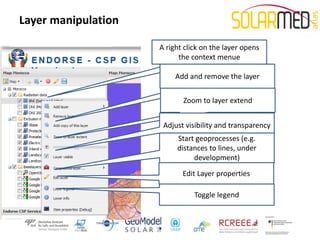
Layer manipulation

                     A right click on the layer opens
                           the context menue

                          Add and remove the layer


                            Zoom to layer extend


                      Adjust visibility and transparency
                          Start geoprocesses (e.g.
                          distances to lines, under
                               development)
                            Edit Layer properties

                                Toggle legend
Layer manipulation


                     Some layer will be available for
                              download
Service CSP-GIS


                  • Service idea,
                    narrow down
                    possible sites for
                    CSP installations
Service CSP-GIS
Select Inclusion and Exclusion

                                 • Inclusion and
                                   exclusion zones can
                                   be selected from
                                   the list on the left
                                 • They can be moved
                                   via drag and drop
Service CSP-GIS
Select Inclusion and Exclusion

                                 • Inclusion and
                                   exclusion zones
                                   can be selected
                                   from the list on
                                   the left
                                 • They can be
                                   moved via drag
                                   and drop
Service CSP-GIS
Select Inclusion and Exclusion

                                 • Summary
                                   information
                                 • Start the
                                   processing on the
                                   server
CSP – GIS result
EnerGEO User Interface


                  New tools
                  • Measurement ruler
                  • Information picker
                  • Task browser
                  • WPS browser
                  • Site ranking service
Asynchronous processing
Task browser

                          • Geoprocessing
                            job can be
                            submitted and
                            results can be
                            collected later
Discover Web Processing Services


                               • Connect to OGC
                                 conform Web Processing
                                 Services (e.g. a local
                                 Geoserver on my
                                 laptop).
Start the site ranking service
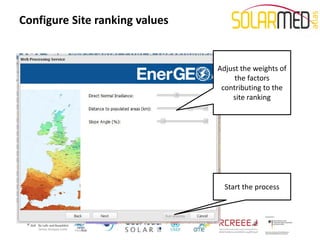
Configure Site ranking values


                                Adjust the weights of
                                     the factors
                                 contributing to the
                                    site ranking


                                  Start the process
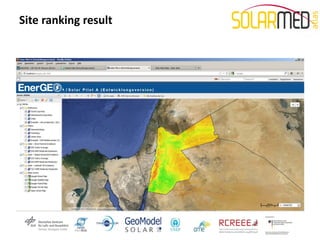
Sample site ranking for Jordan
Site ranking result
Point Queries


                      Query
                information from
                    this point
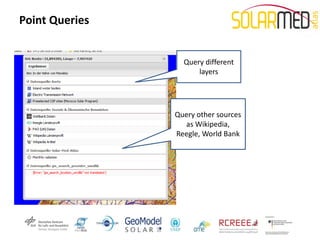
Point Queries


                  Query different
                      layers


                Query other sources
                  as Wikipedia,
                Reegle, World Bank

10 using the web gis

  • 1.
    Solar Atlas forthe Mediterranean Final Workshop Under the Patronage of His Excellency Alaa Batayneh, Minister of Energy and Mineral Resources of Jordan Using the WEB-GIS Carsten Hoyer-Klick German Aerospace Center Date: December 4th, 2012 Venue: Sheraton Amman Al Nabil Hotel - Amman
  • 2.
    Status of theWEB-GIS Applications • The WEB-GIS Applications are contributed by two European Projects: EnerGEO and Endorse • Unfortunately they are delayed, we have prototypes of the WEB- GIS but it is not yet operational • Two main applications are in the preparation – Assessment of Potentials – Identification of priority rules
  • 3.
    The WEB-GIS Interface(Endorse) Save + load maps, import data from external sources Layer selection Map window Launch Services
  • 4.
  • 5.
    Add Layers • Layers from any OGC (Open Geospatial Consortium) compatible WMS (Web Mapping Service) can be added
  • 6.
    Layer Information • A pop up windows gives information about the maps behind it. The information is pulled from the metadata in the catalog.
  • 7.
    Layer manipulation A right click on the layer opens the context menue Add and remove the layer Zoom to layer extend Adjust visibility and transparency Start geoprocesses (e.g. distances to lines, under development) Edit Layer properties Toggle legend
  • 8.
    Layer manipulation Some layer will be available for download
  • 9.
    Service CSP-GIS • Service idea, narrow down possible sites for CSP installations
  • 10.
    Service CSP-GIS Select Inclusionand Exclusion • Inclusion and exclusion zones can be selected from the list on the left • They can be moved via drag and drop
  • 11.
    Service CSP-GIS Select Inclusionand Exclusion • Inclusion and exclusion zones can be selected from the list on the left • They can be moved via drag and drop
  • 12.
    Service CSP-GIS Select Inclusionand Exclusion • Summary information • Start the processing on the server
  • 13.
  • 14.
    EnerGEO User Interface New tools • Measurement ruler • Information picker • Task browser • WPS browser • Site ranking service
  • 15.
    Asynchronous processing Task browser • Geoprocessing job can be submitted and results can be collected later
  • 16.
    Discover Web ProcessingServices • Connect to OGC conform Web Processing Services (e.g. a local Geoserver on my laptop).
  • 17.
    Start the siteranking service
  • 18.
    Configure Site rankingvalues Adjust the weights of the factors contributing to the site ranking Start the process
  • 19.
  • 20.
  • 21.
    Point Queries Query information from this point
  • 22.
    Point Queries Query different layers Query other sources as Wikipedia, Reegle, World Bank