THE WORLD WIDE WEB
Lesson 10
By: Manolo L. Giron
ZAMBALES NATIONAL
HIGH SCHOOL
LEARNING OUTCOMES
At the end of this topic, students should
be able to:
1. Explain the purpose of a Web browser and identify the components
of a Web address.
2. Describe how to use a search engine to search for information on
the Web.
MANOLO L. GIRON RMTU
THE WORLD WIDE WEB
The World Wide Web(WWW), or Web, a widely used
service on the Internet, consists of a worldwide
collection of electronic documents.
Each electronic document on the Web, called a Web
page, can contain text, graphics, animation, audio,
and video.
Additionally, Web pages usually have built-in
connections to other documents.
MANOLO L. GIRON RMTU
WEB SITE
Web site is a collection of related Web pages and
associated items, such as documents and pictures
stored on a Web server.
Web server is a computer that delivers requested Web
pages to your computer.
MANOLO L. GIRON RMTU
BROWSING THE WEB
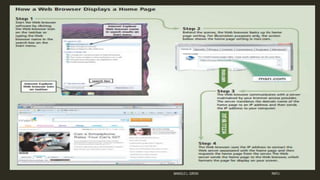
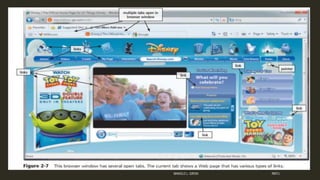
Web browser, or browser, is application
software that allows users to access and view
Web pages or access Web 2.0 programs.
To browse the Web, you need a computer or
mobile device that is connected to the Internet
and that has a Web browser.
Example of Web Browsers;
 Internet Explorer, Firefox, Opera, Safari, and Google
Chrome.
MANOLO L. GIRON RMTU
WEB ADDRESSES
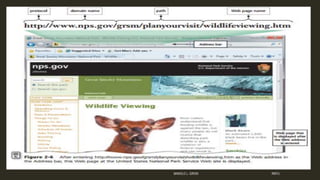
URL(Uniform Resource Locator) or Web address
A Web address consists of a protocol, domain name,
and sometimes the path to a specific Web page or
location on a Web page.
The http,(Hypertext Transfer Protocol), is a set of rules
that defines how pages transfer on the Internet.
MANOLO L. GIRON RMTU
NAVIGATING WEB PAGES
Web pages contain links
A link, short for hyperlink, is a built-in
connection to another related Web page or part
of a Web page.
A link can be text or an image
Links allow you to obtain information in a nonlinear
way.
That is, instead of accessing topics in a specified
order, you move directly to a topic of interest.
MANOLO L. GIRON RMTU
SEARCHING THE WEB
Two types of search tools
1. search engines
2. subject directories.
MANOLO L. GIRON RMTU
SEARCH ENGINE
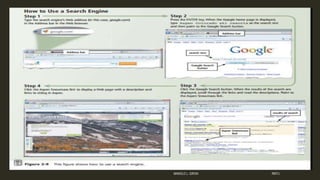
A search engine is a program that finds Web sites, Web
pages, images, videos, news, maps, and other information
related to a specific topic.
A search engine is helpful in locating information for which
you do not know an exact Web address or are not seeking a
particular Web site.
Some search engines look through Web pages for all types
of information.
Others can restrict their searches to a specific type of
information, such as images, videos, audio, news, maps,
people or businesses, and blogs.
Search text is the word or phrase that enter into the searchMANOLO L. GIRON RMTU
MANOLO L. GIRON RMTU
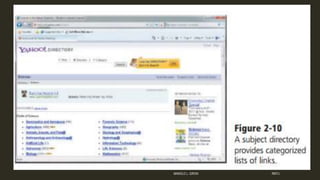
A SUBJECT DIRECTORY
A subject directory classifies Web pages in an
organized set of categories or groups, such as sports
or shopping, and related subcategories.
A subject directory provides categorized lists of links
arranged by subject.
Using this search tool, you locate a particular topic
by clicking links through different levels, moving from
the general to the specific.
MANOLO L. GIRON RMTU
REFERENCES
Discovering Computers FUNDAMENTALS Your Interactive Guide to the
Digital World, Shelly Cashman Series by Gary B. Shelly and Misty E.
Vermaat
Contributing Authors
Jeffrey J. Quasney
Susan L. Sebok
Steven M. Freund
MANOLO L. GIRON RMTU

10. the world wide web

  • 1.
    THE WORLD WIDEWEB Lesson 10 By: Manolo L. Giron ZAMBALES NATIONAL HIGH SCHOOL
  • 2.
    LEARNING OUTCOMES At theend of this topic, students should be able to: 1. Explain the purpose of a Web browser and identify the components of a Web address. 2. Describe how to use a search engine to search for information on the Web. MANOLO L. GIRON RMTU
  • 3.
    THE WORLD WIDEWEB The World Wide Web(WWW), or Web, a widely used service on the Internet, consists of a worldwide collection of electronic documents. Each electronic document on the Web, called a Web page, can contain text, graphics, animation, audio, and video. Additionally, Web pages usually have built-in connections to other documents. MANOLO L. GIRON RMTU
  • 4.
    WEB SITE Web siteis a collection of related Web pages and associated items, such as documents and pictures stored on a Web server. Web server is a computer that delivers requested Web pages to your computer. MANOLO L. GIRON RMTU
  • 5.
    BROWSING THE WEB Webbrowser, or browser, is application software that allows users to access and view Web pages or access Web 2.0 programs. To browse the Web, you need a computer or mobile device that is connected to the Internet and that has a Web browser. Example of Web Browsers;  Internet Explorer, Firefox, Opera, Safari, and Google Chrome. MANOLO L. GIRON RMTU
  • 6.
  • 7.
    WEB ADDRESSES URL(Uniform ResourceLocator) or Web address A Web address consists of a protocol, domain name, and sometimes the path to a specific Web page or location on a Web page. The http,(Hypertext Transfer Protocol), is a set of rules that defines how pages transfer on the Internet. MANOLO L. GIRON RMTU
  • 8.
  • 9.
    NAVIGATING WEB PAGES Webpages contain links A link, short for hyperlink, is a built-in connection to another related Web page or part of a Web page. A link can be text or an image Links allow you to obtain information in a nonlinear way. That is, instead of accessing topics in a specified order, you move directly to a topic of interest. MANOLO L. GIRON RMTU
  • 10.
  • 11.
    SEARCHING THE WEB Twotypes of search tools 1. search engines 2. subject directories. MANOLO L. GIRON RMTU
  • 12.
    SEARCH ENGINE A searchengine is a program that finds Web sites, Web pages, images, videos, news, maps, and other information related to a specific topic. A search engine is helpful in locating information for which you do not know an exact Web address or are not seeking a particular Web site. Some search engines look through Web pages for all types of information. Others can restrict their searches to a specific type of information, such as images, videos, audio, news, maps, people or businesses, and blogs. Search text is the word or phrase that enter into the searchMANOLO L. GIRON RMTU
  • 13.
  • 14.
    A SUBJECT DIRECTORY Asubject directory classifies Web pages in an organized set of categories or groups, such as sports or shopping, and related subcategories. A subject directory provides categorized lists of links arranged by subject. Using this search tool, you locate a particular topic by clicking links through different levels, moving from the general to the specific. MANOLO L. GIRON RMTU
  • 15.
  • 16.
    REFERENCES Discovering Computers FUNDAMENTALSYour Interactive Guide to the Digital World, Shelly Cashman Series by Gary B. Shelly and Misty E. Vermaat Contributing Authors Jeffrey J. Quasney Susan L. Sebok Steven M. Freund MANOLO L. GIRON RMTU