
THE CONCEPT OF
ODL COURSE
MATERIAL
 ISD WORKSHOP
 Organized By
 Centre for Open Distance and e-Learning
(CODeL).
Dr. Gambari, A. I.
E-mail: gambarii@yahoo.com
Website: www.gambari.mgfglobal.com
Blogsite: www.drgambari.com
March, 2012
INTRODUCTION
 How do ODL materials differ from other
educational materials?
 It is not effective to send textbooks to ODL
students. Rather, materials must be specially
designed to suit the ODL situation.
 The differences between ODL materials and
conventional classroom and other concepts
of ODL materials are treated in this
presentation.
OBJECTIVES
 At the end of this presentation, you should be
able to;
 Differentiate between textbook and ODL
materials
 List devices included in ODL materials by
instructional designer
 List the components of ODL materials
THE STRUCTURE OF ODL
MATERIALS
 If you glance at a random sample of ODL
materials, you are likely to be struck by how
different they look from traditional textbooks.
Probably the four things that will be most
noticeable are:
 the wide range of learning devices,
 the relatively low proportion of text compared
to learning devices,
 the space that is often provided for learners to
write their answers in, and
 the ‘generous’ layout overall.
Embedded Devices
 The term ‘embedded devices’ seems to have
been fashioned by Martens (1998) to
describe all the devices that instructional
designers include in their materials. Martens
noted 23 different types of embedded device
in the materials that he looked at.
The most common include:
 learning objectives
 tests of prior knowledge
 advance organisers
 activities
 feedback to activities
 examples
 self-tests
 summaries and lists of key points
 study tips
 animations (in electronic materials)
 hypertext links (in electronic materials).
 Most of these devices are not present in a
typical textbook, so why do instructional
designers include them in ODL materials?
 The answer lies in the theories discussed
yesterday, cognitive approach stresses the
use of learning devices such as:
 learning objectives,
 tasks broken down into small steps,
 learners assessed against the stated learning
objectives,
 a wide variety of tasks but within the scope of
the stated objectives,
 material ‘chunked’ into small, meaningful
pieces,
 mnemonics used to aid memory,
 advance organisers used to help learners see
the structure of the topic, and simplification of
the real world.
Space for Learners’ Answers
 It is common practice to provide answer spaces
in ODL text materials, reflecting the widespread
teacher belief that this encourages learners to
complete the activities. As Lockwood (1992)
says, the evidence that this is the case ‘is
persuasive’. He reports research by Henderson
(1993) which found that questions without
answer spaces were answered by 40% of
learners, but the same questions with answer
spaces were answered by 90% of learners.
Martens (1998) has also noted that learners who
complete activities tend to do better on the
course as a whole.
The ‘Generous’ Layout
 Writers on ODL instructional design
repeatedly mention the desirability of a
‘generous’ layout and the liberal use of ‘white
space’.

(Interestingly, research supports the opposite
case for web pages that are used for
searching: see ‘Reduce the amount of unused
space on pages used for scanning and
searching’ at
http://usability.gov/guidelines/layout.html#five.
Comparison of ODL
Materials and
Textbooks
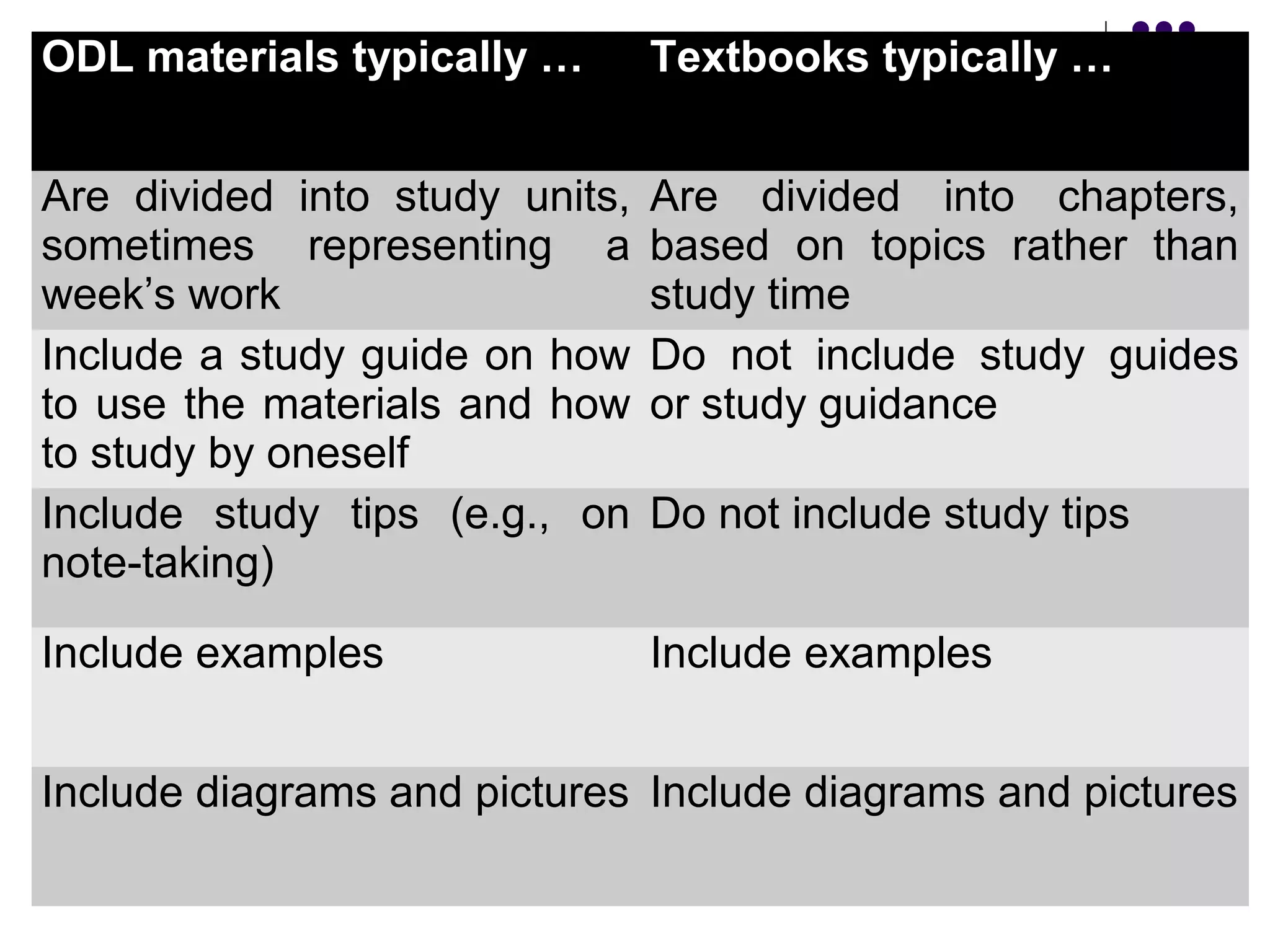
ODL materials typically … Textbooks typically …
Are divided into study units,
sometimes representing a
week’s work
Are divided into chapters,
based on topics rather than
study time
Include a study guide on how
to use the materials and how
to study by oneself
Do not include study guides
or study guidance
Include study tips (e.g., on
note-taking)
Do not include study tips
Include examples Include examples
Include diagrams and pictures Include diagrams and pictures
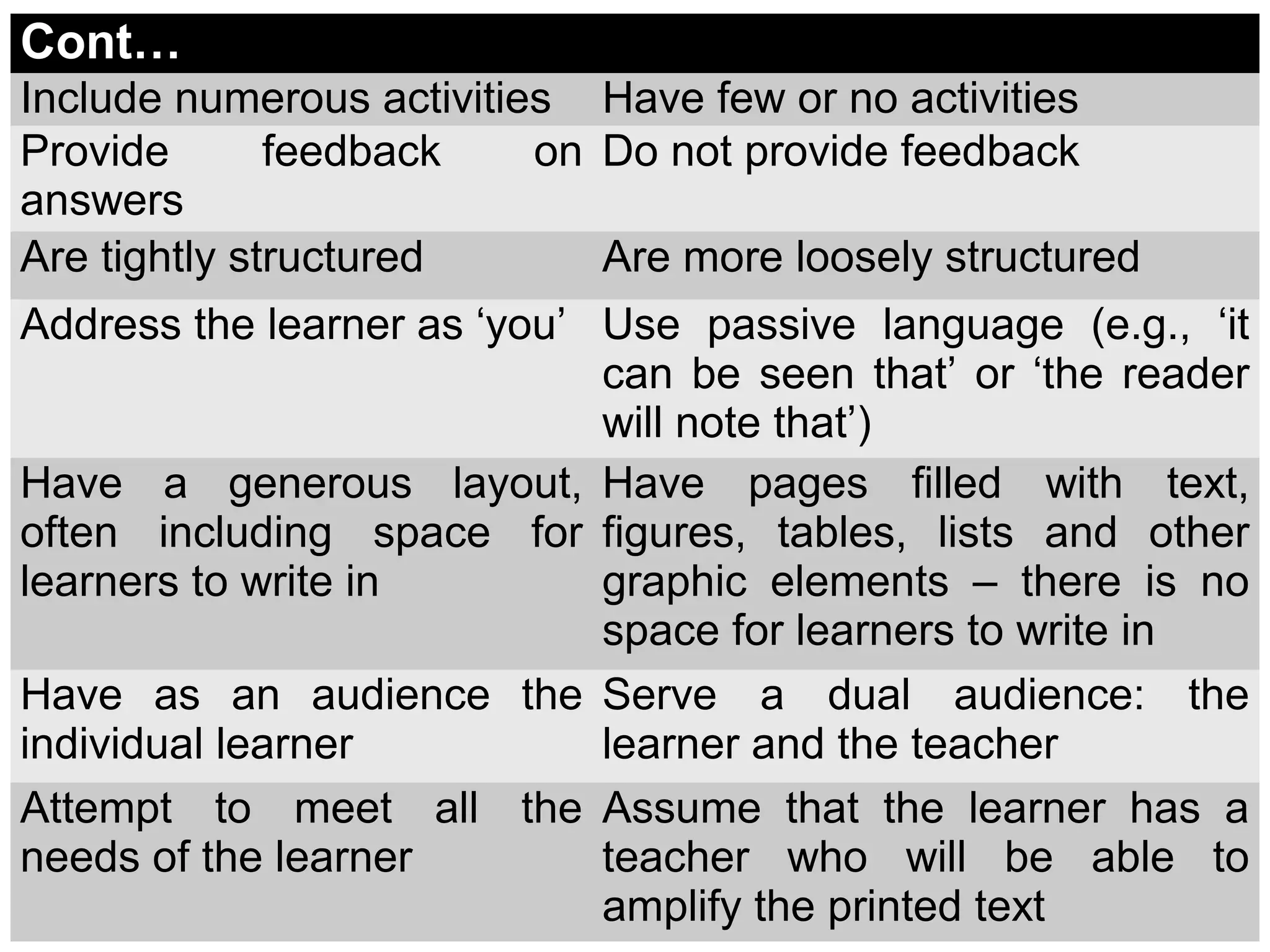
Cont…
Include numerous activities Have few or no activities
Provide feedback on
answers
Do not provide feedback
Are tightly structured Are more loosely structured
Address the learner as ‘you’ Use passive language (e.g., ‘it
can be seen that’ or ‘the reader
will note that’)
Have a generous layout,
often including space for
learners to write in
Have pages filled with text,
figures, tables, lists and other
graphic elements – there is no
space for learners to write in
Have as an audience the
individual learner
Serve a dual audience: the
learner and the teacher
Attempt to meet all the
needs of the learner
Assume that the learner has a
teacher who will be able to
amplify the printed text
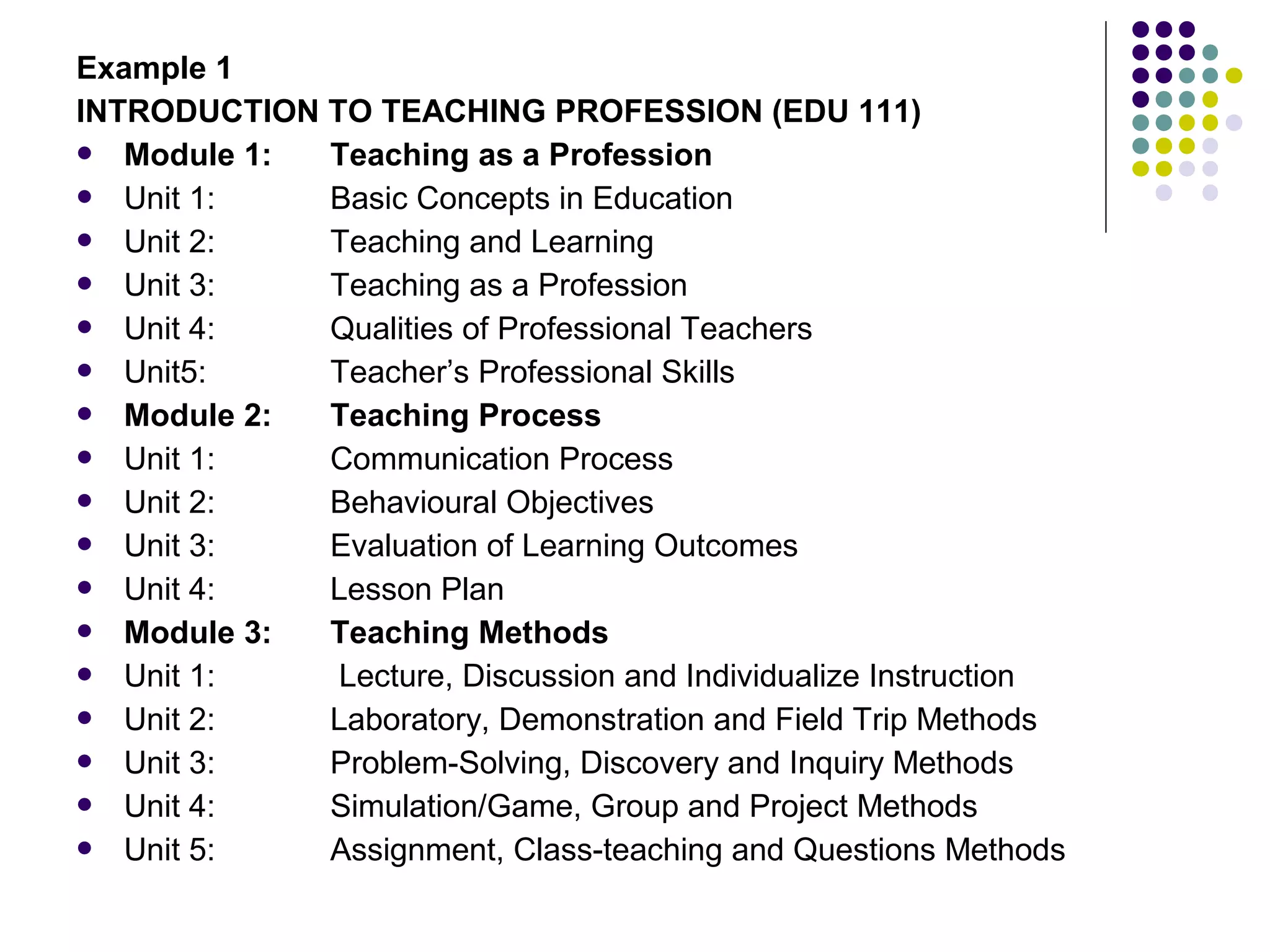
Example 1
INTRODUCTION TO TEACHING PROFESSION (EDU 111)
 Module 1: Teaching as a Profession
 Unit 1: Basic Concepts in Education
 Unit 2: Teaching and Learning
 Unit 3: Teaching as a Profession
 Unit 4: Qualities of Professional Teachers
 Unit5: Teacher’s Professional Skills
 Module 2: Teaching Process
 Unit 1: Communication Process
 Unit 2: Behavioural Objectives
 Unit 3: Evaluation of Learning Outcomes
 Unit 4: Lesson Plan
 Module 3: Teaching Methods
 Unit 1: Lecture, Discussion and Individualize Instruction
 Unit 2: Laboratory, Demonstration and Field Trip Methods
 Unit 3: Problem-Solving, Discovery and Inquiry Methods
 Unit 4: Simulation/Game, Group and Project Methods
 Unit 5: Assignment, Class-teaching and Questions Methods
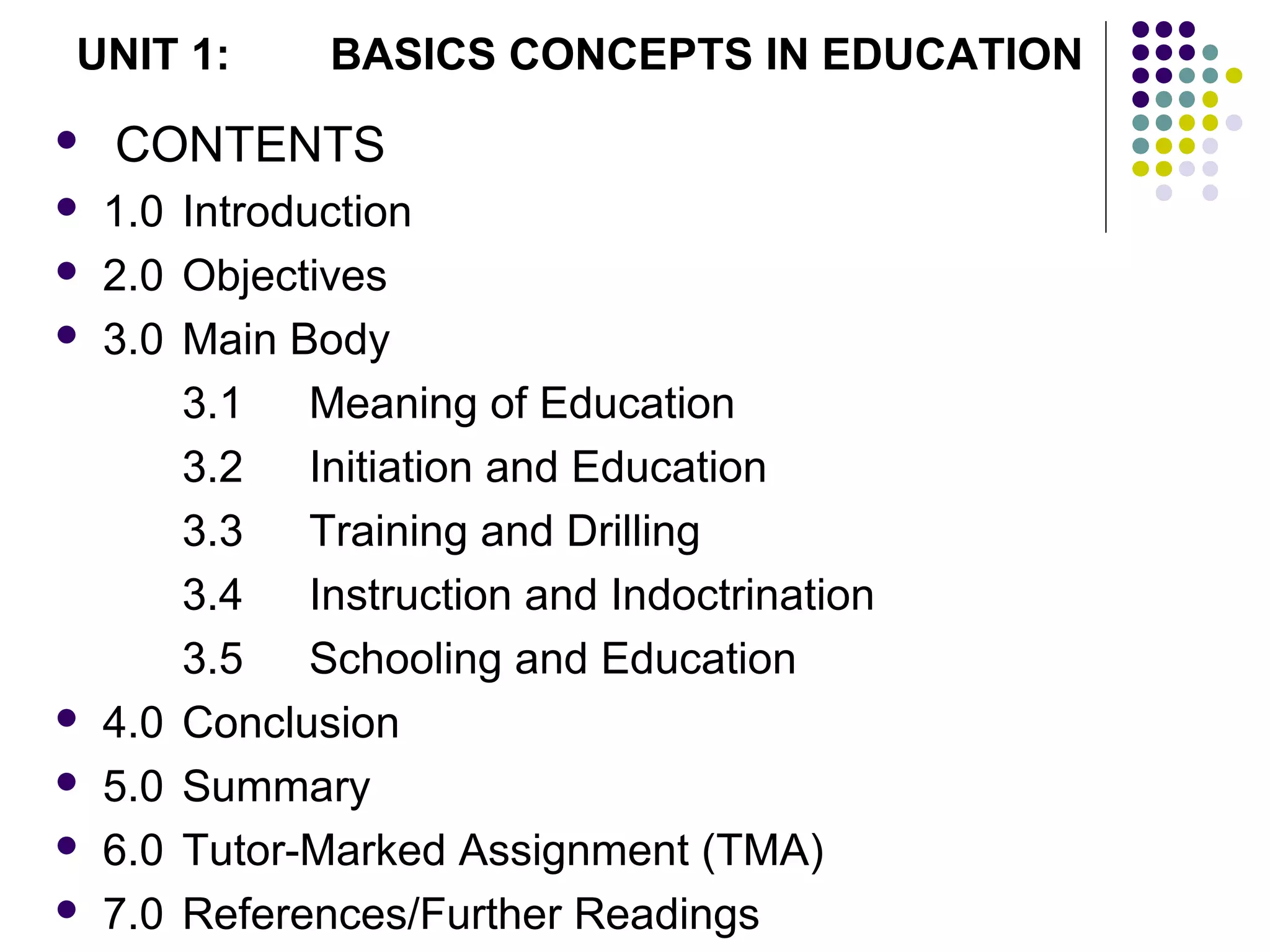
 CONTENTS
 1.0 Introduction
 2.0 Objectives
 3.0 Main Body
3.1 Meaning of Education
3.2 Initiation and Education
3.3 Training and Drilling
3.4 Instruction and Indoctrination
3.5 Schooling and Education
 4.0 Conclusion
 5.0 Summary
 6.0 Tutor-Marked Assignment (TMA)
 7.0 References/Further Readings
UNIT 1: BASICS CONCEPTS IN EDUCATION
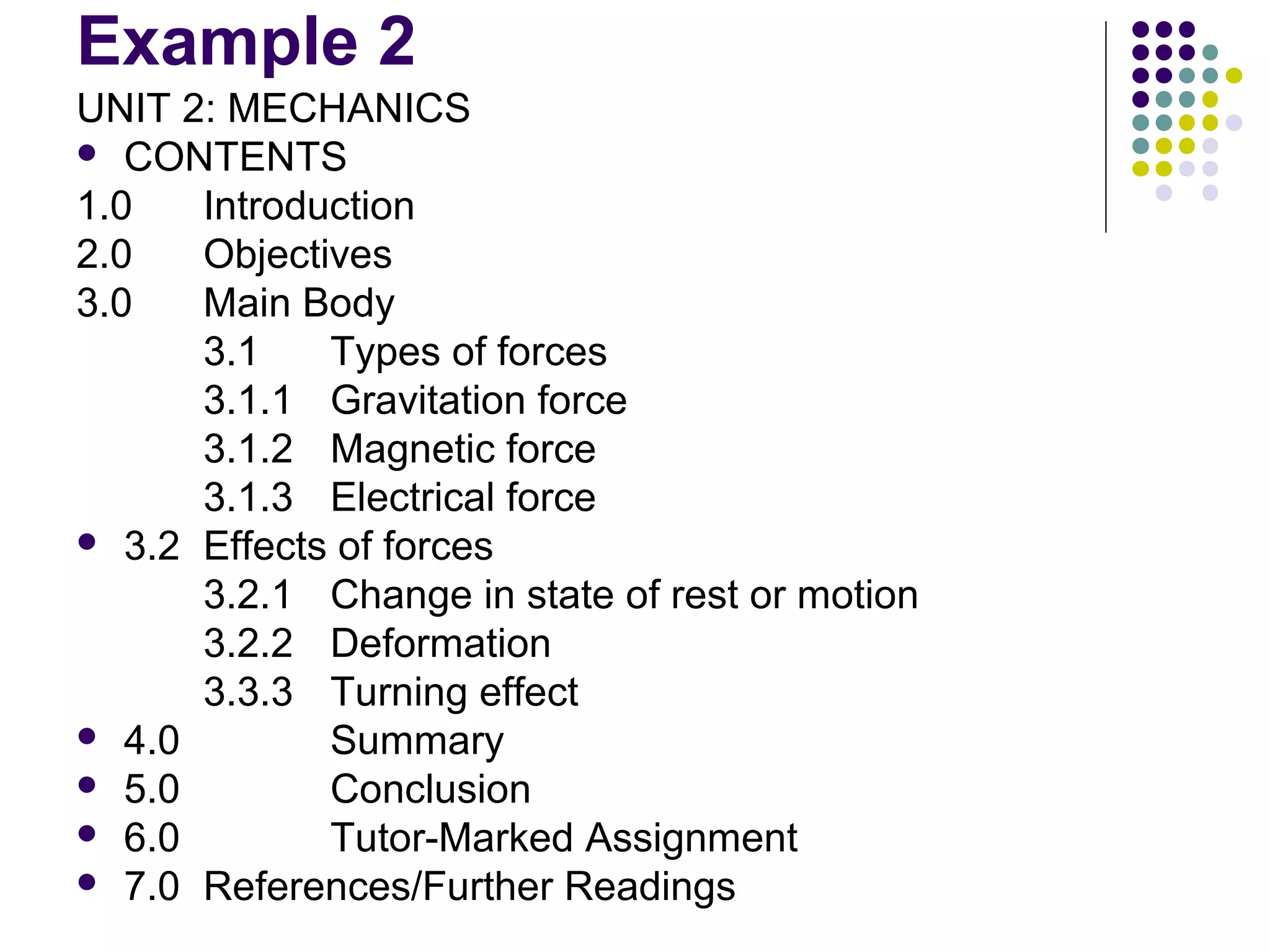
Example 2
UNIT 2: MECHANICS
 CONTENTS
1.0 Introduction
2.0 Objectives
3.0 Main Body
3.1 Types of forces
3.1.1 Gravitation force
3.1.2 Magnetic force
3.1.3 Electrical force
 3.2 Effects of forces
3.2.1 Change in state of rest or motion
3.2.2 Deformation
3.3.3 Turning effect
 4.0 Summary
 5.0 Conclusion
 6.0 Tutor-Marked Assignment
 7.0 References/Further Readings
Assignment
 Pick a course in your Department (e.g MAT
111) and break it into modular form. You
must have minimum of 3 modules and15
units.
Thank you
for
listening and
God bless you

10. concept of odl course materials

  • 1.
    THE CONCEPT OF ODLCOURSE MATERIAL
  • 2.
     ISD WORKSHOP Organized By  Centre for Open Distance and e-Learning (CODeL). Dr. Gambari, A. I. E-mail: gambarii@yahoo.com Website: www.gambari.mgfglobal.com Blogsite: www.drgambari.com March, 2012
  • 3.
    INTRODUCTION  How doODL materials differ from other educational materials?  It is not effective to send textbooks to ODL students. Rather, materials must be specially designed to suit the ODL situation.  The differences between ODL materials and conventional classroom and other concepts of ODL materials are treated in this presentation.
  • 4.
    OBJECTIVES  At theend of this presentation, you should be able to;  Differentiate between textbook and ODL materials  List devices included in ODL materials by instructional designer  List the components of ODL materials
  • 5.
    THE STRUCTURE OFODL MATERIALS  If you glance at a random sample of ODL materials, you are likely to be struck by how different they look from traditional textbooks. Probably the four things that will be most noticeable are:  the wide range of learning devices,  the relatively low proportion of text compared to learning devices,  the space that is often provided for learners to write their answers in, and  the ‘generous’ layout overall.
  • 6.
    Embedded Devices  Theterm ‘embedded devices’ seems to have been fashioned by Martens (1998) to describe all the devices that instructional designers include in their materials. Martens noted 23 different types of embedded device in the materials that he looked at.
  • 7.
    The most commoninclude:  learning objectives  tests of prior knowledge  advance organisers  activities  feedback to activities  examples  self-tests  summaries and lists of key points  study tips  animations (in electronic materials)  hypertext links (in electronic materials).
  • 8.
     Most ofthese devices are not present in a typical textbook, so why do instructional designers include them in ODL materials?  The answer lies in the theories discussed yesterday, cognitive approach stresses the use of learning devices such as:  learning objectives,  tasks broken down into small steps,  learners assessed against the stated learning objectives,
  • 9.
     a widevariety of tasks but within the scope of the stated objectives,  material ‘chunked’ into small, meaningful pieces,  mnemonics used to aid memory,  advance organisers used to help learners see the structure of the topic, and simplification of the real world.
  • 10.
    Space for Learners’Answers  It is common practice to provide answer spaces in ODL text materials, reflecting the widespread teacher belief that this encourages learners to complete the activities. As Lockwood (1992) says, the evidence that this is the case ‘is persuasive’. He reports research by Henderson (1993) which found that questions without answer spaces were answered by 40% of learners, but the same questions with answer spaces were answered by 90% of learners. Martens (1998) has also noted that learners who complete activities tend to do better on the course as a whole.
  • 11.
    The ‘Generous’ Layout Writers on ODL instructional design repeatedly mention the desirability of a ‘generous’ layout and the liberal use of ‘white space’.  (Interestingly, research supports the opposite case for web pages that are used for searching: see ‘Reduce the amount of unused space on pages used for scanning and searching’ at http://usability.gov/guidelines/layout.html#five.
  • 12.
  • 13.
    ODL materials typically… Textbooks typically … Are divided into study units, sometimes representing a week’s work Are divided into chapters, based on topics rather than study time Include a study guide on how to use the materials and how to study by oneself Do not include study guides or study guidance Include study tips (e.g., on note-taking) Do not include study tips Include examples Include examples Include diagrams and pictures Include diagrams and pictures
  • 14.
    Cont… Include numerous activitiesHave few or no activities Provide feedback on answers Do not provide feedback Are tightly structured Are more loosely structured Address the learner as ‘you’ Use passive language (e.g., ‘it can be seen that’ or ‘the reader will note that’) Have a generous layout, often including space for learners to write in Have pages filled with text, figures, tables, lists and other graphic elements – there is no space for learners to write in Have as an audience the individual learner Serve a dual audience: the learner and the teacher Attempt to meet all the needs of the learner Assume that the learner has a teacher who will be able to amplify the printed text
  • 15.
    Example 1 INTRODUCTION TOTEACHING PROFESSION (EDU 111)  Module 1: Teaching as a Profession  Unit 1: Basic Concepts in Education  Unit 2: Teaching and Learning  Unit 3: Teaching as a Profession  Unit 4: Qualities of Professional Teachers  Unit5: Teacher’s Professional Skills  Module 2: Teaching Process  Unit 1: Communication Process  Unit 2: Behavioural Objectives  Unit 3: Evaluation of Learning Outcomes  Unit 4: Lesson Plan  Module 3: Teaching Methods  Unit 1: Lecture, Discussion and Individualize Instruction  Unit 2: Laboratory, Demonstration and Field Trip Methods  Unit 3: Problem-Solving, Discovery and Inquiry Methods  Unit 4: Simulation/Game, Group and Project Methods  Unit 5: Assignment, Class-teaching and Questions Methods
  • 16.
     CONTENTS  1.0Introduction  2.0 Objectives  3.0 Main Body 3.1 Meaning of Education 3.2 Initiation and Education 3.3 Training and Drilling 3.4 Instruction and Indoctrination 3.5 Schooling and Education  4.0 Conclusion  5.0 Summary  6.0 Tutor-Marked Assignment (TMA)  7.0 References/Further Readings UNIT 1: BASICS CONCEPTS IN EDUCATION
  • 17.
    Example 2 UNIT 2:MECHANICS  CONTENTS 1.0 Introduction 2.0 Objectives 3.0 Main Body 3.1 Types of forces 3.1.1 Gravitation force 3.1.2 Magnetic force 3.1.3 Electrical force  3.2 Effects of forces 3.2.1 Change in state of rest or motion 3.2.2 Deformation 3.3.3 Turning effect  4.0 Summary  5.0 Conclusion  6.0 Tutor-Marked Assignment  7.0 References/Further Readings
  • 18.
    Assignment  Pick acourse in your Department (e.g MAT 111) and break it into modular form. You must have minimum of 3 modules and15 units.
  • 19.