1.1 Introduction to Python
1ARULKUMAR V AP/CSE SECE
Objectives
2
 To write and run a simple Python program.
 To explain the basic syntax of a Python program (§1.5).
 To describe the history of Python (§1.6).
 To explain the importance of, and provide examples of,
proper programming style and documentation (§1.7).
 To explain the differences between syntax errors,
runtime errors, and logic errors (§1.8).
 To create a basic graphics program using Turtle (§1.9).
ARULKUMAR V AP/CSE SECE
What is Python?
General Purpose Interpreted Object-Oriented
3
Python is a general purpose programming language.
That means you can use Python to write code for
any programming tasks. Python are now used in
Google search engine, in mission critical projects in
NASA, in processing financial transactions at New
York Stock Exchange.
ARULKUMAR V AP/CSE SECE
What is Python?
General Purpose Interpreted Object-Oriented
4
Python is interpreted, which means that python
code is translated and executed by an interpreter
one statement at a time. In a compiled language, the
entire source code is compiled and then executed
altogether.
ARULKUMAR V AP/CSE SECE
What is Python?
General Purpose Interpreted Object-Oriented
5
Python is an object-oriented programming
language. Data in Python are objects created from
classes. A class is essentially a type that defines the
objects of the same kind with properties and
methods for manipulating objects. Object-oriented
programming is a powerful tool for developing
reusable software.
ARULKUMAR V AP/CSE SECE
Python’s History
• created by Guido van Rossum in Netherlands in
1990
• Open source
6ARULKUMAR V AP/CSE SECE
Python 2 vs. Python 3
Python 3 is a newer version, but it is not
backward compatible with Python 2. That
means if you write a program using Python
2, it may not work on Python 3.
7ARULKUMAR V AP/CSE SECE
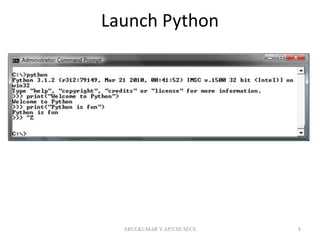
Launch Python
8ARULKUMAR V AP/CSE SECE
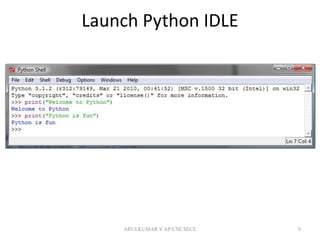
Launch Python IDLE
9ARULKUMAR V AP/CSE SECE
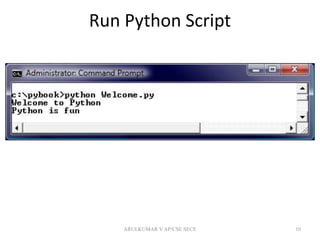
Run Python Script
10ARULKUMAR V AP/CSE SECE
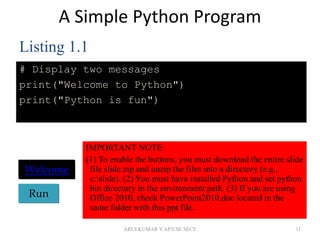
A Simple Python Program
# Display two messages
print("Welcome to Python")
print("Python is fun")
11
Run
Welcome
Listing 1.1
IMPORTANT NOTE:
(1) To enable the buttons, you must download the entire slide
file slide.zip and unzip the files into a directory (e.g.,
c:slide). (2) You must have installed Python and set python
bin directory in the environment path. (3) If you are using
Office 2010, check PowerPoint2010.doc located in the
same folder with this ppt file.
ARULKUMAR V AP/CSE SECE
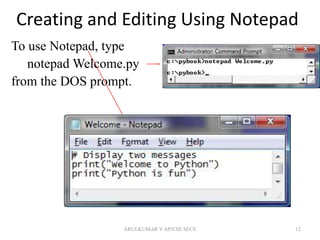
Creating and Editing Using Notepad
To use Notepad, type
notepad Welcome.py
from the DOS prompt.
12ARULKUMAR V AP/CSE SECE
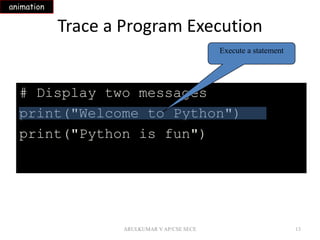
Trace a Program Execution
13
# Display two messages
print("Welcome to Python")
print("Python is fun")
Execute a statement
animation
ARULKUMAR V AP/CSE SECE
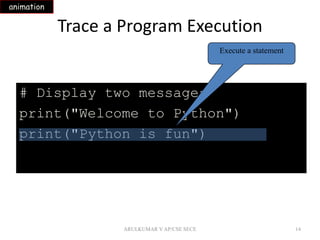
Trace a Program Execution
14
# Display two messages
print("Welcome to Python")
print("Python is fun")
Execute a statement
animation
ARULKUMAR V AP/CSE SECE
Two More Simple Examples
15
RunWelcomeWithThreeMessages
RunComputeExpression
ARULKUMAR V AP/CSE SECE
Supplements on the
Companion Website
• See Supplement I.B for installing and
configuring Python
• See Supplement I.C for developing Python
programs from Eclipse
www.cs.armstrong.edu/liang/py
16
Companion
Website
ARULKUMAR V AP/CSE SECE
Anatomy of a Python Program
• Statements
• Comments
• Indentation
17ARULKUMAR V AP/CSE SECE
Statement
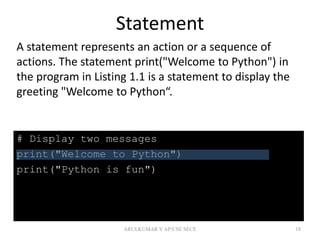
A statement represents an action or a sequence of
actions. The statement print("Welcome to Python") in
the program in Listing 1.1 is a statement to display the
greeting "Welcome to Python“.
18
# Display two messages
print("Welcome to Python")
print("Python is fun")
ARULKUMAR V AP/CSE SECE
Indentation
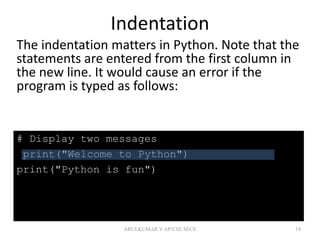
The indentation matters in Python. Note that the
statements are entered from the first column in
the new line. It would cause an error if the
program is typed as follows:
19
# Display two messages
print("Welcome to Python")
print("Python is fun")
ARULKUMAR V AP/CSE SECE
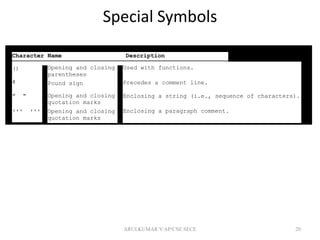
Special Symbols
20
Character Name Description
()
#
" "
''' '''
Opening and closing
parentheses
Pound sign
Opening and closing
quotation marks
Opening and closing
quotation marks
Used with functions.
Precedes a comment line.
Enclosing a string (i.e., sequence of characters).
Enclosing a paragraph comment.
ARULKUMAR V AP/CSE SECE
Programming Style and
Documentation
• Appropriate Comments
• Proper Indentation and Spacing
Lines
21ARULKUMAR V AP/CSE SECE
Appropriate Comments
Include a summary at the beginning of the
program to explain what the program does, its key
features, its supporting data structures, and any
unique techniques it uses.
Include your name, class section, instructor, date,
and a brief description at the beginning of the
program.
22ARULKUMAR V AP/CSE SECE
Proper Indentation and Spacing
• Indentation
– Indent four spaces.
– A consistent spacing style makes programs clear
and easy to read, debug, and maintain.
• Spacing
– Use blank line to separate segments of the
code.
23ARULKUMAR V AP/CSE SECE
Programming Errors
• Syntax Errors
– Error in code construction
• Runtime Errors
– Causes the program to abort
• Logic Errors
– Produces incorrect result
24ARULKUMAR V AP/CSE SECE
Getting Started with GUI Programming
Why GUI? Turtle Tkniter
25
GUI is a great pedagogical tool to motivate studetns
and stimulate student interests in programming.
ARULKUMAR V AP/CSE SECE
Getting Started with GUI Programming
Why GUI? Turtle Tkniter
26
A simple way to start graphics programming is to
use Python built-in Turtle package.
Run
A Turtule Example
ARULKUMAR V AP/CSE SECE
Getting Started with GUI Programming
Why GUI? Turtle Tkniter
27
Later in the book, we will also introduce Tkinter for
developing comprehensive GUI applications.
Run
A Tkinter Example
ARULKUMAR V AP/CSE SECE

1. introduction to python

  • 1.
    1.1 Introduction toPython 1ARULKUMAR V AP/CSE SECE
  • 2.
    Objectives 2  To writeand run a simple Python program.  To explain the basic syntax of a Python program (§1.5).  To describe the history of Python (§1.6).  To explain the importance of, and provide examples of, proper programming style and documentation (§1.7).  To explain the differences between syntax errors, runtime errors, and logic errors (§1.8).  To create a basic graphics program using Turtle (§1.9). ARULKUMAR V AP/CSE SECE
  • 3.
    What is Python? GeneralPurpose Interpreted Object-Oriented 3 Python is a general purpose programming language. That means you can use Python to write code for any programming tasks. Python are now used in Google search engine, in mission critical projects in NASA, in processing financial transactions at New York Stock Exchange. ARULKUMAR V AP/CSE SECE
  • 4.
    What is Python? GeneralPurpose Interpreted Object-Oriented 4 Python is interpreted, which means that python code is translated and executed by an interpreter one statement at a time. In a compiled language, the entire source code is compiled and then executed altogether. ARULKUMAR V AP/CSE SECE
  • 5.
    What is Python? GeneralPurpose Interpreted Object-Oriented 5 Python is an object-oriented programming language. Data in Python are objects created from classes. A class is essentially a type that defines the objects of the same kind with properties and methods for manipulating objects. Object-oriented programming is a powerful tool for developing reusable software. ARULKUMAR V AP/CSE SECE
  • 6.
    Python’s History • createdby Guido van Rossum in Netherlands in 1990 • Open source 6ARULKUMAR V AP/CSE SECE
  • 7.
    Python 2 vs.Python 3 Python 3 is a newer version, but it is not backward compatible with Python 2. That means if you write a program using Python 2, it may not work on Python 3. 7ARULKUMAR V AP/CSE SECE
  • 8.
  • 9.
  • 10.
  • 11.
    A Simple PythonProgram # Display two messages print("Welcome to Python") print("Python is fun") 11 Run Welcome Listing 1.1 IMPORTANT NOTE: (1) To enable the buttons, you must download the entire slide file slide.zip and unzip the files into a directory (e.g., c:slide). (2) You must have installed Python and set python bin directory in the environment path. (3) If you are using Office 2010, check PowerPoint2010.doc located in the same folder with this ppt file. ARULKUMAR V AP/CSE SECE
  • 12.
    Creating and EditingUsing Notepad To use Notepad, type notepad Welcome.py from the DOS prompt. 12ARULKUMAR V AP/CSE SECE
  • 13.
    Trace a ProgramExecution 13 # Display two messages print("Welcome to Python") print("Python is fun") Execute a statement animation ARULKUMAR V AP/CSE SECE
  • 14.
    Trace a ProgramExecution 14 # Display two messages print("Welcome to Python") print("Python is fun") Execute a statement animation ARULKUMAR V AP/CSE SECE
  • 15.
    Two More SimpleExamples 15 RunWelcomeWithThreeMessages RunComputeExpression ARULKUMAR V AP/CSE SECE
  • 16.
    Supplements on the CompanionWebsite • See Supplement I.B for installing and configuring Python • See Supplement I.C for developing Python programs from Eclipse www.cs.armstrong.edu/liang/py 16 Companion Website ARULKUMAR V AP/CSE SECE
  • 17.
    Anatomy of aPython Program • Statements • Comments • Indentation 17ARULKUMAR V AP/CSE SECE
  • 18.
    Statement A statement representsan action or a sequence of actions. The statement print("Welcome to Python") in the program in Listing 1.1 is a statement to display the greeting "Welcome to Python“. 18 # Display two messages print("Welcome to Python") print("Python is fun") ARULKUMAR V AP/CSE SECE
  • 19.
    Indentation The indentation mattersin Python. Note that the statements are entered from the first column in the new line. It would cause an error if the program is typed as follows: 19 # Display two messages print("Welcome to Python") print("Python is fun") ARULKUMAR V AP/CSE SECE
  • 20.
    Special Symbols 20 Character NameDescription () # " " ''' ''' Opening and closing parentheses Pound sign Opening and closing quotation marks Opening and closing quotation marks Used with functions. Precedes a comment line. Enclosing a string (i.e., sequence of characters). Enclosing a paragraph comment. ARULKUMAR V AP/CSE SECE
  • 21.
    Programming Style and Documentation •Appropriate Comments • Proper Indentation and Spacing Lines 21ARULKUMAR V AP/CSE SECE
  • 22.
    Appropriate Comments Include asummary at the beginning of the program to explain what the program does, its key features, its supporting data structures, and any unique techniques it uses. Include your name, class section, instructor, date, and a brief description at the beginning of the program. 22ARULKUMAR V AP/CSE SECE
  • 23.
    Proper Indentation andSpacing • Indentation – Indent four spaces. – A consistent spacing style makes programs clear and easy to read, debug, and maintain. • Spacing – Use blank line to separate segments of the code. 23ARULKUMAR V AP/CSE SECE
  • 24.
    Programming Errors • SyntaxErrors – Error in code construction • Runtime Errors – Causes the program to abort • Logic Errors – Produces incorrect result 24ARULKUMAR V AP/CSE SECE
  • 25.
    Getting Started withGUI Programming Why GUI? Turtle Tkniter 25 GUI is a great pedagogical tool to motivate studetns and stimulate student interests in programming. ARULKUMAR V AP/CSE SECE
  • 26.
    Getting Started withGUI Programming Why GUI? Turtle Tkniter 26 A simple way to start graphics programming is to use Python built-in Turtle package. Run A Turtule Example ARULKUMAR V AP/CSE SECE
  • 27.
    Getting Started withGUI Programming Why GUI? Turtle Tkniter 27 Later in the book, we will also introduce Tkinter for developing comprehensive GUI applications. Run A Tkinter Example ARULKUMAR V AP/CSE SECE