Introduction to PythonIntroduction to Python
ProgrammingProgramming
Why Python?Why Python?
 Python is what is referred to as an object-oriented
programming language (OOP)
 OOP is a programming style that allows programmers to
reuse pre made code.
◦ Don’t need to recreate the wheel
 Thus creates a much more efficient programming language
so programmers don’t have to spend tedious amounts of
time creating code that had been published.
 Simple
 Less Syntax
 We will be discussing OOP as we move through the course.
What is Python?What is Python?
Python is a general purpose programming
language. That means you can use Python
to write code for any programming tasks.
◦ Google search engine
◦ Mission critical projects in NASA,
◦ Processing financial transactions at New York
Stock Exchange.
◦ Data Analytics
Interpreted?Interpreted?
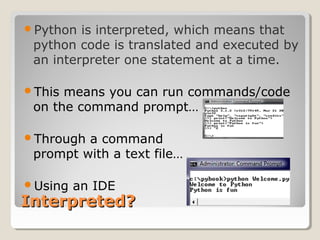
Python is interpreted, which means that
python code is translated and executed by
an interpreter one statement at a time.
This means you can run commands/code
on the command prompt…
Through a command
prompt with a text file…
Using an IDE
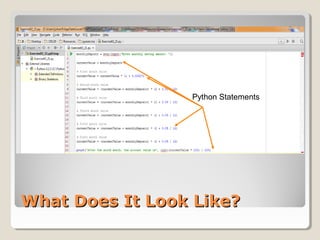
What Does It Look Like?What Does It Look Like?
Python Statements
Parts of a Python ProgramParts of a Python Program
Def: Source Code is the program text
entered into an interpreter by the
programmer.
◦ The saved file is referred to as, the source file.
◦ The main file in a python program, called main
◦ Can program on the command prompt
The extension to a source file is “.py”
◦ Xcel - .xls
◦ Power Point - .ppt
Two main parts to a source file
◦ Libraries
◦ Main code
Good programming proclamationsGood programming proclamations
Using comments to denote programs or
sections of code
◦ A comment beginning with # is called a single-line comment
because it terminates at the end of the current line.
◦ You also may use a multi-line comment—possibly containing
many lines—begins with ’’’ and ends with ’’’.
You use blank lines, space characters and tab characters
(i.e., “tabs”) to make programs easier to read.
◦ Together, these characters are known as white space.
◦ White-space characters are USUALLY ignored by the interpreter.
◦ Python has its own rules with white space
CheckpointCheckpoint
1. What is OOP?
2. What is the name of the file and code
that the text for a program is entered into
the interpreter?
3. What is a library? Why aren’t all the
functions preloaded?
4. What are the two styles of comments
you can utilize and their symbols?
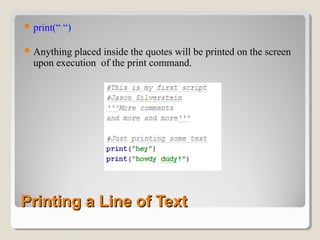
Printing a Line of TextPrinting a Line of Text
print(“ “)
Anything placed inside the quotes will be printed on the screen
upon execution of the print command.
Printing a Line of TextPrinting a Line of Text
print(“ “)
Anything placed inside the quotes will be printed on the screen
upon execution of the print command.

Intro to Python

  • 1.
    Introduction to PythonIntroductionto Python ProgrammingProgramming
  • 2.
    Why Python?Why Python? Python is what is referred to as an object-oriented programming language (OOP)  OOP is a programming style that allows programmers to reuse pre made code. ◦ Don’t need to recreate the wheel  Thus creates a much more efficient programming language so programmers don’t have to spend tedious amounts of time creating code that had been published.  Simple  Less Syntax  We will be discussing OOP as we move through the course.
  • 3.
    What is Python?Whatis Python? Python is a general purpose programming language. That means you can use Python to write code for any programming tasks. ◦ Google search engine ◦ Mission critical projects in NASA, ◦ Processing financial transactions at New York Stock Exchange. ◦ Data Analytics
  • 4.
    Interpreted?Interpreted? Python is interpreted,which means that python code is translated and executed by an interpreter one statement at a time. This means you can run commands/code on the command prompt… Through a command prompt with a text file… Using an IDE
  • 5.
    What Does ItLook Like?What Does It Look Like? Python Statements
  • 6.
    Parts of aPython ProgramParts of a Python Program Def: Source Code is the program text entered into an interpreter by the programmer. ◦ The saved file is referred to as, the source file. ◦ The main file in a python program, called main ◦ Can program on the command prompt The extension to a source file is “.py” ◦ Xcel - .xls ◦ Power Point - .ppt Two main parts to a source file ◦ Libraries ◦ Main code
  • 7.
    Good programming proclamationsGoodprogramming proclamations Using comments to denote programs or sections of code ◦ A comment beginning with # is called a single-line comment because it terminates at the end of the current line. ◦ You also may use a multi-line comment—possibly containing many lines—begins with ’’’ and ends with ’’’. You use blank lines, space characters and tab characters (i.e., “tabs”) to make programs easier to read. ◦ Together, these characters are known as white space. ◦ White-space characters are USUALLY ignored by the interpreter. ◦ Python has its own rules with white space
  • 8.
    CheckpointCheckpoint 1. What isOOP? 2. What is the name of the file and code that the text for a program is entered into the interpreter? 3. What is a library? Why aren’t all the functions preloaded? 4. What are the two styles of comments you can utilize and their symbols?
  • 9.
    Printing a Lineof TextPrinting a Line of Text print(“ “) Anything placed inside the quotes will be printed on the screen upon execution of the print command.
  • 10.
    Printing a Lineof TextPrinting a Line of Text print(“ “) Anything placed inside the quotes will be printed on the screen upon execution of the print command.

Editor's Notes

  • #6 Common elements in programming languages: Key Words Programmer-Defined Identifiers Operators Punctuation Syntax