05561 Cloud Transfer Tests Research Institution Test 01 Local Connection: Research Networks Started: Feb 8, 2010 Finished: Feb 16, 2010 Origination Point: Oak Ridge, TN Data collected/assembled by Rob Gillen, Computer Science Research Group, Oak Ridge National Laboratory, Oak Ridge TN. Questions should be directed to  [email_address]
Disclaimer The research team understands that any time the public internet is introduced into a test a number of non-controllable factors are introduced. It is the intent of this project to test various scenarios often enough and with enough variance to obtain a reasonable average and thereby allow the team to make general assumptions about the quality of service (given the constraints stated) that one can reasonably expect to encounter when utilizing a given service. It is similarly understood that there may exist environmental factors (i.e. routing paths, proxy servers, firewalls) that affect the transfer rates being tested. In general, it is believed that these factors should affect all tested platforms equally. However, in the case of various research institutes where specialty networks (i.e. ESNet, NLR, I2) exist, there may be routing configurations that particularly favor one service or endpoint over another. It is an objective of these tests to expose these anomalies with the goal of addressing them as appropriate. Baseline : For the various services tested, these initial tests were performed using no particular optimization techniques. We took the respective vendor’s shipping SDK, integrated it into a very similar wrapper (source code available for verification) and executed it. Subsequent work should focus on optimizations in the SDKs, or the methods in which the libraries are utilized, etc. Not A Stand-Alone Work : This data should not be considered in isolation. Rather, it is a portion of a larger data set (some of which may remain to be published) and should be interpreted for what it is – a portion of a larger collection that aims to provide a more complete view of the entire problem domain.
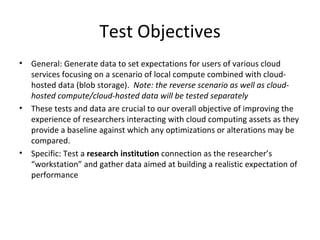
Test Objectives General: Generate data to set expectations for users of various cloud services focusing on a scenario of local compute combined with cloud-hosted data (blob storage).  Note: the reverse scenario as well as cloud-hosted compute/cloud-hosted data will be tested separately These tests and data are crucial to our overall objective of improving the experience of researchers interacting with cloud computing assets as they provide a baseline against which any optimizations or alterations may be compared. Specific: Test a  research institution  connection as the researcher’s “workstation” and gather data aimed at building a realistic expectation of performance
Test Setup Test Setup A collection of random-data files were generated (RandomFileGenerator.exe). For each of the following file sizes, 50 files were generated and stored on standard disks local to the test computer:  2KB, 32KB, 64KB, 128KB, 256KB, 512KB, 1MB, 5MB, 10MB, 25MB, 50MB, 100MB , 250MB, 500MB, 750MB, 1GB Network Connectivity - “research institution” Consists of a computer connected to a local network router via 100Mbps hard-wire. Multiple switches/routers/firewalls may exist between workstation and the public internet There may exist multiple high-speed networks that may be leveraged for connectivity to remote datacenters (ESNet, I2, NLR) Reasonable effort has been made to ensure that no other applications or TSRs are running on the source computer for the duration of the test. For this test, a newly-installed Windows 7 Professional installation was used, fully patched, with no other applications (beyond the test harness) installed.
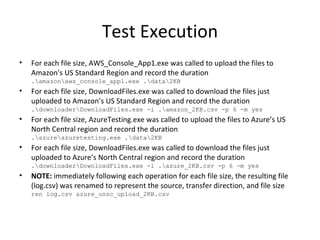
Test Execution For each file size, AWS_Console_App1.exe was called to upload the files to Amazon’s US Standard Region and record the duration .\amazon\aws_console_app1.exe .\data\2KB For each file size, DownloadFiles.exe was called to download the files just uploaded to Amazon’s US Standard Region and record the duration .\downloader\DownloadFiles.exe -i .\amazon_2KB.csv -p 6 -m yes For each file size, AzureTesting.exe was called to upload the files to Azure’s US North Central region and record the duration .\azure\azuretesting.exe .\data\2KB For each file size, DownloadFiles.exe was called to download the files just uploaded to Azure’s North Central region and record the duration .\downloader\DownloadFiles.exe -i .\azure_2KB.csv -p 6 -m yes NOTE:  immediately following each operation for each file size, the resulting file (log.csv) was renamed to represent the source, transfer direction, and file size ren log.csv azure_ussc_upload_2KB.csv
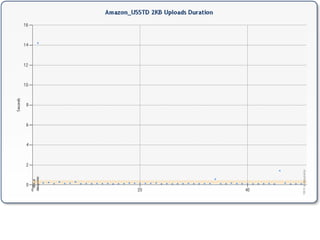
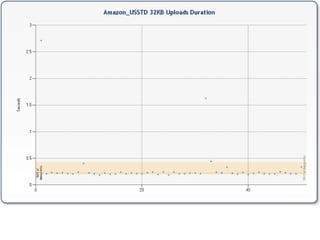
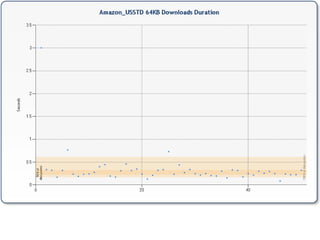
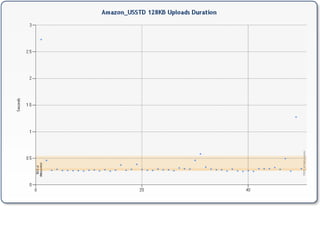
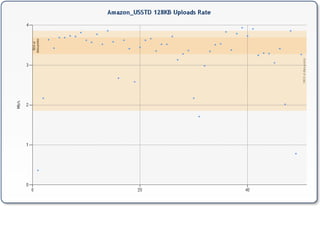
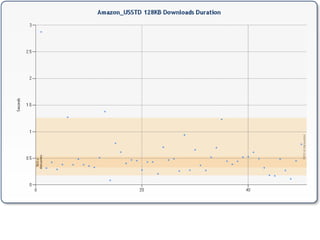
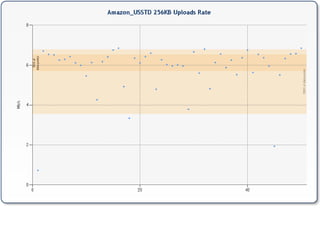
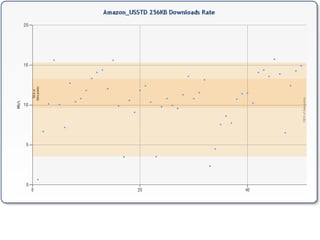
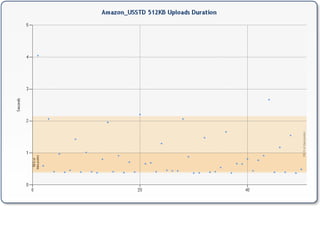
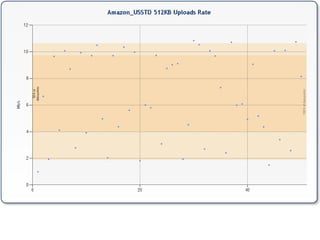
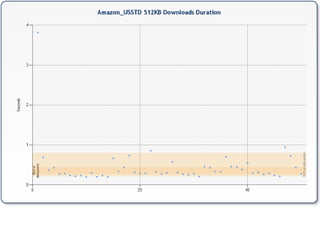
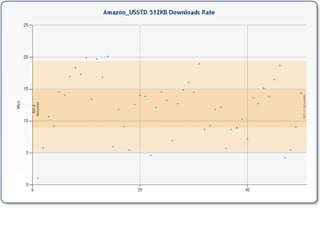
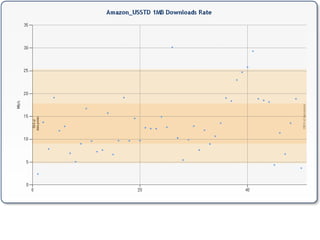
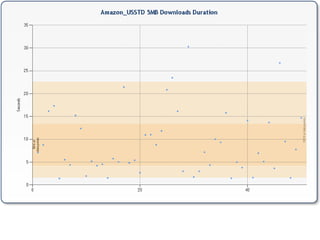
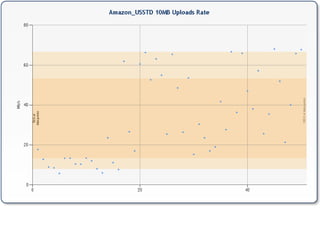
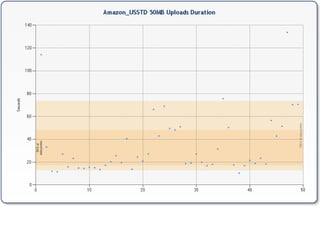
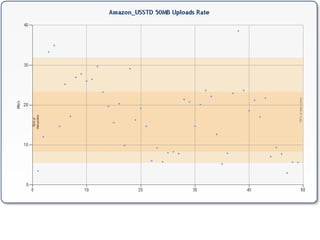
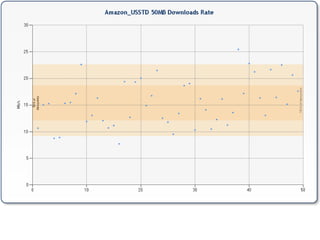
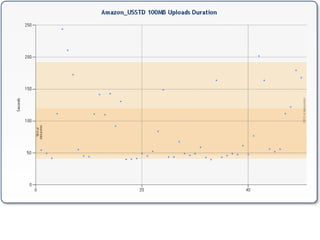
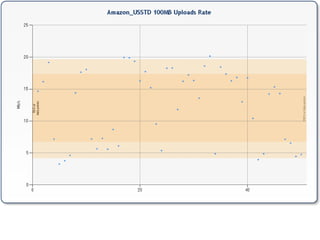
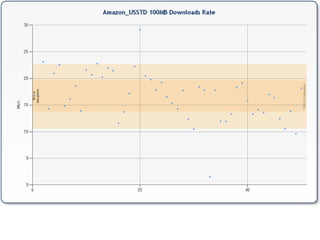
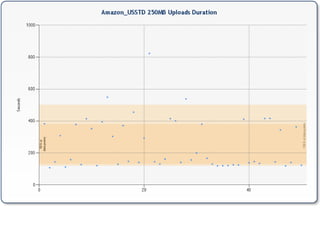
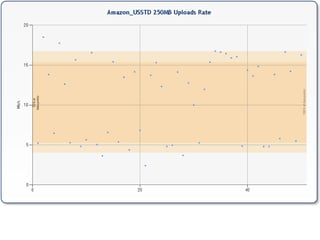
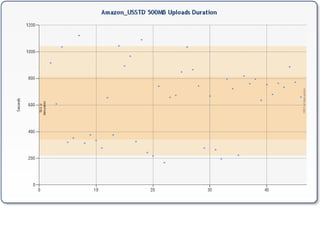
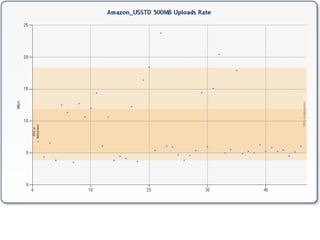
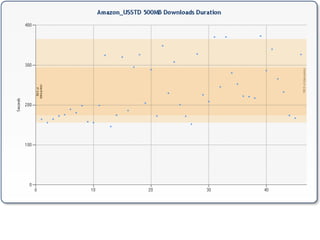
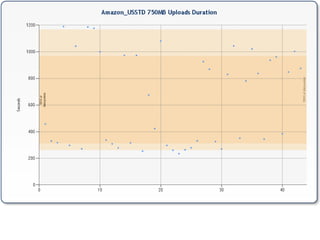
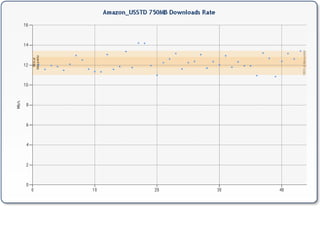
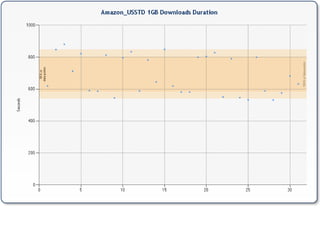
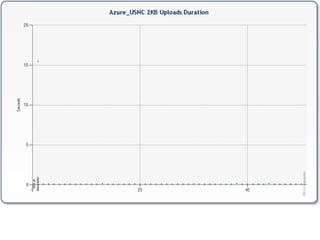
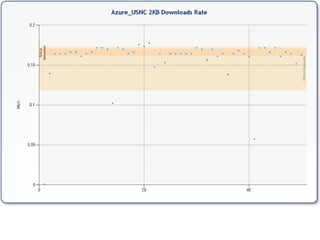
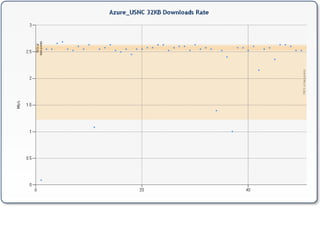
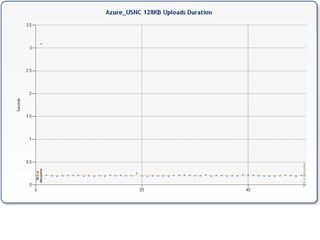
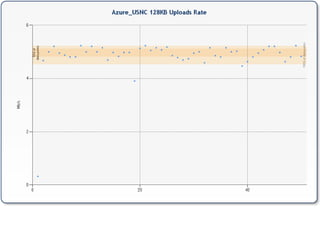
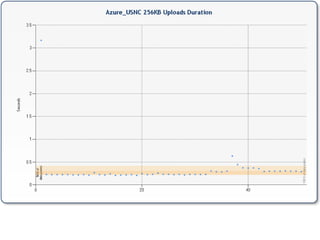
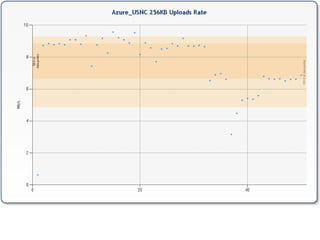
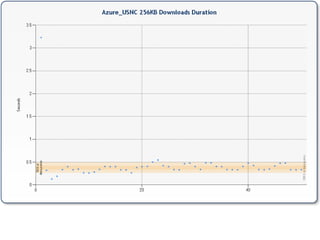
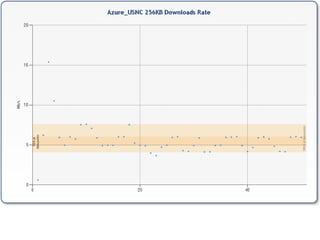
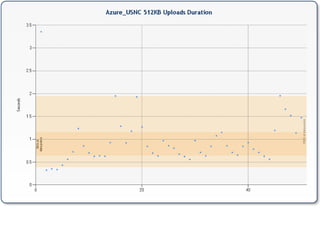
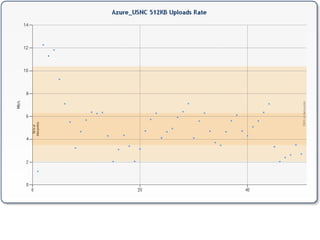
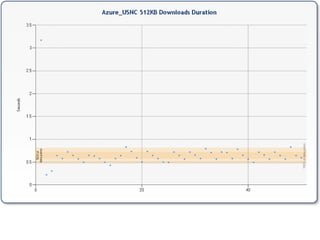
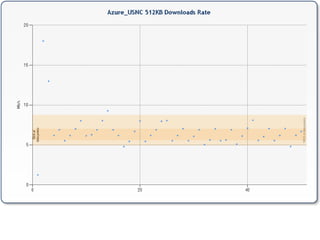
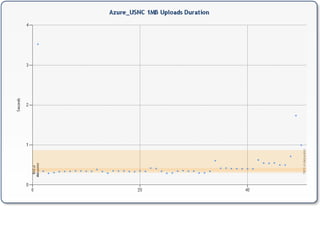
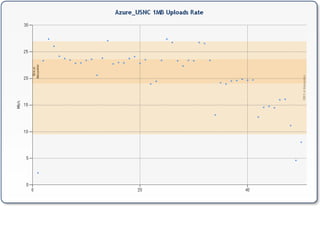
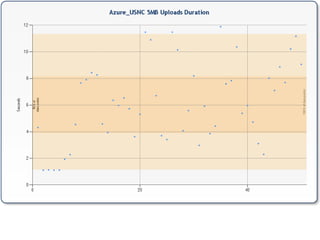
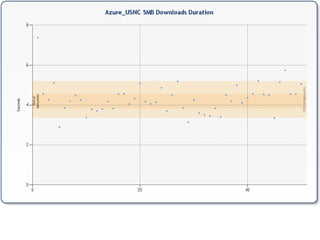
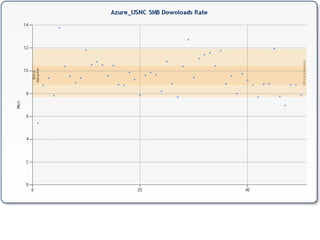
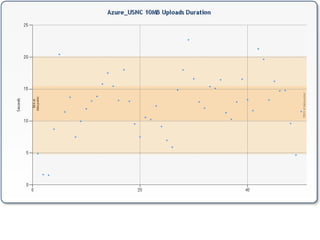
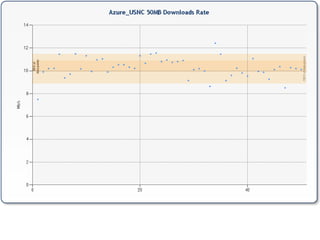
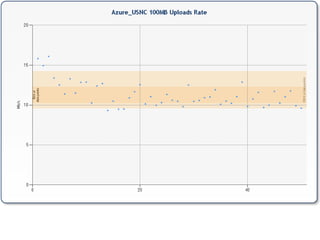
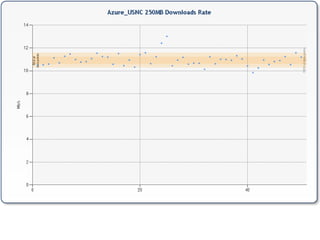
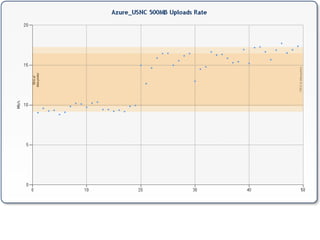
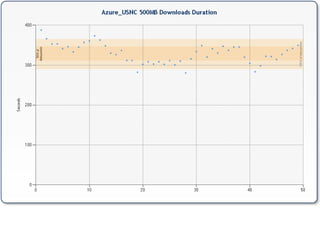
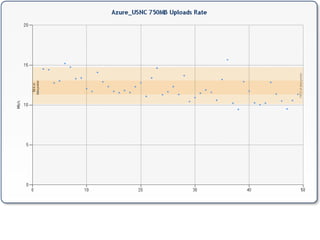
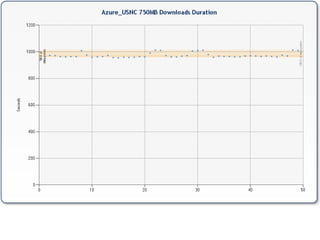
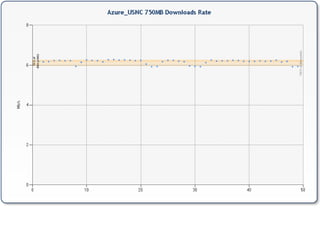
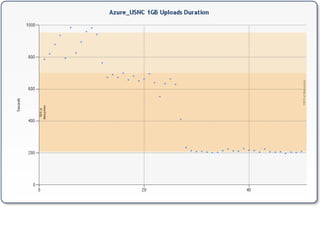
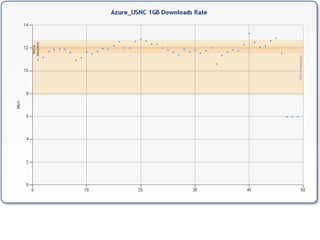
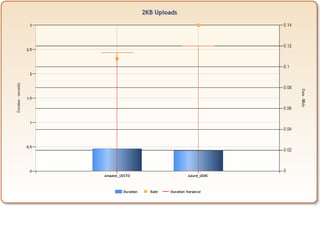
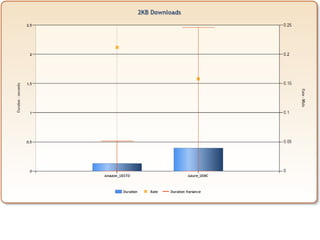
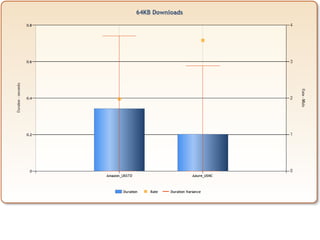
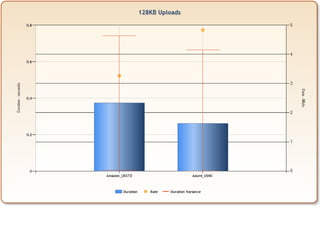
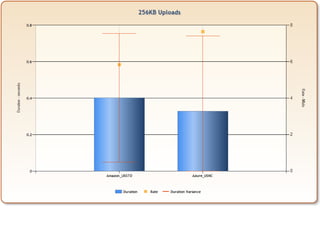
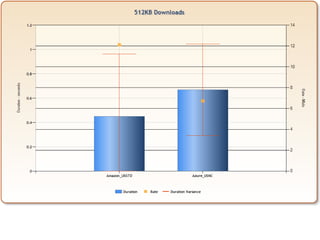
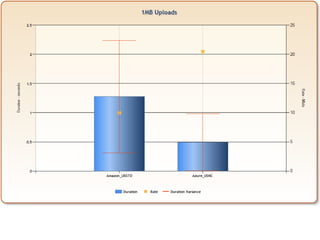
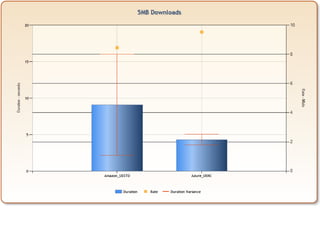
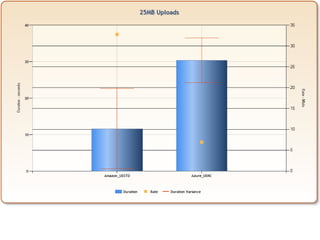
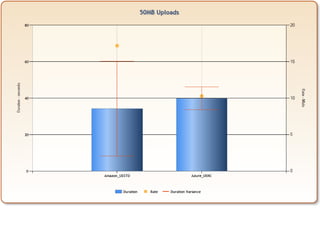
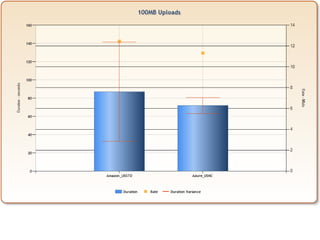
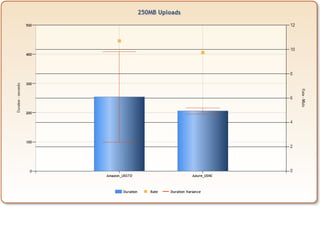
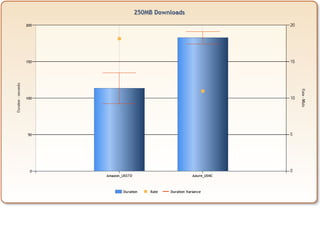
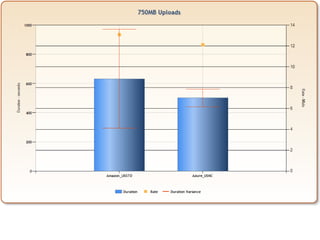
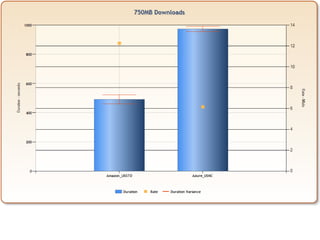
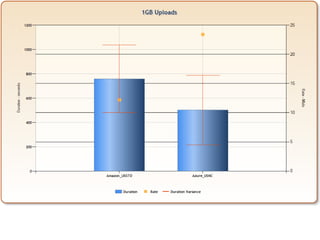
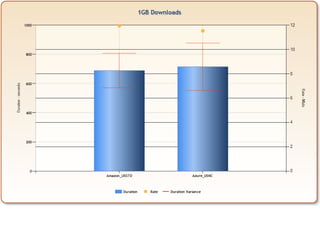
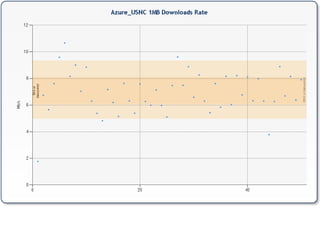
Report Generation For each service tested, and each file size tested For both Uploads and Downloads (separately) Scatter plot is generated showing the distribution for the transfer duration (seconds) Scatter plot is generated showing the distribution for the transfer rate (Mb/s) Transfer duration average (seconds) is calculated Transfer duration standard deviation (seconds) is calculated Transfer rate average (Mb/s) is calculated Transfer rate standard deviation (Mb/s) is calculated For each file size tested For both Uploads and Downloads (separately) A comparison chart (column) is generated showing the average transfer duration (seconds) and error bars indicating one standard deviation (seconds). Also plotted is a dot indicating the associated average transfer rate on the secondary Y axis (Mb/s) Summary Charts For both Uploads and Downloads (separately) A range chart is generated showing the band covered by one standard deviation (per service tested) for the transfer duration (seconds) across the tested file sizes  A range chart is generated showing the band covered by one standard deviation (per service tested) for the transfer rate (Mb/s) across the tested file sizes Presentation Once the above charts have been generated, they are assembled into a PowerPoint file Once the power point file has been generated and saved, it is published as a PDF file Automation All of the above steps are automated via a script (ProcessTransferLogs.ps1)
Conventions Naming Conventions Amazon_USSTD: Amazon’s US Standard region was specified when the bucket was created Azure_USNC: Azure’s US North Central region was selected when the storage account was created Error Handling In this run, errors were displayed to the screen but not captured to logs.  Existence of errors (all of which were network-related) are manifested in the logs as collections of data points less than 50 (the test source size) Due to the fact that the respective download tests are based on the upload source files, a download file containing less than 50 entries is not necessarily indicative of errors but may simply be tied to the fact that the input file had less than 50 entries. This being said, there were more errors on downloads than uploads.
Resources Project Code Repository:  http://code.google.com/p/scientificcloudcomputing   Test Setup RandomFileGenerator.exe http://scientificcloudcomputing.googlecode.com/files/RandomFileGenerator_1_0_3698_28087.zip   Test Execution aws_console_app1.exe http://scientificcloudcomputing.googlecode.com/files/AWS_Console_App1_1_0_3699_15931.zip   azuretesting.exe http://scientificcloudcomputing.googlecode.com/files/AzureTesting_1_0_3699_16473.zip   DownloadFiles.exe http://scientificcloudcomputing.googlecode.com/files/DownloadFiles_1_0_3698_28884.zip   Controlling batch file http://scientificcloudcomputing.googlecode.com/files/RunTest_1_0_0_0.zip   Report Generation Controlling script http://scientificcloudcomputing.googlecode.com/files/ProcessTransferLogs_1_0_0_0.zip   AddTransferFields.exe http://scientificcloudcomputing.googlecode.com/files/AddFileTransferFields_1_0_3698_30152.zip   SimpleBoxPlot.exe http://scientificcloudcomputing.googlecode.com/files/SimpleBoxPlot_1_0_3698_26541.zip   CalcStdDev.exe http://scientificcloudcomputing.googlecode.com/files/CalcStdDev_1_0_3698_29574.zip   SimpleColumnChart.exe http://scientificcloudcomputing.googlecode.com/files/SimpleColumnChart_1_0_0_0.zip   SimpleRangeChart.exe:  http://scientificcloudcomputing.googlecode.com/files/SimpleRangeChart_1_0_0_0.zip


Data collected/assembled by Rob Gillen, Computer Science Research Group, Oak Ridge National Laboratory, Oak Ridge TN. Questions should be directed to  [email_address]

05561 Xfer Research 01

  • 1.
    05561 Cloud TransferTests Research Institution Test 01 Local Connection: Research Networks Started: Feb 8, 2010 Finished: Feb 16, 2010 Origination Point: Oak Ridge, TN Data collected/assembled by Rob Gillen, Computer Science Research Group, Oak Ridge National Laboratory, Oak Ridge TN. Questions should be directed to [email_address]
  • 2.
    Disclaimer The researchteam understands that any time the public internet is introduced into a test a number of non-controllable factors are introduced. It is the intent of this project to test various scenarios often enough and with enough variance to obtain a reasonable average and thereby allow the team to make general assumptions about the quality of service (given the constraints stated) that one can reasonably expect to encounter when utilizing a given service. It is similarly understood that there may exist environmental factors (i.e. routing paths, proxy servers, firewalls) that affect the transfer rates being tested. In general, it is believed that these factors should affect all tested platforms equally. However, in the case of various research institutes where specialty networks (i.e. ESNet, NLR, I2) exist, there may be routing configurations that particularly favor one service or endpoint over another. It is an objective of these tests to expose these anomalies with the goal of addressing them as appropriate. Baseline : For the various services tested, these initial tests were performed using no particular optimization techniques. We took the respective vendor’s shipping SDK, integrated it into a very similar wrapper (source code available for verification) and executed it. Subsequent work should focus on optimizations in the SDKs, or the methods in which the libraries are utilized, etc. Not A Stand-Alone Work : This data should not be considered in isolation. Rather, it is a portion of a larger data set (some of which may remain to be published) and should be interpreted for what it is – a portion of a larger collection that aims to provide a more complete view of the entire problem domain.
  • 3.
    Test Objectives General:Generate data to set expectations for users of various cloud services focusing on a scenario of local compute combined with cloud-hosted data (blob storage). Note: the reverse scenario as well as cloud-hosted compute/cloud-hosted data will be tested separately These tests and data are crucial to our overall objective of improving the experience of researchers interacting with cloud computing assets as they provide a baseline against which any optimizations or alterations may be compared. Specific: Test a research institution connection as the researcher’s “workstation” and gather data aimed at building a realistic expectation of performance
  • 4.
    Test Setup TestSetup A collection of random-data files were generated (RandomFileGenerator.exe). For each of the following file sizes, 50 files were generated and stored on standard disks local to the test computer: 2KB, 32KB, 64KB, 128KB, 256KB, 512KB, 1MB, 5MB, 10MB, 25MB, 50MB, 100MB , 250MB, 500MB, 750MB, 1GB Network Connectivity - “research institution” Consists of a computer connected to a local network router via 100Mbps hard-wire. Multiple switches/routers/firewalls may exist between workstation and the public internet There may exist multiple high-speed networks that may be leveraged for connectivity to remote datacenters (ESNet, I2, NLR) Reasonable effort has been made to ensure that no other applications or TSRs are running on the source computer for the duration of the test. For this test, a newly-installed Windows 7 Professional installation was used, fully patched, with no other applications (beyond the test harness) installed.
  • 5.
    Test Execution Foreach file size, AWS_Console_App1.exe was called to upload the files to Amazon’s US Standard Region and record the duration .\amazon\aws_console_app1.exe .\data\2KB For each file size, DownloadFiles.exe was called to download the files just uploaded to Amazon’s US Standard Region and record the duration .\downloader\DownloadFiles.exe -i .\amazon_2KB.csv -p 6 -m yes For each file size, AzureTesting.exe was called to upload the files to Azure’s US North Central region and record the duration .\azure\azuretesting.exe .\data\2KB For each file size, DownloadFiles.exe was called to download the files just uploaded to Azure’s North Central region and record the duration .\downloader\DownloadFiles.exe -i .\azure_2KB.csv -p 6 -m yes NOTE: immediately following each operation for each file size, the resulting file (log.csv) was renamed to represent the source, transfer direction, and file size ren log.csv azure_ussc_upload_2KB.csv
  • 6.
    Report Generation Foreach service tested, and each file size tested For both Uploads and Downloads (separately) Scatter plot is generated showing the distribution for the transfer duration (seconds) Scatter plot is generated showing the distribution for the transfer rate (Mb/s) Transfer duration average (seconds) is calculated Transfer duration standard deviation (seconds) is calculated Transfer rate average (Mb/s) is calculated Transfer rate standard deviation (Mb/s) is calculated For each file size tested For both Uploads and Downloads (separately) A comparison chart (column) is generated showing the average transfer duration (seconds) and error bars indicating one standard deviation (seconds). Also plotted is a dot indicating the associated average transfer rate on the secondary Y axis (Mb/s) Summary Charts For both Uploads and Downloads (separately) A range chart is generated showing the band covered by one standard deviation (per service tested) for the transfer duration (seconds) across the tested file sizes A range chart is generated showing the band covered by one standard deviation (per service tested) for the transfer rate (Mb/s) across the tested file sizes Presentation Once the above charts have been generated, they are assembled into a PowerPoint file Once the power point file has been generated and saved, it is published as a PDF file Automation All of the above steps are automated via a script (ProcessTransferLogs.ps1)
  • 7.
    Conventions Naming ConventionsAmazon_USSTD: Amazon’s US Standard region was specified when the bucket was created Azure_USNC: Azure’s US North Central region was selected when the storage account was created Error Handling In this run, errors were displayed to the screen but not captured to logs. Existence of errors (all of which were network-related) are manifested in the logs as collections of data points less than 50 (the test source size) Due to the fact that the respective download tests are based on the upload source files, a download file containing less than 50 entries is not necessarily indicative of errors but may simply be tied to the fact that the input file had less than 50 entries. This being said, there were more errors on downloads than uploads.
  • 8.
    Resources Project CodeRepository: http://code.google.com/p/scientificcloudcomputing Test Setup RandomFileGenerator.exe http://scientificcloudcomputing.googlecode.com/files/RandomFileGenerator_1_0_3698_28087.zip Test Execution aws_console_app1.exe http://scientificcloudcomputing.googlecode.com/files/AWS_Console_App1_1_0_3699_15931.zip azuretesting.exe http://scientificcloudcomputing.googlecode.com/files/AzureTesting_1_0_3699_16473.zip DownloadFiles.exe http://scientificcloudcomputing.googlecode.com/files/DownloadFiles_1_0_3698_28884.zip Controlling batch file http://scientificcloudcomputing.googlecode.com/files/RunTest_1_0_0_0.zip Report Generation Controlling script http://scientificcloudcomputing.googlecode.com/files/ProcessTransferLogs_1_0_0_0.zip AddTransferFields.exe http://scientificcloudcomputing.googlecode.com/files/AddFileTransferFields_1_0_3698_30152.zip SimpleBoxPlot.exe http://scientificcloudcomputing.googlecode.com/files/SimpleBoxPlot_1_0_3698_26541.zip CalcStdDev.exe http://scientificcloudcomputing.googlecode.com/files/CalcStdDev_1_0_3698_29574.zip SimpleColumnChart.exe http://scientificcloudcomputing.googlecode.com/files/SimpleColumnChart_1_0_0_0.zip SimpleRangeChart.exe: http://scientificcloudcomputing.googlecode.com/files/SimpleRangeChart_1_0_0_0.zip
  • 9.
  • 10.
  • 11.
  • 12.
  • 13.
  • 14.
  • 15.
  • 16.
  • 17.
  • 18.
  • 19.
  • 20.
  • 21.
  • 22.
  • 23.
  • 24.
  • 25.
  • 26.
  • 27.
  • 28.
  • 29.
  • 30.
  • 31.
  • 32.
  • 33.
  • 34.
  • 35.
  • 36.
  • 37.
  • 38.
  • 39.
  • 40.
  • 41.
  • 42.
  • 43.
  • 44.
  • 45.
  • 46.
  • 47.
  • 48.
  • 49.
  • 50.
  • 51.
  • 52.
  • 53.
  • 54.
  • 55.
  • 56.
  • 57.
  • 58.
  • 59.
  • 60.
  • 61.
  • 62.
  • 63.
  • 64.
  • 65.
  • 66.
  • 67.
  • 68.
  • 69.
  • 70.
  • 71.
  • 72.
  • 73.
  • 74.
  • 75.
  • 76.
  • 77.
  • 78.
  • 79.
  • 80.
  • 81.
  • 82.
  • 83.
  • 84.
  • 85.
  • 86.
  • 87.
  • 88.
  • 89.
  • 90.
  • 91.
  • 92.
  • 93.
  • 94.
  • 95.
  • 96.
  • 97.
  • 98.
  • 99.
  • 100.
  • 101.
  • 102.
  • 103.
  • 104.
  • 105.
  • 106.
  • 107.
  • 108.
  • 109.
  • 110.
  • 111.
  • 112.
  • 113.
  • 114.
  • 115.
  • 116.
  • 117.
  • 118.
  • 119.
  • 120.
  • 121.
  • 122.
  • 123.
  • 124.
  • 125.
  • 126.
  • 127.
  • 128.
  • 129.
  • 130.
  • 131.
  • 132.
  • 133.
  • 134.
  • 135.
  • 136.
  • 137.
  • 138.
  • 139.
  • 140.
  • 141.
  • 142.
  • 143.
  • 144.
  • 145.
  • 146.
  • 147.
  • 148.
  • 149.
  • 150.
  • 151.
  • 152.
  • 153.
  • 154.
  • 155.
  • 156.
  • 157.
  • 158.
  • 159.
  • 160.
  • 161.
  • 162.
  • 163.
  • 164.
  • 165.
  • 166.
  • 167.
  • 168.
  • 169.
  • 170.
  • 171.
  • 172.
  • 173.
    Data collected/assembled byRob Gillen, Computer Science Research Group, Oak Ridge National Laboratory, Oak Ridge TN. Questions should be directed to [email_address]