WIZ-ERP  Product Overview           131 - Ali Block, New Garden Town, Lahore - Pakistan.   Voice   # +9242-35886651 – +9242-35845570 - 71 Cell       # +92321-9416 913  Website:  www.wizmen.net  Email:   nadeem@wizmen.net  
General Features – Modules
General Features – Dashboards Dashboards module is provided as a stand alone module and it has the option to be attached with any given data, it is not restricted to be attached with WIZ-ERP only Some feature of Dashboards are defined below Completely Browser based  Option to vertically drill down any chart view in its hierarchy Any refresh interval can be set All views are restricted by using the security features Option to automatically e-mail any chart view User given criteria can be implemented at run time
General Features – Dashboards This dashboard is showing 3 views, each view having multiple tabs, thus total of 7 reports are available
General Features – Dashboards This first view is showing the Age buckets wise Receivable from Parties Drilling down any age bucket will open the Debtors Category view Drilling down any Debtors Category will open the Debtors view
General Features – Dashboards This view is displaying Country wise Sales Drilling down the upper view will take you to the City Wise Sales within a Year
General Features – Dashboards This view is displaying the Month wise comparison between Sales and Collection Amounts
Liability side of Balance Sheet is showing in this report General Features – Reports
Asset side of Balance Sheet is showing in this report General Features – Reports
Pie Graph is showing the individual heads extracted from the Notes used to create Balance Sheet. Once again this is totally user defined General Features – Reports
General Features – Reports This Overdue Payment reminder is generated from the system
General Features – Reports Receivable Bill wise Aging
This report gives the Actual OPS Product wise and Frame Type Wise. General Features – Reports
This report reflects the actual spindle production used into the production of the product identified. General Features – Reports
General Features – Reports
System generated Yield Comparison month wise and unit wise General Features – Reports
Consolidated Stock Report General Features – Reports
Consolidated Stock Report Summary General Features – Reports
General Features – Key Flex Fields The most distinguished feature of WIZ-ERP in comparison to other accounting softwares is the “Key Flex Fields”. By using this feature we may define up to 10 segments and each segment may have alphanumeric code width of 25 characters. This is a very special feature and it is very widely and very comprehensively used in WIZ-ERP. Major areas where we are getting the benefits from Key Flex Fields are Chart of Account definition Items definition  Inventory Locator definition Cost Center (Consumption) definition Sales Area definition Production Center definition
General Features – Accounting Structure In WIZ-ERP you may have up to 10 segments in Chart of Account. Each segment has unlimited vertical hierarchy and you may choose to have multiple vertical dependency between different segments Company Unit Cost Center Account Sub Account WIZMEN Group Textile Company 1 Company 2 Weaving Company 3 Company 4 Unit 1 Unit 2 Unit 3 General Head Office Departments Accounts Computer Regional Offices KHI Office FSD Office Administration Canteen Dispensary Gardening Cost of Sales Salaries and Wages Salaries Mill Overtime Mill Daily Wages Mill Power and Fuel Electricity Mill Generator Expenses Store Consumed Current Liabilities Trade Creditors Creditors Raw Material Creditors Raw Material Creditor 1 Creditor 2 Creditor 3 Creditor 4
General Features – Accounting Structure This example is showing the Accounting structure of a company and screen shots from all the 5 segments are visible in this example Company Unit Cost Center Account Sub Account
General Features – Items Category Structure In WIZ-ERP you may have up to 10 segments in items category. Each segment has unlimited vertical hierarchy and you may choose to have multiple vertical dependency between different segments There is no limitation of item types in WIZ-ERP. Each item type may have different set of attributes for its detailed definition. Thus enabling the user to define each item with its own set of attributes
General Features – Items Category Structure Application menu is auto formed according to the Key Flex Field Structure’s segments Screen shot of a menu which is displaying different set of attributes for Bearing and Belts. At the time of feeding a belt item, system will input the attributes defined with Belt and Bearing related attributes will be input at the time of Beating item definition Attributes attached with Label items and Masking Tape
General Features – Items Category Structure Application menu is auto formed according to the Key Flex Field Structure’s segments Cotton and Yarn items may also be defined by using a set of up to 10 segments. User may store the items with as much details as he want to
General Features – Cost Center Structure At the time of consumption each item is issued to a cost center and it is very important to have different set of attributes for different type of consumptions. In case of Cotton issuance, the requirement may be fulfilled with Unit and Department but in case of Store Spares sometime the details like Unit, Department, Machine Type, Mode, Machine # are also required. Examples of  Store Spare Cost Center and Cotton Cost Center are shown her
General Features – Reporting by Key Flex Fields Once the key flex fields are in place, you have a vast variety of reports which can be viewed with different grouping options by using the segments This month wise comparison consumption summary is showing the summary report on a consumption structure having segments of  Department, Machine and Type
General Features – Reporting by Key Flex Fields Once the key flex fields are in place, you have a vast variety of reports which can be viewed with different grouping options by using the segments In this criteria form for Purchase Summary, user has requested to group the report on first segment of item category structure i.e. Section, and user has not requested any filter criteria on segment values
General Features – Reporting by Key Flex Fields Once the key flex fields are in place, you have a vast variety of reports which can be viewed with different grouping options by using the segments Criteria shown on last screen has generated this Purchase Summary output. Values are grouped on Section segment and individual items are shown under the Section value.
General Features – Reporting by Key Flex Fields Once the key flex fields are in place, you have a vast variety of reports which can be viewed with different grouping options by using the segments In this criteria form for Purchase Summary, user has requested to group the report on two segments of item category structure i.e. Make and Brand
General Features – Reporting by Key Flex Fields Once the key flex fields are in place, you have a vast variety of reports which can be viewed with different grouping options by using the segments Criteria shown on last screen has generated this Purchase Summary output. Values are first grouped on Make segment and then on the Brand segment.  Make Segment Brand Segment Items
General Features – Form Features All standard forms have the features of moving backward and forward to the matched with and matching documents e.g. if user is at Purchase Invoice form and that Purchase Invoice is matched with GRN then just clicking the backward navigation button user may open the GRNs which are referred on this purchase invoice. User may just click the forward navigation button to view the Payment in which this invoice is referred. Backward Navigation Forward Navigation
General Features – Form Features Any form that is posting to GL has the feature of directly Posting/Un-posting from the entry form as well as viewing the voucher directly from the transaction form
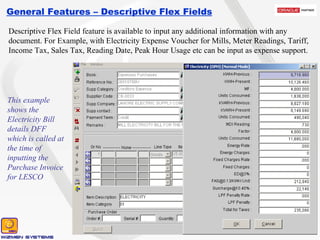
General Features – Descriptive Flex Fields Descriptive Flex Field feature is available to input any additional information with any document. For Example, with Electricity Expense Voucher for Mills, Meter Readings, Tariff, Income Tax, Sales Tax, Reading Date, Peak Hour Usage etc can be input as expense support. This example shows the Electricity Bill details DFF which is called at the time of inputting the Purchase Invoice for LESCO
General Features – Descriptive Flex Fields The additional information fed in the Descriptive Flex Fields is shown on the customized reports. These reports are highly customizable and always made on the user request The below report is showing the Electricity Bill information fed in the DFF of Purchase Invoice in previous screen
General Features – Security A very detail and tight security system is available in WIZ-ERP, this security system is centralized for all modules. Users and user groups are separately created and then users are assigned to groups
General Features – Security A very detail and tight security system is available in WIZ-ERP, this security system is centralized for all modules. Each user group is assigned with the detailed rights, which includes the form actions as well as valid structures and books for each user group
General Features – Security A very detail and tight security system is available in WIZ-ERP, this security system is centralized for all modules. Each user group may be assigned rights of segments in each structure. So we may restrict any user group from viewing, changing or deleting a specific segment in any structure
General Features – Security A very detail and tight security system is available in WIZ-ERP, this security system is centralized for all modules. If we want to Revoke/Grant any specific right to any specific user which was given/not given to him in group security, then we may do this in “Employee Exception form” which overrides the definition made in user group for that specific user
General Features – Multi Currency Purchase Invoice view showing a commission purchase invoice fed in US Dollars Voucher from this Sales Invoice is generated in US Dollars All transactional forms have the feature of multi currency in them and user may feed transaction in any defined currency, reporting is available in transactional as well as functional currency. Ledgers are updated with functional currencies
General Features – Multi Currency Sales Invoice view showing a Sales Invoice fed in US Dollars Voucher from this Sales Invoice is generated in US Dollars All transactional forms have the feature of multi currency in them and user may feed transaction in any defined currency, reporting is available in transactional as well as functional currency. Ledgers are updated with functional currencies
General Features – Offline Replication Another feature makes WIZ-ERP prominent from other local applications is the Offline Replication. At times clients’ remote sites are not directly connected to the Head Office, but at the same time they also want to operate the application on mill sites. In this scenario the offline replication feature comes into play. This feature facilitates the users to carry on their operations in the application separately in Head Office as well as Mill sites, at day end or even multiple times in a day, data may be exchanged between these sites to update the relevant databases Head Office  database Server Mill -1 database Server Mill -2 database Server Internet
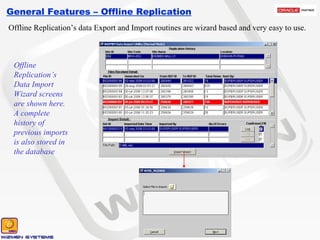
General Features – Offline Replication Offline Replication’s data Export and Import routines are wizard based and very easy to use. Offline Replication’s Data Export Wizard screens are shown here. A complete history of previous replications is also stored in the database
General Features – Offline Replication Offline Replication’s data Export and Import routines are wizard based and very easy to use. Offline Replication’s Data Import Wizard screens are shown here. A complete history of previous imports is also stored in the database
General Features – Offline Replication At the time of importing a replication file, some kind of functional conflicts may occur, these kind of issues are stored in history and user has the option to Confirm/Reject the received data. History showing a file with error There were 7 errors in the received file, error log is shown here
General Features – Authorization Electronic Authorization (Approval) of documents is a major step forward towards the paperless environment. WIZ-ERP gives you a very strong authorization module. In WIZ-ERP Authorization works in the following way Multiple Authorization teams are formed Each team may have multiple application users in them These users may be on the same level or in a hierarchy Each entry is checked on the basis of Transaction Type and Amount and then allocated to an authorization team Any of users who are on same level may approve/reject the document Once approved from the prior team the document flows down in the hierarchy
General Features – Authorization Examples of two authorization teams are given here. These both teams are defined to authorize the Purchase Orders. If PO is less than 5000 than it will be routed to Team-1 and if it is greater than or equal to 5000 then it will be routed to Team-2. Any document routed to Team-1 requires the Approval from Level-1 user and approval from any one of the Level-2 users. Team-2 require 3 approvals, one from each Level Team-1 Team-2 Amount Limit < 5000 Document = PO Approvers Lvl1. Purchaser Lvl2. Purchase Incharge Lvl2. Purchase Manager Amount Limit >= 5000 Document = PO Approvers Lvl1. Purchaser Lvl2. Purchase Incharge Lvl2. Purchase Manager Lvl3. Director – 1 Lvl3. Director – 2 Lvl3. Director – 3
General Features – Authorization Team assignment is made to Purchase Order-SS U1 book Different date ranges may have different definitions Whether to follow the sequence within a hierarchy or not Different Amount ranges may have different Authorization teams
General Features – Authorization An approved PO is shown here, in the bottom window the Authorization Track for the approval of this PO is shown.  It was approved by HO-PURCHASER, then it was approved by SP-INCHARGE and UNIT-INCHARGE, at the end it was approved by any one of the directors
General Features – Authorization A “Sent for Approval” PO is shown here, in the bottom window the Authorization Track for this PO is shown.  This PO is being sent by the DEO to the authorization team for Approval.
General Features – Audit Reports Criteria form to display the Audit Log report Audit Log Report User defined Audit Reports are available in the system. User himself defines the configuration of audit reports. Custom reports are available once the audit log is prepared in the database
General Features – Document Sequencing Flexible document sequencing is available throughout the system . User has got all the power to define his own Books and bind his own created Document Sequences with those books. These Document Sequences may be of any logical period i.e. Yearly, Quarterly, Monthly, Fortnightly, Weekly OR Daily
General Features – WIZMEN Support System To provide in-time quality services to our clients, we launched a Support system which is online 24 x 7. Our registered clients access this system via internet and post their queries/tasks in the system. Tasks fed in the system are solved on priority basis and replied via the same system. Each task is kept forever in the system and even all types of updates are sent from WSS, thus creating a kind of knowledgebase for our valued customers
General Features – WIZMEN Support System After login user views the Home page which contains All Pending Jobs of user
General Features – WIZMEN Support System User provides a very detailed information for the feeding of any new task which helps our support department to correctly identify the problem
General Features – WIZMEN Support System Multiple files can be attached with any new task for reference
General Features – WIZMEN Support System After feeding task in WSS, client has got detailed Search Options to correctly search the already fed tasks
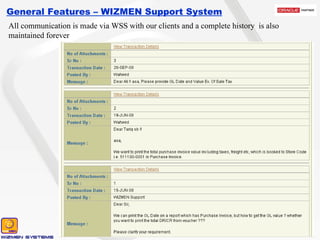
General Features – WIZMEN Support System All communication is made via WSS with our clients and a complete history  is also maintained forever
General Features – WIZMEN Support System All updates are sent to our clients via WSS and this update can be downloaded anytime by our clients
General Features – WIZMEN Support System Any task is not considered as completed until and unless client Confirms the task as completed.

Wizmen Product Overview

  • 1.
    WIZ-ERP ProductOverview         131 - Ali Block, New Garden Town, Lahore - Pakistan. Voice   # +9242-35886651 – +9242-35845570 - 71 Cell       # +92321-9416 913 Website: www.wizmen.net Email:  nadeem@wizmen.net  
  • 2.
  • 3.
    General Features –Dashboards Dashboards module is provided as a stand alone module and it has the option to be attached with any given data, it is not restricted to be attached with WIZ-ERP only Some feature of Dashboards are defined below Completely Browser based Option to vertically drill down any chart view in its hierarchy Any refresh interval can be set All views are restricted by using the security features Option to automatically e-mail any chart view User given criteria can be implemented at run time
  • 4.
    General Features –Dashboards This dashboard is showing 3 views, each view having multiple tabs, thus total of 7 reports are available
  • 5.
    General Features –Dashboards This first view is showing the Age buckets wise Receivable from Parties Drilling down any age bucket will open the Debtors Category view Drilling down any Debtors Category will open the Debtors view
  • 6.
    General Features –Dashboards This view is displaying Country wise Sales Drilling down the upper view will take you to the City Wise Sales within a Year
  • 7.
    General Features –Dashboards This view is displaying the Month wise comparison between Sales and Collection Amounts
  • 8.
    Liability side ofBalance Sheet is showing in this report General Features – Reports
  • 9.
    Asset side ofBalance Sheet is showing in this report General Features – Reports
  • 10.
    Pie Graph isshowing the individual heads extracted from the Notes used to create Balance Sheet. Once again this is totally user defined General Features – Reports
  • 11.
    General Features –Reports This Overdue Payment reminder is generated from the system
  • 12.
    General Features –Reports Receivable Bill wise Aging
  • 13.
    This report givesthe Actual OPS Product wise and Frame Type Wise. General Features – Reports
  • 14.
    This report reflectsthe actual spindle production used into the production of the product identified. General Features – Reports
  • 15.
  • 16.
    System generated YieldComparison month wise and unit wise General Features – Reports
  • 17.
    Consolidated Stock ReportGeneral Features – Reports
  • 18.
    Consolidated Stock ReportSummary General Features – Reports
  • 19.
    General Features –Key Flex Fields The most distinguished feature of WIZ-ERP in comparison to other accounting softwares is the “Key Flex Fields”. By using this feature we may define up to 10 segments and each segment may have alphanumeric code width of 25 characters. This is a very special feature and it is very widely and very comprehensively used in WIZ-ERP. Major areas where we are getting the benefits from Key Flex Fields are Chart of Account definition Items definition Inventory Locator definition Cost Center (Consumption) definition Sales Area definition Production Center definition
  • 20.
    General Features –Accounting Structure In WIZ-ERP you may have up to 10 segments in Chart of Account. Each segment has unlimited vertical hierarchy and you may choose to have multiple vertical dependency between different segments Company Unit Cost Center Account Sub Account WIZMEN Group Textile Company 1 Company 2 Weaving Company 3 Company 4 Unit 1 Unit 2 Unit 3 General Head Office Departments Accounts Computer Regional Offices KHI Office FSD Office Administration Canteen Dispensary Gardening Cost of Sales Salaries and Wages Salaries Mill Overtime Mill Daily Wages Mill Power and Fuel Electricity Mill Generator Expenses Store Consumed Current Liabilities Trade Creditors Creditors Raw Material Creditors Raw Material Creditor 1 Creditor 2 Creditor 3 Creditor 4
  • 21.
    General Features –Accounting Structure This example is showing the Accounting structure of a company and screen shots from all the 5 segments are visible in this example Company Unit Cost Center Account Sub Account
  • 22.
    General Features –Items Category Structure In WIZ-ERP you may have up to 10 segments in items category. Each segment has unlimited vertical hierarchy and you may choose to have multiple vertical dependency between different segments There is no limitation of item types in WIZ-ERP. Each item type may have different set of attributes for its detailed definition. Thus enabling the user to define each item with its own set of attributes
  • 23.
    General Features –Items Category Structure Application menu is auto formed according to the Key Flex Field Structure’s segments Screen shot of a menu which is displaying different set of attributes for Bearing and Belts. At the time of feeding a belt item, system will input the attributes defined with Belt and Bearing related attributes will be input at the time of Beating item definition Attributes attached with Label items and Masking Tape
  • 24.
    General Features –Items Category Structure Application menu is auto formed according to the Key Flex Field Structure’s segments Cotton and Yarn items may also be defined by using a set of up to 10 segments. User may store the items with as much details as he want to
  • 25.
    General Features –Cost Center Structure At the time of consumption each item is issued to a cost center and it is very important to have different set of attributes for different type of consumptions. In case of Cotton issuance, the requirement may be fulfilled with Unit and Department but in case of Store Spares sometime the details like Unit, Department, Machine Type, Mode, Machine # are also required. Examples of Store Spare Cost Center and Cotton Cost Center are shown her
  • 26.
    General Features –Reporting by Key Flex Fields Once the key flex fields are in place, you have a vast variety of reports which can be viewed with different grouping options by using the segments This month wise comparison consumption summary is showing the summary report on a consumption structure having segments of Department, Machine and Type
  • 27.
    General Features –Reporting by Key Flex Fields Once the key flex fields are in place, you have a vast variety of reports which can be viewed with different grouping options by using the segments In this criteria form for Purchase Summary, user has requested to group the report on first segment of item category structure i.e. Section, and user has not requested any filter criteria on segment values
  • 28.
    General Features –Reporting by Key Flex Fields Once the key flex fields are in place, you have a vast variety of reports which can be viewed with different grouping options by using the segments Criteria shown on last screen has generated this Purchase Summary output. Values are grouped on Section segment and individual items are shown under the Section value.
  • 29.
    General Features –Reporting by Key Flex Fields Once the key flex fields are in place, you have a vast variety of reports which can be viewed with different grouping options by using the segments In this criteria form for Purchase Summary, user has requested to group the report on two segments of item category structure i.e. Make and Brand
  • 30.
    General Features –Reporting by Key Flex Fields Once the key flex fields are in place, you have a vast variety of reports which can be viewed with different grouping options by using the segments Criteria shown on last screen has generated this Purchase Summary output. Values are first grouped on Make segment and then on the Brand segment. Make Segment Brand Segment Items
  • 31.
    General Features –Form Features All standard forms have the features of moving backward and forward to the matched with and matching documents e.g. if user is at Purchase Invoice form and that Purchase Invoice is matched with GRN then just clicking the backward navigation button user may open the GRNs which are referred on this purchase invoice. User may just click the forward navigation button to view the Payment in which this invoice is referred. Backward Navigation Forward Navigation
  • 32.
    General Features –Form Features Any form that is posting to GL has the feature of directly Posting/Un-posting from the entry form as well as viewing the voucher directly from the transaction form
  • 33.
    General Features –Descriptive Flex Fields Descriptive Flex Field feature is available to input any additional information with any document. For Example, with Electricity Expense Voucher for Mills, Meter Readings, Tariff, Income Tax, Sales Tax, Reading Date, Peak Hour Usage etc can be input as expense support. This example shows the Electricity Bill details DFF which is called at the time of inputting the Purchase Invoice for LESCO
  • 34.
    General Features –Descriptive Flex Fields The additional information fed in the Descriptive Flex Fields is shown on the customized reports. These reports are highly customizable and always made on the user request The below report is showing the Electricity Bill information fed in the DFF of Purchase Invoice in previous screen
  • 35.
    General Features –Security A very detail and tight security system is available in WIZ-ERP, this security system is centralized for all modules. Users and user groups are separately created and then users are assigned to groups
  • 36.
    General Features –Security A very detail and tight security system is available in WIZ-ERP, this security system is centralized for all modules. Each user group is assigned with the detailed rights, which includes the form actions as well as valid structures and books for each user group
  • 37.
    General Features –Security A very detail and tight security system is available in WIZ-ERP, this security system is centralized for all modules. Each user group may be assigned rights of segments in each structure. So we may restrict any user group from viewing, changing or deleting a specific segment in any structure
  • 38.
    General Features –Security A very detail and tight security system is available in WIZ-ERP, this security system is centralized for all modules. If we want to Revoke/Grant any specific right to any specific user which was given/not given to him in group security, then we may do this in “Employee Exception form” which overrides the definition made in user group for that specific user
  • 39.
    General Features –Multi Currency Purchase Invoice view showing a commission purchase invoice fed in US Dollars Voucher from this Sales Invoice is generated in US Dollars All transactional forms have the feature of multi currency in them and user may feed transaction in any defined currency, reporting is available in transactional as well as functional currency. Ledgers are updated with functional currencies
  • 40.
    General Features –Multi Currency Sales Invoice view showing a Sales Invoice fed in US Dollars Voucher from this Sales Invoice is generated in US Dollars All transactional forms have the feature of multi currency in them and user may feed transaction in any defined currency, reporting is available in transactional as well as functional currency. Ledgers are updated with functional currencies
  • 41.
    General Features –Offline Replication Another feature makes WIZ-ERP prominent from other local applications is the Offline Replication. At times clients’ remote sites are not directly connected to the Head Office, but at the same time they also want to operate the application on mill sites. In this scenario the offline replication feature comes into play. This feature facilitates the users to carry on their operations in the application separately in Head Office as well as Mill sites, at day end or even multiple times in a day, data may be exchanged between these sites to update the relevant databases Head Office database Server Mill -1 database Server Mill -2 database Server Internet
  • 42.
    General Features –Offline Replication Offline Replication’s data Export and Import routines are wizard based and very easy to use. Offline Replication’s Data Export Wizard screens are shown here. A complete history of previous replications is also stored in the database
  • 43.
    General Features –Offline Replication Offline Replication’s data Export and Import routines are wizard based and very easy to use. Offline Replication’s Data Import Wizard screens are shown here. A complete history of previous imports is also stored in the database
  • 44.
    General Features –Offline Replication At the time of importing a replication file, some kind of functional conflicts may occur, these kind of issues are stored in history and user has the option to Confirm/Reject the received data. History showing a file with error There were 7 errors in the received file, error log is shown here
  • 45.
    General Features –Authorization Electronic Authorization (Approval) of documents is a major step forward towards the paperless environment. WIZ-ERP gives you a very strong authorization module. In WIZ-ERP Authorization works in the following way Multiple Authorization teams are formed Each team may have multiple application users in them These users may be on the same level or in a hierarchy Each entry is checked on the basis of Transaction Type and Amount and then allocated to an authorization team Any of users who are on same level may approve/reject the document Once approved from the prior team the document flows down in the hierarchy
  • 46.
    General Features –Authorization Examples of two authorization teams are given here. These both teams are defined to authorize the Purchase Orders. If PO is less than 5000 than it will be routed to Team-1 and if it is greater than or equal to 5000 then it will be routed to Team-2. Any document routed to Team-1 requires the Approval from Level-1 user and approval from any one of the Level-2 users. Team-2 require 3 approvals, one from each Level Team-1 Team-2 Amount Limit < 5000 Document = PO Approvers Lvl1. Purchaser Lvl2. Purchase Incharge Lvl2. Purchase Manager Amount Limit >= 5000 Document = PO Approvers Lvl1. Purchaser Lvl2. Purchase Incharge Lvl2. Purchase Manager Lvl3. Director – 1 Lvl3. Director – 2 Lvl3. Director – 3
  • 47.
    General Features –Authorization Team assignment is made to Purchase Order-SS U1 book Different date ranges may have different definitions Whether to follow the sequence within a hierarchy or not Different Amount ranges may have different Authorization teams
  • 48.
    General Features –Authorization An approved PO is shown here, in the bottom window the Authorization Track for the approval of this PO is shown. It was approved by HO-PURCHASER, then it was approved by SP-INCHARGE and UNIT-INCHARGE, at the end it was approved by any one of the directors
  • 49.
    General Features –Authorization A “Sent for Approval” PO is shown here, in the bottom window the Authorization Track for this PO is shown. This PO is being sent by the DEO to the authorization team for Approval.
  • 50.
    General Features –Audit Reports Criteria form to display the Audit Log report Audit Log Report User defined Audit Reports are available in the system. User himself defines the configuration of audit reports. Custom reports are available once the audit log is prepared in the database
  • 51.
    General Features –Document Sequencing Flexible document sequencing is available throughout the system . User has got all the power to define his own Books and bind his own created Document Sequences with those books. These Document Sequences may be of any logical period i.e. Yearly, Quarterly, Monthly, Fortnightly, Weekly OR Daily
  • 52.
    General Features –WIZMEN Support System To provide in-time quality services to our clients, we launched a Support system which is online 24 x 7. Our registered clients access this system via internet and post their queries/tasks in the system. Tasks fed in the system are solved on priority basis and replied via the same system. Each task is kept forever in the system and even all types of updates are sent from WSS, thus creating a kind of knowledgebase for our valued customers
  • 53.
    General Features –WIZMEN Support System After login user views the Home page which contains All Pending Jobs of user
  • 54.
    General Features –WIZMEN Support System User provides a very detailed information for the feeding of any new task which helps our support department to correctly identify the problem
  • 55.
    General Features –WIZMEN Support System Multiple files can be attached with any new task for reference
  • 56.
    General Features –WIZMEN Support System After feeding task in WSS, client has got detailed Search Options to correctly search the already fed tasks
  • 57.
    General Features –WIZMEN Support System All communication is made via WSS with our clients and a complete history is also maintained forever
  • 58.
    General Features –WIZMEN Support System All updates are sent to our clients via WSS and this update can be downloaded anytime by our clients
  • 59.
    General Features –WIZMEN Support System Any task is not considered as completed until and unless client Confirms the task as completed.