

WIZ-ERP  General Ledger Features           131 - Ali Block, New Garden Town, Lahore - Pakistan.   Voice   # +9242-35886651 – +9242-35845570 - 71 Cell       # +92321-9416 913  Website: www.wizmen.net Email:   nadeem@wizmen.net  
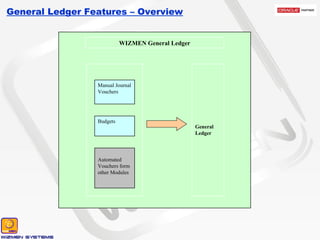
General Ledger Features – Overview Manual Journal Vouchers Budgets Automated Vouchers form other Modules General Ledger WIZMEN General Ledger
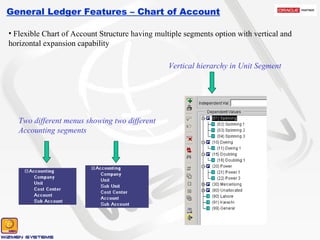
General Ledger Features – Chart of Account Flexible Chart of Account Structure having multiple segments option with vertical and horizontal expansion capability Two different menus showing two different Accounting segments Vertical hierarchy in Unit Segment
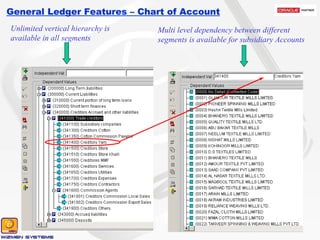
General Ledger Features – Chart of Account Unlimited vertical hierarchy is available in all segments Multi level dependency between different segments is available for subsidiary Accounts
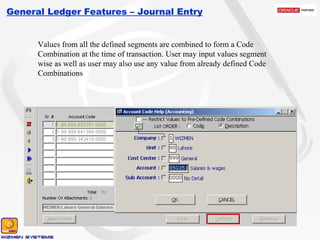
General Ledger Features – Journal Entry Values from all the defined segments are combined to form a Code Combination at the time of transaction. User may input values segment wise as well as user may also use any value from already defined Code Combinations
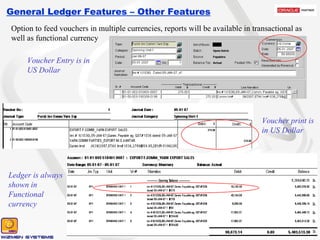
General Ledger Features – Other Features Option to feed vouchers in multiple currencies, reports will be available in transactional as well as functional currency Voucher Entry is in US Dollar Voucher print is in US Dollar Ledger is always shown in Functional currency
General Ledger Features – Other Features Option to attach document images with vouchers as supporting evidences Provision to setup Recurring Transactions Option to enter Statistical (Quantitative) Voucher
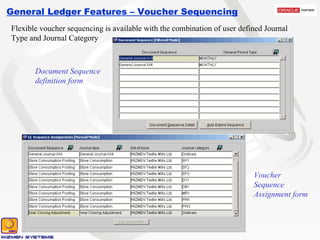
General Ledger Features – Voucher Sequencing Flexible voucher sequencing is available with the combination of user defined Journal Type and Journal Category Document Sequence definition form Voucher Sequence Assignment form
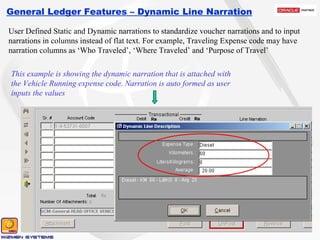
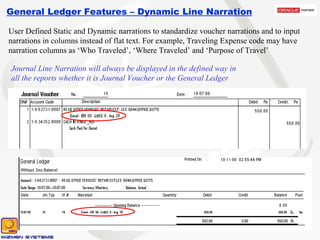
General Ledger Features – Dynamic Line Narration User Defined Static and Dynamic narrations to standardize voucher narrations and to input narrations in columns instead of flat text. For example, Traveling Expense code may have narration columns as ‘Who Traveled’, ‘Where Traveled’ and ‘Purpose of Travel’ This example is showing the dynamic narration that is attached with the Vehicle Running expense code. Narration is auto formed as user inputs the values
General Ledger Features – Dynamic Line Narration User Defined Static and Dynamic narrations to standardize voucher narrations and to input narrations in columns instead of flat text. For example, Traveling Expense code may have narration columns as ‘Who Traveled’, ‘Where Traveled’ and ‘Purpose of Travel’ Journal Line Narration will always be displayed in the defined way in all the reports whether it is Journal Voucher or the General Ledger
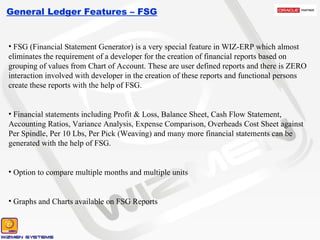
General Ledger Features – FSG FSG (Financial Statement Generator) is a very special feature in WIZ-ERP which almost eliminates the requirement of a developer for the creation of financial reports based on grouping of values from Chart of Account. These are user defined reports and there is ZERO interaction involved with developer in the creation of these reports and functional persons create these reports with the help of FSG. Financial statements including Profit & Loss, Balance Sheet, Cash Flow Statement, Accounting Ratios, Variance Analysis, Expense Comparison, Overheads Cost Sheet against Per Spindle, Per 10 Lbs, Per Pick (Weaving) and many more financial statements can be generated with the help of FSG. Option to compare multiple months and multiple units Graphs and Charts available on FSG Reports
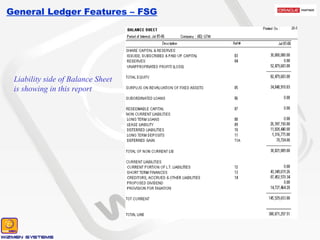
General Ledger Features – FSG Liability side of Balance Sheet is showing in this report
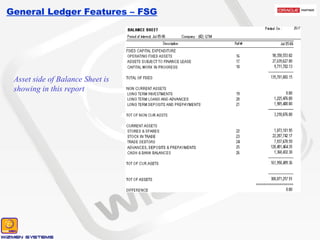
General Ledger Features – FSG Asset side of Balance Sheet is showing in this report
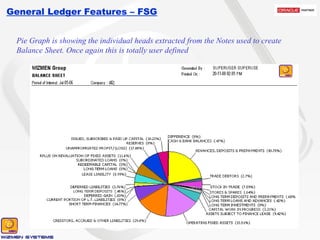
General Ledger Features – FSG Pie Graph is showing the individual heads extracted from the Notes used to create Balance Sheet. Once again this is totally user defined
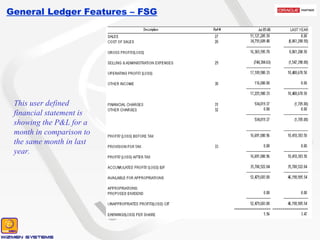
General Ledger Features – FSG This user defined financial statement is showing the P&L for a month in comparison to the same month in last year.
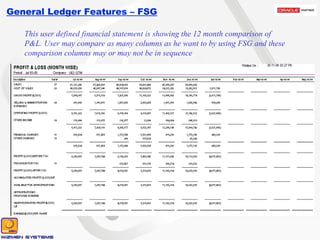
General Ledger Features – FSG This user defined financial statement is showing the 12 month comparison of P&L. User may compare as many columns as he want to by using FSG and these comparison columns may or may not be in sequence
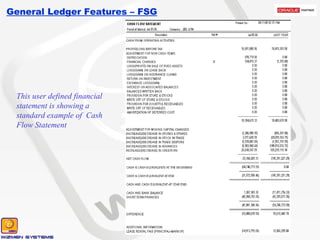
General Ledger Features – FSG This user defined financial statement is showing a standard example of  Cash Flow Statement
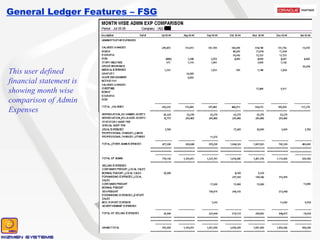
General Ledger Features – FSG This user defined financial statement is showing month wise comparison of Admin Expenses
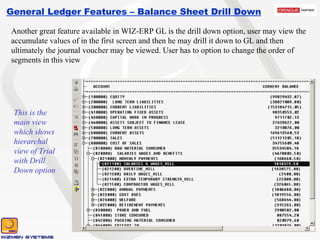
General Ledger Features – Balance Sheet Drill Down Another great feature available in WIZ-ERP GL is the drill down option, user may view the accumulate values of in the first screen and then he may drill it down to GL and then ultimately the journal voucher may be viewed. User has to option to change the order of segments in this view This is the main view which shows hierarchal view of Trial with Drill Down option
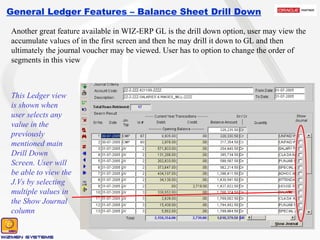
General Ledger Features – Balance Sheet Drill Down Another great feature available in WIZ-ERP GL is the drill down option, user may view the accumulate values of in the first screen and then he may drill it down to GL and then ultimately the journal voucher may be viewed. User has to option to change the order of segments in this view This Ledger view is shown when user selects any value in the previously mentioned main Drill Down Screen. User will be able to view the J.Vs by selecting multiple values in the Show Journal column
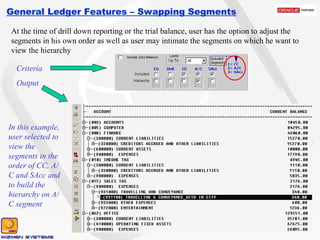
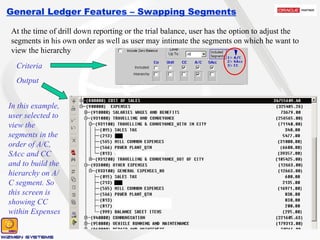
General Ledger Features – Swapping Segments At the time of drill down reporting or the trial balance, user has the option to adjust the segments in his own order as well as user may intimate the segments on which he want to view the hierarchy In this example, user selected to view the segments in the order of CC, A/C and SAcc and to build the hierarchy on A/C segment Criteria Output
General Ledger Features – Swapping Segments At the time of drill down reporting or the trial balance, user has the option to adjust the segments in his own order as well as user may intimate the segments on which he want to view the hierarchy In this example, user selected to view the segments in the order of A/C, SAcc and CC and to build the hierarchy on A/C segment. So this screen is showing CC within Expenses Criteria Output
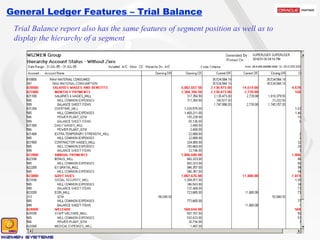
General Ledger Features – Trial Balance Trial Balance report also has the same features of segment position as well as to display the hierarchy of a segment
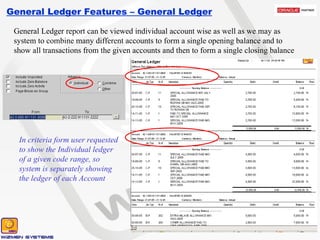
General Ledger Features – General Ledger General Ledger report can be viewed individual account wise as well as we may as system to combine many different accounts to form a single opening balance and to show all transactions from the given accounts and then to form a single closing balance In criteria form user requested to show the Individual ledger of a given code range, so system is separately showing the ledger of each Account
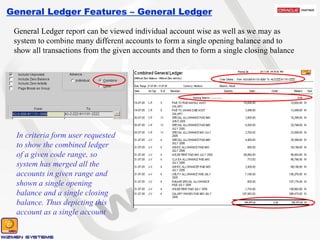
General Ledger Features – General Ledger General Ledger report can be viewed individual account wise as well as we may as system to combine many different accounts to form a single opening balance and to show all transactions from the given accounts and then to form a single closing balance In criteria form user requested to show the combined ledger of a given code range, so system has merged all the accounts in given range and shown a single opening balance and a single closing balance. Thus depicting this account as a single account

Wizmen GL Features

  • 1.
    WIZ-ERP GeneralLedger Features         131 - Ali Block, New Garden Town, Lahore - Pakistan. Voice   # +9242-35886651 – +9242-35845570 - 71 Cell       # +92321-9416 913 Website: www.wizmen.net Email:  nadeem@wizmen.net  
  • 2.
    General Ledger Features– Overview Manual Journal Vouchers Budgets Automated Vouchers form other Modules General Ledger WIZMEN General Ledger
  • 3.
    General Ledger Features– Chart of Account Flexible Chart of Account Structure having multiple segments option with vertical and horizontal expansion capability Two different menus showing two different Accounting segments Vertical hierarchy in Unit Segment
  • 4.
    General Ledger Features– Chart of Account Unlimited vertical hierarchy is available in all segments Multi level dependency between different segments is available for subsidiary Accounts
  • 5.
    General Ledger Features– Journal Entry Values from all the defined segments are combined to form a Code Combination at the time of transaction. User may input values segment wise as well as user may also use any value from already defined Code Combinations
  • 6.
    General Ledger Features– Other Features Option to feed vouchers in multiple currencies, reports will be available in transactional as well as functional currency Voucher Entry is in US Dollar Voucher print is in US Dollar Ledger is always shown in Functional currency
  • 7.
    General Ledger Features– Other Features Option to attach document images with vouchers as supporting evidences Provision to setup Recurring Transactions Option to enter Statistical (Quantitative) Voucher
  • 8.
    General Ledger Features– Voucher Sequencing Flexible voucher sequencing is available with the combination of user defined Journal Type and Journal Category Document Sequence definition form Voucher Sequence Assignment form
  • 9.
    General Ledger Features– Dynamic Line Narration User Defined Static and Dynamic narrations to standardize voucher narrations and to input narrations in columns instead of flat text. For example, Traveling Expense code may have narration columns as ‘Who Traveled’, ‘Where Traveled’ and ‘Purpose of Travel’ This example is showing the dynamic narration that is attached with the Vehicle Running expense code. Narration is auto formed as user inputs the values
  • 10.
    General Ledger Features– Dynamic Line Narration User Defined Static and Dynamic narrations to standardize voucher narrations and to input narrations in columns instead of flat text. For example, Traveling Expense code may have narration columns as ‘Who Traveled’, ‘Where Traveled’ and ‘Purpose of Travel’ Journal Line Narration will always be displayed in the defined way in all the reports whether it is Journal Voucher or the General Ledger
  • 11.
    General Ledger Features– FSG FSG (Financial Statement Generator) is a very special feature in WIZ-ERP which almost eliminates the requirement of a developer for the creation of financial reports based on grouping of values from Chart of Account. These are user defined reports and there is ZERO interaction involved with developer in the creation of these reports and functional persons create these reports with the help of FSG. Financial statements including Profit & Loss, Balance Sheet, Cash Flow Statement, Accounting Ratios, Variance Analysis, Expense Comparison, Overheads Cost Sheet against Per Spindle, Per 10 Lbs, Per Pick (Weaving) and many more financial statements can be generated with the help of FSG. Option to compare multiple months and multiple units Graphs and Charts available on FSG Reports
  • 12.
    General Ledger Features– FSG Liability side of Balance Sheet is showing in this report
  • 13.
    General Ledger Features– FSG Asset side of Balance Sheet is showing in this report
  • 14.
    General Ledger Features– FSG Pie Graph is showing the individual heads extracted from the Notes used to create Balance Sheet. Once again this is totally user defined
  • 15.
    General Ledger Features– FSG This user defined financial statement is showing the P&L for a month in comparison to the same month in last year.
  • 16.
    General Ledger Features– FSG This user defined financial statement is showing the 12 month comparison of P&L. User may compare as many columns as he want to by using FSG and these comparison columns may or may not be in sequence
  • 17.
    General Ledger Features– FSG This user defined financial statement is showing a standard example of Cash Flow Statement
  • 18.
    General Ledger Features– FSG This user defined financial statement is showing month wise comparison of Admin Expenses
  • 19.
    General Ledger Features– Balance Sheet Drill Down Another great feature available in WIZ-ERP GL is the drill down option, user may view the accumulate values of in the first screen and then he may drill it down to GL and then ultimately the journal voucher may be viewed. User has to option to change the order of segments in this view This is the main view which shows hierarchal view of Trial with Drill Down option
  • 20.
    General Ledger Features– Balance Sheet Drill Down Another great feature available in WIZ-ERP GL is the drill down option, user may view the accumulate values of in the first screen and then he may drill it down to GL and then ultimately the journal voucher may be viewed. User has to option to change the order of segments in this view This Ledger view is shown when user selects any value in the previously mentioned main Drill Down Screen. User will be able to view the J.Vs by selecting multiple values in the Show Journal column
  • 21.
    General Ledger Features– Swapping Segments At the time of drill down reporting or the trial balance, user has the option to adjust the segments in his own order as well as user may intimate the segments on which he want to view the hierarchy In this example, user selected to view the segments in the order of CC, A/C and SAcc and to build the hierarchy on A/C segment Criteria Output
  • 22.
    General Ledger Features– Swapping Segments At the time of drill down reporting or the trial balance, user has the option to adjust the segments in his own order as well as user may intimate the segments on which he want to view the hierarchy In this example, user selected to view the segments in the order of A/C, SAcc and CC and to build the hierarchy on A/C segment. So this screen is showing CC within Expenses Criteria Output
  • 23.
    General Ledger Features– Trial Balance Trial Balance report also has the same features of segment position as well as to display the hierarchy of a segment
  • 24.
    General Ledger Features– General Ledger General Ledger report can be viewed individual account wise as well as we may as system to combine many different accounts to form a single opening balance and to show all transactions from the given accounts and then to form a single closing balance In criteria form user requested to show the Individual ledger of a given code range, so system is separately showing the ledger of each Account
  • 25.
    General Ledger Features– General Ledger General Ledger report can be viewed individual account wise as well as we may as system to combine many different accounts to form a single opening balance and to show all transactions from the given accounts and then to form a single closing balance In criteria form user requested to show the combined ledger of a given code range, so system has merged all the accounts in given range and shown a single opening balance and a single closing balance. Thus depicting this account as a single account