Creational
Patterns
Michael Heron
Introduction
 Today we introduce a small suite of design
patterns that fall under the family known as
creational.
 They are used to create objects, or manage the
object creation process in some way.
 For some applications and contexts, it’s not
appropriate or useful to simply instantiate
objects with new whenever you want to.
 Creational patterns provide a cohesive
interface when these circumstances arise.
Creational Patterns
 There are three creational patterns we will
discuss during this lecture.
 The Factory
 The Abstract Factory
 The Singleton
 We will also discuss specific examples of
use for each.
Why Use A Creational Pattern?
 Some situations are more complex than
simple instantiation can handle.
 Imagine for example you want to create an
entirely ‘skinnable’ look and feel for an
application.
 Some situations have complex consequences
if objects aren’t instantiated in the right way
or the right order.
 Some situations require that only one object is
ever created.
The Factory Pattern
 The Factory is used to provide a consistent
interface to setup properly configured
objects.
 You pass in some configuration details
 Out comes a properly configured object.
 At its simplest, it can be represented by a
single class containing a single static method.
 More complex factories exist, dealing with more
complex situations.
The Factory Design Pattern
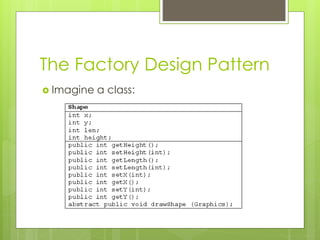
 Imagine a class:
The Factory Design Pattern
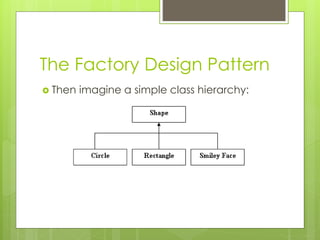
 Then imagine a simple class hierarchy:
The Factory Design Pattern
 Now imagine you are creating a simple
drawing package.
 User selects a shape
 User clicks on the screen
 Application draws the shape.
 This can all be hard-coded directly into an
application.
 This suffers from scale and readability issues.
The Factory Design Pattern
 Instead, we use a factory to generate specific
objects, through the power of polymorphism.
 Polymorphism is key to the way a Factory works.
 The system that drives a factory is that all
these shapes have a common parent class.
 Thus, all we need is the Shape object that is
represented by specific objects.
 The objects themselves manage the
complexity of the drawing process.
The Factory Design Pattern
public class ShapeFactory {
public Shape getShape (String shape, int x, int y, int len, int ht, Color col) {
Shape temp = null;
if (shape.equals ("Circle")) {
temp = new Circle (x, y, len, ht);
}
else if (shape.equals ("Rectangle")) {
temp = new Rectangle (x, y, len, ht);
}
else if (shape.equals ("Face")) {
temp = new Face (x, y, len, ht);
}
temp.setDrawingColor (col);
return temp;
}
}
Another Example
 Let’s say we have a file that we have
created in our application.
 We now want to export it to a different file
format.
 Each file format has its own peculiarities.
 We could hard-code this into our
application…
 … or we could use a factory to get the
object that can handle the export.
The Factory Design Pattern
public String doConversion (string format, string file) {
ConversionObject c;
c = ConversionFactory.getConversionObject (format);
file = c.covert (file);
return file;
}
myFile = doConversion (“unicode”, myFile);
myFile = doConversion (“ascii”, myFile);
The Factory Design Pattern
 The Factory Pattern reduces hard-coded
complexity.
 We don’t need to worry about combinatorial
explosion.
 The Factory Pattern properly devolves responsibility
to individual objects.
 We don’t have a draw method in our application,
we have a draw method in each specific shape.
 However, the Factory pattern by itself is limited to
certain simple contexts.
 For more complicated situations, we need more.
The Abstract Factory
 The next level of abstraction is the
Abstract Factory.
 This is a Factory for factories.
 Imagine here we have slightly more
complicated situations.
 Designing an interface that allows for
different themes.
 A file conversion application that must
allow for different versions of different
formats.
The Abstract Factory
 We could handle these with a factory by
itself.
 This introduces the same combinatorial
problems that the factory is designed to resolve.
 A simple rule to remember is – coding
combinations is usually bad design.
 Bad design causes trouble later on.
 When doing anything more substantial than
simple ‘proof of concept’ applications.
Bad Design
public Component getComponent (String type, String theme) {
Component guiComponent;
if (theme.equals ("swing")) {
if (type.equals ("button")) {
guiComponent = new JButton ();
}
else if (type.equals ("label")) {
guiComponent = new JLabel();
}
}
else if (theme.equals ("awt")) {
if (type.equals ("button")) {
guiComponent = new Button ();
}
else if (type.equals ("label")) {
guiComponent = new Label();
}
}
return guiComponent;
}
Good Design
 Good Design in this case involves creating
one factory that creates the right kind of
factory for the components.
 We have a SwingFactory and an AwtFactory.
 That factory generates the appropriate
components.
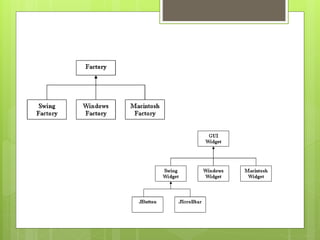
 This requires a somewhat more complicated
class structure.
 Each Factory must inherit from a common base
Good Design
Abstract Factory
Implementation
public class AbstractFactory {
public static Factory getFactory (string look) {
Factory temp;
if (look.equals ("windows")) {
temp = new WindowsFactory();
}
else if (look.equals ("swing")) {
temp = new SwingFactory();
}
else if (look.equals ("macintosh")) {
temp = new MacintoshFactory();
}
return temp;
}
}
Factory Implementation
public class SwingFactory extends Factory {
public GuiWidget getWidget (string type) {
SwingWidget temp = null;
if (type.equals ("button")) {
temp = new JButton();
}
else if (type.equals ("scrollbar")) {
temp = new JScrollbar();
}
return temp;
}
abstract class Factory {
abstract GuiWidget getWidget (String type);
}
The Consequence
 Entirely new suites of themes can be
added to this system without risking
combinatorial explosion.
 The ‘operational’ code is also much tighter
and more focused.
Factory myFactory = AbstractFactory.getFactory ("swing");
GUIWidget myWidget = myFactory.getWidget ("button");
The Singleton
 The Factory and Abstract Factory handle
structural creation issues.
 They fix several aspects of bad design with
regards to creating objects.
 The Singleton is designed to increase data
consistency.
 One of the problems that must be managed
with object orientation is inter-object
communication.
 The way this is often done is by giving each
object its own instantiations of other objects.
The Singleton
 This is fine in most situations.
 However, when dealing with objects that
contain ‘live data’, it becomes
problematic.
 Each object has its own copy of the data.
 That’s bad voodoo, man.
 It would be much better if all objects had
access to the same copy of the data.
 That is hard to manage effectively.
The Singleton
 The Singleton pattern resolves this by ensuring a
single interface to the creation of an object.
 Objects cannot be created with new, they must
be created through a method.
 This method is responsible for ensuring only one live
version of an object.
 If one exists, it sends that out.
 If it doesn’t, it creates it and then sends it out.
 The pattern is very simple.
 But offers great improvements in data consistency.
The Singleton
public class Singleton {
private Singleton keepItSafe;
private Singleton() {
// Private constructor prevents external instantiation.
}
public static Singleton getInstance() {
if (keepItSafe == null) {
keepItSafe = new Singleton();
}
return keepItSafe;
}
}
The Singleton
 There are various other ways of implementing
the singleton.
 As there are other ways of implementing any
design pattern.
 One way is to keep a static counter of how
many instances have been created.
 For singleton, if the counter is 1 you don’t allow
new objects.
 The Multiton pattern keeps an internal hash
map of instances.
 Allowing only newly keyed instantiations.
Summary
 Creational Patterns manage the complexity
of object instantiations.
 They make it easier to manage the
combinatorial explosion that comes along with
certain kinds of object creation schemes.
 The Factory allows for the creation of
properly configured objects.
 The Abstract Factory is a factory for factories.
 The Singleton ensures data consistency by
restricting instantiation of objects.

PATTERNS02 - Creational Design Patterns

  • 1.
  • 2.
    Introduction  Today weintroduce a small suite of design patterns that fall under the family known as creational.  They are used to create objects, or manage the object creation process in some way.  For some applications and contexts, it’s not appropriate or useful to simply instantiate objects with new whenever you want to.  Creational patterns provide a cohesive interface when these circumstances arise.
  • 3.
    Creational Patterns  Thereare three creational patterns we will discuss during this lecture.  The Factory  The Abstract Factory  The Singleton  We will also discuss specific examples of use for each.
  • 4.
    Why Use ACreational Pattern?  Some situations are more complex than simple instantiation can handle.  Imagine for example you want to create an entirely ‘skinnable’ look and feel for an application.  Some situations have complex consequences if objects aren’t instantiated in the right way or the right order.  Some situations require that only one object is ever created.
  • 5.
    The Factory Pattern The Factory is used to provide a consistent interface to setup properly configured objects.  You pass in some configuration details  Out comes a properly configured object.  At its simplest, it can be represented by a single class containing a single static method.  More complex factories exist, dealing with more complex situations.
  • 6.
    The Factory DesignPattern  Imagine a class:
  • 7.
    The Factory DesignPattern  Then imagine a simple class hierarchy:
  • 8.
    The Factory DesignPattern  Now imagine you are creating a simple drawing package.  User selects a shape  User clicks on the screen  Application draws the shape.  This can all be hard-coded directly into an application.  This suffers from scale and readability issues.
  • 9.
    The Factory DesignPattern  Instead, we use a factory to generate specific objects, through the power of polymorphism.  Polymorphism is key to the way a Factory works.  The system that drives a factory is that all these shapes have a common parent class.  Thus, all we need is the Shape object that is represented by specific objects.  The objects themselves manage the complexity of the drawing process.
  • 10.
    The Factory DesignPattern public class ShapeFactory { public Shape getShape (String shape, int x, int y, int len, int ht, Color col) { Shape temp = null; if (shape.equals ("Circle")) { temp = new Circle (x, y, len, ht); } else if (shape.equals ("Rectangle")) { temp = new Rectangle (x, y, len, ht); } else if (shape.equals ("Face")) { temp = new Face (x, y, len, ht); } temp.setDrawingColor (col); return temp; } }
  • 11.
    Another Example  Let’ssay we have a file that we have created in our application.  We now want to export it to a different file format.  Each file format has its own peculiarities.  We could hard-code this into our application…  … or we could use a factory to get the object that can handle the export.
  • 12.
    The Factory DesignPattern public String doConversion (string format, string file) { ConversionObject c; c = ConversionFactory.getConversionObject (format); file = c.covert (file); return file; } myFile = doConversion (“unicode”, myFile); myFile = doConversion (“ascii”, myFile);
  • 13.
    The Factory DesignPattern  The Factory Pattern reduces hard-coded complexity.  We don’t need to worry about combinatorial explosion.  The Factory Pattern properly devolves responsibility to individual objects.  We don’t have a draw method in our application, we have a draw method in each specific shape.  However, the Factory pattern by itself is limited to certain simple contexts.  For more complicated situations, we need more.
  • 14.
    The Abstract Factory The next level of abstraction is the Abstract Factory.  This is a Factory for factories.  Imagine here we have slightly more complicated situations.  Designing an interface that allows for different themes.  A file conversion application that must allow for different versions of different formats.
  • 15.
    The Abstract Factory We could handle these with a factory by itself.  This introduces the same combinatorial problems that the factory is designed to resolve.  A simple rule to remember is – coding combinations is usually bad design.  Bad design causes trouble later on.  When doing anything more substantial than simple ‘proof of concept’ applications.
  • 16.
    Bad Design public ComponentgetComponent (String type, String theme) { Component guiComponent; if (theme.equals ("swing")) { if (type.equals ("button")) { guiComponent = new JButton (); } else if (type.equals ("label")) { guiComponent = new JLabel(); } } else if (theme.equals ("awt")) { if (type.equals ("button")) { guiComponent = new Button (); } else if (type.equals ("label")) { guiComponent = new Label(); } } return guiComponent; }
  • 17.
    Good Design  GoodDesign in this case involves creating one factory that creates the right kind of factory for the components.  We have a SwingFactory and an AwtFactory.  That factory generates the appropriate components.  This requires a somewhat more complicated class structure.  Each Factory must inherit from a common base
  • 18.
  • 19.
    Abstract Factory Implementation public classAbstractFactory { public static Factory getFactory (string look) { Factory temp; if (look.equals ("windows")) { temp = new WindowsFactory(); } else if (look.equals ("swing")) { temp = new SwingFactory(); } else if (look.equals ("macintosh")) { temp = new MacintoshFactory(); } return temp; } }
  • 20.
    Factory Implementation public classSwingFactory extends Factory { public GuiWidget getWidget (string type) { SwingWidget temp = null; if (type.equals ("button")) { temp = new JButton(); } else if (type.equals ("scrollbar")) { temp = new JScrollbar(); } return temp; } abstract class Factory { abstract GuiWidget getWidget (String type); }
  • 21.
    The Consequence  Entirelynew suites of themes can be added to this system without risking combinatorial explosion.  The ‘operational’ code is also much tighter and more focused. Factory myFactory = AbstractFactory.getFactory ("swing"); GUIWidget myWidget = myFactory.getWidget ("button");
  • 22.
    The Singleton  TheFactory and Abstract Factory handle structural creation issues.  They fix several aspects of bad design with regards to creating objects.  The Singleton is designed to increase data consistency.  One of the problems that must be managed with object orientation is inter-object communication.  The way this is often done is by giving each object its own instantiations of other objects.
  • 23.
    The Singleton  Thisis fine in most situations.  However, when dealing with objects that contain ‘live data’, it becomes problematic.  Each object has its own copy of the data.  That’s bad voodoo, man.  It would be much better if all objects had access to the same copy of the data.  That is hard to manage effectively.
  • 24.
    The Singleton  TheSingleton pattern resolves this by ensuring a single interface to the creation of an object.  Objects cannot be created with new, they must be created through a method.  This method is responsible for ensuring only one live version of an object.  If one exists, it sends that out.  If it doesn’t, it creates it and then sends it out.  The pattern is very simple.  But offers great improvements in data consistency.
  • 25.
    The Singleton public classSingleton { private Singleton keepItSafe; private Singleton() { // Private constructor prevents external instantiation. } public static Singleton getInstance() { if (keepItSafe == null) { keepItSafe = new Singleton(); } return keepItSafe; } }
  • 26.
    The Singleton  Thereare various other ways of implementing the singleton.  As there are other ways of implementing any design pattern.  One way is to keep a static counter of how many instances have been created.  For singleton, if the counter is 1 you don’t allow new objects.  The Multiton pattern keeps an internal hash map of instances.  Allowing only newly keyed instantiations.
  • 27.
    Summary  Creational Patternsmanage the complexity of object instantiations.  They make it easier to manage the combinatorial explosion that comes along with certain kinds of object creation schemes.  The Factory allows for the creation of properly configured objects.  The Abstract Factory is a factory for factories.  The Singleton ensures data consistency by restricting instantiation of objects.