Instruction Set
Architectures: Talking to
the Machine
1
The Architecture Question
• How do we build computer from contemporary
silicon device technology that executes general-
purpose programs quickly, efficiently, and at
reasonable cost?
• i.e. How do we build the computer on your
desk.
2
In the beginning...
• Physical configuration specifies the computation
3
The Difference Engine ENIAC
The Stored Program Computer
• The program is data
• i.e., it is a sequence of numbers that machine interprets
• A very elegant idea
• The same technologies can store and manipulate
programs and data
• Programs can manipulate programs.
4
The Stored Program Computer
• A very simple model
• Several questions
• How are program
represented?
• How do we get
algorithms out of our
brains and into that
representation?
• How does the the
computer interpret a
program?
5
Processor IO
Memory
Data Program
Representing Programs
• We need some basic building blocks -- call them
“instructions”
• What does “execute a program” mean?
• What instructions do we need?
• What should instructions look like?
• Is it enough to just specify the instructions?
• How complex should an instruction be?
6
Program Execution
7
Instruction
Fetch
Instruction
Decode
Operand
Fetch
Execute
Result
Store
Next
Instruction
Read instruction from program storage (mem[PC])
Determine required actions and instruction size
Locate and obtain operand data
Compute result value
Deposit results in storage for later use
Determine successor instruction (i.e. compute next PC).
Usually this mean PC = PC + <instruction size in bytes>
• This is the algorithm for a stored-program
computer
• The Program Counter (PC) is the key
Motivating Code segments
• a = b + c;
• a = b + c + d;
• a = b & c;
• a = b + 4;
• a = b - (c * (d/2) - 4);
• if (a) b = c;
• if (a == 4) b = c;
• while (a != 0) a--;
• a = 0xDEADBEEF;
• a = foo[4];
• foo[4] = a;
• a = foo.bar;
• a = a + b + c + d +... +z;
• a = foo(b); -- next class
8
What instructions do we
need?
• Basic operations are a good choice.
• Motivated by the programs people write.
• Math: Add, subtract, multiply, bit-wise operations
• Control: branches, jumps, and function calls.
• Data access: Load and store.
• The exact set of operations depends on many,
many things
• Application domain, hardware trade-offs, performance,
power, complexity requirements.
• You will see these trade-offs first hand in the ISA project
and in 141L.
9
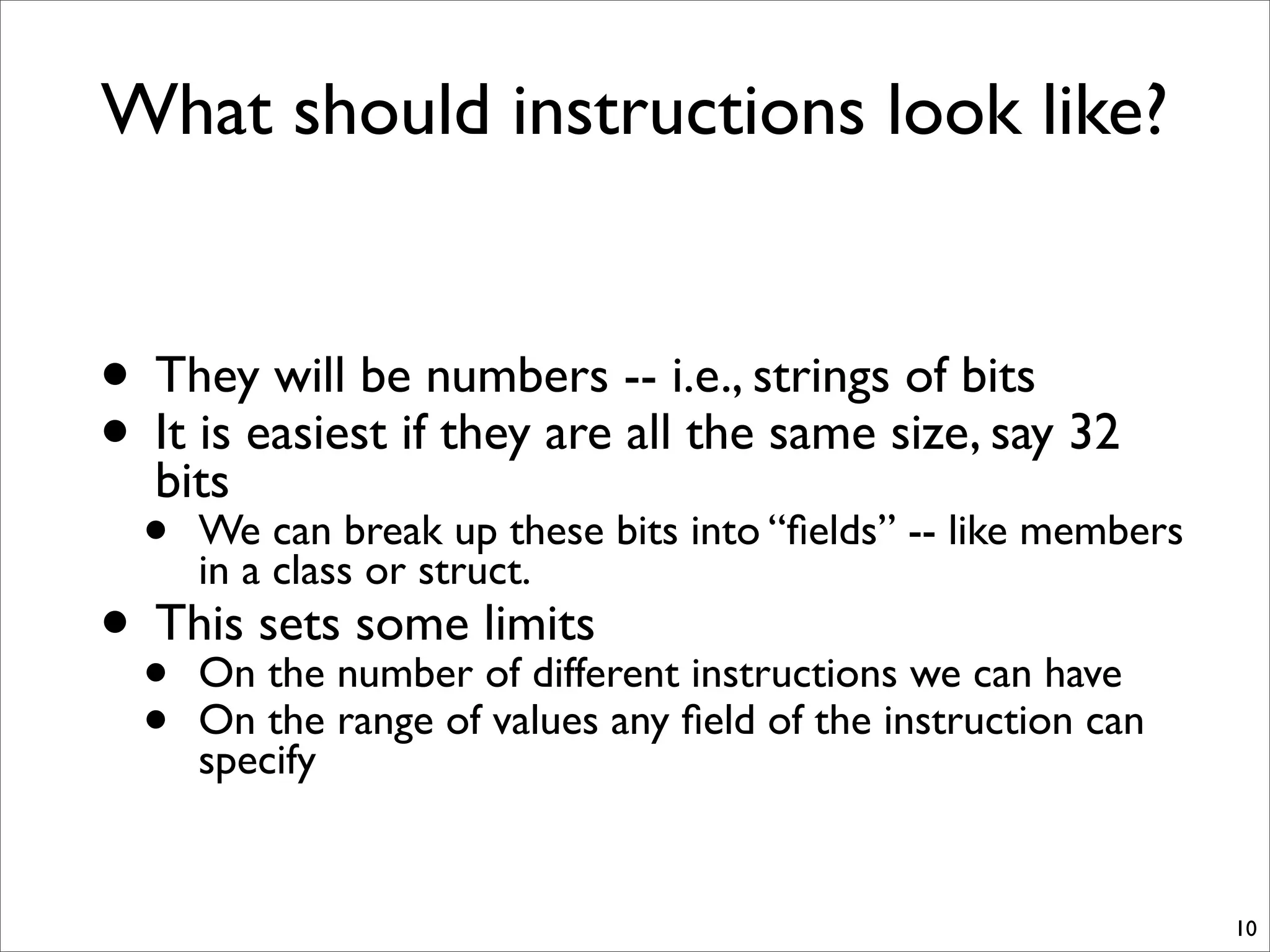
What should instructions look like?
• They will be numbers -- i.e., strings of bits
• It is easiest if they are all the same size, say 32
bits
• We can break up these bits into “fields” -- like members
in a class or struct.
• This sets some limits
• On the number of different instructions we can have
• On the range of values any field of the instruction can
specify
10
Is specifying the instructions sufficient?
• No! We also must what the instructions operate on.
• This is called the “Architectural State” of the
machine.
• Registers -- a few named data values that instructions can
operate on
• Memory -- a much larger array of bytes that is available for
storing values.
• How big is memory? 32 bits or 64 bits of addressing.
• 64 is the standard today for desktops and larger.
• 32 for phones and PDAs
• Possibly fewer for embedded processors
• We also need to specify semantics of function calls
• The “Stack Discipline,” “Calling convention,” or “Application
binary interface (ABI)”.
11
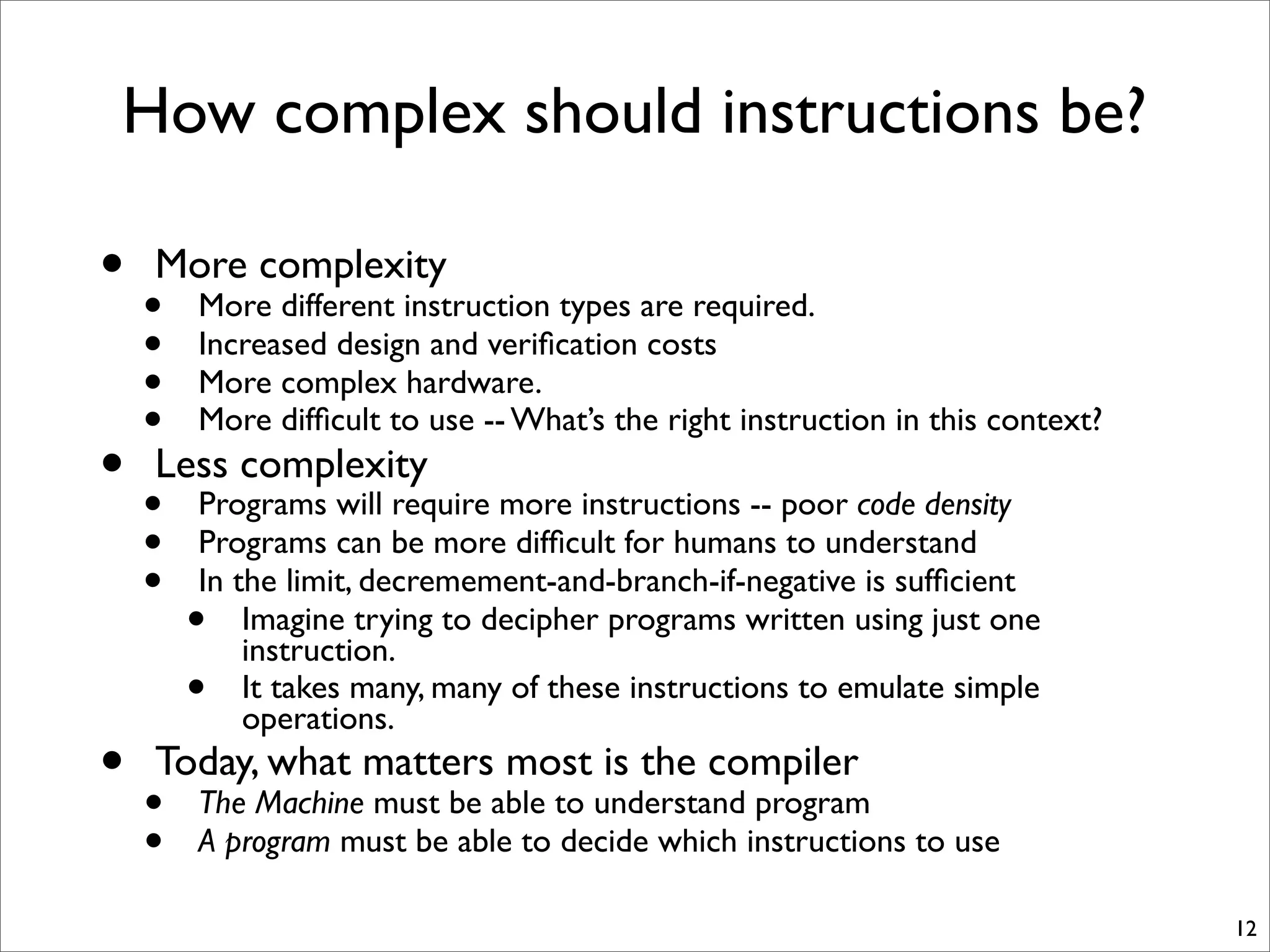
How complex should instructions be?
• More complexity
• More different instruction types are required.
• Increased design and verification costs
• More complex hardware.
• More difficult to use -- What’s the right instruction in this context?
• Less complexity
• Programs will require more instructions -- poor code density
• Programs can be more difficult for humans to understand
• In the limit, decremement-and-branch-if-negative is sufficient
• Imagine trying to decipher programs written using just one
instruction.
• It takes many, many of these instructions to emulate simple
operations.
• Today, what matters most is the compiler
• The Machine must be able to understand program
• A program must be able to decide which instructions to use
12
Big “A” Architecture
• The Architecture is a contract between the
hardware and the software.
• The hardware defines a set of operations, their
semantics, and rules for their use.
• The software agrees to follow these rules.
• The hardware can implement those rules IN ANYWAY IT
CHOOSES!
• Directly in hardware
• Via a software layer
• Via a trained monkey with a pen and paper.
• This is a classic interface -- they are everywhere
in computer science.
• “Interface,” “Separation of concerns,” “API,” “Standard,”
• For your project you are designing an
Architecture -- not a processor.
13
The Perils of a Standard
• Binary compatibility
• Read the section on x86 assembly.
14
15
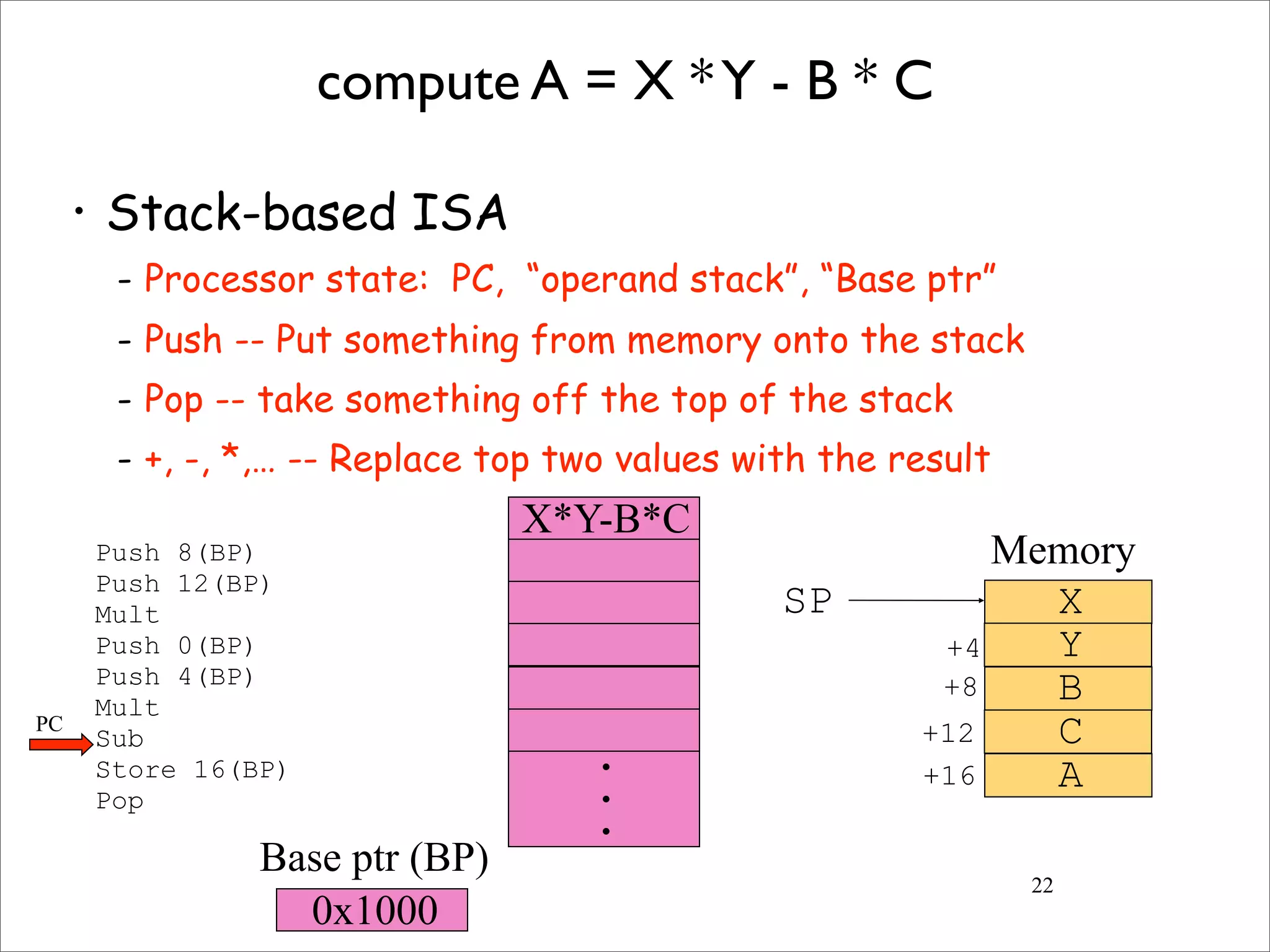
compute A = X *Y - B * C
• Stack-based ISA
- Processor state: PC, “operand stack”, “Base ptr”
- Push -- Put something from memory onto the stack
- Pop -- take something off the top of the stack
- +, -, *,… -- Replace top two values with the result
Push 8(BP)
Push 12(BP)
Mult
Push 0(BP)
Push 4(BP)
Mult
Sub
Store 16(BP)
Pop
X
Y
B
C
A
SP
+4
+8
+12
+16•
•
•
0x1000
Memory
Base ptr (BP)
PC
16
compute A = X *Y - B * C
• Stack-based ISA
- Processor state: PC, “operand stack”, “Base ptr”
- Push -- Put something from memory onto the stack
- Pop -- take something off the top of the stack
- +, -, *,… -- Replace top two values with the result
Push 8(BP)
Push 12(BP)
Mult
Push 0(BP)
Push 4(BP)
Mult
Sub
Store 16(BP)
Pop
X
Y
B
C
A
SP
+4
+8
+12
+16
C
•
•
•
0x1000
Memory
Base ptr (BP)
PC
17
compute A = X *Y - B * C
• Stack-based ISA
- Processor state: PC, “operand stack”, “Base ptr”
- Push -- Put something from memory onto the stack
- Pop -- take something off the top of the stack
- +, -, *,… -- Replace top two values with the result
Push 8(BP)
Push 12(BP)
Mult
Push 0(BP)
Push 4(BP)
Mult
Sub
Store 16(BP)
Pop
X
Y
B
C
A
SP
+4
+8
+12
+16
C
B
•
•
•
0x1000
Memory
Base ptr (BP)
PC
18
compute A = X *Y - B * C
• Stack-based ISA
- Processor state: PC, “operand stack”, “Base ptr”
- Push -- Put something from memory onto the stack
- Pop -- take something off the top of the stack
- +, -, *,… -- Replace top two values with the result
Push 8(BP)
Push 12(BP)
Mult
Push 0(BP)
Push 4(BP)
Mult
Sub
Store 16(BP)
Pop
X
Y
B
C
A
SP
+4
+8
+12
+16
B*C
•
•
•
0x1000
Memory
Base ptr (BP)
PC
19
compute A = X *Y - B * C
• Stack-based ISA
- Processor state: PC, “operand stack”, “Base ptr”
- Push -- Put something from memory onto the stack
- Pop -- take something off the top of the stack
- +, -, *,… -- Replace top two values with the result
Push 8(BP)
Push 12(BP)
Mult
Push 0(BP)
Push 4(BP)
Mult
Sub
Store 16(BP)
Pop
X
Y
B
C
A
SP
+4
+8
+12
+16
B*C
Y
•
•
•
0x1000
Memory
Base ptr (BP)
PC
20
compute A = X *Y - B * C
• Stack-based ISA
- Processor state: PC, “operand stack”, “Base ptr”
- Push -- Put something from memory onto the stack
- Pop -- take something off the top of the stack
- +, -, *,… -- Replace top two values with the result
Push 8(BP)
Push 12(BP)
Mult
Push 0(BP)
Push 4(BP)
Mult
Sub
Store 16(BP)
Pop
X
Y
B
C
A
SP
+4
+8
+12
+16
X
B*C
Y
•
•
•
0x1000
Memory
Base ptr (BP)
PC
21
compute A = X *Y - B * C
• Stack-based ISA
- Processor state: PC, “operand stack”, “Base ptr”
- Push -- Put something from memory onto the stack
- Pop -- take something off the top of the stack
- +, -, *,… -- Replace top two values with the result
- Store -- Store the top of the stack
Push 8(BP)
Push 12(BP)
Mult
Push 0(BP)
Push 4(BP)
Mult
Sub
Store 16(BP)
Pop
X
Y
B
C
A
SP
+4
+8
+12
+16
B*C
X*Y
•
•
•
0x1000
Memory
Base ptr (BP)
PC
22
compute A = X *Y - B * C
• Stack-based ISA
- Processor state: PC, “operand stack”, “Base ptr”
- Push -- Put something from memory onto the stack
- Pop -- take something off the top of the stack
- +, -, *,… -- Replace top two values with the result
Push 8(BP)
Push 12(BP)
Mult
Push 0(BP)
Push 4(BP)
Mult
Sub
Store 16(BP)
Pop
X
Y
B
C
A
SP
+4
+8
+12
+16
X*Y-B*C
•
•
•
0x1000
Memory
Base ptr (BP)
PC
23
compute A = X *Y - B * C
• Stack-based ISA
- Processor state: PC, “operand stack”, “Base ptr”
- Push -- Put something from memory onto the stack
- Pop -- take something off the top of the stack
- +, -, *,… -- Replace top two values with the result
- Store -- Store the top of the stack
Push 8(BP)
Push 12(BP)
Mult
Push 0(BP)
Push 4(BP)
Mult
Sub
Store 16(BP)
Pop
X
Y
B
C
A
SP
+4
+8
+12
+16
X*Y-B*C
•
•
•
0x1000
Memory
Base ptr (BP)
PC
From Brain to Bits
24
Your brain
Programming
Language (C, C++, Java)
Brain/
Fingers/
SWE
Compiler
Assembly language
Machine code
(i.e., .o files)
Assembler
Executable
(i.e., .exe files)
Linker
C Code
25
int i;
int sum = 0;
int j = 4;
for(i = 0; i < 10; i++) {
sum = i * j + sum;
}
In the Compiler
26
Function
decl: i decl: sum = 0 decl: j = 4 Loop
init: i = 0 test: i < 10 inc: i++ Body
statement: =
lhs: sum rhs: expr
sum *
+
j i
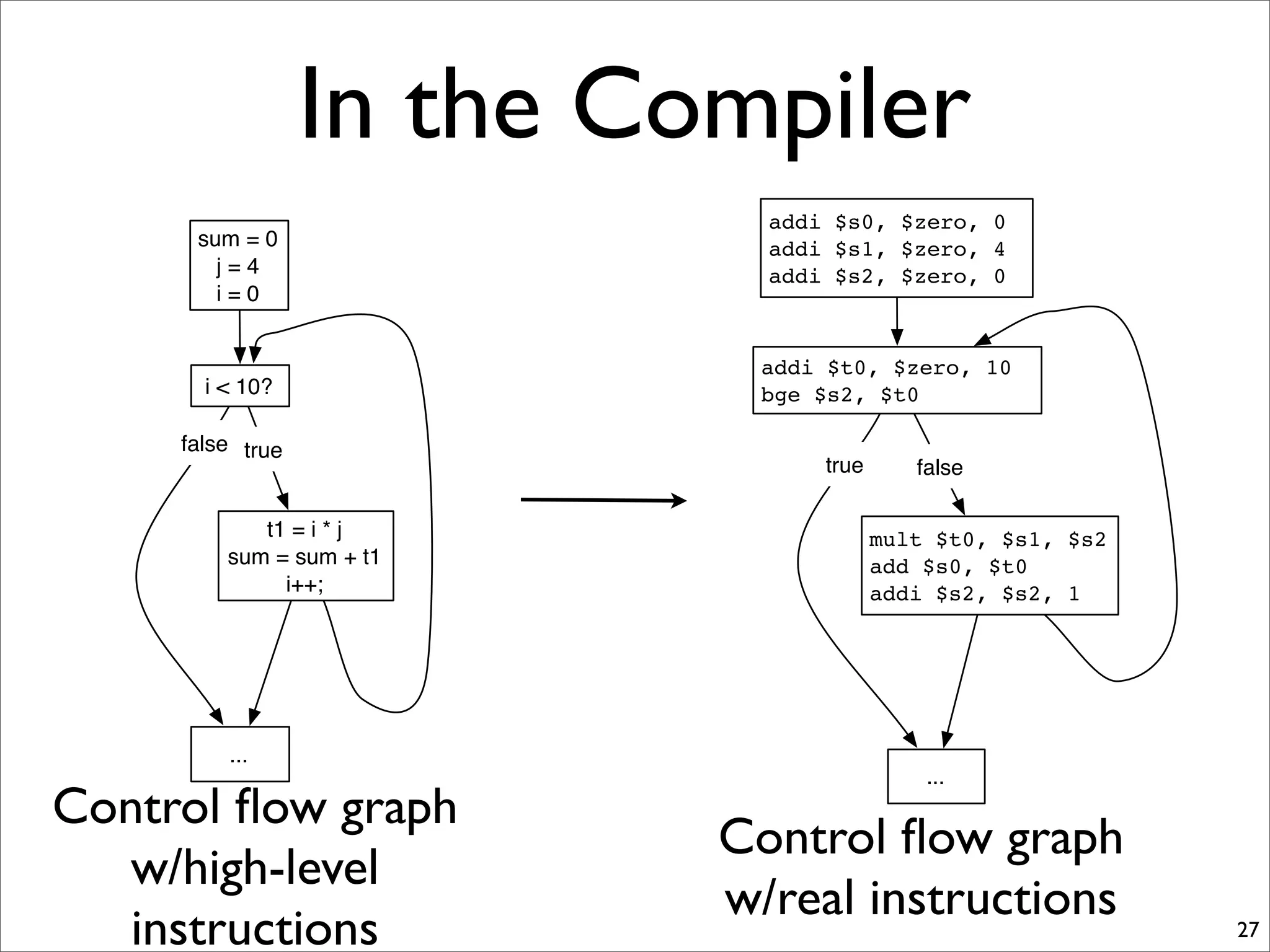
In the Compiler
27
sum = 0
j = 4
i = 0
t1 = i * j
sum = sum + t1
i++;
...
i < 10?
false true
Control flow graph
w/high-level
instructions
addi $s0, $zero, 0
addi $s1, $zero, 4
addi $s2, $zero, 0
mult $t0, $s1, $s2
add $s0, $t0
addi $s2, $s2, 1
...
addi $t0, $zero, 10
bge $s2, $t0
true false
Control flow graph
w/real instructions
Out of the Compiler
28
addi $s0, $zero, 0
addi $s1, $zero, 4
addi $s2, $zero, 0
top:
addi $t0, $zero, 10
bge $s2, $t0, after
body:
mult $t0, $s1, $s2
add $s0, $t0
addi $s2, $s2, 1
br top
after:
...
addi $s0, $zero, 0
addi $s1, $zero, 4
addi $s2, $zero, 0
mult $t0, $s1, $s2
add $s0, $t0
addi $s2, $s2, 1
...
addi $t0, $zero, 10
bge $s2, $t0
true false
Assembly language
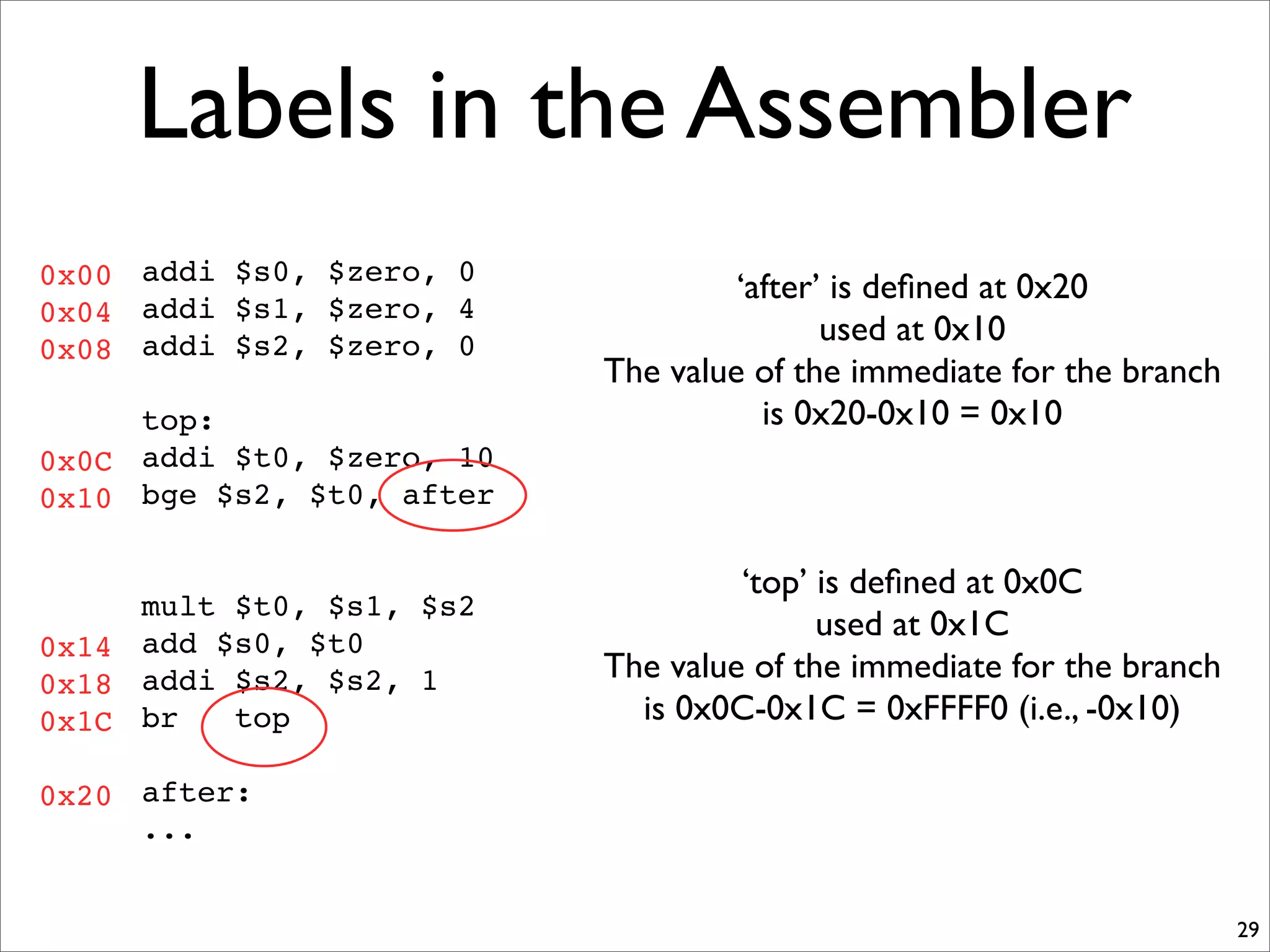
Labels in the Assembler
29
addi $s0, $zero, 0
addi $s1, $zero, 4
addi $s2, $zero, 0
top:
addi $t0, $zero, 10
bge $s2, $t0, after
mult $t0, $s1, $s2
add $s0, $t0
addi $s2, $s2, 1
br top
after:
...
0x00
0x04
0x08
0x0C
0x10
0x14
0x18
0x1C
0x20
‘after’ is defined at 0x20
used at 0x10
The value of the immediate for the branch
is 0x20-0x10 = 0x10
‘top’ is defined at 0x0C
used at 0x1C
The value of the immediate for the branch
is 0x0C-0x1C = 0xFFFF0 (i.e., -0x10)
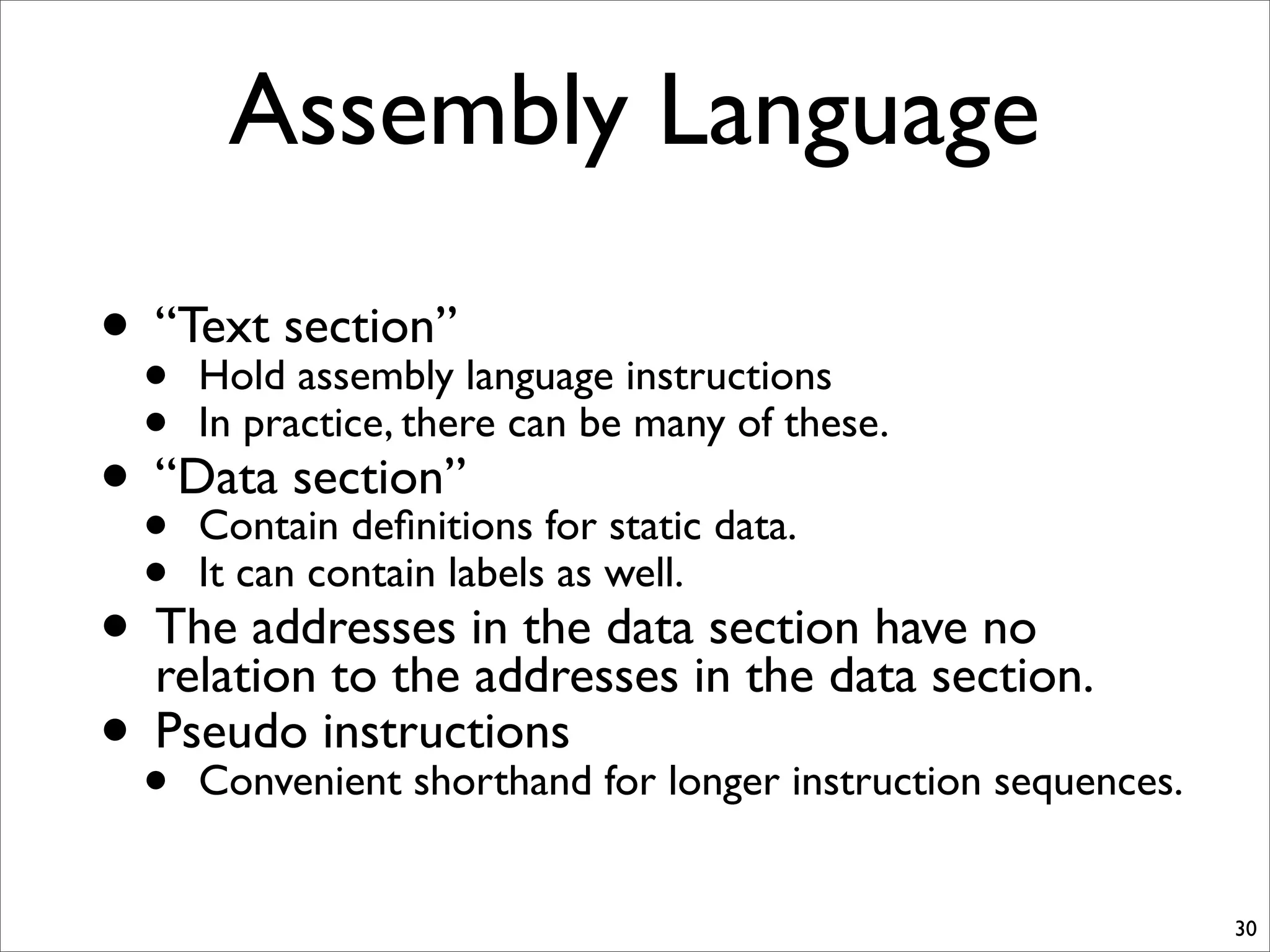
Assembly Language
30
• “Text section”
• Hold assembly language instructions
• In practice, there can be many of these.
• “Data section”
• Contain definitions for static data.
• It can contain labels as well.
• The addresses in the data section have no
relation to the addresses in the data section.
• Pseudo instructions
• Convenient shorthand for longer instruction sequences.
.data and pseudo instructions
31
void foo() {
static int a = 0;
a++;
...
}
.data
foo_a:
.word 0
.text
foo:
lda $t0, foo_a
ld $s0, 0($t0)
addi $s0, $s0, 1
st $s0, 0($t0)
after:
...
lda $t0, foo_a
becomes these instructions (this is not assembly language!)
andi $t0, $zero, ((foo_a & 0xff00) >> 16)
sll $t0, $t0, 16
andi $t0, $t0, (foo_a & 0xff)
If foo is address 0x0,
where is after?
0x00
0x0C
0x10
0x14
0x18
The assembler computes and inserts these values.

01 isa

  • 1.
  • 2.
    The Architecture Question •How do we build computer from contemporary silicon device technology that executes general- purpose programs quickly, efficiently, and at reasonable cost? • i.e. How do we build the computer on your desk. 2
  • 3.
    In the beginning... •Physical configuration specifies the computation 3 The Difference Engine ENIAC
  • 4.
    The Stored ProgramComputer • The program is data • i.e., it is a sequence of numbers that machine interprets • A very elegant idea • The same technologies can store and manipulate programs and data • Programs can manipulate programs. 4
  • 5.
    The Stored ProgramComputer • A very simple model • Several questions • How are program represented? • How do we get algorithms out of our brains and into that representation? • How does the the computer interpret a program? 5 Processor IO Memory Data Program
  • 6.
    Representing Programs • Weneed some basic building blocks -- call them “instructions” • What does “execute a program” mean? • What instructions do we need? • What should instructions look like? • Is it enough to just specify the instructions? • How complex should an instruction be? 6
  • 7.
    Program Execution 7 Instruction Fetch Instruction Decode Operand Fetch Execute Result Store Next Instruction Read instructionfrom program storage (mem[PC]) Determine required actions and instruction size Locate and obtain operand data Compute result value Deposit results in storage for later use Determine successor instruction (i.e. compute next PC). Usually this mean PC = PC + <instruction size in bytes> • This is the algorithm for a stored-program computer • The Program Counter (PC) is the key
  • 8.
    Motivating Code segments •a = b + c; • a = b + c + d; • a = b & c; • a = b + 4; • a = b - (c * (d/2) - 4); • if (a) b = c; • if (a == 4) b = c; • while (a != 0) a--; • a = 0xDEADBEEF; • a = foo[4]; • foo[4] = a; • a = foo.bar; • a = a + b + c + d +... +z; • a = foo(b); -- next class 8
  • 9.
    What instructions dowe need? • Basic operations are a good choice. • Motivated by the programs people write. • Math: Add, subtract, multiply, bit-wise operations • Control: branches, jumps, and function calls. • Data access: Load and store. • The exact set of operations depends on many, many things • Application domain, hardware trade-offs, performance, power, complexity requirements. • You will see these trade-offs first hand in the ISA project and in 141L. 9
  • 10.
    What should instructionslook like? • They will be numbers -- i.e., strings of bits • It is easiest if they are all the same size, say 32 bits • We can break up these bits into “fields” -- like members in a class or struct. • This sets some limits • On the number of different instructions we can have • On the range of values any field of the instruction can specify 10
  • 11.
    Is specifying theinstructions sufficient? • No! We also must what the instructions operate on. • This is called the “Architectural State” of the machine. • Registers -- a few named data values that instructions can operate on • Memory -- a much larger array of bytes that is available for storing values. • How big is memory? 32 bits or 64 bits of addressing. • 64 is the standard today for desktops and larger. • 32 for phones and PDAs • Possibly fewer for embedded processors • We also need to specify semantics of function calls • The “Stack Discipline,” “Calling convention,” or “Application binary interface (ABI)”. 11
  • 12.
    How complex shouldinstructions be? • More complexity • More different instruction types are required. • Increased design and verification costs • More complex hardware. • More difficult to use -- What’s the right instruction in this context? • Less complexity • Programs will require more instructions -- poor code density • Programs can be more difficult for humans to understand • In the limit, decremement-and-branch-if-negative is sufficient • Imagine trying to decipher programs written using just one instruction. • It takes many, many of these instructions to emulate simple operations. • Today, what matters most is the compiler • The Machine must be able to understand program • A program must be able to decide which instructions to use 12
  • 13.
    Big “A” Architecture •The Architecture is a contract between the hardware and the software. • The hardware defines a set of operations, their semantics, and rules for their use. • The software agrees to follow these rules. • The hardware can implement those rules IN ANYWAY IT CHOOSES! • Directly in hardware • Via a software layer • Via a trained monkey with a pen and paper. • This is a classic interface -- they are everywhere in computer science. • “Interface,” “Separation of concerns,” “API,” “Standard,” • For your project you are designing an Architecture -- not a processor. 13
  • 14.
    The Perils ofa Standard • Binary compatibility • Read the section on x86 assembly. 14
  • 15.
    15 compute A =X *Y - B * C • Stack-based ISA - Processor state: PC, “operand stack”, “Base ptr” - Push -- Put something from memory onto the stack - Pop -- take something off the top of the stack - +, -, *,… -- Replace top two values with the result Push 8(BP) Push 12(BP) Mult Push 0(BP) Push 4(BP) Mult Sub Store 16(BP) Pop X Y B C A SP +4 +8 +12 +16• • • 0x1000 Memory Base ptr (BP) PC
  • 16.
    16 compute A =X *Y - B * C • Stack-based ISA - Processor state: PC, “operand stack”, “Base ptr” - Push -- Put something from memory onto the stack - Pop -- take something off the top of the stack - +, -, *,… -- Replace top two values with the result Push 8(BP) Push 12(BP) Mult Push 0(BP) Push 4(BP) Mult Sub Store 16(BP) Pop X Y B C A SP +4 +8 +12 +16 C • • • 0x1000 Memory Base ptr (BP) PC
  • 17.
    17 compute A =X *Y - B * C • Stack-based ISA - Processor state: PC, “operand stack”, “Base ptr” - Push -- Put something from memory onto the stack - Pop -- take something off the top of the stack - +, -, *,… -- Replace top two values with the result Push 8(BP) Push 12(BP) Mult Push 0(BP) Push 4(BP) Mult Sub Store 16(BP) Pop X Y B C A SP +4 +8 +12 +16 C B • • • 0x1000 Memory Base ptr (BP) PC
  • 18.
    18 compute A =X *Y - B * C • Stack-based ISA - Processor state: PC, “operand stack”, “Base ptr” - Push -- Put something from memory onto the stack - Pop -- take something off the top of the stack - +, -, *,… -- Replace top two values with the result Push 8(BP) Push 12(BP) Mult Push 0(BP) Push 4(BP) Mult Sub Store 16(BP) Pop X Y B C A SP +4 +8 +12 +16 B*C • • • 0x1000 Memory Base ptr (BP) PC
  • 19.
    19 compute A =X *Y - B * C • Stack-based ISA - Processor state: PC, “operand stack”, “Base ptr” - Push -- Put something from memory onto the stack - Pop -- take something off the top of the stack - +, -, *,… -- Replace top two values with the result Push 8(BP) Push 12(BP) Mult Push 0(BP) Push 4(BP) Mult Sub Store 16(BP) Pop X Y B C A SP +4 +8 +12 +16 B*C Y • • • 0x1000 Memory Base ptr (BP) PC
  • 20.
    20 compute A =X *Y - B * C • Stack-based ISA - Processor state: PC, “operand stack”, “Base ptr” - Push -- Put something from memory onto the stack - Pop -- take something off the top of the stack - +, -, *,… -- Replace top two values with the result Push 8(BP) Push 12(BP) Mult Push 0(BP) Push 4(BP) Mult Sub Store 16(BP) Pop X Y B C A SP +4 +8 +12 +16 X B*C Y • • • 0x1000 Memory Base ptr (BP) PC
  • 21.
    21 compute A =X *Y - B * C • Stack-based ISA - Processor state: PC, “operand stack”, “Base ptr” - Push -- Put something from memory onto the stack - Pop -- take something off the top of the stack - +, -, *,… -- Replace top two values with the result - Store -- Store the top of the stack Push 8(BP) Push 12(BP) Mult Push 0(BP) Push 4(BP) Mult Sub Store 16(BP) Pop X Y B C A SP +4 +8 +12 +16 B*C X*Y • • • 0x1000 Memory Base ptr (BP) PC
  • 22.
    22 compute A =X *Y - B * C • Stack-based ISA - Processor state: PC, “operand stack”, “Base ptr” - Push -- Put something from memory onto the stack - Pop -- take something off the top of the stack - +, -, *,… -- Replace top two values with the result Push 8(BP) Push 12(BP) Mult Push 0(BP) Push 4(BP) Mult Sub Store 16(BP) Pop X Y B C A SP +4 +8 +12 +16 X*Y-B*C • • • 0x1000 Memory Base ptr (BP) PC
  • 23.
    23 compute A =X *Y - B * C • Stack-based ISA - Processor state: PC, “operand stack”, “Base ptr” - Push -- Put something from memory onto the stack - Pop -- take something off the top of the stack - +, -, *,… -- Replace top two values with the result - Store -- Store the top of the stack Push 8(BP) Push 12(BP) Mult Push 0(BP) Push 4(BP) Mult Sub Store 16(BP) Pop X Y B C A SP +4 +8 +12 +16 X*Y-B*C • • • 0x1000 Memory Base ptr (BP) PC
  • 24.
    From Brain toBits 24 Your brain Programming Language (C, C++, Java) Brain/ Fingers/ SWE Compiler Assembly language Machine code (i.e., .o files) Assembler Executable (i.e., .exe files) Linker
  • 25.
    C Code 25 int i; intsum = 0; int j = 4; for(i = 0; i < 10; i++) { sum = i * j + sum; }
  • 26.
    In the Compiler 26 Function decl:i decl: sum = 0 decl: j = 4 Loop init: i = 0 test: i < 10 inc: i++ Body statement: = lhs: sum rhs: expr sum * + j i
  • 27.
    In the Compiler 27 sum= 0 j = 4 i = 0 t1 = i * j sum = sum + t1 i++; ... i < 10? false true Control flow graph w/high-level instructions addi $s0, $zero, 0 addi $s1, $zero, 4 addi $s2, $zero, 0 mult $t0, $s1, $s2 add $s0, $t0 addi $s2, $s2, 1 ... addi $t0, $zero, 10 bge $s2, $t0 true false Control flow graph w/real instructions
  • 28.
    Out of theCompiler 28 addi $s0, $zero, 0 addi $s1, $zero, 4 addi $s2, $zero, 0 top: addi $t0, $zero, 10 bge $s2, $t0, after body: mult $t0, $s1, $s2 add $s0, $t0 addi $s2, $s2, 1 br top after: ... addi $s0, $zero, 0 addi $s1, $zero, 4 addi $s2, $zero, 0 mult $t0, $s1, $s2 add $s0, $t0 addi $s2, $s2, 1 ... addi $t0, $zero, 10 bge $s2, $t0 true false Assembly language
  • 29.
    Labels in theAssembler 29 addi $s0, $zero, 0 addi $s1, $zero, 4 addi $s2, $zero, 0 top: addi $t0, $zero, 10 bge $s2, $t0, after mult $t0, $s1, $s2 add $s0, $t0 addi $s2, $s2, 1 br top after: ... 0x00 0x04 0x08 0x0C 0x10 0x14 0x18 0x1C 0x20 ‘after’ is defined at 0x20 used at 0x10 The value of the immediate for the branch is 0x20-0x10 = 0x10 ‘top’ is defined at 0x0C used at 0x1C The value of the immediate for the branch is 0x0C-0x1C = 0xFFFF0 (i.e., -0x10)
  • 30.
    Assembly Language 30 • “Textsection” • Hold assembly language instructions • In practice, there can be many of these. • “Data section” • Contain definitions for static data. • It can contain labels as well. • The addresses in the data section have no relation to the addresses in the data section. • Pseudo instructions • Convenient shorthand for longer instruction sequences.
  • 31.
    .data and pseudoinstructions 31 void foo() { static int a = 0; a++; ... } .data foo_a: .word 0 .text foo: lda $t0, foo_a ld $s0, 0($t0) addi $s0, $s0, 1 st $s0, 0($t0) after: ... lda $t0, foo_a becomes these instructions (this is not assembly language!) andi $t0, $zero, ((foo_a & 0xff00) >> 16) sll $t0, $t0, 16 andi $t0, $t0, (foo_a & 0xff) If foo is address 0x0, where is after? 0x00 0x0C 0x10 0x14 0x18 The assembler computes and inserts these values.