Introduction
to Patterns
Michael Heron
Introduction
 In the beginning there was the code.
 And the code was without form.
 And programmers said
 Let there be functions.
 And programmers saw the functions, and
saw that they were good.
 And then the programmer said.
 Let there be objects.
Object Oriented Programming
 Objects represent an excellent tool for
developing object oriented programs.
 However, like anything they can be used badly.
 There are issues of scale that come along with
developing an object oriented program.
 Many objects can become unmanageable.
 Coupling and Cohesion are constant problems.
 A good class has high cohesion.
 Related methods and attributes are
encapsulated together.
Object Oriented Programming
 For large programs, objects soon become
difficult to manage.
 Too many classes
 Too many interrelationships.
 Unordered and difficult to gain a broad view.
 Good designs require a higher level
abstraction.
 Abstractions that consist of related groups of
objects.
Objects – Bare Bones
 What defines an object?
 Objects have attributes (defined in the class)
 Objects have behaviors (defined in the class)
 Object have a state
 A better view is that an object is a cog in a
more complicated machine.
 It is a moving part with a specific responsibility in
a system.
 Representing a certain kind of unit, for example.
Building Objects
 How do we build objects?
 There are several methods.
 Natural language analysis is a useful tool.
 Underline nouns, verbs and adjectives in a
requirements document.
 Organic evolution
 Start with a class, build on it from there.
 Pattern based analysis
 Analyse the overall structure of the system.
 Create classes to fill specific roles.
Coupling and Cohesion
 One of the biggest problems OO developers
have is ensuring a good OO design.
 What is a good OO design, you ask?
 Certainly for people unfamiliar with how OO is
best done, it’s hard to objectively rate an
object architecture.
 Two objective measures exist for this though.
 As a rule, we are aiming for high cohesion
and low coupling.
Coupling
 Coupling relates to the amount of
interconnectedness of classes.
 We want this to be as low as is reasonably
possible.
 A coupling relationship is any composition,
aggregation, or inheritance.
 The more connections made between
objects and classes, the harder it is to make
any changes.
 Because of the knock-on effect associated.
Coupling
 If your program has high coupling, there are
several disadvantages built in:
 Changes in one object may result in
unexpected side-effects elsewhere in a
program.
 Often the cause is not at all obvious.
 Classes are difficult to understand at a glance.
 They make use of so much external
functionality.
 Classes are difficult to test.
 They cannot be easily extracted from their
context.
Coupling
 There are several types of coupling that exist.
 It’s not just the amount of coupling that matters,
but also the type of coupling.
 Content coupling is when one class directly
accesses data local to another class.
 This is terrible and should be avoided always.
 Data coupling is when a public interface is used to
exchange to exchange parameters.
 This is better.
 There are other kinds.
 We don’t have to go into them to any great
degree for now.
Cohesion
 Cohesion is the level to which an object
adheres to a single set of responsibilities.
 We want this as high as is reasonably possible.
 In a good object oriented program, each
object has one firmly defined responsibility.
 If you have a BankBalance class, it should
contain only the functionality for manipulating
the balance.
 It should not contain, for example, the address
of its owner.
Cohesion
 The dangers that come from low cohesion
are the same as that of high coupling.
 They’re really just two ways of reflecting the
same basic concept.
 Low cohesion is an insidious problem.
 Programs with low cohesion tend to become
even less coherent over time.
 It is a consequence of badly analysed and
badly designed programs.
 You’ll learn how to do this properly in third year.
The Tension of OO
Development
 Object Oriented programs are a tension
between coupling and cohesion.
 We increase cohesion by increasing
coupling.
 We reduce coupling by decreasing
cohesion.
 As OO developers we have to find a
happy medium between the two.
 In some cases, simple rationalisation of a
design can remove problems.
Design Patterns
 Design patterns fill the role of ‘high level
design’ in object oriented programs.
 They are a shorthand for particular collections of
objects, arranged in a particular way.
 Design patterns are battle-tested.
 A pattern only enters into common acceptance
when it has been shown to work in many
situations.
 Design patterns are generalised.
 A design pattern is to object design what an
algorithm is to lines of code.
Design Patterns
 Design patterns fall into one of several broad
categories.
 There are some competing definitions for these.
 In this module we’ll look at three families of
design patterns.
 Creational Patterns
 Behavioural Patterns
 Structural Patterns
 There are more, but these will give you a
grounding in the selection and use of
patterns.
Unified Modeling Language
 We are going to use a shorthand notation
form to represent design patterns.
 UML Class Diagrams – you may have
encountered these before.
 We will very briefly review them today.
 So that you can recognize what is happening
when they are used later.
 It’s important for developers to have a shared
vocabulary for discussing design issues.
Object Oriented Programs
 The relationship between objects and classes
becomes very complex in many computer
programs.
 Some means of representing this complexity
‘at a glance’ is useful.
 This is what a class diagram is used for.
 It gives the static view of a program’s
architecture.
 Other techniques exist too.
 They vary in effectiveness.
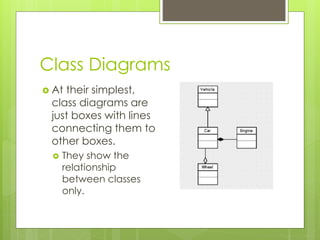
Class Diagrams
 At their simplest,
class diagrams are
just boxes with lines
connecting them to
other boxes.
 They show the
relationship
between classes
only.
Class Diagrams
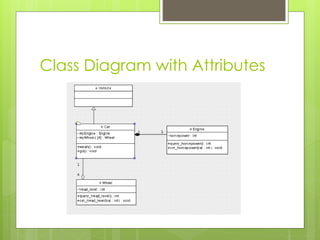
 At the next level of usefulness, class
diagrams also contain information about
attributes and methods.
 Attributes in the second row
 Methods in the third
 At their best, class diagrams contain class
relationships, methods, attributes, and the
visibility of each.
 They also explicitly show multiplicity.
Class Diagram with Attributes
Why Use A Class Diagram?
 There are several reasons why using a
class diagram leads to a more complete
view of a project.
 It shows the relationship between classes in
a way that allows you to trace accessibility.
 It shows at a glance the amount of
coupling in a project.
 It shows at a glance the amount of
cohesion in a project.
 It shows at a glance the impact of change.
Representing Design Patterns
 A design pattern is a collection of (usually)
several different classes.
 It defines the interaction of these objects at a
higher level of abstraction.
 There are several kinds of documentation for
patterns.
 The one in most common usage is the Pattern
Language devised by the Gang of Four in the
book Design Patterns.
 We’re not going to get bogged down in the
details.
Benefits of Patterns
 Part of what design patterns bring to the
field of software engineering is a common
vocabulary for design
 Shorthand solutions for certain kinds of
recurring programming problems.
 Design patterns are ‘best practice’, and
thus allow for portability of the ‘lessons
learned’ of experienced developers.
 They are an aid to learning.
Benefits of Patterns
 They fit in easily with existing modern
programming techniques.
 Design patterns complement object
orientation and agile development.
 Design patterns reduce the need for
future large-scale refactoring.
 Tried and tested, and the result of
successive refactoring of their own.
Criticisms of Patterns
 Some of the patterns that are in common usage are
simple workarounds for missing language features.
 Some patterns are repetitions of things supported
syntactically in other languages.
 Can lead to systems that are heavily over-
engineered.
 Use with care.
 When you have a hammer…
 Patterns represent good solutions to recurring problems,
but they are no substitute for effective analysis.
 Counter-productive when building expertise.
 You learn more from failure than you do from success.
The Model View Controller
 Before we look at the various kinds of design
patterns, I want to spend the rest of this
lecture discussing the one most critical to
modern programs.
 It is the Model View Controller Architecture.
 It is a design pattern through which maximum
flexibility is maintained for the developer.
 It allows for easy portability between
functionality and interface.
 It is an example of a structural pattern.
Setting the Scene
 Imagine this!
 Mister Moneybags, hugely successful
software publisher, comes to you and says
‘Code me a fruit machine’
 You go away, open up Eclipse and
develop the best fruit machine anyone has
ever seen!
 Mister Moneybags says, ‘Excellent work!
Now I want it so that we can put a dozen
different games onto the same codebase’
Horrors!
 The monolithic design of putting all code
into a single class (or even several classes)
has one big issue.
 Reusability.
 It is common practice for beginning
developers to embed functionality into
the code that handles the presentation.
 What this does is tightly bind your
functionality to the context in which it is
delivered.
MVC
 The Model View Controller architecture
addresses this by providing a clean
separation of roles in a program.
 The Model, which handles the ‘business logic’
 The view, which handles the presentation of the
state of the model to the user
 The controller, which allows for the user to
interact with the model.
 In simple programs, the view and the
controller may be the same class.
 Often they will not be.
MVC - Model
 The model defines all the state and
functionality of a system.
 Everything except presenting information to the
user.
 The model makes no assumptions with
regards to the view of the data.
 It doesn’t matter to the model if the view is a
GUI, a phone display, or a text interface.
 The model may be represented by a single
class.
 More usually, it will be represented by several
classes.
MVC - View
 The view handles the presentation.
 It’s the user interface.
 The view has absolutely no code for altering
the state of the system.
 It sends queries to the model, and the model
sends the answers back.
 The only code contained within the view is
view-specific code.
 Turn an array of strings into a combo box, as an
example.
MVC - Controller
 The controller is what provides the user’s
ability to manipulate the system.
 It’s usually represented by the event handlers for
the controls that belong to the view.
 In an ideal world, the controller is an entirely
separate class to the view.
 For small, simple programs this is often over-
engineering.
 The controller defines the ‘stitching’ between
the view and the model.
The MVC
 The MVC is a ‘mega pattern’
 Usually its constituent bits will be made up of
other patterns themselves.
 The separation of the model and the view is
the key to the pattern.
 By default, Visual Studio will couple the view
and controller into a single class.
 This is not bad strictly speaking, but something
that can be altered for complex systems.
Value of Decoupling
 Why is it so important we separate out the
model from the view?
 Division of responsibilities allows for parallel
development.
 Model best handled by technical teams.
 View best handled by graphical, UI specialists.
 All that teams must agree on is the interface
between the different parts of the system.
 It allows for flexibility of deployment.
 A new interface can be ‘bolted on’ with
minimal difficulty.
Summary
 Design patterns are awesome.
 They are an aggregate abstraction for interactions
of objects.
 The patterns we will discuss belong to three main
families.
 Creational
 Structural
 Behavioral
 Design patterns lead to good OO programs.
 With the caveat that they can also lead to heavily
over-engineered systems if used indiscriminately.

PATTERNS01 - An Introduction to Design Patterns

  • 1.
  • 2.
    Introduction  In thebeginning there was the code.  And the code was without form.  And programmers said  Let there be functions.  And programmers saw the functions, and saw that they were good.  And then the programmer said.  Let there be objects.
  • 3.
    Object Oriented Programming Objects represent an excellent tool for developing object oriented programs.  However, like anything they can be used badly.  There are issues of scale that come along with developing an object oriented program.  Many objects can become unmanageable.  Coupling and Cohesion are constant problems.  A good class has high cohesion.  Related methods and attributes are encapsulated together.
  • 4.
    Object Oriented Programming For large programs, objects soon become difficult to manage.  Too many classes  Too many interrelationships.  Unordered and difficult to gain a broad view.  Good designs require a higher level abstraction.  Abstractions that consist of related groups of objects.
  • 5.
    Objects – BareBones  What defines an object?  Objects have attributes (defined in the class)  Objects have behaviors (defined in the class)  Object have a state  A better view is that an object is a cog in a more complicated machine.  It is a moving part with a specific responsibility in a system.  Representing a certain kind of unit, for example.
  • 6.
    Building Objects  Howdo we build objects?  There are several methods.  Natural language analysis is a useful tool.  Underline nouns, verbs and adjectives in a requirements document.  Organic evolution  Start with a class, build on it from there.  Pattern based analysis  Analyse the overall structure of the system.  Create classes to fill specific roles.
  • 7.
    Coupling and Cohesion One of the biggest problems OO developers have is ensuring a good OO design.  What is a good OO design, you ask?  Certainly for people unfamiliar with how OO is best done, it’s hard to objectively rate an object architecture.  Two objective measures exist for this though.  As a rule, we are aiming for high cohesion and low coupling.
  • 8.
    Coupling  Coupling relatesto the amount of interconnectedness of classes.  We want this to be as low as is reasonably possible.  A coupling relationship is any composition, aggregation, or inheritance.  The more connections made between objects and classes, the harder it is to make any changes.  Because of the knock-on effect associated.
  • 9.
    Coupling  If yourprogram has high coupling, there are several disadvantages built in:  Changes in one object may result in unexpected side-effects elsewhere in a program.  Often the cause is not at all obvious.  Classes are difficult to understand at a glance.  They make use of so much external functionality.  Classes are difficult to test.  They cannot be easily extracted from their context.
  • 10.
    Coupling  There areseveral types of coupling that exist.  It’s not just the amount of coupling that matters, but also the type of coupling.  Content coupling is when one class directly accesses data local to another class.  This is terrible and should be avoided always.  Data coupling is when a public interface is used to exchange to exchange parameters.  This is better.  There are other kinds.  We don’t have to go into them to any great degree for now.
  • 11.
    Cohesion  Cohesion isthe level to which an object adheres to a single set of responsibilities.  We want this as high as is reasonably possible.  In a good object oriented program, each object has one firmly defined responsibility.  If you have a BankBalance class, it should contain only the functionality for manipulating the balance.  It should not contain, for example, the address of its owner.
  • 12.
    Cohesion  The dangersthat come from low cohesion are the same as that of high coupling.  They’re really just two ways of reflecting the same basic concept.  Low cohesion is an insidious problem.  Programs with low cohesion tend to become even less coherent over time.  It is a consequence of badly analysed and badly designed programs.  You’ll learn how to do this properly in third year.
  • 13.
    The Tension ofOO Development  Object Oriented programs are a tension between coupling and cohesion.  We increase cohesion by increasing coupling.  We reduce coupling by decreasing cohesion.  As OO developers we have to find a happy medium between the two.  In some cases, simple rationalisation of a design can remove problems.
  • 14.
    Design Patterns  Designpatterns fill the role of ‘high level design’ in object oriented programs.  They are a shorthand for particular collections of objects, arranged in a particular way.  Design patterns are battle-tested.  A pattern only enters into common acceptance when it has been shown to work in many situations.  Design patterns are generalised.  A design pattern is to object design what an algorithm is to lines of code.
  • 15.
    Design Patterns  Designpatterns fall into one of several broad categories.  There are some competing definitions for these.  In this module we’ll look at three families of design patterns.  Creational Patterns  Behavioural Patterns  Structural Patterns  There are more, but these will give you a grounding in the selection and use of patterns.
  • 16.
    Unified Modeling Language We are going to use a shorthand notation form to represent design patterns.  UML Class Diagrams – you may have encountered these before.  We will very briefly review them today.  So that you can recognize what is happening when they are used later.  It’s important for developers to have a shared vocabulary for discussing design issues.
  • 17.
    Object Oriented Programs The relationship between objects and classes becomes very complex in many computer programs.  Some means of representing this complexity ‘at a glance’ is useful.  This is what a class diagram is used for.  It gives the static view of a program’s architecture.  Other techniques exist too.  They vary in effectiveness.
  • 18.
    Class Diagrams  Attheir simplest, class diagrams are just boxes with lines connecting them to other boxes.  They show the relationship between classes only.
  • 19.
    Class Diagrams  Atthe next level of usefulness, class diagrams also contain information about attributes and methods.  Attributes in the second row  Methods in the third  At their best, class diagrams contain class relationships, methods, attributes, and the visibility of each.  They also explicitly show multiplicity.
  • 20.
  • 21.
    Why Use AClass Diagram?  There are several reasons why using a class diagram leads to a more complete view of a project.  It shows the relationship between classes in a way that allows you to trace accessibility.  It shows at a glance the amount of coupling in a project.  It shows at a glance the amount of cohesion in a project.  It shows at a glance the impact of change.
  • 22.
    Representing Design Patterns A design pattern is a collection of (usually) several different classes.  It defines the interaction of these objects at a higher level of abstraction.  There are several kinds of documentation for patterns.  The one in most common usage is the Pattern Language devised by the Gang of Four in the book Design Patterns.  We’re not going to get bogged down in the details.
  • 23.
    Benefits of Patterns Part of what design patterns bring to the field of software engineering is a common vocabulary for design  Shorthand solutions for certain kinds of recurring programming problems.  Design patterns are ‘best practice’, and thus allow for portability of the ‘lessons learned’ of experienced developers.  They are an aid to learning.
  • 24.
    Benefits of Patterns They fit in easily with existing modern programming techniques.  Design patterns complement object orientation and agile development.  Design patterns reduce the need for future large-scale refactoring.  Tried and tested, and the result of successive refactoring of their own.
  • 25.
    Criticisms of Patterns Some of the patterns that are in common usage are simple workarounds for missing language features.  Some patterns are repetitions of things supported syntactically in other languages.  Can lead to systems that are heavily over- engineered.  Use with care.  When you have a hammer…  Patterns represent good solutions to recurring problems, but they are no substitute for effective analysis.  Counter-productive when building expertise.  You learn more from failure than you do from success.
  • 26.
    The Model ViewController  Before we look at the various kinds of design patterns, I want to spend the rest of this lecture discussing the one most critical to modern programs.  It is the Model View Controller Architecture.  It is a design pattern through which maximum flexibility is maintained for the developer.  It allows for easy portability between functionality and interface.  It is an example of a structural pattern.
  • 27.
    Setting the Scene Imagine this!  Mister Moneybags, hugely successful software publisher, comes to you and says ‘Code me a fruit machine’  You go away, open up Eclipse and develop the best fruit machine anyone has ever seen!  Mister Moneybags says, ‘Excellent work! Now I want it so that we can put a dozen different games onto the same codebase’
  • 28.
    Horrors!  The monolithicdesign of putting all code into a single class (or even several classes) has one big issue.  Reusability.  It is common practice for beginning developers to embed functionality into the code that handles the presentation.  What this does is tightly bind your functionality to the context in which it is delivered.
  • 29.
    MVC  The ModelView Controller architecture addresses this by providing a clean separation of roles in a program.  The Model, which handles the ‘business logic’  The view, which handles the presentation of the state of the model to the user  The controller, which allows for the user to interact with the model.  In simple programs, the view and the controller may be the same class.  Often they will not be.
  • 30.
    MVC - Model The model defines all the state and functionality of a system.  Everything except presenting information to the user.  The model makes no assumptions with regards to the view of the data.  It doesn’t matter to the model if the view is a GUI, a phone display, or a text interface.  The model may be represented by a single class.  More usually, it will be represented by several classes.
  • 31.
    MVC - View The view handles the presentation.  It’s the user interface.  The view has absolutely no code for altering the state of the system.  It sends queries to the model, and the model sends the answers back.  The only code contained within the view is view-specific code.  Turn an array of strings into a combo box, as an example.
  • 32.
    MVC - Controller The controller is what provides the user’s ability to manipulate the system.  It’s usually represented by the event handlers for the controls that belong to the view.  In an ideal world, the controller is an entirely separate class to the view.  For small, simple programs this is often over- engineering.  The controller defines the ‘stitching’ between the view and the model.
  • 33.
    The MVC  TheMVC is a ‘mega pattern’  Usually its constituent bits will be made up of other patterns themselves.  The separation of the model and the view is the key to the pattern.  By default, Visual Studio will couple the view and controller into a single class.  This is not bad strictly speaking, but something that can be altered for complex systems.
  • 34.
    Value of Decoupling Why is it so important we separate out the model from the view?  Division of responsibilities allows for parallel development.  Model best handled by technical teams.  View best handled by graphical, UI specialists.  All that teams must agree on is the interface between the different parts of the system.  It allows for flexibility of deployment.  A new interface can be ‘bolted on’ with minimal difficulty.
  • 35.
    Summary  Design patternsare awesome.  They are an aggregate abstraction for interactions of objects.  The patterns we will discuss belong to three main families.  Creational  Structural  Behavioral  Design patterns lead to good OO programs.  With the caveat that they can also lead to heavily over-engineered systems if used indiscriminately.