Kung-Fu Migration to Windows
Azure SQL Database
Kung-Fu Migration to Windows
Azure SQL Database

Scott Klein
Technical Evangelist
@SQLScott
Agenda

DACFx & Import / Export Service
SQL Server Data Tools
Other Migration Tools
Best Practices
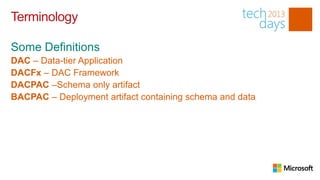
Terminology


DAC – Data-tier Application
DACFx – DAC Framework
DACPAC –Schema only artifact
BACPAC – Deployment artifact containing schema and data
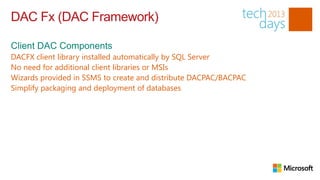
DAC Fx (DAC Framework)

DACFX client library installed automatically by SQL Server
No need for additional client libraries or MSIs
Wizards provided in SSMS to create and distribute DACPAC/BACPAC
Simplify packaging and deployment of databases
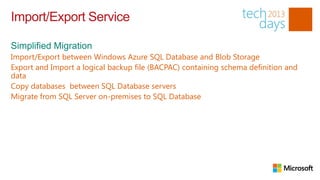
Import/Export Service

Import/Export between Windows Azure SQL Database and Blob Storage
Export and Import a logical backup file (BACPAC) containing schema definition and
data
Copy databases between SQL Database servers
Migrate from SQL Server on-premises to SQL Database
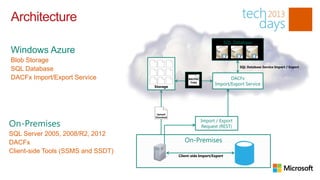
Architecture


Blob Storage
                                                                           SQL Database Service Import / Export
SQL Database
DACFx Import/Export Service                         BACPAC
                                     Blob            Copy
                                    Storage


                                     BACPAC
                                     Upload/
                                    Download


SQL Server 2005, 2008/R2, 2012
DACFx
Client-side Tools (SSMS and SSDT)
                                               Client-side Import/Export
Service Benefits

Automated Service Endpoint
Integrated Portal Experience
Performance via data center side deployment
Connection Resiliency
Selective Export
Progressive Status Reporting
Requirements

SQL Server 2012                          Storage Account
All necessary components are installed   SQL Database Server

SQL Server* 2008 R2, 2008, 2005
Data-tier Application Framework
ScriptDOM
System CLR Types
Limitations

SQL Variant Data Type
No transactional consistency
Database must be SQL Database compatible
Secrets not migrated (passwords, encrypted procs, etc.)
No support for SQL Server 2000
SQL Server Data Tools


Declarative, model based database development
Integrated Tools
Application development integration
SQL Server and SQL Database Support
Connected and offline with local testing
Change Detection
SQL Server Data Tools


Connected Development
Project Based Development
Schema Deployment
Additional Tools


Generate Scripts Wizard
BCP
SSIS
SQL Database Migration Wizard
Migration Assistants
Migration considerations


Data Size
Data Types
Frequency
Transactional Consistency
Technology Proficiency
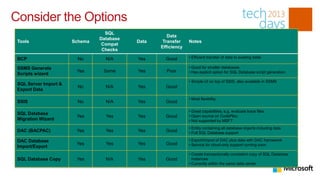
Consider the Options
                                  SQL
                                                     Data
                                Database
 Tools                 Schema              Data    Transfer    Notes
                                 Compat
                                                  Efficiency
                                 Checks

 BCP                     No       N/A      Yes      Good       • Efficient transfer of data to existing table

 SSMS Generate                                                 • Good for smaller databases
                        Yes      Some      Yes      Poor       • Has explicit option for SQL Database script generation
 Scripts wizard
                                                               • Simple UI on top of SSIS; also available in SSMS
 SQL Server Import &
                         No       N/A      Yes      Good
 Export Data

                                                               • Most flexibility
 SSIS                    No       N/A      Yes      Good

                                                               • Great capabilities; e.g. evaluate trace files
 SQL Database
                        Yes       Yes      Yes      Good       • Open source on CodePlex;
 Migration Wizard                                              • Not supported by MSFT
                                                               • Entity containing all database objects including data
 DAC (BACPAC)           Yes       Yes      Yes      Good       • Full SQL Database support

 DAC Database                                                  • Export/import of DAC plus data with DAC framework
                        Yes       Yes      Yes      Good       • Service for cloud-only support coming soon
 Import/Export
                                                               • Create transactionally consistent copy of SQL Database
 SQL Database Copy      Yes       N/A      Yes      Good         instances
                                                               • Currently within the same data center
Thank You!

01 dev room2_kung_fu_migration_scottklein_23Kung Fu Migration to Windows Azure SQL Database

  • 1.
    Kung-Fu Migration toWindows Azure SQL Database
  • 2.
    Kung-Fu Migration toWindows Azure SQL Database Scott Klein Technical Evangelist @SQLScott
  • 3.
    Agenda DACFx & Import/ Export Service SQL Server Data Tools Other Migration Tools Best Practices
  • 5.
    Terminology DAC – Data-tierApplication DACFx – DAC Framework DACPAC –Schema only artifact BACPAC – Deployment artifact containing schema and data
  • 6.
    DAC Fx (DACFramework) DACFX client library installed automatically by SQL Server No need for additional client libraries or MSIs Wizards provided in SSMS to create and distribute DACPAC/BACPAC Simplify packaging and deployment of databases
  • 7.
    Import/Export Service Import/Export betweenWindows Azure SQL Database and Blob Storage Export and Import a logical backup file (BACPAC) containing schema definition and data Copy databases between SQL Database servers Migrate from SQL Server on-premises to SQL Database
  • 8.
    Architecture Blob Storage SQL Database Service Import / Export SQL Database DACFx Import/Export Service BACPAC Blob Copy Storage BACPAC Upload/ Download SQL Server 2005, 2008/R2, 2012 DACFx Client-side Tools (SSMS and SSDT) Client-side Import/Export
  • 9.
    Service Benefits Automated ServiceEndpoint Integrated Portal Experience Performance via data center side deployment Connection Resiliency Selective Export Progressive Status Reporting
  • 10.
    Requirements SQL Server 2012 Storage Account All necessary components are installed SQL Database Server SQL Server* 2008 R2, 2008, 2005 Data-tier Application Framework ScriptDOM System CLR Types
  • 11.
    Limitations SQL Variant DataType No transactional consistency Database must be SQL Database compatible Secrets not migrated (passwords, encrypted procs, etc.) No support for SQL Server 2000
  • 14.
    SQL Server DataTools Declarative, model based database development Integrated Tools Application development integration SQL Server and SQL Database Support Connected and offline with local testing Change Detection
  • 15.
    SQL Server DataTools Connected Development Project Based Development Schema Deployment
  • 18.
    Additional Tools Generate ScriptsWizard BCP SSIS SQL Database Migration Wizard Migration Assistants
  • 20.
    Migration considerations Data Size DataTypes Frequency Transactional Consistency Technology Proficiency
  • 21.
    Consider the Options SQL Data Database Tools Schema Data Transfer Notes Compat Efficiency Checks BCP No N/A Yes Good • Efficient transfer of data to existing table SSMS Generate • Good for smaller databases Yes Some Yes Poor • Has explicit option for SQL Database script generation Scripts wizard • Simple UI on top of SSIS; also available in SSMS SQL Server Import & No N/A Yes Good Export Data • Most flexibility SSIS No N/A Yes Good • Great capabilities; e.g. evaluate trace files SQL Database Yes Yes Yes Good • Open source on CodePlex; Migration Wizard • Not supported by MSFT • Entity containing all database objects including data DAC (BACPAC) Yes Yes Yes Good • Full SQL Database support DAC Database • Export/import of DAC plus data with DAC framework Yes Yes Yes Good • Service for cloud-only support coming soon Import/Export • Create transactionally consistent copy of SQL Database SQL Database Copy Yes N/A Yes Good instances • Currently within the same data center
  • 22.