Inside The
Microsoft TechDays
 Belux 2013 Apps
• Challenge
• Approach
• Results
               Techdays Belux
              W8 & Windows Phone
Challenge: make the Designs for
Windows 8 & Windows Phone in a
     limited amount of time.
Approach
• Benchmarking other Techdays apps
• Breakdown of the functionalities to essence
• Some basic sketching to get structure in place
• Limited user interviews with people attending this and past
  events
• Given limited functions, try to find something “different” from
  other apps for Windows 8
• For Windows Phone, we tried to get inspired by apps that are
  real WP8 native interfaces (such as pictures app)
Result Windows 8
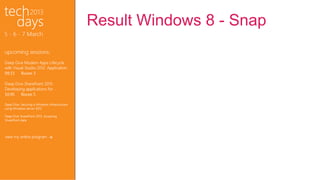
• Use of a fixed column for “communication” before, during
  and after the event
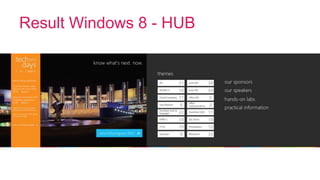
• Use of a background image in HUB to give some more
  emotion to the app, even though the content is straight-
  forward
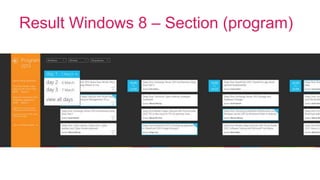
• Possibility to create own agenda, shown in fixed column
  during event
• Brought different entry points together on the HUB: full
  program, direct filter on topic and quick links to
  secondary info
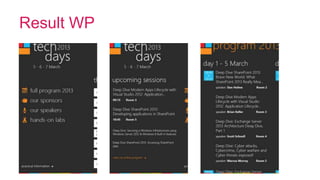
Result Windows Phone
• Consistency in functionality & design style
  compared to Windows 8
• Extra focus on agenda once it’s created by
  bringing it to front
• Use of typical WP design patterns like pivot and
  parralax logo
Result Windows 8 - HUB
Result Windows 8 – Section (program)
Result Windows 8 - Snap
Result WP
Inside the Microsoft TechDays Belgium Apps

Inside the Microsoft TechDays Belgium Apps

  • 1.
  • 4.
    • Challenge • Approach •Results Techdays Belux W8 & Windows Phone
  • 5.
    Challenge: make theDesigns for Windows 8 & Windows Phone in a limited amount of time.
  • 6.
    Approach • Benchmarking otherTechdays apps • Breakdown of the functionalities to essence • Some basic sketching to get structure in place • Limited user interviews with people attending this and past events • Given limited functions, try to find something “different” from other apps for Windows 8 • For Windows Phone, we tried to get inspired by apps that are real WP8 native interfaces (such as pictures app)
  • 7.
    Result Windows 8 •Use of a fixed column for “communication” before, during and after the event • Use of a background image in HUB to give some more emotion to the app, even though the content is straight- forward • Possibility to create own agenda, shown in fixed column during event • Brought different entry points together on the HUB: full program, direct filter on topic and quick links to secondary info
  • 8.
    Result Windows Phone •Consistency in functionality & design style compared to Windows 8 • Extra focus on agenda once it’s created by bringing it to front • Use of typical WP design patterns like pivot and parralax logo
  • 9.
  • 10.
    Result Windows 8– Section (program)
  • 11.
  • 12.