




Git Workflow with Gitflow
What is a workflow?


 "...consists of a sequence of connected steps.." - Wikipedia

 What are we looking?

             An way to multiple developers
 integrate                      a working code into a project
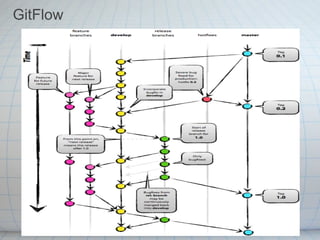
GitFlow
Why Gitflow?

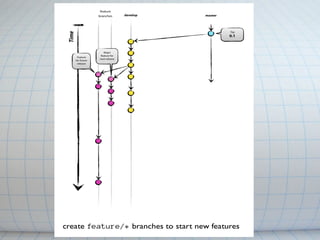
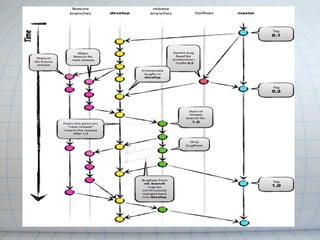
    ■ Based on the graph you just saw.
    ■ Github - https://github.com/nvie/gitflow
    ■ Shortcuts for repetitive tasks.
    ■ Branch naming convention "<prefix>/<name>"
    ■ 2 main branches.
Main branches


    1. master -> production-ready
    2. develop -> latest for next release


    Their lifetime is infinite.
Gitflow - prepare repository

  $git flow init

  When creating a new git flow workflow it ask you questions
the names of the branches - USE DEFAULTS.

   when this is done a new develop branch is created
from        master and from this point you never commit to
master         branch anymore.
Gitflow - Supporting branches

  There are 4 supporting branches:

        1. feature
        2. release
        3. hotfix
        4. support

   I will cover only feature since this is the only one you will
with.
Gitflow - Feature branches

● May branch off from: develop branch
● Must merge back into: develop branch
● Branch naming convention: anything except
  master, develop, release/*, hotfix/* - our branching name will
  consist with 3base_<issue #>_<feature name>
● Typically exist in developer repos only, not in origin - from
  time to time I will ask to also push the specific branch also
  to origin.
Gitflow - Create feature branches


$git flow feature start 3base_<issue #>_<feature name>

This is what it does:

$git checkout -b feature/3base_<issue #>_<feature name> develop
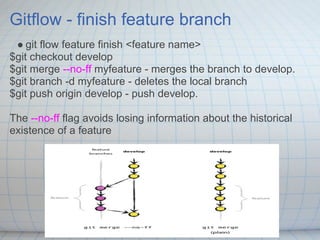
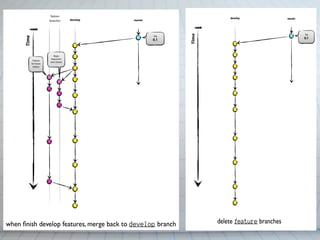
Gitflow - finish feature branch
 ● git flow feature finish <feature name>
$git checkout develop
$git merge --no-ff myfeature - merges the branch to develop.
$git branch -d myfeature - deletes the local branch
$git push origin develop - push develop.

The --no-ff flag avoids losing information about the historical
existence of a feature
More on the subject

   ● gitflow on github -https://github.com/nvie/gitflow.
   ● A successful git branching model
   ● A short introduction to git-flow
   ● On the path with git-flow

Git Workflow With Gitflow

  • 1.
  • 2.
    What is aworkflow? "...consists of a sequence of connected steps.." - Wikipedia What are we looking? An way to multiple developers integrate a working code into a project
  • 3.
  • 4.
    Why Gitflow? ■ Based on the graph you just saw. ■ Github - https://github.com/nvie/gitflow ■ Shortcuts for repetitive tasks. ■ Branch naming convention "<prefix>/<name>" ■ 2 main branches.
  • 5.
    Main branches 1. master -> production-ready 2. develop -> latest for next release Their lifetime is infinite.
  • 6.
    Gitflow - preparerepository $git flow init When creating a new git flow workflow it ask you questions the names of the branches - USE DEFAULTS. when this is done a new develop branch is created from master and from this point you never commit to master branch anymore.
  • 8.
    Gitflow - Supportingbranches There are 4 supporting branches: 1. feature 2. release 3. hotfix 4. support I will cover only feature since this is the only one you will with.
  • 9.
    Gitflow - Featurebranches ● May branch off from: develop branch ● Must merge back into: develop branch ● Branch naming convention: anything except master, develop, release/*, hotfix/* - our branching name will consist with 3base_<issue #>_<feature name> ● Typically exist in developer repos only, not in origin - from time to time I will ask to also push the specific branch also to origin.
  • 10.
    Gitflow - Createfeature branches $git flow feature start 3base_<issue #>_<feature name> This is what it does: $git checkout -b feature/3base_<issue #>_<feature name> develop
  • 12.
    Gitflow - finishfeature branch ● git flow feature finish <feature name> $git checkout develop $git merge --no-ff myfeature - merges the branch to develop. $git branch -d myfeature - deletes the local branch $git push origin develop - push develop. The --no-ff flag avoids losing information about the historical existence of a feature
  • 15.
    More on thesubject ● gitflow on github -https://github.com/nvie/gitflow. ● A successful git branching model ● A short introduction to git-flow ● On the path with git-flow