Memory Management for Android Apps
Patrick Dubroy (dubroy.com · @dubroy)
May 11, 2011
3
192MB RAM
4
1GB RAM
5
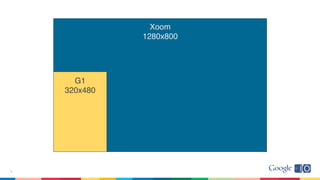
G1
320x480
Xoom
1280x800
6
7
Work expands
to fill the time available.
Software
memory
Overview
• Changes in Gingerbread and Honeycomb
– heap size
– GC
– bitmaps
• Understanding heap usage
– logs
– memory leaks
– Eclipse Memory Analyzer (MAT)
8
Expectations
• Android
• Dalvik heap
• Garbage collection
• OutOfMemoryError
9
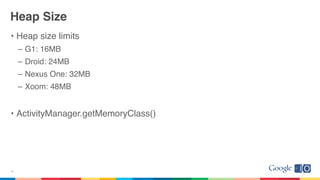
Heap Size
• Heap size limits
– G1: 16MB
– Droid: 24MB
– Nexus One: 32MB
– Xoom: 48MB
• ActivityManager.getMemoryClass()
10
Large Heaps
• Honeycomb adds “largeHeap” option in AndroidManifest.xml:
– Degrades performance! Use only if you understand why you need it.
<application
android:name="com.example.foobar"
android:largeHeap="true"
...
</application>
ActivityManager.getLargeMemoryClass()
11
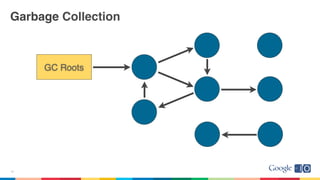
Garbage Collection
12
GC Roots
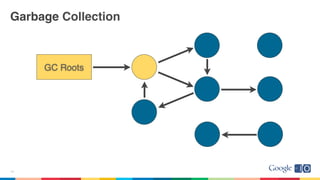
Garbage Collection
13
GC Roots
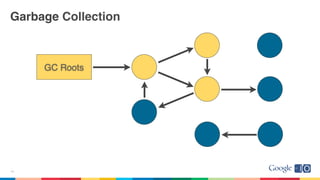
Garbage Collection
14
GC Roots
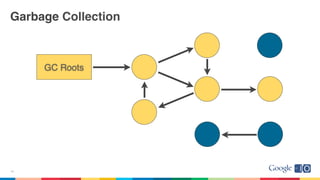
Garbage Collection
15
GC Roots
Garbage Collection
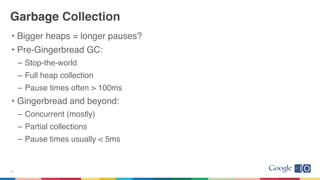
• Bigger heaps = longer pauses?
• Pre-Gingerbread GC:
– Stop-the-world
– Full heap collection
– Pause times often > 100ms
• Gingerbread and beyond:
– Concurrent (mostly)
– Partial collections
– Pause times usually < 5ms
16
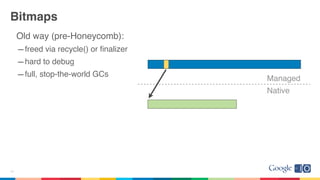
Bitmaps
Old way (pre-Honeycomb):
–freed via recycle() or finalizer
–hard to debug
–full, stop-the-world GCs
17
Managed
Native
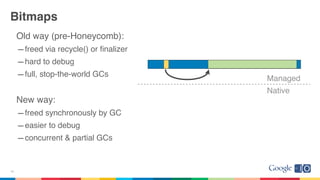
Bitmaps
Old way (pre-Honeycomb):
–freed via recycle() or finalizer
–hard to debug
–full, stop-the-world GCs
New way:
–freed synchronously by GC
–easier to debug
–concurrent & partial GCs
18
Managed
Native
Overview
• Changes in Gingerbread and Honeycomb
– heap size
– GC
– bitmaps
• Understanding heap usage
– logs
– memory leaks
– Eclipse Memory Analyzer (MAT)
19
Overview
• Changes in Gingerbread and Honeycomb
– heap size
– GC
– bitmaps
• Understanding heap usage
– logs
– memory leaks

– Eclipse Memory Analyzer (MAT)
20
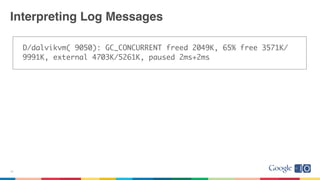
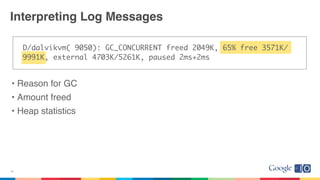
D/dalvikvm( 9050): GC_CONCURRENT freed 2049K, 65% free 3571K/
9991K, external 4703K/5261K, paused 2ms+2ms
Interpreting Log Messages
21
Interpreting Log Messages
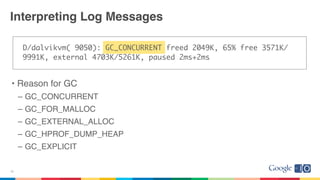
D/dalvikvm( 9050): GC_CONCURRENT freed 2049K, 65% free 3571K/
9991K, external 4703K/5261K, paused 2ms+2ms
• Reason for GC
– GC_CONCURRENT
– GC_FOR_MALLOC
– GC_EXTERNAL_ALLOC
– GC_HPROF_DUMP_HEAP
– GC_EXPLICIT
22
Interpreting Log Messages
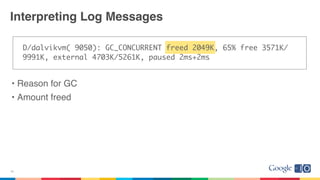
D/dalvikvm( 9050): GC_CONCURRENT freed 2049K, 65% free 3571K/
9991K, external 4703K/5261K, paused 2ms+2ms
• Reason for GC
• Amount freed
23
Interpreting Log Messages
D/dalvikvm( 9050): GC_CONCURRENT freed 2049K, 65% free 3571K/
9991K, external 4703K/5261K, paused 2ms+2ms
• Reason for GC
• Amount freed
• Heap statistics
24
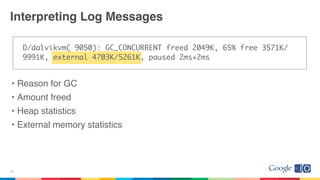
Interpreting Log Messages
D/dalvikvm( 9050): GC_CONCURRENT freed 2049K, 65% free 3571K/
9991K, external 4703K/5261K, paused 2ms+2ms
• Reason for GC
• Amount freed
• Heap statistics
• External memory statistics
25
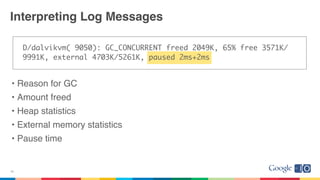
Interpreting Log Messages
D/dalvikvm( 9050): GC_CONCURRENT freed 2049K, 65% free 3571K/
9991K, external 4703K/5261K, paused 2ms+2ms
• Reason for GC
• Amount freed
• Heap statistics
• External memory statistics
• Pause time
26
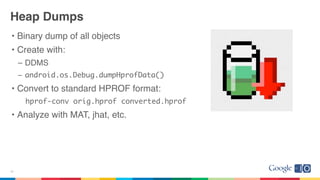
Heap Dumps
• Binary dump of all objects
• Create with:
– DDMS
– android.os.Debug.dumpHprofData()
• Convert to standard HPROF format:
hprof-conv orig.hprof converted.hprof
• Analyze with MAT, jhat, etc.
27
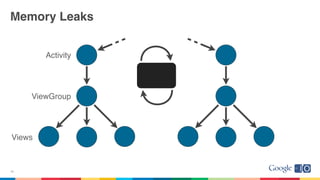
Memory Leaks
• GC does not prevent leaks!
• Leak: ref to an unused object preventing GC
• References to Activity (Context)
– View, Drawable, ...
28
Memory Leaks
29
Activity
ViewGroup
Views
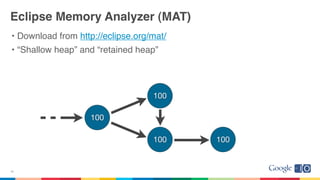
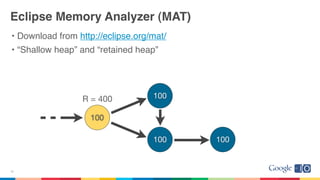
Eclipse Memory Analyzer (MAT)
• Download from http://eclipse.org/mat/
• “Shallow heap” and “retained heap”
30
100
100
100 100
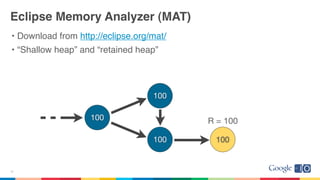
Eclipse Memory Analyzer (MAT)
• Download from http://eclipse.org/mat/
• “Shallow heap” and “retained heap”
31
100
100
100 100
R = 100
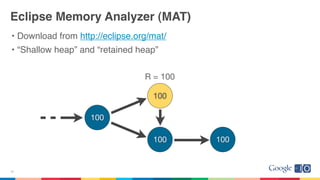
Eclipse Memory Analyzer (MAT)
• Download from http://eclipse.org/mat/
• “Shallow heap” and “retained heap”
32
100
100 100
100
R = 100
Eclipse Memory Analyzer (MAT)
• Download from http://eclipse.org/mat/
• “Shallow heap” and “retained heap”
33
100
100
100 100
R = 400
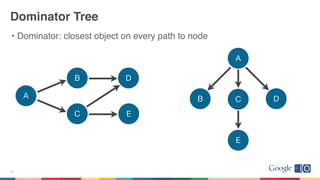
Dominator Tree
• Dominator: closest object on every path to node
34
A
B
C E
D
A
B C D
E
Demo: Debugging a memory leak with MAT
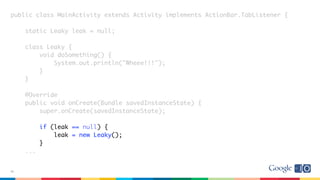
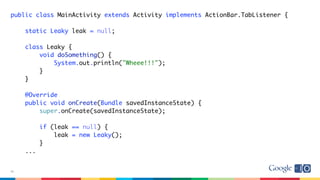
public class MainActivity extends Activity implements ActionBar.TabListener {
static Leaky leak = null;
class Leaky {
void doSomething() {
System.out.println("Wheee!!!");
}
}
@Override
public void onCreate(Bundle savedInstanceState) {
super.onCreate(savedInstanceState);
if (leak == null) {
leak = new Leaky();
}
...
36
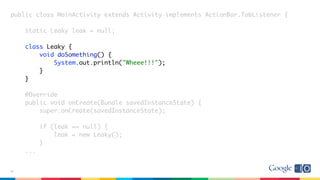
public class MainActivity extends Activity implements ActionBar.TabListener {
static Leaky leak = null;
class Leaky {
void doSomething() {
System.out.println("Wheee!!!");
}
}
@Override
public void onCreate(Bundle savedInstanceState) {
super.onCreate(savedInstanceState);
if (leak == null) {
leak = new Leaky();
}
...
37
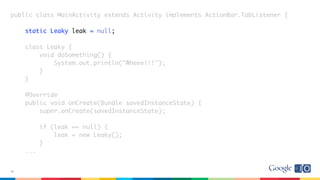
public class MainActivity extends Activity implements ActionBar.TabListener {
static Leaky leak = null;
class Leaky {
void doSomething() {
System.out.println("Wheee!!!");
}
}
@Override
public void onCreate(Bundle savedInstanceState) {
super.onCreate(savedInstanceState);
if (leak == null) {
leak = new Leaky();
}
...
38
public class MainActivity extends Activity implements ActionBar.TabListener {
static Leaky leak = null;
class Leaky {
void doSomething() {
System.out.println("Wheee!!!");
}
}
@Override
public void onCreate(Bundle savedInstanceState) {
super.onCreate(savedInstanceState);
if (leak == null) {
leak = new Leaky();
}
...
39
40
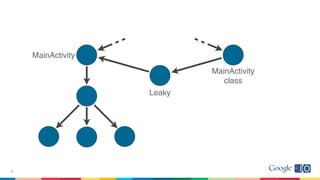
MainActivity
Leaky
MainActivity
class
Demo: Debugging a memory leak with MAT
Memory Leaks
• References to Activity, Context, View, Drawable, ...
• Non-static inner classes (e.g. Runnable)
• Caches
42
Links
• Articles on Android Developers Blog
– Memory Analysis for Android Applications
– Avoiding Memory Leaks by Romain Guy
• Eclipse Memory Analyzer: http://www.eclipse.org/mat/
• Markus Kohlerʼs Java Performance Blog: http://kohlerm.blogspot.com/
• Feedback on this talk:
http://speakermeter.com/talks/memory-management-android
43

Memory management for_android_apps

  • 2.
    Memory Management forAndroid Apps Patrick Dubroy (dubroy.com · @dubroy) May 11, 2011
  • 3.
  • 4.
  • 5.
  • 6.
  • 7.
    7 Work expands to fillthe time available. Software memory
  • 8.
    Overview • Changes inGingerbread and Honeycomb – heap size – GC – bitmaps • Understanding heap usage – logs – memory leaks – Eclipse Memory Analyzer (MAT) 8
  • 9.
    Expectations • Android • Dalvikheap • Garbage collection • OutOfMemoryError 9
  • 10.
    Heap Size • Heapsize limits – G1: 16MB – Droid: 24MB – Nexus One: 32MB – Xoom: 48MB • ActivityManager.getMemoryClass() 10
  • 11.
    Large Heaps • Honeycombadds “largeHeap” option in AndroidManifest.xml: – Degrades performance! Use only if you understand why you need it. <application android:name="com.example.foobar" android:largeHeap="true" ... </application> ActivityManager.getLargeMemoryClass() 11
  • 12.
  • 13.
  • 14.
  • 15.
  • 16.
    Garbage Collection • Biggerheaps = longer pauses? • Pre-Gingerbread GC: – Stop-the-world – Full heap collection – Pause times often > 100ms • Gingerbread and beyond: – Concurrent (mostly) – Partial collections – Pause times usually < 5ms 16
  • 17.
    Bitmaps Old way (pre-Honeycomb): –freedvia recycle() or finalizer –hard to debug –full, stop-the-world GCs 17 Managed Native
  • 18.
    Bitmaps Old way (pre-Honeycomb): –freedvia recycle() or finalizer –hard to debug –full, stop-the-world GCs New way: –freed synchronously by GC –easier to debug –concurrent & partial GCs 18 Managed Native
  • 19.
    Overview • Changes inGingerbread and Honeycomb – heap size – GC – bitmaps • Understanding heap usage – logs – memory leaks – Eclipse Memory Analyzer (MAT) 19
  • 20.
    Overview • Changes inGingerbread and Honeycomb – heap size – GC – bitmaps • Understanding heap usage – logs – memory leaks – Eclipse Memory Analyzer (MAT) 20
  • 21.
    D/dalvikvm( 9050): GC_CONCURRENTfreed 2049K, 65% free 3571K/ 9991K, external 4703K/5261K, paused 2ms+2ms Interpreting Log Messages 21
  • 22.
    Interpreting Log Messages D/dalvikvm(9050): GC_CONCURRENT freed 2049K, 65% free 3571K/ 9991K, external 4703K/5261K, paused 2ms+2ms • Reason for GC – GC_CONCURRENT – GC_FOR_MALLOC – GC_EXTERNAL_ALLOC – GC_HPROF_DUMP_HEAP – GC_EXPLICIT 22
  • 23.
    Interpreting Log Messages D/dalvikvm(9050): GC_CONCURRENT freed 2049K, 65% free 3571K/ 9991K, external 4703K/5261K, paused 2ms+2ms • Reason for GC • Amount freed 23
  • 24.
    Interpreting Log Messages D/dalvikvm(9050): GC_CONCURRENT freed 2049K, 65% free 3571K/ 9991K, external 4703K/5261K, paused 2ms+2ms • Reason for GC • Amount freed • Heap statistics 24
  • 25.
    Interpreting Log Messages D/dalvikvm(9050): GC_CONCURRENT freed 2049K, 65% free 3571K/ 9991K, external 4703K/5261K, paused 2ms+2ms • Reason for GC • Amount freed • Heap statistics • External memory statistics 25
  • 26.
    Interpreting Log Messages D/dalvikvm(9050): GC_CONCURRENT freed 2049K, 65% free 3571K/ 9991K, external 4703K/5261K, paused 2ms+2ms • Reason for GC • Amount freed • Heap statistics • External memory statistics • Pause time 26
  • 27.
    Heap Dumps • Binarydump of all objects • Create with: – DDMS – android.os.Debug.dumpHprofData() • Convert to standard HPROF format: hprof-conv orig.hprof converted.hprof • Analyze with MAT, jhat, etc. 27
  • 28.
    Memory Leaks • GCdoes not prevent leaks! • Leak: ref to an unused object preventing GC • References to Activity (Context) – View, Drawable, ... 28
  • 29.
  • 30.
    Eclipse Memory Analyzer(MAT) • Download from http://eclipse.org/mat/ • “Shallow heap” and “retained heap” 30 100 100 100 100
  • 31.
    Eclipse Memory Analyzer(MAT) • Download from http://eclipse.org/mat/ • “Shallow heap” and “retained heap” 31 100 100 100 100 R = 100
  • 32.
    Eclipse Memory Analyzer(MAT) • Download from http://eclipse.org/mat/ • “Shallow heap” and “retained heap” 32 100 100 100 100 R = 100
  • 33.
    Eclipse Memory Analyzer(MAT) • Download from http://eclipse.org/mat/ • “Shallow heap” and “retained heap” 33 100 100 100 100 R = 400
  • 34.
    Dominator Tree • Dominator:closest object on every path to node 34 A B C E D A B C D E
  • 35.
    Demo: Debugging amemory leak with MAT
  • 36.
    public class MainActivityextends Activity implements ActionBar.TabListener { static Leaky leak = null; class Leaky { void doSomething() { System.out.println("Wheee!!!"); } } @Override public void onCreate(Bundle savedInstanceState) { super.onCreate(savedInstanceState); if (leak == null) { leak = new Leaky(); } ... 36
  • 37.
    public class MainActivityextends Activity implements ActionBar.TabListener { static Leaky leak = null; class Leaky { void doSomething() { System.out.println("Wheee!!!"); } } @Override public void onCreate(Bundle savedInstanceState) { super.onCreate(savedInstanceState); if (leak == null) { leak = new Leaky(); } ... 37
  • 38.
    public class MainActivityextends Activity implements ActionBar.TabListener { static Leaky leak = null; class Leaky { void doSomething() { System.out.println("Wheee!!!"); } } @Override public void onCreate(Bundle savedInstanceState) { super.onCreate(savedInstanceState); if (leak == null) { leak = new Leaky(); } ... 38
  • 39.
    public class MainActivityextends Activity implements ActionBar.TabListener { static Leaky leak = null; class Leaky { void doSomething() { System.out.println("Wheee!!!"); } } @Override public void onCreate(Bundle savedInstanceState) { super.onCreate(savedInstanceState); if (leak == null) { leak = new Leaky(); } ... 39
  • 40.
  • 41.
    Demo: Debugging amemory leak with MAT
  • 42.
    Memory Leaks • Referencesto Activity, Context, View, Drawable, ... • Non-static inner classes (e.g. Runnable) • Caches 42
  • 43.
    Links • Articles onAndroid Developers Blog – Memory Analysis for Android Applications – Avoiding Memory Leaks by Romain Guy • Eclipse Memory Analyzer: http://www.eclipse.org/mat/ • Markus Kohlerʼs Java Performance Blog: http://kohlerm.blogspot.com/ • Feedback on this talk: http://speakermeter.com/talks/memory-management-android 43