Memory Leak

Overview and Tools
AGENDA









Overview of Java Heap
What is a Memory Leak
Symptoms of Memory Leaks
How to troubleshoot
Tools
Best Practices to avoid/detect Memory Leak
Q&A
Overview of Java Heap






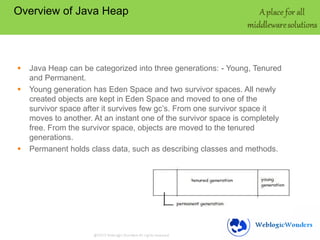
Java Heap can be categorized into three generations: - Young, Tenured
and Permanent.
Young generation has Eden Space and two survivor spaces. All newly
created objects are kept in Eden Space and moved to one of the
survivor space after it survives few gc’s. From one survivor space it
moves to another. At an instant one of the survivor space is completely
free. From the survivor space, objects are moved to the tenured
generations.
Permanent holds class data, such as describing classes and methods.
What is a Memory Leak

Memory leak is when objects are not removed from
the heap even when they are not required.
This can be due to application code, application
server code, database driver or third party jar files.
Symptoms of Memory Leak






Very frequent FULL GC
Lesser memory is reclaimed on each Full GC
Available free heap keeps on decreasing over time
Response time decreases
How to troubleshoot

 Gather GC Information by adding the following JVM
flags
 -Xloggc=filename
 verbose:gc
 -XX:+PrintGCTimeStamps
 -XX:+PrintGCDetails
Tools

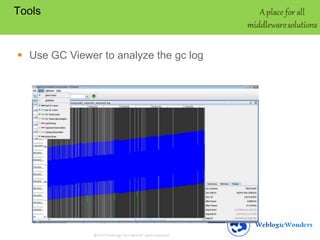
 Use GC Viewer to analyze the gc log
Jprofiler

 Memory profiling (Class Monitor, Allocation Monitor)
 Heap walker (Show all Class instances,
Allocations,References)
 CPU profiling (Invocation Tree, Hot spots, Method
Graph,CPU statistics)
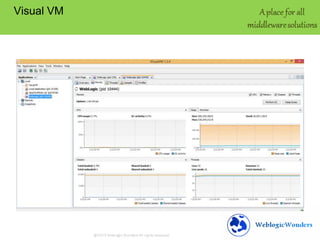
Visual VM
Best Practices to avoid or detect Memory Leak

 Keep a watch on heap usage and use alert
mechanisms.
 Free up unnecessary objects.
 Close all connections in the finally block
 Don’t keep too much data in session.
Q&A

Memory leak

  • 1.
  • 2.
    AGENDA        Overview of JavaHeap What is a Memory Leak Symptoms of Memory Leaks How to troubleshoot Tools Best Practices to avoid/detect Memory Leak Q&A
  • 3.
    Overview of JavaHeap    Java Heap can be categorized into three generations: - Young, Tenured and Permanent. Young generation has Eden Space and two survivor spaces. All newly created objects are kept in Eden Space and moved to one of the survivor space after it survives few gc’s. From one survivor space it moves to another. At an instant one of the survivor space is completely free. From the survivor space, objects are moved to the tenured generations. Permanent holds class data, such as describing classes and methods.
  • 4.
    What is aMemory Leak Memory leak is when objects are not removed from the heap even when they are not required. This can be due to application code, application server code, database driver or third party jar files.
  • 5.
    Symptoms of MemoryLeak     Very frequent FULL GC Lesser memory is reclaimed on each Full GC Available free heap keeps on decreasing over time Response time decreases
  • 6.
    How to troubleshoot Gather GC Information by adding the following JVM flags  -Xloggc=filename  verbose:gc  -XX:+PrintGCTimeStamps  -XX:+PrintGCDetails
  • 7.
    Tools  Use GCViewer to analyze the gc log
  • 8.
    Jprofiler  Memory profiling(Class Monitor, Allocation Monitor)  Heap walker (Show all Class instances, Allocations,References)  CPU profiling (Invocation Tree, Hot spots, Method Graph,CPU statistics)
  • 9.
  • 10.
    Best Practices toavoid or detect Memory Leak  Keep a watch on heap usage and use alert mechanisms.  Free up unnecessary objects.  Close all connections in the finally block  Don’t keep too much data in session.
  • 11.