Preventing memory leaks 
Ali Muzaffar
Common causes of memory leaks 
 Which Context to use? 
 Application Context 
 Activity Context 
 Problem with references outside of context 
 Why should Handlers be static? 
 Should inner classes be static? 
 Recycle bitmaps
Common causes of memory leaks 
 Which Context to use? 
 Application Context 
 Activity Context 
 Problem with references outside of context 
 Why should Handlers be static? 
 Should inner classes be static? 
 Leaking Threads 
 Also, Recycling Bitmaps (not covered here).
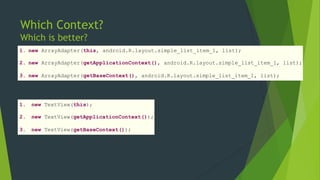
Which Context? 
Which is better? 
1. new ArrayAdapter(this, android.R.layout.simple_list_item_1, list); 
2. new ArrayAdapter(getApplicationContext(), android.R.layout.simple_list_item_1, list); 
3. new ArrayAdapter(getBaseContext(), android.R.layout.simple_list_item_1, list); 
1. new TextView(this); 
2. new TextView(getApplicationContext()); 
3. new TextView(getBaseContext());
Which is better? 
1. new ArrayAdapter(this, android.R.layout.simple_list_item_1, list); 
2. new ArrayAdapter(getApplicationContext(), android.R.layout.simple_list_item_1, list); 
3. new ArrayAdapter(getBaseContext(), android.R.layout.simple_list_item_1, list); 
1. new TextView(this); 
2. new TextView(getApplicationContext()); 
3. new TextView(getBaseContext());
Good rule of thumb 
 Always use Application Context. 
 Use Activity where necessary. Meaning the object will be 
collected with the Activity or method specifically requests 
it. 
 Never use getBaseContext().
Problem with references outside context 
 Why using the right context is important? 
 Threads & Garbage Collection 
 How do we fix this?
Usually not a problem 
@Override 
protected void onCreate(Bundle state) { 
super.onCreate(state); 
TextView label = new TextView(this); 
label.setText("Leaks are bad"); 
setContentView(label); 
} 
//Code by Romain Guy
Now it’s a problem 
private static Drawable sBackground; 
@Override 
protected void onCreate(Bundle state) { 
super.onCreate(state); 
TextView label = new TextView(this); 
label.setText("Leaks are bad"); 
if (sBackground == null) { 
sBackground = getDrawable(R.drawable.large_bitmap); 
} 
label.setBackgroundDrawable(sBackground); 
setContentView(label); 
} 
//Code by Romain Guy 
Drawables hold references to 
the Activity. 
TextView holds a strong 
reference to the Activity. The 
Drawable is not garbage 
collected, as a result, neither 
is the TextView or the 
Activity.
The problem with non-static inner 
classes 
 Why do I get this error?
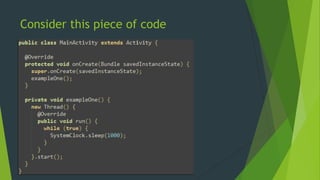
Consider this piece of code
So whats the issue with non-static inner 
classes 
 When an Android application first starts, the framework creates a Looper object 
for the application's main thread. A Looper implements a simple message queue, 
processing Message objects in a loop one after another. All major application 
framework events (such as Activity lifecycle method calls, button clicks, etc.) 
are contained inside Message objects, which are added to the Looper's message 
queue and are processed one-by-one. The main thread's Looper exists throughout 
the application's lifecycle. 
 When a Handler is instantiated on the main thread, it is associated with the 
Looper's message queue. Messages posted to the message queue will hold a 
reference to the Handler so that the framework can call 
Handler#handleMessage(Message) when the Looper eventually processes the 
message. 
 In Java, non-static inner and anonymous classes hold an implicit reference to 
their outer class. Static inner classes, on the other hand, do not.
So what’s the issue with Threads? 
 Threads can be leaked along with/without 
memory. 
 Why? 
 Threads in Java are GC roots; that is, the Dalvik Virtual 
Machine (DVM) keeps hard references to all active 
threads in the runtime system, and as a result, threads 
that are left running will never be eligible for garbage 
collection.
Crouton 
 Why do we have to call 
Crouton.cancelAllCroutons() 
?
Crouton 
 Why do we have to call 
Crouton.cancelAllCroutons() 
?
What can we do? 
 Do not reference anything outside of it’s scope. 
 Try to not have long living objects. 
 Don’t assume java will clean up your threads. 
 Implement cancellation policies for background threads. 
 WeakReference
Egg-xample!

Android - Preventing common memory leaks

  • 1.
  • 2.
    Common causes ofmemory leaks  Which Context to use?  Application Context  Activity Context  Problem with references outside of context  Why should Handlers be static?  Should inner classes be static?  Recycle bitmaps
  • 3.
    Common causes ofmemory leaks  Which Context to use?  Application Context  Activity Context  Problem with references outside of context  Why should Handlers be static?  Should inner classes be static?  Leaking Threads  Also, Recycling Bitmaps (not covered here).
  • 4.
    Which Context? Whichis better? 1. new ArrayAdapter(this, android.R.layout.simple_list_item_1, list); 2. new ArrayAdapter(getApplicationContext(), android.R.layout.simple_list_item_1, list); 3. new ArrayAdapter(getBaseContext(), android.R.layout.simple_list_item_1, list); 1. new TextView(this); 2. new TextView(getApplicationContext()); 3. new TextView(getBaseContext());
  • 5.
    Which is better? 1. new ArrayAdapter(this, android.R.layout.simple_list_item_1, list); 2. new ArrayAdapter(getApplicationContext(), android.R.layout.simple_list_item_1, list); 3. new ArrayAdapter(getBaseContext(), android.R.layout.simple_list_item_1, list); 1. new TextView(this); 2. new TextView(getApplicationContext()); 3. new TextView(getBaseContext());
  • 6.
    Good rule ofthumb  Always use Application Context.  Use Activity where necessary. Meaning the object will be collected with the Activity or method specifically requests it.  Never use getBaseContext().
  • 7.
    Problem with referencesoutside context  Why using the right context is important?  Threads & Garbage Collection  How do we fix this?
  • 8.
    Usually not aproblem @Override protected void onCreate(Bundle state) { super.onCreate(state); TextView label = new TextView(this); label.setText("Leaks are bad"); setContentView(label); } //Code by Romain Guy
  • 9.
    Now it’s aproblem private static Drawable sBackground; @Override protected void onCreate(Bundle state) { super.onCreate(state); TextView label = new TextView(this); label.setText("Leaks are bad"); if (sBackground == null) { sBackground = getDrawable(R.drawable.large_bitmap); } label.setBackgroundDrawable(sBackground); setContentView(label); } //Code by Romain Guy Drawables hold references to the Activity. TextView holds a strong reference to the Activity. The Drawable is not garbage collected, as a result, neither is the TextView or the Activity.
  • 10.
    The problem withnon-static inner classes  Why do I get this error?
  • 11.
  • 12.
    So whats theissue with non-static inner classes  When an Android application first starts, the framework creates a Looper object for the application's main thread. A Looper implements a simple message queue, processing Message objects in a loop one after another. All major application framework events (such as Activity lifecycle method calls, button clicks, etc.) are contained inside Message objects, which are added to the Looper's message queue and are processed one-by-one. The main thread's Looper exists throughout the application's lifecycle.  When a Handler is instantiated on the main thread, it is associated with the Looper's message queue. Messages posted to the message queue will hold a reference to the Handler so that the framework can call Handler#handleMessage(Message) when the Looper eventually processes the message.  In Java, non-static inner and anonymous classes hold an implicit reference to their outer class. Static inner classes, on the other hand, do not.
  • 13.
    So what’s theissue with Threads?  Threads can be leaked along with/without memory.  Why?  Threads in Java are GC roots; that is, the Dalvik Virtual Machine (DVM) keeps hard references to all active threads in the runtime system, and as a result, threads that are left running will never be eligible for garbage collection.
  • 14.
    Crouton  Whydo we have to call Crouton.cancelAllCroutons() ?
  • 15.
    Crouton  Whydo we have to call Crouton.cancelAllCroutons() ?
  • 16.
    What can wedo?  Do not reference anything outside of it’s scope.  Try to not have long living objects.  Don’t assume java will clean up your threads.  Implement cancellation policies for background threads.  WeakReference
  • 17.