Google BigQuery
- Command line and Tips -
2016/06/08
Mulodo Vietnam Co., Ltd.
What’s BigQuery
Official site : https://cloud.google.com/bigquery/docs/
BigQuery is Google's fully managed, petabyte scale, low
cost analytics data warehouse.
BigQuery is NoOps—there is no infrastructure to manage
and you don't need a database administrator—so you can
focus on analyzing data to find meaningful insights, use
familiar SQL, and take advantage of our pay-as-you-go
model.
→ DWH: SQL like (easy to use), Petabyte scale(for Huge data)
Previous study
“BigQuery - The First Step -“ (2016/05/26)
• Just try to start for Google Big Query
• Using query on the Google Cloud Platform console.
• Create your own Dataset and Table
• Using query for your table GPC console.
http://www.meetup.com/Open-Study-Group-Saigon/events/231233151/
http://www.slideshare.net/nemo-mulodo/big-query-the-first-step-mosg
c.f. “Big Data - Overview - “
http://www.slide http://www.meetup.com/Open-Study-Group-Saigon/events/229243903/
share.net/nemo-mulodo/big-data-overview-mosg
Command line tools and Tips
1. Preparation (install SDK and settings)
2. Try command line tools
create datasets, tables and insert data.
3. Tips for business use.
How to charge?
Tips to reduce cost.
1. Preparation steps
Preparation steps
1. Create “Google Cloud Platform(GCP)” account, and
BigQuery.
See) previous paper.
2. Install GCP SKD to your PC. (Using Ubuntu on Vagrant)
1. Installation
2. Activate your account
3. Set accounts for GCP SDK.
2. Install GCP SKD
1. Installation
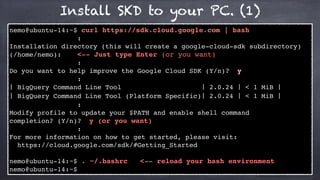
Install SKD to your PC. (1)
nemo@ubuntu-14:~$ curl https://sdk.cloud.google.com | bash
:
Installation directory (this will create a google-cloud-sdk subdirectory)
(/home/nemo): <-- Just type Enter (or you want)
:
Do you want to help improve the Google Cloud SDK (Y/n)? y
:
! BigQuery Command Line Tool ! 2.0.24 ! < 1 MiB !
! BigQuery Command Line Tool (Platform Specific)! 2.0.24 ! < 1 MiB !
:
Modify profile to update your $PATH and enable shell command
completion? (Y/n)? y (or you want)
:
For more information on how to get started, please visit:
https://cloud.google.com/sdk/#Getting_Started
nemo@ubuntu-14:~$ . ~/.bashrc <-- reload your bash environment
nemo@ubuntu-14:~$
Install SKD to your PC. (2)
// check the commands
nemo@ubuntu-14:~$ which bq
/home/nemo/google-cloud-sdk/bin/bq
nemo@ubuntu-14:~$ which gcloud
/Users/nemo/google-cloud-sdk/bin/gcloud
2. Install GCP SKD
2. Activate your account
Activate your GPC account (1)
1. Preparation (create account)
2. Go to Google Cloud platform (has no account)
3. “Try IT Free”
https://cloud.google.com
nemo@ubuntu-14:~$ gcloud init
Welcome! This command will take you through the configuration of gcloud.
Your current configuration has been set to: [default]
To continue, you must log in. Would you like to log in (Y/n)?
Go to the following link in your browser:
https://accounts.google.com/o/oauth2/auth?redirect_uri=ur&xxxxxxxxxxxxx
xxxxxxxxxxxxxxxxxxxxxxxxxxxxxxxxxxxxxxxxxxxxxxxxxxxxxxxxxxxxxxxxxxxxxxxxxxx
access_type=offline
Enter verification code: xxxxxxxxxxxxxxxxxxxxxxxxxxxxxx
You are now logged in as: [xxxx@example.com]
This account has no projects. Please create one in developers console (https://
console.developers.google.com/project) before running this command.
nemo@ubuntu-14:~$
nemo@ubuntu-14:~$ gcloud init
Welcome! This command will take you through the configuration of gcloud.
Your current configuration has been set to: [default]
To continue, you must log in. Would you like to log in (Y/n)?
Go to the following link in your browser:
https://accounts.google.com/o/oauth2/auth?redirect_uri=ur&xxxxxxxxxxxxx
xxxxxxxxxxxxxxxxxxxxxxxxxxxxxxxxxxxxxxxxxxxxxxxxxxxxxxxxxxxxxxxxxxxxxxxxxxx
access_type=offline
Enter verification code: xxxxxxxxxxxxxxxxxxxxxxxxxxxxxx
You are now logged in as: [xxxx@example.com]
This account has no projects. Please create one in developers console (https://
console.developers.google.com/project) before running this command.
nemo@ubuntu-14:~$
Activate your GPC account (2)
https://accounts.google.com/o/oauth2/auth?redirect_uri=ur&xxxxxxxxxxxxxxxxx
xxxxxxxxxxxxxxxxxxxxxxxxxxxxxxxxxxxxxxxxxxxxxxxxxxxxxxxxxxxxxxxxxxxxxxxxxxx
access_type=offline
Launch
Browser
Select accounts
(if you already login with
multiple accounts)
Activate your GPC account (3)
https://accounts.google.com/o/oauth2/auth?redirect_uri=ur&xxxxxxxxxxxxxxxxx
xxxxxxxxxxxxxxxxxxxxxxxxxxxxxxxxxxxxxxxxxxxxxxxxxxxxxxxxxxxxxxxxxxxxxxxxxxx
access_type=offline
Accept
permission
Activate your GPC account (4)
https://accounts.google.com/o/oauth2/auth?redirect_uri=ur&xxxxxxxxxxxxxxxxx
xxxxxxxxxxxxxxxxxxxxxxxxxxxxxxxxxxxxxxxxxxxxxxxxxxxxxxxxxxxxxxxxxxxxxxxxxxx
access_type=offline
get
verification code
Activate your GPC account (5)
https://accounts.google.com/o/oauth2/auth?redirect_uri=ur&xxxxxxxxxxxxxxxxx
xxxxxxxxxxxxxxxxxxxxxxxxxxxxxxxxxxxxxxxxxxxxxxxxxxxxxxxxxxxxxxxxxxxxxxxxxxx
access_type=offline
Enter verification code: xxxxxxxxxxxxxxxxxxxxxxxxxxxxxx
You are now logged in as: [xxxx@example.com]
set the code
Activate your GPC account (6)
https://accounts.google.com/o/oauth2/auth?redirect_uri=ur&xxxxxxxxxxxxxxxxx
xxxxxxxxxxxxxxxxxxxxxxxxxxxxxxxxxxxxxxxxxxxxxxxxxxxxxxxxxxxxxxxxxxxxxxxxxxx
access_type=offline
Enter verification code: xxxxxxxxxxxxxxxxxxxxxxxxxxxxxx
You are now logged in as: [xxxx@example.com]
check the accounts
Activate your GPC account (7)
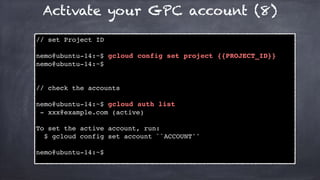
Activate your GPC account (8)
// set Project ID
nemo@ubuntu-14:~$ gcloud config set project {{PROJECT_ID}}
nemo@ubuntu-14:~$
// check the accounts
nemo@ubuntu-14:~$ gcloud auth list
- xxx@example.com (active)
To set the active account, run:
$ gcloud config set account ``ACCOUNT''
nemo@ubuntu-14:~$
What a pain!
AWS is much easiler...
2. Try command line tools
Try Public data (1)
nemonemo@ubuntu-14:~$ bq show publicdata:samples.shakespeare
Table publicdata:samples.shakespeare
Last modified Schema Total
Rows Total Bytes Expiration
----------------- ------------------------------------
------------ ------------- ------------
26 Aug 21:43:49 |- word: string (required) 164656
6432064
|- word_count: integer (required)
|- corpus: string (required)
|- corpus_date: integer (required)
	publicdata		:		samples		.	shakespeare	
{PROJECT_ID}	:	{DATASET}	.			{TABLE}
Try Public data (2)
nemo@ubuntu-14:~$ bq query "SELECT word, COUNT(word) as count FROM
publicdata:samples.shakespeare WHERE word CONTAINS 'raisin' GROUP BY word"
Waiting on bqjob_r5e78fd2c80d5923c_000001554d1c4acc_1 ... (0s) Current
status: DONE
+---------------+-------+
| word | count |
+---------------+-------+
| raising | 5 |
| dispraising | 2 |
| Praising | 4 |
| praising | 7 |
| dispraisingly | 1 |
| raisins | 1 |
+---------------+-------+
nemo@ubuntu-14:~$
Create Dataset (1)
nemo@ubuntu-14:~$ bq ls
<--- no dataset
nemo@ubuntu-14:~$ bq mk saigon_engineers
Dataset 'open-study-group-saigon:saigon_engineers' successfully created.
nemo@ubuntu-14:~$ bq ls
datasetId
------------------ <-- created!!
saigon_engineers
nemo@ubuntu-14:~$
Create Dataset (2)
nemo@ubuntu-14:~$ bq ls
<--- no dataset
nemo@ubuntu-14:~$ bq mk saigon_engineers
Dataset 'open-study-group-saigon:saigon_engineers' successfully created.
nemo@ubuntu-14:~$ bq ls
datasetId
------------------ <-- created!!
saigon_engineers
nemo@ubuntu-14:~$
Added!! -->
Create table and import data (1)
name type
ID INTEGER
name STRING
engineer_type INTEGER
ID name type
1 nemo 1
2 miki 1
Schema
Data
Create table and import data (2)
Schema (schema.json)
[
{
"name":"id",
"type":"INTEGER"
},
{
"name":"name",
"type":"STRING"
},
{
"name":"engineer_type",
"type":"INTEGER"
}
]
Create table and import data (3)
Data (data.json)
{"id":1,"name":"nemo","engineer_type":1}
{"id":2,"name":"miki","engineer_type":1}
Create table and import data (4)
nemo@ubuntu-14:~$ bq load --source_format=NEWLINE_DELIMITED_JSON
saigon_engineers.engineer_list data.json schema.json
Upload complete.
Waiting on bqjob_r23b898932d75d49a_000001554e5cae2f_1 ... (1s)
Current status: DONE
nemo@ubuntu-14:~$
bk load {PROJECT_ID}:{DATASET}.{TABLE} {data} {schema}
Create table and import data
https://cloud.google.com/bigquery/loading-data
Create table and import data (5)
nemo@ubuntu-14:~$ bq load --source_format=NEWLINE_DELIMITED_JSON
saigon_engineers.engineer_list data.json 
id:integer,
name:string,
engineer_type:integer
Upload complete.
Waiting on bqjob_r33b7802ea96b2c5d_000001554e4d21d5_1 ... (2s)
Current status: DONE
nemo@ubuntu-14:~$
Create table and import data : Another way
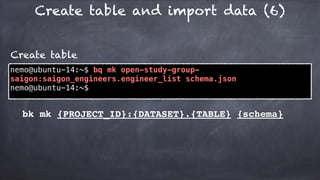
Create table and import data (6)
nemo@ubuntu-14:~$ bq mk open-study-group-
saigon:saigon_engineers.engineer_list schema.json
nemo@ubuntu-14:~$
Create table
bk mk {PROJECT_ID}:{DATASET}.{TABLE} {schema}
Create table and import data (7)
nemo@ubuntu-14:~$ bq load --source_format=NEWLINE_DELIMITED_JSON
saigon_engineers.engineer_list data.json
Upload complete.
Waiting on bqjob_r13717485c2c472e3_000001554e5b3ca3_1 ... (2s)
Current status: DONE
nemo@ubuntu-14:~$
Import data to database
bk load {PROJECT_ID}:{DATASET}.{TABLE} {data}
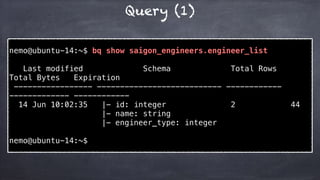
Query (1)
nemo@ubuntu-14:~$ bq show saigon_engineers.engineer_list
Last modified Schema Total Rows
Total Bytes Expiration
----------------- --------------------------- ------------
------------- ------------
14 Jun 10:02:35 |- id: integer 2 44
|- name: string
|- engineer_type: integer
nemo@ubuntu-14:~$
Query (2)
nemo@ubuntu-14:~$ bq query "SELECT name FROM
saigon_engineers.engineer_list"
Waiting on bqjob_r12185d1aa88d92c8_0000015552d709d2_1 ... (0s)
Current status: DONE
+------+
| name |
+------+
| nemo |
| miki |
+------+
nemo@ubuntu-14:~$
Query (3)
nemo@ubuntu-14:~$ bq query --dry_run "SELECT name FROM
saigon_engineers.engineer_list"
Query successfully validated. Assuming the tables are not
modified, running this query will process 12 bytes of data.
nemo@ubuntu-14:~$
bk query --dry_run “QUERY”
- get size of using memory before execution.
Hmm.
(finished??)
A bit more
3. Tips for business use
Pricing
Storage															$0.02	per	GB,	per	month		
Long	Term	Storage					$0.01	per	GB,	per	month	
Streaming	Inserts					$0.01	per	200	MB	
Queries															$5	per	TB	(First	1	TB	per	month	is	free)	
																						subject	to	query	pricing	details.	
Loading	data										Free	
Copying	data										Free	
Exporting	data									Free	
Metadata	operations			Free	
																						List,	get,	patch,	update	and	delete	calls.
It seems very cheap !!?
Pricing
Storage															$0.02	per	GB,	per	month		
Long	Term	Storage					$0.01	per	GB,	per	month	
Streaming	Inserts					$0.01	per	200	MB	
Queries															$5	per	TB	(First	1	TB	per	month	is	free)	
																						subject	to	query	pricing	details.	
Loading	data										Free	
Copying	data										Free	
Exporting	data									Free	
Metadata	operations			Free	
																						List,	get,	patch,	update	and	delete	calls.
BigQuery is for BIG DATA
Column oriented (1)
Sample case : database of Books
ID	
(indexed)
title	
(indexed)
contents
1 The	Cat
Lorem	ipsum	dolor	sit	amet,	
consectetur	(...	1.2MB)
2 Cats	are	love
Lorem	ipsum	dolor	sit	amet,	
consectetur	(...	1.5MB)
3 Littul	Kittons
Lorem	ipsum	dolor	sit	amet,	
consectetur	(...	0.8MB)
select	id,	title	from	books	where	name	=	‘The	Cat’
Column oriented (2)
ID	
(indexed)
title	
(indexed)
contents
1 The	Cat
Lorem	ipsum	dolor	sit	amet,	
consectetur	(...	1.2MB)
2 Cats	are	love
Lorem	ipsum	dolor	sit	amet,	
consectetur	(...	1.5MB)
3 Littul	Kittons
Lorem	ipsum	dolor	sit	amet,	
consectetur	(...	0.8MB)
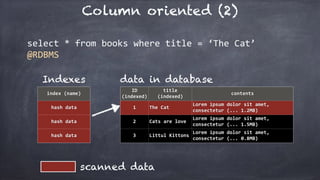
select	*	from	books	where	title	=	‘The	Cat’	
@RDBMS
index	(name)
hash	data
hash	data
hash	data
data in databaseIndexes
scanned data
Column oriented (3)
ID	
(indexed)
title	
(indexed)
contents
1 The	Cat
Lorem	ipsum	dolor	sit	amet,	
consectetur	(...	1.2MB)
2 Cats	are	love
Lorem	ipsum	dolor	sit	amet,	
consectetur	(...	1.5MB)
3 Littul	Kittons
Lorem	ipsum	dolor	sit	amet,	
consectetur	(...	0.8MB)
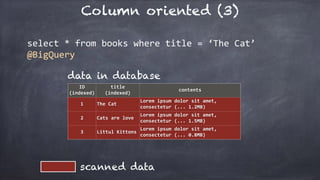
select	*	from	books	where	title	=	‘The	Cat’	
@BigQuery
data in database
scanned data
Column oriented (3)
ID	
(indexed)
title	
(indexed)
contents
1 The	Cat
Lorem	ipsum	dolor	sit	amet,	
consectetur	(...	1.2MB)
2 Cats	are	love
Lorem	ipsum	dolor	sit	amet,	
consectetur	(...	1.5MB)
3 Littul	Kittons
Lorem	ipsum	dolor	sit	amet,	
consectetur	(...	0.8MB)
select	*	from	books	where	title	=	‘The	Cat’	
@BigQuery
data in database
scanned data
Full-scan

ANYTIME!!
Column oriented (4)
ID	
(indexed)
title	
(indexed)
contents
1 The	Cat
Lorem	ipsum	dolor	sit	amet,	
consectetur	(...	1.2MB)
2 Cats	are	love
Lorem	ipsum	dolor	sit	amet,	
consectetur	(...	1.5MB)
3 Littul	Kittons
Lorem	ipsum	dolor	sit	amet,	
consectetur	(...	0.8MB)
select	*	from	books	where	title	=	‘The	Cat’	
@BigQuery
data in database
If your database is Tera-byte scale,
$5 per query !!!!
Column oriented (5)
ID	
(indexed)
title	
(indexed)
contents
1 The	Cat
Lorem	ipsum	dolor	sit	amet,	
consectetur	(...	1.2MB)
2 Cats	are	love
Lorem	ipsum	dolor	sit	amet,	
consectetur	(...	1.5MB)
3 Littul	Kittons
Lorem	ipsum	dolor	sit	amet,	
consectetur	(...	0.8MB)
select	id,	title	from	books	where	title	=	‘The	Cat’	
@RDBMS
index	(name)
hash	data
hash	data
hash	data
data in databaseIndexes
scanned data
Column oriented (6)
ID	
(indexed)
title	
(indexed)
contents
1 The	Cat
Lorem	ipsum	dolor	sit	amet,	
consectetur	(...	1.2MB)
2 Cats	are	love
Lorem	ipsum	dolor	sit	amet,	
consectetur	(...	1.5MB)
3 Littul	Kittons
Lorem	ipsum	dolor	sit	amet,	
consectetur	(...	0.8MB)
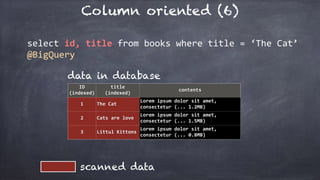
select	id,	title	from	books	where	title	=	‘The	Cat’	
@BigQuery
data in database
scanned data
Column oriented (6)
ID	
(indexed)
title	
(indexed)
contents
1 The	Cat
Lorem	ipsum	dolor	sit	amet,	
consectetur	(...	1.2MB)
2 Cats	are	love
Lorem	ipsum	dolor	sit	amet,	
consectetur	(...	1.5MB)
3 Littul	Kittons
Lorem	ipsum	dolor	sit	amet,	
consectetur	(...	0.8MB)
select	id,	title	from	books	where	title	=	‘The	Cat’	
@BigQuery
data in database
scanned data
Column
Oriented
It's really
dangerous!
Please,	Please	set	columns	in	queries.
Table division
Sample case : database of Books
select	id,	title	from	books	where	time	in	‘2016/06/17’
: : : :
ID	
(indexed)
title	
(indexed)
contents
time	
(indexed)
1 The	Cat
Lorem	ipsum	dolor	sit	amet,	
consectetur	(...	1.2MB)
2016/01/01	
00:00:00
2 Cats	are	love
Lorem	ipsum	dolor	sit	amet,	
consectetur	(...	1.5MB)
2016/01/01	
00:01:23
353485397 Littul	Kittons
Lorem	ipsum	dolor	sit	amet,	
consectetur	(...	0.8MB)
2016/06/17	
00:01:46
Table division (1)
index	(time)
hash	data
hash	data
hash	data
data in databaseIndexes
scanned data
: : : :
ID	
(indexed)
title	
(indexed)
contents
time	
(indexed)
1 The	Cat
Lorem	ipsum	dolor	sit	
amet,	consectetur	(...	
2016/01/01	
00:00:00
2
Cats	are	
love
Lorem	ipsum	dolor	sit	
amet,	consectetur	(...	
2016/01/01	
00:01:23
353485397
Littul	
Kittons
Lorem	ipsum	dolor	sit	
amet,	consectetur	(...	
0.8MB)
2016/06/17	
00:01:46
select	id,	title	from	books	where	time	in	‘2016/06/17’	
@RDBMS
Table division (2)
data in database
scanned data
: : : :
ID	
(indexed)
title	
(indexed)
contents
time	
(indexed)
1 The	Cat
Lorem	ipsum	dolor	sit	
amet,	consectetur	(...	
1.2MB)
2016/01/01	
00:00:00
2 Cats	are	love
Lorem	ipsum	dolor	sit	
amet,	consectetur	(...	
1.5MB)
2016/01/01	
00:01:23
353485397
Littul	
Kittons
Lorem	ipsum	dolor	sit	
amet,	consectetur	(...	
0.8MB)
2016/06/17	
00:01:46
select	id,	title	from	books	where	time	in	‘2016/06/17’	
@BigQuery
Huge size
Table division (2)
data in database
scanned data
: : : :
ID	
(indexed)
title	
(indexed)
contents
time	
(indexed)
1 The	Cat
Lorem	ipsum	dolor	sit	
amet,	consectetur	(...	
1.2MB)
2016/01/01	
00:00:00
2 Cats	are	love
Lorem	ipsum	dolor	sit	
amet,	consectetur	(...	
1.5MB)
2016/01/01	
00:01:23
353485397
Littul	
Kittons
Lorem	ipsum	dolor	sit	
amet,	consectetur	(...	
0.8MB)
2016/06/17	
00:01:46
select	id,	title	from	books	where	time	in	‘2016/06/17’	
@BigQuery
Huge size
Table division (3)
ID	
(indexed)
title	
(indexed)
contents
time	
(indexed)
1 The	Cat
Lorem	ipsum	dolor	sit	
amet,	consectetur	(...	
1.2MB)
2016/01/01	
00:00:00
2 Cats	are	love
Lorem	ipsum	dolor	sit	
amet,	consectetur	(...	
1.5MB)
2016/01/01	
00:01:23
ID	
(indexed)
title	
(indexed)
contents
time	
(indexed)
353485397
Littul	
Kittons
Lorem	ipsum	dolor	sit	
amet,	consectetur	(...	
0.8MB)
2016/06/17	
00:01:46
:
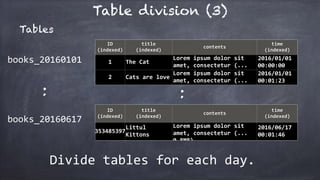
Tables
books_20160101
:
books_20160617
Divide	tables	for	each	day.
Table division (4)
ID	
(indexed)
title	
(indexed)
contents
time	
(indexed)
1 The	Cat
Lorem	ipsum	dolor	sit	
amet,	consectetur	(...	
1.2MB)
2016/01/01	
00:00:00
2 Cats	are	love
Lorem	ipsum	dolor	sit	
amet,	consectetur	(...	
1.5MB)
2016/01/01	
00:01:23
ID	
(indexed)
title	
(indexed)
contents
time	
(indexed)
353485397
Littul	
Kittons
Lorem	ipsum	dolor	sit	
amet,	consectetur	(...	
0.8MB)
2016/06/17	
00:01:46
:
books_20160101
:
books_20160617
select	id,	title	from	books	where	time	in	‘2016/06/17’	
@BigQuery
Table division (5)
ID	
(indexed)
title	
(indexed)
contents
time	
(indexed)
1 The	Cat
Lorem	ipsum	dolor	sit	
amet,	consectetur	(...	
1.2MB)
2016/01/01	
00:00:00
books_20160101
::
ID	
(indexed)
title	
(indexed)
contents
time	
(indexed)
353485397
The	Great	
Catsby
Lorem	ipsum	dolor	sit	
amet,	consectetur	(...	
0.8MB)
2016/06/16	
00:01:46
books_20160616
select	id,	title	from	books		
where	time	in	‘2016/06/16	-	2016/06/17’	
@BigQuery
ID	
(indexed)
title	
(indexed)
contents
time	
(indexed)
353485397
Littul	
Kittons
Lorem	ipsum	dolor	sit	
amet,	consectetur	(...	
2016/06/17	
00:01:46
books_20160617
Table division (6)
select	id,	title	from	books		
where	time	in	‘2016/06/16	-	2016/06/17’	
@BigQuery
SELECT	id,	title	FROM		
			(	
									TABLE_DATE_RANGE(books_,		
																										TIMESTAMP(‘2016-06-16'),	
																										TIMESTAMP(‘2016-06-17')	
									)	
				)
Table division (7)
Other	ways	to	divide	tables.
Table	decorator	

		-	https://cloud.google.com/bigquery/table-decorators	
“TABLE_QUERY”	
		-	https://cloud.google.com/bigquery/query-reference
“Import	from	GCS	is	much	faster	than	from	local”	
		1.	put	data	into	GCS	(Google	Clould	Storage	≒	S3	??)	
		2.	import	the	data	from	GCS.
Other	tips.
BigQuery is
Fast
Easy
Cheap
if it is used properly.
BigQuery is
Fast
Easy
Cheap
if it is used properly.
Remember
“--dry_run”
Thank you!

Big query - Command line tools and Tips - (MOSG)