MiTAC MiCloud - Google Cloud Platform Partner @ APAC2014Q1 GCP Introduction
Google Cloud Platform - Starter Guide
Start from Create Google Cloud Platform Project
Start from Google Cloud Project
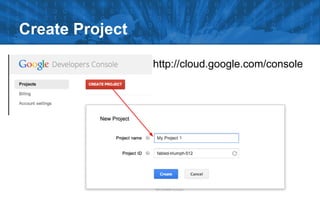
Create Project
http://cloud.google.com/console
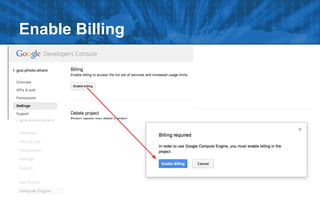
Enable Billing
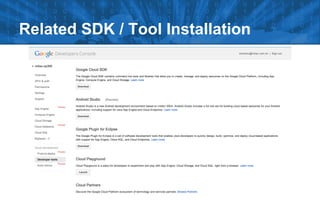
Related SDK / Tool Installation
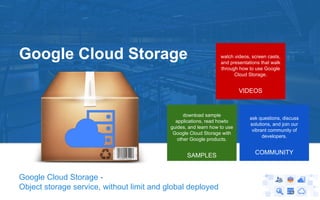
Google Cloud Storage -
Object storage service, without limit and global deployed
watch videos, screen casts,
and presentations that walk
through how to use Google
Cloud Storage.
VIDEOS
download sample
applications, read howto
guides, and learn how to use
Google Cloud Storage with
other Google products.
SAMPLES
ask questions, discuss
solutions, and join our
vibrant community of
developers.
COMMUNITY
Google Cloud Storage
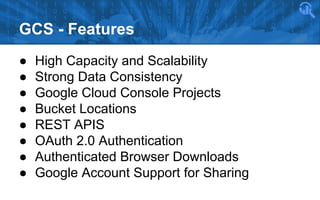
GCS - Features
● High Capacity and Scalability
● Strong Data Consistency
● Google Cloud Console Projects
● Bucket Locations
● REST APIS
● OAuth 2.0 Authentication
● Authenticated Browser Downloads
● Google Account Support for Sharing
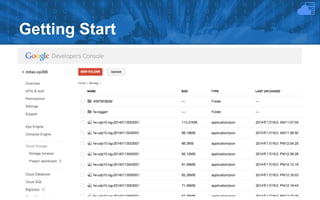
Getting Start
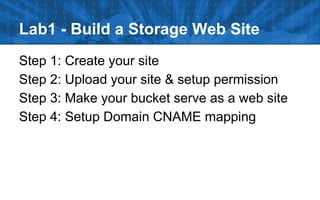
Lab1 - Build a Storage Web Site
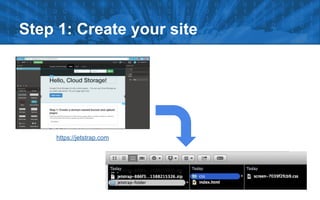
Step 1: Create your site
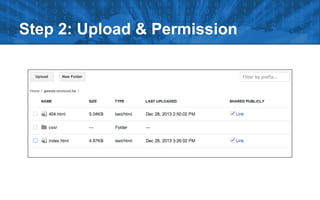
Step 2: Upload your site & setup permission
Step 3: Make your bucket serve as a web site
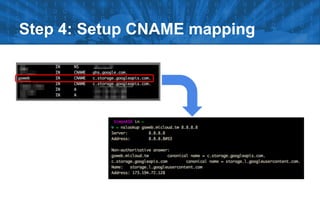
Step 4: Setup Domain CNAME mapping
Step 1: Create your site
https://jetstrap.com
Step 2: Upload & Permission
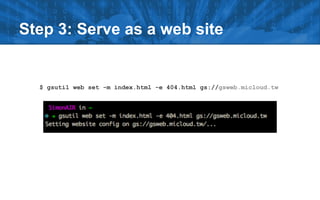
Step 3: Serve as a web site
$ gsutil web set -m index.html -e 404.html gs://gsweb.micloud.tw
Step 4: Setup CNAME mapping
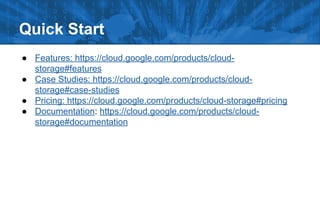
Quick Start
● Features: https://cloud.google.com/products/cloud-
storage#features
● Case Studies: https://cloud.google.com/products/cloud-
storage#case-studies
● Pricing: https://cloud.google.com/products/cloud-storage#pricing
● Documentation: https://cloud.google.com/products/cloud-
storage#documentation
Google Cloud SQL - Full managed MySQL database instance
Google Cloud SQL
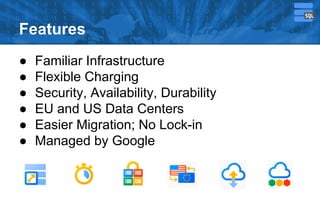
Features
● Familiar Infrastructure
● Flexible Charging
● Security, Availability, Durability
● EU and US Data Centers
● Easier Migration; No Lock-in
● Managed by Google
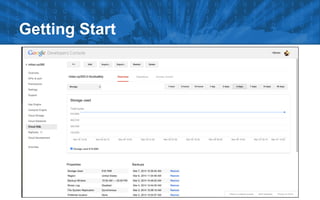
Getting Start
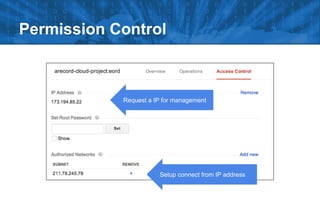
Permission Control
Request a IP for management
Setup connect from IP address
● Create a Bucket
● Create a CloudSQL
Lab 2 - Connect to CloudSQL
Create a Bucket
$ gcloud auth login
$ gcloud config set project [my-project-id]
$ gsutil mb gs://[my-bucket]
$ gsutil ls gs://[my-bucket]
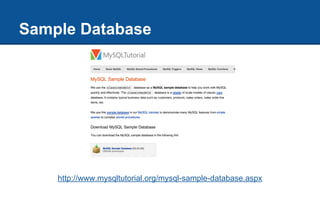
Sample Database
http://www.mysqltutorial.org/mysql-sample-database.aspx
Create a CloudSQL
$ gcloud sql -h
$ gcloud sql instances create [inst-name]
$ gcloud sql instances list
$ gcloud sql instances import instance-name --uri 
gs://your-bucket/sql-dump-file.gz
$ gcloud sql instances patch --assign-ip [inst-name]
$ gcloud sql instances get [inst-name]
Create a CloudSQL
$ gcloud sql instances set-root-password test-sql 
-p [password]
$ gcloud sql instances patch test-sql 
--authorized-networks=[your-ip-address]
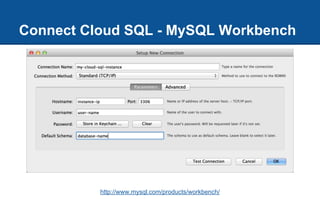
Connect Cloud SQL - MySQL Workbench
http://www.mysql.com/products/workbench/
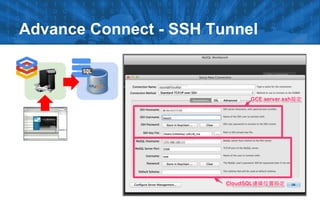
Advance Connect - SSH Tunnel
● Configuring Replication with Google Cloud SQL: https://developers.google.
com/cloud-sql/docs/replication
Others
Quick Start
● Features: https://cloud.google.com/products/cloud-sql#features
● Case Studies: https://cloud.google.com/products/cloud-sql#case-
studies
● Pricing: https://cloud.google.com/products/cloud-sql#pricing
● Documentation: https://cloud.google.com/products/cloud-
sql#documentation
Google BigQuery - Big data with SQL like query feature, but fast...
Google BigQuery
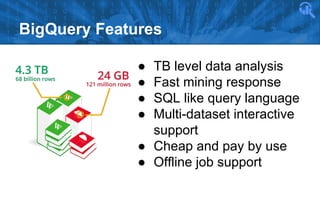
BigQuery Features
● TB level data analysis
● Fast mining response
● SQL like query language
● Multi-dataset interactive
support
● Cheap and pay by use
● Offline job support
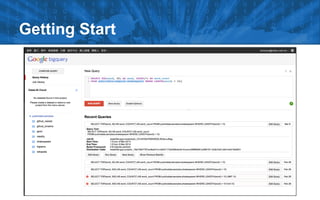
Getting Start
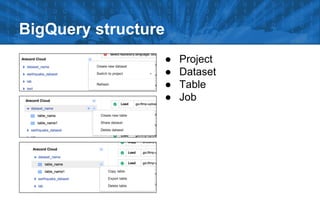
BigQuery structure
● Project
● Dataset
● Table
● Job
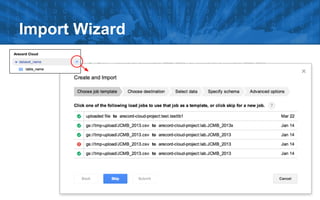
Import Wizard
Lab3 - Load CSV to BigQuery
gsutil cp [source] gs://[bucket-name]
# gsutil cp ~/Desktop/log.csv gs://your-bucket/
Copying file:///Users/simonsu/Desktop/log.csv [Content-Type=text/csv]...
Uploading: 4.59 MB/36.76 MB
bq load [project].[dataset] gs://[bucket]/[csv path] [schema]
# bq load project.dataset gs://your-bucket/log.csv IP:STRING,DNS:STRING,TS:STRING,URL:STRING
Waiting on bqjob_rf4f3f1d9e2366a6_00000142c1bdd36f_1 ... (24s) Current status: DONE
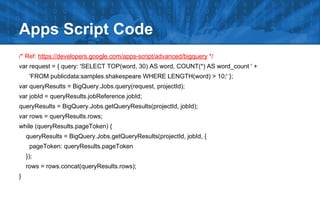
/* Ref: https://developers.google.com/apps-script/advanced/bigquery */
var request = { query: 'SELECT TOP(word, 30) AS word, COUNT(*) AS word_count ' +
'FROM publicdata:samples.shakespeare WHERE LENGTH(word) > 10;' };
var queryResults = BigQuery.Jobs.query(request, projectId);
var jobId = queryResults.jobReference.jobId;
queryResults = BigQuery.Jobs.getQueryResults(projectId, jobId);
var rows = queryResults.rows;
while (queryResults.pageToken) {
queryResults = BigQuery.Jobs.getQueryResults(projectId, jobId, {
pageToken: queryResults.pageToken
});
rows = rows.concat(queryResults.rows);
}
Apps Script Code
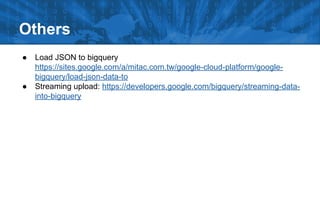
Others
● Load JSON to bigquery
https://sites.google.com/a/mitac.com.tw/google-cloud-platform/google-
bigquery/load-json-data-to
● Streaming upload: https://developers.google.com/bigquery/streaming-data-
into-bigquery
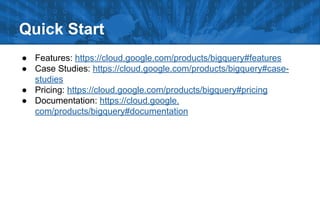
Quick Start
● Features: https://cloud.google.com/products/bigquery#features
● Case Studies: https://cloud.google.com/products/bigquery#case-
studies
● Pricing: https://cloud.google.com/products/bigquery#pricing
● Documentation: https://cloud.google.
com/products/bigquery#documentation
Google Computing Engine - Run virtual machines at Google Scale
Google Compute Engine
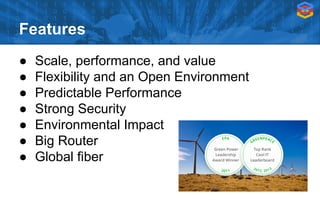
Features
● Scale, performance, and value
● Flexibility and an Open Environment
● Predictable Performance
● Strong Security
● Environmental Impact
● Big Router
● Global fiber
Google Style Management
● Fancy management console
● Share permissions with Google Account
● Tag for machine, ACL, routing
● Software Defined Networking
● Start Script
● Mass technical documents share
Prepare
● google cloud project
● google-cloud-sdk with gcutil
● ssh tool
Reference:
https://sites.google.com/a/mitac.com.tw/google-cloud-platform/google-compute-engine/gce---sdk-install-and-auth
● GCE architecture
● GCE web UI to GCE CLI tool
○ Create, Snapshot, Create from Disk or Snapshot
● Network & FW
○ 3-tier network implements
● Instance option - start script
○ Using start script build a auto scale service
Today’s Objective
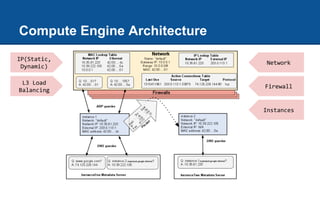
Compute Engine Architecture
Network
Firewall
Instances
IP(Static,
Dynamic)
L3 Load
Balancing
Something about GCE
● Billing: 1 Minute Increments, Minimum 10 Minutes
● Security:
○ ISO 27001:2005 Certification for GCE, GAE, and GCS
● Location:
○ Region
○ Zone
About the Instances
● Persistent Disk
● Network block storage
● Max of 16 disks/instance
● Created independently of instance
● 1 Virtual CPU is a Hyperthread on Processor
● Current processor is 2.6 GHz Intel Sandy Bridge Xeon
● No GPU or SSD Options
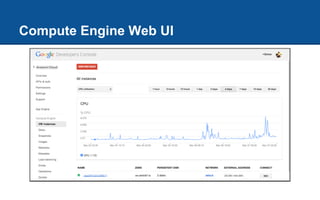
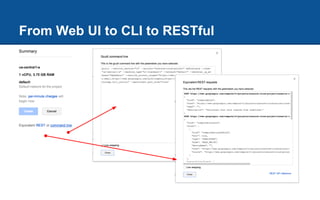
About utility - web ui, gcutil, restful
Compute Engine Web UI
From Web UI to CLI to RESTful
gcutil - Get HELP
➔ gcutil --help
➔ gcutil help listinstances
◆ ex: gcutil listinstances --columns=all --format=json
➔ https://developers.google.com/compute/docs/gcutil/tips
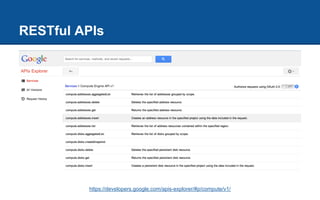
RESTful APIs
https://developers.google.com/apis-explorer/#p/compute/v1/
Connect to GCE machine
➔ gcutil ssh [instance id]
➔ ssh [username]@[instance-ip] -i [path-to-google-ssh-key]
Windows connect GCE
● Prepare ssh private key for project metadata [Ref]
[username]:ssh-rsa [private keys value]
Network & Firewall & Instance Scripts
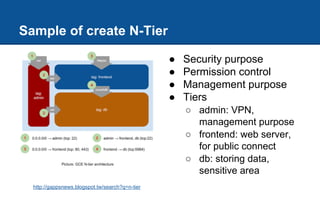
Sample of create N-Tier
● Security purpose
● Permission control
● Management purpose
● Tiers
○ admin: VPN,
management purpose
○ frontend: web server,
for public connect
○ db: storing data,
sensitive area
http://gappsnews.blogspot.tw/search?q=n-tier
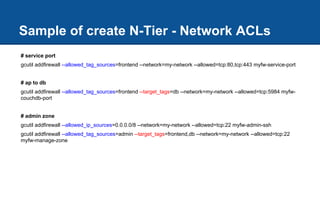
# service port
gcutil addfirewall --allowed_tag_sources=frontend --network=my-network --allowed=tcp:80,tcp:443 myfw-service-port
# ap to db
gcutil addfirewall --allowed_tag_sources=frontend --target_tags=db --network=my-network --allowed=tcp:5984 myfw-
couchdb-port
# admin zone
gcutil addfirewall --allowed_ip_sources=0.0.0.0/8 --network=my-network --allowed=tcp:22 myfw-admin-ssh
gcutil addfirewall --allowed_tag_sources=admin --target_tags=frontend,db --network=my-network --allowed=tcp:22
myfw-manage-zone
Sample of create N-Tier - Network ACLs
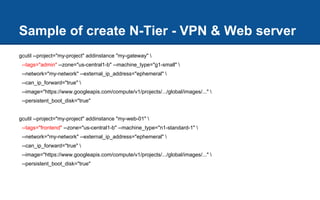
Sample of create N-Tier - VPN & Web server
gcutil --project="my-project" addinstance "my-gateway" 
--tags="admin" --zone="us-central1-b" --machine_type="g1-small" 
--network="my-network" --external_ip_address="ephemeral" 
--can_ip_forward="true" 
--image="https://www.googleapis.com/compute/v1/projects/.../global/images/..." 
--persistent_boot_disk="true"
gcutil --project="my-project" addinstance "my-web-01" 
--tags="frontend" --zone="us-central1-b" --machine_type="n1-standard-1" 
--network="my-network" --external_ip_address="ephemeral" 
--can_ip_forward="true" 
--image="https://www.googleapis.com/compute/v1/projects/.../global/images/..." 
--persistent_boot_disk="true"
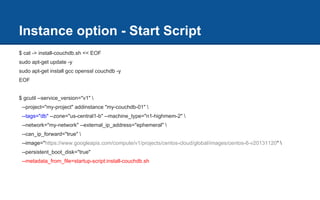
Instance option - Start Script
$ cat -> install-couchdb.sh << EOF
sudo apt-get update -y
sudo apt-get install gcc openssl couchdb -y
EOF
$ gcutil --service_version="v1" 
--project="my-project" addinstance "my-couchdb-01" 
--tags="db" --zone="us-central1-b" --machine_type="n1-highmem-2" 
--network="my-network" --external_ip_address="ephemeral" 
--can_ip_forward="true" 
--image="https://www.googleapis.com/compute/v1/projects/centos-cloud/global/images/centos-6-v20131120" 
--persistent_boot_disk="true"
--metadata_from_file=startup-script:install-couchdb.sh
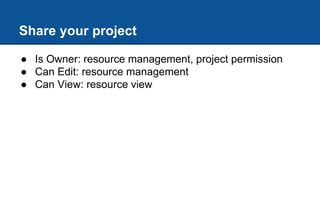
Share your project
● Is Owner: resource management, project permission
● Can Edit: resource management
● Can View: resource view
● Add persistent disk
● Create image
● Bring your own kernel (brief)
Advance operations
Add a Persistent Disk...
➔ gcutil adddisk --zone=us-central1-a testdisk
➔ gcutil ssh [instance name]
➔ sudo mkdir /mnt/pd0
➔ sudo /usr/share/google/safe_format_and_mount 
-m "mkfs.ext4 -F" /dev/disk/by-id/[disk-id] /mnt/pd0
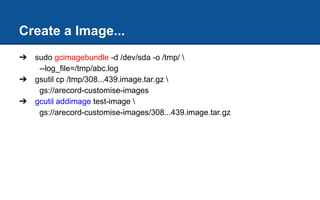
Create a Image...
➔ sudo gcimagebundle -d /dev/sda -o /tmp/ 
--log_file=/tmp/abc.log
➔ gsutil cp /tmp/308...439.image.tar.gz 
gs://arecord-customise-images
➔ gcutil addimage test-image 
gs://arecord-customise-images/308...439.image.tar.gz
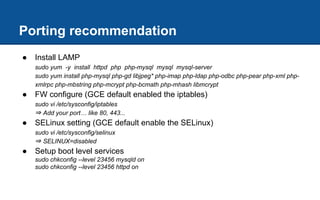
Porting recommendation
● Install LAMP
sudo yum -y install httpd php php-mysql mysql mysql-server
sudo yum install php-mysql php-gd libjpeg* php-imap php-ldap php-odbc php-pear php-xml php-
xmlrpc php-mbstring php-mcrypt php-bcmath php-mhash libmcrypt
● FW configure (GCE default enabled the iptables)
sudo vi /etc/sysconfig/iptables
⇒ Add your port… like 80, 443...
● SELinux setting (GCE default enable the SELinux)
sudo vi /etc/sysconfig/selinux
⇒ SELINUX=disabled
● Setup boot level services
sudo chkconfig --level 23456 mysqld on
sudo chkconfig --level 23456 httpd on
Porting recommendation
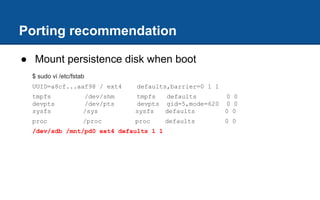
● Mount persistence disk when boot
$ sudo vi /etc/fstab
UUID=a8cf...aaf98 / ext4 defaults,barrier=0 1 1
tmpfs /dev/shm tmpfs defaults 0 0
devpts /dev/pts devpts gid=5,mode=620 0 0
sysfs /sys sysfs defaults 0 0
proc /proc proc defaults 0 0
/dev/sdb /mnt/pd0 ext4 defaults 1 1
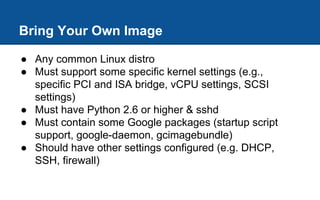
Bring Your Own Image
● Any common Linux distro
● Must support some specific kernel settings (e.g.,
specific PCI and ISA bridge, vCPU settings, SCSI
settings)
● Must have Python 2.6 or higher & sshd
● Must contain some Google packages (startup script
support, google-daemon, gcimagebundle)
● Should have other settings configured (e.g. DHCP,
SSH, firewall)
Quick Start
● Features: https://cloud.google.com/products/compute-
engine#features
● Case Studies: https://cloud.google.com/products/compute-
engine#case-studies
● Pricing: https://cloud.google.com/products/compute-engine#pricing
● Documentation: https://cloud.google.com/products/compute-
engine#documentation
More Requirement ?

GCP - GCE, Cloud SQL, Cloud Storage, BigQuery Basic Training

  • 1.
    MiTAC MiCloud -Google Cloud Platform Partner @ APAC2014Q1 GCP Introduction Google Cloud Platform - Starter Guide
  • 3.
    Start from CreateGoogle Cloud Platform Project Start from Google Cloud Project
  • 4.
  • 5.
  • 6.
    Related SDK /Tool Installation
  • 7.
    Google Cloud Storage- Object storage service, without limit and global deployed watch videos, screen casts, and presentations that walk through how to use Google Cloud Storage. VIDEOS download sample applications, read howto guides, and learn how to use Google Cloud Storage with other Google products. SAMPLES ask questions, discuss solutions, and join our vibrant community of developers. COMMUNITY Google Cloud Storage
  • 8.
    GCS - Features ●High Capacity and Scalability ● Strong Data Consistency ● Google Cloud Console Projects ● Bucket Locations ● REST APIS ● OAuth 2.0 Authentication ● Authenticated Browser Downloads ● Google Account Support for Sharing
  • 9.
  • 10.
    Lab1 - Builda Storage Web Site Step 1: Create your site Step 2: Upload your site & setup permission Step 3: Make your bucket serve as a web site Step 4: Setup Domain CNAME mapping
  • 11.
    Step 1: Createyour site https://jetstrap.com
  • 12.
    Step 2: Upload& Permission
  • 13.
    Step 3: Serveas a web site $ gsutil web set -m index.html -e 404.html gs://gsweb.micloud.tw
  • 14.
    Step 4: SetupCNAME mapping
  • 15.
    Quick Start ● Features:https://cloud.google.com/products/cloud- storage#features ● Case Studies: https://cloud.google.com/products/cloud- storage#case-studies ● Pricing: https://cloud.google.com/products/cloud-storage#pricing ● Documentation: https://cloud.google.com/products/cloud- storage#documentation
  • 16.
    Google Cloud SQL- Full managed MySQL database instance Google Cloud SQL
  • 17.
    Features ● Familiar Infrastructure ●Flexible Charging ● Security, Availability, Durability ● EU and US Data Centers ● Easier Migration; No Lock-in ● Managed by Google
  • 18.
  • 19.
    Permission Control Request aIP for management Setup connect from IP address
  • 20.
    ● Create aBucket ● Create a CloudSQL Lab 2 - Connect to CloudSQL
  • 21.
    Create a Bucket $gcloud auth login $ gcloud config set project [my-project-id] $ gsutil mb gs://[my-bucket] $ gsutil ls gs://[my-bucket]
  • 22.
  • 23.
    Create a CloudSQL $gcloud sql -h $ gcloud sql instances create [inst-name] $ gcloud sql instances list $ gcloud sql instances import instance-name --uri gs://your-bucket/sql-dump-file.gz $ gcloud sql instances patch --assign-ip [inst-name] $ gcloud sql instances get [inst-name]
  • 24.
    Create a CloudSQL $gcloud sql instances set-root-password test-sql -p [password] $ gcloud sql instances patch test-sql --authorized-networks=[your-ip-address]
  • 25.
    Connect Cloud SQL- MySQL Workbench http://www.mysql.com/products/workbench/
  • 26.
  • 27.
    ● Configuring Replicationwith Google Cloud SQL: https://developers.google. com/cloud-sql/docs/replication Others
  • 28.
    Quick Start ● Features:https://cloud.google.com/products/cloud-sql#features ● Case Studies: https://cloud.google.com/products/cloud-sql#case- studies ● Pricing: https://cloud.google.com/products/cloud-sql#pricing ● Documentation: https://cloud.google.com/products/cloud- sql#documentation
  • 29.
    Google BigQuery -Big data with SQL like query feature, but fast... Google BigQuery
  • 30.
    BigQuery Features ● TBlevel data analysis ● Fast mining response ● SQL like query language ● Multi-dataset interactive support ● Cheap and pay by use ● Offline job support
  • 31.
  • 32.
    BigQuery structure ● Project ●Dataset ● Table ● Job
  • 33.
  • 34.
    Lab3 - LoadCSV to BigQuery gsutil cp [source] gs://[bucket-name] # gsutil cp ~/Desktop/log.csv gs://your-bucket/ Copying file:///Users/simonsu/Desktop/log.csv [Content-Type=text/csv]... Uploading: 4.59 MB/36.76 MB bq load [project].[dataset] gs://[bucket]/[csv path] [schema] # bq load project.dataset gs://your-bucket/log.csv IP:STRING,DNS:STRING,TS:STRING,URL:STRING Waiting on bqjob_rf4f3f1d9e2366a6_00000142c1bdd36f_1 ... (24s) Current status: DONE
  • 35.
    /* Ref: https://developers.google.com/apps-script/advanced/bigquery*/ var request = { query: 'SELECT TOP(word, 30) AS word, COUNT(*) AS word_count ' + 'FROM publicdata:samples.shakespeare WHERE LENGTH(word) > 10;' }; var queryResults = BigQuery.Jobs.query(request, projectId); var jobId = queryResults.jobReference.jobId; queryResults = BigQuery.Jobs.getQueryResults(projectId, jobId); var rows = queryResults.rows; while (queryResults.pageToken) { queryResults = BigQuery.Jobs.getQueryResults(projectId, jobId, { pageToken: queryResults.pageToken }); rows = rows.concat(queryResults.rows); } Apps Script Code
  • 36.
    Others ● Load JSONto bigquery https://sites.google.com/a/mitac.com.tw/google-cloud-platform/google- bigquery/load-json-data-to ● Streaming upload: https://developers.google.com/bigquery/streaming-data- into-bigquery
  • 37.
    Quick Start ● Features:https://cloud.google.com/products/bigquery#features ● Case Studies: https://cloud.google.com/products/bigquery#case- studies ● Pricing: https://cloud.google.com/products/bigquery#pricing ● Documentation: https://cloud.google. com/products/bigquery#documentation
  • 38.
    Google Computing Engine- Run virtual machines at Google Scale Google Compute Engine
  • 39.
    Features ● Scale, performance,and value ● Flexibility and an Open Environment ● Predictable Performance ● Strong Security ● Environmental Impact ● Big Router ● Global fiber
  • 40.
    Google Style Management ●Fancy management console ● Share permissions with Google Account ● Tag for machine, ACL, routing ● Software Defined Networking ● Start Script ● Mass technical documents share
  • 41.
    Prepare ● google cloudproject ● google-cloud-sdk with gcutil ● ssh tool Reference: https://sites.google.com/a/mitac.com.tw/google-cloud-platform/google-compute-engine/gce---sdk-install-and-auth
  • 42.
    ● GCE architecture ●GCE web UI to GCE CLI tool ○ Create, Snapshot, Create from Disk or Snapshot ● Network & FW ○ 3-tier network implements ● Instance option - start script ○ Using start script build a auto scale service Today’s Objective
  • 43.
  • 44.
    Something about GCE ●Billing: 1 Minute Increments, Minimum 10 Minutes ● Security: ○ ISO 27001:2005 Certification for GCE, GAE, and GCS ● Location: ○ Region ○ Zone
  • 45.
    About the Instances ●Persistent Disk ● Network block storage ● Max of 16 disks/instance ● Created independently of instance ● 1 Virtual CPU is a Hyperthread on Processor ● Current processor is 2.6 GHz Intel Sandy Bridge Xeon ● No GPU or SSD Options
  • 46.
    About utility -web ui, gcutil, restful
  • 47.
  • 48.
    From Web UIto CLI to RESTful
  • 49.
    gcutil - GetHELP ➔ gcutil --help ➔ gcutil help listinstances ◆ ex: gcutil listinstances --columns=all --format=json ➔ https://developers.google.com/compute/docs/gcutil/tips
  • 50.
  • 51.
    Connect to GCEmachine ➔ gcutil ssh [instance id] ➔ ssh [username]@[instance-ip] -i [path-to-google-ssh-key]
  • 52.
    Windows connect GCE ●Prepare ssh private key for project metadata [Ref] [username]:ssh-rsa [private keys value]
  • 53.
    Network & Firewall& Instance Scripts
  • 54.
    Sample of createN-Tier ● Security purpose ● Permission control ● Management purpose ● Tiers ○ admin: VPN, management purpose ○ frontend: web server, for public connect ○ db: storing data, sensitive area http://gappsnews.blogspot.tw/search?q=n-tier
  • 55.
    # service port gcutiladdfirewall --allowed_tag_sources=frontend --network=my-network --allowed=tcp:80,tcp:443 myfw-service-port # ap to db gcutil addfirewall --allowed_tag_sources=frontend --target_tags=db --network=my-network --allowed=tcp:5984 myfw- couchdb-port # admin zone gcutil addfirewall --allowed_ip_sources=0.0.0.0/8 --network=my-network --allowed=tcp:22 myfw-admin-ssh gcutil addfirewall --allowed_tag_sources=admin --target_tags=frontend,db --network=my-network --allowed=tcp:22 myfw-manage-zone Sample of create N-Tier - Network ACLs
  • 56.
    Sample of createN-Tier - VPN & Web server gcutil --project="my-project" addinstance "my-gateway" --tags="admin" --zone="us-central1-b" --machine_type="g1-small" --network="my-network" --external_ip_address="ephemeral" --can_ip_forward="true" --image="https://www.googleapis.com/compute/v1/projects/.../global/images/..." --persistent_boot_disk="true" gcutil --project="my-project" addinstance "my-web-01" --tags="frontend" --zone="us-central1-b" --machine_type="n1-standard-1" --network="my-network" --external_ip_address="ephemeral" --can_ip_forward="true" --image="https://www.googleapis.com/compute/v1/projects/.../global/images/..." --persistent_boot_disk="true"
  • 57.
    Instance option -Start Script $ cat -> install-couchdb.sh << EOF sudo apt-get update -y sudo apt-get install gcc openssl couchdb -y EOF $ gcutil --service_version="v1" --project="my-project" addinstance "my-couchdb-01" --tags="db" --zone="us-central1-b" --machine_type="n1-highmem-2" --network="my-network" --external_ip_address="ephemeral" --can_ip_forward="true" --image="https://www.googleapis.com/compute/v1/projects/centos-cloud/global/images/centos-6-v20131120" --persistent_boot_disk="true" --metadata_from_file=startup-script:install-couchdb.sh
  • 58.
    Share your project ●Is Owner: resource management, project permission ● Can Edit: resource management ● Can View: resource view
  • 59.
    ● Add persistentdisk ● Create image ● Bring your own kernel (brief) Advance operations
  • 60.
    Add a PersistentDisk... ➔ gcutil adddisk --zone=us-central1-a testdisk ➔ gcutil ssh [instance name] ➔ sudo mkdir /mnt/pd0 ➔ sudo /usr/share/google/safe_format_and_mount -m "mkfs.ext4 -F" /dev/disk/by-id/[disk-id] /mnt/pd0
  • 61.
    Create a Image... ➔sudo gcimagebundle -d /dev/sda -o /tmp/ --log_file=/tmp/abc.log ➔ gsutil cp /tmp/308...439.image.tar.gz gs://arecord-customise-images ➔ gcutil addimage test-image gs://arecord-customise-images/308...439.image.tar.gz
  • 62.
    Porting recommendation ● InstallLAMP sudo yum -y install httpd php php-mysql mysql mysql-server sudo yum install php-mysql php-gd libjpeg* php-imap php-ldap php-odbc php-pear php-xml php- xmlrpc php-mbstring php-mcrypt php-bcmath php-mhash libmcrypt ● FW configure (GCE default enabled the iptables) sudo vi /etc/sysconfig/iptables ⇒ Add your port… like 80, 443... ● SELinux setting (GCE default enable the SELinux) sudo vi /etc/sysconfig/selinux ⇒ SELINUX=disabled ● Setup boot level services sudo chkconfig --level 23456 mysqld on sudo chkconfig --level 23456 httpd on
  • 63.
    Porting recommendation ● Mountpersistence disk when boot $ sudo vi /etc/fstab UUID=a8cf...aaf98 / ext4 defaults,barrier=0 1 1 tmpfs /dev/shm tmpfs defaults 0 0 devpts /dev/pts devpts gid=5,mode=620 0 0 sysfs /sys sysfs defaults 0 0 proc /proc proc defaults 0 0 /dev/sdb /mnt/pd0 ext4 defaults 1 1
  • 64.
    Bring Your OwnImage ● Any common Linux distro ● Must support some specific kernel settings (e.g., specific PCI and ISA bridge, vCPU settings, SCSI settings) ● Must have Python 2.6 or higher & sshd ● Must contain some Google packages (startup script support, google-daemon, gcimagebundle) ● Should have other settings configured (e.g. DHCP, SSH, firewall)
  • 65.
    Quick Start ● Features:https://cloud.google.com/products/compute- engine#features ● Case Studies: https://cloud.google.com/products/compute- engine#case-studies ● Pricing: https://cloud.google.com/products/compute-engine#pricing ● Documentation: https://cloud.google.com/products/compute- engine#documentation
  • 66.