



TEACHING THE ELEPHANT
IN THE ROOM TO DANCE
19th June 2014
UX Scotland
Lorraine Paterson & Mike Jefferson
HOW TO EMBED UX
IN LARGE ORGANISATIONS
19th June 2014
@lorraine_p @mikeyj_uk
INTRODUCTION
Who are we and where are we from?
• Two of a four-strong team of user experience designers
• Work for Royal London, 150 year mutual insurance company
• Scottish Life was part of Royal London but recently rebranded
• Based in the department, Group Technology & Change (GTC)
• New UX function created, no distinct UX role previously
• Debate in the organisation about where UX should be…
• Question: where does your team sit in your organisation?
IT? Marketing? Insight? Proposition? Other?
20 June 2014 3
BACKGROUND
INTRODUCTION
What do we want to talk about today?
• Explain how we’ve managed to embed UX bit by bit.
• Share our experience working on a long term project and how it
influenced the strategic progress of the UX team.
• Talk about the ups and downs and how the UX role evolved.
• Impart some wisdom learned along the way!
20 June 2014 4
BACKGROUND
INTRODUCTION
What have we achieved ?
• We managed to design a commercially successful product for the
business
• Demonstrated value using one long term project, Automatic
Enrolment
• Paved the way for embedding UX more successfully in future
projects
• Gained trust in other areas of the business where UX is now more
widely recognised and accepted
20 June 2014 5
BACKGROUND
CHAPTER ONE
QUICK WE NEED SCREENS!
6
CHAPTER ONE
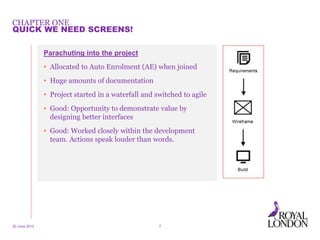
Parachuting into the project
• Allocated to Auto Enrolment (AE) when joined
• Huge amounts of documentation
• Project started in a waterfall and switched to agile
• Good: Opportunity to demonstrate value by
designing better interfaces
• Good: Worked closely within the development
team. Actions speak louder than words.
20 June 2014 7
QUICK WE NEED SCREENS!
CHAPTER ONE
20 June 2014 8
QUICK WE NEED SCREENS!
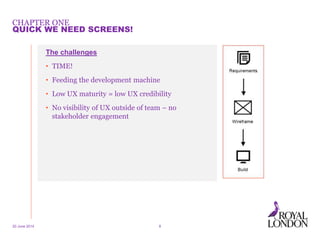
The challenges
• TIME!
• Feeding the development machine
• Low UX maturity = low UX credibility
• No visibility of UX outside of team – no
stakeholder engagement
CHAPTER TWO
“THIS ISN’T WHAT WE ASKED FOR!”
9
CHAPTER TWO
20 June 2014 10
“THIS ISN’T WHAT WE ASKED FOR!”
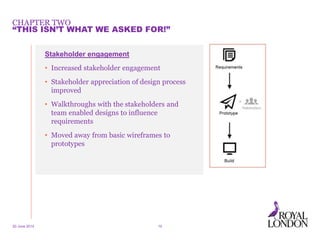
Stakeholder engagement
• Increased stakeholder engagement
• Stakeholder appreciation of design process
improved
• Walkthroughs with the stakeholders and
team enabled designs to influence
requirements
• Moved away from basic wireframes to
prototypes
CHAPTER TWO
20 June 2014 11
“THIS ISN’T WHAT WE ASKED FOR!”
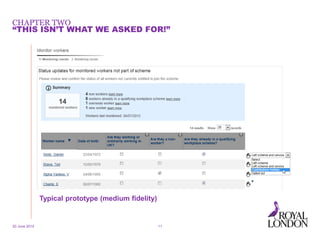
Typical prototype (medium fidelity)
CHAPTER TWO
20 June 2014 12
“THIS ISN’T WHAT WE ASKED FOR!”
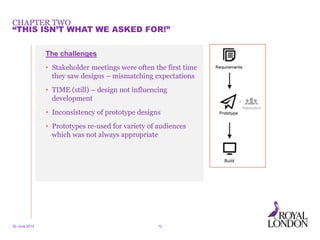
The challenges
• Stakeholder meetings were often the first time
they saw designs – mismatching expectations
• TIME (still) – design not influencing
development
• Inconsistency of prototype designs
• Prototypes re-used for variety of audiences
which was not always appropriate
CHAPTER TWO
20 June 2014 13
“THIS ISN’T WHAT WE ASKED FOR!”
CHAPTER THREE
BREATHING SPACE
14
CHAPTER THREE
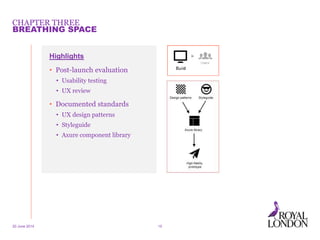
Highlights
• Post-launch evaluation
• Usability testing
• UX review
• Documented standards
• UX design patterns
• Styleguide
• Axure component library
20 June 2014 15
BREATHING SPACE
20 June 2014 16
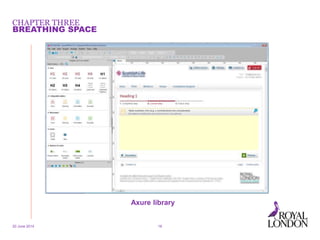
Axure library
CHAPTER THREE
BREATHING SPACE
CHAPTER THREE
20 June 2014 17
BREATHING SPACE
Good stuff
• Usability testing!
• Market feedback on system UX
• Opportunity to sharpen tools
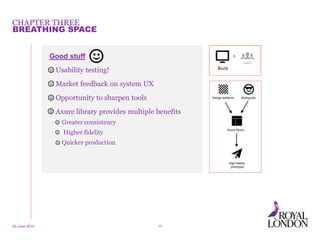
• Axure library provides multiple benefits
• Greater consistency
• Higher fidelity
• Quicker production
CHAPTER THREE
20 June 2014 18
BREATHING SPACE
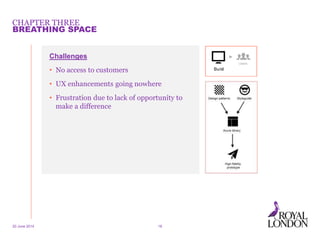
Challenges
• No access to customers
• UX enhancements going nowhere
• Frustration due to lack of opportunity to
make a difference
CHAPTER FOUR
COLLABORATE!
19
CHAPTER FOUR
20 June 2014 1. http://www.fastcodesign.com/1672887/how-to-conduct-your-own-google-design-sprint20
COLLABORATE!
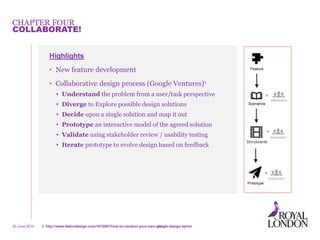
Highlights
• New feature development
• Collaborative design process (Google Ventures)1
• Understand the problem from a user/task perspective
• Diverge to Explore possible design solutions
• Decide upon a single solution and map it out
• Prototype an interactive model of the agreed solution
• Validate using stakeholder review / usability testing
• Iterate prototype to evolve design based on feedback
CHAPTER FOUR
20 June 2014 21
COLLABORATE!
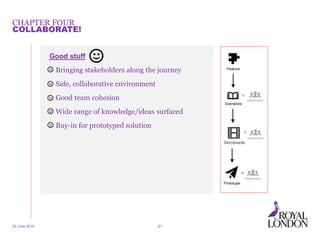
Good stuff
• Bringing stakeholders along the journey
• Safe, collaborative environment
• Good team cohesion
• Wide range of knowledge/ideas surfaced
• Buy-in for prototyped solution
CHAPTER FOUR
20 June 2014 22
COLLABORATE!
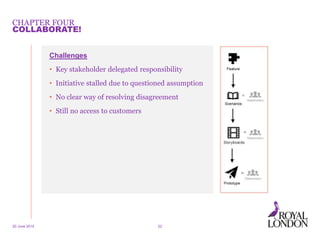
Challenges
• Key stakeholder delegated responsibility
• Initiative stalled due to questioned assumption
• No clear way of resolving disagreement
• Still no access to customers
CHAPTER FIVE
FIRST CONTACT
23
CHAPTER FIVE
20 June 2014 24
FIRST CONTACT
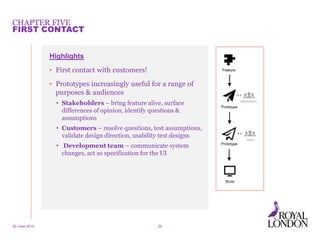
Highlights
• First contact with customers!
• Prototypes increasingly useful for a range of
purposes & audiences
• Stakeholders – bring feature alive, surface
differences of opinion, identify questions &
assumptions
• Customers – resolve questions, test assumptions,
validate design direction, usability test designs
• Development team – communicate system
changes, act as specification for the UI
CHAPTER FIVE
20 June 2014 25
FIRST CONTACT
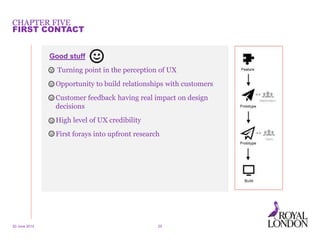
Good stuff
• Turning point in the perception of UX
• Opportunity to build relationships with customers
• Customer feedback having real impact on design
decisions
• High level of UX credibility
• First forays into upfront research
CHAPTER FIVE
20 June 2014 26
FIRST CONTACT
Challenges
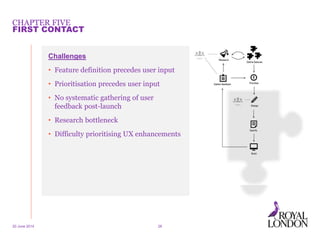
• Feature definition precedes user input
• Prioritisation precedes user input
• No systematic gathering of user
feedback post-launch
• Research bottleneck
• Difficulty prioritising UX enhancements
CHAPTER SIX
PUTTING THE USER CENTRE STAGE
27
CHAPTER SIX
Identifying an opportunity
• Mature team, well organised and working on priority backlog items
• Victim of our own success!
• Large project team with several agile development teams working in
parallel (82 full-time employees)
• UXDs under utilised on project and not as busy as other roles
20 June 2014 28
PUTTING THE USER CENTRE STAGE
CHAPTER SIX
What next
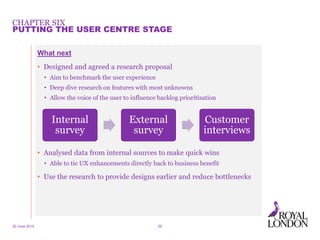
• Designed and agreed a research proposal
• Aim to benchmark the user experience
• Deep dive research on features with most unknowns
• Allow the voice of the user to influence backlog prioritisation
• Analysed data from internal sources to make quick wins
• Able to tie UX enhancements directly back to business benefit
• Use the research to provide designs earlier and reduce bottlenecks
20 June 2014 29
PUTTING THE USER CENTRE STAGE
Internal
survey
External
survey
Customer
interviews
EPILOGUE
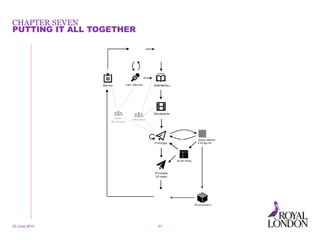
PUTTING IT ALL TOGETHER
30
CHAPTER SEVEN
20 June 2014 31
PUTTING IT ALL TOGETHER
Build credibility by taking bite size
chunks.
20 June 2014 Presentation info in footer 32
Be pragmatic. What does the project
need at this time and how can you best
add value?
20 June 2014 Presentation info in footer 33
20 June 2014 Presentation info in footer 34
Don’t understimate the power of the
prototype.
20 June 2014 Presentation info in footer 35
Be clear about the purpose of the
prototype. What are the needs of the
recipient?
Look for opportunities and be
proactive. Use downtime to get ahead.
20 June 2014 Presentation info in footer 36
20 June 2014 Presentation info in footer 37
Be inclusive. Invite others into your
process.
Win over influential stakeholders. They
will be able to help progress your UX
strategy much quicker.
20 June 2014 Presentation info in footer 38
Tie UX improvements to business benefit
wherever possible. Metrics can be
powerful.
20 June 2014 Presentation info in footer 39
Track your progress to stay motivated.
20 June 2014 Presentation info in footer 40
THANK
YOU

UX Scotland 2014 19th june

  • 1.
    TEACHING THE ELEPHANT INTHE ROOM TO DANCE 19th June 2014 UX Scotland Lorraine Paterson & Mike Jefferson
  • 2.
    HOW TO EMBEDUX IN LARGE ORGANISATIONS 19th June 2014 @lorraine_p @mikeyj_uk
  • 3.
    INTRODUCTION Who are weand where are we from? • Two of a four-strong team of user experience designers • Work for Royal London, 150 year mutual insurance company • Scottish Life was part of Royal London but recently rebranded • Based in the department, Group Technology & Change (GTC) • New UX function created, no distinct UX role previously • Debate in the organisation about where UX should be… • Question: where does your team sit in your organisation? IT? Marketing? Insight? Proposition? Other? 20 June 2014 3 BACKGROUND
  • 4.
    INTRODUCTION What do wewant to talk about today? • Explain how we’ve managed to embed UX bit by bit. • Share our experience working on a long term project and how it influenced the strategic progress of the UX team. • Talk about the ups and downs and how the UX role evolved. • Impart some wisdom learned along the way! 20 June 2014 4 BACKGROUND
  • 5.
    INTRODUCTION What have weachieved ? • We managed to design a commercially successful product for the business • Demonstrated value using one long term project, Automatic Enrolment • Paved the way for embedding UX more successfully in future projects • Gained trust in other areas of the business where UX is now more widely recognised and accepted 20 June 2014 5 BACKGROUND
  • 6.
    CHAPTER ONE QUICK WENEED SCREENS! 6
  • 7.
    CHAPTER ONE Parachuting intothe project • Allocated to Auto Enrolment (AE) when joined • Huge amounts of documentation • Project started in a waterfall and switched to agile • Good: Opportunity to demonstrate value by designing better interfaces • Good: Worked closely within the development team. Actions speak louder than words. 20 June 2014 7 QUICK WE NEED SCREENS!
  • 8.
    CHAPTER ONE 20 June2014 8 QUICK WE NEED SCREENS! The challenges • TIME! • Feeding the development machine • Low UX maturity = low UX credibility • No visibility of UX outside of team – no stakeholder engagement
  • 9.
    CHAPTER TWO “THIS ISN’TWHAT WE ASKED FOR!” 9
  • 10.
    CHAPTER TWO 20 June2014 10 “THIS ISN’T WHAT WE ASKED FOR!” Stakeholder engagement • Increased stakeholder engagement • Stakeholder appreciation of design process improved • Walkthroughs with the stakeholders and team enabled designs to influence requirements • Moved away from basic wireframes to prototypes
  • 11.
    CHAPTER TWO 20 June2014 11 “THIS ISN’T WHAT WE ASKED FOR!” Typical prototype (medium fidelity)
  • 12.
    CHAPTER TWO 20 June2014 12 “THIS ISN’T WHAT WE ASKED FOR!” The challenges • Stakeholder meetings were often the first time they saw designs – mismatching expectations • TIME (still) – design not influencing development • Inconsistency of prototype designs • Prototypes re-used for variety of audiences which was not always appropriate
  • 13.
    CHAPTER TWO 20 June2014 13 “THIS ISN’T WHAT WE ASKED FOR!”
  • 14.
  • 15.
    CHAPTER THREE Highlights • Post-launchevaluation • Usability testing • UX review • Documented standards • UX design patterns • Styleguide • Axure component library 20 June 2014 15 BREATHING SPACE
  • 16.
    20 June 201416 Axure library CHAPTER THREE BREATHING SPACE
  • 17.
    CHAPTER THREE 20 June2014 17 BREATHING SPACE Good stuff • Usability testing! • Market feedback on system UX • Opportunity to sharpen tools • Axure library provides multiple benefits • Greater consistency • Higher fidelity • Quicker production
  • 18.
    CHAPTER THREE 20 June2014 18 BREATHING SPACE Challenges • No access to customers • UX enhancements going nowhere • Frustration due to lack of opportunity to make a difference
  • 19.
  • 20.
    CHAPTER FOUR 20 June2014 1. http://www.fastcodesign.com/1672887/how-to-conduct-your-own-google-design-sprint20 COLLABORATE! Highlights • New feature development • Collaborative design process (Google Ventures)1 • Understand the problem from a user/task perspective • Diverge to Explore possible design solutions • Decide upon a single solution and map it out • Prototype an interactive model of the agreed solution • Validate using stakeholder review / usability testing • Iterate prototype to evolve design based on feedback
  • 21.
    CHAPTER FOUR 20 June2014 21 COLLABORATE! Good stuff • Bringing stakeholders along the journey • Safe, collaborative environment • Good team cohesion • Wide range of knowledge/ideas surfaced • Buy-in for prototyped solution
  • 22.
    CHAPTER FOUR 20 June2014 22 COLLABORATE! Challenges • Key stakeholder delegated responsibility • Initiative stalled due to questioned assumption • No clear way of resolving disagreement • Still no access to customers
  • 23.
  • 24.
    CHAPTER FIVE 20 June2014 24 FIRST CONTACT Highlights • First contact with customers! • Prototypes increasingly useful for a range of purposes & audiences • Stakeholders – bring feature alive, surface differences of opinion, identify questions & assumptions • Customers – resolve questions, test assumptions, validate design direction, usability test designs • Development team – communicate system changes, act as specification for the UI
  • 25.
    CHAPTER FIVE 20 June2014 25 FIRST CONTACT Good stuff • Turning point in the perception of UX • Opportunity to build relationships with customers • Customer feedback having real impact on design decisions • High level of UX credibility • First forays into upfront research
  • 26.
    CHAPTER FIVE 20 June2014 26 FIRST CONTACT Challenges • Feature definition precedes user input • Prioritisation precedes user input • No systematic gathering of user feedback post-launch • Research bottleneck • Difficulty prioritising UX enhancements
  • 27.
    CHAPTER SIX PUTTING THEUSER CENTRE STAGE 27
  • 28.
    CHAPTER SIX Identifying anopportunity • Mature team, well organised and working on priority backlog items • Victim of our own success! • Large project team with several agile development teams working in parallel (82 full-time employees) • UXDs under utilised on project and not as busy as other roles 20 June 2014 28 PUTTING THE USER CENTRE STAGE
  • 29.
    CHAPTER SIX What next •Designed and agreed a research proposal • Aim to benchmark the user experience • Deep dive research on features with most unknowns • Allow the voice of the user to influence backlog prioritisation • Analysed data from internal sources to make quick wins • Able to tie UX enhancements directly back to business benefit • Use the research to provide designs earlier and reduce bottlenecks 20 June 2014 29 PUTTING THE USER CENTRE STAGE Internal survey External survey Customer interviews
  • 30.
  • 31.
    CHAPTER SEVEN 20 June2014 31 PUTTING IT ALL TOGETHER
  • 32.
    Build credibility bytaking bite size chunks. 20 June 2014 Presentation info in footer 32
  • 33.
    Be pragmatic. Whatdoes the project need at this time and how can you best add value? 20 June 2014 Presentation info in footer 33
  • 34.
    20 June 2014Presentation info in footer 34 Don’t understimate the power of the prototype.
  • 35.
    20 June 2014Presentation info in footer 35 Be clear about the purpose of the prototype. What are the needs of the recipient?
  • 36.
    Look for opportunitiesand be proactive. Use downtime to get ahead. 20 June 2014 Presentation info in footer 36
  • 37.
    20 June 2014Presentation info in footer 37 Be inclusive. Invite others into your process.
  • 38.
    Win over influentialstakeholders. They will be able to help progress your UX strategy much quicker. 20 June 2014 Presentation info in footer 38
  • 39.
    Tie UX improvementsto business benefit wherever possible. Metrics can be powerful. 20 June 2014 Presentation info in footer 39
  • 40.
    Track your progressto stay motivated. 20 June 2014 Presentation info in footer 40
  • 41.

Editor's Notes

  • #8 UX still unknown and viewed as an artefact rather than a process UX visibility confined to other roles in GTC (BAs, dev, test, project managers)
  • #14 Despite all the difficulties and work still to be done we had to launch, so towards the end of 2012 our first employer was put onto the system
  • #19 No access to customers due concerns over relationships. Customers needing lots of ‘hand holding’ to get through staging (completely new to them + system fragile in places!) Due to volume of system issues UX enhancements not deemed high priority -> it remains a challenge getting these prioritised (Lorraine will talk about how to raise the visibility of these by tying to business benefit)
  • #23 Key stakeholder delegated responsibility Declared himself out of the process – happy for ‘UX’ to be determined by the group When it came to came to playback fundamental assumption (we’d made) was questioned. Assumption – bulk update conceived as a separate process (rather than integrated into existing processes) Rounds of iterations with different designs – no agreement No clear way of resolving disagreement – different stakeholder views, no access to customers
  • #25 Setting the scene Feature development resumes Lessons learned – quality over quantity, take time to get it right (costs of trying to cram apparent) UX Step change in terms of UX maturity, and not before time! Lots of firsts! First access to real customers Growing realisation re: importance of this Key moment when key stakeholder gave backing (& prior resistance vanished) Beginnings of ‘user panel’ (list of customers to go back to) First time testing prototypes ahead of development with space to iterate First time doing upfront user research Typical format of test sessions in 2 parts: Interview (gauge current experience, pain points, business processes relating to feature etc.) – build up picture of users & their goals Feecback on prototype
  • #26 Turning point in perception of UX – graduated from wireframe monkeys days, trusted to interact with customers and to represent customer perspective (resistance to ‘bulk update’ disagreements vanished once customer feedback gathered even though it contradicted the former position of the key stakeholder) Build relationship with customers – concerns over customer relationships have proved unfounded. Not one customer has said they don’t want to take part in further sessions (even though they’re giving time for free) and not unusual for them to express gratitude at being able to be involved. Space to explore & validate designs – due to project learnings, would have been difficult to argue this (with fixed deadlines), needed to experience it. Upfront research – beginnings of systematically building up a picture of customers, user insight.
  • #27 Customer feedback having real impact on design decisions Need to zoom out a bit to consider challenges: Picture shows a high level view of process (explain) Feature is somewhat defined by the time it gets to research stage Makes it difficult to change scope Space for research/design but can be perceived to block flow (mindset of GTC is essentially one of delivery) Prioritisation happens completely independently of any user feedback (stakeholders represent users but no systematic process) Ongoing issues around prioritising UX enhancements Position we want to get to is something like this – Lorraine will explain how we’re going to go about this.
  • #30 Being able to tie UX enhancements to business benefits has been really powerful and enabled enhancements to get prioritised Example: User error which support team had to regularly deal with Approx 3 support calls on ave per month which takes 1FTE a day to resolve With the number of users increasing ten fold over the next 6 months – this could potentially rise to 30 days a month effort User error could be minimised with small UI improvement. With 3-5 days total effort Result: could reduce number of days spent by support team by 50% from 30 – 15 days per month at its peak with 2 days of effort. Not the end by a long shot – still have a lot of work to do in replicating the success on this project on other projects and areas of the business.
  • #34 Tips: Be pragmatic / don’t be precious. What does the project need at this time and how can you add value Not possible to execute a perfect UCD process on every project (lucky if you can do it on any project) UX isn’t all-or-nothing thing (qualitative) 2. If you have to choose validate designs before development rather than testing afterwards Much easier to shape solution before than change it once developed Also it’s not just about usability testing, but validating assumptions / design direction 3. Prototype! Value of prototypes can’t be overstated Multiple uses – bring designs alive, engender stakeholder buy-in, business readiness, usability testing, UI specifications 4. Be clear about the purpose of prototypes At least 3 separate audiences – stakeholders, users, development team Will you be demonstrating prototype or does it need to stand on its own?