A Case Study of User Experience
Testing for High-Functionality
Applications
Elizabeth Rosenzweig, Bentley University
Christopher Fry, MIT
Henry Lieberman, MIT

CHI 2014 Case Study Copyright notice
Project Summary

•

Purpose: To solve the problem of creating an easy-to-learn user
experience for a complex system

•

Goals :
‒ Build a strong user experience for complex system: Justify
‒ Create a UX process for complex systems that is extensible

•

Objectives:
‒ Understand how people learn complex computer systems
‒ Understand how to teach people to use complex computer
systems
CHI 2014 Case Study Copyright notice
Timeline
Summer 2013- UX work began on Justify
August 2013

•
•
•

Expert review
Wireframes produced
Prototype revised

September

•
•

User Studies
Prototype Revised

October 2013

•

Face of Finance Conference workshop

CHI 2014 Case Study Copyright notice
HCI Best Practice Solution

•

UX designers from Bentley University ran several evaluations
on Justify, an intelligent high functionality prototype developed
at the Media Lab MIT .

•

Lean UX methodologies were used to provide early feedback
to developers
‒ Cognitive and Heuristic Walkthrough
‒ Iterative and Participatory Design
‒ User Studies

•

Findings were useful when they specifically identified severity
and frequency of issues
CHI 2014 Case Study Copyright notice
Stakeholders

CHI 2014 Case Study Copyright notice
Project Requirements

•

Functional
‒ System must perform high level reasoning to facilitate
rational deliberation

•

Organizational
‒ Cross functional team collaborated between Media
Lab MIT and UXC Bentley University

•

Usability
‒ System shall be easy to use and easy to learn
CHI 2014 Case Study Copyright notice
Technical Requirements

CHI 2014 Case Study Copyright notice
Research Methods

•
•
•
•
•

Lean UX
Cognitive and Heuristic Walkthrough
Participatory Design
Iterative Development
User Studies

CHI 2014 Case Study Copyright notice
Lean UX

•
•
•
•

Goal driven and outcome focus methodology
Focus on solving the right problem
Quick turnaround of data and prototype
Collaboration between UX designers and developers

CHI 2014 Case Study Copyright notice
Cognitive and Heuristic Walkthrough
•
•

Expert Review with heuristics
Findings
‒
‒

Call to action not clear

‒

•

Number of functions initially presented to user exceeds their cognitive
load
Directions and help need to be tailored to high functionality intelligent
system

Recommendations
‒

Provide Home page

‒

Provide choices for help, i.e. video, tutorial, learning by exploration

CHI 2014 Case Study Copyright notice
Participatory Design

•

Participatory Design (PD), also known as Cooperative
Design, actively involves all stakeholders in design
process

•

PD was performed twice
‒ Once after Cognitive Walkthrough
‒ Once after User Test

•

Developer and UX Designer walked through task on
prototype, working through usability issues and creating
solutions for new design
CHI 2014 Case Study Copyright notice
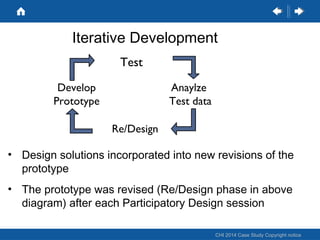
Iterative Development
Test
Develop
Prototype

Anaylze
Test data
Re/Design

• Design solutions incorporated into new revisions of the
prototype
• The prototype was revised (Re/Design phase in above
diagram) after each Participatory Design session
CHI 2014 Case Study Copyright notice
User Test
• Six participants were tested two days at the Bentley University,
User Experience Center (UXC)
• Test sessions were one-on-one and lasted approximately 60
minutes.
• Sessions were digitally recorded.
• The test facilitator followed a structured test script.

CHI 2014 Case Study Copyright notice
User Test: Study Structure
The study was conducted in three parts:
Part One: Participants were asked a set of background
questions.
Part Two: Participants completed a set of tasks.
Part Three: Participants were asked follow-up questions to
share their overall impressions of the Justify software.

CHI 2014 Case Study Copyright notice
User Test Findings
• Overall, participants felt that Justify was a highly powerful and
potentially useful system.
• Participants had trouble with the erminology.
• Providing help that is not in the context of a specific task kept
the participants disconnected from the system and made
learning the system unnecessarily difficult.

CHI 2014 Case Study Copyright notice
User Test findings continued
Participants were unclear on concepts:
• Discussion vs. point
• Group decisions vs. individual decisions.
• What's happening "underneath the hood."
• What "value" means or how to use it.

CHI 2014 Case Study Copyright notice
User Test findings, continued
None standard interaction, noe of the usual affordances
were provided
• Right click on a point to add, delete, edit accounts.
• Click on "no subpoints" under a point to add a new subpoint.

CHI 2014 Case Study Copyright notice
UX Research Recommendations
•

Consider creating a closer connection between learning and doing within
Justify. If learning is incorporated into part of the experience, participants
who start by exploring the system will learn the program in a way that is
consistent with their expectations.
‒
‒

•

Consider providing help through the interface, particularly in the
context of a specific task they're working on.
Consider providing an index to help topics, allowing users to find the
information they need in a nonlinear way.

Since participants had no sense of home, or how to get back to their
home screen. Consider re-orienting the landing page for the users by
providing a more graphical/less text hierarchy/ folder system as the
visual key to navigating the system.

CHI 2014 Case Study Copyright notice
User Test Recommendations
•

Change and clarify terminology to make the difficult concepts easier to
grasp

•
•
•

Discussion vs. point
Group decisions vs. individual decisions.
Private and public folders

•

Consider a tiered or chunked approach to showing users what's
happening "underneath the hood." which includes “Just in time”
information

•

Since terminology, such as discussion and points, are confusing to
participants, consider further research regarding these specific terms and
how they match up with the mental model of users in regard to decision
making.
CHI 2014 Case Study Copyright notice
Pre-Beta Prototype

CHI 2014 Case Study Copyright notice
Prototype V2 Home Page

CHI 2014 Case Study Copyright notice
Prototype V2 Start Page

CHI 2014 Case Study Copyright notice
Justify Prototype

•

The Justify Beta prototype can be found at

http://justify-app.appspot.com/

CHI 2014 Case Study Copyright notice
Challenges

•
•

Technical development- not enough resources
Team‒ Not co-located, forced more planning to allow
collaboration to work more smoothly
‒ UX designers and developers had very different point
of view and priorities for outcomes
‒ Some stakeholders did not see the value was in doing
UX work on such an early stage prototype
CHI 2014 Case Study Copyright notice
Challenges

•

Once the issues were identified, the team worked more
closely together relying on in-person phone calls and
meetings instead of email and reports to convey
important information

•

Several meetings included participatory design
principles, allowing for better collaboration between team
members

CHI 2014 Case Study Copyright notice
Results of Our Team’s Efforts
•

The good
‒
‒

•

Lean UX, with collaboration and quick turnaround of user data, is perfect for
early stages research
Developers watching users interact with their system is priceless

The bad
‒
‒

•

Even experienced computer users have limited cognitive load
Not everyone learns the same way, so the different learning styles must be
integrated

The ugly
‒

Intelligent high functionality systems present more options then the user can
understand. If not properly presented, the system can appear to be an
unusable low functionality system.

CHI 2014 Case Study Copyright notice
Conclusions

•

When designing high functionality intelligent systems,
always work closely with UX designers to make sure you
are including the user point of view and mental model

•

Do not use long reports or presentations for developers
that do not prioritize usability issues or provide
actionable recommendations

•

Use Lean UX methods to get the best outcome as it
most closely aligns with a good design practice,
including close collaboration between developers and
UX designers
CHI 2014 Case Study Copyright notice
Thank You!

•

Questions

CHI 2014 Case Study Copyright notice

Track a 215_fry_liberman

  • 1.
    A Case Studyof User Experience Testing for High-Functionality Applications Elizabeth Rosenzweig, Bentley University Christopher Fry, MIT Henry Lieberman, MIT CHI 2014 Case Study Copyright notice
  • 2.
    Project Summary • Purpose: Tosolve the problem of creating an easy-to-learn user experience for a complex system • Goals : ‒ Build a strong user experience for complex system: Justify ‒ Create a UX process for complex systems that is extensible • Objectives: ‒ Understand how people learn complex computer systems ‒ Understand how to teach people to use complex computer systems CHI 2014 Case Study Copyright notice
  • 3.
    Timeline Summer 2013- UXwork began on Justify August 2013 • • • Expert review Wireframes produced Prototype revised September • • User Studies Prototype Revised October 2013 • Face of Finance Conference workshop CHI 2014 Case Study Copyright notice
  • 4.
    HCI Best PracticeSolution • UX designers from Bentley University ran several evaluations on Justify, an intelligent high functionality prototype developed at the Media Lab MIT . • Lean UX methodologies were used to provide early feedback to developers ‒ Cognitive and Heuristic Walkthrough ‒ Iterative and Participatory Design ‒ User Studies • Findings were useful when they specifically identified severity and frequency of issues CHI 2014 Case Study Copyright notice
  • 5.
    Stakeholders CHI 2014 CaseStudy Copyright notice
  • 6.
    Project Requirements • Functional ‒ Systemmust perform high level reasoning to facilitate rational deliberation • Organizational ‒ Cross functional team collaborated between Media Lab MIT and UXC Bentley University • Usability ‒ System shall be easy to use and easy to learn CHI 2014 Case Study Copyright notice
  • 7.
    Technical Requirements CHI 2014Case Study Copyright notice
  • 8.
    Research Methods • • • • • Lean UX Cognitiveand Heuristic Walkthrough Participatory Design Iterative Development User Studies CHI 2014 Case Study Copyright notice
  • 9.
    Lean UX • • • • Goal drivenand outcome focus methodology Focus on solving the right problem Quick turnaround of data and prototype Collaboration between UX designers and developers CHI 2014 Case Study Copyright notice
  • 10.
    Cognitive and HeuristicWalkthrough • • Expert Review with heuristics Findings ‒ ‒ Call to action not clear ‒ • Number of functions initially presented to user exceeds their cognitive load Directions and help need to be tailored to high functionality intelligent system Recommendations ‒ Provide Home page ‒ Provide choices for help, i.e. video, tutorial, learning by exploration CHI 2014 Case Study Copyright notice
  • 11.
    Participatory Design • Participatory Design(PD), also known as Cooperative Design, actively involves all stakeholders in design process • PD was performed twice ‒ Once after Cognitive Walkthrough ‒ Once after User Test • Developer and UX Designer walked through task on prototype, working through usability issues and creating solutions for new design CHI 2014 Case Study Copyright notice
  • 12.
    Iterative Development Test Develop Prototype Anaylze Test data Re/Design •Design solutions incorporated into new revisions of the prototype • The prototype was revised (Re/Design phase in above diagram) after each Participatory Design session CHI 2014 Case Study Copyright notice
  • 13.
    User Test • Sixparticipants were tested two days at the Bentley University, User Experience Center (UXC) • Test sessions were one-on-one and lasted approximately 60 minutes. • Sessions were digitally recorded. • The test facilitator followed a structured test script. CHI 2014 Case Study Copyright notice
  • 14.
    User Test: StudyStructure The study was conducted in three parts: Part One: Participants were asked a set of background questions. Part Two: Participants completed a set of tasks. Part Three: Participants were asked follow-up questions to share their overall impressions of the Justify software. CHI 2014 Case Study Copyright notice
  • 15.
    User Test Findings •Overall, participants felt that Justify was a highly powerful and potentially useful system. • Participants had trouble with the erminology. • Providing help that is not in the context of a specific task kept the participants disconnected from the system and made learning the system unnecessarily difficult. CHI 2014 Case Study Copyright notice
  • 16.
    User Test findingscontinued Participants were unclear on concepts: • Discussion vs. point • Group decisions vs. individual decisions. • What's happening "underneath the hood." • What "value" means or how to use it. CHI 2014 Case Study Copyright notice
  • 17.
    User Test findings,continued None standard interaction, noe of the usual affordances were provided • Right click on a point to add, delete, edit accounts. • Click on "no subpoints" under a point to add a new subpoint. CHI 2014 Case Study Copyright notice
  • 18.
    UX Research Recommendations • Considercreating a closer connection between learning and doing within Justify. If learning is incorporated into part of the experience, participants who start by exploring the system will learn the program in a way that is consistent with their expectations. ‒ ‒ • Consider providing help through the interface, particularly in the context of a specific task they're working on. Consider providing an index to help topics, allowing users to find the information they need in a nonlinear way. Since participants had no sense of home, or how to get back to their home screen. Consider re-orienting the landing page for the users by providing a more graphical/less text hierarchy/ folder system as the visual key to navigating the system. CHI 2014 Case Study Copyright notice
  • 19.
    User Test Recommendations • Changeand clarify terminology to make the difficult concepts easier to grasp • • • Discussion vs. point Group decisions vs. individual decisions. Private and public folders • Consider a tiered or chunked approach to showing users what's happening "underneath the hood." which includes “Just in time” information • Since terminology, such as discussion and points, are confusing to participants, consider further research regarding these specific terms and how they match up with the mental model of users in regard to decision making. CHI 2014 Case Study Copyright notice
  • 20.
    Pre-Beta Prototype CHI 2014Case Study Copyright notice
  • 21.
    Prototype V2 HomePage CHI 2014 Case Study Copyright notice
  • 22.
    Prototype V2 StartPage CHI 2014 Case Study Copyright notice
  • 23.
    Justify Prototype • The JustifyBeta prototype can be found at http://justify-app.appspot.com/ CHI 2014 Case Study Copyright notice
  • 24.
    Challenges • • Technical development- notenough resources Team‒ Not co-located, forced more planning to allow collaboration to work more smoothly ‒ UX designers and developers had very different point of view and priorities for outcomes ‒ Some stakeholders did not see the value was in doing UX work on such an early stage prototype CHI 2014 Case Study Copyright notice
  • 25.
    Challenges • Once the issueswere identified, the team worked more closely together relying on in-person phone calls and meetings instead of email and reports to convey important information • Several meetings included participatory design principles, allowing for better collaboration between team members CHI 2014 Case Study Copyright notice
  • 26.
    Results of OurTeam’s Efforts • The good ‒ ‒ • Lean UX, with collaboration and quick turnaround of user data, is perfect for early stages research Developers watching users interact with their system is priceless The bad ‒ ‒ • Even experienced computer users have limited cognitive load Not everyone learns the same way, so the different learning styles must be integrated The ugly ‒ Intelligent high functionality systems present more options then the user can understand. If not properly presented, the system can appear to be an unusable low functionality system. CHI 2014 Case Study Copyright notice
  • 27.
    Conclusions • When designing highfunctionality intelligent systems, always work closely with UX designers to make sure you are including the user point of view and mental model • Do not use long reports or presentations for developers that do not prioritize usability issues or provide actionable recommendations • Use Lean UX methods to get the best outcome as it most closely aligns with a good design practice, including close collaboration between developers and UX designers CHI 2014 Case Study Copyright notice
  • 28.
    Thank You! • Questions CHI 2014Case Study Copyright notice

Editor's Notes

  • #5 What should developers do for working with UX UX needs to figure out a way to make the interface easy enough to assure that within the first 20 minuts of the app can do a simple nontribial examples and then have a success That is the job of the UX Idea is to optimize the function set It is taking on too much- they need to shift Taking out methodology and talk about the experience---- use examples from what happened Developer/////UX designer/////reconcnilling our differences- what bridged the gap between the points of the actual