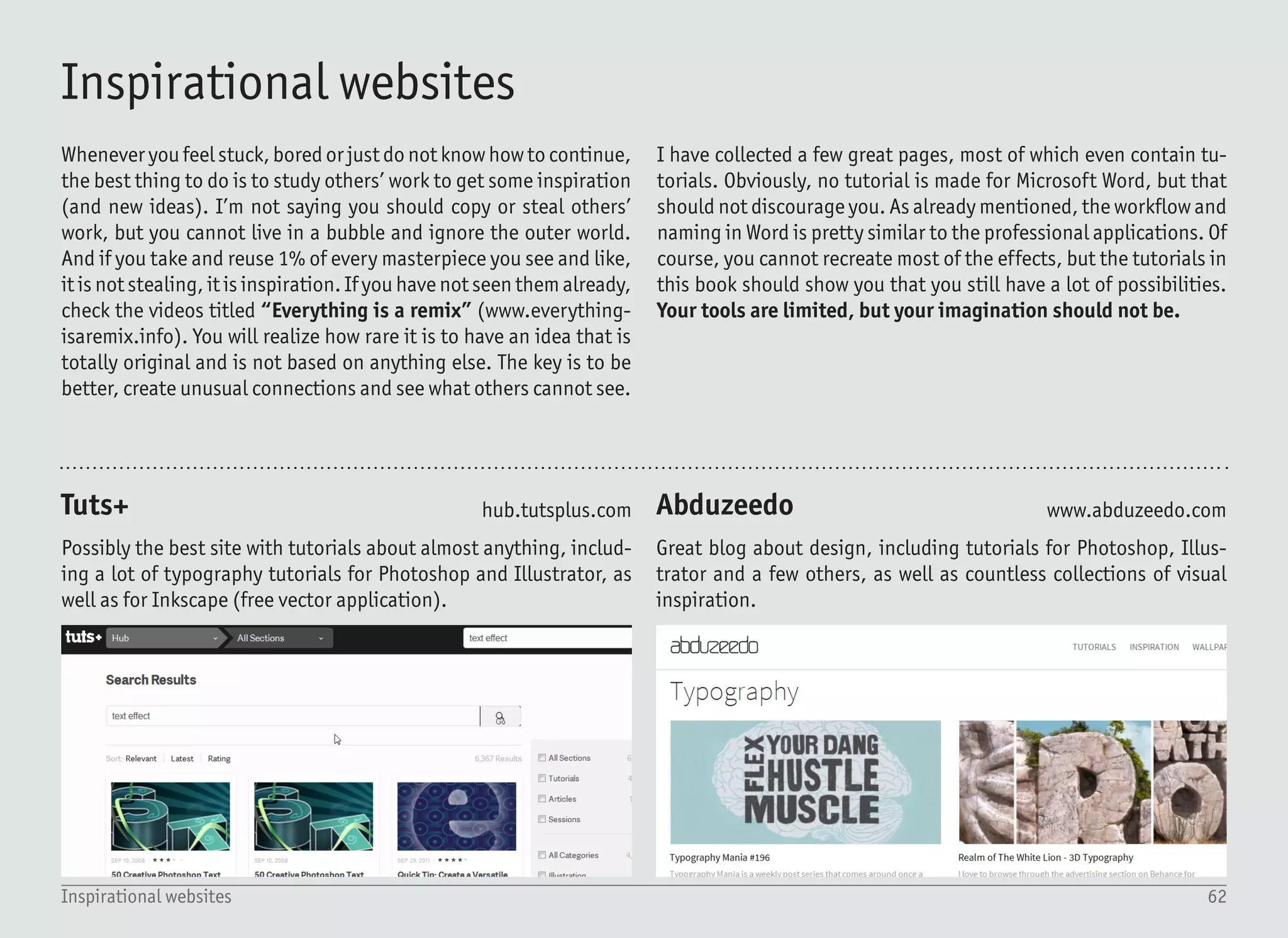
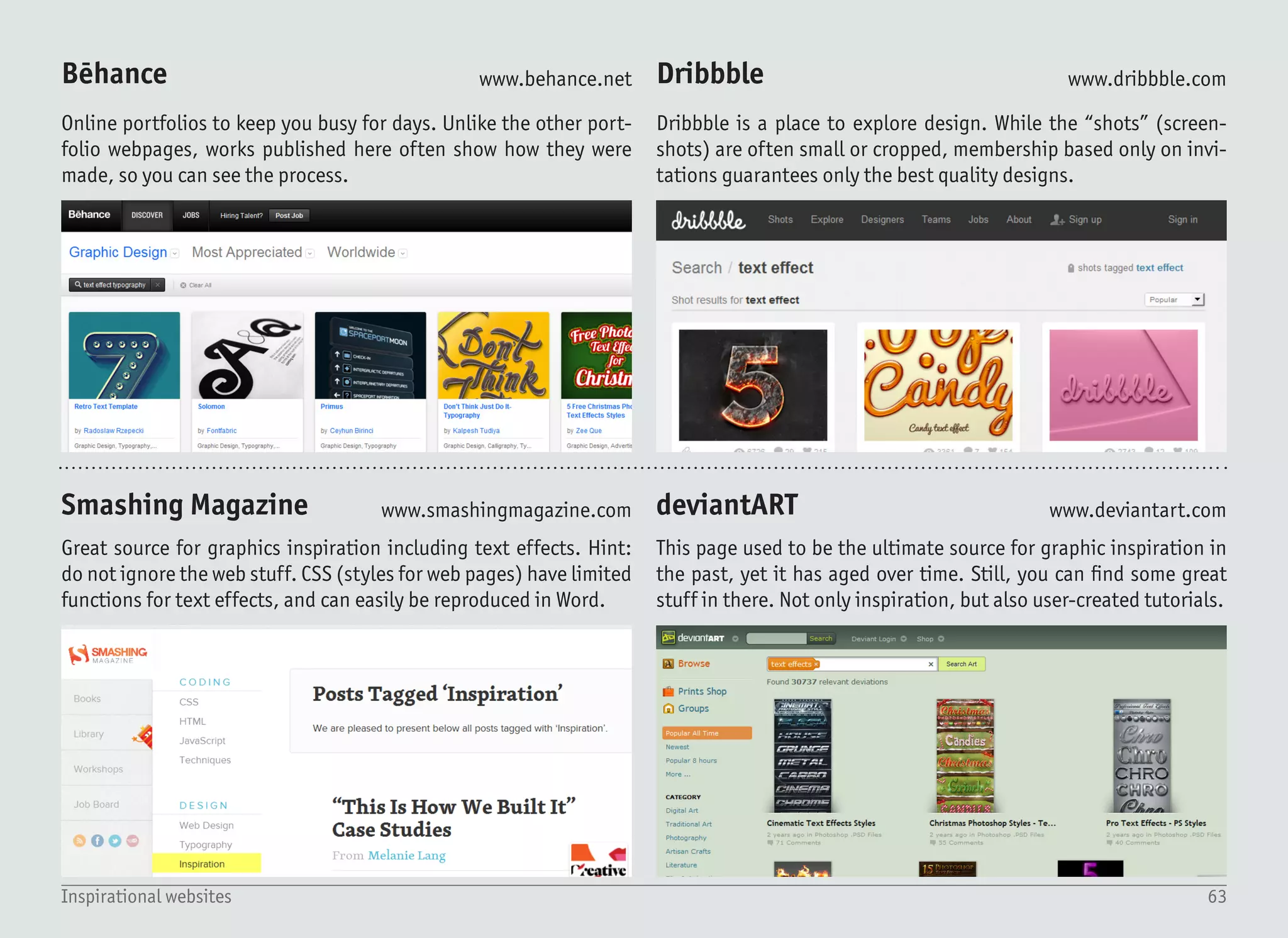
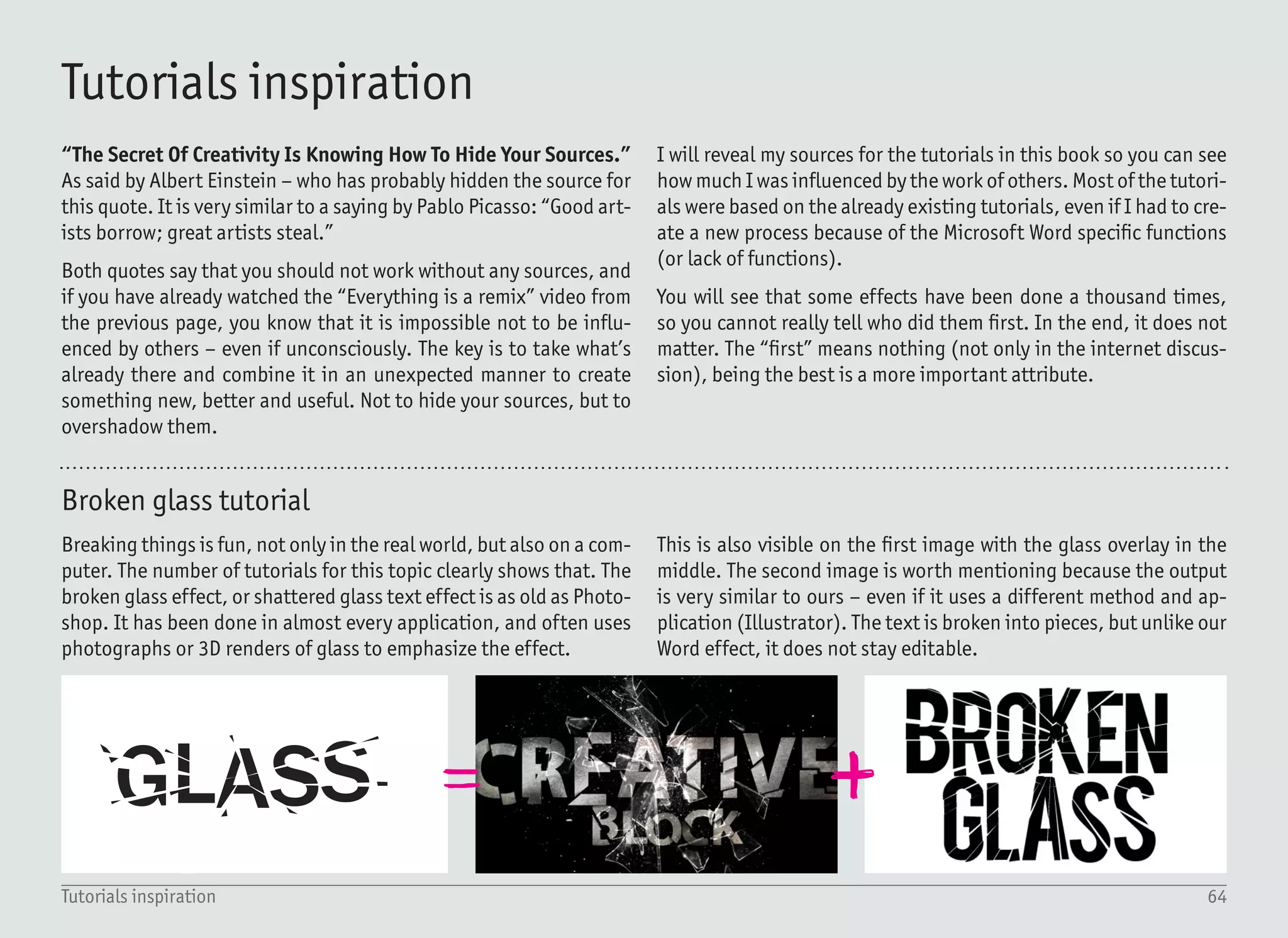
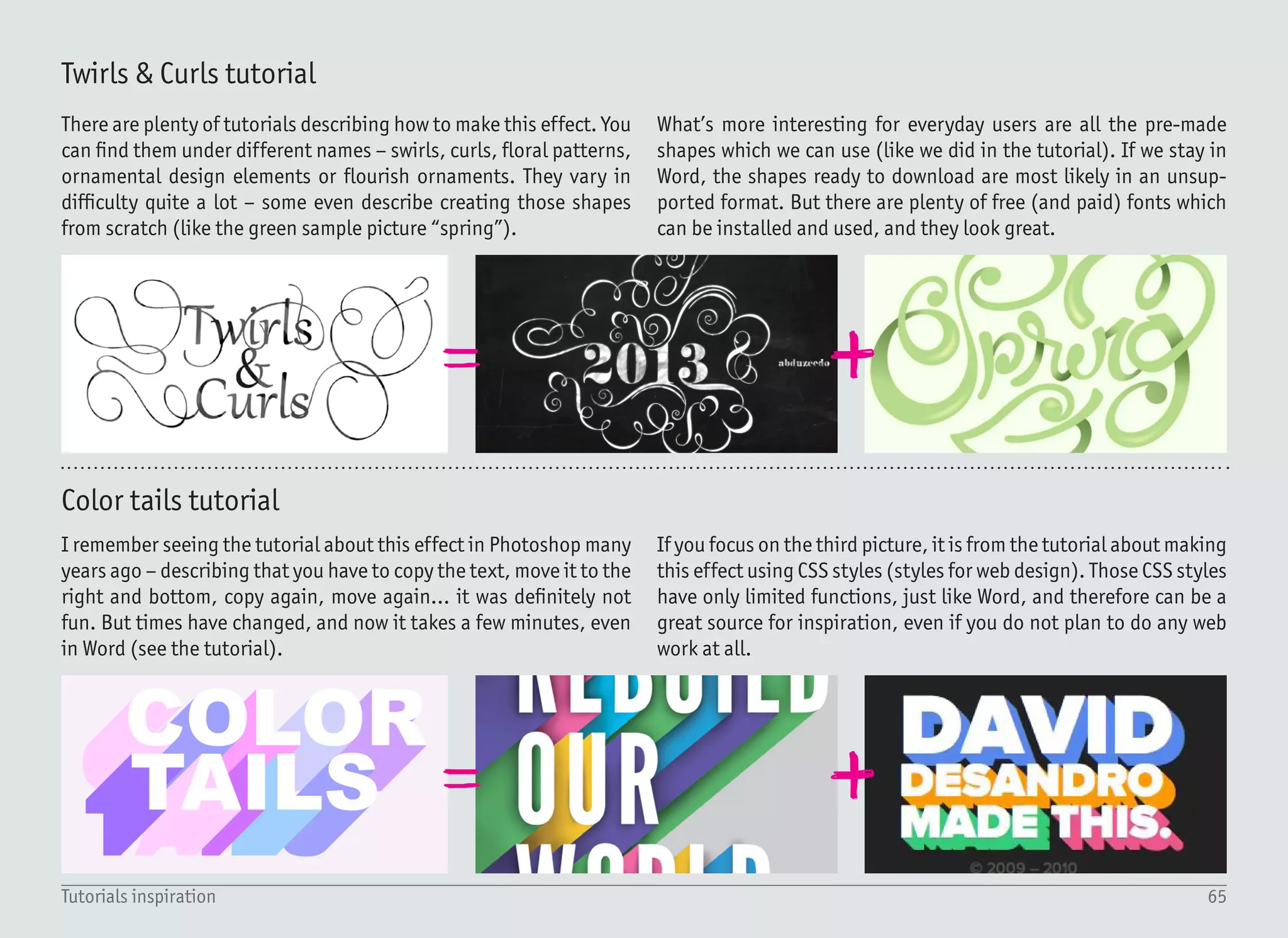
GLASS
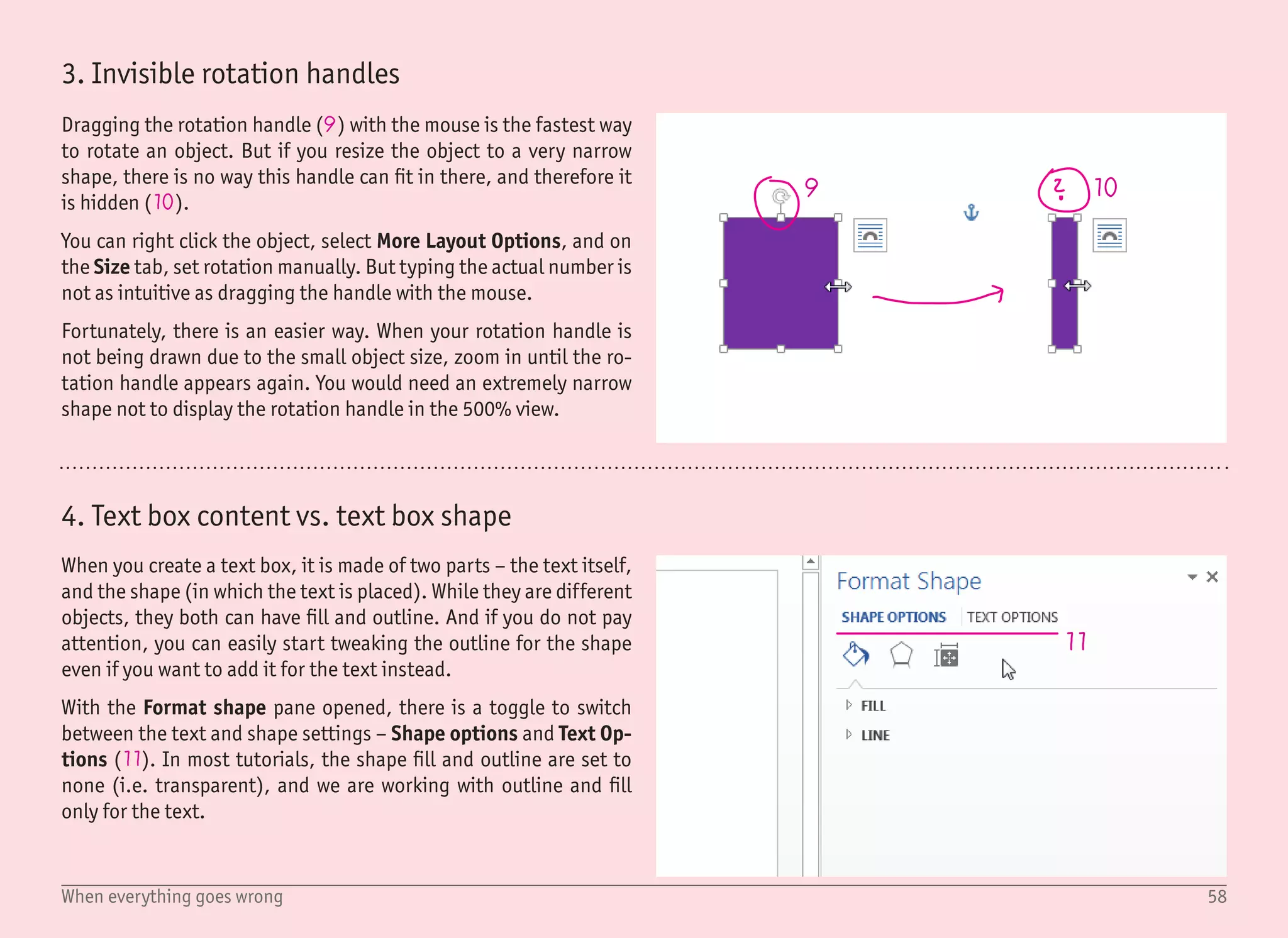
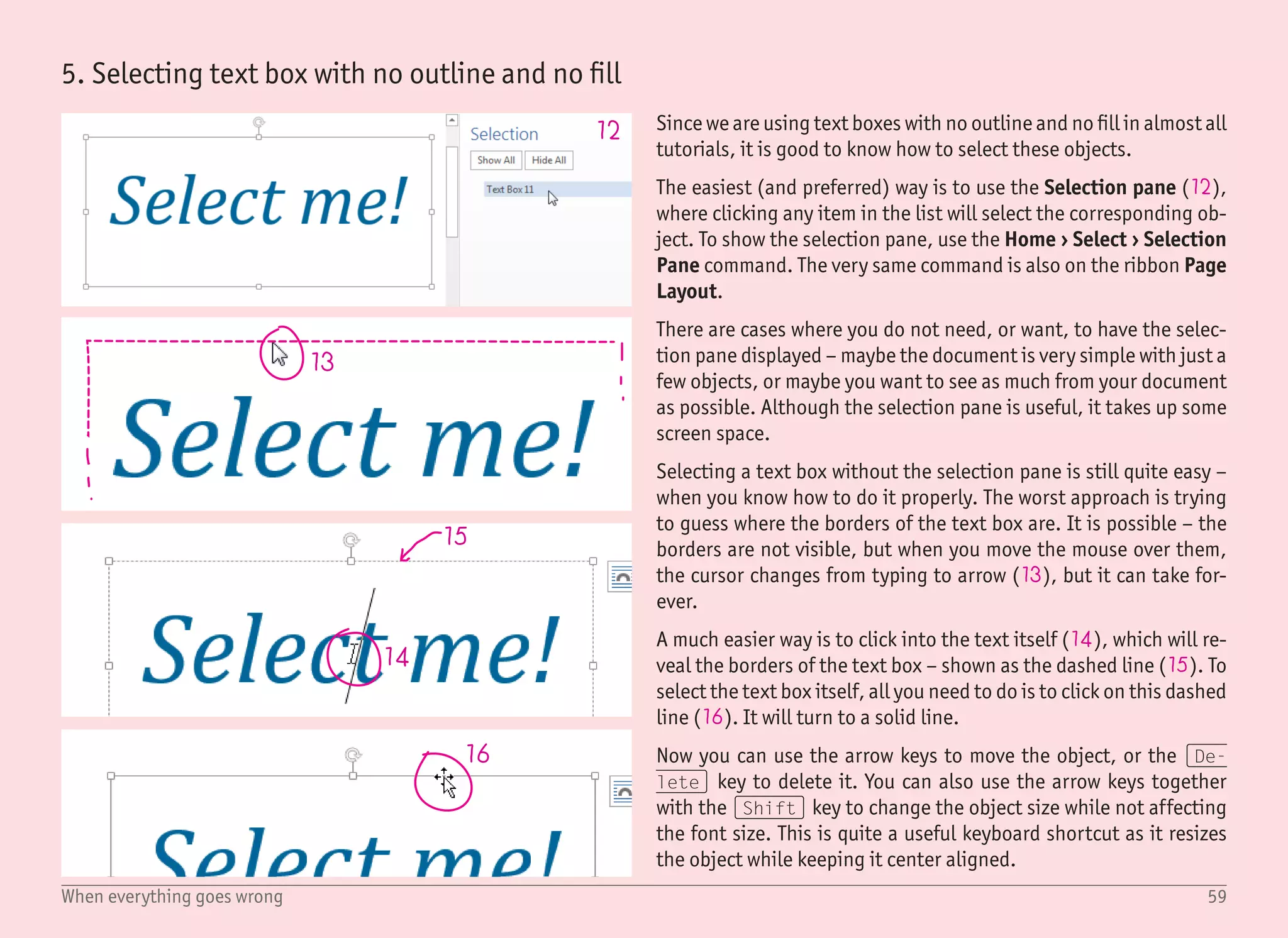
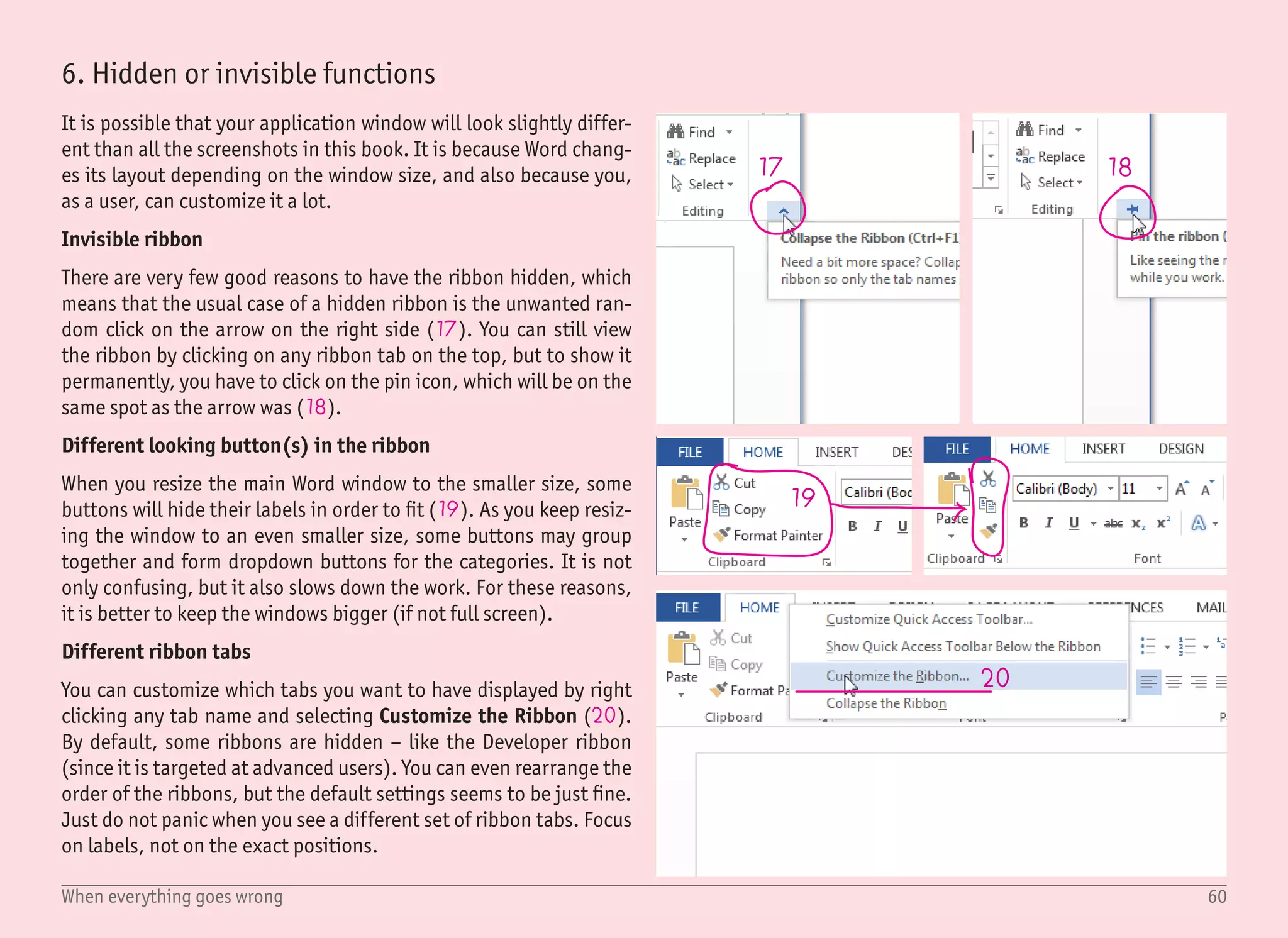
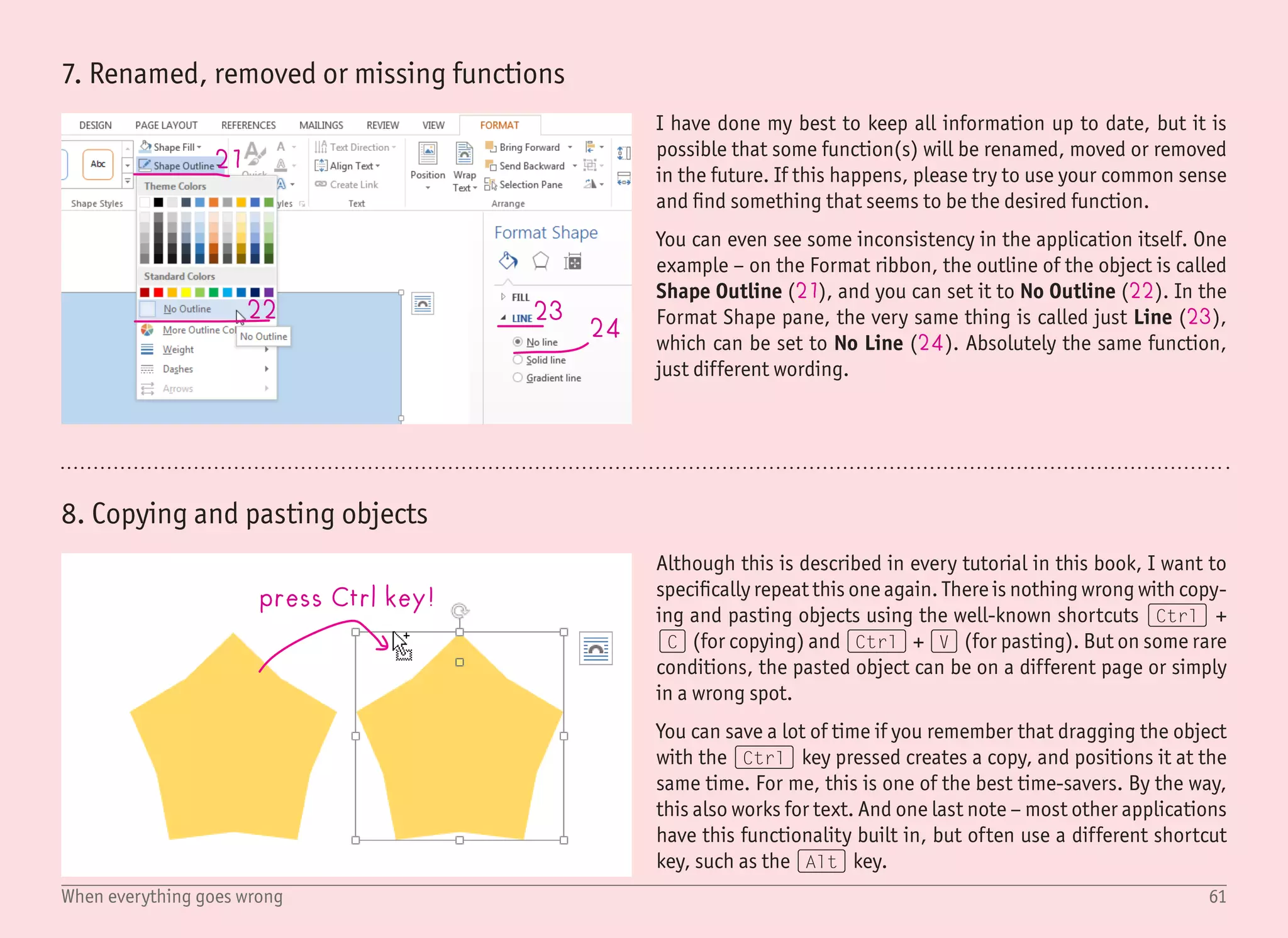
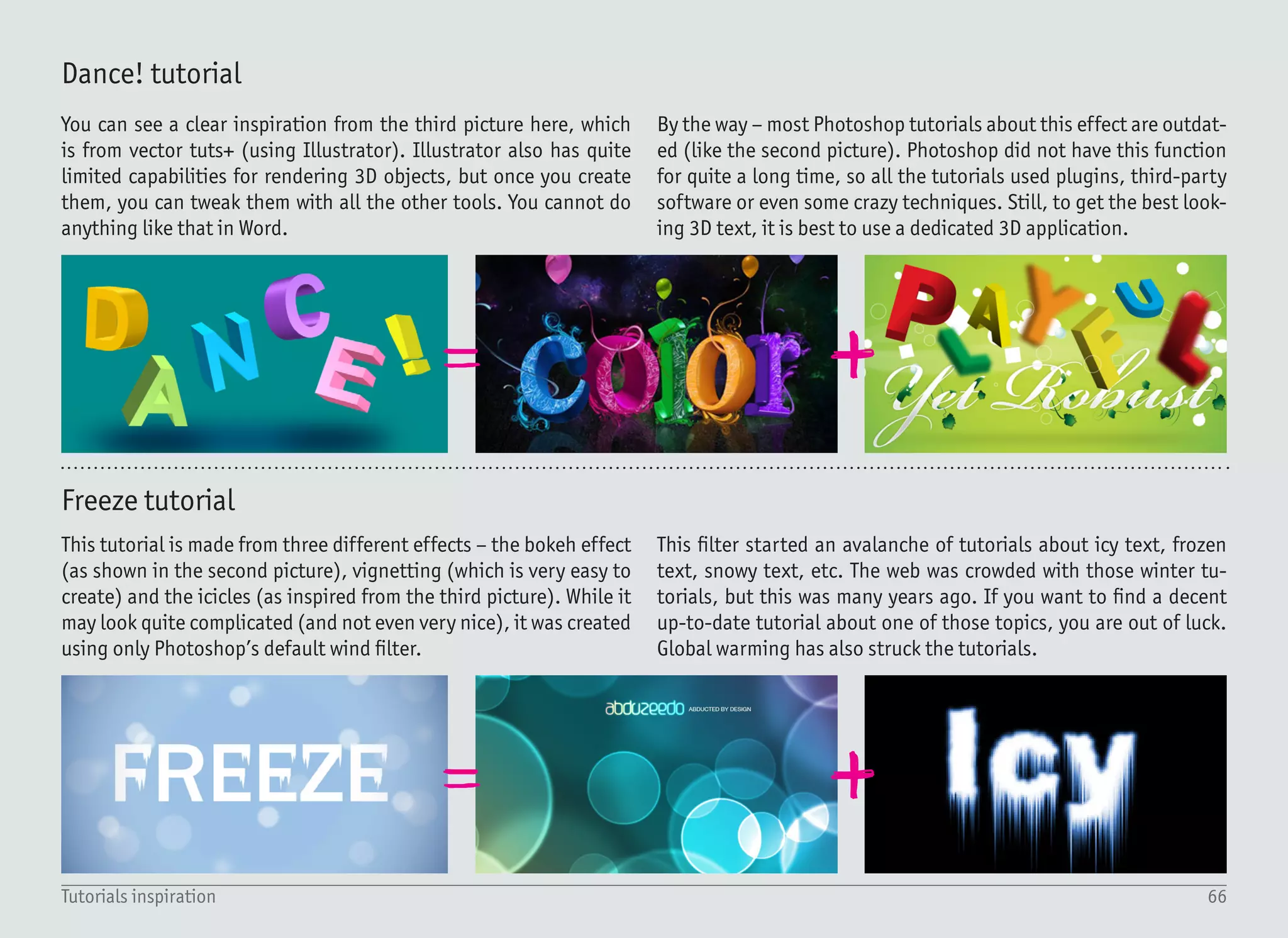
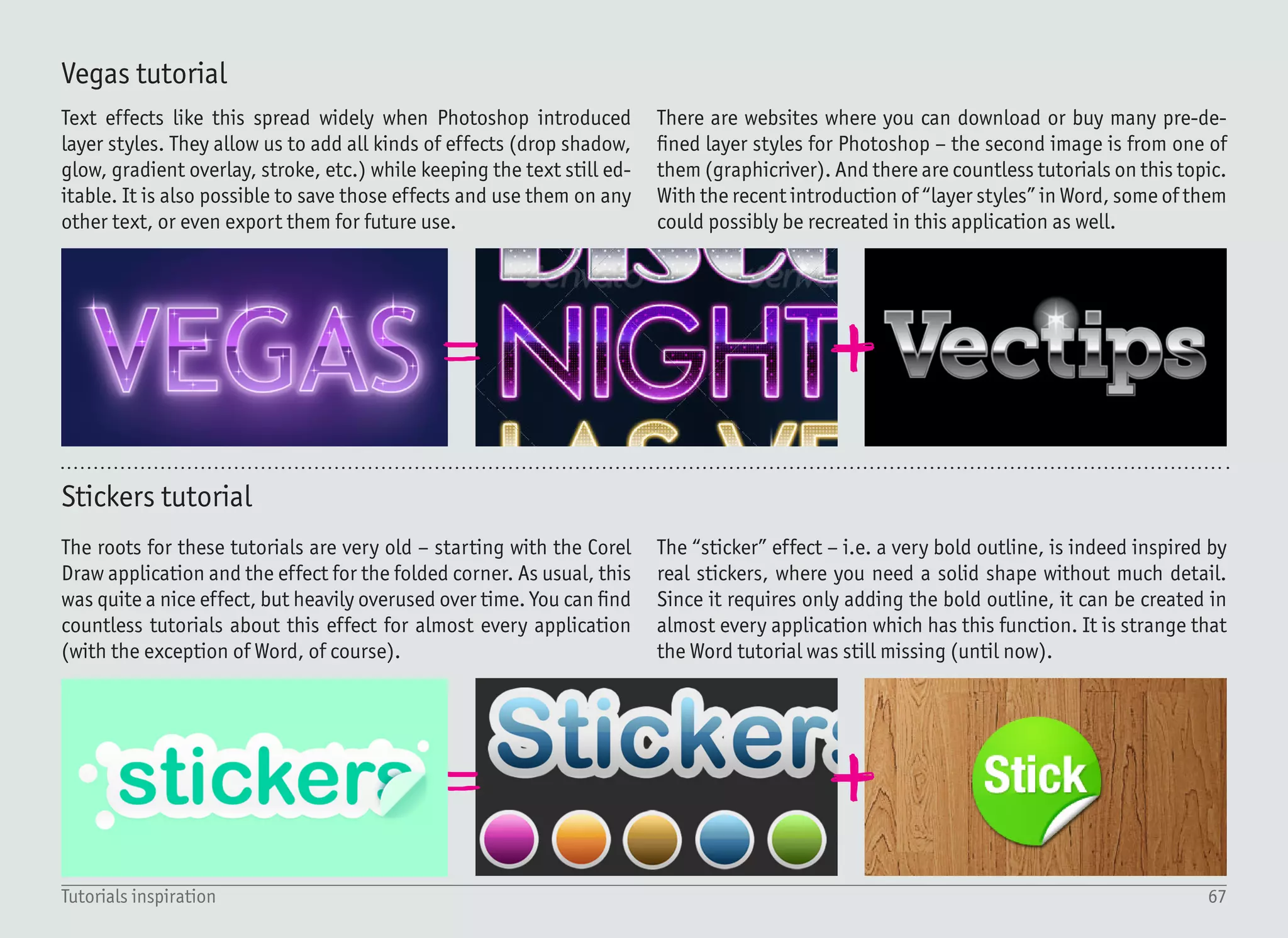
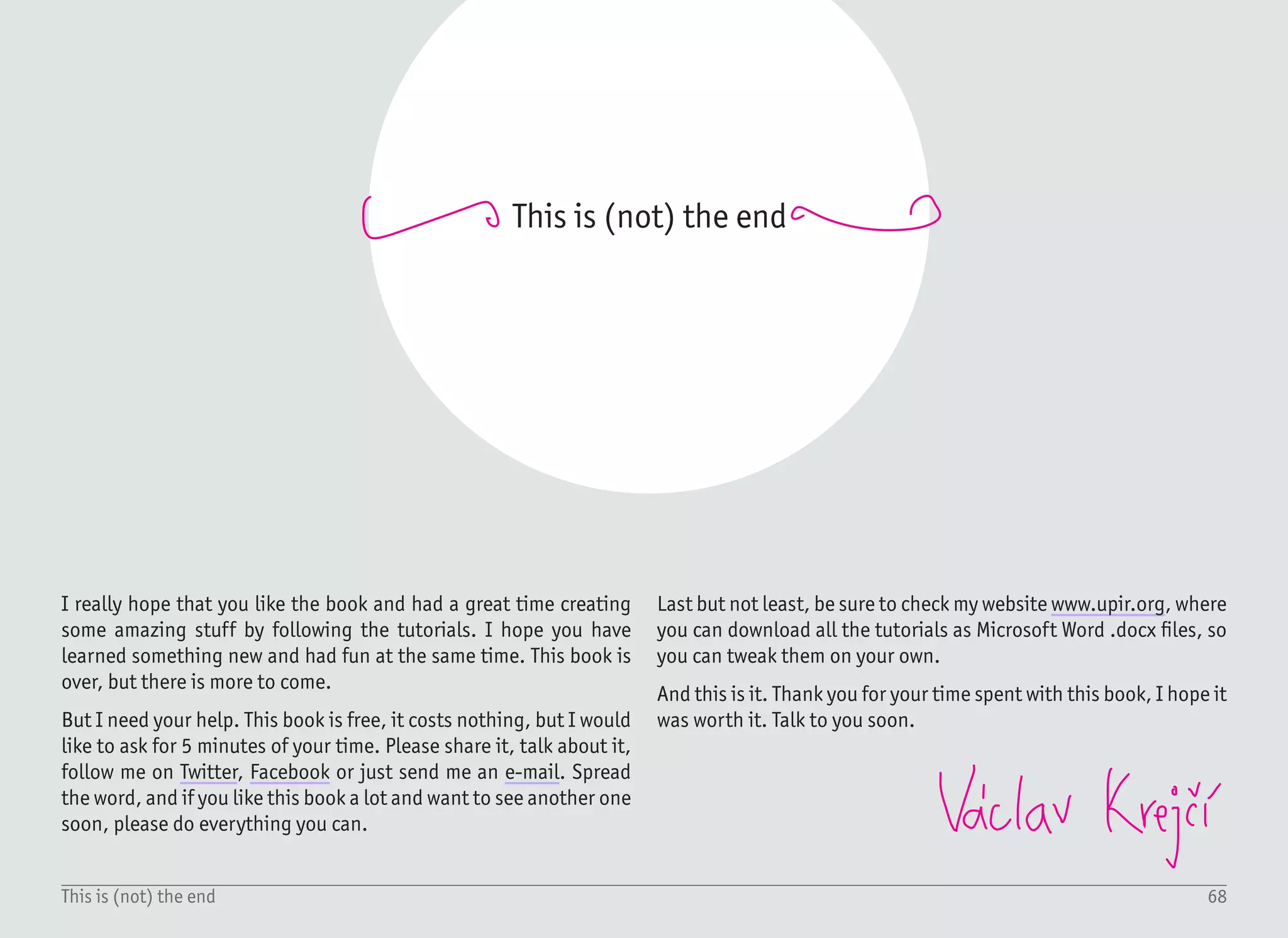
7 Best Text Effects
in Microsoft Word
Vรกclav Krejฤรญ
GLASS
Copyright ยฉ 2013 by Vaclav Krejci
All rights reserved.
Vรกclav Krejฤรญ
e-mail: upir@upir.org
web: www.upir.org
Twitter: @upiir
Facebook: www.fb.com/BestTextEffectsInWord/
First edition, September 2013
All trademarks and copyrighted items mentioned and shown in this book are the property of their respective owners.
Disclaimer: The views and opinions expressed in this book are those of the authors and do not necessarily reflect the official policy or
position of any other organization, specifically Microsoft Corporation. I have no connection with this company โ€“ yet.
Ahoy
Ahoy is a commonly used
greeting in the Czech Republic,
comparable to โ€œHelloโ€.
77
Ahoy, my name is Vรกclav Krejฤรญ,
and I have this crazy idea:
โ€œExplain graphic design to
everyday users using software
they are already familiar withโ€
Introduction
This book is just the first in a series โ€“ but
I need your help. If you like it, please share
it, talk about it, follow me on Twitter, Facebook,
or send me an e-mail. It will take you 5 minutes, but
it means a lot to me. It gives me the energy to continue.
Thank you.
8Table of content
Table Of Content
Introduction	 9
What you need to know (and have)	 10
Why Microsoft Word?	 11
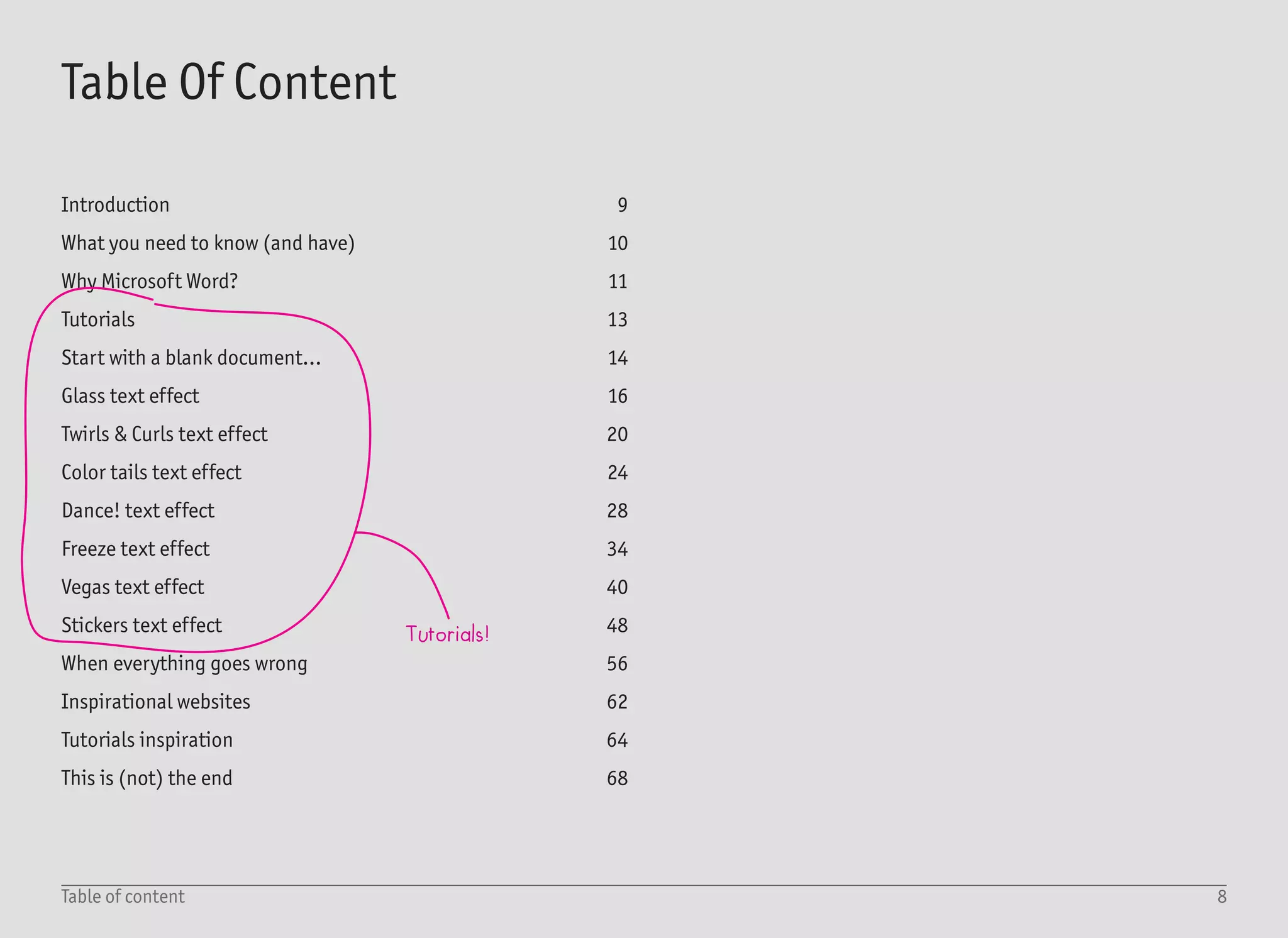
Tutorials	 13
Start with a blank document...	 14
Glass text effect	 16
Twirls & Curls text effect	 20
Color tails text effect	 24
Dance! text effect	 28
Freeze text effect	 34
Vegas text effect	 40
Stickers text effect	 48
When everything goes wrong	 56
Inspirational websites	 62
Tutorials inspiration	 64
This is (not) the end	 68
Tutorials!
9Introduction
During my high school studies back in 2003, I had a great side job. I
was teaching senior citizens computer science at a local university.
Despite their age, they were all novice users. The plan was to teach
them everything about computers. The first lesson was a nightmare.
Everyone was bored and confused โ€“ does anyone really think one
needs to know the binary system in order to work with a computer?
I had to completely revise the approach. Since I was studying
graphic design by myself, I came up with a simple but nice looking
series of documents to be recreated โ€“ each one with a slightly dif-
ferent graphical style and taking less than one hour to complete.
Each one was created using nothing more than Microsoft Word.
I was shocked. They all knew very little about computers but, with
proper guidance, my โ€œstudentsโ€ were able to create stunning docu-
ments while having fun.
They were creating birthday party invitations for their grandchil-
dren, calendars for their families, labels for Christmas presents...
and a great deal more.
Ten years later, everything fitted together. My English is better, I
have a strong graphic design background, the current version of
Microsoft Word contains all the necessary functions for advanced
graphical effects, and iBooks Author allows me to publish this book
for the iPad on my own and without the need for a real publisher.
When working on the tutorials, bear in mind that miracles do not
happen overnight. While all the tutorials can be finished in a short
time, you will need much more time to master them. Remember that
it is much easier to learn when you have fun โ€“ as my students found.
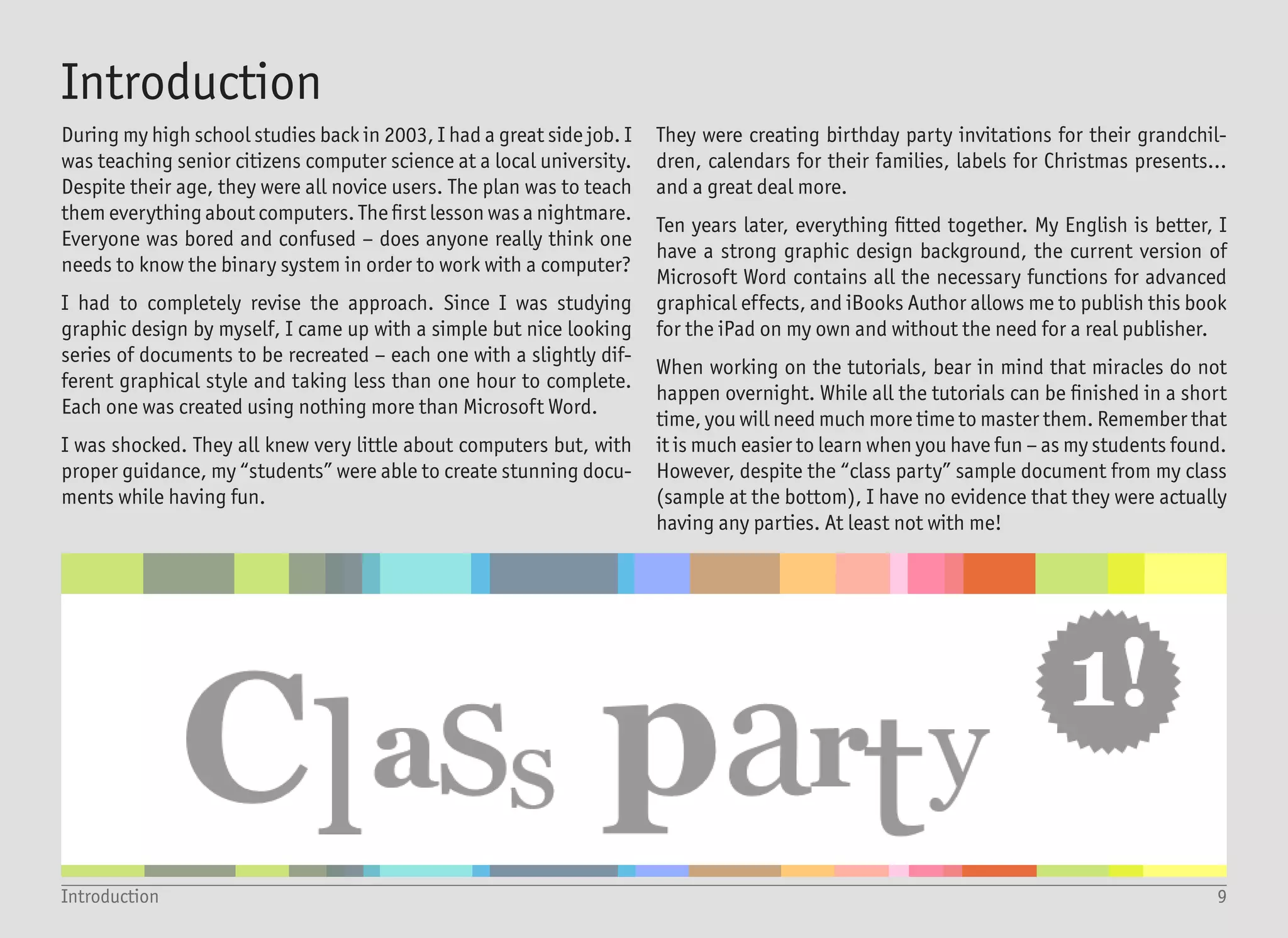
However, despite the โ€œclass partyโ€ sample document from my class
(sample at the bottom), I have no evidence that they were actually
having any parties. At least not with me!
Introduction
10What you need to know (and have)
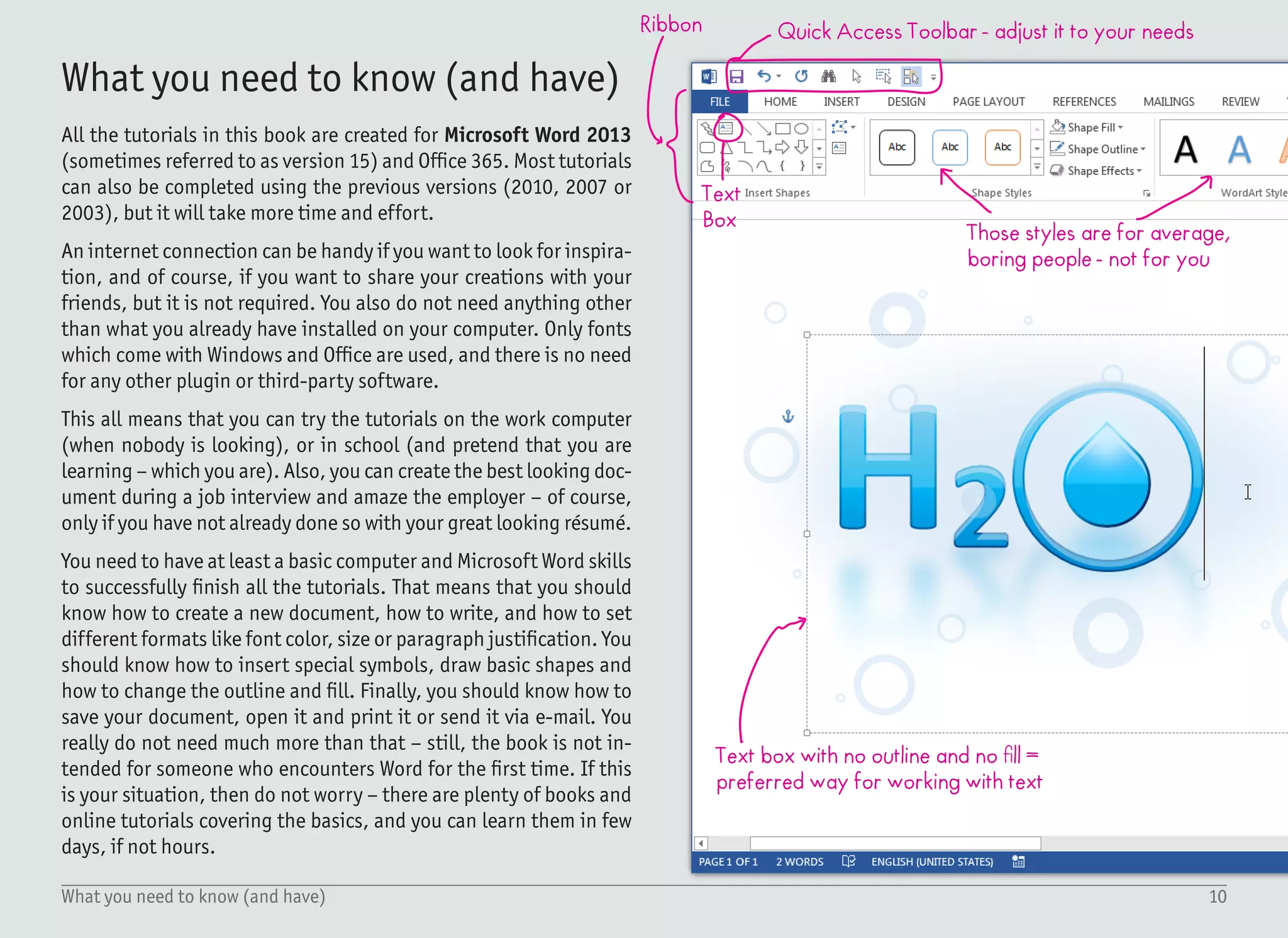
Quick Access Toolbar - adjust it to your needs
Text
Box
Ribbon
Those styles are for average,
boring people - not for you
Text box with no outline and no fill =
preferred way for working with text
All the tutorials in this book are created for Microsoft Word 2013
(sometimes referred to as version 15) and Office 365. Most tutorials
can also be completed using the previous versions (2010, 2007 or
2003), but it will take more time and effort.
An internet connection can be handy if you want to look for inspira-
tion, and of course, if you want to share your creations with your
friends, but it is not required. You also do not need anything other
than what you already have installed on your computer. Only fonts
which come with Windows and Office are used, and there is no need
for any other plugin or third-party software.
This all means that you can try the tutorials on the work computer
(when nobody is looking), or in school (and pretend that you are
learning โ€“ which you are). Also, you can create the best looking doc-
ument during a job interview and amaze the employer โ€“ of course,
only if you have not already done so with your great looking rรฉsumรฉ.
You need to have at least a basic computer and Microsoft Word skills
to successfully finish all the tutorials. That means that you should
know how to create a new document, how to write, and how to set
different formats like font color, size or paragraph justification. You
should know how to insert special symbols, draw basic shapes and
how to change the outline and fill. Finally, you should know how to
save your document, open it and print it or send it via e-mail. You
really do not need much more than that โ€“ still, the book is not in-
tended for someone who encounters Word for the first time. If this
is your situation, then do not worry โ€“ there are plenty of books and
online tutorials covering the basics, and you can learn them in few
days, if not hours.
What you need to know (and have)
11Why Microsoft Word?
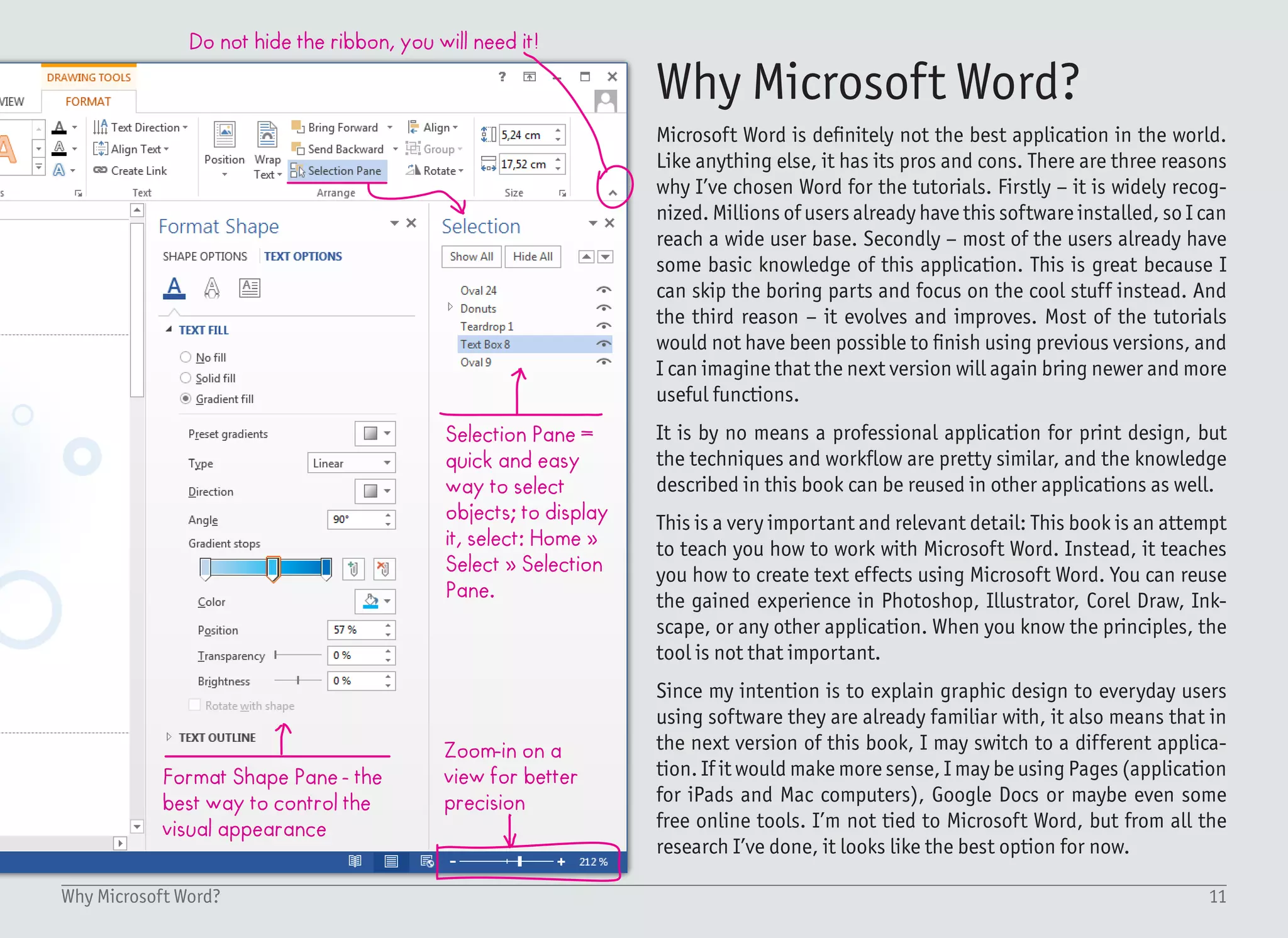
Do not hide the ribbon, you will need it!
Selection Pane =
quick and easy
way to select
objects; to display
it, select: Home ยป
Select ยป Selection
Pane.
Zoom-in on a
view for better
precision
Format Shape Pane - the
best way to control the
visual appearance
Microsoft Word is definitely not the best application in the world.
Like anything else, it has its pros and cons. There are three reasons
why Iโ€™ve chosen Word for the tutorials. Firstly โ€“ it is widely recog-
nized. Millions of users already have this software installed, so I can
reach a wide user base. Secondly โ€“ most of the users already have
some basic knowledge of this application. This is great because I
can skip the boring parts and focus on the cool stuff instead. And
the third reason โ€“ it evolves and improves. Most of the tutorials
would not have been possible to finish using previous versions, and
I can imagine that the next version will again bring newer and more
useful functions.
It is by no means a professional application for print design, but
the techniques and workflow are pretty similar, and the knowledge
described in this book can be reused in other applications as well.
This is a very important and relevant detail: This book is an attempt
to teach you how to work with Microsoft Word. Instead, it teaches
you how to create text effects using Microsoft Word. You can reuse
the gained experience in Photoshop, Illustrator, Corel Draw, Ink-
scape, or any other application. When you know the principles, the
tool is not that important.
Since my intention is to explain graphic design to everyday users
using software they are already familiar with, it also means that in
the next version of this book, I may switch to a different applica-
tion. If it would make more sense, I may be using Pages (application
for iPads and Mac computers), Google Docs or maybe even some
free online tools. Iโ€™m not tied to Microsoft Word, but from all the
research Iโ€™ve done, it looks like the best option for now.
Why Microsoft Word?
GLASS
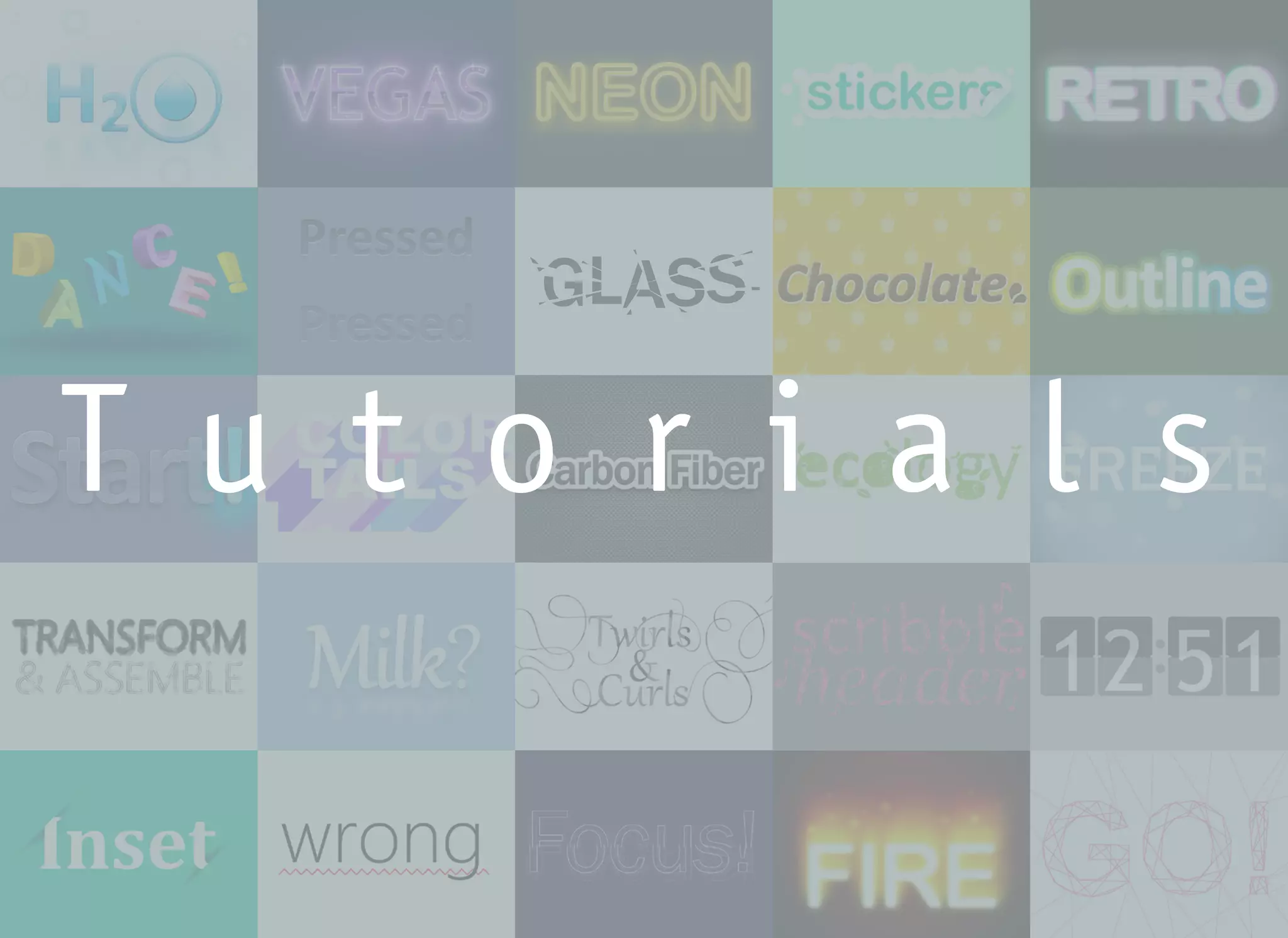
T u t o r i a l s
13Tutorials
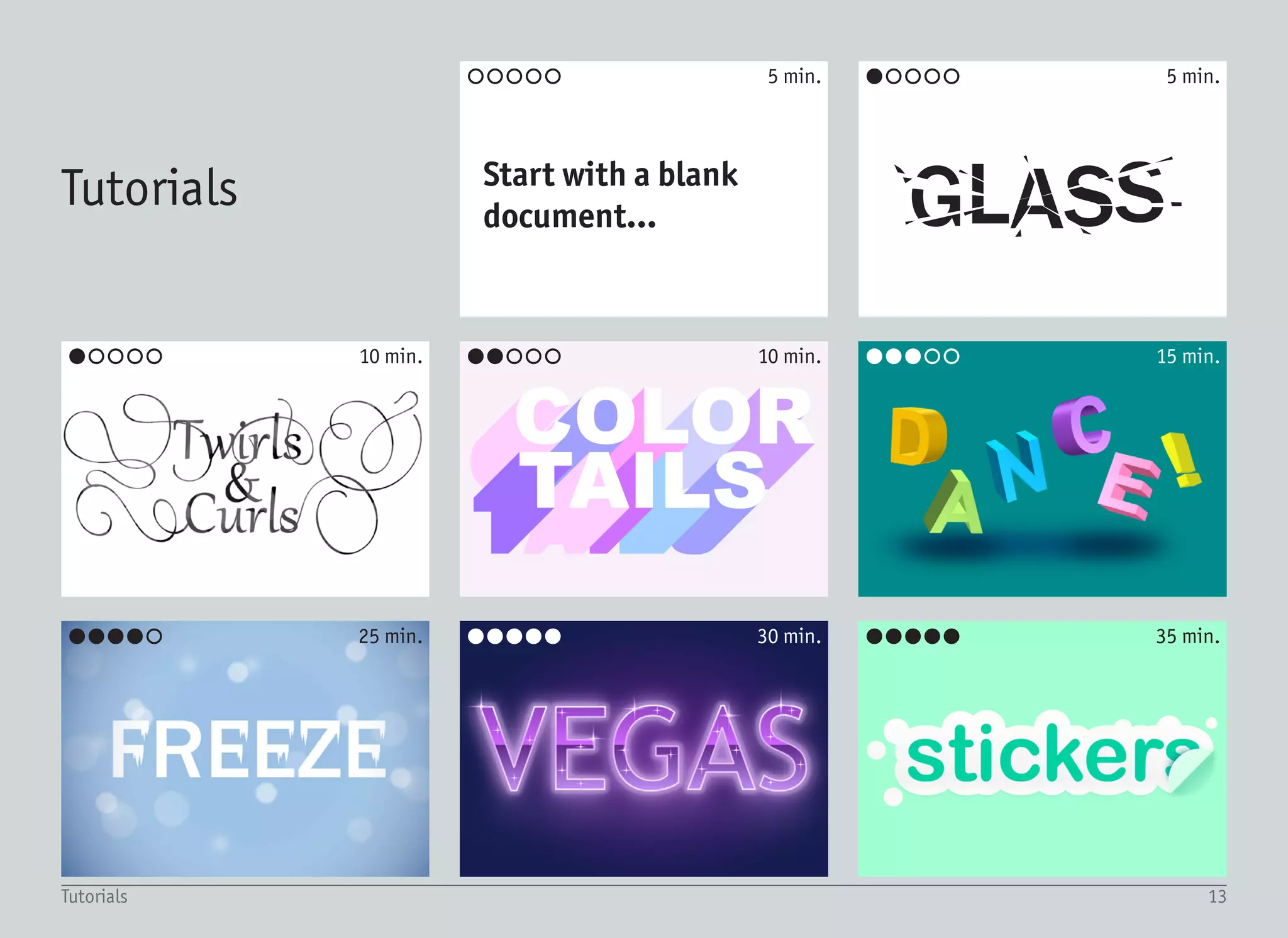
GLASSStart with a blank
document...
Tutorials
๏‚˜๏‚š๏‚š๏‚š๏‚š
๏‚˜๏‚š๏‚š๏‚š๏‚š
๏‚˜๏‚˜๏‚˜๏‚˜๏‚˜ ๏‚˜๏‚˜๏‚˜๏‚˜๏‚˜๏‚˜๏‚˜๏‚˜๏‚˜๏‚š
๏‚˜๏‚˜๏‚˜๏‚š๏‚š๏‚˜๏‚˜๏‚š๏‚š๏‚š
๏‚š๏‚š๏‚š๏‚š๏‚š 5 min.
10 min.
30 min. 35 min.25 min.
15 min.10 min.
5 min.
1
2
3
Every tutorial in this book starts with the same first step: Start with
a blank document, create Text Box with no fill and no outline, and
type word X, with font Y, sized Z pt. Usually center aligned.
If you are not sure how to perform this task, keep reading. Other-
wise, feel free to jump right to the tutorials section. It is just two
pages ahead!
Start with a blank document...
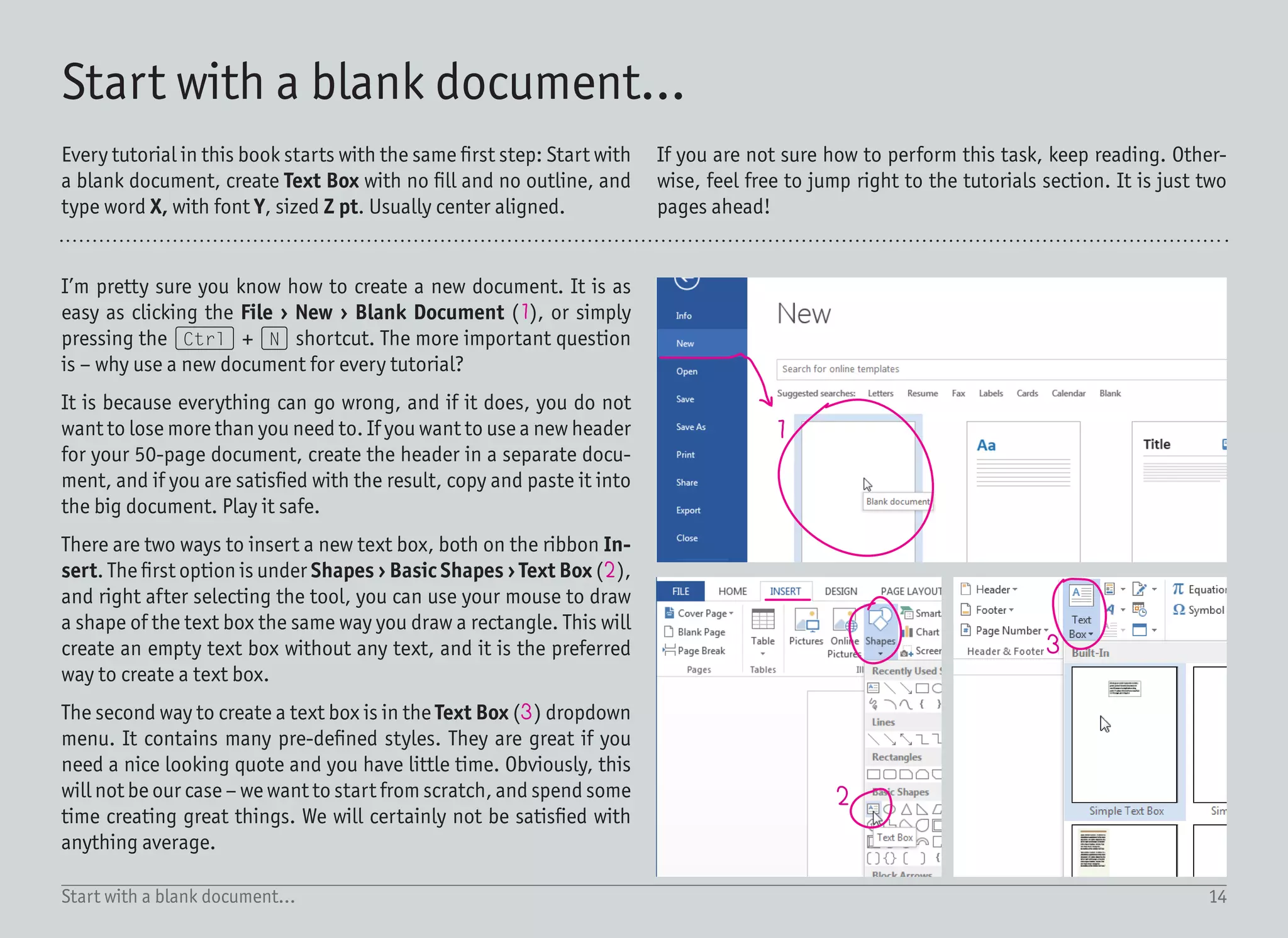
Iโ€™m pretty sure you know how to create a new document. It is as
easy as clicking the File โ€บ New โ€บ Blank Document (1), or simply
pressing the (Ctrl) + (N) shortcut. The more important question
is โ€“ why use a new document for every tutorial?
It is because everything can go wrong, and if it does, you do not
want to lose more than you need to. If you want to use a new header
for your 50-page document, create the header in a separate docu-
ment, and if you are satisfied with the result, copy and paste it into
the big document. Play it safe.
There are two ways to insert a new text box, both on the ribbon In-
sert. The first option is under Shapes โ€บ Basic Shapes โ€บ Text Box (2),
and right after selecting the tool, you can use your mouse to draw
a shape of the text box the same way you draw a rectangle. This will
create an empty text box without any text, and it is the preferred
way to create a text box.
The second way to create a text box is in the Text Box (3) dropdown
menu. It contains many pre-defined styles. They are great if you
need a nice looking quote and you have little time. Obviously, this
will not be our case โ€“ we want to start from scratch, and spend some
time creating great things. We will certainly not be satisfied with
anything average.
14Start with a blank document...
15Start with a blank document...
4 5
7 8
9
10
11
12 13
6
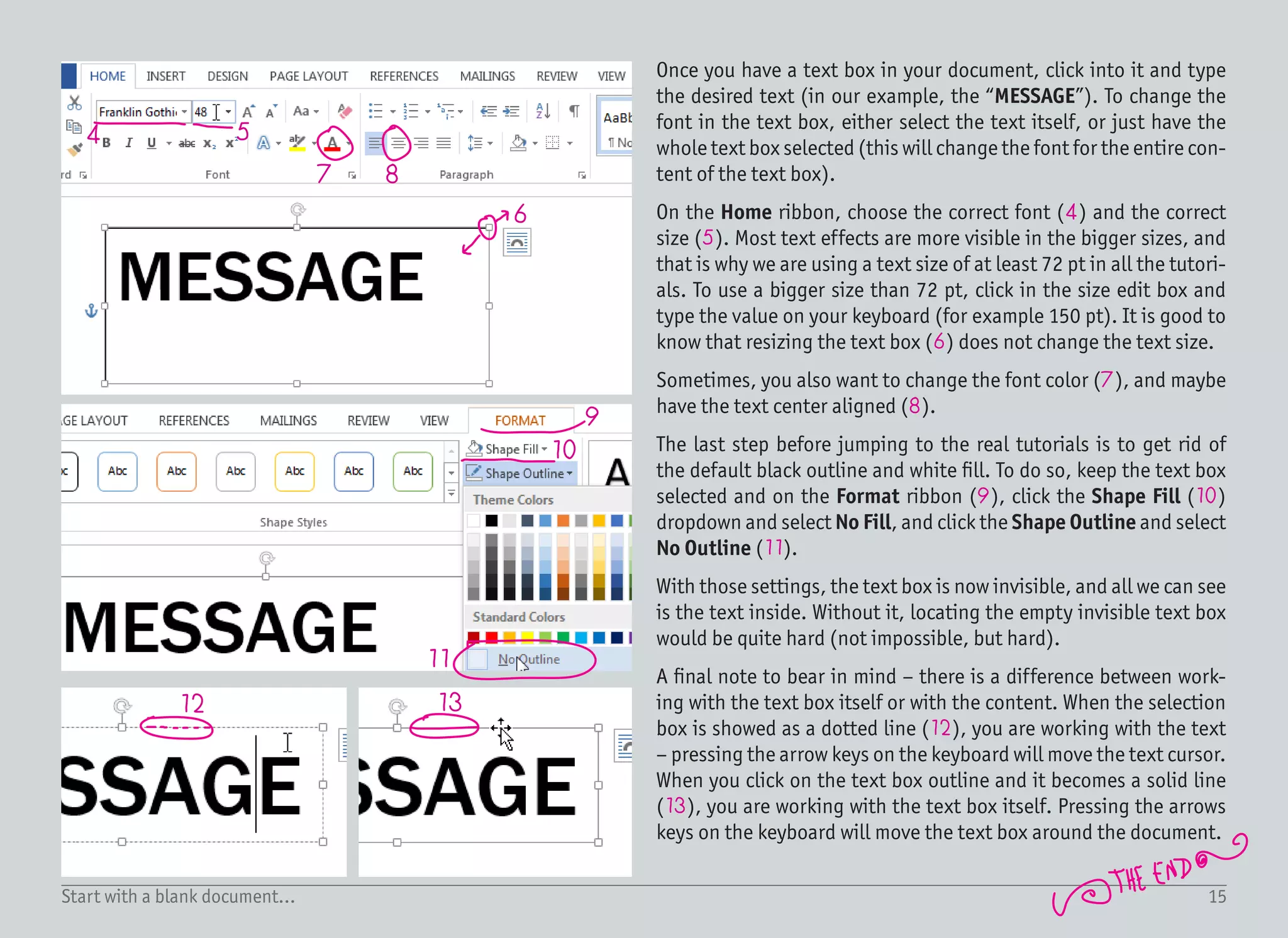
Once you have a text box in your document, click into it and type
the desired text (in our example, the โ€œMESSAGEโ€). To change the
font in the text box, either select the text itself, or just have the
whole text box selected (this will change the font for the entire con-
tent of the text box).
On the Home ribbon, choose the correct font (4) and the correct
size (5). Most text effects are more visible in the bigger sizes, and
that is why we are using a text size of at least 72 pt in all the tutori-
als. To use a bigger size than 72 pt, click in the size edit box and
type the value on your keyboard (for example 150 pt). It is good to
know that resizing the text box (6) does not change the text size.
Sometimes, you also want to change the font color (7), and maybe
have the text center aligned (8).
The last step before jumping to the real tutorials is to get rid of
the default black outline and white fill. To do so, keep the text box
selected and on the Format ribbon (9), click the Shape Fill (10)
dropdown and select No Fill, and click the Shape Outline and select
No Outline (11).
With those settings, the text box is now invisible, and all we can see
is the text inside. Without it, locating the empty invisible text box
would be quite hard (not impossible, but hard).
A final note to bear in mind โ€“ there is a difference between work-
ing with the text box itself or with the content. When the selection
box is showed as a dotted line (12), you are working with the text
โ€“ pressing the arrow keys on the keyboard will move the text cursor.
When you click on the text box outline and it becomes a solid line
(13), you are working with the text box itself. Pressing the arrows
keys on the keyboard will move the text box around the document.
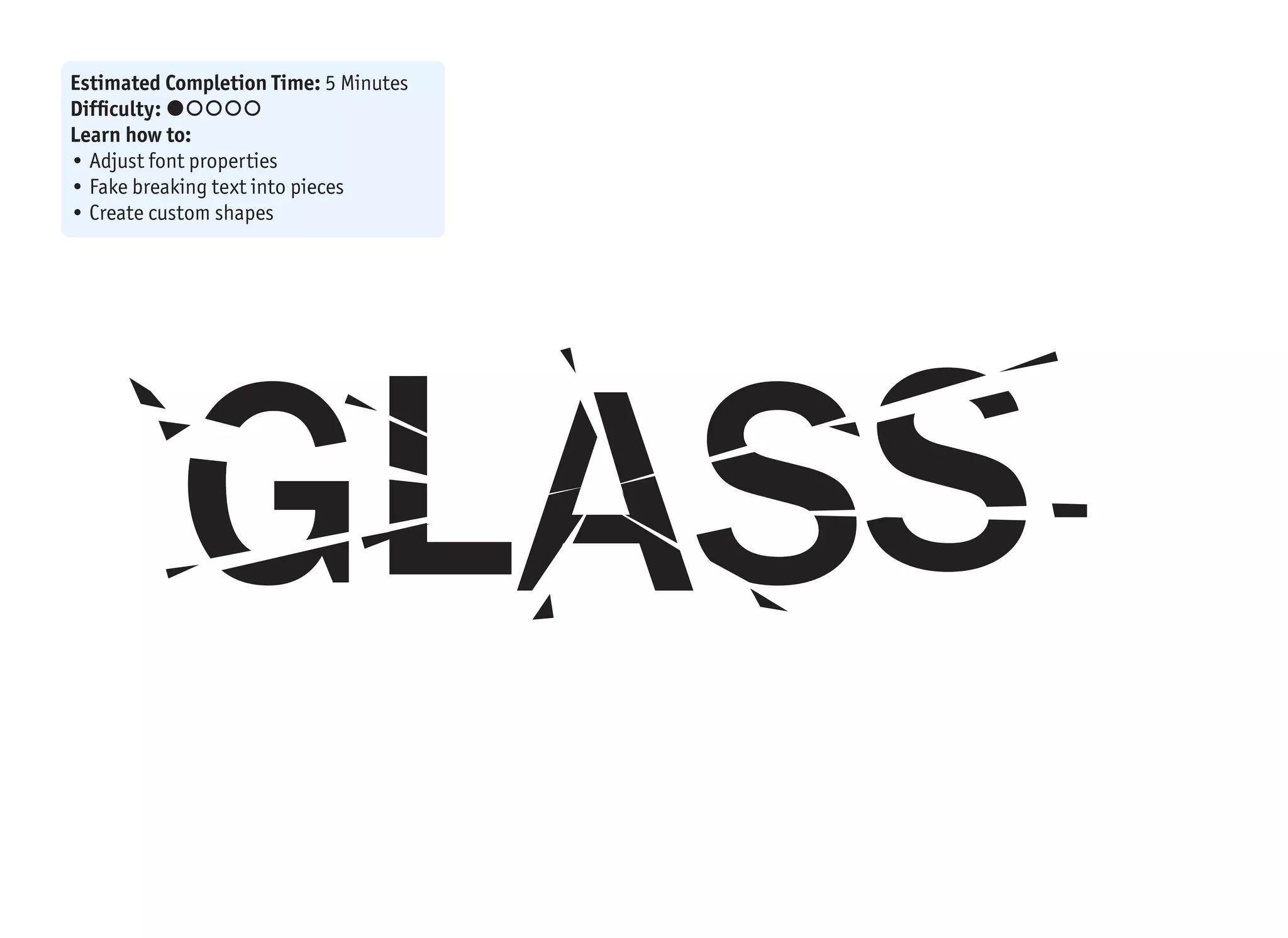
GLASS
Estimated Completion Time: 5 Minutes
Difficulty: ๏‚˜๏‚š๏‚š๏‚š๏‚š
Learn how to:
โ€ข Adjust font properties
โ€ข Fake breaking text into pieces
โ€ข Create custom shapes
GLASS
1
2
3
4
5
4
3
3
potato-shaped
rock
triangles
When you break objects, they fall into piec-
es. Not a big surprise, right? It is the same
for glass as for any other material. But glass
is a little bit special โ€“ it creates a specific
pattern and it is also very easy to break. The
chances are that you have already broken
some glass, or maybe a window, and you
have also seen the pattern. That is impor-
tant because our brain can then create a
connection between this text effect and
something what weโ€™ve seen in the past.
The more we know how this shattered glass
looks in the real-world, the less we need to
care about the preciseness and details.
In Word, it is not possible to break objects
intopieces.Ofcourse,twotrianglescanform
a rectangle, but letters are complex shapes
and those cannot be broken apart. The good
news is that our brain can be easily fooled
and we can fake this effect. Otherwise, this
tutorial would not make any sense.
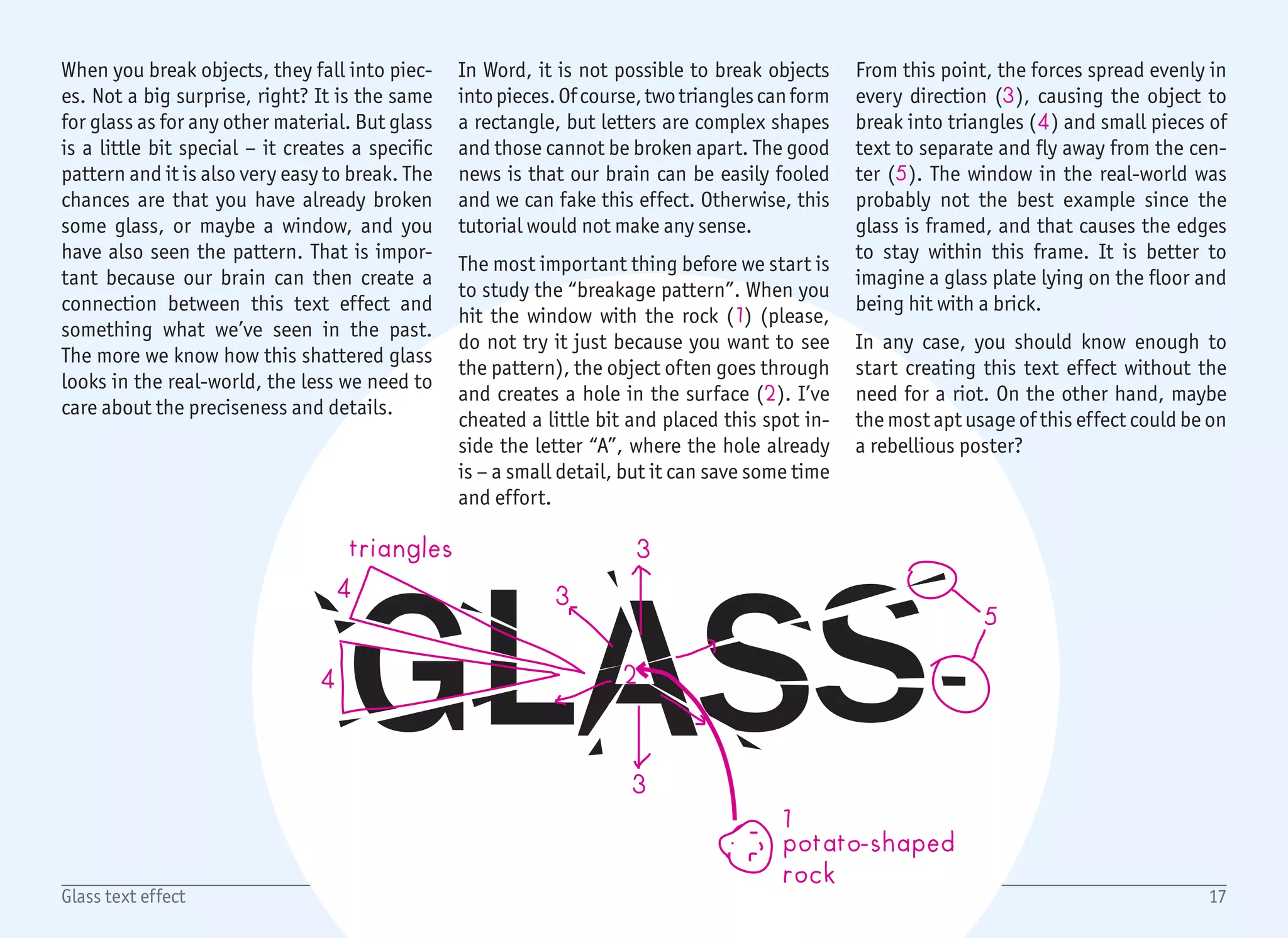
The most important thing before we start is
to study the โ€œbreakage patternโ€. When you
hit the window with the rock (1) (please,
do not try it just because you want to see
the pattern), the object often goes through
and creates a hole in the surface (2). Iโ€™ve
cheated a little bit and placed this spot in-
side the letter โ€œAโ€, where the hole already
is โ€“ a small detail, but it can save some time
and effort.
From this point, the forces spread evenly in
every direction (3), causing the object to
break into triangles (4) and small pieces of
text to separate and fly away from the cen-
ter (5). The window in the real-world was
probably not the best example since the
glass is framed, and that causes the edges
to stay within this frame. It is better to
imagine a glass plate lying on the floor and
being hit with a brick.
In any case, you should know enough to
start creating this text effect without the
need for a riot. On the other hand, maybe
the most apt usage of this effect could be on
a rebellious poster?
17Glass text effect
1/2
1
2
4
3
5
6
18Glass text effect
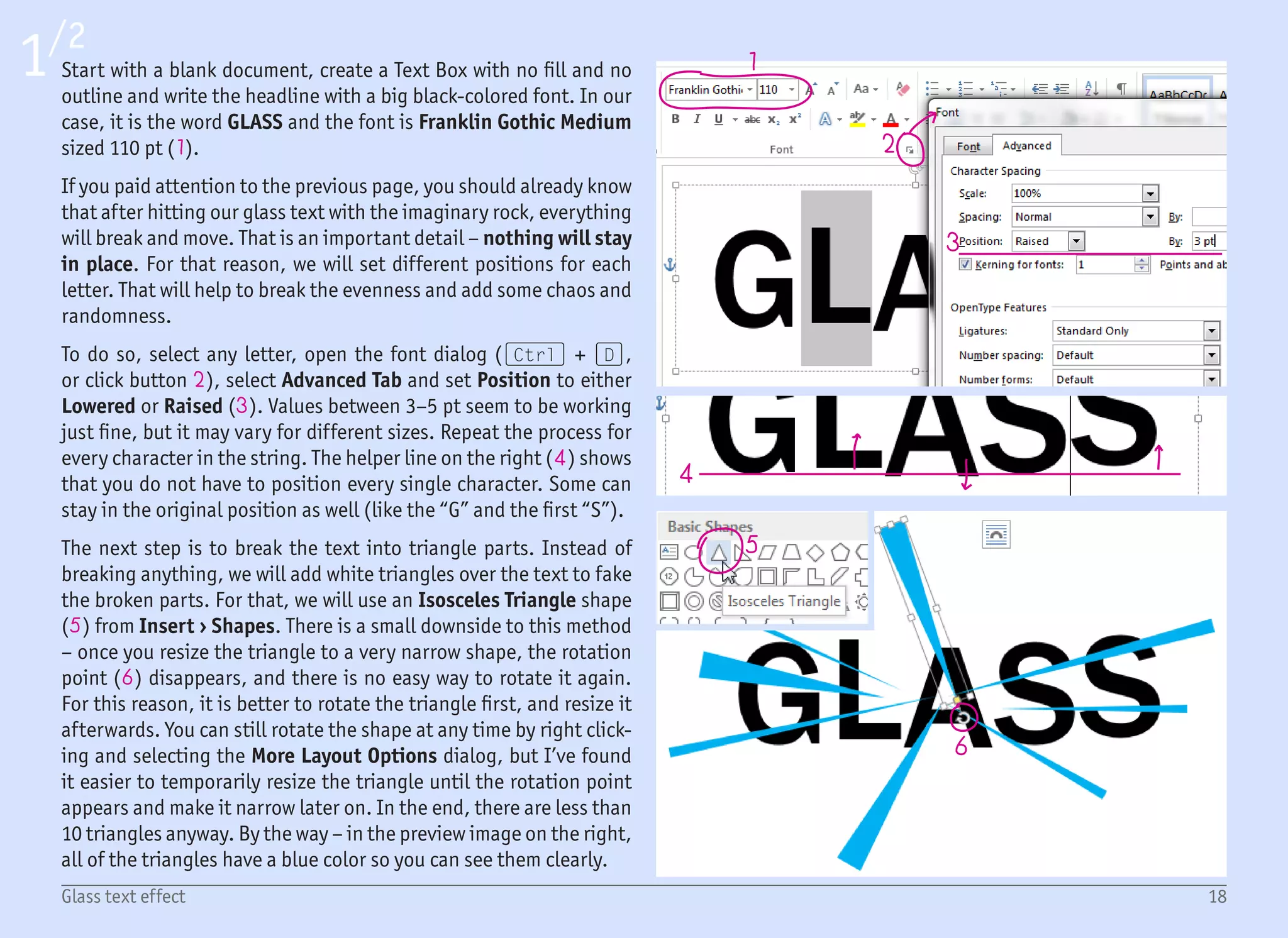
Start with a blank document, create a Text Box with no fill and no
outline and write the headline with a big black-colored font. In our
case, it is the word GLASS and the font is Franklin Gothic Medium
sized 110 pt (1).
If you paid attention to the previous page, you should already know
that after hitting our glass text with the imaginary rock, everything
will break and move. That is an important detail โ€“ nothing will stay
in place. For that reason, we will set different positions for each
letter. That will help to break the evenness and add some chaos and
randomness.
To do so, select any letter, open the font dialog ((Ctrl) + (D),
or click button 2), select Advanced Tab and set Position to either
Lowered or Raised (3). Values between 3โ€“5 pt seem to be working
just fine, but it may vary for different sizes. Repeat the process for
every character in the string. The helper line on the right (4) shows
that you do not have to position every single character. Some can
stay in the original position as well (like the โ€œGโ€ and the first โ€œSโ€).
The next step is to break the text into triangle parts. Instead of
breaking anything, we will add white triangles over the text to fake
the broken parts. For that, we will use an Isosceles Triangle shape
(5) from Insert โ€บ Shapes. There is a small downside to this method
โ€“ once you resize the triangle to a very narrow shape, the rotation
point (6) disappears, and there is no easy way to rotate it again.
For this reason, it is better to rotate the triangle first, and resize it
afterwards. You can still rotate the shape at any time by right click-
ing and selecting the More Layout Options dialog, but Iโ€™ve found
it easier to temporarily resize the triangle until the rotation point
appears and make it narrow later on. In the end, there are less than
10 triangles anyway. By the way โ€“ in the preview image on the right,
all of the triangles have a blue color so you can see them clearly.
2/2
7
8
9
10
11
12
13
19Glass text effect
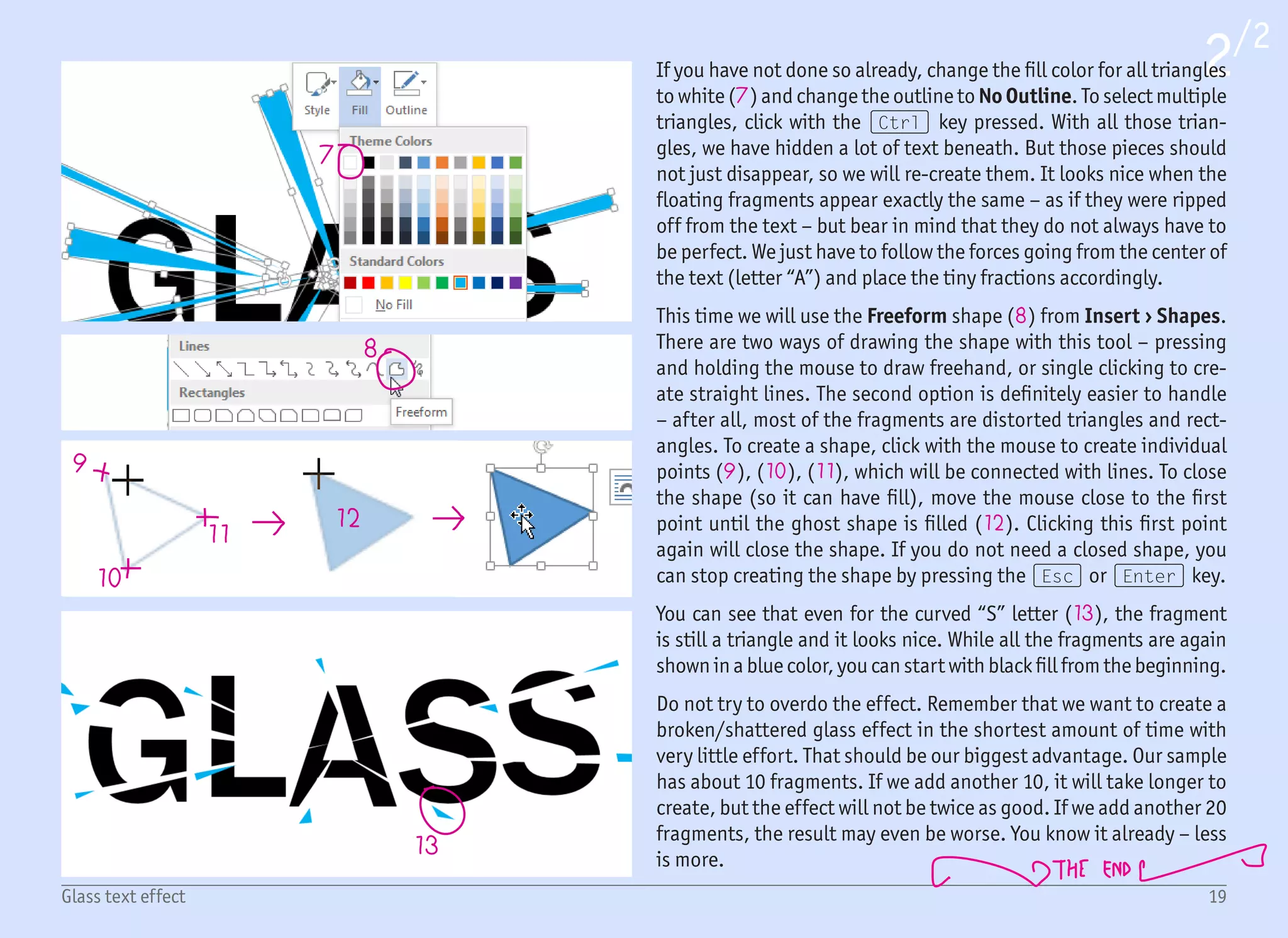
If you have not done so already, change the fill color for all triangles
to white (7) and change the outline to No Outline. To select multiple
triangles, click with the (Ctrl) key pressed. With all those trian-
gles, we have hidden a lot of text beneath. But those pieces should
not just disappear, so we will re-create them. It looks nice when the
floating fragments appear exactly the same โ€“ as if they were ripped
off from the text โ€“ but bear in mind that they do not always have to
be perfect. We just have to follow the forces going from the center of
the text (letter โ€œAโ€) and place the tiny fractions accordingly.
This time we will use the Freeform shape (8) from Insert โ€บ Shapes.
There are two ways of drawing the shape with this tool โ€“ pressing
and holding the mouse to draw freehand, or single clicking to cre-
ate straight lines. The second option is definitely easier to handle
โ€“ after all, most of the fragments are distorted triangles and rect-
angles. To create a shape, click with the mouse to create individual
points (9), (10), (11), which will be connected with lines. To close
the shape (so it can have fill), move the mouse close to the first
point until the ghost shape is filled (12). Clicking this first point
again will close the shape. If you do not need a closed shape, you
can stop creating the shape by pressing the (Esc) or (Enter) key.
You can see that even for the curved โ€œSโ€ letter (13), the fragment
is still a triangle and it looks nice. While all the fragments are again
shown in a blue color, you can start with black fill from the beginning.
Do not try to overdo the effect. Remember that we want to create a
broken/shattered glass effect in the shortest amount of time with
very little effort. That should be our biggest advantage. Our sample
has about 10 fragments. If we add another 10, it will take longer to
create, but the effect will not be twice as good. If we add another 20
fragments, the result may even be worse. You know it already โ€“ less
is more.
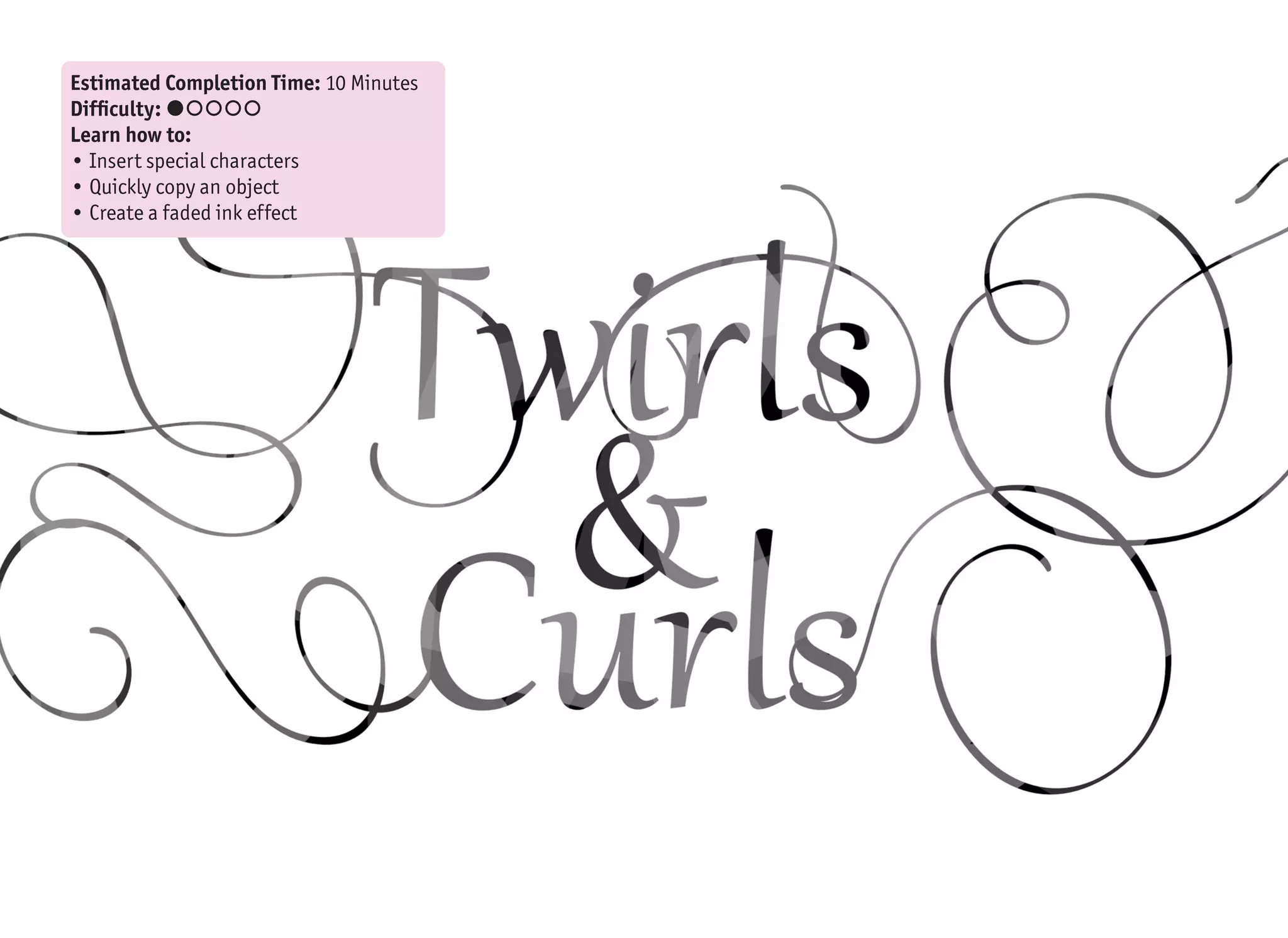
Estimated Completion Time: 10 Minutes
Difficulty: ๏‚˜๏‚š๏‚š๏‚š๏‚š
Learn how to:
โ€ข Insert special characters
โ€ข Quickly copy an object
โ€ข Create a faded ink effect
21Twirls & Curls text effect
1
2
Creating calligraphic lettering in the real-
world requires a pen, some ink, a steady
hand and about 10,000 hours of training
(Google the 10,000 hours rule). It is much
easier with the help of a computer, but it
would still take an entire book to describe,
and endless hours to practice. But we only
have a few minutes, and since we are assum-
ing that we have no art skills, the only way
to proceed is to reuse something already
created by someone else.
With every new version of Windows and Of-
fice, there are more and more (nice-look-
ing) fonts that are pre-installed. One of
them is called Gabriola (since Office 2010
/ Windows 7), which is exactly what we are
looking for.
Before we move on, letโ€™s briefly talk about
fonts. I will try not to go into details here.
The font file contains a graphical represen-
tation for each defined character. When you
press the (A) key on the keyboard, the sys-
tem looks into the currently selected font,
and if the โ€œAโ€ character exists, it is drawn.
On the other hand, if the character is not
in the font file, you will get the โ€œmissing
characterโ€ symbol instead (which is often a
rectangle , or crossed rectangle ).
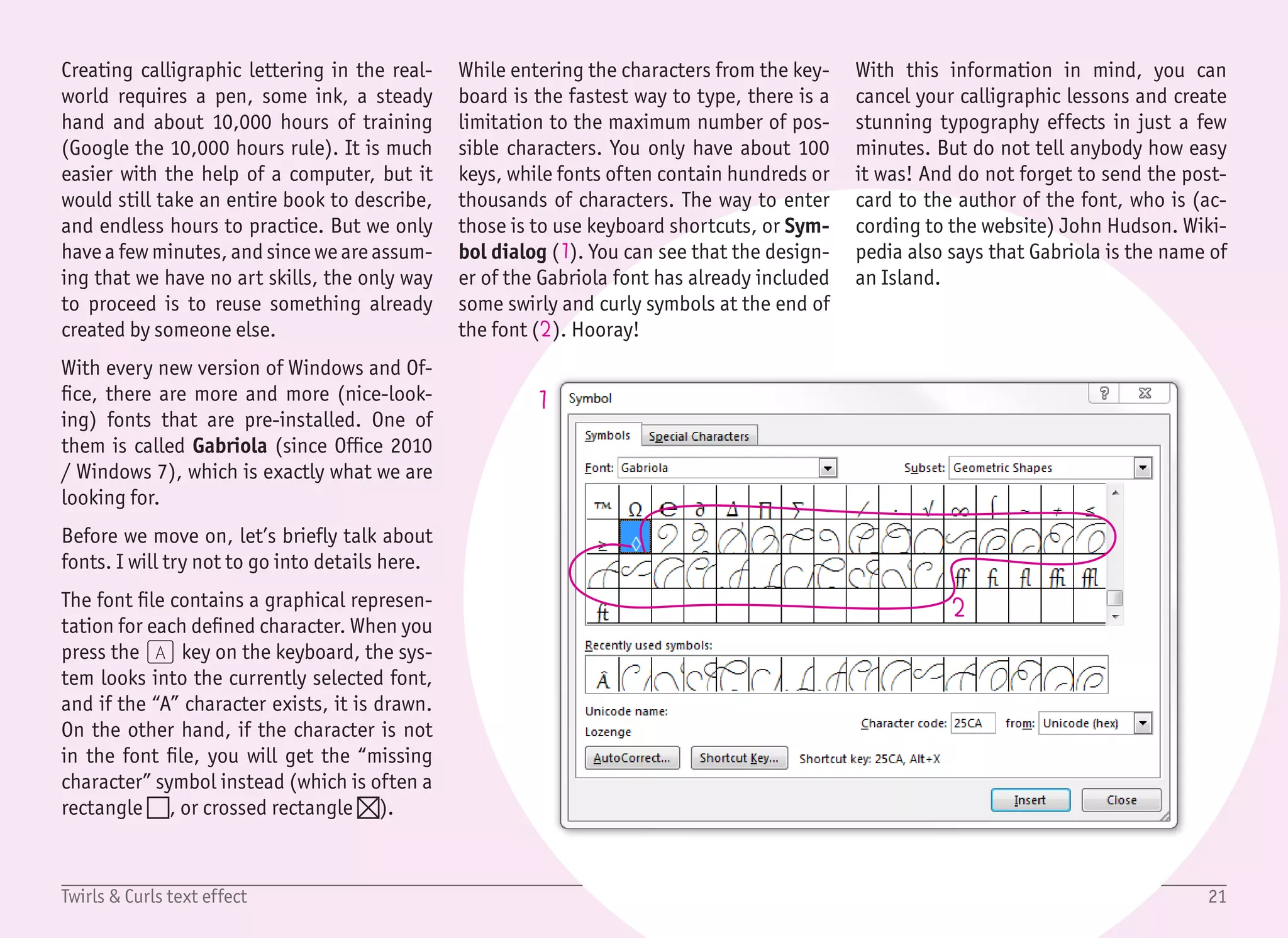
While entering the characters from the key-
board is the fastest way to type, there is a
limitation to the maximum number of pos-
sible characters. You only have about 100
keys, while fonts often contain hundreds or
thousands of characters. The way to enter
those is to use keyboard shortcuts, or Sym-
bol dialog (1). You can see that the design-
er of the Gabriola font has already included
some swirly and curly symbols at the end of
the font (2). Hooray!
With this information in mind, you can
cancel your calligraphic lessons and create
stunning typography effects in just a few
minutes. But do not tell anybody how easy
it was! And do not forget to send the post-
card to the author of the font, who is (ac-
cording to the website) John Hudson. Wiki-
pedia also says that Gabriola is the name of
an Island.
22Twirls & Curls text effect
1
2
3
1/2
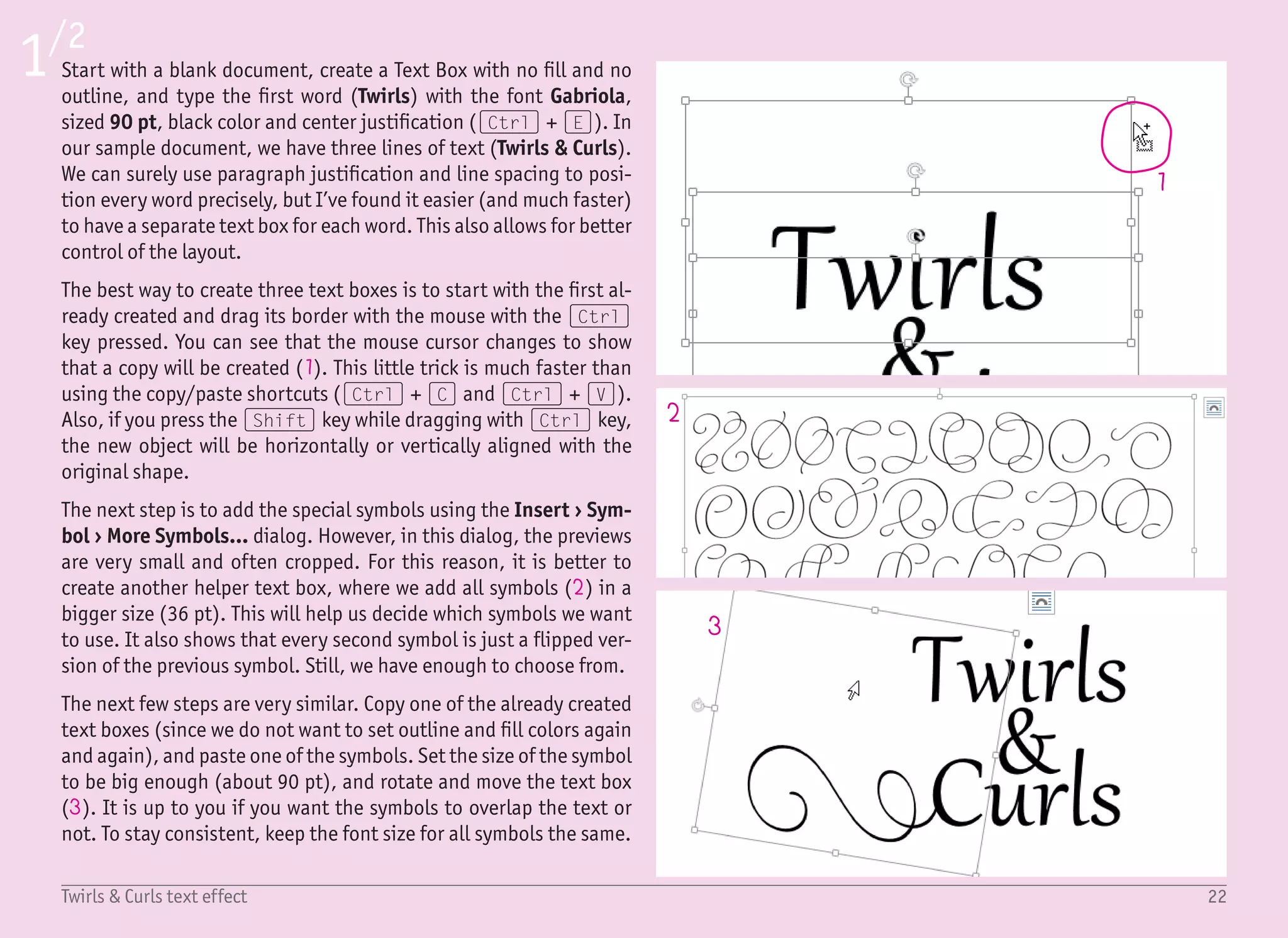
Start with a blank document, create a Text Box with no fill and no
outline, and type the first word (Twirls) with the font Gabriola,
sized 90 pt, black color and center justification ((Ctrl) + (E)). In
our sample document, we have three lines of text (Twirls & Curls).
We can surely use paragraph justification and line spacing to posi-
tion every word precisely, but Iโ€™ve found it easier (and much faster)
to have a separate text box for each word. This also allows for better
control of the layout.
The best way to create three text boxes is to start with the first al-
ready created and drag its border with the mouse with the (Ctrl)
key pressed. You can see that the mouse cursor changes to show
that a copy will be created (1). This little trick is much faster than
using the copy/paste shortcuts ((Ctrl) + (C) and (Ctrl) + (V)).
Also, if you press the (Shift) key while dragging with (Ctrl) key,
the new object will be horizontally or vertically aligned with the
original shape.
The next step is to add the special symbols using the Insert โ€บ Sym-
bol โ€บ More Symbols... dialog. However, in this dialog, the previews
are very small and often cropped. For this reason, it is better to
create another helper text box, where we add all symbols (2) in a
bigger size (36 pt). This will help us decide which symbols we want
to use. It also shows that every second symbol is just a flipped ver-
sion of the previous symbol. Still, we have enough to choose from.
The next few steps are very similar. Copy one of the already created
text boxes (since we do not want to set outline and fill colors again
and again), and paste one of the symbols. Set the size of the symbol
to be big enough (about 90 pt), and rotate and move the text box
(3). It is up to you if you want the symbols to overlap the text or
not. To stay consistent, keep the font size for all symbols the same.
23Twirls & Curls text effect
4
5
7
8
10 9
6
2/2
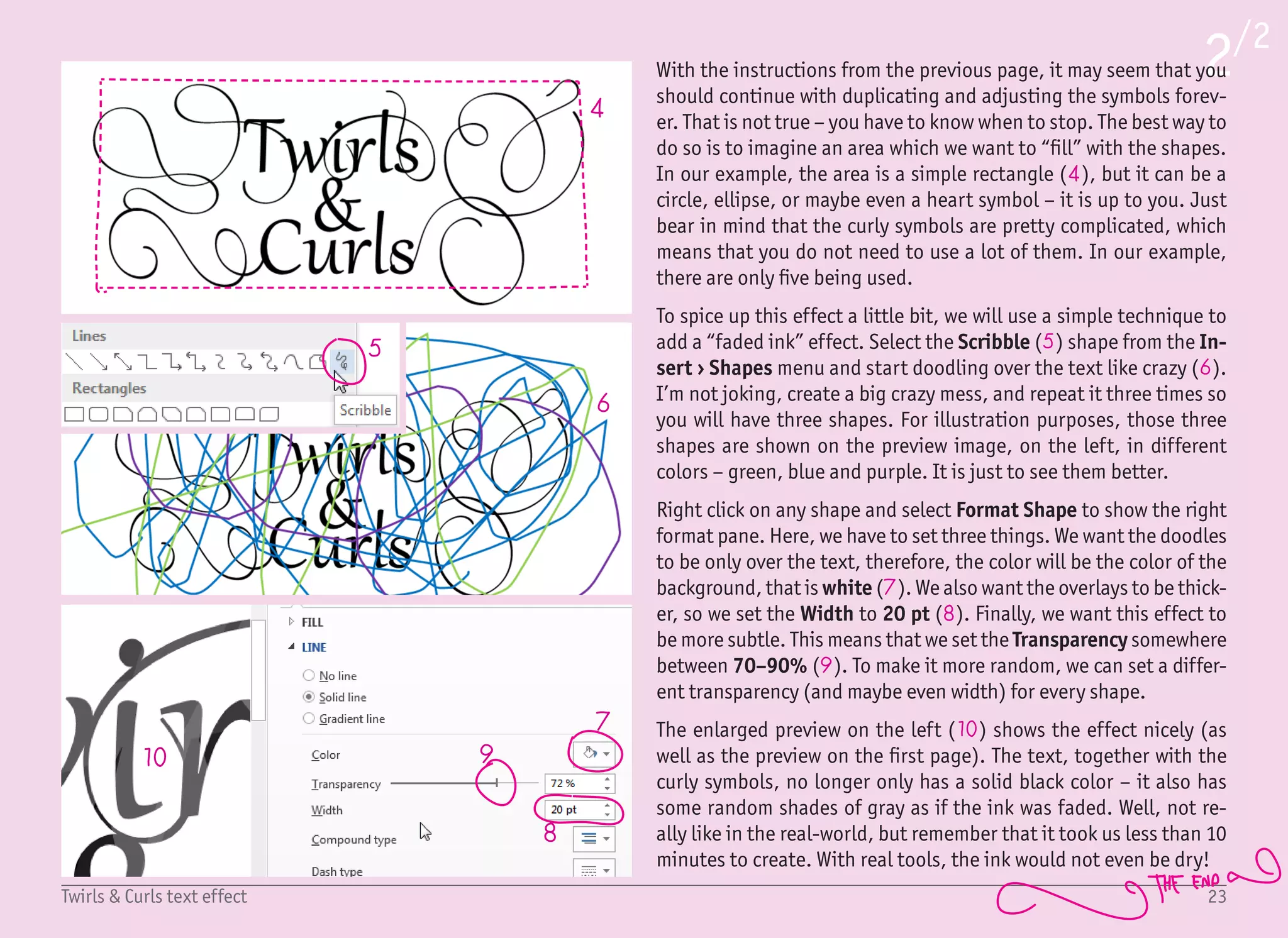
With the instructions from the previous page, it may seem that you
should continue with duplicating and adjusting the symbols forev-
er. That is not true โ€“ you have to know when to stop. The best way to
do so is to imagine an area which we want to โ€œfillโ€ with the shapes.
In our example, the area is a simple rectangle (4), but it can be a
circle, ellipse, or maybe even a heart symbol โ€“ it is up to you. Just
bear in mind that the curly symbols are pretty complicated, which
means that you do not need to use a lot of them. In our example,
there are only five being used.
To spice up this effect a little bit, we will use a simple technique to
add a โ€œfaded inkโ€ effect. Select the Scribble (5) shape from the In-
sert โ€บ Shapes menu and start doodling over the text like crazy (6).
Iโ€™m not joking, create a big crazy mess, and repeat it three times so
you will have three shapes. For illustration purposes, those three
shapes are shown on the preview image, on the left, in different
colors โ€“ green, blue and purple. It is just to see them better.
Right click on any shape and select Format Shape to show the right
format pane. Here, we have to set three things. We want the doodles
to be only over the text, therefore, the color will be the color of the
background, that is white (7). We also want the overlays to be thick-
er, so we set the Width to 20 pt (8). Finally, we want this effect to
be more subtle. This means that we set the Transparency somewhere
between 70โ€“90% (9). To make it more random, we can set a differ-
ent transparency (and maybe even width) for every shape.
The enlarged preview on the left (10) shows the effect nicely (as
well as the preview on the first page). The text, together with the
curly symbols, no longer only has a solid black color โ€“ it also has
some random shades of gray as if the ink was faded. Well, not re-
ally like in the real-world, but remember that it took us less than 10
minutes to create. With real tools, the ink would not even be dry!
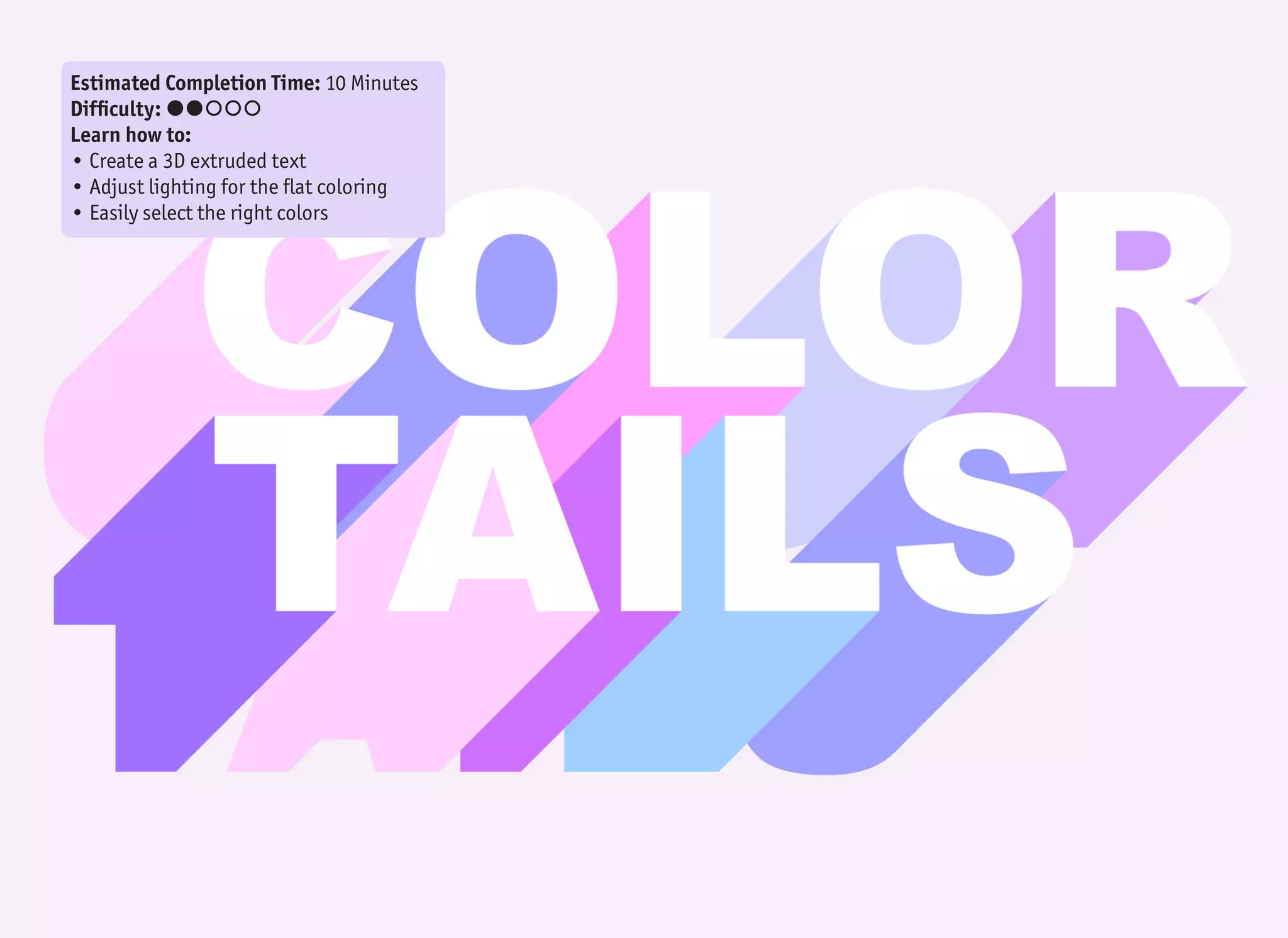
Estimated Completion Time: 10 Minutes
Difficulty: ๏‚˜๏‚˜๏‚š๏‚š๏‚š
Learn how to:
โ€ข Create a 3D extruded text
โ€ข Adjust lighting for the flat coloring
โ€ข Easily select the right colors
1
2
3
5
4
6
25Color Tails text effect
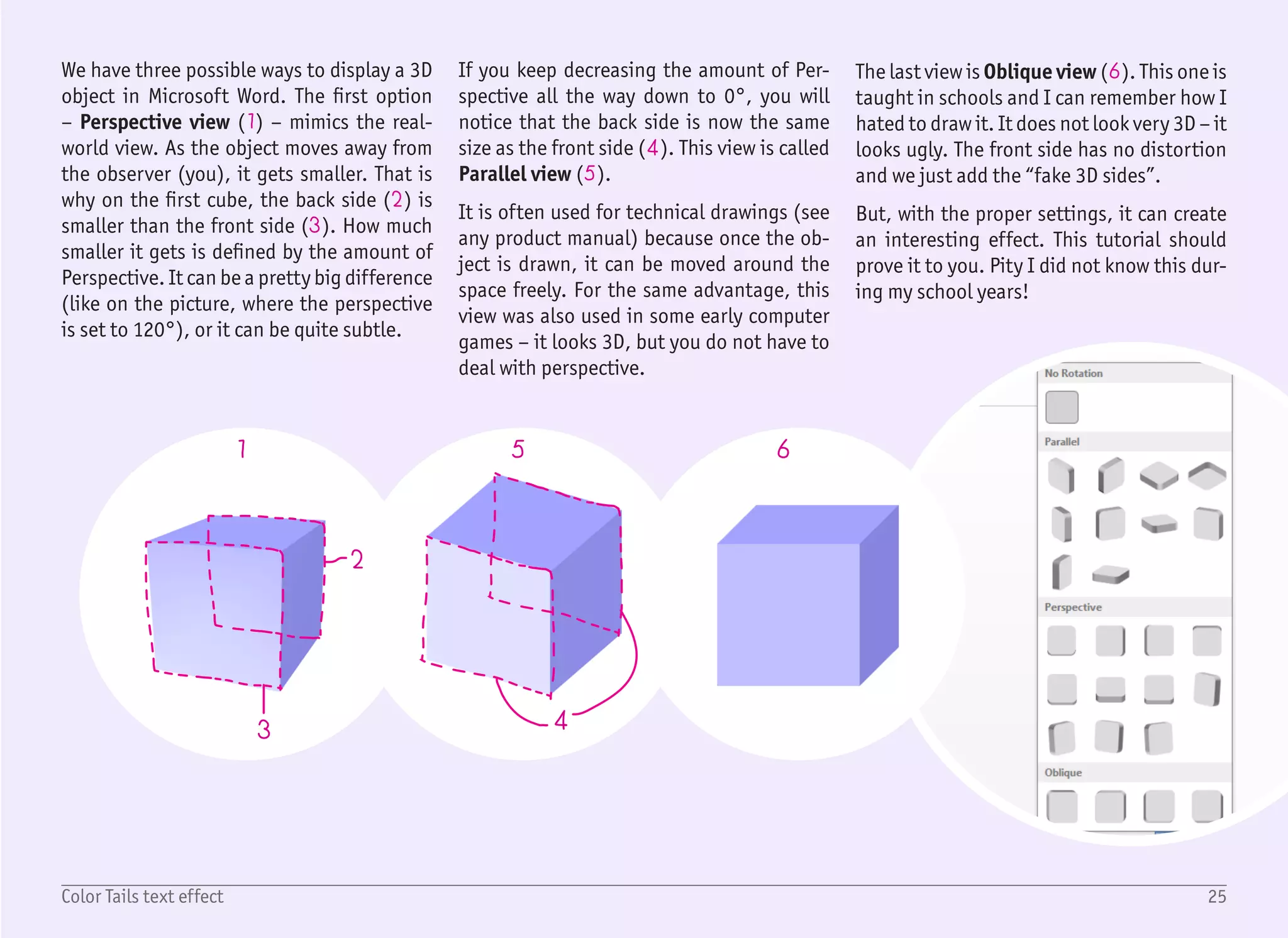
We have three possible ways to display a 3D
object in Microsoft Word. The first option
โ€“ Perspective view (1) โ€“ mimics the real-
world view. As the object moves away from
the observer (you), it gets smaller. That is
why on the first cube, the back side (2) is
smaller than the front side (3). How much
smaller it gets is defined by the amount of
Perspective. It can be a pretty big difference
(like on the picture, where the perspective
is set to 120ยฐ), or it can be quite subtle.
If you keep decreasing the amount of Per-
spective all the way down to 0ยฐ, you will
notice that the back side is now the same
size as the front side (4). This view is called
Parallel view (5).
It is often used for technical drawings (see
any product manual) because once the ob-
ject is drawn, it can be moved around the
space freely. For the same advantage, this
view was also used in some early computer
games โ€“ it looks 3D, but you do not have to
deal with perspective.
The last view is Oblique view (6). This one is
taught in schools and I can remember how I
hated to draw it. It does not look very 3D โ€“ it
looks ugly. The front side has no distortion
and we just add the โ€œfake 3D sidesโ€.
But, with the proper settings, it can create
an interesting effect. This tutorial should
prove it to you. Pity I did not know this dur-
ing my school years!
26Color Tails text effect
1/2
2
1
3
4
5
6
7
8
9
10
11
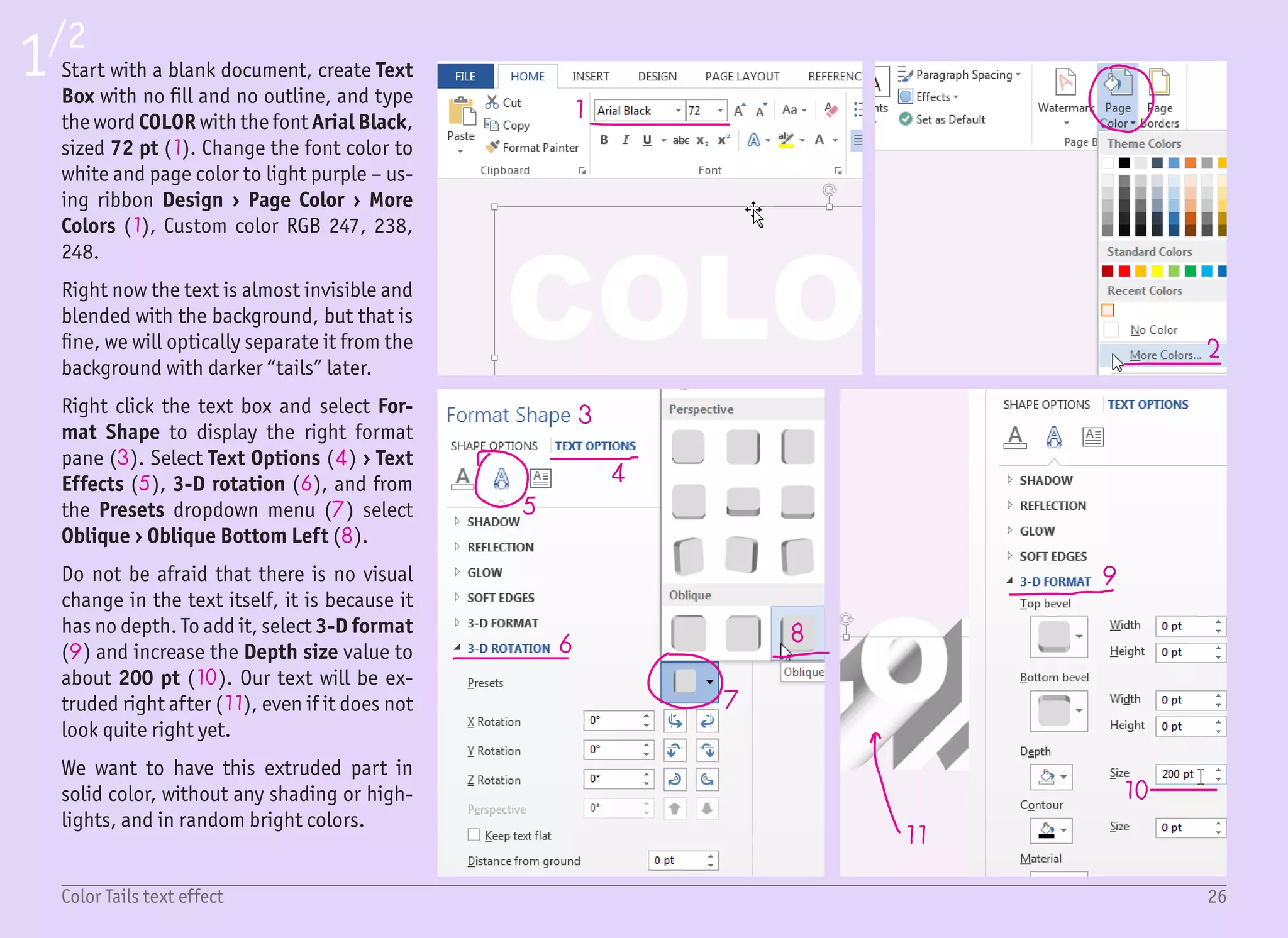
Start with a blank document, create Text
Box with no fill and no outline, and type
the word COLOR with the font Arial Black,
sized 72 pt (1). Change the font color to
white and page color to light purple โ€“ us-
ing ribbon Design โ€บ Page Color โ€บ More
Colors (1), Custom color RGB 247, 238,
248.
Right now the text is almost invisible and
blended with the background, but that is
fine, we will optically separate it from the
background with darker โ€œtailsโ€ later.
Right click the text box and select For-
mat Shape to display the right format
pane (3). Select Text Options (4) โ€บ Text
Effects (5), 3-D rotation (6), and from
the Presets dropdown menu (7) select
Oblique โ€บ Oblique Bottom Left (8).
Do not be afraid that there is no visual
change in the text itself, it is because it
has no depth. To add it, select 3-D format
(9) and increase the Depth size value to
about 200 pt (10). Our text will be ex-
truded right after (11), even if it does not
look quite right yet.
We want to have this extruded part in
solid color, without any shading or high-
lights, and in random bright colors.
27Color Tails text effect
2/2
12
14
15
16
13
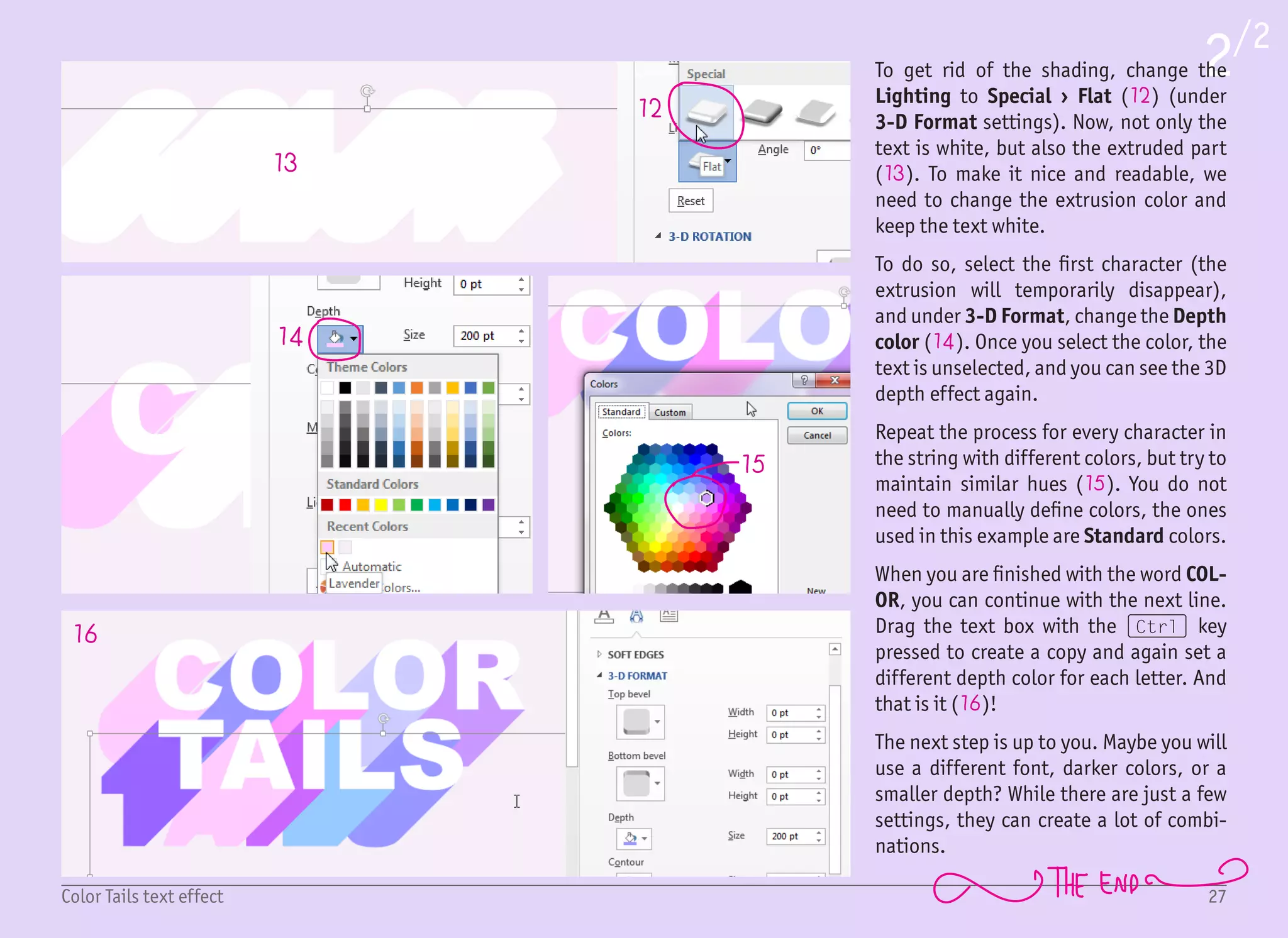
To get rid of the shading, change the
Lighting to Special โ€บ Flat (12) (under
3-D Format settings). Now, not only the
text is white, but also the extruded part
(13). To make it nice and readable, we
need to change the extrusion color and
keep the text white.
To do so, select the first character (the
extrusion will temporarily disappear),
and under 3-D Format, change the Depth
color (14). Once you select the color, the
text is unselected, and you can see the 3D
depth effect again.
Repeat the process for every character in
the string with different colors, but try to
maintain similar hues (15). You do not
need to manually define colors, the ones
used in this example are Standard colors.
When you are finished with the word COL-
OR, you can continue with the next line.
Drag the text box with the (Ctrl) key
pressed to create a copy and again set a
different depth color for each letter. And
that is it (16)!
The next step is up to you. Maybe you will
use a different font, darker colors, or a
smaller depth? While there are just a few
settings, they can create a lot of combi-
nations.
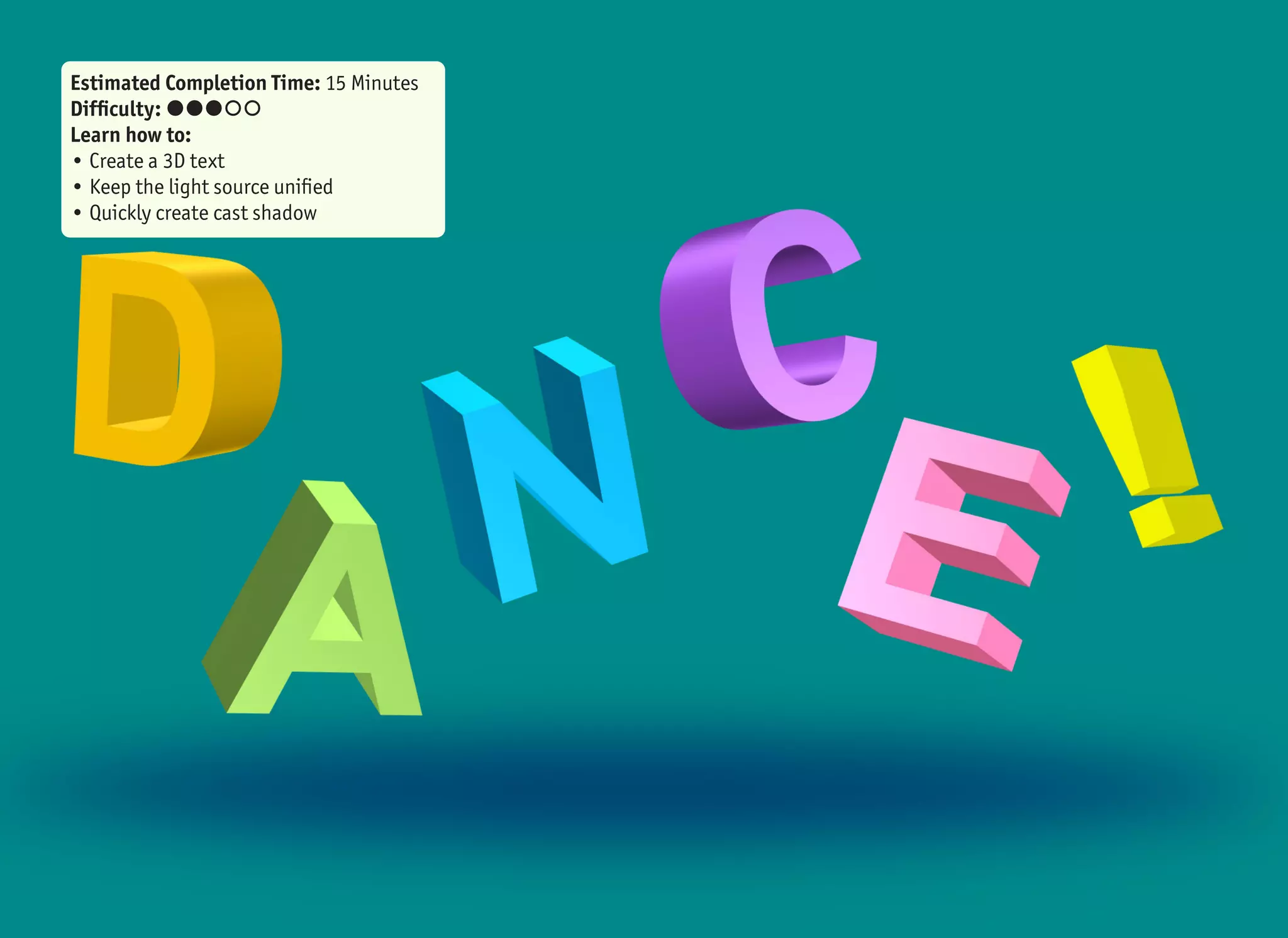
Estimated Completion Time: 15 Minutes
Difficulty: ๏‚˜๏‚˜๏‚˜๏‚š๏‚š
Learn how to:
โ€ข Create a 3D text
โ€ข Keep the light source unified
โ€ข Quickly create cast shadow
1 2 3 4
5
5
1
9
6
6
2
10
7
7
3
8
8
4
9 10
29Dance! text effect
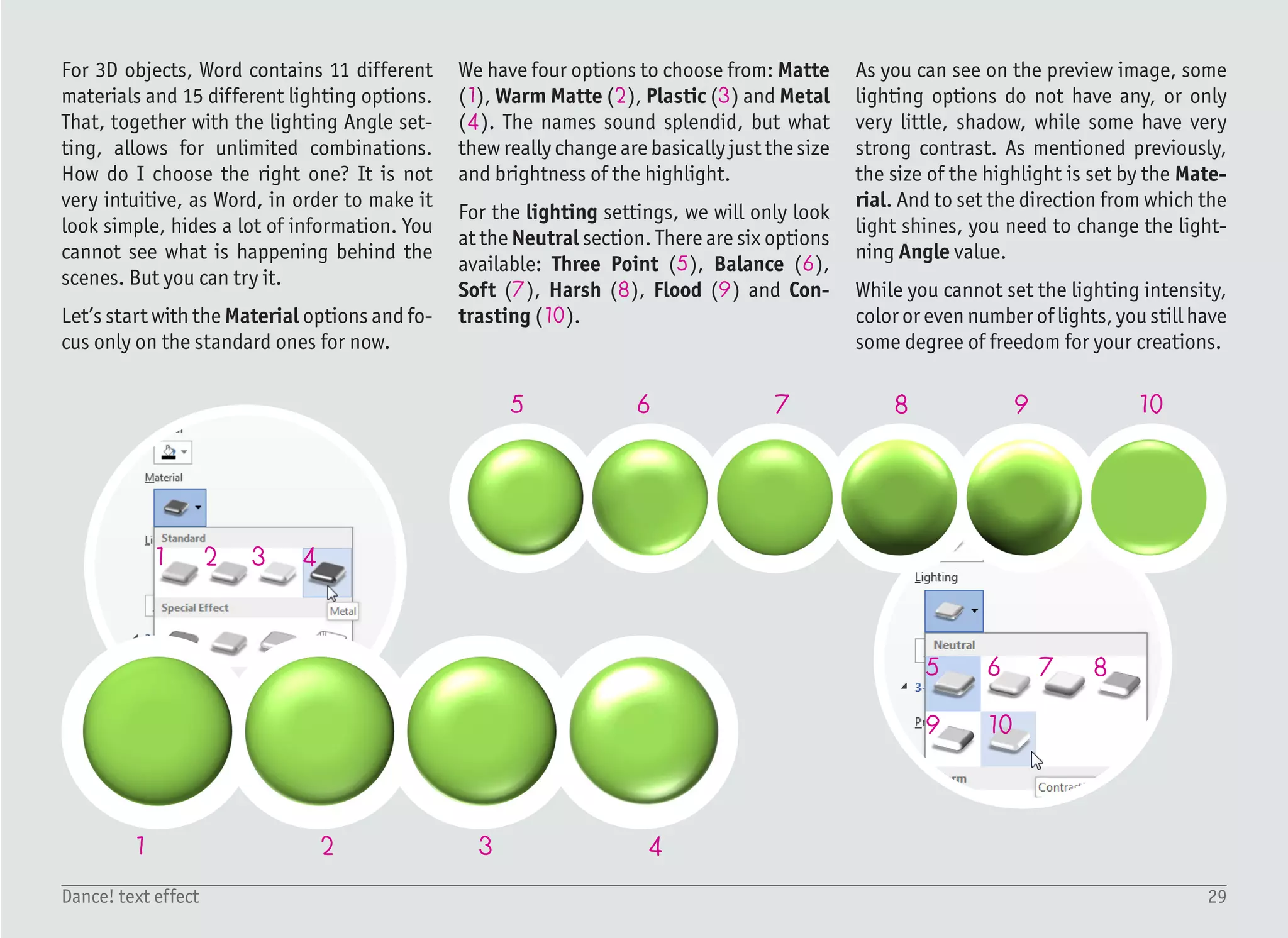
For 3D objects, Word contains 11 different
materials and 15 different lighting options.
That, together with the lighting Angle set-
ting, allows for unlimited combinations.
How do I choose the right one? It is not
very intuitive, as Word, in order to make it
look simple, hides a lot of information. You
cannot see what is happening behind the
scenes. But you can try it.
Letโ€™s start with the Material options and fo-
cus only on the standard ones for now.
We have four options to choose from: Matte
(1), Warm Matte (2), Plastic (3) and Metal
(4). The names sound splendid, but what
thew really change are basically just the size
and brightness of the highlight.
For the lighting settings, we will only look
at the Neutral section. There are six options
available: Three Point (5), Balance (6),
Soft (7), Harsh (8), Flood (9) and Con-
trasting (10).
As you can see on the preview image, some
lighting options do not have any, or only
very little, shadow, while some have very
strong contrast. As mentioned previously,
the size of the highlight is set by the Mate-
rial. And to set the direction from which the
light shines, you need to change the light-
ning Angle value.
While you cannot set the lighting intensity,
color or even number of lights, you still have
some degree of freedom for your creations.
30Dance! text effect
1/4
1
3
2
45
68
9
10
7
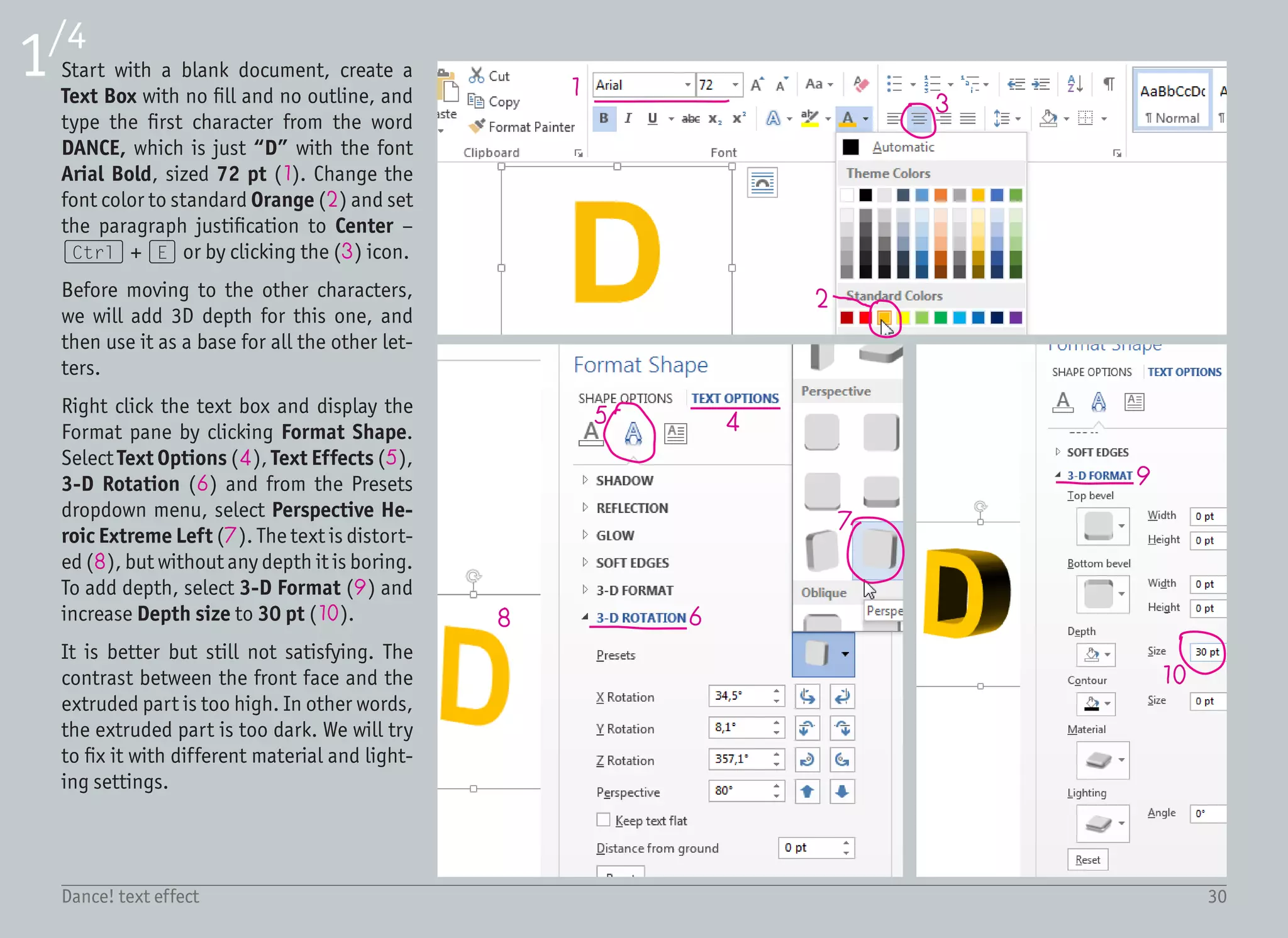
Start with a blank document, create a
Text Box with no fill and no outline, and
type the first character from the word
DANCE, which is just โ€œDโ€ with the font
Arial Bold, sized 72 pt (1). Change the
font color to standard Orange (2) and set
the paragraph justification to Center โ€“
(Ctrl) + (E) or by clicking the (3) icon.
Before moving to the other characters,
we will add 3D depth for this one, and
then use it as a base for all the other let-
ters.
Right click the text box and display the
Format pane by clicking Format Shape.
Select Text Options (4), Text Effects (5),
3-D Rotation (6) and from the Presets
dropdown menu, select Perspective He-
roic Extreme Left (7). The text is distort-
ed (8), but without any depth it is boring.
To add depth, select 3-D Format (9) and
increase Depth size to 30 pt (10).
It is better but still not satisfying. The
contrast between the front face and the
extruded part is too high. In other words,
the extruded part is too dark. We will try
to fix it with different material and light-
ing settings.
31Dance! text effect
2/4
11 12
13
1415
16
17 18 19
21
20
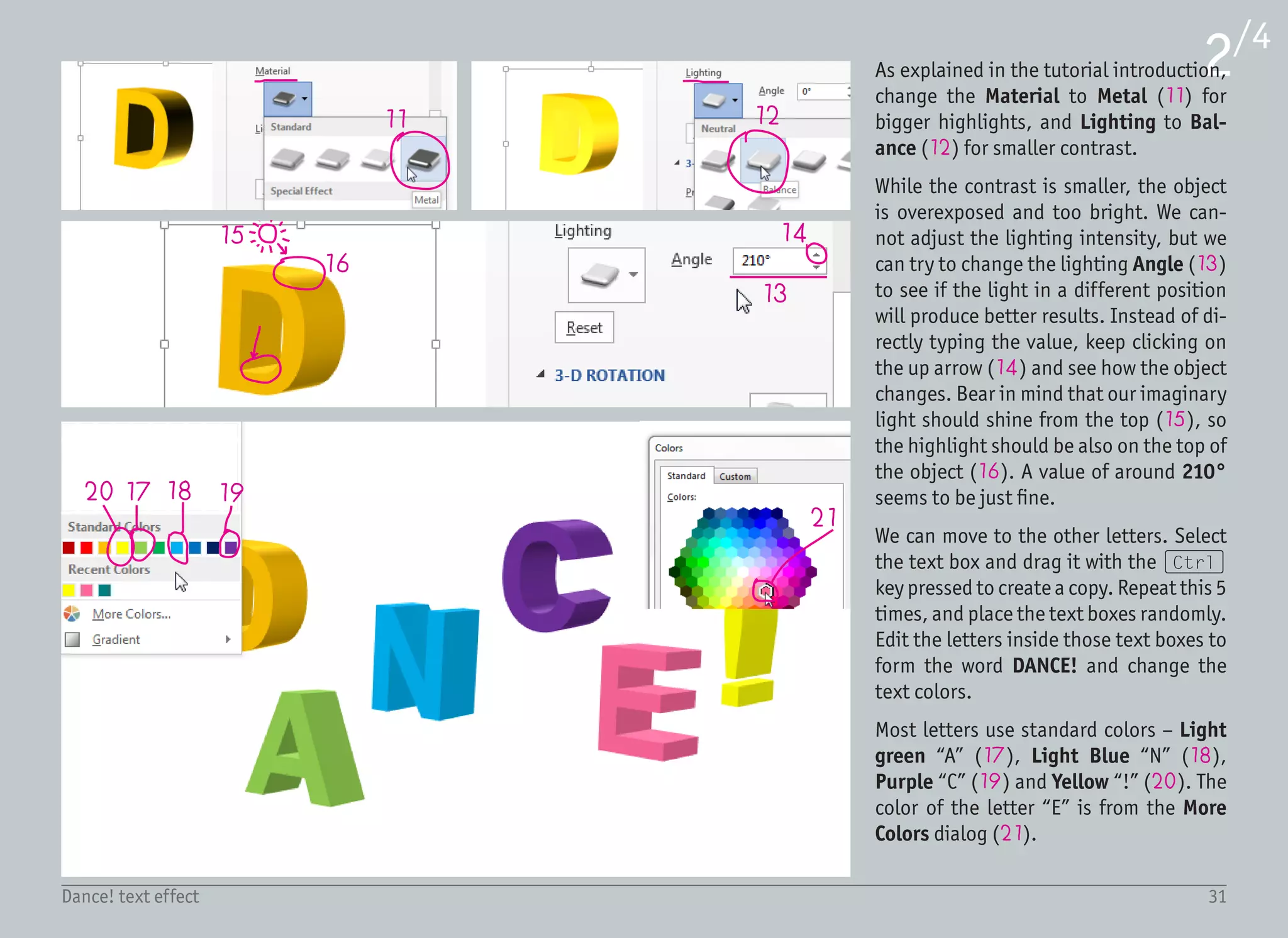
As explained in the tutorial introduction,
change the Material to Metal (11) for
bigger highlights, and Lighting to Bal-
ance (12) for smaller contrast.
While the contrast is smaller, the object
is overexposed and too bright. We can-
not adjust the lighting intensity, but we
can try to change the lighting Angle (13)
to see if the light in a different position
will produce better results. Instead of di-
rectly typing the value, keep clicking on
the up arrow (14) and see how the object
changes. Bear in mind that our imaginary
light should shine from the top (15), so
the highlight should be also on the top of
the object (16). A value of around 210ยฐ
seems to be just fine.
We can move to the other letters. Select
the text box and drag it with the (Ctrl)
key pressed to create a copy. Repeat this 5
times, and place the text boxes randomly.
Edit the letters inside those text boxes to
form the word DANCE! and change the
text colors.
Most letters use standard colors โ€“ Light
green โ€œAโ€ (17), Light Blue โ€œNโ€ (18),
Purple โ€œCโ€ (19) and Yellow โ€œ!โ€ (20). The
color of the letter โ€œEโ€ is from the More
Colors dialog (21).
32Dance! text effect
3/4
22
23
25
26
24
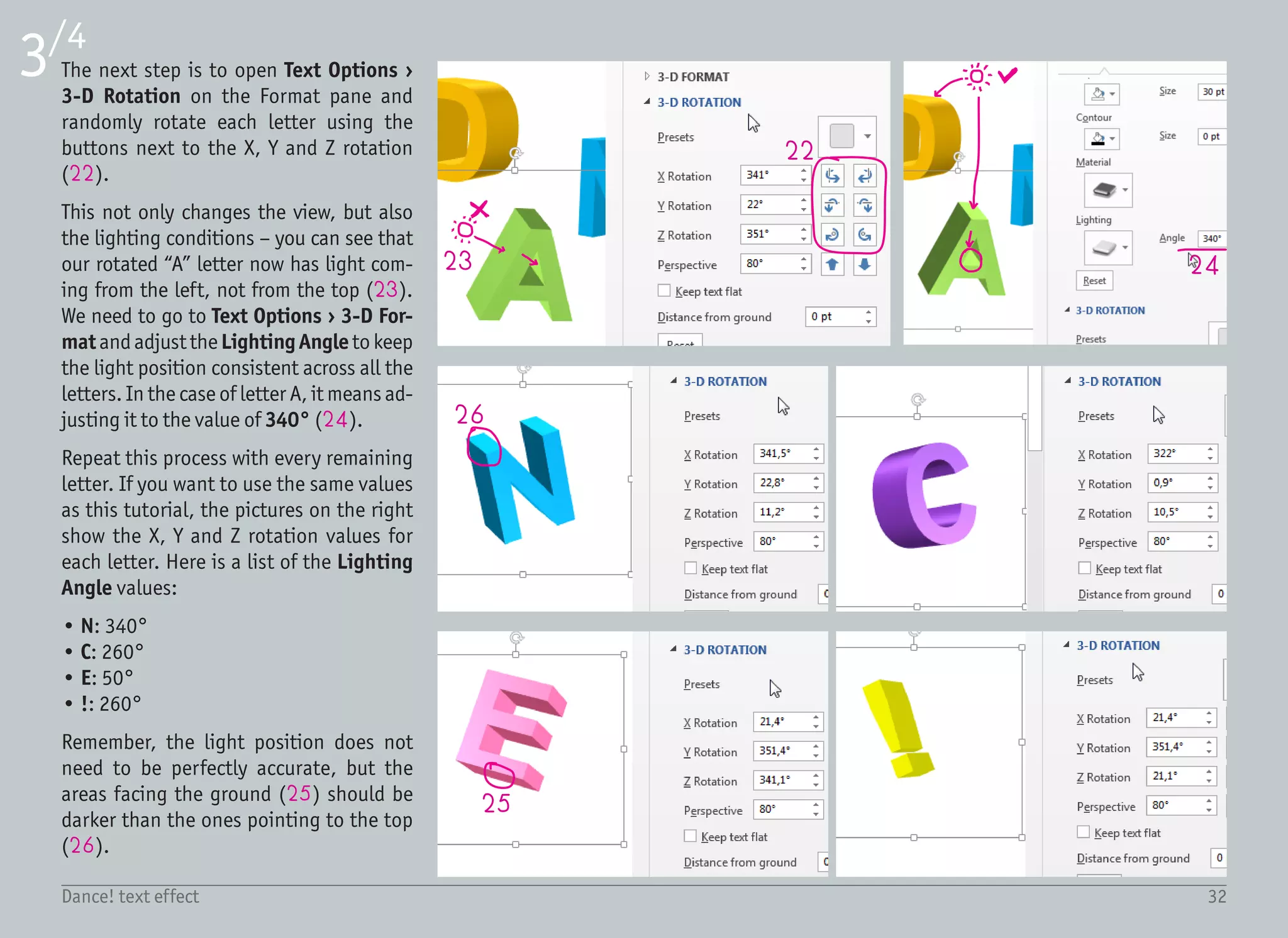
The next step is to open Text Options โ€บ
3-D Rotation on the Format pane and
randomly rotate each letter using the
buttons next to the X, Y and Z rotation
(22).
This not only changes the view, but also
the lighting conditions โ€“ you can see that
our rotated โ€œAโ€ letter now has light com-
ing from the left, not from the top (23).
We need to go to Text Options โ€บ 3-D For-
matandadjust theLightingAngletokeep
the light position consistent across all the
letters. In the case of letter A, it means ad-
justing it to the value of 340ยฐ (24).
Repeat this process with every remaining
letter. If you want to use the same values
as this tutorial, the pictures on the right
show the X, Y and Z rotation values for
each letter. Here is a list of the Lighting
Angle values:
โ€ข N: 340ยฐ
โ€ข C: 260ยฐ
โ€ข E: 50ยฐ
โ€ข !: 260ยฐ
Remember, the light position does not
need to be perfectly accurate, but the
areas facing the ground (25) should be
darker than the ones pointing to the top
(26).
33Dance! text effect
4/4
26
27
28
29
30
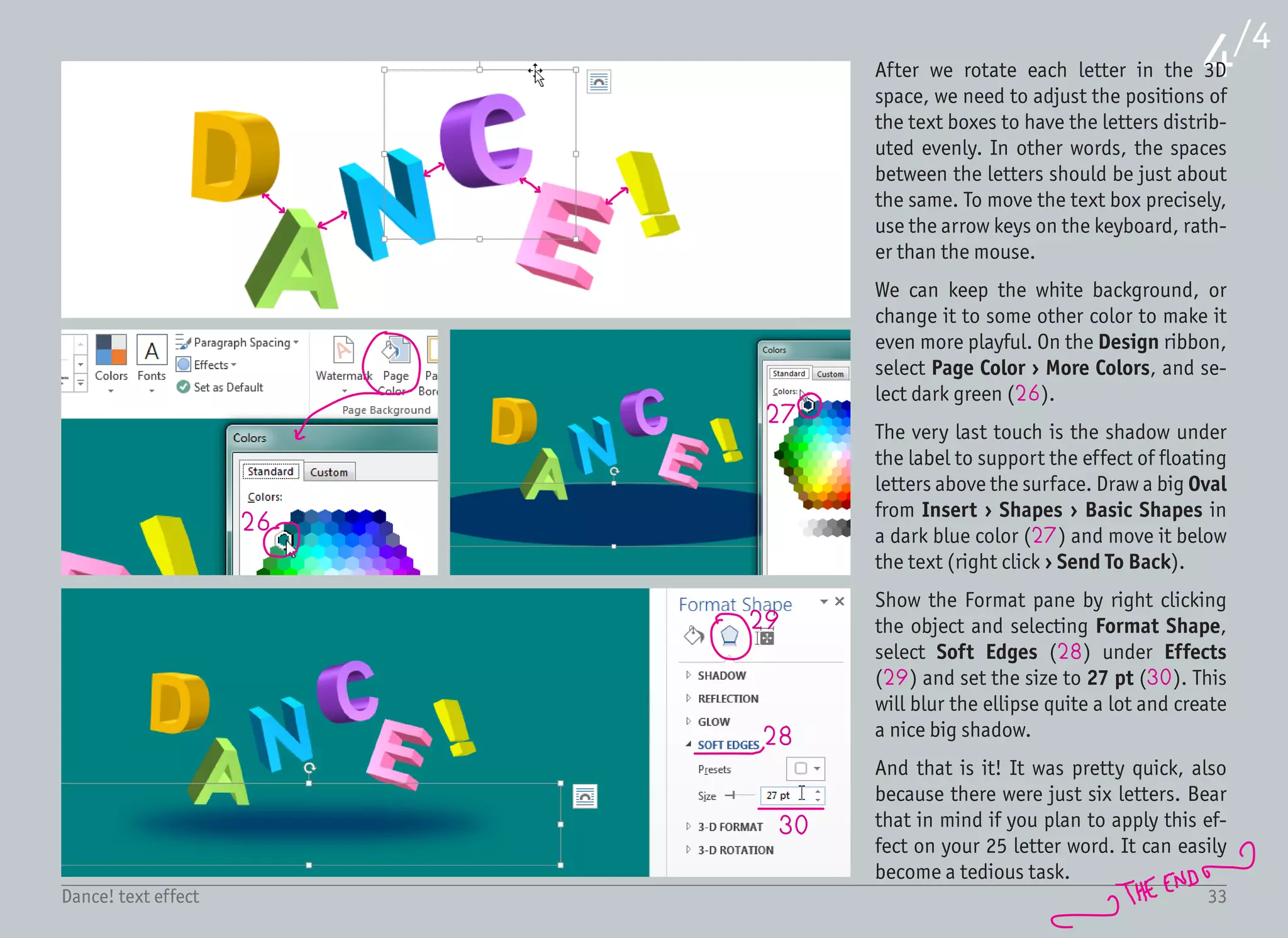
After we rotate each letter in the 3D
space, we need to adjust the positions of
the text boxes to have the letters distrib-
uted evenly. In other words, the spaces
between the letters should be just about
the same. To move the text box precisely,
use the arrow keys on the keyboard, rath-
er than the mouse.
We can keep the white background, or
change it to some other color to make it
even more playful. On the Design ribbon,
select Page Color โ€บ More Colors, and se-
lect dark green (26).
The very last touch is the shadow under
the label to support the effect of floating
letters above the surface. Draw a big Oval
from Insert โ€บ Shapes โ€บ Basic Shapes in
a dark blue color (27) and move it below
the text (right click โ€บ Send To Back).
Show the Format pane by right clicking
the object and selecting Format Shape,
select Soft Edges (28) under Effects
(29) and set the size to 27 pt (30). This
will blur the ellipse quite a lot and create
a nice big shadow.
And that is it! It was pretty quick, also
because there were just six letters. Bear
that in mind if you plan to apply this ef-
fect on your 25 letter word. It can easily
become a tedious task.
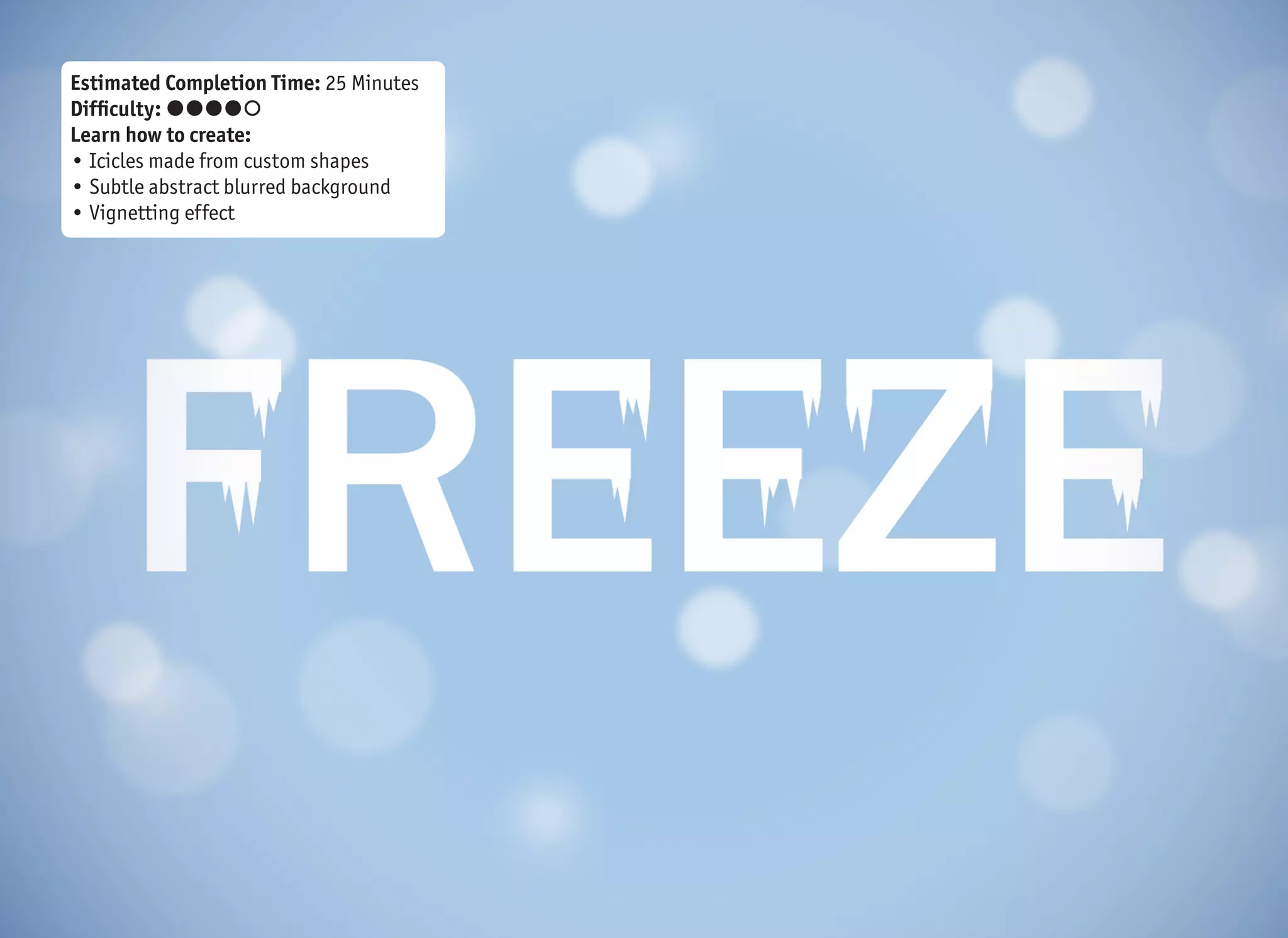
Estimated Completion Time: 25 Minutes
Difficulty: ๏‚˜๏‚˜๏‚˜๏‚˜๏‚š
Learn how to create:
โ€ข Icicles made from custom shapes
โ€ข Subtle abstract blurred background
โ€ข Vignetting effect
FREEZE
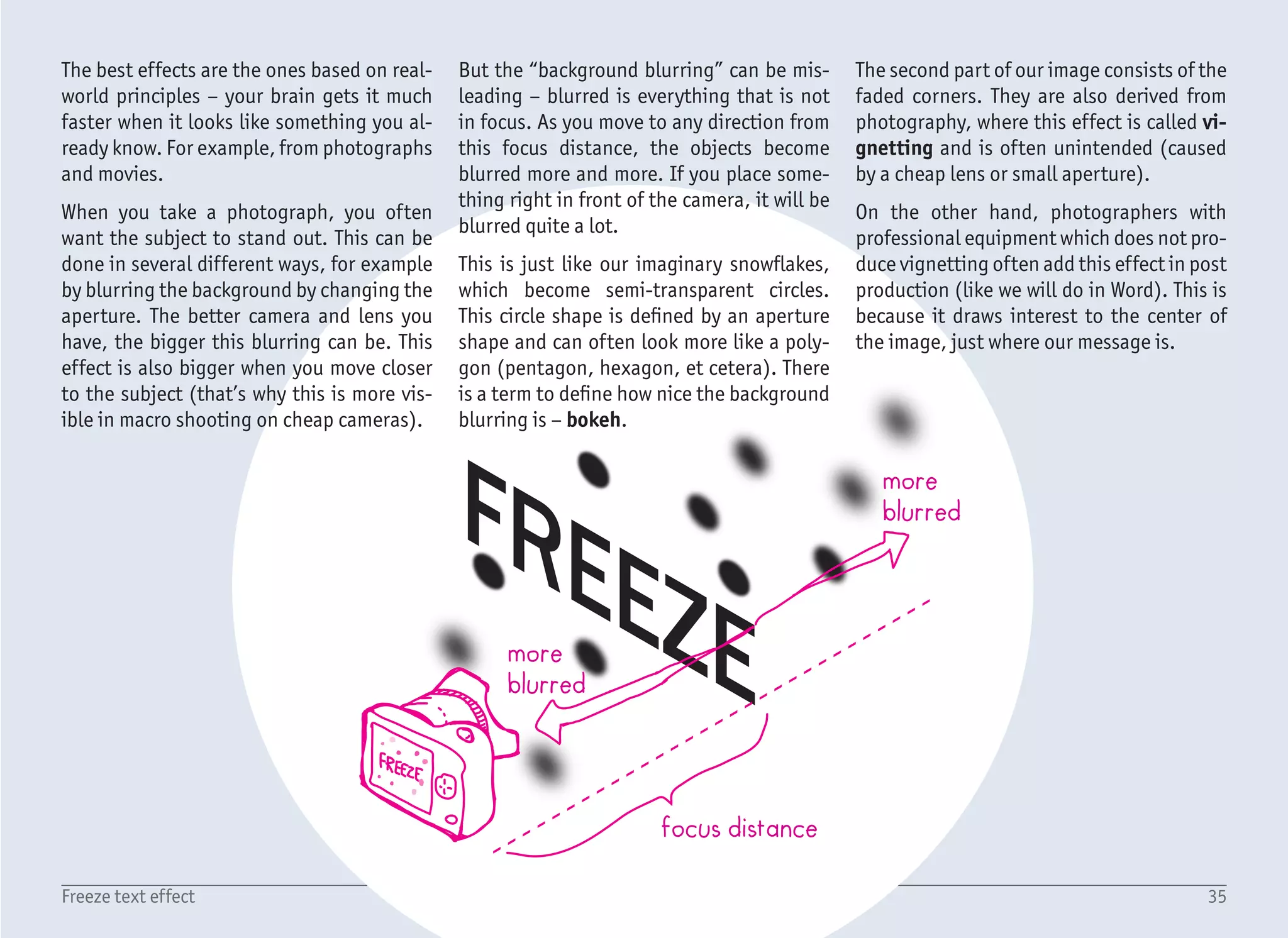
focus distance
more
blurred
more
blurred
35Freeze text effect
The best effects are the ones based on real-
world principles โ€“ your brain gets it much
faster when it looks like something you al-
ready know. For example, from photographs
and movies.
When you take a photograph, you often
want the subject to stand out. This can be
done in several different ways, for example
by blurring the background by changing the
aperture. The better camera and lens you
have, the bigger this blurring can be. This
effect is also bigger when you move closer
to the subject (thatโ€™s why this is more vis-
ible in macro shooting on cheap cameras).
But the โ€œbackground blurringโ€ can be mis-
leading โ€“ blurred is everything that is not
in focus. As you move to any direction from
this focus distance, the objects become
blurred more and more. If you place some-
thing right in front of the camera, it will be
blurred quite a lot.
This is just like our imaginary snowflakes,
which become semi-transparent circles.
This circle shape is defined by an aperture
shape and can often look more like a poly-
gon (pentagon, hexagon, et cetera). There
is a term to define how nice the background
blurring is โ€“ bokeh.
The second part of our image consists of the
faded corners. They are also derived from
photography, where this effect is called vi-
gnetting and is often unintended (caused
by a cheap lens or small aperture).
On the other hand, photographers with
professional equipment which does not pro-
duce vignetting often add this effect in post
production (like we will do in Word). This is
because it draws interest to the center of
the image, just where our message is.
36Freeze text effect
1/4
1
4
5
6
2
3
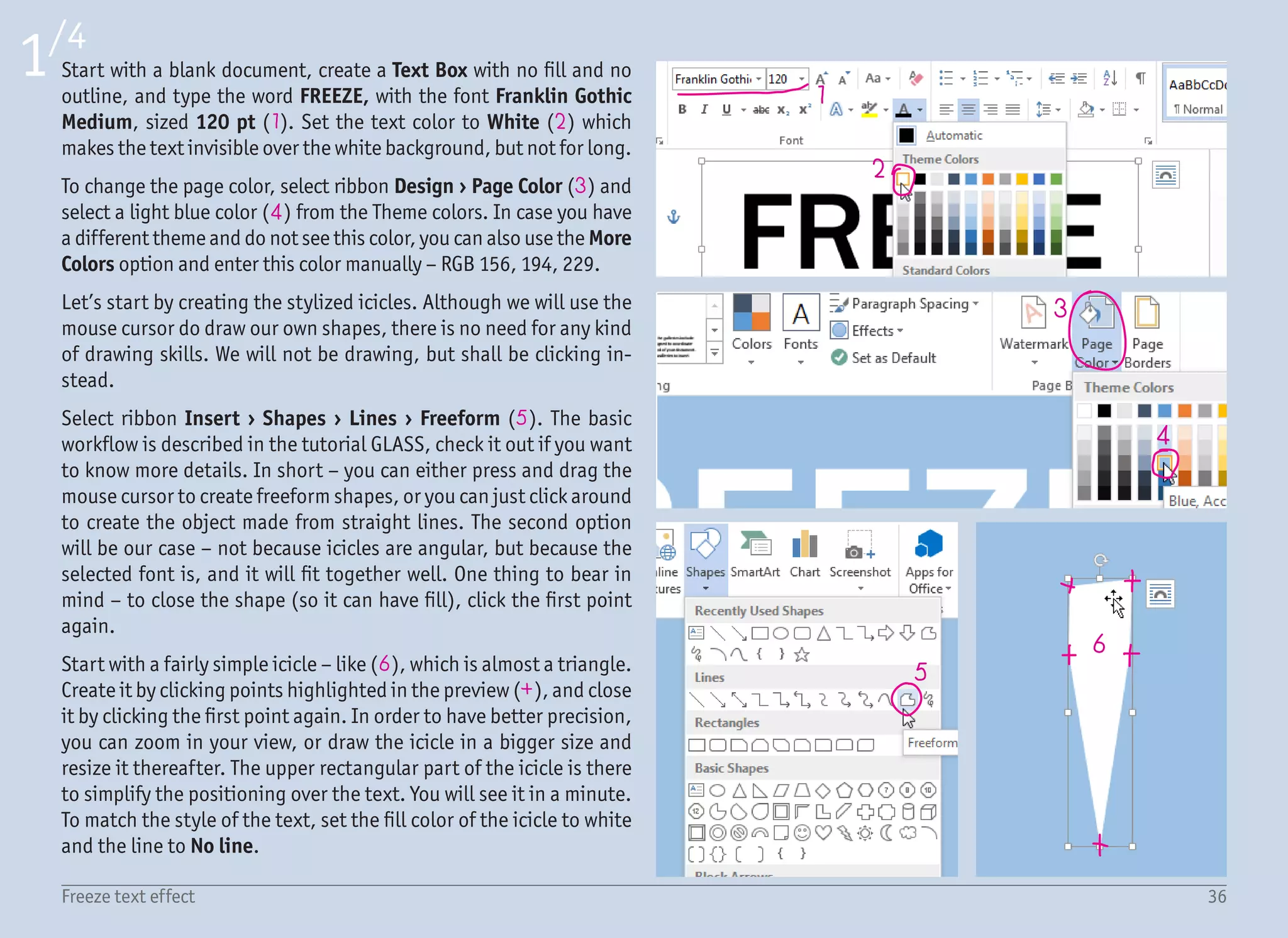
Start with a blank document, create a Text Box with no fill and no
outline, and type the word FREEZE, with the font Franklin Gothic
Medium, sized 120 pt (1). Set the text color to White (2) which
makes the text invisible over the white background, but not for long.
To change the page color, select ribbon Design โ€บ Page Color (3) and
select a light blue color (4) from the Theme colors. In case you have
a different theme and do not see this color, you can also use the More
Colors option and enter this color manually โ€“ RGB 156, 194, 229.
Letโ€™s start by creating the stylized icicles. Although we will use the
mouse cursor do draw our own shapes, there is no need for any kind
of drawing skills. We will not be drawing, but shall be clicking in-
stead.
Select ribbon Insert โ€บ Shapes โ€บ Lines โ€บ Freeform (5). The basic
workflow is described in the tutorial GLASS, check it out if you want
to know more details. In short โ€“ you can either press and drag the
mouse cursor to create freeform shapes, or you can just click around
to create the object made from straight lines. The second option
will be our case โ€“ not because icicles are angular, but because the
selected font is, and it will fit together well. One thing to bear in
mind โ€“ to close the shape (so it can have fill), click the first point
again.
Start with a fairly simple icicle โ€“ like (6), which is almost a triangle.
Create it by clicking points highlighted in the preview (+), and close
it by clicking the first point again. In order to have better precision,
you can zoom in your view, or draw the icicle in a bigger size and
resize it thereafter. The upper rectangular part of the icicle is there
to simplify the positioning over the text. You will see it in a minute.
To match the style of the text, set the fill color of the icicle to white
and the line to No line.
37Freeze text effect
2/4
7 8
9
10
11
12
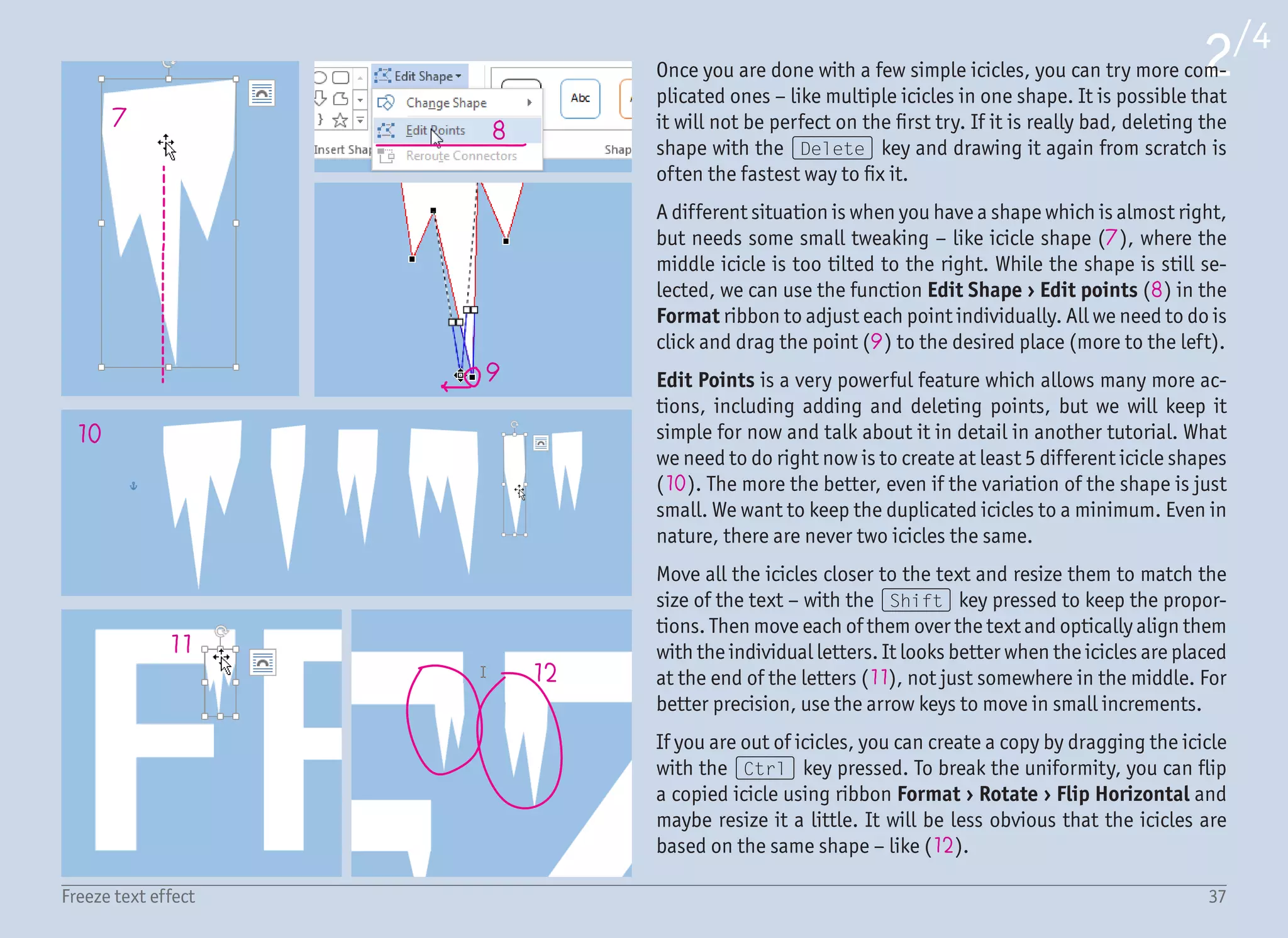
Once you are done with a few simple icicles, you can try more com-
plicated ones โ€“ like multiple icicles in one shape. It is possible that
it will not be perfect on the first try. If it is really bad, deleting the
shape with the (Delete) key and drawing it again from scratch is
often the fastest way to fix it.
A different situation is when you have a shape which is almost right,
but needs some small tweaking โ€“ like icicle shape (7), where the
middle icicle is too tilted to the right. While the shape is still se-
lected, we can use the function Edit Shape โ€บ Edit points (8) in the
Format ribbon to adjust each point individually. All we need to do is
click and drag the point (9) to the desired place (more to the left).
Edit Points is a very powerful feature which allows many more ac-
tions, including adding and deleting points, but we will keep it
simple for now and talk about it in detail in another tutorial. What
we need to do right now is to create at least 5 different icicle shapes
(10). The more the better, even if the variation of the shape is just
small. We want to keep the duplicated icicles to a minimum. Even in
nature, there are never two icicles the same.
Move all the icicles closer to the text and resize them to match the
size of the text โ€“ with the (Shift) key pressed to keep the propor-
tions. Then move each of them over the text and optically align them
with the individual letters. It looks better when the icicles are placed
at the end of the letters (11), not just somewhere in the middle. For
better precision, use the arrow keys to move in small increments.
If you are out of icicles, you can create a copy by dragging the icicle
with the (Ctrl) key pressed. To break the uniformity, you can flip
a copied icicle using ribbon Format โ€บ Rotate โ€บ Flip Horizontal and
maybe resize it a little. It will be less obvious that the icicles are
based on the same shape โ€“ like (12).
38Freeze text effect
3/4
13
14
15
16
17
18
19
20
22
21
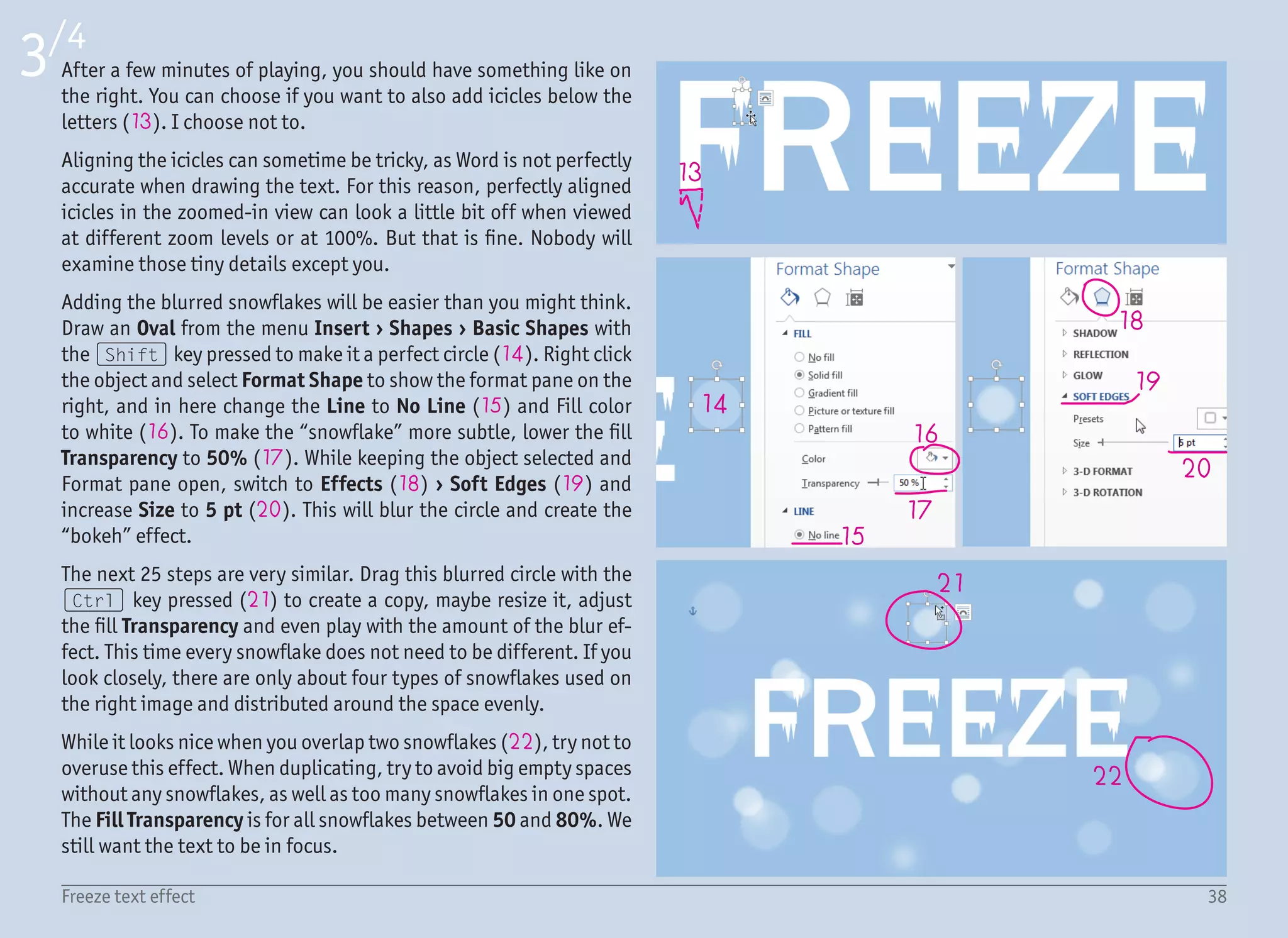
After a few minutes of playing, you should have something like on
the right. You can choose if you want to also add icicles below the
letters (13). I choose not to.
Aligning the icicles can sometime be tricky, as Word is not perfectly
accurate when drawing the text. For this reason, perfectly aligned
icicles in the zoomed-in view can look a little bit off when viewed
at different zoom levels or at 100%. But that is fine. Nobody will
examine those tiny details except you.
Adding the blurred snowflakes will be easier than you might think.
Draw an Oval from the menu Insert โ€บ Shapes โ€บ Basic Shapes with
the (Shift) key pressed to make it a perfect circle (14). Right click
the object and select Format Shape to show the format pane on the
right, and in here change the Line to No Line (15) and Fill color
to white (16). To make the โ€œsnowflakeโ€ more subtle, lower the fill
Transparency to 50% (17). While keeping the object selected and
Format pane open, switch to Effects (18) โ€บ Soft Edges (19) and
increase Size to 5 pt (20). This will blur the circle and create the
โ€œbokehโ€ effect.
The next 25 steps are very similar. Drag this blurred circle with the
(Ctrl) key pressed (21) to create a copy, maybe resize it, adjust
the fill Transparency and even play with the amount of the blur ef-
fect. This time every snowflake does not need to be different. If you
look closely, there are only about four types of snowflakes used on
the right image and distributed around the space evenly.
While it looks nice when you overlap two snowflakes (22), try not to
overuse this effect. When duplicating, try to avoid big empty spaces
without any snowflakes, as well as too many snowflakes in one spot.
The Fill Transparency is for all snowflakes between 50 and 80%. We
still want the text to be in focus.
39Freeze text effect
4/4
23
24
25
26
27
28
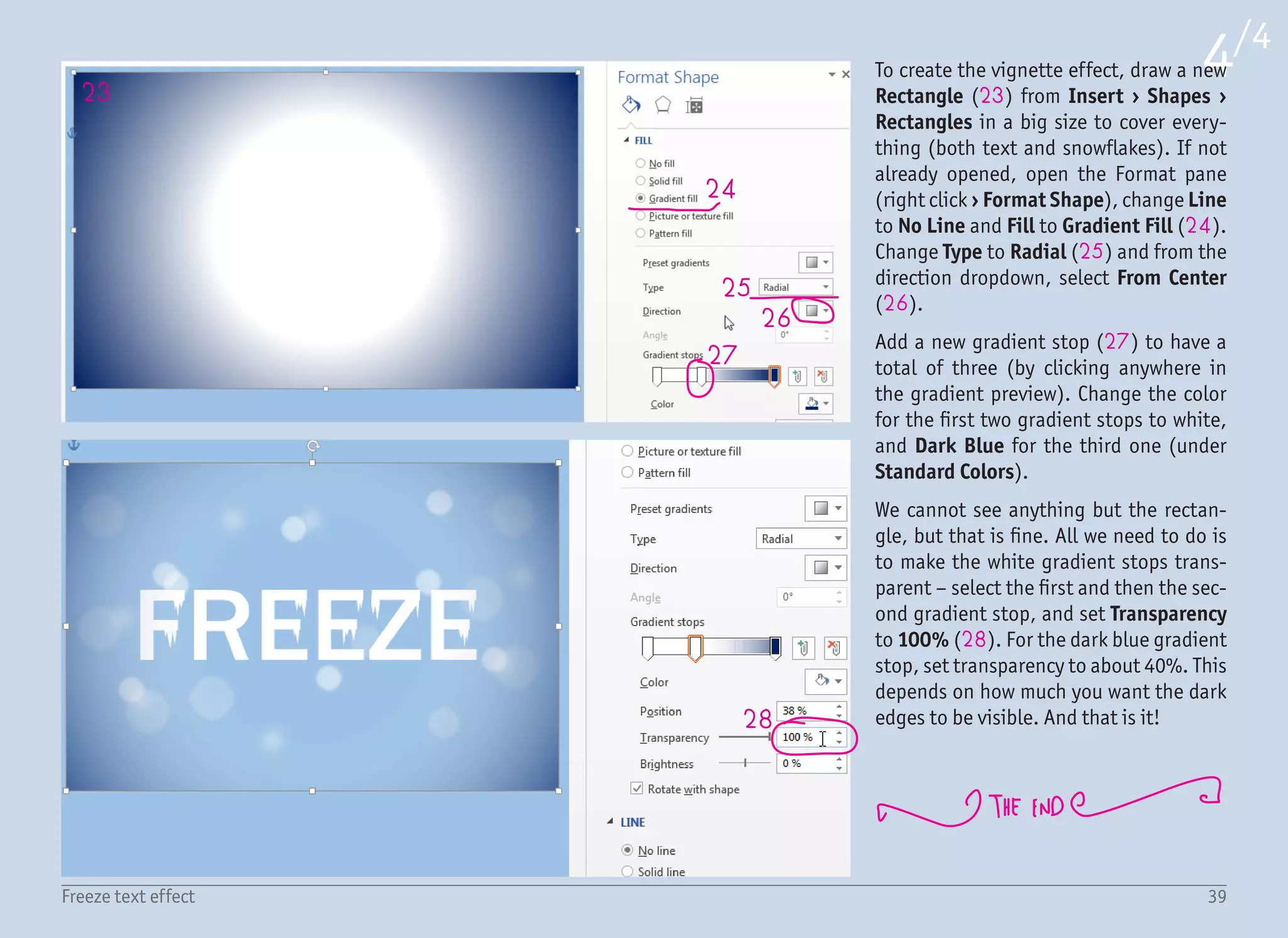
To create the vignette effect, draw a new
Rectangle (23) from Insert โ€บ Shapes โ€บ
Rectangles in a big size to cover every-
thing (both text and snowflakes). If not
already opened, open the Format pane
(right click โ€บ Format Shape), change Line
to No Line and Fill to Gradient Fill (24).
Change Type to Radial (25) and from the
direction dropdown, select From Center
(26).
Add a new gradient stop (27) to have a
total of three (by clicking anywhere in
the gradient preview). Change the color
for the first two gradient stops to white,
and Dark Blue for the third one (under
Standard Colors).
We cannot see anything but the rectan-
gle, but that is fine. All we need to do is
to make the white gradient stops trans-
parent โ€“ select the first and then the sec-
ond gradient stop, and set Transparency
to 100% (28). For the dark blue gradient
stop, set transparency to about 40%. This
depends on how much you want the dark
edges to be visible. And that is it!
Estimated Completion Time: 30 Minutes
Difficulty: ๏‚˜๏‚˜๏‚˜๏‚˜๏‚˜
Learn how to:
โ€ข Work with the gradient fills
โ€ข Create strong reflection with gradients
โ€ข Create realistic glow
A A
4
1
2
3
3
3
4
5
5
6
41Vegas text effect
I need to tell you something. I do not like
this effect very much. While strong high-
lights, glows and sparkles symbolize Vegas
nights for sure, all those fancy effects have
been overused in the past so much that it
hurts my eyes. However, there are still a few
valid reasons to include this tutorial in this
book. Whenever I show all the text effects
to my friends, they are curious how this Ve-
gas effect is done. There are also a few in-
teresting techniques which can be learned.
And truly โ€“ in some cases the usage of this
effect can be well founded. Just please, do
not use it everywhere.
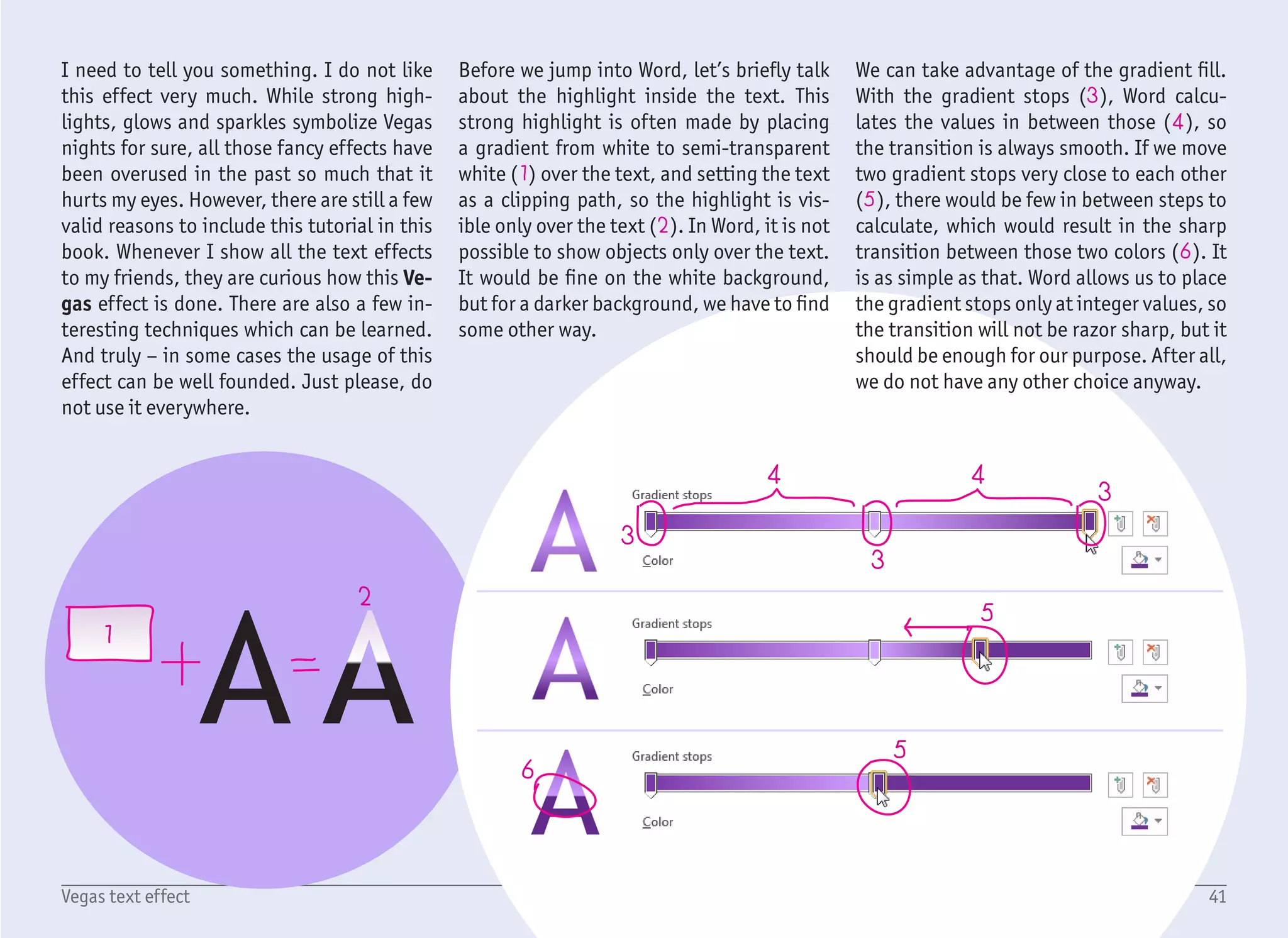
Before we jump into Word, letโ€™s briefly talk
about the highlight inside the text. This
strong highlight is often made by placing
a gradient from white to semi-transparent
white (1) over the text, and setting the text
as a clipping path, so the highlight is vis-
ible only over the text (2). In Word, it is not
possible to show objects only over the text.
It would be fine on the white background,
but for a darker background, we have to find
some other way.
We can take advantage of the gradient fill.
With the gradient stops (3), Word calcu-
lates the values in between those (4), so
the transition is always smooth. If we move
two gradient stops very close to each other
(5), there would be few in between steps to
calculate, which would result in the sharp
transition between those two colors (6). It
is as simple as that. Word allows us to place
the gradient stops only at integer values, so
the transition will not be razor sharp, but it
should be enough for our purpose. After all,
we do not have any other choice anyway.
1
2
3
4
5
6
7
8
9
10
1/6
42Vegas text effect
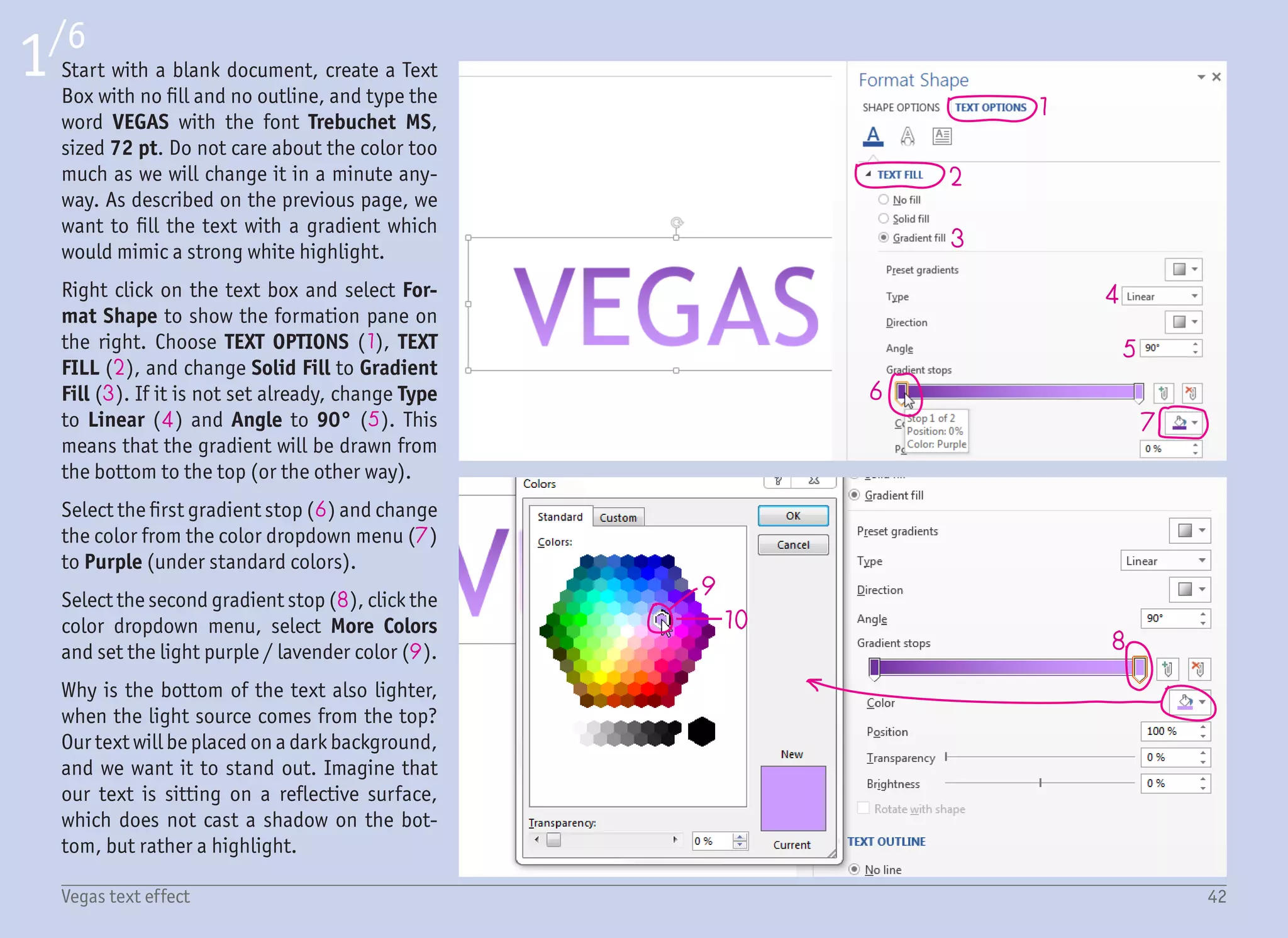
Start with a blank document, create a Text
Box with no fill and no outline, and type the
word VEGAS with the font Trebuchet MS,
sized 72 pt. Do not care about the color too
much as we will change it in a minute any-
way. As described on the previous page, we
want to fill the text with a gradient which
would mimic a strong white highlight.
Right click on the text box and select For-
mat Shape to show the formation pane on
the right. Choose TEXT OPTIONS (1), TEXT
FILL (2), and change Solid Fill to Gradient
Fill (3). If it is not set already, change Type
to Linear (4) and Angle to 90ยฐ (5). This
means that the gradient will be drawn from
the bottom to the top (or the other way).
Select the first gradient stop (6) and change
the color from the color dropdown menu (7)
to Purple (under standard colors).
Select the second gradient stop (8), click the
color dropdown menu, select More Colors
and set the light purple / lavender color (9).
Why is the bottom of the text also lighter,
when the light source comes from the top?
Our text will be placed on a dark background,
and we want it to stand out. Imagine that
our text is sitting on a reflective surface,
which does not cast a shadow on the bot-
tom, but rather a highlight.
11
16
17
18
19
20
21
13
14 15
12
2/6
43Vegas text effect
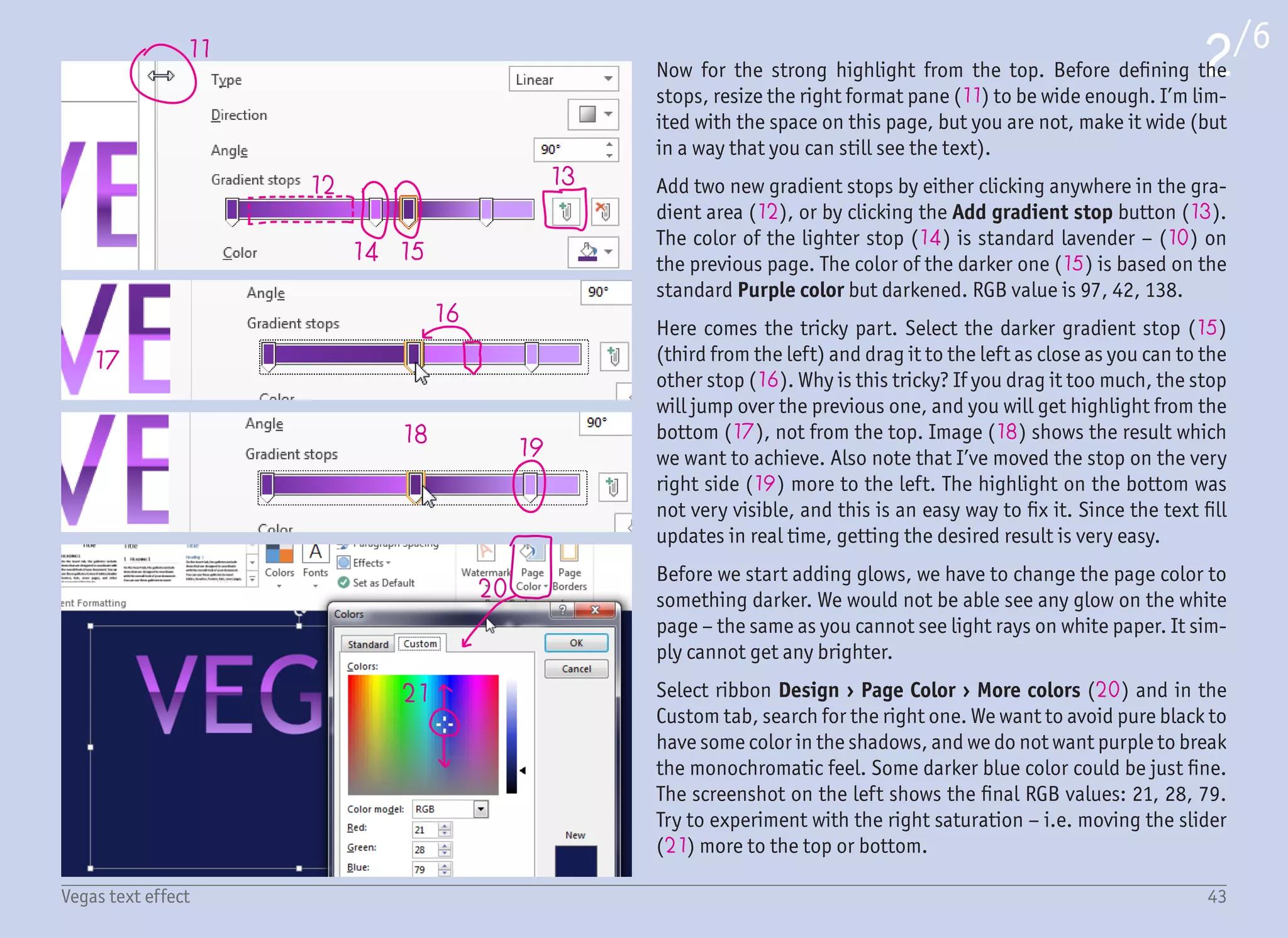
Now for the strong highlight from the top. Before defining the
stops, resize the right format pane (11) to be wide enough. Iโ€™m lim-
ited with the space on this page, but you are not, make it wide (but
in a way that you can still see the text).
Add two new gradient stops by either clicking anywhere in the gra-
dient area (12), or by clicking the Add gradient stop button (13).
The color of the lighter stop (14) is standard lavender โ€“ (10) on
the previous page. The color of the darker one (15) is based on the
standard Purple color but darkened. RGB value is 97, 42, 138.
Here comes the tricky part. Select the darker gradient stop (15)
(third from the left) and drag it to the left as close as you can to the
other stop (16). Why is this tricky? If you drag it too much, the stop
will jump over the previous one, and you will get highlight from the
bottom (17), not from the top. Image (18) shows the result which
we want to achieve. Also note that Iโ€™ve moved the stop on the very
right side (19) more to the left. The highlight on the bottom was
not very visible, and this is an easy way to fix it. Since the text fill
updates in real time, getting the desired result is very easy.
Before we start adding glows, we have to change the page color to
something darker. We would not be able see any glow on the white
page โ€“ the same as you cannot see light rays on white paper. It sim-
ply cannot get any brighter.
Select ribbon Design โ€บ Page Color โ€บ More colors (20) and in the
Custom tab, search for the right one. We want to avoid pure black to
have some color in the shadows, and we do not want purple to break
the monochromatic feel. Some darker blue color could be just fine.
The screenshot on the left shows the final RGB values: 21, 28, 79.
Try to experiment with the right saturation โ€“ i.e. moving the slider
(21) more to the top or bottom.
22
24
25
23
26 27 26
28
29
30
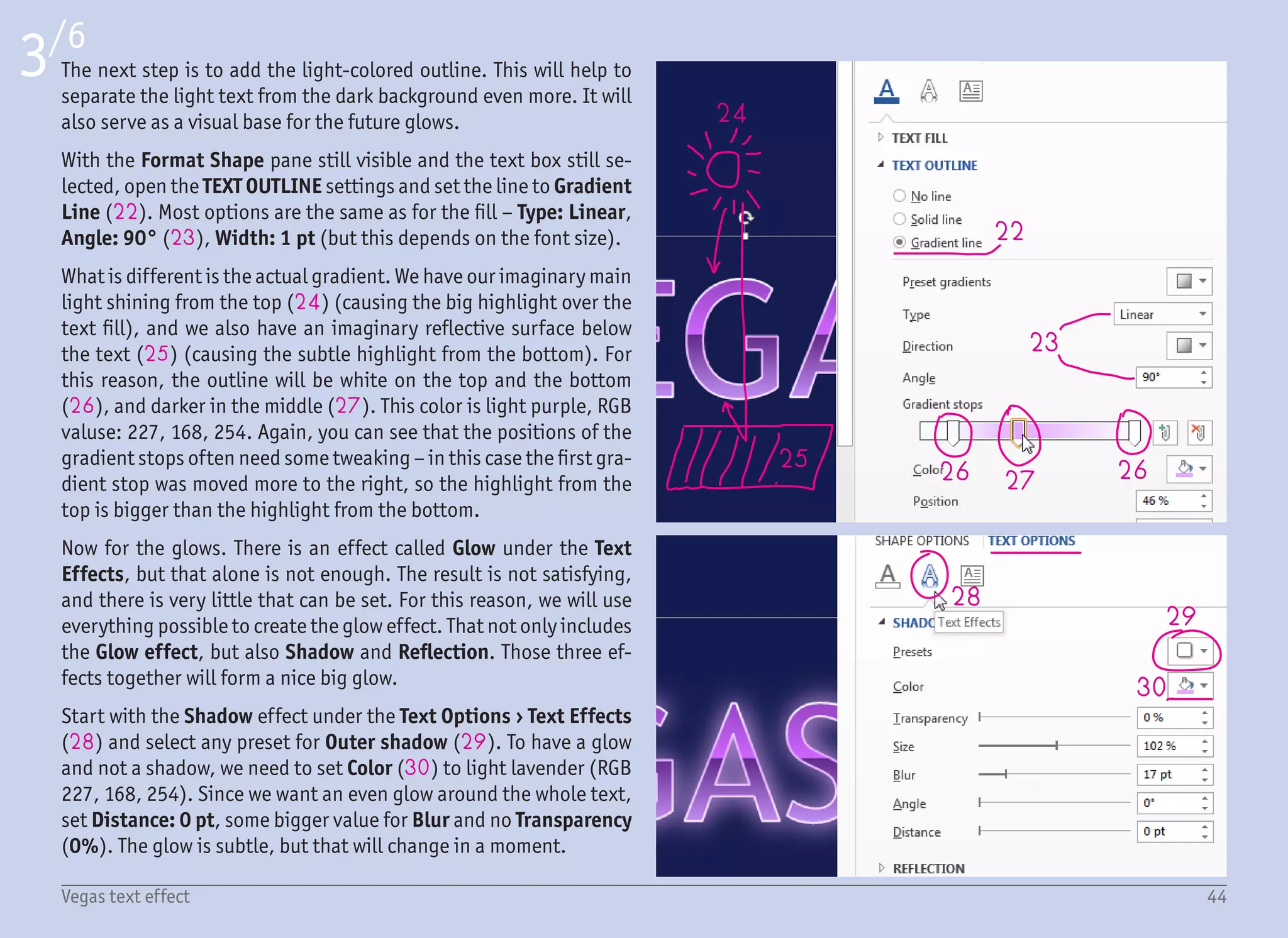
The next step is to add the light-colored outline. This will help to
separate the light text from the dark background even more. It will
also serve as a visual base for the future glows.
With the Format Shape pane still visible and the text box still se-
lected, open the TEXT OUTLINE settings and set the line to Gradient
Line (22). Most options are the same as for the fill โ€“ Type: Linear,
Angle: 90ยฐ (23), Width: 1 pt (but this depends on the font size).
What is different is the actual gradient. We have our imaginary main
light shining from the top (24) (causing the big highlight over the
text fill), and we also have an imaginary reflective surface below
the text (25) (causing the subtle highlight from the bottom). For
this reason, the outline will be white on the top and the bottom
(26), and darker in the middle (27). This color is light purple, RGB
valuse: 227, 168, 254. Again, you can see that the positions of the
gradient stops often need some tweaking โ€“ in this case the first gra-
dient stop was moved more to the right, so the highlight from the
top is bigger than the highlight from the bottom.
Now for the glows. There is an effect called Glow under the Text
Effects, but that alone is not enough. The result is not satisfying,
and there is very little that can be set. For this reason, we will use
everything possible to create the glow effect. That not only includes
the Glow effect, but also Shadow and Reflection. Those three ef-
fects together will form a nice big glow.
Start with the Shadow effect under the Text Options โ€บ Text Effects
(28) and select any preset for Outer shadow (29). To have a glow
and not a shadow, we need to set Color (30) to light lavender (RGB
227, 168, 254). Since we want an even glow around the whole text,
set Distance: 0 pt, some bigger value for Blur and no Transparency
(0%). The glow is subtle, but that will change in a moment.
3/6
44Vegas text effect
31
3233 34
35
36
4/6
45Vegas text effect
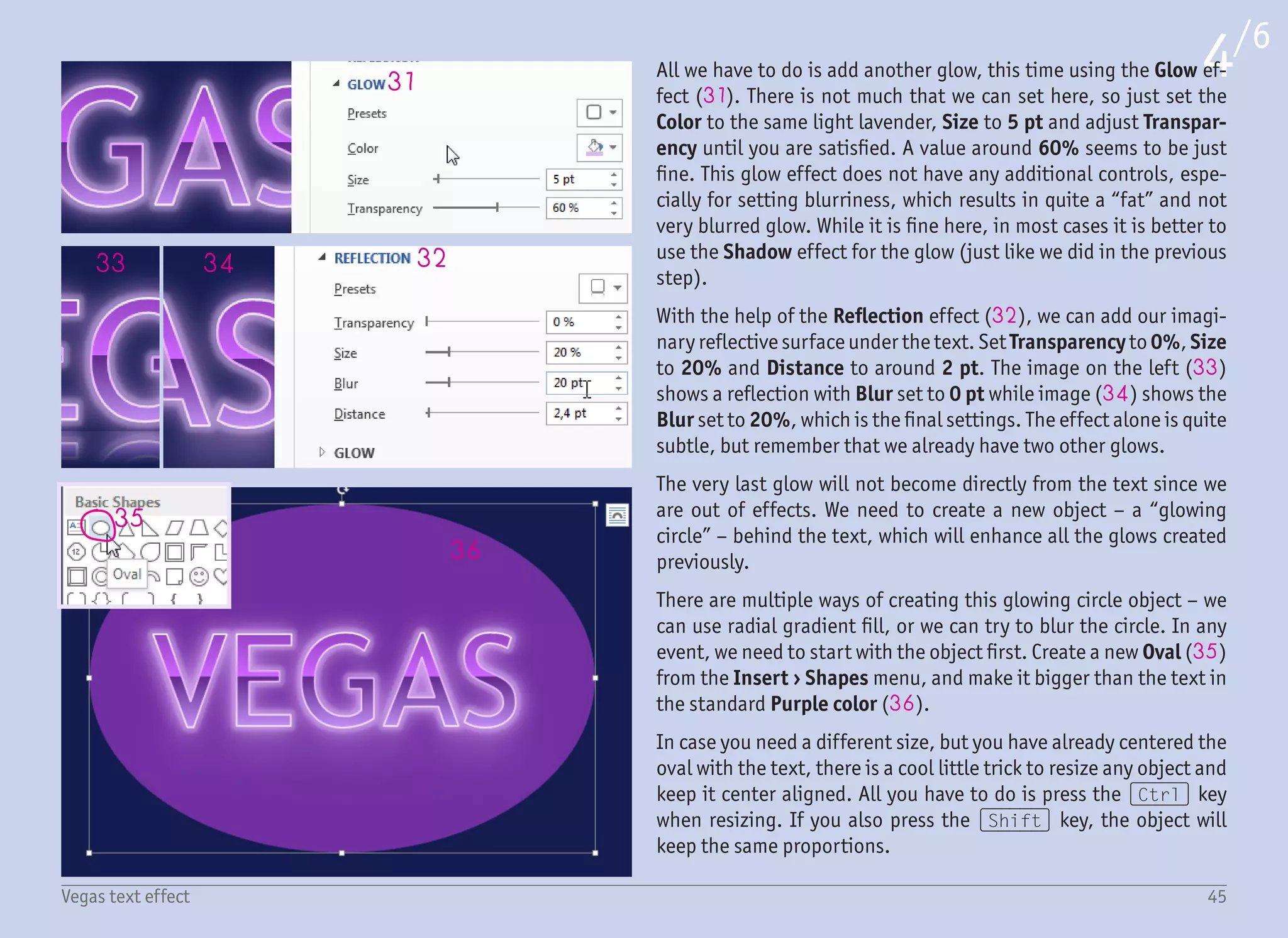
All we have to do is add another glow, this time using the Glow ef-
fect (31). There is not much that we can set here, so just set the
Color to the same light lavender, Size to 5 pt and adjust Transpar-
ency until you are satisfied. A value around 60% seems to be just
fine. This glow effect does not have any additional controls, espe-
cially for setting blurriness, which results in quite a โ€œfatโ€ and not
very blurred glow. While it is fine here, in most cases it is better to
use the Shadow effect for the glow (just like we did in the previous
step).
With the help of the Reflection effect (32), we can add our imagi-
nary reflective surface under the text. Set Transparency to 0%, Size
to 20% and Distance to around 2 pt. The image on the left (33)
shows a reflection with Blur set to 0 pt while image (34) shows the
Blur set to 20%, which is the final settings. The effect alone is quite
subtle, but remember that we already have two other glows.
The very last glow will not become directly from the text since we
are out of effects. We need to create a new object โ€“ a โ€œglowing
circleโ€ โ€“ behind the text, which will enhance all the glows created
previously.
There are multiple ways of creating this glowing circle object โ€“ we
can use radial gradient fill, or we can try to blur the circle. In any
event, we need to start with the object first. Create a new Oval (35)
from the Insert โ€บ Shapes menu, and make it bigger than the text in
the standard Purple color (36).
In case you need a different size, but you have already centered the
oval with the text, there is a cool little trick to resize any object and
keep it center aligned. All you have to do is press the (Ctrl) key
when resizing. If you also press the (Shift) key, the object will
keep the same proportions.
37
38
39
41
45
42 43 44
40
5/6
46Vegas text effect
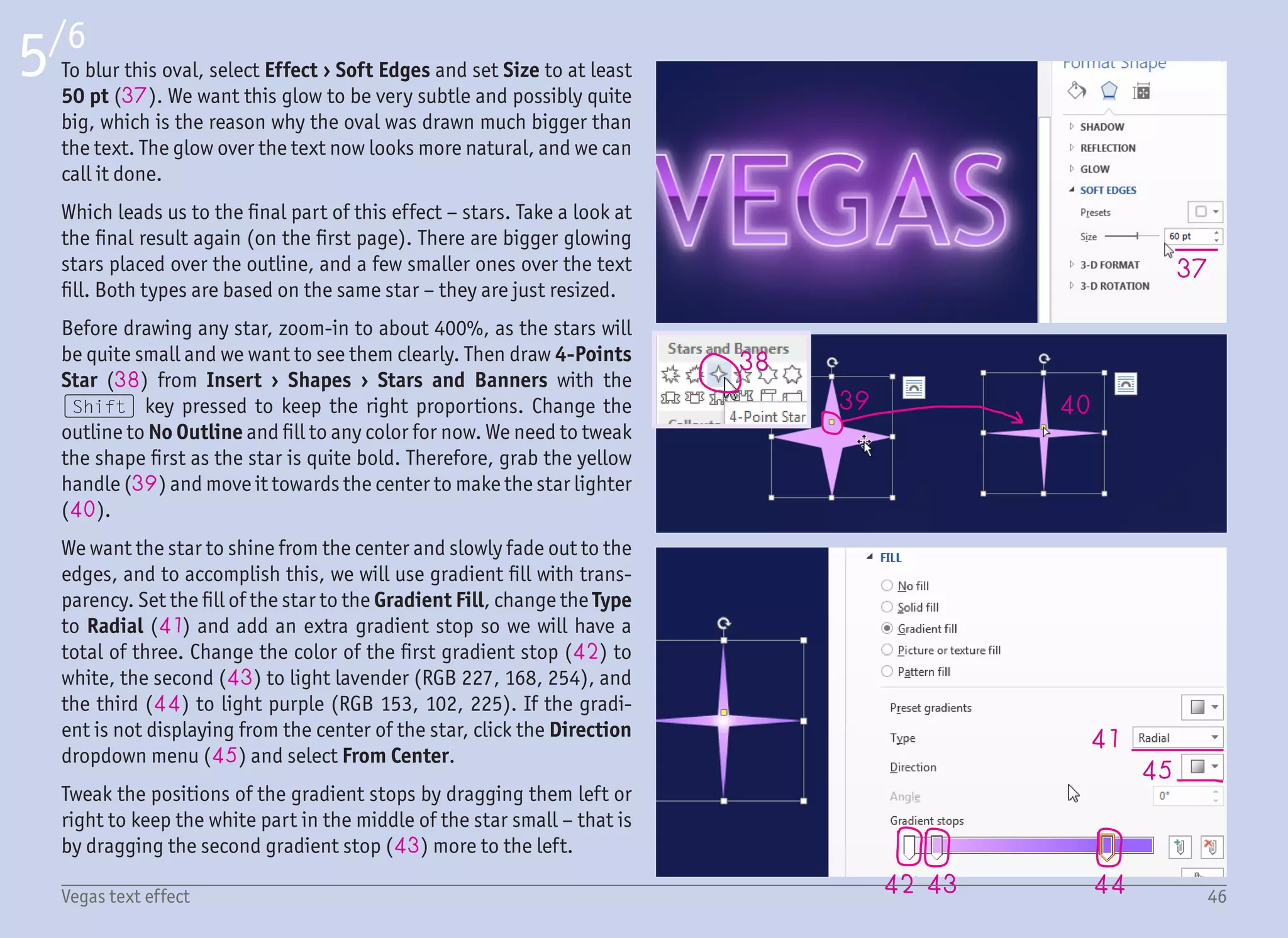
To blur this oval, select Effect โ€บ Soft Edges and set Size to at least
50 pt (37). We want this glow to be very subtle and possibly quite
big, which is the reason why the oval was drawn much bigger than
the text. The glow over the text now looks more natural, and we can
call it done.
Which leads us to the final part of this effect โ€“ stars. Take a look at
the final result again (on the first page). There are bigger glowing
stars placed over the outline, and a few smaller ones over the text
fill. Both types are based on the same star โ€“ they are just resized.
Before drawing any star, zoom-in to about 400%, as the stars will
be quite small and we want to see them clearly. Then draw 4-Points
Star (38) from Insert โ€บ Shapes โ€บ Stars and Banners with the
(Shift) key pressed to keep the right proportions. Change the
outline to No Outline and fill to any color for now. We need to tweak
the shape first as the star is quite bold. Therefore, grab the yellow
handle (39) and move it towards the center to make the star lighter
(40).
We want the star to shine from the center and slowly fade out to the
edges, and to accomplish this, we will use gradient fill with trans-
parency. Set the fill of the star to the Gradient Fill, change the Type
to Radial (41) and add an extra gradient stop so we will have a
total of three. Change the color of the first gradient stop (42) to
white, the second (43) to light lavender (RGB 227, 168, 254), and
the third (44) to light purple (RGB 153, 102, 225). If the gradi-
ent is not displaying from the center of the star, click the Direction
dropdown menu (45) and select From Center.
Tweak the positions of the gradient stops by dragging them left or
right to keep the white part in the middle of the star small โ€“ that is
by dragging the second gradient stop (43) more to the left.
47
46
48
49
6/6
47Vegas text effect
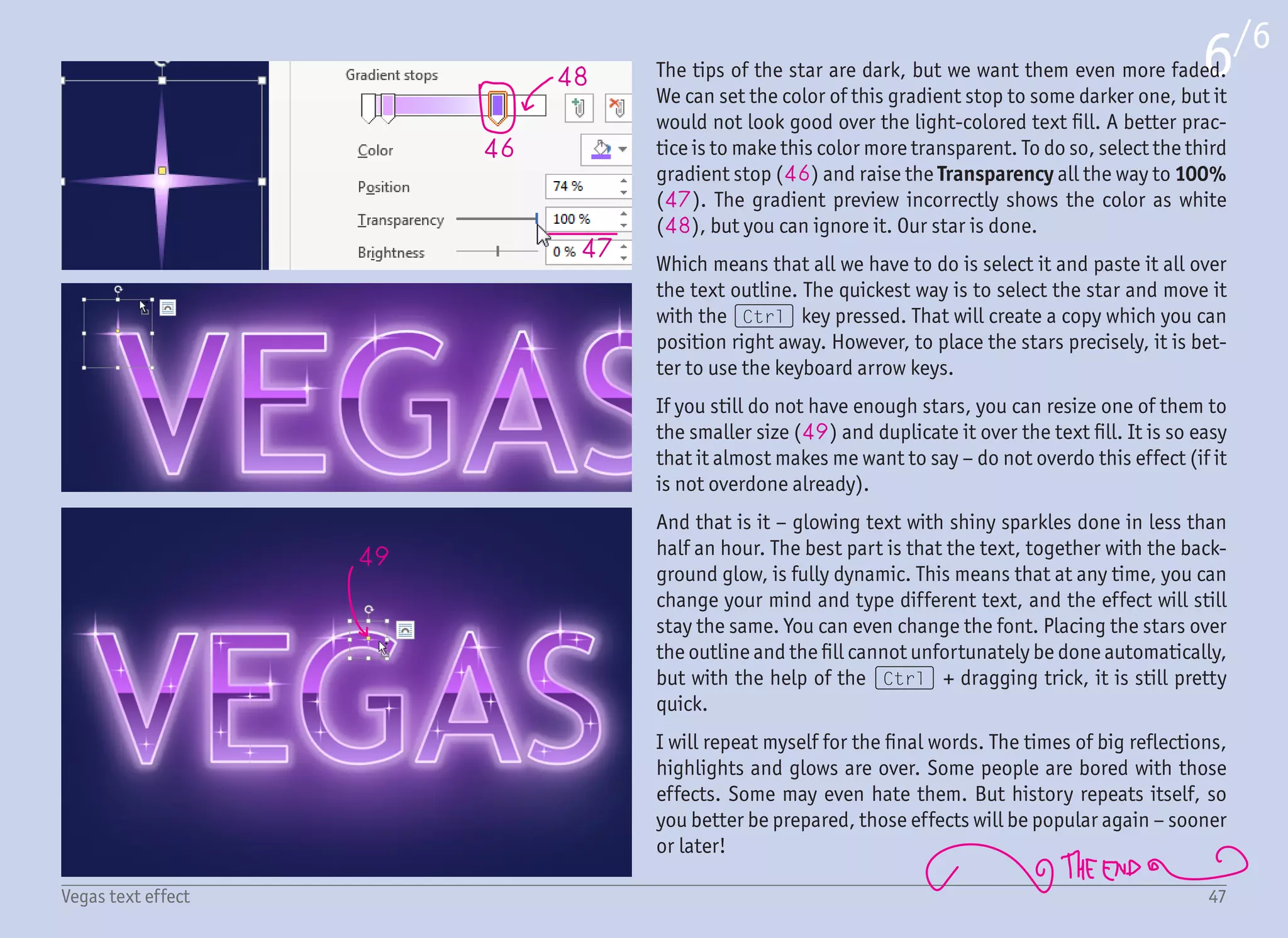
The tips of the star are dark, but we want them even more faded.
We can set the color of this gradient stop to some darker one, but it
would not look good over the light-colored text fill. A better prac-
tice is to make this color more transparent. To do so, select the third
gradient stop (46) and raise the Transparency all the way to 100%
(47). The gradient preview incorrectly shows the color as white
(48), but you can ignore it. Our star is done.
Which means that all we have to do is select it and paste it all over
the text outline. The quickest way is to select the star and move it
with the (Ctrl) key pressed. That will create a copy which you can
position right away. However, to place the stars precisely, it is bet-
ter to use the keyboard arrow keys.
If you still do not have enough stars, you can resize one of them to
the smaller size (49) and duplicate it over the text fill. It is so easy
that it almost makes me want to say โ€“ do not overdo this effect (if it
is not overdone already).
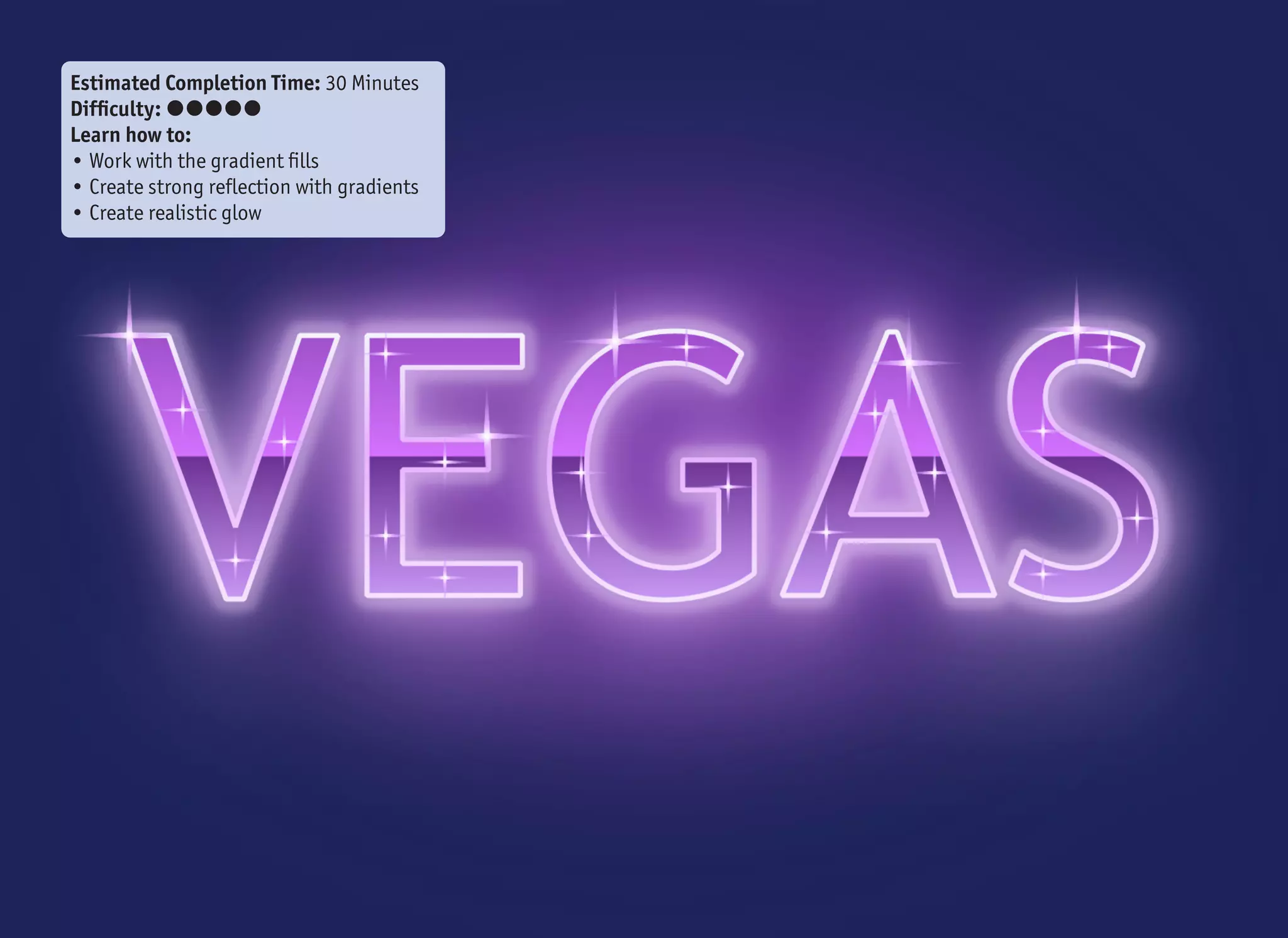
And that is it โ€“ glowing text with shiny sparkles done in less than
half an hour. The best part is that the text, together with the back-
ground glow, is fully dynamic. This means that at any time, you can
change your mind and type different text, and the effect will still
stay the same. You can even change the font. Placing the stars over
the outline and the fill cannot unfortunately be done automatically,
but with the help of the (Ctrl) + dragging trick, it is still pretty
quick.
I will repeat myself for the final words. The times of big reflections,
highlights and glows are over. Some people are bored with those
effects. Some may even hate them. But history repeats itself, so
you better be prepared, those effects will be popular again โ€“ sooner
or later!
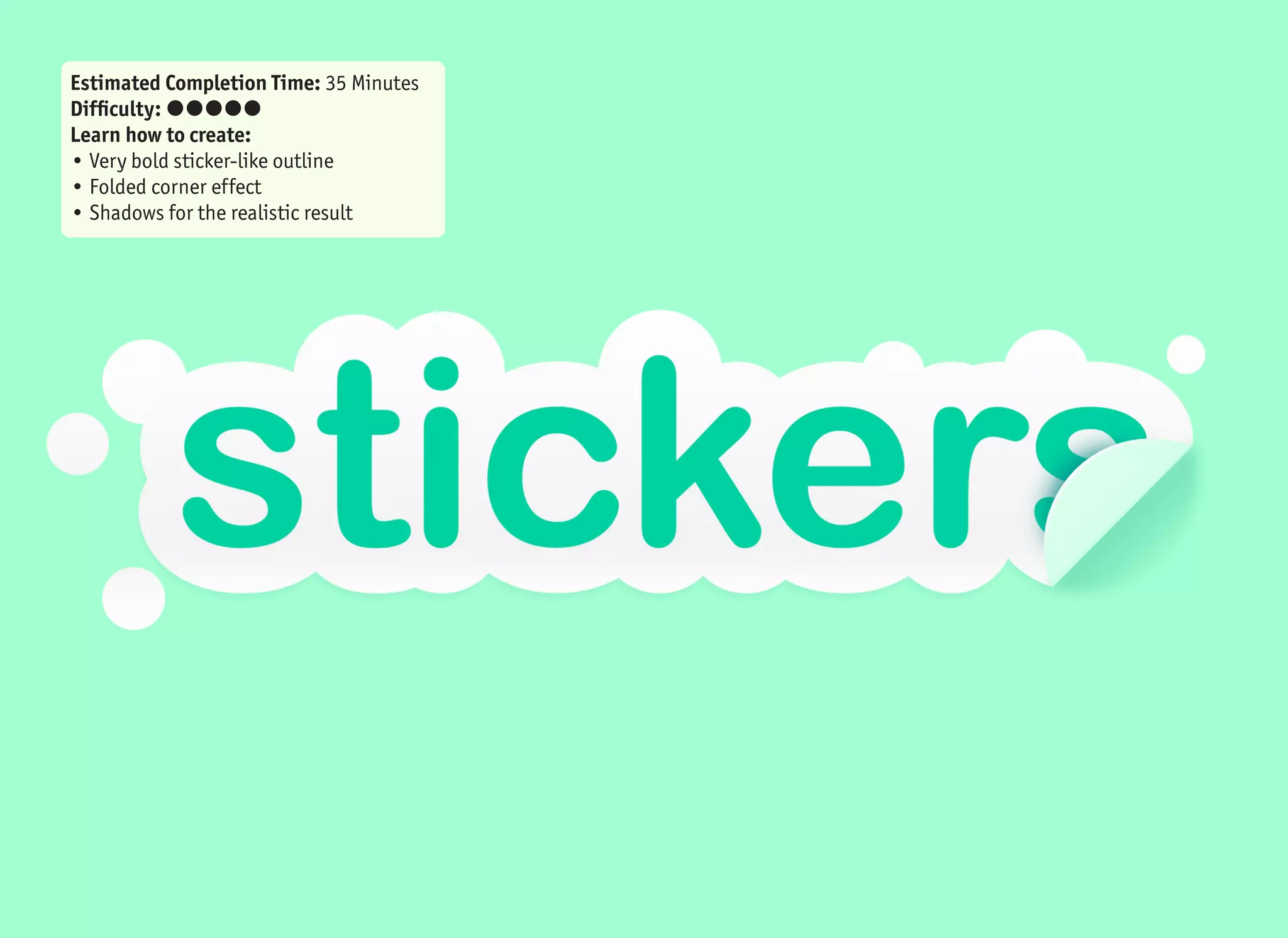
Estimated Completion Time: 35 Minutes
Difficulty: ๏‚˜๏‚˜๏‚˜๏‚˜๏‚˜
Learn how to create:
โ€ข Very bold sticker-like outline
โ€ข Folded corner effect
โ€ข Shadows for the realistic result
49Stickers text effect
1 2 3
4
5
6
7
8
9
10
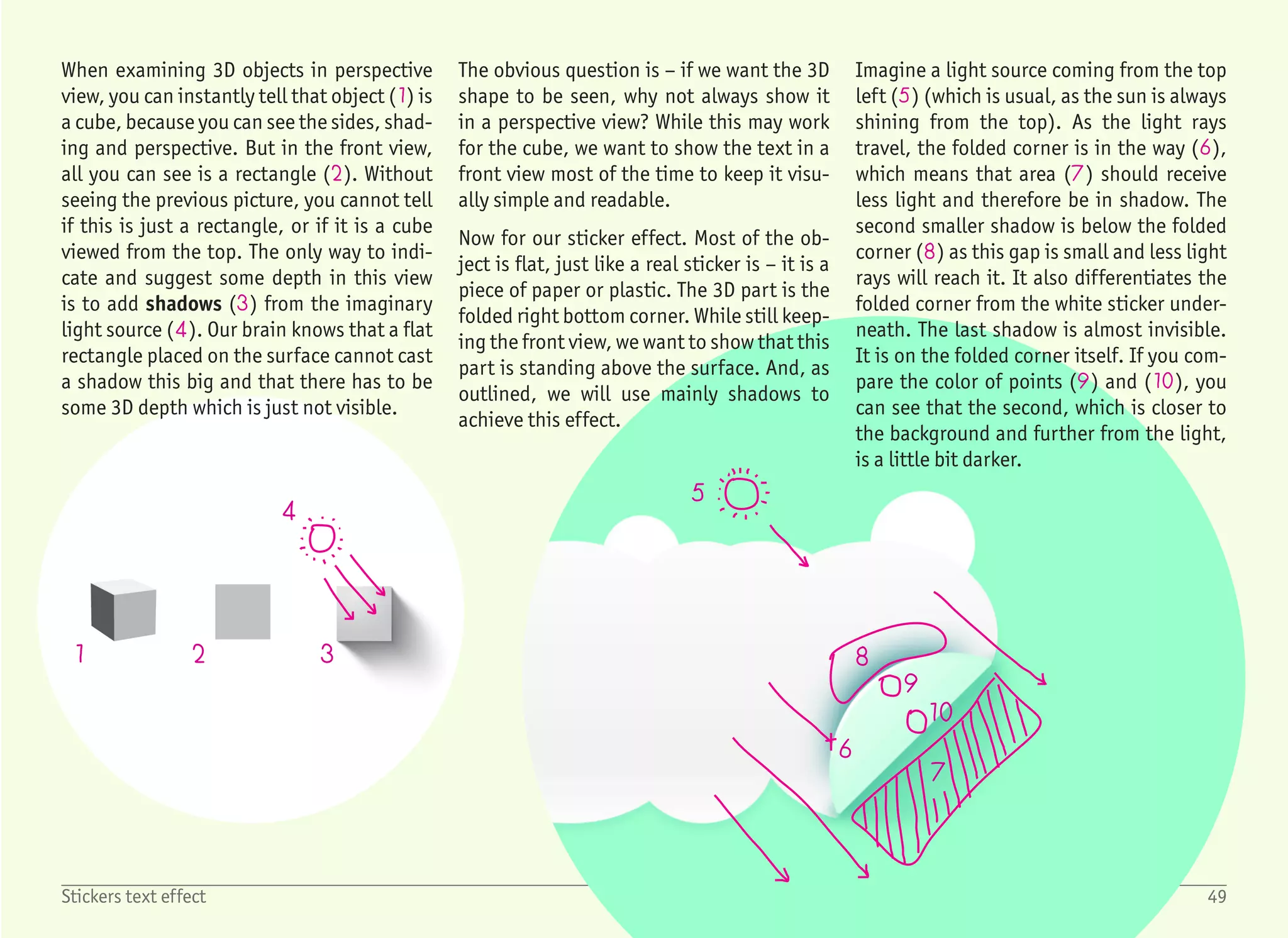
When examining 3D objects in perspective
view, you can instantly tell that object (1) is
a cube, because you can see the sides, shad-
ing and perspective. But in the front view,
all you can see is a rectangle (2). Without
seeing the previous picture, you cannot tell
if this is just a rectangle, or if it is a cube
viewed from the top. The only way to indi-
cate and suggest some depth in this view
is to add shadows (3) from the imaginary
light source (4). Our brain knows that a flat
rectangle placed on the surface cannot cast
a shadow this big and that there has to be
some 3D depth which is just not visible.
The obvious question is โ€“ if we want the 3D
shape to be seen, why not always show it
in a perspective view? While this may work
for the cube, we want to show the text in a
front view most of the time to keep it visu-
ally simple and readable.
Now for our sticker effect. Most of the ob-
ject is flat, just like a real sticker is โ€“ it is a
piece of paper or plastic. The 3D part is the
folded right bottom corner. While still keep-
ing the front view, we want to show that this
part is standing above the surface. And, as
outlined, we will use mainly shadows to
achieve this effect.
Imagine a light source coming from the top
left (5) (which is usual, as the sun is always
shining from the top). As the light rays
travel, the folded corner is in the way (6),
which means that area (7) should receive
less light and therefore be in shadow. The
second smaller shadow is below the folded
corner (8) as this gap is small and less light
rays will reach it. It also differentiates the
folded corner from the white sticker under-
neath. The last shadow is almost invisible.
It is on the folded corner itself. If you com-
pare the color of points (9) and (10), you
can see that the second, which is closer to
the background and further from the light,
is a little bit darker.
1
3
4
5
6
2
2
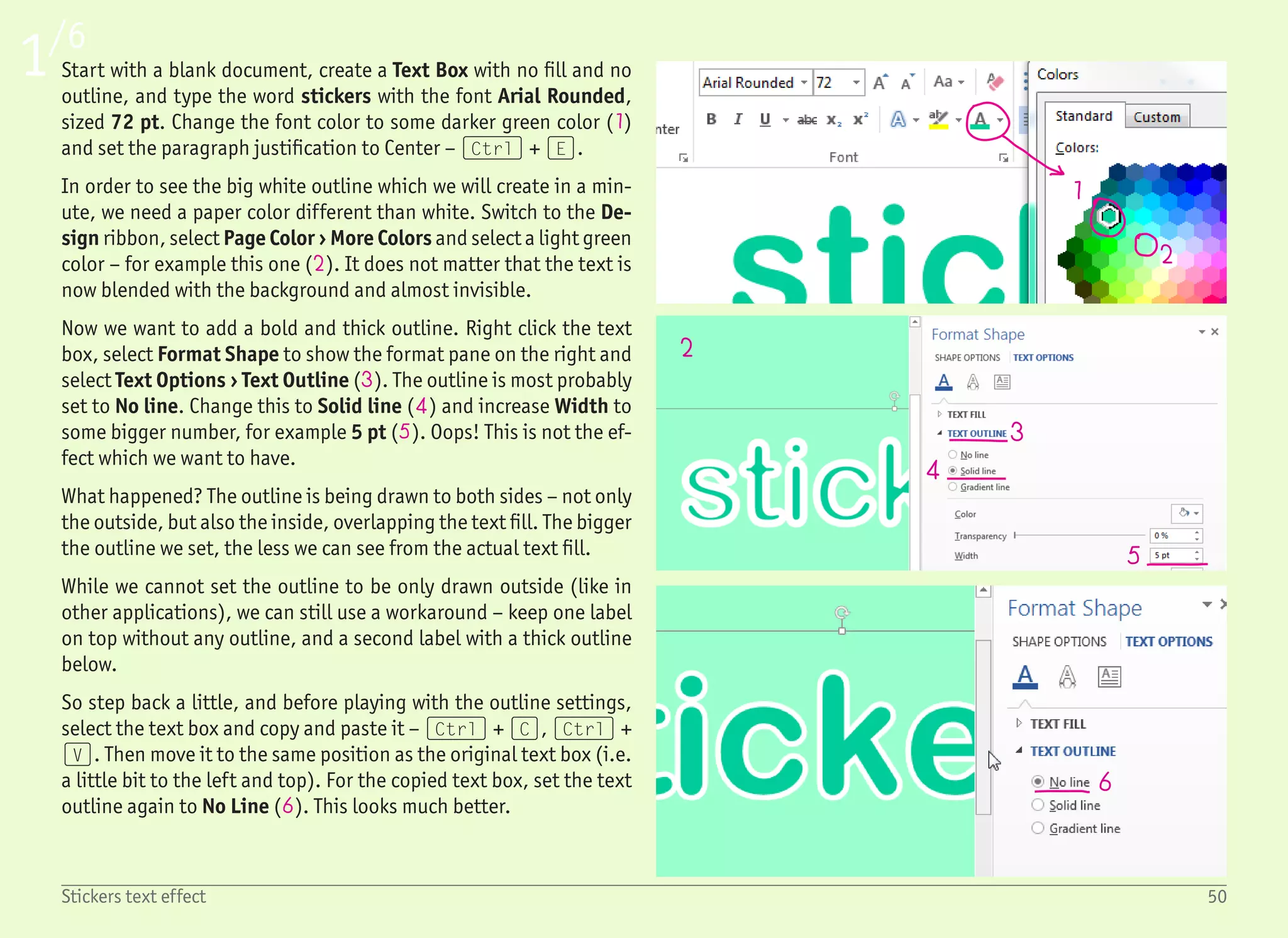
Start with a blank document, create a Text Box with no fill and no
outline, and type the word stickers with the font Arial Rounded,
sized 72 pt. Change the font color to some darker green color (1)
and set the paragraph justification to Center โ€“ (Ctrl) + (E).
In order to see the big white outline which we will create in a min-
ute, we need a paper color different than white. Switch to the De-
sign ribbon, select Page Color โ€บ More Colors and select a light green
color โ€“ for example this one (2). It does not matter that the text is
now blended with the background and almost invisible.
Now we want to add a bold and thick outline. Right click the text
box, select Format Shape to show the format pane on the right and
select Text Options โ€บ Text Outline (3). The outline is most probably
set to No line. Change this to Solid line (4) and increase Width to
some bigger number, for example 5 pt (5). Oops! This is not the ef-
fect which we want to have.
What happened? The outline is being drawn to both sides โ€“ not only
the outside, but also the inside, overlapping the text fill. The bigger
the outline we set, the less we can see from the actual text fill.
While we cannot set the outline to be only drawn outside (like in
other applications), we can still use a workaround โ€“ keep one label
on top without any outline, and a second label with a thick outline
below.
So step back a little, and before playing with the outline settings,
select the text box and copy and paste it โ€“ (Ctrl) + (C), (Ctrl) +
(V). Then move it to the same position as the original text box (i.e.
a little bit to the left and top). For the copied text box, set the text
outline again to No Line (6). This looks much better.
1/6
50Stickers text effect
78
9
10
11
12
13
14 15
16
17
18
2/6
51Stickers text effect
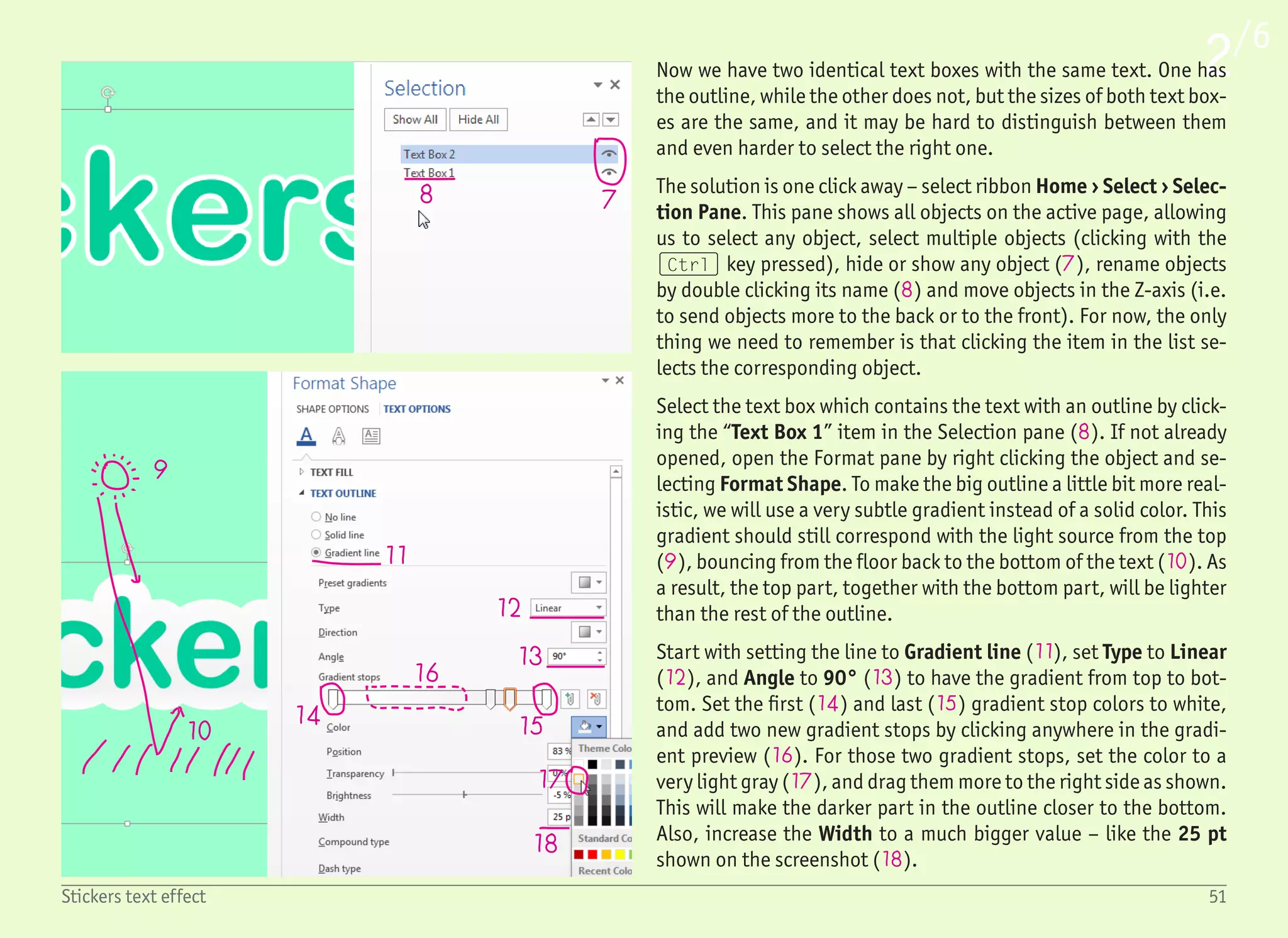
Now we have two identical text boxes with the same text. One has
the outline, while the other does not, but the sizes of both text box-
es are the same, and it may be hard to distinguish between them
and even harder to select the right one.
The solution is one click away โ€“ select ribbon Home โ€บ Select โ€บ Selec-
tion Pane. This pane shows all objects on the active page, allowing
us to select any object, select multiple objects (clicking with the
(Ctrl) key pressed), hide or show any object (7), rename objects
by double clicking its name (8) and move objects in the Z-axis (i.e.
to send objects more to the back or to the front). For now, the only
thing we need to remember is that clicking the item in the list se-
lects the corresponding object.
Select the text box which contains the text with an outline by click-
ing the โ€œText Box 1โ€ item in the Selection pane (8). If not already
opened, open the Format pane by right clicking the object and se-
lecting Format Shape. To make the big outline a little bit more real-
istic, we will use a very subtle gradient instead of a solid color. This
gradient should still correspond with the light source from the top
(9), bouncing from the floor back to the bottom of the text (10). As
a result, the top part, together with the bottom part, will be lighter
than the rest of the outline.
Start with setting the line to Gradient line (11), set Type to Linear
(12), and Angle to 90ยฐ (13) to have the gradient from top to bot-
tom. Set the first (14) and last (15) gradient stop colors to white,
and add two new gradient stops by clicking anywhere in the gradi-
ent preview (16). For those two gradient stops, set the color to a
very light gray (17), and drag them more to the right side as shown.
This will make the darker part in the outline closer to the bottom.
Also, increase the Width to a much bigger value โ€“ like the 25 pt
shown on the screenshot (18).
3/6
52Stickers text effect
19
20
21
22
25
24
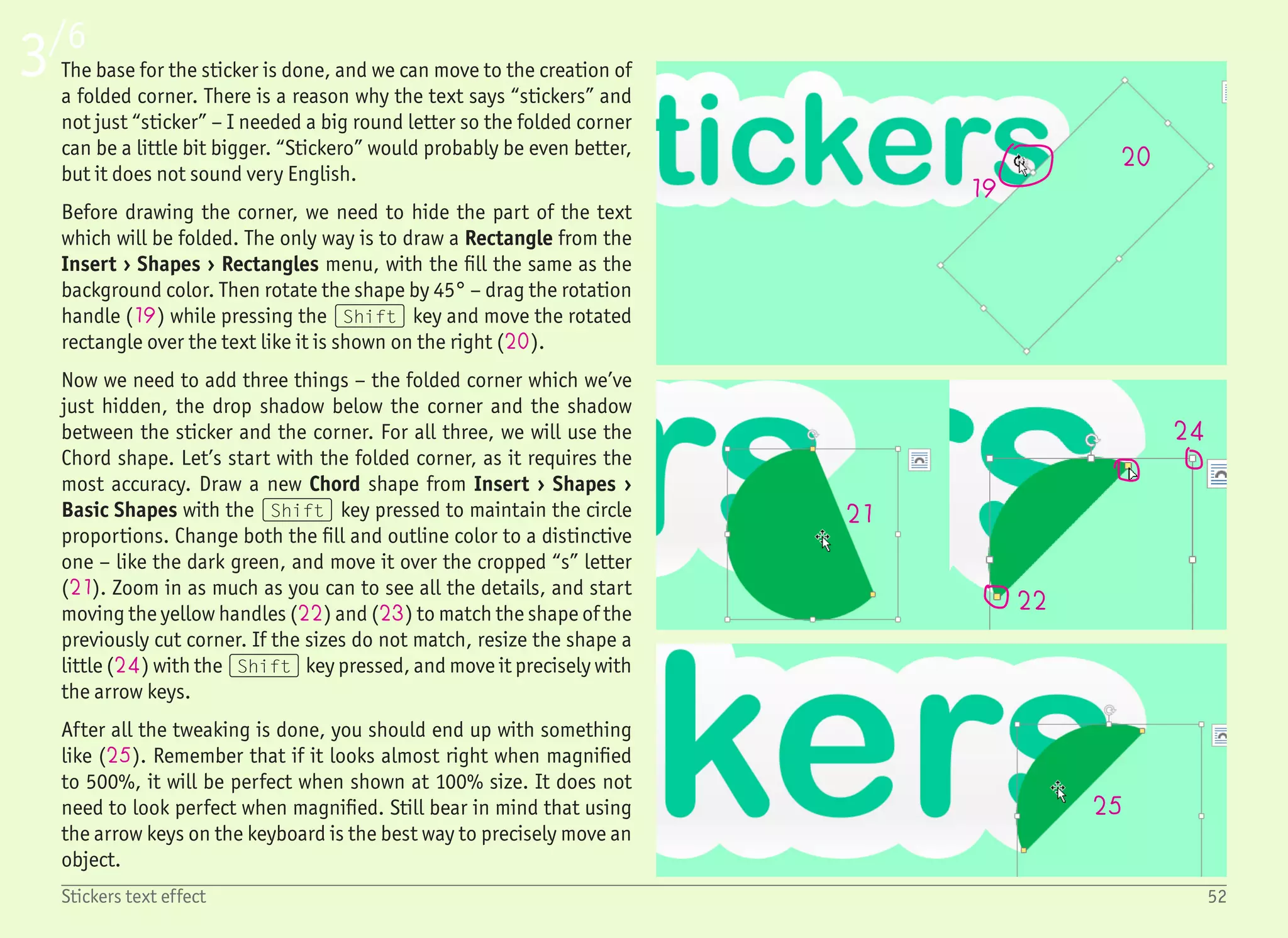
The base for the sticker is done, and we can move to the creation of
a folded corner. There is a reason why the text says โ€œstickersโ€ and
not just โ€œstickerโ€ โ€“ I needed a big round letter so the folded corner
can be a little bit bigger. โ€œStickeroโ€ would probably be even better,
but it does not sound very English.
Before drawing the corner, we need to hide the part of the text
which will be folded. The only way is to draw a Rectangle from the
Insert โ€บ Shapes โ€บ Rectangles menu, with the fill the same as the
background color. Then rotate the shape by 45ยฐ โ€“ drag the rotation
handle (19) while pressing the (Shift) key and move the rotated
rectangle over the text like it is shown on the right (20).
Now we need to add three things โ€“ the folded corner which weโ€™ve
just hidden, the drop shadow below the corner and the shadow
between the sticker and the corner. For all three, we will use the
Chord shape. Letโ€™s start with the folded corner, as it requires the
most accuracy. Draw a new Chord shape from Insert โ€บ Shapes โ€บ
Basic Shapes with the (Shift) key pressed to maintain the circle
proportions. Change both the fill and outline color to a distinctive
one โ€“ like the dark green, and move it over the cropped โ€œsโ€ letter
(21). Zoom in as much as you can to see all the details, and start
moving the yellow handles (22) and (23) to match the shape of the
previously cut corner. If the sizes do not match, resize the shape a
little (24) with the (Shift) key pressed, and move it precisely with
the arrow keys.
After all the tweaking is done, you should end up with something
like (25). Remember that if it looks almost right when magnified
to 500%, it will be perfect when shown at 100% size. It does not
need to look perfect when magnified. Still bear in mind that using
the arrow keys on the keyboard is the best way to precisely move an
object.
4/6
53Stickers text effect
26
27
28
29
30
3133 32
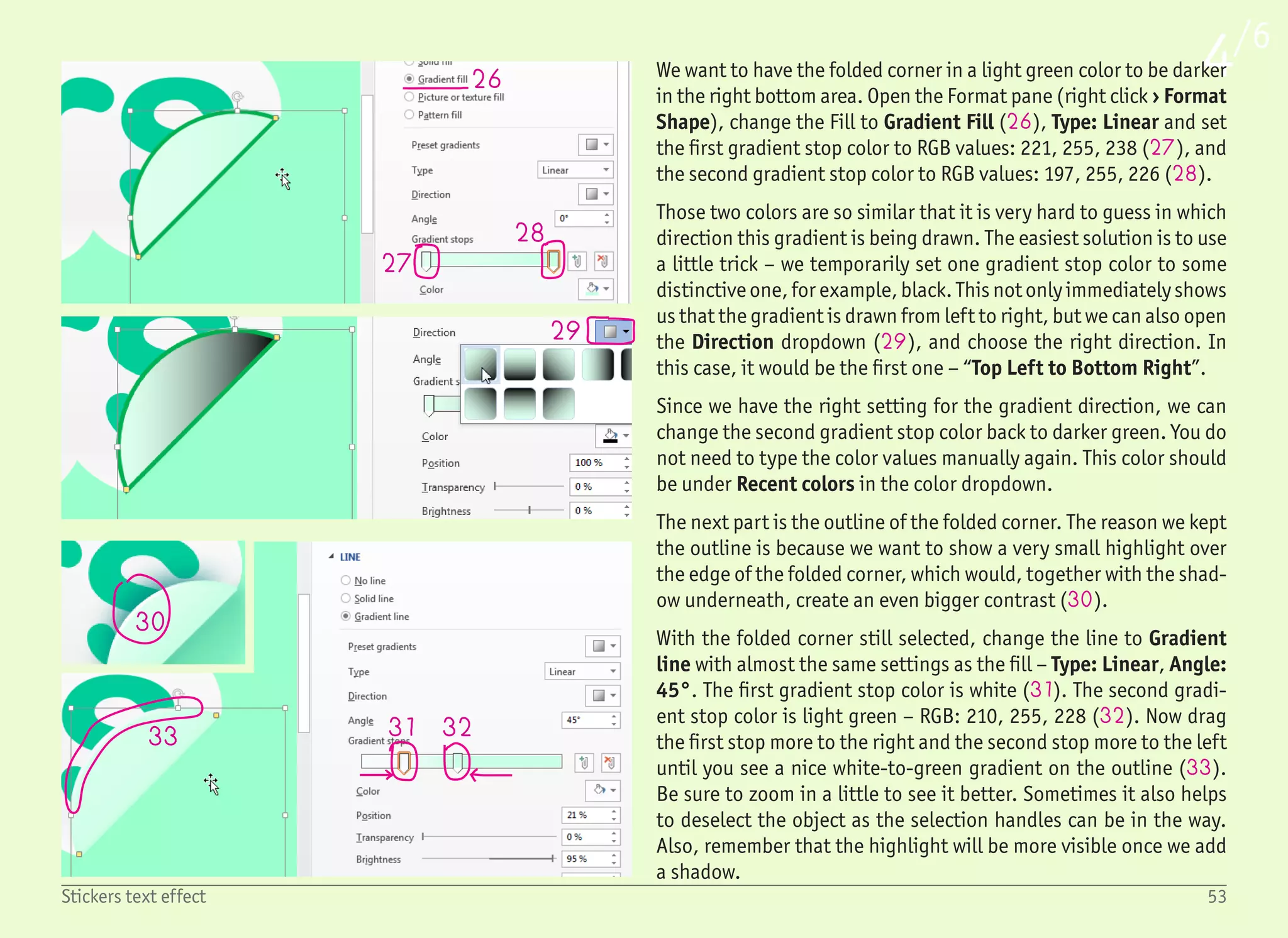
We want to have the folded corner in a light green color to be darker
in the right bottom area. Open the Format pane (right click โ€บ Format
Shape), change the Fill to Gradient Fill (26), Type: Linear and set
the first gradient stop color to RGB values: 221, 255, 238 (27), and
the second gradient stop color to RGB values: 197, 255, 226 (28).
Those two colors are so similar that it is very hard to guess in which
direction this gradient is being drawn. The easiest solution is to use
a little trick โ€“ we temporarily set one gradient stop color to some
distinctive one, for example, black. This not only immediately shows
us that the gradient is drawn from left to right, but we can also open
the Direction dropdown (29), and choose the right direction. In
this case, it would be the first one โ€“ โ€œTop Left to Bottom Rightโ€.
Since we have the right setting for the gradient direction, we can
change the second gradient stop color back to darker green. You do
not need to type the color values manually again. This color should
be under Recent colors in the color dropdown.
The next part is the outline of the folded corner. The reason we kept
the outline is because we want to show a very small highlight over
the edge of the folded corner, which would, together with the shad-
ow underneath, create an even bigger contrast (30).
With the folded corner still selected, change the line to Gradient
line with almost the same settings as the fill โ€“ Type: Linear, Angle:
45ยฐ. The first gradient stop color is white (31). The second gradi-
ent stop color is light green โ€“ RGB: 210, 255, 228 (32). Now drag
the first stop more to the right and the second stop more to the left
until you see a nice white-to-green gradient on the outline (33).
Be sure to zoom in a little to see it better. Sometimes it also helps
to deselect the object as the selection handles can be in the way.
Also, remember that the highlight will be more visible once we add
a shadow.
54Stickers text effect
5/6
34
35
36
37
38
35
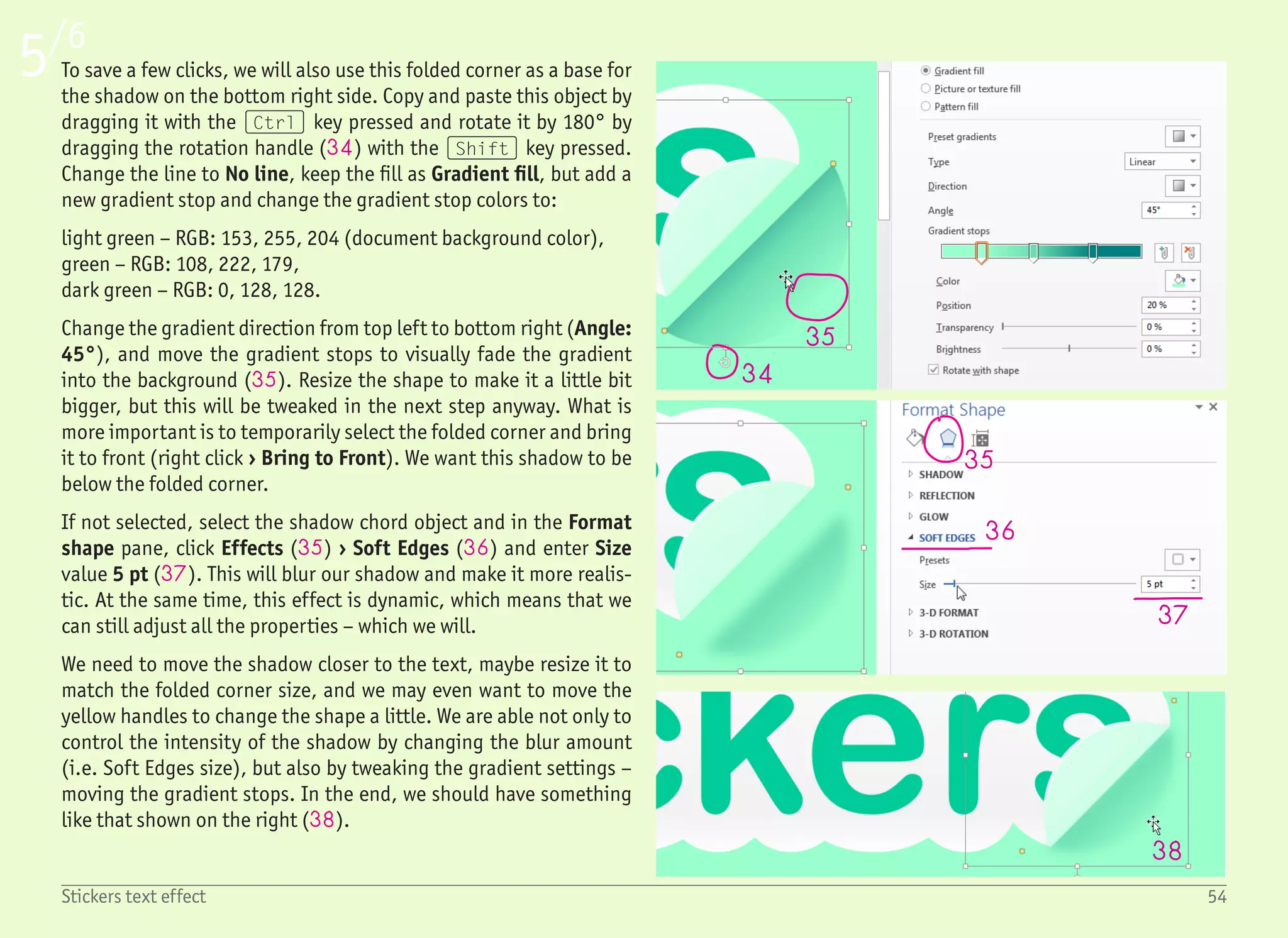
To save a few clicks, we will also use this folded corner as a base for
the shadow on the bottom right side. Copy and paste this object by
dragging it with the (Ctrl) key pressed and rotate it by 180ยฐ by
dragging the rotation handle (34) with the (Shift) key pressed.
Change the line to No line, keep the fill as Gradient fill, but add a
new gradient stop and change the gradient stop colors to:
light green โ€“ RGB: 153, 255, 204 (document background color),
green โ€“ RGB: 108, 222, 179,
dark green โ€“ RGB: 0, 128, 128.
Change the gradient direction from top left to bottom right (Angle:
45ยฐ), and move the gradient stops to visually fade the gradient
into the background (35). Resize the shape to make it a little bit
bigger, but this will be tweaked in the next step anyway. What is
more important is to temporarily select the folded corner and bring
it to front (right click โ€บ Bring to Front). We want this shadow to be
below the folded corner.
If not selected, select the shadow chord object and in the Format
shape pane, click Effects (35) โ€บ Soft Edges (36) and enter Size
value 5 pt (37). This will blur our shadow and make it more realis-
tic. At the same time, this effect is dynamic, which means that we
can still adjust all the properties โ€“ which we will.
We need to move the shadow closer to the text, maybe resize it to
match the folded corner size, and we may even want to move the
yellow handles to change the shape a little. We are able not only to
control the intensity of the shadow by changing the blur amount
(i.e. Soft Edges size), but also by tweaking the gradient settings โ€“
moving the gradient stops. In the end, we should have something
like that shown on the right (38).
55Stickers text effect
6/6
38
39
40
41
42
42
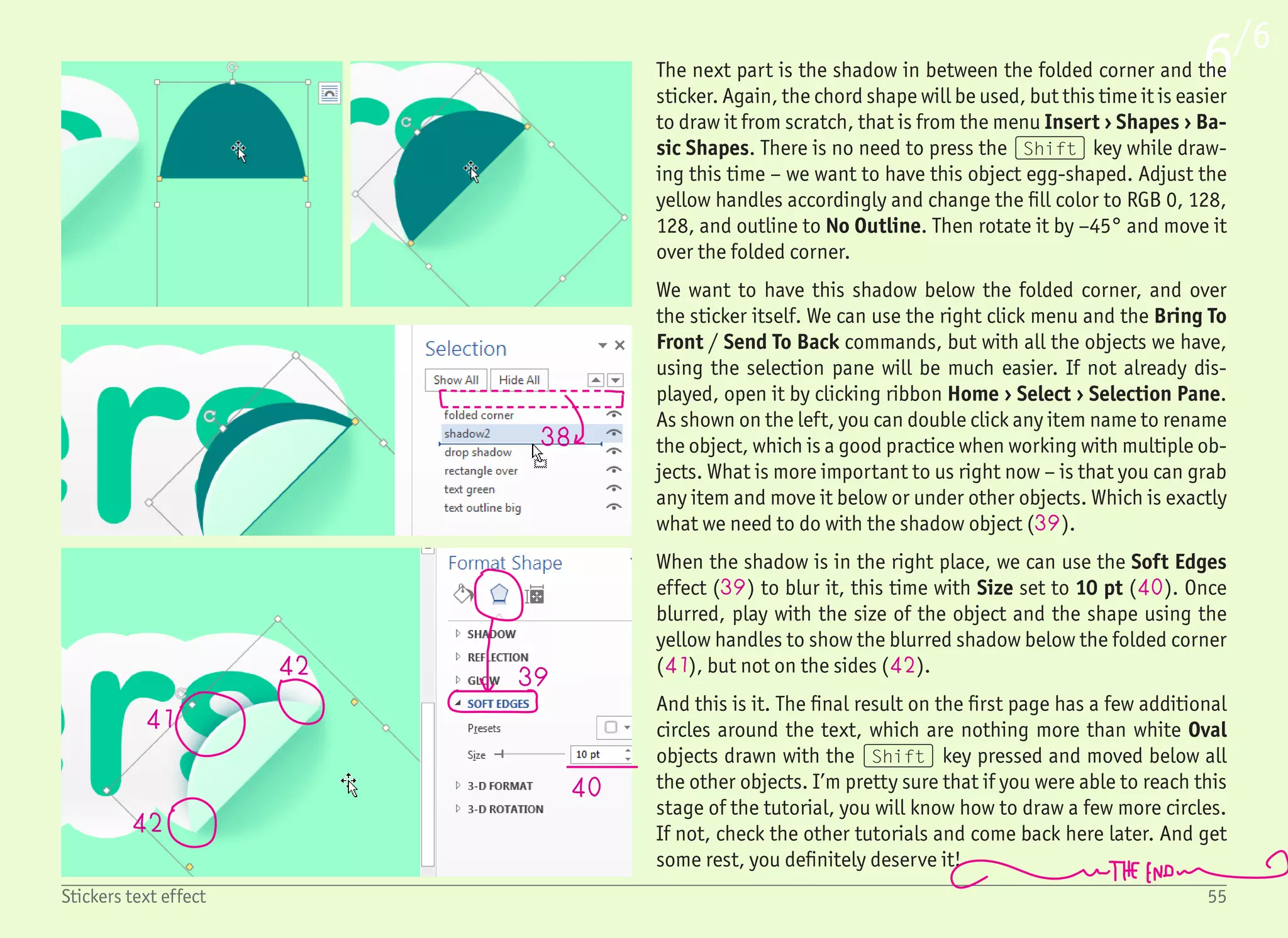
The next part is the shadow in between the folded corner and the
sticker. Again, the chord shape will be used, but this time it is easier
to draw it from scratch, that is from the menu Insert โ€บ Shapes โ€บ Ba-
sic Shapes. There is no need to press the (Shift) key while draw-
ing this time โ€“ we want to have this object egg-shaped. Adjust the
yellow handles accordingly and change the fill color to RGB 0, 128,
128, and outline to No Outline. Then rotate it by โ€“45ยฐ and move it
over the folded corner.
We want to have this shadow below the folded corner, and over
the sticker itself. We can use the right click menu and the Bring To
Front / Send To Back commands, but with all the objects we have,
using the selection pane will be much easier. If not already dis-
played, open it by clicking ribbon Home โ€บ Select โ€บ Selection Pane.
As shown on the left, you can double click any item name to rename
the object, which is a good practice when working with multiple ob-
jects. What is more important to us right now โ€“ is that you can grab
any item and move it below or under other objects. Which is exactly
what we need to do with the shadow object (39).
When the shadow is in the right place, we can use the Soft Edges
effect (39) to blur it, this time with Size set to 10 pt (40). Once
blurred, play with the size of the object and the shape using the
yellow handles to show the blurred shadow below the folded corner
(41), but not on the sides (42).
And this is it. The final result on the first page has a few additional
circles around the text, which are nothing more than white Oval
objects drawn with the (Shift) key pressed and moved below all
the other objects. Iโ€™m pretty sure that if you were able to reach this
stage of the tutorial, you will know how to draw a few more circles.
If not, check the other tutorials and come back here later. And get
some rest, you definitely deserve it!
56When everything goes wrong
1
2
3
All the tutorials in this book are very short. There is a clear reason
for this โ€“ if you get stuck, like completely stuck, you will be mad
that you have just wasted 20 minutes of your time. However, it will
still be better than losing two hours, donโ€™t you think?
When I was browsing the internet trying to find common problems
with Word, one comment caught my attention โ€“ โ€œI hate Word. I do
not feel like Iโ€™m in control, and Iโ€™m still fighting with itโ€. And re-
ally, Word is trying to make a lot of things easier and โ€œguessโ€ them
for you. Everything is fine as long as it is working. But if you want
something non-standard, you can easily get hot under the collar.
When something like this happens, pause for a moment. Instead of
getting angry, take a break and a deep breath. And keep reading.
Iโ€™ve covered most of the usual problems which you may encounter.
If none of those pieces of advice help, you can still try to finish
some easier tutorials first and then come back to the difficult one
later. The difficult tutorials are designed with the assumption that
you have already learned something during the creation of those
simple ones.
When everything goes wrong
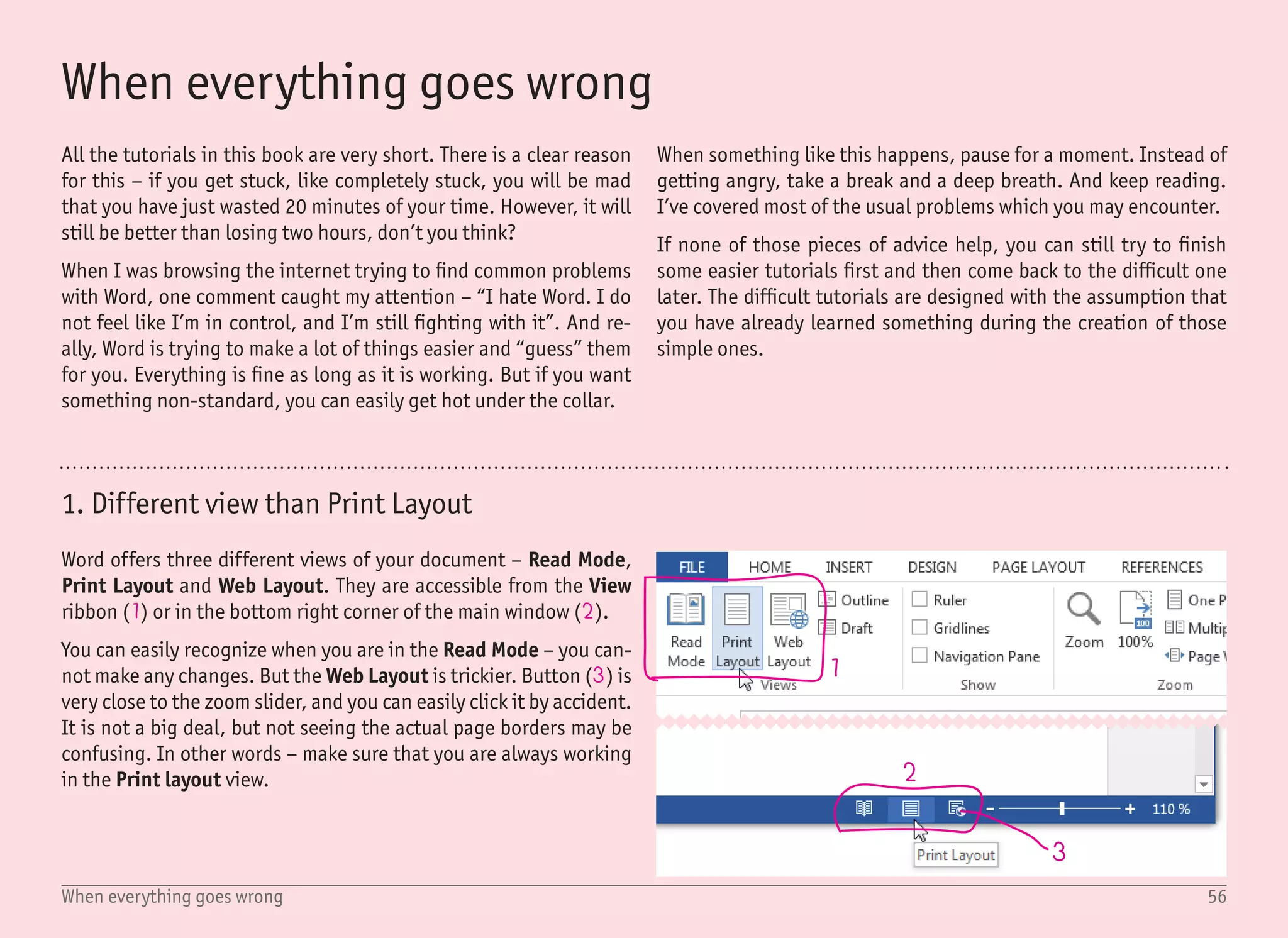
1. Different view than Print Layout
Word offers three different views of your document โ€“ Read Mode,
Print Layout and Web Layout. They are accessible from the View
ribbon (1) or in the bottom right corner of the main window (2).
You can easily recognize when you are in the Read Mode โ€“ you can-
not make any changes. But the Web Layout is trickier. Button (3) is
very close to the zoom slider, and you can easily click it by accident.
It is not a big deal, but not seeing the actual page borders may be
confusing. In other words โ€“ make sure that you are always working
in the Print layout view.
57When everything goes wrong
5
6 7
8
4
2. Problems in the zoomed-in view
The usual Word workflow is to create a new document and start typ-
ing. For our purpose, letโ€™s call this text a Body text. In this book,
this is not a usual process, and therefore this body text is most of-
ten empty โ€“ you can only see the text cursor (4).
What is important to know is that Word always makes sure that
you can see the text you are typing. Even if you may not realize it,
as you type, the current view changes and moves so you can always
see the text cursor. In the 100% view, this is not very obvious and
the view often changes only when you jump between the pages. But
try to zoom in to 500% and start typing โ€“ the current view will move
with almost every word.
How can this cause a problem? Say you have only one rectangle in
your document (5) (and, of course, an empty body text), if you click
on the rectangle, it becomes selected. If you click anywhere else,
Word assumes that you want to work with the body text and shows
the text cursor (4). This is perfectly fine if you have your document
displayed at 100% size.
But with the very same document, imagine that you zoom in to only
see the rectangle, so you can make some tweaks (6). When you ac-
cidentally click outside this rectangle (7), the rectangle is not only
unselected, but the view completely changes and moves to show
the text cursor for the empty body text (8).
This may be very frustrating as accidental clicks outside the se-
lected objects are quite frequent. The best approach to keep your
hair on is to use the Selection Pane for selecting objects in complex
documents. The usage of this pane is described in many tutorials,
for example, in the Stickers tutorial.
58When everything goes wrong
9 10
11
3. Invisible rotation handles
4. Text box content vs. text box shape
Dragging the rotation handle (9) with the mouse is the fastest way
to rotate an object. But if you resize the object to a very narrow
shape, there is no way this handle can fit in there, and therefore it
is hidden (10).
You can right click the object, select More Layout Options, and on
the Size tab, set rotation manually. But typing the actual number is
not as intuitive as dragging the handle with the mouse.
Fortunately, there is an easier way. When your rotation handle is
not being drawn due to the small object size, zoom in until the ro-
tation handle appears again. You would need an extremely narrow
shape not to display the rotation handle in the 500% view.
When you create a text box, it is made of two parts โ€“ the text itself,
and the shape (in which the text is placed). While they are different
objects, they both can have fill and outline. And if you do not pay
attention, you can easily start tweaking the outline for the shape
even if you want to add it for the text instead.
With the Format shape pane opened, there is a toggle to switch
between the text and shape settings โ€“ Shape options and Text Op-
tions (11). In most tutorials, the shape fill and outline are set to
none (i.e. transparent), and we are working with outline and fill
only for the text.
59When everything goes wrong
12
13
14
15
16
5. Selecting text box with no outline and no fill
Since we are using text boxes with no outline and no fill in almost all
tutorials, it is good to know how to select these objects.
The easiest (and preferred) way is to use the Selection pane (12),
where clicking any item in the list will select the corresponding ob-
ject. To show the selection pane, use the Home โ€บ Select โ€บ Selection
Pane command. The very same command is also on the ribbon Page
Layout.
There are cases where you do not need, or want, to have the selec-
tion pane displayed โ€“ maybe the document is very simple with just a
few objects, or maybe you want to see as much from your document
as possible. Although the selection pane is useful, it takes up some
screen space.
Selecting a text box without the selection pane is still quite easy โ€“
when you know how to do it properly. The worst approach is trying
to guess where the borders of the text box are. It is possible โ€“ the
borders are not visible, but when you move the mouse over them,
the cursor changes from typing to arrow (13), but it can take for-
ever.
A much easier way is to click into the text itself (14), which will re-
veal the borders of the text box โ€“ shown as the dashed line (15). To
select the text box itself, all you need to do is to click on this dashed
line (16). It will turn to a solid line.
Now you can use the arrow keys to move the object, or the (De-
lete) key to delete it. You can also use the arrow keys together
with the (Shift) key to change the object size while not affecting
the font size. This is quite a useful keyboard shortcut as it resizes
the object while keeping it center aligned.
60When everything goes wrong
17 18
19
20
6. Hidden or invisible functions
It is possible that your application window will look slightly differ-
ent than all the screenshots in this book. It is because Word chang-
es its layout depending on the window size, and also because you,
as a user, can customize it a lot.
Invisible ribbon
There are very few good reasons to have the ribbon hidden, which
means that the usual case of a hidden ribbon is the unwanted ran-
dom click on the arrow on the right side (17). You can still view
the ribbon by clicking on any ribbon tab on the top, but to show it
permanently, you have to click on the pin icon, which will be on the
same spot as the arrow was (18).
Different looking button(s) in the ribbon
When you resize the main Word window to the smaller size, some
buttons will hide their labels in order to fit (19). As you keep resiz-
ing the window to an even smaller size, some buttons may group
together and form dropdown buttons for the categories. It is not
only confusing, but it also slows down the work. For these reasons,
it is better to keep the windows bigger (if not full screen).
Different ribbon tabs
You can customize which tabs you want to have displayed by right
clicking any tab name and selecting Customize the Ribbon (20).
By default, some ribbons are hidden โ€“ like the Developer ribbon
(since it is targeted at advanced users). You can even rearrange the
order of the ribbons, but the default settings seems to be just fine.
Just do not panic when you see a different set of ribbon tabs. Focus
on labels, not on the exact positions.
61When everything goes wrong
press Ctrl key!
21
22 23
24
7. Renamed, removed or missing functions
I have done my best to keep all information up to date, but it is
possible that some function(s) will be renamed, moved or removed
in the future. If this happens, please try to use your common sense
and find something that seems to be the desired function.
You can even see some inconsistency in the application itself. One
example โ€“ on the Format ribbon, the outline of the object is called
Shape Outline (21), and you can set it to No Outline (22). In the
Format Shape pane, the very same thing is called just Line (23),
which can be set to No Line (24). Absolutely the same function,
just different wording.
8. Copying and pasting objects
Although this is described in every tutorial in this book, I want to
specifically repeat this one again. There is nothing wrong with copy-
ing and pasting objects using the well-known shortcuts (Ctrl) +
(C) (for copying) and (Ctrl) + (V) (for pasting). But on some rare
conditions, the pasted object can be on a different page or simply
in a wrong spot.
You can save a lot of time if you remember that dragging the object
with the (Ctrl) key pressed creates a copy, and positions it at the
same time. For me, this is one of the best time-savers. By the way,
this also works for text. And one last note โ€“ most other applications
have this functionality built in, but often use a different shortcut
key, such as the (Alt) key.
62Inspirational websites
Inspirational websites
Whenever you feel stuck, bored or just do not know how to continue,
the best thing to do is to study othersโ€™ work to get some inspiration
(and new ideas). Iโ€™m not saying you should copy or steal othersโ€™
work, but you cannot live in a bubble and ignore the outer world.
And if you take and reuse 1% of every masterpiece you see and like,
it is not stealing, it is inspiration. If you have not seen them already,
check the videos titled โ€œEverything is a remixโ€ (www.everything-
isaremix.info). You will realize how rare it is to have an idea that is
totally original and is not based on anything else. The key is to be
better, create unusual connections and see what others cannot see.
I have collected a few great pages, most of which even contain tu-
torials. Obviously, no tutorial is made for Microsoft Word, but that
should not discourage you. As already mentioned, the workflow and
naming in Word is pretty similar to the professional applications. Of
course, you cannot recreate most of the effects, but the tutorials in
this book should show you that you still have a lot of possibilities.
Your tools are limited, but your imagination should not be.
Tuts+ Abduzeedo
Possibly the best site with tutorials about almost anything, includ-
ing a lot of typography tutorials for Photoshop and Illustrator, as
well as for Inkscape (free vector application).
Great blog about design, including tutorials for Photoshop, Illus-
trator and a few others, as well as countless collections of visual
inspiration.
hub.tutsplus.com www.abduzeedo.com
63Inspirational websites
Bฤ“hance
Smashing Magazine
Dribbble
deviantART
Online portfolios to keep you busy for days. Unlike the other port-
folio webpages, works published here often show how they were
made, so you can see the process.
Great source for graphics inspiration including text effects. Hint:
do not ignore the web stuff. CSS (styles for web pages) have limited
functions for text effects, and can easily be reproduced in Word.
Dribbble is a place to explore design. While the โ€œshotsโ€ (screen-
shots) are often small or cropped, membership based only on invi-
tations guarantees only the best quality designs.
This page used to be the ultimate source for graphic inspiration in
the past, yet it has aged over time. Still, you can find some great
stuff in there. Not only inspiration, but also user-created tutorials.
www.behance.net
www.smashingmagazine.com
www.dribbble.com
www.deviantart.com
64Tutorials inspiration
GLASS
Broken glass tutorial
โ€œThe Secret Of Creativity Is Knowing How To Hide Your Sources.โ€
As said by Albert Einstein โ€“ who has probably hidden the source for
this quote. It is very similar to a saying by Pablo Picasso: โ€œGood art-
ists borrow; great artists steal.โ€
Both quotes say that you should not work without any sources, and
if you have already watched the โ€œEverything is a remixโ€ video from
the previous page, you know that it is impossible not to be influ-
enced by others โ€“ even if unconsciously. The key is to take whatโ€™s
already there and combine it in an unexpected manner to create
something new, better and useful. Not to hide your sources, but to
overshadow them.
I will reveal my sources for the tutorials in this book so you can see
how much I was influenced by the work of others. Most of the tutori-
als were based on the already existing tutorials, even if I had to cre-
ate a new process because of the Microsoft Word specific functions
(or lack of functions).
You will see that some effects have been done a thousand times,
so you cannot really tell who did them first. In the end, it does not
matter. The โ€œfirstโ€ means nothing (not only in the internet discus-
sion), being the best is a more important attribute.
Breaking things is fun, not only in the real world, but also on a com-
puter. The number of tutorials for this topic clearly shows that. The
broken glass effect, or shattered glass text effect is as old as Photo-
shop. It has been done in almost every application, and often uses
photographs or 3D renders of glass to emphasize the effect.
This is also visible on the first image with the glass overlay in the
middle. The second image is worth mentioning because the output
is very similar to ours โ€“ even if it uses a different method and ap-
plication (Illustrator). The text is broken into pieces, but unlike our
Word effect, it does not stay editable.
Tutorials inspiration
65Tutorials inspiration
Twirls & Curls tutorial
There are plenty of tutorials describing how to make this effect. You
can find them under different names โ€“ swirls, curls, floral patterns,
ornamental design elements or flourish ornaments. They vary in
difficulty quite a lot โ€“ some even describe creating those shapes
from scratch (like the green sample picture โ€œspringโ€).
Whatโ€™s more interesting for everyday users are all the pre-made
shapes which we can use (like we did in the tutorial). If we stay in
Word, the shapes ready to download are most likely in an unsup-
ported format. But there are plenty of free (and paid) fonts which
can be installed and used, and they look great.
Color tails tutorial
I remember seeing the tutorial about this effect in Photoshop many
years ago โ€“ describing that you have to copy the text, move it to the
right and bottom, copy again, move again... it was definitely not
fun. But times have changed, and now it takes a few minutes, even
in Word (see the tutorial).
If you focus on the third picture, it is from the tutorial about making
this effect using CSS styles (styles for web design). Those CSS styles
have only limited functions, just like Word, and therefore can be a
great source for inspiration, even if you do not plan to do any web
work at all.
66Tutorials inspiration
Freeze tutorial
Dance! tutorial
This tutorial is made from three different effects โ€“ the bokeh effect
(as shown in the second picture), vignetting (which is very easy to
create) and the icicles (as inspired from the third picture). While it
may look quite complicated (and not even very nice), it was created
using only Photoshopโ€™s default wind filter.
This filter started an avalanche of tutorials about icy text, frozen
text, snowy text, etc. The web was crowded with those winter tu-
torials, but this was many years ago. If you want to find a decent
up-to-date tutorial about one of those topics, you are out of luck.
Global warming has also struck the tutorials.
You can see a clear inspiration from the third picture here, which
is from vector tuts+ (using Illustrator). Illustrator also has quite
limited capabilities for rendering 3D objects, but once you create
them, you can tweak them with all the other tools. You cannot do
anything like that in Word.
By the way โ€“ most Photoshop tutorials about this effect are outdat-
ed (like the second picture). Photoshop did not have this function
for quite a long time, so all the tutorials used plugins, third-party
software or even some crazy techniques. Still, to get the best look-
ing 3D text, it is best to use a dedicated 3D application.
67Tutorials inspiration
Stickers tutorial
The roots for these tutorials are very old โ€“ starting with the Corel
Draw application and the effect for the folded corner. As usual, this
was quite a nice effect, but heavily overused over time. You can find
countless tutorials about this effect for almost every application
(with the exception of Word, of course).
The โ€œstickerโ€ effect โ€“ i.e. a very bold outline, is indeed inspired by
real stickers, where you need a solid shape without much detail.
Since it requires only adding the bold outline, it can be created in
almost every application which has this function. It is strange that
the Word tutorial was still missing (until now).
Vegas tutorial
Text effects like this spread widely when Photoshop introduced
layer styles. They allow us to add all kinds of effects (drop shadow,
glow, gradient overlay, stroke, etc.) while keeping the text still ed-
itable. It is also possible to save those effects and use them on any
other text, or even export them for future use.
There are websites where you can download or buy many pre-de-
fined layer styles for Photoshop โ€“ the second image is from one of
them (graphicriver). And there are countless tutorials on this topic.
With the recent introduction of โ€œlayer stylesโ€ in Word, some of them
could possibly be recreated in this application as well.
68This is (not) the end
This is (not) the end
I really hope that you like the book and had a great time creating
some amazing stuff by following the tutorials. I hope you have
learned something new and had fun at the same time. This book is
over, but there is more to come.
But I need your help. This book is free, it costs nothing, but I would
like to ask for 5 minutes of your time. Please share it, talk about it,
follow me on Twitter, Facebook or just send me an e-mail. Spread
the word, and if you like this book a lot and want to see another one
soon, please do everything you can.
Last but not least, be sure to check my website www.upir.org, where
you can download all the tutorials as Microsoft Word .docx files, so
you can tweak them on your own.
And this is it. Thank you for your time spent with this book, I hope it
was worth it. Talk to you soon.
7 Best Text Effects in Microsoft Word

7 Best Text Effects in Microsoft Word

  • 1.
    GLASS 7 Best TextEffects in Microsoft Word Vรกclav Krejฤรญ
  • 2.
  • 3.
    Copyright ยฉ 2013by Vaclav Krejci All rights reserved. Vรกclav Krejฤรญ e-mail: upir@upir.org web: www.upir.org Twitter: @upiir Facebook: www.fb.com/BestTextEffectsInWord/ First edition, September 2013 All trademarks and copyrighted items mentioned and shown in this book are the property of their respective owners. Disclaimer: The views and opinions expressed in this book are those of the authors and do not necessarily reflect the official policy or position of any other organization, specifically Microsoft Corporation. I have no connection with this company โ€“ yet.
  • 5.
    Ahoy Ahoy is acommonly used greeting in the Czech Republic, comparable to โ€œHelloโ€.
  • 6.
    77 Ahoy, my nameis Vรกclav Krejฤรญ, and I have this crazy idea: โ€œExplain graphic design to everyday users using software they are already familiar withโ€ Introduction This book is just the first in a series โ€“ but I need your help. If you like it, please share it, talk about it, follow me on Twitter, Facebook, or send me an e-mail. It will take you 5 minutes, but it means a lot to me. It gives me the energy to continue. Thank you.
  • 7.
    8Table of content TableOf Content Introduction 9 What you need to know (and have) 10 Why Microsoft Word? 11 Tutorials 13 Start with a blank document... 14 Glass text effect 16 Twirls & Curls text effect 20 Color tails text effect 24 Dance! text effect 28 Freeze text effect 34 Vegas text effect 40 Stickers text effect 48 When everything goes wrong 56 Inspirational websites 62 Tutorials inspiration 64 This is (not) the end 68 Tutorials!
  • 8.
    9Introduction During my highschool studies back in 2003, I had a great side job. I was teaching senior citizens computer science at a local university. Despite their age, they were all novice users. The plan was to teach them everything about computers. The first lesson was a nightmare. Everyone was bored and confused โ€“ does anyone really think one needs to know the binary system in order to work with a computer? I had to completely revise the approach. Since I was studying graphic design by myself, I came up with a simple but nice looking series of documents to be recreated โ€“ each one with a slightly dif- ferent graphical style and taking less than one hour to complete. Each one was created using nothing more than Microsoft Word. I was shocked. They all knew very little about computers but, with proper guidance, my โ€œstudentsโ€ were able to create stunning docu- ments while having fun. They were creating birthday party invitations for their grandchil- dren, calendars for their families, labels for Christmas presents... and a great deal more. Ten years later, everything fitted together. My English is better, I have a strong graphic design background, the current version of Microsoft Word contains all the necessary functions for advanced graphical effects, and iBooks Author allows me to publish this book for the iPad on my own and without the need for a real publisher. When working on the tutorials, bear in mind that miracles do not happen overnight. While all the tutorials can be finished in a short time, you will need much more time to master them. Remember that it is much easier to learn when you have fun โ€“ as my students found. However, despite the โ€œclass partyโ€ sample document from my class (sample at the bottom), I have no evidence that they were actually having any parties. At least not with me! Introduction
  • 9.
    10What you needto know (and have) Quick Access Toolbar - adjust it to your needs Text Box Ribbon Those styles are for average, boring people - not for you Text box with no outline and no fill = preferred way for working with text All the tutorials in this book are created for Microsoft Word 2013 (sometimes referred to as version 15) and Office 365. Most tutorials can also be completed using the previous versions (2010, 2007 or 2003), but it will take more time and effort. An internet connection can be handy if you want to look for inspira- tion, and of course, if you want to share your creations with your friends, but it is not required. You also do not need anything other than what you already have installed on your computer. Only fonts which come with Windows and Office are used, and there is no need for any other plugin or third-party software. This all means that you can try the tutorials on the work computer (when nobody is looking), or in school (and pretend that you are learning โ€“ which you are). Also, you can create the best looking doc- ument during a job interview and amaze the employer โ€“ of course, only if you have not already done so with your great looking rรฉsumรฉ. You need to have at least a basic computer and Microsoft Word skills to successfully finish all the tutorials. That means that you should know how to create a new document, how to write, and how to set different formats like font color, size or paragraph justification. You should know how to insert special symbols, draw basic shapes and how to change the outline and fill. Finally, you should know how to save your document, open it and print it or send it via e-mail. You really do not need much more than that โ€“ still, the book is not in- tended for someone who encounters Word for the first time. If this is your situation, then do not worry โ€“ there are plenty of books and online tutorials covering the basics, and you can learn them in few days, if not hours. What you need to know (and have)
  • 10.
    11Why Microsoft Word? Donot hide the ribbon, you will need it! Selection Pane = quick and easy way to select objects; to display it, select: Home ยป Select ยป Selection Pane. Zoom-in on a view for better precision Format Shape Pane - the best way to control the visual appearance Microsoft Word is definitely not the best application in the world. Like anything else, it has its pros and cons. There are three reasons why Iโ€™ve chosen Word for the tutorials. Firstly โ€“ it is widely recog- nized. Millions of users already have this software installed, so I can reach a wide user base. Secondly โ€“ most of the users already have some basic knowledge of this application. This is great because I can skip the boring parts and focus on the cool stuff instead. And the third reason โ€“ it evolves and improves. Most of the tutorials would not have been possible to finish using previous versions, and I can imagine that the next version will again bring newer and more useful functions. It is by no means a professional application for print design, but the techniques and workflow are pretty similar, and the knowledge described in this book can be reused in other applications as well. This is a very important and relevant detail: This book is an attempt to teach you how to work with Microsoft Word. Instead, it teaches you how to create text effects using Microsoft Word. You can reuse the gained experience in Photoshop, Illustrator, Corel Draw, Ink- scape, or any other application. When you know the principles, the tool is not that important. Since my intention is to explain graphic design to everyday users using software they are already familiar with, it also means that in the next version of this book, I may switch to a different applica- tion. If it would make more sense, I may be using Pages (application for iPads and Mac computers), Google Docs or maybe even some free online tools. Iโ€™m not tied to Microsoft Word, but from all the research Iโ€™ve done, it looks like the best option for now. Why Microsoft Word?
  • 11.
    GLASS T u to r i a l s
  • 12.
    13Tutorials GLASSStart with ablank document... Tutorials ๏‚˜๏‚š๏‚š๏‚š๏‚š ๏‚˜๏‚š๏‚š๏‚š๏‚š ๏‚˜๏‚˜๏‚˜๏‚˜๏‚˜ ๏‚˜๏‚˜๏‚˜๏‚˜๏‚˜๏‚˜๏‚˜๏‚˜๏‚˜๏‚š ๏‚˜๏‚˜๏‚˜๏‚š๏‚š๏‚˜๏‚˜๏‚š๏‚š๏‚š ๏‚š๏‚š๏‚š๏‚š๏‚š 5 min. 10 min. 30 min. 35 min.25 min. 15 min.10 min. 5 min.
  • 13.
    1 2 3 Every tutorial inthis book starts with the same first step: Start with a blank document, create Text Box with no fill and no outline, and type word X, with font Y, sized Z pt. Usually center aligned. If you are not sure how to perform this task, keep reading. Other- wise, feel free to jump right to the tutorials section. It is just two pages ahead! Start with a blank document... Iโ€™m pretty sure you know how to create a new document. It is as easy as clicking the File โ€บ New โ€บ Blank Document (1), or simply pressing the (Ctrl) + (N) shortcut. The more important question is โ€“ why use a new document for every tutorial? It is because everything can go wrong, and if it does, you do not want to lose more than you need to. If you want to use a new header for your 50-page document, create the header in a separate docu- ment, and if you are satisfied with the result, copy and paste it into the big document. Play it safe. There are two ways to insert a new text box, both on the ribbon In- sert. The first option is under Shapes โ€บ Basic Shapes โ€บ Text Box (2), and right after selecting the tool, you can use your mouse to draw a shape of the text box the same way you draw a rectangle. This will create an empty text box without any text, and it is the preferred way to create a text box. The second way to create a text box is in the Text Box (3) dropdown menu. It contains many pre-defined styles. They are great if you need a nice looking quote and you have little time. Obviously, this will not be our case โ€“ we want to start from scratch, and spend some time creating great things. We will certainly not be satisfied with anything average. 14Start with a blank document...
  • 14.
    15Start with ablank document... 4 5 7 8 9 10 11 12 13 6 Once you have a text box in your document, click into it and type the desired text (in our example, the โ€œMESSAGEโ€). To change the font in the text box, either select the text itself, or just have the whole text box selected (this will change the font for the entire con- tent of the text box). On the Home ribbon, choose the correct font (4) and the correct size (5). Most text effects are more visible in the bigger sizes, and that is why we are using a text size of at least 72 pt in all the tutori- als. To use a bigger size than 72 pt, click in the size edit box and type the value on your keyboard (for example 150 pt). It is good to know that resizing the text box (6) does not change the text size. Sometimes, you also want to change the font color (7), and maybe have the text center aligned (8). The last step before jumping to the real tutorials is to get rid of the default black outline and white fill. To do so, keep the text box selected and on the Format ribbon (9), click the Shape Fill (10) dropdown and select No Fill, and click the Shape Outline and select No Outline (11). With those settings, the text box is now invisible, and all we can see is the text inside. Without it, locating the empty invisible text box would be quite hard (not impossible, but hard). A final note to bear in mind โ€“ there is a difference between work- ing with the text box itself or with the content. When the selection box is showed as a dotted line (12), you are working with the text โ€“ pressing the arrow keys on the keyboard will move the text cursor. When you click on the text box outline and it becomes a solid line (13), you are working with the text box itself. Pressing the arrows keys on the keyboard will move the text box around the document.
  • 15.
    GLASS Estimated Completion Time:5 Minutes Difficulty: ๏‚˜๏‚š๏‚š๏‚š๏‚š Learn how to: โ€ข Adjust font properties โ€ข Fake breaking text into pieces โ€ข Create custom shapes
  • 16.
    GLASS 1 2 3 4 5 4 3 3 potato-shaped rock triangles When you breakobjects, they fall into piec- es. Not a big surprise, right? It is the same for glass as for any other material. But glass is a little bit special โ€“ it creates a specific pattern and it is also very easy to break. The chances are that you have already broken some glass, or maybe a window, and you have also seen the pattern. That is impor- tant because our brain can then create a connection between this text effect and something what weโ€™ve seen in the past. The more we know how this shattered glass looks in the real-world, the less we need to care about the preciseness and details. In Word, it is not possible to break objects intopieces.Ofcourse,twotrianglescanform a rectangle, but letters are complex shapes and those cannot be broken apart. The good news is that our brain can be easily fooled and we can fake this effect. Otherwise, this tutorial would not make any sense. The most important thing before we start is to study the โ€œbreakage patternโ€. When you hit the window with the rock (1) (please, do not try it just because you want to see the pattern), the object often goes through and creates a hole in the surface (2). Iโ€™ve cheated a little bit and placed this spot in- side the letter โ€œAโ€, where the hole already is โ€“ a small detail, but it can save some time and effort. From this point, the forces spread evenly in every direction (3), causing the object to break into triangles (4) and small pieces of text to separate and fly away from the cen- ter (5). The window in the real-world was probably not the best example since the glass is framed, and that causes the edges to stay within this frame. It is better to imagine a glass plate lying on the floor and being hit with a brick. In any case, you should know enough to start creating this text effect without the need for a riot. On the other hand, maybe the most apt usage of this effect could be on a rebellious poster? 17Glass text effect
  • 17.
    1/2 1 2 4 3 5 6 18Glass text effect Startwith a blank document, create a Text Box with no fill and no outline and write the headline with a big black-colored font. In our case, it is the word GLASS and the font is Franklin Gothic Medium sized 110 pt (1). If you paid attention to the previous page, you should already know that after hitting our glass text with the imaginary rock, everything will break and move. That is an important detail โ€“ nothing will stay in place. For that reason, we will set different positions for each letter. That will help to break the evenness and add some chaos and randomness. To do so, select any letter, open the font dialog ((Ctrl) + (D), or click button 2), select Advanced Tab and set Position to either Lowered or Raised (3). Values between 3โ€“5 pt seem to be working just fine, but it may vary for different sizes. Repeat the process for every character in the string. The helper line on the right (4) shows that you do not have to position every single character. Some can stay in the original position as well (like the โ€œGโ€ and the first โ€œSโ€). The next step is to break the text into triangle parts. Instead of breaking anything, we will add white triangles over the text to fake the broken parts. For that, we will use an Isosceles Triangle shape (5) from Insert โ€บ Shapes. There is a small downside to this method โ€“ once you resize the triangle to a very narrow shape, the rotation point (6) disappears, and there is no easy way to rotate it again. For this reason, it is better to rotate the triangle first, and resize it afterwards. You can still rotate the shape at any time by right click- ing and selecting the More Layout Options dialog, but Iโ€™ve found it easier to temporarily resize the triangle until the rotation point appears and make it narrow later on. In the end, there are less than 10 triangles anyway. By the way โ€“ in the preview image on the right, all of the triangles have a blue color so you can see them clearly.
  • 18.
    2/2 7 8 9 10 11 12 13 19Glass text effect Ifyou have not done so already, change the fill color for all triangles to white (7) and change the outline to No Outline. To select multiple triangles, click with the (Ctrl) key pressed. With all those trian- gles, we have hidden a lot of text beneath. But those pieces should not just disappear, so we will re-create them. It looks nice when the floating fragments appear exactly the same โ€“ as if they were ripped off from the text โ€“ but bear in mind that they do not always have to be perfect. We just have to follow the forces going from the center of the text (letter โ€œAโ€) and place the tiny fractions accordingly. This time we will use the Freeform shape (8) from Insert โ€บ Shapes. There are two ways of drawing the shape with this tool โ€“ pressing and holding the mouse to draw freehand, or single clicking to cre- ate straight lines. The second option is definitely easier to handle โ€“ after all, most of the fragments are distorted triangles and rect- angles. To create a shape, click with the mouse to create individual points (9), (10), (11), which will be connected with lines. To close the shape (so it can have fill), move the mouse close to the first point until the ghost shape is filled (12). Clicking this first point again will close the shape. If you do not need a closed shape, you can stop creating the shape by pressing the (Esc) or (Enter) key. You can see that even for the curved โ€œSโ€ letter (13), the fragment is still a triangle and it looks nice. While all the fragments are again shown in a blue color, you can start with black fill from the beginning. Do not try to overdo the effect. Remember that we want to create a broken/shattered glass effect in the shortest amount of time with very little effort. That should be our biggest advantage. Our sample has about 10 fragments. If we add another 10, it will take longer to create, but the effect will not be twice as good. If we add another 20 fragments, the result may even be worse. You know it already โ€“ less is more.
  • 19.
    Estimated Completion Time:10 Minutes Difficulty: ๏‚˜๏‚š๏‚š๏‚š๏‚š Learn how to: โ€ข Insert special characters โ€ข Quickly copy an object โ€ข Create a faded ink effect
  • 20.
    21Twirls & Curlstext effect 1 2 Creating calligraphic lettering in the real- world requires a pen, some ink, a steady hand and about 10,000 hours of training (Google the 10,000 hours rule). It is much easier with the help of a computer, but it would still take an entire book to describe, and endless hours to practice. But we only have a few minutes, and since we are assum- ing that we have no art skills, the only way to proceed is to reuse something already created by someone else. With every new version of Windows and Of- fice, there are more and more (nice-look- ing) fonts that are pre-installed. One of them is called Gabriola (since Office 2010 / Windows 7), which is exactly what we are looking for. Before we move on, letโ€™s briefly talk about fonts. I will try not to go into details here. The font file contains a graphical represen- tation for each defined character. When you press the (A) key on the keyboard, the sys- tem looks into the currently selected font, and if the โ€œAโ€ character exists, it is drawn. On the other hand, if the character is not in the font file, you will get the โ€œmissing characterโ€ symbol instead (which is often a rectangle , or crossed rectangle ). While entering the characters from the key- board is the fastest way to type, there is a limitation to the maximum number of pos- sible characters. You only have about 100 keys, while fonts often contain hundreds or thousands of characters. The way to enter those is to use keyboard shortcuts, or Sym- bol dialog (1). You can see that the design- er of the Gabriola font has already included some swirly and curly symbols at the end of the font (2). Hooray! With this information in mind, you can cancel your calligraphic lessons and create stunning typography effects in just a few minutes. But do not tell anybody how easy it was! And do not forget to send the post- card to the author of the font, who is (ac- cording to the website) John Hudson. Wiki- pedia also says that Gabriola is the name of an Island.
  • 21.
    22Twirls & Curlstext effect 1 2 3 1/2 Start with a blank document, create a Text Box with no fill and no outline, and type the first word (Twirls) with the font Gabriola, sized 90 pt, black color and center justification ((Ctrl) + (E)). In our sample document, we have three lines of text (Twirls & Curls). We can surely use paragraph justification and line spacing to posi- tion every word precisely, but Iโ€™ve found it easier (and much faster) to have a separate text box for each word. This also allows for better control of the layout. The best way to create three text boxes is to start with the first al- ready created and drag its border with the mouse with the (Ctrl) key pressed. You can see that the mouse cursor changes to show that a copy will be created (1). This little trick is much faster than using the copy/paste shortcuts ((Ctrl) + (C) and (Ctrl) + (V)). Also, if you press the (Shift) key while dragging with (Ctrl) key, the new object will be horizontally or vertically aligned with the original shape. The next step is to add the special symbols using the Insert โ€บ Sym- bol โ€บ More Symbols... dialog. However, in this dialog, the previews are very small and often cropped. For this reason, it is better to create another helper text box, where we add all symbols (2) in a bigger size (36 pt). This will help us decide which symbols we want to use. It also shows that every second symbol is just a flipped ver- sion of the previous symbol. Still, we have enough to choose from. The next few steps are very similar. Copy one of the already created text boxes (since we do not want to set outline and fill colors again and again), and paste one of the symbols. Set the size of the symbol to be big enough (about 90 pt), and rotate and move the text box (3). It is up to you if you want the symbols to overlap the text or not. To stay consistent, keep the font size for all symbols the same.
  • 22.
    23Twirls & Curlstext effect 4 5 7 8 10 9 6 2/2 With the instructions from the previous page, it may seem that you should continue with duplicating and adjusting the symbols forev- er. That is not true โ€“ you have to know when to stop. The best way to do so is to imagine an area which we want to โ€œfillโ€ with the shapes. In our example, the area is a simple rectangle (4), but it can be a circle, ellipse, or maybe even a heart symbol โ€“ it is up to you. Just bear in mind that the curly symbols are pretty complicated, which means that you do not need to use a lot of them. In our example, there are only five being used. To spice up this effect a little bit, we will use a simple technique to add a โ€œfaded inkโ€ effect. Select the Scribble (5) shape from the In- sert โ€บ Shapes menu and start doodling over the text like crazy (6). Iโ€™m not joking, create a big crazy mess, and repeat it three times so you will have three shapes. For illustration purposes, those three shapes are shown on the preview image, on the left, in different colors โ€“ green, blue and purple. It is just to see them better. Right click on any shape and select Format Shape to show the right format pane. Here, we have to set three things. We want the doodles to be only over the text, therefore, the color will be the color of the background, that is white (7). We also want the overlays to be thick- er, so we set the Width to 20 pt (8). Finally, we want this effect to be more subtle. This means that we set the Transparency somewhere between 70โ€“90% (9). To make it more random, we can set a differ- ent transparency (and maybe even width) for every shape. The enlarged preview on the left (10) shows the effect nicely (as well as the preview on the first page). The text, together with the curly symbols, no longer only has a solid black color โ€“ it also has some random shades of gray as if the ink was faded. Well, not re- ally like in the real-world, but remember that it took us less than 10 minutes to create. With real tools, the ink would not even be dry!
  • 23.
    Estimated Completion Time:10 Minutes Difficulty: ๏‚˜๏‚˜๏‚š๏‚š๏‚š Learn how to: โ€ข Create a 3D extruded text โ€ข Adjust lighting for the flat coloring โ€ข Easily select the right colors
  • 24.
    1 2 3 5 4 6 25Color Tails texteffect We have three possible ways to display a 3D object in Microsoft Word. The first option โ€“ Perspective view (1) โ€“ mimics the real- world view. As the object moves away from the observer (you), it gets smaller. That is why on the first cube, the back side (2) is smaller than the front side (3). How much smaller it gets is defined by the amount of Perspective. It can be a pretty big difference (like on the picture, where the perspective is set to 120ยฐ), or it can be quite subtle. If you keep decreasing the amount of Per- spective all the way down to 0ยฐ, you will notice that the back side is now the same size as the front side (4). This view is called Parallel view (5). It is often used for technical drawings (see any product manual) because once the ob- ject is drawn, it can be moved around the space freely. For the same advantage, this view was also used in some early computer games โ€“ it looks 3D, but you do not have to deal with perspective. The last view is Oblique view (6). This one is taught in schools and I can remember how I hated to draw it. It does not look very 3D โ€“ it looks ugly. The front side has no distortion and we just add the โ€œfake 3D sidesโ€. But, with the proper settings, it can create an interesting effect. This tutorial should prove it to you. Pity I did not know this dur- ing my school years!
  • 25.
    26Color Tails texteffect 1/2 2 1 3 4 5 6 7 8 9 10 11 Start with a blank document, create Text Box with no fill and no outline, and type the word COLOR with the font Arial Black, sized 72 pt (1). Change the font color to white and page color to light purple โ€“ us- ing ribbon Design โ€บ Page Color โ€บ More Colors (1), Custom color RGB 247, 238, 248. Right now the text is almost invisible and blended with the background, but that is fine, we will optically separate it from the background with darker โ€œtailsโ€ later. Right click the text box and select For- mat Shape to display the right format pane (3). Select Text Options (4) โ€บ Text Effects (5), 3-D rotation (6), and from the Presets dropdown menu (7) select Oblique โ€บ Oblique Bottom Left (8). Do not be afraid that there is no visual change in the text itself, it is because it has no depth. To add it, select 3-D format (9) and increase the Depth size value to about 200 pt (10). Our text will be ex- truded right after (11), even if it does not look quite right yet. We want to have this extruded part in solid color, without any shading or high- lights, and in random bright colors.
  • 26.
    27Color Tails texteffect 2/2 12 14 15 16 13 To get rid of the shading, change the Lighting to Special โ€บ Flat (12) (under 3-D Format settings). Now, not only the text is white, but also the extruded part (13). To make it nice and readable, we need to change the extrusion color and keep the text white. To do so, select the first character (the extrusion will temporarily disappear), and under 3-D Format, change the Depth color (14). Once you select the color, the text is unselected, and you can see the 3D depth effect again. Repeat the process for every character in the string with different colors, but try to maintain similar hues (15). You do not need to manually define colors, the ones used in this example are Standard colors. When you are finished with the word COL- OR, you can continue with the next line. Drag the text box with the (Ctrl) key pressed to create a copy and again set a different depth color for each letter. And that is it (16)! The next step is up to you. Maybe you will use a different font, darker colors, or a smaller depth? While there are just a few settings, they can create a lot of combi- nations.
  • 27.
    Estimated Completion Time:15 Minutes Difficulty: ๏‚˜๏‚˜๏‚˜๏‚š๏‚š Learn how to: โ€ข Create a 3D text โ€ข Keep the light source unified โ€ข Quickly create cast shadow
  • 28.
    1 2 34 5 5 1 9 6 6 2 10 7 7 3 8 8 4 9 10 29Dance! text effect For 3D objects, Word contains 11 different materials and 15 different lighting options. That, together with the lighting Angle set- ting, allows for unlimited combinations. How do I choose the right one? It is not very intuitive, as Word, in order to make it look simple, hides a lot of information. You cannot see what is happening behind the scenes. But you can try it. Letโ€™s start with the Material options and fo- cus only on the standard ones for now. We have four options to choose from: Matte (1), Warm Matte (2), Plastic (3) and Metal (4). The names sound splendid, but what thew really change are basically just the size and brightness of the highlight. For the lighting settings, we will only look at the Neutral section. There are six options available: Three Point (5), Balance (6), Soft (7), Harsh (8), Flood (9) and Con- trasting (10). As you can see on the preview image, some lighting options do not have any, or only very little, shadow, while some have very strong contrast. As mentioned previously, the size of the highlight is set by the Mate- rial. And to set the direction from which the light shines, you need to change the light- ning Angle value. While you cannot set the lighting intensity, color or even number of lights, you still have some degree of freedom for your creations.
  • 29.
    30Dance! text effect 1/4 1 3 2 45 68 9 10 7 Startwith a blank document, create a Text Box with no fill and no outline, and type the first character from the word DANCE, which is just โ€œDโ€ with the font Arial Bold, sized 72 pt (1). Change the font color to standard Orange (2) and set the paragraph justification to Center โ€“ (Ctrl) + (E) or by clicking the (3) icon. Before moving to the other characters, we will add 3D depth for this one, and then use it as a base for all the other let- ters. Right click the text box and display the Format pane by clicking Format Shape. Select Text Options (4), Text Effects (5), 3-D Rotation (6) and from the Presets dropdown menu, select Perspective He- roic Extreme Left (7). The text is distort- ed (8), but without any depth it is boring. To add depth, select 3-D Format (9) and increase Depth size to 30 pt (10). It is better but still not satisfying. The contrast between the front face and the extruded part is too high. In other words, the extruded part is too dark. We will try to fix it with different material and light- ing settings.
  • 30.
    31Dance! text effect 2/4 1112 13 1415 16 17 18 19 21 20 As explained in the tutorial introduction, change the Material to Metal (11) for bigger highlights, and Lighting to Bal- ance (12) for smaller contrast. While the contrast is smaller, the object is overexposed and too bright. We can- not adjust the lighting intensity, but we can try to change the lighting Angle (13) to see if the light in a different position will produce better results. Instead of di- rectly typing the value, keep clicking on the up arrow (14) and see how the object changes. Bear in mind that our imaginary light should shine from the top (15), so the highlight should be also on the top of the object (16). A value of around 210ยฐ seems to be just fine. We can move to the other letters. Select the text box and drag it with the (Ctrl) key pressed to create a copy. Repeat this 5 times, and place the text boxes randomly. Edit the letters inside those text boxes to form the word DANCE! and change the text colors. Most letters use standard colors โ€“ Light green โ€œAโ€ (17), Light Blue โ€œNโ€ (18), Purple โ€œCโ€ (19) and Yellow โ€œ!โ€ (20). The color of the letter โ€œEโ€ is from the More Colors dialog (21).
  • 31.
    32Dance! text effect 3/4 22 23 25 26 24 Thenext step is to open Text Options โ€บ 3-D Rotation on the Format pane and randomly rotate each letter using the buttons next to the X, Y and Z rotation (22). This not only changes the view, but also the lighting conditions โ€“ you can see that our rotated โ€œAโ€ letter now has light com- ing from the left, not from the top (23). We need to go to Text Options โ€บ 3-D For- matandadjust theLightingAngletokeep the light position consistent across all the letters. In the case of letter A, it means ad- justing it to the value of 340ยฐ (24). Repeat this process with every remaining letter. If you want to use the same values as this tutorial, the pictures on the right show the X, Y and Z rotation values for each letter. Here is a list of the Lighting Angle values: โ€ข N: 340ยฐ โ€ข C: 260ยฐ โ€ข E: 50ยฐ โ€ข !: 260ยฐ Remember, the light position does not need to be perfectly accurate, but the areas facing the ground (25) should be darker than the ones pointing to the top (26).
  • 32.
    33Dance! text effect 4/4 26 27 28 29 30 Afterwe rotate each letter in the 3D space, we need to adjust the positions of the text boxes to have the letters distrib- uted evenly. In other words, the spaces between the letters should be just about the same. To move the text box precisely, use the arrow keys on the keyboard, rath- er than the mouse. We can keep the white background, or change it to some other color to make it even more playful. On the Design ribbon, select Page Color โ€บ More Colors, and se- lect dark green (26). The very last touch is the shadow under the label to support the effect of floating letters above the surface. Draw a big Oval from Insert โ€บ Shapes โ€บ Basic Shapes in a dark blue color (27) and move it below the text (right click โ€บ Send To Back). Show the Format pane by right clicking the object and selecting Format Shape, select Soft Edges (28) under Effects (29) and set the size to 27 pt (30). This will blur the ellipse quite a lot and create a nice big shadow. And that is it! It was pretty quick, also because there were just six letters. Bear that in mind if you plan to apply this ef- fect on your 25 letter word. It can easily become a tedious task.
  • 33.
    Estimated Completion Time:25 Minutes Difficulty: ๏‚˜๏‚˜๏‚˜๏‚˜๏‚š Learn how to create: โ€ข Icicles made from custom shapes โ€ข Subtle abstract blurred background โ€ข Vignetting effect
  • 34.
    FREEZE focus distance more blurred more blurred 35Freeze texteffect The best effects are the ones based on real- world principles โ€“ your brain gets it much faster when it looks like something you al- ready know. For example, from photographs and movies. When you take a photograph, you often want the subject to stand out. This can be done in several different ways, for example by blurring the background by changing the aperture. The better camera and lens you have, the bigger this blurring can be. This effect is also bigger when you move closer to the subject (thatโ€™s why this is more vis- ible in macro shooting on cheap cameras). But the โ€œbackground blurringโ€ can be mis- leading โ€“ blurred is everything that is not in focus. As you move to any direction from this focus distance, the objects become blurred more and more. If you place some- thing right in front of the camera, it will be blurred quite a lot. This is just like our imaginary snowflakes, which become semi-transparent circles. This circle shape is defined by an aperture shape and can often look more like a poly- gon (pentagon, hexagon, et cetera). There is a term to define how nice the background blurring is โ€“ bokeh. The second part of our image consists of the faded corners. They are also derived from photography, where this effect is called vi- gnetting and is often unintended (caused by a cheap lens or small aperture). On the other hand, photographers with professional equipment which does not pro- duce vignetting often add this effect in post production (like we will do in Word). This is because it draws interest to the center of the image, just where our message is.
  • 35.
    36Freeze text effect 1/4 1 4 5 6 2 3 Startwith a blank document, create a Text Box with no fill and no outline, and type the word FREEZE, with the font Franklin Gothic Medium, sized 120 pt (1). Set the text color to White (2) which makes the text invisible over the white background, but not for long. To change the page color, select ribbon Design โ€บ Page Color (3) and select a light blue color (4) from the Theme colors. In case you have a different theme and do not see this color, you can also use the More Colors option and enter this color manually โ€“ RGB 156, 194, 229. Letโ€™s start by creating the stylized icicles. Although we will use the mouse cursor do draw our own shapes, there is no need for any kind of drawing skills. We will not be drawing, but shall be clicking in- stead. Select ribbon Insert โ€บ Shapes โ€บ Lines โ€บ Freeform (5). The basic workflow is described in the tutorial GLASS, check it out if you want to know more details. In short โ€“ you can either press and drag the mouse cursor to create freeform shapes, or you can just click around to create the object made from straight lines. The second option will be our case โ€“ not because icicles are angular, but because the selected font is, and it will fit together well. One thing to bear in mind โ€“ to close the shape (so it can have fill), click the first point again. Start with a fairly simple icicle โ€“ like (6), which is almost a triangle. Create it by clicking points highlighted in the preview (+), and close it by clicking the first point again. In order to have better precision, you can zoom in your view, or draw the icicle in a bigger size and resize it thereafter. The upper rectangular part of the icicle is there to simplify the positioning over the text. You will see it in a minute. To match the style of the text, set the fill color of the icicle to white and the line to No line.
  • 36.
    37Freeze text effect 2/4 78 9 10 11 12 Once you are done with a few simple icicles, you can try more com- plicated ones โ€“ like multiple icicles in one shape. It is possible that it will not be perfect on the first try. If it is really bad, deleting the shape with the (Delete) key and drawing it again from scratch is often the fastest way to fix it. A different situation is when you have a shape which is almost right, but needs some small tweaking โ€“ like icicle shape (7), where the middle icicle is too tilted to the right. While the shape is still se- lected, we can use the function Edit Shape โ€บ Edit points (8) in the Format ribbon to adjust each point individually. All we need to do is click and drag the point (9) to the desired place (more to the left). Edit Points is a very powerful feature which allows many more ac- tions, including adding and deleting points, but we will keep it simple for now and talk about it in detail in another tutorial. What we need to do right now is to create at least 5 different icicle shapes (10). The more the better, even if the variation of the shape is just small. We want to keep the duplicated icicles to a minimum. Even in nature, there are never two icicles the same. Move all the icicles closer to the text and resize them to match the size of the text โ€“ with the (Shift) key pressed to keep the propor- tions. Then move each of them over the text and optically align them with the individual letters. It looks better when the icicles are placed at the end of the letters (11), not just somewhere in the middle. For better precision, use the arrow keys to move in small increments. If you are out of icicles, you can create a copy by dragging the icicle with the (Ctrl) key pressed. To break the uniformity, you can flip a copied icicle using ribbon Format โ€บ Rotate โ€บ Flip Horizontal and maybe resize it a little. It will be less obvious that the icicles are based on the same shape โ€“ like (12).
  • 37.
    38Freeze text effect 3/4 13 14 15 16 17 18 19 20 22 21 Aftera few minutes of playing, you should have something like on the right. You can choose if you want to also add icicles below the letters (13). I choose not to. Aligning the icicles can sometime be tricky, as Word is not perfectly accurate when drawing the text. For this reason, perfectly aligned icicles in the zoomed-in view can look a little bit off when viewed at different zoom levels or at 100%. But that is fine. Nobody will examine those tiny details except you. Adding the blurred snowflakes will be easier than you might think. Draw an Oval from the menu Insert โ€บ Shapes โ€บ Basic Shapes with the (Shift) key pressed to make it a perfect circle (14). Right click the object and select Format Shape to show the format pane on the right, and in here change the Line to No Line (15) and Fill color to white (16). To make the โ€œsnowflakeโ€ more subtle, lower the fill Transparency to 50% (17). While keeping the object selected and Format pane open, switch to Effects (18) โ€บ Soft Edges (19) and increase Size to 5 pt (20). This will blur the circle and create the โ€œbokehโ€ effect. The next 25 steps are very similar. Drag this blurred circle with the (Ctrl) key pressed (21) to create a copy, maybe resize it, adjust the fill Transparency and even play with the amount of the blur ef- fect. This time every snowflake does not need to be different. If you look closely, there are only about four types of snowflakes used on the right image and distributed around the space evenly. While it looks nice when you overlap two snowflakes (22), try not to overuse this effect. When duplicating, try to avoid big empty spaces without any snowflakes, as well as too many snowflakes in one spot. The Fill Transparency is for all snowflakes between 50 and 80%. We still want the text to be in focus.
  • 38.
    39Freeze text effect 4/4 23 24 25 26 27 28 Tocreate the vignette effect, draw a new Rectangle (23) from Insert โ€บ Shapes โ€บ Rectangles in a big size to cover every- thing (both text and snowflakes). If not already opened, open the Format pane (right click โ€บ Format Shape), change Line to No Line and Fill to Gradient Fill (24). Change Type to Radial (25) and from the direction dropdown, select From Center (26). Add a new gradient stop (27) to have a total of three (by clicking anywhere in the gradient preview). Change the color for the first two gradient stops to white, and Dark Blue for the third one (under Standard Colors). We cannot see anything but the rectan- gle, but that is fine. All we need to do is to make the white gradient stops trans- parent โ€“ select the first and then the sec- ond gradient stop, and set Transparency to 100% (28). For the dark blue gradient stop, set transparency to about 40%. This depends on how much you want the dark edges to be visible. And that is it!
  • 39.
    Estimated Completion Time:30 Minutes Difficulty: ๏‚˜๏‚˜๏‚˜๏‚˜๏‚˜ Learn how to: โ€ข Work with the gradient fills โ€ข Create strong reflection with gradients โ€ข Create realistic glow
  • 40.
    A A 4 1 2 3 3 3 4 5 5 6 41Vegas texteffect I need to tell you something. I do not like this effect very much. While strong high- lights, glows and sparkles symbolize Vegas nights for sure, all those fancy effects have been overused in the past so much that it hurts my eyes. However, there are still a few valid reasons to include this tutorial in this book. Whenever I show all the text effects to my friends, they are curious how this Ve- gas effect is done. There are also a few in- teresting techniques which can be learned. And truly โ€“ in some cases the usage of this effect can be well founded. Just please, do not use it everywhere. Before we jump into Word, letโ€™s briefly talk about the highlight inside the text. This strong highlight is often made by placing a gradient from white to semi-transparent white (1) over the text, and setting the text as a clipping path, so the highlight is vis- ible only over the text (2). In Word, it is not possible to show objects only over the text. It would be fine on the white background, but for a darker background, we have to find some other way. We can take advantage of the gradient fill. With the gradient stops (3), Word calcu- lates the values in between those (4), so the transition is always smooth. If we move two gradient stops very close to each other (5), there would be few in between steps to calculate, which would result in the sharp transition between those two colors (6). It is as simple as that. Word allows us to place the gradient stops only at integer values, so the transition will not be razor sharp, but it should be enough for our purpose. After all, we do not have any other choice anyway.
  • 41.
    1 2 3 4 5 6 7 8 9 10 1/6 42Vegas text effect Startwith a blank document, create a Text Box with no fill and no outline, and type the word VEGAS with the font Trebuchet MS, sized 72 pt. Do not care about the color too much as we will change it in a minute any- way. As described on the previous page, we want to fill the text with a gradient which would mimic a strong white highlight. Right click on the text box and select For- mat Shape to show the formation pane on the right. Choose TEXT OPTIONS (1), TEXT FILL (2), and change Solid Fill to Gradient Fill (3). If it is not set already, change Type to Linear (4) and Angle to 90ยฐ (5). This means that the gradient will be drawn from the bottom to the top (or the other way). Select the first gradient stop (6) and change the color from the color dropdown menu (7) to Purple (under standard colors). Select the second gradient stop (8), click the color dropdown menu, select More Colors and set the light purple / lavender color (9). Why is the bottom of the text also lighter, when the light source comes from the top? Our text will be placed on a dark background, and we want it to stand out. Imagine that our text is sitting on a reflective surface, which does not cast a shadow on the bot- tom, but rather a highlight.
  • 42.
    11 16 17 18 19 20 21 13 14 15 12 2/6 43Vegas texteffect Now for the strong highlight from the top. Before defining the stops, resize the right format pane (11) to be wide enough. Iโ€™m lim- ited with the space on this page, but you are not, make it wide (but in a way that you can still see the text). Add two new gradient stops by either clicking anywhere in the gra- dient area (12), or by clicking the Add gradient stop button (13). The color of the lighter stop (14) is standard lavender โ€“ (10) on the previous page. The color of the darker one (15) is based on the standard Purple color but darkened. RGB value is 97, 42, 138. Here comes the tricky part. Select the darker gradient stop (15) (third from the left) and drag it to the left as close as you can to the other stop (16). Why is this tricky? If you drag it too much, the stop will jump over the previous one, and you will get highlight from the bottom (17), not from the top. Image (18) shows the result which we want to achieve. Also note that Iโ€™ve moved the stop on the very right side (19) more to the left. The highlight on the bottom was not very visible, and this is an easy way to fix it. Since the text fill updates in real time, getting the desired result is very easy. Before we start adding glows, we have to change the page color to something darker. We would not be able see any glow on the white page โ€“ the same as you cannot see light rays on white paper. It sim- ply cannot get any brighter. Select ribbon Design โ€บ Page Color โ€บ More colors (20) and in the Custom tab, search for the right one. We want to avoid pure black to have some color in the shadows, and we do not want purple to break the monochromatic feel. Some darker blue color could be just fine. The screenshot on the left shows the final RGB values: 21, 28, 79. Try to experiment with the right saturation โ€“ i.e. moving the slider (21) more to the top or bottom.
  • 43.
    22 24 25 23 26 27 26 28 29 30 Thenext step is to add the light-colored outline. This will help to separate the light text from the dark background even more. It will also serve as a visual base for the future glows. With the Format Shape pane still visible and the text box still se- lected, open the TEXT OUTLINE settings and set the line to Gradient Line (22). Most options are the same as for the fill โ€“ Type: Linear, Angle: 90ยฐ (23), Width: 1 pt (but this depends on the font size). What is different is the actual gradient. We have our imaginary main light shining from the top (24) (causing the big highlight over the text fill), and we also have an imaginary reflective surface below the text (25) (causing the subtle highlight from the bottom). For this reason, the outline will be white on the top and the bottom (26), and darker in the middle (27). This color is light purple, RGB valuse: 227, 168, 254. Again, you can see that the positions of the gradient stops often need some tweaking โ€“ in this case the first gra- dient stop was moved more to the right, so the highlight from the top is bigger than the highlight from the bottom. Now for the glows. There is an effect called Glow under the Text Effects, but that alone is not enough. The result is not satisfying, and there is very little that can be set. For this reason, we will use everything possible to create the glow effect. That not only includes the Glow effect, but also Shadow and Reflection. Those three ef- fects together will form a nice big glow. Start with the Shadow effect under the Text Options โ€บ Text Effects (28) and select any preset for Outer shadow (29). To have a glow and not a shadow, we need to set Color (30) to light lavender (RGB 227, 168, 254). Since we want an even glow around the whole text, set Distance: 0 pt, some bigger value for Blur and no Transparency (0%). The glow is subtle, but that will change in a moment. 3/6 44Vegas text effect
  • 44.
    31 3233 34 35 36 4/6 45Vegas texteffect All we have to do is add another glow, this time using the Glow ef- fect (31). There is not much that we can set here, so just set the Color to the same light lavender, Size to 5 pt and adjust Transpar- ency until you are satisfied. A value around 60% seems to be just fine. This glow effect does not have any additional controls, espe- cially for setting blurriness, which results in quite a โ€œfatโ€ and not very blurred glow. While it is fine here, in most cases it is better to use the Shadow effect for the glow (just like we did in the previous step). With the help of the Reflection effect (32), we can add our imagi- nary reflective surface under the text. Set Transparency to 0%, Size to 20% and Distance to around 2 pt. The image on the left (33) shows a reflection with Blur set to 0 pt while image (34) shows the Blur set to 20%, which is the final settings. The effect alone is quite subtle, but remember that we already have two other glows. The very last glow will not become directly from the text since we are out of effects. We need to create a new object โ€“ a โ€œglowing circleโ€ โ€“ behind the text, which will enhance all the glows created previously. There are multiple ways of creating this glowing circle object โ€“ we can use radial gradient fill, or we can try to blur the circle. In any event, we need to start with the object first. Create a new Oval (35) from the Insert โ€บ Shapes menu, and make it bigger than the text in the standard Purple color (36). In case you need a different size, but you have already centered the oval with the text, there is a cool little trick to resize any object and keep it center aligned. All you have to do is press the (Ctrl) key when resizing. If you also press the (Shift) key, the object will keep the same proportions.
  • 45.
    37 38 39 41 45 42 43 44 40 5/6 46Vegastext effect To blur this oval, select Effect โ€บ Soft Edges and set Size to at least 50 pt (37). We want this glow to be very subtle and possibly quite big, which is the reason why the oval was drawn much bigger than the text. The glow over the text now looks more natural, and we can call it done. Which leads us to the final part of this effect โ€“ stars. Take a look at the final result again (on the first page). There are bigger glowing stars placed over the outline, and a few smaller ones over the text fill. Both types are based on the same star โ€“ they are just resized. Before drawing any star, zoom-in to about 400%, as the stars will be quite small and we want to see them clearly. Then draw 4-Points Star (38) from Insert โ€บ Shapes โ€บ Stars and Banners with the (Shift) key pressed to keep the right proportions. Change the outline to No Outline and fill to any color for now. We need to tweak the shape first as the star is quite bold. Therefore, grab the yellow handle (39) and move it towards the center to make the star lighter (40). We want the star to shine from the center and slowly fade out to the edges, and to accomplish this, we will use gradient fill with trans- parency. Set the fill of the star to the Gradient Fill, change the Type to Radial (41) and add an extra gradient stop so we will have a total of three. Change the color of the first gradient stop (42) to white, the second (43) to light lavender (RGB 227, 168, 254), and the third (44) to light purple (RGB 153, 102, 225). If the gradi- ent is not displaying from the center of the star, click the Direction dropdown menu (45) and select From Center. Tweak the positions of the gradient stops by dragging them left or right to keep the white part in the middle of the star small โ€“ that is by dragging the second gradient stop (43) more to the left.
  • 46.
    47 46 48 49 6/6 47Vegas text effect Thetips of the star are dark, but we want them even more faded. We can set the color of this gradient stop to some darker one, but it would not look good over the light-colored text fill. A better prac- tice is to make this color more transparent. To do so, select the third gradient stop (46) and raise the Transparency all the way to 100% (47). The gradient preview incorrectly shows the color as white (48), but you can ignore it. Our star is done. Which means that all we have to do is select it and paste it all over the text outline. The quickest way is to select the star and move it with the (Ctrl) key pressed. That will create a copy which you can position right away. However, to place the stars precisely, it is bet- ter to use the keyboard arrow keys. If you still do not have enough stars, you can resize one of them to the smaller size (49) and duplicate it over the text fill. It is so easy that it almost makes me want to say โ€“ do not overdo this effect (if it is not overdone already). And that is it โ€“ glowing text with shiny sparkles done in less than half an hour. The best part is that the text, together with the back- ground glow, is fully dynamic. This means that at any time, you can change your mind and type different text, and the effect will still stay the same. You can even change the font. Placing the stars over the outline and the fill cannot unfortunately be done automatically, but with the help of the (Ctrl) + dragging trick, it is still pretty quick. I will repeat myself for the final words. The times of big reflections, highlights and glows are over. Some people are bored with those effects. Some may even hate them. But history repeats itself, so you better be prepared, those effects will be popular again โ€“ sooner or later!
  • 47.
    Estimated Completion Time:35 Minutes Difficulty: ๏‚˜๏‚˜๏‚˜๏‚˜๏‚˜ Learn how to create: โ€ข Very bold sticker-like outline โ€ข Folded corner effect โ€ข Shadows for the realistic result
  • 48.
    49Stickers text effect 12 3 4 5 6 7 8 9 10 When examining 3D objects in perspective view, you can instantly tell that object (1) is a cube, because you can see the sides, shad- ing and perspective. But in the front view, all you can see is a rectangle (2). Without seeing the previous picture, you cannot tell if this is just a rectangle, or if it is a cube viewed from the top. The only way to indi- cate and suggest some depth in this view is to add shadows (3) from the imaginary light source (4). Our brain knows that a flat rectangle placed on the surface cannot cast a shadow this big and that there has to be some 3D depth which is just not visible. The obvious question is โ€“ if we want the 3D shape to be seen, why not always show it in a perspective view? While this may work for the cube, we want to show the text in a front view most of the time to keep it visu- ally simple and readable. Now for our sticker effect. Most of the ob- ject is flat, just like a real sticker is โ€“ it is a piece of paper or plastic. The 3D part is the folded right bottom corner. While still keep- ing the front view, we want to show that this part is standing above the surface. And, as outlined, we will use mainly shadows to achieve this effect. Imagine a light source coming from the top left (5) (which is usual, as the sun is always shining from the top). As the light rays travel, the folded corner is in the way (6), which means that area (7) should receive less light and therefore be in shadow. The second smaller shadow is below the folded corner (8) as this gap is small and less light rays will reach it. It also differentiates the folded corner from the white sticker under- neath. The last shadow is almost invisible. It is on the folded corner itself. If you com- pare the color of points (9) and (10), you can see that the second, which is closer to the background and further from the light, is a little bit darker.
  • 49.
    1 3 4 5 6 2 2 Start with ablank document, create a Text Box with no fill and no outline, and type the word stickers with the font Arial Rounded, sized 72 pt. Change the font color to some darker green color (1) and set the paragraph justification to Center โ€“ (Ctrl) + (E). In order to see the big white outline which we will create in a min- ute, we need a paper color different than white. Switch to the De- sign ribbon, select Page Color โ€บ More Colors and select a light green color โ€“ for example this one (2). It does not matter that the text is now blended with the background and almost invisible. Now we want to add a bold and thick outline. Right click the text box, select Format Shape to show the format pane on the right and select Text Options โ€บ Text Outline (3). The outline is most probably set to No line. Change this to Solid line (4) and increase Width to some bigger number, for example 5 pt (5). Oops! This is not the ef- fect which we want to have. What happened? The outline is being drawn to both sides โ€“ not only the outside, but also the inside, overlapping the text fill. The bigger the outline we set, the less we can see from the actual text fill. While we cannot set the outline to be only drawn outside (like in other applications), we can still use a workaround โ€“ keep one label on top without any outline, and a second label with a thick outline below. So step back a little, and before playing with the outline settings, select the text box and copy and paste it โ€“ (Ctrl) + (C), (Ctrl) + (V). Then move it to the same position as the original text box (i.e. a little bit to the left and top). For the copied text box, set the text outline again to No Line (6). This looks much better. 1/6 50Stickers text effect
  • 50.
    78 9 10 11 12 13 14 15 16 17 18 2/6 51Stickers texteffect Now we have two identical text boxes with the same text. One has the outline, while the other does not, but the sizes of both text box- es are the same, and it may be hard to distinguish between them and even harder to select the right one. The solution is one click away โ€“ select ribbon Home โ€บ Select โ€บ Selec- tion Pane. This pane shows all objects on the active page, allowing us to select any object, select multiple objects (clicking with the (Ctrl) key pressed), hide or show any object (7), rename objects by double clicking its name (8) and move objects in the Z-axis (i.e. to send objects more to the back or to the front). For now, the only thing we need to remember is that clicking the item in the list se- lects the corresponding object. Select the text box which contains the text with an outline by click- ing the โ€œText Box 1โ€ item in the Selection pane (8). If not already opened, open the Format pane by right clicking the object and se- lecting Format Shape. To make the big outline a little bit more real- istic, we will use a very subtle gradient instead of a solid color. This gradient should still correspond with the light source from the top (9), bouncing from the floor back to the bottom of the text (10). As a result, the top part, together with the bottom part, will be lighter than the rest of the outline. Start with setting the line to Gradient line (11), set Type to Linear (12), and Angle to 90ยฐ (13) to have the gradient from top to bot- tom. Set the first (14) and last (15) gradient stop colors to white, and add two new gradient stops by clicking anywhere in the gradi- ent preview (16). For those two gradient stops, set the color to a very light gray (17), and drag them more to the right side as shown. This will make the darker part in the outline closer to the bottom. Also, increase the Width to a much bigger value โ€“ like the 25 pt shown on the screenshot (18).
  • 51.
    3/6 52Stickers text effect 19 20 21 22 25 24 Thebase for the sticker is done, and we can move to the creation of a folded corner. There is a reason why the text says โ€œstickersโ€ and not just โ€œstickerโ€ โ€“ I needed a big round letter so the folded corner can be a little bit bigger. โ€œStickeroโ€ would probably be even better, but it does not sound very English. Before drawing the corner, we need to hide the part of the text which will be folded. The only way is to draw a Rectangle from the Insert โ€บ Shapes โ€บ Rectangles menu, with the fill the same as the background color. Then rotate the shape by 45ยฐ โ€“ drag the rotation handle (19) while pressing the (Shift) key and move the rotated rectangle over the text like it is shown on the right (20). Now we need to add three things โ€“ the folded corner which weโ€™ve just hidden, the drop shadow below the corner and the shadow between the sticker and the corner. For all three, we will use the Chord shape. Letโ€™s start with the folded corner, as it requires the most accuracy. Draw a new Chord shape from Insert โ€บ Shapes โ€บ Basic Shapes with the (Shift) key pressed to maintain the circle proportions. Change both the fill and outline color to a distinctive one โ€“ like the dark green, and move it over the cropped โ€œsโ€ letter (21). Zoom in as much as you can to see all the details, and start moving the yellow handles (22) and (23) to match the shape of the previously cut corner. If the sizes do not match, resize the shape a little (24) with the (Shift) key pressed, and move it precisely with the arrow keys. After all the tweaking is done, you should end up with something like (25). Remember that if it looks almost right when magnified to 500%, it will be perfect when shown at 100% size. It does not need to look perfect when magnified. Still bear in mind that using the arrow keys on the keyboard is the best way to precisely move an object.
  • 52.
    4/6 53Stickers text effect 26 27 28 29 30 313332 We want to have the folded corner in a light green color to be darker in the right bottom area. Open the Format pane (right click โ€บ Format Shape), change the Fill to Gradient Fill (26), Type: Linear and set the first gradient stop color to RGB values: 221, 255, 238 (27), and the second gradient stop color to RGB values: 197, 255, 226 (28). Those two colors are so similar that it is very hard to guess in which direction this gradient is being drawn. The easiest solution is to use a little trick โ€“ we temporarily set one gradient stop color to some distinctive one, for example, black. This not only immediately shows us that the gradient is drawn from left to right, but we can also open the Direction dropdown (29), and choose the right direction. In this case, it would be the first one โ€“ โ€œTop Left to Bottom Rightโ€. Since we have the right setting for the gradient direction, we can change the second gradient stop color back to darker green. You do not need to type the color values manually again. This color should be under Recent colors in the color dropdown. The next part is the outline of the folded corner. The reason we kept the outline is because we want to show a very small highlight over the edge of the folded corner, which would, together with the shad- ow underneath, create an even bigger contrast (30). With the folded corner still selected, change the line to Gradient line with almost the same settings as the fill โ€“ Type: Linear, Angle: 45ยฐ. The first gradient stop color is white (31). The second gradi- ent stop color is light green โ€“ RGB: 210, 255, 228 (32). Now drag the first stop more to the right and the second stop more to the left until you see a nice white-to-green gradient on the outline (33). Be sure to zoom in a little to see it better. Sometimes it also helps to deselect the object as the selection handles can be in the way. Also, remember that the highlight will be more visible once we add a shadow.
  • 53.
    54Stickers text effect 5/6 34 35 36 37 38 35 Tosave a few clicks, we will also use this folded corner as a base for the shadow on the bottom right side. Copy and paste this object by dragging it with the (Ctrl) key pressed and rotate it by 180ยฐ by dragging the rotation handle (34) with the (Shift) key pressed. Change the line to No line, keep the fill as Gradient fill, but add a new gradient stop and change the gradient stop colors to: light green โ€“ RGB: 153, 255, 204 (document background color), green โ€“ RGB: 108, 222, 179, dark green โ€“ RGB: 0, 128, 128. Change the gradient direction from top left to bottom right (Angle: 45ยฐ), and move the gradient stops to visually fade the gradient into the background (35). Resize the shape to make it a little bit bigger, but this will be tweaked in the next step anyway. What is more important is to temporarily select the folded corner and bring it to front (right click โ€บ Bring to Front). We want this shadow to be below the folded corner. If not selected, select the shadow chord object and in the Format shape pane, click Effects (35) โ€บ Soft Edges (36) and enter Size value 5 pt (37). This will blur our shadow and make it more realis- tic. At the same time, this effect is dynamic, which means that we can still adjust all the properties โ€“ which we will. We need to move the shadow closer to the text, maybe resize it to match the folded corner size, and we may even want to move the yellow handles to change the shape a little. We are able not only to control the intensity of the shadow by changing the blur amount (i.e. Soft Edges size), but also by tweaking the gradient settings โ€“ moving the gradient stops. In the end, we should have something like that shown on the right (38).
  • 54.
    55Stickers text effect 6/6 38 39 40 41 42 42 Thenext part is the shadow in between the folded corner and the sticker. Again, the chord shape will be used, but this time it is easier to draw it from scratch, that is from the menu Insert โ€บ Shapes โ€บ Ba- sic Shapes. There is no need to press the (Shift) key while draw- ing this time โ€“ we want to have this object egg-shaped. Adjust the yellow handles accordingly and change the fill color to RGB 0, 128, 128, and outline to No Outline. Then rotate it by โ€“45ยฐ and move it over the folded corner. We want to have this shadow below the folded corner, and over the sticker itself. We can use the right click menu and the Bring To Front / Send To Back commands, but with all the objects we have, using the selection pane will be much easier. If not already dis- played, open it by clicking ribbon Home โ€บ Select โ€บ Selection Pane. As shown on the left, you can double click any item name to rename the object, which is a good practice when working with multiple ob- jects. What is more important to us right now โ€“ is that you can grab any item and move it below or under other objects. Which is exactly what we need to do with the shadow object (39). When the shadow is in the right place, we can use the Soft Edges effect (39) to blur it, this time with Size set to 10 pt (40). Once blurred, play with the size of the object and the shape using the yellow handles to show the blurred shadow below the folded corner (41), but not on the sides (42). And this is it. The final result on the first page has a few additional circles around the text, which are nothing more than white Oval objects drawn with the (Shift) key pressed and moved below all the other objects. Iโ€™m pretty sure that if you were able to reach this stage of the tutorial, you will know how to draw a few more circles. If not, check the other tutorials and come back here later. And get some rest, you definitely deserve it!
  • 55.
    56When everything goeswrong 1 2 3 All the tutorials in this book are very short. There is a clear reason for this โ€“ if you get stuck, like completely stuck, you will be mad that you have just wasted 20 minutes of your time. However, it will still be better than losing two hours, donโ€™t you think? When I was browsing the internet trying to find common problems with Word, one comment caught my attention โ€“ โ€œI hate Word. I do not feel like Iโ€™m in control, and Iโ€™m still fighting with itโ€. And re- ally, Word is trying to make a lot of things easier and โ€œguessโ€ them for you. Everything is fine as long as it is working. But if you want something non-standard, you can easily get hot under the collar. When something like this happens, pause for a moment. Instead of getting angry, take a break and a deep breath. And keep reading. Iโ€™ve covered most of the usual problems which you may encounter. If none of those pieces of advice help, you can still try to finish some easier tutorials first and then come back to the difficult one later. The difficult tutorials are designed with the assumption that you have already learned something during the creation of those simple ones. When everything goes wrong 1. Different view than Print Layout Word offers three different views of your document โ€“ Read Mode, Print Layout and Web Layout. They are accessible from the View ribbon (1) or in the bottom right corner of the main window (2). You can easily recognize when you are in the Read Mode โ€“ you can- not make any changes. But the Web Layout is trickier. Button (3) is very close to the zoom slider, and you can easily click it by accident. It is not a big deal, but not seeing the actual page borders may be confusing. In other words โ€“ make sure that you are always working in the Print layout view.
  • 56.
    57When everything goeswrong 5 6 7 8 4 2. Problems in the zoomed-in view The usual Word workflow is to create a new document and start typ- ing. For our purpose, letโ€™s call this text a Body text. In this book, this is not a usual process, and therefore this body text is most of- ten empty โ€“ you can only see the text cursor (4). What is important to know is that Word always makes sure that you can see the text you are typing. Even if you may not realize it, as you type, the current view changes and moves so you can always see the text cursor. In the 100% view, this is not very obvious and the view often changes only when you jump between the pages. But try to zoom in to 500% and start typing โ€“ the current view will move with almost every word. How can this cause a problem? Say you have only one rectangle in your document (5) (and, of course, an empty body text), if you click on the rectangle, it becomes selected. If you click anywhere else, Word assumes that you want to work with the body text and shows the text cursor (4). This is perfectly fine if you have your document displayed at 100% size. But with the very same document, imagine that you zoom in to only see the rectangle, so you can make some tweaks (6). When you ac- cidentally click outside this rectangle (7), the rectangle is not only unselected, but the view completely changes and moves to show the text cursor for the empty body text (8). This may be very frustrating as accidental clicks outside the se- lected objects are quite frequent. The best approach to keep your hair on is to use the Selection Pane for selecting objects in complex documents. The usage of this pane is described in many tutorials, for example, in the Stickers tutorial.
  • 57.
    58When everything goeswrong 9 10 11 3. Invisible rotation handles 4. Text box content vs. text box shape Dragging the rotation handle (9) with the mouse is the fastest way to rotate an object. But if you resize the object to a very narrow shape, there is no way this handle can fit in there, and therefore it is hidden (10). You can right click the object, select More Layout Options, and on the Size tab, set rotation manually. But typing the actual number is not as intuitive as dragging the handle with the mouse. Fortunately, there is an easier way. When your rotation handle is not being drawn due to the small object size, zoom in until the ro- tation handle appears again. You would need an extremely narrow shape not to display the rotation handle in the 500% view. When you create a text box, it is made of two parts โ€“ the text itself, and the shape (in which the text is placed). While they are different objects, they both can have fill and outline. And if you do not pay attention, you can easily start tweaking the outline for the shape even if you want to add it for the text instead. With the Format shape pane opened, there is a toggle to switch between the text and shape settings โ€“ Shape options and Text Op- tions (11). In most tutorials, the shape fill and outline are set to none (i.e. transparent), and we are working with outline and fill only for the text.
  • 58.
    59When everything goeswrong 12 13 14 15 16 5. Selecting text box with no outline and no fill Since we are using text boxes with no outline and no fill in almost all tutorials, it is good to know how to select these objects. The easiest (and preferred) way is to use the Selection pane (12), where clicking any item in the list will select the corresponding ob- ject. To show the selection pane, use the Home โ€บ Select โ€บ Selection Pane command. The very same command is also on the ribbon Page Layout. There are cases where you do not need, or want, to have the selec- tion pane displayed โ€“ maybe the document is very simple with just a few objects, or maybe you want to see as much from your document as possible. Although the selection pane is useful, it takes up some screen space. Selecting a text box without the selection pane is still quite easy โ€“ when you know how to do it properly. The worst approach is trying to guess where the borders of the text box are. It is possible โ€“ the borders are not visible, but when you move the mouse over them, the cursor changes from typing to arrow (13), but it can take for- ever. A much easier way is to click into the text itself (14), which will re- veal the borders of the text box โ€“ shown as the dashed line (15). To select the text box itself, all you need to do is to click on this dashed line (16). It will turn to a solid line. Now you can use the arrow keys to move the object, or the (De- lete) key to delete it. You can also use the arrow keys together with the (Shift) key to change the object size while not affecting the font size. This is quite a useful keyboard shortcut as it resizes the object while keeping it center aligned.
  • 59.
    60When everything goeswrong 17 18 19 20 6. Hidden or invisible functions It is possible that your application window will look slightly differ- ent than all the screenshots in this book. It is because Word chang- es its layout depending on the window size, and also because you, as a user, can customize it a lot. Invisible ribbon There are very few good reasons to have the ribbon hidden, which means that the usual case of a hidden ribbon is the unwanted ran- dom click on the arrow on the right side (17). You can still view the ribbon by clicking on any ribbon tab on the top, but to show it permanently, you have to click on the pin icon, which will be on the same spot as the arrow was (18). Different looking button(s) in the ribbon When you resize the main Word window to the smaller size, some buttons will hide their labels in order to fit (19). As you keep resiz- ing the window to an even smaller size, some buttons may group together and form dropdown buttons for the categories. It is not only confusing, but it also slows down the work. For these reasons, it is better to keep the windows bigger (if not full screen). Different ribbon tabs You can customize which tabs you want to have displayed by right clicking any tab name and selecting Customize the Ribbon (20). By default, some ribbons are hidden โ€“ like the Developer ribbon (since it is targeted at advanced users). You can even rearrange the order of the ribbons, but the default settings seems to be just fine. Just do not panic when you see a different set of ribbon tabs. Focus on labels, not on the exact positions.
  • 60.
    61When everything goeswrong press Ctrl key! 21 22 23 24 7. Renamed, removed or missing functions I have done my best to keep all information up to date, but it is possible that some function(s) will be renamed, moved or removed in the future. If this happens, please try to use your common sense and find something that seems to be the desired function. You can even see some inconsistency in the application itself. One example โ€“ on the Format ribbon, the outline of the object is called Shape Outline (21), and you can set it to No Outline (22). In the Format Shape pane, the very same thing is called just Line (23), which can be set to No Line (24). Absolutely the same function, just different wording. 8. Copying and pasting objects Although this is described in every tutorial in this book, I want to specifically repeat this one again. There is nothing wrong with copy- ing and pasting objects using the well-known shortcuts (Ctrl) + (C) (for copying) and (Ctrl) + (V) (for pasting). But on some rare conditions, the pasted object can be on a different page or simply in a wrong spot. You can save a lot of time if you remember that dragging the object with the (Ctrl) key pressed creates a copy, and positions it at the same time. For me, this is one of the best time-savers. By the way, this also works for text. And one last note โ€“ most other applications have this functionality built in, but often use a different shortcut key, such as the (Alt) key.
  • 61.
    62Inspirational websites Inspirational websites Wheneveryou feel stuck, bored or just do not know how to continue, the best thing to do is to study othersโ€™ work to get some inspiration (and new ideas). Iโ€™m not saying you should copy or steal othersโ€™ work, but you cannot live in a bubble and ignore the outer world. And if you take and reuse 1% of every masterpiece you see and like, it is not stealing, it is inspiration. If you have not seen them already, check the videos titled โ€œEverything is a remixโ€ (www.everything- isaremix.info). You will realize how rare it is to have an idea that is totally original and is not based on anything else. The key is to be better, create unusual connections and see what others cannot see. I have collected a few great pages, most of which even contain tu- torials. Obviously, no tutorial is made for Microsoft Word, but that should not discourage you. As already mentioned, the workflow and naming in Word is pretty similar to the professional applications. Of course, you cannot recreate most of the effects, but the tutorials in this book should show you that you still have a lot of possibilities. Your tools are limited, but your imagination should not be. Tuts+ Abduzeedo Possibly the best site with tutorials about almost anything, includ- ing a lot of typography tutorials for Photoshop and Illustrator, as well as for Inkscape (free vector application). Great blog about design, including tutorials for Photoshop, Illus- trator and a few others, as well as countless collections of visual inspiration. hub.tutsplus.com www.abduzeedo.com
  • 62.
    63Inspirational websites Bฤ“hance Smashing Magazine Dribbble deviantART Onlineportfolios to keep you busy for days. Unlike the other port- folio webpages, works published here often show how they were made, so you can see the process. Great source for graphics inspiration including text effects. Hint: do not ignore the web stuff. CSS (styles for web pages) have limited functions for text effects, and can easily be reproduced in Word. Dribbble is a place to explore design. While the โ€œshotsโ€ (screen- shots) are often small or cropped, membership based only on invi- tations guarantees only the best quality designs. This page used to be the ultimate source for graphic inspiration in the past, yet it has aged over time. Still, you can find some great stuff in there. Not only inspiration, but also user-created tutorials. www.behance.net www.smashingmagazine.com www.dribbble.com www.deviantart.com
  • 63.
    64Tutorials inspiration GLASS Broken glasstutorial โ€œThe Secret Of Creativity Is Knowing How To Hide Your Sources.โ€ As said by Albert Einstein โ€“ who has probably hidden the source for this quote. It is very similar to a saying by Pablo Picasso: โ€œGood art- ists borrow; great artists steal.โ€ Both quotes say that you should not work without any sources, and if you have already watched the โ€œEverything is a remixโ€ video from the previous page, you know that it is impossible not to be influ- enced by others โ€“ even if unconsciously. The key is to take whatโ€™s already there and combine it in an unexpected manner to create something new, better and useful. Not to hide your sources, but to overshadow them. I will reveal my sources for the tutorials in this book so you can see how much I was influenced by the work of others. Most of the tutori- als were based on the already existing tutorials, even if I had to cre- ate a new process because of the Microsoft Word specific functions (or lack of functions). You will see that some effects have been done a thousand times, so you cannot really tell who did them first. In the end, it does not matter. The โ€œfirstโ€ means nothing (not only in the internet discus- sion), being the best is a more important attribute. Breaking things is fun, not only in the real world, but also on a com- puter. The number of tutorials for this topic clearly shows that. The broken glass effect, or shattered glass text effect is as old as Photo- shop. It has been done in almost every application, and often uses photographs or 3D renders of glass to emphasize the effect. This is also visible on the first image with the glass overlay in the middle. The second image is worth mentioning because the output is very similar to ours โ€“ even if it uses a different method and ap- plication (Illustrator). The text is broken into pieces, but unlike our Word effect, it does not stay editable. Tutorials inspiration
  • 64.
    65Tutorials inspiration Twirls &Curls tutorial There are plenty of tutorials describing how to make this effect. You can find them under different names โ€“ swirls, curls, floral patterns, ornamental design elements or flourish ornaments. They vary in difficulty quite a lot โ€“ some even describe creating those shapes from scratch (like the green sample picture โ€œspringโ€). Whatโ€™s more interesting for everyday users are all the pre-made shapes which we can use (like we did in the tutorial). If we stay in Word, the shapes ready to download are most likely in an unsup- ported format. But there are plenty of free (and paid) fonts which can be installed and used, and they look great. Color tails tutorial I remember seeing the tutorial about this effect in Photoshop many years ago โ€“ describing that you have to copy the text, move it to the right and bottom, copy again, move again... it was definitely not fun. But times have changed, and now it takes a few minutes, even in Word (see the tutorial). If you focus on the third picture, it is from the tutorial about making this effect using CSS styles (styles for web design). Those CSS styles have only limited functions, just like Word, and therefore can be a great source for inspiration, even if you do not plan to do any web work at all.
  • 65.
    66Tutorials inspiration Freeze tutorial Dance!tutorial This tutorial is made from three different effects โ€“ the bokeh effect (as shown in the second picture), vignetting (which is very easy to create) and the icicles (as inspired from the third picture). While it may look quite complicated (and not even very nice), it was created using only Photoshopโ€™s default wind filter. This filter started an avalanche of tutorials about icy text, frozen text, snowy text, etc. The web was crowded with those winter tu- torials, but this was many years ago. If you want to find a decent up-to-date tutorial about one of those topics, you are out of luck. Global warming has also struck the tutorials. You can see a clear inspiration from the third picture here, which is from vector tuts+ (using Illustrator). Illustrator also has quite limited capabilities for rendering 3D objects, but once you create them, you can tweak them with all the other tools. You cannot do anything like that in Word. By the way โ€“ most Photoshop tutorials about this effect are outdat- ed (like the second picture). Photoshop did not have this function for quite a long time, so all the tutorials used plugins, third-party software or even some crazy techniques. Still, to get the best look- ing 3D text, it is best to use a dedicated 3D application.
  • 66.
    67Tutorials inspiration Stickers tutorial Theroots for these tutorials are very old โ€“ starting with the Corel Draw application and the effect for the folded corner. As usual, this was quite a nice effect, but heavily overused over time. You can find countless tutorials about this effect for almost every application (with the exception of Word, of course). The โ€œstickerโ€ effect โ€“ i.e. a very bold outline, is indeed inspired by real stickers, where you need a solid shape without much detail. Since it requires only adding the bold outline, it can be created in almost every application which has this function. It is strange that the Word tutorial was still missing (until now). Vegas tutorial Text effects like this spread widely when Photoshop introduced layer styles. They allow us to add all kinds of effects (drop shadow, glow, gradient overlay, stroke, etc.) while keeping the text still ed- itable. It is also possible to save those effects and use them on any other text, or even export them for future use. There are websites where you can download or buy many pre-de- fined layer styles for Photoshop โ€“ the second image is from one of them (graphicriver). And there are countless tutorials on this topic. With the recent introduction of โ€œlayer stylesโ€ in Word, some of them could possibly be recreated in this application as well.
  • 67.
    68This is (not)the end This is (not) the end I really hope that you like the book and had a great time creating some amazing stuff by following the tutorials. I hope you have learned something new and had fun at the same time. This book is over, but there is more to come. But I need your help. This book is free, it costs nothing, but I would like to ask for 5 minutes of your time. Please share it, talk about it, follow me on Twitter, Facebook or just send me an e-mail. Spread the word, and if you like this book a lot and want to see another one soon, please do everything you can. Last but not least, be sure to check my website www.upir.org, where you can download all the tutorials as Microsoft Word .docx files, so you can tweak them on your own. And this is it. Thank you for your time spent with this book, I hope it was worth it. Talk to you soon.