THE LAB NOTEBOOK
A critical tool for scientific data management


                              Kristin Briney

                              Data Management Bootcamp
                              UW-Madison Libraries
                              22 February 2012
Pre-publication v. Post-publication Data
• Lot of management work done in second area
• This talk focuses on first area
• Data management very important in pre-publication
  • Help scientists find their own data, saving time and effort
  • Help scientist share data
    • Even within a lab this is important!
  • Help PI’s keep track of data-long term as students leave
  • Makes post-publication management smoother
The Scientific Process
• Literature review
• Experiment design and grant writing
• Acquire raw data
• Data analysis
• Repeat acquisition and analysis
• (Maybe share data)
• Make data presentational and write paper
• Submit paper and eventually publish it
• [Post-publication]
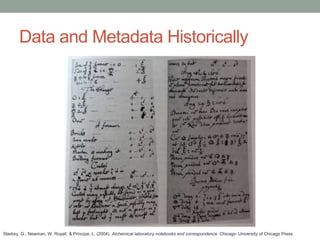
Data and Metadata Historically


Starkey, G., Newman, W. Royall, & Principe, L. (2004). Alchemical laboratory notebooks and correspondence. Chicago: University of Chicago Press.
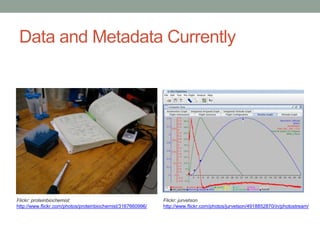
Data and Metadata Currently


Flickr: proteinbiochemist                                    Flickr: jurvetson
http://www.flickr.com/photos/proteinbiochemist/3167660996/   http://www.flickr.com/photos/jurvetson/4918852870/in/photostream/
Current Data and Metadata Problems
• Pointing metadata to data
• Long-term concerns with keeping data and metadata
  together
• Back-ups are an issue
• No standard for digital file organization
Current Data and Metadata Practices
• Practices vary lab-to-lab AND researcher-to-researcher
• Sometimes PI’s enforce order but often not
• Very difficult to locate another’s data currently
• Common practice in lab is to test an experiment against
 another’s data
  • (Intra-lab sharing a good selling point for data management!)
• Big need for education here
Data and Metadata in the Future
• Metadata are digital in an electronic lab notebook
• Data are digital and stored on computer
• Electronic lab notebook stores or points to data


• More on e-notebooks later
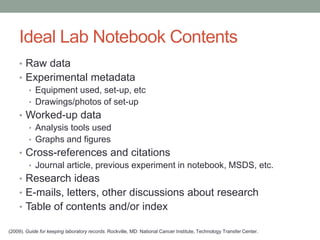
Ideal Lab Notebook Contents
    • Raw data
    • Experimental metadata
      • Equipment used, set-up, etc
      • Drawings/photos of set-up
    • Worked-up data
      • Analysis tools used
      • Graphs and figures
    • Cross-references and citations
      • Journal article, previous experiment in notebook, MSDS, etc.
    • Research ideas
    • E-mails, letters, other discussions about research
    • Table of contents and/or index

(2009). Guide for keeping laboratory records. Rockville, MD: National Cancer Institute, Technology Transfer Center.
Ideal Lab Notebook Contents
• All contents should be dated and initialed
  • Some notebooks need second signature
• There should be standards in each lab


• Obviously, very few scientists actually keep this type of
 notebook
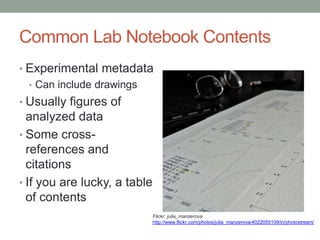
Common Lab Notebook Contents
• Experimental metadata
  • Can include drawings
• Usually figures of
  analyzed data
• Some cross-
  references and
  citations
• If you are lucky, a table
  of contents
                              Flickr: julia_manzerova
                              http://www.flickr.com/photos/julia_manzerova/4022055109/in/photostream/
Ideal Lab Notebook Format
• Electronic lab notebook
  • Metadata and copies of data embedded in same file
  • Integration of outside material/files
  • Plugins like a chemical structure creator
  • Digital signatures and date stamps
• Easily searchable
• Shareable, but control who has access to data
  • Other issues here like de-identifying data, etc
How Librarians Can Help
      • Libguide on organizing digital files and recording this info
        in lab notebook
          • Outline creating surrogate records in lab notebook for digital files
      • Suggest file naming and organization conventions
        • Avoid “ /  : * ? ‘ < > [ ] & $ characters
        • Use underscores not spaces
        • Date files and do it consistently (YYYY-MM-DD)
        • Label folders with reference to notebook
             • Example: C:DocumentsBrineyNotebookIV2012-02-22

      • Outline metadata requirements to point to file
        • Names of file, folder, computer, etc.


http://researchdata.wisc.edu/manage-your-data/file-naming-and-versioning/
How Librarians Can Help
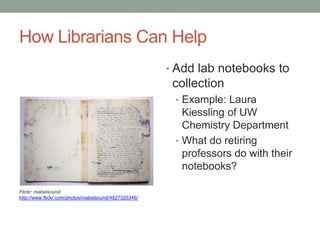
                                                      • Add lab notebooks to
                                                       collection
                                                       • Example: Laura
                                                         Kiessling of UW
                                                         Chemistry Department
                                                       • What do retiring
                                                         professors do with their
                                                         notebooks?

Flickr: mabelsound
http://www.flickr.com/photos/mabelsound/4827325346/
How Librarians Can Help
• Put together resources on proper lab notebook skills
  • Short term goal is to have resources available
    • Print or online resources
  • Long term goal focuses on instruction
• Target intro courses where most notebook ed happens
   • Point out resources during literacy instruction
• Target grad students
   • Focus on research groups


• Workshops on electronic lab notebooks
  • Slip in data management training during software training
  • DoIT a good resource
Future Things to Keep an Eye On
• Lab notebooks are critical important tools, but they’re
 changing
  • I expect everything to be electronic by the end of my career
• No clear winner yet for e-notebook software
  • Keep an eye on DoIT’s e-notebook pilot
Summary
• Identify areas in the pre-publication data cycle where
    scientists need help
•   Recognize why lab notebooks are an important data
    management tool
•   Evaluate how lab notebooks are changing and how this
    affects management of data
•   Understand the scope of usual and ideal notebook
    practices
•   Outline ways that librarians can help in both the short-
    term and long-term
Resources
• (2009). Guide for keeping laboratory
  records. Rockville, MD: National Cancer
  Institute, Technology Transfer Center.
• Kanare, H. M. (1985). Writing the laboratory
  notebook. Washington, D.C.: American Chemical Society.

• UW-Madison Research Data Services (RDS)
• UW-Madison Division of Information Technology (DoIT)
Thank You!


• This presentation available under a Creative Commons
 Attribution-NonCommercial 3.0 license

Lab Notebooks: A Librarian's Primer

  • 1.
    THE LAB NOTEBOOK Acritical tool for scientific data management Kristin Briney Data Management Bootcamp UW-Madison Libraries 22 February 2012
  • 2.
    Pre-publication v. Post-publicationData • Lot of management work done in second area • This talk focuses on first area • Data management very important in pre-publication • Help scientists find their own data, saving time and effort • Help scientist share data • Even within a lab this is important! • Help PI’s keep track of data-long term as students leave • Makes post-publication management smoother
  • 3.
    The Scientific Process •Literature review • Experiment design and grant writing • Acquire raw data • Data analysis • Repeat acquisition and analysis • (Maybe share data) • Make data presentational and write paper • Submit paper and eventually publish it • [Post-publication]
  • 4.
    Data and MetadataHistorically Starkey, G., Newman, W. Royall, & Principe, L. (2004). Alchemical laboratory notebooks and correspondence. Chicago: University of Chicago Press.
  • 5.
    Data and MetadataCurrently Flickr: proteinbiochemist Flickr: jurvetson http://www.flickr.com/photos/proteinbiochemist/3167660996/ http://www.flickr.com/photos/jurvetson/4918852870/in/photostream/
  • 6.
    Current Data andMetadata Problems • Pointing metadata to data • Long-term concerns with keeping data and metadata together • Back-ups are an issue • No standard for digital file organization
  • 7.
    Current Data andMetadata Practices • Practices vary lab-to-lab AND researcher-to-researcher • Sometimes PI’s enforce order but often not • Very difficult to locate another’s data currently • Common practice in lab is to test an experiment against another’s data • (Intra-lab sharing a good selling point for data management!) • Big need for education here
  • 8.
    Data and Metadatain the Future • Metadata are digital in an electronic lab notebook • Data are digital and stored on computer • Electronic lab notebook stores or points to data • More on e-notebooks later
  • 9.
    Ideal Lab NotebookContents • Raw data • Experimental metadata • Equipment used, set-up, etc • Drawings/photos of set-up • Worked-up data • Analysis tools used • Graphs and figures • Cross-references and citations • Journal article, previous experiment in notebook, MSDS, etc. • Research ideas • E-mails, letters, other discussions about research • Table of contents and/or index (2009). Guide for keeping laboratory records. Rockville, MD: National Cancer Institute, Technology Transfer Center.
  • 10.
    Ideal Lab NotebookContents • All contents should be dated and initialed • Some notebooks need second signature • There should be standards in each lab • Obviously, very few scientists actually keep this type of notebook
  • 11.
    Common Lab NotebookContents • Experimental metadata • Can include drawings • Usually figures of analyzed data • Some cross- references and citations • If you are lucky, a table of contents Flickr: julia_manzerova http://www.flickr.com/photos/julia_manzerova/4022055109/in/photostream/
  • 12.
    Ideal Lab NotebookFormat • Electronic lab notebook • Metadata and copies of data embedded in same file • Integration of outside material/files • Plugins like a chemical structure creator • Digital signatures and date stamps • Easily searchable • Shareable, but control who has access to data • Other issues here like de-identifying data, etc
  • 13.
    How Librarians CanHelp • Libguide on organizing digital files and recording this info in lab notebook • Outline creating surrogate records in lab notebook for digital files • Suggest file naming and organization conventions • Avoid “ / : * ? ‘ < > [ ] & $ characters • Use underscores not spaces • Date files and do it consistently (YYYY-MM-DD) • Label folders with reference to notebook • Example: C:DocumentsBrineyNotebookIV2012-02-22 • Outline metadata requirements to point to file • Names of file, folder, computer, etc. http://researchdata.wisc.edu/manage-your-data/file-naming-and-versioning/
  • 14.
    How Librarians CanHelp • Add lab notebooks to collection • Example: Laura Kiessling of UW Chemistry Department • What do retiring professors do with their notebooks? Flickr: mabelsound http://www.flickr.com/photos/mabelsound/4827325346/
  • 15.
    How Librarians CanHelp • Put together resources on proper lab notebook skills • Short term goal is to have resources available • Print or online resources • Long term goal focuses on instruction • Target intro courses where most notebook ed happens • Point out resources during literacy instruction • Target grad students • Focus on research groups • Workshops on electronic lab notebooks • Slip in data management training during software training • DoIT a good resource
  • 16.
    Future Things toKeep an Eye On • Lab notebooks are critical important tools, but they’re changing • I expect everything to be electronic by the end of my career • No clear winner yet for e-notebook software • Keep an eye on DoIT’s e-notebook pilot
  • 17.
    Summary • Identify areasin the pre-publication data cycle where scientists need help • Recognize why lab notebooks are an important data management tool • Evaluate how lab notebooks are changing and how this affects management of data • Understand the scope of usual and ideal notebook practices • Outline ways that librarians can help in both the short- term and long-term
  • 18.
    Resources • (2009). Guidefor keeping laboratory records. Rockville, MD: National Cancer Institute, Technology Transfer Center. • Kanare, H. M. (1985). Writing the laboratory notebook. Washington, D.C.: American Chemical Society. • UW-Madison Research Data Services (RDS) • UW-Madison Division of Information Technology (DoIT)
  • 19.
    Thank You! • Thispresentation available under a Creative Commons Attribution-NonCommercial 3.0 license