Computer Graphics
Hook
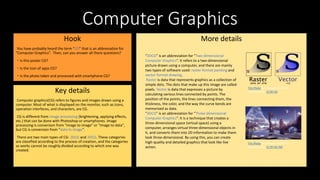
You have probably heard the term “CG” that is an abbreviation for
”Computer Graphics”. Then, can you answer all there questions?
・Is this poster CG?
・Is the icon of apps CG?
・Is the photo taken and processed with smartphone CG?
Key details
Computer graphics(CG) refers to figures and images drawn using a
computer. Most of what is displayed on the monitor, such as icons,
operation interfaces, and characters, are CG.
CG is different from image processing (brightening, applying effects,
etc.) that can be done with Photoshop or smartphones. Image
processing is conversion from "image to image" or "image to data",
but CG is conversion from "data to image".
There are two main types of CG: 2DCG and 3DCG. These categories
are classified according to the process of creation, and the categories
as works cannot be roughly divided according to which one was
created.
More details
“2DCG” is an abbreviation for “Two-dimensional
Computer Graphics”. It refers to a two-dimensional
picture drawn using a computer, and there are mainly
two types of software used: raster-format painting and
vector-format drawing.
Raster is data that represents graphics as a collection of
simple dots. The dots that make up this image are called
pixels. Vector is data that expresses a picture by
calculating various lines connected by points. The
position of the points, the lines connecting them, the
thickness, the color, and the way the curve bends are
memorized as data.
“3DCG” is an abbreviation for “Three-dimensional
Computer Graphics”. It is a technique that creates a
three-dimensional space (virtual space) using a
computer, arranges virtual three-dimensional objects in
it, and converts them into 2D information to make them
look three-dimensional. By using this, you can create
high-quality and detailed graphics that look like live
action.
This Photo by Unknown Author is
licensed under CC BY-NC-ND
This Photo by Unknown Author is
licensed under CC BY-SA
Computer graphics
Hook
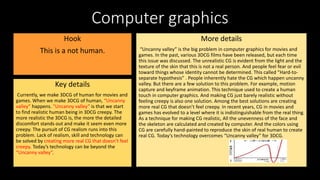
This is a not human.
Key details
Currently, we make 3DCG of human for movies and
games. When we make 3DCG of human, “Uncanny
valley” happens. “Uncanny valley” is that we start
to find realistic human being in 3DCG creepy. The
more realistic the 3DCG is, the more the detailed
discomfort stands out and make it seem even more
creepy. The pursuit of CG realism runs into this
problem. Lack of realism, skill and technology can
be solved by creating more real CG that doesn’t feel
creepy. Today’s technology can be beyond the
“Uncanny valley”.
More details
“Uncanny valley” is the big problem in computer graphics for movies and
games. In the past, various 3DCG films have been released, but each time
this issue was discussed. The unrealistic CG is evident from the light and the
texture of the skin that this is not a real person. And people feel fear or evil
toward things whose identity cannot be determined. This called “Hard-to-
separate hypothesis” . People inherently hate the CG which happen uncanny
valley. But there are a few solution to this problem. For example, motion
capture and keyframe animation. This technique used to create a human
touch in computer graphics. And making CG just barely realistic without
feeling creepy is also one solution. Among the best solutions are creating
more real CG that doesn’t feel creepy. In recent years, CG in movies and
games has evolved to a level where it is indistinguishable from the real thing.
As a technique for making CG realistic, All the unevenness of the face and
the skeleton are calculated and created by computer. And the colors using
CG are carefully hand-painted to reproduce the skin of real human to create
real CG. Today‘s technology overcomes “Uncanny valley” for 3DCG.
3D Computer graphics
Hook
You've probably heard the word CG before. CG is now used in
various fields, and has become a common means used in the
production of image and video content such as movies, anime,
TV commercials, illustrations, and cartoons, as well as
interactive content production such as games and virtual reality.
Let's learn more about CG, especially 3DCG.
Key details
What is Computer Graphics ?
Computer graphics is a science and technology that generates an image using a computer,
and an image generated by the technology. This is commonly referred to as CG.
CG as a means of expression can provide vivid colors, ease of editing, and unrealistic
images. It has become a common means used in the production of image and video content
such as movies, anime, TV commercials, etc. CG is also used as an elemental technology in
fields such as medical treatment and architecture. The CG is mainly divided into 3D CG
and 2D CG.
What is 3D computer graphics?
More details
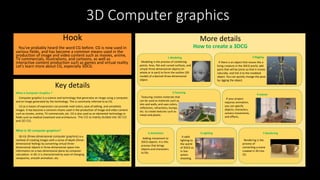
How to create a 3DCG
3D CG (three-dimensional computer graphics) is a
method of creating images with a sense of depth (three-
dimensional feeling) by converting virtual three-
dimensional objects in three-dimensional space into
information on a two-dimensional plane by computer
calculation. In 3D, it is characterized by ease of changing
viewpoints, smooth animation, etc.
1.Modeling
Modeling is the process of combining
points, lines, flat and curved surfaces, and
simple three-dimensional objects (in
whole or in part) to form the outline (3D
model) of a desired three-dimensional
object.
2.Rigging
If there is an object that moves like a
living creature in the 3DCG world, add
parts that will be joints so that it moves
naturally, and link it to the modeled
object. You can quickly change the pose
by rigging the object.
7.Rendering
6.Lighting
5.Animation
4.Layout
3.Texuring
Texturing creates materials that
can be used as materials such as
skin and walls, and uses colors,
reflections, refractions, bumps,
etc. to create textures such as
metal and plastic.
If your project
requires animation,
you can specify
objects, characters,
camera movements,
and effects.
Adding movement to
3DCG objects. It is this
process that brings
objects and characters
to life.
It adds
lighting to
the world
of 3DCG as
in live-
action
shooting.
Rendering is the
process of
converting a scene
created in 3D into
2D.
Computer graphics: CG animation flow
Hook
How many steps do you think you can take to
create a CG animation?
Key details
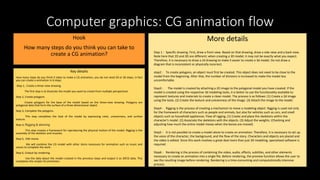
How many steps do you think it takes to make a CG animation, you do not need 20 or 50 steps, in fact
you can create a animation in 6 steps.
Step 1, Create a three-view drawing
The first step is to illustrate the model you want to create from multiple perspectives
Step 2, Create polygons
Create polygons for the base of the model based on the three-view drawing. Polygons are
polygonal data that form the surface of a three-dimensional object.
Step 3, Complete the polygons.
This step completes the look of the model by expressing color, unevenness, and surface
texture.
Step 4, Rigging & skinning
This step creates a framework for reproducing the physical motion of the model. Rigging is the
assembly of the skeleton and muscles.
Step 5, Edit movie
We will combine the CG model with other items necessary for animation such as music and
voices to complete the work.
Step 6, Output by rendering
Use the data about the model created in the previous steps and output it as 3DCG data. This
completes the simple CG animation.
More details
Step 1 : Specific drawing. First, draw a front view. Based on that drawing, draw a side view and a back view.
Note here that 2D and 3D are different; when creating a 3D model, it may not be exactly what you expect.
Therefore, it is necessary to draw a 2d drawing to make it easier to create a 3d model. Do not draw a
diagram that is inconsistent or physically incorrect.
step2 : To create polygons, an object must first be created. This object does not need to be close to the
model from the beginning. After that, the number of divisions is increased to make the model less
uncomfortable.
Step3 : The model is created by attaching a 2D image to the polygonal model you have created. If the
model is created using the respective 3d modeling tools, it is better to use the functionality available to
represent textures and materials to create a clean model. The process is as follows: (1) Create a 2d image
using the tools. (2) Create the texture and unevenness of the image. (3) Attach the image to the model.
Step4 : Rigging is the process of creating a mechanism to move a modeling object. Rigging is used not only
for the framework of characters such as people and animals, but also for vehicles such as cars, and small
objects such as household appliances. Flow of rigging, (1) Create and place the skeletons within the
character's model. (2) Associate the skeletons with the objects. (3) Adjust the weights. (Checking and
adjusting how much the entire model moves when the bones are moved)
Step5 : It is not possible to create a model alone to create an animation. Therefore, it is necessary to set up
the voice of the character, the background, and the flow of the story. Characters and objects are placed and
the video is edited. Since this work involves a great deal more than just 3D modeling, specialized software is
required.
Step6 : Rendering is the process of combining the video, audio, effects, subtitles, and other elements
necessary to create an animation into a single file. Before rendering, the preview function allows the user to
see the resulting image before rendering. Rendering is a time-consuming and computationally intensive
process.
Computer Graphics: Ray Tracing
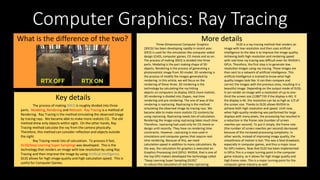
What is the difference of the two?
Key details
More details
The process of making 3DCG is roughly divided into three
parts. Modeling, Rendering and Retouch. Ray Tracing is a method of
Rendering. Ray Tracing is the method simulating the observed image
by tracing rays. We became able to make more realistic CG. The old
method drew only objects within sight. On the other hands, Ray
Tracing method calculate the ray from the camera physically.
Therefore, this method can consider reflection and objects outside
the sight.
Ray Tracing needs lots of calculation. To process it fast,
DLSS(Deep Learning Super Sampling) was developed. This is the
technology that renders an image with low resolution by using Ray
Tracing and then improve the image by using Artificial Intelligence.
DLSS allows for high image quality and high calculation speed. This is
useful for Computer Games.
Three-Dimensional Computer Graphics
(3DCG) has been developing rapidly in recent year.
3DCG is used for the simulation like computer-aided
design (CAD), computer games, CG movie and so on.
The process of making 3DCG is divided into three
parts. Modeling is the part making shape of 3D
objects. Rendering is the process of generating a
photorealistic image from 3D model. 3D rendering is
the process of modify the images generated by
rendering. In this article, we will focus on the
rendering of these three. 3D rendering is the
technology by calculating the ray hitting
objects on computers to display 3DCG more realistic.
3D rendering is divided into 2types, real time
rendering and pre-rendering. The one of way of the
rendering is raytracing. Raytracing is the method
simulating the observed image by tracing rays. We
became able to make more realistic CG contents by
using raytracing. Raytracing needs lots of calculation.
Rendering the image using raytracing takes much time.
Therefore, raytracing had used only for CG movie or
design until recently. They have no rendering time
constraints. However, raytracing is now used in
simulations and computer games that require real-
time rendering. Because of this, we need
calculation-speed in addition to many calculations. By
the way, the calculation for graphics is executed on
Graphics Processing Unit (GPU). NVIDIA, that is one of
the top GPU makers developed the technology called
“Deep Learning Super Sampling (DLSS)”
to reduce the calculation of real time raytracing.
DLSS is a ray-tracing method that renders an
image with low resolution and then uses artificial
intelligence to the idea is to improve the image quality.
Achieving both high resolution and rendering speed
with real-time ray tracing was difficult even for NVIDIA's
GPUs. Therefore, the first step is to generate low-
resolution images using ray tracing. These images are
then sent to a network of artificial intelligence. This
artificial intelligence is trained to know what high
quality images look like. It can then compare and
correct the images with the previous ones, resulting in a
beautiful image. Depending on the output mode of DLSS,
it can render an image with a resolution of up to one-
third the screen size (1280*720 if the display is 4K). If
the display is 4K, the resolution can be as high as 1/3 of
the screen size. Thanks to DLSS allows NVIDIA to
achieve both high resolution and speed. Until now,
when high-quality rendering was performed for large
displays with many pixels, the processing has resulted in
a reduction in the frame rate (number of screen
rewrites per second). To put it simply, the frame rate
(the number of screen rewrites per second) decreased
because of the increased processing complexity. In
other words, instead of improving image quality, the
smoothness of motion is lost. This was a fatal drawback,
especially in computer games, and thus a major issue
for GPU makers. Now that DLSS has been implemented
in GPUs This is a major turning point in the computer
game industry, as it allows for high image quality and
high frame rates. This is a major turning point for the
computer game industry as well.
Computer Graphics: Motion Capture
Hook
Motion Capture is used in sports and
computer animation like movie and video
game. We can see humanlike motion by
motion capture technology in animation.
Key details
Advantage:
• In entertainment applications, less the costs of
animation.
• The amount of work does not vary with the complexity
of the performance to the same degree as when using
traditional techniques.
• Complex movement can be easily recreated in a
physically accurate manner.
• The amount of animation is larger than traditional
animation techniques.
Disadvantage:
• Only a few systems allow real-time viewing of the data to
decide if the take needs to be redone.
• Movement that does not follow the laws of physics
cannot be captured.
• Traditional animation techniques must be added later.
More details
Method and system:
Motion capture started in the 1970s, and expanded
into education, training, sports and recently computer
animation for television, cinema, and video. Since the
20th century, acoustic, inertial, LED, magnetic or
reflective markers, or combinations of any of these, are
tracked at least two times the rate than traditional.
Since the beginning of the 21st century and because of
the rapid growth of technology new methods were
developed. Most modern systems can extract the
silhouette of the performer from the background.
Afterwards all joint angles are calculated by fitting in a
mathematic model into the silhouette.

Computer_Graphics.pptx

  • 1.
    Computer Graphics Hook You haveprobably heard the term “CG” that is an abbreviation for ”Computer Graphics”. Then, can you answer all there questions? ・Is this poster CG? ・Is the icon of apps CG? ・Is the photo taken and processed with smartphone CG? Key details Computer graphics(CG) refers to figures and images drawn using a computer. Most of what is displayed on the monitor, such as icons, operation interfaces, and characters, are CG. CG is different from image processing (brightening, applying effects, etc.) that can be done with Photoshop or smartphones. Image processing is conversion from "image to image" or "image to data", but CG is conversion from "data to image". There are two main types of CG: 2DCG and 3DCG. These categories are classified according to the process of creation, and the categories as works cannot be roughly divided according to which one was created. More details “2DCG” is an abbreviation for “Two-dimensional Computer Graphics”. It refers to a two-dimensional picture drawn using a computer, and there are mainly two types of software used: raster-format painting and vector-format drawing. Raster is data that represents graphics as a collection of simple dots. The dots that make up this image are called pixels. Vector is data that expresses a picture by calculating various lines connected by points. The position of the points, the lines connecting them, the thickness, the color, and the way the curve bends are memorized as data. “3DCG” is an abbreviation for “Three-dimensional Computer Graphics”. It is a technique that creates a three-dimensional space (virtual space) using a computer, arranges virtual three-dimensional objects in it, and converts them into 2D information to make them look three-dimensional. By using this, you can create high-quality and detailed graphics that look like live action. This Photo by Unknown Author is licensed under CC BY-NC-ND This Photo by Unknown Author is licensed under CC BY-SA
  • 2.
    Computer graphics Hook This isa not human. Key details Currently, we make 3DCG of human for movies and games. When we make 3DCG of human, “Uncanny valley” happens. “Uncanny valley” is that we start to find realistic human being in 3DCG creepy. The more realistic the 3DCG is, the more the detailed discomfort stands out and make it seem even more creepy. The pursuit of CG realism runs into this problem. Lack of realism, skill and technology can be solved by creating more real CG that doesn’t feel creepy. Today’s technology can be beyond the “Uncanny valley”. More details “Uncanny valley” is the big problem in computer graphics for movies and games. In the past, various 3DCG films have been released, but each time this issue was discussed. The unrealistic CG is evident from the light and the texture of the skin that this is not a real person. And people feel fear or evil toward things whose identity cannot be determined. This called “Hard-to- separate hypothesis” . People inherently hate the CG which happen uncanny valley. But there are a few solution to this problem. For example, motion capture and keyframe animation. This technique used to create a human touch in computer graphics. And making CG just barely realistic without feeling creepy is also one solution. Among the best solutions are creating more real CG that doesn’t feel creepy. In recent years, CG in movies and games has evolved to a level where it is indistinguishable from the real thing. As a technique for making CG realistic, All the unevenness of the face and the skeleton are calculated and created by computer. And the colors using CG are carefully hand-painted to reproduce the skin of real human to create real CG. Today‘s technology overcomes “Uncanny valley” for 3DCG.
  • 3.
    3D Computer graphics Hook You'veprobably heard the word CG before. CG is now used in various fields, and has become a common means used in the production of image and video content such as movies, anime, TV commercials, illustrations, and cartoons, as well as interactive content production such as games and virtual reality. Let's learn more about CG, especially 3DCG. Key details What is Computer Graphics ? Computer graphics is a science and technology that generates an image using a computer, and an image generated by the technology. This is commonly referred to as CG. CG as a means of expression can provide vivid colors, ease of editing, and unrealistic images. It has become a common means used in the production of image and video content such as movies, anime, TV commercials, etc. CG is also used as an elemental technology in fields such as medical treatment and architecture. The CG is mainly divided into 3D CG and 2D CG. What is 3D computer graphics? More details How to create a 3DCG 3D CG (three-dimensional computer graphics) is a method of creating images with a sense of depth (three- dimensional feeling) by converting virtual three- dimensional objects in three-dimensional space into information on a two-dimensional plane by computer calculation. In 3D, it is characterized by ease of changing viewpoints, smooth animation, etc. 1.Modeling Modeling is the process of combining points, lines, flat and curved surfaces, and simple three-dimensional objects (in whole or in part) to form the outline (3D model) of a desired three-dimensional object. 2.Rigging If there is an object that moves like a living creature in the 3DCG world, add parts that will be joints so that it moves naturally, and link it to the modeled object. You can quickly change the pose by rigging the object. 7.Rendering 6.Lighting 5.Animation 4.Layout 3.Texuring Texturing creates materials that can be used as materials such as skin and walls, and uses colors, reflections, refractions, bumps, etc. to create textures such as metal and plastic. If your project requires animation, you can specify objects, characters, camera movements, and effects. Adding movement to 3DCG objects. It is this process that brings objects and characters to life. It adds lighting to the world of 3DCG as in live- action shooting. Rendering is the process of converting a scene created in 3D into 2D.
  • 4.
    Computer graphics: CGanimation flow Hook How many steps do you think you can take to create a CG animation? Key details How many steps do you think it takes to make a CG animation, you do not need 20 or 50 steps, in fact you can create a animation in 6 steps. Step 1, Create a three-view drawing The first step is to illustrate the model you want to create from multiple perspectives Step 2, Create polygons Create polygons for the base of the model based on the three-view drawing. Polygons are polygonal data that form the surface of a three-dimensional object. Step 3, Complete the polygons. This step completes the look of the model by expressing color, unevenness, and surface texture. Step 4, Rigging & skinning This step creates a framework for reproducing the physical motion of the model. Rigging is the assembly of the skeleton and muscles. Step 5, Edit movie We will combine the CG model with other items necessary for animation such as music and voices to complete the work. Step 6, Output by rendering Use the data about the model created in the previous steps and output it as 3DCG data. This completes the simple CG animation. More details Step 1 : Specific drawing. First, draw a front view. Based on that drawing, draw a side view and a back view. Note here that 2D and 3D are different; when creating a 3D model, it may not be exactly what you expect. Therefore, it is necessary to draw a 2d drawing to make it easier to create a 3d model. Do not draw a diagram that is inconsistent or physically incorrect. step2 : To create polygons, an object must first be created. This object does not need to be close to the model from the beginning. After that, the number of divisions is increased to make the model less uncomfortable. Step3 : The model is created by attaching a 2D image to the polygonal model you have created. If the model is created using the respective 3d modeling tools, it is better to use the functionality available to represent textures and materials to create a clean model. The process is as follows: (1) Create a 2d image using the tools. (2) Create the texture and unevenness of the image. (3) Attach the image to the model. Step4 : Rigging is the process of creating a mechanism to move a modeling object. Rigging is used not only for the framework of characters such as people and animals, but also for vehicles such as cars, and small objects such as household appliances. Flow of rigging, (1) Create and place the skeletons within the character's model. (2) Associate the skeletons with the objects. (3) Adjust the weights. (Checking and adjusting how much the entire model moves when the bones are moved) Step5 : It is not possible to create a model alone to create an animation. Therefore, it is necessary to set up the voice of the character, the background, and the flow of the story. Characters and objects are placed and the video is edited. Since this work involves a great deal more than just 3D modeling, specialized software is required. Step6 : Rendering is the process of combining the video, audio, effects, subtitles, and other elements necessary to create an animation into a single file. Before rendering, the preview function allows the user to see the resulting image before rendering. Rendering is a time-consuming and computationally intensive process.
  • 5.
    Computer Graphics: RayTracing What is the difference of the two? Key details More details The process of making 3DCG is roughly divided into three parts. Modeling, Rendering and Retouch. Ray Tracing is a method of Rendering. Ray Tracing is the method simulating the observed image by tracing rays. We became able to make more realistic CG. The old method drew only objects within sight. On the other hands, Ray Tracing method calculate the ray from the camera physically. Therefore, this method can consider reflection and objects outside the sight. Ray Tracing needs lots of calculation. To process it fast, DLSS(Deep Learning Super Sampling) was developed. This is the technology that renders an image with low resolution by using Ray Tracing and then improve the image by using Artificial Intelligence. DLSS allows for high image quality and high calculation speed. This is useful for Computer Games. Three-Dimensional Computer Graphics (3DCG) has been developing rapidly in recent year. 3DCG is used for the simulation like computer-aided design (CAD), computer games, CG movie and so on. The process of making 3DCG is divided into three parts. Modeling is the part making shape of 3D objects. Rendering is the process of generating a photorealistic image from 3D model. 3D rendering is the process of modify the images generated by rendering. In this article, we will focus on the rendering of these three. 3D rendering is the technology by calculating the ray hitting objects on computers to display 3DCG more realistic. 3D rendering is divided into 2types, real time rendering and pre-rendering. The one of way of the rendering is raytracing. Raytracing is the method simulating the observed image by tracing rays. We became able to make more realistic CG contents by using raytracing. Raytracing needs lots of calculation. Rendering the image using raytracing takes much time. Therefore, raytracing had used only for CG movie or design until recently. They have no rendering time constraints. However, raytracing is now used in simulations and computer games that require real- time rendering. Because of this, we need calculation-speed in addition to many calculations. By the way, the calculation for graphics is executed on Graphics Processing Unit (GPU). NVIDIA, that is one of the top GPU makers developed the technology called “Deep Learning Super Sampling (DLSS)” to reduce the calculation of real time raytracing. DLSS is a ray-tracing method that renders an image with low resolution and then uses artificial intelligence to the idea is to improve the image quality. Achieving both high resolution and rendering speed with real-time ray tracing was difficult even for NVIDIA's GPUs. Therefore, the first step is to generate low- resolution images using ray tracing. These images are then sent to a network of artificial intelligence. This artificial intelligence is trained to know what high quality images look like. It can then compare and correct the images with the previous ones, resulting in a beautiful image. Depending on the output mode of DLSS, it can render an image with a resolution of up to one- third the screen size (1280*720 if the display is 4K). If the display is 4K, the resolution can be as high as 1/3 of the screen size. Thanks to DLSS allows NVIDIA to achieve both high resolution and speed. Until now, when high-quality rendering was performed for large displays with many pixels, the processing has resulted in a reduction in the frame rate (number of screen rewrites per second). To put it simply, the frame rate (the number of screen rewrites per second) decreased because of the increased processing complexity. In other words, instead of improving image quality, the smoothness of motion is lost. This was a fatal drawback, especially in computer games, and thus a major issue for GPU makers. Now that DLSS has been implemented in GPUs This is a major turning point in the computer game industry, as it allows for high image quality and high frame rates. This is a major turning point for the computer game industry as well.
  • 6.
    Computer Graphics: MotionCapture Hook Motion Capture is used in sports and computer animation like movie and video game. We can see humanlike motion by motion capture technology in animation. Key details Advantage: • In entertainment applications, less the costs of animation. • The amount of work does not vary with the complexity of the performance to the same degree as when using traditional techniques. • Complex movement can be easily recreated in a physically accurate manner. • The amount of animation is larger than traditional animation techniques. Disadvantage: • Only a few systems allow real-time viewing of the data to decide if the take needs to be redone. • Movement that does not follow the laws of physics cannot be captured. • Traditional animation techniques must be added later. More details Method and system: Motion capture started in the 1970s, and expanded into education, training, sports and recently computer animation for television, cinema, and video. Since the 20th century, acoustic, inertial, LED, magnetic or reflective markers, or combinations of any of these, are tracked at least two times the rate than traditional. Since the beginning of the 21st century and because of the rapid growth of technology new methods were developed. Most modern systems can extract the silhouette of the performer from the background. Afterwards all joint angles are calculated by fitting in a mathematic model into the silhouette.

Editor's Notes

  • #7 I have been researching motion capture. The field of motion capture has been studied for much longer than I had expected. Today, motion capture is a technology used in a wide range of fields, including sports, education, medicine, film, and gaming. And its measurement methods are evolving every day, making it possible to obtain more accurate data at a lower cost. And while there are significant advantages over traditional methods, there are new disadvantages and unimproved issues.