COMPUTER GRAPHICS AND
GAMING
BY : MS. GAURI BHELONDE
Computer Graphics
•Remembering: To acquaint the learner with the basic
concepts of Computer Graphics.
•Understanding: To learn the various algorithms for
generating and rendering graphical figures.
•Applying: To get familiar with mathematics behind the
graphical transformations.
•Understanding: To understand and apply various methods
and techniques regarding projections, animation, shading,
illumination and lighting.
•Creating: To generate Interactive graphics using OpenGL.
What is Computer
Graphics?
Computer graphics is the art and science of creating, manipulating, and representing visual data using computers. It
encompasses everything from simple lines and shapes to complex 3D environments and realistic animations.
Core Components
Modeling: Defining the geometric shape of objects.
Rendering: Generating an image from a model.
Animation: Depicting movement over time.
Display: Presenting the visual output to the user.
Interdisciplinary
Foundations
Mathematics: Geometry, linear algebra, calculus.
Programming: C++, Python, OpenGL for implementation.
Physics: Light interaction, motion dynamics.
Key technologies like rasterization and ray tracing are fundamental to how GPUs process and render visual information.
Evolution of Computer Graphics
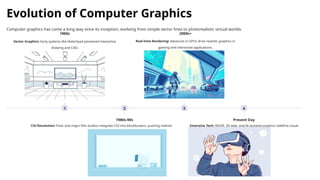
Computer graphics has come a long way since its inception, evolving from simple vector lines to photorealistic virtual worlds.
1
1960s
Vector Graphics: Early systems like Sketchpad pioneered interactive
drawing and CAD.
2
1980s-90s
CGI Revolution: Pixar and major film studios integrate CGI into blockbusters, pushing realistic
rendering.
3
2000s+
Real-time Rendering: Advances in GPUs drive realistic graphics in
gaming and interactive applications.
4
Present Day
Emerging Tech: AR/VR, 3D web, and AI-assisted graphics redefine visual
experiences.
Diverse Applications of Computer
Graphics
Computer graphics is integral to numerous fields, transforming industries and enhancing human interaction with digital information.
Scientific Visualization
Displaying complex data, from climate models to molecular structures,
for analysis.
CAD (Computer-Aided Design)
Designing and engineering products, architecture, and machinery.
Entertainment
Creating immersive worlds for movies, video games, and visual effects.
Medical Imaging
Visualizing anatomical structures for diagnosis and surgical planning.
GUI Development
Designing intuitive graphical user interfaces for software and systems.
Education &
Training
Developing interactive learning platforms and realistic simulators.
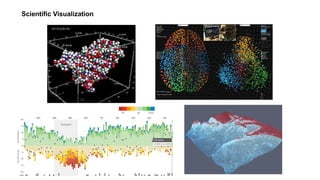
Scientific Visualization
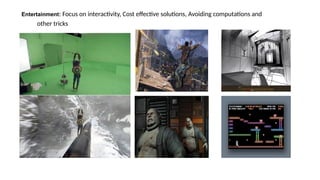
Entertainment: Focus on interactivity, Cost effective solutions, Avoiding computations and
other tricks
Multimedia
Applications
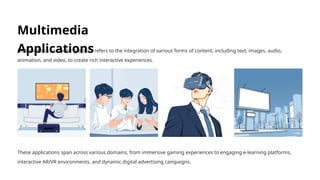
Multimedia in computer graphics refers to the integration of various forms of content, including text, images, audio,
animation, and video, to create rich interactive experiences.
These applications span across various domains, from immersive gaming experiences to engaging e-learning platforms,
interactive AR/VR environments, and dynamic digital advertising campaigns.
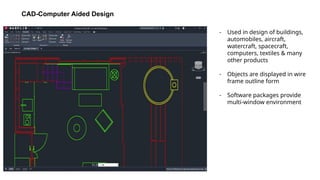
CAD-Computer Aided Design
- Used in design of buildings,
automobiles, aircraft,
watercraft, spacecraft,
computers, textiles & many
other products
- Objects are displayed in wire
frame outline form
- Software packages provide
multi-window environment
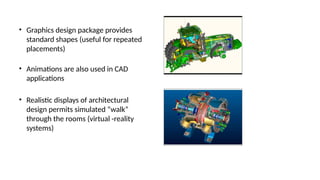
• Graphics design package provides
standard shapes (useful for repeated
placements)
• Animations are also used in CAD
applications
• Realistic displays of architectural
design permits simulated “walk”
through the rooms (virtual -reality
systems)
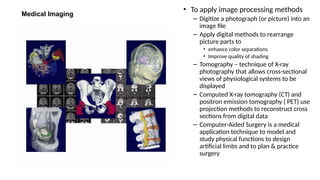
Medical Imaging
• To apply image processing methods
– Digitize a photograph (or picture) into an
image file
– Apply digital methods to rearrange
picture parts to
• enhance color separations
• Improve quality of shading
– Tomography – technique of X-ray
photography that allows cross-sectional
views of physiological systems to be
displayed
– Computed X-ray tomography (CT) and
positron emission tomography ( PET) use
projection methods to reconstruct cross
sections from digital data
– Computer-Aided Surgery is a medical
application technique to model and
study physical functions to design
artificial limbs and to plan & practice
surgery
Education and Training Simulation and
Modeling
Simulation in computer graphics involves creating virtual representations of real-world systems, allowing for interactive
exploration and analysis.
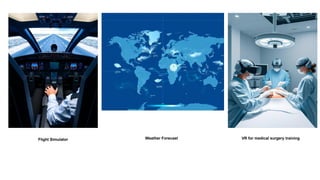
Flight Simulators
Realistic training environments for
pilots, replicating aircraft controls
and flight conditions.
Weather Models
Visualizing complex atmospheric
phenomena and predicting
weather patterns.
Surgery Training
Virtual reality simulations for
medical students to practice
surgical procedures.
The importance of simulation lies in its ability to provide real-time interaction and physics-based visualization, offering safe
and effective training or analysis in various critical fields.
Flight Simulator Weather Forecast VR for medical surgery training
• Major component – Window manager (multiple-window
areas)
• To make a particular window active, click in that window
(using an interactive pointing device)
• Interfaces display – menus & icons
• Icons – graphical symbol designed to look like the
processing option it represents
• Advantages of icons – less screen space, easily understood
• Menus contain lists of textual descriptions & icons
GUI Development
Design and Drawing in
Graphics
Design and drawing are foundational elements in computer graphics,
enabling the creation of both functional and aesthetic visual content.
Design Principles
Graphic Design: Focuses on visual
communication for user interfaces,
icons, and branding elements. Tools
like Adobe Illustrator are widely
used.
Industrial Design: Involves
modeling and engineering products
for manufacturing, often utilizing
CAD software like AutoCAD.
Digital Drawing
Techniques
Digital drawing employs
mathematical representations of
lines and curves, such as Bezier and
B-splines, to create scalable and
editable artwork.
Sketching and Drafting: Software
tools replicate traditional sketching
and drafting processes, allowing for
precision and iteration.
Bringing Movement to Life:
Animation
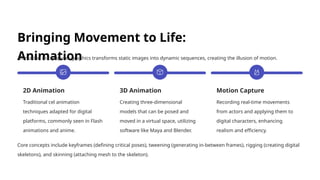
Animation in computer graphics transforms static images into dynamic sequences, creating the illusion of motion.
2D Animation
Traditional cel animation
techniques adapted for digital
platforms, commonly seen in Flash
animations and anime.
3D Animation
Creating three-dimensional
models that can be posed and
moved in a virtual space, utilizing
software like Maya and Blender.
Motion Capture
Recording real-time movements
from actors and applying them to
digital characters, enhancing
realism and efficiency.
Core concepts include keyframes (defining critical poses), tweening (generating in-between frames), rigging (creating digital
skeletons), and skinning (attaching mesh to the skeleton).
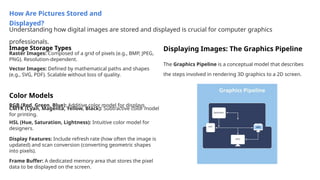
How Are Pictures Stored and
Displayed?
Understanding how digital images are stored and displayed is crucial for computer graphics
professionals.
Image Storage Types
Raster Images: Composed of a grid of pixels (e.g., BMP, JPEG,
PNG). Resolution-dependent.
Vector Images: Defined by mathematical paths and shapes
(e.g., SVG, PDF). Scalable without loss of quality.
Color Models
RGB (Red, Green, Blue): Additive color model for displays.
CMYK (Cyan, Magenta, Yellow, Black): Subtractive color model
for printing.
HSL (Hue, Saturation, Lightness): Intuitive color model for
designers.
Displaying Images: The Graphics Pipeline
The Graphics Pipeline is a conceptual model that describes
the steps involved in rendering 3D graphics to a 2D screen.
Frame Buffer: A dedicated memory area that stores the pixel
data to be displayed on the screen.
Display Features: Include refresh rate (how often the image is
updated) and scan conversion (converting geometric shapes
into pixels).
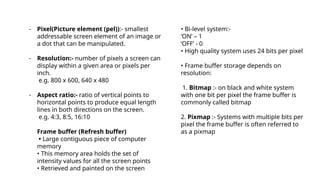
- Pixel(Picture element (pel)):- smallest
addressable screen element of an image or
a dot that can be manipulated.
- Resolution:- number of pixels a screen can
display within a given area or pixels per
inch.
e.g. 800 x 600, 640 x 480
- Aspect ratio:- ratio of vertical points to
horizontal points to produce equal length
lines in both directions on the screen.
e.g. 4:3, 8:5, 16:10
Frame buffer (Refresh buffer)
• Large contiguous piece of computer
memory
• This memory area holds the set of
intensity values for all the screen points
• Retrieved and painted on the screen
• Bi-level system:-
‘ON’ – 1
‘OFF’ - 0
• High quality system uses 24 bits per pixel
• Frame buffer storage depends on
resolution:
1. Bitmap :- on black and white system
with one bit per pixel the frame buffer is
commonly called bitmap
2. Pixmap :- Systems with multiple bits per
pixel the frame buffer is often referred to
as a pixmap
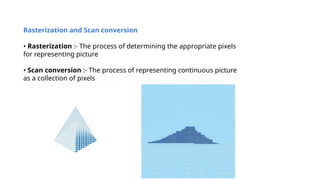
Rasterization and Scan conversion
• Rasterization :- The process of determining the appropriate pixels
for representing picture
• Scan conversion :- The process of representing continuous picture
as a collection of pixels
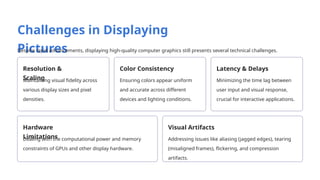
Challenges in Displaying
Pictures
Despite rapid advancements, displaying high-quality computer graphics still presents several technical challenges.
Resolution &
Scaling
Maintaining visual fidelity across
various display sizes and pixel
densities.
Color Consistency
Ensuring colors appear uniform
and accurate across different
devices and lighting conditions.
Latency & Delays
Minimizing the time lag between
user input and visual response,
crucial for interactive applications.
Hardware
Limitations
Dealing with the computational power and memory
constraints of GPUs and other display hardware.
Visual Artifacts
Addressing issues like aliasing (jagged edges), tearing
(misaligned frames), flickering, and compression
artifacts.
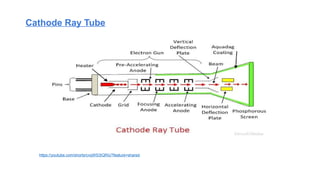
Cathode Ray Tube
https://youtube.com/shorts/cvqWS3IQRiU?feature=shared
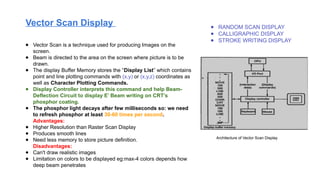
Vector Scan Display ● RANDOM SCAN DISPLAY
● CALLIGRAPHIC DISPLAY
● STROKE WRITING DISPLAY
● Vector Scan is a technique used for producing Images on the
screen.
● Beam is directed to the area on the screen where picture is to be
drawn.
● The display Buffer Memory stores the “Display List” which contains
point and line plotting commands with (x,y) or (x,y,z) coordinates as
well as Character Plotting Commands.
● Display Controller interprets this command and help Beam-
Deflection Circuit to display E’ Beam writing on CRT’s
phosphor coating.
● The phosphor light decays after few milliseconds so: we need
to refresh phosphor at least 30-60 times per second.
Advantages:
● Higher Resolution than Raster Scan Display
● Produces smooth lines
● Need less memory to store picture definition.
Disadvantages:
● Can't draw realistic images
● Limitation on colors to be displayed eg:max-4 colors depends how
deep beam penetrates
Architecture of Vector Scan Display
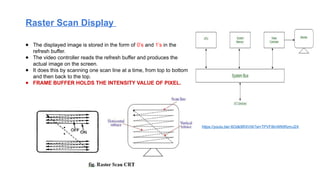
Raster Scan Display
● The displayed image is stored in the form of 0’s and 1’s in the
refresh buffer.
● The video controller reads the refresh buffer and produces the
actual image on the screen.
● It does this by scanning one scan line at a time, from top to bottom
and then back to the top.
● FRAME BUFFER HOLDS THE INTENSITY VALUE OF PIXEL.
https://youtu.be/-6Odk9RXVtA?si=TPVF8InWKtRzmJ2X
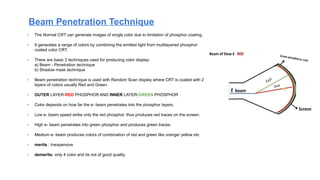
- The Normal CRT can generate images of single color due to limitation of phosphor coating.
- It generates a range of colors by combining the emitted light from multilayered phosphor
coated color CRT.
- There are basic 2 techniques used for producing color display:
a) Beam - Penetration technique
b) Shadow mask technique
- Beam penetration technique is used with Random Scan display where CRT is coated with 2
layers of colors usually Red and Green.
- OUTER LAYER-RED PHOSPHOR AND INNER LAYER-GREEN PHOSPHOR
- Color depends on how far the e- beam penetrates into the phosphor layers.
- Low e- beam speed strike only the red phosphor, thus produces red traces on the screen.
- High e- beam penetrates into green phosphor and produces green traces.
- Medium e- beam produces colors of combination of red and green like orange/ yellow etc
- merits : Inexpensive
- demerits: only 4 color and its not of good quality.
Beam Penetration Technique
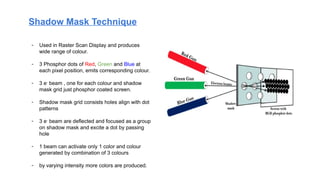
Shadow Mask Technique
- Used in Raster Scan Display and produces
wide range of colour.
- 3 Phosphor dots of Red, Green and Blue at
each pixel position, emits corresponding colour.
- 3 e-
beam , one for each colour and shadow
mask grid just phosphor coated screen.
- Shadow mask grid consists holes align with dot
patterns
- 3 e-
beam are deflected and focused as a group
on shadow mask and excite a dot by passing
hole
- 1 beam can activate only 1 color and colour
generated by combination of 3 colours
- by varying intensity more colors are produced.
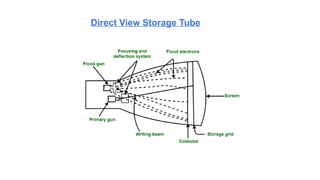
Direct View Storage Tube
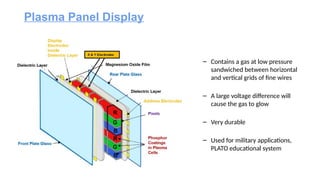
– Contains a gas at low pressure
sandwiched between horizontal
and vertical grids of fine wires
– A large voltage difference will
cause the gas to glow
– Very durable
– Used for military applications,
PLATO educational system
Plasma Panel Display
https://youtu.be/96QwqOZ4xjE?feature=shared
https://youtu.be/Gx-JVoOFYhs?feature=shared
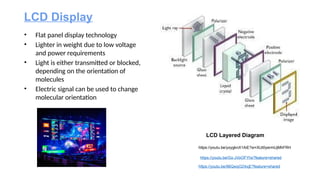
LCD Display
• Flat panel display technology
• Lighter in weight due to low voltage
and power requirements
• Light is either transmitted or blocked,
depending on the orientation of
molecules
• Electric signal can be used to change
molecular orientation
LCD Layered Diagram
https://youtu.be/yxygknX1AiE?si=XlJt0yermUjMhFRH
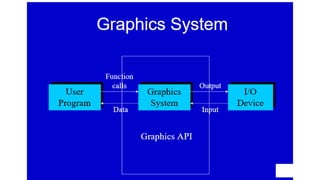
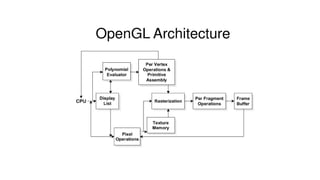
Open Graphics Library (OpenGL) is a cross-language (language independent), cross-platform
(platform-independent) API for rendering 2D and 3D Vector Graphics(use of polygons to
represent image). OpenGL API is designed mostly in hardware.
● Design : This API is defined as a set of functions which may be called by the client program.
Although functions are similar to those of C language but it is language independent.
● Development : It is an evolving API and Khronos Group regularly releases its new version
having some extended feature compare to previous one. GPU vendors may also provide
some additional functionality in the form of extension.
● Associated Libraries : The earliest version is released with a companion library called
OpenGL utility library. But since OpenGL is quite a complex process. So in order to make it
easier other library such as OpenGL Utility Toolkit is added which is later superseded by
freeglut. Later included library were GLEE, GLEW, and gliding.
● Implementation : Mesa 3D is an open source implementation of OpenGL. It can do pure
software rendering and it may also use hardware acceleration on BSD, Linux, and other
platforms by taking advantage of Direct Rendering Infrastructure.
OPEN GL
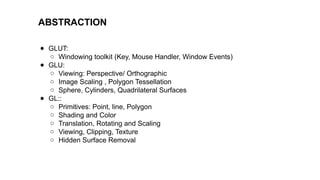
ABSTRACTION
● GLUT:
○ Windowing toolkit (Key, Mouse Handler, Window Events)
● GLU:
○ Viewing: Perspective/ Orthographic
○ Image Scaling , Polygon Tessellation
○ Sphere, Cylinders, Quadrilateral Surfaces
● GL::
○ Primitives: Point, line, Polygon
○ Shading and Color
○ Translation, Rotating and Scaling
○ Viewing, Clipping, Texture
○ Hidden Surface Removal
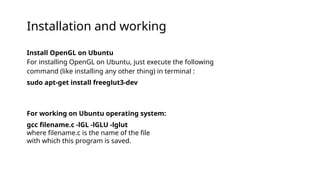
Install OpenGL on Ubuntu
For installing OpenGL on Ubuntu, just execute the following
command (like installing any other thing) in terminal :
sudo apt-get install freeglut3-dev
For working on Ubuntu operating system:
gcc filename.c -lGL -lGLU -lglut
where filename.c is the name of the file
with which this program is saved.
Installation and working
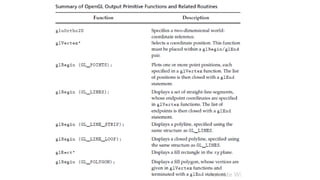
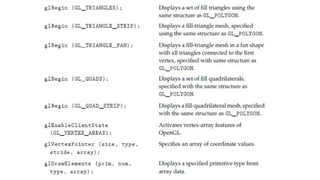
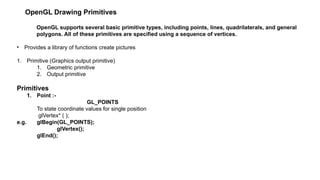
OpenGL Drawing Primitives
OpenGL supports several basic primitive types, including points, lines, quadrilaterals, and general
polygons. All of these primitives are specified using a sequence of vertices.
• Provides a library of functions create pictures
1. Primitive (Graphics output primitive)
1. Geometric primitive
2. Output primitive
Primitives
1. Point :-
GL_POINTS
To state coordinate values for single position
glVertex* ( );
e.g. glBegin(GL_POINTS);
glVertex();
glEnd();
• Coordinate position can be 2,3 or 4 dimensions
• In 4 dimension the fourth dimension is scaling factor
• Dimensions are specified by first suffix
– e.g. glVertex2
glVertex3
• Second suffix code is used to specify data type
1. i (integer)
2. s (short)
3. f (float)
4. d (double)
e.g. glBegin(GL_POINTS);
glVertex2i(50,100);
glVertex2i(75,150);
glVertex2i(100, 200);
glEnd();
• We can specify the coordinate values using array
• 3rd
suffix code for array is v (vertex)
e.g. float point1 [ ]={50.89,100.60,45.89};
float point2 [ ]={-75.66,150.33,188.77};
float point3 [ ]={100.46,200.15,78.78};
glBegin(GL_POINTS);
glVertex3fv(point1);
glVertex3fv(point2);
glVertex3fv(point3);
glEnd();
The following code fragment illustrates an example of how the
primitive type is specified and how the sequence of vertices are
passed to OpenGL. It assumes that a window has already been
opened
and that an appropriate 2D coordinate system has already been
established.
// draw several isolated points
GLfloat pt[2] = {3.0, 4.0};
glBegin(GL_POINTS);
glVertex2f(1.0, 2.0); // x=1, y=2
glVertex2f(2.0, 3.0); // x=2, y=3
glVertex2fv(pt); // x=3, y=4
glVertex2i(4,5); // x=4, y=5
glEnd();
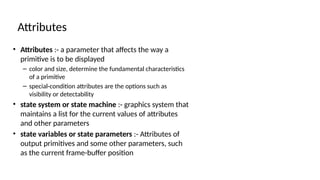
• Attributes :- a parameter that affects the way a
primitive is to be displayed
– color and size, determine the fundamental characteristics
of a primitive
– special-condition attributes are the options such as
visibility or detectability
• state system or state machine :- graphics system that
maintains a list for the current values of attributes
and other parameters
• state variables or state parameters :- Attributes of
output primitives and some other parameters, such
as the current frame-buffer position
Attributes
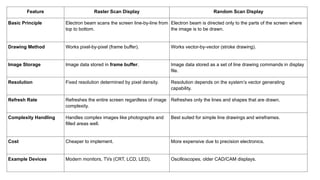
Feature Raster Scan Display Random Scan Display
Basic Principle Electron beam scans the screen line-by-line from
top to bottom.
Electron beam is directed only to the parts of the screen where
the image is to be drawn.
Drawing Method Works pixel-by-pixel (frame buffer). Works vector-by-vector (stroke drawing).
Image Storage Image data stored in frame buffer. Image data stored as a set of line drawing commands in display
file.
Resolution Fixed resolution determined by pixel density. Resolution depends on the system’s vector generating
capability.
Refresh Rate Refreshes the entire screen regardless of image
complexity.
Refreshes only the lines and shapes that are drawn.
Complexity Handling Handles complex images like photographs and
filled areas well.
Best suited for simple line drawings and wireframes.
Cost Cheaper to implement. More expensive due to precision electronics.
Example Devices Modern monitors, TVs (CRT, LCD, LED). Oscilloscopes, older CAD/CAM displays.
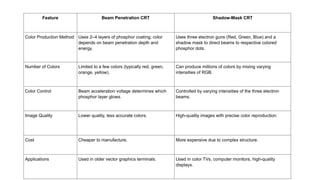
Feature Beam Penetration CRT Shadow-Mask CRT
Color Production Method Uses 2–4 layers of phosphor coating; color
depends on beam penetration depth and
energy.
Uses three electron guns (Red, Green, Blue) and a
shadow mask to direct beams to respective colored
phosphor dots.
Number of Colors Limited to a few colors (typically red, green,
orange, yellow).
Can produce millions of colors by mixing varying
intensities of RGB.
Color Control Beam acceleration voltage determines which
phosphor layer glows.
Controlled by varying intensities of the three electron
beams.
Image Quality Lower quality, less accurate colors. High-quality images with precise color reproduction.
Cost Cheaper to manufacture. More expensive due to complex structure.
Applications Used in older vector graphics terminals. Used in color TVs, computer monitors, high-quality
displays.
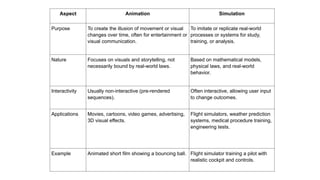
Aspect Animation Simulation
Purpose To create the illusion of movement or visual
changes over time, often for entertainment or
visual communication.
To imitate or replicate real-world
processes or systems for study,
training, or analysis.
Nature Focuses on visuals and storytelling, not
necessarily bound by real-world laws.
Based on mathematical models,
physical laws, and real-world
behavior.
Interactivity Usually non-interactive (pre-rendered
sequences).
Often interactive, allowing user input
to change outcomes.
Applications Movies, cartoons, video games, advertising,
3D visual effects.
Flight simulators, weather prediction
systems, medical procedure training,
engineering tests.
Example Animated short film showing a bouncing ball. Flight simulator training a pilot with
realistic cockpit and controls.
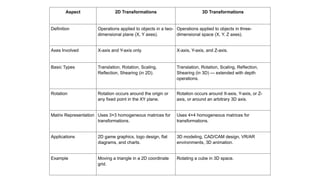
Aspect 2D Transformations 3D Transformations
Definition Operations applied to objects in a two-
dimensional plane (X, Y axes).
Operations applied to objects in three-
dimensional space (X, Y, Z axes).
Axes Involved X-axis and Y-axis only. X-axis, Y-axis, and Z-axis.
Basic Types Translation, Rotation, Scaling,
Reflection, Shearing (in 2D).
Translation, Rotation, Scaling, Reflection,
Shearing (in 3D) — extended with depth
operations.
Rotation Rotation occurs around the origin or
any fixed point in the XY plane.
Rotation occurs around X-axis, Y-axis, or Z-
axis, or around an arbitrary 3D axis.
Matrix Representation Uses 3×3 homogeneous matrices for
transformations.
Uses 4×4 homogeneous matrices for
transformations.
Applications 2D game graphics, logo design, flat
diagrams, and charts.
3D modeling, CAD/CAM design, VR/AR
environments, 3D animation.
Example Moving a triangle in a 2D coordinate
grid.
Rotating a cube in 3D space.

Exploring-the-World-of-Computer-Graphics_unit_1&2.pptx

  • 1.
    COMPUTER GRAPHICS AND GAMING BY: MS. GAURI BHELONDE
  • 2.
    Computer Graphics •Remembering: Toacquaint the learner with the basic concepts of Computer Graphics. •Understanding: To learn the various algorithms for generating and rendering graphical figures. •Applying: To get familiar with mathematics behind the graphical transformations. •Understanding: To understand and apply various methods and techniques regarding projections, animation, shading, illumination and lighting. •Creating: To generate Interactive graphics using OpenGL.
  • 3.
    What is Computer Graphics? Computergraphics is the art and science of creating, manipulating, and representing visual data using computers. It encompasses everything from simple lines and shapes to complex 3D environments and realistic animations. Core Components Modeling: Defining the geometric shape of objects. Rendering: Generating an image from a model. Animation: Depicting movement over time. Display: Presenting the visual output to the user. Interdisciplinary Foundations Mathematics: Geometry, linear algebra, calculus. Programming: C++, Python, OpenGL for implementation. Physics: Light interaction, motion dynamics. Key technologies like rasterization and ray tracing are fundamental to how GPUs process and render visual information.
  • 4.
    Evolution of ComputerGraphics Computer graphics has come a long way since its inception, evolving from simple vector lines to photorealistic virtual worlds. 1 1960s Vector Graphics: Early systems like Sketchpad pioneered interactive drawing and CAD. 2 1980s-90s CGI Revolution: Pixar and major film studios integrate CGI into blockbusters, pushing realistic rendering. 3 2000s+ Real-time Rendering: Advances in GPUs drive realistic graphics in gaming and interactive applications. 4 Present Day Emerging Tech: AR/VR, 3D web, and AI-assisted graphics redefine visual experiences.
  • 5.
    Diverse Applications ofComputer Graphics Computer graphics is integral to numerous fields, transforming industries and enhancing human interaction with digital information. Scientific Visualization Displaying complex data, from climate models to molecular structures, for analysis. CAD (Computer-Aided Design) Designing and engineering products, architecture, and machinery. Entertainment Creating immersive worlds for movies, video games, and visual effects. Medical Imaging Visualizing anatomical structures for diagnosis and surgical planning. GUI Development Designing intuitive graphical user interfaces for software and systems. Education & Training Developing interactive learning platforms and realistic simulators.
  • 6.
  • 7.
    Entertainment: Focus oninteractivity, Cost effective solutions, Avoiding computations and other tricks
  • 8.
    Multimedia Applications Multimedia in computergraphics refers to the integration of various forms of content, including text, images, audio, animation, and video, to create rich interactive experiences. These applications span across various domains, from immersive gaming experiences to engaging e-learning platforms, interactive AR/VR environments, and dynamic digital advertising campaigns.
  • 9.
    CAD-Computer Aided Design -Used in design of buildings, automobiles, aircraft, watercraft, spacecraft, computers, textiles & many other products - Objects are displayed in wire frame outline form - Software packages provide multi-window environment
  • 10.
    • Graphics designpackage provides standard shapes (useful for repeated placements) • Animations are also used in CAD applications • Realistic displays of architectural design permits simulated “walk” through the rooms (virtual -reality systems)
  • 11.
    Medical Imaging • Toapply image processing methods – Digitize a photograph (or picture) into an image file – Apply digital methods to rearrange picture parts to • enhance color separations • Improve quality of shading – Tomography – technique of X-ray photography that allows cross-sectional views of physiological systems to be displayed – Computed X-ray tomography (CT) and positron emission tomography ( PET) use projection methods to reconstruct cross sections from digital data – Computer-Aided Surgery is a medical application technique to model and study physical functions to design artificial limbs and to plan & practice surgery
  • 12.
    Education and TrainingSimulation and Modeling Simulation in computer graphics involves creating virtual representations of real-world systems, allowing for interactive exploration and analysis. Flight Simulators Realistic training environments for pilots, replicating aircraft controls and flight conditions. Weather Models Visualizing complex atmospheric phenomena and predicting weather patterns. Surgery Training Virtual reality simulations for medical students to practice surgical procedures. The importance of simulation lies in its ability to provide real-time interaction and physics-based visualization, offering safe and effective training or analysis in various critical fields.
  • 13.
    Flight Simulator WeatherForecast VR for medical surgery training
  • 14.
    • Major component– Window manager (multiple-window areas) • To make a particular window active, click in that window (using an interactive pointing device) • Interfaces display – menus & icons • Icons – graphical symbol designed to look like the processing option it represents • Advantages of icons – less screen space, easily understood • Menus contain lists of textual descriptions & icons GUI Development
  • 15.
    Design and Drawingin Graphics Design and drawing are foundational elements in computer graphics, enabling the creation of both functional and aesthetic visual content. Design Principles Graphic Design: Focuses on visual communication for user interfaces, icons, and branding elements. Tools like Adobe Illustrator are widely used. Industrial Design: Involves modeling and engineering products for manufacturing, often utilizing CAD software like AutoCAD. Digital Drawing Techniques Digital drawing employs mathematical representations of lines and curves, such as Bezier and B-splines, to create scalable and editable artwork. Sketching and Drafting: Software tools replicate traditional sketching and drafting processes, allowing for precision and iteration.
  • 16.
    Bringing Movement toLife: Animation Animation in computer graphics transforms static images into dynamic sequences, creating the illusion of motion. 2D Animation Traditional cel animation techniques adapted for digital platforms, commonly seen in Flash animations and anime. 3D Animation Creating three-dimensional models that can be posed and moved in a virtual space, utilizing software like Maya and Blender. Motion Capture Recording real-time movements from actors and applying them to digital characters, enhancing realism and efficiency. Core concepts include keyframes (defining critical poses), tweening (generating in-between frames), rigging (creating digital skeletons), and skinning (attaching mesh to the skeleton).
  • 17.
    How Are PicturesStored and Displayed? Understanding how digital images are stored and displayed is crucial for computer graphics professionals. Image Storage Types Raster Images: Composed of a grid of pixels (e.g., BMP, JPEG, PNG). Resolution-dependent. Vector Images: Defined by mathematical paths and shapes (e.g., SVG, PDF). Scalable without loss of quality. Color Models RGB (Red, Green, Blue): Additive color model for displays. CMYK (Cyan, Magenta, Yellow, Black): Subtractive color model for printing. HSL (Hue, Saturation, Lightness): Intuitive color model for designers. Displaying Images: The Graphics Pipeline The Graphics Pipeline is a conceptual model that describes the steps involved in rendering 3D graphics to a 2D screen. Frame Buffer: A dedicated memory area that stores the pixel data to be displayed on the screen. Display Features: Include refresh rate (how often the image is updated) and scan conversion (converting geometric shapes into pixels).
  • 18.
    - Pixel(Picture element(pel)):- smallest addressable screen element of an image or a dot that can be manipulated. - Resolution:- number of pixels a screen can display within a given area or pixels per inch. e.g. 800 x 600, 640 x 480 - Aspect ratio:- ratio of vertical points to horizontal points to produce equal length lines in both directions on the screen. e.g. 4:3, 8:5, 16:10 Frame buffer (Refresh buffer) • Large contiguous piece of computer memory • This memory area holds the set of intensity values for all the screen points • Retrieved and painted on the screen • Bi-level system:- ‘ON’ – 1 ‘OFF’ - 0 • High quality system uses 24 bits per pixel • Frame buffer storage depends on resolution: 1. Bitmap :- on black and white system with one bit per pixel the frame buffer is commonly called bitmap 2. Pixmap :- Systems with multiple bits per pixel the frame buffer is often referred to as a pixmap
  • 19.
    Rasterization and Scanconversion • Rasterization :- The process of determining the appropriate pixels for representing picture • Scan conversion :- The process of representing continuous picture as a collection of pixels
  • 20.
    Challenges in Displaying Pictures Despiterapid advancements, displaying high-quality computer graphics still presents several technical challenges. Resolution & Scaling Maintaining visual fidelity across various display sizes and pixel densities. Color Consistency Ensuring colors appear uniform and accurate across different devices and lighting conditions. Latency & Delays Minimizing the time lag between user input and visual response, crucial for interactive applications. Hardware Limitations Dealing with the computational power and memory constraints of GPUs and other display hardware. Visual Artifacts Addressing issues like aliasing (jagged edges), tearing (misaligned frames), flickering, and compression artifacts.
  • 21.
  • 22.
    Vector Scan Display● RANDOM SCAN DISPLAY ● CALLIGRAPHIC DISPLAY ● STROKE WRITING DISPLAY ● Vector Scan is a technique used for producing Images on the screen. ● Beam is directed to the area on the screen where picture is to be drawn. ● The display Buffer Memory stores the “Display List” which contains point and line plotting commands with (x,y) or (x,y,z) coordinates as well as Character Plotting Commands. ● Display Controller interprets this command and help Beam- Deflection Circuit to display E’ Beam writing on CRT’s phosphor coating. ● The phosphor light decays after few milliseconds so: we need to refresh phosphor at least 30-60 times per second. Advantages: ● Higher Resolution than Raster Scan Display ● Produces smooth lines ● Need less memory to store picture definition. Disadvantages: ● Can't draw realistic images ● Limitation on colors to be displayed eg:max-4 colors depends how deep beam penetrates Architecture of Vector Scan Display
  • 23.
    Raster Scan Display ●The displayed image is stored in the form of 0’s and 1’s in the refresh buffer. ● The video controller reads the refresh buffer and produces the actual image on the screen. ● It does this by scanning one scan line at a time, from top to bottom and then back to the top. ● FRAME BUFFER HOLDS THE INTENSITY VALUE OF PIXEL. https://youtu.be/-6Odk9RXVtA?si=TPVF8InWKtRzmJ2X
  • 24.
    - The NormalCRT can generate images of single color due to limitation of phosphor coating. - It generates a range of colors by combining the emitted light from multilayered phosphor coated color CRT. - There are basic 2 techniques used for producing color display: a) Beam - Penetration technique b) Shadow mask technique - Beam penetration technique is used with Random Scan display where CRT is coated with 2 layers of colors usually Red and Green. - OUTER LAYER-RED PHOSPHOR AND INNER LAYER-GREEN PHOSPHOR - Color depends on how far the e- beam penetrates into the phosphor layers. - Low e- beam speed strike only the red phosphor, thus produces red traces on the screen. - High e- beam penetrates into green phosphor and produces green traces. - Medium e- beam produces colors of combination of red and green like orange/ yellow etc - merits : Inexpensive - demerits: only 4 color and its not of good quality. Beam Penetration Technique
  • 25.
    Shadow Mask Technique -Used in Raster Scan Display and produces wide range of colour. - 3 Phosphor dots of Red, Green and Blue at each pixel position, emits corresponding colour. - 3 e- beam , one for each colour and shadow mask grid just phosphor coated screen. - Shadow mask grid consists holes align with dot patterns - 3 e- beam are deflected and focused as a group on shadow mask and excite a dot by passing hole - 1 beam can activate only 1 color and colour generated by combination of 3 colours - by varying intensity more colors are produced.
  • 26.
  • 27.
    – Contains agas at low pressure sandwiched between horizontal and vertical grids of fine wires – A large voltage difference will cause the gas to glow – Very durable – Used for military applications, PLATO educational system Plasma Panel Display
  • 28.
    https://youtu.be/96QwqOZ4xjE?feature=shared https://youtu.be/Gx-JVoOFYhs?feature=shared LCD Display • Flatpanel display technology • Lighter in weight due to low voltage and power requirements • Light is either transmitted or blocked, depending on the orientation of molecules • Electric signal can be used to change molecular orientation LCD Layered Diagram https://youtu.be/yxygknX1AiE?si=XlJt0yermUjMhFRH
  • 30.
    Open Graphics Library(OpenGL) is a cross-language (language independent), cross-platform (platform-independent) API for rendering 2D and 3D Vector Graphics(use of polygons to represent image). OpenGL API is designed mostly in hardware. ● Design : This API is defined as a set of functions which may be called by the client program. Although functions are similar to those of C language but it is language independent. ● Development : It is an evolving API and Khronos Group regularly releases its new version having some extended feature compare to previous one. GPU vendors may also provide some additional functionality in the form of extension. ● Associated Libraries : The earliest version is released with a companion library called OpenGL utility library. But since OpenGL is quite a complex process. So in order to make it easier other library such as OpenGL Utility Toolkit is added which is later superseded by freeglut. Later included library were GLEE, GLEW, and gliding. ● Implementation : Mesa 3D is an open source implementation of OpenGL. It can do pure software rendering and it may also use hardware acceleration on BSD, Linux, and other platforms by taking advantage of Direct Rendering Infrastructure. OPEN GL
  • 32.
    ABSTRACTION ● GLUT: ○ Windowingtoolkit (Key, Mouse Handler, Window Events) ● GLU: ○ Viewing: Perspective/ Orthographic ○ Image Scaling , Polygon Tessellation ○ Sphere, Cylinders, Quadrilateral Surfaces ● GL:: ○ Primitives: Point, line, Polygon ○ Shading and Color ○ Translation, Rotating and Scaling ○ Viewing, Clipping, Texture ○ Hidden Surface Removal
  • 33.
    Install OpenGL onUbuntu For installing OpenGL on Ubuntu, just execute the following command (like installing any other thing) in terminal : sudo apt-get install freeglut3-dev For working on Ubuntu operating system: gcc filename.c -lGL -lGLU -lglut where filename.c is the name of the file with which this program is saved. Installation and working
  • 34.
    OpenGL Drawing Primitives OpenGLsupports several basic primitive types, including points, lines, quadrilaterals, and general polygons. All of these primitives are specified using a sequence of vertices. • Provides a library of functions create pictures 1. Primitive (Graphics output primitive) 1. Geometric primitive 2. Output primitive Primitives 1. Point :- GL_POINTS To state coordinate values for single position glVertex* ( ); e.g. glBegin(GL_POINTS); glVertex(); glEnd();
  • 35.
    • Coordinate positioncan be 2,3 or 4 dimensions • In 4 dimension the fourth dimension is scaling factor • Dimensions are specified by first suffix – e.g. glVertex2 glVertex3 • Second suffix code is used to specify data type 1. i (integer) 2. s (short) 3. f (float) 4. d (double) e.g. glBegin(GL_POINTS); glVertex2i(50,100); glVertex2i(75,150); glVertex2i(100, 200); glEnd(); • We can specify the coordinate values using array • 3rd suffix code for array is v (vertex) e.g. float point1 [ ]={50.89,100.60,45.89}; float point2 [ ]={-75.66,150.33,188.77}; float point3 [ ]={100.46,200.15,78.78}; glBegin(GL_POINTS); glVertex3fv(point1); glVertex3fv(point2); glVertex3fv(point3); glEnd(); The following code fragment illustrates an example of how the primitive type is specified and how the sequence of vertices are passed to OpenGL. It assumes that a window has already been opened and that an appropriate 2D coordinate system has already been established. // draw several isolated points GLfloat pt[2] = {3.0, 4.0}; glBegin(GL_POINTS); glVertex2f(1.0, 2.0); // x=1, y=2 glVertex2f(2.0, 3.0); // x=2, y=3 glVertex2fv(pt); // x=3, y=4 glVertex2i(4,5); // x=4, y=5 glEnd();
  • 40.
    • Attributes :-a parameter that affects the way a primitive is to be displayed – color and size, determine the fundamental characteristics of a primitive – special-condition attributes are the options such as visibility or detectability • state system or state machine :- graphics system that maintains a list for the current values of attributes and other parameters • state variables or state parameters :- Attributes of output primitives and some other parameters, such as the current frame-buffer position Attributes
  • 41.
    Feature Raster ScanDisplay Random Scan Display Basic Principle Electron beam scans the screen line-by-line from top to bottom. Electron beam is directed only to the parts of the screen where the image is to be drawn. Drawing Method Works pixel-by-pixel (frame buffer). Works vector-by-vector (stroke drawing). Image Storage Image data stored in frame buffer. Image data stored as a set of line drawing commands in display file. Resolution Fixed resolution determined by pixel density. Resolution depends on the system’s vector generating capability. Refresh Rate Refreshes the entire screen regardless of image complexity. Refreshes only the lines and shapes that are drawn. Complexity Handling Handles complex images like photographs and filled areas well. Best suited for simple line drawings and wireframes. Cost Cheaper to implement. More expensive due to precision electronics. Example Devices Modern monitors, TVs (CRT, LCD, LED). Oscilloscopes, older CAD/CAM displays.
  • 42.
    Feature Beam PenetrationCRT Shadow-Mask CRT Color Production Method Uses 2–4 layers of phosphor coating; color depends on beam penetration depth and energy. Uses three electron guns (Red, Green, Blue) and a shadow mask to direct beams to respective colored phosphor dots. Number of Colors Limited to a few colors (typically red, green, orange, yellow). Can produce millions of colors by mixing varying intensities of RGB. Color Control Beam acceleration voltage determines which phosphor layer glows. Controlled by varying intensities of the three electron beams. Image Quality Lower quality, less accurate colors. High-quality images with precise color reproduction. Cost Cheaper to manufacture. More expensive due to complex structure. Applications Used in older vector graphics terminals. Used in color TVs, computer monitors, high-quality displays.
  • 43.
    Aspect Animation Simulation PurposeTo create the illusion of movement or visual changes over time, often for entertainment or visual communication. To imitate or replicate real-world processes or systems for study, training, or analysis. Nature Focuses on visuals and storytelling, not necessarily bound by real-world laws. Based on mathematical models, physical laws, and real-world behavior. Interactivity Usually non-interactive (pre-rendered sequences). Often interactive, allowing user input to change outcomes. Applications Movies, cartoons, video games, advertising, 3D visual effects. Flight simulators, weather prediction systems, medical procedure training, engineering tests. Example Animated short film showing a bouncing ball. Flight simulator training a pilot with realistic cockpit and controls.
  • 44.
    Aspect 2D Transformations3D Transformations Definition Operations applied to objects in a two- dimensional plane (X, Y axes). Operations applied to objects in three- dimensional space (X, Y, Z axes). Axes Involved X-axis and Y-axis only. X-axis, Y-axis, and Z-axis. Basic Types Translation, Rotation, Scaling, Reflection, Shearing (in 2D). Translation, Rotation, Scaling, Reflection, Shearing (in 3D) — extended with depth operations. Rotation Rotation occurs around the origin or any fixed point in the XY plane. Rotation occurs around X-axis, Y-axis, or Z- axis, or around an arbitrary 3D axis. Matrix Representation Uses 3×3 homogeneous matrices for transformations. Uses 4×4 homogeneous matrices for transformations. Applications 2D game graphics, logo design, flat diagrams, and charts. 3D modeling, CAD/CAM design, VR/AR environments, 3D animation. Example Moving a triangle in a 2D coordinate grid. Rotating a cube in 3D space.