
DroidCon Torino
10 April 2015
Julie Blitzer
LESSONS FROM MATERIAL DESIGN
ON CROSS-CHANNEL DIGITAL
EXPERIENCES
Introduction
Designing cross-channel experiences
3
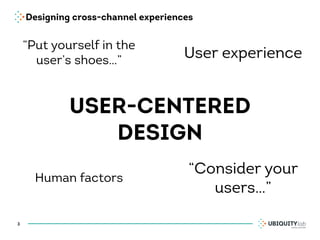
USER-CENTERED
DESIGN
ā€œConsider your
usersā€¦ā€
User experience
ā€œPut yourself in the
user’s shoesā€¦ā€
Human factors
Designing cross-channel experiences
4
USER-CENTERED
DESIGN
ā€œConsider your
usersā€¦ā€
User experience
ā€œPut yourself in the
user’s shoesā€¦ā€
Human factors
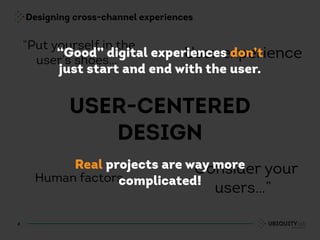
ā€œGoodā€ digital experiences don’t
just start and end with the user.
Real projects are way more
complicated!
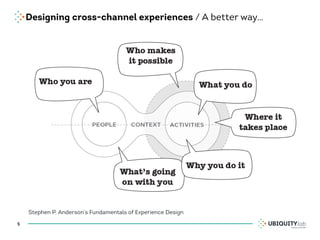
Designing cross-channel experiences / A better way…
5
Stephen P. Anderson’s Fundamentals of Experience Design
Designing cross-channel experiences / People
6
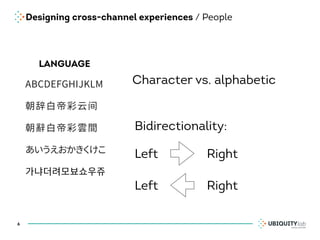
LANGUAGE
Character vs. alphabetic
Bidirectionality:
Left Right
Left Right
Designing cross-channel experiences / People
7
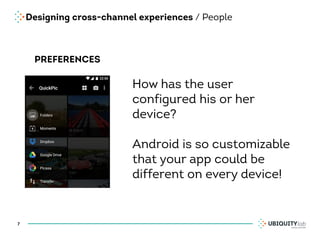
PREFERENCES
How has the user
configured his or her
device?
Android is so customizable
that your app could be
different on every device!
Designing cross-channel experiences / People
8
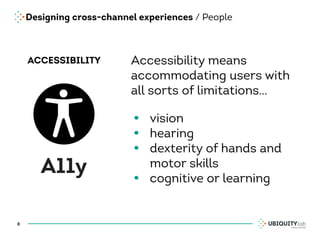
ACCESSIBILITY
A11y
Accessibility means
accommodating users with
all sorts of limitations…
• vision
• hearing
• dexterity of hands and
motor skills
• cognitive or learning
Designing cross-channel experiences / Context
9
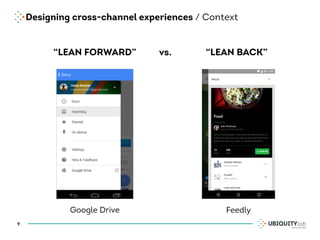
ā€œLEAN FORWARDā€ ā€œLEAN BACKā€vs.
Google Drive Feedly
Designing cross-channel experiences / Platform
10
Designing cross-channel experiences
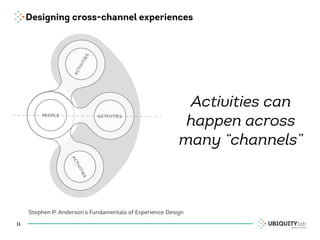
11
Stephen P. Anderson’s Fundamentals of Experience Design
Activities can
happen across
many ā€œchannelsā€
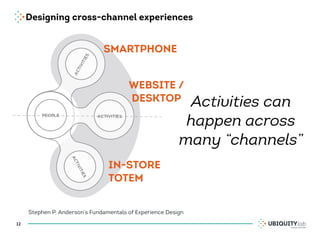
Designing cross-channel experiences
12
Stephen P. Anderson’s Fundamentals of Experience Design
Activities can
happen across
many ā€œchannelsā€
SMARTPHONE
WEBSITE /
DESKTOP
IN-STORE
TOTEM
Designing cross-channel experiences
13
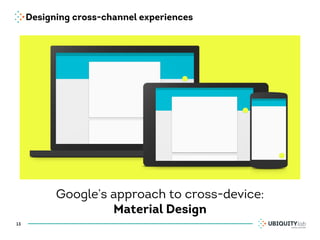
Google’s approach to cross-device:
Material Design
Designing cross-channel experiences
14
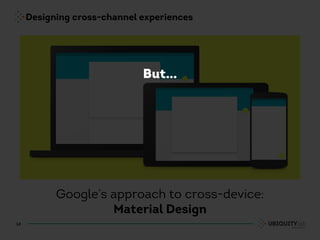
Google’s approach to cross-device:
Material Design
But…
Designing cross-channel experiences
15
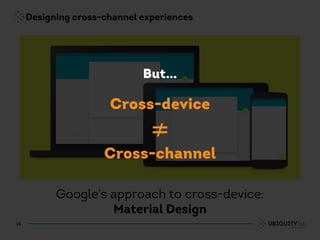
Google’s approach to cross-device:
Material Design
Cross-device
≠
Cross-channel
But…
Introduction
Design languages & pattern libraries
Design languages & pattern libraries / What?
ā€œRecurring solutions that solve common
design problems.ā€
—UI-Patterns.com
17
Design languages & pattern libraries / What?
ā€œRecurring solutions that solve common
design problems.ā€
—UI-Patterns.com
ā€œA design language or design vocabulary is an overarching
scheme or style that guides the design of a complement of
products… a unique but consistent look and feel define a design
language…materials, color schemes, shapes, patterns, textures
or layouts.ā€
—Wikipedia on design language
18
Design languages & pattern libraries / Why?
• Consistency

for the user, designers and developers

• Maintenance

fewer components to update

• Regulation

gives new team members a starting point
19
Design languages & pattern libraries / Other Examples
• Yahoo Design Pattern Library
• Mailchimp
• UI-Patterns.com
• Patternry
• Welie
• BBC Gel
20
Design languages & pattern libraries / Make your own!
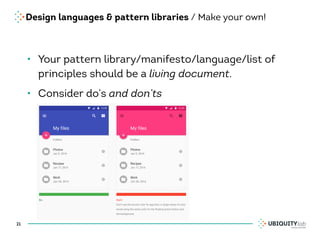
• Your pattern library/manifesto/language/list of
principles should be a living document.
• Consider do’s and don’ts
21
Lesson #1
Define actions and priorities
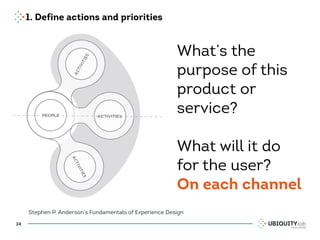
1. Define actions and priorities
23
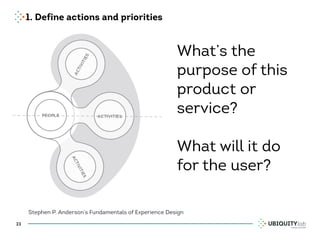
Stephen P. Anderson’s Fundamentals of Experience Design
What’s the
purpose of this
product or
service?
What will it do
for the user?
1. Define actions and priorities
24
Stephen P. Anderson’s Fundamentals of Experience Design
What’s the
purpose of this
product or
service?
What will it do
for the user?
On each channel
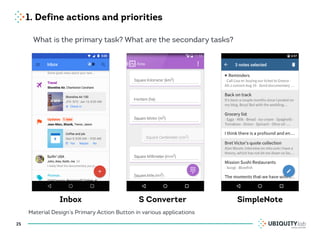
1. Define actions and priorities
25
Material Design’s Primary Action Button in various applications
What is the primary task? What are the secondary tasks?
Inbox S Converter SimpleNote
Lesson #2
Real world metaphors help the user
make sense of the digital world
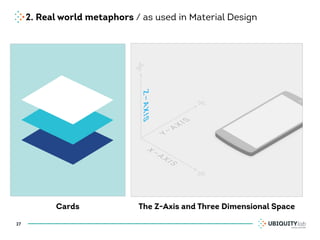
2. Real world metaphors / as used in Material Design
27
Cards The Z-Axis and Three Dimensional Space
2. Real world metaphors / Mental Models
28
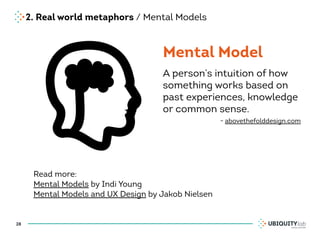
Mental Model
Read more:
Mental Models by Indi Young
Mental Models and UX Design by Jakob Nielsen
A person’s intuition of how
something works based on
past experiences, knowledge
or common sense.
- abovethefolddesign.com
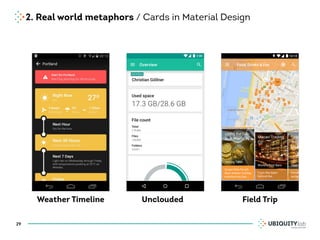
2. Real world metaphors / Cards in Material Design
29
Weather Timeline Unclouded Field Trip
2. Real world metaphors / Avoid skeumorphism
30
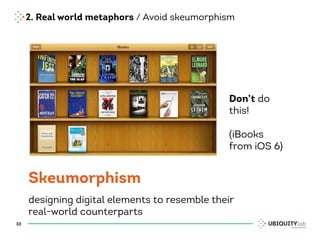
Skeumorphism
designing digital elements to resemble their
real-world counterparts
Don’t do
this!
(iBooks
from iOS 6)
2. Real world metaphors / Cross-channel
31
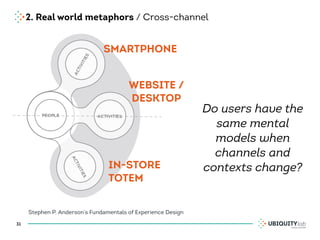
Stephen P. Anderson’s Fundamentals of Experience Design
Do users have the
same mental
models when
channels and
contexts change?
SMARTPHONE
WEBSITE /
DESKTOP
IN-STORE
TOTEM
Lesson #3
Meaningful visual design
3. Meaningful visual design / Relate to user actions
33
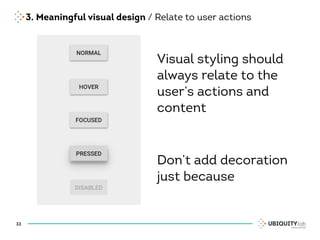
Visual styling should
always relate to the
user’s actions and
content
Don’t add decoration
just because
3. Meaningful visual design / Relate to user actions
34
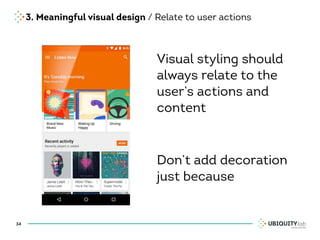
Visual styling should
always relate to the
user’s actions and
content
Don’t add decoration
just because
3. Meaningful visual design / Icons
35
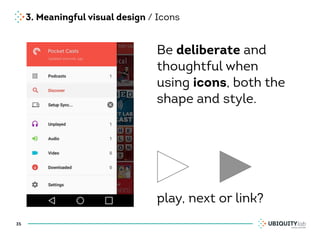
Be deliberate and
thoughtful when
using icons, both the
shape and style.
play, next or link?
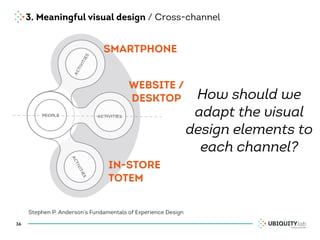
3. Meaningful visual design / Cross-channel
36
Stephen P. Anderson’s Fundamentals of Experience Design
How should we
adapt the visual
design elements to
each channel?
SMARTPHONE
WEBSITE /
DESKTOP
IN-STORE
TOTEM
Lesson #4
Motion and animation are excellent for
user feedback
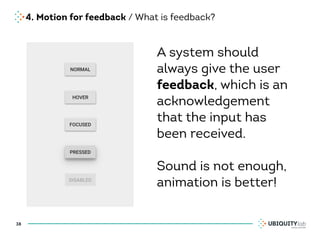
4. Motion for feedback / What is feedback?
38
A system should
always give the user
feedback, which is an
acknowledgement
that the input has
been received.
Sound is not enough,
animation is better!
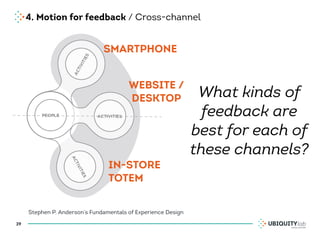
4. Motion for feedback / Cross-channel
39
Stephen P. Anderson’s Fundamentals of Experience Design
What kinds of
feedback are
best for each of
these channels?
SMARTPHONE
WEBSITE /
DESKTOP
IN-STORE
TOTEM
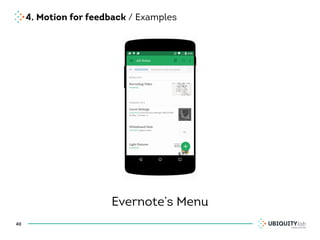
4. Motion for feedback / Examples
40
Evernote’s Menu
Testo
4. Motion for feedback / More Examples
• Numix Calculator
• Source (News Reader)
• Weather Timeline
41
Conclusion
For your next Android project
Testo
Conclusion / For your next project
• Read up!

The official Material Design documentaion

• Make your own library

Catalog your components and choices in a
personalized manifesto for your app

• Set priorities and activities up front

Is your app cross-channel? Then it needs to
support users in various contexts
43
THANKS!
@zhuli
jblitzer
uxblitz.com
julieblitzer.com
jblitzer
Julie Blitzer
UX Designer

Lessons from Material Design on cross-channel digital experiences - DroidCon Torino, Italy 2015

  • 1.
    DroidCon Torino 10 April2015 Julie Blitzer LESSONS FROM MATERIAL DESIGN ON CROSS-CHANNEL DIGITAL EXPERIENCES
  • 2.
  • 3.
    Designing cross-channel experiences 3 USER-CENTERED DESIGN ā€œConsideryour usersā€¦ā€ User experience ā€œPut yourself in the user’s shoesā€¦ā€ Human factors
  • 4.
    Designing cross-channel experiences 4 USER-CENTERED DESIGN ā€œConsideryour usersā€¦ā€ User experience ā€œPut yourself in the user’s shoesā€¦ā€ Human factors ā€œGoodā€ digital experiences don’t just start and end with the user. Real projects are way more complicated!
  • 5.
    Designing cross-channel experiences/ A better way… 5 Stephen P. Anderson’s Fundamentals of Experience Design
  • 6.
    Designing cross-channel experiences/ People 6 LANGUAGE Character vs. alphabetic Bidirectionality: Left Right Left Right
  • 7.
    Designing cross-channel experiences/ People 7 PREFERENCES How has the user configured his or her device? Android is so customizable that your app could be different on every device!
  • 8.
    Designing cross-channel experiences/ People 8 ACCESSIBILITY A11y Accessibility means accommodating users with all sorts of limitations… • vision • hearing • dexterity of hands and motor skills • cognitive or learning
  • 9.
    Designing cross-channel experiences/ Context 9 ā€œLEAN FORWARDā€ ā€œLEAN BACKā€vs. Google Drive Feedly
  • 10.
  • 11.
    Designing cross-channel experiences 11 StephenP. Anderson’s Fundamentals of Experience Design Activities can happen across many ā€œchannelsā€
  • 12.
    Designing cross-channel experiences 12 StephenP. Anderson’s Fundamentals of Experience Design Activities can happen across many ā€œchannelsā€ SMARTPHONE WEBSITE / DESKTOP IN-STORE TOTEM
  • 13.
    Designing cross-channel experiences 13 Google’sapproach to cross-device: Material Design
  • 14.
    Designing cross-channel experiences 14 Google’sapproach to cross-device: Material Design But…
  • 15.
    Designing cross-channel experiences 15 Google’sapproach to cross-device: Material Design Cross-device ≠ Cross-channel But…
  • 16.
  • 17.
    Design languages &pattern libraries / What? ā€œRecurring solutions that solve common design problems.ā€ —UI-Patterns.com 17
  • 18.
    Design languages &pattern libraries / What? ā€œRecurring solutions that solve common design problems.ā€ —UI-Patterns.com ā€œA design language or design vocabulary is an overarching scheme or style that guides the design of a complement of products… a unique but consistent look and feel define a design language…materials, color schemes, shapes, patterns, textures or layouts.ā€ —Wikipedia on design language 18
  • 19.
    Design languages &pattern libraries / Why? • Consistency
 for the user, designers and developers
 • Maintenance
 fewer components to update
 • Regulation
 gives new team members a starting point 19
  • 20.
    Design languages &pattern libraries / Other Examples • Yahoo Design Pattern Library • Mailchimp • UI-Patterns.com • Patternry • Welie • BBC Gel 20
  • 21.
    Design languages &pattern libraries / Make your own! • Your pattern library/manifesto/language/list of principles should be a living document. • Consider do’s and don’ts 21
  • 22.
  • 23.
    1. Define actionsand priorities 23 Stephen P. Anderson’s Fundamentals of Experience Design What’s the purpose of this product or service? What will it do for the user?
  • 24.
    1. Define actionsand priorities 24 Stephen P. Anderson’s Fundamentals of Experience Design What’s the purpose of this product or service? What will it do for the user? On each channel
  • 25.
    1. Define actionsand priorities 25 Material Design’s Primary Action Button in various applications What is the primary task? What are the secondary tasks? Inbox S Converter SimpleNote
  • 26.
    Lesson #2 Real worldmetaphors help the user make sense of the digital world
  • 27.
    2. Real worldmetaphors / as used in Material Design 27 Cards The Z-Axis and Three Dimensional Space
  • 28.
    2. Real worldmetaphors / Mental Models 28 Mental Model Read more: Mental Models by Indi Young Mental Models and UX Design by Jakob Nielsen A person’s intuition of how something works based on past experiences, knowledge or common sense. - abovethefolddesign.com
  • 29.
    2. Real worldmetaphors / Cards in Material Design 29 Weather Timeline Unclouded Field Trip
  • 30.
    2. Real worldmetaphors / Avoid skeumorphism 30 Skeumorphism designing digital elements to resemble their real-world counterparts Don’t do this! (iBooks from iOS 6)
  • 31.
    2. Real worldmetaphors / Cross-channel 31 Stephen P. Anderson’s Fundamentals of Experience Design Do users have the same mental models when channels and contexts change? SMARTPHONE WEBSITE / DESKTOP IN-STORE TOTEM
  • 32.
  • 33.
    3. Meaningful visualdesign / Relate to user actions 33 Visual styling should always relate to the user’s actions and content Don’t add decoration just because
  • 34.
    3. Meaningful visualdesign / Relate to user actions 34 Visual styling should always relate to the user’s actions and content Don’t add decoration just because
  • 35.
    3. Meaningful visualdesign / Icons 35 Be deliberate and thoughtful when using icons, both the shape and style. play, next or link?
  • 36.
    3. Meaningful visualdesign / Cross-channel 36 Stephen P. Anderson’s Fundamentals of Experience Design How should we adapt the visual design elements to each channel? SMARTPHONE WEBSITE / DESKTOP IN-STORE TOTEM
  • 37.
    Lesson #4 Motion andanimation are excellent for user feedback
  • 38.
    4. Motion forfeedback / What is feedback? 38 A system should always give the user feedback, which is an acknowledgement that the input has been received. Sound is not enough, animation is better!
  • 39.
    4. Motion forfeedback / Cross-channel 39 Stephen P. Anderson’s Fundamentals of Experience Design What kinds of feedback are best for each of these channels? SMARTPHONE WEBSITE / DESKTOP IN-STORE TOTEM
  • 40.
    4. Motion forfeedback / Examples 40 Evernote’s Menu
  • 41.
    Testo 4. Motion forfeedback / More Examples • Numix Calculator • Source (News Reader) • Weather Timeline 41
  • 42.
    Conclusion For your nextAndroid project
  • 43.
    Testo Conclusion / Foryour next project • Read up!
 The official Material Design documentaion
 • Make your own library
 Catalog your components and choices in a personalized manifesto for your app
 • Set priorities and activities up front
 Is your app cross-channel? Then it needs to support users in various contexts 43
  • 44.