Doctor Blade Metering
The What and How in
Anilox Ink Metering.
Tony Donato
Product Development Engineer
Harper Corporation of America
tdonato@harperimage.com
FIRST 4.0
From Section 21.4 Ink Metering System:
“ The function of the ink metering system is to control the
amount of ink being transferred onto the printing plate.”
From Section 21.4.1 Doctor Blades:
“ The primary function of the doctor blade is to uniformly
remove ink from the surface of the anilox without
damaging the anilox.”
Ink Metering
Doctor Blade Metering
OUTLINE:
• The difference between forward and reverse doctoring.
• Ink metering terms: Set-Angle, Contact Angle, blade
deflection, sheen, back-doctoring, blade loading pressure,
blade alignment and many others.
• The importance of blade stiffness to metering.
• How blade thickness affects metering.
• Why are there different blade tips.
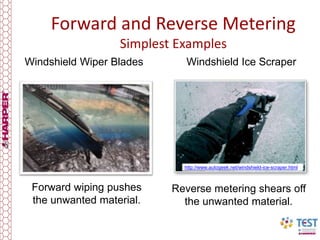
Forward and Reverse Metering
Simplest Examples
http://www.autogeek.net/windshield-ice-scraper.html
Reverse metering shears off
the unwanted material.
Windshield Ice ScraperWindshield Wiper Blades
Forward wiping pushes
the unwanted material.
Forward Metering
Blade points in the
direction of rotation.
Pushes the surface ink back into the pan.
Traditionally used in Gravure
on Chrome Rollers
Ink is pushed
back to the pan
Forward Metering
Pluses:
• Ideal where roll diameter
changes with the jobs.
• Less wear to rollers
being metered.
• Helps to lubricate blade.
Minuses:
• Works best with low
viscosity inks.
• Potential for speed
limitations due to
hydraulic lift.
• Blade position and
stiffness dependant.
Application Importance:
• Needs blade angle and location adjustability.
• Important to pick the right blade thickness, tip and
back-up blade combination.
Forward Metering Angle Relationships
A Distance blade tip to Cylinder Vertical Center Line
B Distance of blade tip to Cylinder Horizontal Center line
C Circumvential Distance Nip point to Blade Tip
D Elevator (Up & Down) adjustment for table assembly
E Slide (In and Out) adjustment blade holder
F Table Tilt (Pivot) adjustment for table assembly
G Set angle for blade to Cylinder without loading deflection.
H Contact Angle of blade tip with deflection
90
0
90
0
15
90
0
90
0
75
74.92°ø 6.00"
58.72°
54.11°
75.05°
A
Impression
Roll
Gravure
Cylinder
F
C
D
E
Reference line (Tangent) Set angle
Protractor Angle Finder
Angle Finder gives angles relevant
to earth.
G
H
B
Typical Contact Angles are:
Packaging Gravure 40° to 65°
Publication Gravure 50° to 70°
Coating & Wall Covering 40° to 55°
Dimensions related
to Center line of
Gravure Cylinder
Reverse Metering
“Reverse Metering” shears the ink off the Anilox surface.
Anilox
Ceramic anilox rollers allow the use of reverse metering.
Single Blade Enclosed Blade Chamber
Reverse Metering
Pluses:
• Meters the ink surface
cleaner than forward.
• No hydraulic lift.
• Meters viscous inks.
Minuses:
• Blade holders or chambers
have fixed set angles.
• Fixed roller diameter.
• Blade wear changes angle.
• Shears large pigments
• Pearlescent
• Metallic's
Application Importance:
• Needs hard surfaces.
Set Angle
90.00°
Anilox
Anilox
Reverse Metering
Single Blade
• Ink Pan Only
• Ink Pan w/ Fountain Roll
Chamber
• Two Blades
• Meter & Containment
• End Seals & Pump.
Blade Angles are fixed by holder & Chamber supplier
Metering Terms
90.00°
Set Angle
Anilox
Center Line.
Reference Line
From Anilox Center
To point of
Blade Contact
Tangent Line
Perpendicular to
Reference line
The “Set Angle” is the Chamber/Holder
Machined Angle without any load.
Doctor Blade
Anilox
Contact Angle
Worn Area
Contact
Patch
Anilox
Deflected Doctor Blade
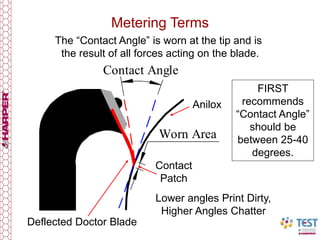
Metering Terms
The “Contact Angle” is worn at the tip and is
the result of all forces acting on the blade.
FIRST
recommends
“Contact Angle”
should be
between 25-40
degrees.
Lower angles Print Dirty,
Higher Angles Chatter
Metering Terms
Blade
Extention
Blade
Extention
Blade
Tip to Tip
Blade clamping
seat area
With Inking
Chambers the
metering and
containment
blade can be on
either the top or
bottom, all
depends on
chamber
placement on the
anilox.
Anilox
Dull Sheen Indicating Good Metering
Metering Terms
Metering Terms
Chamber opened up from the outside deck #7
Top of picture is bottom (6 O’clock) of chamber
Drips on doctor blade is back doctoring of ink
White drops tinting is high speed “Ink Misting.”
• Containment Blades can trap contaminates under it.
• Keep Containment blades Clean.
Small Dried Ink Chunks
Containing Metal
Particles
Plastic or Composite
Blades with
Embedded Particles
Dried ink on the back (outside) of the blades
Back doctoring does more than just waste ink.
90.00°
Containment
Set Angle
Set Angle
45.00°
Metering Terms
Anilox
Chamber
Meter
Blade
Containment
Blade
Unloaded blade
is at the highest
angle.
High speed presses
are trending at
lowering the
containment set angle.
Chambers do
not have to
have the same
angles for both
blades
90.00°
90.00°
37.47°
13.20°
Anilox
Contact Angles decrease with increased loading pressure!
Containment
Contact Angle
.
These are
good angles
for high
speeds.
Metering Terms
Lower containment
blade angles help to
reduce back doctoring.
Chamber has
.031" (.79mm)
of loading
Blade holder alignment needs to be part of press maintenance.
Metering Terms
28.48°
90.01°
5.11°
90.00°
Anilox
Metering Contact Angle
Containment “Contact Angle”
Chamber has
.0625” (1.6mm)
of loading
Doctor
blades are
spring steel
and the more
they are
loaded the
harder they
push into the
anilox roller.
Extreme low
containment
angles will
trap dried ink
and
contaminates
Ink magnets
and filters are
required for
high speed
presses
3.52°
90.00°
18.42°
Anilox
Metering Contact Angle
Containment Contact Angle
Chamber has
.125” (3.2mm)
of loading
Metering Terms
Extreme loading will result in burrs created on the blade edge.
Anilox rotation remains the same on CI press
Outside decks 6 to 10 Inside decks 1 to 5
Back doctoring drips off
chamber into pan
Back doctoring puddles behind blade
and slings off the end of the anilox
Containment
Blade
Containment
Blade
Doctor Blade Mechanical
Specifications and Properties:
Mechanical Properties: Affect loading
pressure, blade life and anilox wear.
•Tensile strength (spring like quality) ,
• Hardness
• Wear resistance.
• Chemical resistance.
Physical Attributes: Affect the printing
performance.
• Thickness and width tolerances, flatness,
surface finishes and camber (curvature
also called edge straightness)
Deflected doctor blade
and released it laid flat!
Doctor Blade Mechanical Property:
Deflected a piece of steel banding stock.
Blade must deflect and re-flatten, it cannot take a set!
Banding stock unsuitable for a number of reasons!
Doctor Blade Mechanical
Specifications and Properties:
• The initial wiping between the blade and roller are effected
by variations in blade camber, flatness and width.
• All of the mechanical and physical properties affect the
amount of loading force needed to cleanly meter the anilox.
• In addition, the blade mounting, holder/chamber physical
dimensions/condition & mounting mechanism must be kept in
good working order for the doctor blade to properly work.
A´A
Blades must be parallel to each other, & tip to tip distance the same.
Blade Mechanics Simplified
1"
d
t
Load
w
Looking at the mathematics and
mechanics a doctor blade is a “beam”
fixed on one end and loaded on the other.
“w” is load in lbs/linear inch
“d” is deflection at the tip (inches)
“1” is the extension of blade
“E” Modulus of elasticity 30,000,000lbs for
steel.
“I” Moment of inertia for the blade cross
section.
w x 1³
3 x E x I
d = (1)
1³ (blade ext)__
t³
Blade Mechanics Simplified
1"
d
t
Load
w
t³
12
Moment of Inertia I =
t = blade thickness
We substitute equation (2) into (1)
d =
____w x 1³____
3 x E x (t³ / 12)
(3)
(2)
Set w = to 1lbs/ linear inch and assume
steel “E” for the blade material we get:
d =
____1___________
(3 x 30,000,000/ 12)
x (4)
Blade Mechanics Simplified
STILL AWAKE LAST SLIDE WITH MATH!!!!
The exponents in equation (4) show the
cube factor.
Example leaving a blade in too long:
(.750/.625)³ = 1.73 times stiffer
Example replace .006” with 0.008: (.008/.006)³= 2.24 times.
If the stiffer blade was left in until it was 1/8” shorter:
Then: 1.73 (shorting) x 2.24 (thickening) = 3.87 times stiffer
CHANGES IN THICKNESS AND EXTENSION CAN EFFECT
ANILOX WEAR.
Blade Mechanics Tested
Experiment:
Used .006” & .008” doctor blades and two different widths
to get ½” extension and a 1” extension. Applied two
separate weights first 4.75lbs and second 7.2lbs statically
and measured the deflection with a dial indicator.
Blade Mechanics Tested
Unloaded
Loaded
Blade
Thickness
Blade
Extension
Blade
Length
Weigh
used
Load per
linear inch
Deflection
.006” 0.500” 6.25” 4.75lbs 0.38lbs/in 0.029”
.008” 0.500” 6.25” 4.75lbs 0.38lbs/in 0.012”
.006” 0.500” 6.25” 7.2lbs 0.58lbs/in 0.049”
.008” 0.500” 6.25” 7.2lbs 0.58lbs/in 0.021”
.006 1.000” 6.25” 4.75lbs 0.38lbs/in 0.132”
.008” 1.000” 6.25” 4.75lbs 0.38lbs/in 0.082”
.006” 1.000” 6.25” 7.2lbs 0.58lbs/in 0.162”
.008” 1.000” 6.25” 7.2lbs 0.58lbs/in 0.146”
Blade Mechanics Tested
Doctor Blade Loading
What to expect from what we have learned so far!
• Typically the highest angle is the set-angle.
• As the loading pressure increases the “Contact-Angle”
decreases.
• Loading pressure can lower the contact angle beyond the
point of clean metering. (Below 26°)
• As a blade wears it narrows and the contact angle increases.
• Between loading and wearing the blade contact point moves
away from the center line.
Overloading the blades changes wear.
Excessive pressure may result in creating wire like slivers.
Anilox Roll
Chamber
Lamella Tip
Clamp Bar
Tip not
contacting roll
Wear Patch
Is behind Tip
Radius Tip
Over-Loaded
Blades can
Cause Scoring !!
Do Not
do this to your
Doctor Blades !!
Top blade has .217” worn off came from white deck!
Steel Slivers created from overloading.
Slivers form
break off and get
loaded between
blade and anilox
damaging
surface.
90.00°
18.42°
90.00°
48.17°
0.23 in
1.25 in
Chamber is engaged .125" (3.2mm)
Blade was 1-3/8” and
after the chamber is
loaded to 1/8” the blade
can wear to a width 1-1/4”
The contact
patch shifts
with chamber
loading and
blade wear.
Chamber has
.125” (3.2mm)
of loading
Doctor Blade Loading Observations
90.00°
18.42°
90.00°
48.17°
18.62°
22.96°
Chamber is engaged .125" (3.2mm)
Chamber has
.125” (3.2mm)
of loading
Doctor Blade Loading Observations
As the blade narrows the
point of contact on the
anilox moves increasing
the set angle.
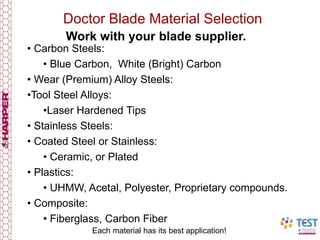
Doctor Blade Material Selection
• Carbon Steels:
• Blue Carbon, White (Bright) Carbon
• Wear (Premium) Alloy Steels:
•Tool Steel Alloys:
•Laser Hardened Tips
• Stainless Steels:
• Coated Steel or Stainless:
• Ceramic, or Plated
• Plastics:
• UHMW, Acetal, Polyester, Proprietary compounds.
• Composite:
• Fiberglass, Carbon Fiber
Work with your blade supplier.
Each material has its best application!
45.00° 20.00°
•Square
• Round Radius
• Beveled
• 45
• 15 to 20
• 5 or less
• Stepped (Lamella)
• Single Step
• Double Step
Blade Tips (Profile)
Blade Tips
Typical tip applications:
• Square Tip
• Plastic Containment blades.
• Back-up Steel Blades
• Round (Radius) Tip
• Metal Metering WW w/Chamber w/Sunday Drive
• Beveled 45°
• UHMW Plastic
• Beveled 15 or 20°
• Metal on NW (seats quickly)
• Composites and stiffer plastics
• Lamella (stepped)
• Where the tip needs to thin and body stiffer.
• Double stepped
• Where a stiff blade is needed w/ narrow contact.
Blade Thickness
Thickness considerations:
• Blade Material dependant
• Plastics & Composites thicker than metals
• Application dependant
• Corrosive ink or coating or environment.
• Ink pigmentations or material (ex. TiO² white)
• Metering or Containment
• Anilox Geometry
• 30 & 60°
• 45° Quad
• Channeled
• Trihelical
• Anilox Screen
• Process & solids
• Coatings and adhesives
Blade Optimization work with your supplier
• Periodically have a used blade analysis
– Check contact angle over 3 spots across web
– amount worn 3 spots
• The Used Blade can tell you:
– Loading degrees (pressure)
– Blade alignment to anilox
– Chamber condition
• Set shop practices.
– Blade Changing schedules.
– Loading pressures
– Mounting training
Worn Doctor
Blade showing
engraving lines
Anilox Engraving post intersections leave lines in doctor
blades contacting edge
25,400µ/”
Line to lineµ
25,400 µ/in
18 µ
18 Microns
Anilox effects wear pattern.
Equation to calculate
the CPI of an Anilox
from a worn blade
CPI = x Cos of Engr ∟
= 705 CPI 60° Angle of Engravingx 0.5
• Doctor Blade contact angle does effect blade vibration.
• Doctor blades can change the surface smoothness of the
anilox.
• Loading pressure reduces the blade angle.
• Blade wear can increase the contact angle.
• Thicker doctor blades increase the blade angle because
they deflect less.
• Thicker doctor blades increase wear area spreading load.
• Best metering contact angles between 26°to 38°.
• Above 40°contact angle can result in chatter.
• 4° to 5°of loading deflection is helpful for metering
above a 1000 fpm.
Metering Review
• The empty anilox cells bring air back into the chamber.
• Know what your set angles are.
• Lower containment contact angles can reduce back
doctoring.
• Containment blades can wear faster on full coverage.
• Use caution when handling used doctor blades. They
are sharp.
• Your suppliers they are your best resources.
• Doctor blades should shear off the surface ink leaving
only the ink in the Anilox cells.
• The abrasiveness of the ink itself needs to be
considered.
• Change blades when changing cpi.
• Remove ink contaminants with filters and magnets.
Metering Review
Be Observant of the Anilox Metering
• Anilox properly metered “Dull Sheen”
• Looks shinny excessive “surface ink”
– Excessive loading pressure.
– Chamber or holder at bottom of adjustment.
• Shinny streaks “nicks in blade”
• Sheen varies side to side:
– Mounting and or alignment issue.
• Variation in density across web:
– Uneven loading pressure.
– Mounting and or alignment issue.
Doctor Blade Review
Work with your blade supplier.
• Specified by material, thickness and tip.
• There is a proper blade for each application.
• Blades affect print quality and Anilox life.
• Blade Mounting is very important.
• Important: Holder/Chamber alignment to Anilox
• Blade loading pressure critical.
• Record Doctor Blade Information: Create a log
and track issues and concerns
• Used blades are sharp are a razor blade.
• Have used blades analyzed periodically.
Doctor Blade Metering
The What and How in Anilox Ink Metering.
QUESTIONS?
Doctor Blade Metering
The What and How in Anilox Ink Metering.
Tony Donato
Product Development Engineer
Harper Corporation of America
tdonato@harperimage.com
THANK YOU FOR ATTENDING!

Doctor Blade Metering

  • 1.
    Doctor Blade Metering TheWhat and How in Anilox Ink Metering. Tony Donato Product Development Engineer Harper Corporation of America tdonato@harperimage.com
  • 2.
    FIRST 4.0 From Section21.4 Ink Metering System: “ The function of the ink metering system is to control the amount of ink being transferred onto the printing plate.” From Section 21.4.1 Doctor Blades: “ The primary function of the doctor blade is to uniformly remove ink from the surface of the anilox without damaging the anilox.” Ink Metering
  • 3.
    Doctor Blade Metering OUTLINE: •The difference between forward and reverse doctoring. • Ink metering terms: Set-Angle, Contact Angle, blade deflection, sheen, back-doctoring, blade loading pressure, blade alignment and many others. • The importance of blade stiffness to metering. • How blade thickness affects metering. • Why are there different blade tips.
  • 4.
    Forward and ReverseMetering Simplest Examples http://www.autogeek.net/windshield-ice-scraper.html Reverse metering shears off the unwanted material. Windshield Ice ScraperWindshield Wiper Blades Forward wiping pushes the unwanted material.
  • 5.
    Forward Metering Blade pointsin the direction of rotation. Pushes the surface ink back into the pan. Traditionally used in Gravure on Chrome Rollers Ink is pushed back to the pan
  • 6.
    Forward Metering Pluses: • Idealwhere roll diameter changes with the jobs. • Less wear to rollers being metered. • Helps to lubricate blade. Minuses: • Works best with low viscosity inks. • Potential for speed limitations due to hydraulic lift. • Blade position and stiffness dependant. Application Importance: • Needs blade angle and location adjustability. • Important to pick the right blade thickness, tip and back-up blade combination.
  • 7.
    Forward Metering AngleRelationships A Distance blade tip to Cylinder Vertical Center Line B Distance of blade tip to Cylinder Horizontal Center line C Circumvential Distance Nip point to Blade Tip D Elevator (Up & Down) adjustment for table assembly E Slide (In and Out) adjustment blade holder F Table Tilt (Pivot) adjustment for table assembly G Set angle for blade to Cylinder without loading deflection. H Contact Angle of blade tip with deflection 90 0 90 0 15 90 0 90 0 75 74.92°ø 6.00" 58.72° 54.11° 75.05° A Impression Roll Gravure Cylinder F C D E Reference line (Tangent) Set angle Protractor Angle Finder Angle Finder gives angles relevant to earth. G H B Typical Contact Angles are: Packaging Gravure 40° to 65° Publication Gravure 50° to 70° Coating & Wall Covering 40° to 55° Dimensions related to Center line of Gravure Cylinder
  • 8.
    Reverse Metering “Reverse Metering”shears the ink off the Anilox surface. Anilox Ceramic anilox rollers allow the use of reverse metering. Single Blade Enclosed Blade Chamber
  • 9.
    Reverse Metering Pluses: • Metersthe ink surface cleaner than forward. • No hydraulic lift. • Meters viscous inks. Minuses: • Blade holders or chambers have fixed set angles. • Fixed roller diameter. • Blade wear changes angle. • Shears large pigments • Pearlescent • Metallic's Application Importance: • Needs hard surfaces.
  • 10.
    Set Angle 90.00° Anilox Anilox Reverse Metering SingleBlade • Ink Pan Only • Ink Pan w/ Fountain Roll Chamber • Two Blades • Meter & Containment • End Seals & Pump. Blade Angles are fixed by holder & Chamber supplier
  • 11.
    Metering Terms 90.00° Set Angle Anilox CenterLine. Reference Line From Anilox Center To point of Blade Contact Tangent Line Perpendicular to Reference line The “Set Angle” is the Chamber/Holder Machined Angle without any load. Doctor Blade Anilox
  • 12.
    Contact Angle Worn Area Contact Patch Anilox DeflectedDoctor Blade Metering Terms The “Contact Angle” is worn at the tip and is the result of all forces acting on the blade. FIRST recommends “Contact Angle” should be between 25-40 degrees. Lower angles Print Dirty, Higher Angles Chatter
  • 13.
    Metering Terms Blade Extention Blade Extention Blade Tip toTip Blade clamping seat area With Inking Chambers the metering and containment blade can be on either the top or bottom, all depends on chamber placement on the anilox. Anilox
  • 14.
    Dull Sheen IndicatingGood Metering Metering Terms
  • 15.
    Metering Terms Chamber openedup from the outside deck #7 Top of picture is bottom (6 O’clock) of chamber Drips on doctor blade is back doctoring of ink White drops tinting is high speed “Ink Misting.”
  • 16.
    • Containment Bladescan trap contaminates under it. • Keep Containment blades Clean. Small Dried Ink Chunks Containing Metal Particles Plastic or Composite Blades with Embedded Particles Dried ink on the back (outside) of the blades Back doctoring does more than just waste ink.
  • 17.
    90.00° Containment Set Angle Set Angle 45.00° MeteringTerms Anilox Chamber Meter Blade Containment Blade Unloaded blade is at the highest angle. High speed presses are trending at lowering the containment set angle. Chambers do not have to have the same angles for both blades
  • 18.
    90.00° 90.00° 37.47° 13.20° Anilox Contact Angles decreasewith increased loading pressure! Containment Contact Angle . These are good angles for high speeds. Metering Terms Lower containment blade angles help to reduce back doctoring. Chamber has .031" (.79mm) of loading
  • 19.
    Blade holder alignmentneeds to be part of press maintenance. Metering Terms 28.48° 90.01° 5.11° 90.00° Anilox Metering Contact Angle Containment “Contact Angle” Chamber has .0625” (1.6mm) of loading Doctor blades are spring steel and the more they are loaded the harder they push into the anilox roller.
  • 20.
    Extreme low containment angles will trapdried ink and contaminates Ink magnets and filters are required for high speed presses 3.52° 90.00° 18.42° Anilox Metering Contact Angle Containment Contact Angle Chamber has .125” (3.2mm) of loading Metering Terms Extreme loading will result in burrs created on the blade edge.
  • 21.
    Anilox rotation remainsthe same on CI press Outside decks 6 to 10 Inside decks 1 to 5 Back doctoring drips off chamber into pan Back doctoring puddles behind blade and slings off the end of the anilox Containment Blade Containment Blade
  • 22.
    Doctor Blade Mechanical Specificationsand Properties: Mechanical Properties: Affect loading pressure, blade life and anilox wear. •Tensile strength (spring like quality) , • Hardness • Wear resistance. • Chemical resistance. Physical Attributes: Affect the printing performance. • Thickness and width tolerances, flatness, surface finishes and camber (curvature also called edge straightness) Deflected doctor blade and released it laid flat!
  • 23.
    Doctor Blade MechanicalProperty: Deflected a piece of steel banding stock. Blade must deflect and re-flatten, it cannot take a set! Banding stock unsuitable for a number of reasons!
  • 24.
    Doctor Blade Mechanical Specificationsand Properties: • The initial wiping between the blade and roller are effected by variations in blade camber, flatness and width. • All of the mechanical and physical properties affect the amount of loading force needed to cleanly meter the anilox. • In addition, the blade mounting, holder/chamber physical dimensions/condition & mounting mechanism must be kept in good working order for the doctor blade to properly work. A´A Blades must be parallel to each other, & tip to tip distance the same.
  • 25.
    Blade Mechanics Simplified 1" d t Load w Lookingat the mathematics and mechanics a doctor blade is a “beam” fixed on one end and loaded on the other. “w” is load in lbs/linear inch “d” is deflection at the tip (inches) “1” is the extension of blade “E” Modulus of elasticity 30,000,000lbs for steel. “I” Moment of inertia for the blade cross section. w x 1³ 3 x E x I d = (1)
  • 26.
    1³ (blade ext)__ t³ BladeMechanics Simplified 1" d t Load w t³ 12 Moment of Inertia I = t = blade thickness We substitute equation (2) into (1) d = ____w x 1³____ 3 x E x (t³ / 12) (3) (2) Set w = to 1lbs/ linear inch and assume steel “E” for the blade material we get: d = ____1___________ (3 x 30,000,000/ 12) x (4)
  • 27.
    Blade Mechanics Simplified STILLAWAKE LAST SLIDE WITH MATH!!!! The exponents in equation (4) show the cube factor. Example leaving a blade in too long: (.750/.625)³ = 1.73 times stiffer Example replace .006” with 0.008: (.008/.006)³= 2.24 times. If the stiffer blade was left in until it was 1/8” shorter: Then: 1.73 (shorting) x 2.24 (thickening) = 3.87 times stiffer CHANGES IN THICKNESS AND EXTENSION CAN EFFECT ANILOX WEAR.
  • 28.
    Blade Mechanics Tested Experiment: Used.006” & .008” doctor blades and two different widths to get ½” extension and a 1” extension. Applied two separate weights first 4.75lbs and second 7.2lbs statically and measured the deflection with a dial indicator.
  • 29.
  • 30.
  • 31.
    Blade Thickness Blade Extension Blade Length Weigh used Load per linear inch Deflection .006”0.500” 6.25” 4.75lbs 0.38lbs/in 0.029” .008” 0.500” 6.25” 4.75lbs 0.38lbs/in 0.012” .006” 0.500” 6.25” 7.2lbs 0.58lbs/in 0.049” .008” 0.500” 6.25” 7.2lbs 0.58lbs/in 0.021” .006 1.000” 6.25” 4.75lbs 0.38lbs/in 0.132” .008” 1.000” 6.25” 4.75lbs 0.38lbs/in 0.082” .006” 1.000” 6.25” 7.2lbs 0.58lbs/in 0.162” .008” 1.000” 6.25” 7.2lbs 0.58lbs/in 0.146” Blade Mechanics Tested
  • 32.
    Doctor Blade Loading Whatto expect from what we have learned so far! • Typically the highest angle is the set-angle. • As the loading pressure increases the “Contact-Angle” decreases. • Loading pressure can lower the contact angle beyond the point of clean metering. (Below 26°) • As a blade wears it narrows and the contact angle increases. • Between loading and wearing the blade contact point moves away from the center line.
  • 33.
    Overloading the bladeschanges wear. Excessive pressure may result in creating wire like slivers. Anilox Roll Chamber Lamella Tip Clamp Bar Tip not contacting roll Wear Patch Is behind Tip Radius Tip Over-Loaded Blades can Cause Scoring !! Do Not do this to your Doctor Blades !!
  • 34.
    Top blade has.217” worn off came from white deck! Steel Slivers created from overloading. Slivers form break off and get loaded between blade and anilox damaging surface.
  • 35.
    90.00° 18.42° 90.00° 48.17° 0.23 in 1.25 in Chamberis engaged .125" (3.2mm) Blade was 1-3/8” and after the chamber is loaded to 1/8” the blade can wear to a width 1-1/4” The contact patch shifts with chamber loading and blade wear. Chamber has .125” (3.2mm) of loading Doctor Blade Loading Observations
  • 36.
    90.00° 18.42° 90.00° 48.17° 18.62° 22.96° Chamber is engaged.125" (3.2mm) Chamber has .125” (3.2mm) of loading Doctor Blade Loading Observations As the blade narrows the point of contact on the anilox moves increasing the set angle.
  • 37.
    Doctor Blade MaterialSelection • Carbon Steels: • Blue Carbon, White (Bright) Carbon • Wear (Premium) Alloy Steels: •Tool Steel Alloys: •Laser Hardened Tips • Stainless Steels: • Coated Steel or Stainless: • Ceramic, or Plated • Plastics: • UHMW, Acetal, Polyester, Proprietary compounds. • Composite: • Fiberglass, Carbon Fiber Work with your blade supplier. Each material has its best application!
  • 38.
    45.00° 20.00° •Square • RoundRadius • Beveled • 45 • 15 to 20 • 5 or less • Stepped (Lamella) • Single Step • Double Step Blade Tips (Profile)
  • 39.
    Blade Tips Typical tipapplications: • Square Tip • Plastic Containment blades. • Back-up Steel Blades • Round (Radius) Tip • Metal Metering WW w/Chamber w/Sunday Drive • Beveled 45° • UHMW Plastic • Beveled 15 or 20° • Metal on NW (seats quickly) • Composites and stiffer plastics • Lamella (stepped) • Where the tip needs to thin and body stiffer. • Double stepped • Where a stiff blade is needed w/ narrow contact.
  • 40.
    Blade Thickness Thickness considerations: •Blade Material dependant • Plastics & Composites thicker than metals • Application dependant • Corrosive ink or coating or environment. • Ink pigmentations or material (ex. TiO² white) • Metering or Containment • Anilox Geometry • 30 & 60° • 45° Quad • Channeled • Trihelical • Anilox Screen • Process & solids • Coatings and adhesives
  • 41.
    Blade Optimization workwith your supplier • Periodically have a used blade analysis – Check contact angle over 3 spots across web – amount worn 3 spots • The Used Blade can tell you: – Loading degrees (pressure) – Blade alignment to anilox – Chamber condition • Set shop practices. – Blade Changing schedules. – Loading pressures – Mounting training
  • 42.
    Worn Doctor Blade showing engravinglines Anilox Engraving post intersections leave lines in doctor blades contacting edge 25,400µ/” Line to lineµ 25,400 µ/in 18 µ 18 Microns Anilox effects wear pattern. Equation to calculate the CPI of an Anilox from a worn blade CPI = x Cos of Engr ∟ = 705 CPI 60° Angle of Engravingx 0.5
  • 43.
    • Doctor Bladecontact angle does effect blade vibration. • Doctor blades can change the surface smoothness of the anilox. • Loading pressure reduces the blade angle. • Blade wear can increase the contact angle. • Thicker doctor blades increase the blade angle because they deflect less. • Thicker doctor blades increase wear area spreading load. • Best metering contact angles between 26°to 38°. • Above 40°contact angle can result in chatter. • 4° to 5°of loading deflection is helpful for metering above a 1000 fpm. Metering Review
  • 44.
    • The emptyanilox cells bring air back into the chamber. • Know what your set angles are. • Lower containment contact angles can reduce back doctoring. • Containment blades can wear faster on full coverage. • Use caution when handling used doctor blades. They are sharp. • Your suppliers they are your best resources. • Doctor blades should shear off the surface ink leaving only the ink in the Anilox cells. • The abrasiveness of the ink itself needs to be considered. • Change blades when changing cpi. • Remove ink contaminants with filters and magnets. Metering Review
  • 45.
    Be Observant ofthe Anilox Metering • Anilox properly metered “Dull Sheen” • Looks shinny excessive “surface ink” – Excessive loading pressure. – Chamber or holder at bottom of adjustment. • Shinny streaks “nicks in blade” • Sheen varies side to side: – Mounting and or alignment issue. • Variation in density across web: – Uneven loading pressure. – Mounting and or alignment issue.
  • 46.
    Doctor Blade Review Workwith your blade supplier. • Specified by material, thickness and tip. • There is a proper blade for each application. • Blades affect print quality and Anilox life. • Blade Mounting is very important. • Important: Holder/Chamber alignment to Anilox • Blade loading pressure critical. • Record Doctor Blade Information: Create a log and track issues and concerns • Used blades are sharp are a razor blade. • Have used blades analyzed periodically.
  • 47.
    Doctor Blade Metering TheWhat and How in Anilox Ink Metering. QUESTIONS?
  • 48.
    Doctor Blade Metering TheWhat and How in Anilox Ink Metering. Tony Donato Product Development Engineer Harper Corporation of America tdonato@harperimage.com THANK YOU FOR ATTENDING!