Prabath Fonseka (MVP)
CTO
Occulem
Microsoft Azure Notification Hub
Dinusha Kumarasiri (MVP)
Software Architect
Occulem
• Windows WNS
• Toast
• Tile
• Badge
• Raw
• Windows Phone (MPNS)
• Toast
• Tile
• Raw
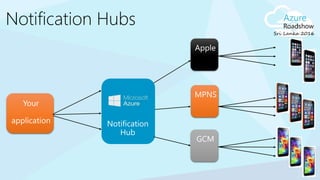
• Apple
• Google
• Amazon
Reservation changes, Deals,
Back-office
Travel/Hospitality/Airlines
SMS replacement, Deals,
Back-office
Banking/Insurance
Orders, Product UX,
Back-office
Discrete manufacturing/Auto
Prescriptions, Appointments,
LOB (maintenance)
Healthcare
Breaking news
News/Media
Offers, Orders, Back-office
Retail
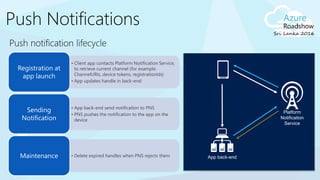
• Client app contacts Platform Notification Service,
to retrieve current channel (for example:
ChannelURIs, device tokens, registrationIds)
• App updates handle in back-end
Registration at
app launch
• App back-end send notification to PNS
• PNS pushes the notification to the app on the
device
Sending
Notification
• Delete expired handles when PNS rejects themMaintenance
Platform
Notification
Service
App back-end
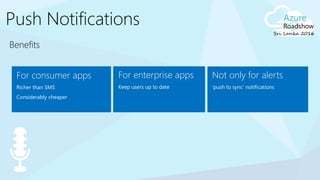
For enterprise apps
Keep users up to date
Not only for alerts
‘push to sync’ notifications
For consumer apps
Richer than SMS
Considerably cheaper
• Different communication protocols to PNS
• Different presentation formats and capabilities
Platform dependency
• Provide a way to send a message to a device/channel
• Target user or group of interest
• Back-end has to maintain an identification repository
Routing
• Need to store current handles for each device
• Broadcast to millions of devices with low latency
Scale
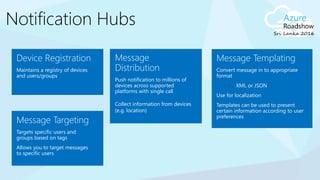
Message
Distribution
Push notification to millions of
devices across supported
platforms with single call
Collect information from devices
(e.g. location)
Message Templating
Convert message in to appropriate
format
• XML or JSON
Use for localization
Templates can be used to present
certain information according to user
preferences
Device Registration
Maintains a registry of devices
and users/groups
Message Targeting
Targets specific users and
groups based on tags
Allows you to target messages
to specific users
Bing (news, finance, sports, …) Past event sample – Sochi 2014
Preinstalled on
Windows Millions of devices
Millions of
notifications/day Minutes to delivery
Interest groups
(countries,
disciplines, athletes)
Localized
notifications
Million devices
(iOS, Android, WP) Million notifications
10s
3+ <2
100s
3+ 150+
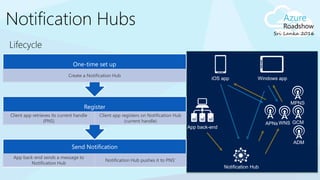
Send Notification
App back-end sends a message to
Notification Hub
Notification Hub pushes it to PNS’
Register
Client app retrieves its current handle
(PNS)
Client app registers on Notification Hub
(current handle)
One-time set up
Create a Notification Hub
APNsWNS
Notification Hub
App back-end
iOS app Windows app
MPNS
GCM
ADM
X-plat: from
any back-end
to any mobile
platform
No need to
store device
information in
the app back-
end
Routing and
interest groups
Personalization
and
localization
Broadcast at
scale, multicast,
unicast
Telemetry
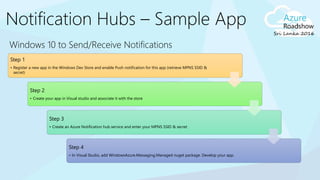
Windows 10 to Send/Receive Notifications
Step 1
• Register a new app in the Windows Dev Store and enable Push notification for this app (retrieve MPNS SSID &
secret)
Step 2
• Create your app in Visual studio and associate it with the store
Step 3
• Create an Azure Notification hub service and enter your MPNS SSID & secret
Step 4
• In Visual Studio, add WindowsAzure.Messaging.Managed nuget package. Develop your app.
1. Register your device at application startup
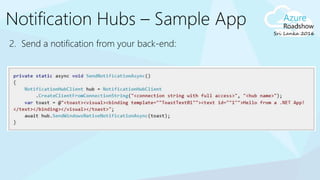
2. Send a notification from your back-end:
Code Snippets
Register Send
await hub.RegisterNativeAsync(channel.Uri);
[hub registerNativeWithDeviceToken:deviceToken
tags:nil
completion:^(NSError* error) { … }];
hub.register(regid);
var toast = @"<notification payload>";
hub.SendWindowsNativeNotificationAsync(toast);
hubService.wns.sendToastText01(null,
{
text1: 'Hello from Node!'
},
function (error)
{
…
}
);
Payload Snippets
<toast><visual>
<binding template="ToastText01">
<text id="1">Hello from a .NET App!</text>
</binding>
</visual></toast>
{"aps":{"alert":"Hello from .NET!"}}
{"data":{"message":"Hello from .NET!"}}
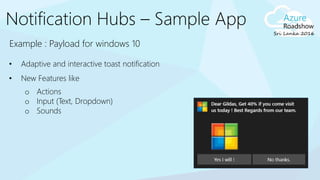
Example : Payload for windows 10
• Adaptive and interactive toast notification
• New Features like
o Actions
o Input (Text, Dropdown)
o Sounds
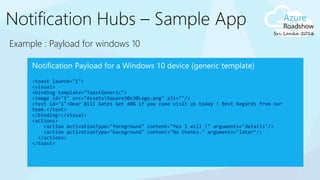
Example : Payload for windows 10
<toast launch="1">
<visual>
<binding template="ToastGeneric">
<image id="1" src="AssetsSquare30x30Logo.png" alt=""/>
<text id="1">Dear Bill Gates Get 40% if you come visit us today ! Best Regards from our
team.</text>
</binding></visual>
<actions>
<action activationType="foreground" content="Yes I will !" arguments="details"/>
<action activationType="background" content="No thanks." arguments="later"/>
</actions>
</toast>
Tags as interest groups
• Client app can register with a set of tags
• Tags are simple strings (no pre-provisioning is
required)
• App back-end can target all clients with the same
tag
You can use tags also for:
• Multiple type of interest groups, for example:
• Follow bands: tag “followband:Beatles”
• Follow users: tag “followuser:Alice”
• Tag devices with a user ID
• Tags can be user preferences or system information
Notification Hub
App back-end
Tag:”Beatles”Tag:”Wailers”
Tag:”Beatles
”
Register
await new string[] {"myTag", "myOtherTag"}
[hub registerNativeWithDeviceToken:deviceToken tags:@[@"myTag", @"myOtherTag"] completion:
^(NSError* error) {
…
}];
hub.register(regid, "myTag“, "myOtherTag");
Send
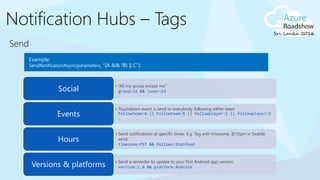
• “All my group except me”
group:id && !user:idSocial
• Touchdown event is send to everybody following either team
Followteam:A || Followteam:B || followplayer:1 || followplayer:2
…
Events
• Send notifications at specific times. E.g. Tag with timezone, @12pm in Seattle
send:
timezone:PST && follows:thaifood
Hours
• Send a reminder to update to your first Android app version:
version:1.0 && platform:AndroidVersions & platforms
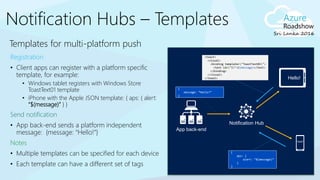
Templates for multi-platform push
Registration
• Client apps can register with a platform specific
template, for example:
• Windows tablet registers with Windows Store
ToastText01 template
• iPhone with the Apple JSON template: { aps: { alert:
“$(message)” } }
Send notification
• App back-end sends a platform independent
message: {message: “Hello!”}
Notes
• Multiple templates can be specified for each device
• Each template can have a different set of tags
Notification Hub
App back-end
<toast>
<visual>
<binding template="ToastText01">
<text id="1">$(message)</text>
</binding>
</visual>
</toast>
{
aps: {
alert: “$(message)”
}
}
{
message: “Hello!”
}
Hello!
Hello!
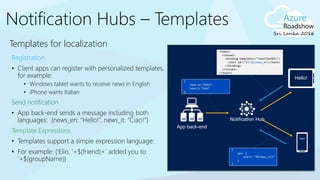
Templates for localization
Registration
• Client apps can register with personalized templates,
for example:
• Windows tablet wants to receive news in English
• iPhone wants Italian
Send notification
• App back-end sends a message including both
languages: {news_en: “Hello!”, news_it: “Ciao!”}
Template Expressions
• Templates support a simple expression language:
• For example: {‘Elio, ’+$(friend)+’ added you to
’+$(groupName)}
Notification Hub
App back-end
<toast>
<visual>
<binding template="ToastText01">
<text id="1">$(news_en)</text>
</binding>
</visual>
</toast>
{
aps: {
alert: “$(news_it)”
}
}
{
news_en: “Hello!”,
news_it: “Ciao!”
}
Hello!
Ciao!
Thank You
Visit azure.microsoft.com for updated content and news

Azure notification hubs

  • 1.
    Prabath Fonseka (MVP) CTO Occulem MicrosoftAzure Notification Hub Dinusha Kumarasiri (MVP) Software Architect Occulem
  • 4.
    • Windows WNS •Toast • Tile • Badge • Raw • Windows Phone (MPNS) • Toast • Tile • Raw • Apple • Google • Amazon
  • 5.
    Reservation changes, Deals, Back-office Travel/Hospitality/Airlines SMSreplacement, Deals, Back-office Banking/Insurance Orders, Product UX, Back-office Discrete manufacturing/Auto Prescriptions, Appointments, LOB (maintenance) Healthcare Breaking news News/Media Offers, Orders, Back-office Retail
  • 6.
    • Client appcontacts Platform Notification Service, to retrieve current channel (for example: ChannelURIs, device tokens, registrationIds) • App updates handle in back-end Registration at app launch • App back-end send notification to PNS • PNS pushes the notification to the app on the device Sending Notification • Delete expired handles when PNS rejects themMaintenance Platform Notification Service App back-end
  • 7.
    For enterprise apps Keepusers up to date Not only for alerts ‘push to sync’ notifications For consumer apps Richer than SMS Considerably cheaper
  • 8.
    • Different communicationprotocols to PNS • Different presentation formats and capabilities Platform dependency • Provide a way to send a message to a device/channel • Target user or group of interest • Back-end has to maintain an identification repository Routing • Need to store current handles for each device • Broadcast to millions of devices with low latency Scale
  • 10.
    Message Distribution Push notification tomillions of devices across supported platforms with single call Collect information from devices (e.g. location) Message Templating Convert message in to appropriate format • XML or JSON Use for localization Templates can be used to present certain information according to user preferences Device Registration Maintains a registry of devices and users/groups Message Targeting Targets specific users and groups based on tags Allows you to target messages to specific users
  • 11.
    Bing (news, finance,sports, …) Past event sample – Sochi 2014 Preinstalled on Windows Millions of devices Millions of notifications/day Minutes to delivery Interest groups (countries, disciplines, athletes) Localized notifications Million devices (iOS, Android, WP) Million notifications 10s 3+ <2 100s 3+ 150+
  • 12.
    Send Notification App back-endsends a message to Notification Hub Notification Hub pushes it to PNS’ Register Client app retrieves its current handle (PNS) Client app registers on Notification Hub (current handle) One-time set up Create a Notification Hub APNsWNS Notification Hub App back-end iOS app Windows app MPNS GCM ADM
  • 13.
    X-plat: from any back-end toany mobile platform No need to store device information in the app back- end Routing and interest groups Personalization and localization Broadcast at scale, multicast, unicast Telemetry
  • 14.
    Windows 10 toSend/Receive Notifications Step 1 • Register a new app in the Windows Dev Store and enable Push notification for this app (retrieve MPNS SSID & secret) Step 2 • Create your app in Visual studio and associate it with the store Step 3 • Create an Azure Notification hub service and enter your MPNS SSID & secret Step 4 • In Visual Studio, add WindowsAzure.Messaging.Managed nuget package. Develop your app.
  • 15.
    1. Register yourdevice at application startup
  • 16.
    2. Send anotification from your back-end:
  • 17.
    Code Snippets Register Send awaithub.RegisterNativeAsync(channel.Uri); [hub registerNativeWithDeviceToken:deviceToken tags:nil completion:^(NSError* error) { … }]; hub.register(regid); var toast = @"<notification payload>"; hub.SendWindowsNativeNotificationAsync(toast); hubService.wns.sendToastText01(null, { text1: 'Hello from Node!' }, function (error) { … } );
  • 18.
    Payload Snippets <toast><visual> <binding template="ToastText01"> <textid="1">Hello from a .NET App!</text> </binding> </visual></toast> {"aps":{"alert":"Hello from .NET!"}} {"data":{"message":"Hello from .NET!"}}
  • 19.
    Example : Payloadfor windows 10 • Adaptive and interactive toast notification • New Features like o Actions o Input (Text, Dropdown) o Sounds
  • 20.
    Example : Payloadfor windows 10 <toast launch="1"> <visual> <binding template="ToastGeneric"> <image id="1" src="AssetsSquare30x30Logo.png" alt=""/> <text id="1">Dear Bill Gates Get 40% if you come visit us today ! Best Regards from our team.</text> </binding></visual> <actions> <action activationType="foreground" content="Yes I will !" arguments="details"/> <action activationType="background" content="No thanks." arguments="later"/> </actions> </toast>
  • 21.
    Tags as interestgroups • Client app can register with a set of tags • Tags are simple strings (no pre-provisioning is required) • App back-end can target all clients with the same tag You can use tags also for: • Multiple type of interest groups, for example: • Follow bands: tag “followband:Beatles” • Follow users: tag “followuser:Alice” • Tag devices with a user ID • Tags can be user preferences or system information Notification Hub App back-end Tag:”Beatles”Tag:”Wailers” Tag:”Beatles ”
  • 22.
    Register await new string[]{"myTag", "myOtherTag"} [hub registerNativeWithDeviceToken:deviceToken tags:@[@"myTag", @"myOtherTag"] completion: ^(NSError* error) { … }]; hub.register(regid, "myTag“, "myOtherTag");
  • 23.
    Send • “All mygroup except me” group:id && !user:idSocial • Touchdown event is send to everybody following either team Followteam:A || Followteam:B || followplayer:1 || followplayer:2 … Events • Send notifications at specific times. E.g. Tag with timezone, @12pm in Seattle send: timezone:PST && follows:thaifood Hours • Send a reminder to update to your first Android app version: version:1.0 && platform:AndroidVersions & platforms
  • 24.
    Templates for multi-platformpush Registration • Client apps can register with a platform specific template, for example: • Windows tablet registers with Windows Store ToastText01 template • iPhone with the Apple JSON template: { aps: { alert: “$(message)” } } Send notification • App back-end sends a platform independent message: {message: “Hello!”} Notes • Multiple templates can be specified for each device • Each template can have a different set of tags Notification Hub App back-end <toast> <visual> <binding template="ToastText01"> <text id="1">$(message)</text> </binding> </visual> </toast> { aps: { alert: “$(message)” } } { message: “Hello!” } Hello! Hello!
  • 25.
    Templates for localization Registration •Client apps can register with personalized templates, for example: • Windows tablet wants to receive news in English • iPhone wants Italian Send notification • App back-end sends a message including both languages: {news_en: “Hello!”, news_it: “Ciao!”} Template Expressions • Templates support a simple expression language: • For example: {‘Elio, ’+$(friend)+’ added you to ’+$(groupName)} Notification Hub App back-end <toast> <visual> <binding template="ToastText01"> <text id="1">$(news_en)</text> </binding> </visual> </toast> { aps: { alert: “$(news_it)” } } { news_en: “Hello!”, news_it: “Ciao!” } Hello! Ciao!
  • 27.
    Thank You Visit azure.microsoft.comfor updated content and news

Editor's Notes

  • #10 Platform notification service