Understanding vSAN
Architecture Components
vSAN Terminology
• CMMDS - Cluster Monitoring, Membership, and Directory Service
• CLOMD - Cluster Level Object Manager Daemon
• OSFSD - Object Storage File System Daemon
• CLOM - Cluster Level Object Manager
• OSFS - Object Storage File System
• RDT - Reliable Datagram Transport
• VSANVP - Virtual SAN Vendor Provider
• SPBM - Storage Policy-Based Management
• UUID - Universally unique identifier
• SSD - Solid-State Drive
• MD - Magnetic disk
• VSA - Virtual Storage Appliance
• RVC - Ruby vSphere Console
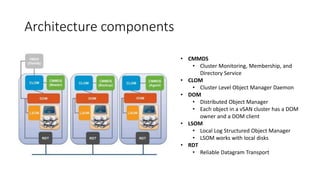
Architecture components
• CMMDS
• Cluster Monitoring, Membership, and
Directory Service
• CLOM
• Cluster Level Object Manager Daemon
• DOM
• Distributed Object Manager
• Each object in a vSAN cluster has a DOM
owner and a DOM client
• LSOM
• Local Log Structured Object Manager
• LSOM works with local disks
• RDT
• Reliable Datagram Transport
Components interaction
CMDDS
• It inventories all items, such as hosts, networks,
and devices
• It stores object metadata information, such as policy-related
information on an in-memory database
• It discovers, maintains, and establishes a cluster of networked node
members
• It defines the cluster roles: Master, Backup, and Agent
CLOM
You manage the CLOM process with the /etc/init.d/clomd
stop/start/restart command.
• It validates that objects can be created based on policies and available
resources.
• It is responsible for object compliance.
• It defines the creation and migration of objects.
• It distributes loads evenly between the vSAN nodes.
• It is responsible for proactive and reactive re-balancing.
DOM
• DOM receives instructions from the CLOM and other DOMs running on other
hosts in the cluster.
• DOM communicates and tells the LSOM to create local components of an object.
• DOM services on the hosts of a vSAN cluster communicate to coordinate the
creation of components.
• All DOMs in a vSAN cluster re-synchronize objects during a recovery.
Each object in a vSAN cluster has a DOM owner and a DOM client.
There is one DOM owner that exists per object and it determines which processes
are allowed to send I/O to the object.
The DOM client performs the I/O to an object on behalf of a particular virtual
machine and runs on every node that contains components.
LSOM
• It provides read and write buffering
• It performs the encryption process for the vSAN datastore
• It reports unhealthy storage and network devices
• It performs I/O retries on failing devices
• It interacts directly with the solid-state and magnetic devices
• It performs solid-state drive log recovery when the vSAN node boots
up
How do all the Components Interact?
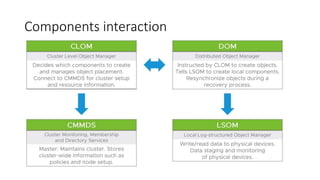
• When the CLOM receives a request to create an object, the CLOM
determines whether the object can be created with the selected VM
storage policy.
• If the object can be created, the CLOM instructs the DOM to create the
components.
• The DOM then decides what components are created locally and instructs
the LSOM to create the local components.
• The LSOM interacts at the drive layer and provides persistent storage. The
DOM interacts only with the local instance of the LSOM.
• If components are required on other nodes, then the DOM interacts with
the DOM on the remote node.
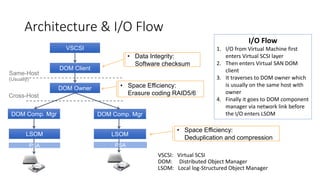
Architecture & I/O Flow
10
VSCSI
DOM Client
DOM Owner
DOM Comp. Mgr DOM Comp. Mgr
LSOM LSOM
Same-Host
(Usually)
Cross-Host
PSA PSA
• Data Integrity:
Software checksum
• Space Efficiency:
Erasure coding RAID5/6
• Space Efficiency:
Deduplication and compression
VSCSI: Virtual SCSI
DOM: Distributed Object Manager
LSOM: Local log-Structured Object Manager
I/O Flow
1. I/O from Virtual Machine first
enters Virtual SCSI layer
2. Then enters Virtual SAN DOM
client
3. It traverses to DOM owner which
is usually on the same host with
owner
4. Finally it goes to DOM component
manager via network link before
the I/O enters LSOM
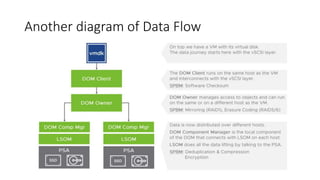
Another diagram of Data Flow
vSAN troubleshooting
Troubleshooting tools
• RVC
• vsan.observer
• vsan.disks_info
• vsan.disks_stats
• vsan.disk_object_info
• vsan.cmmds_find
• ESXCLI
• esxcli vsan debug disk list
• Objects tools
• /usr/lib/vmware/osfs/bin/objtool
How to use vSAN Observer
1/ SSH somewhere where you have RVC. It can be for example VCSA or HCIbench
ssh root@[IP-ADDRESS-OF-VCSA]
2/ Run RVC command-line interface and connect to your vCenter where you have vSphere cluster with vSAN
service enabled. RVC requires password of administrator in your vSphere domain.
rvc administrator@[IP-ADDRESS-OF-VCSA]
3/ Start vSAN Observer on your vSphere cluster with vSAN service enabled
vsan.observer -r /localhost/[vDatacenter]/computers/[vSphere & vSAN Cluster]
5/ Go to vSAN Observer web interface
vSAN Observer is available at https://[IP-ADDRESS-OF-VCSA]:8010

vSAN architecture components

  • 1.
  • 2.
    vSAN Terminology • CMMDS- Cluster Monitoring, Membership, and Directory Service • CLOMD - Cluster Level Object Manager Daemon • OSFSD - Object Storage File System Daemon • CLOM - Cluster Level Object Manager • OSFS - Object Storage File System • RDT - Reliable Datagram Transport • VSANVP - Virtual SAN Vendor Provider • SPBM - Storage Policy-Based Management • UUID - Universally unique identifier • SSD - Solid-State Drive • MD - Magnetic disk • VSA - Virtual Storage Appliance • RVC - Ruby vSphere Console
  • 3.
    Architecture components • CMMDS •Cluster Monitoring, Membership, and Directory Service • CLOM • Cluster Level Object Manager Daemon • DOM • Distributed Object Manager • Each object in a vSAN cluster has a DOM owner and a DOM client • LSOM • Local Log Structured Object Manager • LSOM works with local disks • RDT • Reliable Datagram Transport
  • 4.
  • 5.
    CMDDS • It inventoriesall items, such as hosts, networks, and devices • It stores object metadata information, such as policy-related information on an in-memory database • It discovers, maintains, and establishes a cluster of networked node members • It defines the cluster roles: Master, Backup, and Agent
  • 6.
    CLOM You manage theCLOM process with the /etc/init.d/clomd stop/start/restart command. • It validates that objects can be created based on policies and available resources. • It is responsible for object compliance. • It defines the creation and migration of objects. • It distributes loads evenly between the vSAN nodes. • It is responsible for proactive and reactive re-balancing.
  • 7.
    DOM • DOM receivesinstructions from the CLOM and other DOMs running on other hosts in the cluster. • DOM communicates and tells the LSOM to create local components of an object. • DOM services on the hosts of a vSAN cluster communicate to coordinate the creation of components. • All DOMs in a vSAN cluster re-synchronize objects during a recovery. Each object in a vSAN cluster has a DOM owner and a DOM client. There is one DOM owner that exists per object and it determines which processes are allowed to send I/O to the object. The DOM client performs the I/O to an object on behalf of a particular virtual machine and runs on every node that contains components.
  • 8.
    LSOM • It providesread and write buffering • It performs the encryption process for the vSAN datastore • It reports unhealthy storage and network devices • It performs I/O retries on failing devices • It interacts directly with the solid-state and magnetic devices • It performs solid-state drive log recovery when the vSAN node boots up
  • 9.
    How do allthe Components Interact? • When the CLOM receives a request to create an object, the CLOM determines whether the object can be created with the selected VM storage policy. • If the object can be created, the CLOM instructs the DOM to create the components. • The DOM then decides what components are created locally and instructs the LSOM to create the local components. • The LSOM interacts at the drive layer and provides persistent storage. The DOM interacts only with the local instance of the LSOM. • If components are required on other nodes, then the DOM interacts with the DOM on the remote node.
  • 10.
    Architecture & I/OFlow 10 VSCSI DOM Client DOM Owner DOM Comp. Mgr DOM Comp. Mgr LSOM LSOM Same-Host (Usually) Cross-Host PSA PSA • Data Integrity: Software checksum • Space Efficiency: Erasure coding RAID5/6 • Space Efficiency: Deduplication and compression VSCSI: Virtual SCSI DOM: Distributed Object Manager LSOM: Local log-Structured Object Manager I/O Flow 1. I/O from Virtual Machine first enters Virtual SCSI layer 2. Then enters Virtual SAN DOM client 3. It traverses to DOM owner which is usually on the same host with owner 4. Finally it goes to DOM component manager via network link before the I/O enters LSOM
  • 11.
  • 12.
  • 13.
    Troubleshooting tools • RVC •vsan.observer • vsan.disks_info • vsan.disks_stats • vsan.disk_object_info • vsan.cmmds_find • ESXCLI • esxcli vsan debug disk list • Objects tools • /usr/lib/vmware/osfs/bin/objtool
  • 14.
    How to usevSAN Observer 1/ SSH somewhere where you have RVC. It can be for example VCSA or HCIbench ssh root@[IP-ADDRESS-OF-VCSA] 2/ Run RVC command-line interface and connect to your vCenter where you have vSphere cluster with vSAN service enabled. RVC requires password of administrator in your vSphere domain. rvc administrator@[IP-ADDRESS-OF-VCSA] 3/ Start vSAN Observer on your vSphere cluster with vSAN service enabled vsan.observer -r /localhost/[vDatacenter]/computers/[vSphere & vSAN Cluster] 5/ Go to vSAN Observer web interface vSAN Observer is available at https://[IP-ADDRESS-OF-VCSA]:8010

Editor's Notes

  • #6 CMMDS: Cluster Monitoring, Membership and Directory Services This service will take care that our vSAN hosts actually build a cluster: Every host runs this service and one of the hosts will be elected to be a Master that works as the brain of the RAIN (Redundant Array of Independent Nodes) system. A Backup node – that holds a copy of the master data – will take over if the Master fails. All other nodes are Agents. The master is responsible for the discovery and maintenance of the vSAN cluster. It builds and inventory of the vSAN cluster nodes and their resources as well as stores object meta-data information and policies. Example: What happens if there is network failure and a 16 host cluster is divided into two 8 node partitions and Master as well as the Backup node run in partition A? The Agent nodes in partition B detect that the Master is not reachable. An election process is started to promote an Agent node to a Master and another one to a Backup, so that a cluster can be built in partition B. After the network problem is fixed and all nodes can talk to each other again a versioning system is used to merge the two partitions. Most like the old Master will be the Master for the whole cluster again and the interim Master will be degraded.
  • #7 CLOM: Cluster Level Object Manager As CMMDS manages the nodes, CLOM takes care of the vSAN objects in a cluster. It is responsible for object placement, migration and triggers repairs in case of failures. Basically CLOM is involved in any objects (or data) management operation: Starting from powering on a VM (SWAP file creation) to Storage vMotion. CLOM is also responsible moving objects around when you put a host into Maintenance Mode. When CLOM is tasked with the creation of an object it checks to see if there are enough available resources (failure domains, disk groups, free space) to satisfy the policy. It does this by communicating to the other nodes through the CMMDS. If everything looks good it will then instruct DOM (see next chapter) to create the objects. After the objects are created CLOM is further responsible for monitoring the objects compliance status. CLOM triggers data path operations but does not actually participate in data read/write operations. Hint: CLOM writes to its own log file: /var/run/log/clomd.log
  • #8 DOM: Distributed Object Manager After CLOM has defined how the object needs to be laid out and suitable disk groups have been identified the objects components are now created and distributed across the cluster by DOM talking to LSOM (see next section). To enable objects creation on other hosts the DOMs on the cluster nodes talk to each other to guarantee component distribution. For this the DOM is split up into three processes: DOM Client: Talks to the the vSCSI layer. DOM Owner: Manages access to the vSAN object. DOM Component Mgr: Manages objects on the hosts where components exists. This concept is best illustrated by looking on the data flow in a vSAN cluster. Please check out the section “Data Flow” below.
  • #9 LSOM: Local Log-Structured Object Manager LSOM is actually the worker in the whole stack. It reads and writes data by talking to the PSA (Pluggable Storage Architecture) of the local host. As it has access to the cache and capacity layer it is responsible for data caching and de-staging as well as device management which includes the reporting of unhealthy devices. There is one LSOM process per disk group on every host.
  • #11 I/O from Virtual Machine first enters Virtual SCSI layer Then enters Virtual SAN DOM client It traverses to DOM owner which is usually on the same host with owner Finally it goes to DOM component manager via network link before the I/O enters LSOM
  • #12 I would like to point your attention to the layers where the SPBM settings are enforced. Software checksum is located closest to the “consumer” in our case the VMDK. A layer lower the data is then managed by DOM which will apply the appropriate protection level – or in vSAN speech: Numbers of failures to tolerate. In the example above: FTT=1. (Witness not shown) At the end of the chain is LSOM which takes care of Deduplication & Compression as well as Encryption. As there is one LSOM process per disk group we can understand that Deduplication & Compression is done per disk group.