Quick setup of the docker-
based development
environment for cross-
compilation
How not to pass the same quest every time
Without any single line in C ++ :)
Act of compiling code for one computer system (often known as the target) on an
another system, called the host.
What is cross-compilation?
What we do
Set-top boxes(STB) for IPTV/OTT:
● ARM/MIPS/SuperH
● different version of linux;
● different version of gcc;
● different SDKs, libraries;
Issue
● set of different target platforms;
● setting up developer environment is complex and time-consuming;
● SDK and libraries often change; the need to maintain a single environment for
all developers under a specific platform;
● issue “works on my machine”;
● testing:
○ environment versions(different toolchains, SDK versions, etc) for specific platform;
○ continuous integration for all target platforms;
How it was
There are powerful servers with established developer’s environment(one server -
one environment), all developers work on these servers(ssh + nfs/samba/sshfs).
● pros:
○ there is single environment for every developer;
○ immediately get into the ready environment, programmers can code, not configure;
● cons:
○ low convenience of work: network bandwidth is clearly worse than disk bandwidth;
○ there is no ability to work when network is down;
○ all developers share resources of server; more developers - more servers;
How it ended up
Containerization of the environment:
● pros:
○ there is single environment for every developer;
○ immediately get into the ready environment, programmers can code, not configure;
○ lightweight launch of environment, parallel work of several environments;
○ self-sufficiency, independent work;
○ versioning, easily switch between environments;
○ organized CI;
● cons:
○ containers aren’t crossplatform, all development cycle is linux-based;
Containerization, also known as operating-system-level virtualization, refers to an
operating system feature in which the kernel allows the existence of multiple
isolated user-space instances.
● LXC
● Docker
● OpenVZ
● Solaris Containers
● a lot of them...
Why Docker
● short answer: infrastructure;
● big community, mature product;
● cross-platform: works on Windows, Linux, MacOS;
● DockerHub - GitHub in containers world, big quantity of ready images;
● Docker Registry - server that stores and distributes docker images; I didn’t
find such feature in case with other alternatives;
Important: the fact that the Docker is cross-platform does not mean that the
containers are cross-platform.
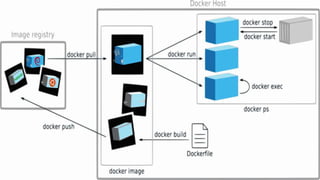
What is Docker?
Three components:
● Docker-image is read-only template. Images is component of docker’s
build.
● Docker Registry stores images. There are public and private(custom)
registries. Public registry is Docker Hub. Registry is component of
distributing.
● Containers. Each container is created from image. Containers may be
created, started, stopped, moved or removed. Each container is isolated.
Containers are component of work.
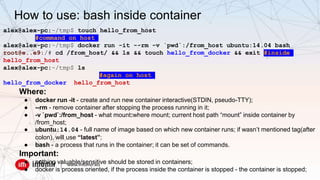
alex@alex-pc:~/tmp$ touch hello_from_host
#command on host
alex@alex-pc:~/tmp$ docker run -it --rm -v `pwd`:/from_host ubuntu:14.04 bash
root@e..e9:/# cd /from_host/ && ls && touch hello_from_docker && exit #inside
hello_from_host
alex@alex-pc:~/tmp$ ls
#again on host
hello_from_docker hello_from_host
Where:
● docker run -it - create and run new container interactive(STDIN, pseudo-TTY);
● --rm - remove container after stopping the process running in it;
● -v `pwd`:/from_host - what mount:where mount; current host path “mount” inside container by
/from_host;
● ubuntu:14.04 - full name of image based on which new container runs; if wasn’t mentioned tag(after
colon), will use “latest”;
● bash - a process that runs in the container; it can be set of commands.
Important:
● nothing valuable/sensitive should be stored in containers;
● docker is process oriented, if the process inside the container is stopped - the container is stopped;
How to use: bash inside container
How to use: launch and work
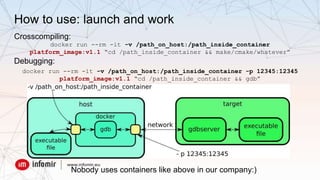
Crosscompiling:
docker run --rm -it -v /path_on_host:/path_inside_container
platform_image:v1.1 “cd /path_inside_container && make/cmake/whatever”
Debugging:
docker run --rm -it -v /path_on_host:/path_inside_container -p 12345:12345
platform_image:v1.1 “cd /path_inside_container && gdb”
Nobody uses containers like above in our company:)
How to use: script-wrapper over the docker
● the same everywhere: for developers and for CI;
● placed in git together with a project;
● solves the following issues:
○ there is no need to learn docker for user purposes;
○ pulls the latest actual image of the environment for the appropriate target;
○ create and run new container;
○ mounts the project’s dir inside a container;
○ creates “on the fly” user inside container equal host user;
○ setup correct work of git inside a container;
○ checks and removes “dangling” layers/images, stopped containers on host;
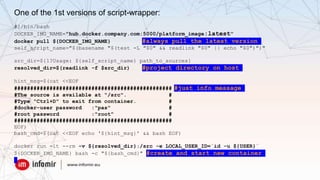
One of the 1st versions of script-wrapper:
#!/bin/bash
DOCKER_IMG_NAME="hub.docker.company.com:5000/platform_image:latest"
docker pull ${DOCKER_IMG_NAME} #always pull the latest version
self_script_name="$(basename "$(test -L "$0" && readlink "$0" || echo "$0")")"
src_dir=${1?Usage: ${self_script_name} path_to_sources}
resolved_dir=$(readlink -f $src_dir) #project directory on host
hint_msg=$(cat <<EOF
################################################# #just info message
#The source is available at "/src". #
#Type "Ctrl+D" to exit from container. #
#docker-user password :"pas" #
#root password :"root" #
#################################################
EOF)
bash_cmd=$(cat <<EOF echo '${hint_msg}' && bash EOF)
docker run -it --rm -v ${resolved_dir}:/src -e LOCAL_USER_ID=`id -u ${USER}`
${DOCKER_IMG_NAME} bash -c "${bash_cmd}" #create and start new container
How to use: IDE integration
There is something like “custom build steps” in the most of modern IDEs, where
you can define your commands for building and debugging.
Most of devs in our company are using QtCreator, the script-wrapper has been
integrated there seamlessly, all output from docker is accessible by IDE.
One big issue: IDE doesn’t have access to container’s filesystem, so there is no
syntax highlight of all functions, classes, etc provided by SDK and libraries packed
in container.
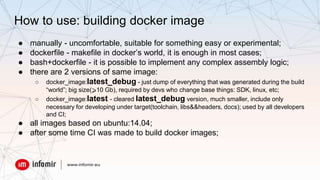
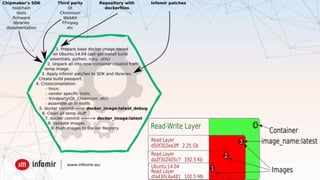
How to use: building docker image
● manually - uncomfortable, suitable for something easy or experimental;
● dockerfile - makefile in docker’s world, it is enough in most cases;
● bash+dockerfile - it is possible to implement any complex assembly logic;
● there are 2 versions of same image:
○ docker_image:latest_debug - just dump of everything that was generated during the build
“world”; big size(⩾10 Gb), required by devs who change base things: SDK, linux, etc;
○ docker_image:latest - cleared latest_debug version, much smaller, include only
necessary for developing under target(toolchain, libs&&headers, docs); used by all developers
and CI;
● all images based on ubuntu:14.04;
● after some time CI was made to build docker images;
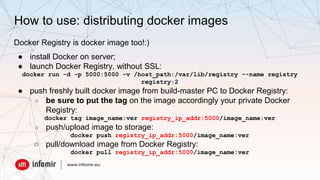
How to use: distributing docker images
Docker Registry is docker image too!:)
● install Docker on server;
● launch Docker Registry, without SSL:
docker run -d -p 5000:5000 -v /host_path:/var/lib/registry --name registry
registry:2
● push freshly built docker image from build-master PC to Docker Registry:
○ be sure to put the tag on the image accordingly your private Docker
Registry:
docker tag image_name:ver registry_ip_addr:5000/image_name:ver
○ push/upload image to storage:
docker push registry_ip_addr:5000/image_name:ver
○ pull/download image from Docker Registry:
docker pull registry_ip_addr:5000/image_name:ver
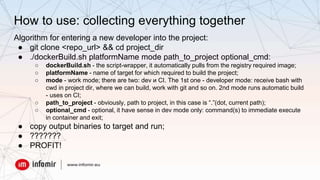
How to use: collecting everything together
Algorithm for entering a new developer into the project:
● git clone <repo_url> && cd project_dir
● ./dockerBuild.sh platformName mode path_to_project optional_cmd:
○ dockerBuild.sh - the script-wrapper, it automatically pulls from the registry required image;
○ platformName - name of target for which required to build the project;
○ mode - work mode; there are two: dev и CI. The 1st one - developer mode: receive bash with
cwd in project dir, where we can build, work with git and so on. 2nd mode runs automatic build
- uses on CI;
○ path_to_project - obviously, path to project, in this case is “.”(dot, current path);
○ optional_cmd - optional, it have sense in dev mode only: command(s) to immediate execute
in container and exit;
● copy output binaries to target and run;
● ???????
● PROFIT!
● by default all processes work with root privileges in the container;
● IDE doesn’t have access to container’s filesystem, so there is no syntax
highlight of all functions, classes, etc provided by SDK and libraries;
● it is hard to understand the difference between images of the same
environment, but with a different build date;
● Docker Registry doesn’t have web ui. There is REST API;
● I was unable to configure the access rights in the Docker Registry. Typical
scenario: anonymous pull and authorized push;
Troubles
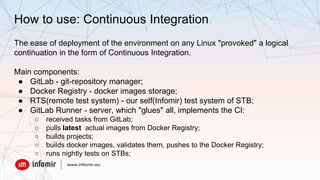
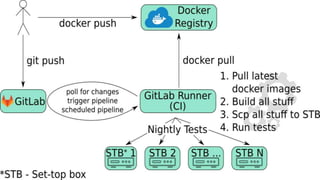
How to use: Continuous Integration
The ease of deployment of the environment on any Linux "provoked" a logical
continuation in the form of Continuous Integration.
Main components:
● GitLab - git-repository manager;
● Docker Registry - docker images storage;
● RTS(remote test system) - our self(Infomir) test system of STB;
● GitLab Runner - server, which "glues" all, implements the CI:
○ received tasks from GitLab;
○ pulls latest actual images from Docker Registry;
○ builds projects;
○ builds docker images, validates them, pushes to the Docker Registry;
○ runs nightly tests on STBs;
Summary
● extremely reduced the time for unfolding environments, it became easy to
move "in time" between different versions of same environment;
● unloaded the central servers, involved idle local capacities of the developers
computers;
● automated repeatable build of SDK/environments;
● CI was put into operation for major projects and for building of docker images;
● in general the time costs have decreased - everyone is happy;
Additional resources
● http://alexprivalov.org/docker-cpp - text version of report (in russian)
● https://docs.gitlab.com/ce/user/project/container_registry.html - GitLab
Container Registry
Thank you for attention!:)

Настройка окружения для кросскомпиляции проектов на основе docker'a

  • 1.
    Quick setup ofthe docker- based development environment for cross- compilation How not to pass the same quest every time Without any single line in C ++ :)
  • 2.
    Act of compilingcode for one computer system (often known as the target) on an another system, called the host. What is cross-compilation?
  • 3.
    What we do Set-topboxes(STB) for IPTV/OTT: ● ARM/MIPS/SuperH ● different version of linux; ● different version of gcc; ● different SDKs, libraries;
  • 4.
    Issue ● set ofdifferent target platforms; ● setting up developer environment is complex and time-consuming; ● SDK and libraries often change; the need to maintain a single environment for all developers under a specific platform; ● issue “works on my machine”; ● testing: ○ environment versions(different toolchains, SDK versions, etc) for specific platform; ○ continuous integration for all target platforms;
  • 5.
    How it was Thereare powerful servers with established developer’s environment(one server - one environment), all developers work on these servers(ssh + nfs/samba/sshfs). ● pros: ○ there is single environment for every developer; ○ immediately get into the ready environment, programmers can code, not configure; ● cons: ○ low convenience of work: network bandwidth is clearly worse than disk bandwidth; ○ there is no ability to work when network is down; ○ all developers share resources of server; more developers - more servers;
  • 6.
    How it endedup Containerization of the environment: ● pros: ○ there is single environment for every developer; ○ immediately get into the ready environment, programmers can code, not configure; ○ lightweight launch of environment, parallel work of several environments; ○ self-sufficiency, independent work; ○ versioning, easily switch between environments; ○ organized CI; ● cons: ○ containers aren’t crossplatform, all development cycle is linux-based;
  • 7.
    Containerization, also knownas operating-system-level virtualization, refers to an operating system feature in which the kernel allows the existence of multiple isolated user-space instances. ● LXC ● Docker ● OpenVZ ● Solaris Containers ● a lot of them...
  • 8.
    Why Docker ● shortanswer: infrastructure; ● big community, mature product; ● cross-platform: works on Windows, Linux, MacOS; ● DockerHub - GitHub in containers world, big quantity of ready images; ● Docker Registry - server that stores and distributes docker images; I didn’t find such feature in case with other alternatives; Important: the fact that the Docker is cross-platform does not mean that the containers are cross-platform.
  • 9.
    What is Docker? Threecomponents: ● Docker-image is read-only template. Images is component of docker’s build. ● Docker Registry stores images. There are public and private(custom) registries. Public registry is Docker Hub. Registry is component of distributing. ● Containers. Each container is created from image. Containers may be created, started, stopped, moved or removed. Each container is isolated. Containers are component of work.
  • 11.
    alex@alex-pc:~/tmp$ touch hello_from_host #commandon host alex@alex-pc:~/tmp$ docker run -it --rm -v `pwd`:/from_host ubuntu:14.04 bash root@e..e9:/# cd /from_host/ && ls && touch hello_from_docker && exit #inside hello_from_host alex@alex-pc:~/tmp$ ls #again on host hello_from_docker hello_from_host Where: ● docker run -it - create and run new container interactive(STDIN, pseudo-TTY); ● --rm - remove container after stopping the process running in it; ● -v `pwd`:/from_host - what mount:where mount; current host path “mount” inside container by /from_host; ● ubuntu:14.04 - full name of image based on which new container runs; if wasn’t mentioned tag(after colon), will use “latest”; ● bash - a process that runs in the container; it can be set of commands. Important: ● nothing valuable/sensitive should be stored in containers; ● docker is process oriented, if the process inside the container is stopped - the container is stopped; How to use: bash inside container
  • 12.
    How to use:launch and work Crosscompiling: docker run --rm -it -v /path_on_host:/path_inside_container platform_image:v1.1 “cd /path_inside_container && make/cmake/whatever” Debugging: docker run --rm -it -v /path_on_host:/path_inside_container -p 12345:12345 platform_image:v1.1 “cd /path_inside_container && gdb” Nobody uses containers like above in our company:)
  • 13.
    How to use:script-wrapper over the docker ● the same everywhere: for developers and for CI; ● placed in git together with a project; ● solves the following issues: ○ there is no need to learn docker for user purposes; ○ pulls the latest actual image of the environment for the appropriate target; ○ create and run new container; ○ mounts the project’s dir inside a container; ○ creates “on the fly” user inside container equal host user; ○ setup correct work of git inside a container; ○ checks and removes “dangling” layers/images, stopped containers on host;
  • 14.
    One of the1st versions of script-wrapper: #!/bin/bash DOCKER_IMG_NAME="hub.docker.company.com:5000/platform_image:latest" docker pull ${DOCKER_IMG_NAME} #always pull the latest version self_script_name="$(basename "$(test -L "$0" && readlink "$0" || echo "$0")")" src_dir=${1?Usage: ${self_script_name} path_to_sources} resolved_dir=$(readlink -f $src_dir) #project directory on host hint_msg=$(cat <<EOF ################################################# #just info message #The source is available at "/src". # #Type "Ctrl+D" to exit from container. # #docker-user password :"pas" # #root password :"root" # ################################################# EOF) bash_cmd=$(cat <<EOF echo '${hint_msg}' && bash EOF) docker run -it --rm -v ${resolved_dir}:/src -e LOCAL_USER_ID=`id -u ${USER}` ${DOCKER_IMG_NAME} bash -c "${bash_cmd}" #create and start new container
  • 15.
    How to use:IDE integration There is something like “custom build steps” in the most of modern IDEs, where you can define your commands for building and debugging. Most of devs in our company are using QtCreator, the script-wrapper has been integrated there seamlessly, all output from docker is accessible by IDE. One big issue: IDE doesn’t have access to container’s filesystem, so there is no syntax highlight of all functions, classes, etc provided by SDK and libraries packed in container.
  • 16.
    How to use:building docker image ● manually - uncomfortable, suitable for something easy or experimental; ● dockerfile - makefile in docker’s world, it is enough in most cases; ● bash+dockerfile - it is possible to implement any complex assembly logic; ● there are 2 versions of same image: ○ docker_image:latest_debug - just dump of everything that was generated during the build “world”; big size(⩾10 Gb), required by devs who change base things: SDK, linux, etc; ○ docker_image:latest - cleared latest_debug version, much smaller, include only necessary for developing under target(toolchain, libs&&headers, docs); used by all developers and CI; ● all images based on ubuntu:14.04; ● after some time CI was made to build docker images;
  • 18.
    How to use:distributing docker images Docker Registry is docker image too!:) ● install Docker on server; ● launch Docker Registry, without SSL: docker run -d -p 5000:5000 -v /host_path:/var/lib/registry --name registry registry:2 ● push freshly built docker image from build-master PC to Docker Registry: ○ be sure to put the tag on the image accordingly your private Docker Registry: docker tag image_name:ver registry_ip_addr:5000/image_name:ver ○ push/upload image to storage: docker push registry_ip_addr:5000/image_name:ver ○ pull/download image from Docker Registry: docker pull registry_ip_addr:5000/image_name:ver
  • 19.
    How to use:collecting everything together Algorithm for entering a new developer into the project: ● git clone <repo_url> && cd project_dir ● ./dockerBuild.sh platformName mode path_to_project optional_cmd: ○ dockerBuild.sh - the script-wrapper, it automatically pulls from the registry required image; ○ platformName - name of target for which required to build the project; ○ mode - work mode; there are two: dev и CI. The 1st one - developer mode: receive bash with cwd in project dir, where we can build, work with git and so on. 2nd mode runs automatic build - uses on CI; ○ path_to_project - obviously, path to project, in this case is “.”(dot, current path); ○ optional_cmd - optional, it have sense in dev mode only: command(s) to immediate execute in container and exit; ● copy output binaries to target and run; ● ??????? ● PROFIT!
  • 20.
    ● by defaultall processes work with root privileges in the container; ● IDE doesn’t have access to container’s filesystem, so there is no syntax highlight of all functions, classes, etc provided by SDK and libraries; ● it is hard to understand the difference between images of the same environment, but with a different build date; ● Docker Registry doesn’t have web ui. There is REST API; ● I was unable to configure the access rights in the Docker Registry. Typical scenario: anonymous pull and authorized push; Troubles
  • 21.
    How to use:Continuous Integration The ease of deployment of the environment on any Linux "provoked" a logical continuation in the form of Continuous Integration. Main components: ● GitLab - git-repository manager; ● Docker Registry - docker images storage; ● RTS(remote test system) - our self(Infomir) test system of STB; ● GitLab Runner - server, which "glues" all, implements the CI: ○ received tasks from GitLab; ○ pulls latest actual images from Docker Registry; ○ builds projects; ○ builds docker images, validates them, pushes to the Docker Registry; ○ runs nightly tests on STBs;
  • 23.
    Summary ● extremely reducedthe time for unfolding environments, it became easy to move "in time" between different versions of same environment; ● unloaded the central servers, involved idle local capacities of the developers computers; ● automated repeatable build of SDK/environments; ● CI was put into operation for major projects and for building of docker images; ● in general the time costs have decreased - everyone is happy;
  • 24.
    Additional resources ● http://alexprivalov.org/docker-cpp- text version of report (in russian) ● https://docs.gitlab.com/ce/user/project/container_registry.html - GitLab Container Registry
  • 25.
    Thank you forattention!:)