Use Dashboard Filters in Lightning to Empower Users
and Reduce Ad Hoc Reports
@Annie_SFDC
Annie Waddill, Salesforce Administrator
Solo Admin @ ForceBrands – a recruiting agency focusing in CPG Industries (Beverage, Food, Beauty,
Cannabis)
Lightning Champion
Community Group Leader – NYC Admins
Outdoor enthusiast – 9/61 national parks visited
Broadway addict
Trailhead Ranger – 150+ badges
Who am I?
Opportunity Win Rates
My company looks Opportunity Win Rates at a company level, but doesn’t have a clear breakdown of the
many factors that influence our win rates.
• Snapshots aren’t so great for informing business strategy.
Different stakeholders want to see detailed breakdowns for different parts of the business, and are
currently unable to do so.
• Many factors can influence Win Rates.
We need to give them easy access to Win Rates based on groupings such as Sales Team, Time Periods
(variable), Opportunity Type and Industry, and Account Type and Industry.
The Problem
Opportunity Win Rates
The Solution
#AwesomeAdmin to the rescue fulfilling ad hoc
requests
• Reporting requests are all funneled to me, allowing me
to complete these in my free time, and ensuring that
there is integrity and consistency across the board.
Opportunity Win Rates
Repeatedly creating ad hoc reports is neither efficient nor sustainable. We still have a problem.
Stakeholders want to see and compare win rates across different groupings and over different time
periods.
By creating a dashboard with these different components, we give them access to these high level
summaries, and then add filters to allow them to easily drill down into the exact information they want to
see.
The Problem
The Solution
How To
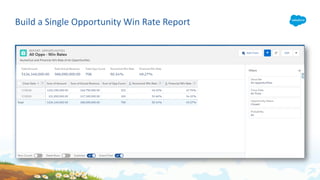
Build a Single Opportunity Win Rate Report
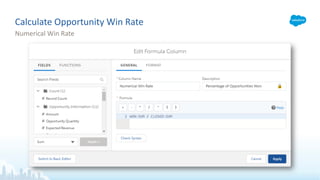
Calculate Numerical Win Rate
• How many closed Opportunities were won?
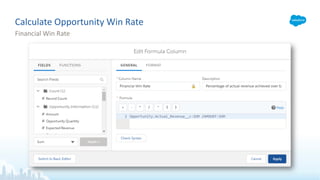
Calculate Financial Win Rate
• How much of the closed Opportunity Amount was won?
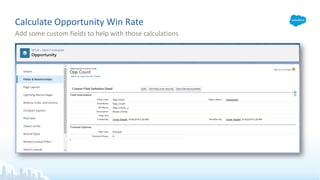
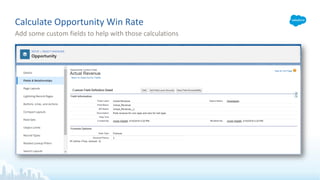
Calculate Opportunity Win Rate
Add some custom fields to help with those calculations
Calculate Opportunity Win Rate
Add some custom fields to help with those calculations
Calculate Opportunity Win Rate
Numerical Win Rate
Calculate Opportunity Win Rate
Financial Win Rate
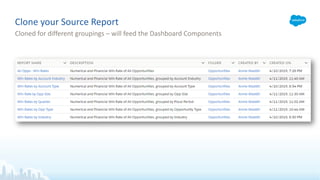
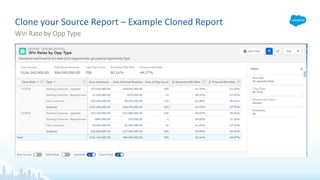
Clone your Source Report
Cloned for different groupings – will feed the Dashboard Components
Clone your Source Report – Example Cloned Report
Win Rate by Opp Type
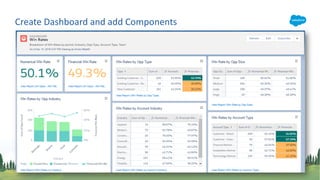
Create Dashboard and add Components
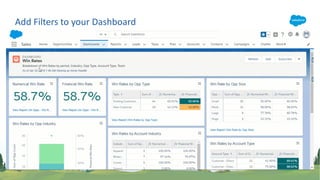
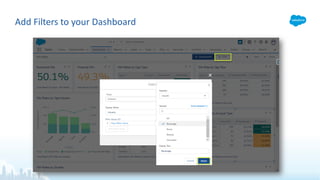
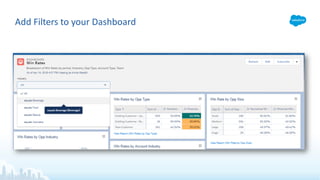
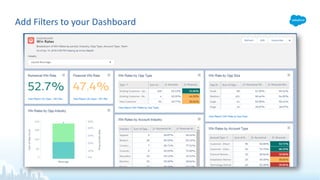
Add Filters to your Dashboard
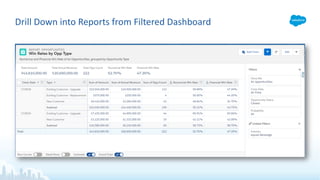
Drill Down into Reports from Filtered Dashboard
Questions?
Power of One
• https://success.salesforce.com/answers?id=9063000000048RbAAI
Relative Date Filters
• https://help.salesforce.com/articleView?id=filter_dates_relative.htm&type=5
• https://trailhead.salesforce.com/en/content/learn/projects/create-reports-and-dashboards-for-sales-and-marketing-
managers/filter-your-reports
Dashboard Filters
• https://help.salesforce.com/articleView?id=dashboard_filters_overview.htm&type=5
Report Summary Formulas
• https://help.salesforce.com/articleView?id=building_custom_summary_formulas.htm&type=5
• https://trailhead.salesforce.com/en/content/learn/modules/lex_implementation_reports_dashboards
Resources
Add Filters to your Dashboard

Use Dashboard Filters in Lightning Experience

  • 1.
    Use Dashboard Filtersin Lightning to Empower Users and Reduce Ad Hoc Reports @Annie_SFDC Annie Waddill, Salesforce Administrator
  • 2.
    Solo Admin @ForceBrands – a recruiting agency focusing in CPG Industries (Beverage, Food, Beauty, Cannabis) Lightning Champion Community Group Leader – NYC Admins Outdoor enthusiast – 9/61 national parks visited Broadway addict Trailhead Ranger – 150+ badges Who am I?
  • 3.
    Opportunity Win Rates Mycompany looks Opportunity Win Rates at a company level, but doesn’t have a clear breakdown of the many factors that influence our win rates. • Snapshots aren’t so great for informing business strategy. Different stakeholders want to see detailed breakdowns for different parts of the business, and are currently unable to do so. • Many factors can influence Win Rates. We need to give them easy access to Win Rates based on groupings such as Sales Team, Time Periods (variable), Opportunity Type and Industry, and Account Type and Industry. The Problem
  • 4.
    Opportunity Win Rates TheSolution #AwesomeAdmin to the rescue fulfilling ad hoc requests • Reporting requests are all funneled to me, allowing me to complete these in my free time, and ensuring that there is integrity and consistency across the board.
  • 5.
    Opportunity Win Rates Repeatedlycreating ad hoc reports is neither efficient nor sustainable. We still have a problem. Stakeholders want to see and compare win rates across different groupings and over different time periods. By creating a dashboard with these different components, we give them access to these high level summaries, and then add filters to allow them to easily drill down into the exact information they want to see. The Problem
  • 6.
  • 7.
    Build a SingleOpportunity Win Rate Report
  • 8.
    Calculate Numerical WinRate • How many closed Opportunities were won? Calculate Financial Win Rate • How much of the closed Opportunity Amount was won? Calculate Opportunity Win Rate
  • 9.
    Calculate Opportunity WinRate Add some custom fields to help with those calculations
  • 10.
    Calculate Opportunity WinRate Add some custom fields to help with those calculations
  • 11.
    Calculate Opportunity WinRate Numerical Win Rate
  • 12.
    Calculate Opportunity WinRate Financial Win Rate
  • 13.
    Clone your SourceReport Cloned for different groupings – will feed the Dashboard Components
  • 14.
    Clone your SourceReport – Example Cloned Report Win Rate by Opp Type
  • 15.
    Create Dashboard andadd Components
  • 16.
    Add Filters toyour Dashboard
  • 17.
    Drill Down intoReports from Filtered Dashboard
  • 18.
  • 19.
    Power of One •https://success.salesforce.com/answers?id=9063000000048RbAAI Relative Date Filters • https://help.salesforce.com/articleView?id=filter_dates_relative.htm&type=5 • https://trailhead.salesforce.com/en/content/learn/projects/create-reports-and-dashboards-for-sales-and-marketing- managers/filter-your-reports Dashboard Filters • https://help.salesforce.com/articleView?id=dashboard_filters_overview.htm&type=5 Report Summary Formulas • https://help.salesforce.com/articleView?id=building_custom_summary_formulas.htm&type=5 • https://trailhead.salesforce.com/en/content/learn/modules/lex_implementation_reports_dashboards Resources
  • 21.
    Add Filters toyour Dashboard
  • 22.
    Add Filters toyour Dashboard
  • 23.
    Add Filters toyour Dashboard