This document provides code examples for creating different types of plots in MATLAB, including line plots, bar plots, polar plots, and pie charts. It shows how to generate a sine wave plot and customize it by adding titles, labels, legends and adjusting axes. It also demonstrates how to create subplot layouts to show multiple graphs together and explores functions like bar, stairs, compass and pie for generating other common plot types from data.

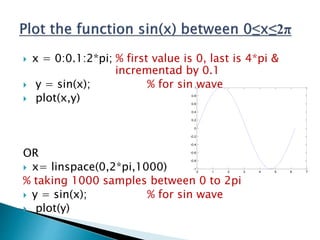
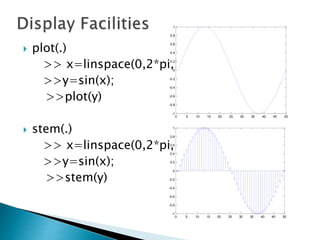
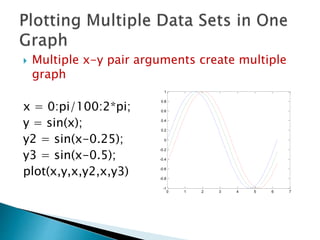
![ title(.)
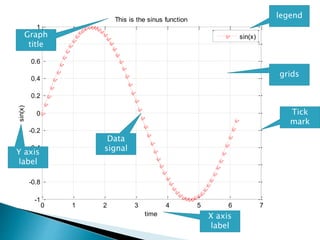
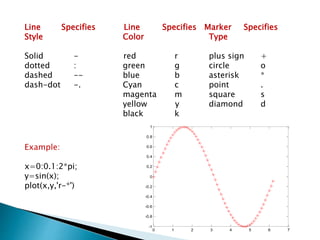
>>title(‘This is the sinus function’)
xlabel(.)
>>xlabel(‘time’)
ylabel(.)
>>ylabel(‘sin(x)’)
legend(.)
>>legend ('sin_x')
grid
>> grid on
>> grid off
axis([xmin xmax ymin ymax])
Sets the minimum and maximum limits of the x- and y-axes
0 1 2 3 4 5 6 7
-1
-0.8
-0.6
-0.4
-0.2
0
0.2
0.4
0.6
0.8
1
time
sin(x)
This is the sinus function
sin(x)
4](https://image.slidesharecdn.com/graphics-160803200011/85/graphs-plotting-in-MATLAB-4-320.jpg)
![ fplot(‘function’,[limits])
E.g.
Plot the equation
x^3-2*cos(0.66*x)+4*sin(2*x)-1 in the limit
between -3 & 3
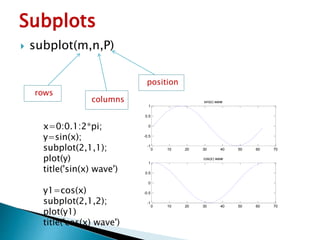
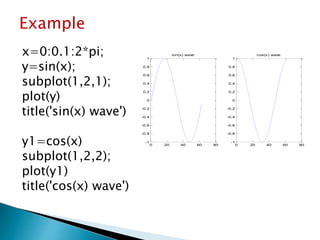
>>fplot('x^3-2*cos(0.66*x)+4*sin(2*x)-1', [-3 3])
-3 -2 -1 0 1 2 3
-30
-20
-10
0
10
20
30
9](https://image.slidesharecdn.com/graphics-160803200011/85/graphs-plotting-in-MATLAB-9-320.jpg)
![ bar(x,y)
x=[1 2 3 4 5]
y=[1 2 3 4 5]
bar(x,y)
function creates
vertical Bar plot 1 2 3 4 5
0
0.5
1
1.5
2
2.5
3
3.5
4
4.5
5
14](https://image.slidesharecdn.com/graphics-160803200011/85/graphs-plotting-in-MATLAB-14-320.jpg)
![ barh(x,y)
x=[1 2 3 4 5]
y=[1 2 3 4 6]
barh(x,y)
function creates
horizontal Bar plot
0 1 2 3 4 5 6
1
2
3
4
5
15](https://image.slidesharecdn.com/graphics-160803200011/85/graphs-plotting-in-MATLAB-15-320.jpg)
![ stairs(x,y)
x=[0 1 2 3 4]
y=[1 2 3 4 6]
stairs(x,y)
function creates
stair plot
0 0.5 1 1.5 2 2.5 3 3.5 4
1
1.5
2
2.5
3
3.5
4
4.5
5
5.5
6
16](https://image.slidesharecdn.com/graphics-160803200011/85/graphs-plotting-in-MATLAB-16-320.jpg)
![ compass(x,y)
x=[1 2 3 4 5]
y=[1 2 3 4 6]
compass(x,y)
function creates polar plot
Location of points to plot in
“Cartesian coordinates”
2
4
6
8
30
210
60
240
90
270
120
300
150
330
180 0
17](https://image.slidesharecdn.com/graphics-160803200011/85/graphs-plotting-in-MATLAB-17-320.jpg)
![ pie(x)
x=[1 2 3 4 5]
pie(x)
function creates pie plot
Values are in terms of percentage
7%
13%
20%
27%
33%
18](https://image.slidesharecdn.com/graphics-160803200011/85/graphs-plotting-in-MATLAB-18-320.jpg)



![[0903 구경원] recast 네비메쉬](https://cdn.slidesharecdn.com/ss_thumbnails/0903recast-111221053315-phpapp01-thumbnail.jpg?width=640&height=640&fit=bounds)


