Lab No.04

MATLAB graphics

Designed by : Dawar Awan
dawar@cecos.edu.pk
CECOS College of Engineering and IT

March – July 2012
Discrete signals
 Plot the discrete signal x = [1 2 3 4] in MATLAB
4

3
2

1

-1

0

1

2

 using stem(x) plots the signal starting from index number 1
CECOS College of Engineering and IT

March – July 2012
Practice
 Plot the following discrete time sequences

x[n]=[1 1 1 1 2 1 1 1 1]

x[n]=[5 4 3 2 1 0 1 2 3 4 5]

CECOS College of Engineering and IT

March – July 2012
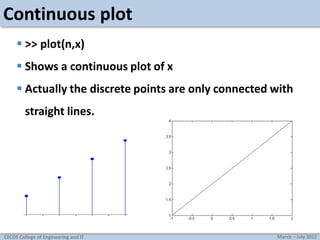
Continuous plot
 >> plot(n,x)
 Shows a continuous plot of x
 Actually the discrete points are only connected with
straight lines.

CECOS College of Engineering and IT

March – July 2012
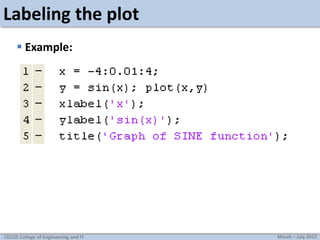
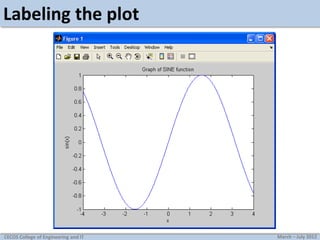
Labeling the plot
 Example:

CECOS College of Engineering and IT

March – July 2012
Labeling the plot

CECOS College of Engineering and IT

March – July 2012
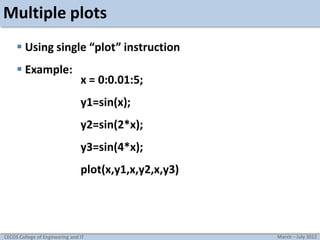
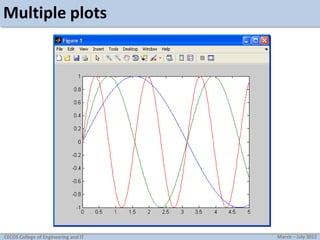
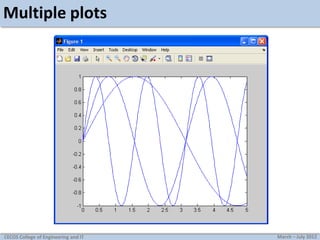
Multiple plots
 Using single “plot” instruction
 Example:

x = 0:0.01:5;
y1=sin(x);
y2=sin(2*x);
y3=sin(4*x);
plot(x,y1,x,y2,x,y3)

CECOS College of Engineering and IT

March – July 2012
Multiple plots

CECOS College of Engineering and IT

March – July 2012
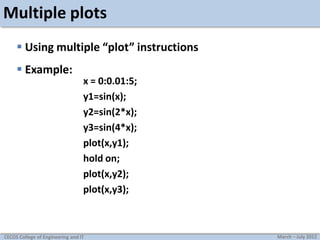
Multiple plots
 Using multiple “plot” instructions
 Example:

x = 0:0.01:5;
y1=sin(x);
y2=sin(2*x);
y3=sin(4*x);
plot(x,y1);
hold on;
plot(x,y2);
plot(x,y3);

CECOS College of Engineering and IT

March – July 2012
Multiple plots

CECOS College of Engineering and IT

March – July 2012
Changing default plot settings
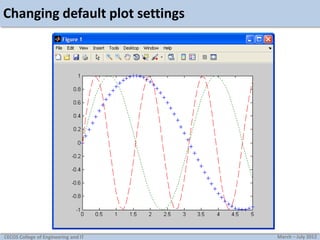
 Example:
x = 0:0.1:5;
y1=sin(x);
y2=sin(2*x);
y3=sin(4*x);

plot(x,y1,’+’,x,y2,':',x,y3,‘--');

CECOS College of Engineering and IT

March – July 2012
Changing default plot settings

CECOS College of Engineering and IT

March – July 2012
Changing default plot settings
 line types and mark types
Linetypes :

solid (-), dashed (--), dotted (:), dashdot (-.)

Marktypes :

point (.), plus (+), star (*), circle (o), x-mark (x)

Check the help of “plot” for more effects.
CECOS College of Engineering and IT

March – July 2012
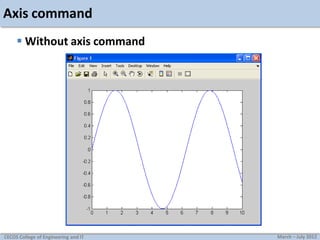
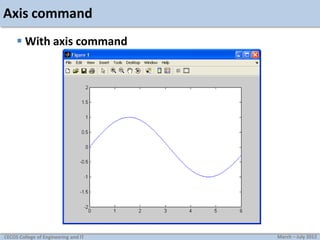
Axis command
 Used to manually zoom axis
 axis([xmin xmax ymin ymax])
 Example:

CECOS College of Engineering and IT

March – July 2012
Axis command
 Without axis command

CECOS College of Engineering and IT

March – July 2012
Axis command
 With axis command

CECOS College of Engineering and IT

March – July 2012
SUBPLOT
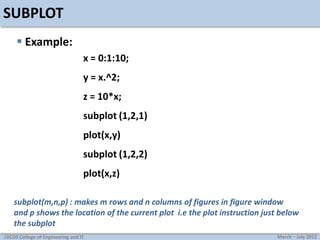
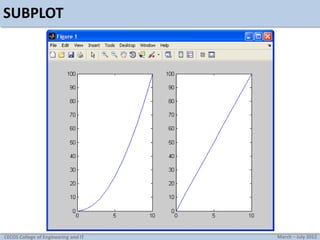
 Example:
x = 0:1:10;
y = x.^2;
z = 10*x;
subplot (1,2,1)

plot(x,y)
subplot (1,2,2)
plot(x,z)
subplot(m,n,p) : makes m rows and n columns of figures in figure window
and p shows the location of the current plot i.e the plot instruction just below
the subplot
CECOS College of Engineering and IT

March – July 2012
SUBPLOT

CECOS College of Engineering and IT

March – July 2012
Generating a sine wave
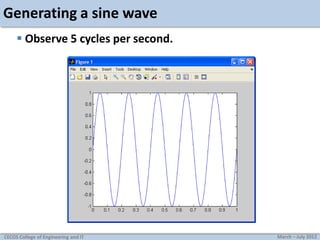
 Example: creating a 5Hz sine wave, sampled at 8000Hz.
f=5;
fs=8000;
t=[0:1/fs:1];
y=sin(2*pi*f*t);
plot(t,y);

CECOS College of Engineering and IT

March – July 2012
Generating a sine wave
 Observe 5 cycles per second.

CECOS College of Engineering and IT

March – July 2012
Generating a sine wave
 Example: Creating a 1000Hz sine wave, sampled at
8000Hz, and routing it to computer’s soundcard.
f=1000;
fs=8000;
t=[0:1/fs:3];
y=sin(2*pi*f*t);
sound(y,fs);

The sound will be heard for 3 seconds, as dictated by the code
CECOS College of Engineering and IT

March – July 2012
Task
1. Plot the two curves y1 = x2 and y2 = 2x on the same graph using

different plot styles. Label the plot properly
2. Write a MATLAB program that adds the following two signals,
Plot the original signals as well as their sum.
x1[n] = [2 2 2 2 2]
x2[n] = [2 2 2 2 0 0]
3. Scale the amplitude of the following signal by a factor of 2 and
½ and show the scaled signals along with the original.

x(t) = sin(t) + 1/3sin(3t)
CECOS College of Engineering and IT

,

t=0:0.01:10
March – July 2012
Tasks
4. Demonstrate the use of the function ”plot3” to plot a straight
3D line

CECOS College of Engineering and IT

March – July 2012

matab no4

  • 1.
    Lab No.04 MATLAB graphics Designedby : Dawar Awan dawar@cecos.edu.pk CECOS College of Engineering and IT March – July 2012
  • 2.
    Discrete signals  Plotthe discrete signal x = [1 2 3 4] in MATLAB 4 3 2 1 -1 0 1 2  using stem(x) plots the signal starting from index number 1 CECOS College of Engineering and IT March – July 2012
  • 3.
    Practice  Plot thefollowing discrete time sequences x[n]=[1 1 1 1 2 1 1 1 1] x[n]=[5 4 3 2 1 0 1 2 3 4 5] CECOS College of Engineering and IT March – July 2012
  • 4.
    Continuous plot  >>plot(n,x)  Shows a continuous plot of x  Actually the discrete points are only connected with straight lines. CECOS College of Engineering and IT March – July 2012
  • 5.
    Labeling the plot Example: CECOS College of Engineering and IT March – July 2012
  • 6.
    Labeling the plot CECOSCollege of Engineering and IT March – July 2012
  • 7.
    Multiple plots  Usingsingle “plot” instruction  Example: x = 0:0.01:5; y1=sin(x); y2=sin(2*x); y3=sin(4*x); plot(x,y1,x,y2,x,y3) CECOS College of Engineering and IT March – July 2012
  • 8.
    Multiple plots CECOS Collegeof Engineering and IT March – July 2012
  • 9.
    Multiple plots  Usingmultiple “plot” instructions  Example: x = 0:0.01:5; y1=sin(x); y2=sin(2*x); y3=sin(4*x); plot(x,y1); hold on; plot(x,y2); plot(x,y3); CECOS College of Engineering and IT March – July 2012
  • 10.
    Multiple plots CECOS Collegeof Engineering and IT March – July 2012
  • 11.
    Changing default plotsettings  Example: x = 0:0.1:5; y1=sin(x); y2=sin(2*x); y3=sin(4*x); plot(x,y1,’+’,x,y2,':',x,y3,‘--'); CECOS College of Engineering and IT March – July 2012
  • 12.
    Changing default plotsettings CECOS College of Engineering and IT March – July 2012
  • 13.
    Changing default plotsettings  line types and mark types Linetypes : solid (-), dashed (--), dotted (:), dashdot (-.) Marktypes : point (.), plus (+), star (*), circle (o), x-mark (x) Check the help of “plot” for more effects. CECOS College of Engineering and IT March – July 2012
  • 14.
    Axis command  Usedto manually zoom axis  axis([xmin xmax ymin ymax])  Example: CECOS College of Engineering and IT March – July 2012
  • 15.
    Axis command  Withoutaxis command CECOS College of Engineering and IT March – July 2012
  • 16.
    Axis command  Withaxis command CECOS College of Engineering and IT March – July 2012
  • 17.
    SUBPLOT  Example: x =0:1:10; y = x.^2; z = 10*x; subplot (1,2,1) plot(x,y) subplot (1,2,2) plot(x,z) subplot(m,n,p) : makes m rows and n columns of figures in figure window and p shows the location of the current plot i.e the plot instruction just below the subplot CECOS College of Engineering and IT March – July 2012
  • 18.
    SUBPLOT CECOS College ofEngineering and IT March – July 2012
  • 19.
    Generating a sinewave  Example: creating a 5Hz sine wave, sampled at 8000Hz. f=5; fs=8000; t=[0:1/fs:1]; y=sin(2*pi*f*t); plot(t,y); CECOS College of Engineering and IT March – July 2012
  • 20.
    Generating a sinewave  Observe 5 cycles per second. CECOS College of Engineering and IT March – July 2012
  • 21.
    Generating a sinewave  Example: Creating a 1000Hz sine wave, sampled at 8000Hz, and routing it to computer’s soundcard. f=1000; fs=8000; t=[0:1/fs:3]; y=sin(2*pi*f*t); sound(y,fs); The sound will be heard for 3 seconds, as dictated by the code CECOS College of Engineering and IT March – July 2012
  • 22.
    Task 1. Plot thetwo curves y1 = x2 and y2 = 2x on the same graph using different plot styles. Label the plot properly 2. Write a MATLAB program that adds the following two signals, Plot the original signals as well as their sum. x1[n] = [2 2 2 2 2] x2[n] = [2 2 2 2 0 0] 3. Scale the amplitude of the following signal by a factor of 2 and ½ and show the scaled signals along with the original. x(t) = sin(t) + 1/3sin(3t) CECOS College of Engineering and IT , t=0:0.01:10 March – July 2012
  • 23.
    Tasks 4. Demonstrate theuse of the function ”plot3” to plot a straight 3D line CECOS College of Engineering and IT March – July 2012