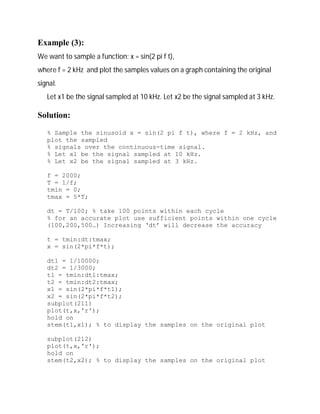
Sampling of Continuous Signals in MATLAB 
All signals in MATLAB are discrete-time, but they will look like continuous-time 
signals if the sampling rate is much higher than the Nyquist rate. 
Example (1): 
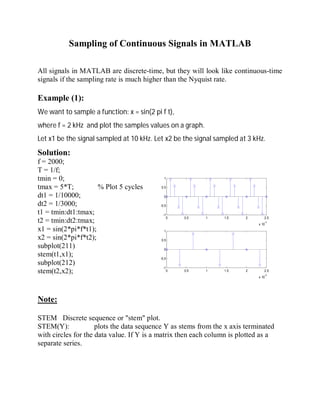
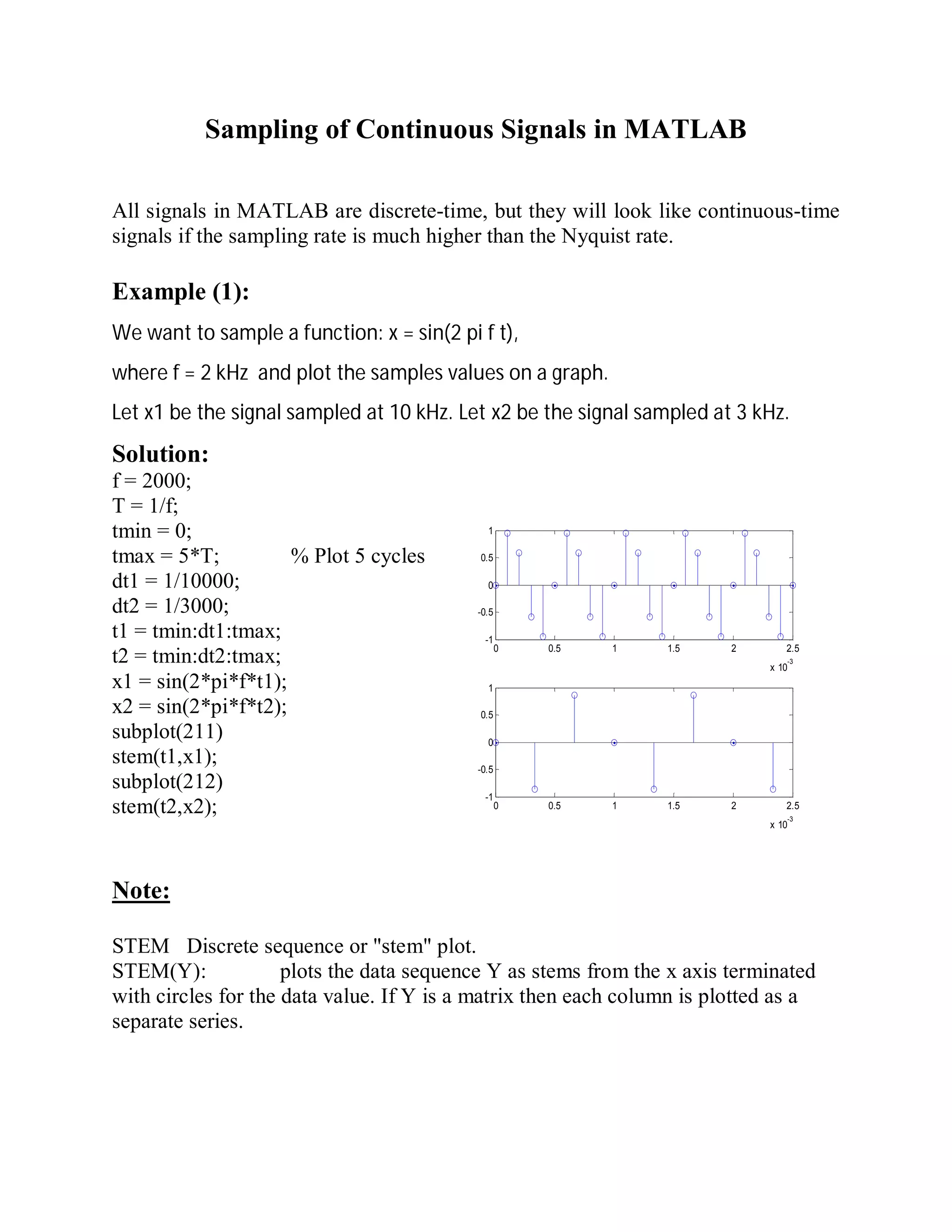
We want to sample a function: x = sin(2 pi f t), 
where f = 2 kHz and plot the samples values on a graph. 
Let x1 be the signal sampled at 10 kHz. Let x2 be the signal sampled at 3 kHz. 
Solution: 
f = 2000; 
T = 1/f; 
tmin = 0; 
1 
tmax = 5*T; % Plot 5 cycles 
0.5 
dt1 = 1/10000; 
0 
dt2 = 1/3000; 
-0.5 
t1 = tmin:dt1:tmax; 
-1 
t2 = tmin:dt2:tmax; 
0 0.5 1 1.5 2 2.5 
x 10-3 
x1 = sin(2*pi*f*t1); 
x2 = sin(2*pi*f*t2); 
subplot(211) 
stem(t1,x1); 
subplot(212) 
stem(t2,x2); 
0 0.5 1 1.5 2 2.5 
x 10-3 
1 
0.5 
0 
-0.5 
-1 
Note: 
STEM Discrete sequence or "stem" plot. 
STEM(Y): plots the data sequence Y as stems from the x axis terminated 
with circles for the data value. If Y is a matrix then each column is plotted as a 
separate series.
Example (2): 
We want to sample a function: x = sin(2 pi f t), 
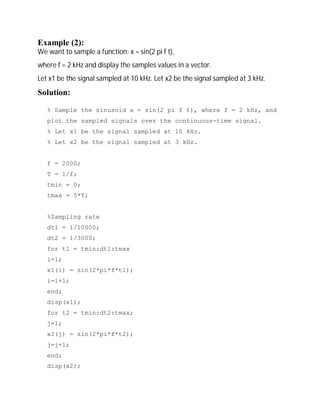
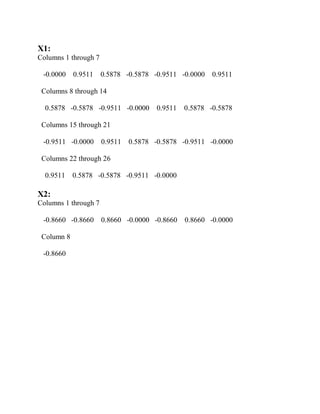
where f = 2 kHz and display the samples values in a vector. 
Let x1 be the signal sampled at 10 kHz. Let x2 be the signal sampled at 3 kHz. 
Solution: 
% Sample the sinusoid x = sin(2 pi f t), where f = 2 kHz, and 
plot the sampled signals over the continuous-time signal. 
% Let x1 be the signal sampled at 10 kHz. 
% Let x2 be the signal sampled at 3 kHz. 
f = 2000; 
T = 1/f; 
tmin = 0; 
tmax = 5*T; 
%Sampling rate 
dt1 = 1/10000; 
dt2 = 1/3000; 
for t1 = tmin:dt1:tmax 
i=1; 
x1(i) = sin(2*pi*f*t1); 
i=i+1; 
end; 
disp(x1); 
for t2 = tmin:dt2:tmax; 
j=1; 
x2(j) = sin(2*pi*f*t2); 
j=j+1; 
end; 
disp(x2);
X1: 
Columns 1 through 7 
-0.0000 0.9511 0.5878 -0.5878 -0.9511 -0.0000 0.9511 
Columns 8 through 14 
0.5878 -0.5878 -0.9511 -0.0000 0.9511 0.5878 -0.5878 
Columns 15 through 21 
-0.9511 -0.0000 0.9511 0.5878 -0.5878 -0.9511 -0.0000 
Columns 22 through 26 
0.9511 0.5878 -0.5878 -0.9511 -0.0000 
X2: 
Columns 1 through 7 
-0.8660 -0.8660 0.8660 -0.0000 -0.8660 0.8660 -0.0000 
Column 8 
-0.8660
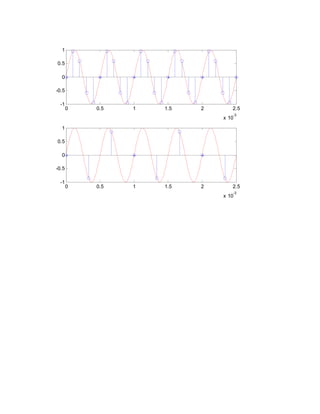
Example (3): 
We want to sample a function: x = sin(2 pi f t), 
where f = 2 kHz and plot the samples values on a graph containing the original 
signal. 
Let x1 be the signal sampled at 10 kHz. Let x2 be the signal sampled at 3 kHz. 
Solution: 
% Sample the sinusoid x = sin(2 pi f t), where f = 2 kHz, and 
plot the sampled 
% signals over the continuous-time signal. 
% Let x1 be the signal sampled at 10 kHz. 
% Let x2 be the signal sampled at 3 kHz. 
f = 2000; 
T = 1/f; 
tmin = 0; 
tmax = 5*T; 
dt = T/100; % take 100 points within each cycle 
% for an accurate plot use sufficient points within one cycle 
(100,200,500…) Increasing ‘dt’ will decrease the accuracy 
t = tmin:dt:tmax; 
x = sin(2*pi*f*t); 
dt1 = 1/10000; 
dt2 = 1/3000; 
t1 = tmin:dt1:tmax; 
t2 = tmin:dt2:tmax; 
x1 = sin(2*pi*f*t1); 
x2 = sin(2*pi*f*t2); 
subplot(211) 
plot(t,x,'r'); 
hold on 
stem(t1,x1); % to display the samples on the original plot 
subplot(212) 
plot(t,x,'r'); 
hold on 
stem(t2,x2); % to display the samples on the original plot
0 0.5 1 1.5 2 2.5 
x 10-3 
1 
0.5 
0 
-0.5 
-1 
0 0.5 1 1.5 2 2.5 
x 10-3 
1 
0.5 
0 
-0.5 
-1
MATLAB treatment of audio signals 
Recording an audio signal via a microphone: 
y = audiorecorder 
After you create an audiorecorder object, you can use the methods listed below on 
that object. 
 record(y) Starts recording 
 record(y,length) Records for length number of seconds. 
 stop(y) Stops recording 
 pause(y) Pauses recording 
 resume(y) Restarts recording from where recording was paused. 
 play(y) Creates an audioplayer, plays the recorded audio data, 
and returns a handle to the created audioplayer. 
Reading an audio file .wav 
 y = wavread(filename) loads a WAVE file specified by filename, returning 
the sampled data in y. 
 [y, Fs, nbits] = wavread(filename) returns the sample rate (Fs) in Hertz and 
the number of bits per sample (nbits) used to encode the data in the file.

Matlab Señales Discretas

  • 1.
    Sampling of ContinuousSignals in MATLAB All signals in MATLAB are discrete-time, but they will look like continuous-time signals if the sampling rate is much higher than the Nyquist rate. Example (1): We want to sample a function: x = sin(2 pi f t), where f = 2 kHz and plot the samples values on a graph. Let x1 be the signal sampled at 10 kHz. Let x2 be the signal sampled at 3 kHz. Solution: f = 2000; T = 1/f; tmin = 0; 1 tmax = 5*T; % Plot 5 cycles 0.5 dt1 = 1/10000; 0 dt2 = 1/3000; -0.5 t1 = tmin:dt1:tmax; -1 t2 = tmin:dt2:tmax; 0 0.5 1 1.5 2 2.5 x 10-3 x1 = sin(2*pi*f*t1); x2 = sin(2*pi*f*t2); subplot(211) stem(t1,x1); subplot(212) stem(t2,x2); 0 0.5 1 1.5 2 2.5 x 10⁻³ 1 0.5 0 -0.5 -1 Note: STEM Discrete sequence or "stem" plot. STEM(Y): plots the data sequence Y as stems from the x axis terminated with circles for the data value. If Y is a matrix then each column is plotted as a separate series.
  • 2.
    Example (2): Wewant to sample a function: x = sin(2 pi f t), where f = 2 kHz and display the samples values in a vector. Let x1 be the signal sampled at 10 kHz. Let x2 be the signal sampled at 3 kHz. Solution: % Sample the sinusoid x = sin(2 pi f t), where f = 2 kHz, and plot the sampled signals over the continuous-time signal. % Let x1 be the signal sampled at 10 kHz. % Let x2 be the signal sampled at 3 kHz. f = 2000; T = 1/f; tmin = 0; tmax = 5*T; %Sampling rate dt1 = 1/10000; dt2 = 1/3000; for t1 = tmin:dt1:tmax i=1; x1(i) = sin(2*pi*f*t1); i=i+1; end; disp(x1); for t2 = tmin:dt2:tmax; j=1; x2(j) = sin(2*pi*f*t2); j=j+1; end; disp(x2);
  • 3.
    X1: Columns 1through 7 -0.0000 0.9511 0.5878 -0.5878 -0.9511 -0.0000 0.9511 Columns 8 through 14 0.5878 -0.5878 -0.9511 -0.0000 0.9511 0.5878 -0.5878 Columns 15 through 21 -0.9511 -0.0000 0.9511 0.5878 -0.5878 -0.9511 -0.0000 Columns 22 through 26 0.9511 0.5878 -0.5878 -0.9511 -0.0000 X2: Columns 1 through 7 -0.8660 -0.8660 0.8660 -0.0000 -0.8660 0.8660 -0.0000 Column 8 -0.8660
  • 4.
    Example (3): Wewant to sample a function: x = sin(2 pi f t), where f = 2 kHz and plot the samples values on a graph containing the original signal. Let x1 be the signal sampled at 10 kHz. Let x2 be the signal sampled at 3 kHz. Solution: % Sample the sinusoid x = sin(2 pi f t), where f = 2 kHz, and plot the sampled % signals over the continuous-time signal. % Let x1 be the signal sampled at 10 kHz. % Let x2 be the signal sampled at 3 kHz. f = 2000; T = 1/f; tmin = 0; tmax = 5*T; dt = T/100; % take 100 points within each cycle % for an accurate plot use sufficient points within one cycle (100,200,500…) Increasing ‘dt’ will decrease the accuracy t = tmin:dt:tmax; x = sin(2*pi*f*t); dt1 = 1/10000; dt2 = 1/3000; t1 = tmin:dt1:tmax; t2 = tmin:dt2:tmax; x1 = sin(2*pi*f*t1); x2 = sin(2*pi*f*t2); subplot(211) plot(t,x,'r'); hold on stem(t1,x1); % to display the samples on the original plot subplot(212) plot(t,x,'r'); hold on stem(t2,x2); % to display the samples on the original plot
  • 5.
    0 0.5 11.5 2 2.5 x 10⁻³ 1 0.5 0 -0.5 -1 0 0.5 1 1.5 2 2.5 x 10⁻³ 1 0.5 0 -0.5 -1
  • 6.
    MATLAB treatment ofaudio signals Recording an audio signal via a microphone: y = audiorecorder After you create an audiorecorder object, you can use the methods listed below on that object.  record(y) Starts recording  record(y,length) Records for length number of seconds.  stop(y) Stops recording  pause(y) Pauses recording  resume(y) Restarts recording from where recording was paused.  play(y) Creates an audioplayer, plays the recorded audio data, and returns a handle to the created audioplayer. Reading an audio file .wav  y = wavread(filename) loads a WAVE file specified by filename, returning the sampled data in y.  [y, Fs, nbits] = wavread(filename) returns the sample rate (Fs) in Hertz and the number of bits per sample (nbits) used to encode the data in the file.