IM2044 – Week 9: Lecture
Dr. Andres Baravalle

1
Outline
• Design rules: principles, standards and
guidelines
• Usability inspections
Design rules: principles,
standards and guidelines
• Design rules are mechanism to restrict the
domain of design options
– Usability-related principles, standards and guidelines
support the developer

• Principles
– General understanding of design as a subject area

• Standards and guidelines
– Direction for design

• Design patterns
– Capture and reuse design knowledge
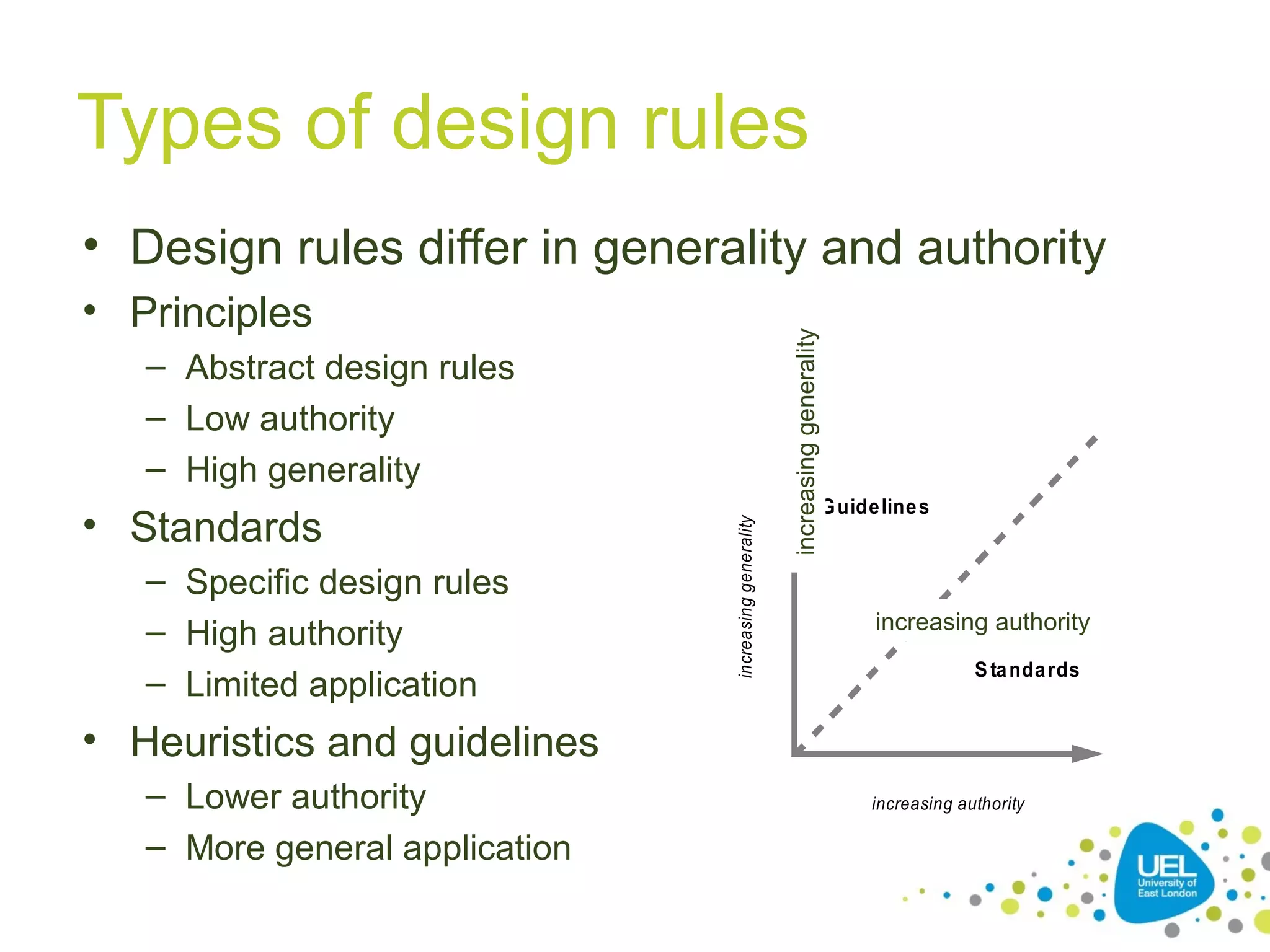
Types of design rules
• Principles

• Standards
– Specific design rules
– High authority
– Limited application

increasing generality

– Abstract design rules
– Low authority
– High generality

increasing generality

• Design rules differ in generality and authority

G uide line s

increasing authority
S ta nda rds

• Heuristics and guidelines
– Lower authority
– More general application

increasing authority
Design principles

5
Principles to support usability
• Learnability
– The ease with which new users can begin effective
interaction and achieve maximal performance

• Flexibility
– The multiplicity of ways the user and system
exchange information

• Robustness
– The level of support provided the user in determining
successful achievement and assessment of goaldirected behaviour
Principles of learnability
• Predictability
– Determining effect of future actions based on
past interaction history

• Synthesizability
– Assessing the effect of past actions
– Immediate vs. eventual honesty
Principles of learnability (2)
• Familiarity
– How prior knowledge applies to new system

• Generalizability
– Extending specific interaction knowledge to
new situations

• Consistency
– Likeness in input/output behaviour arising
from similar situations or task objectives
Principles of flexibility
• Dialogue initiative
– Freedom from system imposed constraints on input
dialogue

• Multithreading
– Ability of system to support user interaction for more
than one task at a time
– Concurrent vs. interleaving; multimodality

• Task migrability
– Passing responsibility for task execution between
user and system
Principles of flexibility (2)
• Substitutivity
– Allowing equivalent values of input and output
to be substituted for each other (e.g. text and
audio)
– Representation multiplicity

• Customizability
– Modifiability of the user interface by user
(adaptability) or system (adaptativity)
Principles of robustness
• Observability
– Ability of user to evaluate the internal state of
the system from its perceivable representation

• Recoverability
– Ability of user to take corrective action once
an error has been recognized
– Reachability; forward/backward recovery;
commensurate effort
Principles of robustness (2)
• Responsiveness
– How the user perceives the rate of
communication with the system

• Task conformance
– Degree to which system services support all
of the user's tasks
– Task completeness; task adequacy
Design standards, guidelines
and heuristics

13
Standards
• Set by national or international bodies to
ensure compliance by a large community
of designers standards require sound
underlying theory and slowly changing
technology
• Examples include:
– W3C HTML and CSS standards
– ISO 6385:2004: Ergonomic principles in the
design of work systems
Guidelines and heuristics
• Guidelines are detailed rules for design,
often platform or task-specific
• (Usability) heuristics are principles and
rules of thumb that govern the overall
design approach
– Many textbooks and reports full of guidelines
and heuristics
– Understanding justification for guidelines aids
in resolving conflicts
Usability inspections
• Usability inspection methods are based on
having evaluators inspecting an user
interface
• Usability inspection methods aim to
examine usability-related aspects of an
user interface, even if the interface has not
been yet developed
– Can be used to perform usability evaluations
in the initial stages of the development
16
Usability inspections (2)
• Heuristic evaluation and walkthroughs are
the most common usability inspection
methods

17
Heuristic evaluations
• Heuristic evaluation is a method that
requires some usability specialists to
judge whether each element of an user
interface follows established usability
principles and guidelines
– E.g. Jakob Nielsen’s heuristics

• Heuristics being developed for mobile
devices, wearables, virtual worlds, etc.
18
Heuristic evaluations: stages
• Briefing session to tell experts what to do.
• Evaluation period of 1-2 hours in which:
– Each expert works separately
– Take one pass to get a feel for the product
– Take a second pass to focus on specific features

• Debriefing session in which experts work
together to prioritize and categorise the
problems

19
Nielsen’s heuristics
• Developed by Jacob Nielsen in the early
1990s.
– Based on heuristics distilled from an empirical
analysis of 249 usability problems.
– These heuristics have been revised for
current technology – and we will discuss them
more in depth in the tutorial

20
Nielsen’s heuristics: discount
evaluations
• An heuristic evaluation is referred to as
discount evaluation when 5 evaluators
are used
– Empirical evidence suggests that on
average 5 evaluators identify 75-80% of
usability problems on generalist web
sites

21
Heuristic evaluations:
advantages and problems

• Few ethical & practical issues to consider
because users not involved
– Can be difficult & expensive to find experts
– Experts should have knowledge of application domain
& of the evaluation method used

• Critical points:
– Important problems may get missed
– Focus can be lost on trivial problems
– Experts have biases

22
Cognitive walkthroughs
• Focus on ease of learning
• Designer presents an aspect of the design
& usage scenarios
• Expert is told the assumptions about user
population, context of use, task details.
• One or more experts walk through the
design prototype with the scenario.
• Experts are guided by 3 questions
23
The 3 questions
• Will the correct action be sufficiently
evident to the user?
• Will the user notice that the correct action
is available?
• Will the user associate and interpret the
response from the action correctly?
As the experts work through the scenario
they note problems.
24
Pluralistic walkthrough
• Variation on the cognitive walkthrough
theme.
– Performed by a team

• The panel of experts begins by working
separately
• Then there is managed discussion that
leads to agreed decisions.
• The approach lends itself well to
participatory design
25
Feature inspection
• Feature inspection is a technique that focuses
on the features of a product or of a web site
– A group of inspectors that are given some use cases
and are asked to analyse each feature of the web site
for what regards availability, understandability, and
other aspects of usability
– This technique is better in the middle stages of
development, when features are known but the
artefact cannot be evaluated with methods as lab
experiments.

26
Standards inspection
• Standards inspection is a technique used to
ensure the compliance of a web site against
some standard
• A usability professional with extensive
knowledge of the relevant standards inspects a
web site for compliance
• Different standard inspections can be run on the
same artefact
– Nielsen’s heuristics include standards inspection
27
And now…
• You have had an overview of a wide
selection of usability evaluation methods
– And you are ready to use them in your
assignment

28

Usability evaluations (part 3)

  • 1.
    IM2044 – Week9: Lecture Dr. Andres Baravalle 1
  • 2.
    Outline • Design rules:principles, standards and guidelines • Usability inspections
  • 3.
    Design rules: principles, standardsand guidelines • Design rules are mechanism to restrict the domain of design options – Usability-related principles, standards and guidelines support the developer • Principles – General understanding of design as a subject area • Standards and guidelines – Direction for design • Design patterns – Capture and reuse design knowledge
  • 4.
    Types of designrules • Principles • Standards – Specific design rules – High authority – Limited application increasing generality – Abstract design rules – Low authority – High generality increasing generality • Design rules differ in generality and authority G uide line s increasing authority S ta nda rds • Heuristics and guidelines – Lower authority – More general application increasing authority
  • 5.
  • 6.
    Principles to supportusability • Learnability – The ease with which new users can begin effective interaction and achieve maximal performance • Flexibility – The multiplicity of ways the user and system exchange information • Robustness – The level of support provided the user in determining successful achievement and assessment of goaldirected behaviour
  • 7.
    Principles of learnability •Predictability – Determining effect of future actions based on past interaction history • Synthesizability – Assessing the effect of past actions – Immediate vs. eventual honesty
  • 8.
    Principles of learnability(2) • Familiarity – How prior knowledge applies to new system • Generalizability – Extending specific interaction knowledge to new situations • Consistency – Likeness in input/output behaviour arising from similar situations or task objectives
  • 9.
    Principles of flexibility •Dialogue initiative – Freedom from system imposed constraints on input dialogue • Multithreading – Ability of system to support user interaction for more than one task at a time – Concurrent vs. interleaving; multimodality • Task migrability – Passing responsibility for task execution between user and system
  • 10.
    Principles of flexibility(2) • Substitutivity – Allowing equivalent values of input and output to be substituted for each other (e.g. text and audio) – Representation multiplicity • Customizability – Modifiability of the user interface by user (adaptability) or system (adaptativity)
  • 11.
    Principles of robustness •Observability – Ability of user to evaluate the internal state of the system from its perceivable representation • Recoverability – Ability of user to take corrective action once an error has been recognized – Reachability; forward/backward recovery; commensurate effort
  • 12.
    Principles of robustness(2) • Responsiveness – How the user perceives the rate of communication with the system • Task conformance – Degree to which system services support all of the user's tasks – Task completeness; task adequacy
  • 13.
  • 14.
    Standards • Set bynational or international bodies to ensure compliance by a large community of designers standards require sound underlying theory and slowly changing technology • Examples include: – W3C HTML and CSS standards – ISO 6385:2004: Ergonomic principles in the design of work systems
  • 15.
    Guidelines and heuristics •Guidelines are detailed rules for design, often platform or task-specific • (Usability) heuristics are principles and rules of thumb that govern the overall design approach – Many textbooks and reports full of guidelines and heuristics – Understanding justification for guidelines aids in resolving conflicts
  • 16.
    Usability inspections • Usabilityinspection methods are based on having evaluators inspecting an user interface • Usability inspection methods aim to examine usability-related aspects of an user interface, even if the interface has not been yet developed – Can be used to perform usability evaluations in the initial stages of the development 16
  • 17.
    Usability inspections (2) •Heuristic evaluation and walkthroughs are the most common usability inspection methods 17
  • 18.
    Heuristic evaluations • Heuristicevaluation is a method that requires some usability specialists to judge whether each element of an user interface follows established usability principles and guidelines – E.g. Jakob Nielsen’s heuristics • Heuristics being developed for mobile devices, wearables, virtual worlds, etc. 18
  • 19.
    Heuristic evaluations: stages •Briefing session to tell experts what to do. • Evaluation period of 1-2 hours in which: – Each expert works separately – Take one pass to get a feel for the product – Take a second pass to focus on specific features • Debriefing session in which experts work together to prioritize and categorise the problems 19
  • 20.
    Nielsen’s heuristics • Developedby Jacob Nielsen in the early 1990s. – Based on heuristics distilled from an empirical analysis of 249 usability problems. – These heuristics have been revised for current technology – and we will discuss them more in depth in the tutorial 20
  • 21.
    Nielsen’s heuristics: discount evaluations •An heuristic evaluation is referred to as discount evaluation when 5 evaluators are used – Empirical evidence suggests that on average 5 evaluators identify 75-80% of usability problems on generalist web sites 21
  • 22.
    Heuristic evaluations: advantages andproblems • Few ethical & practical issues to consider because users not involved – Can be difficult & expensive to find experts – Experts should have knowledge of application domain & of the evaluation method used • Critical points: – Important problems may get missed – Focus can be lost on trivial problems – Experts have biases 22
  • 23.
    Cognitive walkthroughs • Focuson ease of learning • Designer presents an aspect of the design & usage scenarios • Expert is told the assumptions about user population, context of use, task details. • One or more experts walk through the design prototype with the scenario. • Experts are guided by 3 questions 23
  • 24.
    The 3 questions •Will the correct action be sufficiently evident to the user? • Will the user notice that the correct action is available? • Will the user associate and interpret the response from the action correctly? As the experts work through the scenario they note problems. 24
  • 25.
    Pluralistic walkthrough • Variationon the cognitive walkthrough theme. – Performed by a team • The panel of experts begins by working separately • Then there is managed discussion that leads to agreed decisions. • The approach lends itself well to participatory design 25
  • 26.
    Feature inspection • Featureinspection is a technique that focuses on the features of a product or of a web site – A group of inspectors that are given some use cases and are asked to analyse each feature of the web site for what regards availability, understandability, and other aspects of usability – This technique is better in the middle stages of development, when features are known but the artefact cannot be evaluated with methods as lab experiments. 26
  • 27.
    Standards inspection • Standardsinspection is a technique used to ensure the compliance of a web site against some standard • A usability professional with extensive knowledge of the relevant standards inspects a web site for compliance • Different standard inspections can be run on the same artefact – Nielsen’s heuristics include standards inspection 27
  • 28.
    And now… • Youhave had an overview of a wide selection of usability evaluation methods – And you are ready to use them in your assignment 28