International 5-days Graphics
Programming Workshop
using Cocos-2d-x
DAY 1
Trident College of Information Technology
Takao WADA
1. About me
2. OpenGL Overview
3. Introduction of Cocos-2d-x
4. Installation and setup the development environment
5. Run a sample programs of Cocos-2d-x
6. Create a simple shader program
7. Work
Agenda
 Takao Wada
E-mail: jiroshino@gmail.com
FB: https://www.facebook.com/takao.wada.50
URL: http://www.drjiro.com/
 Lecturer of Trident College of Information Technology
 Teach game programming at TRIDENT about 20 years.
 3DProgramming and Smartphone games based on many
languages, C, C++, Java, etc.
 IGDA Nagoya-Chapter Chair
About me
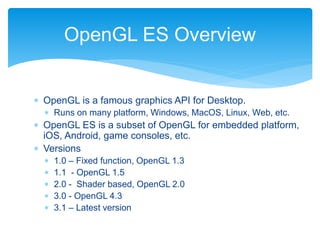
 OpenGL is a famous graphics API for Desktop.
 Runs on many platform, Windows, MacOS, Linux, Web, etc.
 OpenGL ES is a subset of OpenGL for embedded platform,
iOS, Android, game consoles, etc.
 Versions
 1.0 – Fixed function, OpenGL 1.3
 1.1 - OpenGL 1.5
 2.0 - Shader based, OpenGL 2.0
 3.0 - OpenGL 4.3
 3.1 – Latest version
OpenGL ES Overview
Graphics pipeline
Vertex
Processing
Rasterize
r
Fragment
Processing
Mesh
vertices
Transforme
d
vertices
fragment
s
Vertex shader Fragment shader
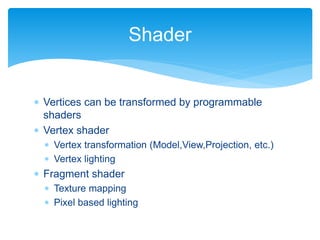
 Vertices can be transformed by programmable
shaders
 Vertex shader
 Vertex transformation (Model,View,Projection, etc.)
 Vertex lighting
 Fragment shader
 Texture mapping
 Pixel based lighting
Shader
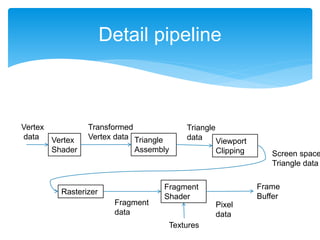
Detail pipeline
Vertex
Shader
Triangle
Assembly
Viewport
Clipping
Rasterizer
Fragment
Shader
Frame
Buffer
Textures
Vertex
data
Transformed
Vertex data
Triangle
data
Screen space
Triangle data
Fragment
data
Pixel
data
 Multi-platform framework for building 2D games
 Main site http://www.cocos2d-x.org
 Based on cocos2d-iphone (Objective-C base)
 Uses C++
 Works on iOS, Android, Windows Phone, OS X,
Windows and Linux.
Cocos-2d-x
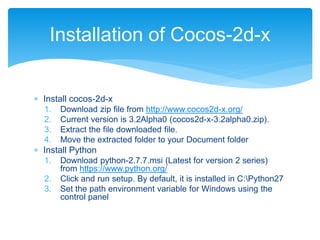
 Install cocos-2d-x
1. Download zip file from http://www.cocos2d-x.org/
2. Current version is 3.2Alpha0 (cocos2d-x-3.2alpha0.zip).
3. Extract the file downloaded file.
4. Move the extracted folder to your Document folder
 Install Python
1. Download python-2.7.7.msi (Latest for version 2 series)
from https://www.python.org/
2. Click and run setup. By default, it is installed in C:Python27
3. Set the path environment variable for Windows using the
control panel
Installation of Cocos-2d-x
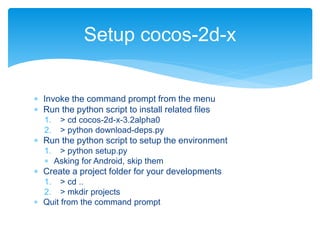
 Invoke the command prompt from the menu
 Run the python script to install related files
1. > cd cocos-2d-x-3.2alpha0
2. > python download-deps.py
 Run the python script to setup the environment
1. > python setup.py
 Asking for Android, skip them
 Create a project folder for your developments
1. > cd ..
2. > mkdir projects
 Quit from the command prompt
Setup cocos-2d-x
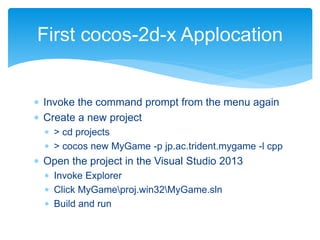
 Invoke the command prompt from the menu again
 Create a new project
 > cd projects
 > cocos new MyGame -p jp.ac.trident.mygame -l cpp
 Open the project in the Visual Studio 2013
 Invoke Explorer
 Click MyGameproj.win32MyGame.sln
 Build and run
First cocos-2d-x Applocation
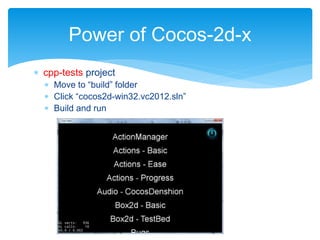
 cpp-tests project
 Move to “build” folder
 Click “cocos2d-win32.vc2012.sln”
 Build and run
Power of Cocos-2d-x
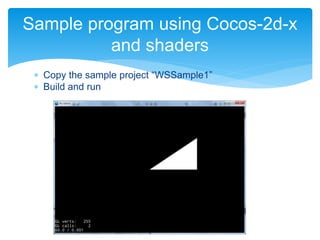
 Copy the sample project “WSSample1”
 Build and run
Sample program using Cocos-2d-x
and shaders
Using a shader in cocos-2d-x
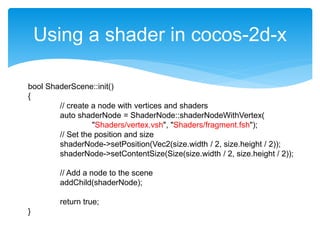
bool ShaderScene::init()
{
// create a node with vertices and shaders
auto shaderNode = ShaderNode::shaderNodeWithVertex(
"Shaders/vertex.vsh", "Shaders/fragment.fsh");
// Set the position and size
shaderNode->setPosition(Vec2(size.width / 2, size.height / 2));
shaderNode->setContentSize(Size(size.width / 2, size.height / 2));
// Add a node to the scene
addChild(shaderNode);
return true;
}
Using a shader in cocos-2d-x
void ShaderNode::onDraw(const Mat4 &transform, uint32_t flags)
{
GLfloat vertices[6] = {
0, 0, 0.5f, 0, 0.5f, 0.5f
};
auto glProgramState = getGLProgramState();
// Pass the position parameter to the vertex shader’s attribute variable
glProgramState->setVertexAttribPointer(
"a_position", 2, GL_FLOAT, GL_FALSE, 0, vertices);
glProgramState->apply(transform);
// Draw a triangle
glDrawArrays(GL_TRIANGLES, 0, 3);
CC_INCREMENT_GL_DRAWN_BATCHES_AND_VERTICES(1, 3);
}
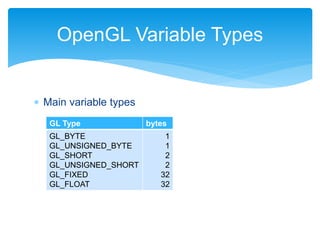
 Main variable types
OpenGL Variable Types
GL Type bytes
GL_BYTE
GL_UNSIGNED_BYTE
GL_SHORT
GL_UNSIGNED_SHORT
GL_FIXED
GL_FLOAT
1
1
2
2
32
32
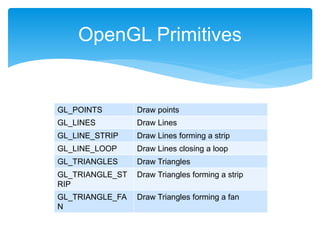
OpenGL Primitives
GL_POINTS Draw points
GL_LINES Draw Lines
GL_LINE_STRIP Draw Lines forming a strip
GL_LINE_LOOP Draw Lines closing a loop
GL_TRIANGLES Draw Triangles
GL_TRIANGLE_ST
RIP
Draw Triangles forming a strip
GL_TRIANGLE_FA
N
Draw Triangles forming a fan
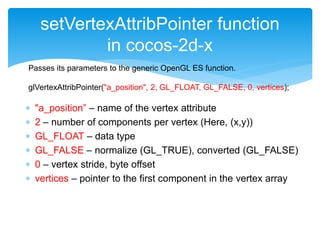
 "a_position” – name of the vertex attribute
 2 – number of components per vertex (Here, (x,y))
 GL_FLOAT – data type
 GL_FALSE – normalize (GL_TRUE), converted (GL_FALSE)
 0 – vertex stride, byte offset
 vertices – pointer to the first component in the vertex array
setVertexAttribPointer function
in cocos-2d-x
Passes its parameters to the generic OpenGL ES function.
glVertexAttribPointer("a_position", 2, GL_FLOAT, GL_FALSE, 0, vertices);
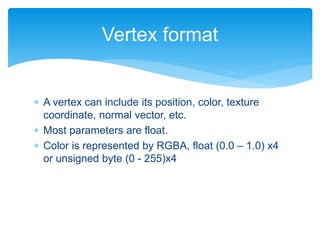
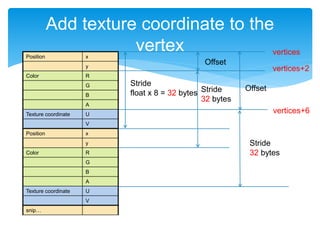
 A vertex can include its position, color, texture
coordinate, normal vector, etc.
 Most parameters are float.
 Color is represented by RGBA, float (0.0 – 1.0) x4
or unsigned byte (0 - 255)x4
Vertex format
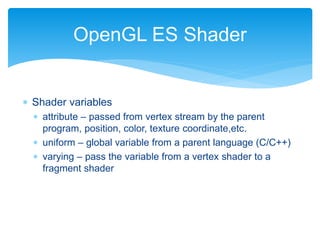
 Shader variables
 attribute – passed from vertex stream by the parent
program, position, color, texture coordinate,etc.
 uniform – global variable from a parent language (C/C++)
 varying – pass the variable from a vertex shader to a
fragment shader
OpenGL ES Shader
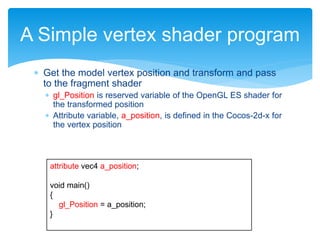
 Get the model vertex position and transform and pass
to the fragment shader
 gl_Position is reserved variable of the OpenGL ES shader for
the transformed position
 Attribute variable, a_position, is defined in the Cocos-2d-x for
the vertex position
A Simple vertex shader program
attribute vec4 a_position;
void main()
{
gl_Position = a_position;
}
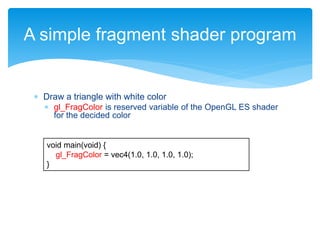
 Draw a triangle with white color
 gl_FragColor is reserved variable of the OpenGL ES shader
for the decided color
A simple fragment shader program
void main(void) {
gl_FragColor = vec4(1.0, 1.0, 1.0, 1.0);
}
 To draw a rectangle, draw 2 triangles
Draw a rectangle
GLfloat vertices[12] = {
// x y
0.0f, 0.0f, // First triangle
0.5f, 0.0f,
0.5f, 0.5f,
0.5f, 0.5f, // Second triangle
0.0f, 0.5f,
0.0f, 0.0f
};
// snip
glDrawArrays(GL_TRIANGLES, 0, 6);
Y
X
0.5
0.50
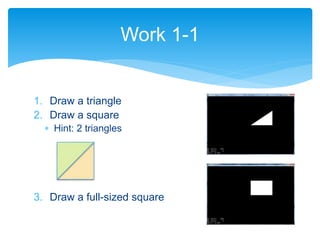
1. Draw a triangle
2. Draw a square
 Hint: 2 triangles
3. Draw a full-sized square
Work 1-1
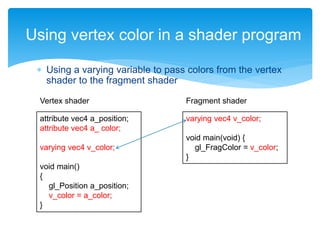
 Using a varying variable to pass colors from the vertex
shader to the fragment shader
Using vertex color in a shader program
attribute vec4 a_position;
attribute vec4 a_ color;
varying vec4 v_color;
void main()
{
gl_Position a_position;
v_color = a_color;
}
varying vec4 v_color;
void main(void) {
gl_FragColor = v_color;
}
Vertex shader Fragment shader
Add color to a vertex
Position x
y
Color R
G
B
A
Position x
y
Color R
G
B
Position x
y
Color R
G
B
A
GLfloat vertices[18] = {
// x y R G B A
0.0f, 0.0f, 1.0f, 0.0f, 0.0f, 1.0f,
0.5f, 0.0f, 0.0f, 1.0f, 0.0f, 1.0f,
0.5f, 0.5f, 0.0f, 0.0f, 1.0f, 1.0f
};
glProgramState->setVertexAttribPointer("a_position”,
2, GL_FLOAT, GL_FALSE, 24, vertices);
glProgramState->setVertexAttribPointer("a_color",
4, GL_FLOAT, GL_FALSE, 24, vertices + 2);
Stride
float x 6 = 24 bytes
Stride
float x 6 = 24 bytes
Offset
float x 2 = 8 bytes
vertices
vertices + 2
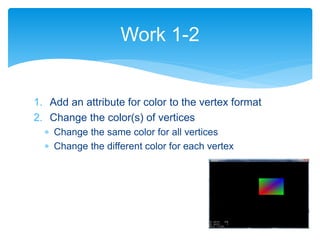
1. Add an attribute for color to the vertex format
2. Change the color(s) of vertices
 Change the same color for all vertices
 Change the different color for each vertex
Work 1-2
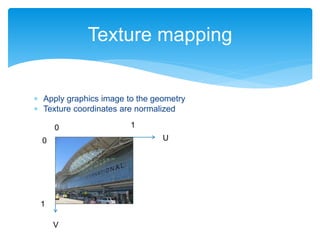
 Apply graphics image to the geometry
 Texture coordinates are normalized
Texture mapping
U
V
0
0
1
1
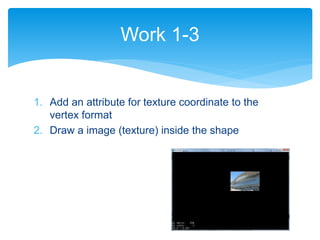
1. Add an attribute for texture coordinate to the
vertex format
2. Draw a image (texture) inside the shape
Work 1-3
Add texture coordinate to the
vertexPosition x
y
Color R
G
B
A
Texture coordinate U
V
Position x
y
Color R
G
B
A
Texture coordinate U
V
snip…
Stride
float x 8 = 32 bytes Stride
32 bytes
Offset
vertices
Stride
32 bytes
Offset
vertices+2
vertices+6
Cont’d
bool NewShaderNode::initWithVertex(const std::string &vert, const std::string &frag,
Texture2D* texture)
{
// snip…
getGLProgramState()->setUniformTexture("u_texture0", texture);
// snip…
}
// snip…
void NewShaderNode::onDraw(const Mat4 &transform, uint32_t flags)
{
GLfloat vertices[48] = {
// x y R G B A U V
0.0f, 0.0f, 1.0f, 0.0f, 0.0f, 1.0f, 0.0f, 1.0f,
0.5f, 0.0f, 0.0f, 1.0f, 0.0f, 1.0f, 1.0f, 1.0f,
0.5f, 0.5f, 0.0f, 0.0f, 1.0f, 1.0f, 1.0f, 0.0f,
0.0f, 0.5f, 0.0f, 1.0f, 0.0f, 1.0f, 1.0f, 1.0f,
0.0f, 0.0f, 1.0f, 0.0f, 0.0f, 1.0f, 0.0f, 1.0f
};
// snip…
glProgramState->setVertexAttribPointer("a_position”, 2, GL_FLOAT, GL_FALSE, 32, vertices);
glProgramState->setVertexAttribPointer("a_color”, 4, GL_FLOAT, GL_FALSE, 32, vertices + 2);
glProgramState->setVertexAttribPointer("a_texCoord”, 2, GL_FLOAT, GL_FALSE, 32, vertices + 6);
glDrawArrays(GL_TRIANGLES, 0, 6);
}
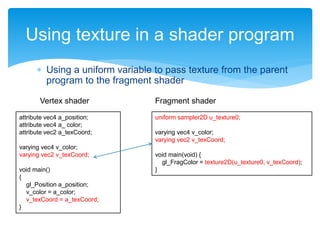
 Using a uniform variable to pass texture from the parent
program to the fragment shader
Using texture in a shader program
attribute vec4 a_position;
attribute vec4 a_ color;
attribute vec2 a_texCoord;
varying vec4 v_color;
varying vec2 v_texCoord;
void main()
{
gl_Position a_position;
v_color = a_color;
v_texCoord = a_texCoord;
}
uniform sampler2D u_texture0;
varying vec4 v_color;
varying vec2 v_texCoord;
void main(void) {
gl_FragColor = texture2D(u_texture0, v_texCoord);
}
Vertex shader Fragment shader

Trident International Graphics Workshop 2014 1/5

  • 1.
    International 5-days Graphics ProgrammingWorkshop using Cocos-2d-x DAY 1 Trident College of Information Technology Takao WADA
  • 2.
    1. About me 2.OpenGL Overview 3. Introduction of Cocos-2d-x 4. Installation and setup the development environment 5. Run a sample programs of Cocos-2d-x 6. Create a simple shader program 7. Work Agenda
  • 3.
     Takao Wada E-mail:jiroshino@gmail.com FB: https://www.facebook.com/takao.wada.50 URL: http://www.drjiro.com/  Lecturer of Trident College of Information Technology  Teach game programming at TRIDENT about 20 years.  3DProgramming and Smartphone games based on many languages, C, C++, Java, etc.  IGDA Nagoya-Chapter Chair About me
  • 4.
     OpenGL isa famous graphics API for Desktop.  Runs on many platform, Windows, MacOS, Linux, Web, etc.  OpenGL ES is a subset of OpenGL for embedded platform, iOS, Android, game consoles, etc.  Versions  1.0 – Fixed function, OpenGL 1.3  1.1 - OpenGL 1.5  2.0 - Shader based, OpenGL 2.0  3.0 - OpenGL 4.3  3.1 – Latest version OpenGL ES Overview
  • 5.
  • 6.
     Vertices canbe transformed by programmable shaders  Vertex shader  Vertex transformation (Model,View,Projection, etc.)  Vertex lighting  Fragment shader  Texture mapping  Pixel based lighting Shader
  • 7.
  • 8.
     Multi-platform frameworkfor building 2D games  Main site http://www.cocos2d-x.org  Based on cocos2d-iphone (Objective-C base)  Uses C++  Works on iOS, Android, Windows Phone, OS X, Windows and Linux. Cocos-2d-x
  • 9.
     Install cocos-2d-x 1.Download zip file from http://www.cocos2d-x.org/ 2. Current version is 3.2Alpha0 (cocos2d-x-3.2alpha0.zip). 3. Extract the file downloaded file. 4. Move the extracted folder to your Document folder  Install Python 1. Download python-2.7.7.msi (Latest for version 2 series) from https://www.python.org/ 2. Click and run setup. By default, it is installed in C:Python27 3. Set the path environment variable for Windows using the control panel Installation of Cocos-2d-x
  • 10.
     Invoke thecommand prompt from the menu  Run the python script to install related files 1. > cd cocos-2d-x-3.2alpha0 2. > python download-deps.py  Run the python script to setup the environment 1. > python setup.py  Asking for Android, skip them  Create a project folder for your developments 1. > cd .. 2. > mkdir projects  Quit from the command prompt Setup cocos-2d-x
  • 11.
     Invoke thecommand prompt from the menu again  Create a new project  > cd projects  > cocos new MyGame -p jp.ac.trident.mygame -l cpp  Open the project in the Visual Studio 2013  Invoke Explorer  Click MyGameproj.win32MyGame.sln  Build and run First cocos-2d-x Applocation
  • 12.
     cpp-tests project Move to “build” folder  Click “cocos2d-win32.vc2012.sln”  Build and run Power of Cocos-2d-x
  • 13.
     Copy thesample project “WSSample1”  Build and run Sample program using Cocos-2d-x and shaders
  • 14.
    Using a shaderin cocos-2d-x bool ShaderScene::init() { // create a node with vertices and shaders auto shaderNode = ShaderNode::shaderNodeWithVertex( "Shaders/vertex.vsh", "Shaders/fragment.fsh"); // Set the position and size shaderNode->setPosition(Vec2(size.width / 2, size.height / 2)); shaderNode->setContentSize(Size(size.width / 2, size.height / 2)); // Add a node to the scene addChild(shaderNode); return true; }
  • 15.
    Using a shaderin cocos-2d-x void ShaderNode::onDraw(const Mat4 &transform, uint32_t flags) { GLfloat vertices[6] = { 0, 0, 0.5f, 0, 0.5f, 0.5f }; auto glProgramState = getGLProgramState(); // Pass the position parameter to the vertex shader’s attribute variable glProgramState->setVertexAttribPointer( "a_position", 2, GL_FLOAT, GL_FALSE, 0, vertices); glProgramState->apply(transform); // Draw a triangle glDrawArrays(GL_TRIANGLES, 0, 3); CC_INCREMENT_GL_DRAWN_BATCHES_AND_VERTICES(1, 3); }
  • 16.
     Main variabletypes OpenGL Variable Types GL Type bytes GL_BYTE GL_UNSIGNED_BYTE GL_SHORT GL_UNSIGNED_SHORT GL_FIXED GL_FLOAT 1 1 2 2 32 32
  • 17.
    OpenGL Primitives GL_POINTS Drawpoints GL_LINES Draw Lines GL_LINE_STRIP Draw Lines forming a strip GL_LINE_LOOP Draw Lines closing a loop GL_TRIANGLES Draw Triangles GL_TRIANGLE_ST RIP Draw Triangles forming a strip GL_TRIANGLE_FA N Draw Triangles forming a fan
  • 18.
     "a_position” –name of the vertex attribute  2 – number of components per vertex (Here, (x,y))  GL_FLOAT – data type  GL_FALSE – normalize (GL_TRUE), converted (GL_FALSE)  0 – vertex stride, byte offset  vertices – pointer to the first component in the vertex array setVertexAttribPointer function in cocos-2d-x Passes its parameters to the generic OpenGL ES function. glVertexAttribPointer("a_position", 2, GL_FLOAT, GL_FALSE, 0, vertices);
  • 19.
     A vertexcan include its position, color, texture coordinate, normal vector, etc.  Most parameters are float.  Color is represented by RGBA, float (0.0 – 1.0) x4 or unsigned byte (0 - 255)x4 Vertex format
  • 20.
     Shader variables attribute – passed from vertex stream by the parent program, position, color, texture coordinate,etc.  uniform – global variable from a parent language (C/C++)  varying – pass the variable from a vertex shader to a fragment shader OpenGL ES Shader
  • 21.
     Get themodel vertex position and transform and pass to the fragment shader  gl_Position is reserved variable of the OpenGL ES shader for the transformed position  Attribute variable, a_position, is defined in the Cocos-2d-x for the vertex position A Simple vertex shader program attribute vec4 a_position; void main() { gl_Position = a_position; }
  • 22.
     Draw atriangle with white color  gl_FragColor is reserved variable of the OpenGL ES shader for the decided color A simple fragment shader program void main(void) { gl_FragColor = vec4(1.0, 1.0, 1.0, 1.0); }
  • 23.
     To drawa rectangle, draw 2 triangles Draw a rectangle GLfloat vertices[12] = { // x y 0.0f, 0.0f, // First triangle 0.5f, 0.0f, 0.5f, 0.5f, 0.5f, 0.5f, // Second triangle 0.0f, 0.5f, 0.0f, 0.0f }; // snip glDrawArrays(GL_TRIANGLES, 0, 6); Y X 0.5 0.50
  • 24.
    1. Draw atriangle 2. Draw a square  Hint: 2 triangles 3. Draw a full-sized square Work 1-1
  • 25.
     Using avarying variable to pass colors from the vertex shader to the fragment shader Using vertex color in a shader program attribute vec4 a_position; attribute vec4 a_ color; varying vec4 v_color; void main() { gl_Position a_position; v_color = a_color; } varying vec4 v_color; void main(void) { gl_FragColor = v_color; } Vertex shader Fragment shader
  • 26.
    Add color toa vertex Position x y Color R G B A Position x y Color R G B Position x y Color R G B A GLfloat vertices[18] = { // x y R G B A 0.0f, 0.0f, 1.0f, 0.0f, 0.0f, 1.0f, 0.5f, 0.0f, 0.0f, 1.0f, 0.0f, 1.0f, 0.5f, 0.5f, 0.0f, 0.0f, 1.0f, 1.0f }; glProgramState->setVertexAttribPointer("a_position”, 2, GL_FLOAT, GL_FALSE, 24, vertices); glProgramState->setVertexAttribPointer("a_color", 4, GL_FLOAT, GL_FALSE, 24, vertices + 2); Stride float x 6 = 24 bytes Stride float x 6 = 24 bytes Offset float x 2 = 8 bytes vertices vertices + 2
  • 27.
    1. Add anattribute for color to the vertex format 2. Change the color(s) of vertices  Change the same color for all vertices  Change the different color for each vertex Work 1-2
  • 28.
     Apply graphicsimage to the geometry  Texture coordinates are normalized Texture mapping U V 0 0 1 1
  • 29.
    1. Add anattribute for texture coordinate to the vertex format 2. Draw a image (texture) inside the shape Work 1-3
  • 30.
    Add texture coordinateto the vertexPosition x y Color R G B A Texture coordinate U V Position x y Color R G B A Texture coordinate U V snip… Stride float x 8 = 32 bytes Stride 32 bytes Offset vertices Stride 32 bytes Offset vertices+2 vertices+6
  • 31.
    Cont’d bool NewShaderNode::initWithVertex(const std::string&vert, const std::string &frag, Texture2D* texture) { // snip… getGLProgramState()->setUniformTexture("u_texture0", texture); // snip… } // snip… void NewShaderNode::onDraw(const Mat4 &transform, uint32_t flags) { GLfloat vertices[48] = { // x y R G B A U V 0.0f, 0.0f, 1.0f, 0.0f, 0.0f, 1.0f, 0.0f, 1.0f, 0.5f, 0.0f, 0.0f, 1.0f, 0.0f, 1.0f, 1.0f, 1.0f, 0.5f, 0.5f, 0.0f, 0.0f, 1.0f, 1.0f, 1.0f, 0.0f, 0.5f, 0.5f, 0.0f, 0.0f, 1.0f, 1.0f, 1.0f, 0.0f, 0.0f, 0.5f, 0.0f, 1.0f, 0.0f, 1.0f, 1.0f, 1.0f, 0.0f, 0.0f, 1.0f, 0.0f, 0.0f, 1.0f, 0.0f, 1.0f }; // snip… glProgramState->setVertexAttribPointer("a_position”, 2, GL_FLOAT, GL_FALSE, 32, vertices); glProgramState->setVertexAttribPointer("a_color”, 4, GL_FLOAT, GL_FALSE, 32, vertices + 2); glProgramState->setVertexAttribPointer("a_texCoord”, 2, GL_FLOAT, GL_FALSE, 32, vertices + 6); glDrawArrays(GL_TRIANGLES, 0, 6); }
  • 32.
     Using auniform variable to pass texture from the parent program to the fragment shader Using texture in a shader program attribute vec4 a_position; attribute vec4 a_ color; attribute vec2 a_texCoord; varying vec4 v_color; varying vec2 v_texCoord; void main() { gl_Position a_position; v_color = a_color; v_texCoord = a_texCoord; } uniform sampler2D u_texture0; varying vec4 v_color; varying vec2 v_texCoord; void main(void) { gl_FragColor = texture2D(u_texture0, v_texCoord); } Vertex shader Fragment shader