CHAPTER 3
Google Hacking
Using internet search engine as a
tool to find information related to
creativity & innovation
1
INTRODUCTION
• Google Hacking refers to the technique of using Google
Search to find security holes in the configuration and
code that websites use.
• Searches can reveal sensitive information, such as
username/passwords, internal documents, etc. The
techniques are commonly used during penetration testing.
• Google Hacking is based on using structured searches with
advanced operators to quickly and accurately obtain
results.
2
WE will cover…..
3
 Google Introduction & Features
 Google Search Technique
 Google Basic Operators
 Google Advanced Operators
• Google Search Technique
– Just put the word and run the search
• You need to audit your Internet presence
– One database, Google almost has it all!
• One of the most powerful databases in the world
• Consolidate a lot of info
• Usage:
– Student …
– Business …
– Al’Qaeda …
• One stop shop for attack, maps, addresses, photos,
technical information
4
Google Hacking
5
• Google Operators:
– Operators are used to refine the results and to
maximize the search value. They are your
tools as well as hackers’ weapons
• Basic Operators:
+, -, ~ , ., *, “”, |, OR
• Advanced Operators:
– allintext:, allintitle:, allinurl:, bphonebook:,
cache:, define:, filetype:, info:, intext:, intitle:,
inurl:, link:, phonebook:, related:,
rphonebook:, site:, numrange:, daterange
8
Google Hacking
• Basic Operators
– (+) force inclusion of something common
– Google ignores common words (where, how,
digit, single letters) by default:
Example: StarStar Wars Episode
– (-) exclude a search term
Example: apple –red
– (“) use quotes around a search term to search
exact phrases:
Example: “Robert Masse”
– Robert masse without “” has the 309,000
results, but “robert masse” only has 927
results. Reduce the 99% irrelevant results
9
Google Hacking
• Basic Operators
– (~) search synonym:
Example: ~food
– Return the results about food as well as recipe, nutrition
and cooking information
– ( . ) a single-character wildcard:
Example: m.trix
– Return the results of M@trix, matrix, metrix…….
– ( * ) any word wildcard
10
Google Hacking
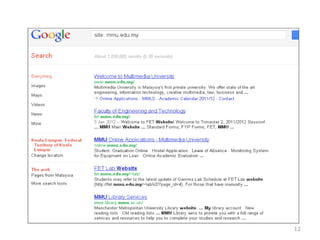
• Advanced Operators: “Site:”
– Site: Domain_name
– Find Web pages only on the specified domain. If we
search a specific site, usually we get the Web structure
of the domain
– Examples:
site:ca
site:gosecure.ca
site:www.gosecure.ca
11
Google Hacking
12
Further refining the search:
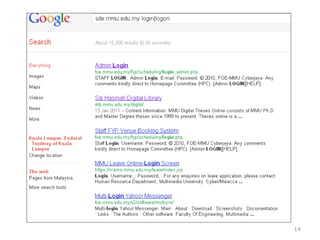
• After site:pacific.edu, type in login | logon and run the
search.
• login | logon finds login pages associated with any
particular website – the significance of this is that login
pages are the “front door” and often reveal the nature of
the operating system, software, and even offer clues for
gaining access to the site.
13
14
• Several variations of basic Google searches
like the login | logon are:.
– username | userid | employee.ID | “your username is”
– admin | administrator
– password | “your password is”
– error | warning
15
• Advanced Operators: “Filetype:”
– Filetype: extension_type
– Find documents with specified extensions
– The supported extensions are:
- HyperText Markup Language (html) - Microsoft PowerPoint (ppt)
- Adobe Portable Document Format (pdf) - Microsoft Word (doc)
- Adobe PostScript (ps) - Microsoft Works (wks, wps, wdb)
- Lotus 1-2-3 - Microsoft Excel (xls)
(wk1, wk2, wk3, wk4, wk5, wki, wks, wku) - Microsoft Write (wri)
- Lotus WordPro (lwp) - Rich Text Format (rtf)
- MacWrite (mw) - Shockwave Flash (swf)
- Text (ans, txt)
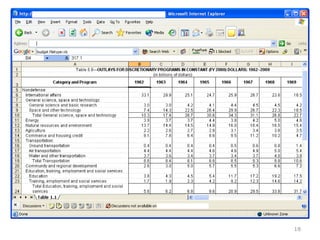
– Example: Budget filetype: xls
16
Google Hacking
• Advanced Operators
– A budget file we found …….
17
Google Hacking
18
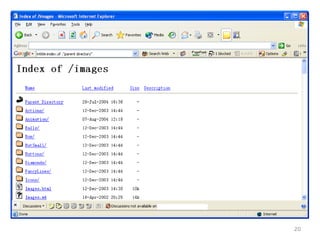
• Advanced Operators “Intitle:”
– Intitle: search_term
– Find search term within the title of a Webpage
– Allintitle: search_term1 search_term2 search_term3
– Find multiple search terms in the Web pages with the
title that includes all these words
– These operators are specifically useful to find the
directory lists
– Example:
Find directory list:
Intitle: Index.of “parent directory”
19
Google Hacking
20
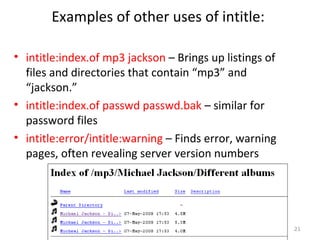
Examples of other uses of intitle:
• intitle:index.of mp3 jackson – Brings up listings of
files and directories that contain “mp3” and
“jackson.”
• intitle:index.of passwd passwd.bak – similar for
password files
• intitle:error/intitle:warning – Finds error, warning
pages, often revealing server version numbers
21
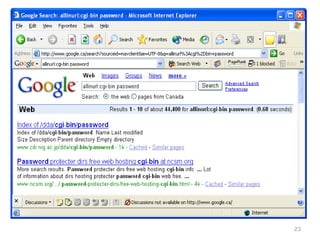
• Advanced Operators “Inurl:”
– Inurl: search_term
– Find search term in a Web address
– Allinurl: search_term1 search_term2 search_term3
– Find multiple search terms in a Web address
– Examples:
Inurl: cgi-bin
Allinurl: cgi-bin password
22
Google Hacking
23
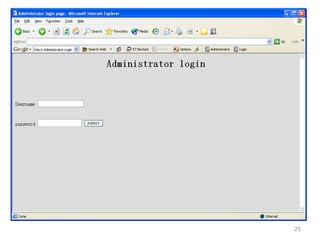
• Advanced Operators “Intext;”
– Intext: search_term
– Find search term in the text body of a
document.
– Allintext: search_term1 search_term2
search_term3
– Find multiple search terms in the text body
of a document.
– Examples:
Intext: Administrator login
Allintext: Administrator login
24
Google Hacking
25
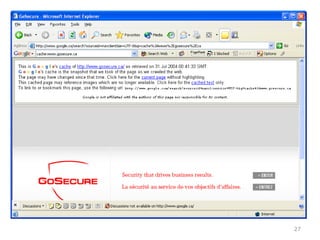
• Advanced Operators: “Cache:”
– Cache: URL
– Find the old version of Website in Google
cache
– Sometimes, even the site has already been
updated, the old information might be found
in cache
– Examples:
Cache: www.gosecure.com
26
Google Hacking
27
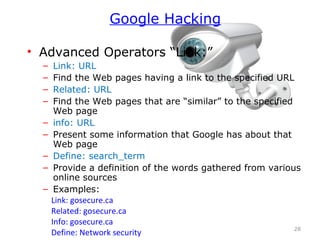
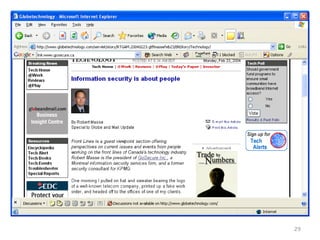
• Advanced Operators “Link:”
– Link: URL
– Find the Web pages having a link to the specified URL
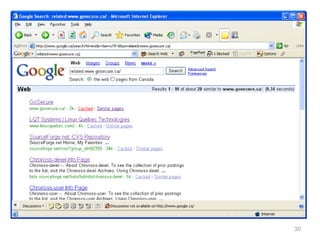
– Related: URL
– Find the Web pages that are “similar” to the specified
Web page
– info: URL
– Present some information that Google has about that
Web page
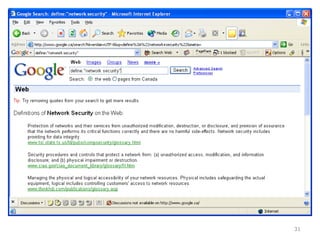
– Define: search_term
– Provide a definition of the words gathered from various
online sources
– Examples:
Link: gosecure.ca
Related: gosecure.ca
Info: gosecure.ca
Define: Network security 28
Google Hacking
29
30
31
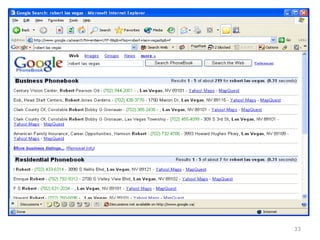
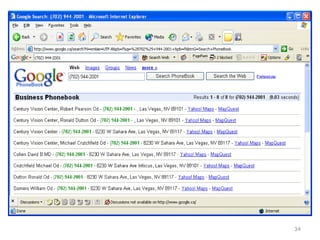
• Advanced Operators “phonebook:”
– Phonebook
– Search the entire Google phonebook
– rphonebook
– Search residential listings only
– bphonebook
– Search business listings only
– Examples:
Phonebook: robert las vegas (robert in Las Vegas)
Phonebook: (702) 944-2001 (reverse search, not always work)
The phonebook is quite limited to U.S.A
32
Google Hacking
33
34
• Google, Friend or Enemy?
– Google is everyone’s best friend (yours or
hackers)
– Information gathering and vulnerability
identification are the tasks in the first
phase of a typical hacking scenario
– Passitive, stealth and huge data collection
– Google can do more than search
– Have you used Google to audit your
organization today?
35
Google Hacking
Class Tutorial
• Create a specific search for something, adding search
operators to narrow the results. Show the search you used
to get the most specific results.
_______________________________________
• Google for yourself. Can you find any images of yourself?
Any pages that list your address, phone, etc.? Any that you
were not aware of?
_______________________________________________
• There are at least two ways to keep Google from indexing
content. What are they?
• What was the most interesting search you tried, and why?
36

3 google hacking

  • 1.
    CHAPTER 3 Google Hacking Usinginternet search engine as a tool to find information related to creativity & innovation 1
  • 2.
    INTRODUCTION • Google Hackingrefers to the technique of using Google Search to find security holes in the configuration and code that websites use. • Searches can reveal sensitive information, such as username/passwords, internal documents, etc. The techniques are commonly used during penetration testing. • Google Hacking is based on using structured searches with advanced operators to quickly and accurately obtain results. 2
  • 3.
    WE will cover….. 3 Google Introduction & Features  Google Search Technique  Google Basic Operators  Google Advanced Operators
  • 4.
    • Google SearchTechnique – Just put the word and run the search • You need to audit your Internet presence – One database, Google almost has it all! • One of the most powerful databases in the world • Consolidate a lot of info • Usage: – Student … – Business … – Al’Qaeda … • One stop shop for attack, maps, addresses, photos, technical information 4 Google Hacking
  • 5.
  • 6.
    • Google Operators: –Operators are used to refine the results and to maximize the search value. They are your tools as well as hackers’ weapons • Basic Operators: +, -, ~ , ., *, “”, |, OR • Advanced Operators: – allintext:, allintitle:, allinurl:, bphonebook:, cache:, define:, filetype:, info:, intext:, intitle:, inurl:, link:, phonebook:, related:, rphonebook:, site:, numrange:, daterange 8 Google Hacking
  • 7.
    • Basic Operators –(+) force inclusion of something common – Google ignores common words (where, how, digit, single letters) by default: Example: StarStar Wars Episode – (-) exclude a search term Example: apple –red – (“) use quotes around a search term to search exact phrases: Example: “Robert Masse” – Robert masse without “” has the 309,000 results, but “robert masse” only has 927 results. Reduce the 99% irrelevant results 9 Google Hacking
  • 8.
    • Basic Operators –(~) search synonym: Example: ~food – Return the results about food as well as recipe, nutrition and cooking information – ( . ) a single-character wildcard: Example: m.trix – Return the results of M@trix, matrix, metrix……. – ( * ) any word wildcard 10 Google Hacking
  • 9.
    • Advanced Operators:“Site:” – Site: Domain_name – Find Web pages only on the specified domain. If we search a specific site, usually we get the Web structure of the domain – Examples: site:ca site:gosecure.ca site:www.gosecure.ca 11 Google Hacking
  • 10.
  • 11.
    Further refining thesearch: • After site:pacific.edu, type in login | logon and run the search. • login | logon finds login pages associated with any particular website – the significance of this is that login pages are the “front door” and often reveal the nature of the operating system, software, and even offer clues for gaining access to the site. 13
  • 12.
  • 13.
    • Several variationsof basic Google searches like the login | logon are:. – username | userid | employee.ID | “your username is” – admin | administrator – password | “your password is” – error | warning 15
  • 14.
    • Advanced Operators:“Filetype:” – Filetype: extension_type – Find documents with specified extensions – The supported extensions are: - HyperText Markup Language (html) - Microsoft PowerPoint (ppt) - Adobe Portable Document Format (pdf) - Microsoft Word (doc) - Adobe PostScript (ps) - Microsoft Works (wks, wps, wdb) - Lotus 1-2-3 - Microsoft Excel (xls) (wk1, wk2, wk3, wk4, wk5, wki, wks, wku) - Microsoft Write (wri) - Lotus WordPro (lwp) - Rich Text Format (rtf) - MacWrite (mw) - Shockwave Flash (swf) - Text (ans, txt) – Example: Budget filetype: xls 16 Google Hacking
  • 15.
    • Advanced Operators –A budget file we found ……. 17 Google Hacking
  • 16.
  • 17.
    • Advanced Operators“Intitle:” – Intitle: search_term – Find search term within the title of a Webpage – Allintitle: search_term1 search_term2 search_term3 – Find multiple search terms in the Web pages with the title that includes all these words – These operators are specifically useful to find the directory lists – Example: Find directory list: Intitle: Index.of “parent directory” 19 Google Hacking
  • 18.
  • 19.
    Examples of otheruses of intitle: • intitle:index.of mp3 jackson – Brings up listings of files and directories that contain “mp3” and “jackson.” • intitle:index.of passwd passwd.bak – similar for password files • intitle:error/intitle:warning – Finds error, warning pages, often revealing server version numbers 21
  • 20.
    • Advanced Operators“Inurl:” – Inurl: search_term – Find search term in a Web address – Allinurl: search_term1 search_term2 search_term3 – Find multiple search terms in a Web address – Examples: Inurl: cgi-bin Allinurl: cgi-bin password 22 Google Hacking
  • 21.
  • 22.
    • Advanced Operators“Intext;” – Intext: search_term – Find search term in the text body of a document. – Allintext: search_term1 search_term2 search_term3 – Find multiple search terms in the text body of a document. – Examples: Intext: Administrator login Allintext: Administrator login 24 Google Hacking
  • 23.
  • 24.
    • Advanced Operators:“Cache:” – Cache: URL – Find the old version of Website in Google cache – Sometimes, even the site has already been updated, the old information might be found in cache – Examples: Cache: www.gosecure.com 26 Google Hacking
  • 25.
  • 26.
    • Advanced Operators“Link:” – Link: URL – Find the Web pages having a link to the specified URL – Related: URL – Find the Web pages that are “similar” to the specified Web page – info: URL – Present some information that Google has about that Web page – Define: search_term – Provide a definition of the words gathered from various online sources – Examples: Link: gosecure.ca Related: gosecure.ca Info: gosecure.ca Define: Network security 28 Google Hacking
  • 27.
  • 28.
  • 29.
  • 30.
    • Advanced Operators“phonebook:” – Phonebook – Search the entire Google phonebook – rphonebook – Search residential listings only – bphonebook – Search business listings only – Examples: Phonebook: robert las vegas (robert in Las Vegas) Phonebook: (702) 944-2001 (reverse search, not always work) The phonebook is quite limited to U.S.A 32 Google Hacking
  • 31.
  • 32.
  • 33.
    • Google, Friendor Enemy? – Google is everyone’s best friend (yours or hackers) – Information gathering and vulnerability identification are the tasks in the first phase of a typical hacking scenario – Passitive, stealth and huge data collection – Google can do more than search – Have you used Google to audit your organization today? 35 Google Hacking
  • 34.
    Class Tutorial • Createa specific search for something, adding search operators to narrow the results. Show the search you used to get the most specific results. _______________________________________ • Google for yourself. Can you find any images of yourself? Any pages that list your address, phone, etc.? Any that you were not aware of? _______________________________________________ • There are at least two ways to keep Google from indexing content. What are they? • What was the most interesting search you tried, and why? 36

Editor's Notes

  • #9 + for exact word match - to exclude word "" for exact phrase match