Central Composite Design
(Manual)
1Prepared By:
Ruchir Shah, FnD
Index
• Basics of CCD Slide 3 - 8
Basics
• Define Objective & Identify Variables Slide 9 - 11
Step 1 & 2
• Create Design Slide 12 - 21
Step 3
• Design Evaluation Slide 23 - 27
Step 4
• Experimentation Slide 28 - 31
Step 5
• Analysis & Interpretation Slide 32 - 39
Step 6
• Diagnostics Slide 40 - 48
Step 7
• Model graphs Slide 49 - 53
Step 8
• Knowledge Space Slide 54 - 57
Step 9
• Points to be captured in PDR Slide 32 - 39
Step 10
2
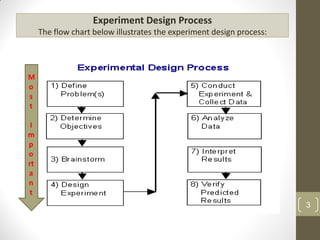
Experiment Design Process
The flow chart below illustrates the experiment design process:
M
o
s
t
I
m
p
o
rt
a
n
t
3
Components of Experimental Design
• There are three components of the Formula/process that are
analysed by a design of experiments:
• Factors – Independent Variable will form factors. Variables which can be
controlled by an experimenter.
• Levels – Range of each factor in the study or Grade of Excipients
• Response - or output of the experiment.
4
Response Surface Methodology
5
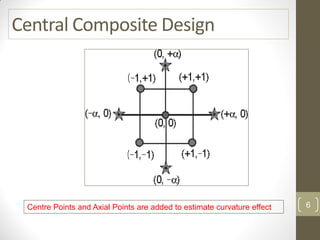
Central Composite Design
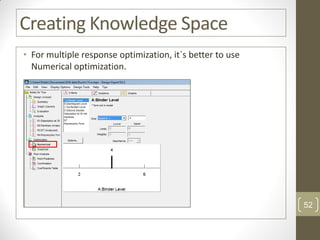
Centre Points and Axial Points are added to estimate curvature effect 6
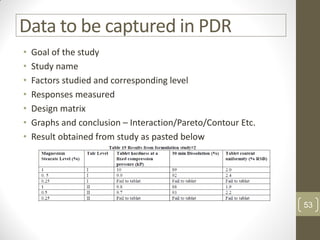
Types of CCD
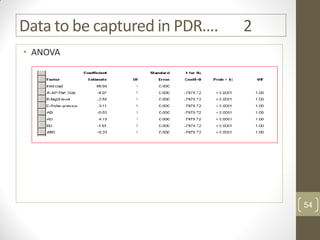
1. CCC – Circumscribed CCD
• Each factor studied at 5 level
• Axial points establishes new high
and low ranges
2. CCF – Face centered CCD
• Axial points are at center of each
side of factorial space
3. CCI – Inscribed CCD
• For those situations where limit
specified for each factor is real
limit. Beyond or below that level it
is not possible to perform an
experiment.
• Here also Each factor studied at
5 level
• It is a Scaled down of CCC
design
7
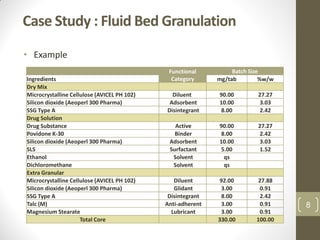
Case Study : Fluid Bed Granulation
• Example
Functional
Category
Batch Size
Ingredients mg/tab %w/w
Dry Mix
Microcrystalline Cellulose (AVICEL PH 102) Diluent 90.00 27.27
Silicon dioxide (Aeoperl 300 Pharma) Adsorbent 10.00 3.03
SSG Type A Disintegrant 8.00 2.42
Drug Solution
Drug Substance Active 90.00 27.27
Povidone K-30 Binder 8.00 2.42
Silicon dioxide (Aeoperl 300 Pharma) Adsorbent 10.00 3.03
SLS Surfactant 5.00 1.52
Ethanol Solvent qs
Dichloromethane Solvent qs
Extra Granular
Microcrystalline Cellulose (AVICEL PH 102) Diluent 92.00 27.88
Silicon dioxide (Aeoperl 300 Pharma) Glidant 3.00 0.91
SSG Type A Disintegrant 8.00 2.42
Talc (M) Anti-adherent 3.00 0.91
Magnesium Stearate Lubricant 3.00 0.91
Total Core 330.00 100.00
8
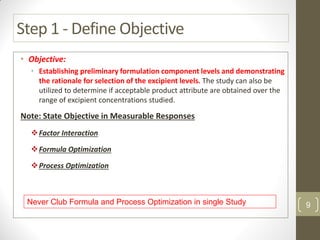
Step 1 - Define Objective
• Objective:
• Establishing preliminary formulation component levels and demonstrating
the rationale for selection of the excipient levels. The study can also be
utilized to determine if acceptable product attribute are obtained over the
range of excipient concentrations studied.
Note: State Objective in Measurable Responses
Factor Interaction
Formula Optimization
Process Optimization
Never Club Formula and Process Optimization in single Study 9
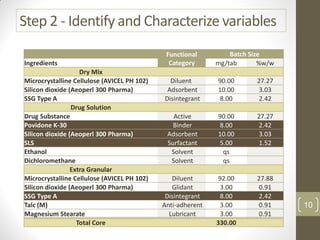
Step 2 - Identify and Characterize variables
Functional
Category
Batch Size
Ingredients mg/tab %w/w
Dry Mix
Microcrystalline Cellulose (AVICEL PH 102) Diluent 90.00 27.27
Silicon dioxide (Aeoperl 300 Pharma) Adsorbent 10.00 3.03
SSG Type A Disintegrant 8.00 2.42
Drug Solution
Drug Substance Active 90.00 27.27
Povidone K-30 Binder 8.00 2.42
Silicon dioxide (Aeoperl 300 Pharma) Adsorbent 10.00 3.03
SLS Surfactant 5.00 1.52
Ethanol Solvent qs
Dichloromethane Solvent qs
Extra Granular
Microcrystalline Cellulose (AVICEL PH 102) Diluent 92.00 27.88
Silicon dioxide (Aeoperl 300 Pharma) Glidant 3.00 0.91
SSG Type A Disintegrant 8.00 2.42
Talc (M) Anti-adherent 3.00 0.91
Magnesium Stearate Lubricant 3.00 0.91
Total Core 330.00
10
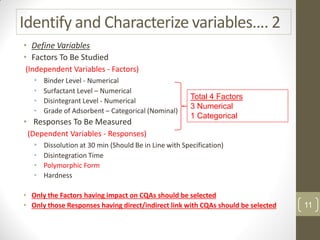
Identify and Characterize variables…. 2
• Define Variables
• Factors To Be Studied
(Independent Variables - Factors)
• Binder Level - Numerical
• Surfactant Level – Numerical
• Disintegrant Level - Numerical
• Grade of Adsorbent – Categorical (Nominal)
• Responses To Be Measured
(Dependent Variables - Responses)
• Dissolution at 30 min (Should Be in Line with Specification)
• Disintegration Time
• Polymorphic Form
• Hardness
• Only the Factors having impact on CQAs should be selected
• Only those Responses having direct/indirect link with CQAs should be selected
Total 4 Factors
3 Numerical
1 Categorical
11
Step 3: Create Design
12
Central Composite Design
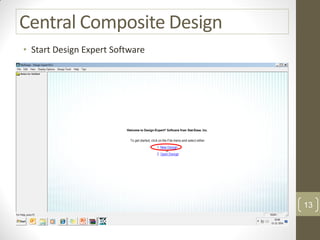
• Start Design Expert Software
13
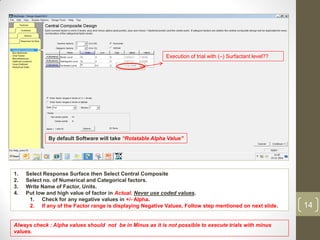
1. Select Response Surface then Select Central Composite
2. Select no. of Numerical and Categorical factors.
3. Write Name of Factor, Units.
4. Put low and high value of factor in Actual. Never use coded values.
1. Check for any negative values in +/- Alpha.
2. If any of the Factor range is displaying Negative Values, Follow step mentioned on next slide.
Always check : Alpha values should not be in Minus as it is not possible to execute trials with minus
values.
Execution of trial with (–) Surfactant level??
By default Software will take “Rotatable Alpha Value”
14
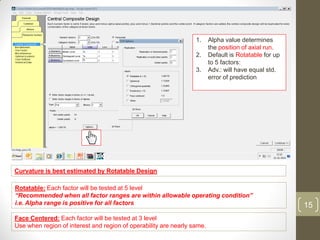
1. Alpha value determines
the position of axial run.
2. Default is Rotatable for up
to 5 factors:
3. Adv.: will have equal std.
error of prediction
Face Centered: Each factor will be tested at 3 level
Use when region of interest and region of operability are nearly same.
Curvature is best estimated by Rotatable Design
Rotatable: Each factor will be tested at 5 level
“Recommended when all factor ranges are within allowable operating condition”
i.e. Alpha range is positive for all factors 15
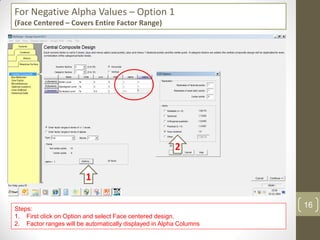
For Negative Alpha Values – Option 1
(Face Centered – Covers Entire Factor Range)
Steps:
1. First click on Option and select Face centered design.
2. Factor ranges will be automatically displayed in Alpha Columns
1
2
16
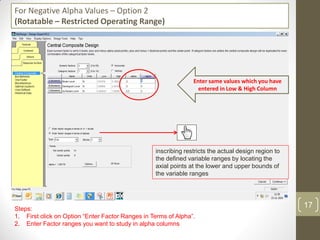
For Negative Alpha Values – Option 2
(Rotatable – Restricted Operating Range)
Steps:
1. First click on Option “Enter Factor Ranges in Terms of Alpha”.
2. Enter Factor ranges you want to study in alpha columns
Enter same values which you have
entered in Low & High Column
inscribing restricts the actual design region to
the defined variable ranges by locating the
axial points at the lower and upper bounds of
the variable ranges
17
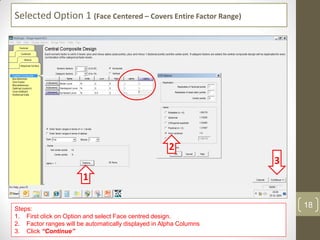
Selected Option 1 (Face Centered – Covers Entire Factor Range)
Steps:
1. First click on Option and select Face centred design.
2. Factor ranges will be automatically displayed in Alpha Columns
3. Click “Continue”
1
2
3
18
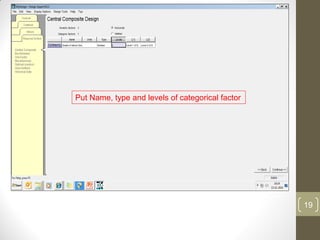
Put Name, type and levels of categorical factor
19
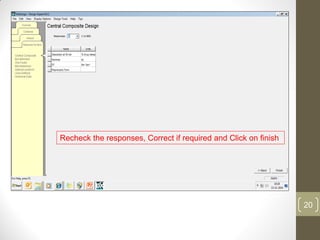
Recheck the responses, Correct if required and Click on finish
20
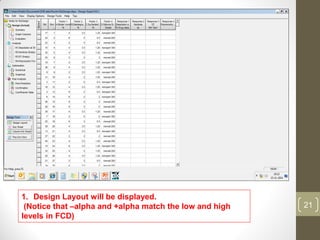
1. Design Layout will be displayed.
(Notice that –alpha and +alpha match the low and high
levels in FCD)
21
Step 4: Design Evaluation
(BeforeInitiatingExperimentation)
22
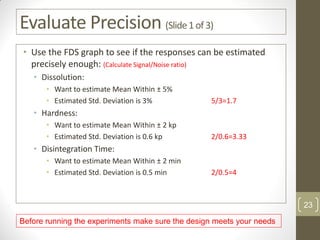
Evaluate Precision (Slide1of3)
• Use the FDS graph to see if the responses can be estimated
precisely enough: (Calculate Signal/Noise ratio)
• Dissolution:
• Want to estimate Mean Within ± 5%
• Estimated Std. Deviation is 3% 5/3=1.7
• Hardness:
• Want to estimate Mean Within ± 2 kp
• Estimated Std. Deviation is 0.6 kp 2/0.6=3.33
• Disintegration Time:
• Want to estimate Mean Within ± 2 min
• Estimated Std. Deviation is 0.5 min 2/0.5=4
Before running the experiments make sure the design meets your needs
23
Evaluate Precision (Slide2of3)
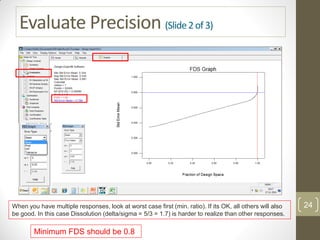
When you have multiple responses, look at worst case first (min. ratio). If its OK, all others will also
be good. In this case Dissolution (delta/sigma = 5/3 = 1.7) is harder to realize than other responses.
Minimum FDS should be 0.8
24
Evaluate Precision (Slide3of3)
• Use the Mean error type if the goal of the experiment is to
provide an optimization model.
• Use the Pred error type if the goal of the experiment is to
provide accurate predictions.
• Use the Diff error type as a substitute for power on
response surface and mixture designs.
• Use the Tolerance setting if you need to meet tolerance
specifications.
• FDS should be at least 0.8 or 80% for exploration, and 100%
for robustness testing. FDS can be improved by adding runs,
reducing the "s", increasing the "d", and increasing the "a".
25
Step 5: Perform Experiments and
Input Data
26
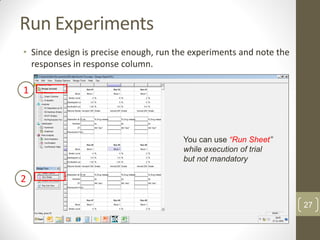
Run Experiments
• Since design is precise enough, run the experiments and note the
responses in response column.
1
2
You can use “Run Sheet”
while execution of trial
but not mandatory
27
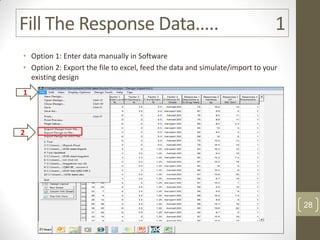
Fill The Response Data….. 1
• Option 1: Enter data manually in Software
• Option 2: Export the file to excel, feed the data and simulate/import to your
existing design
1
2
28
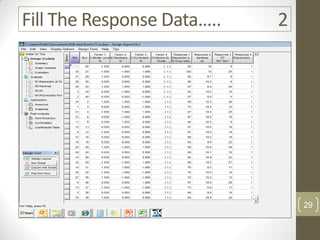
Fill The Response Data….. 2
29
Step 6: Analysis & Interpretation
30
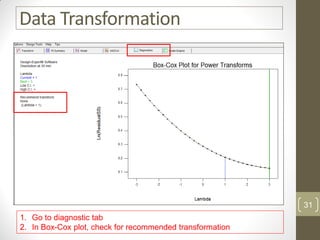
Data Transformation
1. Go to diagnostic tab
2. In Box-Cox plot, check for recommended transformation
31
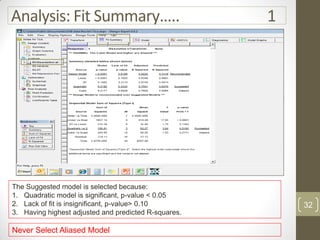
Analysis: Fit Summary….. 1
Do not select
aliased model
The Suggested model is selected because:
1. Quadratic model is significant, p-value < 0.05
2. Lack of fit is insignificant, p-value> 0.10
3. Having highest adjusted and predicted R-squares.
Never Select Aliased Model
32
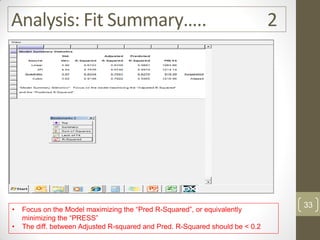
Analysis: Fit Summary….. 2
• Focus on the Model maximizing the “Pred R-Squared”, or equivalently
minimizing the “PRESS”
• The diff. between Adjusted R-squared and Pred. R-Squared should be < 0.2
33
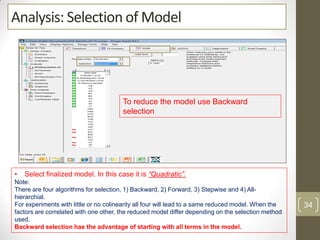
Analysis: Selection of Model
To reduce the model use Backward
selection
• Select finalized model. In this case it is “Quadratic”.
Note:
There are four algorithms for selection, 1) Backward, 2) Forward, 3) Stepwise and 4) All-
hierarchial.
For experiments with little or no colinearity all four will lead to a same reduced model. When the
factors are correlated with one other, the reduced model differ depending on the selection method
used.
Backward selection has the advantage of starting with all terms in the model.
34
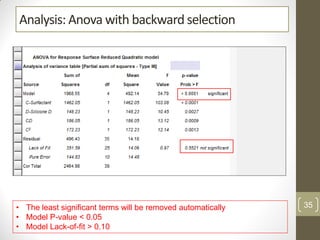
Analysis: Anova with backward selection
• The least significant terms will be removed automatically
• Model P-value < 0.05
• Model Lack-of-fit > 0.10
35
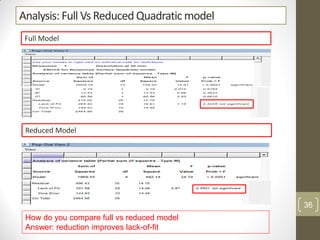
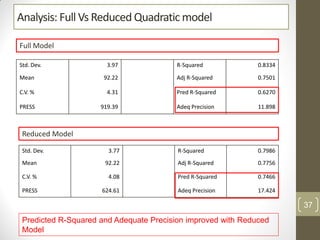
Analysis: Full Vs Reduced Quadratic model
Full Model
Reduced Model
How do you compare full vs reduced model
Answer: reduction improves lack-of-fit
36
Analysis: Full Vs Reduced Quadratic model
Std. Dev. 3.77 R-Squared 0.7986
Mean 92.22 Adj R-Squared 0.7756
C.V. % 4.08 Pred R-Squared 0.7466
PRESS 624.61 Adeq Precision 17.424
Std. Dev. 3.97 R-Squared 0.8334
Mean 92.22 Adj R-Squared 0.7501
C.V. % 4.31 Pred R-Squared 0.6270
PRESS 919.39 Adeq Precision 11.898
Full Model
Reduced Model
Predicted R-Squared and Adequate Precision improved with Reduced
Model
37
Step 7: Diagnostic
38
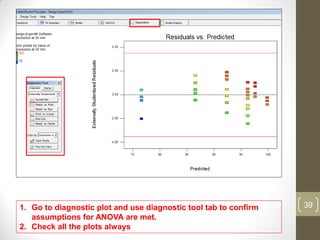
1. Go to diagnostic plot and use diagnostic tool tab to confirm
assumptions for ANOVA are met.
2. Check all the plots always
39
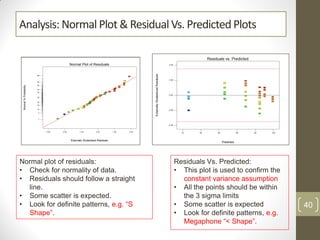
Analysis: Normal Plot & Residual Vs. PredictedPlots
Normal plot of residuals:
• Check for normality of data.
• Residuals should follow a straight
line.
• Some scatter is expected.
• Look for definite patterns, e.g. “S
Shape”.
Residuals Vs. Predicted:
• This plot is used to confirm the
constant variance assumption
• All the points should be within
the 3 sigma limits
• Some scatter is expected
• Look for definite patterns, e.g.
Megaphone “< Shape”.
40
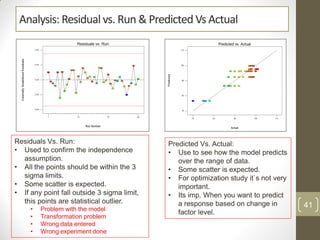
Analysis: Residual vs. Run & Predicted Vs Actual
Residuals Vs. Run:
• Used to confirm the independence
assumption.
• All the points should be within the 3
sigma limits.
• Some scatter is expected.
• If any point fall outside 3 sigma limit,
this points are statistical outlier.
• Problem with the model
• Transformation problem
• Wrong data entered
• Wrong experiment done
Predicted Vs. Actual:
• Use to see how the model predicts
over the range of data.
• Some scatter is expected.
• For optimization study it`s not very
important.
• Its imp. When you want to predict
a response based on change in
factor level.
41
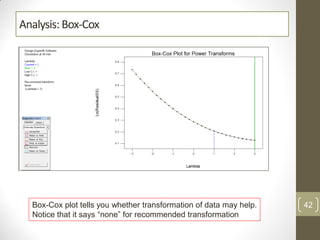
Analysis: Box-Cox
Box-Cox plot tells you whether transformation of data may help.
Notice that it says “none” for recommended transformation
42
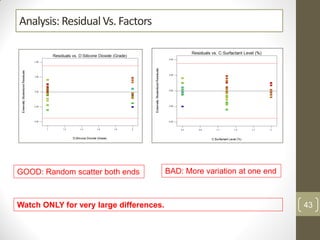
Analysis: Residual Vs. Factors
BAD: More variation at one endGOOD: Random scatter both ends
Watch ONLY for very large differences. 43
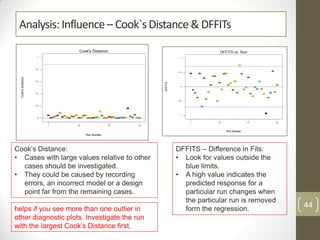
Analysis: Influence– Cook`sDistance & DFFITs
Cook’s Distance:
• Cases with large values relative to other
cases should be investigated.
• They could be caused by recording
errors, an incorrect model or a design
point far from the remaining cases.
DFFITS – Difference in Fits:
• Look for values outside the
blue limits.
• A high value indicates the
predicted response for a
particular run changes when
the particular run is removed
form the regression.helps if you see more than one outlier in
other diagnostic plots. Investigate the run
with the largest Cook’s Distance first.
44
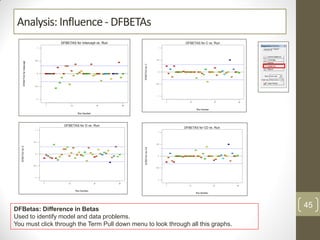
Analysis: Influence- DFBETAs
DFBetas: Difference in Betas
Used to identify model and data problems.
You must click through the Term Pull down menu to look through all this graphs.
45
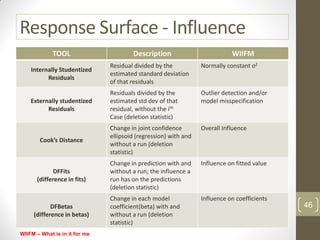
Response Surface - Influence
TOOL Description WIIFM
Internally Studentized
Residuals
Residual divided by the
estimated standard deviation
of that residuals
Normally constant σ2
Externally studentized
Residuals
Residuals divided by the
estimated std dev of that
residual, without the ith
Case (deletion statistic)
Outlier detection and/or
model misspecification
Cook’s Distance
Change in joint confidence
ellipsoid (regression) with and
without a run (deletion
statistic)
Overall Influence
DFFits
(difference in fits)
Change in prediction with and
without a run; the influence a
run has on the predictions
(deletion statistic)
Influence on fitted value
DFBetas
(difference in betas)
Change in each model
coefficient(beta) with and
without a run (deletion
statistic)
Influence on coefficients
46
WIIFM – What is in it for me
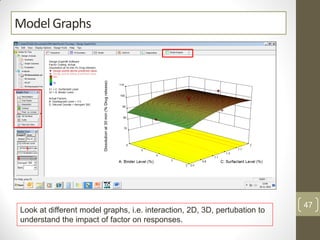
Model Graphs
Look at different model graphs, i.e. interaction, 2D, 3D, pertubation to
understand the impact of factor on responses.
47
Interaction Graph
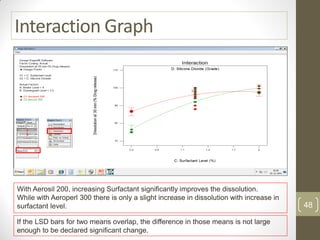
With Aerosil 200, increasing Surfactant significantly improves the dissolution.
While with Aeroperl 300 there is only a slight increase in dissolution with increase in
surfactant level.
If the LSD bars for two means overlap, the difference in those means is not large
enough to be declared significant change.
48
Interaction Graph
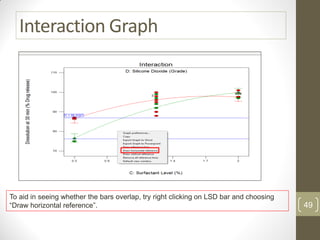
To aid in seeing whether the bars overlap, try right clicking on LSD bar and choosing
“Draw horizontal reference”. 49
Analysis of Each factor
• Analyze all the factors using similar method
50
Develop Good Model
• Be sure that the fitted surface adequately represents your
process before you use it for optimization
1. A significant model: Large F-value with p<0.05
2. Insignificant lack-of-fit: F-value with p>0.10
3. Adequate precision>4.
4. Well behaved residuals: Check diagnostic plots!
51
Creating Knowledge Space
• For multiple response optimization, it`s better to use
Numerical optimization.
52
Data to be captured in PDR
• Goal of the study
• Study name
• Factors studied and corresponding level
• Responses measured
• Design matrix
• Graphs and conclusion – Interaction/Pareto/Contour Etc.
• Result obtained from study as pasted below
53
Data to be captured in PDR…. 2
• ANOVA
54
Thank you !!!!!
55
Annexure
56
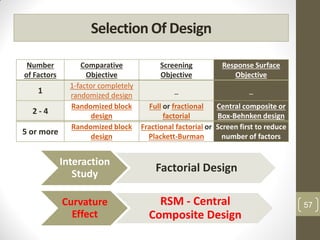
Selection Of Design
Number
of Factors
Comparative
Objective
Screening
Objective
Response Surface
Objective
1
1-factor completely
randomized design
_ _
2 - 4
Randomized block
design
Full or fractional
factorial
Central composite or
Box-Behnken design
5 or more
Randomized block
design
Fractional factorial or
Plackett-Burman
Screen first to reduce
number of factors
Interaction
Study
Factorial Design
Curvature
Effect
RSM - Central
Composite Design
57
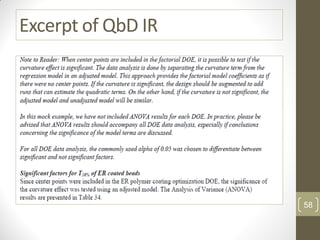
Excerpt of QbD IR
58
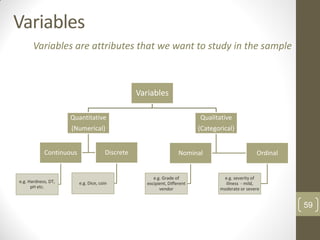
Variables
Variables
Quantitative
(Numerical)
Continuous
e.g. Hardness, DT,
pH etc.
Discrete
e.g. Dice, coin
Qualitative
(Categorical)
Nominal
e.g. Grade of
excipient, Different
vendor
Ordinal
e.g. severity of
illness - mild,
moderate or severe
Variables are attributes that we want to study in the sample
59
Variables
• Variables can be further classified as:
• Dependent/Response. Variable of primary interest
(e.g. Dissolution, Hardness ). Not controlled by the
experimenter.
• Independent/Factor
• called a Factor when controlled by experimenter.
(e.g. Disintegrant level, Binder level, Kneading time, Chopper Speed
etc. )
60

Central Composite Design

  • 1.
  • 2.
    Index • Basics ofCCD Slide 3 - 8 Basics • Define Objective & Identify Variables Slide 9 - 11 Step 1 & 2 • Create Design Slide 12 - 21 Step 3 • Design Evaluation Slide 23 - 27 Step 4 • Experimentation Slide 28 - 31 Step 5 • Analysis & Interpretation Slide 32 - 39 Step 6 • Diagnostics Slide 40 - 48 Step 7 • Model graphs Slide 49 - 53 Step 8 • Knowledge Space Slide 54 - 57 Step 9 • Points to be captured in PDR Slide 32 - 39 Step 10 2
  • 3.
    Experiment Design Process Theflow chart below illustrates the experiment design process: M o s t I m p o rt a n t 3
  • 4.
    Components of ExperimentalDesign • There are three components of the Formula/process that are analysed by a design of experiments: • Factors – Independent Variable will form factors. Variables which can be controlled by an experimenter. • Levels – Range of each factor in the study or Grade of Excipients • Response - or output of the experiment. 4
  • 5.
  • 6.
    Central Composite Design CentrePoints and Axial Points are added to estimate curvature effect 6
  • 7.
    Types of CCD 1.CCC – Circumscribed CCD • Each factor studied at 5 level • Axial points establishes new high and low ranges 2. CCF – Face centered CCD • Axial points are at center of each side of factorial space 3. CCI – Inscribed CCD • For those situations where limit specified for each factor is real limit. Beyond or below that level it is not possible to perform an experiment. • Here also Each factor studied at 5 level • It is a Scaled down of CCC design 7
  • 8.
    Case Study :Fluid Bed Granulation • Example Functional Category Batch Size Ingredients mg/tab %w/w Dry Mix Microcrystalline Cellulose (AVICEL PH 102) Diluent 90.00 27.27 Silicon dioxide (Aeoperl 300 Pharma) Adsorbent 10.00 3.03 SSG Type A Disintegrant 8.00 2.42 Drug Solution Drug Substance Active 90.00 27.27 Povidone K-30 Binder 8.00 2.42 Silicon dioxide (Aeoperl 300 Pharma) Adsorbent 10.00 3.03 SLS Surfactant 5.00 1.52 Ethanol Solvent qs Dichloromethane Solvent qs Extra Granular Microcrystalline Cellulose (AVICEL PH 102) Diluent 92.00 27.88 Silicon dioxide (Aeoperl 300 Pharma) Glidant 3.00 0.91 SSG Type A Disintegrant 8.00 2.42 Talc (M) Anti-adherent 3.00 0.91 Magnesium Stearate Lubricant 3.00 0.91 Total Core 330.00 100.00 8
  • 9.
    Step 1 -Define Objective • Objective: • Establishing preliminary formulation component levels and demonstrating the rationale for selection of the excipient levels. The study can also be utilized to determine if acceptable product attribute are obtained over the range of excipient concentrations studied. Note: State Objective in Measurable Responses Factor Interaction Formula Optimization Process Optimization Never Club Formula and Process Optimization in single Study 9
  • 10.
    Step 2 -Identify and Characterize variables Functional Category Batch Size Ingredients mg/tab %w/w Dry Mix Microcrystalline Cellulose (AVICEL PH 102) Diluent 90.00 27.27 Silicon dioxide (Aeoperl 300 Pharma) Adsorbent 10.00 3.03 SSG Type A Disintegrant 8.00 2.42 Drug Solution Drug Substance Active 90.00 27.27 Povidone K-30 Binder 8.00 2.42 Silicon dioxide (Aeoperl 300 Pharma) Adsorbent 10.00 3.03 SLS Surfactant 5.00 1.52 Ethanol Solvent qs Dichloromethane Solvent qs Extra Granular Microcrystalline Cellulose (AVICEL PH 102) Diluent 92.00 27.88 Silicon dioxide (Aeoperl 300 Pharma) Glidant 3.00 0.91 SSG Type A Disintegrant 8.00 2.42 Talc (M) Anti-adherent 3.00 0.91 Magnesium Stearate Lubricant 3.00 0.91 Total Core 330.00 10
  • 11.
    Identify and Characterizevariables…. 2 • Define Variables • Factors To Be Studied (Independent Variables - Factors) • Binder Level - Numerical • Surfactant Level – Numerical • Disintegrant Level - Numerical • Grade of Adsorbent – Categorical (Nominal) • Responses To Be Measured (Dependent Variables - Responses) • Dissolution at 30 min (Should Be in Line with Specification) • Disintegration Time • Polymorphic Form • Hardness • Only the Factors having impact on CQAs should be selected • Only those Responses having direct/indirect link with CQAs should be selected Total 4 Factors 3 Numerical 1 Categorical 11
  • 12.
    Step 3: CreateDesign 12
  • 13.
    Central Composite Design •Start Design Expert Software 13
  • 14.
    1. Select ResponseSurface then Select Central Composite 2. Select no. of Numerical and Categorical factors. 3. Write Name of Factor, Units. 4. Put low and high value of factor in Actual. Never use coded values. 1. Check for any negative values in +/- Alpha. 2. If any of the Factor range is displaying Negative Values, Follow step mentioned on next slide. Always check : Alpha values should not be in Minus as it is not possible to execute trials with minus values. Execution of trial with (–) Surfactant level?? By default Software will take “Rotatable Alpha Value” 14
  • 15.
    1. Alpha valuedetermines the position of axial run. 2. Default is Rotatable for up to 5 factors: 3. Adv.: will have equal std. error of prediction Face Centered: Each factor will be tested at 3 level Use when region of interest and region of operability are nearly same. Curvature is best estimated by Rotatable Design Rotatable: Each factor will be tested at 5 level “Recommended when all factor ranges are within allowable operating condition” i.e. Alpha range is positive for all factors 15
  • 16.
    For Negative AlphaValues – Option 1 (Face Centered – Covers Entire Factor Range) Steps: 1. First click on Option and select Face centered design. 2. Factor ranges will be automatically displayed in Alpha Columns 1 2 16
  • 17.
    For Negative AlphaValues – Option 2 (Rotatable – Restricted Operating Range) Steps: 1. First click on Option “Enter Factor Ranges in Terms of Alpha”. 2. Enter Factor ranges you want to study in alpha columns Enter same values which you have entered in Low & High Column inscribing restricts the actual design region to the defined variable ranges by locating the axial points at the lower and upper bounds of the variable ranges 17
  • 18.
    Selected Option 1(Face Centered – Covers Entire Factor Range) Steps: 1. First click on Option and select Face centred design. 2. Factor ranges will be automatically displayed in Alpha Columns 3. Click “Continue” 1 2 3 18
  • 19.
    Put Name, typeand levels of categorical factor 19
  • 20.
    Recheck the responses,Correct if required and Click on finish 20
  • 21.
    1. Design Layoutwill be displayed. (Notice that –alpha and +alpha match the low and high levels in FCD) 21
  • 22.
    Step 4: DesignEvaluation (BeforeInitiatingExperimentation) 22
  • 23.
    Evaluate Precision (Slide1of3) •Use the FDS graph to see if the responses can be estimated precisely enough: (Calculate Signal/Noise ratio) • Dissolution: • Want to estimate Mean Within ± 5% • Estimated Std. Deviation is 3% 5/3=1.7 • Hardness: • Want to estimate Mean Within ± 2 kp • Estimated Std. Deviation is 0.6 kp 2/0.6=3.33 • Disintegration Time: • Want to estimate Mean Within ± 2 min • Estimated Std. Deviation is 0.5 min 2/0.5=4 Before running the experiments make sure the design meets your needs 23
  • 24.
    Evaluate Precision (Slide2of3) Whenyou have multiple responses, look at worst case first (min. ratio). If its OK, all others will also be good. In this case Dissolution (delta/sigma = 5/3 = 1.7) is harder to realize than other responses. Minimum FDS should be 0.8 24
  • 25.
    Evaluate Precision (Slide3of3) •Use the Mean error type if the goal of the experiment is to provide an optimization model. • Use the Pred error type if the goal of the experiment is to provide accurate predictions. • Use the Diff error type as a substitute for power on response surface and mixture designs. • Use the Tolerance setting if you need to meet tolerance specifications. • FDS should be at least 0.8 or 80% for exploration, and 100% for robustness testing. FDS can be improved by adding runs, reducing the "s", increasing the "d", and increasing the "a". 25
  • 26.
    Step 5: PerformExperiments and Input Data 26
  • 27.
    Run Experiments • Sincedesign is precise enough, run the experiments and note the responses in response column. 1 2 You can use “Run Sheet” while execution of trial but not mandatory 27
  • 28.
    Fill The ResponseData….. 1 • Option 1: Enter data manually in Software • Option 2: Export the file to excel, feed the data and simulate/import to your existing design 1 2 28
  • 29.
    Fill The ResponseData….. 2 29
  • 30.
    Step 6: Analysis& Interpretation 30
  • 31.
    Data Transformation 1. Goto diagnostic tab 2. In Box-Cox plot, check for recommended transformation 31
  • 32.
    Analysis: Fit Summary…..1 Do not select aliased model The Suggested model is selected because: 1. Quadratic model is significant, p-value < 0.05 2. Lack of fit is insignificant, p-value> 0.10 3. Having highest adjusted and predicted R-squares. Never Select Aliased Model 32
  • 33.
    Analysis: Fit Summary…..2 • Focus on the Model maximizing the “Pred R-Squared”, or equivalently minimizing the “PRESS” • The diff. between Adjusted R-squared and Pred. R-Squared should be < 0.2 33
  • 34.
    Analysis: Selection ofModel To reduce the model use Backward selection • Select finalized model. In this case it is “Quadratic”. Note: There are four algorithms for selection, 1) Backward, 2) Forward, 3) Stepwise and 4) All- hierarchial. For experiments with little or no colinearity all four will lead to a same reduced model. When the factors are correlated with one other, the reduced model differ depending on the selection method used. Backward selection has the advantage of starting with all terms in the model. 34
  • 35.
    Analysis: Anova withbackward selection • The least significant terms will be removed automatically • Model P-value < 0.05 • Model Lack-of-fit > 0.10 35
  • 36.
    Analysis: Full VsReduced Quadratic model Full Model Reduced Model How do you compare full vs reduced model Answer: reduction improves lack-of-fit 36
  • 37.
    Analysis: Full VsReduced Quadratic model Std. Dev. 3.77 R-Squared 0.7986 Mean 92.22 Adj R-Squared 0.7756 C.V. % 4.08 Pred R-Squared 0.7466 PRESS 624.61 Adeq Precision 17.424 Std. Dev. 3.97 R-Squared 0.8334 Mean 92.22 Adj R-Squared 0.7501 C.V. % 4.31 Pred R-Squared 0.6270 PRESS 919.39 Adeq Precision 11.898 Full Model Reduced Model Predicted R-Squared and Adequate Precision improved with Reduced Model 37
  • 38.
  • 39.
    1. Go todiagnostic plot and use diagnostic tool tab to confirm assumptions for ANOVA are met. 2. Check all the plots always 39
  • 40.
    Analysis: Normal Plot& Residual Vs. PredictedPlots Normal plot of residuals: • Check for normality of data. • Residuals should follow a straight line. • Some scatter is expected. • Look for definite patterns, e.g. “S Shape”. Residuals Vs. Predicted: • This plot is used to confirm the constant variance assumption • All the points should be within the 3 sigma limits • Some scatter is expected • Look for definite patterns, e.g. Megaphone “< Shape”. 40
  • 41.
    Analysis: Residual vs.Run & Predicted Vs Actual Residuals Vs. Run: • Used to confirm the independence assumption. • All the points should be within the 3 sigma limits. • Some scatter is expected. • If any point fall outside 3 sigma limit, this points are statistical outlier. • Problem with the model • Transformation problem • Wrong data entered • Wrong experiment done Predicted Vs. Actual: • Use to see how the model predicts over the range of data. • Some scatter is expected. • For optimization study it`s not very important. • Its imp. When you want to predict a response based on change in factor level. 41
  • 42.
    Analysis: Box-Cox Box-Cox plottells you whether transformation of data may help. Notice that it says “none” for recommended transformation 42
  • 43.
    Analysis: Residual Vs.Factors BAD: More variation at one endGOOD: Random scatter both ends Watch ONLY for very large differences. 43
  • 44.
    Analysis: Influence– Cook`sDistance& DFFITs Cook’s Distance: • Cases with large values relative to other cases should be investigated. • They could be caused by recording errors, an incorrect model or a design point far from the remaining cases. DFFITS – Difference in Fits: • Look for values outside the blue limits. • A high value indicates the predicted response for a particular run changes when the particular run is removed form the regression.helps if you see more than one outlier in other diagnostic plots. Investigate the run with the largest Cook’s Distance first. 44
  • 45.
    Analysis: Influence- DFBETAs DFBetas:Difference in Betas Used to identify model and data problems. You must click through the Term Pull down menu to look through all this graphs. 45
  • 46.
    Response Surface -Influence TOOL Description WIIFM Internally Studentized Residuals Residual divided by the estimated standard deviation of that residuals Normally constant σ2 Externally studentized Residuals Residuals divided by the estimated std dev of that residual, without the ith Case (deletion statistic) Outlier detection and/or model misspecification Cook’s Distance Change in joint confidence ellipsoid (regression) with and without a run (deletion statistic) Overall Influence DFFits (difference in fits) Change in prediction with and without a run; the influence a run has on the predictions (deletion statistic) Influence on fitted value DFBetas (difference in betas) Change in each model coefficient(beta) with and without a run (deletion statistic) Influence on coefficients 46 WIIFM – What is in it for me
  • 47.
    Model Graphs Look atdifferent model graphs, i.e. interaction, 2D, 3D, pertubation to understand the impact of factor on responses. 47
  • 48.
    Interaction Graph With Aerosil200, increasing Surfactant significantly improves the dissolution. While with Aeroperl 300 there is only a slight increase in dissolution with increase in surfactant level. If the LSD bars for two means overlap, the difference in those means is not large enough to be declared significant change. 48
  • 49.
    Interaction Graph To aidin seeing whether the bars overlap, try right clicking on LSD bar and choosing “Draw horizontal reference”. 49
  • 50.
    Analysis of Eachfactor • Analyze all the factors using similar method 50
  • 51.
    Develop Good Model •Be sure that the fitted surface adequately represents your process before you use it for optimization 1. A significant model: Large F-value with p<0.05 2. Insignificant lack-of-fit: F-value with p>0.10 3. Adequate precision>4. 4. Well behaved residuals: Check diagnostic plots! 51
  • 52.
    Creating Knowledge Space •For multiple response optimization, it`s better to use Numerical optimization. 52
  • 53.
    Data to becaptured in PDR • Goal of the study • Study name • Factors studied and corresponding level • Responses measured • Design matrix • Graphs and conclusion – Interaction/Pareto/Contour Etc. • Result obtained from study as pasted below 53
  • 54.
    Data to becaptured in PDR…. 2 • ANOVA 54
  • 55.
  • 56.
  • 57.
    Selection Of Design Number ofFactors Comparative Objective Screening Objective Response Surface Objective 1 1-factor completely randomized design _ _ 2 - 4 Randomized block design Full or fractional factorial Central composite or Box-Behnken design 5 or more Randomized block design Fractional factorial or Plackett-Burman Screen first to reduce number of factors Interaction Study Factorial Design Curvature Effect RSM - Central Composite Design 57
  • 58.
  • 59.
    Variables Variables Quantitative (Numerical) Continuous e.g. Hardness, DT, pHetc. Discrete e.g. Dice, coin Qualitative (Categorical) Nominal e.g. Grade of excipient, Different vendor Ordinal e.g. severity of illness - mild, moderate or severe Variables are attributes that we want to study in the sample 59
  • 60.
    Variables • Variables canbe further classified as: • Dependent/Response. Variable of primary interest (e.g. Dissolution, Hardness ). Not controlled by the experimenter. • Independent/Factor • called a Factor when controlled by experimenter. (e.g. Disintegrant level, Binder level, Kneading time, Chopper Speed etc. ) 60