
Top Tips
The Task
• Package: album (digipack), website or advert,
music video
• 100 marks: research and planning 20, video 40,
digipack 10, website 10, evaluation 20
Plan for everything
• Storyboard- you can always shoot extra
• Plan people, places, props, costumes
• Get everyone’s mobile numbers
• Aim to shoot it early, not up against deadline
• Make sure your performers have rehearsed and
know the words
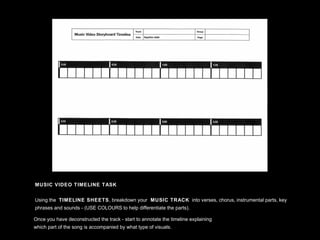
MUSIC VIDEO TIMELINE TASK
Using the TIMELINE SHEETS, breakdown your MUSIC TRACK into verses, chorus, instrumental parts, key
phrases and sounds - (USE COLOURS to help differentiate the parts).
Once you have deconstructed the track - start to annotate the timeline explaining
which part of the song is accompanied by what type of visuals.
know your equipment
• Do test shots to try out effects
• Check any quirks of the camera
• Make sure you have tripod (and ‘shoe’)
• Is the disk loaded ?
• experiment with editing before the main thing
• Have you got the music and an audible source?
the shoot
• Shoot the performance at least ten times with different
set-ups
• Make sure you have plenty of cutaways
• Experiment with extra angles and lighting changes
• Don’t forget: lots of close-ups !
• Enthuse your performers- they must give it plenty!
• Shoot more than you think you will need
the edit
• Synch up performances first
• Get the whole picture rather than tiny detail
• Cut and cut again
• Aim for a dynamic piece of work
• Do any effects work last
• Upload a rough cut to your blog and get
feedback
look elsewhere for tips
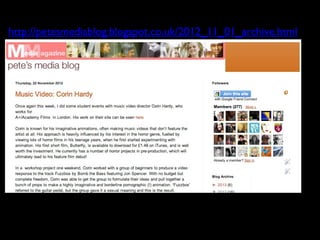
• petesmediablog
• Cranford school wix
• Latymer school websites, digipacks and videos
• Hurtwood media
• Islington Sixth Form
Text
http://petesmediablog.blogspot.co.uk/2012_11_01_archive.html
http://cranfordmedia.wix.com/mod2013
http://www.latymermediamusicvideo.blogspot.co.uk/
http://latymermusicvideo2013group3.blogspot.co.uk/
http://latymermusicvideo2013group2.blogspot.co.uk/
http://www.youtube.com/user/hurtwoodhousemedia
http://candipop12.blogspot.co.uk/
The Blog
• Evidence of whole journey
• Research, Planning, Construction of all 3
products
• Evaluation
• Finished products
Good blogs
• http://oliviadarceyhawthorne.blogspot.co.uk
• http://hurtwoodmedia12beesupavarasuwat.blogs
• http://gregfellows72.blogspot.co.uk/
• http://mollyeve73.blogspot.co.uk/
Good Housekeeping
• tidy desktop
• storage of footage
• labelling files
• tidy blog
Evidence 1
• real music videos
• real music videos of your genre
• any visuals that have influenced you (films,
TV, adverts, music videos, photos)
• ‘steal-o-matic’
• costume photos, location photos, test shots
Evidence 2
• real album covers
• real band websites
• early exercises designing album covers
• changes to your designs- screengrabs
• show how it is a ‘package’
Random ALBUM COVER exercise
Step 1: Go to: http://en.wikipedia.org/wiki/Special:Random
The title of the first random Wikipedia article you get is the NAME of your band.
Step 2: Go to: http://quotationspage.com/random.php3
The last four or five words of the very last quote of the page is the TITLE of your
album.
Step 3: Go to: http://www.flickr.com/explore/interesting/7days/
The third picture, no matter what it is, is the COVER of your album.
Step 4: Use Photoshop to put it altogether and design the front and back cover of
the album.
[Photoshop canvas size: H 12 cm x W 24 cm / 300 dpi]
Step 5: Upload your finished album artwork to Flickr
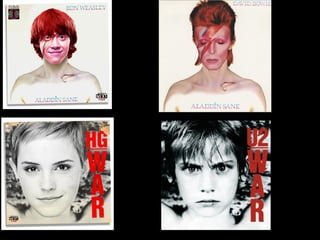
Re-makes
Evidence 3
• student music videos, digipacks and websites
with comments
• Jake’s videos and tips from today
• photos and clips from today
• storyboard and animatic of your video plan
Evidence 4
• feedback from your peers
• rough cuts of your video
• screengrabs of your edit in progress
• ‘behind the scenes’
• regular commentary on what you are doing
when to do website/digipack
• in parallel, NOT at the end!
• taking photos for later use
• having lots of extra ideas
• can do more than one design within the
group
Top Tips

Music video top tips

  • 1.
  • 2.
    The Task • Package:album (digipack), website or advert, music video • 100 marks: research and planning 20, video 40, digipack 10, website 10, evaluation 20
  • 3.
    Plan for everything •Storyboard- you can always shoot extra • Plan people, places, props, costumes • Get everyone’s mobile numbers • Aim to shoot it early, not up against deadline • Make sure your performers have rehearsed and know the words
  • 4.
    MUSIC VIDEO TIMELINETASK Using the TIMELINE SHEETS, breakdown your MUSIC TRACK into verses, chorus, instrumental parts, key phrases and sounds - (USE COLOURS to help differentiate the parts). Once you have deconstructed the track - start to annotate the timeline explaining which part of the song is accompanied by what type of visuals.
  • 5.
    know your equipment •Do test shots to try out effects • Check any quirks of the camera • Make sure you have tripod (and ‘shoe’) • Is the disk loaded ? • experiment with editing before the main thing • Have you got the music and an audible source?
  • 6.
    the shoot • Shootthe performance at least ten times with different set-ups • Make sure you have plenty of cutaways • Experiment with extra angles and lighting changes • Don’t forget: lots of close-ups ! • Enthuse your performers- they must give it plenty! • Shoot more than you think you will need
  • 7.
    the edit • Synchup performances first • Get the whole picture rather than tiny detail • Cut and cut again • Aim for a dynamic piece of work • Do any effects work last • Upload a rough cut to your blog and get feedback
  • 8.
    look elsewhere fortips • petesmediablog • Cranford school wix • Latymer school websites, digipacks and videos • Hurtwood media • Islington Sixth Form
  • 9.
  • 10.
  • 11.
  • 12.
  • 13.
  • 14.
    The Blog • Evidenceof whole journey • Research, Planning, Construction of all 3 products • Evaluation • Finished products
  • 15.
    Good blogs • http://oliviadarceyhawthorne.blogspot.co.uk •http://hurtwoodmedia12beesupavarasuwat.blogs • http://gregfellows72.blogspot.co.uk/ • http://mollyeve73.blogspot.co.uk/
  • 16.
    Good Housekeeping • tidydesktop • storage of footage • labelling files • tidy blog
  • 17.
    Evidence 1 • realmusic videos • real music videos of your genre • any visuals that have influenced you (films, TV, adverts, music videos, photos) • ‘steal-o-matic’ • costume photos, location photos, test shots
  • 18.
    Evidence 2 • realalbum covers • real band websites • early exercises designing album covers • changes to your designs- screengrabs • show how it is a ‘package’
  • 19.
    Random ALBUM COVERexercise Step 1: Go to: http://en.wikipedia.org/wiki/Special:Random The title of the first random Wikipedia article you get is the NAME of your band. Step 2: Go to: http://quotationspage.com/random.php3 The last four or five words of the very last quote of the page is the TITLE of your album. Step 3: Go to: http://www.flickr.com/explore/interesting/7days/ The third picture, no matter what it is, is the COVER of your album. Step 4: Use Photoshop to put it altogether and design the front and back cover of the album. [Photoshop canvas size: H 12 cm x W 24 cm / 300 dpi] Step 5: Upload your finished album artwork to Flickr
  • 21.
  • 23.
    Evidence 3 • studentmusic videos, digipacks and websites with comments • Jake’s videos and tips from today • photos and clips from today • storyboard and animatic of your video plan
  • 24.
    Evidence 4 • feedbackfrom your peers • rough cuts of your video • screengrabs of your edit in progress • ‘behind the scenes’ • regular commentary on what you are doing
  • 25.
    when to dowebsite/digipack • in parallel, NOT at the end! • taking photos for later use • having lots of extra ideas • can do more than one design within the group
  • 26.